

Page 1
ENABLE
An IQ System® to Host Computer Interface
©1999 by Crown International, Inc., P.O. Box 1000, Elkhart, Indiana 46515-1000
U.S.A. Telephone: 219-294-8000. The
Audio Unit of Crown International, Inc. Trademark Notice:
and Crown
national, Inc. Other trademarks are the property of their respective owners.
,®
Amcron® and IQ System
IQ-INT II
®
are registered trademarks of Crown Inter-
is produced by the Professional
PIPTM is a trademark
Printed on
recycled paper.
101937-3
9/99
Page 2
THREE YEAR
FULL WARRANTY
WORLDWIDE
The Crown Audio Division of Crown International, Inc., 1718 West
Mishawaka Road, Elkhart, Indiana 46517-4095 U.S.A. warrants to you,
the ORIGINAL PURCHASER and ANY SUBSEQUENT OWNER of
each NEW Crown1 product, for a period of three (3) years from the date
of purchase by the original purchaser (the “warranty period”) that the
new Crown product is free of defects in materials and workmanship,
and we further warrant the new Crown product regardless of the reason for failure, except as excluded in this Crown Warranty.
1
Note: If your unit bears the name “Amcron,” please substitute it for the
name “Crown” in this warranty.
ITEMS EXCLUDED FROM THIS CROWN WARRANTY
This Crown Warranty is in effect only for failure of a new Crown product
which occurred within the Warranty Period. It does not cover any product which has been damaged because of any intentional misuse, accident, negligence, or loss which is covered under any of your insurance
contracts. This Crown Warranty also does not extend to the new Crown
product if the serial number has been defaced, altered, or removed.
We will remedy any defect, regardless of the reason for failure (except
as excluded), by repair, replacement, or refund. We may not elect refund unless you agree, or unless we are unable to provide replacement, and repair is not practical or cannot be timely made. If a refund is
elected, then you must make the defective or malfunctioning product
available to us free and clear of all liens or other encumbrances. The
refund will be equal to the actual purchase price, not including interest,
insurance, closing costs, and other finance charges less a reasonable
depreciation on the product from the date of original purchase. Warranty work can only be performed at our authorized service centers.
We will remedy the defect and ship the product from the service center
within a reasonable time after receipt of the defective product at our
authorized service center.
You must notify us of your need for warranty service not later than
ninety (90) days after expiration of the warranty period. All components
must be shipped in a factory pack. Corrective action will be taken within
a reasonable time of the date of receipt of the defective product by our
authorized service center. If the repairs made by our authorized service center are not satisfactory, notify our authorized service center
immediately.
DISCLAIMER OF CONSEQUENTIAL AND INCIDENTAL
YOU ARE NOT ENTITLED TO RECOVER FROM US ANY INCIDENTAL DAMAGES RESULTING FROM ANY DEFECT IN THE NEW
CROWN PRODUCT. THIS INCLUDES ANY DAMAGE TO ANOTHER
PRODUCT OR PRODUCTS RESULTING FROM SUCH A DEFECT.
No person has the authority to enlarge, amend, or modify this Crown
Warranty. This Crown Warranty is not extended by the length of time
which you are deprived of the use of the new Crown product. Repairs
and replacement parts provided under the terms of this Crown Warranty shall carry only the unexpired portion of this Crown Warranty.
We reserve the right to change the design of any product from time to
time without notice and with no obligation to make corresponding
changes in products previously manufactured.
No action to enforce this Crown Warranty shall be commenced later
than ninety (90) days after expiration of the warranty period.
THIS STATEMENT OF WARRANTY SUPERSEDES ANY OTHERS
CONTAINED IN THIS MANUAL FOR CROWN PRODUCTS.
Telephone: 219-294-8200. Facsimile: 219-294-8301 Telephone: 219-294-8200. Facsimile: 219-294-8301
SUMMARY OF WARRANTY
WHAT THE WARRANTOR WILL DO
HOW TO OBTAIN WARRANTY SERVICE
DAMAGES
WARRANTY ALTERATIONS
DESIGN CHANGES
LEGAL REMEDIES OF PURCHASER
9/90
The Crown Audio Division of Crown International, Inc., 1718 West Mishawaka Road,
Elkhart, Indiana 46517-4095 U.S.A. warrants to you, the ORIGINAL PURCHASER
and ANY SUBSEQUENT OWNER of each NEW Crown product, for a period of
three (3) years from the date of purchase by the original purchaser (the “warranty
period”) that the new Crown product is free of defects in materials and workmanship. We further warrant the new Crown product regardless of the reason for failure,
except as excluded in this Warranty.
This Crown Warranty is in effect only for failure of a new Crown product which
occurred within the Warranty Period. It does not cover any product which has been
damaged because of any intentional misuse, accident, negligence, or loss which is
covered under any of your insurance contracts. This Crown Warranty also does not
extend to the new Crown product if the serial number has been defaced, altered, or
removed.
We will remedy any defect, regardless of the reason for failure (except as excluded),
by repair, replacement, or refund. We may not elect refund unless you agree, or
unless we are unable to provide replacement, and repair is not practical or cannot
be timely made. If a refund is elected, then you must make the defective or malfunctioning product available to us free and clear of all liens or other encumbrances. The
refund will be equal to the actual purchase price, not including interest, insurance,
closing costs, and other finance charges less a reasonable depreciation on the
product from the date of original purchase. Warranty work can only be performed at
our authorized service centers or at the factory. We will remedy the defect and ship
the product from the service center or our factory within a reasonable time after
receipt of the defective product at our authorized service center or our factory. All
expenses in remedying the defect, including surface shipping costs in the United
States, will be borne by us. (You must bear the expense of shipping the product
between any foreign country and the port of entry in the United States and all taxes,
duties, and other customs fees for such foreign shipments.)
You must notify us of your need for warranty service not later than ninety (90) days
after expiration of the warranty period. All components must be shipped in a factory
pack, which, if needed, may be obtained from us free of charge. Corrective action
will be taken within a reasonable time of the date of receipt of the defective product
by us or our authorized service center. If the repairs made by us or our authorized
service center are not satisfactory, notify us or our authorized service center immediately.
DISCLAIMER OF CONSEQUENTIAL AND INCIDENTAL DAMAGES
YOU ARE NOT ENTITLED TO RECOVER FROM US ANY INCIDENTAL DAMAGES RESULTING FROM ANY DEFECT IN THE NEW CROWN PRODUCT. THIS
INCLUDES ANY DAMAGE TO ANOTHER PRODUCT OR PRODUCTS RESULTING FROM SUCH A DEFECT. SOME STATES DO NOT ALLOW THE EXCLU-
SION OR LIMITATIONS OF INCIDENTAL OR CONSEQUENTIAL DAMAGES, SO
THE ABOVE LIMITATION OR EXCLUSION MAY NOT APPLY TO YOU.
No person has the authority to enlarge, amend, or modify this Crown Warranty. This
Crown Warranty is not extended by the length of time which you are deprived of the
use of the new Crown product. Repairs and replacement parts provided under the
terms of this Crown Warranty shall carry only the unexpired portion of this Crown
Warranty.
We reserve the right to change the design of any product from time to time without
notice and with no obligation to make corresponding changes in products previously manufactured.
THIS CROWN WARRANTY GIVES YOU SPECIFIC LEGAL RIGHTS, YOU MAY
ALSO HAVE OTHER RIGHTS WHICH VARY FROM STATE TO STATE. No action
to enforce this Crown Warranty shall be commenced later than ninety (90) days
after expiration of the warranty period.
THIS STATEMENT OF WARRANTY SUPERSEDES ANY OTHERS
NORTH AMERICA
SUMMARY OF WARRANTY
ITEMS EXCLUDED FROM THIS CROWN WARRANTY
WHAT THE WARRANTOR WILL DO
HOW TO OBTAIN WARRANTY SERVICE
WARRANTY ALTERATIONS
DESIGN CHANGES
LEGAL REMEDIES OF PURCHASER
CONTAINED IN THIS MANUAL FOR CROWN PRODUCTS.
9/90
Page 3
The information furnished in this manual does not include all of the details of design, production, or variations
of the equipment. Nor does it cover every possible situation which may arise during installation, operation or
maintenance. If you need special assistance beyond the scope of this manual, please contact our Technical
Support Group.
Crown Audio Division Technical Support Group
Plant 2 SW, 1718 W. Mishawaka Rd., Elkhart, Indiana 46517 U.S.A.
Phone: 800-342-6939 (North America, Puerto Rico and Virgin Islands) or 219-294-8200
Fax: 219-294-8301 Fax Back (North America only): 800-294-4094 or 219-293-9200
Fax Back (International): 219-294-8100 Internet: http://www.crownaudio.com
WARNING
TO REDUCE THE RISK OF ELECTRIC
SHOCK, DO NOT EXPOSE THIS
EQUIPMENT TO RAIN OR MOISTURE!
PLEASE NOTE
The following universal symbols may appear on your product and/or in various
sections of this manual. Wherever they appear, they are to be interpreted as follows:
Lightning Bolt Symbol:
This symbol is used to alert the user to the presence of dangerous
voltages and the possible risk of electric shock.
Exclamation Mark Symbol:
This symbol is used to alert the user to refer to the instruction
manual for important operating or maintenance instructions.
FCC Class A Compliance
This equipment has been tested and found to comply with the limits for Class A
Digital Device, pursuant to Part 15 of the FCC rules. These limits are designed to
provide reasonable protection against harmful interference when the equipment is
operated in a commercial environment. This equipment generates, uses and can ra
diate radio frequency energy and, if not installed and used in accordance with the
instruction manual, may cause harmful interference to radio communications. Operation of this equipment in a residential area is likely to cause harmful interference
in which case the user will be required to correct the interference at his own expense.
The user is cautioned that any changes or modifications not expressly approved by
the party responsible for compliance could void the user’s authority to operate the
equipment.
Note: For a system to comply with FCC rules, all components in the system must be
in compliance. Please consult the instruction manuals of all components in an IQ
System for FCC compliance.
Page 4

Important Safety Instructions
IQ-INT II IQ Interface
1) Read these instructions.
2) Keep these instructions.
3) Heed all warnings.
4) Follow all instructions.
5) Do not use this apparatus near water.
6) Clean only with a dry cloth.
7) Do not block any ventilation openings. Install in
accordance with the manufacturer’s instructions.
8) Do not install near any heat sources such as radiators, heat registers, stoves, or other apparatus
that produce heat.
9) Do not defeat the safety purpose of the polarized
or grounding-type plug. A polarized plug has two
blades with one wider than the other. A grounding-type plug has two blades and a third grounding prong. The wide blade or the third prong is
provided for your safety. If the provided plug
does not fit into your outlet, consult an electrician
for replacement of the obsolete outlet.
10) Protect the power cord from being walked on or
pinched, particularly at plugs, convenience receptacles, and the point where they exit from the
apparatus.
11) Only use attachments/accessories specified by
the manufacturer.
12) Use only with a cart, stand, bracket, or table
specified by the manufacturer, or sold with the
apparatus. When a cart is used, use caution
when moving the cart/apparatus combination to
avoid injury from tip-over.
13) Unplug this apparatus during lightning storms or
when unused for long periods of time.
14) Refer all servicing to qualified service personnel.
Servicing is required when the apparatus has
been damaged in any way, such as power-supply cord or plug is damaged, liquid has been
spilled or objects have fallen into the apparatus,
the apparatus has been exposed to rain or moisture, does not operate normally, or has been
dropped.
CONTENTS
11
WW
elcomeelcome
1
W
elcome
11
WW
elcomeelcome
1.1 Unpacking _________________________________________ 5
22
FacilitiesFacilities
2
Facilities
22
FacilitiesFacilities
33
InstallationInstallation
3
Installation
33
InstallationInstallation
3.1 Connecting to a Crown Bus Loop ______________________6
3.2 Connecting to a Host Computer _______________________ 9
3.2.1 Connecting to a Modem ________________________ 9
3.2.2 Communication Settings ______________________ 10
44
TT
echnical Inforechnical Infor
4
T
echnical Infor
44
TT
echnical Inforechnical Infor
55
SpecificationsSpecifications
5
Specifications
55
SpecificationsSpecifications
66
ServiceService
6
Service
66
ServiceService
6.1 Worldwide Service ________________________________ 13
6.2 North American Service ____________________________ 13
6.2.1 Service at a North American Service Center _____ 13
6.2.2 Crown Factory Service _______________________ 13
__________________________________________________________________________________________
_____________________________________________
__________________________________________________________________________________________
__________________________________________________________________________________________
_____________________________________________
__________________________________________________________________________________________
__________________________________________________________________________________________
_____________________________________________
__________________________________________________________________________________________
mationmation
mation
mationmation
______________________________________________________________________________________
___________________________________________
______________________________________________________________________________________
____________________________________________________________________
__________________________________
____________________________________________________________________
________________________________________________________________________________
________________________________________
________________________________________________________________________________
1111
11
1111
1212
12
1212
1313
13
1313
55
5
55
55
5
55
66
6
66
Page 4
Reference Manual
Page 5
IQ-INT II IQ Interface
A
ENABLE
IN OUT1IN OUT2IN OUT3IN OUT4IN OUT5IN OUT6IN OUT7IN OUT
1
INPUT
2
WIRING
GND
3
CB D E
OUTPUT
WIRING
1
2
Fig. 1.1 IQ-INT II
1 Welcome
The
IQ-INT II
to eight different Crown Bus loops to a host computer. It
is a self-contained unit with its own Crown Bus drivers,
RS232/RS422 drivers and power supply. It has a
microprocessor that can be directed by the host
computer to execute commands, and it can send and
receive commands and data to and from IQ components
connected to its Crown Bus loops.
This manual will help you successfully install and use
your new interface. Please read all instructions,
warnings, and cautions. Also, for your protection, please
send in the warranty registration card today and save
your bill of sales as it is your official proof of purchase.
is an
IQ System
interface that connects up
8
COMPUTER
RS232 / RS422
USE SIDE ACCESS HOLE TO
SET BAUD RATE AND
OTHER COM SETTINGS.
2 Facilities
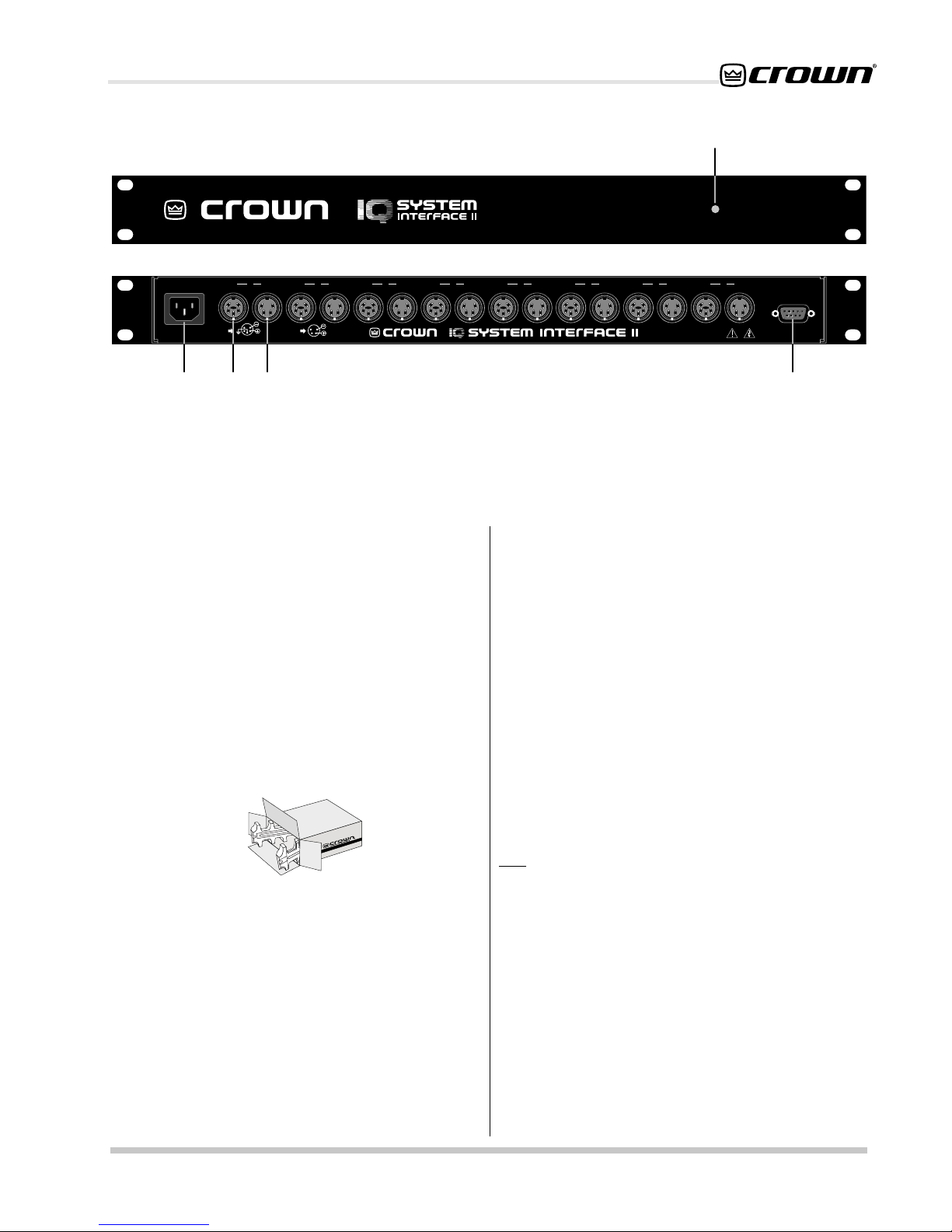
A. Enable Indicator
This front panel LED lights when the power cord is
connected to the AC mains and the unit is receiving
power. The
B. Power Inlet
A standard IEC power inlet. 115-VAC units shipped with
Nema® 5-15P power cord. 230-VAC units require a user
supplied IEC power cord.
C. Crown Bus Input Connector
A 5-pin female DIN connector is provided for input
connection to each of eight separate Crown Bus loops.
A mating Switchcraft 502-series connector can be
ordered from Crown (part C 7776-5). Pin 1 is negative
(–), pin 2 is positive (+), and pin 3 is ground. Pins 4 and
5 are not used.
used for the Crown Bus, the shield should be connected
only to pin 3 of the input connector.
IQ-INT II
has no on/off switch.
Note: If shielded twisted-pair wire is
1.1 Unpacking
Please unpack and inspect the new interface for any
damage that may have occurred during transit. If
damage is found, notify the transportation company
immediately. Only you, the consignee, may initiate a
claim for shipping damage. Crown will be happy to
cooperate fully as needed. Save the shipping carton as
evidence of damage for the shipper’s inspection.
Even if the unit has arrived in perfect condition, as most
do, save all packing materials so you will have them if
you ever need to transport the unit. NEVER SHIP THE
UNIT WITHOUT THE FACTORY PACK.
Reference Manual
D. Crown Bus Output Connector
A 4-pin female DIN connector is provided for output
connection to each of eight separate Crown Bus loops.
A mating Switchcraft 502 series connector can be
ordered from Crown (part C 7777-3). Pin 1 is ground
and pin 2 is positive (+). Pins 3 and 4 are not used.
Note: If shielded twisted-pair wire is used for the Crown
Bus, the shield should not be connected to the output
connector.
E. Computer RS232/RS422 Connector
A female, 9-pin D-subminiature connector is provided
for serial connection to a host computer. Both RS232
and RS422 communication standards are supported.
Page 5
Page 6

RS232/RS422
ENABLE
ENABLEDSPI ENABLEDSPI
ODEP
ENABLE
CH1 CH2
IOC
SPI
POWER
OFF
CH1 CH2
IQ-INT II IQ Interface
ODEP
ENABLE
IOC
SPI
POWER
OFF
ODEP
ENABLE
CH1 CH2
CH1 CH2
IOC
SPI
ODEP
IOC
SPI
POWER
OFF
ENABLE
POWER
OFF
Fig. 3.1 An IQ System with an IQ-INT II
3 Installation
The installation of an
major parts: Connecting to one or more Crown Bus loops
and connecting to the host computer.
3.1 Connecting to a Crown Bus Loop
The Crown Bus is a serial communication loop designed
to transmit IQ commands and data. As a communication
standard, it is independent of its wiring. This
characteristic allows you to wire a Crown Bus loop with
either fiber optic cabling or with inexpensive twistedpair wire, whichever is most appropriate. One
can have more than one Crown Bus loop, and each
loop must be unbroken for proper operation.
The
IQ-INT II
This makes it possible to divide the system into zones,
each with its own loop. Using the
multiple Crown Bus loops has several advantages and
disadvantages that are listed next.
Multiloop Advantages
• A break in communication in one loop does not
affect other loops.
• Over 250 IQ components of the same model can
be used in a system.
• The same IQ address can be used more than once
(once for each type of unit on each loop).
• Larger areas can often be covered without using
repeaters or fiber optic cabling.
supports up to eight Crown Bus loops.
IQ-INT II
can be divided into two
IQ System
IQ-INT II
to drive
ODEP
ENABLE
CROWN BUS LOOP 1
CROWN BUS LOOP 2
CH1 CH2
CH1 CH2
IOC
SPI
ODEP
IOC
SPI
POWER
OFF
ENABLE
POWER
OFF
Single Loop Advantages
• The
IQ-INT II
can send and receive data slightly
faster using a single loop.
• “Real-time” levels can be displayed for a greater
number of units.
The
IQ-INT II
is designed to work with inexpensive
twisted-pair wire, so it implements the Crown Bus as a
20-milliamp current loop operating at a baud rate of
38,400. If you want to use fiber optic cabling, contact
Crown’s Technical Support Group for information on the
appropriate transceivers.
Here are some guidelines for twisted-pair wiring:
• A Crown Bus loop must be unbroken
to carry
commands and data to and from connected units.
• Never cross-connect Crown Bus loops. Each
Crown Bus loop is an independent serial
communication circuit. A Crown Bus output is
connected to the input of the first IQ component on
the loop. Each unit’s output connects to the next
unit’s input until the loop returns to the interface
where it is connected to the input for the same loop.
• Use twisted-pair wire
at least 26 AWG in size. Use
twisted-pair wire with a shield when interference is
a concern. The wire should be of good quality and
should have low capacitance (30 picofarads/foot
or less). In most cases, interference is not a problem
and unshielded wire is a better choice because of
Page 6
Reference Manual
Page 7

IQ-INT II IQ Interface
OUT IN
++–
1 Input (–)
2 Input (+)
3 GND
4 Not used
5 Not used
Output (+)
Output (–)
Input (+)
Input (–)
IQ–INT II Input
2
5
3
4
1
Optional Shield
Barrier Block
IQ Component
Output
its lower capacitance. When used with the Crown
Bus, a shield serves two purposes: it helps prevent
data signals from being transmitted to nearby audio
wiring, and helps prevent high external RF levels
from interfering with data transmissions. If you must
install shielded wire, use a low-capacitance shielded
wire like West Penn 452 or equivalent.
• If shielded wire is used, only connect the shield
at the input connection.
Connecting both ends of
the shield may cause a ground loop.
• The total capacitance for each loop should be
40 nanofarads or less.
Add up the loop’s total
capacitance based on the wire’s rating in picofarads
per foot, and allow approximately 60 picofarads for
each connected IQ component. Experience has
shown that loops with 75 or more components
usually require at least one repeater.
• Add an IQ Repeater
for long loops greater than
1,000 feet (305 m) or when required by highcapacitance wire. Although repeaters are
recommended for loops longer than 1,000 feet, it is
often possible to set up reliable loops of 2,000 feet
(610 m) or more without a repeater. Although we
recommend shielded wire, unshielded wire typically
has less capacitance and can support longer loops.
• Never use the ground wire in a mic snake.
At
times, it may be convenient to run Crown Bus data
signals to and from stage monitor amplifiers along
unused wires in a mic snake. If this is done, do not
use the ground wire which is normally connected
to pin 1 on an XLR connector, or data noise will be
added to the audio lines. Use only the signal lines
which normally connect to pins 2 and 3 of the XLR’s.
Note: Because typical mic cables have higher
capacitance, the maximum possible Crown Bus
loop will be shorter than low-capacitance twistedpair wire.
IQ–INT II Output
DIN IQ Component
Input
41
23
Output (–) 1
Output (+) 2
Not used 3
Not used 4
Optional Shield
5
4
3
1 Input (–)
2 Input (+)
3 GND
4 Not used
5 Not used
Fig. 3.2 IQ-INT II Output Connection to a DIN Input.
The following examples show how to connect the
IQ-INT II to other IQ components on the Crown Bus:
IQ–INT II Output
41
23
Output (–) 1
Output (+) 2
Not used 3
Not used 4
O
ptional Shield
Barrier Block IQ
Component
Input
OUT IN
+ – + –
Output (+)
Output (–)
Input (+)
Input (–)
GND
Fig. 3.3 IQ-INT II Output Connection to Barrier Block Input.
1
2
Outside RF interference is seldom a problem for a Crown
Bus loop—especially if shielded twisted-pair wire is used.
However, there are extreme situations when fiber optic
wiring is recommended. For example, locating a Crown
Bus loop next to an AM radio transmission line may
require fiber optic transceivers and cabling. It may also
be more practical to use fiber optics for extremely long
Crown Bus loops when distances exceed several miles.
Three different of connectors are used for Crown Bus
wiring on IQ components. These include DIN connectors,
RJ45 connectors, and removable barrier strip plugs. The
IQ-INT II
uses 5-pin DINs for input and 4-pin DINs for
output. Figure 3.2 shows how to connect IQ components
with DIN connectors.
Reference Manual
Fig. 3.4 Barrier Block IQ Component Connection to an
IQ-INT II
Page 7
Page 8

IQ-INT II IQ Interface
IQ-INT II Output
RJ45 Input
Fig. 3.5 IQ-INT II Output Connection to RJ45 Input.
The IQ components on each Crown Bus loop are
connected in succession. Each loop begins and ends
with the
IQ-INT II
. The output of the interface connects
TO HOST COMPUTER
3
IN
T
U
O
2
IN
T
U
O
1
IN
R
E
W
O
IQ-INT II
P
RJ45 Output
IQ-INT II
Fig. 3.6 RJ45 Output Connection to a IQ-INT-II.
to the input of the first unit, then each unit’s output is
connected to the next unit’s input until the loop returns
to the interface. This is shown in Figure 3.7.
T
U
O
8
IN
T
U
O
7
IN
T
U
O
6
IN
T
U
O
5
IN
T
U
O
4
IN
T
U
O
R
E
T
U
P
M
O
C
IQ
MIXER
PROCESSOR /
IQ–PIP MODULES
AMPLIFIERS WITH
Fig. 3.7 Crown Bus Wiring from Output to Input.
CROWN BUS
Page 8
Reference Manual
Page 9

IQ-INT II IQ Interface
3.2 Connecting to a Host Computer
There are two main communication standards supported
by the
IQ-INT II
computer. They are RS232 and RS422.
RS232 is commonly used with IBM
compatibles. Because it uses unbalanced signal wiring,
it cannot be used for distances over 50 feet (15.2 m).
RS422 uses balanced signal wiring and can be used
for distances up to 2,000 feet (610 m) with data grade
cable.
Although not very common, RS423 communication can
also be used. It is a hybrid of RS232 and RS422 that
uses the unbalanced transmitter (TXD) wiring of RS232
and the balanced receiver (RXD) wiring of RS422. It
provides signal ground isolation between the transmit
and receive lines. With a proper cable, it can be used
over a greater distance than RS232, but over a shorter
distance than RS422. Contact the Crown Technical
Support Group if you want to use RS423 and need more
information.
The following illustrations show how to connect the
INT II
to the most common host serial ports:
for serial communication with a host
®
PCs and
IQ-
PC (RS232)
Cable connectors are numbered as they appear from the front.
Not used
ReceiveData (RXD)
Transmit Data (TXD)
Signal Ground (GND)
Request to Send (RTS)
Clear to Send (CTS)
Fig. 3.8 Standard RS232 Wiring
PC (RS422)
96
The female interface connector is shown as it appears.
Refer to the documentation
provided with your RS422
interface to identify the
correct pin connections.
IQ-INT II
51
96
PIN PIN
1,4,6,9
2
3
5
7
8
51
51
9
2
Transmit Data (TXD)
3
Receive Data (RXD)
5
Signal Ground (GND)
7
Clear to Send (CTS)
8
Request to Send (RTS)
PIN
1
Transmit Data (TXD+)
2
Transmit Data (TXD–)
3
Receive Data (RXD–)
4
Receive Data (RXD+)
5
Signal Ground (GND)
6
Clear to Send (CTS–)
7
Clear to Send (CTS+)
8
Request to Send
9
Request to Send
Fig. 3.9 RS422 Wiring
6
IQ-INT II
15
69
(RTS+)
(RTS–)
3.2.1 Connecting to a Modem
The
IQ-INT II
is also modem compatible. The
IQ-INT II
periodically sends out an “AT” command string {ATS0=1}
that automatically initializes a connected modem to its
max baud rate and auto-answer mode. A standard null
modem cable should be used between the interface
and modem with the exception of pin 4. Pin 4 of the 9-
STANDARD
9-PIN CABLE
MALE MALE
11
22
33
(MUST BE DISABLED)
4
55
66
77
88
99
9-PIN NULL MODEM
FEMALE MALE
11
22
33
4
44
55
66
77
88
99
IQ INTERFACE
pin RS232/242 connector on the back of the interface
should NOT be connected. This pin implements one
side of the RS422 type line receiver and, as such, allows
balanced wiring on a 9-pin connector. This configuration
is not compatible with some 232/null modem
applications. Refer to the diagram below for modem
wiring detail.
9-PIN to 25-PIN
CABLE
FEMALE MALE
18
23
32
420
57
66
74
85
922
MODEM
Reference Manual
Fig. 3.10 Modem Hookup
Page 9
Page 10

IQ-INT II IQ Interface
3.2.2 Communication Settings
Before communication can take place between the unit
and a host computer, the communication standard must
be selected and the communication parameters must
be set with switches accessed through an opening in
the side of the chassis (see Figure 3.11).
IMPORTANT: Be sure to disconnect the AC power
from the unit before changing the communication
standard or parameters.
Setting the communication parameters for RS232 and
RS422 serial communication is accomplished using the
eight segment DIP switch shown in Figure 3.11. The
first five switches set the parity, number of stop bits and
data bits. These five switches should ONLY be set in
the positions shown in Figure 3.11. The last three
switches set the baud rate. Use the fastest baud rate
possible.
IMPORTANT: The communication standard and
parameters of the IQ-INT II and the host computer
must be the same. Any mismatch will prevent
communication from taking place.
The communication parameters of the host computer
are set using the IQ software. Please refer to your IQ
software manual for details.
Here are some important guidelines when configuring
serial communication:
• Use these communication parameters for the
interface and the host computer: The
should be set at one baud rate below
IQ-INT II
the host
computer (refer to your IQ software manual). Stop
bits, data bits and parity checking should be set to
their default values.
• The
IQ-INT II
can be set as high as 38.4 K baud.
Use the highest baud rate possible, but be aware
that the communication circuitry (UART) in some
PC’s cannot function over 9600 baud. We strongly
recommend using a host computer serial interface
with a 16550-compatible UART.
• Do not use twisted-pair wire for RS232 cables
because the unbalanced wiring of RS232 is
susceptible to crosstalk. Instead use an untwisted
cable or ribbon cable. Data grade twisted-pair wire
should be used for RS422.
• If the host computer fails to communicate or reports
communication errors with the
IQ-INT II
and the
communication standard and parameters are
identical, try reducing the baud rate for the interface
and the computer. This may be especially useful
when configuring for communication via modem.
IMPORTANT: The
IQ-INT II
should be set at one baud
rate slower than the modem is set for accurate
communicaton. (Example: 14,400 modem, set
the
IQ INT II
at 9600.)
• If communication problems persist, check the serial
cable for improper wiring or possible shorted or
broken wires.
• For further assistance, refer to the Troubleshooting
section in your
IQ System
software manual, or
contact Crown’s Technical Support Group.
SW1
PARITY
STOP
BITS
DATA
BITS
PARITY
BAUD
RATE
12345678
ON
OFF
1
2
5
6
7
8
ODD
EVEN
38400
19200
9600
4800
2400
1200
600
300
Factory-set switch positions are highlighted.
Fig. 3.11 Communication Settings for the IQ-INT II
Page 10
IN OUT
1
IN OUT
2
IN OUT
3
IN OUT
4
IN OUT
5
IN OUT
6
IN OUT
7
IN OUT
8
C
O
M
P
U
T
E
R
1
1
IN
P
U
T
O
U
T
P
U
T
2
W
I
R
I
N
G
W
G
N
I
R
D
I
N
G
3
2
RS232 / RS422
U
S
E
S
ID
E
A
C
C
E
S
S
H
O
L
E
T
O
S
E
T
B
A
U
D
R
A
T
E
A
N
D
O
T
H
E
R
C
O
M
S
E
T
T
IN
G
S
.
12345678
SW1
Reference Manual
Page 11

IQ-INT II IQ Interface
4 Technical Information
The purpose of the
IQ System
the
IQ-INT II
is to provide a means for
host computer to communicate with the
IQ components. The interface supports RS232, RS422
and RS423 serial data standards. It accepts host
computer communication baud rates from 300 to 38,400
and can drive up to 8 independent Crown Bus loops for
a high level of fault tolerance. In addition, the
supports both the original
IQ System
IQ-INT II
and Ucode
protocols, and it provides Crown’s own robust network
transport layer.
Figure 4.1 shows an
IQ-INT ll
block diagram. The unit
has a standard full-wave bridge power supply. Its primary
transformer can be configured by an internal voltage
select switch for either 115 or 230 VAC; however, this
procedure should only be performed by a qualified
service technician. (The unit will operate reliably over a
wide range of voltages with either AC mains
configuration.) A capacitor-coupled half-wave double
circuit is used to generate –5 volts.
The interface is equipped with an auto-reset feature. The
microprocessor generates an auto-reset signal that can
be used as a reliable power-on reset and an automatic
“warm” reset in case control is lost due to noise or other
anomalies.
The baud rate for communication with the host computer
is determined by the baud rate generator which is
controlled by an 8-segment DIP switch (SW1). Other
serial communication parameters such as data bits, stop
4 OF 8
LINE RECEIVERS
LINE 1
INPUT
LINE 2
INPUT
LINE 3
INPUT
LINE 4
INPUT
LINE 1
OUTPUT
LINE 2
OUTPUT
LINE 3
OUTPUT
LINE 1
RECEIVER
LINE 2
RECEIVER
LINE 3
RECEIVER
LINE 4
RECEIVER
LINE 1
DRIVER
LINE 2
DRIVER
LINE 3
DRIVER
SINGLE POLE
8 POSITION
SWITCH
(ONLY 4 POSITIONS SHOWN)
ADDRESS
SINGLE POLE
8 POSITION
SWITCH
(ONLY 4 POSITIONS SHOWN)
11
12
bits and parity are also set using SW1.
The interface’s microprocessor communicates with other
IQ components using its internal UART to drive each
loop at 38,400 baud. An external UART is used for
communication with the host computer.
Data from the host computer arrives at the serial buffer
which accepts RS232, RS422, and RS423 data
standards. From here the signal goes to the serial input
of the UART which shifts the data from serial to parallel
before proceeding to the microprocessor where it is
loaded into memory. Next, the interface takes care of
any required checksum calculations and other transport
layer processing. Finally, all of the data bytes are
dumped out the microprocessor’s SIO port (the TX pin)
at 38,400 baud.
The microprocessor controls the input and output
selectors that control which loop will receive data. Data
is sent to the selected line driver, which sends the data
onto the current loop to the appropriate IQ component.
The line receiver takes incoming data from IQ
components and sends it through the input selector to
the microprocessor’s SIO input RX pin. The
microprocessor stores the data in memory and handles
the required transport layer processing. The remaining
protocol data is then sent to the UART as parallel signals.
The UART converts the data from parallel to serial and
moves it to the serial output buffer for transmission to the
host computer.
POWER
SUPPLY
RX
INTERNAL UART
TX
MICRO-
PROCESSOR
DATA BUS
BAUD
RATE
GENERATOR
BAUD
RATE
SWITCHES
LINE 4
OUTPUT
LINE 4
DRIVER
4 0F 8
LINE DRIVERS
Reference Manual
OPTION
SWITCHES
PARALLEL TO SERIAL
SERIAL TO PARALLEL
EXT.
UART
Fig. 4.1 IQ-INT II Circuit Block Diagram
SERIAL
BUFFER
TO HOST
COMPUTER
Page 11
Page 12

5 Specifications
General
Internal Controls:
configure the data rate and other parameters for
communication with the host computer. The switch is
accessed through an opening in the side of the
chassis.
Connectors
connectors. Crown Bus Output: Eight 4-pin female
DIN connectors. (The Crown Bus Input and Output
connectors are grouped in pairs to accommodate eight
different loops.) Computer: Female 9-pin “D-shell”
connector.
An 8-segment DIP switch is used to
: :
: Crown Bus Input: Eight 5-pin female DIN
: :
IQ-INT II IQ Interface
Crown Bus Data Communication
Protection: The auto-reset feature is controlled by the
microprocessor. Optically coupled 20-milliamp current
loop receivers provide ground isolation.
Data Rate: 38.4 K baud.
Data Format: Asynchronous binary serial data with 1
start bit, 1 stop bit, 8 data bits and no parity check.
Interface Type
Operation: Half duplex.
::
: 20-milliamp current loop.
::
Indicators: A front panel enable indicator shows that
the unit is plugged in and receiving power.
Power Supply: Standard full-wave bridge power supply
with a unique capacitor-coupled half wave doubler
circuit to generate –5 VDC.
Power Requirements
50-60 Hz. 230-V units: 220- to 240-VAC, 50-60 Hz.
Power Consumption:
100VAC, 50 Hz: 8.1 W 100VAC, 60 Hz: 8.0 W
120VAC, 50 Hz: 10.6 W 120VAC, 60 Hz: 9.9 W
220VAC, 50 Hz: 10.3 W 220VAC, 60 Hz: 10.0 W
240VAC, 50 Hz: 11.6 W 240VAC, 60 Hz: 11.0 W
Finish: Black powder-coated steel chassis and front
panel.
Dimensions: 19-inch (48.3 cm) standard rack mount
width (EIA RS-310-B), 1.75-inch (4.4 cm) height and
6.5-inch (16.5 cm) depth.
Weight: 6 lbs., 4 oz. (2.91 kg)
::
: 115-V units: 100- to 120-VAC,
::
Intelligence: 8-bit microprocessor.
Transmission Distance: Variable from 200 to 3,000 feet
(61 to 914 meters) depending on wire capacitance.
1,000 feet (305 meters) is typical with shielded 26 AWG
twisted pair wire. IQ repeaters or fiber optic
transceivers can be used to cover greater distances.
Host Computer Data Communication
Data Rate: 300, 600, 1200, 2400, 4800, 9600, 19200, or
38400 baud.
Data Format: Asynchronous binary serial data with 1
start bit, 1 stop bit, 8 data bits and no parity check.
Interface Type
Operation: Half duplex.
Data Buffer: 64 bytes.
Intelligence: 8-bit microprocessor.
Transmission Distance: RS232: 50 feet (15.2 m).
RS422: 2,000 feet (610 m).
::
: RS232 or RS422.
::
Page 12
Reference Manual
Page 13

IQ-INT II IQ Interface
6 Service
This unit has very sophisticated circuitry which should
only be serviced by a fully trained technician. This is
one reason why each unit bears the following label:
CAUTION: To prevent electric shock, do not remove
covers. No user serviceable parts inside. Refer servicing to a qualified technician.
6.1 Worldwide Service
Service may be obtained from an authorized service
center. (Contact your local Crown/Amcron representative or our office for a list of authorized service centers.)
To obtain service, simply present the bill of sale as proof
of purchase along with the defective unit to an authorized service center. They will handle the necessary paperwork and repair.
Remember to transport your unit in the original factory
pack.
6.2 North American Service
Service may be obtained in one of two ways: from an
authorized service center or from the factory. You may
choose either. It is important that you have your copy of
the bill of sale as your proof of purchase.
6.2.1 Service at a North American Service Center
This method usually saves the most time and effort.
Simply present your bill of sale along with the defective
unit to an authorized service center to obtain service.
They will handle the necessary paperwork and repair.
Remember to transport the unit in the original factory
pack. A list of authorized service centers in your area
can be obtained from our Technical Support Group.
6.2.2 Factory Service
To obtain factory service, fill out the service information page found in the back of this manual and send it
along with your proof of purchase and the defective
unit to the Crown factory.
For warranty service, we will pay for ground shipping
both ways in the United States. Contact Crown Factory
Service or Technical Support to obtain prepaid shipping labels prior to sending the unit. Or, if you prefer,
you may prepay the cost of shipping, and Crown will
reimburse you. Send copies of the shipping receipts to
Crown to receive reimbursement.
Your repaired unit will be returned via UPS ground.
Please contact us if other arrangements are required.
Always use the
original factory pack
to transport the unit.
Factory Service Shipping Instructions:
1. When sending a Crown product to the factory for
service, be sure to fill out the service information
form that follows and enclose it inside your unit’s
shipping pack. Do not send the service information form separately.
2. To ensure the safe transportation of your unit to
the factory, ship it in an original factory packing
container. If you don’t have one, call or write
Crown’s Parts Department. With the exception of
polyurethane or wooden crates, any other packing material will not be sufficient to withstand the
stress of shipping. Do not use loose, small size
packing materials.
3. Do not ship the unit in any kind of cabinet (wood
or metal). Ignoring this warning may result in extensive damage to the unit and the cabinet. Accessories are not needed—do not send the
product documentation, cables and other hardware.
If you have any questions, please call or write the Crown
Technical Support Group.
Crown Audio Customer Service
Technical Support / Factory Service
Plant 2 SW, 1718 W. Mishawaka Rd., Elkhart,
Indiana 46517 U.S.A.
Telephone:
Facsimile:
Fax Back:
Internet:
Email:
219-294-8200
800-342-6939 (North America,
Puerto Rico, and Virgin Islands only)
219-294-8301 (Technical Support)
219-294-8124 (Factory Service)
219-293-9200 (North America only)
800-294-4094 (North America only)
219-294-8100 (International)
http://www.crownaudio.com
iqsupport@crownintl.com
Reference Manual
Page 13
Page 14

Crown Factory Service Information
Shipping Address: Crown International, Inc., Factory Service, Plant 2 SW, 1718 W. Mishawaka Rd., Elkhart, IN 46517
Phone: 1-800-342-6939 or 1-219-294-8200 Fax: 1-219-294-8124
Owner’s Name: _________________________________________________________________________
Shipping Address: ______________________________________________________________________
Phone Number: _____________________________ Fax Number: _____________________________
Model: ________________________ Serial Number:______________ Purchase Date: ___________
NATURE OF PROBLEM
(Be sure to describe the conditions that existed when the problem occurred and what attempts were made to correct it.)
______________________________________________________________________________
______________________________________________________________________________
______________________________________________________________________________
______________________________________________________________________________
______________________________________________________________________________
______________________________________________________________________________
______________________________________________________________________________
______________________________________________________________________________
______________________________________________________________________________
______________________________________________________________________________
______________________________________________________________________________
______________________________________________________________________________
DETACH AND SEND WITH UNIT
______________________________________________________________________________
______________________________________________________________________________
______________________________________________________________________________
Other equipment in your system: _________________________________________________________
______________________________________________________________________________
______________________________________________________________________________
______________________________________________________________________________
______________________________________________________________________________
______________________________________________________________________________
______________________________________________________________________________
If warranty has expired, payment will be:
Card Number:___________________________ Exp. Date:_______ Signature:____________________________
ENCLOSE THIS PORTION WITH THE UNIT. DO NOT MAIL SEPARATELY.
❏ ❏
❏ Cash/Check
❏ ❏
❏❏
❏ VISA
❏❏
❏❏
❏ MasterCard
❏❏
❏❏
❏ C.O.D.
❏❏
 Loading...