

Page 1
TM
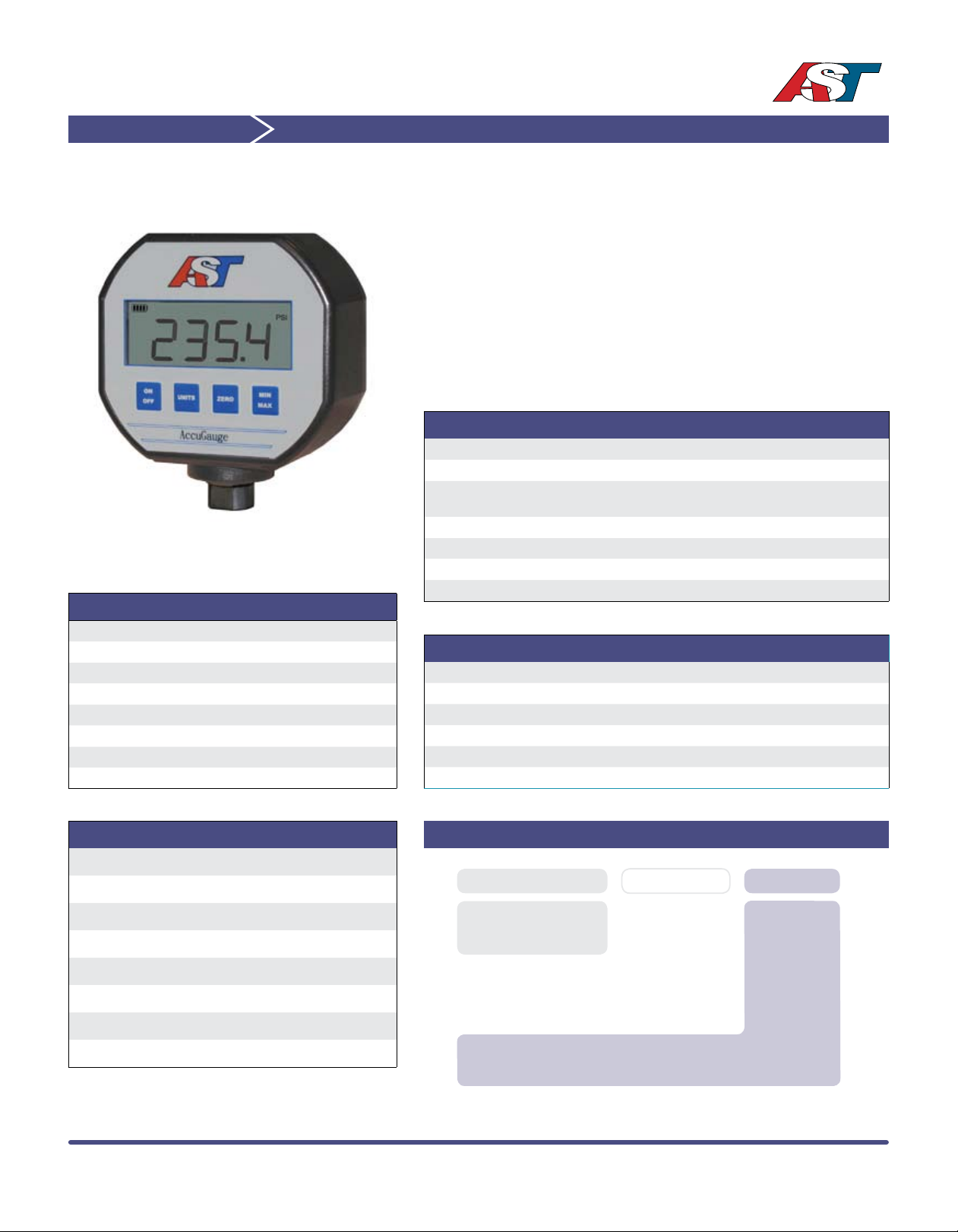
9V Digital Pressure Gauge
AccuGauge AG100
The AG100 series is a 9V digital pressure gauge featuring multiple
measurement units, min/max readings, selectable tare/zero and an automatic
power off to conserve battery power. Also, a backlight provides improved
visibility under marginal lighting conditions.
The AG100 will operate with any liquid or gas that is compatible with 174PH stainless steel. Please consult the factory for other available wetted
materials.
The design of this one-piece sensing element contains no silicone oil, welds
or internal O-rings. The AG100 is ideal for oxygen service, hydrogen* tanks
and other critical applications where uid lled gauges cannot be used.
Performance @ 25°C (77°F)
Pressure Range A number of preset ranges are available
Measurement Units PSI, BAR, kg/cm, ATM, InH20, InHg
Accuracy
Stability (1 year) ±0.25% FS (typical)
Over Range Protection 2X Rated Pressure
Burst Pressure 5X or 20,000 PSI whichever is less
Pressure Cycles >100 Million
Environmental Data
Temperature
Media -55 to 125°C (-67 to 257°F)
Operating (Ambient) -10°C to 70°C (14°F to 158°F)
Storage -10°C to 85°C (14°F to 185°F)
Thermal Limits
Compensated Range 0°C to 55°C (32°F to 131°F)
TC Zero <±1.5% of FS
TC Span <±1.5% of FS
Specifications
Display Update Rate 2 samples per second
Power 9 Volt Alkaline Battery
Automatic Power Off 1 Hour
Battery Life 4000 Hours Operation (typical)
Protection Rating NEMA 4, IP 65
Instrument Case Poly carbonate
<±0.5% BFSL (Includes Non-linearity,
Hysteresis and Non-repeatability)
Pressure Measurement
PSIG Pressure Pressure Code
-14.7 to 50 V0050
-14.7 to 100 V0100
-14.7 to 250 V0250
-14.7 to 500 V0500
-14.7 to 1,000 V1000
0 to 2,500 02500
0 to 5,000 05000
AG100 A V0100
Series Type
Process Connection
A= 1/4” NPT Male
J= 1/8” NPT Female
Pressure Measurement
Insert 5-digit pressure code
Ordering Information
American Sensor Technologies • 450 Clark Dr., Mt. Olive, NJ 07828 • phone (973) 448-1901 • fax (973) 448-1905 • email: [email protected]
Page 2
TM
AG100 Operating Instructions Rev 1.1
ON OFF
Press and release this button to turn the AccuGauge ON. Press and hold
this button to turn the AccuGauge OFF. When the AccuGauge is ON press
and release this button to turn on the backlight. The AccuGauge will automatically turn OFF after one hour to conserve battery power.
BACKLIGHT
The backlight of the AccuGauge will illuminate the LCD display for 10 seconds anytime one of the four buttons is pressed. To turn on the backlight
without changing the display, press and release the ON/OFF button.
UNITS
Press the UNITS button to cycle through the units of measurement the AccuGauge can display. The AccuGauge can measure pressure in PSI, BAR,
Kg/cm2, Inches Hg, Inches H
O and ATM. The unit of measurement can be
2
changed at any time and will not affect the operation of the AccuGauge.
RELATIVE PRESSURE
Press and release the ZERO button to place the AccuGauge in relative
pressure mode. The REL symbol will be displayed at the top of the LCD to
indicate the gauge is operating in relative pressure mode. The display will
rezero at the applied pressure that was acting on the Gauge at the moment
the button is pressed and display pressure readings +/- relative to that
pressure. Press this button again to return to GAUGE mode of operation,
which displays pressure relative to the local pressure.
ZERO
Over the course of time it may become necessary to reset the AccuGauge
to zero. Press and hold the ZERO button until the REL symbol appears
and disappears and the display reads zero pressure in the selected units
of measurement. Release the ZERO button and the display will read zero
pressure in the current units selected.
MIN MAX
The MIN MAX button allows the user to read the minimum and maximum
pressure the AccuGauge has detected during the time that the gauge has
been on. These readings are not saved and reset every time the gauge
is powered off. Press the MIN MAX button once and the MIN symbol will
be displayed along with the minimum pressure, press the MIN MAX button
again and the MAX symbol will be displayed along with the maximum pressure. Press the MIN MAX button again and the MAX symbol will disappear
and the gauge will display the current pressure. Press and hold the MIN
MAX button to reset the minimum and maximum pressure readings.
LOW BATTERY
The AccuGauge has a battery condition indicator in the upper left corner of
the LCD display. The indicator is composed of a battery symbol and four
vertical bars. As the battery discharges the vertical bars will disappear
from right to left. When all four bars have disappeared the battery is nearly
discharged. As a nal warning the symbol LOW BAT will be displayed and
indicates the battery is nearing complete discharge and should be changed
immediately. For best results replace the battery immediately. Use only
Alkaline or Lithium 9V batteries.
BATTERY REPLACEMENT
(NOTE: DO NOT open the AccuGauge unless it is necessary to change the
Battery.) To replace the AccuGauge’s Battery, use a Phillips Head screwdriver to remove the four screws from the back plate of the gauge. Unplug
the battery cable from the battery terminals. Remove the battery from the
battery holder. Put a new battery into the holder, ensuring that it is rmly in
place. Plug the battery cable into the terminals of the battery. Make sure
that the polarity is correct. Replace the cover rmly in place. Replace the
four screws.
www.astsensors.com
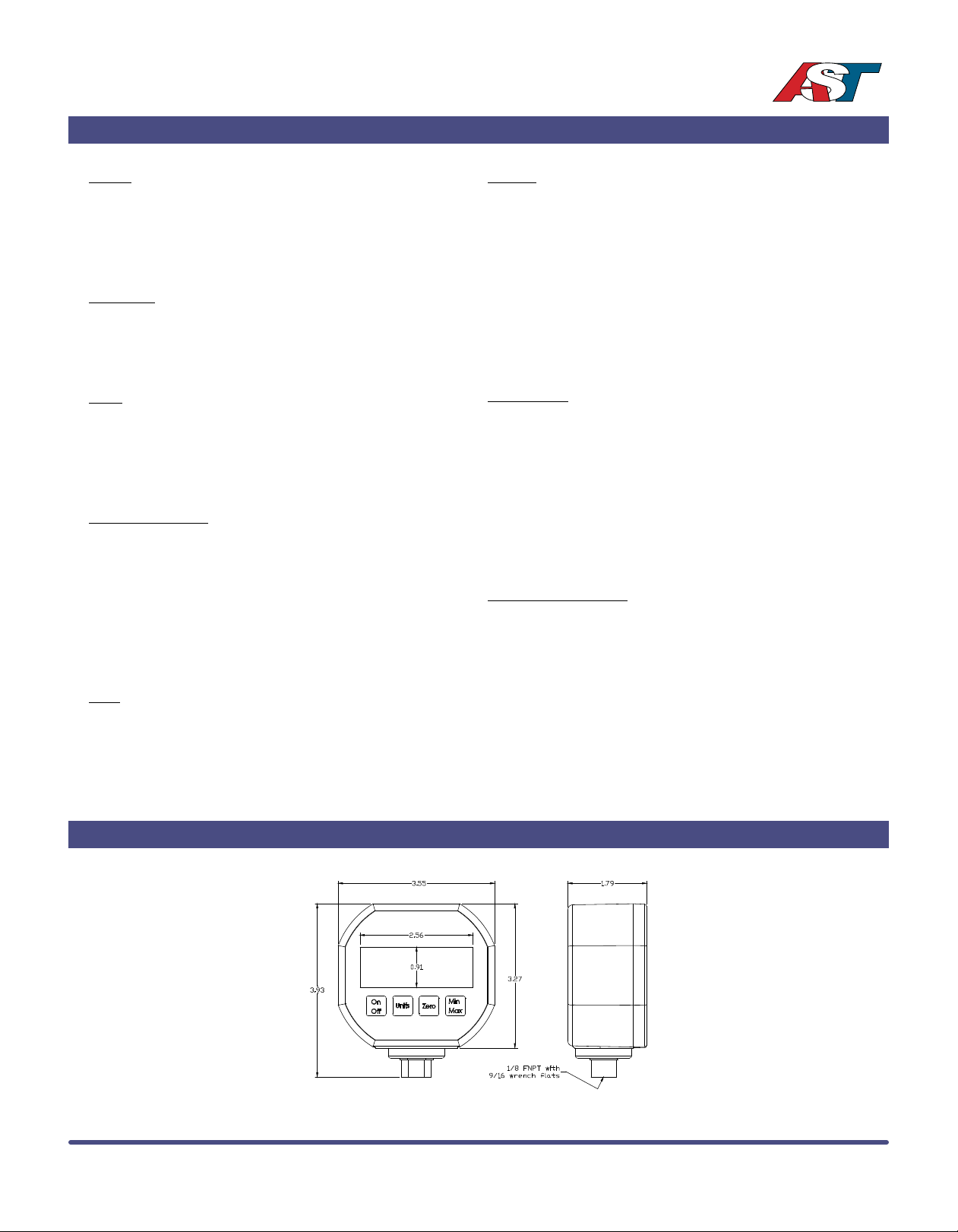
Dimensional Data
© 2014 American Sensor Technologies Inc. AG100 03/13/2014.
All specications subject to change without notice.
 Loading...