

Page 1

ZyXEL Smart Switch ES-1500 Series
(Auto DoS Prevention & Auto VoIP)
Ethernet Switch
Support Notes
Version 1.01
March 2007
Page 2

Smart Switch Support Note
All contents copyright (c) 2006 ZyXEL Communications Corporation.
2
Overview of ZyXEL ES-1500 Series Switch
The ZyXEL ES-1500 SERIES SWITCH is a solution for workgroup and
enterprise users, and is designed for easy installation, high performance, and
seamless migration between 10Base-T, and 100Base-TX network speeds. The
switch includes 24 10/100 auto-negotiation, 2x 10/100/1000M auto-negotiation,
and 2x Giga-MiniSFP ports. They are all auto-MDI/MDIX ports and provide a
flexible, reliable, and affordable solution for an Ethernet network. Each port
delivers up to 200 Mbps or 2000Mbps throughput, which can give workstations
a larger, congestion-free data pipe for simultaneous access to the server or
backbone. The ES-1500 SERIES SWITCH features embedded advanced
management capabilities: the device can be managed via a user friendly
web-based user interface and thereby allowing the system manager to monitor
and control the system efficiently. In addition, ZyXEL ES-1500 SERIES
SWITCH can be expanded by cascading two or more switches together. The
switch is also ideal for micro-segmenting large networks into smaller,
connected subnets for improved performance, thereby enabling the bandwidth
required by today's networks for increasingly demanding applications of all
kinds. The switch is plug-and-play with no software to configure, and the
built-in universal power supply lets you easily install the switch without an
external power adapter.
Page 3
Smart Switch Support Note
All contents copyright (c) 2006 ZyXEL Communications Corporation.
3
Scenario
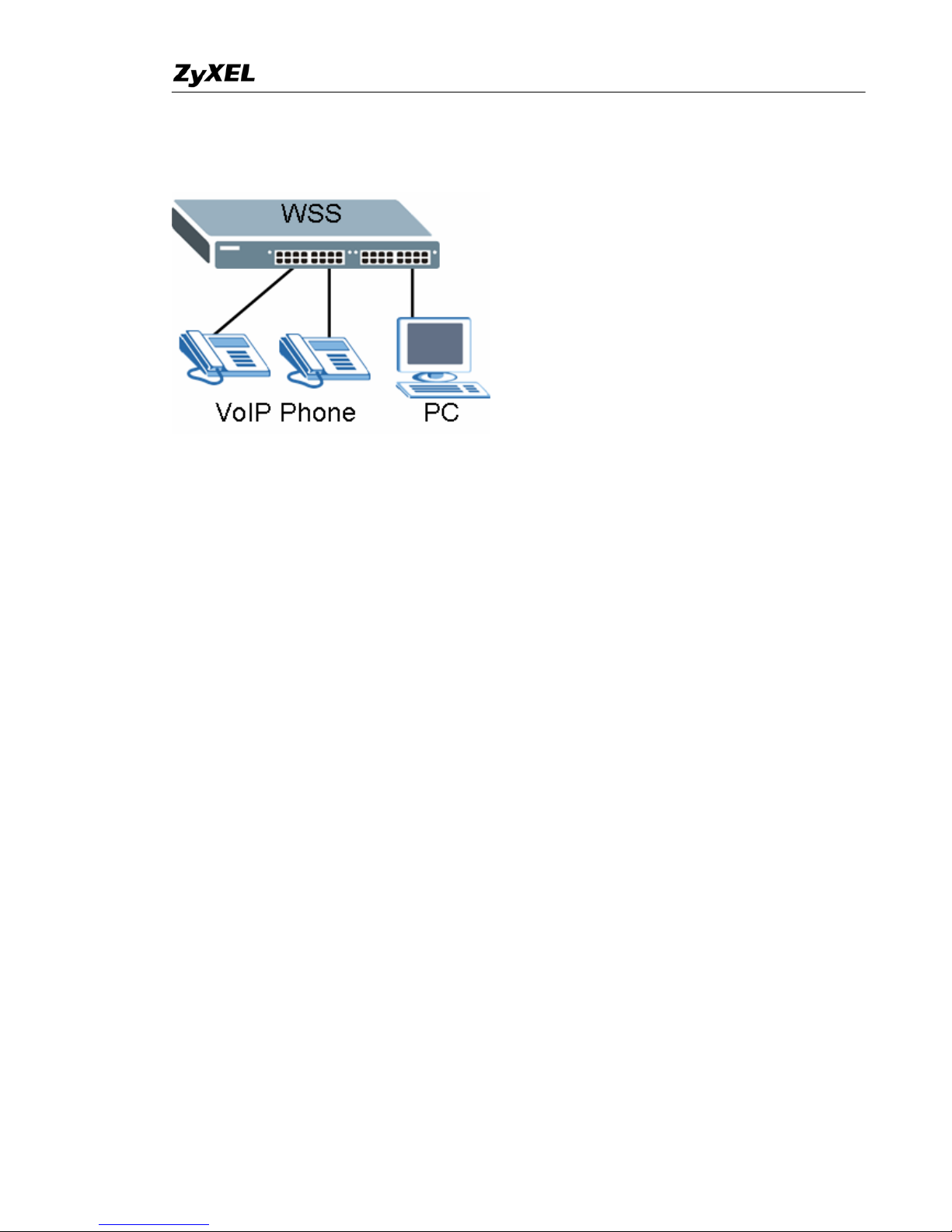
In our scenario, we have connected two SIP VoIP Phones and a PC to the
ZyXEL Extra Smart Switch. We want to make sure that all Voice over IP traffic
gets the highest priority on the Switch. Moreover, we want to make sure that
Denial of Service attacks will be blocked at this access Switch in case there
are attacks from the internal side.
Page 4

Smart Switch Support Note
All contents copyright (c) 2006 ZyXEL Communications Corporation.
4
Exclusive new feature on Extra Smart Switch
Auto Voice over VoIP
Voice over Internet Protocol (VoIP) allows telephone calls to be made using a
computer network over a data network like the Internet. With the increased
prominence of delay-sensitive applications (voice, video, and other multimedia
applications) deployed in networks today, proper QoS configuration ensures
high-quality application performance.
The Auto VoIP feature is intended to provide an easy classification mechanism
for voice packets so that they can be prioritized above data packets in order to
provide better QoS. The AutoVoIP module explicitly matches VOIP streams in
the ZyXEL ES-1500 SERIES SWITCH and provides them with a better class of
service than ordinary traffic. The AutoVoIP module provides the capability to
assign the highest priority for the following VoIP packets:
SIP–Session Initiation Protocol
MGCP–Media Gateway Control Protocol
SCCP–Skinny Client Control Protocol
* It can support maximum 60 bi-directional VoIP streams at the same time.
Auto DoS Prevention
Denial-of-service (DoS) attack prevention is a method of preventing an attack
on a computer system or network that causes a loss of service to users.
Typically, a DoS attack causes the loss of network connectivity and services by
consuming the bandwidth of the victim network or overloading the
computational resources of the victim’s system.
With our current firmware release, we can prevent the follow DoS attacks.
1. Prevent Land Attacks
2. Prevent Blat Attacks
3. Scan SYNFIN
4. Prevent Smurf Attacks
5. Prevent Ping Flooding
6. Prevent SYN/SYN-ACK Flooding
It is recommended to active these attack preventions if it is implementing as an
access layer Switch.
Page 5
Smart Switch Support Note
All contents copyright (c) 2006 ZyXEL Communications Corporation.
5
To configure Auto Voice over VoIP via Web on ZyXEL
ES-1500 Series Switch
1. Connect port 1 with a PC or Notebook via the RJ45 Cable.
2. By default the MGMT IP of every single port is 192.168.1.1/24
3. Set your NIC to 192.168.1.2/24
4. Open an Internet browser such as IE and give http://192.168.1.1 on
the URL.
5. By default you will need to put “admin” as the username and “admin”
as the password.
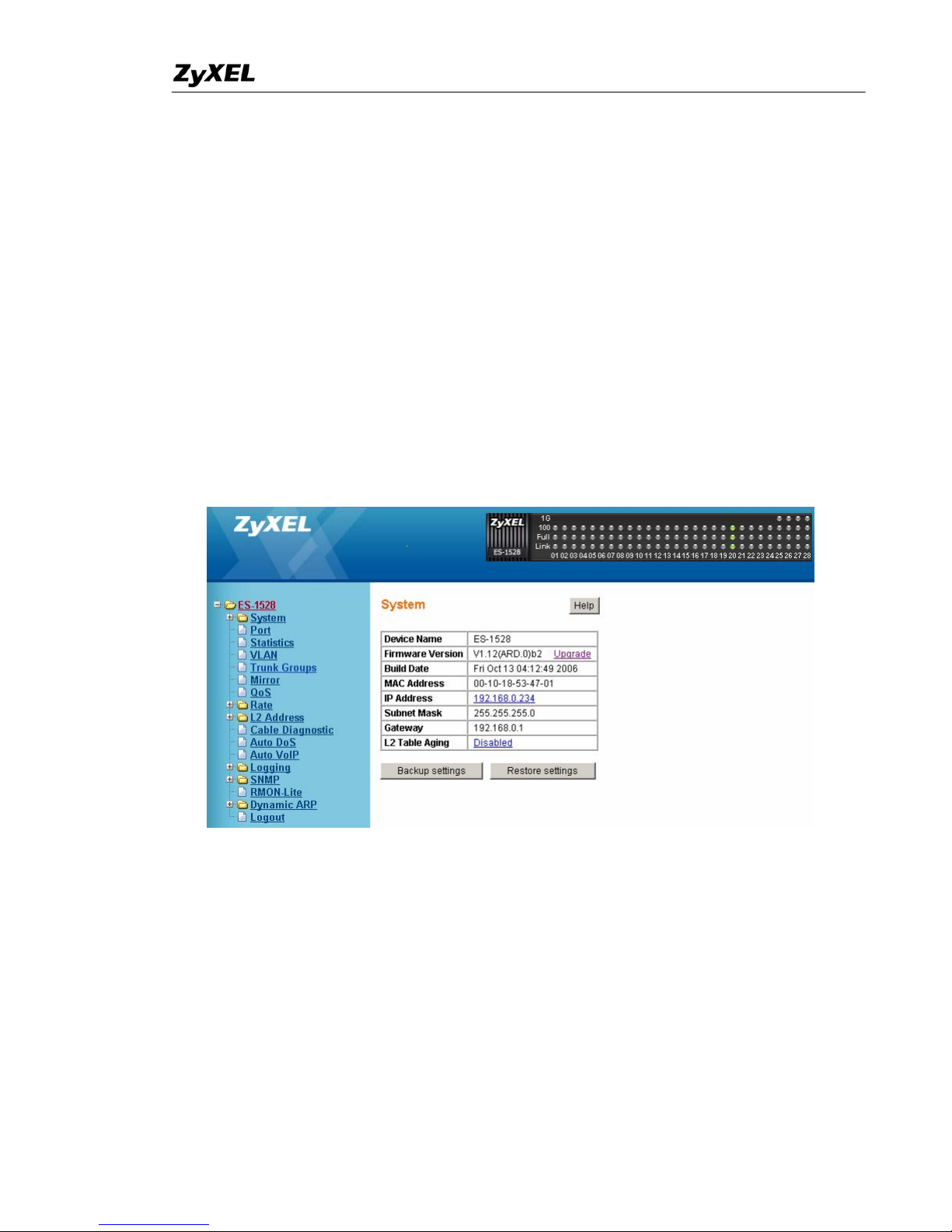
6. After you login successfully, you will see a similar screen like below.
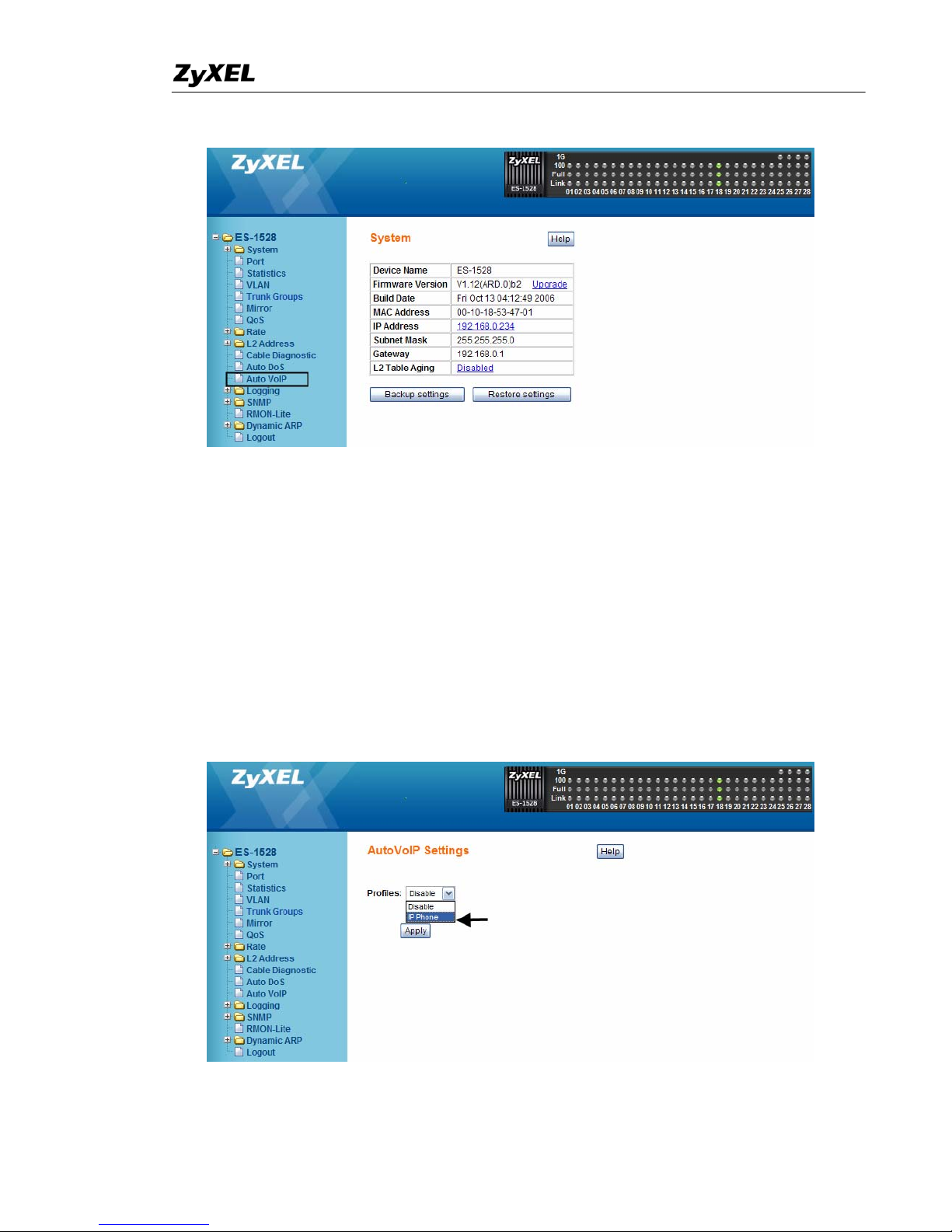
7. Since it is an Extra Smart Switch, It is very simple to active “Auto VoIP”
on the Switch. First, click “Auto VoIP” on your left menu.
Page 6
Smart Switch Support Note
All contents copyright (c) 2006 ZyXEL Communications Corporation.
6
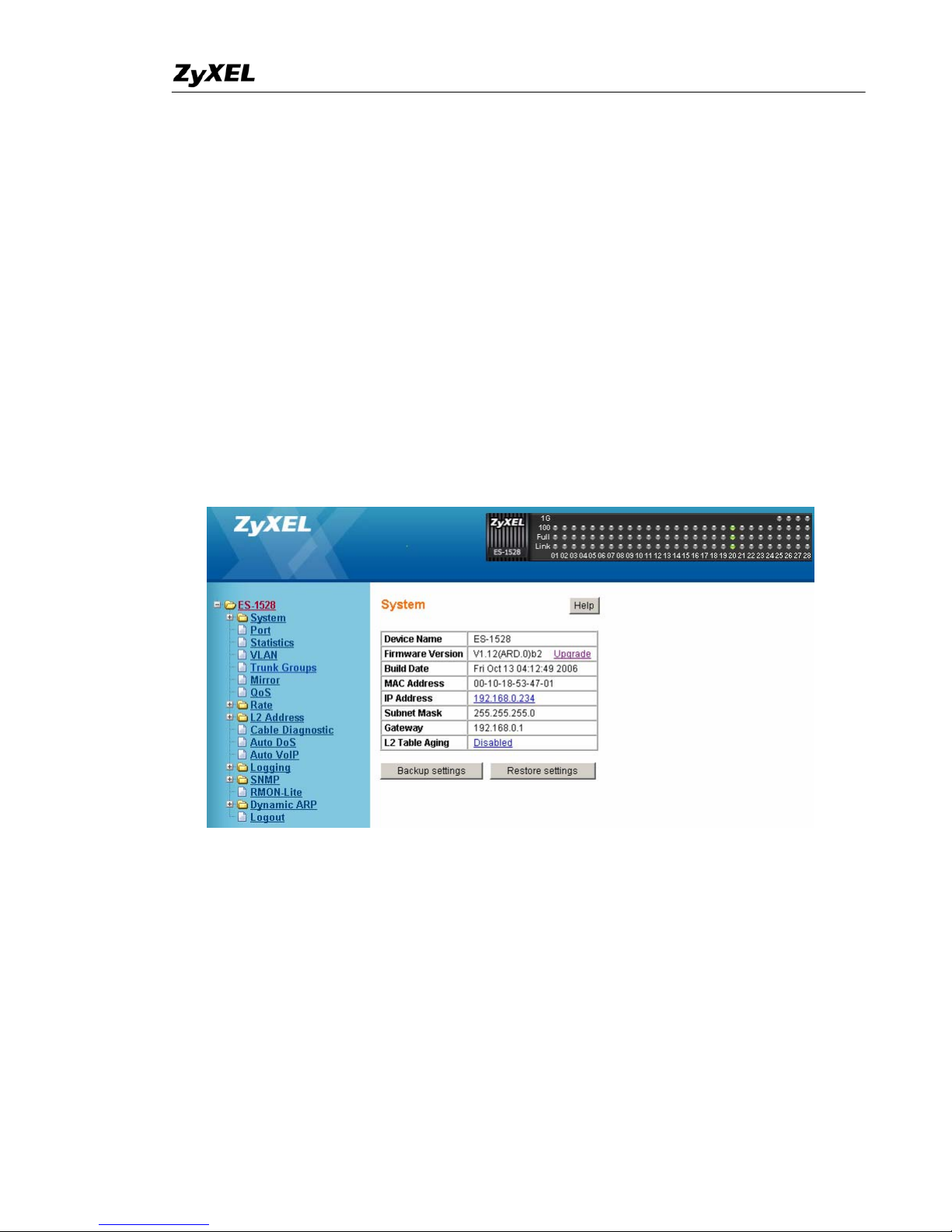
8. Currently, it has one “IP Phone” pr ofile built-in and you can just simply
choose this profile and the Switch will explicitly match Voice over IP
(VOIP) streams and provide them with a better class of service than
ordinary traffic. The Auto-VoIP module will provide the capability to
assign the highest priority for the following VoIP packets:
SIP : Session Initiation Protocol
MGCP : Media Gateway Control Protocol
SCCP : Skinny Client Control Protocol
Finally. click “Apply to save your changes.
Page 7
Smart Switch Support Note
All contents copyright (c) 2006 ZyXEL Communications Corporation.
7
To configure Auto DoS Prevention via Web on
ZyXEL ES-1500 Series Switch
1. Connect port 1 with a PC or Notebook via the RJ45 Cable.
2. By default the MGMT IP of every single port is 192.168.0.234/24
3. Set your NIC to 192.168.0.2/24
4. Open an Internet browser such as IE and give http://192.168.0.234 on
the URL.
5. By default you will need to put “admin” as the username and “admin”
as the password.
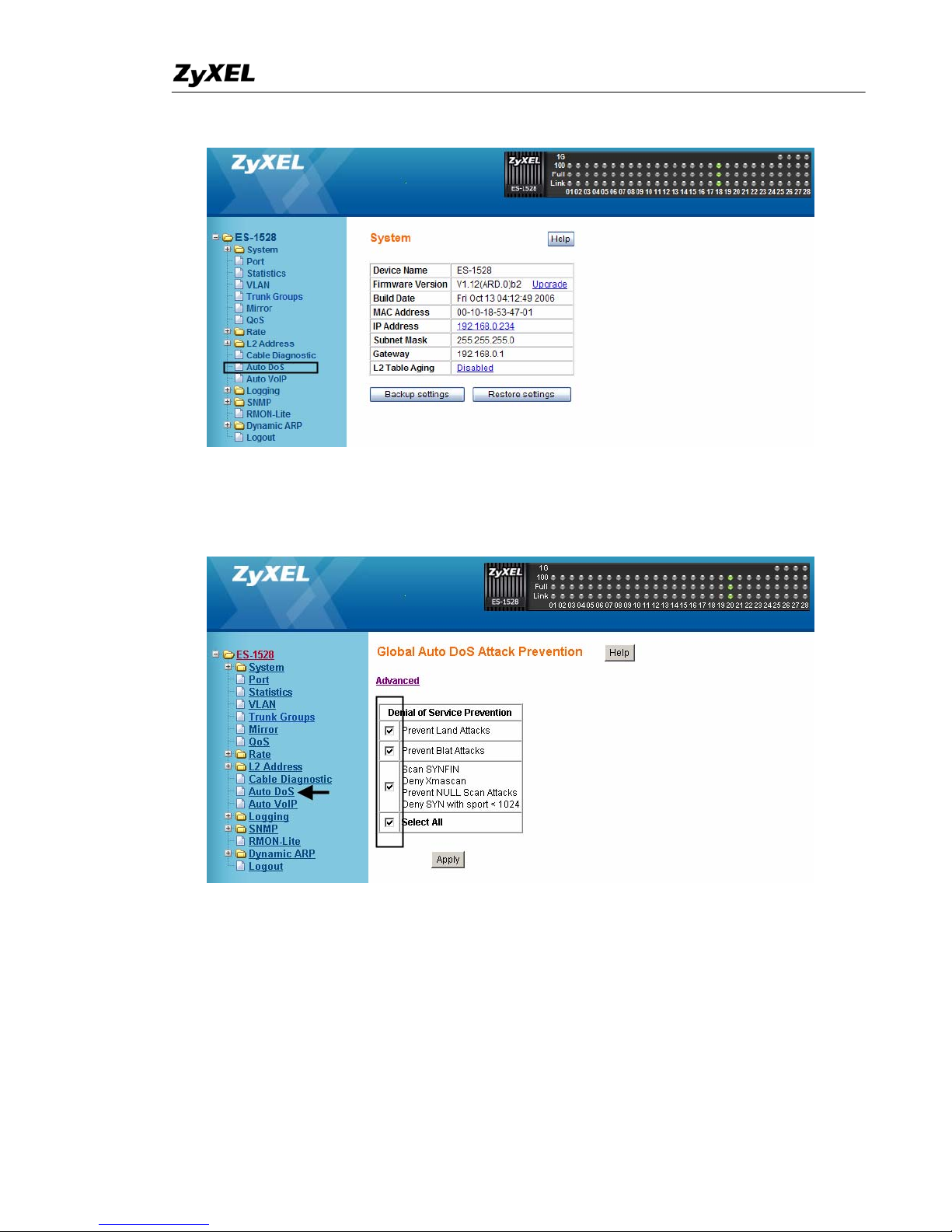
6. After you login successfully, you will see a similar screen like below.
7. First of all, we need to active “Auto DoS” prevention on the Switch. To
do so, click “Auto DoS” on your left menu.
Page 8
Smart Switch Support Note
All contents copyright (c) 2006 ZyXEL Communications Corporation.
8
8. To enable all options on protecting DoS attack, click the “Select All”
checkbox. And click “Apply”.
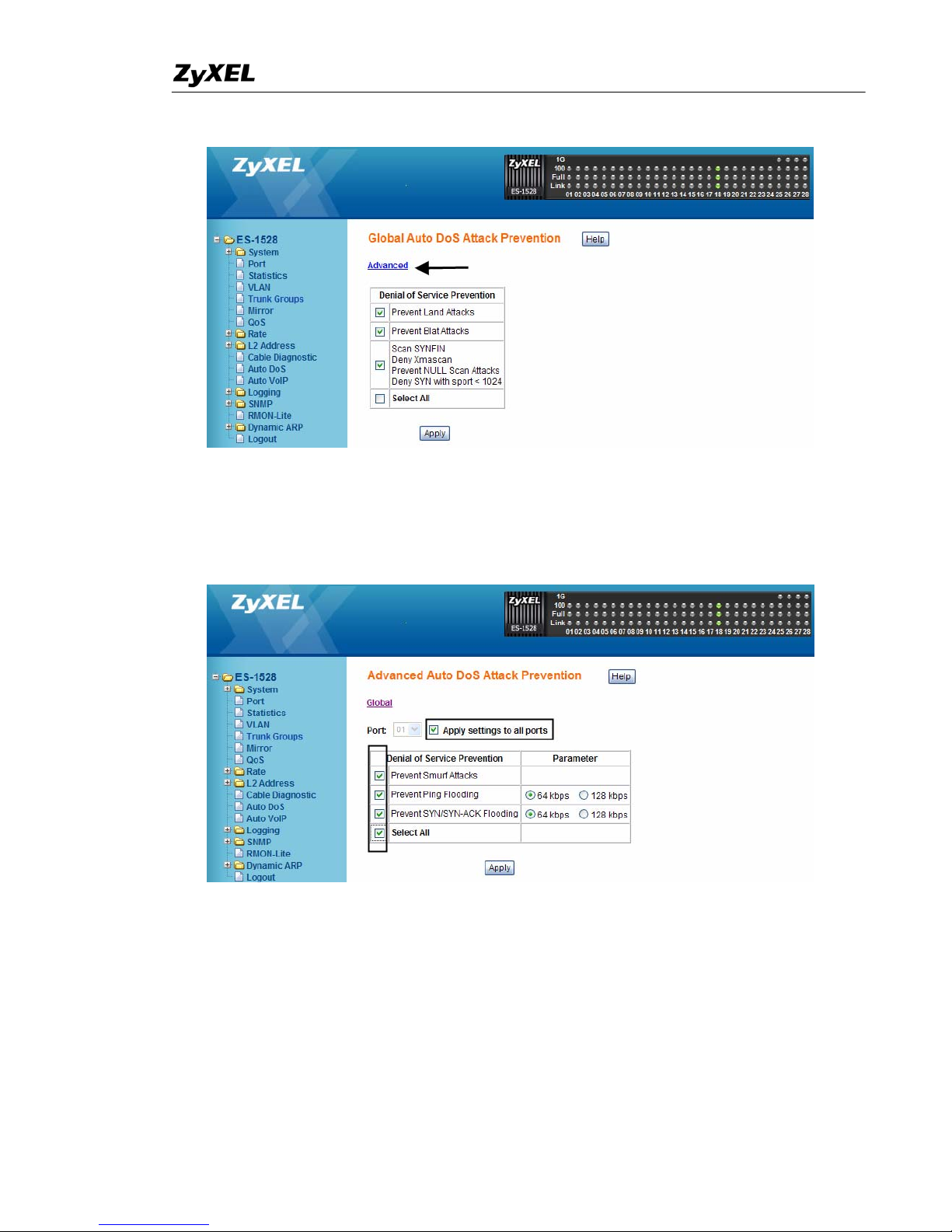
9. Moreover, we can enable the options inside the “Advanced” tab as well.
To do so, click on the “Advanced”
Page 9
Smart Switch Support Note
All contents copyright (c) 2006 ZyXEL Communications Corporation.
9
10. To have maximum protection, it is recommend having all options
enabled and applying them to all ports. Finally. Click “apply” to save
your changes.
 Loading...