

Page 1

1
User Manual
UHF RFID Integrated Machine
Version: 1.0
Date: September 2017
Page 2
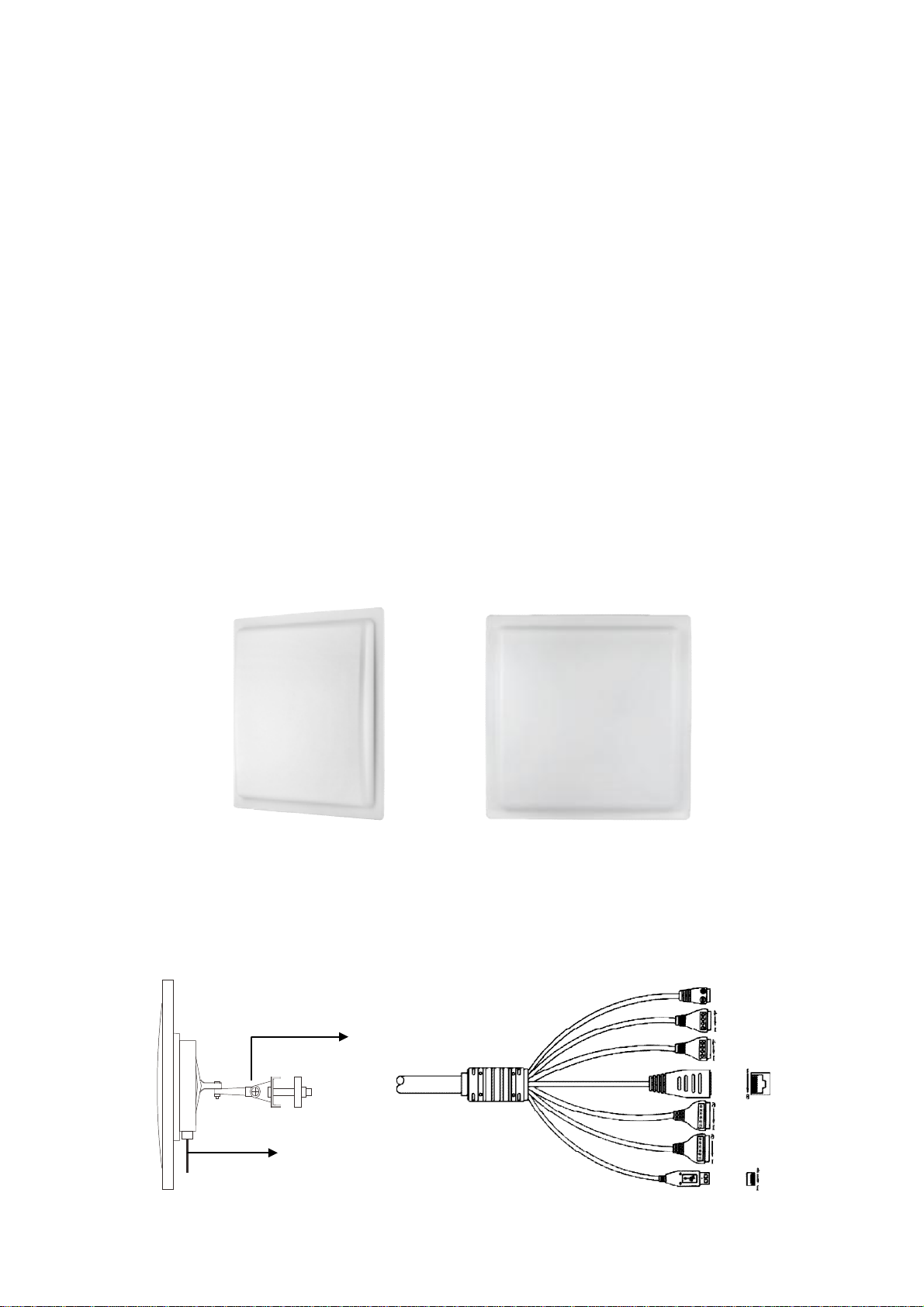
1. Product Summarize
Mounting
Bracket
Cable
2PIN
Cables
U1000E, U1000F, U2000E, U2000F is a new generation of RFID UHF series products for our
company's independent research and development of the long distance RFID Integrated
Machine in the parking lot and access control system.
The product uses the industry's most cost-effective UHF card reader chip, and the part of swing
card adopts the module integrated design, making the product to meet the technical
requirements of the parking lot and access control system. Meanwhile, the utility model has
the advantages of stable reading performance, good consistency, low working current and
temperature, long service life, and small external influence, and the product adopts the
waterproof outer shell design.
The product is also a fully meet the CE, FCC technology requirements of the product, and to
obtain CE, FCC and other security certification.
2.UHF RFID Integrated Machine
l Overview:
Dimension
250mm*250mm*70mm (U1000E,
U1000F)
l Lateral View and Interface:
4PIN
Green
4PIN Black
RJ4
5
6PIN
2
Page 3
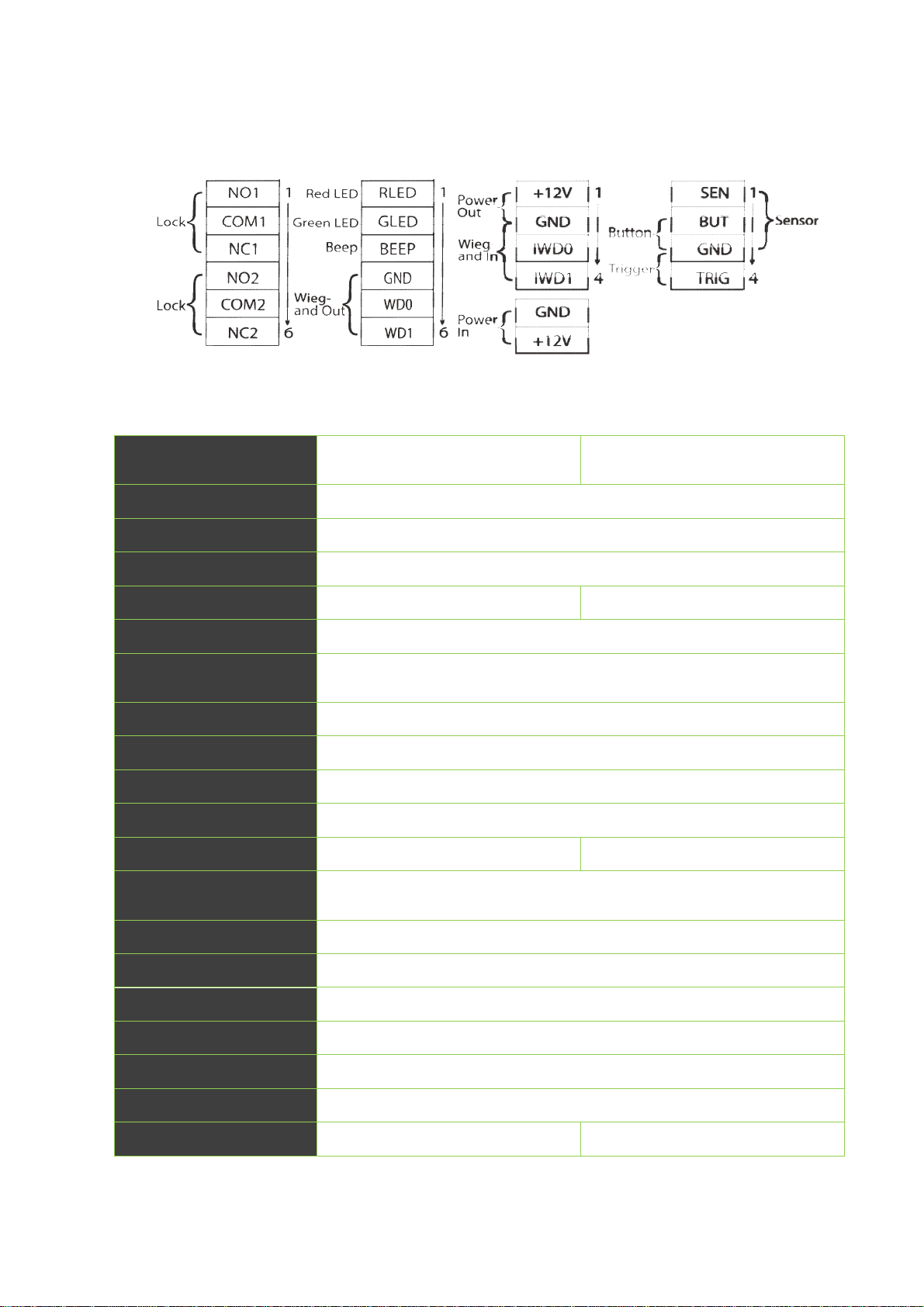
Cable Definition:
6PIN
6PIN
4PIN
4PIN
3. Parameters Specifications
Model
Logo&Color
Card Capacity
Log Capacity
Reading Distance
Communication
Access Control
Interface
Wiegand Signal
Working Frequency
Support Card
UHF Interface Protocol
Antenna Gain
Maximum power
consumption
U1000E,U1000F U2000E,U2000F
ZKTeco logo, black (standard)/White logo, white(optional)
5000 cards
30,000 Transactions
0-6m(Stable is 0-5meters) 0-12m(Stable is 0-10meters)
TCP/IP ,USB,Wiegand26/34
3rd Party Electric Lock, Door Sensor, Exit Button, Alarm
Wiegand input & output
F:902Mhz-928MHz; E:865MHz-868MHz
Tag1,Tag2,Tag3,Tag4,DF01Card,DF02 Card
EPC global UHFClass1Gen2/ISO18000-6c
6dBi 6dBi
<2W(RF output 26dBm,single tags)
Ingress Protection Rate
Supporting Software
Working Voltage
Working Current
Working Temperature
Working Humidity
Dimension
IP 66
ZKAccess3.5;ZKBiosecurity3.0
DC 9V-12V
150mA (always reading )
-20℃-+60℃
<95% (25℃)
250mm*250mm*70mm(±5) 445mm*445mm*70mm(±5)
3
Page 4
4.Safety Precautions
1) The integrated machine working voltage ranges from DC9V to DC16V, it is recommended to
use DC12V /3A power supply.
2) Please wire according to the cable definition.
5.Modifying Setting via Demo
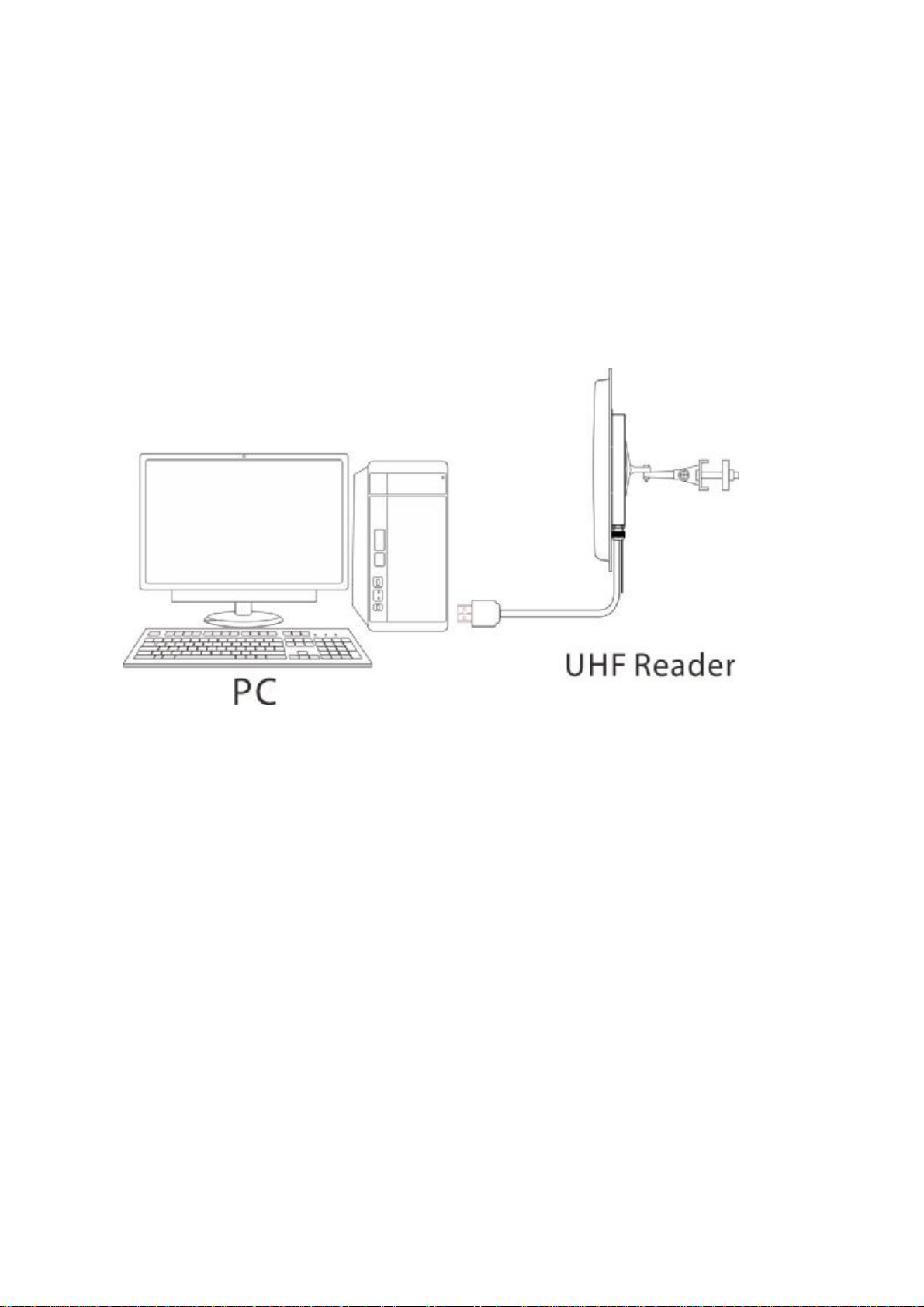
1) USB Connection
2) Software Introduction
Our company provides Demo, used to set the working parameters of the integrated machine.
Demo interface as shown below:
4
Page 5

The default configuration of the integrated machine is as follows:
Wor
k Mode
Re
ad Tag Interval Time
Wi
egand Out Setting
Wi
egand Interval Time
Always Read
0s (Default)
wiegand 26; Forward Output; 9th Start Byte(Default);
2s (Default)
Wor
king Frequency
902MHz ~928MHz (American
Standard); 865MHz ~ 868MHz
(European standard)
Dem
o Using Instructions:
Ø Connect the USB port of the integrated machine to the USB port of the computer.
Ø The power adapter is recommended to use the DC12V/3A specification. Power supply to
the integrated machine and the buzzer sounds once.
Ø In the computer to open Demo, click ’Connect’, on the right side of the middle will show
‘Connect Successful’ , and machine and demo connection success.
Ø Wiegand Interval Time: Sets the time interval between adjacent wiegand data.
Ø Reader Indicate: Set whether the buzzer rings when the machine is on the electricity and
brush the card.
Ø Work Mode: Set the working mode of the machine, and including always read mode,
trigger mode. Under trigger mode, time of reading card can be set when it is triggered
once.
Ø Wiegand Setting: Set the machine's wiegand output format.
5
Page 6

Ø Setting Wiegand Out Bytes: Sets the forward or reverse output of the machine's Wiegand
Data, and start output from the first few bytes.
Ø Read Tag Interval Time: Set the machine to read the card interval. Read card interval is the
time when from the card is read within the scope of the card to the card is left out of the
scope of the card to read the second time card.
6.Access to Software
RJ45 Connection
Connect the RJ45 port of the integrated machine to the Ethernet port of the computer. The
machine supports access to ZKAccess 3.5.3 build 0009 and ZKBioSecurity 3.0.5.0 software.
6.1. Access to ZKAccess
1)
Add Device:
Ø Search the integrated machine
Click [Device] > [Search Panels], click [Start Search] to search the integrated machine by TCP/IP.
6
Page 7

Ø Add Device
After searching, select the
open.
Enter self-defined device name, device type set to Standalone Device and click [OK] to
integrated machine and click [Add Device], and a dialog box will
complete device adding.
Note: The default IP address of the integrated machine may conflict with the IP of a device on
the Internet. You can modify its IP address: Click [Modify IP Address] behind the device and a
dialog box will open. Enter the new IP address and other parameters (Note: Must configure the
gateway and IP address in the same network segment).
2)
Register the UHF tag
Connect the UHF Card Issuer to a computer; click the Personnel Profile tab to register the UHF
tag, as shown in the figure below:
7
Page 8

3)
Set Access Control Parameters
The Access Control Parameters include time zones, holidays, door settings, access levels, anti-
passback, personnel group, multi-card opening and so on. For more details about how to set
the access control parameters, please see the software user manual.
4)
Sync All Data to Device
Select device, click [Synchronize All Data] and click [OK] to complete synchronization. The
system will synchronize the data to the device, including door information, access control
levels (personnel information, access control time zones), anti-pass back settings, interlock
settings, linkage settings, first-card normal open settings, multi-card normal open settings and
so on.
5)
Real-time Monitoring
Monitor the statuses and real-time events of doors under the access control panels in the
system in real-time, including normal events and exceptional events (including alarm events).
8
Page 9

6.2. Access to ZKBioSecurity
The procedure to access to ZKBioSecurity is basically the same as 6.1. Access to ZKAccess; for
more details, please see the software user manual.
7. Solution
1)
Long Distance Access Control Management
Compared with the traditional access control close proximity recognition mode, long distance
access control gets rid of the passive recognition of the shackles, really realize the “Hand Free”
model. Remote sensing, automatic reading card, automatic identification, will greatly improve
the convenience of personnel access.
The long distance access control system consists of U1000 series integrated machine, UHF
tag1, tag2 or DF cards, UR10Rseries card issuer, electronic lock and door.
2)
The Long Distance Fixed Vehicle Access Management for Parking Lots
9
Page 10

This solution provide user with a non-stop, no card, quick access to parking lots experience.
The system consists of U2000 series integrated machine, UHF tag3 (installed on the upper or
lower edges of the license plate) or tag4 (pasted on the interior windshield of car), and parking
barrier.
When the car pulls up the range of the U2000 integrated machine, the authorized tag mounted
on car will be identified, then reading information is transmitted to the integrated machine,
after identification correctly, integrated machine outputs an “open” signal to the barrier, then
the gate is open. At last, the car can easily have access to parking lots.
10
Page 11

U2000 integrated machine connect with parking barrier
8. Note
Ø The integrated machine cannot be installed in a high-voltage environment, for example,
high tension wires and high-voltage transformers.
Ø The integrated machine cannot be installed near strong magnetic field.
Ø If the integrated machine is installed at a T-junction or a 90° corner or in other unfavorable
environment, the integrated machine may fail to read the card due to the overlarge
reading angle. You can install an additional integrated machine at the corner to solve the
problem.
Ø For such terrains as slopes, adjust where the integrated machine faces, turning it
downwards within the effective range of card reading.
Ø Remote card reading by the UHF integrated machine is affected by the protective film
(explosion-proof film) on car windows to some extent.
Ø Remote card reading by the UHF integrated machine is affected on rainy, snowy or windy
days to some extent.
11
Page 12

 Loading...