

Page 1
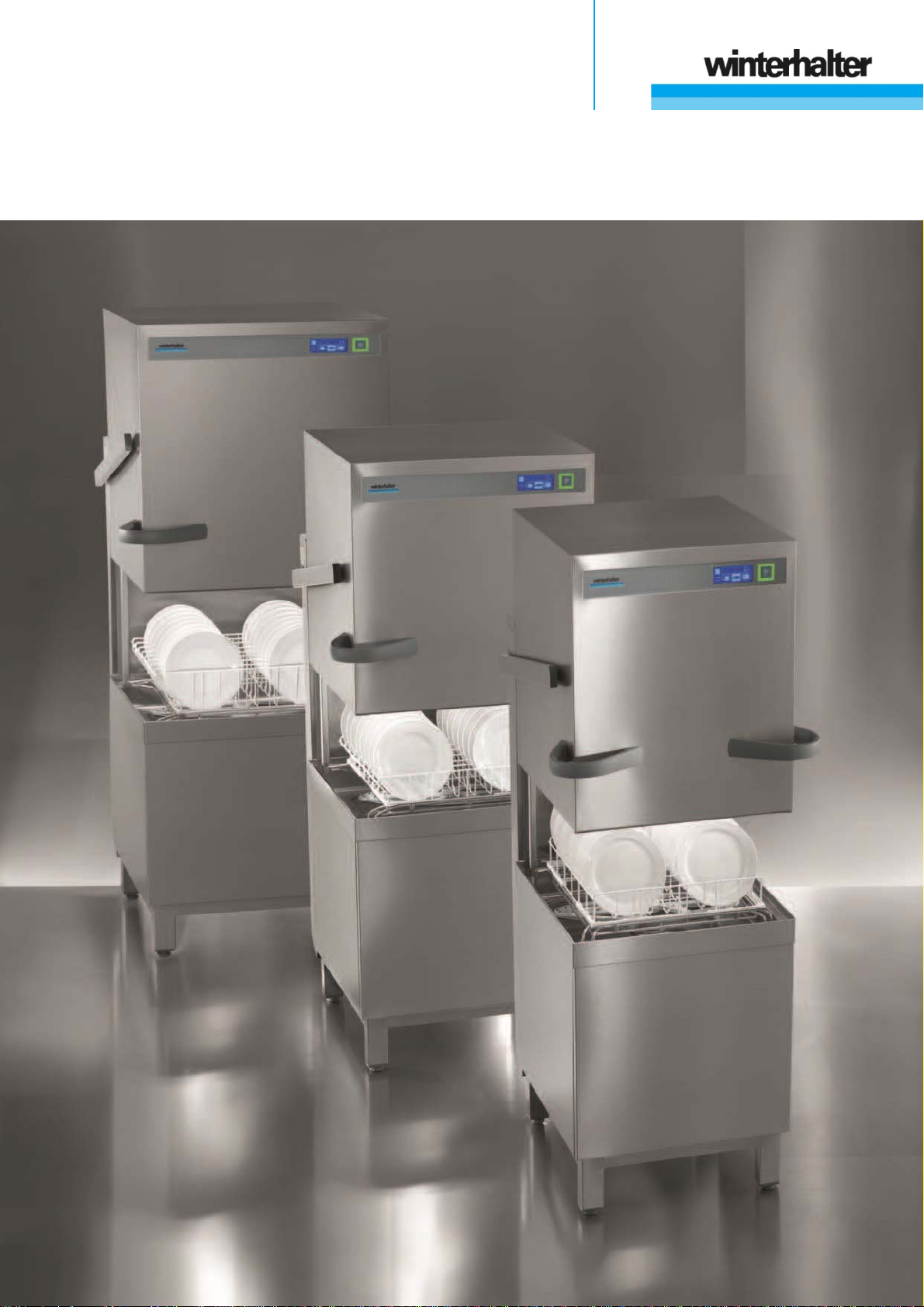
Rack pass-through dishwasher
PT Series
Operating Instructions
Page 2

Page 3

Operating Instructions
For Winterhalter PT Series rack pass-through dishwasher
(translation of the original German operating instructions)
Table of contents
About this manual -------------------------------- 2
1
2 Safety notes ---------------------------------------- 2
2.1 Proper use ------------------------------------------- 2
2.2 Improper use ---------------------------------------- 2
2.3 Electrical Safety ------------------------------------ 3
2.4 Safety Instructions for Maintenance and
Repairs ----------------------------------------------- 3
2.5 General safety notes ------------------------------ 3
3 Before working with the machine ----------- 4
4 Product description ------------------------------ 4
4.1 Mode of operation ---------------------------------- 4
4.2 Special equipment --------------------------------- 4
4.3 Overview --------------------------------------------- 5
4.4 Display (Touchscreen) and start button ------ 6
4.5 Standard washing programmes ---------------- 7
5 Rinse aid and detergent ------------------------ 8
5.1 Rinse aid --------------------------------------------- 8
5.2 Detergent --------------------------------------------- 8
5.3 Suction tube with level control ------------------ 9
5.4 Changing the detergent product ---------------- 9
5.5 Priming the dosing devices --------------------- 10
6 Integral water softener (special
equipment) ----------------------------------------- 10
6.1 Lack of salt display-------------------------------- 10
6.2 Filling regeneration salt -------------------------- 10
7 Operation ------------------------------------------- 11
7.1 Before switching on the machine -------------- 11
7.2 Switching on the machine and preparing it
for operation ---------------------------------------- 11
7.3 Washing --------------------------------------------- 11
7.4 Switching off ---------------------------------------- 13
8 Servicing and maintenance ------------------ 14
8.1 Daily cleaning -------------------------------------- 14
8.2 Weekly cleaning ----------------------------------- 15
8.3 Monthly cleaning ---------------------------------- 16
8.4 Descaling -------------------------------------------- 16
8.5 Maintenance by the Customer Service ------ 16
9 Malfunctions -------------------------------------- 17
9.1 Error code call ------------------------------------- 19
9.2 Poor cleaning result ------------------------------ 19
9.3 Increased generation of noise ----------------- 19
10 Info Level 1 ---------------------------------------- 20
11 Info Level 2 ---------------------------------------- 22
12 PIN Menu ------------------------------------------- 23
12.1General settings ----------------------------------- 23
12.2Programming automatic switch on / switch
off ----------------------------------------------------- 25
12.3Operating data ------------------------------------- 26
12.4Hygiene logbook----------------------------------- 27
12.5Descaling / basic cleaning ---------------------- 28
12.6Changing the amount of detergent / rinse aid30
12.7Resetting the water back-flow counter ------- 30
13 Integrated operating instructions ---------- 31
14 Customer-specific modifications ----------- 31
15 Installing the machine and tables ---------- 31
15.1Installing the machine ---------------------------- 31
15.2Attaching the tables ------------------------------- 31
15.3Converting the rack guide ----------------------- 32
16 Water connection -------------------------------- 33
16.1Requirements for the on-site inlet water
connection ------------------------------------------ 33
16.2Requirements for the on-site water stop cock33
16.3Connecting the supply hose -------------------- 33
16.4Connecting the drain hose ---------------------- 33
17 Electrical connection --------------------------- 34
17.1Connecting the mains cable -------------------- 34
17.2Establishing an earth connection -------------- 34
17.3Connection diagram ------------------------------ 35
18 External dosing devices ----------------------- 36
18.1Terminals -------------------------------------------- 36
18.2Electrical connection ----------------------------- 37
18.3Setting parameters -------------------------------- 38
19 Taking the machine out of service for a
long period ---------------------------------------- 38
20 Putting the machine back into service
after a long period of disuse ----------------- 38
21 Technical Information -------------------------- 39
22 Emissions ------------------------------------------ 39
23 Disposal -------------------------------------------- 39
1
Page 4
About this manual
1 About this manual
This manual contains information and instructions for the safe operation and maintenance of your dishwasher.
Please note carefully the safety notes listed here.
The following symbols are used in these instructions:
Symbol Meaning
IMPORTANT
Danger
Warning
Caution
Warning against potential serious or fatal injuries to persons if the described precautionary
measures are not taken.
Warning against potential minor injuries to persons or potential material damage if the described precautionary measures are not taken.
Warning against defects in or destruction of the product if the described precautionary
measures are not taken.
Important information is given here.
INFO
This symbol indicates instructions.
This symbol indicates results of your actions.
Useful information is given here.
This symbol indicates itemizations.
This symbol refers to a chapter with more detailed information.
2 Safety notes
2.1 Proper use
The PT Series dishwasher is a technical device for commercial use and is not intended for pri-
vate use.
Use the dishwasher only for the washing of dishes such as plates, cups, cutlery and trays or for
washing glasses of a gastronomic and related type.
2.2 Improper use
This device may be used by children from the age of 8 upwards as well as by those with re-
duced physical, sensory or mental capabilities or a lack of experience and knowledge if they are
supervised or have been instructed on how to safely use the device and understand the risks
associated with it.
Children must not play with the device.
Cleaning and user maintenance should not be carried by children without supervision.
Do not use the dishwasher to wash electrically heated devices or parts made of wood.
Do not wash without a wash rack.
Do not wash parts made of plastic if they are not heat and lye-resistant.
Use a suitable detergent to wash parts made of aluminium such as jars, containers or plates in
order to prevent black stains.
Winterhalter Gastronom GmbH does not assume liability for any damage caused due to im-
proper use of the device.
2
Page 5

Safety notes
2.3 Electrical Safety
The electrical safety of this machine is guaranteed only if it is connected to a correctly installed
protective circuit and a residual current circuit breaker. It is very important that this basic safety
requirement is tested and in case of doubt the house installation is checked by a qualified electrician.
Winterhalter cannot be held responsible for damage caused by a missing or broken earthing
system (e.g. electrical shock).
2.4 Safety Instructions for Maintenance and Repairs
Maintenance work and repairs may only be performed by service technicians authorised by
Winterhalter. Improper maintenance or repairs may cause significant danger for the user, for
which Winterhalter is not liable.
When performing maintenance and repair work, unplug machine from the power network. Elec-
tricity consumers (heating element, frequency inverter, ...) are under voltage until the on-site
mains disconnect switch has been operated.
Only original Winterhalter spare parts may be used for maintenance and repairs. If original
spare parts are not used, the warranty is invalidated.
A damaged or leaking machine can endanger your safety. In case of defects, switch off the ma-
chine immediately. Switch off the on-site mains disconnector (main switch). Only then is the
machine without power.
Do not operate a damaged machine. In case of defects resulting from an unknown cause,
switch off the machine, and do not switch it on until the defect has been rectified.
Contact your installer or electrician if the on-site water or electricity supply is the cause of the
malfunction.
Notify an authorised service technician or your retailer if another fault has occurred.
If the mains cable of this machine is damaged, it must be replaced by the Winterhalter or its
Customer Service or another qualified person in order to prevent hazards. The mains cable
must be H07 RN-F type or equivalent.
2.5 General safety notes
Read through the safety notes and operating instructions in this manual carefully. Retain the
operating instructions for future reference. Winterhalter Gastronom GmbH does not assume liability or warranty in case of non-adherence to these safety and operating instructions.
Do not make changes, additions or reconstructions in the dishwasher without the approval of
the manufacturer.
Do not transport the warewasher with the ClimatePlus heat pump installed. The centre of gravity
is situated on the right side and the warewasher could tip over.
Use the dishwasher only after you have read and understood the operating manual. Allow the
Winterhalter Customer Service Department to provide information about the operation and functioning of the dish washer. Always operate the machine as described in these operating instructions.
Train the operating personnel as regards handling the machine and inform them about the safe-
ty notes. Repeat the training sessions at regular intervals to prevent accidents.
For your safety, test the local fault current circuit breaker (FI) regularly by pressing the test but-
ton.
Close the on-site water shut-off valve after the work is complete.
Switch off the local mains disconnector after the work is complete.
3
Page 6

Before working with the machine
3 Before working with the machine
Have the machine set up by an authorised service technician or your dealer ( 15).
Have the machine connected as per the locally applicable standards and the regulations by authorised
mechanics (water, waste water, electrical system) ( 16 and 17).
After connecting the water and the power properly, contact the relevant Winterhalter dealer or your dealer
for the commissioning of the machine and for providing training in its operation. Get yourself and your operating personnel trained in the operation of the machine.
4 Product description
4.1 Mode of operation
The boiler and the tank fill and are warmed up to the operating temperature after the machine is switched on.
During the heating phase, the lighting of the start button (3) changes gradually from red to green. When the
target temperatures are reached, the machine is ready for use. The start button lights up green.
The machine is fully automatic with programmes consisting of three steps: Wash, Drain and Rinse. Whilst a
washing programme is running, the start button gradually moves from blue to green.
4.2 Special equipment
The following special equipment is available:
Cool (only for glass washers)
Requirement: Connect the machine to the cold water.
In this process, the rinse is effected with cold fresh water.
The glasses are ready to use immediately after washing.
IMPORTANT The first rinses after activating this function will still be with hot or warm rinse water.
INFO This function can be deactivated at any time.
effect
Requirement: Connection of the machine to water at a maximum 50 °C when the glasswasher is operat-
ed.
In this process, you wash with reduced tank and boiler temperatures.
Sustainable improvement of the kitchen climate and reduction of operating costs.
IMPORTANT Washing at these temperatures requires Winterhalter detergents and rinse aids which are
appropriate for this process.
INFO This function can be deactivated at any time.
EnergyPlus
Requirement: Connect the machine to the cold water.
In the construction above the machine there is a fan motor and a heat exchanger. The fan draws the
moist, warm air (= vapours) out of the interior and transfers the generated energy to the cold inlet water
via a heat exchanger. A waste water heat exchanger provides an additional energy gain.
Sustainable improvement of the kitchen climate and reduction of operating costs.
ClimatePlus (PT-M and PT-L only)
Requirement: Connect the machine to the cold water.
In the construction above the machine there is a fan motor and a heat pump. The fan motor extracts the
moist, warm air (= vapours) out of the interior and transfers the generated energy to the cold inlet water
via a heat exchanger. A waste water heat exchanger provides an additional energy gain.
Air-conditioning effect on the kitchens and reduction of operating costs.
Automatic hood opening
The hood opens automatically after each wash cycle.
Integral softener ( 6)
4
Page 7
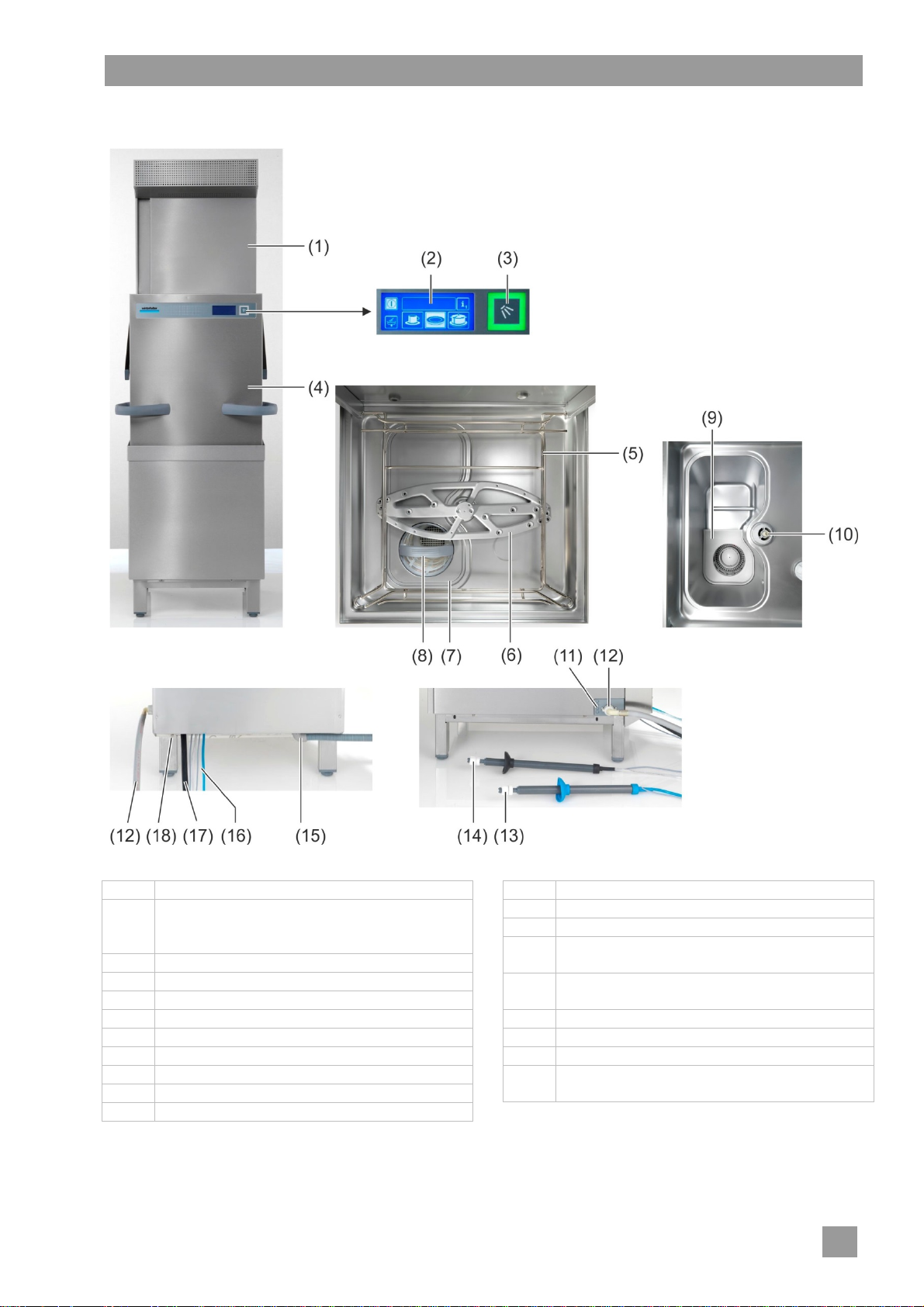
4.3 Overview
Product description
Pos. Description
(1) Energy module (special equipment) or heat
pump module (special equipment, no illus-
tration)
(2) Display (Touchscreen)
(3) Start button
(4) Machine hood (= hood)
(5) Rack guide
(6) Lower rotating wash field
(7) Tank cover
(8) Filter cylinder
(9) Pump inlet filter
(10) Wash field bearing
Pos. Description
(11) Bushings for cables and hoses
(12) Water supply hose
(13) Suction tube for rinse aid
(blue cap and blue suction hose)
(14) Suction tube for detergent
(black cap and transparent suction hose)
(15) Water drain hose
(16) Hoses and cable for the suction tubes
(17) Mains cable
(18) Connection for local equipotential bonding
system
5
Page 8
Product description
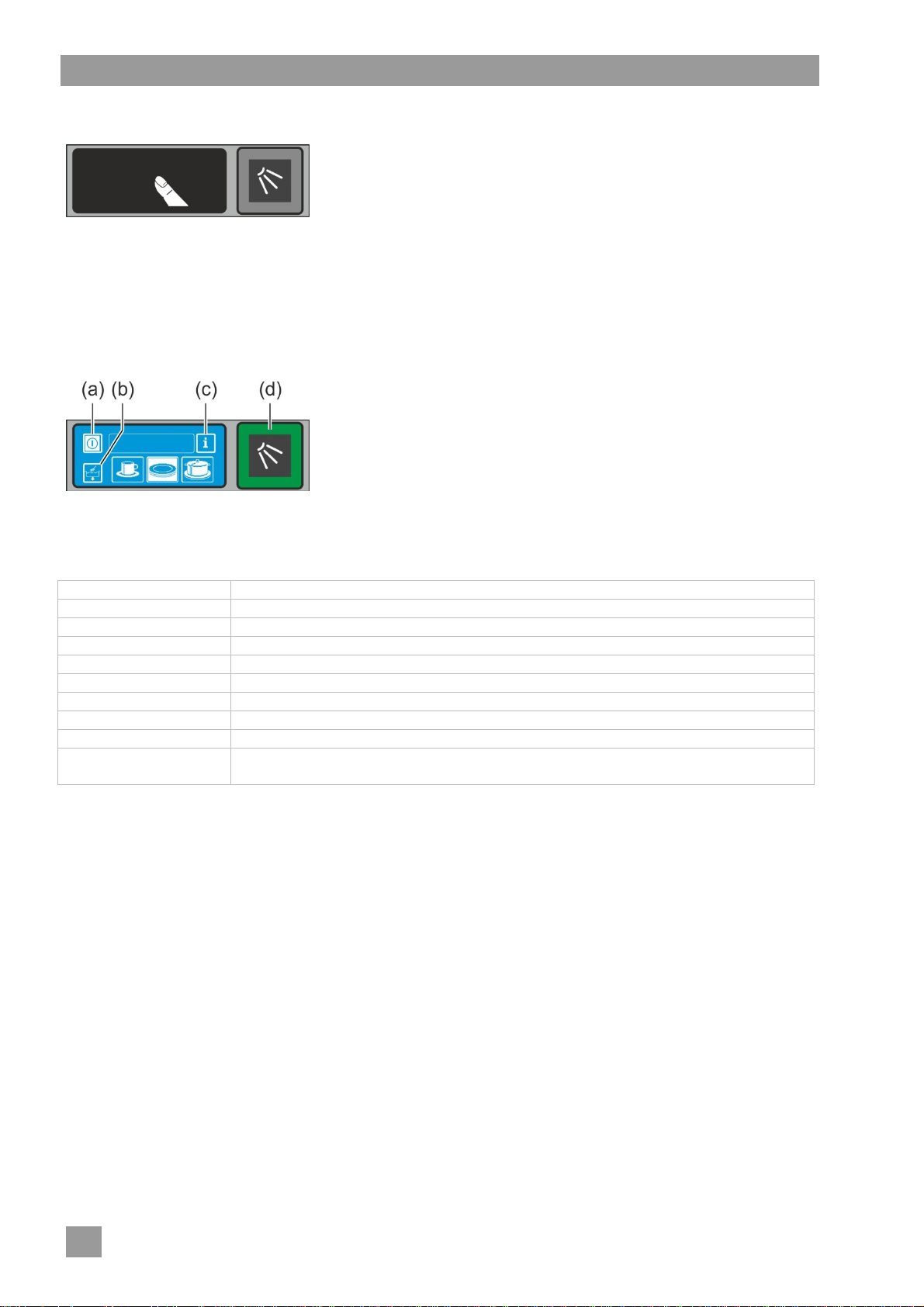
4.4 Display (Touchscreen) and start button
Activating the display
Touch the display with your finger.
The display turns on and then off again after a short time. This
On the screen touch-sensitive buttons (keys) are displayed. Operate the screen with your fingers only, not
with sharp objects. Each touch of a button is confirmed by a beep. Events such as the end of the programme
or malfunctions are indicated by a sequence of tones.
INFO An authorised service technician can deactivate the beep and the sequence of tones.
Operational state
Start button
The coloured lighting of the start button (d) has the following meanings:
Colour Meaning
not lit Machine is switched off
red Machine is not yet ready for use
green Machine is ready for use
blue Machine is washing
red and green Machine is filling and heating up
green and blue Washing programme is running
blue and not lit Self-cleaning programme is running
flashing green Washing programme is ended; hood has not been opened yet
flashing green-blue Only for the EnergyPlus und ClimatePlus models:
Vapours being extracted. The washing programme has not completely finished.
Menu levels
The machine electronic control unit is split into 3 levels:
Level for the dishwashing staff ( 4.5)
Info level 1 with additional washing programmes and information ( 10)
Info level 2 with access to the PIN Menu ( 11)
saves energy and prevents accidental switching on of the machine.
INFO Switching on the machine, see Section 7.2.
(a) On/Off key
(b) Self-cleaning programme
(c) Change to Info Level 1 Info Level 2 PIN Menu
(d) Start button
6
Page 9
Product description
4.5 Standard washing programmes
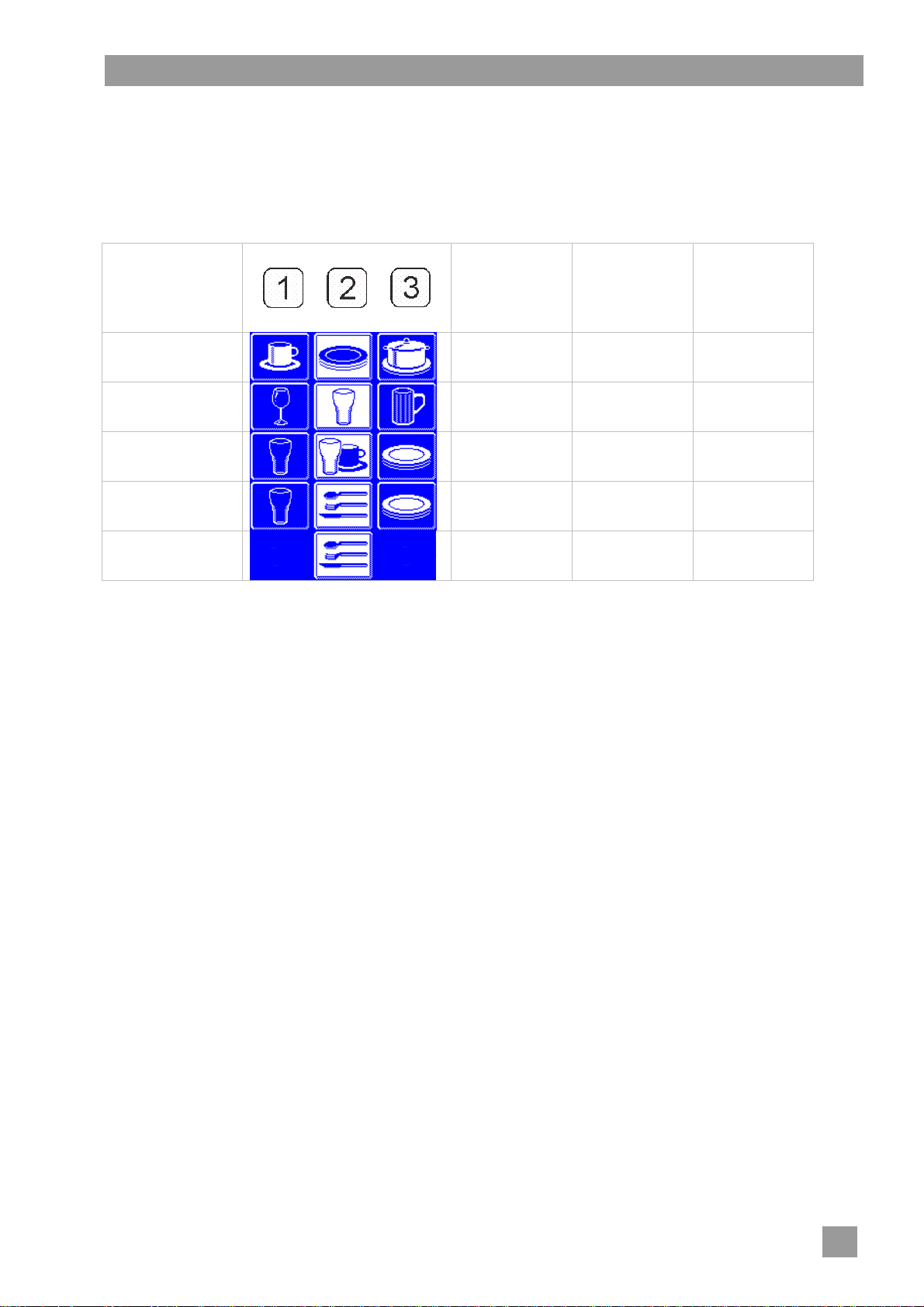
The washing programme display depends on which application the machine has been programmed for. If
necessary, the machine can also be reprogrammed later.
Programme 2 is already pre-selected when the machine is ready. Another washing programme is selected
by tapping. The selected programme is represented by a button with a white background.
Application of the
machine
Dishwasher
Glasswasher delicate glasses
Bistro dishwasher glass glasses and cups plates
Bistro and cutlery
washer
Cutlery washer cutlery
Programme 1 for Programme 2 for Programme 3 for
slightly dirty dishes
glass cutlery plates
medium dirty
dishes
less delicate
glasses
heavily dirty dishes
robust glasses
INFO The indicator on your dishwasher may vary since the authorised service technician can display
appropriate images for your machine from a collection of images. At your request, the service technician can also hide programmes.
7
Page 10
Rinse aid and detergent
5 Rinse aid and detergent
When handling chemicals, observe the safety precautions and the dosage recommendations
Danger
Caution
5.1 Rinse aid
A rinse aid is necessary to ensure that water on the dishes drains off after washing and dries off after a short
while. Rinse aid is automatically dosed from an external container. The rinse aid dosing device is an integral
component of the machine. The dosing amount is set by the authorised service technician when commissioning the machine ( 12.6).
5.2 Detergent
Caution
A detergent is necessary to ensure that the leftovers and dirt on the dishes is cleaned. Detergents can be
dosed as follows:
Manually as detergent powder.
Automatically from an external container using a detergent dosing device.
INFO The detergent dosing device is not included in the scope of delivery of all machines. When using
on the packaging.
Wear protective clothing, protective gloves and protective goggles when handling chemicals.
Use only products that are suitable for commercial dishwashers. Such products are appro-
priately marked. We recommend Winterhalter products. These are especially adapted to
Winterhalter dishwashers.
Do not put rinse aids in the storage container for detergents and vice versa.
Do not use acidic detergents.
Do not mix different detergent products in order to prevent crystallisation that could destroy
the detergent dosing device ( 5.4)
Do not use products that can create foam, e.g. hand soap, soft soap, hand wash liquid. En-
sure that these do not enter the machine even during the pre-treatment of the dishes.
an external dosing device, a transfer strip is available for connecting the dosing device ( 18).
5.2.1 Manual dosing of detergent powder
Pre-dosing
Switch on the machine and wait until the start button is lit green.
Adhere to the dosing instructions on the packaging of the detergent. The machine's tank capacity is ap-
prox. 35 litres.
Place approx. 100 g of detergent powder in the machine. This corresponds to a dosing of approx. 3 g/l.
Then start the wash cycle immediately to mix the detergent powder with the water.
Post-dosing
At each wash cycle approx. 2.0-2.5 litres of fresh water enter the dishwasher, which must be mixed with
detergent powder.
Fill approx. 30 - 40 g detergent powder into the machine after 5 wash cycles.
5.2.2 Automatic dosing of liquid detergent
The dosing amount is set by the authorised service technician when commissioning the machine ( 12.6).
8
Page 11
Rinse aid and detergent
5.3 Suction tube with level control
Only use the suction tube with sufficiently stable containers. Narrow and tall containers can
Caution
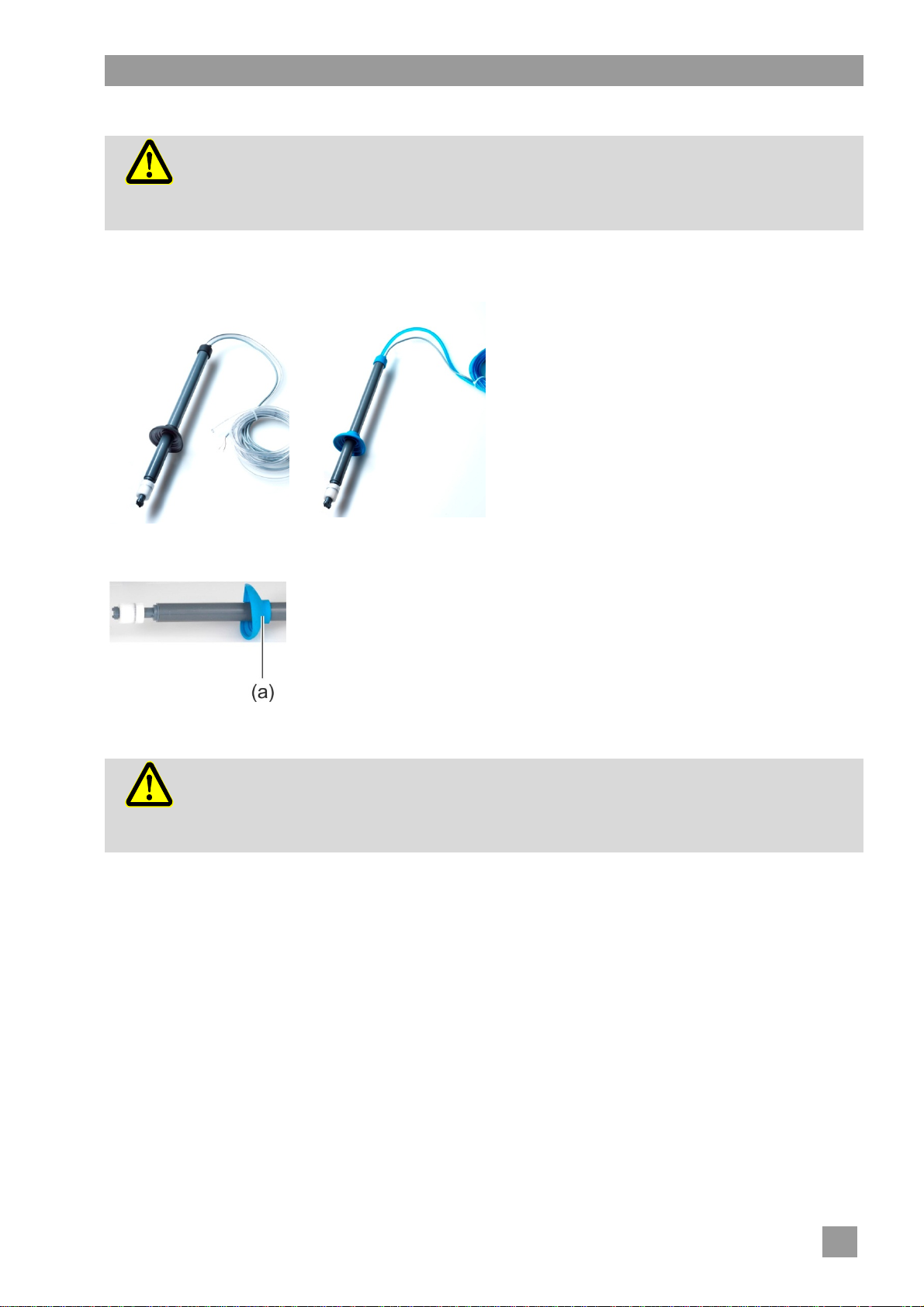
As an option, with your machine you may have one or more suction tubes. The suction tube is already connected to the machine.
tip if the suction tube is pulled.
Do not place the suction tube for the rinse aid in the detergent container or vice versa.
Do not pull unnecessarily on the suction hose or main power cable, as this may lead to a
defect.
Figure 1:
Suction tube for detergent
Transparent suction hose
Black cap
Figure 2:
Suction tube for rinse aid
Blue suction hose
Blue cap
Figure 1 Figure 2
Servicing and maintenance
Rinse the suction tube at every container change under running water. Re-
move crystallised detergent residue.
Ensure that both vent holes (a) in the caps are open.
Put the suction tube back into the container. Slide the cap downwards until
the container opening is closed.
5.4 Changing the detergent product
Mixing different detergents can lead to efflorescence that can lead to a failure of the deter-
Caution
A new detergent product usually requires a new setting of the detergent dosing device. Assign the re-
quired work to an authorised service technician to attain good cleaning results.
If this is not done, the warranty and product liability of Winterhalter Gastronom GmbH expires.
gent dosing device. This is applicable even if the new detergent is from the same manufacturer.
The dosing tubes and the detergent dosing device must be thoroughly rinsed with water
before the new detergent is used.
9
Page 12
Integral water softener (special equipment)
Procedure:
Observe the safety precautions when handling chemicals and the dosage recommendations
Danger
Remove the suction tube from the container and place it in a water-filled container.
Rinse the dosing tube and the detergent dosing device with water. To do this, use the "prime dosing de-
vice" function several times ( 10). The frequency depends on the length of the dosing tubes.
Place the suction tube in the new detergent container.
Use the "prime dosing device" function several times ( 10), to replace the water in the dosing tubes with
detergent.
on the packaging.
Wear protective clothing, protective gloves and protective goggles when handling chemicals.
Do not mix different detergents.
5.5 Priming the dosing devices
Dosing devices must be primed when air is reached in the dosing tubes because the containers were not
exchanged or refilled in time ( 10).
6 Integral water softener (special equipment)
By softening the inlet water, limescale build-up in the machine and on the dishes is avoided. For the integral
water softener to work correctly, the salt container must be filled with regeneration salt.
INFO At the commissioning of the machine the authorised service technician measures the water hard-
ness and saves it in the machine's electronic control unit.
6.1 Lack of salt display
A pictogram appears on the screen when an empty salt container requires refilling. The display disappears after filling the salt container, as soon as approx. 3 wash cycles have been
completed and part of the salt has been dissolved.
6.2 Filling regeneration salt
Possible risk of damage to the water softener
Chemicals such as detergent and rinse aid inevitably lead to damage to the water softener. Fill
Caution
INFO Because of their size, salt tablets are not suitable.
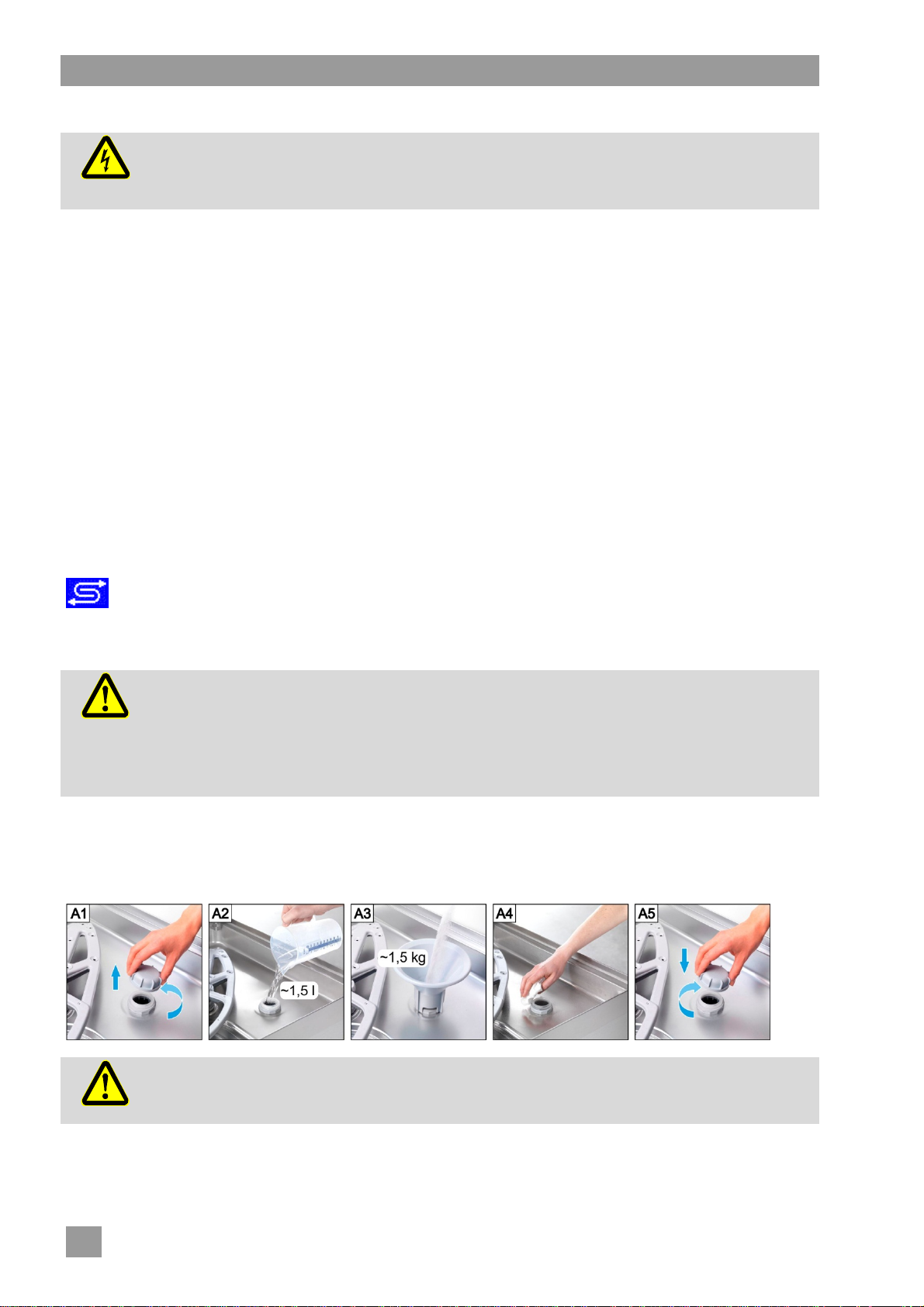
Proceed in accordance with Figures A1 to A5.
IMPORTANT Figure A2 is only relevant for the first filling.
only with regeneration salt or pure evaporated salt.
Possible malfunction of the water softener
Do not fill with other salts (e.g table salt cleaning or de-icing salt). These can contain waterinsoluble components. Fill only with fine-grained salt (max. 0.4 - 7 mm grain size).
Caution
10
Risk of rust formation in the filling area
Immediately after filling, start a wash cycle to rinse off any salt residue.
Page 13
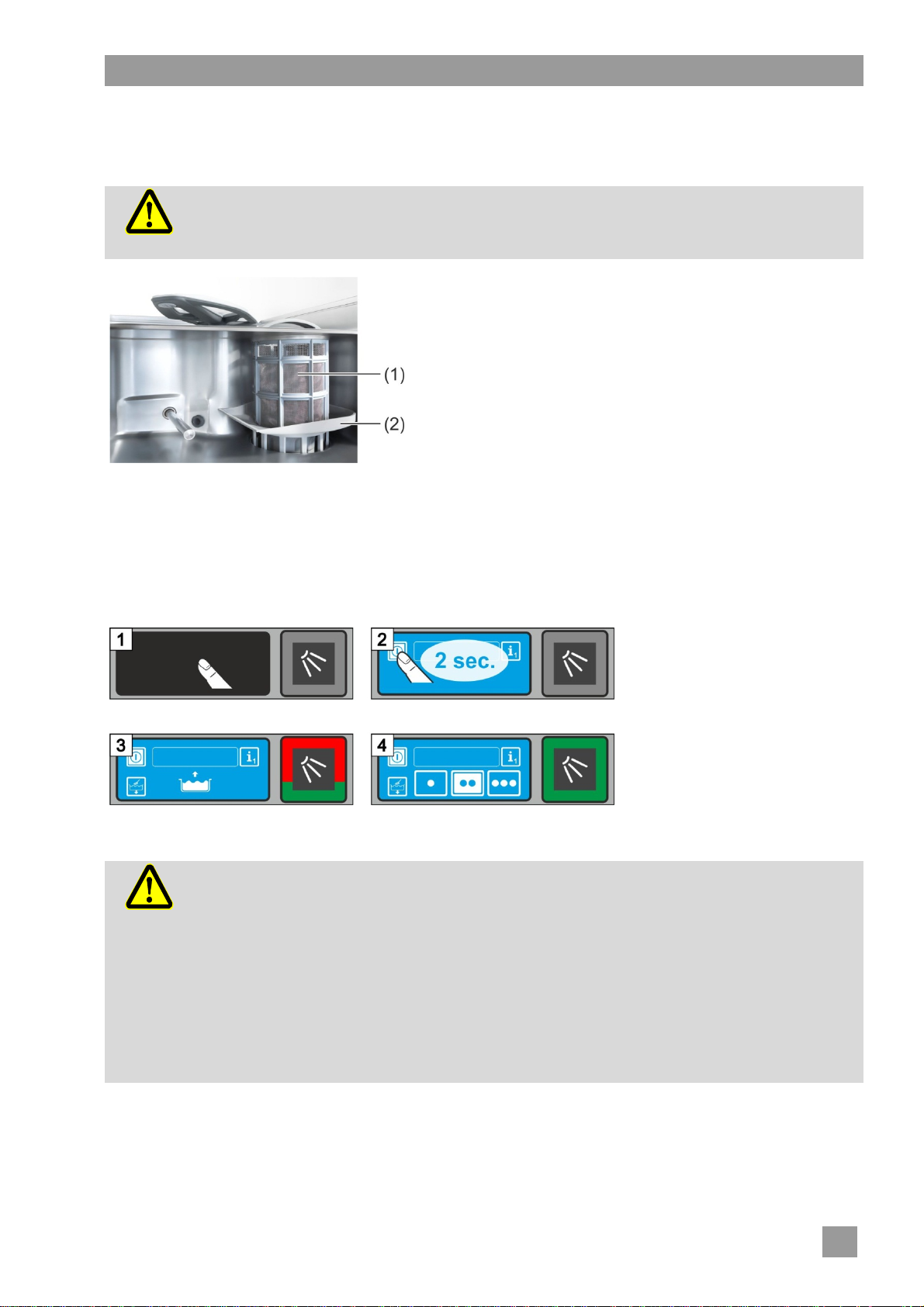
7 Operation
7.1 Before switching on the machine
Possible risk of damage due to suction of items from within the machine e.g. pieces of
cutlery
Caution
The pump inlet filter protects the circulating pump and the drain pump. Operate the machine
only with the pump inlet filter fitted.
Open the water shut-off valve.
Switch on the local mains disconnector.
For your own safety, test the on-site residual-current circuit
Open the hood.
Remove the filter cylinder (1).
Check whether the pump inlet filter (2) is fitted. If it is not
Insert the filter cylinder (1).
Check whether the rotating wash fields (top and bottom)
Close the hood.
Check whether sufficient detergent and rinse aid are pre-
Operation
breaker (FI).
fitted there will be an error message when the machine is
switched on.
are fitted and properly engaged.
sent in the storage containers. Replace the storage containers in time so that the cleaning results are not affected.
7.2 Switching on the machine and preparing it for operation
7.3 Washing
Possible risk of scalding from hot wash water
Keep children away from the dishwasher. The wash water is at a temperature of approx.
Caution
62 °C.
Do not open the hood while the machine is washing. There is a risk of the hot wash water
spilling out. Stop the washing programme before doing so ( 7.3.7).
Possible risk of injury
Do not place any objects on the hood.
Arrange sharp, pointed utensils so that they do not cause injury.
Possible failure of the washing programme due to heavy dirt ingress
Pre-rinse all dishes and pans with cold water. Remove food residues.
11
Page 14

Operation
7.3.1 Arranging the dishes in the washing rack
Dishes and cutlery
Place plates with their upper surface facing forwards.
Place cups, bowls and pots rim down.
Wash cutlery either standing in the cutlery holder or lying in a shallow basket. Make sure that they are not
too close together. Soak cutlery, before you wash it.
Position knives and other sharp objects in the cutlery holder with the handle up in order to prevent inju-
ries.
Glasses
Pour out drink residue (not in the machine).
Remove scraps of paper.
Rinse off ash with water.
Place glasses rim down.
Space the glasses, so they do not rub against each other. This will avoid scratches.
For tall glasses choose a basket with appropriate divisions so that the glasses are held in a stable
position.
7.3.2 Using automatic hood start
Choose a washing programme ( 4.5).
INFO The washing programme remains selected until a different washing programme is chosen.
Slide the washing rack into the machine.
Check that the top and bottom rotating wash fields are free to turn.
Close the hood.
The washing programme is started.
7.3.3 Interrupting automatic hood start
Do not close the hood completely, but only as far as the lower detent position.
INFO The automatic hood start can be deactivated by an authorised service technician (P516). Every
washing programme must then be started by pressing the start button.
7.3.4 Changing washing programme
Choose a different washing programme by tapping the button ( 4.5).
The background of the button (4) becomes white.
Close the hood.
The washing programme is started.
7.3.5 Intensive programme
If the stains are particularly dried in, the washing programme can be intensified
Close the hood and press the start button twice in short succession ("double click").
In the info field, the "Brush" icon flashes.
INFO The intensive programme only affects the current washing programme and is
then automatically deactivated again.
7.3.6 End of the programme
The start button flashes green, as soon as the washing programme has ended and the hood remains uno-
pened.
Only for the EnergyPlus und ClimatePlus models:
At first, the start button flashes blue-green. At the same time, the warm-humid vapour is extracted from the
washing compartment, and the heat energy stored in it is recovered for the next wash cycle. If possible, do
not open the hood yet at this time.
The start button flashes green as soon as the warm air is extracted.
12
Page 15

Operation
7.3.7 Prematurely terminating the washing programme
A washing programme can be terminated in the following ways:
Press the start button
Tap on the button of the selected washing programme
7.3.8 Periods of disuse
Do not switch the machine off during periods of disuse.
Close the hood as far as the detent position to prevent it cooling down.
7.4 Switching off
Switch the machine off at the end of the working day using the self-cleaning programme ( 8.1.2), so that it
is cleaned and emptied every day.
INFO If you use the On/Off switch, the tank stays filled but will no longer be kept at temperature. If the
tank temperature has dropped too much before the machine is switched on again, the tank will be
emptied automatically and filled again.
13
Page 16
Servicing and maintenance
8 Servicing and maintenance
Do not spray the machine and the surrounding area (panels, base) using a water hose,
steam-jet air ejector or high-pressure cleaner.
Ensure that the base of the machine is not flooded when cleaning the floor in order to pre-
Warning
Warning
8.1 Daily cleaning
8.1.1 During operation
Remove the filter cylinder, clean if necessary and re-insert it.
8.1.2 Self-cleaning programme at the end of the working day
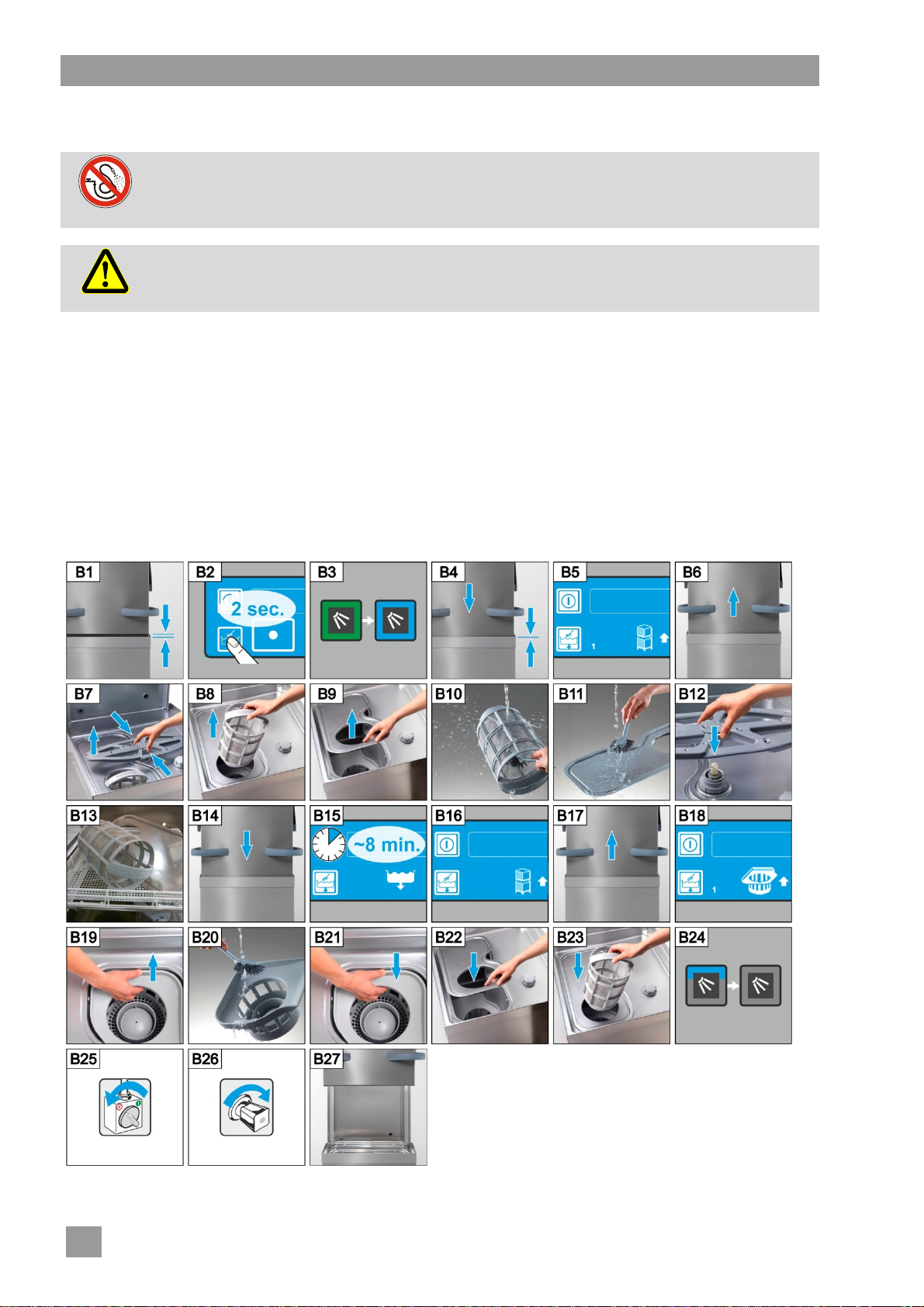
The machine is equipped with a self-cleaning programme that assists you when you are cleaning the inside
of the machine. After the first programme step, the self-cleaning programme is interrupted so that you can
remove the filter cylinder and the tank cover and clean them. If you do not follow this step, the self-cleaning
programme will continue automatically after 30 seconds.
Proceed in accordance with Figures B1 to B27.
vent an uncontrolled inflow of water.
Wear protective clothing and protective gloves before touching parts in contact with detergent
solution (filters, rotating wash fields, ...)
14
Page 17
Servicing and maintenance
Terminating the self-cleaning programme:
Press this button.
The background of the button becomes blue.
The machine is filled again.
8.1.3 Cleaning the interior
Ensure that there are no rusty foreign objects in the machine which can cause even "rust-free
stainless steel" material to start rusting. Rust particles can come from non-rust-free cleaners,
Caution
damaged wire racks or non-rust-protected water lines.
The following materials must not be used for cleaning:
High-pressure cleaner
Detergents containing chlorine or acid
Sponges and wire brushes containing metal
Abrasives or abrasive cleaners
Remove dirt with a brush or a cloth.
8.1.4 Cleaning the exterior of the machine
Clean the display with a damp cloth.
Clean the external surfaces using a stainless steel cleaner and stainless steel support.
8.2 Weekly cleaning
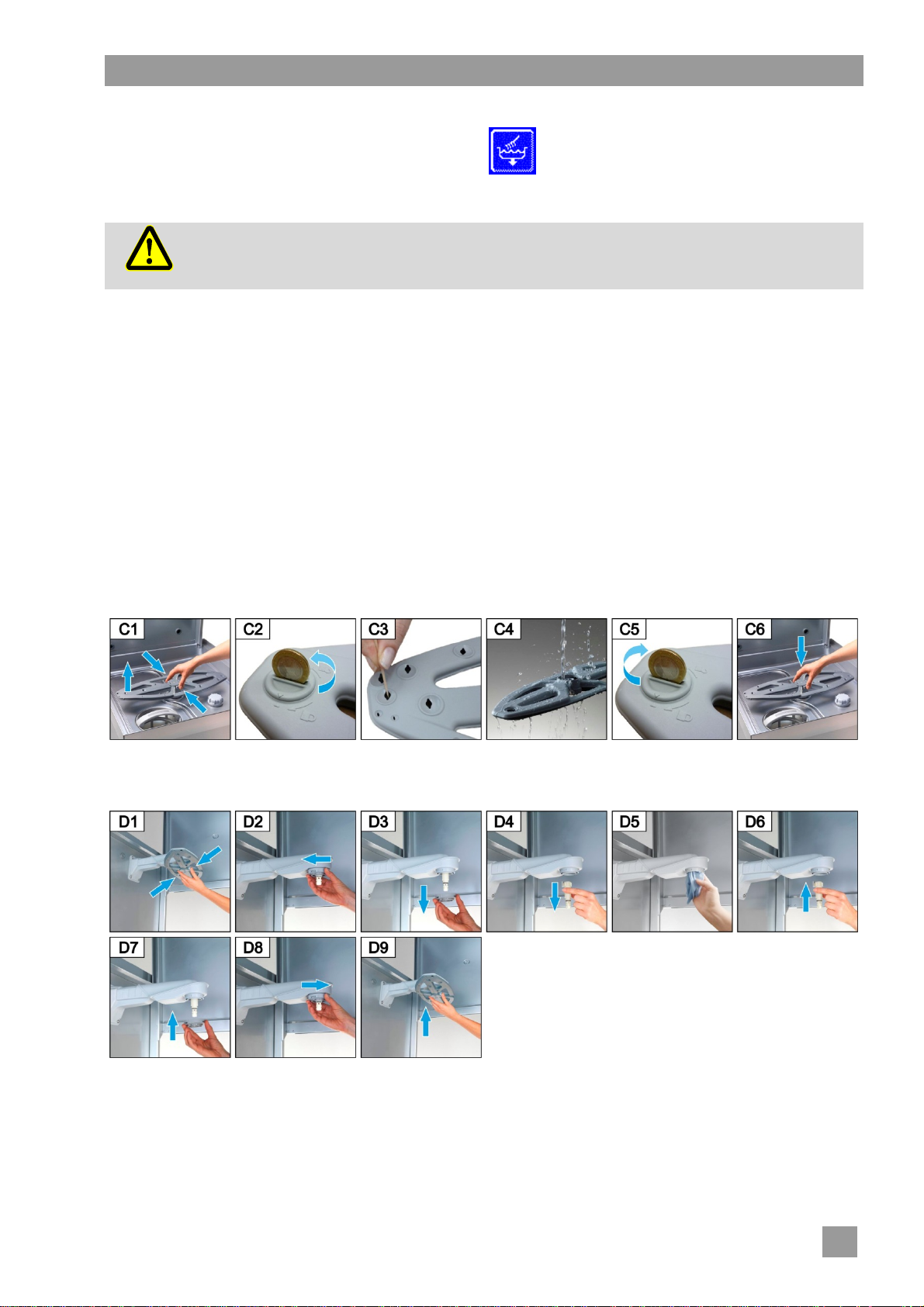
Cleaning the rotating wash fields (top and bottom)
Proceed in accordance with Figures C1 to C6.
Cleaning the wash field bearings (top and bottom)
Proceed in accordance with Figures D1 to D9.
15
Page 18
Servicing and maintenance
8.3 Monthly cleaning
Cleaning the dirt trap
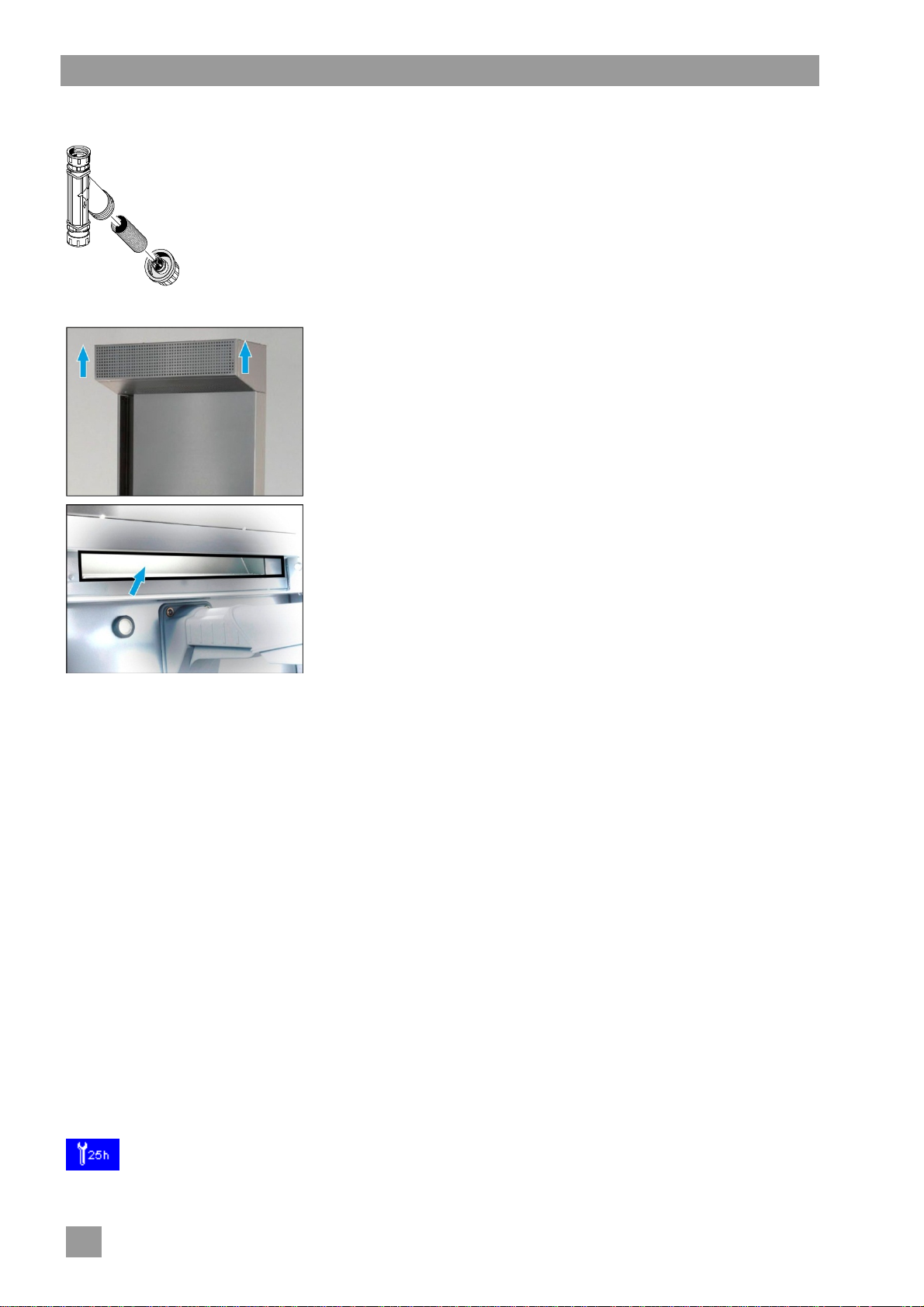
Close the water stop cock.
Clean the dirt filter in the dirt trap.
Only for the EnergyPlus und ClimatePlus models
Cleaning the energy module/heat pump:
Slide the ventilation grill upwards and remove it.
Clean the space behind the ventilation grill with a cleaning cloth.
Wash the ventilation grill in the machine and then refit.
Open the hood.
Spray the suction channel with warm water. Use a water hose,
not a high-pressure cleaner.
Clean the suction channel with a cleaning cloth.
8.4 Descaling
If the machine is operated with water of high hardness without water treatment, descaling is necessary at
regular intervals ( 12).
8.5 Maintenance b y the Customer Service
We recommend that you have an authorised service technician carry out the maintenance of the machine at
least twice a year so that vulnerable parts can be checked and replaced accordingly. Original spare parts
must be used for repairs and the replacement of worn parts.
Worn parts are, for example:
Dosing tubes
Bearings of the rotating wash fields
Hood seal
Water supply hose
Winterhalter has a maintenance contract that includes these services.
Only for the EnergyPlus und ClimatePlus models:
The heat exchanger must be cleaned once a year irrespective of whether there is a maintenance contract or
not. Depending on the degree of soiling, the performance of the heat exchanger will be reduced without
maintenance.
Contact an authorised service technician for the maintenance.
In the electronic control unit, the number of operation hours or washing programmes before servicing should be performed can be programmed and at what number of operation hours remaining the symbol for maintenance/service is displayed. If necessary, have this function activated by
an authorised service technician.
16
Page 19
Malfunctions
9 Malfunctions
This chapter explains the remedies for malfunctions. The causes and remedies are specified in the tables.
Contact an authorised service technician if you cannot rectify the error yourself.
Danger to life. Live components.
Do not open any machine covers or machine parts if it requires tools. There is danger of
Danger
shock.
Only an authorised service technician should carry out work on the electrical system. The
machine must first be disconnected from the mains.
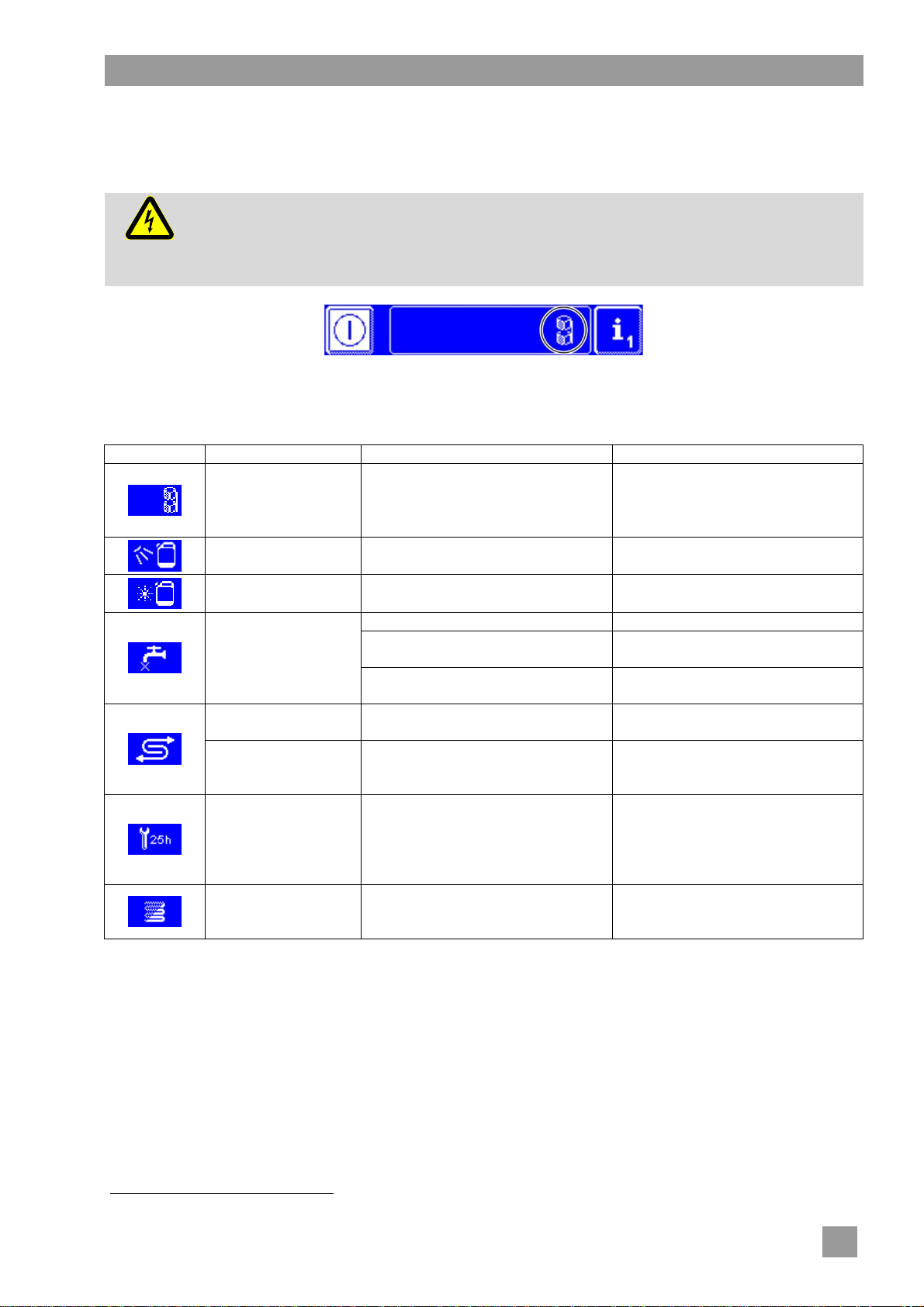
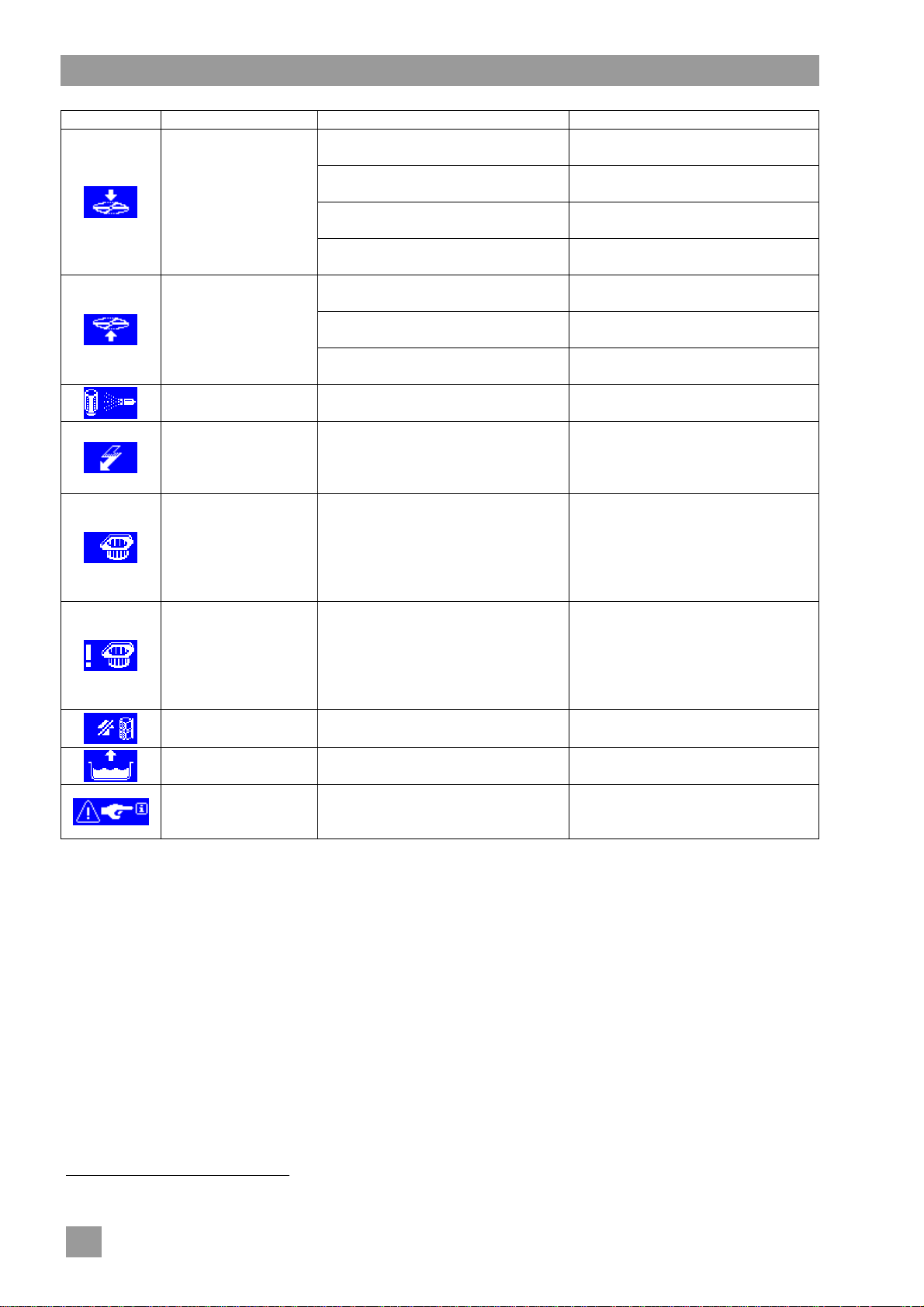
Faults are displayed in the info field in the form of pictograms. In addition, every malfunction will be recorded
in the hygiene journal ( 12) and can be retrieved in Info Level 2 ( 11). Information is recorded in both
menus when the malfunction is remedied.
Pictogram Meaning Possible Cause Remedy
Hood is open Programme start with open hood Close the hood
1
Detergent is empty
Rinse aid is empty
Change the detergent container
1
Change the rinse aid container
Water stop cock closed Open the water stop cock
Remove and clean the dirt filter
( 8.3)
Contact an authorised service
technician for the repair
Fill the salt reservoir with regenerating salt ( 6.2)
Exchange the partial demineralisation unit; exchange the resin of the
full demineralisation unit.
Lack of water
Integral water treatment is exhausted
External partial or
full demineralisation
unit exhausted
Dirt filter in the dirt trap is blocked
Solenoid valve defective or
blocked
Low salt
The number of operating hours /
Service interval is
running out
cleaning programmes set in the
controls has been reached.
INFO: This function is not activat-
Contact an authorised service
technician for the repair
ed in factory.
Check the calcification
The number of operating hours set
in the control system has been
reached.
Start the descaling programme
( 12.5)
1
is only displayed, when a suction tube with level control is used and connected to the machine.
17
Page 20
Malfunctions
Pictogram Meaning Possible Cause Remedy
Rotating wash field is not correctly
engaged
Rotating wash field obstructed by,
Lower rotating wash
field is blocked
e.g. a piece of cutlery
Rotary wash arm blocked by pollu-
tion
Defective drive2
Rotating wash field obstructed by,
e.g. high dishes
Upper rotating wash
field is blocked
Rotating wash field blocked by
pollution
Defective drive2
Filter cylinder
blocked
Heavily contaminated filter cylinder
On-site energy optimisation
equipment switches individual
3
Energy optimization
electrical consumers (heating ele-
ments).
Missing pump inlet filter
Pump inlet filter not
fitted
The machine switches off
after 30 seconds and will not
be filled.
missing pump inlet filter
Pump inlet filter not
fitted despite three
prompts
IMPORTANT: The circulating
pump and drain pump may get
damaged by drawing in, for exam-
ple, pieces of cutlery
Automatic hood
opening
Tank will be filled
Malfunction with
error code
2
defective
Defective motor
A washing programme is started
while the machine is refilling
Various
Correctly engage the rotating
wash field
Remove the obstruction
Clean the wash field bearing
( 8.2)
Contact an authorised service
technician for the repair
Remove the obstruction
Clean the wash field bearing
( 8.2)
Contact an authorised service
technician for the repair
Remove, clean and replace the
filter cylinder
Wait until the on-site energy optimisation equipment switches off
Fit the pump inlet filter and, if necessary, switch the machine on
again.
INFO: When the prompt is down-
graded three times, the machine
can be switched on
Fit pump inlet filter
Contact an authorised service
technician for the repair
Wait till the machine has been
filled
Display the error code ( 9.1) and
assign the repair to an authorised
service technician
2
Special equipment
3
is displayed only when the machine is connected to an equipment with energy optimisation
18
Page 21
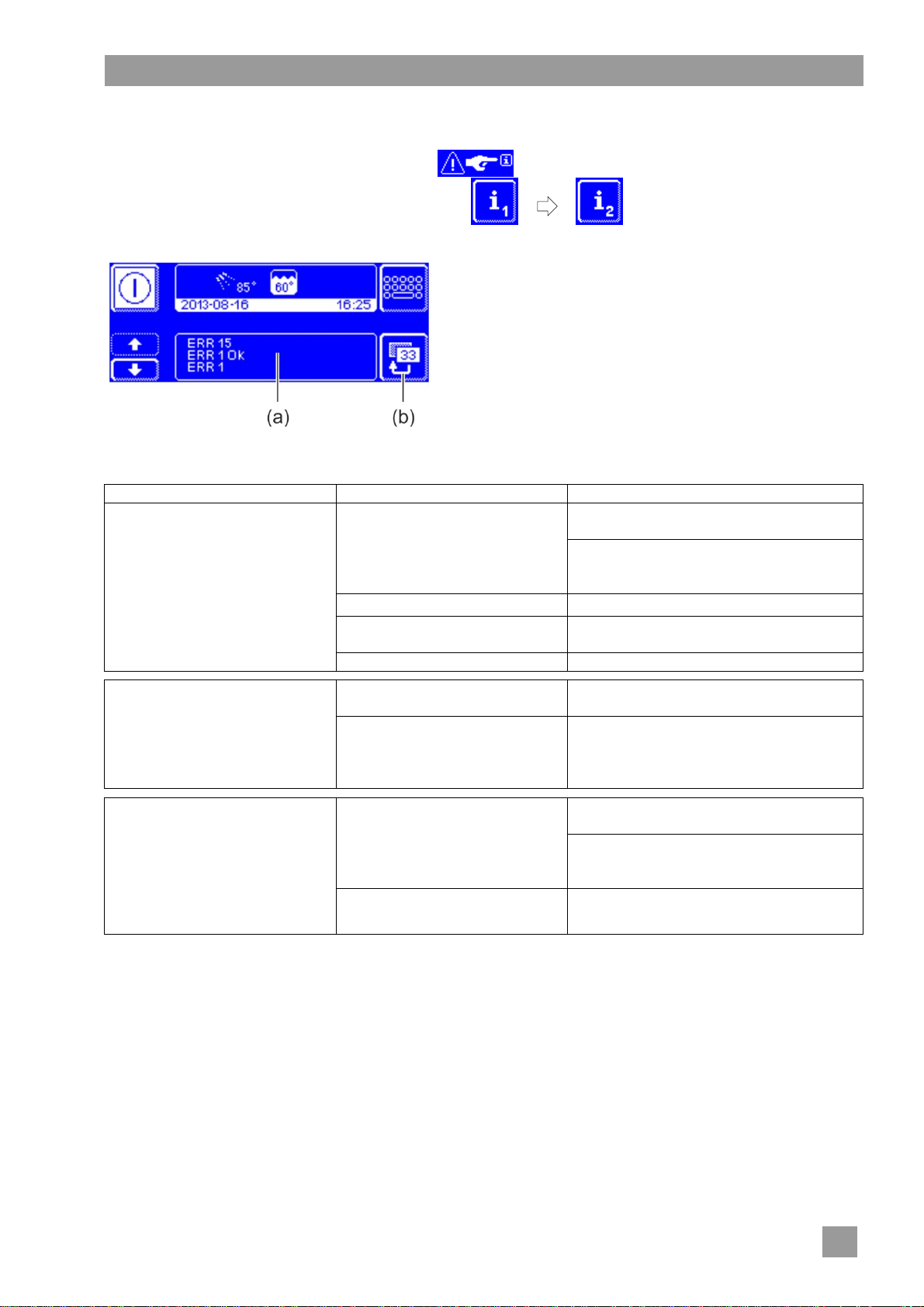
9.1 Error code call
In the display, the following symbol flashes:
Malfunctions
Tap the following buttons in turn:
The error codes are displayed in area (a).
INFO Malfunctions already resolved are also displayed
Contact an authorised service technician for the repair.
Press the button (b) twice to leave the menu.
here (e.g. ERR 1 OK).
9.2 Poor cleaning result
Possible Cause Remedy
Set the dosing amount as per the manufacturer’s specifications ( 12.6)
No or low detergent dosing
The dishes do not get clean
Dishes incorrectly sorted Do not stack dishes one over the other
Nozzles of the rotating wash
fields blocked
Temperatures too low Check temperatures ( 10)
Check the dosing lines (for kinks, breakage, ...)
Exchange the storage container, if empty
Remove the rotating wash fields and
clean the nozzles ( 8.2)
In case of limescale deposits:
The water is too hard
There is formation of layers on
the dishes
The dishes do not dry on their
own
For machines without integral softener:
INFO The water quality affects the washing and drying performance. We therefore recommend from a
total hardness of more than 3° dH (0.53 mmol/l) that the machine is supplied with softened water.
In case of starch residues:
Temperature of the manual pre-
cleaning (brush) is higher than
30 °C
No or low rinse aid dosing
Rinse temperature too low
Check the water preparation
Clean thoroughly
Lower the temperature of the manual
pre-cleaning
Carry out the basic cleaning programme
( 12.5.2)
Set the dosing amount as per the manufacturer’s specifications ( 12.6)
Check the dosing lines (for kinks, breakage, ...)
Exchange the storage container, if empty
Contact an authorised service technician
for the repair
9.3 Increased generation of noise
For ClimatePlus machine models:
In rare cases a loud humming noise may develop due to sound reflection. In this case we recommend the
installation of isolating buffers.
Contact an authorised service technician for the installation.
19
Page 22
Info Level 1
10 Info Level 1
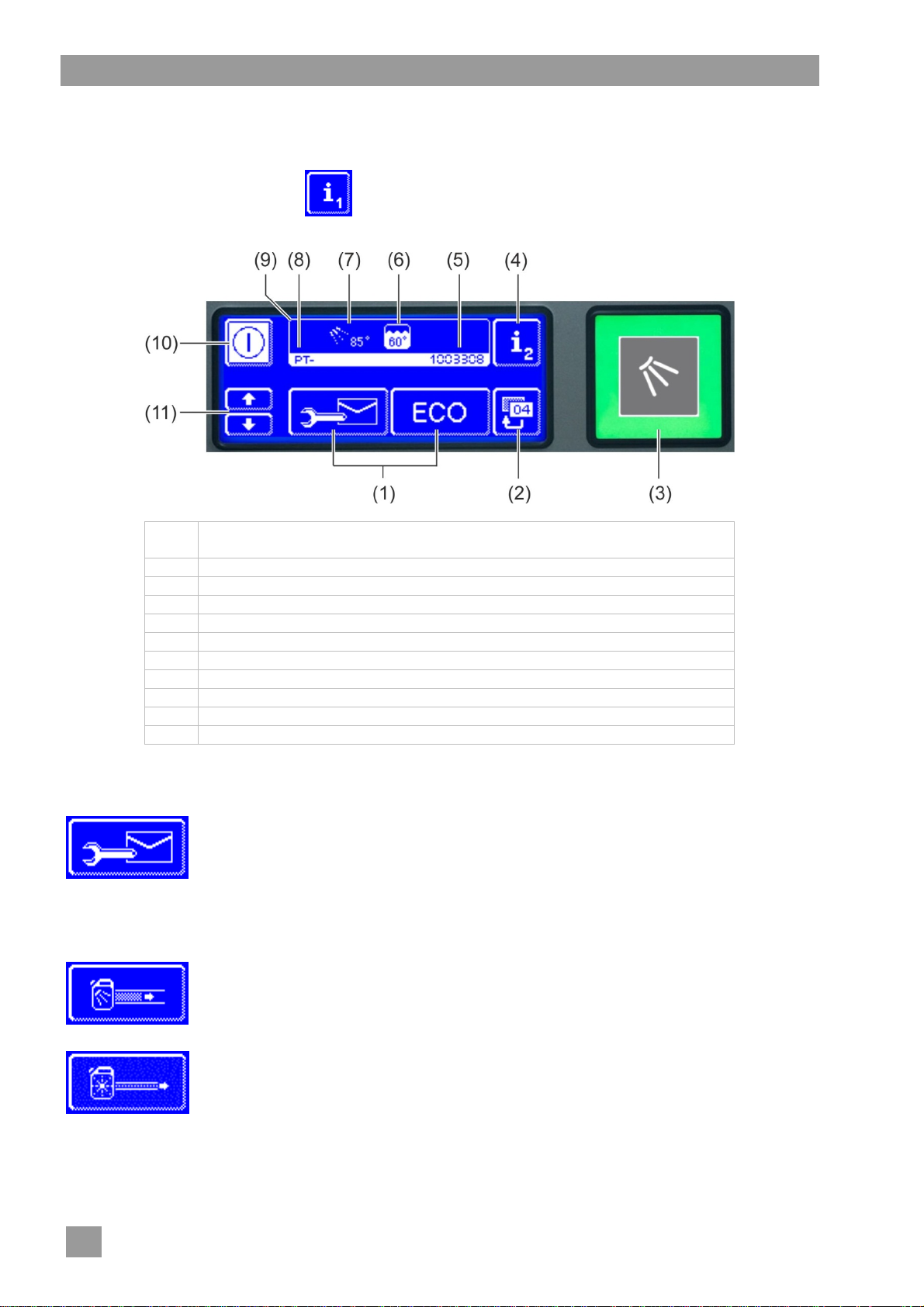
Accessing Info Level 1
Press the following button:
(1) Buttons for retrieving information, the priming of the dosing devices and the
selection of additional programmes
(2) Back button
(3) Start button
(4) Switch to Info Level 2 ( 11)
(5) Serial number
(6) Current tank temperature
(7) Current rinse temperature
(8) Machine type (PT-M, PT-L or PT-XL)
(9) Info field
(10) On/Off switch (tank will then not be emptied)
(11) Scroll buttons for area (1)
Buttons of area (1)
Addresses
Press the button.
The following 2 addresses appear:
SERVICE: Address of the service technician
CHEMICALS: Address of the chemicals supplier (rinse aid, detergent, ...)
INFO If no addresses appear, the authorised service technician can enter the
matching addresses.
Prime the detergent dosing device and dosing tube
Keep the button pressed.
The background of the button becomes white. The dosing device is activated
(max. 30 seconds)
Prime the rinse aid dosing device and dosing tube
Keep the button pressed.
The background of the button becomes white. The dosing device is activated
(max. 30 seconds)
20
Page 23
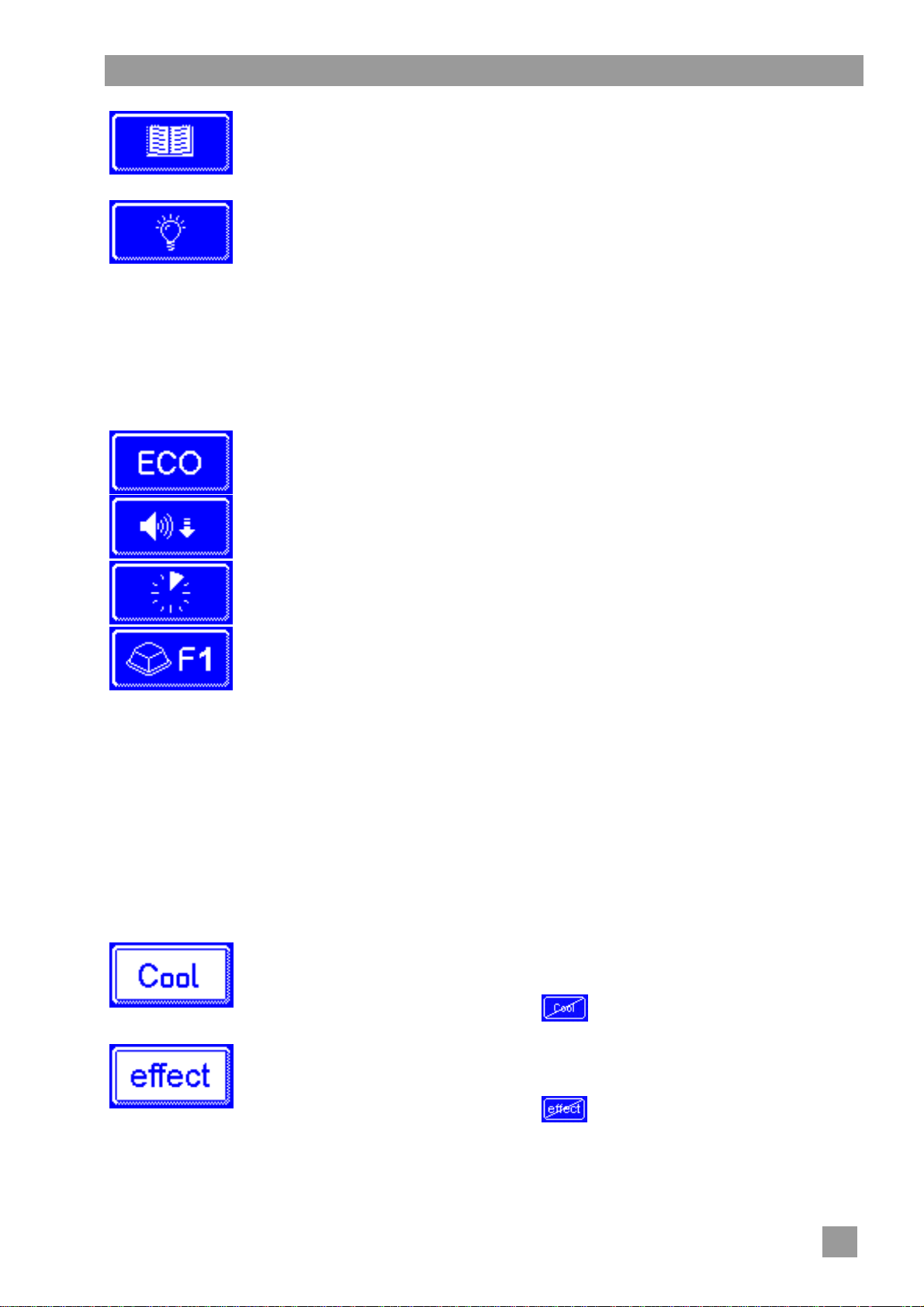
Info Level 1
Integrated operating instructions ( 13)
Press the button.
INFO Accessing the integrated operating instructions and tips is possible at any time, even while a wash-
ing programme is running.
Additional programmes
INFO The number of additonal programmes depends on the programming of the machine.
The integrated operating instructions appear.
Tips
Press the button.
Tips appear concerning themes such as hygiene, conservation of dishes and
economy.
Energy saving programme
Low-noise programme
for especially quiet washing
Short programme
Special programme
The special programme can be freely programmed by the service technician to your
wishes (time, temperature, mechanics, chemistry).
Using the additional programmes
Tap on the button of the selected additional programme.
The background of the button becomes white.
In the info field the display of the temperature is replaced by the display of the additional programme.
Press the start button (3) to start the additional programme.
The start button (3) lights up in blue.
The start button (3) flashes green when the additional programme has ended.
The additional programme remains stored until it is disabled or another additional programme is se-
lected.
Additional programmes with the "Cool" and "effect" special equipment
INFO Button appears only on "Cool" type machines.
As long as the button is enabled (white background) rinsing will be with cold water. To
disable the function, the button must be touched.
The background becomes dark and flashes in the info field (9).
INFO Button appears only on "effect" type machines.
As long as the button is enabled (white background) rinsing will be at a lower temperature. To disable the function, the button must be touched.
The background becomes dark and flashes in the info field (9).
21
Page 24
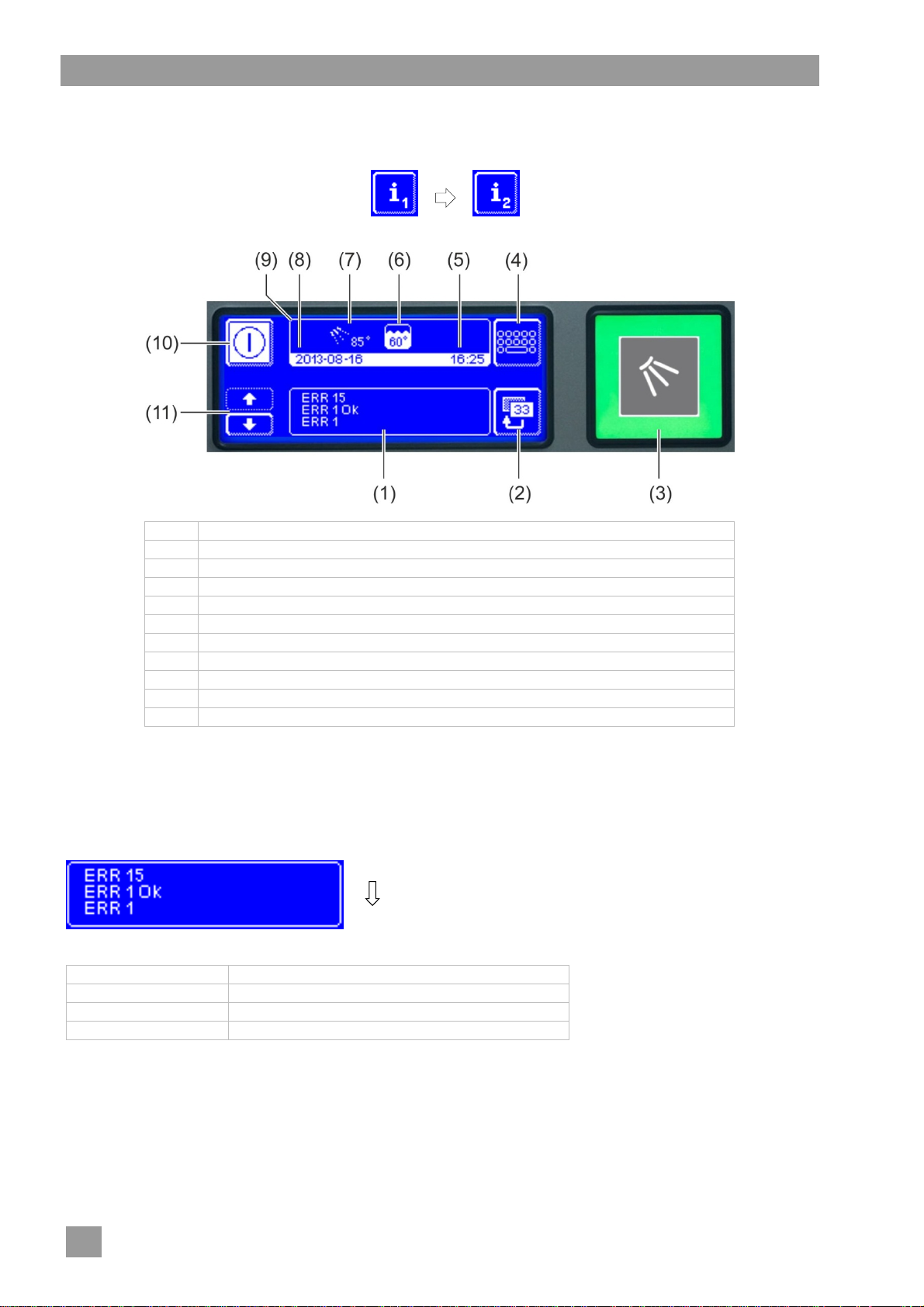
Info Level 2
11 Info Level 2
Accessing Info Level 2
Tap the following buttons in turn:
(1) Area for displaying events and malfunctions
(2) Back button
(3) Start button
(4) Switch to the PIN Menu ( 12)
(5) Current time
(6) Current tank temperature
(7) Current rinse temperature
(8) Current date
(9) Info field
(10) On/Off switch (tank will then not be emptied)
(11) Scroll buttons for area (1)
Events and malfunctions
In this field all events and malfunctions are displayed. Already resolved malfunctions appear here as well.
Example
last entry
older entries
Display Explanation
Evt xx Event (e.g. end of a washing programme)
ERR xx Malfunction
ERR xx OK Malfunction resolved
INFO Information with a date can be found in the Hygiene logbook ( 12.4).
22
Page 25
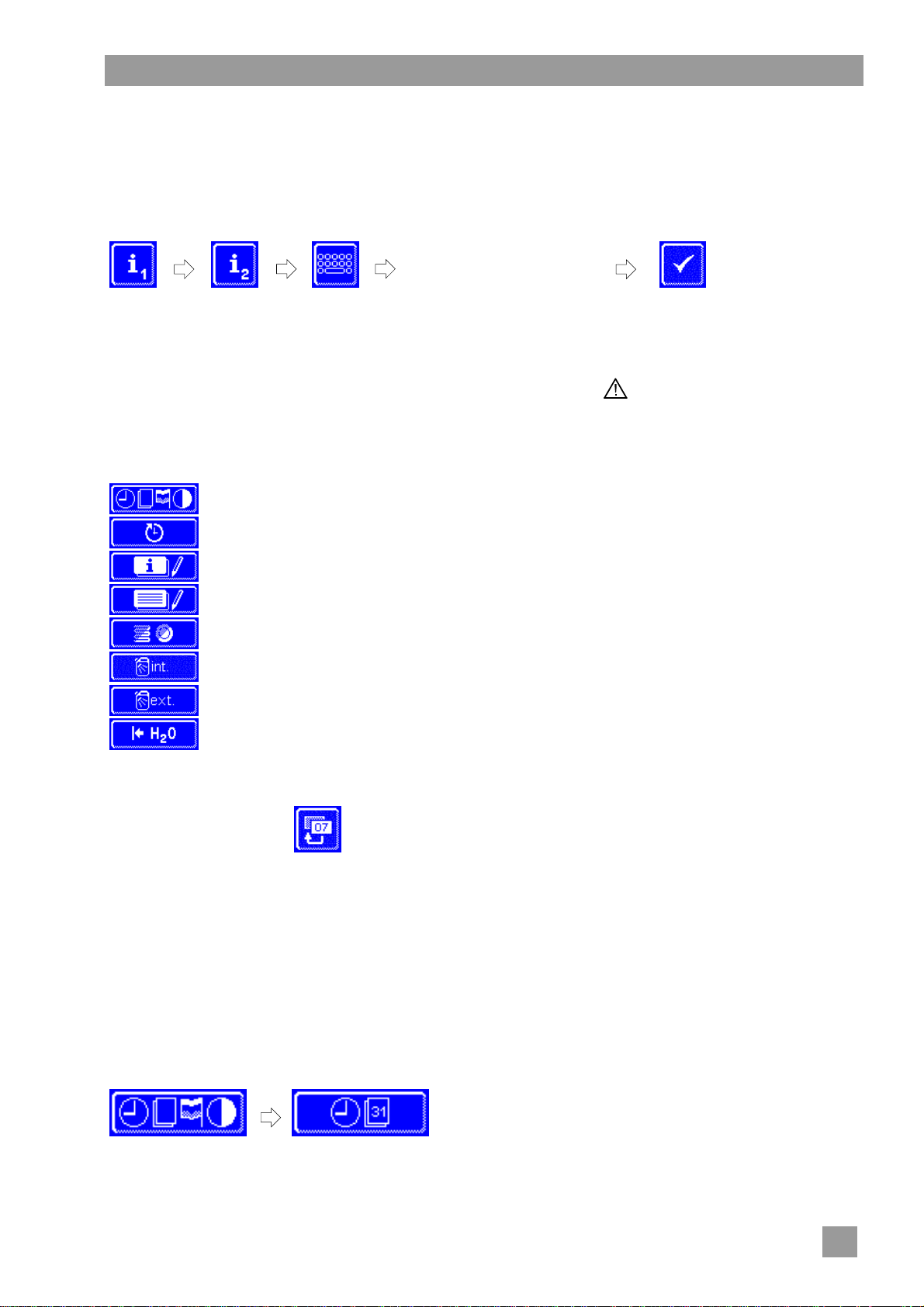
12 PIN Menu
INFO If you switch to the PIN Menu, the machine switches off.
Accessing the PIN Menu
Tap the following buttons in turn:
Type in "1575"
PIN Menu
INFO An incorrectly entered PIN is displayed on the screen with the symbol. If you have entered
your PIN incorrectly five times, the input is locked for 2 minutes.
Overview
Leaving the PIN Menu
General settings (time, date, language, contrast) ( 12.1)
Programming automatic switch on/switch off ( 12.2)
Displaying the operating data ( 12.3)
Accessing the hygiene logbook ( 12.4)
Starting the descaling or cleaning programme ( 12.5)
Changing the amount of detergent/rinse aid ( 12.6)
Setting the parameters for external dosing devices ( 18.3)
Resetting the water back-flow counter ( 12.7)
INFO
Incorrectly entered digits
can be corrected with the
button.
Press the button.
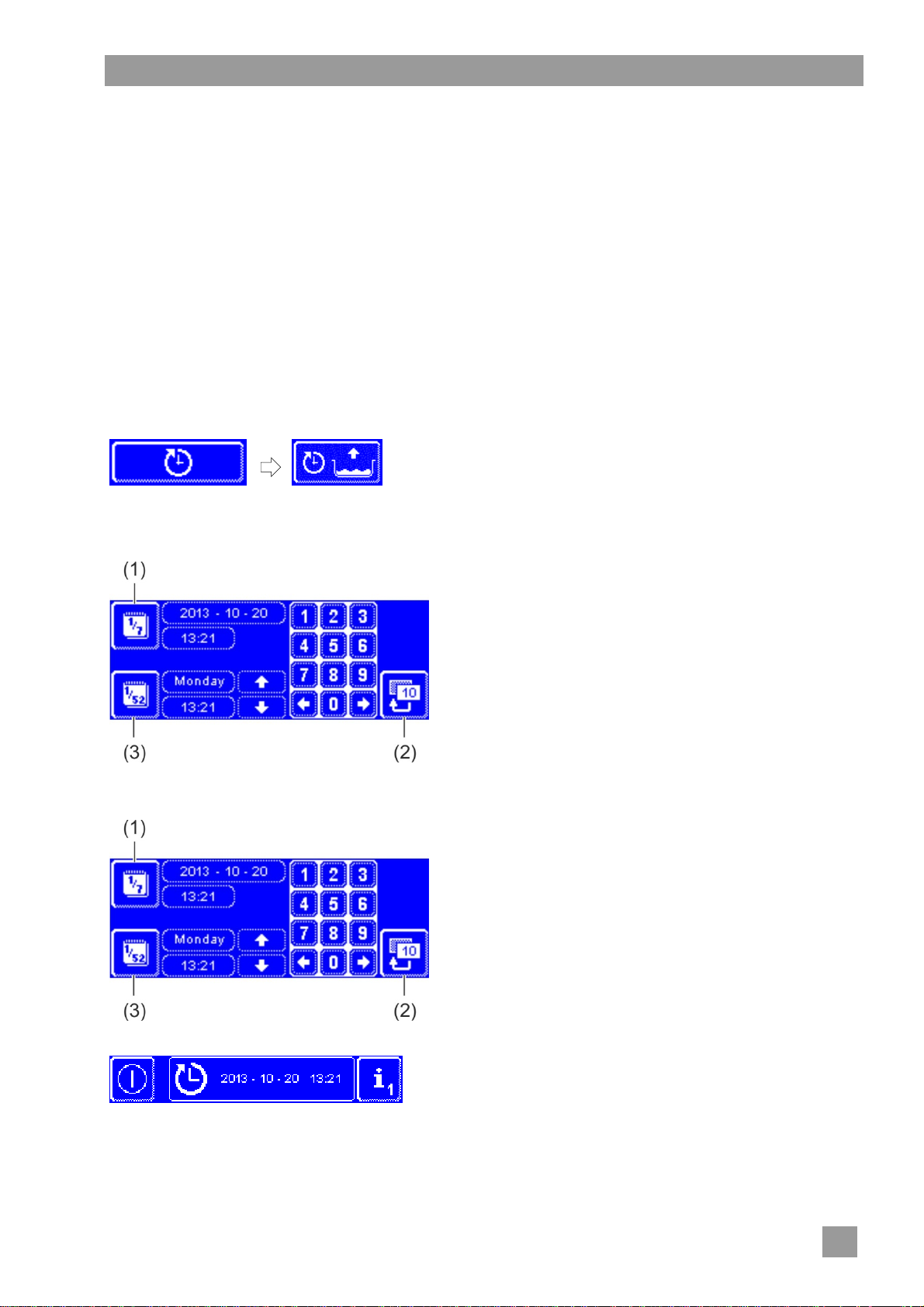
12.1 General settings
12.1.1 Date, time, temperature unit
Here you can enter the current date and the current time, change the format of the time, and change the
temperature unit.
INFO The time must be changed for the summer/winter time changeover.
Retrieving the settings
Tap the following buttons in turn:
23
Page 26
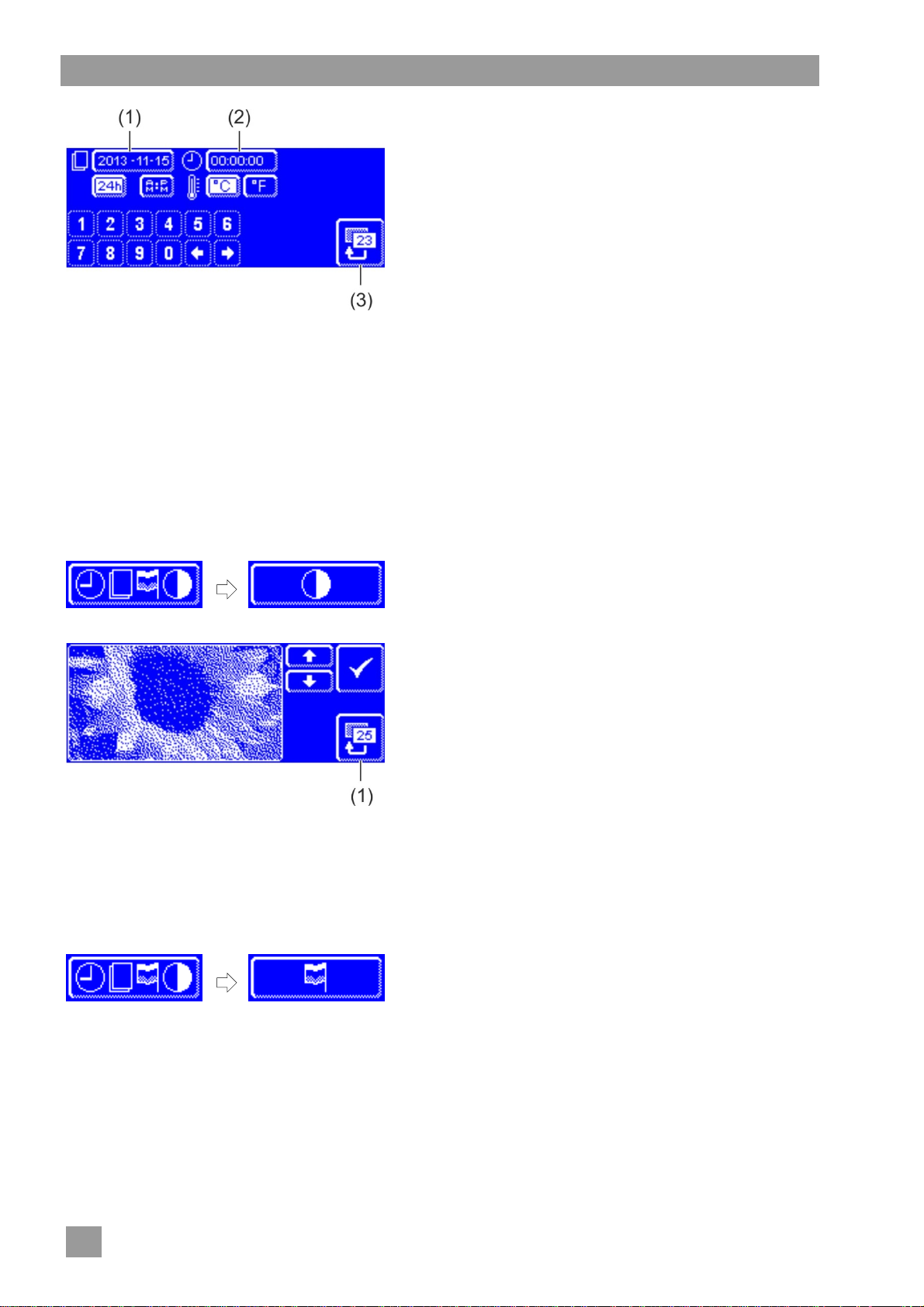
PIN Menu
Setting the date
Press the button (1).
Use the numeric keypad to enter the current date. For-
mat: YYYY-MM-DD (Year-Month-Day)
INFO During entry, the date is checked for whether
it exists. Only plausible dates can be entered.
Setting the time
Press the button (2).
Use the numeric keypad to enter the current time.
Setting the time format
Switch between 24-Hour-Mode ("24h") or 12-Hours-
Mode ("AM/PM") by pressing the appropriate button.
Setting the temperature unit
Switch between Degrees Celsius ("°C") and Degrees
Fahrenheit ("°F") by pressing the appropriate button.
Press the back button (3) to exit from the menu.
12.1.2 Setting the contrast
Here you can change the contrast to match the display of the screen to the lighting conditions in your kitch-
en.
Retrieving the settings
Tap the following buttons in turn:
12.1.3 Setting the language
Here you can set the language in which to display texts on the screen.
Retrieving the settings
Tap the following buttons in turn:
Select the required language.
Press the back button (1) to exit from the menu.
Change the setting with the and buttons until all of
the data on the display is readable.
Confirm with the button.
Press the back button (1) to exit from the menu.
24
Page 27
PIN Menu
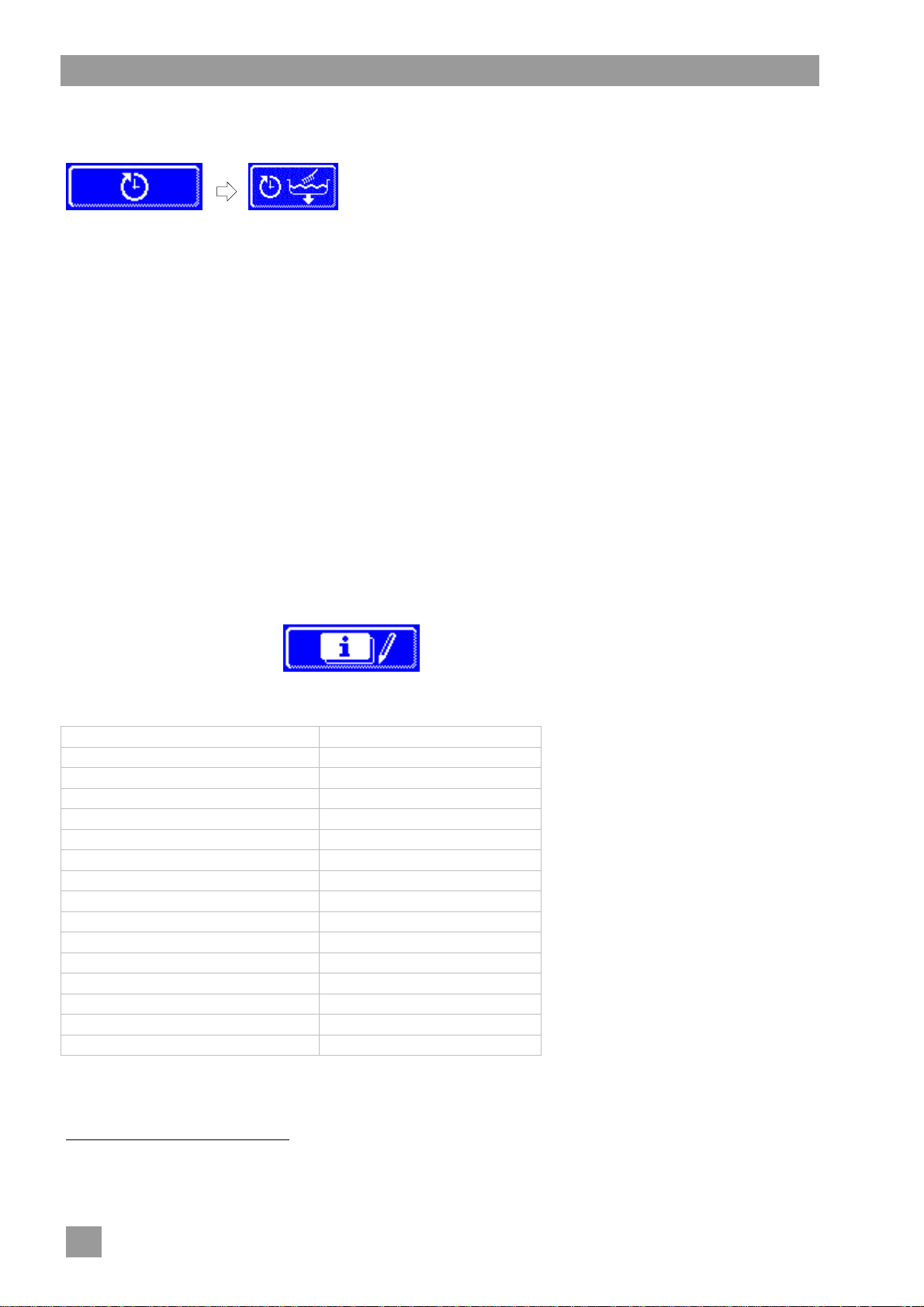
12.2 Programming automatic switch on / switch off
Here you can:
The automatic switching on/off can be set either per day or for a special date. If the inputs overlap, a specific
date always takes precedence over the weekly programme.
IMPORTANT The following requirements must be met at the time of the automatic switch on:
Programming automatic switch on
Tap the following buttons in turn:
programme, when the machine is to fill and heat up automatically.
programme, when the machine is to switch off automatically.
The hood is closed.
The on-site mains disconnector is switched on.
The water stop cock is open.
Setting the weekday
Setting a special date
Press the button (3).
Use the scroll buttons to select the required weekday.
Tap on the button of the selected weekday.
The background of the button becomes white.
Enter the time for the start of automatic activation using
the numeric keypad.
Repeat the above step as necessary for the other days
of the week.
Check whether the button (3) is activated (white back-
ground). Only then is automatic switch-on active.
Press the back button (2) to save your input.
Press the button (1).
Enter the time and the date for the start of automatic
activation using the numeric keypad.
Check whether the button (1) is activated (white back-
ground). Only then is automatic switch-on active.
Press the back button (2) to save your input.
INFO The date and time of the next automatic activation are
displayed when the machine is switched on. However,
the machine can be used before this point of time.
25
Page 28
PIN Menu
Programming automatic switch off
Tap the following buttons in turn:
The setting of days of the week or special dates is much the same as for automatic switch on. Proceed as
described in this section.
Sequence of the automatic switch off:
Sound 3 short beeps
10 second pause
Sound 3 short beeps
10 second pause
Sound 3 short beeps
The machine is emptied and switched off using the self-cleaning programme.
INFO If the hood is open at the time of the automatic switch off, the machine is pumped empty and
switched off, but not cleaned internally.
12.3 Operating data
Here you can read out all operating data.
Retrieving the operating data
Press the button.
The following operating data is shown on the display.
Commissioning Date
Next service in4 x hours or washing cycles
Total operation hours x hours
Total washing cycles x
Total water consumption x litres
Full washing cycles EnergyPlus5 x
Total energy savings5 x kWh
Switching cycles heat pump6 x
Op. hours heat pump6 x hours
Absorbed energy6 x kWh
Delivered energy6 x kWh
Op. hours/day x hours
Washing cycles/day x
Water consumption/day x litres
Remaining capacity water treatment x litres
Operating hours Master old7 x hours
INFO The display depends on the facilities of the machine.
Press the back button to exit from the menu.
4
An authorised service technician can activate this function.
5
only for EnergyPlus models
6
only for ClimatePlus models
7
when a new display is installed
26
Page 29

PIN Menu
12.4 Hygiene logbook
In the hygiene logbook you can:
retrieve all operating conditions, actions, and failures for one day in chronological order.
retrieve all HACCP and hygiene relevant data.
The list starts with the current date and the first event on this day. Then the following events on that day, and
then the events of days before. The most important operating data are summarized at the end of each day.
INFO When the memory capacity is reached, the oldest data is deleted as soon as new data is added.
Accessing the hygiene logbook
Press the button.
The hygiene logbook display then appears:
The list starts with the current date and the first event on this day.
This is followed by the events from the days before.
Press the back button to exit from the menu.
12.4.1 Data transfer to PC (option)
Because the hygiene logbook stores only a limited number of entries, there is also the possibility to transfer
the records to a PC and archive them there.
For more information, see the related documents.
27
Page 30
PIN Menu
12.5 Descaling / basic cleaning
12.5.1 Descaling programme
If the machine is operated with hard water without water treatment, the boiler, the machine interior, all water
lines and other components may scale.
Grease residues and dirt that remain in the machine can contribute towards an unhygienic interior and can
lead to failure of heating elements. Regular removal of these layers is absolutely essential.
Using the descaling programme you can descale the interior of the dishwasher. The water lines and the boiler can only be descaled by an authorised service technician.
For descaling, you need an acid-based descaler suitable for commercial dishwashers. We recommend the
Winterhalter Descaler A 70 LS.
When handling chemicals, observe the safety precautions and the dosage recommendations
Danger
Ideally, start the descaling programme when the machine is empty and switched off. If the machine is already prepared for use, it will automatically empty first.
Only with an external detergent dosing device:
Warning
INFO A detergent dosing device built into the machine will be disabled automatically in the descaling
on the packaging.
Wear protective clothing, protective gloves and protective goggles when handling chemicals.
Development of chlorine gas
If you mix active chlorinated detergent and descaler, chlorine gas is produced. Stop the detergent dosing (e.g. remove the suction tube or switch off the dosing device).
programme.
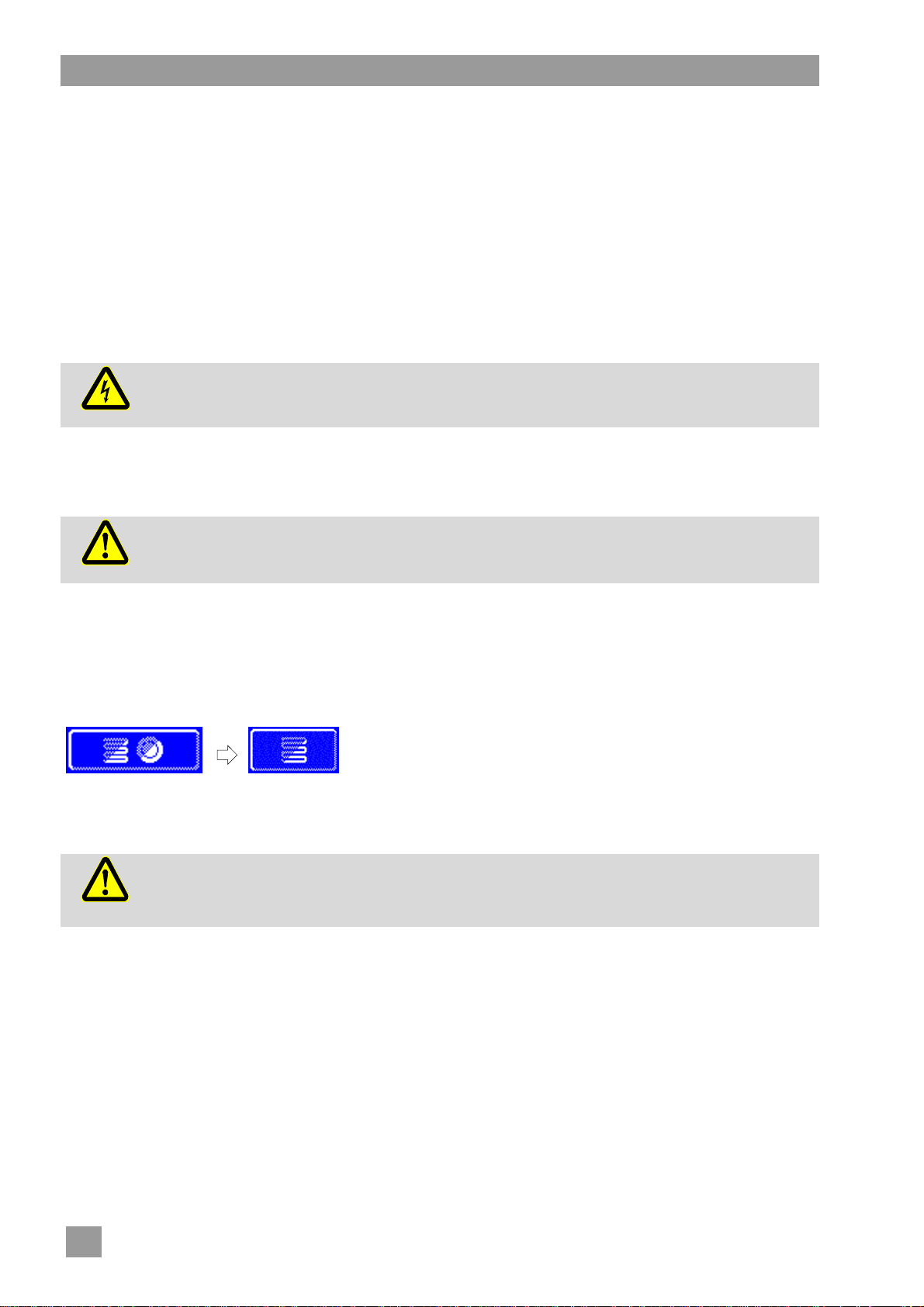
Starting the descaling programme
Tap the following buttons in turn:
Warning
Descaler causes corrosion
The descaling solution must not remain in the machine. If you switch off the machine when the
descaling programme is in progress or if you terminate the programme, the machine must be
emptied, refilled and again emptied. Use the self-cleaning programme for this.
The button flashes while the
programme is running.
28
Page 31

PIN Menu
Sequence of the descaling programme:
With a machine ready for use: The tank is emptied and re-filled without detergent.
With an empty, switched off machine: The tank is filled without detergent.
Once the machine is ready for operation, the text "Add descaler. Press start button." appears on the
display.
Open the hood and place descaler inside the machine. Follow the recommended dosage.
INFO The machine's tank capacity is approx. 35 litres.
Close the hood and press the start button.
The start button lights up in blue. The start button continues to flash.
The descaling solution is circulated in the interior.
On the display, the time counts down from 600 seconds.
Once the time has expired, the start button stops flashing.
Open the hood and check whether the interior has been sufficiently descaled.
INFO If the hood is not opened within the next 600 seconds, the descaling programme continues au-
tomatically and the machine will be emptied.
Place more descaler in the machine if there are still white coatings. Close the hood and press the start
button.
Press the back button if there are no more white coatings inside the machine.
The machine empties and is then refilled with cold water. Once the desired level is reached, the cold
water is circulated for 60 seconds and then drained.
The machine switches off automatically.
Open the hood and check that the machine has been completely emptied.
12.5.2 Basic cleaning programme
New dishes and new glasses generally have a protective coating, which can be removed by using the basic
cleaning programme. The programme can also be used if coatings such as starch have built up on the dishes.
Starting the basic cleaning programme
Tap the following buttons in turn:
Sequence of the basic cleaning programme:
With an empty, switched off machine: The machine is filled and heated up.
With a machine ready for use: A little water still flows into the boiler.
Once the machine is ready for operation, the text "Add basic detergent. Press start button." appears
on the display.
Open the hood and place basic detergent inside the machine. Follow the recommended dosage.
INFO The machine's tank capacity is approx. 35 litres.
Slide the basket with the dishes to be cleaned into the machine.
Close the hood and press the start button.
The start button lights up in blue. The start button continues to flash.
The detergent solution is circulated in the interior.
On the display, the time counts down from 300 seconds.
This is followed by a drying pause and the rinse.
Once the time has expired, the start button stops flashing and it flashes green.
Open the hood and remove the basket from the machine.
As necessary, wash more racks or press the back button to exit from the menu.
The button flashes while the
programme is running.
29
Page 32
PIN Menu
12.6 Changing the amount of detergent / rinse aid
When a new detergent or a new rinse aid is used, it may be necessary to change the dosing amount. Please
observe the dosing recommendations on the packing.
The dosing amount can be adjusted separately for every standard programme.
IMPORTANT In the next menu, only the dosing amount of the installed dosing devices is changed. Please
consult the corresponding device documents for external dosing devices.
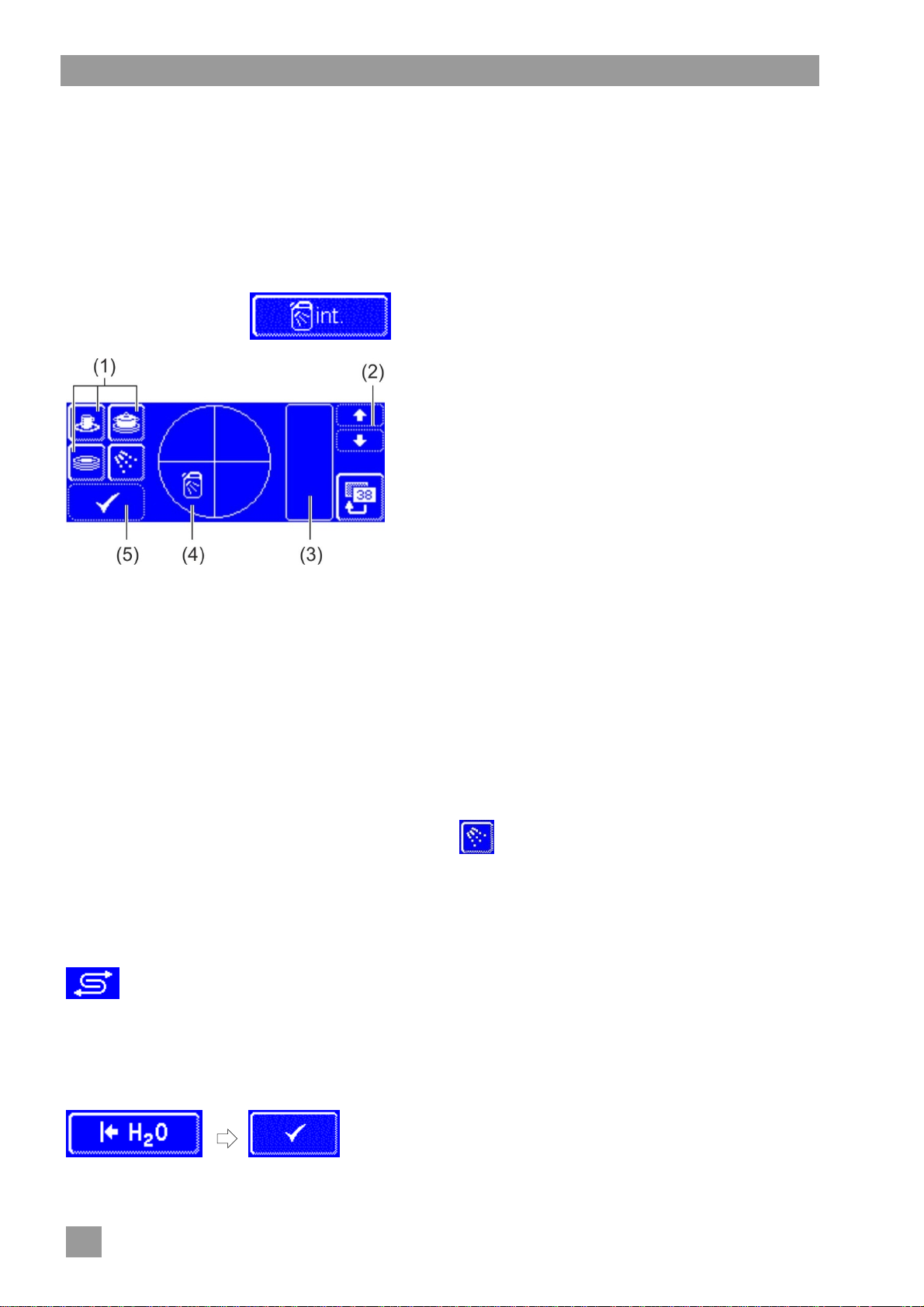
Opening the menu
Press the button.
Changing the detergent dosing amount
Select a washing programme: press one of the three buttons (1).
INFO - The display of the three pictograms depends on the type of dishwasher.
- The dosing amounts for each washing programme can be set separately.
The background of the selected button (1) and the button (4) changes to white.
The current detergent dosing amount and the internal name (P003) is displayed in field (3).
Change the dosing amount with the scroll buttons (2).
Press the button (5) in order to save the entry.
The button (5) flashes briefly in white.
Changing the rinse aid dosing amount
Press the button.
The background of the button becomes white.
The remaining steps are much the same as the steps for changing the detergent dosing amount. There-
fore, proceed as in the "Changing the detergent dosing amount" section.
Press the back button to exit from the menu.
12.7 Resetting the water back-flow counter
The water back-flow counter must be reset if this symbol flashes on the screen of machines with
an external partial or full demineralisation unit.
Contact an authorised service technician to exchange the external partial or full demineralisation unit.
Resetting the water back-flow counter
Tap the following buttons in turn:
Press the back button to exit from the menu.
30
Page 33
Integrated operating instructions
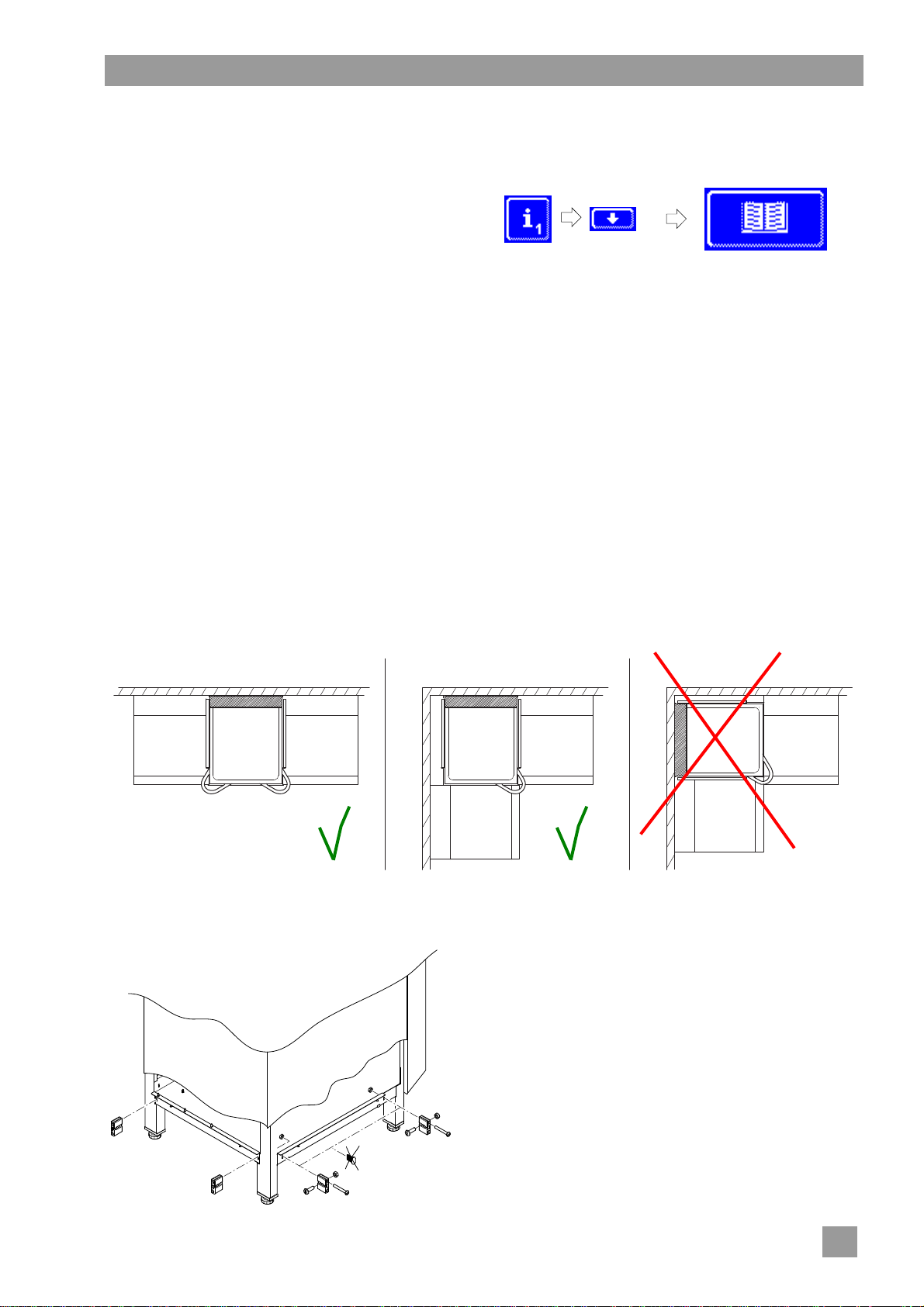
13 Integrated operating instructions
The integrated operating instructions gives a brief description of the operation of the machine.
Retrieving the integrated operating instructions
Tap the following buttons in turn:
Repeat
14 Customer-specific modifications
The controls of the machine can be adapted to individual needs within certain limits.
Examples
The pressure can be reduced if mainly light dishes are washed.
The sound signal at the touch of a button can be disabled.
Contact an authorised service technician for the modification.
15 Installing the machine and tables
The installation site must be frost-resistant so that the water supply systems do not freeze. If the installation
site is not frost-free: 19.
15.1 Installing the machine
INFO No gap is required between the wall and rear of machine. The wall gap for the ClimatePlus model
Install the machine horizontally with the help of spirit level.
Adjust the base unevenness with the help of the height-adjustable machine feet.
Installation variants
INFO If the machine is installed in a corner, the left hood handle must be removed. For plugging the
may only be a maximum of 100 mm.
holes a kit with part no. 30002147 is available.
15.2 Attaching the tables
Assemble tables.
When Winterhalter tables are used, attach aluminium
strut supports to the machine.
The aluminium strut supports are in the machine.
Secure the tables to the machine.
Connect the earthing cable from the table to the ma-
chine.
31
Page 34
Installing the machine and tables
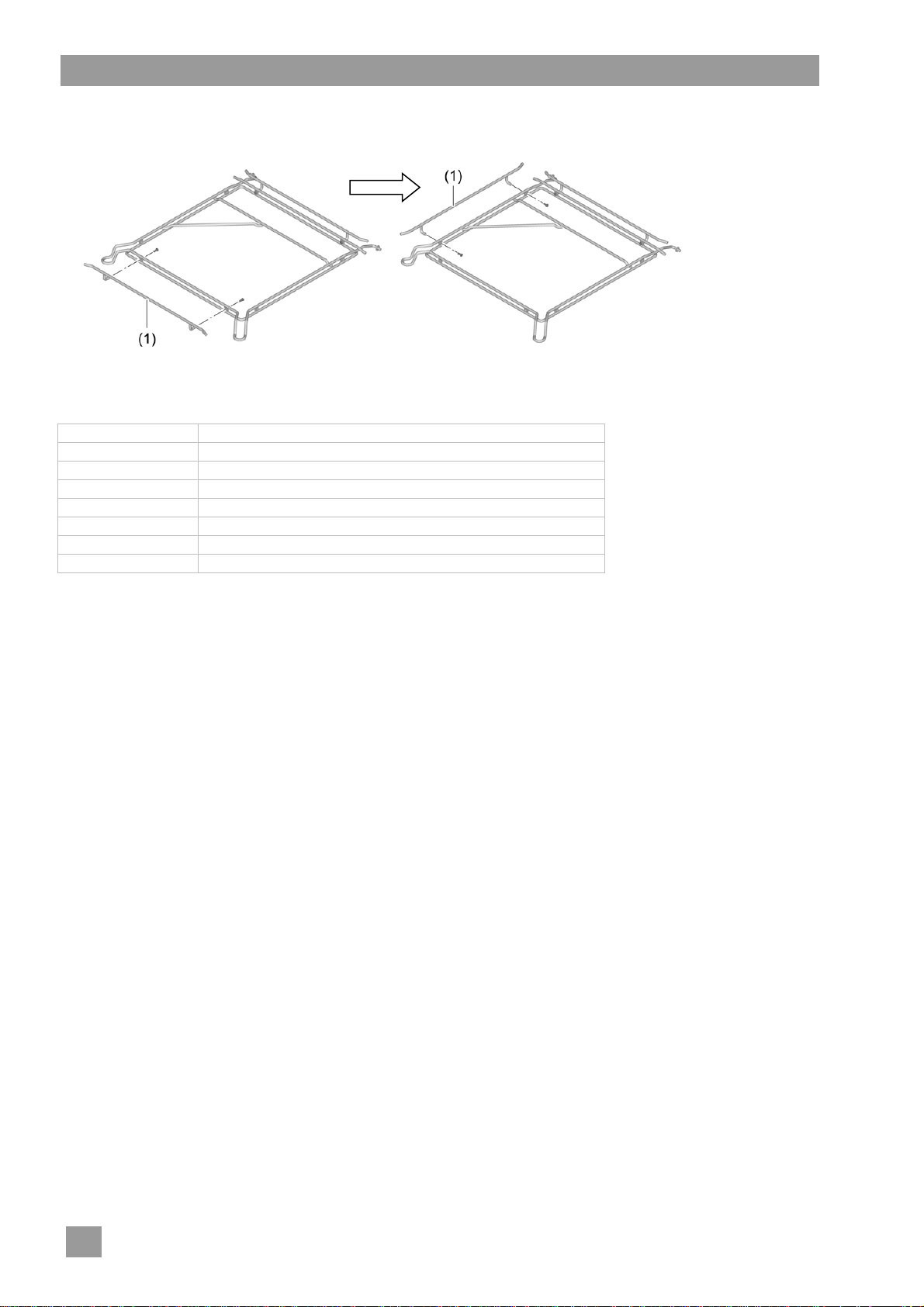
15.3 Converting the rack guide
If the machine is installed in a corner, the rack guide must be converted.
Unscrew the front guide bar (1) and attach to the left side of the rack guide.
With separately available guide bars, the rack guide can be converted to the following rack sizes and wall
distances:
Rack size Distance between the wall and rear of the rack guide
420 x 500 mm 235 mm
500 x 500 mm 170 mm
530 x 530 mm 155 mm
500 x 500 mm 140 – 150 mm
500 x 600 mm 175 mm
600 x 400 mm 170 mm
600 x 400 mm 235 mm
32
Page 35
Water connection
16 Water connection
The water-related safety should be as per DIN EN 61770. The machine can be connected to an inlet water supply without an intermediate connection to other safety equipment.
The machine and any other relevant additional devices must be connected by an authorised specialist company in
relation to local standards and regulations.
Warning
16.1 Requirements for the on-site inlet water connection
Water quality The fresh water must in microbiological aspects have the quality of drinking water.
Water inlet temperature max. 60°C
Water hardness
Minimum flow pressure 100 kPa (1.0 bar)
Maximum input pressure 600 kPa (6.0 bar)
Flow rate at least 4 l/min
max. 20 °C for Cool, EnergyPlus and ClimatePlus machine models
max. 50 °C for effect glasswasher models
We recommend a maximum hardness of 3 °dH (3.8 °e / 5.34 °TH / 0.54 mmol/l), to prevent scaling in
the machine.
Machines without
Standard
EnergyPlus
ClimatePlus
150 kPa; (1.5 bar) for the EnergyPlus and ClimatePlus machine models
integrated softener
3 °dH (3.8 °e /
5.34 °TH / 0.54 mmol/l )
3 °dH (3.8 °e /
5.34 °TH / 0.54 mmol/l )
3 °dH (3.8 °e /
5.34 °TH / 0.54 mmol/l )
Machines with
integrated softener
30 °dH (37.6 °e /
53.4 °TH / 5.35 mmol/l)
20 °dH (25.1 °e /
35.6 °TH / 3.58 mmol/l)
— The conductivity must be
Note
—
With a conductivity
< 200 µS/cm (128 ppm
TDS), a stainless-steel
exhaust air heat exchanger
is necessary.
≥ 200 µS/cm (128 ppm
TDS).
16.2 Requirements for the on-site water stop cock
easily accessible
not behind the machine
3/4" connector
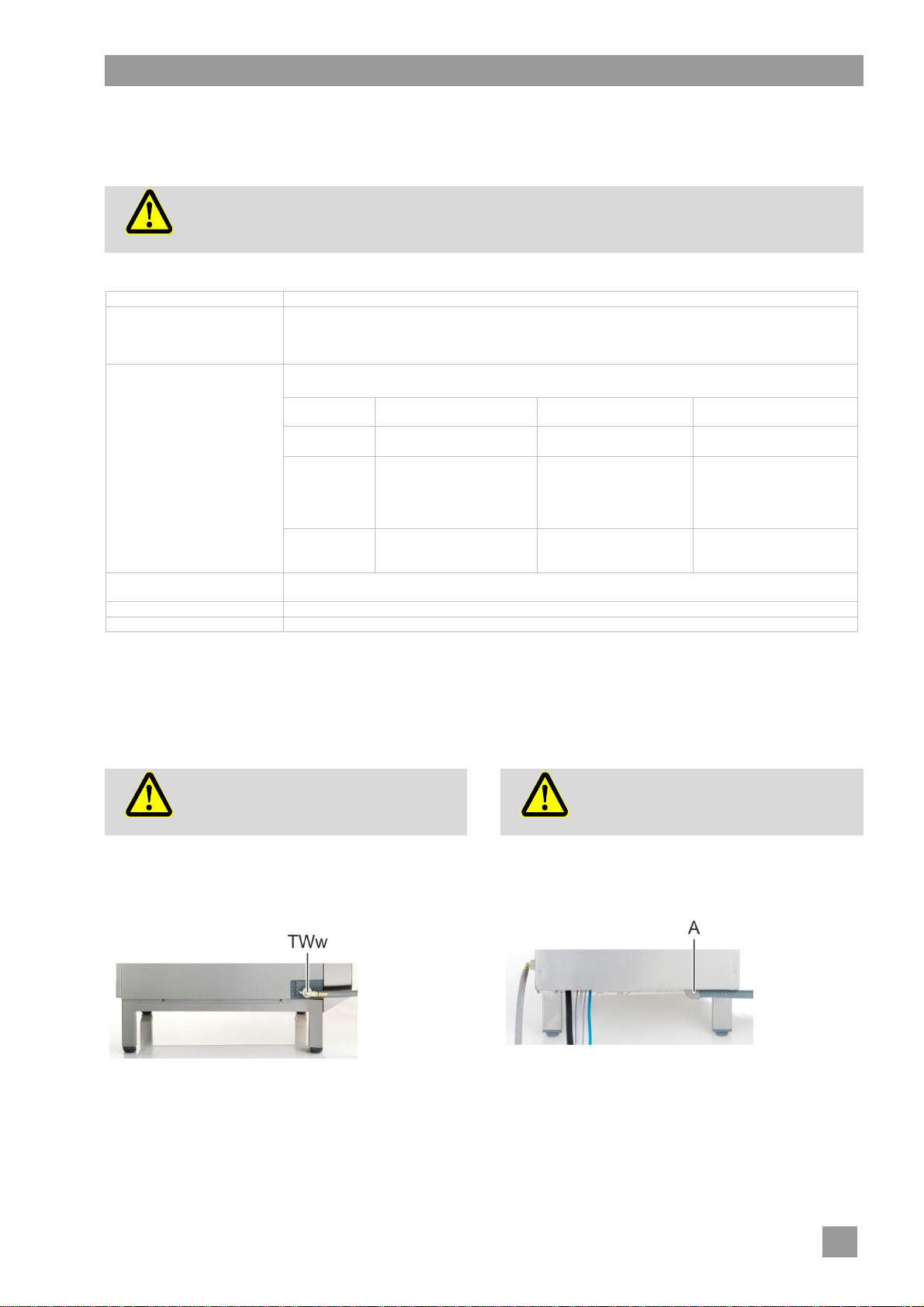
16.3 Connecting the supply hose
The supply hose may not be shortened or
damaged.
Old existing hoses may not be re-used.
Caution
The supply hose and dirt trap are located in the machine.
INFO The dirt trap prevents particles from the water supply
Right view
Connect the supply hose (TWw) to the machine.
Connect the dirt trap to the on-site water stop cock.
Connect the supply hose to the dirt trap.
Open the water stop cock and test whether the connections
are tight.
Do not bend the supply hose while laying it.
line entering the machine thus preventing extraneous
rust on the cutlery and in the machine.
16.4 Connecting the drain hose
Caution
The drain hose is located in the machine.
INFO The machine is equipped with a drain pump. The on-
Back view
Connect the drain hose (A) to the machine.
Connect the drain hose to the on-site water drain.
The drain hose may not be shortened or damaged.
Do not bend the drain hose when laying it.
site water drain must have a trap. The maximum height
of the on-site water drain is 650 mm.
33
Page 36
Electrical connection
17 Electrical connection
Danger to life. Live components.
The machine and the relevant additional devices must be connected by an electrical company authorised by the
Danger
The electrical safety of this machine is guaranteed only if it
is connected to a correctly installed protective circuit and a
residual current circuit breaker. It is very important that this
basic safety requirement is tested and in case of doubt the
house installation is checked by a qualified electrician.
The circuit diagram must be observed.
The equipment may only be operated at the voltages and
frequencies specified on the rating plate.
A fixed connection must as a priority be installed for ma-
chines that are delivered without a power cord.
When the machine must be permanently connected (with-
out a plug), a mains disconnector with all-pole separation
from the network must be installed. The mains disconnector
switch must have a contact opening width of at least 3 mm,
and must also be lockable in the neutral position.
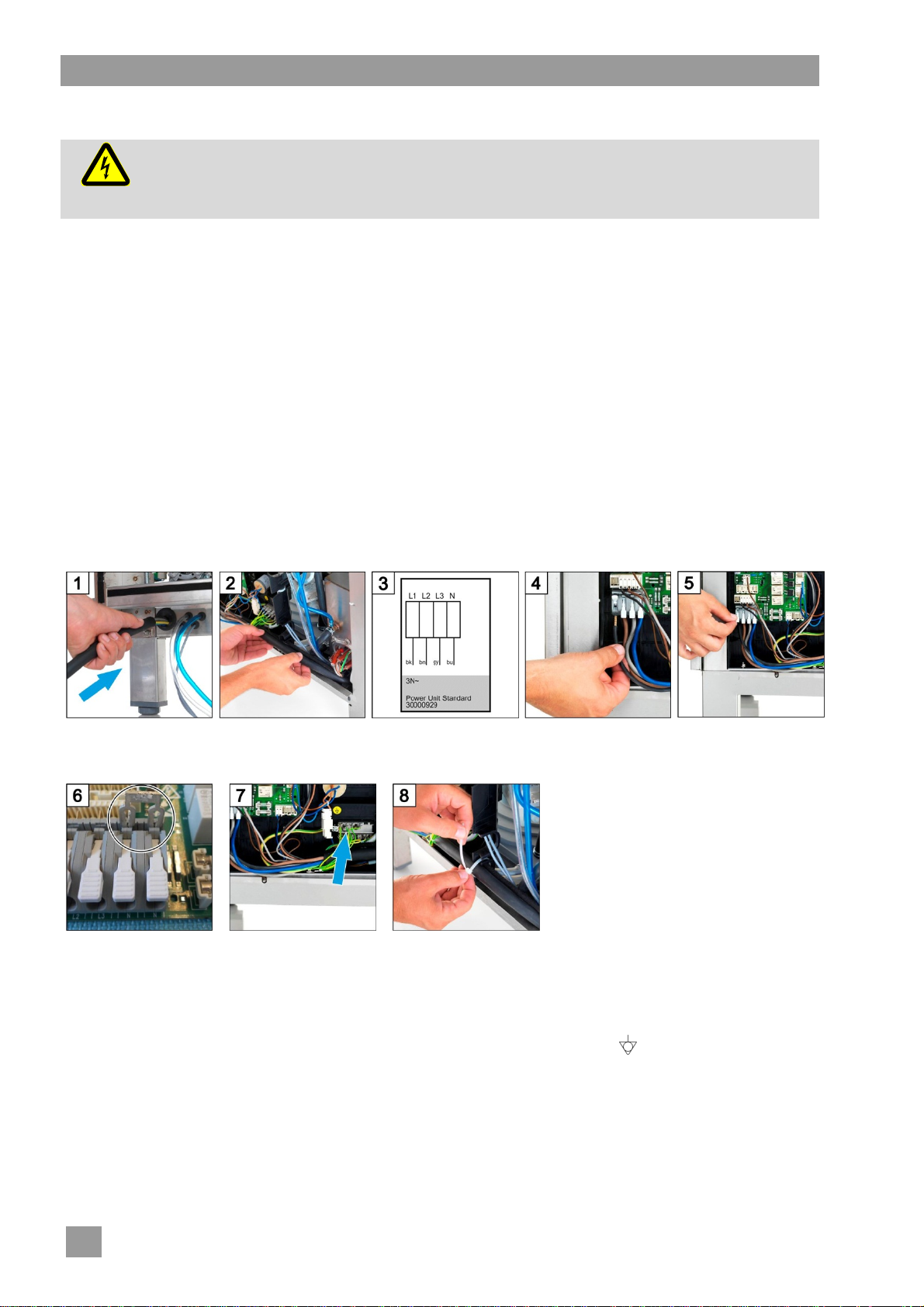
17.1 Connecting the mains cable
Requirements for the mains cable
Cable type: Type H07 RN-F or equivalent
The wires must be fitted with wire end ferrules.
Cross section and number of cores: suitable for on-site power and protection
for more information see the sticker in the front panel
relevant electricity supplier as per the locally applicable standards and regulations.
When performing installation and maintenance work, unplug the machine from the power network. Check that there
is no voltage.
The electrical connection must be secured as a separately
fused circuit with slow fuses or circuit breakers. The protection depends on the total power consumption of the machine. The total connected load is specified on the rating
plate of the machine
In the electric supply line, install a universal current sensi-
tive residual current circuit breaker class B with a tripping
current of 30 mA (DIN VDE 0664) as a frequency inverter is
located in the machine.
Machines delivered from the factory equipped with mains
cable and safety plug (single phase), or CEE plug are (triple
phase), may only be connected to the mains network indicated on the nameplate.
Connect the mains
cable to the rear of the
machine.
If necessary plug bridges.
Firmly press the bridges
with a screwdriver.
Withdraw the mains
cable at the front and
route it to the left.
Connect the green-yellow
wire to the distributor of
the earth wires.
Follow the wiring diagram ( 17.3).
Attach the mains cable to
the mounting plate with a
cable tie for strain relief.
Connect the wires of the
mains cable according
to the connection diagram.
17.2 Establishing an earth connection
Connect the machine into the equipotential bonding system.
INFO The terminal screw is located behind the right rear leg of the machine. It is identified with the symbol.
Close the quick release
connectors.
34
Page 37
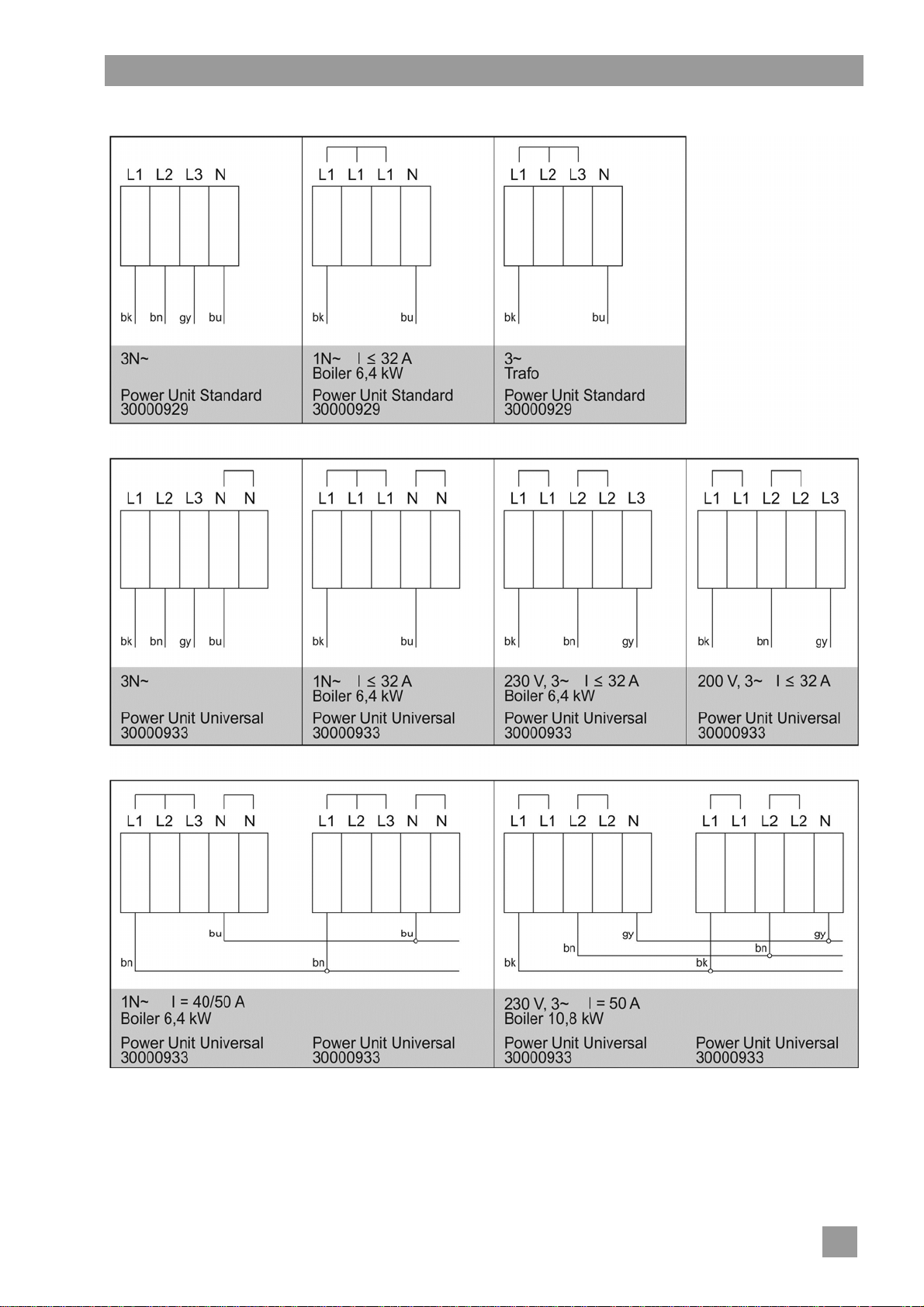
17.3 Connection diagram
Electrical connection
35
Page 38
External dosing devices
18 External dosing devices
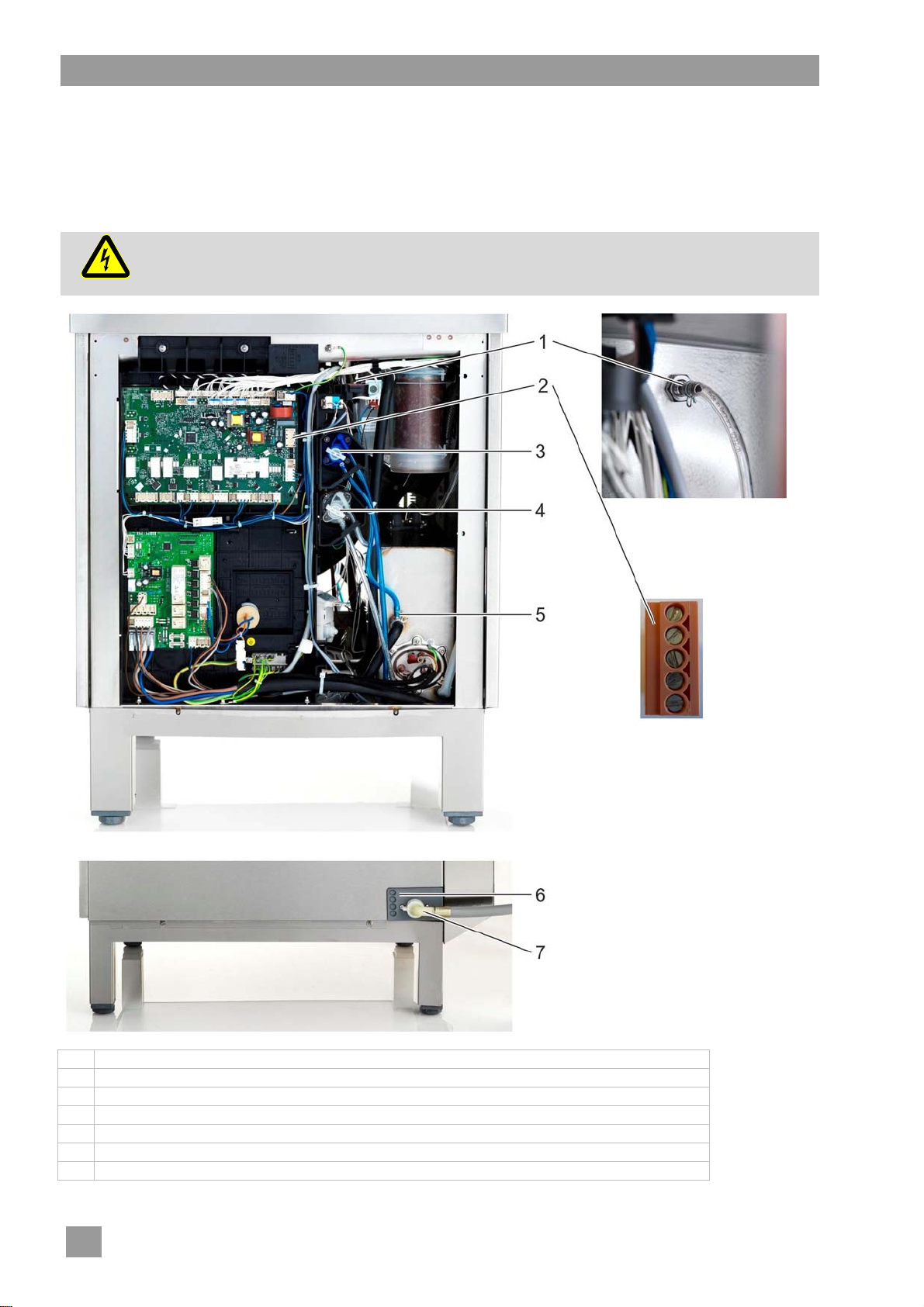
Instead of the integral dosing device, external dosing devices can also be used. Follow the instructions in
this section. Additional information can be found in German and English on the Winterhalter web site
(Dosiertechnik / Dosing systems).
18.1 Terminals
Danger to life. Live components.
Danger
Get the dosing devices installed and commissioned by an authorised service technician.
1 Detergent dosing nipple
2 Transfer strip with red plug for the connection of external dosing devices
3 Rinse aid dosing device
4 Detergent dosing device (special equipment)
5 Rinse aid dosing nipple
6 Bushings for cables and hoses
7 Water supply hose
36
Page 39
External dosing devices
18.2 Electrical connection
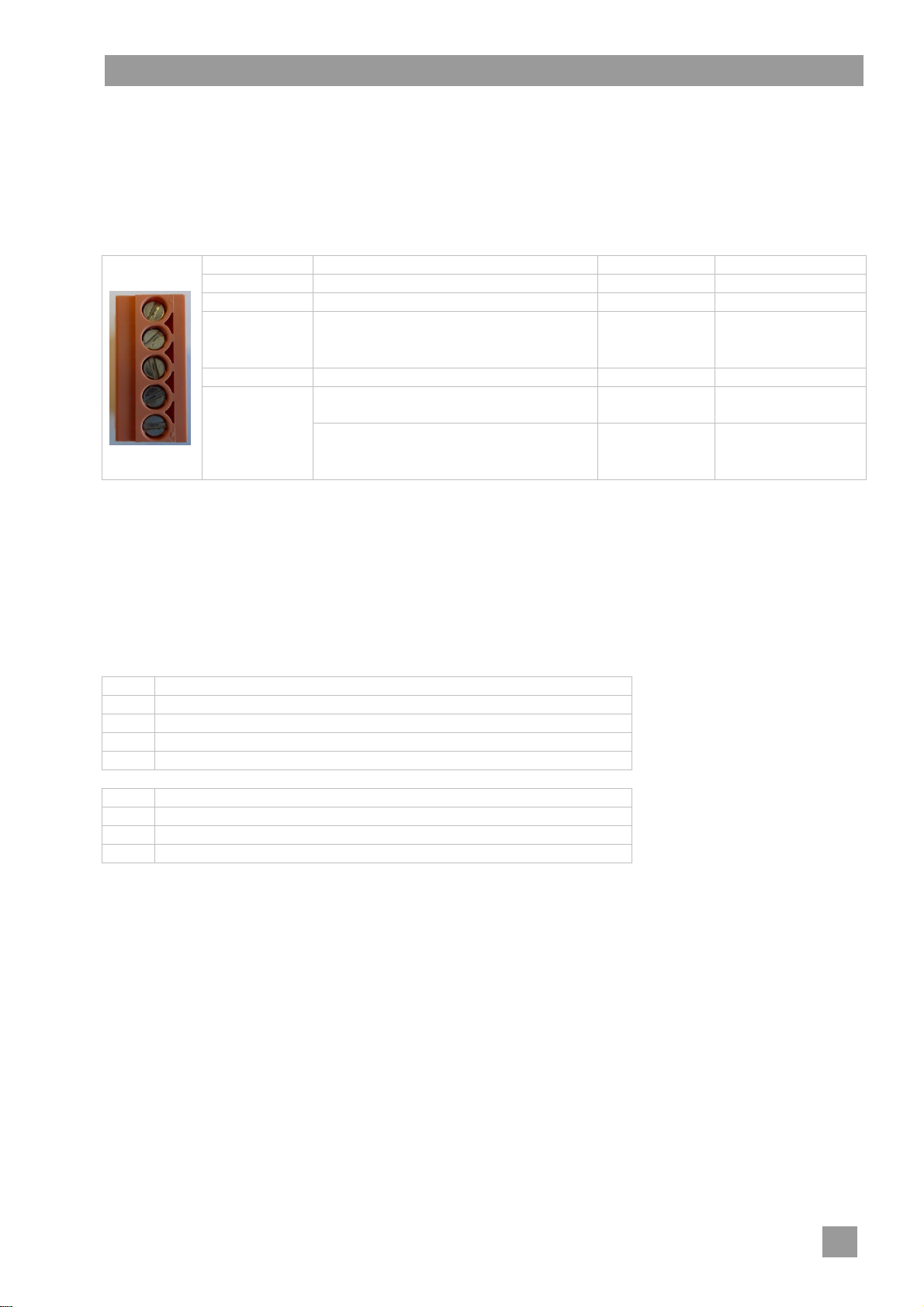
IMPORTANT maximum current drain at the transfer strip: 0.5 A.
Connect the external dosing device to the 5-pin plug.
Terminals (arranged from top to bottom)
Terminal Voltage is on Condition Restriction
L1
N
Rinse (O18)
Wash (O20)
Fill / Water
(O17)
a) hood / door closed
b) minimum water level in the tank
c) not in the self-cleaning programme
d) not while the machine is filling
e) not in descaling or basic cleaning programme
The parameters P704 and P709 control when a voltage is present at the fill and rinse terminals.
Possible settings
P704 Use
0 for dosing devices not originating from Winterhalter
1 for dosing devices not originating from Winterhalter
2 for Winterhalter dosing device SP 166 Z
3 for pulse controlled dosing devices (e.g. Winterhalter Fluidos DT)
P709 Use
0 for dosing devices not originating from Winterhalter
1 not used
2 for pulse controlled dosing devices (e.g. Winterhalter Fluidos DB)
Recommendations
Winterhalter dosing device SP 166Z:
P704 = 2
Set both potentiometers to zero
Connect the black wire to Fill
Set the dosing on the display (touchscreen)
continuous voltage
parallel to solenoid valve (O7)
while the machine is filling
during rinsing
while the circulating pump is running a) c), d), e)
while the machine is filling
parallel to solenoid valve (O7)
while the machine is filling
during rinsing
P709 = 0
a)
P704 = 0
a), b)
P704 = 1
a), b)
c)
37
Page 40
Taking the machine out of service for a long period
18.3 Setting parameters
Retrieving the settings
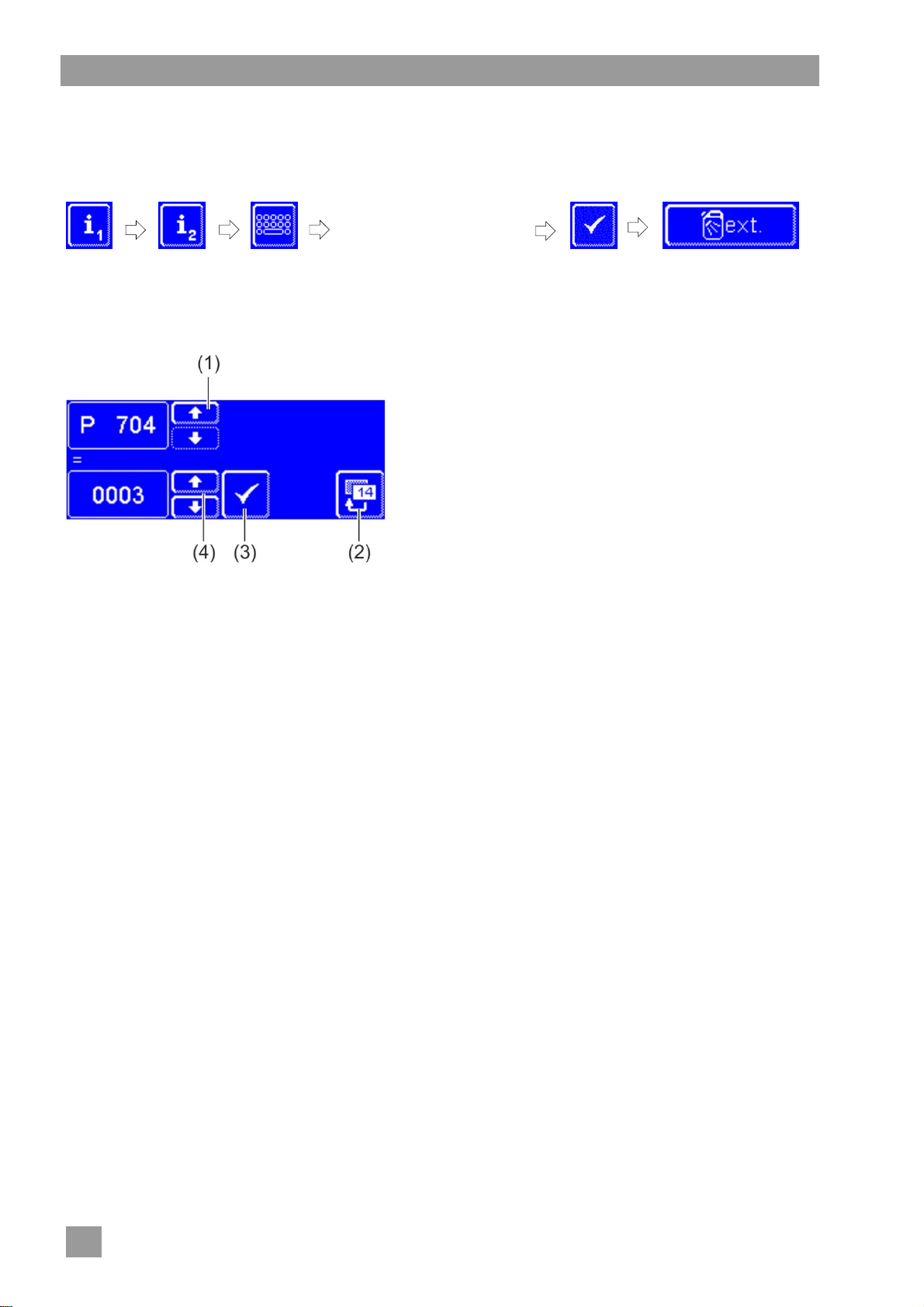
Tap the following buttons in turn:
Type in "1575"
INFO
Incorrectly entered digits
can be corrected with the
button.
Using the scroll buttons (4), set the value of parameter
P704.
Press the button (3) to save your input.
Press the scroll button (1) if parameter P709 must also
be set.
P709 is displayed.
Using the scroll buttons (4), set the value of parameter
P709.
Press the button (3) to save your input.
Press the back button (2) to exit from the menu.
19 Taking the machine out of service for a long period
Follow the notes if the machine needs to be out of operation for a long duration (holidays, seasonal business).
Empty the machine using the self-cleaning programme ( 8.1.2).
Clean the machine ( 8.1.3 and 8.1.4).
Leave the hood open.
Close the on-site water stop cock.
Switch off the local mains disconnector.
If the machine is in a place that is not frost-free:
Instruct an authorised service technician to make the machine frost- resistant.
20 Putting the machine back into service after a long period of disuse
Open the on-site water stop cock.
Switch on the local mains disconnector.
Switch on the machine.
If the machine was in a place that was not frost-free:
After extended periods of disuse, the machine must be completely climatised (at least 24 hours at 25 °C). If
this requirement is met:
Contact an authorised service technician to put the machine back into service.
38
Page 41
Technical Information
21 Technical Information
Voltage
Total connection value
Fuse
Minimum flow pressure
Maximum inlet pressure
Water inlet temperature
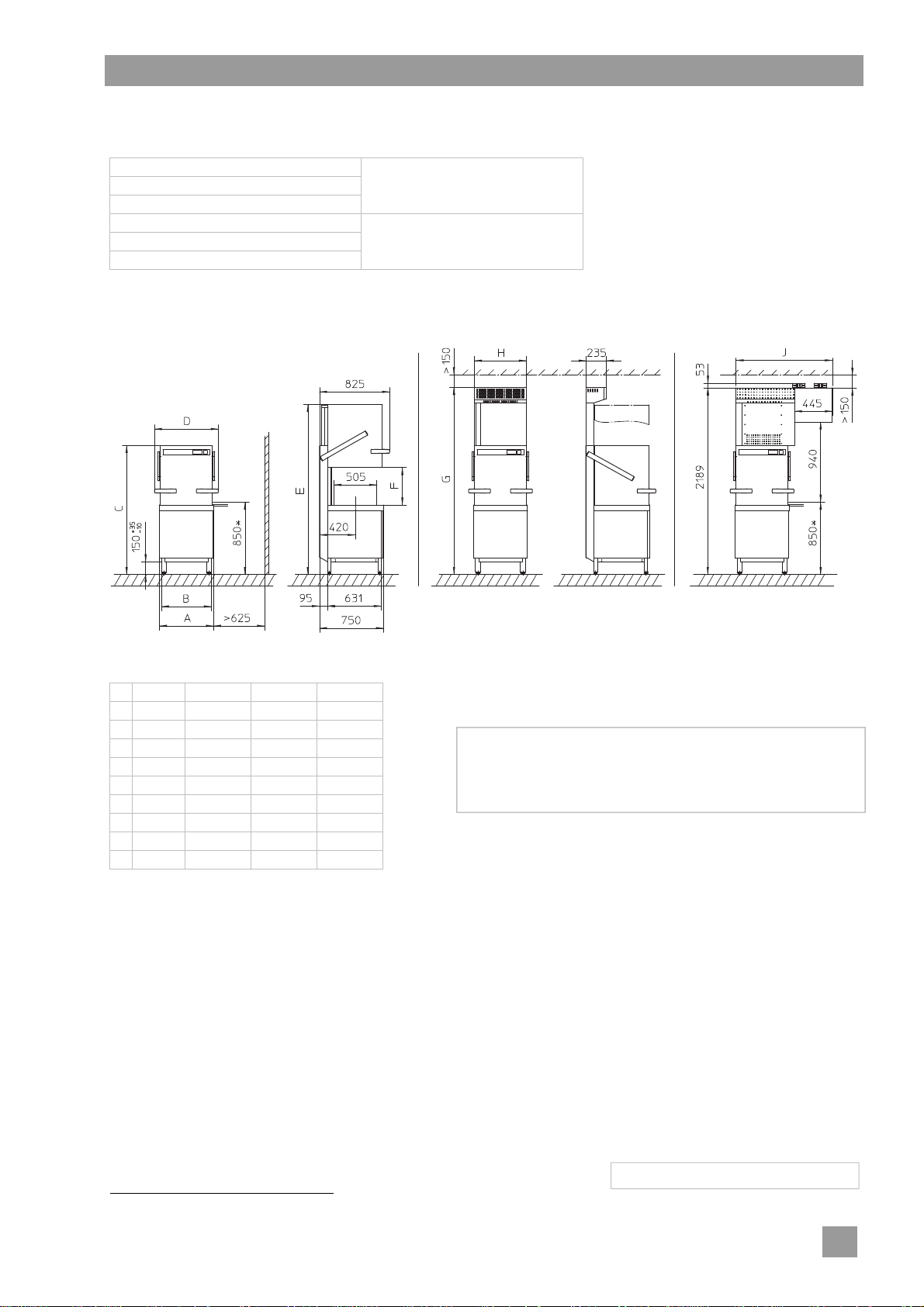
Dimensions
Without EnergyPlus With EnergyPlus With ClimatePlus
see rating plate
16.1
PT-M PT-L PT-XL
A [mm] 635 735 735
B [mm] 585 685 685
C [mm] 1515 1515 1635
D [mm] 750 850 850
E [mm] 1995 1995 2235
F [mm] 440 440 560
G [mm] 2195 2195 2435
H [mm] 610 710 710
J [mm] 1130 1180 ——
*) Standard working height is 850 mm which can be
optionally increased to 900 mm.
The vertical dimensions are increased by 50 mm by this.
22 Emissions
Noise
Workplace-related emission sound pressure level Leq < 62 dB(A)
Measurement uncertainty: K(pA): 4 dB
Exhaust air
Adhere to the VDI Guideline 2052 when designing the ventilation system.
1
23 Disposal
Contact your dealer so that the materials in the machine can be reused or disposed in accorda nce with local
legislation.
1
For ClimatePlus machine models: < 70 dB(A)
89013234-01; 2014-09; Changes reserved
39
Page 42
Page 43

Page 44
 Loading...