

Page 1
Page 2
Before Using
Various symbols are used throughout this manual and on the product to alert you
to measures for safe use.
These symbols are shown below as prohibited or recommended.
Please read this section carefully and follow all instructions.
Please remove the plastic bag of filter before use !
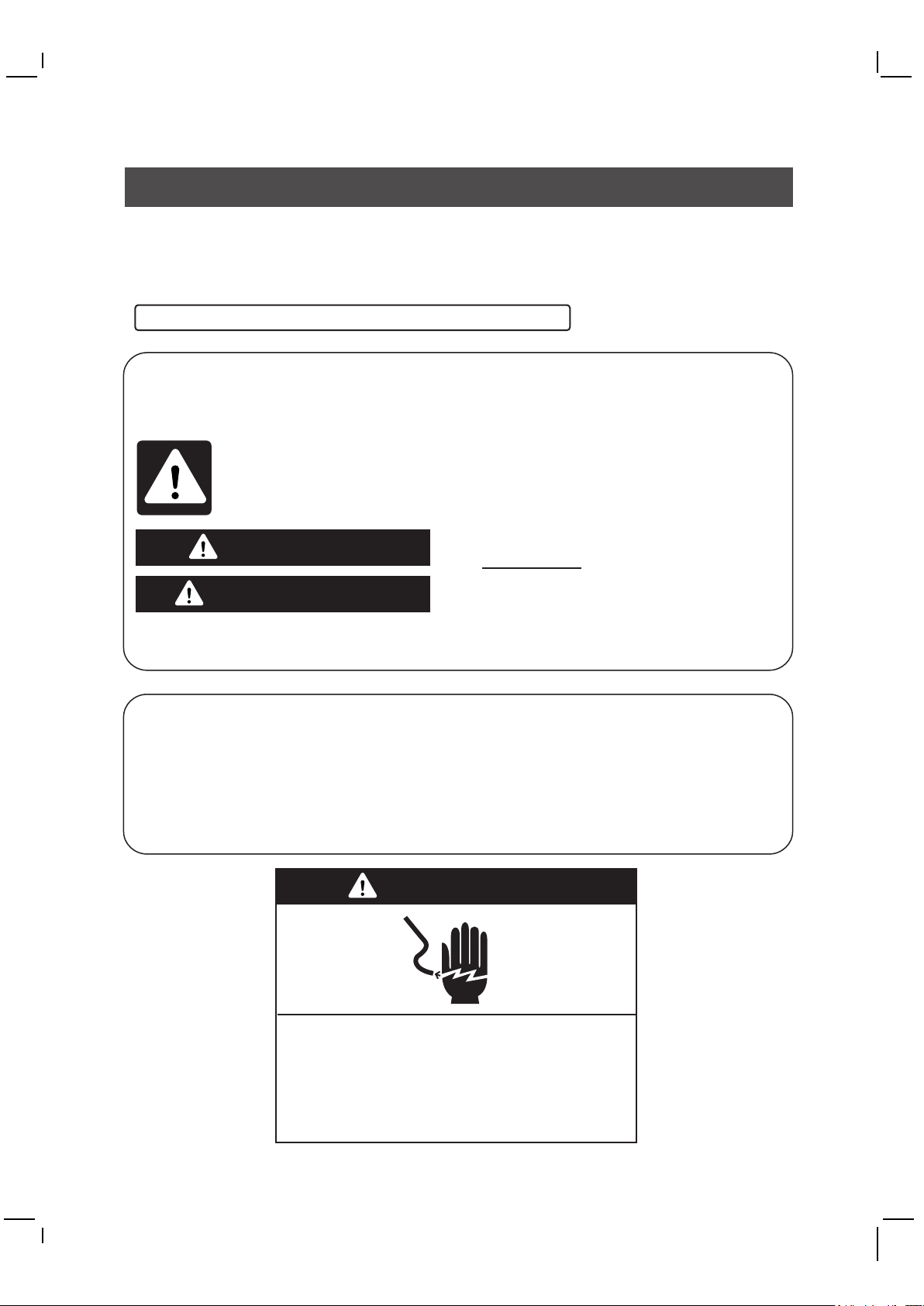
Your safety and the safety of others are very important
We have shown a number of important safety tips in this manual and on your
appliance. Always read and observe these safety tips.
This is the safety alert symbol.
This alerts you to potential hazards that could kill or injure you or others.
These safety tips follow the safety alert symbol and the word 'danger' or
'warning.'
The meaning of these words is:
DANGER
Danger of death or serious injury if you
don't immediately follow these instructions.
WARNING
All safety tips inform you what the potential hazard is, how to minimise the chance of
injury, and what may happen if the instructions are not followed.
Important safety instructions
WARNING: To reduce the risk of fire or electrical shock, do not use the unit
with a solid-state speed control device.
WARNING: To reduce risk of fire, electric shock and personal injury, do not
install in a window.
Unplug the unit before servicing.
Read and keep these instructions.
Danger of death or serious injury if you
don't follow these instructions.
WARNING
Danger of electric shock
Plug into an earthed 3-pin outlet.
Do not remove earth pin.
Do not use an adapter.
Do not use an extension.
Failure to follow these instructions could result in
death,fire or electric shock.
1
Page 3
In order to prevent damage to property or persons, be sure to observe the following
warnings.
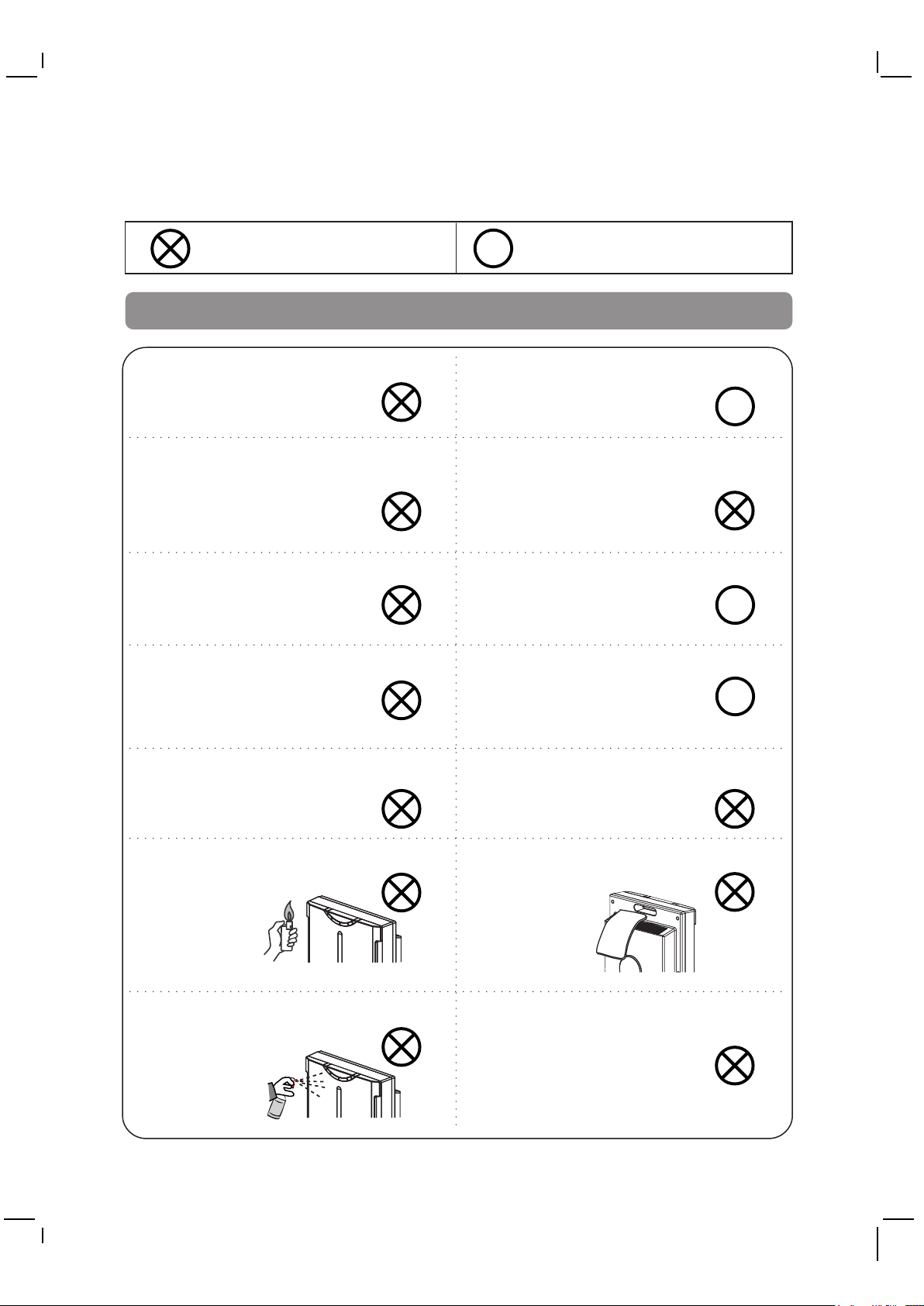
Actions prohibited
WARNING
Only qualified personnel are to repair
this machine.
Do not touch the mains plug or
operate with wet hands.
Do not operate with damaged
power cord or plug or
loose electrical outlet.
Do not damage, cut, expose to heat,
bend, twist, pull, press or
twist the cable.
Actions Recommended
R
Unplug before cleaning, inspecting
or moving the unit.
R
Do not use mains voltage other than
that specified. Do not exceed
the voltage specified for the
mains and the wiring.
Do not leave the unit unattended
during operation.
R
Periodically remove dust and dirt
from the power plug.
R
Do not expose to water.
Do not expose to naked flame,
such as cigarettes.
Do not clean with petrol or
thinner or apply insecticide.
Do not insert any foreign objects
into the air inlet or outlet.
Do not cover the air inlet or outlet.
Do not use in the vicinity of
flammable or corrosive gases
or metal dust.
2
Page 4
WARNING
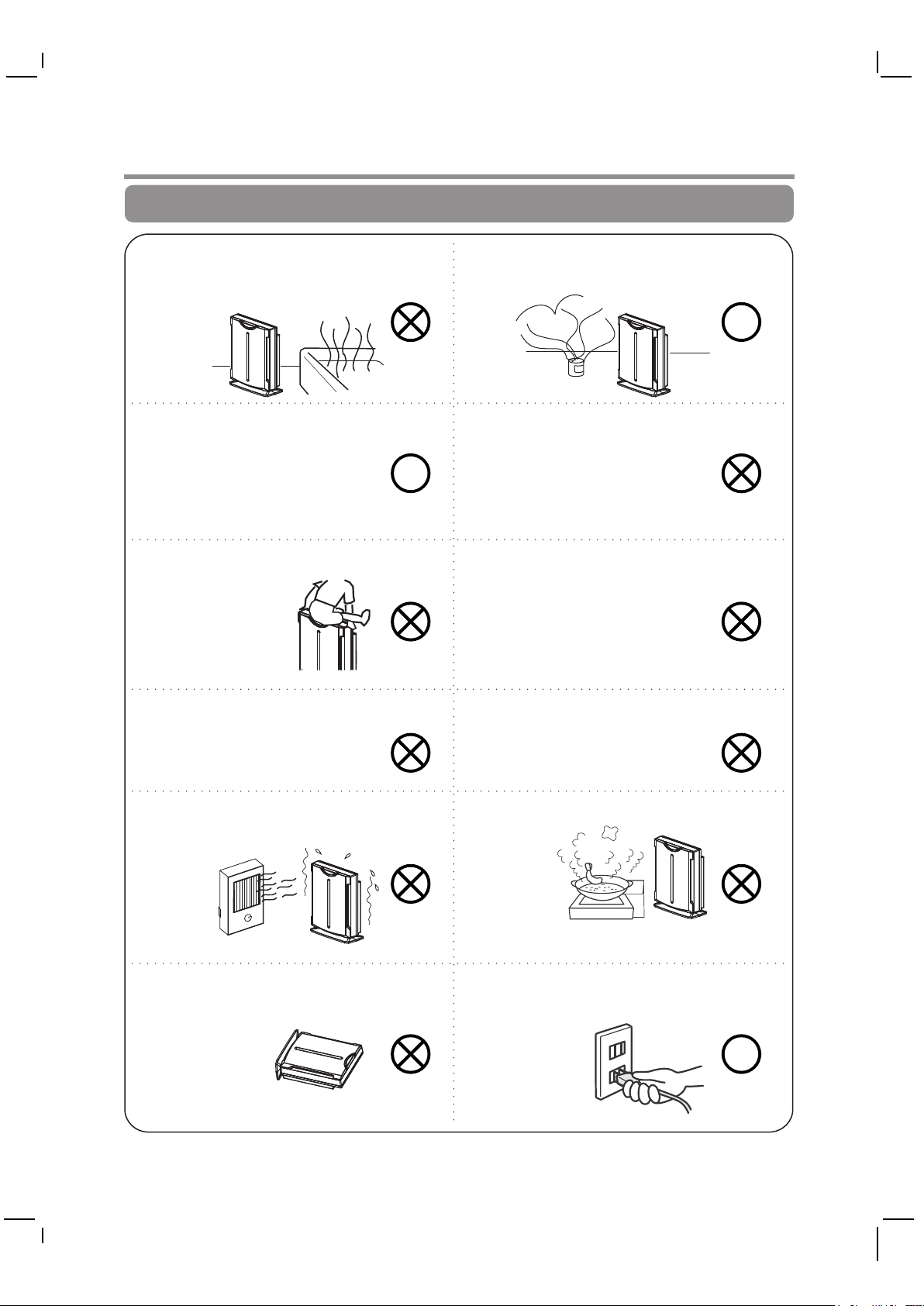
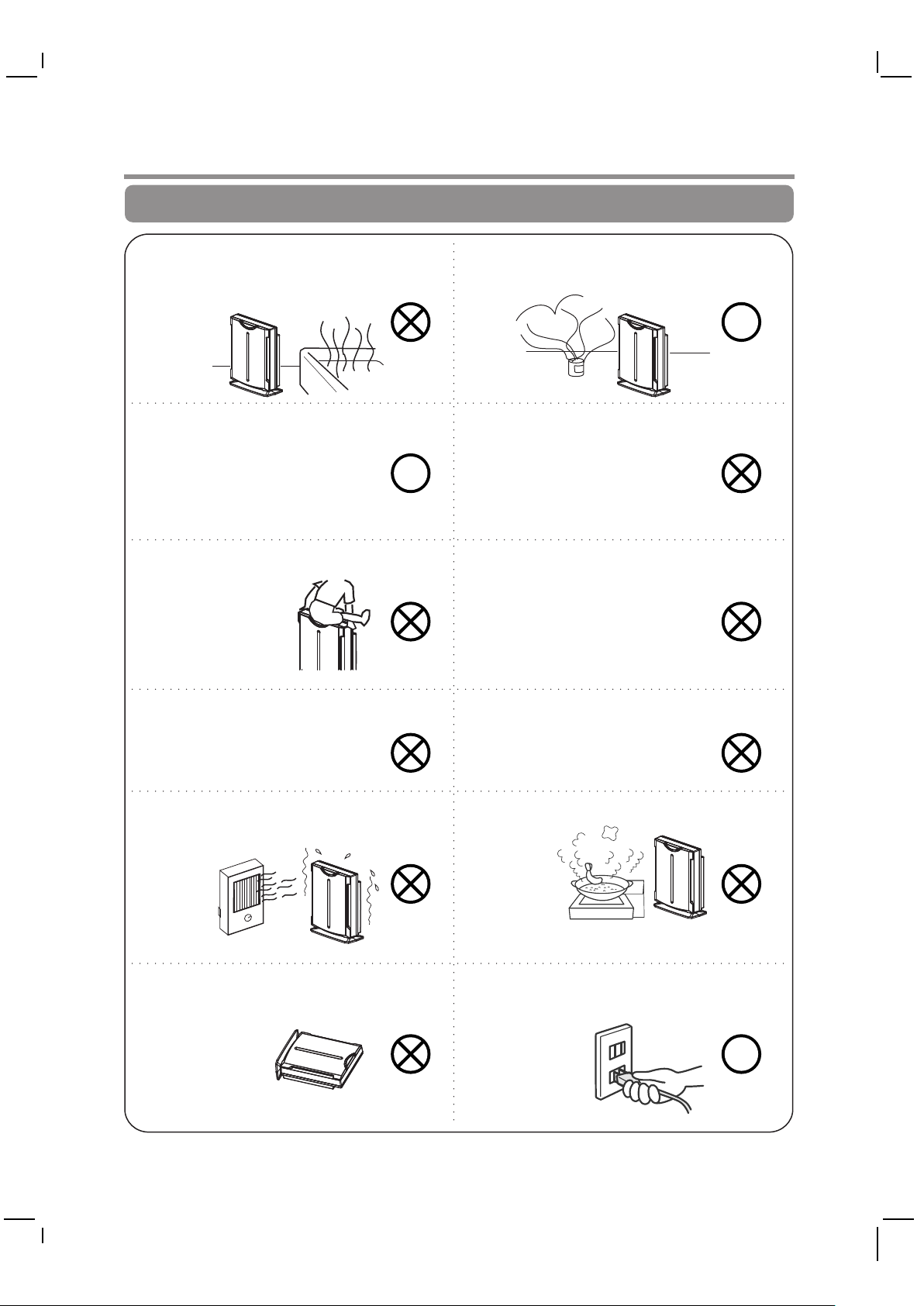
Do not use in wet places such as the
bathroom.
This unit cannot eliminate
carbon monoxide. So if a fire
is lit in the same room, ensure
proper ventilation.
Do not sit on the unit.
R
Do not operate in the vicinity of
smoke-producing insecticide
machines.
R
Do not place near fish tanks,
vases or water containers.
Detergent must not be used.
Install at least 1 meter from lighting.
Do not expose to sunlight or heat.
Do not use in an unstable position,
where unit may tip or fall over.
Do not mount high on wall or shelf.
Do not expose to oily vapours.
Always grip the mains plug when
unplugging.
R
3
Page 5
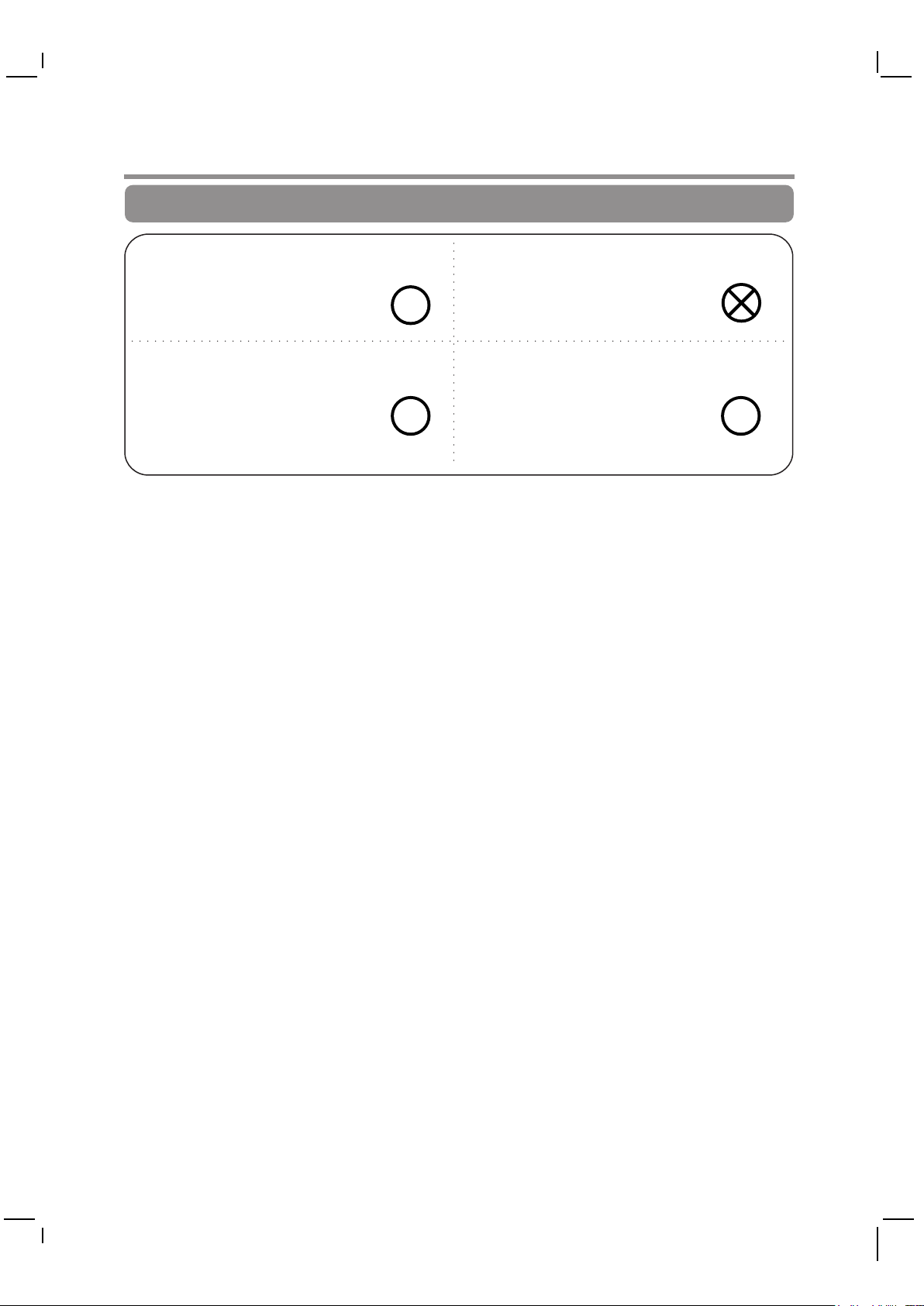
WARNING
Position at least 2 meters away from
television, radio or similar.
R
To move, unplug the unit, grip it by
the handhold on the back or hold
underneath.
R R
The machine must not be allowed to
ingest dehumidifier steam.
If the power cable is damaged, it
must be replaced by the
manufacturer, their service
agent or other qualified
technicians in order to prevent
hazards.
4
Page 6
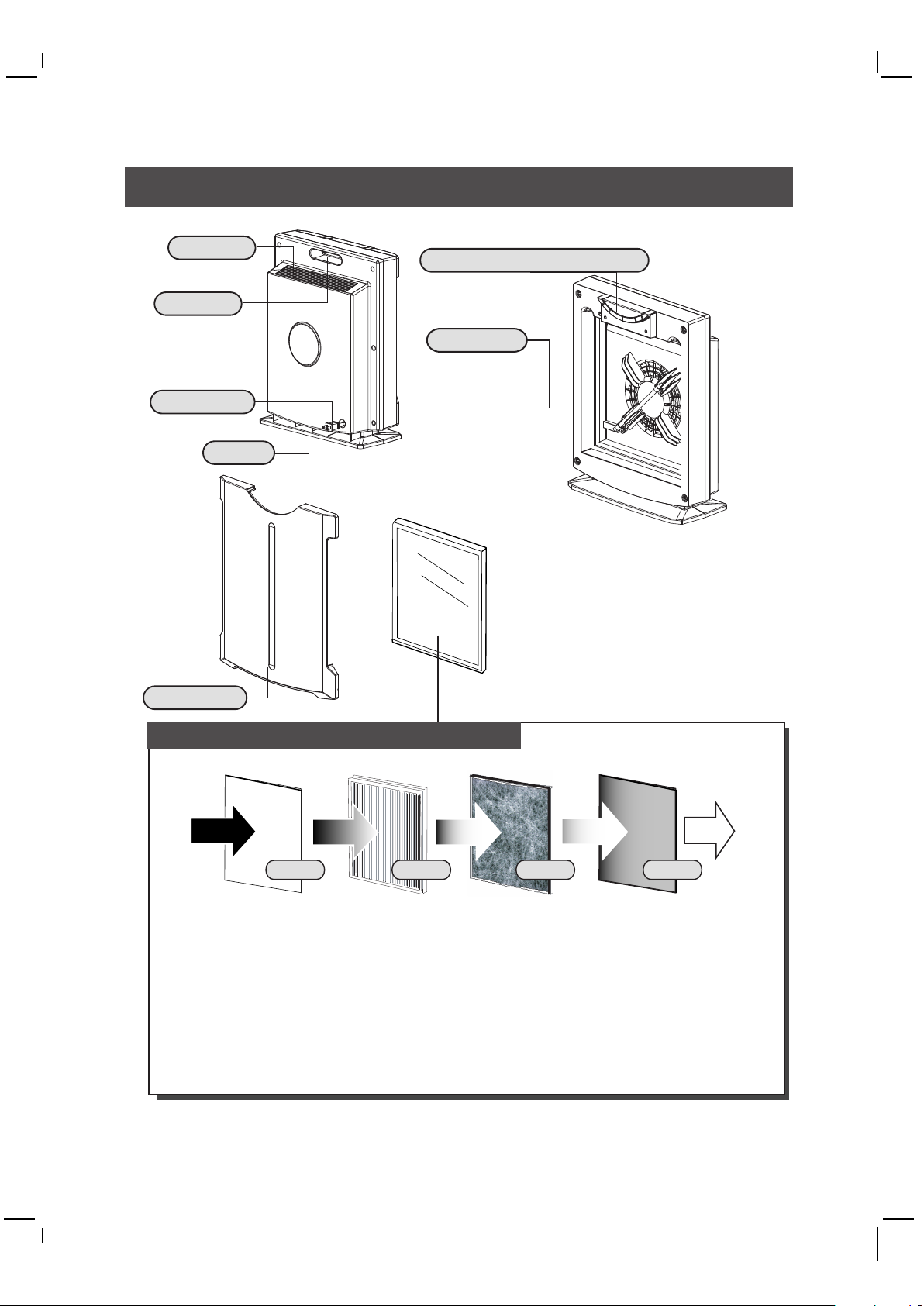
Components
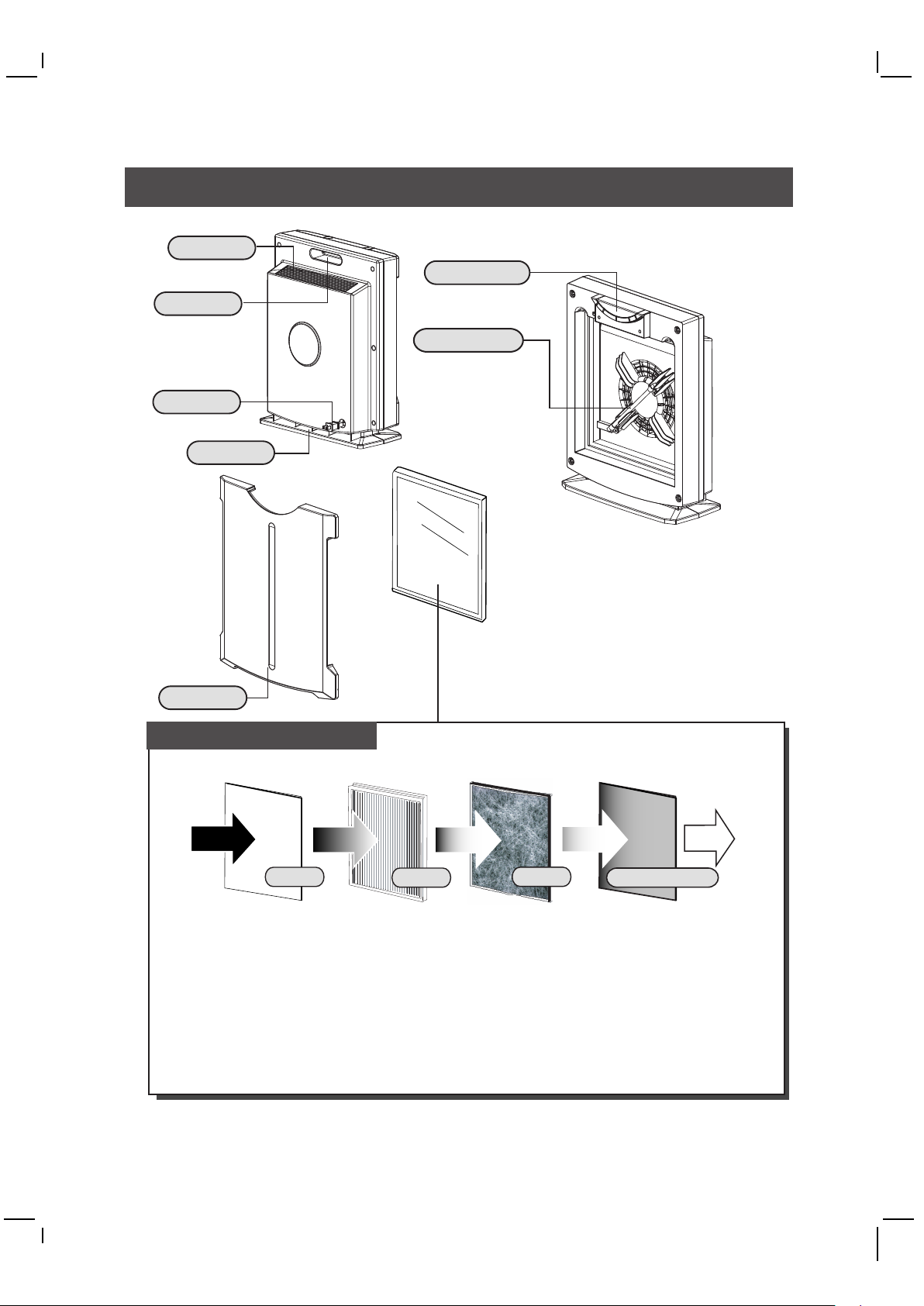
Air Outlet
Handle
Power Cord
Base
Control Panel & Light Cover
Please refer to
page 3.
UV Lamp
Using UV LED Lamp
to provide harmless
ultraviolet ray. The
titanium dioxide
photocatalyst filter is
activated to decompose
most of the
micro-organisms.
Note:
1. Do not touch or pull out the UV lamp.
2. Please contact Whirlpool spare parts
department should you want to buy a
qualified high efficiency filter.
Front Cover
Four Layers High Efficiency Filter
Dust
Germs
Smoke
Virus
Layer 1: Nano Sliver Pre-filter
Electrostatic Filter can catch dust and pollen.
Nano Sliver can restrain germs.
Layer 2: Medical Class HEPA (Inside)
Removes 99.97% airborne particles(@0.3 Micron)
Layer 3: Activate Charcoal Filter (Inside)
Get rid of other chemical pollutions, including cigarette powder, stinking smell, harmful gas.
Layer 4: Photocatalyst Filter-TiO2 (Back Light Blue)
Photocatalyst Filter (TiO2) can restrain germs, bacteria, fung and virus action.
Provide you a healthy environment.
Layer2Layer1 Layer3 Layer4
Completely
pure
5
Page 7
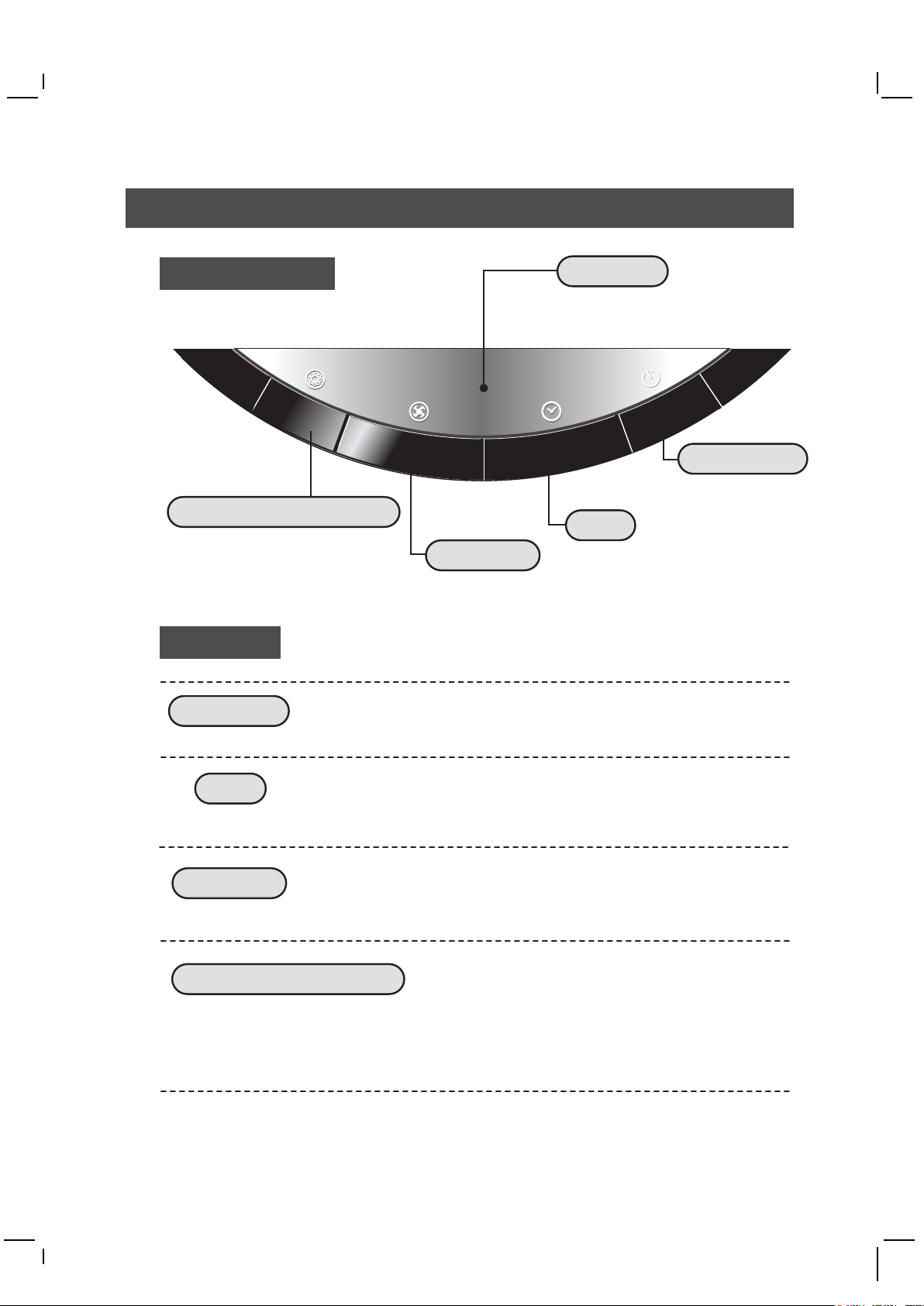
To Operate
The Control Panel
I
O
N
/
T
i
O
2
L
O
Ion and photocatalyst (TiO2)
To Operate
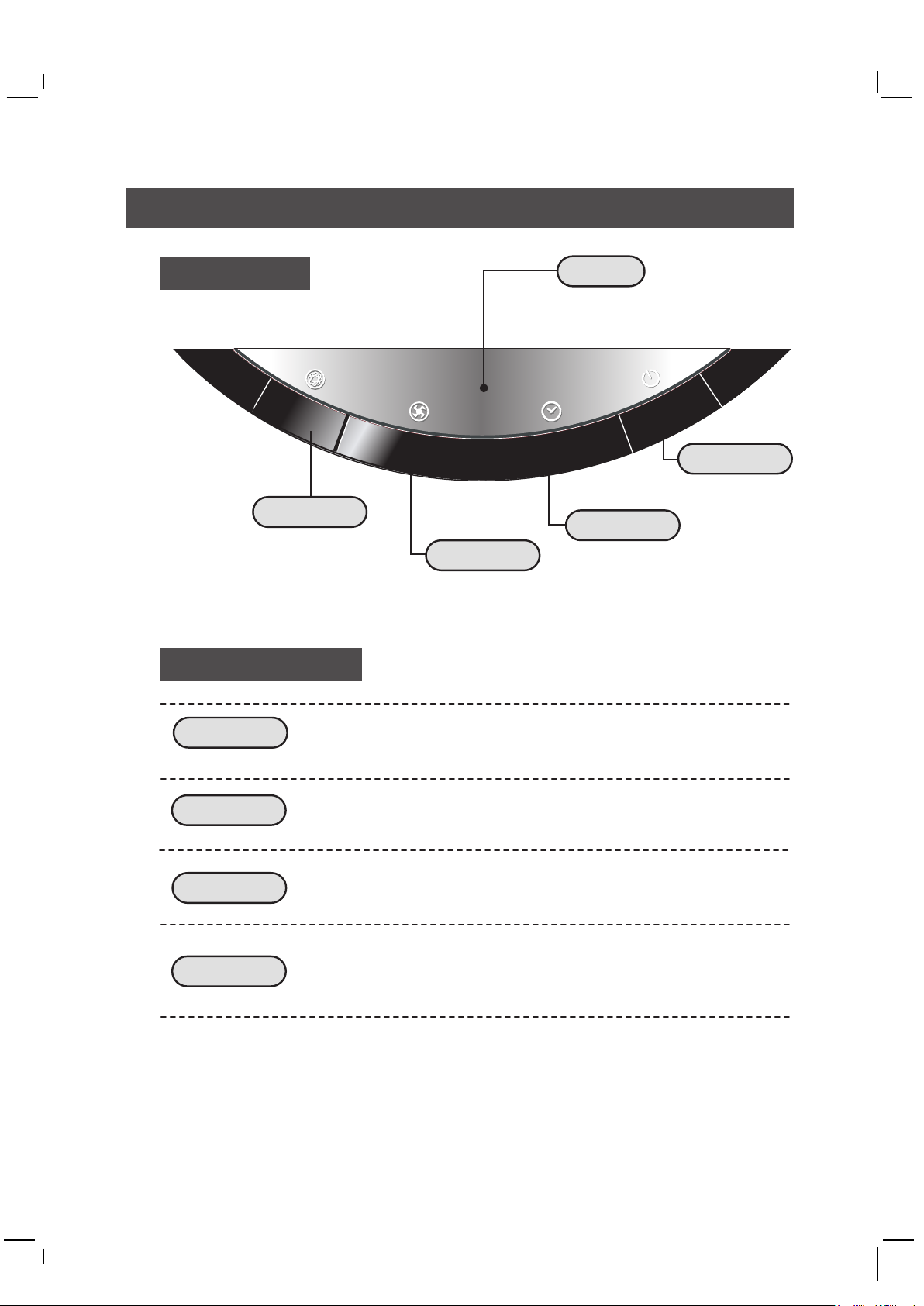
Power On/Off
After plug to power , push the "POWER" button to turn on the
unit, meanwhile the display light on. Push the "Power" button
again to turn off the unit, the display turns off.
Light Show
Green light when running without Ion / TiO2.
Blue light when running Ion / TiO2.
R
E
W
O
P
8
M
I
D
H
I
1
4
Power On/Off
Timer
Fan Speed
Timer
Push the "Timer" button to select 1,4,8 hours or continue run
(LED off). Each time when turning on the unit, the unit starts at
continuous run.
Fan Speed
Push the "Fan speed" button to select Low, Mid or High speed
as you want. When turn off the unit , the current fan speed status
each time will be memorized automatically.
Ion and photocatalyst(TiO2)
Push the "Ion / TiO2" button for this special function. The display turns blue when
running ion and photocatalyst condition. Ion provides fresh air like in nature.
Photocatalyst (TiO2) can restrain germs, microbe, bacillus and virus action.
Provide you a healthy environment.
6
Page 8
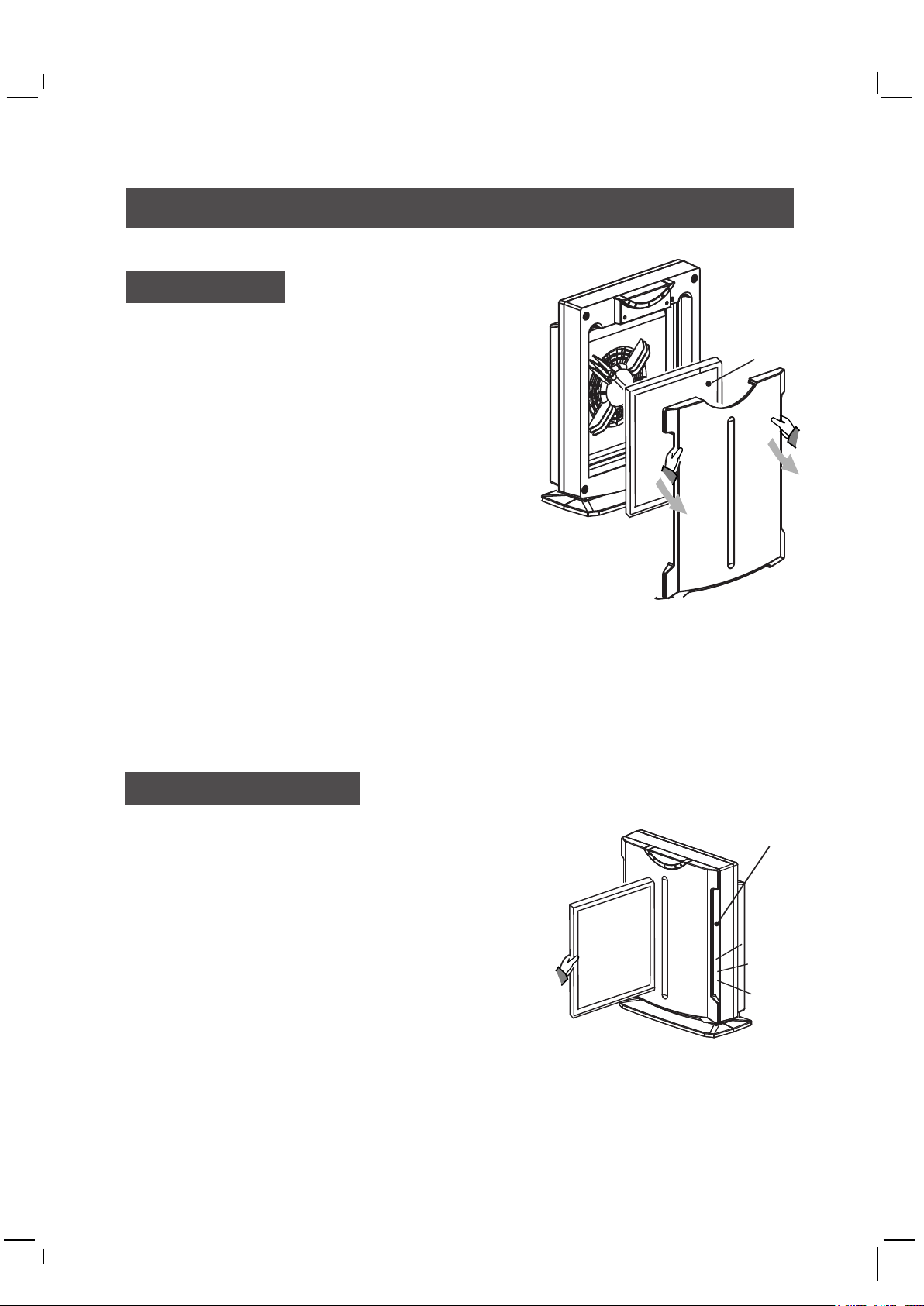
Replacement
Filter Replace
Please check the filter when using a period of time.
If the filter is covered by plenty of dust or the color
of filter is turned into filthy as the lable shows, the
airflow and the performance of the unit will be affected.
Warning : Do not turn on the unit without using a filter.
Filter Reload
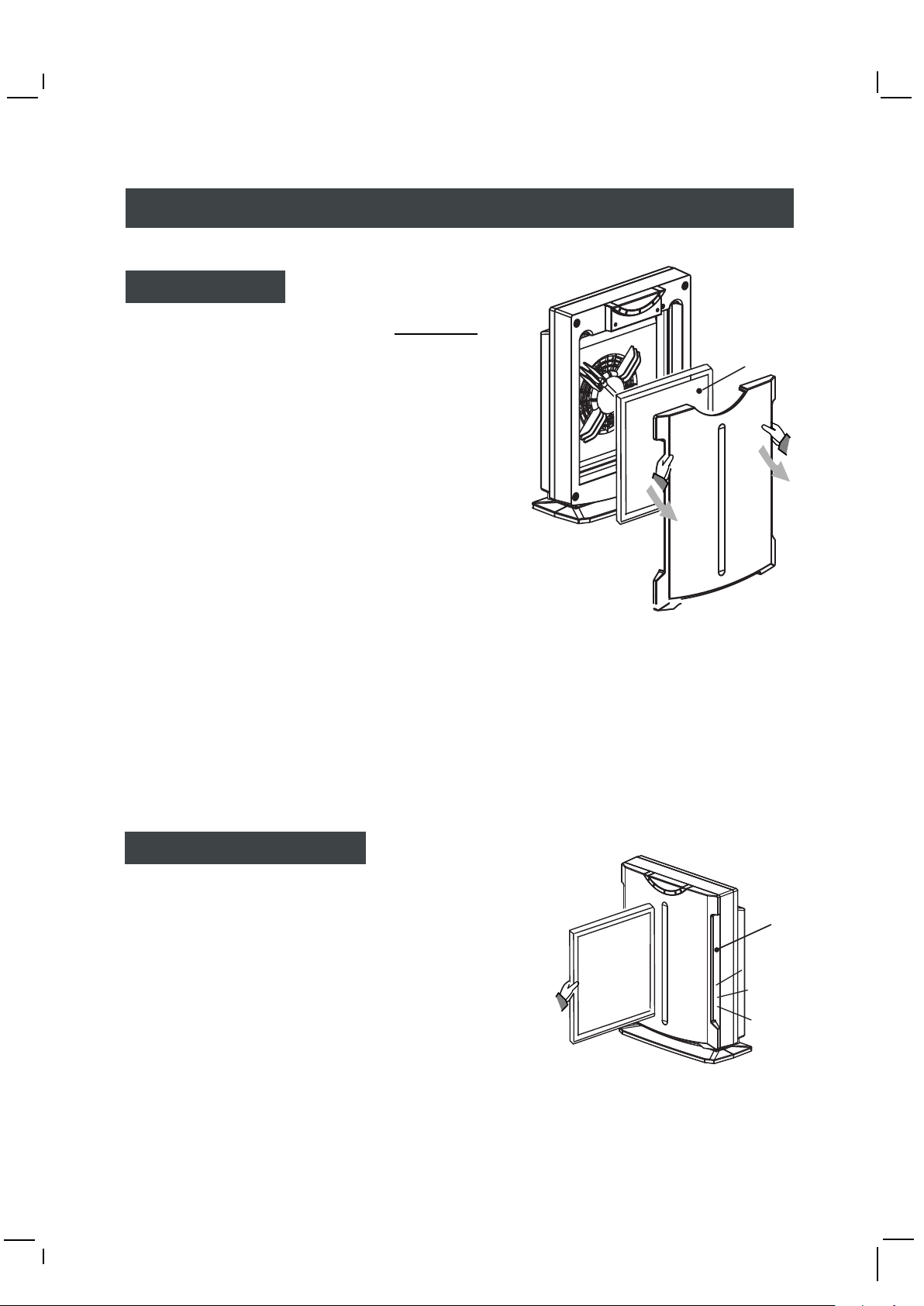
1. Please turn off the unit first.
2. Unplug the unit before replacing the filter.
3. Please put on a mouthpiece and gloves.
4. Press the latches on both sides of the front cover and
pull out the cover.
5. Unpack a new filter, replace the dirty filter with the new one.
The yellow surface faces outward.
6. Replace the filter cover in right position.
7. Seal the dirty filter in a plastic bag, then suitably discard.
8. Discard the mouthpiece and the gloves.
9. Remember to wash your hands with cleanser.
Warning :
1. The filter can not be washed.
2. Please contact Whirlpool spare parts department should you want to buy a qualified filter.
The light yellow
side faces outward
Check up of UV lamp
Note: The UV Lamp may turn out after its life.
The Lamp can only be replaced by our service departments.
Never replace yourself with any other component that will
cause damage or danger.
To check the lamb:
1. Turn off the unit.
2. Remove the front cover and take out the filter.
3. Replace the front cover only. Turn on the unit and
press the ION / TiO2 button to turn on the
photocatalyst function ( the light show turns to blue )
4. Check the UV light through sideholes of the front cover.
If the UV light is off then it should be replaced.
5.Turn off the unit, replace filter and front cover and call for service.
Note: To protect your eyes, don't look at the UV light for a long time.
7
Check though
the hole
Page 9
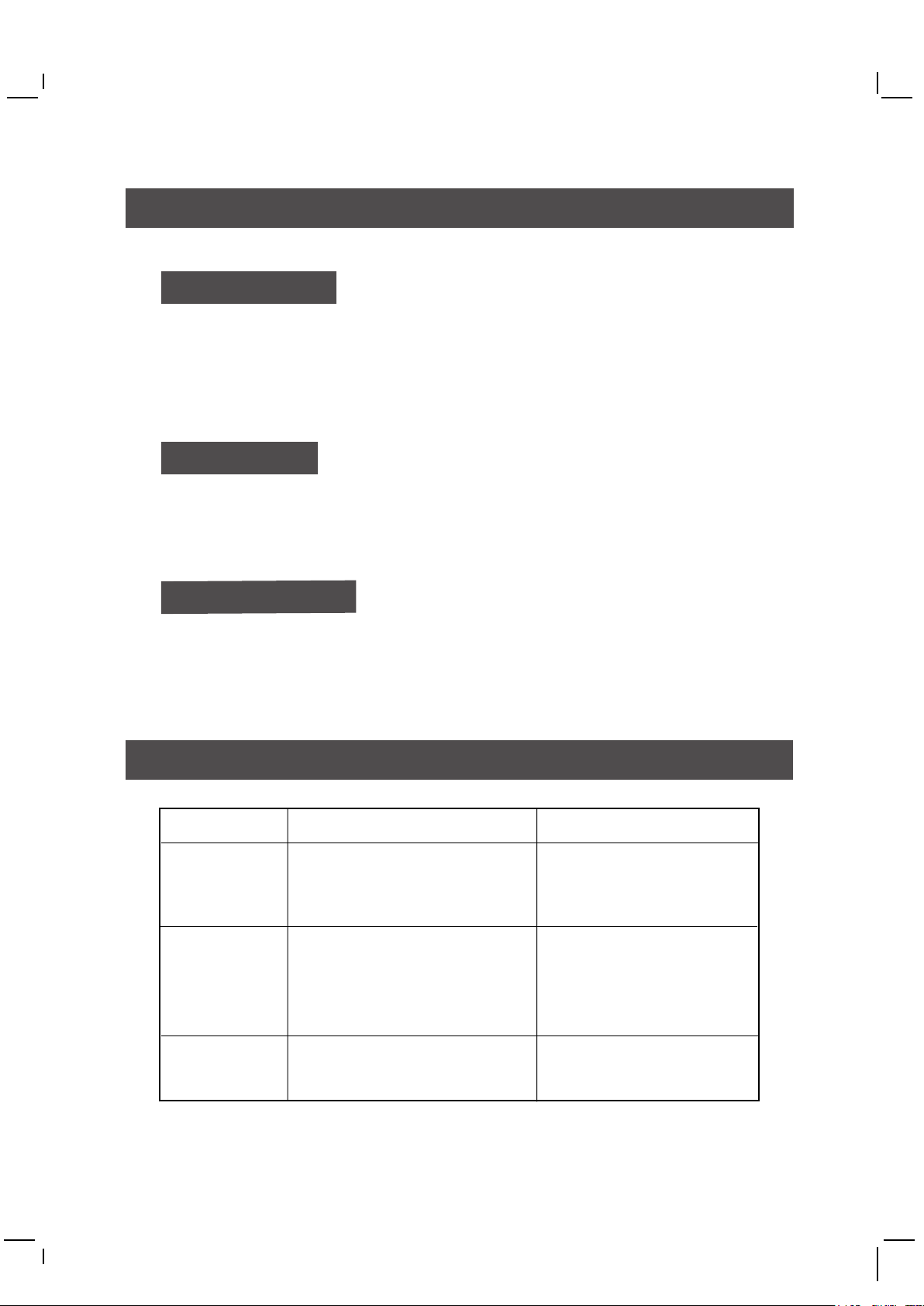
Maintenance
To Clean the Unit
1. Before clean or maintain, turn off the unit and unplug the cord.
2. Air outlet may gather dust easily, please clean it with a soft cloth.
3. Never use solvent that could damage the surface of the machine.
4. In order to avoid damage, do not wash the machine with water.
Before Storing
1. Turn off the unit unplug the cord and store the power cord into the cabinet.
2. Clean air inlet, outlet and the unit, and vacuum-clean the unit.
3. Cover the unit to prevent it from gathering dust. Store it in a cool and dry place.
Power Cord Safety
Do not use cord that shows cracks or abrasion damage alone its length or either
the plug or connector end. Call us for service when a replacement needs.
Trouble Shooting
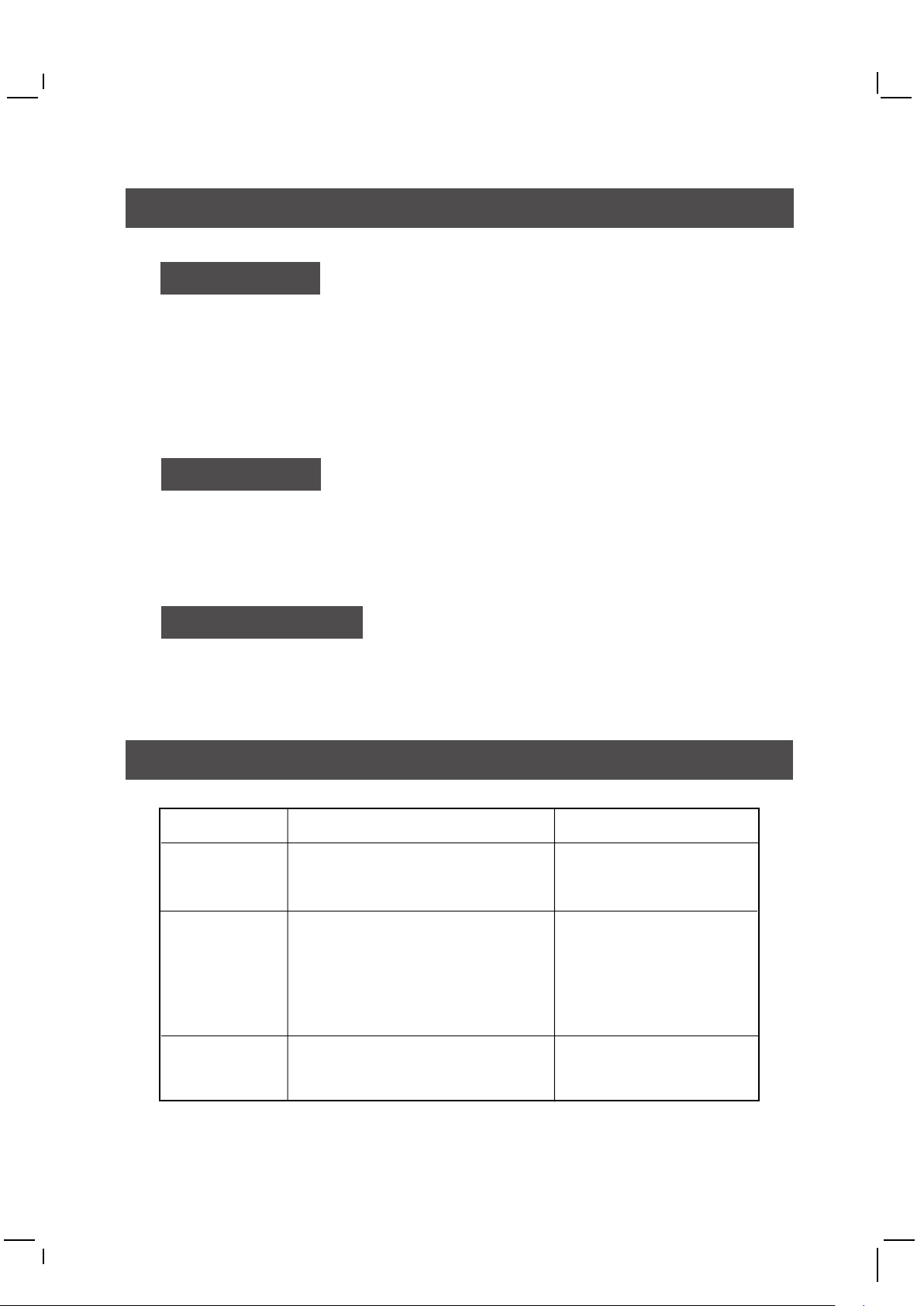
Problem Possible Cause What to do
The machine
doesn't start
Poor
performance
Noise occurs
Should there still be a problem, please unplug the unit and contact us.
1. The unit is not powered
2. Front cover is not in place
1. The filter is dirty
2. Air inlet or outlet is covered
3. Used for a large space
4. Unsuitable allocation
1. The unit is not place stably
2. The filter is dirty
8
1. Make sure the power,
cord and plug.
2. Check and push the
cover in place.
1. Replace the filter
2. Free the airflow
3. Try the high speed
4. Move to a better
ventilation position.
1. Replace the unit
2. Replace the filter
Page 10
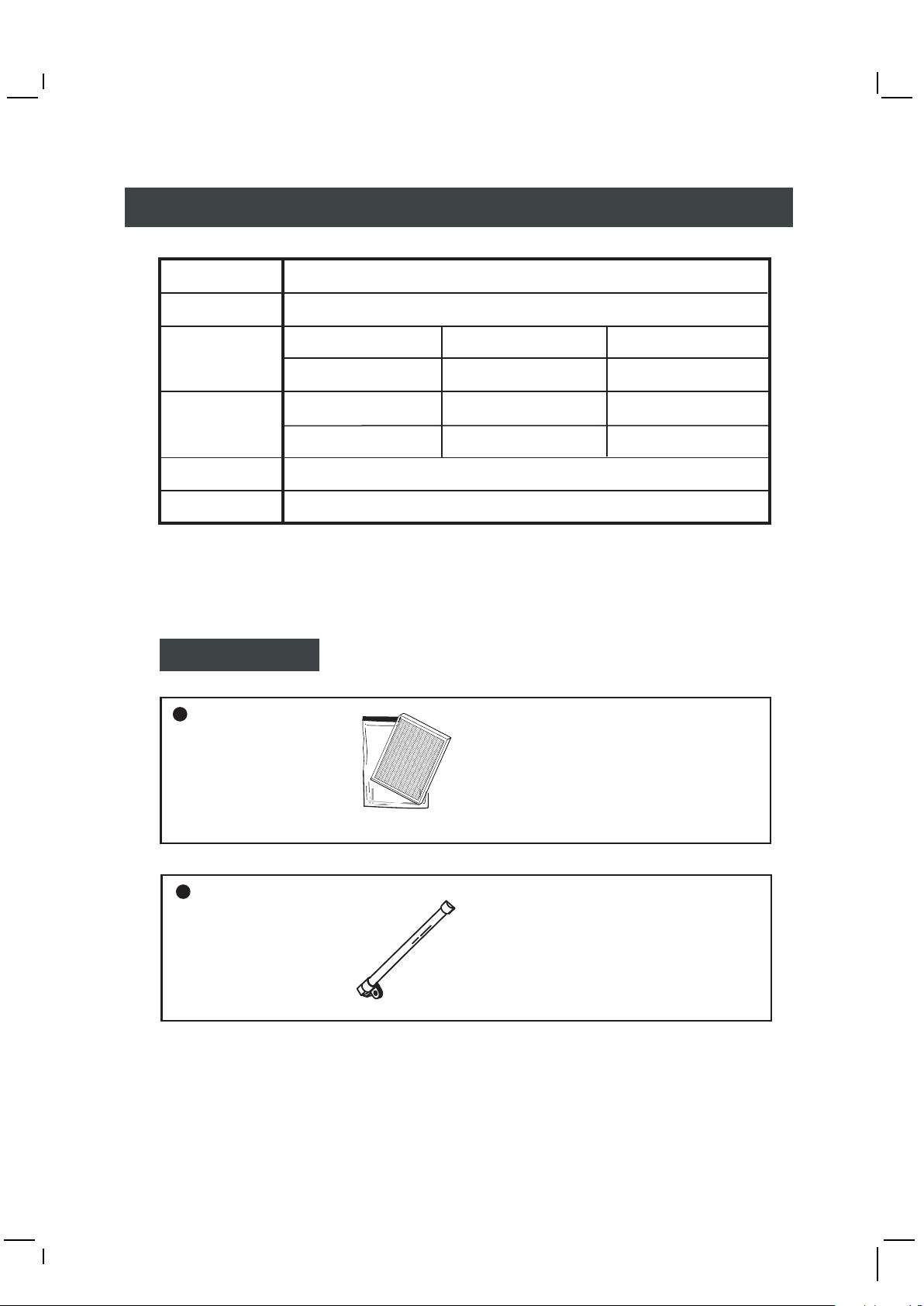
Specification
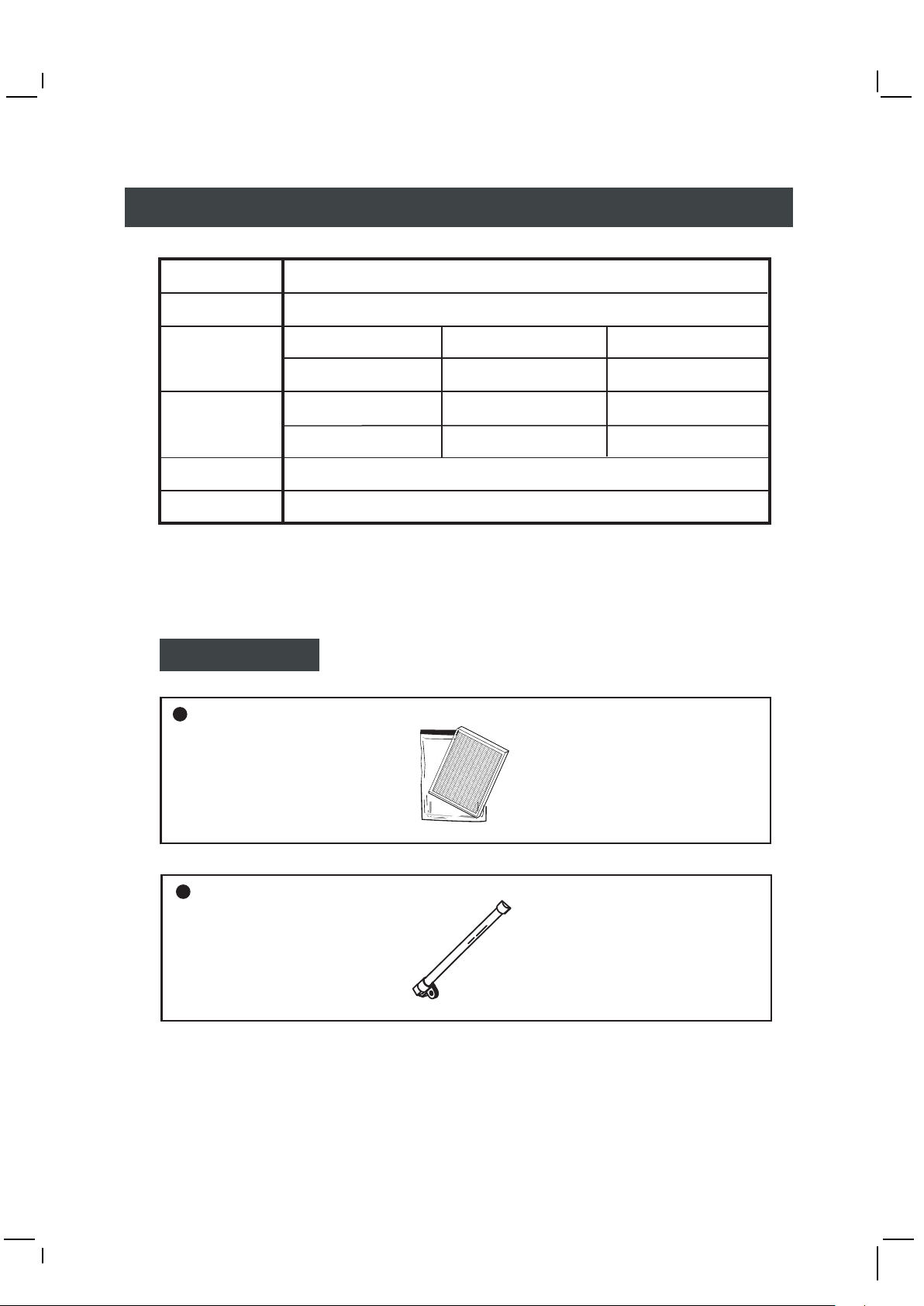
Model AP22
Power 220V / 50Hz
Power
consumption
(W)
Ventilation
(Cmm)
Dimension 380W x 174D x 490H (mm)
Net weight 4Kg (Filter included)
High Mid Low
45 35 25
High Mid Low
2.0 1.5 1.0
Components
AP22 Filter
Model:
APF001
Please designate the purchase to
Whirlpool spare parts department.
Tel:24063861/24063862
AP22 UV Lamb
Model:
764100430
9
Page 11
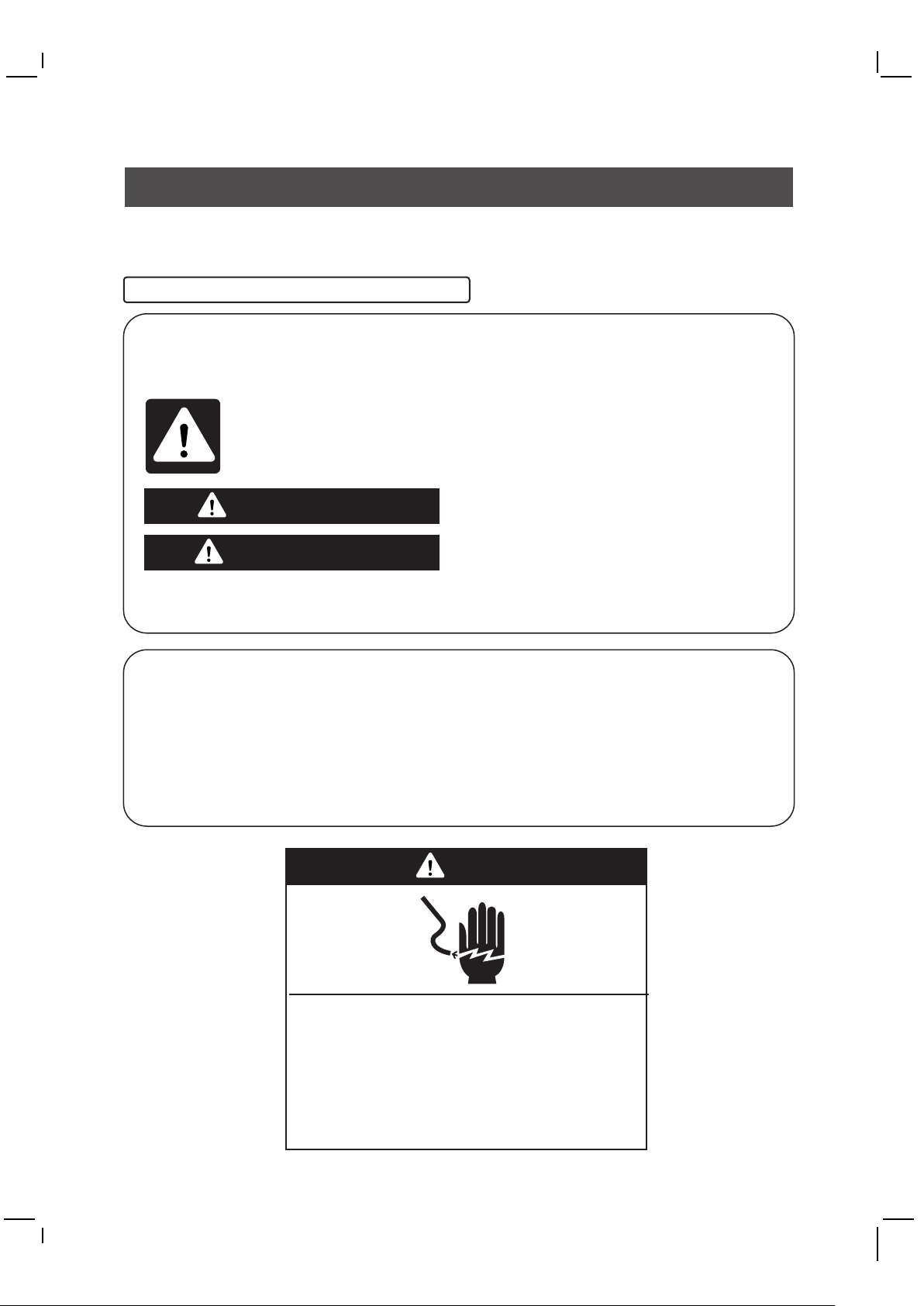
安全注意事項
本用戶手冊及空氣清新機已附加各種警告標記,以提醒用戶在使用時,應注意的安
全事項。
這些標記是根據錯誤使用所產生的危險程度而分類,請仔細閱讀及參照下文的解釋。
使用前請將濾網塑膠袋拆掉,方可開機!
使用安全與注意事項
在本說明書和產品機殼上,我們提供了許多重要的安全訊息。
請細閱並且遵守這些安全訊息。
這是安全警告標記。
這個標記表示會造成死亡或人身傷害,和具有其他潛在危險。
所有安全訊息和安全警告標記,會加上"危險"或"警告"字眼。
這些字眼代表以下意思︰
危險
警告
所有安全訊息會解釋甚麼是潛在危險,並告訴你應如何能減少受傷的機會,以
及告訴你如果沒有根據安全指示,會有甚麼後果。
重要安全事項
警告︰如要減少火災或觸電危險,切勿使用任何電子調速裝置,控制本空氣清新
機。
警告︰如要減少火災或觸電危險和其它人身傷害,切勿靠近窗口使用本產品。
進行維修前,請拔出空氣清新機的插頭。
在使用空氣清新機前,請仔細閱讀本用戶手冊,
以了解當中內容,並且妥善保管以備將來參考之用。
假若沒有立即根據以下指示,你可能會有
死亡或嚴重受傷的危險。
若沒有根據以下指示,你可能會有死亡或
嚴重受傷的危險。
警告
觸電危險
插進有地線的三孔電源插座。
切勿移除有地線的插腳。
切勿使用萬能插蘇。
切勿使用電線拖板。
如沒有遵守以上指引,
可能會有死亡、火災或觸電的危險。
1
Page 12
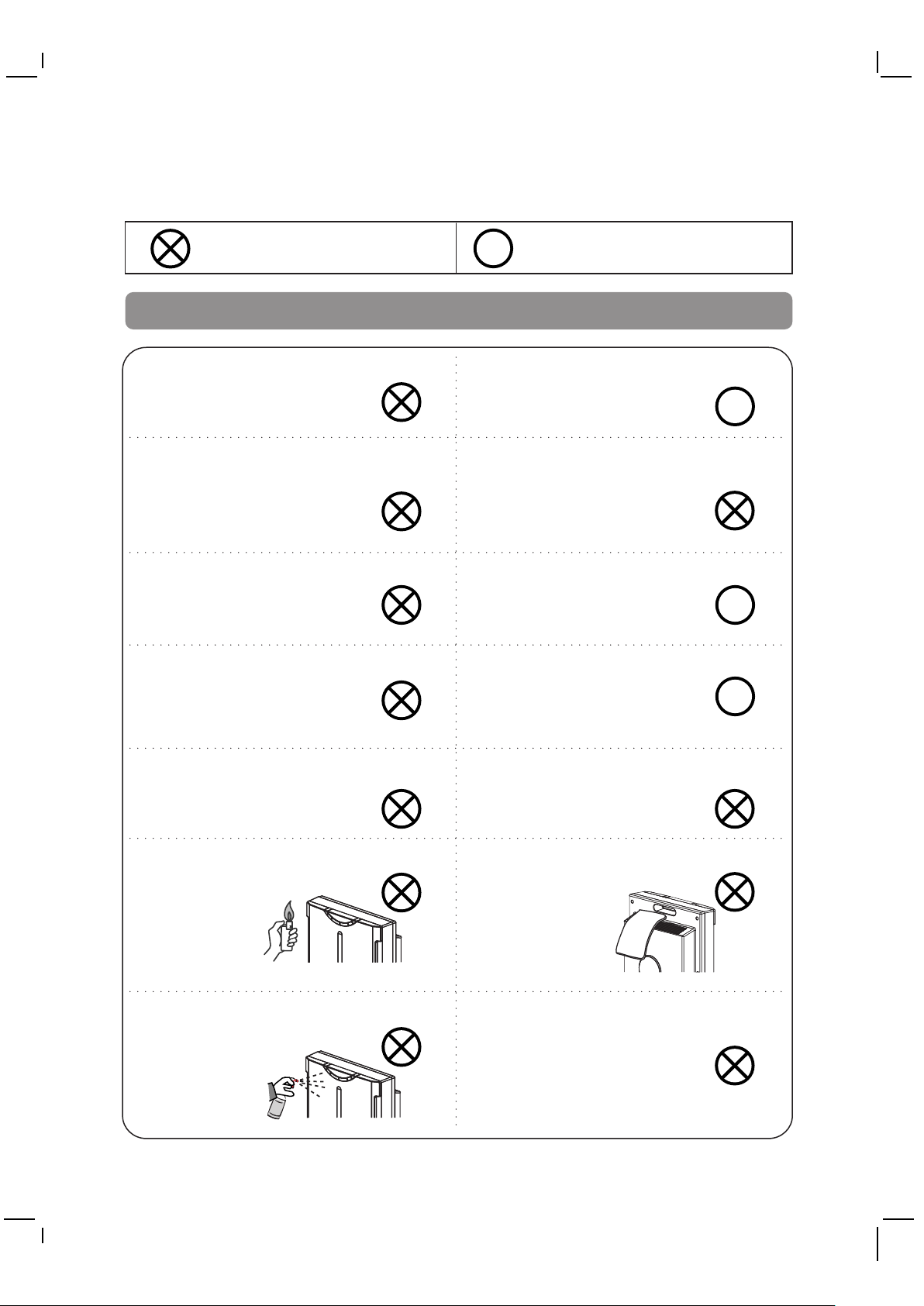
為了避免對人身或財產造成損失或危害,請必須遵守以下事項。
禁止事項
切勿由非技術人員維修本產品。
切勿手濕時拔插電源插頭或操
作本產品。
若電源線或插頭有損毀,或插
座鬆脫時,切勿使用本產品。
切勿將電源線損毀、剪斷或將
它靠近熱源,更不可以將其
扭曲、扭轉、強拉、重壓或
捆綁。
警告
在清潔、檢查或移動本產品時,
請先從電源插座中拔掉插頭。
切勿使用額定電壓以外的電源。
同時,不得使用超出電源插
座功率和線路的負荷。
在操作本產品期間,須要有人在
旁監管。
請定期清除電源插頭的塵垢。
R
應做事項
R
R
R
切勿將本產品靠近水源或將水
濺在機上。
切勿將易燃性的物品如香煙等
靠近空氣清新機。
切勿使用汽油和稀釋劑擦拭,
更不可對本產品噴灑殺蟲劑。
切勿將外物放入出、入風口中。
切勿遮蓋出、入風口。
切勿在易燃氣體、腐蝕性氣體或
金屬性塵埃的地方,使用本空
氣清新機。
2
Page 13
警告
切勿在浴室等濕氣較多的地方使
用本產品。
本產品不能吸走一氧化碳,若與
燃空產品一起使用時,須要定
時換氣。
不要坐在空氣清新機上。
切勿在釋放煙霧殺蟲劑時,使用
本產品。
R
切勿在魚缸、花瓶或盛水容器附
近使用本產品。
R
切勿使用洗滌劑清潔機身。
在照明設備1米以內的地方,不要
使用本
產品
切勿在陽光直射、暖爐附近使用本
產品。
切勿在不平穩、傾斜或橫倒的地方
,使用本空氣清新機。
切勿附本產品放置在高牆或高櫃
上。
切勿在有油煙的地方使用本產品。
從電源插座拔出插頭時,不可用力
拉扯電源線。
R
3
Page 14
警告
與電視、收音機或其他無線電產
品保持適當距離
(例如2米或以上)
要移動本產品,請確保插頭已拔
掉,然後手握機背的提取孔或
緊握機底移動本產品。
切勿讓本機直接從放濕器或類似
產品吸入水蒸氣。
R
為避免危險,損壞的電源線應由
生產商、服務代理商或其他合
R R
資格人士更換。
4
Page 15
各部名稱
出風口
手握把
電源線
底座
控制板/光罩
請參考第三頁
操作說明
光觸媒UV燈管
配合UV LED燈管
,發出對人體無害
的紫外線,配合二
氧化鈦產生觸媒效
果,可達到清淨殺
菌,抑制病毒活動。
備註:
1.光觸媒紫外線燈管運轉中請勿碰
觸與拆卸。
2.用戶如需補購高效能複合濾網與
光觸媒UV燈管,請向惠而浦零件
部連絡以確保質量與售後服務。
前飾板
四層式高效能複合濾網
污濁
惡臭
煙害
病菌
前置濾網
HEPA
第一層-前置奈米銀濾網 (正面淺黃色)
採強力不織布配合奈米銀元素,首先清除較大之灰塵與塵埃,抑制塵蹣病菌。
第二層-醫療級高效HEPA
瞬間捕捉微塵及過濾空氣中污染粒子(0.3微米),清淨效率達到99.97%。
第三層-活性碳
吸附HEPA無法處理之有害化學物質及強力去除惡臭及煙害。
第四層-光觸媒(TiO2)濾網 (反面淺藍色)
光觸媒(TiO2)可有效殺菌、抑制病毒活動、分解有害物質,常保空氣清新。
活性碳
光觸媒(TiO2)濾網
完全
清淨
5
Page 16
操作說明
面板圖示說明
I
O
N
/
T
i
O
2
除菌脫臭
詳細操作與功能說明
暈光罩
配合運轉狀態,燈罩會亮起發光
一般清凈狀態亮起綠光
啟動負離子+光觸媒功能亮起藍光
R
E
W
O
P
L
O
M
I
D
H
I
1
4
8
電源開關
定時選擇
風量選擇
電源開關
定時選擇
風量選擇
除菌脫臭
電源接通後,按壓即啟動運轉,光罩亮起綠光狀態,表示進行
空氣清淨,再按壓,光罩燈滅,即關閉電源。
按壓選擇1,4,8小時後關機或連續運轉(不亮燈),於每次開機會
重新由連續開始。
按壓選擇低、中、高風量,每次開機時會記憶上次使用時的選擇
位置。
按壓啟動負離子+光觸媒功能,光罩亮起由綠光轉換為藍光,負
離子由出風口處釋放,可享受如森林浴般的清新感受,配合光觸
媒功能,可強力除菌及其他有害物質。
6
Page 17
更換方法
濾網檢測與更換
注意:請定時檢查濾網,當濾網過髒(有明顯污物
堵塞或顏色達到背板標籤所示污濁顏色)時,
清淨機效率會下降,應立即更換。
以下狀況會讓濾網的更換時間提早:
1. 長期室內充斥大量香煙惡臭之際。
2. 吸入揮發溶劑或大量燃燒瓦斯油煙之際。
3. 使用場所靠近交通流量大,塵埃多的道路附近。
警告︰未安裝濾網時請勿開機運轉。
更換步驟:
步驟1. 請先關機。
步驟2. 更換濾網前,必須先把本機插頭拔掉。
步驟3. 請戴上口罩及手套。
步驟4. 雙手握住前飾板入風兩側,向外取出。
步驟5. 取出舊濾網,換上新品。
注意:放置次序如右圖,淺黃色面朝外。
步驟6. 裝回前飾板。
注意:前飾板未定位妥當,機器無法運轉。
步驟7. 把骯髒的濾網放入封密的膠袋內,然後
適當棄掉。
淺黃色面
步驟8. 把口罩及手套棄掉。
步驟9. 記緊使用清潔液洗手。
完成更換濾網後,請把電源插頭插上電源插座。
備註:
1. 濾網不可清洗。
2. 用戶如需補購高效能複合濾網,請與惠而浦零
件部聯絡。
光觸媒UV燈管檢測與更換
注意: 光觸媒UV燈管壽命終盡熄滅後,請聯絡客戶服務部,
本燈管為本機型專用,請勿自行拆卸更換替代品,
以免造成機件故障。
燈管簡易偵測步驟:
1. 請先關機。
2. 拆卸前飾板,取出濾網。
3. 重新裝回前飾板,開機按壓負離子+光觸媒鍵 (光罩藍光亮起)。
4. 從機體兩側之入風洞口觀看燈管明亮狀況,若熄滅,則須更換。
5. 關機,裝回濾網與前飾板。
注意:偵測時若燈管正常,請勿直視過久,以免傷害視力。
7
入風口
Page 18
保養方法
機體保養
1.清潔保養前必須先關機並拔下插頭。
2. 出、入風口容易沾染灰塵,請經常用軟棉布擦拭。
3. 請用較柔性的清潔劑清潔機體並用軟棉布擦拭,禁止採用
其他化學性洗劑,以免損傷機體或塑膠變色、變形。
4. 清潔時請勿用水沖洗,以免對機器造成損壞。
長期不使用時
1. 將電源線先收入機體內。
2. 清潔濾網,出、入風口及機體。
3. 機器裝置好後蓋上防塵罩,放置在陰涼、通風處。
電源線的維護與更換
當發現電源線受損時,請即時停機並將插頭從插座上拔下後,與客戶服務部聯絡,
請不要自行拆卸或更換非本機專用電源線。
一般故障排除
故障情況
機器不能運轉
清淨效果欠佳
噪音太大
故障原因
1.電源異常
2.濾網框架未裝置好
1.濾網污濁
2.有障礙物阻礙進出風口
3.室內空間太大
4.機器放置位置不當
1.機器放置不平穩
2.濾網污濁
檢查電源及插頭
檢查並裝置固定
更換濾網
清除障礙物使空氣流通
提高風速
將機器移到較佳循環位置
將機器重新放置好
更換濾網
處理方法
當上述故障不能排除並確認需要修理時,請與客戶服務部聯絡,勿擅自拆卸機器修理。
8
Page 19
規格
機種 AP22
電源 220V / 50Hz
消耗電力(瓦) 高速 中速 低速
45 35 25
風量 高速 中速 低速
(立方米/分鐘)
外形尺寸 380寬X174深X490高(毫米)
淨重量 4千克(含濾網)
耗件
AP22 專用濾網
型號:
APF001
2.0 1.5 1.0
請向惠而浦零件部指定購買
電話:24063861/24063862
AP22 專用燈管
型號:
764100430
9
Page 20
惠而浦星級情報站
Star Service Hotline 24069138
www.whirlpool.com.hk
P/N 784002880-02R
 Loading...