

Page 1
Quick reference guide for healthcare bed model 3010
A.
A.A.
A.
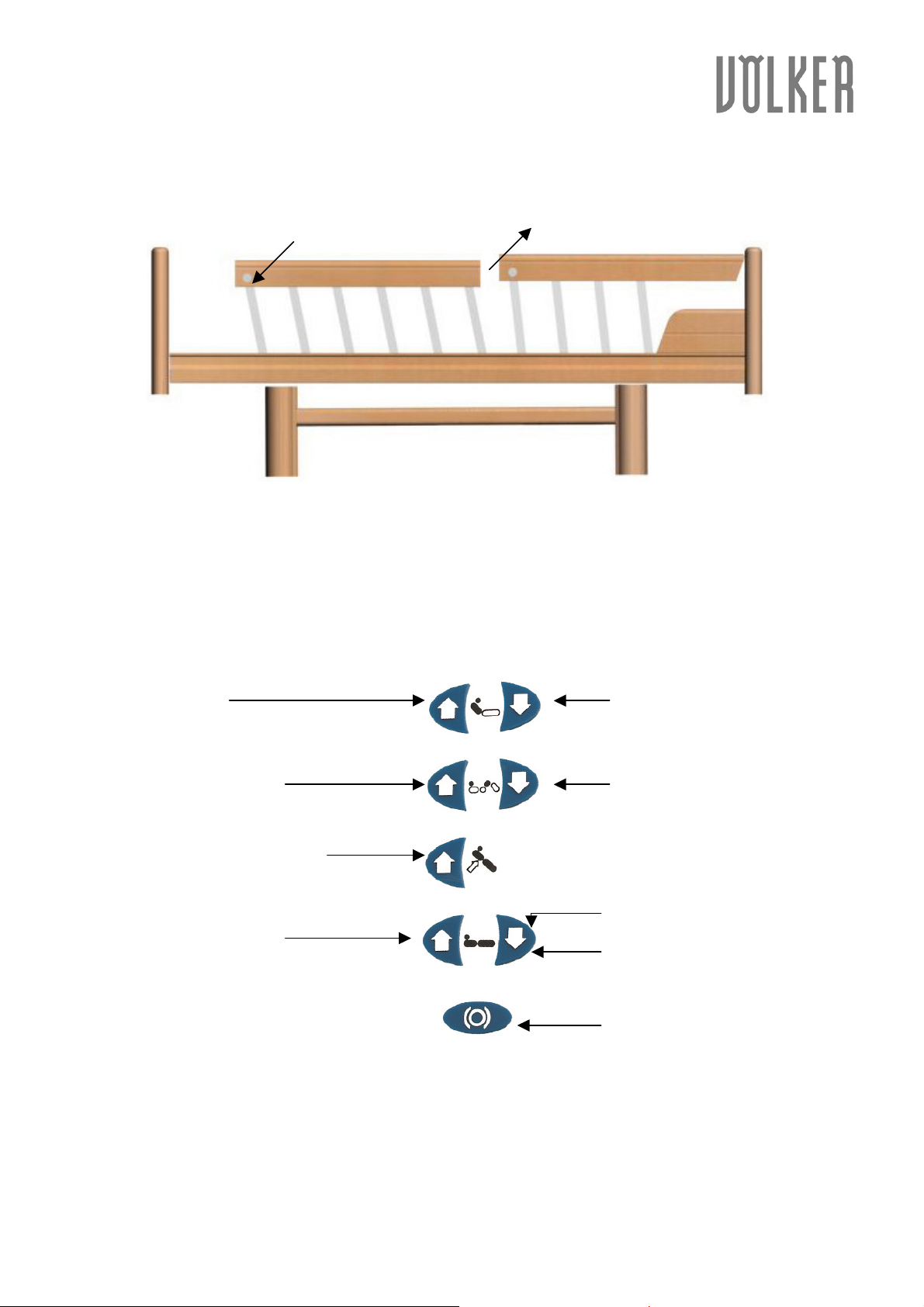
Side rails
Side railsSide rails
Side rails
Quick reference guide for healthcare bed model 3010
Quick reference guide for healthcare bed model 3010Quick reference guide for healthcare bed model 3010
To raise the side rails,
To raise the side rails, pull the side rail upwards (1). Start with the part of the side rail on the
To raise the side rails, To raise the side rails,
headside of the bed.
To lower the side rails,
To lower the side rails, press the button at the lower part of the respective element (2) and move
To lower the side rails,To lower the side rails,
the side rail downwards. Start with the part of the side rail on the footside of the bed.
B. Manual control unit
B. Manual control unit
B. Manual control unitB. Manual control unit
1.
1. Back section up
1.1.
3.
3. Upper leg section up
3.3.
5.
5. Comfort position (optional)
5.5.
6.
6. Height adjustment up
6.6.
2.
2. Back section down
2.2.
4.
4. Upper leg section down
4.4.
7.
7. Height adjustment down
7.7.
8.
8. Caster button
8.8.
Pushing the caster button at the
same time as the “height
adjustment down” -button
extends the casters and allows the
bed to be moved.
Völker AG • Wullener Feld 79 • 58454 Witten - Germany
phone +49 2302 960 960 • fax +49 2302 960 96 16
www.voelker.de • [email protected]
Mai 2006, KA45
Page 2
Quick reference guide for healthcare bed model 3010
Quick reference guide for healthcare bed model 3010
Quick reference guide for healthcare bed model 3010Quick reference guide for healthcare bed model 3010
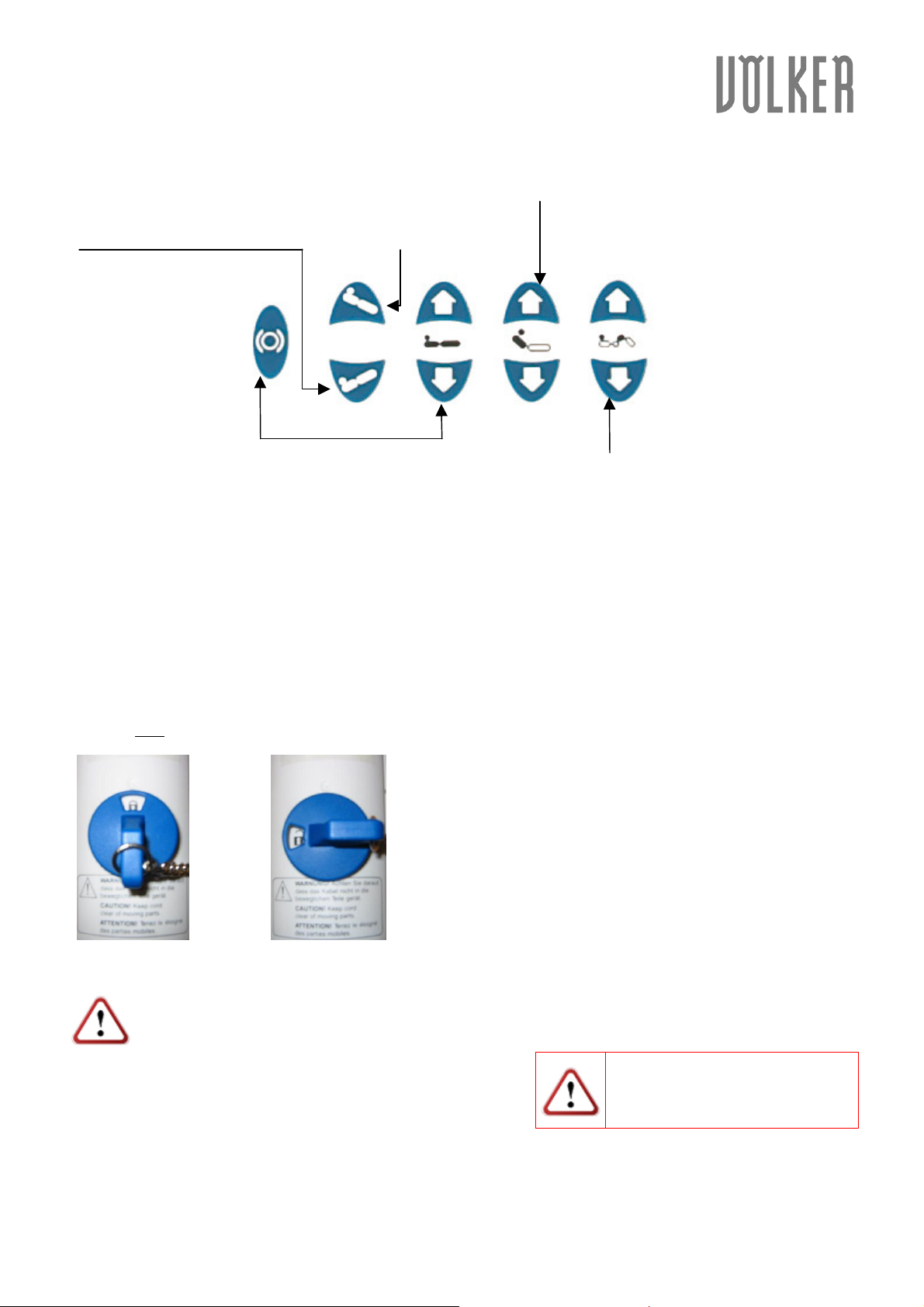
C. Caregiver`s console (optional)
C. Caregiver`s console (optional)
C. Caregiver`s console (optional)C. Caregiver`s console (optional)
TTTTrendelenburg
rendelenburg
rendelenburgrendelenburg
Tilt’s the entire lying surface with the
foot section high....
Comfort position
Comfort position
Comfort positionComfort position
Tilt’s the entire lying surface
with the head section high.
Back section
Back section
Back sectionBack section
Raises and lowers the back section.
Caster button
Caster button
Caster buttonCaster button
Pushing the caster button at the same time
as the “height adjustment down” -button
extends the casters and allows the bed to be
moved.
D. Control lock
D. Control lock
D. Control lockD. Control lock
a)
a) Manual c
a)a)
Manual control unit
Manual cManual c
ontrol unit
ontrol unitontrol unit
Height adjustment
Height adjustment *
Height adjustmentHeight adjustment
Raises and lowers the
lying surface of the bed
*
* *
Leg section
Leg section
Leg sectionLeg section
Raises and lowers the leg
section.
By activating the control lock on the backside of the manual control unit, you lock all functions of the
manual control unit.
b) Caregiver`s concole
b) Caregiver`s concole
b) Caregiver`s concoleb) Caregiver`s concole
By activating the control lock on the caregiver`s console, you lock all functions of the caregiver`s
console and the manual control unit.
Activate the control lock Deactivate the control lock
If the functions of the bed can not be operated, please check the control lock on the
If the functions of the bed can not be operated, please check the control lock on the
If the functions of the bed can not be operated, please check the control lock on the If the functions of the bed can not be operated, please check the control lock on the
manual control unit and the caregiver`s console.
manual control unit and the caregiver`s console.
manual control unit and the caregiver`s console.manual control unit and the caregiver`s console.
Please pay attention to the
information in the operating
instructions.
Völker AG • Wullener Feld 79 • 58454 Witten - Germany
phone +49 2302 960 960 • fax +49 2302 960 96 16
www.voelker.de • [email protected]
Mai 2006, KA45
 Loading...