

Page 1
PJ-WPD-700
User Guide
IMPORTANT: Please read this User Guide to obtain important information on installing and using your product in
a safe manner, as well as registering your product for future service. Warranty information contained in this User
Guide will describe your limited coverage from ViewSonic® Corporation, which is also found on our web site at
http://www.viewsonic.com in English, or in specific languages using the Regional selection box of our website.
Model No. VS19836
P/N: PJ-WPD-700
Page 2

Thank you for choosing ViewSonic®
As a world-leading provider of visual solutions, ViewSonic® is dedicated to exceeding
the world’s expectations for technological evolution, innovation, and simplicity.
At ViewSonic®, we believe that our products have the potential to make a positive
impact in the world, and we are confident that the ViewSonic® product you have
chosen will serve you well.
Once again, thank you for choosing ViewSonic®!
2
Page 3

Contents
Introduction ................................................................ 4
Package Contents ...................................................................................................4
Product Overview ................................................................................................... 5
Receiver ................................................................................................................... 5
Transmitter .............................................................................................................. 5
Making Connections .................................................... 6
Connecting the Receiver .........................................................................................6
Connecting the Transmitter....................................................................................6
Appendix ..................................................................... 7
Specifications ..........................................................................................................7
LED Indicator ..........................................................................................................8
Transmitter .............................................................................................................. 8
Product Dimensions ...............................................................................................9
Transmitter .............................................................................................................. 9
Receiver ................................................................................................................... 9
Regulatory and Service Information .......................... 10
Compliance Information ....................................................................................... 10
CE Conformity for European Countries ................................................................. 10
Declaration of RoHS2 Compliance......................................................................... 11
Indian Restriction of Hazardous Substances ......................................................... 12
Product Disposal at End of Product Life ................................................................ 12
Copyright Information ..........................................................................................13
Customer Service .................................................................................................. 14
3
Page 4

Package Contents
Receiver Transmi㿿er So Carry Case
If anything is missing or damaged, please contact your local reseller for
more informa⿿on.
4
Page 5
Product Overview
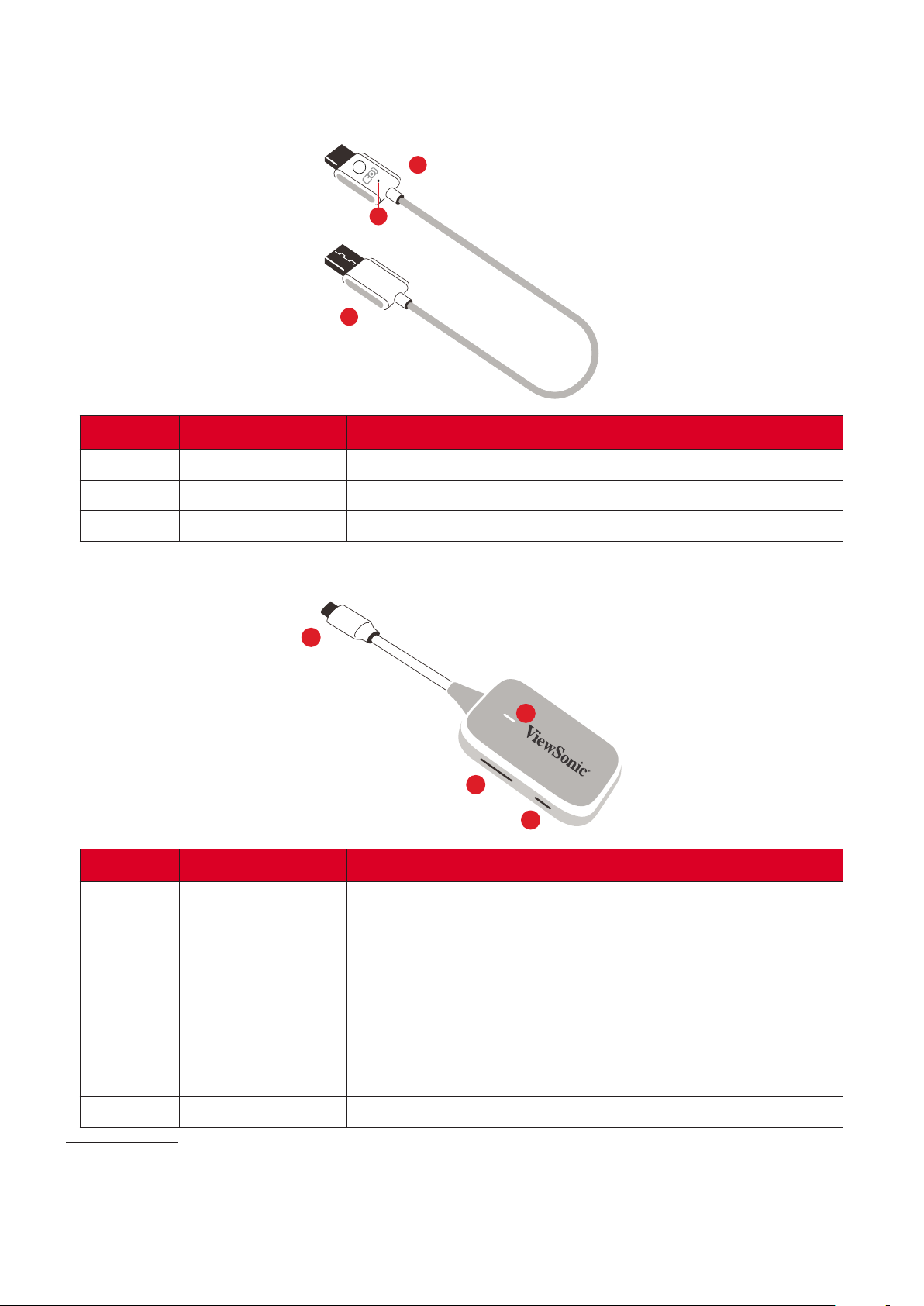
Receiver
1
3
2
Number Item
1 HDMI1 Output
2 USB A2 Input
3 Reset
Version 1.4; connect to a projec⿿on device.
For power input only (5V/0.5A).
For pairing and rese俿ng to default se俿ngs.
1
4
2
3
Number Item
1 USB C3 Input
Display input; connect to the cas⿿ng device (e.g., laptop,
mobile phone, tablet).
• Press to turn cas⿿ng ON/OFF as the display signal is
transmi俿ng.
2
• Press and hold for �ve (5) seconds to enter pairing
mode (if needed)
Press and hold for �ve (5) seconds to reset the device to
3
4 LED Indicator
¹ Compa⿿ble with HDMI 1.4
² Compa⿿ble with USB A
³ Compa⿿ble with USB C. Ensure your device supports video output and power delivery via USB C port (DisplayPort
Alterna⿿ve Mode on USB C)
factory default se俿ngs.
Indicates the power and connec⿿on status.
5
Page 6
RX
HDMI
USB A
(5V/0.5A)
HDMI
RX
USB A
(5V/0.5A)
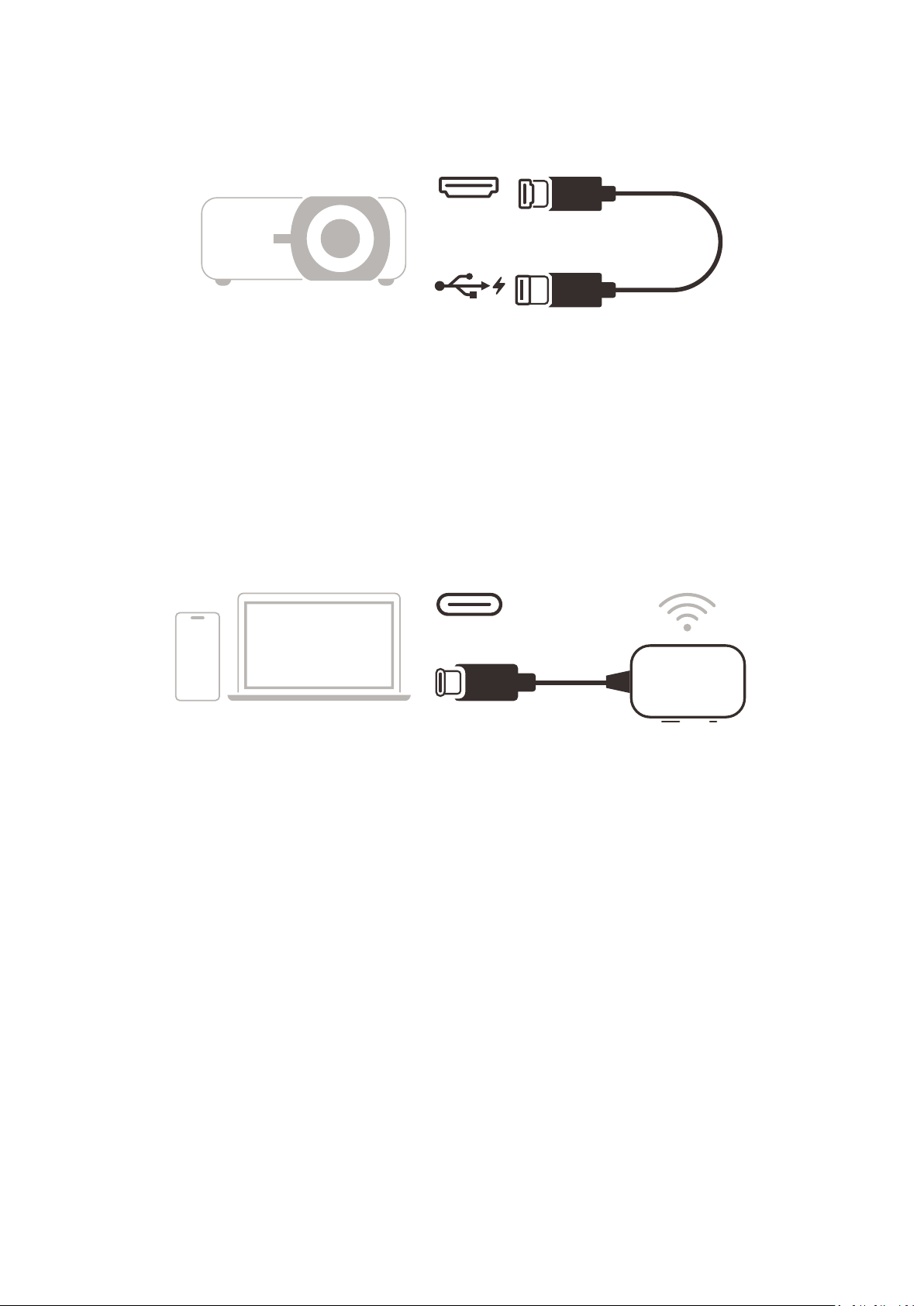
1. Connect the Receiver’s HDMI Output to an HDMI port of the projector.
Ensure the projector is also turned ON.
2. Plug the Receiver’s USB A Input into the USB A port of the projector that can
provide 5V/0.5A power.
USB C
TX
1. Connect the Transmi㿿er’s USB C Input to a USB C port of the cas⿿ng device (e.g.
laptop, mobile phone, tablet).
2. Once connected, the Transmi㿿er’s LED Indicator will ash for a few seconds then
stop. At this ⿿me, the cas⿿ng device’s screen will cast automa⿿cally.
3. Pressing the Pair Bu㿿on will toggle cas⿿ng ON/OFF while the cas⿿ng device is
transmi俿ng.
• Ensure your device supports video output and power delivery via USB C
port (DisplayPort Alterna⿿ve Mode on USB C).
• Cas⿿ng is supported for all laptops, including those running Windows and
macOS, as well as Android and Apple devices with DP Alt output.
• Duplicate and Extend mode for Windows/macOS systems are supported.
• To reset to default se俿ngs, press the Reset Bu㿿on for �ve (5) seconds.
• Genuine HDCP (High-bandwidth Digital Content Protec⿿on) for DRM
(Digital Rights Management) streaming is supported.
6
Page 7
Appendix
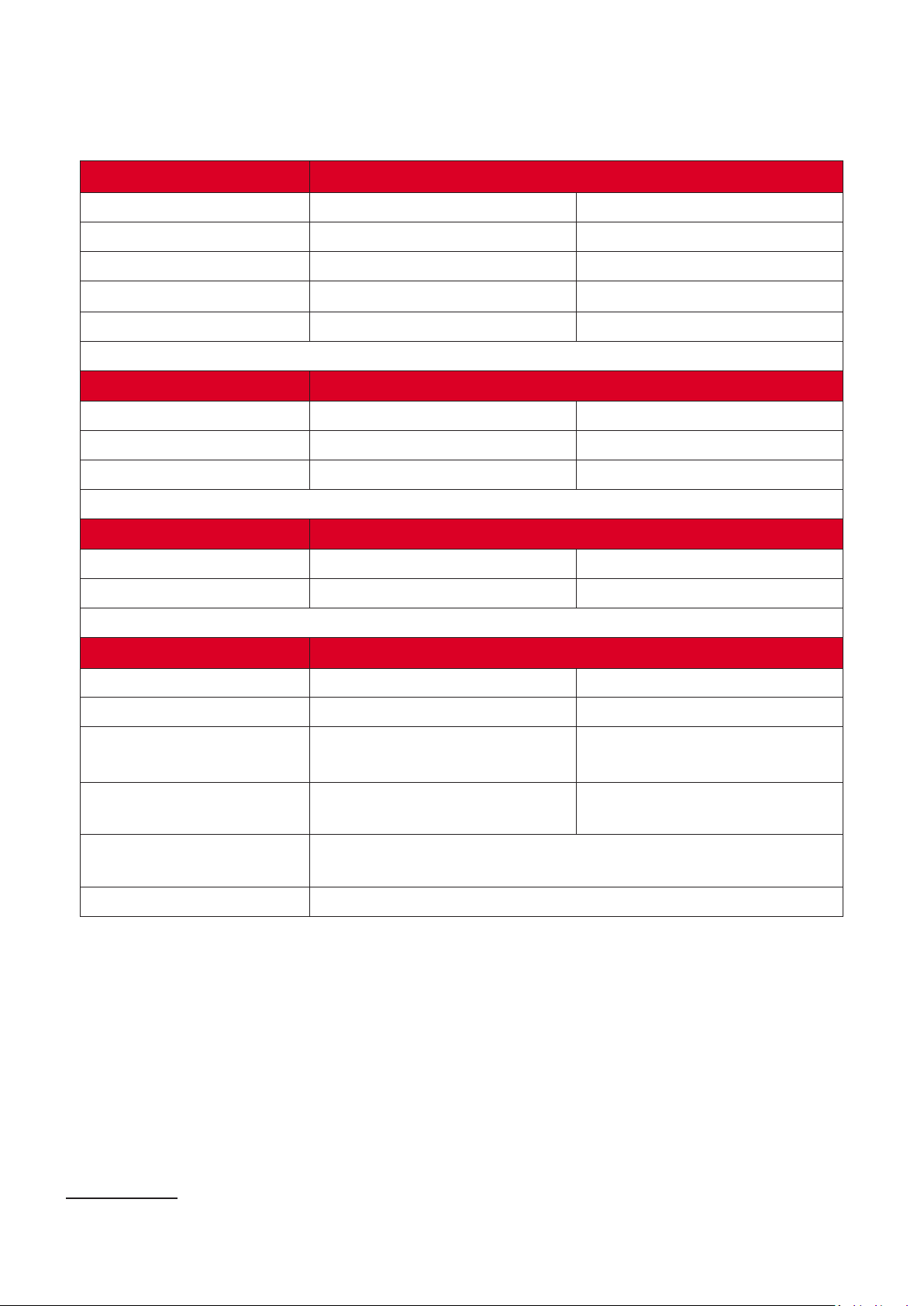
Wi-Fi
Transmi㿿er Receiver
5 GHz 1T1R 5 GHz 1T1R
HDCP 1.4 HDCP 1.4
up to 1080p @ 60 Hz up to 1080p @ 60 Hz
2 channels, PCM 2 channels, PCM
HDMI
USB C1
USB A
N/A 1
1 N/A
N/A 1 (only for power input)
1 1 (Pin hole)
1 N/A
(W x H x D)
5V/1A 5V/0.5A
3W 1.5W
170 x 40 x 16 mm
(6.69” x 1.57” x 0.63”)
37.5 g
(0.08 lbs)
(32° F to 95° F)
10% to 90% (non-condensing)
677 x 17 x 6 mm
(26.65” x 0.67” x 0.24”)
19 g
(0.04 lbs)
0° C to 35° C.
¹ Ensure your device supports video output and power delivery via USB C port (DisplayPort Alterna⿿ve Mode on USB C)
7
Page 8

The Transmi㿿er is connected to the Receiver successfully and
is opera⿿ng normally.
The Transmi㿿er is ready to pair with the Receiver when the
receiver is powered up.
The Transmi㿿er is connec⿿ng with the Receiver.
The Transmi㿿er is not working properly; or there is no power
input.
8
Page 9
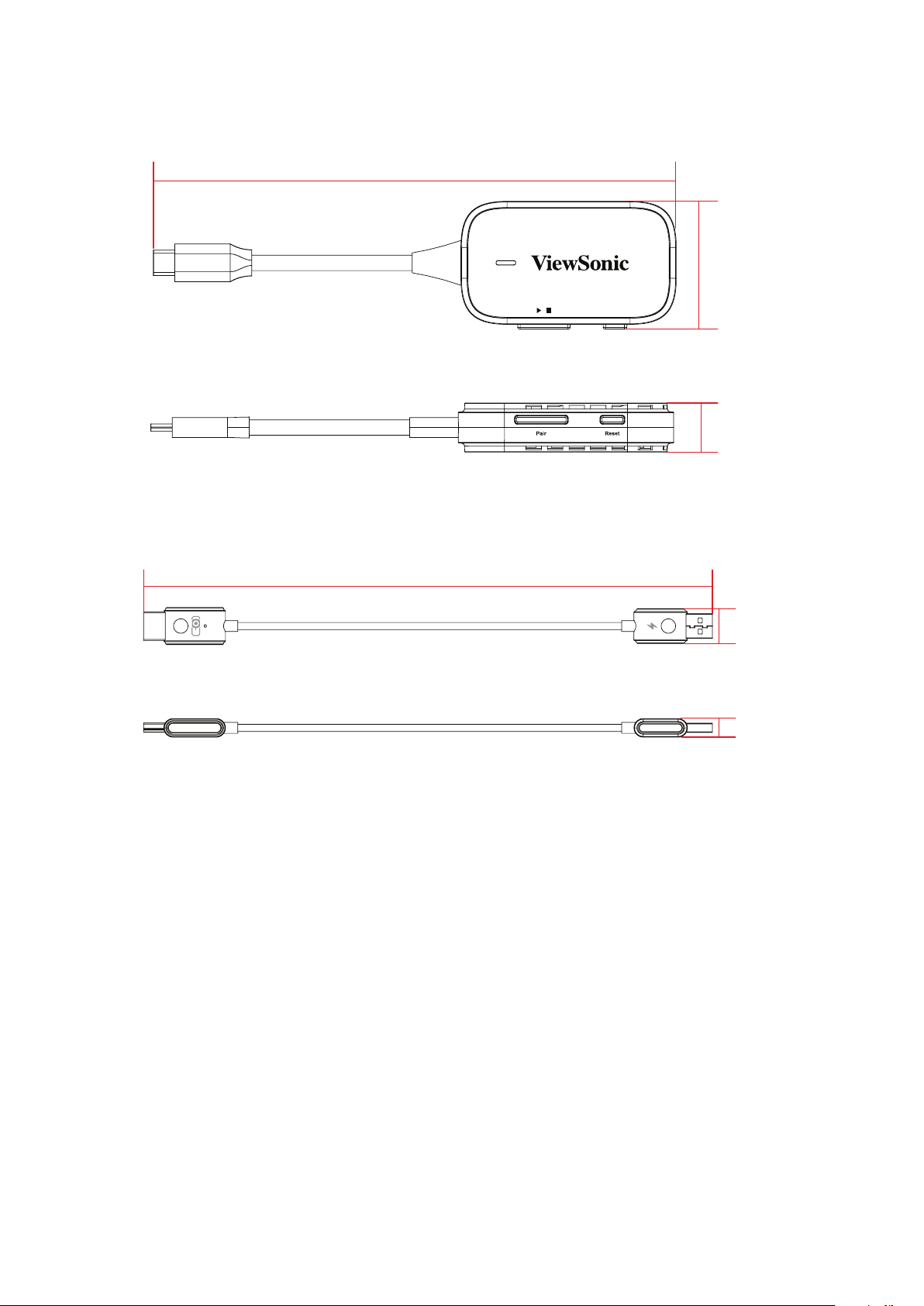
/
170 mm
40 mm
16 mm
170 mm
40 mm
/
16 mm
677 mm
17 mm
6 mm
9
Page 10

Regulatory and Service Informaon
Compliance Informaon
This sec⿿on addresses all connected requirements and statements regarding
regula⿿ons. Con�rmed corresponding applica⿿ons shall refer to nameplate labels
and relevant markings on the unit.
CE Conformity for European Countries
The device complies with the EMC Direc⿿ve 2014/30/EU and Low Voltage
Direc⿿ve 2014/35/EU. Radio Equipment Direc⿿ve 2014/53/EU.
The following informaon is only for EU-member states:
The mark shown to the right is in compliance with the Waste Electrical
and Electronic Equipment Directive 2012/19/EU (WEEE). The mark
indicates the requirement NOT to dispose of the equipment as unsorted
municipal waste, but use the return and collection systems according to
local law.
10
Page 11

Declaraon of RoHS2 Compliance
This product has been designed and manufactured in compliance with Direc⿿ve
2011/65/EU of the European Parliament and the Council on restric⿿on of the use
of certain hazardous substances in electrical and electronic equipment (RoHS2
Direc⿿ve) and is deemed to comply with the maximum concentra⿿on values issued
by the European Technical Adapta⿿on Commi㿿ee (TAC) as shown below:
Substance
Lead (Pb) 0.1% < 0.1%
Mercury (Hg) 0.1% < 0.1%
Cadmium (Cd) 0.01% < 0.01%
Hexavalent Chromium (Cr6⁺) 0.1% < 0.1%
Polybrominated biphenyls (PBB) 0.1% < 0.1%
Polybrominated diphenyl ethers
(PBDE)
Bis(2-ethylhexyl) phthalate (DEHP) 0.1% < 0.1%
Butyl benzyl phthalate (BBP) 0.1% < 0.1%
Dibutyl phthalate (DBP) 0.1% < 0.1%
Diisobutyl phthalate (DIBP) 0.1% < 0.1%
Concentraon
0.1% < 0.1%
Proposed Maximum
Actual
Concentraon
Certain components of products as stated above are exempted under the Annex
III of the RoHS2 Direcves as noted below:
• Copper alloy containing up to 4% lead by weight.
• Lead in high mel⿿ng temperature type solders (i.e. lead-based alloys containing
85% by weight or more lead).
• Electrical and electronic components containing lead in a glass or ceramic other
than dielectric ceramic in capacitors, e.g. piezoelectronic devices, or in a glass or
ceramic matrix compound.
• Lead in dielectric ceramic in capacitors for a rated voltage of 125V AC or 250V DC
or higher.
11
Page 12

Indian Restricon of Hazardous Substances
Restric⿿on on Hazardous Substances statement (India). This product complies
with the “India E-waste Rule 2011” and prohibits use of lead, mercury, hexavalent
chromium, polybrominated biphenyls or polybrominated diphenyl ethers in
concentra⿿ons exceeding 0.1 weight % and 0.01 weight % for cadmium, except for
the exemp⿿ons set in Schedule 2 of the Rule.
Product Disposal at End of Product Life
ViewSonic® respects the environment and is commi㿿ed to working and living
green. Thank you for being part of Smarter, Greener Compu⿿ng. Please visit the
ViewSonic® website to learn more.
USA & Canada:
h㿿ps://www.viewsonic.com/us/go-green-with-viewsonic
Europe:
h㿿ps://www.viewsonic.com/eu/go-green-with-viewsonic
Taiwan:
h㿿ps://recycle.moenv.gov.tw/
For EU users, please contact us for any safety/accident issue experienced with this
product:
ViewSonic Europe Limited
Haaksbergweg 75
1101 BR Amsterdam
Netherlands
+31 (0) 650608655
h㿿ps://www.viewsonic.com/eu/
12
Page 13

Copyright Informaon
Copyright© ViewSonic® Corpora⿿on, 2023. All rights reserved.
Macintosh and Power Macintosh are registered trademarks of Apple Inc.
Microso, Windows, and the Windows logo are registered trademarks of Microso
Corpora⿿on in the United States and other countries.
ViewSonic® and the three birds logo are registered trademarks of ViewSonic®
Corpora⿿on.
VESA is a registered trademark of the Video Electronics Standards Associa⿿on.
DPMS, DisplayPort, and DDC are trademarks of VESA.
Disclaimer: ViewSonic® Corpora⿿on shall not be liable for technical or editorial
errors or omissions contained herein; nor for incidental or consequen⿿al damages
resul⿿ng from furnishing this material, or the performance or use of this product.
In the interest of con⿿nuing product improvement, ViewSonic® Corpora⿿on
reserves the right to change product speci�ca⿿ons without no⿿ce. Informa⿿on in
this document may change without no⿿ce.
No part of this document may be copied, reproduced, or transmi㿿ed by any means,
for any purpose without prior wri㿿en permission from ViewSonic® Corpora⿿on.
PJ-WDP-700_UG_ENG_1b_20240329
13
Page 14

Customer Service
For technical support or product service, see the table below or contact your
reseller.
NOTE: You will need the product’s serial number.
Country/ Region Website Country/ Region Website
Asia Paci�c & Africa
Australia
中国 (China)
Hong Kong (English)
Indonesia
日本 (Japan)
Malaysia
Myanmar
New Zealand
Philippines
臺灣 (Taiwan)
Việt Nam
www.viewsonic.com/au/
www.viewsonic.com.cn
www.viewsonic.com/hk-en/
www.viewsonic.com/id/
www.viewsonic.com/jp/
www.viewsonic.com/my/
www.viewsonic.com/mm/
www.viewsonic.com/nz/
www.viewsonic.com/ph/
www.viewsonic.com/tw/
www.viewsonic.com/vn/
Bangladesh
香港 (繁體中文)
India
Israel
Korea
Middle East
Nepal
Pakistan
Singapore
ประเทศไทย
South Africa & Mauri⿿us
www.viewsonic.com/bd/
www.viewsonic.com/hk/
www.viewsonic.com/in/
www.viewsonic.com/il/
www.viewsonic.com/kr/
www.viewsonic.com/me/
www.viewsonic.com/np/
www.viewsonic.com/pk/
www.viewsonic.com/sg/
www.viewsonic.com/th/
www.viewsonic.com/za/
United States
La⿿n America
Europe
Deutschland
Россия
Türkiye
United Kingdom
Americas
www.viewsonic.com/us
www.viewsonic.com/la
Europe
www.viewsonic.com/eu/
www.viewsonic.com/de/
www.viewsonic.com/ru/
www.viewsonic.com/tr/
www.viewsonic.com/uk/
Canada
France
Қазақстан
España
Україна
www.viewsonic.com/us
www.viewsonic.com/fr/
www.viewsonic.com/kz/
www.viewsonic.com/es/
www.viewsonic.com/ua/
14
Page 15

 Loading...