

Page 1
5 Commonwealth Ave
Woburn, MA 01801
Phone 781-665-1400
Toll Free 1-800-517-8431
Visit us at www.TestEquipmentDepot.com
OLS-34V2
OLS-35V2
OLS-36V2
OLS-38V2
SmartPocket™
Optical Laser Sources
Operating Manual
BN 2334/98.11
2021.01
English
Page 2

Please direct all inquiries to your local Viavi sales company. The
addresses can be found at:
www.viavisolutions.com/en-us/contact-sales-expert
A description of additional instrument features can be found at:
www.viavisolutions.com/en-us/products/network-test-and-certification
Copyrights
This product or parts of this product are based on recommendations
and/or standards from the standardization section of the International
Telecommunication Union – ITU-T and/or the European
Telecommunications Standards Institute – ETSI. These recommendations
and standards are subject to the proprietary rights of these
organizations. It is not permitted to copy ITU-T recommendations or
ETSI standards fully or in part and/or to pass them on to third parties
without prior written permission from ITU-T and/or ETSI.
Copyright
© Copyright 2021 Viavi Solutions Inc. All rights reserved.
Viavi and the Viavi logo are trademarks of Viavi Solutions Inc.
All other trademarks and registered trademarks are the property of their
respective owners.
Viavi Solutions Deutschland GmbH
Arbachtalstraße 5, D-72800 Eningen u. A.
Order number: BN 2334/98.11
Issue: 2021.01
Previous issue: -.-
Notes:
Changes may be made to specifications, designations and delivery
information.
Page 3

ONTENTS
C
CONTENTS
INTRODUCTION . . . . . . . . . . . . . . . . . . . . . . . . . . . . . . . . 5
OLS-3xV2 Optical Light Sources. . . . . . . . . . . . . . . . . . . . . . . 5
Operating manual update. . . . . . . . . . . . . . . . . . . . . . . . . . . . 5
Symbols used in this operating manual . . . . . . . . . . . . . . . . 6
SAFETY INFORM ATION . . . . . . . . . . . . . . . . . . . . . . . . . . . 8
Warning symbols on the device. . . . . . . . . . . . . . . . . . . . . . . 8
Proper use . . . . . . . . . . . . . . . . . . . . . . . . . . . . . . . . . . . . . . . . . 8
Laser safety . . . . . . . . . . . . . . . . . . . . . . . . . . . . . . . . . . . . . . . . 9
Battery operation . . . . . . . . . . . . . . . . . . . . . . . . . . . . . . . . . . . 9
Ventilation . . . . . . . . . . . . . . . . . . . . . . . . . . . . . . . . . . . . . . . . 10
GET TING STARTED . . . . . . . . . . . . . . . . . . . . . . . . . . . . . 11
Unpacking the device. . . . . . . . . . . . . . . . . . . . . . . . . . . . . . . 11
Device overview . . . . . . . . . . . . . . . . . . . . . . . . . . . . . . . . . . . 12
Power supply . . . . . . . . . . . . . . . . . . . . . . . . . . . . . . . . . . . . . . 13
OPERATION . . . . . . . . . . . . . . . . . . . . . . . . . . . . . . . . . . 16
Switching the device on/off . . . . . . . . . . . . . . . . . . . . . . . . . 16
Switching the laser on/off . . . . . . . . . . . . . . . . . . . . . . . . . . . 16
Display elements. . . . . . . . . . . . . . . . . . . . . . . . . . . . . . . . . . . 17
The Settings menu . . . . . . . . . . . . . . . . . . . . . . . . . . . . . . . . . 18
Selecting Single-/Multimode (OLS-36 only) . . . . . . . . . . . 18
Selecting a wavelength . . . . . . . . . . . . . . . . . . . . . . . . . . . . . 18
Enabling signal modulation . . . . . . . . . . . . . . . . . . . . . . . . . 19
Selecting Auto-Lambda mode . . . . . . . . . . . . . . . . . . . . . . . 19
Selecting Multi-Lambda mode. . . . . . . . . . . . . . . . . . . . . . . 19
DATA EXPORT AND FIRMWARE UPDATE . . . . . . . . . . . . . 20
USB and SmartReporter. . . . . . . . . . . . . . . . . . . . . . . . . . . . . 20
Bluetooth® and MobileTech app /
StrataSync cloud (OLP-3x only) . . . . . . . . . . . . . . . . . . . . . . 20
MAINTENANCE . . . . . . . . . . . . . . . . . . . . . . . . . . . . . . . 21
Cleaning the test port . . . . . . . . . . . . . . . . . . . . . . . . . . . . . . 21
Cleaning the instrument . . . . . . . . . . . . . . . . . . . . . . . . . . . . 22
OLS-34V2/-35V2/-36V2/-38V2 3
Page 4

ONTENTS
C
SPECIFICATIONS . . . . . . . . . . . . . . . . . . . . . . . . . . . . . . . 23
OLS-34 . . . . . . . . . . . . . . . . . . . . . . . . . . . . . . . . . . . . . . . . . . . 23
OLS-35 . . . . . . . . . . . . . . . . . . . . . . . . . . . . . . . . . . . . . . . . . . . 23
OLS-36 . . . . . . . . . . . . . . . . . . . . . . . . . . . . . . . . . . . . . . . . . . . 24
OLS-38 . . . . . . . . . . . . . . . . . . . . . . . . . . . . . . . . . . . . . . . . . . . 25
General specifications . . . . . . . . . . . . . . . . . . . . . . . . . . . . . . 26
ORDERING INFORMATION . . . . . . . . . . . . . . . . . . . . . . . . 27
Devices . . . . . . . . . . . . . . . . . . . . . . . . . . . . . . . . . . . . . . . . . . . 27
Accessories . . . . . . . . . . . . . . . . . . . . . . . . . . . . . . . . . . . . . . . 27
4 OLS-34V2/-35V2/-36V2/-38V2
Page 5

OLS-3XV2 OP TICAL LIGHT SOURCES
1 INTRODUCTION
OLS-3xV2 Optical Light Sources
The Test Sets are specially designed for high performance testing
of all systems, i.e. broadband, PONs, and Gigabit Ethernet.
Battery operation from two AA batteries and the robust, shockproof design provide long operating time in the field even under
tough conditions. AC line operation via a separate AC adapter
and the USB interface ensure ease of use in the laboratory or
production environment.
Differences between the devices
The OLS-3xV2 family covers all the modes, wavelengths and
fiber types needed. The table below lists the differences
between the devices:
Model BN... Fiber type Wavelengths Mount type
OLS-34V2 2334/01 MM 9/125 850/1300 nm SC
OLS-35V2 2334/11 SM 9/125 1310/1550 nm SC
OLS-36V2 2334/21 MM 50/125
SM 9/125
OLS-38V2 2334/51 SM 9/125 1310/1550/1625 nm SC
850/1300 nm
1310/1550 nm
1 IN TRODUCTION
SC
Test adapters
The OLS-3xV2 are delivered with SC adapters. Test adapters for
all common connector systems (e.g. FC, ST) can be ordered from
Viavi.
Operating manual update
If the operating instructions about features provided by your
device are missing, please visit the Viavi web site to check if
additional information is available.
To download the latest operating instructions:
1. Visit the Viavi web site at
2. Search for SmartPocket V2.
3. Open the download area and download the operating
instructions if available.
OLS-34V2/-35V2/-36V2/-38V2 5
www.viavisolutions.com
.
Page 6
1 IN TRODUCTION
SYM BOLS USED IN T HIS OPER ATING MA NUAL
Symbols used in this operating manual
Various elements are used in this operating manual to draw
attention to special meanings or important points in the text.
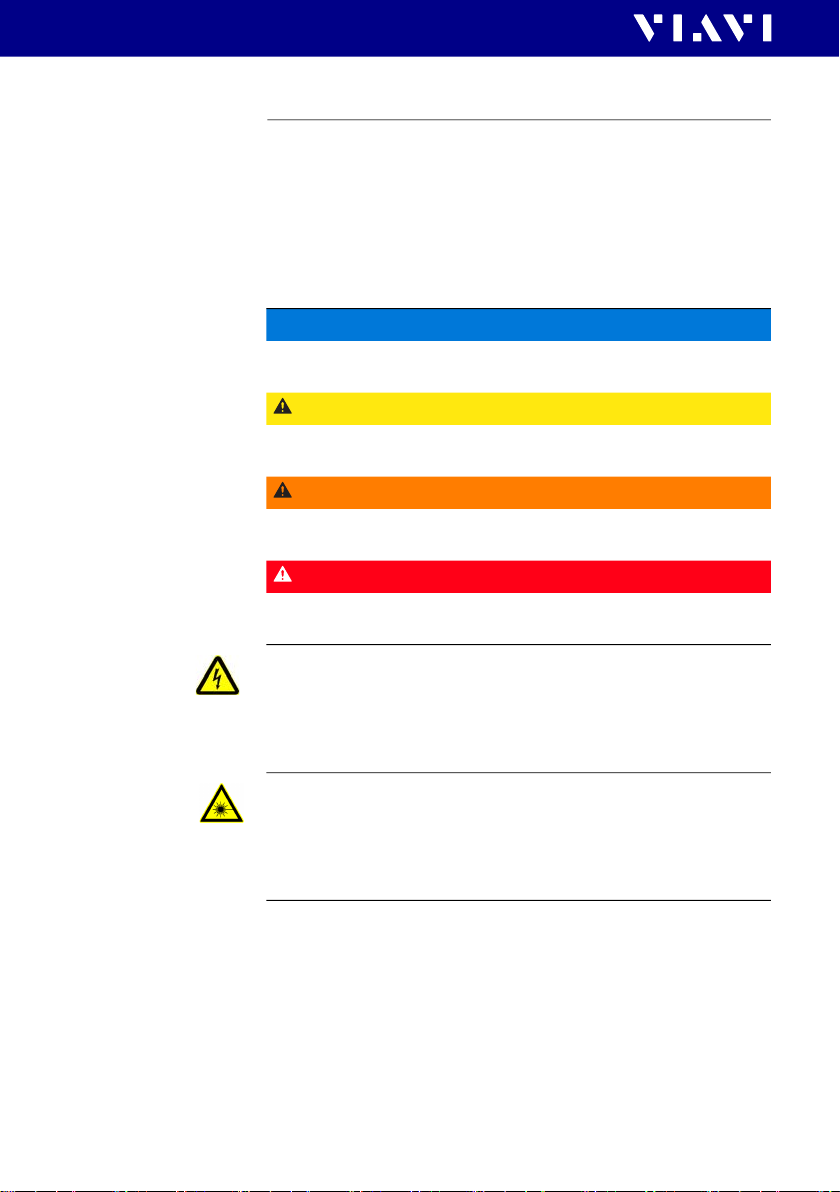
Symbols and terms used in warnings
The following warnings, symbols and terms are used in this
document in compliance with the American National Standard
ANSI Z535.6-2011:
NOTICE
Follow the instructions carefully to avoid damage to or
destruction of the instrument.
CAUTION
Follow the instructions carefully to avoid a low or medium risk
of injury to persons.
WARNING
Follow the instructions carefully to avoid potential death or
severe injury to persons.
DANGER
Follow the instructions carefully to avoid death or severe
injury to persons.
High Voltage
Follow the instructions carefully to avoid damage to the
instrument or severe injury to persons.
This safety instruction is given if the danger is due to high
voltage.
Laser
Follow the instructions carefully to avoid damage to the
instrument or severe injury to persons.
This safety instruction is given if the danger is due to laser
radiation. Information specifying the laser class is also given.
6 OLS-34V2/-35V2/-36V2/-38V2
Page 7

SYM BOLS USED IN T HIS OPER ATING MA NUAL
Warning format
All warnings have the following format:
1 IN TRODUCTION
WARNING
Type and source of danger
Consequences of ignoring the warning
J Action needed to avoid danger.
The following character formats are used in this operating
manual:
I
J
1.
2.
Italics
Bold
type face
Text in
blue
[STORE]
Requirement
This requirement must be met first; e.g.
I The system is switched on.
Instruction
Follow the instructions given (the numbers indicate the order
in which the instructions should be followed); e.g.
J Select mode.
Result
Indicates the result of following an instruction; e.g.
The page opens.
Pages, controls, and display elements
Screen pages, controls, and display elements are indicated in
bold type.
Cross references
Cross references are indicated in blue type. When using the
PDF version, just click on the blue text to skip to the cross
reference.
Device keys
Device keys are indicated within square brackets.
OLS-34V2/-35V2/-36V2/-38V2 7
Page 8

2 SA FETY INFOR MATION
WAR NING S YMBOLS ON TH E DEVICE
2 SAFETY INFORMATION
Warning symbols on the device
Warning symbols indicating a potential hazard
J A warning symbol on the device indicates a potential hazard.
In all cases where the a warning symbol is shown on the
display or labeled on the device, the operating manual must
be consulted to learn more about the nature of the potential
hazard and any actions that have to be taken.
Proper use
This instrument is intended for measurements on optical fiber
devices and systems.
J Please make sure the device is not operated outside the
permitted conditions or for a purpose other than the one it
was developed for.
J Always make sure that the device is in good condition before
switching it on.
8 OLS-34V2/-35V2/-36V2/-38V2
Page 9

2 SA FETY INFOR MATION
LASER SAFETY
Laser safety
WARNING
Dangerous laser radiation
Laser radiation can cause irreparable damage to the eyes
and skin.
This device is a Class 1 laser product according to
DIN EN 60825-1:2014.
Observe the following instructions when working with this
device and laser systems in general:
J Connect all optical fibers before switching on the radiation
source.
J Switch off the laser source before disconnecting the optical
fibers.
J Never look directly into the output of a laser source or into
an optical fiber connected to it.
J Always cover unused ports.
J Observe the normal precautions for working with laser
radiation and follow any local regulations.
Battery operation
WARNING
Explosion danger
Short-circuiting the batteries can result in overheating,
explosion or ignition of the batteries and their surroundings.
J Never short-circuit the battery contacts by touching both
contacts simultaneously with an electrically conductive
object.
J Only use AA size dry batteries or rechargeable batteries.
J Take care to insert the batteries correctly.
J Never use batteries based on lithium.
OLS-34V2/-35V2/-36V2/-38V2 9
Page 10

2 SA FETY INFOR MATION
VENTILAT ION
WARNING
Ex plosion danger
Dry batteries must not be recharged.
J The OLS-34V2/-35V2/-36V2/-38V2 does not have a
recharge function for rechargeable batteries, so there is no
danger when using dry batteries.
J Read the manual of the external charging device.
Ventilation
NOTICE
Insufficient ventilation
Insufficient ventilation can damage the instrument or
adversely affect its function and safety.
J Ensure adequate ventilation when operating the instrument.
10 OLS-34V2/-35V2/-36V2/-38V2
Page 11

3 GETTING STARTED
Unpacking the device
Packing material
We suggest that you keep the original packing material. It is
designed for reuse (unless it is damaged during shipping). Using
the original packing material ensures that the device is properly
protected during shipping.
Checking the package contents
Your device is shipped with the following accessories:
• 2 dry batteries AA
• Operating manual
• Belt bag
Checking for shipping damage
After you unpack the device, check to see if it has been damaged
during shipping. This is particularly likely if the packaging is
visibly damaged. If there is damage, do not attempt to operate
the device. Doing so can cause further damage. In case of
damage, please contact your local Viavi Sales Company.
Addresses can be found at www.viavisolutions.com.
3 GET TING STARTED
UNPACKING T HE DEVI CE
Recovery following storage/shipping
Condensation can occur if a device that is stored or shipped at a
low temperature is brought into a warm room. To prevent
damage, wait until no more condensation is visible on the
surface of the device before powering it up. Do not operate the
device until it has reached its specified temperature range and
wait until it has cooled down if the device was stored at a high
temperature (see “Enviromental conditions” on page 26).
OLS-34V2/-35V2/-36V2/-38V2 11
Page 12
3 GET TING STARTED
DEVI CE OVERVI EW
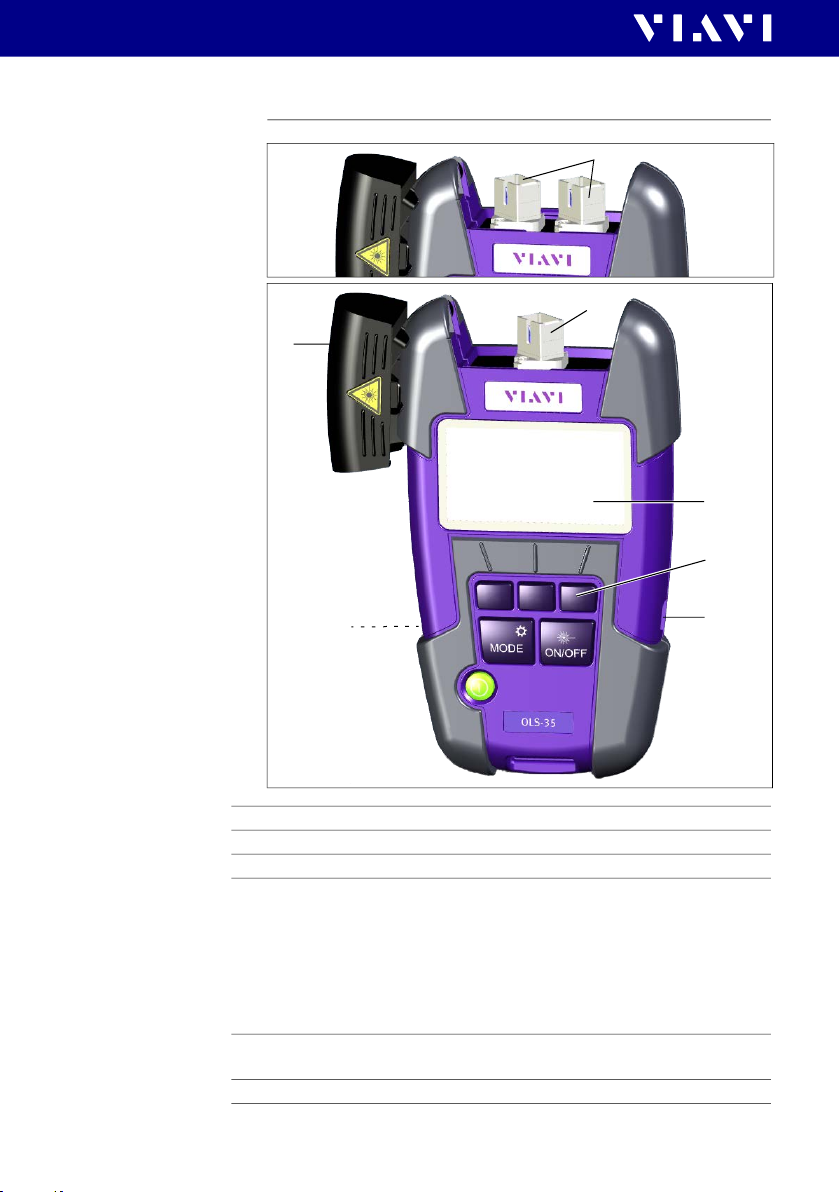
Device overview
2
OLS-36
2
1
3
4
6
OLS-35
1 Test head cover
2 SC adapter. OLS-36: Port A (SM, left), Port B (MM, right)
3 Display
4 Key pad
Representation in the user manual:
[]
[MODE]
[ON/OFF]
[
E]
5 USB interf ace
For power supply and measurement data downloads and updates.
6 Batter y compartm ent (on rear of the device)
12 OLS-34V2/-35V2/-36V2/-38V2
Context sensitive keys (here left key is selected)
Mode/Settings key
Laser on/off
Power key
5
Page 13
3 GET TING STARTED
POW ER SUP PLY
Keys
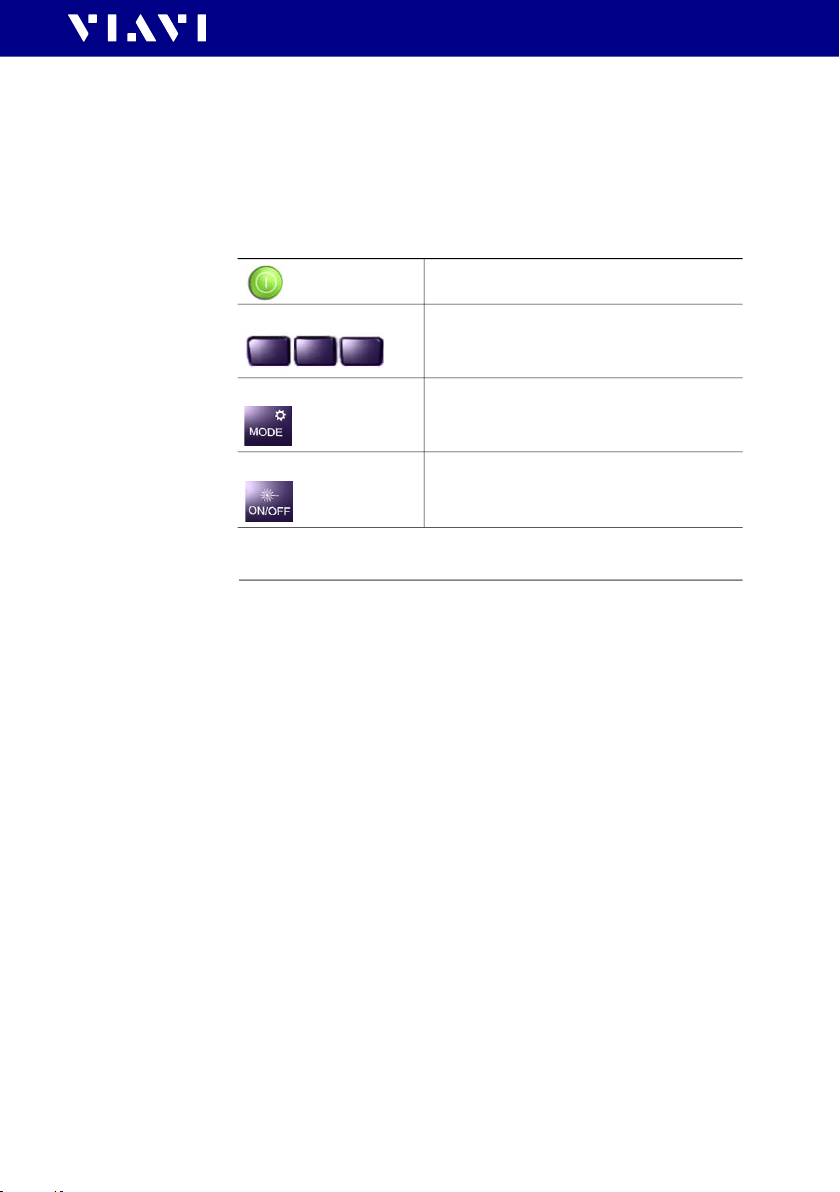
The key pad contains two types of keys:
• Context sensitive keys: The functions of these keys depend
on the selected mode or menu and is shown in the display
above the key.
• Function keys: The functions of these keys are always the same
and shown on the key itself.
Press to switch the device on/off.
Context keys
MODE key
Laser ON/OFF key
Left key: Select a wavelength
Center key: Select SM/MM (OLS-36V2 only)
Right k ey: Select modulation frequency
Short press: Select mode and return from
Settings menu.
Long press: Open Settings menu.
Switch laser on/off.
Power supply
NOTE: The devices are not designed for batteries based on lithium.
The following power sources can be used to operate the OLS3xV2:
• two 1.5 V dry batteries (Mignon AA size, alkaline type
recommended)
• two 1.2 V NiMH rechargeable batteries (Mignon AA size)
• via the AC adapter over USB interface
OLS-34V2/-35V2/-36V2/-38V2 13
Page 14

3 GET TING STARTED
POW ER SUP PLY
Battery operation
WARNING
Dangers when handling batteries
Handling batteries may be dangerous. Please note the
following safety instructions.
J Please note the battery operation safety information in the
section “Battery operation” on page 9.
Replacing the batteries
J Do not replace individual batteries. Always change both
batteries at the same time.
J Always use batteries of the same type; i.e. do not mix
rechargeable and non-rechargeable batteries.
Replacing batteries
The battery compartment is on the back of the device.
1. Pull down the lid to open the battery compartment.
NOTICE: Take care to insert the batteries correctly. The correct
polarity is indicated by a diagram inside the battery
compartment.
2. Insert new batteries or replace dead ones.
3. Close the battery compartment.
4. Press
[E] to switch on.
NOTE: The batteries cannot be recharged with the OLS-3xV2.
General tips on using batteries
• Never use batteries based on lithium.
• Always handle batteries with care.
• Do not drop or damage the batteries or expose them to
excessively high temperatures.
• Do not store rechargeable batteries for more than one or two
days at very high temperatures (e.g. in a vehicle), either
separately or fitted in the device.
• Do not leave discharged batteries in the instrument for a long
time if it is not being used.
• Do not store rechargeable batteries for more than 6 months
without recharging them at intervals.
• Avoid deep discharging of the batteries as this can cause the
cell polarity to reverse and make the battery useless.
14 OLS-34V2/-35V2/-36V2/-38V2
Page 15
3 GET TING STARTED
POW ER SUP PLY
Protecting the environment
Please dispose of any unwanted dry batteries and rechargeable
batteries carefully. They should also be removed from the
instrument if it is to be scrapped. If facilities in your country exist
for collecting waste or for recycling, please make use of them
rather than throwing the batteries in the normal trash. You will
often be able to return used batteries to the store where you
purchase new ones. Any dry or rechargeable batteries that you
purchased from Viavi can be returned to one of our Service
Centers for disposal.
Operation from AC power
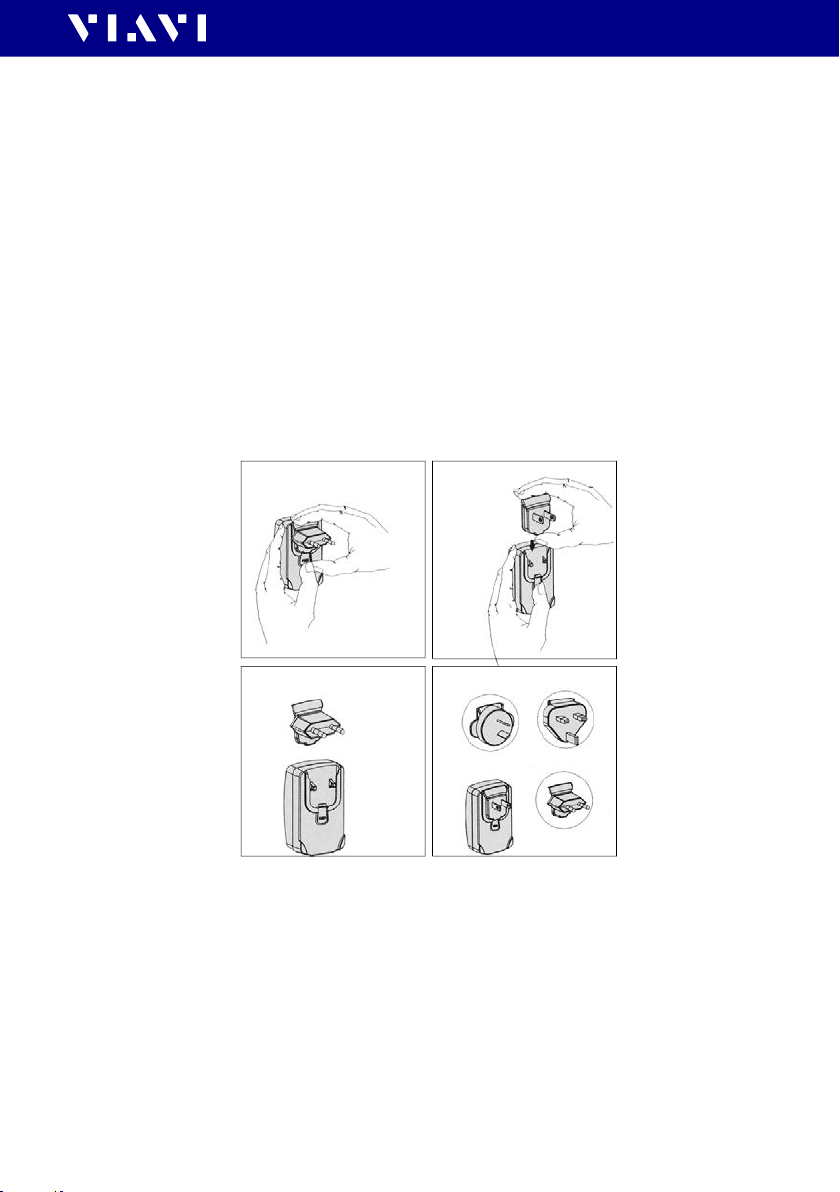
To fit one of the mains plug adapters:
J See figure below and follow the instructions which are shown
on the packaging of the mains plug adapter.
1 2
3 4
Fig. 1 Fitting the mains plug adapter
To operate the OLS-3x V2 from AC power:
1. Connect the USB-C connector power cord to the OLS-3xV2.
2. Plug the mains plug adapter into the AC receptacle.
OLS-34V2/-35V2/-36V2/-38V2 15
Page 16
4 OPERATION
SWI TCHING T HE DEV ICE ON/OFF
4 OPERATION
Switching the device on/off
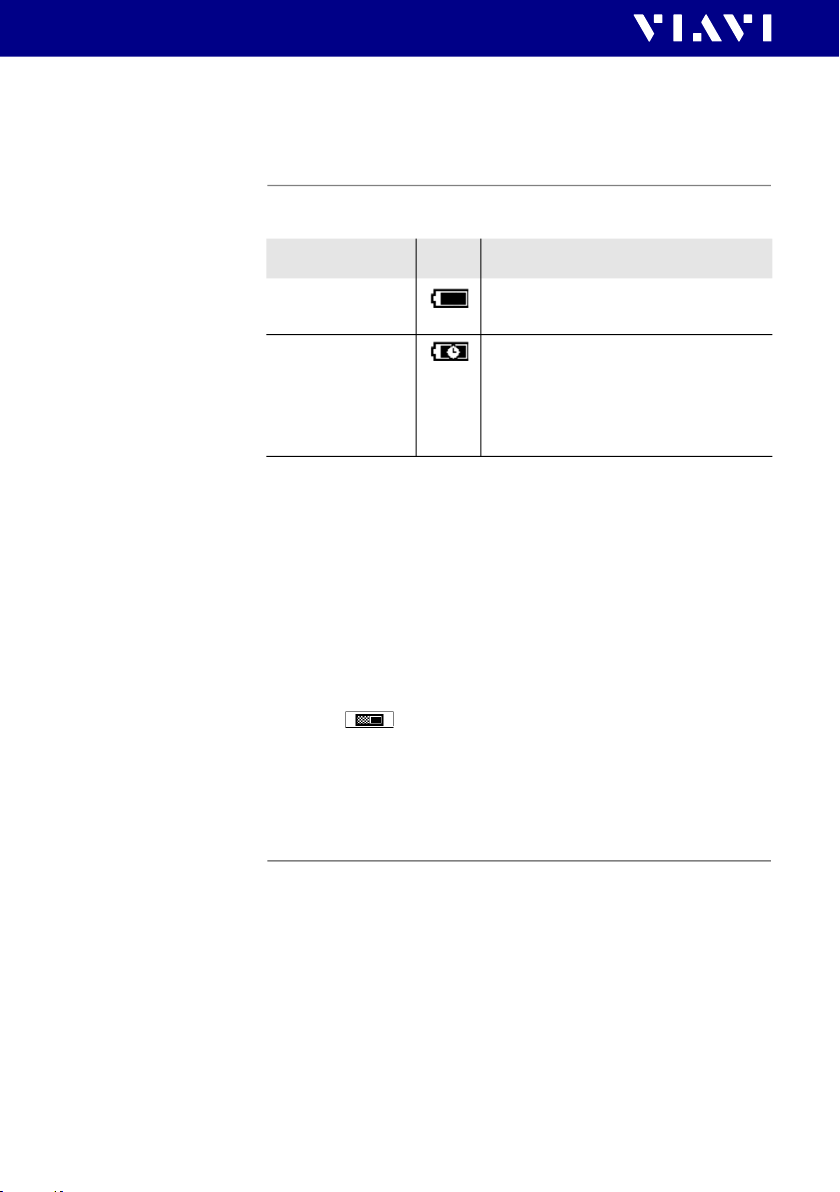
The OLS-3xV2 has two battery power modes:
Mode Icon Descr iption
Permanent ON
(PERM)
Automatic OFF
(ECON)
To switch the device on/off:
J Press
[E] to switch the device on/off.
The device is switched on
permanently.
The device switches off 20 minutes
after the last operation.
This function is only available when
the device is powered from
batteries.
Selecting a power mode
To change the power mode:
I The device is switched on.
1. Long press
2. Use
3. Press [ ] to select power mode:
ON = ECON
OFF = PERM
4. Press [MODE] to close the menu.
[MODE] to open the settings menu.
[] to select ECON.
Switching the laser on/off
J Press [ON/OFF] to switch the laser on/off.
16 OLS-34V2/-35V2/-36V2/-38V2
Page 17
4 OPERATION
DISPLAY EL EMENT S
Display elements
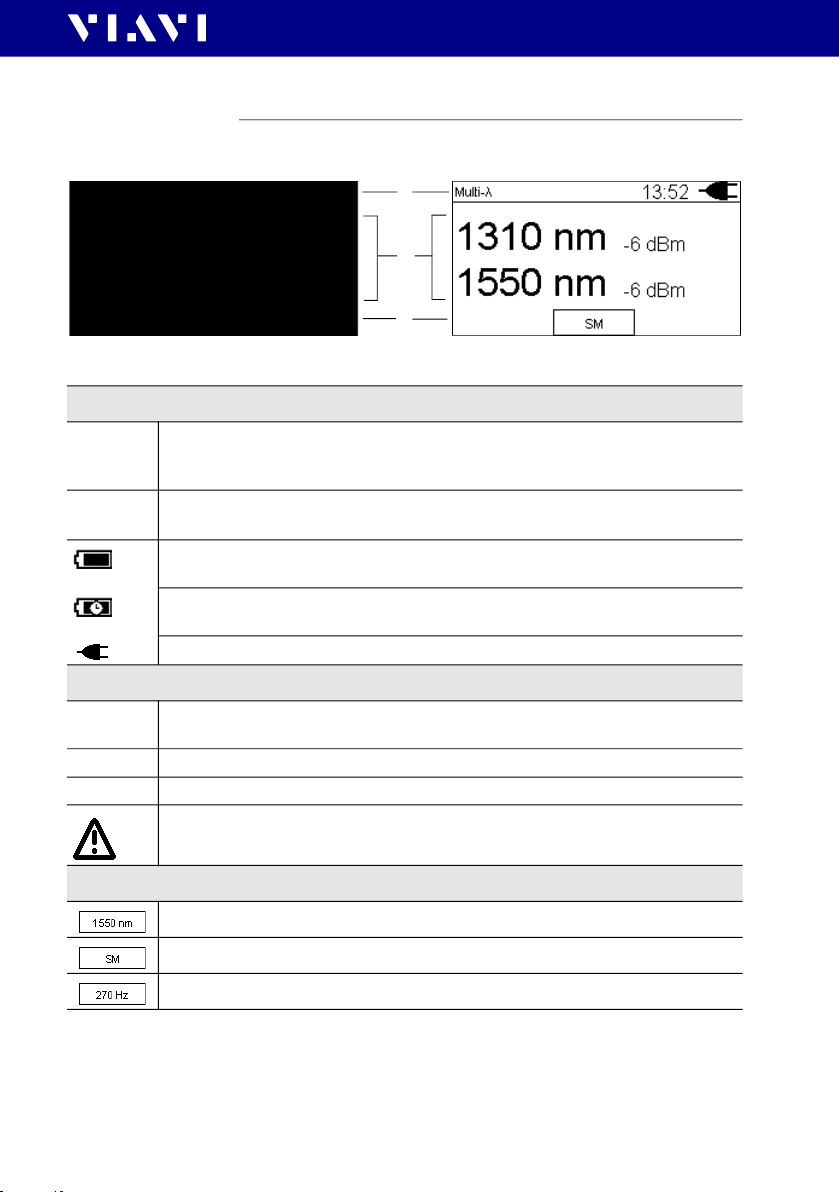
The following elements can be found in the display.
1
2
3
Display of one power level in Single- mode. Display of two power levels in Multi- mode.
1 – Status bar
Auto-
Multi-
Single-
7:15 Real Time Clock
2 – Center of display
... nm Display of selected wavelength
... db/dBm Shows the power level in dBm.
270 Hz Shows selected modulation frequency or CW
Selected/active mode
The mode can be changed via the
Time can be changed via the settings menu.
Battery status in PERM power mode:
The device remains switched on.
Battery status in ECON power mode:
The device switches off 20 minutes after the last operation.
The device is powered via USB
(displayed wavelength depends on settings and model).
Laser is switched on
[MODE] key.
3 – Context sensitive key functions
Press to select the wavelength.
Press to select the fiber mode: SM, MM.
Press to select the modulation frequency,
OLS-34V2/-35V2/-36V2/-38V2 17
Page 18
4 OPERATION
THE SETT INGS MENU
The Settings menu
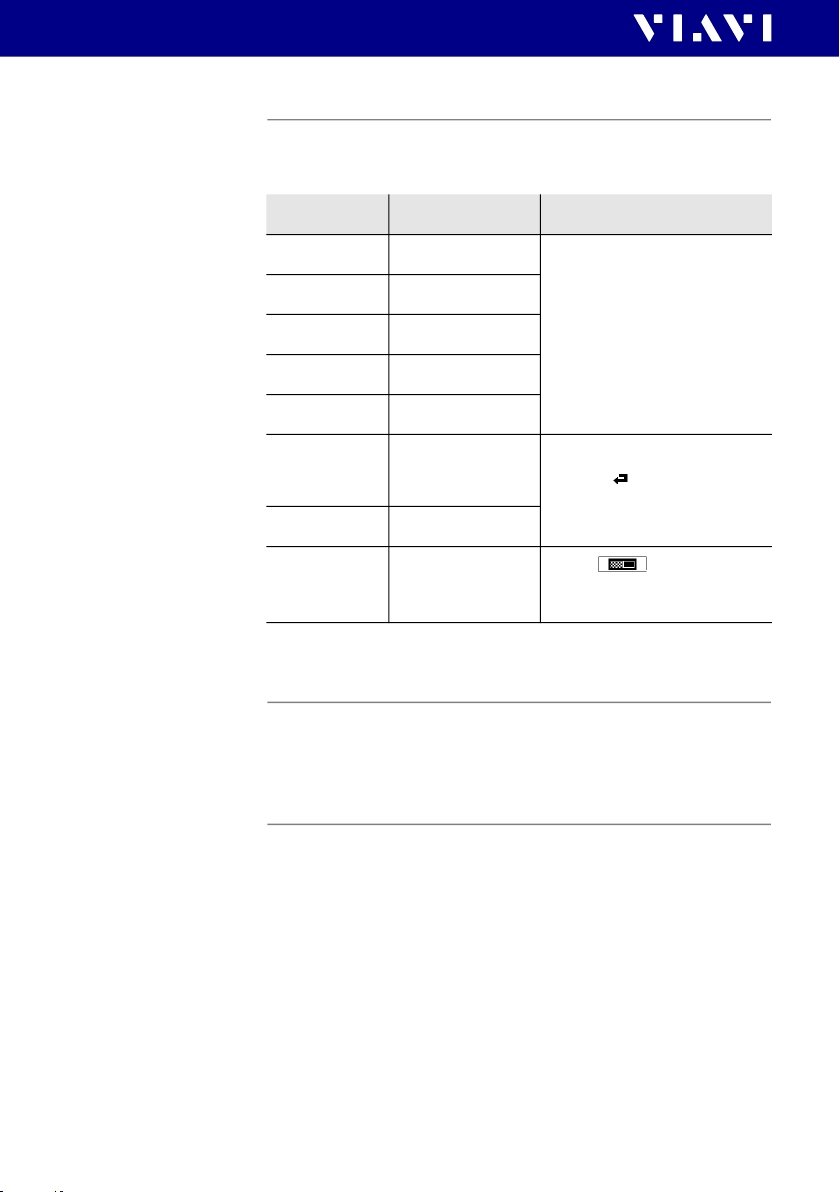
The following settings can be changed in the settings menu.
J To open the settings menu long press [MENU].
Item Settings Descr iption
Hour
Minute
Year
Month
Day
About
Factory Reset
ECON
1...12
1...59
2020...2030
01...12
01...31
Show device data
including last
calibration date
Reset
ON/OFF
ON = ECON
OFF = PERM
J Press [
J Press
J Press [ ] to return to the
Press
key to toggle ON/OFF
] to change
setting:
– Press once to change one
step at a time.
– Hold down the key to
increase the step change
rate.
[] to confirm setting.
settings menu.
[ ] (right context
Selecting Single-/Multimode (OLS-36 only)
J Press [] to toggle between SM and MM.
According to the selected mode port 1 or port 2 is active.
Selecting a wavelength
Selectable wavelengths:
• OLS-34: 850/1300 nm
• OLS-35: 1310/1550 nm
• OLS-36: 850/1310 nm (SM), 1310/1550 nm (MM)
• OLS-38: 1310/1550/1625 nm
To select a w avelength:
I OLS-36: SM or MM is selected
1. Press
[MODE] to skip through the modes and select Single-.
2. Press [] to select a wavelength.
18 OLS-34V2/-35V2/-36V2/-38V2
Page 19
ENABLING SIGNA L MODULATION
4 OPERATION
Enabling signal modulation
Modulation frequencies provided by the OLS-3xV2:
CW (continuous wave), 270 Hz, 330 Hz, 1 kHz, 2 kHz
NOTE: Signal modulation is available in Single- (all models) and
Singlemode (OLS-36) only.
To select a modulation frequency:
I Single- is selected.
J Press [] to skip through the list: CW
330 Hz
1000 Hz 2000 Hz CW ...
270 Hz
Selecting Auto-Lambda mode
Auto- is a special feature developed by Viavi that allows you to
identify wavelengths automatically. To do this, the signal is
modulated at a certain frequency, which can be detected by an
Auto- equipped power meter (such as the Viavi OLP-3x series).
To activate Auto-:
J Press
NOTE: Signal modulation cannot be selected when Auto- is enabled.
[MODE] to skip through the modes and select Auto-.
The status bar shows Auto-.
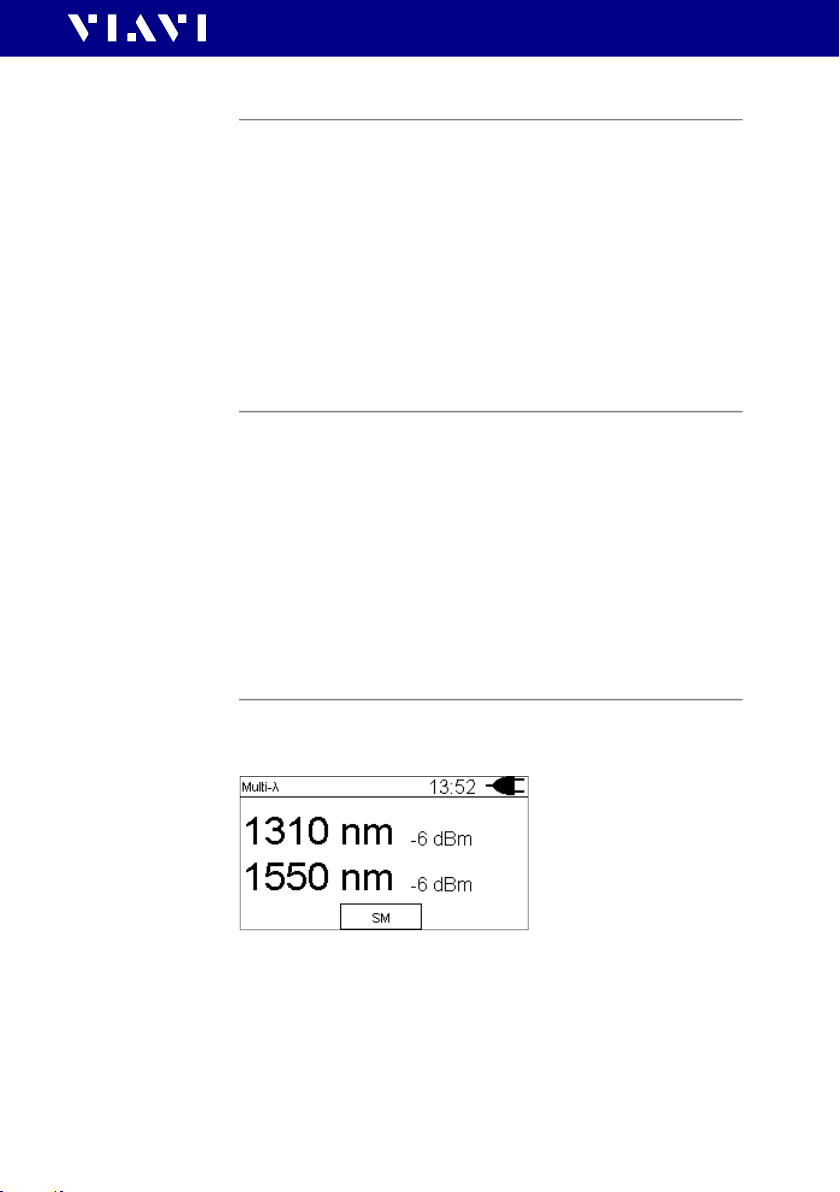
Selecting Multi-Lambda mode
When Multi- mode is activated, the signal of the available
wavelengths are sent in parallel.
Fig. 2 Example of Multi- at OLS-36 with SM selected.
To activate Multi-:
J Press
NOTE: Signal modulation cannot be selected when Multi- is enabled.
OLS-34V2/-35V2/-36V2/-38V2 19
[MODE] to skip through the modes and select Multi-.
The display shows Multi-
.
Page 20

5 DATA EXPORT AND FIRMWARE UPDATE
USB AND SMART REPORTER
5 DATA EXPORT AND FIRMWARE UPDATE
The USB interface or the Bluetooth® interface (OLP-3x only) can
be used for data export and firmware update.
USB and SmartReporter
When using the USB interface the SmartReporter allows you to
easily transfer stored measurement data to a PC and to update
the firmware.
The SmartReporter reporting tool is offered by Viavi for free and
can be download from:
https://updatemyunit.net/ > Application Software.
J For more information about data export and firmware update
via USB and the SmartReporter please refer to the
SmartReporter user manual.
Bluetooth® and MobileTech app /
StrataSync cloud (OLP-3x only)
Using the OLP-3x you have also the choice to upload the saved
data and to update the firmware using Bluetooth® via Viavi's
MobileTech App into the StrataSync cloud.
J Please contact your Viavi representive for more information.
20 OLS-34V2/-35V2/-36V2/-38V2
Page 21

6 MAINTENANCE
WARNING
Invisible laser radiation
Maintenance or cleaning of the instrument w hile it is
connected or operating may damage the instrument or
injure you.
J Make sure that the instrument is switched off and
disconnected from all power sources and optical radiation
sources before maintenance or cleaning.
J Do not open the instrument for maintenance or service.
Service shall be performed by Viavi trained personnel only.
Cleaning the test port
It is a good idea to check that the optical connections are clean
and to clean them if necessary before starting measurements.
Even very small dust particles on the end surfaces of the plugs or
in the test adapters can adversely affect the accuracy of the
measurement.
For daily use, clean the optical interface of the instrument using
Viavi IBC cleaning tool 2.5 mm (see “Cleaning materials, power
supplies” on page 27).
6 MAINTENANCE
CLEA NING T HE TEST PORT
To clean the test port in case of severe contamination:
1. Switch off the device.
2. Remove the test adapter from the optical connection. The
connection surface is now accessible.
3. Wipe off the connection surface using a cotton bud soaked in
isopropanol. This cleaning method is very effective and leaves
no residues.
4. Blow out the test adapter with clean compressed air (also
available in spray cans, e.g. Anti Dust Spray).
NOTE: Cover the optical connections with the dust cap whenever they
are not in use. This prevents them from getting dirty.
OLS-34V2/-35V2/-36V2/-38V2 21
Page 22

6 MAINTENANCE
CLEA NING T HE I NSTRUMENT
Cleaning the instrument
If the device gets dirty through use, you can clean it using a soft
cloth moistened with a mild solution of detergent.
NOTICE
Water and cleaning fluids
The instrument may be damaged or destroyed if water or
cleaning fluids penetrate it.
J Make sure that water or cleaning fluids do not get inside the
device.
22 OLS-34V2/-35V2/-36V2/-38V2
Page 23

7 SPECIFICATIONS
OLS-34
Source type LED
Fiber type Multimode (MM) 50/125
Optical interface SC adapter
Auto- mode yes
Modulation frequencies CW, 270 Hz, 330Hz, 1 kHz, 2 kHz
Multi- mode yes
Wavelength(s) 850 nm (20 nm)
Spectral width (FWHM) < 170 nm
Output power (CW, typical) -20 dBm
1)
Stability
• Short term (15 min)
• Long term (8 h)
1) after 20 min. warm-up, at ambient temperature -10 °C to +55 °C, T = ±0.3 K
OLS-35
PECIFICATIONS
7 S
OLS-34
1300 nm (-20/+40 nm)
0.02 dB
0.05 dB
Source type LASER
Fiber type Singlemode (SM) 9/125
Optical interface SC adapter
Auto- mode yes
Modulation frequencies CW, 270 Hz, 330 Hz, 1 kHz, 2 kHz
Multi- mode yes
Wavelength(s) 1310 nm (20 nm),
1550 nm (20 nm)
Spectral width (FWHM) < 5 nm
Output power (CW, typical) -3 dBm
1)
Stability
• Short term (15 min)
• Long term (8 h)
1) after 20 min. warm-up, at ambient temperature -10 °C to +55 °C, T = ±0.3 K
OLS-34V2/-35V2/-36V2/-38V2 23
0.02 dB
0.05 dB
Page 24

7 SPECIFICAT IONS
OLS-36
OLS-36
Source type
• Port A
• Port B
Fiber type
• Port A
• Port B
Singlemode (SM) 9/125
Multimode (MM) 50/125
Optical interface 2 SC adapters
Auto- mode yes
Modulation frequencies CW, 270 Hz, 330 Hz, 1 kHz, 2 kHz
Multi- mode yes
Wavelength(s)
• Port A
1310 nm (20 nm)
1550 nm (20 nm)
• Port B
850 nm (20 nm)
1300 nm (-20/+40 nm)
Spectral width (FWHM)
• Port A
• Port B
Output power (CW, typical)
• Port A
• Port B
1)
Stability
• Short term (15 min)
• Long term (8 h)
1) after 20 min. warm-up,
at ambient temperature -10 °C to +55 °C, T = ±0.3 K
LASER
LED
< 5 nm
<170 nm
-3 dBm
-20 dBm
0.02 dB
0.05 dB
24 OLS-34V2/-35V2/-36V2/-38V2
Page 25

PECIFICATIONS
7 S
OLS-38
OLS-38
Source type LASER
Fiber type Singlemode (SM) 9/125
Optical interface SC adapter
Auto- mode yes
Modulation frequencies CW, 270 Hz, 330 Hz, 1 kHz, 2 kHz
Multi- mode yes
Wavelength(s) 1310 nm (20 nm),
1550 nm (20 nm),
1625 nm (5 nm)
Spectral width (FWHM) < 5 nm
Output power (CW, typical) -6 dBm
1)
Stability
• Short term (15 min)
• Long term (8 h)
1) after 20 min. warm-up, at ambient temperature -10 °C to +55 °C, T = ±0.3 K
0.02 dB
0.05 dB
OLS-34V2/-35V2/-36V2/-38V2 25
Page 26

7 SPECIFICAT IONS
GENERAL SP ECIFICATI ONS
General specifications
Calibration
interval
Power Supply
EMC and safety
Enviromental
conditions
Recommended recalibration
interval
Dry batteries 2 x AA, 1.5 V
(never use batteries based on lithium)
Rechargeable batteries NiMH, 2 x AA, 1.2 V
Power consumption 2.5 W max.
AC line operation With separate 5 V DC USB adapter.
Use EMC and Safety certified low
energy adapters only.
Power saving Auto power-off after approx. 20 min
Maximum battery run time
• OLS-34:
• OLS-35:
• OLS-36:
• OLS-38:
1) CW, Bluetooth® off, Auto- or Multi- mode
Electromagnetic compatibility (EMC) EN 61326-1:2013
Device safety EN 61010-1:2010
Laser safety DIN EN 60825-1:2014
Operating temperature range -10 to +55 °C (14 to 131 °F)
Storage and shipping -40 to +70 °C (-40 to 158 °F)
Altitude 2.000 m max. (6500 ft. max.)
Pollution Degree 2
1)
(can be disabled)
MM: 35 h, SM: 45 h
EN 60825-1:2007
3 years
35 h
45 h
45 h
Humidity
Relative humidity up to +31 °C 15 to 85 %
Absolute humidity > +31 °C 1 to 29 g/m
Occasional condensation is permissible.
Dimensions and
weight
26 OLS-34V2/-35V2/-36V2/-38V2
Dimensions (H x W x D) 30 x 80 x 150 mm
(1.18 x 3.15 x 5.90 in)
Weight (incl. Batteries) 200 g (0.44 lb)
3
Page 27

8 ORDERING INFORMATION
Devices
OLS-34
LED Source, 850/1300 nm, MM 50/125
SC adapter OLS-34V2
OLS-35
Laser Source, 1310/1550 nm, SM 9/125
SC adapter OLS-35V2
OLS-36
LED Source, 850/1300 nm, MM 50/125
Laser Source, 1310/1550 nm, SM 9/125
SC adapter OLS-36V2
OLS-38
Laser Source, 1310/1550/1625 nm, SM 9/125
SC adapter OLS-38V2
8 ORD ERING INFORMATION
DEVI CES
Calibration report
OLS-34V2, OLS-35V2, OLS-36V2, OLS-38V2 BN 2303/90.01
Accessories
Cleaning materials, power supplies
OCK-10 Optical cleaning kit BN 2229/90.21
IBC cleaning tool 2.5 mm ZP-FCL-0275
Cleaning tape for optical connectors BN 2229/90.07
Spare optical cleaning tape BN 2229/90.08
NiMH rechargeable batteries,
Mignon AA, 1.2 V (2 batteries required)
AC adapter BN 2302/90.01
Interchangeable adapter BN 2150/00.xx
OLS-34V2/-35V2/-36V2/-38V2 27
BN 2237/90.02
Page 28

RODUCT REGULATORY COMPLIANCE
P
PRODUCT REGULATORY COMPLIANCE
Viavi Environmental Management Program
Superb performance and high quality have always characterized
Viavi datacom and telecom measurement technology products.
In this same world-class tradition, Viavi has an established,
proactive program of environmental management.
Environmental management is an integral part of Viavi’s
business philosophy and strategy requiring the development of
long-term, productive solutions to problems in the key areas of
economics, technology, and ecology.
A systematic environmental management program at Viavi is
essential in regard to environmental policy and enhances
cooperation between ourselves and our business partners.
The Viavi Environmental Management Program
considers:
Product design and manufacture
Environmental restrictions and requirements are taken into
account during planning and manufacture of Viavi products.
This attention ranges from the raw materials and finished
components selected for use and the manufacturing processes
employed, through to the use of energy in the factory, and right
on up to the final stages in the life of a product, including
dismantling.
Hazardous materials
Viavi avoids or uses with care any hazardous or dangerous
material in the manufacturing process or the end product. If the
use of a dangerous material cannot be avoided, it is identified in
product documentation and clearly labeled on the product itself.
Packaging materials
Preference is given to reusable or biodegradable single-
substance packaging materials whenever possible.
Environmental management partnerships
Viavi encourages our customers and suppliers who take this
responsibility seriously to join Viavi in establishing their own
environmental management programs.
28 OLS-34V2/-35V2/-36V2/-38V2
Page 29

RODUCT REGULATORY COMPLIANCE
P
EU WEEE and Battery Directives
This product, and the batteries used to power
the product, should not be disposed of as
unsorted municipal waste and should be
collected separately and disposed of according
to your national regulations.
Viavi has established a take-back process in
compliance with the EU Waste Electrical and
Electronic Equipment (WEEE) Directive, 2012/
19/EU, and the EU Battery Directive, 2006/66/EC.
Instructions for returning waste equipment and batteries to
JDSU can be found in the WEEE section of Viav i's Standards
and Policies web page (https://www.viavisolutions.com/en-us/
corporate/legal/policies-standards#sustain).
If you have questions concerning disposal of your equipment or
batteries, contact JDSU's WEEE Program Management team at
EU REACH
Article 33 of EU REACH regulation (EC) No 1907/2006 requires
article suppliers to provide information if a listed Substances of
Very High Concern (SVHC) is present in an article above a certain
threshold.
For information on the presence of REACH SVHCs in Viavi
products, see the Hazardous Substance Control section of
Viavi's Standards and Policies web page.
EU CE Marking Directives
(LV certified by TÜV SÜD;
EMC, RoHS, RE)
This product conforms with all
applicable CE marking directives.
Please see EU Declaration of Conformity for details.
California Proposition 65
California Proposition 65, officially known as the Safe Drinking
Water and Toxic Enforcement Act of 1986, was enacted in
November 1986 with the aim of protecting individuals in the
state of California and the state's drinking water and
environment from excessive exposure to chemicals known to the
state to cause cancer, birth defects or other reproductive harm.
For the Viavi position statement on the use of Proposition 65
chemicals in Viavi products, see the Hazardous Substance
Control section of Viavi's Standards and Policies web page.
OLS-34V2/-35V2/-36V2/-38V2 29
Page 30

RODUCT REGULATORY COMPLIANCE
P
30 OLS-34V2/-35V2/-36V2/-38V2
Page 31

RODUCT REGULATORY COMPLIANCE
P
OLS-34/-35/-36/-37/-38 31
Page 32

Operating manual SmartPocketTM Optical Light Sources OLS-34V2/-35V2/-36V2/-38V2
Viavi produ ct specification s and descriptions in
this document are subject to change without
notice.
© 2021
 Loading...