

Page 1
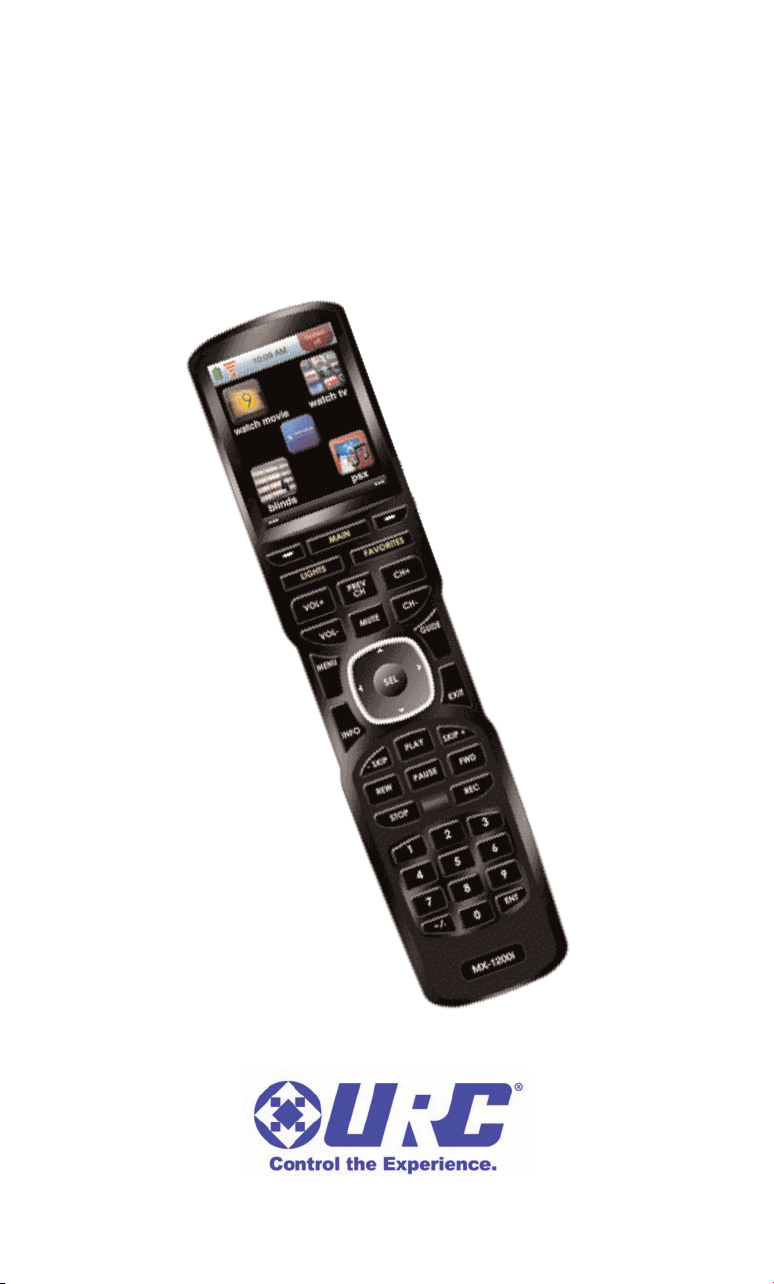
MX-1200i Color Touch Screen
Owner's Manual
Page 2

MX-1200iCOLOR TOUCH SCREEN
This remote control was Custom Programmed for you by:
For questions about your Custom Programming call:
Custom Programming of a complex home theater and/or a multi-room
system is one of the most challenging tasks within an audio/video
installation. It involves an intimate knowledge of how the components
interact and exact details on the proper sequences of control.
Only a Complete Control dealer has the requisite experience and training
to quickly and effectively customize a remote control for true automated
operation.
Congratulations on your choice!
MX-1200i Owner's Manual © 2012-2013 Universal Remote Control,
Inc.
The information in this owner’s manual is copyright protected. No part of this manual may
be copied or reproduced in any form without prior written consent from Universal
Remote Control, Inc.
UNIVERSAL REMOTE CONTROL, INC. SHALL NOT BE LIABLE FOR OPERATIONAL,
TECHNICAL OR EDITORIAL ERRORS/OMISSIONS MADE IN THIS MANUAL.
The information in this owner’s manual may be subject to change without prior notice.
Complete Control is a registered trademark of Universal Remote Control, Inc.
All other brand or product names are trademarks or registered trademarks of their
respective companies or organizations.
500 Mamaroneck Avenue, Harrison, NY 10528
Phone: (914) 835-4484 Fax: (914) 835-4532
Page 3

MX-1200iCOLOR TOUCH SCREEN
Congratulations! 1
Using the MX-1200i 2
Connecting the Battery Pack 3
Using the Charging Base 3
Displaying the Settings Screen 4
Sleep Settings 5
System 5
Brightness 5
Power 5
Button Light 6
Date and Time 6
Calibration 6
Pickup Settings 6
Sound 7
Factory Default 7
Exit 7
Maintaining Your MX-1200i 8
Specifications 8
Limited Warranty Statement 9
End User Agreement 11
Federal Communication Commission
Interference Statement 12
Regulatory Information to the user 13
Declaration of Conformity 14
Precautions and Information Concerning
Rechargeable Lithium-Ion Batteries 15
Page 4

MX-1200iCOLOR TOUCH SCREEN
Congratulations
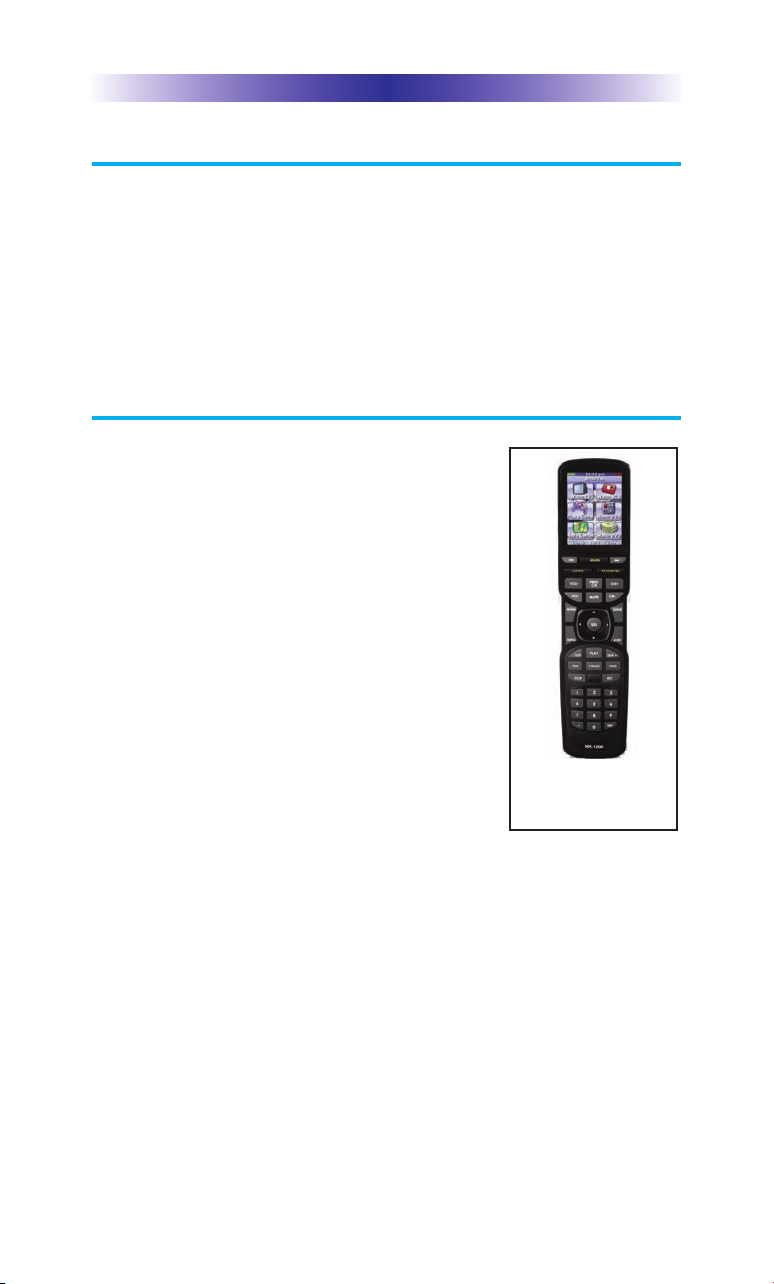
Thank you for purchasing the
Complete Control MX-1200i touch
screen universal remote control.
This remote can wirelessly control
your devices throughout the home
using an RF base station.
Controlling your home is simple
with the MX-1200i remote.
Brilliant 2.4" color touch screen with audible button presses
The MX-1200i has a programmable 2.4” color touch screen. When any
button is pressed, an audible response is heard and the color LCD
screen, as well as the remote buttons, will light up.
Fast setup of complex systems via Complete Control PC Program
To fully automate your audio/video system, the programmer must
have detailed knowledge of each component and how the system is
connected and operated. Only a trained and certified professional
audio/video installer can install an MX-1200i remote control in a
timely and efficient manner.
User interface customizable for any activity
Each button is customizable for activities such as Watch TV or
Listen to Radio. These activities can contain multiple commands
(macros) which enable a single button press to turn the needed
devices ON or OFF.
Ultra-reliable narrow band RF - compatible with URC 433.92 MHz
RF Base Stations.
The MX-1200i can communicate directly to RF base stations, such
as the MRF-350i and the MRF-260i. It also natively communicates to
URC Lighting via 433 MHz RF. This gives the MX-1200i the ability to
control your system without being in direct line-of-sight.
Interchangeable Buttons
The MX-1200i has two interchangeable "hard" buttons. Choose from
any of the supplied buttons to fill these spaces.
Page 1
Page 5
MX-1200iCOLOR TOUCH SCREEN
Using the MX-1200i
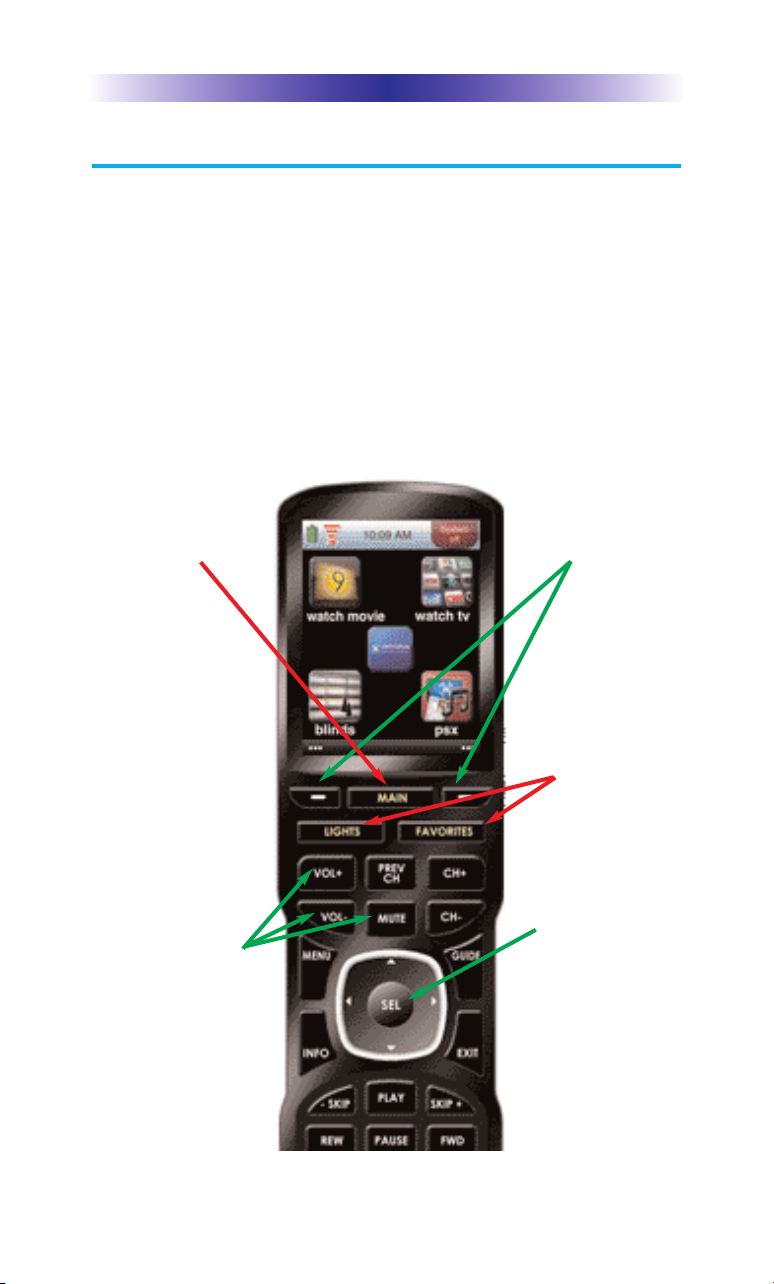
The MX-1200i's main pages display the activities and devices in your system.
Press the MAIN button to view your devices or the activities placed here by
your custom installation specialist. Large systems may have more than one
page. Press either of the PAGE buttons if you don't see all your devices.
Gently press any screen button with your finger to select an activity or a
device. The screen will change to display the buttons you need for that
activity/device. The PAGE buttons may reveal additional buttons for some
devices and activities.
When you would like to control another device, press the MAIN page
button and select a new device button.
The Main button
always displays
main menu pages.
The Volume and
Mute buttons are
always available
regardless of what
screen is displayed.
The Page buttons
display additional
pages of controls.
Use the supplied
buttons to
interchange
these two
“hard” buttons.
The 5-way cursor
enables you to
navigate through a
variety of on-screen
menus with ease.
Page 2
Page 6
MX-1200iCOLOR TOUCH SCREEN
Connecting the Battery Pack
Unlock the rear cover by pressing down on the spring lock at the
top of the cover. Remove the cover. For shipment from the factory,
the battery is left out of the MX-1200i. Place the battery into the
battery compartment, making sure you align the contacts on the
battery to the contacts on the MX-1200i. The battery will snap into
place when aligned properly. Replace the cover and snap it into
place.
Using the Charging Base
Plug the 5V adapter into a power outlet and
into the back of the charging base.
Gently place the MX-1200i into the cradle of
the charging base. It automatically aligns itself
to the contacts on the charging base.
The Status light should immediately light. Red
indicates that it is charging. Blue shows that it
is fully charged. There is no harm in leaving
the MX-1200i on its charging base whenever
it is not in use.
Page 3
Red indicates charging, Blue that
the remote is fully charged.
Page 7
MX-1200iCOLOR TOUCH SCREEN
Displaying the Settings Screen
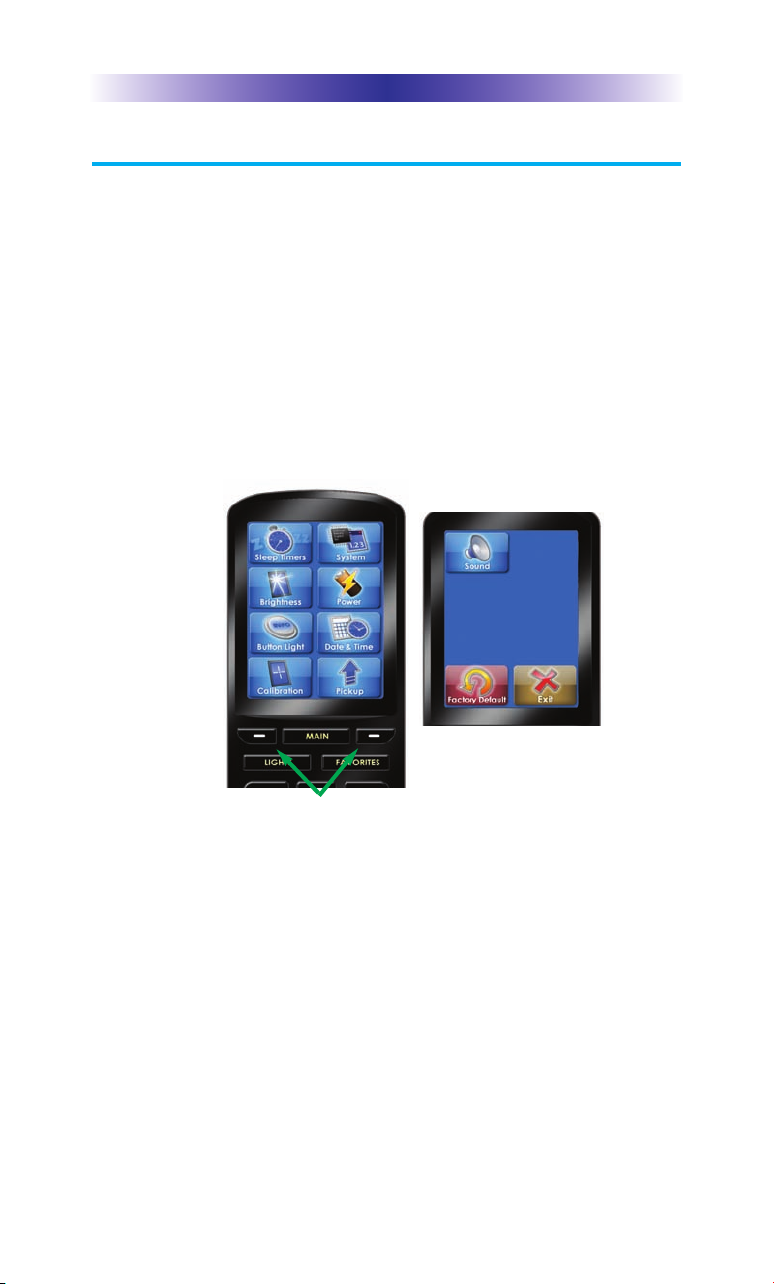
You can enter the Settings menu by pressing and holding the MAIN and
ENT button for three seconds. The MX-1200i will timeout after it is idle for
30 seconds and return to the previous setting or Main screen. There are
two pages of Settings screens. Select a setting by pressing a button on the
LCD screen. Press either of the PAGE buttons to access the other page. To
go back a step or to get out of the settings screen, press the MAIN button.
There are two pages of Settings screen. To access the other page press
either of the PAGE buttons.
Page buttons reveal the
rest of the settings.
Page 4
Page 2 of the Settings
Screen
Page 8
MX-1200iCOLOR TOUCH SCREEN
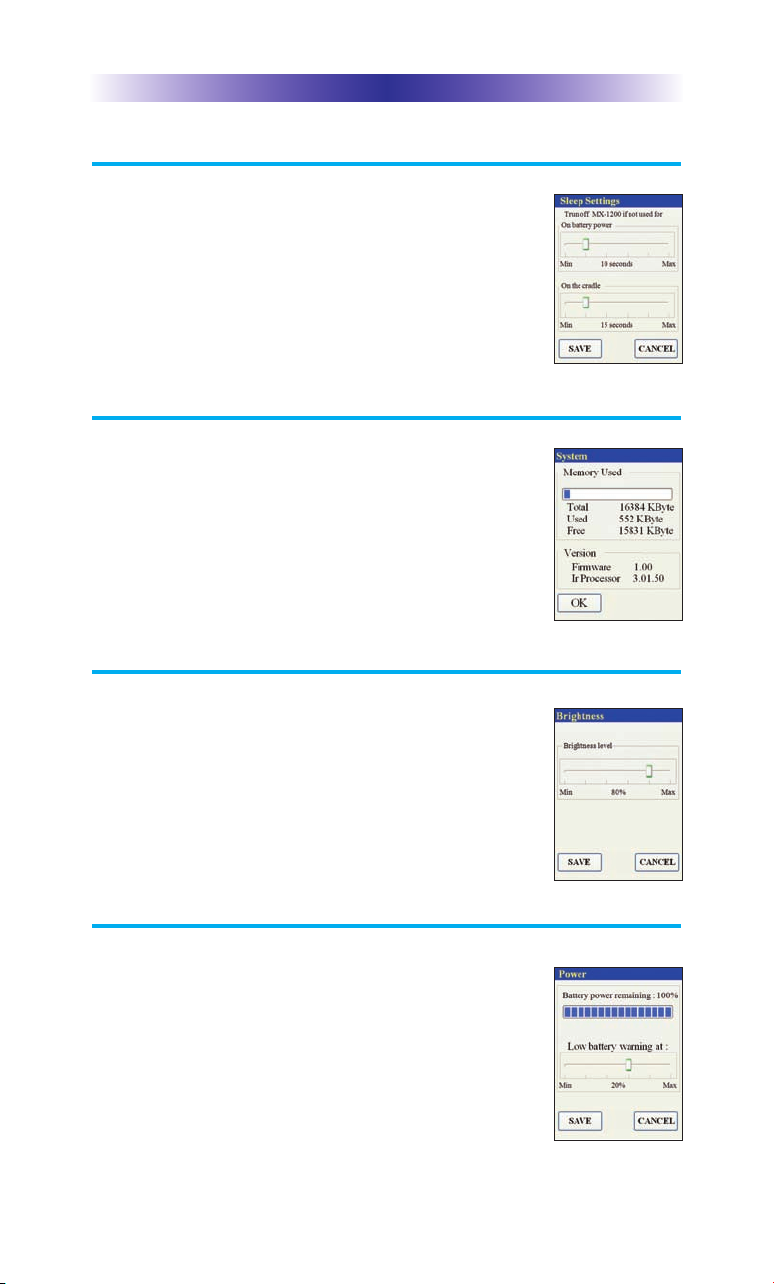
Sleep Settings
Conserve energy by configuring the MX-1200i to
fall asleep after a specified amount of time. Select
an amount of time by adjusting the slide bar.
System
The System Information screen displays data about
your MX-1200i's operating system, memory etc.
Brightness
Adjust the screen brightness by moving the slider.
Min (minimum) is the dimmest setting and Max
(maximum) is the brightest setting.
Power
You can display the remaining charge by selecting
Power. You can also adjust when the low battery
warning screen will appear.
Page 5
Page 9
MX-1200iCOLOR TOUCH SCREEN
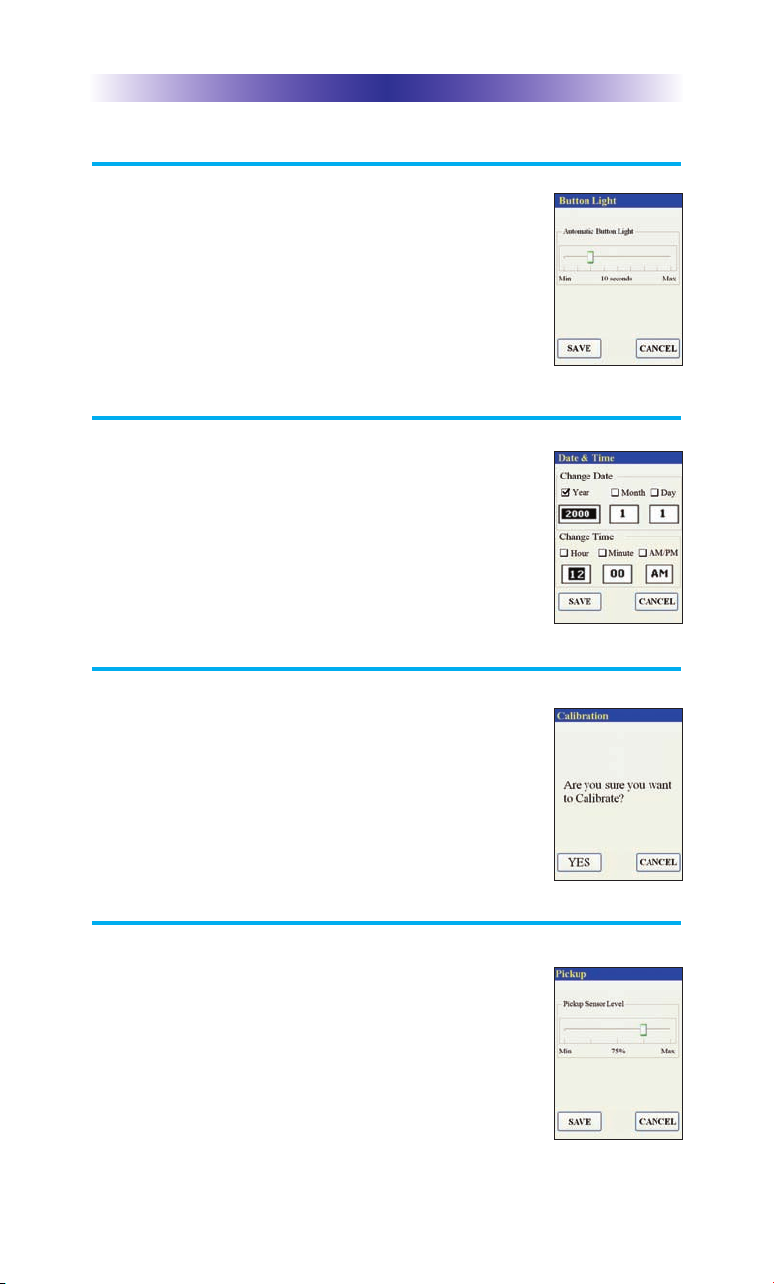
Button Light
You can adjust the brightness of the LEDs that
backlight the buttons of the MX-1200i. Move the
slider to the left to dim or move it to the right to
brighten the backlighting.
Date and Time
Your MX-1200i may have been programmed to
display the time or date on the touch screen.
If you need to, you can adjust the time displayed
by changing the settings on this screen.
Calibration
If you like, you can calibrate the screen by running
the calibration setting. You will need a pen top or
PDA stylus to do this. Do not attempt to calibrate
using your fingers.
Pickup Settings
You can set your MX-1200i to only turn on when
touched, or every time you move it. Adjust the
Pickup Sensor Level by sliding the bar to the
desired percentage.
Page 6
Page 10
MX-1200iCOLOR TOUCH SCREEN
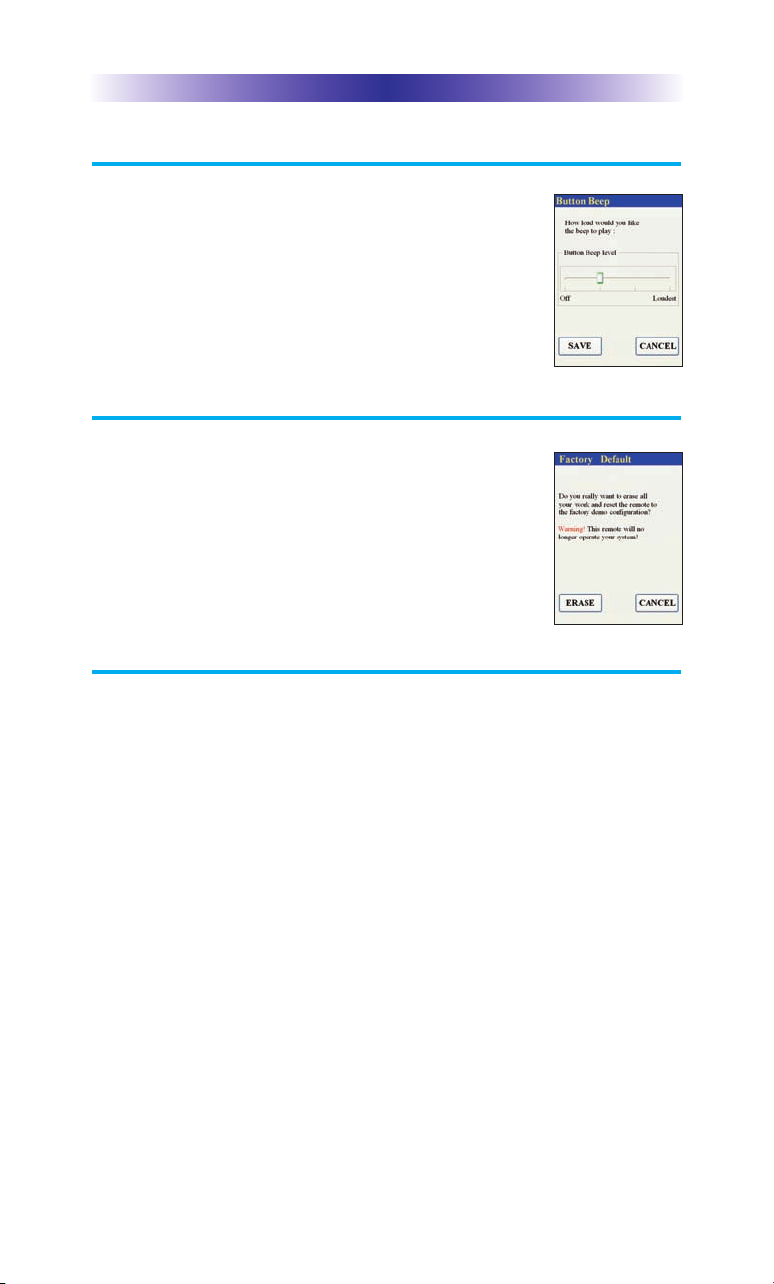
Sound
You can adjust the button beep to Off or Loudest by
dragging the slider to your desired position.
Factory Default
WARNING! Only use this button when instructed
to by Technical Support. It resets the memory of
the MX-1200i to the factory condition. All your
programming will be lost!
Exit
When you have finished adjusting Settings, simply tap the Exit button to
return to normal operation.
Page 7
Page 11

MX-1200iCOLOR TOUCH SCREEN
Maintaining Your MX-1200i
Be careful not to scratch the touch screen, only use your finger to tap
the LCD touch screen or use a plastic pen top or PDA stylus. Never use
a real pen, pencil or any other sharp object on the screen. Keep it away
from extreme cold or heat. The MX-1200i is not waterproof. Do not use
it in any location that is damp or wet. If you spill water on it, take out
the battery pack and let the MX-1200i dry for 48 hours before powering
it up again. If you spill coffee or another beverage on it, clean it with
distilled water. Make sure no water gets inside the MX-1200i. The touch
screen contains a glass element. Don’t drop the MX-1200i or impact it
against anything.
Use a soft, damp cloth to clean the screen. If the screen still shows
finger prints, clean it with watered down window-cleaner. Do not use
anything abrasive and don’t use too much water, some might leak into
the interior.
Precautions & Information: Rechargeable Lithium Ion Batteries
If you will not be using your remote control for an extended period of
time, be sure to remove the battery. Do not attempt to disassemble,
alter or apply heat to the battery. Use care to avoid dropping the
battery or subjecting it to severe impact that could damage the case.
The battery should not be immersed in water. Lithium Ion batteries are
recyclable. For the address of a recycle drop-off location near you call
toll free 1-800-822-8837 or visit http://www.rbrc.com
Specifications
CPU : ARM 32-bit Cortex-M3 (72MHz)
Memory : 8Mbit SRAM, 64Mbit Flash
Customization Capability : Up to 200 devices and up to 10 pages each for a
total of 2000 pages.
Learning Capability : Standard frequencies (15kHz to 460kHz)
Macro Capability : Up to 255 steps each
IR Range (Line of Sight via Infrared) : 30-50 feet, depending on the environment
RF Range (radio frequency) : 50 to 100 feet, depending upon the environment
RF Frequency : 433.92 MHz
Weight : 5.73 ounces (with battery loaded)
Size : 8.46”H x1.97”W x 1.02” D
Battery : Lithium Ion rechargeable battery included
Page 8
Page 12

MX-1200iCOLOR TOUCH SCREEN
Limited Warranty Statement
1. LIMITED WARRANTY AND DISCLAIMERS
Universal Remote Control, Inc. (“URC”) warrants that URC
equipment purchased directly from URC or from an authorized URC
dealer or distributor shall be free from defects in material and
workmanship under normal usage for a period of one (1) year from
the date of purchase of the product by the end-user, but no longer
than thirty-six (36) months from the date of shipment of the URC
equipment by URC to an authorized URC dealer or distributor,
except that with respect to Total Control® whole-house products, the
warranty extends for two (2) years from the date of purchase by the
end-user, but no longer than forty-eight (48) months from the date of
shipment of the URC equipment by URC to an authorized URC
dealer or distributor.
This limited warranty is valid only in the United States of America.
URC equipment purchased from other than an authorized URC
dealer or distributor is without warranty.
URC warrants that the software will substantially conform in any
material respect to its functional specifications at the time of delivery.
URC SHALL NOT BE LIABLE FOR OPERATIONAL, TECHNICAL OR
EDITORIAL ERRORS AND/OR OMISSIONS MADE IN THE URC
DOCUMENTATION. URC DOES NOT WARRANT THAT THE URC
SOFTWARE IS BUG-FREE OR ERROR FREE OR THAT THERE ARE
NO ERRORS/BUGS IN THE URC SOFTWARE.
URC warrants that at the time of purchase the URC equipment and
the URC software complied with all applicable regulations and
policies of the Federal Communications Commission ("FCC")
regarding electromagnetic interference caused by
electronic/computing devices and to the extent that the URC
equipment and/or the URC software fails to so comply, URC shall, at
its own expense, take all reasonable measures to promptly cause
such to comply.
THIS LIMITED WARRANTY DOES NOT COVER TECHNICAL
ASSISTANCE FOR HARDWARE OR SOFTWARE USAGE EXCEPT AS
EXPRESSLY PROVIDED FOR HEREIN.
CERTAIN IMPLIED WARRANTIES, INCLUDING AN IMPLIED
WARRANTY OF MERCHANTABILITY AND FITNESS FOR A
PARTICULAR PURPOSE, MAY BE AVAILABLE WITH RESPECT TO
URC EQUIPMENT. IMPLIED WARRANTIES VARY FROM STATE TO
STATE. URC EXPRESSLY LIMITS THESE IMPLIED WARRANTIES, TO
THE EXTENT ALLOWABLE BY LAW, TO THE TIME PERIODS
COVERED BY THE EXPRESS WRITTEN WARRANTIES PROVIDED
HEREIN. OTHERWISE AND EXCEPT AS PROVIDED FOR HEREIN,
URC EXPRESSLY DISCLAIMS ALL WARRANTIES, EXPRESS,
STATUTORY OR IMPLIED, AND MAKES NO REPRESENTATIONS
REGARDING THE USE OF, OR THE RESULTS OF THE USE OF, THE
EQUIPMENT, SOFTWARE OR DOCUMENTATION IN TERMS OF
CORRECTNESS, ACCURACY, RELIABILITY OR OTHERWISE.
Page 9
Page 13

MX-1200iCOLOR TOUCH SCREEN
EXCEPT AS EXPRESSLY PROVIDED FOR HEREIN, TECHNICAL
SERVICES ARE SUPPLIED "AS IS", WITHOUT ANY WARRANTY,
EXPRESS, STATUTORY OR IMPLIED, OF ANY KIND. TO THE
MAXIMUM EXTENT PERMITTED BY APPLICABLE LAW, URC
EXPRESSLY DISCLAIMS ALL WARRANTIES RELATING TO
TECHNICAL SERVICES, EXPRESS, STATUTORY OR IMPLIED,
INCLUDING BUT NOT LIMITED TO THE WARRANTIES OF
QUALITY OR REASONABLE SKILL AND CARE, OR OUTCOME OR
RESULTS.
WITHOUT IN ANY WAY LIMITING THE GENERALITY OF THE
OTHER PROVISIONS HEREIN, THIS LIMITED WARRANTY DOES
NOT COVER: (I) DAMAGE FROM MISUSE, NEGLECT OR ACTS OF
NATURE, (II) MODIFICATIONS, (III) INTEGRATION WITH THIRD
PARTY CONTENT, OR (IV) BEYOND THE WARRANTY PERIOD
AND/ OR FAILURE TO FOLLOW URC WARRANTY CLAIM
PROCEDURE.
The warranty limitations and warranty disclaimers may not apply to
end user in whole or in part, where such are restricted or excluded
by applicable law, and such shall apply to the maximum extent
permitted by applicable law.
In the event of any warranty claim, URC will, at its sole option,
repair the URC equipment using new or comparable rebuilt parts, or
exchange the URC equipment for new or rebuilt equipment. In the
event of a defect, these are the end user's exclusive remedies.
All the URC equipment returned for service, exchange or repair
require an RGA number. To obtain an RGA number, you must
complete a Return Request Form which you may obtain by calling
(914) 835-4484 or contacting URC at
[email protected]. To obtain warranty service, end
user must deliver the URC equipment, freight prepaid, in its original
packaging or packaging affording adequate protection to URC at 420
Columbus Avenue, Valhalla, NY 10595. It is end user's responsibility
to backup any macro programming, artwork, software or other
materials that may have been programmed into the unit. It is likely
that such data, software, or other materials will be lost during service
and URC will not be responsible for any such damage or loss. A
dated purchase receipt, bill of sale, installation contract or other
verifiable proof of purchase is required. For the URC equipment
support and other important information, please visit URC's website
available at www.universalremote.com or call the Customer Service
Center at (914) 835-4484.
This limited warranty only covers the URC equipment issues caused
by defects in material or workmanship during ordinary consumer
use. It does not cover product issues caused by any other reason,
including but not limited to product issues due to commercial use,
acts of God, third-party installation, misuse, limitations of technology,
or modification of or to any part of the URC equipment. This limited
warranty does not cover the URC equipment sold as used, as is,
refurbished, so called "B stock" or consumables (such as batteries).
This limited warranty is invalid if the factory applied serial number
has been altered or removed from the URC equipment. This limited
warranty specifically excludes the URC equipment sold by
unauthorized resellers.
Page 10
Page 14

MX-1200iCOLOR TOUCH SCREEN
With the exception of URC's IR-only, broad-based consumer remotes,
none of URC's PC programmable remotes or any of our Total
Control® whole-house equipment are authorized for online internet
sales. Buying URC's PC programmable remotes or any of our Total
Control® whole-house equipment online means buying equipment
that does not have URC's limited warranty. Such equipment is not
eligible for URC tech support or software support, either.
2. URC'S LIMITATIONS OF LIABILITY
IN NO EVENT SHALL URC BE LIABLE FOR INDIRECT, SPECIAL,
INCIDENTAL, EXEMPLARY, PUNITIVE OR CONSEQUENTIAL
DAMAGES OF ANY KIND OR LOSS OF PROFITS OR BUSINESS
OPPORTUNITY, EVEN IF URC IS ADVISED OF THE POSSIBILITY OF
SUCH DAMAGES.
IN NO EVENT SHALL URC BE LIABLE FOR LOSS OF OR DAMAGE
TO DATA, COMPUTER SYSTEMS OR COMPUTER PROGRAMS.
URC'S LIABILITY, IF ANY, FOR DIRECT DAMAGES OF ANY FORM
SHALL BE LIMITED TO ACTUAL DAMAGES, NOT IN EXCESS OF
AMOUNTS PAID BY END USER FOR THE URC EQUIPMENT.
IN NO EVENT SHALL URC BE LIABLE FOR ANY EVENTS BEYOND
ITS CONTROL, INCLUDING ANY INSTANCE OF FORCE MAJEURE.
IN NO EVENT SHALL URC BE LIABLE FOR THE ACTS OR
OMISSIONS OF END USER OR ANY THIRD PARTY.
THE LIMITATIONS OF LIABILITY MAY NOT APPLY TO END USER
IN WHOLE OR IN PART, WHERE SUCH ARE RESTRICTED LIMITED
OR EXCLUDED BY APPLICABLE LAW AND SUCH SHALL APPLY
TO THE MAXIMUM EXTENT PERMITTED BY APPLICABLE LAW.
URC SHALL NOT BE HELD RESPONSIBLE FOR THE STATEMENTS
MADE BY OTHERS.
SOME STATES OR JURISDICTIONS DO NOT ALLOW THE
EXCLUSION OR LIMITATION OF INCIDENTAL OR
CONSEQUENTIAL DAMAGES, OR ALLOW LIMITATIONS ON
HOW LONG AN IMPLIED WARRANTY LASTS, SO THE ABOVE
LIMITATIONS OR EXCLUSIONS MAY NOT APPLY TO END USER.
THIS LIMITED WARRANTY GIVES END USER SPECIFIC LEGAL
RIGHTS AND END USER MAY HAVE OTHER RIGHTS WHICH
VARY FROM STATE TO STATE OR JURISDICTION TO
JURISDICTION.
End User Agreement
The terms and conditions of the End User Agreement are available at
www.universalremote.com/eua.php shall apply.
Page 11
Page 15

MX-1200iCOLOR TOUCH SCREEN
Federal Communication Commission
Interference Statement
This equipment has been tested and found to comply with the limits for
a Class B digital device, pursuant to part 15 of the FCC Rules. These limits are designed to provide reasonable protection against harmful interference in a residential installation. This equipment generates, uses and
can radiate radio frequency energy and, if not installed and used in
accordance with the instructions, may cause harmful interference to
radio communications. However, there is no guarantee that interference
will not occur in a particular installation. If this equipment does cause
harmful interference to radio or television reception, which can be
determined by turning the equipment off and on, the user is encouraged
to try to correct the interference by one more of the following measures:
Reorient or relocate the receiving antenna.
Increase the separation between the equipment and receiver.
Connect the equipment into an outlet on a circuit different from
that to which the receiver is connected.
Consult the dealer or an experienced radio/TV technician for help.
Warning!
Changes or modifications not expressly approved by the manufacturer
could void the user's authority to operate the equipment.
Note : The manufacturer is not responsible for any Radio or TV
interference caused by unauthorized modifications to this equipment.
Such modifications could void the user's authority to operate the
equipment.
FCC Caution
This device complies with Part 15 of the FCC Rules. Operation is
subject to the following two conditions: (1) this device may not cause
harmful interference, and (2) this device must accept any interference
received, including interference that may cause undesired operation.
Any changes or modifications not expressly approved by the party
responsible for compliance could void the authority to operate equipment.
The antenna(s) used for this transmitter must not be co-located or operating in
conjunction with any other antenna or transmitter.
Federal Communication Commission (FCC) Radiation Exposure Statement
The device and the antenna for this device must be installed to ensure a
minimum separation distance of 20 cm more from a person's body. Other
operating configurations should be avoided.
Page 12
Page 16
MX-1200iCOLOR TOUCH SCREEN
Regulatory Information to the user
CE conformity Notice
Products with “CE” marking comply with the R&TTE Directive
1995/5/EC, EMC Directive 2004/108/EC and Low Voltage
Directive 2006/95/EEC issued by the commission of the European
Community.
1) R&TTE Directive
Safety : EN 60950-1
EMC : ETSI EN 301 489-1,3
RF : ETSI EN 300 220-1,2
: ETSI EN 300
2) EMC Directive
Emission : EN 55022
Immunity : EN 55024
Power : EN-61000-3-2, 3
3) Low Voltage Directive
Product safety : EN 60950-1
Safety instruction for charging internal rechargeable battery of
remote control
Use only with EN60950-1 approved as Limited power source and
double insulation( ) marked power adaptor & same ratings
described on the product label (5V DC 1.0A).
Declaration of Conformity
“Hereby, Universal Remote Control Inc. declares that this MX-1200i
is in compliance with the Essential requirements and other relevant
provisions of Directive 1999/5/EC.”
Certification
Type No.(Model No.) MX-1200i
Batch/Serial No. Power Rating 5.0V 1.0A
Frequency band 433.92 MHz
Page 13
Page 17
MX-1200iTWO WAY TOUCH SCREEN
Declaration of Conformity
Company Name : Universal Remote Control Inc.
Company Address : 500 Mamaroneck Avenue, Harrison, NY 10528, U.S.A
Contact Information :
Brand Name : UNIVERSAL remote control
Product Name : RF Re-mote Controller
Model Name : MX-1200i
This product herewith complies with the requirements of EMC Directive (2004/108/EC)
and R&TTE Directive(1995/5/EC) issued by the Commission of the European Community
Compliance with these directives implies conformity to the following European Community
EMC Directive
EN 55022
EN 55024
EN 61000-3-2
EN 61000-3-3
R&TTE Directive
EN 60950-1
ETSI EN 301-489-1,3
ETSI EN 300 220-1,2
ETSI EN 300
Low Voltage Directive
EN 60950-1
List of test reports and/or certificate verified compliance with the standards above
EMC Directive
Report No.
Testing Laboratory : Gumi College EMC Center
R&TTE Directive
Certificate No.
Certificate Body : SIEMIC (No. 2200)
www.universalremote.com
Phone: (914)835-4484 Fax: (914)835-4532
Date of issue : March 23, 2012
Name and signature of authorized person :
James Novak
Senior Product Manager
Universal Remote Control Inc.
Page 14
Page 18

MX-1200iTWO WAY TOUCH SCREEN
Precautions and Information Concerning
Rechargeable Lithium-Ion Batteries
If you will not be using your remote control for an extended
period of time, be sure to remove the battery
Do not attempt to disassemble, alter or apply heat to the battery.
Use care to avoid dropping the battery or subjecting it to severe
impact that could damage the case.
The battery should not be immersed in water.
Risk of explosion if battery is replaced by an incorrect type.
Dispose of used batteries according to the instructions.
Lithium Ion batteries are recyclable. For the address of a recycle
drop-off location near you call toll Free 1-800-822-8837 or visit
http://www.rbrc.com
Page 15
Page 19

NOTE
Page 16
Page 20

500 Mamaroneck Avenue, Harrison, NY 10528
Phone: (914) 835-4484 Fax: (914) 835-4532
OCE-0113B Rev 03_RH
www.universalremote.com
 Loading...