

Page 1
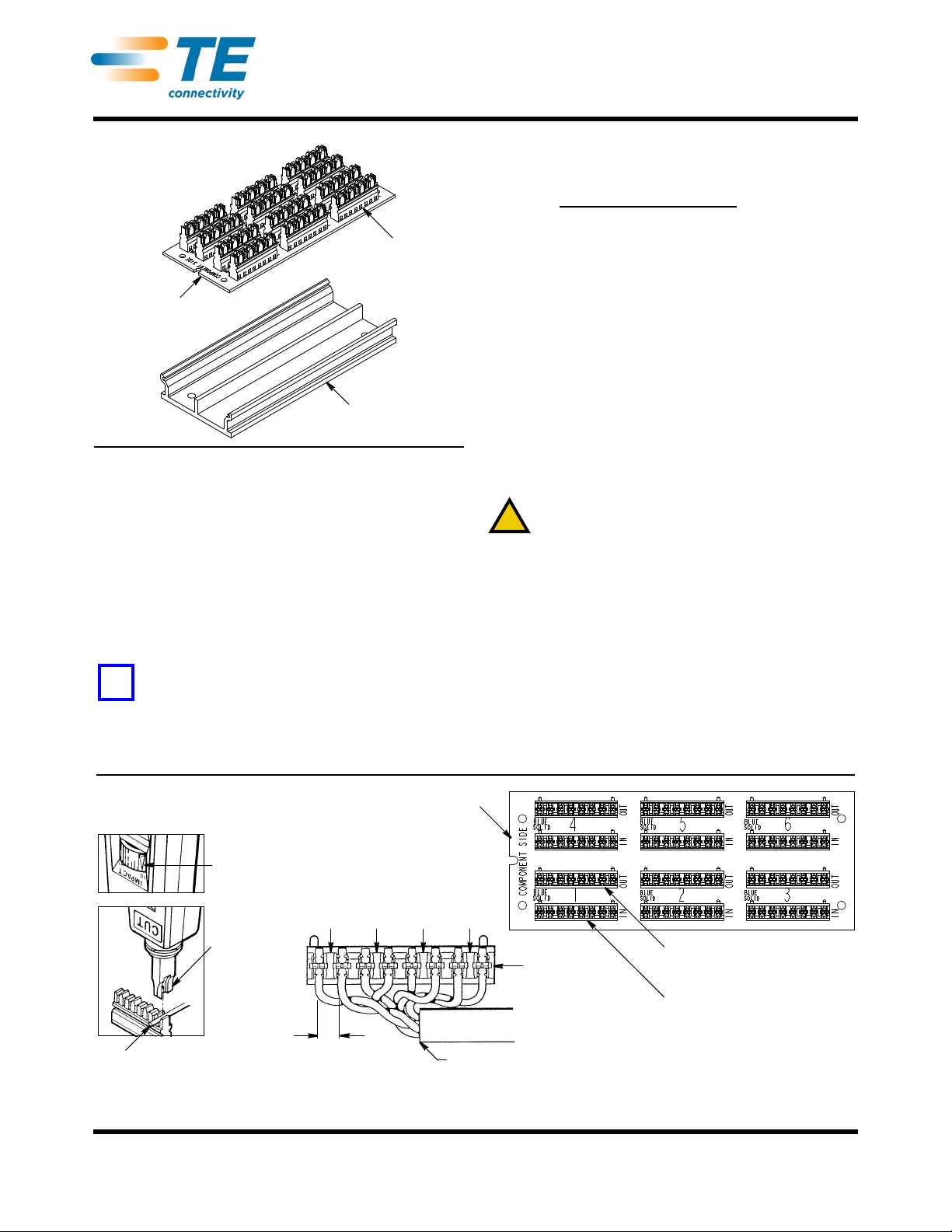
AMP NETCONNECT* Undercarpet
NOTE
Dimensions in this instruction sheet are in metric units
[with U.S. customary units in brackets].
NOTE
i
110Connect Block
(6 Places)
Mounting Tray
Assembly
Jumper Board
Assembly
!
Low-Impact
Setting
Insertion
Blade
(Ref)
Conductor
Note: Not to Scale
13 [.50] Max
Untwist
Minimal Amount of
Cable Jacket Stripped
Blue
Green
Orange
Brown
110Connect
Block
110Connect Block for
Flat (Undercarpet) Cable “Out”
110Connect Block for
Round Cable “In”
Jumper Board Assembly
Punch Conductors
Using Impact Tool
Universal Communications Transition Block 2111682-1
(For Use with Category 5e and Category 6 Cable)
Figure 1
1. INTRODUCTION
AMP NETCONNECT undercarpet universal
communications transition block 21 11682-1 (for use
with category 5e and category 6 cable), shown in Figure 1,
is designed to transition an application from round
conductors to flat conductors (undercarpet cable).
The transition block is intended for use in floor service
box
555039-1 and flush fitting wall frames 553739-2,
1375032, or 1375045.
Reasons for reissue of this instruction sheet are
provided in Section 5, REVISION SUMMARY.
Instruction Sheet
408-3368
04 JUN 13 Rev C
T o obtain information on AMP NETCONNECT products,
call PRODUCT INFORMATION at the number at the
bottom of this page or visit the AMP NETCONNECT
website at www.ampnetcon nect.com
2. DESCRIPTION
The transition block consists of a mounting tray
assembly, jumper board assembly holding six 4-pair
110Connect blocks.
3. TERMINATION
Proceed as follows for both round conductor and flat
conductor:
1. Strip the cable jacket, and tr im the conductors to
the dimensions given in Figure 2.
2. Using a standard 110Connect impact tool, punch
the conductors into the slots. Cut off excess wire.
Remove loose wire pieces.
CAUTION
To avoid damage to the transition block, set the tool to
low impact.
4. REPLACEMENT AND REPAIR
Do not use defective or damage product.
5. REVISION SUMMARY
Revisions to this instruction sheet include:
•
Changed title of instruction sheet and transition block
part number, and removed AMP NETCONNECT logo
•Added wall frames to Section 1
•Added Sections 2 and 4, and Step 1 to Section 3
.
©2013 Tyco Electronics Corporation, a TE Connectivity Ltd. company
All Rights Reserved
*Trademark
TE Connectivity, TE connectivity (logo), and TE (logo) are trademarks. Other logos, product and/or company names may be trademarks of their respective owners.
TOOLING ASSISTANCE CENTER
PRODUCT INFORMATION
Figure 2
1-800-722-1111
1-800-522-6752
This controlled document is subject to change.
For latest revision and Regional Customer Service,
visit our website at www.te.com
1 of 1
 Loading...