

Page 1
Telemetry GPS Module 2.0 Installation Instructions
Note: Traxxas models may have some Telemetry-ready parts installed from the factory. Please inspect
A
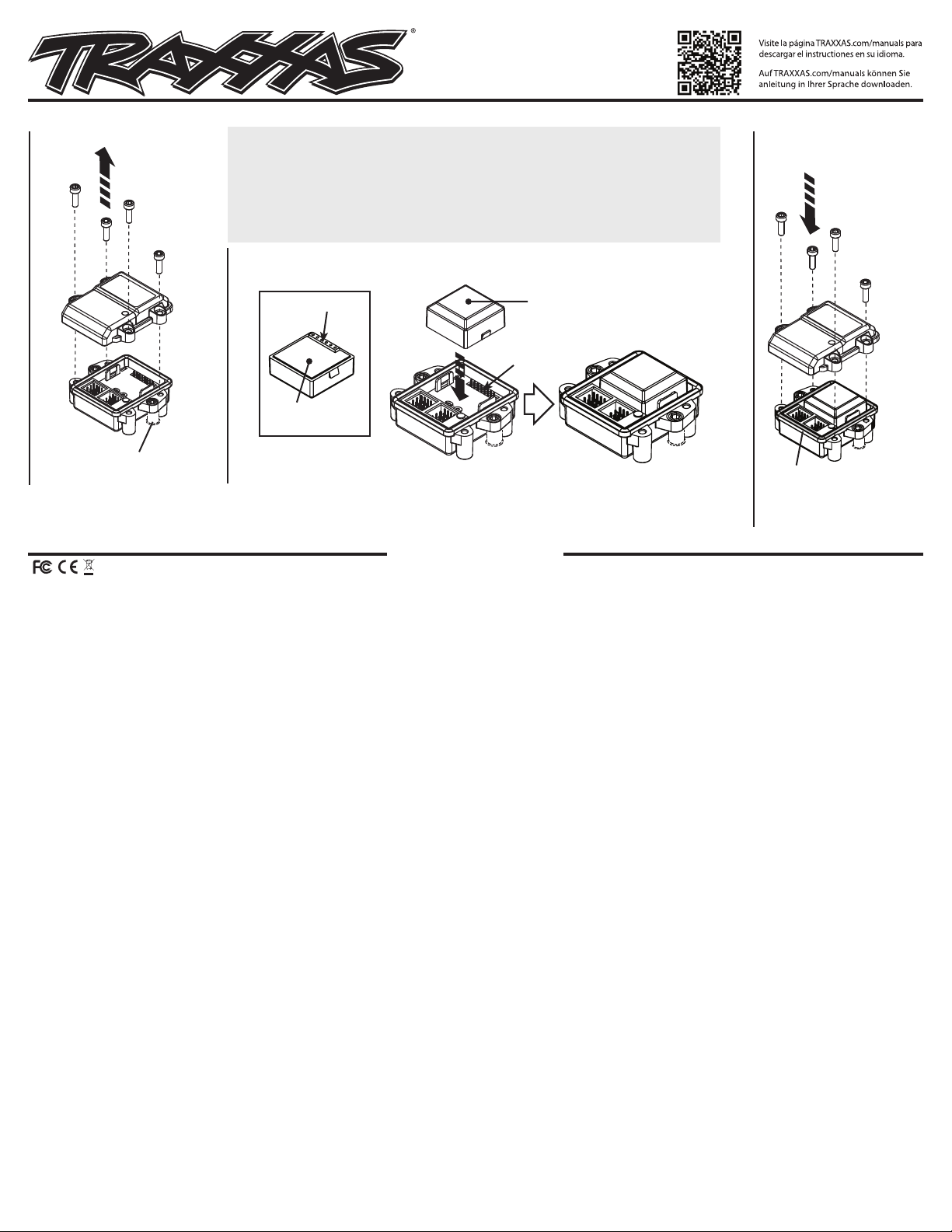
Remove the
expander cover
3x10 CS (4)
the model before installation.
Required for Telemetry GPS operation:
• TQi radio system with Traxxas Link™ Wireless
Module (part #6511)
• Traxxas Link receiver (part #6533)
• Telemetry Expander 2.0 (part #6550X)
Install the GPS module, aligning the GPS connector with the GPS port.
B
The GPS module snaps into place when properly installed.
• Apple® iOS or Android™ mobile device (visit
Traxxas.com for a list of current compatible
devices)
• Traxxas Link App (latest version available free
from the Apple® App StoreSM or on Google Play™)
Covers Part #6551X, 6553X
C
Reinstall the
expander cover
3x10 CS (4)
GPS connector
Bottom of
GPS module
Expander Mount Post
(Expander Mount Sold Separately)
If you have questions or need technical assistance, call Traxxas at
1-888-TRAXXAS
(1-888-872-9927) (U.S. residents only)
Note: Before reinstalling the expander cover, power up the system and verify that the
GPS has linked, indicated by a solid green LED on the expander. If the LED is blinking
red, there is an error in the system. Visit Traxxas.com/telemetry for complete
information and instructions on compatible devices and using the Traxxas Link App
and the Telemetry Expander to capture and display real-time telemetry.
Top of
GPS module
GPS module installed
GPS port
Blue O-ring
Note: Before sealing the cover
on the Expander, ensure that the
blue O-ring is properly seated in
the groove.
TRAXXAS.com
This device complies with FCC Part-15 & IC RSS-210 rules subject to the following conditions: 1)This device may not cause harmful interference, and 2)This device must accept all interference received, including interference that may cause undesired operation.
Apple, the Apple logo, iPhone, iPad, iPod touch, and iTunes are trademarks of Apple Inc., registered in the U.S. and other countries. App Store is a service mark of Apple Inc. Android and Google Play are trademarks of Google Inc.
Traxxas, 6250 Traxxas Way, McKinney, TX 75070,
Phone: 972-549-3000, Fax: 972-549-3011, e-mail: [email protected]
KC2660-R00 181025
 Loading...