

Page 1
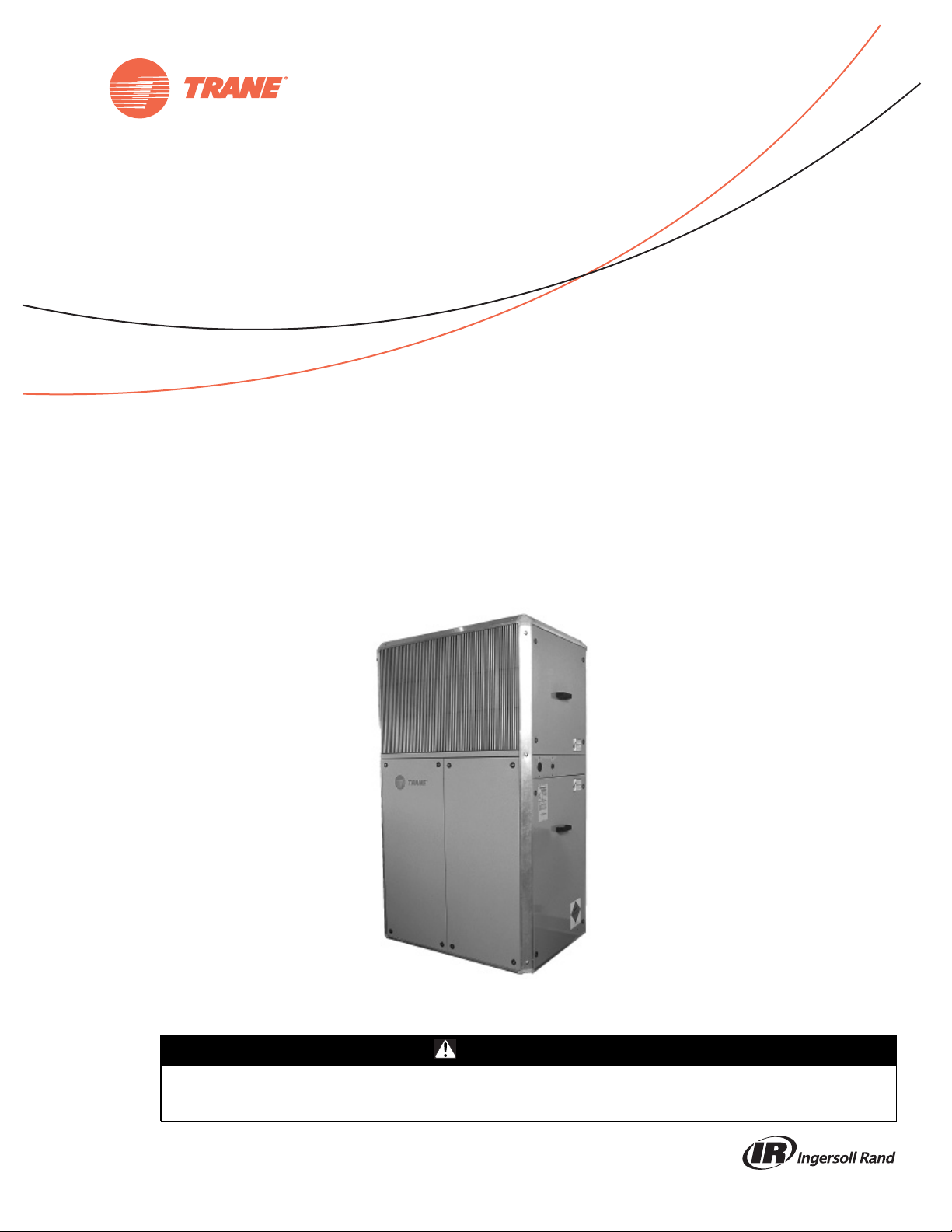
Installation, Operation,
and Maintenance
Integral Air-Cooled
Self-Contained Unit
SCIJ — R-410A
SAFETY WARNING
Only qualified personnel should install and service the equipment. The installation, starting up, and servicing of heating, ventilating, and airconditioning equipment can be hazardous and requires specific knowledge and training. Improperly installed, adjusted or altered equipment
by an unqualified person could result in death or serious injury. When working on the equipment, observe all precautions in the literature and
on the tags, stickers, and labels that are attached to the equipment.
January 2014
SXIJ-SVX01B-EN
Page 2
Warnings, Cautions and Notices
Warnings, Cautions and Notices. Notethat warnings,
cautions and notices appear at appropriate intervals
throughout this manual. Warnings are provided to alert
installing contractors to potentialhazards that could result
in death or personal injury. Cautions are designed to alert
personnel to hazardous situations that could result in
personal injury, while notices indicate a situation that
could result in equipment or property-damage-only
accidents.
Your personal safety and the proper operation of this
machine depend upon the strict observance of these
precautions.
Read this manual thoroughlybefore operatingor servicing
this unit.
ATTENTION: Warnings, Cautions, and Notices appear at
appropriate sections throughout this literature. Read
these carefully:
WARNING
CAUTIONs
NOTICE:
Indicates a potentially hazardous
situation which, if not avoided, could
result in death or serious injury.
Indicates a potentially hazardous
situation which, if not avoided, could
result in minor or moderate injury. It
could also be used to alert against
unsafe practices.
Indicates a situation that couldresult in
equipment or property-damage only
accidents.
Important
Environmental Concerns!
Scientific research has shown that certain man-made
chemicals can affect the earth’s naturally occurring
stratospheric ozone layer when released to the
atmosphere. In particular, several of the identified
chemicals that may affect the ozone layer are refrigerants
that contain Chlorine, Fluorine and Carbon (CFCs) and
those containing Hydrogen, Chlorine, Fluorine and
Carbon (HCFCs). Not all refrigerants containing these
compounds have the same potential impact to the
environment.Trane advocates the responsible handlingof
all refrigerants-including industry replacements for CFCs
such as HCFCs and HFCs.
municipalities may have additional requirements that
must also be adhered to for responsible management of
refrigerants. Know the applicable laws and follow them.
WARNING
Proper Field Wiring and Grounding
Required!
All field wiring MUST be performed by qualified
personnel. Improperly installed and grounded field
wiring poses FIRE and ELECTROCUTION hazards. To
avoid these hazards, you MUST follow requirements for
field wiring installation and grounding as described in
NEC and your local/state electrical codes. Failure to
follow code could result in death or serious injury.
WARNING
Personal Protective Equipment (PPE)
Required!
Installing/servicing this unit could result in exposure to
electrical, mechanical and chemical hazards.
• Before installing/servicing this unit, technicians
MUST put on all Personal ProtectiveEquipment (PPE)
recommended for the work being undertaken.
ALWAYSreferto appropriate MSDS sheets and OSHA
guidelines for proper PPE.
• When working with or around hazardous chemicals,
ALWAYS refer to the appropriate MSDS sheets and
OSHA guidelines for information on allowable
personal exposure levels, proper respiratory
protection and handling recommendations.
• If there is a risk of arc or flash, technicians MUST put
on all Personal Protective Equipment (PPE) in
accordance with NFPA 70E or other country-specific
requirements for arc flash protection, PRIOR to
servicing the unit.
Failure to follow recommendations could result in death
or serious injury.
Responsible Refrigerant Practices!
Trane believes that responsible refrigerant practices are
important to the environment, our customers, and the air
conditioning industry. All technicians who handle
refrigerants must be certified.The Federal Clean Air Act
(Section 608) sets forth the requirements for handling,
reclaiming, recovering and recycling of certain
refrigerants and the equipment that is used in these
service procedures. In addition, some states or
© 2014 Trane All rights reserved SXIJ-SVX01B-EN
Page 3

Introduction
Overview of Manual
This booklet describes proper installation, start-up,
operation, and maintenance procedures for the Integral
Air-Cooled unit, model SCIJ (with Micro-Channel
Condensers). Carefully review the information within this
manual and follow the instructions to minimize the risk of
improper operation and/or component damage.
Note: One copy of the appropriate service literature ships
inside the control panel of each unit.
Note: This document is customer property and must be
retained by the unit's owner for use by
maintenance personnel.
It is important that you perform periodic maintenance to
help ensure trouble free operation. Should equipment
failure occur, contact a qualifiedTrane service
organization for an experienced HVAC technician to
properly diagnose and repair this equipment.
Unit Nameplate
The unit nameplate identifies the unit model number,
appropriate service literature, and wiring diagram
numbers. It is mounted on the control panel door.
Reference this information when making inquires or
ordering parts or literature.
Warnings, Cautions and Notices
Revision Summary
Use this manual for Integral Air-Cooled units, model SCIJ
(with Micro-Channel condensers).
SXIJ-SVX01B-EN (30 Jan 2014)
Removedcoil resistant coating option frommodel number
description.
SXIJ-SVX01B-EN (17 Apr 2012)
Modifications for 2-speed motor.
SXIJ-SVX01A-EN
This manual supersedes SXIH-SVX01C-EN (October
2008).
Trademarks
Trane and theTrane logo are trademarks ofTrane in the
United States and other countries. All trademarks
referenced in this document are the trademarks of their
respective owners.
SXIJ-SVX01B-EN 3
Page 4

Table of Contents
Warnings, Cautions and Notices .......... 2
Introduction ........................... 3
Overview of Manual .................. 3
Unit Nameplate ..................... 3
Revision History ..................... 3
Trademarks ......................... 3
Model Number Description ............... 5
General Information ..................... 6
Commonly Used Acronyms ............. 6
Refrigeration Circuits ................... 6
Evaporator Section .................... 6
Controls .............................. 6
Field Installed Accessories .............. 6
Installation .............................. 7
Pre-Installation Considerations .......... 7
Checklist ........................... 7
Receiving and Handling ............... 7
Acoustic Considerations .............. 7
Installation Preparation ............... 8
Dimensions and Weights ............... 8
Mechanical Requirements ............. 11
Electrical Requirements ............... 12
Voltage Imbalance .................. 12
Installation Checklist .................. 14
Fan Discharge Conversion Procedure . . 14
Low Ambient Control Kit Installation . . . 15
Hydronic Coil Installation ............. 15
Plenum Installation ................. 16
Pre-Startup Checklist .................. 17
Unit Startup Procedures ............... 17
Operation .............................. 18
Sequence of Operation .............. 18
Maintenance ........................... 19
Maintenance Procedures .............. 19
Cleaning the Condenser Coils ........ 20
Periodic Checklists .................. 21
Troubleshooting ...................... 22
4 SXIJ-SVX01B-EN
Page 5

Model Number Description
Digit 1 - Unit Model
S =self contained
Digit 2 - Unit Type
C = commercial
Digit 3 - Condenser Medium
I = integral air-cooled
Digit4-Development Sequence
J = development series
Digit 5, 6, 7- Unit Nominal Capacity
050 = 5 tons
075 = 7.5 tons
100 = 10 tons
150 = 15 tons
Digit 8 - Unit Voltage
3 = 208 - 230 volt/60 hz/3 ph
4 = 460 volt/60 hz/3 ph
5 = 575 volt/60 hz/3 ph
Digit 9 - Air Flow Configuration
1 = horizontal discharge/rear return
2 = vertical discharge/front return
3 = vertical discharge/rear return
Digit 10, 11 - Design Sequence
**= factory assigned
Digit 12 - Air Filter Type
1 = one-inch fiberglass throwaway
Digit 13 - Control
0 = control interface
Digit 14 - Unit Finish
1 = painted
Digit 15 - Coil Finish
0 = none
C = condenser coated
E = evaporator coated
H = condenser + evaporator coated
SXIJ-SVX01B-EN 5
Page 6

General Information
The integral air-cooled unit, model SCIJ with Micro-
Channel Condenser, is a high efficiency, vertical air cooled
air conditioner. Units have either front or top discharge
configuration options and easy service access. Unit
construction is heavy gage steel with a baked enamel
finish. Available unit voltages are 208/3/60, 230/3/60, and
460/3/60, 575/3/60.
Commonly Used Acronyms
For convenience, a number of acronyms and
abbreviations are used throughout this manual.These
acronyms are alphabetically listed and defined below.
cfm = cubic-feet-per-minute
CKT = circuit
CV = constant volume
CW = clockwise
CCW = counterclockwise
E/A = exhaust air
F/A = fresh air
IOM= installation/operation/maintenance manual
LH = left-hand
O/A = outside air
psig = pounds-per-square-inch, gauge pressure
R/A = return air
RH = right-hand
RPM = revolutions-per-minute
S/A = supply air
SZ = single-zone (unit airflow)
VAV = variable air volume
Note: Cross-reference to related publication: Internal Air-
Cooled Self-Contained Product Catalog: PKGPRC019-EN.
fixed diameter blower pulley.The condenser fan section
consists of one, two or three forward curved centrifugal
fans powered by a premium efficiency motor through an
adjustable motor sheave and fixed diameter blower
pulley. Condenser motor belt tension is adjusted by an
adjustable motor mounting base. Control box access is
from the front of the unit to ease electrical hook-up.
Controls
The standard control panel consists of a high voltage
terminal block, overload relays for each fan motor,
transformer, 3-pole 24 volt contactors for each motor and
compressor, and a 5-second delay timer. Remote
thermostat controls are field-installed.
Field Installed Accessories
These items ship separately for field installation:
• steam coil
• hot water coil
• plenum
• low ambient kit
• oversized or s-speed motors
• remote thermostat
Note: Application of the above options and/or
accessories may require field adjustment of fan
speeds to ensure proper airflow and performance.
Refrigeration Circuits
Units are configured in single or double refrigeration
circuits. Each circuit consists of a:
• high efficiency scroll compressor mounted on rubber
isolation grommets
• condenser and evaporator coils, designed for
optimum performance and efficiency with lanced fins
and rifled tubing
• filter-drier
Evaporator Section
The evaporator fan section consists of one, two or three
forward curved centrifugal fans powered by a premium
efficiency motor through an adjustablemotor sheave, and
6 SXIJ-SVX01B-EN
Page 7
Installation
Pre-Installation Considerations
Checklist
The following checklist gives an overview of the
recommended pre-installation considerations. Follow the
procedures in this section to ensure installation is
complete and adequate for proper unit operation. Verify
this checklist is complete before beginning unit
installation.
• Verifythe unit size and taggingwith the unit nameplate
to ensure the correct unit is received.
• Inspect the unit for possible shipping damage and
make any necessary claims with the freight delivery
company immediately.
• Before installing the unit, remember to allow
minimum recommended clearances for routine
maintenance and service. Refer to unit dimensions and
clearances on submittals or in the
Weights,” p. 8section.
• Verifythe unit is configured properly prior to beginning
unit installation.
• Make proper acoustic considerations before installing
unit. Do not install unit near sound-sensitive locations.
• Allow adequate space for service and operating
clearances. Reference
this page.
• Make provisions for correct supply power and note
electrical connection knockouts locations on the unit
submittals or in the
section.
• Ensure the unit installation location is level.
“ServiceAccess,” p. 7section on
“Dimensions and Weights,” p. 8
Receiving and Handling
Shipping Package
Integral air-cooled units ship assembled on skids. Units
ship in the unitary configuration, assembled, piped, and
charged with refrigerant.
“Dimensions and
• Report concealed damage to the freight line within the
allotted time after delivery.Verify with the carrier their
allotted time to submit a claim.
Note: Failure to follow these procedures may result in no
reimbursement for damages from the freight
company.
• Do not move damaged material from the receiving
location. It is the receiver's responsibility to provide
reasonable evidence that concealed damage did not
occur after delivery.
• Do not continue unpacking the shipment if it appears
damaged. Retain all packaging.Take photos of
damaged material if possible.
• Notify the carrier's terminal of the damage
immediately by phone and mail. Request an
immediate joint inspection of the damage by the
carrier and consignee.
• Notify yourTrane representative of the damage and
arrange for repair. Have the carrier inspect the damage
before making any repairs to the unit.
Unit Storage
Take precautions to prevent condensate from forming
inside the unit's electrical compartments and motors if the
unit is stored before it is installed.
Service Access
Maintain adequate clearances around and above the unit
to ensure proper unit operation and allow sufficient
service access.Trane recommends 36-inches service
access on all sides of the unit.
WARNING
Hazardous Voltage!
Disconnect all electric power, including remote
disconnects before servicing. Follow proper lockout/
tagout procedures to ensure the power can not be
inadvertently energized. Failure to disconnect power
before servicing could result in death or serious injury.
Receiving Checklist
Complete the following checklist immediately after
receiving unit shipment to detect possible shipping
damage.
• Verify that the unit nameplate data corresponds to the
sales order and bill of lading (including electrical data).
• Visually inspect the unit exterior for physical signs of
shipping damage or material shortages.
• If a unit appears damaged, inspect it immediately
before accepting the shipment. Remove access panels
and check for interior component damage. Make
specific notations concerning the damage on the
freight bill. Do not refuse delivery.
SXIJ-SVX01B-EN 7
Acoustic Considerations
Before determining the final unit installation site,
remember that proper unit placement is critical in
reducing transmitting sound levels to the building.The
ideal time to make provisions to reduce sound
transmissions is during the design phase.The most
economical means of avoiding a potential acoustical
problem is to place units in areas that are not acoustically
sensitive.
Page 8
Installation
Unit Location
Install the unit in a dry, indoor area between 50 and 115°F.
Choose a location where sound levels, airflow and
vibration, commonly associated with heavy-duty
commercial equipment, will not be objectionable to
occupants. In multiple unit installations, separate the
individual units and stagger their location from floor to
floor so as not to starve units for air and not to discharge
warm condenser air from one condenser into theintake of
another condenser. Place thermostats, air supplies and
returns so that the individual unit will operate within its
zone.
Installation Preparation
Before installing the unit, perform the following
procedures to ensure proper unit operation.
1. Verify the installation location is level.To ensure
proper unit operation, install the unit level (zero
tolerance) in both horizontal axes. Failure to level the
unit properly can result in condensate management
problems, such as standing water inside the unit.
Standing water and wet surfacesinside units can result
in microbial growth (mold) in the drain pan that may
cause unpleasant odors and serious health-related
indoor air quality problem.
2. Allow adequate service and code clearances as
recommended in the
3. Position the unit in its final location.
Unit Placement
Install the unit on a firm, level surface.
Installing Optional Accessories
Before installing ductwork, install accessories on unit.
“Service Access,” p. 7 section.
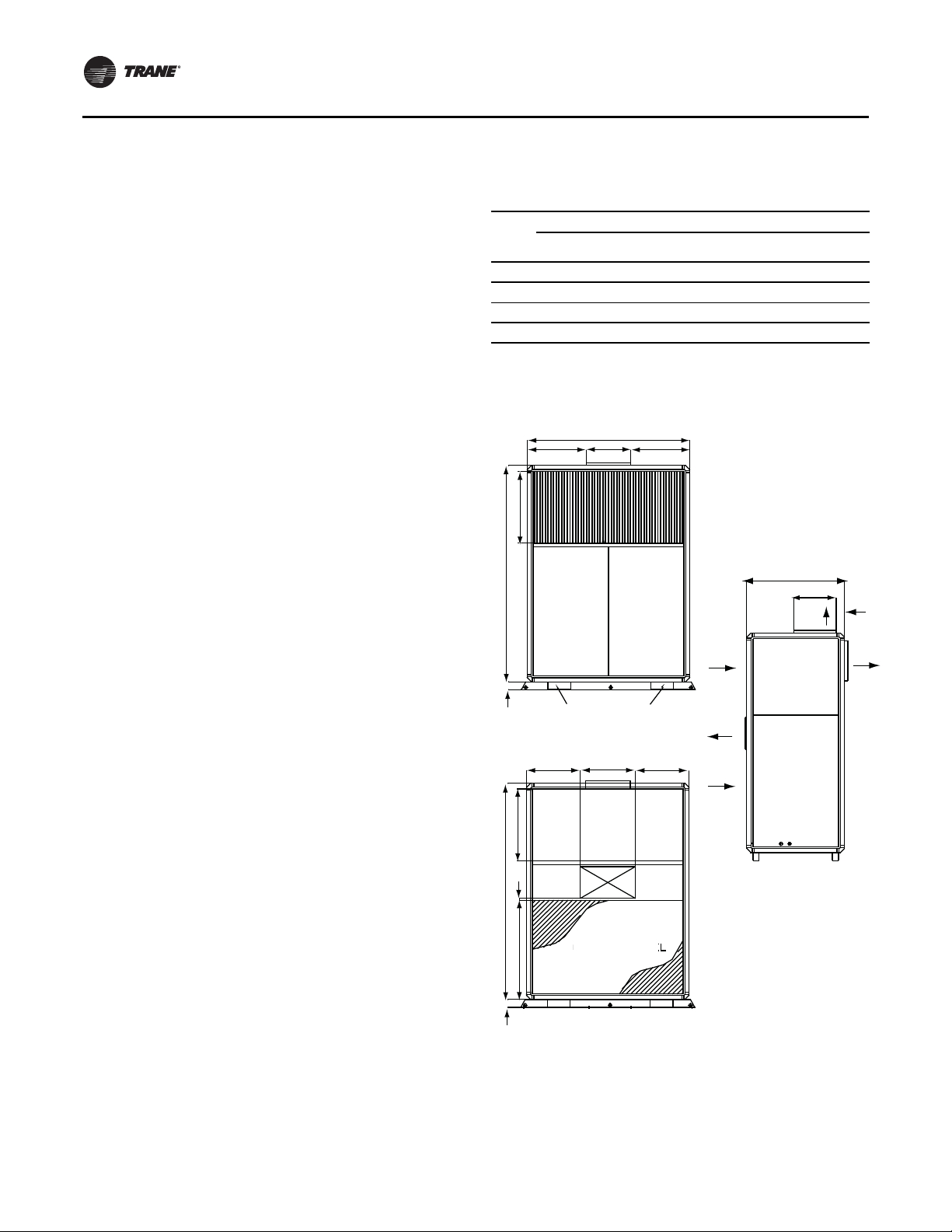
Dimensions and Weights
Table 1. Unit dimensions (with Micro-channel
Unit
Size
(tons)
5 56.69 20.63 20.63 18.92 18.92 945 856
7.5 —————1342 1210
10 —————1474 1342
15 —————2077 1923
Note: 7.5-ton and 10-ton in Figure 2, p. 9, 15-ton in Figure 3, p. 9
Figure 1. 5-ton unit
74.80
2.76
condenser coil), in-lbs.
Weights
A B C D E Ship Operating
BC15.43
24.90
D
A
FORKLIFT ACCESS
front view
18.86
31.50
13.64
SUPPLY
AIR
RETURN
AIR
CONDENSER
DISCHARGE
E
CONDENSER
RETURN
SIDE
ACCESS
SIDE
ACCESS
2.74
SUPPLY
AIR
24.90
0.75
74.80
2.76
34.25
CONDENSER COIL
back view
side view
8 SXIJ-SVX01B-EN
Page 9

Installation
Figure 2. 7.5 and 10-ton unit
85.83
10.03
FORKLIFT ACCESS
front view
18.86 14.77
2.68
74.80
24.90
22.70 15.20
COMPRESSOR
ACCESS
16.67
15.20
CONTROLS
ACCESS
18.86
GRILL
Figure 3. 15-ton unit
15,50
25,00
75,003,00
COMPRESSOR
ACCESS
13,50
19,50 19,5014,50
114,00
15,50
10,00
COMPRESSOR
ACCESS
FORKLIFTACESS
front view
10,00
1
4,50
15,5024,00
CONTROLS
ACCESS
19,50
L
GR LI
0.75
34.25
RETURN
AIR
CONDENSER
DISCHARGE
CONDENSER
RETURN
CONDENSER COIL
31.50
13.64
SUPPLY
AIR
SIDE
ACCESS
SIDE
ACCESS
side view
back view
2.74
SUPPLY
AIR
34,50 0,50
RETURN
AIR
CONDENSER
CHARG
DIS
CONDENSER
RETURN
CONDENSER COIL
back view
SIDE
ACCESS
E
SIDE
ACCESS
31,50
13,5
SUPPLY
AIR
2,50
0
Y
SUPPL
I
R
A
side view
SXIJ-SVX01B-EN 9
Page 10

Installation
Figure 4. Component overview
Figure 5. Plenum
vent
inlet
filter frame
Figure 6. Hot water coil
OD
CONNECTION
3.239
OD
CONNECTION
B
A
Table 2. Plenum dimensions & weight, in-lbs.
Unit Size
(tons) A B C
5 56 ¾ 16 ¼ 31 ½ 52 ¾ x 12 ¾ 95
7.5 & 10 85 7/8 16 ¼ 31 ½ 81 ¾ x 12 ¾ 141
15 114 16 ¼ 31 ½ 110 x 12 ¾ 188
C
Grill Size
(W x H) Weight
B
A
Table 3. Hot water coil dimensions & weight, in-lbs.
Unit Size
(tons)
5 52 ½ 47 1/16 63 50
7.5 & 10 81 5/ 76 ¼ 96 75
15 109 ¼ 104 ¼ 137 108
Notes:
1. Coils are field installed
2. Coil connections are mirror-image and can be mounted with either left
or right hand connections.
A B Wet Coil Dry Coil
Weight
10 SXIJ-SVX01B-EN
Page 11

Installation
Figure 7. Steam coil
Table 4. Steam coil dimensions & weights, in-lbs.
Mechanical Requirements
Ductwork Considerations
Install all air ducts accordingto the National Fire Protection
Association standards for the "Installation of Air
Conditioning and Ventilation Systems other than
ResidenceType (NFPA 90A) and ResidenceType Warm Air
Heating and Air Conditioning Systems (NFPA 90B).
Make duct connections with a flexible material such as
heavy canvas. If a fire hazard exists,Trane recommends
using Flexweave 1000, type FW30 or equivalent canvas.
Use three inchesfor the returnduct and three inches for
the discharge duct. Keep the material loose to absorb unit
vibration.
Run the ductwork as far as possible without changing size
or direction. Do not make abrupt turns or transitions near
the unit dueto increased noise and excessive static losses.
Use elbows with splitters or turning vanes to minimize
static losses.
Poorly constructed turning vanes may cause airflow
generated noise. Check total external static pressures
against fan characteristics to be sure the required airflow
is available throughout the ductwork.
Direct louvers up and down for condensers air discharge
and intake so as to not short circuit condenser air. Pitch
outdoor ducts away from unit to protect unit fromrain and
snow entering with condenser air. Auxiliary louvers and
hoods may be required for this purpose. Attach ducts to
unit with canvas section duct connectors or other suitable
noise and vibration absorbing devices.
Unit Size
(tons) A B
5 52 ½ 45 7/8 1 ½ 2 68
7.5 & 10 81 5/8 74 2 3 93
15 109 ¾ 102 1/8 2 3 132
Note: Coils are field-installed.
Note: Coil Connections are mirror-image and can be mounted with either
left or right-hand connections.
SXIJ-SVX01B-EN 11
Return CSupply
D Weight
Page 12

Installation
Electrical Requirements
WARNING
Hazardous Voltage!
Disconnect all electric power, including remote
disconnects before servicing. Follow proper lockout/
tagout procedures to ensure the power can not be
inadvertently energized. Failure to disconnect power
before servicing could result in death or serious injury.
WARNING
Proper Field Wiring and Grounding
Required!
All field wiring MUST be performed by qualified
personnel. Improperly installed and grounded field
wiring poses FIRE and ELECTROCUTION hazards. To
avoid these hazards, you MUST follow requirements for
field wiring installation and grounding as described in
NEC and your local/state electrical codes. Failure to
follow code could result in death or serious injury.
Electrical Requirements
Follow these guidelines, referring to unit wiring diagrams
and supply power dimensional information to ensure
correct electrical requirements at the installation site.
Reference supply power wiring locations on unit
submittals or in section “Dimensions and Weights,” p. 8.
Specific unit wiring diagrams are provided on each unit.
Use these diagrams for connections or trouble analysis.
Supply Power Wiring
It is the installer's responsibility to provide power supply
wiring to the unit. Wiring should conform to NEC and all
applicable code requirements.To ensure the unit supply
power wiring is properly sized and installed, follow the
guidelines below:
1. Verify the power supply available is compatible with
the unit nameplate ratings.The supply power must be
within 10% of the rated voltage listed on the unit
nameplate.
2. Reference the electrical data. Table 5, p. 13 refers to
standard motor, and Table 6, p. 13 refers to oversized
motor. Protect the electrical service from over current
and short circuit conditions in accordance with NEC
requirements. Size protectiondevices according to the
electrical date on the unit nameplate.
3. If using a field-supplied disconnect, install it at or near
the unit in accordance with NEC. Do not mount a fieldsupplied disconnect on the unit. Reference the
electrical service entrance location on unit submittals.
4. Complete the unit power wiring connections onto
either the main terminal block or the field-provided
non-fused disconnect switch.
5. Provide proper unit grounding in accordance withlocal
and national codes.
Electrical Data Calculations
RLA = Rated Load Amps
Compressor LRA = Locked Rotor Amps
Fan Motor LRA = Locked Rotor Amps, N.E.C.Table 430 151
FLA = Full Load Amps, N.E.C.,Table 430 - 150
Voltage utilization range is ±10 percent
Determination of Minimum Circuit Ampacity
(MCA)
MCA = 1.25 x largest motor amps (FLA or RLA) + the sum
of the remaining motor amps.
Determination of Maximum Fuse Size (MFS)
MFS = 2.25 x largest motor amps (FLA or RLA) + the sum
of the remaining motor amps.
If the rating value determined does not equal a standard
current rating of over current protective device, use the
next lower standard rating for the marked maximum
rating.
Voltage Imbalance
WARNING
Live Electrical Components!
During installation, testing, servicing and
troubleshooting of this product, it may be necessary to
work with live electrical components. Have a qualified
licensed electrician or other individual who has been
properly trained in handling live electrical components
perform these tasks. Failure to follow all electrical
safety precautions when exposed to live electrical
components could result in death or serious injury.
Voltage imbalance on three-phase systems can cause
motor overheating and premature failure. Maximum
allowable imbalance is 2.0%, and the readings used to
determine it must be measured at the compressor
terminals.
Voltage imbalance is defined as 100 times the sum of the
division of the three voltages from the average voltage. If,
for example, the three measured voltages are 221, 230,
227, the average would be:
(221+230+227)/3 = 226 volts
The percentage of voltage imbalance is then:
100*(226-221)/226 = 2.2%
In this example, 2.2 percent imbalance of more than 2.0
percent exists, be sure to check the voltage at the unit
disconnect and terminal block switch. If an imbalance at
the unit disconnectswitchdoes not exceed2.0 percent, the
imbalance is caused by faulty wiring within the unit. Be
sure to conduct a thorough inspection of the unitelectrical
wiring connections to locate the fault, and make any
repairs necessary.
12 SXIJ-SVX01B-EN
Page 13

Table 5. Integral air-cooled standard electrical data
Installation
Unit
Size Voltage
208-230/60/3 16.0 110.0
5
7.5
10
15
Notes:
1. Voltage range:nominal voltage: 208-230V, acceptable range: 187 - 253Vnominal voltage: 460V, acceptable range: 414 - 506Vnominal voltage: 575V,
acceptable range: 518 - 633V
2. Ampacity is calculated per UL formula: ampacity = (1.25 x compressor RLA) + the sum of the second compressor RLA (is used) and all other motor
FLAs
3. Maximum fuse size is calculated per UL formula: MFS = (2.25 x compressor RLA) + the sum of the second compressor RLA (if used) and all other
motor FLAs
4. There are two compressors on 10 and 15-ton units and only one RLA & LRA value is shown in table. The data is the same for both compressors.
460/60/3 7.8 52.0 1.48 1.48 12.7 20
575/60/3 5.7 38.9 1.18 1.18 9.5 15
208-230/60/3 25.0 164.0
460/60/3 12.8 100.0 2.05 1.48 19.6 30
575/60/3 9.6 78.0 1.64 1.18 14.8 20
208-230/60/3 16.0 110.0
460/60/3 7.8 52.0 2.77 2.05 22.3 30
575/60/3 5.7 38.9 2.22 1.64 16.7 20
208-230/60/3 25.0 164.0
460/60/3 12.8 100.0 4.15 4.15 37.1 50
575/60/3 9.6 78.0 3.32 3.32 28.3 35
Compressor Condenser Fan Motor Evaporator Fan Motor
1.0
1.5
2.0
3.0
3.27
1.0
4.53
1.0
6.13
1.5
9.18
3.0
3.27 26.5 40
3.27 39.1 60
4.53 46.6 60
9.18 74.6 90
MCA MFSRLA LRA HP FLA HP FLA
Table 6. Integral air-cooled oversized and 2-speed electrical data (with Micro-channel condenser coil)
Unit
Size Voltage
208-230/60/3 16.0 110.0
5
7.5
10
15
Note: See PKG-SVX17*-EN for Oversized/2-speed motor kit installation instructions.
460/60/3 7.8 52.0 2.77 2.05 14.5 20
575/60/3 5.7 38.9 2.22 1.64 11.0 15
208-230/60/3 25.0 164.0
460/60/3 12.8 100.0 4.15 2.05 22.2 30
575/60/3 9.6 78.0 3.32 1.64 17.0 25
208-230/60/3 16.0 110.0
460/60/3 7.8 52.0 4.15 4.15 25.8 4.46 26.1 30
575/60/3 5.7 38.9 3.32 3.32 19.5 3.57 19.7 25
208-230/60/3 25.0 164.0
460/60/3 12.8 100.0 6.80 6.80 42.4 7.45 43.1 50
575/60/3 9.6 78.0 5.44 5.44 32.5 5.96 33.0 40
Compressor
RLA LRA HP FLA HP FLA MCA HP FLA MCA MFS
Condenser Fan
Motor Evaporator Fan Motor Evaporator 2-Speed Motor
2.0
3.0
3.0
5.0
6.13
1.5
9.18
1.5
9.18
3.0
15.00
5.0
4.53 30.6
4.53 45.0
9.18 54.3
15.00 86.3
N/A
N/A
8.92 54.0 70
3.0
14.9 86.2 110
5.0
45
70
SXIJ-SVX01B-EN 13
Page 14

Installation
Installation Checklist
The checklist listed below is a summary of the steps
required to successfully install an integral air-cooled unit.
This checklist is intended to acquaint the installing
personnel with what isrequired in theinstallation process.
It does not replace the detailed instructions detailed in the
applicable sections of this manual.
WARNING
Hazardous Voltage!
Disconnect all electric power, including remote
disconnects before servicing. Follow proper lockout/
tagout procedures to ensure the power can not be
inadvertently energized. Failure to disconnect power
before servicing could result in death or serious injury.
General Unit Requirements
• Install and secure the ductwork to the unit.
• Checkunit for shippingdamage and materialshortage.
Refer to the
“Receiving Checklist,” p. 7.
5. Turn the fan scroll end-for-end and bolt it to thesupport
channels with the discharge towards the back.
Mounting holes are provided in the fan scroll.
6. Align the fan and motor sheaves. Install the belt and
adjust the belt tension. Refer to
Table 7, p . 14 for the
correct belt size.The belt should depress about one
inch under light pressure when properly adjusted.
7. Reverse direction of the motor rotation by exchanging
any two of the three motor wire connections.
8. Exchange the front and top panel locations.
Table 7. Belt sizes for fan discharge conversion
Model Horizontal Discharge Vertical
SCIJ050 A-34 A-42
SCIH075 A-38 A-45
SCIH100 B-38 B-45
SCIH150 B-34 B-40
Figure 8. Converting fan to horizontal discharge
FAN HOUSING IN VERTICAL
DISCHARGE POSITION
Electrical Requirements
• Verify that the electrical power supply characteristics
comply with the unit nameplate specifications.
• Inspect all control components; tighten any loose
connections.
• Connect properly sized and protected power supply
wiring to a field supplied/installed disconnect and unit
power terminal block, or to the optional unit mounted
disconnect switch.
• Properly ground the unit.
Field Installed Control Wiring (Optional)
• Complete the field wiring connections.
Note: All field installed wiring must comply with NEC and
applicable local codes.
Fan Discharge Conversion Procedure
Refer to Figure 8, p. 14 and Table 7, p. 14 while following
the steps below to convert the fan discharge from vertical
to horizontal.
1. Remove the front and top fan section panels.
2. Loosen the fan motor to release belt tension. Remove
the fan belt. Do not force the belt over sheaves.
3. Remove the bolts holding the fan scroll to support
channels. Lift fan out through the front of the unit.
4. Move the fan sheave to the opposite end of the fan
shaft.
INSTALL SHEAVE ON
OPPOSITE END OF SHAFT
REWIRE MOTORTO
REVERSE ROTATION
TURN FAN HOUSING END-FOR-END
FOR HORIZONTAL DISCHARGE
14 SXIJ-SVX01B-EN
Page 15

Low Ambient Control Kit Installation
Reference Figure 9, p. 15 and Figure 10, p. 15 and follow
the procedures outlined in Low Ambient Control Kit
Installers Guide ACC-SVN134A-EN.
Figure 9. Low ambient kit SCIJ050-075
Figure 10. Low ambient kit SCIJ100-150
Installation
AMBIENT
SENSOR
LIQU
SE
NSO
AMBIENT
SENSOR
ID
R
CONTROL
MODULE
AMBIENT
ENSO
S
R
ID
LIQU
SENSOR
LIQUID
SENSOR
AMBIENT
SENSOR
LIQUID
SENSOR
CONTROL
MODULE
Hydronic Coil Installation
Reference Figure 11, p. 16 and followthe procedure below
to install the hydronic coil.
1. Remove the front grill, filters, two upperframe screws,
and two lower frame screws.
2. Install the hydronic coil in the space previously
occupied by the grill.
3. Use the frame screws and one of the grill screws to
clamp the coil end supports between the unit frame
and the mounting brackets (supplied with the coil).
4. Slide the filters in the filter rack from either end of the
coil.
SXIJ-SVX01B-EN 15
5. Adjust the filter rack for 2-inch filters by removing the
upper and lower filter support brackets.
6. Thehydronic coil can be installed for either right or lefthand connections. However,steam coils musthave the
condensate lines connected to the bottom outlet, with
the top outlet capped.
7. A heating coil control relay is factory provided to use
with BAY28X182 and BAY28X183 thermostats. Drill
two 5/32" holes 7/16" apart and mount the relay in the
unit control box as shown in the detail drawing below.
Use a 6-32X.31screw (not included)to mount the relay.
Connect wiring in accordance with the thermostat
wiring diagram.
Page 16

Installation
RC
Y1
Y2GY2Y2
Y1C GR
21 3
3
1 2
LITTLEFUSE
600V(CSA)
FLQ
1/10
500V
(UL)
FUSE1A
SR T
GND
GND
HVT
LVT
C4 C1C2C3 TR4TR3TR1 TR2
TNS
FC1
Y
Figure 11. Hydronic coil installation
Control Box Detail
Y2
Y1
Y1
Plenum Installation
Reference Figure 12, p. 16 and follow the procedure below
to install the plenum.
1. Before installing the plenum, ensure the evaporator
fan is in the vertical discharge position. If not, see the
“Fan Discharge Conversion Procedure,” p. 14.
2. Apply the soft gasket material provided completely
around the top of the unit frame as shown in the detail
drawing.
3. Tighten the screws provided as shown. Use screws on
the rear, right, and left sides through the pilot holes on
the plenum panels.
4. After the plenum is installed, adjust the motor pulley
for the correct airflow and discharge grille for the
correct airflow direction.
Figure 12. Plenum installation
A
RELA
MOUNTING BRACKET (5)
FRAME SCREW (5)
FILTER SUPPORT
BRACKET (2)
FILTER RACK
CENTER MOUNTING BRACKET
(USE GRILL MOUTING SCREW ON
5, 7.5, 10, 15-TON UNITS)
14.72
2.0
12.73
31.5
14.96
1.57
SOFT GASKET
(PROVIDED)
SELF-DRILLING
SCREW
1/4" X 1"
(PROVIDED)
16 SXIJ-SVX01B-EN
Page 17

Installation
Pre-Startup Checklist
Complete this checklist after installing the unit to verify all
recommended installation procedures are complete
before unit startup.This does not replace the detailed
instructions in the appropriate sections of this manual.
Always read the entire sectioncarefully to become familiar
with the procedures.
WARNING
Hazardous Voltage!
Disconnect all electric power, including remote
disconnects before servicing. Follow proper lockout/
tagout procedures to ensure the power can not be
inadvertently energized. Failure to disconnect power
before servicing could result in death or serious injury.
Receiving
• Inspect unit and components for shipping damage.
File damage claims immediately with the delivering
carrier.
• Check nameplate unit data so that it matches the sales
order requirements.
• Check unit for missing material. Look for ship-with
accessories that are packaged separately and placed
inside the access panel, fan section, or compressor
section. See the
section.
Unit Location
Ensure the unit location is adequate for unit dimensions,
ductwork, piping, and electrical connections.
Ensure access and maintenance clearances around the
unit are adequate. See the “Service Access,” p. 7 section.
Unit Mounting
Remove shipping brackets on the compressor assembly
and supply fan.
Component Overview
Verify the fan and motor sheaves are aligned.
Check the belt tension for proper adjustment.
Ensure the fan rotates freely.
Tighten locking screws, bearing set screws and sheaves.
Ensure bearing locking collars do not wobble when
rotated.
Ensure all air filters are properly installed with
consideration of size and air flow.
Manually rotate the condenser and evaporator fans to
ensure free movement. Verify that all of the fan mounting
hardware is tight.
Ductwork
Verify that all ductwork conforms to NFPA 90A or 90B and
all applicable local codes.
“Receiving and Handling,” p. 7
Unit Startup Procedures
WARNING
Hazardous Voltage!
Disconnect all electric power, including remote
disconnects before servicing. Follow proper lockout/
tagout procedures to ensure the power can not be
inadvertently energized. Failure to disconnect power
before servicing could result in death or serious injury.
1. Check all electrical connections for tightness.
2. Be sure all unit accessories are properly set and
installed.
3. Inspect all ductwork and duct connections.
4. Check for proper belt tension.
5. Check fan drive sheaves, pulleys, and bearings.
Unit Startup Checklist
1. Set thermostat to Off position
2. Engage power supply by closing power disconnect
3. Switch thermostat to fan position and adjust
temperature setting below room temperature.
Evaporator fan should start.
4. Check evaporator section for proper operation
5. Switch thermostat to cool position and adjust
temperature setting to below room temperature.The
evaporator fan, condenser fan(s), and compressor(s)
should start.
Note: These units are equipped with high efficiency scroll
compressors. Check for proper scroll rotation prior
to operating this unit.
WARNING
Rotating Components!
During installation, testing, servicing and
troubleshooting of this product it may be necessary to
work with live and exposed rotating components. Have
a qualified or licensed service individual who has been
properly trained in handling exposed rotating
components, perform these tasks. Failure to follow all
safety precautions could result in rotating components
cutting and slashing technician which could result in
death or serious injury.
6. Check condenser fan for proper rotation. If fan rotation
is incorrect, switch thermostat to Off position and
disconnect power. Reverse two phase leads at
disconnect and return back to
7. Allow unit to run until all system temperatures and
pressures stabilize.
8. Check systems for proper operation and performance.
Observe unit in operation and check for unusual noise,
vibration, belt and fan clearances.
Step 1 of startup.
SXIJ-SVX01B-EN 17
Page 18

Operation
Sequence of Operation
The thermostat controls the unit operation. It has both
manual and automatic switches so the thermostat
maintains desired comfort levels.
The fan switch allows manual selection of the fan speed
using the On or Auto setting.With the switch set in the On
position, the evaporator fan runs continuously,
independent from the thermostat temperature setting.
TheAuto position cyclesthe evaporator fan on and off with
the demand for heating or cooling.
The system switch may have two or more positions. For
example, using a cooling only thermostat, the system
switch can be set in the Off or the Cool position. The Off
position disconnects power from the thermostat contacts
that control the condensing unit.This prevents the
condensing unit from running, regardless of the
thermostat temperature setting.The evaporator fan may
circulate air if the fan switch is in the On position. With the
switch in the Cool position the condensing unit and
evaporator will operate on a signal from the thermostat
calling for cooling.
With the fan switch set to Auto and the system switch set
to Cool, the following sequence takes place. On a rise in
room temperature, the thermostat contacts close to
provide power to the evaporator fan contactor, the
condensing unit fan contactor, and the condensing unit
compressor contactors. As the room temperature reaches
setpoint, the thermostat contacts open to de-energize all
contactors, and the system cycles off.This system will
remain off until additional coolingis required and the cycle
repeats.
Table 8. Normal operating conditions
high pressure 320 to 570 psig
low pressure 100 to 160 psig
superheat 7 to 16°F
subcooling 9 to 18°F
liquid sightglass refrigeration flow with no gas traces
current must not surpass the rated current
Table 9. Controls adjustment
Control Disarming Rearming
High pressure control 650 ± 10 psig 550 ± 10 psig
Low pressure control 51 ± 7 psig 94 ± 7 psig
Motor windings thermostat 221 ± 5°F 180 ± 5°F
18 SXIJ-SVX01B-EN
Page 19

Maintenance
Table 10. Integral air cooled general data (with Micro channel condenser coil)
Nominal Tons 5 7.5 10 15
ARI capacity - btu/h 60500 89000 117000 170000
System Power - kW Data 5.41 7.68 10.40 15.50
(S)EER/IEER 13.00 11.20/11.40 11.20/11.40 11.00/11.20
R-410A charge/circuit (lbs.) 6.94 8.75 4.75 / 4.88 8.50 / 8.50
Shipping weight-lbs. 945 1342 1474 2077
Operating weight-lbs. 856 1210 1342 1923
Compressor, qty-hp 1 1 2 2
Circuits 1 1 2 2
Condenser - Micro channel
Face area, sq/ft. 11.35 16.58 16.58 24.05
Rows / fpf 1 / 276 1 / 276 1 / 276 1 / 276
Fans, qty. 1 2 2 3
Fan size, in. 15 x 15 15 x 15 15 x 15 15 x 15
Motorhp 1.0 1.5 2.0 3.0
Evaporator
Face area, sq/ft. 8.37 12.89 12.89 17.60
Rows / fpf 4 / 168 3 / 144 3 / 144 4 / 144
Filter qty. - size, in. 2 - 23.7 x 25 3 - 23.7 x 25.6 3 - 23.7 x 25.6
Fans qty. - size, in 1 - 12 x 12 2 - 12 x 12 2 - 12 x 12 3 - 12 x 9
Motorhp 1.0 1.0 1.5 3.0
Min. airflow 1800 2700 3600 5400
Rated airflow Data 2000 3000 4000 6000
Max. airflow 2200 3300 4400 6600
Notes:
1. Net cooling capacity is rated at 95°F ambient, 80°F entering dry bulb and 67°F entering wet bulb at scfm air condition. 2. EER is rated at
ARI conditions.
2. SEER applies to 5 ton unit - ARI 210-240 Certified - pre June 16, 2008.
3 - 23.7 x 18 +
2 - 23.7 x 25.6
• Perform seasonal startup checks.
Maintenance Procedures
• Leak test refrigerant circuits. Inspect contacts of fan
motor contactors and relays. Replace all worn
Before beginning any maintenance procedures heed all
warnings and cautions.
WARNING
Hazardous Voltage!
Disconnect all electric power, including remote
disconnects before servicing. Follow proper lockout/
tagout procedures to ensure the power can not be
inadvertently energized. Failure to disconnect power
before servicing could result in death or serious injury.
Periodic Maintenance Checklist
• Inspect coil surface for cleanliness. Clean as required.
Refer to
“Coil Cleaning Procedure,” p. 20 under
contacts.
• Clean condenser fans.
• Clean and repaint any corroded surface.
Periodic Maintenance Procedures
This section describes specific maintenance procedures
that must be preformed as a part of the normal
maintenance program for this unit. Be certain to
disconnect electrical power to the unit before performing
these procedures.
Note: The following coil cleaning procedures apply only
to the outdoor condensers. Do not use these
procedures for the reheat or evaporator coils.
“Maintenance Procedures,” p. 19 .
Annual Maintenance Checklist
• Perform all monthly maintenance inspections.
SXIJ-SVX01B-EN 19
Page 20

Maintenance
Cleaning the Condenser Coils
WARNING
Hazardous Chemicals!
Coil cleaning agents can be either acidic or highly
alkaline and can burn severely if contact with skin
occurs. Handle chemical carefully and avoid contact
with skin. ALWAYS wear Personal Protective Equipment
(PPE) including goggles or face shield, chemical
resistant gloves, boots, apron or suit as required. For
personal safety refer to the cleaning agent
manufacturer’s Materials Safety Data Sheet and follow
all recommended safe handling practices. Failure to
follow all safety instructions could result in death or
serious injury.
Clean the coil at least once each year or more frequently if
located in a dirty environment, to help maintain proper
unit operating efficiency. High discharge pressures are a
good indication that the coil needs cleaning.
To clean the refrigerant coil, use a soft brush and sprayer,
such as a garden pump up or high pressure type.Water is
all that should be used for cleaning coil. Detergent use is
not recommended.
Coil Cleaning Procedure
WARNING
Hazardous Voltage!
Disconnect all electric power, including remote
disconnects before servicing. Follow proper lockout/
tagout procedures to ensure the power can not be
inadvertently energized. Failure to disconnect power
before servicing could result in death or serious injury.
1. Disconnect power to the unit.
2. Remove panels from the unit to gain access to the coil.
3. Use a soft brush to remove loose dirt and debris form
both sides of the coil.
4. Straighten coil fins with fin comb as required.
5. Use Water only to rinse coil. Be sure to follow these
guidelines if using a high-pressure sprayer:
a. Minimum nozzle spray angle is 15°.
b. Spray solution at a 90° angle to the coil face.
c. Keep sprayer nozzle at least six inches form the coil.
d. Sprayer pressure must not exceed 600 psi.
6. Spray leaving air side of the coil first then spray the
entering air side of the coil. Allow the detergent and
water solution to stand on the coil for five minutes.
7. Rinse both sides of the coil with cool, clean water.
8. Inspect the coil. If it still appears dirty, repeat the
cleaning procedure.
9. Reinstall all unit components and panels, and restore
electrical power and gas supply to the unit.
Refrigerant System
Follow theTrane recommended procedures on operation,
maintenance, and service to ensure refrigerant
conservation and emission reduction. Also, pay specific
attention to the following:
• Whenever removing refrigerant from air conditioning
or refrigerating equipment, recover for reuse, recycle,
reprocess (reclaim), or properly destroy it.
• Always determine possible refrigerant recycling or
reclaiming requirements before beginning recovery.
Questions about recovered refrigerants and
acceptable refrigerant quality standards areaddressed
in ARI Standard 700.
• Use approved containment vessels and safety
standards. Comply with all applicable transportation
standards when shipping refrigerant containers.
• To minimize emissions while recovering refrigerant,
use recycling equipment. Always attempt to use
methods which will pull the lowest possible system
vacuum while recovering and condensing refrigerant
into containment.
• When leak checking, be aware of any new leak test
methods which eliminate refrigerant as a trace gas.
• When cleaning system components or parts, do not
use CFC11(R11) orCFC113 (R113). Refrigeration system
clean up methods using filters and dryers are
recommended. Do not use solvents which have ozone
depletion factors. Properly dispose of used materials.
• Take extra care to properly maintain all service
equipment directly supporting refrigerant service work
such as gauges, hoses, vacuum pumps, and recycling
equipment.
• Stay aware of unit enhancements, conversion
refrigerants, compatible parts, and manufacturer's
recommendations that will reduce refrigerant
emissions and increase equipment operating
efficiencies. Follow specific manufacturer's guidelines
for conversion of existing systems.
• To assist in reducing power generation emissions,
always attempt to improve equipment performance
with improved maintenance and operations that will
help conserve energy resources.
20 SXIJ-SVX01B-EN
Page 21

Maintenance
Refrigerant Leak Testing
WARNING
Confined Space Hazards!
Do not work in confined spaces where refrigerant or
other hazardous, toxic or flammable gas may be
leaking. Refrigerant or other gases could displace
available oxygen to breathe, causing possible
asphyxiation or other serious health risks. Some gases
may be flammable and or explosive. If a leak in such
spaces is detected, evacuate the area immediately and
contact the proper rescue or response authority. Failure
to take appropriate precautions or to react properly to
such potential hazards could result in death or serious
injury.
WARNING
Hazard of Explosion!
Use only dry nitrogen with a pressure regulator for
pressurizing unit. Do not use acetylene, oxygen or
compressed air or mixtures containing them for
pressure testing. Do not use mixtures of a hydrogen
containing refrigerant and air above atmospheric
pressure for pressure testing as they may become
flammable and could result in an explosion. Refrigerant,
when used as a trace gas should only be mixed with
dry nitrogen for pressurizing units. Failure to follow
these recommendations could result in death or serious
injury or equipment or property-only damage.
In the event of required system repair, leak test the liquid
line, evaporator coil, and suction lineat pressures dictated
by local codes, and using the following guidelines.
1. Charge enough refrigerant and dry nitrogen into the
system to raise the pressure to 100 psig.
2. Use a halogen leak detector, halide torch, or soap
bubbles to check for leaks. Check interconnecting
piping joints, the evaporator coil connections, and all
accessory connections.
3. If aleak is detected, release the test pressure, break the
connections and reassemble it as a new joint, using
proper brazing techniques.
4. If no leak is detected, use nitrogen to increase the test
pressure to 150 psig and repeat the leak test.Also, use
soap bubbles to check for leaks when nitrogen is
added.
5. Retest the system to make sure new connections are
solid.
6. If a leak is suspected after the system has been fully
charged with refrigerant, use a halogen leak detector,
halide torch, or soap bubbles to check for leaks.
Refrigerant Evacuation
For field evacuation, use a rotary style vacuum pump
capable of pulling a vacuum of 100 microns or less.
When connecting the vacuum pump to a refrigeration
system, it is important to manifold the pump to both the
high and low side of the system. Follow the pump
manufacturer's directions.
WARNING
Hazardous Pressures!
If a heat source is required to raise the tank pressure
during removal of refrigerant from cylinders, use only
warm water or heat blankets to raise the tank
temperature. Do not exceed a temperature of 150°F. Do
not, under any circumstances apply direct flame to any
portion of the cylinder. Failure to follow these safety
precautions could result in a sudden rise of pressure
possibly resulting in a violent explosion which could
result in death or serious injury.
NOTICE:
Compressor Damage!
Do not use a Meg ohm meter or apply power to the
winding of a compressor while it is under a deep
vacuum.This may damage the motor windings.
Charging the Refrigerant System
NOTICE:
Compressor Damage!
Do not allow liquid refrigerant to enter the suction line.
Excessive liquid accumulation in the liquid lines could
result in compressor damage.
NOTICE:
Compressor Damage!
Never manually or automatically pump down system
below 7 psig. This will cause the compressor to operate
in a vacuum and result in compressor damage.
To completely charge the system, charge gaseous
refrigerant into thesuction lineshrader valve with the unit
running. However, make sure that some refrigerant is
present in each circuit before starting the compressors.
Periodic Checklists
Monthly Checklist
The following checklist provides the recommended
maintenance schedule to keep the unit running efficiently.
WARNING
Hazardous Voltage!
Disconnect all electric power, including remote
disconnects before servicing. Follow proper lockout/
tagout procedures to ensure the power can not be
inadvertently energized. Failure to disconnect power
before servicing could result in death or serious injury.
SXIJ-SVX01B-EN 21
Page 22

Maintenance
Troubleshooting
WARNING
Live Electrical Components!
During installation, testing, servicing and
troubleshooting of this product, it may be necessary to
work with live electrical components. Have a qualified
licensed electrician or other individual who has been
properly trained in handling live electrical components
perform these tasks. Failure to follow all electrical
safety precautions when exposed to live electrical
components could result in death or serious injury.
1. Inspect unit air filters. Clean or replace if airflow is
blocked or if filters are dirty.
2. Inspect coils for icing. Icing on the coils may indicate
low airflow supply, restricted airflow from dirty fins.
3. Check the fan belt condition and tension. Adjust
tension if belt is floppy or squeals continually.
4. Check and record operating pressures.
Semi-Annual Maintenance
1. Verify the fan motor is properly aligned and bolted
tight to the motor frame.
2. Lubricate fan bearings.
3. With power disconnected, manually rotate the fan
wheel to check for obstructions in the housing or
interference with fanblades. Remove obstructions and
debris. Center the fan wheel if necessary.
4. Check the fan assembly sheave alignment.Tighten set
screws to their proper torques.
Note: Perform this procedure monthly if the unit is in a
coastal or corrosive environment.
Annual Maintenance
Check and tighten all set screws, bolts, locking collars and
sheaves.
1. Inspect, clean, and tighten all electrical connections.
2. Visually inspect the entire unit casing for chips or
corrosion. Remove rust or corrosion and repaint
surfaces.
3. Visually check for leaks in refrigerant piping.
4. Inspect fan, motor,and control contacts. Replacebadly
worn or eroded contacts.
5. Inspect the thermal expansion valve sensing bulbs for
cleanliness, good contact with the suction line, and
adequate insulation from ambient air.
Use the following steps and procedures to help correct
these common problems.
WARNING
Hazardous Voltage!
Disconnect all electric power, including remote
disconnects before servicing. Follow proper lockout/
tagout procedures to ensure the power can not be
inadvertently energized. Failure to disconnect power
before servicing could result in death or serious injury.
Problem Remedy
The entire unit does not
operate.
Possible cause
1. Power interruption 1. Check for blown fuses or tripped circuit
2. Thermostat not
operating
4. Electrical panel
a. 24-volt
transformer
defective
b. loose wire
Problem Remedy
Fan runs but compressor
does not start.
Possible cause
1. Low voltage 1. Check power supply for voltage outside
2. Remote thermostat 3. Check the control unit for loose wires.
4. Compressor
contactor open or
burned
6. High pressure control
cutting out unit
8. Refrigerant leak - no
gas
10. Loose or defective
wires.
12. Compressor shorted,
open or burned
14. Defective compressor 15. Remove and replace.
breakers. Replace or reset if necessary.
3. Setting may be too high; check unit
and reset. Thermostat may be out of
calibration or otherwise defective;
replace.
5. Correct as required.
the acceptable voltage range.
Firm any loose connections.
5. Replace.
7. Check for loose wire connection,
broken or burned contacts. If
defective, replace.
9. Locate leak and repair. Recharge unit.
11. Tug on wires to see if they will separate
from connections. Replace terminals if
necessary.
13. Check for shorts, opens, and
grounded. Remove and replace
compressor.
22 SXIJ-SVX01B-EN
Page 23

Problem Remedy
Unit held off by safety.
Possible cause
1. Unit cutout on high
pressure control, set at
650 psig for SCIJ
2. Refrigerant leak 3. See if unit is low on refrigerant
4. Air restriction, dirty
coils
6. Partial restriction in
refrigerant system
8. High pressure control 9. Replace, if defective.
10. TXV power element
charge loss
12. Loose connection in
electrical unit
1. Verify the airflow is uninterrupted.
Also, verify that the low ambient
control is set properly, allowing
condensing temperatures of 90–
135°F. Reset high pressure switch to
start.
charge. Repair leak and recharge
unit.
5. Verify if the air filter is dirty or has an
airflow restriction, and correct
problem.
7. Locate restriction by inspecting
refrigerant lines for temperature
changes. Remove restriction,
evacuate, and recharge.
11. Evacuate, replace element, recharge.
13. Trace and firm up connection.
Problem Remedy
Noisy operation.
Possible cause
1. Copper tubing
vibrating
2. Machine vibrating out
of level
4. Loose cabinet or
internal component
6. Loose fan wheel 7. Tighten screws on fan wheel shaft.
8. Blower wheel hitting
shroud
10. Blower motor bearing
defective
12. Blower bearing
defective
1. Adjust tubes by bending slightly to
firm position without touching other
unit parts.
3. Level unit base. Fully support base.
5. Check and tighten loose screws.
9. Adjust wheel position on motor shaft
11. Replace fan motor.
13. Replace fan bearing.
WARNING
Hazardous Voltage!
Disconnect all electric power, including remote
disconnects before servicing. Follow proper lockout/
tagout procedures to ensure the power can not be
inadvertently energized. Failure to disconnect power
before servicing could result in death or serious injury.
Maintenance
Problem Remedy
Insufficient cooling
Possible cause
1. Insufficient air flow due to:
• dirty evaporator
• ice on evaporator coils
(indicates airflow restriction
through evaporator)
• dirty filter
• obstructed discharge air
intake
• fan motor not running
• evaporator fan or fan wheel
slipping on motor shaft
2. Heat gain or loss in room
exceeds unit capacity
4. Defective compressor 5. Replace, if necessary.
6. Insufficient refrigerant
charge indicated by
• low wattage
• condenser air outlet cold
8. Overcharge of refrigerant
indicated by high wattage
and sweating of the
compressor return line
10. Thermostat not set for full
cooling
12. Insufficient airflow through
condenser due to:
• dirty condenser
• loose belt
• fan loose on shaft
14. Cutout on high pressure 15. See that air is flowing and that
16. Only one refrigerant circuit
operational in 2-circuit
units
Problem Remedy
Unit short cycles
Possible cause
1. Remote thermostat 1. Repair or replace
2. Loose connection in
electrical unit
4. Thermostat contacts
fluttering
6. Air flow to evaporator is
restricted
8. Insufficient charge 9. Reclaim, evacuate, recharge per
Problem Remedy
Compressor starts and runs, but
fan does not run.
Possible cause
1. Faulty switch 1. Replace
2. Open fan motor coil circuit 3. Replace
4. Fan binding on shroud or
venturi ring
1. Correct as follows:
• clean
• defrost (using fan operation only)
• clean or replace filter
• remove obstruction
• check electrical system
• adjust fan position, tighten set
screw on fan wheel
3. Refer to original load
calculations. Recalculate heat
gain or loss.
7. Check refrigerant charge
pressure with gauges. If
refrigerant is low, recharge
system.
9. Reclaim excess refrigerant.
11. Refer to thermostat operating
instructions.
13. Correct as follows:
• clean coil
• verify drive is adjusted correctly
• tighten fan on shaft
low ambient control is set
properly.
17. Reset high pressure cutout on
inoperative circuit. Check
contactor in inoperative circuit.
3. Trace and repair
5. Repair or replace
7. Flush or blow dirt out of coil
nameplate
5. Adjust fan mounting
SXIJ-SVX01B-EN 23
Page 24

Trane optimizes the performance of homes and buildings around the world. A business of Ingersoll Rand, the leader in
creating and sustaining safe, comfortable and energy efficient environments,Trane offers a broad portfolio of advanced
controls and HVAC systems, comprehensive building services, and parts. For more information, visit www.Trane.com.
Trane has a policy of continuous product and product data improvement and reserves the right to change design and specifications without notice.
© 2014Trane All rights reserved
SXIJ-SVX01B-EN 30 Jan 2014
Supersedes SXIJ-SVX01B-EN (17 Apr 2012)
We are committed to using environmentally
conscious print practices that reduce waste.
 Loading...