

Page 1
User Guide
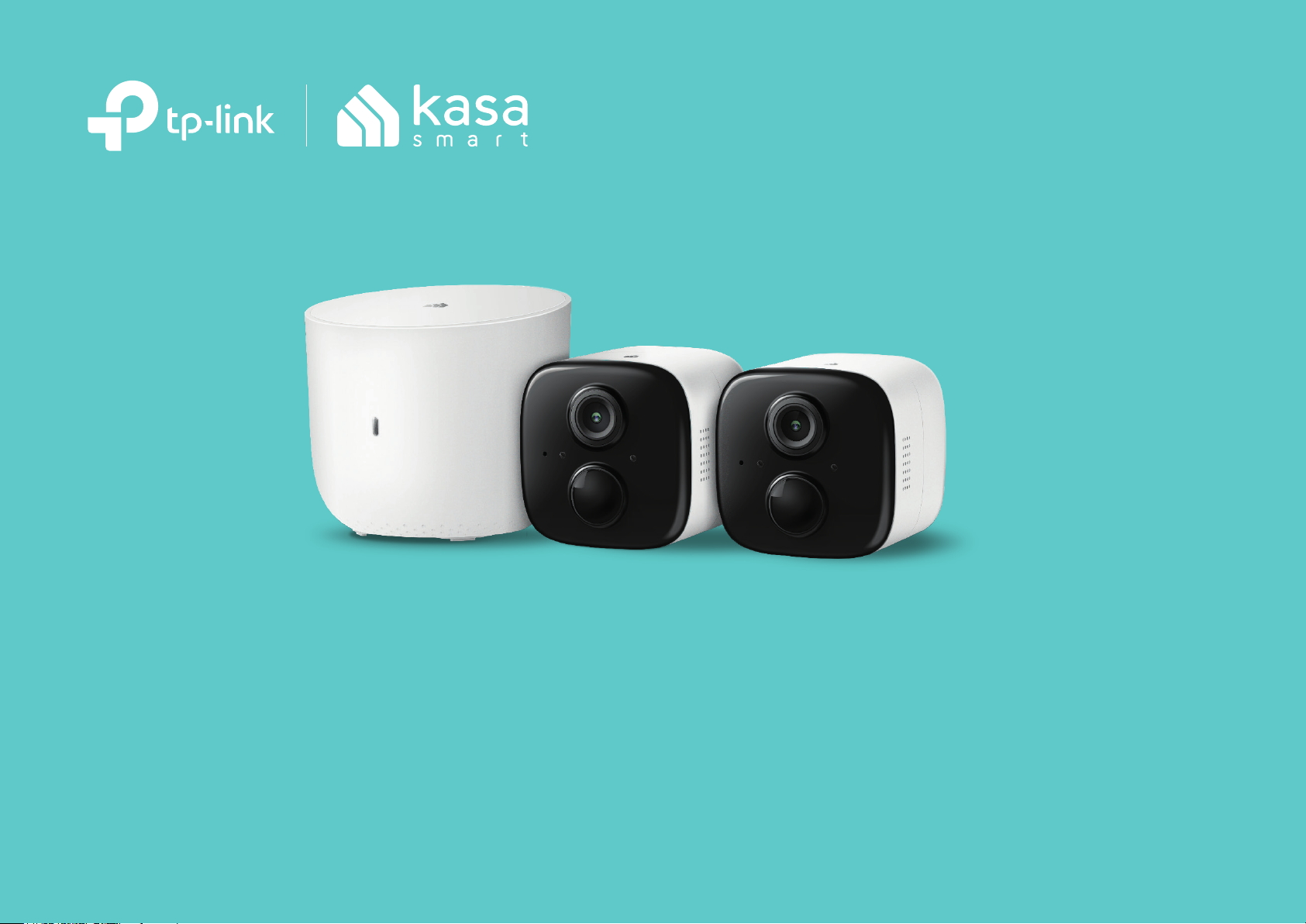
Kasa Spot Wire-Free Camera
1910012638 REV1.0.0
Page 2

Contents
About This Guide ··························································1
Introduction ·····································································2
Appearance ·····································································3
Set Up Your Camera ···················································· 5
View Your Camera ························································7
Congure Your Camera ············································· 8
Check Activity Notications ···································9
Work with Other Smart Home Products ·······10
Authentication ·····························································11
Page 3
About This Guide
This guide provides a brief introduction to the Indoor/Outdoor Security Camera System and the Kasa app, as well as regulatory information.
Please note that features of the product may vary slightly depending on the model and software version you have, and on your location, language and
internet service provider. All images, parameters and descriptions documented in this guide are used for demonstration only.
Conventions
In this guide, the following convention is used:
Convention Description
Camera
Hub
Teal
Underline
Stands for
Stands for
Key information appears in teal, including management page text such as menus, items, buttons and so on.
Hyperlinks are in teal and underlined. You can click to redirect to a website.
Kasa Spot Wire-Free Camera.
Kasa Spot Camera Hub.
More Info
• Specications can be found on the product page at https://www.tp-link.com.
• Our Technical Support and troubleshooting information can be found at https://www.tp-link.com/support.
1
Page 4

Introduction
An 2-Camera System generally includes one Kasa Spot Camera Hub and two Kasa Spot Wire-Free Cameras. Free of cords and wiring hassles, the
Kasa Spot Wire-Free Camera can be congured and customized for the best angle, no matter inside or out. Access live wide-angle, crystal clear 1080p
video directly on your mobile devices. Customize your motion sensitivity and congure up to 4 custom activity zones, at no charge, and receive alerts
that matter.
• Crystal Clear Video
Sharp and clear 1080p video makes sure you never miss a thing.
• Rechargeable Lithium Ion Battery
High capacity battery with optimized battery life for a longer and smarter experience.
• Activity Zones
Control what notications you receive by creating up to 4 custom activity zones, at no charge, around areas that are important to you.
• Wide Angle Field of View
130-degree wide angle lens lets you see more without the need for repositioning.
• Two-Way Audio
Use crisp 2-way audio to communicate with the delivery person at your front door or use the camera’s siren to scare away intruders.
• Easy Install
Place your camera on the table or use the security mount to screw it into a hard surface. Easily congure the camera for the best angle.
• Placement Freedom
Wire-Free or Wired, the wire-free camera gives you freedom to take the camera anywhere you want.
• Night Vision
At night, the camera will detect activity up to 25 ft. away with night vision.
• Notications That Matter
With motion and sound detection, the Kasa Smart app alerts you of activity that matters and sends notications straight to your smartphone.
• Watch from Anywhere
Watch live video at any time on your mobile devices with the free Kasa Smart app.
• IP65 Certied Weatherproof
IP65 rating ensures your device will be protected against rain and dust.
2
Page 5
!
Appearance
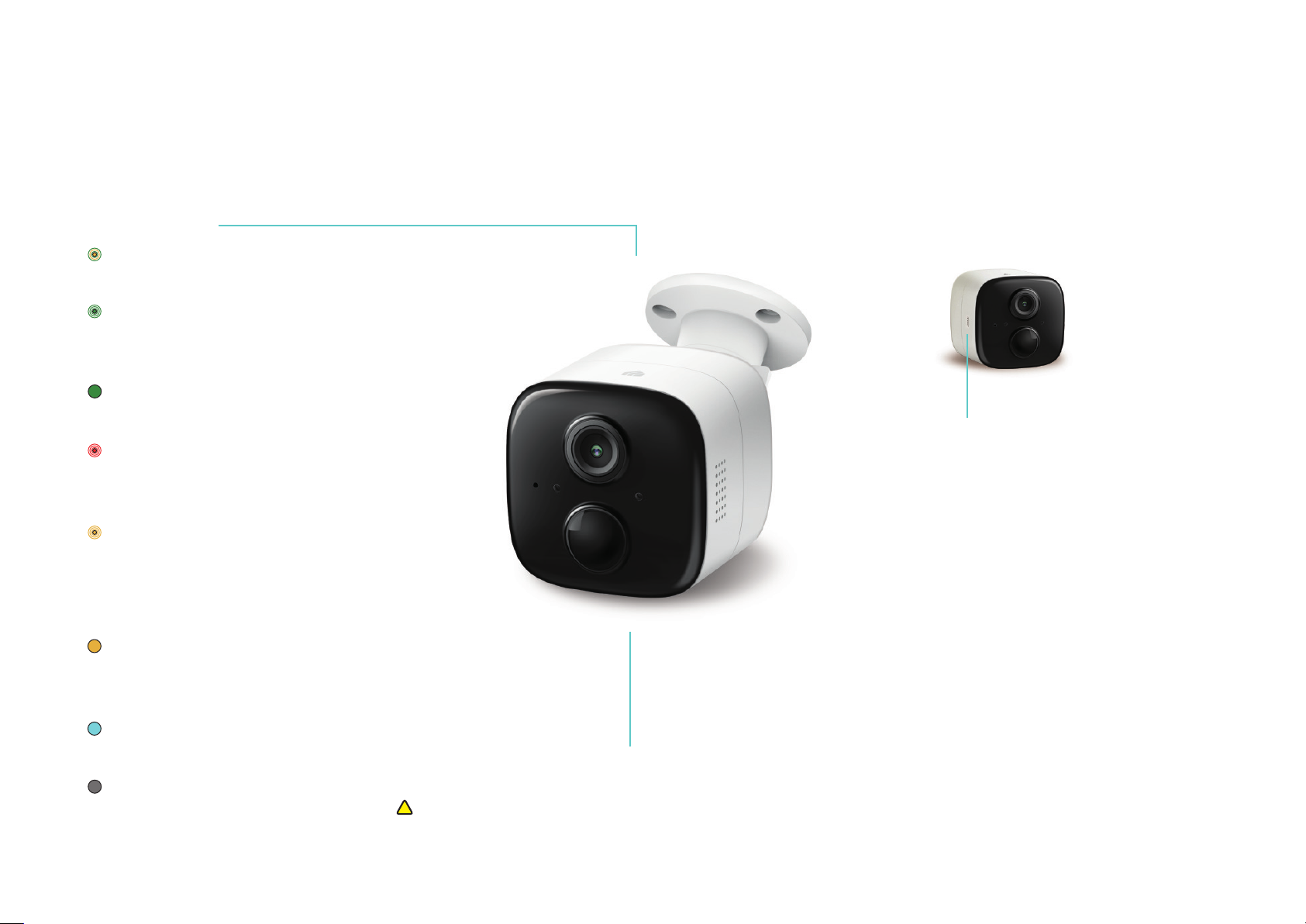
Kasa Spot Wire-Free Camera has a System LED that changes color according to its status, speakers and microphone, and a Sync button. See the
explanation below:
System LED
• Alternating amber and green:
Powering on or starting up
• Flashing green:
Connecting to hub (Discovery
mode)
• Solid green:
Connected to hub
• Quick ashing red:
Failed to connect to or sync with
hub
• Quick ashing amber:
Firmware updating
Flashing amber once per second:
Factory resetting
• Solid amber:
No connection, initializing, or
rebooting
• Solid blue:
Battery starts charging
• O:
No power or Status LED o
SYNC button
• Press the button:
Power on the camera
• Press for 1 second during Discovery
mode:
Initiates the syncing process with hub
• Press and hold for about 5 seconds:
Power o the camera
• Press and hold for about 15 seconds:
Resets the camera to factory settings
Speaker and Microphone
Built-in internal speaker and microphone are protected by the waterproof membrane.
Warning: Do NOT insert objects into the holes!
3
Page 6
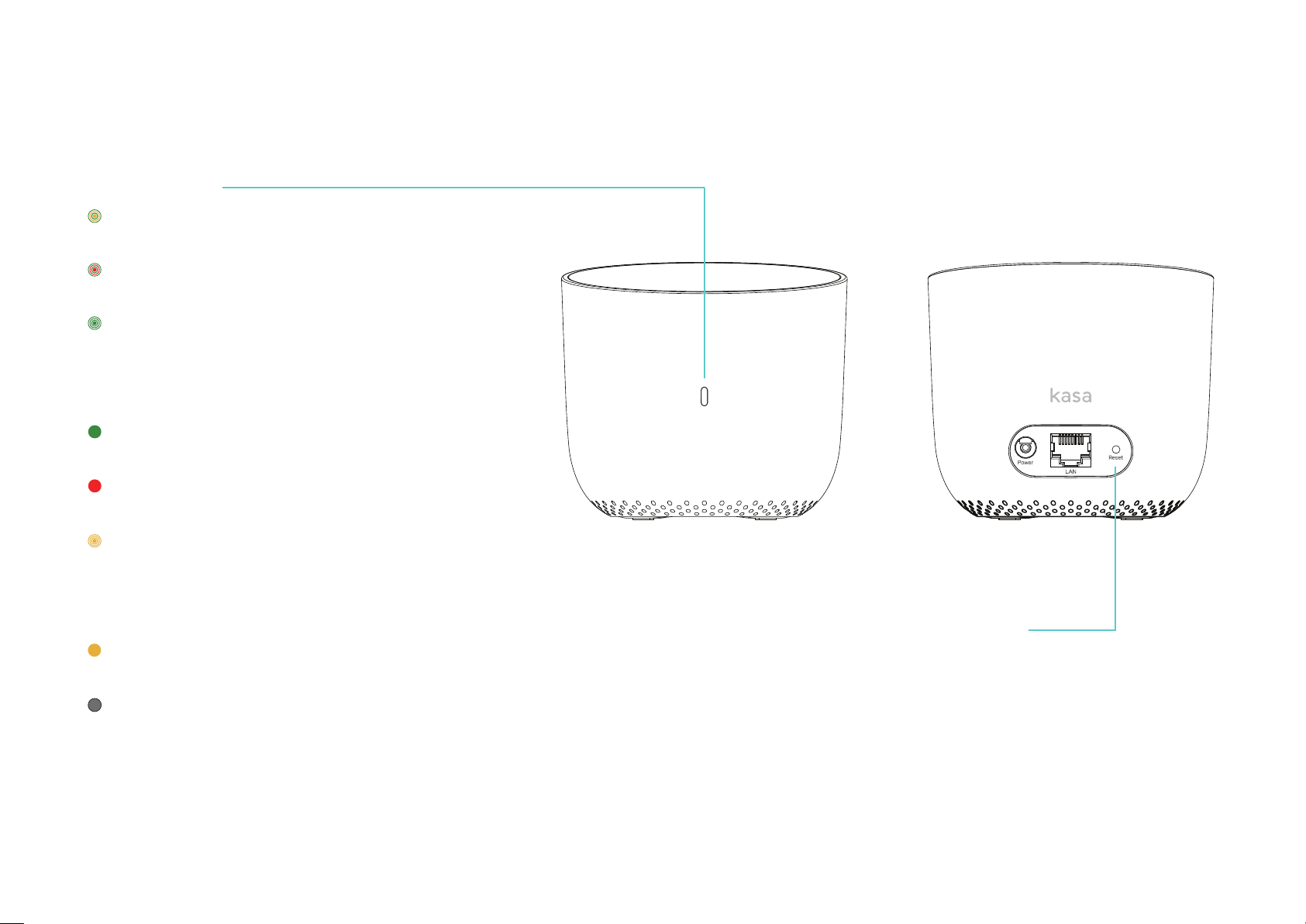
Kasa Spot Camera Hub has a System LED that changes color according to its status and a Reset button. See the explanation below:
System LED
• Alternating amber and green:
Connected to home router but no internet connection
• Alternating red and green:
Not connected to home router and internet
• Quick ashing green:
Camera attempting to sync with hub (Discovery mode)
Flashing green once per second:
Connected to home router and internet
• Solid green:
Camera connected to hub
• Solid red:
Camera too far from hub
• Quick ashing amber:
Firmware updating
Flashing amber once per second:
Factory resetting
• Solid amber:
Powering on or starting up
• O:
Communicating with camera and internet, no camera
connected, or no power
Reset button
• Press and hold for about 15 seconds
4
Page 7
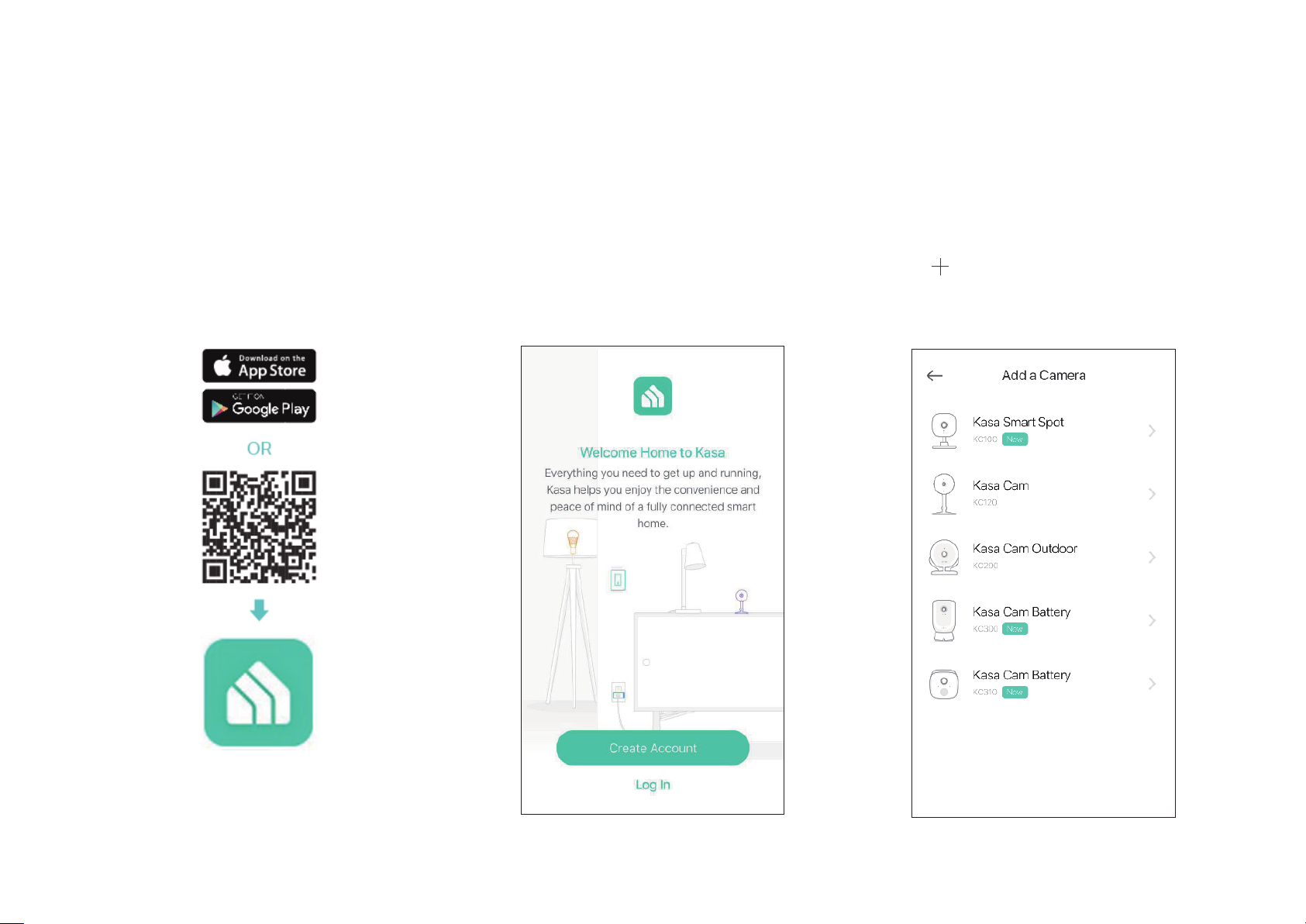
Set Up Your Camera
Follow the steps below to get started with your new camera.
Step 1. Download Kasa
Get the Kasa Smart app from the Apple App
Store or Google Play, or by scanning the QR
code below.
Step 2. Log In
Open the app, and log in with your TP-Link ID.
If you don't have an account, create one rst.
Step 3. Add Camera
Tap the button in the Kasa app, select Add
a Device, then select Cameras > Kasa Cam
Battery. Follow app instructions to add hub
and cameras.
5
Page 8
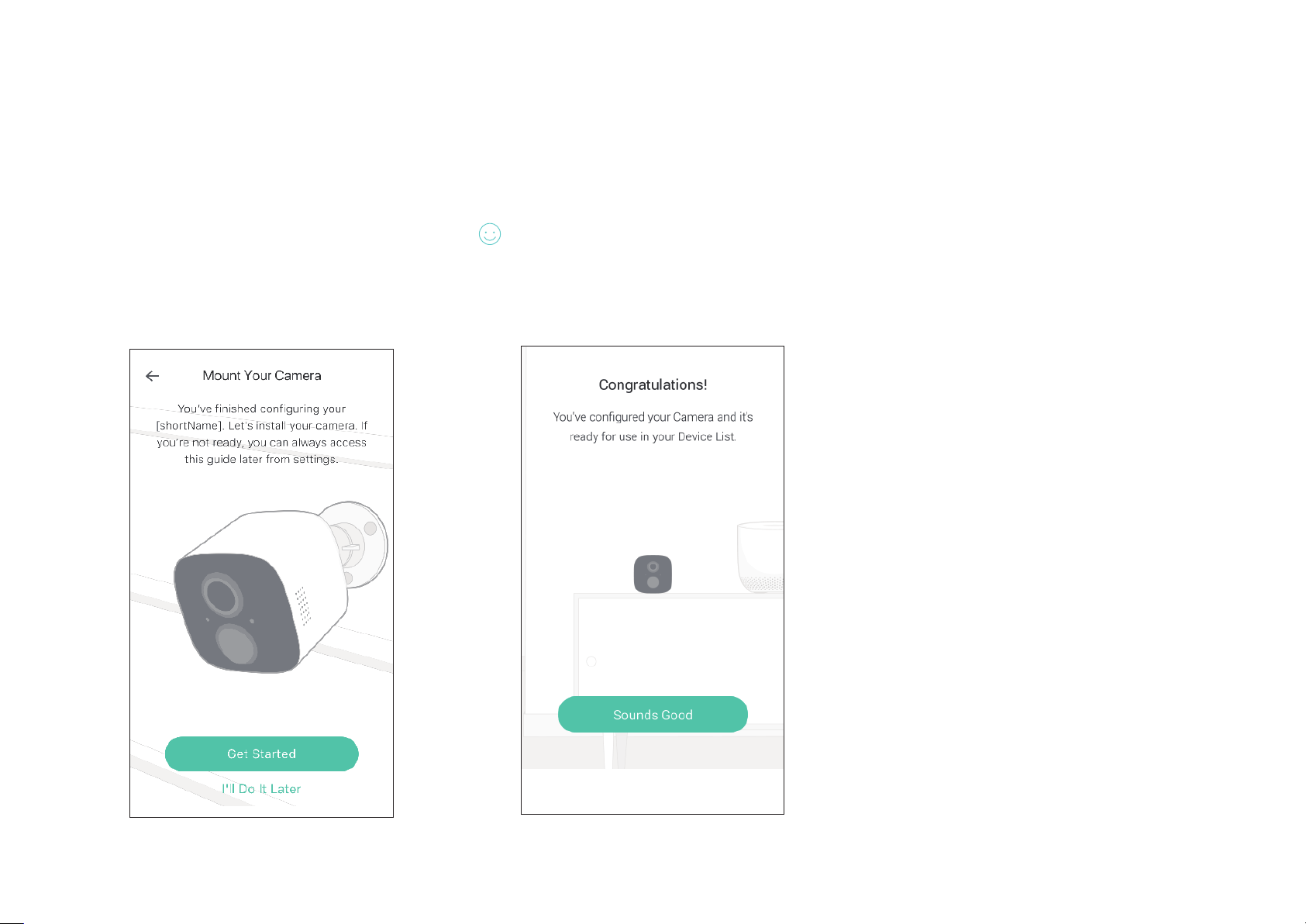
Step 4. Mount Camera
Enjoy!
Follow mounting instructions in the app for
ideal camera placement.
Your camera is ready for use in your device list.
6
Page 9
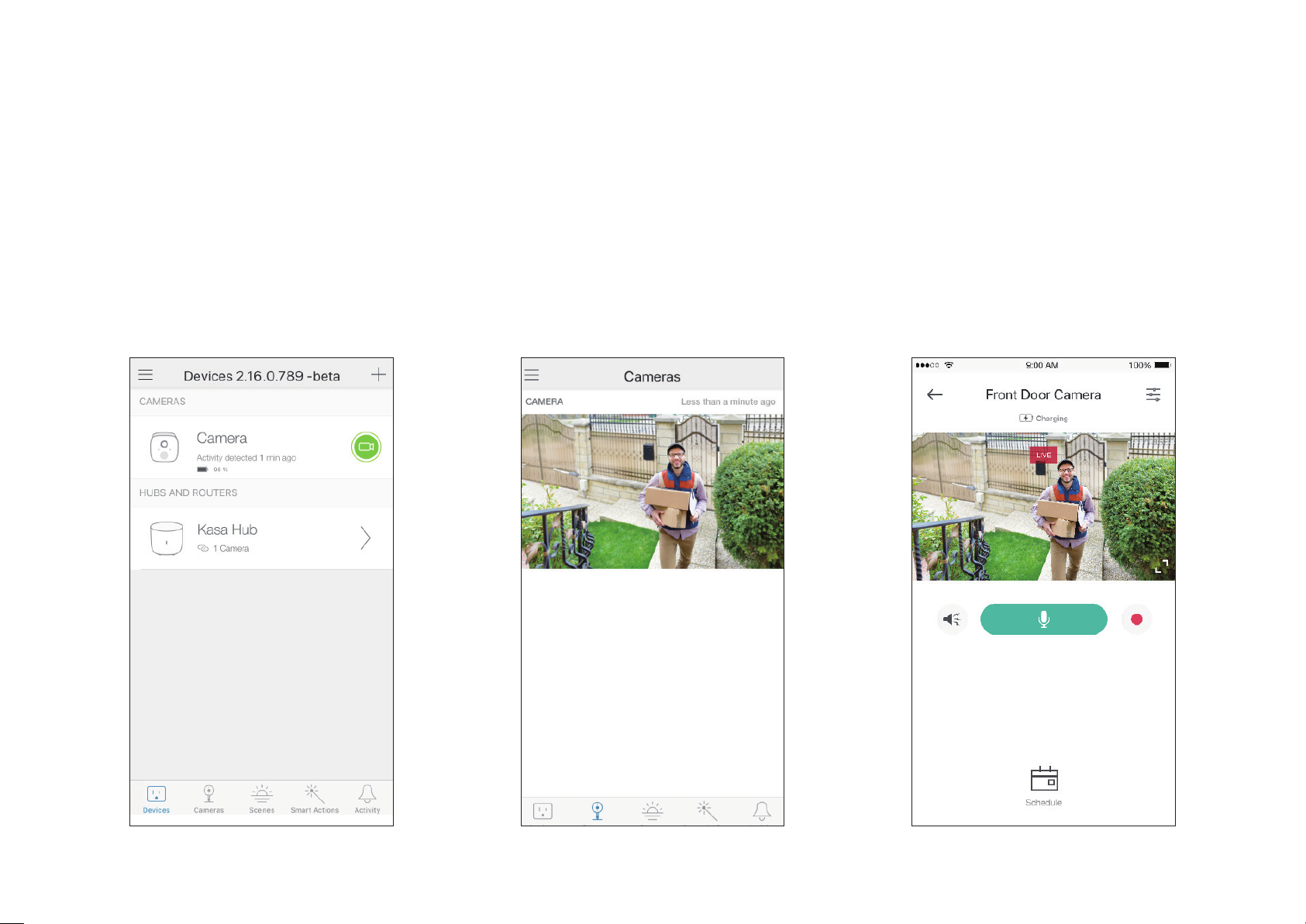
View Your Camera
After initial setup is complete, you can view your camera from anywhere.
View Smart Devices List
Go to the Devices page, then you can view the
list of all your cameras and any other smart
devices if any.
View Cameras List
Go to the Cameras page, then you can view
the list of all your cameras.
View Live Video
Tap a camera on the Devices or Cameras
page, then you can view the live video, talk to
a person near the camera, sound the siren to
scare away intruders, and more.
7
Page 10
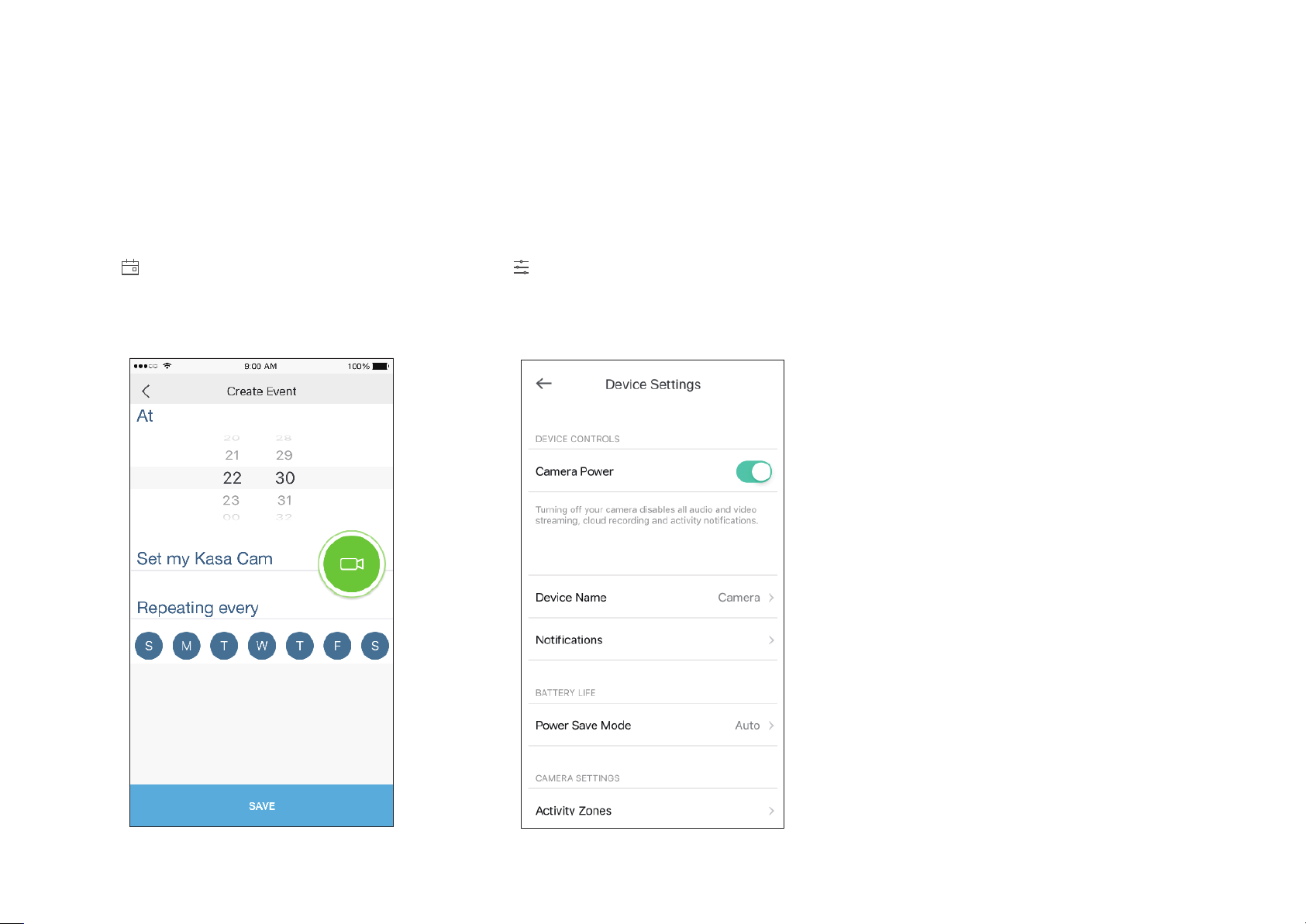
Congure Your Camera
On the live video page, you can congure your camera to meet various needs.
Set Schedule
Tap on the live video page, then you can
schedule an automatic On/Off event for your
camera to simplify your daily routine.
Change Camera Settings
Ta p on the live video page, then you can
view and change camera settings.
8
Page 11
Check Activity Notications
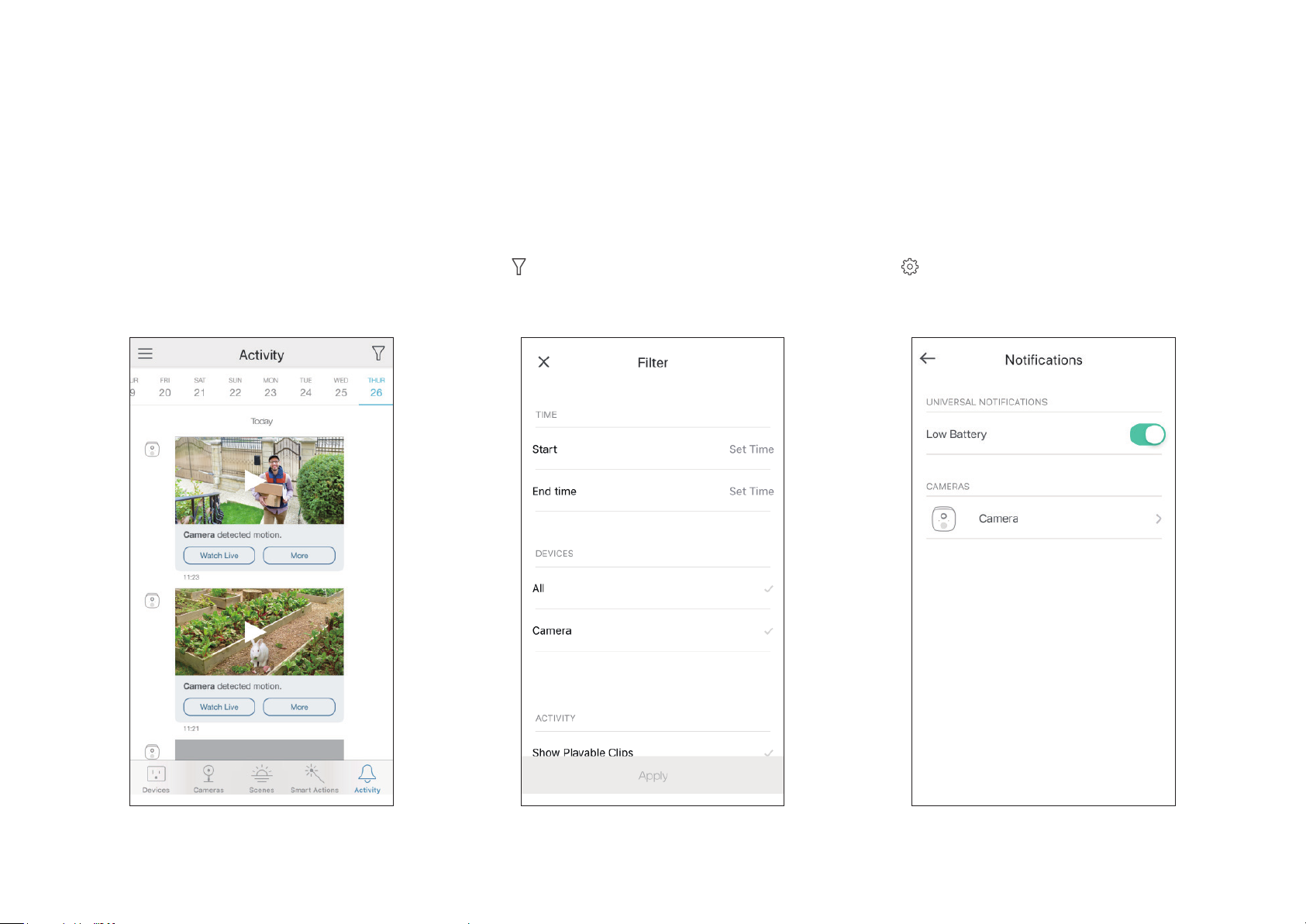
When you receive an activity notication, you can check the live video immediately, or check the recordings at any time.
Check Activity History
Go to the Activity page, then you can view the
activity clips that your camera records.
Filter Activity Clips
Tap on the Activity page, then you can lter
activity clips according to your needs.
Change Notication Settings
Tap on the Activity page, then you can view
and change notication settings.
9
Page 12
Work with Other Smart Home Products
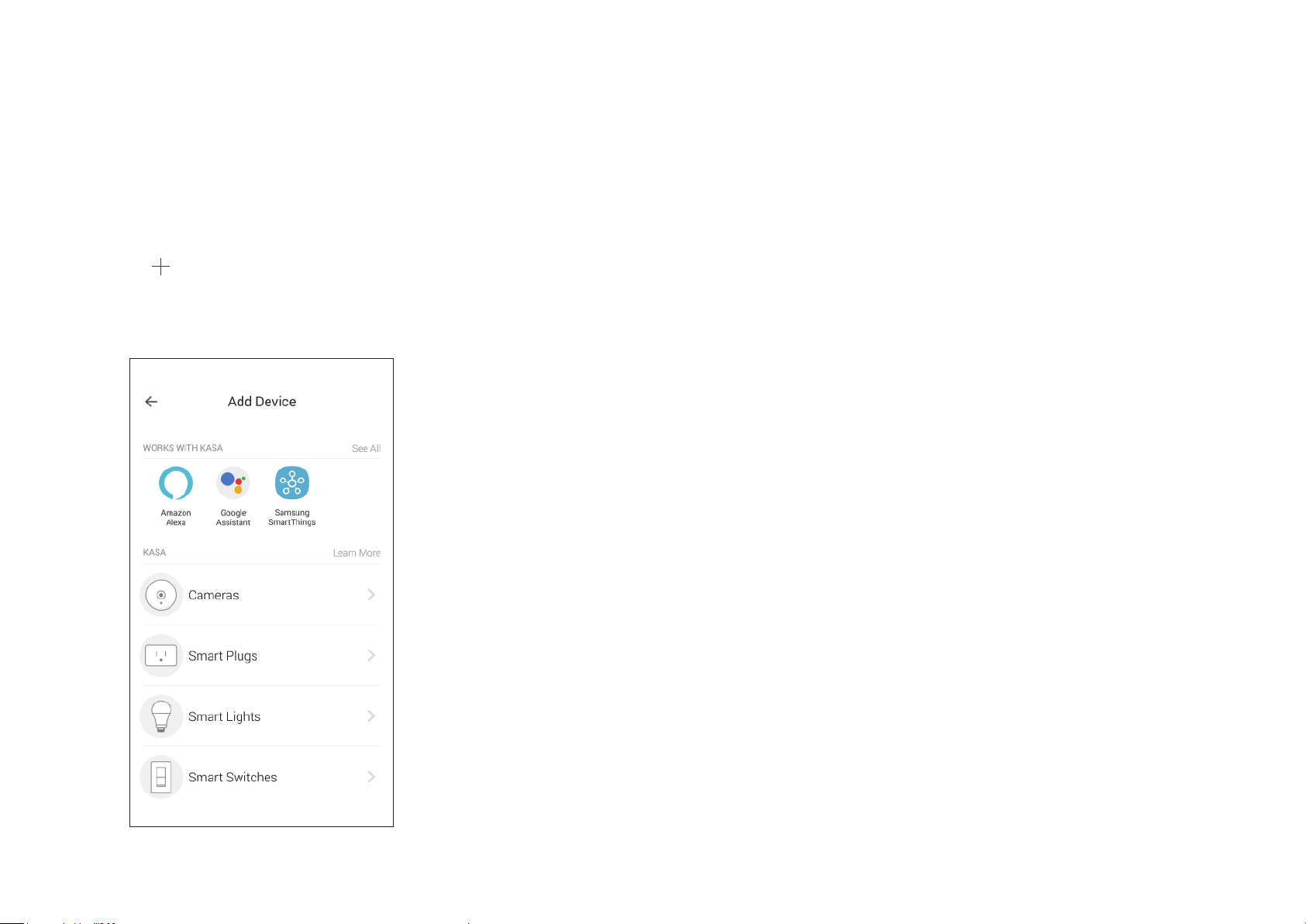
You can control your camera together with other smart home products from TP-Link, Amazon Alexa, Google Assistant, and more.
Add Other Smart Devices
Tap the button on the Devices page, and
add more TP-Link devices or other devices
that work with Kasa.
10
Page 13

Authentication
COPYRIGHT & TRADEMARKS
Specications are subject to change without notice. and Kasa Smart are registered trademarks of TP-Link Technologies Co., Ltd. Other
brands and product names are trademarks or registered trademarks of their respective holders.
No part of the specications may be reproduced in any form or by any means or used to make any derivative such as translation, transformation, or
adaptation without permission from TP-Link Technologies Co., Ltd. Copyright © 2019 TP-Link Technologies Co., Ltd. All rights reserved.
11
Page 14
FCC compliance information statement
Product Name: Kasa Spot Wire-Free Camera
Model Number: KC310
KC310 Accessories: AC Power Adapter for Camera, Lithium Battery, Kasa Spot Camera Hub KH310 and its AC Power Adapter
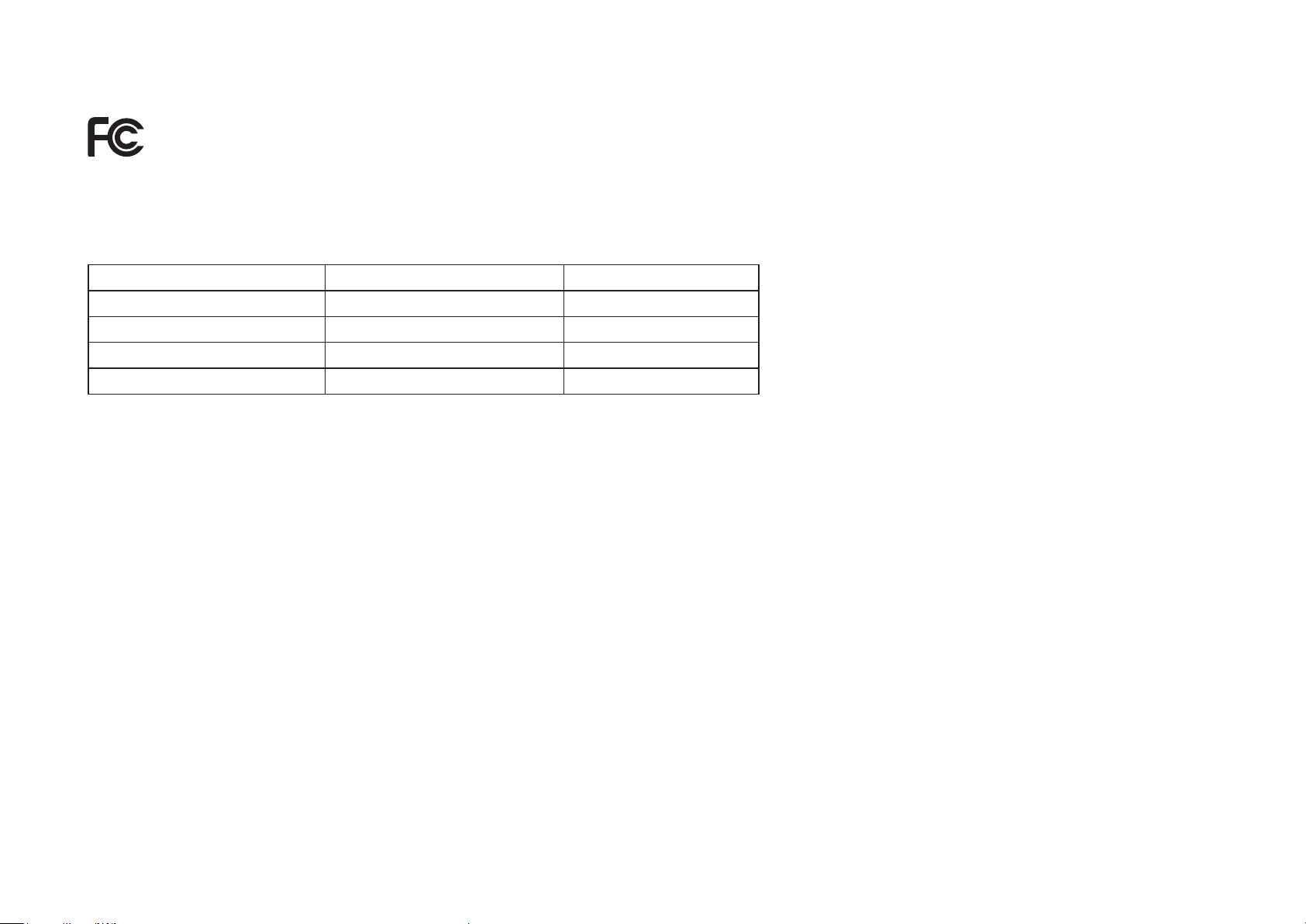
Component Name Model FCC Identier number
AC Power Adapter for Camera A8A-050200U-US1 NA
Lithium Battery KC300L-954642-1S2P NA
Kasa Spot Camera Hub KH310 TE7KH310
AC Power Adapter for Hub AMS195-0900600FU NA
Responsible Party:
TP-Link USA Corporation, d/b/a TP-Link North America, Inc.
Address: 145 South State College Blvd. Suite 400, Brea, CA 92821
Website: http://www.tp-link.com/us/
Tel: +1 626 333 0234
Fax: +1 909 527 6803
E-mail: [email protected]
This equipment has been tested and found to comply with the limits for a Class B digital device, pursuant to part 15 of the FCC Rules. These limits are
designed to provide reasonable protection against harmful interference in a residential installation. This equipment generates, uses and can radiate
radio frequency energy and, if not installed and used in accordance with the instructions, may cause harmful interference to radio communications.
However, there is no guarantee that interference will not occur in a particular installation. If this equipment does cause harmful interference to radio
or television reception, which can be determined by turning the equipment off and on, the user is encouraged to try to correct the interference by
one or more of the following measures:
era System
• Reorient or relocate the receiving antenna.
• Increase the separation between the equipment and receiver.
• Connect the equipment into an outlet on a circuit dierent from that to which the receiver is connected.
12
Page 15

• Consult the dealer or an experienced radio/ TV technician for help.
This device complies with part 15 of the FCC Rules. Operation is subject to the following two conditions:
1. This device may not cause harmful interference.
2. This device must accept any interference received, including interference that may cause undesired operation.
Any changes or modifications not expressly approved by the party responsible for compliance could void the user’s authority to operate the
equipment.
Note: The manufacturer is not responsible for any radio or TV interference caused by unauthorized modications to this equipment. Such modications
could void the user’s authority to operate the equipment.
FCC RF Radiation Exposure Statement
This equipment complies with FCC RF radiation exposure limits set forth for an uncontrolled environment. This device and its antenna must not be colocated or operating in conjunction with any other antenna or transmitter.
“To comply with FCC RF exposure compliance requirements, this grant is applicable to only Mobile Configurations. The antennas used for this
transmitter must be installed to provide a separation distance of at least 20 cm from all persons and must not be co-located or operating in conjunction
with any other antenna or transmitter.”
We, TP-Link USA Corporation, has determined that the equipment shown as above has been shown to comply with the applicable technical
standards, FCC part 15. There is no unauthorized change is made in the equipment and the equipment is properly maintained and operated.
Issue Date: 2019-08-26
FCC compliance information statement
Product Name: Kasa Spot Camera Hub
Model Number: KH310
Responsible Party:
TP-Link USA Corporation, d/b/a TP-Link North America, Inc.
Address: 145 South State College Blvd. Suite 400, Brea, CA 92821
Website: http://www.tp-link.com/us/
Tel: +1 626 333 0234
Fax: +1 909 527 6803
E-mail: [email protected]
This equipment has been tested and found to comply with the limits for a Class B digital device, pursuant to part 15 of the FCC Rules. These limits are
designed to provide reasonable protection against harmful interference in a residential installation. This equipment generates, uses and can radiate
13
Page 16

radio frequency energy and, if not installed and used in accordance with the instructions, may cause harmful interference to radio communications.
However, there is no guarantee that interference will not occur in a particular installation. If this equipment does cause harmful interference to radio
or television reception, which can be determined by turning the equipment off and on, the user is encouraged to try to correct the interference by
one or more of the following measures:
• Reorient or relocate the receiving antenna.
• Increase the separation between the equipment and receiver.
• Connect the equipment into an outlet on a circuit dierent from that to which the receiver is connected.
• Consult the dealer or an experienced radio/ TV technician for help.
This device complies with part 15 of the FCC Rules. Operation is subject to the following two conditions:
1. This device may not cause harmful interference.
2. This device must accept any interference received, including interference that may cause undesired operation.
Any changes or modifications not expressly approved by the party responsible for compliance could void the user’s authority to operate the
equipment.
Note: The manufacturer is not responsible for any radio or TV interference caused by unauthorized modications to this equipment. Such modications
could void the user’s authority to operate the equipment.
FCC RF Radiation Exposure Statement
This equipment complies with FCC RF radiation exposure limits set forth for an uncontrolled environment. This device and its antenna must not be colocated or operating in conjunction with any other antenna or transmitter.
“To comply with FCC RF exposure compliance requirements, this grant is applicable to only Mobile Configurations. The antennas used for this
transmitter must be installed to provide a separation distance of at least 20 cm from all persons and must not be co-located or operating in conjunction
with any other antenna or transmitter.”
We, TP-Link USA Corporation, has determined that the equipment shown as above has been shown to comply with the applicable technical
standards, FCC part 15. There is no unauthorized change is made in the equipment and the equipment is properly maintained and operated.
Issue Date: 2019-08-26
14
Page 17

FCC compliance information statement
Product Name: AC Power Adapter for Camera / Lithium Battery / AC Power Adapter for Hub
Model Number: A8A-050200U-US1 / KC300L-954642-1S2P / AMS195-0900600FU
Responsible Party:
TP-Link USA Corporation, d/b/a TP-Link North America, Inc.
Address: 145 South State College Blvd. Suite 400, Brea, CA 92821
Website: http://www.tp-link.com/us/
Tel: +1 626 333 0234
Fax: +1 909 527 6803
E-mail: [email protected]
This equipment has been tested and found to comply with the limits for a Class B digital device, pursuant to part 15 of the FCC Rules. These limits are
designed to provide reasonable protection against harmful interference in a residential installation. This equipment generates, uses and can radiate
radio frequency energy and, if not installed and used in accordance with the instructions, may cause harmful interference to radio communications.
However, there is no guarantee that interference will not occur in a particular installation. If this equipment does cause harmful interference to radio
or television reception, which can be determined by turning the equipment off and on, the user is encouraged to try to correct the interference by
one or more of the following measures:
• Reorient or relocate the receiving antenna.
• Increase the separation between the equipment and receiver.
• Connect the equipment into an outlet on a circuit dierent from that to which the receiver is connected.
• Consult the dealer or an experienced radio/ TV technician for help.
This device complies with part 15 of the FCC Rules. Operation is subject to the following two conditions:
1. This device may not cause harmful interference.
2. This device must accept any interference received, including interference that may cause undesired operation.
Any changes or modifications not expressly approved by the party responsible for compliance could void the user’s authority to operate the
equipment.
Note: The manufacturer is not responsible for any radio or TV interference caused by unauthorized modications to this equipment. Such modications
could void the user’s authority to operate the equipment.
We, TP-Link USA Corporation, has determined that the equipment shown as above has been shown to comply with the applicable technical
15
Page 18

standards, FCC part 15. There is no unauthorized change is made in the equipment and the equipment is properly maintained and operated.
Issue Date: 2019-08-26
Canadian Compliance Statement
This device contains licence-exempt transmitter(s)/receiver(s) that comply with Innovation, Science and Economic Development Canada’s licenceexempt RSS(s). Operation is subject to the following two conditions:
1. This device may not cause interference.
2. This device must accept any interference, including interference that may cause undesired operation of the device.
L’émetteur/récepteur exempt de licence contenu dans le présent appareil est conforme aux CNR d’Innovation, Sciences et Développement
économique Canada applicables aux appareils radio exempts de licence. L’exploitation est autorisée aux deux conditions suivantes :
1. L’appareil ne doit pas produire de brouillage;
2. L’appareil doit accepter tout brouillage radioélectrique subi, même si le brouillage est susceptible d’en compromettre le fonctionnement.
Radiation Exposure Statement:
This equipment complies with IC radiation exposure limits set forth for an uncontrolled environment. This equipment should be installed and operated
with minimum distance 20cm between the radiator & your body.
Déclaration d’exposition aux radiations:
Cet équipement est conforme aux limites d’exposition aux rayonnements IC établies pour un environnement non contrôlé. Cet équipement doit être
installé et utilisé avec un minimum de 20 cm de distance entre la source de rayonnement et votre corps.
Industry Canada Statement
CAN ICES-3 (B)/NMB-3(B)
Korea Warning Statements:
해당 무선설비는 운용중 전파혼신 가능성이 있음 .
NCC Notice & BSMI Notice:
注意!
依據 低功率電波輻射性電機管理辦法
16
Page 19
第十二條 經型式認證合格之低功率射頻電機,非經許可,公司、商號或使用者均不得擅自變更頻率、加大功率或變更原設計之特性或功能。
第十四條 低功率射頻電機之使用不得影響飛航安全及干擾合法通行;經發現有干擾現象時,應立即停用,並改善至無干擾時方得繼續使用。前項合法通
信,指依電信規定作業之無線電信。低功率射頻電機需忍受合法通信或工業、科學以及醫療用電波輻射性電機設備之干擾。
安全諮詢及注意事項
• 請使用原裝電源供應器或只能按照本產品注明的電源類型使用本產品。
• 清潔本產品之前請先拔掉電源線。請勿使用液體、噴霧清潔劑或濕布進行清潔。
• 注意防潮,請勿將水或其他液體潑灑到本產品上。
• 插槽與開口供通風使用,以確保本產品的操作可靠並防止過熱,請勿堵塞或覆蓋開口。
• 請勿將本產品置放於靠近熱源的地方。除非有正常的通風,否則不可放在密閉位置中。
• 請不要私自打開機殼,不要嘗試自行維修本產品,請由授權的專業人士進行此項工作。
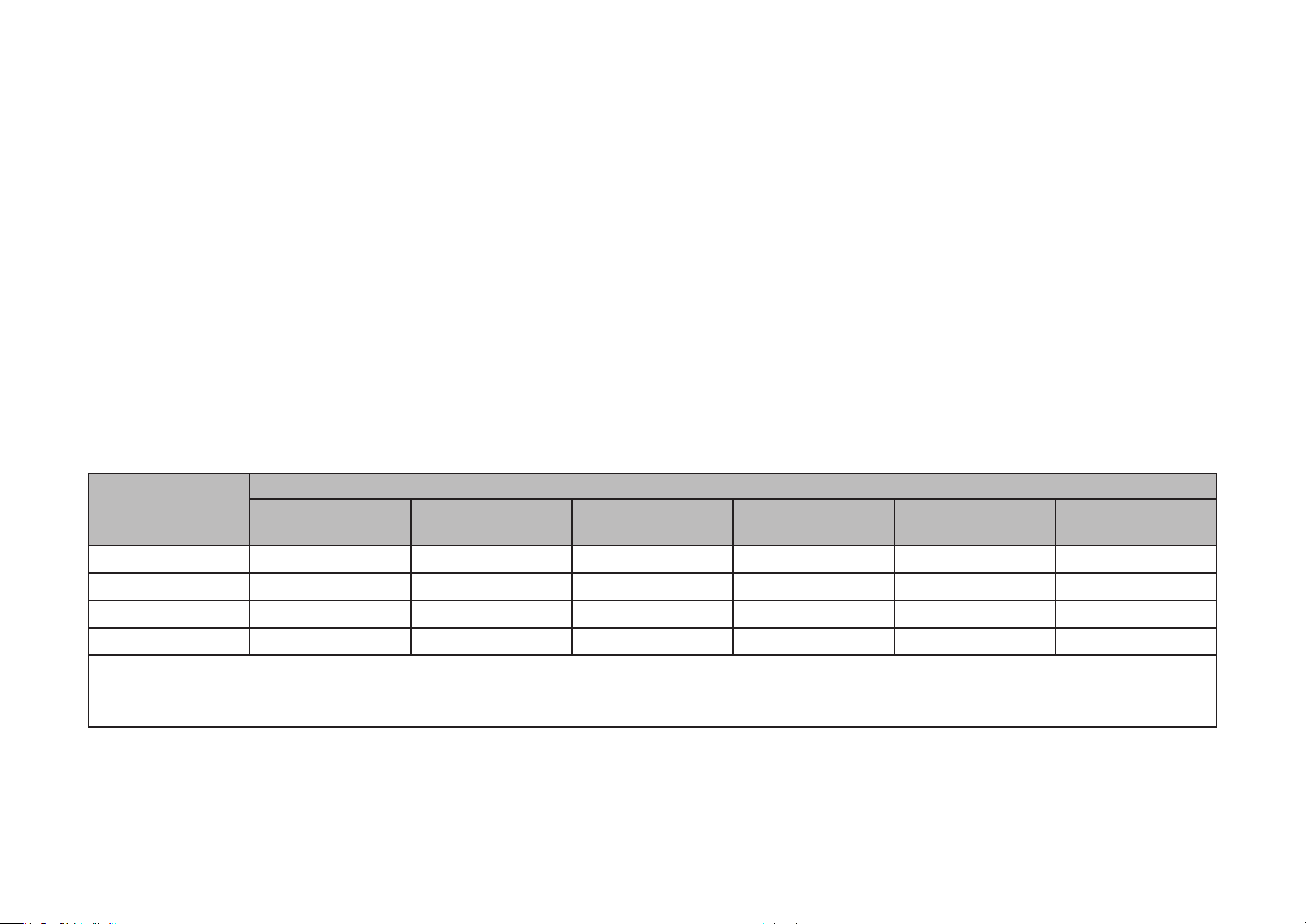
限用物質含有情況標示聲明書
限用物質及其化學符號
產品元件名稱
鉛
Pb
鎘
Cd
汞
Hg
六價鉻
CrVI
多溴聯苯
PBB
PCB ○ ○ ○ ○ ○ ○
外殼 ○ ○ ○ ○ ○ ○
電源供應器 — ○ ○ ○ ○ ○
鋰電池 ○ ○ ○ ○ ○ ○
備考 1. " 超出 0.1 wt %" 及 " 超出 0.01 wt %" 系指限用物質之百分比含量超出百分比含量基準值。
備考 2. " ○ " 系指該項限用物質之百分比含量未超出百分比含量基準值。
備考 3. "—" 系指該項限用物質為排除項目。
Safety Information & Warnings for Camera and Hub
Safety Information
多溴二苯醚
PBDE
17
Page 20

• Keep the device away from water, re, humidity or hot environments.
• Do not attempt to disassemble, repair, or modify the device.
• Do not use damaged charger or USB cable to charge the device.
• Do not use any other chargers than those recommended
• Do not use the device where wireless devices are not allowed.
• Adapter shall be installed near the equipment and shall be easily accessible.
• Do not disassemble, crush, puncture, short external contacts, or dispose of the battery in re or water.
• CAUTION: RISK OF EXPLOSION IF BATTERY IS REPLACED BY AN INCORRECT TYPE. DISPOSE OF USED BATTERIES ACCORDING TO THE
INSTRUCTIONS.
•
Please read and follow the above safety information when operating the device. We cannot guarantee that no accidents or damage will occur due
to improper use of the device. Please use this product with care and operate at your own risk.
Warnings
• Operating Temperature:
• Operating Humidity:
Use only power supplies which are provided by manufacturer and in the original packing of this product. If you have any questions, please
don’t hesitate to contact us.
KC310: -20 ºC-45 ºC (-4°F-113°F)
KH310: 0 ºC-40 ºC (32°F-104°F)
KC310: 40%-80%RH, Non-condensing
KH310: 10%-90%RH, Non-condensing
Handling Instructions for Lithium Ion Rechargeable Battery
Please read and follow the handling instructions for the battery before use. Improper use of the battery may cause heat, re explosion, damage or
18
Page 21

capacity deterioration of the battery.
WARNING
• Do not place or leave the battery and equipment in the reach of infants so that they are not able to swallow or mistreat the battery by mistake.
In case of ingestion, consult with a doctor immediately.
• Do not let leaked electrolyte come into contact with eyes or skin.
In such a case, immediately wash the area of contact with clean water and seek help from a doctor.
If not treated soon, prolonged contact may cause serious injury.
• Do not put the battery into a re. Do not use it or leave it in a place near re, heaters, or high temperature sources.
In such a case, the insulator in the battery may be melted, the safety vent and structure may be damaged, or the electrolyte may catch re, all
of which may cause heat generation, explosion, or re.
• Do not submerge the battery in water, or wet the battery.
If the protecting device assembled in the battery is damaged, the battery may be charged with an abnormal current and voltage and may cause
a chemical reaction within the battery, which may result in the cause of heat generation, explosion, or re of the battery.
• Do not use any battery charger not specied by the manufacture, also follow the charge conditions specied by the manufacture.
If the battery is charged under other conditions (a high temperature, a high voltage / current, or an altered charger) not specied by the
manufacture, the battery may become over-charged with an excessive current and cause heat, explosion, or re with abnormal chemical
reactions.
• Do not use, charge, or leave the battery near re or in a car under the blazing sun. Such a high temperature may cause damage of the
protecting device in the battery, which may result in an abnormal reaction, and then heat generation, explosion, or re.
• Do not connect the battery reversed in positive (+) and negative (-) terminals in the charger or equipment.
In case the battery is connected and charged reversely, it may cause heat generation, explosion, or re due to an abnormal chemical reaction.
• Do not let the battery terminals (+ and -) contact a wire or any metal (like a metal necklace or a hairpin) with which it carried or stored together.
In such a case, the battery will be shorted and cause an excessive current, which may result in heat generation, explosion, or re.
• Do not connect the battery directly to an electric outlet or cigarette heater socket in car.
With a high voltage applied, the battery may overheat, explode, or cause re.
• Do not throw or drop the battery.
Strong impact may damage the protecting device, which may cause an abnormal chemical reaction during charging and result in heat
19
Page 22

generation, explosion, or re of the battery.
• Do not drive a nail in, hit with a hammer, or stamp on the battery.
In such a case, the battery may be deformed and shorted, which may cause heat generation, explosion, or re of the battery.
• Do not solder the battery directly.
Heat applied during soldering may damage the insulator of the safety vent and mechanism, which may result in heat generation, explosion, or
re of the battery.
• Do not disassemble or alter the battery.
The battery employs a safety mechanism and a protecting device in order to avoid any danger.
If these are damaged, heat, explosion or re may be caused.
CAUTION
• Do not put the battery in a microwave or a pressure cooker.
Sudden heat may damage the seal of the battery and may cause heat generation, explosion, or re of the battery.
• Do not use the battery with other maker’s batteries, dierent types and / or models of batteries such as dry batteries, nickel-metal hydride
batteries, or nickel-cadmium batteries, or new and old lithium ion batteries together.
In such a case, over-discharge during use, or over-charge during charge may occur abnormal chemical reactions and may cause heat
generation, explosion, or re of the battery.
• Do not leave the battery in a charger or equipment if it generates an odor and /or heat, changes color and / or shape, leaks electrolyte, or
causes any other abnormality.
In such a case, immediately take the battery out of the charge or equipment and keep it away from re, otherwise, the battery might overheat,
explode, or cause re.
• Discontinue charging after specied charging time even if the charge is not complete, otherwise, the battery might cause heat generation,
explosion, or re.
• Do not use the battery in the place where the static electricity (more than the limit of the manufacturer’s guarantee) occurs. Otherwise, the
protecting device in the battery might be damaged and cause heat generation, explosion, or re.
• Do not use the battery in other than the following conditions; otherwise, the battery might cause heat generation, damage, or deterioration of
its performance.
Operating environment:
When the battery is charged: 0℃ ~ +55℃ (Humidity 35 to 85%)
20
Page 23
When stored 1 months: -20℃ ~ +60℃ (Humidity 40 to 80%)
When stored 3 months: -20℃ ~ +45℃ (Humidity 40 to 80%)
When stored 1 year: -20℃ ~ +25℃ (Humidity 40 to 80%)
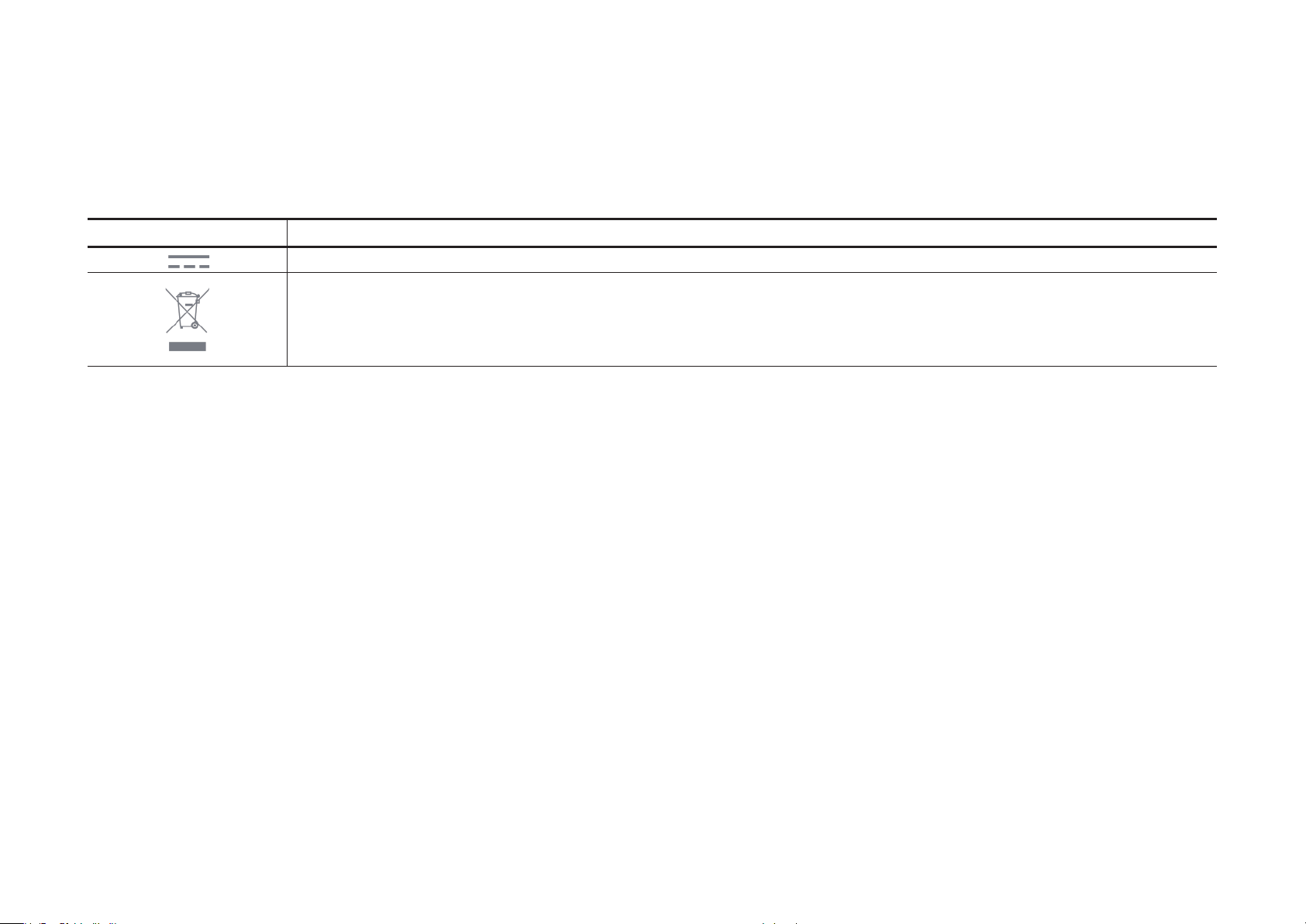
Explanation of the symbols on the product label
Symbol Explanation
DC voltage
RECYCLING
This product bears the selective sorting symbol for Waste electrical and electronic equipment (WEEE). This means that this product must be handled pursuant to
European directive 2012/19/EU in order to be recycled or dismantled to minimize its impact on the environment.
User has the choice to give his product to a competent recycling organization or to the retailer when he buys a new electrical or electronic equipment.
21
 Loading...