

Page 1
TABLE OF CONTENTS
1
Before driving
2
When driving
Interior
3
features
Maintenance
4
and care
When trouble
5
arises
Vehicle
6
specifications
Adjusting and operating features such as door locks,
mirrors, and steering column
Driving, stopping and safe-driving information
Air conditioning and audio systems, as well as other interior features for a comfortable driving experience
Cleaning and protecting your vehicle, performing do-ityourself maintenance, and maintenance information
What to do if the vehicle needs to be towed, gets a flat
tire, or is involved in an accident
Detailed vehicle information
7
For owners
Index
SIENNA_OM_OM45472U_(U)
Reporting safety defects for U.S. owners, and seat belt
and SRS air bag instructions for Canadian owners
Alphabetical listing of information contained in this
manual
1
Page 2

TABLE OF CONTENTS Index
1
Before driving
1-1. Key information
Keys ..................................... 32
1-4. Opening and closing
the windows and moon roof
Power windows................... 144
Quarter windows................. 148
Moon roof ........................... 150
1-2. Opening, closing and locking
the doors
Smart key system................. 36
Wireless remote control ....... 53
Front doors........................... 60
Sliding doors ........................ 67
Back door............................. 82
1-3. Adjustable components
(seats, mirrors, steering
wheel)
Front seats........................... 95
Rear seats.......................... 100
Driving position memory..... 120
Head restraints................... 125
Seat belts........................... 128
Steering wheel ................... 137
Inside rear view mirror........ 138
Outside rear view
mirrors.............................. 140
1-5. Refueling
Opening the fuel tank
cap.................................... 155
1-6. Theft deterrent system
Engine immobilizer
system.............................. 159
Alarm.................................. 162
Theft prevention labels
(for U.S.A.) ....................... 165
1-7. Safety information
Correct driving posture....... 166
SRS airbags ....................... 168
Front passenger occupant
classification system......... 183
Child restraint systems....... 189
Installing child restraints..... 194
2
SIENNA_OM_OM45472U_(U)
Page 3
2
When driving
2-1. Driving procedures
Driving the vehicle............... 212
Engine (ignition) switch
(vehicles without smart
key system)....................... 226
Engine (ignition) switch
(vehicles with smart
key system)....................... 229
Automatic transaxle ............ 236
Turn signal lever ................. 241
Parking brake...................... 242
Horn.................................... 243
2-2. Instrument cluster
and information display
Gauges and meters ............ 244
Indicators and warning
lights ................................. 247
Multi-information display..... 254
2-3. Operating the lights
and wipers
Headlight switch................. 268
Automatic High Beam......... 275
Fog light switch................... 282
Windshield wipers
and washer....................... 284
Rear window wiper
and washer....................... 292
2-4. Using other driving systems
Cruise control..................... 295
Dynamic radar cruise
control .............................. 300
Intuitive parking assist........ 316
Rear view monitor
system.............................. 323
Driving assist systems........ 329
Hill-start assist control........ 335
PCS (Pre-Collision
System)............................ 338
BSM (Blind Spot
Monitor)............................ 346
1
2
3
4
5
SIENNA_OM_OM45472U_(U)
2-5. Driving information
Cargo and luggage............. 358
Vehicle load limits............... 366
Winter driving tips............... 367
Trailer towing (with towing
package) .......................... 371
Dinghy towing..................... 391
6
7
3
Page 4

TABLE OF CONTENTS Index
3
Interior features
3-1. Using the air conditioning
system and defogger
Front manual air
conditioning system.......... 394
Front automatic air
conditioning system.......... 402
Rear manual air
conditioning system.......... 412
Rear automatic air
conditioning system.......... 415
Rear window and outside
rear view mirror defoggers,
and windshield wiper
de-icer.............................. 419
3-2. Using the audio system
Audio system type.............. 421
Using the radio................... 426
Using the CD player........... 436
Playing MP3 and
WMA discs....................... 445
Operating an iPod.............. 456
Operating a USB
memory............................ 463
Optimal use of the audio
system.............................. 471
Using the AUX port ............ 476
Using the steering
switches ........................... 477
Detachable pole
antenna............................ 481
3-3. Using the Bluetooth
®
audio
system
Bluetooth
®
audio
system.............................. 484
Using the Bluetooth
®
audio system .................... 488
Operating a Bluetooth
®
enabled portable player.... 494
®
Setting up a Bluetooth
enabled portable player.... 496
Bluetooth
®
audio system
setup................................. 501
3-4. Using the rear audio system
Rear seat entertainment
system features................ 502
Using the DVD player
(DVD video)...................... 513
Using the DVD player
(video CD) ........................ 523
Using the DVD player
(audio CD/CD text)........... 527
Using the DVD player
(WMA/MP3 discs)............. 528
Using the video mode......... 530
Changing the DVD initial
setting............................... 532
4
SIENNA_OM_OM45472U_(U)
Page 5
3-5. Using the hands-free phone
system (for cellular phone)
Hands-free phone system
(for cellular phone)
features............................. 543
Using the hands-free
phone system
(for cellular phone)............ 548
Making a phone call............ 557
Setting a cellular phone ...... 562
Security and system
setup................................. 567
Using the phone book......... 572
3-6. Using the interior lights
Interior lights list.................. 580
• Personal/interior light
main switch....................... 581
• Personal/interior lights ...... 582
• Personal lights .................. 584
• Rear ceiling lights ............. 584
3-7. Using the storage features
List of storage features....... 586
• Glove boxes ..................... 587
• Console box ..................... 589
• Overhead console............ 592
• Cup holders...................... 593
• Bottle holders ................... 596
• Door pockets.................... 598
• Auxiliary boxes................. 599
3-8. Other interior features
Sun visors........................... 604
Vanity mirrors..................... 605
Clock .................................. 606
Conversation mirror............ 607
Power outlets...................... 608
Seat heaters....................... 612
Armrests............................. 614
Assist grips......................... 616
Rear side sunshades.......... 617
Grocery bag hooks............. 618
Floor mat............................ 620
Luggage compartment
features............................ 622
Garage door opener........... 624
Compass............................ 632
Safety Connect................... 637
1
2
3
4
5
6
SIENNA_OM_OM45472U_(U)
7
5
Page 6

TABLE OF CONTENTS Index
4
Maintenance and care
4-1. Maintenance and care
Cleaning and protecting
the vehicle exterior........... 646
Cleaning and protecting
the vehicle interior............ 651
4-2. Maintenance
Maintenance
requirements.................... 655
General maintenance......... 658
Emission inspection
and maintenance (I/M)
programs.......................... 662
4-3. Do-it-yourself maintenance
Do-it-yourself service
precautions ...................... 663
Hood................................... 667
Positioning a floor jack ....... 669
Engine compartment.......... 671
Tires ................................... 688
Tire inflation pressure......... 699
Wheels ............................... 703
Air conditioning filter........... 706
Wireless remote control/
electronic key battery....... 709
Checking and replacing
fuses ................................ 712
Light bulbs.......................... 725
5
When trouble arises
5-1. Essential information
Emergency flashers............ 738
If your vehicle needs
to be towed....................... 739
If you think something
is wrong............................ 743
Fuel pump shut off
system.............................. 744
5-2. Steps to take in an emergency
If a warning light turns
on or a warning
buzzer sounds.................. 745
If a warning message
is displayed....................... 760
If you have a flat tire
(vehicles with
run-flat tires) ..................... 761
If you have a flat tire
(vehicles with
standard tires) .................. 763
If the engine will not start.... 778
If the shift lever cannot be
shifted from P ................... 780
If you lose your keys........... 782
If the electronic key does
not operate properly......... 783
If the battery is
discharged........................ 786
If your vehicle overheats..... 791
If the vehicle becomes
stuck................................. 794
If your vehicle has
to be stopped in
an emergency................... 796
6
SIENNA_OM_OM45472U_(U)
Page 7
6
Vehicle specifications
Index
6-1. Specifications
Maintenance data
(fuel, oil level, etc.)............ 800
Fuel information.................. 813
Tire information................... 817
6-2. Customization
Customizable features........ 831
6-3. Initialization
Items to initialize ................. 839
7
For owners
Reporting safety defects
for U.S. owners................. 842
Seat belt instructions
for Canadian owners
(in French) ........................ 843
SRS airbag instructions
for Canadian owners
(in French) ........................ 845
Abbreviation list............... 858
1
Alphabetical index............ 860
What to do if... .................. 871
2
3
4
5
6
SIENNA_OM_OM45472U_(U)
7
7
Page 8
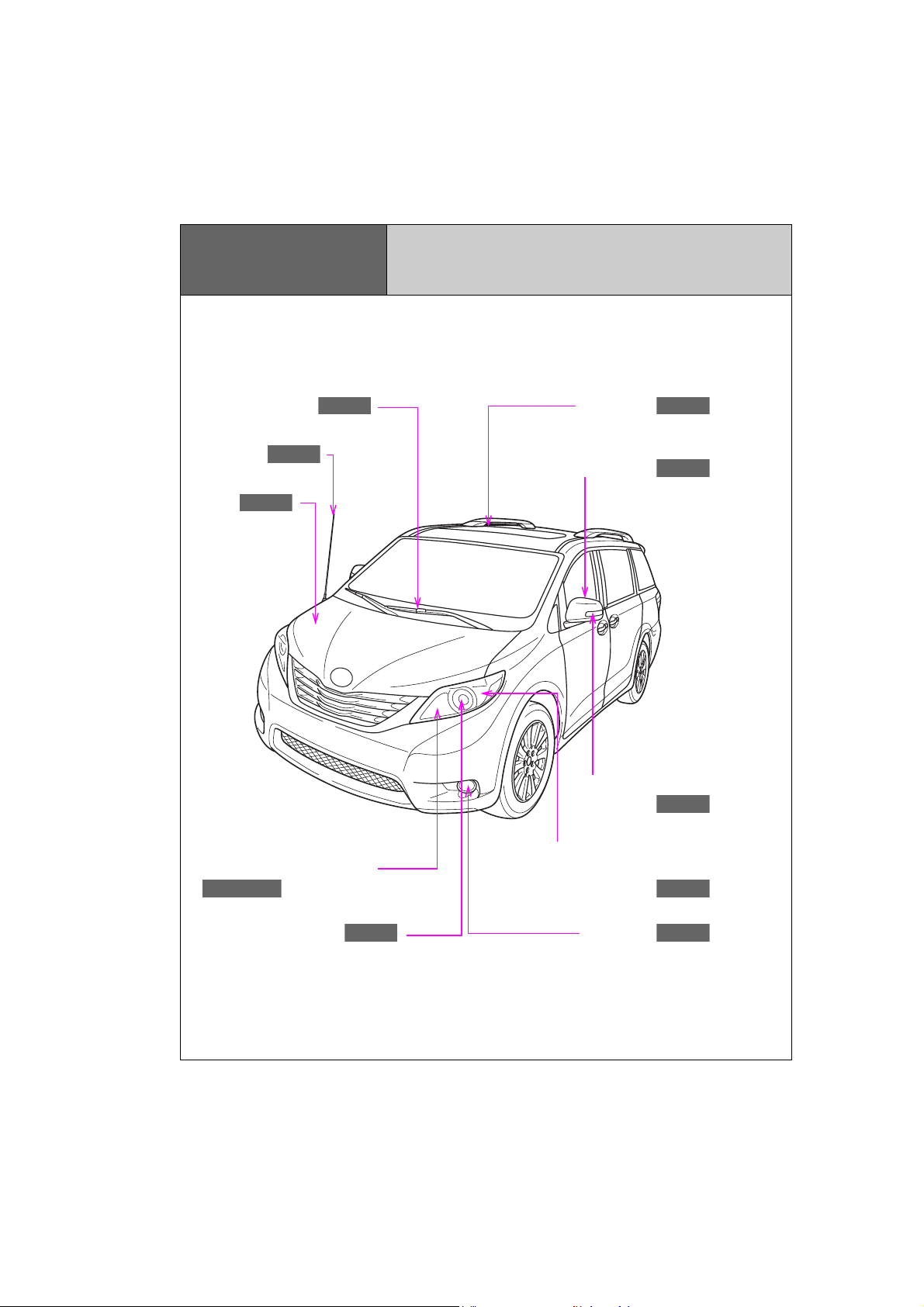
Pictorial index
P. 284
P. 667
P. 150
P. 140
P. 241
P. 268, 272
P. 268
P. 282
P. 481
P. 241
Exterior
Windshield wipers
Antenna
Hood
Headlights (high beam)
and daytime running lights
Moon roof
Outside rear view mirrors
Side turn signal lights
Front turn signal/parking and
front side marker lights
Headlights (low beam)
8
SIENNA_OM_OM45472U_(U)
Fog lights
Page 9
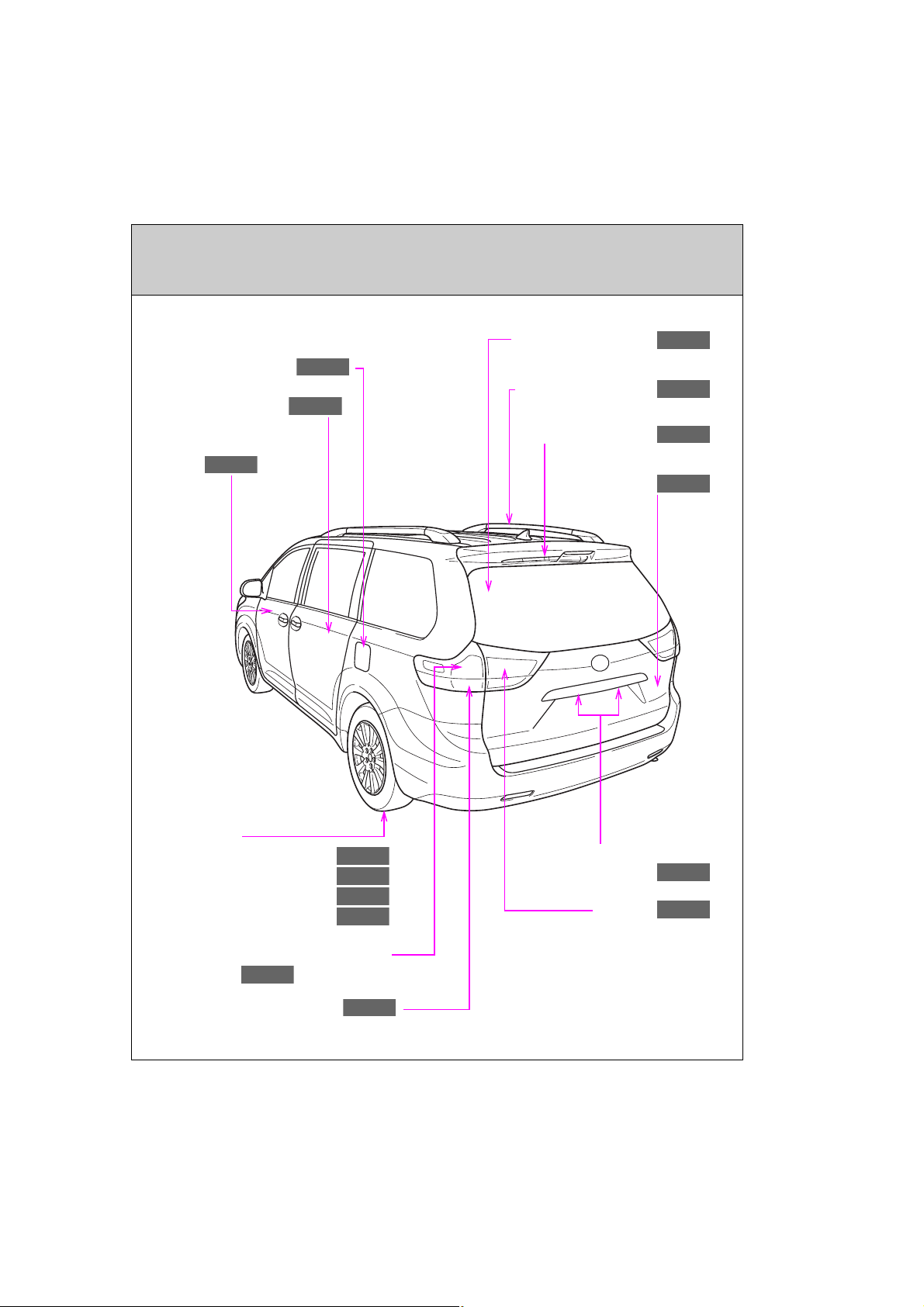
P. 292
Fuel filler door
P. 155
P. 67
P. 358
P. 82
P. 268
P. 268
P. 688
P. 763
P. 699
P. 817
P. 268
P. 241
P. 419
P. 60
Sliding doors
Rear window defogger
Roof luggage carrier
Front doors
Tires
●Rotation
●Replacement
●Inflation pressure
●Information
Rear window wiper
Back door
License plate lights
Tail lights
Stop/tail and rear side marker
lights
Rear turn signal lights
: If equipped
9
SIENNA_OM_OM45472U_(U)
Page 10
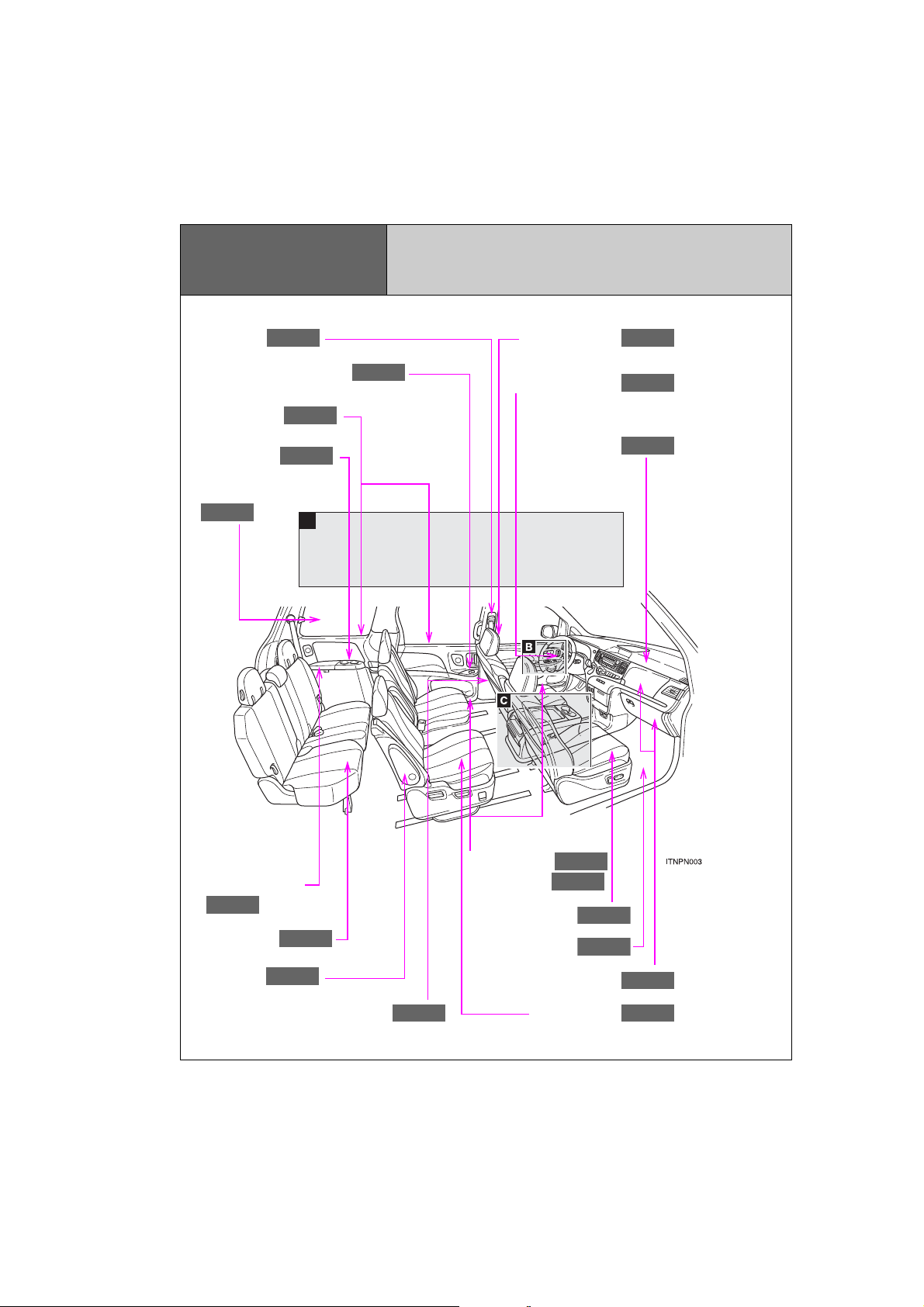
A
Pictorial index
P. 144
P. 128
P. 168
P. 168
P. 125
P. 620
P. 587
P. 617
P. 599
P. 100
P. 100
P. 593
P. 148
P. 614
P. 168
P. 95
P. 596
P. 598
Interior
Seat belts
Power window switches
Sunshades
Cup holders
Quarter windows
Head restraints
SRS driver airbag
SRS front passenger
airbag
Auxiliary boxes
Third seats
Armrests
SRS side airbags
10
SIENNA_OM_OM45472U_(U)
Bottle holders
Door pockets
Front seats
Floor mat
Glove boxes
Second seats
Page 11
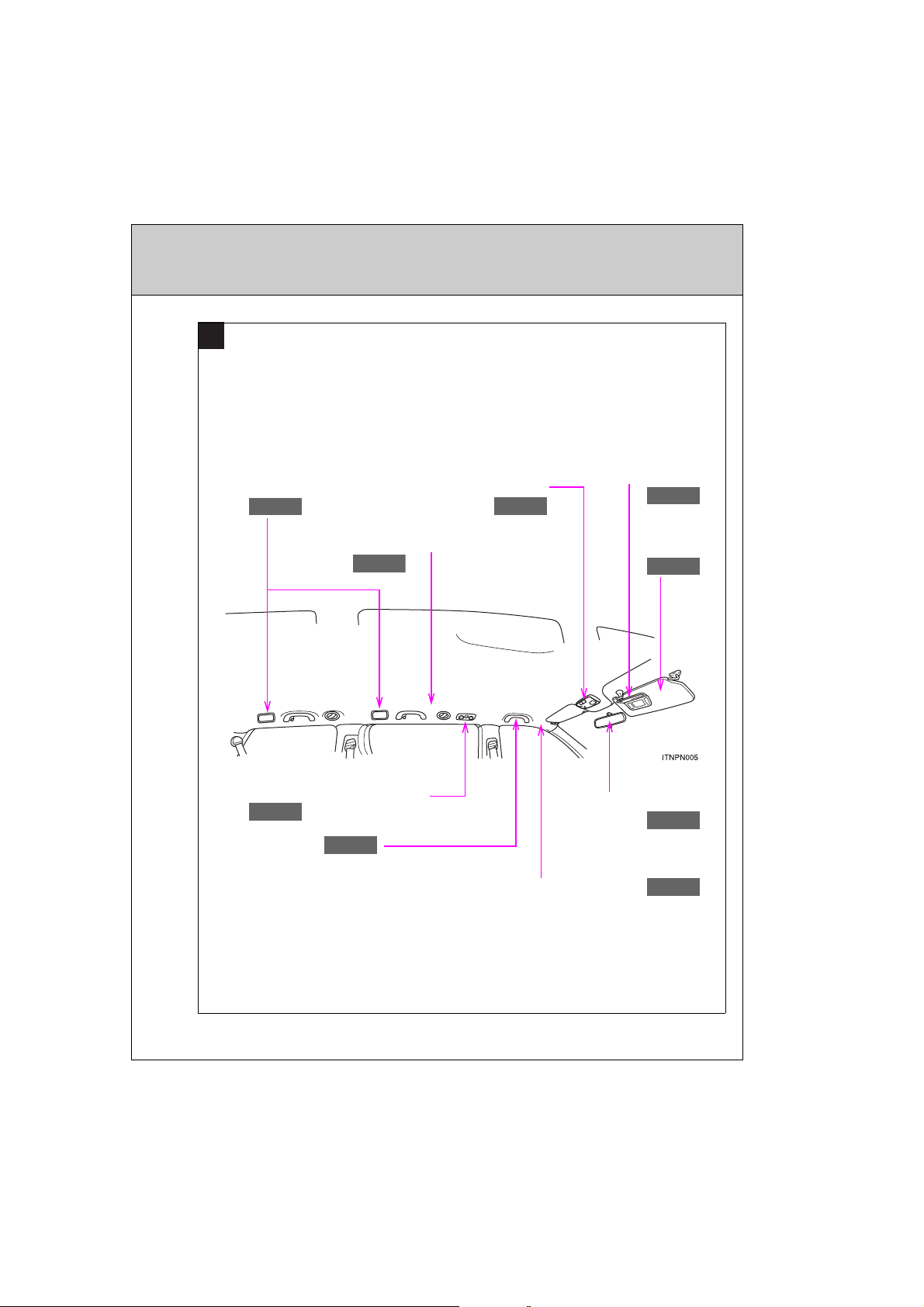
A
P. 412
P. 584
P. 584
P. 605
P. 138
P. 168
P. 604
P. 168
P. 616
Vehicles without overhead consoles
Rear personal light
SRS curtain shield airbags
Rear air conditioning system
Assist grips
Front personal lights
SRS curtain shield airbag
Vanity mirrors
Sun visors
Inside rear view
mirror
: If equipped
11
SIENNA_OM_OM45472U_(U)
Page 12
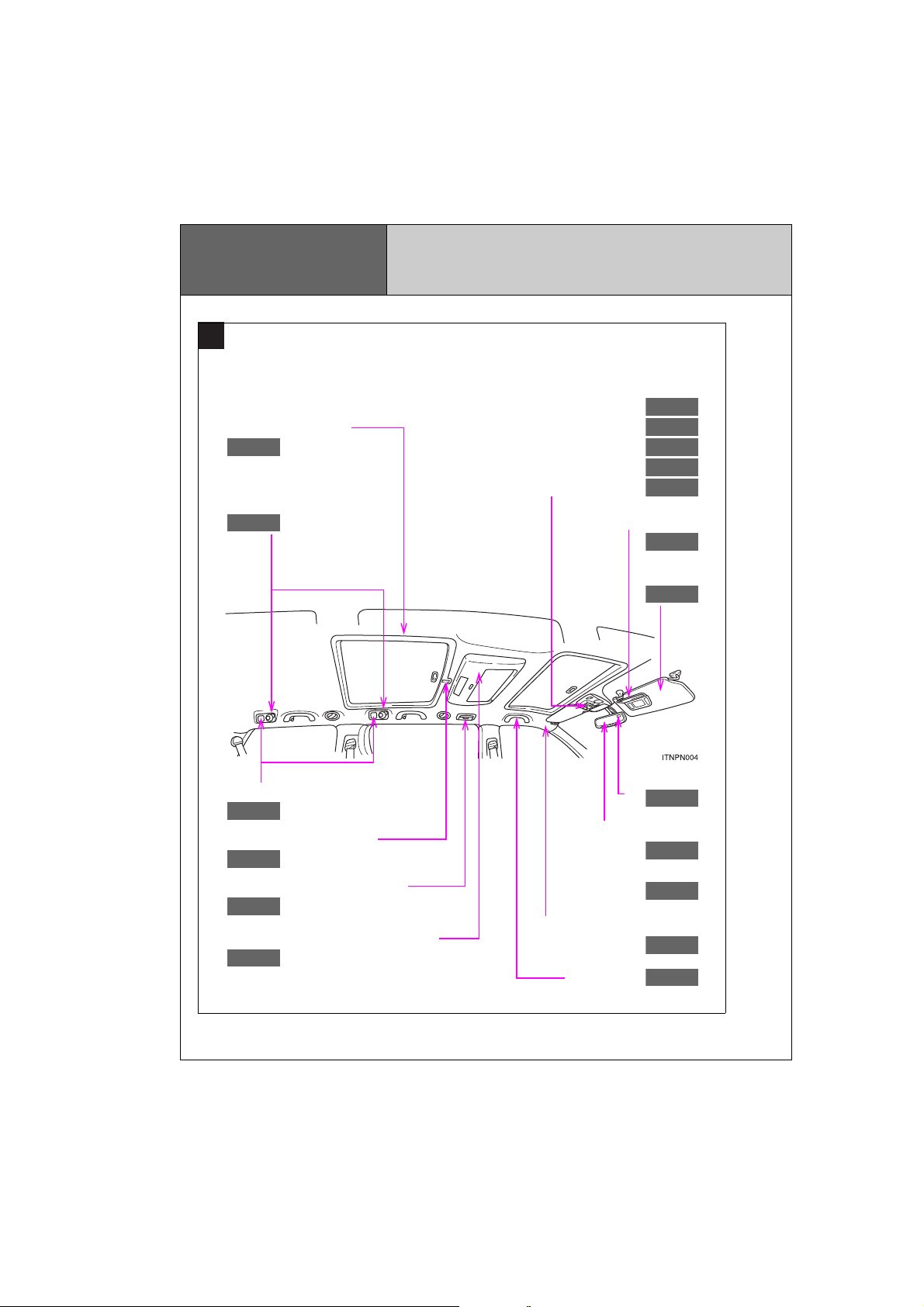
Pictorial index
P. 582
P. 605
P. 415
P. 138
P. 624
P. 580
P. 502
P. 632
P. 581
P. 582
P. 83
P. 68
P. 150
P. 604
P. 584
P. 150
P. 616
P. 168
A
Vehicles with overhead consoles
Rear ceiling lights
Personal/interior lights
Interior
Personal/interior light main switch
Personal/interior lights
Power back door switch
Power sliding door switches
Moon roof switches
Vanity mirrors
Sun visors
Rear interior lights
Rear moon roof switch
Rear air conditioning system
Rear seat entertainment system
12
SIENNA_OM_OM45472U_(U)
Compass
Inside rear view mirror
Garage door opener
SRS curtain shield airbag
Assist grips
Page 13
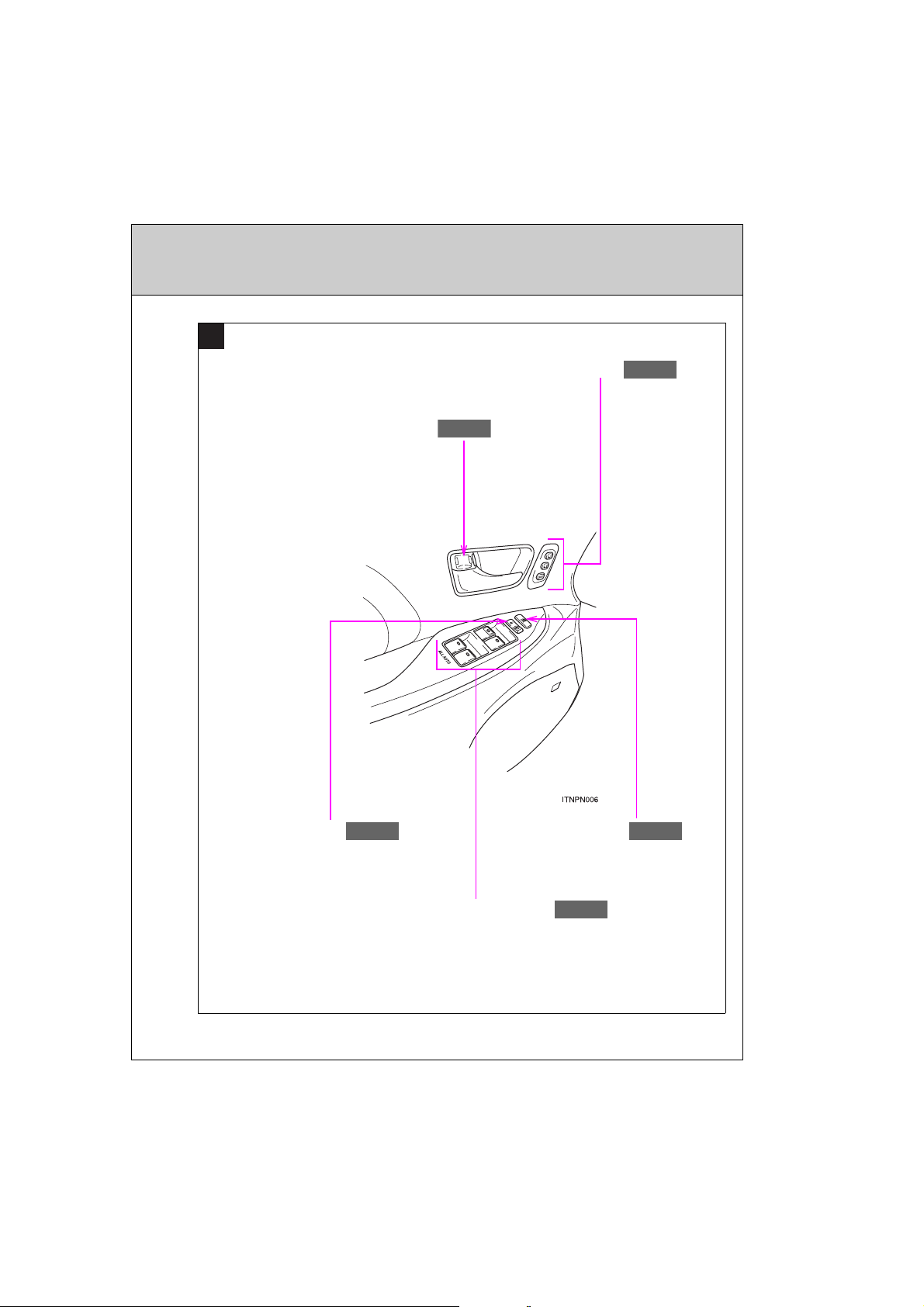
B
P. 61
P. 144
P. 120
P. 61
P. 144
Driving position memory switches
Inside lock button
Door lock switch
SIENNA_OM_OM45472U_(U)
Window lock switch
Power window switches
: If equipped
13
Page 14
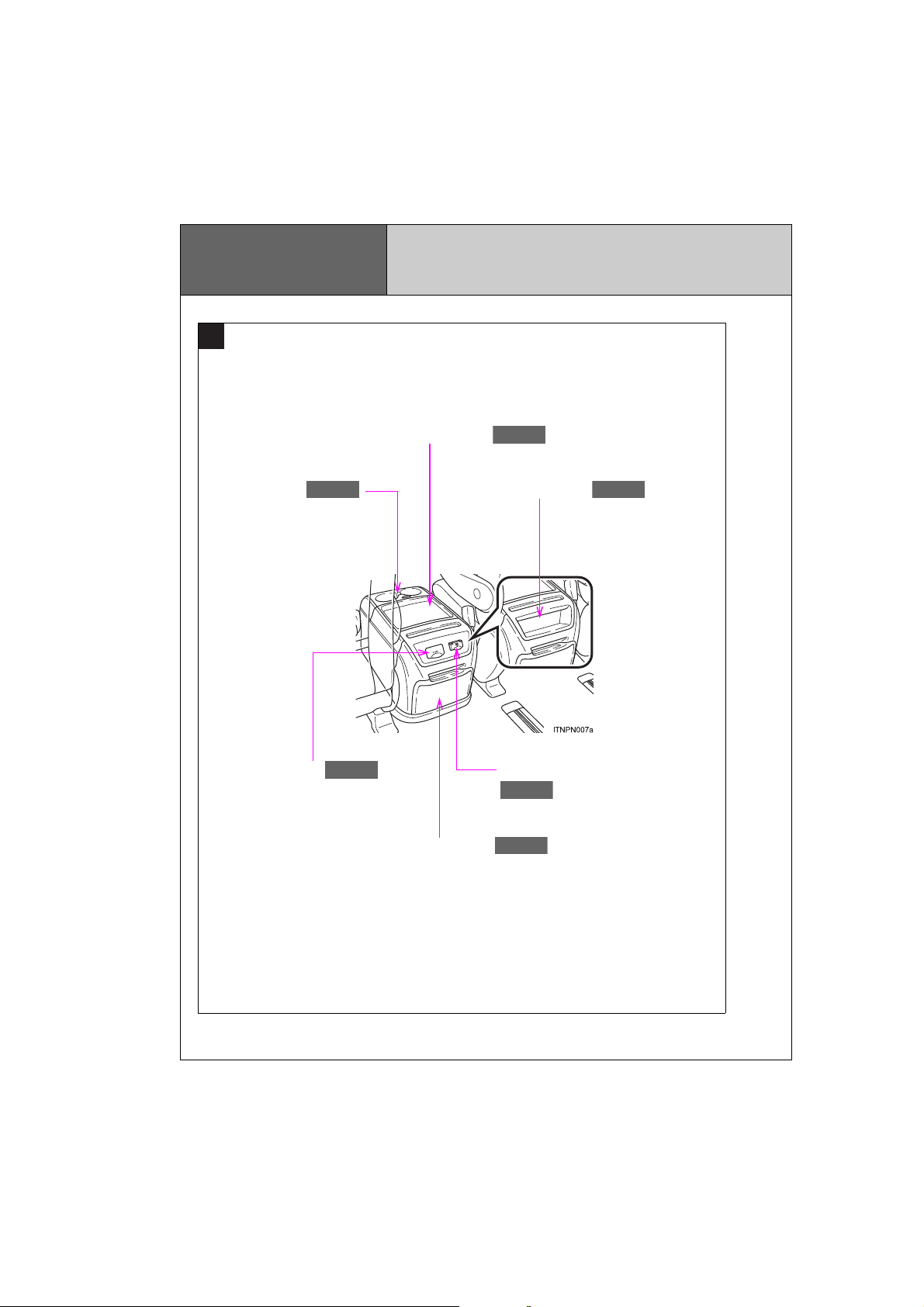
Pictorial index
P. 530
P. 593
P. 608
P. 589
P. 593
P. 599
C
Vehicles with a console box type A
Interior
Console box
Cup holders
A/V input port
Auxiliary box
Power outlet (120 V AC)
Cup holders
14
SIENNA_OM_OM45472U_(U)
Page 15
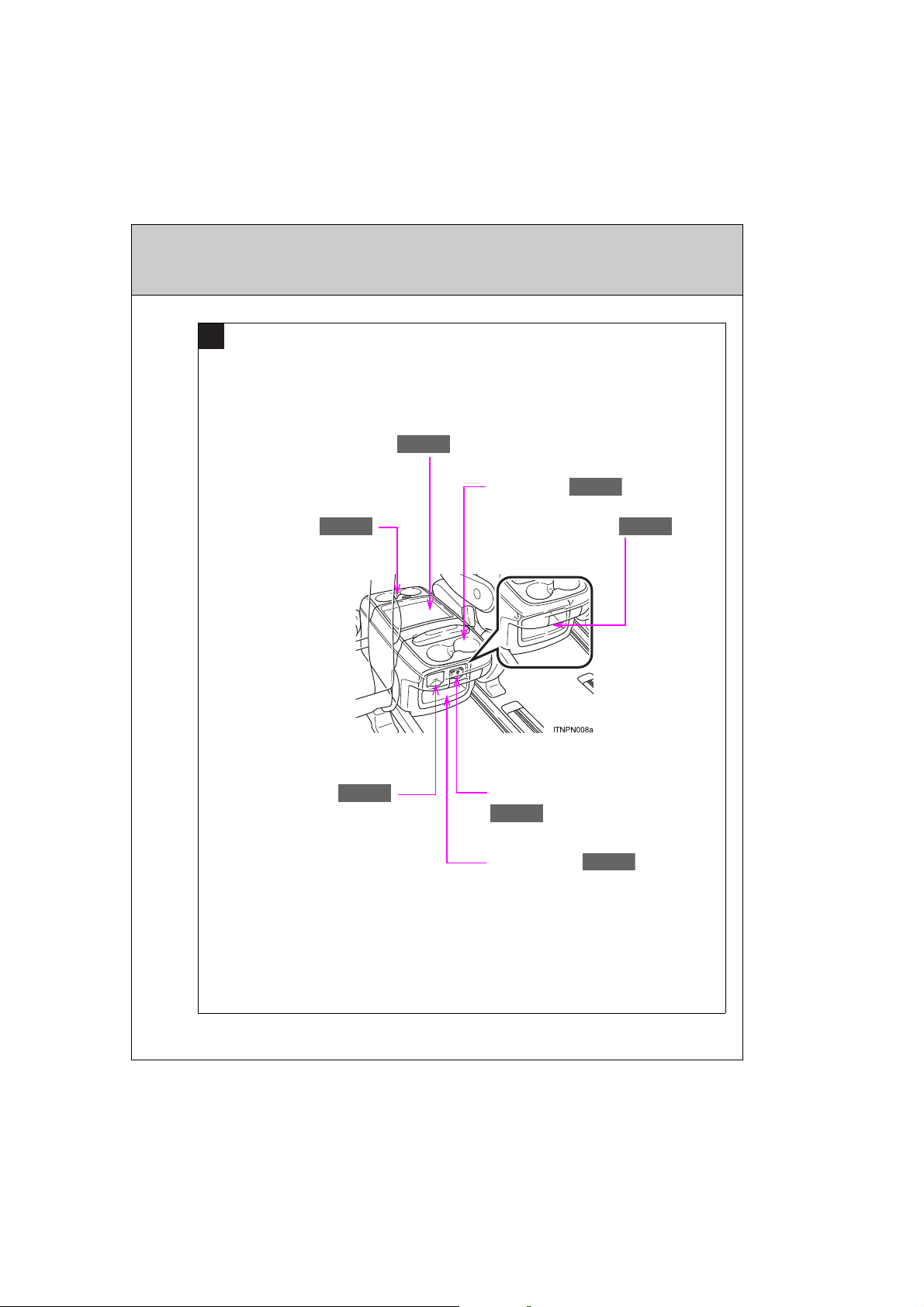
C
P. 530
P. 593
P. 608
P. 589
P. 593
P. 599
P. 599
Vehicles with a console box type B
Console box
Cup holders
Cup holders
A/V input port
Auxiliary box
Power outlet (120 V AC)
Auxiliary box
: If equipped
15
SIENNA_OM_OM45472U_(U)
Page 16
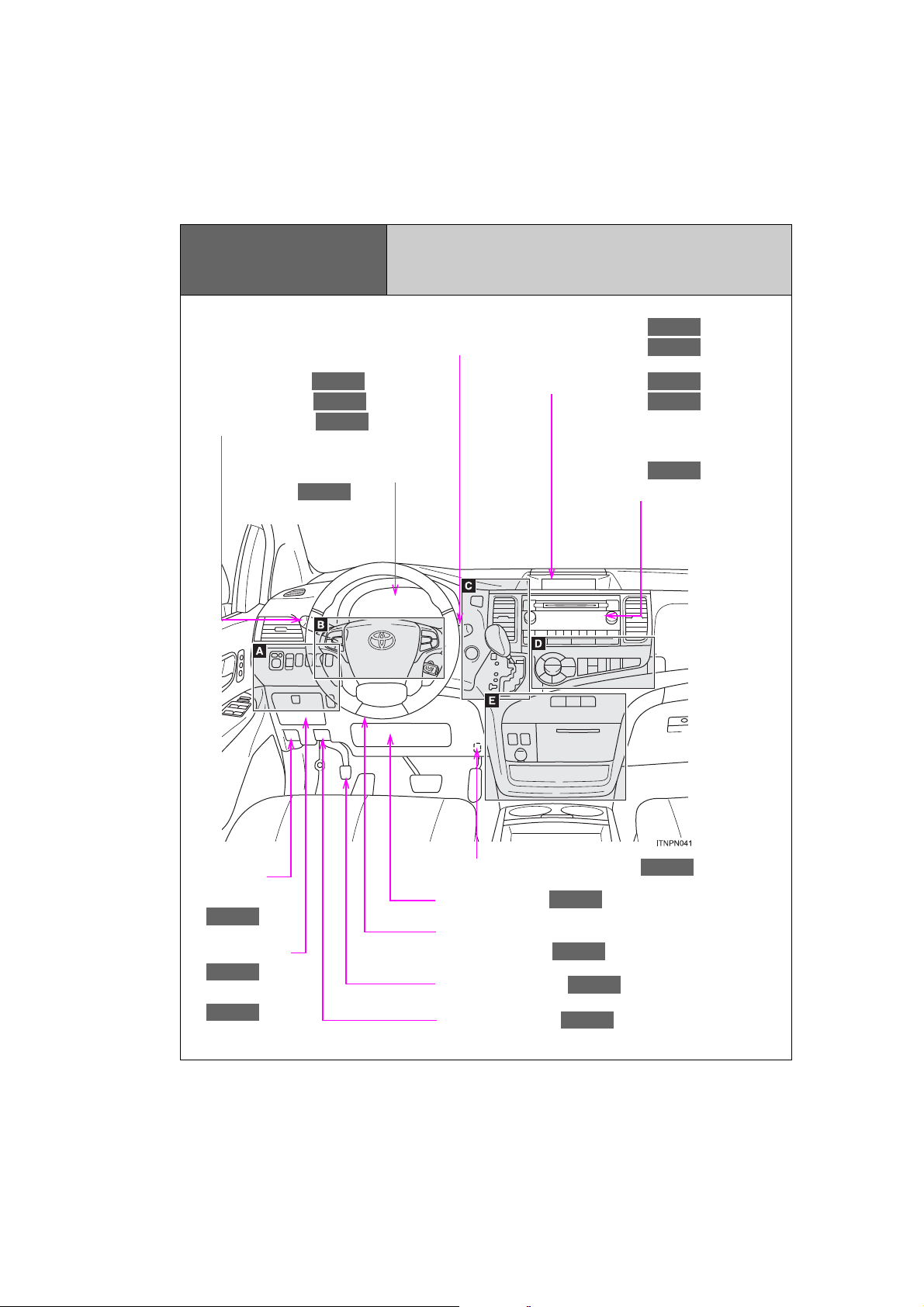
Pictorial index
P. 268
P. 241
P. 282
P. 284
P. 292
P. 244
P. 421
P. 254
P. 606
P. 155
P. 599
P. 603
P. 667
P. 242
P. 137
P. 168
P. 339
Instrument panel
Windshield wiper and washer switch
Rear window wiper and washer switch
Headlight switch
Turn signal lever
Fog light switch
Gauges and meters
Multi-information display
Clock
Audio system
Navigation system*
Fuel filler
door opener
Auxiliary box
Coin holder
16
SIENNA_OM_OM45472U_(U)
Pre-collision braking off switch
SRS knee airbag
Tilt and telescopic steering
lock release lever
Parking brake pedal
Hood release lever
Page 17
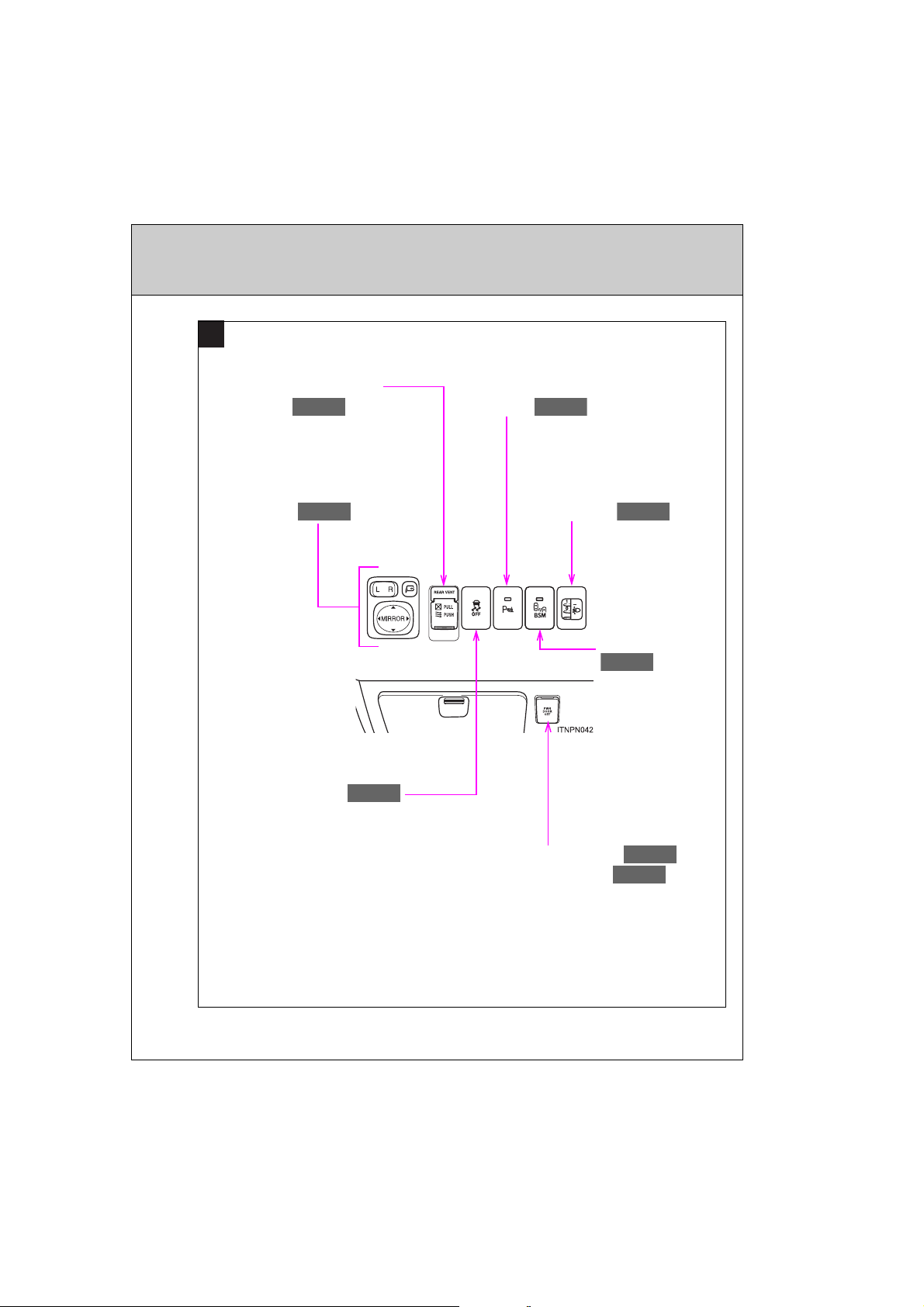
A
P. 331
P. 140
Power quarter window
P. 148
P. 316
P. 271
P. 70
P. 84
P. 346
switch
Intuitive parking assist
switch
Outside rear view mirror
switches
VSC OFF switch
Headlight beam level
control dial
Power sliding door main switch
Power back door main switch
BSM main switch
: If equipped
*: Refer to “NAVIGATION SYSTEM OWNER’S MANUAL”.
17
SIENNA_OM_OM45472U_(U)
Page 18
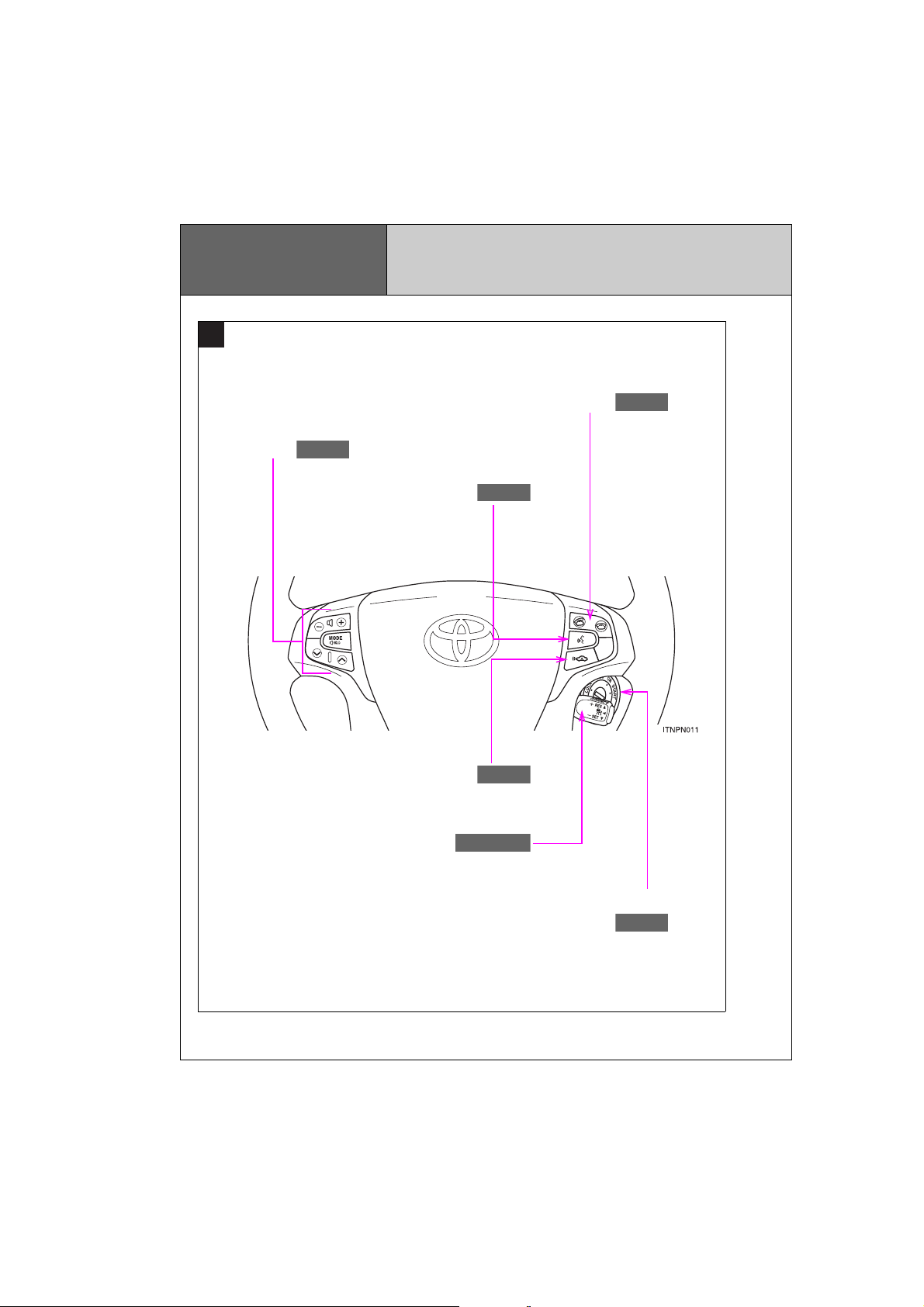
Pictorial index
B
P. 549
P. 477
P. 549
P. 300
P. 226
P. 295, 300
Audio remote control
switches
Instrument panel
Telephone switch*
Talk switch*
Cruise control switch
18
SIENNA_OM_OM45472U_(U)
Distance switch
Engine (ignition) switch
(vehicles without a smart key system)
Page 19
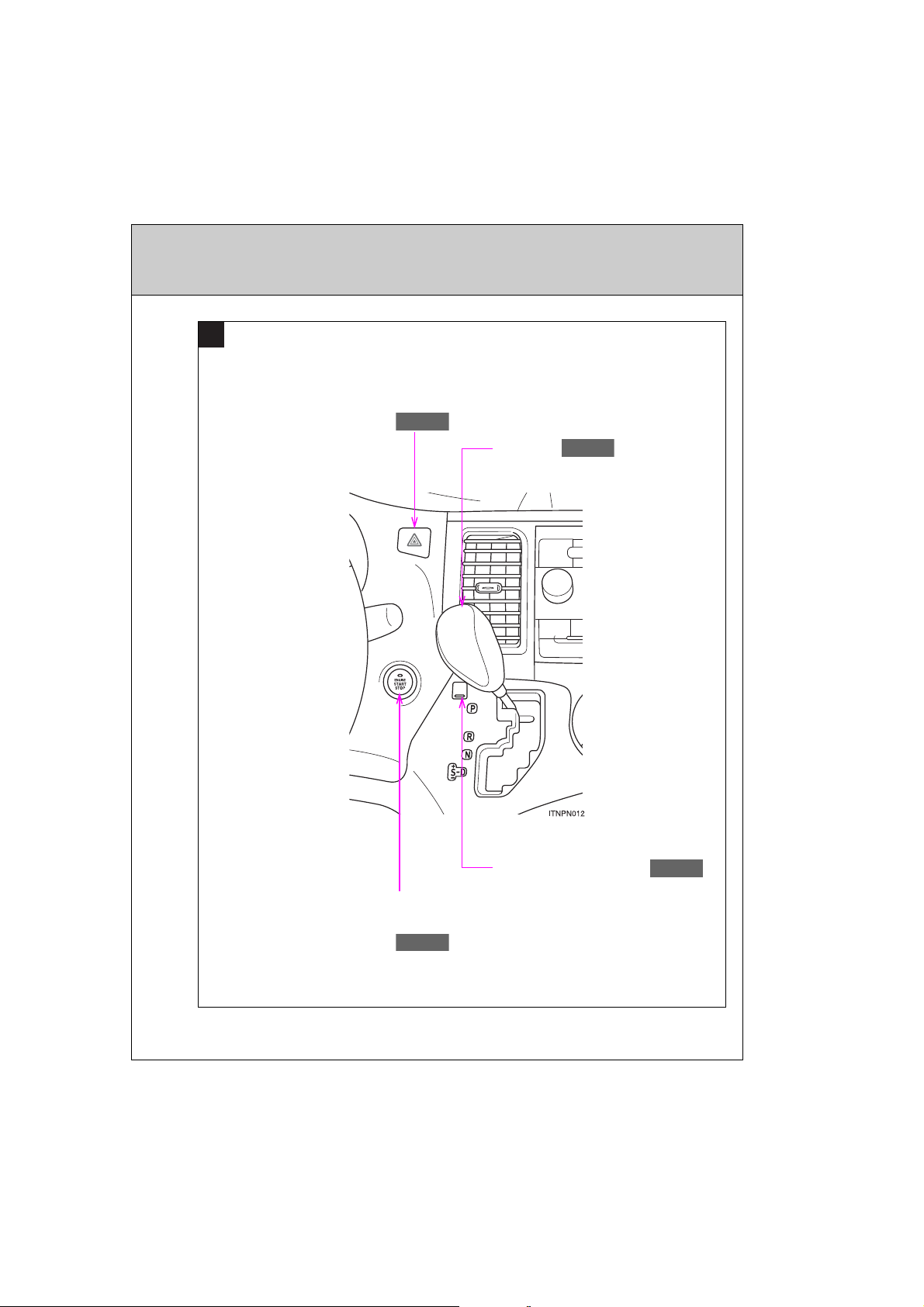
C
P. 780
P. 229
P. 236
Emergency flasher switch
P. 738
Shift lever
Shift lock override button
Engine (ignition) switch
(vehicles with a smart key system)
: If equipped
*: Refer to “NAVIGATION SYSTEM OWNER’S MANUAL”.
19
SIENNA_OM_OM45472U_(U)
Page 20
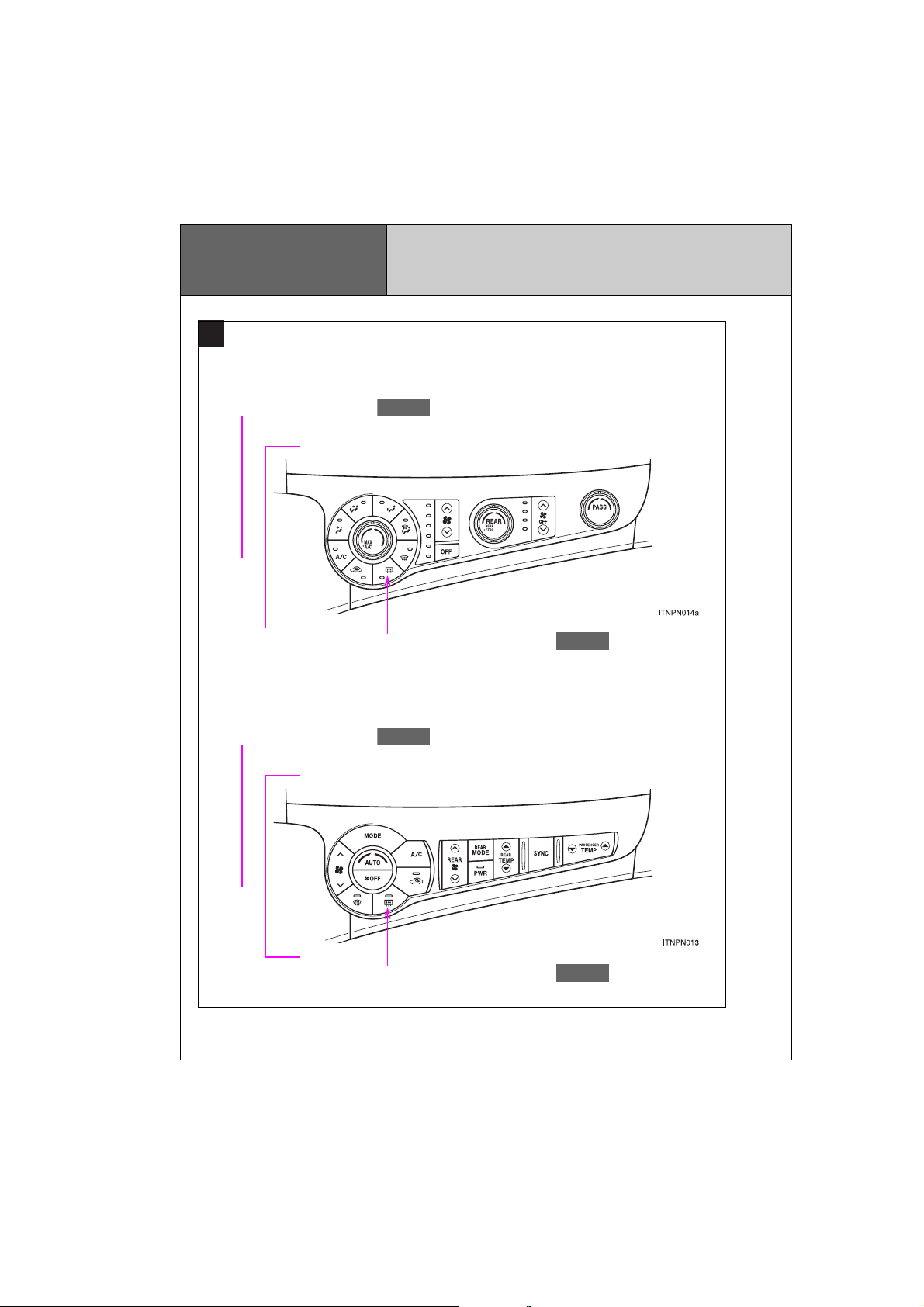
Pictorial index
P. 394
P. 402
P. 419
P. 419
D
Vehicles with a manual air conditioning system
Air conditioning system
Vehicles with an automatic air conditioning system
Instrument panel
Rear window defogger switch
Air conditioning system
20
Rear window defogger switch
SIENNA_OM_OM45472U_(U)
Page 21
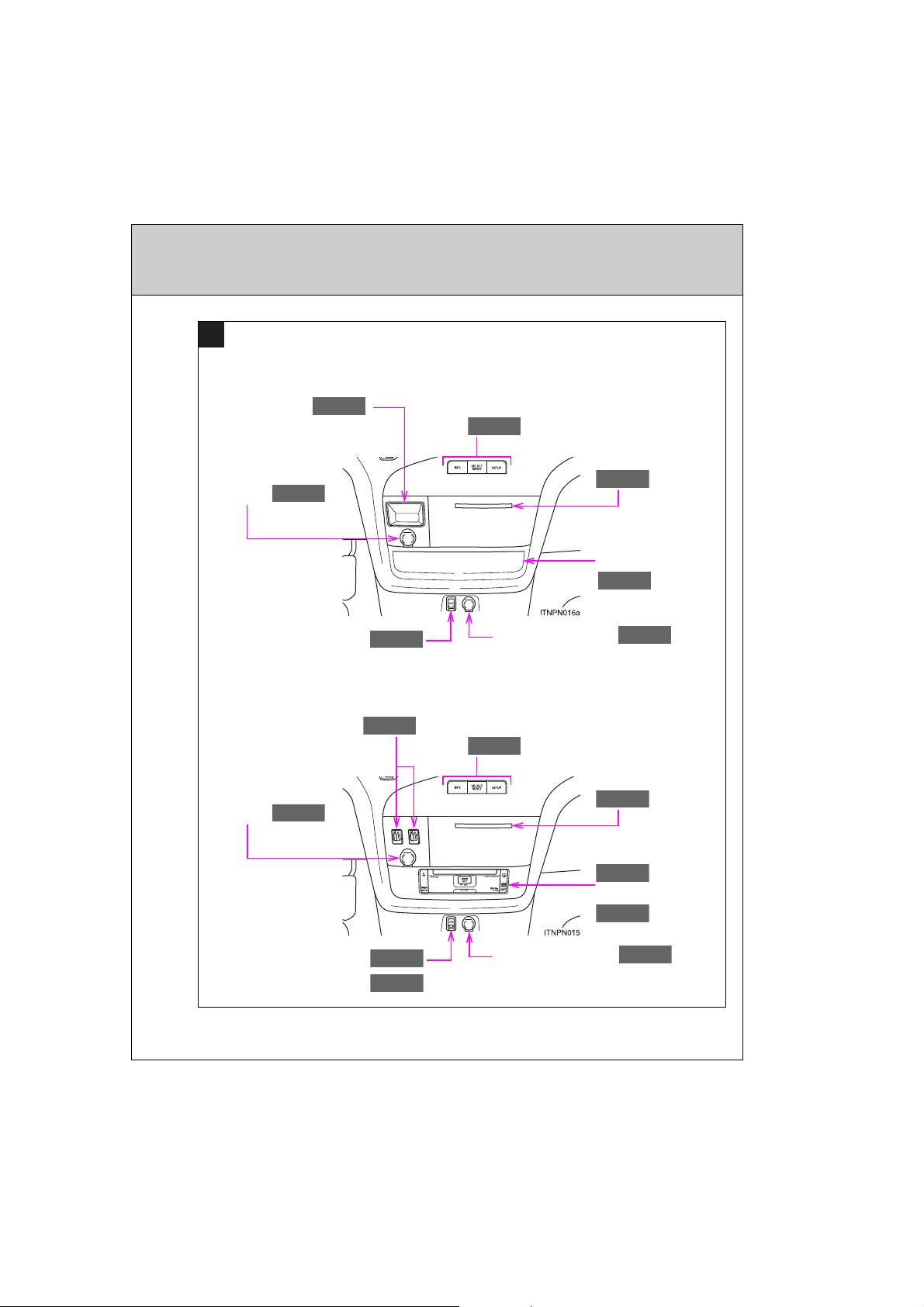
E
P. 608
P. 476
P. 463
P. 608
P. 612
P. 255
P. 593
P. 502
P. 599
P. 608
P. 476
P. 608
P. 599
P. 599
P. 255
P. 593
Type A
Auxiliary box
Power outlet
(12 V)
AUX port
Type B
Seat heater switches
Power outlet
(12 V)
Multi-information display switches
Cup holders
Auxiliary box
Power outlet (12 V)
Multi-information display switches
Cup holders
DVD player
AUX port
USB port
SIENNA_OM_OM45472U_(U)
Auxiliary box
Power outlet (12 V)
: If equipped
21
Page 22
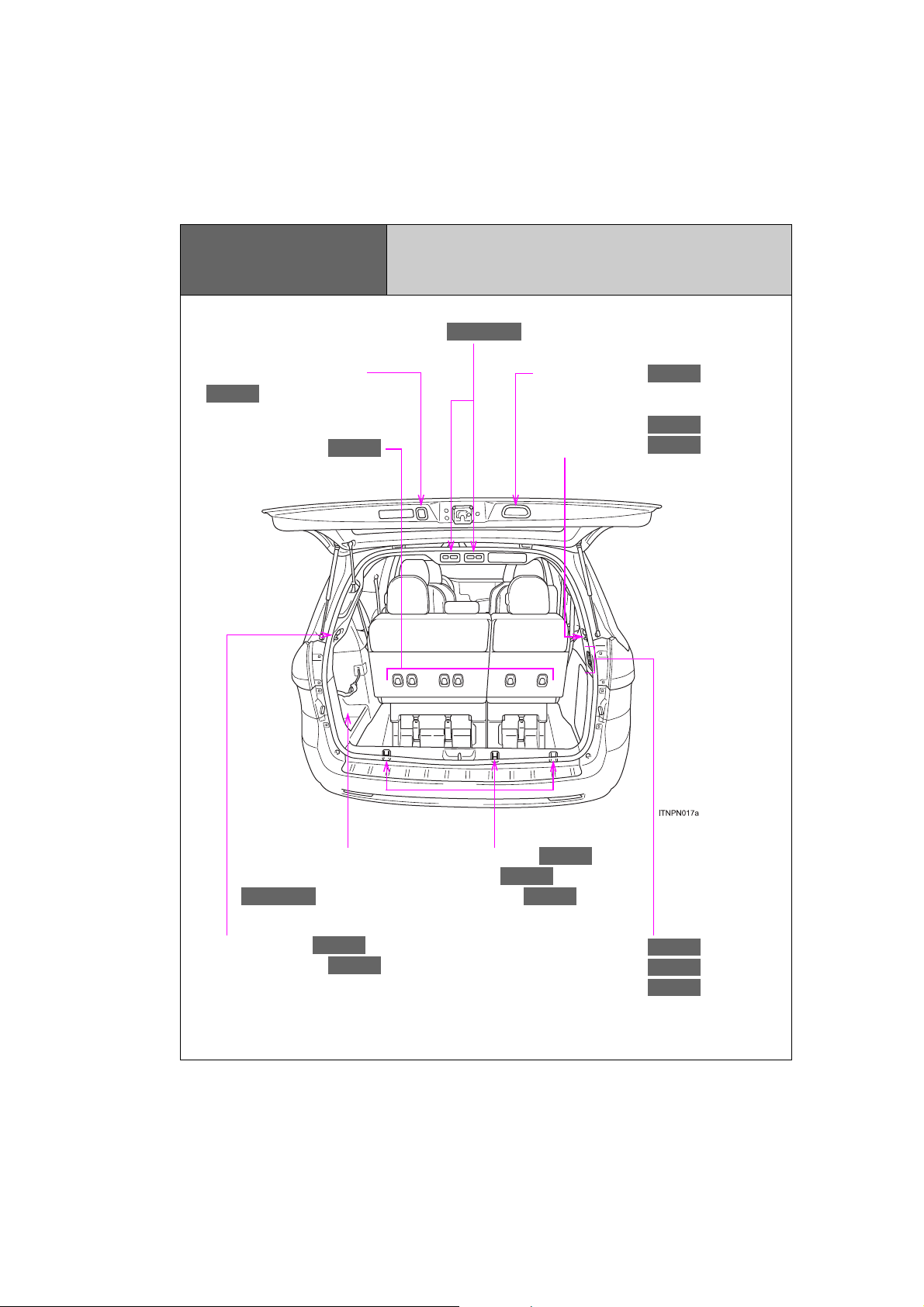
P. 618
P. 622
P. 622
P. 106, 623
Pictorial index
P. 618
P. 622
P. 618
P. 110, 113
P. 622
P. 618
P. 608
P. 608
P. 85
P. 82
P. 82
Power third seat switches
Luggage compartment
Power back door switch
Grocery bag hooks
Back door handle
Cargo net hooks
Grocery bag hooks
Removable center seat
storage/Storage box
Cargo net hooks
Grocery bag hooks
22
SIENNA_OM_OM45472U_(U)
Grocery bag hooks
Cargo hooks
Cargo net hooks
Power outlet (12 V)
Power outlet (120 V AC)
Luggage compartment light
Page 23

SIENNA_OM_OM45472U_(U)
: If equipped
23
Page 24

For your information
Main Owner’s Manual
Please note that this manual applies to all models and all equipment, including options. Therefore, you may find some explanations for equipment not
installed on your vehicle.
All specifications provided in this manual are current at the time of printing.
However, because of the Toyota policy of continual product improvement, we
reserve the right to make changes at any time without notice.
Depending on specifications, the vehicle shown in the illustrations may differ
from your vehicle in terms of equipment.
Noise from under vehicle after turning off the engine
Approximately five hours after the engine is turned off, you may hear sound
coming from under the vehicle for several minutes. This is the sound of a fuel
evaporation leakage check and, it does not indicate a malfunction.
Accessories, spare parts and modification of your Toyota
A wide variety of non-genuine spare parts and accessories for Toyota
vehicles are currently available on the market. You should know that Toyota
does not warrant these products and is not responsible for their
performance, repair, or replacement, or for any damage they may cause to,
or adverse effect they may have on, your Toyota vehicle.
This vehicle should not be modified with non-genuine Toyota products.
Modification with non-genuine Toyota products could affect its performance,
safety or durability, and may even violate governmental regulations. In
addition, damage or performance problems resulting from the modification
may not be covered under warranty.
24
SIENNA_OM_OM45472U_(U)
Page 25

Installation of a mobile two-way radio system
The installation of a mobile two-way radio system in your vehicle could affect
electronic systems such as:
● Multiport fuel injection system/sequential multiport fuel injection system
● Cruise control system
● Anti-lock brake system
● SRS airbag system
● Seat belt pretensioner system
Be sure to check with your Toyota dealer for precautionary measures or special instructions regarding installation of a mobile two-way radio system.
SIENNA_OM_OM45472U_(U)
25
Page 26

Vehicle data recordings
Your Toyota is equipped with several sophisticated computers that will record
certain data, such as:
• Engine speed
• Accelerator status
• Brake status
• Vehicle speed
• Shift position
The recorded data varies according to the vehicle grade level and options
with which it is equipped. Furthermore, these computers do not record conversations, sounds or pictures.
● Data usage
Toyota may use the data recorded in these computers to diagnose malfunc-
tions, conduct research and development, and improve quality.
Toyota will not disclose the recorded data to a third party except:
• With the consent of the vehicle owner or with the consent of the lessee if
the vehicle is leased
• In response to an official request by the police, a court of law or a government agency
• For use by Toyota in a lawsuit
• For research purposes where the data is not tied to a specific vehicle or
vehicle owner
● Usage of date collected through Safety Connect (U.S. mainland only)
If your Toyota has Safety Connect and if you have subscribed to those services, please refer to the Safety Connect Telematics Subscription Service
Agreement for information on data collected and its usage.
26
SIENNA_OM_OM45472U_(U)
Page 27

Event data recorder
This vehicle is equipped with an event data recorder (EDR). The main purpose of an EDR is to record, in certain crash or near crash-like situations,
such as an air bag deployment or hitting a road obstacle, data that will assist
in understanding how a vehicle’s systems performed. The EDR is designed
to record data related to vehicle dynamics and safety systems for a short
period of time, typically 30 seconds or less.
The EDR in this vehicle is designed to record such data as:
• How various systems in your vehicle were operating;
• Whether or not the driver and passenger safety belts were buckled/fas-
tened;
• How far (if at all) the driver was depressing the accelerator and/or brake
pedal; and,
• How fast the vehicle was traveling.
These data can help provide a better understanding of the circumstances in
which crashes and injuries occur.
NOTE: EDR data are recorded by your vehicle only if a nontrivial crash situa-
tion occurs; no data are recorded by the EDR under normal driving conditions and no personal data (e.g., name, gender, age, and crash location) are
recorded. However, other parties, such as law enforcement, could combine
the EDR data with the type of personally identifying data routinely acquired
during a crash investigation.
To read data recorded by an EDR, special equipment is required, and access
to the vehicle or the EDR is needed. In addition to the vehicle manufacturer,
other parties, such as law enforcement, that have the special equipment, can
read the information if they have access to the vehicle or the EDR.
SIENNA_OM_OM45472U_(U)
27
Page 28

● Disclosure of the EDR data
Toyota will not disclose the data recorded in an EDR to a third party except
when:
• An agreement from the vehicle’s owner (or the lessee for a leased vehicle)
is obtained
• In response to an official request by the police, a court of law or a government agency
• For use by Toyota in a lawsuit
However, if necessary, Toyota may:
• Use the data for research on vehicle safety performance
• Disclose the data to a third party for research purposes without disclosing
information about the specific vehicle or vehicle owner
Scrapping of your Toyota
The SRS airbag and seat belt pretensioner devices in your Toyota contain
explosive chemicals. If the vehicle is scrapped with the airbags and seat belt
pretensioners left as they are, this may cause an accident such as fire. Be
sure to have the systems of the SRS airbag and seat belt pretensioner
removed and disposed of by a qualified service shop or by your Toyota
dealer before you scrap your vehicle.
Perchlorate Material
Special handling may apply,
See www.dtsc.ca.gov/hazardouswaste/perchlorate.
Your vehicle has components that may contain perchlorate. These components may include airbags, seat belt pretensioners, and wireless remote control batteries.
28
SIENNA_OM_OM45472U_(U)
Page 29

CAUTION
■ General precautions while driving
Driving under the influence: Never drive your vehicle when under the influence of alcohol or drugs that have impaired your ability to operate your vehicle. Alcohol and certain drugs delay reaction time, impair judgment and
reduce coordination, which could lead to an accident that could result in
death or serious injury.
Defensive driving: Always drive defensively. Anticipate mistakes that other
drivers or pedestrians might make and be ready to avoid accidents.
Driver distraction: Always give your full attention to driving. Anything that distracts the driver, such as adjusting controls, talking on a cellular phone or
reading can result in a collision with resulting death or serious injury to you,
your occupants or others.
■ General precaution regarding children’s safety
Never leave children unattended in the vehicle, and never allow children to
have or use the key.
Children may be able to start the vehicle or shift the vehicle into neutral.
There is also a danger that children may injure themselves by playing with
the cigarette lighter, the windows, the moon roof, or other features of the
vehicle. In addition, heat build-up or extremely cold temperatures inside the
vehicle can be fatal to children.
29
SIENNA_OM_OM45472U_(U)
Page 30
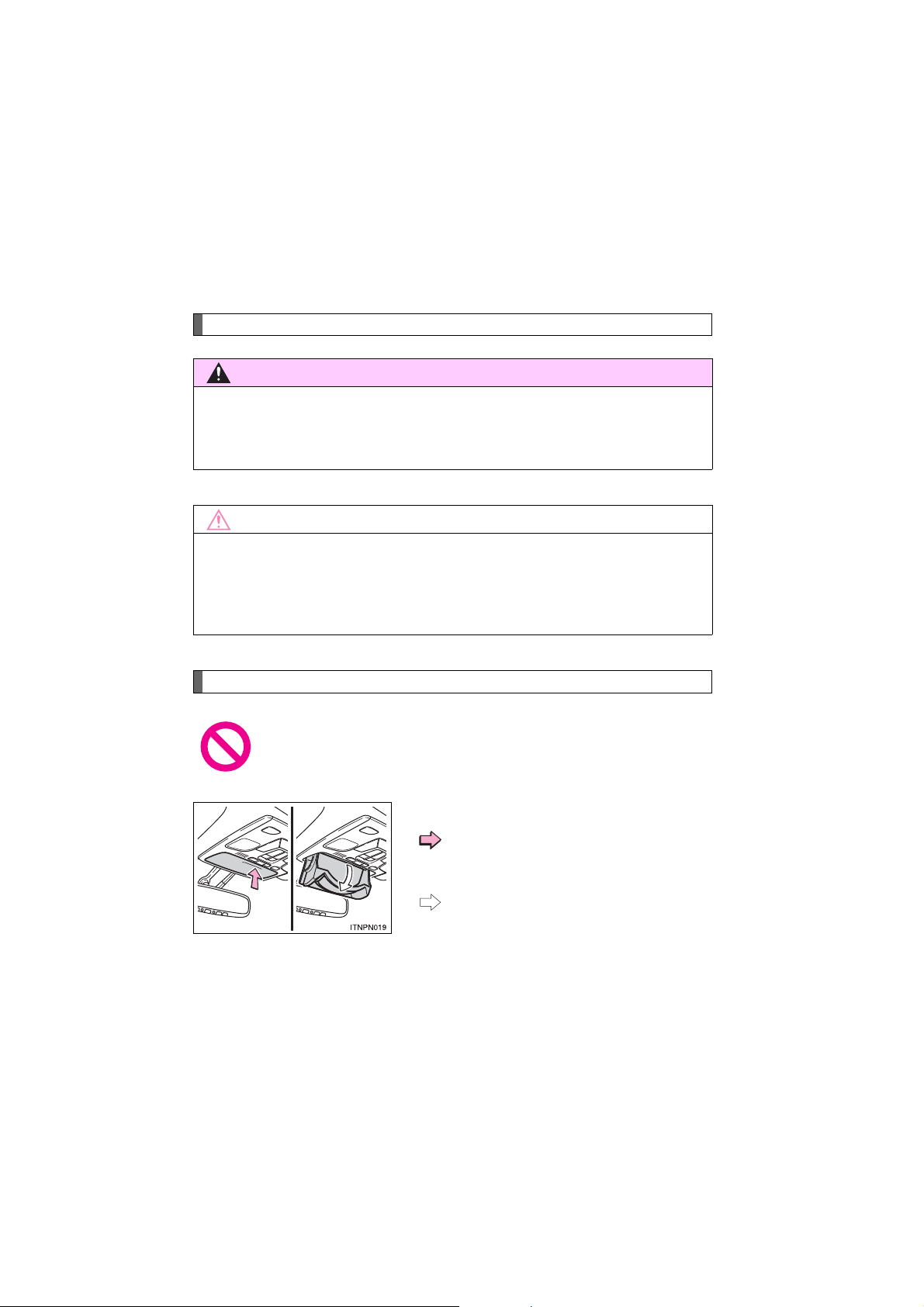
Symbols used throughout this manual
CAUTION
NOTICE
Cautions & Notices
This is a warning against anything which may cause death or injury to people if
the warning is ignored. You are informed about what you must or must not do
in order to reduce the risk of injury to yourself and others.
This is a warning against anything which may cause damage to the vehicle or
its equipment if the warning is ignored. You are informed about what you must
or must not do in order to avoid or reduce the risk of damage to your Toyota
and its equipment.
Symbols used in illustrations
Safety symbol
The symbol of a circle with a slash through it means “Do not”, “Do
not do this”, or “Do not let this happen”.
30
SIENNA_OM_OM45472U_(U)
Arrows indicating operations
Indicates the action (pushing, turning,
etc.) used to operate switches and other
devices.
Indicates the outcome of an operation
(e.g. a lid opens).
Page 31

Before driving
1
31
1-1. Key information
Keys................................... 32
1-2. Opening, closing and locking
the doors
Smart key system .............. 36
Wireless remote control..... 53
Front doors......................... 60
Sliding doors...................... 67
Back door........................... 82
1-3. Adjustable components
(seats, mirrors, steering
wheel)
Front seats......................... 95
Rear seats........................ 100
Driving position
memory.......................... 120
Head restraints................. 125
Seat belts......................... 128
Steering wheel................. 137
Inside rear view mirror ..... 138
Outside rear view
mirrors............................ 140
1-4. Opening and closing
the windows and moon roof
Power windows................ 144
Quarter windows.............. 148
Moon roof......................... 150
1-5. Refueling
Opening the fuel tank
cap................................. 155
1-6. Theft deterrent system
Engine immobilizer
system ........................... 159
Alarm................................ 162
Theft prevention labels
(for U.S.A.)..................... 165
1-7. Safety information
Correct driving posture..... 166
SRS airbags..................... 168
Front passenger occupant
classification system...... 183
Child restraint systems..... 189
Installing child
restraints........................ 194
SIENNA_OM_OM45472U_(U)
Page 32
1-1. Key information
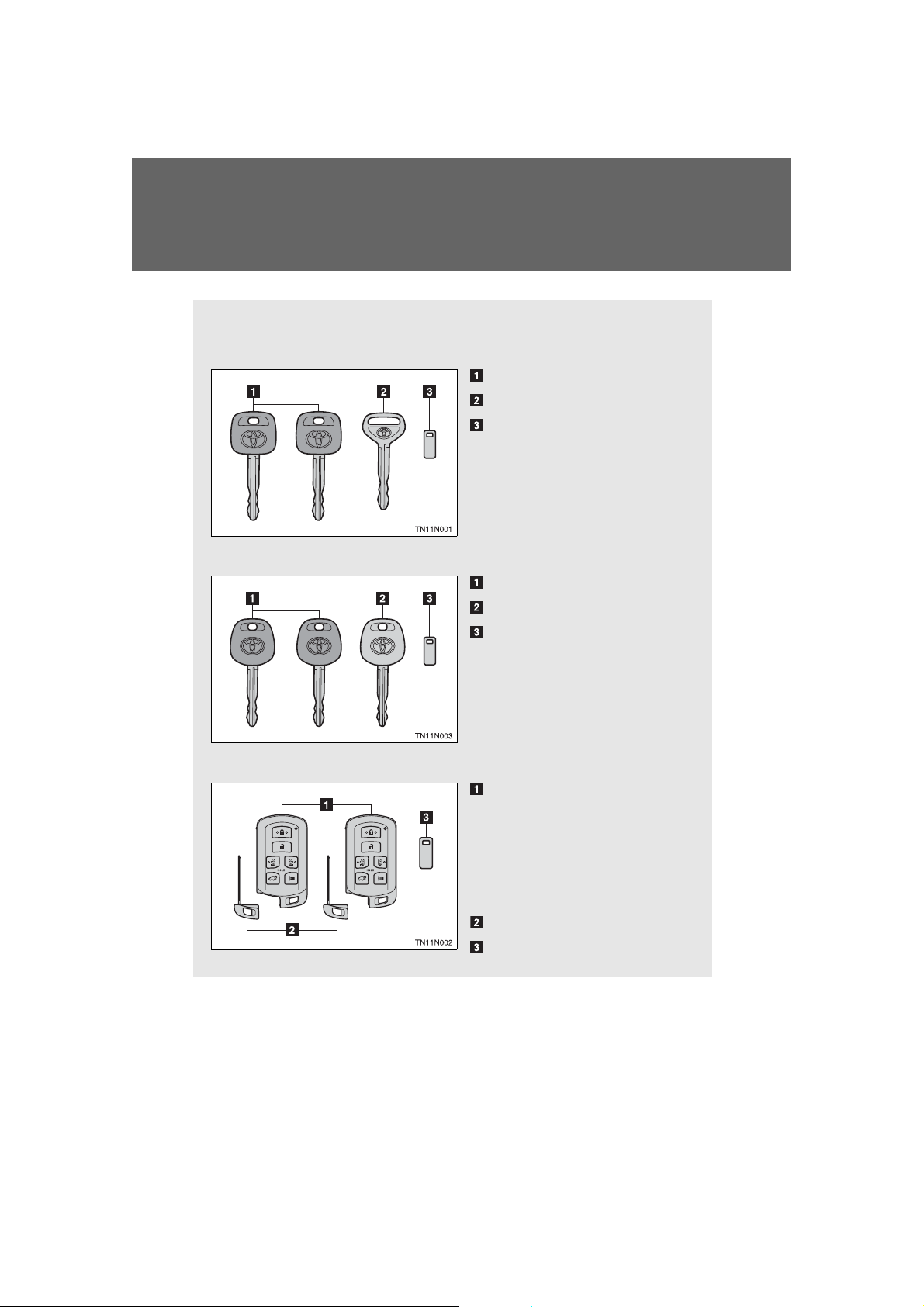
The following keys are provided with the vehicle.
Vehicles without a smart key system (type A)
Master keys
Valet key
Key number plate
Vehicles without a smart key system (type B)
Master keys (black)
Valet key (gray)
Key number plate
Vehicles with a smart key system
Electronic keys
• Operating the smart key
system (P. 36)
• Operating the wireless
remote control function
(P. 53)
Mechanical keys
Key number plate
Keys
32
SIENNA_OM_OM45472U_(U)
Page 33
1-1. Key information
Using the mechanical key (vehicles with a smart key system)
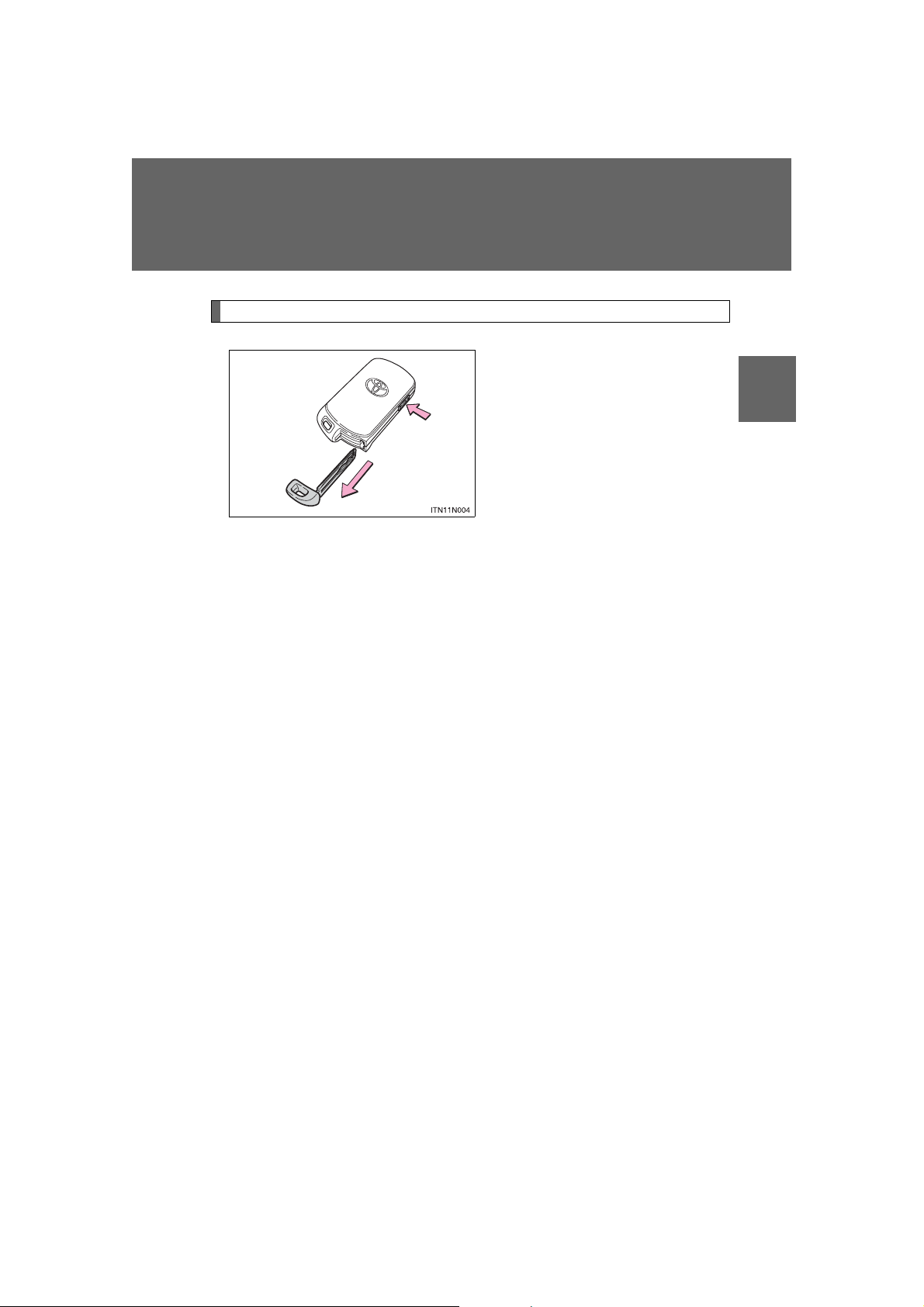
To take out the mechanical key,
push the release button and take
the key out.
1
The mechanical key can only be
inserted in one direction, as the
key only has grooves on one
side. If the key cannot be inserted
in a lock cylinder, turn it over and
re-attempt to insert it.
After using the mechanical key,
store it in the electronic key. Carry
the mechanical key together with
the electronic key. If the electronic
key battery is depleted or the
entry function does not operate
properly, you will need the
mechanical key. (P. 783)
Before driving
SIENNA_OM_OM45472U_(U)
33
Page 34

1-1. Key information
■ When required to leave the vehicle’s key with a parking attendant
Lock the glove box as circumstances demand. (P. 587)
On vehicles without the smart key system, provide the attendant with the
valet key.
On vehicles with the smart key system, remove the mechanical key for your
own use and provide the attendant with the electronic key only.
■ Key number plate
Keep the plate in a safe place such as your wallet, not in the vehicle. In the
event that a key (without a smart key system) or mechanical key (with a
smart key system) is lost, a new key can be made by your Toyota dealer
using the key number plate. (P. 782)
■ When riding in an aircraft
When bringing a key with wireless remote control function onto an aircraft,
make sure you do not press any buttons on the key while inside the aircraft
cabin. If you are carrying the key in your bag etc., ensure that the buttons
are not likely to be pressed accidentally. Pressing a button may cause the
key to emit radio waves that could interfere with the operation of the aircraft.
34
SIENNA_OM_OM45472U_(U)
Page 35

1-1. Key information
NOTICE
■ To prevent key damage
Observe the following:
● Do not drop the keys, subject them to strong shocks or bend them.
● Do not expose the keys to high temperatures for a long periods of time.
● Do not get the keys wet or wash them in an ultrasonic washer etc.
● Do not attach metallic or magnetic materials to the keys or place the keys
close to such materials.
● Do not disassemble the keys.
● Do not attach a sticker or anything else to the surface of the electronic key .
● Do not place the keys near objects that produce magnetic fields, such as
TVs, audio systems, induction cookers, or medical electrical equipment,
such as low-frequency therapy equipment.
■ Carrying the electronic key on your person (vehicles with a smart key
system)
Carry the electronic key 3.9 in. (10 cm) or more away from electric appliances that are turned on.
■ In case of a smart key system malfunction or other key-related prob-
lems (vehicles with a smart key system)
Take your vehicle with all the electronic keys provided with your vehicle to
your Toyota dealer.
■ When a vehicle key is lost (vehicles with a smart key system)
If the key remains lost, the risk of vehicle theft increases significantly. Visit
your Toyota dealer immediately with all remaining electronic keys that were
provided with your vehicle.
1
Before driving
35
SIENNA_OM_OM45472U_(U)
Page 36
1-2. Opening, closing and locking the doors
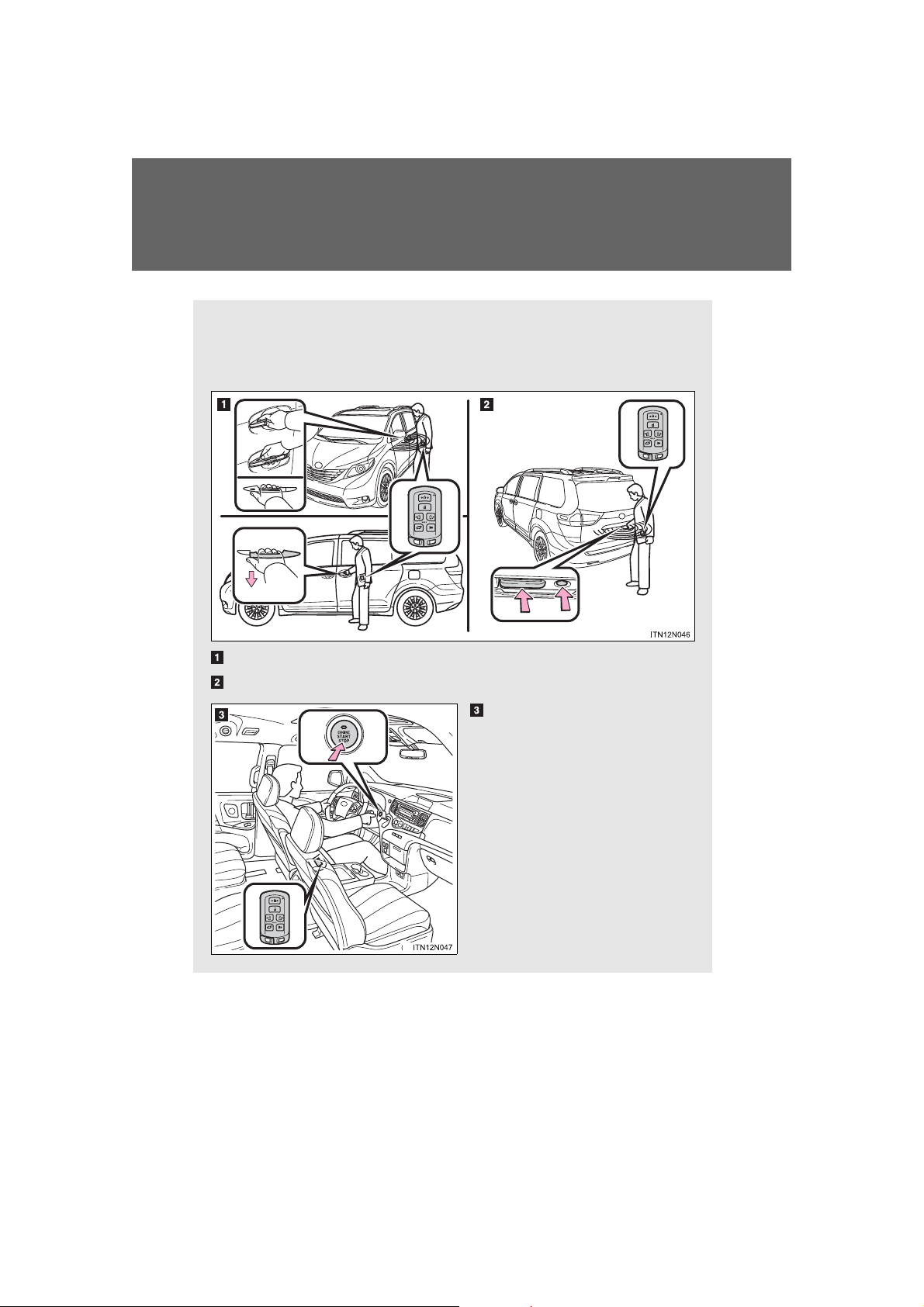
The following operations can be performed simply by carrying the
electronic key on your person, for example in your pocket.
(The driver should always carry the electronic key.)
Locks and unlocks the doors (P. 37)
Locks and unlocks the doors (P. 38)
Starts and stops the engine
(P. 229)
Smart key system
36
SIENNA_OM_OM45472U_(U)
: If equipped
Page 37
1-2. Opening, closing and locking th e do o r s
Unlocking and locking the doors
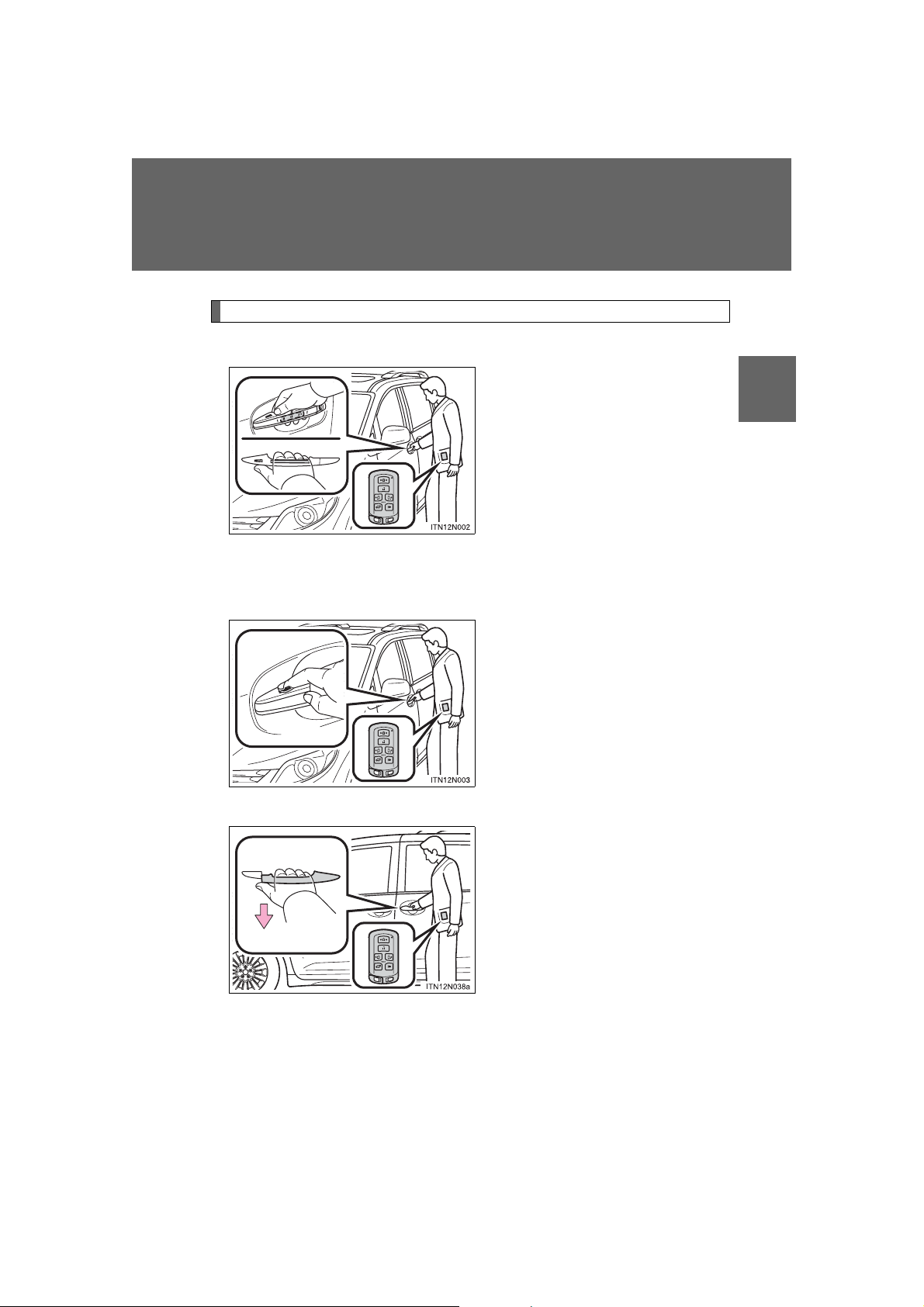
Front door handles
Grip the driver’s door handle to
unlock the door. Grip the passenger’s door handle to unlock all
the doors.
Make sure to touch the sensor on
the back of the handle.
The doors cannot be unlocked for
3 seconds after the doors are
locked.
*
*:The door unlock settings can be
changed. (P. 44)
Touch the lock sensor (the
indentation on the upper part of
the door handle) to lock all the
doors.
1
Before driving
Sliding door handles (vehicles with power sliding door)
SIENNA_OM_OM45472U_(U)
Pull the handle to unlock all the
doors.
There is no touch type sensor in
slide door handle. You must pull
the handle to activate the operation.
37
Page 38
1-2. Opening, closing and locking the doors
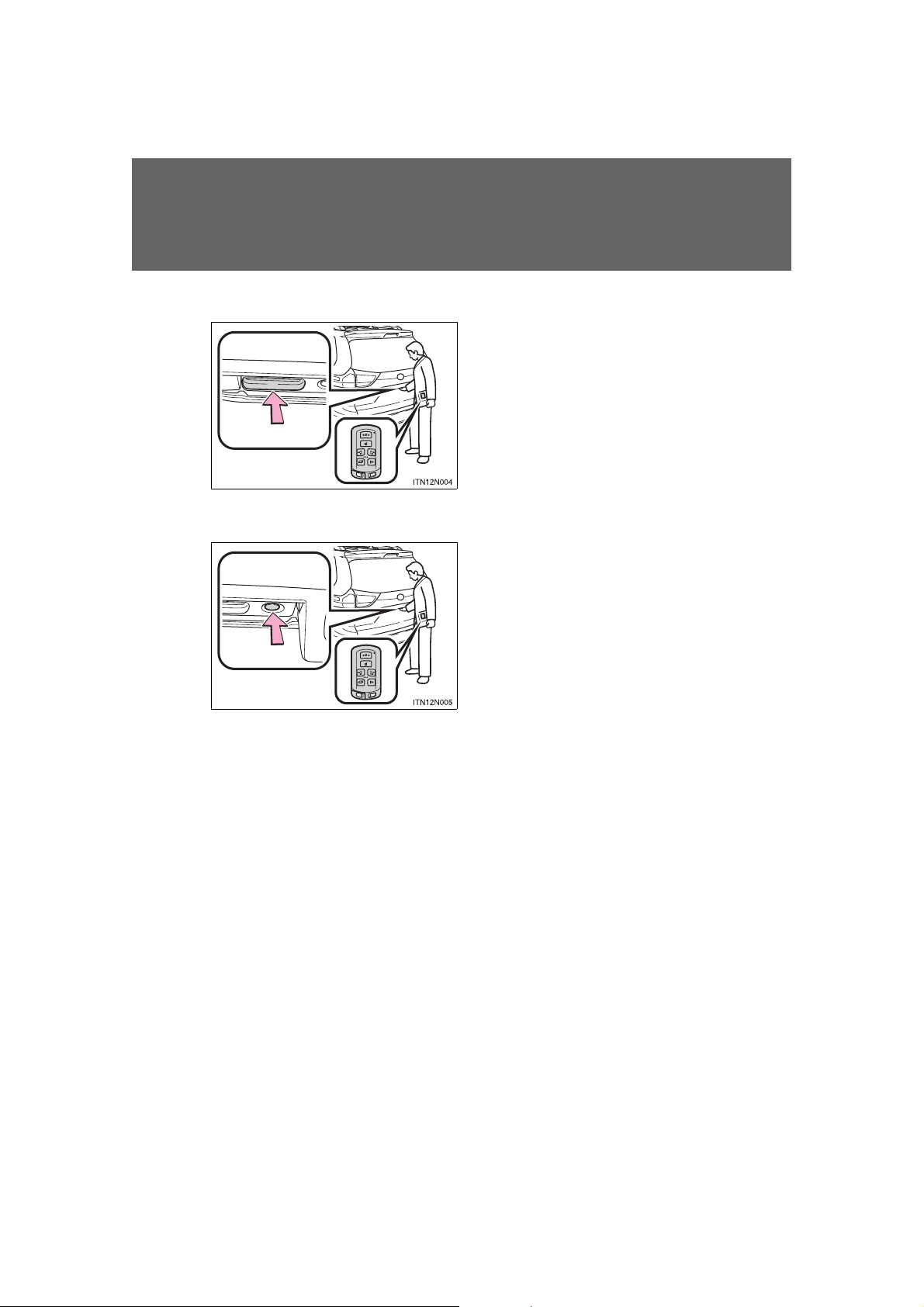
Back door
Press the unlock button to
unlock all the doors.
The door cannot be unlocked for
3 seconds after the door is
locked.
Lock the back door again when
you leave the vehicle. The back
door will not lock automatically
after it has been opened and then
closed.
Press the lock button to lock all
the doors.
38
SIENNA_OM_OM45472U_(U)
Page 39
1-2. Opening, closing and locking th e do o r s
Antenna location and effective range
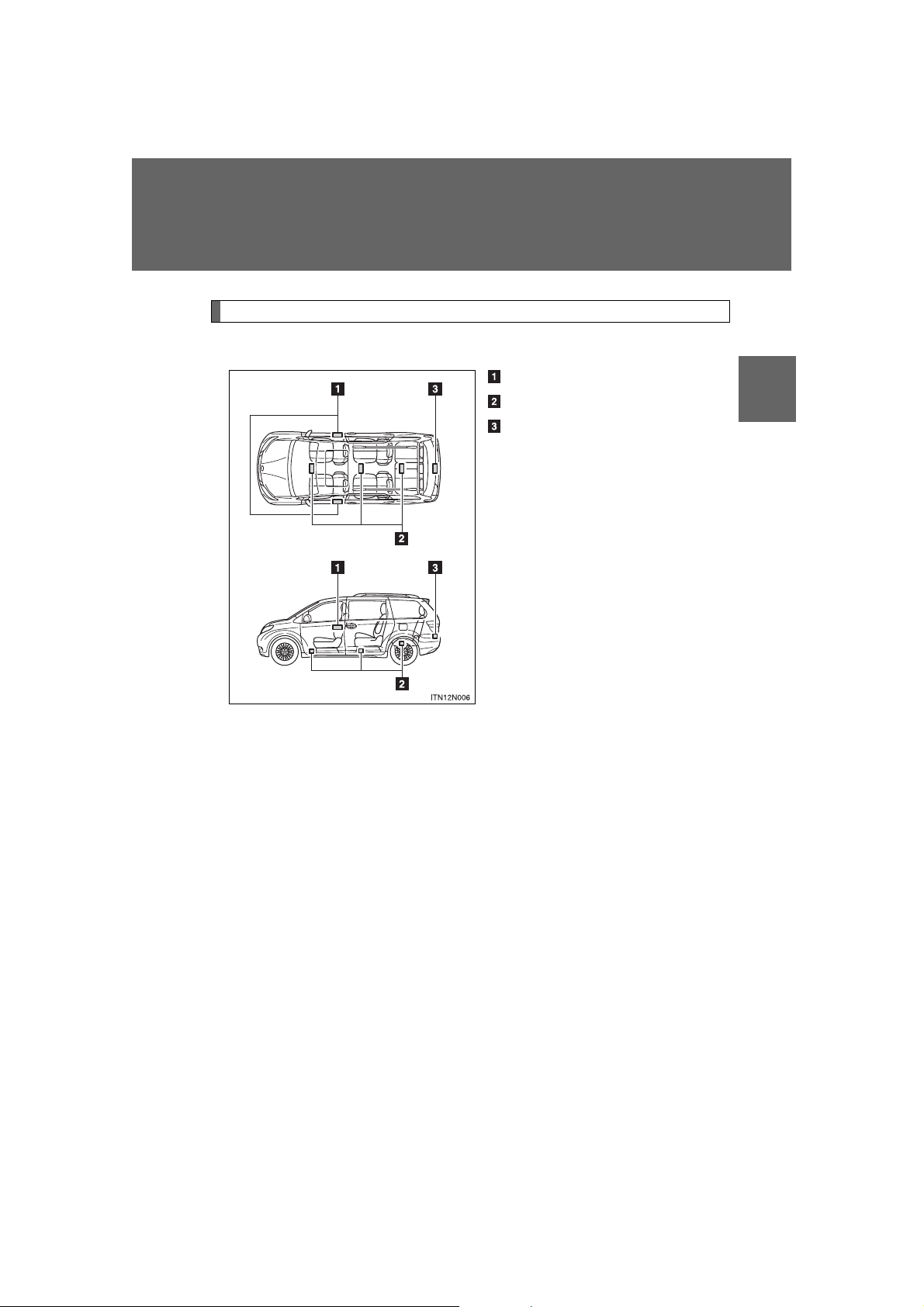
■ Antenna location
Antennas outside cabin
Antennas inside cabin
Antenna outside luggage com-
partment
1
Before driving
SIENNA_OM_OM45472U_(U)
39
Page 40
1-2. Opening, closing and locking the doors
Touch both lock sensors on the upper and
lower part of the front door handle simultaneously.
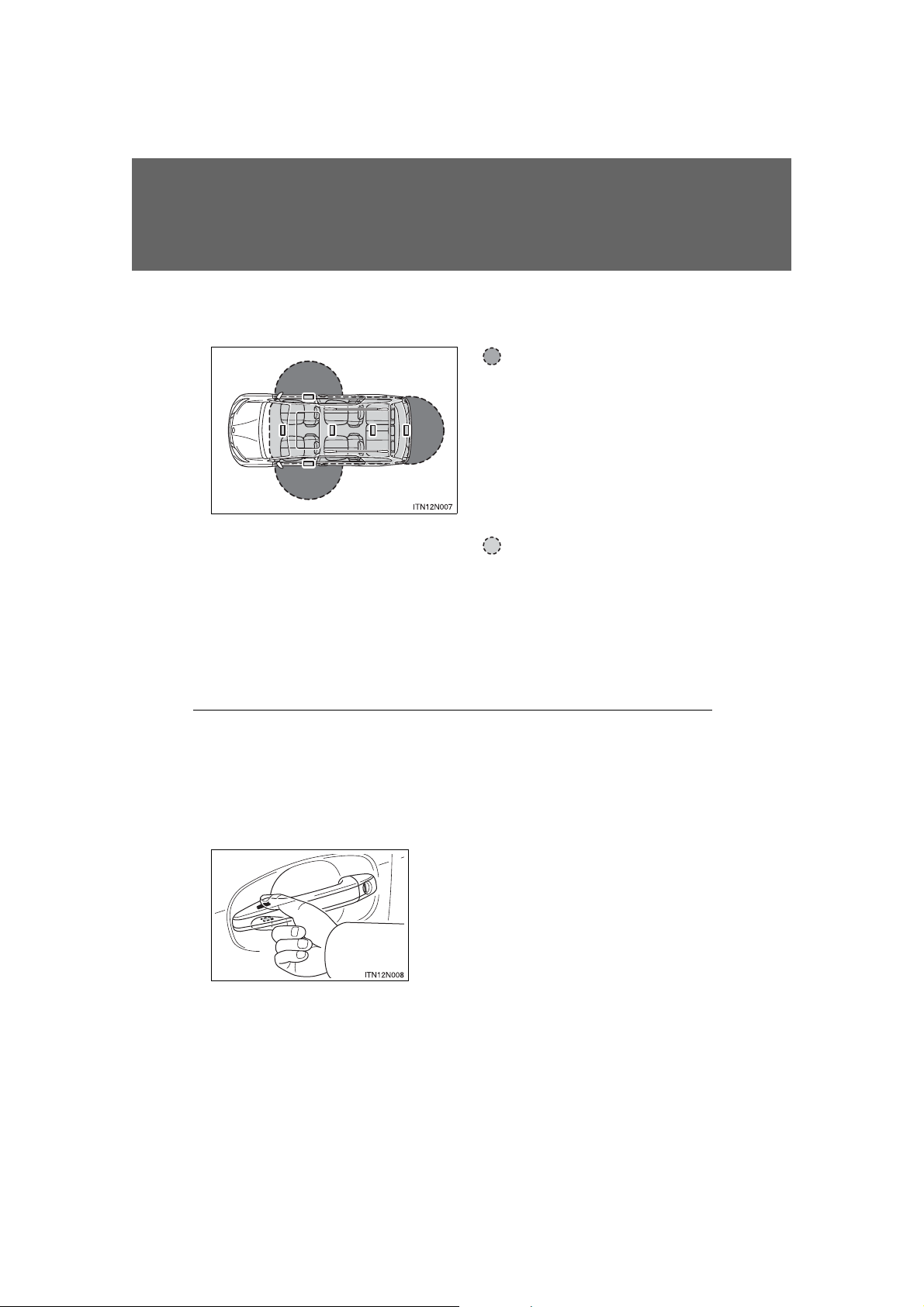
■ Effective range (areas within which the electronic key is
detected)
When locking or unlocking the doors
The system can be operated when the electronic
key is within about 2.3 ft.
(0.7 m) of either of the front
outside door handles. (Only
the doors detecting the key
can be operated.)
When starting the engine
or changing “ENGINE
START STOP” switch
modes
The system can be operated when the electronic
key is inside the vehicle.
■ Operation signals
A buzzer sounds and the emergency flashers flash to indicate that the doors
have been locked/unlocked. (Locked: Once; Unlocked: Twice)
■ When the door cannot be locked by the lock sensor on the upper part
of the front door handle
40
SIENNA_OM_OM45472U_(U)
Page 41

1-2. Opening, closing and locking th e do o r s
Alarm Situation Correction procedure
Interior alarm
pings once and
exterior alarm
sounds once for
10 seconds
An attempt was made to
lock the doors using the
entry function while the
electronic key was still
inside the passenger compartment
Retrieve the electronic key from the
passenger compartment and lock the
doors again
An attempt was made to
exit the vehicle and lock
the doors without first turning the “ENGINE START
STOP” switch off
Turn the “ENGINE
START STOP” switch
off and lock the doors
again
Exterior alarm
sounds once for
10 seconds
An attempt was made to
lock the vehicle while a
door is open
Close all of the doors
and lock the doors
again
■ Alarms and warning indicators
A combination of exterior and interior alarms as well as warnings shown on
the multi-information display are used to prevent theft of the vehicle and
unforeseeable accidents resulting from erroneous operation. Perform the
appropriate correction procedure described in the following table.
1
Before driving
SIENNA_OM_OM45472U_(U)
41
Page 42

1-2. Opening, closing and locking the doors
Alarm Situation Correction procedure
Interior alarm
pings continuously
*
1
The “ENGINE START
STOP” switch was turned
to ACCESSORY mode
while the driver’s door was
open (or the driver’s door
was opened while the
“ENGINE START STOP”
switch was in ACCESSORY mode)
Turn the “ENGINE
START STOP” switch
OFF and close the
driver’s door
Interior alarm
sounds continuously
*
1
When the “ENGINE
START STOP” switch is in
IGNITION ON or ACCESSORY mode, an attempt
was made to open the
door and exit the vehicle,
and the shift lever was not
in “P”
Shift the shift lever to
“P” and turn the
“ENGINE START
STOP” switch OFF
Interior and exterior alarms sound
continuously
*
1
When the “ENGINE
START STOP” switch is in
IGNITION ON or ACCESSORY mode, the driver’s
door was closed after the
key was carried outside
the vehicle, and the shift
lever was not in “P”
Shift the shift lever to
“P”, turn the “ENGINE
START STOP” switch
OFF and close the
driver’s door again
42
SIENNA_OM_OM45472U_(U)
Page 43

1-2. Opening, closing and locking th e do o r s
Alarm Situation Correction procedure
Interior alarm
pings once
*
1
The electronic key has a
low battery
Replace the electronic
key battery
An attempt was made to
start the engine without the
electronic key being
present, or the electronic
key was not functioning
normally
Start the engine with
the electronic key
present
*
2
Interior alarm
pings once and
exterior alarm
sounds 3 times
*
1
The driver’s door was
closed after the key was
carried outside the vehicle,
and the “ENGINE START
STOP” switch was not
turned off
Turn the “ENGINE
START STOP” switch
OFF and close the
driver’s door again
An occupant carried the
electronic key outside the
vehicle and closed the
door while the “ENGINE
START STOP” switch was
not off
Bring the electronic
key back into the vehicle
1
Before driving
1
*
: A message will be shown on the multi-information display in the instru-
ment cluster.
2
*
: If the engine does not start when the electronic key is inside the vehicle,
the electronic key battery may be depleted or there may be difficulties
receiving signal from the key. (P. 709)
■ Security feature
SIENNA_OM_OM45472U_(U)
If a door is not opened within approximately 60 seconds after the vehicle is
unlocked, the security feature automatically locks the vehicle again.
43
Page 44
1-2. Opening, closing and locking the doors
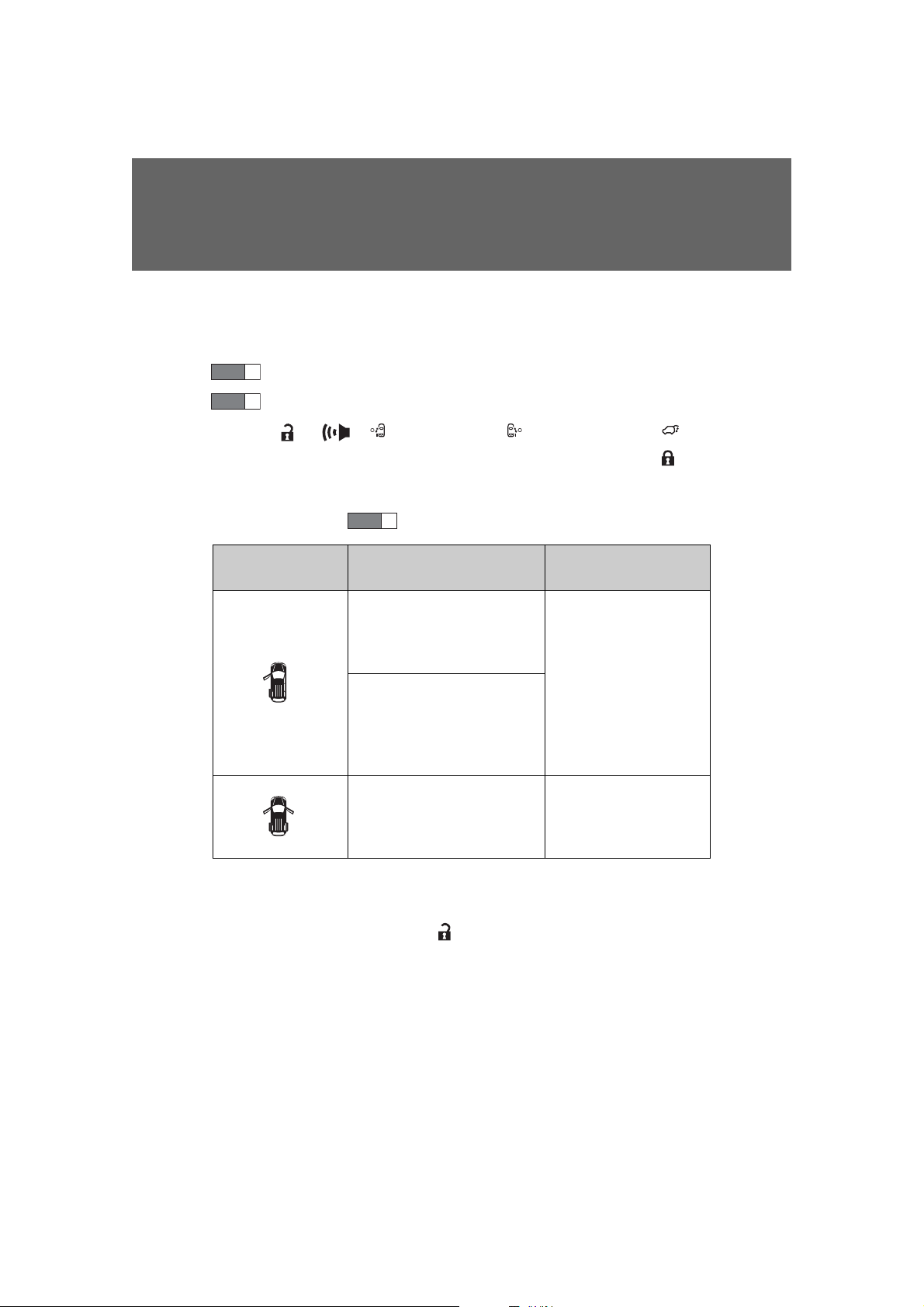
Multi-information
display
Unlocking function Beep
Holding the driver’s door
handle unlocks only the
driver’s door and driver
side power sliding door.
Exterior: Beeps three
times
Interior: Pings once
Holding the front passenger’s door handle or pulling either power sliding
door handle unlocks all
doors.
Holding either front door
handle or pulling either
power sliding door handle
unlocks all doors.
Exterior: Beeps twice
Interior: Pings once
■ Switching the door unlock function
It is possible to set which doors the entry function unlocks using the wireless
remote control.
STEP
1
Turn the “ENGINE START STOP” switch off.
STEP
2
When the indicator on the key surface is not on, press and hold
, , (if equipped), (if equipped) or (if
equipped) for about 5 seconds while pressing and holding .
The setting changes each time an operation is performed, as shown below.
(When changing the setting continuously, release the buttons, wait for at least
5 seconds, and repeat .)
STEP
2
For vehicles equipped with an alarm, to prevent unintended triggering of the
alarm, unlock the doors using the wireless remote control and open and
close a door once after the settings have been changed. (If a door is not
opened within 60 seconds after is pressed, the doors will be locked
again and the alarm will automatically be set.)
In case that the alarm is triggered, immediately stop the alarm. (P. 162)
44
SIENNA_OM_OM45472U_(U)
Page 45

1-2. Opening, closing and locking th e do o r s
■ Battery-saving function
In the following circumstances, the entry function is disabled in order to prevent the vehicle battery from discharging and the electronic key battery from
discharging.
● When the entry function has not been used for 5 days or more
● When the electronic key has been left within approximately 6 ft. (2 m) of
the vehicle for 10 minutes or more
● If the entry function has not been used for 14 days or more, the vehicle
cannot be unlocked by a door other than the driver’s door. To unlock the
vehicle, grip the driver’s door handle or use the wireless remote control
or the mechanical key.
The system will resume operation when...
● The vehicle is locked using the lock sensor when carrying the electronic
key on your person.
● The vehicle is locked/unlocked using the wireless remote control.
(P. 53)
● The vehicle is locked/unlocked using the mechanical key. (P. 783)
1
Before driving
SIENNA_OM_OM45472U_(U)
45
Page 46

1-2. Opening, closing and locking the doors
■ Conditions affecting operation
The smart key system uses weak radio waves. In the following situations,
the communication between the electronic key and the vehicle may be
affected, preventing the smart key system and wireless remote control from
operating properly. (Way of coping P. 783)
● When the electronic key battery is depleted
● Near a TV tower, electric power plant, gas station, radio station, large dis-
play, airport or other facility that generates strong radio waves or electrical noise
● When carrying a portable radio, cellular phone, cordless phone or other
wireless communication devices
● When the electronic key is in contact with, or is covered by the following
objects
• Cards to which aluminum foil is attached
• Cigarette boxes that have aluminum foil inside
• Metallic wallets or bags
• Coins
• Hand warmers made of metal
• Media such as CDs and DVDs
● When multiple electronic keys are in the vicinity
● When another wireless key (that emits radio waves) is being used nearby
● When carrying or using the electronic key together with the following
devices that emit radio waves
• Another vehicle’s electronic key
• A wireless key that emits radio waves
• Personal computers or personal digital assistants (PDAs)
• Digital audio players
• Portable game systems
46
SIENNA_OM_OM45472U_(U)
Page 47

1-2. Opening, closing and locking th e do o r s
● If window tint with a metallic content or metallic objects are attached to
the rear window
● Vehicles with AUTO ACCESS SEAT: If the wireless remote control of the
AUTO ACCESS SEAT is operated simultaneously, the AUTO ACCESS
SEAT may not operate properly.
For details, refer to “AUTO ACCESS SEAT OWNER’S MANUAL”.
■ Notes for the entry function
● Even when the electronic key is within the effective range (detection
areas), the system may not operate properly in the following cases.
• The electronic key is too close to the window or outside door handle,
near the ground, or in a high place when the doors are locked or
unlocked.
• The electronic key is on the instrument panel, floor or in the glove box
when the engine is started or “ENGINE START STOP” switch modes
are changed.
● Do not leave the electronic key on top of the instrument panel or near the
door pockets when exiting the vehicle. Depending on the radio wave
reception conditions, it may be detected by the antenna outside the cabin
and the door will become lockable from the outside, possibly trapping the
electronic key inside the vehicle.
● As long as the electronic key is within the effective range, the doors may
be locked or unlocked by anyone. However, only the doors detecting the
electronic key can be used to unlock the vehicle.
● The doors may unlock or lock if a large amount of water splashes on the
door handle, such as in the rain or in a car wash when the electronic key
is within the effective range. (The doors will automatically be locked after
approximately 60 seconds if the doors are not opened and closed.)
● If the wireless remote control is used to lock the doors when the elec-
tronic key is near the vehicle, there is a possibility that the door may not
be unlocked by the smart key system. (Use the wireless remote control to
unlock the doors.)
● If power slide door is unable to operate due to prohibition by the power
sliding door main switch, the door unlock and open operation will not be
performed. (P. 70)
1
Before driving
SIENNA_OM_OM45472U_(U)
47
Page 48

1-2. Opening, closing and locking the doors
■ Note for locking the doors
● Touching the door lock sensor while wearing gloves may delay or prevent
lock operation. Remove the gloves and touch the lock sensor again.
● When the lock operation is performed using the lock sensor, recognition
signals will be shown up to two consecutive times. After this, no recognition signals will be given.
● If the door handle becomes wet while the electronic key is within the
effective range, the door may lock and unlock repeatedly. Place the key
in a position 6 ft. (2 m) or more separate from the vehicle while the vehicle is being washed. (Take care to ensure that the key is not stolen.)
● If the electronic key is inside the vehicle and a door handle becomes wet
during a car wash, a message may be shown on the multi-information
display and a buzzer will sound outside the vehicle. To turn off the alarm,
lock all the doors.
● The lock sensor may not work properly if it comes into contact with ice,
snow, mud, etc. Clean the lock sensor and attempt to operate it again, or
use the lock sensor on the lower part of the door handle.
● Fingernails may scrape against the door during operation of the door
handle. Be careful not to injure fingernails or damage the surface of the
door.
48
SIENNA_OM_OM45472U_(U)
Page 49

1-2. Opening, closing and locking th e do o r s
■ Notes for the unlocking function
● Gripping the front door handle when wearing a glove may not unlock or
lock the door.
● A sudden approach to the effective range or door handle operation may
prevent the doors from being unlocked. In this case, return the door handle to the original position and check that the doors have unlocked before
pulling the door handle.
● If there is another electronic key in the detection area, it may take slightly
longer to unlock the doors after one of the front door handles is gripped
or one of sliding door handles is pulled.
■ When the vehicle is not driven for extended periods
● To prevent theft of the vehicle, do not leave the electronic key within 6 ft.
(2 m) of the vehicle.
● The smart key system can be deactivated in advance. (P. 831)
■ To operate the system properly
Make sure to carry the electronic key when operating the system. Do not get
the electronic key too close to the vehicle when operating the system from
outside of the vehicle.
Depending on the position and holding condition of the electronic key, the
key may not be detected correctly and the system may not operate properly.
(The alarm may go off accidentally, or the door lock prevention may not
operate.)
■ If the smart key system does not operate properly
● Locking and unlocking the doors: Use the mechanical key. (P. 783)
● Starting the engine (P. 784)
1
Before driving
SIENNA_OM_OM45472U_(U)
49
Page 50

1-2. Opening, closing and locking the doors
■ Electronic key battery depletion
● The standard battery life is 1 to 2 years.
● If the battery becomes low, an alarm will sound in the cabin when the
engine stops. (P. 41)
● As the electronic key always receives radio waves, the battery will
become depleted even if the electronic key is not used. The following
symptoms indicate that the electronic key battery may be depleted.
Replace the battery when necessary. (P. 709)
• The smart key system or the wireless remote control does not operate.
• The detection area becomes smaller.
• The LED indicator on the key surface does not turn on.
● To avoid serious deterioration, do not leave the electronic key within 3 ft.
(1 m) of the following electrical appliances that produce a magnetic field.
•TVs
• Personal computers
• Recharging cellular phones or cordless phones
• Cellular phones, cordless phones and battery chargers
• Induction cookers
• Table lamps
■ When the electronic key battery is fully depleted
P. 709
■ Customization that can be configured at Toyota dealer
Settings (e.g. smart key system) can be changed.
(Customizable features P. 831)
50
SIENNA_OM_OM45472U_(U)
Page 51

1-2. Opening, closing and locking th e do o r s
■ Certification for the smart key system
U.S.A.
FCC ID: HYQ14ADR FCC ID: HYQ14AEH
FCC ID: HYQ13CZM FCC ID: HYQ13CZN
FCC ID: NI4TMLF8-20
NOTE:
This device complies with part 15 of the FCC Rules. Operation is subject to
the following two conditions: (1) This device may not cause harmful interference, and (2) this device must accept any interference received, including
interference that may cause undesired operation.
FCC WARNING:
Changes or modifications not expressly approved by the party responsible
for compliance could void the user’s authority to operate the equipment.
Canada
NOTE:
Operation is subject to the following two conditions: (1) this device may not
cause interference, and (2) this device must accept any interference, including interference that may cause undesired operation of the device.
1
Before driving
SIENNA_OM_OM45472U_(U)
51
Page 52

1-2. Opening, closing and locking the doors
CAUTION
■ Caution regarding interference with electronic devices
● People with implanted pacemakers or cardiac defibrillators should keep
away from the smart key system antennas. (P. 40)
The radio waves may affect the operation of such devices. If necessary,
the entry function can be disabled. Ask your Toyota dealer for details, such
as the frequency of radio waves and timing of emitting the radio waves.
Then, consult your doctor to see if you should disable the entry function.
● Users of any electrical medical device other than implanted pacemakers
and implanted cardiac defibrillators should consult the manufacturer of the
device for information about its operation under the influence of radio
waves. Radio waves could have unexpected effects on the operation of
such medical devices.
Ask your Toyota dealer for details for disabling the entry function.
52
SIENNA_OM_OM45472U_(U)
Page 53
1-2. Opening, closing and locking the doors
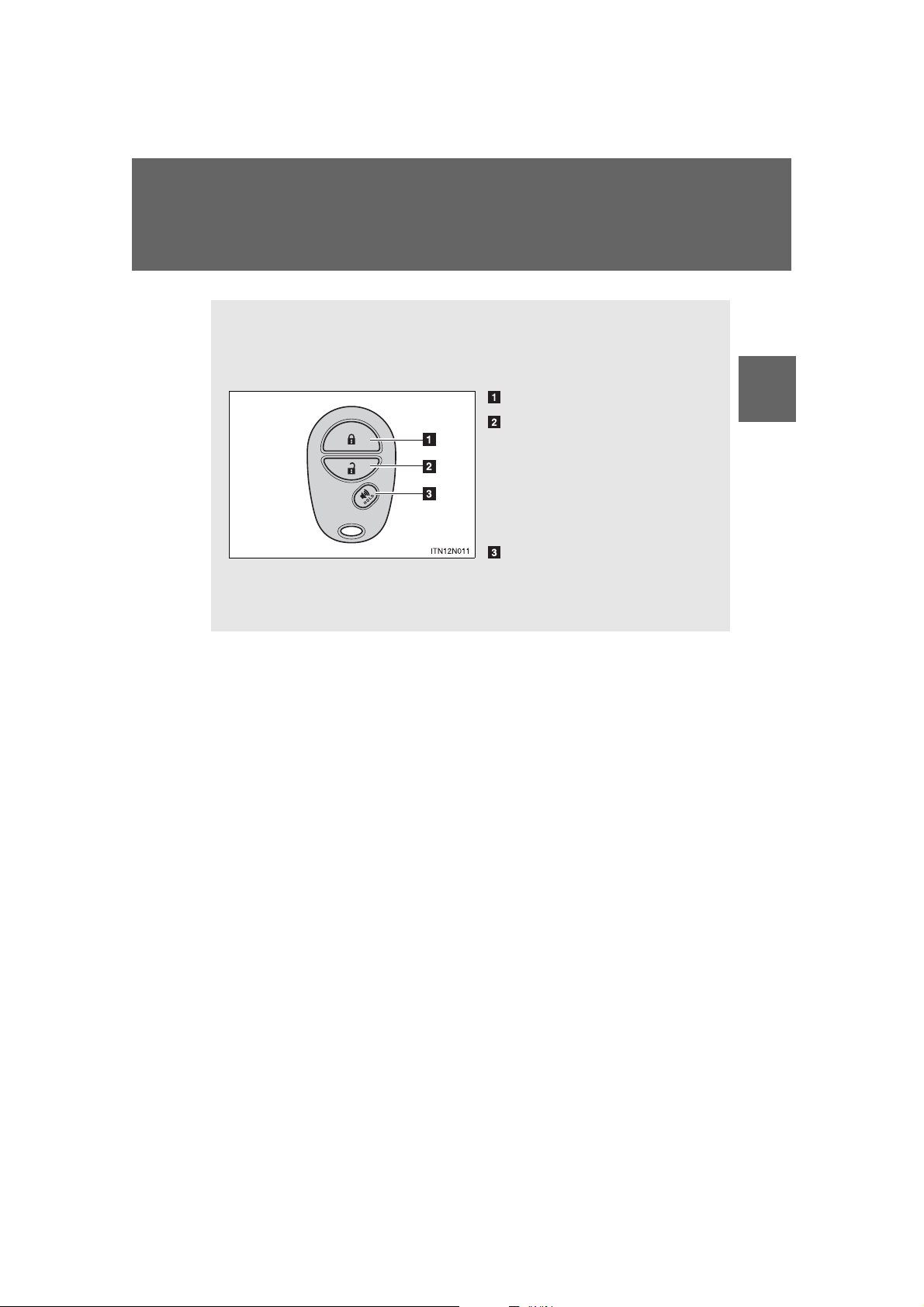
The wireless remote control can be used to lock and unlock the vehicle.
Vehicles without a smart key system (type A)
Locks all doors
Unlocks all doors
Pressing the button unlocks
the driver’s side doors. Pressing the button again within
3 seconds unlocks the other
doors.
Sounds the alarm (press
and hold)
*
*
: If equipped
Wireless remote control
1
Before driving
SIENNA_OM_OM45472U_(U)
53
Page 54
1-2. Opening, closing and locking the doors
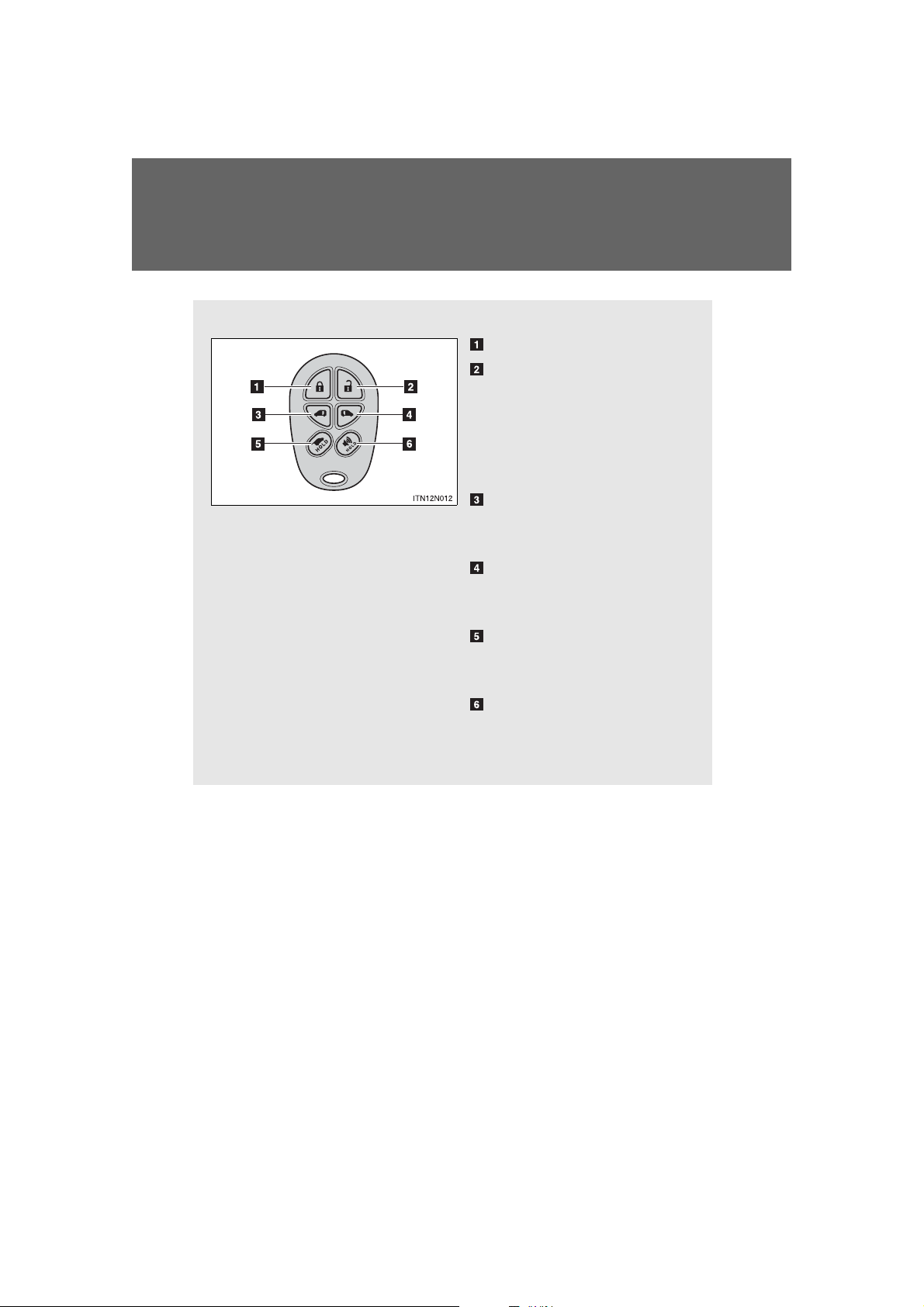
Vehicles without a smart key system (type B)
Locks all doors
Unlocks all doors
Pressing the button unlocks
the driver’s side doors. Pressing the button again within
3 seconds unlocks the other
doors.
Opens and closes the left
side power sliding door
(press and hold)
Opens and closes the right
side power sliding door
(press and hold)
Opens and closes the
power back door (press and
hold)
*
Sounds alarm (press and
hold)
*
*
: If equipped
54
SIENNA_OM_OM45472U_(U)
Page 55
1-2. Opening, closing and locking th e do o r s
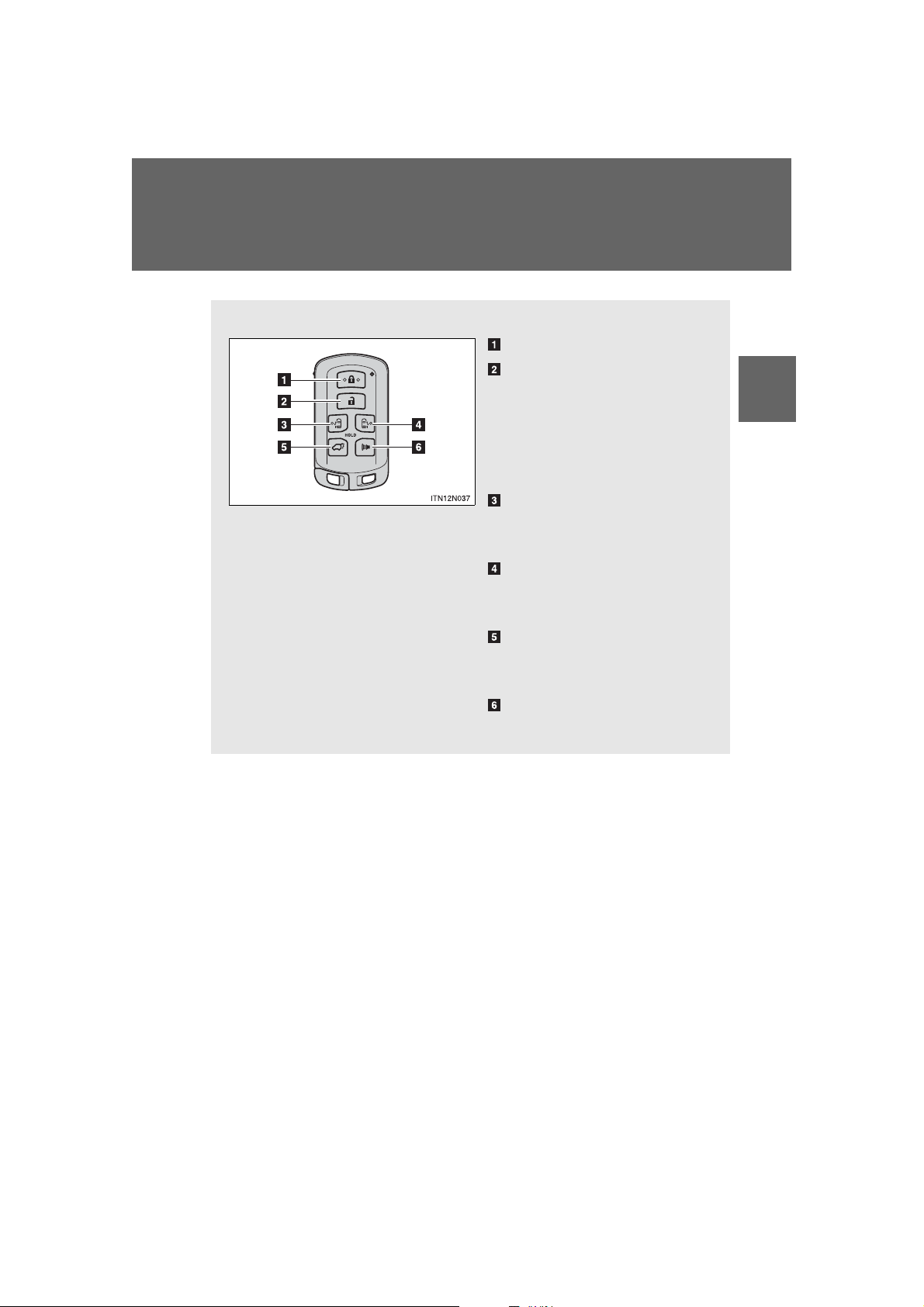
Vehicles with a smart key system
Locks all doors
Unlocks all doors
Pressing the button unlocks
the driver’s side doors. Pressing the button again within
3 seconds unlocks the other
doors.
Opens and closes the left
side power sliding door
(press and hold)
Opens and closes the right
side power sliding door
(press and hold)
Opens and closes the
power back door (press and
hold)
Sounds alarm (press and
hold)
1
Before driving
SIENNA_OM_OM45472U_(U)
55
Page 56
1-2. Opening, closing and locking the doors
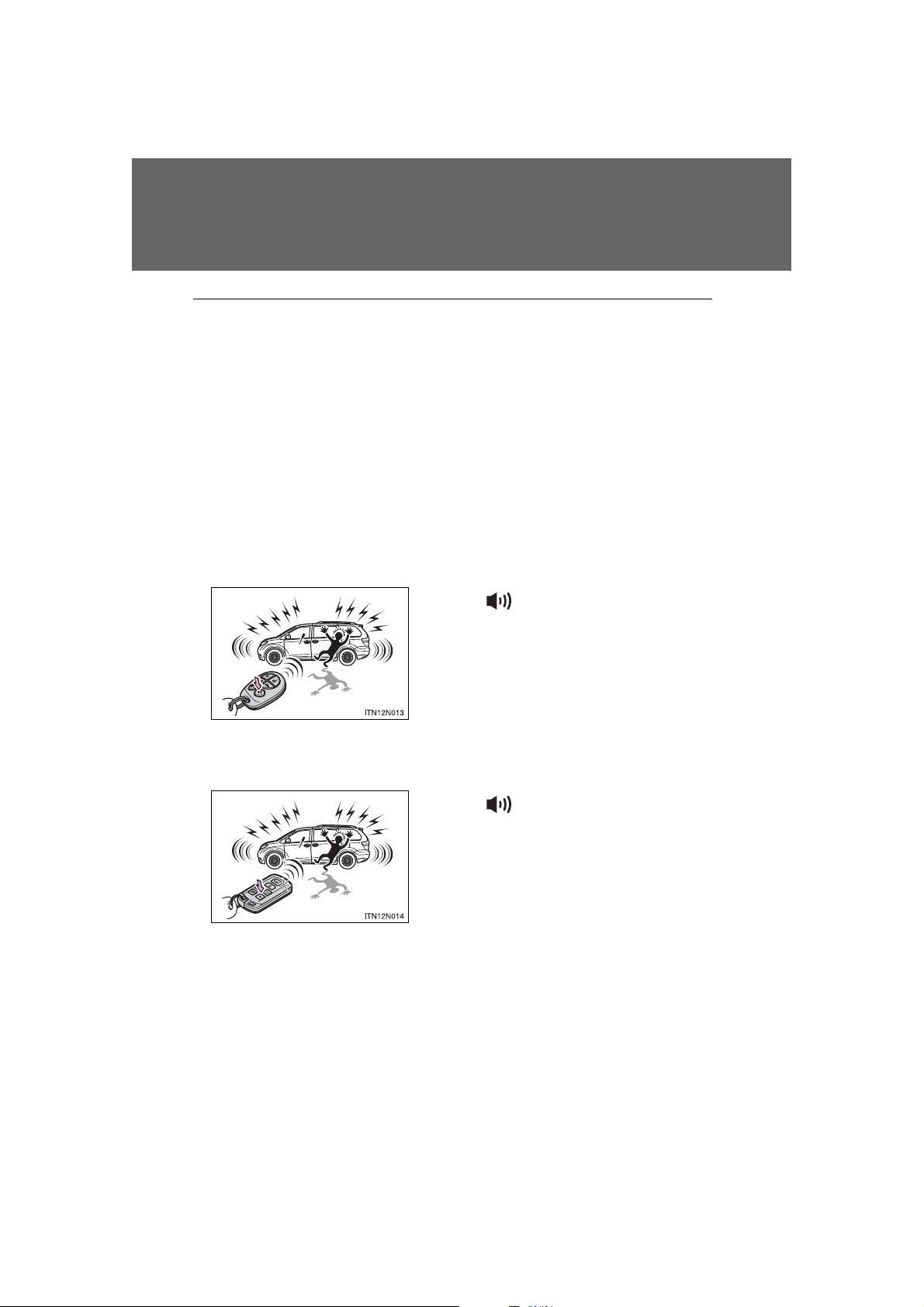
When is pressed for longer than
about one second, an alarm will sound
intermittently and the vehicle lights will
flash to deter any person from trying to
break into or damage your vehicle.
To stop the alarm, press any button on
the wireless remote control.
When is pressed for longer than
about one second, an alarm will sound
intermittently and the vehicle lights will
flash to deter any person from trying to
break into or damage your vehicle.
To stop the alarm, press any button on
the electronic key.
■ Operation signals
Doors: A buzzer sounds and the emergency flashers flash to indicate that
the doors have been locked/unlocked. (Locked: Once; Unlocked:
Twice)
Back door: A buzzer sounds and the emergency flashers flash twice to
indicate that the back door has been opened/closed.
■ Door lock buzzer
If an attempt to lock the doors (except for power sliding doors or power back
door) is made when a door is not fully closed, a buzzer sounds continuously.
Fully close the door to stop the buzzer, and lock the vehicle once more.
■ Panic mode
Vehicles without a smart key system
Vehicles with a smart key system
56
SIENNA_OM_OM45472U_(U)
Page 57

1-2. Opening, closing and locking th e do o r s
■ Security feature
If a door is not opened within approximately 60 seconds after the vehicle is
unlocked, the security feature automatically locks the vehicle again.
■ Power sliding door operation (vehicles with power sliding door)
Even if the door is locked, pressing and holding the sliding door buttons will
unlock all doors and start open operation.
■ Alarm (if equipped)
Using the wireless remote control to lock the doors will set the alarm system.
(P. 162)
■ Reversing the operation of the power sliding door and power back
door (if equipped)
Pressing the wireless remote control switch again while the door is operating
will cause the operation to reverse. However, the reverse operation cannot
be performed for the first second after automatic operation starts, even if the
wireless remote control switch is pressed again.
1
Before driving
SIENNA_OM_OM45472U_(U)
57
Page 58

1-2. Opening, closing and locking the doors
■ Conditions affecting operation
Vehicles without a smart key system
The wireless remote control function may not operate normally in the following situations:
● Near a TV tower, radio station, electric power plant, airport or other facil-
ity that generates strong radio waves
● When carrying a portable radio, cellular phone or other wireless commu-
nication devices
● When multiple wireless keys are in the vicinity
● When the wireless key is in contact with, or is covered by, a metallic
object
● When a wireless key (that emits radio waves) is being used nearby
● When the wireless key has been left near an electrical appliance such as
a personal computer
● If window tint with a metallic content or metallic objects is attached to the
rear window
● Vehicles with AUTO ACCESS SEAT: If the wireless remote control of the
AUTO ACCESS SEAT is operated simultaneously, the AUTO ACCESS
SEAT may not operate properly.
For details, refer to “AUTO ACCESS SEAT OWNER’S MANUAL”.
Vehicles with a smart key system
P. 46
■ If the wireless remote control does not operate properly (vehicles with
a smart key system)
Locking and unlocking the doors: Use the mechanical key. (P. 783)
■ Key battery depletion
Vehicles without a smart key system
If the wireless remote control function does not operate, the battery may be
depleted. Replace the battery when necessary. (P. 709)
Vehicles with a smart key system
P. 50
58
SIENNA_OM_OM45472U_(U)
Page 59

1-2. Opening, closing and locking th e do o r s
■ When the electronic key battery is fully depleted
P. 709
■ Customization that can be configured at Toyota dealer
Settings (e.g. operation signal) can be changed.
(Customizable features P. 831)
■ Certification for wireless remote control (vehicles without a smart key
system)
This device complies with Part 15 of the FCC Rules and with RSS-210 of
Industry Canada. Operation is subject to the following two conditions: (1) this
device may not cause harmful interference, and (2) this device must accept
any interference received, including interference that may cause undesired
operation.
■ Certification for wireless remote control (vehicles with a smart key sys-
tem)
U.S.A.
FCC ID: HYQ14ADR FCC ID: HYQ14AEH
FCC ID: HYQ13CZM FCC ID: HYQ13CZN
FCC ID: NI4TMLF8-20
NOTE:
This device complies with part 15 of the FCC Rules. Operation is subject to
the following two conditions: (1) This device may not cause harmful interference, and (2) this device must accept any interference received, including
interference that may cause undesired operation.
FCC WARNING:
Changes or modifications not expressly approved by the party responsible
for compliance could void the user’s authority to operate the equipment.
Canada
NOTE:
Operation is subject to the following two conditions: (1) this device may not
cause interference, and (2) this device must accept any interference, including interference that may cause undesired operation of the device.
1
Before driving
SIENNA_OM_OM45472U_(U)
59
Page 60
1-2. Opening, closing and locking the doors
The vehicle can be locked and unlocked using the entry function,
wireless remote control, key or door lock switch.
■ Entry function (if equipped)
P. 37
■ Wireless remote control
P. 53
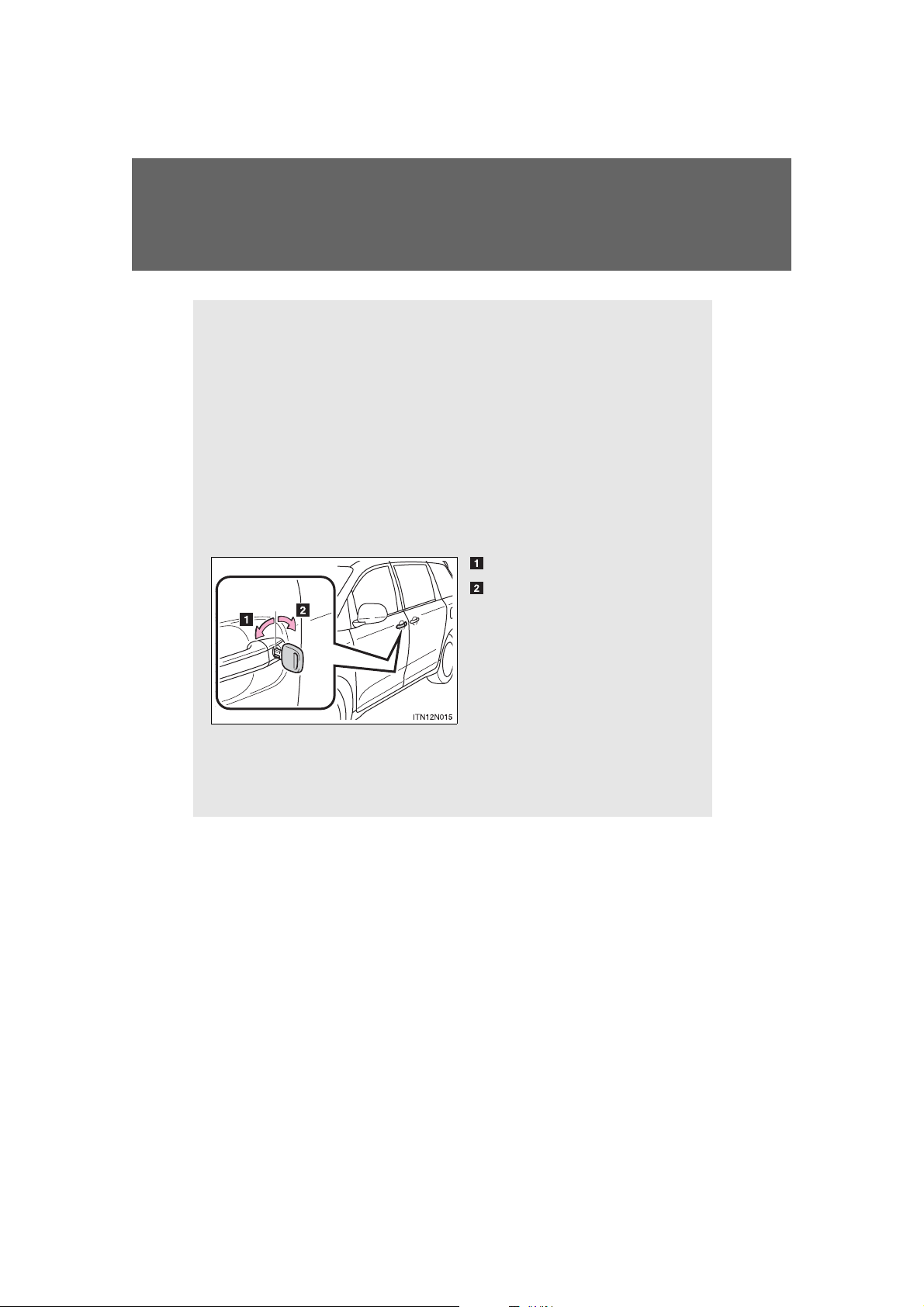
■ Key
Turning the key operates the doors as follows:
Vehicles without a smart key system
Locks all the doors
Unlocks all the doors
Turning the key unlocks the
driver’s side doors. Turning the
key again within 3 seconds
unlocks the other doors.
Vehicles with a smart key system
The doors can also be locked and unlocked with the mechanical
key. (P. 783)
Front doors
60
SIENNA_OM_OM45472U_(U)
Page 61
1-2. Opening, closing and locking th e do o r s
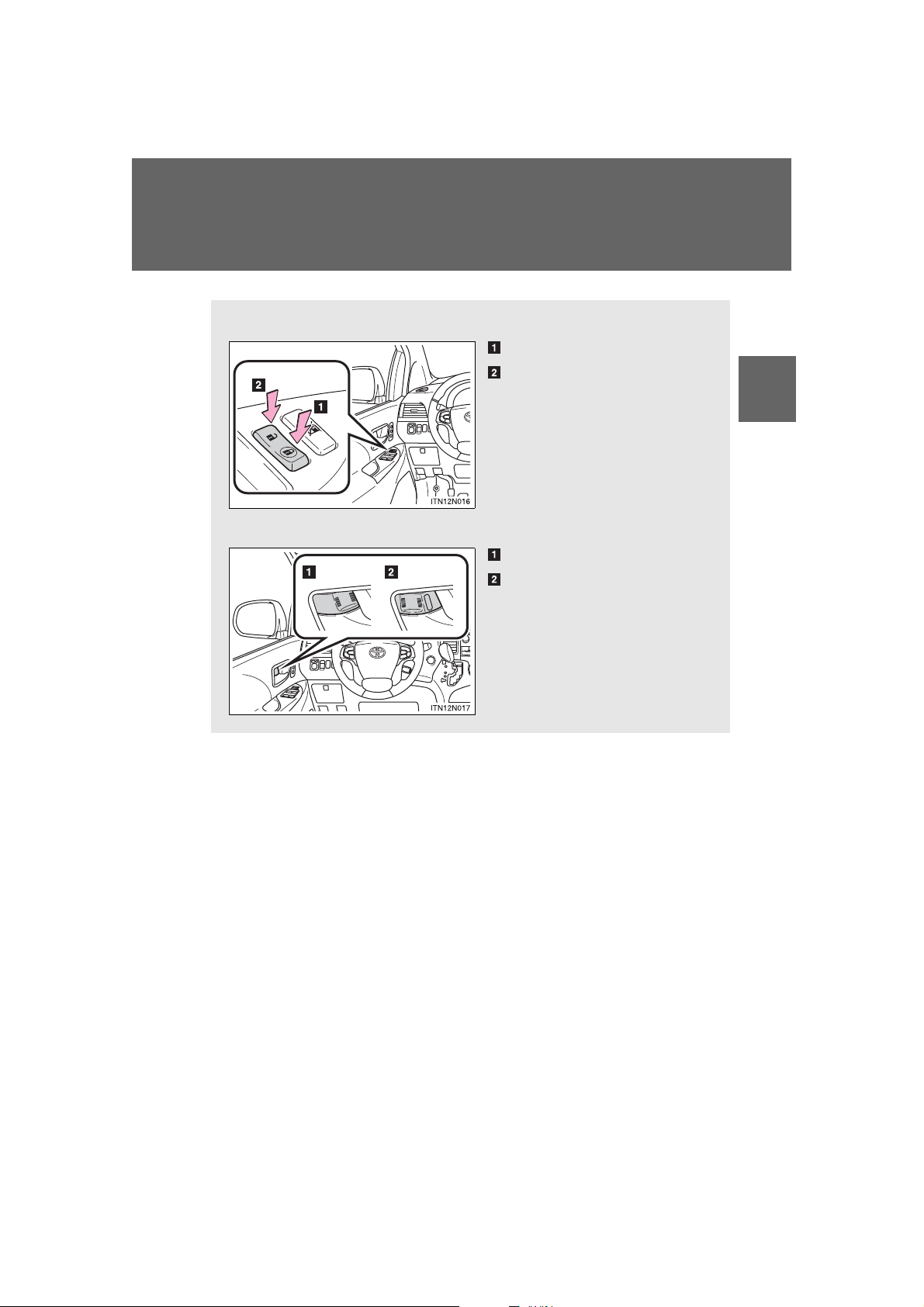
■ Door lock sw itch
Locks all the doors
Unlocks all the doors
■ Inside lock button
Locks the door
Unlocks the door
The front doors can be opened
by pulling the inside handle
even if the lock buttons are in
the lock position.
1
Before driving
SIENNA_OM_OM45472U_(U)
61
Page 62

1-2. Opening, closing and locking the doors
STEP
2
Locking the front doors from the outside without a key
STEP
1
Move the inside lock button to the lock position.
Close the door.
Vehicles without a smart key system
The doors cannot be locked if either of the front doors is open and the
key is in the engine switch.
Vehicles with a smart key system
The door cannot be locked if the “ENGINE START S TOP” switch is in
ACCESSORY or IGNITION ON mode, or the electronic key is left
inside the vehicle.
The key may not be detected correctly and the door may be locked.
62
SIENNA_OM_OM45472U_(U)
Page 63
1-2. Opening, closing and locking th e do o r s
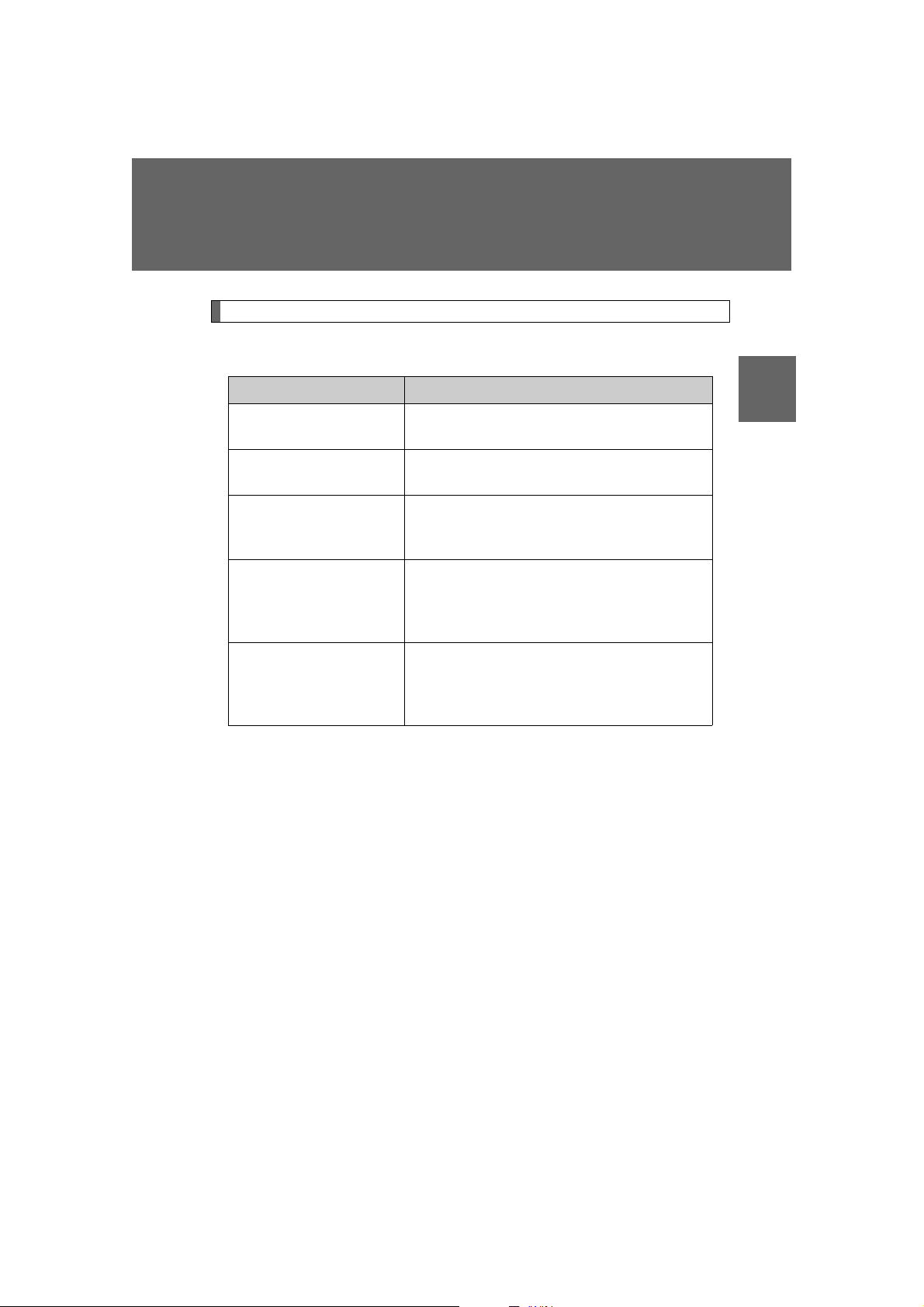
Automatic door locking and unlocking systems
The following functions can be set or cancelled:
Function Operation
Shift position linked
door locking function
Shift position linked
door unlocking function
Speed linked door locking function
Driver’s door linked
door unlocking function
(vehicles without a
smart key system)
Driver’s door linked
door unlocking function
(vehicles with a smart
key system)
Shifting the shift lever out of P locks all the
doors.
Shifting the shift lever to P unlocks all the
doors.
All the doors are locked when the vehicle
speed is approximately 12 mph (20 km/h) or
higher.
All the doors are unlocked when the driver’s
door is opened within 10 seconds after turning the engine switch to “ACC” or “LOCK”.
All the doors are unlocked when the driver’s
door is opened within 10 seconds after turning the “ENGINE START STOP” switch off.
1
Before driving
SIENNA_OM_OM45472U_(U)
63
Page 64

1-2. Opening, closing and locking the doors
■ Setting and canceling the functions
To switch between set and canceled, follow the procedure below:
STEP
1
Vehicles without a smart key system
Close all the doors and turn the engine switch to the “ON”
position. (Perform step 2 within 10 seconds.)
Vehicles with a smart key system
Close all the doors and turn the “ENGINE START STOP”
switch to IGNITION ON mode. (Perform step 2 within 10 seconds.)
64
SIENNA_OM_OM45472U_(U)
Page 65
1-2. Opening, closing and locking th e do o r s
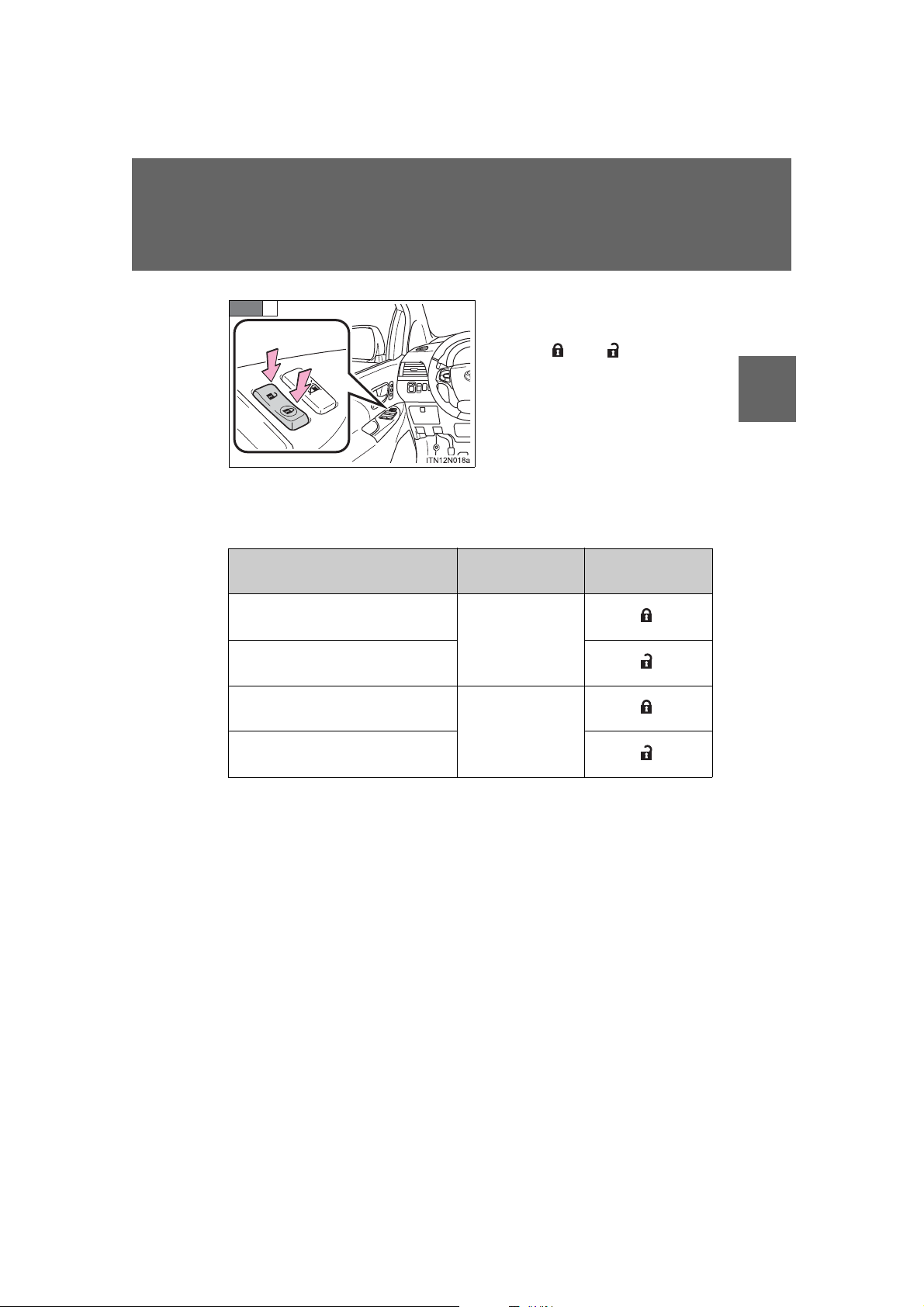
STEP
2
Function
Shift position linked door locking function
Shift position linked door
unlocking function
Speed linked door locking function
Driver’s door linked door unlocking function
Shift the shift lever to P or N, and
press and hold the door lock
switch (
or ) for approxi-
mately 5 seconds and then
release.
The shift lever and switch positions corresponding to the
desired function to be set are
shown in the following table.
Use the same procedure to cancel the function.
Shift lever
position
P
N
Door lock switch
position
1
Before driving
When the setting or canceling operation is complete, all doors are
locked and then unlocked.
SIENNA_OM_OM45472U_(U)
65
Page 66

1-2. Opening, closing and locking the doors
CAUTION
■ When all the doors are locked with the wireless remote control or key
The doors cannot be unlocked with the door lock switch.
The door lock switch can be reset by unlocking all the doors with the wireless remote control or key.
■ Using the mechanical key (vehicles with a smart key system)
The doors can also be locked and unlocked with the mechanical key.
(P. 783)
■ Customization that can be configured at Toyota dealer
Settings (e.g. unlocking function using a key) can be changed.
(Customizable features: P. 831)
■ To prevent an accident
Observe the following precautions while driving the vehicle.
Failing to do so may result in a door opening and an occupant falling out,
resulting in death or serious injury.
● Always use a seat belt.
● Always lock all the doors.
● Ensure that all doors are properly closed.
● Do not pull the inside handle of the doors while driving.
The doors may be opened and the passengers could be thrown out of the
vehicle which may result in serious injury or death.
Be especially careful for the front doors, as the doors may be opened even
if the inside lock buttons are in the locked position.
66
SIENNA_OM_OM45472U_(U)
Page 67
1-2. Opening, closing and locking the doors
Vehicles without power sliding doors
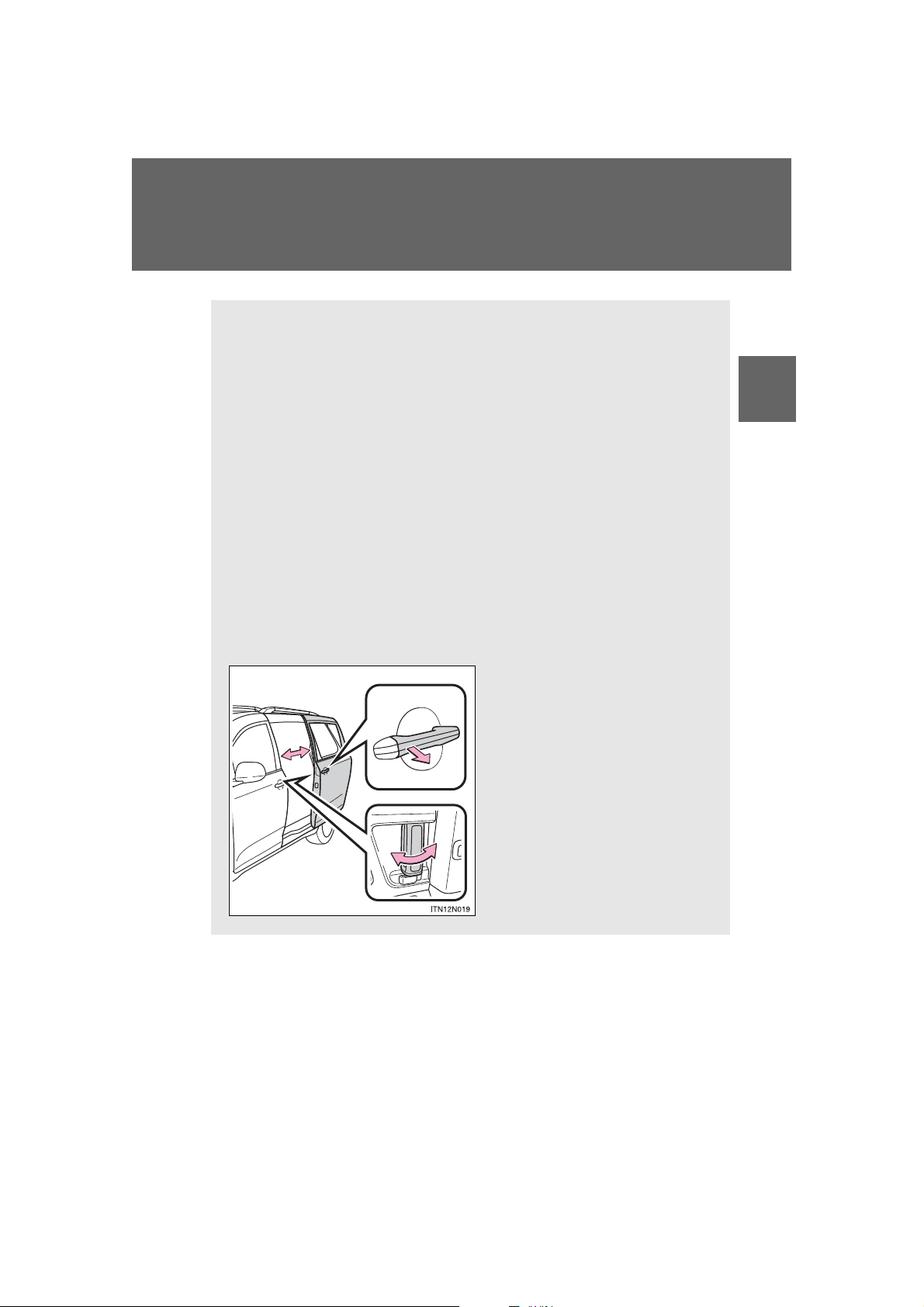
The sliding doors can be opened and closed using the sliding door
handle. The sliding door can be locked and unlocked using the wireless remote control, door lock switch or inside lock knob.
Vehicles with power sliding doors
The power sliding doors can be opened and closed using the sliding
door handle, power sliding door switches or wireless remote control.
The power sliding doors can be locked and unlocked using the wireless remote control, door lock switch or inside lock knob.
■ Wireless remote control
P. 53
■ Door lock sw itch
P. 61
■ Sliding door handle
Open/close
Vehicles with power sliding
doors: The sliding door will be
automatically and completely
opened and closed by the following.
• Pulling the outside handle.
• Sliding the inside handle forward to close or backward
to open.
Sliding doors
1
Before driving
SIENNA_OM_OM45472U_(U)
67
Page 68
1-2. Opening, closing and locking the doors
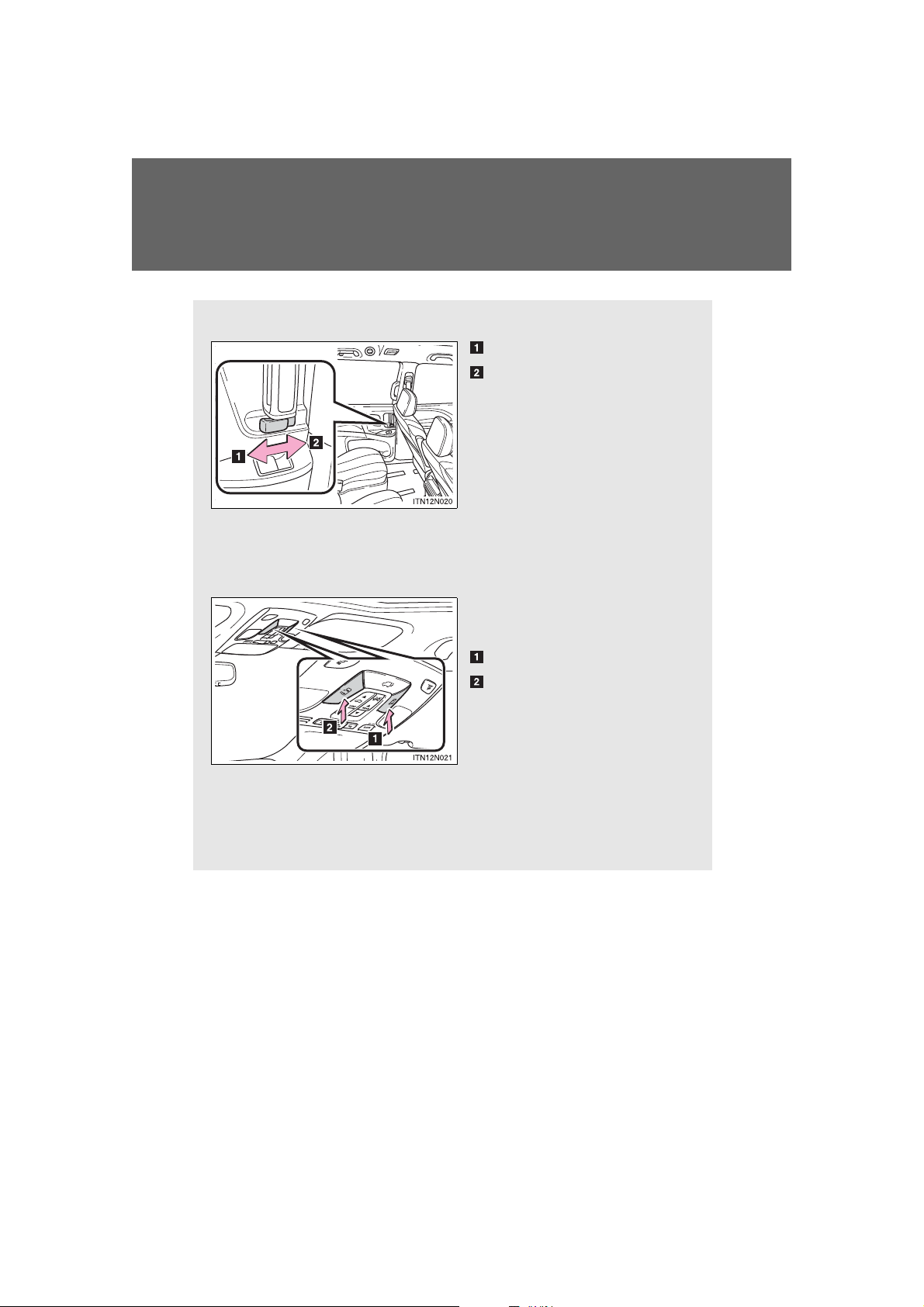
■ Inside lock knobs
Unlocks
Locks
■ Power sliding door switches (vehicles with power sliding
doors)
From front seats
Press the switch to open and
close the following door.
The right side sliding door
The left side sliding door
Pressing the switch again
while the door is operating will
cause the operation to reverse.
However, the reverse operation cannot be performed for
the first second after automatic
operation starts, even if the
switch is pressed again.
68
SIENNA_OM_OM45472U_(U)
Page 69
1-2. Opening, closing and locking th e do o r s
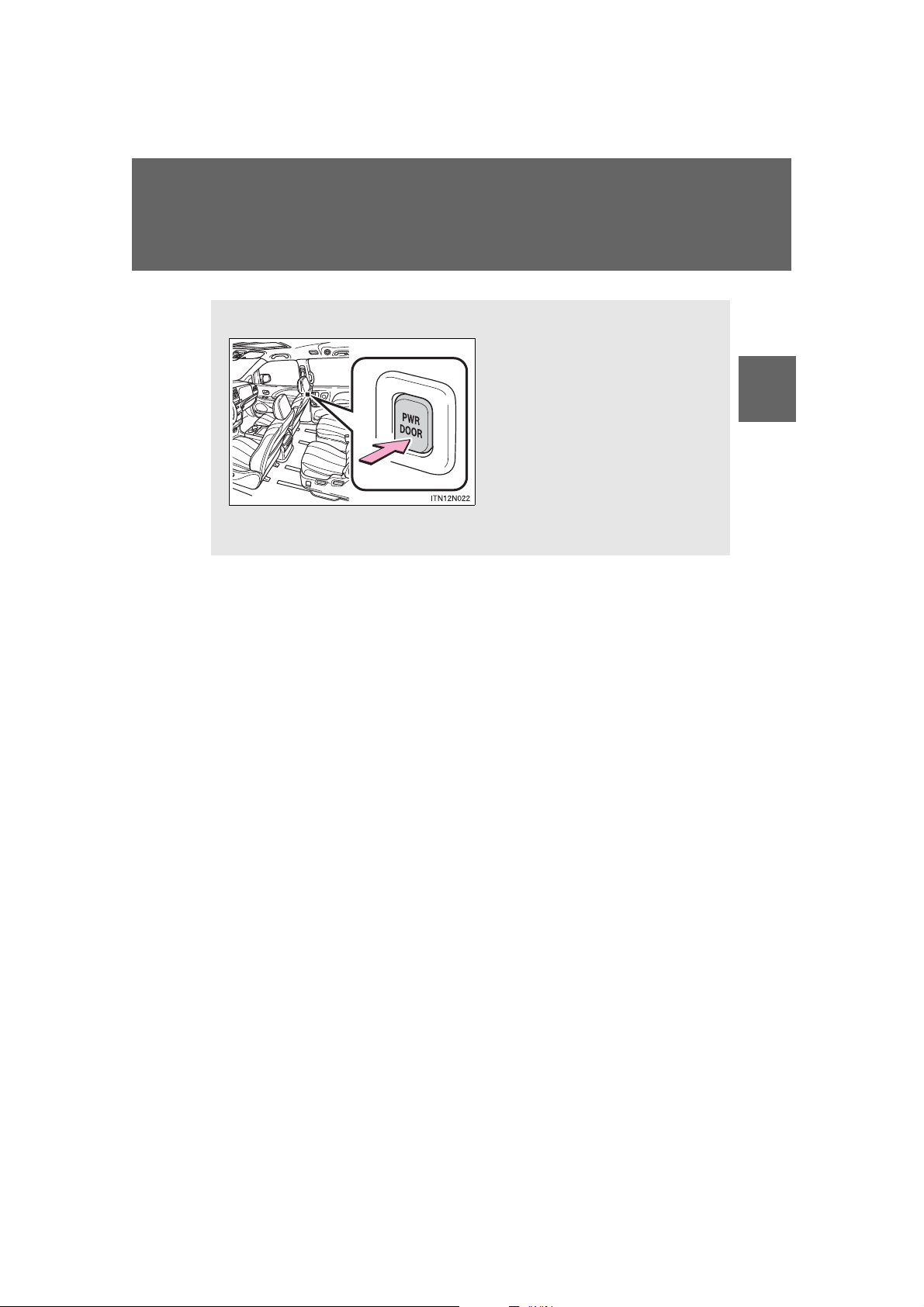
From second seats
Press the switch to open and
close each sliding door.
Pressing the switch again
while the door is operating will
cause the operation to reverse.
However, the reverse operation cannot be performed for
the first second after automatic
operation starts, even if the
switch is pressed again.
1
Before driving
SIENNA_OM_OM45472U_(U)
69
Page 70
1-2. Opening, closing and locking the doors
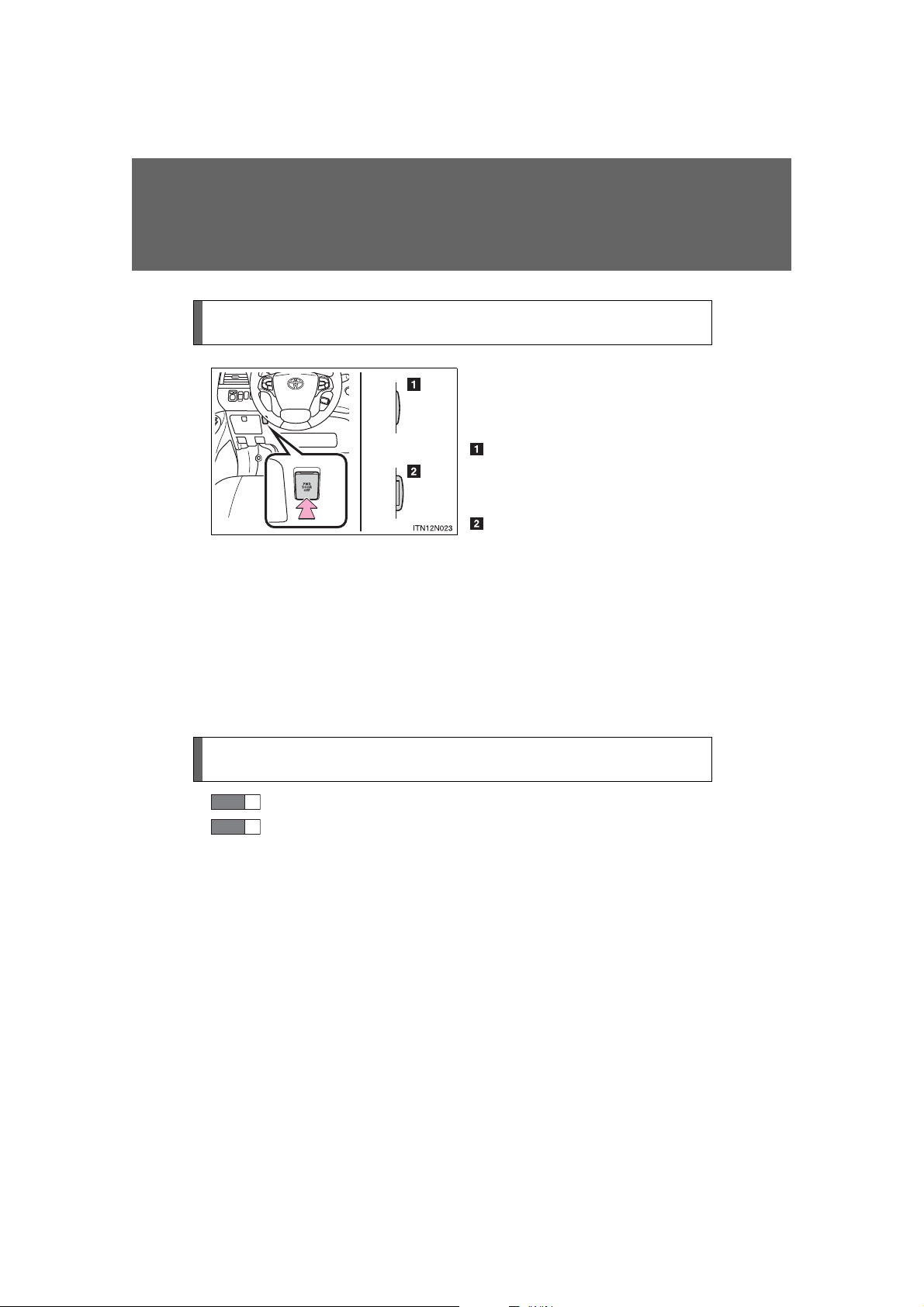
Canceling the power sliding door system (vehicles with power
sliding doors)
Turn the main switch off to disable the power sliding door system.
Off
The sliding doors can only be
opened and closed manually.
On*
The power sliding door can be
opened and closed with the
power sliding door switches for
the front occupants or wireless
remote control even if the sliding
door child-protectors are locked.
*: Orange mark on the switch
should be visible when the switch
is on.
Locking the sliding doors from the outside without the wireless
remote control
STEP
1
Move the inside lock knob to the lock position.
STEP
2
Close the sliding door.
70
SIENNA_OM_OM45472U_(U)
Page 71
1-2. Opening, closing and locking th e do o r s
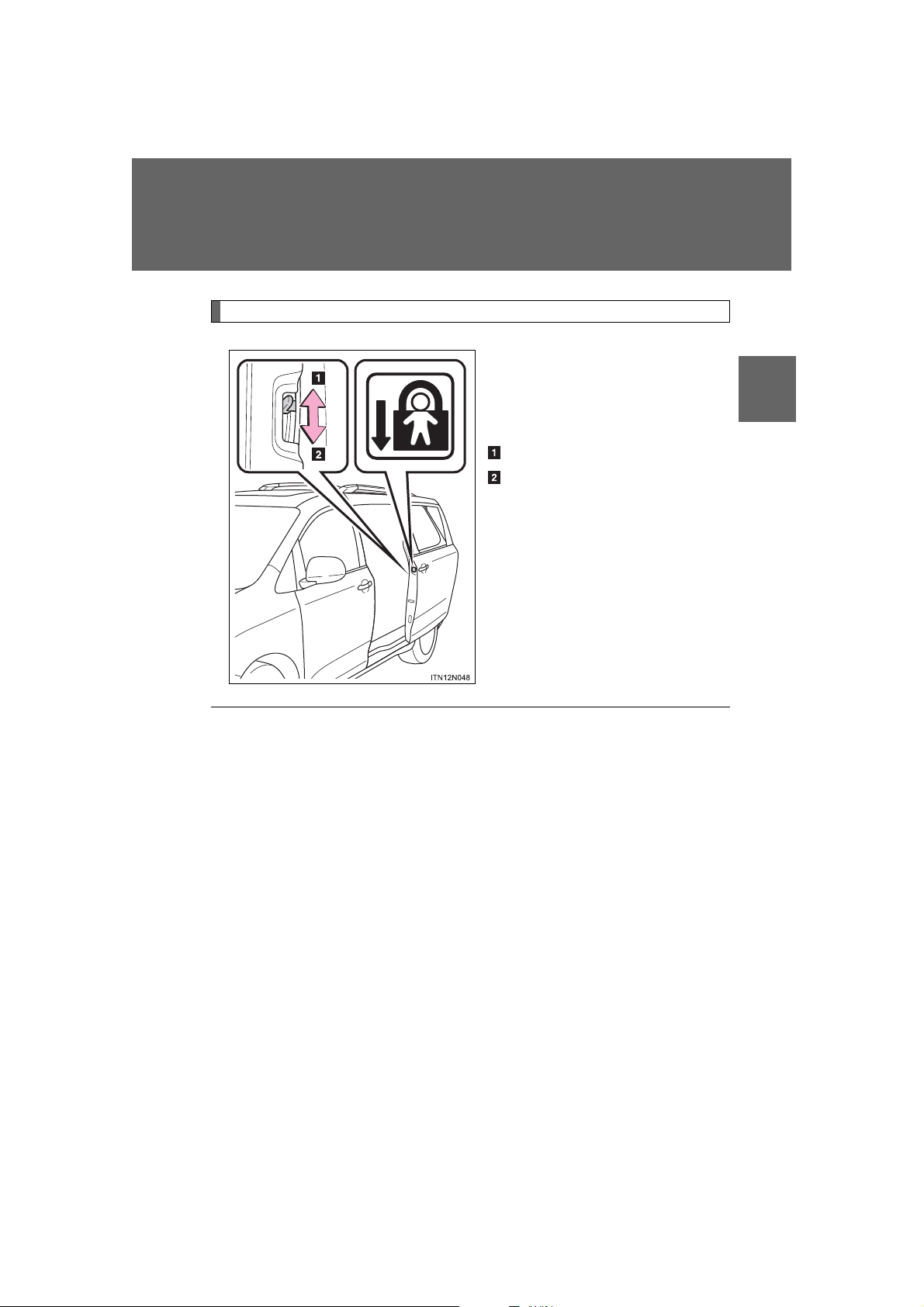
Sliding door child-protector locks
The sliding door cannot be
opened by the inside door handle and the second seat sliding
door switch when the lock is set.
Unlock
Lock
These locks can be set to prevent
children from opening the sliding
doors. Push down on each sliding
door switch to lock that sliding
door.
1
Before driving
■ The power sliding door can be operated when (vehicles with power
sliding doors)
● Open operation: The shift lever is in P.
Close operation: The vehicle is stopped.
● The power sliding door system main switch is on.
● The power sliding door is unlocked. (Except for the wireless remote con-
trol operation or smart key system operation.)
● The sliding door child-protector lock is not set. (However, the switch for
the front occupants and the outside handle still operate the power sliding
door.)
71
SIENNA_OM_OM45472U_(U)
Page 72

1-2. Opening, closing and locking the doors
■ Power sliding doors
● If the power sliding door outside handle is pulled while the power sliding
door is opening or closing, the door will reverse the operation direction.
● During opening operation:
Stroking the power sliding door handle forward will reverse the direction
and start closing.
Stroking the handle backward will continue opening.
During closing operation:
Stroking the power sliding door handle backward will reverse the direction and start opening.
Stroking the handle forward will continue closing.
● The power sliding doors can be opened/closed manually when the power
sliding door function is canceled with the main switch.
● Vehicles without a smart key system: A buzzer sounds if you put the shift
lever out of P with the engine switch in the “ON” position and the sliding
door not completely closed.
Vehicles with a smart key system: A buzzer sounds if you put the shift
lever out of P with the “ENGINE START STOP” switch in IGNITION ON
mode and the sliding door not completely closed.
● Vehicles with AUTO ACCESS SEAT: If the AUTO ACCESS SEAT has
not been locked in place after being stowed, the right-hand sliding door
will not close and a beep will sound twice.
For details, refer to “AUTO ACCESS SEAT OWNER’S MANUAL”.
72
SIENNA_OM_OM45472U_(U)
Page 73
1-2. Opening, closing and locking th e do o r s
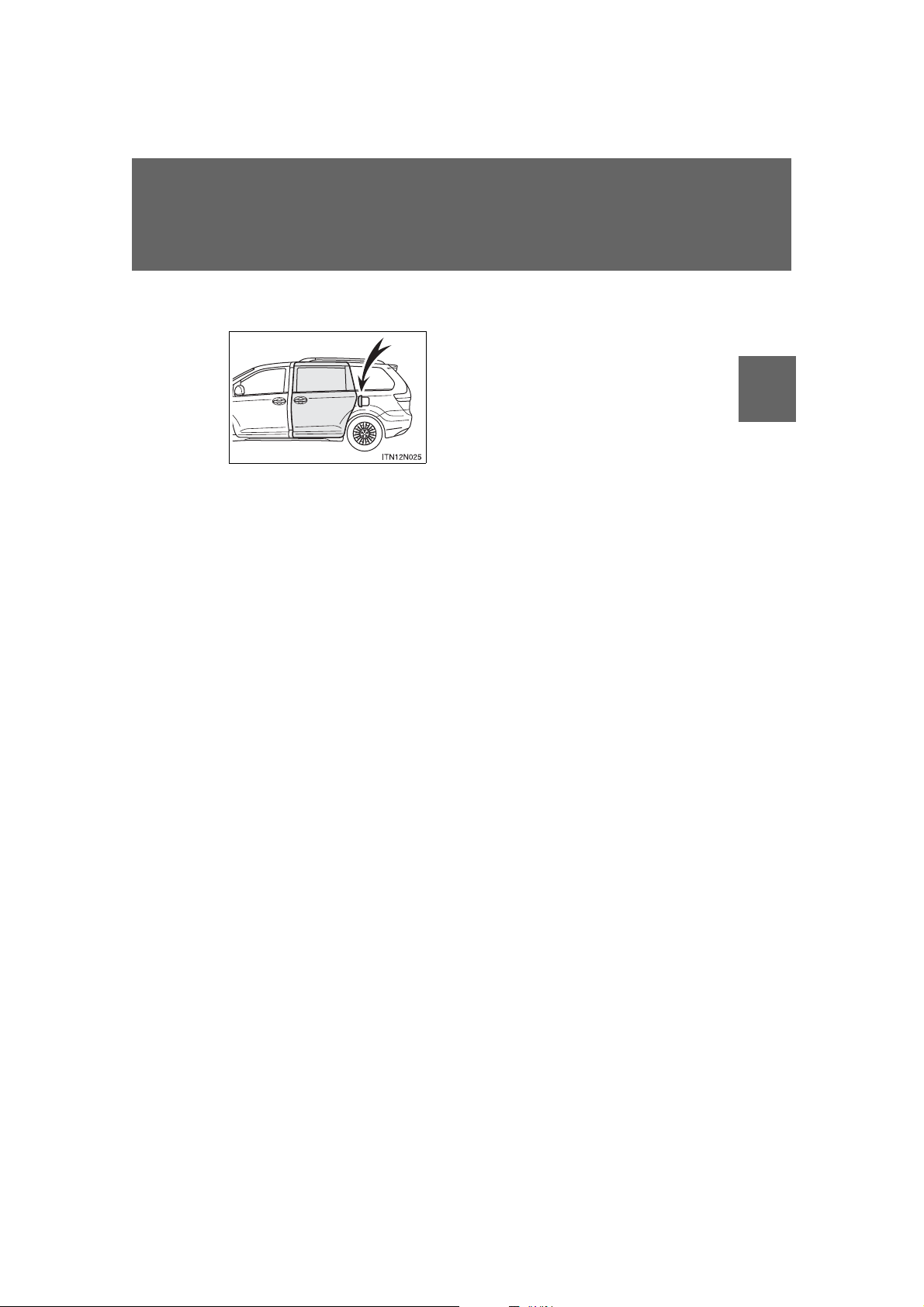
The left side sliding door does not open
completely when the fuel filler door is
opened.
■ The situations in which the sliding door does not open completely
■ Jam protection function (vehicles with power sliding doors)
● If anything obstructs the power sliding door while it is closing or opening,
the power sliding door will automatically operate in the opposite direction.
● If the jam protection function operates during two consecutive opening
and closing operations, the power sliding door will be stopped at that
position and the power sliding door system will be canceled.
■ Power sliding door brake function (vehicles with power sliding doors)
When the power sliding door detects an abnormality and stops operating,
power sliding door brake function may be activated. When brake function is
activated, door movement is restricted by the brake and motion may appear
to be not smooth. This is not malfunction. Move the door to fully closed position to reset the system and normal power sliding door function will resume.
■ Sliding door closer (vehicles with power sliding doors)
In the event that the sliding door is left slightly open, the sliding door closer
will automatically close it to the fully closed position.
1
Before driving
SIENNA_OM_OM45472U_(U)
73
Page 74
1-2. Opening, closing and locking the doors
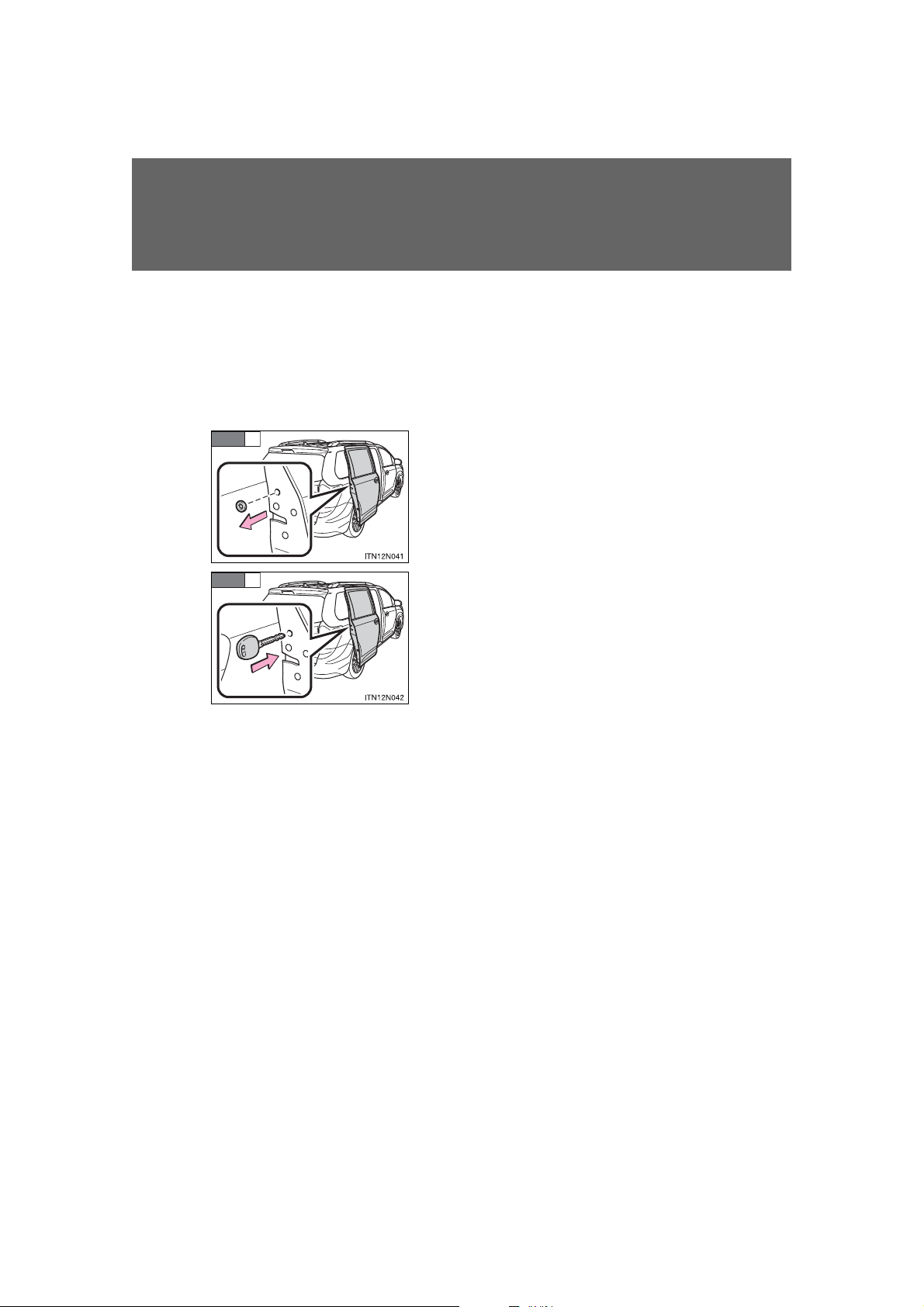
Remove the plug from the rear edge of
the sliding door.
Insert a key in the hole and push the
mechanical cancel lever.
STEP
1
■ If the power sliding door is inoperative (vehicles with power sliding
doors)
When the power sliding door detects an abnormality and stops opening and
can not be completely closed manually, cancel the function as follows and
close the door manually.
After that, have the vehicle inspected and repaired by your Toyota dealer.
STEP
2
■ When the battery is disconnected (vehicles with power sliding doors)
The power sliding door system must be initialized in order to ensure proper
operation. To initialize it, close the sliding doors completely by hand.
■ Customization that can be configured at Toyota dealer
Settings (e.g. opening and closing operation) can be changed.
(Customizable features: P. 831)
74
SIENNA_OM_OM45472U_(U)
Page 75

1-2. Opening, closing and locking th e do o r s
CAUTION
■ While driving
Observe the following precautions while driving.
Failure to do so may cause a door to open unexpectedly and an occupant to
fall out of the vehicle, resulting in death or serious injury.
● Ensure that all doors are properly closed.
● Always lock the doors.
● Set the sliding door child-protector locks when children are seated in the
vehicle.
● Always use a seat belt.
● Do not operate the inside handle of the doors while driving.
■ When children are in the vehicle
Observe the following precautions.
Failure to do so may result in death or serious injury.
● Do not leave children alone in the vehicle.
If a child is accidentally locked in the vehicle, they could have heat
exhaustion.
● Do not allow a child to open or close the sliding door.
Doing so may cause the sliding door to move unexpectedly, or cause the
child’s hands, head, or neck to be caught by the moving sliding door.
1
Before driving
75
SIENNA_OM_OM45472U_(U)
Page 76

1-2. Opening, closing and locking the doors
CAUTION
■ Operating the sliding doors
Observe the following precautions.
Failure to do so may cause parts of the body to be caught, resulting in death
or serious injury.
● When opening or closing a sliding door, thoroughly check to make sure the
surrounding area is safe.
● When opening or closing the sliding doors with windows open, keep all
body parts clear of the windows.
● If anyone is in the vicinity, make sure t hey are clear of the door path an d let
them know that the sliding door is about to open or close.
● Do not leave the sliding door at half-opened position because the sliding
door is not latched at this position. The sliding door may move unexpectedly on an incline.
76
SIENNA_OM_OM45472U_(U)
Page 77
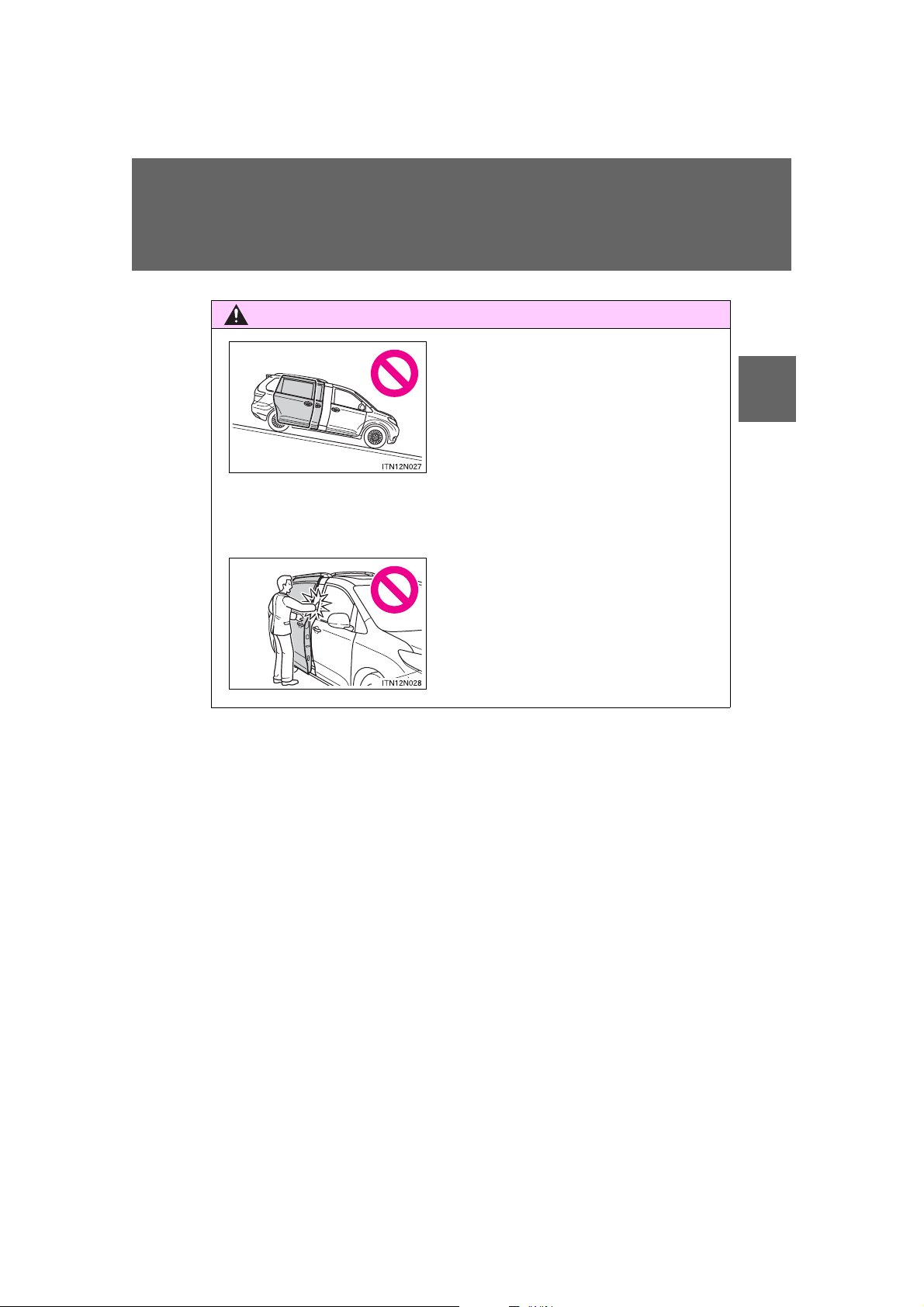
1-2. Opening, closing and locking th e do o r s
CAUTION
● When the vehicle is stopped on a slope,
the door will slide faster when opening
or closing, so be especially careful that
the passengers do not get hit or
pinched by the door.
● Open the sliding door fully while pas-
sengers are getting on or off on a downward slope. Do not operate the outside
handle or inside handle while the door
is open as the door could suddenly
close by itself causing injury.
● When closing the sliding door, take
extra care to prevent your fingers etc.
from being caught.
1
Before driving
SIENNA_OM_OM45472U_(U)
77
Page 78
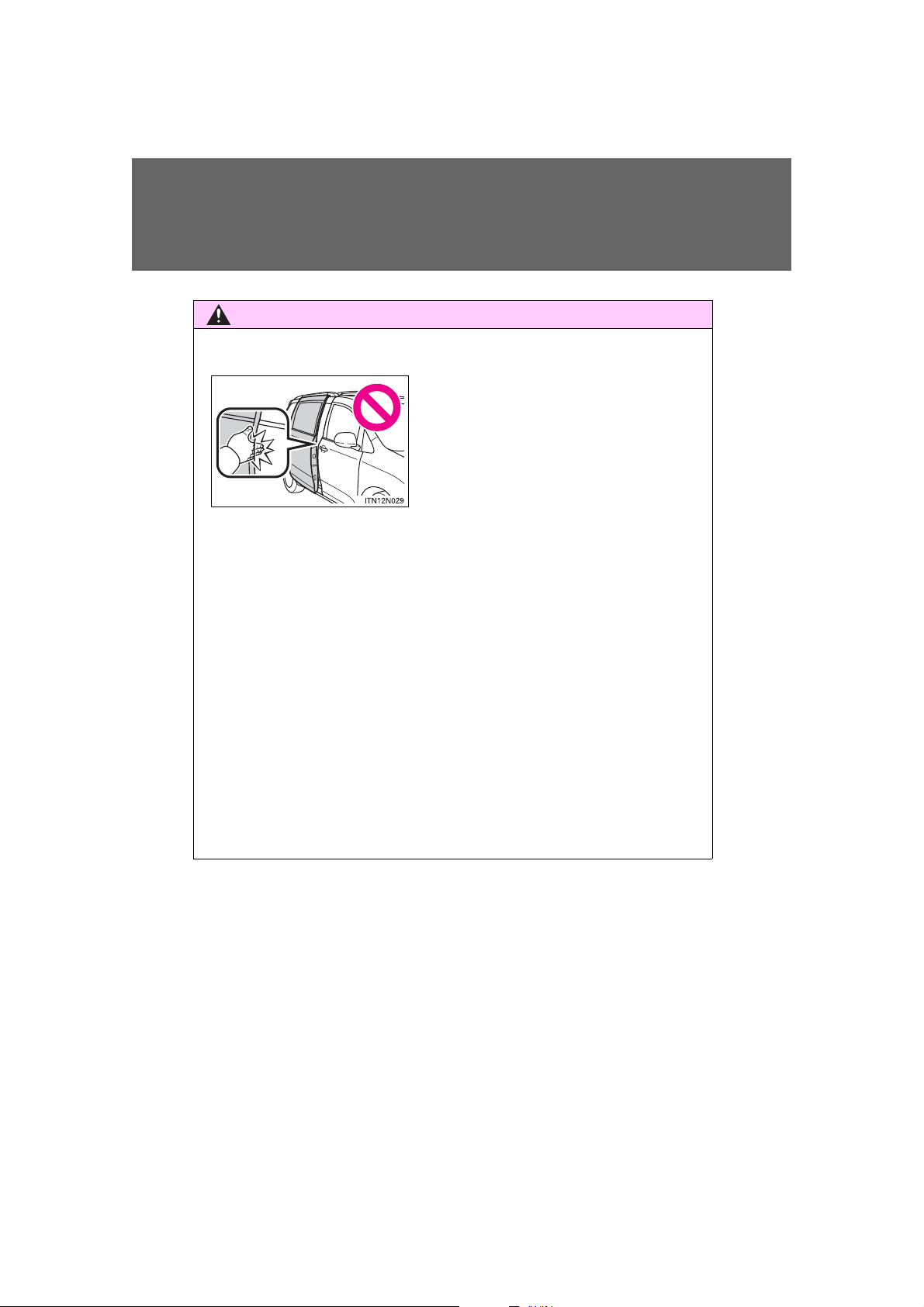
1-2. Opening, closing and locking the doors
CAUTION
● In the event that the sliding door is left
slightly open, the sliding door closer will
automatically close it to the fully closed
position. It takes several seconds
before the sliding door closer begins to
operate. Be careful not to catch fingers
or anything else in the sliding door, as
this may cause bone fractures or other
serious injuries.
■ Sliding door closer (if equipped)
● Use caution when using the sliding door closer. The sliding door closer
operates even when the power sliding door system is canceled.
■ Power sliding doors
Observe the following precautions when the power sliding door system is on.
Failure to do so may cause death or serious injury.
● When using the door handle to open or close the power sliding door,
remove your hand from the door handle immediately after starting power
sliding door operation. If you leave your hand on the door handle during
operation, your hand, fingers, wrist etc. may be subjected to an excessive
amount of force.
● Check the safety of the surrounding area to make sure there are no obsta-
cles or anything that could cause any of your belongings to get caught.
● If anyone is in the vicinity, make sure t hey are clear of the door path an d let
them know that the sliding door is about to open or close.
78
SIENNA_OM_OM45472U_(U)
Page 79

1-2. Opening, closing and locking th e do o r s
CAUTION
● If the power sliding door system is turned off with the main switch while the
sliding door is operating automatically, the automatic operation is stopped.
The sliding door then has to be operated manually. Take extra care when
on an incline, as the sliding door may open or close unexpectedly.
● On an incline, a sliding door may close by itself after it opens automati-
cally. Make sure the sliding door is fully open and secure.
● If the operating conditions of the power sliding door are no longer met, a
buzzer may sound and the sliding door may stop opening or closing. The
sliding door then has to be operated manually . Take extra care when on an
incline, as the sliding door may open or close abruptly.
● In the following situations, the power sliding door may detect an abnormal-
ity and automatic operation may be stopped. In this case, the sliding door
has to be operated manually. Take extra care when on an incline, as the
sliding door may open or close abruptly.
• When the sliding door contacts an obstacle
• Vehicles without a smart key system:
When the battery voltage suddenly drops, such as when the engine
switch is turned to the “ON” position or the engine is started during
automatic operation
Vehicles with a smart key system:
When the battery voltage suddenly drops, such as when the “ENGINE
START STOP” switch is turned to IGNITION ON mode or the engine is
started during automatic operation
1
Before driving
79
SIENNA_OM_OM45472U_(U)
Page 80

1-2. Opening, closing and locking the doors
CAUTION
● Do not attach any accessories other than genuine Toyota parts to the
power sliding door. The power sliding door may not operate, causing itself
to malfunction, or the power sliding door may close again after it is
opened.
● When the child-protector locks are set, make sure to turn off the power
sliding door system with the main switch in order to totally disable the system.
■ Jam protection function (vehicles with power sliding doors)
Observe the following precautions.
Failure to do so may cause death or serious injury.
● Never use any part of your body to intentionally activate the jam protection
function.
● The jam protection function may not work if something gets caught just
before the power sliding door fully closes. Be careful not to catch fingers or
anything else.
● The jam protection function may not work depending on the shape of the
object that is caught. Be careful not to catch fingers or anything else.
80
SIENNA_OM_OM45472U_(U)
Page 81
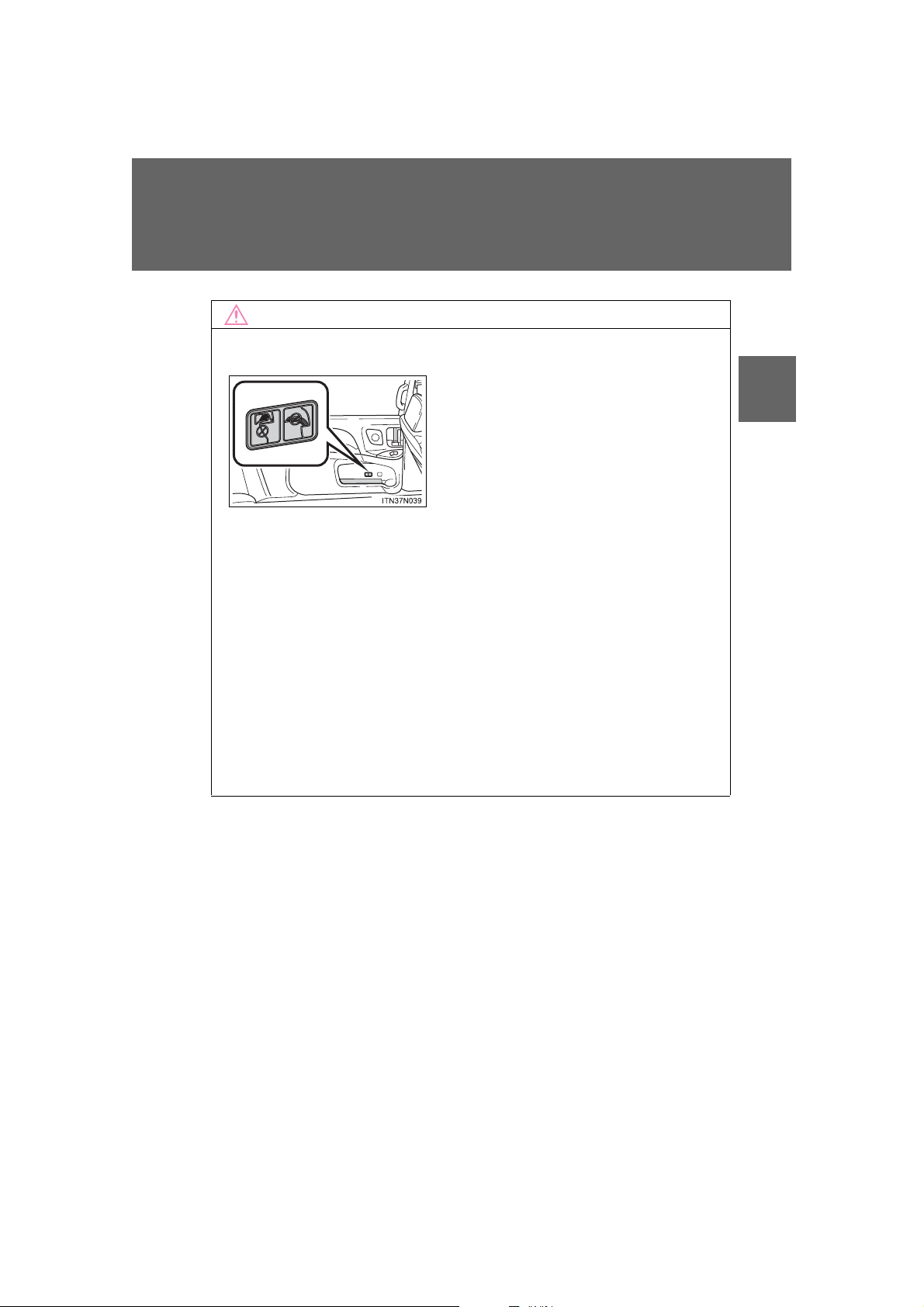
1-2. Opening, closing and locking th e do o r s
NOTICE
Make sure magazines are not bent or
protruding from the sliding door pockets.
Do not insert anything too big so that the
shape of the sliding door pockets is distorted. Such objects may obstruct the
opening/closing of the sliding doors, damage the sliding door pockets or the vehicle body, and may result in a malfunction.
■ Sliding door
■ To prevent damage to your vehicle
● Vehicles with the power sliding door:
• Do not apply excessive force when the sliding door is operating.
• Do not place your hand or foot near door hinges or rollers when the
sliding door is operating.
• Avoid forcibly opening the left side sliding door fully when the fuel filler
door is opened. Otherwise, the fuel filler door may be damaged.
• Take care not to damage the sensors (installed on the front edge of the
power sliding door) with a knife or other sharp object.
● Make sure there is nothing in the doorway before closing.
● Do not close the sliding door by applying the brakes. Doing so could cause
the sliding door to be damaged.
1
Before driving
SIENNA_OM_OM45472U_(U)
81
Page 82
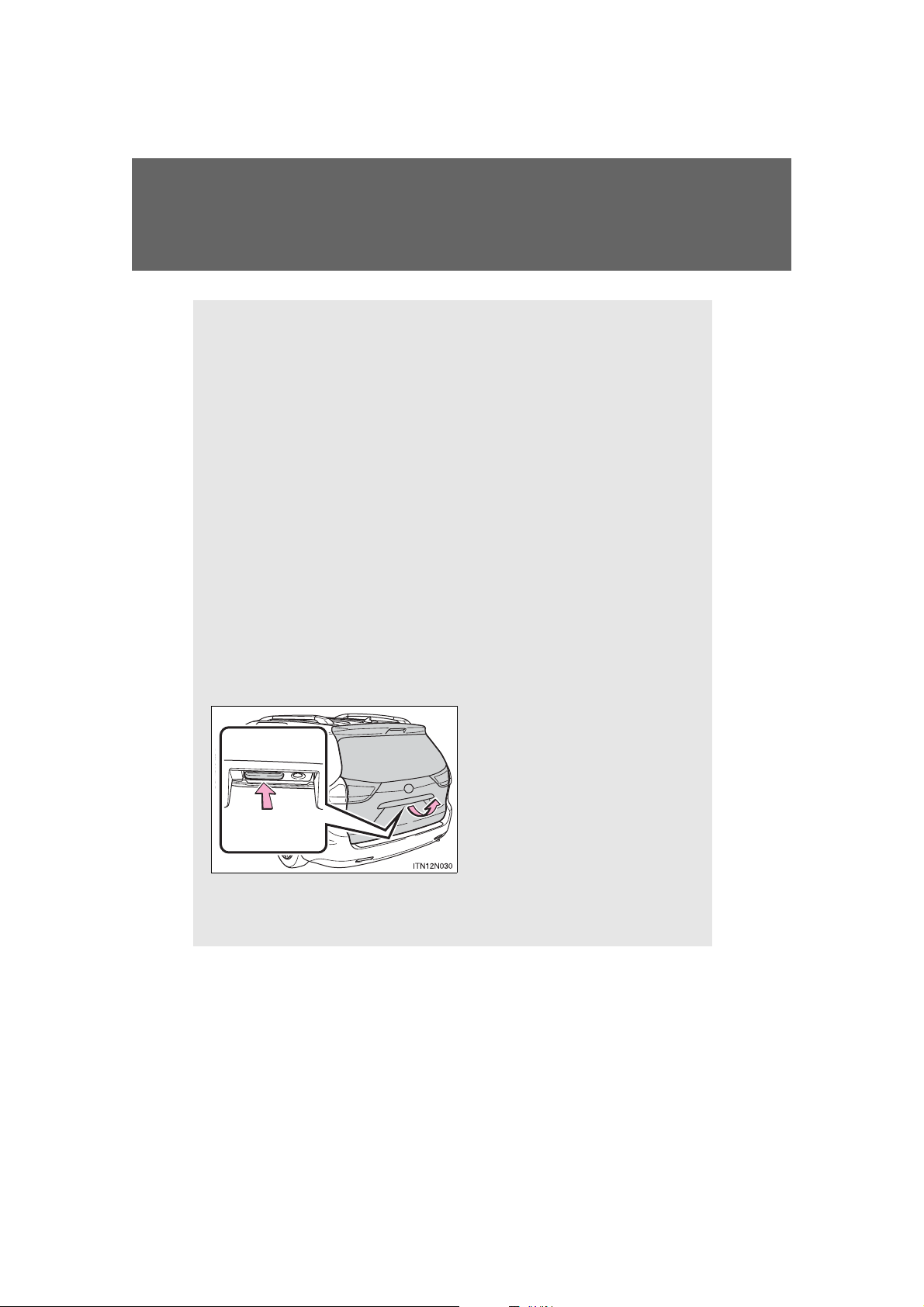
1-2. Opening, closing and locking the doors
The back door can be locked and unlocked using the entry function
(vehicles with a smart key system), wireless remote control or door
lock switch.
The back door can be opened using the back door opener.
In addition, the power back door can be opened/closed using the
power back door switch or wireless remote control.
■ Locking and unlocking the back door
Entry function (vehicles with a smart key system)
P. 37
Wireless remote control
P. 53
Door lock switch
P. 61
■ Opening the back door from outside the vehicle
Back door opener
Raise the back door while
pressing the back door opener
to release the lock to open the
back door.
Wireless remote control (vehicles with power back door)
P. 53
Back door
82
SIENNA_OM_OM45472U_(U)
Page 83
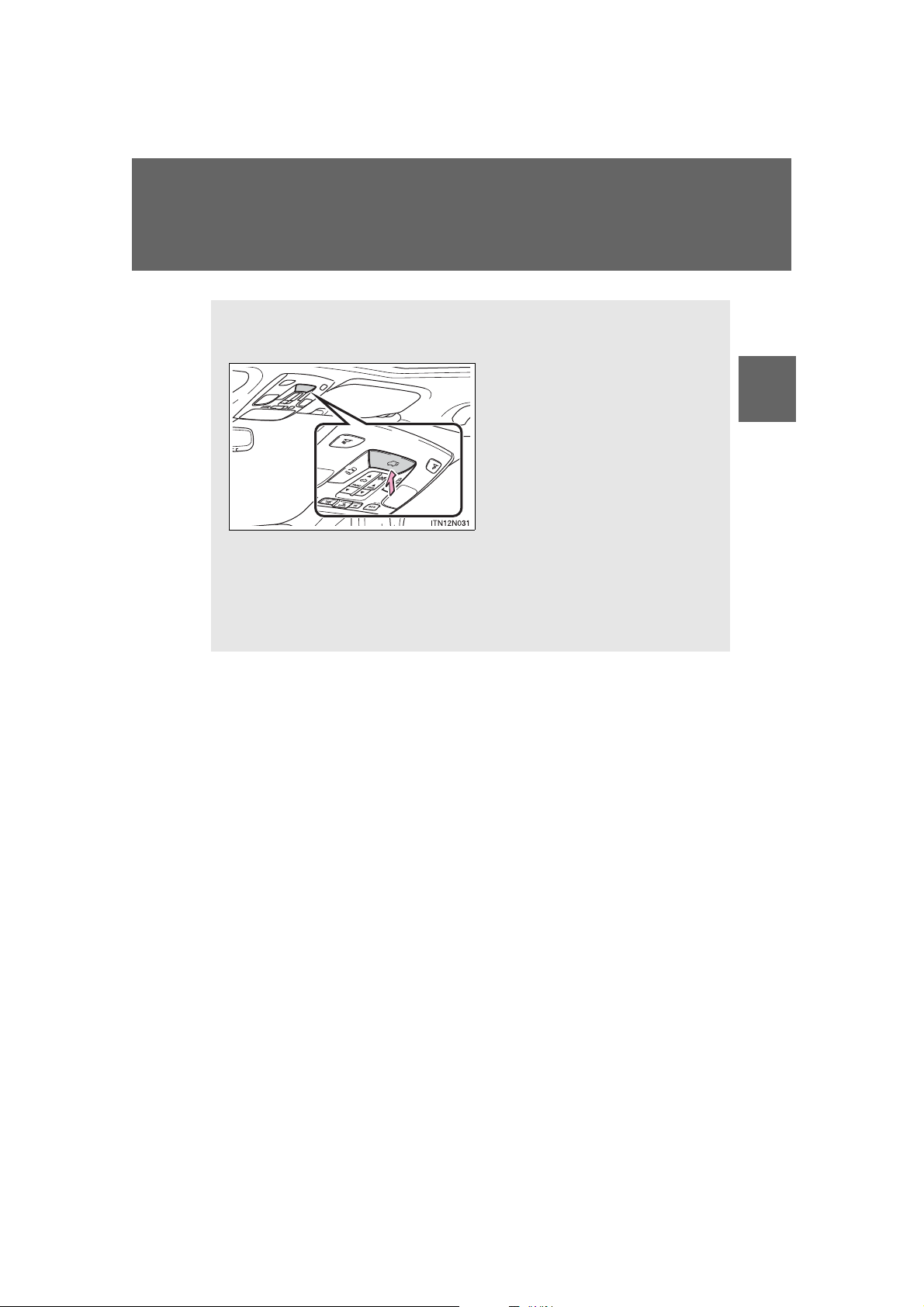
1-2. Opening, closing and locking th e do o r s
■ Opening the back door from inside the vehicle (vehicles
with power back door)
Press and hold the switch to
open/close the back door.
Pressing the switch again
while the power back door is
operating will cause the operation to reverse.
However, the reverse operation cannot be performed for
the first second after automatic
operation starts even if the
switch is pressed again.
As the power back door starts to open or close automatically, two
beeps sound and the emergency flashers flash twice.
1
Before driving
SIENNA_OM_OM45472U_(U)
83
Page 84
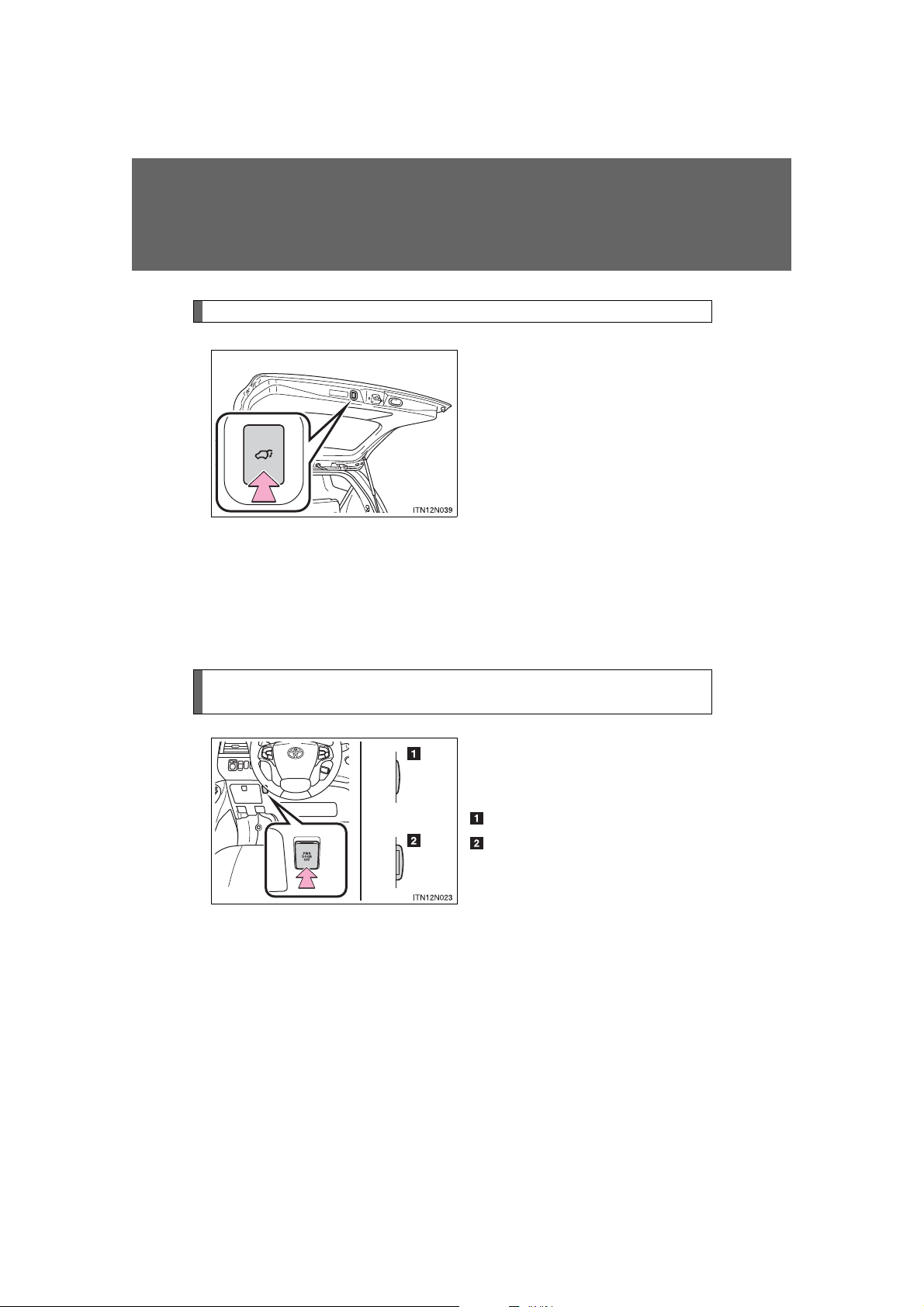
1-2. Opening, closing and locking the doors
Back door closer (if equipped)
Press the switch to close the
back door.
Pressing the switch again while
the power back door is closing
will cause it to open again.
However, the reverse operation
cannot be performed for the first
second after automatic operation
starts even if the switch is
pressed again.
A buzzer sounds twice and the
emergency flashers flash twice to
indicate that the back door is
opening/closing.
Canceling the power back door system (vehicles with power
back door)
Turn the main switch off to disable the power back door system.
Off
On
*
: Orange mark on the switch
*
should be visible when the switch
is on.
84
SIENNA_OM_OM45472U_(U)
Page 85
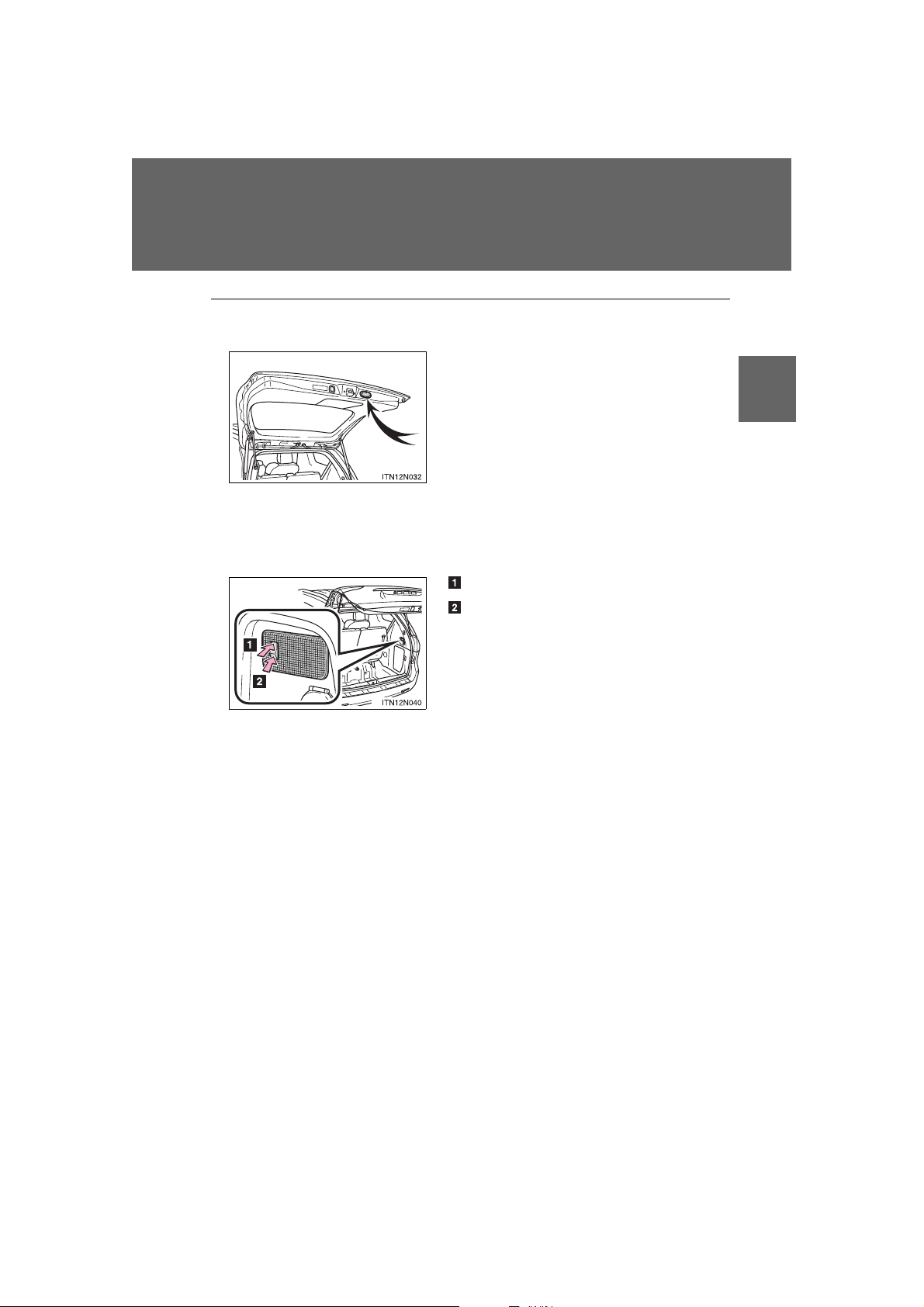
1-2. Opening, closing and locking th e do o r s
Lower the back door using the back door
handle, and make sure to push the back
door down from the outside to close it.
On
Off
■ When closing the back door using the back door handle
■ Luggage compartment light
The luggage compartment light turns on when the back door is opened with
the luggage compartment light switch on.
1
Before driving
SIENNA_OM_OM45472U_(U)
85
Page 86
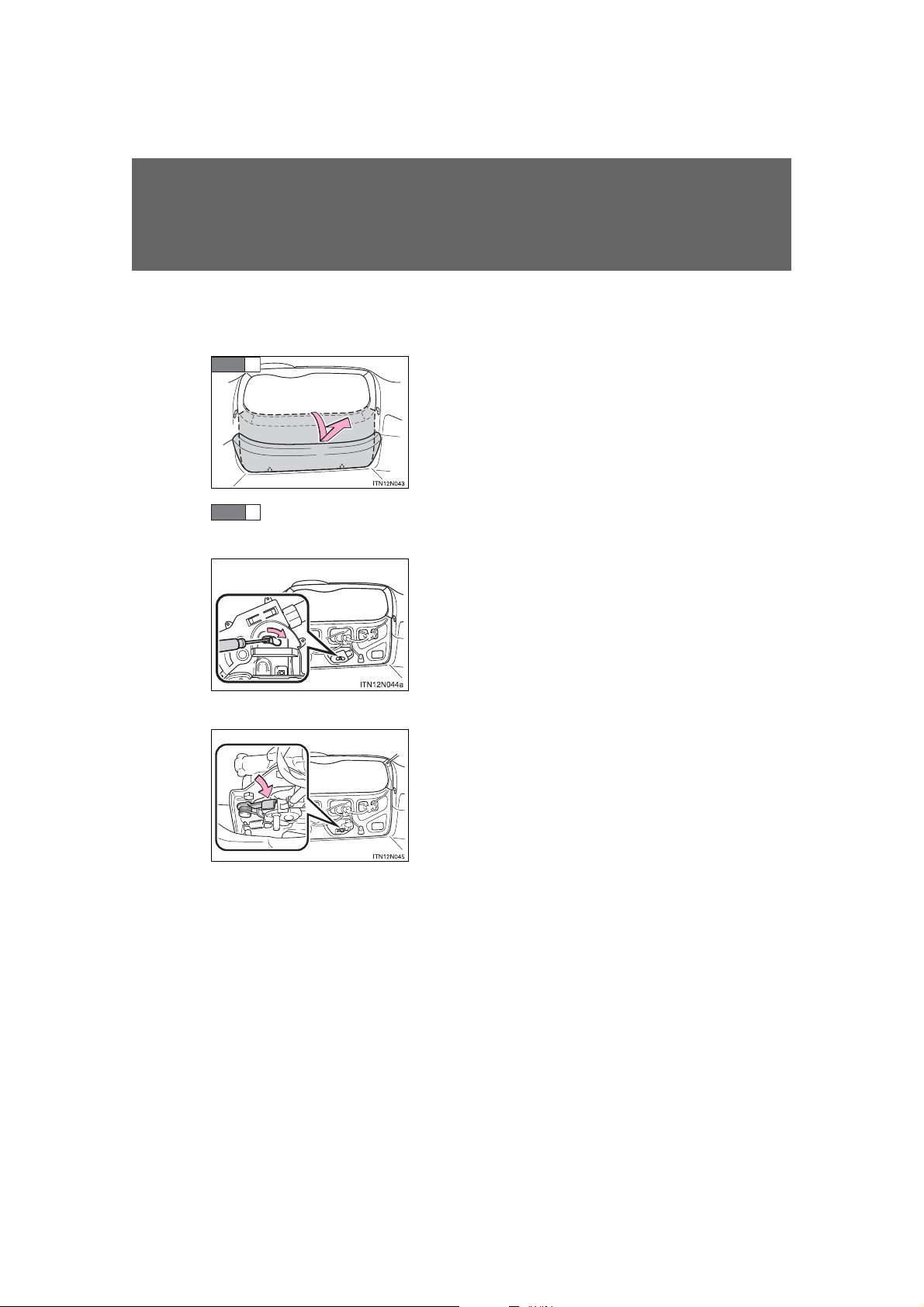
1-2. Opening, closing and locking the doors
Remove the inside panel.
STEP
1
■ If the back door opener is inoperative
The back door can be operated from the inside.
STEP
2
Move the lever.
Vehicles without power back door
Vehicles with power back door
86
SIENNA_OM_OM45472U_(U)
Page 87

1-2. Opening, closing and locking th e do o r s
STEP
1
■ The power back door can be operated when
● The shift lever is in P.
● The back door is unlocked.
■ Jam protection function (vehicles with power back door)
● If anything obstructs the power back door while it is closing or opening,
the back door will automatically operate in the opposite direction.
● If the jam protection function operates during two consecutive closing
operations, the back door will be stopped at that position.
■ Back door closer (vehicles with power back door)
In the event that the back door is left slightly open, the back door closer will
automatically close it to the fully closed position.
■ When the battery is disconnected
● The back door will be automatically locked after the battery is recon-
nected.
● The power back door (if equipped) must be initialized in order to ensure
proper operation.
Unlock the back door with the wireless remote control or door lock
switch.
STEP
2
Close the back door completely by hand.
1
Before driving
87
SIENNA_OM_OM45472U_(U)
Page 88

1-2. Opening, closing and locking the doors
CAUTION
■ While driving
● Keep the back door closed while driving.
If the back door is left open, it may hit near-by objects while driving or luggage may be unexpectedly thrown out, causing an accident.
In addition, exhaust gases may enter the vehicle, causing death or a serious health hazard. Make sure to close the back door before driving.
● Before driving the vehicle, make sure that the back door is fully closed. If
the back door is not fully closed, it may open unexpectedly while driving,
causing a passenger to be thrown out of the vehicle.
● Never let anyone sit in the luggage compartment. In the event of sudden
braking or a collision, they are susceptible to death or serious injury.
■ When children are in the vehicle
Observe the following precautions.
Failure to do so may result in death or serious injury.
● Do not leave children alone in the luggage compartment.
If a child is accidentally locked in the luggage compartment, they could
have heat exhaustion.
● Do not allow a child to open or close the back door.
Doing so may cause the back door to move unexpectedly, or cause the
child’s hands, head, or neck to be caught by the closing back door.
88
SIENNA_OM_OM45472U_(U)
Page 89
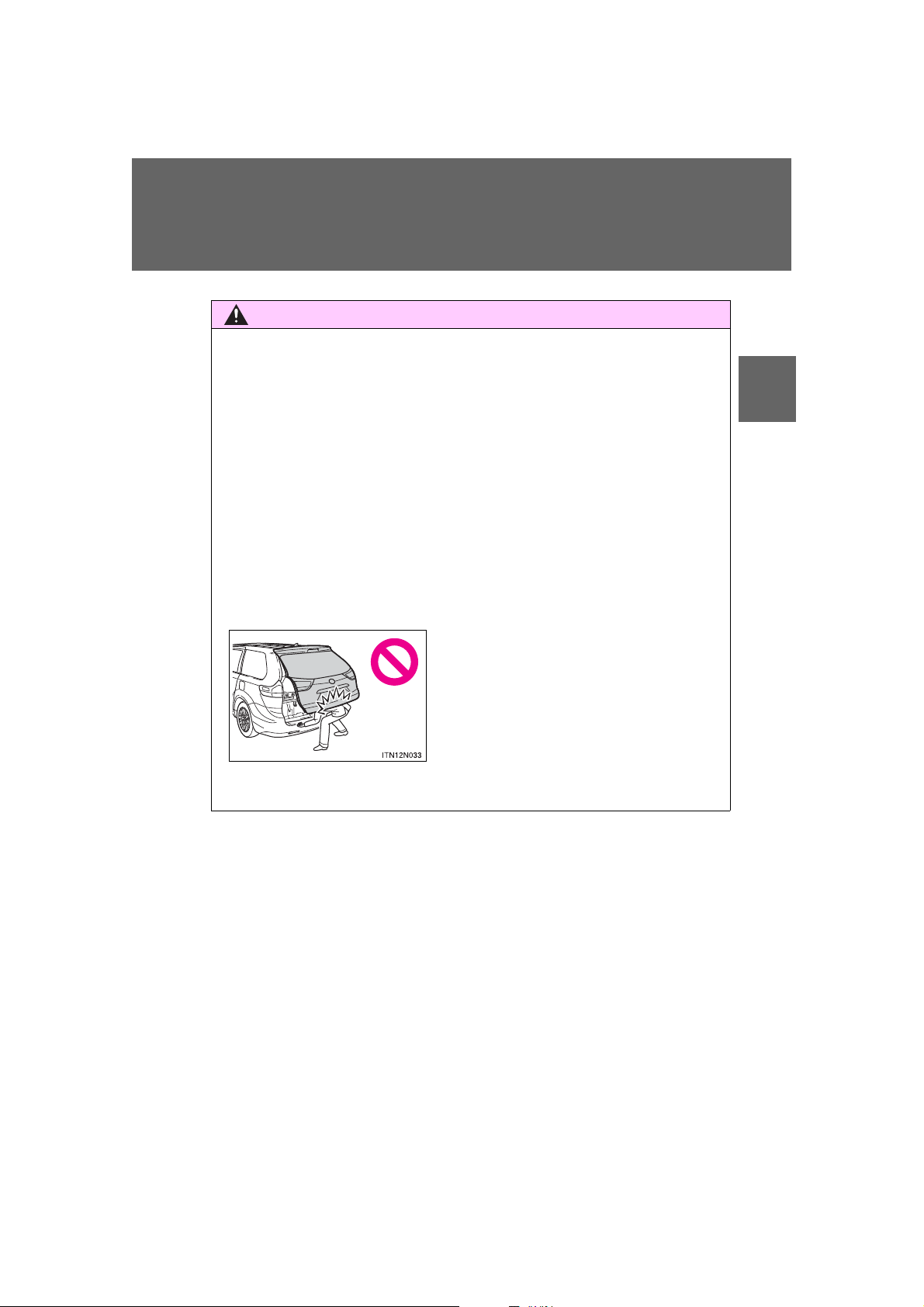
1-2. Opening, closing and locking th e do o r s
CAUTION
● The back door may suddenly shut if it is
not opened fully. It is more difficult to
open or close the back door on an
incline than on a level surface, so
beware of the back door unexpectedly
opening or closing by itself. Make sure
that the back door is fully open and
secure before using the luggage compartment.
■ Operating the back door
Observe the following precautions.
Failure to do so may cause parts of the body to be caught, resulting in death
or serious injury.
● Remove any heavy loads, such as snow and ice, from the back door
before opening it. Failure to do so may cause the back door to suddenly
shut again after it is opened.
● When opening or closing the back door, thoroughly check to make sure
the surrounding area is safe.
● If anyone is in the vicinity, make sure they are safe and let them know that
the back door is about to open or close.
● Use caution when opening or closing the back door in windy weather as it
may move abruptly in strong wind.
1
Before driving
SIENNA_OM_OM45472U_(U)
89
Page 90
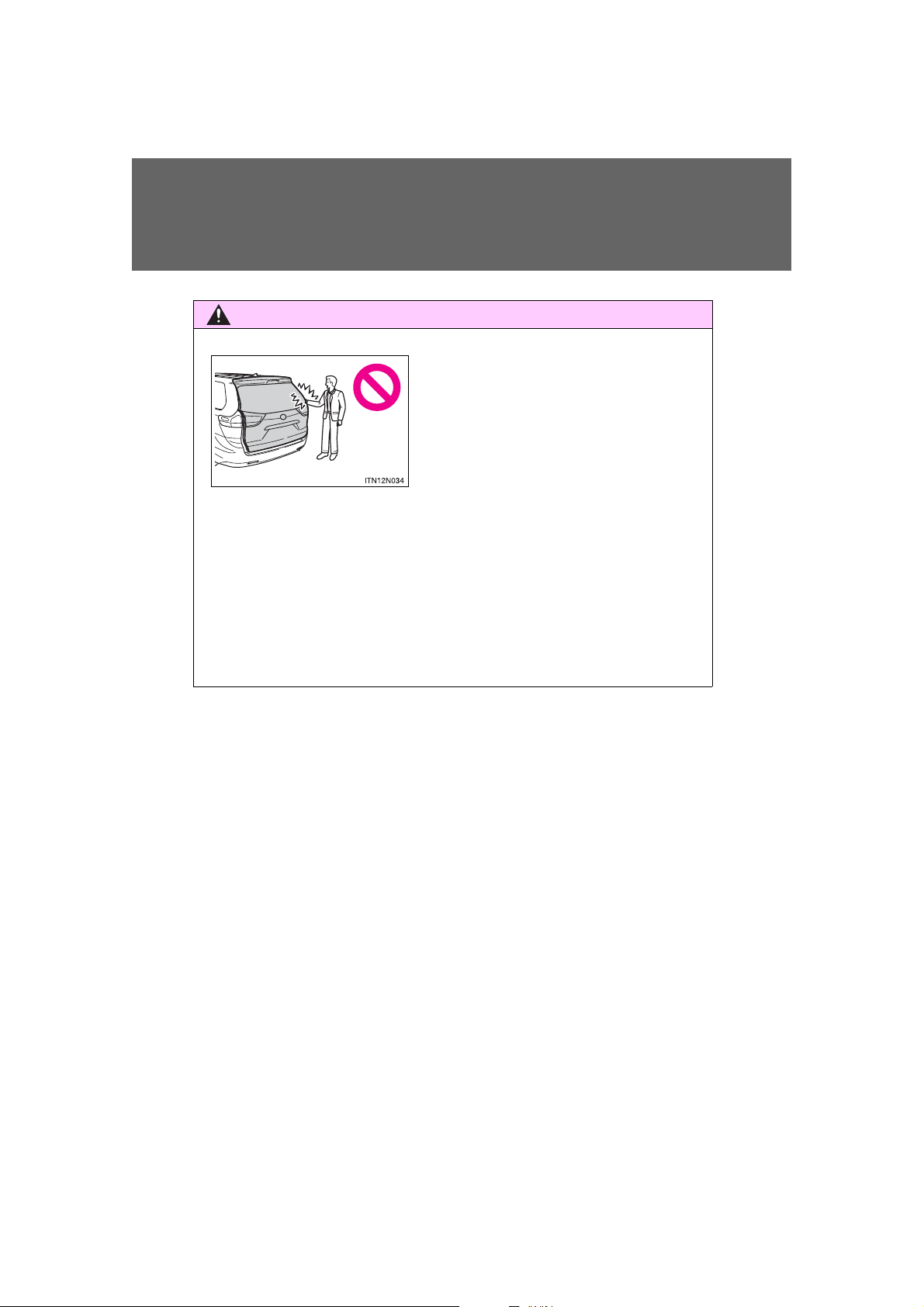
1-2. Opening, closing and locking the doors
CAUTION
● When closing the back door, take extra
care to prevent your fingers etc. from
being caught.
● When closing the back door, make sure
to press it lightly on its outer surface. If
the back door handle is used to fully
close the back door, it may result in
hands or arms being caught.
● Do not place your hands on the back door damper stay to close the back
door, and do not hang on the back door damper stay.
Doing so may cause hands to be caught or the back door damper stay to
break, causing an accident.
● If a bicycle carrier or similar heavy object is attached to the back door, it
may suddenly shut again after being opened, causing someone’s hands,
head or neck to be caught and injured. When installing an accessory part
to the back door, using a genuine Toyota part is recommended.
90
SIENNA_OM_OM45472U_(U)
Page 91
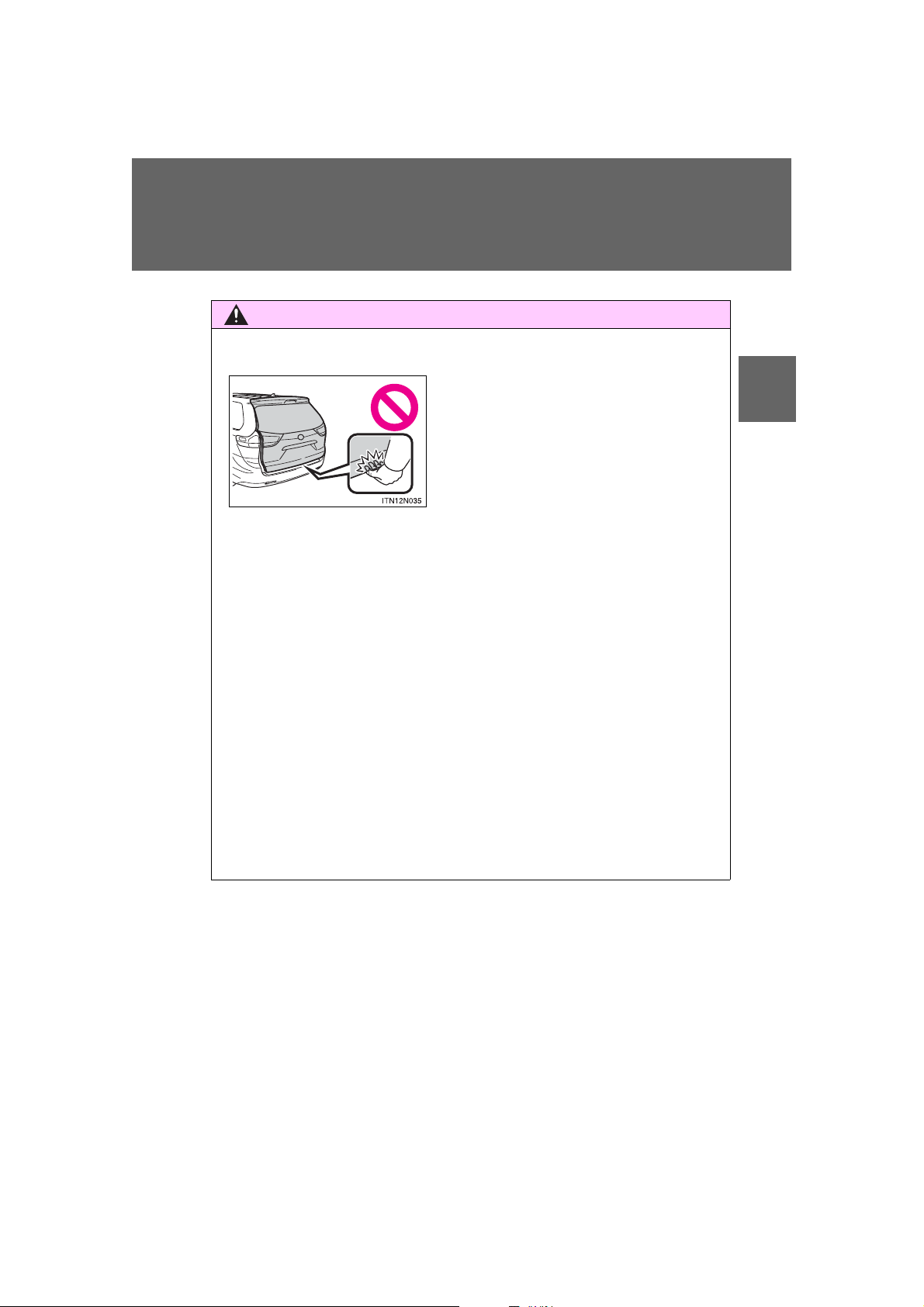
1-2. Opening, closing and locking th e do o r s
CAUTION
● In the event that the back door is left
slightly open, the back door closer will
automatically close it to the fully closed
position. It takes several seconds
before the back door closer begins to
operate. Be careful not to catch fingers
or anything else in the back door, as
this may cause bone fractures or other
serious injuries.
■ Back door closer (if equipped)
● Use caution when using the back door closer as it still operates when the
power back door system is canceled.
■ Power back door (if equipped)
Observe the following precautions when operating the power back door.
Failure to do so may cause death or serious injury.
● Check the safety of the surrounding area to make sure there are no obsta-
cles or anything that could cause any of your belongings to get caught.
● If anyone is in the vicinity, make sure they are safe and let them know that
the back door is about to open or close.
● If the operating conditions of the power back door are no longer met, a
buzzer may sound and the back door may stop opening or closing. The
back door then has to be operated manually. Take extra care when on an
incline, as the back door may open or close abruptly.
● On an incline, the back door may suddenly shut after it opens. Make sure
the back door is fully open and secure.
1
Before driving
SIENNA_OM_OM45472U_(U)
91
Page 92

1-2. Opening, closing and locking the doors
CAUTION
● In the following situations, the power back door may detect an abnormality
and automatic operation may be stopped. In this case, the back door has
to be operated manually. Take extra care when on an incline, as the back
door may open or close abruptly.
• When the back door contacts an obstacle
• Vehicles without a smart key system:
When the battery voltage suddenly drops, such as when the engine
switch is turned to the “ON” position or the engine is started during
automatic operation
Vehicles with a smart key system:
When the battery voltage suddenly drops, such as when the “ENGINE
START STOP” switch is turned to the IGNITION ON mode or the
engine is started during automatic operation
● If a bicycle carrier or similar heavy object is attached to the back door, the
power back door may not operate, causing itself to malfunction, or the
back door may suddenly shut again after being opened, causing someone’s hands, head or neck to be caught and injured. When installing an
accessory part to the back door, using a genuine Toyota part is recommended.
92
SIENNA_OM_OM45472U_(U)
Page 93
1-2. Opening, closing and locking th e do o r s
CAUTION
NOTICE
■ Jam protection function (vehicles with power back door)
Observe the following precautions.
Failure to do so may cause death or serious injury.
● Although the back door stops closing when the jam protection function
detects an object, take extra care as you may still be injured if part of your
body is already caught.
● Never use any part of your body to intentionally activate the jam protection
function.
● The jam protection function may not work if something gets caught just
before the back door fully closes. Be careful not to catch fingers or anything else.
● The jam protection function may not work depending on the shape of the
object that is caught. Be careful not to catch fingers or anything else.
1
Before driving
■ To prevent damage to the power back door
● Make sure that there is no ice between the back door and frame that
would prevent movement of the back door. Operating the power back door
when excessive load is present on the back door may cause a malfunction.
● Do not apply excessive force to the back door while the power back door
is operating.
● Take care not to damage the sensors (installed on the right and left edges
of the power back door) with a knife or other sharp object. If the sensor is
disconnected, the power back door will not operate in automatic operation.
93
SIENNA_OM_OM45472U_(U)
Page 94
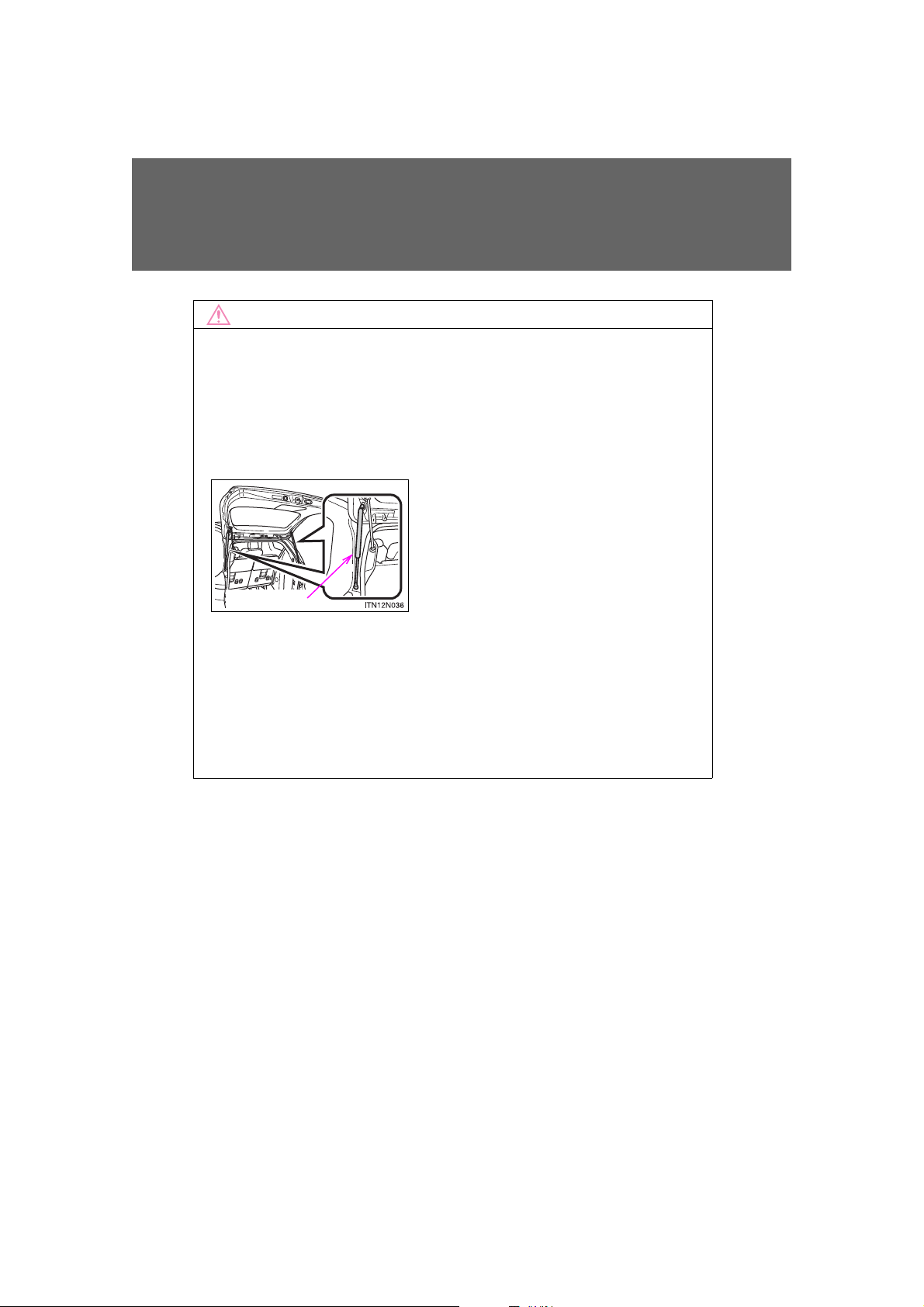
1-2. Opening, closing and locking the doors
NOTICE
● Do not attach any foreign objects, such
as stickers, plastic sheets, or adhesives
to the damper stay rod.
● Do not touch the damper stay rod with
gloves or other fabric items.
● Do not attach any accessories other
than genuine Toyota parts to the back
door.
● Do not place your hand on the damper
stay or apply lateral forces to it.
Damper stay
■ Back door damper stays
The back door is equipped with damper stays that hold the back door in
place.
Observe the following precautions.
Failure to do so may cause damage to the back door damper stay, resulting
in malfunction.
■ To prevent back door closer malfunction
Do not apply excessive force to the back door while the back door closer is
operating.
94
SIENNA_OM_OM45472U_(U)
Page 95
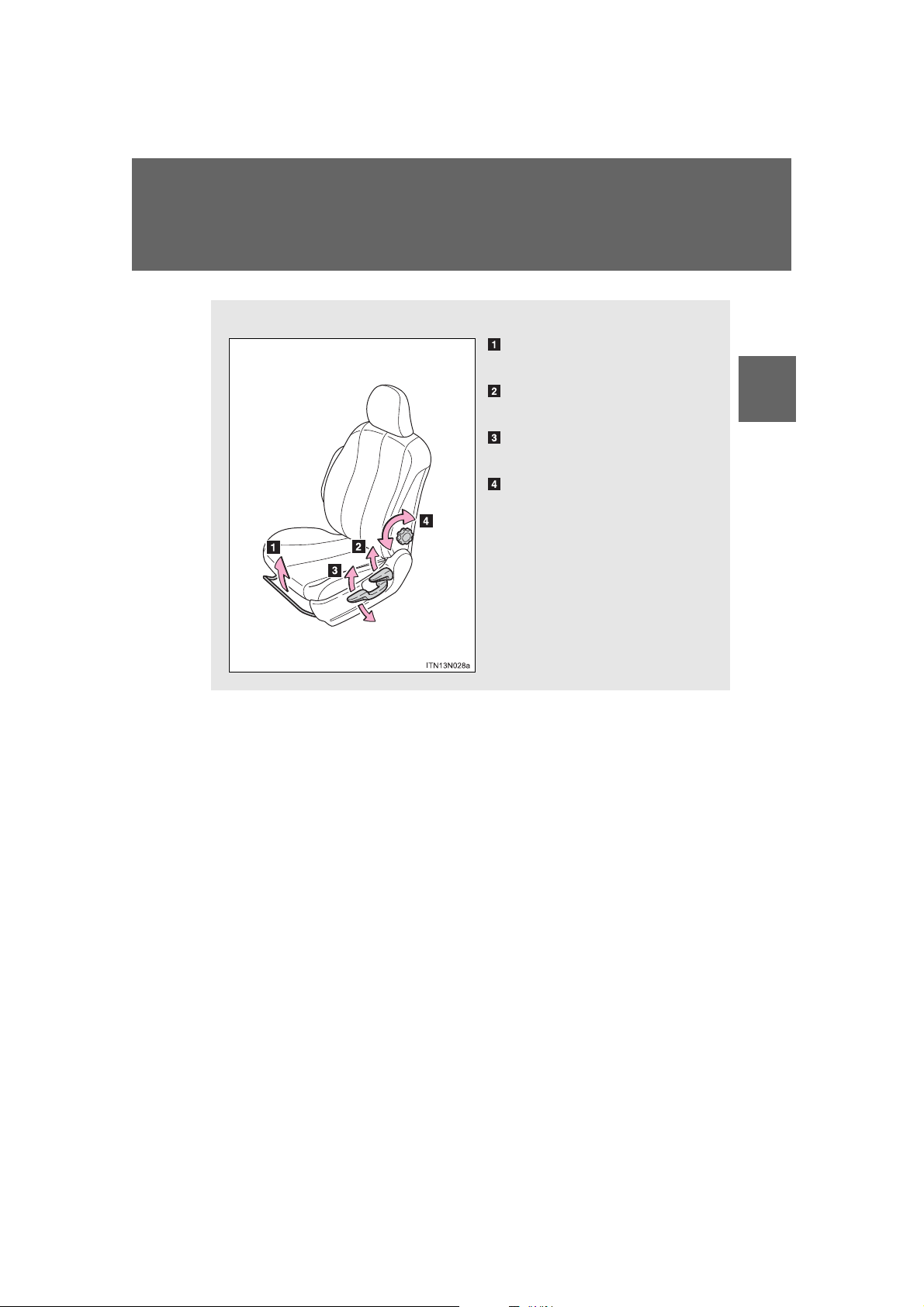
1-3. Adjustable components (seats, mirrors, steering wheel)
Manual seat
Seat position adjustment
lever
Seatback angle adjustment
lever
Vertical height adjustment
lever (driver’s side only)
Lumbar support adjustment
knob (driver’s side only)
Front seats
1
Before driving
SIENNA_OM_OM45472U_(U)
95
Page 96
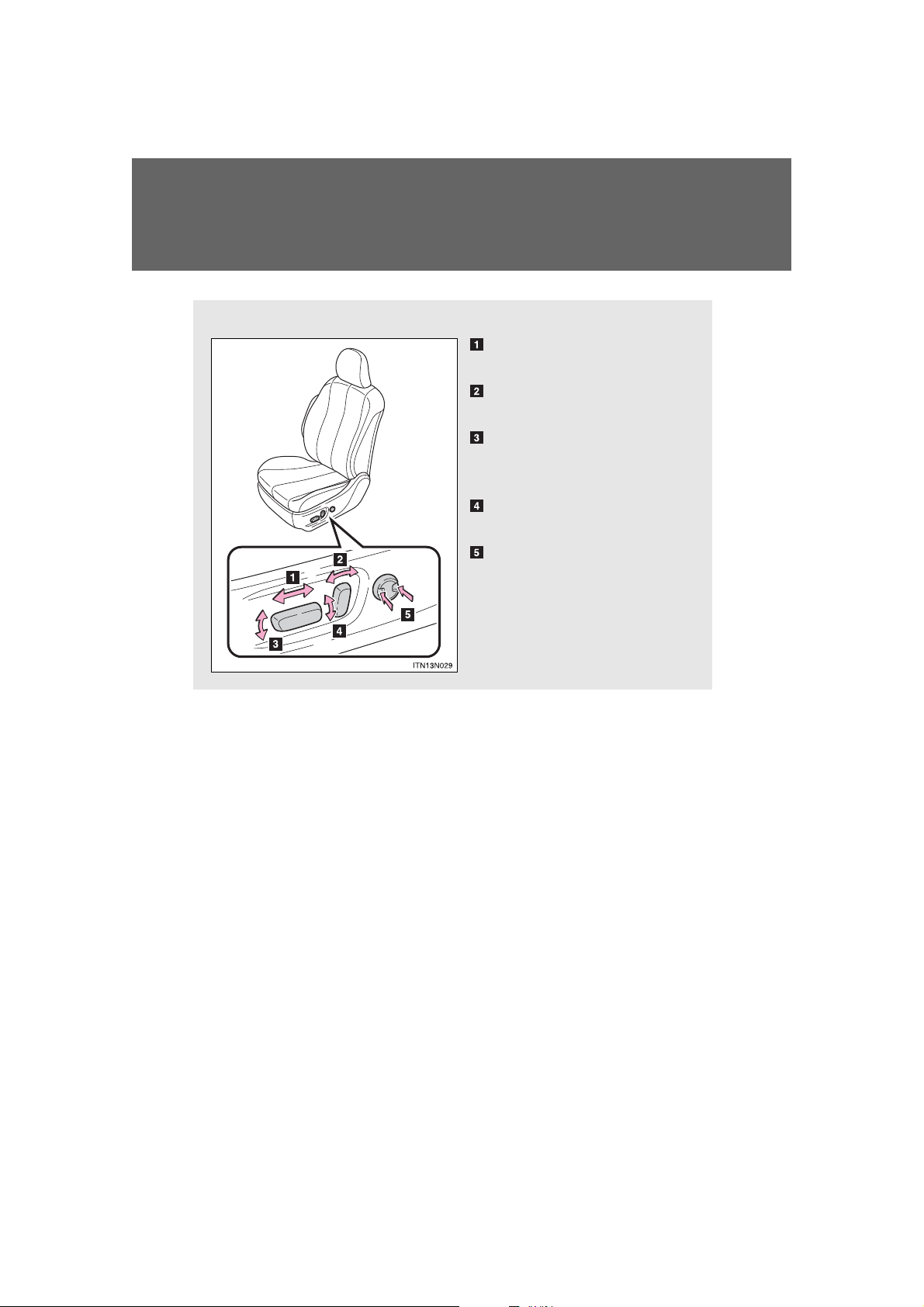
1-3. Adjustable components (seats, mirrors, steering wheel)
Power seat
Seat position adjustment
switch
Seatback angle adjustment
switch
Seat cushion (front) angle
adjustment switch (driver’s
side only)
Vertical height adjustment
switch (driver’s side only)
Lumbar support adjustment
switch (driver’s side only)
96
SIENNA_OM_OM45472U_(U)
Page 97
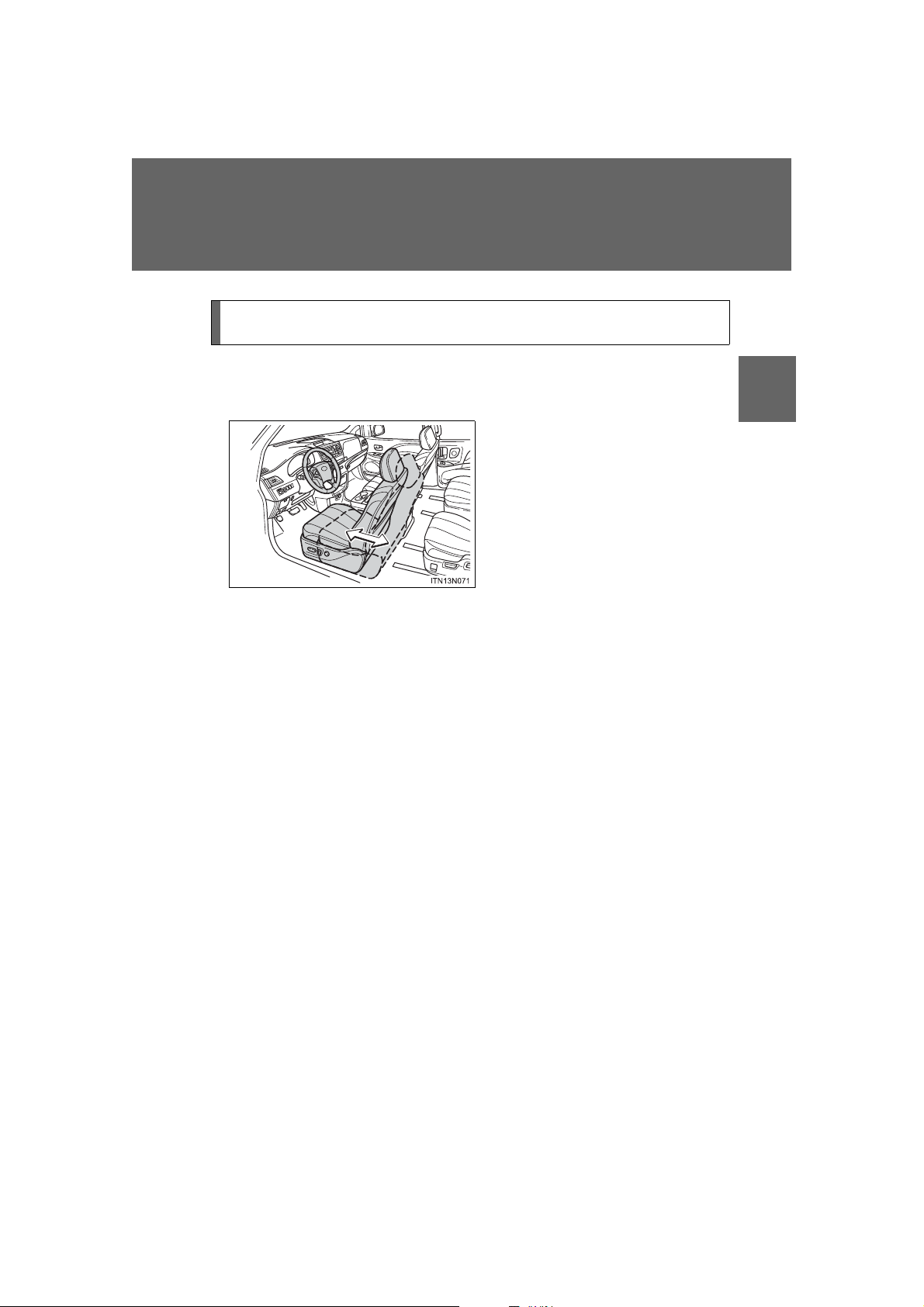
1-3. Adjustable components (seats, mirrors, steering wheel)
Power easy access system (vehicles with driving position
memory)
When the driver enters and exits the vehicle, the driver’s seat will
automatically perform the following operations:
1
Exiting the vehicle: When all of
the following actions have been
performed, the seat will move
backward (auto away function):
• The shift lever has been shifted to
P
• Vehicles without a smart key system: The engine switch has been
turned off.
Vehicles with a smart key system:
The “ENGINE START STOP”
switch has been turned off.
• The driver seat belt has been
unfastened
Before driving
SIENNA_OM_OM45472U_(U)
97
Page 98
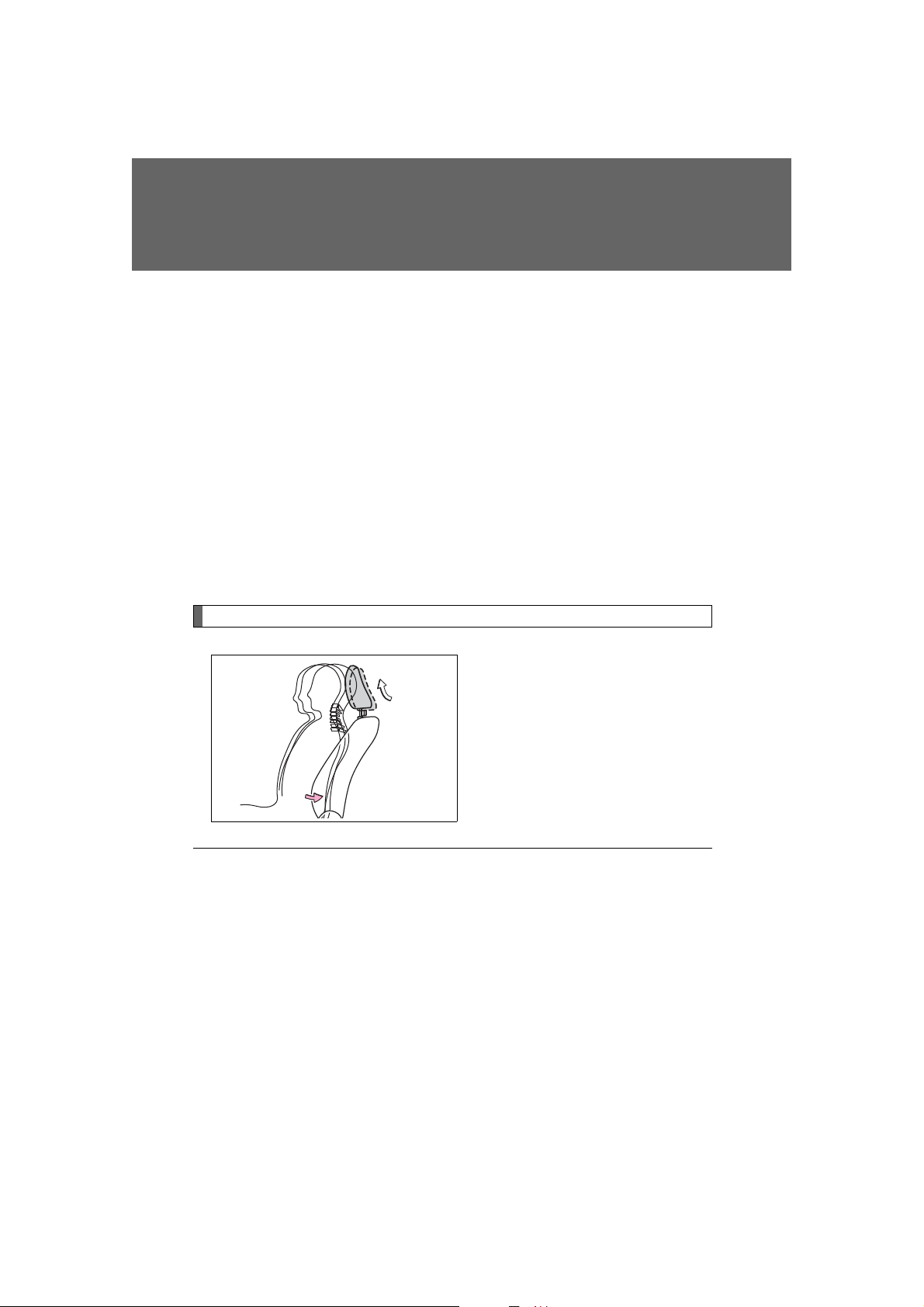
1-3. Adjustable components (seats, mirrors, steering wheel)
ITN13N065
Entering the vehicle: When
either of the following actions
has been performed, the seat
will move forward (auto return
function):
• Vehicles without a smart key system: The engine switch has been
turned to the “ACC” position.
Vehicles with a smart key system:
The “ENGINE START STOP”
switch has been turned to
ACCESSORY mode.
• The driver seat belt has been fastened
Active head restraints
When the occupant’s lower back
presses against the seatback
during a rear-end collision, the
head restraint moves slightly forward and upward to help reduce
the risk of whiplash on the seat
occupant.
■ The auto away function for exiting the driver seat (vehicles with driving
position memory)
If the seat is already close to the rearmost position, the auto away function
may not operate when the driver exits the vehicle.
98
SIENNA_OM_OM45472U_(U)
Page 99
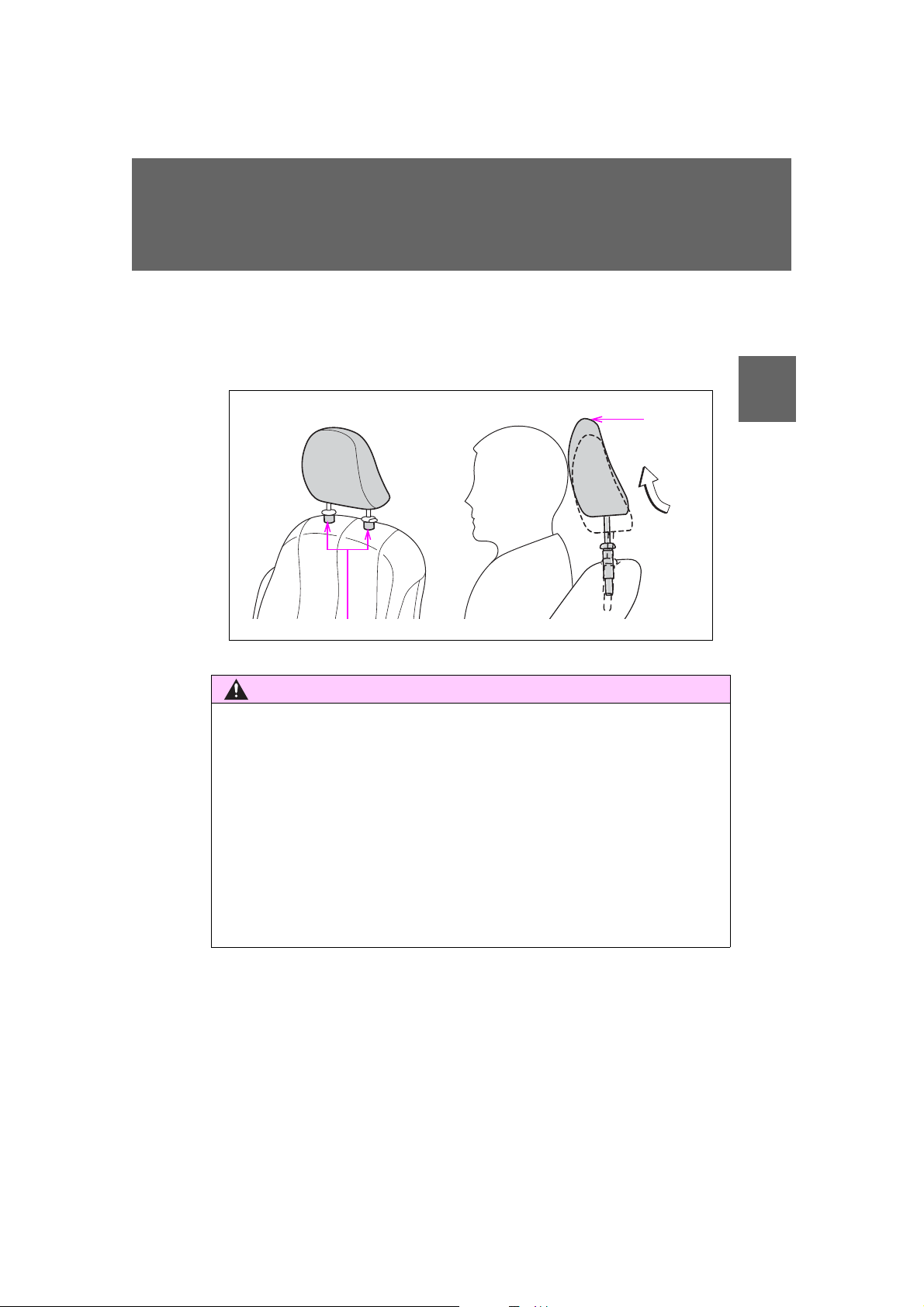
1-3. Adjustable components (seats, mirrors, steering wheel)
CAUTION
ITN13N066
During
rear-end
collision
Inner structure
■ Active head restraints
Even small forces applied to the seatback may cause the head restraint to
move. When a locked head restraint is pushed up forcibly, the head restraint
inner structure may appear. This does not indicate a problem.
1
Before driving
■ Seat adjustment
● To reduce the risk of sliding under the lap belt during a collision, do not
recline the seat more than necessary.
If the seat is reclined too far, the lap belt may slide past the hips and apply
restraint forces directly to the abdomen or your neck may contact the
shoulder belt, increasing the risk of death or serious injury in the event of
an accident.
Adjustments should not be made while driving as the seat may unexpectedly move and cause the driver to lose control of the vehicle.
● Manual seat: After adjusting the seat, make sure that the seat is locked in
position.
99
SIENNA_OM_OM45472U_(U)
Page 100
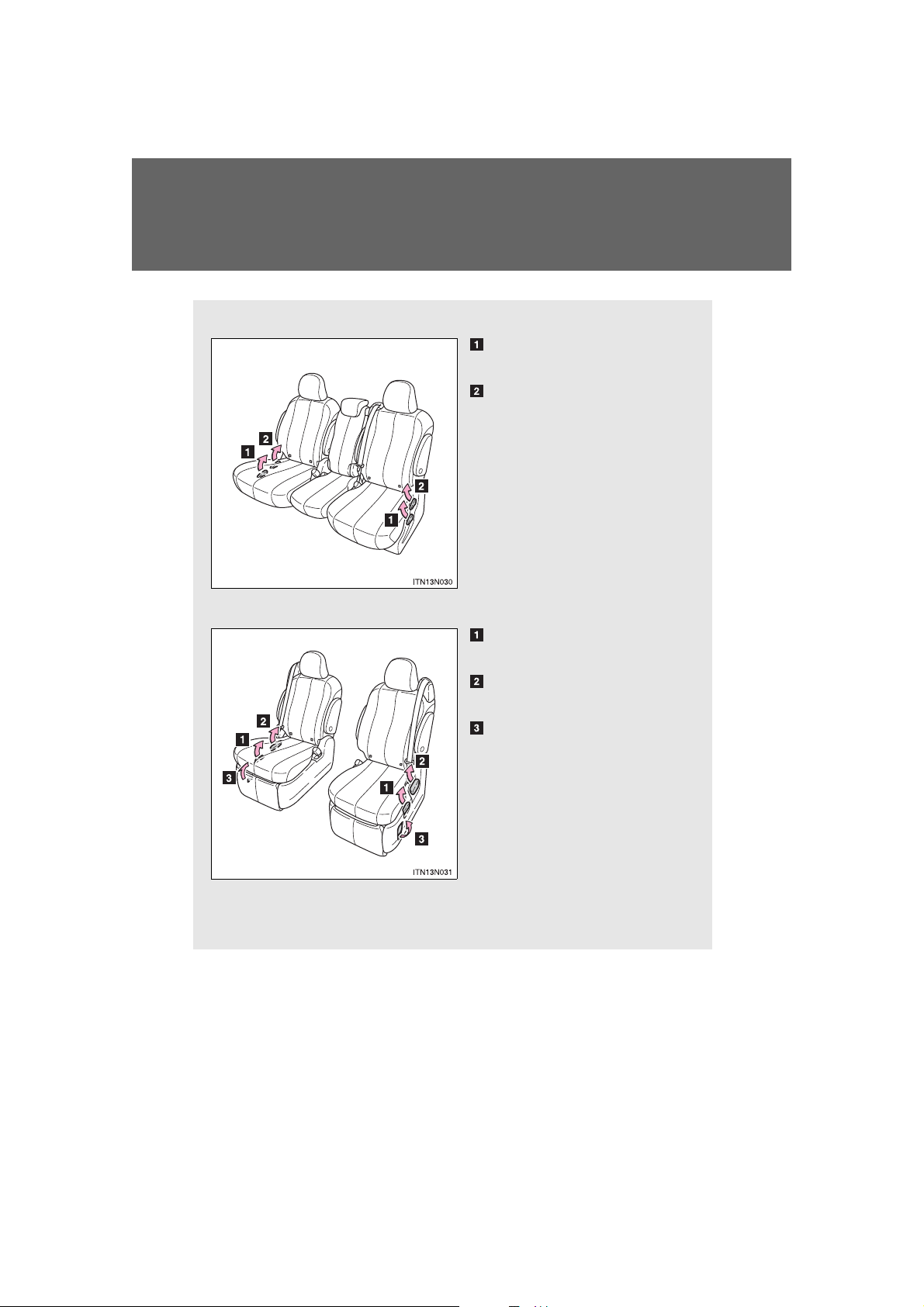
1-3. Adjustable components (seats, mirrors, steering wheel)
Second seats (Tip-up seat)
Seat position adjustment
lever
Seatback angle adjustment
lever
Second seats (Ottoman seat)
Seat position adjustment
lever
Seatback angle adjustment
lever
Ottoman angle adjustment
lever
Second seats (AUTO ACCESS SEAT)
Refer to “AUTO ACCESS SEAT OWNER’S MANUAL”.
Rear seats
100
SIENNA_OM_OM45472U_(U)
 Loading...