

Page 1
l nk
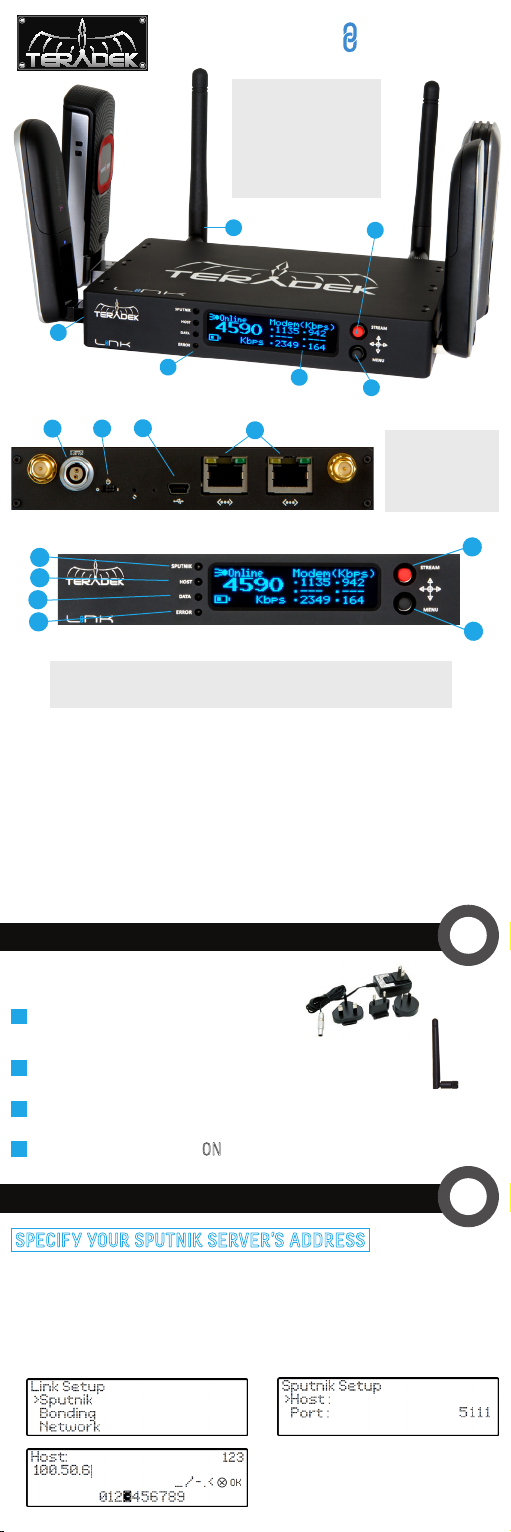
A: Wireless Antenna
B: Stream Joystick
C: Menu Joystick
D: OLED Display
E: Status LEDs
F: USB Modem Ports
A
F
G H
K
L
M
N
K: Sputnik
L: Host
E
I
M: Data
N: Fault/Error
D
J
O: Stream Joystick
P: Menu Joystick
Menu Joystick:
▲,▼: Select menu items, select characters
: Back, move to higher menu level
▲
,● (button press): Confirm selection, open selected menu
▲
B
C
G: Power Input
H: Power Switch
I: USB Port
J: Ethernet Ports
O
P
Stream Joystick:
● (button press): Cycle status screens on main display, cancel (back),
switch text entry mode
POWER & CONNECT
1
Attach power (A/C adapter or battery).
AC adapter
2
Attach antennas via the threaded RP-SMA connectors (A).
3
Attach USB modems (F).
4
Move power switch to the ON ‘I’ position (H).
SPUTNIK SERVER
1
2
SPECIFY YOUR SPUTNIK SERVER’S ADDRESS
Enter the menu on Link’s front panel ( ,●), select the Sputnik menu,
select Host, and then use the onscreen input to enter your Sputnik
server’s IP address or host name. Select OK to set the value. Please see
the Sputnik set up guide for Sputnik installation information (Available
at http://teradek.com/pages/downloads).
1.
▲
2.
3.
Page 2
CONNECT YOUR ENCODER TO LINK
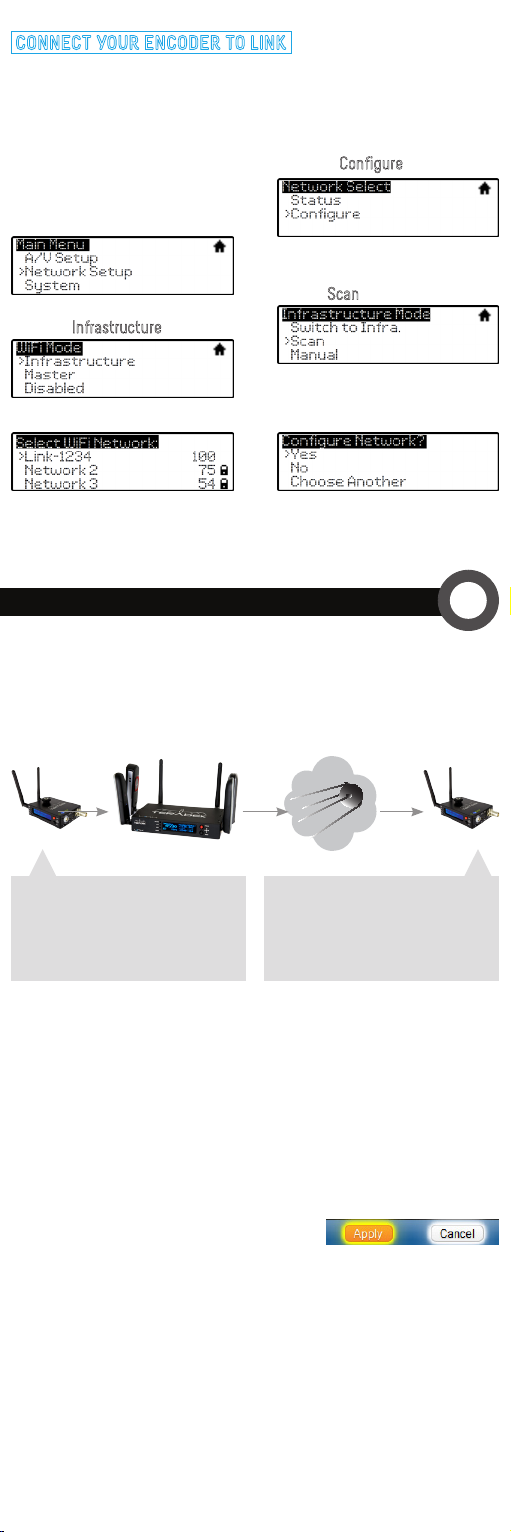
Connecting Cube/Brik to Link’s wireless network (default Link-1234,
where 1234 is replaced with the last four digits of your Link’s serial
number):
1. Enter the main menu by pressing
▲
or ● (using the menu joystick).
Select Network Setup with ▼ and
enter the menu with ▲.
3. Select Infrastructure.
5. Select Link’s network.
7. Set your Cube’s Bonding mode to Link, found in the menus under
A/V Setup > Bonding > Mode
CONFIGURE YOUR STREAM
.
2. Select Configure.
4. From the Infrastructure menu,
choose Scan.
6. Choose Yes to Apply the new
Network settings.
Transport Stream (License required): Used for streaming
across the internet to a decoder.
Configure the following settings on your encoder and decoder.
The settings are available via both the web UI and Cube’s front panel.
3
encoder
Primary Stream
Mode: MPEG Transport Stream
Transport Stream Server: Enabled
Listening Port: 5000
link
sputnik
Decoder Settings
Mode: MPEG Transport Stream
Protocol: TCP Pull
Host: Your Sputnik Server Address
Port: 5000
decoder
RTMP streaming: Used for streaming to an internet streaming platform,
CDN, or stream server.
Settings are found on Cube’s web UI under
1. Select RTMP as the
2. Enter the server URL. Depending on your destination (local server or
CDN), this will look something like rtmp://server.address:1935/live.
3. Enter the stream name. For many platforms
this is found with the server URL.
4. Click Apply.
5. Start/stop the stream by clicking the buttons on the Stream Settings
page or by pressing the Stream joystick on Cube.
6. See the reference guide for additional information.
Stream Mode
Video Setup > Stream Settings
.
.
 Loading...