

Page 1

USER MANUAL
WARRANTY INFORMATION INSIDE. PLEASE READ
www.teac.com.au
IMPORTANT !
SR5Li
Speaker Dock for iPhone 5
Trademark of TEAC Corporation JAPAN
Page 2

1
WARRANTY PROCEDURE
Please read the owner’s manual carefully and ensure that you have followed the correct installation and operating
procedures.
1. Please read this warranty card.
2. Keep your purchase receipt to enable you to proceed quickly in the event of a Warranty Service.
3. If you require Warranty Service, please contact the TEAC Customer Support Hotline at 1300 553 315 for
assistance. Please ensure that you have the model number, serial number
and purchase receipt ready when
you call.
Please complete the section below and keep this information for your own records.
Owner’s Name
Owner’s Address
Postcode
Model Name/No. Serial No.
Dealer’s Name
Dealer’s Address
Postcode
Authorised Service Centres in Major Australian Cities
NSW
151 Arthur Street
Homebush West, NSW 2140
Q
ueensland
Unit 1, 320 Curtin Ave West
Eagle Farm, QLD 4009
Western Australia
Unit 2, 50 Pilbara Street
Welshpool,WA 6106
S
outh Australia
11 McInnes Street
Ridleyton, SA 5008
Victoria
282 Normanby Road
South Melbourne, VIC 3205
Thank you for selecting a TEAC product
.
If you should require assistance with your product regarding its setup
or operation, or if you believe it is faulty, please first call us at the
TEAC Customer Support Hotline
1300 553 315
www.teac.com.au
In many cases, our Hotline has been able to solve
b
efore returning the product to the store where you purchased it.
suspected faults over the phone.
Page 3

2
WARRANTY INFORMATION
Our goods come with guarantees that cannot be excluded under the Australian Consumer Law. You are
e
ntitled to a replacement or refund for a major failure and for compensation for any other reasonably
f
oreseeable loss or damage. You are also entitled to have the goods repaired or replaced if the goods fail
t
o be of acceptable quality and the failure does not amount to a major failure.
Warranty Terms & Conditions
1. TEAC warrants that this product is free from defects in material and workmanship under normal domestic use with
reasonable care and skill. Maintenance and cleaning (i.e. laser head) is not covered by this warranty. The TEAC
warranty only applies to TEAC products purchased, used and serviced in Australia.
2. The benefits to the consumer given by this Warranty are in addition to other rights and remedies of the consumer
u
nder a law in relation to goods or services to which the warranty relates, being the Australian Consumer Law.
3. Refund or replacement via your retailer is available for a period of 14 days after purchase for goods that have been
inspected and determined to have a major failure. Refund and exchange is not applicable for change of mind.
4. Subject to the terms herein, this warr
anty effectively covers the equipment as specified in the Warranty Periods
Table below from the date of purchase.
T
EAC PRODUCT WARRANTY PERIOD
LED/LCD TV 42” (106 cm) and above
1 Year (In-Home Service/ Pick up Available)*
LED/LCD TV 32” (80 cm) and above
1 Year (Carry-in Service)
All other TEAC products
1 Year (Carry-in Service)
5.
This service will only be provided as part of this warranty if all the following conditions are met;
In Home Service/Pick up* Service
a) The product is indicated in the Warranty Period Table.
b) The product is within the warranty period.
c) The product is located within the normal service area of the local TEAC Authorised Service Centre.
If TEAC determines that the product is not repairable on site, TEAC can complete the repair by taking the product to
a TEAC Authorised Service Centre.
Where In-Home service/Pick up* is not available, the purchaser is requ
ired to send the product to the nearest TEAC
Authorised Service Centre for repair. In this event, proof of purchase is required to support a warranty claim. After
the repair, the product will be available for collection by or return to the purchaser at a fee upon request. TEAC inhome service can be made available at a fee upon request.
Carry-in Service
6. A 12-month replacement warranty is applicable to all Accessories such as Remote, Power Adaptors and Cables.
7. TEAC will ensure to the best of its abilities that all required parts are made available for any required service/repair.
8. TEAC Australia Pty Ltd and its Authorised Service Centres will use their best endeavours to complete product
repairs within a reasonable period based on available resources and workloa
d during the time when service is
requested and performed.
9. Refurbished parts may be used to repair the product. In the case of a replacement, the product may be replaced,
with a refurbished unit of the same type or, if one is unavailable, a similar refurbished model with equal or better
features & specifications.
10. Please be advised that if the product presented for repair is capable of retaining user-generated data, the data may
be lost during servicing. Customers
are strongly encouraged to back up all important information/data before
sending the product in for service/repair.
11. Service will be provided only during normal business hours and under safety conditions and circumstances. TEAC
and its authorised service agents can refuse any repair if safety, in relation to OH&S, becomes a concern to its staff
or
authorised service agents’ personnel.
12. The warranty is void and warranty claims may be refused, subject to the Australian Consumer Law, if:
a) The product was not transported, installed, operated or maintained according to manufacturer instruction, or
b) The product was abused, damaged, tampered, altered or repaired by any unauthorised persons, or
c) Product failure is due to accidents during use, installation or transit, power
surges, use of defective or
incompatible external devices, exposure to abnormal conditions such as excessive temperatures or humidity, or
entry of liquids, objects or creatures into the product.
13. No one is authorised to assume any liability on behalf of TEAC or impose any obligation on it, in connection with the
sale of any equipment other than as stated in this warr
anty and outlined above.
14. TEAC reserves the right to inspect and verify whether the product is exhibiting a major failure as claimed by
customers/retailers.
15. LCD dead pixel policy, please contact TEAC Customer Support Hotline on 1300 553 315 for assistance.
Page 4

3
1 SAFETY PRECAUTIONS
4
5
5
5
6
6
2 PARTS
3 USING THE SPEAKER WITH iPOD/iPHONE
4 USING THE SPEAKER WITH AUXILIARY DEVICES
5 TROUBLESHOOTING GUIDE
6 TECHNICAL SPECIFICATIONS
TABLE OF CONTENTS
Page 5
4
1. SAFETY
• FOR HOUSEHOLD AND INDOOR USE ONLY
• PLACE THE APPLIANCE ON A FLAT, STABLE SURFACE WITH ADEQUATE VENTILATION A ND AWAY
FROM OTHER SOURCES OF HEAT. MINIMUM DISTANCES AROUND THE APPLIANCE FOR
ADEQUATE VENTILATION IS 10CM. DO NOT COVER OR RESTRICT VENTILATION OPENINGS.
• CHILDREN S HOULD BE SUPERVISED TO ENSURE THEY DO NOT PLAY WITH THE APPLIANCE, AND
THE APPLIANCE AND CABLE SHOULD BE KEPT COMPLETELY OUT OF REACH OF YOUNG
CHILDREN.
• THIS APPLIANCE IS NOT DESIGNED FOR USE BY CHILDREN, OR PERSONS WITH REDUCED
PHYSICAL, SENSORY OR MENTAL CAPABILITIES, AND SHOULD NOT BE USED BY SUCH PERSONS
UNLESS THEY CAN DO SO SAFELY. WHERE NECESSARY, SUCH PERSONS (OR ANYONE WITH
LACK OF EXPERIENCE OR KNOWLEDGE) SHOULD FIRST BE GIVEN SUPERVISION OR
INSTRUCTION CONCERNING USE OF THE APPLIANC
E BY A PERSON RESPONSIBLE FOR THEIR
SAFETY.
• FULLY UNWIND THE CABLE BEFORE PLUGGING IN AND ENSURE THE CABLE IS POSITIONED AWAY
FROM AREAS WHERE IT IS LIKELY TO GET DAMAGED OR CAUSE A TRIP HAZARD.
• THE OUTPUT CORD OF THIS MAINS ADAPTOR CANNOT BE REPLACED. IN THE EVENT OF DAMAGE
TO THE CABLE, JACK PLUG OR ADAPTOR, THE ENTIRE ADAPTOR UNIT SHOULD BE REPLACED.
• CONNECTIONS MUST ONLY BE MADE VIA THE MAINS ADAPTOR SUPPLIED, NEVER CONNECT THE
APPLIANCE DIRECTLY TO THE 240V MAINS SUPPLY.
• NEVER USE THE ADAPTOR SUPPLIED WITH ANY OTHER APPLIANCE.
• THE MAINS ADAPTOR WILL BECOME WARM IN USE; DO NOT COVER OR PLACE ON OR NEAR
SURFACES THAT COULD BE AFFECTED BY HEAT SUCH AS TABLE TOPS AND CARPETS.
• REMOVE MAINS ADAPTOR FROM SUPPLY IF APPLIANCE IS UNUSED FOR A
LONG PERIOD OF TIME,
AND DURING THUNDERSTORMS.
• DO NOT PULL ON T HE CABLE TO DISCONNECT FROM MAINS SUPPLY.
• KEEP APPLIANCE, CABLE, MAINS ADAPTOR PLUG DRY AND AWAY FROM AREAS WHERE IT IS
LIKELY TO GET SPLASHED. AVOID USING IN HOT, HUMID E NVIRONMENTS.
• DO NOT PLACE ITEMS WITH NAKED FLAMES OR CONTAINERS WITH LIQUIDS ON THIS APPLIANCE.
• SWITCH OFF AND UNPLUG WHEN NOT IN USE AND BEFORE CLEANING OR SERVICING THE
APPLIANCE. SERVICING OF THIS APPLIANCE MUST ONLY BE CARRIED OUT BY A QUALIFIED
ELECTRICIAN.
• ALWAYS ENSURE THE MAINS ADAPTOR PLUG IS READILY UNPLUGGABLE – DO NOT USE WITH
‘LOCKABLE’ SOCKETS OR PERMANENTLY WIRE TO MAINS.
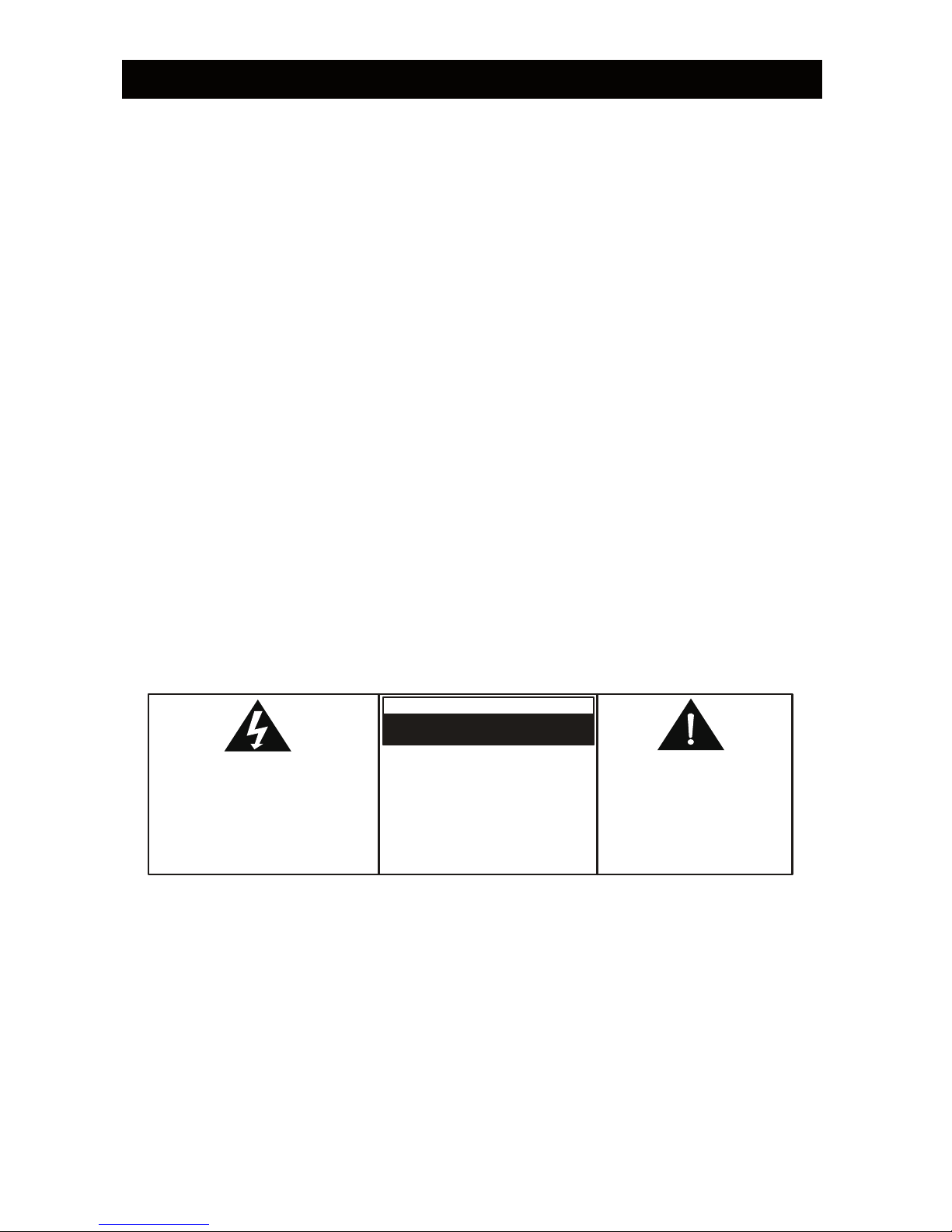
The lightning flash with arrowhead
symbol, wit hi n an equ ilateral
triangle, is intended to alert the user
to the presence of uninsulated
dan gerous voltage" within the
product's enclosure that may be of
sufficient magnitude to constitute a
risk of electric shock to persons
TO RE D U C E TH E RISK OF
ELECTRIC SHOCK, DO NO T
REMOVE COVER (OR BACK) NO
USE R -SE R VICEA BLE PA R T S
INSIDE. REFER SERVICING TO
Q U A L I F I E D S E R V I C E
PERSONNEL.
The exclamation point within
an equilater al t riangle is
intended to alert the user to
the presence of important
operating and maintenance
(servicing) instructions in the
literature accompanying the
appliance.
WARNING
RISK OF ELECTRIC SHOCK
DO NOT OPEN
SAFETY PRECAUTIONS
Page 6
5
2. PARTS
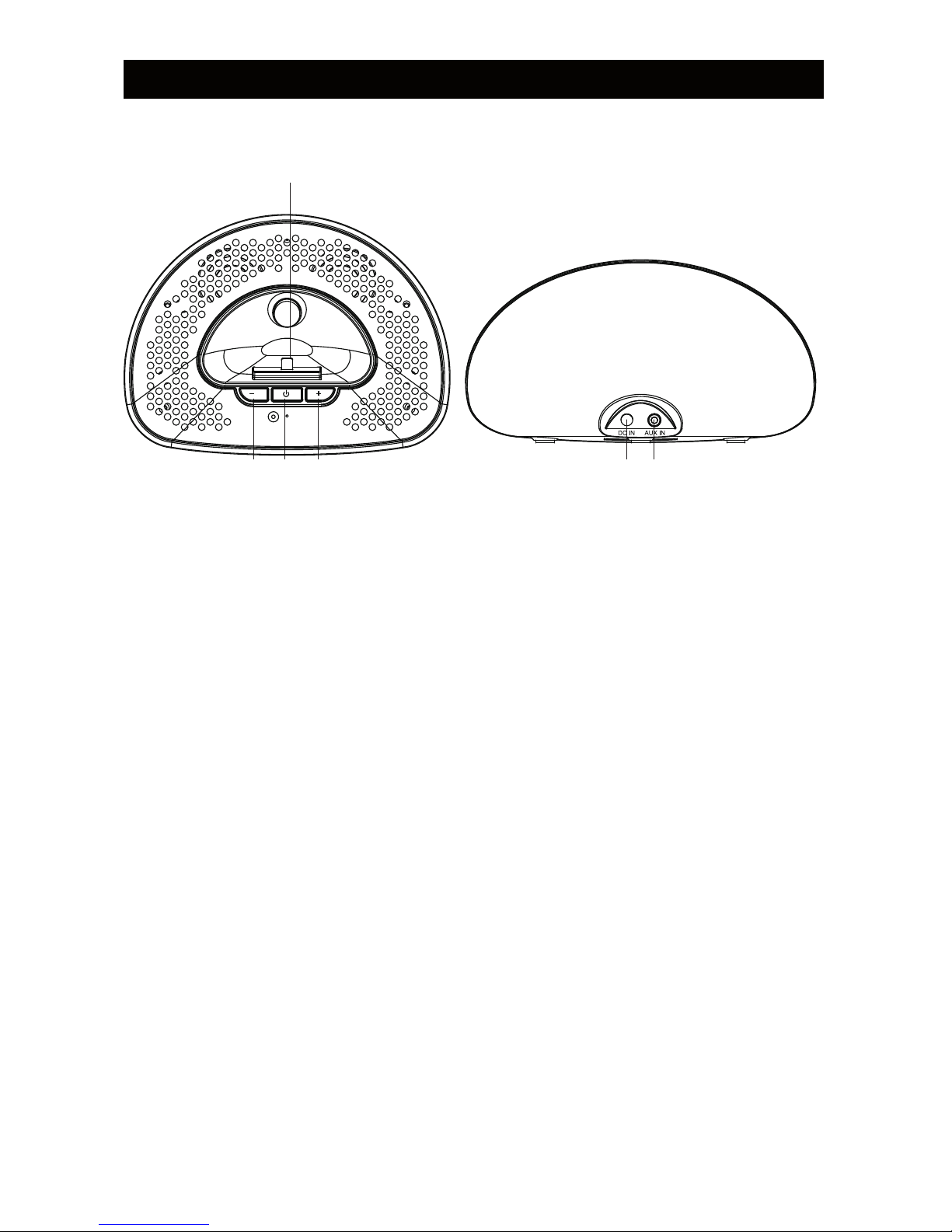
Front view Rear view
1. Volume- button
1 2 3
6
2. Power button
3. Volume+ button
4. DC jack
5. Aux in jack
6. iPod / iPhone dock
7. AC / DC Adapter (not shown)
3. USING THE SPEAKER WITH iPod / iPhone
3.1 Connect the AC/DC adaptor to the DC jack, then plug in and switch on at the wall power outlet. The blue
power indicator will light up.
3.2 Firmly insert the iPod / iPhone into the dock, the iPod / iPhone will start to play music.
3.3 Adjust the volume to the desired level by pressing the VOLUME buttons until the desired listening volume is
achieved.
3.4 The controls on the iPod / iPhone can be used as usual to access and navigate the iPod / iPhone menu
3.5 To turn off the unit at any time, press the POWER button and the power indicator will turn off.
Note: The non-removable battery in the iPod / iPhone can be recharged via the appliance during power on and
off modes.
4. USING THE SPEAKER WITH AUXILIARY EQUIPMENT
Auxiliary audio devices (e.g. MP3 player, non-Apple smartphone) can be connected to the unit for sound
amplification.
4.1 Connect the AC/DC adaptor to the DC jack, then plug in and switch on at the wall power outlet. The blue ,
power indicator will light up.
4.2 Connect the auxiliary equipment using a 3.5mm aux cable (not supplied) into the AUX IN jack at the rear of
the unit
4.3 Press the PLAY button on the auxiliary device to play music through the speaker dock. Adjust the volume to
the desired level using the VOLUME buttons.
4.4 To turn off the unit at any time, press the POWER button and the power indicator will turn off.
Note: If the auxiliary device and iPod/iPhone are plugged in at the same time, the most recently connected device
receives priority for audio output.
4 5
UNIT OPERATION
Page 7
6
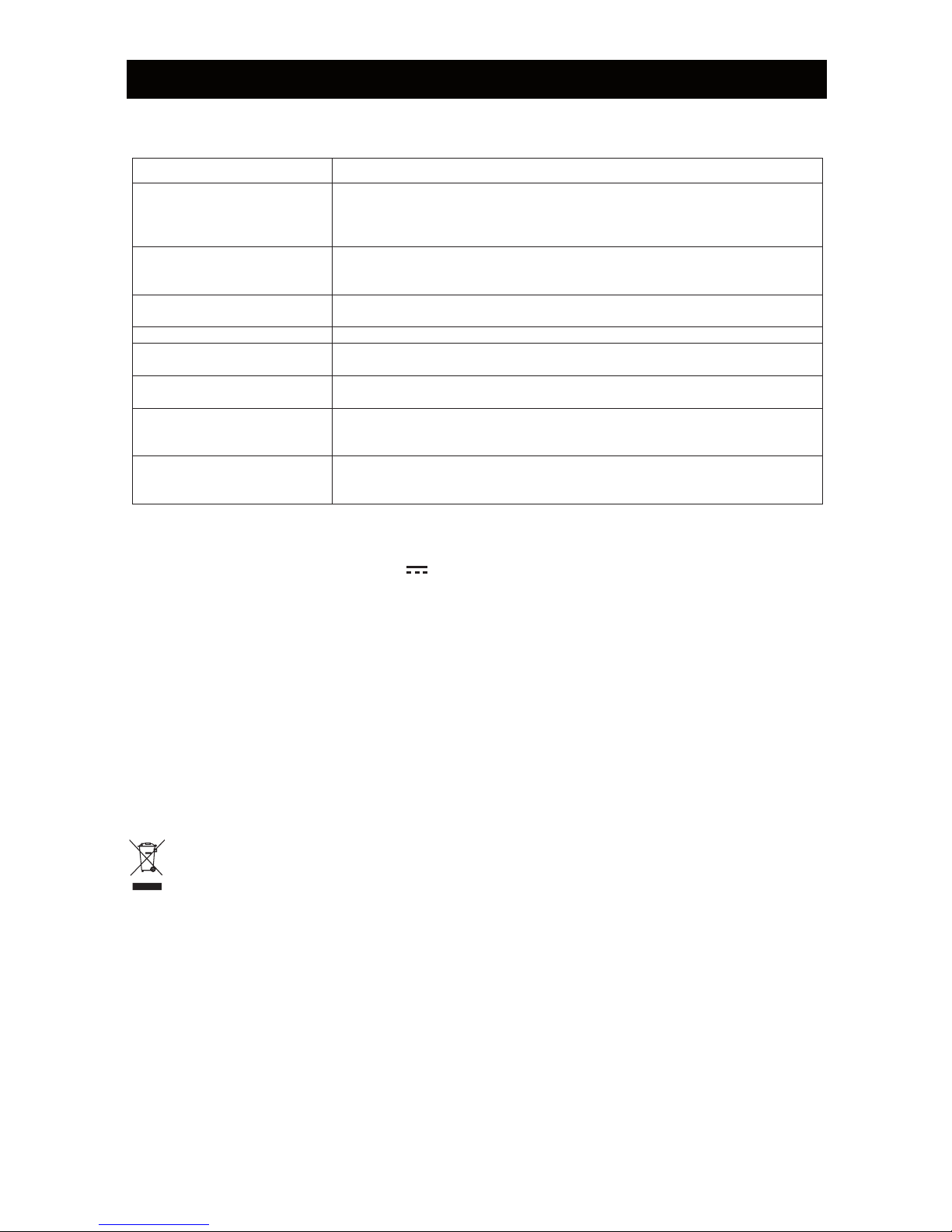
5. TROUBLESHOOTING GUIDE
Observation Possible Solution
The unit does not work Does the socket that is being used have power?
Has the power lead been connected to the mains supply and into the correct
jack at the back of the unit?
Has the POWER button been pressed and the power indicator illuminated?
POWER button does not
seem to work
Ensure iPod/iPhone is plugged into the dock before pressing the POWER
button. Press the POWER button firmly but do not “long press” as unit may
switch off again.
?muminim ta tes enohPi/doPi eht no emulov eht sI dnuos oN
Check that the iPod / iPhone is correctly docked.
Poor sound tone Use iPod/iPhone set-up menu to select suitable EQ (e.g. ‘small speakers’)
Crackling sounds This indicates poor connection between iPod/iPhone and the dock. Remove
the iPod/iPhone and try again.
Volume controls do not seem
to work
Press and HOLD the volume control buttons down to increase / decrease the
sound.
iPod / iPhone does not play Is the iPod / iPhone fully docked?
Has the play button been pressed on the iPod / iPhone?
Ensure nothing is plugged into the AUX IN jack at the back.
Auxiliary equipment does not
play
Is the auxiliary equipment correctly connected to the unit?
Has the play button been pressed on the auxiliary equipment?
Has the POWER button been pressed and the power indicator illuminated?
6. TECHNICAL SPECIFICATIONS
Rated voltage (transformer) 100-240V~ 50Hz, 0.5A
Transformer output 5.9V 2A
Power consumption 10W
Power consumption (standby) 0.4W
Audio output 1W x 2 RMS
iPod / iPhone compatibility
Compatible with models with standard 8-pin iPod connector. Note that
models without 8-pin socket must be connected via AUX IN socket
(AUX mode) using a 3.5mm stereo jack cable(not included)
Operating conditions Temperature: 5°C to 35°C
%09 ot %5 ytidimuH
Operating position Horizontal
RECYCLING ELECTRICAL PRODUCTS
You should now recycle your waste electrical goods and in doing so help the environment.
This symbol means an electrical product should not be disposed of with normal household waste. Please
ensure it is taken to a suitable facility for disposal when finished with.
iPhone & iPod are trademarks of Apple Inc., registered in the U.S. and other countries.
“Made for iPod,” and “Made for iPhone,” mean that an electronic accessory has been designed to connect specifically to iPod or iPhone
res
pectively, and has been certified by the developer to meet Apple performance standards. Apple is not responsible for the operation of this
device or its compliance with safety and regulatory standards. Please note that the use of this accessory with iPod or iPhone may affect wireless
performance.
SUPPORT
Page 8
TEAC CUSTOMER SUPPORT HOTLINE (TCS)
1300 553 315
Between Monday to Friday – EST 8.30AM to 6PM
 Loading...