

Page 1
SERVICE MANUAL
26″ COLOR LCD TELEVISION
LXT26T6S
Page 2

IMPORTANT SAFETY NOTICE
Proper service and repair is important to the safe, reliable operation of all
Funai Equipment. The service procedures recommended by Funai and
described in this service manual are effective methods of performing
service operations. Some of these service special tools should be used
when and as recommended.
It is important to note that this service manual contains various CAUTIONS
and NOTICES which should be carefully read in order to minimize the risk
of personal injury to service personnel. The possibility exists that improper
service methods may damage the equipment. It also is important to
understand that these CAUTIONS and NOTICES ARE NOT EXHAUSTIVE.
Funai could not possibly know, evaluate and advice the service trade of all
conceivable ways in which service might be done or of the possible
hazardous consequences of each way. Consequently, Funai has not
undertaken any such broad evaluation. Accordingly, a servicer who uses a
service procedure or tool which is not recommended by Funai must first
use all precautions thoroughly so that neither his safety nor the safe
operation of the equipment will be jeopardized by the service method
selected.
TABLE OF CONTENTS
Specifications . . . . . . . . . . . . . . . . . . . . . . . . . . . . . . . . . . . . . . . . . . . . . . . . . . . . . . . . . . . . . . . . . . . . . . . . . . . 1-1
Important Safety Precautions . . . . . . . . . . . . . . . . . . . . . . . . . . . . . . . . . . . . . . . . . . . . . . . . . . . . . . . . . . . . . . . 2-1
Standard Notes for Servicing . . . . . . . . . . . . . . . . . . . . . . . . . . . . . . . . . . . . . . . . . . . . . . . . . . . . . . . . . . . . . . . 3-1
Cabinet Disassembly Instructions. . . . . . . . . . . . . . . . . . . . . . . . . . . . . . . . . . . . . . . . . . . . . . . . . . . . . . . . . . . . 4-1
Electrical Adjustment Instructions . . . . . . . . . . . . . . . . . . . . . . . . . . . . . . . . . . . . . . . . . . . . . . . . . . . . . . . . . . . . 5-1
How to initialize the LCD Television . . . . . . . . . . . . . . . . . . . . . . . . . . . . . . . . . . . . . . . . . . . . . . . . . . . . . . . . . . 6-1
Block Diagrams . . . . . . . . . . . . . . . . . . . . . . . . . . . . . . . . . . . . . . . . . . . . . . . . . . . . . . . . . . . . . . . . . . . . . . . . . . 7-1
Schematic Diagrams / CBA’s and Test Points. . . . . . . . . . . . . . . . . . . . . . . . . . . . . . . . . . . . . . . . . . . . . . . . . . . 8-1
Waveforms . . . . . . . . . . . . . . . . . . . . . . . . . . . . . . . . . . . . . . . . . . . . . . . . . . . . . . . . . . . . . . . . . . . . . . . . . . . . . 9-1
Wiring Diagram . . . . . . . . . . . . . . . . . . . . . . . . . . . . . . . . . . . . . . . . . . . . . . . . . . . . . . . . . . . . . . . . . . . . . . . . . 10-1
Exploded Views. . . . . . . . . . . . . . . . . . . . . . . . . . . . . . . . . . . . . . . . . . . . . . . . . . . . . . . . . . . . . . . . . . . . . . . . . 11-1
Mechanical Parts List . . . . . . . . . . . . . . . . . . . . . . . . . . . . . . . . . . . . . . . . . . . . . . . . . . . . . . . . . . . . . . . . . . . . 12-1
Electrical Parts List . . . . . . . . . . . . . . . . . . . . . . . . . . . . . . . . . . . . . . . . . . . . . . . . . . . . . . . . . . . . . . . . . . . . . . 13-1
The LCD panel is manufactured to provide many years of useful life.
Occasionally a few non active pixels may appear as a tiny spec of color.
This is not to be considered a defect in the LCD screen.
Page 3
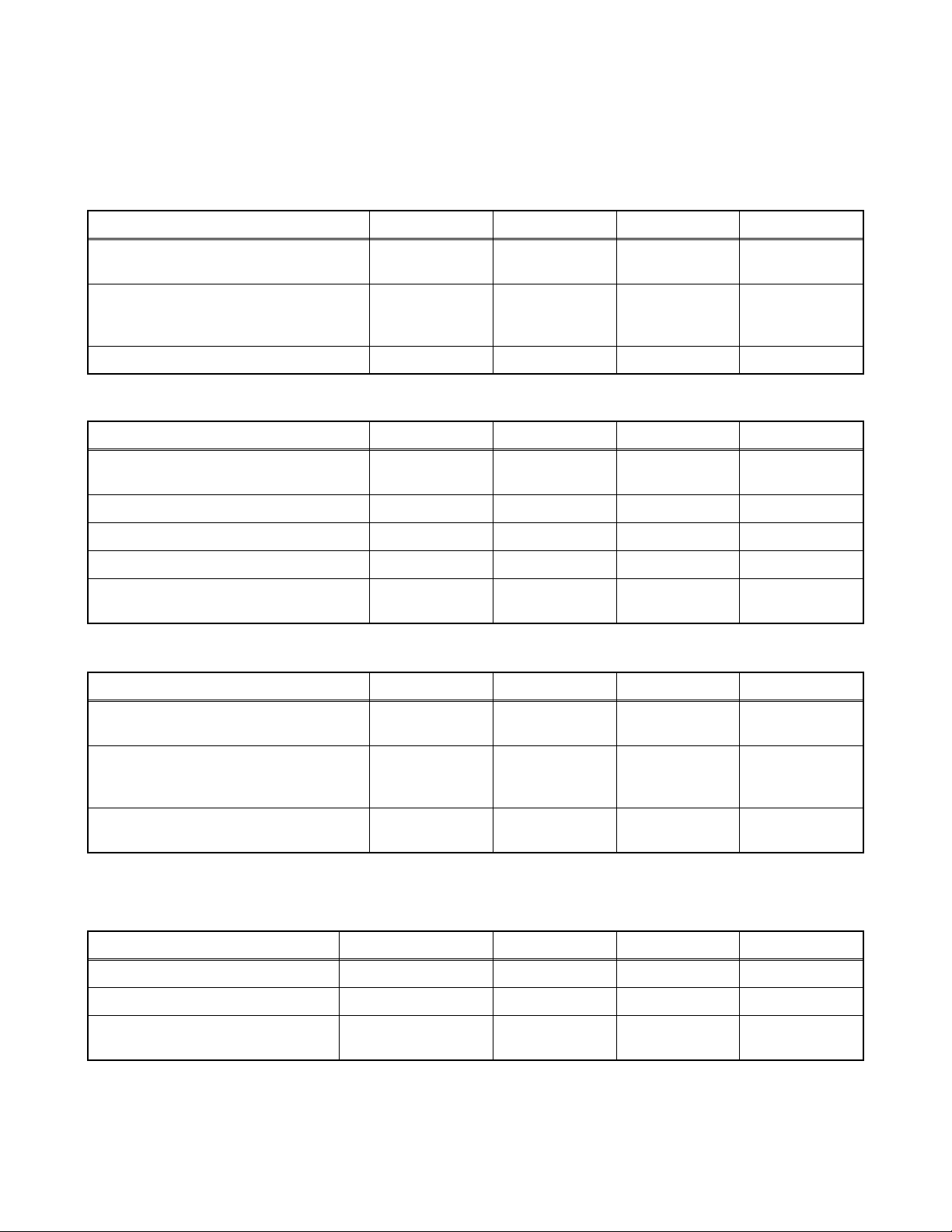
SPECIFICATIONS
< TUNER >
ANT. Input ---------------------- 75 ohm Unbal., F type
Reference Level--------------- 20 Vp-p (LCD Green Cathode)
Test Input Signal -------------- 400 Hz 30% modulation
Description Condition Unit Nominal Limit
1. Intermediate Freq.
2. Color Killer Sens.
3. AFT Pull In Range (10 mV input) --- MHz ±2.4 ±2.1
Picture
Sound
CH-2
CH-10
CH-55
MHz
MHz
dBµV
dBµV
dBµV
45.75
41.25
17
17
17
---
--23
23
23
< LCD PANEL >
Description Condition Unit Nominal Limit
1. Number of Pixels
2. Brightness cd/m
3. Response Time (tr+tf) --- msec 25 ---
4. Support Color --- - 16.7 mil. (8 bit) ---
5. Viewing Angle
Horizontal
Vert ical
Horizontal
Vert ical
pixels
pixels
°
°
1280× 3
720
2
550 ---
-85 to 85
-85 to 85
---
---
---
---
< VIDEO >
Description Condition Unit Nominal Limit
1. Over Scan
2. Color Temperature
3. Resolution
Horizontal
Vert ical
--x
y
Horizontal
Vert ical
%
%
°K
line
line
5
5
12000
0.272
0.278
400
350
---
---
--±0.03
±0.03
---
---
< AUDIO >
All items are measured across 8 Ω load at speaker output terminal with L.P.F.
Description Condition Unit Nominal Limit
1. Audio Output Power 10% THD: Lch/Rch W 5.0/5.0 4.5/4.5
2. Audio Distortion 500mW: Lch/Rch % 1.0/1.0 4.0/4.0
-
3. Audio Freq. Response
Note: Nominal specifications represent the design specifications. All units should be able to approximate these.
Some will exceed and some may drop slightly below these specifications. Limit specifications represent
the absolute worst condition that still might be considered acceptable. In no case should a unit fail to meet
limit specifications.
6dB: Lch
-
6dB: Rch
Hz
Hz
100 to 10 k
100 to 10 k
---
---
1-1 L4300SP
Page 4
IMPORTANT SAFETY PRECAUTIONS
Prior to shipment from the factory, our products are strictly inspected for recognized product safety and electrical
codes of the countries in which they are to be sold. However, in order to maintain such compliance, it is equally
important to implement the following precautions when a set is being serviced.
Safety Precautions for LCD TV
Circuit
1. Before returning an instrument to the
customer, always make a safety check of the
entire instrument, including, but not limited to, the
following items:
a. Be sure that no built-in protective devices are
defective and have been defeated during
servicing. (1) Protective shields are provided
on this chassis to protect both the technician
and the customer. Correctly replace all missing
protective shields, including any removed for
servicing convenience. (2) When reinstalling
the chassis and/or other assembly in the
cabinet, be sure to put back in place all
protective devices, including but not limited to,
nonmetallic control knobs, insulating
fishpapers, adjustment and compartment
covers/shields, and isolation resistor/capacitor
networks. Do not operate this instrument or
permit it to be operated without all
protective devices correctly installed and
functioning. Servicers who defeat safety
features or fail to perform safety checks
may be liable for any resulting damage.
b. Be sure that there are no cabinet openings
through which an adult or child might be able to
insert their fingers and contact a hazardous
voltage. Such openings include, but are not
limited to, (1) spacing between the Liquid
Crystal Panel and the cabinet mask, (2)
excessively wide cabinet ventilation slots, and
(3) an improperly fitted and/or incorrectly
secured cabinet back cover.
c. Antenna Cold Check - With the instrument AC
plug removed from any AC source, connect an
electrical jumper across the two AC plug
prongs. Place the instrument AC switch in the
on position. Connect one lead of an ohmmeter
to the AC plug prongs tied together and touch
the other ohmmeter lead in turn to each tuner
antenna input exposed terminal screw and, if
applicable, to the coaxial connector. If the
measured resistance is less than 1.0 megohm
or greater than 5.2 megohm, an abnormality
exists that must be corrected before the
instrument is returned to the customer. Repeat
this test with the instrument AC switch in the off
position.
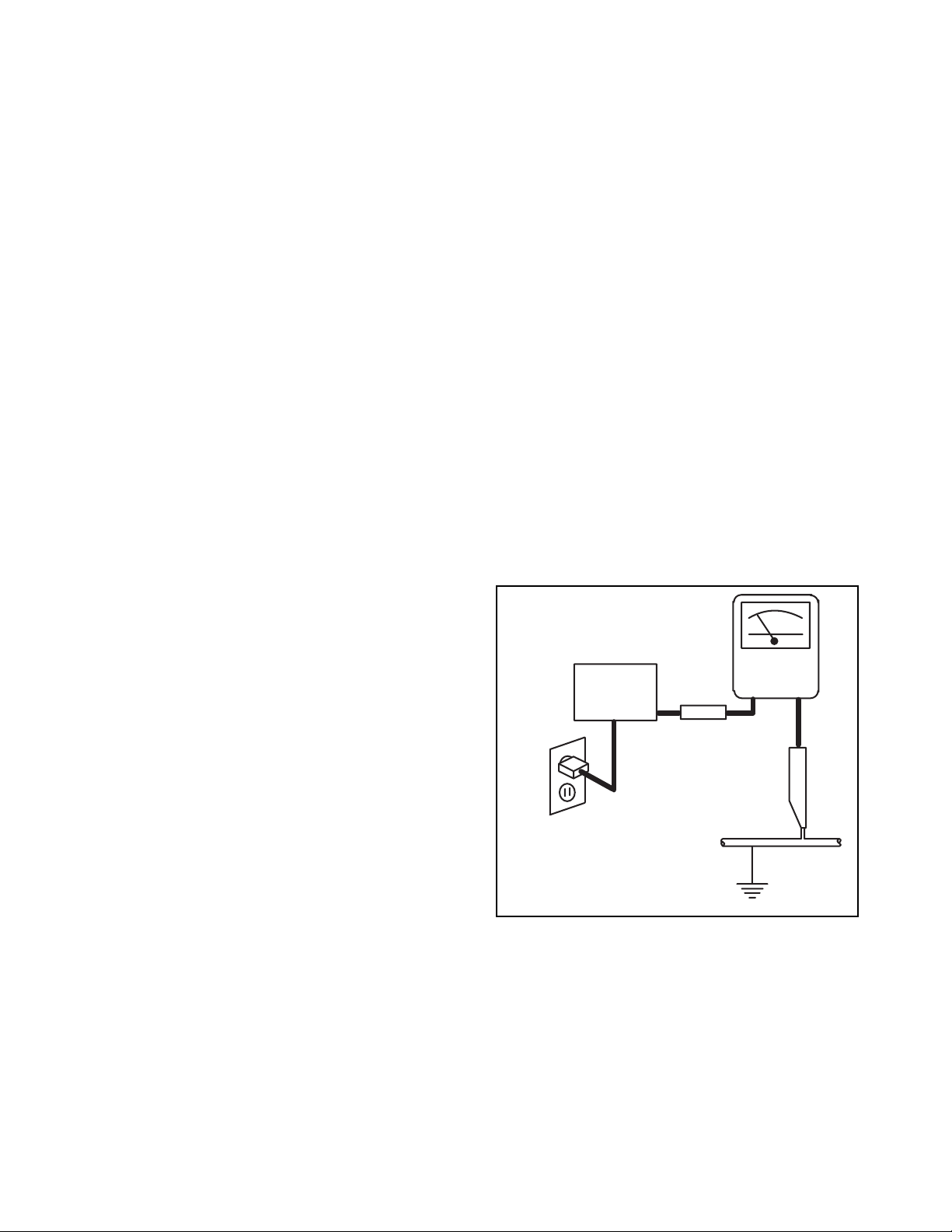
d. Leakage Current Hot Check - With the
instrument completely reassembled, plug the
AC line cord directly into a 120 V AC outlet. (Do
not use an isolation transformer during this
test.) Use a leakage current tester or a
metering system that complies with American
National Standards Institute (ANSI) C101.1
Leakage Current for Appliances and
Underwriters Laboratories (UL) 1410, (50.7).
With the instrument AC switch first in the on
position and then in the off position, measure
from a known earth ground (metal water pipe,
conduit, etc.) to all exposed metal parts of the
instrument (antennas, handle brackets, metal
cabinet, screw heads, metallic overlays, control
shafts, etc.), especially any exposed metal
parts that offer an electrical return path to the
chassis. Any current measured must not
exceed 0.5 milli-ampere. Reverse the
instrument power cord plug in the outlet and
repeat the test.
READING SHOULD
NOT BE ABOVE 0.5 mA
LEAKAGE
DEVICE
BEING
TESTED
TEST ALL EXPOSED
METAL SURFACES
ALSO TEST WITH
PLUG REVERSED
USING AC
ADAPTER PLUG
AS REQUIRED
ANY MEASUREMENTS NOT WITHIN THE
LIMITS SPECIFIED HEREIN INDICATE A
POTENTIAL SHOCK HAZARD THAT MUST
BE ELIMINATED BEFORE RETURNING THE
INSTRUMENT TO THE CUSTOMER OR
BEFORE CONNECTING THE ANTENNA OR
ACCESSORIES.
2. Read and comply with all caution and safety-
related notes on or inside the receiver cabinet, on
the receiver chassis, or on the Liquid Crystal
Panel.
CURRENT
TESTER
+
EARTH
GROUND
_
2-1 LTVN_ISP
Page 5

3. Design Alteration Warning - Do not alter or add
to the mechanical or electrical design of this TV
receiver. Design alterations and additions,
including, but not limited to circuit modifications
and the addition of items such as auxiliary audio
and/or video output connections, might alter the
safety characteristics of this receiver and create a
hazard to the user. Any design alterations or
additions will void the manufacturer's warranty and
may make you, the servicer, responsible for
personal injury or property damage resulting
therefrom.
4. Hot Chassis Warning a. Some TV receiver chassis are electrically
connected directly to one conductor of the AC
power cord and maybe safety-serviced without
an isolation transformer only if the AC power
plug is inserted so that the chassis is
connected to the ground side of the AC power
source. To confirm that the AC power plug is
inserted correctly, with an AC voltmeter,
measure between the chassis and a known
earth ground. If a voltage reading in excess of
1.0V is obtained, remove and reinsert the AC
power plug in the opposite polarity and again
measure the voltage potential between the
chassis and a known earth ground.
b. Some TV receiver chassis normally have 85V
AC(RMS) between chassis and earth ground
regardless of the AC plug polarity. This chassis
can be safety-serviced only with an isolation
transformer inserted in the power line between
the receiver and the AC power source, for both
personnel and test equipment protection.
c. Some TV receiver chassis have a secondary
ground system in addition to the main chassis
ground. This secondary ground system is not
isolated from the AC power line. The two
ground systems are electrically separated by
insulation material that must not be defeated or
altered.
5. Observe original lead dress. Take extra care to
assure correct lead dress in the following areas: a.
near sharp edges, b. near thermally hot parts-be
sure that leads and components do not touch
thermally hot parts, c. the AC supply, d. high
voltage, and, e. antenna wiring. Always inspect in
all areas for pinched, out of place, or frayed wiring.
Check AC power cord for damage.
6. Components, parts, and/or wiring that appear to
have overheated or are otherwise damaged
should be replaced with components, parts, or
wiring that meet original specifications.
Additionally, determine the cause of overheating
and/or damage and, if necessary, take corrective
action to remove any potential safety hazard.
7. Product Safety Notice - Some electrical and
mechanical parts have special safety-related
characteristics which are often not evident from
visual inspection, nor can the protection they give
necessarily be obtained by replacing them with
components rated for higher voltage, wattage, etc.
Parts that have special safety characteristics are
identified by a # on schematics and in parts lists.
Use of a substitute replacement that does not
have the same safety characteristics as the
recommended replacement part might create
shock, fire, and/or other hazards. The product's
safety is under review continuously and new
instructions are issued whenever appropriate.
Prior to shipment from the factory, our products
are strictly inspected to confirm they comply with
the recognized product safety and electrical codes
of the countries in which they are to be sold.
However, in order to maintain such compliance, it
is equally important to implement the following
precautions when a set is being serviced.
2-2 LTVN_ISP
Page 6

Precautions during Servicing
A. Parts identified by the # symbol are critical for
safety.
Replace only with part number specified.
B. In addition to safety, other parts and assemblies
are specified for conformance with regulations
applying to spurious radiation. These must also be
replaced only with specified replacements.
Examples: RF converters, RF cables, noise
blocking capacitors, and noise blocking filters, etc.
C. Use specified internal wiring. Note especially:
1) Wires covered with PVC tubing
2) Double insulated wires
3) High voltage leads
D. Use specified insulating materials for hazardous
live parts. Note especially:
1) Insulation Tape
2) PVC tubing
3) Spacers
4) Insulators for transistors.
E. When replacing AC primary side components
(transformers, power cord, etc.), wrap ends of
wires securely about the terminals before
soldering.
F. Observe that the wires do not contact heat
producing parts (heat sinks, oxide metal film
resistors, fusible resistors, etc.)
G. Check that replaced wires do not contact sharp
edged or pointed parts.
H. When a power cord has been replaced, check that
5~6 kg of force in any direction will not loosen it.
I. Also check areas surrounding repaired locations.
J. Use care that foreign objects (screws, solder
droplets, etc.) do not remain inside the set.
K. Crimp type wire connector
The power transformer uses crimp type
connectors which connect the power cord and the
primary side of the transformer. When replacing
the transformer, follow these steps carefully and
precisely to prevent shock hazards.
Replacement procedure
1) Remove the old connector by cutting the wires
at a point close to the connector.
Important: Do not re-use a connector (discard
it).
2) Strip about 15 mm of the insulation from the
ends of the wires. If the wires are stranded,
twist the strands to avoid frayed conductors.
3) Align the lengths of the wires to be connected.
Insert the wires fully into the connector.
4) Use the crimping tool to crimp the metal sleeve
at the center position. Be sure to crimp fully to
the complete closure of the tool.
L. When connecting or disconnecting the internal
connectors, first, disconnect the AC plug from the
AC supply outlet.
M. When installing parts or assembling the cabinet
parts, be sure to use the proper screws and
tighten certainly.
2-3 LTVN_ISP
Page 7
Safety Check after Servicing
Examine the area surrounding the repaired location for damage or deterioration. Observe that screws, parts and
wires have been returned to original positions. Afterwards, perform the following tests and confirm the specified
values in order to verify compliance with safety standards.
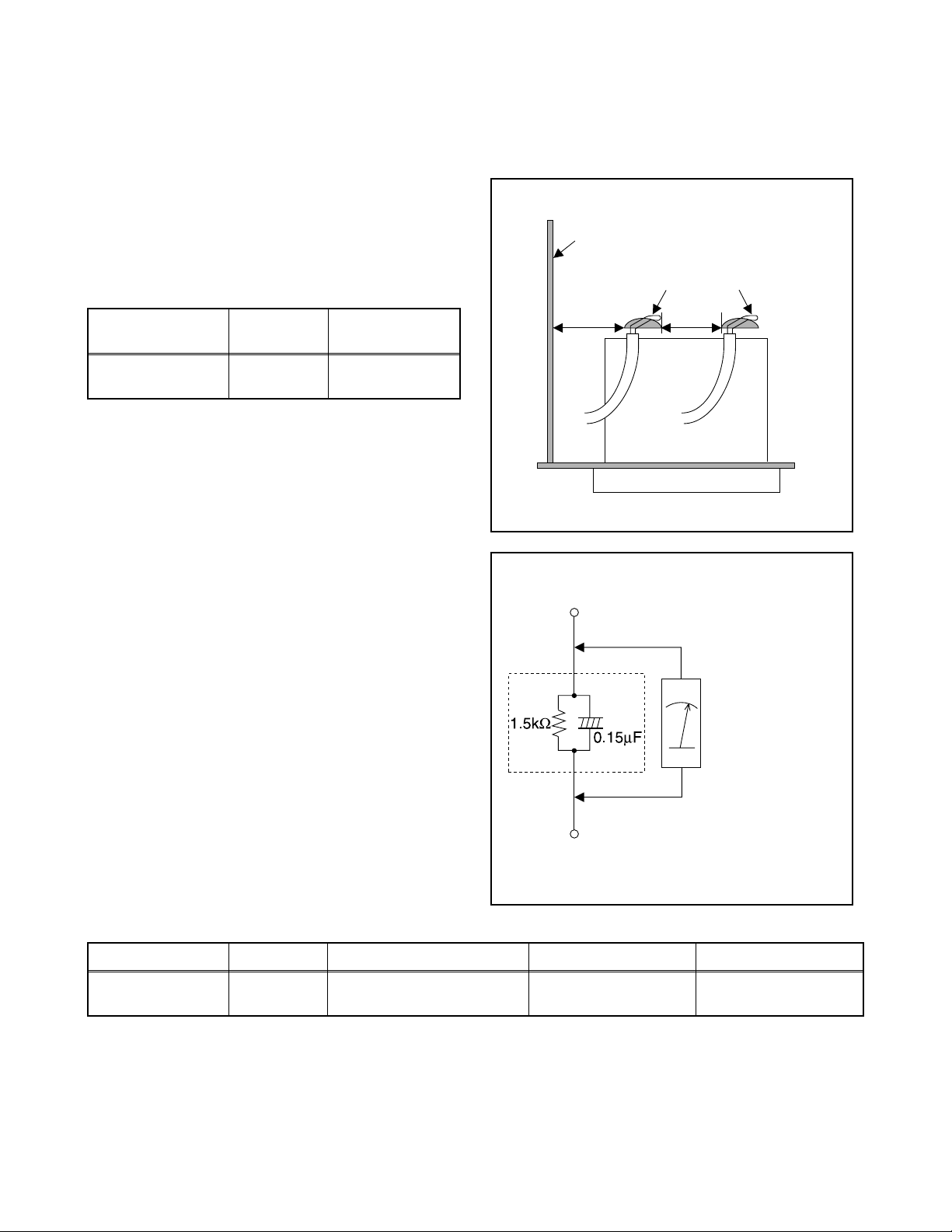
1. Clearance Distance
When replacing primary circuit components, confirm
specified clearance distance (d) and (d') between
soldered terminals, and between terminals and
surrounding metallic parts. (See Fig. 1)
Table 1: Ratings for selected area
Chassis or Secondary Conductor
Primary Circuit
AC Line Voltage Region
110 to 130 V
Note: This table is unofficial and for reference only. Be
sure to confirm the precise values.
U.S.A. or
Canada
Clearance
Distance (d), (d’)
≥ 3.2 mm
(0.126 inches)
2. Leakage Current Test
Confirm the specified (or lower) leakage current
between B (earth ground, power cord plug prongs) and
externally exposed accessible parts (RF terminals,
antenna terminals, video and audio input and output
terminals, microphone jacks, earphone jacks, etc.) is
lower than or equal to the specified value in the table
below.
Measuring Method: (Power ON)
Insert load Z between B (earth ground, power cord plug
prongs) and exposed accessible parts. Use an AC
voltmeter to measure across both terminals of load Z.
See Fig. 2 and following table.
d' d
Fig. 1
Exposed Accessible Part
Z
AC Voltmeter
(High Impedance)
Earth Ground
B
Power Cord Plug Prongs
Fig. 2
Table 2: Leakage current ratings for selected areas
AC Line Voltage Region Load Z Leakage Current (i) Earth Ground (B) to:
110 to 130 V
Note: This table is unofficial and for reference only. Be sure to confirm the precise values.
U.S.A. or
Canada
0.15 µF CAP. & 1.5 kΩ
RES. Connected in parallel
2-4 LTVN_ISP
i ≤ 0.5 mA rms
Exposed accessible
parts
Page 8
STANDARD NOTES FOR SERVICING
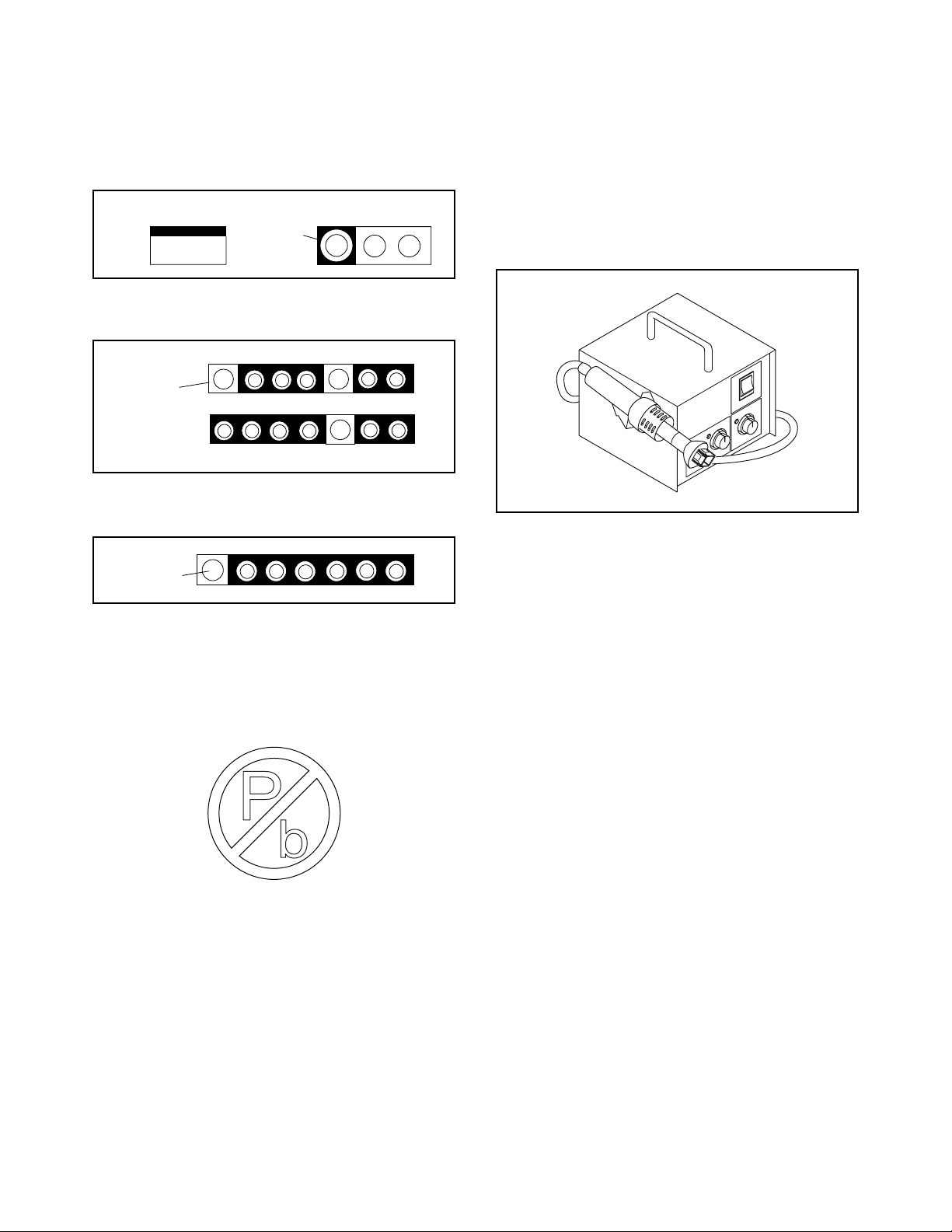
Circuit Board Indications
1. The output pin of the 3 pin Regulator ICs is
indicated as shown.
Top View
Out
2. For other ICs, pin 1 and every fifth pin are
indicated as shown.
Pin 1
3. The 1st pin of every male connector is indicated as
shown.
Pin 1
Input
In
Bottom View
5
10
Pb (Lead) Free Solder
Pb free mark will be found on PCBs which use Pb
free solder. (Refer to figure.) For PCBs with Pb free
mark, be sure to use Pb free solder. For PCBs
without Pb free mark, use standard solder.
Pb free mark
How to Remove / Install Flat Pack-IC
1. Removal
With Hot-Air Flat Pack-IC Desoldering Machine:
1. Prepare the hot-air flat pack-IC desoldering
machine, then apply hot air to the Flat Pack-IC
(about 5 to 6 seconds). (Fig. S-1-1)
Fig. S-1-1
2. Remove the flat pack-IC with tweezers while
applying the hot air.
3. Bottom of the flat pack-IC is fixed with glue to the
CBA; when removing entire flat pack-IC, first apply
soldering iron to center of the flat pack-IC and heat
up. Then remove (glue will be melted). (Fig. S-1-6)
4. Release the flat pack-IC from the CBA using
tweezers. (Fig. S-1-6)
CAUTION:
1. The Flat Pack-IC shape may differ by models. Use
an appropriate hot-air flat pack-IC desoldering
machine, whose shape matches that of the Flat
Pack-IC.
2. Do not supply hot air to the chip parts around the
flat pack-IC for over 6 seconds because damage
to the chip parts may occur. Put masking tape
around the flat pack-IC to protect other parts from
damage. (Fig. S-1-2)
3-1 TVN_SN
Page 9
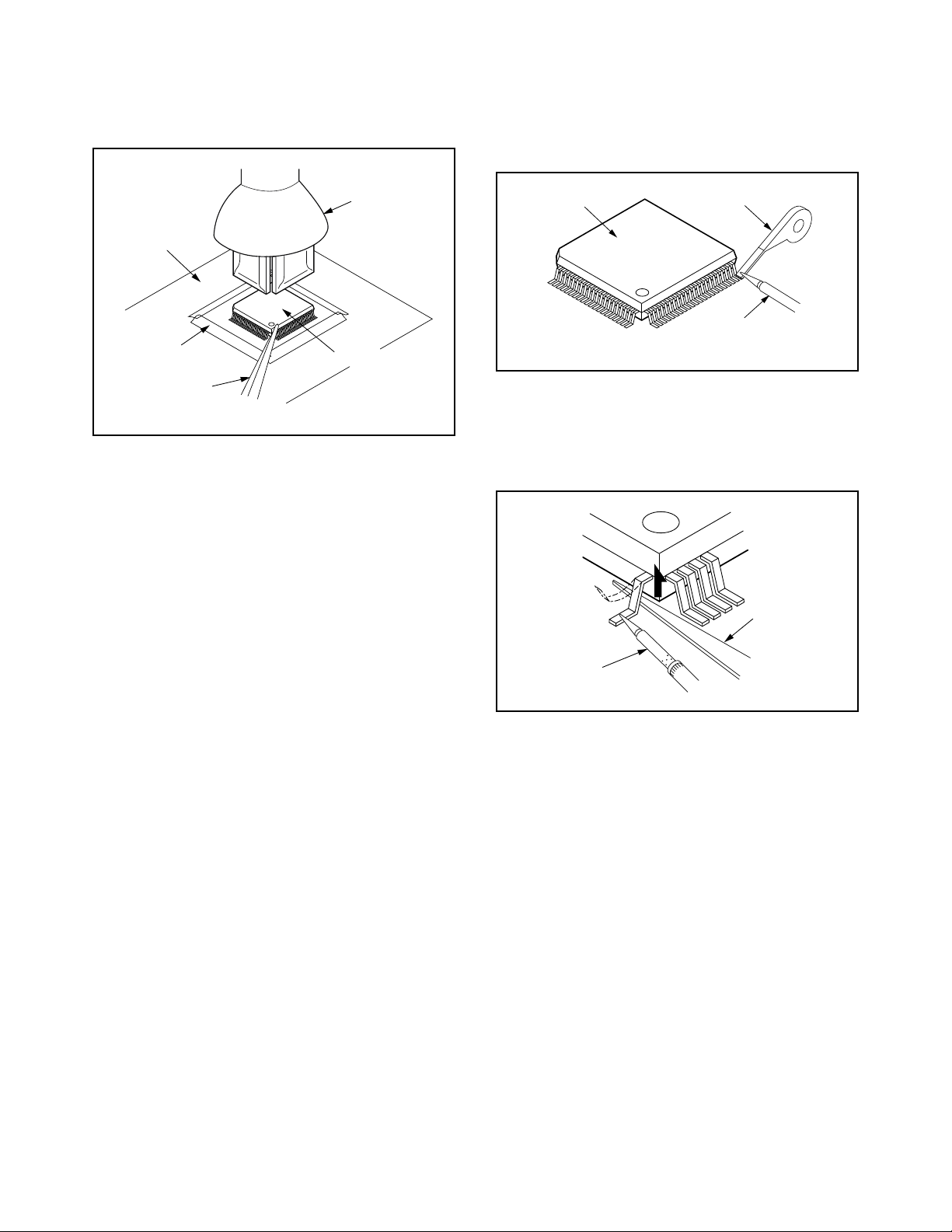
3. The flat pack-IC on the CBA is affixed with glue, so
be careful not to break or damage the foil of each
pin or the solder lands under the IC when
removing it.
With Soldering Iron:
1. Using desoldering braid, remove the solder from
all pins of the flat pack-IC. When you use solder
flux which is applied to all pins of the flat pack-IC,
you can remove it easily. (Fig. S-1-3)
CBA
Masking
Tape
Tweezers
Hot-air
Flat Pack-IC
Desoldering
Machine
Flat Pack-IC
Fig. S-1-2
Flat Pack-IC
Desoldering Braid
Soldering Iron
Fig. S-1-3
2. Lift each lead of the flat pack-IC upward one by
one, using a sharp pin or wire to which solder will
not adhere (iron wire). When heating the pins, use
a fine tip soldering iron or a hot air desoldering
machine. (Fig. S-1-4)
Sharp
Pin
Fine Tip
Soldering Iron
3. Bottom of the flat pack-IC is fixed with glue to the
CBA; when removing entire flat pack-IC, first apply
soldering iron to center of the flat pack-IC and heat
up. Then remove (glue will be melted). (Fig. S-1-6)
4. Release the flat pack-IC from the CBA using
tweezers. (Fig. S-1-6)
Fig. S-1-4
3-2 TVN_SN
Page 10

With Iron Wire:
1. Using desoldering braid, remove the solder from
all pins of the flat pack-IC. When you use solder
flux which is applied to all pins of the flat pack-IC,
you can remove it easily. (Fig. S-1-3)
2. Affix the wire to a workbench or solid mounting
point, as shown in Fig. S-1-5.
3. While heating the pins using a fine tip soldering
iron or hot air blower, pull up the wire as the solder
melts so as to lift the IC leads from the CBA
contact pads as shown in Fig. S-1-5.
4. Bottom of the flat pack-IC is fixed with glue to the
CBA; when removing entire flat pack-IC, first apply
soldering iron to center of the flat pack-IC and heat
up. Then remove (glue will be melted). (Fig. S-1-6)
5. Release the flat pack-IC from the CBA using
tweezers. (Fig. S-1-6)
Note: When using a soldering iron, care must be
taken to ensure that the flat pack-IC is not
being held by glue. When the flat pack-IC is
removed from the CBA, handle it gently
because it may be damaged if force is applied.
Hot Air Blower
2. Installation
1. Using desoldering braid, remove the solder from
the foil of each pin of the flat pack-IC on the CBA
so you can install a replacement flat pack-IC more
easily.
2. The “●” mark on the flat pack-IC indicates pin 1.
(See Fig. S-1-7.) Be sure this mark matches the 1
on the PCB when positioning for installation. Then
presolder the four corners of the flat pack-IC. (See
Fig. S-1-8.)
3. Solder all pins of the flat pack-IC. Be sure that
none of the pins have solder bridges.
Example :
Pin 1 of the Flat Pack-IC
is indicated by a " " mark.
Fig. S-1-7
To Solid
Mounting Point
CBA
Tweezers
Iron Wire
Soldering Iron
Fig. S-1-5
Fine Tip
Soldering Iron
Flat Pack-IC
or
Presolder
Flat Pack-IC
CBA
Fig. S-1-8
Fig. S-1-6
3-3 TVN_SN
Page 11
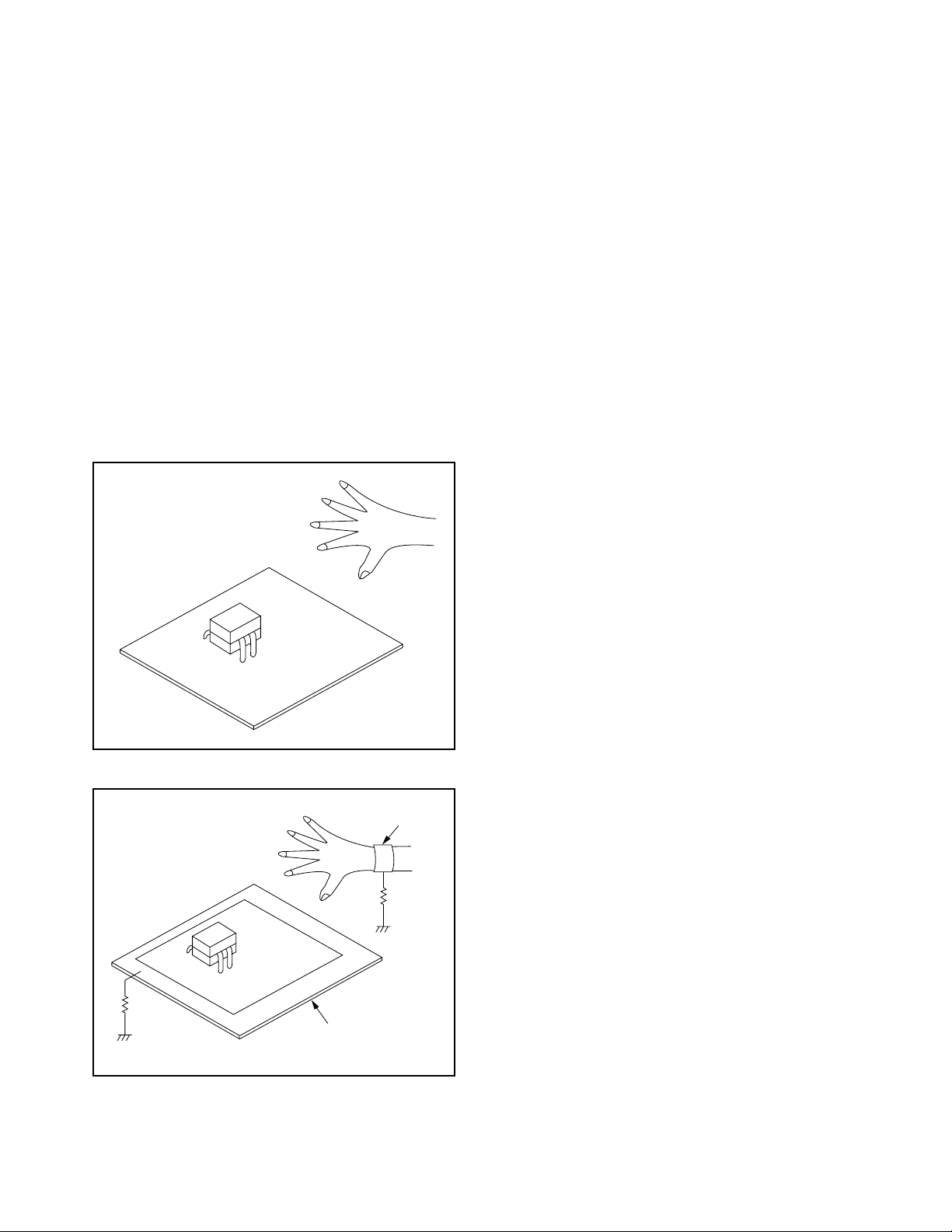
Instructions for Handling Semiconductors
Electrostatic breakdown of the semi-conductors may
occur due to a potential difference caused by
electrostatic charge during unpacking or repair work.
1. Ground for Human Body
Be sure to wear a grounding band (1 MΩ) that is
properly grounded to remove any static electricity that
may be charged on the body.
2. Ground for Workbench
Be sure to place a conductive sheet or copper plate
with proper grounding (1 MΩ) on the workbench or
other surface, where the semi-conductors are to be
placed. Because the static electricity charge on
clothing will not escape through the body grounding
band, be careful to avoid contacting semi-conductors
with your clothing.
<Incorrect>
<Correct>
1MΩ
CBA
Grounding Band
1MΩ
CBA
Conductive Sheet or
Copper Plate
3-4 TVN_SN
Page 12
CABINET DISASSEMBLY INSTRUCTIONS
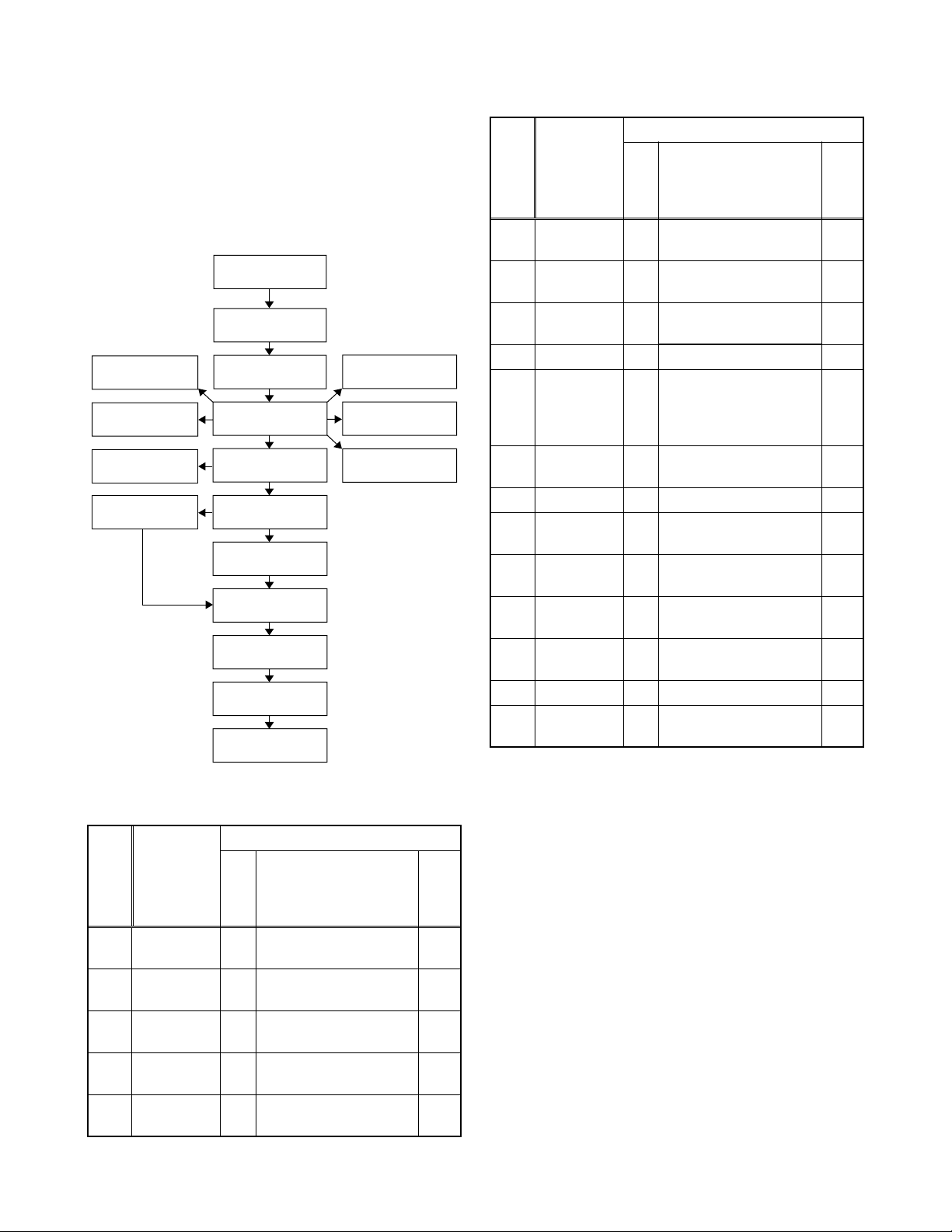
1. Disassembly Flowchart
This flowchart indicates the disassembly steps for the
cabinet parts, and the CBA in order to gain access to
item(s) to be serviced. When reassembling, follow the
steps in reverse order. Bend, route and dress the
cables as they were.
[1] Stand Base
Plate
[2] Stand Hinge
[16] Speaker (R)
[7] Jack Holder(D)
[9] Shield Box
[11] Digital Main
CBA Unit
[3] Stand Cover
[4] Rear Cabinet
[6] Chassis Bracket
[8] Jack Holder(A)
[10] Main CBA
[12] PCB Holder
[13] Panel Holder
[14] LCD Module
[18] Front Cabinet
[17] Speaker (L)
[5] Function CBA
[15] LED CBA
Removal
Step/
Loc.
No.
Part
Remove/*Unhook/
Fig.
No.
Unlock/Release/
Unplug/Unclamp/
Note
Desolder
Chassis
[6]
[7]
[8]
Bracket
Jack
Holder(D)
Jack
Holder(A)
D2 10(S-7) ---
D2 (S-8) ---
D2 4(S-9) ---
[9] Shield Box D2 6(S-10), (N-1) ---
4(S-11), *CN151,
*CN251, *CN252,
[10] Main CBA
D3
*CN1111, *CN1112,
D5
*CN1113, *CN1116
Digital Main
[11]
CBA UnitD3D5
4(S-12), *CN1121 ---
[12] PCB Holder D3 2(S-13) ---
Panel
[13]
Holder
LCD
[14]
Module
[15] LED CBA D4
Speaker
[16]
(R)
D4 6(S-14), 4(S-15) ---
D4 --------------- ---
3(S-16), *CN803,
*CN804
D4 4(S-17) ---
[17] Speaker (L) D4 4(S-18) ---
Front
[18]
↓
(1)
Cabinet
↓
(2)
D4 --------------- ---
↓
(3)
↓
(4)
---
---
↓
(5)
2. Disassembly Method
Removal
Step/
Loc.
No.
[1]
[2]
[3]
[4]
[5]
Part
Stand Base
Plate
Stand
Hinge
Stand
Cover
Rear
Cabinet
Function
CBA
Remove/*Unhook/
Fig.
No.
Unlock/Release/
Unplug/Unclamp/
Desolder
D1 4(S-1), 6(S-2), 5(S-3) ---
D1 --------------- ---
D1 --------------- ---
D1 10(S-4), 4(S-5) ---
D1
3(S-6), *CN101 ---
D5
Note:
(1) Order of steps in procedure. When reassembling,
follow the steps in reverse order. These numbers
are also used as the Identification (location) No. of
Note
parts in figures.
(2) Parts to be removed or installed.
(3) Fig. No. showing procedure of part location
(4) Identification of parts to be removed, unhooked,
unlocked, released, unplugged, unclamped, or
desoldered.
N = Nut, L = Locking Tab, S = Screw,
CN = Connector
* = Unhook, Unlock, Release, Unplug, or Desolder
e.g. 2(S-2) = two Screws (S-2),
2(L-2) = two Locking Tabs (L-2)
(5) Refer to the following "Reference Notes in the
Table."
4-1 L4300DC
Page 13
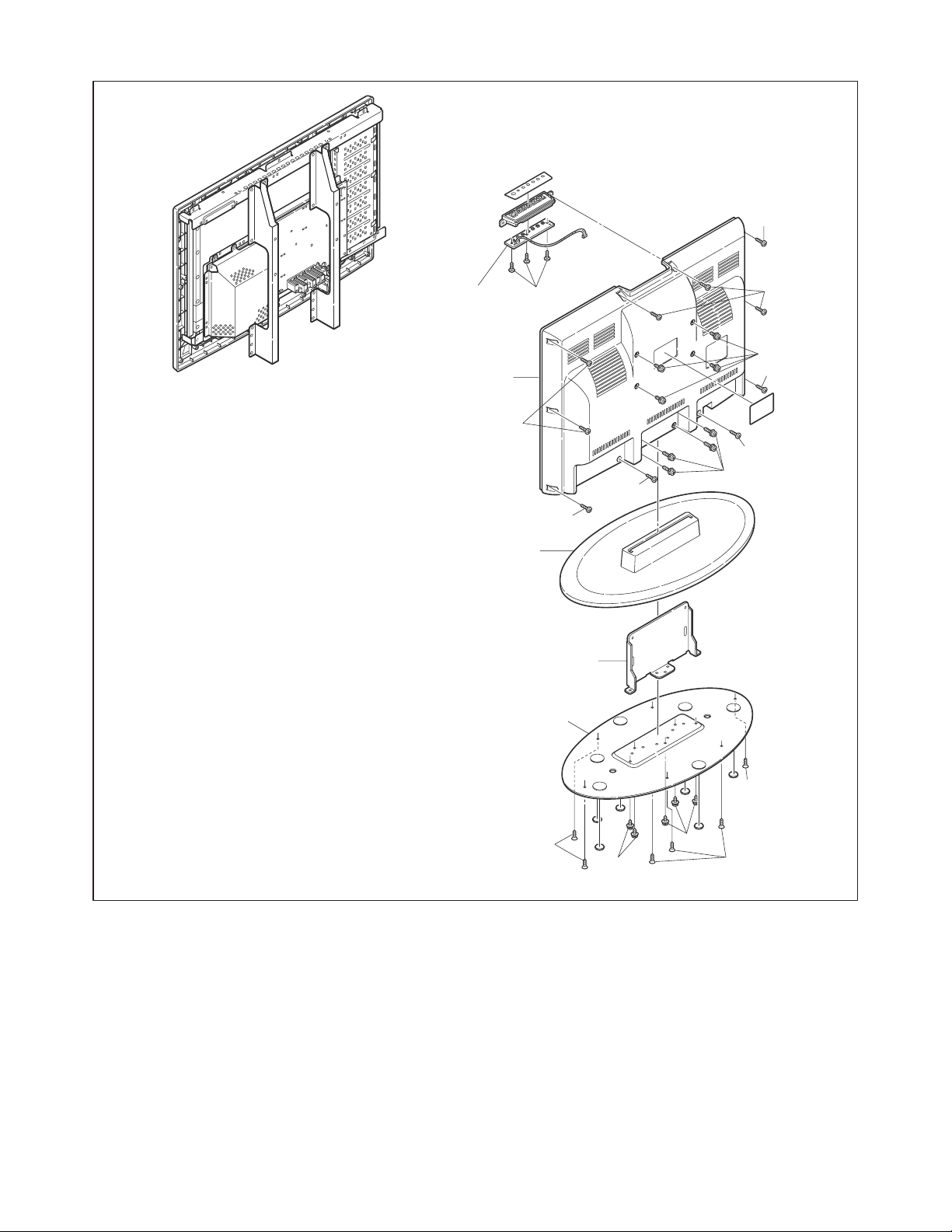
S-4
[5] Function CBA
[4] Rear Cabinet
[3] Stand Cover
[2] Stand Hinge
[1] Stand Base Plate
S-4
S-6
S-4
S-5
S-4
S-4
S-1
S-4
S-4
S-2
S-2
S-3
S-3
S-2
Fig. D1
4-2 L4300DC
Page 14
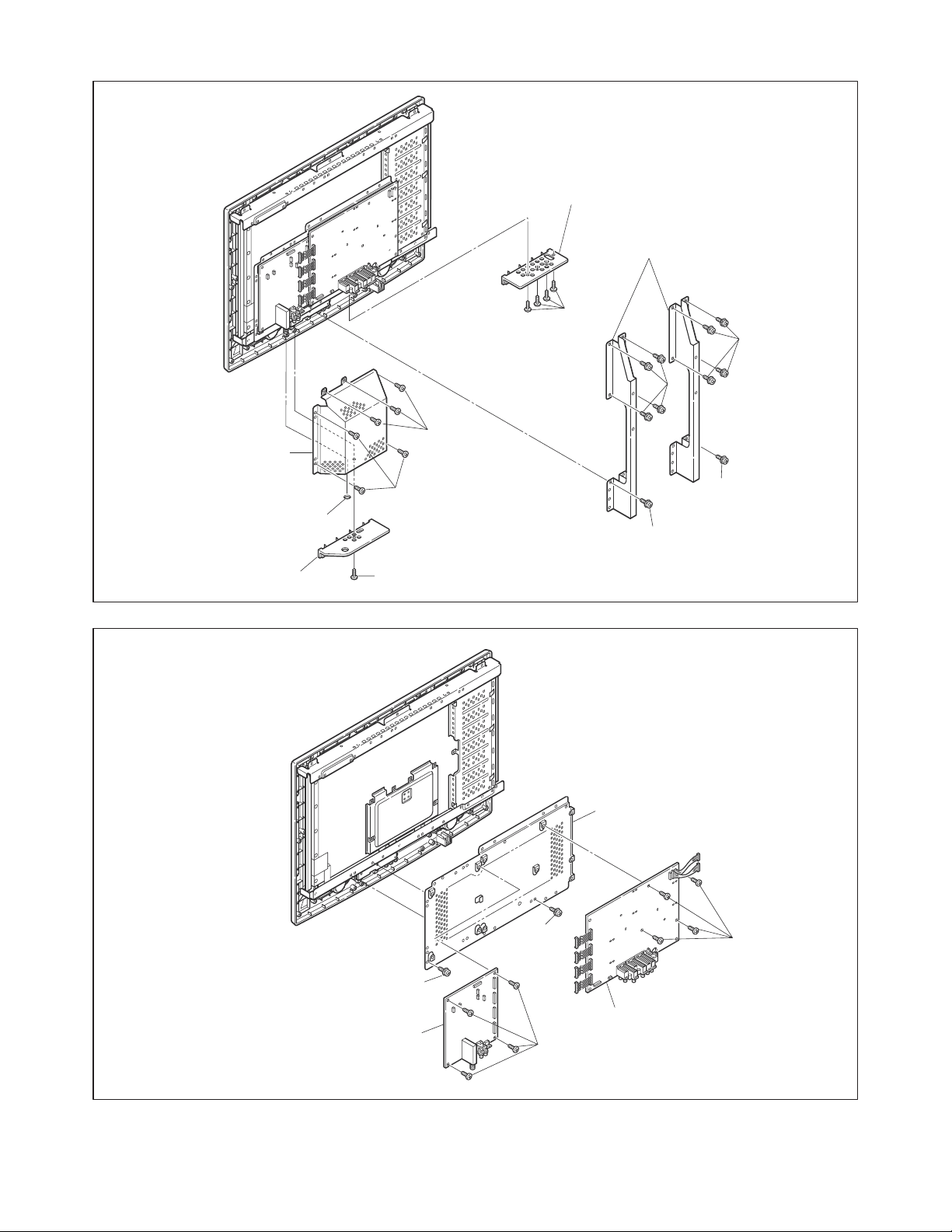
[9] Shield Box
[8] Jack Holder(A)
[6] Chassis Bracket
S-9
S-7
S-7
S-10
[7] Jack Holder(D)
N-1
S-8
S-10
S-13
S-7
S-7
Fig. D2
[12] PCB Holder
S-11
S-13
[11] Digital Main CBA Unit
[10] Main CBA
S-12
Fig. D3
4-3 L4300DC
Page 15
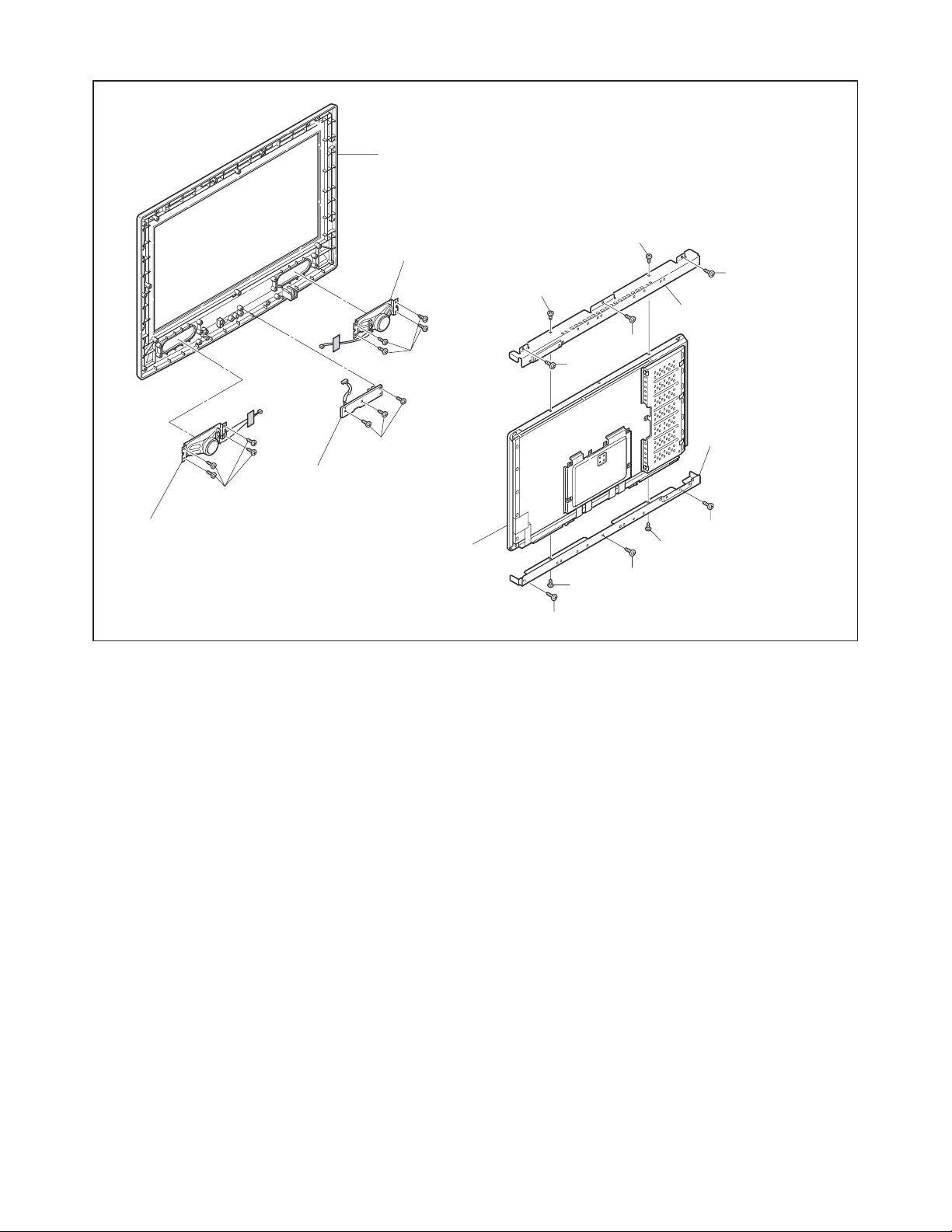
[18] Front Cabinet
[16] Speaker (R)
S-17
S-15
S-14
S-15
[13] Panel Holder
S-14
S-14
S-18
[17] Speaker (L)
S-16
[15] LED CBA
[14] LCD Module
S-14
S-15
[13] Panel Holder
S-14
S-15
S-14
Fig. D4
4-4 L4300DC
Page 16
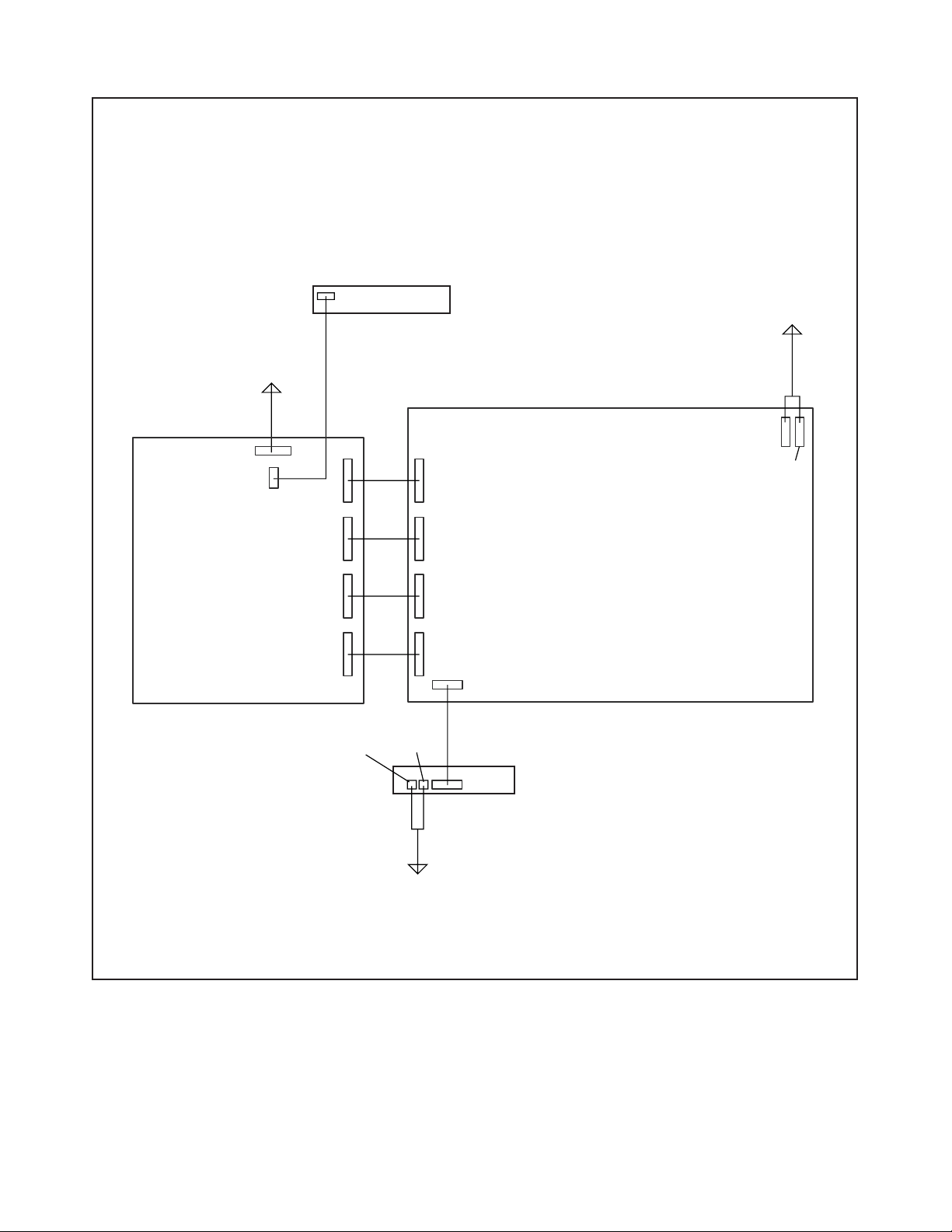
TV Cable Wiring Diagram
Function CBA
To LCD
Module
Digital Main
CBA Unit
CN1121
CN1505
CN1111
CN101
Main CBA
CN111
To LCD
Module
CN251
CN252
CN1112
CN1116
CN1113
CN804
CN112
CN113
CN114
CN803
To Speaker
CN151A
LED CBA
CN151
Fig. D5
4-5 L4300DC
Page 17
ELECTRICAL ADJUSTMENT INSTRUCTIONS
General Note: “CBA” is abbreviation for
“Circuit Board Assembly.”
Note: Electrical adjustments are required after
replacing circuit components and certain
mechanical parts. It is important to perform
these adjustments only after all repairs and
replacements have been completed.
Also, do not attempt these adjustments unless
the proper equipment is available.
Test Equipment Required
1. DC Voltmeter
2. NTSC Pattern Generator (Color Bar W/White
Window, Red Color, Dot Pattern, Gray Scale,
Monoscope, Multi-Burst)
3. Remote control unit: Part No. N0105UD or
N0127UD
4. Color Analyzer
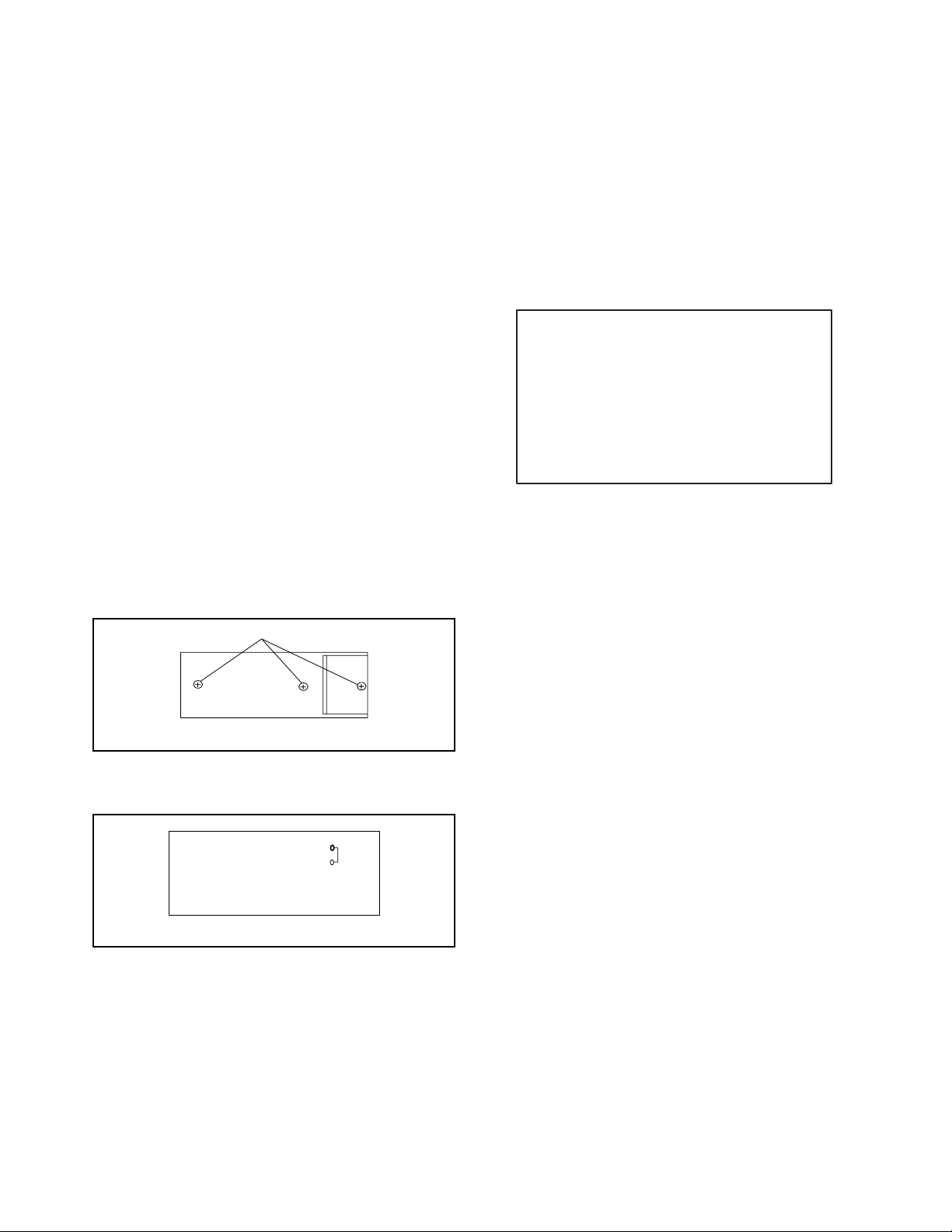
How to make Service remote
control unit:
1. Prepare normal remote control unit.
(Part No. N0105UD or N0127UD)
Remove 3 Screws from the back lid. (Fig. 1-1)
How to set up the service mode:
Service mode:
1. Use the service remote control unit.
2. Turn the power on. (Use main power on the TV
unit.)
3. Press [SLEEP] button on the service remote
control unit. The following screen appears.
"*" differs depending on the models.
Host Ver.
Boot
System
Sub Ver.
Calibration Check OK
: *********
: Push 0 key
: Push 0 key
: *********
Screws
Remote control unit (bottom)
2. Add J1 (Jumper Wire) to the remote control CBA.
(Fig. 1-2)
J 1
Remote Control CBA
Fig. 1-1
Fig. 1-2
5-1 L4300EA
Page 18
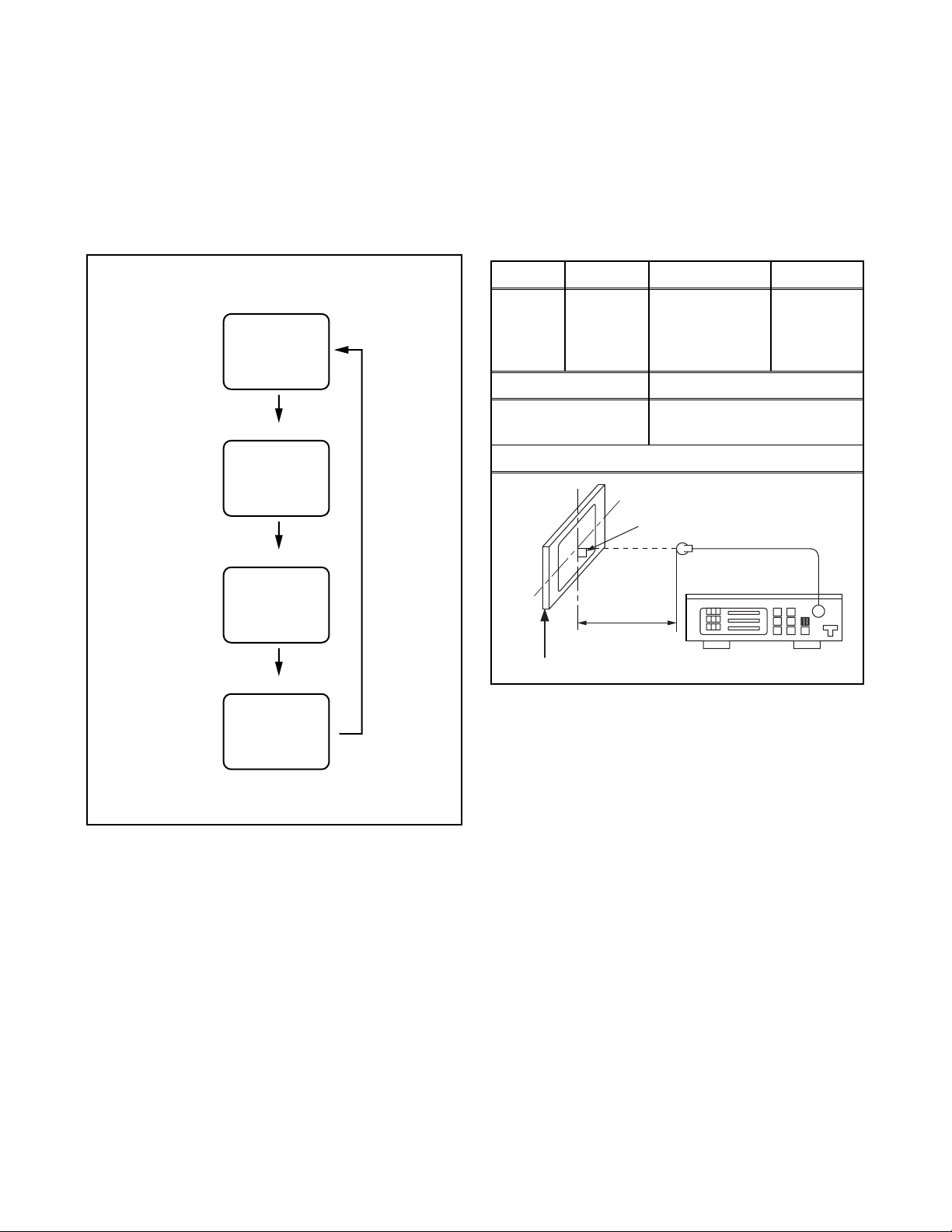
1. Purity Check Mode
This mode cycles through full-screen displays of red,
green, blue, and white to check for non-active pixels.
1. Enter the Service mode.
2. Each time pressing [7] button on the service
remote control unit, the display changes as
follows.
The following adjustment normally are not
attempted in the field. Only when replacing the
LCD Panel then adjust as a preparation.
2. White Balance Adjustment
Purpose: To mix red, green and blue beams correctly
for pure white.
Symptom of Misadjustment: White becomes bluish
or reddish.
Purity Check Mode
Red mode
[7] button
[7] button
Green mode
[7] button
Blue mode
[7] button
White mode
Note:
When entering this mode, the default setting is White mode.
Test Point Adj. Point Mode Input
White Purity
Screen
VOL. p
buttons
[RF/VIDEO1]
C/D
(APL 80%)
or
(APL 20%)
M. EQ. Spec.
Pattern Generator,
Color analyzer
x: 0.256 to 0.316,
y: 0.264 to 0.324
Figure
It carries out in a darkroom.
Perpendicularity
L = 3 cm
INPUT: WHITE 80%
Color Analyzer
Note: Use service remote control unit
1. Operate the unit for more than 20 minutes.
2. Input the White Purity (APL 80% or APL 20%).
3. Set the color analyzer to the CHROMA mode and
bring the optical receptor to the center on the
LCD-Panel surface after zero point calibration as
shown above.
Note: The optical receptor must be set
perpendicularly to the LCD Panel surface.
4. Enter the Service mode. Press [VOL p] button on
the remote control unit and select “C/D” mode.
5. When “x” value and “y” value are not within
specification, adjust “DB (C/D)” or “DR (C/D)”.
Refer to “1. Initial Setting.”
Note: “DB(C/D)” or “DR(C/D)” must be adjusted
within ±0.01.
6. Turn the power off and on again. (Main power
button on the TV unit.)
5-2 L4300EA
Page 19

3. Auto Calibration
Purpose: To bring the color adjustment of each
component into standard alignment.
Symptom of Misadjustment: If this adjustment is
incorrect, component signals do not reproduce the
corresponding color.
1. Input white raster signal (10%=10 IRE, 100%=100
IRE) from Component 1 Y jack.
2. Enter the service mode.
3. To enter the Auto Calibration adjustment mode,
press [6] button on the service remote control unit.
4. To start auto adjustment, press [CH o] button on
the service remote control unit.
- In the auto adjustment mode, “Calibration Check”
appears on the screen.
- Upon completion, “Calibration Check OK” and
“Push FCH UP key” appear on the screen.
- If the auto adjustment failure, “Calibration Check
NG” and “Push FCH UP key” appear on the
screen.
5. Unplug AC cord and plug it in AC outlet again to
reset then enter the service mode again.
5-3 L4300EA
Page 20

HOW TO INITIALIZE THE LCD TELEVISION
How to initialize the LCD television:
1. To turn the power on, press [POWER] button on
the normal remote control unit or the unit.
2. Use the service remote control unit. (Refer to
“ELECTRICAL ADJUSTMENT INSTRUCTIONS”
section.
3. To enter the service mode, press [SLEEP] button
on the service remote control unit.
- To cancel the service mode, press [TV POWER]
button on the remote control.
4. To initialize the LCD television, press [DISPLAY]
button on the normal remote control unit.
- “INITIALIZED” (red) appears on the screen.
- After few seconds (completion initialization), the
screen is reset.
6-1 L4300INT
Page 21

BLOCK DIAGRAMS
System Control Block Diagram
REMOTE
RCV151
STBY+3.3V
P-ON
STBY
D151
D152
SENSOR
CN151
LED144
REMOTE22
LED255
CN151A
CN114
LED120 4
REMOTE19 5
LED2
CN1113
17
32
31
LED1
LED2 21 3
REMOTE
TO
LCD MODULE
LED CBAMAIN CBA
KEY SWITCH
KEY SWITCH
BACKLIGHT-SW12INT-PWM11
CN251
TO POWER SUPPLY
BLOCK DIAGRAM
TO AUDIO
BLOCK DIAGRAM
MAIN CBA
FUNCTION CBA
PROTECT1
VOLUME
AMP-MUTE
AUDIO-SW0
AUDIO-SW1
AUDIO-SW2
VOLUME18 6
AMP-MUTE16 8
AUDIO-SW121 3
AUDIO-SW222 2
AUDIO-SW020 4
TO AUDIO
BLOCK DIAGRAM
AUDIO-MUTE
CN101
KEY-IN315
KEY-IN1
CN1505
+5V
RESET
IC1503
3
60
KEY-IN3
KEY-IN1 3 3
19RESET
4MHz
X1501
23
XOUT
OSC
22
XIN
DRIVE
Q252
CN111
BACKLIGHT-SW
BACKLIGHT-ADJ
123
222
CN1111
5
BACKLIGHT-ADJ
1
PROTECT1
26
56
P-ON-H
VOLUME
P-ON-H
PROTECT1123
P-ON-H321
CN1112 CN112
IC1502
(SUB MICRO CONTROLLER)
IC1504
(MAIN MICRO CONTROLLER)
IC1401 (HDMI /IF)
I2C-CLK-C
I2C-DATA-C
AJ20
AH20
82
83
SCL
SDA
69
66
SCL
SDA
IC1507 (LVDS TRANSMITTER)
I2C-CLK-TUNER
I2C-DATA-TUNER
D16
C16
14
15
SCL
SDA
TU1001 (TUNER UNIT)
TXD1
14
AJ21
RXD
RXD1
15
AH21
TXD
DIGITAL MAIN CBA UNIT
H2
B17
C17
D17
AK8
AG12
AMP-MUTE
AUDIO-SW0
AUDIO-SW1
AUDIO-SW2
IC1104
AUDIO-MUTE
RESET
B14
RESET
+3.3V
BACKLIGHT-SW
XOUT
XIN
XOUT
D21
F28
55.474MHz
X1102
XIN
F27
OSC
EPROM-WP
I2C-CLK-A
I2C-DATA-A
C11
AK21
AG20
657
WP
SCL
SDA
IC1102 (MEMORY)
I2C-CLK-A
I2C-DATA-A
TO DIGITAL
SIGNAL PROCESS
BLOCK DIAGRAM
D20
25.14MHz
X1101
OSC
7-1
L4305BLS
Page 22

Video Block Diagram
AUDIO SIGNAL
VIDEO SIGNAL
VIDEO-IN1
VIDEO-IN2
S-VIDEO-Y-IN2
S-VIDEO-Y-IN1
S-VIDEO-C-IN2
S-VIDEO-C-IN1
TO DIGITAL
SIGNAL PROCESS
HDMI BCLK
222327
HDMI
RECEIVER
BLOCK DIAGRAM
HDMI LRCLK
HDMI SDATA
DAC-OSCLK
20
AUDIO
DECODER
44
TO DIGITAL
SIGNAL PROCESS
BLOCK DIAGRAM
R DATA(0-7)
G DATA(0-7)
B DATA(0-7)
2
99
CLAMP A/D
MUX
716677
9
12
MUX MATRIX
35343837414043
19
92
IIC
I/F
SDA
SCL
IC1402 (HDMI MEMORY)
5
IC1401 (HDMI INTERFACE)
6
50
49
746879
CN1116CN113
VIDEO-IN1222VIDEO-IN2717S-VIDEO-Y-IN2420S-VIDEO-C-IN2519S-VIDEO-Y-IN1213S-VIDEO-C-IN1222VIDEO-Y-IN11113VIDEO-Pb-IN11311VIDEO-Pr-IN11410VIDEO-Y-IN2168VIDEO-Pb-IN2186VIDEO-Pr-IN219
WF1
BUFFER
Q701
Q702
BUFFER
CN1113
CN114
WF2WF3
Q703
BUFFER
MAIN CBA DIGITAL MAIN CBA UNIT
JK701
JK702
5
WF6
WF4
WF5
BUFFER
Q704
3 4
YC
BUFFER
BUFFER
Q705
Q706
21
21
3 4
YC
Q707
JK703
BUFFER
Q708
BUFFER
Q709
Q1401
BUFFER
BUFFER
Q1402
Q710
JK704
BUFFER
BUFFER
Q711
BUFFER
Q712
BUFFER
JK1401
16
HDMI-DATA
79461
15
DATA 0(-)
DATA 0(+)
DATA 1(+)
HDMI-CLOCK
DATA 1(-)
DATA 2(+)
HDMI-IN
3
10
DATA 2(-)
CLOCK(+)
12
CLOCK(-)
VIDEO-IN1
VIDEO-IN2
S-VIDEO-IN1
S-VIDEO-IN2
7-2
VIDEO-Y-IN1
VIDEO-Pb-IN1
VIDEO-Pr-IN1
VIDEO-Y-IN2
VIDEO-Pb-IN2
VIDEO-Pr-IN2
L4305BLV
Page 23

Digital Signal Process Block Diagram
AUDIO SIGNAL
LCD MODULE
TX0(+)4
TX0(-)3
TX1(+)8
TX1(-)7
TX2(+)12
TX2(-)11
TX3(+)20
TX3(-)19
TXCLK(+)16
TXCLK(-)15
I2C-CLK-A27I2C-DATA-A
VIDEO SIGNAL
CN1121
757477768180858483
29
82
(FLASH MEMORY)
IC1108
DATA(0-7)
29-32,
(SDRAM)
IC1105
41-44
2,4,5,7,8,10,
DATA(0-15)
63,65
28-32,
11,13,54,56,
57,59,60,62,
(SDRAM)
ADDESS(0-12)
IC1110
35-42
DATA(0-15)
63,65
2,4,5,7,8,10,
11,13,54,56,
57,59,60,62,
ADDESS(0-12)
35-42
28-32,
TO VIDEO
BLOCK DIAGRAM
TO AUDIO
BLOCK DIAGRAM
20-23,
26-29,
AH12-14,
AH16-18,
AG13-18,
49-56
45,46,
37-42,
AJ12-14,
AJ17-19,
AK12-14,
LVDS
AK17-19
(LVDS TRANSMITTER)
IC1507
(DIGITAL SIGNAL PROCESS)
IC1504
TX
60
AJ15
H-SYNC
MPEG
DEMODU
-LATOR
A28
A27
61
AK15
V-SYNC
DECODER
B15
PLL
59
AD16
CLOCK
I2C-CLK-A
I2C-DATA-A
TO SYSTEM CONTROL
BLOCK DIAGRAM
D28
C25
A25
H28,
J29,J30,
M29
L29,L30
K29,K30,
A/D
CONVERTER
ANALOG
SW
DIGITAL
C29
SIGNAL
PROCESS
D30
P27,P28,
R27,R28,R30,
T27-29,V27-29,
B26
D26
AC27-30,
AD27-30,
AB27,AB28,
W27,U27-30
AG23-27,
AE27,AE28,AE30
AH24,AH25,
AJ28,AJ29,
AK25,AK27
AH27,AH28,
AH30,AJ24,AJ25,
P1,
M1,
P2-4
R2-4,
N1-4,
U1,
T1,U2-4
V1-4,
DAC-OSCLK
W1-3
HDMI-BCLK
HDMI-LRCLK
HDMI-SDATA
AJ6
AK4
AK5
AD-DATA
AJ5
DAC-BCLK
DAC-LRCLK
AK9
AH10
DAC-OSCLK
DAC-DATA
AJ10
AG11
AUDIO
INTERFACE
SPDIF
AJ9
TU1001
(TUNER UNIT)
SAW
FILTER
21
IF1
BUFFER
Q1002
4
20
18
IF2
VIDEO
IF-AGC
(ANALOG)
VIDEO-IN1
VIDEO-IN2
S-VIDEO-Y-IN2
S-VIDEO-C-IN2
S-VIDEO-Y-IN1
S-VIDEO-C-IN1
TO VIDEO
BLOCK DIAGRAM
R-DATA(0-7)
G-DATA(0-7)
B-DATA(0-7)
DIGITAL MAIN CBA UNIT
7-3 L4305BLD
Page 24

Audio Block Diagram
AUDIO SIGNAL
TO DIGITAL
SIGNAL PROCESS
BLOCK DIAGRAM
DAC-BCLK
DAC-LRCLK
DAC-OSCLK
AD-DATA
(AUDIO D/A CONVERTER)
IC1052
IC1053
(OP AMP)
785
D/A
15
2
1
IC1051 (AUDIO A/D CONVERTER)
111015
A/D
1
12
CONVERTER
2
CONVERTER
SP801
SPEAKER
7
12
86
MUTEVOLUME
AMP
AMP
DAC-DATA
SPDIF
6
14
6
7
(BUFFER)
IC1111
Q1509
24
BUFFER
JK1403
DIGITAL
AUDIO-OUT
DIGITAL MAIN CBA UNIT
(COAXIAL)
IC801 (AUDIO AMP)
CN113
CN1116
5
22
21
AUDIO(L)-1
AUDIO(R)-1
2
3
2
AUDIO(R)
JK1405
-OUT
VOLUME
AUDIO(L)
-OUT
TO SYSTEM CONTROL
BLOCK DIAGRAM
Q802
AMP-MUTE
HDMI-
JK1405
AUDIO(L)
-IN
HDMI-
L-CH
CLN804
SP(L) 1
CN804CN151CN151A
SP-GND 2
SP(L)
SP-GND
SP(R)
77
99
88
AUDIO(R)
-IN
TU1001(TUNER UNIT)
SP-GND
10 10
WF7
SIF
SP802
CLN803
SP(R) 1
CN803
SPEAKER
R-CH
SP-GND 2
LED CBA
CN1116
AUDIO(L)-219 5
AUDIO(R)-218 6
CN113
3
IC452 (INPUT SELECT)
13
14
MAIN CBA
INPUT
SELECT
152
SW
MUTE-ON
BUFFER
Q1014
BUFFER
Q1013
3
109 11
SW CTL
15
INPUT
IC451 (INPUT SELECT)
152
13
14
SELECT
SW
SW CTL
15
Q1010
BUFFER
Q1008
109 11
Q451
Q452
Q1009
BUFFER
Q453
MUTE-ON
Q1011
Q1012
DRIVE
AUDIO-MUTE
TO SYSTEM CONTROL
BLOCK DIAGRAM
BUFFER
Q1516
CN1116CN113
HDMI-AUDIO(L)-IN
13 11
BUFFER
Q1515
HDMI-AUDIO(R)-IN
TUNER-AUDIO(L)
TUNER-AUDIO(R)
12 12
16 8
15 9
IC1002
(MTS/SAP AUDIO SIGNAL PROCESS)
FL1002
(L-CH)
30
BUFFER
Q1006
MTS/SAP
SAW
FILTER
21 3
AUDIO SIGNAL
PROCESS
(R-CH)
29
BUFFER
Q1007
JK701
AUDIO(L)
-IN1
AUDIO(R)
-IN1
AUDIO(L)
-IN2
AUDIO(R)
-IN2
JK703
AUDIO(L)
-IN3
AUDIO(R)
-IN3
JK704
AUDIO(L)
-IN4
7-4
AUDIO(R)
-IN4
AUDIO-SW2
AUDIO-SW1
TO SYSTEM
CONTROL
AUDIO-SW0
BLOCK DIAGRAM
L4305BLA
Page 25

Power Supply Block Diagram
For continued protection against risk of fire,
replace only with same type 4 A, 125V fuse.
CAUTION ! :
ATTENTION : Utiliser un fusible de rechange de même type de 4A, 125V.
4A/125V
NOTE:
The voltage for parts in hot circuit is measured using
hot GND as a common terminal.
TO
SYSTEM
CONTROL
BLOCK
DIAGRAM
+1.8V 19
CN111
12,13
+2.5V
TO
STBY+3.3V 2
DIGITAL
MAIN CBA
UNIT
+33V 1
+3.3V 10
(CN1111)
+5V 4
LCD+5V 6,7
16-18
+1.2V
INV+24V
Q502
11
AUDIO+B
+12V
AUDIO+B
Q531, Q801, Q803
Q501
14
REG
13
TO SYSTEM
P-ON-H
10
CONTROL
BLOCK DIAGRAM
12
PROTECT1
Q504
Q536
REG
+3.3V
IC535
+5V REG
+5V REG
IC534
11
IC536
12
+1.8V REG
IC533
+2.5V REG
IC531
REG
SHUNT
15
D504
14
2
1
8
10
IC537
+3.3V REG
Q537
+1.2V REG
IC532
Q533
Q534
Q535
REG
SHUNT
7
9
14
D542
CAUTION !
Fixed voltage (or Auto voltage selectable) power supply circuit is used in this unit.
If Main Fuse (F601) is blown , check to see that all components in the power supply
circuit are not defective before you connect the AC plug to the AC power supply.
Otherwise it may cause some components in the power supply circuit to fail.
HOT CIRCUIT. BE CAREFUL.
T601
7
HOT COLD
BRIDGE
RECTIFIER
D601 - D604
L602
LINE
FILTER
LINE
FILTER
L601
F601
4A/125V
AC601
AC CORD
6
SWITCHING
Q601
5
4A 125V
3
IC601
2
IC602
3 2
4
T631
3
1
3
5
IC631
6
3 2
MAIN CBA
CONTROL
Q602
SWITCHING
LIMIT
Q603
7-5
SWITCHING
Q631
BRIDGE
RECTIFIER
D638 - D641
Q632
SWITCHING
CONTROL
L4305BLP
Page 26

SCHEMATIC DIAGRAMS / CBA'S AND TEST POINTS
Standard Notes
Many electrical and mechanical parts in this chassis have special characteristics. These characteristics often
pass unnoticed and the protection afforded by them cannot necessarily be obtained by using replacement
components rated for higher voltage, wattage, etc. Replacement parts that have these special safety
characteristics are identified in this manual and its supplements; electrical components having such features are
identified by the mark “#” in the schematic diagram and the parts list. Before replacing any of these components,
read the parts list in this manual carefully. The use of substitute replacement parts that do not have the same
safety characteristics as specified in the parts list may create shock, fire, or other hazards.
Notes:
1. Do not use the part number shown on these drawings for ordering. The correct part number is shown in the
parts list, and may be slightly different or amended since these drawings were prepared.
2. All resistance values are indicated in ohms (K = 10
3. Resistor wattages are 1/4W or 1/6W unless otherwise specified.
4. All capacitance values are indicated in µF (P = 10
5. All voltages are DC voltages unless otherwise specified.
Note of Capacitors:
ML --- Mylar Cap. PP --- Metallized Film Cap. SC --- Semiconductor Cap. L --- Low Leakage type
Temperature Characteristics of Capacitors are noted with the following:
B --- ±10% CH --- 0±60 ppm/°C CSL --- +350~-1000 ppm/°C
3
, M = 106).
-6
µF).
Tolerance of Capacitors are noted with the following:
Z --- +80~-20%
Note of Resistors:
CEM --- Cement Res. MTL --- Metal Res. F --- Fuse Res.
Capacitors and transistors are represented by the following symbols.
CBA Symbols
(Top View) (Bottom View)
+
Electrolytic Capacitor
(Bottom View)
Transistor or Digital Transistor
E C B
(Top View)
NPN Transistor
E C B
(Top View)
(Top View)
PNP Transistor
E C B
(Top View)
Schematic Diagram Symbols
Digital Transistor
E C B
NPN Digital Transistor
PNP Digital Transistor
E C B
8-1 LC4N_SC
Page 27

LIST OF CAUTION, NOTES, AND SYMBOLS USED IN THE SCHEMATIC DIAGRAMS ON
THE FOLLOWING PAGES:
1. CAUTION:
CAUTION: FOR CONTINUED PROTECTION AGAINST RISK OF FIRE, REPLACE ONLY WITH SAME
TYPE_A,_V FUSE.
ATTENTION: UTILISER UN FUSIBLE DE RECHANGE DE MÊME TYPE DE_A,_V.
2. CAUTION:
Fixed Voltage (or Auto voltage selectable) power supply circuit is used in this unit.
If Main Fuse (F601) is blown, first check to see that all components in the power supply circuit are not
defective before you connect the AC plug to the AC power supply. Otherwise it may cause some components
in the power supply circuit to fail.
3. Note:
1. Do not use the part number shown on the drawings for ordering. The correct part number is shown in the
parts list, and may be slightly different or amended since the drawings were prepared.
2. To maintain original function and reliability of repaired units, use only original replacement parts which are
listed with their part numbers in the parts list section of the service manual.
4. Voltage indications on the schematics are as shown below:
Plug the TV power cord into a standard AC outlet.:
2
(Unit: Volt)
1
5.0 5.0
3
Power on mode
5. How to read converged lines
1-D3
Distinction Area
Line Number
(1 to 3 digits)
Examples:
1. "1-D3" means that line number "1" goes to the line number
"1" of the area "D3".
2. "1-B1" means that line number "1" goes to the line number
"1" of the area "B1".
6. Test Point Information
: Indicates a test point with a jumper wire across a hole in the PCB.
: Used to indicate a test point with a component lead on foil side.
: Used to indicate a test point with no test pin.
: Used to indicate a test point with a test pin.
Voltage
Indicates that the voltage
is not consistent here.
3
2
1
AREA D3
1-B1
AREA B1
1-D3
ABCD
8-2 LC4N_SC
Page 28

Main 1/5 Schematic Diagram
CN112
10
23.3
33.3
40
50
61.1
70
80.1
90.1
10 0
11 0
12 0
13 0
14 0
15 0
16 0
17 0
18 0
19 0
20 3.4
21 3.2
22 1.1
23 2.3
CN114
10
23.4
33.4
41.0
53.4
60
70
83.3
93.3
10 0
11 1.7
12 0
13 1.7
14 1.6
15 0
16 1.6
17 0
18 1.7
19 1.6
20 0
21 1.6
22 1.7
23 0
VOLTAGE CHART
Pin No. Voltage
Pin No. Voltage
8-3
L4305SCM1
Page 29

Main 2/5 Schematic Diagram
CN113
10
21.6
30
41.7
51.7
60
71.7
80
90.6
10 0.6
11 0
12 6.0
13 6.0
14 0
15 6.0
16 6.0
17 0
18 6.0
19 5.9
20 0
21 5.3
22 5.4
23 0
VOLTAGE CHART
Pin No. Voltage
8-4
L4305SCM2
Page 30

Main 3/5 Schematic Diagram
CN111
132.7
23.4
30
45.0
50
65.0
75.0
80
90
10 3.3
11 0
12 2.7
13 2.7
14 0
15 0
16 1.3
17 1.3
18 1.3
19 1.8
20 12
21 0
22 0
23 3.3
VOLTAGE CHART
Pin No. Voltage
8-5
L4305SCM3
Page 31

Main 4/5 Schematic Diagram
CN251
124.4
224.4
324.4
424.4
524.4
60
70
80
90
10 0
11 0
12 2.7
CN252
124.4
224.4
324.4
424.4
524.4
60
70
80
90
10 0
VOLTAGE CHART
Pin No. Voltage
Pin No. Voltage
8-6
L4305SCM4
Page 32

Main 5/5 Schematic Diagram
CAUTION !
Fixed voltage (or Auto voltage selectable) power supply circuit is used in this unit.
If Main Fuse (F601) is blown , check to see that all components in the power supply
circuit are not defective before you connect the AC plug to the AC power supply.
Otherwise it may cause some components in the power supply circuit to fail.
4A/125V
CAUTION ! :
ATTENTION : Utiliser un fusible de rechange de même type de 4A, 125V.
For continued protection against risk of fire,
replace only with same type 4 A, 125V fuse.
NOTE:
The voltage for parts in hot circuit is measured using
hot GND as a common terminal.
8-7
L4305SCM5
Page 33

Function Schematic Diagram
VOLTAGE CHART
CN101
Pin No. Voltage
10
23.4
33.4
43.4
53.4
8-8
L4305SCF
Page 34

LED Schematic Diagram
8-9
L4305SCL
Page 35

Digital Main 1/8 Schematic Diagram
8-10
L4305SCD1
Page 36

Digital Main 2/8 Schematic Diagram
8-11
L4305SCD2
Page 37

Digital Main 3/8 Schematic Diagram
1 NOTE:
The order of pins shown in this diagram is different from that of actual IC1504.
IC1504 is divided into four and shown as IC1504 (1/4) ~ IC1504 (4/4) in this Digital Main Schematic Diagram Section.
8-12
L4305SCD3
Page 38

Digital Main 4/8 Schematic Diagram
1 NOTE:
The order of pins shown in this diagram is different from that of actual IC1504.
IC1504 is divided into four and shown as IC1504 (1/4) ~ IC1504 (4/4) in this Digital Main Schematic Diagram Section.
8-13
L4305SCD4
Page 39

Digital Main 5/8 Schematic Diagram
1 NOTE:
The order of pins shown in this diagram is different from that of actual IC1504.
IC1504 is divided into four and shown as IC1504 (1/4) ~ IC1504 (4/4) in this Digital Main Schematic Diagram Section.
8-14
L4305SCD5
Page 40

Digital Main 6/8 Schematic Diagram
8-15
L4305SCD6
Page 41

Digital Main 7/8 Schematic Diagram
1 NOTE:
The order of pins shown in this diagram is different from that of actual IC1504.
IC1504 is divided into four and shown as IC1504 (1/4) ~ IC1504 (4/4) in this Digital Main Schematic Diagram Section.
8-16
L4305SCD7
Page 42

Digital Main 8/8 Schematic Diagram
8-17
L4305SCD8
Page 43

Main CBA Top View
Because a hot chassis ground is present in the power
supply circuit, an isolation transformer must be used.
Also, in order to have the ability to increase the input
slowly,when troubleshooting this type power supply
circuit, a variable isolation transformer is required.
CAUTION !
Fixed voltage (or Auto voltage selectable) power supply circuit is used in this unit.
If Main Fuse (F601) is blown , check to see that all components in the power supply
circuit are not defective before you connect the AC plug to the AC power supply.
Otherwise it may cause some components in the power supply circuit to fail.
4A/125V
CAUTION ! :
ATTENTION : Utiliser un fusible de rechange de même type de 4A, 125V.
NOTE:
The voltage for parts in hot circuit is measured using
hot GND as a common terminal.
For continued protection against risk of fire,
replace only with same type 4 A, 125V fuse.
8-18
BL4300F01012-1
Page 44

Main CBA Bottom View
Because a hot chassis ground is present in the power
supply circuit, an isolation transformer must be used.
Also, in order to have the ability to increase the input
slowly,when troubleshooting this type power supply
circuit, a variable isolation transformer is required.
CAUTION !
Fixed voltage (or Auto voltage selectable) power supply circuit is used in this unit.
If Main Fuse (F601) is blown , check to see that all components in the power supply
circuit are not defective before you connect the AC plug to the AC power supply.
Otherwise it may cause some components in the power supply circuit to fail.
4A/125V
CAUTION ! :
ATTENTION : Utiliser un fusible de rechange de même type de 4A, 125V.
NOTE:
The voltage for parts in hot circuit is measured using
hot GND as a common terminal.
For continued protection against risk of fire,
replace only with same type 4 A, 125V fuse.
WF1
PIN 2 OF
CN113
WF3
PIN 22 OF
CN114
WF2
PIN 21 OF
CN114
WF6
PIN 14 OF
CN114
WF5
PIN 13 OF
CN114
WF4
PIN 11 OF
CN114
WF7
PIN 8 OF
CN151A
8-19
BL4300F01012-1
Page 45

Function CBA Top View
Function CBA Bottom View
8-20
BL4300F01012-2
Page 46

LED CBA Top View
LED CBA Bottom View
8-21
BL4300F01012-3
Page 47

WAVEFORMS
WF1 ~ WF7 = Waveforms to be observed at
Waveform check points.
(Shown in Schematic Diagram.)
Input: NTSC Color Bar Signal (with 1kHz Audio Signal)
WF1
WF2
Pin 2 of CN113
CVBS 0.2V 20µs
Pin 21 of CN114
VIDEO-Y 0.2V
20µs
WF5
WF6
Pin 13 of CN114
VIDEO-Pb 0.2V 20µs
Pin 14 of CN114
VIDEO-Pr 0.2V 20µs
WF3
WF4
Pin 22 of CN114
VIDEO-C 0.2V
Pin 11 of CN114
VIDEO-Y 0.2V 20µs
20
µ
s
20
µ
s
WF7
Pin 8 of CN151A
AUDIO 0.1V 0.5ms
LC4WF9-1
Page 48

AC CORD
AC601
AUDIO(R)
-IN4
AUDIO(L)
-IN4
SP802
SPEAKER
R-CH
CN803
CLN803
1
2
SP(R)
SP-GND
WIRING DIAGRAM
SP801
SPEAKER
L-CH
CLN804
1
2
SP(L)
CN804
SP-GND
DIGITAL
AUDIO-OUT
(COAXIAL)
HDMI-AUDIO(L)
-IN
HDMI-AUDIO(R)
-IN
AUDIO(L)
-OUT
AUDIO(R)
-OUT
HDMI-
CONNECTOR
AUDIO(R)
-IN3
AUDIO(L)
-IN3
AUDIO(R)
-IN2
AUDIO(L)
-IN2
AUDIO(R)
-IN1
AUDIO(L)
-IN1
VIDEO
-Pr-IN2
VIDEO
-Pb-IN2
VIDEO
-Y-IN2
VIDEO
-IN2
VIDEO
-Pr-IN1
VIDEO
-Pb-IN1
VIDEO
-Y-IN1
VIDEO
-IN1
GND
STBY+3.3V
REMOTE
LED1
CN151
132456789
132
4
GND
LED1
REMOTE
CN151A
STBY+3.3V
BACKLIGHT-SW
+12V
+1.8V
GND
GND
+12V
19
+1.8V
+1.2V
18
+1.2V
BACKLIGHT-ADJ
CN1111
132547689
232120
22
CN111
BACKLIGHT-SW
BACKLIGHT-ADJ
LED CBA
LED2
SP(L)NUSP(R)
SP-GND
SP-GND
10
576
8
9
NU
LED2
SP(L)
SP(R)
SP-GND10SP-GND
+1.2V
+1.2V
+2.5V
GND
GND
+2.5V
GND
GND
+3.3V
10131211141517161918212022
9
+2.5V
12
+2.5V
GND
10
+3.3V
GND
161113
17
+1.2V
+1.2V
15
GND
14
GND
GND
LCD+5V
724
8
GND
LCD+5V
GND
LCD+5V
6
GND
LCD+5V
CN101
GND
1
534
GND
CN1505
+5V
GND
+5V
GND
KEY-IN1
STBY+3.3V
KEY-IN2
3
245
2
KEY-IN1
KEY-IN21KEY-IN3
STBY+3.3V
+33V
STBY+3.3V
23
153
+33V
STBY+3.3V
KEY-IN3
CN1112
CN112
FUNCTION CBA
PROTECT1
DVD-PROTECT(NU)NUNUNUNUNUNUNUNU
PROTECT2
P-ON-H
132547689
18
161113
17
22
PROTECT2
P-ON-H
DVD-PROTECT(NU)
19
NUNUNU
NUNUNUNUNU
232120
PROTECT1
AMP-STBY
NU
GND
AMP-MUTE
GND
GND
VOLUME
10131211141517161918212022
9
724
6
8
10
14
12
15
NU
GND
GND
AMP-STBY
AMP-MUTE
GND
VOLUME
TU1001 TUNER UNIT
AUDIO-SW0
AUDIO-SW1
GND
AUDIO-SW2
23
153
GND
AUDIO-SW0
AUDIO-SW1
AUDIO-SW2
MAIN CBA
DIGITAL MAIN CBA UNIT
S-VIDEO
-IN2
S-VIDEO
-IN1
CN1121
1
GND2GND
GND
CN113
232122192017181615
GND
CN1116
3
4
5
7
GND6GND
TX0(-)
TX1(-)
TX0(+)
GND
AUDIO(L)-1
AUDIO(R)-1
GND
AUDIO(L)-1
AUDIO(R)-1
8
9
GND10GND
TX1(+)
AUDIO(L)-2
AUDIO(R)-2
GND
6
7
51342
GND
AUDIO(L)-2
AUDIO(R)-2
11
12
TX2(-)
TX2(+)
TUNER-AUDIO(L)
8
TUNER-AUDIO(L)
13
GND14GND
HDMI-AUDIO(L)-IN
TUNER-AUDIO(R)
GND
1411121310
9
10
11
GND
HDMI-AUDIO(L)-IN
TUNER-AUDIO(R)
15
16
17
GND18GND
TX-CLK(-)
TX-CLK(+)
HDMI-AUDIO(R)-IN
NU
GNDNUGND
978563421
15
16
14
12
13
NU
GNDNUGND
HDMI-AUDIO(R)-IN
19
20
21
GND
TX3(-)
TX3(+)
S-VIDEO-C-IN2
VIDEO-IN2
GND
S-VIDEO-Y-IN2
19
172220
18
GND
VIDEO-IN2
S-VIDEO-Y-IN2
S-VIDEO-C-IN2
22
D+5V-LCD23D+5V-LCD24D+5V-LCD25D+5V-LCD
GND
21
GND
26
27
GND
I2C-CLK-A
GND
VIDEO-IN1
GND
CN114
232122192017181615
23
GND
GND
CN1113
VIDEO-IN1
28
29
30
31
GND
I2C-DATA-A
IX-PANEL-CONFIG1
IX-PANEL-CONFIG2
GND
VIDEO-Pr-IN2
VIDEO-Pb-IN2
S-VIDEO-C-IN1
S-VIDEO-Y-IN1
6
51342
GND
VIDEO-Pr-IN2
VIDEO-Pb-IN2
S-VIDEO-Y-IN1
S-VIDEO-C-IN1
1
CN251
INV+24V2INV+24V3INV+24V4INV+24V5INV+24V
GND
7
GND
VIDEO-Y-IN2
GND
VIDEO-Pr-IN1
1411121310
8
9
10
GND
VIDEO-Y-IN2
VIDEO-Pr-IN1
6
GND7GND8GND
VIDEO-Pb-IN1
GND
VIDEO-Y-IN1
GND
14
12
13
11
GND
GND
VIDEO-Y-IN1
VIDEO-Pb-IN1
9
10NU11
12
SEL
INT-PWM
BACKLIGHT-SW
S-SW1
S-SW2
REMOTE
GNDNULED1
LED2
18
NU
19
LED1
REMOTE
NU
21
NU
LED2
6
GND7GND8GND9GND10GND
978563421
15
172220
16
GND
S-SW1
S-SW2
1
CN252
INV+24V2INV+24V3INV+24V4INV+24V5INV+24V
GND
23
GND
LCD MODULE
L4305WI10-1
Page 49

Cabinet
EXPLODED VIEWS
A1
A3
B19
B16
SP801
A2
L5
A5
B19
B19
B16
CLN803
B19
LED CBA
SP802
L5
CLN804
L5
L7
L1
L7
B1
B7
L1
L7
L1
L7
L1
B1
L1
LCD1
B7
B2
L3
CLN252
CLN251
B9
L3
Function CBA
L4
B10
B18
B18
B9
A7
AC601
A4
L2
L5
L2
L2
L6
L2
A6
L2
L6
L2
L2
A18
See Electrical Parts List
for parts with this mark.
L1
Digital Main CBA Unit
L8
B13
B3
B6
B12
L11
L8
L8
B9
L4
B4
L8
L8
B4
L8
A25
L10
A24
A26
L13
L10
A25
L13
L10
B11
L4
Main CBA
L3
B5
L9
L3
L3
L3
11-1 L4303CEX
Page 50

Packing
Packing Tape
Some Ref. Numbers are
not in sequence.
X2
X3
X4
S2
Packing Tape
S4
Packing Tape
S8
S6
X1
Ta pe
S3
Packing Tape
Packing Tape
S5
FRONT
Packing Tape
S1
11-2 L4305PEX
Page 51

MECHANICAL PARTS LIST
PRODUCT SAFETY NOTE: Products marked with a
# have special characteristics important to safety.
Before replacing any of these components, read
carefully the product safety notice in this service
manual. Don't degrade the safety of the product
through improper servicing.
NOTE: Parts that are not assigned part numbers
(---------) are not available.
Ref. No. Description Part No.
A1 FRONT CABINET L4305UF 1EM021513
A2 BRAND BADGE L L4305UF 1EM423850
A3 CONTROL PLATE L4300UA 1EM321266
A4 REAR CABINET L4300UA 1EM020729
A5 DECORATION PLATE L4300UA 1EM120997
A6# RATAING LABEL L4305UF ----------
A7 FUNCTION KNOB L4300UA 1EM120992
A18 STAND COVER L5820EA 1EM221422
A24 STAND BASE PLATE L4300UA 1EM121113A
A25 STAND RUBBER FOOT L5001CB 1EM423855
A26 STAND HINGE L4300UA 1EM220784A
B1 PANEL HOLDER L4300UA 1EM120994A
B2 PCB HOLDER L4300UA 1EM120995A
B3 SHIELD BOX L4300UA 1EM120996A
B4 CHASSIS BRACKET L4300UA 1EM120993A
B5 JACK HOLDER(A) L4300UA 1EM220681A
B6 JACK HOLDER(D) L4300UA 1EM220682
B7 GASKET L4300UA 1EM422608
B12 NUT 3/8-32UNEF 0EM401451A
B13 GRAND TAPE L4300UA 1EM423095
B16 CLOTH(10X190XT0.3) L0200UA 1EM420019
B18 CLOTH(10X180XT0.5) L0336JG 0EM408827
B19 CLOTH(20X65XT0.5) L0100JA 0EM407914
CLN251 WIRE ASSEMBLY 104 WX1L4300-104 WX1L4300-104
CLN252 WIRE ASSEMBLY 103 WX1L4300-103 WX1L4300-103
CLN803 WIRE ASSEMBLY 101 WX1L4300-101 WX1L4300-101
CLN804 WIRE ASSEMBLY 101 WX1L4300-101 WX1L4300-101
L1 SCREW P-TIGHT 4X14 BIND HEAD GBJP4140
L2 SCREW P-TIGHT M4X14 PAN HEAD+BLK GPHP4140
L3 SCREW S-TIGHT M3X6 BIND HEAD+ GBJS3060
L5 SCREW P-TIGHT 3X10 BIND HEAD+ GBJP3100
L6 DOUBLE SEMS SCREW M4X10 + BLK FPH34100
L7 SCREW S-TIGHT M3X4 BIND HEAD GBJS3040
L8 DOUBLE SEMS SCREW M4X6 M4X6 FPJ34060
L9 SCREW P-TIGHT 3X10 BIND HEAD+ GBHP3100
L10 SCREW P-TIGHT M3X12 DISH HEAD+ GDJP3120
L11 SCREW TAP TIGHT M3X10 BIND HEAD+BLK NIGBHS3100
Ref. No. Description Part No.
S6 STAND SHEET L4300UA 1EM423161
S8 HOLD PAD L4300UA 1EM322328A
ACCESSORIES
X1 BAG POLYETHYLENE 235X365XT0.03 0EM408420A
X2# OWNERS MANUAL L4305UF 1EMN22023
X3 REMOTE CONTROL NF012UD NF012UD NF012UD
X4 DRY BATTERY(SUNRISE) R6SSE/2S XB0M451MS002
L13 DOUBLE SEMS SCREW M4X9 + BLACK
LCD1 LCD MODULE(CMO) V270B1-L01 TLCD100CME05
SP801 SPEAKER S0516F06 DSD0813XQ002
SP802 SPEAKER S0516F06 DSD0813XQ002
L0130UA
0EM408146A
PACKING
S1 CARTON L4305UF 1EM322333
S2 STYROFOAM TOP L4300UA 1EM020873
S3 STYROFOAM BOTTOM L4300UA 1EM020874
S4 SET BAG L4300UA 1EM321546
S5 SERIAL NO. LABEL L9750UA ----------
20061010 12-1 L4305CA
Page 52

ELECTRICAL PARTS LIST
PRODUCT SAFETY NOTE: Products marked with a
# have special characteristics important to safety.
Before replacing any of these components, read
carefully the product safety notice in this service
manual. Don't degrade the safety of the product
through improper servicing.
NOTES:
1. Parts that are not assigned part numbers (---------)
are not available.
2. Tolerance of Capacitors and Resistors are noted
with the following symbols.
C.....±0.25% D.....±0.5% F.....±1%
G.....±2% J......±5% K.....±10%
M.....±20% N.....±30% Z.....+80/-20%
DIGITAL MAIN CBA UNIT
Ref. No. Description Part No.
DIGITAL MAIN CBA UNIT 1ESA12306
MMA CBA
Ref. No. Description Part No.
MMA CBA
Consists of the following:
MAIN CBA
FUNCTION CBA
LED CBA
MAIN CBA
Ref. No. Description Part No.
MAIN CBA
Consists of the following:
CAPACITORS
C251 ELECTROLYTIC CAP. 100µF/ 10V M CA1A101SP085
C252 CERAMIC CAP.(AX) F Z 0.01µF/ 25V CDA1EZT0F103
C253 ELECTROLYTIC CAP.(47µF/ 50V)
C255 CHIP CERAMIC CAP. F Z 0.01µF/ 50V CHD1JZ30F103
C402 ELECTROLYTIC CAP. 4.7µF/ 50V M CA1J4R7SP085
C405 ELECTROLYTIC CAP. 4.7µF/ 50V M CA1J4R7SP085
C408 ELECTROLYTIC CAP. 4.7µF/ 50V M CA1J4R7SP085
C411 ELECTROLYTIC CAP. 4.7µF/ 50V M CA1J4R7SP085
C415 ELECTROLYTIC CAP. 4.7µF/ 25V M CA1E4R7SP085
C418 ELECTROLYTIC CAP. 4.7µF/ 25V M CA1E4R7SP085
C421 ELECTROLYTIC CAP. 4.7µF/ 25V M CA1E4R7SP085
C424 ELECTROLYTIC CAP. 4.7µF/ 25V M CA1E4R7SP085
C451 CHIP CERAMIC CAP.(1608) F Z 0.1µF/ 50V CHD1JZ30F104
C452 ELECTROLYTIC CAP. 100µF/ 10V M CA1A101SP085
C453 CHIP CERAMIC CAP.(1608) F Z 0.1µF/ 50V CHD1JZ30F104
C454 ELECTROLYTIC CAP. 10µF/ 16V M CA1C100SP085
C501 CERAMIC CAP. B K 1000pF/ 500V CCD2JKP0B102
C503 ALUMINUM ELECTROLYTIC CAP 4700µF/ 35V MCE1GMZNTM472
C504 ELECTROLYTIC CAP. 10µF/ 50V M CA1J100SP085
C505 ALUMINUM ELECTROLYTIC CAP 1000µF/ 25V MCE1EMZPTM102
C506 CERAMIC CAP.(AX) B K 0.01µF/ 50V CA1J103TU011
50MA47HC+T
1ESA12286
----------
----------
----------
----------
CA1J470SP085
Ref. No. Description Part No.
C507 CHIP CERAMIC CAP. F Z 0.01µF/ 50V CHD1JZ30F103
C508 ELECTROLYTIC CAP. 100µF/ 16V M CA1C101SP085
C509 ALUMINUM ELECTROLYTIC CAP 2200µF/ 35V MCE1GMZNTM222
C510 ELECTROLYTIC CAP. 470µF/ 16V M CA1C471SP085
C511 ELECTROLYTIC CAP. 0.1µF/ 50V M CE1JMASDL0R1
C531 CERAMIC CAP.(AX) B K 470pF/ 50V CCA1JKT0B471
C532 ALUMINUM ELECTROLYTIC CAP 4700µF/ 6. 3V MCE0KMZNTM472
C533 CHIP CERAMIC CAP. F Z 0.01µF/ 50V CHD1JZ30F103
C535 ELECTROLYTIC CAP. 10µF/ 50V M CA1J100SP085
C536 ELECTROLYTIC CAP. 1000µF/ 6.3V M CA0K102SP085
C537 ALUMINUM ELECTROLYTIC CAP 4700µF/ 10V MCE1AMZNTM472
C538 FILM CAP.(P) 0.01µF/ 50V J CA1J103MS029
C539 CERAMIC CAP.(AX) B K 0.047µF/ 50V CA1J473TU011
C540 ALUMINUM ELECTROLYTIC CAP 1000µF/ 25V MCE1EMZPTM102
C541 ELECTROLYTIC CAP. 1000µF/ 6.3V M CA0K102SP085
C542 ALUMINUM ELECTROLYTIC CAP 1000µF/ 35V MCE1GMZNTM102
C543 ELECTROLYTIC CAP. 10µF/ 50V M CA1J100SP085
C544 CERAMIC CAP.(AX) F Z 0.01µF/ 25V CDA1EZT0F103
C545 CERAMIC CAP.(AX) B K 0.01µF/ 50V CA1J103TU011
C546 CERAMIC CAP.(AX) B K 0.01µF/ 50V CA1J103TU011
C547 ELECTROLYTIC CAP. 1000µF/ 6.3V M CA0K102SP085
C548 CERAMIC CAP.(AX) F Z 0.01µF/ 25V CDA1EZT0F103
C549 ELECTROLYTIC CAP. 470µF/ 6.3V M CA0K471SP085
C553 ELECTROLYTIC CAP. 220µF/ 25V M CA1E221SP085
C554 ELECTROLYTIC CAP. 100µF/ 10V M CA1A101SP085
C555 ELECTROLYTIC CAP. 10µF/ 50V M CA1J100SP085
C556 ELECTROLYTIC CAP. 10µF/ 50V M CA1J100SP085
C557 CHIP CERAMIC CAP.(1608) B K 0.1µF/ 50V CHD1JK30B104
C559 ELECTROLYTIC CAP. 100µF/ 10V M CA1A101SP085
C560 ELECTROLYTIC CAP. 10µF/ 50V M CA1J100SP085
C561 CHIP CERAMIC CAP.(1608) B K 0.1µF/ 50V CHD1JK30B104
C562 ELECTROLYTIC CAP. 10µF/ 50V M CA1J100SP085
C563 CHIP CERAMIC CAP.(1608) B K 0.1µF/ 50V CHD1JK30B104
C564 CHIP CERAMIC CAP.(1608) B K 0.1µF/ 50V CHD1JK30B104
C565 CHIP CERAMIC CAP.(1608) B K 0.1µF/ 50V CHD1JK30B104
C566 CHIP CERAMIC CAP.(1608) B K 0.1µF/ 50V CHD1JK30B104
C567 ELECTROLYTIC CAP. 1000µF/ 6.3V M CA0K102SP085
C570 ELECTROLYTIC CAP. 1000µF/ 6.3V M CA0K102SP085
C572 CERAMIC CAP.(AX) B K 1000pF/ 50V CCA1JKT0B102
C573 CERAMIC CAP.(AX) F Z 0.01µF/ 25V CDA1EZT0F103
C574 CHIP CERAMIC CAP. F Z 0.01µF/ 50V CHD1JZ30F103
C575 CHIP CERAMIC CAP.(1608) B K 2700pF/ 50V CHD1JK30B272
C601# FILM CAP.(MP) 0.22µF/ 275V K CT2E224DC011
C602# FILM CAP.(MP) 0.22µF/ 275V K CT2E224DC011
C604 CERAMIC CAP. B K 0.01µF/ 500V CCD2JKP0B103
C605 CERAMIC CAP. B K 0.01µF/ 500V CCD2JKP0B103
C606# ALUMINUM ELECTROLYTIC CAP 470µF/ 200V MCA2D471NC190
C609 CERAMIC CAP. R K 1000pF/ 2KV CCD3DKA0R102
C610 FILM CAP.(P) 0.033µF/ 50V J CA1J333MS029
C615 FILM CAP.(P) 0.068µF/ 50V J CA1J683MS029
C633 FILM CAP.(P) 0.033µF/ 50V J CA1J333MS029
C634 CERAMIC CAP. R K 680pF/ 2KV(HR) CCD3DKA0R681
C639 FILM CAP.(P) 0.068µF/ 50V J CA1J683MS029
C640 ALUMINUM ELECTROLYTIC CAP 150µF/ 200V MCE2DMZNTM151
C641 CERAMIC CAP. B K 0.01µF/ 500V CCD2JKP0B103
20061010 13-1 L4305EL
Page 53

Ref. No. Description Part No.
C642 CERAMIC CAP. B K 0.01µF/ 500V CCD2JKP0B103
C691# SAFETY CAP. 3300pF/ 250V CCG2EMPYV332
C692 SAFETY CAP. 3300pF/ 250V CCG2EMPYV332
C701 CHIP CERAMIC CAP.(1608) CH J 100pF/ 50V CHD1JJ3CH101
C702 ELECTROLYTIC CAP. 47µF/ 16V M CA1C470SP085
C704 CHIP CERAMIC CAP. F Z 0.01µF/ 50V CHD1JZ30F103
C705 CHIP CERAMIC CAP.(1608) CH J 100pF/ 50V CHD1JJ3CH101
C706 ELECTROLYTIC CAP. 47µF/ 16V M CA1C470SP085
C708 CHIP CERAMIC CAP. F Z 0.01µF/ 50V CHD1JZ30F103
C709 CHIP CERAMIC CAP.(1608) CH J 100pF/ 50V CHD1JJ3CH101
C710 ELECTROLYTIC CAP. 47µF/ 16V M CA1C470SP085
C711 CHIP CERAMIC CAP. F Z 0.01µF/ 50V CHD1JZ30F103
C712 ELECTROLYTIC CAP. 100µF/ 10V M CA1A101SP085
C714 CHIP CERAMIC CAP.(1608) CH J 100pF/ 50V CHD1JJ3CH101
C715 CERAMIC CAP.(AX) B K 1000pF/ 50V CCA1JKT0B102
C716 CHIP CERAMIC CAP. F Z 0.01µF/ 50V CHD1JZ30F103
C718 CHIP CERAMIC CAP.(1608) CH J 100pF/ 50V CHD1JJ3CH101
C719 ELECTROLYTIC CAP. 47µF/ 16V M CA1C470SP085
C720 CHIP CERAMIC CAP. F Z 0.01µF/ 50V CHD1JZ30F103
C721 ELECTROLYTIC CAP. 100µF/ 10V M CA1A101SP085
C723 CHIP CERAMIC CAP.(1608) CH J 100pF/ 50V CHD1JJ3CH101
C724 CERAMIC CAP.(AX) B K 1000pF/ 50V CCA1JKT0B102
C725 CHIP CERAMIC CAP. F Z 0.01µF/ 50V CHD1JZ30F103
C727 ELECTROLYTIC CAP. 100µF/ 10V M CA1A101SP085
C728 ELECTROLYTIC CAP. 100µF/ 10V M CA1A101SP085
C729 CHIP CERAMIC CAP.(1608) CH J 33pF/ 50V CHD1JJ3CH330
C730 ELECTROLYTIC CAP. 47µF/ 16V M CA1C470SP085
C732 PCB JUMPER D0.6-P5.0 JW5.0T
C733 CHIP CERAMIC CAP.(1608) CH J 33pF/ 50V CHD1JJ3CH330
C734 ELECTROLYTIC CAP. 47µF/ 16V M CA1C470SP085
C736 PCB JUMPER D0.6-P5.0 JW5.0T
C737 CHIP CERAMIC CAP. F Z 0.01µF/ 50V CHD1JZ30F103
C738 CHIP CERAMIC CAP.(1608) CH J 33pF/ 50V CHD1JJ3CH330
C739 ELECTROLYTIC CAP. 47µF/ 16V M CA1C470SP085
C741 CHIP CERAMIC CAP. F Z 0.01µF/ 50V CHD1JZ30F103
C742 PCB JUMPER D0.6-P5.0 JW5.0T
C743 CHIP CERAMIC CAP.(1608) CH J 33pF/ 50V CHD1JJ3CH330
C744 ELECTROLYTIC CAP. 47µF/ 16V M CA1C470SP085
C746 PCB JUMPER D0.6-P5.0 JW5.0T
C747 CHIP CERAMIC CAP.(1608) CH J 33pF/ 50V CHD1JJ3CH330
C748 ELECTROLYTIC CAP. 47µF/ 16V M CA1C470SP085
C750 PCB JUMPER D0.6-P5.0 JW5.0T
C751 CHIP CERAMIC CAP.(1608) CH J 33pF/ 50V CHD1JJ3CH330
C752 ELECTROLYTIC CAP. 47µF/ 16V M CA1C470SP085
C754 PCB JUMPER D0.6-P5.0 JW5.0T
C801 ALUMINUM ELECTROLYTIC CAP 1000µF/ 35V MCE1GMZPTM102
C802 ELECTROLYTIC CAP. 220µF/ 35V M CA1G221SP085
C803 ELECTROLYTIC CAP. 220µF/ 35V M CA1G221SP085
C804 FILM CAP.(P) 0.1µF/ 50V J CA1J104MS029
C805 FILM CAP.(P) 0.1µF/ 50V J CA1J104MS029
C807 ELECTROLYTIC CAP. 100µF/ 25V M CA1E101SP085
C809 ELECTROLYTIC CAP. 3.3µF/ 50V M CA1J3R3SP085
C810 ELECTROLYTIC CAP. 10µF/ 50V M CA1J100SP085
C811 ELECTROLYTIC CAP. 100µF/ 10V M CA1A101SP085
C813 ELECTROLYTIC CAP 1µF/ 50V M CA1J1R0SP085
C814 ELECTROLYTIC CAP 1µF/ 50V M CA1J1R0SP085
CONNECTORS
CN111 TWG CONNECTOR 23P TWG-P23P-A1 J3TWA23TG001
CN112 TWG CONNECTOR 23P TWG-P23P-A1 J3TWA23TG001
CN113 TWG CONNECTOR 23P TWG-P23P-A1 J3TWA23TG001
CN114 TWG CONNECTOR 23P TWG-P23P-A1 J3TWA23TG001
CN151A BOARD IN WIRE 106 WX1L4300-106 WX1L4300-106
Ref. No. Description Part No.
CN251 PH CONNECTOR TOP 12P B12B-PH-K-
CN252 PH CONNECTOR TOP 10P B10B-PH-K-
S(LF)(SN)
S(LF)(SN)
J3PHC12JG029
J3PHC10JG029
DIODES
D251 SWITCHING DIODE 1SS133(T-77) QDTZ001SS133
D501 DIODE SCHOTTKY YG802C10R QDQZYG802C10
D502 SCHOTTKY BARRIER DIODE ERB84-009 QD7Z000ERB84
D503 DIODE FR104-B NDLZ000FR104
D504 IC SHUNT REGULATOR KIA431-AT/P NSZBA0TJY036
D505 ZENER DIODE MTZJT-7712B QDTB00MTZJ12
D507 SWITCHING DIODE 1SS133(T-77) QDTZ001SS133
D508 SWITCHING DIODE 1SS133(T-77) QDTZ001SS133
D509 DIODE 1ZC30(Q) QDLZ001ZC30Q
D510 ZENER DIODE MTZJT-7727B QDTB00MTZJ27
D531 DIODE SCHOTTKY 31DQ03L QDLZ031DQ03L
D532 DIODE SCHOTTKY 31DQ03L QDLZ031DQ03L
D533 SCHOTTKY BARRIER DIODE ERC81-006 QDQZERC81006
D534 SCHOTTKY BARRIER DIODE ERC81-004 QDPZERC81004
D536 RECTIFIER DIODE FR202-B/P NDQZ000FR202
D537 DIODE FR104-B NDLZ000FR104
D538 SWITCHING DIODE 1SS133(T-77) QDTZ001SS133
D539 ZENER DIODE MTZJT-776.8B QDTB0MTZJ6R8
D540 DIODE 1ZC43(Q) QDLZ001ZC43Q
D541 ZENER DIODE MTZJT-7733B QDTB00MTZJ33
D542 IC SHUNT REGULATOR KIA431-AT/P NSZBA0TJY036
D543 SWITCHING DIODE 1SS133(T-77) QDTZ001SS133
D544 SWITCHING DIODE 1SS133(T-77) QDTZ001SS133
D545 ZENER DIODE MTZJT-773.3B QDTB0MTZJ3R3
D546 SWITCHING DIODE 1SS133(T-77) QDTZ001SS133
D547 SWITCHING DIODE 1SS133(T-77) QDTZ001SS133
D549 SWITCHING DIODE 1SS133(T-77) QDTZ001SS133
D551 SWITCHING DIODE 1SS133(T-77) QDTZ001SS133
D552 SWITCHING DIODE 1SS133(T-77) QDTZ001SS133
D553 ZENER DIODE MTZJT-7715B QDTB00MTZJ15
D554 SWITCHING DIODE 1SS133(T-77) QDTZ001SS133
D555 SWITCHING DIODE 1SS133(T-77) QDTZ001SS133
D556 SWITCHING DIODE 1SS133(T-77) QDTZ001SS133
D557 SWITCHING DIODE 1SS133(T-77) QDTZ001SS133
D558 SWITCHING DIODE 1SS133(T-77) QDTZ001SS133
D559 SWITCHING DIODE 1SS133(T-77) QDTZ001SS133
D561 SWITCHING DIODE 1SS133(T-77) QDTZ001SS133
D563 RECTIFIER DIODE ERA22-02 QDPZ0ERA2202
D564 SWITCHING DIODE 1SS133(T-77) QDTZ001SS133
D566 SWITCHING DIODE 1SS133(T-77) QDTZ001SS133
D582 SWITCHING DIODE 1SS133(T-77) QDTZ001SS133
D583 SWITCHING DIODE 1SS133(T-77) QDTZ001SS133
D591 SWITCHING DIODE 1SS133(T-77) QDTZ001SS133
D592 SWITCHING DIODE 1SS133(T-77) QDTZ001SS133
D593 ZENER DIODE MTZJT-774.7B QDTB0MTZJ4R7
D594 ZENER DIODE MTZJT-773.9B QDTB0MTZJ3R9
D601# DIODE 1N5406 NDLZ001N5406
D602# DIODE 1N5406 NDLZ001N5406
D603# DIODE 1N5406 NDLZ001N5406
D604# DIODE 1N5406 NDLZ001N5406
D607# ZENER DIODE MTZJT-7727B QDTB00MTZJ27
D608 ZENER DIODE MTZJT-777.5B QDTB0MTZJ7R5
D609 SWITCHING DIODE 1SS133(T-77) QDTZ001SS133
D610 SWITCHING DIODE 1SS133(T-77) QDTZ001SS133
D611# SWITCHING DIODE 1SS133(T-77) QDTZ001SS133
D612# ZENER DIODE MTZJT-7718B QDTB00MTZJ18
D632# ZENER DIODE MTZJT-7727B QDTB00MTZJ27
D633 ZENER DIODE MTZJT-775.6B QDTB0MTZJ5R6
20061010 13-2 L4305EL
Page 54

Ref. No. Description Part No.
D634 SWITCHING DIODE 1SS133(T-77) QDTZ001SS133
D635 SWITCHING DIODE 1SS133(T-77) QDTZ001SS133
D636# SWITCHING DIODE 1SS133(T-77) QDTZ001SS133
D637# ZENER DIODE MTZJT-7718B QDTB00MTZJ18
D638# DIODE 1N5397-B NDLZ001N5397
D639# DIODE 1N5397-B NDLZ001N5397
D640# DIODE 1N5397-B NDLZ001N5397
D641# DIODE 1N5397-B NDLZ001N5397
D707 SWITCHING DIODE 1SS133(T-77) QDTZ001SS133
D708 SWITCHING DIODE 1SS133(T-77) QDTZ001SS133
D709 SWITCHING DIODE 1SS133(T-77) QDTZ001SS133
D710 SWITCHING DIODE 1SS133(T-77) QDTZ001SS133
D801 PCB JUMPER D0.6-P5.0 JW5.0T
D802 PCB JUMPER D0.6-P5.0 JW5.0T
D803 ZENER DIODE MTZJT-7715B QDTB00MTZJ15
D814 SWITCHING DIODE 1SS133(T-77) QDTZ001SS133
D816 SWITCHING DIODE 1SS133(T-77) QDTZ001SS133
D881 SWITCHING DIODE 1SS133(T-77) QDTZ001SS133
ICS
IC451 IC ANALOG MULTIPLEXER CD4051BNSR NSZBA0TTY157
IC452 IC ANALOG MULTIPLEXER CD4051BNSR NSZBA0TTY157
IC531 VOLTAGE REGULATOR PQ070XF01SZH QSZBA0SSH054
IC532 REGULATOR IC(3.5V) PQ035ZN1HZPH QSZBA0TSH078
IC533 REGULATOR PQ018EF01SZH QSZBA0SSH075
IC534 IC VOLTAGE REGULATOR 5V KIA7805API/P NSZBA0SJY041
IC535 IC LD1117V NSZBA0SSS046
IC536# REGULATOR PQ1CG2032FZH QSZBA0SSH071
IC537 REGULATOR(PB FREE) PQ033EF01SZH QSZBA0SSH060
IC601 PHOTOCOUPLER LTV-817C-F NPEC0LTV817F
IC602 PHOTOCOUPLER LTV-817C-F NPEC0LTV817F
IC631 PHOTOCOUPLER LTV-817C-F NPEC0LTV817F
IC801 AUDIO POWER IC AN17805A QSZBA0SMS007
COILS
L501 PCB JUMPER D0.6-P5.0 JW5.0T
L532 POWER INDUCTOR RCR1616-470M LLC470MSF009
L533 CHOKE COIL 47µH LLBD00PKV022
L534 INDUCTOR 15µH-K-5FT LLARKBSTU150
L601# FILTER LLBG00ZY2015 LLBG00ZY2015
L602# FILTER LLBG00ZY2015 LLBG00ZY2015
TRANSISTORS
Q251 TRANSISTOR KTC3199-GR-AT/P NQS4KTC3199P
Q252 TRANSISTOR KTC3199-GR-AT/P NQS4KTC3199P
Q451 TRANSISTOR KTC3199-GR-AT/P NQS4KTC3199P
Q452 TRANSISTOR KTC3199-GR-AT/P NQS4KTC3199P
Q453 TRANSISTOR KTC3199-GR-AT/P NQS4KTC3199P
Q501 TRANSISTOR(PB FREE) KTC2026-Y/P NQEYKTC2026P
Q502 TRANSISTOR KTC3199-GR-AT/P NQS4KTC3199P
Q503 TRANSISTOR KTC3199-GR-AT/P NQS4KTC3199P
Q504 NPN TRANSISTOR KRC103M-AT/P NQSZKRC103MP
Q531 TRANSISTOR KTA1267-GR-AT/P NQS1KTA1267P
Q533 TRANSISTOR KTC3199-GR-AT/P NQS4KTC3199P
Q534 TRANSISTOR KTC3199-GR-AT/P NQS4KTC3199P
Q535 TRANSISTOR KTC3199-GR-AT/P NQS4KTC3199P
Q536 TRANSISTOR KTA1267-GR-AT/P NQS1KTA1267P
Q537 TRANSISTOR KTC3199-GR-AT/P NQS4KTC3199P
Q601# FET MOS 2SK3797(Q) QFQZ2SK3797Q
Q602# TRANSISTOR 2SC2120-O(TE2 F T) QQS02SC2120F
Q603 TRANSISTOR KTC3199-GR-AT/P NQS4KTC3199P
Q631# MOS FET 2SK3563 QFWZ02SK3563
Q632# TRANSISTOR 2SC2120-O(TE2 F T) QQS02SC2120F
Q701 TRANSISTOR KTC3199-GR-AT/P NQS4KTC3199P
Q702 TRANSISTOR KTC3199-GR-AT/P NQS4KTC3199P
Ref. No. Description Part No.
Q703 TRANSISTOR KTC3199-GR-AT/P NQS4KTC3199P
Q704 TRANSISTOR KTC3199-GR-AT/P NQS4KTC3199P
Q705 TRANSISTOR KTC3199-GR-AT/P NQS4KTC3199P
Q706 TRANSISTOR KTC3199-GR-AT/P NQS4KTC3199P
Q707 TRANSISTOR KTC3199-GR-AT/P NQS4KTC3199P
Q708 TRANSISTOR KTC3199-GR-AT/P NQS4KTC3199P
Q709 TRANSISTOR KTC3199-GR-AT/P NQS4KTC3199P
Q710 TRANSISTOR KTC3199-GR-AT/P NQS4KTC3199P
Q711 TRANSISTOR KTC3199-GR-AT/P NQS4KTC3199P
Q712 TRANSISTOR KTC3199-GR-AT/P NQS4KTC3199P
Q801 TRANSISTOR 2SC2120-O(TE2 F T) QQS02SC2120F
Q802 TRANSISTOR KTC3199-GR-AT/P NQS4KTC3199P
Q803 TRANSISTOR 2SA1931(Q) QQZZ2SA1931Q
Q804 TRANSISTOR KTC3199-GR-AT/P NQS4KTC3199P
RESISTORS
R251 CARBON RES. 1/4W J 22 Ω RCX4JATZ0220
R254 CHIP RES.(1608) 1/10W 0 Ω RRXAJR5Z0000
R257 CHIP RES. 1/10W J 4.7k Ω RRXAJR5Z0472
R258 CHIP RES. 1/10W J 100 Ω RRXAJR5Z0101
R259 CHIP RES. 1/10W J 470 Ω RRXAJR5Z0471
R260 CHIP RES. 1/10W J 4.7k Ω RRXAJR5Z0472
R261 CHIP RES. 1/10W J 4.7k Ω RRXAJR5Z0472
R262 CHIP RES.(1608) 1/10W 0 Ω RRXAJR5Z0000
R401 CHIP RES. 1/10W J 47k Ω RRXAJR5Z0473
R402 CARBON RES. 1/4W J 5.6k Ω RCX4JATZ0562
R403 CHIP RES. 1/10W J 5.6k Ω RRXAJR5Z0562
R404 CHIP RES. 1/10W J 47k Ω RRXAJR5Z0473
R405 CARBON RES. 1/4W J 5.6k Ω RCX4JATZ0562
R406 CHIP RES. 1/10W J 5.6k Ω RRXAJR5Z0562
R407 CHIP RES. 1/10W J 47k Ω RRXAJR5Z0473
R408 CHIP RES. 1/10W J 5.6k Ω RRXAJR5Z0562
R409 CHIP RES. 1/10W J 5.6k Ω RRXAJR5Z0562
R410 CHIP RES. 1/10W J 47k Ω RRXAJR5Z0473
R411 CHIP RES. 1/10W J 5.6k Ω RRXAJR5Z0562
R412 CHIP RES. 1/10W J 5.6k Ω RRXAJR5Z0562
R413 CHIP RES. 1/10W J 47k Ω RRXAJR5Z0473
R414 CHIP RES. 1/10W J 5.6k Ω RRXAJR5Z0562
R415 CHIP RES. 1/10W J 5.6k Ω RRXAJR5Z0562
R416 CHIP RES. 1/10W J 47k Ω RRXAJR5Z0473
R417 CHIP RES. 1/10W J 5.6k Ω RRXAJR5Z0562
R418 CHIP RES. 1/10W J 5.6k Ω RRXAJR5Z0562
R419 CHIP RES. 1/10W J 47k Ω RRXAJR5Z0473
R420 CHIP RES. 1/10W J 5.6k Ω RRXAJR5Z0562
R421 CHIP RES. 1/10W J 5.6k Ω RRXAJR5Z0562
R422 CHIP RES. 1/10W J 47k Ω RRXAJR5Z0473
R423 CHIP RES. 1/10W J 5.6k Ω RRXAJR5Z0562
R424 CHIP RES. 1/10W J 5.6k Ω RRXAJR5Z0562
R453 CHIP RES. 1/10W J 100k Ω RRXAJR5Z0104
R454 CHIP RES. 1/10W J 100k Ω RRXAJR5Z0104
R455 CHIP RES. 1/10W J 100k Ω RRXAJR5Z0104
R456 CHIP RES. 1/10W J 100k Ω RRXAJR5Z0104
R457 CHIP RES. 1/10W J 100k Ω RRXAJR5Z0104
R458 CHIP RES. 1/10W J 100k Ω RRXAJR5Z0104
R459 CHIP RES. 1/10W J 100 Ω RRXAJR5Z0101
R460 CHIP RES. 1/10W J 10k Ω RRXAJR5Z0103
R461 CHIP RES. 1/10W J 100k Ω RRXAJR5Z0104
R462 CHIP RES. 1/10W J 100k Ω RRXAJR5Z0104
R463 CHIP RES. 1/10W J 100k Ω RRXAJR5Z0104
R464 CHIP RES. 1/10W J 100k Ω RRXAJR5Z0104
R465 CARBON RES. 1/4W J 100k Ω RCX4JATZ0104
R466 CHIP RES. 1/10W J 100k Ω RRXAJR5Z0104
R473 CHIP RES. 1/10W J 100k Ω RRXAJR5Z0104
20061010 13-3 L4305EL
Page 55

Ref. No. Description Part No.
R474 CHIP RES. 1/10W J 100k Ω RRXAJR5Z0104
R475 CHIP RES. 1/10W J 100k Ω RRXAJR5Z0104
R476 CARBON RES. 1/4W J 100k Ω RCX4JATZ0104
R477 CHIP RES. 1/10W J 100k Ω RRXAJR5Z0104
R478 CHIP RES. 1/10W J 100k Ω RRXAJR5Z0104
R479 CHIP RES. 1/10W J 100 Ω RRXAJR5Z0101
R480 CHIP RES. 1/10W J 10k Ω RRXAJR5Z0103
R481 CHIP RES. 1/10W J 100k Ω RRXAJR5Z0104
R482 CHIP RES. 1/10W J 100k Ω RRXAJR5Z0104
R483 CHIP RES. 1/10W J 100k Ω RRXAJR5Z0104
R484 CHIP RES. 1/10W J 100k Ω RRXAJR5Z0104
R485 CHIP RES. 1/10W J 100k Ω RRXAJR5Z0104
R486 CHIP RES. 1/10W J 100k Ω RRXAJR5Z0104
R488 PCB JUMPER D0.6-P5.0 JW5.0T
R491 CARBON RES. 1/4W J 10k Ω RCX4JATZ0103
R492 CARBON RES. 1/4W J 10k Ω RCX4JATZ0103
R493 CARBON RES. 1/4W J 10k Ω RCX4JATZ0103
R494 CHIP RES. 1/10W J 22k Ω RRXAJR5Z0223
R495 CHIP RES. 1/10W J 22k Ω RRXAJR5Z0223
R496 CHIP RES. 1/10W J 22k Ω RRXAJR5Z0223
R500 METAL OXIDE FILM RES. 1W J 1.2 Ω RN011R2ZU001
R501 CHIP RES. 1/10W F 8.2k Ω RRXAFR5H8201
R502 CHIP RES. 1/10W F 8.2k Ω RRXAFR5H8201
R503 CHIP RES. 1/10W J 2.7k Ω RRXAJR5Z0272
R506 PCB JUMPER D0.6-P5.0 JW5.0T
R507 CARBON RES. 1/4W J 1k Ω RCX4JATZ0102
R508 CHIP RES. 1/10W F 22k Ω RRXAFR5H2202
R509 CHIP RES. 1/10W F 15k Ω RRXAFR5H1502
R510 CARBON RES. 1/4W J 820 Ω RCX4JATZ0821
R511 CHIP RES. 1/10W J 22k Ω RRXAJR5Z0223
R512 CHIP RES.(1608) 1/10W F 2.2k Ω RRXAFR5Z2201
R513 CHIP RES. 1/10W J 5.6k Ω RRXAJR5Z0562
R514 CHIP RES. 1/10W J 2.2k Ω RRXAJR5Z0222
R515 CARBON RES. 1/4W J 1.5k Ω RCX4JATZ0152
R516 CARBON RES. 1/4W J 100 Ω RCX4JATZ0101
R517 CARBON RES. 1/4W J 2.7k Ω RCX4JATZ0272
R518 CHIP RES. 1/10W J 10k Ω RRXAJR5Z0103
R519 CHIP RES. 1/10W J 5.6k Ω RRXAJR5Z0562
R520 CHIP RES. 1/10W J 3.3k Ω RRXAJR5Z0332
R523 METAL RESISTOR 2W J 820 Ω RN02821ZU001
R524 METAL RESISTOR 2W J 820 Ω RN02821ZU001
R526 PCB JUMPER D0.6-P12.5 JW12.5T
R530 CHIP RES. 1/10W F 7.5k Ω RRXAFR5Z7501
R531 CARBON RES. 1/4W G 5.1k Ω RCX4GATZ0512
R532 CARBON RES. 1/4W J 10k Ω RCX4JATZ0103
R533 CHIP RES. 1/10W F 6.8k Ω RRXAFR5Z6801
R534 CHIP RES.(1608) 1/10W 0 Ω RRXAJR5Z0000
R535 CHIP RES. 1/10W J 4.7k Ω RRXAJR5Z0472
R536 CHIP RES. 1/10W F 1.1k Ω RRXAFR5H1101
R537 CHIP RES. 1/10W F 1k Ω RRXAFR5Z1001
R538 CARBON RES. 1/4W J 10k Ω RCX4JATZ0103
R540 CHIP RES. 1/10W J 10k Ω RRXAJR5Z0103
R541 CARBON RES. 1/4W G 1.6k Ω RCX4GATZ0162
R543 METAL OXIDE FILM RES. 1W J 1k Ω RN01102ZU001
R544 CARBON RES. 1/4W J 1k Ω RCX4JATZ0102
R545 CARBON RES. 1/4W J 10k Ω RCX4JATZ0103
R546 CHIP RES. 1/10W J 1k Ω RRXAJR5Z0102
R547 METAL OXIDE FILM RES. 2W J 0.1 Ω RN02R10KE010
R548 CHIP RES. 1/10W J 100 Ω RRXAJR5Z0101
R551 CHIP RES. 1/10W J 8.2k Ω RRXAJR5Z0822
R555 CARBON RES. 1/4W J 560 Ω RCX4JATZ0561
R556 CHIP RES. 1/10W J 22k Ω RRXAJR5Z0223
R557 CARBON RES. 1/4W J 820 Ω RCX4JATZ0821
Ref. No. Description Part No.
R558 CHIP RES.(1608) 1/10W F 2.2k Ω RRXAFR5Z2201
R561 CHIP RES. 1/10W F 680 Ω RRXAFR5H6800
R562 CHIP RES. 1/10W F 220 Ω RRXAFR5H2200
R563 CHIP RES. 1/10W J 22k Ω RRXAJR5Z0223
R565 CARBON RES. 1/4W J 10k Ω RCX4JATZ0103
R566 CHIP RES. 1/10W J 47k Ω RRXAJR5Z0473
R567 CARBON RES. 1/4W J 1.5k Ω RCX4JATZ0152
R568 CARBON RES. 1/4W J 1.5k Ω RCX4JATZ0152
R569 PCB JUMPER D0.6-P5.0 JW5.0T
R570 CHIP RES. 1/10W J 4.7k Ω RRXAJR5Z0472
R571 CHIP RES. 1/10W J 10k Ω RRXAJR5Z0103
R573 CARBON RES. 1/4W J 10k Ω RCX4JATZ0103
R574 PCB JUMPER D0.6-P5.0 JW5.0T
R575 CARBON RES. 1/4W J 220 Ω RCX4JATZ0221
R576 CARBON RES. 1/4W J 47k Ω RCX4JATZ0473
R577 CARBON RES. 1/4W J 1k Ω RCX4JATZ0102
R583 CHIP RES. 1/10W J 22k Ω RRXAJR5Z0223
R584 CHIP RES. 1/10W J 3.3k Ω RRXAJR5Z0332
R585 CARBON RES. 1/4W J 10k Ω RCX4JATZ0103
R586 CHIP RES. 1/10W J 3.3k Ω RRXAJR5Z0332
R590 CARBON RES. 1/4W J 620 Ω RCX4JATZ0621
R591 CARBON RES. 1/4W J 1k Ω RCX4JATZ0102
R601# CARBON RES. 1/2W J 3.3M Ω RCX2JZQZ0335
R602# CEMENT RESISTOR 5W J 0.82 Ω RW05R82PAK10
R603# CARBON RES. 1/4W J 390k Ω RCX4JATZ0394
R604 CARBON RES. 1/4W J 390k Ω RCX4JATZ0394
R605 PCB JUMPER D0.6-P5.0 JW5.0T
R606 CARBON RES. 1/4W J 390k Ω RCX4JATZ0394
R607# CARBON RES. 1/4W J 560k Ω RCX4JATZ0564
R608 CARBON RES. 1/4W J 560k Ω RCX4JATZ0564
R609 CARBON RES. 1/4W J 560k Ω RCX4JATZ0564
R611 PCB JUMPER D0.6-P5.0 JW5.0T
R612 CARBON RES. 1/4W J 330k Ω RCX4JATZ0334
R613 CARBON RES. 1/4W J 270 Ω RCX4JATZ0271
R614 CARBON RES. 1/4W J 220 Ω RCX4JATZ0221
R615 PCB JUMPER D0.6-P5.0 JW5.0T
R617 CARBON RES. 1/4W J 1.5k Ω RCX4JATZ0152
R618 CARBON RES. 1/4W J 180 Ω RCX4JATZ0181
R620# METAL OXIDE FILM RES. 2W J 0.33 Ω RN02R33ZU001
R621 CARBON RES. 1/4W J 150 Ω RCX4JATZ0151
R622 CARBON RES. 1/4W J 2.2k Ω RCX4JATZ0222
R631# CARBON RES. 1/4W J 390k Ω RCX4JATZ0394
R632 CARBON RES. 1/4W J 390k Ω RCX4JATZ0394
R633 CARBON RES. 1/4W J 390k Ω RCX4JATZ0394
R634 CARBON RES. 1/4W J 390k Ω RCX4JATZ0394
R636 CARBON RES. 1/4W J 270 Ω RCX4JATZ0271
R637 CARBON RES. 1/4W J 220 Ω RCX4JATZ0221
R639 CARBON RES. 1/4W J 820 Ω RCX4JATZ0821
R641 CARBON RES. 1/4W J 56 Ω RCX4JATZ0560
R642 CARBON RES. 1/4W J 2.2k Ω RCX4JATZ0222
R643 CARBON RES. 1/4W J 150 Ω RCX4JATZ0151
R644# METAL OXIDE FILM RES. 2W J 0.47 Ω RN02R47ZU001
R646 CEMENT RESISTOR 3W K 1.2 Ω RW031R2PAK10
R701 CARBON RES. 1/4W J 75 Ω RCX4JATZ0750
R702 CHIP RES.(1608) 1/10W 0 Ω RRXAJR5Z0000
R704 CHIP RES. 1/10W J 33k Ω RRXAJR5Z0333
R705 CHIP RES. 1/10W J 39k Ω RRXAJR5Z0393
R706 CHIP RES. 1/10W J 390 Ω RRXAJR5Z0391
R707 CHIP RES.(1608) 1/10W 0 Ω RRXAJR5Z0000
R708 CHIP RES. 1/10W J 75 Ω RRXAJR5Z0750
R709 CHIP RES.(1608) 1/10W 0 Ω RRXAJR5Z0000
R711 CHIP RES. 1/10W J 33k Ω RRXAJR5Z0333
R712 CHIP RES. 1/10W J 39k Ω RRXAJR5Z0393
20061010 13-4 L4305EL
Page 56

Ref. No. Description Part No.
R713 CHIP RES. 1/10W J 390 Ω RRXAJR5Z0391
R714 CHIP RES.(1608) 1/10W 0 Ω RRXAJR5Z0000
R715 CHIP RES. 1/10W J 75 Ω RRXAJR5Z0750
R716 CHIP RES.(1608) 1/10W 0 Ω RRXAJR5Z0000
R718 CHIP RES. 1/10W J 33k Ω RRXAJR5Z0333
R719 CHIP RES. 1/10W J 39k Ω RRXAJR5Z0393
R720 CHIP RES. 1/10W J 390 Ω RRXAJR5Z0391
R721 CHIP RES.(1608) 1/10W 0 Ω RRXAJR5Z0000
R722 CARBON RES. 1/4W J 22 Ω RCX4JATZ0220
R723 CHIP RES. 1/10W J 75 Ω RRXAJR5Z0750
R724 CHIP RES.(1608) 1/10W 0 Ω RRXAJR5Z0000
R726 CHIP RES. 1/10W J 33k Ω RRXAJR5Z0333
R727 CHIP RES. 1/10W J 39k Ω RRXAJR5Z0393
R728 CHIP RES. 1/10W J 390 Ω RRXAJR5Z0391
R729 CHIP RES.(1608) 1/10W 0 Ω RRXAJR5Z0000
R730 CHIP RES. 1/10W J 75 Ω RRXAJR5Z0750
R731 CHIP RES.(1608) 1/10W 0 Ω RRXAJR5Z0000
R733 CHIP RES. 1/10W J 33k Ω RRXAJR5Z0333
R734 CHIP RES. 1/10W J 39k Ω RRXAJR5Z0393
R735 CHIP RES. 1/10W J 390 Ω RRXAJR5Z0391
R736 CHIP RES.(1608) 1/10W 0 Ω RRXAJR5Z0000
R737 CARBON RES. 1/4W J 22 Ω RCX4JATZ0220
R738 CARBON RES. 1/4W J 75 Ω RCX4JATZ0750
R739 PCB JUMPER D0.6-P5.0 JW5.0T
R741 CHIP RES. 1/10W J 33k Ω RRXAJR5Z0333
R742 CHIP RES. 1/10W J 39k Ω RRXAJR5Z0393
R743 CHIP RES. 1/10W J 390 Ω RRXAJR5Z0391
R744 PCB JUMPER D0.6-P5.0 JW5.0T
R745 CARBON RES. 1/4W J 22 Ω RCX4JATZ0220
R746 CARBON RES. 1/4W J 22 Ω RCX4JATZ0220
R747 CHIP RES. 1/10W F 75 Ω RRXAFR5Z75R0
R748 CHIP RES.(1608) 1/10W 0 Ω RRXAJR5Z0000
R751 CHIP RES. 1/10W J 33k Ω RRXAJR5Z0333
R752 CHIP RES. 1/10W J 39k Ω RRXAJR5Z0393
R753 CHIP RES. 1/10W J 390 Ω RRXAJR5Z0391
R754 CHIP RES.(1608) 1/10W 0 Ω RRXAJR5Z0000
R755 CHIP RES. 1/10W F 75 Ω RRXAFR5Z75R0
R756 PCB JUMPER D0.6-P5.0 JW5.0T
R759 CHIP RES. 1/10W J 33k Ω RRXAJR5Z0333
R760 CHIP RES. 1/10W J 39k Ω RRXAJR5Z0393
R761 CHIP RES. 1/10W J 390 Ω RRXAJR5Z0391
R762 CHIP RES.(1608) 1/10W 0 Ω RRXAJR5Z0000
R763 CHIP RES. 1/10W F 75 Ω RRXAFR5Z75R0
R764 CHIP RES.(1608) 1/10W 0 Ω RRXAJR5Z0000
R767 CHIP RES. 1/10W J 33k Ω RRXAJR5Z0333
R768 CHIP RES. 1/10W J 39k Ω RRXAJR5Z0393
R769 CHIP RES. 1/10W J 390 Ω RRXAJR5Z0391
R770 CHIP RES.(1608) 1/10W 0 Ω RRXAJR5Z0000
R771 CHIP RES. 1/10W F 75 Ω RRXAFR5Z75R0
R772 PCB JUMPER D0.6-P5.0 JW5.0T
R775 CHIP RES. 1/10W J 33k Ω RRXAJR5Z0333
R776 CHIP RES. 1/10W J 39k Ω RRXAJR5Z0393
R777 CHIP RES. 1/10W J 390 Ω RRXAJR5Z0391
R778 CHIP RES.(1608) 1/10W 0 Ω RRXAJR5Z0000
R779 CHIP RES. 1/10W F 75 Ω RRXAFR5Z75R0
R780 CHIP RES.(1608) 1/10W 0 Ω RRXAJR5Z0000
R783 CHIP RES. 1/10W J 33k Ω RRXAJR5Z0333
R784 CHIP RES. 1/10W J 39k Ω RRXAJR5Z0393
R785 CHIP RES. 1/10W J 390 Ω RRXAJR5Z0391
R786 CHIP RES.(1608) 1/10W 0 Ω RRXAJR5Z0000
R787 CHIP RES. 1/10W F 75 Ω RRXAFR5Z75R0
R788 CHIP RES.(1608) 1/10W 0 Ω RRXAJR5Z0000
R791 CHIP RES. 1/10W J 33k Ω RRXAJR5Z0333
Ref. No. Description Part No.
R792 CHIP RES. 1/10W J 39k Ω RRXAJR5Z0393
R793 CHIP RES. 1/10W J 390 Ω RRXAJR5Z0391
R794 PCB JUMPER D0.6-P5.0 JW5.0T
R801 METAL OXIDE FILM RES. 2W J 0.33 Ω RN02R33ZU001
R803 CARBON RES. 1/4W J 100 Ω RCX4JATZ0101
R804 CARBON RES. 1/4W J 10k Ω RCX4JATZ0103
R807 CARBON RES. 1/4W J 10k Ω RCX4JATZ0103
R808 CARBON RES. 1/4W J 100 Ω RCX4JATZ0101
R809 CARBON RES. 1/4W J 2.7k Ω RCX4JATZ0272
R810 PCB JUMPER D0.6-P5.0 JW5.0T
R811 CARBON RES. 1/4W J 100 Ω RCX4JATZ0101
R812 CARBON RES. 1/4W J 100 Ω RCX4JATZ0101
R813 PCB JUMPER D0.6-P5.0 JW5.0T
R815 CARBON RES. 1/4W J 10k Ω RCX4JATZ0103
R816 CARBON RES. 1/4W J 4.7k Ω RCX4JATZ0472
R817 METAL OXIDE FILM RES. 2W J 560 Ω RN02561KE010
R823 PCB JUMPER D0.6-P5.0 JW5.0T
R824 CARBON RES. 1/4W J 1k Ω RCX4JATZ0102
R825 CARBON RES. 1/4W J 390 Ω RCX4JATZ0391
R826 CARBON RES. 1/4W J 2.2k Ω RCX4JATZ0222
R827 CARBON RES. 1/4W J 2.2k Ω RCX4JATZ0222
R828 CARBON RES. 1/4W J 390 Ω RCX4JATZ0391
R829 CARBON RES. 1/4W J 4.7k Ω RCX4JATZ0472
R830 CARBON RES. 1/4W J 1k Ω RCX4JATZ0102
R831 CARBON RES. 1/4W J 10k Ω RCX4JATZ0103
R881 CARBON RES. 1/4W J 15k Ω RCX4JATZ0153
R882 CARBON RES. 1/4W J 2.2k Ω RCX4JATZ0222
R927 CHIP RES.(1608) 1/10W 0 Ω RRXAJR5Z0000
R931 CHIP RES. 1/10W J 10k Ω RRXAJR5Z0103
MISCELLANEOUS
AC601# AC CORD LP-11W&PT218P-K90A&S WAC0172LW020
B9 HEAT SINK EAB ASSEMBLY L4300UA 1EM422612
B10 HEAT SINK PKH ASSEMBLY L3201UB 1EM420648
B11 HEAT SINK PLQ ASSEMBLY L4300UA 1EM422615
BC301 PCB JUMPER D0.6-P5.0 JW5.0T
BC302 PCB JUMPER D0.6-P5.0 JW5.0T
BC304 PCB JUMPER D0.6-P5.0 JW5.0T
BC501 BEAD INDUCTOR FBR07HA121TB-00 LLBF00ZTU021
BC502 BEAD INDUCTOR FBR07HA121TB-00 LLBF00ZTU021
BC503 BEAD INDUCTOR FBR07HA121TB-00 LLBF00ZTU021
BC531 BEAD INDUCTOR FBR07HA121TB-00 LLBF00ZTU021
BC532 BEAD INDUCTOR FBR07HA121TB-00 LLBF00ZTU021
BC601 BEAD INDUCTOR FBR07HA121TB-00 LLBF00ZTU021
BC602 BEAD INDUCTOR FBR07HA121TB-00 LLBF00ZTU021
BC631 BEAD INDUCTOR FBR07HA121TB-00 LLBF00ZTU021
BC632 BEAD INDUCTOR FBR07HA121TB-00 LLBF00ZTU021
F601# FUSE STC4A125V U/CT PAGE20CW3402
FH601 FUSE HOLDER MSF-015 LF (B110) XH01Z00LY002
FH602 FUSE HOLDER MSF-015 LF (B110) XH01Z00LY002
GP691 GAP. FNR-G3.10D FAZ000LD6005
JK701 6PIN JACK MSP-226V27-01 NI FE JYRL060LY032
JK702 Y/C JACK(SW) YKF51-5563N JYEL080JC002
JK703 5PIN JACK MSP-226V40-03 NI FE JYRL050LY033
JK704 5PIN JACK MSP-226V40-03 NI FE JYRL050LY033
JS803 PCB JUMPER D0.6-P5.0 JW5.0T
L4 SCREW B-TIGHT D3X8 BIND HEAD+ GBJB3080
SA601# SURGE ABSORBER 470V+-10PER NVQZ10D471KB
T601# SW TRANS 6715 LTT4PC0KT001
T631# SW TRANS 6714 LTT2PC0KT004
20061010 13-5 L4305EL
Page 57

FUNCTION CBA
Ref. No. Description Part No.
FUNCTION CBA
Consists of the following:
CAPACITORS
C101 CHIP CERAMIC CAP.(1608) F Z 0.1µF/ 50V CHD1JZ30F104
C102 CHIP CERAMIC CAP.(1608) F Z 0.1µF/ 50V CHD1JZ30F104
C103 CHIP CERAMIC CAP.(1608) F Z 0.1µF/ 50V CHD1JZ30F104
C104 CHIP CERAMIC CAP.(1608) F Z 0.1µF/ 50V CHD1JZ30F104
CONNECTOR
CN101 PH CONNECTOR SIDE 5P S5B-PH-K-
S(LF)(SN)
RESISTORS
R101 PCB JUMPER D0.6-P5.0 JW5.0T
R102 CHIP RES. 1/10W J 10k Ω RRXAJR5Z0103
R103 CHIP RES. 1/10W J 10k Ω RRXAJR5Z0103
R104 PCB JUMPER D0.6-P5.0 JW5.0T
R105 CHIP RES. 1/10W J 2.4k Ω RRXAJR5Z0242
R106 CARBON RES. 1/4W J 4.3k Ω RCX4JATZ0432
R107 CHIP RES. 1/10W J 8.2k Ω RRXAJR5Z0822
R108 CHIP RES. 1/10W J 24k Ω RRXAJR5Z0243
R110 CHIP RES. 1/10W J 8.2k Ω RRXAJR5Z0822
R111 CHIP RES. 1/10W J 2.4k Ω RRXAJR5Z0242
R112 CHIP RES. 1/10W J 4.3k Ω RRXAJR5Z0432
R113 CHIP RES. 1/10W J 8.2k Ω RRXAJR5Z0822
R114 CHIP RES. 1/10W J 24k Ω RRXAJR5Z0243
R115 CHIP RES. 1/10W J 4.3k Ω RRXAJR5Z0432
R116 PCB JUMPER D0.6-P5.0 JW5.0T
R117 CHIP RES. 1/10W J 2.4k Ω RRXAJR5Z0242
R118 CHIP RES. 1/10W J 10k Ω RRXAJR5Z0103
SWITCHES
SW101 TACT SWITCH SKQSAB SST0101AL038
SW102 TACT SWITCH SKQSAB SST0101AL038
SW103 TACT SWITCH SKQSAB SST0101AL038
SW104 TACT SWITCH SKQSAB SST0101AL038
SW105 TACT SWITCH SKQSAB SST0101AL038
SW114 TACT SWITCH SKQSAB SST0101AL038
SW115 TACT SWITCH SKQSAB SST0101AL038
----------
J3PHC05JG030
Ref. No. Description Part No.
R155 CHIP RES. 1/10W J 100 Ω RRXAJR5Z0101
BC151 PCB JUMPER D0.6-P5.0 JW5.0T
RCV151 PHOTO LINK MODULE KSM-712TH2E USESJRSKK044
LED CBA
Ref. No. Description Part No.
LED CBA
Consists of the following:
CAPACITORS
C151 CHIP CERAMIC CAP.(1608) F Z 0.1µF/ 50V CHD1JZ30F104
C152 CHIP CERAMIC CAP.(1608) F Z 0.1µF/ 50V CHD1JZ30F104
C153 CHIP CERAMIC CAP.(1608) F Z 0.1µF/ 50V CHD1JZ30F104
C154 CHIP CERAMIC CAP. F Z 0.01µF/ 50V CHD1JZ30F103
C155 ELECTROLYTIC CAP. 47µF/ 10V M H7 CE1AMASSM470
CONNECTORS
CN151 PH CONNECTOR SIDE10PIN S10B-PH-K-S
CN803 PH CONNECTOR SIDE 2P S2B-PH-K-
CN804 PH CONNECTOR SIDE 2P S2B-PH-K-
(LF)(SN)
S(LF)(SN)
S(LF)(SN)
DIODES
D151 LED 333GT/E NPHZ00333GTE
D152 LED L-53HT NP4Z000L53HT
RESISTORS
R151 CARBON RES. 1/4W J 220 Ω RCX4JATZ0221
R152 CARBON RES. 1/4W J 220 Ω RCX4JATZ0221
R153 CARBON RES. 1/4W J 1k Ω RCX4JATZ0102
R154 CHIP RES. 1/10W J 3.3k Ω RRXAJR5Z0332
20061010 13-6 L4305EL
----------
J3PHC10JG030
J3PHC02JG030
J3PHC02JG030
Page 58

LXT26T6S
L4305UF
2006-10-16
 Loading...