

Page 1
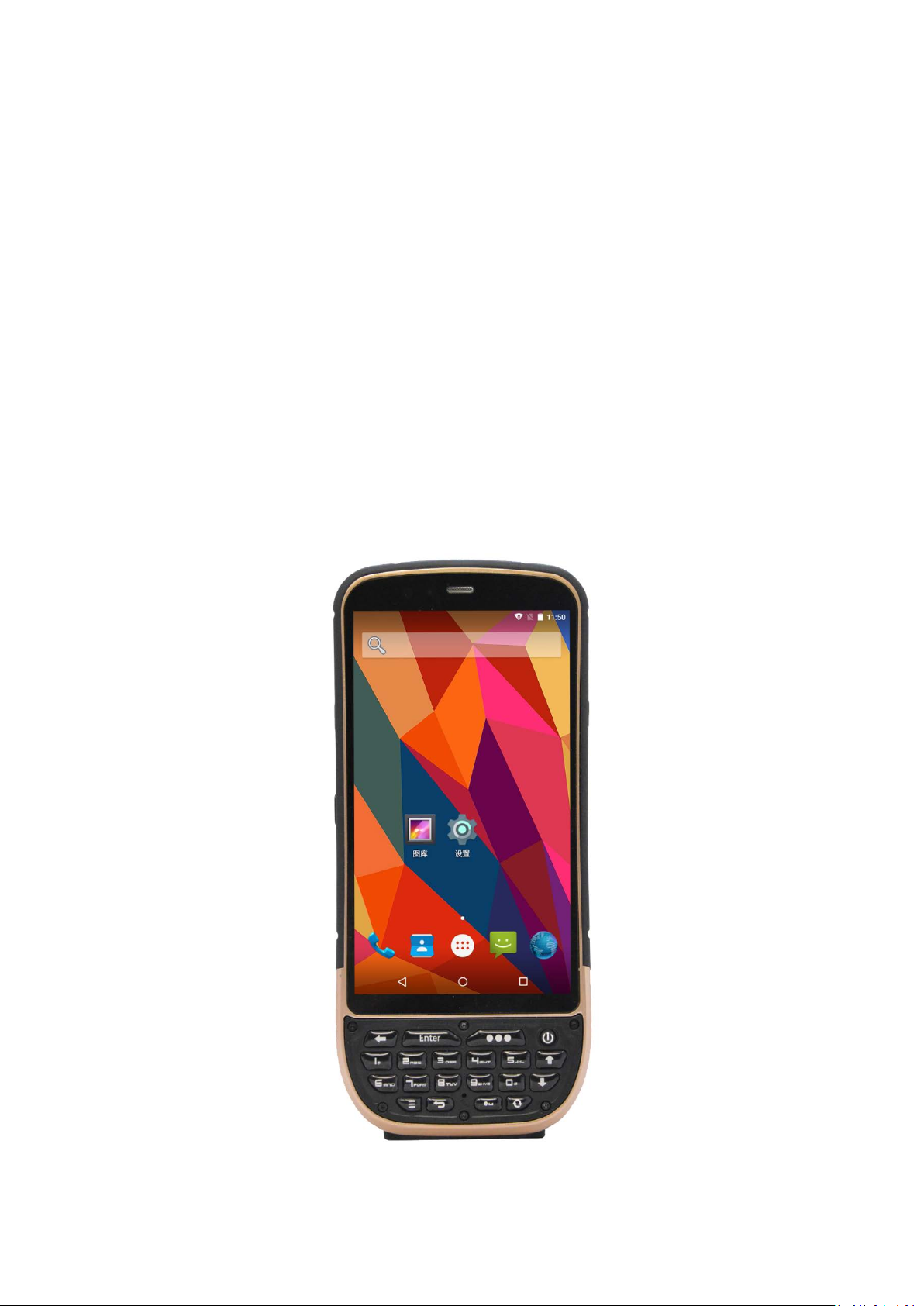
KT50
Quick Guide
Android 5.1
Page 2

KT50Quick Guide V1.0 DATE:2016-10-08
List
KT50 SPECIFICATIONS ................................................................................................................ 2
External structure ...................................................................................................................... 5
Overall ............................................................................................................................... 5
Card slot ............................................................................................................................. 6
Android 5.1 introduction ........................................................................................................... 7
System lock screen ............................................................................................................ 7
Main interface ................................................................................................................... 8
All applications .................................................................................................................. 9
Basic application and settings ................................................................................................. 10
Phone ............................................................................................................................... 10
Camera ............................................................................................................................ 11
Set the language .............................................................................................................. 12
A key scan ................................................................................................................................ 13
Include key-values ........................................................................................................... 14
Include key ....................................................................................................................... 14
Instructions ...................................................................................................................... 15
RFID Read (optional) .............................................................................................................. 16
HF high frequency .......................................................................................................... 16
UHF .................................................................................................................................. 17
LF Low frequency ........................................................................................................... 18
Basic model description ........................................................................................................ 19
Special function customization instructions ....................................................................... 20
Technical Support Contact ...................................................................................................... 20
北京思必拓科技股份有限公司 Beijing Speedata Technology Co.,Ltd
北京市海淀区上地六街 28 号志远大厦 2 号楼(光正中心)一层南侧
Tel: (86)010 8234 6858 Fax: (86)010 8234 6858 - 808 www.speedata.cn
1
Page 3
KT50Quick Guide V1.0 DATE:2016-10-08
15 days,
Chang 8hours of continuous work
Notification
battery)
temperature
battery -30℃
Explosion proof
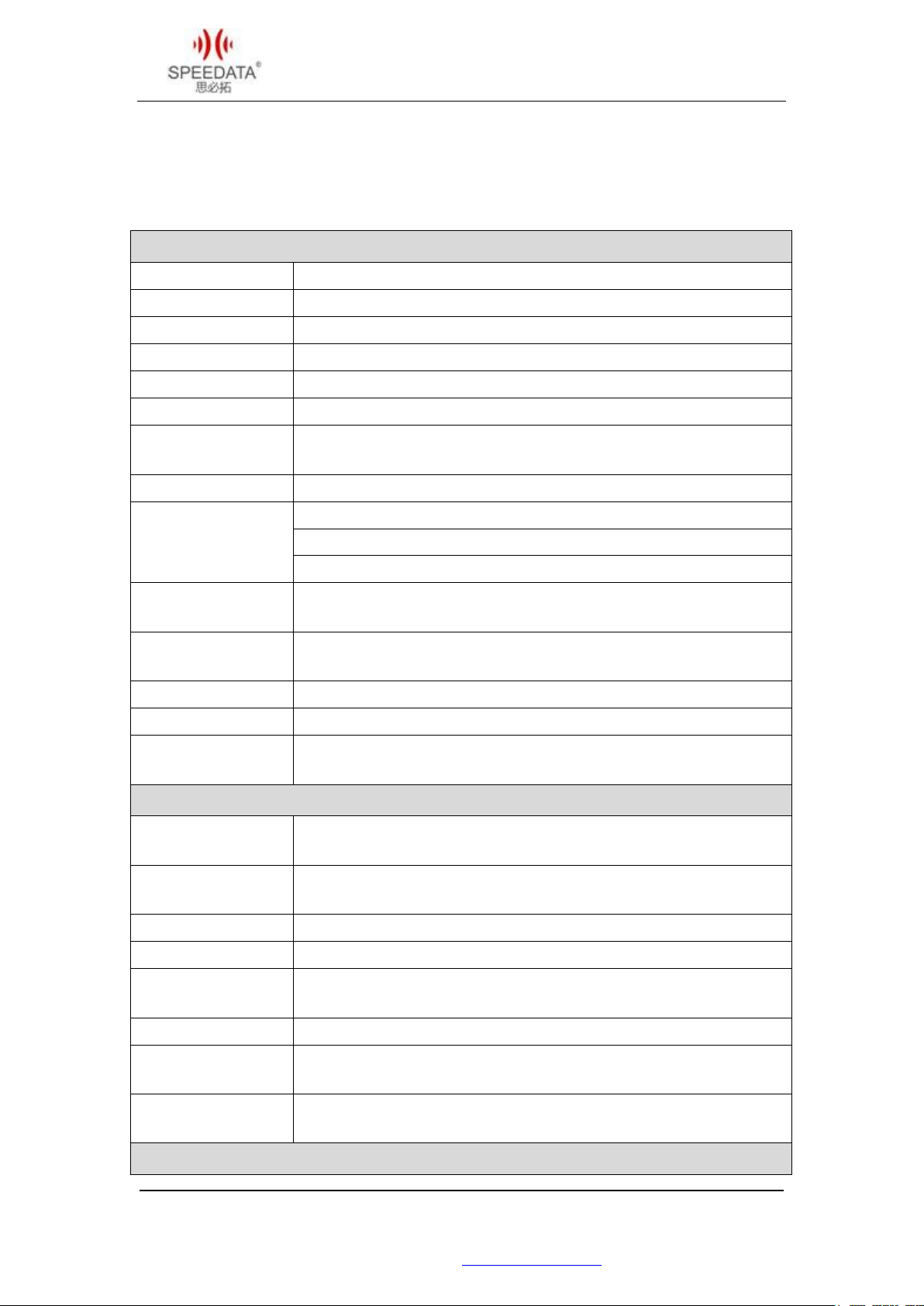
KT50 SPECIFICATIONS
Basic parameters
CPU ARM Cotex-A53 1.5GHz quad-core
OS Android 5.1
RAM 1GB/2GB
ROM 8GB/16GB
TF Card Micro SD Card , Compatible 128GB
Keyboard 16 keys + Power key , LED keypad backlight
Battery
Battery Charger DC Special charger, Output voltage:9V, Output current:1.2A
Capability:2600mAh, 7.4V(Low temperature), Standby for
1.Bluetooth V2.1+ EDR/ V3.0+ HS/ V4.1
Network
2.WIFI 802.11 b/g/n/a 2.4G/5G
3.GPRS/EDGE/HSPA/CDMA2000/TDD/FDD
GPS
Method
GPS, AGPS, BEIDOU, positioning accuracy of < 10 meters, positioning
time<40s
Sound, vibration, LED tips
Audio Built-in speaker
Size
Weight(with
175mm*76mm*28mm(standard size without extension)
410g
Machine performance
Operating
Normal operating temperature -20℃ to 60℃, low temperature
Storage
temperature
-45 ℃ to 60℃
Humidity 5%-95%(no condensing)
IP Code IP65
Drop test
6 surface can withstand 1.8 meter drops to concrete floor of the
impact.
Rolling test Rolling specifications : 0.5 m / 1000 times (6 contact surfaces)
Electrostatic
discharge (ESD)
± 15kV air discharge, ± 8kV contact discharge
grade
北京思必拓科技股份有限公司 Beijing Speedata Technology Co.,Ltd
北京市海淀区上地六街 28 号志远大厦 2 号楼(光正中心)一层南侧
Tel: (86)010 8234 6858 Fax: (86)010 8234 6858 - 808 www.speedata.cn
Ex(ib) II C T4 Gb
Camera
2
Page 4
KT50Quick Guide V1.0 DATE:2016-10-08
GS1Composite
Netherlands (KIX) Post,
2.UHF :UHF 900MHz
Camera Rear Camera: 8MP camera
Focus mode Auto focus
Flash Support flash, support flashlight
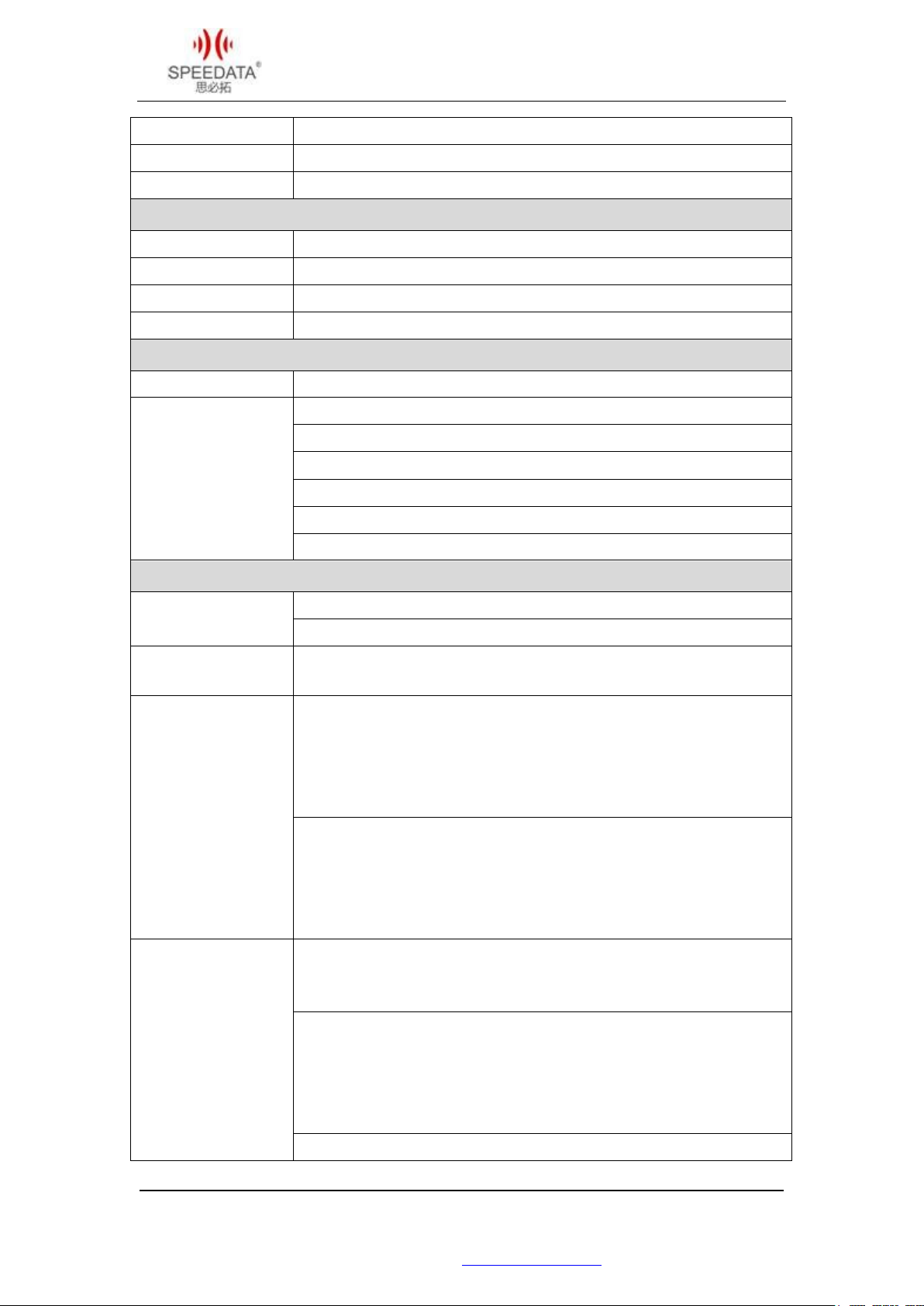
Display
Display 5.0” IPS LCD
Screen resolution
720p(1280*720)
Touchscreen type Capacitive touch screen
Back lighting LED
Network
Network type Dual card dual , 4G Full Netcom
4G TDD-LTE : 1900/2300/2500/2600 MHz(B38/B39/B40/B41)
4G FDD-LTE : 1800/2100/2600 MHz (B1/B3/B7)
3G TD-SCDMA: 1900/2100 MHZ (B34 B39 )
Support band
3G WCDMA:850/900/1900/2100 MHz(B1 B2 B5 B8)
2G GSM:850/900/1800/1900 MHz(B2 B3 B5 B8)
CDMA&EVDO: 800 MHz(BC0)
Scalability
Micro SD/TF card slot , SIM card slot , 2 PSAM card slot
Physical interface
Micro USB interface , 3.5mm headphone jack , RS232/485 serial ports
Scanning head
reading distance
5cm-40cm according to different barcode size and resolution
One-dimensional bar code
UPC / EAN / JAN , GS1 DataBar , Code 39, Code 128, Code 32, Code
93, Codabar/NW7, Interleaved2 of 5, Code 2 of 5, Matrix 2 of 5, MSI,
Telepen, Trioptic, China Post, 2D Stacked: PDF417, MicroPDF417,
Barcode scanning
supports barcode
type
Two-dimensional bar code
Aztec Code, Data Matrix, QR Code, Micro QR Code, Maxi Code, Han
Xin Code, Postal: Intelligent Mail Barcode, Postal-4i, Australian Post,
British Post, Canadian Post, Japanese Post,
Postnet, Planet Code , GM code , true code
1. High Frequency : 13.56MHz
Supported protocols : 14443A, 15693, NFC
Reading distance : 0cm-5cm
北京思必拓科技股份有限公司 Beijing Speedata Technology Co.,Ltd
北京市海淀区上地六街 28 号志远大厦 2 号楼(光正中心)一层南侧
Tel: (86)010 8234 6858 Fax: (86)010 8234 6858 - 808 www.speedata.cn
RFID
Support reading and writing
Support EPC C1 GEN2/ISO18000-6C agreement
Tag processing speed >200/s
Reading distance 0-5m
3.ID card:13.56MHz
3
Page 5
KT50Quick Guide V1.0 DATE:2016-10-08
the complete
Meet the power meter DLT 645-2007 and DLT 645-1997 standards
Three-channel read
Support the second generation ID card to read
information and analysis, does not require networking
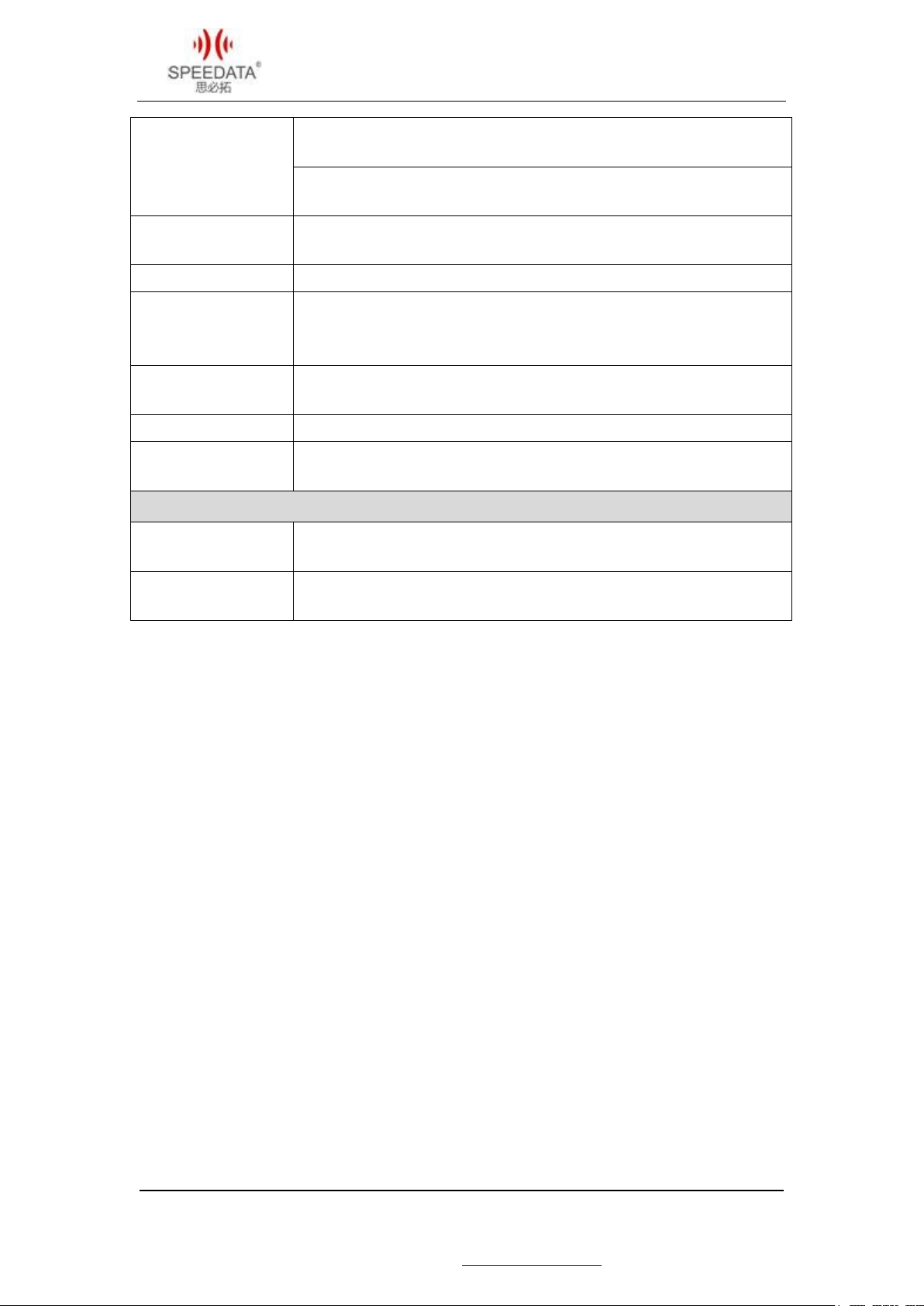
4. Low Frequency 134.2KHz,125KHz
Support ISO/IEC11784/5 agreement
Infrared module
Power infrared meter reading module , 38kHz , 940nm
Fingerprint module Semi conductor fingerprint, figerprint1000 , Speed 1:1000 < 1s
Temperature
measurement
Support ambient temperature , target temperature test
module
head
Adapt to all types of magnetic stripe membership card
IC card ISO 7816, GSM 11-11,EMV4.2 and EMV 2000
Thermal print head
Standard
Accessories
Optional
Accessories
The roll width is ±58mm , The roll thickness 40mm
16/24dot matrix, speed can be adjusted
USB data cable, special charging adapter , battery
Spare battery , charging base
Accessories
北京思必拓科技股份有限公司 Beijing Speedata Technology Co.,Ltd
北京市海淀区上地六街 28 号志远大厦 2 号楼(光正中心)一层南侧
Tel: (86)010 8234 6858 Fax: (86)010 8234 6858 - 808 www.speedata.cn
4
Page 6
KT50Quick Guide V1.0 DATE:2016-10-08
External structure
Overall
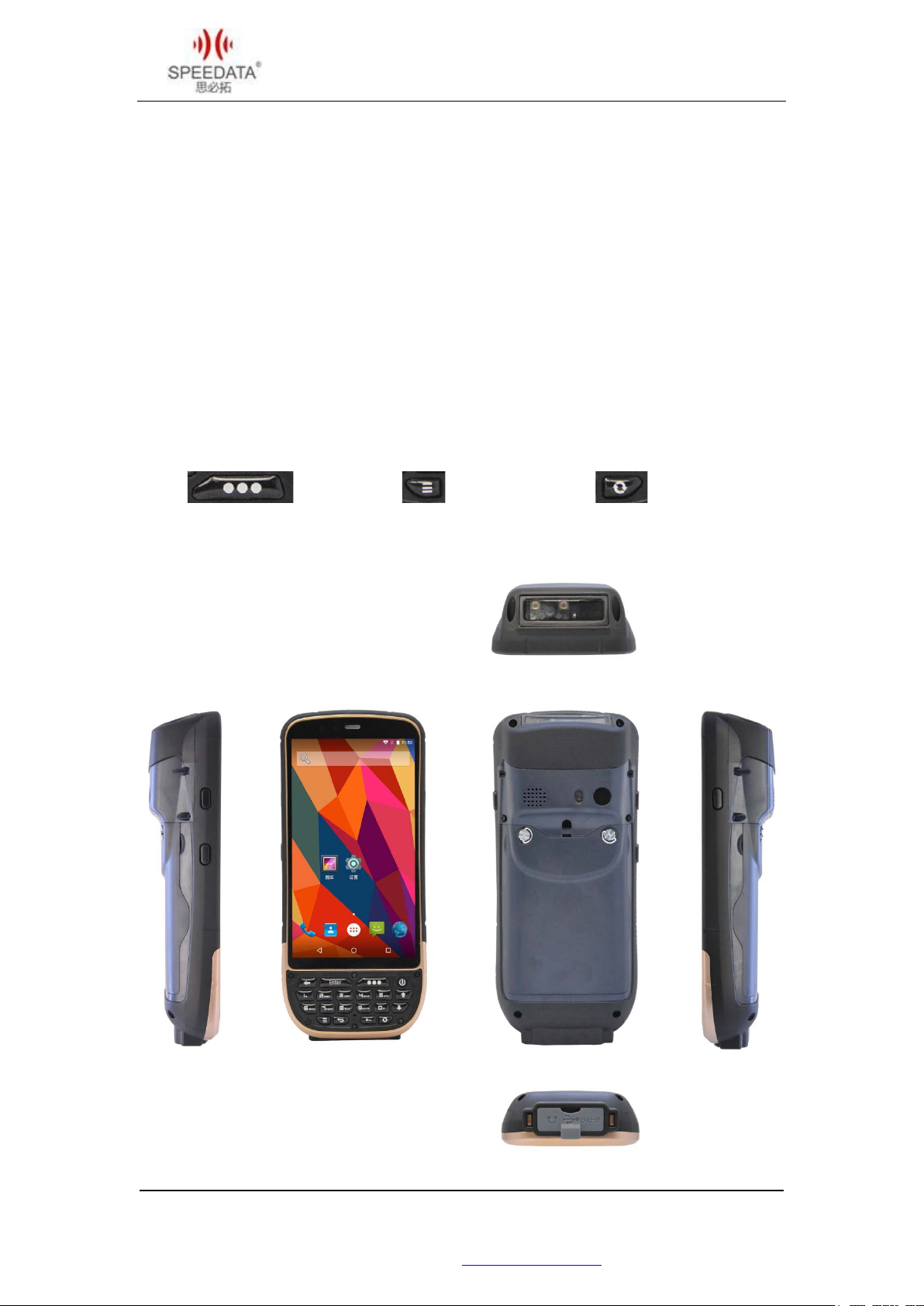
Top of the machine and back of the head:
The head can be installed bar code scanning, RFID and infrared and other expansion
modules; support for semi-custom.
Volume keys: two keys on the left side of the screen, from top to bottom are volume add,
subtract key.
Camera shortcut key: The screen on the right button, you can directly open the camera to
take pictures.
Scan: menu: Custom key:
北京思必拓科技股份有限公司 Beijing Speedata Technology Co.,Ltd
北京市海淀区上地六街 28 号志远大厦 2 号楼(光正中心)一层南侧
Tel: (86)010 8234 6858 Fax: (86)010 8234 6858 - 808 www.speedata.cn
5
Page 7
KT50Quick Guide V1.0 DATE:2016-10-08
Card slot
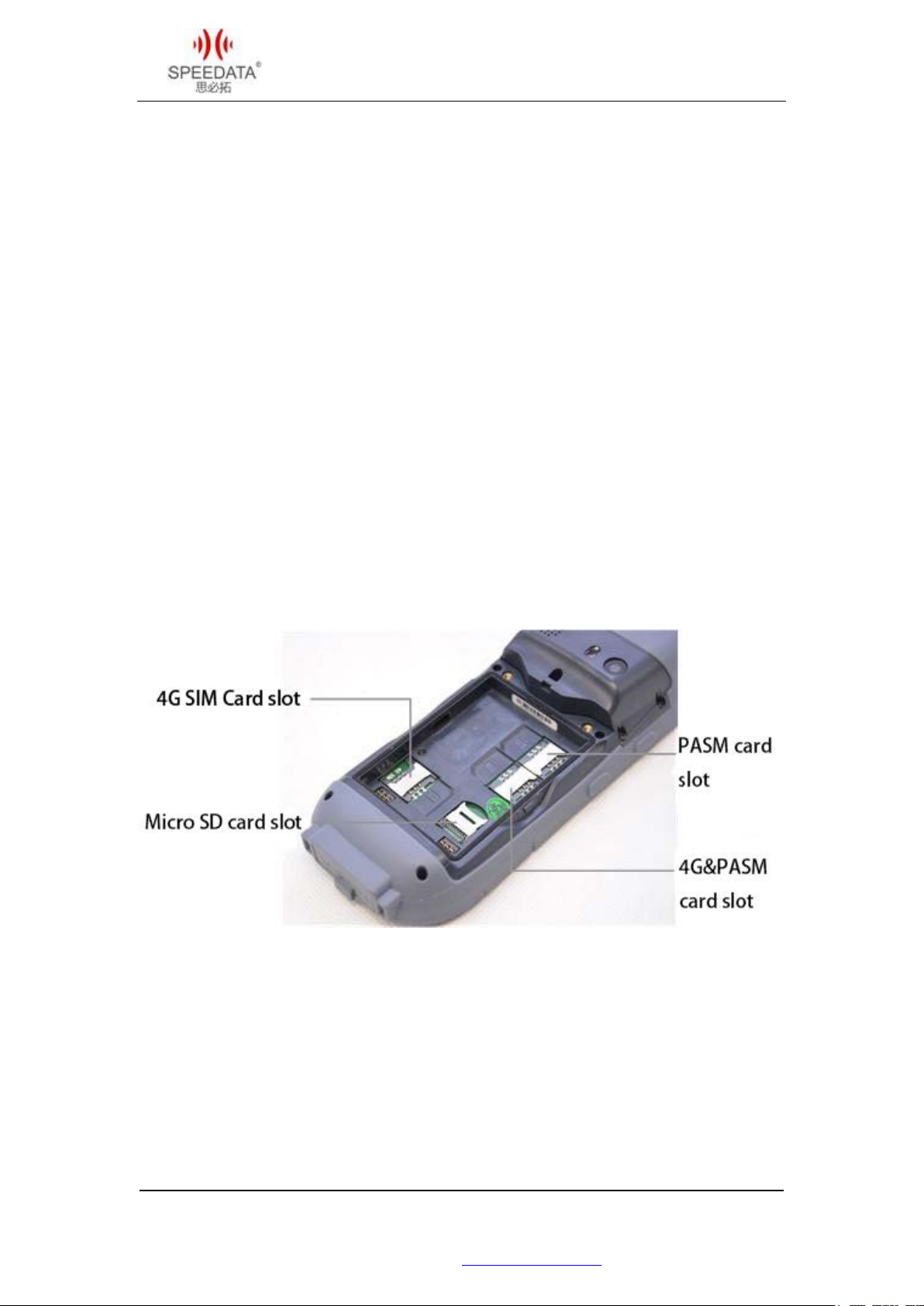
4G SIM card slot: Full Netcom 4G SIM card slot.
Micro SD card slot: External memory card slot.
PSAM Card: PASM function with default PASM slot machine.
4G & PSAM card slot: Default is 4G SIM card slot, you can expand the use of double PSAM.
北京思必拓科技股份有限公司 Beijing Speedata Technology Co.,Ltd
北京市海淀区上地六街 28 号志远大厦 2 号楼(光正中心)一层南侧
Tel: (86)010 8234 6858 Fax: (86)010 8234 6858 - 808 www.speedata.cn
6
Page 8
KT50Quick Guide V1.0 DATE:2016-10-08
Android 5.1 introduction
System lock screen
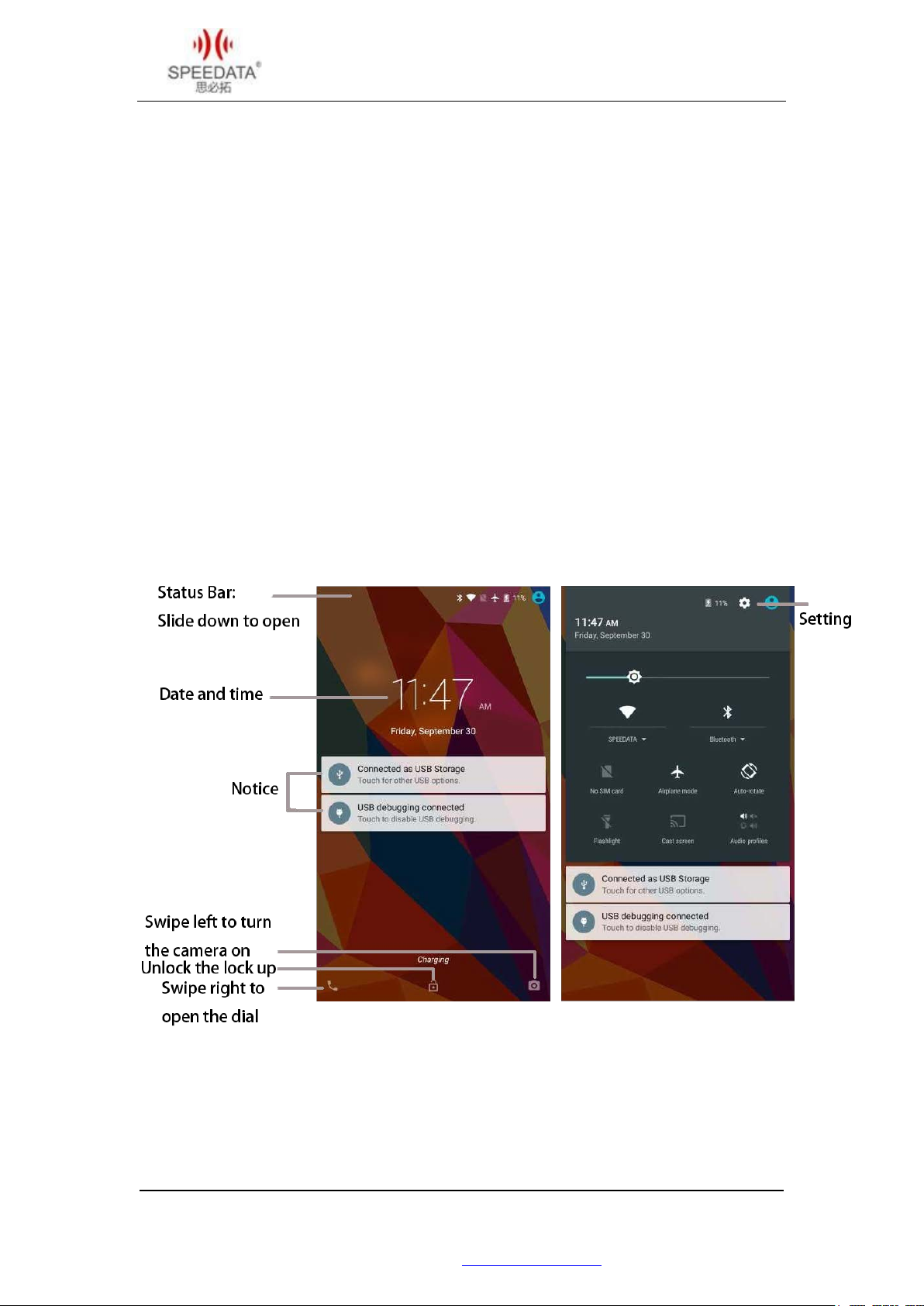
If you don’t have a screen lock, you can unlock it, open an app, and view notification.
Quick Setup: Touch the screen to the top position and side the notification bar, directly
touching the icons setting, but also directly touch the top of the System Setup icon to enter
system settings.
Notice: Double-click to expand, touch to view press and hold the left and right point slide
removed.
北京思必拓科技股份有限公司 Beijing Speedata Technology Co.,Ltd
北京市海淀区上地六街 28 号志远大厦 2 号楼(光正中心)一层南侧
Tel: (86)010 8234 6858 Fax: (86)010 8234 6858 - 808 www.speedata.cn
7
Page 9
KT50Quick Guide V1.0 DATE:2016-10-08
:
Main interface
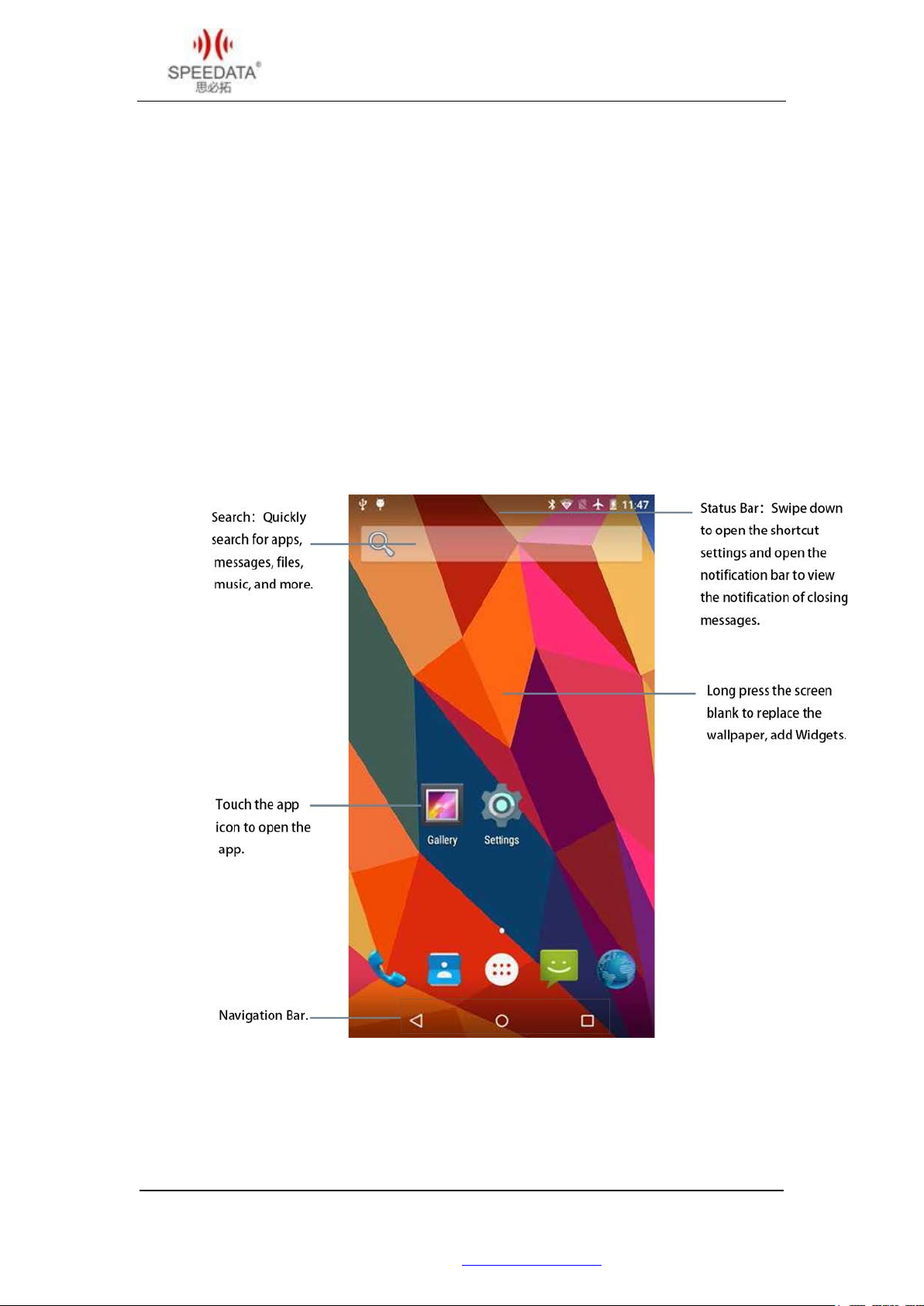
In the main interface, you can observe the state, view the notification, open the application,
such as search.
Add application shortcuts
anywhere.
Settings: Change screen brightness, WLAN, etc. Can be directly slide down the status bar,
quick operation settings.
Point hold the app icon and then move to the main screen
北京思必拓科技股份有限公司 Beijing Speedata Technology Co.,Ltd
北京市海淀区上地六街 28 号志远大厦 2 号楼(光正中心)一层南侧
Tel: (86)010 8234 6858 Fax: (86)010 8234 6858 - 808 www.speedata.cn
8
Page 10
KT50Quick Guide V1.0 DATE:2016-10-08
All applications
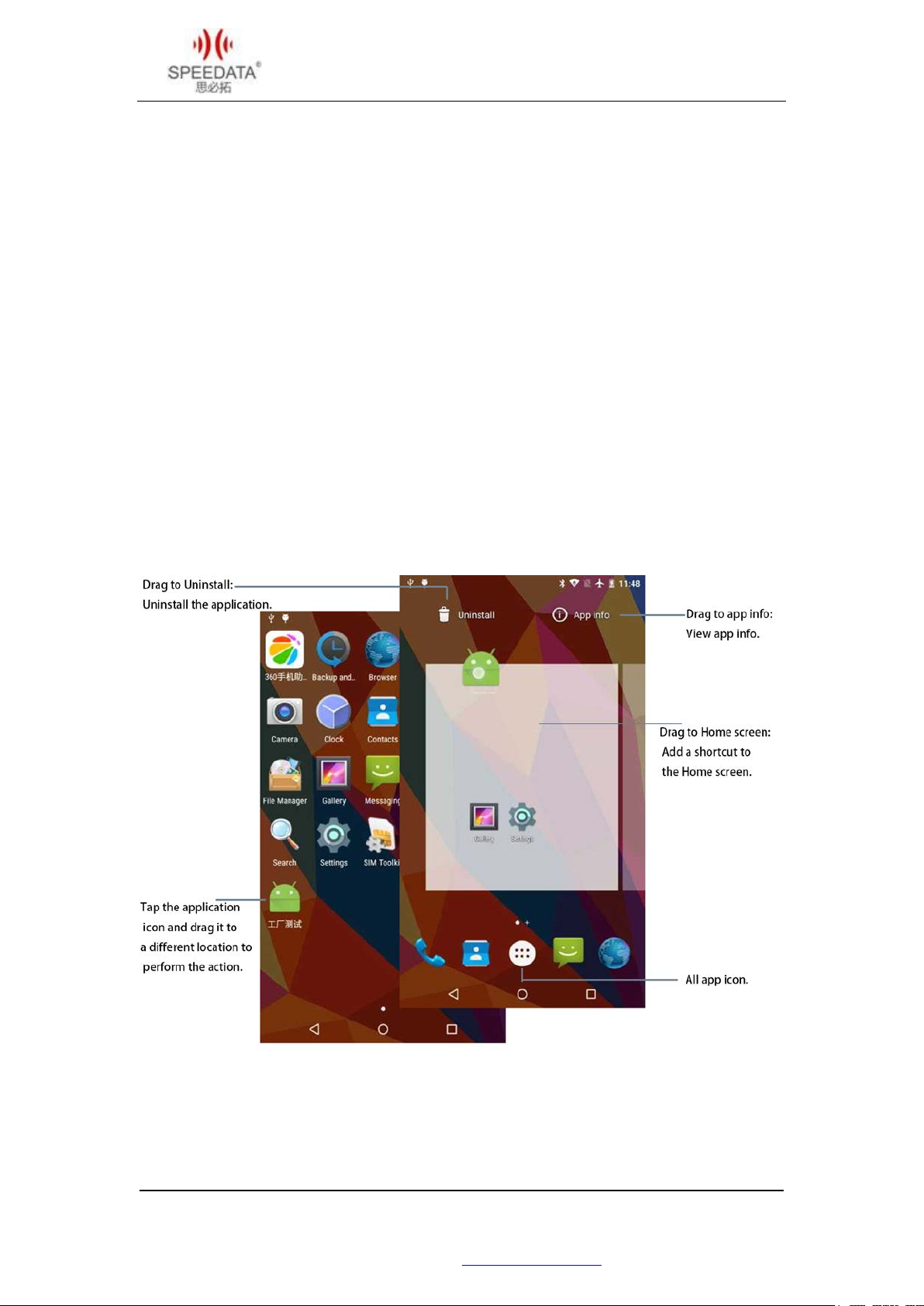
Touch the “All app icon” in the Favorites bar to see all of the apps already installed on your
current device.
Swipe the screen left or right to see all your apps.
Touch the icon to open the app.
Tap and hold the icon to add a shortcut to the Home screen, to view the application
information, or to uninstall it (The system application can only view the application
information).
北京思必拓科技股份有限公司 Beijing Speedata Technology Co.,Ltd
北京市海淀区上地六街 28 号志远大厦 2 号楼(光正中心)一层南侧
Tel: (86)010 8234 6858 Fax: (86)010 8234 6858 - 808 www.speedata.cn
9
Page 11
KT50Quick Guide V1.0 DATE:2016-10-08
Basic application and settings
Phone
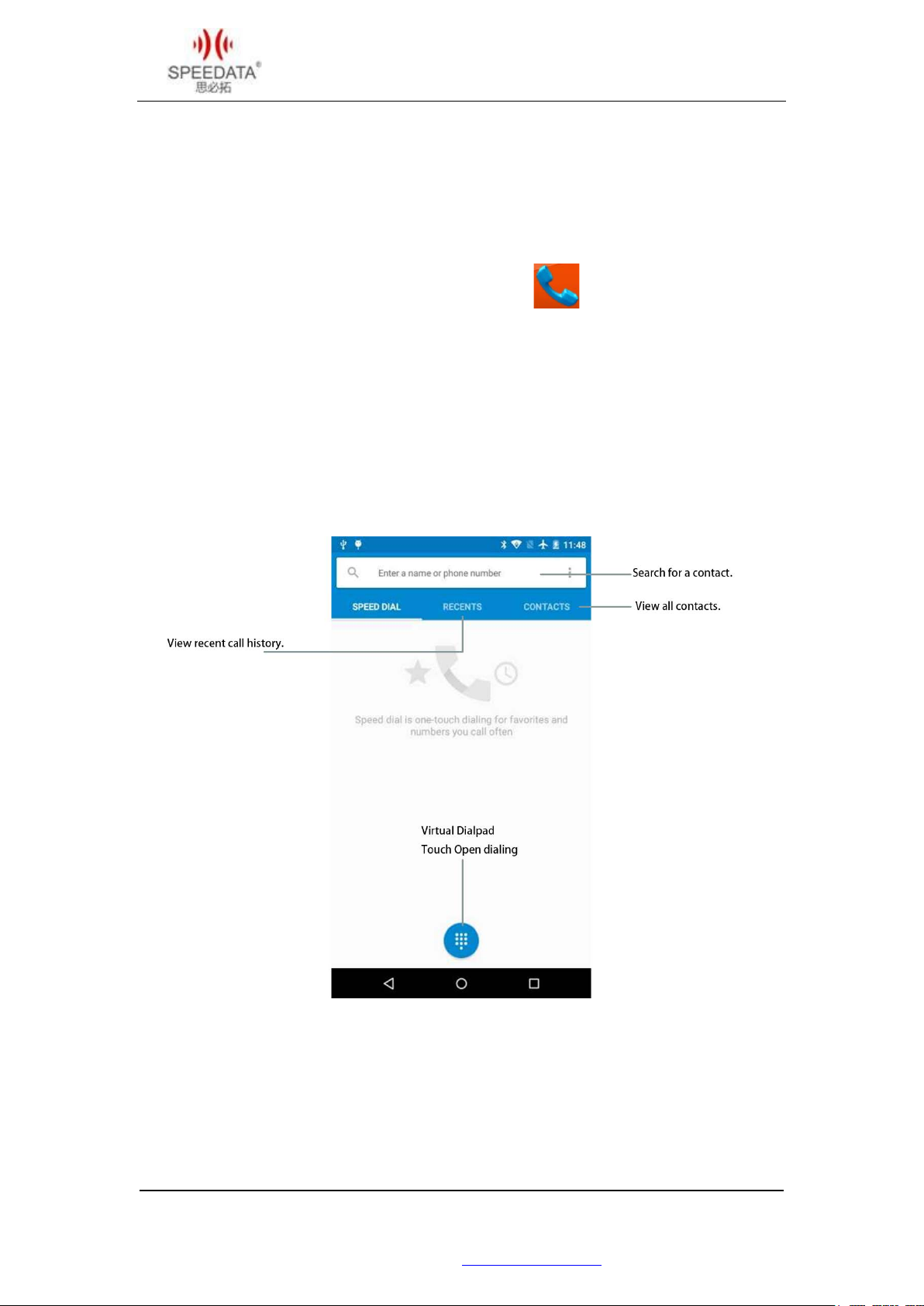
Favorites bar or touch the phone icon in all applications , or slide the screen to the
right to enter the dial screen interface can use the phone function.
Speed Dial: Shows stored in your phone, and favorite contacts.
Outbound dialing: Dial opening disk, use the virtual dial pad to enter or use the hardware
keyboard to enter the number.
北京思必拓科技股份有限公司 Beijing Speedata Technology Co.,Ltd
北京市海淀区上地六街 28 号志远大厦 2 号楼(光正中心)一层南侧
Tel: (86)010 8234 6858 Fax: (86)010 8234 6858 - 808 www.speedata.cn
10
Page 12
KT50Quick Guide V1.0 DATE:2016-10-08
Camera
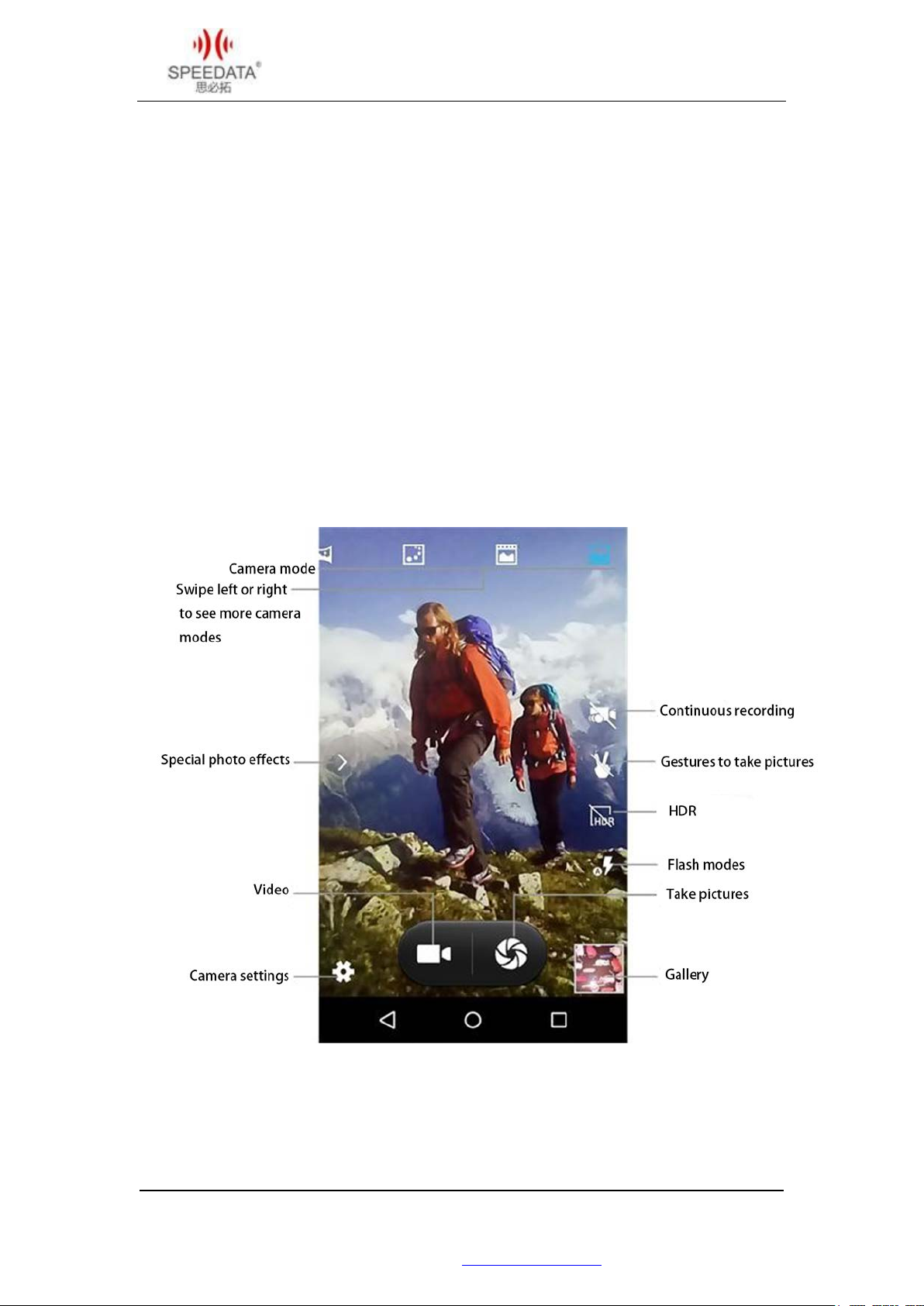
There are three ways to turn the camera on: the screen lock screen to left, touch the camera
application icon, and press the camera shortcut key (on both sides of the screen).
Snapshot Mode: Swipe left or right to see more pictures mode.
Flash modes: automatic, always on, and always off three modes, default mode.
Continuous recording: Open the recording can be performed repeatedly.
北京思必拓科技股份有限公司 Beijing Speedata Technology Co.,Ltd
北京市海淀区上地六街 28 号志远大厦 2 号楼(光正中心)一层南侧
Tel: (86)010 8234 6858 Fax: (86)010 8234 6858 - 808 www.speedata.cn
11
Page 13
KT50Quick Guide V1.0 DATE:2016-10-08
Set the language
The default display language is English. Brush to upgrade the system version or restore the
factory settings, the system display the language back to the default settings.
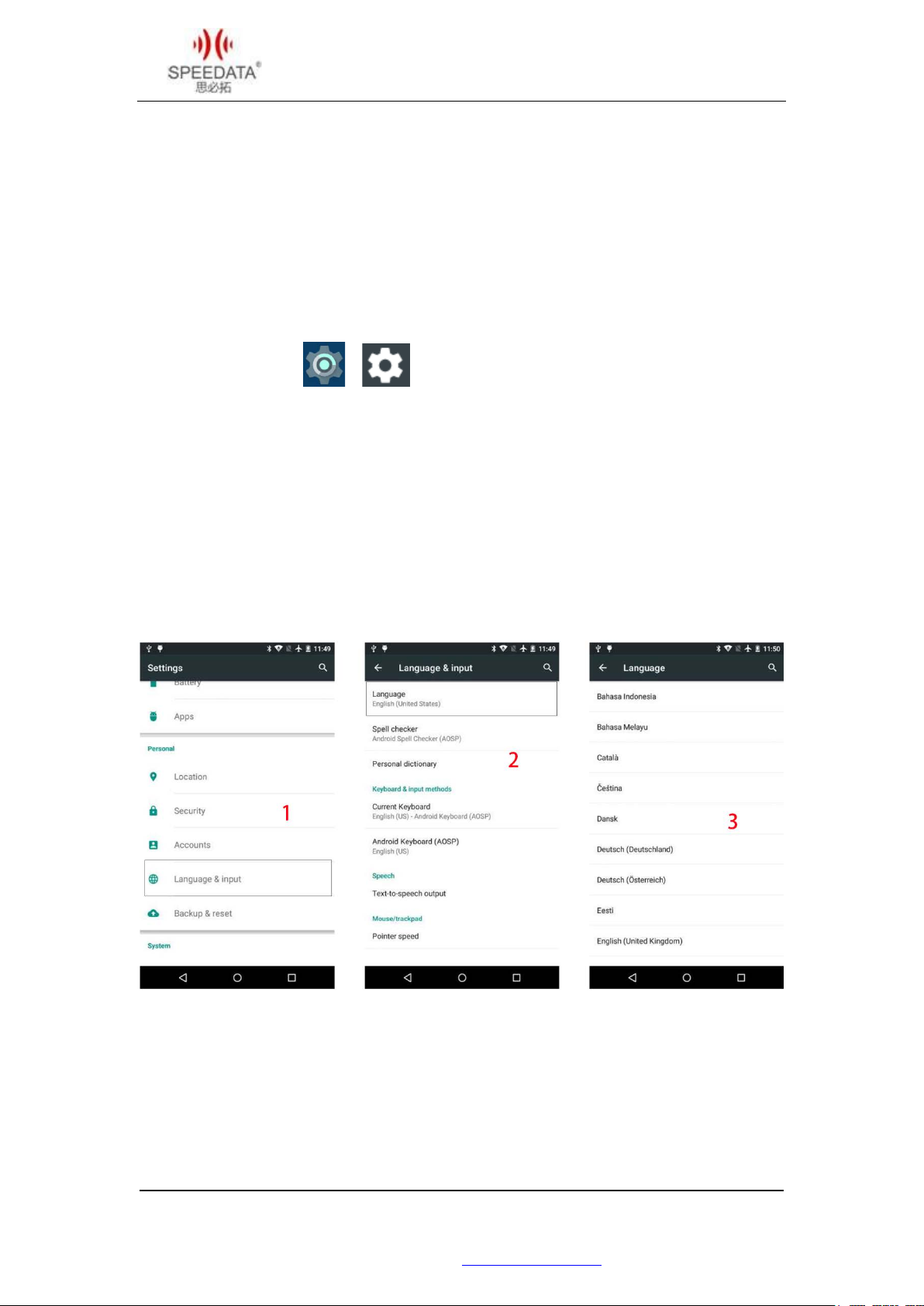
Can be put into the local use of telephone card changes, or enter the system settings
changes.
Touch the Settings icon or .
Proceed as follows:
北京思必拓科技股份有限公司 Beijing Speedata Technology Co.,Ltd
北京市海淀区上地六街 28 号志远大厦 2 号楼(光正中心)一层南侧
Tel: (86)010 8234 6858 Fax: (86)010 8234 6858 - 808 www.speedata.cn
12
Page 14
KT50Quick Guide V1.0 DATE:2016-10-08
A key scan
A key scan is also called quick scan. This feature allows you to directly bar code or
two-dimensional code scanning, hereinafter referred to as bar code.
A key scan settings
The device does not open a key by default, you want to use the need to open and set.
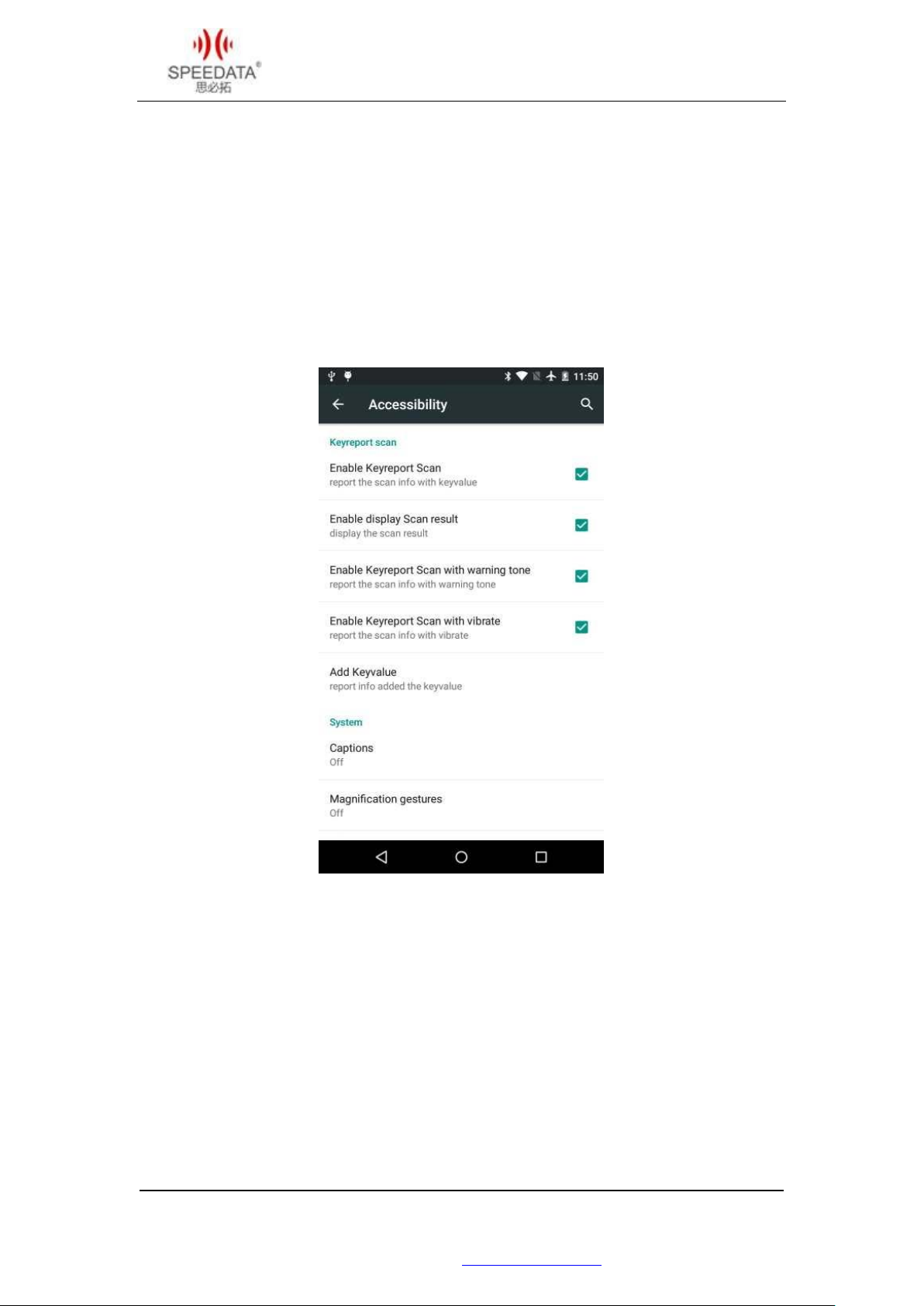
SettingsAccessibilityReported Scan key contains all the relevant options.
Check Enable reporting Scan key to open a key scan function.
Enable Display Scan Results: checked by default, scan the bar code successfully reported
and displayed information is displayed at the current cursor position; is not checked, then
any reported success but does not display the bar code information can be determined
display position themselves in specific applications and the way.
Enable scanning tone: When checked after scanning you will hear “ding” sound.
Enable scanning shock: When checked in after a successful scan machine will vibrate.
北京思必拓科技股份有限公司 Beijing Speedata Technology Co.,Ltd
北京市海淀区上地六街 28 号志远大厦 2 号楼(光正中心)一层南侧
Tel: (86)010 8234 6858 Fax: (86)010 8234 6858 - 808 www.speedata.cn
13
Page 15
KT50Quick Guide V1.0 DATE:2016-10-08
Include key-values
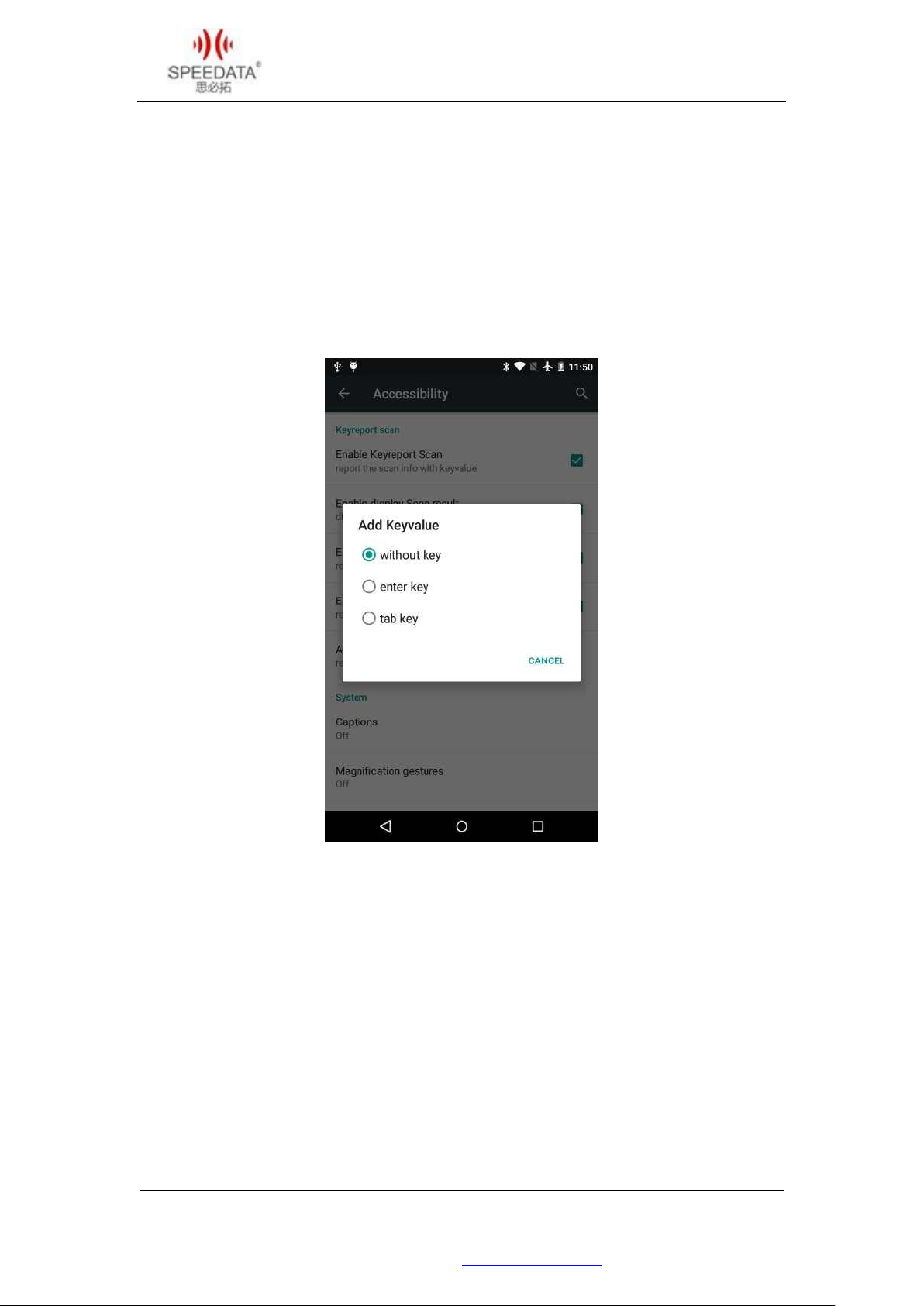
Include key: in the back of the bar code information display included with the other key,
the default is "without warranty key." "With enter key" After the success of the scan with
enter carriage return line feed, "with tab key" after the success of the scan tab to the next
tab stop.
About "Enable display scan results" and "Include key values":
Check the "enable display scan results", that is reported and displayed bar code information,
bar code information will be attached to the key value;
Do not check the "Enable display scan results", that is, only reported but does not display
the bar code information, will not be accompanied by key values.
北京思必拓科技股份有限公司 Beijing Speedata Technology Co.,Ltd
北京市海淀区上地六街 28 号志远大厦 2 号楼(光正中心)一层南侧
Tel: (86)010 8234 6858 Fax: (86)010 8234 6858 - 808 www.speedata.cn
14
Page 16

KT50Quick Guide V1.0 DATE:2016-10-08
Instructions
Use one-touch scan to set the operation steps are as follows:
First, a quick scan opens. Please enter the settings accessibility, check the "Scan key
reporting" category under the "Enable reported Scan key." You can see the scanning beam
by pressing any of the scan keys (the scan key on the keyboard or the scan key on both sides
of the screen).
Then, enter the bar code display interface. Open any available display interface and specify
the focus, such as: Message, "To-do" and add new items and "Search" on the desktop.
Finally, a quick scan is performed. Press and hold the scan key and align the scanning beam
at the barcode. After the scanning, the head light will be off, and the corresponding bar code
information can be seen on the device. Depending on the version, the scan is divided into
two cases: press and hold the scan button that is scanning light, release that is off; click the
scan button appears scanning light, sweep to the bar code or more than the scan time
exterminate.
(If you want to hear a tone or vibrate after scanning successfully, you need to check the
corresponding "Enable scanning tone" and "Enable scanning vibration".)
北京思必拓科技股份有限公司 Beijing Speedata Technology Co.,Ltd
北京市海淀区上地六街 28 号志远大厦 2 号楼(光正中心)一层南侧
Tel: (86)010 8234 6858 Fax: (86)010 8234 6858 - 808 www.speedata.cn
15
Page 17
KT50Quick Guide V1.0 DATE:2016-10-08
RFID Read (optional)
HF high frequency
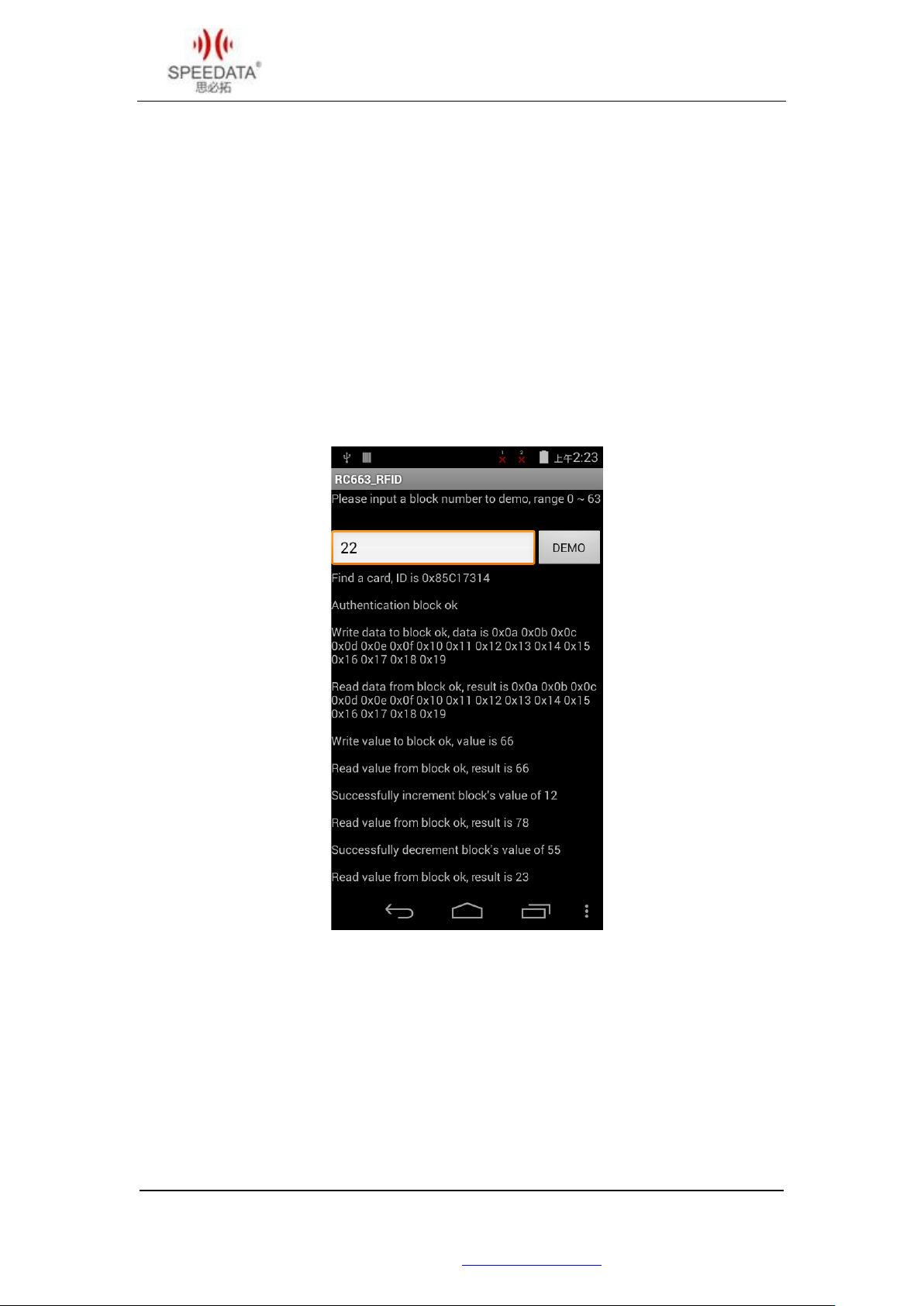
With RC663 high-frequency module equipment, high-frequency models for the general
model after the addition of "-R6".
The DEMO program RC663_RFID can be selected in all applications. In the demo interface,
select the protocol that matches the label to enter the demo (to demonstrate the M1 card
as an example), put the card into the operating range, enter a sector number you want to
demo, point DEMO will automatically read and write sector (if the card does not encryption).
(Please refer to the latest SDK sample program if the specific procedure and description
picture are different.)
Users based on the terminal to do RFID-related application development, can be
downloaded from our official website to download the appropriate SDK development
information, or contact us for.
北京思必拓科技股份有限公司 Beijing Speedata Technology Co.,Ltd
北京市海淀区上地六街 28 号志远大厦 2 号楼(光正中心)一层南侧
Tel: (86)010 8234 6858 Fax: (86)010 8234 6858 - 808 www.speedata.cn
16
Page 18
KT50Quick Guide V1.0 DATE:2016-10-08
UHF
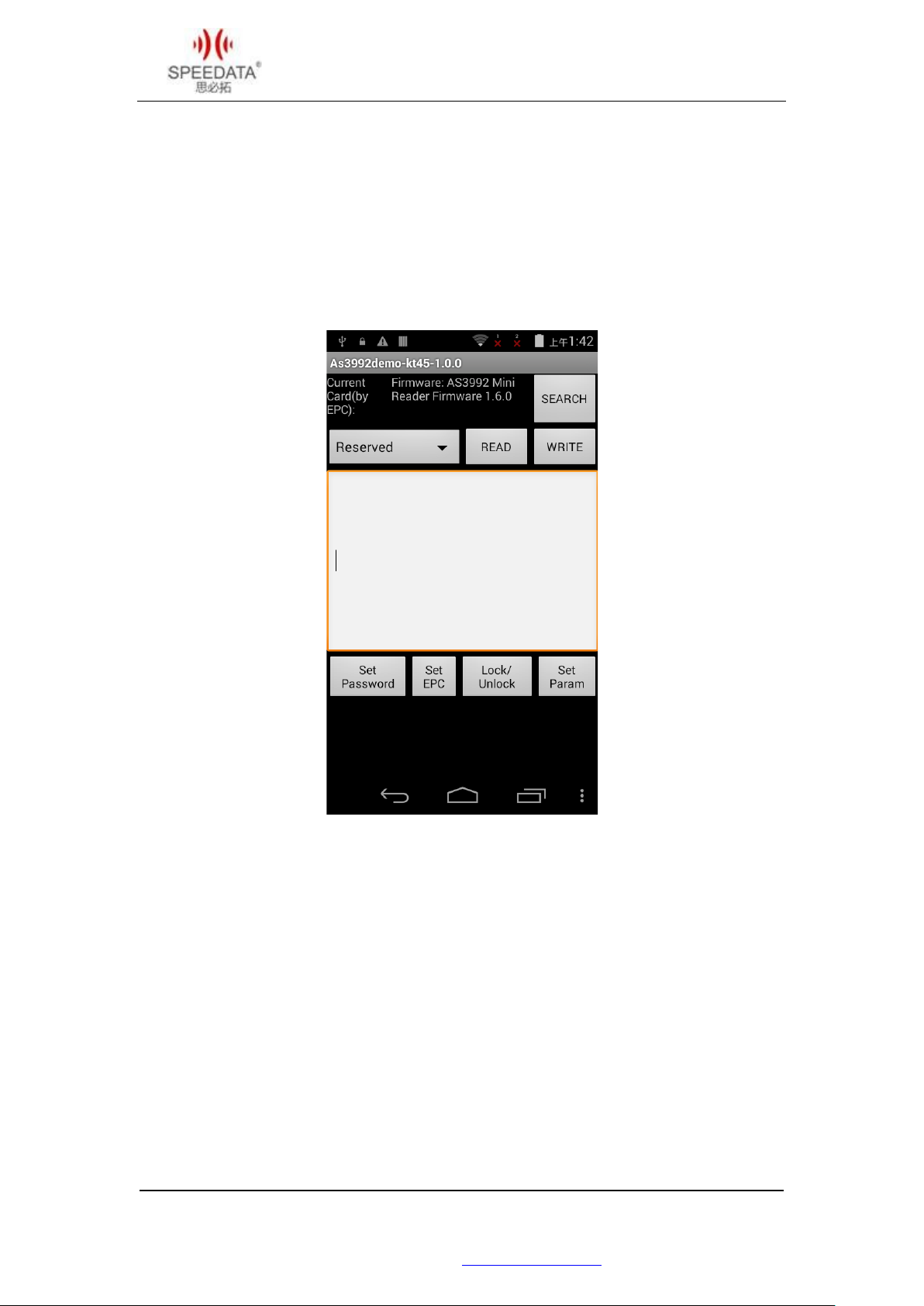
Ultra-high frequency machine is divided into two modules, AS3992 module UHF machine
model in the ordinary model after the addition of "-UHF", R2000 module for the general
model after the addition of "-UR2K" or "-UR2KLA".
(Please refer to the latest SDK sample program if the specific procedure and description
picture are different.)
In all applications can be found DEMO program, open the program after the first point
SEARCH, pop-up interface point Start card. You can see the search card within the label EPC,
Stop stop the search card, in the list, select the label EPC demonstration. After successful
return to the main interface. Detailed operation consulting us.
Users based on the terminal to do RFID-related application development, can be
downloaded from our official website to download the appropriate SDK development
information, or contact us for.
北京思必拓科技股份有限公司 Beijing Speedata Technology Co.,Ltd
北京市海淀区上地六街 28 号志远大厦 2 号楼(光正中心)一层南侧
Tel: (86)010 8234 6858 Fax: (86)010 8234 6858 - 808 www.speedata.cn
17
Page 19
KT50Quick Guide V1.0 DATE:2016-10-08
LF Low frequency
LF low-frequency module is divided into two kinds, one is 134.2KHz (LF1), the other is
125KHz (LF2). LF equipment model for the general model and add "-LF1" or "-LF2". Such as
with a 134.2KHz low-frequency module, model name "KT50-LF1".
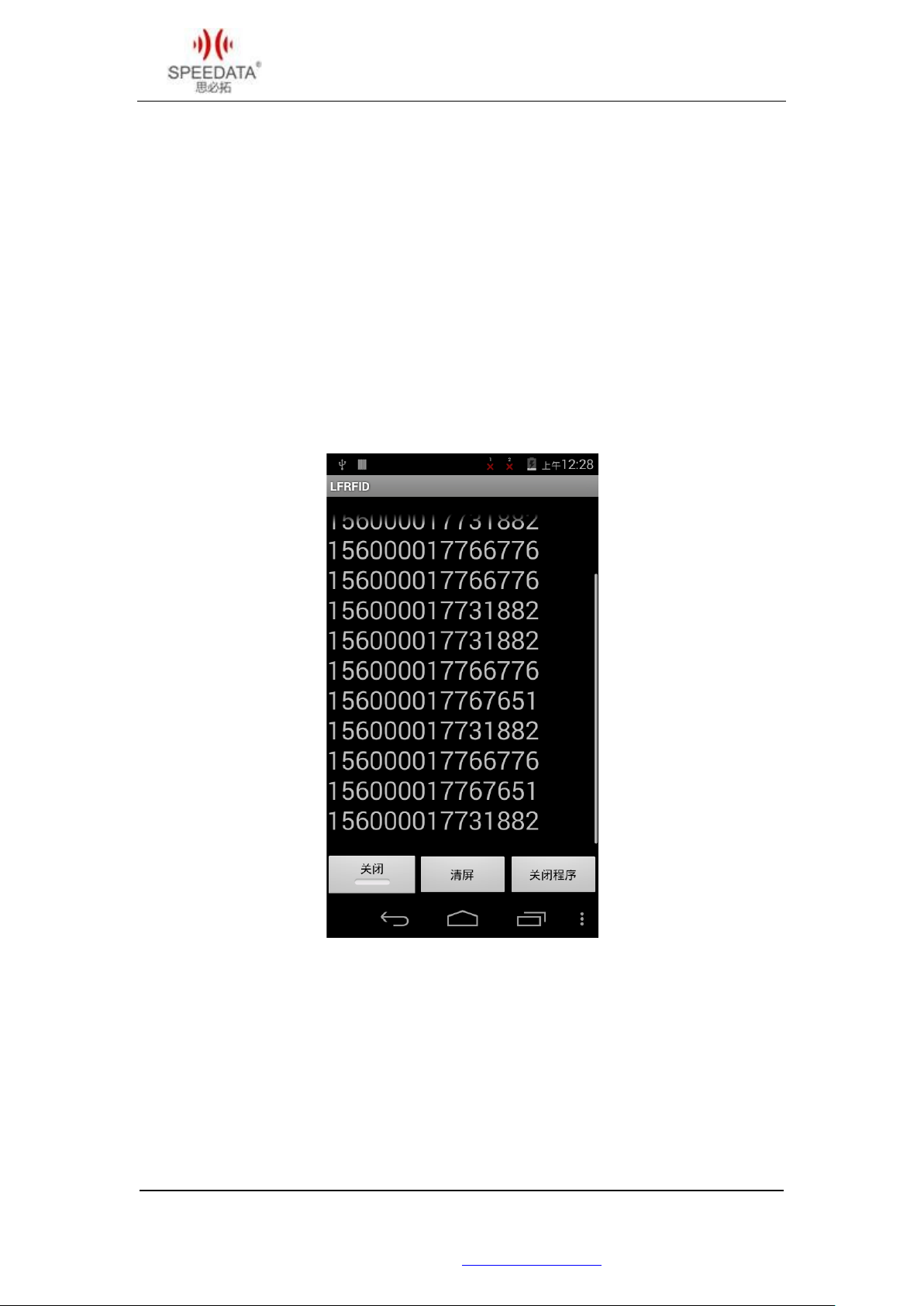
With LF, the DEMO program is visible in all applications. Open the program to demonstrate
the operation of the corresponding frequency band LF label. So close to an open point, you
can see the tag ID on the screen after the label into the operating range, press the return
key to exit the program or close the program.
(Please refer to the latest SDK sample program if the specific procedure and description
picture are different.)
Users based on the terminal to do RFID-related application development, can be
downloaded from our official website to download the appropriate SDK development
information, or contact us for.
北京思必拓科技股份有限公司 Beijing Speedata Technology Co.,Ltd
北京市海淀区上地六街 28 号志远大厦 2 号楼(光正中心)一层南侧
Tel: (86)010 8234 6858 Fax: (86)010 8234 6858 - 808 www.speedata.cn
18
Page 20
KT50Quick Guide V1.0 DATE:2016-10-08
Serial
With increase of Symbol on the basis of SE955 one
With increase of Honeywell on the basis of N4313 one
On the basis of NXP 13.56MHz standard RFID chip card
Based on the standard AS3992 scheme increases the
Based on the standard R2000 scheme increases the
scheme increases the
of infrared data transmission
Key board to increase the TCS1G golden fingerprint
Key board to increase the TCS1B black fingerprint
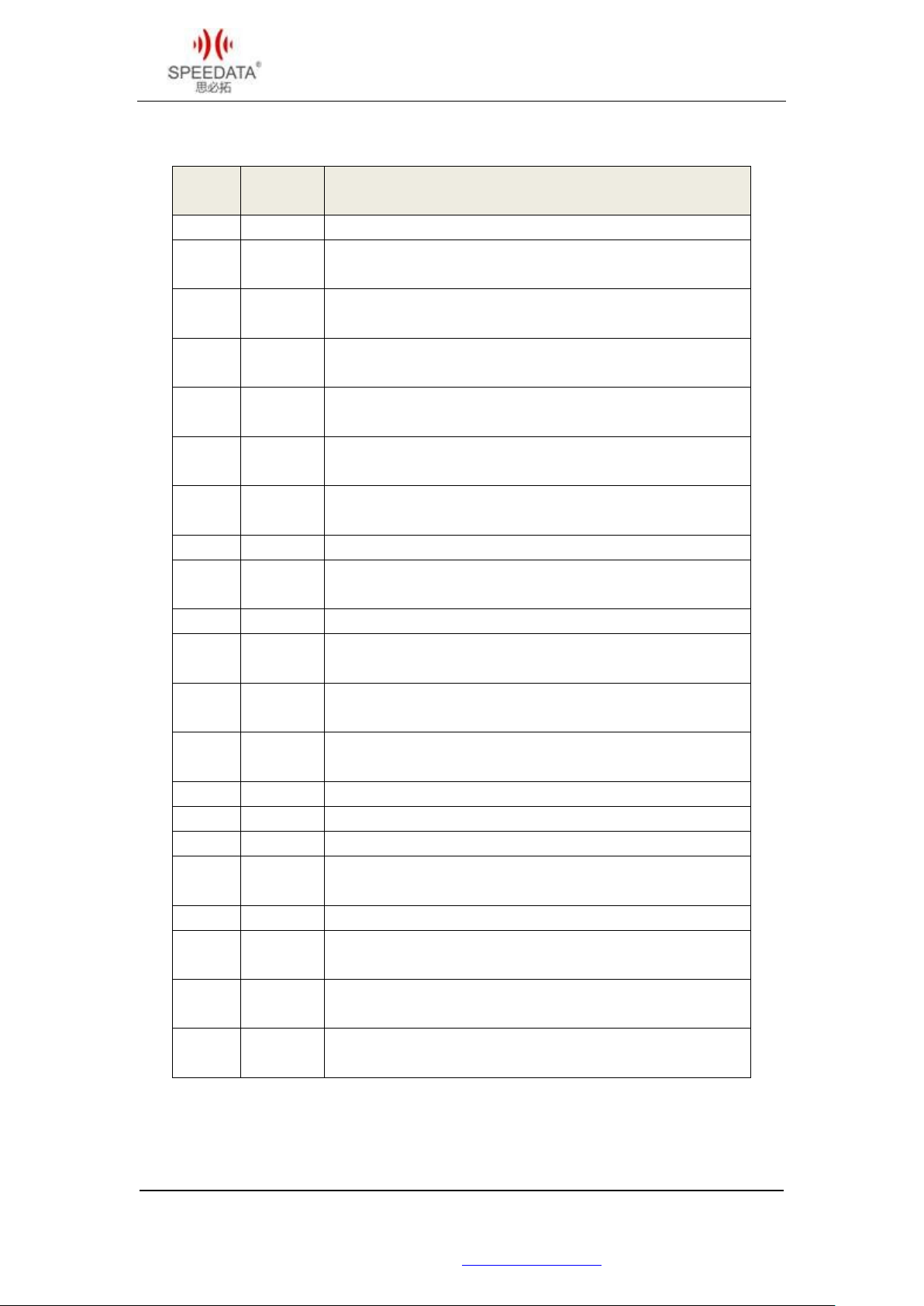
Basic model description
number
Model Configuration instructions
1 -S Standard configuration, WIFI/BT/GPS/4G
2 -SY
3 -N43
4 -NL95
5 -NL2D
6 -SE45SR
7 -R6
dimensional laser scanning head
dimensional laser scanning head
Increase of Newland EM3095 2D hardware solution
based on the standard scan head
Increase of Newland EM3000 2D hardware solution
based on the standard scan head
With increase of Motorola on the basis of
two-dimensional SE4500 software solution scan head
reader
8 -R91 On the basis of PN547 NFC standard chip card reader
9 -LF1
Increase the standard based on low frequency
134.2KHz
10 -LF2 Increase the standard based on low frequency 125KHz
11 -UHF
12 -UR2K
13 -UR2KLA
900MHz ultra high frequency
900MHz ultra high frequency, Large antenna
Based on the standard R2000
900MHz ultra high frequency, Small antenna
14 -PSAM On the basis of standard PSAM card
15 -ICM The standard on the basis of a contactless chip card
16 -ID2 Two generation ID card module based on standard
17 -IPOR
Increase the power
module based on standard meter
18 -PE48S Add printer based on standard
19 -KTCS1
20 -KTCS1G
21 -KTCS1B
Key board to increase the TCS1 fingerprint + decoder
board models
head models
head models
北京思必拓科技股份有限公司 Beijing Speedata Technology Co.,Ltd
北京市海淀区上地六街 28 号志远大厦 2 号楼(光正中心)一层南侧
Tel: (86)010 8234 6858 Fax: (86)010 8234 6858 - 808 www.speedata.cn
19
Page 21

KT50Quick Guide V1.0 DATE:2016-10-08
Special function customization instructions
The terminal reserves a variety of interfaces and flexible structural design to ensure that it
can meet a variety of functional requirements. Can support RS232, I2C, RS485 and other
interface peripherals, can be extended to load a variety of functional modules, the specific
needs, please contact us.
Technical Support Contact
E-mail: [email protected]
Skype: android.speedata
北京思必拓科技股份有限公司 Beijing Speedata Technology Co.,Ltd
北京市海淀区上地六街 28 号志远大厦 2 号楼(光正中心)一层南侧
Tel: (86)010 8234 6858 Fax: (86)010 8234 6858 - 808 www.speedata.cn
20
 Loading...