

Page 1

Reference Manual
00909-0300-4975, Rev AA
April 2022
Spectrex SharpEye™ 40/40C & 40/40D Series
Flame Detectors
Page 2

2
Page 3

Reference Manual Contents
00909-0300-4975 April 2022
Contents
Chapter 1 Introduction.............................................................................................................. 5
Chapter 2 Installation.................................................................................................................7
2.1 Download the HART® device driver (DD)......................................................................................7
2.2 Load device driver (DD) on HART® hand-held communicator.......................................................7
Chapter 3 Operating the HART® hand-held communicator.........................................................9
3.1 Overview screen........................................................................................................................ 10
3.2 Device information screen......................................................................................................... 11
3.3 Service tools screen................................................................................................................... 15
Spectrex SharpEye 40/40 3
Page 4

Contents Reference Manual
April 2022 00909-0300-4975
4 Spectrex.net
Page 5

Reference Manual Introduction
00909-0300-4975 April 2022
1 Introduction
This manual describes how operators can use HART® handheld field communicators to
configure the SharpEye 40/40 Flame Detectors to suit customer needs, perform firmware
upgrades, and find troubleshooting information and functionality.
This manual also describes the HART hand-held communicator software and provides
instructions on how to install, operate, and maintain the software.
Spectrex SharpEye 40/40 5
Page 6

Introduction Reference Manual
April 2022 00909-0300-4975
6 Spectrex.net
Page 7

Reference Manual Installation
00909-0300-4975 April 2022
2 Installation
2.1 Download the HART® device driver (DD)
To download the HART device driver:
Procedure
1. Go to Spectrex.net.
2. Navigate to the relevant product page.
3. Scroll down to Documents and Drawings.
4. Click SOFTWARE DOWNLOADS & DRIVERS.
5. Download the relevant file.
2.2 Load device driver (DD) on HART® hand-held communicator
Procedure
1. Load the DD on the HART hand-held communicator.
2. Select Setup.
Spectrex SharpEye 40/40 7
Page 8

Installation Reference Manual
April 2022 00909-0300-4975
8 Spectrex.net
Page 9
Reference Manual Operating the HART
00909-0300-4975 April 2022
®
hand-held communicator
3 Operating the HART® hand-held
communicator
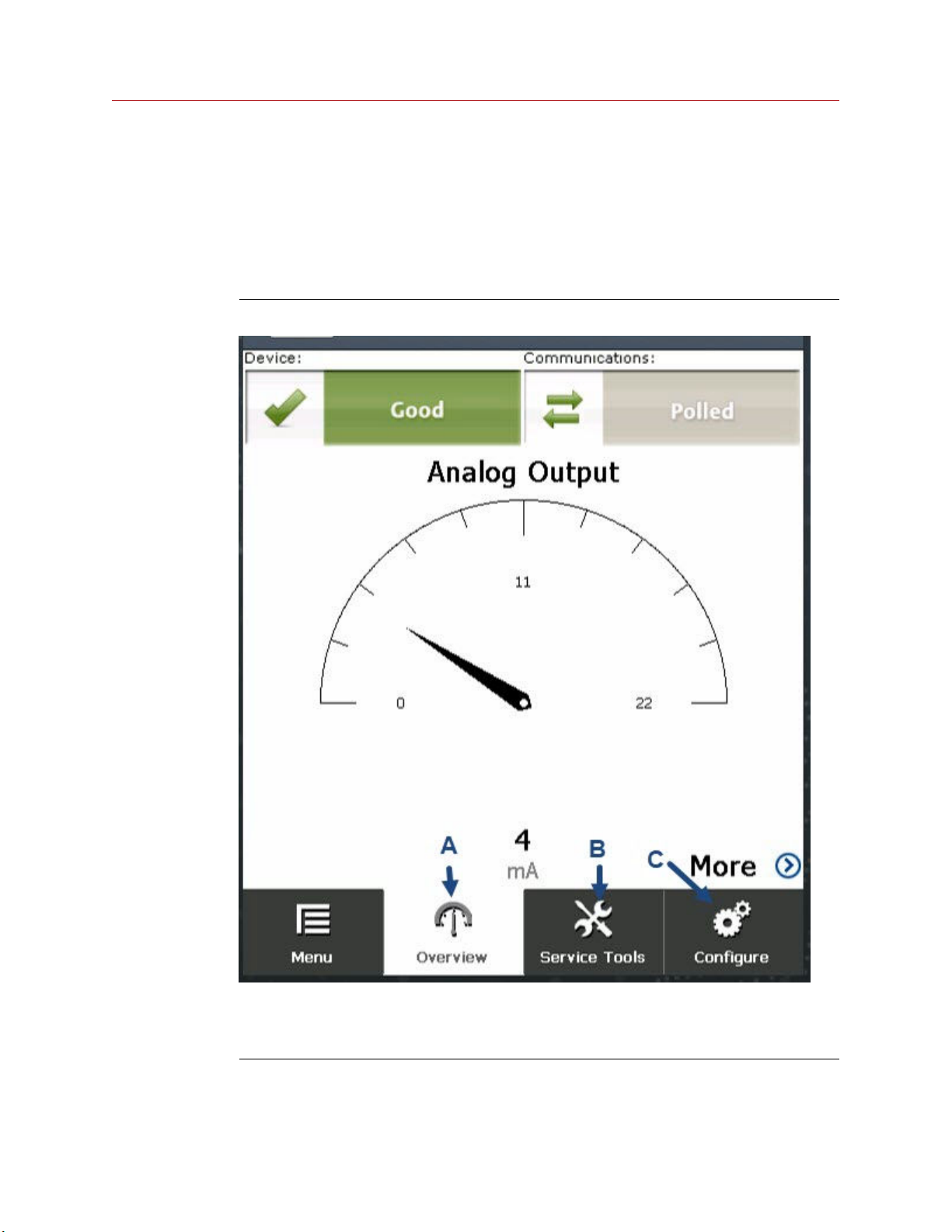
From the main screen, you have three options:
Figure 3-1: Main screen
A. Overview: Opens Overview screen.
B. Service Tools: Opens Service Tools screen.
C. Configure: Opens Configure screen.
Spectrex SharpEye 40/40 9
Page 10
Operating the HART® hand-held communicator Reference Manual
April 2022 00909-0300-4975
3.1 Overview screen
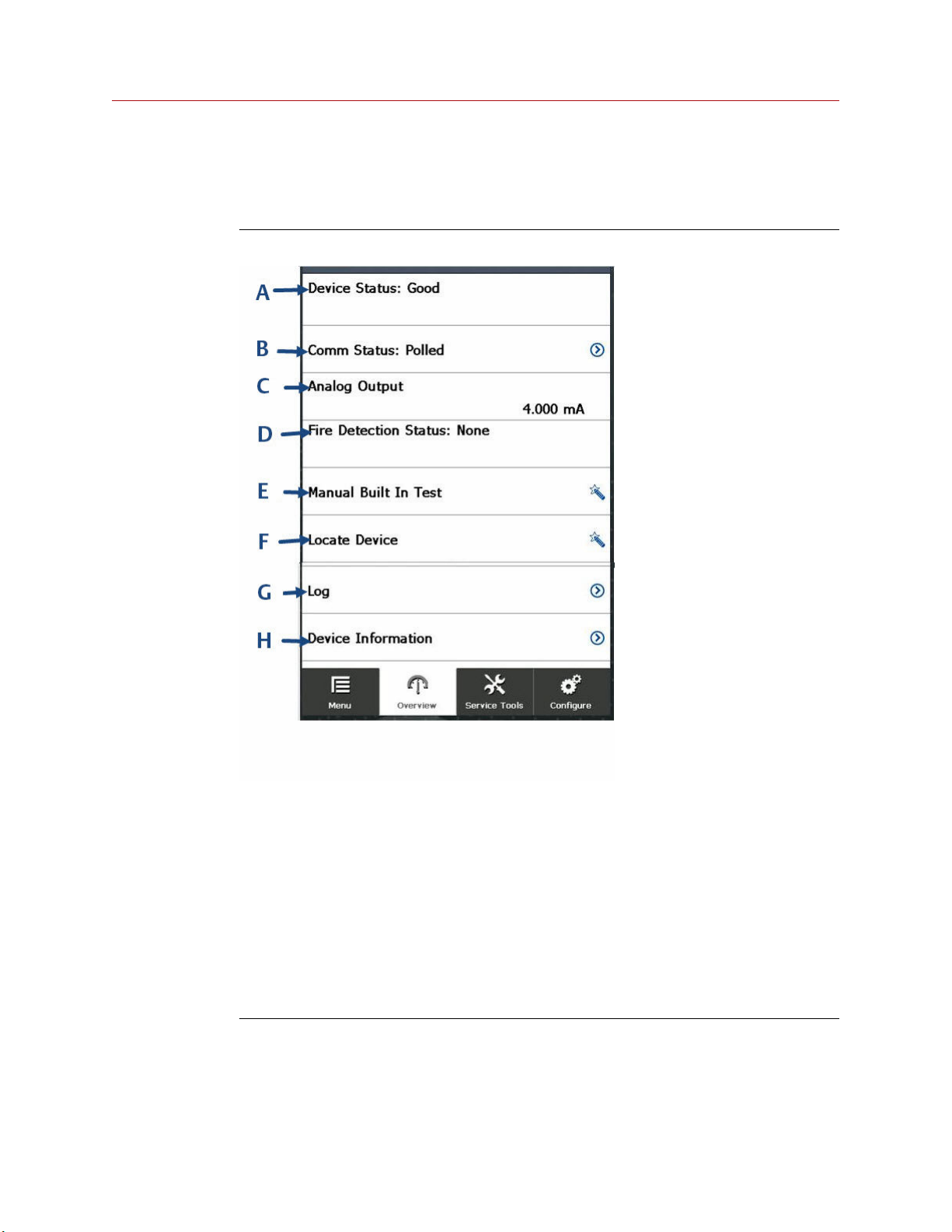
The Overview screen gives a summary of the device information.
Figure 3-2: Overview screen
A. Device Status: Available options are Good, Failure, and Maintenance Required.
B. Comm Status: Displays communication method. This is polled.
C. Analog Output: Displays a value between 1 mA and 20 mA when the device is turned on.
D. Fire Detection Status: Indicates whether the device has detected fire. Available options
are None and Detected.
E. Manual Built In Test: Click to perform built in test.
F. Locate Device: Click here to make the device light-emitting diode (LED) blink to locate a
connected device.
G. Log: Shortcut to Log screen.
H. Device Information: Displays Device Information screen. When you open the Device
Information screen from the Overview screen, all fields are read only.
10 Spectrex.net
Page 11
Reference Manual Operating the HART® hand-held communicator
00909-0300-4975 April 2022
3.2 Device information screen
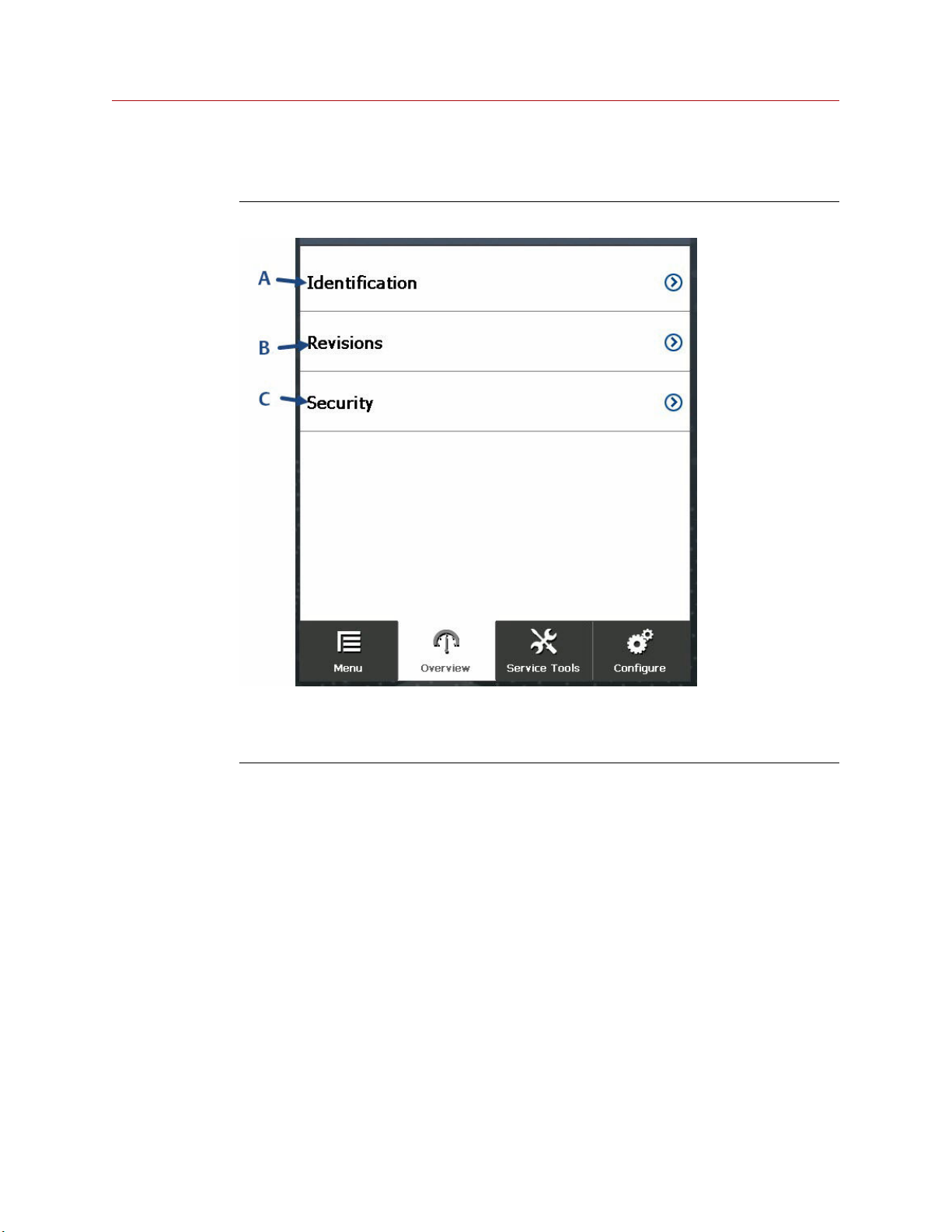
Figure 3-3: Device information screen
A. Identification: Opens Identification screen.
B. Revisions: Opens Revisions screen.
C. Security: Opens Security screen.
Spectrex SharpEye 40/40 11
Page 12
Operating the HART® hand-held communicator Reference Manual
April 2022 00909-0300-4975
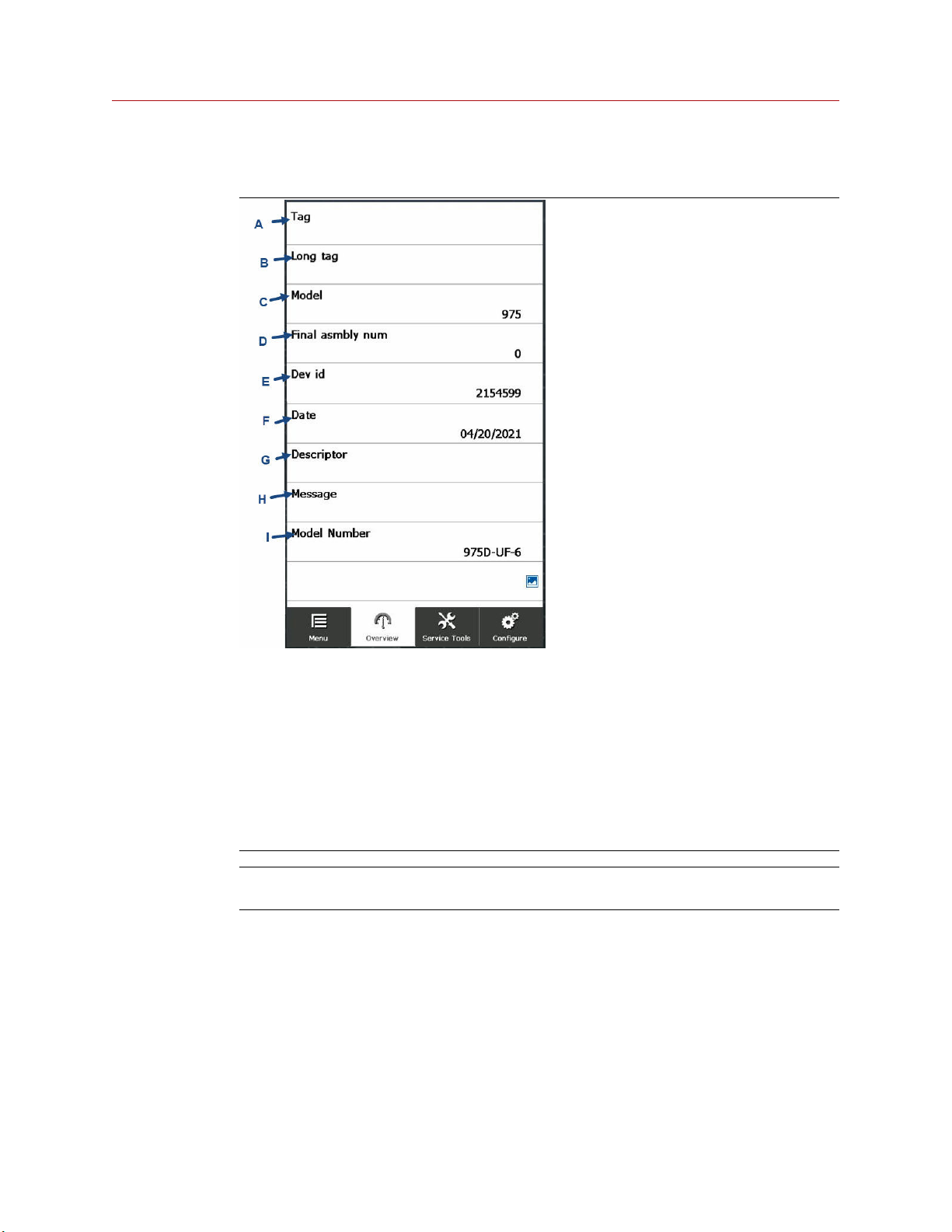
3.2.1 Identification screen
A. Tag
B. Long tag
C. Model
D. Final asmbly num (Final assembly number)
E. Dev id (Device identification)
F. Date
G. Descriptor
H. Message
I. Model Number
Note
When you access the Identification screen from the Overview screen, all fields are read only.
12 Spectrex.net
Page 13
Reference Manual Operating the HART® hand-held communicator
00909-0300-4975 April 2022
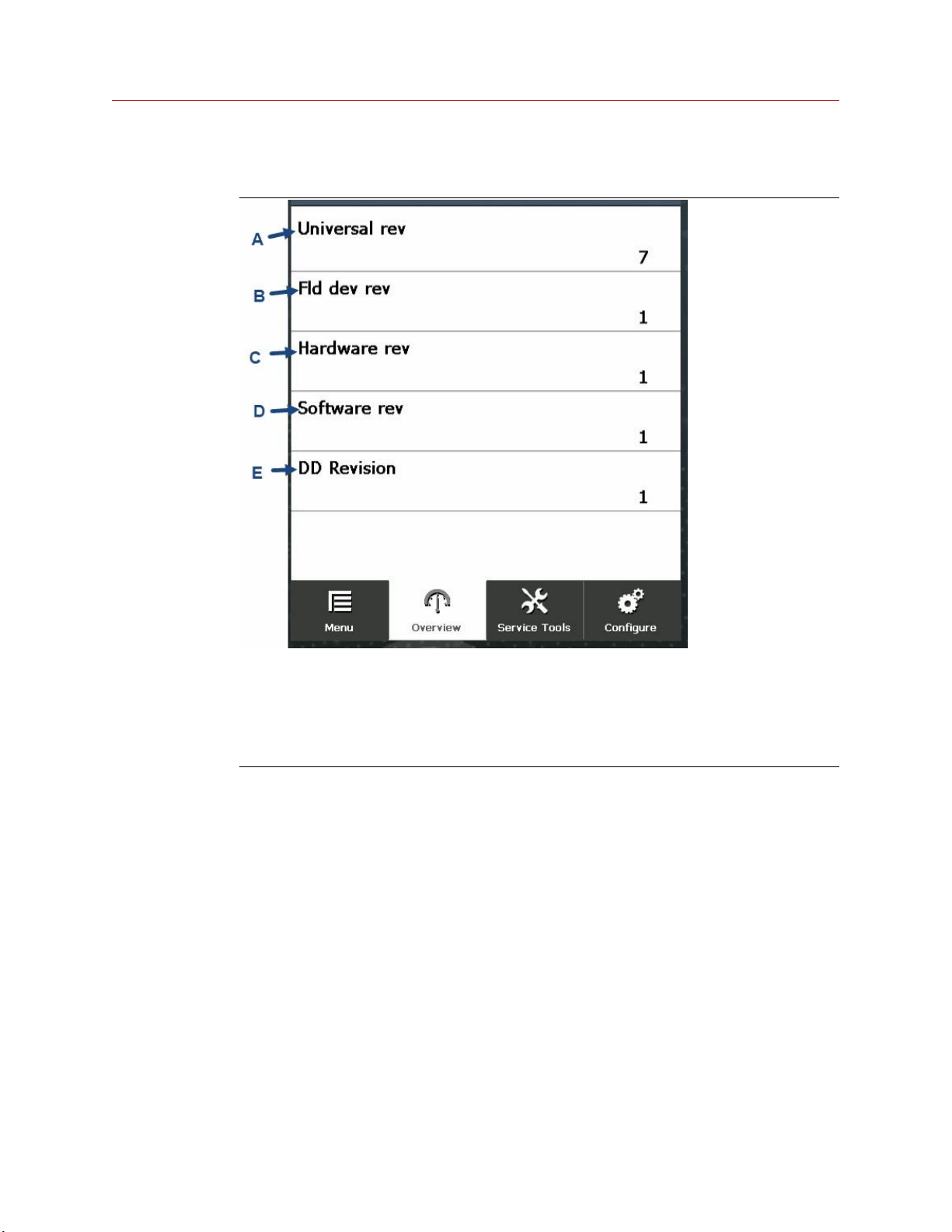
3.2.2 Revision numbers screen
A. Universal rev: Universal revision
B. Fld dev rev: Field device revision
C. Hardware rev: Hardware revision
D. Software rev: Software revision
E. DD Revision: Device driver revision
Spectrex SharpEye 40/40 13
Page 14
Operating the HART® hand-held communicator Reference Manual
April 2022 00909-0300-4975
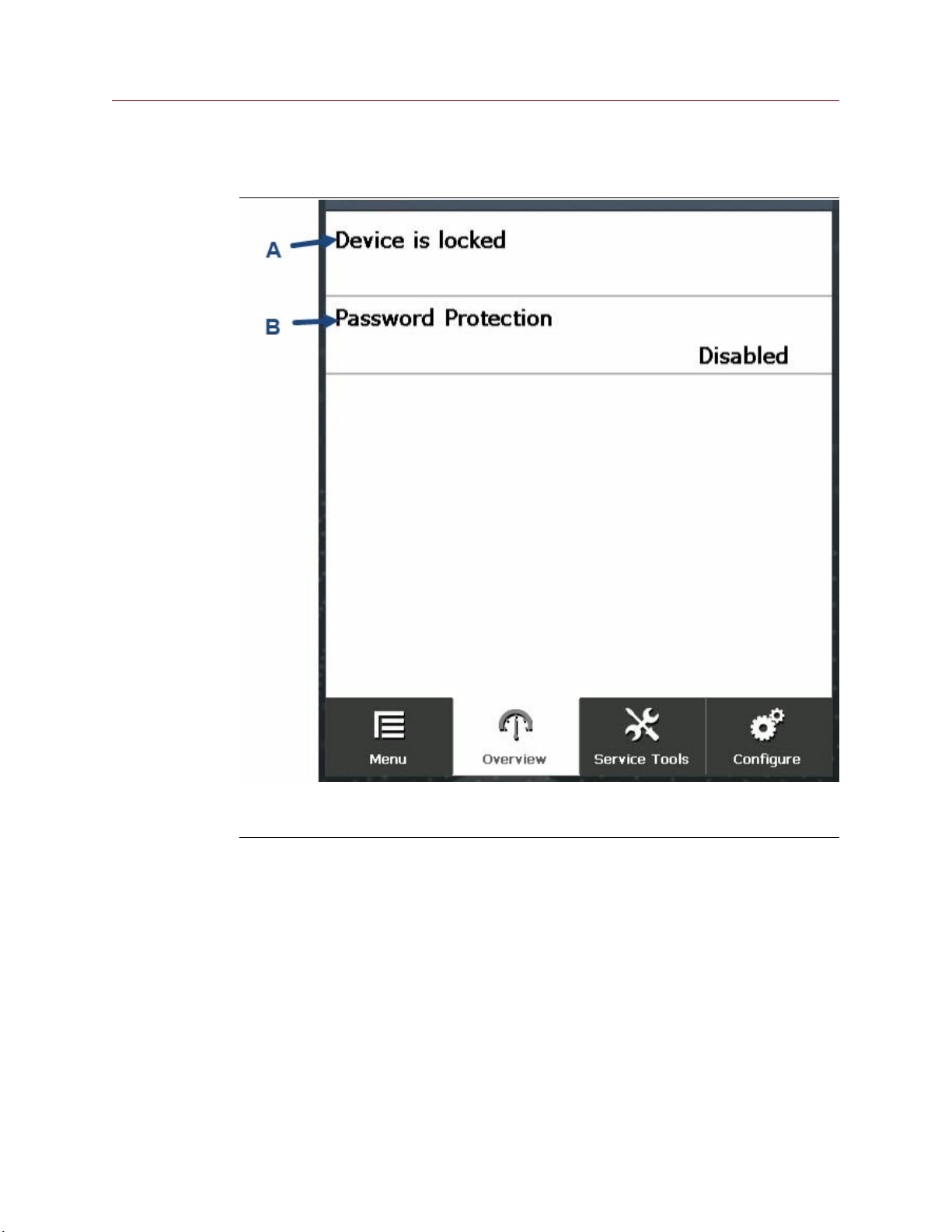
3.2.3 Security screen
A. Device lock status.
B. Password Protection: Enabled or Disabled.
14 Spectrex.net
Page 15
Reference Manual Operating the HART® hand-held communicator
00909-0300-4975 April 2022
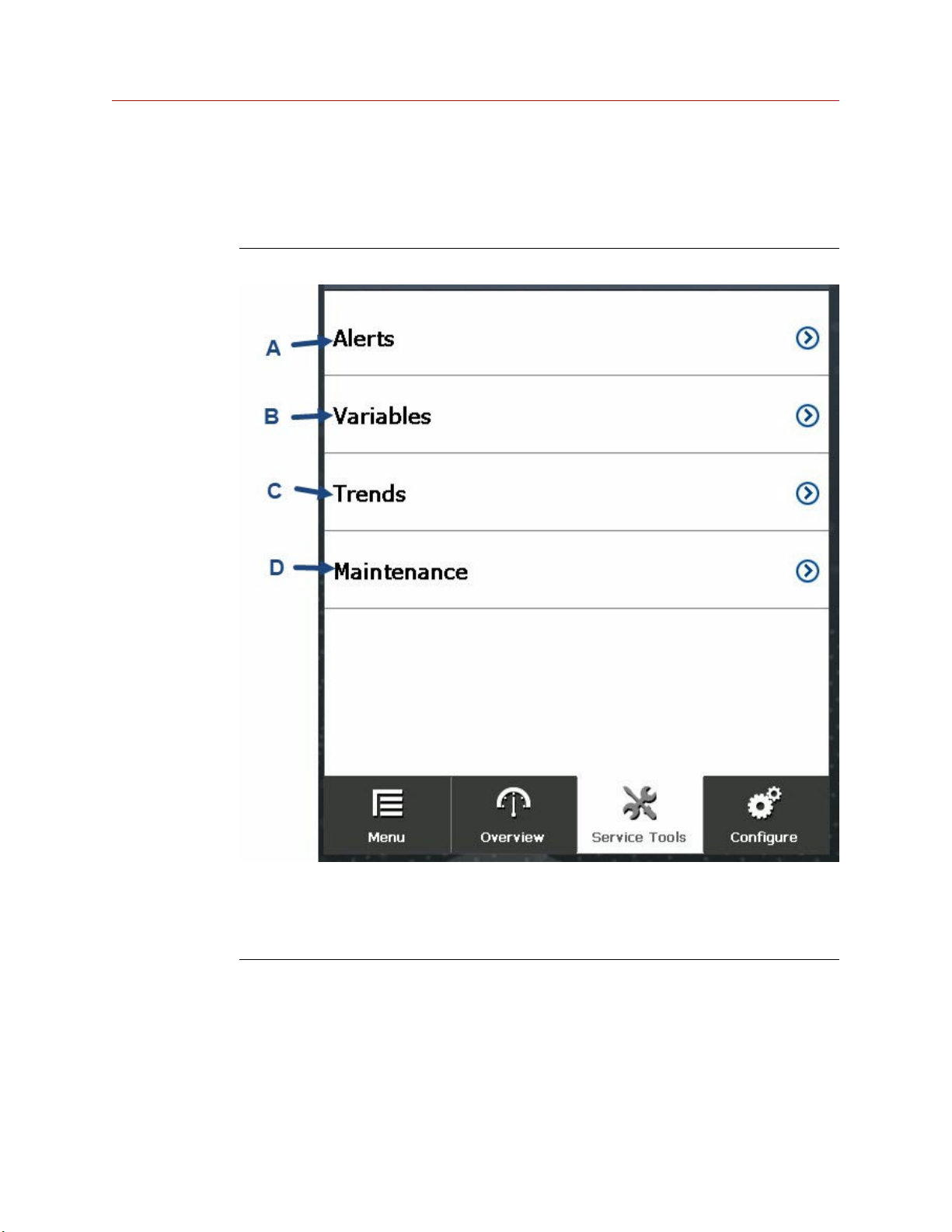
3.3 Service tools screen
The Service Tools screen provides links to sub-screens, in which you can view and edit
service-related device parameters.
Figure 3-4: Service tools screen
A. Alerts
B. Variables
C. Trends
D. Maintenance
Spectrex SharpEye 40/40 15
Page 16
Operating the HART® hand-held communicator Reference Manual
April 2022 00909-0300-4975
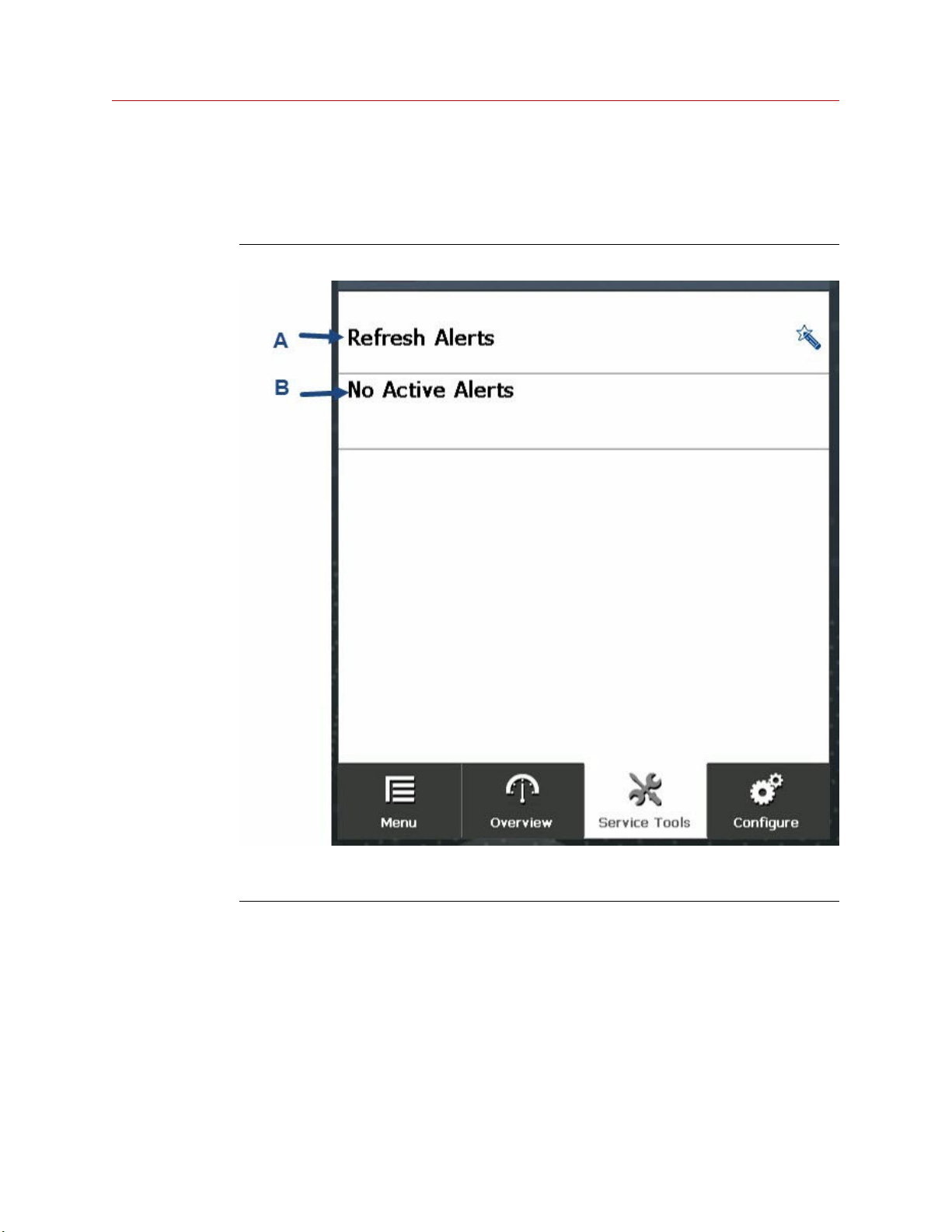
3.3.1 Alerts screen
The Alerts screen provides information about device alerts and enables you to reset any
active alerts.
Figure 3-5: Alerts screen
A. Refresh Alerts: Tap to refresh alert status.
B. Displays alert status: No Active Alerts in this example.
16 Spectrex.net
Page 17
Reference Manual Operating the HART® hand-held communicator
00909-0300-4975 April 2022
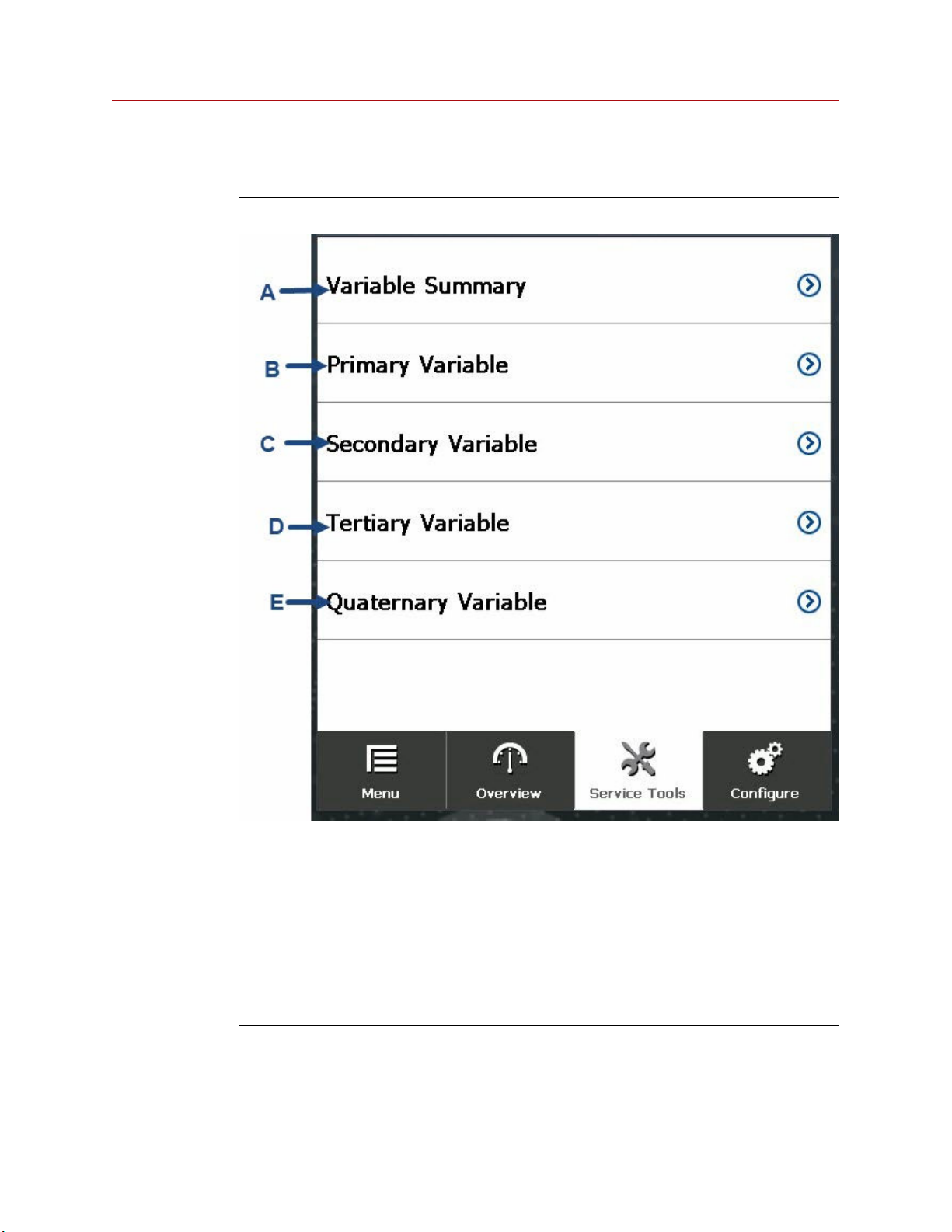
3.3.2 Variables screen
Figure 3-6: Variables screen
A. Variable Summary: Displays a summary of all variables.
• Analog output
• Electronic temperature
• Supply voltage
B. Primary Variable: Opens screen where you can select analog output variables.
C. Secondary Variable: Opens screen where you can select temperature-related variables.
D. Tertiary Variable: Opens screen where you can select voltage-related variables.
E. Quaternary Variable: Opens screen where you can select heater-related variables.
Spectrex SharpEye 40/40 17
Page 18
Operating the HART® hand-held communicator Reference Manual
April 2022 00909-0300-4975
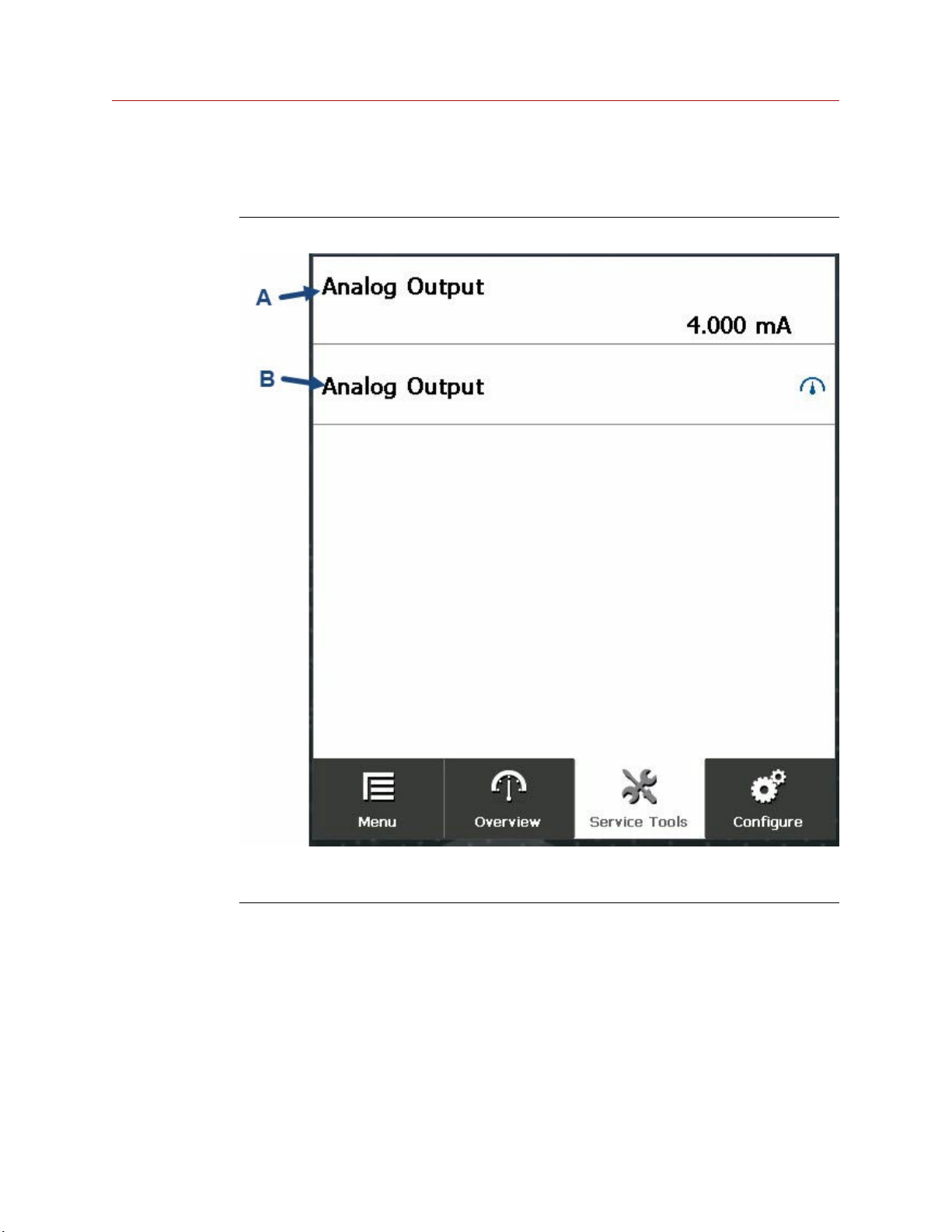
Primary variable screen
The Primary Variable screen displays the analog output.
Figure 3-7: Primary variable screen
A. Analog Output: Displays analog output.
B. Analog Output gauge: Tap to display Analog Output Gauge screen.
18 Spectrex.net
Page 19
Reference Manual Operating the HART® hand-held communicator
00909-0300-4975 April 2022
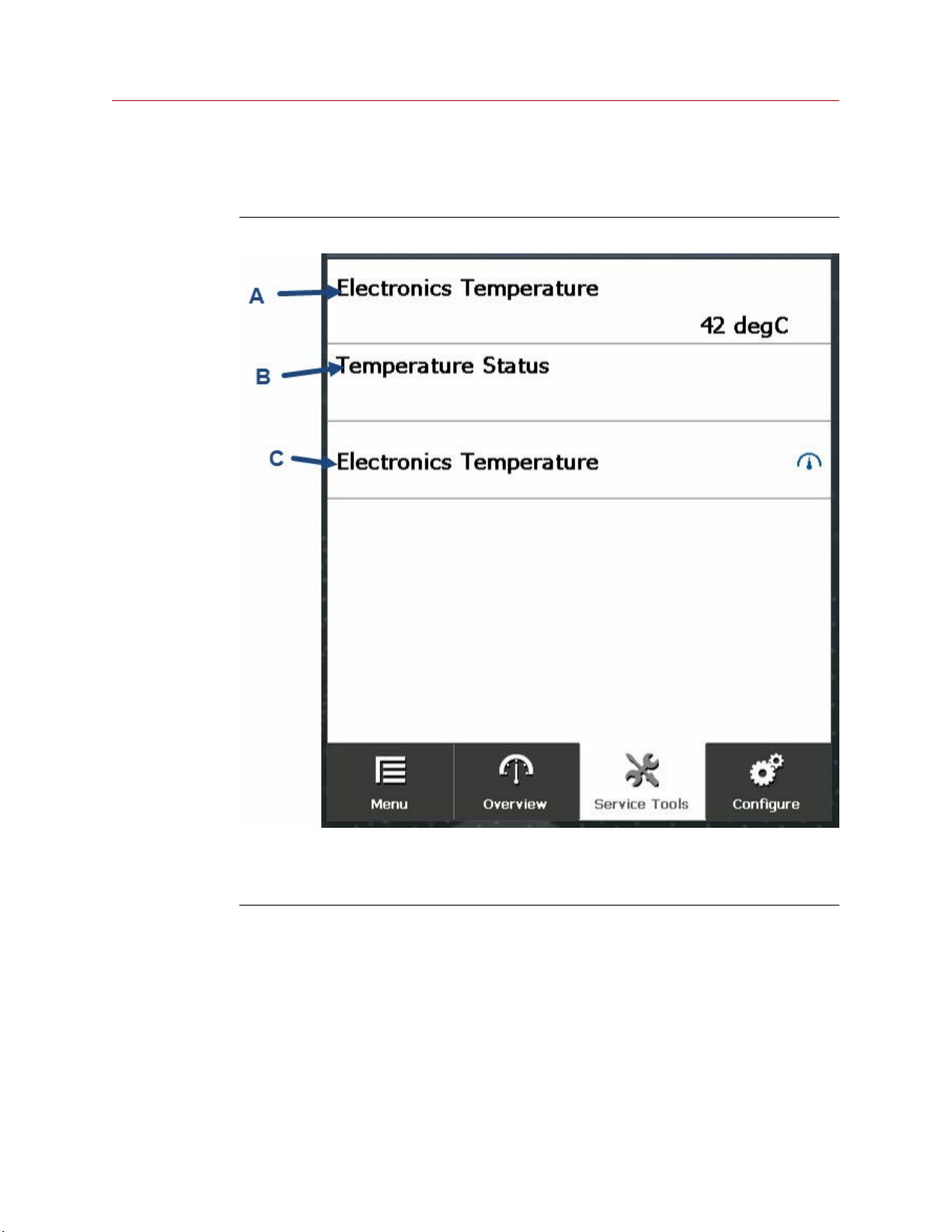
Secondary variable screen
The Secondary Variable screen displays electronics information.
Figure 3-8: Secondary variable screen
A. Electronics Temperature: Displays electronics temperature.
B. Temperature Status: Displays how well the temperature is being read.
C. Electronics Temperature gauge: Tap to display Electronics Temperature gauge screen.
Spectrex SharpEye 40/40 19
Page 20
Operating the HART® hand-held communicator Reference Manual
April 2022 00909-0300-4975
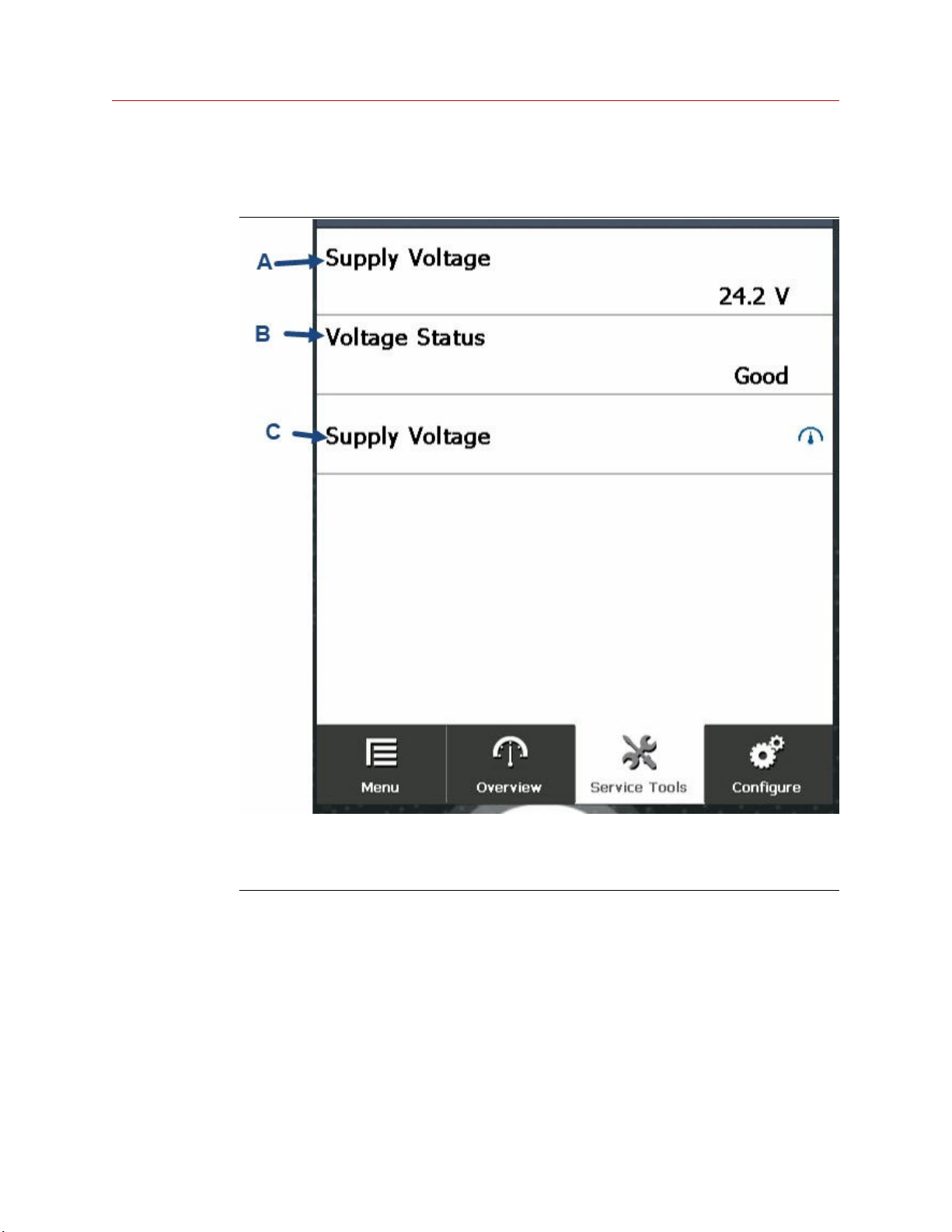
Tertiary variable screen
The Tertiary Variable screen displays voltage information.
A. Supply Voltage: Displays current supply voltage.
B. Voltage Status: Displays how well the voltage is being read.
C. Supply Voltage gauge: Tap to display the Supply Voltage Gauge screen.
20 Spectrex.net
Page 21
Reference Manual Operating the HART® hand-held communicator
00909-0300-4975 April 2022
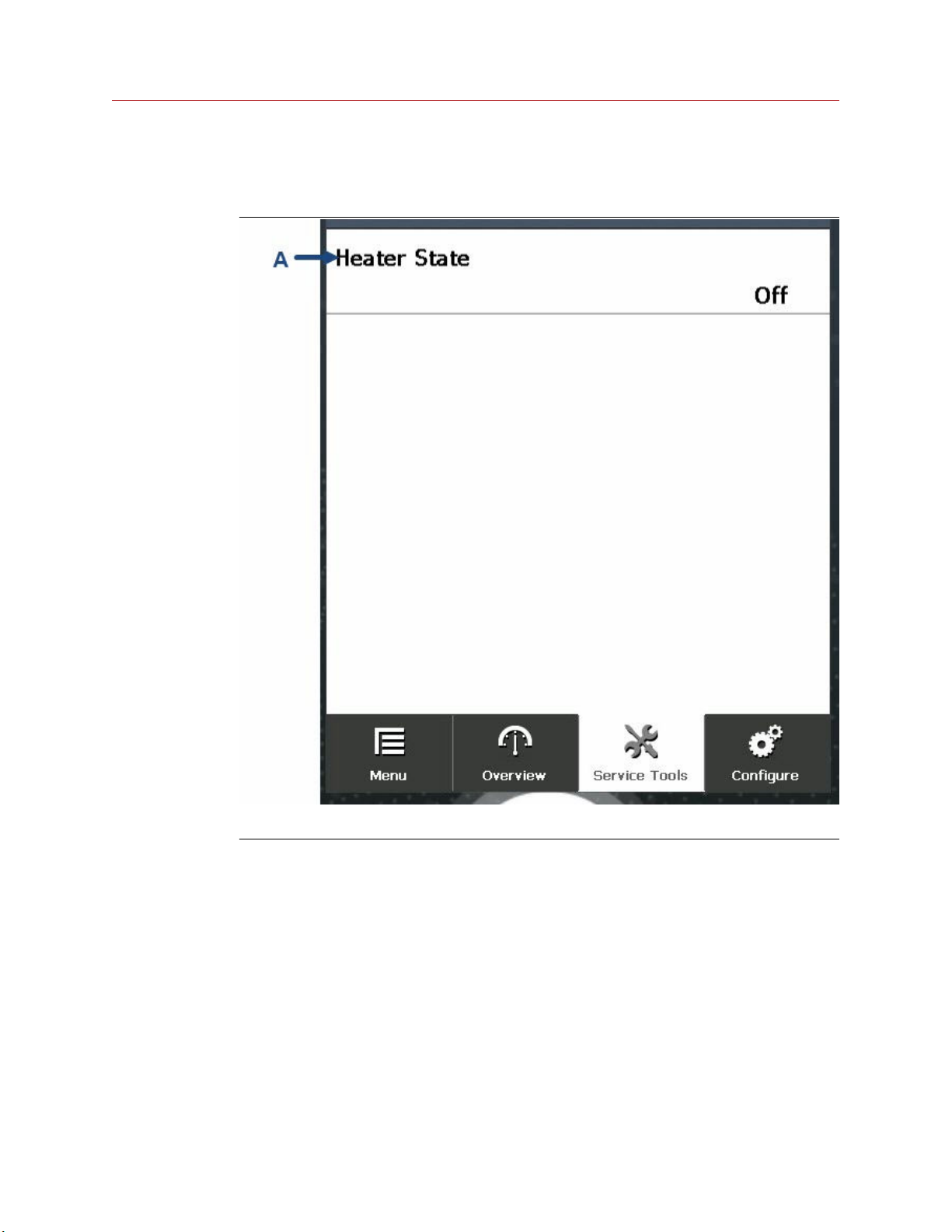
Quaternary variable screen
The Quaternary Variable screen displays heater information.
A. Heater State: Displays heater state - On or Off.
Spectrex SharpEye 40/40 21
Page 22
Operating the HART® hand-held communicator Reference Manual
April 2022 00909-0300-4975
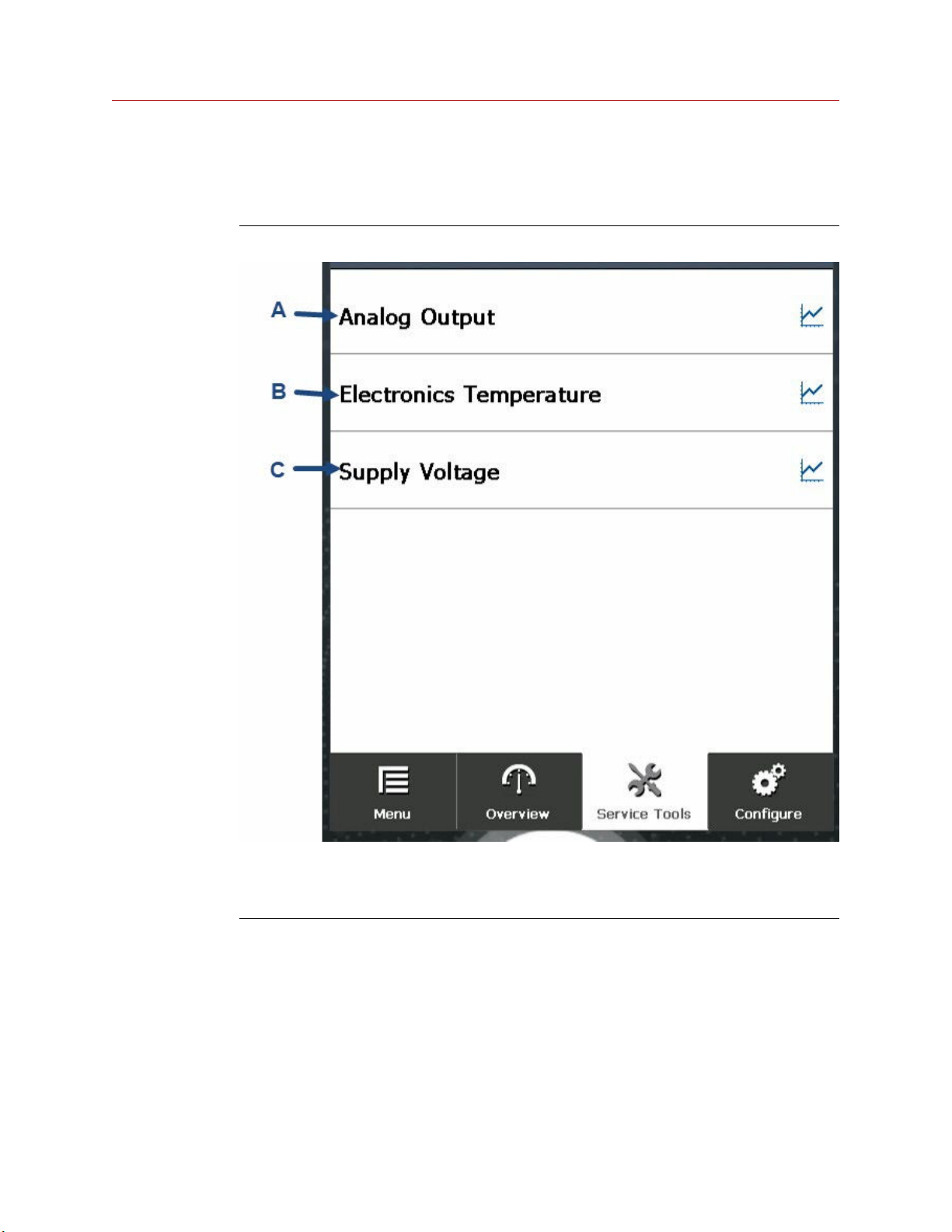
3.3.3 Trends screen
From the Trends screen, you can view the variables listed on a graph.
Figure 3-9: Trends screen
A. Analog Output: Displays the analog output on a graph.
B. Electronics Temperature: Displays the electronics temperature on a graph.
C. Supply Voltage: Displays the supply voltage on a graph.
22 Spectrex.net
Page 23
Reference Manual Operating the HART® hand-held communicator
00909-0300-4975 April 2022
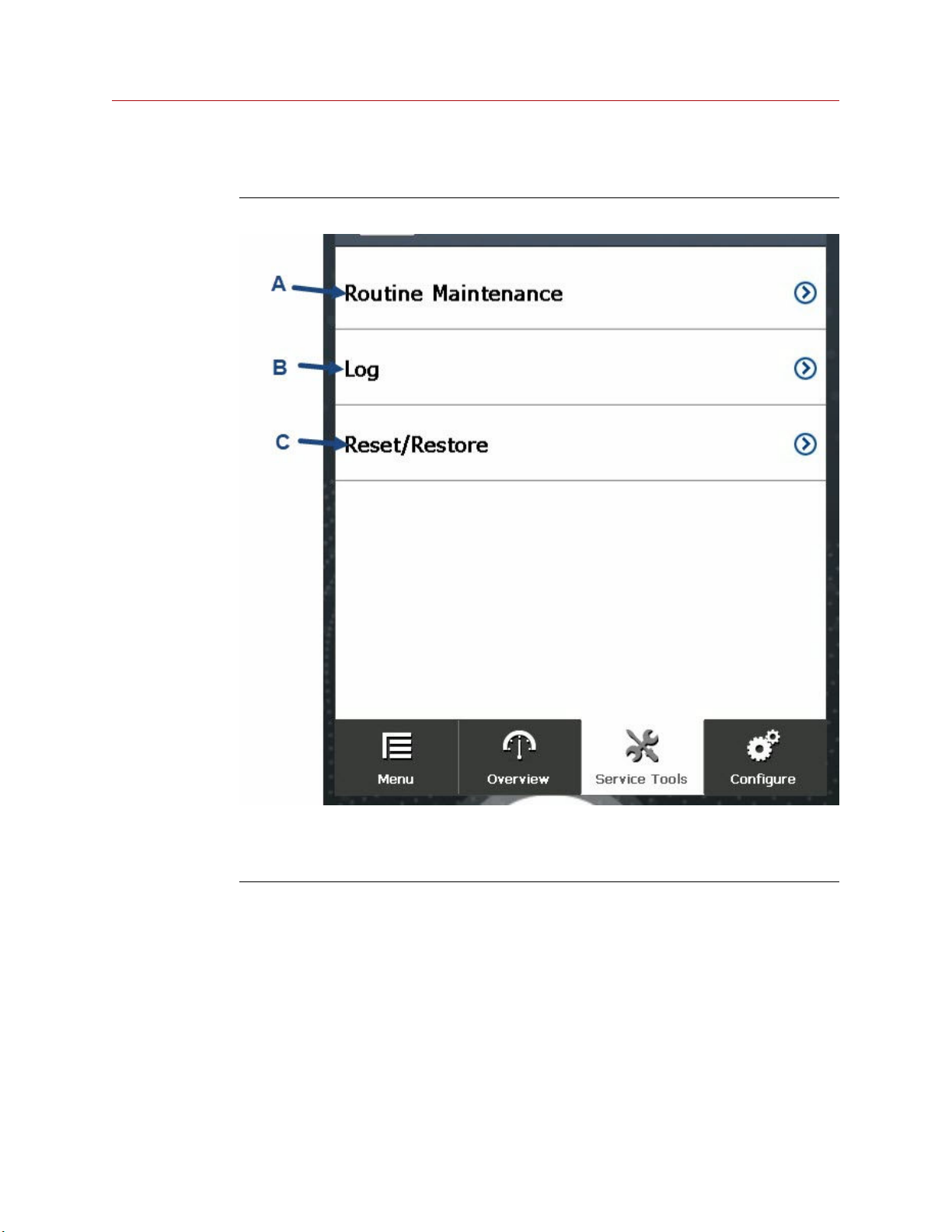
3.3.4 Maintenance screen
Figure 3-10: Maintenance screen
A. Routine Maintenance: Opens screen with routine maintenance functions.
B. Log: Opens screen with event logs.
C. Reset/Restore: Opens a screen from which you can reset the detector.
Spectrex SharpEye 40/40 23
Page 24
Operating the HART® hand-held communicator Reference Manual
April 2022 00909-0300-4975
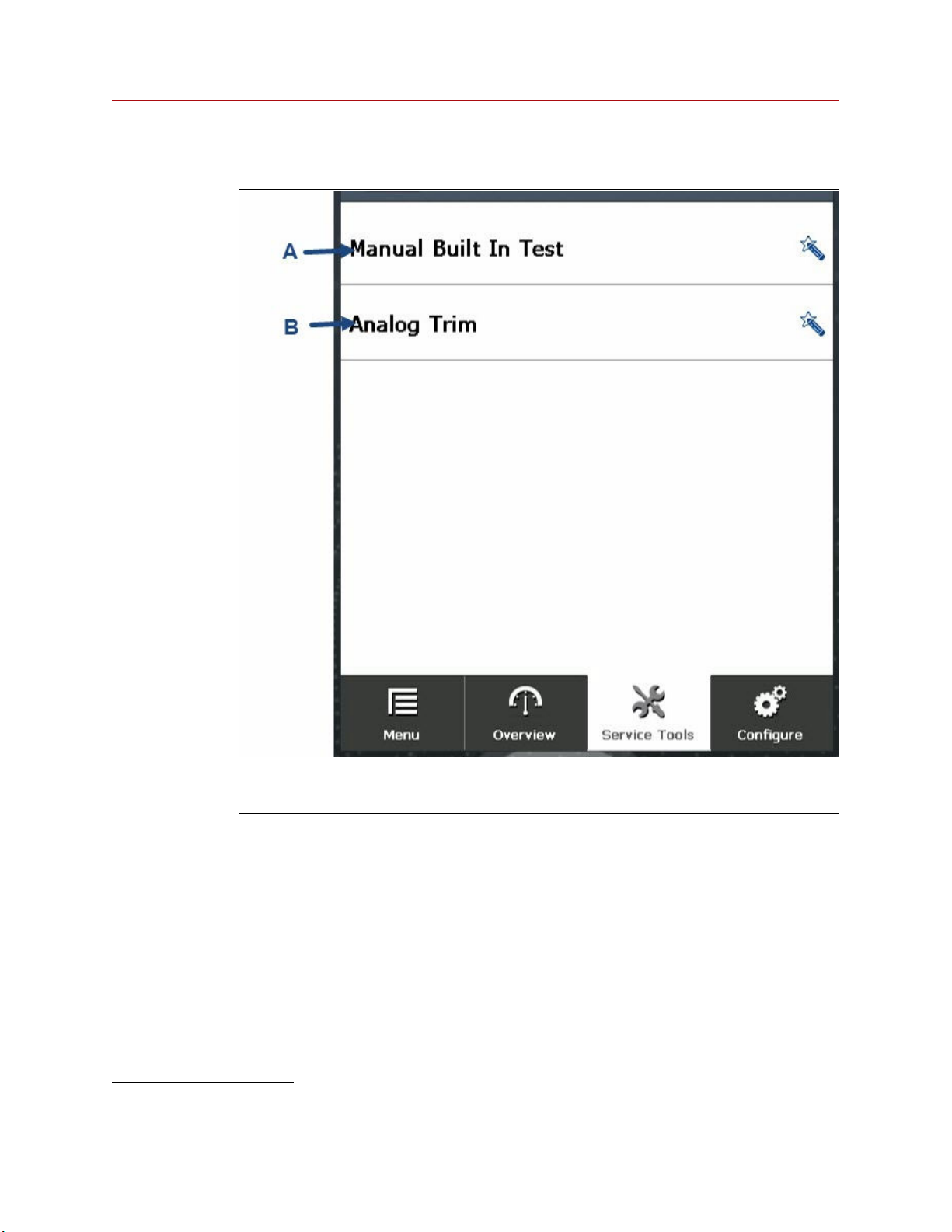
Routine maintenance screen
A. Manual Built In Test: Performs manual built-in test.
B. Analog Trim. Calibrates 4-20 mA.
(1) With the analog trim function, you can round multimeter values to a 4-mA fixed value. Tap Analog Trim and then enter
and confirm the multimeter reading.
24 Spectrex.net
(1)
Page 25
Reference Manual Operating the HART® hand-held communicator
00909-0300-4975 April 2022
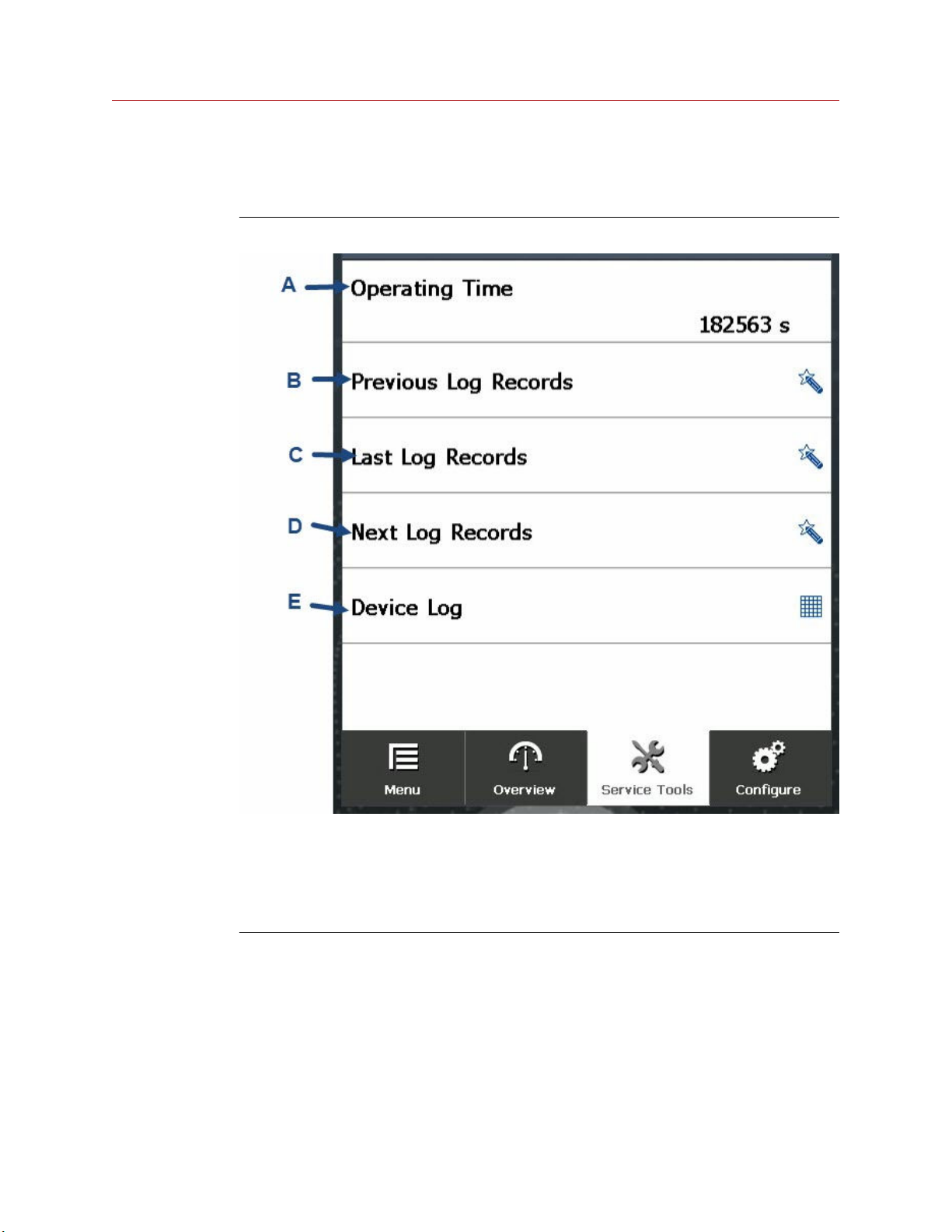
Log screen
The Log screen provides information about the logs and navigation options.
Figure 3-11: Log screen
A. Operating Time: Amount of time device has been powered up.
B. Previous Log Records: Displays previous log records.
C. Last Log Records: Displays the latest Log Record screen.
D. Next Log Records: Displays the next Log Record screen.
E. Device Log: Displays the log in a table.
Spectrex SharpEye 40/40 25
Page 26
Operating the HART® hand-held communicator Reference Manual
April 2022 00909-0300-4975
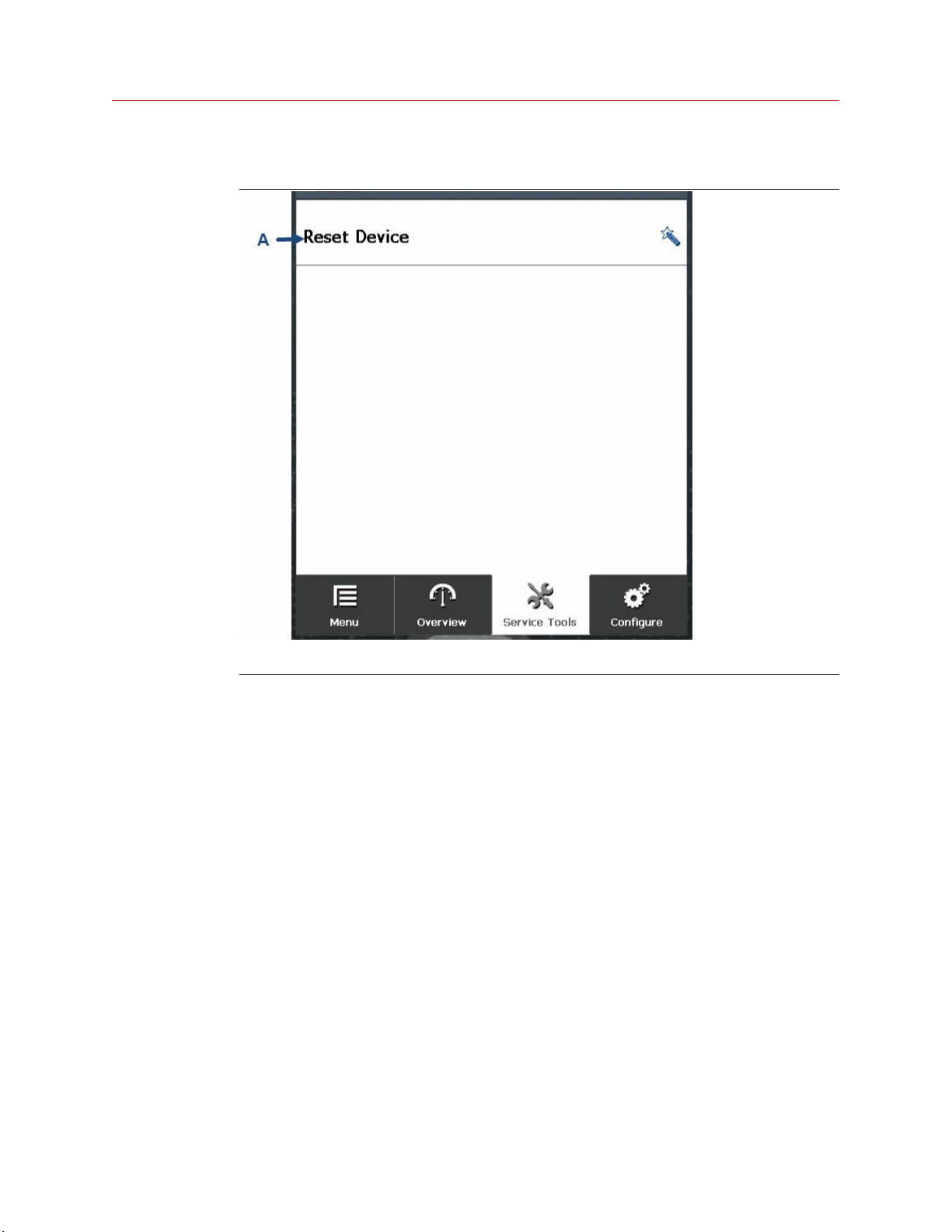
Reset/Restore screen
A. Reset Device: Performs soft reset.
26 Spectrex.net
Page 27
Reference Manual Operating the HART® hand-held communicator
00909-0300-4975 April 2022
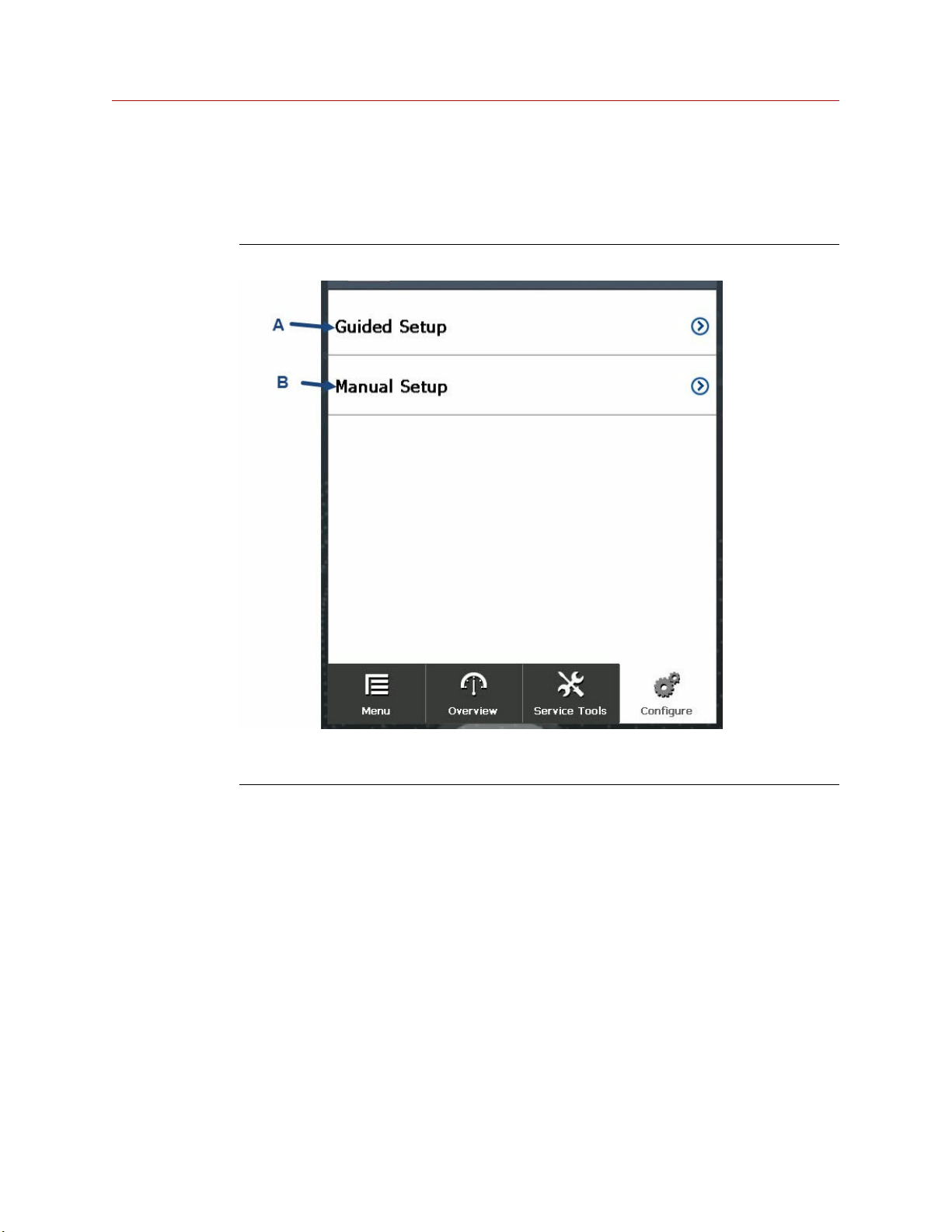
3.3.5 Configure screen
From the Configure screen, you can configure the detector's parameters manually or using
the wizard.
Figure 3-12: Configure screen
A. Guided Setup: Opens screen from which you can configure parameters using the wizard.
B. Manual Setup: Opens screen from which you can manually configure parameters.
Spectrex SharpEye 40/40 27
Page 28
Operating the HART® hand-held communicator Reference Manual
April 2022 00909-0300-4975
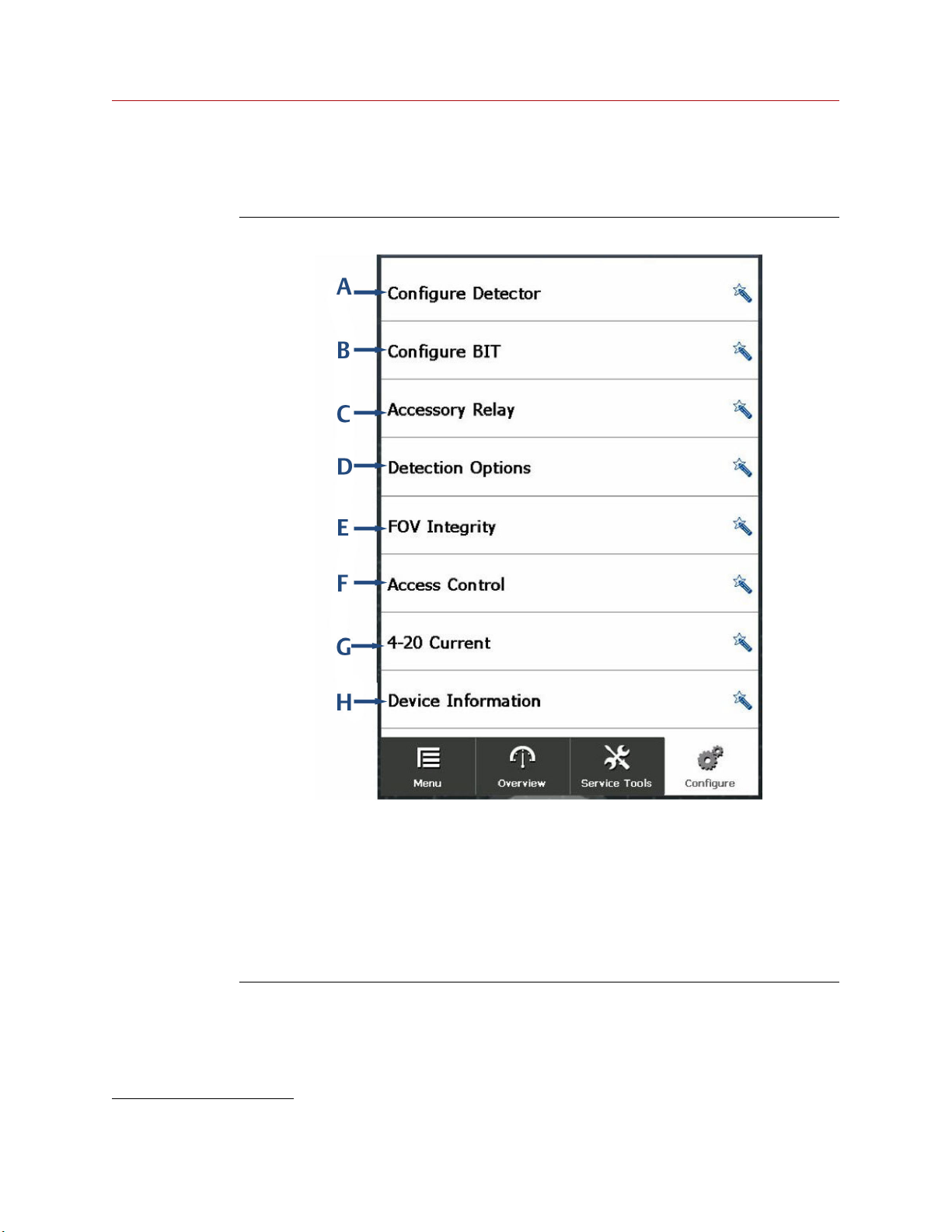
Guided setup screen
Use the Guided Setup screen to configure the device parameters using a wizard.
Figure 3-13: Guided setup screen
A. Configure Detector: Guides you through detector configuration.
B. Configure BIT: Guides you through the built-in test (BIT) configuration.
C. Accessory Relay: Guides you through accessory relay configuration.
D. Detection Option: Guides you through detector options configuration.
E. FOV Integrity: Guides you through FOV integrity configuration.
(2)
F. Access Control: Guides you through access control configuration.
G. 4-20 Current: Guides you through the 4-20 mA current configuration.
H. Device Information: Guides you through detector information configuration.
(2) This is available for the SharpEye 40/40D models only.
28 Spectrex.net
Page 29
Reference Manual Operating the HART® hand-held communicator
00909-0300-4975 April 2022
Manual setup screen
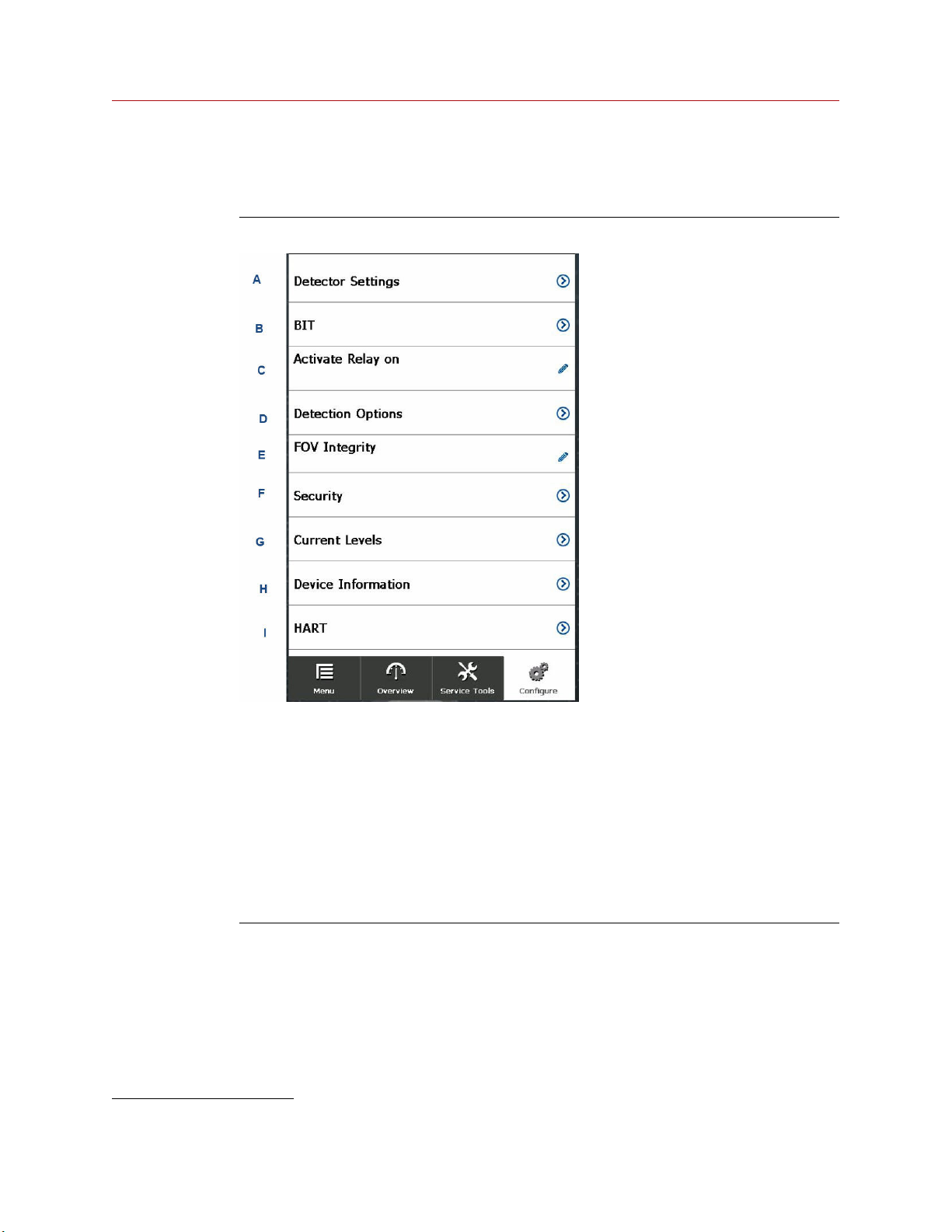
Use the Manual Setup screen to manually configure each of the detector's parameters.
Figure 3-14: Manual setup screen
A. Detector Settings: Opens Settings screen.
B. BIT: Opens BIT Settings screen.
C. Activate Relay on: Activates or deactivates relay.
D. Detection Options: Opens Detection Options screen.
E. FOV Integrity: Enables or disables FOV integrity.
(3)
F. Security: Opens Security screen.
G. Current Levels: Displays levels.
H. Device Information: Displays the Device Information screen. See Device information
screen.
I. HART: Opens HART Settings screen.
(3) This is available for SharpEye 40/40D models only.
Spectrex SharpEye 40/40 29
Page 30
Operating the HART® hand-held communicator Reference Manual
April 2022 00909-0300-4975
Detector settings screen
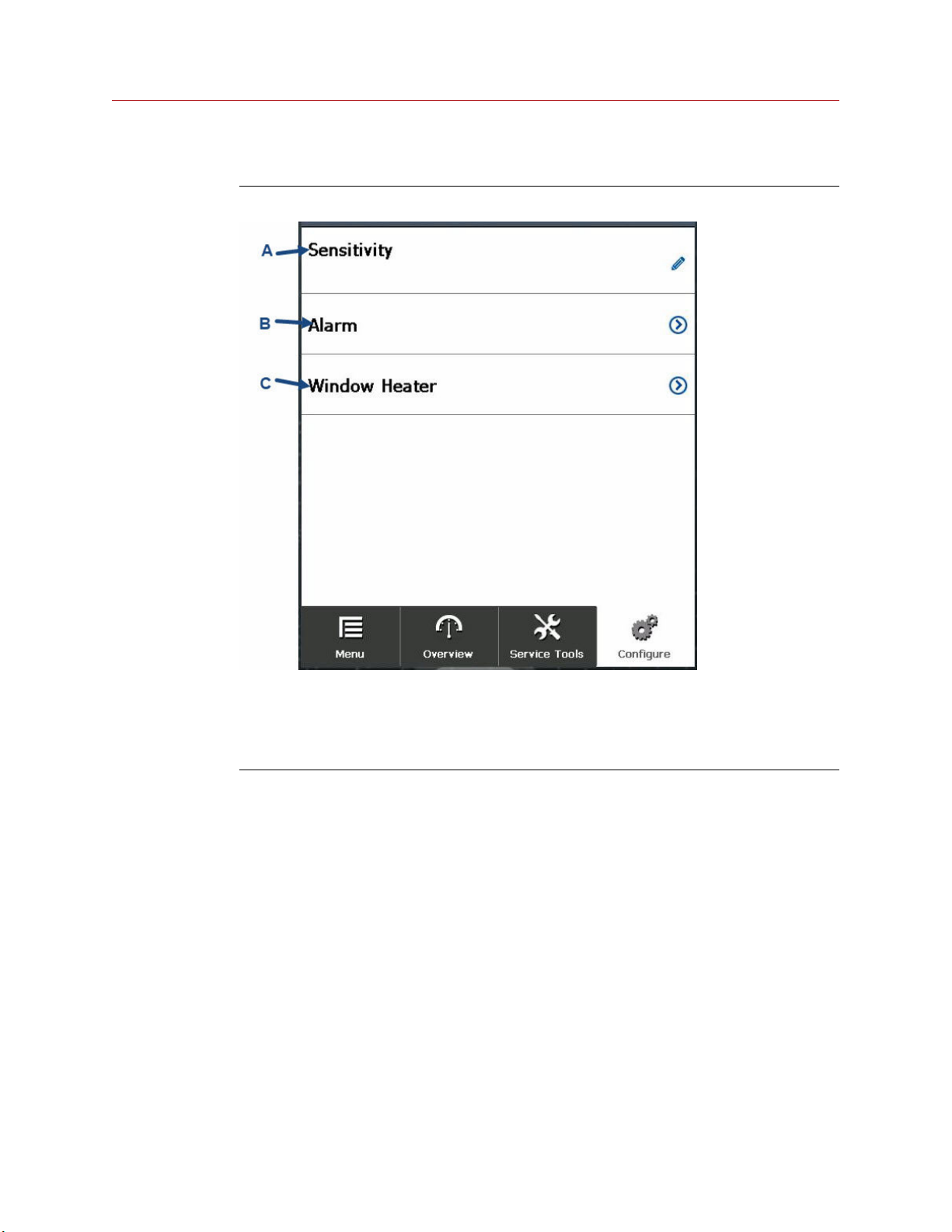
Figure 3-15: Detector settings screen
A. Sensitivity: Selects the sensitivity.
See the options displayed in the SharpEye 40/40 Quick Start Guide.
B. Alarm: Opens the Alarm screen.
C. Window Heater: Opens Window Heater Settings screen.
30 Spectrex.net
Page 31
Reference Manual Operating the HART® hand-held communicator
00909-0300-4975 April 2022
Alarm screen
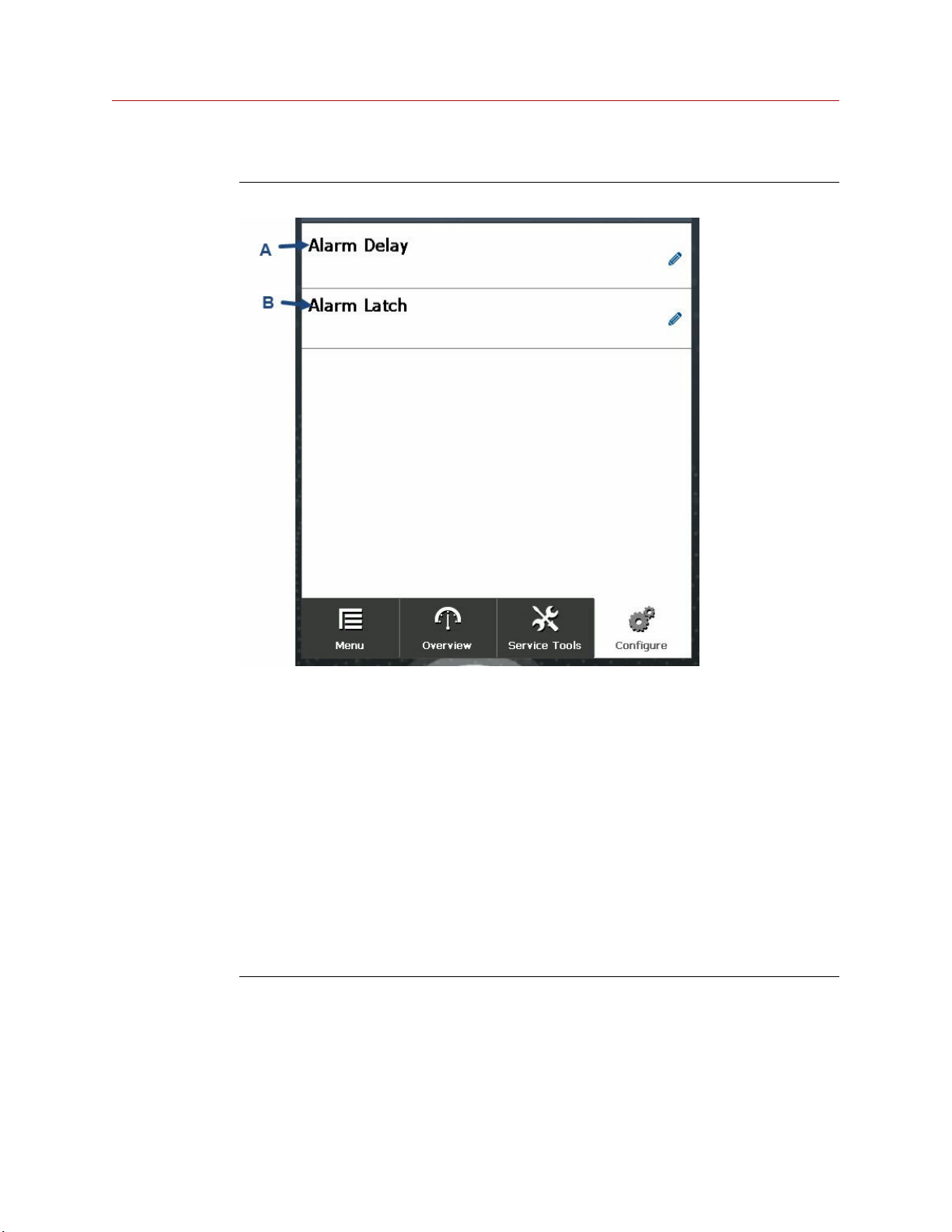
Figure 3-16: Alarm screen
A. Alarm Delay: Select alarm delay.
Options are:
• 0 sec
• Antiflare
• 3 sec
• 5 sec
• 10 sec
• 15 sec
• 20 sec
• 30 sec
B. Alarm Latch: Activate or deactivate alarm latch.
Spectrex SharpEye 40/40 31
Page 32
Operating the HART® hand-held communicator Reference Manual
April 2022 00909-0300-4975
Window heater screen
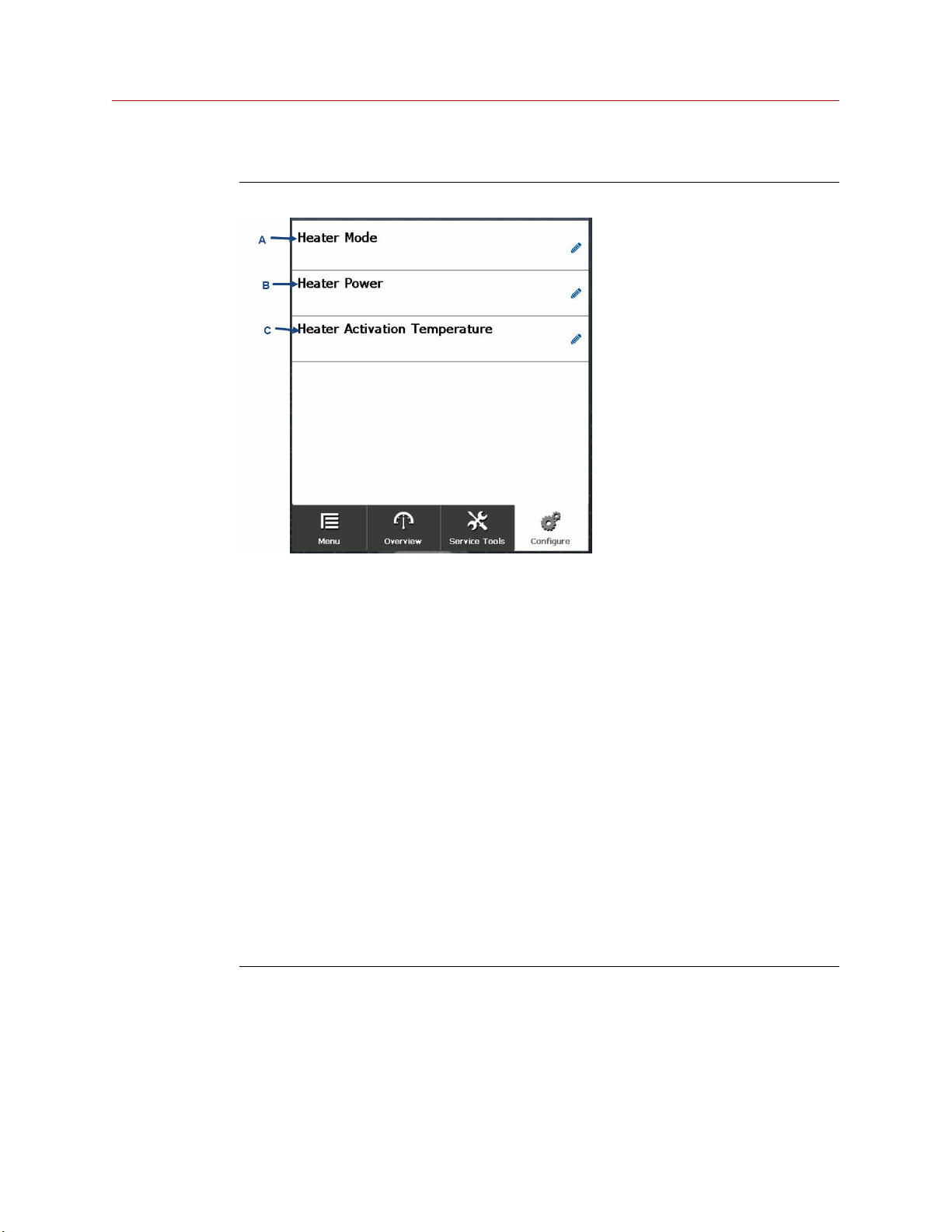
Figure 3-17: Window heater screen
A. Heater Mode: Select window heater mode from the following options:
Off
Window heater is off all the time.
Auto Window heater turns on when the environment reaches the activation
temperature.
On Window heater is on all the time.
B. Heater Power: Select power mode: low or high.
C. Heater Activation Temperature: Heater activation temperature in degrees Celsius.
Options are:
• 0
• 5
• 10
• 15
• 20
• 25
• 30
32 Spectrex.net
Page 33
Reference Manual Operating the HART® hand-held communicator
00909-0300-4975 April 2022
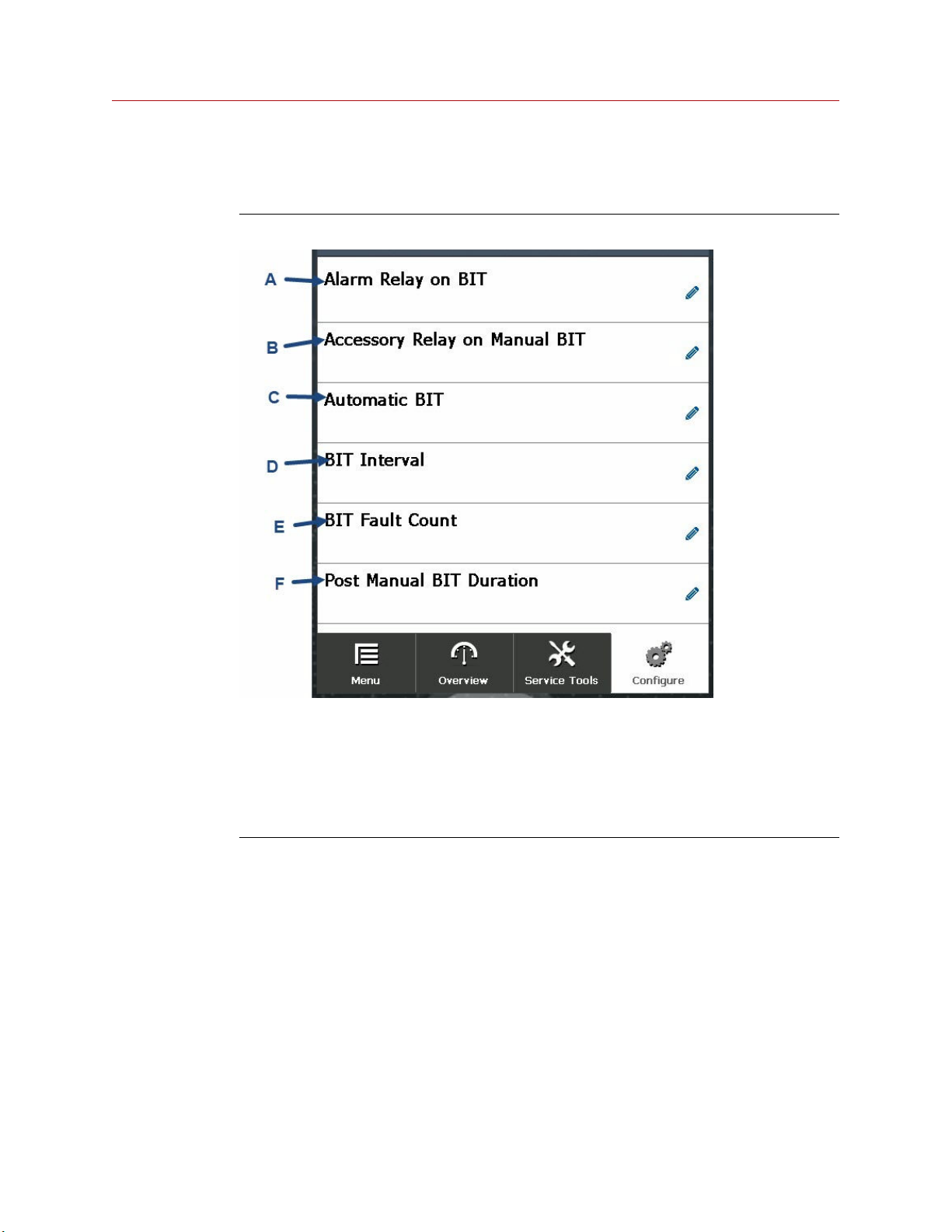
BIT screen
Use this screen to define built-in test (BIT) settings.
Figure 3-18: BIT screen
A. Alarm Relay on BIT: Activate or deactivate alarm relay on BIT.
B. Accessory Relay on Manual BIT: Activate or deactivate accessory relay on BIT.
C. Automatic BIT: Activate or deactivate automatic BIT.
D. BIT Interval: Manually select BIT interval.
E. BIT Fault Count: Manually select BIT fault count.
F. Post Manual BIT Duration: Set post manual BIT duration in seconds.
Spectrex SharpEye 40/40 33
Page 34
Operating the HART® hand-held communicator Reference Manual
April 2022 00909-0300-4975
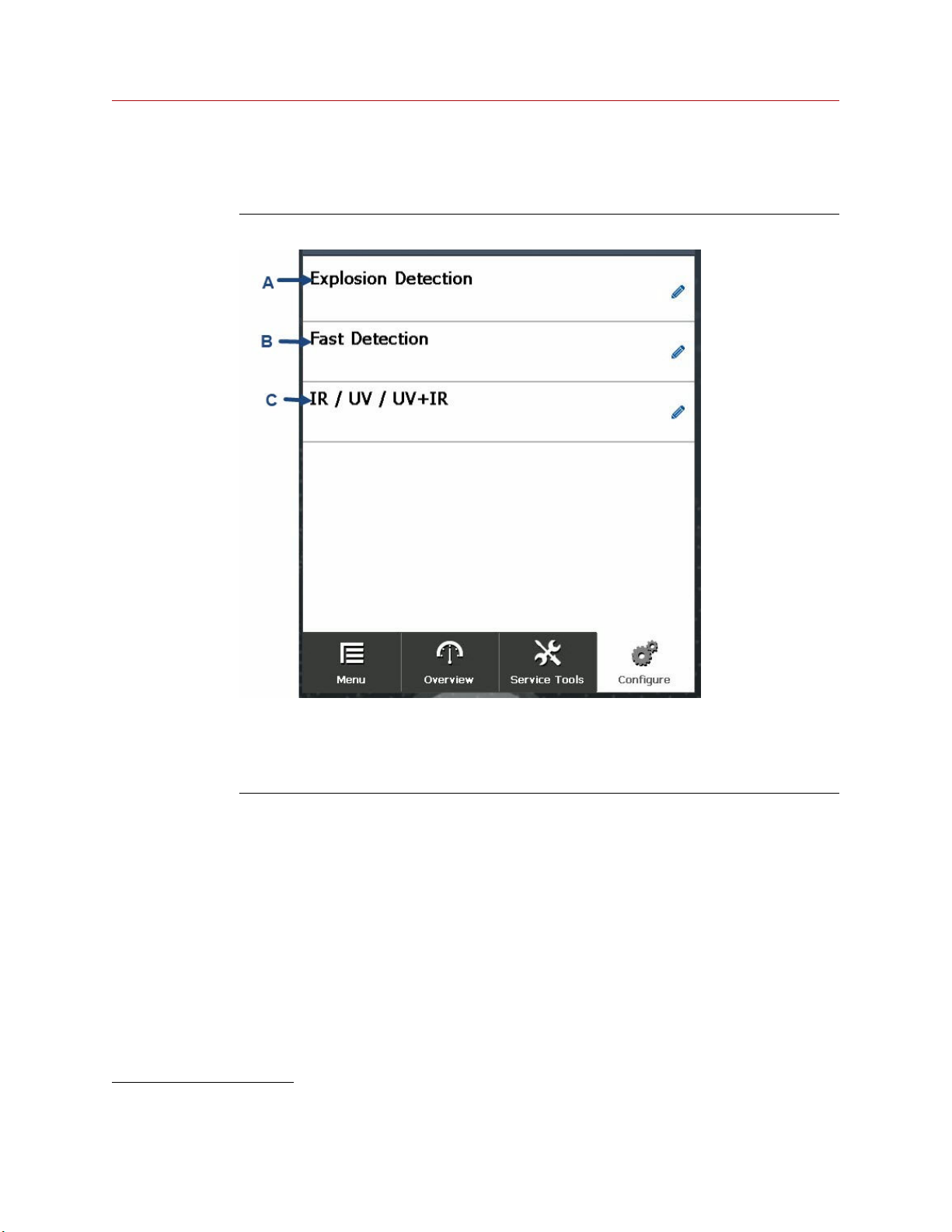
Detection options screen
Use this screen to define the detection options.
Figure 3-19: Detection options screen
A. Explosion Detection: Enable or disable explosion detection.
B. Fast Detection: Enable or disable fast detection.
C. IR/UV/UV+IR: Select single infrared (IR), single ultraviolet (UV), or both UV and IR
channels.
(4) This is available for SharpEye 40/40D models only.
(5) This is available for UV/IR models only.
(5)
(4)
(4)
34 Spectrex.net
Page 35
Reference Manual Operating the HART® hand-held communicator
00909-0300-4975 April 2022
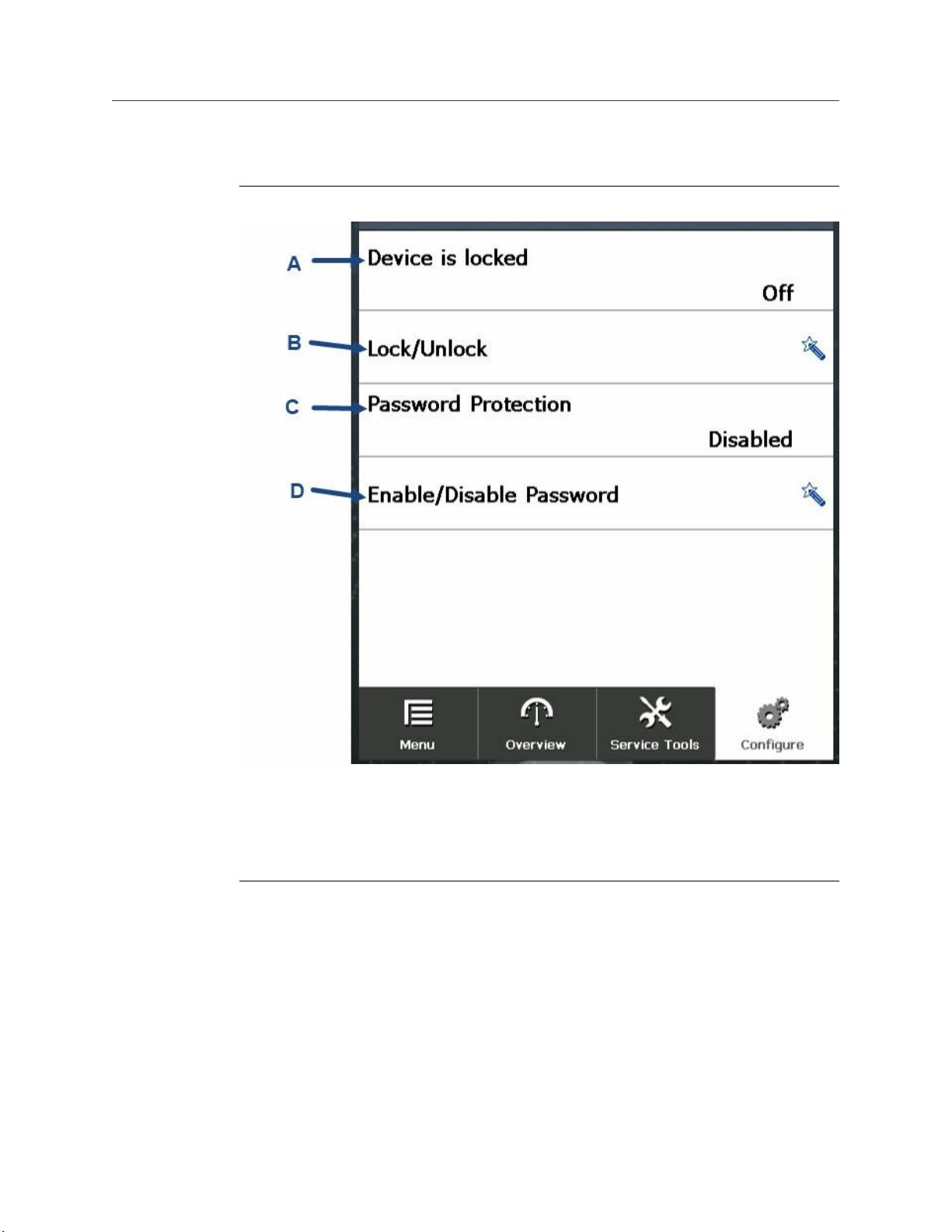
Security settings screen
Figure 3-20: Security settings screen
A. Device Lock Status: Displays device lock status.
B. Lock/Unlock: Lock or unlock the detector for maintenance. No other device can
configure the detector while it is locked.
C. Password Protection: Displays password protection status.
D. Enable/Disable Password: Enable password protection to prevent unauthorized access.
Spectrex SharpEye 40/40 35
Page 36
Operating the HART® hand-held communicator Reference Manual
April 2022 00909-0300-4975
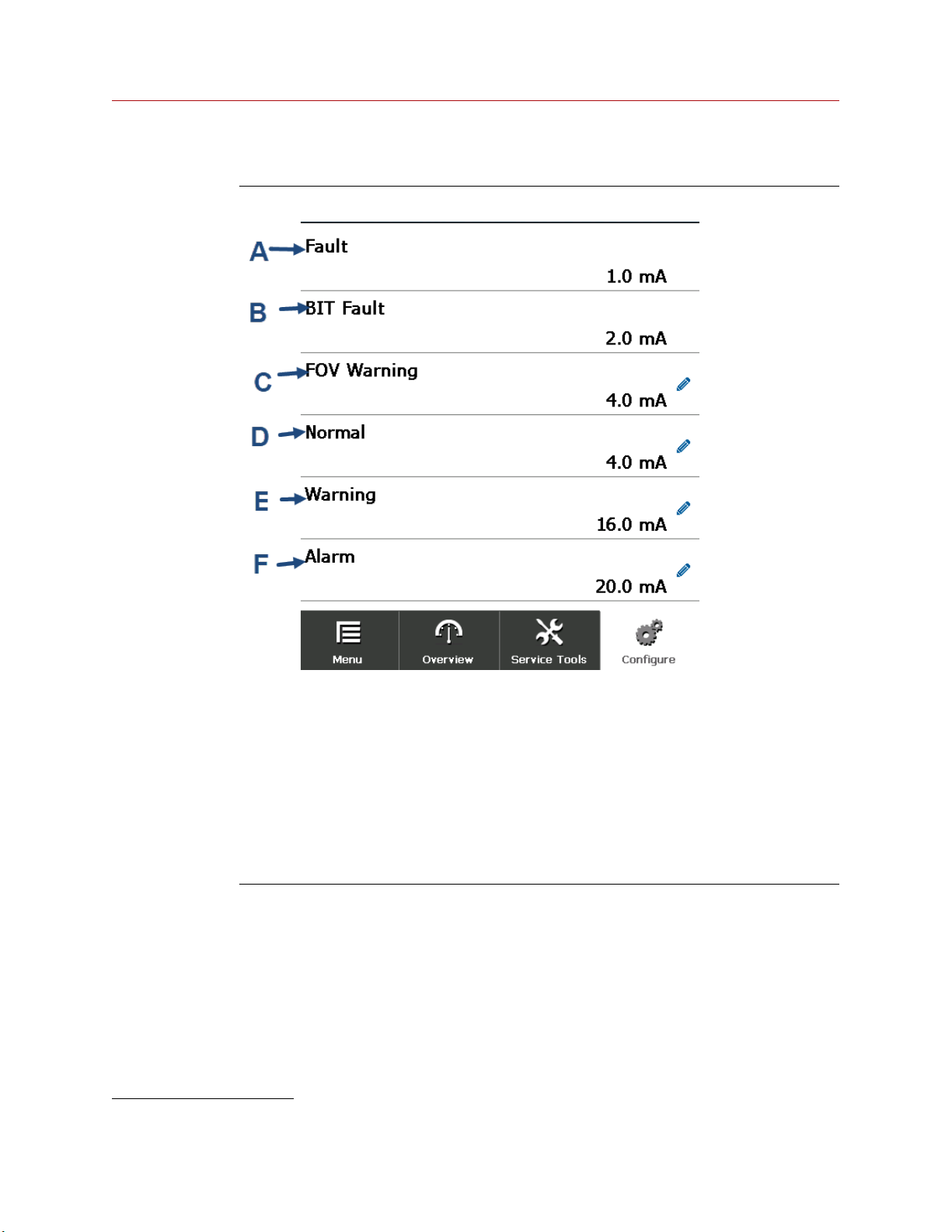
Current levels screen
Figure 3-21: Current levels screen
A. Fault: Current displayed during fault. This cannot be changed (1 mA).
B. BIT Fault: Current displayed during built-in test (BIT) fault. This cannot be changed.
C. FOV Warning: Current displayed during FOV warning. 3 - 5 mA (should always be ≤ the
normal value. Default: 4 mA.
D. Normal: Current displayed during normal function. 4 or 5 mA (should always be ≥ the
FOV value). Default: 4 mA.
E. Warning: Current displayed during warning. 13 - 16 mA (should always be lower than
alarm value). Default: 16 mA.
F. Alarm: Current displayed during alarm. 15 - 20 mA (should always be higher than
warning). Default: 20 mA.
(6) This is available with SharpEye 40/40 models only.
(6)
36 Spectrex.net
Page 37
Reference Manual Operating the HART® hand-held communicator
00909-0300-4975 April 2022
Device information screen
See Device information screen for information on the Device Information screen.
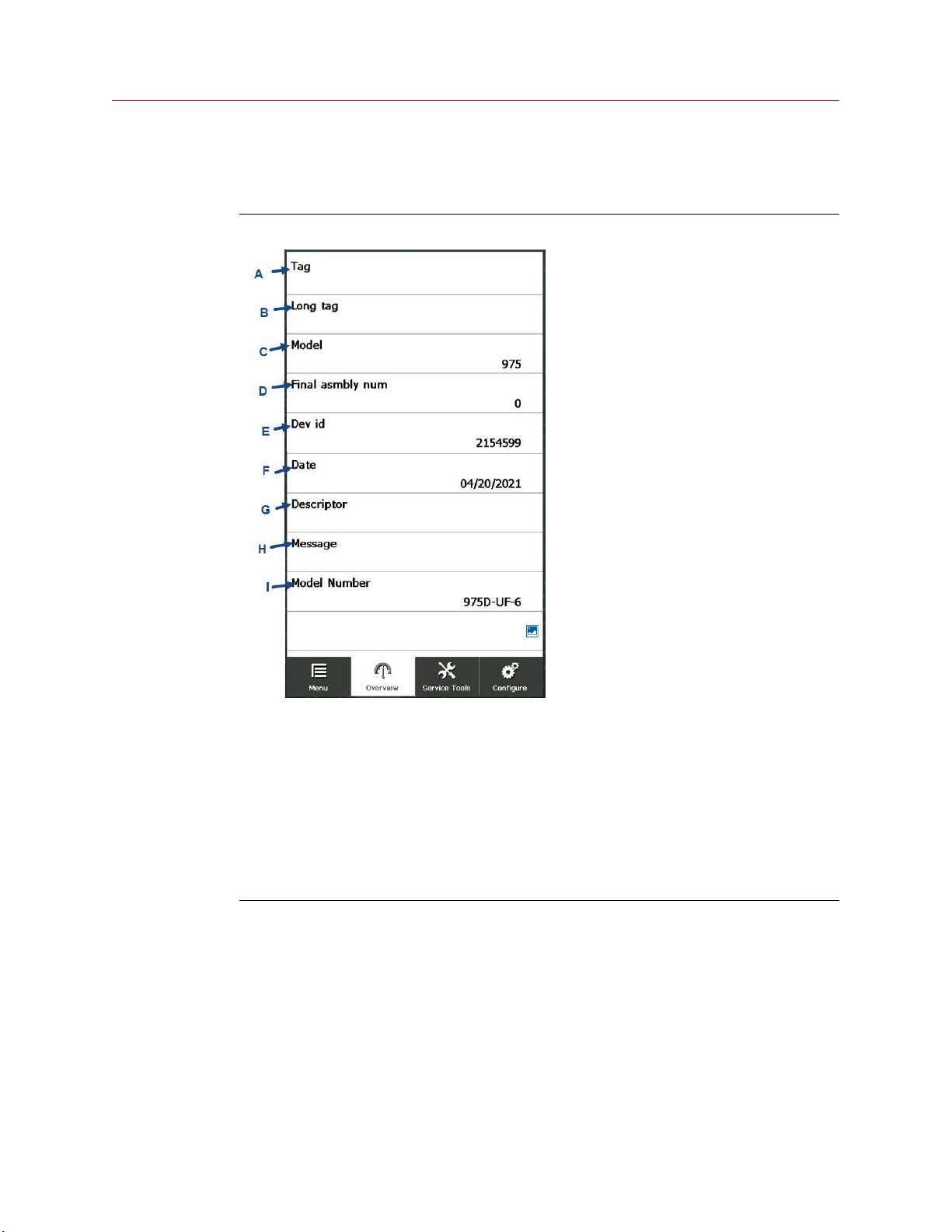
Figure 3-22: Identification screen
A. Tag: Displays detector tag. This is editable.
B. Long tag: Displays detector long tag. This is editable.
C. Model: Displays detector model.
D. Final asmbly num: Displays final assembly number. This is editable.
E. Dev id: Displays device identification number.
F. Date: Displays current date.
G. Descriptor.
H. Message.
I. Model Number.
Spectrex SharpEye 40/40 37
Page 38
Operating the HART® hand-held communicator Reference Manual
April 2022 00909-0300-4975
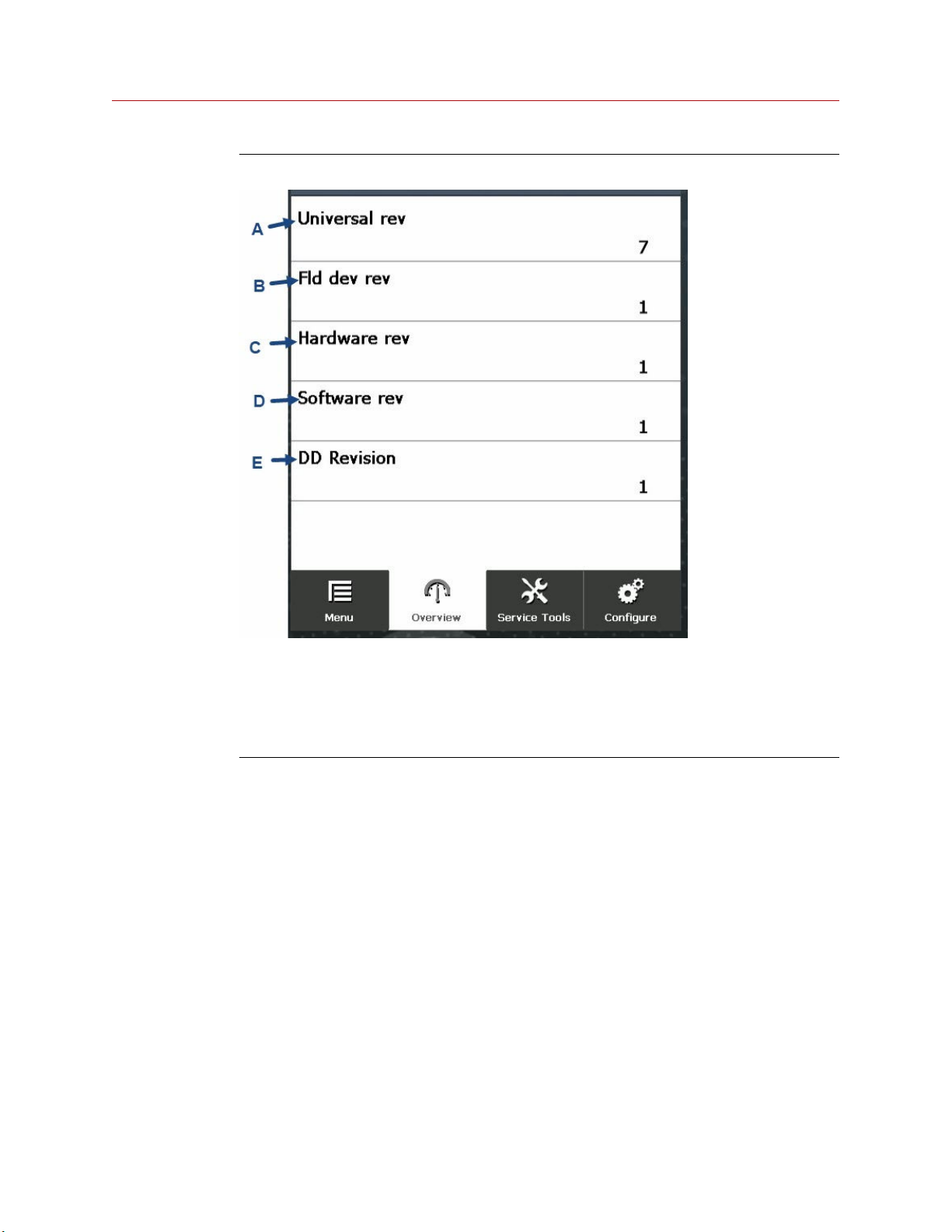
Figure 3-23: Revision numbers screen
A. Universal rev: Displays HART® revision number.
B. Fld dev rev: Displays device revision number.
C. Hardware rev: Displays hardware revision number.
D. Software rev: Displays software revision number.
E. DD Revision: Displays device driver revision number.
38 Spectrex.net
Page 39
Reference Manual Operating the HART® hand-held communicator
00909-0300-4975 April 2022
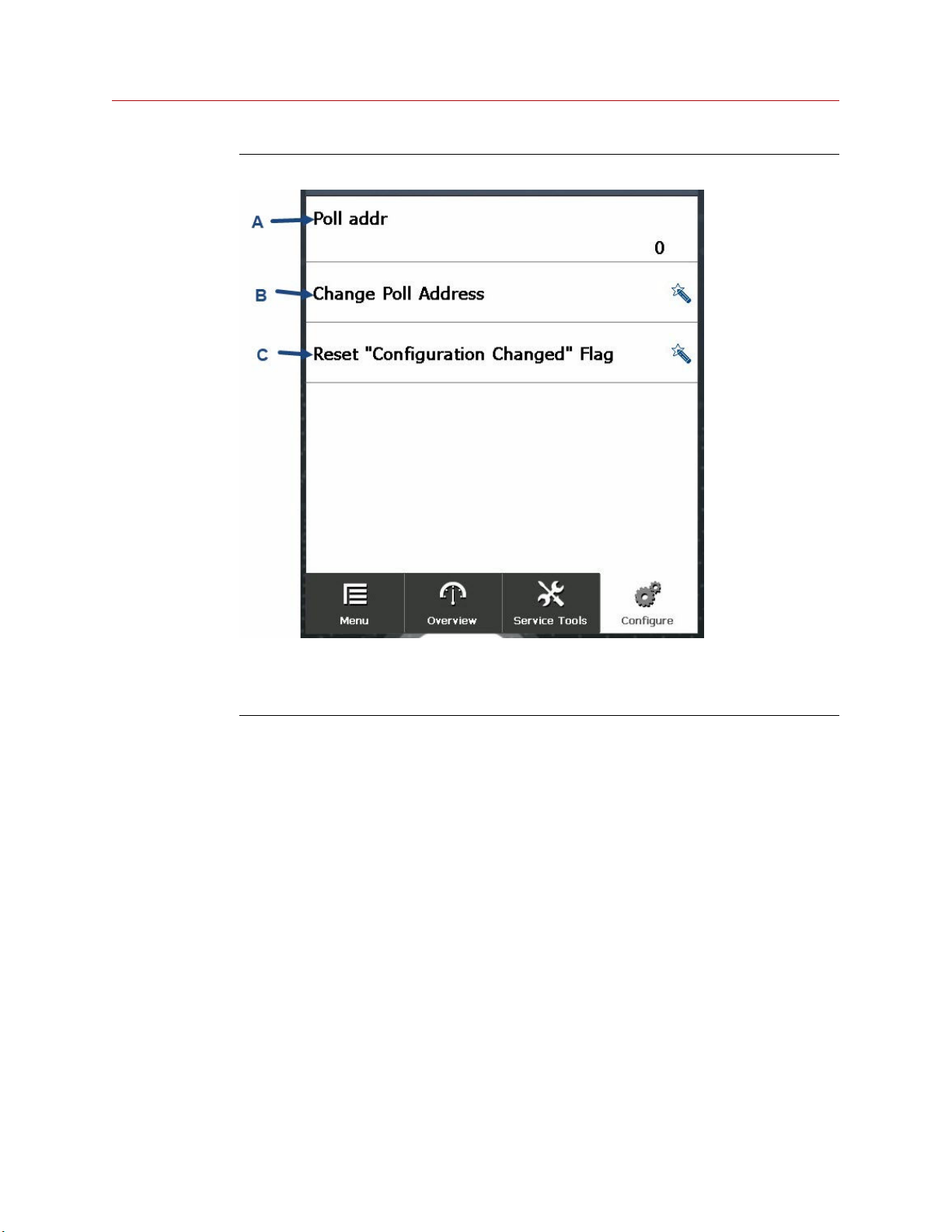
Figure 3-24: HART® screen
A. Poll addr: Displays polling address.
B. Change Poll Address: Tap to change polling address.
C. Reset "Configuration Changed" flag: Tap to reset configuration change count.
Spectrex SharpEye 40/40 39
Page 40
Operating the HART® hand-held communicator Reference Manual
April 2022 00909-0300-4975
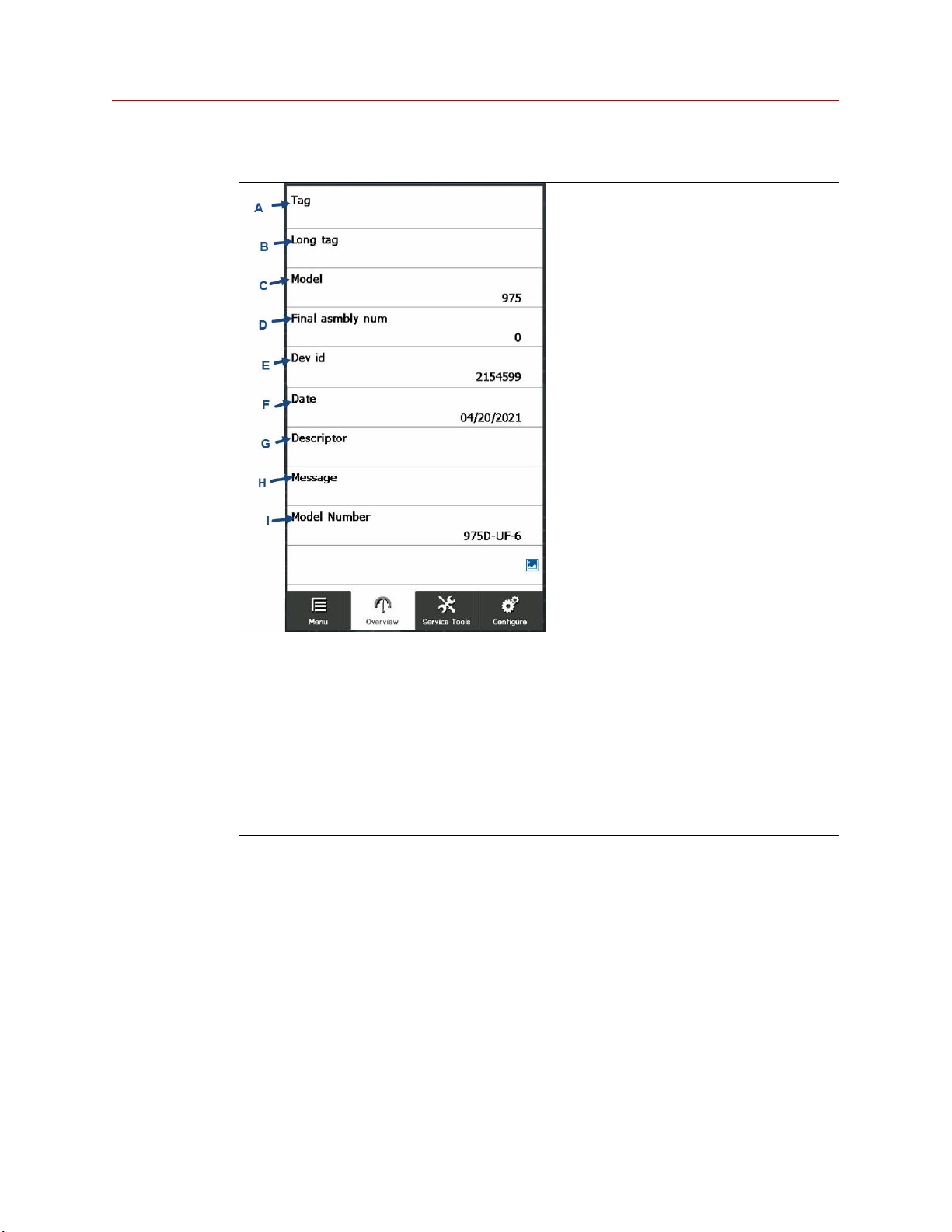
Identification screen
A. Tag: Displays detector tag. This is editable.
B. Long tag: Displays detector long tag. This is editable.
C. Model: Displays detector model.
D. Final asmbly num: Displays final assembly number. This is editable.
E. Dev id: Displays device identification number.
F. Date: Displays current date.
G. Descriptor.
H. Message.
I. Model Number.
40 Spectrex.net
Page 41
Reference Manual Operating the HART® hand-held communicator
00909-0300-4975 April 2022
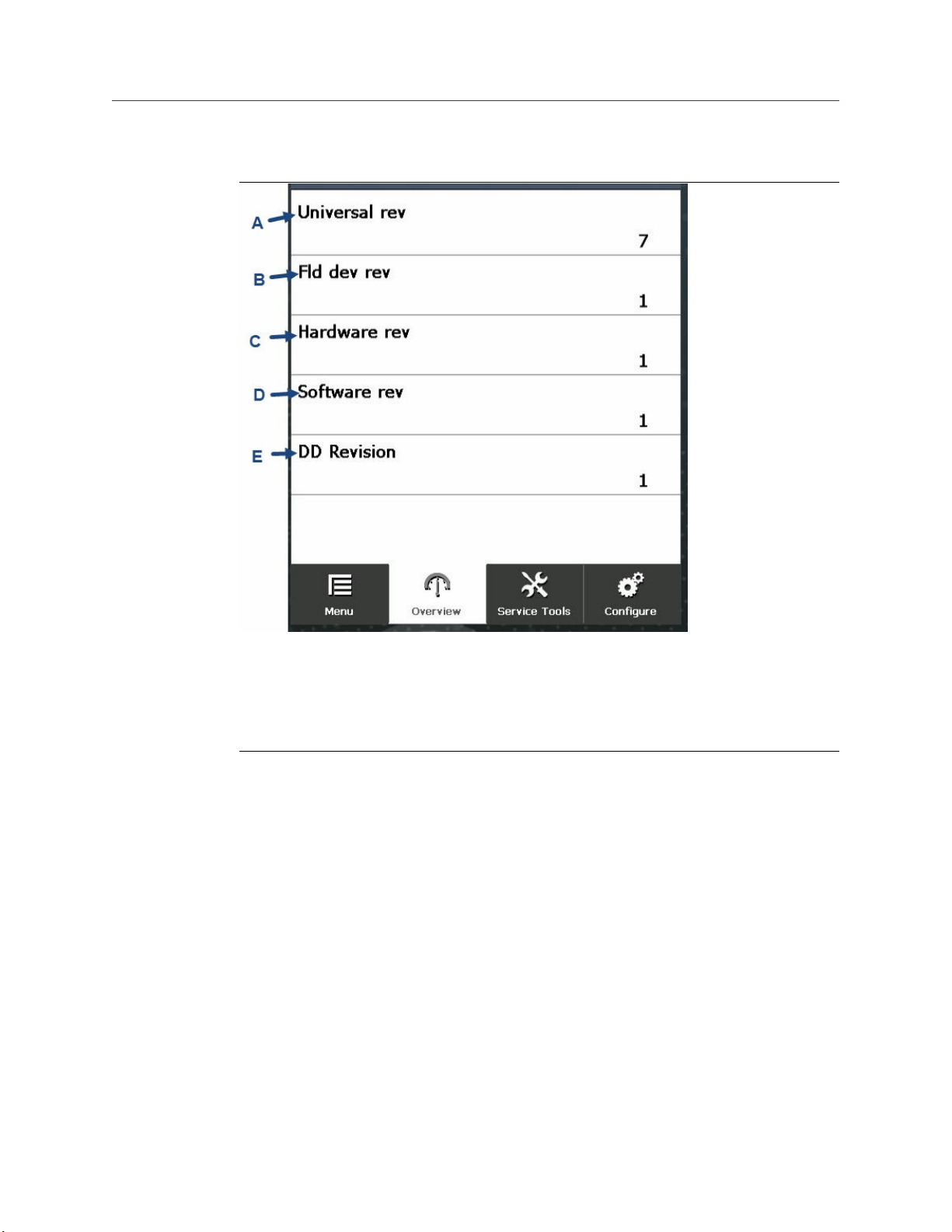
Revision Numbers screen
A. Universal rev: Displays HART® revision number.
B. Fld dev rev: Displays device revision number.
C. Hardware rev: Displays hardware revision number.
D. Software rev: Displays software revision number.
E. DD Revision: Displays device driver revision number.
Spectrex SharpEye 40/40 41
Page 42
Operating the HART® hand-held communicator Reference Manual
April 2022 00909-0300-4975
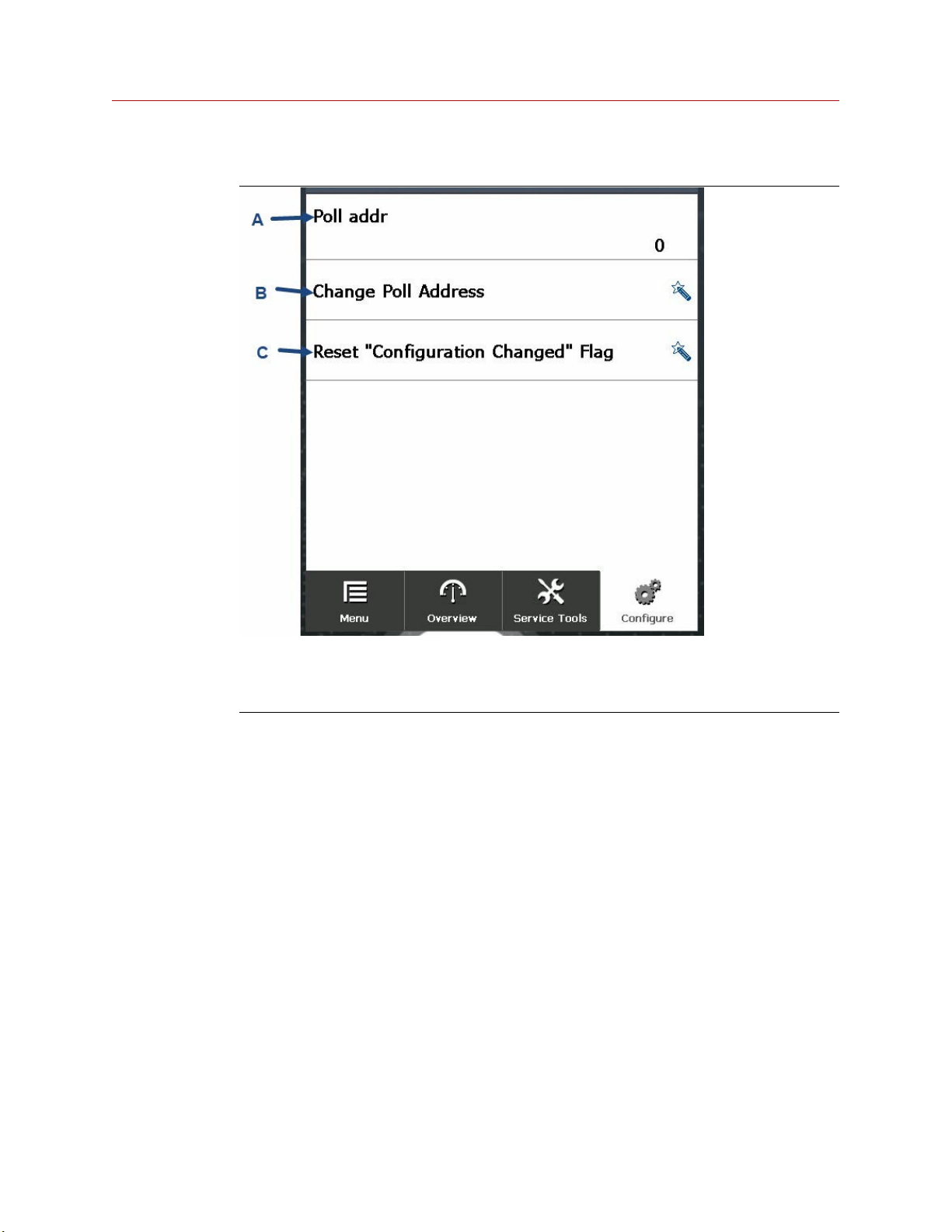
HART screen
A. Poll addr: Displays polling address.
B. Change Poll Address: Tap to change polling address.
C. Reset "Configuration Changed" flag: Tap to reset configuration change count.
42 Spectrex.net
Page 43

Reference Manual
00909-0300-4975 April 2022
Spectrex SharpEye 40/40 43
Page 44

00909-0300-4975
Rev. AA
2022
For more information:
©
2022 Emerson. All rights reserved.
Emerson.com
Spectrex is a mark of one of the Emerson family of companies.
All other marks are the property of their respective owners.
 Loading...