

Page 1

MASTER SETUP UNIT
MSU-700A
MAINTENANCE MANUAL Part 1
1st Edition
Serial No. 15001 and Higher
Page 2

! W ARNING
This manual is intended for qualified service personnel only.
To reduce the risk of electric shock, fire or injury, do not perform any servicing other than that
contained in the operating instructions unless you are qualified to do so. Refer all servicing to
qualified service personnel.
! W ARNUNG
Die Anleitung ist nur für qualifiziertes Fachpersonal bestimmt.
Alle Wartungsarbeiten dürfen nur von qualifiziertem Fachpersonal ausgeführt werden. Um die
Gefahr eines elektrischen Schlages, Feuergefahr und Verletzungen zu vermeiden, sind bei
Wartungsarbeiten strikt die Angaben in der Anleitung zu befolgen. Andere als die angegeben
Wartungsarbeiten dürfen nur von Personen ausgeführt werden, die eine spezielle Befähigung
dazu besitzen.
! AVERTISSEMENT
Ce manual est destiné uniquement aux personnes compétentes en charge de l’entretien. Afin
de réduire les risques de décharge électrique, d’incendie ou de blessure n’effectuer que les
réparations indiquées dans le mode d’emploi à moins d’être qualifié pour en effectuer d’autres.
Pour toute réparation faire appel à une personne compétente uniquement.
MSU-700A MMP1
Page 3
CAUTION
Danger of explosion if battery is incorrectly
replaced.
Voor de klanten in Nederland
Dit apparaat bevat een MnO
back-up.
2-Li batterij voor memory
Replace only with the same or equivalent type
recommended by the manufacturer.
Dispose of used batteries according to the
manufacturer’s instructions.
Vorsicht!
Explosionsgefahr bei unsachgemäßem
Austausch der Batterie.
Ersatz nur durch denselben oder einen vom
Hersteller empfohlenen ähnlichen Typ.
Entsorgung gebrauchter Batterien nach Angaben
des Herstellers.
ATTENTION
Il y a danger d’explosion s’il y a remplacement
incorrect de la batterie.
Remplacer uniquement avec une batterie du
même type ou d’un type équivalent recommandé
par le constructeur.
Mettre au rebut les batteries usagées
conformément aux instructions du fabricant.
Raadpleeg uw leverancier over de verwijdering van de
batterij op het moment dat u het apparaat bij einde
levensduur afdankt.
Gooi de batterij niet weg. maar lever hem in als KCA.
Bij dit produkt zijn batterijen geleverd.
Wanneer deze leeg zijn, moet u ze niet
weggooien maar inleveren als KCA.
ADVARSEL!
Lithiumbatteri-Eksplosionsfare ved fejlagtig
håndtering.
Udskiftning må kun ske med batteri
af samme fabrikat og type.
Levér det brugte batteri tilbage til leverandøren.
MSU-700A MMP1
1 (P)
Page 4

Page 5

Table of Contents
Manual Structure
Purpose of this manual ........................................................................................ 2 (E)
Related manuals................................................................................................... 2 (E)
Contents ............................................................................................................... 2 (E)
1. Installation Overview
1-1. Power Supply ........................................................................................1-1 (E)
1-1-1. Voltage and Power Requirements ........................................1-1 (E)
1-1-2. Power Cord...........................................................................1-1 (E)
1-2. Connectors and Cable ...........................................................................1-2 (E)
1-2-1. Connector Input/Output Signals...........................................1-2 (E)
1-2-2. Connection Connector..........................................................1-4 (E)
1-2-3. Wiring Diagram for Cable ...................................................1-4 (E)
1-3. Installation.............................................................................................1-5 (E)
1-3-1. Installation Conditions .........................................................1-5 (E)
1-3-2. Outer Dimensions.................................................................1-5 (E)
1-4. Instance of System Configuration.........................................................1-6 (E)
1-4-1. BVP-900 Series Camera System..........................................1-6 (E)
1-4-2. HDC-700A Series Camera System ......................................1-8 (E)
2. Service Overview
2-1. Location of Printed Wiring Boards .......................................................2-1 (E)
2-2. Removing/Installing the Cabinet...........................................................2-2 (E)
2-3. Circuit Description ................................................................................2-3 (E)
2-4. Function of Internal Switches ...............................................................2-4 (E)
2-5. Replacing the Backup Battery...............................................................2-5 (E)
2-6. Notes on Repair Parts............................................................................2-5 (E)
3. Spare Parts
4 Overall Block Diagram
Overall.........................................................................................................4-2
MSU-700A MMP1
1 (E)
Page 6

Purpose of this manual
Related manuals
Manual Structure
This manual is the maintenance manual part 1 of Master Setup Unit MSU-700A.
This manual is intended for use by trained system and service engineers, and
provides the installation and maintenance information that is necessary at the time of
primary service.
Besides this “maintenance manual part 1”, the following manuals are available for
this unit.
..
. Operation Manual (Supplied with the MSU-700A)
..
This manual is necessary for application and operation of this unit.
..
. Maintenance Manual Part 2 (Available on request)
..
This manual describes the information items on maintenance, and items that
premise the service based on the components parts such as service information,
semiconductor pin assignments, block diagrams, schematic diagrams and board
layouts.
If this manual is required, please contact your local Sony Sales Office/Service
Center.
Contents
..
. System Manual (Available on request)
..
This manual is necessary for connection and operation of video camera and other
peripheral equipment.
If this manual is required, please contact your local Sony Sales Office/Service
Center.
The followings are summaries of all the sections for understanding the contents of
this manual.
Section 1 Installation Overview
Describes information about power conditions, connector input/output signals and
instance of system configuration.
Section 2 Service Overview
Describes information about board locations, circuit description and function of
internal switches.
Section 3 Spare Parts
Describes spare parts list such as cabinet, knobs and key tops used in this unit.
2 (E)
Section 4 Overall Block Diagram
Describes overall block diagram.
MSU-700A MMP1
Page 7
Section 1
Installation Overview
1-1. Power Supply
1-1-1. Voltage and Power Requirements
Power voltage: AC 100 to 240 V
Power frequency: 50 Hz or 60 Hz
Power consumption: 0.45 A
1-1-2. Power Cord
w
. Never use an injured power cord. If not, it may cause of fire or electric shock.
. The power cord is not supplied in this unit. Use the specified power cord when connecting.
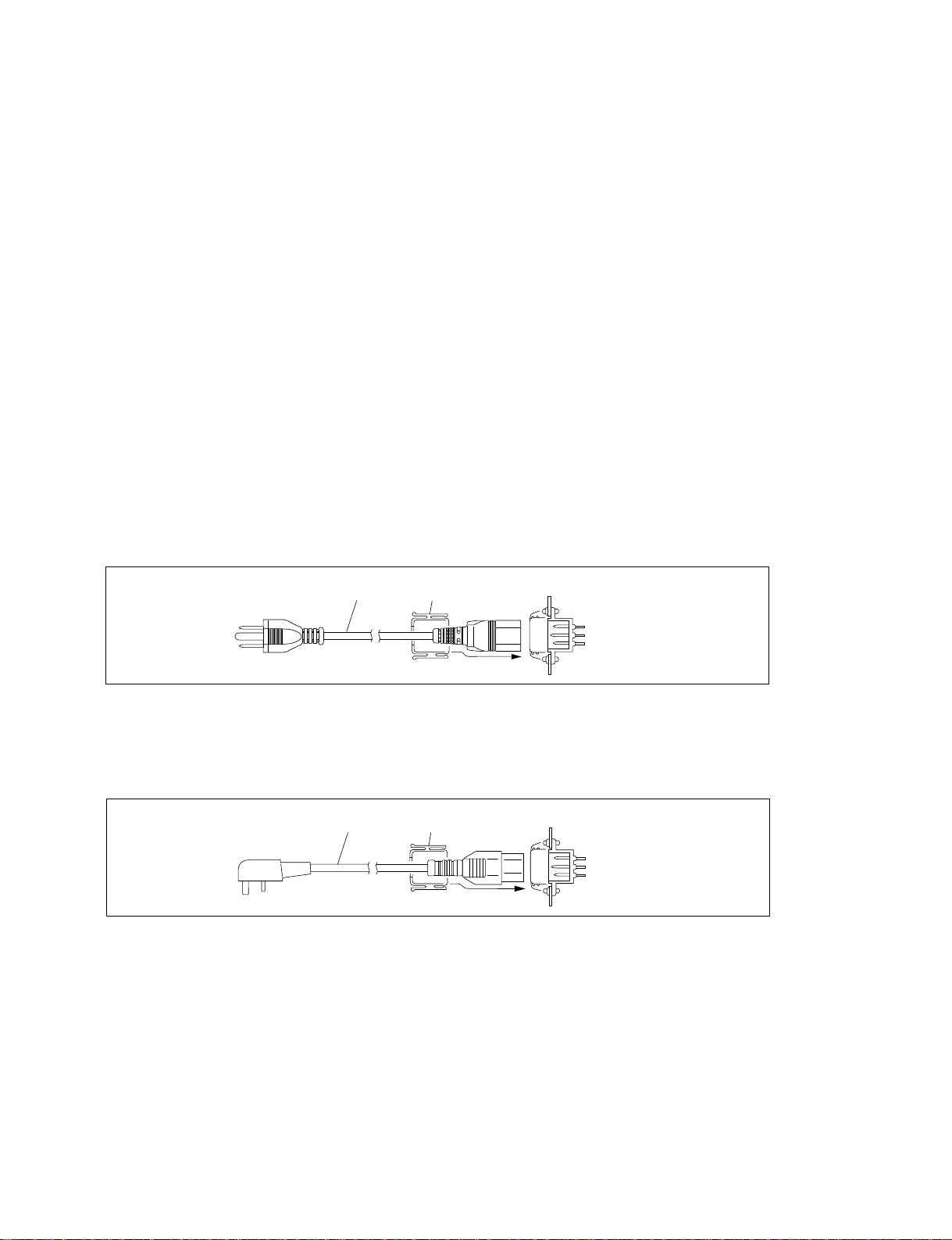
Power cord for the customer in U.S.A. and Canada.
1 Power cord 125V 10A (approx. 2.4 m) ! 1-551-812-11
2 Plug holder (Black) 2-990-242-01
If the specified power cord is required, contact your local Sony Sales Office/Service Center.
1
Power cord for the customer in the United Kingdom.
1 DK-2401(UK) Power cord 250V 10A (approx. 2.4 m)
2 Plug holder (Black) 2-990-242-01
Plug holder is included in DK-2401(UK).
1
2
2
AC inlet
AC inlet
MSU-700A MMP1
1-1 (E)
Page 8
1-1. Power Supply
1-2. Connectors and Cable
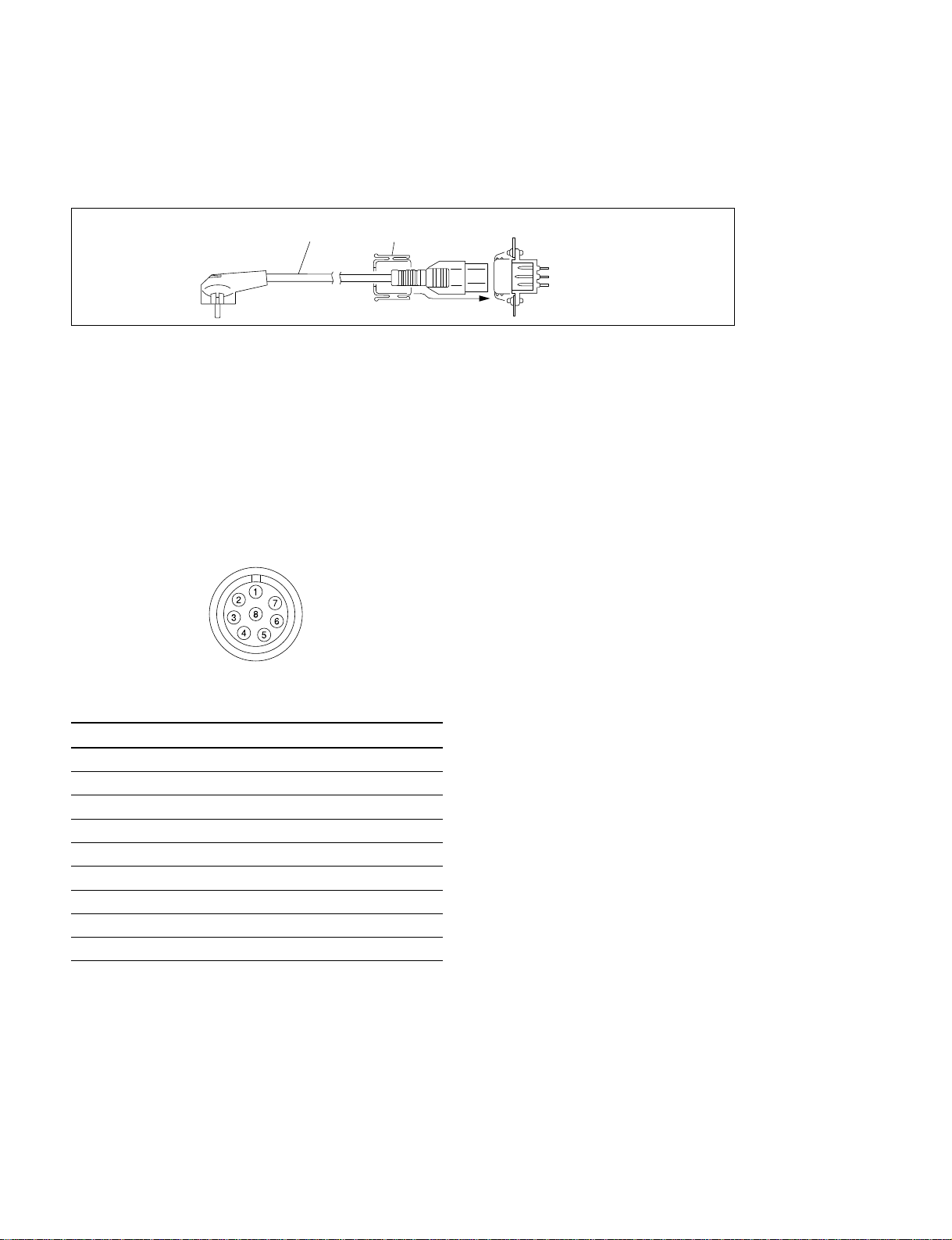
Power cord for the customer in the Europe except the United Kingdom.
1 DK-2401(AE) Power cord 250V 10A (approx. 2.4 m)
2 Plug holder (Brown) 3-613-640-01
Plug holder is included in DK-2401(AE).
1
2
AC inlet
If the unit is used in the area except above, contact your local Sony Sales Office/Service Center.
1-2. Connectors and Cable
1-2-1. Connector Input/Output Signals
REMOTE (8-pin, Female)
AUX
CCU/CNU
< Rear panel >
Pin No. Signal Specifications
1 TX (+) MSU Serial data
2 TX (_) MSU Serial data
3 RX (+) CCU/CNU/AUX Serial data
4 RX (_) CCU/CNU/AUX Serial data
5 TX GND GND for TX
6 POWER (+) Not used
7 POWER (_) Not used
8 SPARE ——
CHASSIS GND Chassis GND
1-2 (E)
MSU-700A MMP1
Page 9
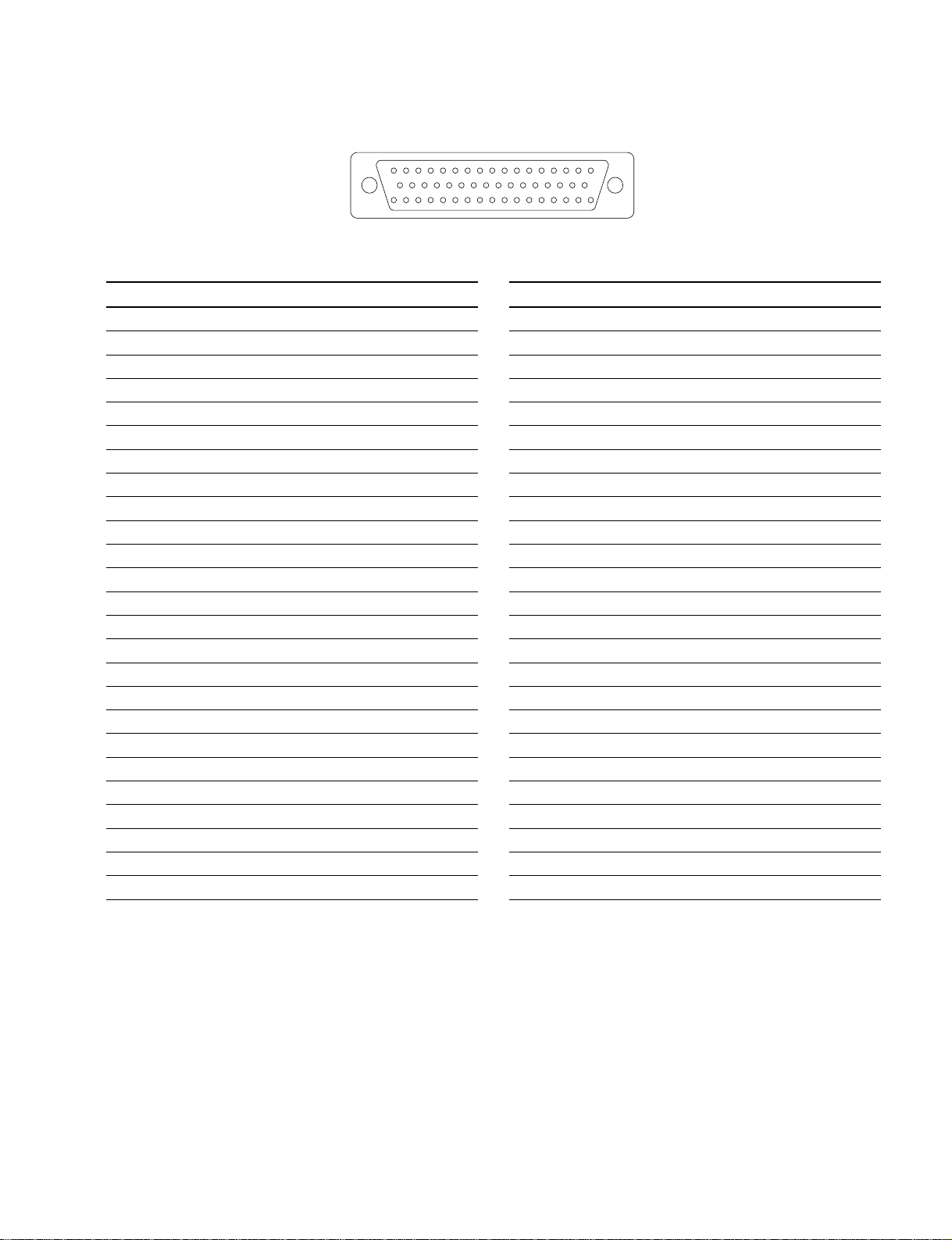
I/O PORT (50-pin, Female)
1-2. Connectors and Cable
1716151413121110987654321
33323130292827262524232221201918
5049484746454443424140393837363534
< Rear panel >
Pin No. Signal Specifications
1 EXT I/O-00 INPUT/OUTPUT PORT
2 EXT I/O-03 INPUT/OUTPUT PORT
3 EXT I/O-06 INPUT/OUTPUT PORT
4 EXT I/O-11 INPUT/OUTPUT PORT
5 EXT I/O-14 INPUT/OUTPUT PORT
6 EXT I/O-17 INPUT/OUTPUT PORT
7 EXT I/O-22 INPUT/OUTPUT PORT
8 EXT I/O-25 INPUT/OUTPUT PORT
9 EXT I/O-30 INPUT/OUTPUT PORT
10 EXT I/O-33 INPUT/OUTPUT PORT
11 EXT I/O-36 INPUT/OUTPUT PORT
12 EXT I/O-41 OUTPUT PORT
13 EXT I/O-44 INPUT PORT
14 EXT I/O-47 INPUT PORT
(*1)
(*1)
(*1)
15 +12 V OUT Utility power 12 V
16 +12 V OUT Utility power 12 V
17 SPARE No connection
18 EXT I/O-01 INPUT/OUTPUT PORT
19 EXT I/O-04 INPUT/OUTPUT PORT
20 EXT I/O-07 INPUT/OUTPUT PORT
21 EXT I/O-12 INPUT/OUTPUT PORT
22 EXT I/O-15 INPUT/OUTPUT PORT
23 EXT I/O-20 INPUT/OUTPUT PORT
24 EXT I/O-23 INPUT/OUTPUT PORT
25 EXT I/O-26 INPUT/OUTPUT PORT
(*1)
(*1)
(*1)
(*1)
(*1)
(*1)
(*1)
(*1)
(*1)
(*1)
(*1)
(*1)
(*1)
(*1)
(*1)
(*1)
(*1)
(*1)
(*1)
Pin No. Signal Specifications
26 EXT I/O-31 INPUT/OUTPUT PORT
27 EXT I/O-34 INPUT/OUTPUT PORT
28 EXT I/O-37 INPUT/OUTPUT PORT
29 EXT I/O-42 OUTPUT PORT
30 EXT I/O-45 INPUT PORT
(*1)
(*1)
31 +5 V OUT Utility power 5 V
32 GND (+5 V) GND for utility power 5 V
33 GND (+12 V) GND for utility power 12 V
34 EXT I/O-02 INPUT/OUTPUT PORT
35 EXT I/O-05 INPUT/OUTPUT PORT
36 EXT I/O-10 INPUT/OUTPUT PORT
37 EXT I/O-13 INPUT/OUTPUT PORT
38 EXT I/O-16 INPUT/OUTPUT PORT
39 EXT I/O-21 INPUT/OUTPUT PORT
40 EXT I/O-24 INPUT/OUTPUT PORT
41 EXT I/O-27 INPUT/OUTPUT PORT
42 EXT I/O-32 INPUT/OUTPUT PORT
43 EXT I/O-35 INPUT/OUTPUT PORT
44 EXT I/O-40 OUTPUT PORT
45 EXT I/O-43 OUTPUT PORT
46 EXT I/O-46 INPUT PORT
(*1)
(*1)
(*1)
47 +5 V OUT Utility power 5 V
48 GND (+5 V) GND for utility power 5 V
49 GND (+12 V) GND for utility power 12 V
50 SPARE No connection
(*1) INPUT ON: 5 V
OFF : 0 V
(*1)
(*1)
(*1)
(*1)
(*1)
(*1)
(*1)
(*1)
(*1)
(*1)
(*1)
(*1)
(*1)
MSU-700A MMP1
OUTPUT TTL LEVEL
Darlington transistor drive
One port: max 5 mA
All ports total: max 60 mA
EXT: 1.5 V, RETX: 1.1 kZ)
(V
1-3 (E)
Page 10

1-2. Connectors and Cable
1-2-2. Connection Connector
Connection made with the rear panel during installation or service, should be made with the connectors/
complete cable assemblies specified in the following list, or equivalent parts.
Connector Name Connection Connectors/Cables
REMOTE AUX (8-pin) Plug 8-pin, Male (Sony part number: 1-766-848-11)
REMOTE CCU/CNU (8-pin) or
CCA-5 cable assembly (Option)
CCA-5-3 (3 m)/CCA-5-10 (10 m)
I/O PORT (50-pin) Plug, D-SUB 50-pin, Male (Sony part number: 1-566-358-11)
or
JAE DDU-50PF-F0 or equivalent
1-2-3. Wiring Diagram for Cable
CCA-5 cable
Black
White
1
2
4
7
8
63
5
8-pin connector (Male)
(Wiring side)
Red
White
Brown
White
Red
Orange
BrownBrown
1
2
4
7
8
5
8-pin connector (Male)
(Wiring side)
63
1-4 (E)
MSU-700A MMP1
Page 11

1-3. Installation
1-3-1. Installation Conditions
Install the unit in the following conditions.
Operating temperature: 0 dC to +45 dC
Storage temperature: _25 dC to +60 dC
Humidity: No condense
1. Install the unit in a location as dry and well-ventilated as possible.
2. Leave a space more than 20 cm at the rear side of the unit.
3. Do not install the unit in the following conditions.
. High temperatures room or near the heat source.
. Excessive dust or mechanical vibration.
. Intense magnetic and electric fields.
. A place subjected to direct sunlight or strong light.
1-3. Installation
1-3-2. Outer Dimensions
c
When installing the unit into the console or drawer, incorporate a breaker for the emergency protection.
No.
R
MSU-700A
MODEL
481
400
22
67
6716
222
MSU-700A MMP1
Unit : mm
1-5 (E)
Page 12

1-4. Instance of System Configuration
1-4. Instance of System Configuration
1-4-1. BVP-900 Series Camera System
ELECTRONIC VIEWFINDER
BVF-77/77CE
BVF-7700/7700P
STUDIO ZOOM LENS
ENG/EFP LENS
CCD UNIT
OHB-750A/750AP
OHB-730/730P
4 : 3
16 : 9
OHB-750WSA/750WSAP
OHB-730WS/730WSP
2" VF(BVF-20W/20WCE)
1.35" COLOR VF(BVF-C10W)
1.5" VF(BVF-10/10CE)
CCD UNIT
OHB-750A/750AP
OHB-730/730P
4 : 3
16 : 9
OHB-750WSA/750WSAP
OHB-730WS/730WSP
TRIAX CABLE
COLOR VIDEO CAMERA
BVP-900/900P
ELECTRONIC
VIEWFINDER
BVF-55/55CE
CAMERA ADAPTOR
CA-570/570P
CA-550/550P
TRIAX CABLE
COLOR VIDEO CAMERA
BVP-950/950P
1-6 (E)
MSU-700A MMP1
Page 13

REMOTE CONTROL
PANEL
RCP-700 RCP-701
CCA-5 CABLE
(*1)
CCA-5 CABLE
(*1)
1-4. Instance of System Configuration
REMOTE CONTROL PANEL
RCP-720 RCP-721 RCP-740 RCP-741
RCP-730 RCP-731
CAMERA CONTROL UNIT
CCU-700/700P/700A/700AP
PIX 2
WF 2
PIX 2
VIDEO SELECTOR
VCS-700
WF 2
CAMERA CONTROL UNIT
CCU-550/550P
CCU-550A/550AP
*1: CCA-5 CABLE LENGTH
CCA-5 CABLE
(*1)
CCA-5 CABLE
(max. 200 m)
PIX
WF
CCU-700/700P/700A/700AP
CCU-700
CNU-700
CAMERA COMMAND
NETWORK UNIT
CNU-700/500
MASTER SETUP UNIT
MSU-700A
CCA-5 CABLE
(*1)
200 m
CCA-5 CABLE
(*1)
CCA-5 CABLE
(max. 200 m)
RCP-700/701/720
/721/730/731/740/741
MSU-700A MMP1
CCU-700
CCU-700
CCU-700
CNU-700
RCP-720/721/730
/731/740/741
160 m
RCP-720/721/730
/731/740/741
90 m
RCP-720/721/730
/731/740/741
45 m
RCP-720/721/730
/731/740/741
RCP-700/701CNU-700
RCP-720/721/730
/731/740/741
RCP-700/701CNU-700
1-7 (E)
Page 14

1-4. Instance of System Configuration
1-4-2. HDC-700A Series Camera System
HD ZOOM LENS
STUDIO ZOOM LENS
HD ELECTRONIC
VIEWFINDER
HDVF-700/7700
OPTICAL FIBER CABLE
FC2-PD250/PD50
HD COLOR CAMERA
HDC-700A
HD LENS
ENG/EFP LENS
HD ZOOM LENS
STUDIO ZOOM LENS
HD LENS
ENG/EFP LENS
HD ELECTRONIC VIEWFINDER
HDVF-20
HD COLOR CAMERA
HDC-750A
HD BUILD-UP UNIT
HKCA-700
HD COLOR CAMERA
HDC-750A
HD CAMERA ADAPTOR
HDCA-750A
HD ELECTRONIC
VIEWFINDER
HDVF-500
HD CAMERA ADAPTOR
HDCA-750A
OPTICAL FIBER CABLE
FC2-PD250/PD50
HD ELECTRONIC
VIEWFINDER
HDVF-700/7700
1-8 (E)
MSU-700A MMP1
Page 15

REMOTE CONTROL
PANEL
RCP-700 RCP-701
1-4. Instance of System Configuration
REMOTE CONTROL PANEL
RCP-720 RCP-721 RCP-740 RCP-741
CCA-5 CABLE
(*1)
CCA-5 CABLE
(*1)
CAMERA CONTROL UNIT
HDCU-700A
HD-SDI
HD DIGITAL
VIDEO SELECTOR
HD-SDI
CAMERA CONTROL UNIT
HDCU-700A
*1: CCA-5 cable length
HD-SDI
HD-SDI
CCA-5 CABLE
(*1)
D-sub 9-pin
CABLE
MONITOR
CAMERA COMMAND
NETWORK UNIT
CNU-700/500 (*2)
MASTER SETUP UNIT
MSU-700A
CCA-5 CABLE
(*1)
CCA-5 CABLE
(*1)
CCA-5 CABLE
(max. 200 m)
( )
RCP-700/701
*2: Installation of HD Master Set-up Kit HKCF-700 is needed.
MSU-700A MMP1
CCA-5 CCA-5 CCA-5
RCP
200 m or below in total length
CNU
HDCU-700A
1-9 (E)
Page 16

Page 17

Section 2
Service Overview
2-1. Location of Printed Wiring Boards
CN-1004 board
LED-208 board
CN-1005 board
LED-207 board
SW-678 board
LED-209 board
CPU-293 board
VR-187 board
MSU-700A MMP1
2-1 (E)
Page 18

2-2. Removing/Installing the Cabinet
2-2. Removing/Installing the Cabinet
1. Remove the four screws (B3 x 5) and two screws (PSW3 x 6), and then remove the bottom chassis.
PSW3 x 6
PSW3 x 6
B3 x 5
Bottom chassis
B3 x 5
2. Install the bottom chassis in the reverse procedure of removal.
B3 x 5
2-2 (E)
MSU-700A MMP1
Page 19

2-3. Circuit Description
The CPU-293 board is a main control board.
The following describes the functions for the main IC.
MAIN CPU periphery
IC7 (Main CPU): Performs control of the whole system (using a 32-bit RISC).
Communication with SW-678 is performed by serial communication between CPUs.
IC5, 6: Program ROM
IC9 to 12: Stores execution programs and variables, etc.
IC24, 25: Stores set values of the unit.
IC28: Stores special set values.
IC14, 15, 20 to 23: CPU I/O (8-bit 3ch PIO)
IC1: Chip selector (PLD) made up of an address decoder
DISPLAY periphery
IC107: Main controller for EL display
IC111: Switches the address buses of the display controller and CPU
(16-bit multiplexer).
IC120, 121: Stores image data for the EL display (VRAM).
2-3. Circuit Description
Others
IC304: IC for command communication (2ch lines can be transmitted and received)
IC406 to 411: Controller for the rotary encoder
IC36: Real-time clock IC (MSU internal clock)
The program ROM of this board uses two 8-bit BUS flash memories to operate the data bus at 16 bits. As
the data bus of the CPU itself is 32 bits, the bus width is used effectively according to the device to raise
the processing speed.
MSU-700A MMP1
2-3 (E)
Page 20

2-4. Function of Internal Switches
2-4. Function of Internal Switches
CPU-293 Board
A B C D E F G H J K L MN
1
(BUZZER ON/OFF)
2
3
4
S1 S2 S3 S4
5
CPU-293 board (A side)
(RESET)
n
Do not change the setting of “Not used” switches.
S1 : Not used (Factory settings are OFF.)
S2 : Not used (Factory settings are OFF.)
S3 : Not used (Factory settings are OFF.)
S4 : Not used (Factory settings are OFF.)
S5 : Reset switch
This is not used in the normal operation, used for system control reset.
S6 : Buzzer ON/OFF switch
When this switch is turned “ON,” buzzer sounds by the input CALL and other signals.
(Factory setting is ON.)
S5
S6
2-4 (E)
MSU-700A MMP1
Page 21

2-5. Replacing the Backup Battery
2-5. Replacing the Backup Battery
n
When replacing the lithium battery, ensure that the marks + and _ are correctly oriented.
If connected incorrectly, injuries and damage to objects in the periphery may result from tears and
leakage of fluid.
The unit is equipped with a battery for data backup (BT1) on the CPU-293 board.
When replacing, be sure to use the following specified part.
Replacement Part: BT1/CPU-293 board (E4)
Part Description: CR-2450 (lithium battery)
Part No.: 1-528-229-41
The CPU-293 board incorporates a clock for recording the time and date at which the reference files and
scene files were stored in the IC memory card.
The backup battery maintains the time of the clock when the power is OFF. Therefore, when data is
stored on the IC memory card with worn out battery, the correct time and date will not be recorded.
When writing the data in the IC memory card with battery starting to run out, an alarm message will be
displayed on the EL display. Replace the battery when this alarm message is displayed.
After replacement, set the time and date. (Refer to the operation manual.)
Even if the battery runs out, the correct time and date can be recorded by setting the time of the unit
before writing the data on the IC memory card.
2-6. Notes on Repair Parts
2-6. Notes on Repair Parts
1. Safety Related Components Warning
w
Components marked ! are critical to safe operation. Therefore, specified parts should be used in the
case of replacement.
2. Standardization of Parts
Some repair parts supplied by Sony differ from those used for the unit. These are because of parts
commonality and improvement.
Parts list has the present standardized repair parts.
3. Stock of Parts
Parts marked with “o” at SP (Supply Code) column of the spare parts list may not be stocked.
Therefore, the delivery date will be delayed.
4. Units Representation
The following represented units are changed or omitted in writing.
Units Representation
Capacitance uF uF
Inductance uH uH
Resistance Z Abbreviation
MSU-700A MMP1
2-5 (E)
Page 22

Page 23

Section 3
Spare Parts
32 31 5 31 14 36
37
32
31
32
2
2345
1
ECS
ON
GB
R
RGB
ENC
ENCSEQ
1
2345
ABCDE
2
1
5
31
1 2 3
4 5 6 7 8 9
10
11
12
3
30
4
2345
1
ECS
34
ON
33 35
GB
R
RGB
ENC
ENCSEQ
2345
1
ABCDE
29
35
11 13 28 6 8 10
12 27 31
1 2 3
4 5 6 7 8 9
79
10
11
12
252321191715
No. Part No. SP Description
1 X-3167-051-1 s KNOB ASSY, BOLUME
2 3-681-388-02 o BRACKET
3 3-681-390-02 o KNOB, IRIS
4 3-681-391-02 o KNOB, MASTER BLACK
5 3-708-877-01 s CAP
6 3-708-877-11 s CAP “A”
7 3-708-877-21 s CAP “B”
8 3-708-877-31 s CAP “C”
9 3-708-877-41 s CAP “D”
10 3-708-877-51 s CAP “E”
11 3-708-877-61 s CAP “R”
12 3-708-877-71 s CAP “G”
13 3-708-877-81 s CAP “B”
14 3-708-895-01 s CAP
15 3-708-930-01 s CAP “1”
16 3-708-930-11 s CAP “2”
17 3-708-930-21 s CAP “3”
18 3-708-930-31 s CAP “4”
19 3-708-930-41 s CAP “5”
20 3-708-930-51 s CAP “6”
MSU-700A MMP1
262422201816
No. Part No. SP Description
21 3-708-930-61 s CAP “7”
22 3-708-930-71 s CAP “8”
23 3-708-930-81 s CAP “9”
24 3-708-931-01 s CAP “10”
25 3-708-931-11 s CAP “11”
26 3-708-931-21 s CAP “12”
27 3-708-932-11 s CAP “SEQ”
28 3-708-932-21 s CAP “ENC”
29 3-708-933-01 s CAP (RED)
30 3-708-933-11 s CAP “CALL” (RED)
31 3-708-934-01 s CAP (GREEN)
32 3-708-935-01 s CAP (ORANGE)
33 3-708-937-01 s CAP “ON”
34 3-708-937-31 s CAP “ECS”
35 3-708-937-41 s CAP “T“
36 3-708-938-01 s CAP (RED)
37 3-708-940-01 s CAP (ORANGE)
3-1
Page 24

Page 25

Section 4
Overall Block Diagram
MSU-700A MMP1
4-1
4-1
Page 26

MSU-700A (SY) : S/N 15001 and Higher
OverallOverall
IC CARD
CN-1004
CN102
AUX COM
8PIN FEMALE
-EXT VIEW-
1
2
7
8
3
6
4 5
CN103
CCU COM
8PIN FEMALE
-EXT VIEW-
1
2
7
8
3
6
4 5
CN101
I/O PORT
50PIN FEMALE
-EXT VIEW-
50
1
CN-1005
4-1
4-2
4-3
4-4
5-1
5-2
5-3
5-4
1-29
1-68
1-1
1-2
1-3
1-4
1-5
1-6
1-7
1-8
CPU-293
1-1
1-51
1-2
1-52
1-3
1-53
1-4
1-54
40
1-15
1-84
IC301(1/2)
LINE
DRIVER
PH301
LINE
RECEIVER
IC301(2/2)
LINE
DRIVER
PH302
LINE
RECEIVER
IC2,X1
27MHz
OSC
19
19 8
EEPROM
19 8
EEPROM
TO SELECT DEVICE
IC5
FLASH
RD
IC6
FLASH
IC304
TVDA
COMMUNICATION
XRVDA
RVDA
TVDB
XRVDB
RVDB
IC1
MCLK
CHIP SELECT
19
WRL
WRH
RD
5
2
I/O BUS
ADDRESS BUS
DATA BUS
IC9,10
19
SRAM
IC11,12
19
SRAM
8
4
CONTROL BUS
ADDRESS BUSS
8
x2
WRL ,WRH
RD
8
x2
9
I/O BUS
DATA BUS
15
15
(10)
15
WRHL, WRHH(12)
RD
XTAL
EXTAL
22
32
8
IC24
EEPROM
IC25
EEPROM
IC416
46
BUFFER
IC416
32
INV.
IC7
A0
MAIN
A21
CPU
D0
D31
IC29,31,32,35
BUZZER
CONTROLLER
BZ ON
8
WRL
RD
RESET
8
WRH
RD
RESET
IC416,X401
18MHz
OSC
6667TXD
RXD
2
BUZZER
ON/OFF
2
S6
IC213~216
CARD
WAIT/
INTERRUPT
CONT
S1~S4
8
4
RESET
CLOCK
DIP
IC28
RAM
IC36
REAL
TIME
2-24
2-22
2-20
2-18
2-12
2-10
IC120,121
16
10
VIDEO
RAM
2-8
2-6
PAINT1
PAINT2
PAINT3
RV1
RV2
AB
A
B
A
B
EL
DISPLAY
AB AB AB
9-11
19-2
9-10
19-3
9-8
19-5
9-7
19-6
9-5
19-8
9-4
19-9
9-2
19-11
9-1
19-12
10-3
10-2
11-3
11-2
5-6
6
5-11
5-1
5-5
5-12
5-16
4-1
4-9
4-2
4-10
4-3
4-4
4-5
RV101
MASTER BLACK
RV102
IRIS
TO
TOUCH
PANEL
4-1
4-2
4-3
4-4
4-5
4-7
4-9
PAINT4
RV3
RV4
VR-187
IC204~207
DRIVER
IC207
DRIVER
IC203
CARD IND
R/G GEN.
IC22,23
I/O
PORT
x2
3
IC20,21
I/O
PORT
x2
3
IC14,15
I/O
PORT
x2
3
5
SW
NV
8
IC208,209
BUS
DRIVER
12V5V
IC217
POWER
OFF
DELAY
DRIVER COUNTER
IC111IC107
DISPLAY ADDRESS
CONTROLLER
10
16 16
MULTI
PLEXER
DATA BUS
TRANSCEIVER
IC108~110,112~119,122~125
TIMING
GEM.
IC406~408IC409~411
15
IC126~129
4-2
4-2
MSU-700A MMP1
Page 27

1-24
1-22
1-20
1-18
1-12
1-10
1-8
1-6
OverallOverall
07D-2
L
IC28
4
LINE4413
R
D101
BUZZER
ACCESS
G
SUB
CPU
SELECTER
LINE
SELECTER
134
Q1~Q104IC1~IC13
DRIVERLATCH
S2S1
ALL CAM PW
S9
S10
AUTO AUX AUTO HUE
S17
S18
SW19
SW20
S26
S25
SW11
SW10
S33
S34
SW2SW1
S42
S41 S44
S49
S50
ECS
SS ON
S57
S58
PARA PIX R PIX B
S65
S66
PIX-G PIX ENC
S73
S74
WF ENC CC A
WF SEQ
S81 S82 S83 S84 S85 S86
CAM9
CAM10
S90
S89
CAM1
CAM2
S98
S97
CONTROL SWITCH MATRIX
S3
VF PW
TEST1
S12
S11
START
LEVEL
/BREAK
S20
S19
SW22
SW21
S28
S27
SW12
SW13
S35
S36
SW3
SW4
S43
S51
S52
SS UP
SS DOWN
S60
S59
PIX G
S68
S67
FILTER
ND1
CONTROL
S76
S75
IRIS
LOCAL
CAM12
CAM11
S92
S91
CAM3
CAM4
S99
S100
S5S4
TEST2
S13
AWB
S21
SW23
S29
SW14
S37
SW5
S45
S53
GAMMA
UP
S61
ACTIVE
S69
ND2
S77
CC B
CALL
S93
CAM5
S101
ABB SW27
S22
SW24
SCENE
STORE
S54 S55
GAMMA
DOWN
S78
CC C
AUTO IRIS
S7S6
CLOSEBARS
S15S14
S23
SW25
S31S30
SW16SW15
S39S38
SW7SW6
S47S46
SHOT FILESCENE1 SCENE2 SCENE3 SCENE4 SCENE5
GAIN UP
S63S62
WF GWF R
S71S70
ND4ND3
S79
CC D
EXTENDER
S95S94
CAM7CAM6
S103S102
MODE6MODE5MODE4MODE2PAINT MODE1 MODE3
S8
STANDARD
S16
SW18
S24
SW26
S32
SW17
S40
SW8
S48
S56
GAIN DOWN
S64
WF B
S72
ND5
S80
CC E
S88
EXP.CAM
S96
CAM8
S104
MODE7
9-1
3-1
9-2
3-2
9-33-3
9-4
3-4
9-5
3-5
9-6
3-6
9-7
3-7
9-83-8
10-1
4-1
4-2
10-2
4-3
10-3
10-4
4-4
10-5
4-5
10-6
4-6
10-7
4-7
10-84-8
11-9
5-9
11-10
5-10
11-11
5-11
11-125-12 TALLY
11-13
5-13
11-14
5-14
11-15
5-15
11-16
5-16
5-1
11-1
11-2
5-2
11-3
5-3
11-4SW9 5-4
5-5
11-5
5-6
11-6
11-7
5-7
11-8
5-8
21-1
20-1
21-220-2
21-3
20-3
21-4
20-4
21-5
20-5
21-6
20-6
21-7
20-7
21-8
20-8
20-9
21-9
20-10
21-10
21-11
20-11
21-12
20-12
21-13
20-13
21-14
20-14
6-1
6-2
6-3
6-4
6-5
6-6
6-7
21-1520-15
12-1
12-2
12-3
12-4
12-5
12-6
12-7
12-86-8
D107
EXTENDER
D102
SHUTTER-H
1
2
3
4
11
10
9
8
D103 D104
D106
R1
R2
R3
R4
R5
R6
R7 G7
C6C7C8
C3C4C5
C1
C2
14 13 126 71924
5
D108
1
GAMMA SELECTSHUTTER-L
G1
G2
G3
G4
G5
G6
G8R8
E
D105
MASTER GAIN
616161
61
-20LED 9
15
16
17
18
23
22
21
20
D109
IRISMASTER BLACK
618 7
Q201~216
DRIVER
8
Q249~264
DRIVER
16
Q265~296
DRIVER
16
4
IC21,22
LINE
SELECTER
Q217~229
DRIVER
4
13
IC23
LINE
SELECTER
Q241~248
DRIVER
8
IC24
4 LINE
SELECTER
Q305~312
G
D115
G
D127
G
D139
R
COM
COM
COM
R
COM
R
COM
LED 208
COM
33
R
G
COM
33
D133
R
G
COM
33
D145
-
COM
COM
COM
3
D116
ACTIVE
G
R
COM
COM
3
D128
TALLY
G
R
COM
COM
3
D140
MULTI
33
D118
D117
R
G
G
R
COM
COM
33
D130
D129
R
G
G
R
COM
COM
33
D142
D141
3
3
R
3
R
3
D119
G
D131
G
D143
R
COM
3
R
COM
3
D120 D121
G
D132
G
D144
R
D113
D125
G
D137
RGG
COM
COM
3
3
D114
R
RGG
COM
COM
33
D126
R
R
G
COM
COM
D138
33
13-1
7-1
7-2
13-2
13-37-3
13-4
7-4
13-5
7-5
13-6
7-6
13-7
7-7
7-8
13-8
7-9
13-9
13-107-10
13-11
7-11
13-12
7-12
14-1
8-1
8-2DRIVER
14-2
14-3
8-3
14-4
8-4
14-5
8-5
14-6
8-6
14-7
8-7
14-8
8-8
14-9
8-9
8-10
14-10
8-11
14-11
678SW-
14-128-12
G
D110
G
D122
G
D134
COM
COM
D111
GRR
COM
COM
D123
G
R
COM
COM
D135
COM
33
33
33
3
D112
R
G
COM
3
D124
R
G
R
COM
3
D136
R
G
GRR
R
R
G
G
R
G
R
R
G
G
R
G
Overall
LOT NO. 902-
B-#MSU700A-OABLOCK.M-YC
MSU-700A MMP1
4-3
4-3
Page 28

Page 29

The material contained in this manual consists of
information that is the property of Sony Corporation.
Sony Corporation expressly prohibits the duplication of
any portion of this manual or the use thereof for any
purpose other than the operation or maintenance of the
equipment described in this manual without the express
written permission of Sony Corporation.
Le matériel contenu dans ce manuel consiste en
informations qui sont la propriété de Sony Corporation.
Sony Corporation interdit formellement la copie de
quelque partie que ce soit de ce manuel ou son emploi
pour tout autre but que des opérations ou entretiens de
l’équipement à moins d’une permission écrite de Sony
Corporation.
Das in dieser Anleitung enthaltene Material besteht aus
Informationen, die Eigentum der Sony Corporation sind.
Die Sony Corporation untersagt ausdrücklich die
Vervielfältigung jeglicher Teile dieser Anleitung oder den
Gebrauch derselben für irgendeinen anderen Zweck als
die Bedienung oder Wartung der in dieser Anleitung
beschriebenen Ausrüstung ohne ausdrückliche
schriftliche Erlaubnis der Sony Corporation.
SAFETY CHECK-OUT
After correcting the original service problem,
perform the following safety checks before
releasing the set to the customer :
Check the metal trim, “metallized” knobs, screws,
and all other exposed metal parts for AC
leakage. Check leakage as described below.
LEAKAGE TEST
The AC leakage from any exposed metal part to
earth ground and from all exposed metal parts to
any exposed metal part having a return to
chassis, must not exceed 3.5 mA. Leakage
current can be measured by any one of three
methods.
1. A commercial leakage tester, such as the
Simpson 229 or RCA WT-540A. Follow the
manufacturers’ instructions to use these
instruments.
2. A battery-operated AC milliammeter. The
Data Precision 245 digital multimeter is
suitable for this job.
3. Measuring the voltage drop across a resistor
by means of a VOM or battery-operated AC
voltmeter. The “limit” indication is 5.25 V, so
analog meters must have an accurate lowvoltage scale. The Simpson 250 and Sanwa
SH-63Trd are examples of a passive VOM
that is suitable. Nearly all battery operated
digital multimeters that have a 20 V AC range
are suitable. (See Fig. A)
MSU-700A MMP1
To Exposed Metal
Parts on Set
0.15
µ
F 1.5 k
Fig A. Using an AC voltmeter to check AC leakage.
Z
Earth Ground
AC
voltmeter
(5.25V)
Page 30

MSU-700A (SY) J, E
3-202-533-01 (1)
Printed in Belgium
Sony Corporation 2000. 1 08
B&P Company ©1999
 Loading...