

Page 1
User guide
Magnetic Charging Dock
Page 2

Contents
Introduction..................................................................................3
Charging made easy..........................................................................3
Using the Magnetic Charging Dock...........................................4
Using the attachments.......................................................................4
Charging your phone.........................................................................4
Legal information.........................................................................5
Declaration of Conformity for DK32...................................................5
Declaration of Conformity for DK33...................................................5
Declaration of Conformity for DK36...................................................6
2
This is an Internet version of this publication. © Print only for private use.
Page 3

Introduction
Charging made easy
This charging dock is designed exclusively for your Xperia™ smartphone so that you
can charge the phone without having to open the USB cover. The dock positions
your phone at a comfortable viewing angle so that you can easily browse content
while it's charging.
1
Charging dock
2
Attachments for holding phone in place
3
This is an Internet version of this publication. © Print only for private use.
Page 4
Using the Magnetic Charging Dock
Using the attachments
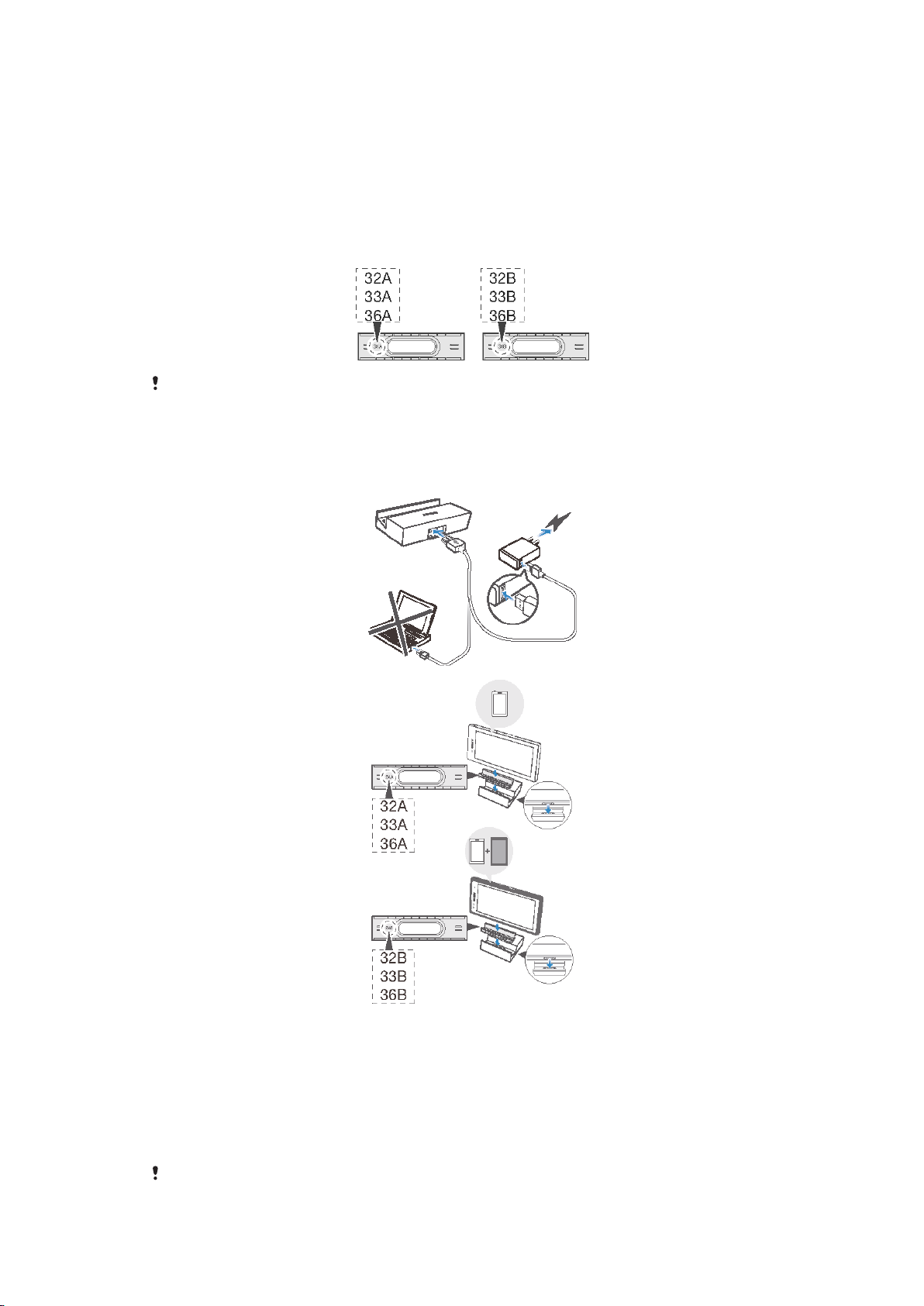
Your accessory comes with two attachments of different width. Each attachment can
fit into the charging dock and hold your phone in place while you charge it. Use the
attachment marked with an "A" to attach a phone without a casing. If your phone has
a protective case, use the attachment marked with a "B".
Attachment B may not be compatible with all protective cases.
Charging your phone
To charge your phone using the Magnetic Charging Dock
1
Plug the charger cable into the charging dock. Then plug the charger cable into
your phone charger and plug the charger into a power outlet.
2
Insert the required attachment into the charging dock.
3
Place your phone in the dock so that the connectors on the side of the phone
make contact with the connectors in the dock. The phone now starts to
charge.
4
If the Smart Connect pop-up window appears, follow the instructions to enable
a pre-configured set of actions.
Your phone does not charge if you plug the charger cable into the USB port of a computer.
4
This is an Internet version of this publication. © Print only for private use.
Page 5
Legal information
SonyDK32/DK33/DK36
Prior to use, please read the
This User guide is published by Sony Mobile Communications AB or its local affiliated company, without any
warranty. Improvements and changes to this User guide necessitated by typographical errors, inaccuracies of
current information, or improvements to programs and/or equipment, may be made by Sony Mobile
Communications AB at any time and without notice. Such changes will, however, be incorporated into new
editions of this User guide.
All rights reserved.
©2013 Sony Mobile Communications AB.
Sony is the trademark or registered trademark of Sony Corporation.
All product and company names mentioned herein are the trademarks or registered trademarks of their
respective owners. Any rights not expressly granted herein are reserved. All other trademarks are property of
their respective owners.
Visit
www.sonymobile.com
All illustrations are for illustration only and may not accurately depict the actual accessory.
Declaration of Conformity for DK32
We, Sony Mobile Communications AB of
Nya Vattentornet
SE-221 88 Lund, Sweden
declare under our sole responsibility that our product
Sony type AI-0030
and in combination with our accessories, to which this declaration relates is in
conformity with the appropriate standards EN 301 489-7:V1.3.1 and EN 60
950-1:2006+A11:2009+A1:2010 following the provisions of, EMC directive
2008/108/EC.
Important information
for more information.
leaflet separately provided.
Lund, November 2013
Pär Thuresson,
Quality Officer, SVP, Quality & Customer Services
Declaration of Conformity for DK33
We, Sony Mobile Communications AB of
Nya Vattentornet
SE-221 88 Lund, Sweden
declare under our sole responsibility that our product
Sony type AI-0021
and in combination with our accessories, to which this declaration relates is in
conformity with the appropriate standards EN 301 489-7:V1.3.1 and EN 60
950-1:2006+A11:2009+A1:2010 following the provisions of, EMC directive
2008/108/EC, Low voltage directive 2006/95/EC.
Lund, November 2013
5
This is an Internet version of this publication. © Print only for private use.
Page 6
Pär Thuresson,
Quality Officer, SVP, Quality & Customer Services
Declaration of Conformity for DK36
We, Sony Mobile Communications AB of
Nya Vattentornet
SE-221 88 Lund, Sweden
declare under our sole responsibility that our product
Sony type AI-0024
and in combination with our accessories, to which this declaration relates is in
conformity with the appropriate standards EN 301 489-7:V1.3.1 and EN 60
950-1:2006+A11:2009+A1:2010 following the provisions of, EMC directive
2008/108/EC, Low voltage directive 2006/95/EC.
Lund, November 2013
Pär Thuresson,
Quality Officer, SVP, Quality & Customer Services
FCC Statement
This device complies with Part 15 of the FCC rules. Operation is subject to the following two
conditions: (1) This device may not cause harmful interference, and (2) This device must
accept any interference received, including interference that may cause undesired operation.
Any change or modification not expressly approved by Sony may void the user's authority to operate the
equipment.
This equipment has been tested and found to comply with the limits for a Class B digital device, pursuant to
Part 15 of the FCC Rules. These limits are designed to provide reasonable protection against harmful
interference in a residential installation. This equipment generates, uses and can radiate radio frequency
energy and, if not installed and used in accordance with the instructions, may cause harmful interference to
radio communications. However, there is no guarantee that interference will not occur in a particular
installation.
If this equipment does cause harmful interference to radio or television reception, which can be determined by
turning the equipment off and on, the user is encouraged to try to correct the interference by one or more of
the following measures:
•
Reorient or relocate the receiving antenna.
•
Increase the separation between the equipment and receiver.
•
Connect the equipment into an outlet on a circuit different from that to which the receiver is connected.
•
Consult the dealer or an experienced radio/TV technician for help.
Industry Canada Statement
This device complies with RSS-210 of Industry Canada.
Operation is subject to the following two conditions: (1) this device may not cause interference, and (2) this
device must accept any interference, including interference that may cause undesired operation of the device.
This Class B digital apparatus complies with Canadian ICES-003.
Cet appareil numérique de la classe B est conforme à la norme NMB-003 du Canada.
Avis d’industrie Canada
Le présent appareil est conforme aux CNR d'Industrie Canada applicables aux appareils radio exempts de
licence.
L'exploitation est autorisée aux deux conditions suivantes: (1) l'appareil ne doit pas produire de brouillage, et,
and (2) l'utilisateur de l'appareil doit accepter tout brouillage radioélectrique subi, même si le brouillage est
susceptible d'en compromettre le fonctionnement.
6
This is an Internet version of this publication. © Print only for private use.
 Loading...