

Page 1

Hand Held
Welders
Model H520 T/E
Model H530 T/E
Model H540 T/E
I N S T R U C T I O N M A N U A L
Page 2

T A B L E O F C O N T E N T S
Go To Top Of Document
IMPORTANT SERVICE INFORMATION . . . . . . . . . . . . . . . . . . . . . . . . . . .3
Important Safeguards . . . . . . . . . . . . . . . . . . . . . . . . . . . . . . . . . . .3
Warnings . . . . . . . . . . . . . . . . . . . . . . . . . . . . . . . . . . . . . . . . . . . . .3
Symbols . . . . . . . . . . . . . . . . . . . . . . . . . . . . . . . . . . . . . . . . . . . . .4
SPECIFICATIONS . . . . . . . . . . . . . . . . . . . . . . . . . . . . . . . . . . . . . . . . . . . .5
IMPORTANT SERVICE LITERATURE . . . . . . . . . . . . . . . . . . . . . . . . . . . .6
Manual Change Information . . . . . . . . . . . . . . . . . . . . . . . . . . . . . .6
UNPACKING AND INSPECTION . . . . . . . . . . . . . . . . . . . . . . . . . . . . . . . .7
Visible Loss or Damage . . . . . . . . . . . . . . . . . . . . . . . . . . . . . . . . .7
Concealed Loss or Damage . . . . . . . . . . . . . . . . . . . . . . . . . . . . . .7
INTRODUCTION . . . . . . . . . . . . . . . . . . . . . . . . . . . . . . . . . . . . . . . . . . . . .8
OVERVIEW OF ULTRASONIC PLASTICS ASSEMBLY . . . . . . . . . . . . . . .8
What is Ultrasonics? . . . . . . . . . . . . . . . . . . . . . . . . . . . . . . . . . . . .8
Principal of Ultrasonic Assembly . . . . . . . . . . . . . . . . . . . . . . . . . .8
Ultrasonic Hand Held Welders . . . . . . . . . . . . . . . . . . . . . . . . . . . .8
GLOSSARY OF ULTRASONIC TERMS . . . . . . . . . . . . . . . . . . . . . . . . . .10
INSTALLATION AND SET UP . . . . . . . . . . . . . . . . . . . . . . . . . . . . . . . . . .11
Electrical Power Requirements . . . . . . . . . . . . . . . . . . . . . . . . . . .11
Setting Up . . . . . . . . . . . . . . . . . . . . . . . . . . . . . . . . . . . . . . . . . . .11
Electrical Connections . . . . . . . . . . . . . . . . . . . . . . . . . . . . . . . . .11
Cable Connections . . . . . . . . . . . . . . . . . . . . . . . . . . . . . . . . . . . .12
Key Components . . . . . . . . . . . . . . . . . . . . . . . . . . . . . . . . . . . . .13
Tip Assembly (CV53/55) . . . . . . . . . . . . . . . . . . . . . . . . . . . . . . . .14
Tip Replacement (CV53/55) . . . . . . . . . . . . . . . . . . . . . . . . . . . . .14
Horn Assembly (CVG54 Only) . . . . . . . . . . . . . . . . . . . . . . . . . . . .14
Tip Replacement (CVG54) . . . . . . . . . . . . . . . . . . . . . . . . . . . . . . .15
Tip Specifications . . . . . . . . . . . . . . . . . . . . . . . . . . . . . . . . . . . . .16
Options . . . . . . . . . . . . . . . . . . . . . . . . . . . . . . . . . . . . . . . . . . . . .17
Sonics & Materials, Inc.
Corporate Headquarters
53 Church Hill Road • Newtown, CT 06470 USA
203.270.4600 • 800.745.1105 • 203.270.4610 fax
www.sonics.com • [email protected]
Information contained in this manual is subject to change without notice. Sonics & Materials, Inc. is not responsible for any typographic errors.
© Sonics & Materials, Inc. 2012 Printed in U.S.A. Part No. 381-0035
Rev AC 03 8/12
• • • • • • • • • • • • • • • • • • • • • • • • • • • • • • • • • • • • • • • • • • • • • • • • • • • • • • • • • • • • • • • • • • • • • • • • • • • • • • • • • • • • • • • • • • • • • • • • • • • • • • • • • • • •
I NS T R U CT I O N M A N U AL • H A N D H E LD W E L DE R S
1
Page 3

PERATING PROCEDURES . . . . . . . . . . . . . . . . . . . . . . . . . . . . . . . . . .19
Go To Top Of Document
O
Front Panel Controls and Indicators . . . . . . . . . . . . . . . . . . . . . . .19
Keying in Parameters . . . . . . . . . . . . . . . . . . . . . . . . . . . . . . . . . .20
Operational Features . . . . . . . . . . . . . . . . . . . . . . . . . . . . . . . . . . .21
Starting up the Welder . . . . . . . . . . . . . . . . . . . . . . . . . . . . . . . . .21
Test Feature . . . . . . . . . . . . . . . . . . . . . . . . . . . . . . . . . . . . . . . . . .21
Ready Screens . . . . . . . . . . . . . . . . . . . . . . . . . . . . . . . . . . . . . . .22
Relationship of Time and Energy Settings . . . . . . . . . . . . . . . . . .23
Time Settings . . . . . . . . . . . . . . . . . . . . . . . . . . . . . . . . . . . . . . . .24
Energy Settings . . . . . . . . . . . . . . . . . . . . . . . . . . . . . . . . . . . . . . .25
Amplitude . . . . . . . . . . . . . . . . . . . . . . . . . . . . . . . . . . . . . . . . . . .25
Frequency Display . . . . . . . . . . . . . . . . . . . . . . . . . . . . . . . . . . . . .25
Overload Protection . . . . . . . . . . . . . . . . . . . . . . . . . . . . . . . . . . .26
Keypad Security . . . . . . . . . . . . . . . . . . . . . . . . . . . . . . . . . . . . . .27
APPLICATIONS – STAKING . . . . . . . . . . . . . . . . . . . . . . . . . . . . . . . . . . .28
Standard Flared Stake . . . . . . . . . . . . . . . . . . . . . . . . . . . . . . . . .28
Spherical Stake . . . . . . . . . . . . . . . . . . . . . . . . . . . . . . . . . . . . . .29
Hollow Stake . . . . . . . . . . . . . . . . . . . . . . . . . . . . . . . . . . . . . . . . .29
Knurled Stake . . . . . . . . . . . . . . . . . . . . . . . . . . . . . . . . . . . . . . . .29
Flush Stake . . . . . . . . . . . . . . . . . . . . . . . . . . . . . . . . . . . . . . . . . .30
APPLICATIONS – SPOT WELDING . . . . . . . . . . . . . . . . . . . . . . . . . . . . .31
Ordering Information . . . . . . . . . . . . . . . . . . . . . . . . . . . . . . . . . . .31
APPLICATIONS – ULTRASONIC INSERTION . . . . . . . . . . . . . . . . . . . . .32
MAINTENANCE . . . . . . . . . . . . . . . . . . . . . . . . . . . . . . . . . . . . . . . . . . . . .34
Cleaning Instructions . . . . . . . . . . . . . . . . . . . . . . . . . . . . . . . . . .34
Repairs / Service . . . . . . . . . . . . . . . . . . . . . . . . . . . . . . . . . . . . . .34
WARRANTY . . . . . . . . . . . . . . . . . . . . . . . . . . . . . . . . . . . . . . . . . . . . . . . .35
Limitation of Warranty . . . . . . . . . . . . . . . . . . . . . . . . . . . . . . . . . .36
APPENDIX . . . . . . . . . . . . . . . . . . . . . . . . . . . . . . . . . . . . . . . . . . . . . . . . .38
• • • • • • • • • • • • • • • • • • • • • • • • • • • • • • • • • • • • • • • • • • • • • • • • • • • • • • • • • • • • • • • • • • • • • • • • • • • • • • • • • • • • • • • • • • • • • • • • • • • • • • • • • • • •
2
I N S T RU C T IO N M A N U AL • H AN D H E LD W E L DE R S
Page 4

I M P O R T A N T S A F E T Y I N F O R M A T I O N
Go To Top Of Document
IMPORTANT SAFEGUARDS – READ BEFORE INSTALLING
OR USING THE EQUIPMENT
Your Ultrasonic Equipment has been designed with safety in mind. However,
no design can completely protect against improper usage, which may result
in bodily injury and/or property damage. For your protection and equipment
safeguard, observe the following warnings at all times, read the operating
instructions carefully before operating the equipment, and retain this
instruction manual for future reference. If the Ultrasonic Equipment is used in
a manner contrary to that specified in this instruction manual, the protection
features designed into the unit may be impaired.
WARNINGS
• Make sure the Ultrasonic Power Supply is properly grounded via a 3prong outlet.
• High voltage is present in the power supply. Do not remove the cover.
Refer all servicing to qualified service personnel.
• Never operate the power supply unless it is connected to the hand gun.
• Never secure anything to the front driver, the tip or the horn.
• Never touch a vibrating horn.
• If air-cooling the converter, always use dry compressed air.
• Hearing protection is highly recommended. It is recommended that a
sound abating enclosure or ear protection be used when operating the
Ultrasonic Processor.
• Do not modify horn configurations.
• Do not affix any device to any portion of the horn.
• Certain plastic materials, when ultrasonically welded, may emit fumes
and/or gases hazardous to an operator’s health. Where such materials are
processed, proper ventilation of the work station should be provided. If in
doubt about the toxicity of your plastic material, contact OSHA, U.S.
Department of Labor, or material supplier.
• Maintenance should be performed only by a qualified electronic
technician.
• Always turn off the power supply before installing or removing the optional
foot switch cable.
• When the hand gun (converter) is on, be sure to isolate it from any/all
grounded surfaces (including machine frames) to avoid triggering an
overload condition as the system detects an alternate ground path.
• • • • • • • • • • • • • • • • • • • • • • • • • • • • • • • • • • • • • • • • • • • • • • • • • • • • • • • • • • • • • • • • • • • • • • • • • • • • • • • • • • • • • • • • • • • • • • • • • • • • • • • • • • • • E
I N S T R U C T I O N M A N U A L • H A N D H E L D W E L D E R S
3
Page 5
SYMBOLS
Go To Top Of Document
Caution, risk of electric shock,
hazardous voltage
Caution, risk of danger.
Refer to User Manual.
WARNING or CAUTION
Where you see the alert symbols and/or WARNING or
CAUTION heading, strictly follow the
warning instructions to avoid personal injury
or equipment failure.
• • • • • • • • • • • • • • • • • • • • • • • • • • • • • • • • • • • • • • • • • • • • • • • • • • • • • • • • • • • • • • • • • • • • • • • • • • • • • • • • • • • • • • • • • • • • • • • • • • • • • • • • • • • •
4
I N S T R U C T I O N M A N U A L • H A N D H E L D W E L D E R S
Page 6
S P E C I F I C A T I O N S
Go To Top Of Document
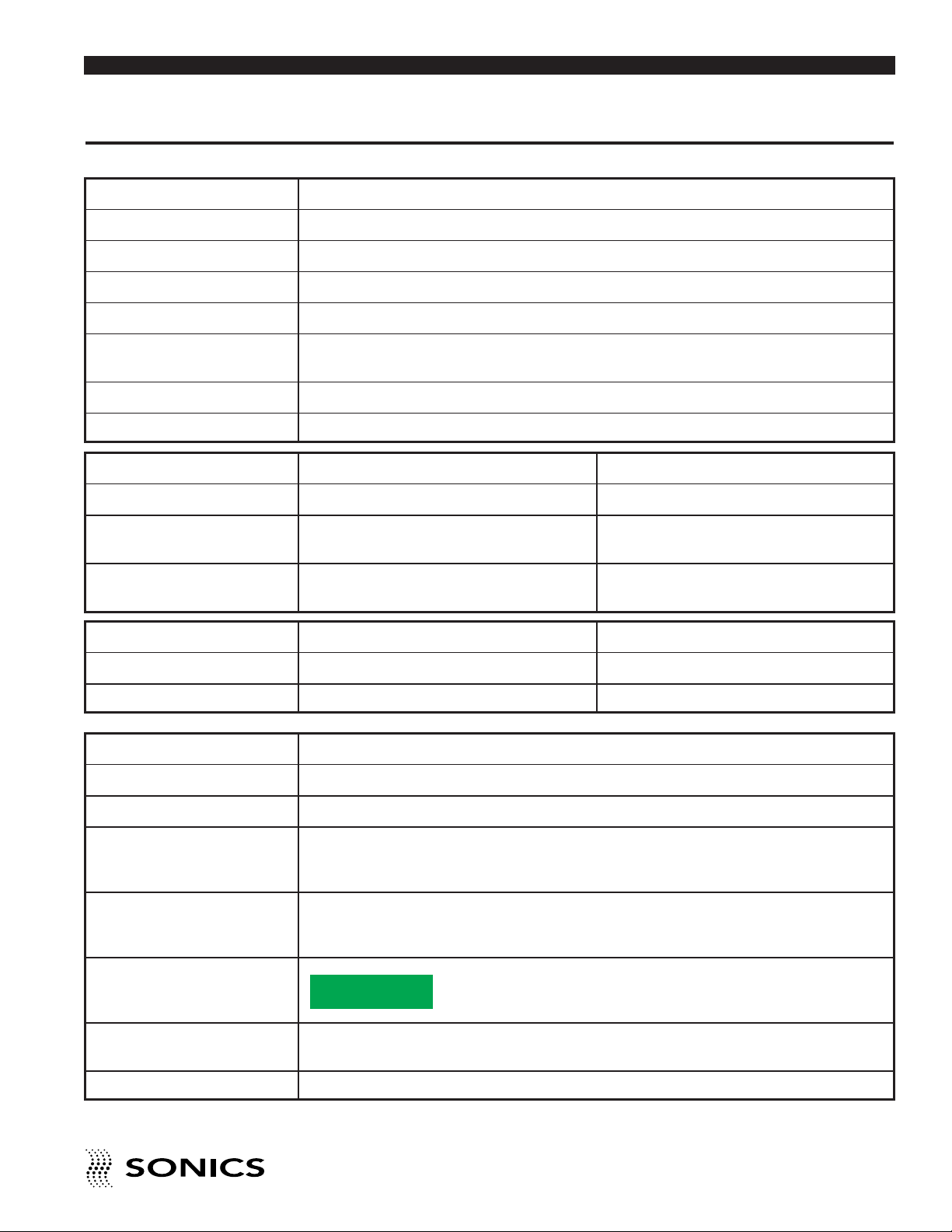
ower Supply
P
perational Input Voltage 115/230 V~ +/-10% @ 50/60 Hz
O
Rated Voltage/Current 115/230 V~, 5 A max.
Fuse Rating F6.3A 250V*
Weight 13 lbs. (5.9 Kg)
Dimensions 8.5"H x 13.5"W x 7.5"D
216 mm x 340 mm x 190 mm
Output Voltage 1000 V rms (max.)
Output Frequency 20 KHz (nom.), 30 kHz or 40 KHz
Converter CV 55 & CV 53 CV 54
Weight 1.5 lbs. (0.68 Kg) 1.5 lbs. (0.68 Kg)
Dimensions 7.1" (CV55) or 6.3” L (CV53) x 1.9" Dia. 6.3" L x 1.9" Dia.
(180 or 160 mm x 48.3 mm) (with standard tip) (160 mm x 48.3 mm) (without horn)
Horn Materials Titanium Titanium or aluminum
Tip CV 55 & CV 53 CV 54
Dimensions Standard 1/2" diameter (12.7 mm) n/a
Materials Titanium Alloy Ti-6Al-4V
Environmental
Pollution Degree 2
Installation Category II
Operating Limits Temperature: 41 - 104ºF (5 - 40ºC)
Relative Humidity 20 - 90% (Non Condensing)
Altitude: 6,651 ft. (2000 m)
Shipping/Storage Temperature: 35 -120ºF (2 - 49ºC)
Relative Humidity 10 - 95% (Non Condensing)
Ambient Pressure Extremes: 40,000 ft. (12,192 m)
Restriction of
Hazardous
Substances (ROHS)
RoHS Compliant
Directive 2002/95/EC
Relative humidity Maximum relative humidity 80% for temperatures up to 31ºC decreasing
linearly to 50% relative humidity to 40ºC
Other For indoor use only
*Only use IEC approved Fast acting fuses, Cooper Bussman series S500.
• • • • • • • • • • • • • • • • • • • • • • • • • • • • • • • • • • • • • • • • • • • • • • • • • • • • • • • • • • • • • • • • • • • • • • • • • • • • • • • • • • • • • • • • • • • • • • • • • • • • • • • • • • • •
I N S T R U C T I O N M A N U A L • H A N D H E L D W E L D E R S
5
Page 7

I M P O R T A N T S E R V I C E L I T E R A T U R E
Go To Top Of Document
The system supplied with this instruction manual is constructed of the finest
aterial and the workmanship meets the highest manufacturing standards.
m
It has been thoroughly tested and inspected before leaving the factory and
when used in accordance with the procedures outlined in this manual, will
provide you with many years of safe and dependable service.
Please read carefully
before operating the
equipment, then
forward to your service
department.
MANUAL CHANGE INFORMATION
We continually strive to be at the forefront of the latest electronic
developments by adding circuit and component improvements to our
equipment as soon as they are developed and tested.
Sometimes, due to printing and shipping requirements, we cannot
incorporate these changes immediately into printed manuals. Hence, your
manual may contain new change information. Change information, if any, is
located in the Appendix.
We reserve the right to make any changes in the design or construction of
our equipment at any time, without incurring any obligation to make any
change whatsoever in units previously delivered.
The technical data and schematics in the manual are for informational
purposes only and may not reflect the current configuration being shipped
from our factory. Upon formal request, complete and up-to-date information
can be provided from the factory free of charge.
• • • • • • • • • • • • • • • • • • • • • • • • • • • • • • • • • • • • • • • • • • • • • • • • • • • • • • • • • • • • • • • • • • • • • • • • • • • • • • • • • • • • • • • • • • • • • • • • • • • • • • • • • • • •
6
I N S T R U C T I O N M A N U A L • H A N D H E L D W E L D E R S
Page 8

U N P A C K I N G A N D I N S P E C T I O N
Go To Top Of Document
Before unpacking the equipment, check the shipping carton for any visible
amage. If you see any, be sure to follow the procedures described below
d
under “Visible Loss or Damage.” Otherwise, proceed to remove the
equipment from the carton. Before disposing of any packing material, check
it carefully for small parts. Then perform a visual inspection of the equipment
NOTE: We
recommend keeping all
carton(s) and packing
material in case it
might be necessary to
move the equipment,
or to ship it for repair.
to detect any evidence of damage which might have occurred during
shipment. Check the following:
1. all components against the enclosed packing list,
2. all module plug-in units,
3. all wire plug-in connections.
The equipment was carefully packed and thoroughly inspected before
leaving our factory. All units are tested and checked for problems prior to
shipping. It is asked that when a problem does occur that all parts and
components be inspected for damage (especially when the unit is not in
working order when received). Responsibility for safe delivery was assumed
by the carrier upon acceptance of the shipment. Claims for loss of damage
sustained in transit must therefore be made upon the carrier, as follows:
VISIBLE LOSS OR DAMAGE
Any external evidence of loss or damage must be noted on the freight bill or
express receipt, and signed by the carrier’s agent. Failure to adequately
describe such external evidence of loss or damage may result in the carrier’s
refusal to honor a damage claim. The form required to file such a claim will
be supplied by the carrier.
CONCEALED LOSS OR DAMAGE
Concealed loss or damage means loss or damage which does not become
apparent until the merchandise has been unpacked. The contents might
have been damaged in transit due to rough handling even though the
container may not show external damage. When the damage is discovered
upon unpacking, make a written request for inspection by the carrier’s agent
within 48 hours of the delivery date. Then file a claim with the carrier since
such damage is the carrier’s responsibility. The form required to file such a
claim will be supplied by the carrier. Do not destroy packing materials, or
move material from one location to another before the carrier makes their
inspection.
If the system or any unit is damaged, notify “Sonics.” “Sonics” will arrange
for repair or replacement of damaged equipment without waiting for the
claim against the carrier to be settled, provided a new purchase order is
issued to cover the repair or replacement costs. Should any damage,
shortage or discrepancy exist, please notify us immediately.
• • • • • • • • • • • • • • • • • • • • • • • • • • • • • • • • • • • • • • • • • • • • • • • • • • • • • • • • • • • • • • • • • • • • • • • • • • • • • • • • • • • • • • • • • • • • • • • • • • • • • • • • • • •
I N S T R U C T I O N M A N U A L • H A N D H E L D W E L D E R S
7
Page 9

I N T R O D U C T I O N
Go To Top Of Document
Sonics’ hand held welders are portable 500 watt welders used for plastics
assembly that consist of an ultrasonic power supply and a hand gun. These
nits are designed specifically for welding, staking, inserting and spot
u
welding applications (refer to the Applications section of this manual
beginning on page 26 for more information on these operations).
The model H520 is a 20 kHz power supply that comes with the CV55 hand
gun; the H530 is a 30 kHz power supply that comes with the CV53 hand gun.
The CV53/55 units are supplied with an integral 1/2" (12.7mm) diameter
titanium front driver with a replaceable flat face tip. (Other standard or
custom tips are available.)
The model H540 is a 40 kHz power supply that comes with the CVG54 hand
gun. The CVG54 hand gun is supplied with a removable horn designed
specifically for each customer’s requirements. The higher frequency and
lower amplitude of the 40 kHz system makes it ideal for welding small
assemblies that require gentler action.
The power supplies of all models feature autotune circuitry.
O V E R V I E W O F U L T R A S O N I C P L A S T I C S A S S E M B L Y
WHAT IS ULTRASONICS?
Ultrasonics refers to vibrational waves with a frequency above the human
audible range which is usually above 18,000 cycles per second (Hz).
PRINCIPLE OF ULTRASONIC ASSEMBLY
The basic principle of ultrasonic assembly involves conversion of high
frequency electrical energy to high frequency mechanical energy in the form
of reciprocating vertical motion which, when applied to a thermoplastic,
generates frictional heat at the plastic/plastic or plastic/metal interface. In
ultrasonic welding, this frictional heat melts the plastic, allowing the two
surfaces to fuse together; in ultrasonic staking or insertion, the controlled
flow of molten plastic is used to capture or lock another material in place
(staking) or encapsulate a metal insert (insertion).
ULTRASONIC HAND HELD WELDERS
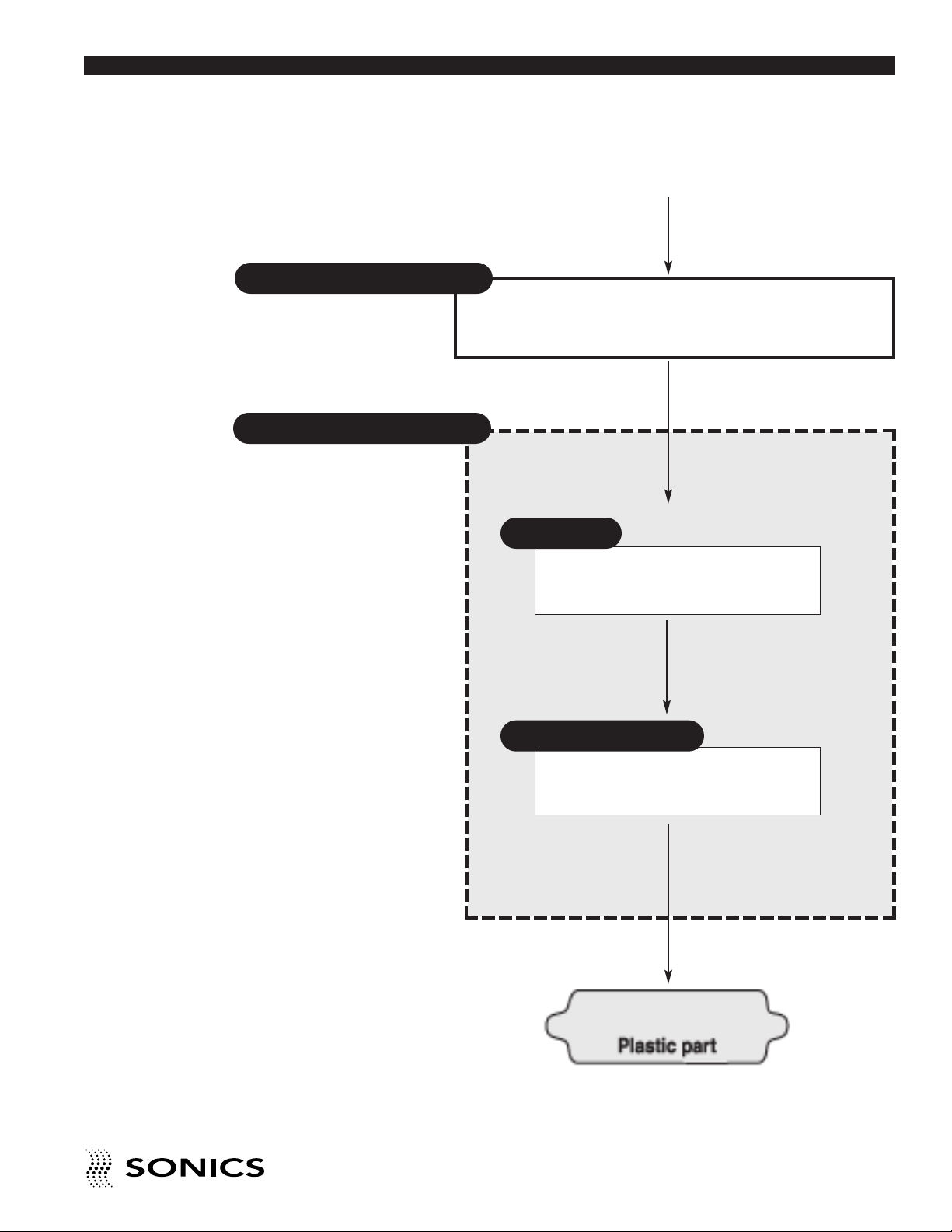
“Sonics” ultrasonic hand held welders are generally composed of the
following major elements: a power supply, hand gun (converter), and horn
(H540E only) as detailed in the diagram on the next page. A review of this
diagram will help you understand the basic elements involved in the
assembly process and their relation to each other.
• • • • • • • • • • • • • • • • • • • • • • • • • • • • • • • • • • • • • • • • • • • • • • • • • • • • • • • • • • • • • • • • • • • • • • • • • • • • • • • • • • • • • • • • • • • • • • • • • • • • • • • • • • • •
8
I N S T R U C T I O N M A N U A L • H A N D H E L D W E L D E R S
Page 10
SONICS” ULTRASONIC ASSEMBLY SYSTEMS
Go To Top Of Document
“
Power Supply/Generator
Hand Gun
50/60 Hz
Electrical power
Generates ultrasonic electrical energy
(20/30/40 kHz)
Ultrasonic
electrical energy
Converter
Transforms ultrasonic electrical energy
to ultrasonic mechanical vibrations
Ultrasonic Vibrations
Horn/Replaceable Tip
Contacts and transfers vibrational
energy to plastic part
Ultrasonic Vibrations
• • • • • • • • • • • • • • • • • • • • • • • • • • • • • • • • • • • • • • • • • • • • • • • • • • • • • • • • • • • • • • • • • • • • • • • • • • • • • • • • • • • • • • • • • • • • • • • • • • • • • • • • • • • •
I N S T R U C T I O N M A N U A L • H A N D H E L D W E L D E R S
9
Page 11

G L O S S A R Y O F U L T R A S O N I C T E R M S
Go To Top Of Document
POWER SUPPLY/GENERATOR – The solid state power supply converts
tandard 50/60 Hz electrical power to 20,000, 30,000 or 40,000 Hz (20/30/40
s
kHz) electrical energy.
CONVERTER – The converter changes the high frequency electrical energy
supplied by the power supply to high frequency mechanical vibrations.
TIP/HORN – The tip/horn is a tuned component of the system which comes
in contact with the parts to be assembled. The tip/horn 1) transfers the
ultrasonic vibrations produced from the converter to the parts being welded,
and 2) applies necessary force to the assembly while the material resolidifies.
AMPLITUDE – The peak to peak excursion of a horn at its output face.
• • • • • • • • • • • • • • • • • • • • • • • • • • • • • • • • • • • • • • • • • • • • • • • • • • • • • • • • • • • • • • • • • • • • • • • • • • • • • • • • • • • • • • • • • • • • • • • • • • • • • • • • • • • •
10
I N S T R U C T I O N M A N U A L • H A N D H E L D W E L D E R S
Page 12

I N S T A L L A T I O N A N D S E T U P
Go To Top Of Document
ELECTRICAL POWER REQUIREMENTS
The power supply requires a fused, single-phase, standard 3-terminal
grounding type receptacle capable of supplying the requisite voltage and
current. (Standard 120 volts or optional 220 volts, 50/60 Hz, regulated
The line cord of the
controller/power supply
is equipped with a 3prong, grounding plug.
Do not, under any
circumstances, remove
the ground prong. The
plug must be plugged
into a mating 3-prong,
grounding type outlet.
between 95-135 volts or 190-265 volts, respectively.)
SETTING UP
The power supply is a free-standing assembly. It should be installed in a
clear, uncluttered location that is free from excessive dirt, dust, corrosive
fumes, and temperature and humidity extremes. The selected installation site
should be near the electrical power source and away from equipment that
generates abnormally high electrical transients. Observe the following
additional instructions when installing the equipment:
a. Allow at least 6 inches (152.4mm) at the rear of the power supply for cable
connections.
b. Position the power supply so that the front panel controls are visible and
readily accessible.
If power supply is to be
run continuously, air
cooling of the converter
and horn is required.
Use clean, dry
compressed air filtered
down to 5 microns.
Do not plug the power
supply into an electrical
outlet until all other
connections have been
made.
c. The power supply is air cooled; allow sufficient space around the
assembly to ensure adequate ventilation. If the power supply must be
housed in a confined space, forced air cooling may be necessary to keep
surrounding air within acceptable ambient temperature limits. Periodically
check the ventilation grille and clean as necessary.
ELECTRICAL CONNECTIONS
When making the initial electrical connections, make sure the power is
disconnected and follow these precautions.
1. Do not strain or kink the cables. When going around corners, allow as
wide a bend as possible. Do not run the cables parallel to any power line
within a distance of less than 1 foot (305mm).
2. To prevent the possibility of an electrical shock, ensure that the power
supply line cord is properly grounded. Also make sure that the voltage
rating of the electrical power source matches the power supply
requirement.
3. Check with your electrician if you have any wiring questions.
• • • • • • • • • • • • • • • • • • • • • • • • • • • • • • • • • • • • • • • • • • • • • • • • • • • • • • • • • • • • • • • • • • • • • • • • • • • • • • • • • • • • • • • • • • • • • • • • • • • • • • • • • • • •
I N S T RU C T IO N M A N U AL • H AN D H E LD W E L DE R S
11
Page 13
Make sure the ON/OFF
Go To Top Of Document
switch is in the OFF
position and the power
supply line cord is not
plugged in before
making any cable
connections.
CABLE CONNECTIONS:
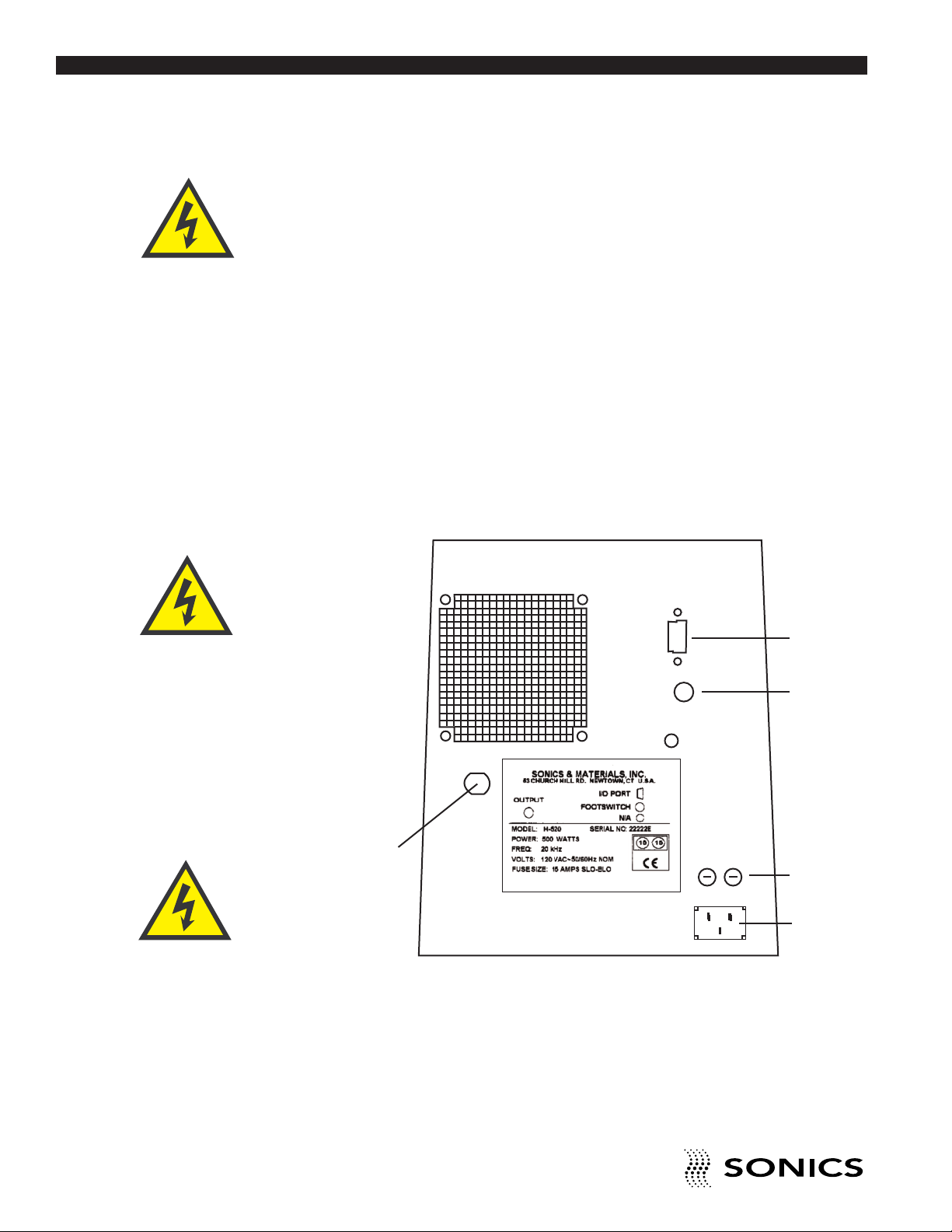
Located at the rear of the power supply are the cable connections as
illustrated below. (The interconnecting cables will be supplied with your
system.)
1. A round, 4-pin cable (with red locator dot) that connects the hand gun to
the power supply.
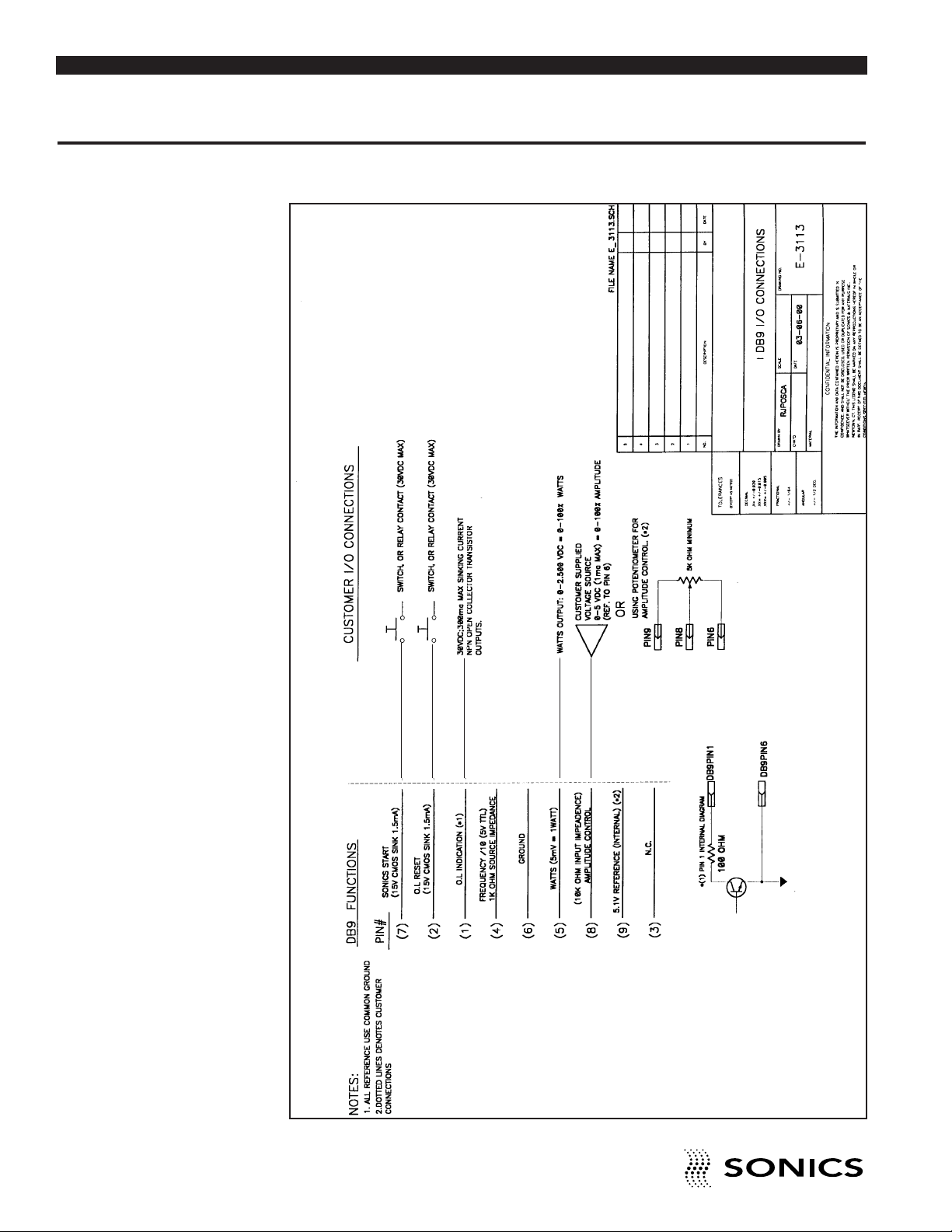
2. A standard DB9 I/O connector that can interface with automated
machines via a PLC. (See drawing in the Appendix at the back of this
manual.)
3. 3-prong inlet to connect the power supply with the appropriate electrical
outlet. Do not make this connection until the hand gun is connected to the
power supply.
Once these connections have been made, the power supply is ready for
operation.
Always turn off the
power supply before
installing or removing
the foot switch cable.
Do not use a damaged
or worn hand gun
cable. Never use the
cable and hand gun as
a rope; it is not rated
for pulling weight.
❷
❹
❶
❺
❸
Also located at the rear of the power supply are the following:
4. Foot switch jack – connects foot switch cable to enable remote actuation.
5. Fuses – 120V = 15A slo-blo
230V = 8A slo-blo
• • • • • • • • • • • • • • • • • • • • • • • • • • • • • • • • • • • • • • • • • • • • • • • • • • • • • • • • • • • • • • • • • • • • • • • • • • • • • • • • • • • • • • • • • • • • • • • • • • • • • • • • • • • •
12
I N S T R U C T I O N M A N U A L • H A N D H E L D W E L D E R S
Page 14
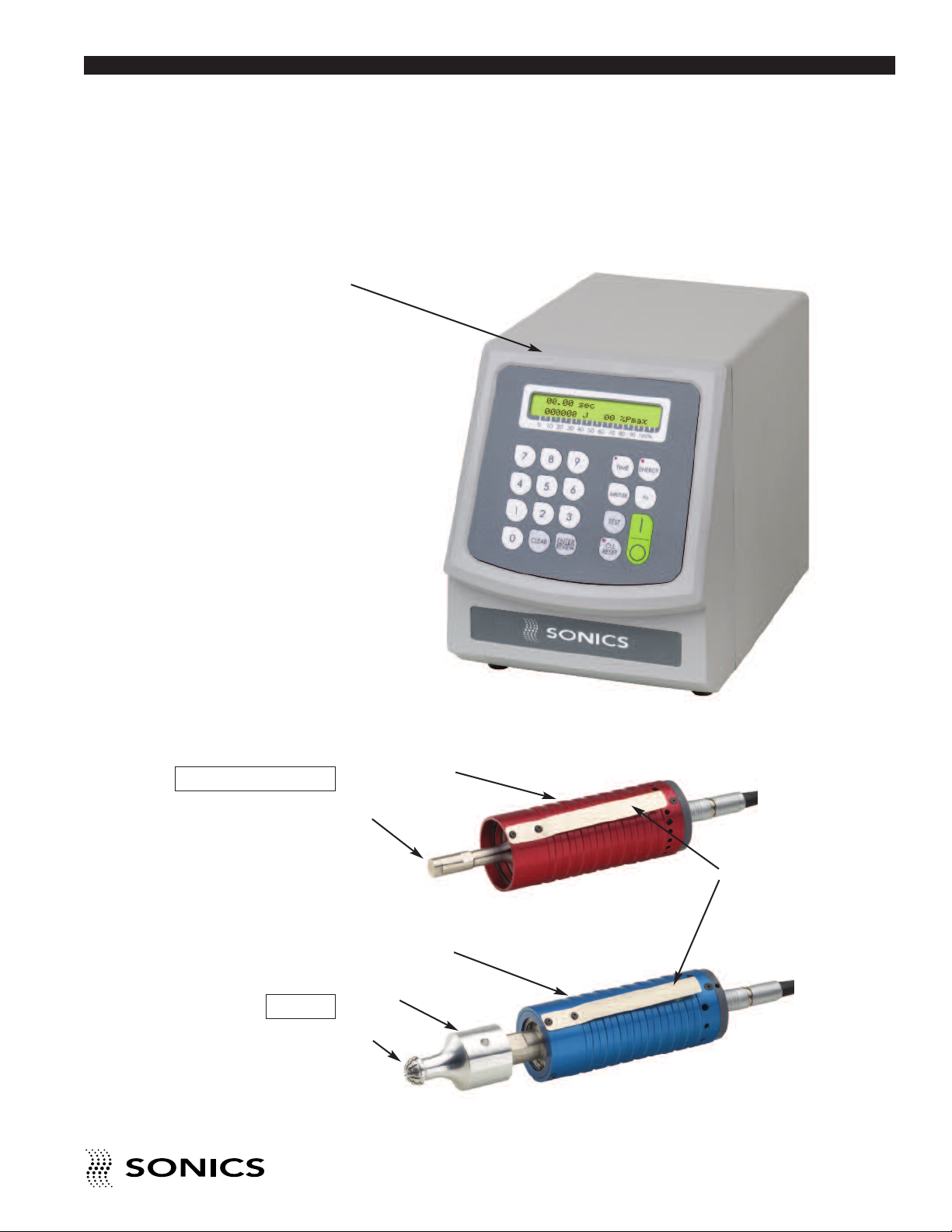
POWER SUPPLY
Go To Top Of Document
KEY COMPONENTS
Pictured below is the power supply with hand gun options.
CV53 / CV55*
*CV55 shown
CVG54
• • • • • • • • • • • • • • • • • • • • • • • • • • • • • • • • • • • • • • • • • • • • • • • • • • • • • • • • • • • • • • • • • • • • • • • • • • • • • • • • • • • • • • • • • • • • • • • • • • • • • • • • • • • •
HAND GUN
TIP
HAND GUN
HORN
TIP
I N S T R U C T I O N M A N U A L • H A N D H E L D W E L D E R S
TRIGGER SWITCH
13
Page 15
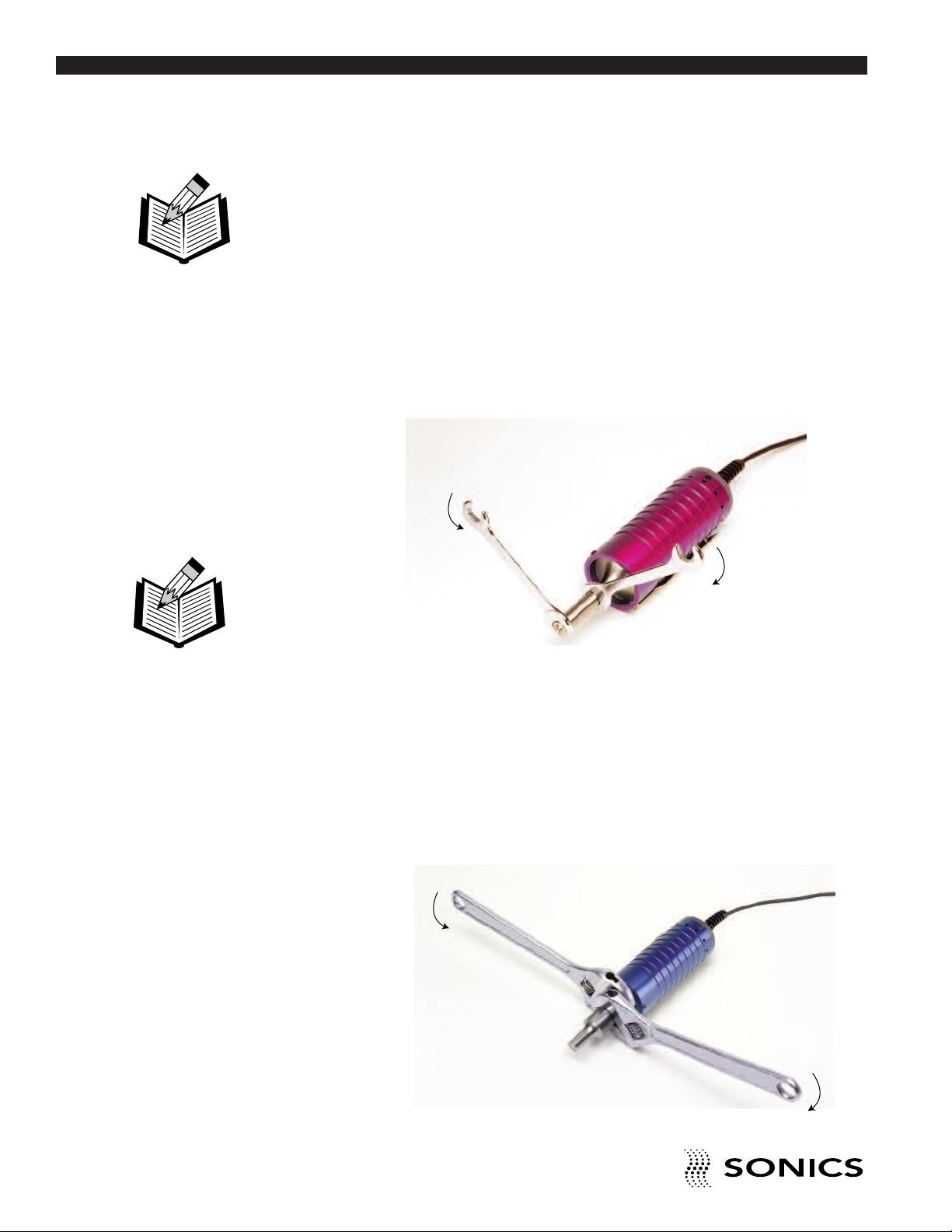
TIP ASSEMBLY (CV53 & CV55)
Go To Top Of Document
If the tip is not already assembled, follow the instructions below as
applicable (CV55 unit is shown below but instructions also apply to CV53).
NOTE: Never remove
or install a tip by
holding the hand gun
case or rotating the tip
with only one wrench
as this may cause
damage to the booster
and/or converter.
NOTE: Before using
wrenches to assemble
as shown, you should
be able to seat the
horn or tip without
encountering
resistance in the
mating threads.
TIP REPLACEMENT (CV53 & CV55)
1. Clean the mating surfaces, as well as the threaded stud and hole. Check
that the stud is tight (see recommended torque requirements on page 13).
2. Hand assemble the tip to the titanium driver using open-ended wrenches
as shown below. Tighten securely. Do not force or overtighten.
CV55 (shown) or
CV53 / TIP
HORN ASSEMBLY (CVG54 ONLY):
1. Clean the mating surfaces of the converter and horn, as well as the
threaded stud and hole. Check that the stud is tight (see recommended
torque requirements on page 13).
2. Hand assemble the converter and horn together using open-ended
wrenches as shown below. Tighten securely. Do not force or
overtighten.
CVG54 / HORN
• • • • • • • • • • • • • • • • • • • • • • • • • • • • • • • • • • • • • • • • • • • • • • • • • • • • • • • • • • • • • • • • • • • • • • • • • • • • • • • • • • • • • • • • • • • • • • • • • • • • • • • • • • • •
14
I N S T R U C T I O N M A N U A L • H A N D H E L D W E L D E R S
Page 16
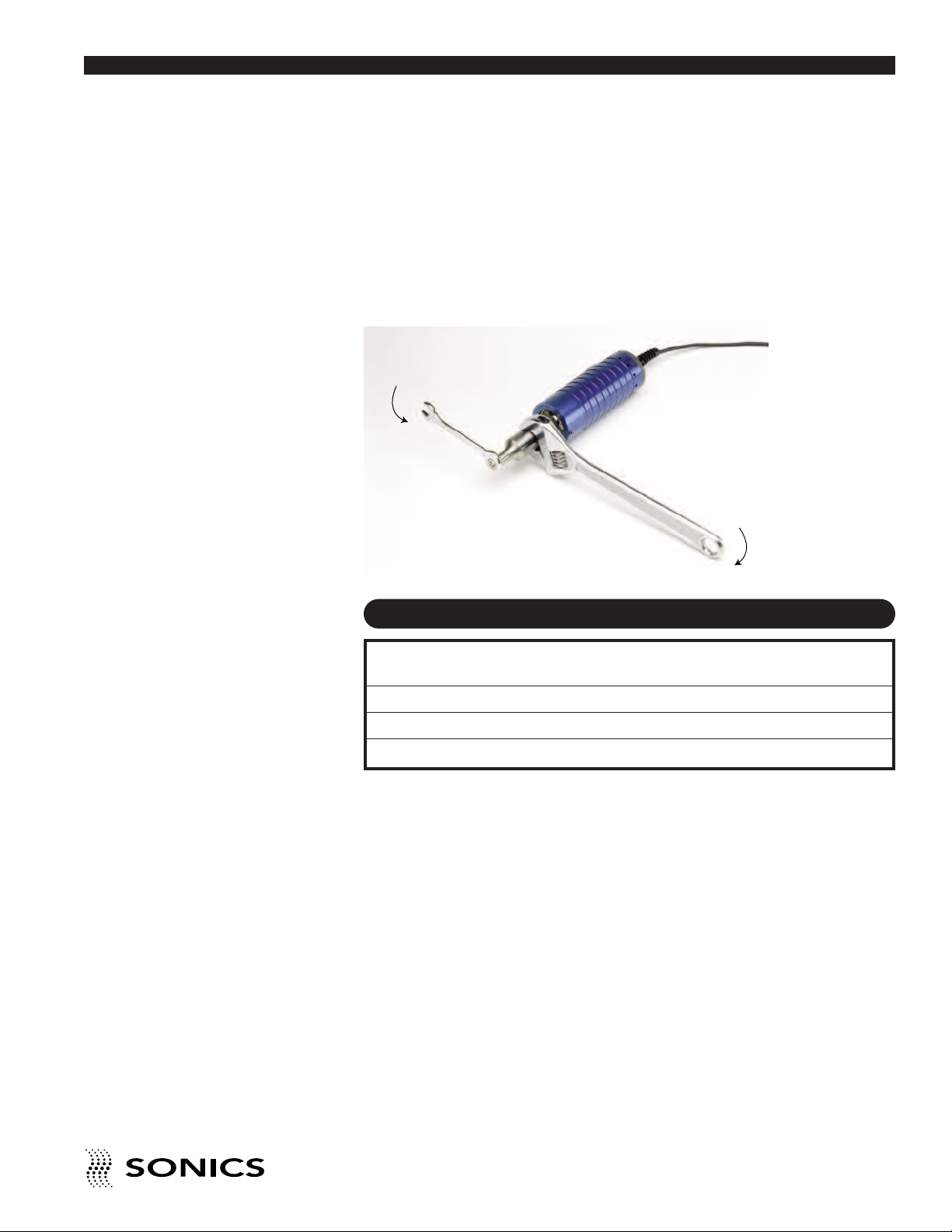
TIP REPLACEMENT (CVG54)
Go To Top Of Document
1. Clean the mating surfaces, as well as the threaded stud and hole. Check
that the stud is tight. (See recommended torque requirements below.)
2. Hand assemble the tip to the horn using open-ended wrenches as shown
below and tighten securely. Do not force or overtighten.
CVG54 /HORN / TIP
RECOMMENDED TORQUE REQUIREMENTS
Thread
Frequency Component Size Foot-Lbs. Newton-Meters
20 / 30 kHz Converter / Tip 1/4-28 25-35 34-47
40 kHz Converter / Horn 8 mm 25-35 34-47
40 kHz Horn / Tip 1/4-28 25-35 34-47
• • • • • • • • • • • • • • • • • • • • • • • • • • • • • • • • • • • • • • • • • • • • • • • • • • • • • • • • • • • • • • • • • • • • • • • • • • • • • • • • • • • • • • • • • • • • • • • • • • • • • • • • • • • •
I N S T R U C T I O N M A N U A L • H A N D H E L D W E L D E R S
15
Page 17
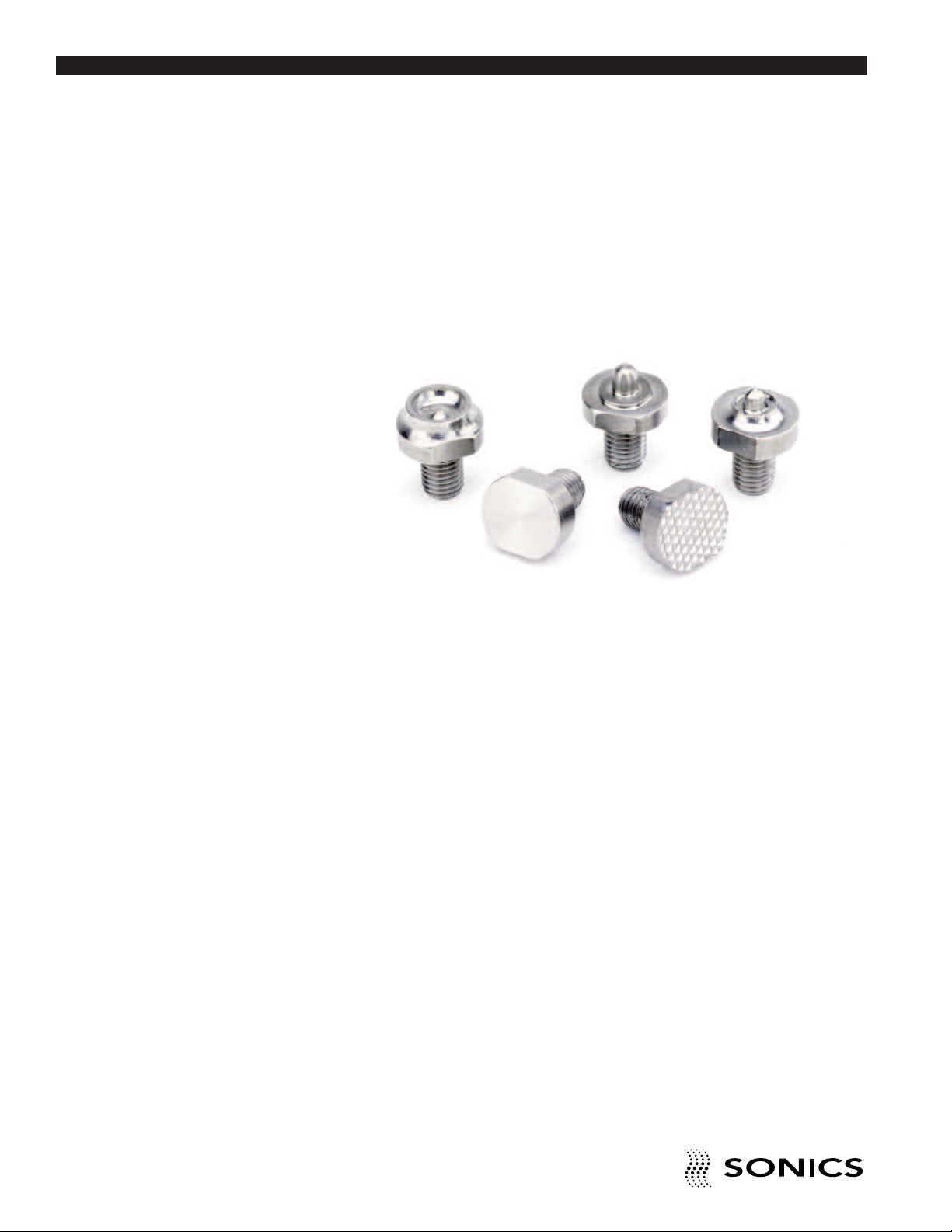
TIP SPECIFICATIONS
Go To Top Of Document
A variety of replaceable tips – both custom and standard – are available for
the hand held welding systems. Upon request, special carbide faced, wear
resistant, flat, knurled, and custom faced tips are available.
INSERTING
STAKING
FLAT
SPOT WELDING
KNURLED
Refer to the various tables under staking, spot welding and insertion
descriptions on pages 26-31 for lists of standard threaded tips. For custom
tips, call our Sales Department at 203-270-4600.
• • • • • • • • • • • • • • • • • • • • • • • • • • • • • • • • • • • • • • • • • • • • • • • • • • • • • • • • • • • • • • • • • • • • • • • • • • • • • • • • • • • • • • • • • • • • • • • • • • • • • • • • • • • •
16
I N S T RU C T IO N M A N U AL • H AN D H E LD W E L DE R S
Page 18

OPTIONS
Go To Top Of Document
The following options and accessories are available for the hand held
welding systems.
Always turn off the
power supply before
installing or removing
the foot switch cable.
1. FOOT SWITCH for remote activation. (When foot switch actuation is
used, the trigger handle is removed from the hand gun housing.)
2. MANUAL ARBOR PRESS, available with foot switch or cam actuation,
is designed for assembling parts where production volume does not
justify automated equipment. The press provides a more controlled
motion of the welder than is possible by just holding the hand gun,
resulting in more consistent assemblies.
MANUAL PRESS
• • • • • • • • • • • • • • • • • • • • • • • • • • • • • • • • • • • • • • • • • • • • • • • • • • • • • • • • • • • • • • • • • • • • • • • • • • • • • • • • • • • • • • • • • • • • • • • • • • • • • • • • • • • •
I N S T RU C T IO N M A N U AL • H AN D H E LD W E L DE R S
17
Page 19
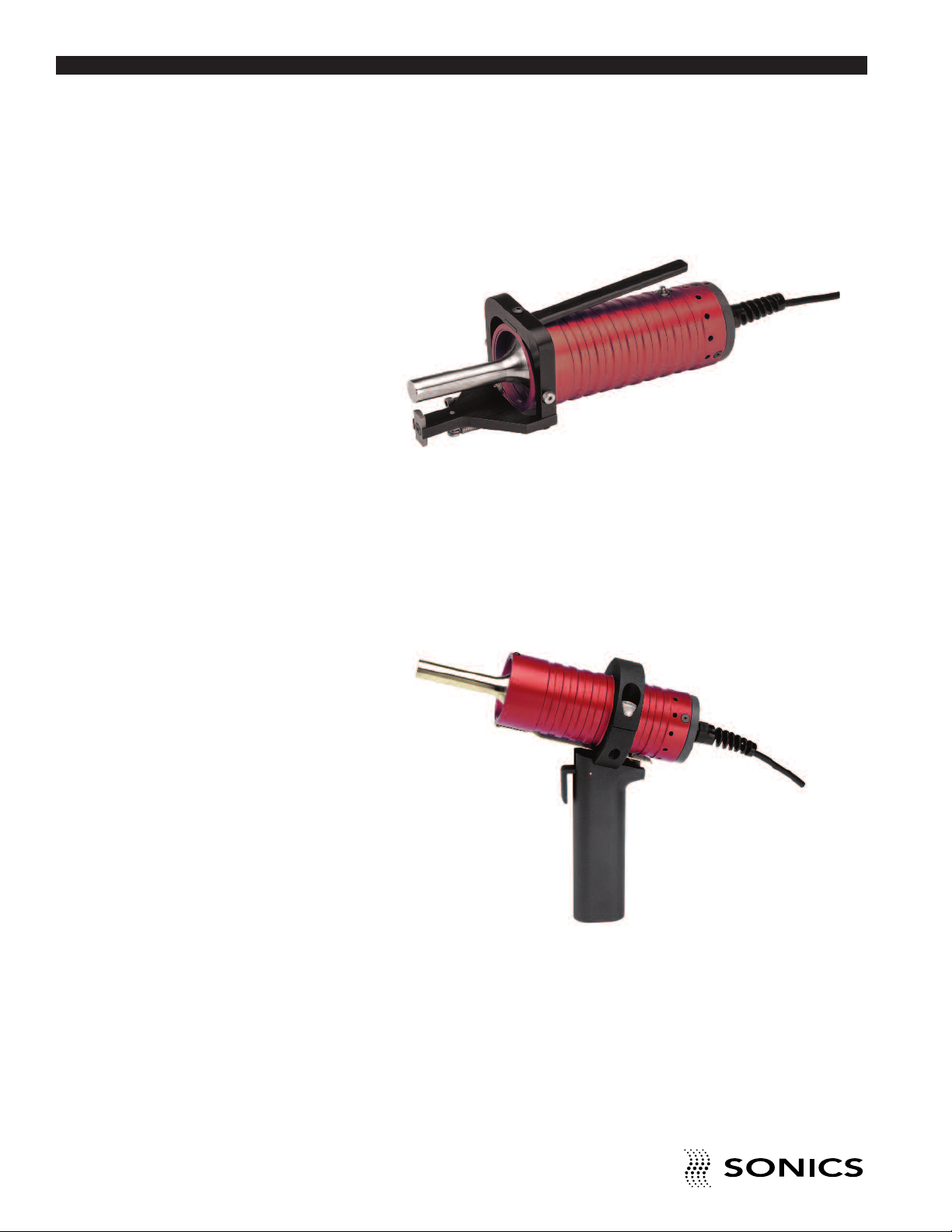
. STAPLER with special pivoting mechanism. Ideal for sealing low
Go To Top Of Document
3
production rate clamshell packages (for 20 kHz Models only).
STAPLER
4. PISTOL GRIP for more ergonomic handling of the hand gun in
specialized applications.
• • • • • • • • • • • • • • • • • • • • • • • • • • • • • • • • • • • • • • • • • • • • • • • • • • • • • • • • • • • • • • • • • • • • • • • • • • • • • • • • • • • • • • • • • • • • • • • • • • • • • • • • • • • •
18
I N S T RU C T IO N M A N U AL • H AN D H E LD W E L DE R S
PISTOL GRIP
Page 20

O P E R A T I N G P R O C E D U R E S
1
2
3
4
5
7
6
8
9
10
3
11
4
12
Go To Top Of Document
FRONT PANEL CONTROLS AND INDICATORS
Located at the front of the power supply are the following controls:
Do not operate the
power supply unless it
is connected to the
hand gun.
NOTE: The operating
range of amplitude is
20-100%
If ultrasonics are run
continuously (time
setting = 0), be sure to
air cool the converter.
1. ON/OFF switch which turns the power supply on and off. The switch
remains in a “latched state” even if power is interrupted or disconnected.
For example, if the unit is switched on and is then disconnected from the
power source, once it is reconnected to power, the unit will be on.
Likewise, if the unit is off and then disconnected, it will remain off when
reconnected to power until the ON switch is pressed.
2. LCD SCREEN which displays various settings, parameters and prompts
as detailed in the following pages. In addition, during the weld process it
displays a load meter indicator showing the power level of ultrasonics that
is being delivered to the welder (see #3 below).
3. LOAD METER SCALE from 0 to 100% which (in conjunction with
vertical line indicators on LCD display) shows the running power (bar
graph at bottom of display) and peak power (single vertical line at top of
display) during the weld. Peak power is reported as %Pmax after the cycle
(see page 21).
4. TIME key which allows selection and display of time settings and permits
adjustment of time duration in .01 second increments (from 00.00 to 99.99
seconds) for three time parameters as follows:
a. Weld time
b. Time Limit Low
c. time Limit High
• • • • • • • • • • • • • • • • • • • • • • • • • • • • • • • • • • • • • • • • • • • • • • • • • • • • • • • • • • • • • • • • • • • • • • • • • • • • • • • • • • • • • • • • • • • • • • • • • • • • • • • • • • • •
I N S T RU C T IO N M A N U AL • H AN D H E LD W E L DE R S
19
Page 21

or a complete explanation of these parameters, refer to page 22.
Go To Top Of Document
F
. ENERGY key (active on E models only) which allows selection and display
5
of the following energy settings and permits adjustment of the energy
parameters a. through c. below in 1 joule increments (from 0 to 999,999
joules):
a. Energy Setting
b. Energy Limit Low
c. Energy Limit High
For a complete explanation of these parameters, refer to page 23.
6. AMPLITUDE key which controls adjustment of the amplitude setting,
relating to the system’s high-frequency vibrations over the full operating
range. Refer to page 23 for more information.
7. FN KEY. Option not available on this model.
8. TEST key which can be used to test the actual power output (watts).
When this key is pressed, the ultrasonics are activated and will remain on
(cycle) for 5 seconds. The number of watts will be displayed on the LCD
screen and a line will display along the bar graph on the bottom of the
LCD screen which will reflect the percentage of power output.
9. O.L. RESET key which resets the power supply following an overload
condition. Red LED in upper left corner indicates an overload condition
exists. Refer to page 24 for complete information.
10. 0-9 NUMERIC KEYPAD which allows input of numeric data by
pressing the keys.
11. CLEAR key which clears the preceding entry when pressed.
12. ENTER/REVIEW key which serves to enter data into the system and/or
to display data (or parameters) on the LCD screen.
KEYING IN PARAMETERS
To make numeric entries into a cursor location that is displayed on a screen
menu, use the numeric keypad. When the desired entry is displayed on the
LCD screen, use the ENTER key to register the new value. Entries are made
left to right.
The CLEAR key will clear an existing value to 0, displayed as a series of
dashes, and relocate the cursor to the extreme left-hand entry position ready
to accept entries again. As soon as a desired value is keyed in and displayed,
pressing the ENTER key makes the system accept that entry. If a number
value is not “Entered,” then it will not be accepted by the system and the
parameter value will return to its former setting (before any numerical values
• • • • • • • • • • • • • • • • • • • • • • • • • • • • • • • • • • • • • • • • • • • • • • • • • • • • • • • • • • • • • • • • • • • • • • • • • • • • • • • • • • • • • • • • • • • • • • • • • • • • • • • • • • • •
20
I N S T RU C T IO N M A N U AL • H AN D H E LD W E L DE R S
Page 22
OPERATIONAL FEATURES
Go To Top Of Document
– Adjustable tolerance limits in energy (Ws) (for E models only) and time
(sec) with visual alarms.
– Information displays including: number of assemblies, number of rejects,
and number of cycles.
– Fault displays.
– Keypad security.
STARTING UP THE WELDER
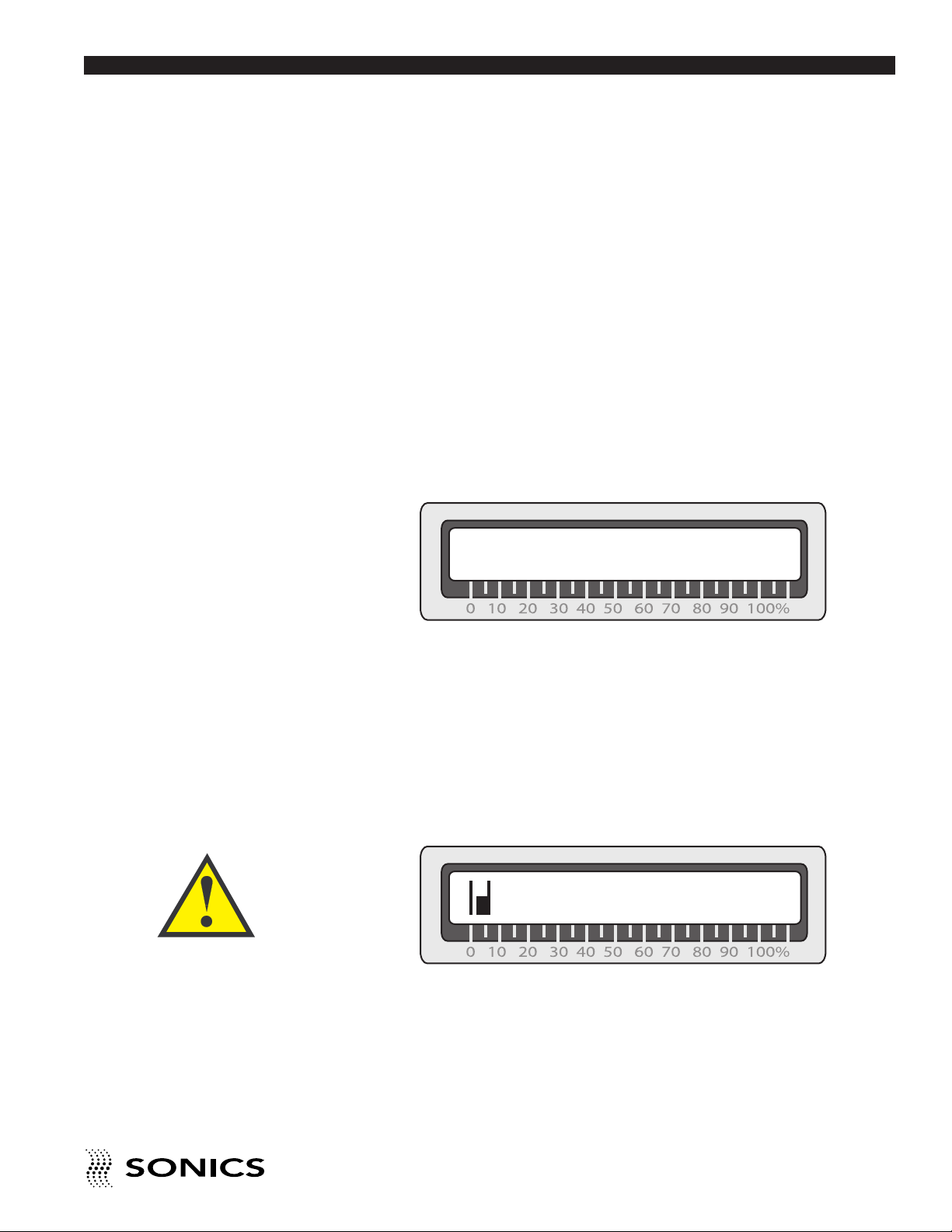
Press the ON/OFF button to turn the welder on. The LCD screen will display
the model number, wattage and frequency information. Then the LCD screen
will show the following “ready” display:
00.00 sec
000000 J 00 %Pmax
This display shows the last weld information – weld time, energy (on E
models only) and power. (After power down and subsequent power up,
values are cleared to zero.)
The TEST and Load
Meter check should
always be done for all
cold start-ups, and for
any start-up after the
system has been idle
for 20 minutes or more.
• • • • • • • • • • • • • • • • • • • • • • • • • • • • • • • • • • • • • • • • • • • • • • • • • • • • • • • • • • • • • • • • • • • • • • • • • • • • • • • • • • • • • • • • • • • • • • • • • • • • • • • • • • • •
TEST FEATURE
After the press is turned on, press and hold the TEST button. While
depressing the TEST button, check the display. Make sure the bar graph
indicator on the display (a series of vertical lines that register to the 0 to
100% load meter scale – see example below) does not exceed 20%.
0045 Watts
During the testing process, keep in mind that the ultrasonics are only
activated as long as the TEST button is depressed – once you release the
TEST button, ultrasonics is terminated.
A bar graph indicator reading of above 20%, signals that there may be a
problem with the stack. If this occurs check your assembly and re-test.
I N S T RU C T IO N M A N U AL • H AN D H E LD W E L DE R S
21
Page 23
Frequency Display
Go To Top Of Document
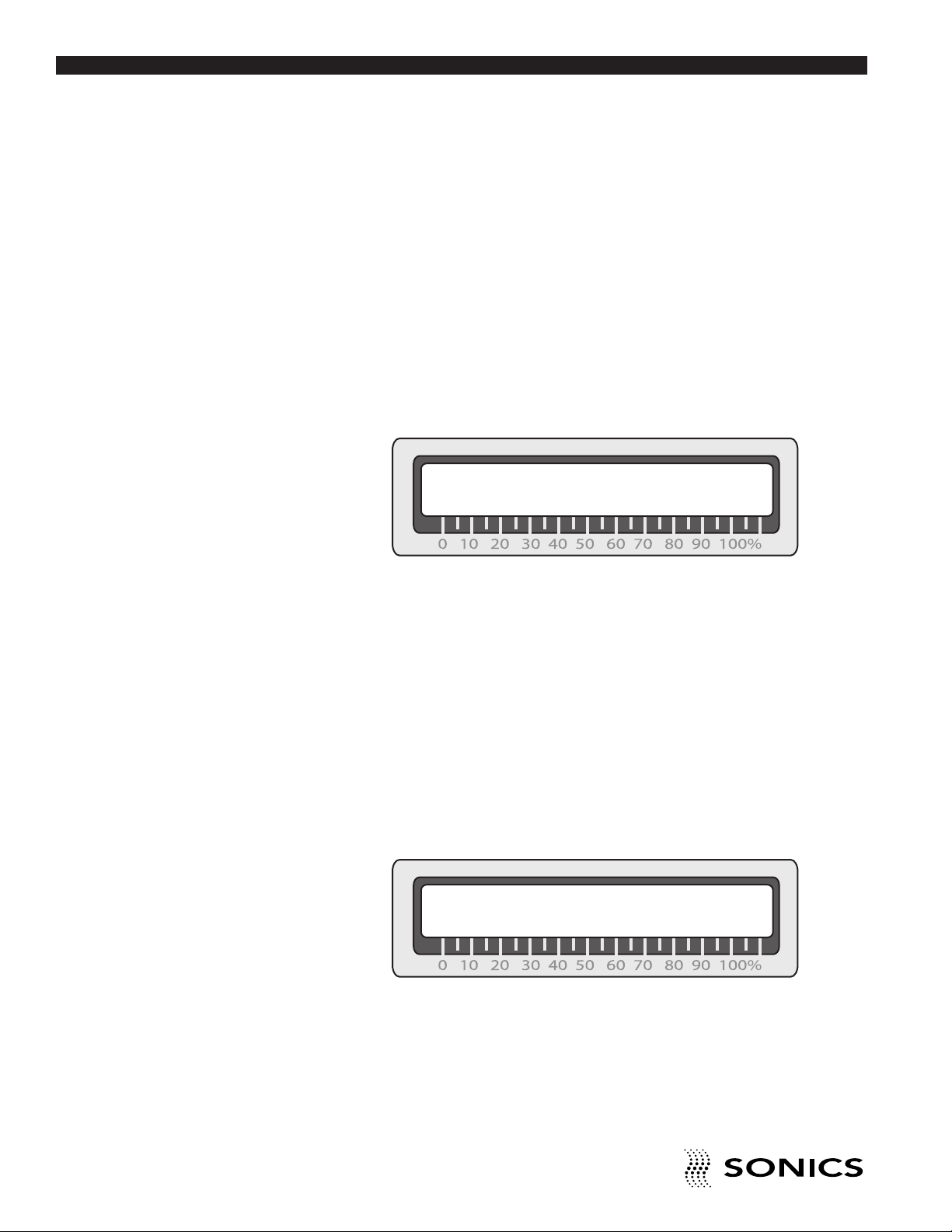
The TEST key can also be used to display the running ultrasonic frequency.
Refer to page 23 for more information.
READY SCREENS
In addition to the start-up ready screen (shown on page 20), there are 2 other
“ready” screens. The power supply must be displaying one of the 3 ready
screens in order for welding to commence. Welding cannot be initiated from
any other display. All 3 ready screens can be accessed by pressing the
ENTER/REVIEW key. The other 2 ready screens are as follows:
*Alarms* Time: – –
Energy: – –
Alarm Screen
The Alarm screen displays information about the alarm(s) that have been
triggered by the system encountering parameters outside of the specified
tolerance limits. The screen will indicate whether alarms occurred in Time or
Energy (on E models only). If there are no alarms, dashes will display. If there
are alarms, an L (for Low limit, indicating that the low limit was violated)
and/or an H (for High limit, indicating that the high limit was violated) will
display by the applicable mode (time or energy). Once another new cycle is
begun, the system will automatically clear the current alarm.
Counter Screen
Cycles: 00,004,678
CRC: 000,062 RAC: 0,000
The Counter screen displays information about the job number, the number
of cycles run to date, the customer resettable counter (CRC) and the
resettable alarm counter (RAC). The 2 resettable counters can be reset
whenever desired by pressing the Clear key when the counter screen is
displayed (the keypad must be unlocked).
• • • • • • • • • • • • • • • • • • • • • • • • • • • • • • • • • • • • • • • • • • • • • • • • • • • • • • • • • • • • • • • • • • • • • • • • • • • • • • • • • • • • • • • • • • • • • • • • • • • • • • • • • • • •
22
I N S T RU C T IO N M A N U AL • H AN D H E LD W E L DE R S
Page 24

RELATIONSHIP OF TIME AND ENERGY SETTINGS (ON E
Go To Top Of Document
MODELS ONLY)
Parameters can be set in the time and energy menus. The settings in both of
these menus should be taken into account when you are setting up a job
since they do not function independently of each other and a parameter in
one menu can impact the effect of a parameter in another menu.
For example, if you specify a weld time of 2 seconds and an energy setting
of 2,000 joules, the weld cycle will be terminated by whichever of the 2
settings (Weld Time or Energy Setting) is reached first – that is, either when
ultrasonics have been applied for 2 seconds or when energy equivalent to
2,000 joules has been delivered to the parts being assembled. If 2 seconds
is reached before 2,000 joules have been delivered, the weld cycle will
terminate regardless of the amount of energy delivered, and vice versa.
The start-up ready screen which shows the last weld information will show a
flashing “sec” or “J” to indicate which setting was achieved first and thereby
terminated the weld cycle. In the example above, if the weld time of 2
seconds is reached before 2000 joules have been delivered, the ready screen
will display “02.00 sec,” with the “sec” flashing, along with whatever energy
was delivered. The peak power delivered (%Pmax) will be displayed as a
percent of the supply rating.
The ability to specify Time and Energy affords maximum control of the weld
process. However, when entering your specifications in the various menus
described below, keep in mind that the settings from previous use remain in
effect until you make a change and use the Enter key to register a new value.
This means that if you want to achieve a weld time of 2 seconds, for
example, you will need to ensure that other entries in the Energy menu will
allow a 2-second weld before an Energy setting is reached (and ultrasonics
are terminated).
• • • • • • • • • • • • • • • • • • • • • • • • • • • • • • • • • • • • • • • • • • • • • • • • • • • • • • • • • • • • • • • • • • • • • • • • • • • • • • • • • • • • • • • • • • • • • • • • • • • • • • • • • • • •
I N S T RU C T IO N M A N U AL • H AN D H E LD W E L DE R S
23
Page 25

TIME SETTINGS
Go To Top Of Document
There are 3 time parameters, or timers, that can be set. They are accessed
by pressing the Time key which allows specification of the following time
parameters. The first menu display will show the following:
Weld Time – sets the duration of time for which ultrasonic vibrations are
applied to the parts.
If the time value is cleared (zero or dashes displayed on screen), then
ultrasonics will be activated when the hand gun trigger switch is depressed.
Press the Time key again (and successively after each menu display) to
advance to these next screen displays:
Time Limit Low – sets the low time alarm examination point (as a tolerance
limit). A time alarm will be triggered if the actual weld time is less than this
value. The time low alarm will show on the Alarm Screen display and will be
indicated by a flashing LED on the Time key. By specifying values for this
limit and the Time Limit High, a weld time “window” is created that defines a
”good weld.” (If no alarms are triggered – the weld cycle occurred within the
designated time limits.)
Time Limit High – sets the high time alarm examination point. A time alarm
will be triggered if the actual weld time is greater than this value. The time
high alarm will show on the Alarm Screen display and will be indicated by a
flashing LED on the Time key.
• • • • • • • • • • • • • • • • • • • • • • • • • • • • • • • • • • • • • • • • • • • • • • • • • • • • • • • • • • • • • • • • • • • • • • • • • • • • • • • • • • • • • • • • • • • • • • • • • • • • • • • • • • • •
24
I N S T RU C T IO N M A N U AL • H AN D H E LD W E L DE R S
Page 26

ENERGY SETTINGS (ON E MODELS ONLY)
Go To Top Of Document
There are 3 energy parameters that can be specified. These are accessed by
pressing the Energy key, which allows specification of the following
parameters. The first menu display will show the following:
Energy Setting – sets the amount of energy in joules to be delivered to the
parts being assembled.
Press the Energy key again (and successively after each menu display) to
advance to these next screen displays.
Energy Limit Low – sets the low energy alarm examination point (as a
process control tolerance limit). An energy alarm will be triggered if the actual
weld energy is less than this value. The energy low alarm will show on the
Alarm Screen display and will be indicated by a flashing LED on the Energy
key. By specifying values for this limit and the Energy Limit High, a weld
energy “window” can be created in which a ”good weld” can occur. (If no
alarms are triggered – the weld cycle occurred within the designated energy
limits.)
Energy Limit High – sets the high energy alarm examination point (see Limit
Low above). An energy alarm will be triggered if the actual weld energy is
greater than this value. The energy high alarm will show on the Alarm Screen
display and will be indicated by a flashing LED on the Energy key.
AMPLITUDE
The Amplitude Setting is used to make fine adjustments to vibrational
amplitude, from 20% (minimum) to 100% (maximum).
FREQUENCY DISPLAY
The TEST key can also be used to display the running frequency. Press and
hold the TEST key for 3 seconds. The information on the display will change
to include a frequency counter display (Hz). After this switch, the power is
captured (no longer updated) and the frequency display will update every
second. This information can help diagnose problems with the hand gun.
• • • • • • • • • • • • • • • • • • • • • • • • • • • • • • • • • • • • • • • • • • • • • • • • • • • • • • • • • • • • • • • • • • • • • • • • • • • • • • • • • • • • • • • • • • • • • • • • • • • • • • • • • • • •
I N S T RU C T IO N M A N U AL • H AN D H E LD W E L DE R S
25
Page 27

When the hand gun
Go To Top Of Document
(converter) is on, be
sure to isolate it from
any/all grounded
surfaces (including
machine frames) to
avoid triggering an
overload condition as
the system detects an
alternate ground path.
OVERLOAD PROTECTION
There are two overload protection circuits – one for the power supply and
one for the hand gun – which will terminate the welding cycle when the
system is operated under adverse conditions, such as excessive wattage,
voltage or current, or a loose or failed horn/tip. The welding cycle will also be
automatically terminated if the hand gun contacts a grounded surface while
the power is on – the power supply will overload because it detects an
alternate ground path. The overload protection circuits will prevent damage
to internal system components. Depending upon the type of condition that
caused the overload, the situation is resolved by different methods.
If an ultrasonic overload condition exists, simply press the O.L. Reset key to
reset the system.
If a shock protection condition caused the overload, the system cannot be
reset with the O.L. Reset key. The system must be powered down (using the
ON/OFF switch) and the cable/hand gun connection problem(s) fixed, before
turning the power supply back on. (There is a ground fault circuit for shock
protection which monitors currents in the hand gun cable and the earth
ground. If a wire breaks or an alternate ground path is detected - which
changes the currents - the unit will go into a latched “Off” state to protect the
operator.)
If an overload condition persists, contact our Service Department at 1-800-
745-1105.
• • • • • • • • • • • • • • • • • • • • • • • • • • • • • • • • • • • • • • • • • • • • • • • • • • • • • • • • • • • • • • • • • • • • • • • • • • • • • • • • • • • • • • • • • • • • • • • • • • • • • • • • • • • •
26
I N S T RU C T IO N M A N U AL • H AN D H E LD W E L DE R S
• • • • • • • • • • • • • • • • • • • • • • • • • • • • • • • • • • • • • • • • • • • • • • • • • • • • • • • • • • • • • • • • • • • • • • • •
Page 28
KEYPAD SECURITY
Go To Top Of Document
The keypad can be “locked,” so that no new parameters or commands can
be entered via the keyboard, thereby preventing unauthorized cancellation or
adjustment.
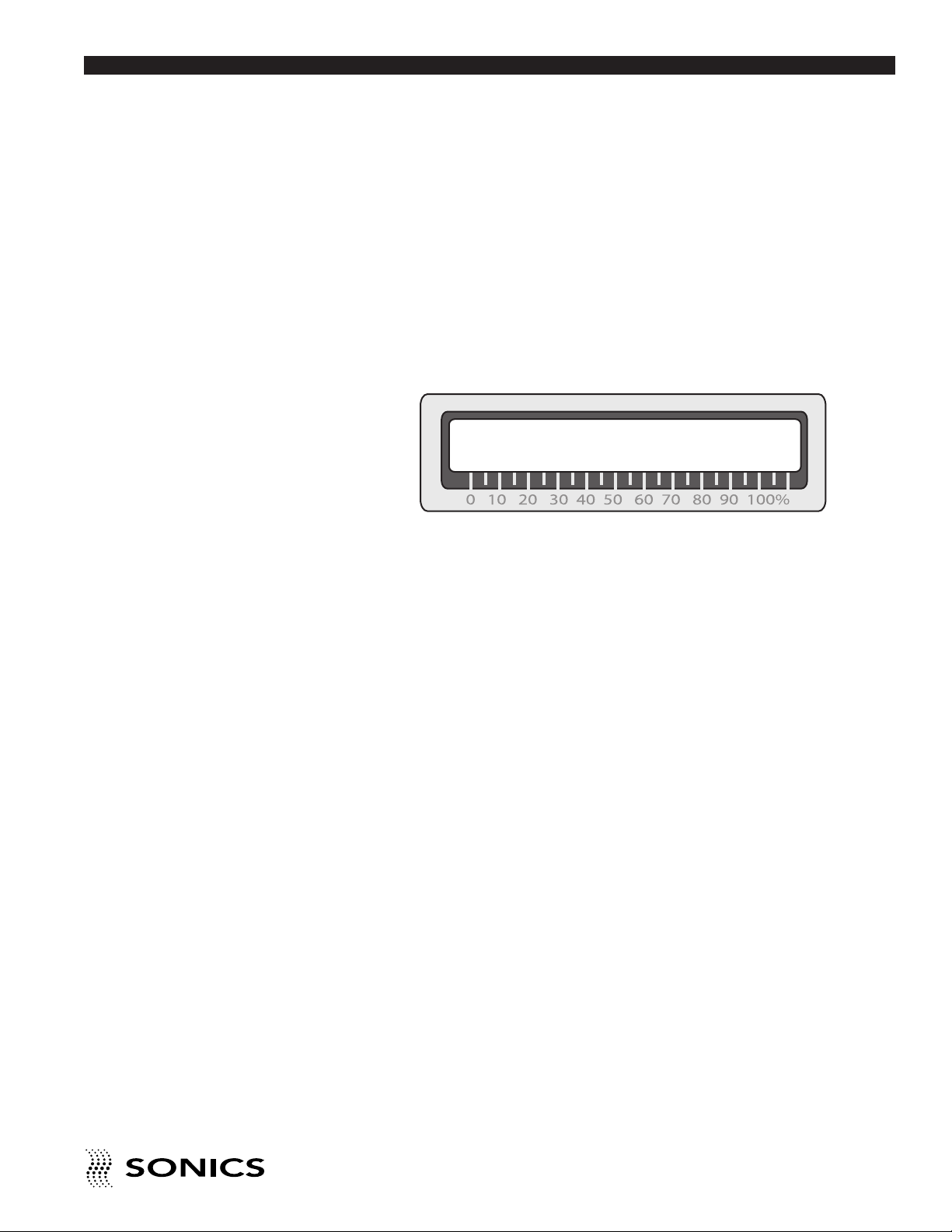
To activate the security feature, press and hold the numeral 7 key on power
up. When the keypad is secured in this manner, any attempt to change or
enter parameters will result in the following message being displayed on the
LCD screen:
KEYBOARD LOCKED!
• • • • • • • • • • • • • • • • • • • • • • • • • • • • • • • • • • • • • • • • • • • • • • • • • • • • • • • • • • • • • • • • • • • • • • • • • • • • • • • • • • • • • • • • • • • • • • • • • • • • • • • • • • • •
I N S T RU C T IO N M A N U AL • H AN D H E LD W E L DE R S
27
Page 29
A P P L I C A T I O N S – S T A K I N G
Go To Top Of Document
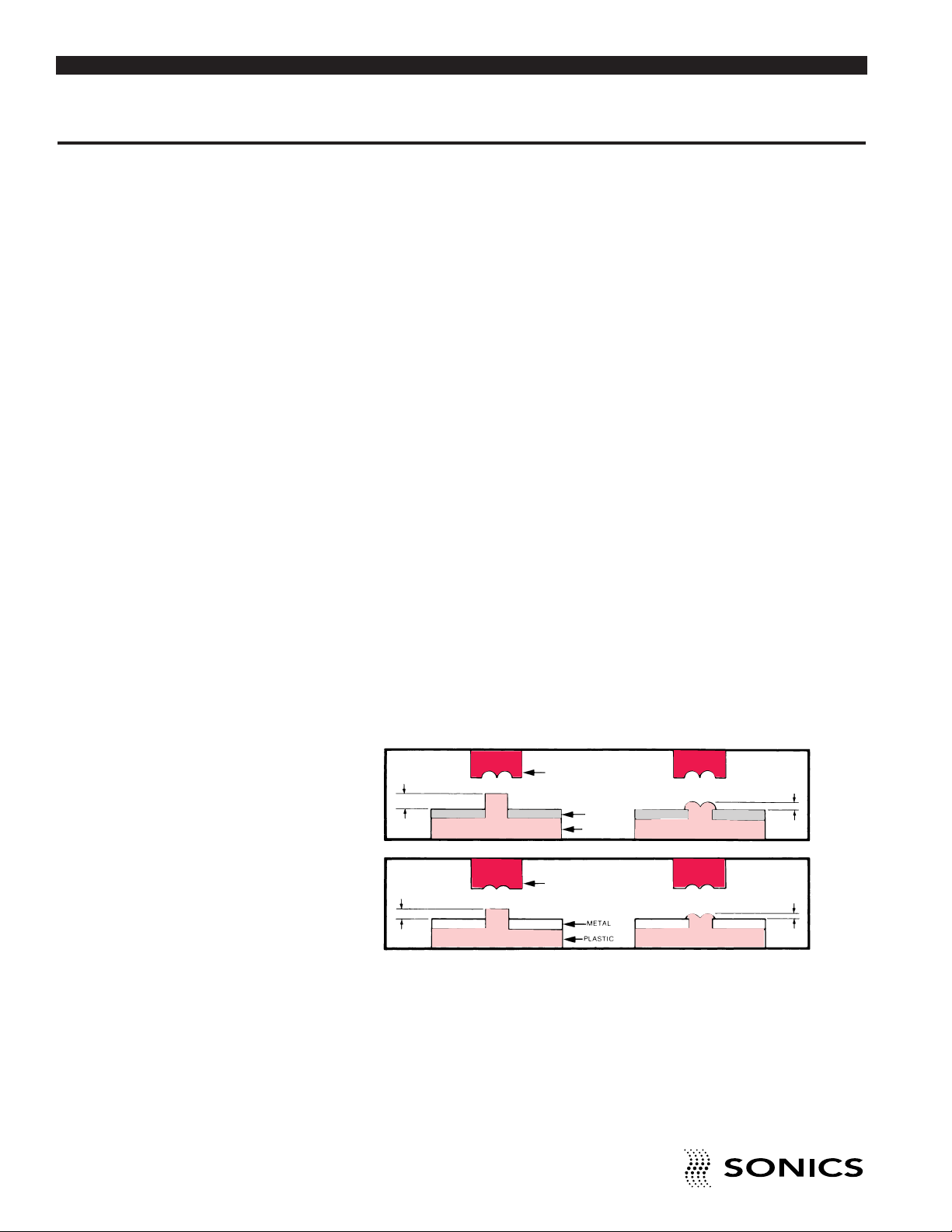
Ultrasonic staking, also referred to as ultrasonic “heading” or “riveting”,
ontrols the flow of the molten plastic used to capture or retain another
c
component in place. Ultrasonic staking provides an alternative to welding
when the two parts consist of dissimilar materials that cannot be welded or
when simple mechanical retention of one part relative to another is
inadequate (i.e. as distinct from molecular bonding). A common application
is the attachment of plastic to metal. Typically a metal part, with location
holes, is placed over a plastic part with molded bosses. The horn tip is then
pressed against the plastic boss and the vibratory motion creates friction
and localized heating. As the boss melts, the light pressure from the horn
forms a head to a shape determined by the horn tip configuration. When the
vibrations stop, the plastic material solidifies, and the dissimilar materials are
fastened together.
With staking, tight assemblies are possible because mating parts are
clamped under pressure of the horn until the rivet head solidifies. There is no
elastic recovery as is the case with heat staking or cold forming. A major
advantage of ultrasonic staking over heat staking is that the ultrasonic
staking tip remains relatively cool during the process, forming a clean head
with no sticking or stringing during assembly.
STANDARD FLARED STAKE
The standard flared stake satisfies the requirements of most applications.
This stake is recommended for bosses with an O.D. of 1⁄16 inch (1.6 mm) or
larger, and is ideally suited for low density, nonabrasive amorphous plastics.
BEFORE
.6d
BEFORE
1.6d
HIGH PROFILE
HORN
LOW PROFILE
HORN
METAL
PLASTIC
2d
d
AFTER
.5d
AFTER
.25d
• • • • • • • • • • • • • • • • • • • • • • • • • • • • • • • • • • • • • • • • • • • • • • • • • • • • • • • • • • • • • • • • • • • • • • • • • • • • • • • • • • • • • • • • • • • • • • • • • • • • • • • • • • • •
• • • • • • • • • • • • • • • • • • • • • • • • • • • • • • • • • • • • • • • • • • • • • • • • • • • • • • • • • • • • • • • • • • • • • • • • • • • • • • • • • • • • • • • • • • • • • • • • • • • • • • • • • • • •
28
I N S T RU C T IO N M A N U AL • H AN D H E LD W E L DE R S
Page 30

SPHERICAL STAKE
Go To Top Of Document
The spherical stake is preferred for bosses with an O.D. less than 1⁄16 inch
(1.6 mm). It is also recommended for rigid crystalline plastics with sharp
highly defined melting temperatures, for plastics with abrasive fillers, and for
materials that degrade easily.
IGH PROFILE
BEFORE
2.12d
BEFORE
.8d
H
.5d
d
.5d
HORN
L
HORN
METAL
PLASTIC
OW PROFILE
2d
AFTER
.75d
AFTER
.375d
HOLLOW STAKE
Bosses with an O.D. in excess of 5⁄32 inch (4 mm) should be made hollow.
Staking a hollow boss produces a large, strong head without having to melt
a large amount of material. Also, the hollow stake avoids sink marks on the
opposite side of the component, and enables the parts to be reassembled
with self-taping screws, should repair and disassembly be necessary.
BEFORE
H=1.6 d2
.5d
d2
HORN
=
d2
METAL
d1
2
AFTER
.5d1
KNURLED STAKE
The knurled stake is used in applications where appearance and strength are
not critical. Since alignment is not an important consideration, the knurled
stake is ideally suited for high volume production, and is often recommended
for use with a hand held ultrasonic spot welder.
Knurled tips are available in a variety of fine, medium and course
configurations.
BEFORE
HORN
METAL
PLASTIC
AFTER
• • • • • • • • • • • • • • • • • • • • • • • • • • • • • • • • • • • • • • • • • • • • • • • • • • • • • • • • • • • • • • • • • • • • • • • • • • • • • • • • • • • • • • • • • • • • • • • • • • • • • • • • • • • •
• • • • • • • • • • • • • • • • • • • • • • • • • • • • • • • • • • • • • • • • • • • • • • • • • • • • • • • • • • • • • • • • • • • • • • • • • • • • • • • • • • • • • • • • • • • • • • • • • • • • • • • • • • • •
I N S T RU C T IO N M A N U AL • H AN D H E LD W E L DE R S
29
Page 31
FLUSH STAKE
Go To Top Of Document
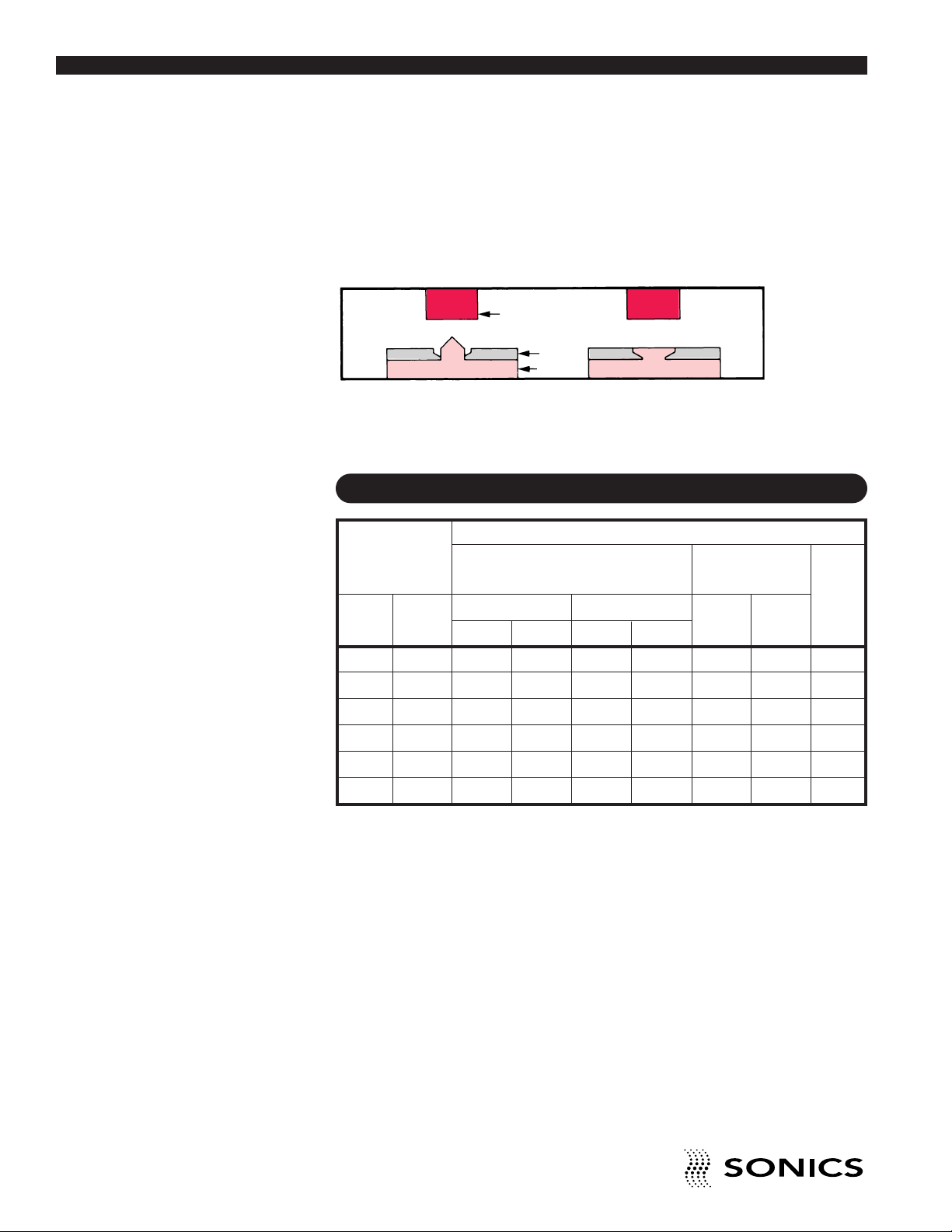
The flush stake is used for applications requiring a flush surface. The flush
stake requires that the retained piece has sufficient thickness for a chamfer
or counterbore.
FTER
BEFORE
ORN
H
METAL
PLASTIC
A
STANDARD THREADED TIPS FOR STAKING
STAKING
TIP CODE LETTER
Plastic Boss Solid Boss Conical Boss
Diameter Flare Head Spherical Head
inches mm
High Profile Low Profile
Tip Size Stud Height* Tip Size Stud Height*
High Low
Profile Profile
1/32 0.793 A .050 G .019 AA GG —
1/16 1.587 B .100 H .0375 BB HH —
Hollow
Boss
3/32 2.381 C .150 I .056 CC II —
1/8 3.175 D .200 J .075 DD JJ R
5/32 3.969 E .250 K .094 EE KK S
3/16 4.762 F .300 L .112 FF LL T
• • • • • • • • • • • • • • • • • • • • • • • • • • • • • • • • • • • • • • • • • • • • • • • • • • • • • • • • • • • • • • • • • • • • • • • • • • • • • • • • • • • • • • • • • • • • • • • • • • • • • • • • • • • •
• • • • • • • • • • • • • • • • • • • • • • • • • • • • • • • • • • • • • • • • • • • • • • • • • • • • • • • • • • • • • • • • • • • • • • • • • • • • • • • • • • • • • • • • • • • • • • • • • • • • • • • • • • • •
30
I N S T RU C T IO N M A N U AL • H AN D H E LD W E L DE R S
Page 32
A P P L I C A T I O N S – S P O T W E L D I N G
Go To Top Of Document
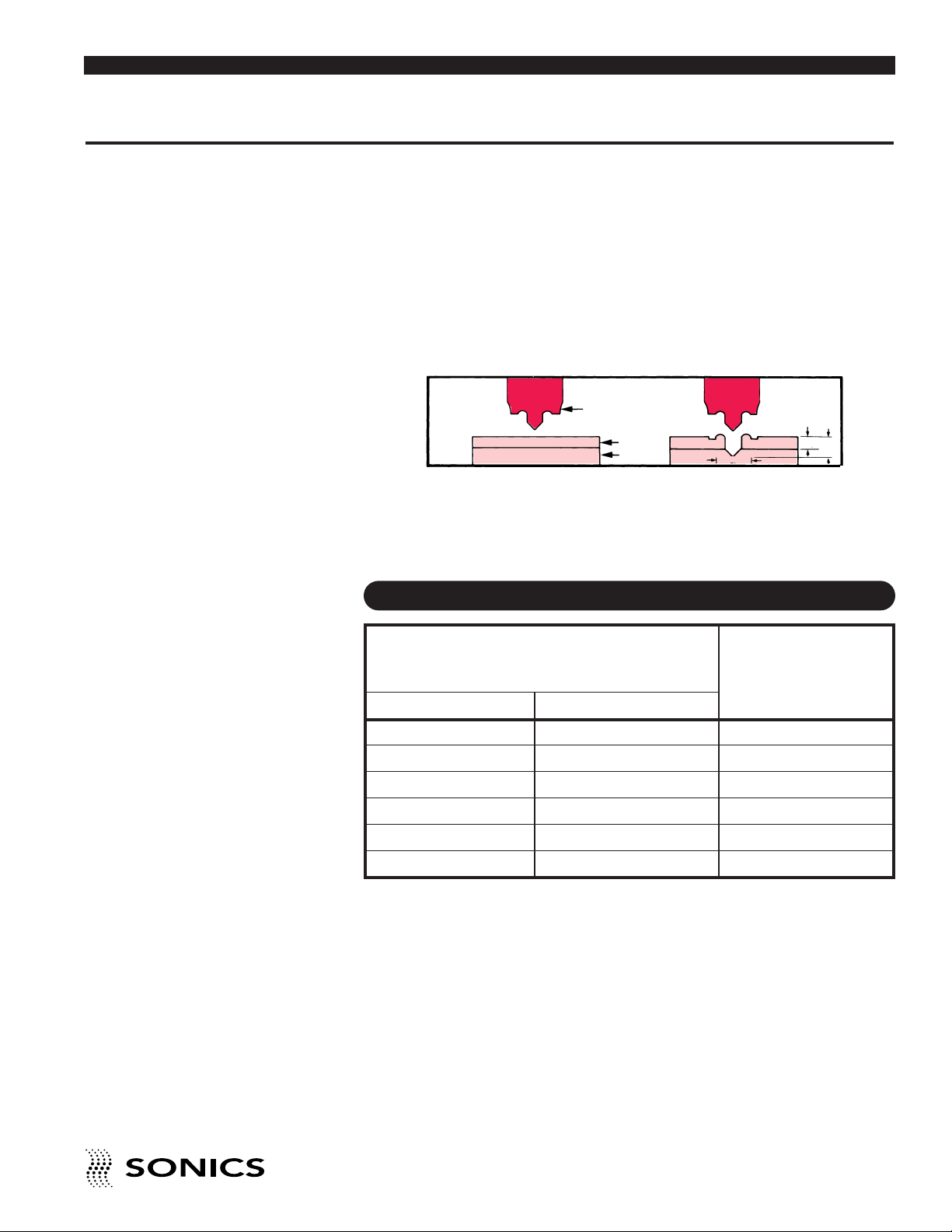
During spot welding, the horn tip penetrates through the top sheet and
nters the bottom sheet to a depth of one half the top sheet thickness. The
e
displaced molten plastic is shaped by a cavity in the tip to create an annular
formation around the weld. Simultaneously, the molten plastic displaced
from the second sheet flows into the preheated area and forms a permanent
molecular bond. Large thermoplastic parts and applications with hard to
reach joining surfaces can easily be welded together using an ultrasonic spot
welder and standard replaceable tips.
BEFORE
HORN
A
FTER
PLASTIC
PLASTIC
3t
t
STANDARD THREADED TIPS FOR SPOT WELDING
SPOT WELDING
Material Thickness TIP
CODE
inches mm
1/32 0.793 SA
3/64 1.190 SB
1/16 1.587 SC
5/64 1.984 SD
3/32 2.381 SE
7/64 2.778 SF
LETTER
1.5t
ORDERING INFORMATION
Specify tip required using code letter.
Example:
Spot weld tip “SA” indicates a tip used for spot welding – 1/32" thick
material.
• • • • • • • • • • • • • • • • • • • • • • • • • • • • • • • • • • • • • • • • • • • • • • • • • • • • • • • • • • • • • • • • • • • • • • • • • • • • • • • • • • • • • • • • • • • • • • • • • • • • • • • • • • • •
• • • • • • • • • • • • • • • • • • • • • • • • • • • • • • • • • • • • • • • • • • • • • • • • • • • • • • • • • • • • • • • • • • • • • • • • • • • • • • • • • • • • • • • • • • • • • • • • • • • • • • • • • • • •
I N S T RU C T IO N M A N U AL • H AN D H E LD W E L DE R S
31
Page 33
A P P L I C A T I O N S – U L T R A S O N I C I N S E R T I O N
Go To Top Of Document
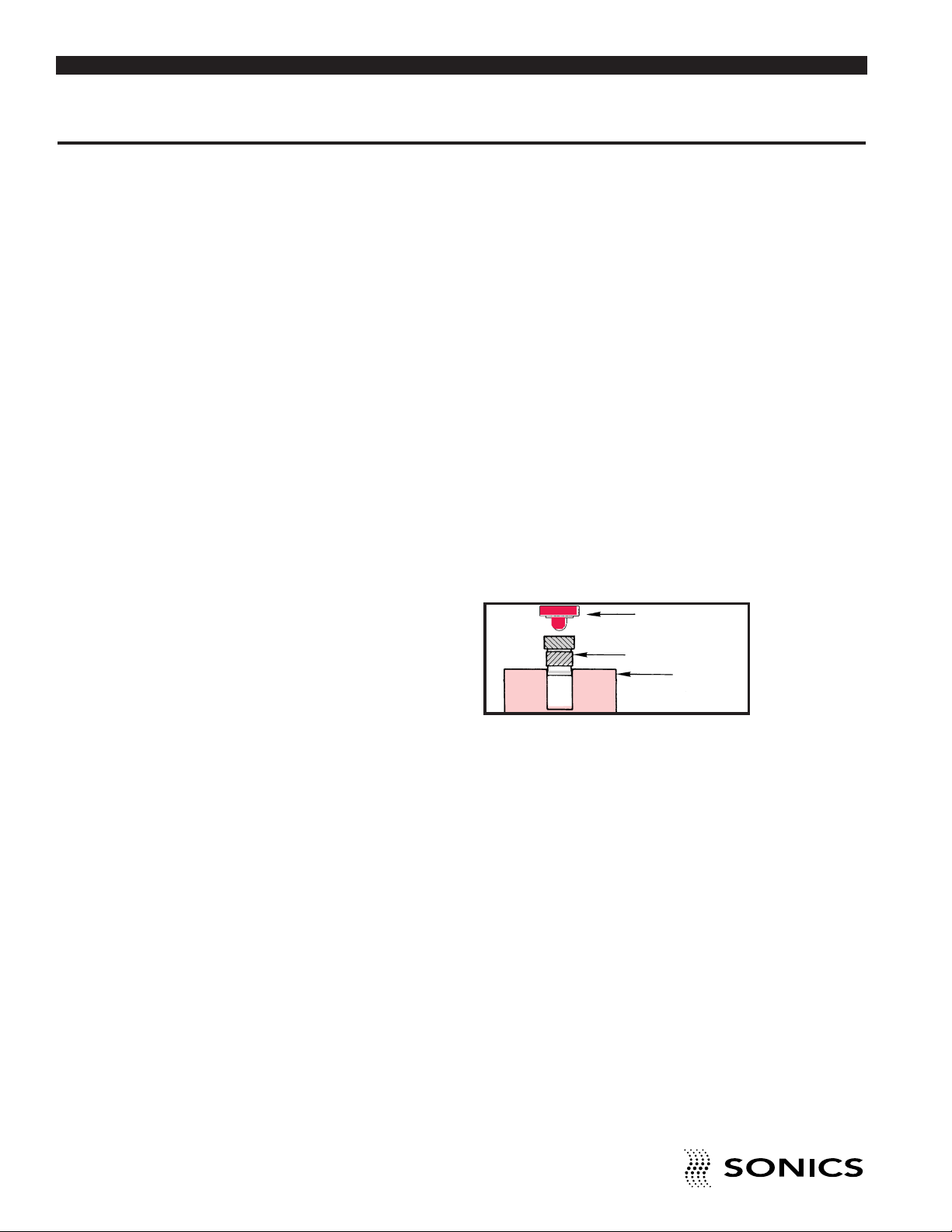
Ultrasonic insertion involves a metal insert to be placed in a cored or drilled
ole that is slightly smaller than the insert. This hole provides a certain
h
degree of interference and also serves to guide the insert into place. The
vibrating ultrasonic horn contacts the insert and the ultrasonic vibrations
travel through the insert to the interface of the metal and plastic. Heat,
generated by the insert vibrating against the plastic, causes the plastic to
melt, and as the horn advances, the insert is embedded into the component.
The molten plastic flows into the serrations, flutes, or undercuts of the inserts
and, when the vibrations terminate, the plastic resolidifies and the insert is
securely encapsulated in place. Inserts can be ultrasonically installed in most
thermoplastics.
Ultrasonic insertion provides the high performance strength values of a
molded-in insert while retaining all of the advantages of post-molded
installation. Some of the advantages of ultrasonic insertion over other
methods include rapid installation, minimal residual stresses in the
component following insertion, elimination of potential mold damage,
reduced mold fabrication costs and increased productivity as a result of
reduced mold cycle times.
HORN
INSERT
PLASTIC
• • • • • • • • • • • • • • • • • • • • • • • • • • • • • • • • • • • • • • • • • • • • • • • • • • • • • • • • • • • • • • • • • • • • • • • • • • • • • • • • • • • • • • • • • • • • • • • • • • • • • • • • • • • •
• • • • • • • • • • • • • • • • • • • • • • • • • • • • • • • • • • • • • • • • • • • • • • • • • • • • • • • • • • • • • • • • • • • • • • • • • • • • • • • • • • • • • • • • • • • • • • • • • • • • • • • • • • • •
32
I N S T RU C T IO N M A N U AL • H AN D H E LD W E L DE R S
Page 34

STANDARD THREADED TIPS FOR INSERTION
Go To Top Of Document
INSERTING
Insert Inside Diameter Pilot Diameter
Size of Insert Of Tip
SAE
4-40 0.088 0.078
6-32 0.106 0.096
8-32 0.133 0.123
10-24 0.147 0.137
10-32 0.160 0.150
1/4-20 0.200 0.190
1/4-28 0.211 0.201
5/16-18 0.262 0.252
METRIC
2.5 x 0.45 0.079 0.069
3 x 0.50 0.097 0.087
3.5 x 0.60 0.114 0.104
4 x 0.70 0.129 0.119
5 x 0.80 0.165 0.155
6 x 1.00 0.195 0.185
8 x 1.25 0.265 0.255
• • • • • • • • • • • • • • • • • • • • • • • • • • • • • • • • • • • • • • • • • • • • • • • • • • • • • • • • • • • • • • • • • • • • • • • • • • • • • • • • • • • • • • • • • • • • • • • • • • • • • • • • • • • •
• • • • • • • • • • • • • • • • • • • • • • • • • • • • • • • • • • • • • • • • • • • • • • • • • • • • • • • • • • • • • • • • • • • • • • • • • • • • • • • • • • • • • • • • • • • • • • • • • • • • • • • • • • • •
I N S T RU C T IO N M A N U AL • H AN D H E LD W E L DE R S
33
Page 35

M A I N T E N A N C E
Go To Top Of Document
CLEANING INSTRUCTIONS
The power supply and converter may be cleaned using a solvent-free
cleaning solution (i.e., glass cleaner). Horns and probes should be cleaned
using isopropyl alcohol. Titanium horns can be autoclaved.
NOTE: If packing unit
for return shipment, DO
NOT use styrofoam
“peanuts.”
REPAIRS / SERVICE
If problems are encountered, contact our Service Department as follows:
Phone: 1-800-745-1105 • 1-203-270-4600
Fax: 1-203-270-4610
E-Mail: [email protected]
It is suggested that a system in need of repair be sent back to the factory,
with a written description pertaining to the nature of the problem.
Always contact the factory for return authorization before shipping any
instrument. Include date of purchase, model number, and serial number. For
units not covered by the warranty, a purchase order should be forwarded to
avoid unnecessary delay. Care should be exercised to provide adequate
packing to insure against possible damage in shipment. The system should
be sent with all transportation charges prepaid and return method of
shipment indicated.
• • • • • • • • • • • • • • • • • • • • • • • • • • • • • • • • • • • • • • • • • • • • • • • • • • • • • • • • • • • • • • • • • • • • • • • • • • • • • • • • • • • • • • • • • • • • • • • • • • • • • • • • • • • •
• • • • • • • • • • • • • • • • • • • • • • • • • • • • • • • • • • • • • • • • • • • • • • • • • • • • • • • • • • • • • • • • • • • • • • • • • • • • • • • • • • • • • • • • • • • • • • • • • • • • • • • • • • • •
34
I N S T RU C T IO N M A N U AL • H AN D H E LD W E L DE R S
Page 36

W A R R A N T Y
Go To Top Of Document
Sonics & Materials, Inc., hereinafter referred to as "Sonics", warrants its
roducts for a period of one year from the date of original shipment against
p
defects in materials and workmanship under normal installation, use and
maintenance as described in the operating instructions which accompany
such equipment. During the warranty period, Sonics will, at its option, as the
exclusive remedy, either repair or replace without charge for material and
labor, the part(s) which prove upon our examination to be defective, provided
the defective unit is returned to us properly packed with all transportation
charges F.O.B. Sonics dock, Newtown, CT. Warranty period on equipment
rentals that are converted to purchase are deemed to have commenced on
the date of original rental equipment shipment.
Ultrasonic plastics welding horns constructed of titanium or aluminum are
guaranteed against defects for a period of one year from date of shipment.
Sonics will repair or replace a cracked or defective horn once without charge,
if failure occurs within the warranty period.
Ultrasonic plastics welding horns constructed of steel are guaranteed
against defects for a period of ninety days from date of shipment. Sonics will
repair or replace a cracked or defective steel horn once at a charge of 50%
of the original purchase price, if failure occurs within the warranty period.
Ultrasonic metal welding horns constructed of titanium or steel are
guaranteed against defects for a period of one year from date of shipment.
Sonics will repair or replace a cracked or defective horn once without charge,
if failure occurs within the warranty period.
Sonics warrants its ultrasonic converters for a period of one year from date
of shipment with a one-time replacement if a converter proves to be nonrepairable.
When customer site service is required, all travel, living and related expenses
will be billed at cost. In-warranty service labor time (including travel time) at
the customers facility is provided Monday through Friday (excluding
holidays) from 8:00 am to 5:00 pm. Any in-warranty service time requested
outside of these days and hours will be billed at 150% of Sonics current rate
per hour for such site service work.
• • • • • • • • • • • • • • • • • • • • • • • • • • • • • • • • • • • • • • • • • • • • • • • • • • • • • • • • • • • • • • • • • • • • • • • • • • • • • • • • • • • • • • • • • • • • • • • • • • • • • • • • • • • •
• • • • • • • • • • • • • • • • • • • • • • • • • • • • • • • • • • • • • • • • • • • • • • • • • • • • • • • • • • • • • • • • • • • • • • • • • • • • • • • • • • • • • • • • • • • • • • • • • • • • • • • • • • • •
I N S T RU C T IO N M A N U AL • H AN D H E LD W E L DE R S
35
Page 37

LIMITATION OF WARRANTY
Go To Top Of Document
This warranty does not apply to items subject to normal wear and tear or, to
equipment or tooling which has been subject to unauthorized repair, misuse,
abuse, negligence or accident. Misuse includes operation of equipment with
tooling that is not qualified for the equipment or tooling not properly installed
on the equipment.
Equipment which, in our judgment, shows evidence of having been used in
violation of operating instructions, or which has had the serial number altered
or removed, will be ineligible for service under this warranty.
For components and parts not manufactured by Sonics but included in
Sonics manufactured equipment, this warranty shall be limited to the
warranty as given to Sonics by said original component or part manufacturer.
Ultrasonic horns supplied by Sonics are manufactured to exacting
specifications and are tuned to vibrate at a specific frequency. Using an outof-tune horn will cause damage to the equipment and may result in warranty
nullification. Sonics assumes no responsibility for converters, horns or
fixtures not supplied by Sonics or for consequential damages resulting from
their usage.
Ultrasonic converters showing signs of excessive heat or contamination,
such as but not limited to, oils and moisture, are not covered by this
warranty.
Warranty does not apply to ultrasonic horns quoted as prototype,
experimental or of unusual design which, in our judgment are more likely to
fail in use.
Warranty does not apply to re-sharpening of ultrasonic blade type cutting or
slitting horns.
Warranty does not apply to knurl pattern wear on ultrasonic plastics and
metal welding horns and tips.
Warranty does not apply to ultrasonic horn or tip face wear when used with
plastics that are molded with fillers, such as but not limited to, glass or talc.
This warranty does not apply to ultrasonic plastics welding equipment, horns
or fixtures where metal-to-metal tooling contact time is in excess of 250
milliseconds.
This warranty does not apply to used or re-built equipment.
This warranty is non-transferable.
• • • • • • • • • • • • • • • • • • • • • • • • • • • • • • • • • • • • • • • • • • • • • • • • • • • • • • • • • • • • • • • • • • • • • • • • • • • • • • • • • • • • • • • • • • • • • • • • • • • • • • • • • • • •
• • • • • • • • • • • • • • • • • • • • • • • • • • • • • • • • • • • • • • • • • • • • • • • • • • • • • • • • • • • • • • • • • • • • • • • • • • • • • • • • • • • • • • • • • • • • • • • • • • • • • • • • • • • •
36
I N S T R U C T I O N M A N U A L • H A N D H E L D W E L D E R S
Page 38

ata supplied in Sonics instruction manuals has been verified and validated
Go To Top Of Document
D
and is believed adequate for the intended use of the equipment. If the
equipment or procedures are used for purposes other than those specified
herein, confirmation of their validity and suitability should be obtained in
writing from Sonics. Otherwise Sonics does not guarantee results and
assumes no obligation or liability.
This warranty is in lieu of any other warranties, either express, implied, or
statutory. Sonics neither assumes nor authorizes any person to assume for
it any other obligation or liability in connection with the sale of its products.
Sonics hereby disclaims any warranty or merchantability or fitness for a
particular purpose. No person or company is authorized to change, modify,
or amend the terms of this warranty in any manner or fashion whatsoever.
Under no circumstances shall Sonics be liable to the purchaser or to any
other person for any incidental or consequential damages or loss of profit or
product resulting from any malfunction or failure of this Sonics product.
• • • • • • • • • • • • • • • • • • • • • • • • • • • • • • • • • • • • • • • • • • • • • • • • • • • • • • • • • • • • • • • • • • • • • • • • • • • • • • • • • • • • • • • • • • • • • • • • • • • • • • • • • • • •
I N S T R U C T I O N M A N U A L • H A N D H E L D W E L D E R S
37
Page 39
A P P E N D I X
Go To Top Of Document
DB9 I/O CONNECTIONS DIAGRAM
• • • • • • • • • • • • • • • • • • • • • • • • • • • • • • • • • • • • • • • • • • • • • • • • • • • • • • • • • • • • • • • • • • • • • • • • • • • • • • • • • • • • • • • • • • • • • • • • • • • • • • • • • • • •
38
I N S T RU C T IO N M A N U AL • H AN D H E LD W E L DE R S
 Loading...