

Page 1
ELITE SERIES SURGICAL TABLES
MAINTENANCE MANUAL
REV 8/05
MODEL ELITE 6002
INCLUDING BATTERY MODELS
Page 59
Page 2

Page 52
Page 3

Table of Contents
SECTION I HYDRAULIC SYSTEM ...................................................................................................... 1
1-1. General........................................................................................................................................... 1
1-2. Component Operation .................................................................................................................... 2
a. Motor/Pump Operation ............................................................................................................. 2
b. Pressure Relief Valve .............................................................................................................. 2
c. Mini-Valves............................................................................................................................... 3
d. Mini-valve in Neutral Position ................................................................................................... 3
e. Mini-Valve Right Port Activated................................................................................................ 4
f. Mini-Valve Left Port Activated .................................................................................................. 4
g. Hydraulic Cylinders (Slave Cylinders) ..................................................................................... 5
h. Elevation Cylinder Return Circuit ............................................................................................. 6
i. Brake System ........................................................................................................................... 7
j. Emergency Brake Release ...................................................................................................... 8
k. Flex/Reflex System ................................................................................................................... 8
1-3. Hydraulic Adjustments ................................................................................................................... 9
a. Fluid Level. ............................................................................................................................... 9
b. Bleeding The Hydraulic System ............................................................................................... 9
c. Pressure Relief Valve .............................................................................................................. 9
d. Speed Controls......................................................................................................................... 9
SECTION II MECHANICAL TABLE ADJUSTMENTS........................................................................ 11
2-1. Back Section Gear Mesh Adjustment ........................................................................................... 1 1
2-2. Hydraulic Cylinder Adjustment ...................................................................................................... 11
a. Back Section ........................................................................................................................... 11
b. Leg Section ............................................................................................................................. 11
SECTION III HYDRAULIC TROUBLESHOOTING ............................................................................. 12
3-1. Precautions ................................................................................................................................... 12
3-2. Troubleshooting Notes .................................................................................................................. 12
3-3. ELEVATION DIAGNOSIS CHART .............................................................................................. 13
3-4. TRENDELENBURG DIAGNOSIS CHART.................................................................................. 14
3-5. LATERAL - TILT DIAGNOSIS CHART ........................................................................................ 15
3-6. FLEX SYSTEM DIAGNOSIS CHART.......................................................................................... 16
3-7. BACK SECTION DIAGNOSIS CHART ....................................................................................... 17
3-8. LEG SECTION DIAGNOSIS CHART .......................................................................................... 18
3-9. BRAKE CIRCUIT DIAGNOSIS CHART ..................................................................................... 19
3-10. Flexible Hose Identification and Placement................................................................................... 20
REV 8/05
Although current at time of publication, SKYTRON's policy of continuous development makes this manual
subject to change without notice.
Page 53
Page 4

Table of Contents (continued)
SECTION IV ELECTRICAL SYSTEM.................................................................................................. 22
4-1. General.......................................................................................................................................... 22
4-2. Components.................................................................................................................................. 22
4-3. Battery Model Components........................................................................................................... 22
SECTION V ELECTRICAL SYSTEM TROUBLESHOOTING ............................................................. 23
5-1. Troubleshooting Notes .................................................................................................................. 23
5-2. Main Switch................................................................................................................................... 23
5-3. Pendant Control ............................................................................................................................ 24
5-4. Relay Box...................................................................................................................................... 25
5-5. Solenoids....................................................................................................................................... 27
5-6. Motor/Pump Assembly .................................................................................................................. 29
5-7. Return To Level Micro-Switches................................................................................................... 31
5-8. Troubleshooting............................................................................................................................. 31
SECTION VI -6002B- BATTERY MODEL, ELECTRICAL TROUBLESHOOTING .............................. 36
6-1. General.......................................................................................................................................... 36
6-2. Troubleshooting Notes .................................................................................................................. 36
6-3. Main Switch................................................................................................................................... 37
6-4. Batteries ........................................................................................................................................ 37
6-5. Battery Charging Box/AC120V Transformer................................................................................. 38
6-6. Switch-Over Relay ........................................................................................................................ 39
6-7. Pendant Control ............................................................................................................................ 40
6-8. Auxiliary Switches......................................................................................................................... 42
6-9. Relay Box...................................................................................................................................... 43
6-10.Main Wire Harness Continuity Tests............................................................................................. 45
6-11. Solenoids....................................................................................................................................... 46
6-12. Motor/Pump Assembly.................................................................................................................. 47
SECTION VII ELECTRICAL SYSTEM ADJUSTMENTS .................................................................... 48
7-1. Relay Box Adjustments Models 6002 & 6002B............................................................................ 48
WARNING
Indicates a possibility of personal injury.
CAUTION
Indicates a possibility of damage to
equipment.
Page 54
Indicates important facts or helpful hints.
NOTE
Page 5

BASIC RECOMMENDED TOOLS:
1/8". 1/4" STRAIGHT BLADE SCREWDRIVERS
#2 PHILLIPS SCREWDRIVER
HYDRAULIC PRESSURE GAUGE SKYTRON P.N. 6-050-02
METRIC ALLEN® WRENCHES 1.5mm-8mm
ADJUSTABLE CRESCENT WRENCH
DIGITAL VOLTMETER, TRUE RMS
METRIC OPEN END WRENCHES 7mm-18mm
LEVEL (CARPENTERS)
BASIC RECOMMENDED MAINTENANCE PROCEDURES
The basic items notes below should be inspected at a minimal interval period of 6 months (dependant on
usage). For optimal usage, safety and longevity of the product, have it serviced only by an authorized
Skytron representative with authentic Skytron replacement parts.
• Check Power Cord (if applicable) • Inspect Articulating Joints
• Check Pendant Control (if applicable) • Inspect Table Tops
• Check Oil Level in Reservoir • Check Operational Times and Pressure Values
• Check For Hydraulic Leaks • Check Pressure Relief Valve Setting
• Check All Table Functions • Check Side Rails
• Check Velcro • Check Lateral Tilt Housing Bolts
• Inspect Leg and Head Section detachment mechanisms for proper operation
• Lubricate Elevation Slider Assembly with SKYTRON Slider Grease P/N D6-010-89
• Tighten X-Ray Top Stand-Offs, Use Loc-tite
• Lubricate Casters
• Check brake pads for wear and inspect brake cylinders for proper operation.
Only facility-authorized SKYTRON trained, maintenance personnel should troubleshoot the
SKYTRON 6002 Surgical Table. Trouble shooting by unauthorized personnel could result in
personal injury or equipment damage.
How to contact us:
Skytron
5000 36th St. SE, Grand Rapids, MI 49512
PH: 1-800-759-8766 (SKY-TRON)
FAX: 616-957-5053
Page 55
Page 6
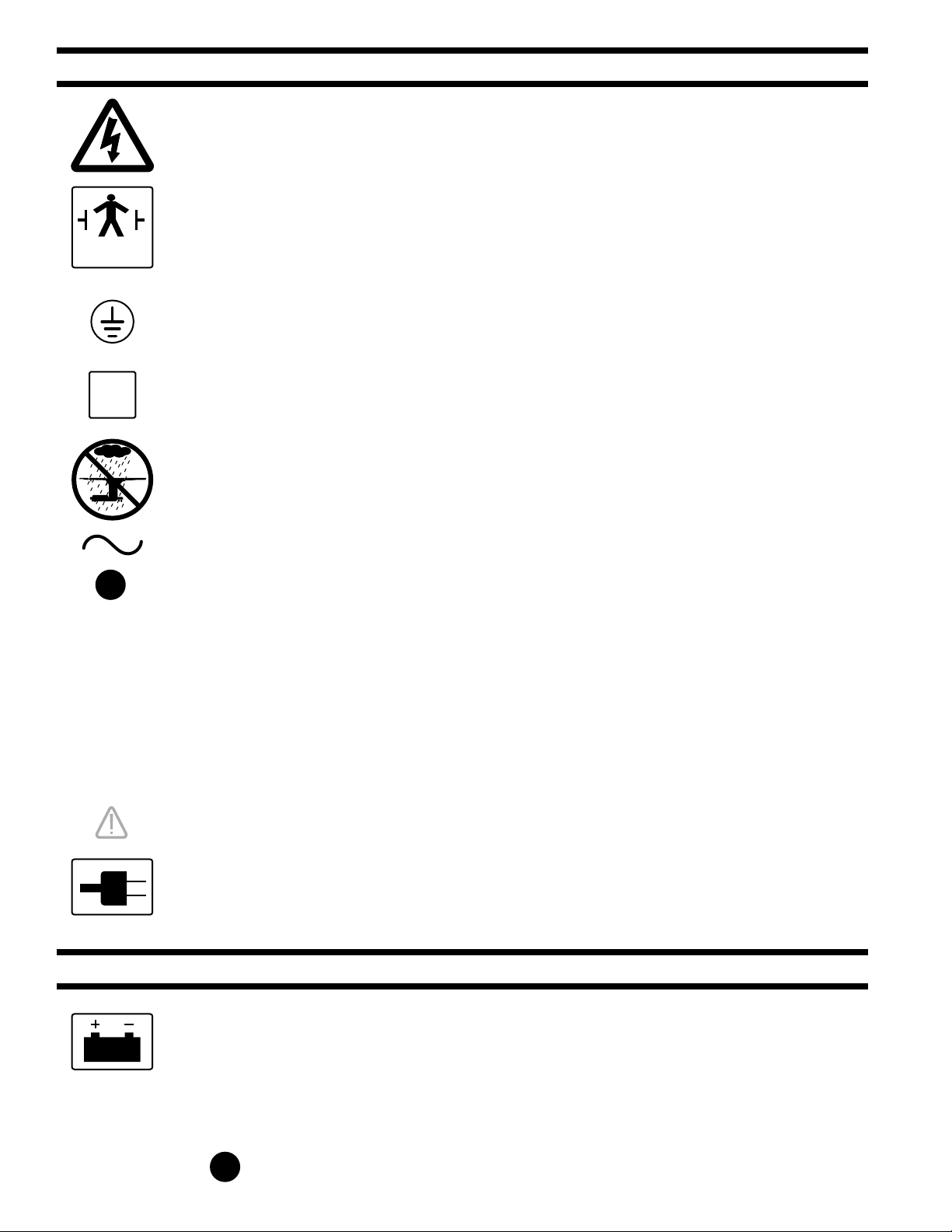
TYPE B
EQUIPMENT
EQUIPMENT LABELS AND SPECIFICATIONS
INDICATES DANGEROUS VOLTAGE, 120 V, 60 Hz
CLASS I DEFIBRILLATION PROOF, TYPE B EQUIPMENT- IPX4 RATED.
INTERNALLY POWERED EQUIPMENT
PROTECTIVE GROUNDING.
IN ORDER TO ENSURE PROPER GROUNDING RELIABILITY,
THIS TABLE MUST BE CONNECTED TO A PROPERLY GROUNDED
HOSPITAL GRADE OUTLET.
N
10A
IPX4
V
A
HZ
CONNECTION FOR NEUTRAL CONDUCTOR SUPPLIED
UNIT TO BE USED ONLY IN SPECIFIED ENVIRONMENTAL CONDITIONS
TEMPERATURE: 15˚ - 30˚ C (60˚ -85˚ F)
HUMIDITY: 30% - 60% RELATIVE HUMIDITY, NON CONDENSING
AC VOLTAGE
FUSE (2) 10 AMP FAST ACTING
ENCLOSURE CLASS
VOLTAGE RATING OF THE UNIT
AMPERAGE RATING OF THE UNIT
FREQUENCY OF THE UNIT
ATTENTION, CONSULT MANUAL FOR FURTHER INSTRUCTIONS.
INDICATES SPECIAL USER ATTENTION.
BATTERY TYPE:
Page 56
FUSE:
POWERED BY AC VOLTAGE
BATTERY MODELS
POWERED BY BATTERY
SEALED
LEAD ACID 12V, VALVE REGULATED
16AH, 10HR (530W/10MIN)
15 AMP FAST ACTING INTERNAL FUSE
15A
Page 7
.
.
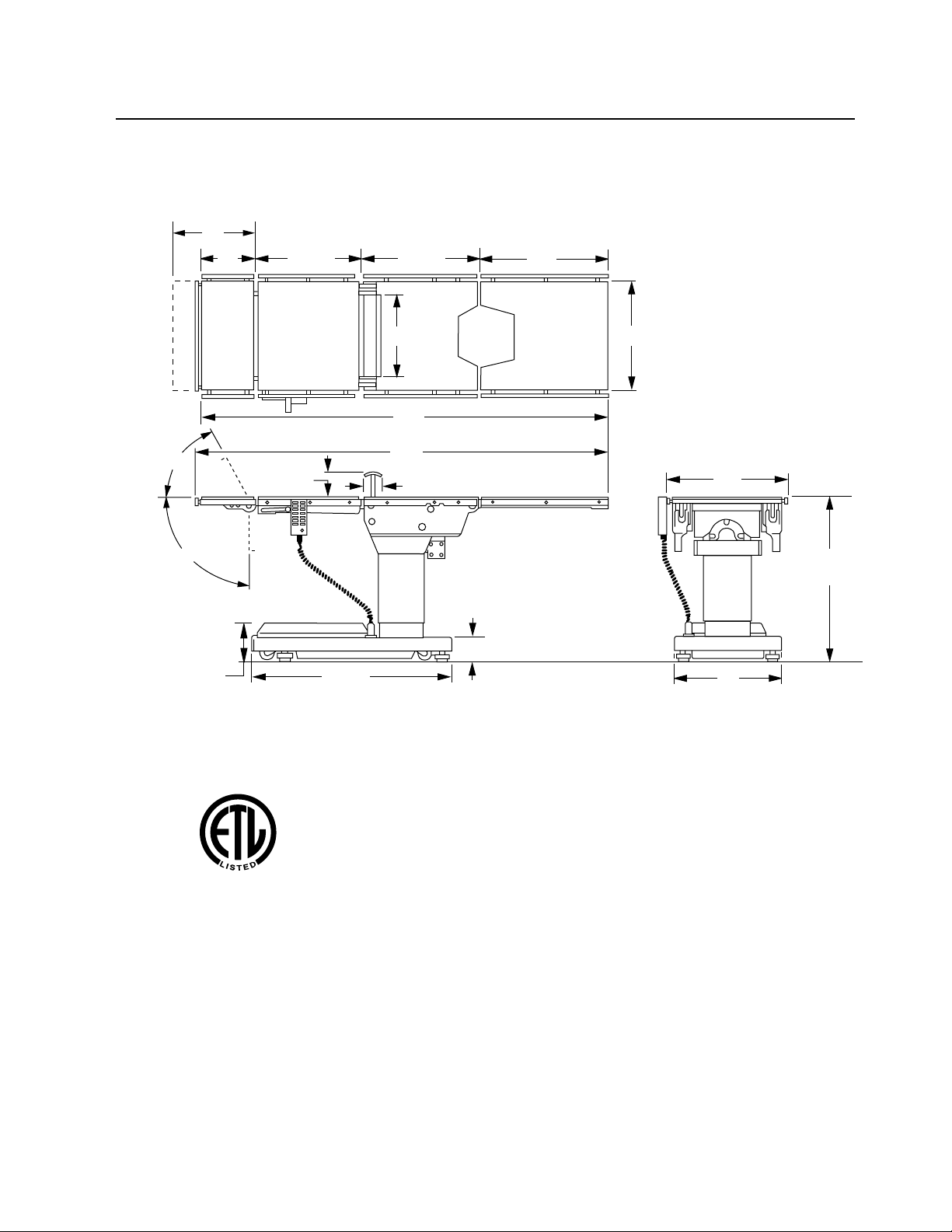
6002 Series General Purpose Surgical Table Specifications
15"
10"
19-1/2"
21-1/2" 24"
60˚
90˚
13"
75"
TOP VIEW
76"
5-3/4"
8"
35-1/2"
3"
5-3/4"
SIDE VIEW
20"
22"
43" MAX
28" MIN
19"
END VIEW
Electrical Specifications
Power requirements
Current Leakage
®
Power Cord
15 feet w/hospital grade connector
120 VAC, 60Hz, 300 Watts
Less than 100 micro amps
(removeable on battery model)
Page 57
Page 8

Page 52
Page 9
M
E
1-1. General
Electro-Hydraulic System
SECTION I HYDRAULIC SYSTEM
The hydraulic system (with the exception of the
hydraulic cylinders and hoses) is contained within
the base of the table. The hydraulic valves and
pump are electrically controlled by the use of a
hand-held push button pendant control. The power
requirements for the table are 120 VAC, 5 amp, 60
Hz.
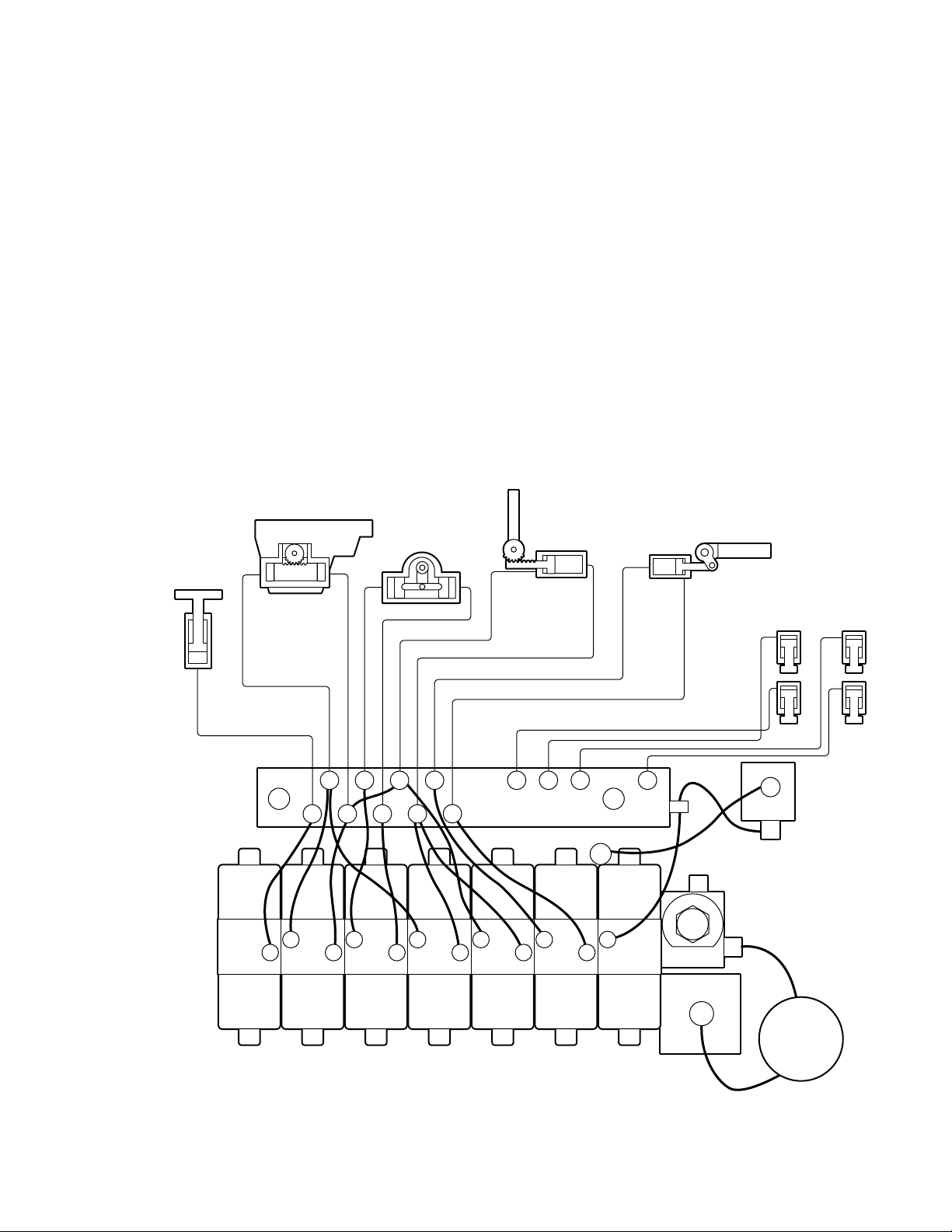
The table contains the following components. Refer to the block diagram (figure 1-1) for relationship.
a. Oil Reservoir - Main oil supply. Approximately
two quarts.
b. Motor/Pump Assembly - A positive displacement gear type pump provides the necessary oil
pressure and volume.
TRENDELENBURG
LA TERAL TIL T
LEVATION
CYLINDER
c. Pressure Relief Valve - Provides an alternate oil
path when the hydraulic cylinders reach the end of
their stroke.
d. Electro/Hydraulic Mini-Valve Assemblies -These
direct the fluid to the appropriate hydraulic cylinders.
e. Hydraulic Lines, Fittings, Connections - They
provide a path for the hydraulic oil.
f. Hydraulic Cylinders - They convert the hydraulic
fluid pressure and volume into mechanical motion.
BACK
SECTION
LEG SECTION
BRAKE SYSTE
PLUMBING
TERMINAL
EMERGENCY
MINI-VALVES
ELEV TREND TILT FLEX BACK LEG BRAKE
OIL
RESERVOIR
BRAKE RELEASE
PRESSURE
RELIEF V AL VE
MOTOR/PUMP
ASSEMBLY
Figure 1-1. Hydraulic Block Diagram Model 6002
Page 1
Page 10
1-2. Component Operation
D
P
G
D
P
G
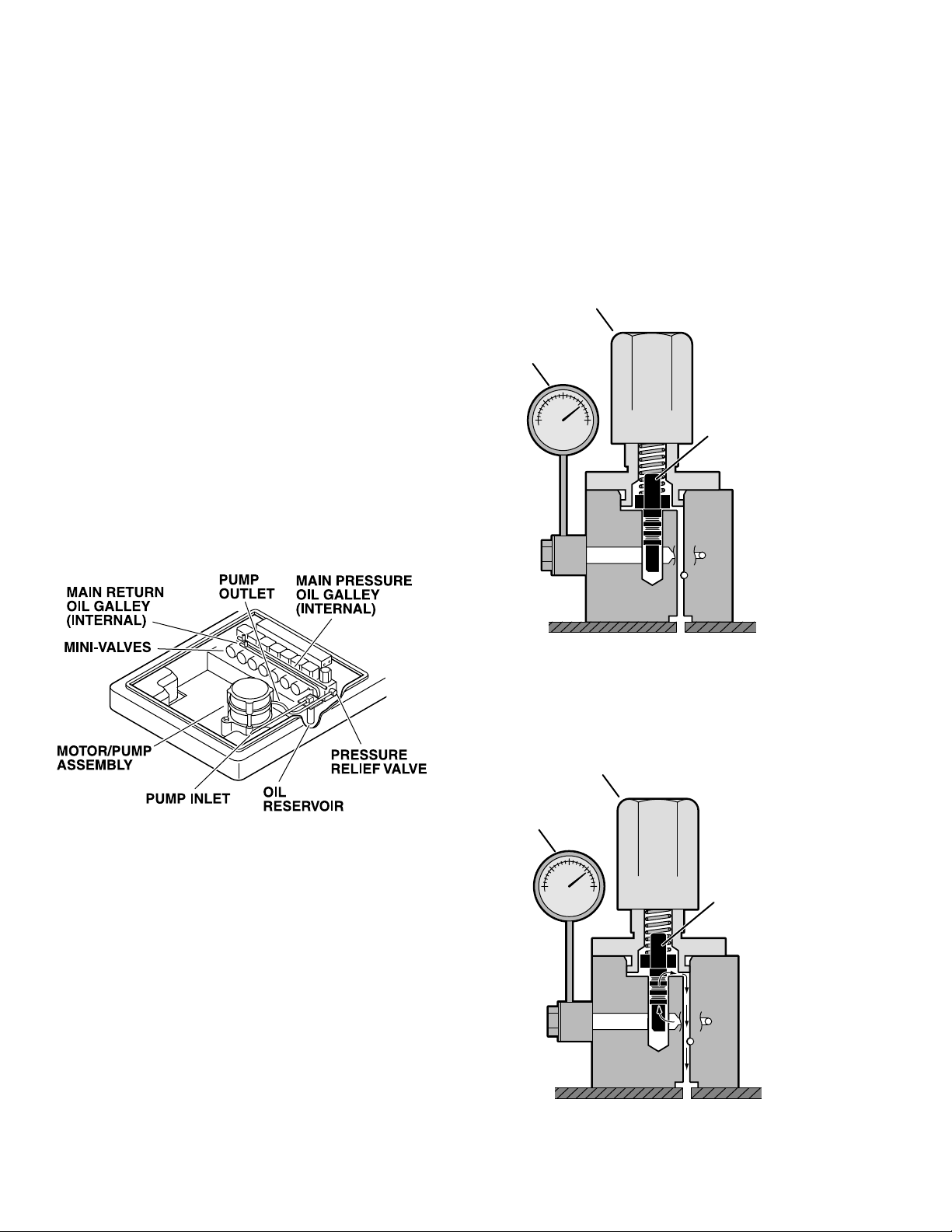
a. Motor/Pump Operation
The motor/pump assembly is a gear type pump
that provides the oil pressure and volume for the
entire hydraulic system. The pump has an inlet
side and an outlet side. The inlet side is connected
to the reservoir which provides the oil supply. The
reservoir has a very fine mesh screen strainer
which prevents foreign material from entering the
oil system.
The output line of the pump is connected to the main
oil galley which is internal and common to all the
hydraulic mini-valves and pressure relief valve.
Also, common to the hydraulic mini-valves and
pressure relief valve is an oil galley that internally
connects to the oil reservoir to provide a return path
for the hydraulic oil. See figure 1-2.
b. Pressure Relief Valve
The main component of the valve is an adjustable
spring loaded plunger that is pushed off from its
seat by the oil pressure. The oil then flows back into
the reservoir. See figure 1-4 Turning the adjustment nut clockwise increases the amount of oil
pressure required to open the valve, and turning it
counterclockwise decreases the amount of oil pressure. (See adjustment section for specification.)
PRESSURE RELIEF
ADJUSTMENT NUT
RESSURE
AUGE
SPRING LOADE
PLUNGER
Figure 1-3. Pressure Relief Valve Not
Functioning
PRESSURE RELIEF
ADJUSTMENT NUT
RESSURE
AUGE
Figure 1-2.
SPRING LOADE
PLUNGER
This device provides an alternate oil path when the
hydraulic cylinders reach the end of their stroke
and the pump continues to run. If this path were not
provided, the pump motor would stall because the
oil cannot be compressed. The pressure relief
valve is directly connected to the mini-valve bodies
and shares both the common internal main pressure oil galley, and the return oil galley, that internally connect to the reservoir. See figure 1-3.
Page 2
Figure 1-4 . Pressure Relief Valve
Functioning
Page 11
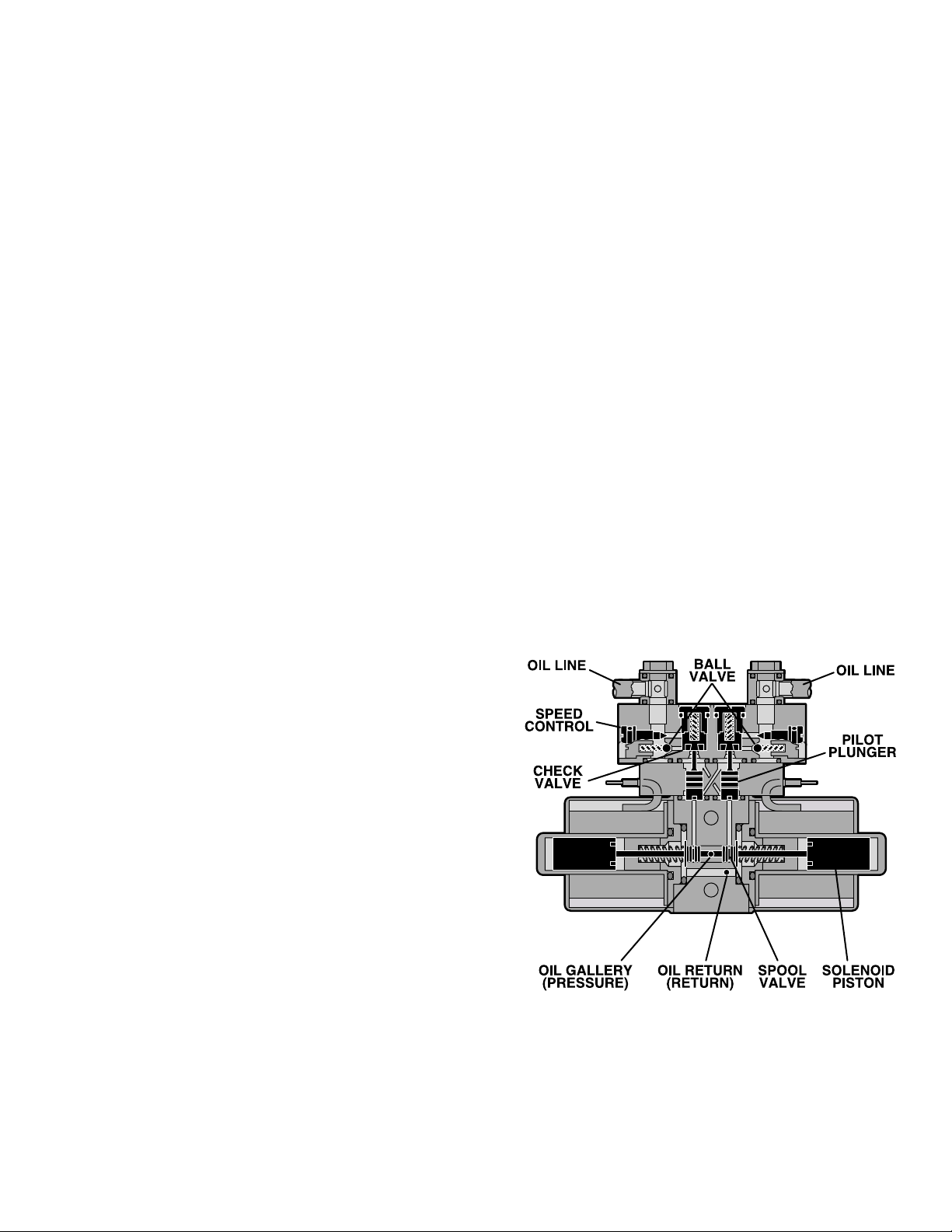
c. Mini-Valves
The operation of the mini-valves is identical for all
table functions except the elevation and Single
Action Brake circuits. These two hydraulic circuits
use a 3-way (single check valve) type mini-valve.
All other functions use a 4-way (dual check valve)
type mini-valve.
Either type mini-valve is controlled by two pushing
type, electrically operated solenoids. The solenoids push the spool valve (located in the lower
portion of the valve) one way or the other. This
motion opens the main supply galley (which has
pump pressure) allowing the oil to flow through the
various parts of the mini-valve to the function. The
spool valve also opens an oil return circuit which
allows the oil to return to the oil reservoir.
The main components of the mini-valve and their
functions are listed below:
1. Spool Valve - Opens the main oil galley
(pump pressure) to either mini-valve outlet depending on which direction the spool valve is
pushed. Also it provides a return path for the oil
returning back into the reservoir.
Also, by using this control method, it doesn’t matter
what size cylinder and piston is used because the
speed can be controlled by restricting the return oil.
If the pump puts out more volume to a certain slave
cylinder than the speed control is allowing to go
back to the reservoir, the pressure relief valve
provides an alternate path for the pump oil.
d. Mini-Valve in Neutral Position
(No fluid flow) See figure 1-5.
1. Spool Valve Centered - This closes off both
oil pressure and oil return galleys.
2. Pilot Plungers Both Closed -The pilot plungers control the opening of the check valves. If they
are closed, the check valves must be closed.
3. Check Valves - Both check valves are
closed trapping the oil in the cylinder and oil lines.
4. Speed Adjustment - When the mini-valve is
in the neutral position, the speed adjustment does
not affect anything because there is not any oil flow.
2. Pilot Plunger - There are two plungers in a
four-way mini-valve (one in a 3-way mini-valve),
one under each check valve. The purpose of the
pilot plungers is to mechanically open the return
check valve allowing the oil to return back into the
reservoir.
3. Check Valve - Two are provided in each fourway mini-valve to seal the oil in the cylinders and oil
lines and prevent any movement of the table. One
check valve is provided in a 3-way mini-valve.
4. Speed Adjustments - There are two speed
adjustments in each mini-valve. They are needle
valve type controls which restrict the volume of oil
returning back into the reservoir, thereby controlling the speed of the table surface movement. A 3way mini-valve has only one speed adjustment.
The speed controls are always located in the return
oil circuit. This prevents uncontrolled movement of
the piston in the slave cylinder due to one side of
the piston being loaded with hydraulic pressure
and the other side having no load.
Figure 1-5. Mini-Valve in Neutral Position
Page 3
Page 12
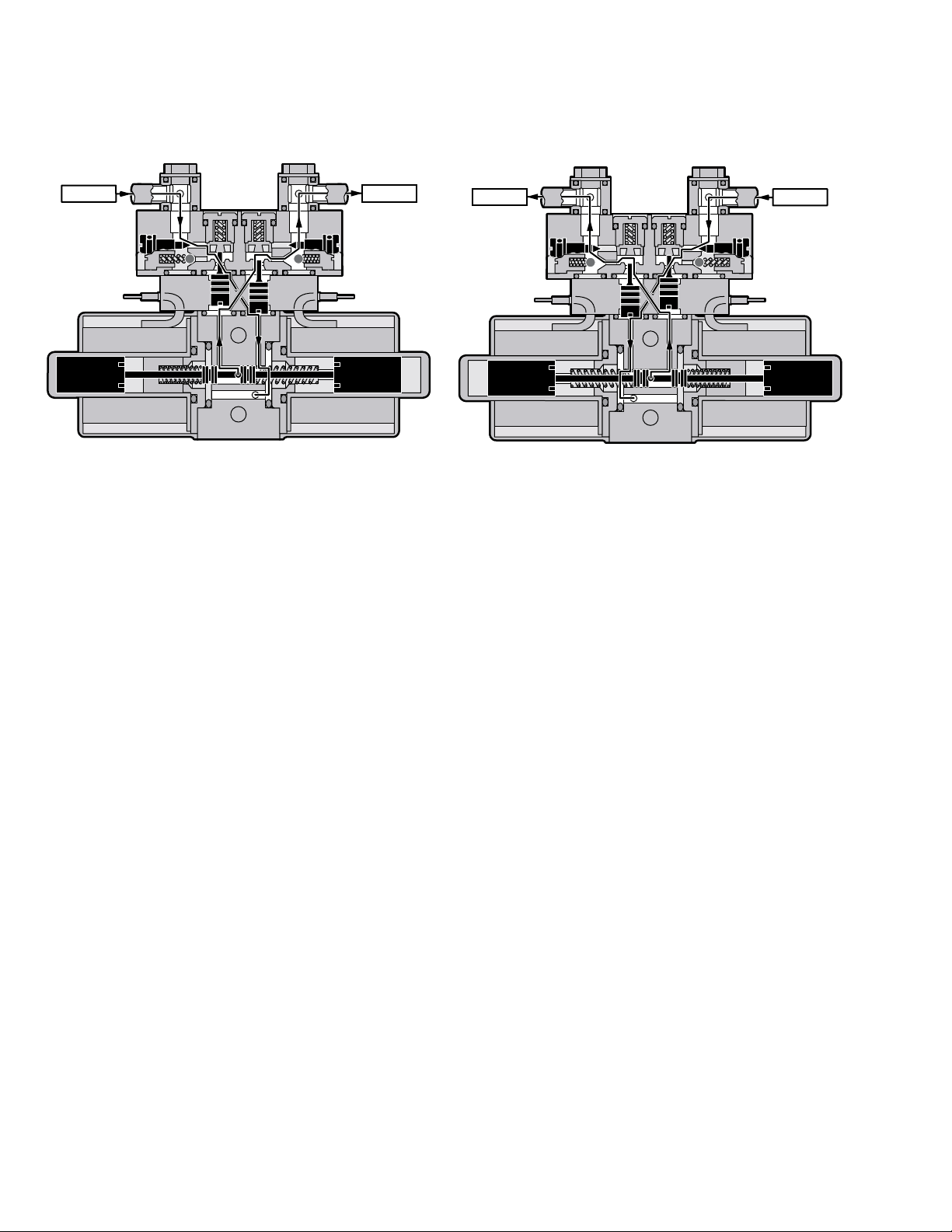
e. Mini-Valve Right Port Activated
(See figure 1-6)
Slave Cylinder Piston Moves to Left
Right Mini-Valve Port is Supply Line
Left Mini-Valve Port is Return Line
f. Mini-Valve Left Port Activated
(See figure 1-7.)
Slave Cylinder Piston Moves to Right
Left Mini-Valve Port is Supply Line
Right Mini-Valve Port is Return Line
INLET OUTLET
Figure 1-6. Mini-Valve Right Port Activated
1. Spool Valve - Pushed to the left by electric
solenoid. This opens the internal oil pressure galley allowing the fluid to go through the check valve
and on to the cylinder. Also, the spool valve opens
the oil return line providing an oil path through the
internal oil galley back to the reservoir.
OUTLET
INLET
Figure 1-7. Mini-Valve Left Port Activated
1. Spool Valve -Pushed to the right by electric
solenoid. This opens the internal oil pressure galley allowing the fluid to go through the check valve
and on to the cylinder. Also, the spool valve opens
the oil return line providing an oil path through the
internal oil galley back to the reservoir.
2. Pilot Plunger Valve - Left pilot plunger valve
is pushed up by the incoming oil pressure mechanically opening the check valve located above it in
the return circuit. This action allows the oil from the
left side of the slave cylinder to go back into the
reservoir. The right pilot plunger valve is not
affected in this operation mode.
3. Check Valves - Both check valves are
opened in this operation mode. The right check
valve is pushed open by the oil pressure created by
the pump. The oil then continues to go through the
lines and pushes the slave cylinder piston to the
left. At the same time, the left check valve is held
open mechanically by the pilot plunger providing a
return path for the oil through the mini-valve back
to the reservoir.
4. Speed Adjustment - The right speed control
(output side) does not have any effect in this
operation mode because the oil is routed around
the speed adjustment through a by-pass valve and
then to the output port. The left speed adjustment
controls the speed of the table function by restricting the amount of oil going back into the reservoir.
2. Pilot Plunger Valve - Right pilot plunger valve
is pushed up by the incoming oil pressure mechanically opening the check valve located above it in
the return circuit. This action allows the oil from the
right side of the slave cylinder to go back into the
reservoir. The left pilot plunger valve is not affected
in this operation mode.
3. Check Valves - Both check valves are
opened in this operation mode. The left valve is
pushed open by the oil pressure created by the
pump. The oil then continues to go through the
lines and pushes the slave cylinder piston to the
right. At the same time, the right check valve is held
open mechanically by the pilot plunger providing a
return path for the oil through the mini-valve back
to the reservoir.
4. Speed Adjustment - The left speed control
(output side) does not have any effect in this operation mode because the oil is routed around the
speed adjustment through a by-pass valve and
then to the output port. The right speed adjustment
controls the speed of the table function by restricting the amount of oil going back to the reservoir.
Page 4
Page 13
N
E
C
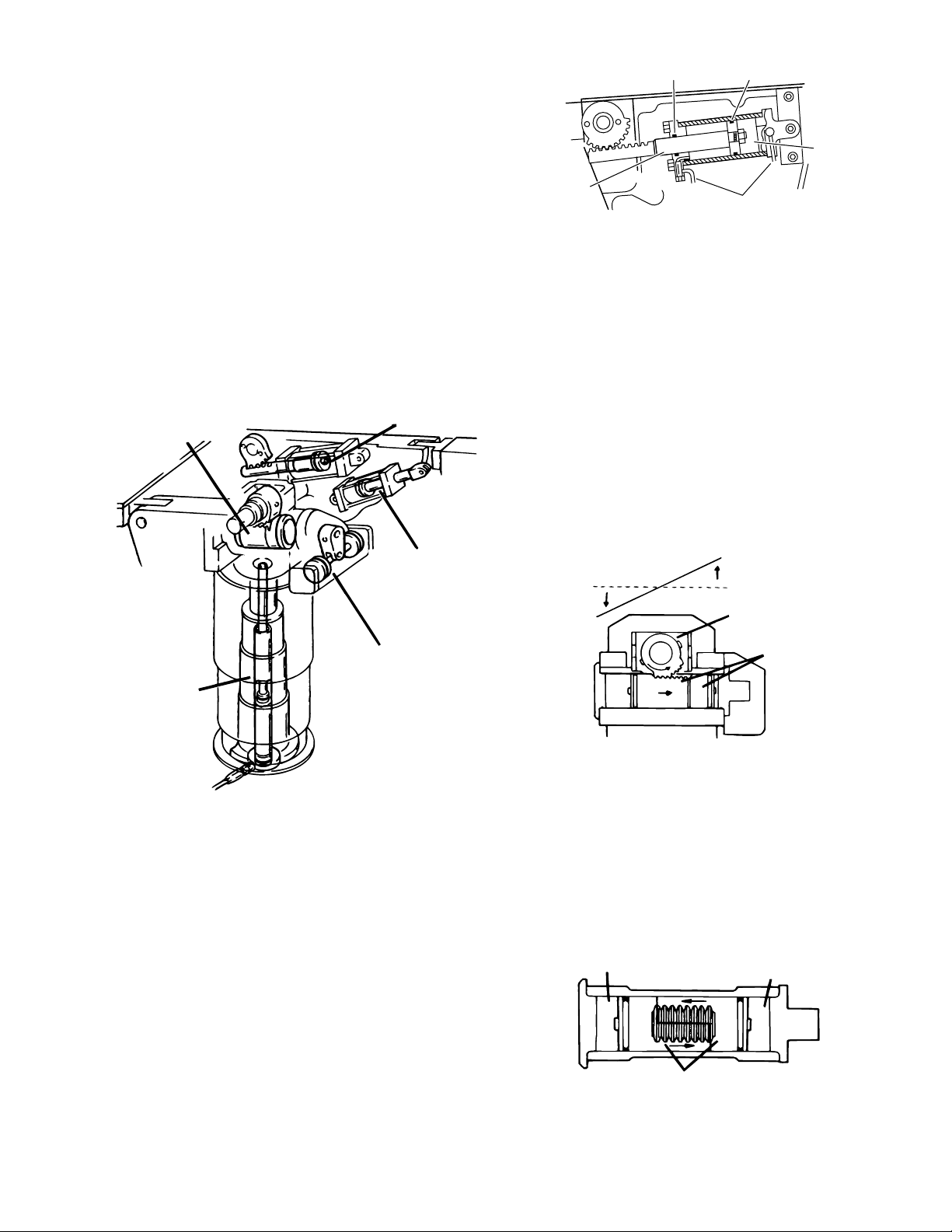
g. Hydraulic Cylinders (Slave Cylinders)
RAM
HYDRAULIC LINE
PISTON
O-RING
O-RING
R
S
There are several different types of hydraulic cylinders used in the table that activate the control
functions. With the exception of the elevation and
brake cylinders, all operate basically the same
way. The control functions are listed below: (See
figure 1-8.).
Back Section--2, double action cylinders
Leg Section--2, double action cylinders
Trendelenburg--1, double action cylinder
Lateral Tilt--1, double action cylinder
Elevation--1, single action cylinder
Brakes--4, single action cylinders
TRENDELENBURG
CYLINDER
BACK SECTIO
CYLINDER
Figure 1-9. Back Section Cylinder
2. Trendelenburg Cylinder Assembly - This
cylinder / piston arrangement has rack teeth cut
into the top of each piston. These teeth mesh with
a pinon gear that is connected directly to the table
side frames. The pinion gear shaft and table side
frames are supported by bearings at either side.
When hydraulic fluid is pumped into one side of the
cylinder, the pistons are pushed in one direction,
moving the pinion gear and table side frames with
them. Oil pressure can be applied to either side of
the piston, making the table tilt end for end. See
figure 1-10.
LEG SECTION
LEVATION
YLINDER
CYLINDER
LA TERAL TIL T
CYLINDER
T ABLE TOP
PINION GEA
PISTON
SIDE VIEW
Figure 1-10. Trendelenburg Cylinder Assy.
Figure 1-8. Cylinder Placement
1. Back Section and Leg Section Cylinders The double action cylinders are closed at one end
and have a movable piston with hydraulic fluid on
both sides. Connected to this piston is a ram or
shaft that exits out of the other end of the cylinder.
Through the use of either a gear, or clevis and pin
In order to remove any looseness or play in the
table top, the trendelenburg pistons are made in
two pieces as shown in figure 1-11. This arrangement eliminates any gear lash between the piston
teeth and the table pinion gear due to oil pressure
always being present on both sides of the pistons.
OIL PRESSURE
OIL PRESSURE
arrangement, this ram is connected to a movable
table surface.
The movable surface can be moved one way or
the other by pumping hydraulic fluid into the cylinder on either side of the piston. Obviously, if oil is
pumped into one side of the cylinder, a return path
must be provided for the oil on the other side. See
figure 1-9.
Figure 1-11. Trendelenburg Cylinder Pistons
SPLIT PISTONS
REMOVE GEAR LASH
TOP VIEW
Page 5
Page 14
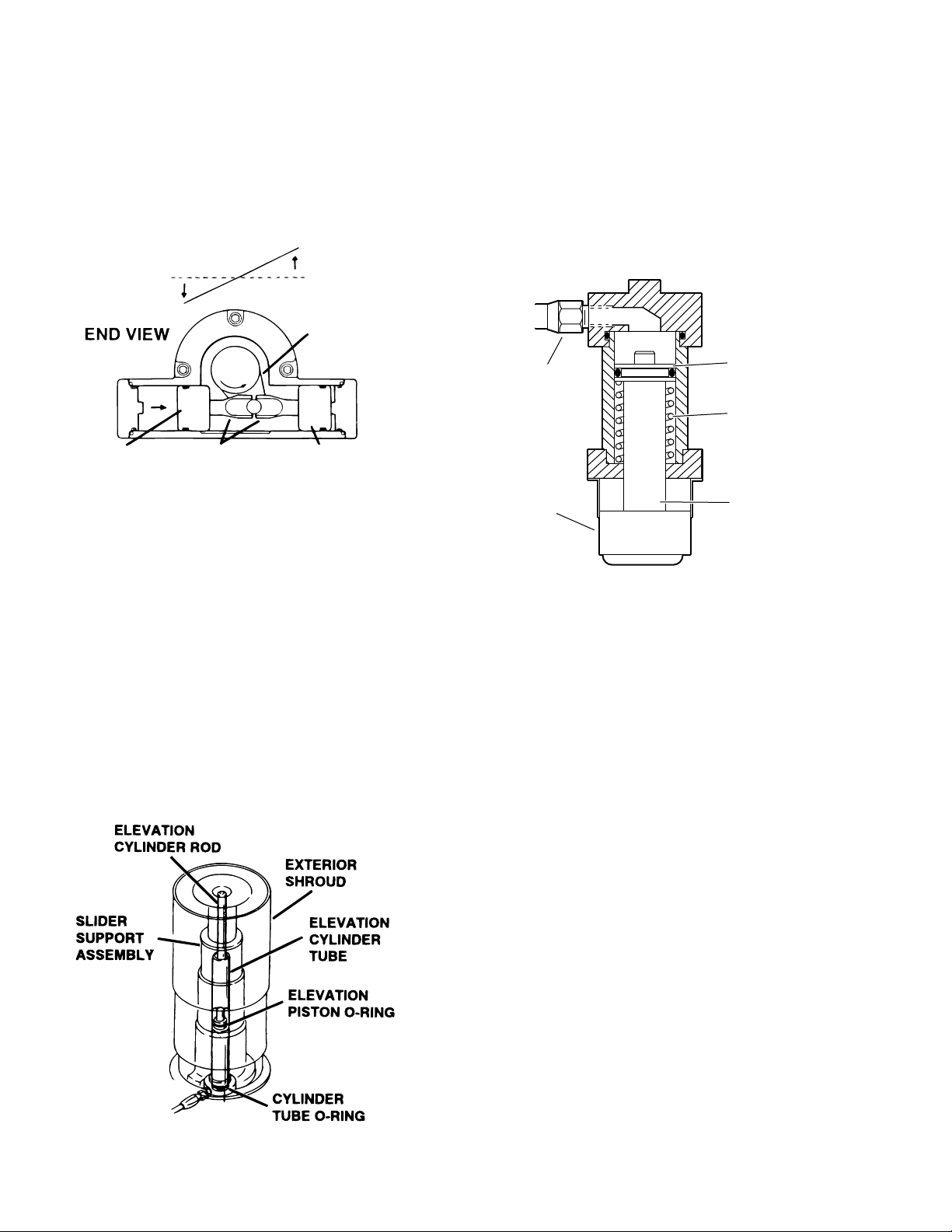
3. Lateral Tilt Assembly - The lateral tilt assem-
P
T
O
B
P
N
bly consists of two cylinders, pistons and connecting rods. The connecting rods attach to the lateral
tilt lever which connects to the table side frames.
When hydraulic fluid is pumped into one cylinder,
the piston and connecting rod pushes the lateral tilt
lever which tilts the table top to one side. To tilt the
table top in the opposite direction, fluid is pumped
into the opposite cylinder. See figure 1-12.
T ABLE TOP
LA TERAL TIL
LEVER
5. Brake Cylinders - The brake cylinders are
single action type similar to the elevation cylinder.
The movable piston's ram is connected to a brake
pad. See figure 1-14. Oil pumped into the top of the
cylinder pushes the piston down raising the table
base off its casters. An internal return spring on the
bottom of the piston, pushes the piston up to return
the oil through the mini-valve to the reservoir.
PISTON
IL LINE
RETUR
SPRING
ISTON PISTON
Figure 1-12. Lateral Tilt Cylinder Assembly
CONNECTING
RODS
RAKE
AD
RAM
4. Elevation Cylinder - This single action cylinder does not have hydraulic fluid on both sides of
the piston. It depends on the weight of the table top
assembly to lower it.
The cylinder is set in the center of the elevation
main column. The cylinder is elevated by the driven
force of the oil pressure. When lowering, the oil that
Figure 1-14. Single Action Brake Cylinder
is accumulated in the cylinder is returned to the oil
reservoir through the mini-valve due to the table top
weight.
A slider support assembly is used to support the
h. Elevation Cylinder Return Circuit
weight of the upper table section. A stainless steel
shroud covers the flexible hydraulic hoses and
slider. See figure 1-13.
Three-way (single check valve type) mini-valves
control both the elevation and return circuits. The
elevation circuit operation within the mini-valve is
identical to the operation of the four-way valves
previously described (inlet pressure opens the
check valve allowing the oil to enter the cylinder).
In the return position, inlet pressure pushes the
pilot plunger up and opens the return check valve.
See figure 1-15. The open check valve allows a
path for the oil in the elevation cylinder to return to
the reservoir. When the pilot plunger valve is
opened, the continuing pump pressure opens the
pressure relief valve which provides a return oil
path to the reservoir.
Figure 1-13. Elevation Cylinder Assembly
Page 6
Page 15
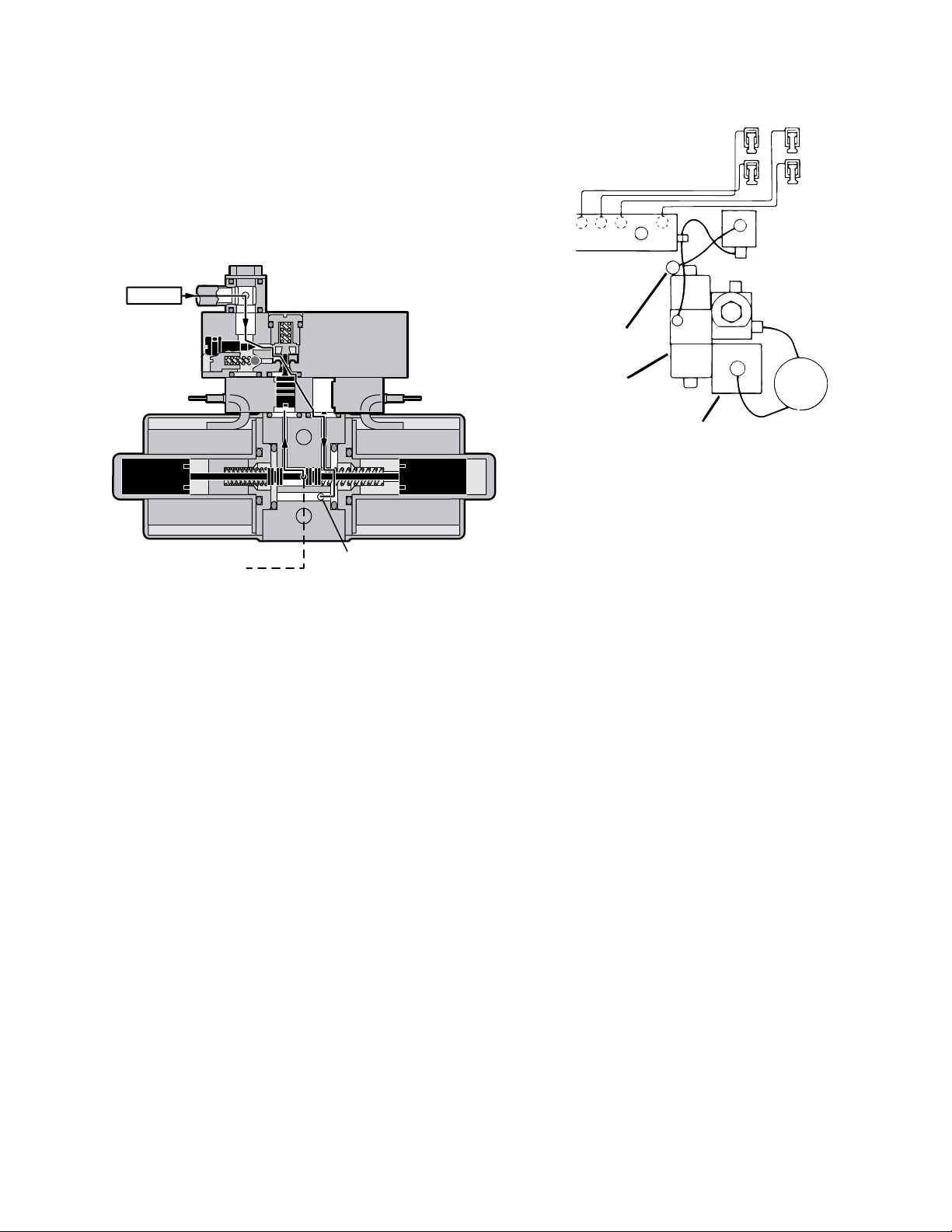
The mini-valve used in the elevation circuit con-
E
R
R
tains only one check valve (all four-way minivalves use two check valves). The check valve is
used to trap the oil in the elevation cylinder thereby
supporting the table top. When the top is being
lowered the check valve is mechanically held open
by the pilot plunger through pump pressure.
INLET
PLUMBING
TERMINAL
ETURN TO
ESERVOIR
BRAKE
BRAKE SYSTEM
EMERGENCY
BRAKE RELEAS
RELIEF
VALVE
TO RESERVOIR
THROUGH
PRESSURE
RELIEF V AL VE
RETURN TO
RESERVOIR
Figure 1-15. Elevation Return Circuit
i. Brake System
The brake system consists of the following components: (figure 1-16)
1. Single action slave cylinders (4 each).
2. 3-way (single check valve type) mini-valve.
RESERVOIR
PUMP/MOTOR
ASSEMBLY
Figure 1-16. Brake System Block Diagram
Each corner of the cast-iron table base has a
hydraulic brake cylinder. These single action cylinders are hydraulically connected in parallel to the
mini-valve and all four are activated together. It is
normal for one corner of the table to raise before the
others due to the weight distribution of the table.
An electronic timer in the relay box is activated
when any function on the pendant control is
pushed momentarily. The pump/motor and brake
system mini-valve are activated and the brake
cylinders are completely set. The electronic timer
runs for approx. 8-10 seconds.
The brakes are released by pushing the BRAKE
UNLOCK button momentarily. An electronic timer
in the relay box activates the brake function hydraulic mini-valve and pump/motor.
3. Manually controlled emergency brake re-
lease.
When activated, the return hydraulic circuit operates similar to the elevation cylinder return circuit.
Return springs inside the single action brake cylin-
4. Plumbing terminal, flexible hoses, copper
lines and "O" rings.
ders retract the brake pads and provide the pressure to return the hydraulic oil back to the reservoir.
The electronic timer operates the return circuit for
5. Portions of the electrical system.
approximately 8-10 seconds.
Page 7
Page 16
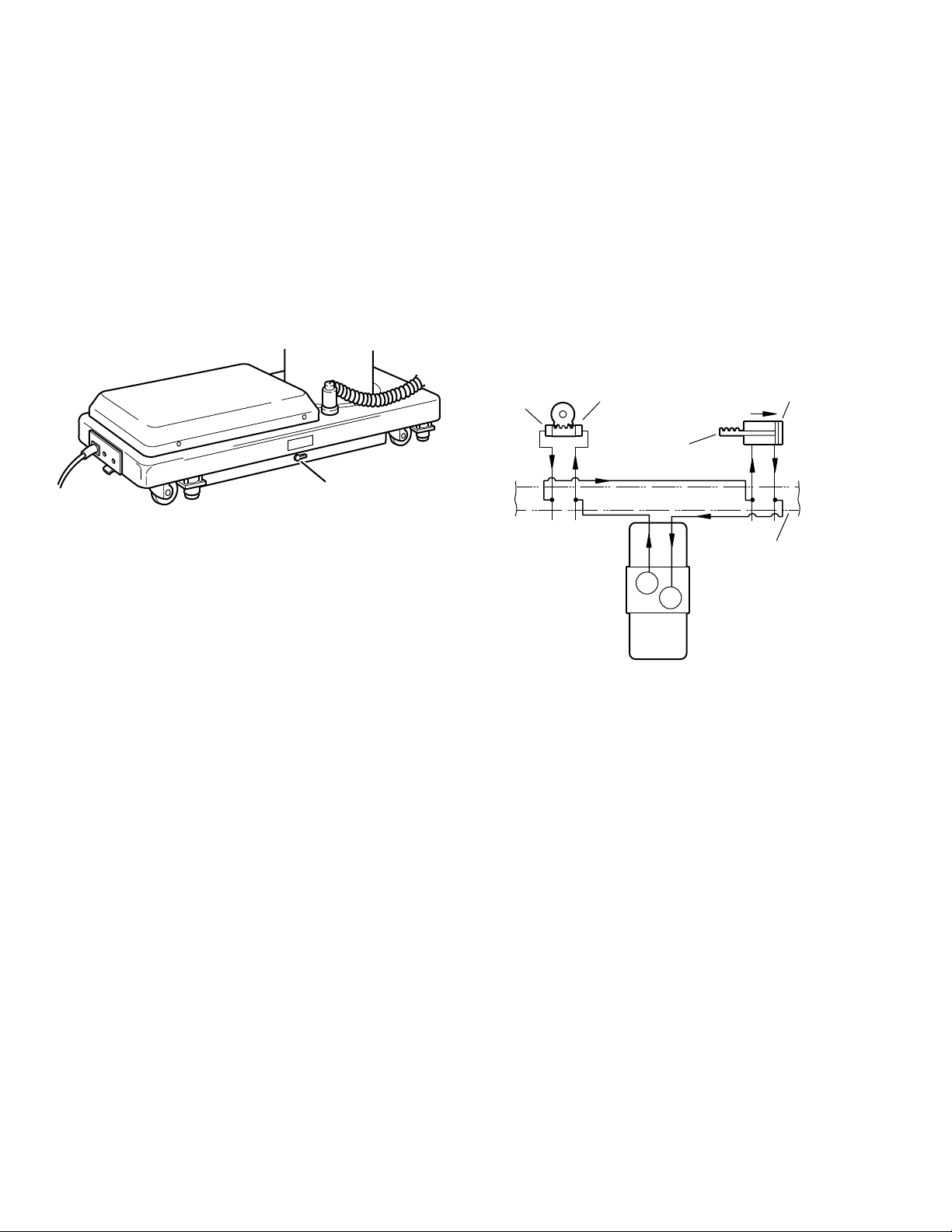
j. Emergency Brake Release
k. Flex/Reflex System
The emergency brake release is simply a manually
operated bypass valve connected in parallel to the
brake cylinders and the oil reservoir. See figure 1-
17. When the valve is opened (turned counterclockwise) a return circuit for the brake hydraulic
fluid is opened. The return springs force the
pistons up pushing the hydraulic oil back into the
reservoir and retracting the brake pads.
EMERGENCY BRAKE
RELEASE LEVER
The Flex/Reflex system used on the present tables
incorporates an additional mini-valve (7 total) which
connects the trendelenburg and back section hydraulic systems in a series. When FLEX is activated by the pendant control, the Flex/Reflex minivalve opens the oil pressure path to the Reverse
Trendelenburg piston. The return oil path from the
trendelenburg piston is routed through the back
section cylinder to the mini-valve return port. See
TREND
REV TREND
BACK
DOWN
BACK UP
PLUMBING
TERMINAL
Figure 1-17.
NOTE
•The emergency brake release valve
must be tightened securely when not in
use.
•If the emergency brake release valve
has been operated, the UNLOCK button on the pendant control may have to
be pressed before brakes will lock
again.
If the emergency brake release valve is open or
loose, two conditions could occur:
The brakes will release slowly- depending on how
loose the valve is, this could take anywhere from a
few minutes to several hours.
FLEX/REFLEX
MINI-VALVE
figure 1-18.
Figure 1-18. Flex/Reflex System
Page 8
Page 17
1-3. Hydraulic Adjustments
R
a. Fluid Level.
The fluid level should be approximately 1/2" below
the filler hole or gasket surface. If additional fluid is
needed, remove the filler vent cap with a phillips
screwdriver and add fluid through this opening
using a funnel. See figure 1-19.
NOTE
The elevation cylinder should be completely down and all the other control
functions in their neutral position when
checking oil level.
FILLER VENT
FILLE
CAP
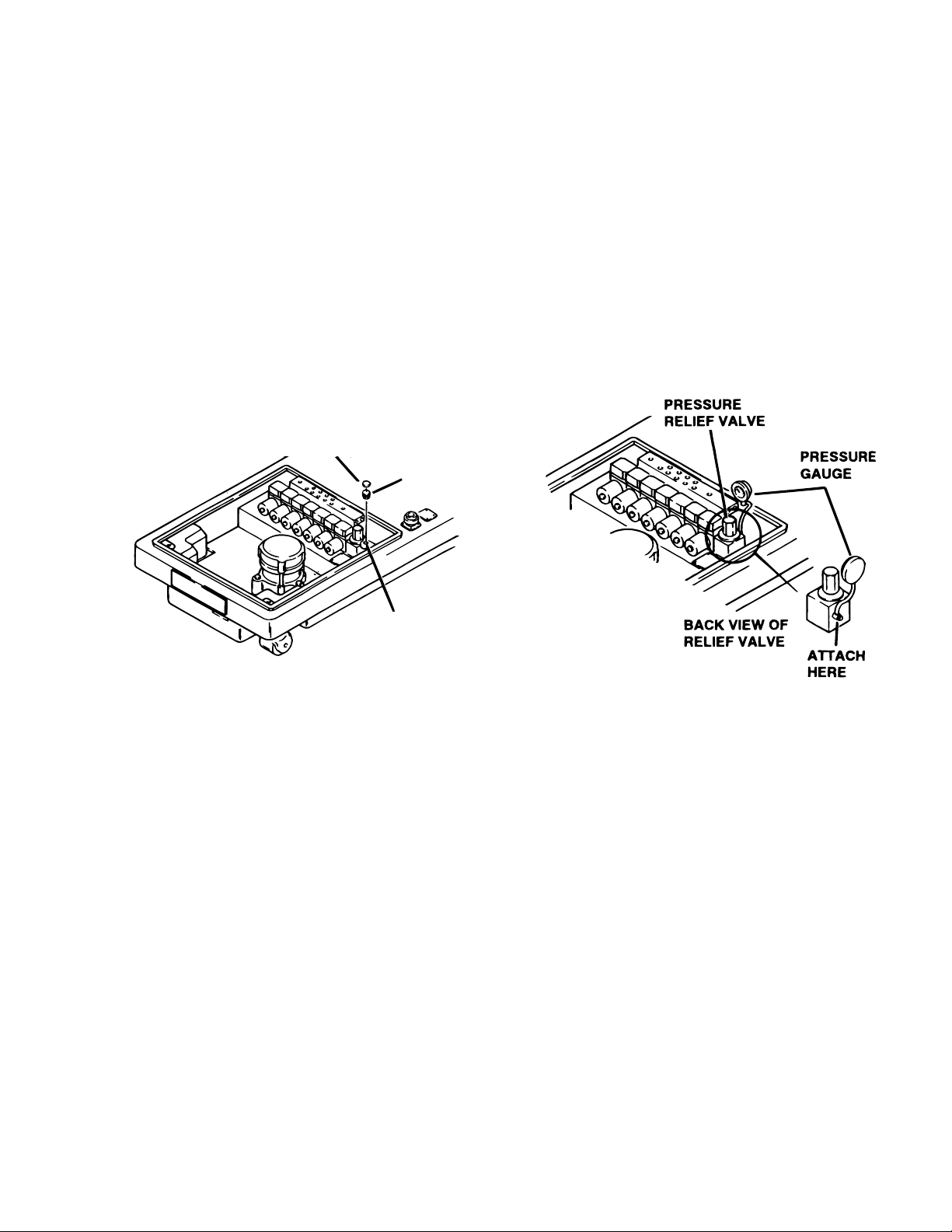
c. Pressure Relief Valve
The pressure relief valve is adjusted by turning the
adjustment nut until the desired pressure is reached.
To adjust:
1. Remove the blind cap and attach a hydraulic
pressure gauge to the main oil galley using a 6mm
plumbing bolt. See figure 1-20.
RESERVOIR
OPENING
Figure 1-19.
The type of oil that should be used is Mobil DTE #25
or equivalent. This is a very high quality hydraulic
oil. The table requires approximately two quarts of
oil to operate properly.
b. Bleeding The Hydraulic System
To purge the air from the hydraulic system, operate
each function back and forth at least two or three
times.
NOTE
Whenever a hydraulic line or component
is replaced, bleed the air out of the lines
using the pump pressure before making the final connection. Then operate
the function until it stalls in both directions.
Figure 1-20.
2. Raise the table top until the piston reaches the
end of its stroke and stalls. Observe reading on
pressure gauge and turn the adjustment nut (clockwise to increase oil pressure, counterclockwise to
decrease) until desired reading is obtained. Pressure
should be 80KG/CM† -1138 PSI.
Page 9
Page 18
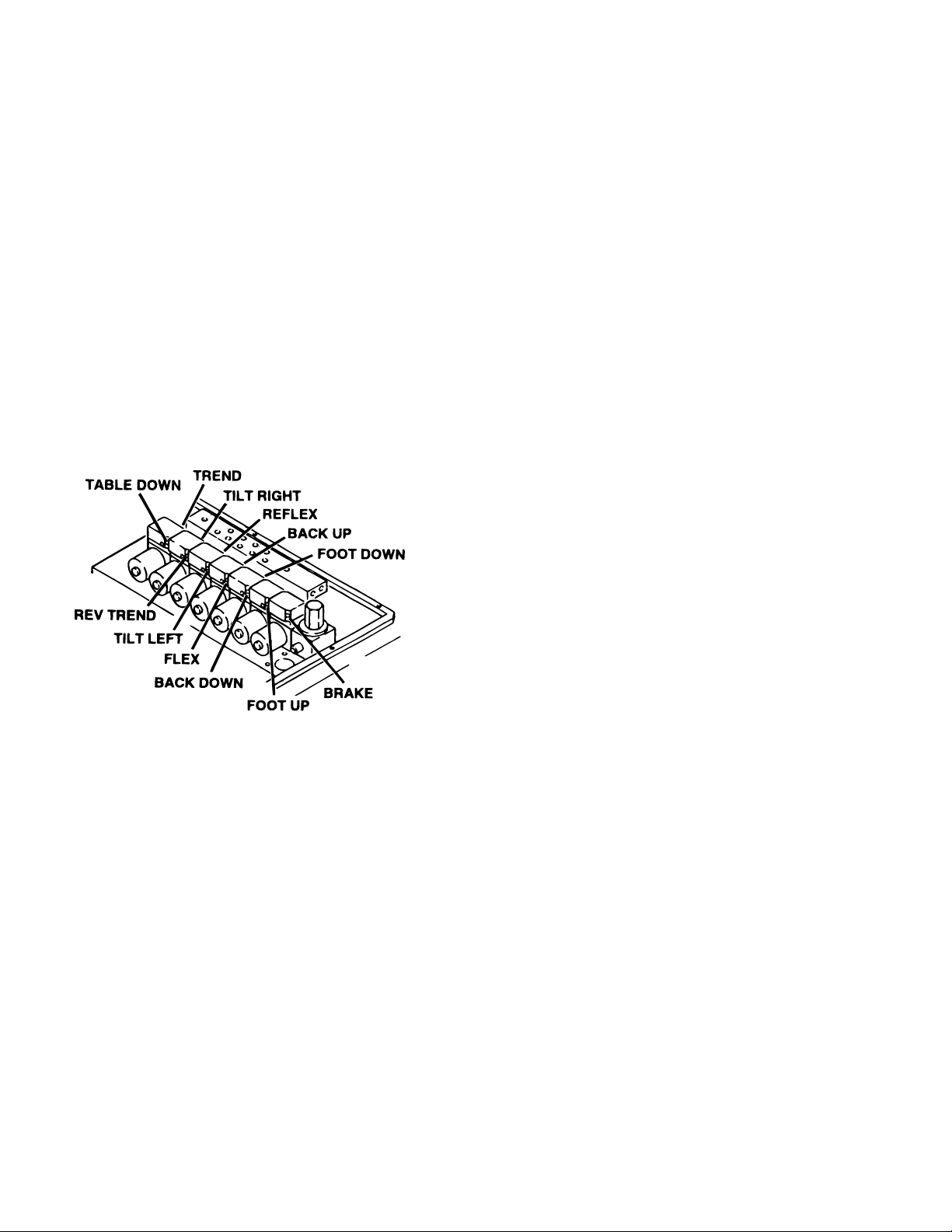
d. Speed Controls
The speed controls restrict the volume of oil returning back to the reservoir thereby controlling the
speed of each control function.
All four-way mini-valves, have two speed controls
located in the ends of each valve body. All threeway mini-valves have only one speed control.
One speed control adjusts one direction of a
particular function and the opposite speed control
adjusts the other direction. They are adjustable by
using a small straight blade screwdriver and
turning the adjustment screw clockwise to decrease the speed and counterclockwise to
increase the speed. Refer to figure 1-21.
A pressure gauge should be used to set the speed
of the back section, trendelenburg and flex control
functions.
To adjust:
1. Attach the pressure gauge onto the main oil
galley as shown in figure 1-21.
2. The gauge should read the following values
when operating the various control functions in
either direction. Turn the speed controls until
desired values are obtained.
Back Section Up 65KG/CM†-925PSI
Dn 65KG/CM†-925PSI
Trendelenburg Up 65KG/CM†-925PSI
Dn 65KG/CM†-925PSI
Flex 70KG/CM†-995PSI
Reflex 70KG/CM†-995PSI
Figure 1-21.
Any control function should move in either direction at the same rate. If the rate of a certain function
is too slow, open the speed control slightly and
recheck. Use the second hand on a watch and time
a particular function. Match that time in the opposite direction by opening or closing the speed
control. Approximate operating times are as follows:
Lateral Tilt 7 seconds
Back Up 25 seconds
Back Down 15 seconds
NOTE
When adjusting Flex/Reflex speed controls, set Reflex last.
Elevation - There is not a speed adjustment for
raising the table. The speed control will only affect
the rate of descent and it should equal the rate of
elevation.
Page 10
Page 19
E
LEG
SECTION
TABLE SIDE FRAME
LEG CYLINDER
ECCENTRIC CAM
SP ANNER WRENCH
SECTION II MECHANICAL TABLE ADJUSTMENTS
S
R
2-1. Back Section Gear Mesh Adjustment
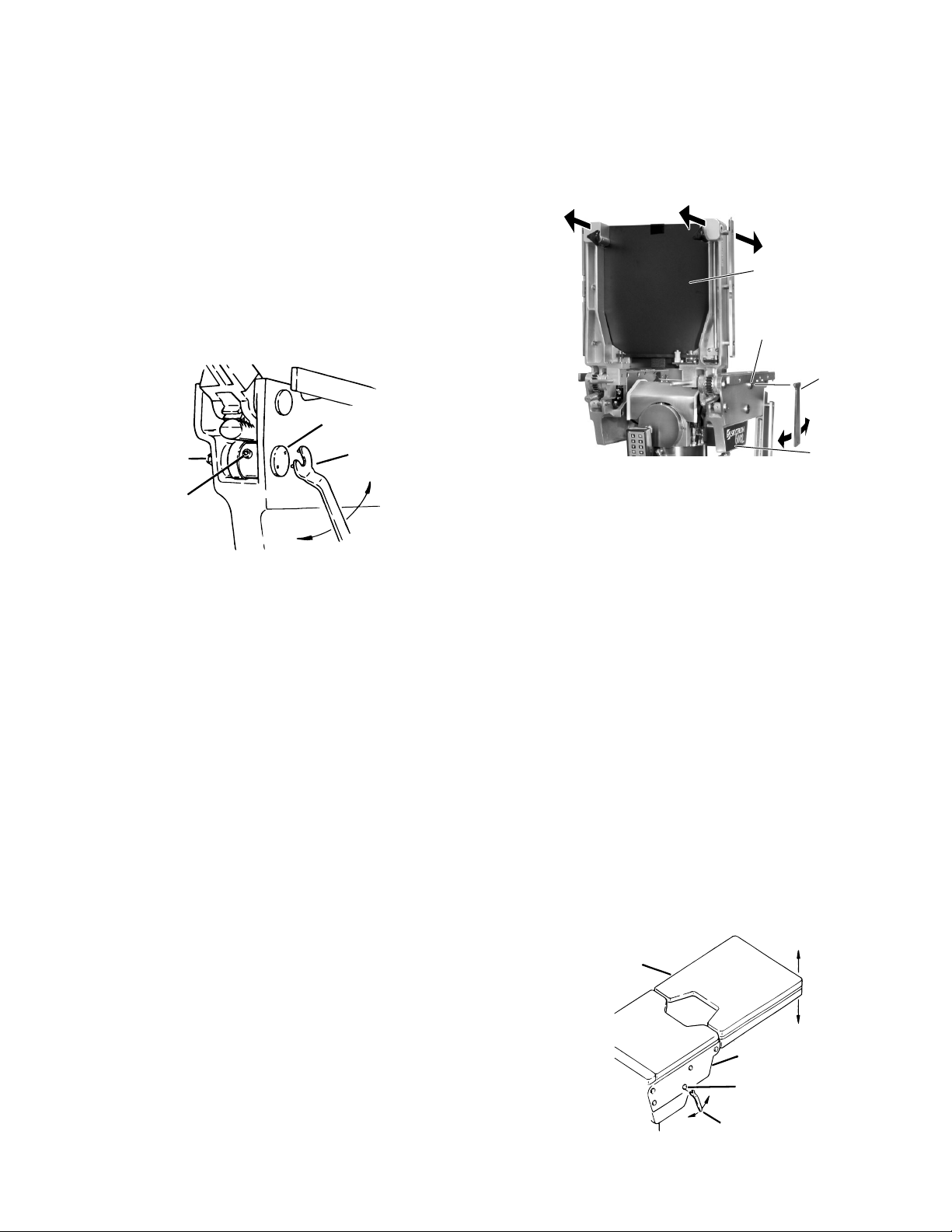
The gear mesh is adjusted by the use of an eccentric cam. This cam moves the gear teeth closer
together to eliminate gear lash. This adjustment
arrangement compensates for any wear between
the gears that might occur.
To adjust:
Loosen the cam locking nut and allen set screw.
Use a spanner wrench to rotate the eccentric cam.
Use firm pressure on the spanner wrench. See
figure 2-1. Tighten the locking nut and set screw
when adjustment is complete.
ECCENTRIC
CAM
NUT
ET SCREW
SPANNE
WRENCH
To adjust:
Loosen the cam locking nuts located inside the
table side frames. Use a spanner wrench to turn
the cylinder eccentric cams as required to shift
either cylinder fore or aft as needed so no twisting
or flexing of the back section is observed when it is
stalled in the full up position. See figure 2-2.
BACK SECTION
BACK SECTION
CYLINDER
ECCENTRIC CAM
SPANNER
WRENCH
TABLE SID
FRAME
Figure 2-2. Back Section Adjustment
b. Leg Section
Figure 2-1. Eccentric Cam Adjustment
2-2. Hydraulic Cylinder Adjustment
Back & Foot / Leg Sections
The hydraulic cylinder rams that control both the
back and foot / leg sections must move together so
that these sections are not twisted when operated.
This is accomplished by the use of eccentric cams
that move the cylinder bodies fore and aft to adjust
their effective stroke.
NOTE
Adjust gear mesh before adjusting eccentric cams for the back section.
a. Back Section
Position the back section all the way up until it
stalls. Both sides of the back section should stop
moving at the same time and should not show any
signs of twisting.
Position the leg section all the way up. Both sides
of the leg section should stop moving at the same
time and should not show any signs of twisting.
Any twisting or flexing of the leg section as it
approaches the stalled position indicates that one
of the cylinders is not reaching its fully extended
position at the same time as the other and an
adjustment is required.
To adjust:
Loosen the cam locking nuts located inside the
table side frames. Use a spanner wrench to turn
the cylinder eccentric cams as required to shift
either cylinder fore or aft as needed so no twisting
or flexing of the leg section is observed when it is
stalled in the above horizontal position. Tighten
locking nuts when proper adjustment is achieved.
See figure 2-3.
Any twisting or flexing of the back section as it
approaches the stalled position indicates that one
of the cylinders is not reaching its fully extended
position at the same time as the other. This
condition would require an adjustment.
Figure 2-3. Leg Section Adjustment
Page 11
Page 20
SECTION III HYDRAULIC TROUBLESHOOTING
3-1. Precautions
Before attempting to troubleshoot any hydraulic
problem on the table, please read through the precautions and notes below.
CAUTION
When disconnecting any of the hydraulic lines, fittings, joints, hoses, etc., for
the following control functions, be sure
these table surfaces are in their down
position or completely supported.
•Elevation
•Back Section
•Leg Section
When working on the trendelenburg or
lateral tilt hydraulic circuits, be sure to
support the table top. When working on
the brake system make sure the brakes
are completely retracted.
Once the problem has been determined, concentrate on that particular hydraulic circuit or control
function.
Listed below are the hydraulic components that
are common with all hydraulic circuits. If there is a
problem with any of them, it could affect all control
functions.
1. Motor/Pump Assembly
2. Reservoir
3. Pressure Relief Valve
4. Certain Oil Lines and Galleys
If there was a problem in the following components,
only one control function would normally be affected.
1. Mini-Valve
2. Slave Cylinder
3. Oil Lines
NOTE
CAUTION
Failure to follow these precautions may
result in an uncontrolled oil spray and
damage to the table or personal injury.
3-2. Troubleshooting Notes
When troubleshooting a table malfunction, first
determine the following:
1. Does the problem affect all control func-
tions?
2. Does the problem affect only one control
function?
3. If the problem affects one control function is
it in both directions?
Whenever a hydraulic line or component is replaced, bleed the air out of the
lines using the pump pressure before
making the final connection. After all
connections are tight, cycle the control
function back and forth two or three
times to purge the remaining air from
the system.
CAUTION
When installing new "O" rings use hydraulic oil to thoroughly lubricate the
"O" rings and cylinder. Keep everything clean.
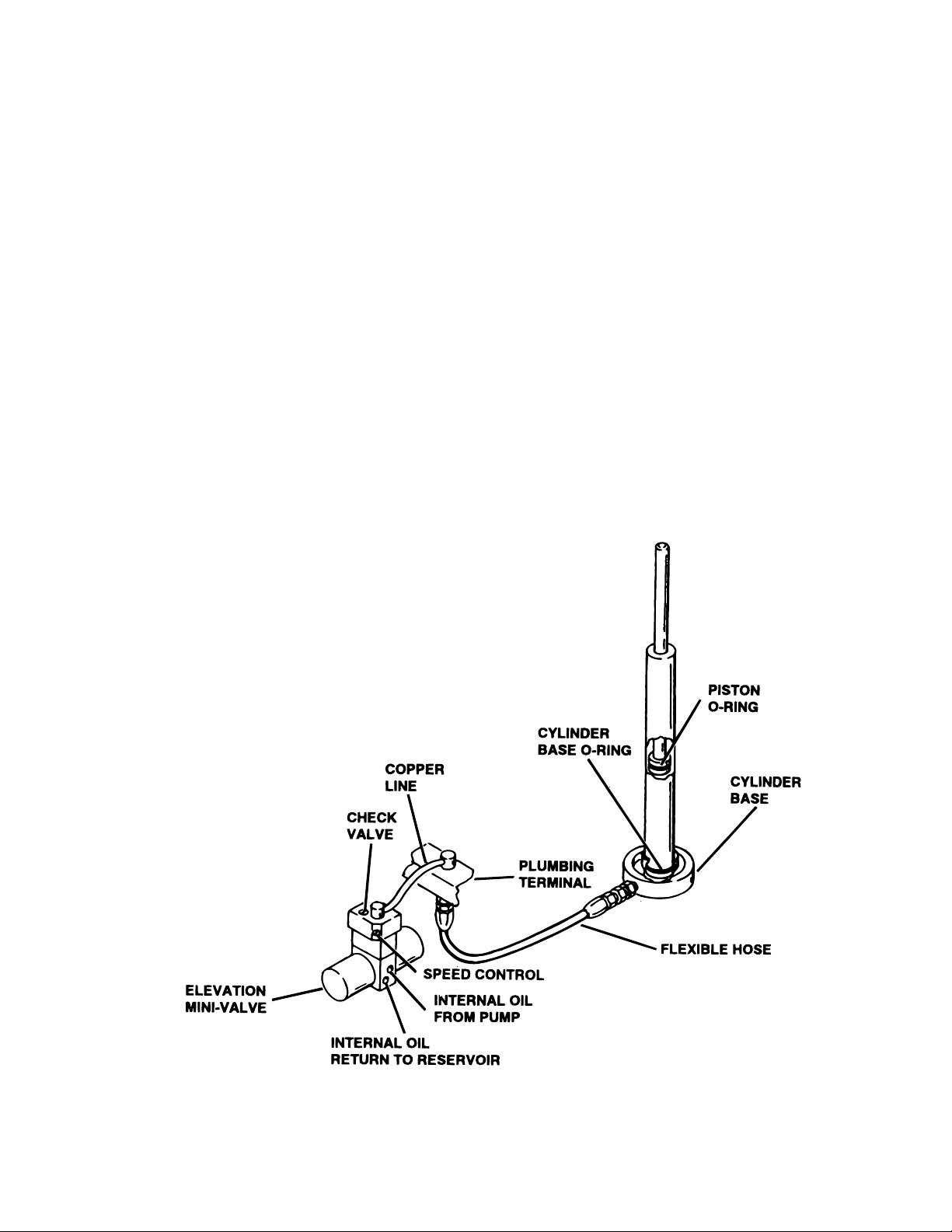
Each complete oil circuit is shown on the following
pages. When troubleshooting a particular function,
refer to the appropriate oil circuit diagram and the
list of possible problems
4. Is the problem intermittent?
5. Is the problem no movement of a table
surface or does the table surface lose position?
Page 12
Page 21
3-3. ELEVATION DIAGNOSIS CHART
Problem
Table will not elevate properly
Table will not descend properly
Table loses elevation
Reason
Pressure Relief Valve Not Set Properly
Low on Oil
Spool Valve Not Centered
Defective Pump
Defective Mini-Valve
Defective Solenoid or Wiring
Defective Relay Box or Pendant Control
Incorrect Speed Adjustment
Bad Check Valve
Spool Valve Not Centered
Galled Slider Assembly
Defective Solenoid or Wiring
Defective Relay Box or Pendant Control
Bad Check Valve
Leaking Mini-Valve
Loose Fittings, Joints, Hoses
Leaking "O" Ring Inside Cylinder
Figure 3-1. Elevation Circuit
Page 13
Page 22
P
M
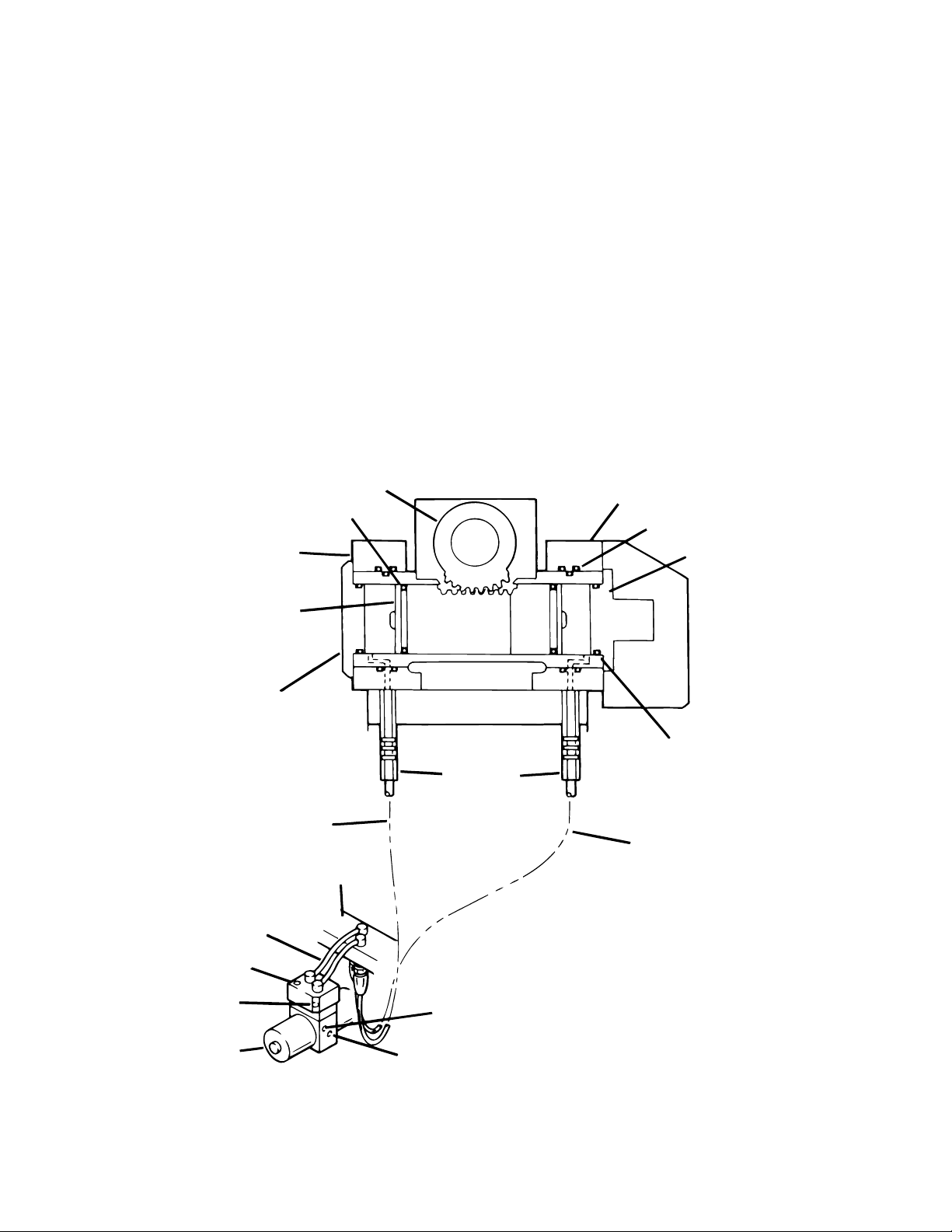
3-4. TRENDELENBURG DIAGNOSIS CHART
Problem
Trendelenburg function moves improperly
Trendelenburg function chatters or loses position
PINION
GEAR
O-RING
FRONT PIVOT
BLOCK
Reason
Incorrect Speed Adjustment
Spool Valve Not Centered
Bad Check Valves
Low on Oil
Pinched Hose
Defective Mini-Valve
Pressure Relief Valve Not Set Properly
Bad Solenoid or Wiring
Defective Relay Box or Pendant Control
Defective or Dirty Check Valve
Oil Leakage in Circuit
Air Inside Cylinder
Pinched Hose
Low on Oil
REAR PIVOT
BLOCK
O-RING
TAIL CYLINDER CA
PISTON
ASSEMBLY
HEAD
CYLINDER
CAP
HEAD DOWN
CIRCUIT
COPPER
LINES
CHECK VALVE
SPEED
CONTROL
INI-VALVE
PLUMBING
TERMINAL
O-RING
FLEXIBLE
HOSES
HEAD UP
CIRCUIT
INTERNAL OIL
FROM PUMP
INTERNAL OIL RETURN
TO RESERVOIR
Figure 3-2. Trendelenburg Circuit
Page 14
Page 23
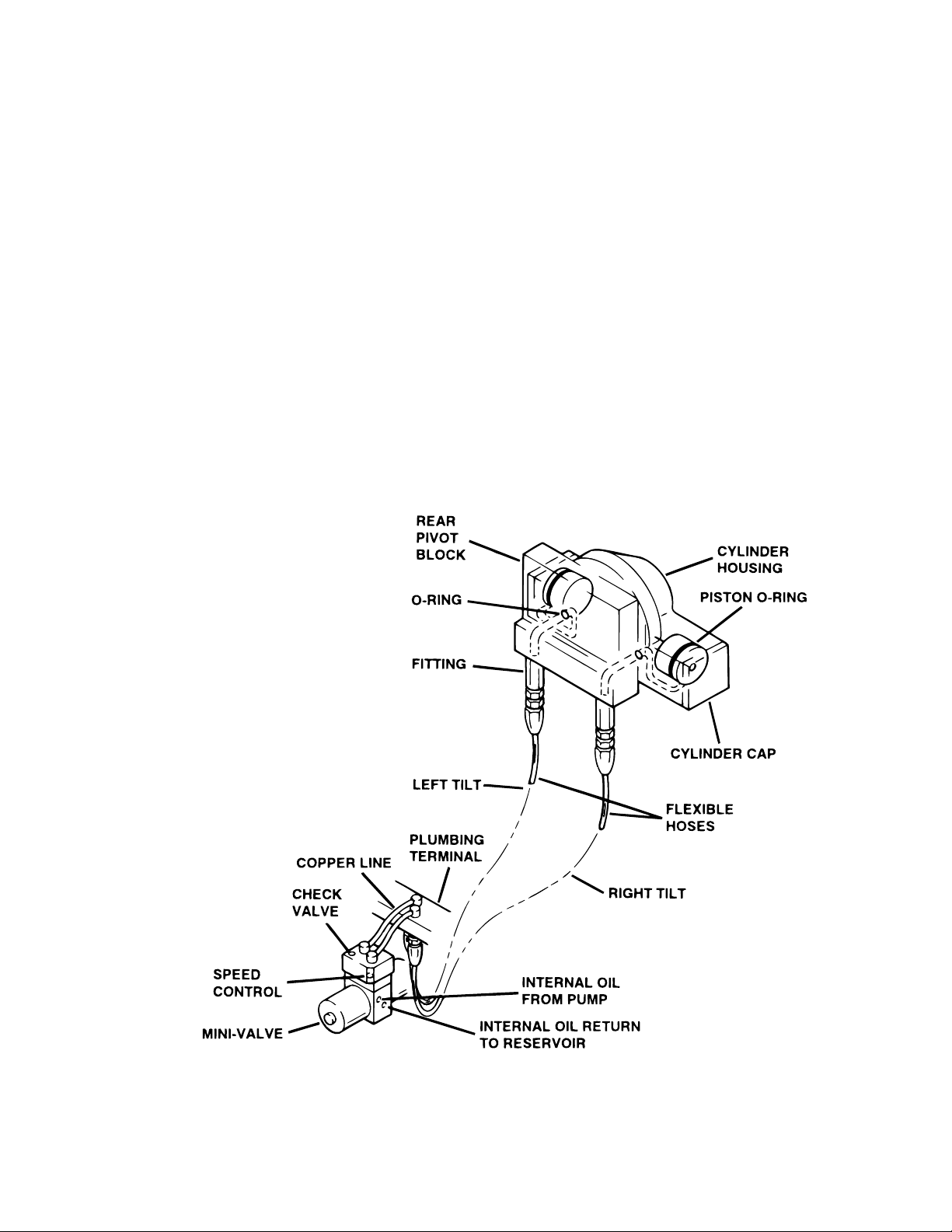
3-5. LATERAL TILT DIAGNOSIS CHART
Problem
Lateral tilt function moves improperly
Lateral tilt function chatters or loses position
Reason
Incorrect Speed Adjustment
Spool Valve Not Centered
Bad Check Valves
Low on Oil
Pinched Hose
Defective Mini-Valve
Pressure Relief Valve Not Set Properly
Bad Solenoid
Defective Relay Box or Pendant Control
Defective or Dirty Check Valves
Oil Leakage in Circuit
Air Inside Cylinder
Pinched Hose
Low on Oil
Figure 3-3. Lateral Tilt Circuit
Page 15
Page 24
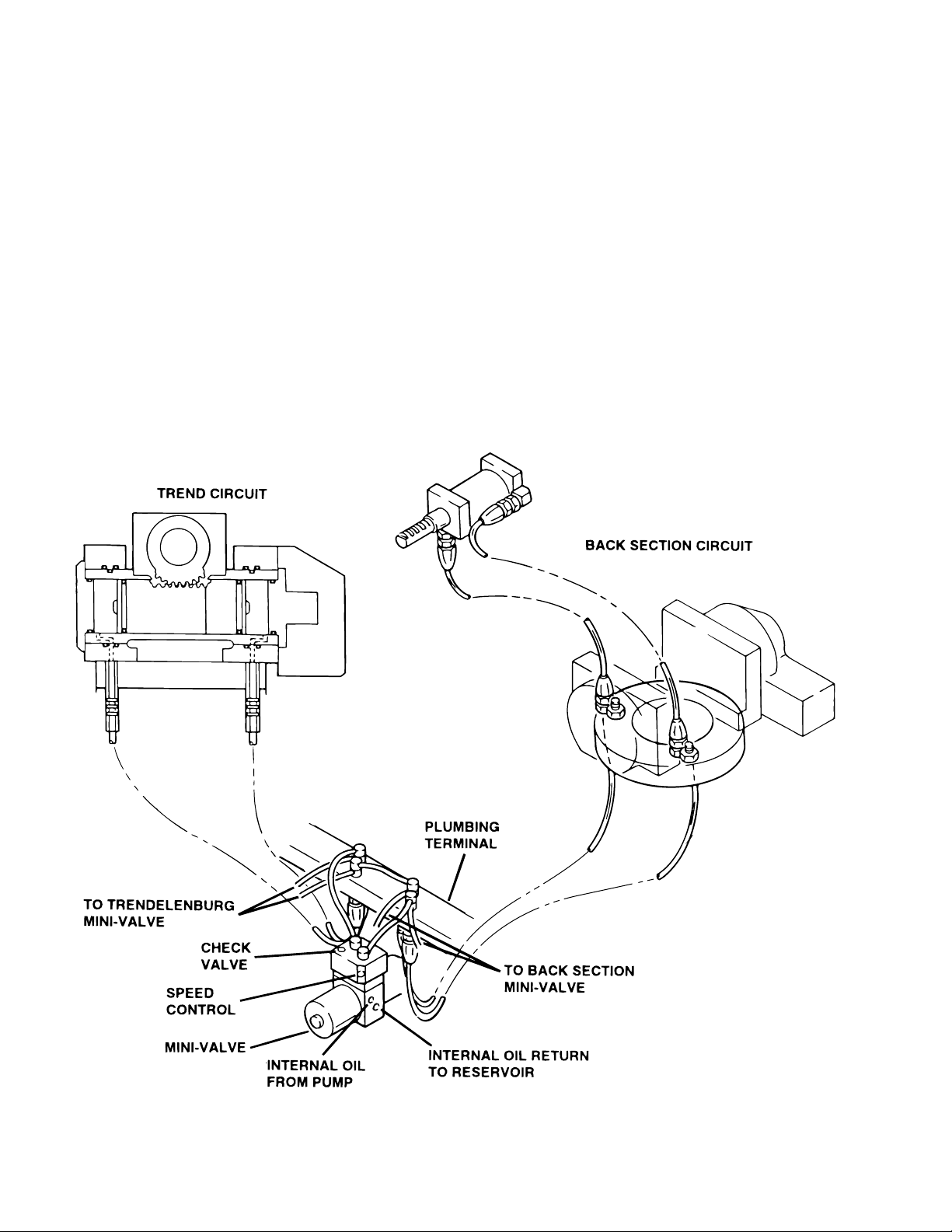
3-6. FLEX SYSTEM DIAGNOSIS CHART
Problem
Back Section or Trendelenburg function moves
improperly
NOTE
If Flex System does not function properly, check the back section and trendelenburg functions before adjusting
the flex system.
Back Section or Trendelenburg function chatters
or loses position
Reason
Incorrect Speed Adjustment (Trendelenburg, Back
section or Flex - check with gauge)
Spool Valve Not Centered
Bad Check Valves
Low on Oil
Pinched Hose
Defective Mini-Valve
Pressure Relief Valve Not Set Properly
Bad Solenoid
Defective Relay Box or Pendant Control
Defective or Dirty Check Valves
Oil Leakage in Circuit
Air Inside Cylinder
Pinched Hose
Low on Oil
Page 16
Figure 3-4. Flex System Circuit
Page 25
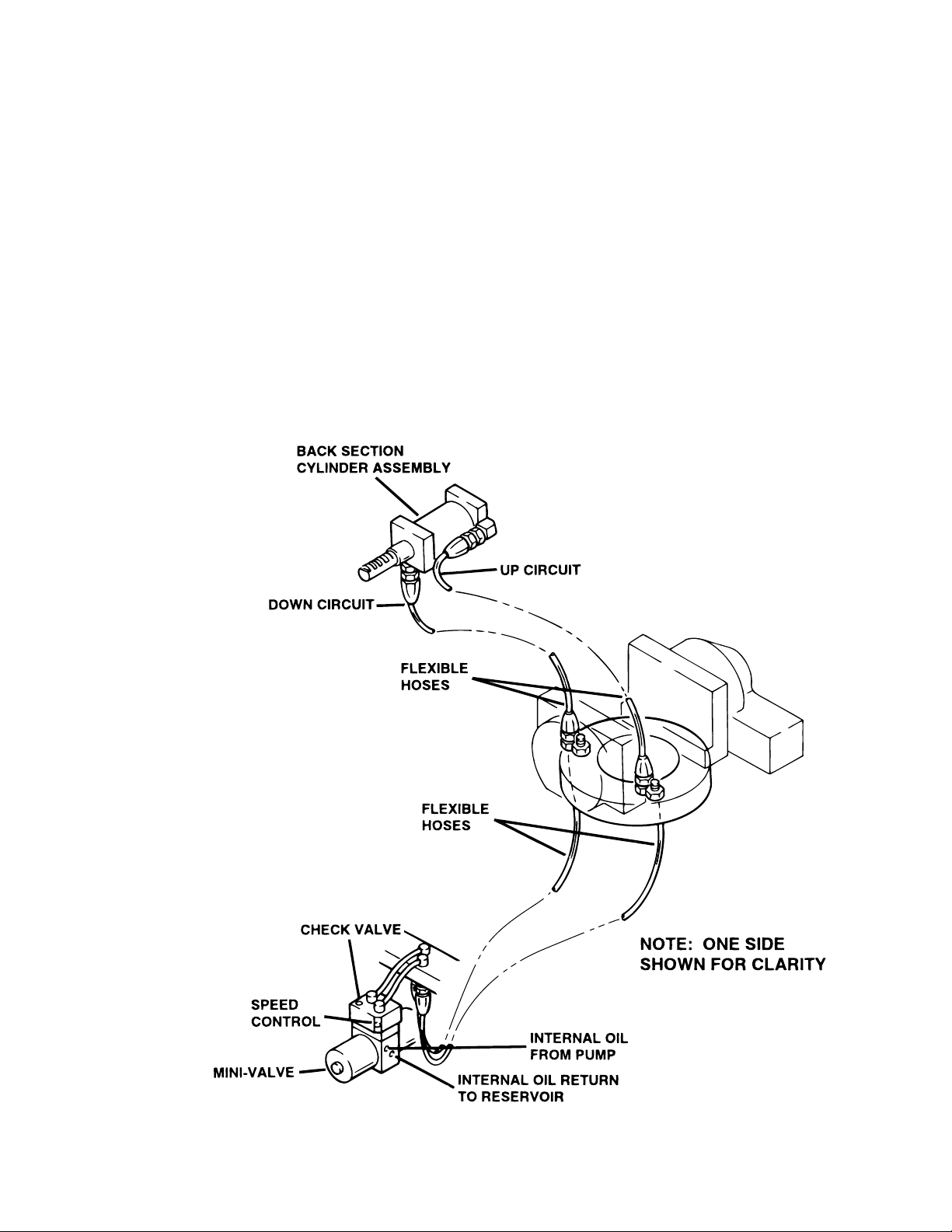
3-7. BACK SECTION DIAGNOSIS CHART
Problem
Back Section function moves improperly
Back Section function chatters or loses position
Reason
Incorrect Speed Adjustment
Spool Valve Not Centered
Bad Check Valves
Low on Oil
Pinched Hose
Defective Mini-Valve
Pressure Relief Valve Not Set Properly
Bad Solenoid
Defective Relay Box or Pendant Control
Defective or Dirty Check Valves
Oil Leakage in Circuit
Air Inside Cylinder
Pinched Hose
Low on Oil
Figure 3-5. Back Section Circuit
Page 17
Page 26
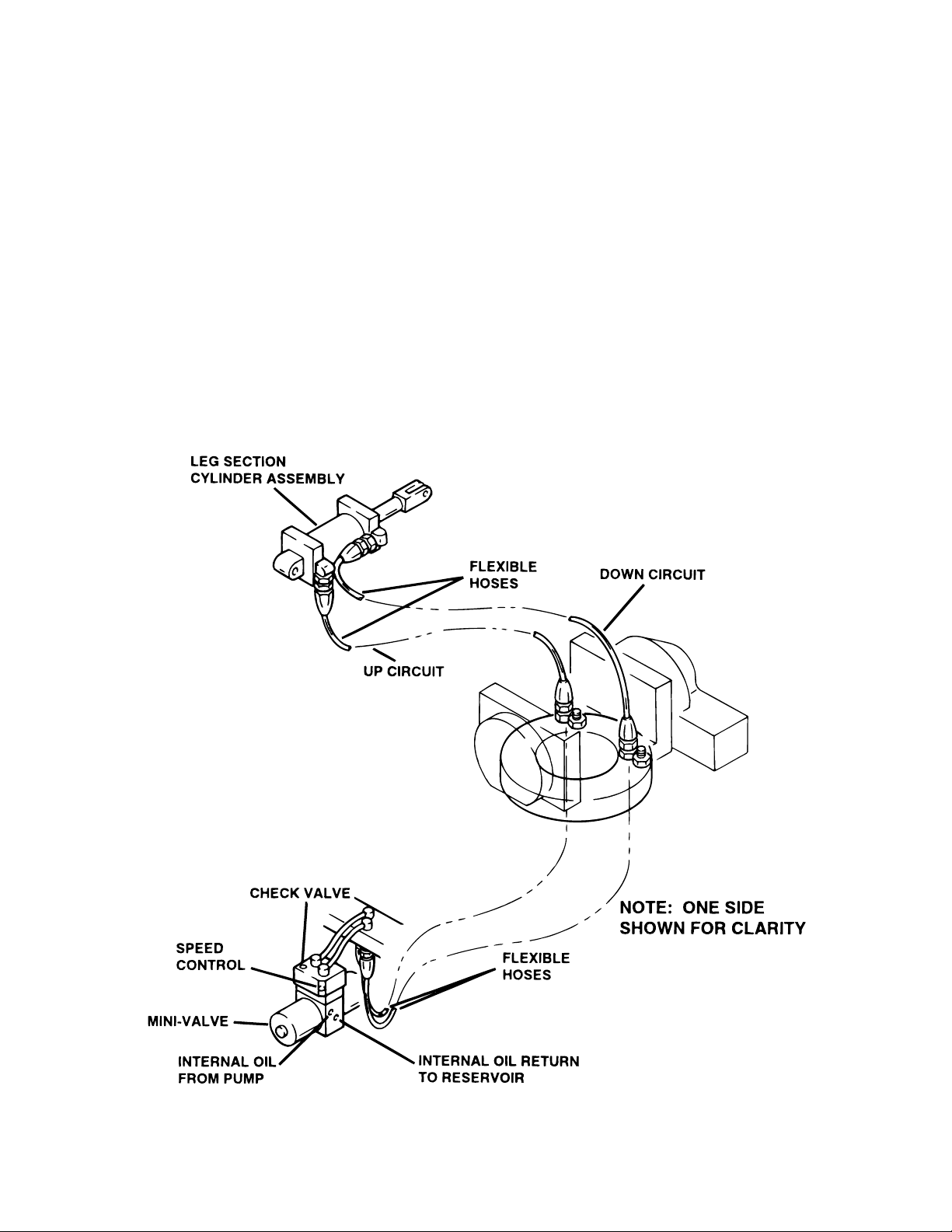
3-8. LEG SECTION DIAGNOSIS CHART
Problem
Leg function moves improperly
Leg function chatters or loses position
Reason
Incorrect Speed Adjustment
Spool Valve Not Centered
Bad Check Valves
Low on Oil
Pinched Hose
Defective Mini-Valve
Pressure Relief Valve Not Set Properly
Bad Solenoid
Defective Relay Box or Pendant Control
Defective or Dirty Check Valves
Oil Leakage in Circuit
Air Inside Cylinder
Pinched Hose
Low on Oil
Page 18
Figure 3-6. Leg Section Circuit
Page 27
C
E
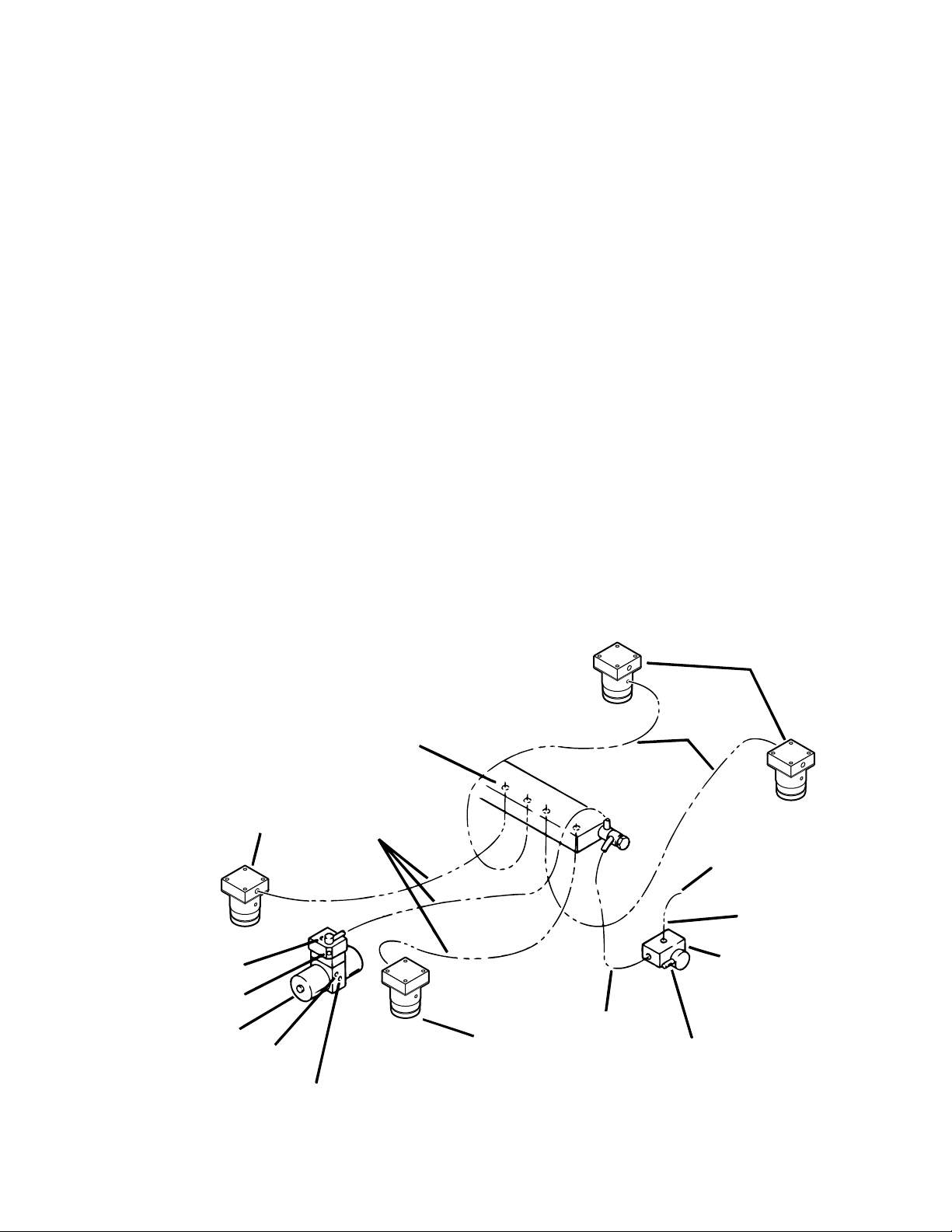
3-9. BRAKE CIRCUIT DIAGNOSIS CHART
Problem
Brakes will not set properly
NOTE
If brakes have been released with the
Emergency Brake Release Valve,
brakes will not reset until BRAKE UNLOCK Circuit has been activated.
Brakes Will Not Stay Locked
Brakes will not retract properly
Reason
Emergency Brake Release Valve Open or Defective
Spool Valve Not Centered
Bad Check Valve
Low on Oil
Pressure Relief Valve Not Set Properly
Pinched Hose
Defective Mini-Valve
Defective Relay Box or Pendant Control
Emergency Brake Release Valve Open or Defective
Defective or Dirty Check Valve
Oil Leakage in Circuit
Leaking "O" Ring Inside Cylinder
Incorrect Speed Adjustment
Bad Check Valve
Spool Valve Not Centered
Defective Mini-Valve
Pinched Hose
Defective Solenoid or Wiring
Defective Relay Box or Pendant Control
BRAKE
CYLINDER
PLUMBING
TERMINAL
BRAKE
CYLINDER
HECK V AL VE
SPEED
CONTROL
MINI-VALVE
INTERNAL OIL
FROM PUMP
INTERNAL OIL RETURN
TO RESERVOIR
FLEXIBLE
HOSES
BRAKE
CYLINDER
COPPER LINE
FLEXIBLE
HOSES
FLEXIBLE
HOSE
RETURN TO
RESERVOIR
EMERGENCY
BRAKE RELEAS
RELEASE LEVER
Figure 3-7. Brake System Circuit
Page 19
Page 28
F
P
T
F
P
B
)
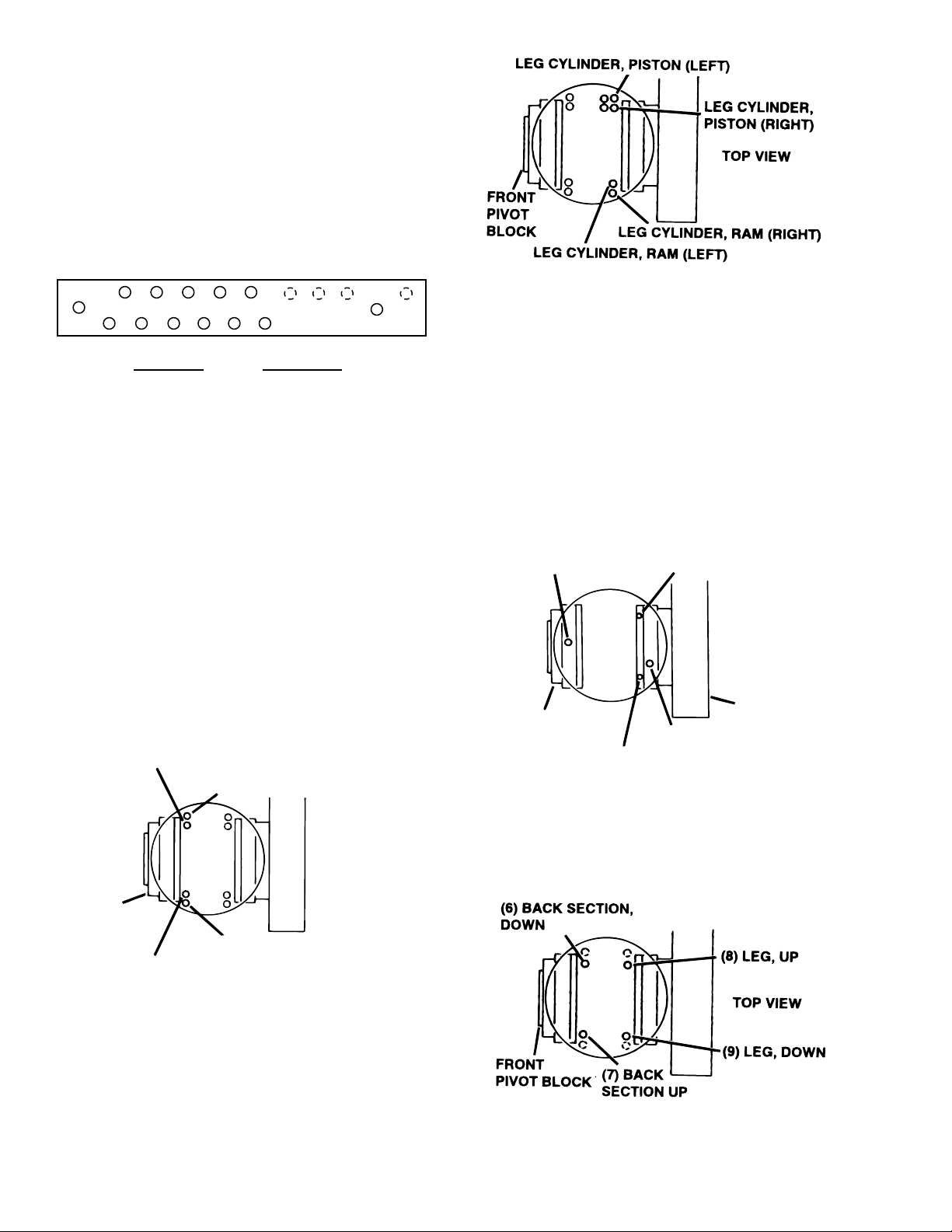
3-10. Flexible Hose Identification and
Placement
The following figures will show the correct placement of the flexible hydraulic hoses used in the
table and their respective number codes.
Figure 3-8 shows the hose connections to the
plumbing terminal.
2468
13579
NUMBER
1
2
3
4
5
6
7
8
9
FUNCTION
ELEVATION
REV TREND
TREND
LA T TIL T LEFT
LA T TIL T RIGHT
BACK DOWN
BACK UP
LEG UP
LEG DOWN
Figure 3-8. Main Plumbing Terminal
Figure 3-9 shows the placement of the short flexible hoses which connect to the back section
cylinders.
BACK CYLINDER, RAM (RIGHT)
Figure 3-10. Leg Section Hoses
Figure 3-11 shows the placement and number
code for the long flexible hoses which connect from
the plumbing terminal to the front and rear pivot
blocks.
NOTE
The number codes will be stamped into
the elevation clamp ring and the plumbing terminal.
(3) TREND.
RONT
IVOT BLOCK
(5) LAT. TILT RIGHT
(4) LAT. TILT LEFT
TOP VIEW
REAR PIVO
BLOCK
(2) REV. TREND
BACK CYLINDER, RAM (LEFT)
Figure 3-11. Pivot Block Hoses
Figure 3-12 shows the placement and number
code for the long flexible hoses that connect from
RONT
TOP VIEW
IVOT
LOCK
BACK CYLINDER, PISTON (RIGHT
BACK CYLINDER, PISTON (LEFT)
the elevation clamp ring to the plumbing terminal.
Figure 3-9. Back Section Hoses
Figure 3-10 shows the placement of the short
flexible hoses which connect to the leg section
cylinders.
Page 20
Figure 3-12. Elevation Clamp Ring Hoses
Page 29
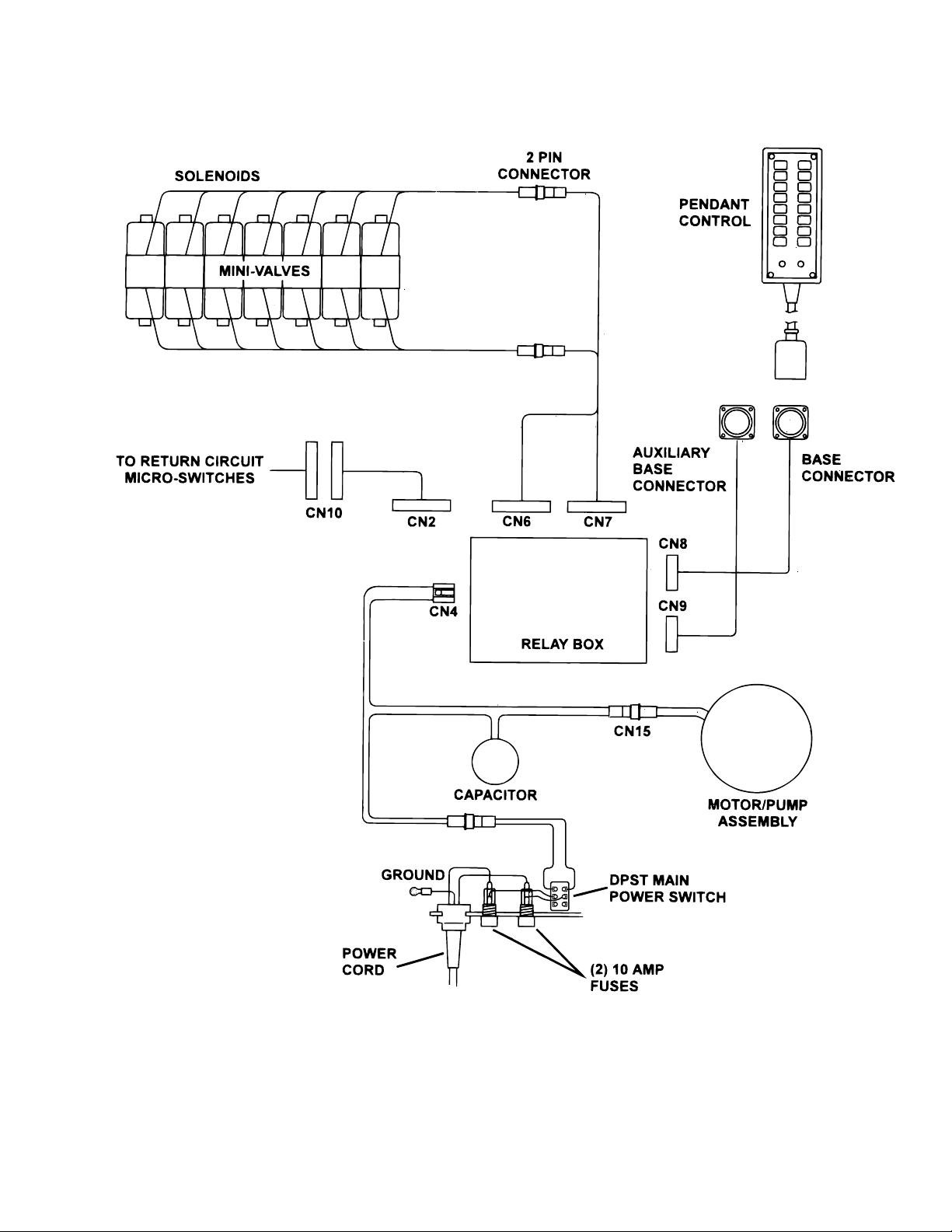
Figure 4-1. 6002 Electrical Circuit Block Diagram
Page 21
Page 30

SECTION IV ELECTRICAL SYSTEM
4-1. General
The complete electrical system (with the exception of the hand-held pendant control and the return
circuit micro-switches) is contained within the base
of the table. The pump motor and the hydraulic
valves are controlled electrically with the pendant
control.
The electrically operated functions are as follows:
- ELEVATION - Up and Down
- TRENDELENBURG - Head up and down
- LATERAL TILT - Right and left
- BACK SECTION - Up and Down
- LEG SECTION - Up and Down
- FLEX / REFLEX
- RETURN TO LEVEL
4-2. Components
Refer to figure 4-1 for the relationship of the electrical components.
a. Wires, Connectors, Switches, Fuse - These
provide the path for the various electrical circuits.
b. Relay Box - Contains the step down transformer, full wave rectifier, and relay switches. The
relay switches are activated by the pendant control
and in turn energize the solenoid.
c. Hand-Held Pendant Control - Closes microswitches to activate relay box. Operates on 5
VDC.
d. Solenoids - These electrically open and
close the hydraulic ports of the mini-valve to direct
the fluid to the correct cylinders. They operate on
120 VAC.
e. Motor/Pump Assembly - 120 VAC, 60 HZ,
200 Watt capacitor induction motor.
- BRAKE UNLOCK - Brake release
The power requirements are 120 VAC, 60 Hz, fuse
protected. The main power on-off switch is an
enclosed DPST type and the power cord is a threewire, fifteen foot long, UL listed cord with a threeprong hospital grade plug.
4-3. Battery Model Components
The functions of the battery model tables are the
same as the standard 120 VAC models. The
electrical components and operation however, vary
greatly between the two models. To simplify the
troubleshooting procedures, the battery model
tables are covered separately in Section VI.
Page 22
Page 31
SECTION V ELECTRICAL SYSTEM TROUBLESHOOTING
5-1. Troubleshooting Notes
The basic operation of each component will be
defined along with a drawing and explanation on
how to check it out.
NOTE
This section does not cover the battery table components. They are
covered separately in Section 6.
Certain defective components could cause the
entire table to stop functioning or only one control
function to stop. It would depend on what part of the
component failed. Other defective components would
only cause one control function to stop.
The following defective components could cause
all control functions to be affected:
a. Motor/Pump Assembly (starting capacitor)
b. Main Switch Circuit and Wiring
The following defective components could cause
all control functions to be affected or only one
control function:
a. Relay Box
b. Pendant Control
The component listed below would only affect one
control function:
Solenoid
1. Plug the power cord into the 120VAC power
supply (wall receptacle) and turn ON the main
switch.
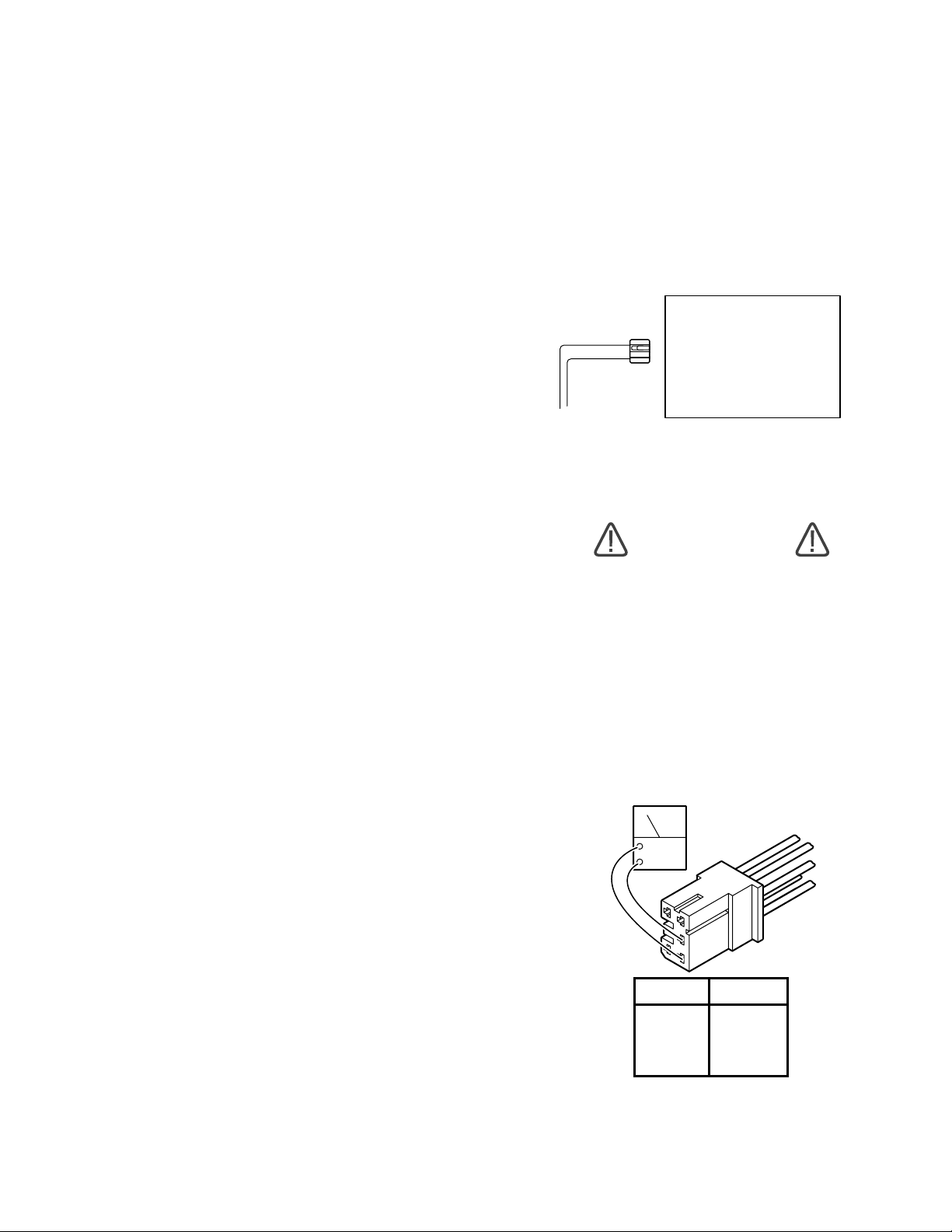
2. Disconnect connector CN4 from the relay
box. See figure 5-1. Leave all other connectors
connected.
RELAY BOX
CN4
Figure 5-1. Main Power Test
WARNING
Line voltage (120 VAC) will be measured in this test. Do not touch uninsulated connector pins or meter test leads.
3. Use an AC voltmeter capable of measuring
120 VAC and measure the voltage between pins
1 and 2 (black and white wires) located in connector CN4. See figure 5-2. You should receive line
voltage 120 VAC.
When troubleshooting an electrical circuit, start at
the problem and work back to the power source.
5-2. Main Switch
The main power supply, 120 VAC, 60 HZ, comes in
through the power cord and through the main
switch. The main switch opens both lines when in
the "OFF" position. An 8 amp or two 10 amp fuses
are used to protect the complete electrical system
and are located next to the main switch.
a. Main Switch Test
The following test will determine if line voltage is
applied to connector CN4, which in turn would
power the table.
ACV
5
3
2
4
1
PIN NO. COLOR
1 White
2 Black
3 Red
4 Blue
5 Yellow
Figure 5-2. Connector CN4
Page 23
Page 32
b. Test Results
If you do not receive the correct voltage measurement, the problem would have to be in the wires,
main switch, fuses, or power cord. If the correct
voltage is obtained, everything is good up to this
point and the problem would have to be in another
area.
5-3. Pendant Control
The Pendant Control consists of 14 micro-switches
(buttons). When any of the circuits are completed
(by depressing a control button) the appropriate
relay contacts (located in the relay box) close
applying 120V potential to the appropriate solenoid
to operate the mini-valve and the pump/motor. The
Pendant Control has only 5-6 volts applied to it.
a. Pendant Control Test
The following test will determine if the microswitches inside the Pendant Control are functioning correctly.
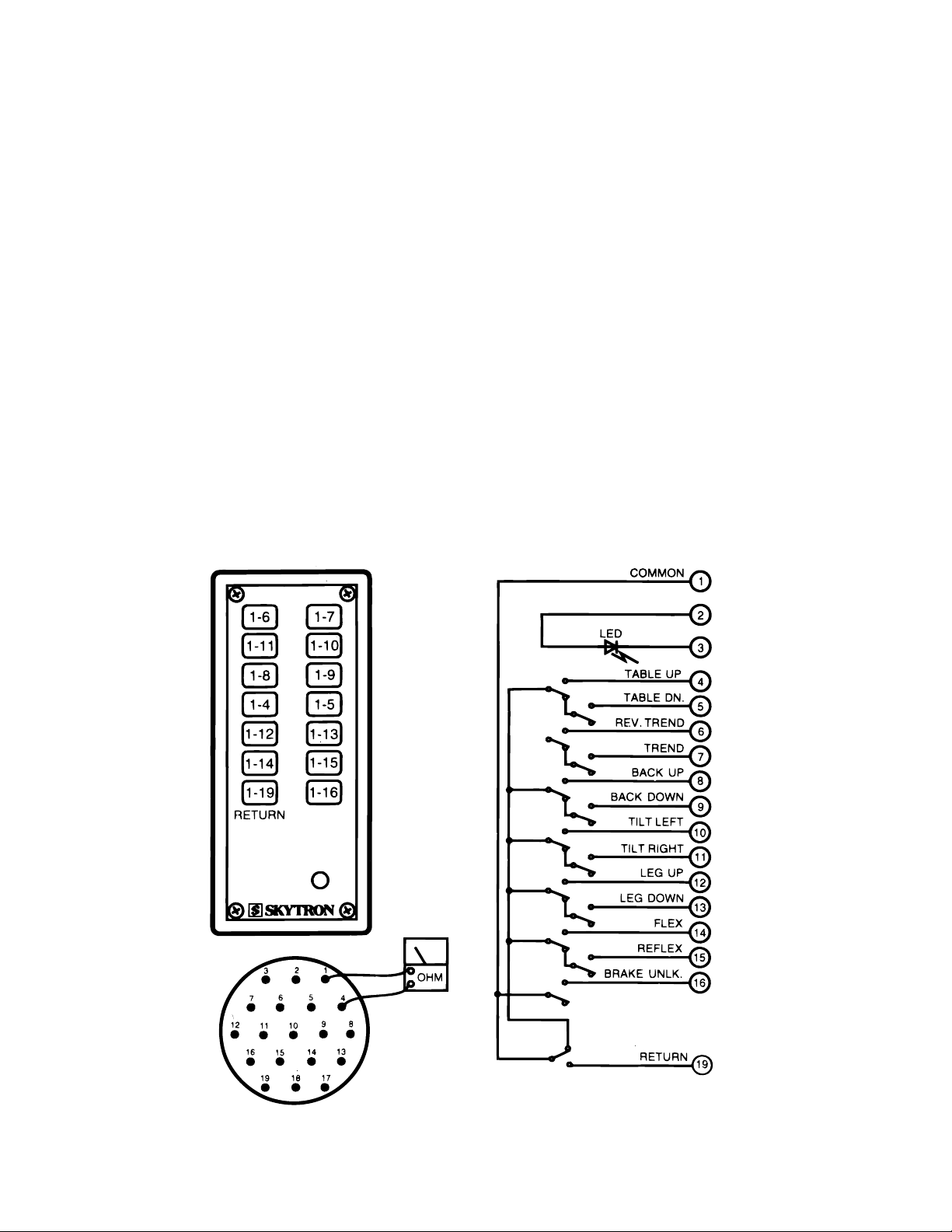
1. Unplug the pendant control from the base of
the table. You will be checking the cord side
connector.
2. Use an ohmmeter R x 1 scale and check the
continuity between pin 1 and pins 4 through 19.
See figure 5-3.
3. Ohmmeter must show continuity between
the pins that are indicated when the appropriate
buttons are pressed.
NOTE
Pins 2 and 3 are connected to the LED
(power on light on the pendant control)
and cannot be checked with an ohmmeter. Pins 17 & 18 are not used.
Page 24
Figure 5-3. Pendant Control Test
Page 33
b. Test Results:
If you do not receive continuity between any of the
pins, either the micro-switch in the Pendant Control
is defective or a wire is broken. Either of these
problems can be repaired easily.
If you receive correct readings with the meter, the
Pendant Control is okay.
c. Wiring Harness Test
The following test checks the wires leading from
the relay box connector CN8 to the 19 pin connector table socket. These wires apply low voltage to
the pendant control buttons.
1. The power cord should be plugged into the
wall socket and the main switch turned ON.
d. Test Results:
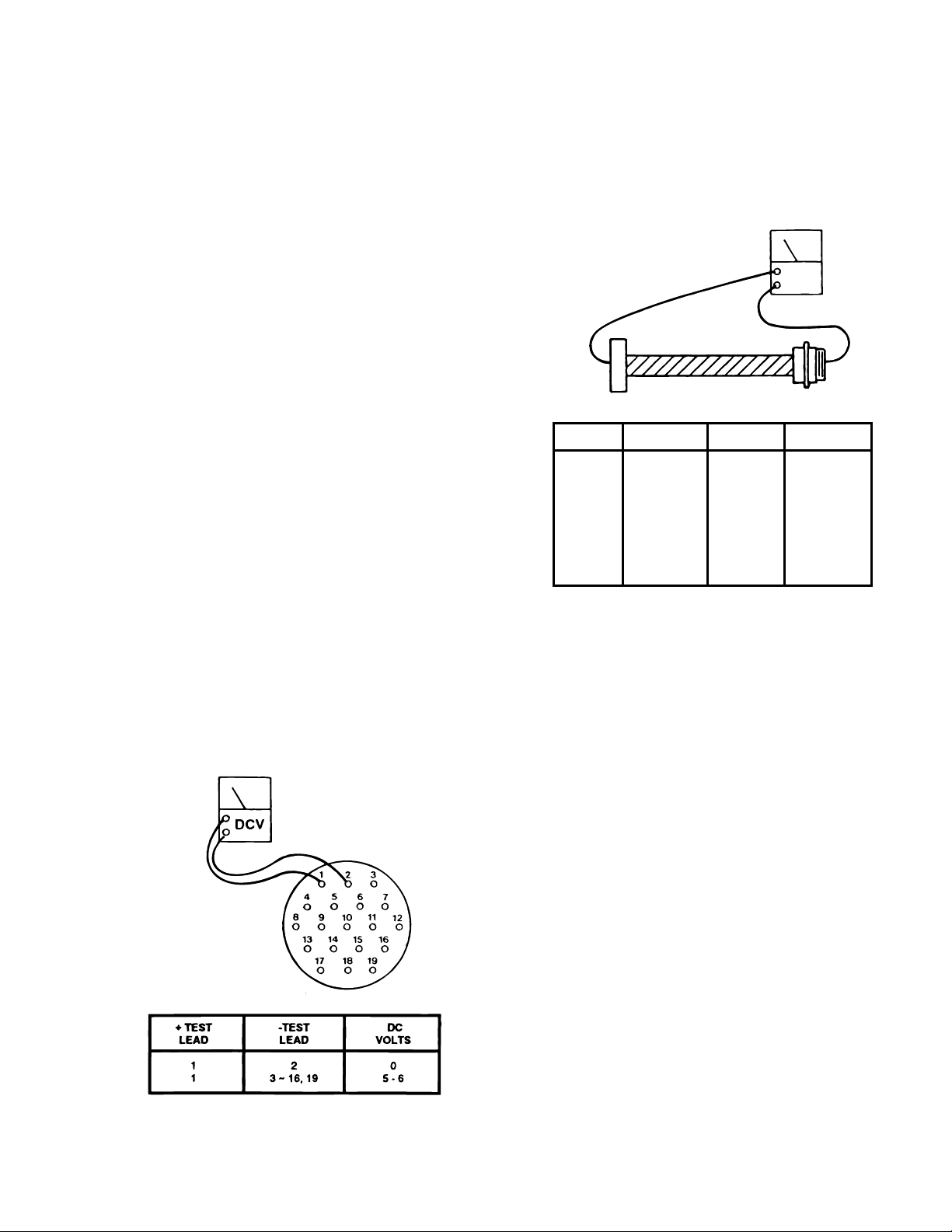
If you do not receive the correct voltage reading,
the wiring or connector pins may be faulty. Disconnect connector CN8 from the relay box and using
an ohmmeter, test the continuity between the corresponding pins in connectors CN8 and the table base
connector. See figure 5-5. If the correct readings are
obtained, this part of the circuit is okay.
OHM
CN8
2. Disconnect the pendant control from the
base connector. All other connectors should be
connected.
3. Use a DC voltmeter 10V scale and measure
the following pins located in the 19 pin table base
connector. See figure 5-4.
NOTE
Pin 19 will have no voltage potential unless one of the return-to-level microswitches are activated, i.e. trend or tilt .
Pins 17 & 18 are not used.
PIN NO.
1
2
3
4
5
6
7
8
9
10
COLOR PIN NO. COLOR
Red/White
White
Black
Red
White/Red
Yellow
Brown
White/Brown
Blue/White
Orange
11
12
13
14
15
16
17
18
19
White/Orange
White/Gray
White/Yellow
Purple/White
Black/White
White/Purple
Blue/Yellow
Gray
Purple
Figure 5-5. Base Connector Continuity Test
5-4. Relay Box
The 120 volt power supply is directly connected to
the relay contacts. When these contacts are
closed, 120 volts is supplied to the solenoids which
are mounted on the hydraulic mini-valves. One
relay is used to supply 120V to the pump/motor and
is always activated no matter what control function
is selected. The brake locking circuit relay is also
activated when any control function other than
BRAKE UNLOCK is initially selected.
Also, inside the relay box is a step-down transformer
and full-wave rectifier which decreases the line voltage to 5.5 volts. This low voltage potential controls
the relays by the use of the hand-held pendant
control buttons. Basically the relays enable a 5.5
volt potential to control the 120 volt circuit.
Figure 5-4. Table Base Connector
The following tests will determine if the relay box is
functioning correctly.
a. Relay Box Input Connector CN4
1. Plug the power cord into the 120 VAC power
supply (wall receptacle) and turn the main switch
ON. Leave all connectors connected.
Page 25
Page 34
WARNING
d. Test Results:
Line voltage (120 VAC) will be measured in this test. Do not touch uninsulated connector pins or meter test leads.
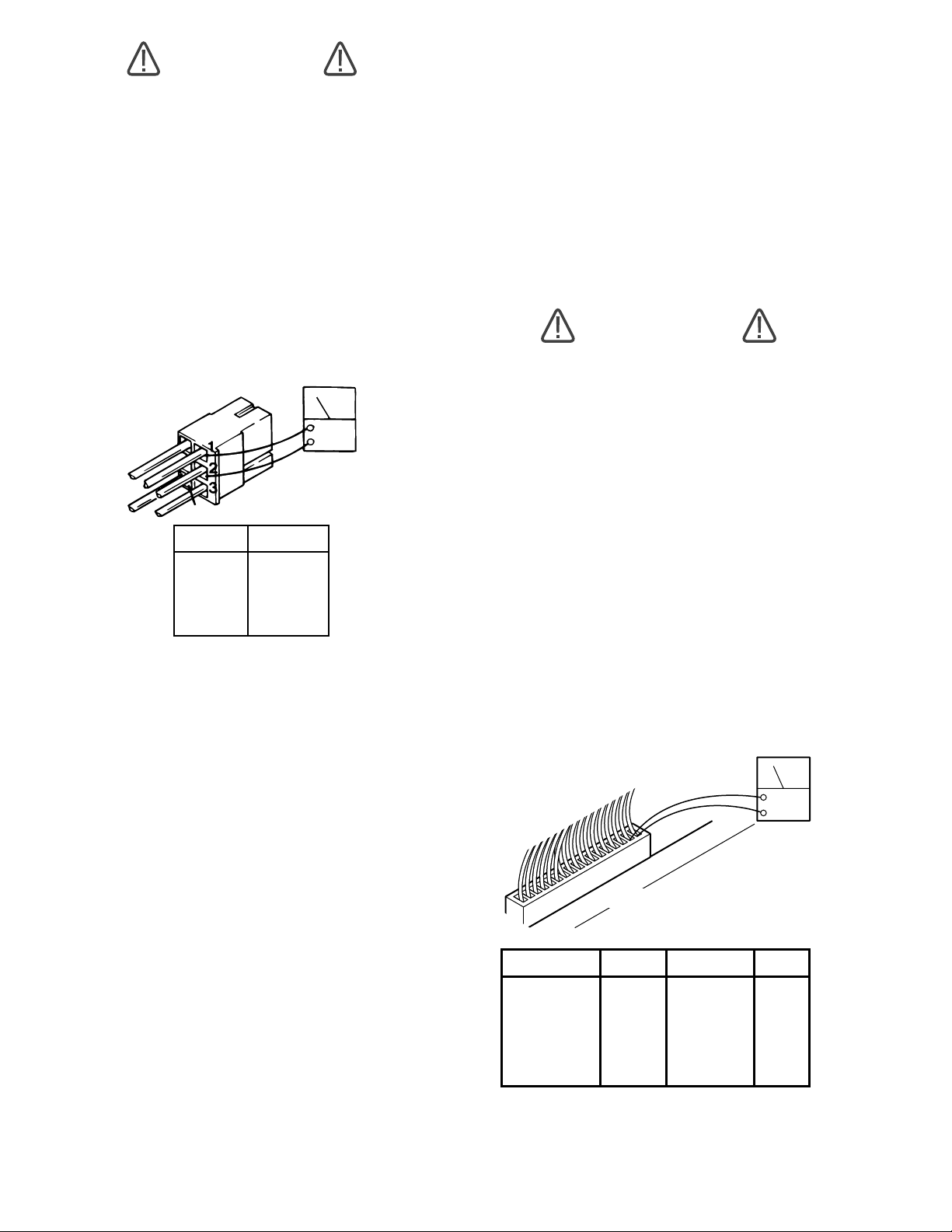
2. Use an AC voltmeter capable of measuring
120 volts and measure the voltage between pins 1
(white) and 2 (black) of connector CN4 for input
voltage. See figure 5-6. Meter should read line
voltage 120 VAC.
3. Activate any table function with the Pendant
Control and using an AC voltmeter, test the voltage
at pins 3 and 4 of CN4 for output to the pump. Meter
should read 120 VAC.
4
5
PIN NO.
1
2
3
4
5
COLOR
WHITE
BLACK
RED
BLUE
YELLOW
ACV
Figure 5-6. Connector CN4
b. Test Results:
If you do not receive the correct meter readings, the
relay box or wiring is defective. If the correct
readings are obtained, this part of the relay box is
okay. Proceed to the next step.
If you do not receive the correct meter readings, the
relay box or wiring is defective. If the correct
readings are obtained, this part of the relay box is
okay. Proceed to the next step.
e. Relay Box Output Connectors CN6 & CN7
This test checks the high voltage (120V) that is
used to energize the solenoids.
WARNING
120 VAC will be measured in this test.
Do not touch uninsulated connector
pins or meter test leads.
1. The power cord should be plugged into the
wall receptacle and main switch turned ON.
2. Disconnect the motor connector CN15. All
other connectors should be connected. Test connectors CN6 and CN7 from the back while attached
to the relay box.
3. Activate each of the Pendant Control buttons and using an AC voltmeter capable of measuring 120VAC, measure the voltage between the
appropriate connector pins located in connector
CN6 or CN7. See figure 5-7. Polarity of meter test
leads is not important. Meter should read 120VAC.
ACV
c. Relay Box Output Connector CN8
This test checks the low voltage applied to the pendant control buttons.
1. The power cord should be plugged into the
wall receptacle and main switch turned ON.
2. Disconnect Pendant Control connector. All
other connectors should be connected.
3. Using a DC voltmeter, measure the voltage
between pin 1(+) and pins 4 through 19(-) of the
table base connector. See figure 5-4. Meter
should read 5-6 volts.
Page 26
1
CN6 OR CN7
16
Leg Up
Flex
Reflex
CN7
1 - 2
3 - 4
9 - 10
11 - 12
13 - 14
15 - 16
CN6
FUNCTION PINS FUNCTION PINS
Table Up
Table Down
Rev Trend
Trend
Back Up
Back Down
Tilt Right
Tilt Left
1 - 2
3 - 4
5 - 6
7 - 8
9 - 10
11 - 12
13 - 14
15 - 16
Leg Down
Brake Set
Brake Unlock
Figure 5-7. Relay Box Output Connectors
CN6 and CN7
Page 35

f. Test Results:
If you do not receive the correct meter readings, the
relay box or wiring is defective and should be
replaced.
NOTE
Before deciding the relay box is defective, check the wires and pins in the
connector blocks to make sure they are
not loose or making a bad connection
with their mate.
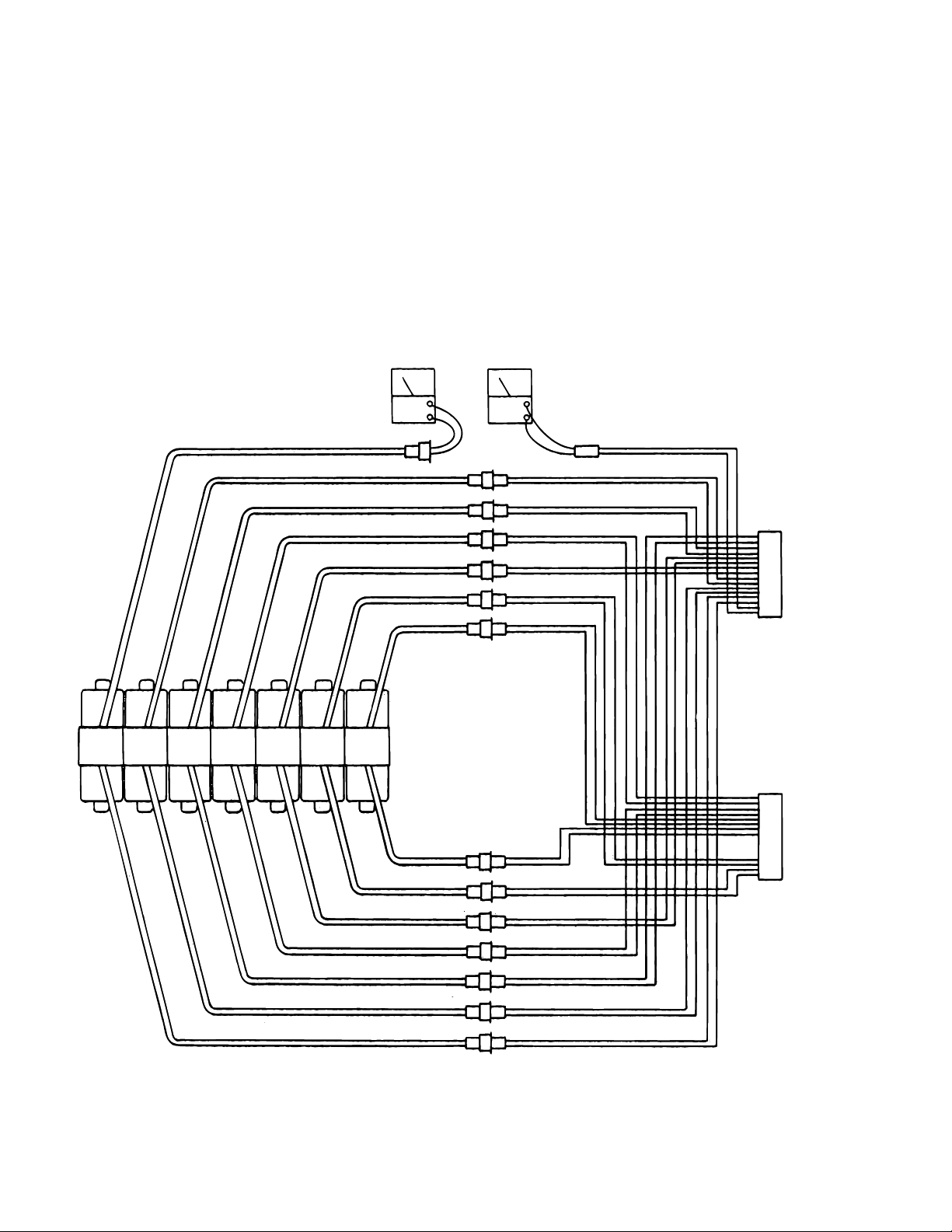
5-5. Solenoids
The solenoids are energized by 120 volt potential
that is controlled by the relays located inside the
relay box.
The solenoid windings are protected from excessive heat with an internal thermal fuse that will open
after approximately seven (7) minutes of continuous operation. The solenoid must be replaced if
the internal thermal fuse has been blown. The
solenoids are mounted directly on either side of the
hydraulic mini-valves and push the spool valve in
one direction or the other depending upon which
solenoid is activated.
WARNING
Line voltage will be measured in this
test. Do not touch uninsulated connector pins or meter test leads.
b. Step #1
1. Plug the table cord into the wall receptacle
and turn main switch ON.
2. Disconnect the 2 pin connector from the
solenoid in question. See figure 5-8.
3. Use a voltmeter capable of measuring 120
VAC and measure the voltage across the 2 pin
connector. Polarity of meter leads is not important.
NOTE
The appropriate pendant control button must be pushed during this test.
The motor will run when this test is
performed, and the brake locking solenoid will be activated by any function
other than UNLOCK.
c. Test Results:
a. Solenoid Test
The following tests check the voltage applied to the
solenoids and the resistance of the solenoid coil.
NOTE
If a solenoid does not function when the
pendant control button is pushed, the
problem could be the pendant control,
the relay box, or the solenoid.
NOTE
Each solenoid is controlled with 120V
source coming from the relay box. This
source can easily be checked by measuring the voltage at the 2 pin connector in question.
If you do not receive the correct voltage, the problem could be in the wires leading to connectors
CN6 and CN7. The problem could also be in the
relay box or the Pendant Control (refer to appropriate section for troubleshooting).
If the correct voltage is obtained, everything is
good up to that point and the problem is more than
likely the solenoid.
d. Step #2
The solenoid can be checked out using an ohmmeter R x 1 scale.
1. Measure the resistance between the two
pins of the connector in question. See figure 5-8.
Connector being tested must be disconnected.
Polarity of meter leads is not important.
2. The meter should read approximately 80-90
ohms at room temperature.
Page 27
Page 36
Y
Y
3. Measure the resistance between either pin
and ground.
4. Meter should read infinity.
e. Test Results:
If the solenoid does not check out with the meter, it
is more than likely defective and must be replaced.
OHM ACV
NOTE
Whenever there are several components of the same type, a defective unit
can also be detected by substituting a
known good unit or wire connector. In
some cases this may be faster than
using a multi-meter.
UP
DN.
TABLE TREND
HD.
DN.
UP
BLUE
WHITE/BLUE
UN-
DN.UPREFXRT.HD.
LCK.
LAT.
TILT
LT.
FLEX
BACK
FLEX
SECT.
DN. UP SET
LEG
SECT.
BRAKE
BLUE
WHITE/BLUE
BLUE
WHITE/BLUE
BLUE
WHITE/BLUE
BLUE
WHITE/BLUE
BLUE
WHITE/BLUE
BLUE
WHITE/BLUE
BLUE
WHITE/BLUE
BLUE
WHITE/BLUE
BLUE
WHITE/BLUE
BLUE
WHITE/BLUE
BLUE
WHITE/BLUE
BLUE
WHITE/BLUE
BLUE
WHITE/BLUE
BLUE
BROWN
BLUE
ORANGE
BLUE
BROWN/WHITE
BLUE
WHITE/BROWN
BLUE
WHITE/GRAY
BLUE
BLACK/WHITE
BLUE
WHITE/BLACK
BLUE
GRAY
BLUE
BLUE/WHITE
BLUE
RED/WHITE
BLUE
WHITE/ORANGE
BLUE
YELLOW
BLUE
WHITE/RED
BLUE
RED
CN6
16
TO
RELA
BOX
1
CN7
16
TO
RELA
BOX
1
Page 28
Figure 5-8. Solenoid Test
Page 37
5-6. Motor/Pump Assembly
The electric motor is a capacitor start type with a
rating of 120 VAC, 200 watts. The field windings
are protected with a thermal protector that will open
the winding circuit if the motor is run continuously
for approximately 10 minutes. This protector will
take about 10 minutes to automatically reset. The
oil pump unit is attached to the bottom of the motor
and is a gear type displacement pump with a
pumping capacity of .4 liter per min. The Motor/
Pump Assembly is mounted on an insulated motor
plate in the base of the table. The starting capacitor
is mounted along side the motor/pump assembly
a. Motor/Pump Test
The following tests will check the voltage applied to
the motor and the resistance of the motor field
windings.
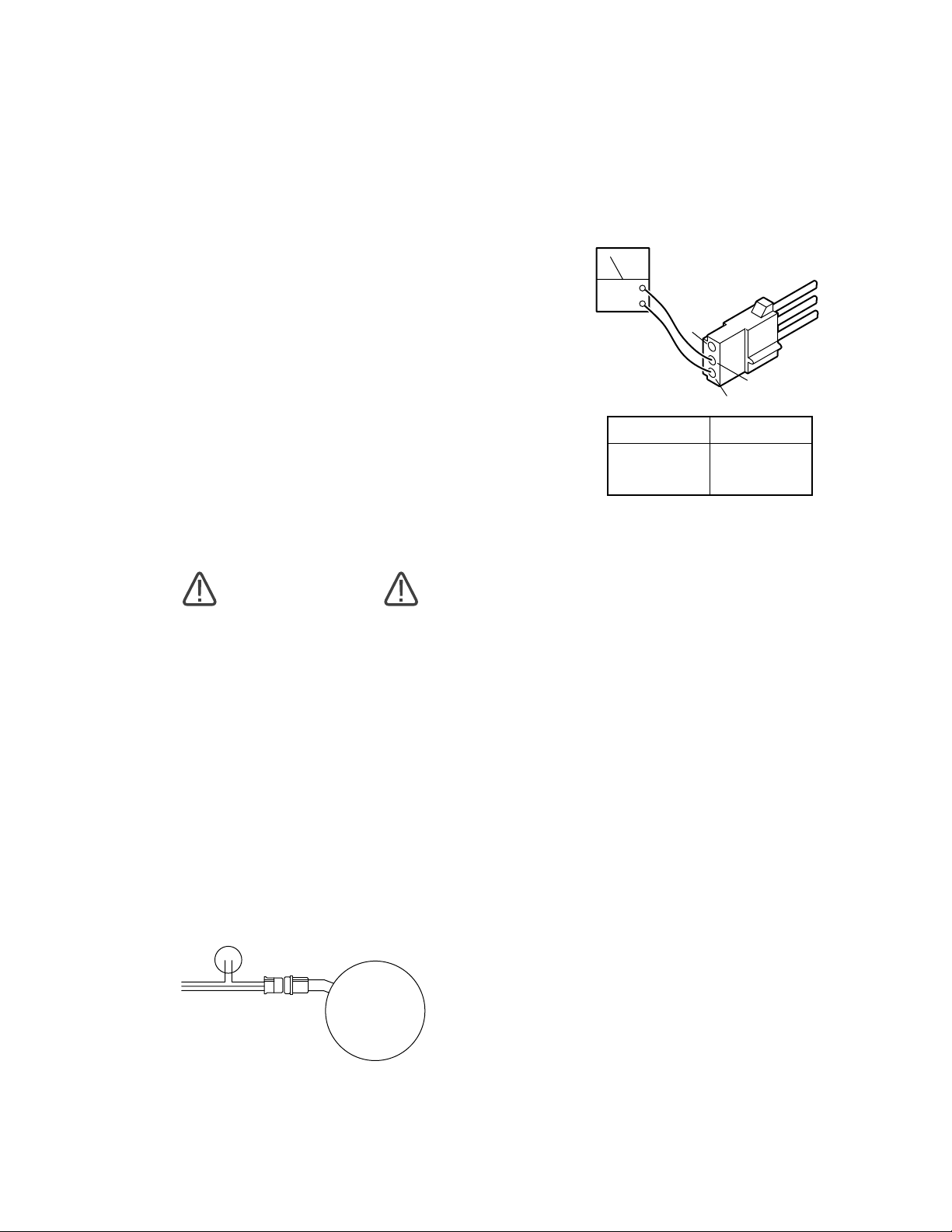
3. Use a voltmeter capable of measuring 120
VAC and measure the following connector pins in
connector CN15. See figure 5-10.
ACV
3
2
1
PIN NO
1 - 2
1 - 3
2 - 3
AC VOLTS
120
120
0
Figure 5-10. Connector CN15
WARNING
Line voltage will be measured in this
test. Do not touch uninsulated connector pins or meter test leads.
b. Step #1
1. Plug the power cord into 120 VAC power
supply (wall receptacle). Turn main switch ON.
2. Disconnect the 3 pin connector CN15 at the
motor. Leave all other connectors connected. See
figure 5-9.
CAPACITOR
CN15
PUMP
c. Test Results:
If you do not receive the correct meter readings, the
problem could be in the wires, connectors, relay
box, or main switch (refer to appropriate section for
troubleshooting).
If the correct voltage is obtained, everything is
good up to that point and the problem could be
either the motor or the starting capacitor.
d. Step #2
If the starting capacitor is shorted or grounded, the
motor will not run. Capacitors very seldom fail, and
it requires a dielectric tester to accurately test one.
However, an ohmmeter can be used to determine
if the capacitor will store a low voltage charge and
most of the time this is adequate.
1. Turn the main switch OFF.
Figure 5-9.
2. Connector CN15 should be disconnected.
3. Use the R x 100 scale of the ohmmeter and
touch pins 2 and 3 of connector CN15. See figure
5-10.
Page 29
Page 38
e. Test Results:
The meter needle should move up scale and then
back down to infinity. This would indicate that the
capacitor is storing an electrical charge.
NOTE
The capacitor may have to be discharged first (by shorting pins 2 and 3
together) before you will be able to see
the ohmmeter needle swing up the scale.
OHM
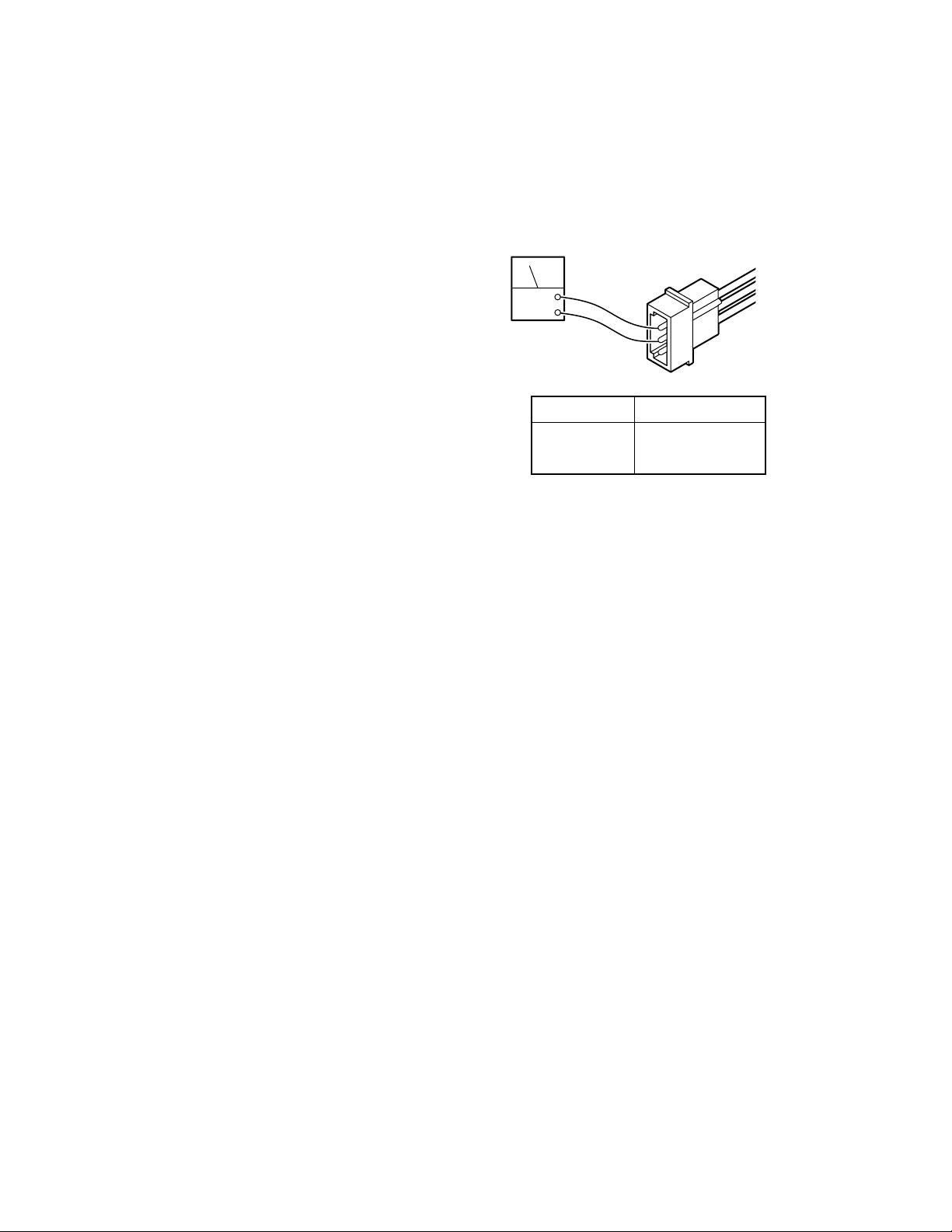
f. Step #3
The motor windings can be statically checked for
resistance using an ohmmeter.
1. Turn main power switch OFF.
2. Connector CN15 should be disconnected.
3. Use the R x 1 scale of the ohmmeter and
measure the resistance between the pins located
in the pump connector CN15. See figure 5-11.
PIN NO
1 - 2
1 - 3
2 - 3
METER
Approx. 5 ohms
Approx. 4 ohms
Approx. 8 ohms
Figure 5-11. Pump Connector CN15
g. Test Results:
If you do not receive the correct meter readings, the
motor or wiring is defective.
Page 30
Page 39
5-7. Return-to-Level Micro-Switches.
The return-to-level feature is activated by a single
button on the pendant control and automatically
levels the major table functions, lateral tilt, trendelenburg, back section, and leg section.
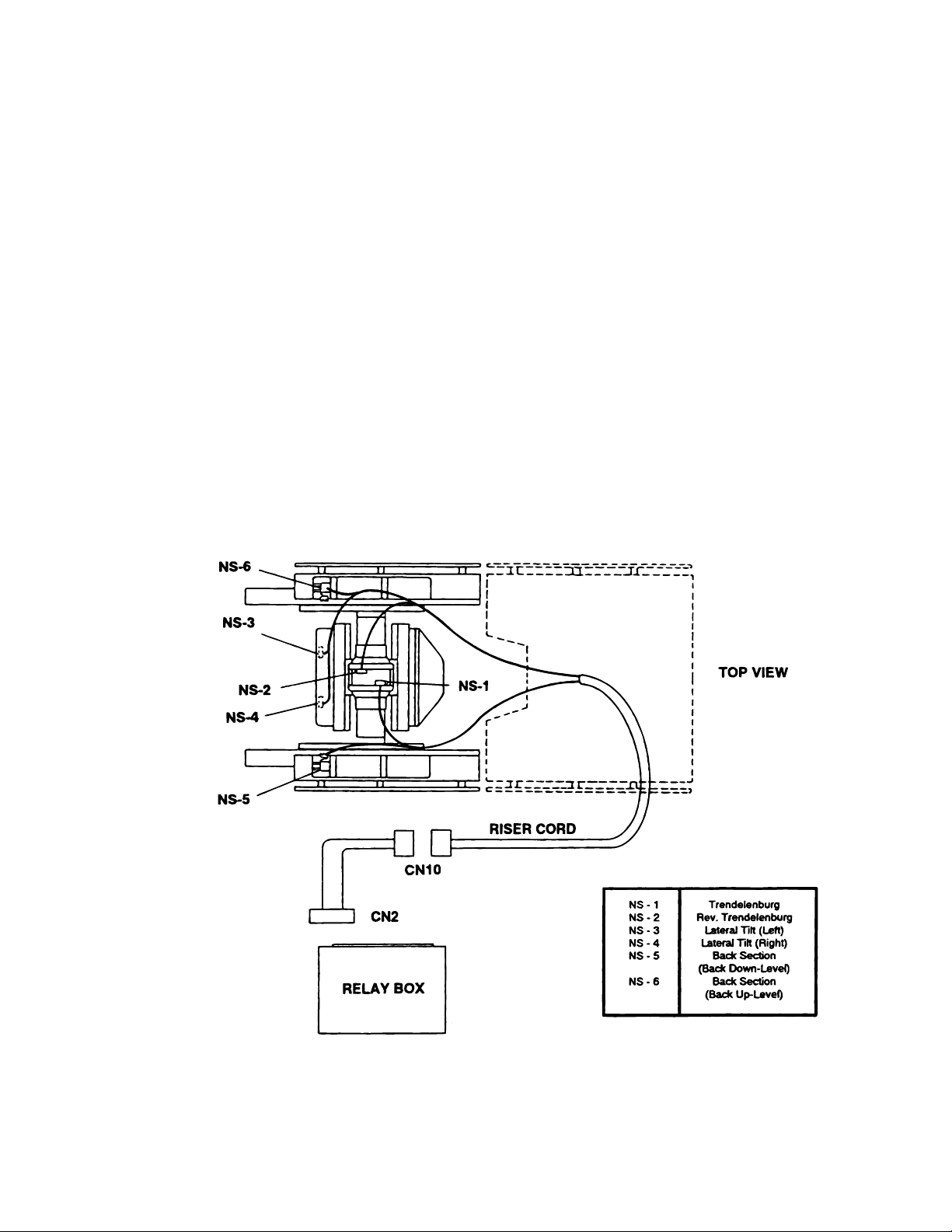
The return-to-level system consists of 6 microswitches, 2 electrical connectors, and the related
wiring. The micro-switches are mounted on or
adjacent to the function they control and are wired
for normally open or normally closed operation.
The micro-switches are lever actuated and can be
adjusted at the individual switch mounting brackets. See figure 5-12.
The micro-switches operate on low voltage, and
control the function circuits (pump/motor and appropriate solenoid valves) when activated by the
pendant control RETURN button.
The micro-switches are wired to the relay box
through a riser cord and to the 15 pin connector
CN2. See figure 5-12 for switch location and
identification.
5-8. Troubleshooting
If a problem is suspected in the return circuits,
disconnect the connector CN2 from the Relay Box
to eliminate the circuits. Ensure that all table
functions operate properly using the Pendant Control. If the functions do not work properly using the
Pendant Control, refer to the appropriate test section and make all needed repairs before working on
the return circuits.
Figure 5-12.
Page 31
Page 40
B
NOTE
It is normal for the back section to move
up if the RETURN button is pushed
when connector CN2 is disconnected
from the relay box.
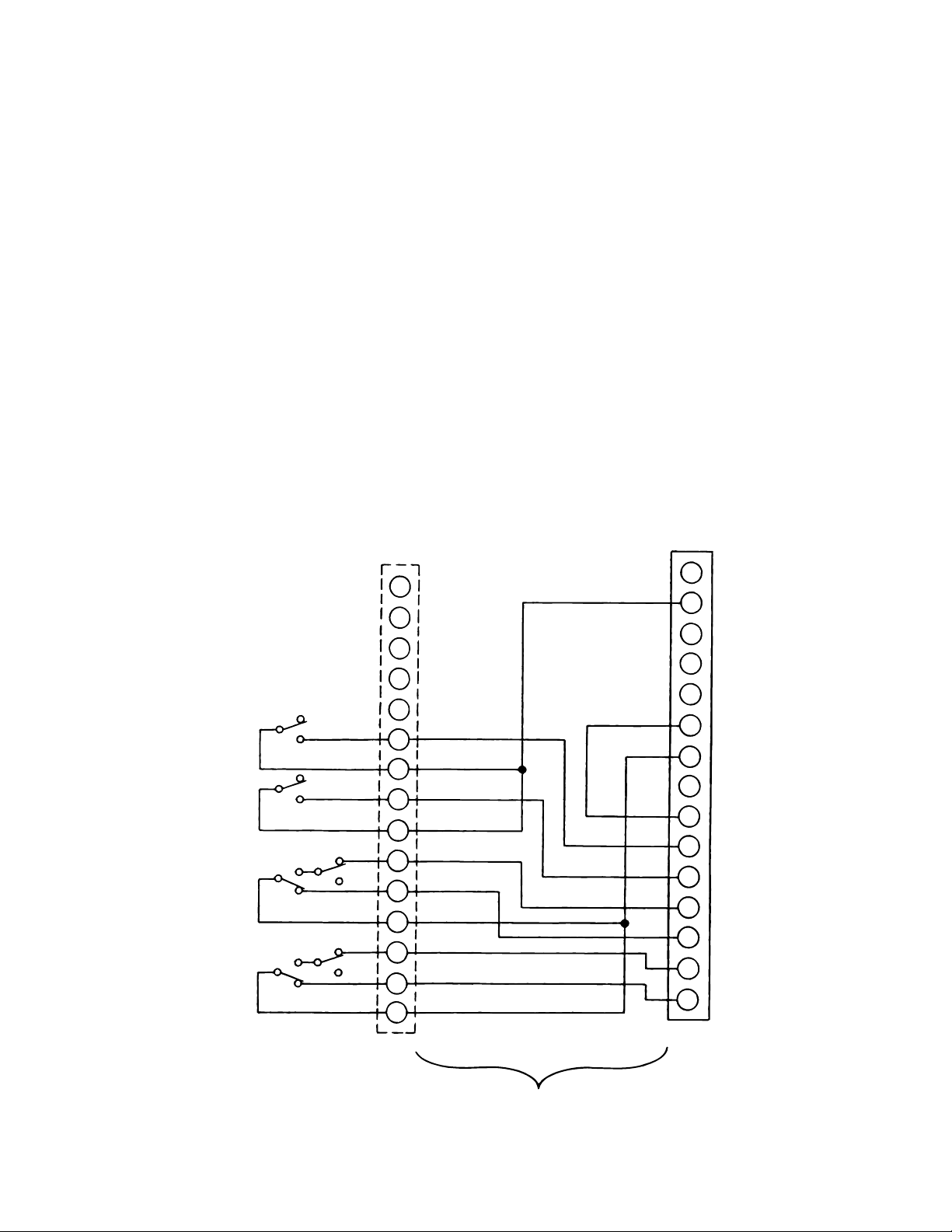
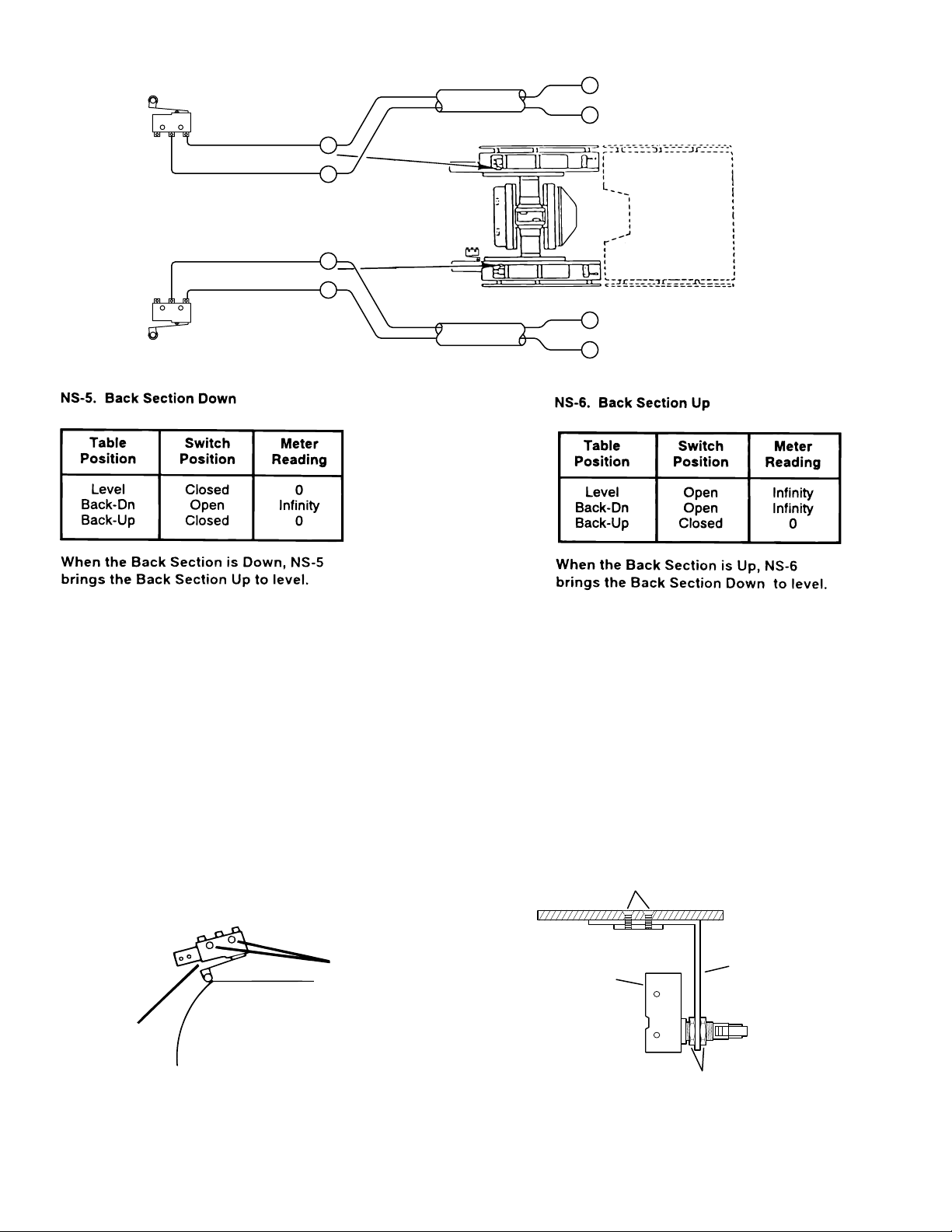
operation at the appropriate pin numbers for the
micro-switch in question as shown in figures 5-14
through 5-18.
NOTE
All of the micro-switches are connected to the relay
box via a wiring harness and the micro-switch riser
Be sure to isolate the circuit when mak-
ing continuity checks.
cord using connectors CN2 and CN10. Connector
CN10 is located under the slider shroud in the same
area as the hydraulic hoses. Connector CN2 plugs
NOTE
into the relay box and is the most convenient
location to make circuit continuity checks. See
figure 5-13 for connector pin locations.
If you do not receive the proper continu-
ity results at connector CN2 it does not
necessarily mean the micro-switch is
a. Switch Test
defective. There could be a problem
with the riser cord between connectors
Turn Main Power ON, lock the table brakes, and
place the table top sections in a level position.
Disconnect connector CN2 from the relay box and
using an ohmmeter, test the wiring and switch
16
15
8
7
13
BR/WHITE
BACK UP
ACK DOWN
TILT LEFT
TREND
NS-6
NS-5
TILT RIGHT
NS-4
NS-3
REVERSE
TREND
NS-2
NS-1
6
12
5
11
4
3
10
2
1
9
CN10
PURPLE
BLUE
PINK
GREEN
YELLOW
BROWN
WHITE
RED
ORANGE
CN2 and CN10, or in the wiring from the
switch to connector CN10. Further
tests will have to be made to determine
the exact problem.
15
PINK
BLACK/WHITE
14
13
12
11
10
9
8
7
6
5
4
3
2
1
CN2
Page 32
RISER CORD
Figure 5-13. Return Micro-Switch Test
Page 41
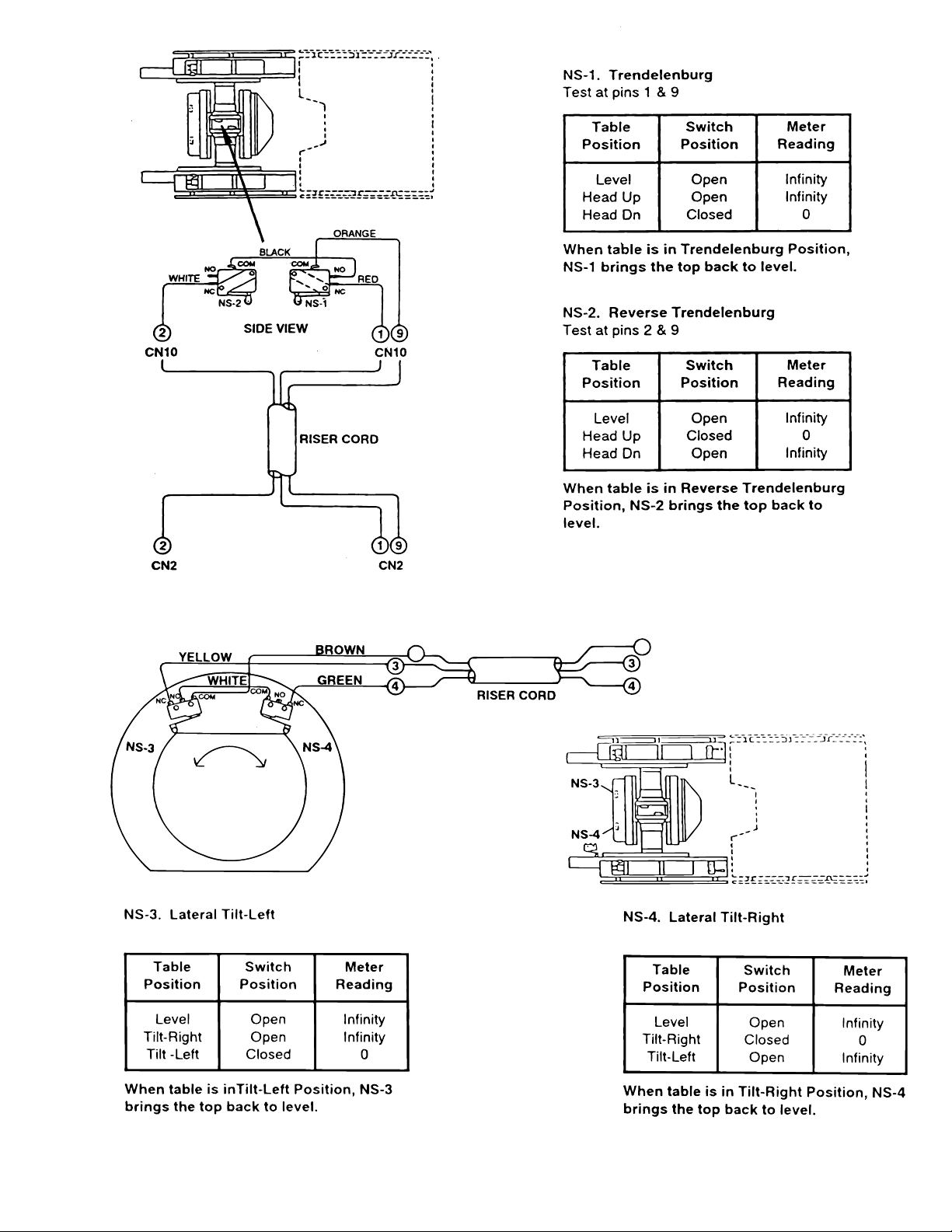
Figure 5-14. Trendelenburg Return Switches
CN10 CN2
10
9
Test at pins 3 & 9
Test at pins 4 & 9
Figure 5-15. Lateral Tilt Return Switches
Page 33
Page 42
G
M
NS-6
T
L
M
T
14
NO
NO
NS-5
est at pins 5 & 14
COM
COM
PURPLE
WHITE/BLUE
BLUE
PINK
12
6
CN10
5
11
CN10
RISER CORD
RISER CORD
6
CN10
5
14
CN2
Test at pins 6 & 14
Figure 5-16. Back Section Return Switches
b. Switch Adjustment.
2. For all switches except the Leg Section
switches, carefully loosen the switch retaining
If proper readings are not obtained during test or if
table does not properly return to level, use the
screws, and adjust the switches as needed. See
figure 5-17.
following procedure to adjust the switches.
3. To adjust the Leg Section switches remove
1. Apply table brakes and (using a level) level
the table top using the TRENDELENBURG and
LATERAL-TILT function buttons on the pendant
control.
RETAININ
SCREWS
ICRO-SWITCH
seat section top, loosen the 2 phillips head screws
securing bracket, adjust the switch, tighten the
screws and replace the seat section top. See figure
5-18.
PHILLIPS HEAD
SCREWS
EG SECTION
ICRO-SWITCH
BRACKE
Figure 5-17. Micro-Switch Adjustment
Figure 5-18. Leg Section Micro-Switch
JAM
NUTS
Adjustment
Page 34
Page 43
SOLENOID
R
C
COIL 24VDC
MINI-VALVES
6002B
PENDANT
PENDANT
CONTROL
CONTROL
TO
RETURN
CIRCUIT
CN10
RELAY BOX
APACITOR
BATTERIES
CN4
CN51
CN14
CN9CN2
CN1
CN6
CN7
CN8
PUMP
CN19
CHARGER
BOX
AUXILIARY
CONNECTOR
CN14
CN12
AUXILIARY
SWITCHES
SWITCH-OVER
RELAY
22 VA C FROM
TRANSFORMER
FUSE
15AMP
CN18
CN13
120 VA C T O
TRANSFORME
CN15
POWER
CORD
MAIN
POWER
ICN1
BATTERY
CHARGE
INDICATOR
SWITCH
FUSE
10AMP
Figure 6-1. Electrical Circuit Block Diagram, Model 6002B
Page 35
Page 44

6002B
SECTION VI -6002B- BATTERY MODEL, ELECTRICAL TROUBLESHOOTING
6-1. General
The battery table components operate on 24VDC.
The internal charging system also incorporates the
components to transform the 120VAC input to
24VDC output to the components.
NOTE
This section covers the electrical
troubleshooting for the 6002B model
ONLY.
6-2. Troubleshooting Notes
The basic operation of each component will be
defined along with a drawing and explanation on
how to check it out.
Certain defective components could cause the
entire table to stop functioning or only one control
function to stop. It would depend on what part of
the component failed. Other defective components
would only cause one control function to stop.
The following defective components could cause
all control functions to be affected:
a. Motor/Pump Assembly
b. Main Switch Circuit and Wiring
The following defective components could cause
all control functions to be affected or only one
control function:
a. Relay Box
b. Pendant Control
The component listed below would only affect one
control function:
Solenoid
When troubleshooting an electrical circuit, start at
the problem and work back to the power source.
NOTE
•On the battery model tables, troubleshooting should begin by switching
the operating mode. For example; if a
function fails when attempting to operate the table in the AC120V mode,
switch to the BATTERY mode. If the
function now operates, the problem is
probably located between the power
cord and the relay box. If the function
also fails when in battery operation, use
the auxiliary switches to operate the
function. If the function now operates,
the problem is probably in the pendant
control, connectors or wiring from the
pendant control to the relay box.
•All connector pins are numbered usually with very small numbers.
6-3. Main Switch
The main power supply, 120 VAC, 60 HZ, comes
in through the power cord and through the main
switch. The main switch opens both lines when
in the "OFF" position. Two 10 amp fuses are used
to protect the complete electrical system and are
located next to the main switch.
a. Main Switch Test
The following test will determine if line voltage is
applied to connector CN15, which in turn would
supply 120VAC power to the table.
1. Plug the power cord into the 120VAC supply
(wall receptacle) and turn the main switch ON.
2. Disconnect connector CN15. See figure
6-1. Leave all other connectors connected.
WARNING
Page 36
Line voltage (120 VAC) will be measured in this test. Do not touch uninsulated connector pins or meter test leads.
Page 45
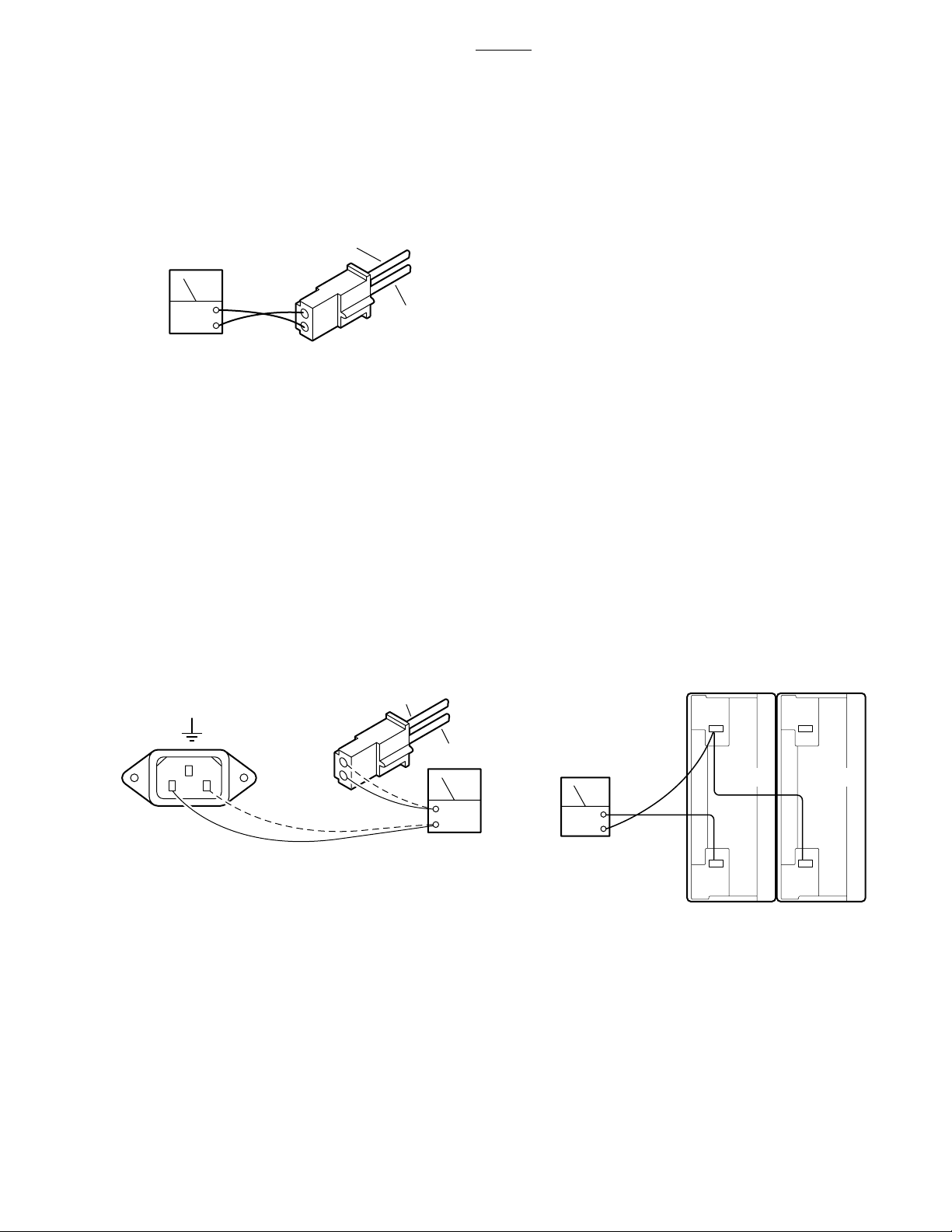
6002B
DCV
BATT 1 BATT 1
3. Use an AC voltmeter capable of measuring
120 VAC and measure the voltage between pins 1
and 2 (black and white wires) located in connector
CN15. See figure 6-3. You should receive line
voltage 120 VAC.
BLACK
(2)
ACV
WHITE
(1)
Figure 6-3. Connector CN15 Test
b. Test Results
If the correct voltage is obtained, everything is
good up to this point and the problem would have
to be in another area.
If you do not receive the correct measurements,
the problem would have to be in the wires, main
switch, fuses, or power cord.
Check the continuity from the power cord connector ICN1, through the fuses, switch and wiring to
connector CN15. Remove the power cord, disconnect CN15 (black and white wires), and test as
shown in figure 6-4.
charging system automatically keeps the batteries
at the proper charge level when the AC120V operating mode is ON. The charging system will operate while the table is being operated in the AC120V
mode.
a. Battery System Test
1. Disconnect the main power cord and using
a DC voltmeter, test each individual battery at its
terminals. Meter should read 12VDC ± 1V.
2. To accurately test the batteries, they must
be tested under a full load. Disconnect the main
power cord and make sure all other connectors are
connected.
3. Turn BATTERY power ON and elevate the
table to its full up position.
4. Continue to press the TABLE UP button on
the pendant control so that the pump motor continues to run and using a DC voltmeter, check the
voltage drop of each battery individually. See
figure 6-5.
5. Meter should read 12VDC ± 1VDC.
TO GROUND
ICN1
L
CN15
2
1
N
BLACK
WHITE
OHM
Figure 6-4. CN15 to ICN1 Continuity Test
6-4. Batteries
The BATTERY operating mode is powered by two
12 volt batteries connected in series to provide the
24 volt operating power.
The battery system voltage should be 24VDC at a
range of 22VDC to 26VDC. If the battery charge
level falls below 23.5 volts the BATTERY operation
indicator on the pendant control will blink indicating
that the batteries require recharging. The built-in
Figure 6-5.
b. Test Results
A reading of 11 volts or below indicates the battery
needs charging.
After batteries have been fully charged, repeat the
full load test. If either battery's voltage drops below
11VDC it should be replaced.
Page 37
Page 46
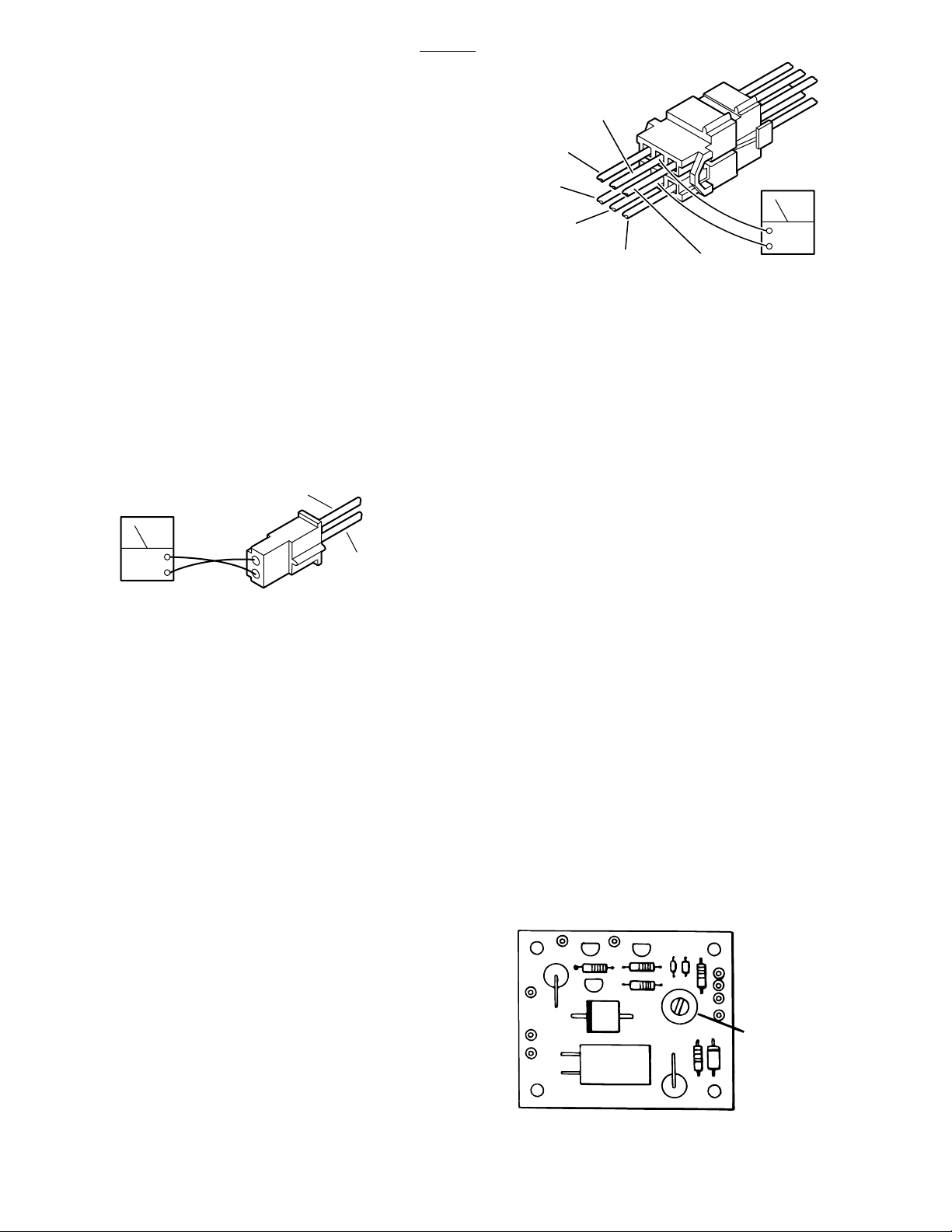
9
(
6002B
6-5. Battery Charging Box/AC120V
Transformer
The Battery Charging Box contains the battery
charging system as well as the components for
AC120V operation (except the transformer).
a. Transformer Test
1. Confirm 120VAC input at CN15 using Main
Switch test in 6-3a.
2. Connect CN15, disconnect CN18 (brown
and red wires) and using an AC voltmeter, test the
transformer output at CN18. See figure 6-6.
3. Meter should read 22VAC.
BROWN
(2)
CN51
5
3
1
(1) BROWN
DCV
(5) RED / WHITE
6) BLUE / WHITE
BLACK
(4)
RED
(3)
(2) BROWN
Figure 6-7. Connector CN51
2. Meter should read 26.5 ±0.5VDC.
3. Test pin 5(+) and pin 6(-) of CN51 with DC
voltmeter to test operation of CHARGING indicator
light (next to power cord connector).
4. Meter should read 26.5 ±0.5VDC if charger
is operating. If batteries are fully charged there will
be under 5 volts at pins 5 and 6.
ACV
RED
(1)
Figure 6-6. Connector CN18 Test
b. Test Results
If the correct voltage is obtained, everything is
good up to this point and the problem would have
to be in another area.
If you do not receive the correct measurements,
the problem may be in the wires, connectors, or
transformer. The transformer is located in the rear
of the base under the stainless steel base cover.
The stainless steel cover will have to be disconnected and lifted from the base for access to the
transformer for further testing.
c. Battery Charging Box Test
d. Test Results
If you do not receive the correct readings, the
charger system, connectors, wires, or the transformer may be defective.
e. Charging System Output Adjustment
If output reading at pins 3 and 4 is not 26.5 ±
0.5VDC, the output can be adjusted at the variable
resistor VR-R59 on the circuit board inside the
Charging Box. See figure 6-8. Turn the adjuster
clockwise to decrease the voltage. Counterclockwise to increase the voltage.
NOTE
The battery connectors must be disconnected to adjust the battery charger
output.
1. Make sure all connectors are connected and
turn AC120V operation ON. Using a DC voltmeter,
VR-5
test pin 3(+) and pin 4(-) of CN51. DO NOT
disconnect connector CN51. See figure 6-7.
Page 38
Figure 6-8
Page 47
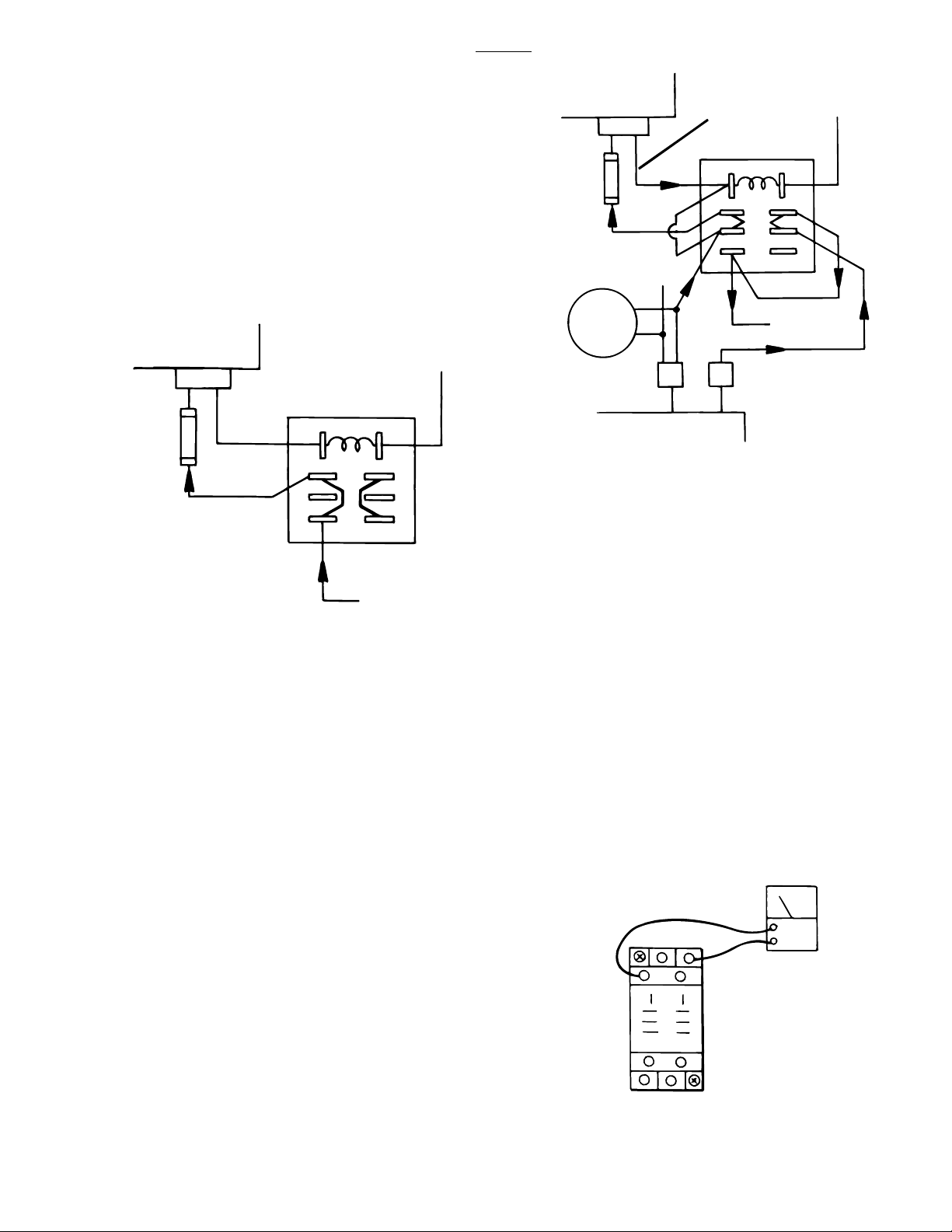
-)
)
6002B
6-6. Switch-Over Relay
a. Switch-Over Relay in OFF Position
The Switch-Over Relay supplies the 24 volt input
power from either the BATTERY or AC120V operating modes to the relay box for table operation. In
the normal OFF position, BATTERY power is supplied to the relay box. See figure 6-9.
RELAY BOX
FUSE
15A
CN4
S-O RELAY
2
1
3
4
7
(
8
6
5
RELAY BOX
CN4
FUSE
15A
CAPACITOR
CN15
CHARGING
BOX
RELAY BOX
SIGNAL OUT
S-O RELAY
2
1
8
3
6
4
5
BATTERY(+)
CN14
7
Figure 6-10. Relay in Activated Position
c. Switch-Over Relay Test
(-)
BATTERY (+
Figure 6-9. Relay in OFF Position
b. Switch-Over Relay in Activated Position
When the AC120V mode is activated by the main
switch, a signal from the relay box activates the
Switch-Over Relay. The relay then supplies the
AC operating mode output power to the relay box
and also activates the battery charging circuit. See
figure 6-10.
NOTE
The battery charging circuit is only operational when the table is in the
AC120V operating mode.
Using a DC voltmeter, test the operation of the
relay in both the OFF (AC120V- OFF ) and Activated (AC120V - ON ) positions. See figure 6-11.
NOTE
The Switch-Over Relay mounting block
may have to be removed from the base
for test access.
OFF: (AC120V - OFF)
term. 7(-) and term. 1(+) = 24 to 28VDC
term. 7(-) and term. 6(+) = 0VDC
Activated: (AC120V - ON)
term. 7(-) and term. 6(+) = 26.5±1VDC
27
18
DCV
3
6
45
Figure 6-11. Switch-Over Relay
Page 39
Page 48
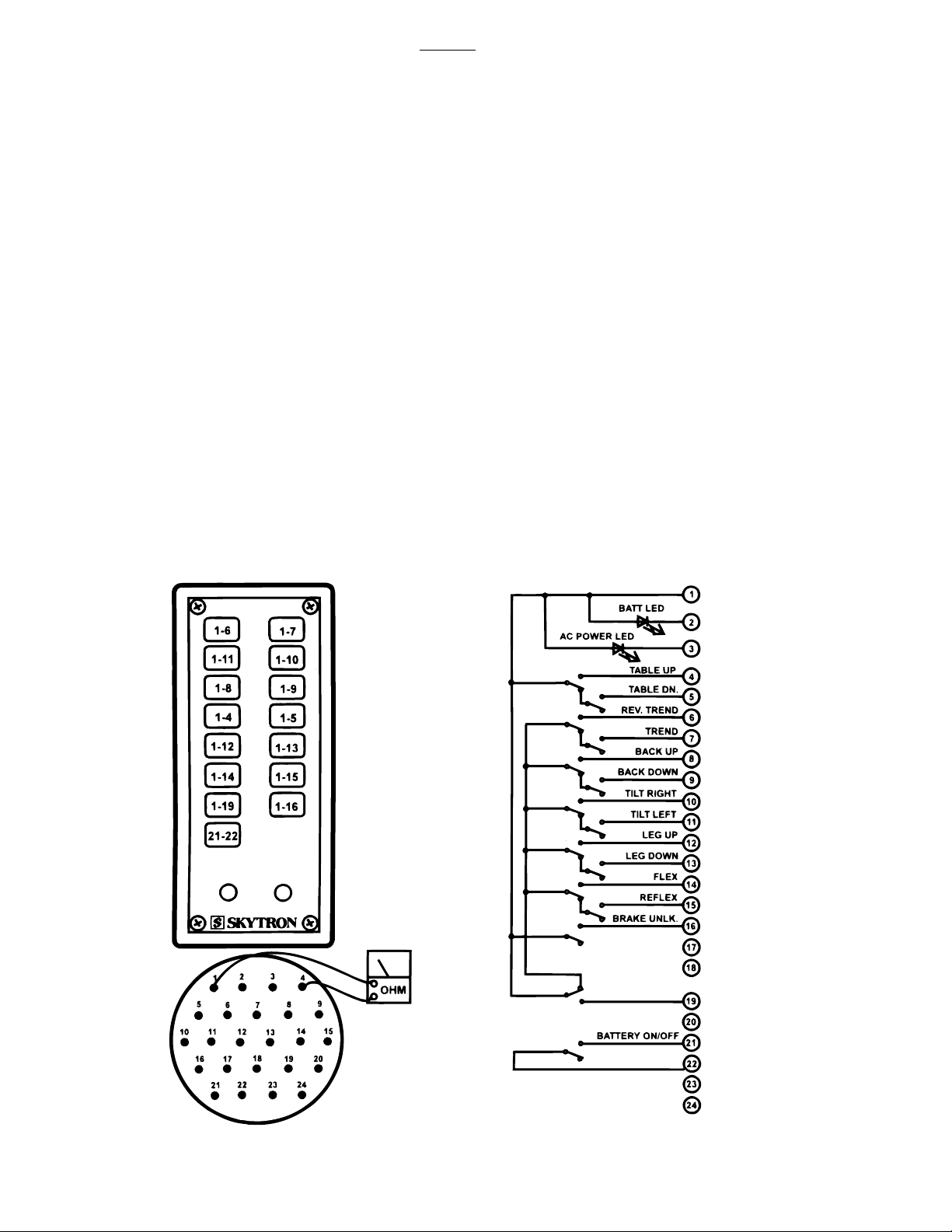
6-7. Pendant Control
6002B
The Pendant Control consists of 15 micro-switches
(buttons). When any of the circuits are completed
(by depressing a function button) the appropriate
relay contacts (located in the relay box) close and
a 24V potential is applied to the solenoid to operate
the hydraulic mini-valve and to the hydraulic pump
motor. The Pendant Control has 5 volts applied
to it.
a. Pendant Control Test
The following test will determine if the microswitches inside the Pendant Control are functioning correctly.
1. Unplug the 24 pin Pendant Control connector from the base of the table. You will be checking
the cord side connector.
2. Use an ohmmeter R x 1 and check the
continuity between pins 1 and pins 4 through 19
while pressing the appropriate button. Also test
between pins 21 and 22. See figure 6-12.
3. Ohmmeter must show continuity between
the pins that are indicated when the appropriate
buttons are pressed.
NOTE
Pins 2 and 3 are connected to the LEDs
(AC120V and BATTERY indicator lights
on the pendant control) and cannot be
checked with an ohmmeter. Pins 17,
18, 20, 23 & 24 are NOT USED.
b. Test Results:
If you do not receive continuity between any of the
pins, either the micro-switch in the Pendant Control is defective or a wire is broken. Either of these
problems can be repaired easily.
If you receive correct readings with the meter,
there is nothing wrong with the Pendant Control.
Page 40
Figure 6-12. Pendant Control Test
Page 49
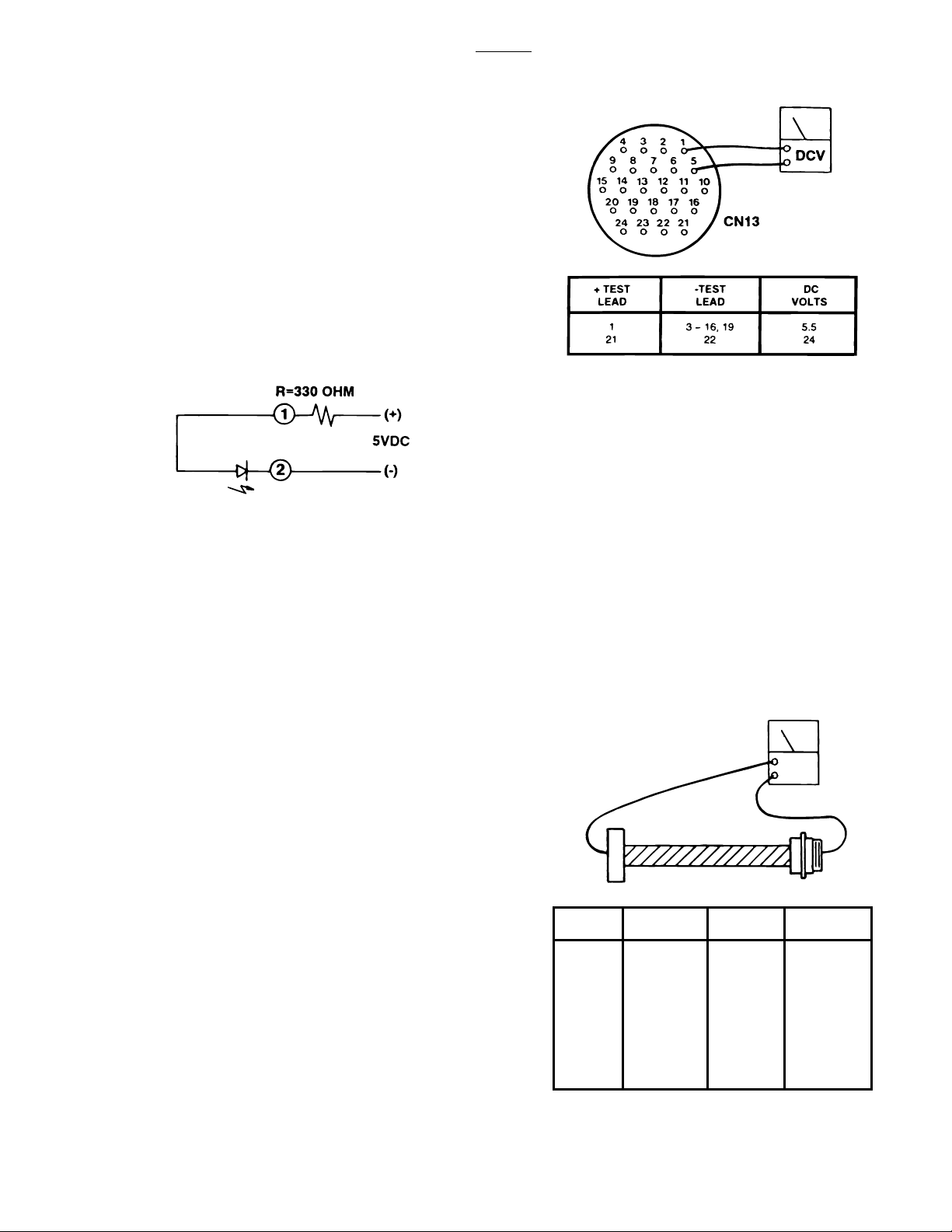
CN - 14
PIN NO.
CN1
CN13
OHM
CN - 1
WIRE COLOR
CN - 14
PIN NO.
CN - 1
WIRE COLOR
Red/White
White
Black
Red
White/Red
Yellow
Brown
White/Brown
Blue/White
Orange
White/Orange
Gray
White/Gray
White/Yellow
Purple/White
Black/White
Purple
White/Purple
Blue/Green
Brown/White
Blue/Purple
1
2
3
4
5
6
7
8
9
10
11
12
13
14
15
16
17
18
19
20
21
22
c. LED Test
The BATTERY and AC120V power ON indicators
can be checked with an LED tester. Test BATTERY indicator at pin 1(+) and pin 2(-) of 24 pin
Pendant Control connector. Test AC120V indicator at pin 1(+) and pin 3(-). See figure 6-12.
If no LED tester is available the LEDs can be tested
by applying 5 volts to the appropriate pins. To
avoid damage to the LED a 330 ohm resistor must
be placed between the power source and the
connector pins. See figure 6 -13.
6002B
Figure 6-14. Table Base Connector
e. Test Results:
Figure 6-13. LED Test
d. Wiring Harness Test
The following test checks the wires leading from
the relay box connector to the 24 pin connector
table socket. These wires apply low voltage to the
pendant control buttons.
1. Activate the AC120V operating mode.
2. Disconnect the pendant control from the
table base connector. All other connectors should
be connected.
3. Use a DC voltmeter and measure the
following pins located in the 24 pin table base
connector CN13. See figure 6-14.
NOTE
•A fine wire or a paper clip may be
needed to accurately test the small
sockets in the connector. The connector is low voltage and there is no danger
of electrical shock.
•Pin 19 will have no voltage potential
unless one of the return-to-level microswitches are activated.
If you do not receive the correct voltage reading,
the wiring or connector pins may be faulty. Disconnect connector CN1 from the Relay Box and using
an ohmmeter, test the continuity between the corresponding pins in connectors CN1 and CN13.
See figure 6-15. If the correct readings are obtained, this part of the circuit is okay and the
problem may be the relay box.
Figure 6-15. Base Connector Continuity Test
Page 41
Page 50
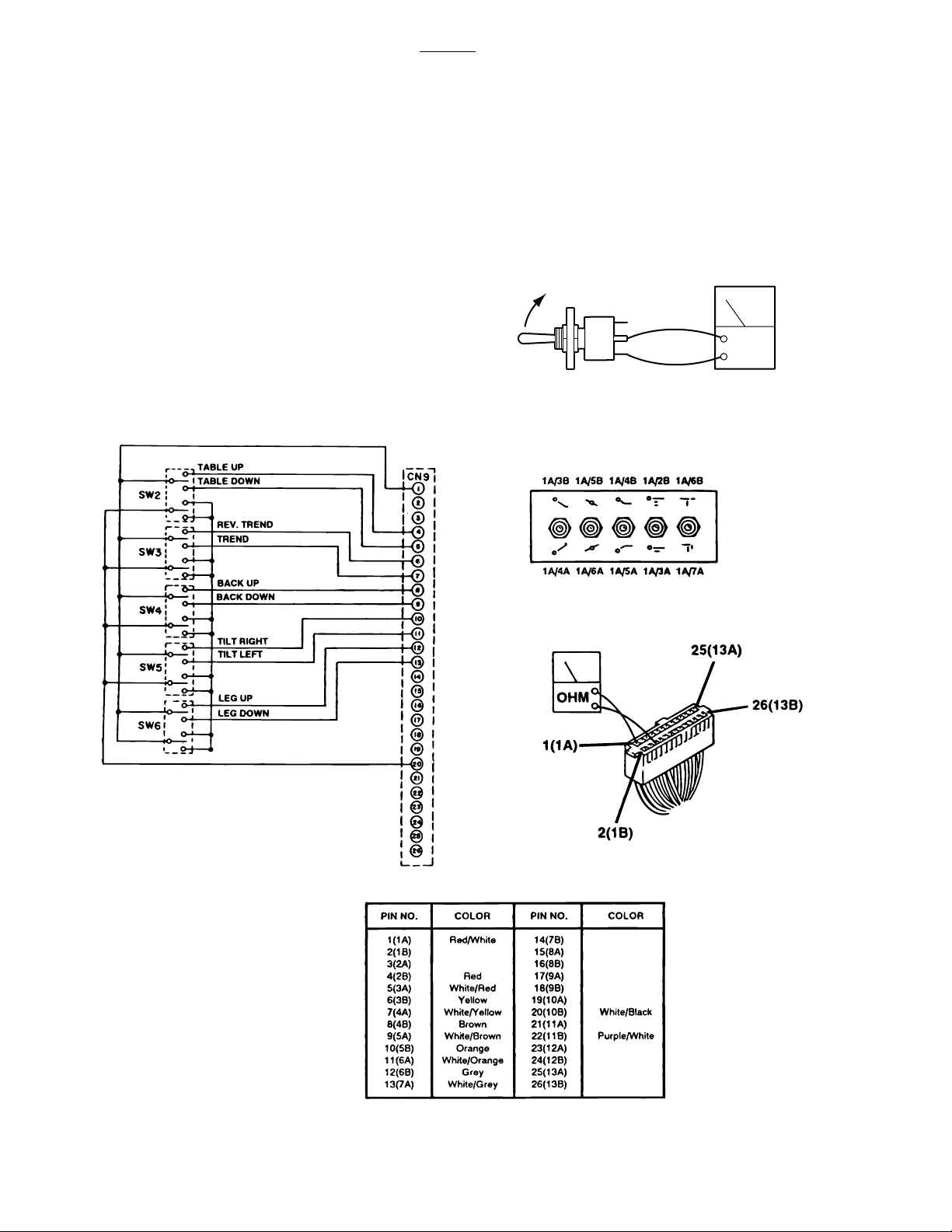
6-8. Auxiliary Switches
6002B
The following tests will determine if the auxiliary
switches are functioning properly.
a. Switch Test
Disconnect connector CN9 at the Relay Box and
using an ohmmeter check for continuity at the
connector pins (pin 1A common) while activating
the appropriate switch. See figure 6-16. Meter
should read 0 ohms.
b. Test Results
If proper meter readings are not received, test the
individual switches as necessary. Using an ohm-
meter, test the operation of an individual switch
with the (+) test lead at the center terminal of the
switch and the (-) test lead at the terminal opposite
the direction of the switch actuation. See figure 6-
17. Meter should read 0 ohms. If the switches
check out, the problem would have to be in the
wires or connector CN9.
OHM
Figure 6-17. Auxiliary Switch Test
Page 42
Figure 6-16. Auxiliary Switch Connector CN9
Page 51
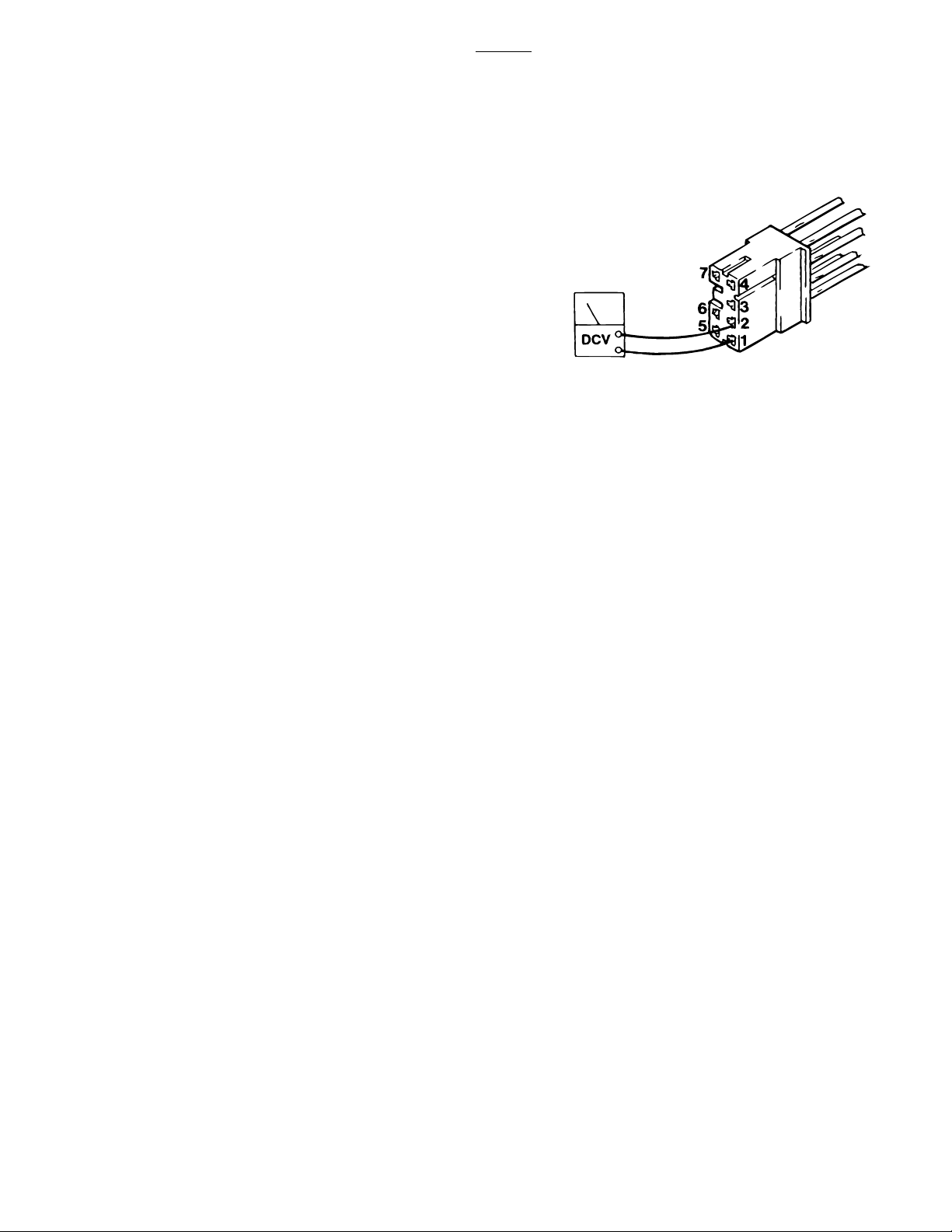
6-9. Relay Box
The power supply is directly connected to the relay
contacts. When these contacts are closed, 24
volts is supplied to the solenoids which are mounted
on the hydraulic mini-valves. One relay is used to
supply power to the pump/motor and is always
activated no matter what control function is selected. The brake locking circuit relay is also
activated when any control function other than
BRAKE UNLOCK is initially selected.
Also, inside the 6002B relay box is a step-down
transformer and full-wave rectifier which decreases
the voltage to 5-6 volts. This low voltage potential
controls the relays by the use of the hand-held
pendant control buttons. Basically the relays enable a 5-6 volt potential to control the 24 volt circuit.
The following tests will determine if the relay box is
functioning correctly.
6002B
Figure 6-18. Relay Box Input
a. Checking Relay Box Input Power
1. Plug the power cord into the 120VAC supply
(wall receptacle). Disconnect connector CN4,
leave all other connectors connected.
2. Using a DC voltmeter, test input power for
both the BATTERY and AC120V operating modes.
See figure 6-18. Meter should read approximately
24-28 volts.
BATTERY mode AC120V mode
pin 1=(+) pin 5=(+)
pin 2=(-) pin 6=(-)
Connector CN4 Color Code
Pin 1 Red Pin 5 White
Pin 2 Blue Pin 6 Black
Pin 3 Yellow Pin 7 Yellow
Pin 4 Blue
b. Test Results:
If you do not receive the correct meter readings,
the problem is in the input wiring, connectors or
components. If the correct readings are obtained,
proceed to the next step.
c. Checking Output to Pump
1. Disconnect pump connector CN12, connect
all other connectors and activate the AC120V operating mode.
2. Test CN12 at pin 1(+) and pin 2(-) with a DC
voltmeter. Meter should read approximately 24-28
volts when any function button is activated. If no
voltage is present, use an ohmmeter to test the
continuity from CN12 to CN4 (yellow and blue
wires). Refer to figure 6-18 for pin locations.
Page 43
Page 52
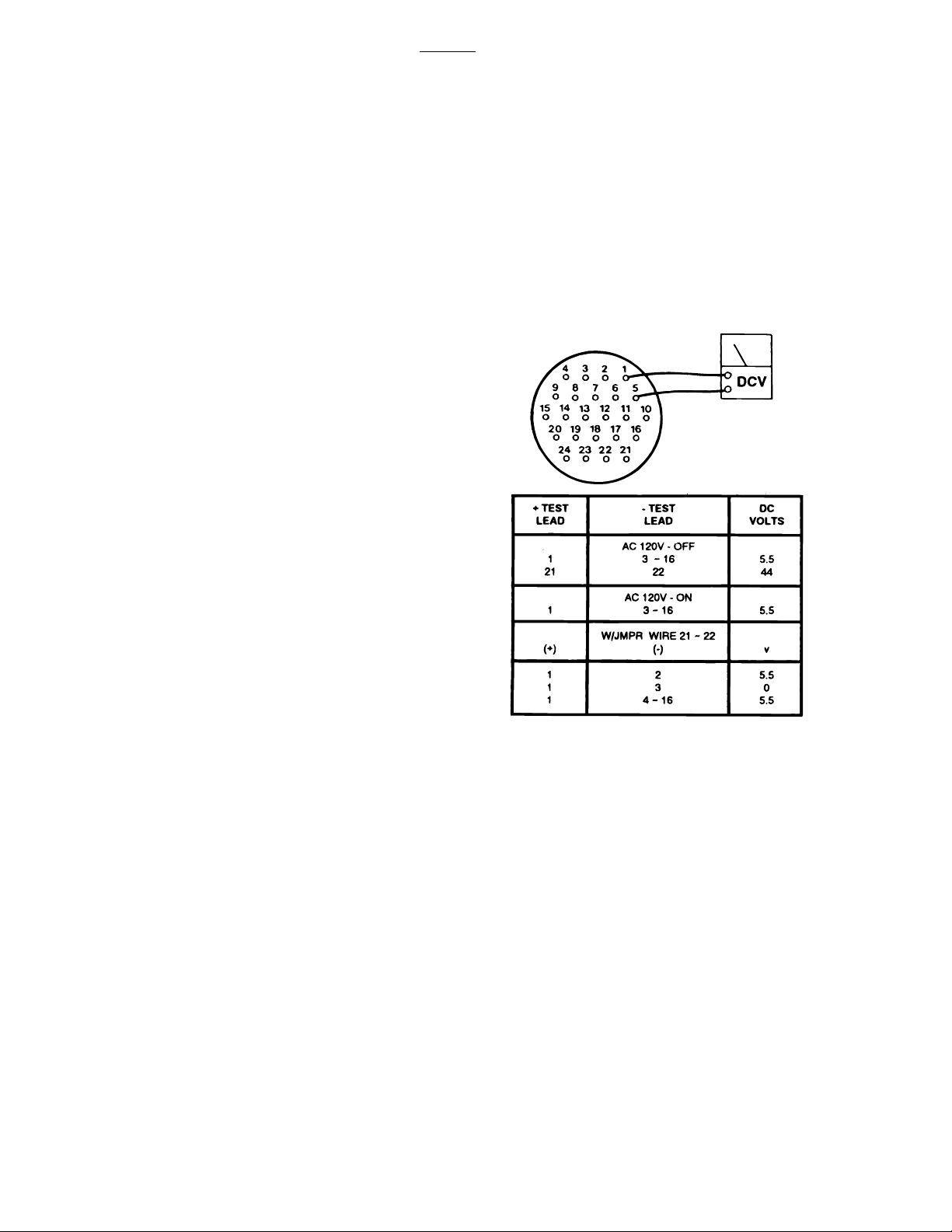
d. Checking Output to Pendant Control
6002B
NOTE
The Relay Box connectors CN1 (Pendant Control), and CN8 (Auxiliary Base
Connector), are interchangeable.
1. Disconnect the Pendant Control connector
from the base connector, connect all other connectors and use a DC voltmeter to measure the following sockets located in the table base connector
CN13. See figure 6-19.
NOTE
•A fine wire or a paper clip may be
needed to accurately test the small
sockets in the connector. The connector is low voltage and there is no danger
of electrical shock.
•To make sure all operating modes are
OFF, connect the pendant control, turn
AC120V power OFF at the main switch,
wait approximately 5 seconds to make
sure BATTERY operating mode is not
activated and disconnect the pendant
control.
4. Activate BATTERY operating mode by
switching Main Power Switch OFF and momentarily placing a jumper wire between pin 21 and pin
22. Test pin 1(+) and pins 2 through 16(-). Meter
should read 0VDC for pin 3; 5-6VDC for pins 2 and
4 through 16.
2. With the AC120V and BATTERY operating
modes in the OFF position, test connector CN13 at
pin 1(+) and pins 2 through 16(-). Meter should
read 0VDC. Test at pin 21(+) and 22(-), meter
should read 24-28VDC.
3. With AC120V power ON (Main Power Switch
activated), test connector CN13 at pin 1(+) and
pins 3 through 16(-). Meter should read 5-6VDC.
Page 44
Figure 6-19. Table Base Connector CN13
e. Test Results:
If you do not receive the correct meter readings, the
relay box or wiring is defective. Test appropriate
wires and connectors as necessary. If the correct
readings are obtained, this part of the relay box is
okay. Proceed to the next step.
Page 53
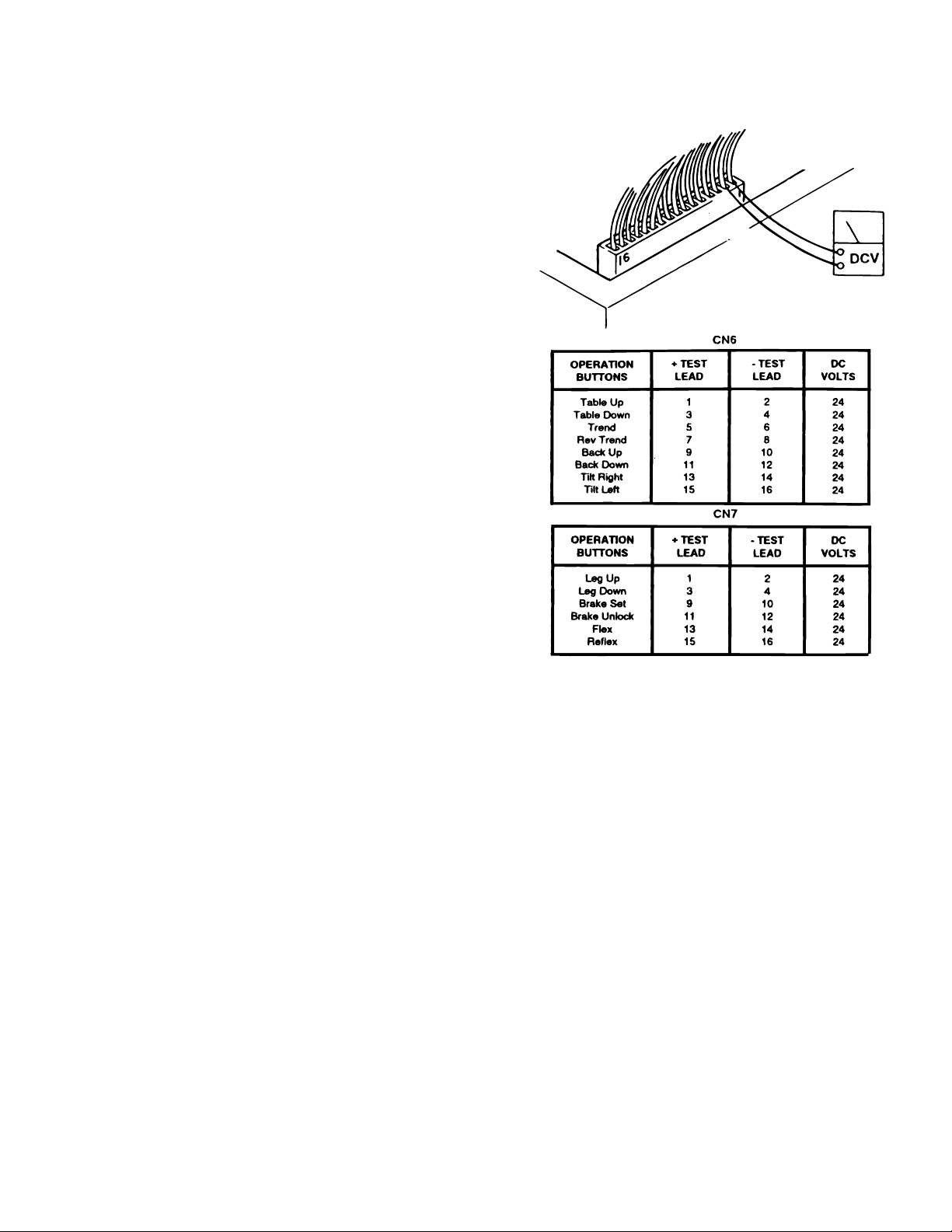
f. Checking Output to Solenoids
This test checks the voltage that is used to
energize the solenoids.
1. Activate either BATTERY or AC120V oper-
ating mode.
NOTE
•The Brake Lock function is activated
by pressing any function button (except
BRAKE UNLOCK). A timer in the Relay
Box allows continuous output for about
7 seconds. If the brakes are already
locked, no output is provided.
•The BRAKE UNLOCK button activates
another timer in the relay box which
allows continuous output for the brake
release function for approximately 7
seconds. If the brakes are already
released (using the BRAKE UNLOCK
button) no output is provided.
2. Test connectors CN6 and CN7 from the back
while attached to the relay box. All connectors
should be connected.
3. Activate each of the pendant control buttons
and measure the output voltage for the corresponding connector pins with a DC voltmeter. See
figure 6-20.
Figure 6-20. Connector CN6 or CN7
g. Test Results:
If you do not receive the correct meter readings, the
relay box is defective and should be replaced.
NOTE
•Before deciding the relay box is defective, check the wires and pins in the
connector blocks to make sure they
are not loose or making a bad connection with their mate.
•If the battery power is ON and no table
functions have been activated for 3
hours, the power off circuit will interrupt
the battery power.
Page 45
Page 54
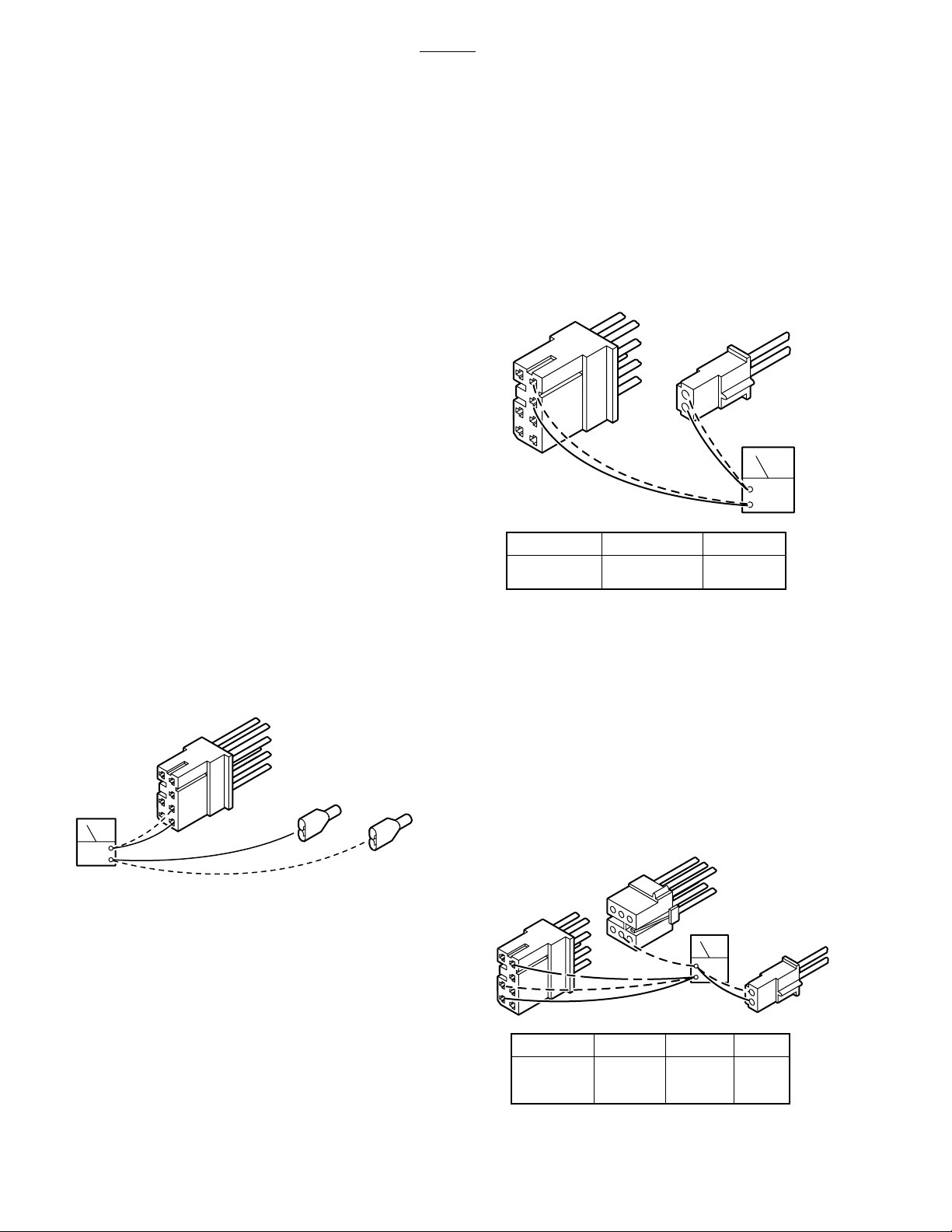
5
7
6
5
6002B
6-10. Main Wire Harness Continuity Tests
If correct meter readings are not received in tests
between components, before replacing the components, test the Main Wire Harness to be sure all
connectors and wires are making a good connection.
a. CN4 to Batteries Test
1. Disconnect connectors CN4 and the (+) and
(-) connectors from the batteries. Leave all other
connectors connected.
2. Using an ohmmeter, test for continuity
between pin 1 of CN4 and battery (+) connector.
Also test between pin 2 of CN4 and battery (-)
connector. See figure 6-21.
NOTE
The 15 amp battery protection fuse is in
the line between CN4 pin 1 and the
battery connector. Test the continuity
of the fuse if correct meter reading is not
received.
b. CN4 to CN12 Test
1. Disconnect connectors CN4 and CN12.
Leave all other connectors connected.
2. Using an ohmmeter, test for continuity
between pins 3 and 4 of CN4 and pins 1 and 2 of
CN12. See figure 6-22.
4
3
2
1
CN-4
3
4
CN4
2
1
CN-12 OHMS
1
2
CN12
0
0
OHM
Figure 6-22.
c. CN4 to Charging Box Test
1. Disconnect connectors CN4, CN11 and
CN51. Leave all other connectors connected.
7
4
OHM
3
6
2
5
1
CN4
(+)
(-)
Figure 6-21.
2. Using an ohmmeter, test for continuity
between pins 4, 5 and 6 of CN4, pins 1 and 2 of
CN11, and pin 4 of CN51. See figure 6-23.
CN51
5
3
6
4
2
CN-4
1
CN11
OHM
CN-51
5
6
4
OHMS
4
0
0
0
CN4
7
4
3
6
2
1
CN-11
1
2
Figure 6-23. CN4, CN11, and CN51
Page 46
Page 55
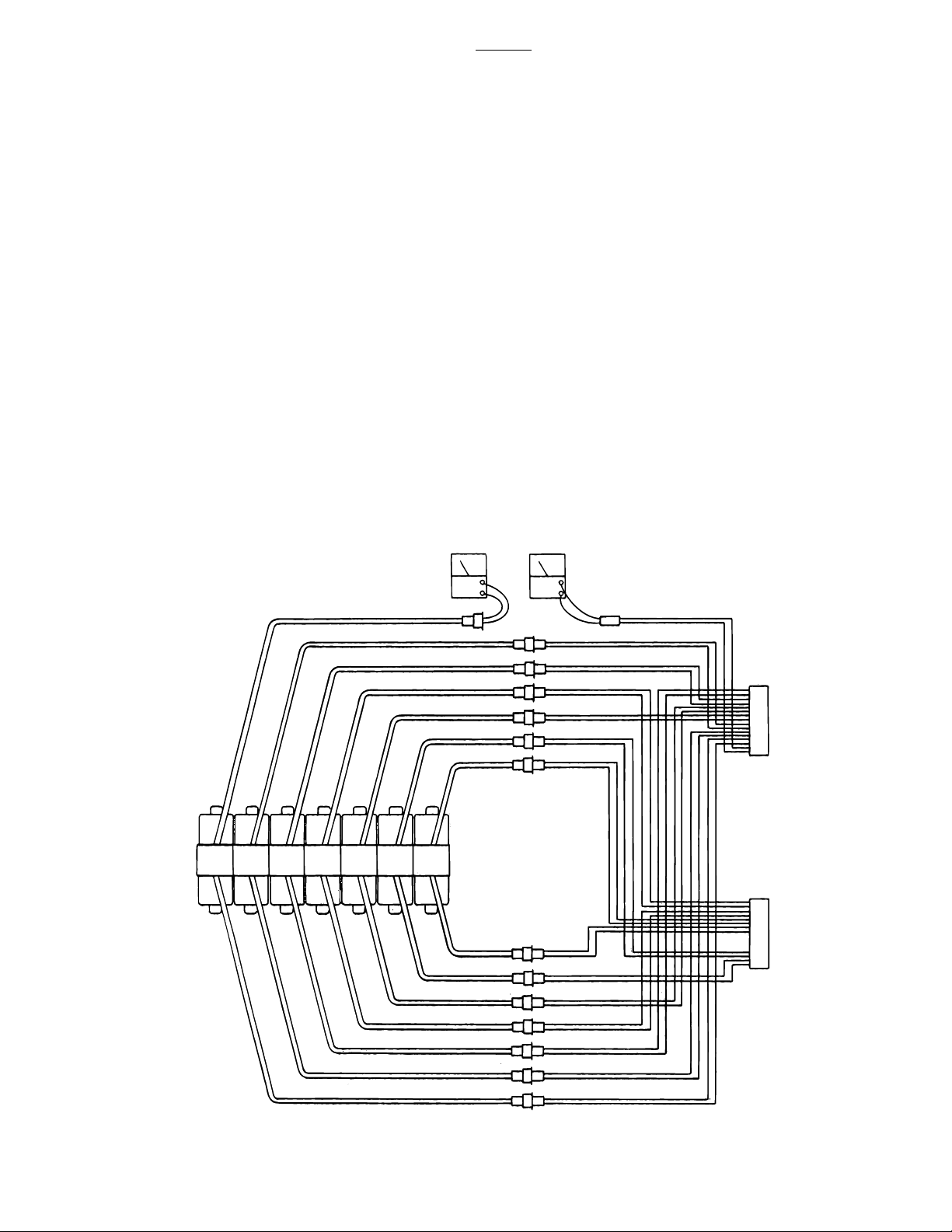
Y
Y
6002B
6-11. Solenoids
The solenoids are energized by 24 volt potential
that is controlled by the relay box.
The solenoid windings are protected from excessive heat by an internal thermal fuse that will open
after approx. 7 minutes of continuous operation.
The solenoid must be replaced if the internal thermal fuse has been blown.
The solenoids are mounted directly on either side
of the hydraulic mini-valves and push the spool
valve in one direction or the other depending upon
which solenoid is activated.
a. Solenoid Test
The following tests will check the voltage applied
to the solenoids and the resistance of the solenoid
coil.
b. Test #1
1. Activate either BATTERY or AC120V oper-
ating mode.
2. Disconnect the 2 pin connector from the
solenoid in question, all other connectors should be
connected. See figure 6-24.
3. Use a DC voltmeter and measure the
voltage across the 2 pin connector. Pin 1(+), and
pin 2(-). Meter should read approximately 24-28
volts.
UP
DN.
TABLE TREND
HD.
DN.
UP
OHM ACV
BLUE
WHITE/BLUE
UN-
DN.UPREFXRT.HD.
LCK.
LAT.
TILT
LT.
FLEX
FLEX
BACK
LEG
SECT.
BRAKE
SECT.
DN. UP SET
BLUE
WHITE/BLUE
BLUE
WHITE/BLUE
BLUE
WHITE/BLUE
BLUE
WHITE/BLUE
BLUE
WHITE/BLUE
BLUE
WHITE/BLUE
BLUE
WHITE/BLUE
BLUE
WHITE/BLUE
BLUE
WHITE/BLUE
BLUE
WHITE/BLUE
BLUE
WHITE/BLUE
BLUE
WHITE/BLUE
BLUE
WHITE/BLUE
BLUE
BROWN
BLUE
ORANGE
BLUE
BROWN/WHITE
BLUE
WHITE/BROWN
BLUE
WHITE/GRAY
BLUE
BLACK/WHITE
BLUE
WHITE/BLACK
BLUE
GRAY
BLUE
BLUE/WHITE
BLUE
RED/WHITE
BLUE
WHITE/ORANGE
BLUE
YELLOW
BLUE
WHITE/RED
BLUE
RED
CN6
16
TO
RELA
BOX
1
CN7
16
TO
RELA
BOX
1
Figure 6-24. Solenoid Test
Page 47
Page 56

NOTE
•The appropriate pendant control button must be pushed during this test.
The motor will run when this test is
performed, and the brake locking solenoid will be activated by any function
other than MOVE.
6002B
d. Test #2
The solenoid can be checked out using an ohmmeter R x 1 scale.
1. Measure the resistance between the two
pin connector in question as shown in figure 7-24.
Connector must be disconnected. Polarity of
meter leads is not important.
•If a solenoid does not function when
the pendant control button is pushed,
the problem could be the pendant control, the relay box, or the solenoid.
c. Test Results:
If you do not receive the correct voltage, the problem could be in the wires leading down to the
connector. The problem could also be in the relay
box or the Pendant Control (refer to appropriate
section for troubleshooting).
If the correct voltage is obtained, everything is
good up to that point and the problem is more than
likely the solenoid.
2. The meter should read approximately 16
ohms at room temperature.
3. Measure the resistance between either
pin and ground.
4. Meter should read infinity.
e. Test Results:
If the solenoid does not check out with the meter,
it is more than likely defective and must be
replaced.
NOTE
Whenever there are several components of the same type, a defective
unit can also be detected by substituting a known good unit or wire connector. In some cases this may be
faster than using a multi-meter.
Page 48
Page 57
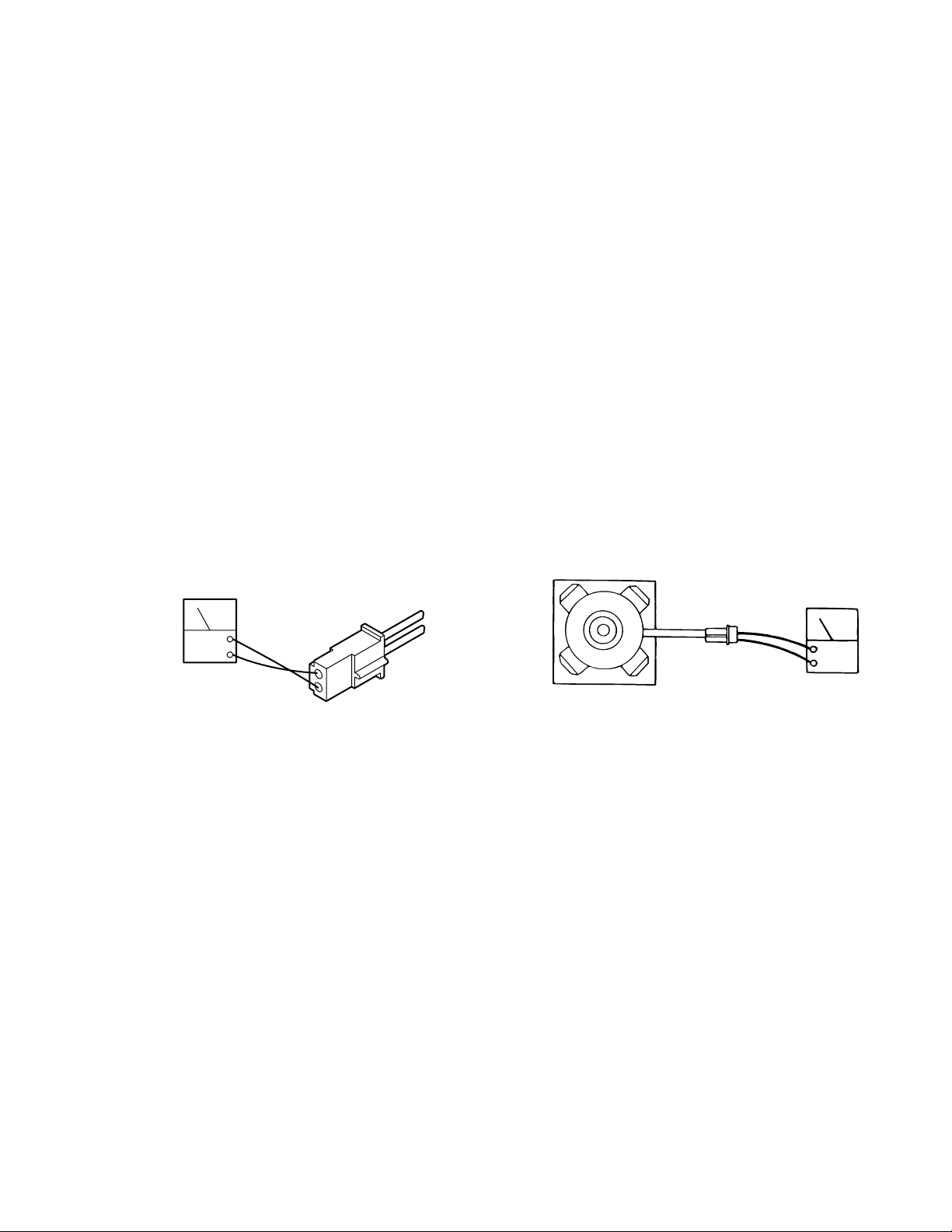
CN12
OHM
6-12. Motor/Pump Assembly
b. Motor Resistance Test
The hydraulic pump motor is a 24 volt DC electric
motor. The oil pump unit is attached to the bottom
of the motor and is a gear type displacement
pump with a pumping capacity of .4 liter per min.
The Motor/Pump Assembly is mounted on insulators in the base of the table.
a. Motor/Pump Test
1. Disconnect motor connector CN12. Leave
all other connectors connected and activate either
BATTERY or AC120V operating mode.
2. Activate any function and use a DC voltmeter to measure across the two pin connector. Pin
1(+) and pin 2(-). See figure 6-25. Meter should
read 24-28 volts.
The motor can be statically checked for resistance
using an ohmmeter. This test is not 100% accurate
because you are checking the motor with very low
voltage from the meter and without any load.
1. Using an ohmmeter R x 1 scale, measure the
resistance between the two pins of CN12. See
figure 6-26.
2. The meter should read 1 to 2 ohms at room
temperature.
3. Measure the resistance between either
pin and ground.
4. Meter should read infinity.
CN12
DCV
2
1
Figure 6-25. Motor Input Voltage
NOTE
If the pump has been activated continuously for 1-1/2 to 2 minutes, the thermal
relay will interrupt the power to the pump.
Figure 6-26. Motor Connector CN12
c. Test Results:
If you do not receive the correct meter readings, the
motor or wiring is defective.
Page 49
Page 58
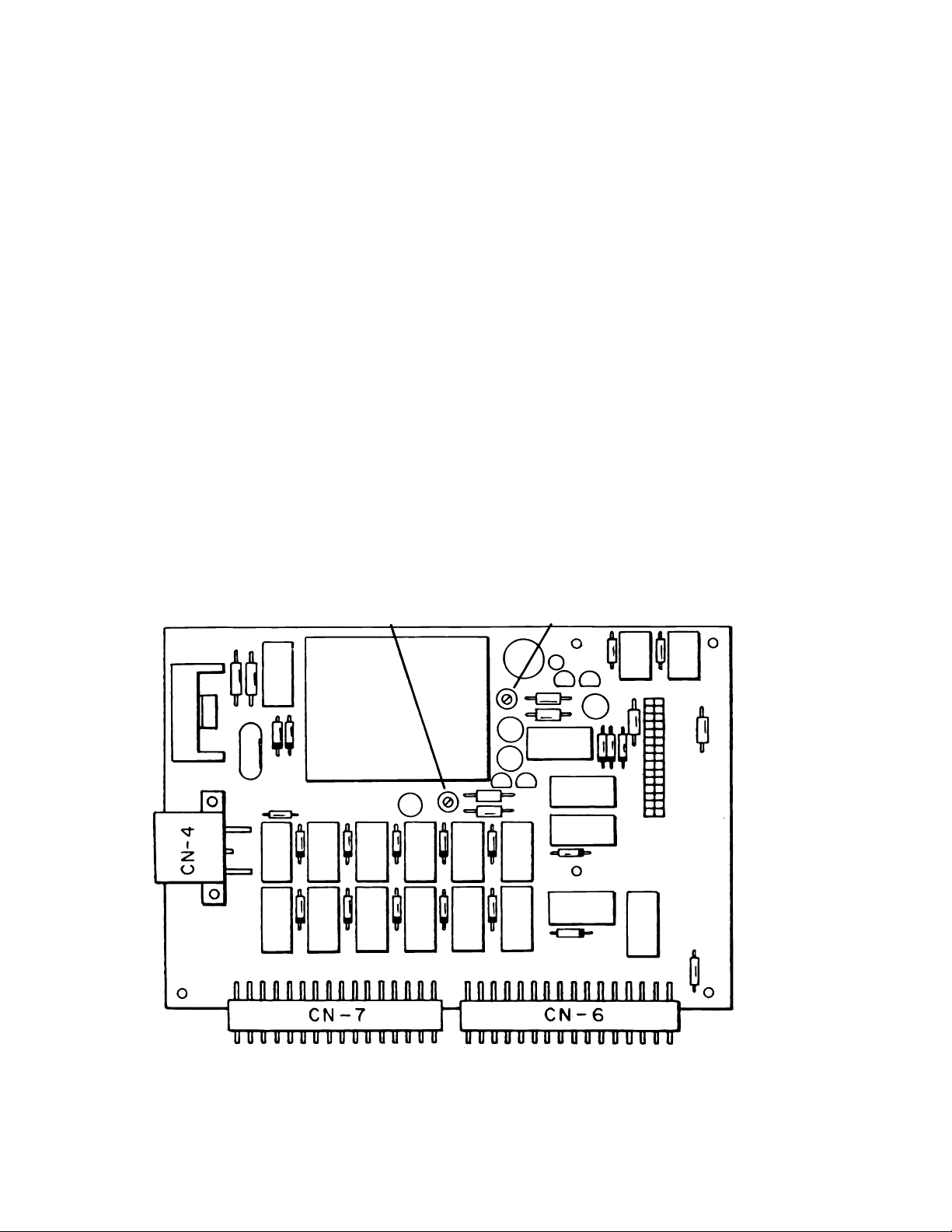
SECTION VII ELECTRICAL SYSTEM ADJUSTMENTS
7-1. Relay Box Adjustments - Models 6002 &
6002B
The Relay Box contains variable resistors for adjusting the operating timers for the BRAKE SET
and BRAKE UNLOCK functions. The Relay Box
for the battery model tables (6002B) also has
variable resistors for setting the Power Off timer
and the battery recharge warning circuit. These
timers are set at the factory and usually never need
adjustment. If an adjustment is necessary, remove
the relay box cover and use the following procedures. See figures 7-1 and 7-2.
a. Brake Release Timer
The Brake Release Timer is set for about 7 seconds and is controlled by the variable resistor VR1
on the relay box circuit board. Turn the adjuster
clockwise to increase the operating time. Counterclockwise to decrease the operating time.
VR1 VR2
b. Brake Set Timer
The Brake Set Timer is set for about 7 seconds and
is controlled by the variable resistor VR2 on the
relay box circuit board. Turn the adjuster clockwise
to increase the operating time. Counterclockwise
to decrease the operating time.
c. Battery Low Voltage Indicator
When the battery voltage drops below 23.5 volts,
the BATTERY power indicator will begin to "Flash"
indicating low battery power. This circuit is controlled by the variable resistor VR3 and should be
set at 23.5 volts. Turn the adjuster clockwise to
increase the voltage at which the circuit is activated, counterclockwise to decrease.
Page 50
Figure 7-1. Relay Box Adjustments Model 6002
Page 59
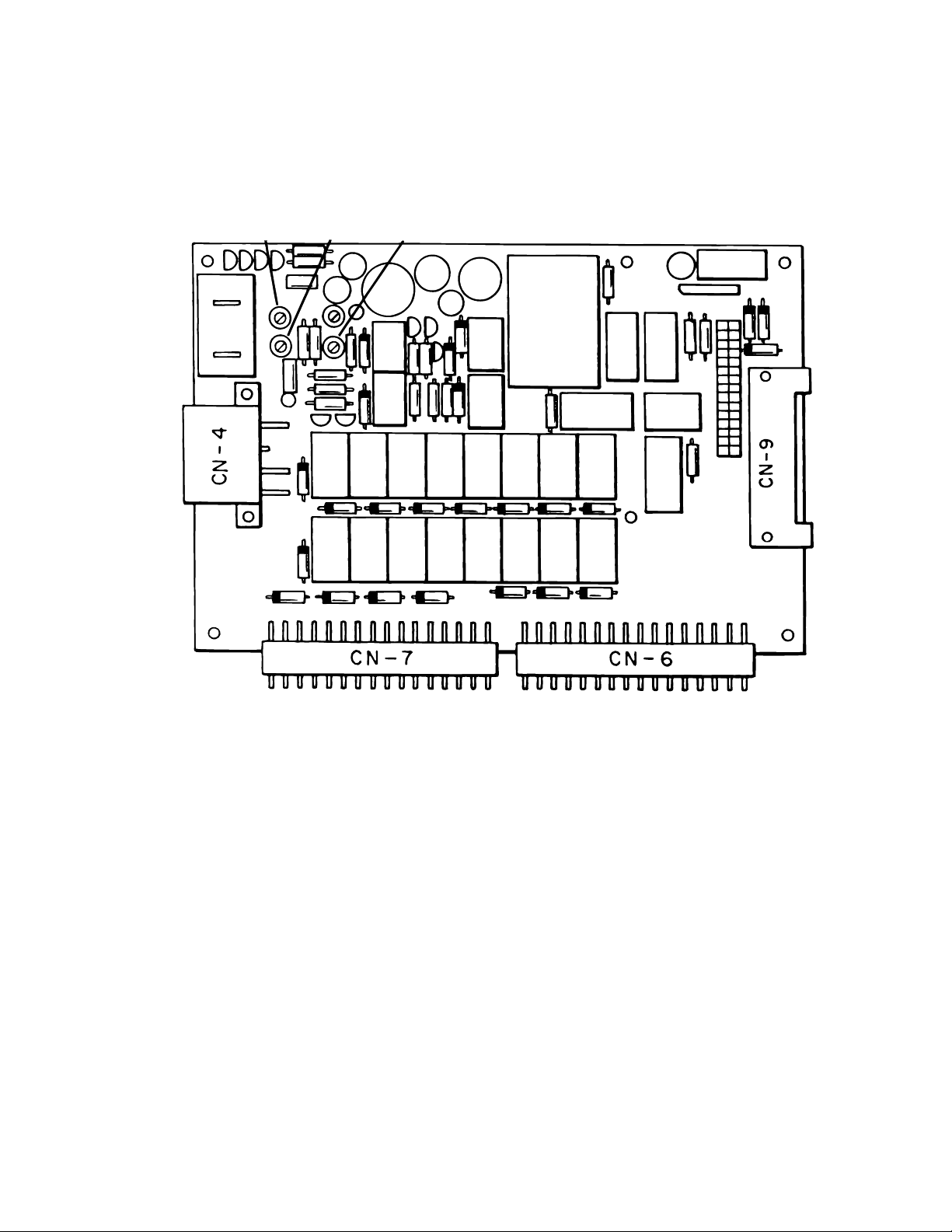
VR2
VR3
VR1
Figure 7-2. Relay Box Adjustments Model 6002B
Page 51
Page 60

Original printing -------------- 5/03
Revised--------------------------8/05
Page 61

Page 52
Page 62

Page 58
5000 36th Street S.E., Grand Rapids, MI 49512
1-800-SKYTRON or 1-616-957-0500 • FAX 1-616-957-5053
 Loading...