

Page 1

Best Practice
Manage Code Quality
with Code Inspector
Dietmar-Hopp-Allee 16
D-69190 Walldorf
CS STATUS
customer published
DATE VERSION
Feb-29 2009 3.0
BP_Manage_CodeQuality_with_CodeInspector _V30.doc – 24.04.2009
Page 2

Best Practice
Manage Code Quality with Code Inspector
Table of Contents
1 Management Summary 3
1.1 Goal of Using this Service 3
1.2 Alternative Practices 3
1.3 Staff and Skills Requirements 3
1.4 System Requirements 4
1.5 Duration and Timing 4
1.6 The Code Inspector Tool: Basics 4
2 Best Practice 8
2.1 Preliminary Tasks 8
2.2 Procedure 8
2.2.1 Configure check variants 8
2.2.2 Single object checks from the development workbench 11
2.2.3 Checks in the transport organizer 11
2.2.4 Create an object set with the code inspector 13
2.2.5 Create and execute an inspection 15
2.2.6 Results of an inspection 17
2.2.7 Inform developers about central inspection results 18
2.2.8 Configure check priorities 18
2.2.9 Exception handling 19
2.3 Code Inspector Checks 21
2.3.1 Performance checks 21
2.3.2 Security checks 22
2.3.3 Syntax check/generation 22
2.3.4 Programming conventions 23
2.3.5 Metrics and statistics 23
2.3.6 Dynamic tests 24
2.3.7 User interfaces 24
2.3.8 Search functions 25
2.4 Programming with the SCI: APIs and Creation of New Checks 25
3 Further Information 26
3.1 Troubleshooting 26
3.2 Background Information and References 26
Index of Figures 27
Index of Tables 27
© 2009 SAP AG - BP_Manage_CodeQuality_with_CodeInspector _V30.doc page 2/28
Page 3

Best Practice
Manage Code Quality with Code Inspector
1 Management Summary
Code quality is essential for SAP standard program code, and it is essential, too, for custom code or code
delivered from 3
standard delivery, is a check tool for ABAP code and other repository objects. The Code Inspector can be
used to check the technical quality of program code of a single development object as well as large object
sets, for example, all objects within a group of development packages.
In this document you will learn how the Code Inspector helps you to control the quality of your ABAP code, for
example, with respect to functional correctness, performance, security, or naming conventions.
1.1 Goal of Using this Service
Use the Code Inspector to control the quality of your ABAP code, for example with respect to program
functional correctness, performance, security, or naming conventions.
1.2 Alternative Practices
rd
party providers. The Code Inspector (transaction SCI), which is part of the SAP NetWeaver
Syntax check and extended syntax check (transaction SLIN) are also available from the workbench
transactions (SE24, SE37, SE38, SE80), but cannot be applied to more than a single object.
Code Inspections can also be accomplished by humans. Critical code has to be identified by some criteria, for
example by a high change rate of the ABAP includes, or frequent user complaints. Then a group of
developers steps through the code to inspect it. This practice can be very effective and also address
architectural issues, but it is rather time consuming.
The Code Inspector, on the other hand, can only provide a sort of ‘basic’ insight in some cases. A static
performance check, for example, does not guarantee that a program is free from performance flaws. For
critical code it is necessary to do additional checks of the program execution with the help of monitoring and
tracing tools like STAD (Statistical Records
), ST05 (Performance Analysis), and SE30/SAT (ABAP Runtime
Analysis).
1.3 Staff and Skills Requirements
While executing Code Inspector is very straightforward and can be accomplished by any person with basic
development skills, the interpretation of the check results ranges from ‘easy’ to ‘complex’.
There should be at least one person with good to very good knowledge of the relevant aspects covered by
the Code Inspector checks, for example performance, security, or naming conventions. They should
- be able to discuss the meaning and significance of the check results with developers
- be respected among their colleagues for their knowledge about code quality
- use Code Inspector and other tools regularly and know their capabilities
In this Best Practices we will call this person ‘Code Quality Analyst’.
(optional:) The Code Inspector framework offers APIs and allows the development of custom checks. If
you want to capitalize on these options, one developer with good to very good skills in ABAP OO is
needed.
© 2009 SAP AG - BP_Manage_CodeQuality_with_CodeInspector _V30.doc page 3/28
Page 4

Best Practice
Manage Code Quality with Code Inspector
1.4 System Requirements
Code Inspector is part of the standard SAP NetWeaver delivery starting with SAP NetWeaver 6.10 (SP22
recommended). There is also a preview for release 4.6C (see SAP Note 543359), but w/o technical
support from SAP.
Many of the Code Inspector checks described later in this document are available in all SAP NetWeaver
releases of the tool. Nevertheless, some checks have been implemented later in the release cycle and/or
were not ported down to lower releases. For technical reasons it is not possible to provide all checks in all
releases.
While most activities of the Code Inspector can be executed with normal developer authorization, for some
activities you will need a special authorization. These activities include:
- Creating or changing global check variants,
- Changing check priorities
- Activating or de-activating checks
- Changing objects of other users
The required authorization is authorization object S_COV_ADM, authorization field ACTVT activity, field 37.
To change global check variants delivered by SAP, you need to be registered as a developer in your
system
1.5 Duration and Timing
Managing code quality is a continuous process and starts with creating the objects according to the
applicable naming conventions.
Creating and executing Code Inspector inspections takes only a few minutes, even if many objects have to be
checked. Most time will be spent analyzing the check messages and modifying the code accordingly.
1.6 The Code Inspector Tool: Basics
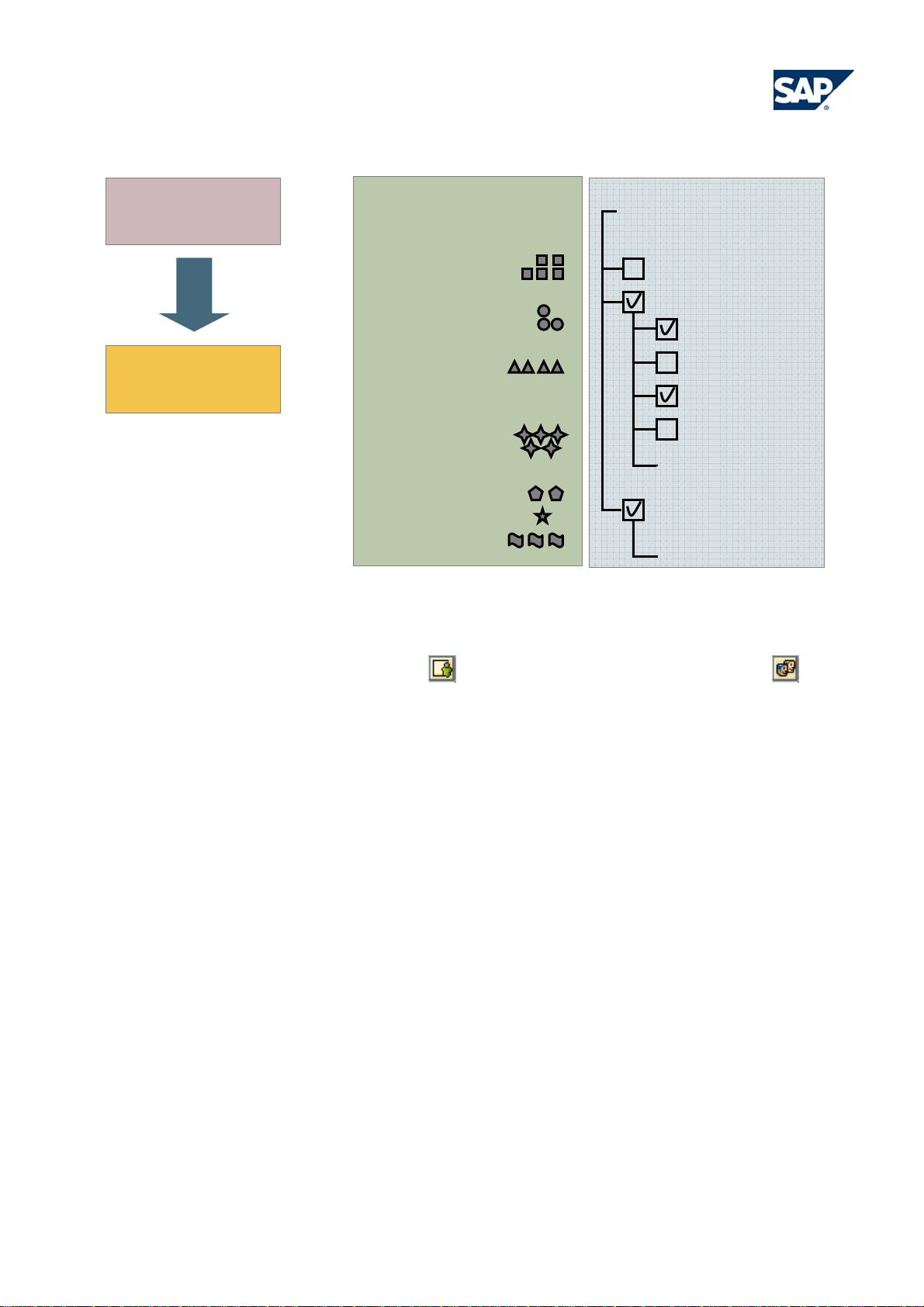
The Code Inspector (transaction SCI) knows three basic elements: the check variant containing the type of
checks that you want to apply, the object set containing the repository objects you want to check, and the
inspection. The inspection is a combination of an object set and a check variant that can be executed to
deliver the inspection results.
© 2009 SAP AG - BP_Manage_CodeQuality_with_CodeInspector _V30.doc page 4/28
Page 5
Best Practice
Manage Code Quality with Code Inspector
Inspection =
Run
{
Result
Figure 1: Code Inspector – basic elements
Object Set
programs
function groups
classes
interfaces
DDIC objects
other TADIR
objects
Check Variant
Syntax
Performance
Bypassing buffer
WHERE clause
Table attributes
Nested loops
.
.
Category XY
.
}
Code Inspector elements can be either ‘local’
visible for all users in a system. SAP delivers a number of pre-defined global check variants, the most
important of them are the DEFAULT and – starting with SAP NetWeaver 6.40 – the TRANSPORT check
variant. These two check variants have special roles:
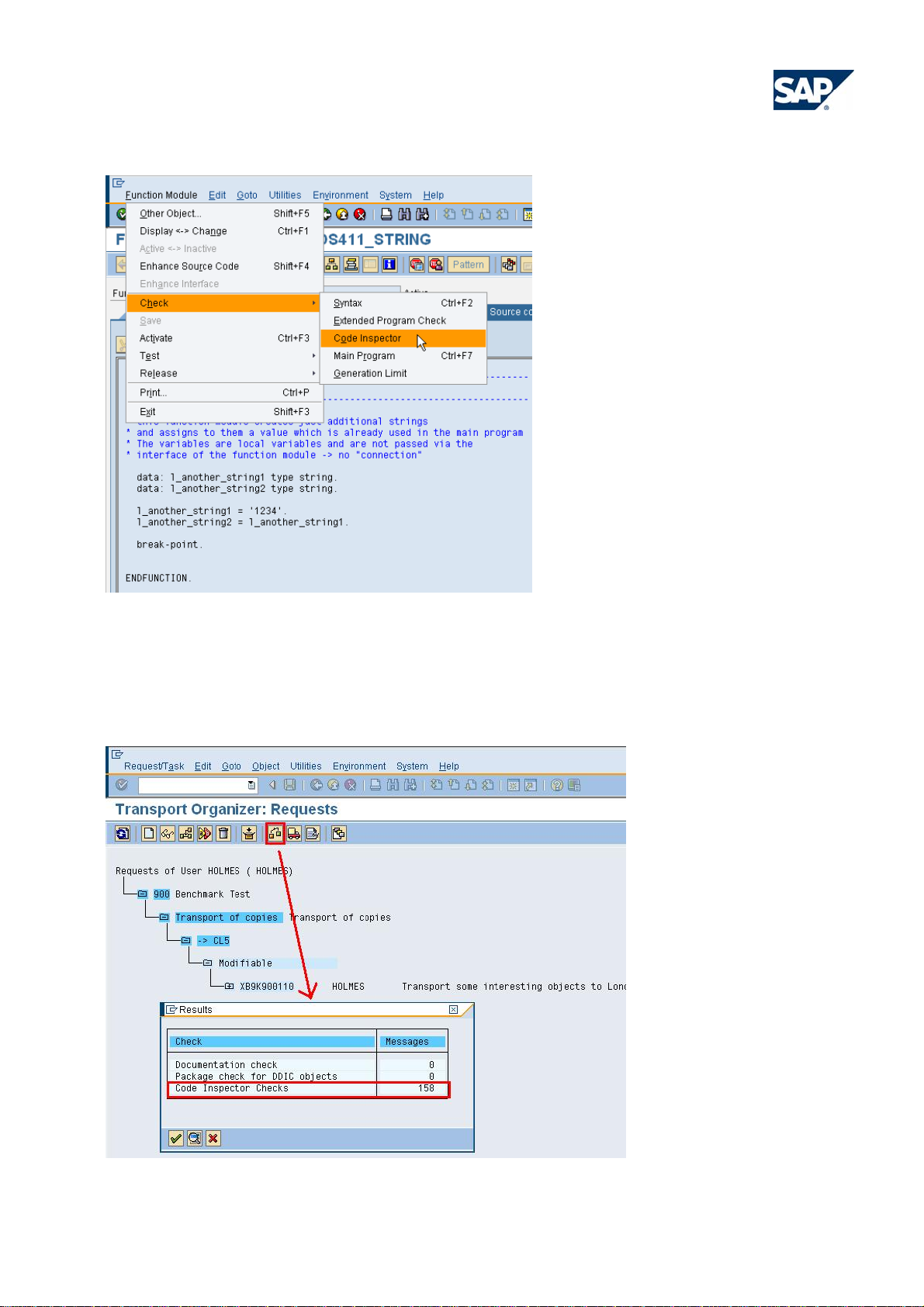
The DEFAULT check variant defines the checks that are executed if an object is checked from one of the
workbench transactions (SE24, SE37, SE38, SE80) via the following menu:
, that is, only visible for one user, or ‘global’ , that is,
© 2009 SAP AG - BP_Manage_CodeQuality_with_CodeInspector _V30.doc page 5/28
Page 6
Best Practice
Manage Code Quality with Code Inspector
Figure 2: Check Variants
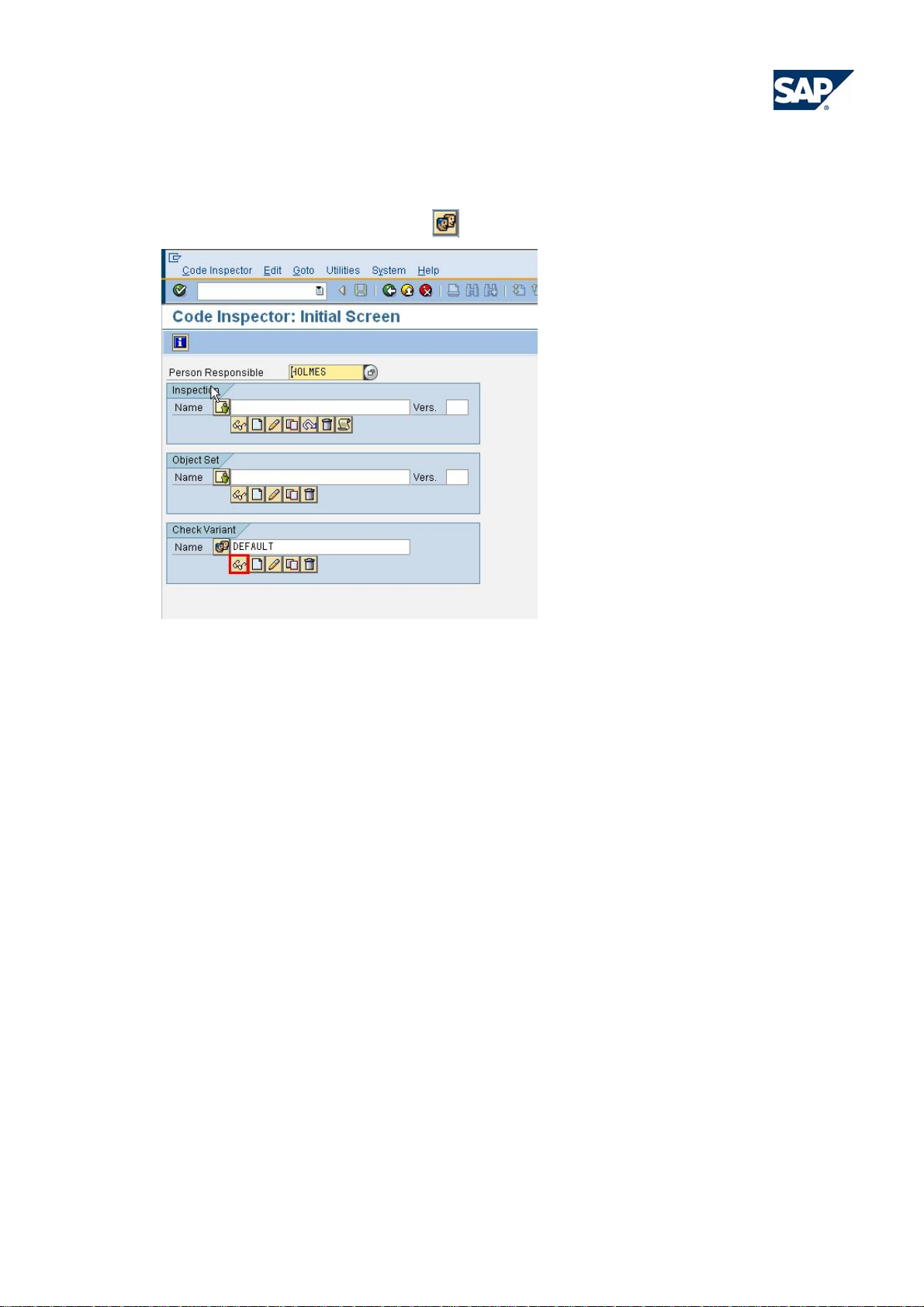
Starting with SAP NetWeaver 6.40, objects in transport requests in the Transport Organizer (transaction
SE09) are checked by the Code Inspector, using the global check variant TRANSPORT. Invoke the Code
Inspector as follows:
Figure 3 Transport Organizer: Request
© 2009 SAP AG - BP_Manage_CodeQuality_with_CodeInspector _V30.doc page 6/28
Page 7

Best Practice
Manage Code Quality with Code Inspector
After selecting Code Inspector Checks in the dialog box, the Code Inspector result tree is displayed. Note that
only the sum of error and warning messages is listed in the column ‘Messages’ in transaction SE09,
‘Information’ messages are not displayed.
In Code Inspector inspections th at are started from the de velopment workbench or the transport workbench,
both the check variant and the object set are predefined. From the Code Inspector transaction SCI (SAP
menu: Test • SCI in the easy access menu), it is possible to create user-defined check variants and object
sets.
The Code Inspector check classes are arranged in one class hierarchy in a way that necessary object
dissections (for example the scanning and tokenization of the ABAP source code) are only carried out once.
Different checks that need identical information can share these data which speeds up the code inspections a
lot.
© 2009 SAP AG - BP_Manage_CodeQuality_with_CodeInspector _V30.doc page 7/28
Page 8

Best Practice
Manage Code Quality with Code Inspector
2 Best Practice
2.1 Preliminary Tasks
Before performing this Best Practice, ensure that you complete the following preliminary tasks or checks in
the system:
Set up a code check plan that fits your company’s standards and procedures with regard to code quality
assurance. It should answer the following questions:
- Do you expect your developers to proactively check their own code?
- Which objects shall be checked? Every object or just objects is certain packages?
- Which Code Inspector checks do you want to perform?
- In which phases do you want to check the code? Permanently or only at special quality gates?
- Which role shall the Code Inspector play in the code quality process?
- Are the default check priorities, as they come from SAP, okay for you?
- Which goals do you want to reach with respect to static code checks (for example: “no error or warning
messages after end of first correction phase”)?
- In which system will the objects be checked?
- What is the role of the Code Inspector as check tool in the transport workbench?
- Are developers allowed to create exceptions (pseudo-comments) in the code by their own?
- Which procedures need to be set up to control that code checks are being executed?
- How can the code improvement process be monitored and how should the results be reported?
Depending on the answers given above, you may have to modify existing (global) check variants, so that
the executed checks fit your requirement profile. Maybe you also need to modify check priorities.
2.2 Procedure
The use of the Code Inspector described in this document is only one way of controlling code quality. In some
areas you may find it more practicable to check code quality in another way.
The procedure roughly consists of the following steps:
Developers are expected to check their development objects proactively from within the workbench
transactions, i.e. SE24, SE37, SE38, and SE80. Implicitly, this invokes the global check variant DEFAULT,
which should be configured to meet your specific needs.
Transported objects must be checked when transport requests are released in the transport workbench
(transaction SE09) of the development system. This is done with the global check variant TRANSPORT of
the Code Inspector. Developers are expected not to release transports that contain objects with issues.
In the consolidation or test system, a Code Quality Analyst (see section 1.3) does periodic mass runs to
see whether the code quality adheres to the agreed product standards. In case of error or warning
messages in a development phase where such defects should already have been eliminated, the
responsible developers will need to be involved.
The Code Quality Analyst is the main contact person for developers in case they have questions with
regard to the checks.
2.2.1 Configure check variants
After you have decided which set of Code Inspector checks to apply to your company’s code, you should
adapt the global DEFAULT and TRANSPORT check variants to your needs, as appropriate. To ensure that
your developers have the right checks at hand when they want to inspect the development object they are
currently working with, modify the global DEFAULT check variant that is used in the workbench transactions.
© 2009 SAP AG - BP_Manage_CodeQuality_with_CodeInspector _V30.doc page 8/28
Page 9
Best Practice
Manage Code Quality with Code Inspector
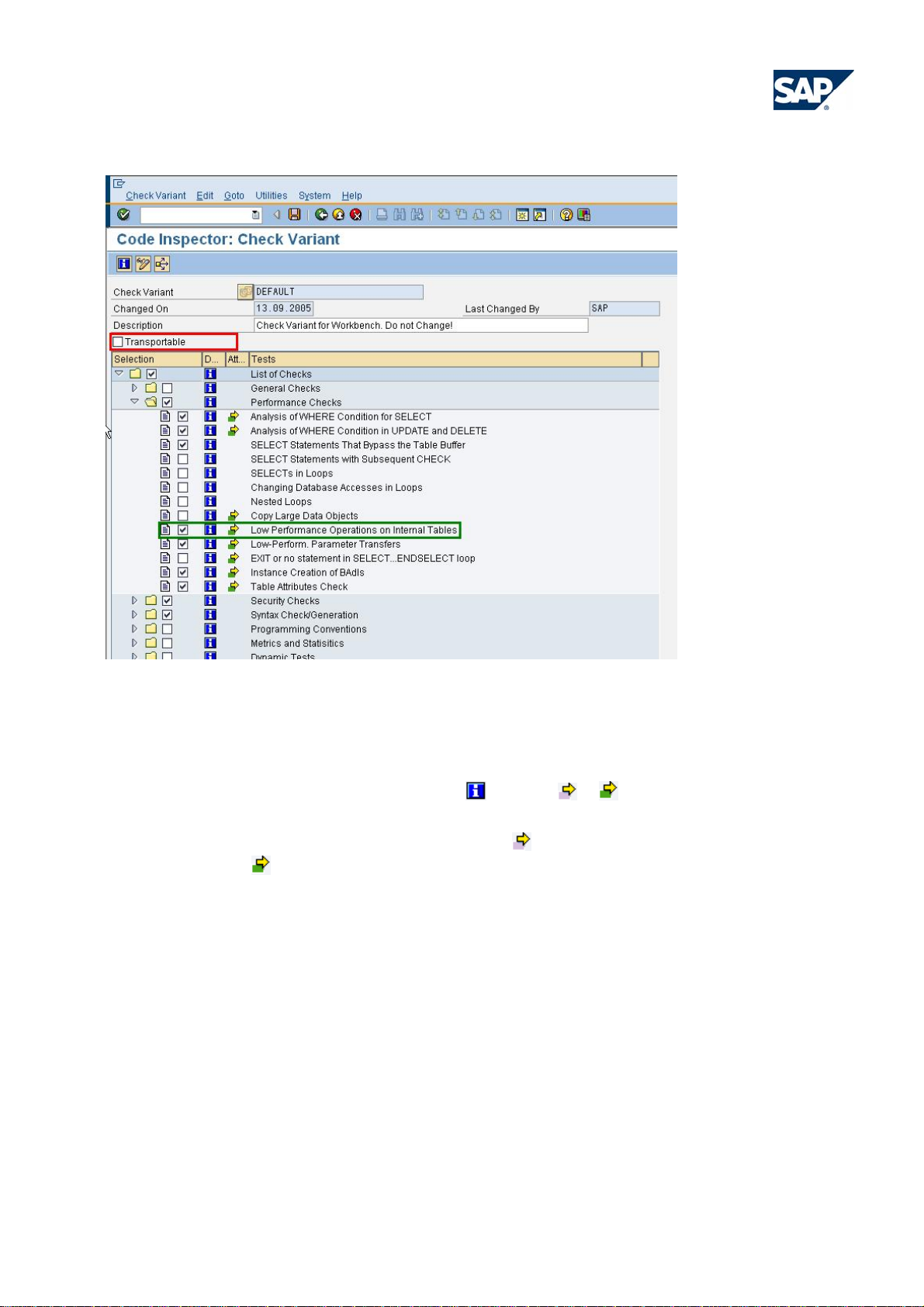
To modify the global check variants delivered by SAP, proceed as follows:
1. Start transaction SCI. Select the global
Figure 4: Code Inspector: Initial Screen
check variant DEFAULT and then select Display.
2. On the next screen, the checks of the global DEFAULT check variant are displayed with a flagged
checkbox. If these checks do not reflect exactly what you want, you can select or de-select checks
from the selection. To do so, choose Change. Although the Description of the global DEFAULT
check variant may tell you ‘Do not change’, you can do a local change to the check variant provided
you have the required authorizations (see section 1.4). As this can be done in a local change only,
you will have to make these changes manually in all relevant systems.
© 2009 SAP AG - BP_Manage_CodeQuality_with_CodeInspector _V30.doc page 9/28
Page 10
Best Practice
Manage Code Quality with Code Inspector
Figure 5: Code Inspector: Check Variant
3. Select or de-select individual checks from the different check categories, as needed. For an overview
of the various checks, refer to section 2.3. You can display documentation on the individual checks
by selecting the appropriate information icon
. The icon or in the Attributes column indicates
that you can modify the check attributes to configure how the check will be executed. Some checks
can only be executed after the attributes are set (
pre-selected(
).
), other checks have default attributes that are
4. After you have chosen your checks, deselect the Transportable option and save the check variant.
To be able to save the global DEFAULT or TRANSPORT check variant, you need to be registered as
a developer in the current system.
5. As the DEFAULT and TRANSPORT check variants are SAP objects that originate in the SAP
system, you will not be able to transport a modified version through your system landscape.
Therefore, you will have to apply the changes to the DEFAULT and TRANSPORT check variant
manually in all relevant systems (development and consolidation/test).
If you do not want to change the global check variants delivered by SAP, you can create your own global or
local check variants, as follows:
1. In transaction SCI, enter a name for the check variant to be created and select Create.
© 2009 SAP AG - BP_Manage_CodeQuality_with_CodeInspector _V30.doc page 10/28
Page 11
Best Practice
Manage Code Quality with Code Inspector
2. Select the required checks from the tree of check categories and checks. It is also possible to copy
an existing check variant to use as a template.
3. Transport the variant to the systems in your system landscape.
4. Inform the developers of this global check variant to use for inspecting their object sets.
Yet another way of checking objects from the development workbench with a set of checks other that those in
the SAP global DEFAULT variant is to configure local
DEFAULT check variants for every single user. A
local DEFAULT variant overrides the global one.
2.2.2 Single object checks from the development workbench
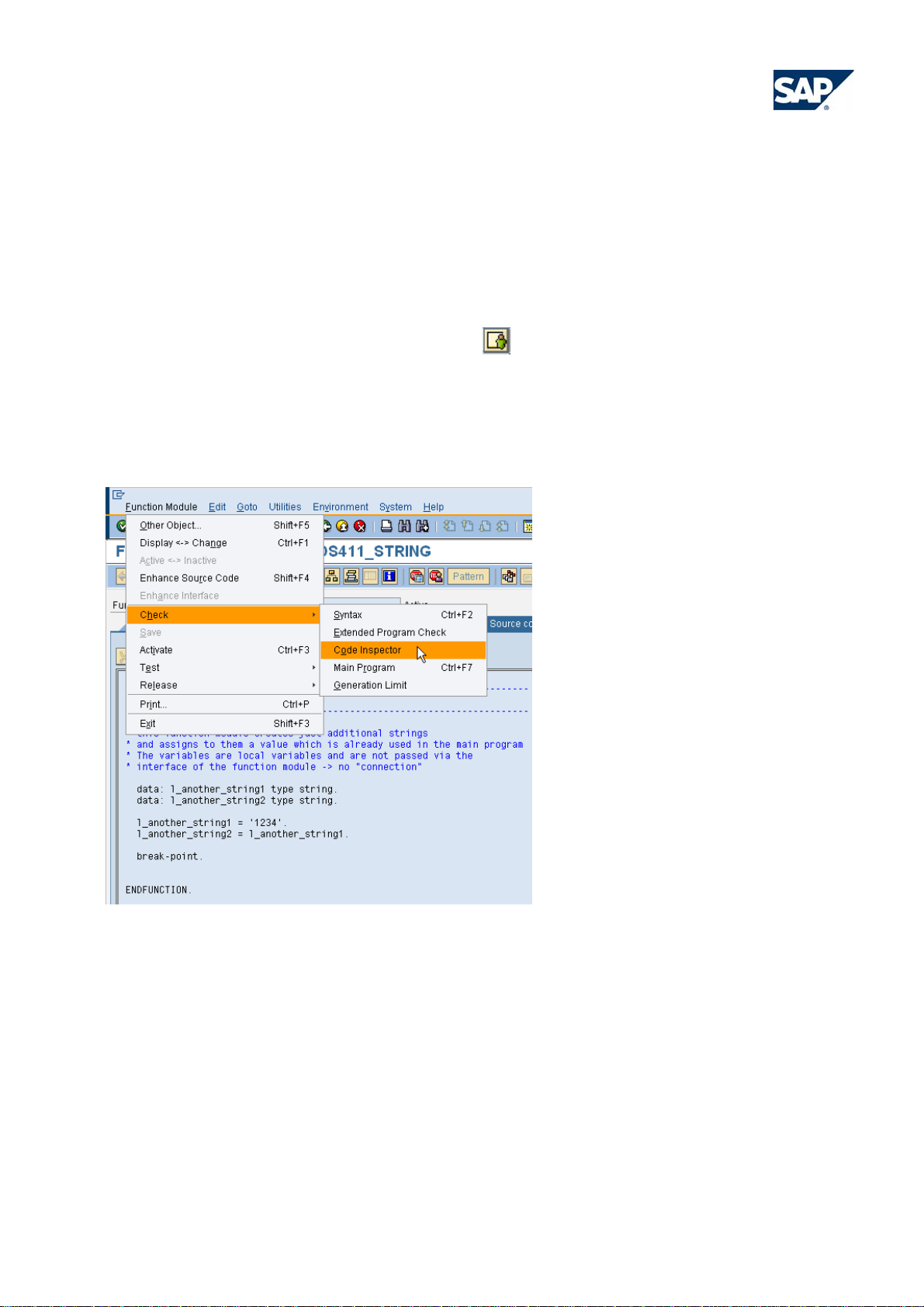
Developers can check their development objects from the workbench transactions SE24, SE37, SE38, or
SE80 using the global DEFAULT check variant from the following menu:
Figure 6: Global DEFAULT check variant
Choose <object> Check • Code Inspector, where <object> can be Function Module, Class, or Program.
For the results of an inspection and their interpretation see section 2.2.6 ‘Results of an Inspection’.
2.2.3 Checks in the transport organizer
This option gives developers the possibility to check newly created or changed objects before they get into
the subsequent system, normally the test system. Most checks examine the whole main object, not only the
transported object. So, if a function module or class method is transported, generally the whole function group
or ABAP OO class will be checked. The reason for this is that many checks need the overall context of the
main object to draw their conclusions, and that definitions made in one ‘include’ may influence the
© 2009 SAP AG - BP_Manage_CodeQuality_with_CodeInspector _V30.doc page 11/28
Page 12
Best Practice
Manage Code Quality with Code Inspector
correctness of definitions made in other ‘includes’. Therefore, do not be surprised to receive messages for
objects that are not in the transport request.
There is no way of preventing the release of a transport if its objects lead to check messages; the developer
can always override the results.
With SAP NetWeaver 6.40, checks in the Transport Organizer (transaction SE09) are also done by the Code
Inspector. In previous releases, only the extended syntax check was executed for objects in transport
requests. Since SAP NetWeaver 6.40, the global check variant ‘TRANSPORT' defines the checks to be
executed.
The global check variants TRANSPORT and DEFAULT as defined by SAP do not necessarily contain the
same number of checks. It can make sense to offer more checks with the DEFAULT variant, and a reduced
set of checks with the TRANSPORT variant. For example, you want to have your developers to have an eye
on ‘nested loops’ during development, but since only a fraction of these will be critical, you do not need to
monitor them when releasing transports or when checking all programs in a subsequent test/consolidation
system. Configure the global TRANSPORT check variant to your needs as described in section 2.2.1 for the
DEFAULT variant.
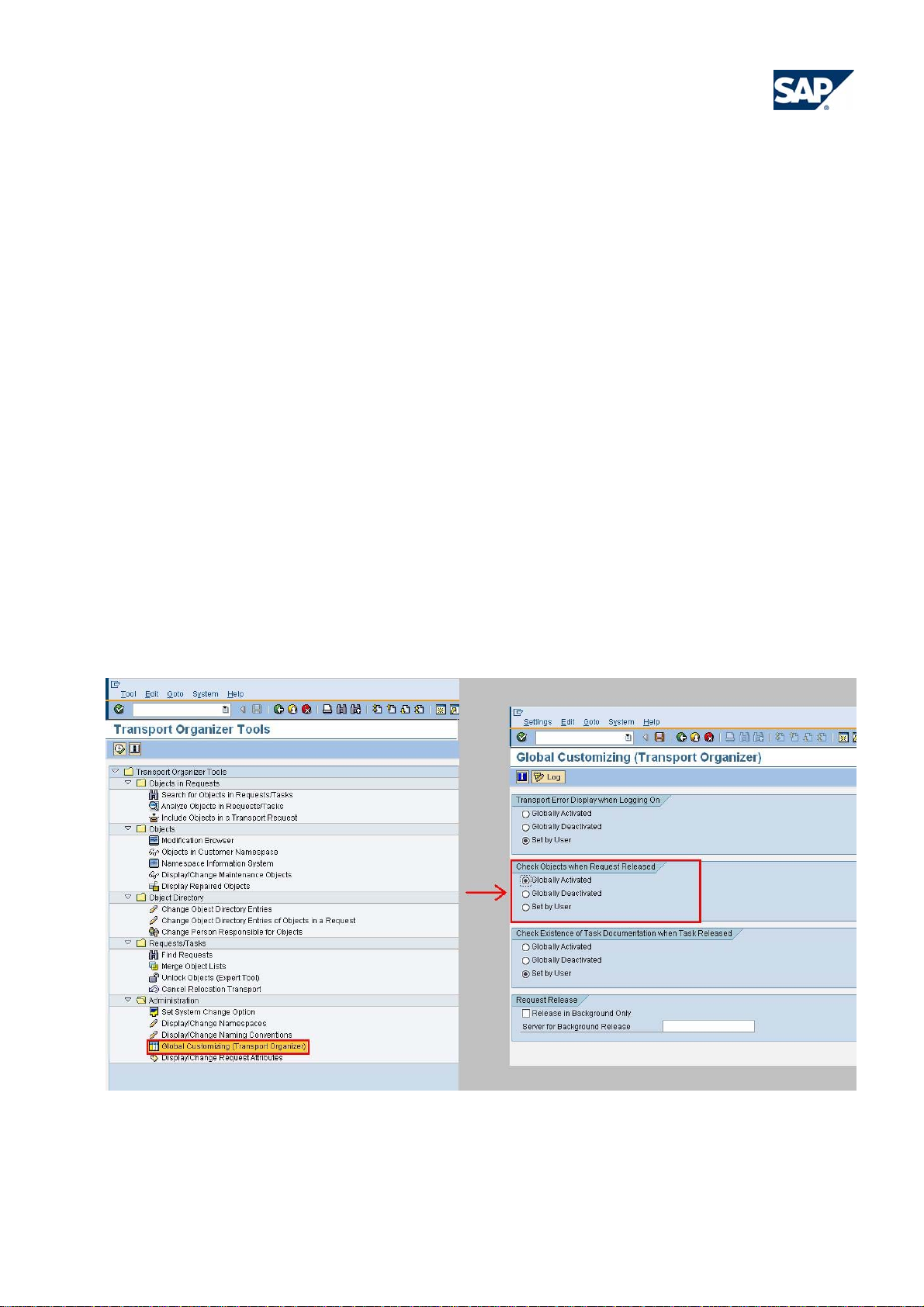
Use transaction SE03 (Transport Organizer Tools) to configure the transport organizer in a way that every
transport request is checked automatically before it is released, as follows:
1. Start transaction SE03
Figure 7: Transport Organizer Tool
2. Choose Administration • Global Customizing (Transport Organizer). On the following screen,
select Globally Activated under Check Objects when Request R eleased to enable a mandatory
© 2009 SAP AG - BP_Manage_CodeQuality_with_CodeInspector _V30.doc page 12/28
Page 13
Best Practice
Manage Code Quality with Code Inspector
check of all transport requests. If you want the user to decide whether a check of the transport
request is executed or not, select Set by User.
With the TRANSPORT check variant configured to your needs, all developers are now able to check their
development objects in transport requests in the transport organizer (transaction SE09). For the results of an
inspection and their interpretation see section 2.2.6 ‘Results of an Inspection’.
2.2.4 Create an object set with the code inspector
While it is often sufficient for a developer to check just a single object or the objects in a transport request, the
code quality analyst usually needs to check several objects in one run. This is accomplished by creating an
object set that contains all objects of interest and checking them in one inspection. Note that in a customer
system, only custom objects can be inserted into a Code Inspector object set. It is possible to c heck SAP
objects modified by a SAP Note within 7 days of the modification, but only with an anonymous (not persisted)
single object inspection. How to execute an anonymous inspection is described in chapter 2.2.5 Create and
Execute an Inspection.
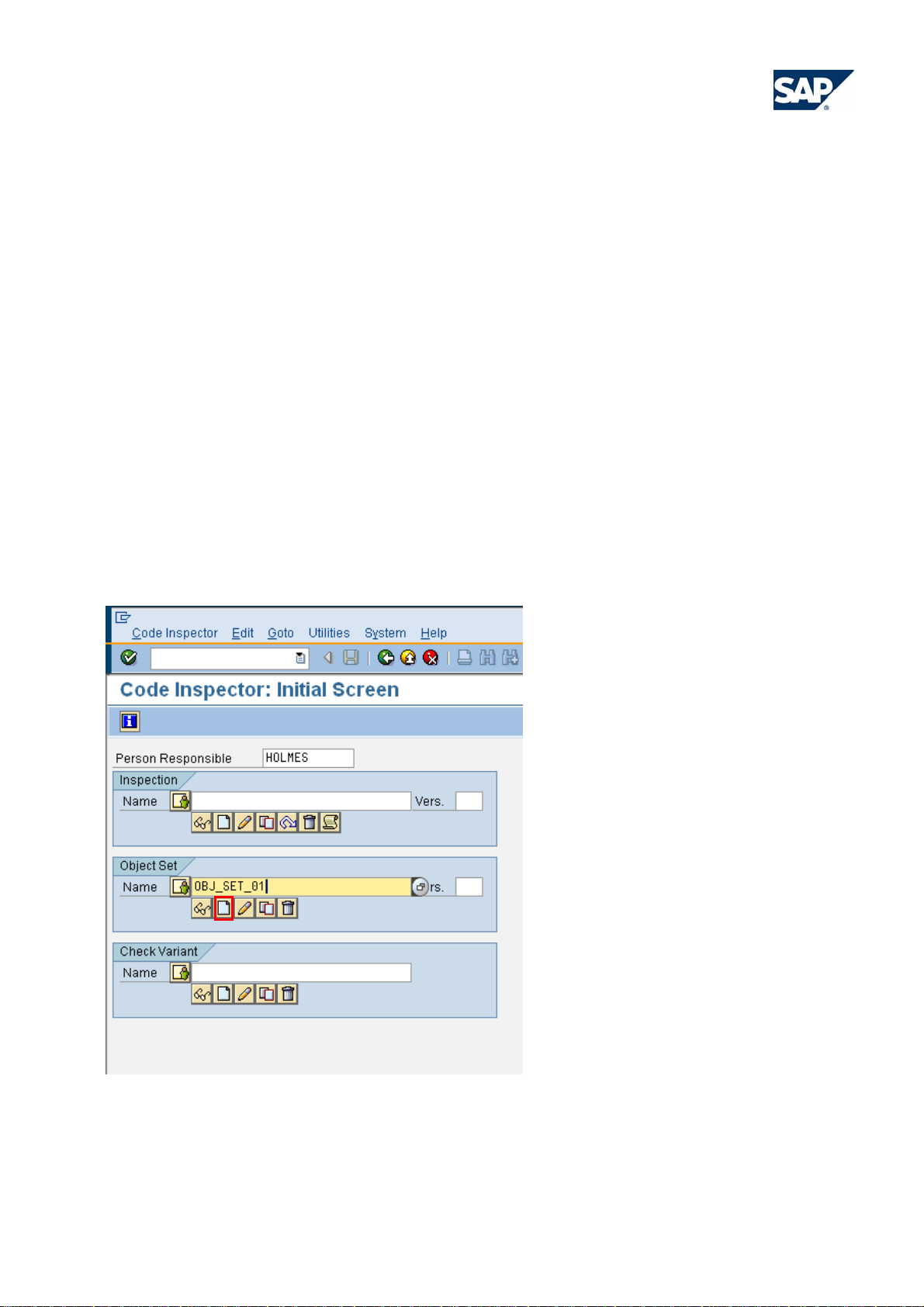
To create an object set with the Code Inspector:
1. Start transaction SCI, enter a name for the object set and select Create, as shown below:
Figure 8: Code Inspector: Initial Screen
© 2009 SAP AG - BP_Manage_CodeQuality_with_CodeInspector _V30.doc page 13/28
Page 14
Best Practice
Manage Code Quality with Code Inspector
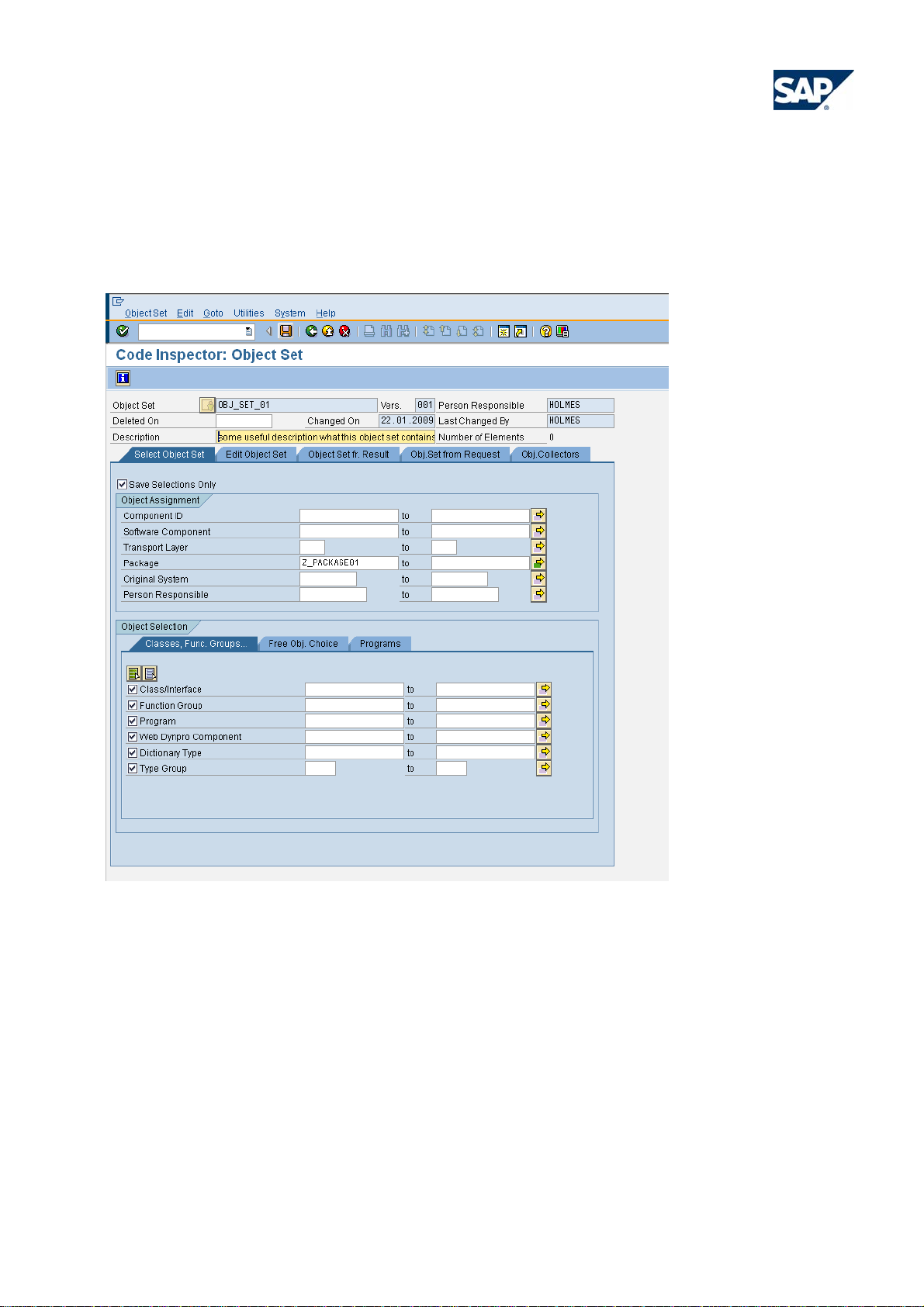
2. On the next screen, enter your object selection on the tab strip Select Object Set. To specify the
objects in Object Assignment you could, for example, specify a number of packages that contain
the objects you want to check.
Figure 9: Code Inspector: Object Set
By default, ABAP OO classes and interfaces, function groups, programs, ABAP WebDynpro components,
dictionary types, and type groups are pre-selected on the Classes, Func. Groups tab.
In SAP NetWeaver release 6.40 and before, there are no check boxes in front of these different object types.
If no entry is made in Object Selection, all object types are selected according to the selection in section
Object Assignment. If entries (including an asterisk ‘*’) are made in one of the Object Selection fields only
objects of these types will be selected.
To include ABAP reports or programs in your object set, use the Program selection field on the Classes,
Func. Group tab in the Object Selection section rather than the tab Programs.
© 2009 SAP AG - BP_Manage_CodeQuality_with_CodeInspector _V30.doc page 14/28
Page 15
Best Practice
Manage Code Quality with Code Inspector
Currently, the checks delivered by SAP are only applicable to program-like objects, that is classes, function
groups, programs, and WebDynpro components, and to dictionary table definitions. Thus, there may be
objects in your object set for which no check is available.
3. If you select Save • Selections Only for an object set, only the definition of the object set will be
persisted, while the actual object list will be created only at the moment of an inspection. This
approach is recommended if you expect that the number of objects in your selection to change, for
example, because new objects will be created in the selected packages. If the option Save
Selections Only is de-selected, an object list will be created and persisted immediately when the
object set is saved. You will then also be asked for a deletion date for this object set. By default, an
interval of 50 days is proposed. This persisted object list is useful if you want to immediately view
which objects are selected by the entries you made, using Display Objects
.
Further options on the Select Object Set tab allow you to choose objects according to their assignment to
component ID (component hierarchy), software component, transport layer, original system, or person
responsible. The other tabs on this screen offer more advanced options to create an object set and will not be
discussed here. For a detailed description, see the chapter 3, Further Information.
4. If you have finished your object selection, select Save to save the object set.
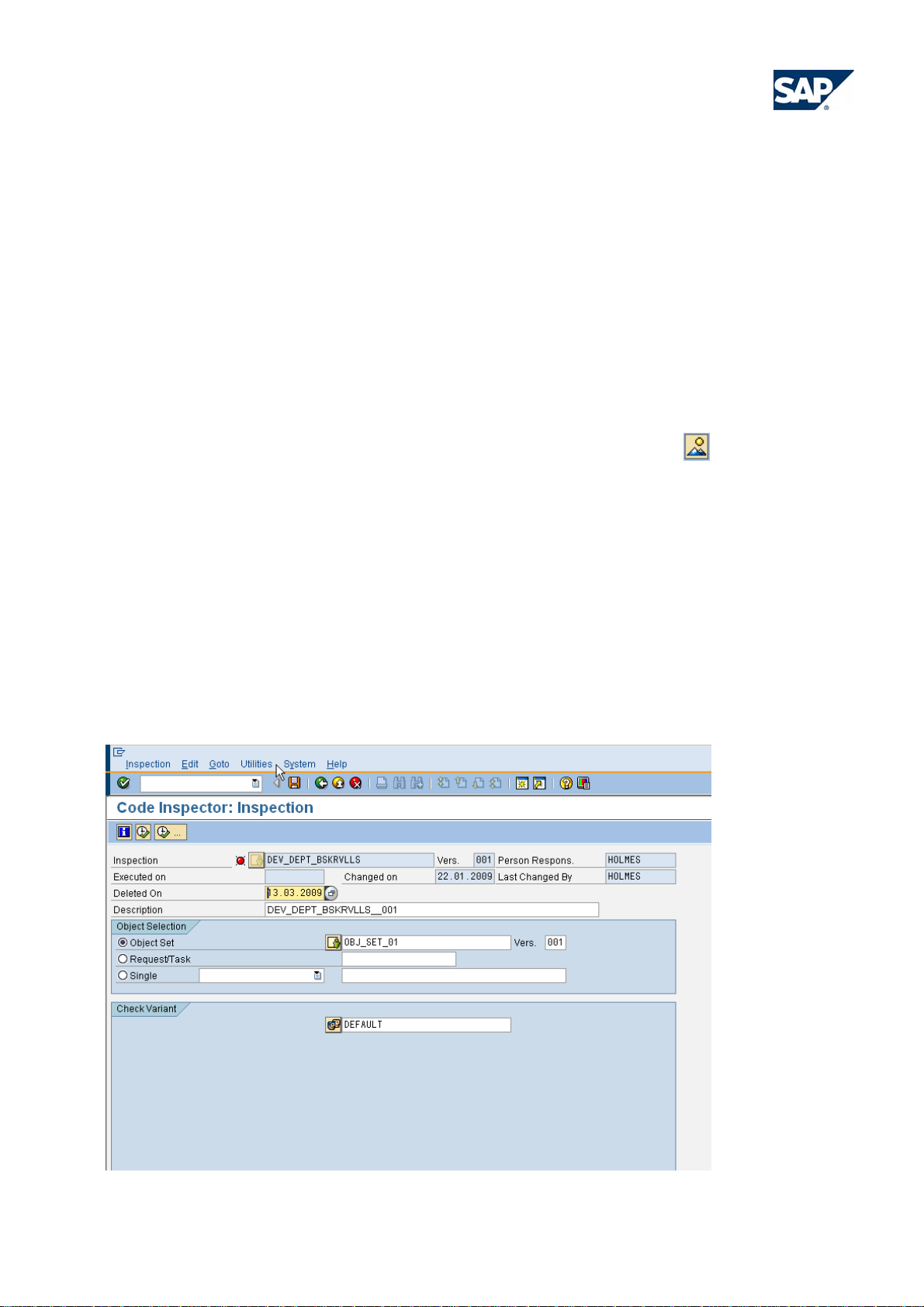
2.2.5 Create and execute an inspection
Now that you have defined a check variant and an object set, combine these elements in an inspection to
evaluate the check results.
1. In transaction SCI, enter the name for an inspection and select Create.
Figure 10: Code Inspector: Inspection
© 2009 SAP AG - BP_Manage_CodeQuality_with_CodeInspector _V30.doc page 15/28
Page 16
Best Practice
Manage Code Quality with Code Inspector
2. On the next screen, enter your object set in the Object Selection and specify your check variant.
The inspection has a default deletion date that lies 50 days in the future. If you want to keep the
inspection for a different time frame, change the Deleted On date.
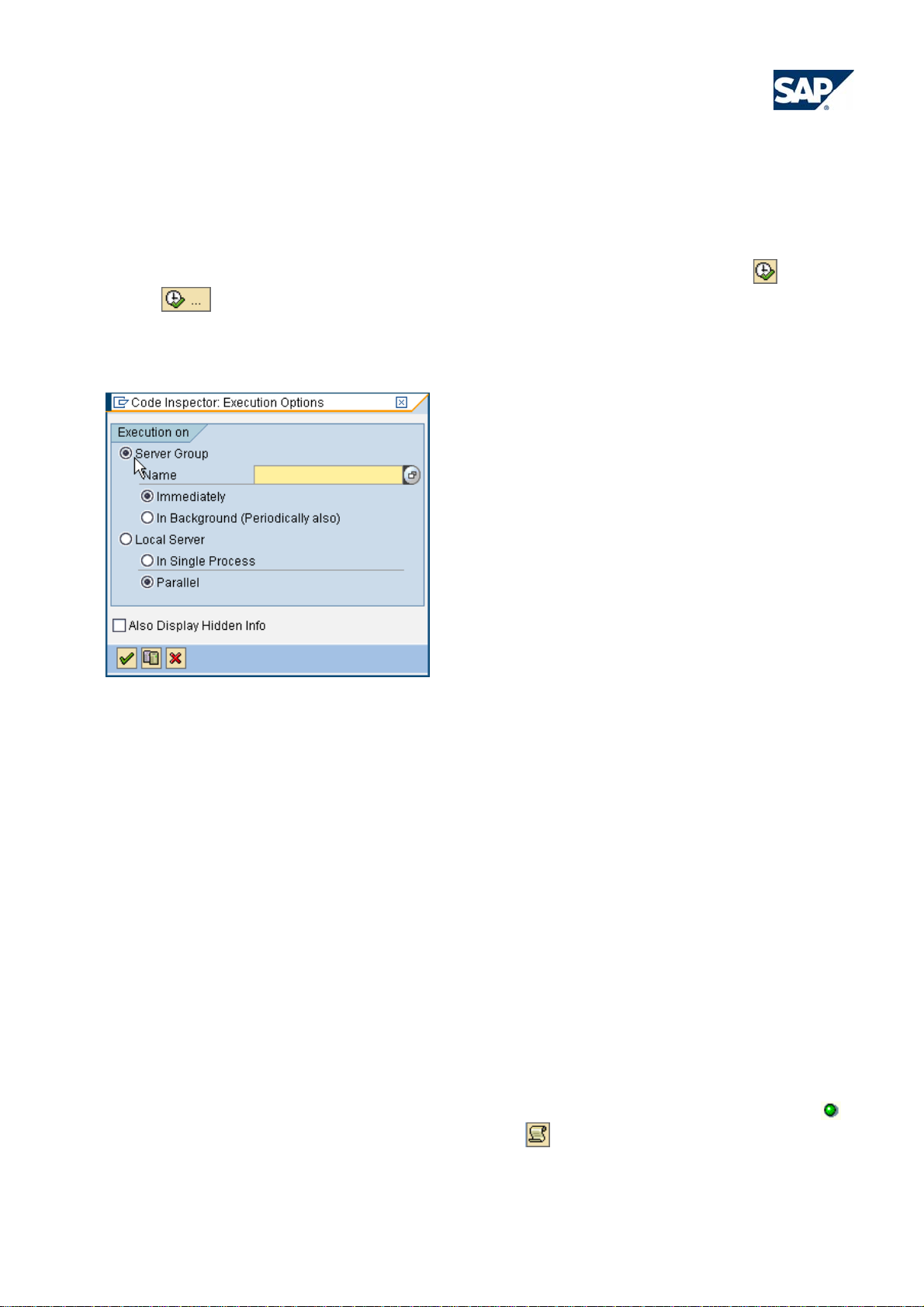
3. You can now save the inspection, or execute it to get the results, using the Run
icons. With Run, the inspection is executed immediately in one process on the local
application server of your SAP system. Use this option for small object sets with up to 20 objects. For
large object sets, you should choose Run ….
Figure 11: Code Inspector: Execution Options
or Run …
4. On the Execution Options dialog box that is displayed, specify a server group to execute the
inspection in parallel on several processes of the server group instances. Server groups are created
with transaction RZ12.
An inspection that is executed in parallel runs in up to 12 tasks (dialog work processes of the server
group instances), depending on the number of objects in your object set. This speeds up the
execution time tremendously so that even thousands of objects can be checked within a few minutes.
The option In Background offers the possibility to schedule a background job to trigger the execution
of the inspection. Starting with SAP NetWeaver 7.00, the background job can be scheduled for
periodical execution, for example weekly. Choose this option to schedule regular inspection runs to
monitor the progress of check message processing during development. The version number of the
inspection is incremented with every execution. Since the maximum version number is 999, you
should not schedule the inspection execution too frequently.
5. After the execution run of the inspection has started, the objects are checked, and the progress of the
run is displayed in the status bar of the screen. If the inspection ended successfully, the icon
shown in front of the inspection name. Click Results
to view the results.
is
© 2009 SAP AG - BP_Manage_CodeQuality_with_CodeInspector _V30.doc page 16/28
Page 17
Best Practice
Manage Code Quality with Code Inspector
With the procedure just described you create a so-called named or persistent inspection. For a quick ad-hoc
analysis you may also create an ‘anonymous’ inspection, which is not stored in the database. In transaction
SCI choose Create or Change for an inspection without specifying a name. On the next screen enter an
object set or a single object and a check variant. Then execute the inspection with Execute. Remember that
the results of such an anonymous inspection will be lost after you leave the screen.
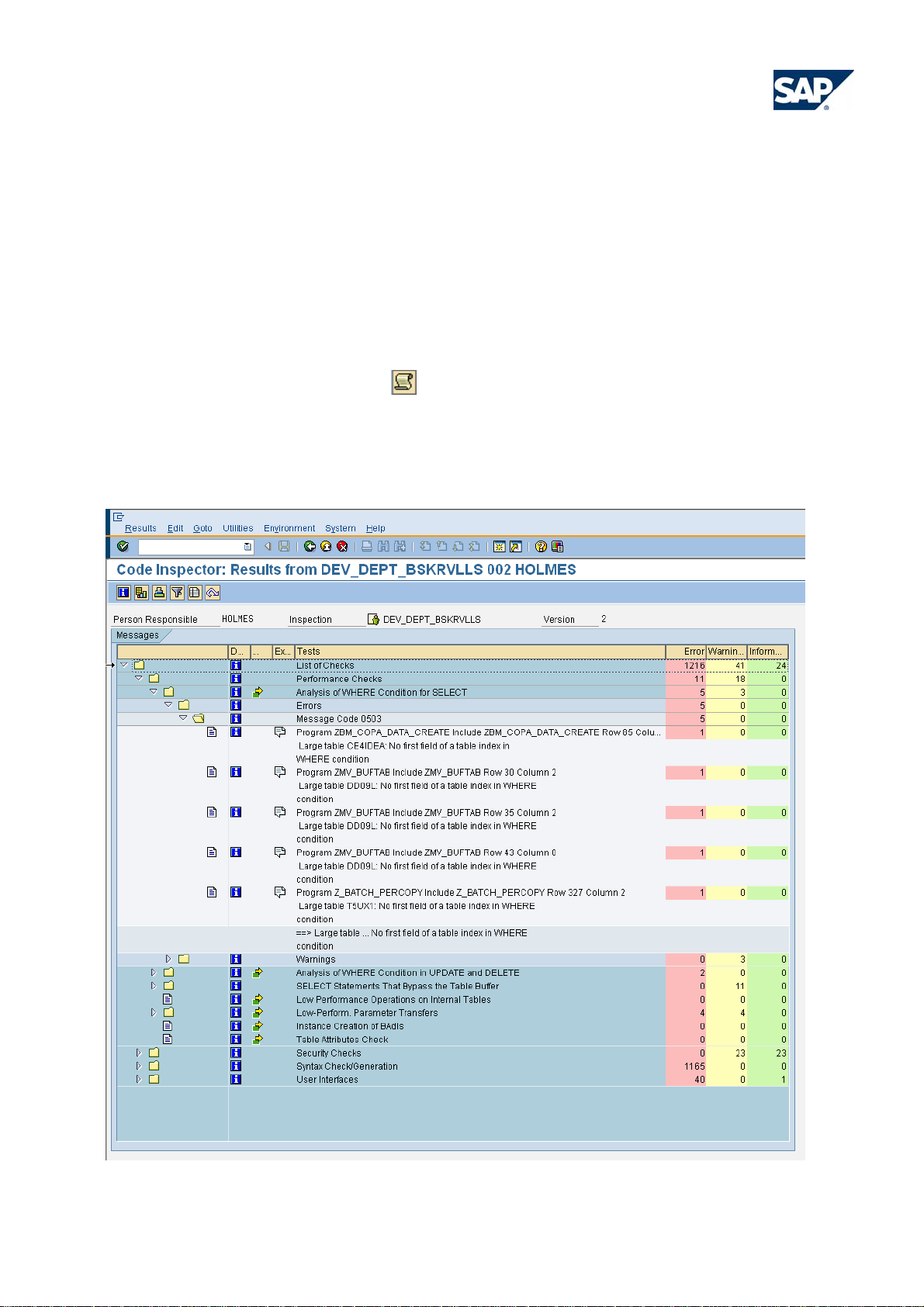
2.2.6 Results of an inspection
You can display the results of an inspection in transaction SCI on the entry screen or on the inspection
execution screen by choosing Results
. The results are presented in a tree format that reflects the
structure of the applied check variant following this hierarchy:
List of Checks • <Check Category> • <Check> • <Check Type (Error, Warning, or Information)> •
Message Code Æ Individual check message. For the interpretation of the check result s see section 2.3
Figure 12: Code Inspector: results of an inspection
© 2009 SAP AG - BP_Manage_CodeQuality_with_CodeInspector _V30.doc page 17/28
Page 18

Best Practice
Manage Code Quality with Code Inspector
On the result screen you have the following options:
Double click a result message to go to the object for which the message was issued. For program-like
objects this is the ABAP source code, while for database tables this is the table display in the data
dictionary
Select the
icon to go to the pseudo-comment or table-based exception that causes the check message
to be suppressed in future inspections (see section 2.2.9 Exception Handling).
Select the
icon to view the check documentation
Select Statistics
to display details of the inspection run like execution time, number of checked
objects, server statistics, etc.
Select Sort
and Filter to group and/or filter the results according to different aspects. For the
code quality analyst, a grouping of the results By Person Responsible or By Package are the most
useful options. The persons responsible for the objects or packages can then be informed about their
messages. In this Best Practice we recommend that the responsible developers proactively monitor their
check messages.
Select the Results list icon
to display the results in the form of a list.
In addition to displaying the results in a result tree or in the results list available with this option, you can
generate a table-like result display using the report RS_CI_PLAIN_LIST. This report displays the check
results in an ALV display. The three-line layout of the ALV in this report can be changed to a one-line
layout, but unfortunately it is not possible to store the modified layout.
2.2.7 Inform developers about central inspection results
The main focus of the Code Inspector is to enable developers to perform their own inspections as part of their
daily work. The Code Inspector provides limited capabilities of distributing the results of a central inspection
run, for example as executed by the code quality analyst for a whole code line.
Starting with SAP NetWeaver 7.00, the report RS_CI_EMAIL allows sending mails to users for which an
inspection has detected error or warning messages. The report uses a template text (the SAP template is
report RS_CI_EMAILTEMPLATE_E) that is filled in with the messages from the inspection. Prerequisite for
using this service is that the email and user settings are configured correctly in your system.
2.2.8 Configure check priorities
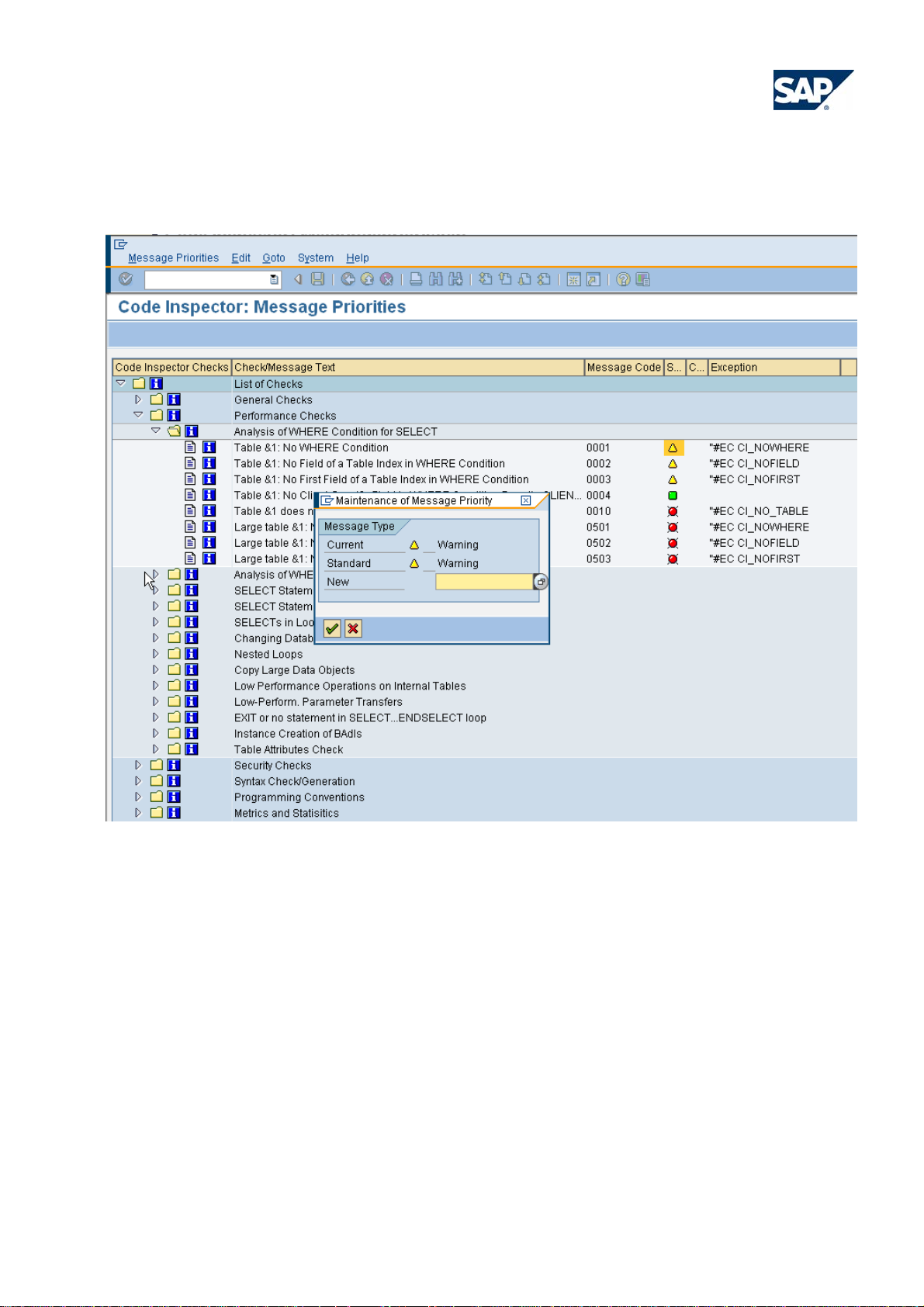
All Code Inspector checks messages have a default priority, which can be either error, warning, or
information. An additional option is ‘No Message’. In SAP NetWeaver release 6.40 and higher, these priorities
can be configured for some of the checks (for the required authorizations refe r to section 1.4):
1. In transaction SCI, choose Goto • Management of • Message Priorities.
2. The check variant tree with all checks is displayed. For checks of the check categories performance
and security, the message texts and message codes, priorities, and, for error and warning messages,
the pseudo comments are also displayed. For details about pseudo-comments refer to section 2.2.9.
3. Change the message priorities by double clicking on the appropriate priority ico n.
The message priorities are not connected to the transport system. Therefore, if you want to modify the
priorities in several systems you will have to do this manually in each system. The information about the
© 2009 SAP AG - BP_Manage_CodeQuality_with_CodeInspector _V30.doc page 18/28
Page 19
Best Practice
Manage Code Quality with Code Inspector
modified priorities is stored in table scipriorities; if you are experienced with transporting table entries, you can
transport the entries of this table into the appropriate systems.
Figure 13: Code Inspector: Message Priorities
2.2.9 Exception handling
A tool that checks the static (‘design-time’) definitions of objects, for example, the source code of ABAP OO
classes, often lacks important informatio n that is only known at runtime.
Imagine, for example, a performance check in the development system detects a database access that does
not use a WHERE clause. This can result in very bad performance if the statement is executed in a productive
context and the table has many entries. On the other hand, if the statement is executed only rarely, or if the
table always has only a few entries, this will be no problem.
To mark such statements as ‘not critical’, the Code Inspector provides exceptions that suppress check
messages. There are two types of exceptions, which complement each other:
© 2009 SAP AG - BP_Manage_CodeQuality_with_CodeInspector _V30.doc page 19/28
Page 20

Best Practice
Manage Code Quality with Code Inspector
Pseudo-comments
These are ABAP comments in program-like objects. They have to be added to the statement to be exempted,
either into one of the statement lines, or into the line following the statement. Code Inspector pseudocomments have the format “#EC CI_... You will find the pseudo-comment needed to suppress a message
in the inspection’s result tree, in the check documentation, and in the configuration of the message priorities.
Besides Code Inspector, also the Extended Syntax Check knows pseudo-comments. Since they are
comments in the ABAP source, a developer can simply introduce them as needed – there is no additional
check required by a second person.
Table based exceptions
Starting with SAP NetWeaver 6.40, the Code Inspector can handle exceptions that are based on entries in an
exception table. These can be used for program-like objects and other repository objects. For this type of
exception, the ‘4-eyes-principle’ is valid, that is, while a developer can request an exception, it can only be
approved by a second person, usually the responsible quality manager. You can request a table based
exception from the inspection result tree by clicking on the exception icon
. You need to define the scope
of the exception, provide an exception reason, and the name of an approver. After saving the exception
request, it will become visible for the approver in the Code Inspector (transaction SCI) under Goto •
Exceptions • Approve.
Currently the type of exception that suppresses a check message is “hard-coded” inside each check and
cannot be configured. Most messages in program-like objects can be suppressed by a pseudo-comment;
only some of the security checks demand a table based exception.
When working with exceptions, we propose the following Best Practices:
Teach your developers to use exceptions with care. They need to understand ex actly why the message
was displayed in the first place and introduce a pseudo-comment only if they are sure that the check tool
was too sensitive or the message is not applicable.
For each pseudo-comment we recommend adding a comment in the ABAP code, which describes why
the Code Inspector message is not relevant or not critical in this case. For example, if an internal table is
accessed sequentially (non-optimized), the additional comment could be: ‘Internal table xyz has always
less than 20 entries’.
You should also request this for code provided by 3
rd
parties.
You need to decide whether to inflate the ABAP code with pseudo-comments for ‚information’ messages.
On the one hand, it can make sense to get rid of check messages, on the other hand this ca n create
unnecessary work load.
The code quality analyst should monitor pseudo-com ments and take samples to control whether they are
used reasonably. This can be done using the search functions of the Code Inspector to search for the
most frequent pseudo-comments:
In the check category Search Functs. apply the check Search of ABAP Tokens, select Comments and
enter the search string "##EC CI_*. The second ‘#’ is needed because it is an escape parameter in the
search.
Another way is to execute an inspection with the option Also Display Hidden Info (or Display Exempted
Messages As Well) in the Execution Options dialog box of the inspection. In the result tree of an
inspection executed with this option, you will see also messages that are normally suppressed by pseudocomments or table entries. These messages are marked with an
icon in the Exceptions column.
© 2009 SAP AG - BP_Manage_CodeQuality_with_CodeInspector _V30.doc page 20/28
Page 21
Best Practice
Manage Code Quality with Code Inspector
2.3 Code Inspector Checks
The Code Inspector offers an open framework that can be extended by new checks. Over time, the number of
check categories and checks has grown. This section shows the status of checks as of release SAP
NetWeaver 7.00, SP14.
The answer to the question ‘How to Proceed?’ with some check messages is not always straightforward.
Below, find some recommendations. For the Code Inspector’s performance checks this includes information
provided in web logs in the SAP Developer Network http://sdn.sap.com and the references given in the
‘Further Information’.
2.3.1 Performance checks
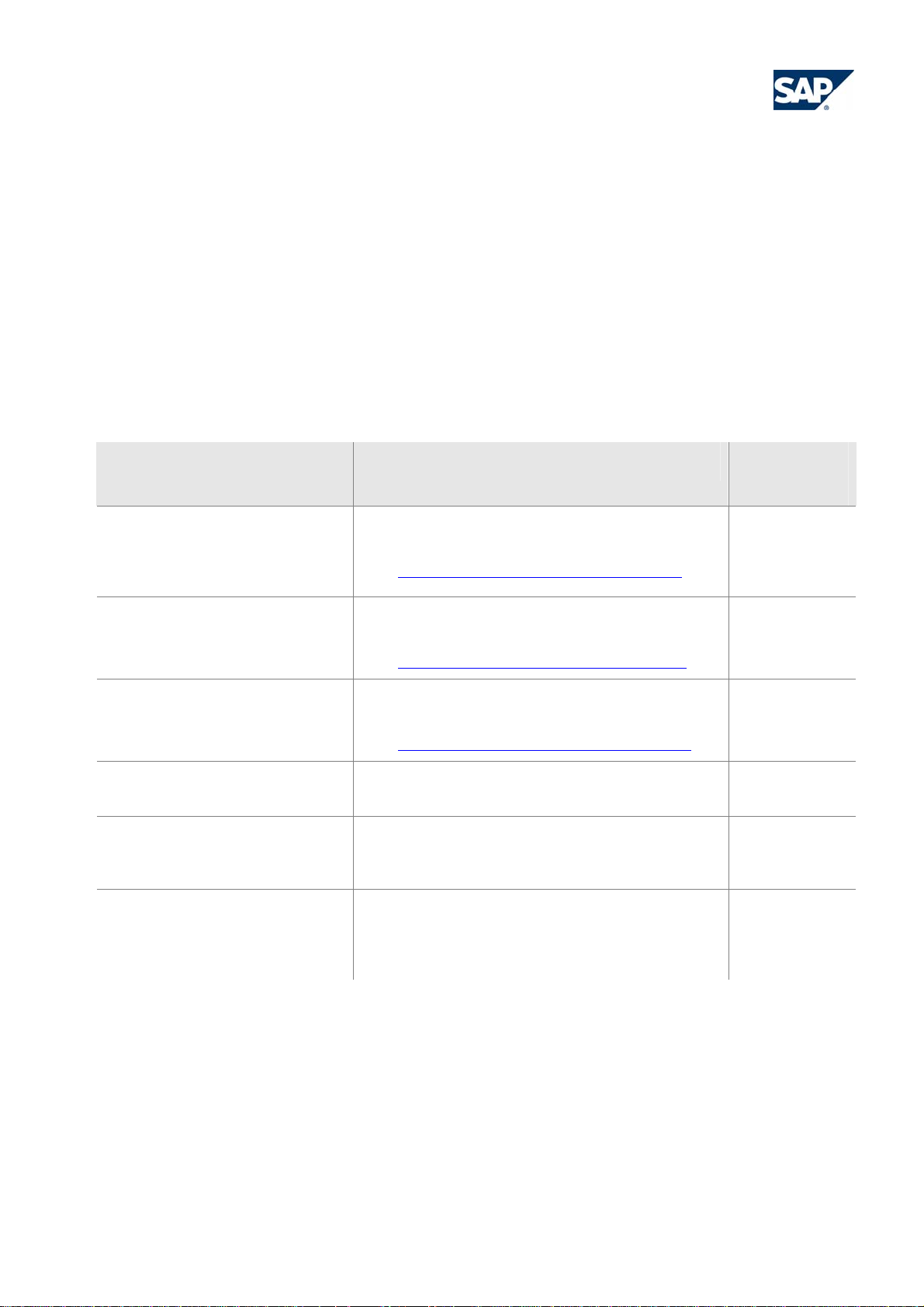
Check What it does Relevance /
Reliability
Analysis of WHERE Condition for
SELECT
Analysis of WHERE Condition in
UPDATE and DELETE
SELECT Statements That Bypass
the Table Buffer
Low Performance Operations on
Internal Tables
Detects database table accesses that cannot make
use of a database index and will therefore be slow.
See: Code Inspector's Performance Checks (I)
Detects accesses to buffered tables that implicitly
bypass the SAP table buffer
See: Code Inspector's Performance Checks (II)
Detects sequential (non-optimized) accesses to
internal tables
See: Code Inspector's Performance Checks (III)
Table Attributes Check Checks the technical settings of database tables in
the data dictionary, index design, etc.
Low-Perform. Parameter
Transfers
Detects possibly slow invocations of modularization
units caused by too much data that is copied in the
module’s interface.
SELECTs in Loops,
Changing Database Accesses in
Detects nested LOOP constructs with database
tables or internal tables.
Loops,
Nested Loops
High
High
High
Medium
Medium
Low
Table 1: Performance check
Most performance problems in application programs result from one of the following issues:
Database accesses reading data without using an index, or reading too much data, or reading identical
data over and over again, or reading data from buffered tables without using buffers
Inefficient data handling by the program, especially sequential ac cesses to internal tables
‘Wrong’ invocations of services/functions/methods, which can mean that services are called too often, or
with wrong parameters, or that the services called are not suitable at all.
© 2009 SAP AG - BP_Manage_CodeQuality_with_CodeInspector _V30.doc page 21/28
Page 22

Best Practice
Manage Code Quality with Code Inspector
The first two points can be covered by the Code Inspector checks, but of course only for statements that are
statically defined in the code. Dynamic statements (for example, if the table name is only given at runtime)
cannot be analyzed by the Code Inspector; here you need the monitoring and tracing tools mentioned above.
Also, the relevance of performance messages issued by the Code Inspector strongly depends on the
program context. A slow database access may be okay if it is inside a program that is not (frequently) used in
production systems. Since the Code Inspector does not know how relevant a program, function, or method is,
the relevance of the messages may vary with the context.
2.3.2 Security checks
Check What it does Relevance /
Reliability
Critical Statements Finds ABAP statements that are seen as critical, for
High
example, INSERT REPORT or the use of NativeSQL
Dynamic and Client-Specific
Accesses in SELECT,
Detects dynamic and cross-client table accesses, and
static accesses to certain tables
Medium
Dynamic and Client-Specific
Accesses with INSERT, UPDATE,
MODIFY, DELETE
Check of SY-SUBRC Handling Checks whether the return code (SY-SUBRC) is
Low/Medium
handled after some ABAP statement
Table 2: Security checks
The focus of this check category is to detect the use of ‘unwanted’ ABAP language elements that can
endanger program stability or data integrity and should therefore not be used in standard application coding.
Examples are the use of NativeSQL, the writing of programs or text-pools, or cross-client database accesses.
2.3.3 Syntax check/generation
Check What it does Relevance /
Reliability
Syntax Check ABAP syntax check as in the ABAP editor High
Extended Program Check Extended syntax check as in transaction SLIN High
Figure 14: Syntax check/generation
The ABAP syntax check and the extended program check are standard ABAP workbench functions, but with
the help of the Code Inspector they can be applied to a large object set.
The extended program check comprises a lot of useful checks from different areas like module interfaces,
program text pool consistency, unused fields, empty includes, possible data loss in assignments, superfluous
conditions in IF … ENDIF or CASE … ENDCASE, and many more.
© 2009 SAP AG - BP_Manage_CodeQuality_with_CodeInspector _V30.doc page 22/28
Page 23
Best Practice
Manage Code Quality with Code Inspector
2.3.4 Programming conventions
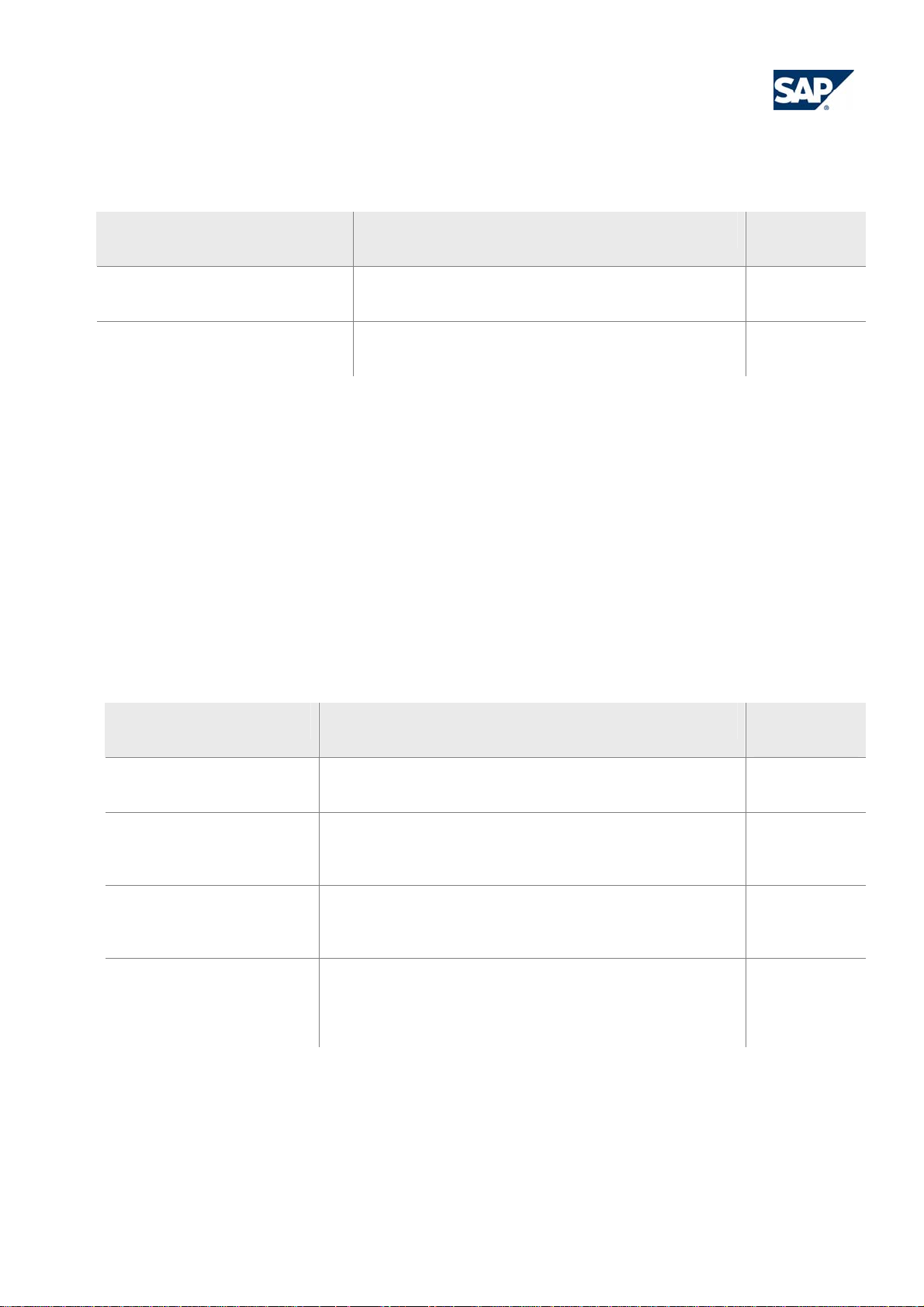
Check What it does Relevance /
Reliability
Naming Conventions Checks naming conventions for classes, functions,
High
forms, parameters, constants, types, etc.
Extended Naming Conventions for
Like above, but additionally distinguishes data types High
Programs
Table 3: Programming conventions
Many development departments want their developers to stick to dedicated naming conventions for their
programs, function groups, and classes. This often facilitates the maintenance of source code and makes it
easier to understand. The above checks help development groups to adhere to their naming conventions. It is
possible to define and check naming conventions for
ABAP modularization units like programs, global and local classes, functions and forms
types, constants, data, field-symbols and parameter definitions in these units
The check ‘Extended Naming Conventions’ is even more sophisticated and is able to differentiate the names
of variables, constants, or parameters with regard to their data type.
2.3.5 Metrics and statistics
Check What it does Relevance /
Reliability
Number of Executable
Statements Metrics
Procedural Metrics Evaluates code complexity, for example: maximum nesting
Counts the number of executable statements and the
number of comments per executable statement
Medium
Medium
depth, Cyclomatic Complexity, or Halstead complexity
measures
Comment Language Metrics Examines the comments in an ABAP program. It is able to
Medium
recognize comments in German and English as well as
commented out ABAP and pseudo-comments.
OO Size Metrics Metric based on the number of ABAP OO elements
Medium
(methods, attributes, interfaces, events) in a class. This
includes local classes implemented in any ABAP program.
Table 4: Metrics and statistics
Starting with SAP NetWeaver 7.0, SP14, in the category ‘Metrics and Statistics’ you find Code Inspector
checks that count several code characteristics of your programs. Such code characteristics are, for example,
the number of executable statements, the portion of comment lines, or the number of methods in a class. The
metrics can be used to detect programs that deviate from the average and therefore might be critical with
© 2009 SAP AG - BP_Manage_CodeQuality_with_CodeInspector _V30.doc page 23/28
Page 24

Best Practice
Manage Code Quality with Code Inspector
respect to complexity and maintainability. For example, the ‘Cyclomatic Complexity’ key figure is often
correlated with the maintainability of a program.
For most of the checks you can choose either to output an ABAP code metric in table form, or to issue
warnings if a code characteristic rises above a certain threshold.
In SAP NetWeaver 6.40 and 7.0, the check Statement Statistics in the category General Checks offers a
simple count of ABAP statements.
2.3.6 Dynamic tests
Check What it does Relevance /
Reliability
ABAP Unit Execute all ABAP Unit tests for all objects of an object
High
set
See ABAP Unit
Figure 15: Dynamic test
The ABAP Unit check is an adaptation of the dynamic ABAP module tests into the static check tool. Again,
this provides the advantage of triggering the test of many objects with one Code Inspector inspection.
2.3.7 User interfaces
Check What it does Relevance /
Reliability
Standard Checks Web Dynpro Executes standard workbench checks for ABAP
Medium
WebDynpros
Programming Conventions for
WebDynpro
Sub-Category: Screen Check
Screen Check for Usability und
Accessibility
Identifies problematic statements in the user created
code of ABAP WebDynpros
Contains all usability and accessibility checks for
Medium
High
screens (like the Check Æ Layout functionality in the
Screen Painter)
Screen Generation Executes screen generation Medium
Table 5: User interface
Though they are no program-like objects, user interfaces like classical screens (Dynpros) or ABAP
WebDynpros can also be analyzed with the Code Inspector.
© 2009 SAP AG - BP_Manage_CodeQuality_with_CodeInspector _V30.doc page 24/28
Page 25

Best Practice
Manage Code Quality with Code Inspector
2.3.8 Search functions
Check What it does Relevance /
Reliability
Search of ABAP Tokens Locates single ABAP words in your program code. High
Search ABAP Statement Patterns Finds ABAP statement patterns within your ABAP
High
code.
Table 6: Search functions
The search functions can be very helpful if you want to find the location of special statements (for example,
where the option FOR ALL ENTRIES is used in the code), or hard-coded names, and so on. Again, you
benefit from the ability of the Code Inspector to process large object sets quickly.
2.4 Programming with the SCI: APIs and Creation of New Checks
The Code Ins pector offers many possibilities to configure which development objects to check and how to
check them, but this may not be enough for the ambitious code quality analyst. Fortunately, the Code
Inspector framework offers some interfaces to extend these possibilities even further. Also, a gifted
programmer will be able to implement own checks.
The main API of the Code Inspector is the ABAP class CL_CI_CHECK. This class allows checking single
objects, object sets, object selections, or code snippets with predefined check variants.
New checks are ABAP OO classes that extend an existing class of the Code Inspector class hierarchy. For
further information see Code Inspector - How to create a new check
© 2009 SAP AG - BP_Manage_CodeQuality_with_CodeInspector _V30.doc page 25/28
Page 26
Best Practice
Manage Code Quality with Code Inspector
3 Further Information
3.1 Troubleshooting
The following problems may occur when working with the Code Inspector:
A check variant, object set, or inspection is not displayed in transaction SCI although you type d the name
correctly.
Check whether the local
Inspector element with the F4 help, the icon in front of the name may not have been set. Just click on the
icon to switch between the two.
Empty object set
After saving an object set with option Save Selection Only you get the message: ‘The object set was
saved, but it does not contain any objects.’
Or you get the message ‘The object set does not contain any objects’ during the execution of an
inspection.
This can have several reasons:
- The selections made in the tab Select Object Set result in an empty set. This can happen if you select
a package in Object Assignment and an object in Object Selection, but the object does not belong to
the specified package.
- You wanted to insert an SAP object into the object set
- The role of the namespace of your objects is ‘C’ (recipient) instead of ‘P’ (producer)
Inspection brakes
The execution of an inspection can be aborted due to system shutdown, or dumps in some single check.
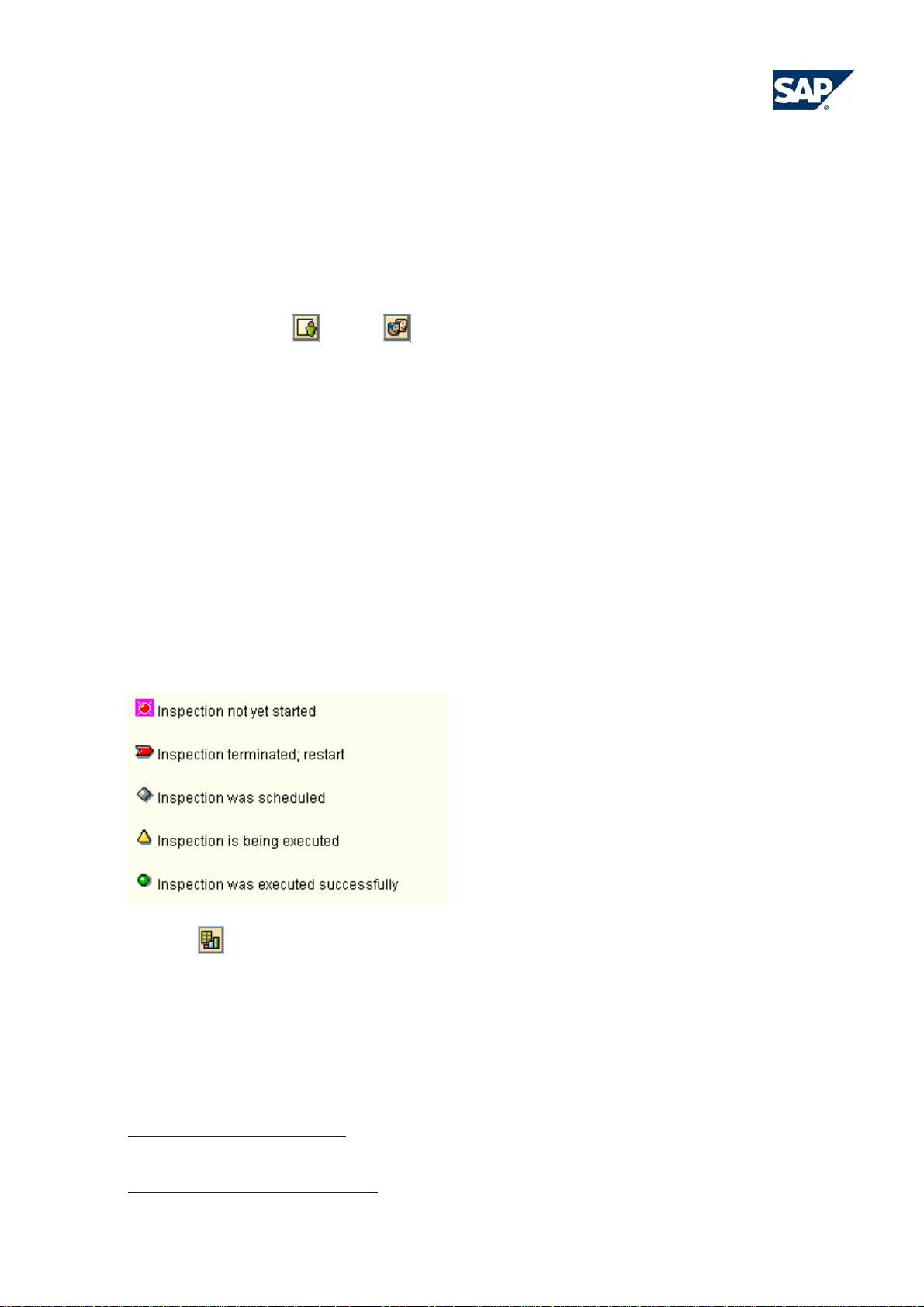
In detail, an inspection can have one of the following states:
or global icon is set correctly. In early releases, when selecting a Code
A terminated inspection can be re-started. If the inspection repeatedly fails, look into the statistics of the
execution
No resources available
If there are too few free work processes on a server group, the parallel execution of an inspection is not
possible. Schedule the inspection in the background for an execution during low load times.
You can find SAP notes on the Code Inspector under component BC-ABA-LA, keyword ‘SCI’.
for further details.
3.2 Background Information and References
For further information on the Code Inspector tool and its checks see:
Code Inspector Wiki in the SDN
More about performance of SAP software solutions is available from:
https://service.sap.com/performance
© 2009 SAP AG - BP_Manage_CodeQuality_with_CodeInspector _V30.doc page 26/28
Page 27

Best Practice
Manage Code Quality with Code Inspector
Index of Figures
Figure 1: Code Inspector – basic elements 5
Figure 2: Check Variants 6
Figure 3 Transport Organizer: Request 6
Figure 4: Code Inspector: Initial Screen 9
Figure 5: Code Inspector: Check Variant 10
Figure 6: Global DEFAULT check variant 11
Figure 7: Transport Organizer Tool 12
Figure 8: Code Inspector: Initial Screen 13
Figure 9: Code Inspector: Object Set 14
Figure 10: Code Inspector: Inspection 15
Figure 11: Code Inspector: Execution Options 16
Figure 12: Code Inspector: results of an inspection 17
Figure 13: Code Inspector: Message Priorities 19
Figure 14: Syntax check/generation 22
Figure 15: Dynamic test 24
Index of Tables
Table 1: Performance check 21
Table 2: Security checks 22
Table 3: Programming conventions 23
Table 4: Metrics and statistics 23
Table 5: User interface 24
Table 6: Search functions 25
© 2009 SAP AG - BP_Manage_CodeQuality_with_CodeInspector _V30.doc page 27/28
Page 28

Best Practice
Manage Code Quality with Code Inspector
© Copyright 2009 SAP AG. All Rights Reserved
No part of this publication may be reproduced or transmitted in any form or for any purpose without the express permission of SAP AG.
The information contained herein may be changed without prior notice.
Some software products marketed by SAP AG and its distributors contain proprietary software components of other software vendors.
Microsoft, Windows, Outlook, and PowerPoint are registered trademarks of Microsoft Corporation.
IBM, DB2, DB2 Universal Database, OS/2, Parallel Sysplex, MVS/ESA, AIX, S/390, AS/400, OS/390, OS/400, iSeries, pSeries, xSeries,
zSeries, z/OS, AFP, Intelligent Miner, WebSphere, Netfinity, Tivoli, and Informix are trademarks or registered trademarks of IBM
Corporation.
Oracle is a registered trademark of Oracle Corporation.
UNIX, X/Open, OSF/1, and Motif are registered trademarks of the Open Group.
Citrix, ICA, Program Neighborhood, MetaFrame, WinFrame, VideoFrame, and MultiWin are trademarks or registere d trademarks of Citrix
Systems, Inc.
HTML, XML, XHTML and W3C are trademarks or registered trademarks of W3C®, World Wide Web Consortium, Massachusetts
Institute of Technology.
Java is a registered trademark of Sun Microsystems, Inc.
JavaScript is a registered trademark of Sun Microsystems, Inc., used under license for technology invented and implemented by
Netscape.
MaxDB is a trademark of MySQL AB, Sweden.
SAP, R/3, mySAP, mySAP.com, xApps, xApp, SAP NetWeaver, and other SAP products and services mentioned herein as well as their
respective logos are trademarks or registered trademarks of SAP AG in Germany and in several other countries all over the world. All
other product and service names mentioned are the trademarks of their respective companies. Data contained in this document serves
informational purposes only. National product specifications may vary.
The information in this document is proprietary to SAP. No part of this document may be reproduced, copied, o r transmitted in any form
or for any purpose without the express prior written permission of SAP AG.
This document is a preliminary version and not subject to your license agreement or any other agreement with SAP. This document
contains only intended strategies, developments, and functionalities of the SAP® product and is not intended to be binding upon SAP to
any particular course of business, product strategy, and/or development. Please note that this document is subject to change and may
be changed by SAP at any time without notice.
SAP assumes no responsibility for errors or omissions in this document. SAP does not warrant the accuracy or completeness of the
information, text, graphics, links, or other items contained within this material. This document is provided without a warranty of an y kind,
either express or implied, including but not limited to the implied warranties of merchantability, fitness for a particular purpose, or noninfringement.
SAP shall have no liability for damages of any kind including without limitation direct, special, indirect, or consequential damages that
may result from the use of these materials. This limitation shall not apply in cases of intent or gross negligence.
The statutory liability for personal injury and defective products is not affected. SAP has no control over the information that you may
access through the use of hot links contained in these materials and does not endorse your use of third-party Web pages nor provide any
warranty whatsoever relating to third-party Web pages.
© 2009 SAP AG - BP_Manage_CodeQuality_with_CodeInspector _V30.doc page 28/28
 Loading...