

Page 1
2. Specification
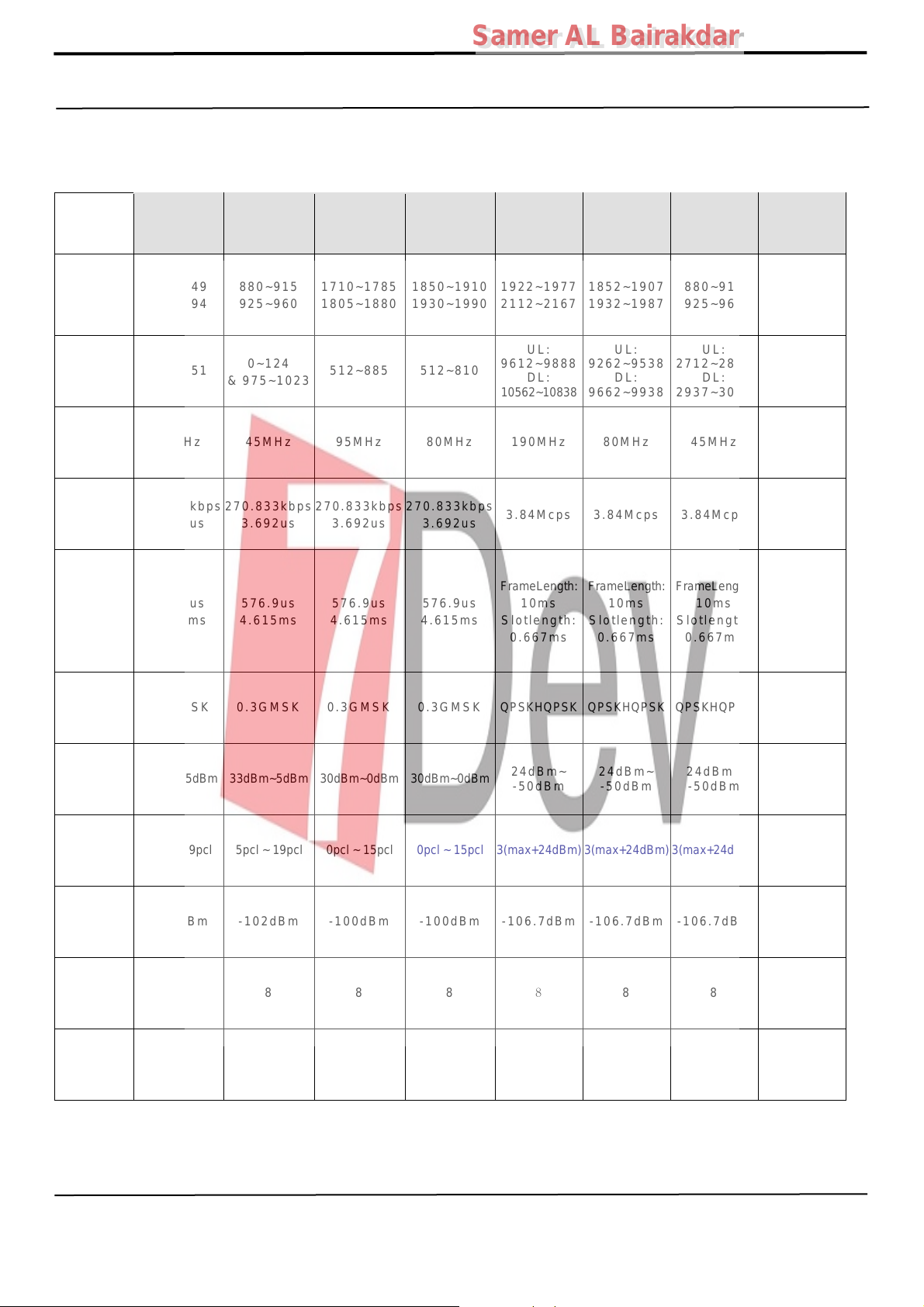
2-1. GSM General Specification
Samer AL Bairakdar
Samer AL Bairakdar
Freq.
Band[MHz]
Uplink/
Downlink
ARFCN
range
Tx/Rx
spacing
Mod. Bit
Bit Period
Time Slot
Period/
Frame
Period
rate/
GSM850 EGSM 900 DCS1800 PCS1900
824~849
869~894
128~251
45MHz 45MHz 95MHz 80MHz 190MHz 80MHz 45MHz 45MHz
270.833kbps
3.692us
576.9us
4.615ms
880~915
925~960
0~124
& 975~1023
270.833kbps
3.692us
576.9us
4.615ms
1710~1785
1805~1880
512~885 512~810
270.833kbps
3.692us
576.9us
4.615ms
1850~1910
1930~1990
270.833kbps
3.692us
576.9us
4.615ms
WCDMA
2100
1922~1977
2112~2167
UL:
9612~9888
DL:
10562~10838
3.84Mcps 3.84Mcps 3.84Mcps 3.84Mcps
FrameLength:
10ms
Slotlength:
0.667ms
WCDMA
1900
1852~1907
1932~1987
UL:
9262~9538
DL:
9662~9938
FrameLength:
10ms
Slotlength:
0.667ms
WCDMA
900
880~915
925~960
UL:
2712~2863
DL:
2937~3088
FrameLength:
10ms
Slotlength:
0.667ms
WCMDA
824~849
869~894
4132~4233
4357~4458
FrameLength:
Slotlength:
0.667ms
850
UL:
DL:
10ms
Modulation 0.3GMSK 0.3GMSK 0.3GMSK 0.3GMSK QPSKHQPSK QPSKHQPSK QPSKHQPSK QPSKHQPSK
MS Power 33dBm~5dBm 33dBm~5dBm 30dBm~0dBm 30dBm~0dBm
Power
Class
Sensitivity -102dBm -102dBm -100dBm -100dBm -106.7dBm -106.7dBm -106.7dBm -106.7dBm
TDMA Mux 8 8 8 8
Cell
Radius
5pcl ~ 19pcl 5pcl ~ 19pcl 0pcl ~ 15pcl 0pcl ~ 15pcl 3(max+24dBm) 3(max+24dBm) 3(max+24dBm) 3(max+24dBm)
35Km 35Km 2Km 2Km 2Km 2Km 2Km 2Km
24dBm~
-50dBm
8
24dBm~
-50dBm
8 8 8
24dBm~
-50dBm
24dBm~
-50dBm
Confidential and proprietary-the contents in this service guide subject to change without prior notice
Distribution, transmission, or infringement of any content or data from this document without Samsung’s written authorization is strictly prohibited.
Page 2
2. Specification
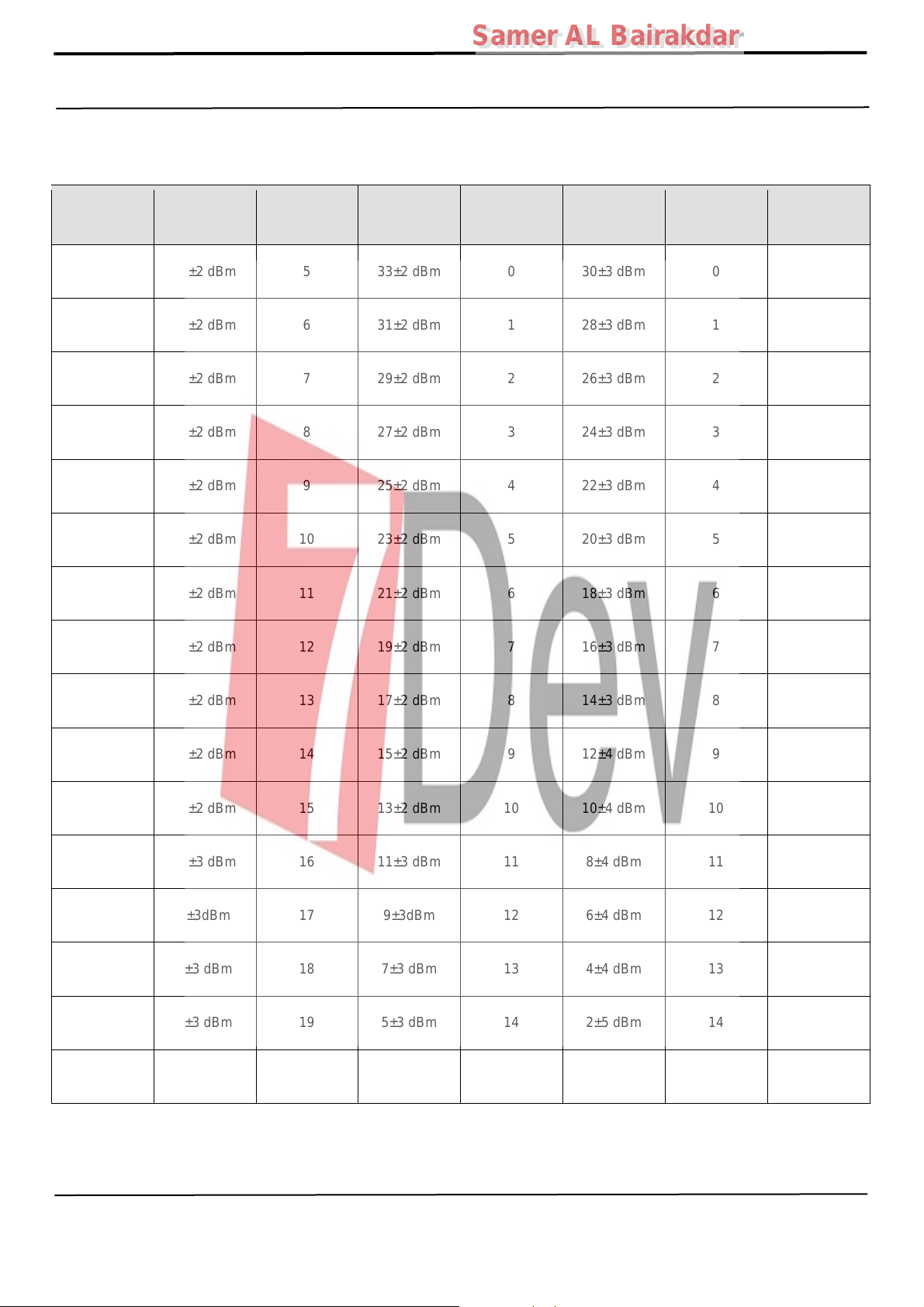
2-2. GSM Tx Power Class
Samer AL Bairakdar
Samer AL Bairakdar
TX Power
control level
5
6 31±2 dBm 6 31±2 dBm 1 28±3 dBm 1 28±3 dBm
7 29±2 dBm 7 29±2 dBm 2 26±3 dBm 2 26±3 dBm
8 27±2 dBm 8 27±2 dBm 3 24±3 dBm 3 24±3 dBm
9 25±2 dBm 9 25±2 dBm 4 22±3 dBm 4 22±3 dBm
10 23±2 dBm 10 23±2 dBm 5 20± 3 dBm 5 20±3 dBm
11 21±2 dBm 11 21±2 dBm 6 18± 3 dBm 6 18±3 dBm
12 19±2 dBm 12 19±2 dBm 7 16± 3 dBm 7 16±3 dBm
GSM850
33±2 dBm 5 33±2 dBm 0 30±3 dBm 0 30±3 dBm
TX Power
control level
EGSM900
TX Power
control level
DCS1800
TX Power
control level
PCS1900
13 17±2 dBm 13 17±2 dBm 8 14± 3 dBm 8 14±3 dBm
14 15±2 dBm 14 15±2 dBm 9 12± 4 dBm 9 12±4 dBm
15 13±2 dBm 15 13±2 dBm 10 10±4 dBm 10 10±4 dBm
16 11±3 dBm 16 11±3 dBm 11 8±4 dBm 11 8±4 dBm
17 9±3dBm 17 9±3dBm 12 6±4 dBm 12 6±4 dBm
18 7±3 dBm 18 7±3 dBm 13 4±4 dBm 13 4±4 dBm
19 5±3 dBm 19 5±3 dBm 14 2±5 dBm 14 2±5 dBm
15 0±5 dBm 15 0±5 dBm
Confidential and proprietary-the contents in this service guide subject to change without prior notice
Distribution, transmission, or infringement of any content or data from this document without Samsung’s written authorization is strictly prohibited.
Page 3
2. Specification
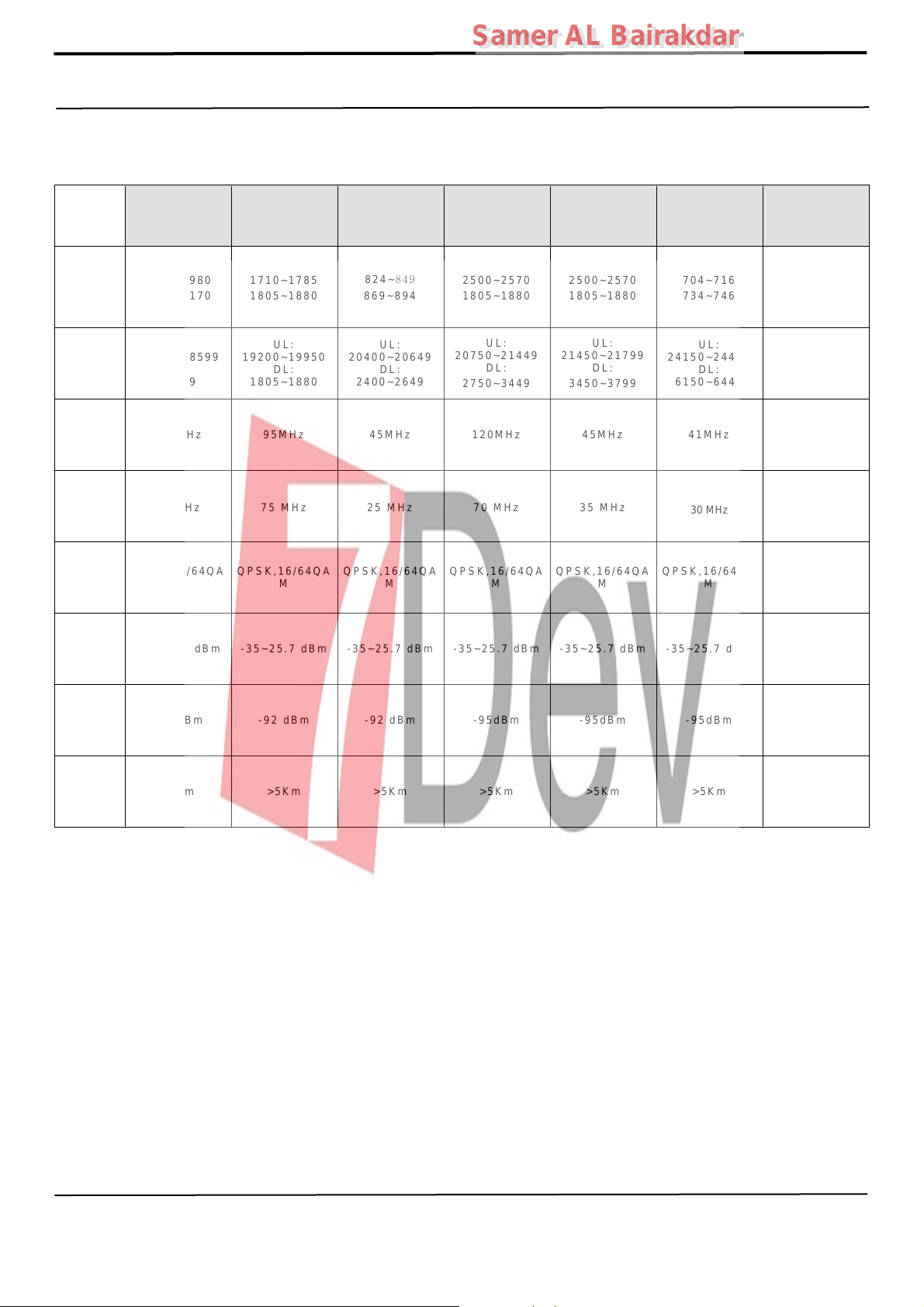
2-3. LTE General Specification
LTE Band1 LTE Band3 LTE Band5 LTE Band7 LTE Band8 LTE Band 20 LTE Band 40
Samer AL Bairakdar
Samer AL Bairakdar
Freq.
Band[MHz]
Uplink/
Downlink
ARFCN
range
Tx/Rx
spacing
Channel
Bandwidth
Modulation QPSK,16/64QAM QPSK,16/64QAM QPSK,16/64QAM QPSK,16/64QAM QPSK,16/64QAM QPSK,16/64QAM QPSK,16/64QA
MS Power
(MPR)
Sensitivit
(QPSK)
(BW
10MHz)
1920~1980
2110~2170
UL:
18000~18599
DL:
0~599
190MHz 95MHz 45MHz 120MHz 45MHz 41MHz -
60 MHz 75 MHz 25 MHz 70 MHz 35 MHz
-35~25.7 dBm -35~25.7 dBm -35~25.7 dBm -35~25.7 dBm -35~25.7 dBm -35~25.7 dBm -35~25.7 dBm
-94 dBm -92 dBm -92 dBm -95dBm -95dBm -95dBm -95dBm
1710~1785
1805~1880
UL:
19200~19950
DL:
1805~1880
824~849
869~894
UL:
20400~20649
DL:
2400~2649
2500~2570
1805~1880
UL:
20750~21449
DL:
2750~3449
2500~2570
1805~1880
UL:
21450~21799
DL:
3450~3799
704~716
734~746
UL:
24150~24449
DL:
6150~6449
30 MHz
2300~2400
UL, DL :
2300~2400
5/10/15/20
MHz
M
Cell
Radius
>5Km >5Km >5Km >5Km >5Km >5Km >5Km
Confidential and proprietary-the contents in this service guide subject to change without prior notice
Distribution, transmission, or infringement of any content or data from this document without Samsung’s written authorization is strictly prohibited.
Page 4
Samer AL Bairakdar
Samer AL Bairakdar
3. Operation Instruction and Installation
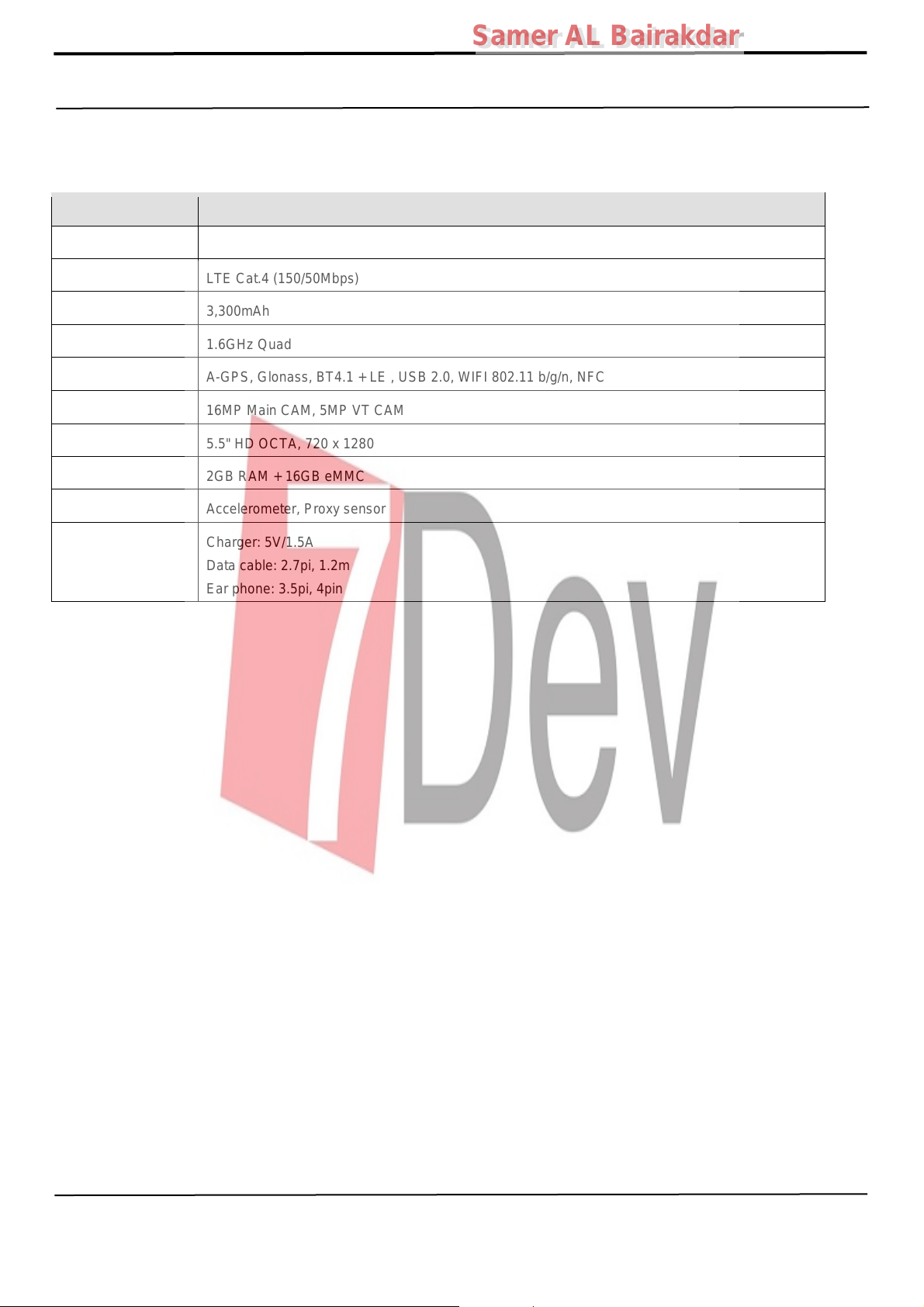
Main Function
Item Description
OS Android V6.0. 1 (Marshmallow)
RF LTE Cat.4 (150/50Mbps)
Battery 3,300mAh
Base Band 1.6GHz Quad
Other RF A-GPS, Glonass, BT4.1 + LE , USB 2.0, WIFI 802.11 b/g/n, NFC
Camera 16MP Main CAM, 5MP VT CAM
LCD 5.5" HD OCTA, 720 x 1280
RAM 2GB RAM + 16GB eMMC
Sensor Accelerometer, Proxy sensor
Charger: 5V/1.5A
Accessory
Data cable: 2.7pi, 1.2m
Ear phone: 3.5pi, 4pin
Confidential and proprietary-the contents in this service guide subject to change without prior notice
Distribution, transmission, or infringement of any content or data from this document without Samsung’s written authorization is strictly prohibited.
Page 5
9. Reference Abbreviate
Reference Abbreviate
― AAC: Advanced Audio Coding.
― AVC : Advanced Video Coding.
― BER : Bit Error Rate
― BPSK: Binary Phase Shift Keying
― CA : Conditional Access
― CDM : Code Division Multiplexing
― C/I : Carrier to Interference
― DMB : Digital Multimedia Broadcasting
― EN : European Standard
― ES : Elementary Stream
― ETSI: European Telecommunications Standards Institute
― MPEG: Moving Picture Experts Group
― PN : Pseudo-random Noise
― PS : Pilot Symbol
― QPSK: Quadrature Phase Shift Keying
― RS : Reed-Solomon
― SI : Service Information
― TDM : Time Division Multiplexing
― TS : Transport Stream
Samer AL Bairakdar
Samer AL Bairakdar
Confidential and proprietary-the contents in this service guide subject to change without prior notice
Distribution, transmission, or infringement of any content or data from this document without Samsung’s written authorization is strictly prohibited.
Page 6
Samer AL Bairakdar
Samer AL Bairakdar
1.Safety Precautions
1-1. Repair Precaution
Before attempting any repair or detailed tuning, shield the device from RF noise or static
electricity discharges.
Use only demagnetized tools that are specifically designed for small electronic repairs,
as most electronic parts are sensitive to electromagnetic forces.
Use only high quality screwdrivers when servicing products. Low quality screwdrivers can
easily damage the heads of screws.
Use only conductor wire of the properly gauge and insulation for low resistance, because of the low
margin of error of most testing equipment.
We recommend 22-gauge twisted copper wire.
Hand-soldering is not recommended, because printed circuit boards (PCBs) can be easily
damaged, even with relatively low heat. Never use a soldering iron with a power rating of
more than 100 watts and use only lead-free solder with a melting point below 250°C (482°F).
Prior to disassembling the battery charger for repair, ensure that the AC power is disconnected.
Always use the replacement parts that are registered in the SEC system. Third-party replacement parts
may not function properly.
Confidential and proprietary-the contents in this service guide subject to change without prior notice
Distribution, transmission, or infringement of any content or data from this document without Samsung’s written authorization is strictly prohibited.
Page 7
Samer AL Bairakdar
Samer AL Bairakdar
1.Safety Precautions
1-2. ESD(Electrostatically Sensitive Devices) Precaution
Many semiconductors and ESDs in electronic devices are particularly sensitive to static discharge and
can be easily damaged by it. We recommend protecting these components with conductive anti-static
bags when you store or transport them.
Always use an anti-static strap or wristband and remove electrostatic buildup or dissipate
static electricity from your body before repairing ESDs.
Ensure that soldering irons have AC adapter with ground wires and that the ground wires are properly
connected.
Use only desoldering tools with plastic tips to prevent static discharge.
Properly shield the work environment from accidental electrostatic discharge before opening
packages containing ESDs.
The potential for static electricity discharge may be increased in low humidity environments,
such as air-conditioned rooms. Increase the airflow to the working area to decrease the
chance of accidental static electricity discharges.
Confidential and proprietary-the contents in this service guide subject to change without prior notice
Distribution, transmission, or infringement of any content or data from this document without Samsung’s written authorization is strictly prohibited.
Page 8
Samer AL Bairakdar
Samer AL Bairakdar
6. Level 1 Repair
6-1. S/W Download
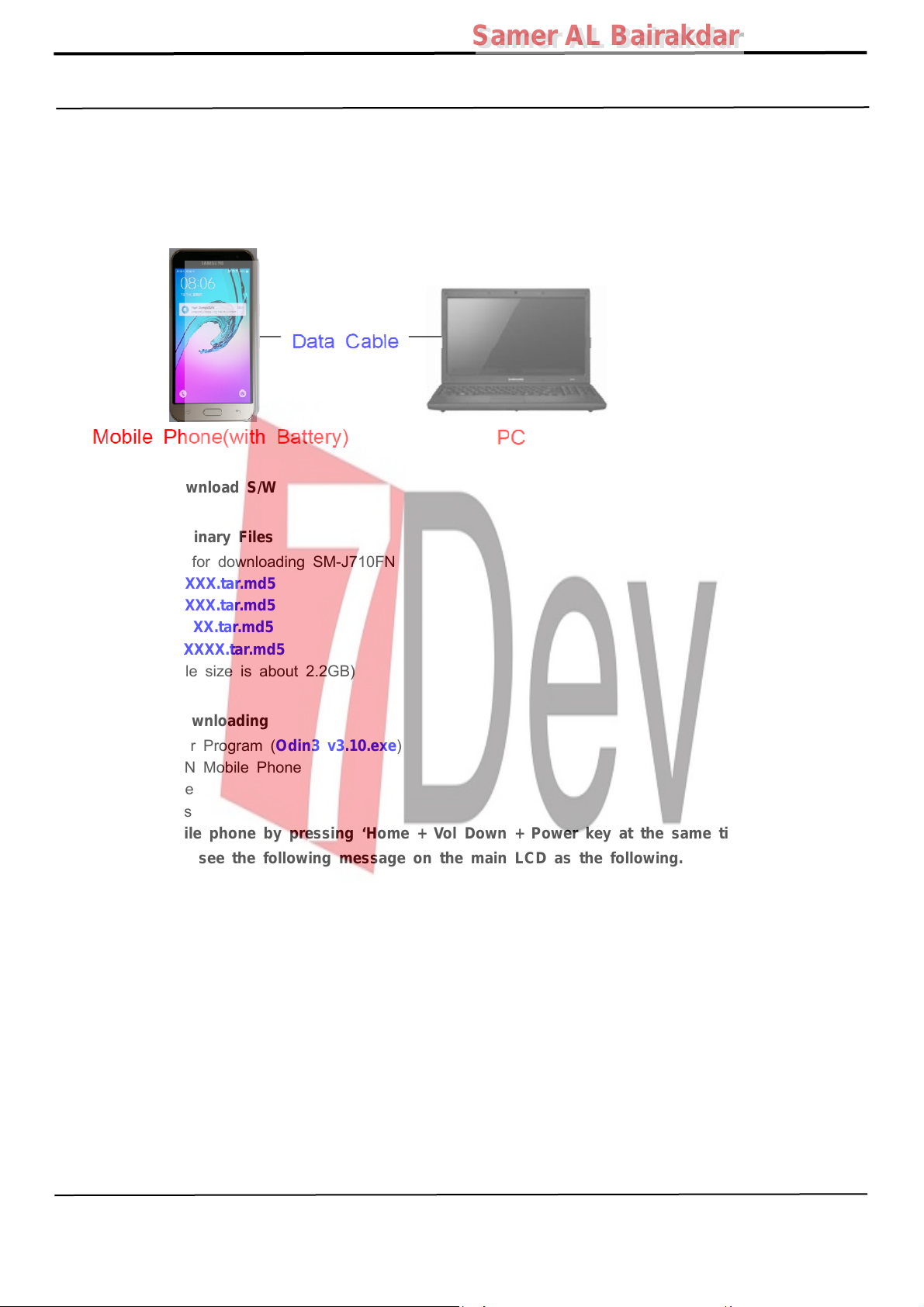
6-1-1. Prepare for S/W Downloading
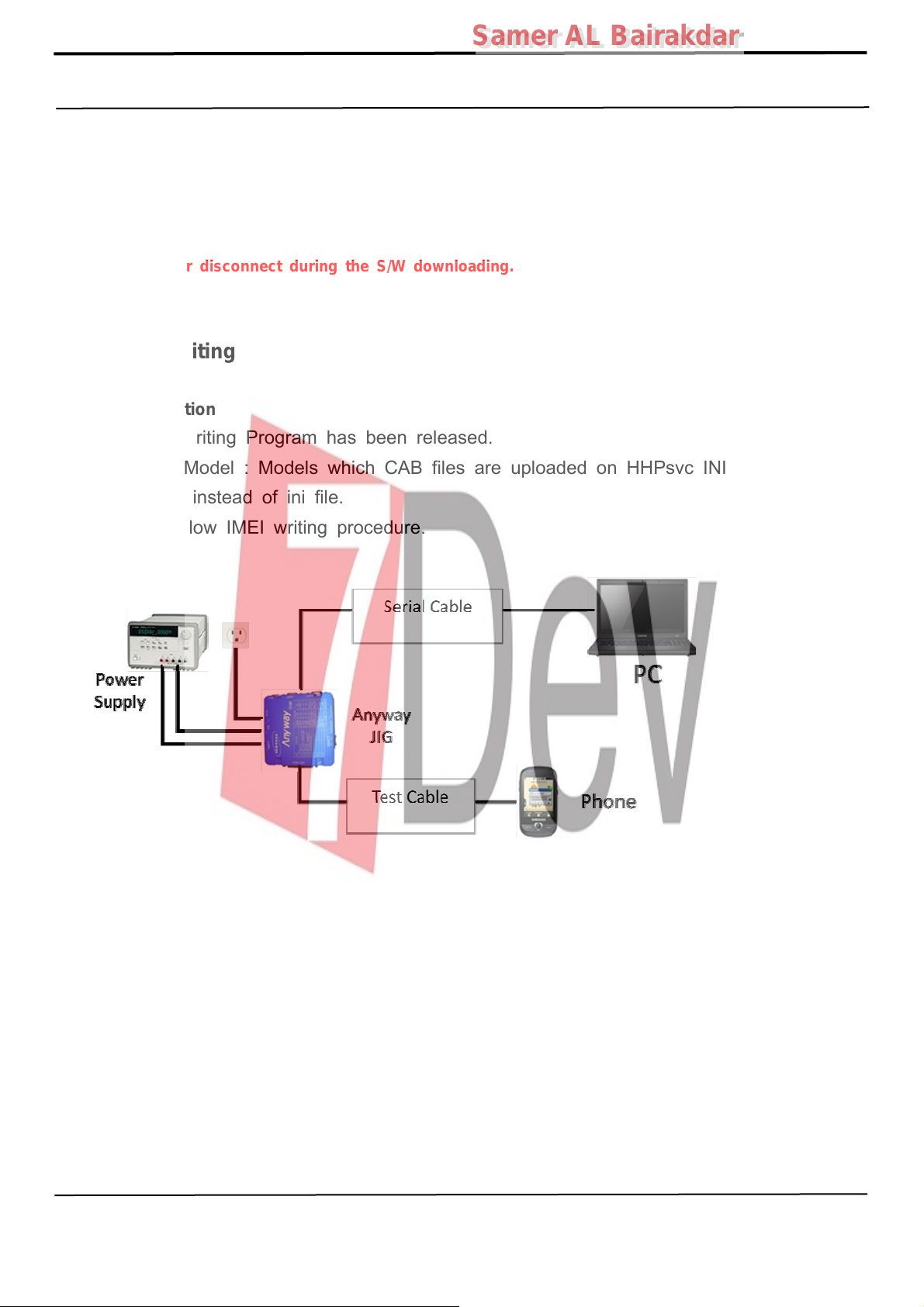
- Diagram of connection
6-2-2. How to download S/W
1) Downloading Binary Files
• Binary file for downloading SM-J710FN
– AP_XXXX.tar.md5
– BL_XXXX.tar.md5
(file size is about 2.2GB)
2) Prepare for Downloading
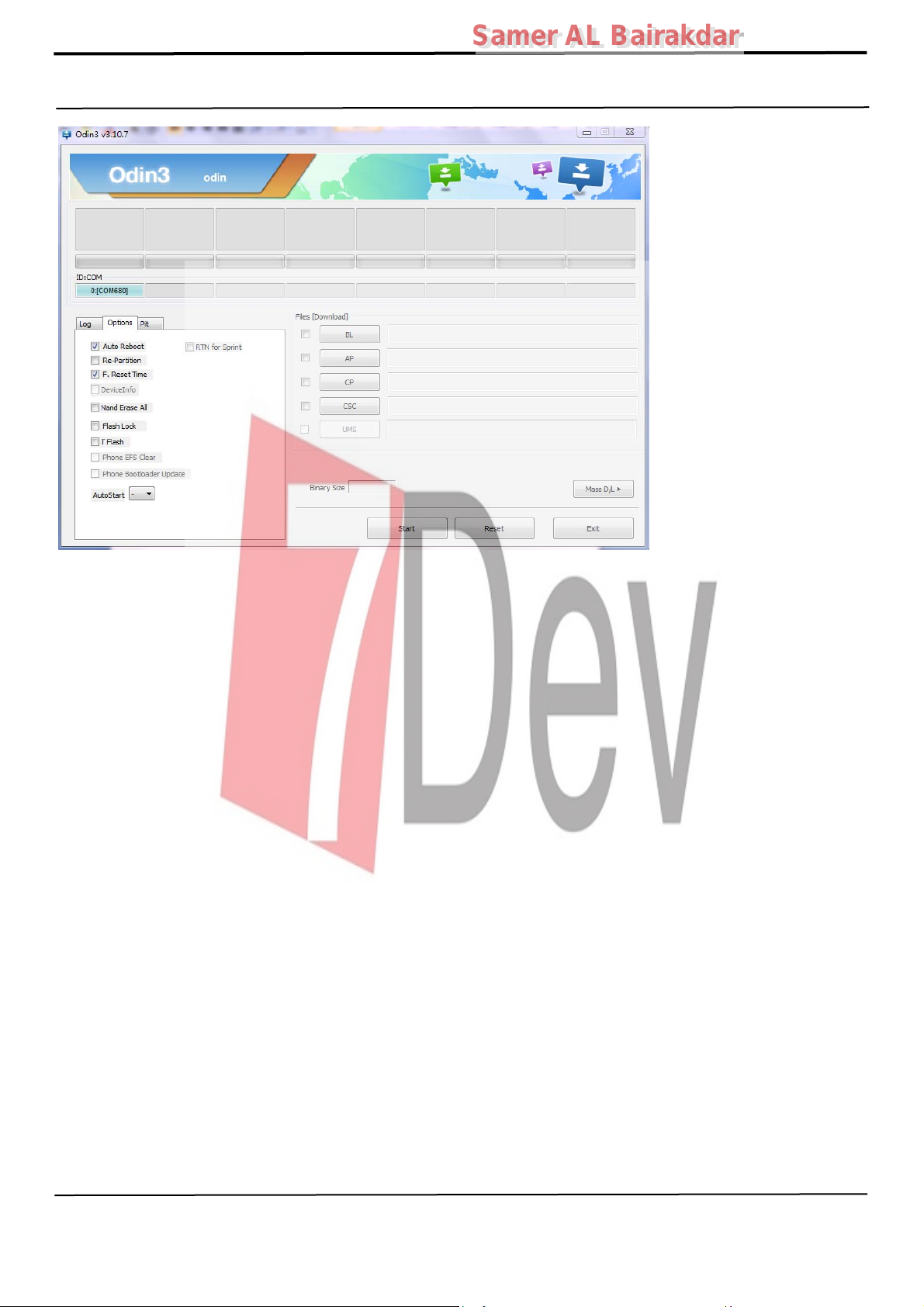
• Downloader Program (Odin3 v3.10.exe)
• SM-J710FN Mobile Phone
• Data Cable
• Binary files
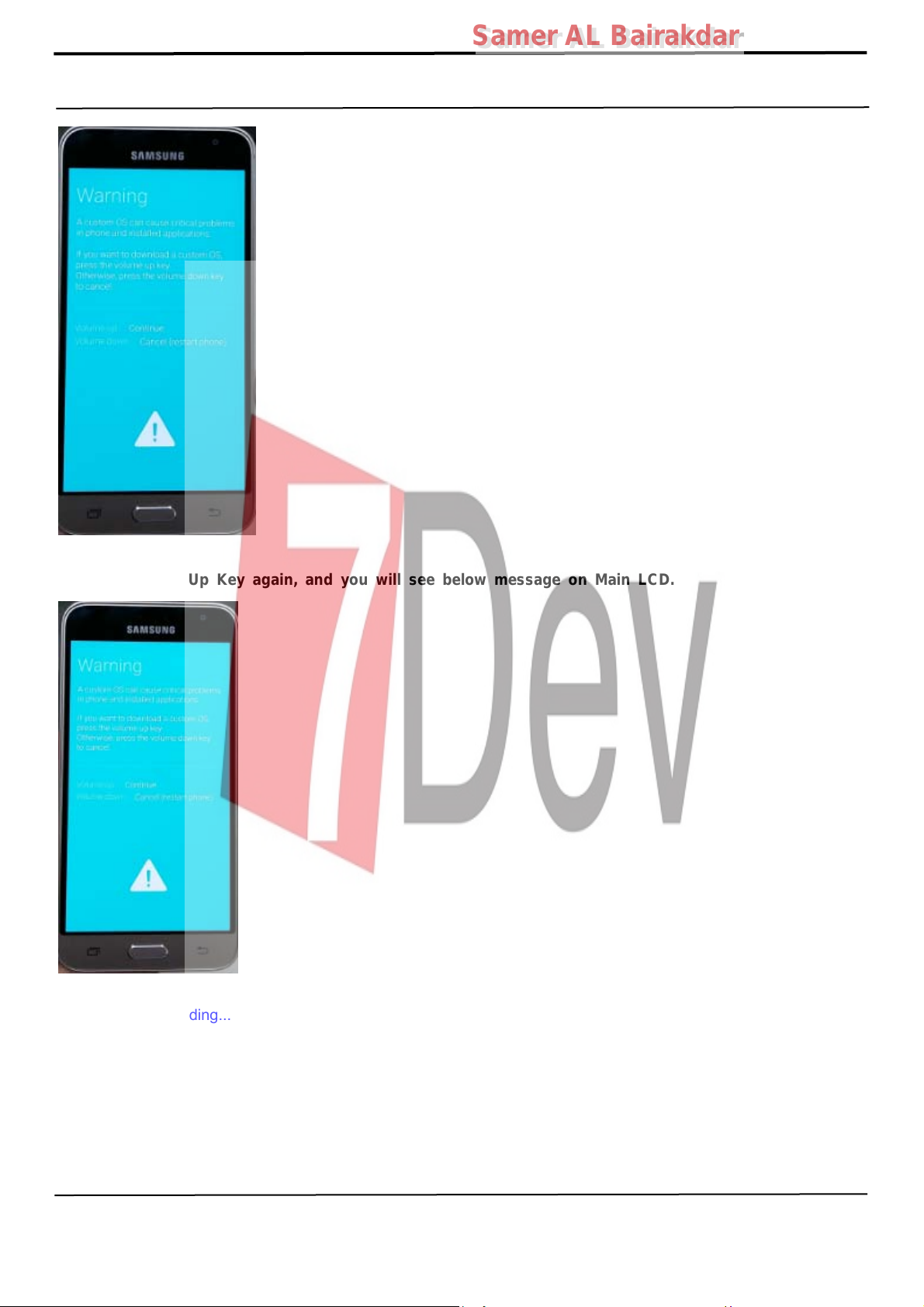
3) Boot the mobile phone by pressing ‘Home + Vol Down + Power key at the same time, If you do
properly, you can see the following message on the main LCD as the following.
– CP_XXXX.tar.md5
– CSC_XXXX.tar.md5
Confidential and proprietary-the contents in this service guide subject to change without prior notice
Distribution, transmission, or infringement of any content or data from this document without Samsung’s written authorization is strictly prohibited.
Page 9
6. Level 1 Repair
Samer AL Bairakdar
Samer AL Bairakdar
) Press the Vol Up Key again, and you will see below message on Main LCD.
4
“
Downloading...
) Load the binary download program.
5
”
Confidential and proprietary-the contents in this service guide subject to change without prior notice
Distribution, transmission, or infringement of any content or data from this document without Samsung’s written authorization is strictly prohibited.
Page 10
6. Level 1 Repair
Samer AL Bairakdar
Samer AL Bairakdar
Confidential and proprietary-the contents in this service guide subject to change without prior notice
Distribution, transmission, or infringement of any content or data from this document without Samsung’s written authorization is strictly prohibited.
Page 11
Samer AL Bairakdar
Samer AL Bairakdar
6. Level 1 Repair
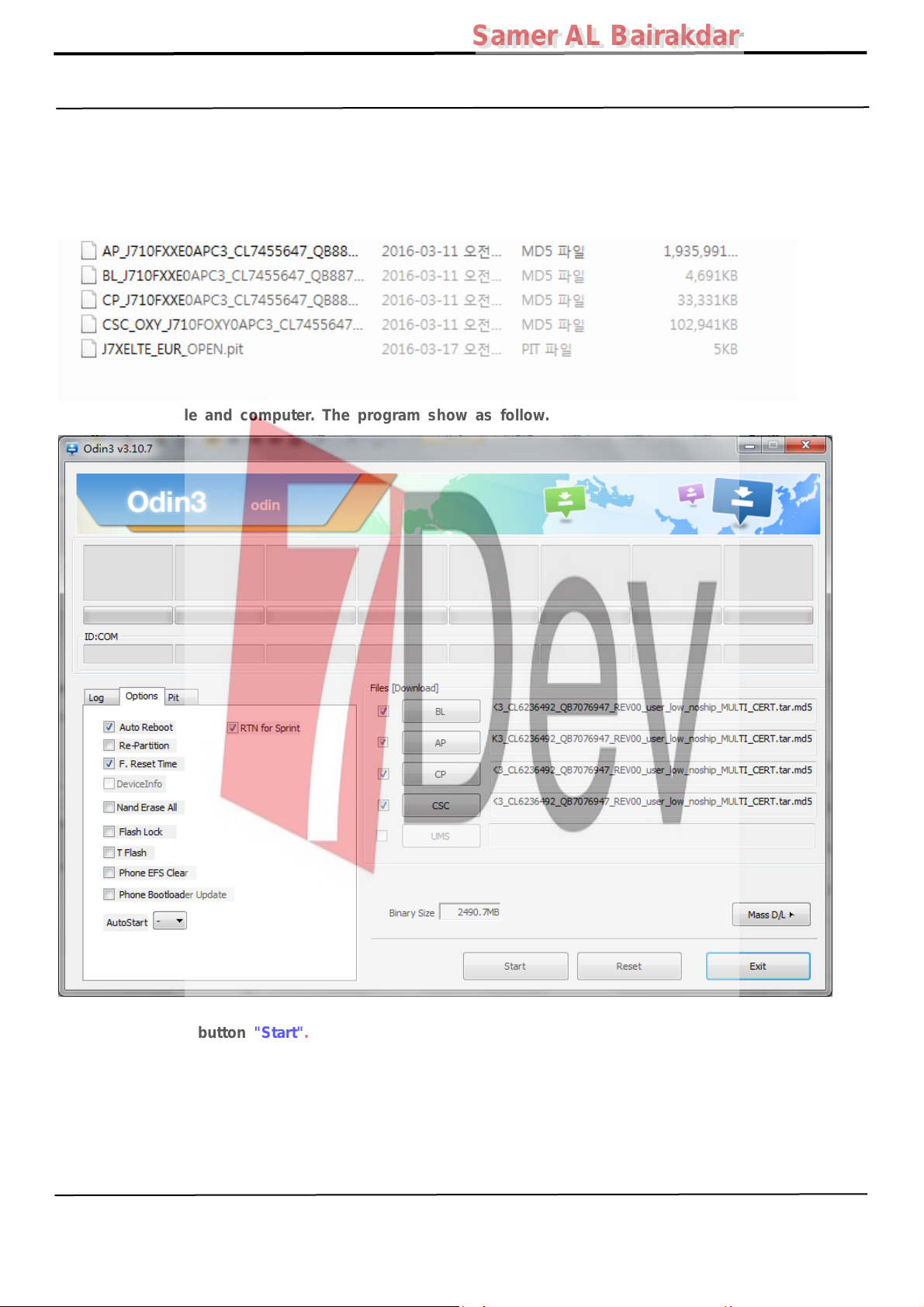
7) Slect the file as above:
– AP_XXXX.tar.md5
– BL_XXXX.tar.md5
– CP_XXXX.tar.md5
– CSC_XXXX.tar.md5
8) Connect mobile and computer. The program show as follow.
9) Now press the button "Start".
10) Now it's time to take a rest and finish the downloading.
11) After finished downloading of phone binary, the mobile phone will restart automatically.
Confidential and proprietary-the contents in this service guide subject to change without prior notice
Distribution, transmission, or infringement of any content or data from this document without Samsung’s written authorization is strictly prohibited.
Page 12
Samer AL Bairakdar
Samer AL Bairakdar
6. Level 1 Repair
12) Once the device boots up, you can check the version of the binary file or name
by pressing the following code in sequence;
*#1234#
You can perform Factory Reset by Settings → Accounts → Backup and reset
Caution. Never disconnect during the S/W downloading.
※
6-2 IMEI writing
6-2-1 Preparation
- New IMEI writing Program has been released.
- Supported Model : Models which CAB files are uploaded on HHPsvc INI File
category, instead of ini file.
- Refer to below IMEI writing procedure.
- H/W
Confidential and proprietary-the contents in this service guide subject to change without prior notice
Distribution, transmission, or infringement of any content or data from this document without Samsung’s written authorization is strictly prohibited.
Page 13
r
r
6. Level 1 Repair
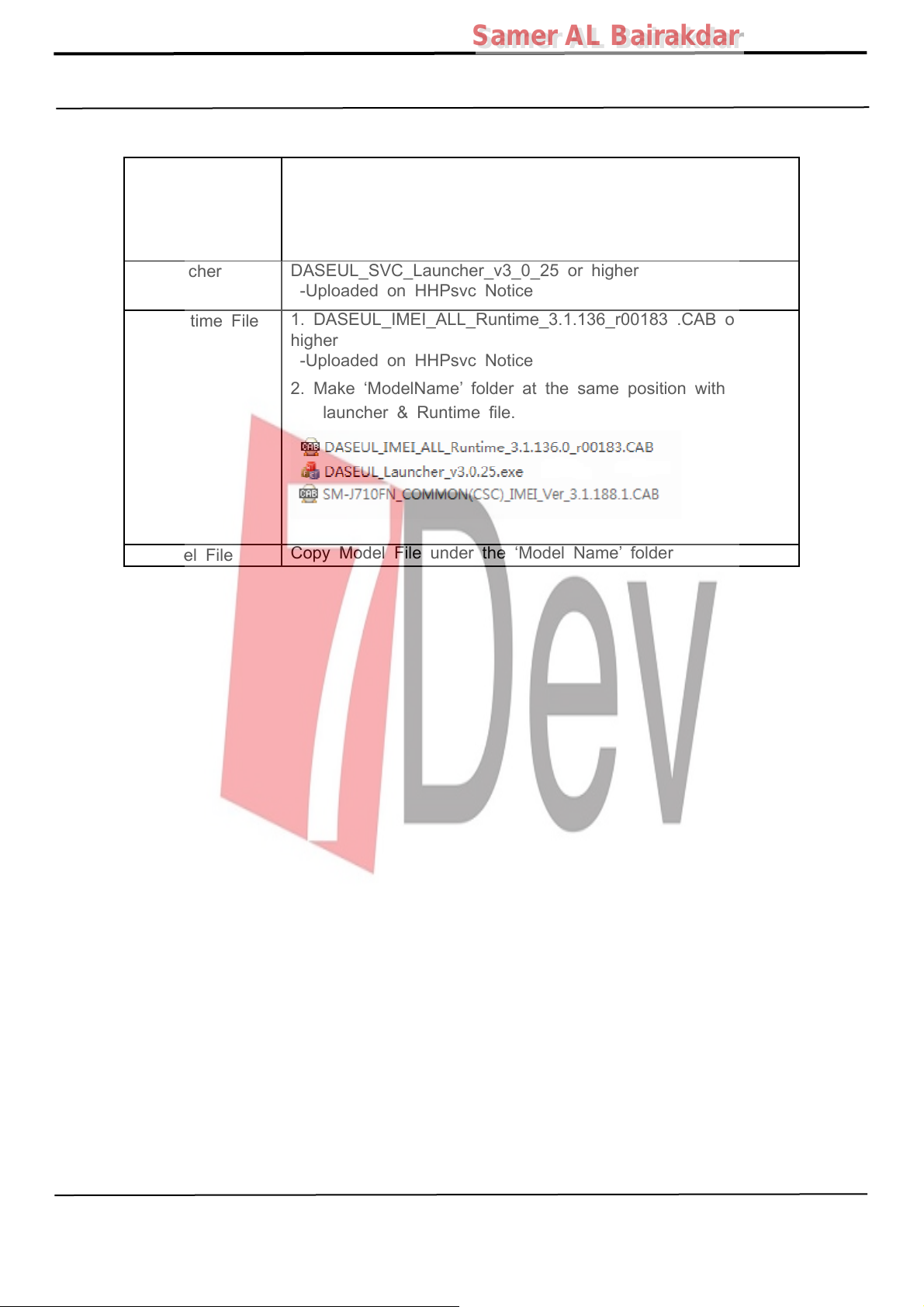
- S/W
① Library Install
Samer AL Bairakdar
Samer AL Bairakdar
To use Daseul, library files should be installed.
Refer to SVC Bulletin
“(11-82) Daseul (New IMEI writing Program) Library Install
guide_rev1.0”
②Launcher
③ Runtime File
④Model File
DASEUL_SVC_Launcher_v3_0_25 orhighe
-Uploaded on HHPsvc Notice
1. DASEUL_IMEI_ALL_Runtime_3.1.136_r00183 .CAB or
higher
-Uploaded on HHPsvc Notice
2. Make ‘ModelName’ folder at the same position with
launcher & Runtime file.
Copy Model File underthe ‘Model Name’ folde
Confidential and proprietary-the contents in this service guide subject to change without prior notice
Distribution, transmission, or infringement of any content or data from this document without Samsung’s written authorization is strictly prohibited.
Page 14
6. Level 1 Repair
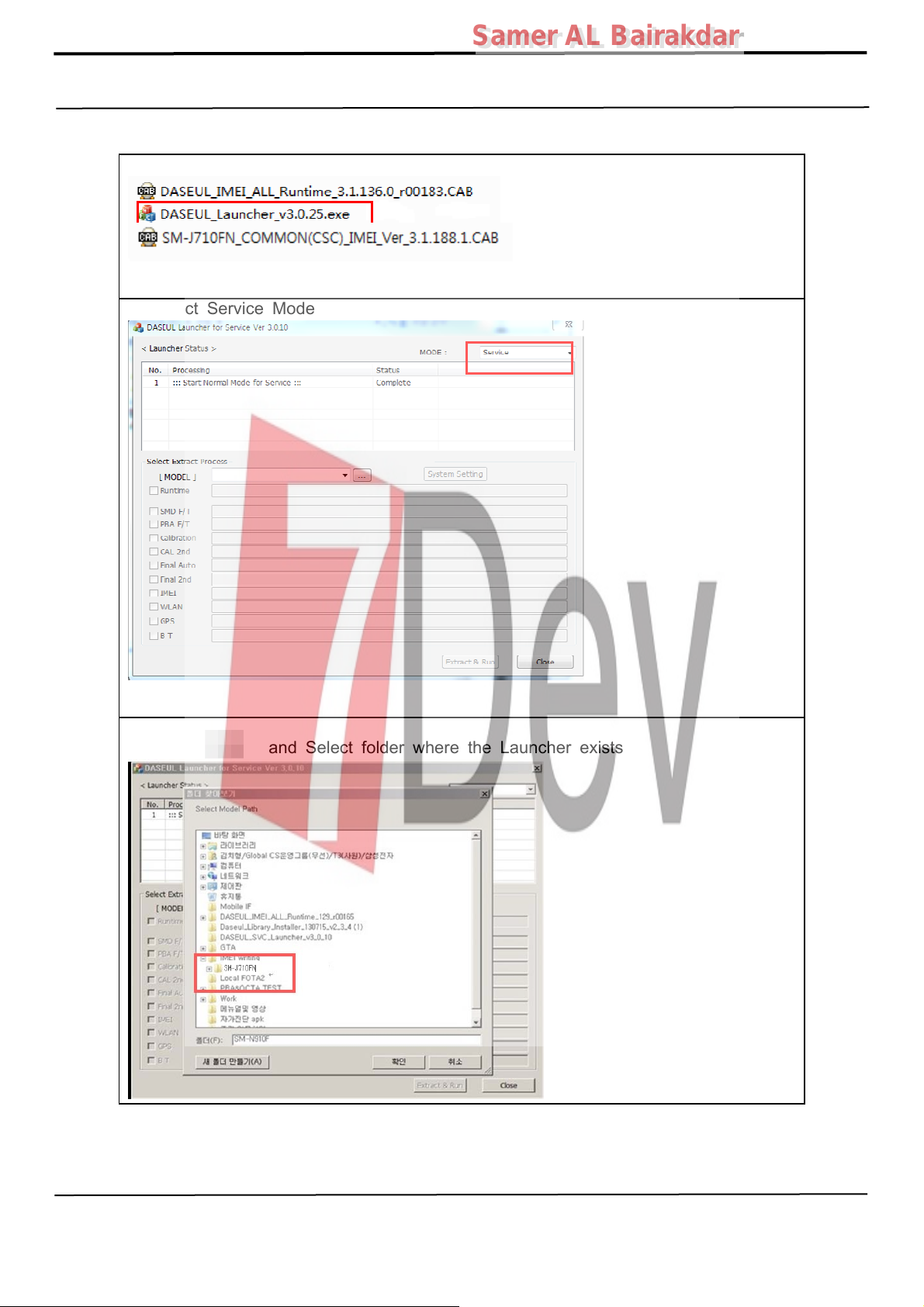
6-2-2 IMEI writing Process
Samer AL Bairakdar
Samer AL Bairakdar
1. Run DASEUL_SVC_Launcher_v3_0_25
2. Select Service Mode
3. Click and Select folder where the Launcher exists
Confidential and proprietary-the contents in this service guide subject to change without prior notice
Distribution, transmission, or infringement of any content or data from this document without Samsung’s written authorization is strictly prohibited.
Page 15
6. Level 1 Repair
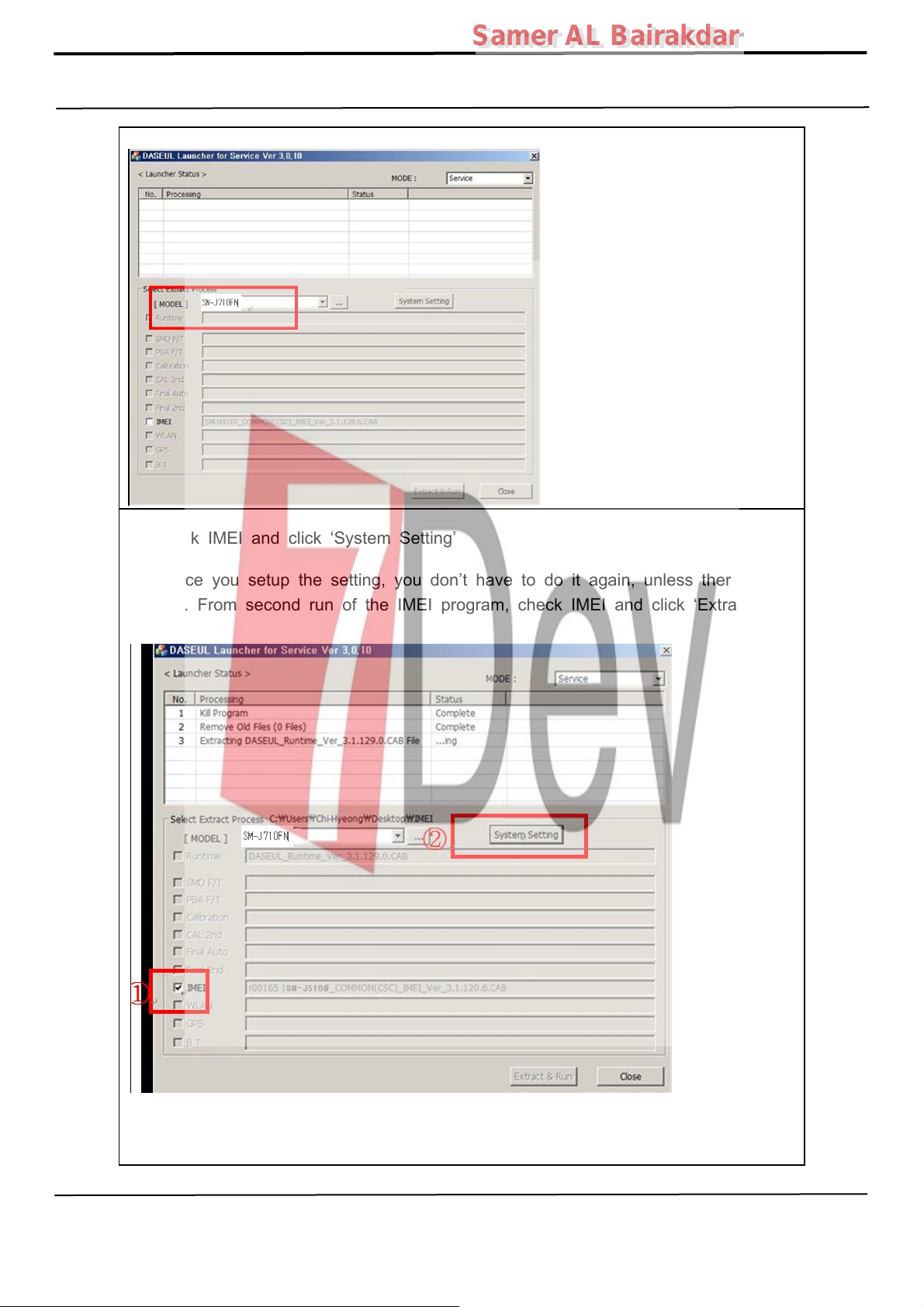
4. Select Model
Samer AL Bairakdar
Samer AL Bairakdar
5. Check IMEI and click ‘System Setting’
※Once you setup the setting, you don’t have to do it again, unless there is
change. From second run of the IMEI program, check IMEI and click ‘Extract &
Run’.
Confidential and proprietary-the contents in this service guide subject to change without prior notice
Distribution, transmission, or infringement of any content or data from this document without Samsung’s written authorization is strictly prohibited.
Page 16
6. Level 1 Repair
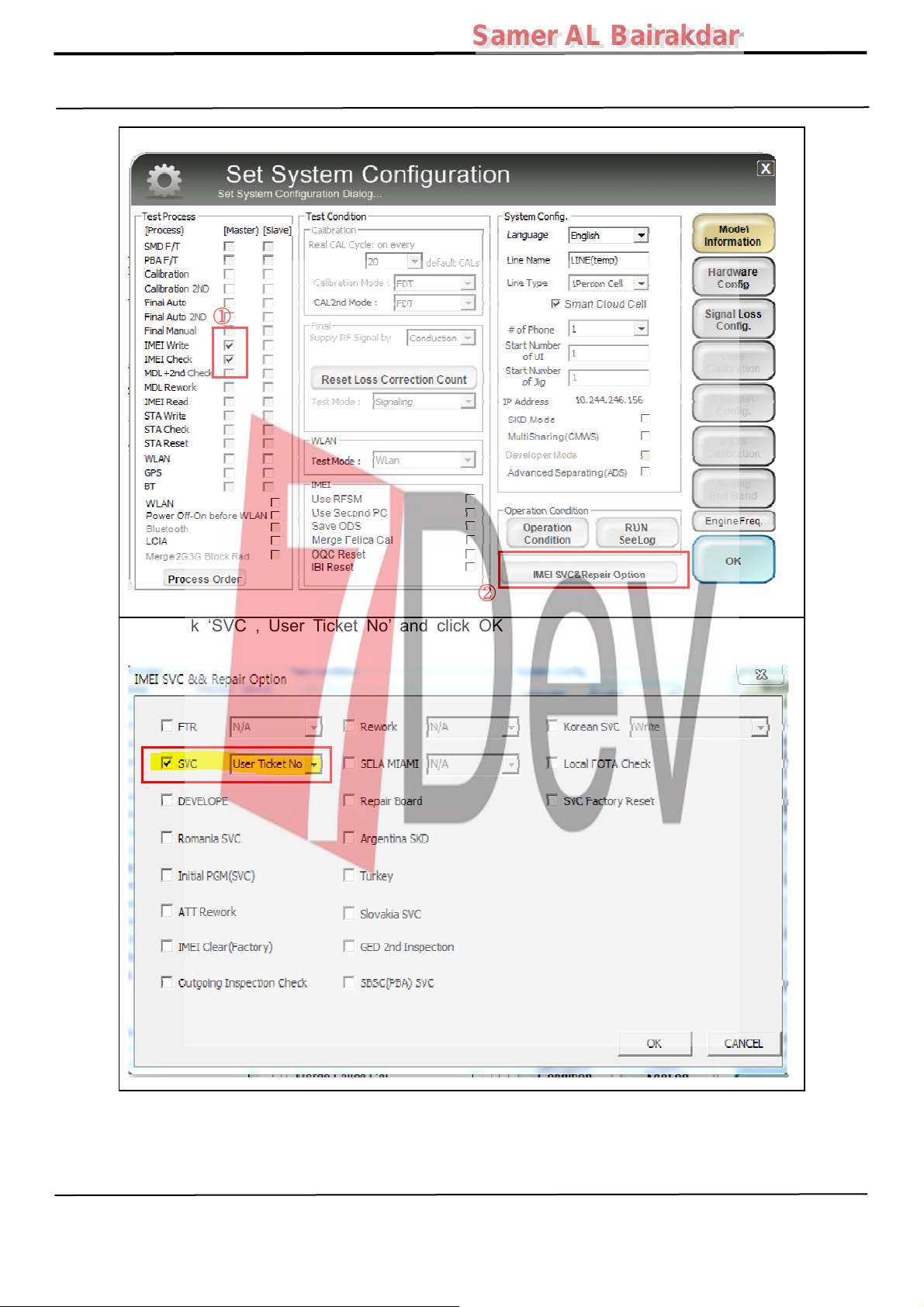
6. Check ‘IMEI Write / IMEI Check’, and click ‘IMEI SVC & Repair Option’
①
Samer AL Bairakdar
Samer AL Bairakdar
②
7. Check ‘SVC , User Ticket No’ and click OK
Confidential and proprietary-the contents in this service guide subject to change without prior notice
Distribution, transmission, or infringement of any content or data from this document without Samsung’s written authorization is strictly prohibited.
Page 17
6. Level 1 Repair
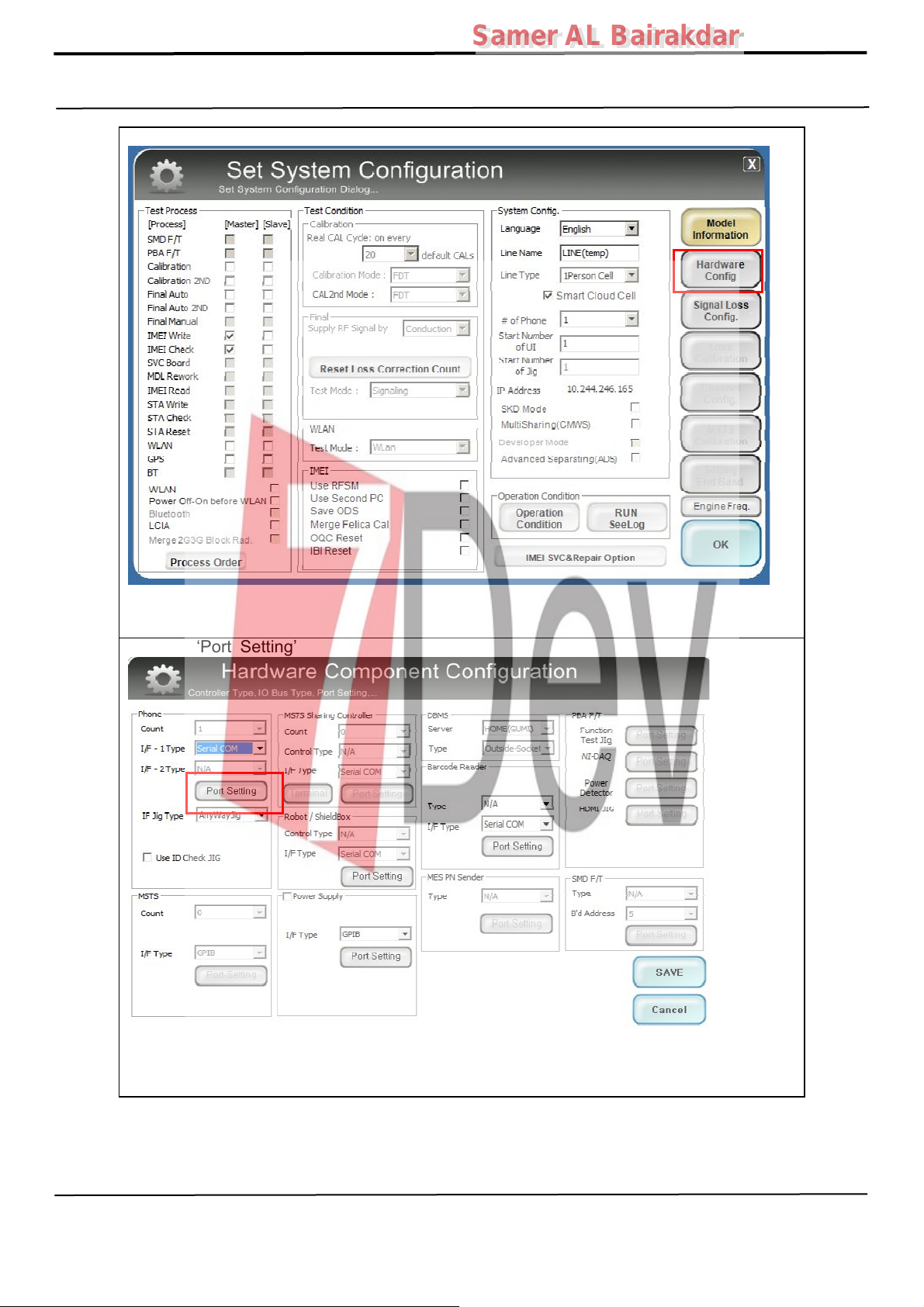
8. Click ‘Hardware Config’
Samer AL Bairakdar
Samer AL Bairakdar
9. Click ‘Port Setting’
Confidential and proprietary-the contents in this service guide subject to change without prior notice
Distribution, transmission, or infringement of any content or data from this document without Samsung’s written authorization is strictly prohibited.
Page 18
6. Level 1 Repair
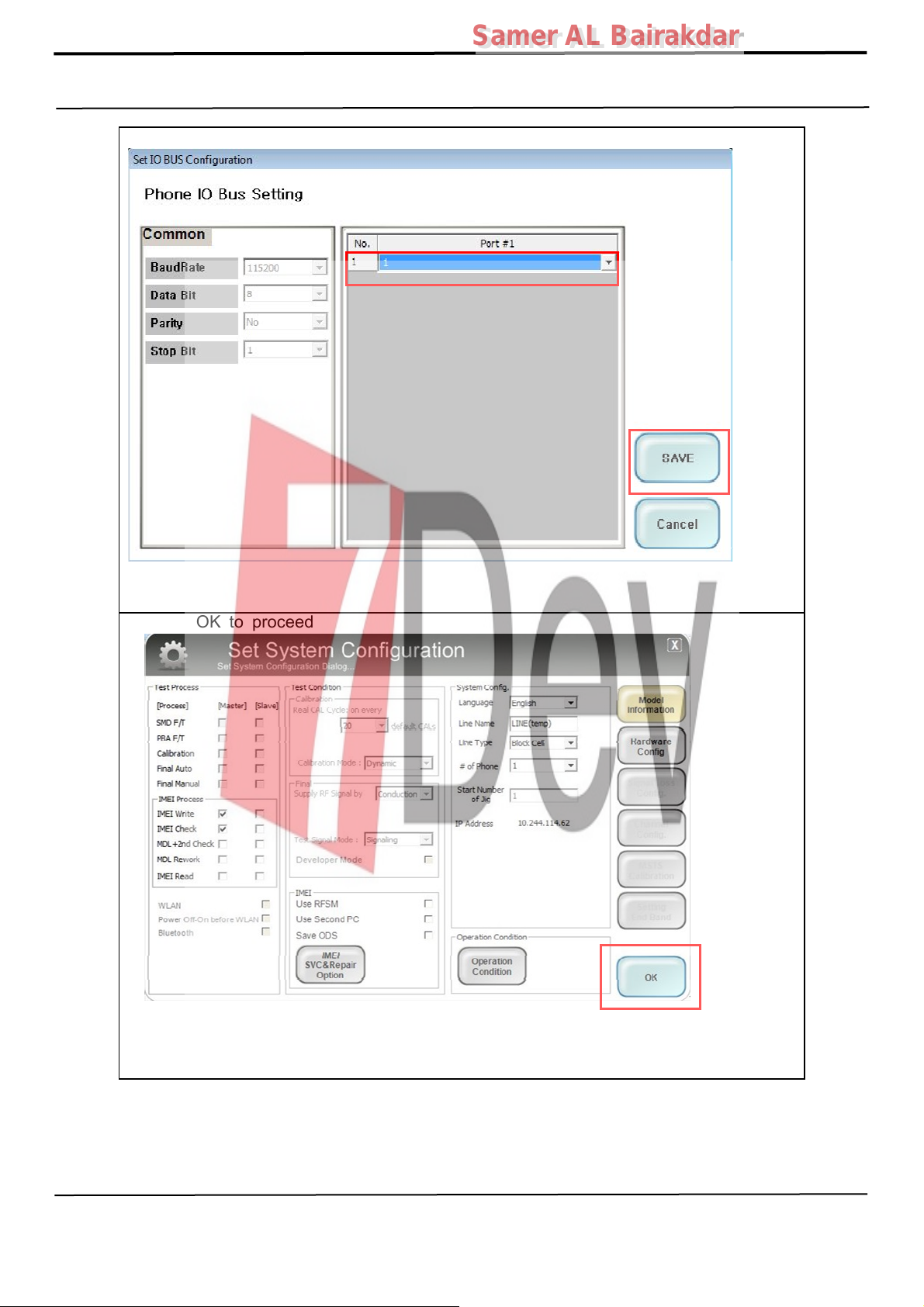
10. Select Port Number and SAVE
Samer AL Bairakdar
Samer AL Bairakdar
11.Click OK to proceed
Confidential and proprietary-the contents in this service guide subject to change without prior notice
Distribution, transmission, or infringement of any content or data from this document without Samsung’s written authorization is strictly prohibited.
Page 19
6. Level 1 Repair
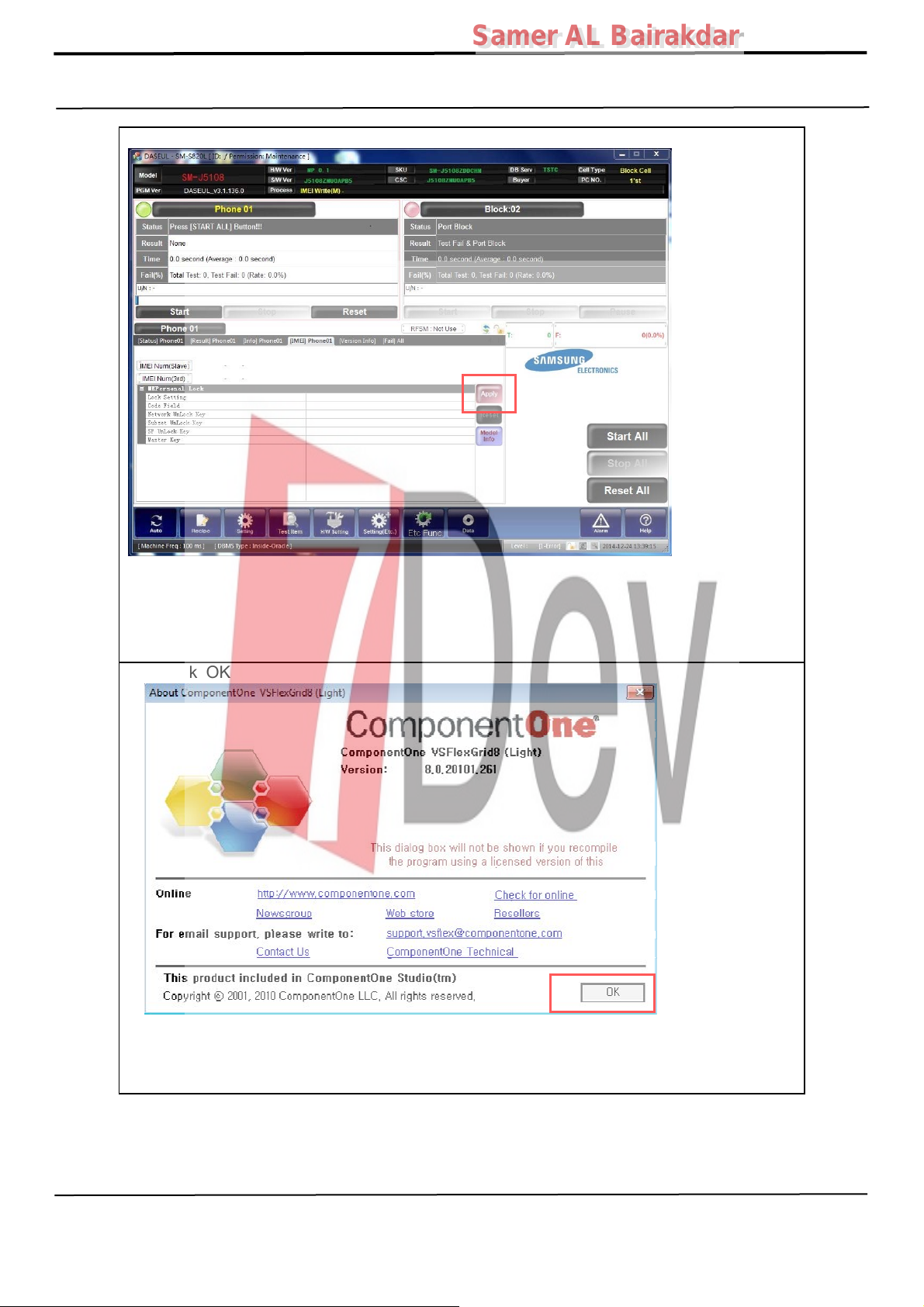
12. Click Model Info and OK when pop-up shows
Samer AL Bairakdar
Samer AL Bairakdar
13. Click OK
Confidential and proprietary-the contents in this service guide subject to change without prior notice
Distribution, transmission, or infringement of any content or data from this document without Samsung’s written authorization is strictly prohibited.
Page 20
6. Level 1 Repair
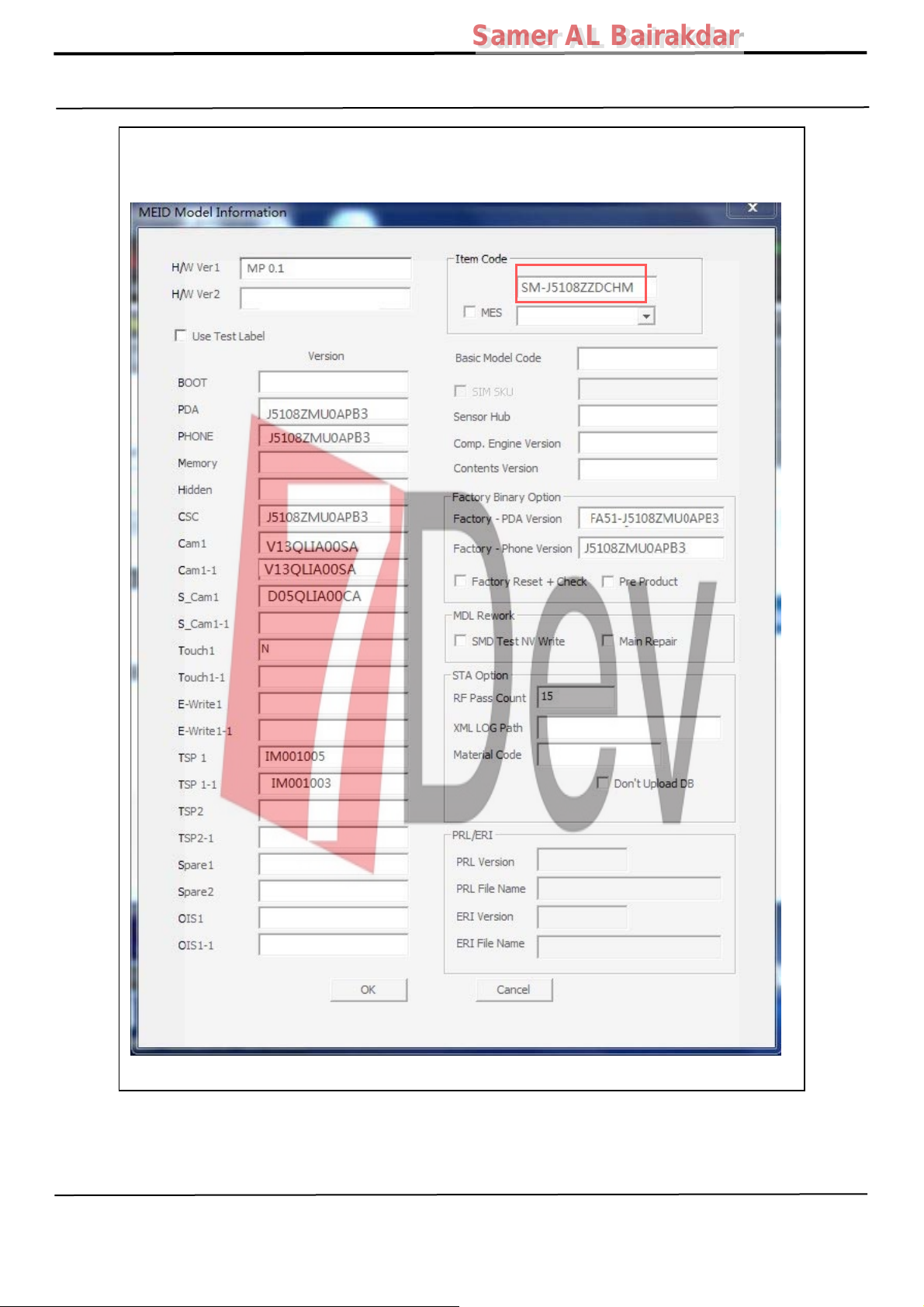
14. Input SKU_CODE, then click OK button.
※ Refer to HHPsvc→IMEI Review to check SKU Code and buyer
Samer AL Bairakdar
Samer AL Bairakdar
Confidential and proprietary-the contents in this service guide subject to change without prior notice
Distribution, transmission, or infringement of any content or data from this document without Samsung’s written authorization is strictly prohibited.
Page 21
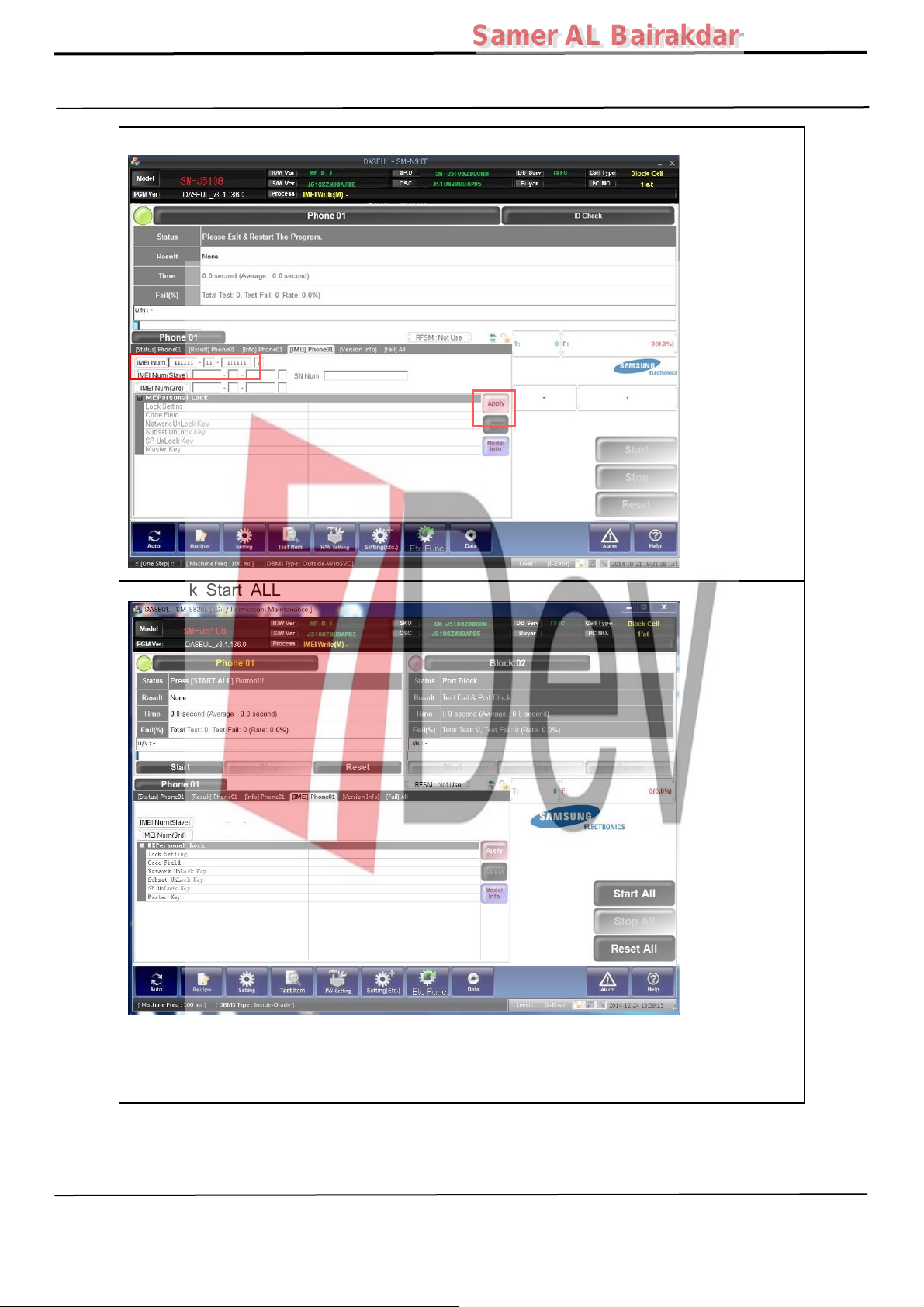
6. Level 1 Repair
15. Input IMEI Number and clickApply
Samer AL Bairakdar
Samer AL Bairakdar
16. Click Start ALL
Confidential and proprietary-the contents in this service guide subject to change without prior notice
Distribution, transmission, or infringement of any content or data from this document without Samsung’s written authorization is strictly prohibited.
Page 22
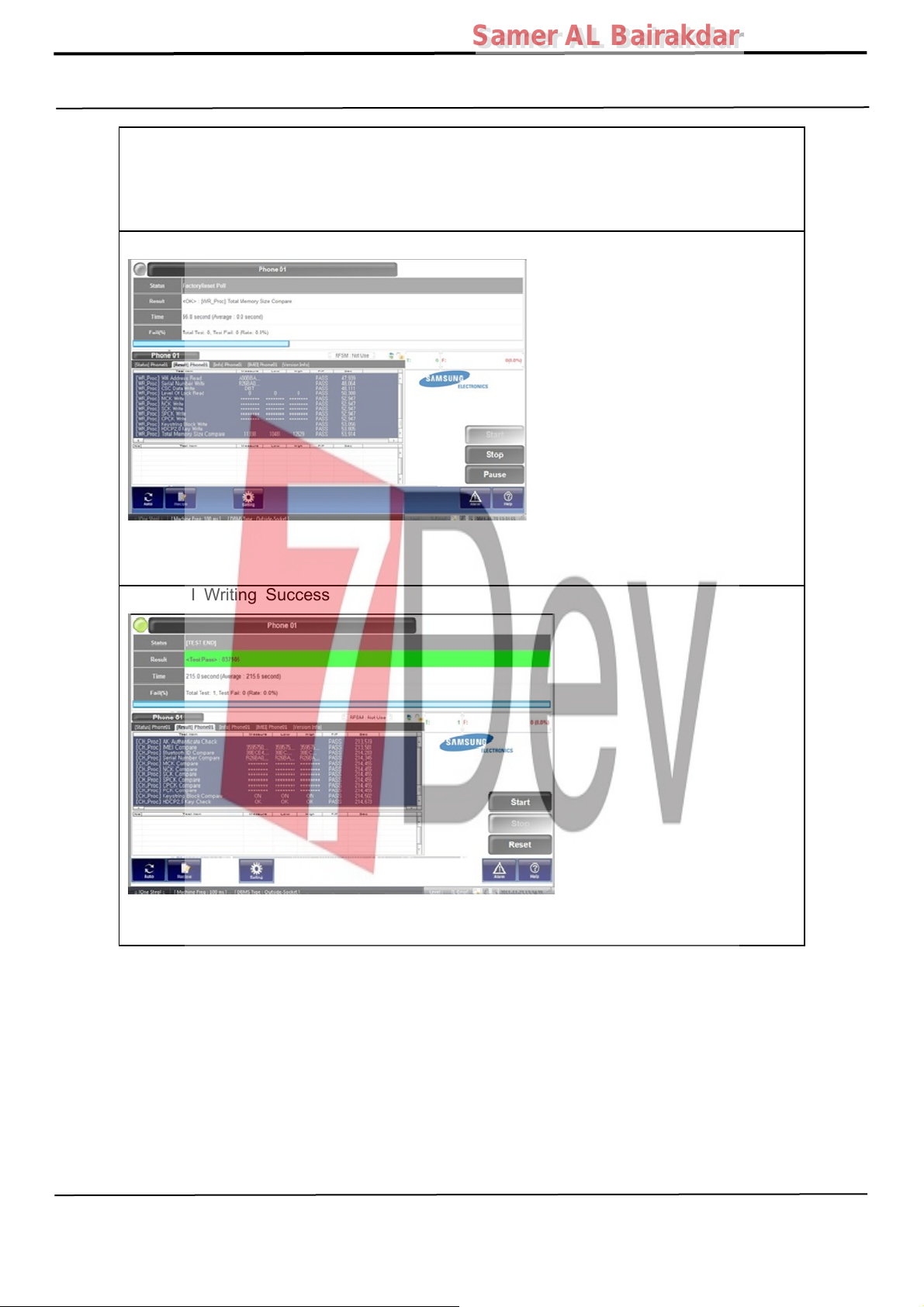
6. Level 1 Repair
17. Connect the phone to Anyway JIG
※ When you connect the phone, the phone should be turned off.
After connecting the phone, the phone will be booted automatically.
Samer AL Bairakdar
Samer AL Bairakdar
18. IMEI Writing Proceeding
19. IMEI Writing Success
Confidential and proprietary-the contents in this service guide subject to change without prior notice
Distribution, transmission, or infringement of any content or data from this document without Samsung’s written authorization is strictly prohibited.
Page 23
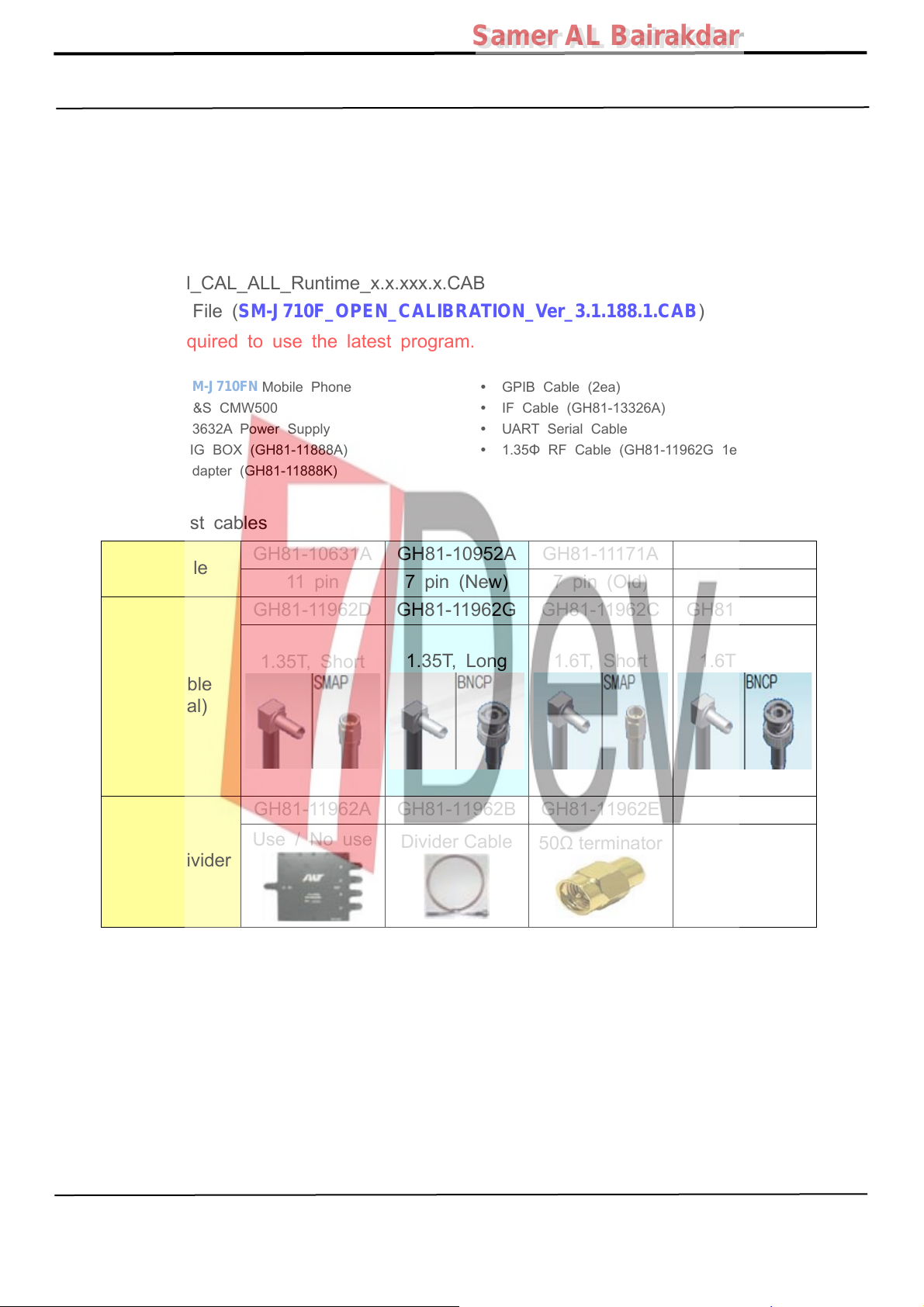
6. Level 1 Repair
6-3. RF Calibration
6-3-1. Required items in order to calibrate RF
Installation program: RF Calibration Program
Samer AL Bairakdar
Samer AL Bairakdar
- Daseul_Launcher_vx.x.xx.exe
- Daseul_CAL_ALL_Runtime_x.x.xxx.x.CAB
- Model File (
SM-J710F_OPEN_CALIBRATION_Ver_3.1.188.1.CAB
※ It is required to use the latest program.
SM-J710FN
R&S CMW500 IF Cable (GH81-13326A)
E3632A PowerSupply
JIG BOX (GH81-11888A)
Adapter (GH81-11888K)
Mobile Phone
Table of test cables
GH81-10631A GH81-10952A GH81-11171A
IF Cable
11 pin
7 pin (New)
GH81-11962D GH81-11962G GH81-11962C GH81-11962F
1.35T, Short
1.35T, Long
RF Cable
(Manual)
)
GPIB Cable (2ea)
UART Serial Cable
1.35Φ RF Cable (GH81-11962G 1ea)
7 pin (Old)
1.6T, Short
1.6T, Long
GH81-11962A GH81-11962B GH81-11962E
4 Port Divider
Use / No use
Divider Cable
50Ω terminator
Confidential and proprietary-the contents in this service guide subject to change without prior notice
Distribution, transmission, or infringement of any content or data from this document without Samsung’s written authorization is strictly prohibited.
Page 24

6. Level 1 Repair
Samer AL Bairakdar
Samer AL Bairakdar
Confidential and proprietary-the contents in this service guide subject to change without prior notice
Distribution, transmission, or infringement of any content or data from this document without Samsung’s written authorization is strictly prohibited.
Page 25
Samer AL Bairakdar
Samer AL Bairakdar
6. Level 1 Repair
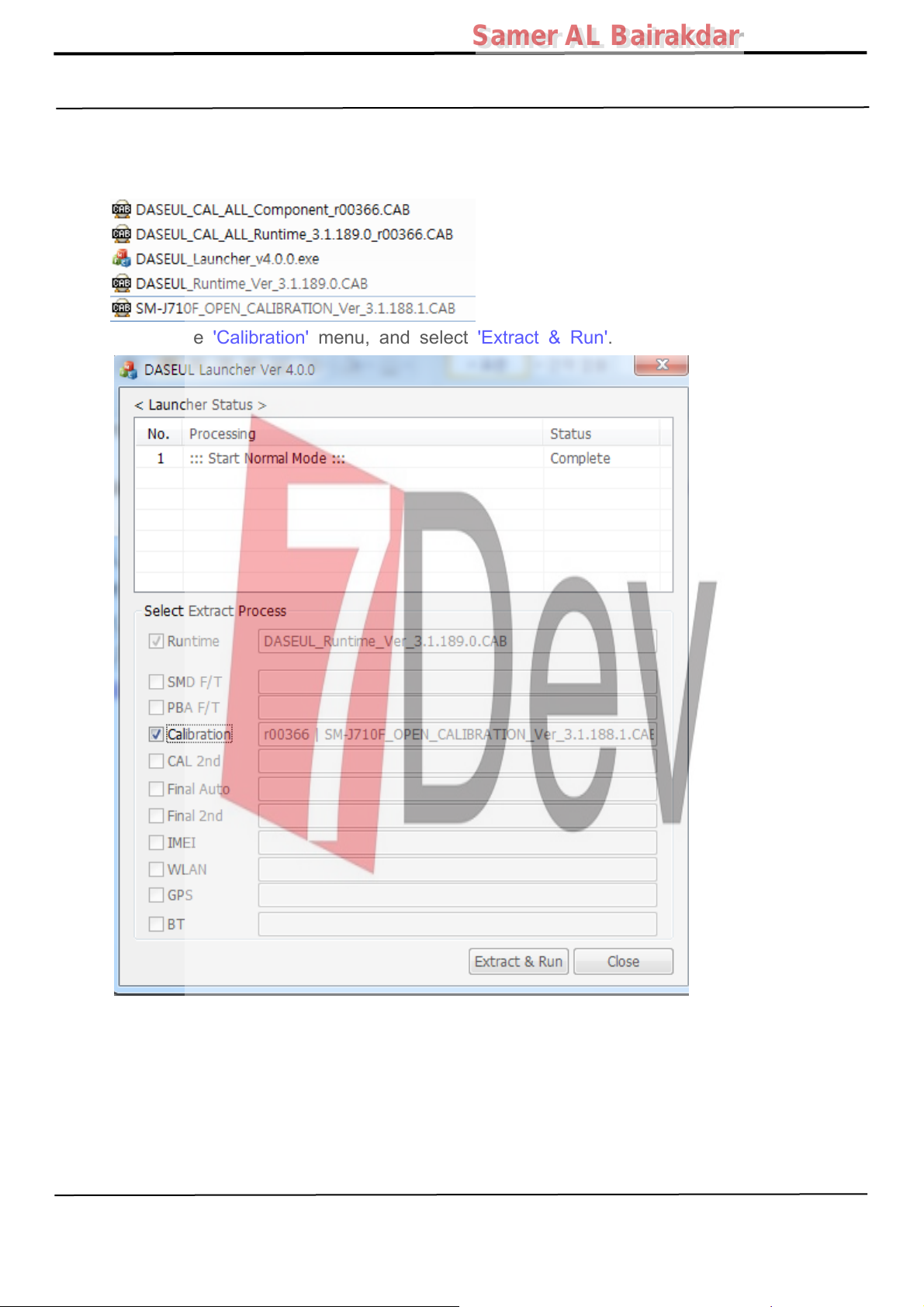
6-3-2. RF Calibration Program
1. Run the RF Calibration Program Launcher, 'DASEUL_Launcher_vx.x.xx.exe'.
2. Check the 'Calibration' menu, and select 'Extract & Run'.
Confidential and proprietary-the contents in this service guide subject to change without prior notice
Distribution, transmission, or infringement of any content or data from this document without Samsung’s written authorization is strictly prohibited.
Page 26
Samer AL Bairakdar
Samer AL Bairakdar
6. Level 1 Repair
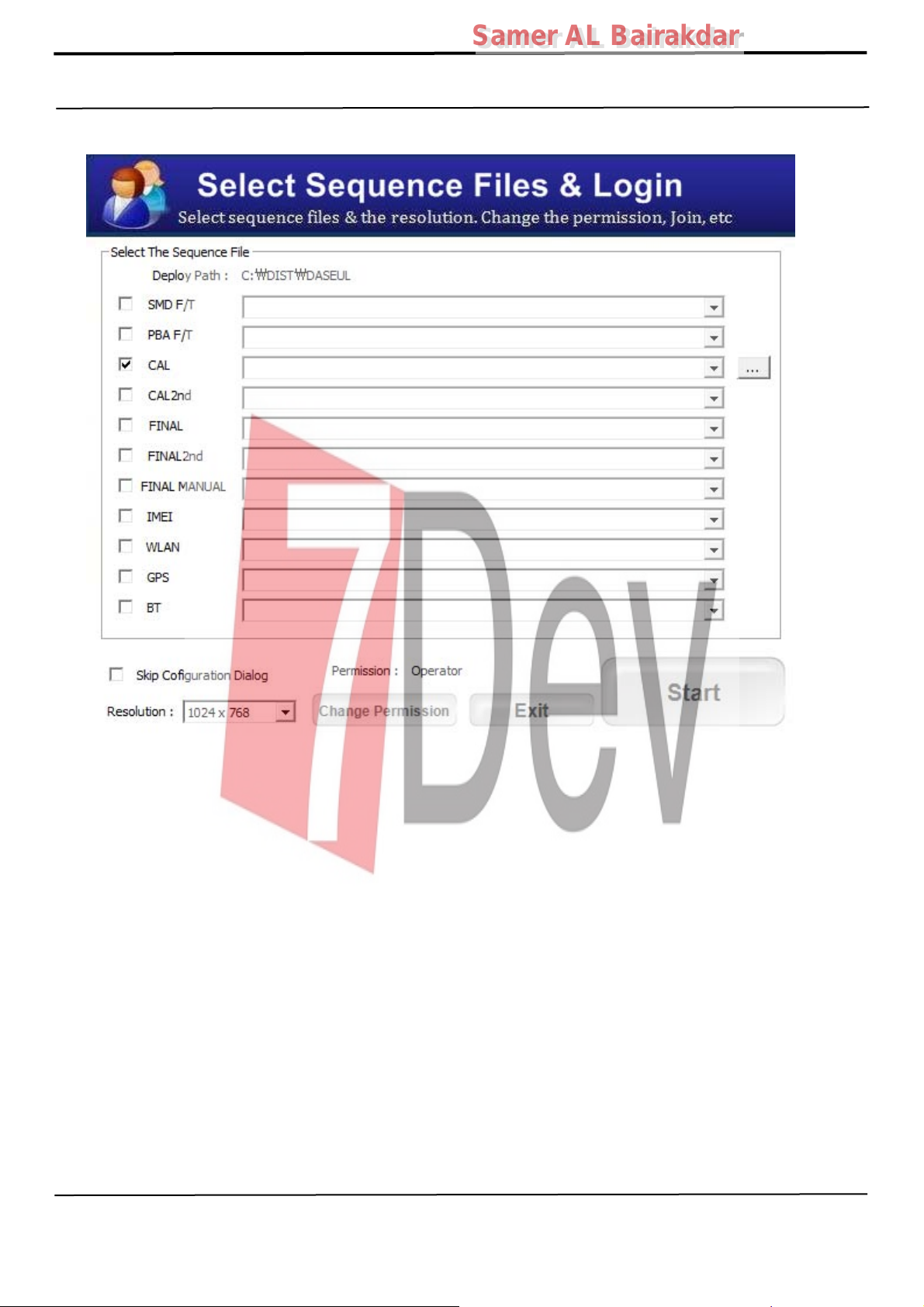
3. Check the 'CAL' and, then select 'Start' button.
Confidential and proprietary-the contents in this service guide subject to change without prior notice
Distribution, transmission, or infringement of any content or data from this document without Samsung’s written authorization is strictly prohibited.
Page 27
Samer AL Bairakdar
Samer AL Bairakdar
6. Level 1 Repair
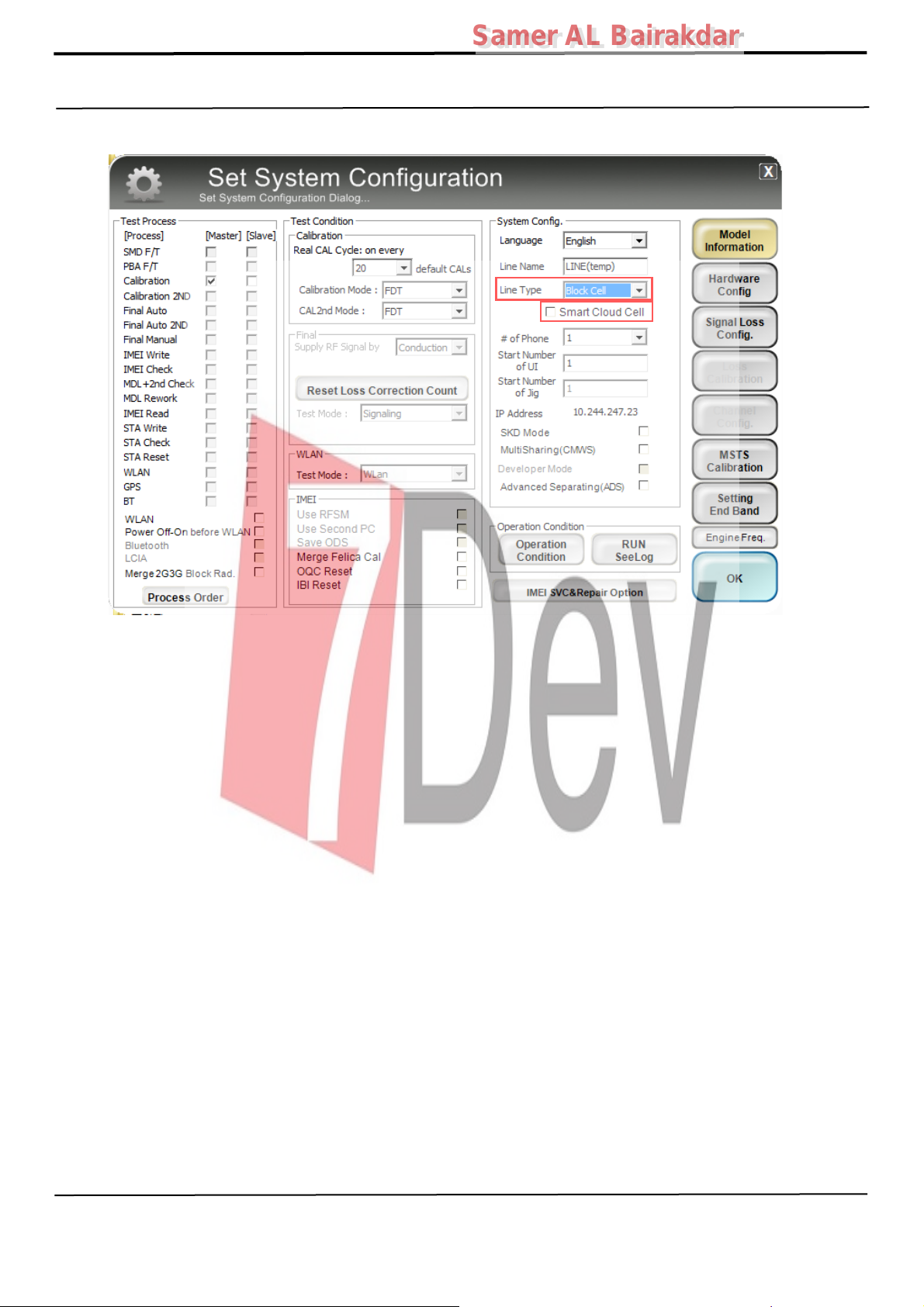
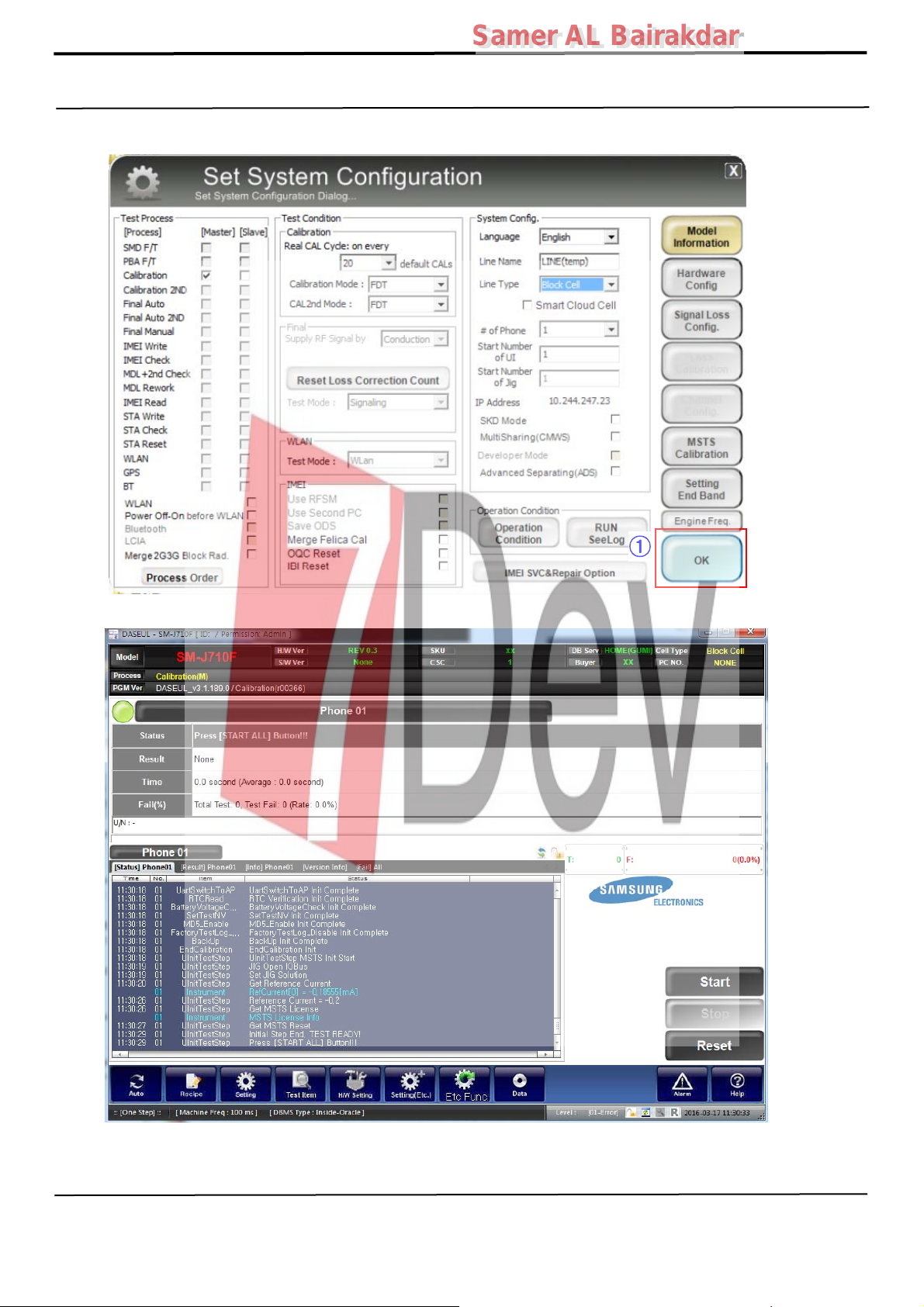
4. Change the Line Type to 'Block Cell' and disable 'Smart Cloud Cell'.
Confidential and proprietary-the contents in this service guide subject to change without prior notice
Distribution, transmission, or infringement of any content or data from this document without Samsung’s written authorization is strictly prohibited.
Page 28
Samer AL Bairakdar
Samer AL Bairakdar
6. Level 1 Repair
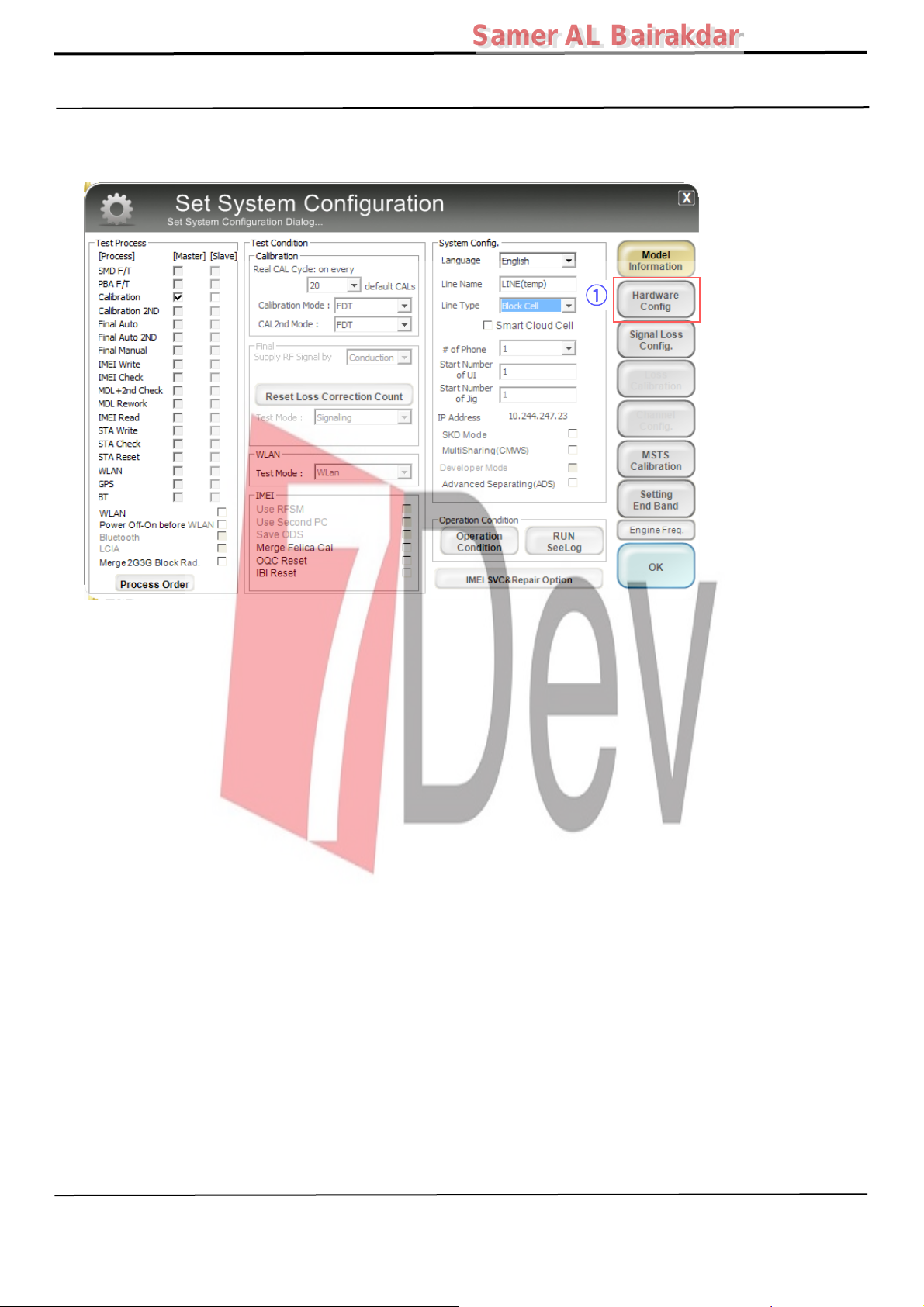
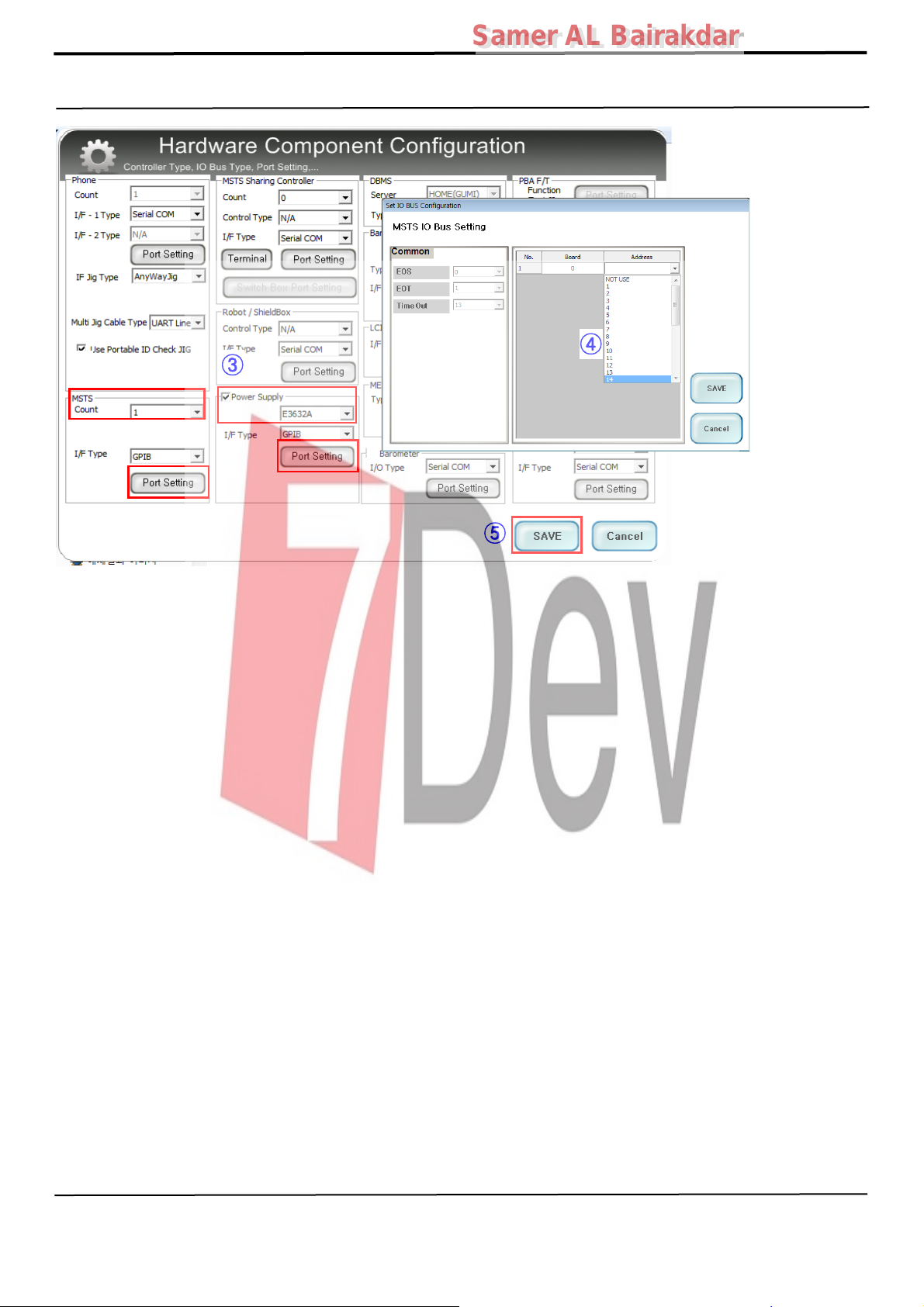
5. Set the GPIB address of MSTS(CMW500) and Power Supply(E3632A) to enter
'Hardware Config' and 'Save'.
(Check the GPIB address of equipments in advance)
①
Confidential and proprietary-the contents in this service guide subject to change without prior notice
Distribution, transmission, or infringement of any content or data from this document without Samsung’s written authorization is strictly prohibited.
Page 29
6. Level 1 Repair
②
③
Samer AL Bairakdar
Samer AL Bairakdar
④
⑤
Confidential and proprietary-the contents in this service guide subject to change without prior notice
Distribution, transmission, or infringement of any content or data from this document without Samsung’s written authorization is strictly prohibited.
Page 30
Samer AL Bairakdar
Samer AL Bairakdar
6. Level 1 Repair
6. Press 'OK' to start RF Calibration after completing all settings.
①
Confidential and proprietary-the contents in this service guide subject to change without prior notice
Distribution, transmission, or infringement of any content or data from this document without Samsung’s written authorization is strictly prohibited.
 Loading...