

Page 1

RuggedSwitch
®
RSG2300 Family
32-Port Managed Ethernet Switch with
4 Modular Gigabit Uplink Ports
RuggedCom Inc. I 300 Applewood Crescent, Concord, Ontario, Canada L4K 5C7
Tel: +1 905 856 5288 I Fax: +1 905 856 1995 I Toll Free: 1 888 264 0006
Installation Guide
June 2, 2011
www.ruggedcom.com
Page 2

Copyright
COPYRIGHT © 2010 RuggedCom Inc. ALL RIGHTS RESERVED
Dissemination or reproduction of this document, or evaluation and communication of its
contents, is not authorized except where expressly permitted. Violations are liable for
damages. All rights reserved, particularly for the purposes of patent application or
trademark registration.
This document contains proprietary information, which is protected by copyright. All
rights are reserved. No part of this document may be photocopied, reproduced or
translated to another language without the prior written consent of RuggedCom Inc.
Disclaimer of liability
We have checked the contents of this manual against the hardware and software
described. However, deviations from the description cannot be completely ruled out.
RuggedCom shall not be liable for any errors or omissions contained herein or for
consequential damages in connection with the furnishing, performance, or use of this
material.
The information given in this document is reviewed regularly and any necessary
corrections will be included in subsequent editions. We appreciate any suggested
improvements. We reserve the right to make technical improvements without notice.
Registered Trademarks
RuggedRated™, ROS™ and eRSTP™ are trademarks of RuggedCom Inc.
RuggedSwitch
manual might be trademarks whose use by third parties for their own purposes would
infringe the rights of the owner.
®
is a registered trademark of RuggedCom Inc. Other designations in this
Contacting RuggedCom
Corporate Headquarters US Headquarters Europe Headquarters
RuggedCom Inc.
300 Applewood Crescent
Concord, Ontario
Canada, L4K 5C7
Tel: +1 905 856 5288
Fax: +1 905 856 1995
Toll-free: 1 888 264 0006
RuggedCom
1930 Harrison St., Suite 209
Hollywood, Florida
USA, 33020
Tel: +1 954 922 7938 ext. 103
Fax: +1 954 922 7984
Toll-free: 1 888 264 0006
Email: RuggedSales@RuggedCom.com
RuggedCom
Unit 41, Aztec Centre,
Aztec West, Almondsbury, Bristol
United Kingdom BS32 4TD
Tel: +44 1454 203 404
Fax: +44 1454 203 403
Technical Support
Toll Free (North America): 1 866 922 7975
International: +1 905 856 5288
Email: Support@RuggedCom.com
Web: www.RuggedCom.com
RuggedCom® RuggedSwitch RSG2300 Installation Guide Rev108
2
Page 3

Federal Communications Commission Radio
Frequency Interference Statement
This equipment has been tested and found to comply with the limits for a Class A digital
device pursuant to Part 15 of the FCC Rules. These limits are designed to provide
reasonable protection against harmful interference when the equipment is operated in a
commercial environment. This equipment generates, uses and can radiate radio
frequency energy and, if not installed and used in accordance with the instruction
manual, may cause harmful interference to radio communications. Operation of this
equipment in a residential area is likely to cause harmful interference in which case the
user will be required to correct the interference on his own expense.
CAUTION
This product contains a laser system and is classified as a “CLASS 1 LASER PRODUCT”
CAUTION
Use of controls or adjustments or performance of procedures other than those specified
herein may result in hazardous radiation exposure. This product contains no user-serviceable
parts. Attempted service by unauthorized personnel shall render all warranties null and void.
Changes or modifications not expressly approved by RuggedCom Inc. could void the user’s
authority to operate the equipment.
Should this d
evice require service see the “Warranty and Service” section of this guide.
This product should be installed in a restricted access location where access can only be
gained by service personnel or users who have been instructed about the reasons for the
restrictions applied to the location and about any precautions that shall be taken; and access
is through the use of a tool or lock and key, or other means of security, and is controlled by
the authority responsible for the location.
RuggedCom® RuggedSwitch RSG2300 Installation Guide Rev108
IMPORTANT
3
Page 4

Table of Contents
Table of Contents
Copyright........................................................................................................................... 2
Federal Communications Commission Radio Frequency Interference Statement ...........3
Table of Contents.............................................................................................................. 4
Table of Figures ................................................................................................................5
Table of Tables .................................................................................................................6
1 Product Overview...................................................................................................... 7
1.1 Functional Overview.......................................................................................... 7
1.2 Feature Highlights ............................................................................................. 7
1.3 Mounting Flexibility.......................................................................................... 10
1.4 Ethernet Panel Description.............................................................................. 11
1.4.1 Fiber Optic Transceiver Orientation and Connection ..............................12
1.5 Display Panel Description ...............................................................................14
2 Installation ............................................................................................................... 16
2.1 Rack Mounting ................................................................................................16
2.2 Panel and DIN Rail Mounting .......................................................................... 17
2.3 Power Supply Wiring and Grounding .............................................................. 18
2.3.1 AC Power Supply Wiring Examples (RSG2300) ..................................... 20
2.3.2 DC Power Supply Wiring Examples (RSG2300 and RSG2300P) ........... 21
2.3.3 AC and DC Power Supply Wiring Example (RSG2300 and RSG2300P) 22
2.4 Dielectric Strength (HIPOT) Testing................................................................ 23
2.5 Failsafe Alarm Relay Wiring and Specifications.............................................. 24
2.6 Console Port Wiring ........................................................................................25
2.7 Ethernet Ports .................................................................................................26
2.7.1 RJ45 Twisted-Pair Data Ports ................................................................. 26
2.7.2 RJ45 Twisted-Pair PoE Ports ..................................................................27
2.7.3 Gigabit Ethernet 1000Base-TX Cabling Recommendations ...................27
2.7.4 Transient Suppression............................................................................. 28
2.8 Pluggable optics – Installation, removal, and precautions ..............................29
2.8.1 Module Insertion – GBIC and SFP .......................................................... 29
2.8.2 GBIC Module Removal............................................................................ 30
2.8.3 SFP Module Removal.............................................................................. 30
3 Technical Specifications.......................................................................................... 31
3.1 Power Supply Specifications ........................................................................... 31
3.2 Failsafe Relay Specifications ..........................................................................31
3.3 Networking Standards Supported ...................................................................32
3.4 Copper Ethernet Port Specifications ............................................................... 32
3.5 Fiber Ethernet Port Specifications................................................................... 33
3.5.1 10FL Ethernet Optical Specifications ......................................................33
3.5.2 Fast Ethernet (10/100Mbps) Optical Specifications ................................33
3.5.3 Gigabit Ethernet (1000Mbps) Optical Specifications ...............................34
3.6 Operating Environment ...................................................................................35
3.7 Mechanical Specifications ............................................................................... 36
4 Type Test Specifications ......................................................................................... 37
4.1.1 IEEE 1613 (C37.90.x) EMI Immunity Type Tests.................................... 37
4.1.2 IEC 61850-3 EMI Type Tests .................................................................. 37
4.1.3 Environmental Type Tests....................................................................... 38
5 Agency Approvals ...................................................................................................39
6 Warranty.................................................................................................................. 39
RuggedCom® RuggedSwitch RSG2300 Installation Guide Rev108
4
Page 5

Table of Figures
Table of Figures
Figure 1: 19" Rack Front Mount (connectors at front)..................................................... 10
Figure 2: 19" Rack Rear Mount (connectors at rear) ...................................................... 10
Figure 3: RSG2300 Ethernet Port Layout ....................................................................... 11
Figure 4: Ethernet Panel LEDs .......................................................................................11
Figure 5: 1000LX SFP (mini-GBIC) Module and LC connector ......................................12
Figure 6: 1000LX GBIC connector .................................................................................. 12
Figure 7: 10FL ST connector .........................................................................................13
Figure 8: 100FX MTRJ connector .................................................................................. 13
Figure 9: 1000LX LC connector ...................................................................................... 13
Figure 10: 1000LX SC connector.................................................................................... 13
Figure 11: 1000LX ST connector .................................................................................... 13
Figure 12: RSG2300 LED Display Panel ........................................................................ 14
Figure 13: RSG2000 Family 19” Rack Mount Adapters.................................................. 16
Figure 14: Rack mount adapter mounting location .........................................................16
Figure 15: RSG2300 Panel / DIN RAIL mounting diagram (connectors at top) ..............17
Figure 16: RSG2000 Series Phillips Screw Terminal Block............................................ 18
Figure 17: RSG2000 Series Phoenix Plug Terminal Block .............................................18
Figure 18: Chassis Ground Connection .......................................................................... 19
Figure 19: AC Single Power Supply Wiring Example...................................................... 20
Figure 20: AC Dual Redundant Power Supply Wiring Example...................................... 20
Figure 21: DC Power Supply Wiring Examples.............................................................. 21
Figure 22: AC and DC Power Supply Wiring Examples................................................. 22
Figure 23: Dielectric Strength (HIPOT) Testing ..............................................................23
Figure 24: Failsafe Alarm Relay Wiring........................................................................... 24
Figure 25: Console port on display board ....................................................................... 25
Figure 26: RSG2000 Series Console cable .................................................................... 25
Figure 27: RJ45 port pin configuration............................................................................ 26
Figure 28: SFP Orientation for top and bottom row ports ...............................................29
Figure 29: Locking latch location on GBIC optical modules........................................... 30
Figure 30: SFP Bail Latch Location................................................................................. 30
Figure 31: SFP Removal................................................................................................. 30
Figure 32: RSG2300 Mechanical Dimensions ................................................................ 36
RuggedCom® RuggedSwitch RSG2300 Installation Guide Rev108
5
Page 6

Table of Tables
Table of Tables
Table 1: Pluggable Fiber Transceiver Modules............................................................... 12
Table 2: Fixed Fiber Transceivers................................................................................... 13
Table 3: LED Display – Device status LED behavior definition....................................... 14
Table 4: Port Status LED behavior definition .................................................................. 15
Table 5: RSG2300 Family Power terminal block connection description........................ 19
Table 6: RS232 over RJ45 console cable pin-out........................................................... 25
Table 7: RJ45 Ethernet pin assignment.......................................................................... 26
Table 8: RJ45 PoE pin-out assignment........................................................................... 27
Table 9: Cabling categories and 1000BaseTx compliance defined. ............................... 27
Table 10: Power Supply Specifications........................................................................... 31
Table 11: PoE Power Supply Specifications................................................................... 31
RuggedCom® RuggedSwitch RSG2300 Installation Guide Rev108
6
Page 7

1 Product Overview
1.1 Functional Overview
The RuggedSwitch® RSG2300 is an industrially hardened, fully managed,
modular Ethernet switch specifically designed to operate reliably in electrically
harsh and climatically demanding utility substation and industrial environments.
The RSG2300’s superior ruggedized hardware design coupled with the
embedded Rugged Operating System (ROS™) provides improved system
reliability and advanced cyber security and networking features, making it ideally
suited for creating Ethernet networks for mission-critical, real-time, control
applications.
The RSG2300’s modular flexibility offers 1000BaseX fiber and
10/100/1000BaseTX copper port combinations. Optional front or rear mount
connectors make the RSG2300 highly versatile for any application and can
support multiple fiber connectors (SFP, GBIC, LC, SC) without loss of port
density. The RSG2300 is packaged in a rugged galvanized steel enclosure with
industrial grade DIN, panel, or 19" rack-mount mounting options.
Product Overview
The RSG2300P additionally offers 802.3af standard Power over Ethernet (PoE)
on up to 4 10/100BaseTx ports. The RSG2300P is an ideal solution to power and
connect several Ethernet devices (such as IP phones, video cameras, and
wireless access points) where AC power is not available or cost-prohibitive to
provide locally.
1.2 Feature Highlights
Ethernet Ports
24 10/100TX copper ports
Optional: up to 4 1000LX Gigabit Ethernet ports (copper and/or fiber) and up
to 8 100FX Fiber Fast Ethernet ports
Non-blocking, store and forward switching
2 port modules for tremendous flexibility
Fiber types supported include multimode, singlemode, and bidirectional
single strand
Full compliance with IEEE: 802.3, 802.3u & 802.3z
Full duplex operation and flow control (IEEE 802.3x)
Fiber optic connectors supported: ST, MTRJ, LC, SC
Pluggable Optic module support: SFP, GBIC
Long haul optics allow Gigabit distances up to 90km
Power Over Ethernet (PoE) (RSG2300P only)
Up to 4 10/100BaseTx 802.3af compliant ports
Data and power over a single Ethernet cable
Powered from the internal 48VDC source
No mid-span patch panel required
RuggedCom® RuggedSwitch RSG2300 Installation Guide Rev108
7
Page 8

Fully compatible with 802.3af powered devices
Auto-sensing ports that provide power only to PoE end devices
Power to port is turned off if cables are removed
Cyber Security Features
Multi-level user passwords
SSH/SSL encryption
MAC-based port security
Selective port enable/disable
Port-based network access control using IEEE 802.1x
VLAN support (IEEE 802.1Q) to segregate and secure network traffic
RADIUS centralized access management
SNMPv3 featuring encrypted authentication and session
RuggedRated™ for Reliability in Harsh Environments
Immunity to EMI and heavy electrical surges
o Zero-Packet-Loss™ Technology
o Meets IEEE 1613 Class 2 (electric utility substations)
o Exceeds IEC 61850-3 (electric utility substations)
o Exceeds IEEE 61800-3 (variable speed drive systems)
o Exceeds IEC 61000-6-2 (generic industrial environment)
o Exceeds NEMA TS-2 (traffic control equipment)
-40 to +85°C operating temperature (no fans)
Conformal coated printed circuit boards (optional)
18 AWG galvanized steel enclosure
Hazardous Location Certification: Class 1 Division 2
Product Overview
Universal Power Supply Options
Fully integrated, dual-redundant (optional) power supplies (RSG2300)
48VDC dedicated power supply for PoE (RSG2300P)
Universal high-voltage range: 88-300VDC or 85-264VAC
Popular low voltage DC ranges: 24VDC (9-36VDC), 48VDC (36-72VDC)
Screw or pluggable terminal blocks for reliable, maintenance-free
connections
CSA/UL 60950 safety approved to +85°C
Rugged Operating System (ROS™) Networking Features
Simple plug and play operation: automatic learning, negotiation, and
crossover detection
MSTP (Multiple Spanning Tree Protocol) support: IEEE 802.1Q-2005
RSTP (Rapid Spanning Tree Protocol) support: IEEE 802.1w
eRSTP™ (Enhanced Rapid Spanning Tree) support, <5ms network fault
recovery
QoS (Quality of Service) support: IEEE 802.1p, for real-time traffic
Port rate limiting and broadcast storm limiting
VLAN (Virtual LAN) support: IEEE 802.1Q with double tagging
GVRP (GARP VLAN Registration Protocol) support: IEEE 802.1D
IGMP Snooping for multicast filtering
GMRP (GARP Multicast Registration Protocol) support: IEEE 802.1D
RuggedCom® RuggedSwitch RSG2300 Installation Guide Rev108
8
Page 9

Link Aggregation support: IEEE 802.1ad
Loss of link management on fiber ports
Port configuration, status, statistics, mirroring, security
SNTP time synchronization (both client and server)
Industrial automation features (e.g. Modbus)
Rugged Operating System (ROS™) Management Features
Secure Web-based management interface
Console menu and Command Line management interfaces via SSH, RSH,
and Telnet
SNMP v1, v2c, and v3
RMON (Remote MONitoring)
Rich set of diagnostics with logging and alarms
Product Overview
RuggedCom® RuggedSwitch RSG2300 Installation Guide Rev108
9
Page 10
1.3 Mounting Flexibility
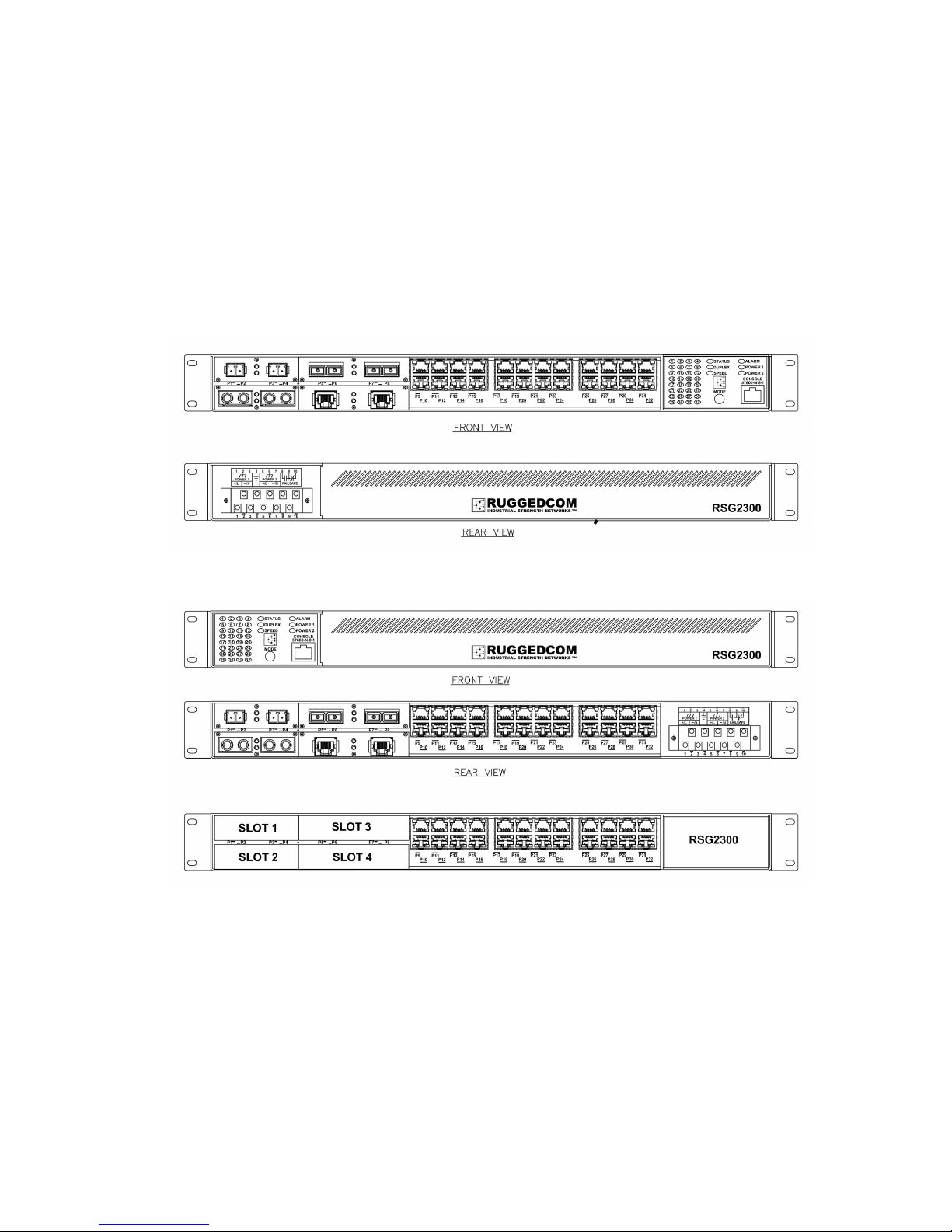
RSG2000 series products have been designed with maximum mounting and
display flexibility. Customers can order an RSG2000 series switch that can be
mounted in a standard 19” rack, 1” DIN Rail, or directly onto a panel. For rack
mount installations, the RSG2000 series can be ordered with connectors on the
front panel or on the rear of the chassis. Placing the connectors on the rear
allows all data and power cabling to be installed and connected at the rear of the
rack. See Figure 1 and Figure 2 for examples of rack mount orientation.
Product Overview
Figure 1: 19" Rack Front Mount (connectors at front)
Figure 2: 19" Rack Rear Mount (connectors at rear)
RuggedCom® RuggedSwitch RSG2300 Installation Guide Rev108
10
Page 11
1.4 Ethernet Panel Description
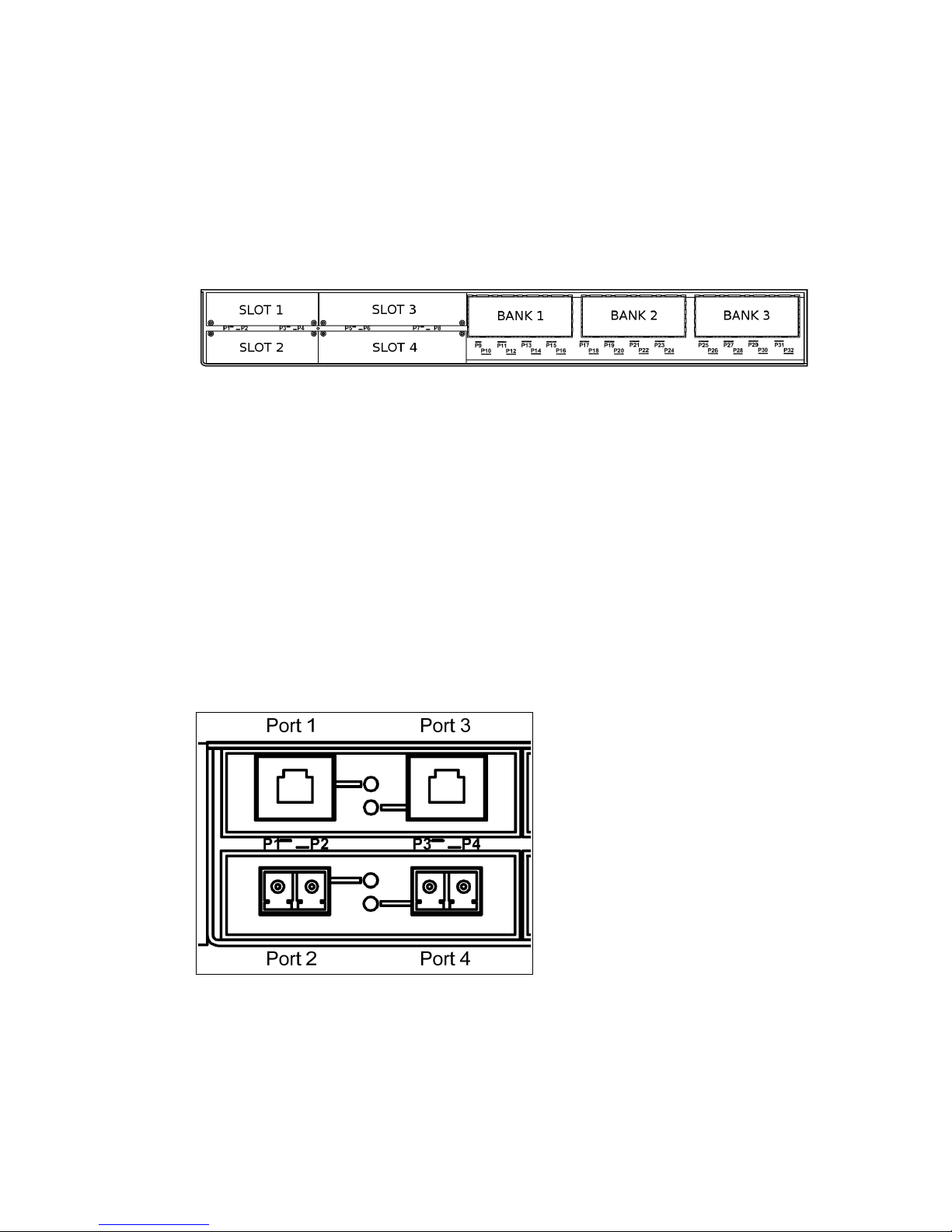
The Ethernet connector panel of the RSG2300 is organized into three banks of
eight 10/100Tx copper ports, for a total of 24 fixed 10/100Tx ports, and four
modular slots, whose configuration may be selected at the time the unit is
ordered. Figure 3 shows the physical layout of these ports.
Product Overview
Figure 3: RSG2300 Ethernet Port Layout
Slots 1 and 2 support two-port fiber or copper modules up to 100Mbps.
RSG2300P comes standard with a two port 10/100BaseTx 802.3af (PoE) module
in Slot 2, and may be ordered with another two PoE ports in Slot 1.
Slots 3 and 4 support two-port modules up to 1Gbps. Section 3.5 lists and
provides specificat
The complement of modules that is installed on a particular unit may be
determined by reading the factory data file via the RuggedSwitch
ions for the fiber optic interfaces available for the RSG2300.
®
ROSTM user
interface.
Each two-port Ethernet module is equipped with an LED per port that indicates
link/activity status information. The LED is solid for ports with a valid link, and
blinks for activity. Figure 4 shows a copper port module in slot 1 and a fiber
module in slot 2 along with the asso
ciated link/activity LEDs for each port.
Figure 4: Ethernet Panel LEDs
RuggedCom® RuggedSwitch RSG2300 Installation Guide Rev108
11
Page 12
Product Overview
1.4.1 Fiber Optic Transceiver Orientation and Connection
Depending on the order code of the product, the RSG2300 can be equipped with
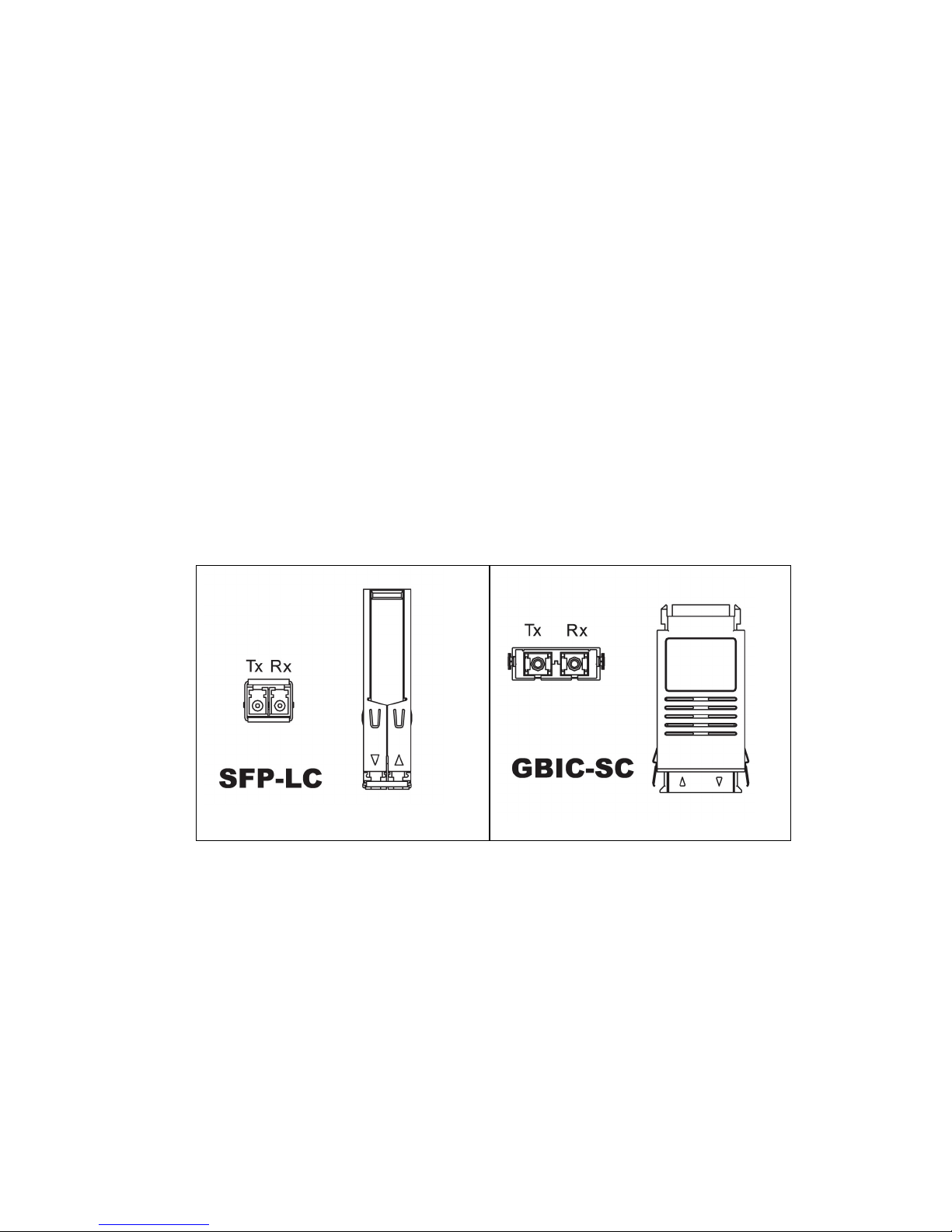
several different types of fiber optic ports. The Transmit (TX) and Receive (RX)
connections of each port must be properly connected and matched for proper link
and operation. Modules populated on the top row of the device typically have
locking mechanisms or tabs facing the top of the unit. Modules located on the
bottom row of the device have locking mechanisms or tabs facing the bottom of
the unit.
The diagrams in this section depict each fiber connector style supported by the
RuggedSwitch
®
in order to provide a reference for the proper orientation of cable
connections. A front view (looking into the connector) and a top view of the
connector module are shown for each one. Note that if modules are populated on
the bottom row of the device, the transceiver orientation will be inverted relative
to the diagram (i.e. RX and TX will be reversed).
Figure 5 and Figure 6 show front and top views of the pluggable fiber transceiver
modules su
pported by RuggedSwitch
®
. Note that when the module is installed in
the unit, most of the body of the module as shown in top views below will not be
visible.
Table 1: Pluggable Fiber Transceiver Modules
Figure 5: 1000LX SFP (mini-GBIC)
Module and LC connector
RuggedCom® RuggedSwitch RSG2300 Installation Guide Rev108
Figure 6: 1000LX GBIC connector
12
Page 13

Product Overview
Figure 7 through Figure 11 show front and top views of the fixed fiber transceiver
modules supported by RuggedSwitch
®
. Note that when the daughter card
containing transceiver modules is installed in the unit, most of the body of the
module as shown in top views below will not be visible.
Table 2: Fixed Fiber Transceivers
Figure 7: 10FL ST connector
Figure 8: 100FX MTRJ connector
Figure 9: 1000LX LC connector
Figure 11: 100FX ST connector
RuggedCom® RuggedSwitch RSG2300 Installation Guide Rev108
Figure 10: 1000LX SC connector
13
Page 14

1.5 Display Panel Description
RSG2000 series products are equipped with a versatile display panel, shown in
Figure 12, which provides real-time status information for each port and for the
chassis as a
RS232 console port for ‘out of band’ console access and configuration
Power supply and Alarm status indicators
Convenient port status indicators conveying Link/Activity, Duplex, or Speed
via the Mode push-button (toggles between the three display modes)
System reset via the Mode push-button (if held for 5 seconds)
whole, to allow simple diagnostics and troubleshooting. It features:
Product Overview
Figure 12: RSG2300 LED Display Panel
The device status LEDs provide a quick visual indication of the operational status
of the unit. Table 3 lists the possible LED colors and their corresponding
description
s.
LED Color Description
Green Power supply operating normally
PS1 / PS2
Red Power supply failure
Off No power supply installed
Red An alarm condition exists – log in to the web
Alarm
management interface or to the CLI to
determine the alarm code
Off No alarms exist
Table 3: LED Display – Device status LED behavior definition
14
RuggedCom® RuggedSwitch RSG2300 Installation Guide Rev108
Page 15

Product Overview
The port LEDs can be cycled between three display modes: Status, Duplex, and
Speed. Pushing the Mode button causes the display mode to be cycled.
Mode Color Description
Green (Solid) Link detected
Status
Green (Blinking) Activity
Off No link
Green (Solid) Full-Duplex operation
Duplex
Orange (Solid) Half-Duplex operation
Off No link
Green (Blinking) 1000Mb/s
Green (Solid) 100Mb/s
Speed
Orange (Solid) 10Mb/s
Off No link
Table 4: Port Status LED behavior definition
RuggedCom® RuggedSwitch RSG2300 Installation Guide Rev108
15
Page 16

2 Installation
2.1 Rack Mounting
The RSG2000 family of products can be rack mounted using the included rack
mount adapter assemblies shown in Figure 13. Secure the rack mount adapter to
the front sid
the positions shown in Figure 14. The entire chassis can then be mounted to a
standard 1
optionally secure the rear of the chassis in high-vibration or seismically active
locations.
e of the chassis using the included black PAN head Phillips screws in
9” rack. An additional two rack mount adapters are included to
Installation
Figure 13: RSG2000 Family 19” Rack Mount Adapters
Figure 14: Rack mount adapter mounting location
Note:
Since heat within the RSG2300 is channeled to the enclosure, it is recommended
that 1 rack-unit of space (1.75”) be kept unpopulated and free of equipment
above each RS2000 series product to allow for a small amount of convectional
airflow. Although forced airflow is not necessary, any increase in airflow will
result in a reduction of ambient temperature that will improve the long-term
reliability of all equipment mounted within the rack space.
RuggedCom® RuggedSwitch RSG2300 Installation Guide Rev108
16
Page 17

2.2 Panel and DIN Rail Mounting
RSG2000 series products can be ordered as panel/DIN mount chassis. Both
options involve the use of the panel/DIN adapters to be mounted on each side of
the chassis enclosure. The adapter allows for the chassis to be mounted on a
standard 1” DIN rail using the grooves in the adapter, and secured using the
included Phillips screw. See Figure 15 for a PANEL/DIN mounting diagram.
Installation
Figure 15: RSG2300 Panel / DIN RAIL mounting diagram (connectors at top)
RuggedCom® RuggedSwitch RSG2300 Installation Guide Rev108
17
Page 18

2.3 Power Supply Wiring and Grounding
The RSG2300 supports dual redundant power supplies, “Power Supply 1” (PS1)
and “Power Supply 2” (PS2). The RSG2300P supports a single AC or DC power
supply, PS1, and a separate 48VDC power supply, PS2, which provides power to
the PoE ports.
The connections for PS1, PS2 and the fail-safe relay are located on the terminal
block as shown in Figure 16 and Figure 17.
Installation
RSG2300 p
roducts can be equipped with either a Phillips Screw Terminal Block
or a Phoenix Plug Terminal Block. The Phillips Screw Terminal Block has Phillips
screws with compression plates, allowing either bare wire connections or
crimped terminal lugs. We recommend the use of #6 size ring lugs to ensure
secure, reliable connections under severe shock or vibration. Both terminal
blocks have a safety cover which must be removed via two Phillips screws before
connecting any wires. The safety cover must be reattached after wiring to
ensure personnel safety. Refer to Table 5 below for a description of each
terminal as well as to
sections 2.3.1 through 2.3.3 for power supply wiring
examples.
Figure 16: RSG2000 Series Phillips Screw Terminal Block
Figure 17: RSG2000 Series Phoenix Plug Terminal Block
RuggedCom® RuggedSwitch RSG2300 Installation Guide Rev108
18
Page 19

Installation
g
The RSG23
32 screw. It
00 Family chassis ground connection, shown in Figure 18, uses a #6-
is recommended to terminate the ground connection in a #6 ring lug,
and to use a torque setting not exceeding 15 in·lbs (1.7 Nm).
#6-32 screw
with ext.
washer.
#6 ring lu
stainless steel standoff
Figure 18: Chassis Ground Connection
Terminal
Number
1 PS1 Live / +
2 PS1 Surge Ground
3 PS1 Neutral / -
4 Chassis Ground
5 PS2 Live / +
6 PS2 Surge Ground
7 PS2 Neutral / -
8 Relay NO Contact Normally open, failsafe relay contact.
9 Relay Common Failsafe relay common contact.
10 Relay NC Contact Normally closed, failsafe relay contact.
Table 5: RSG2300 Family Power terminal block connection description
Description Usage
PS1 Live / + is connected to the positive (+) terminal if the power
source is DC or to the (Live) terminal if the power source is AC.
PS1 Surge Ground is connected to the Chassis Ground via a
jumper on the terminal block. Surge Ground is used as the
ground conductor for all surge and transient suppression circuitry.
NOTE: Surge Ground must be disconnected from Chassis
Ground during HIPOT (dielectric strength) testing.
PS1 Neutral / - is connected to the negative (-) terminal if the
power source is DC or to the (Neutral) terminal if the power
source is AC.
Chassis Ground is connected to the Safety Ground terminal for
AC inputs or the equipment ground bus for DC inputs. Chassis
ground connects to both power supply surge grounds via a
removable jumper.
PS2 Live / + is connected to the positive (+) terminal if the power
source is DC (including 48VDC for RSG2300P) or to the (Live)
terminal if the power source is AC.
PS2 Surge Ground is connected to the Chassis Ground via a
jumper on the terminal block. Surge Ground is used as the
ground conductor for all surge and transient suppression circuitry.
NOTE: Surge Ground must be disconnected from Chassis
Ground during HIPOT (dielectric strength) testing.
PS2 Neutral / - is connected to the negative (-) terminal if the
power source is DC or to the (Neutral) terminal if the power
source is AC.
RuggedCom® RuggedSwitch RSG2300 Installation Guide Rev108
19
Page 20

2.3.1 AC Power Supply Wiring Examples (RSG2300)
Figure 19: AC Single Power Supply Wiring
Example
Figure 20: AC Dual Redundant Power Supply
Wiring Example
Installation
Notes:
125/230VAC rated equipment: A 250VAC appropriately rated circuit breaker
must be installed.
Equipment must be installed according to the applicable country wiring
codes.
When equipped with two HI voltage power supplies, independent AC sources
can be used to power the product for greater redundancy.
RuggedCom® RuggedSwitch RSG2300 Installation Guide Rev108
20
Page 21

2.3.2 DC Power Supply Wiring Examples (RSG2300 and
RSG2300P)
Installation
Figure 21: DC Power Supply Wiring Examples
Notes:
RSG2300P will always have a 48VDC power supply in position PS2.
125/250VDC rated equipment: A 300VDC appropriately rated circuit breaker
must be installed.
A circuit breaker is not required for 12-24 or 48 VDC rated power supplies.
For dual DC power supplies, separate circuit breakers must be installed and
separately identified.
Equipment must be installed according to the applicable country wiring
codes.
RuggedCom® RuggedSwitch RSG2300 Installation Guide Rev108
21
Page 22

Installation
2.3.3 AC and DC Power Supply Wiring Example (RSG2300 and
RSG2300P)
Notes:
Figure 22: AC and DC Power Supply Wiring Examples
RSG2300P will always have a 48VDC power supply in position PS2.
110/230VAC rated equipment: A 250VAC appropriately rated circuit breaker
must be installed.
125/250VDC rated equipment: A 300VDC appropriately rated circuit breaker
must be installed.
A circuit breaker is not required for 12-24 or 48VDC rated power supplies.
Separate circuit breakers must be installed and separately identified.
Equipment must be installed according to the applicable country wiring
codes.
RuggedCom® RuggedSwitch RSG2300 Installation Guide Rev108
22
Page 23

2.4 Dielectric Strength (HIPOT) Testing
For dielectric strength (HIPOT) testing in the field, users must remove the metal
jumper located across terminals 2, 4, and 6 of the power supply terminal block.
This metal jumper connects transient suppression circuitry to chassis ground and
must be removed in order to avoid damage to transient suppression circuitry
during HIPOT testing. Figure 23 shows the proper HIPOT test connections and
should be fo
llowed to avoid damage to the device.
Installation
Figure 23: Dielectric Strength (HIPOT) Testing
RuggedCom® RuggedSwitch RSG2300 Installation Guide Rev108
23
Page 24

Installation
2.5 Failsafe Alarm Relay Wiring and Specifications
The “Failsafe” output relay is provided to signal critical error conditions that may
occur on RS2000 series products. The contacts are energized upon power-up of
the unit and remain energized unless a critical error occurs. The proper relay
connections are shown in Figure 24. Control of this output is user selectable and
can be programmed
application for this output is to signal an alarm if a power failure or removal of
control power occurs.
via the Rugged Operating System (ROS). One common
Figure 24: Failsafe Alarm Relay Wiring
RuggedCom® RuggedSwitch RSG2300 Installation Guide Rev108
24
Page 25

2.6 Console Port Wiring
An RS232 console port for configuration and management of the device is
located on the LED display module shown in Figure 25. This port is intended to
be a temporary connection during
allows for direct serial access to the management console. The connection is
made using the DB9-Female to RJ45 console cable included in the device
packaging shown in Figure 26. Console connection settings are: 57600 bps, no
parity bits, 8
data bits, and 1 stop bit.
Installation
initial configuration or troubleshooting and
Figure 25: Console port on display board Figure 26: RSG2000 Series
Console cable
For reference, the console cable pin-out is show in Table 6.
RuggedCom RS232 over RJ45 pin-out specification
Signal Name (PC is DTE) DB9- Female RJ45 Male
DCD – Carrier detect 1 2
RxD – Receive data (to DTE) 2 5
TxD – Transmit data (from DTE) 3 6
DTR – Data terminal ready 4 3
GND - Signal ground 5 4
DSR – Data set ready 6 1*
RTS – Ready to send 7 8
CTS – Clear to send 8 7
RI – Ring Indicator 9 1*
Table 6: RS232 over RJ45 console cable pin-out
After initial configuration, the RSG2300 can be configured via a number of
networked mechanisms such as Telnet SSH, and the built-in secure web server.
Consult the ROS™ User Guide for further details.
Notes:
This port is not intended to be a permanent connection.
Serial cable must not exceed 2m (6.5 ft) in length.
RuggedCom® RuggedSwitch RSG2300 Installation Guide Rev108
25
Page 26

2.7 Ethernet Ports
2.7.1 RJ45 Twisted-Pair Data Ports
RSG2300 series Ethernet switches are equipped with at least 24 10/100BaseTX
ports that allow connection to standard CAT-5 UTP cable with RJ45 male
connectors. All RSG2300 series RJ45 RuggedSwitch products feature autonegotiation, auto-polarity, and auto-crossover functions. The RJ45 receptacles
can also accept and take advantage of screened (commonly known as
“shielded”) cabling. Figure 27 shows the RJ45 port pins configuration.
Installation
Pin 1 Pin 8
Figure 27: RJ45 port pin configuration.
10/100BaseTx Pin-out
Pin Description
1 RX +
2 RX 3 TX +
6 TX 4, 5, 7, 9 NC
Table 7: RJ45 Ethernet pin assignment
RuggedCom® RuggedSwitch RSG2300 Installation Guide Rev108
26
Page 27

2.7.2 RJ45 Twisted-Pair PoE Ports
The RSG2300P comes standard with two 10/100BaseTX IEEE 802.3af (PoE)
compliant Ethernet ports in Slot 2 (ports) and can accommodate two more, in
Slot 1. In addition to the 10/100BaseTX port features, the PoE ports provide
nominal 48 VDC at 350 mA (max 15.4W/port), auto-sensing and automatic power
off when cables are removed. Table 8 shows the RJ45 PoE pin-out assignment.
10/100BaseTx PoE Pin-out
Pin Description
1 RX + and Power 2 RX - and Power 3 TX + and Power +
6 TX - and Power +
4, 5, 7, 9 NC
Table 8: RJ45 PoE pin-out assignment
Installation
2.7.3 Gigabit Ethernet 1000Base-TX Cabling Recommendations
The IEEE 802.3ab Gigabit Ethernet standard defines 1000 Mbit/s Ethernet
communications over distances of up to 100 meters using all 4 pairs in category
5 (or higher) balanced unshielded twisted-pair cabling. For wiring guidelines,
system designers and integrators should refer to the Telecommunications
Industry Association (TIA) TIA/EIA-568-A wiring standard that characterizes
minimum cabling performance specifications required for proper Gigabit Ethernet
operation. To ensure reliable, error-free data communication, new and preexisting communication paths should be verified for TIA/EIA-568-A compliance.
Table 9 summarizes the relevant cabling standards.
Cabling
Category
<5 No
5 Yes Verify TIA/EIA-568-A compliance
5e Yes
6 Yes No action required
>6 Yes
Table 9: Cabling categories and 1000BaseTx compliance defined.
1000BaseTx
Compliant
Required action
New wire infrastructure required
No action required. New installations should be
designed with Category 5e components or higher
Connector and cabling standards to be
determined.
Follow these recommendations for copper data cabling in high electrical noise
environments:
Data cable lengths should be as short as possible, ideally limited to 3m (10ft)
in length. Copper data cables should not be used for inter-building
communications.
RuggedCom® RuggedSwitch RSG2300 Installation Guide Rev108
27
Page 28

Power and data cables should not be run in parallel for long distances, and
ideally should be installed in separate conduits. Power and data cables
should intersect at 90 angles when necessary to reduce inductive coupling.
Shielded/screened cabling can optionally be used. The cable shield should
be grounded at a single point to avoid the generation of ground loops.
2.7.4 Transient Suppression
RuggedCom does not recommend the use of copper cabling of any length for
critical real-time substation automation applications. However, transient
suppression circuitry is present on all copper ports to protect against damage
from electrical transients and to ensure IEC 61850-3 and IEEE 1613 Class 1
conformance. This means that during the transient event, communications errors
or interruptions may occur but recovery is automatic. RuggedCom also does not
recommend using these ports to interface to field devices across distances which
could produce high levels of ground potential rise, (i.e. greater than 2500V)
during line to ground fault conditions.
Installation
RuggedCom® RuggedSwitch RSG2300 Installation Guide Rev108
28
Page 29

2.8 Pluggable optics – Installation, removal, and
precautions
The RSG2300 can be ordered with two pluggable optical form factors: SFP
(Small Form-factor Pluggable), and GBIC (GigaBit Interface Converter). SFP and
GBIC modules can be safely inserted and removed while the chassis is powered
and operating – a feature also referred to as “hot-swappable”. Nevertheless,
when inserting or removing optics there are several precautions that should be
taken. They include:
Ensuring that dust caps are mounted on SFP cages at all times unless a user
is in the process of inserting or removing an SFP module. The dust caps will
prevent the accumulation of residue or particles that might inhibit proper
operation.
Ensuring that the user has properly discharged any possible electrostatic
build-up in order to prevent electrostatic discharges (ESD). This can be
accomplished by properly grounding via an ESD wrist strap, or by touching
earth or chassis ground before performing installation or removal of optics.
ESD can damage or shorten the life of optical modules when not plugged into
a chassis.
Ensuring that SFP and GBIC optical modules are always stored in an ESD-
safe bag or other suitable ESD-safe environment, free from moisture and
stored at the proper temperature (–40 to +85C).
Disconnecting all cables from the SFP or GBIC module prior to insertion or
removal of the module.
Using only optics certified by RuggedCom Inc. with RuggedCom products.
Damage can occur to optics and product if compatibility and reliability have
not been properly assessed.
Installation
2.8.1 Module Insertion – GBIC and SFP
Special attention must be paid to the orientation of SFP and GBIC modules upon
installation in the RuggedSwitch
proper orientation of SFP modules installed to both upper and lower slots.
Modules on the upper row must be inserted top-side up, and modules on the
lower row must be inserted top-side down. SFP modules should be inserted with
the bail-latch in the locked position.
Figure 28: SFP Orientation for top and bottom row ports
RuggedCom® RuggedSwitch RSG2300 Installation Guide Rev108
®
chassis. For example, Figure 28 shows the
29
Page 30

Installation
Both SFP a
nd GBIC modules should gently slide into their ports and should lock
in place when fully inserted. Dust covers should be in place when installing the
modules, and should always be in place when cables are not connected.
Diagrams of both SFP and GBIC modules are provided in Table 1 as a guide to
the orientation of each t
ype.
2.8.2 GBIC Module Removal
GBIC modules have two locking latches, one on either side of the module, as
shown in Figure 29. To remove a GBIC module, disconnect any cables and
replace the
dust cover to protect the optics. Depress both latches simultaneously
and gently pull the module from the chassis. The module should be immediately
stored in an ESD-safe environment.
Figure 29: Locking latch location on GBIC optical modules
2.8.3 SFP Module Removal
SFP Modules are removed using the metal bail latch located on the top of the
module as shown in Figure 30. To remove the SFP module, disconnect any
cables and r
eplace the dust cover to protect the optics. Grasp the bail latch and
gently pull outwards to unlock and remove the module. Removal of an SFP
module is shown further in Figure 31. The module should be immediately stored
in an ESD-safe environment.
Figure 30: SFP Bail Latch Location
Figure 31: SFP Removal
RuggedCom® RuggedSwitch RSG2300 Installation Guide Rev108
30
Page 31

3 Technical Specifications
3.1 Power Supply Specifications
The power supplies in Table 10 may be used for PS1 only, or for both PS1 and
PS2 on the RSG2300, but only for PS1 on the RSG2300P. The RSG2300P uses
the PoE power supply specified in Table 11 for PS2.
Technical Specifications
Notes:
Type
Input Range Power Supply
Min Max
Internal
Fuse
Rating
Max. Power
Consumption
3
12 – 24 VDC 10 VDC 36 VDC 6.3A(F)2
48 VDC 36 VDC 59 VDC 3.15A(T)2
HI (125/250 VDC)1
HI (110/230 VAC)
Table 10: Power Supply Specifications
1
88 VDC
85 VAC
300 VDC
264 VAC
2A(T)
1,2
25W
Type (PS2)
Input Range Power Supply
Min Max
Internal
Fuse
Rating
Max. Power
Consumption
48 VDC 37 VDC 72 VDC 2A(T) 2 68 W
Table 11: PoE Power Supply Specifications
1. The “HI” power supply is the same power supply for both AC and DC.
2. (F) Denotes fast-acting fuse, (T) denotes time-delay fuse
3. Power consumption varies based on configuration. 10/100Base-TX ports
consume roughly 1W less than fiber optic ports
3.2 Failsafe Relay Specifications
Parameter Value (Resistive Load)
Max Switching Voltage 240VAC, 125VDC
Rated Switching Current 2A @ 240VAC
Max Switching Capacity 150W, 500VA
RuggedCom® RuggedSwitch RSG2300 Installation Guide Rev108
0.15A @ 125VDC, 2A @ 30VDC
31
Page 32

3.3 Networking Standards Supported
Technical Specifications
Parameter
IEEE 802.3
IEEE 802.3u
IEEE 802.3z
IEEE 802.3ab
IEEE 802.3x
IEEE 802.1D
IEEE 802.1Q
IEEE 802.1p
10Mbps
Ports
100Mbps
Ports
10BaseT / 10BaseFL
1000Mbps
Ports
100BaseTX / 100BaseFX
1000BaseSX/LX
1000BaseTx
Full Duplex Operation
MAC Bridges
VLAN (Virtual LAN)
Priority Levels
3.4 Copper Ethernet Port Specifications
The RSG2300 features a fixed set of three fixed banks of eight 10/100Tx copper
ports each, and can be ordered with additional 10/100Tx ports in slots 1 and 2,
and 10/100/1000Tx ports in slots 3 and 4. All copper ports have the following
specifications:
Parameter Specification Notes
Auto-negotiating;
Speed 10/100/1000 Mbps
Duplex FDX / HDX Auto-negotiating
Cable-Type > Category 5 Shielded/Unshielded
Wiring Standard TIA/EIA T568A/B Auto-Crossover, Auto-polarity
Max Distance 100m
Connector RJ45
Isolation 1.5kV RMS 1-minute
PoE Voltage 44-57V PoE ports only
PoE Current 350mA “
1000Mbps modules supported in
Notes
slots 3 & 4 only
RuggedCom® RuggedSwitch RSG2300 Installation Guide Rev108
32
Page 33

3.5 Fiber Ethernet Port Specifications
Sections 3.5.1 through 3.5.3 list specifications of the optical transceivers used in
the dual-port modules available for the RSG2300. The specifications are
organized by signaling speed and then by order code. Module order codes are
contained within each product when assembled and configured at the factory.
Consult the RuggedCom ROS™ User Guide for help in obtaining the factory
configuration data.
3.5.1 10FL Ethernet Optical Specifications
Technical Specifications
Order
Code
Mode
Connector
Type
FL01 MM ST
Cable Type (um)
62.5/125 -16 -9 18
Tx λ
(typ.)
(nm)
820
50/125
Tx min
(dBm)
Tx max
(dBm)
-19.8 -12.8
Rx
Sensitivity
(dBm)
Rx
Saturation
(dBm)
Distance
(typ.)
(km)
-34 -11.2 2
Power
Budget
(dB)
14.2
3.5.2 Fast Ethernet (10/100Mbps) Optical Specifications
Order
Code
Mode
Connector
Type
FX01 MM ST
FX02 MM SC
Cable Type
(um)
62.5/125 -19 12
50/125
62.5/125 -19 12
50/125
Tx λ (typ.)
(nm)
1308
1308
Tx min
(dBm)
-22.5
-22.5
Tx max
(dBm)
-14 -31 -14 2
-14 -31 -14 2
Rx
Sensitivity
(dBm)
FX11 MM LC 62.5/125 1310 -19 -14 -32 -14 2 13
FX03 MM MTRJ
62.5/125 -19 12
50/125
1308
-22.5
-14 -31 -14 2
FX04 SM ST 9/125 1310 -15 -8 -32 -3 20 17
FX05 SM SC 9/125 1300 -15 -8 -31 -7 20 16
FX06 SM LC 9/125 1310 -15 -8 -34 -7 20 19
FX07 SM SC 9/125 1310 -5 0 -34 -3 50 29
FX08 SM LC 9/125 1310 -5 0 -35 -3 50 30
FX09 SM SC 9/125 1310 0 5 -37 0 90 37
FX10 SM LC 9/125 1310 0 5 -37 0 90 37
Rx
Saturation
(dBm)
Distance
(typ.)
(km)
Power
Budget
(dB)
8.5
8.5
8.5
RuggedCom® RuggedSwitch RSG2300 Installation Guide Rev108
33
Page 34

Technical Specifications
3.5.3 Gigabit Ethernet (1000Mbps) Optical Specifications
Fixed Gigabit Transceivers
Order
Code
Mode
Connector
Type
Cable Type
(um)
Tx λ (typ.)
(nm)
Tx min
(dBm)
Tx max
(dBm)
Rx
Sensitivity
(dBm)
Rx
Saturation
(dBm)
Distance
(typ.)
(km)
Power
Budget
(dB)
FG02 SM SC 9/125 1310 -10 -3 -20 -3 10 10
FG03 SM LC 9/125 1310 -9.5 -3 -21 -3 10 11.5
FG04 SM SC 9/125 1310 -5 0 -20 -3 25 15
FG05 SM LC 9/125 1310 -7 -3 -24 -3 25 17
SFP Gigabit Transceivers
Order
Code
Mode
Connector
Type
F513 MM LC
Cable Type
(um)
50/125 0.5
62.5/125
Tx λ (typ.)
(nm)
Tx min
(dBm)
Tx max
(dBm)
850 -9 -2.5 -20 0
Rx
Sensitivity
(dBm)
FG52 SM LC 9/125 1310 -9.5 -3 -19 -3 10 9.5
FG53 SM LC 9/125 1310 -7 -3 -23 -3 25 16
FG544 SM LC 9/125 1550 0 5 -23 -3 70 23
Rx
Saturation
(dBm)
Distance
(typ.)
(km)
0.3
Power
Budget
(dB)
11
GBIC Gigabit transceivers
Order
Code
Mode
Connector
Type
Cable Type
(um)
Tx λ (typ.)
(nm)
Tx min
(dBm)
Tx max
(dBm)
Rx
Sensitivity
(dBm)
FG71 SM SC 9/125 1310 -9.5 -3 -21 -3 10 11.5
FG72 SM SC 9/125 1310 -7 -3 -24 -3 25 17
FG735 SM SC 9/125 1550 0 5 -23 -3 70 23
Notes:
Rx
Saturation
(dBm)
Distance
(typ.)
(km)
Power
Budget
(dB)
1. Maximum segment length is greatly dependent on factors such as fiber
quality, and number of patches and splices. Please consult RuggedCom
sales associates when determining maximum segment distances.
2. All optical power numbers are listed as dBm averages.
3. F51 transceivers are rated for -10 to +85°C
4. FG54 transceivers are rated for 0 to +70°C
5. FG73 transceivers are rated for -25 to +85°C
RuggedCom® RuggedSwitch RSG2300 Installation Guide Rev108
34
Page 35

3.6 Operating Environment
Parameter Range Comments
Ambient Operating
Temperature
Ambient Relative
Humidity
Ambient Storage
Temperature
-40 to 85C
5% to 95% Non-condensing
-40 to 85C
Ambient Temperature as measured from a 30cm
radius surrounding the center of the enclosure.
Technical Specifications
RuggedCom® RuggedSwitch RSG2300 Installation Guide Rev108
35
Page 36

Technical Specifications
3.7 Mechanical Specifications
Parameter Value Comments
Dimensions 18.29 x 12.14 x 1.75 in
(464.57 × 308.36 × 44.45 mm)
Weight 10 lb (4.5 kg)
Enclosure 18AWG galvanized steel
(Length x Width x Height)
with mounting brackets installed
Figure 32: RSG2300 Mechanical Dimensions
RuggedCom® RuggedSwitch RSG2300 Installation Guide Rev108
36
Page 37

Type Test Specifications
4 Type Test Specifications
4.1.1 IEEE 1613 (C37.90.x) EMI Immunity Type Tests
Test Description Test Levels
IEEE C37.90.3 ESD
IEEE C37.90.2 Radiated RFI Enclosure ports 35 V/m
IEEE C37.90.1 Fast Transient
IEEE C37.90.1 Oscillatory
IEEE C37.90 H.V. Impulse
IEEE C37.90
Dielectric
Strength
Note:
1. Only applicable to functional earth connections separated from the safety
earth connection
Enclosure Contact +/- 8kV
Enclosure Air +/- 15kV
Signal ports +/- 4kV @ 2.5kHz
D.C. Power ports +/- 4kV
A.C. Power ports +/- 4kV
Earth ground ports
Signal ports 2.5kV common mode @1MHz
D.C. Power ports
A.C. Power ports
Signal ports 5kV (Fail-Safe Relay output)
D.C. Power ports 5kV
A.C. Power ports 5kV
Signal ports 2kVac
D.C. Power ports 1.5kVDC
A.C. Power ports 2kVAC
1
+/- 4kV
2.5kV common, 1kV diff.
mode@1MHz
2.5kV common, 1kV diff.
mode@1MHz
4.1.2 IEC 61850-3 EMI Type Tests
TEST Description Test Levels Severity
Levels
IEC 61000-4-2 ESD
IEC 61000-4-3 Radiated RFI Enclosure ports 20 V/m x
IEC 61000-4-4
IEC 61000-4-5 Surge
IEC 61000-4-6
RuggedCom® RuggedSwitch RSG2300 Installation Guide Rev108
Burst (Fast
Transient)
Induced
(Conducted) RFI
Enclosure Contact +/- 8kV 4
Enclosure Air +/- 15kV 4
Signal ports +/- 4kV @ 2.5kHz x
D.C. Power ports +/- 4kV 4
A.C. Power ports +/- 4kV 4
Earth ground ports
Signal ports
D.C. Power ports
A.C. Power ports
Signal ports 10V 3
D.C Power ports 10V 3
A.C. Power ports 10V 3
Earth ground ports
1
+/- 4kV 4
+/- 4kV line-to-earth,
+/- 2kV line-to-line
+/- 2kV line-to-earth,
+/- 1kV line-to-line
+/- 4kV line-to-earth,
+/- 2kV line-to-line
1
10V 3
4
3
4
37
Page 38

Type Test Specifications
IEC 61000-4-8 Magnetic Field Enclosure ports
D.C. Power ports
IEC 61000-4-29
IEC 61000-4-11
IEC 61000-4-12
IEC 61000-4-16
IEC 61000-4-17
IEC 60255-5
IEC 60255-5 H.V. Impulse
Voltage Dips &
Interrupts
Damped
Oscillatory
Mains Frequency
Voltage
Ripple on D.C.
Power Supply
Dielectric
Strength
A.C. Power ports
Signal ports
D.C. Power ports
A.C. Power ports
Signal ports
D.C. Power ports
D.C. Power ports 10% 3
Signal ports
D.C. Power ports 1.5kVDC N/A
A.C. Power ports 2kVAC N/A
Signal ports
D.C. Power ports 5kV N/A
A.C. Power ports 5kV N/A
Note:
1. Only applicable to functional earth connections separated from the safety
earth connection
40 A/m continuous,
1000 A/m for 1 s
30% for 0.1s, 60% for
0.1s, 100% for 0.05s
30% for 1 period, 60%
for 50 periods
100% for 5 periods,
100% for 50 periods
2.5kV common, 1kV
diff. mode@1MHz
2.5kV common, 1kV
diff. mode@1MHz
2.5kV common, 1kV
diff. mode@1MHz
30V Continuous, 300V
for 1s
30V Continuous, 300V
for 1s
2kVac (Fail-Safe Relay
output)
5kV (Fail-Safe Relay
output)
N/A
N/A
N/A
N/A
3
3
3
4
4
N/A
N/A
4.1.3 Environmental Type Tests
Test Description Test Levels
IEC 60068-2-1 Cold Temperature Test Ad -40°C, 16 Hours N/A
IEC 60068-2-2 Dry Heat Test Bd +85°C, 16 Hours N/A
IEC 60068-2-30
IEC 60255-21-1 Vibration 2g @ (10 - 150) Hz Class 21
IEC 60255-21-2 Shock 30g @ 11mS Class 21
Humidity (Damp
Heat, Cyclic)
Test Db
95% (non-condensing),
55°C , 6 cycles
Note:
1. Class 2 refers to “Measuring relays and protection equipment for which a very
high security margin is required or where the vibration levels are very high,
e.g. for shipboard applications and for severe transportation conditions”
38
RuggedCom® RuggedSwitch RSG2300 Installation Guide Rev108
Severity
Levels
N/A
Page 39

5 Agency Approvals
Agency Standards Comments
CSA
CE EN 60950, EN 61000-6-2
FCC FCC Part 15, Class A Passed
CISPR EN55022, Class A Passed
FDA/CDRH
IEC/EN
CSA C22.2 No. 60950, UL
21 CFR Chapter 1, Subchapter
EN60825-1:1994 + A11:1996 +
6 Warranty
60950
J
A2:2001
Agency Approvals
Passed
CE Compliance is claimed
via Declaration of Self
Conformity Route
Passed
Passed
RuggedCom warrants this product for a period of five (5) years from date of
purchase. For warranty details, visit http://www.ruggedcom.com/
customer service representative.
Should this product require service, contact the factory at:
RuggedCom Inc.
300 Applewood Crescent
Concord, Ontario
Canada L4K 5C7
Phone: +1 905 856 5288
Fax: +1 905 856 1995
or contact your
RuggedCom® RuggedSwitch RSG2300 Installation Guide Rev108
39
 Loading...