

Page 1

r
AR-3000SD
Command Reference
AR-3000SD (Ver.1.00) Command Reference (1PS)
Copyright © 2014
All rights reserved.
No part of this publication may be reproduced in any form without the written permission of ROLAND CORPORATION.
c
Page 2

ontents -
- C
Section 1
Section 2 Setup························································································································6
Section 3 Overview of Commands·······························································································28
Section 4 Details of each Command ····························································································31
Introduction················································································································ 5
2.1 RS-232C Setup··················································································································6
2.1.1 Connector and Cable····································································································6
2.1.2 Handshaking··············································································································· 6
2.1.3 Setup Procedure···········································································································6
2.1.4 Connections with the Computer ······················································································ 6
2.1.5 Computer Settings ······································································································· 7
2.1.6 AR-3000SD Settings····································································································· 7
2.1.7 Baud Rate·················································································································· 7
2.1.8 Examples of control using the terminal program·································································· 8
2.2 LAN Setup ························································································································ 9
2.2.1 AR-3000SD Settings····································································································· 9
2.2.2 Network Settings ········································································································10
2.2.3 Verifying network connections························································································11
2.2.4 Firewall settings··········································································································12
2.3 Telnet Server Functions ······································································································13
2.3.1 Telnet Server Function Operating Specifications ································································13
2.3.2 Non-Telnet Functions···································································································13
2.3.3 Login Instructions/Example of Command Input··································································14
2.4 FTP Server Functions··········································································································16
2.4.1 FTP Server Function Operating Specifications····································································16
2.4.2 Non-FTP Functions······································································································17
2.4.3 Login Instructions·········································································································18
2.5 WEB Server Functions (Browser Control) ···············································································20
2.5.1 Top Page ··················································································································20
2.5.2 Info Page ··················································································································20
2.5.2 Log Page ··················································································································21
2.5.3 Programmable Timer Pages··························································································22
Main Setup····················································································································23
Schedule Setup··············································································································24
Weekly Setup·················································································································25
Yearly Setup ··················································································································26
Yearly Setup List·············································································································27
3.1 Summary of Commands (RS-232C)·······················································································28
3.2 Summary of Commands (Telnet)···························································································28
3.3 Communication Protocol ·····································································································28
3.4 Command Format··············································································································29
3.5 About Input Parameters ······································································································29
3.6 About Output Parameters····································································································30
3.7 Precautions······················································································································30
4.1 Commands Transmitted fro m the External Device (C omputer) to the AR-3000SD····························31
4.2 Details of Commands Sent from the External Device (Computer) to the AR-3000SD························32
4.2.1 Control Commands ·····································································································32
PA Specifying the Playback Phrase·················································································32
PL Playback Start········································································································32
PLB Playback Start (During Phrase Play Busy Out On) ·························································33
PLL Playback Start - Left Channel (Dual Mono Mode)···························································33
PLR Playback Start - Right Channel (Dual Mono Mode)·························································34
FP Playback Start (with Specifying the Playback Phrase)·····················································34
FPB Playback Start (with Specifying the Playback Phrase, During Phrase Play Busy Out On)········35
RL Playback from the Middle of a Phrase·········································································36
ST Halting Playback/Recording ······················································································36
PE Pause and Restart Playback or Recording ···································································37
RM Recording Standby Mode ·························································································37
00SD (Ver.1.00) Command Reference - 2
AR-30
Page 3

RE
Start Recordi n g······································································································38
AE Starting Time-S t amped Recording ··············································································38
RS Start Recording ······································································································39
VL Play Volume Control································································································39
OB BUSY Control ········································································································39
OC CONT Control········································································································40
TA Execute NTP ·········································································································40
4.2.2 Editing Commands······································································································40
DM Enable Execution of Editing Commands ······································································40
PD Delete Phrase········································································································40
PC Copy Phrase··········································································································40
FM Format Card··········································································································41
CD Delete Card···········································································································41
CP Copy Card·············································································································41
SP System Copy·········································································································42
LS Recorded Phrase Protect Mode·················································································42
LW Recorded Phrase Protect Mode·················································································42
4.2.3 Setting Commands······································································································42
VM Play Volume Settings·······························································································42
PY Delay Time Settings ································································································43
PP Playback Point Settings ···························································································43
PR Phrase Repeat Settings ···························································································43
LP Loop Play Settings··································································································44
FD Fade In and Fade Out Settings··················································································44
PO Control Out Settings································································································45
MP Playback Tempo for MIDI Settings··············································································45
PN Phrase Name Settings·····························································································45
TT Time Stamp Settings ·······························································································45
PS Pattern Phrase Settings ···························································································46
SS Song Phrase Settings······························································································46
CV Card Name Settings································································································47
CI Control Input Mode Settings······················································································47
DL Direct Playback Settings ··························································································48
CE Program (Count) Playback Settings ············································································48
MS MIDI Settings·········································································································49
ME MIDI Settings·········································································································49
NM MIDI Note Map Settings···························································································50
MM MMC Mode Settings································································································50
MT MTC Settings·········································································································51
BR Communication Speed Settings·················································································51
DN Dual Mono Mode Settings ························································································52
LT Line Out (Thru) Settings···························································································52
VT Input Volume Thru Settings·······················································································52
BO Busy Out Settings···································································································53
DO Display Parameter Settings·······················································································53
DC Display Contrast Settings ·························································································53
NT Network data settings······························································································53
TO Login timeout setting ·······························································································54
TP NTP Setting···········································································································54
SC Programmable Timer Setting·····················································································54
4.2.4 Request Commands····································································································54
AQ Reset the Phrase Output Counter···············································································54
QQ Phrase Setting Contents Request···············································································55
3Q Pattern Phrase Setting Contents Request····································································55
GQ Song Phrase Setting Contents Request·······································································55
TQ Time Stamp Requ est·······························································································56
CQ Card Setting Contents Request··················································································56
MQ Card Remaining Capacity Request·············································································56
YQ System Setting Contents Request··············································································56
00SD (Ver.1.00) Command Reference - 3
AR-30
Page 4

DQ
Direct Playback Setting Contents Request ···································································57
UQ Program (Count) Playback Setting Contents Request·····················································57
JQ MIDI Setting Contents Request··················································································57
NQ MIDI Note Map Setting Contents Request····································································57
LQ Display Contrast Setting Request···············································································58
KQ Network setting contents request ···············································································58
AC Activity Sensing (Verify AR-3000SD Unit Activity)···························································58
VR Version Request·····································································································58
4.2.5 Reply Commands ·······································································································58
ack/OK Reply signifying normal operation ··········································································58
ER Reply to the AR-3000SD When an Error Has Occurred···················································58
Xon (11h)/Xoff (13h) Allow or Disable Tr ansmission. Used for Handshaking·································58
4.3 Commands Sent from the AR-3 000SD to the External Device (Computer) ·····································59
4.4 Details of Commands Sent from the AR-3000SD to the External Device (Computer)························60
4.4.1 Setting Output Commands····························································································60
RU Phrase Setting Output ·····························································································60
PS Pattern Phrase Setting Output···················································································61
SS Song Phrase Setting Output······················································································61
TI Time Stamp Settings ·······························································································61
CS Card Setting Output ································································································62
CR Card Remaining Capacity Output···············································································62
SY System Setting Output·····························································································63
DP Direct Playback Setting Output ··················································································64
CE Program (Count) Playback Setting Output····································································64
ME MIDI Setting Output·································································································65
NM MIDI Note Map Setting Output···················································································65
DC Display Contrast Setting Output·················································································66
NT Output network settings ···························································································66
AC Active Sensing Reply·······························································································66
VR Version Output·······································································································66
4.4.2 Automatic Transmission Commands ···············································································67
CC Card Insertion Status Output ·····················································································67
ST Output at Finish of Playback······················································································67
PE Output the Elapsed Time from the Start of the Phrase·····················································67
AE Output the Total Number of Phrases Recorded on the Card ·············································67
%% Card Operation Progress S tatus Output·······································································68
4.4.3 Reply Commands ·······································································································69
ack/OK Reply signifying normal operation ··········································································69
ER Replies When an Error Has Occurred ·········································································69
Section 5 Appendix ··················································································································71
5.1 AR-3000SD Commands List ································································································71
5.2 Characters That Can Be Used in Phrase Names and Card Names···············································73
5.3 Sample Algorithms·············································································································74
5.3.1 Playing Back a Phrase·································································································74
5.3.2 Recording (Normal Recording)·······················································································75
5.3.3 Recording (Time-Stamped Recording)·············································································76
5.3.4 Verifying the Parameters (Data Settings) of All Phrases Starting with the Lowest-Numbered
Phrase······················································································································77
5.3.5 Deleting a Phrase ·······································································································78
Section 6 Concerning Cards Used with the AR···············································································79
6.1 Card Types Used by the AR··································································································79
6.2 File Organization on AR-3000 Format Cards·············································································80
6.3 Using FTP Functions to Change the Content of a Card Inserted in an FTP-Connected Device ············81
6.3.1 Changing the Settings···································································································81
6.3.2 Changing Phrase Data··································································································81
6.3.3 Changing Phrase Files··································································································81
AR-3000SD (Ver.1.00) Command Reference - 4
Page 5

Section 1 Introduction
This manual describes the procedures for using RS-232C or LAN (TCP/IP protocol) to control AR-3000SD.
For information regarding the AR-3000SD itself, please refer to the AR-3000SD Owner's Manual. This
manual is intended for users who are generally familiar with network issues. Refer to other available
literature and documentation for more detailed information on computer terminology and the use and
handling of computers.
The content herein is subject to alteration without prior notice.
00SD (Ver.1.00) Command Reference - 5
AR-30
Page 6
Section 2 Setup
2.1 RS-232C Setup
RS-232C is a standardized type of serial interface. The connections which are used by the AR-3000SD
are discussed below.
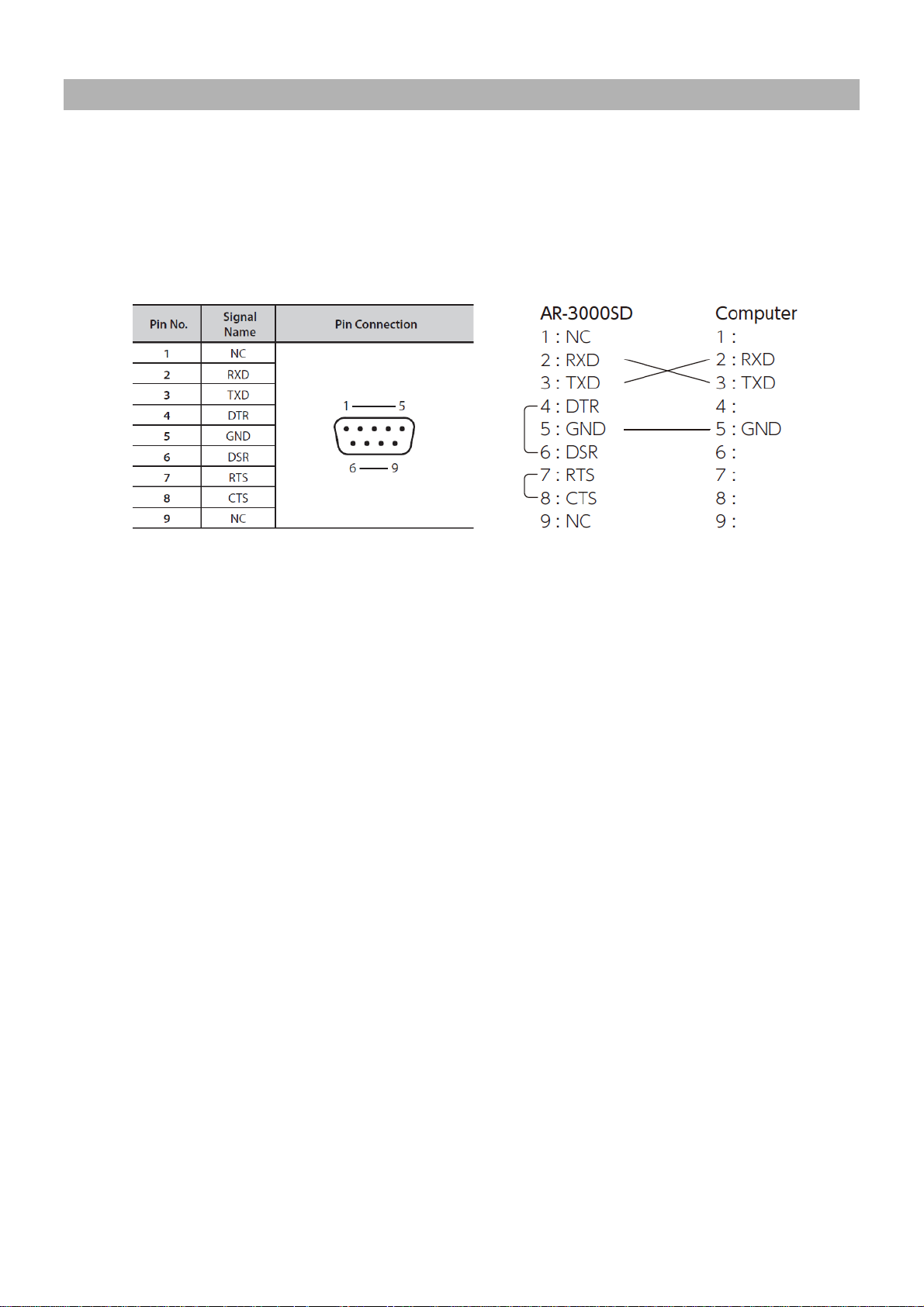
2.1.1 Connector and Cable
Connector specifications Cable specifications
* These are already connected in inside of the AR-3000SD. (4–6 and 7–8)
* At least three lines (RXD, TXD and GND) should be connected as shown in a figure.
2.1.2 Handshaking
e AR-3000SD's processing speed is slower than the speed at which data is transmitted from the
If th
computer, measures must be taken to avoid data loss. Conversely, data loss will also occur if data is
transmitted from the AR-3000SD faster than the computer can process it. For these reasons, the
AR-3000SD uses “Xon/Xoff” handshaking. The external computer can control transmission from the
AR-3000SD in the same way.
The ASCII code signal name for Xon is DC1, which is 11h.
The ASCII code signal name for Xoff is DC3, which is 13h.
2.1.3 Setup Procedure
e is the procedure for setting up the external computer and the AR-3000SD.
Her
1) Connections with the computer
Use an RS-232C cable to connect the two devices. Refer to “2.1.4 Connections with the computer.”
2) Turn on the power for the AR-3000SD and the computer
3) Computer settings
Set the communication parameters. Refer to “2.1.5 Computer settings.”
4) AR-3000SD settings
Set the communication parameters. Refer to “2.1.6 AR-3000SD settings.”
5) Operate the AR-3000SD
Transmit data between the external computer and the AR-3000SD.
2.1.4 Conn ections with the Computer
Turn off the power of the AR-3000SD and the computer.
1)
2) Use the appropriate cable to connect the RS-232C -compatible connector of the computer to the
RS-232C connector located on the rear panel of the AR-3000SD. Refer to “2.1.1 Connector and Cable”
for the appropriate cable to use.
00SD (Ver.1.00) Command Reference - 6
AR-30
Page 7

2.1.5 Computer Settings
Communication parameters for the computer
1)
Communication method start - stop system (asynchronous) full duplex
Baud rate 4,800 / 9,600 / 14,400 / 19,200 / 31,250 / 38,400 / 57,600 / 115,200 bps
Select the same setting as on the AR-3000SD.
Parity none
Data length 8 bits
Stop bit 1 bit
Code set ASCII
Xon/Xoff on
2.1.6 AR-3000SD Settings
n using the AR-3000SD via RS-232C, the baud rate must be specified. Also, in order for it to be
Whe
controlled via RS-232C, the AR-3000SD must not be in the MENU function (the MENU indicator must
not be lit).
2.1.7 Baud Rate
If the AR-30
00SD's power is turned on when a card is not inserted, the baud rate will default to 9,600
bps. If a card is then inserted, the settings will change to the settings which are contained in the card.
However this will occur only for the first-inserted card, and subsequently inserted cards will be ignored.
If you wish to modify the baud rate during operation, use the following procedure on the AR-3000SD to
change it.
Baud Rate Settings
Set the baud rate to the desired value.
1) Press the MENU button.
2) Rotate the SELECT knob to select “7.1 Baud Rate.”
3) Press the SELECT knob.
4) Rotate the SELECT knob to select the baud rate.
Baud Rate = 4,800 / 9,600 / 14,400 / 19,200 / 31,250 / 38,400 / 57,600 / 115,200 bps
Select the same setting as on the computer.
5) Press the SELECT knob. Rotate the SELECT knob to select “YES”
Press the ENTER button to set the baud rate.
6) Press the MENU button.
AR-3000SD (Ver.1.00) Command Reference - 7
Page 8

2.1.8 Examples of control using the terminal program
This describes examples of control using a general terminal program.
Referring to the example below, make the port setting for the terminal program.
Baud rate Communication speed set on the AR-3000SD
Data bit length 8
Parity None
Stop bits 1
Flow control Xon/Xoff
Making the setting to perform local echo makes it possible to use the terminal program to view
commands sent to the AR-3000SD.
Prepare a card on which some phrase is recorded as the first phrase.
When cable connections and settings are correct, then inserting a card into the AR-3000SD, the terminal
program displays "stxCC:1,0;" as shown below. “stx” is an ASCII-code signal name. It is a control code
indicating the start of a transmission, and is 02h in hexadecimal. The method used to display control
codes varies according to the terminal program. Depending on the terminal program, it might not be
displayed.
stxCC:1,0;
If this is not displayed, check the cable connections and the selected port. If text corruption occurs, it is
possible that the baud rate setting is incorrect.
When a PL command (stxPL;) is sent from the computer to the AR-3000SD, the first phrase is played
back. The method used to send the stx command varies according to the terminal program. In a typical
terminal program, stx can be sent by holding down "Ctrl" on the keyboard and pressing the "B" key. Type
in "Ctrl + B", "P", "L", ";". Type "P" and "L" as upper-case letters.
stxPL;
When a PL command is received, the AR-3000SD returns “ack” to the computer. “ack” is an ASCII-code
signal name. It is a control code indicating correct reception, and is 06h in hexadecimal.
ack
When phrase playback ends, the AR-3000SD returns an ST command (stxST:0;) to the computer.
stxST:0;
00SD (Ver.1.00) Command Reference - 8
AR-30
Page 9
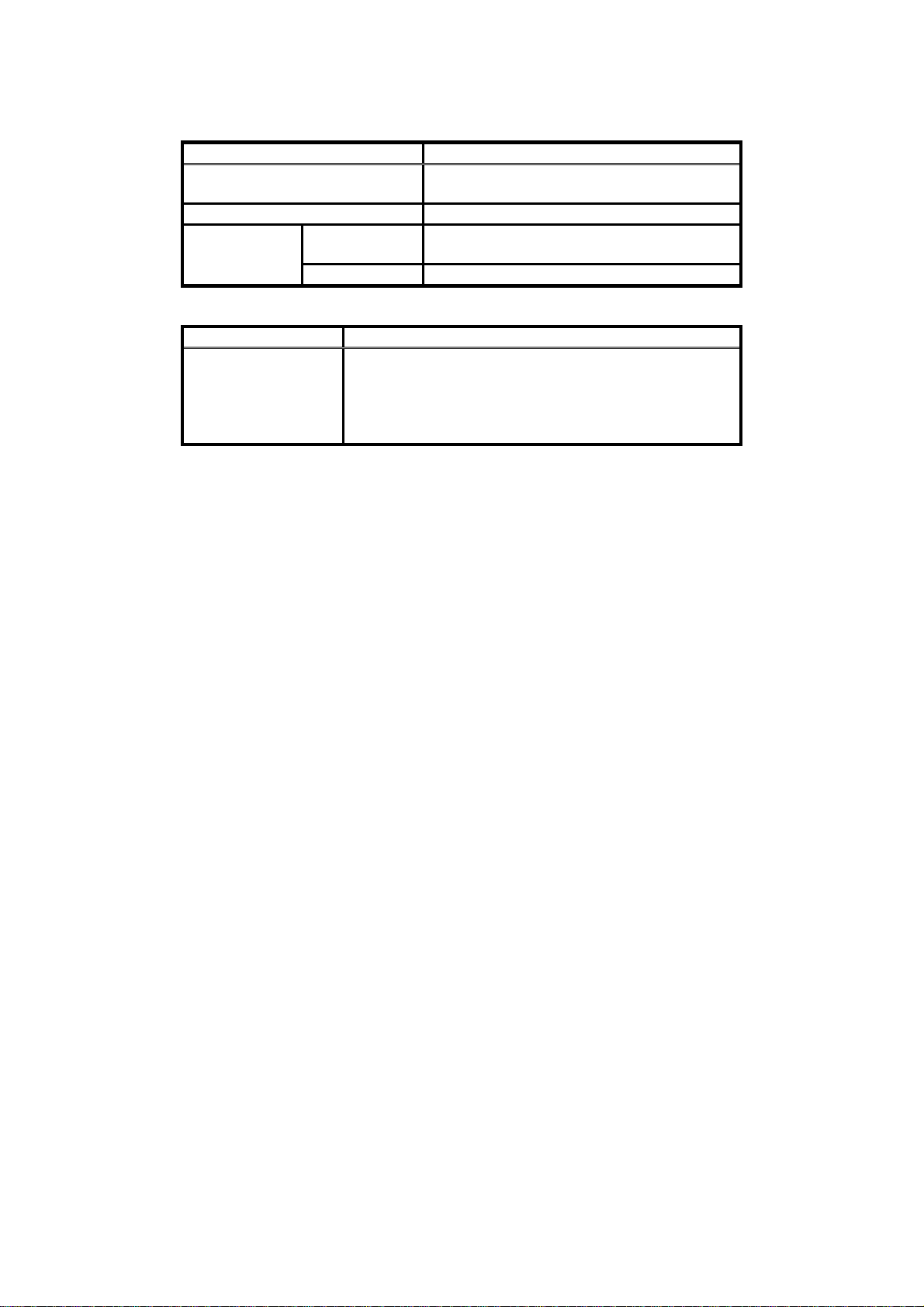
2.2 LAN Setup
Port Specifications
Item Specification
Standard Conforming to IEEE 802.3u (100
Base-TX)
Speed Settings 100M bit/s (Full duplex)
Transmission
Specifications
Item Specifications
Connector Cable UTP cable Category 5 or higher
Note: If traffic on the network to which the AR-3000SD is connected is excessively high, the
AR-3000SD might be unable to operate correctly. Take corrective action as described
below as required.
- Separate the network for AR-3000SD control and the network for other equipment.
- Reduce broadcast packet traffic.
- Reduce ping commands and other such packet traffic addressed to the AR-3000SD.
2.2.1 AR-3000SD Settings
This setting is made usin
Static:
This makes static network settings. You use this when operating the AR-3000SD at a fixed IP
address.
DHCP Client:
This obtains the network settings automatically from the router or other DHCP server. Any
values set for IP, GATE or MASK are ignored. You use this in cases such as when connecting the
AR-3000SD and a Wi-Fi router using a LAN cable and accessing the device from a web browser on
a tablet computer.
DHCP Server:
This makes the AR-3000SD function as a DHCP server. The IP address of the AR-3000SD is set to
"192.168.10.1". Any values set for IP, GATE or MASK are ignored. You use this in cases such as
when connecting the AR-3000SD and a computer using a LAN cable and accessing the device
from a web browser on the computer.
You can verify the IP address of the AR-3000SD by going to MENU and selecting "12.2 Network Info".
Use the following procedure to set up the control PC and AR-3000SD.
1) Confirm that the AR-3000SD's power is turned off.
2) Connect a UTP cable to the AR-3000SD (insert the cable firmly until the connector makes an audible
“click” sound).
3) Connect the other end of the UTP cable to the hub or other LAN device, or directly to the control PC.
4) Turn on the power to the AR-3000SD.
5) Start operations to the AR-3000SD.
Control PC -> Start of data transmission to AR-3000SD
Distance
Connector RJ45 modular Jack
-Use crossover cable between PC and AR
-Use straight cable between AR and hub
(may differ according to hub specifications)
* Use special/separate cable.
g "10.1 Net. Address" on MENU on the AR-3000SD.
100 meters maximum Connection
Cable Specifications
00SD (Ver.1.00) Command Reference - 9
AR-30
Page 10

2.2.2 Network Settings
What is an IP Address?
An IP address is a number that represents a 32-bit address used to identify a specific host on a network
according to the TCP/IP protocol. Accordingly, each IP address on the network must have its own unique,
fixed address.
What is the Subnet Mask?
The subnet mask is used to "mask" part of the IP address so as to enable the TCP/IP protocol to
distinguish between the network ID and the host ID.
Example)
IP Address 111.18.10.2
Subnet Mask 255.255.240.0
Network ID 111.18.0
Host ID 10.2
What is the Gateway?
A gateway acts to convert protocols and relay data between two or more connected networks.
00SD (Ver.1.00) Command Reference - 10
AR-30
Page 11
2.2.3 Verify ing network connections
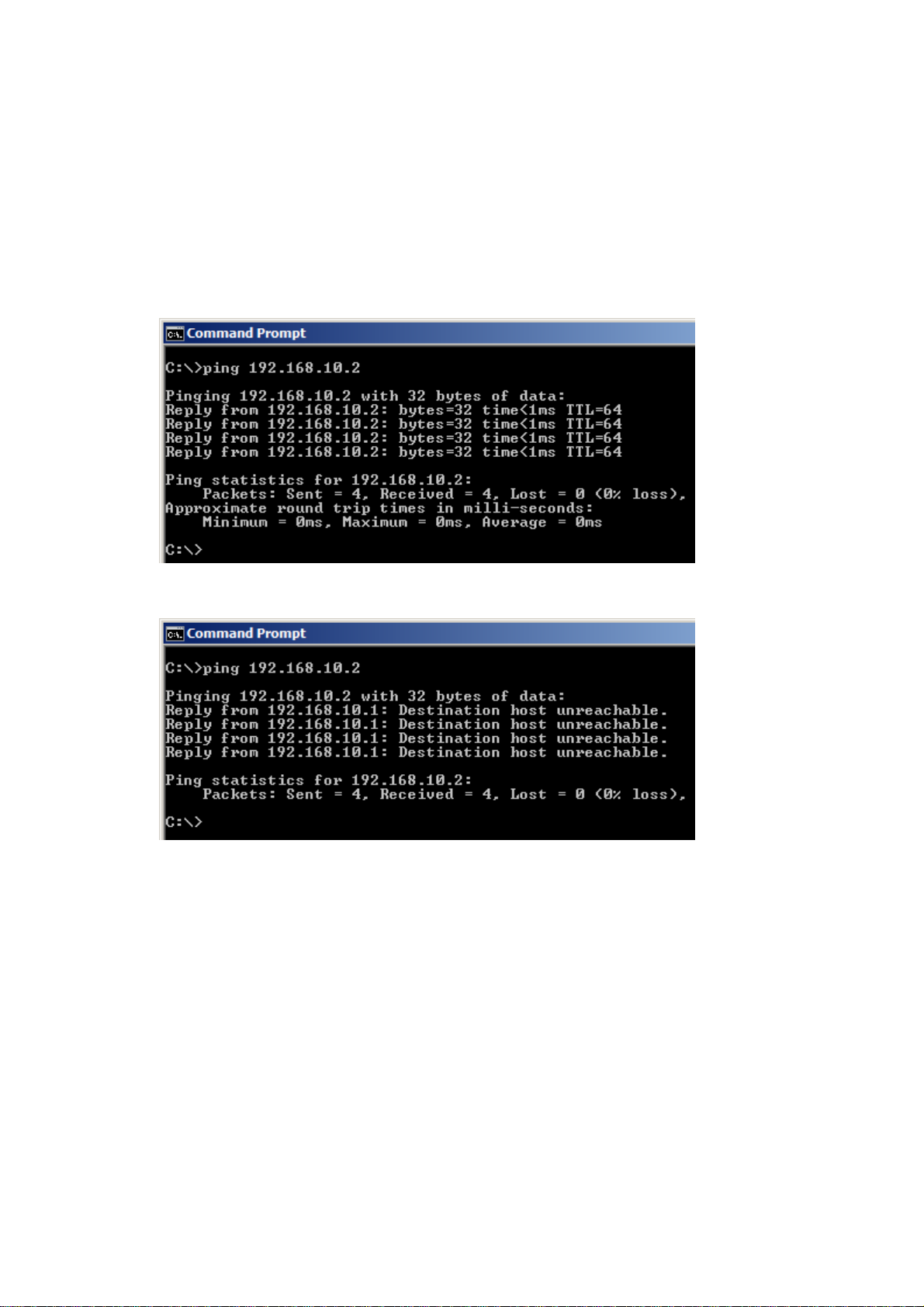
This describes how to use ping commands to verify the network connection between the computer and
the AR unit.
Go to "Start" - "All Programs" - "Accessories" - "Command Prompt". If the IP address set for the
AR-3000SD is 192.168.10.2, type in the following.
ping 192.168.10.2
If the network connection has been made correctly, a response like the following is returned, and a
result of "0% loss" is obtained.
If the network connection has not been made correctly, then a response like the following is returned.
00SD (Ver.1.00) Command Reference - 11
AR-30
Page 12

If the results of the ping command indicate that the network connection has not been made correctly,
check the following.
・ Is the power to the AR-3000SD turned on?
・ Is the power to the hub turned on?
・ Is the UTP cable connection without any problems?
・ Is the type of UTP cable correct (straight or crossover)?
・ Is there a conflict with the IP address assigned to another device?
・ Are the subnet mask and gateway settings correct?
If a proxy server is on the LAN, then depending on the proxy settings, establishing a connection might
not be possible unless further steps are performed. To establish a connection, try one of the following
methods.
1) Use the Internet option to make the settings for connecting directly to the Internet and not via the
proxy server.
2) Use the Internet option to register the IP address assigned to the AR-3000SD as not to use the
proxy.
3) Contact your network administrator to register the IP address of the AR-3000SD in the DNS
database.
2.2.4 Firewall settings
If a firewall or other security so
computer and the AR unit might be difficult. In such cases, refer to the following examples and specify
the client program and port numbers as exceptions.
Service Port number
TELNET 23
FTP (control) 21
FTP (data transmission) 20
HTTP 80
ftware is in use, establishing correct communication between the
AR-3000SD (Ver.1.00) Command Reference - 12
Page 13
2.3 Telnet Server Functions
The AR-3000SD supports Telnet server functions. Logging in from a PC that features Telnet client
functionality permits remote operation of AR-3000SD units.
Note: The AR-3000SD does not support Telnet client functions. You cannot log in on another
Telnet server from the AR-3000SD.
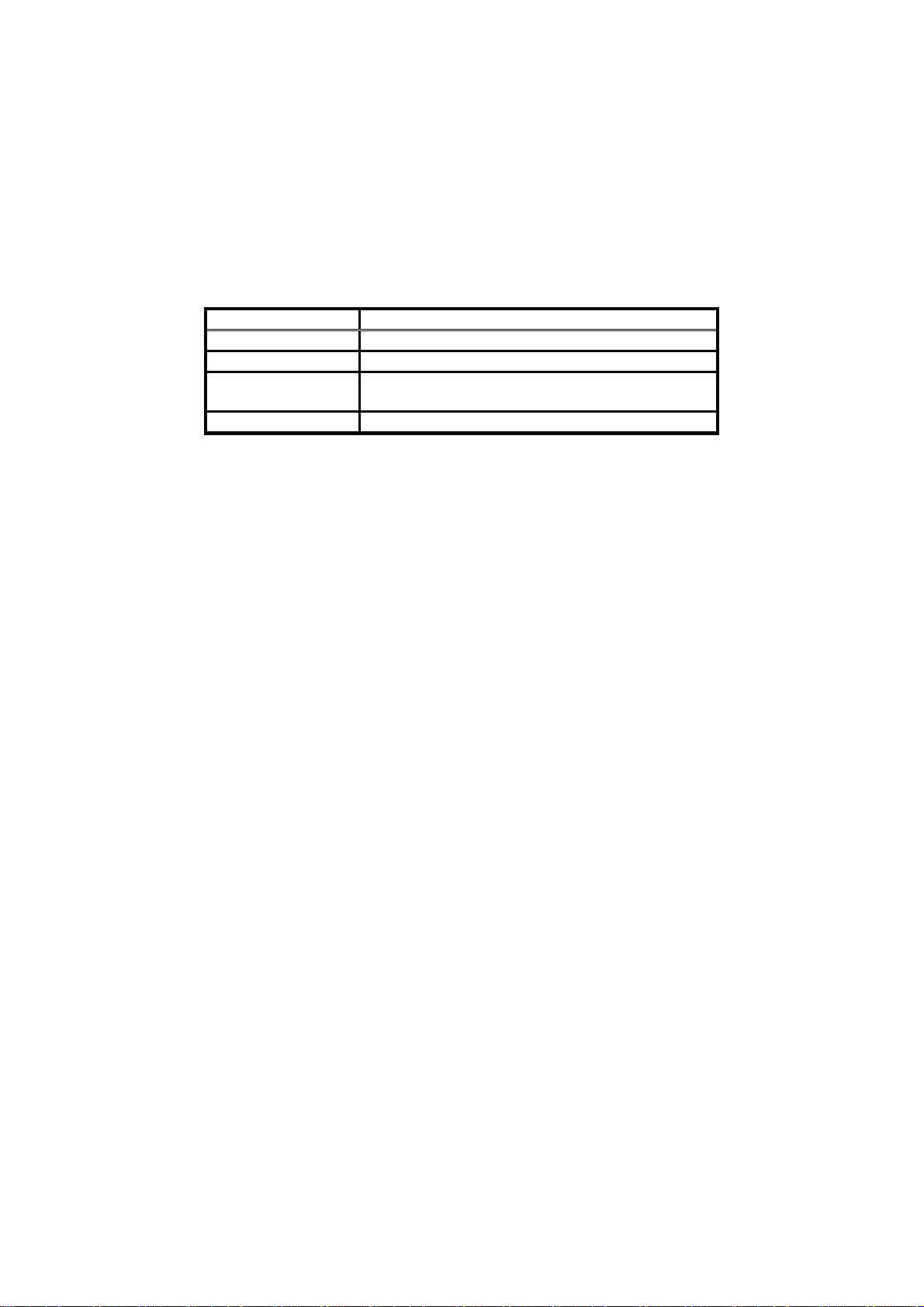
2.3.1 Telnet Server Function Operating Specifications
elnet Function Specifications
T
Item Specification
Control Mode Character mode (character-at-a-time mode)
Echo Control Remote echo
Termination Key Processing reception CR, LF, or CR-LF
Processing transmission CR-LF
Support Options Echo, SuppressGoAhead
* If a PC that does not support the above options is used, characters that are input may appear
twice in the display.
2.3.2 Non-Telnet Functions
Limitations on Remote Operation
1)
- Allowable number of logins: one control PC may log into a single AR-3000SD at any one time.
Because of this, no login name is entered when logging on.
2) Password Functions
- Passwords can be set with the AR-3000SD (from five to eight characters).
- The default value is set to “no password.” If a password has been set, the “password:” prompt
appears when the user logs in; log in with the set password.
00SD (Ver.1.00) Command Reference - 13
AR-30
Page 14
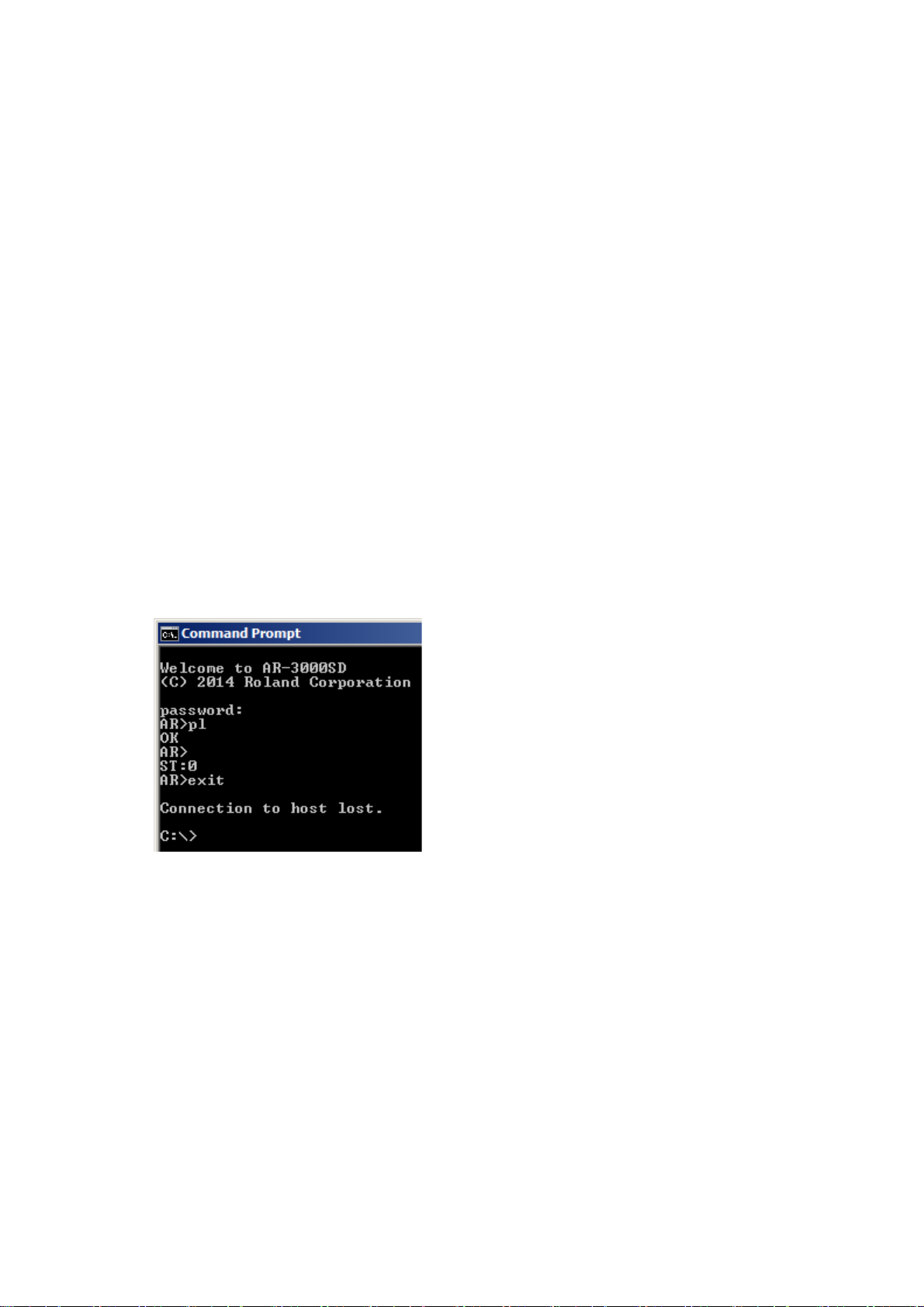
2.3.3 Login Instructions/Example of Command Input
Before Logging In
Connecting to the AR-3000SD via Telnet requires that the IP address be set and other settings for the
AR-3000SD be made.
Note: Changes in the IP address are reflected the next time the AR-3000SD's power is tur ned
on. For this reason, even though the IP address has been changed, the IP address
shown in the LCD screen will differ from the actual address until the po wer is turned off,
then on again.
Here is a case outlining logging in and entering commands, with an example of logging on using Telnet
from a command prompt connection with the conditions shown below.
For more detailed information about the actual commands, refer to Section 3 on.
1) When using Windows, select [Start]-[Run]; a text box opens.
(a) Enter the Telnet IP address.
When the AR-3000SD's IP address is 192.168.10.2
Telnet 192.168.10.2
2) Start up the Telnet software included with Windows.
(a) The login screen appears.
(b) If a password has been set, the “password:” prompt appears at login.
(c) After entering the password, the “AR>” prompt appears in the display.
Enter the “pl” command to play back Phrase #1. If there is a Phrase #1, then playback begins
and OK appears in the screen.
(d) Enter the exit command to end the session.
- When entering text, you can use the Backspace key to delete the immediately preceding
character.
- Both uppercase and lowercase alphabetical characters may be used in commands.
00SD (Ver.1.00) Command Reference - 14
AR-30
Page 15

* If unable to log in, check the following.
- In Windows, select [Start]-[Run], then enter the following text in the text box and execute.
ping 192.168.10.2
If OK is returned from the AR-3000SD, check the application settings.
If the AR-3000SD does not return an OK, check the following.
- Has the power to the AR-3000SD been cut off?
- Has the power to the hub been cut?
- Poorly connected UTP cables
- Is the wrong type of UTP cable (straight, crossover) being used?
- Incorrect subnet mask setting
- Multiple IP address settings
- Incorrect gateway address
If the above steps do not result in a good connection, turn the AR-3000SD's power off, then on
again.
AR-3000SD (Ver.1.00) Command Reference - 15
Page 16
2.4 FTP Server Functions
The AR-3000SD supports FTP server functions. You can use this file transfer function to read and write
data from a PC that features FTP client functionality.
Note: The AR-3000SD does not support FTP client functions.
You cannot log into another FTP server from the AR-3000SD.
2.4.1 FTP Server Function Operating Specifications
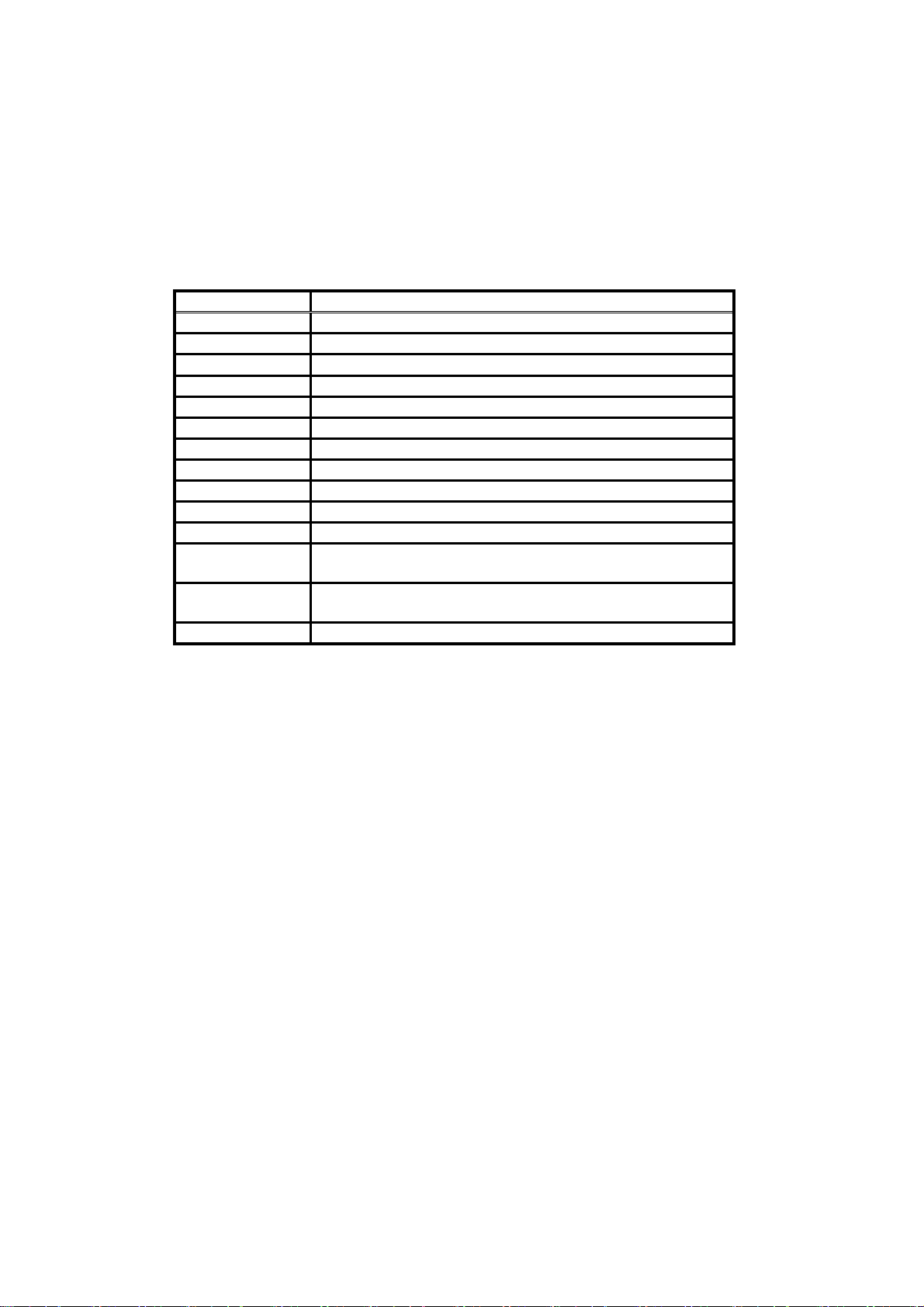
FTP Function Specifications
FTP Command Function
ABOR Cancel data transmission
TYPE Switch the transmission mode (ASCII, BINARY)
CDUP Change to parent directory
CWD Change the directory
PWD Show the current directory
DELE Delete file
PASS Enter password
LOGOUT User logout
SYST System type
LIST List contents of current directory
NLST Show list of file names in current directory
RETR Retrieve a copy of the file from the server file system and
save it to client file system (GET).
STOR Transfer a copy of the specified file from the client to the
server (PUT).
STOU Specify name of file and transfer it to the server.
00SD (Ver.1.00) Command Reference - 16
AR-30
Page 17

2.4.2 Non-FTP Functions
1) Timeout during FTP Transfer
If no access is made for a set time (60 seconds) during FTP transfer, the AR-3000SD forcibly ends
the FTP connection.
2) Limitations of the FTP Connection
- Allowable number of FTP connections: one FTP client may be connected to a single AR-3000SD
at one time.
3) Password Functions
- Passwords can be set with the AR-3000SD (from 5 to 8 characters).
- The default value is set to “no password.”
Since not setting any password presents a security issue, it is recommended that the AR-3000SD
not be connected in a manner that permits direct access via the Internet in this case.
00SD (Ver.1.00) Command Reference - 17
AR-30
Page 18
2.4.3 Login Instructions
Before Logging In
Connecting to the AR-3000SD via FTP requires that the IP address be set and other settings for the
AR-3000SD be made.
Note: The IP address, subnet mask, and gateway settings become effective the next time the
Here is an example of an FTP connection with the conditions as shown below.
Conditions
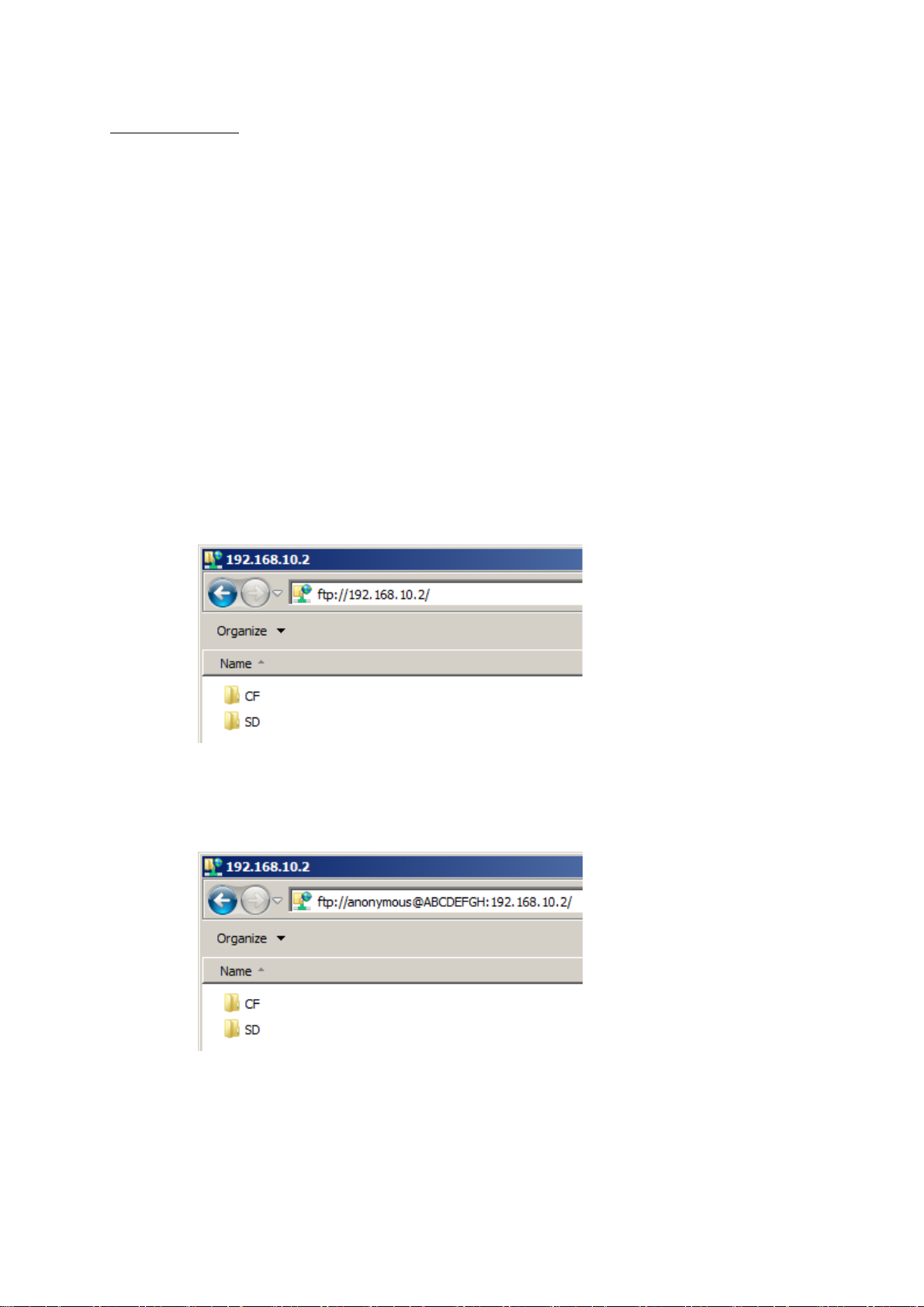
1) Enter the IP address as the URL in the browser, as shown below.
(a)When the AR-3000SD is set to “no password”
AR-3000SD’s power is turned on; thus once the IP address is changed, the IP address
appearing in the LCD screen differs from the actual IP address until the po wer is turned
off and then on again.
Web browser: Internet Explorer
AR-3000SD IP address: 192.168.10.2
Login name: anonymous (Login name is fixed)
Password: None (initial setting) or ABCDEFGH
Port No.: 20 and 21
Enter as ftp://[IP address].
ftp://192.168.10.2
(b)When “ABCDEFGH” is set as the password
Enter as ftp://anonymous:[password]@[IP address].
ftp://anonymous:[email protected]
2) The AR’s file list appears in the web browser.
Initially, the transfer mode is set to BINARY.
3) Drag and drop to transfer files.
00SD (Ver.1.00) Command Reference - 18
AR-30
Page 19

* If unable to connect, check the following.
- In Windows, select [Start]-[Run], then enter the following text in the text box and execute.
ping 192.168.10.2
If OK is returned from the AR-3000 SD, check the application settings.
If the AR-3000SD does not return OK, check the following.
- Has the power to the AR-3000SD been cut off?
- Has the power to the hub been cut?
- Poorly connected UTP cables
- Is the wrong type of UTP cable (straight, crossover) being used?
- Incorrect subnet mask setting
- Multiple IP address settings
- Incorrect gateway address
- If attempting to use FTP with another application, quit that other application.
- When a proxy server is connected to the LAN, the proxy settings may be preventing the
connection. Try the following procedure to establish the connection.
1. In your browser, select [Edit]-[Preferences...]-[Advanced]-[Proxies]-[Direct connection to
the Internet].
2. In your browser, select [Edit]-[Preferences...]-[Advanced]-[Proxies]-[Manual proxy
configuration]-[Configure...], then in the “No Proxy for:” box headed by “You may provide a
list of domains that Netscape should access directly, rather than via the proxy:”, enter the
AR’s IP address.
3. Contact the LAN administrator to add the AR’s IP address to the DNS registry.
If the above steps do not result in a good connection, turn the AR-3000SD’s power off, then
on again.
If other programs are being used, try connecting again after referring to the user’s guide for each
of the applications.
AR-3000SD (Ver.1.00) Command Reference - 19
Page 20
2.5 WEB Server Functions (Browser Control)
The AR-3000SD has an internal web server. The web server in the AR-3000SD can be accessed by
specifying the AR-3000SD's IP address in a web browser on a computer or tablet device.
You can verify the IP address of the AR-3000SD by going to MENU and selecting "12.2 Network Info".
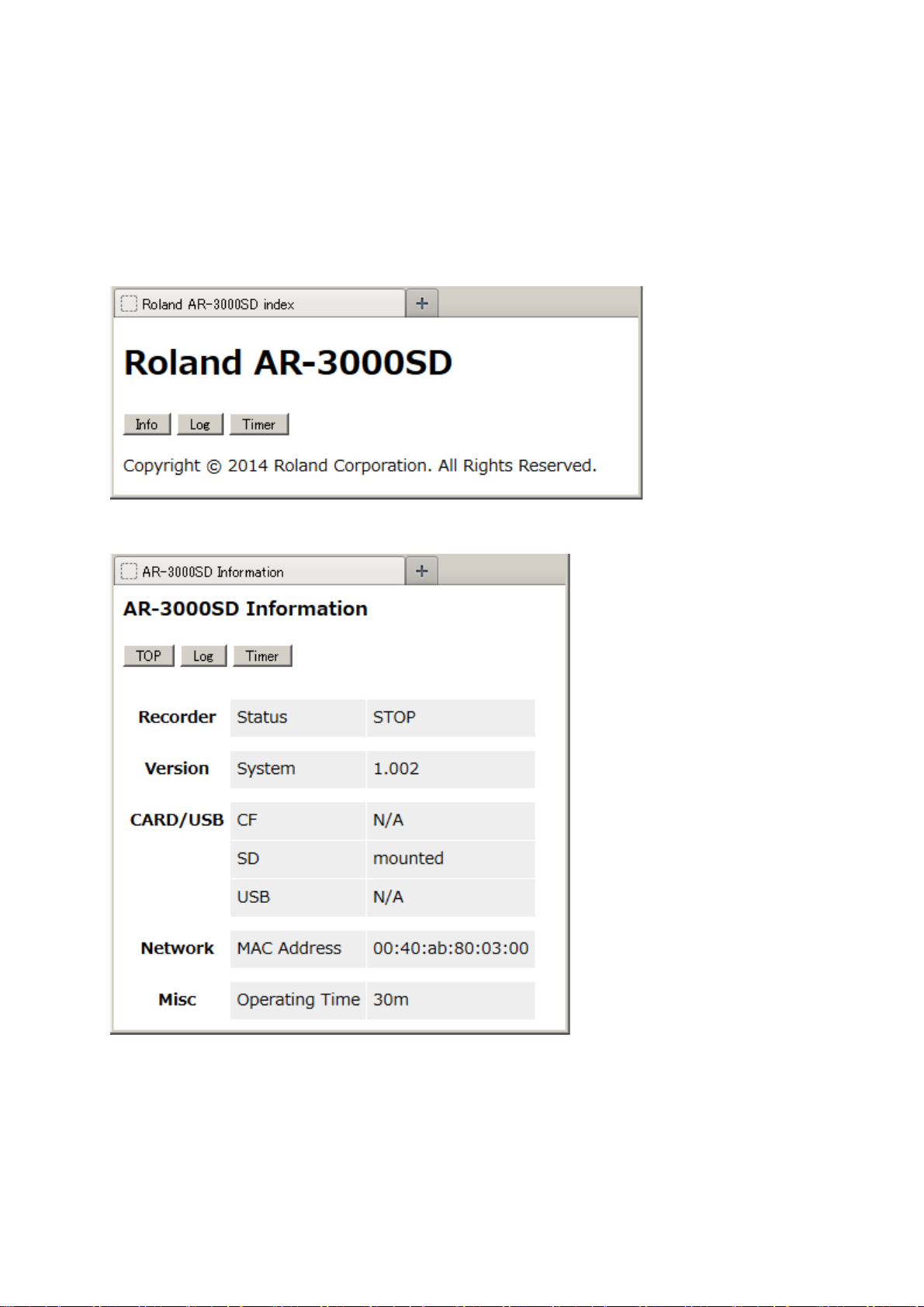
2.5.1 Top Page
This is provided w
ith buttons for navigating between pages.
2.5.2 Info Page
Recorder: This indicates the current status of recording or playback.
Version: This displays the version number of the AR-3000SD.
CARD/USB: This indicates the status of any mounted CF or SD card or USB flash drive.
Network: This displays the AR-3000SD's MAC address.
Misc: This displays the amount of time elapsed since starting the AR-3000SD.
AR-30
00SD (Ver.1.00) Command Reference - 20
Page 21
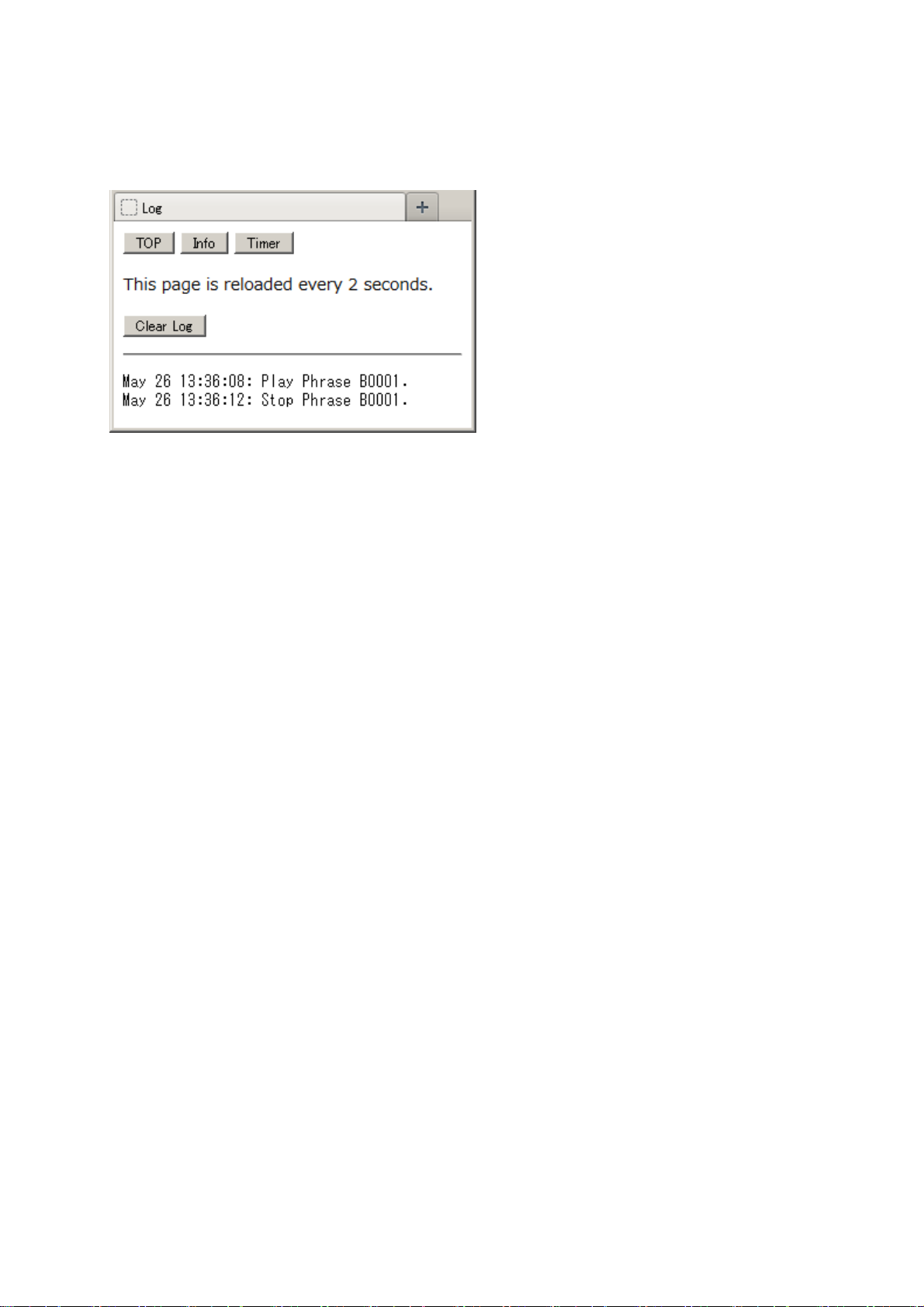
2.5.2 Log Page
This displays the history of phrase playback and stoppage.
This page is reloaded every 2 seconds.
Clicking the "Clear Log" button clears the history log.
00SD (Ver.1.00) Command Reference - 21
AR-30
Page 22
2.5.3 Programmable Timer Pages
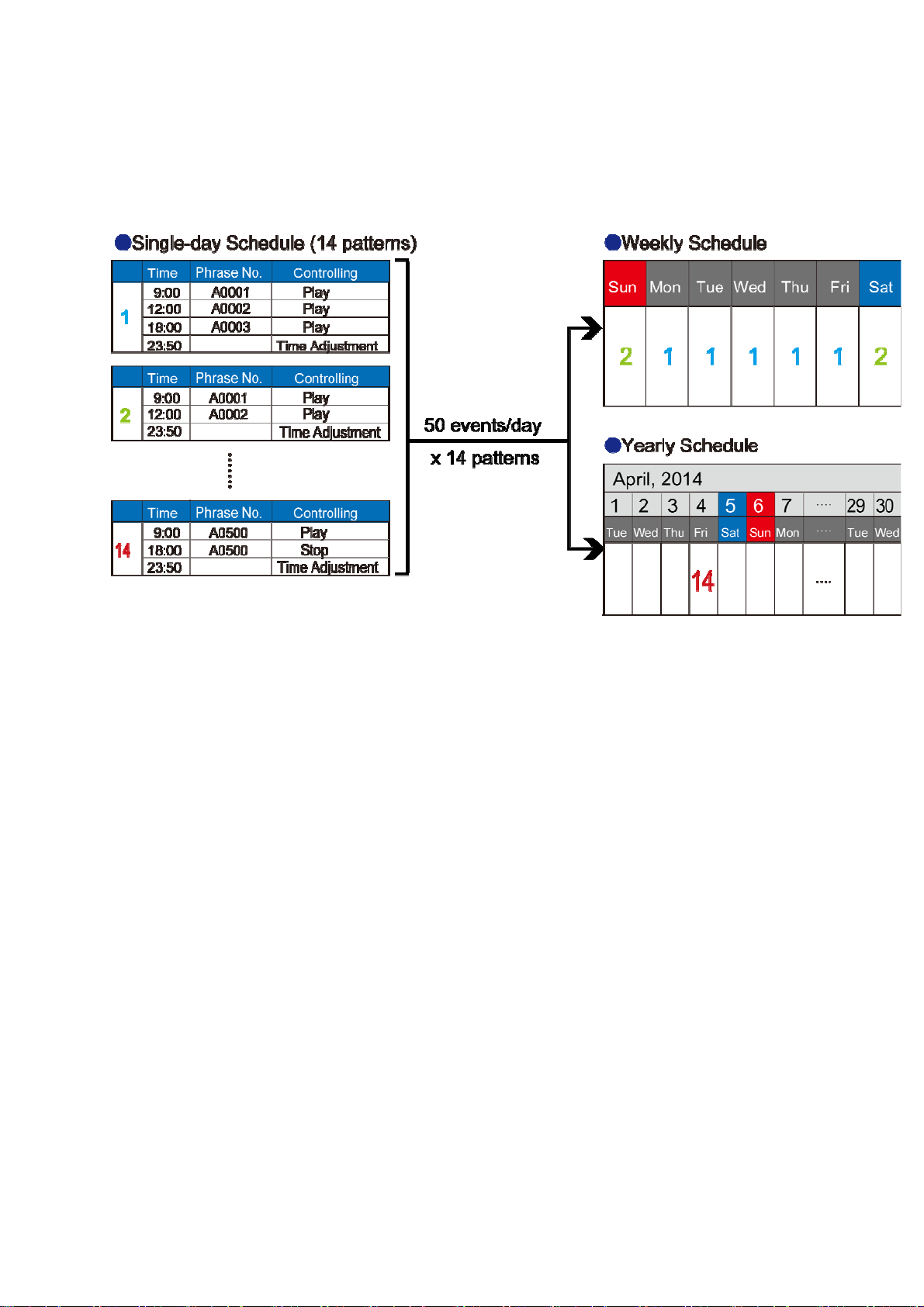
The programmable timer can be used to perform such operations as starting and stopping phrase
playback at preset times. Programmable timer settings are read in from the system card.
Note: Operating the programmable timer requires setting the current time on the AR-3000SD
(Owner's Manual p. 11, "Setting the Date and Time").
The programmable timer can be used to set the following operations (events) to occur at any specified
time.
- Phrase playback
- Phrase recording
- Stopping phrase playback or recording
- Adjusting phrase volume level
- BUSY OUT signal output
- CONTROL OUT signal output
- Time adjustment using an NTP time server
- AR-3000SD control commands
A single-day schedule can combine up to 50 events. You can create up to 14 schedule patterns.
You can save a different schedule for each day of the week (weekly schedule).
You can replace the schedule for a specific desired date with a special schedule (yearly schedule of up to
200 days).
Note: Schedule settings cannot be made on the AR-300 0SD itself.
Use a web browser or the ARE-3000 computer program.
Accuracy of the internal clock:
The AR-3000SD is equipped with an internal clock for programmable-timer operation,
but use jointly with an NTP time server is assumed. Accordingly, the accuracy of the
time kept by the internal clock when using the AR-3000SD alo ne is not assured.
00SD (Ver.1.00) Command Reference - 22
AR-30
Page 23
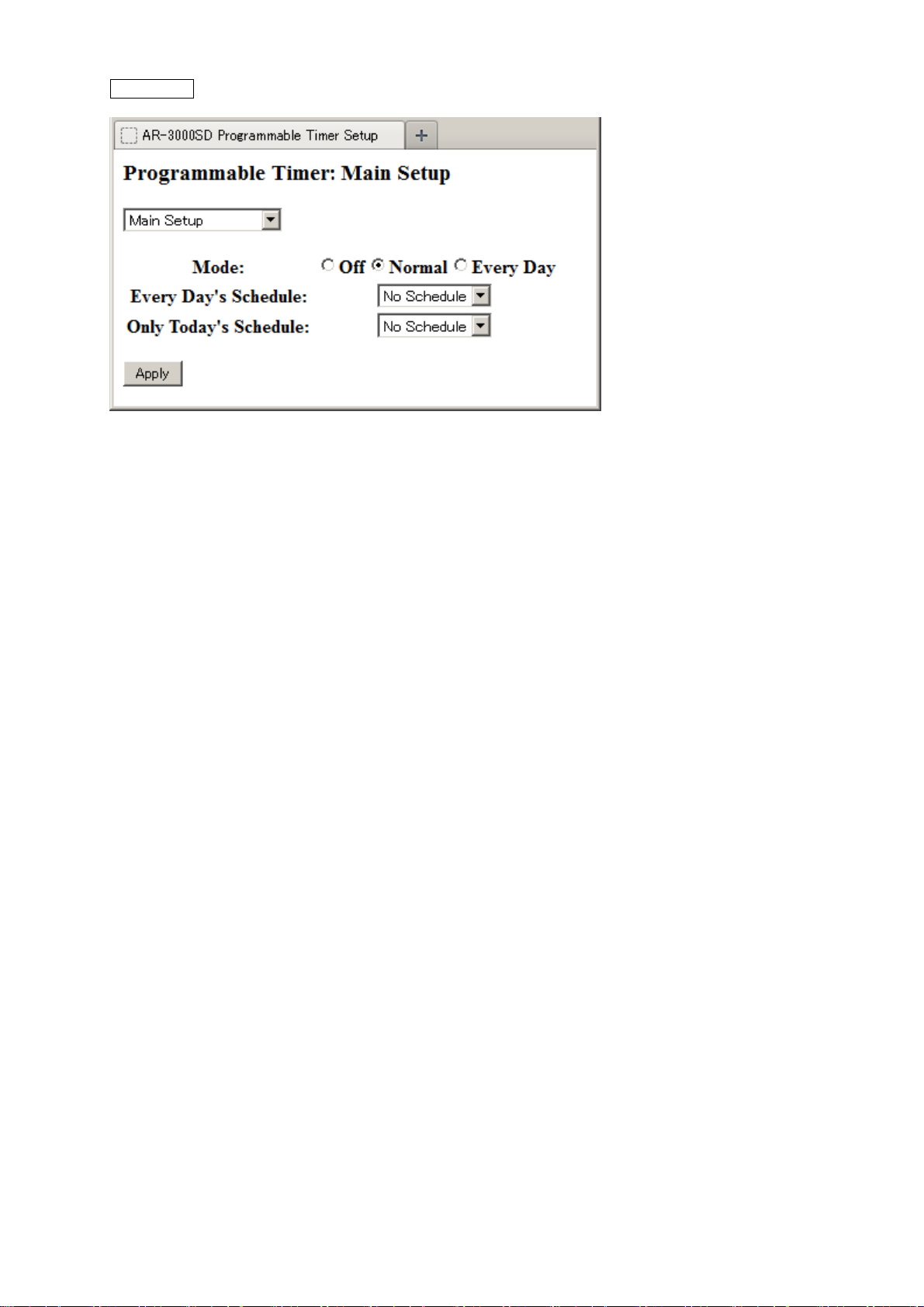
Main Setup
Operation according to a weekly schedule or yearly schedule
From the main pull-down menu, select "Main Setup."
The "Main Setup" screen appears.
For "Mode:", select "Normal."
Click "Apply."
The programmable timer operates according to the weekly schedule and yearly schedule.
Operation according to the same schedule every day
From the main pull-down menu, select "Main Setup."
The "Main Setup" screen appears.
For "Mode:", select "Every Day."
From the "Every Day's Schedule:" pull-down menu, select Schedule.
Click "Apply."
Every day, the programmable timer operates according to the schedule set in "Every Day's
Schedule."
Operation that today only is different from the usual schedule
From the main pull-down menu, select "Main Setup."
The "Main Setup" screen appears.
For "Mode:", select "Normal" or "Every Day."
From the pull-down menu for "Only Today’s Schedule:", select Schedule.
Click "Apply."
For today only, the programmable timer operates according to the schedule set in "Only Today’s
Schedule."
Stopping the programmable timer
From the main pull-down menu, select "Main Setup."
The "Main Setup" screen appears.
For "Mode:", select "Off."
Click "Apply."
The programmable timer stops.
00SD (Ver.1.00) Command Reference - 23
AR-30
Page 24
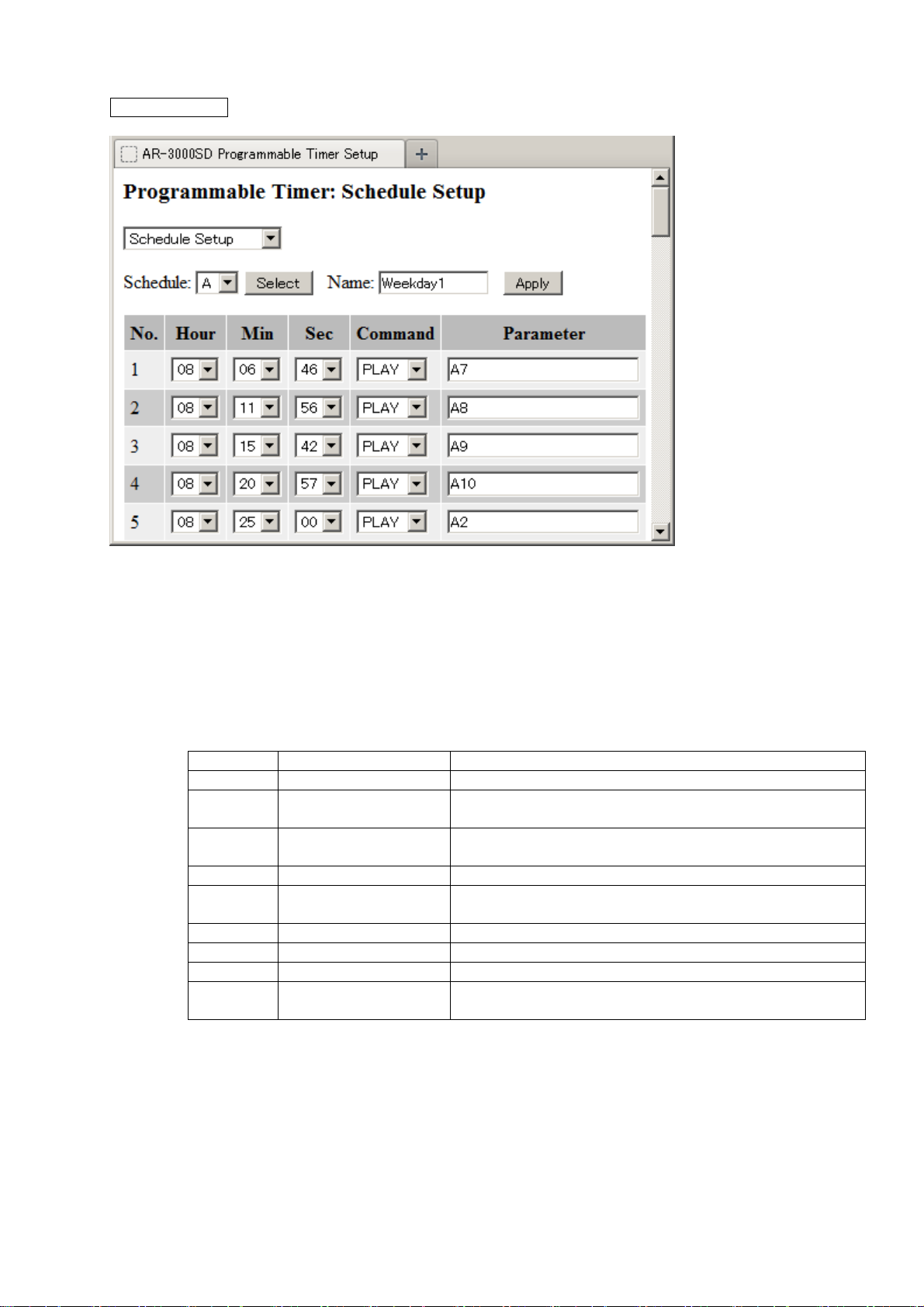
Schedule Setup
This sets the single-day schedule assigned to the respective day of the week or date.
From the main pull-down menu, select "Schedule Setup."
The "Schedule Setup" screen appears.
From the "Schedule:" pull-down menu, choose a schedule (A through N).
Click "Select".
The contents of the selected schedule are displayed.
About operations and parameters
Command Parameter Function
NOP None Nothing is done (unconfigured schedule)
PLAY Phrase number
The phrase is played.
(A0001 --- D1000)
REC Phrase number
(A0001 --- D1000)
The phrase is recorded; if a phrase number is absent,
recording is automatically made at an empty phrase.
STOP None Phrase playback or recording stopped
VOL Phrase volume level
Playback volume level
(10 --- 100)
BUSY ON (1)/OFF (0) BUSY OUT signal output on/off
CONT ON (1)/OFF (0) CONTROL OUT signal output on/off
NTP None Time synchronization with an NTP server
USR Control command
Control commands
(TELNET format)
Assigning a name
Type in a name for the schedule in the "Name:" text box.
(Input is limited to single-byte alphanumeric characters.)
Click "Apply". The name is changed.
Adding a schedule
At the line for an unconfigured schedule, select "Hour", "Min" and "Sec" for the time at which the
operation is to be executed.
Select the "Command" pull-down menu.
In the "Parameter" text box, enter the required parameters.
00SD (Ver.1.00) Command Reference - 24
AR-30
Page 25
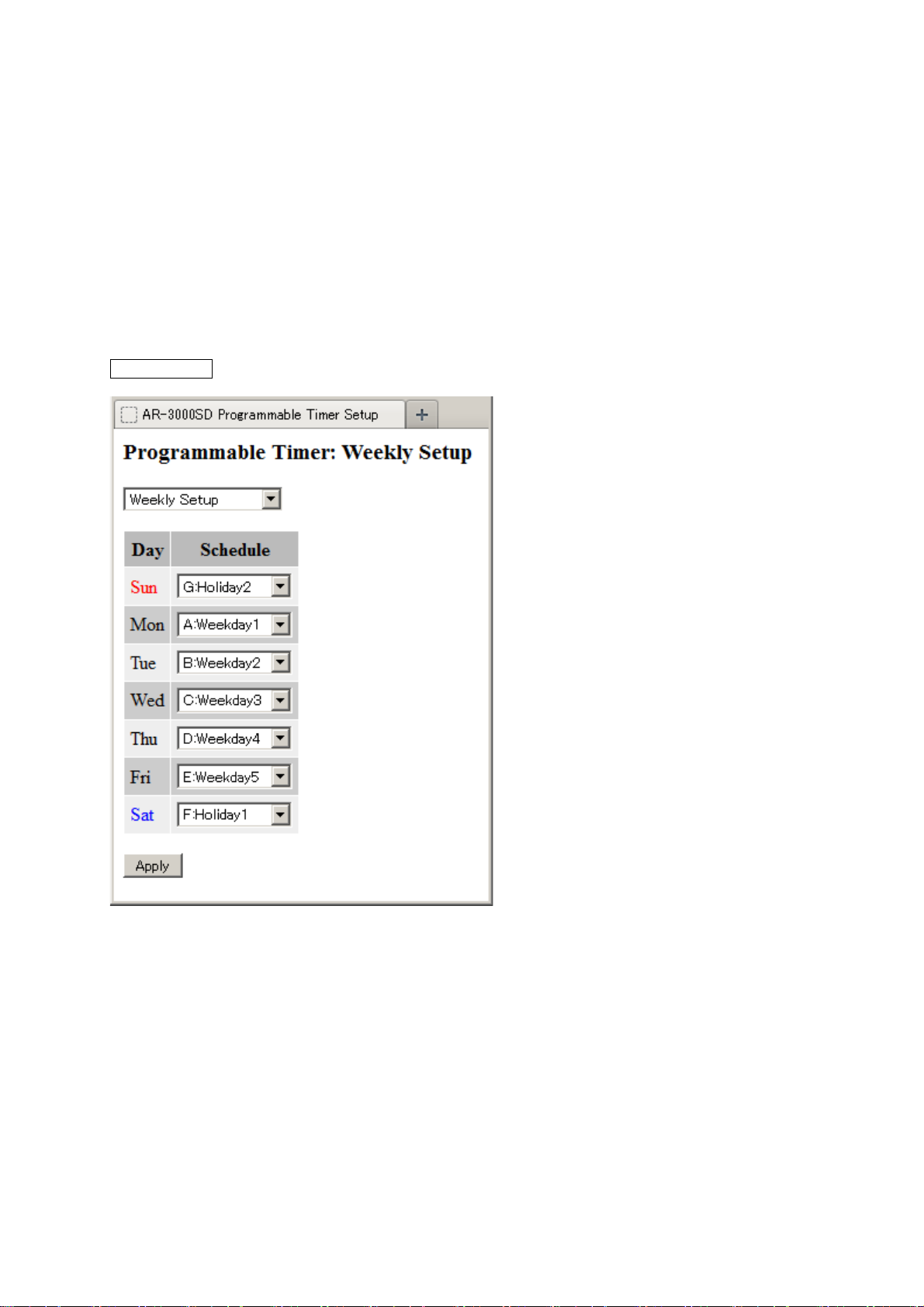
Weekly Setup
Click "Apply."
The schedule is added.
Changing the time for a schedule
At the line for the schedule whose time you want to change, select "Hour", "Min" and "Sec" for
the new time setting.
Click "Apply."
The schedule's start time is changed.
Deleting a schedule
At the line for the schedule you want to delete, go to the "Command" pull-down menu and choose
"NOP."
Click "Apply."
The schedule is deleted.
This assigns a schedule to each day of the week.
From the main pull-down menu, select "Weekly Setup."
The "Weekly Setup" screen appears.
For each day of the week, from the "Schedule" pull-down menu, choose a schedule (A through N).
If you don't want to set a schedule, choose "No Schedule."
Click "Apply."
The schedules are assigned.
AR-3000SD (Ver.1.00) Command Reference - 25
Page 26
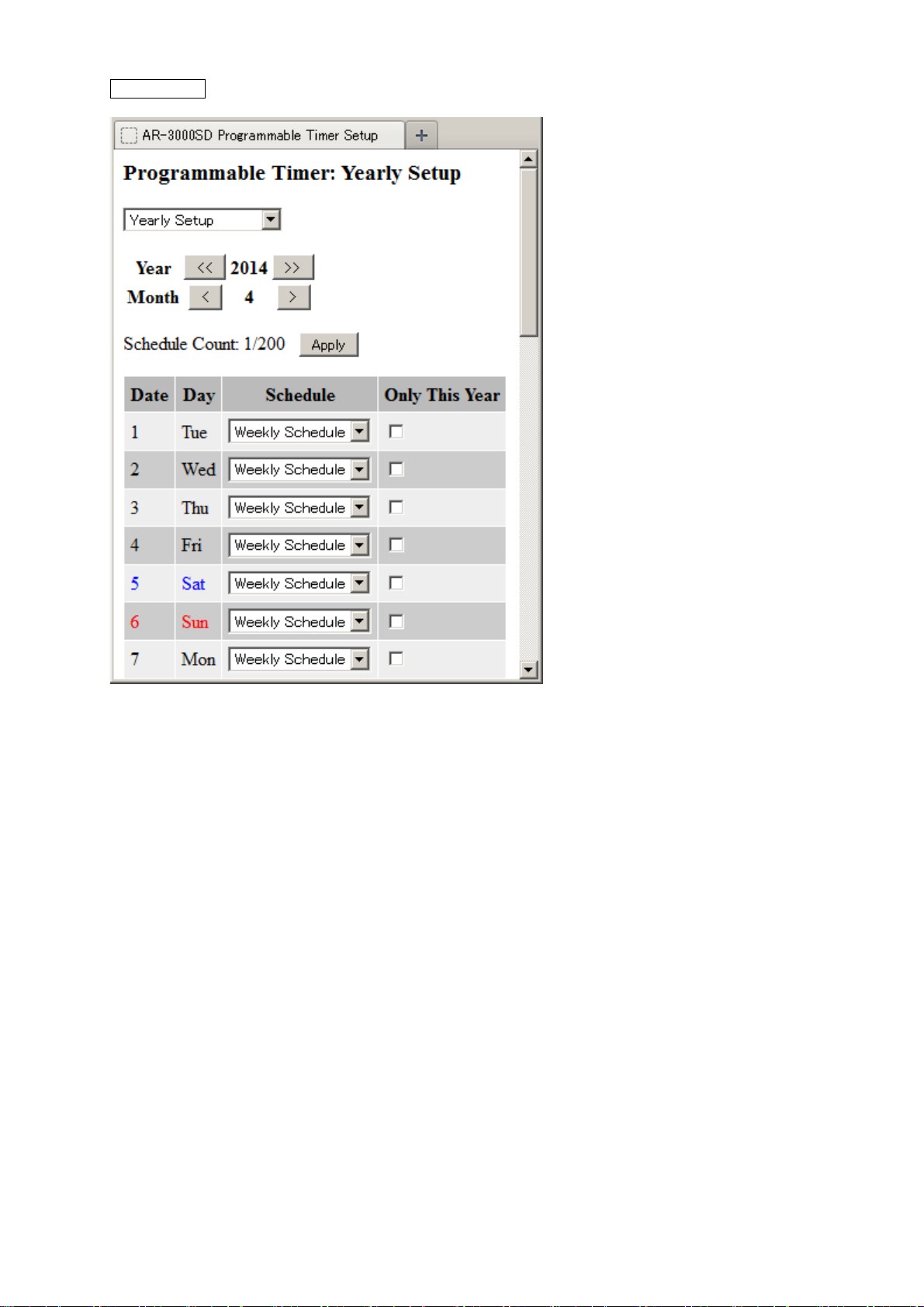
Yearly Setup
This assigns a single-day schedule set using "Set a Single-day Schedule" to a desired date.
From the main pull-down menu, select "Yearly Setup."
The "Yearly Setup" screen appears.
Use Year [<<] [>>] and Month [<] [>] to select the year and month to set.
From the "Schedule" pull-down menu for the day you want to set, choose a schedule (A through N).
If you want to assign a schedule that has been assigned to a weekly schedule, choose "Weekly Schedule."
If you want to make the assignment for this year only, select the "Only This Year" check box.
Click "Apply."
The schedule is assigned.
00SD (Ver.1.00) Command Reference - 26
AR-30
Page 27
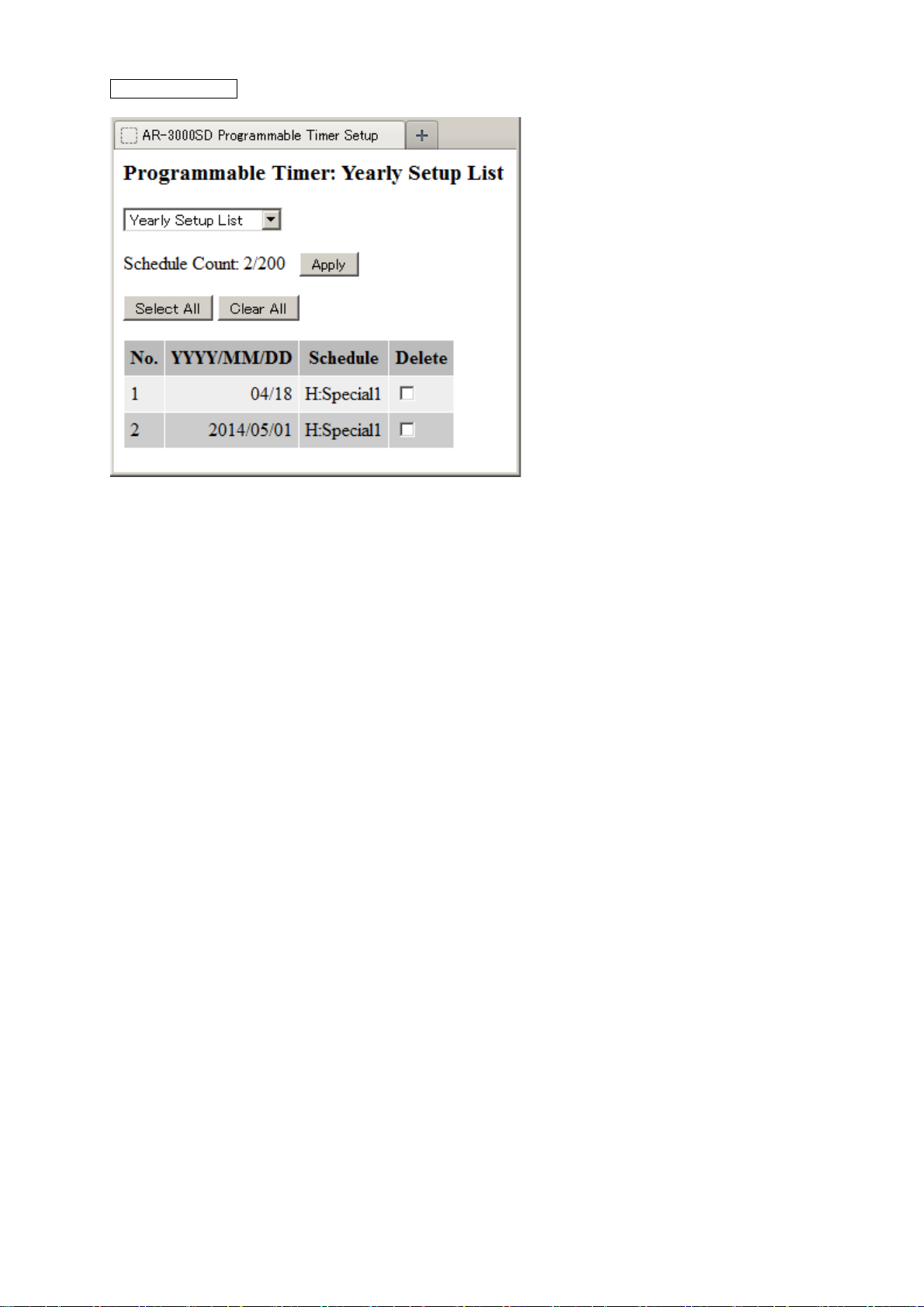
Yearly Setup List
Checking the yearly schedule
From the main pull-down menu, select "Yearly Setup List."
The "Yearly Setup List" screen appears.
If "month/day" only are displayed in the date column (YYYY/MM/DD), the schedule is executed
on that day every year.
If "year/month/day" are displayed in the date column (YYYY/MM/DD), the schedule is executed
that year only.
Deleting a yearly schedule
From the main pull-down menu, select "Yearly Setup List."
The "Yearly Setup List" screen appears.
Select the "Delete" check box in the line of the date (YYYY/MM/DD) you want to delete.
Clicking "Select All" selects "Delete" for all lists.
Clicking "Clear All" clears the "Delete" selection for all lists.
Click "Apply."
Schedule assignments whose "Delete" check boxes have been selected are deleted.
00SD (Ver.1.00) Command Reference - 27
AR-30
Page 28

Section 3 Overview of Commands
The AR-3000SD and the control PC communicate by means of commands. There are a number of
different types of commands. The commands used to control the AR-3000SD vary according to the
intended purpose.
3.1 Summary of Commands (RS-232C)
Commands consist of STX (02H) + two uppercase characters.
However, the Type 0 commands listed later are exceptions to this.
Depending on the command, four types of communication protocol are used between the computer and
the AR-3000SD. As also explained in chapter 4, the ACK referred to in this document is ASCII code 06H
(ACK), and the ER command is a command that transmits/receives an error.
3.2 Summary of Commands (Telnet)
Commands are basically formed as strings of ASCII code consisting of two alphabetic characters followed
by a colon (“:”), a parameter (a numerical value), and a comma (“,”).
The two alphabetic characters represent the type of command. However, some commands may have
more than one forms (refer to “3.1.2 About Command Formats”).
Either uppercase or lowercase characters may be used in commands.
Example:
Example:
3.3 Communication Protocol
Depending on the command, four types of communication protocol are used between the computer and
the AR-3000SD.
1) When telling the AR-3000SD to perform an operation or make a setting.
This is done using the “4.2.1 Control” and “4.2.3 Setting commands” explained in Section 4.
Commands use the following procedure.
a. command
COMPUTER AR-3000SD
b. ack/OK or ER command
a. The command is sent from the computer to the AR-3000SD.
b. If the command is received correctly, the AR-3000SD will transmit an ack/OK command. If not,
it will transmit an ER command.
2) To verify the settings of the AR-3000SD
This is done using the 4.2.4 Request command explained in Section 4. The command to check the setting
status of the AR-3000SD uses the following procedure.
a. command
COMPUTER AR-3000SD
b. command or ER command
c. ack/OK or ER command
a. The command is sent from the computer to the AR-3000SD.
b. If the command was received correctly, the AR-3000SD will transmit its settings as the Setting
output command. If the command was received incorrectly, the AR-3000SD will transmit an ER
command.
c. If the output from the AR-3000SD is received correctly, send an ack/OK command. This OK
may be omitted, and is not absolutely necessary. If not correctly, an ER command “ER:0” can be
sent to the AR-3000SD. The AR-3000SD will re-transmit the Setting output command that was
pl PL
pe PE
00SD (Ver.1.00) Command Reference - 28
AR-30
Page 29

ut instep “b”. This command may also be omitted, and is not absolutely necessary.
outp
You may instead re-do the sequence from step “a”.
3) Commands originating automatically from the AR-3000SD
Some commands are transmitted automatically from the AR-3000SD. The two commands CC (card
insertion status output) and %% (completion status output when a card operation takes place) fall in
this category, and use the following procedure.
a. command
COMPUTER AR-3000SD
a. The AR-3000SD will automatically transmit the command.
There is no need to return an ack/OK, etc.
4) Commands accompanied by confirmation
The 4.2.2 Edit command explained in Section 4 is of this type. To prevent accidental erasure of data,
edit commands are executed after entering Delete mode. Commands use the following procedure.
a. command
COMPUTER AR-3000SD
b. ack/OK or ER command
c. Edit command
d. Edit command (same as step “c.”)
e. ack/OK or ER command
a. Transmit the DM command. The AR-3000SD will enter Delete mode.
b. If the DM command is received correctly, an ack/OK will be returned. If there is a command
error, the ER command will be returned and the AR-3000SD will automatically exit Delete
mode.
c. If no error has occurred, transmit the command you wish to execute.
d. To confirm, the AR-3000SD will send back the command that it received in step “c”.
e. If the command is correct, send an ack/OK. This will cause the command to be executed. Then,
after receiving the command, the AR-3000SD will automatically exit Delete mode. If the
command is an error, you can send an ER command “ER:1”. The command will be canceled, and
the AR-3000SD will exit Delete mode.
3.4 Command Format
Commands (control signals) have several formats.
Type 0: Those consisting only of a control code.
semicolon ‘;’ etc. is not attached. These consist only of a control code.
Example) ack
Type 1: Commands with no parameters
Example)
ST
Type 2: Commands with parameters.
Command: parameter, parameter . . .
Command and parameter are separated by a colon ‘
Parameter and parameter are separated by a comma ‘
:’
,’
3.5 About Input Parameters
1) Generally, parameters use decimal notation, and are variable length.
Example)
Example) MP:A1,30 MP:A20,255
2) Characters in a card name etc. are enclosed in double quotation marks (").
Example)
3) The phrase and the card slot are specified together.
Example)
- A01, A001 or A0001 is the same as A1.
DC:10 DC:5
CV:0,"ABCDEFGH",0
PA:A1 (plays back phrase 1 of card A)
00SD (Ver.1.00) Command Reference - 29
AR-30
Page 30

3.6 About Output Parameters
1) Generally, parameters use decimal notation, and are variable length. But phrase name and time are
fixed length.
Example) phrase name (A1 – A999, B1 – B999): A001, A020, A300, _.
Example) phrase name (A1000, B1000): A1000, B1000
Example) Time: 00H00M06S14F7S, 05M40S, 00S04F, 30S0 _.
3.7 Precautions
1) After you make settings, erase, or copy, we recommend that you call up the AR-3000SD internal
memory data and check the contents.
2) While the computer and the AR-3000SD are communicating, please avoid the following actions, which
could result in destruction of the data in the card.
- Inserting or removing the memory card.
- Moving the protect switch of the card.
- Disconnecting the UTP cable. ...etc.
AR-3000SD (Ver.1.00) Command Reference - 30
Page 31

Section 4 Details of each Command
4.1 Commands Transmitted from the External Device (Computer) to the AR-3000SD
The following 5 types of command are transmitted from the external device to the AR-3000SD.
“External” in these explanations refers to the computer. “AR” refers to the AR-3000SD.
1) Control (execute) commands
These command signals cause the AR-3000SD to operate; e.g., playback or record.
The player functions use mostly these commands.
2) Editing commands
To prevent accidental erasure of data, edit commands are executed after entering Delete mode.
Commands are executed using the following procedure.
1. External to AR
The DM command is sent, and the AR-3000SD enters Delete mode.
2. AR to External
When the command is received correctly, an ack/OK is returned. If the command is not correct,
an error code is returned, and Delete mode is automatically exited.
* When no command is received for two minutes, the Delete mode is automatically exited.
3. External to AR
If no error has occurred, transmit the command to be executed.
4. AR to External
The command transmitted in step 3 will be re-transmitted for confirmation.
5. External to AR
If the command is correct, transmit an ack/OK command. The command will be executed, and
Delete mode will be exited automatically. If the command is an error, transmit an ER command
“ER:1”. Delete mode will be exited automatically.
Commands valid when in Delete mode (External to AR)
PD: Delete Phrase
PC: Copy Phrase
FM: Format Card
CD: Delete Card
CP: Copy Card
SP: System Copy
LS: Recorded phrase protect mode
LW: Recorded phrase protect mode
- In Delete mode, when a command other than an Edit command is received by the AR-3000SD,
it will automatically exit Delete mode, and execute that command. If the AR-3000SD receives
an Edit command when not in Delete mode, it will transmit an ER command, and ignore the
Edit command that was received.
3) Setting commands
These commands are used to set AR-3000SD parameters from the external device.
4) Request commands
This command causes the AR-3000SD to output the status of its current settings. When a Request
command is transmitted to the AR-3000SD, the AR-3000SD will transmit the requested contents as
the Setting output command. In this case, an OK will not be returned. However for the AC and AQ
commands, an OK will be output. If the command was not correct, an ER command will be returned.
5) Reply commands
Reply commands are necessary for communication control, for example to notify that a command was
received correctly.
00SD (Ver.1.00) Command Reference - 31
AR-30
Page 32

4.2 Details of Commands Sent from the External Device (Computer) to the AR-3000SD
4.2.1 Control Commands
ayback Commands
Pl
PA Specifying the Playback Phrase
Function: Specifying the playback phrase
Syntax:
Syntax:
Example)
Note: A maximum of 100 phrases can be specified in one line.
PL Playback Start
Function: Playback start
Syntax:
Syntax:
Note: If the playback phrase has not been specified, the default value (A0001) will be used. The
* If Dual Mono Mode is ON
Since phrases will be played back from the L or the R output depending on whether they
Example)
stxPA:a,a, ..... ,a; (RS-232C, Command format: Type 2)
PA:a,a, ..... ,a (Telnet, Command format: Type 2)
a: Phrase number
PA:A1,A3,B5
Specify A0001 and A0003 and B0005 as the playback phrases.
The specified phrases are consecutively played back from the left.
Be sure that the phrase numbers are registered (i.e., for which data exists).
stxPL; (RS-232C, Command format: Type 1)
PL (Telnet, Command format: Type 1)
phrases specified by the PA command will be played back consecutively.
are odd or even numbered phrases, phrases specified by the PA command will
automatically be assigned to the playback memory; odd-numbered phrases will be played
back from the L output, and even-numbered phrases will be played back from the R
output. It is not possible to playback the L and R channels independently.
PA:A0001,A0003,A0007,A0006,A0010
When Dual Mono Mode is on and the above phrases are specified with the PA command,
the phrases are played back in sequence. Phrases A0001, A0003 and A0007 are played
through the left channel and phrases A0006 and A0010 are played through the right
channel.
00SD (Ver.1.00) Command Reference - 32
AR-30
Page 33

PLB Playback Start (During Phrase Play Busy Out On)
Function: Playback Start (when During Phrase Play Busy Out setting is on)
Syntax:
Syntax: PLB (Telnet, Command format: Type 1)
Note: If the playback phrase has not been specified, the default value (A0001) will be used. The
* If Dual Mono Mode is ON
Since phrases will be played back from the L or the R output depending on whether they
Example)
PLL Playback Start - Left Channel (Dual Mono Mode)
Function: Playback Start of the left channel
Syntax:
Syntax: PLL (Telnet, Command format: Type 1)
Example)
Note: Odd-numbered phrases specified with the PA command are played back in sequence
Caution: If the AR-3000SD is not set to Dual Mono Mode, the ER command is output.
stxPLB; (RS-232C, Command format: Type 1)
phrases specified by the PA command will be played back consecutively. When multiple
phrases are played back in sequence, Busy Out signals are also output during intervals
between phrases.
are odd or even numbered phrases, phrases specified by the PA command will
automatically be assigned to the playback memory; odd-numbered phrases will be played
back from the L output, and even-numbered phrases will be played back from the R
output. It is not possible to playback the L and R channels independently. Compatible
with mono phrases. Not compatible with stereo phrases. For more details, refer to the
AR-3000SD Owner's Manual.
PA:A0001,A0003,A0007,A0006,A0010
When Dual Mono Mode is on and the above phrases are specified with the PA command,
the phrases are played back in sequence. Phrases A0001, A0003 and A0007 are played
through the left channel and phrases A0006 and A0010 are played through the right
channel.
stxPLL; (RS-232C, Command format: Type 1)
PA:A0001,A0003,A0007,A0006,A0010
When Dual Mono Mode is on and the above phrases are specified with the PA command,
phrases A0001, A0003 and A0007 are played back in sequence through the left channel.
through the left channel. If no playback phrase is specified with the PA command, phrase
A0001 is assigned and played back. (* If no phrases are available, the ER command is
output.)
Compatible with mono phrases. Not compatible with stereo phrases.
For more details, refer to the AR-3000SD Owner's Manual.
00SD (Ver.1.00) Command Reference - 33
AR-30
Page 34

PLR Playback Start - Right Channel (Dual Mono Mode)
Function: Playback start of the right channel
Syntax:
Syntax: PLR (Telnet, Command format: Type 1)
Example)
Note: Even-numbered phrases specified with the PA command are played back in sequence
Caution If the AR-3000SD is not set to Dual Mono Mode, the ER command is output.
FP Playback Start (with Specifying the Playback Phrase)
Function: Playback start (with Specifying the Playback Phrase)
Syntax:
Syntax:
Note: The phrases specified by this command will be played back consecutively.
Note: A maximum of 100 phrases can be specified in one line.
* If Dual Mono Mode is ON
Since phrases will be played back from the L or the R output depending on whether they
Example)
stxPLR; (RS-232C, Command format: Type 1)
PA:A0001,A0003,A0007,A0006,A0010
When Dual Mono Mode is on and the above phrases are specified with the PA command,
phrases A0006 and A0010 are played back in sequence through the right channel.
through the right channel. If no playback phrase is specified with the PA command,
phrase A0001 is assigned and played back. (* If no phrases are available, the ER
command is output.)
Compatible with mono phrases. Not compatible with stereo phrases.
For more details, refer to the AR-3000SD Owner's Manual.
stxFP:a,a, ..... ,a; (RS-232C, Command format: Type 2)
FP:a,a, ..... ,a (Telnet, Command format: Type 2)
a: Phrase number
Be sure that the phrase numbers are registered (i.e., for which data exists).
are odd or even numbered phrases, phrases specified by the PA command will
automatically be assigned to the playback memory; odd-numbered phrases will be played
back from the L output, and even-numbered phrases will be played back from the R
output. It is not possible to playback the L and R channels independently.
FP:A0001,A0003,A0007,A0006,A0010
When Dual Mono Mode is on and the above phrases are specified with this command, the
phrases are played back in sequence. Phrases A0001, A0003 and A0007 are played
through the left channel and phrases A0006 and A0010 are played through the right
channel.
00SD (Ver.1.00) Command Reference - 34
AR-30
Page 35

FPB Playback Start (with Specifying the Playback Phrase, During Phrase Play Busy Out On)
Function: Playback Start (with Specifying the Playback Phrase, During Phrase Play Busy Out on)
Syntax:
Syntax: FPB:a,a, ..... ,a (Telnet, Command format: Type 2)
Note: The phrases specified by this command will be played back consecutively. When multiple
Note: A maximum of 100 phrases can be specified in one line.
* If Dual Mono Mode is ON
Since phrases will be played back from the L or the R output depending on whether they
Example)
stxFPB:a,a, ..... ,a; (RS-232C, Command format: Type 2)
a: Phrase number
phrases are played back in sequence, Busy Out signals are also output during intervals
between phrases.
Be sure that the phrase numbers are registered (i.e., for which data exists).
are odd or even numbered phrases, phrases specified by the PA command will
automatically be assigned to the playback memory; odd-numbered phrases will be played
back from the L output, and even-numbered phrases will be played back from the R
output. It is not possible to playback the L and R channels independently. Compatible
with mono phrases. Not compatible with stereo phrases. For more details, refer to the
AR-3000SD Owner's Manual.
FPB:A0001,A0003,A0007,A0006,A0010
When Dual Mono Mode is on and the above phrases are specified with this command, the
phrases are played back in sequence. Phrases A0001, A0003 and A0007 are played
through the left channel and phrases A0006 and A0010 are played through the right
channel.
00SD (Ver.1.00) Command Reference - 35
AR-30
Page 36

RL Playback from the Middle of a Phrase
Function: Playback from the Middle of a Phrase
Syntax:
Syntax:
Example)
Note: The number of digits for **F (frame) increases according to the value of MTC type.
The phrase is played back from the beginning.
Caution: The command is not compatible with the Dual Mono.
ST Halting Playback/Recording
Function: Halting playback/recording
Syntax:
Syntax:
stxRL:a,b; (RS-232C, Command format: Type 2)
RL:a,b (Telnet, Command format: Type 2)
a: Locate Forward / Backward
0 Backward
1 Forward
b: Offset Time
0H0M0S0F – 11H59M59S**F
RL:1,0H10M59S0F
- After specifying a phrase: Playback begins 10 minutes 59 seconds from the beginning of
the phrase of the specified number.
- While playback is paused: Playback begins from the point that is 10 minutes 59 seconds
after the point where the pause was initiated.
The range in which the offset time can be specified is valid only within a single phrase.
An offset time that exceeds the recording time for the phrase cannot be specified.
(The AR-3000SD outputs an ER command.) You can play back a phrase from a point
offset by a specified time before or after a paused point by sending this command while
playback is paused (see the PE command).
* When “Return Specified” is issued with an offset time longer than elapsed time:
* When “Forward Specified” is issued with an offset time longer than the remaining time:
An ER command is output and playback is not carried out. (The paused state remains in
effect, so specify a new offset time and send an RL command again.)
Phrases other than audio phrases cannot be specified.
The command is not compatible with audio phrases recorded in Mode 2.
stxST; (RS-232C, Command format: Type 1)
ST (Telnet, Command format: Type 1)
00SD (Ver.1.00) Command Reference - 36
AR-30
Page 37

PE Pause and Restart Playback or Recording
Function: Pause and Restart Playback or Recording
Syntax:
Syntax:
Note: When this command is sent during phrase playback/recording, the AR-3000SD stops
Caution: The command is not compatible with the Dual Mono.
RM Recording Standby Mode
Function: Recording Standby Mode
Syntax:
Syntax:
Example)
Note: MIDI recording refers to the recording of MIDI messages. If recording source is
Caution: It is not possible to specify a phrase number which has already been recorded.
stxPE; (RS-232C, Command format: Type 1)
PE (Telnet, Command format: Type 1)
playback/recording and enters the paused state. Sending the PE command again releases
the pause, and playback/recording resumes from where it was paused. When operation is
paused with the PE command, the AR-3000SD outputs the elapsed time from the start of
the phrase to the point where paused. (Refer to 4.4.1 PE command)
Phrases other than audio phrases cannot be specified.
The AR-3000SD cannot respond to this command during crossfades, repeats or
intervals.
The command is not compatible with audio phrases recorded in Mode 2. (AR-3000SD
will transmit an ER command.)
stxRM:a,b,c,d,e,f,g; (RS-232C, Command format: Type 2)
RM:a,b,c,d,e,f,g (Telnet, Command format: Type 2)
a: Phrase number
b: RDAC-Grade
3 32 kHz
4 44.1 kHz
5 48 kHz
6 96 kHz
c: RDAC-Mode
5 WAV-16
6 WAV-24
7 MP3-128
8 MP3-192
9 MP3-320
d: Recording type
0 Mono
1 Stereo
RM:A1,4,5,1,0,0,0
This sets as follows; phrase “A0001”, “44.1 kHz”, “WAV-16”, “Stereo”, Trigger recording
“OFF”, recording source “LINE-IN”.
“MIDI-IN”, it will enter recording standby mode for a MIDI phrase.
If you wish to re-record a phrase that is already recorded, use the PD command to
delete the phrase, and then transmit the RM command.
The AR-3000SD cannot respond to this command during crossfades, repeats or
intervals.
e: Trigger recording
0 Off
1 Low
2 Mid
3 High
f: Recording Source
0 LINE - IN
1 MIDI - IN
2 LINE + MIC - IN
g: Time base
0 192
1 240
AR-3000SD (Ver.1.00) Command Reference - 37
Page 38

RE Start Recording
Function: Start recording
Syntax:
Syntax:
Note: When using the RE command, you must first use the RM command to put the unit in
OFF: Trigger recording is not performed.
LOW: Recording starts when audio higher than -45 dB.
MID: Recording starts when audio higher than -36 dB.
HIGH: Recording starts when audio higher than -27 dB.
AE Starting Time-Stamped Recording
Function: Starting Time-stamped Recording
Syntax:
Syntax:
Example)
Note: The time information given in the command can be stored in the recorded phrase as a
Caution: The recording source of the AE command is fixed to the LINE-IN.
stxRE; (RS-232C, Command format: Type 1)
RE (Telnet, Command format: Type 1)
recording standby mode. To stop recording, use the ST command.
Recording starts when audio higher than the trigger level is input. The following four
types of trigger recording settings are available.
stxAE:a,b,c,d,e,f,g,h,i; (RS-232C, Command format: Type 2)
AE:a,b,c,d,e,f,g,h,i (Telnet, Command format: Type 2)
a: year (1998 – 2035)
b: month (1 – 12)
c: day (1 – 31)
d: hour (0 – 23)
e: minutes (0 – 59)
f: second (0 – 59)
g: RDAC-Grade
3 32 kHz
4 44.1 kHz
5 48 kHz
6 96 kHz
AE:2014,3,1,8,59,5,4,1,0
Add a time stamp for “2014” “March” “1” “8:59:00” and start recording with “44.1 kHz”
“WAV-16” “Mono.”
time stamp.
The AR-3000SD starts recording immediately when it receives an AE command. However,
when you have made the trigger recording setting, the waits for audio input higher than
the trigger level (the volume level at which recording starts), then starts recording. (It is
not necessary to send an RE command. Levels in trigger recording settings may change
depending on the immediately preceding recording action and the card settings.)
The phrase number is automatically assigned to a free number where nothing is recorded.
Use the ST command to stop recording.
Also, the AR-3000SD automatically returns the total number of phrases recorded on the
card when it receives an AE command. (Refer to 4.4.1 AE command)
h: RDAC-Mode
5 WAV-16
6 WAV-24
7 MP3-128
8 MP3-192
9 MP3-320
i: Recording Type
0 Mono
1 Stereo
00SD (Ver.1.00) Command Reference - 38
AR-30
Page 39

RS Start Recording
Function1: Start Recording (without Specifying the Recording Phrase)
Syntax:
Syntax:
Note: The AR-3000SD starts recording immediately when it receives RS command. However,
Function2: Start Recording (with Specifying the Recording Phrase)
Syntax:
Syntax:
Note: The AR-3000SD starts recording immediately when it receives RS command. However,
Control
VL Play Volume Control
Function: Play Volume Control
Syntax:
Syntax:
OB BUSY Control
Function: BUSY Control
Syntax:
Syntax:
stxRS; (RS-232C, Command format: Type 1)
RS (Telnet, Command format: Type 1)
when you have made the trigger recording setting, the waits for audio input higher than
the trigger level (the volume level at which recording starts), then starts recording. (It is
not necessary to send an RE command. Levels in trigger recording settings may change
depending on the immediately preceding recording action and the card settings.)
The phrase number is automatically assigned to a free number where nothing is recorded.
Use the ST command to stop recording.
Also, the AR-3000SD automatically returns the total number of phrases recorded on the
card when it receives an AE command. (Refer to 4.4.1 AE command)
stxRS:a; (RS-232C, Command format: Type 2)
RS:a (Telnet, Command format: Type 2)
a: Phrase number
when you have made the trigger recording setting, the waits for audio input higher than
the trigger level (the volume level at which recording starts), then starts recording. (It is
not necessary to send an RE command. Levels in trigger recording settings may change
depending on the immediately preceding recording action and the card settings.)
The phrase number is automatically assigned to a free number where nothing is recorded.
Use the ST command to stop recording.
Also, the AR-3000SD does not return the total number of phrases recorded on the card
when it receives RS command with Specifying the Recording Phrase.
stxVL:a; (RS-232C, Command format: Type 2)
VL:a (Telnet, Command format: Type 2)
a: Play Volume % (10 - 100)
stxOB:a; (RS-232C, Command format: Type 2)
OB:a (Telnet, Command format: Type 2)
a: BUSY
0 OFF
1 ON
00SD (Ver.1.00) Command Reference - 39
AR-30
Page 40

OC CONT Control
Function: CONT Control
Syntax:
Syntax:
TA Execute NTP
Function: Execute NTP
Syntax:
Syntax:
4.2.2 Editing Commands DM Enable Execution of Editing Commands
Function: Enable execution of editing commands
Syntax:
Syntax:
Note: In order for editing commands to be executed, the DM command must be used to put the
Caution: When Delete mode is exited, the AR-3000SD will automatically output a CC command.
Phrase Editing
PD Delete Phrase
Function: Delete phrase
Syntax:
stxPD:a;
Syntax:
PD:a
PC Copy Phrase
Function: Copy phrase
Syntax:
stxPC:a,b;
Syntax:
PC:a,b
Example)
This copies the contents of phrase “A0001” to phrase “A0003”.
stxOC:a; (RS-232C, Command format: Type 2)
OC:a (Telnet, Command format: Type 2)
a: CONT
0 OFF
1 ON
stxTA; (RS-232C, Command format: Type 1)
TA (Telnet, Command format: Type 1)
stxDM; (RS-232C, Command format: Type 1)
DM (Telnet, Command format: Type 1)
unit into Delete mode. For the communication protocol, refer to 4.1 2) Editing commands.
The AR-3000SD automatically escapes from the Delete mode two minutes after the DM
command is issued. T o ru n editing commands, send a DM command again to enter th e
Delete mode.
stxDM;
(RS-232C, Command format: Type 2)
DM
(Telnet, Command format: Type 2)
a: Phrase number
stxDM;
(RS-232C, Command format: Type 2)
DM
(Telnet, Command format: Type 2)
a: Phrase number of the copy source
b: Phrase number of the copy destination
PC:A1,A3
00SD (Ver.1.00) Command Reference - 40
AR-30
Page 41

Card Edi
FM Format Card
Function: Format Card
Syntax:
stxFM:a,b,c;
Syntax:
FM:a,b,c
Example)
Note: The type and capacity of the card is detected automatically.
CD Delete Card
Function: Delete Card
Syntax:
stxCD:a;
Syntax:
CD:a
Example)
CP Copy Card
Function: Copy Card
Syntax:
stxCP;
Syntax:
CP
Note: This copies the contents of the card in slot A to the card in slot B.
ting
stxDM;
(RS-232C, Command format: Type 2)
DM
(Telnet, Command format: Type 2)
a: Card in slot
0 Card in slot A
1 Card in slot B
2 Card in slot C
3 Card in slot D
b: Maximum number of phrase
0 250
1 500
2 1000
c: Reserved (0 or 1)
FM:0,1,0
The card in slot A is formatted as follows; the maximum number of phrases “500”.
Use only cards which the AR-3000SD is able to use.
stxDM;
(RS-232C, Command format: Type 2)
DM
(Telnet, Command format: Type 2)
a: Card in slot
0 Card in slot A
1 Card in slot B
2 Card in slot C
3 Card in slot D
CD:0
Erase all phrases from a card in slot A.
stxDM;
(RS-232C, Command format: Type 1)
DM
(Telnet, Command format: Type 1)
00SD (Ver.1.00) Command Reference - 41
AR-30
Page 42

SP System Copy
Function: System copy
Syntax:
stxSP;
Syntax:
SP
Note: This copies the settings of the card in slot A to the card in slot B.
LS Recorded Phrase Protect Mode
Function: Recorded phrase protect mode
Syntax:
stxDM;
(RS-232C, Command format: Type 1)
DM
(Telnet, Command format: Type 1)
stxDM;
stxLS:a;
Syntax:
DM
LS:a
a: Select ON/OFF
0 OFF
1 ON
Note: Recorded Phrase Protect setting must be made using card slot A.
(This setting cannot be made for card slot B.)
LW Recorded Phrase Protect Mode
Function: Recorded phrase protect mode
Syntax:
stxDM;
stxLW:a,b;
Syntax:
DM
LW:a,b
a: Card Slot
0 Card in slot A
1 Card in slot B
2 Card in slot C
3 Card in slot D
b: Select ON/OFF
0 OFF
1 ON
4.2.3 Setting Commands
Phrase
VM Play Volume Settings
Settings
Function: play Volume settings
Syntax:
Syntax:
stxVM:a,b; (RS-232C, Command format: Type 2)
VM:a,b (Telnet, Command format: Type 2)
a: Phrase number
b: Play Volume % (10 - 100)
(RS-232C, Command format: Type 2)
(Telnet, Command format: Type 2)
(RS-232C, Command format: Type 2)
(Telnet, Command format: Type 2)
00SD (Ver.1.00) Command Reference - 42
AR-30
Page 43

PY Delay Time Settings
Function: Delay Time settings
Syntax:
Syntax:
Note: The number of digits for **F (frame) increases according to the value of MTC type.
PP Playback Point Settings
Function: Playback Point settings
Syntax:
Syntax:
Note: The number of digits for **F (frame) increases according to the value of MTC type.
Caution: The AR-3000SD cannot respond to this command during crossfades, repeats or
PR Phrase Repeat Settings
Function: Phrase Repeat settings
Syntax:
Syntax:
stxPY:a,b; (RS-232C, Command format: Type 2)
PY:a,b (Telnet, Command format: Type 2)
a: Phrase number
b: Delay Time (0S0F - 59S**F)
stxPP:a,b,c; (RS-232C, Command format: Type 2)
PP:a,b,c (Telnet, Command format: Type 2)
a: Phrase number
b: Start (0H0M0S0F0S - 23H59M59S**F9S)
c: End (0H0M0S0F0S - 23H59M59S**F9S)
intervals.
stxPR:a,b,c,d; (RS-232C, Command format: Type 2)
PR:a,b,c,d (Telnet, Command format: Type 2)
a: Phrase number
b: Repeat
0 OFF
1 ON
c: The number of repetitions
0 ENDLESS
1 1
| |
99 99
d: Repeat interval (0M0S - 59M59S)
00SD (Ver.1.00) Command Reference - 43
AR-30
Page 44

LP Loop Play Settings
Function: Loop Play settings
Syntax:
Syntax:
Note: The number of digits for **F (frame) increases according to the value of MTC type.
Caution The command is not compatible with p attern phrases and song phrases.
FD Fade In and Fade Out Settings
Function: Fade In and Fade Out settings
Syntax:
Syntax:
Caution The command is not compatible with p attern phrases and song phrases.
stxLP:a,b,c,d,e; (RS-232C, Command format: Type 2)
LP:a,b,c,d,e (Telnet, Command format: Type 2)
a: Phrase number
b: Loop Play
0 OFF
1 ON
c: The number of loops
0 ENDLESS
1 1
| |
99 99
d: Loop 1 position
(0H0M0S0F0S - 23H59M59S**F9S)
e: Loop 2 position
(0H0M0S0F0S - 23H59M59S**F9S)
The command is not compatible with audio phrases recorded in Mode 2.
stxFD:a,b,c,d,e; (RS-232C, Command format: Type 2)
FD:a,b,c,d,e (Telnet, Command format: Type 2)
a: Phrase number
b: Fade In Type
0 OFF
1 Time 1
2 Time 2
3 Time 3
4 (0S1 - 59S9)
c: Fade In Time (0S1 - 59S9)
* This parameter is ignored when fade out type is 0 to 3.
Please send one value of 0S1-59S9.
d: Fade Out Type
0 OFF
1 Time 1
2 Time 2
3 Time 3
4 (0S1 - 59S9)
e: Fade Out Time ( 0S1 - 59S9)
* This parameter is ignored when fade out type is 0 to 3.
Please send one value of 0S1-59S9
00SD (Ver.1.00) Command Reference - 44
AR-30
Page 45

PO Control Out Settings
Function: Control Out settings
Syntax:
Syntax:
MP Playback Tempo for MIDI Settings
Function: Playback tempo for MIDI settings
Syntax:
Syntax:
PN Phrase Name Settings
Function: Phrase Name settings
Syntax
Syntax
TT Time Stamp Settings
Function: Time Stamp settings
Syntax:
Syntax:
stxPO:a,b,c; (RS-232C, Command format: Type 2)
PO:a,b,c (Telnet, Command format: Type 2)
a: Phrase number
b: Control Out
0 OFF
1 ON
c: Offset Time (0M0S - 59M59S)
stxMP:a,b; (RS-232C, Command format: Type 2)
MP:a,b (Telnet, Command format: Type 2)
a: Phrase number
b: MIDI tempo (5 - 260)
stxPN:a,"b"; (RS-232C, Command format: Type 2)
PN:a,"b" (Telnet, Command format: Type 2)
a: Phrase number
b: Phrase name (up to 12 characters)
stxTT:a,b,c,d,e,f,g; (RS-232C, Command format: Type 2)
TT:a,b,c,d,e,f,g (Telnet, Command format: Type 2)
a: Phrase number
b: year ( 1998 - 2035)
c: month ( 1 - 12)
d: day (1 - 31)
e: hour (0 - 23)
f: minute (0 - 59)
g: second (0 - 59)
00SD (Ver.1.00) Command Reference - 45
AR-30
Page 46

PS Pattern Phrase Settings
Function: Pattern Phrase settings
Syntax 1: (Sequence or Random 1)
(RS-232C, Command format: Type 2)
(Telnet, Command format: Type 2)
Syntax 2: (Random 2 or Random 3)
(RS-232C, Command format: Type 2)
(Telnet, Command format: Type 2)
Note: A maximum of 128 phrases can be specified in one line.
SS Song Phrase Settings
Function: Song Phrase settings
Syntax:
Syntax:
Note: A maximum of 100 phrases can be specified in one line.
stxPS:a,b,c,d,e,f,g,d,e,f,g, .... ,d,e,f,g;
PS:a,b,c,d,e,f,g,d,e,f,g, .... ,d,e,f,g
a: Pattern Phrase number
b: Pattern Phrase Playback mode
0 Sequence
1 Random 1
c: Reserved (Only '0')
d: Playback Sequence
e: Phrase number to be played back
f: Playback Volume (10 – 100 : 10% - 100%)
g: Delay Time (0S0 - 59S9)
stxPS:a,b,c,d,e,f,g,d,e,f,g, .... ,d,e,f,g;
PS:a,b,c,d,e,f,g,d,e,f,g, .... ,d,e,f,g
a: Pattern Phrase number
b: Pattern Phrase Playback mode
2 Random 2
3 Random 3
c: Interrupt phrase interval (1 – 25)
d: Playback Sequence (1 – 100 : phrases , 101 – 128 : interrupt phrases)
e: Phrase number to be played back
f: Playback Volume (10 – 100 : 10% - 100%)
g: Delay Time (0S0 - 59S9)
*On specification, delay time cannot be set for interrupt phrase. Please send one
For the pattern phrase number, specify a phrase number where nothing is recorded.
For the playback phrase number, Audio phrases, MIDI phrases, and pattern phrases can
be specified.
stxSS:a,b,c,b,c, .... ,b,c; (RS-232C, Command format: Type 2)
stxSS:a,b,c,b,c, .... ,STOP, c; (RS-232C, Command format: Type 2)
SS:a,b,c,b,c, .... ,b,c (Telnet, Command format: Type 2)
SS:a,b,c,b,c, .... ,STOP, c (Telnet, Command format: Type 2)
a: Song Phrase number (A1-A1000, B1-B1000)
b: Phrase number to be played back / STOP (To specify the ending point)
c: Start point of phrase / End point of song phrase
For the song phrase number, specify a phrase number where nothing is recorded.
For the playback phrase number, Audio phrases can be specified.
The number of digits for **F (frame) increases according to the value of MTC type.
value of 0S0-59S9.
00SD (Ver.1.00) Command Reference - 46
AR-30
Page 47

Card S
CV Card Name Settings
System Settings
CI Control Input Mode Settings
ettings
Function: Card name setting
Syntax:
Syntax:
Example)
Function: Control Input Mode setting
Syntax:
Syntax:
stxCV:a,"b",c; (RS-232C, Command format: Type 2)
CV:a,"b",c (Telnet, Command format: Type 2)
a: Card in slot
0 Card in slot A
1 Card in slot B
2 Card in slot C
3 Card in slot D
b: Card name (up to 8 characters)
c: Reserved (Only '0')
CV:0,"ABCDEFGH",0
This specifies a name of “ABCDEFGH” for the card in slot A.
stxCI:a,b,c,d,e,f; (RS-232C, Command format: Type 2)
CI:a,b,c,d,e,f (Telnet, Command format: Type 2)
a: Card in slot
0 Card in slot A
1 Card in slot B
2 Card in slot C
3 Card in slot D
b: Control Input Mode
0 Direct Play
1 Program (Count Play)
2 Binary Play
3 Binary REC
c: Direct Playback Method
0 Normal
1 First In
2 Last In
3 Sequence
d: Binary Playback Trigger Settings Level
0 Off
1 On
e: Binary Playback Trigger Settings Edge
0 Off
1 On
f: The Method used for specifying the phrase (Binary Recording)
0 Binary 1
1 Binary 2
00SD (Ver.1.00) Command Reference - 47
AR-30
Page 48

DL Direct Playback Settings
Function: Direct Playback setting
Syntax:
Syntax:
Example)
Note: For unused direct channels, specify “----”.
CE Program (Count) Playback Settings
Function: Program (Count) Playback setting
Syntax:
Syntax:
Example)
stxDL:a,b,c, .... ,q,r; (RS-232C, Command format: Type 2)
DL:a,b,c, .... ,q,r (Telnet, Command format: Type 2)
a: Card in slot
0 Card in slot A
1 Card in slot B
2 Card in slot C
3 Card in slot D
b – q: Phrase number which you wish to assign to control input pin
b (CH1)
c (CH2)
| |
q (CH16)
DL:0,A1, ... ,A3,A4, ... ,A16,0
The setting will be written to “Card A”, and the phrases will be assigned to the control
Input pin as follows; A0001 to CH1,..., A0003 to CH3, A0004 to CH4,..., and A0016 to
CH16.
If you specify “PLAY” instead of a phrase, you can playback directly the phrase shown in
the display by the control input pin.
stxCE:a,b,c,c, .... ,c; (RS-232C, Command format: Type 2)
CE:a,b,c,c, .... ,c (Telnet, Command format: Type 2)
a: Card in slot
0 Card in slot A
1 Card in slot B
2 Card in slot C
3 Card in slot D
b: Program Playback pattern(1 - 5)
c: Phrase number to be played back (up to 100 phrases)
CE:0,1,A1,A2,A3,A4,A5
This registers A0001, A0002, A0003, A0004 and A0005 into the Program Playback
pattern 1 of card A.
00SD (Ver.1.00) Command Reference - 48
AR-30
Page 49

MS MIDI Settings
Function: MIDI settings
Syntax:
Syntax:
ME MIDI Settings
Function: MIDI settings
Syntax:
Syntax:
stxMS:a,b,c,d,e; (RS-232C, Command format: Type 2)
MS:a,b,c,d,e (Telnet, Command format: Type 2)
a: Card in slot
0 Card in slot A
1 Card in slot B
2 Card in slot C
3 Card in slot D
b: MIDI Receive Channel
0 OFF
17 ALL
1-16 MIDI Channel
c: MIDI OUT
0 OUT
1 THRU
d: MIDI Note Trigger
0 Trigger
1 Gate
e: Device ID (1 - 32)
stxME:a,b,c,d,e; (RS-232C, Command format: Type 2)
ME:a,b,c,d,e (Telnet, Command format: Type 2)
a: Card in slot
0 Card in slot A
1 Card in slot B
2 Card in slot C
3 Card in slot D
b: MIDI Note On Velocity
0 OFF
1 ON
c: MIDI Panpot
0 OFF
1 ON
d: MIDI Expression
0 OFF
1 ON
e: MIDI Note Output
0 OFF
1 ON
00SD (Ver.1.00) Command Reference - 49
AR-30
Page 50

NM MIDI Note Map Settings
Function: MIDI note map settings
Syntax:
Syntax:
MM MMC Mode Settings
Function: MMC Mode settings
Syntax:
Syntax:
stxNM:a,2, ..... ,129; (RS-232C, Command format: Type 2)
NM:a,2, ..... ,129 (Telnet, Command format: Type 2)
a: Card in slot
0 Card in slot A
1 Card in slot B
2 Card in slot C
3 Card in slot D
2: – 129: 128 phrase numbers which you wish to assign to note numbers from C to G9
2 Phrase number assigned to note number C | |
129 Phrase number assigned to note number G9
stxMM:a,b; (RS-232C, Command format: Type 2)
MM:a,b (Telnet, Command format: Type 2)
a: Card in slot
0 Card in slot A
1 Card in slot B
2 Card in slot C
3 Card in slot D
b: MMC Mode
0 OFF
1 Master
2 Slave
00SD (Ver.1.00) Command Reference - 50
AR-30
Page 51

MT MTC Settings
Function: MTC settings
Syntax:
Syntax:
Note: The upper limit of MTC Offset Frame depends on the value of MTC type.
BR Communication Speed Settings
Function: Communication speed setting
Syntax:
Syntax:
stxMT:a,b,c,d,e,f,g,h,i; (RS-232C, Command format: Type 2)
MT:a,b,c,d,e,f,g,h,i (Telnet, Command format: Type 2)
a: Card in slot
0 Card in slot A
1 Card in slot B
2 Card in slot C
3 Card in slot D
b: Sync Source
0 Internal
1 MTC
c: Sync Out
0 Off
1 MTC
d: MTC Type
0 30
1 29N
2 29D
3 25
4 24
e: MTC Error Level (0 - 10)
f: MTC Offset Hour (0 - 23)
g: MTC Offset Minute (0 - 59)
h: MTC Offset Second (0 - 59)
i: MTC Offset Frame (0 - **)
stxBR:a,b; (RS-232C, Command format: Type 2)
BR:a,b (Telnet, Command format: Type 2)
a: Card in slot
0 Card in slot A
1 Card in slot B
2 Card in slot C
3 Card in slot D
b: Baud rate
0 4,800
1 9,600
2 19,200
3 38,400
4 14,400
5 31,250
6 57,600
7 115,200
00SD (Ver.1.00) Command Reference - 51
AR-30
Page 52

DN Dual Mono Mode Settings
Function: Dual Mono Mode setting
Syntax:
Syntax:
LT Line Out (Thru) Settings
Function: Line Out (Thru) setting
Syntax:
Syntax:
VT Input Volume Thru Settings
Function: Input Volume Thru setting
Syntax:
Syntax:
stxDN:a,b; (RS-232C, Command format: Type 2)
DN:a,b (Telnet, Command format: Type 2)
a: Card in slot
0 Card in slot A
1 Card in slot B
2 Card in slot C
3 Card in slot D
b: Dual Mono Mode
0 Off
1 On
stxLT:a,b,c,d,e; (RS-232C, Command format: Type 2)
LT:a,b,c,d,e (Telnet, Command format: Type 2)
a: Card in slot
0 Card in slot A
1 Card in slot B
2 Card in slot C
3 Card in slot D
b: Line Thru
0 Off
1 On
c: Thru Volume % (0 - 100)
d: Fade Out (0S5 - 59S9)
e: Fade In (0S5 - 59S9)
stxVT:a,b; (RS-232C, Command format: Type 2)
VT:a,b (Telnet, Command format: Type 2)
a: Card in slot
0 Card in slot A
1 Card in slot B
2 Card in slot C
3 Card in slot D
b: Input Volume Thru
0 Off
1 On
00SD (Ver.1.00) Command Reference - 52
AR-30
Page 53

BO Busy Out Settings
Function: Busy Out setting
Syntax:
Syntax:
DO Display Parameter Settings
Function: Display Parameter setting
Syntax:
Syntax:
DC Display Contrast Settings
Function: Display contrast setting
Syntax:
Syntax:
NT Network data settings
Function: Network data settings
Syntax:
Syntax:
stxBO:a,b,c,d; (RS-232C, Command format: Type 2)
BO:a,b,c,d (Telnet, Command format: Type 2)
a: Card in slot
0 Card in slot A
1 Card in slot B
2 Card in slot C
3 Card in slot D
b: During Delay Time
0 Off
1 On
c: During Phrase Play
0 Off
1 On
d: During Repeat Interval
0 Off
1 On
stxDO:a,b,c,d; (RS-232C, Command format: Type 2)
DO:a,b,c,d (Telnet, Command format: Type 2)
a: Card in slot
0 Card in slot A
1 Card in slot B
2 Card in slot C
3 Card in slot D
b: Display Sleep
0 Off
1 On
c: Sleep Time (0M30S - 59M59S)
stxDC:a; (RS-232C, Command format: Type 2)
DC:a (Telnet, Command format: Type 2)
a: Display contrast (-10 - +10)
stxNT:a,b,c; (RS-232C, Command format: Type 2)
NT:a,b,c (Telnet, Command format: Type 2)
a: IP address setting (0.0.0.0--255.255.255.255)
b: Net mask (0.0.0.0--255.255.255.255)
c: Gateway (0.0.0.0--255.255.255.255)
* The above settings values become effective once the power has been turned off, then
on again.
00SD (Ver.1.00) Command Reference - 53
AR-30
Page 54

TO Login timeout setting
Function: Login timeout setting
Syntax:
TP NTP Setting
Function: NTP Setting
Syntax:
Syntax:
SC Programmable Timer Setting
Function: Programmable Timer Setting
Syntax:
Syntax:
a: Set/write
0 Set
1 Write
b: When 0 is set for a
4.2.4 Request Commands
AQ Reset the Phrase Output Counter
Function: Reset the Phrase Output Counter
Syntax:
Syntax:
Note: This sets the Phrase Output Counter to the lowest-numbered phrase of the phrases
TO:a (Telnet, Command format: Type 2)
a: Time Out On/Off
0 Off
1 On
* AR-3000SD dose not log out automatically.
stxTP:a; (RS-232C, Command format: Type 2)
TP:a (Telnet, Command format: Type 2)
a: IP address setting (0.0.0.0--255.255.255.255)
stxSC:a,”b”; (RS-232C, Command format: Type 2)
SC:a,”b” (Telnet, Command format: Type 2)
Sets a text string for 1 line in the programmable timer settings file (_AR3TCAL.INI).
When 1 is set for a
Type in a space.
stxAQ:a; (RS-232C, Command format: Type 2)
AQ:a (Telnet, Command format: Type 2)
a: Card in slot
0 Card in slot A
1 Card in slot B
2 Card in slot C
3 Card in slot D
registered in the card. Use this command before you wish to output the settings of all
phrases by using the QQ command, for example when you confirm the initial settings.
00SD (Ver.1.00) Command Reference - 54
AR-30
Page 55

QQ Phrase Setting Contents Request
Function 1: Phrase setting contents request
Syntax:
Syntax:
a: Phrase number
Note: The phrase settings for the specified phrase number will be output.
The value of the Phrase Output Counter (described below) will not change.
(* refer to 4.4.1 the RU command)
Function 2: If the phrase number is not specified as a parameter, the AR-3000SD will output the
Syntax:
Syntax:
Note: The incremented value will skip phrase numbers which are not recorded yet, and will be
If the QQ command is used to request output even after the setting information of the
In the case of a Pattern Phrase, you must use the separately described 3Q command to
* About the Phrase Output Counter
The AR-3000SD contains the Phrase Output Counter.
The maximum value of this counter is the maximum phrase number of each card.
The counter is reset (i.e., to the lowest phrase number) by the AQ command.
So you can request each phrase settings of all phrases in the card by sequentially using
3Q Pattern Phrase Setting Conten ts Request
Function: Pattern Phrase setting contents request
Syntax:
Syntax:
Note: This is a request for when the phrase type is pattern phrase.
(* refer to 4.4.1 PS command)
GQ Song Phrase Setting Contents Request
Function: Song Phrase setting contents request
Syntax:
Syntax:
Note: This is a request for when the phrase type is song phrase.
(* refer to 4.4.1 SS command)
stxQQ:a; (RS-232C, Command format: Type 2)
QQ:a (Telnet, Command format: Type 2)
phrase settings for automatically incremented phrase number by the Phrase Output
Counter.
stxQQ:; (RS-232C, Command format: Type 2)
QQ: (Telnet, Command format: Type 2)
up to the next recorded phrase number.
last phrase has been output, the AR-3000SD will output “ER:101”.
request output of the settings. (* refer to 3Q command)
the QQ command’s function 2 after resetting the counter.
stx3Q:a; (RS-232C, Command format: Type 2)
3Q:a (Telnet, Command format: Type 2)
a: Pattern Phrase number
stxGQ:a; (RS-232C, Command format: Type 2)
GQ:a (Telnet, Command format: Type 2)
a: Song Phrase number
00SD (Ver.1.00) Command Reference - 55
AR-30
Page 56

TQ Time Stamp Request
Function 1: Time Stamp request
Syntax:
Syntax:
Note: Output the recording start time information for the specified phrase. (Refer to 4.4.1 TI
Function 2: Time Stamp request
If the phrase number is not specified as a parameter, the AR-3000SD will output the
Syntax:
Syntax:
Note: The incremented value will skip phrase numbers which are not recorded yet, and will be
CQ Card Setting Contents Request
Function: Card setting contents request
Syntax:
Syntax:
Note: refer to 4.4.1 CS command
MQ Card Remaining Capacity Request
Function: Card remaining capacity request
Syntax:
Syntax:
Note: refer to 4.4.1 CR command
YQ System Setting Conten ts Request
Function: System setting contents request
Syntax:
Syntax:
Note: refer to 4.4.1 SY command
stxTQ:a; (RS-232C, Command format: Type 2)
TQ:a (Telnet, Command format: Type 2)
a: Phrase number
Command.) The AR-3000SD outputs an ER command for phrases in which time
Information is not recorded.
Time Stamp information for automatically incremented phrase number by the Phrase
Output Counter.
stxTQ:; (RS-232C, Command format: Type 2)
TQ: (Telnet, Command format: Type 2)
up to the next recorded phrase number. If the TQ command is used to request output
even after the setting information of the last phrase has been output, the AR-3000SD will
output “ER:101”.
stxCQ:a; (RS-232C, Command format: Type 2)
CQ:a (Telnet, Command format: Type 2)
a: Card in slot
0 Card in slot A
1 Card in slot B
2 Card in slot C
3 Card in slot D
stxMQ; (RS-232C, Command format: Type 1)
MQ (Telnet, Command format: Type 1)
stxYQ:a; (RS-232C, Command format: Type 2)
YQ:a (Telnet, Command format: Type 2)
a: Card in slot
0 Card in slot A
1 Card in slot B
2 Card in slot C
3 Card in slot D
00SD (Ver.1.00) Command Reference - 56
AR-30
Page 57

DQ Direct Playback Setting Contents Request
Function: Direct Playback setting contents request
Syntax:
Syntax:
Note: refer to 4.4.1 DP command
UQ Program (Count) Playback Setting Contents Request
Function: Program (Count) Playback setting contents request
Syntax:
Syntax:
Note: refer to 4.4.1 CE command
JQ MIDI Setting Contents Reques t
Function: MIDI setting contents request
Syntax:
Syntax:
Note: refer to 4.4.1 ME command
NQ MIDI Note Map Setting Contents Request
Function: MIDI note map setting contents request
Syntax:
Syntax:
Note: refer to 4.4.1 NM command
stxDQ:a; (RS-232C, Command format: Type 2)
DQ:a (Telnet, Command format: Type 2)
a: Card in slot
0 Card in slot A
1 Card in slot B
2 Card in slot C
3 Card in slot D
stxUQ:a,b; (RS-232C, Command format: Type 2)
UQ:a,b (Telnet, Command format: Type 2)
a: Card in slot
0 Card in slot A
1 Card in slot B
2 Card in slot C
3 Card in slot D
b: Program Playback patterns(1 - 5)
stxJQ:a; (RS-232C, Command format: Type 2)
JQ:a (Telnet, Command format: Type 2)
a: Card in slot
0 Card in slot A
1 Card in slot B
2 Card in slot C
3 Card in slot D
stxNQ:a; (RS-232C, Command format: Type 2)
NQ:a (Telnet, Command format: Type 2)
a: Card in slot
0 Card in slot A
1 Card in slot B
2 Card in slot C
3 Card in slot D
00SD (Ver.1.00) Command Reference - 57
AR-30
Page 58

LQ Display Contrast Setting Request
Function: Display Contrast setting request
Syntax:
Syntax:
Note: refer to 4.4.1 DC command
KQ Network setting contents request
Function: Network setting contents request
Syntax:
Syntax:
Note: refer to 4.4.1 NT command
AC Activity Sensing (Verify AR-3000SD Unit Activity)
Function: Activity sensing (Verify AR-3000SD unit activity)
Syntax:
Syntax:
Note: Normally, an ack/OK command will be output from the AR-3000SD by using this
During playback, play pause, recording standby, recording or recording pause the Phrase
(* refer to 4.4.1 AC command)
VR Version Request
Function: Version request
Syntax:
Syntax:
Note: The AR-3000SD will output the “model name” and “version”.
4.2.5 Reply Commands ack/OK Reply signifying normal operation
Function: Reply signifying normal operation
Syntax:
Syntax:
ER Reply to the AR-3000SD When an Error Has Occurred
Function: Reply to the AR-3000SD when an error has occurred
Syntax:
Syntax:
Xon (11h)/Xoff (13h) Allow or Disable Transmissi
Function: Allow or disable transmission. Used for handshaking.
Syntax:
stxLQ; (RS-232C, Command format: Type 1)
LQ (Telnet, Command format: Type 1)
stxKQ; (RS-232C, Command format: Type 1)
KQ (Telnet, Command format: Type 1)
stxAC; (RS-232C, Command format: Type 1)
AC (Telnet, Command format: Type 1)
command.
number will be output.
stxVR; (RS-232C, Command format: Type 1)
VR (Telnet, Command format: Type 1)
(* refer to the 4.4.1 VR command for the AR-3000SD)
ack (RS-232C, Command format: Type 0)
OK (Telnet, Command format: Type 0)
stxER:a; (RS-232C, Command format: Type 2)
ER:a (Telnet, Command format: Type 2)
a: Error number
0 Send this command to the AR-3000SD when the output of the AR-3000SD could
not be read (In the case of a request command, the AR-3000SD will re-transmit the
Setting output command.)
1 Send this command when the output of the AR-3000SD for confirmation is
incorrect in Delete mode. Then the command you transmitted will be canceled, and
the AR-3000SD will automatically exit Delete mode.
Xon is 11h only (RS-232C, transmission permitted)
Xoff is 13h only (RS-232C, transmission disabled)
on. Used for Handshaking
00SD (Ver.1.00) Command Reference - 58
AR-30
Page 59

4.3 Commands Sent from the AR-3000SD to the External Device (Computer)
The following three types of commands are sent from the AR-3000SD to an external device. In this
explanation, “external device” refers to the computer. “AR” refers to the AR-3000SD.
1) Setting Output Commands
These commands output the current setting status of the AR-3000SD. They are output in response to
a request command from the external device.
2) Automatic Transmission Commands
3) Reply Commands
Reply commands are necessary for communication control, such as acknowledgment that a command
was correctly received, etc.
AR-3000SD (Ver.1.00) Command Reference - 59
Page 60

4.4 Details of Commands Sent from the AR-3000SD to the External Device (Computer)
4.4.1 Setting Output Commands
Phrase
RU Phrase Setting Output
Settings
Function: Phrase setting output
Syntax:
Syntax:
Note: refer to 4.2.4 QQ command
stxRU:a,"b",c,d,e,f,g,h,I,j,k,l,m,n,o,p,q,r,s,t,u,v,w,x,y;
(RS-232C, Command format: Type 2)
RU:a,"b",c,d,e,f,g,h,I,j,k,l,m,n,o,p,q,r,s,t,u,v,w,x,y
(Telnet, Command format: Type 2)
a: Phrase number
b: Phrase name (up to 12 characters)
c: Phrase type
0 Phrase
1 Pattern Phrase
2 MIDI Phrase
3 Song Phrase
d: RDAC-Grade
0 8 kHz
1 16 kHz
2 22.05 kHz
3 32 kHz
4 44.1 kHz
5 48 kHz
6 96 kHz
e: RDAC-Mode
0 Linear
1 Mode 1
2 Mode 2
3 Mode 3
4 H-Linear
5 WAV-16
6 WAV-24
7 MP3
f: Recording Type
0 Mono
1 Stereo
g: Playback Volume (10 - 100)
h: Delay Time (0S0 - 59S9)
i: Repeat Playback
0 OFF
1 ON
j: Repeat Count
0 ENDLESS
| |
99 99
k: Repeat interval (0M0S - 59M59S)
l: Control Output
0 OFF
1 ON
The number of digits for **F (frame) increases according to the value of MTC type.
m: Offset time of control output
(0M0S - 59M59S)
n: Fade In Type
0 OFF
1 Time 1
2 Time 2
3 Time 3
4 (0S1 - 59S9)
o: Fade In Time (0S1 - 59S9)
p: Fade Out Type
0 OFF
1 Time 1
2 Time 2
3 Time 3
4 (0S1 - 59S9)
q: Fade Out Time (0S1 - 59S9)
r: Start
(0H0M0S0F0S - 23H59M59S**F9S)
s: End
(0H0M0S0F0S - 23H59M59S**F9S)
t: Loop Play
0 OFF
1 ON
u: The number of loops
0 ENDLESS
1 1
| |
99 99
- Loop play Off
v: Loop 1 position
(0H0M0S0F0S - 23H59M59S**F9S)
w: Loop 2 position
(0H0M0S0F0S - 23H59M59S**F9S)
x: Tempo (5 - 260)
y: Phrase size (unit: byte)
00SD (Ver.1.00) Command Reference - 60
AR-30
Page 61

PS Pattern Phrase Setting Output
Function: Pattern Phrase setting output
Syntax:
(RS-232C, Command format: Type 2)
Syntax:
(Telnet, Command format: Type 2)
Note: refer to 4.2.4 3Q command
SS Song Phrase Setting Output
Function: Song Phrase setting output
Syntax:
Syntax:
Note: refer to 4.2.4 GQ command
The number of digits for **F (frame) increases according to the value of MTC type.
TI Time Stamp Settings
Function: Time Stamp settings
Syntax:
Syntax:
Note: refer to 4.2.4 TQ command
stxPS:a,b,c,d,e,f,g,d,e,f,g, .... ,d,e,f,g;
PS:a,b,c,d,e,f,g,d,e,f,g, .... ,d,e,f,g
a: Pattern Phrase number
b: Pattern Phrase Playback mode
0 Sequence
1 Random 1
2 Random 2
3 Random 3
c: Interrupt phrase interval (Sequence , Random 1 : 0 / Random 2 , Random 3 : 1-25)
d: Playback Sequence
e: Phrase number to be played back
f: Playback Volume(10 - 100 : 10% - 100%)
g: Delay Time(0S0 - 59S9)
stxSS:a,b,c,b,c, .... ,b,c; (RS-232C, Command format: Type 2)
stxSS:a,b,c,b,c, .... ,STOP,c; (RS-232C, Command format: Type 2)
SS:a,b,c,b,c, .... ,b,c (Telnet, Command format: Type 2)
SS:a,b,c,b,c, .... ,STOP,c (Telnet, Command format: Type 2)
a: Song Phrase number
b: Phrase number to be played back / STOP (To specify the ending point)
c: Start point of phrase / End point of song phrase
stxTI:a,b,c,d,e,f,g; (RS-232C, Command format: Type 2)
TI:a,b,c,d,e,f,g (Telnet, Command format: Type 2)
a: Phrase number
b: year (1998 - 2035)
c: month (1 - 12)
d: day (1 - 31)
e: hour (0 - 23)
f :minute (0 - 59)
g: second (0 - 59)
00SD (Ver.1.00) Command Reference - 61
AR-30
Page 62

Card Settings
CS Card Setting Output
Function: Card setting output
Syntax:
Syntax:
Note: refer to 4.2.4 CQ command
CR Card Remaining Capacity Output
Function: Card remaining capacity output
Syntax:
Syntax:
Note: refer to 4.2.4 MQ command
stxCS:a,"b",c,d,e,f,g; (RS-232C, Command format: Type 2)
CS:a,"b",c,d,e,f,g (Telnet, Command format: Type 2)
a: Card in slot
0 Card in slot A
1 Card in slot B
2 Card in slot C
3 Card in slot D
b: Card name (8 characters)
c: Reserved
d: Reserved
e: Maximum number of phrase
0 250
1 500
2 1000
f: Card ID (Created automatically)
g: Reserved
stxCR:a,b; (RS-232C, Command format: Type 2)
CR:a,b (Telnet, Command format: Type 2)
a: Remaining capacity of card A
b: Remaining capacity of card B
AR-3000SD (Ver.1.00) Command Reference - 62
Page 63

System Settings
SY System Setting Output
Function: System setting output
Syntax:
Syntax:
Note: refer to 4.2.4 YQ command
stxSY:a,b,c,d,e,f,g,h,i,j,k,l,m,n,o,p,q,r,s,t,u,v,w,x;
SY:a,b,c,d,e,f,g,h,i,j,k,l,m,n,o,p,q,r,s,t,u,v,w,x
a: Card in slot
0 Card in slot A
1 Card in slot B
2 Card in slot C
3 Card in slot D
b: Control Input select
0 Direct playback
1 Program playback
2 Binary playback
3 Terminal REC
c: Direct playback
0 Normal playback
1 First-In playback
2 Last-In playback
3 Sequence playback
d: Binary Playback Trigger Settings
0 Off
1 On
e: Binary Playback Trigger
0 Off
1 On
f: The Method used for specifying the
0 Binary 1
1 Binary 2
g: AR-LINK Mode
0 Off
1 Master
2 Slave
h: Dual Mono Mode
0 OFF
1 ON
i: Line Thru
0 Off
1 On
(RS-232C, Command format: Type 2)
(Telnet, Command format: Type 2)
Level
Settings-Edge
phrase (Terminal Recording)
j: Line Thru Volume % (0 - 100)
k: Line Thru Fade Out (0S5 - 59S9)
l: Line Thru Fade In (0S5 - 59S9)
m: Equalizer
0 Off
1 On
n: Equalizer Low Gain dB (-12 - +12)
o: Equalizer Low Frequency
0 200 Hz
1 400 Hz
p: Equalizer High Gain dB (-12 - +12)
q: Equalizer High Frequency
0 3 kHz
1 6 kHz
r: Equalizer Attenuation dB (-12 - 0)
s: Input Volume Thru
0 Off
1 On
t: Busy Out - During Delay Time
0 Off
1 On
u: Busy Out - During Phrase Play
0 Off
1 On
v: Busy Out - During Repeat Interval
0 Off
1 On
w: Display Sleep
0 Off
1 On
x: Display Sleep - Sleep Time
(0M30S - 59M59S)
00SD (Ver.1.00) Command Reference - 63
AR-30
Page 64

DP Direct Playback Setting Output
Function: Direct Playback setting output
Syntax:
Syntax:
Note: For unused direct channels, “----” is output. “PLAY” will be output for the direct channel
CE Program (Count) Playback Setting Output
Function: Program (Count) Playback setting output
Syntax:
Syntax:
Note: refer to 4.2.4 UQ command
stxDP:a,b,c, .... ,q; (RS-232C, Command format: Type 2)
DP:a,b,c, .... ,q (Telnet, Command format: Type 2)
a: Card in slot
0 Card in slot A
1 Card in slot B
2 Card in slot C
3 Card in slot D
b – q: Phrase number which you assigned to control input pin
b CH1
c CH2
| |
q CH16
which plays back the phrase shown in the display. (--> refer to 4.2.4 DQ command)
stxCE:a,b,c,c, .... ,c; (RS-232C, Command format: Type 2)
CE:a,b,c,c, .... ,c (Telnet, Command format: Type 2)
a: Card in slot
0 Card in slot A
1 Card in slot B
2 Card in slot C
3 Card in slot D
b: Program Playback patterns (1 - 5)
c: Phrase number to be played back (up to 100 phrases)
00SD (Ver.1.00) Command Reference - 64
AR-30
Page 65

ME MIDI Setting Output
Function: MIDI setting output
Syntax:
Syntax:
Note: refer to 4.2.4 JQ command
NM MIDI Note Map Setting Output
Function: MIDI note map setting output
Syntax:
Syntax:
Note: refer to 4.2.4 NQ command
stxME:a,b,c,d,e,f,g,h,i,j,k,l,m,n; (RS-232C, Command format: Type 2)
ME:a,b,c,d,e,f,g,h,i,j,k,l,m,n (Telnet, Command format: Type 2)
a: Card in slot
0 Card in slot A
1 Card in slot B
2 Card in slot C
3 Card in slot D
b: MIDI Receive Channel
0 OFF
17 ALL
1-16 MIDI Channel
c: MIDI OUT
0 OUT
1 THRU
d: MIDI Note Trigger
0 Trigger
1 Gate
e: Device ID (1 - 32)
f: MIDI Note On Velocity
0 OFF
1 ON
g: MIDI Panpot
0 OFF
1 ON
h: MIDI Expression
0 OFF
1 ON
stxNM:a,2, ..... ,129; (RS-232C, Command format: Type 2)
NM:a,2, ..... ,129 (Telnet, Command format: Type 2)
a: card in slot
0 Card in slot A
1 Card in slot B
2 Card in slot C
3 Card in slot D
2-129: 128 phrase numbers which you assigned to note numbers from C- to G9
2 Phrase number assigned to note number C | |
129 Phrase number assigned to note number G9
i: MIDI Note Output
0 OFF
1 ON
j: MMC Mode
0 OFF
1 Master
2 Slave
k: Sync Source
0 Internal
1 MTC
l: Sync Out
0 Off
1 MTC
m: MTC Type
0 30
1 29N
2 29D
3 25
4 24
n: MTC Error Level (0 - 10)
00SD (Ver.1.00) Command Reference - 65
AR-30
Page 66

DC Display Contrast Setting Output
Function: Display Contrast setting output
Syntax:
Syntax:
Note: refer to 4.2.4 LQ command
NT Output network settings
Function: Output network settings
Syntax:
Syntax:
Note: refer to 4.2.4 KQ command
AC Active Sensing Reply
Function: Active sensing reply
Syntax:
Syntax:
Note: During Dual Mono Mode, this is output twice.
refer to 4.2.4 AC command
VR Version Output
Function: Version output
Syntax:
Syntax:
stxDC:a; (RS-232C, Command format: Type 2)
DC:a (Telnet, Command format: Type 2)
a: Display contrast (-10 - +10)
stxNT:a,b,c; (RS-232C, Command format: Type 2)
NT:a,b,c (Telnet, Command format: Type 2)
a: IP address setting (0.0.0.0--255.255.255.255)
b: Net mask (0.0.0.0--255.255.255.255)
c: Gateway (0.0.0.0--255.255.255.255)
stxAC:a,b; (RS-232C, Command format: Type 2)
AC:a,b (Telnet, Command format: Type 2)
a: Status of AR-3000SD
0 During playback
1 During recording
2 During recording standby
3 During playback pause
4 During recording pause
b: Phrase number
stxVR:"a","b","c"; (RS-232C, Command format: Type 2)
VR:"a","b","c" (Telnet, Command format: Type 2)
a: Model name
b: Version
c: Reserved (fixed at two space characters)
00SD (Ver.1.00) Command Reference - 66
AR-30
Page 67

4.4.2 Automatic Transmission Commands CC Card Insertion Status O utput
Function: Card insertion status output
Syntax:
Syntax:
Note: This is transmitted automatically when a card is inserted or removed. This also occurs
ST Output at Finish of Playback
Function: Output at Finish of Playback
Syntax:
Syntax:
Note: Output when playback of phrases is finished and the AR is not playing any phrase.
PE Output the Elapsed Time from the Start of the Phrase
Function: Output the elapsed time from the start of the phrase
Syntax:
Syntax:
Note: When operation is paused with the PE command, the AR-3000SD outputs the elapsed
The number of digits for **F (frame) increases according to the value of MTC type
AE Output the Total Number of Phrases Recorded on the Card
Function: Output the total number of phrases recorded on the card
Syntax:
Syntax:
Note: This is output when AR receives an AE command.
stxCC:a,b; (RS-232C, Command format: Type 2)
CC:a,b (Telnet, Command format: Type 2)
a: Status of card slot A
0 Not inserted
1 Inserted
b: Status of card slot B
0 Not inserted
1 Inserted
automatically for verification after the Delete mode has been exited.
stxST:a; (RS-232C, Command format: Type 2)
ST:a (Telnet, Command format: Type 2)
a: The number showing the channel which playback finished.
0 When Dual Mono mode is OFF
1 L Channel when Dual Mono mode is ON
2 R Channel when Dual Mono mode is ON
stxPE:a; (RS-232C, Command format: Type 2)
PE:a (Telnet, Command format: Type 2)
a: (**H**M**S**F*S)
time from the start of the phrase to the point where paused.
stxAE:a; (RS-232C, Command format: Type 2)
AE:a (Telnet, Command format: Type 2)
a: the total number of phrases recorded on the card
“S” will be specified ahead of the total number.
00SD (Ver.1.00) Command Reference - 67
AR-30
Page 68

%% Card Operation Progress Status Output
Function: Card operation progress status output
When a card operation is performed, this tells what percent has been completed.
Syntax:
Syntax:
Note: OK output will terminate this.
stx%%:a; (RS-232C, Command format: Type 2)
%%:a (Telnet, Command format: Type 2)
a: Percent (0 - 100)
This is transmitted automatically in response to the following commands.
PD: Delete Phrase
PC: Copy Phrase
FM: Format Card
CD: Delete Card
CP: Copy Card
SP: System Copy
AR-3000SD (Ver.1.00) Command Reference - 68
Page 69
4.4.3 Reply Commands ack/OK Reply signifying normal operation
Function: Reply signifying normal operation
Syntax:
Syntax:
ER Replies When an Error Has Occurred
Function: Reply signifying occurrence of a problem
Syntax:
Syntax:
ack (RS-232C, Command format: Type 0)
OK (Telnet, Command format: Type 0)
stxER:a; (RS-232C, Command format: Type 2)
ER:a (Telnet, Command format: Type 2)
a: Error number
0 Syntax error
This error occurs when correct reception was not possible, such as when the syntax
of the command was incorrect or inappropriate.
1 The specified phrase does not exist, or the phrase number is incorrect. This error
will also be output if a phrase number is specified for a card which is not inserted.
2 Busy error. The AR-3000SD is currently recording or playing back. When the
AR-3000SD is recording or playing back, it will process only the following
commands.
Control Commands Request Commands
During Playback PA, ST, PE, PLL, PLR, FP, FPB AC
During Play Pause PA, ST, PE, RL AC
During Recording Standby PE, ST AC
During Recording PA, ST, PE AC
During Recording Pause PA, ST, PE AC
3 An editing command was received when the AR-3000SD was not in Delete mode.
4 This error occurs if a setting/delete/record command is transmitted while the write
protect switch of the card is ON.
5 This error occurs when the total number of phrases specified by the PA, PU, or CE
commands exceeds the maximum value (100), or when the specified parameter
value is outside of the limit of the maximum value.
6 This error occurs when the characters being set for a phrase name or card name
exceed the maximum value.
7 This error occurs when characters other than numerals (0 - 9) are used to specify
an integer.
8 This error occurs when you attempt to specify a previously recorded phrase as a
pattern phrase.
9 This error occurs when you attempt to record or copy a phrase on an already
recorded phrase.
10 There is no remaining card capacity.
20 The command could not be executed for some other reason.
21 Unsupported card or incorrect format. Please change cards or format card. Format
the card by panel operation.
100 The AR-3000SD received a 2Q or 3Q command even though the specified phrase
was not a pattern phrase.
101 A PQ, QQ or TQ command is used to request output even after the setting
information of the last phrase has been output.
102 The AR-3000SD received an RE command even though it was not in recording
standby mode.
202 There is no time information for the specified phrase.
300 The command is not compatible with the Dual Mono mode.
301 Specify a time parameter within the phrase recording time.
302 Phrases other than audio phrases cannot be specified.
00SD (Ver.1.00) Command Reference - 69
AR-30
Page 70

303 Phrases other than MIDI phrases cannot be specified
304 Phrases other than audio phrases, MIDI phrases, and pattern phrases cannot be
specified.
305 There is no blank phrase.
306 In the Delete mode, only editing commands are processed.
307 Before sending an RL command, first specify a phrase with the PA command.
309 The settings cannot be output, because it is expanded function in AR-3000SD.
Please use the request command corresponding to AR-3000SD.
310 To execute the edit operation, transmit “OK”. To cancel the delete operation,
Transmit “ER:1” .
311 The AR-3000SD received a GQ command even though the specified phrase was not
a song phrase.
312 There is no signal input from the Digital In jack. Send signals from the digitally
connected equipment.
313 The command does not correspond to the selected phrase.
315 A card in AR-2000 format was inserted in either slot A or B (or both).or the syntax
of the command was incorrect or inappropriate.
Note: When these commands occur, commands from the external device will be ignored.
AR-3000SD (Ver.1.00) Command Reference - 70
Page 71

Section 5 Appendix
5.1 AR-3000SD Commands List
# Commands transmitted from the external device (compu ter) to the AR-3000SD
# Control Commands
- Playback Commands
PA PhrAse Specifying the playback phrase type 2
PL PLay Playback start type 1
PLB PLay Busy on Playback Start (During Phrase Play Busy Out On) type 1
PLL PLay L ch Playback Start - Left channel type 1
PLR PLay R ch Playback Start - Right channel type 1
RL Relative time pLay Playback from the middle of a phrase type 2
ST STop Halting playback/recording type 1
PE PausE Pause and restart playback or recording type 1
- Recording Commands
RM Recording standby Mode Recording Standby Mode type 2
RE REc start Start recording type 1
AE Auto inc rEc start Starting time-stamped recording type 2
# Editing Commands
DM Delete Mode Enable execution of editing commands type 1
- Phrase Editing
PD Phrase Delete Delete phrase type 2
PI Phrase sIlencer Delete silence (Truncate) type 2
PT Phrase Trancate Delete phrase type 2
PC Phrase Copy Copy phrase type 2
PV Phrase diVision Divide phrase type 2
PM Phrase coMbine Combine phrase type 2
TS Time Stretch Time stretch type 2
RC Rdac-mode Convert RDAC-Mode convert type 2
RT Recording Type convert Recording type convert type 2
- Card Editing
FM ForMat Format card type 2
CD Card Delete Delete card type 2
CP Card coPy Copy card type 1
SP Setting coPy System copy type 1
LS phrase Lock Switch Recorded phrase protect mode type 2
LW Lock sWitch Recorded phrase protect mode type 2
CO Card cOnvert Convert card type 2
# Setting Commands
- Phrase Settings
VM phrase VoluMe set up Phrase volume settings type 2
PY Phrase delaY set up Phrase delay settings type 2
PP phrase Play Point set up Phrase play point settings type 2
PR Phrase Repeat set up Phrase repeat settings type 2
LP phrase LooP set up Phrase loop settings type 2
FD phrase FaDe set up Phrase fade settings type 2
PO Phrase control Out set up Phrase control out settings type 2
MP Midi temPo set up Midi tempo settings type 2
PN Phrase Name set up Phrase name settings type 2
PS Pattern phrase Set up Pattern phrase settings type 2
Song phrase Set up Song p
SS
TT Time sTamp set up Phrase settings type 2
- Card Settings
CV Card Volume label Card name setting type 2
hrase settings type 2
00SD (Ver.1.00) Command Reference - 71
AR-30
Page 72

- MIDI Settings
MS Midi Set up MIDI settings type 2
ME Midi sEt up MIDI settings type 2
NM Note Map MIDI note map settings type 2
MM MMc set up MMC settings type 2
MT MTc set up MTC settings type 2
- System Settings
CI Control In set up Control in setting type 2
DL Direct pLay Direct play setting type 2
CE Count play sEt up Program (Count) Playback setting type 2
BR Baud Rate Communication speed setting type 2
AL ArLink set up AR-LINK setting type 2
DN Dual moNo mode set up Dual mono mode settings type 2
LT Line Thru set up Line thru setting type 2
EQ EQualizer set up Equalizer setting type 2
VT Volume Thru set up Volume thru setting type 2
BO Busy Out set up Busy out setting type 2
DO Display Off set up Display off settings type 2
DC Display Contrast Display contrast setting type 2
NT NeTwork Network data settings type 2
# Request Commands
AQ All reQuest Reset the phrase output counter type 2
QQ phrase reQuest Phrase setting contents request type 2
3Q pattern phrase reQuest Pattern phrase setting contents request type 2
GQ sonG phrase reQuest Song phrase setting contents request type 2
TQ Time stamp reQuest Time stamp request type 2
CQ Card reQuest Card setting contents request type 2
MQ Memory reQuest Card remaining capacity request type 1
JQ midi set up reQuest MIDI setting contents request type 2
NQ Note map reQuest MIDI note map setting contents request type 2
YQ sYstem reQuest System setting contents request type 2
DQ Direct playback reQuest Direct playback setting contents request type 2
UQ coUnt playback reQuest Program (Count) playback setting contents request type 2
LQ dispLay contrast reQuest Display contrast setting request type 1
KQ networK set up reQuest Network setting contents request type 1
AC ACtive Activity sensing (Verify AR-3000SD unit activity) type 1
VR VeRsion Version request type 1
# Reply Commands
OK Reply signifying normal operation type 0
ER ERror Reply to the AR-3000SD when an error has occurred type 2
# Commands sent from the AR-3000SD to the external device
# Setting Output Commands
- Phrase Settings
RU phRase set Up Phrase setting output type 2
PS Pattern phrase Set up Pattern phrase setting output type 2
SS Song phrase Set up Song phrase setting output type 2
TI Time stamp Info. Time stamp setting output type 2
- Card Settings
CS Card Set Card setting output type 2
CR Card Remain Card remaining capacity output type 2
- MIDI Settings
ME Midi sEt up MIDI setting output type 2
NM Note Map MIDI note map setting output type 2
- System Settings
SY SYstem System setting output type 2
00SD (Ver.1.00) Command Reference - 72
AR-30
Page 73
Direct Play Direct playback setting output type 2
DP
CE Count playback sEt up Program (Count) playback setting output type 2
DC Display Contrast Display contrast setting output type 2
NT NeTwork Output network settings type 2
AC ACtive Active sensing reply type 2
VR VeRsion version output type 2
# Automatic Transmission Commands
CC Card Condition Card insertion status output type 2
ST STop Output at Finish of Playback type 2
PE PausE Output the elapsed time type 2
AE Auto inc rEc start Output the total number of phrases type 2
%% %? Card operation progress status output type 2
# Reply Commands
ack/OK Reply signifying normal operation type 0
ER ERror Reply to the AR-3000SD when an error has occurred type 2
Caution1:
Some commands have parameters with it.
In this commands list, parameters are omitted.
Caution2:
Type1: Commands with no parameters.
Type2: Commands with parameters
5.2 Characters That Can Be Used in Phrase Names and Card Names
Blank locations in this table cannot be used. However, 20H is used as a space character.
L o w e r 4 B i t
0 1 2 3456789ABCDEF
0
1
H2
i3
g4
h5
e6
r7
8
49
A
BB
iC
tD
E
F
!
#$%& ()
0 1 2 3456789
-
@ A B C D E F G H I J K L M N O
P Q R S T U V W X Y Z [
]^_
00SD (Ver.1.00) Command Reference - 73
AR-30
Page 74
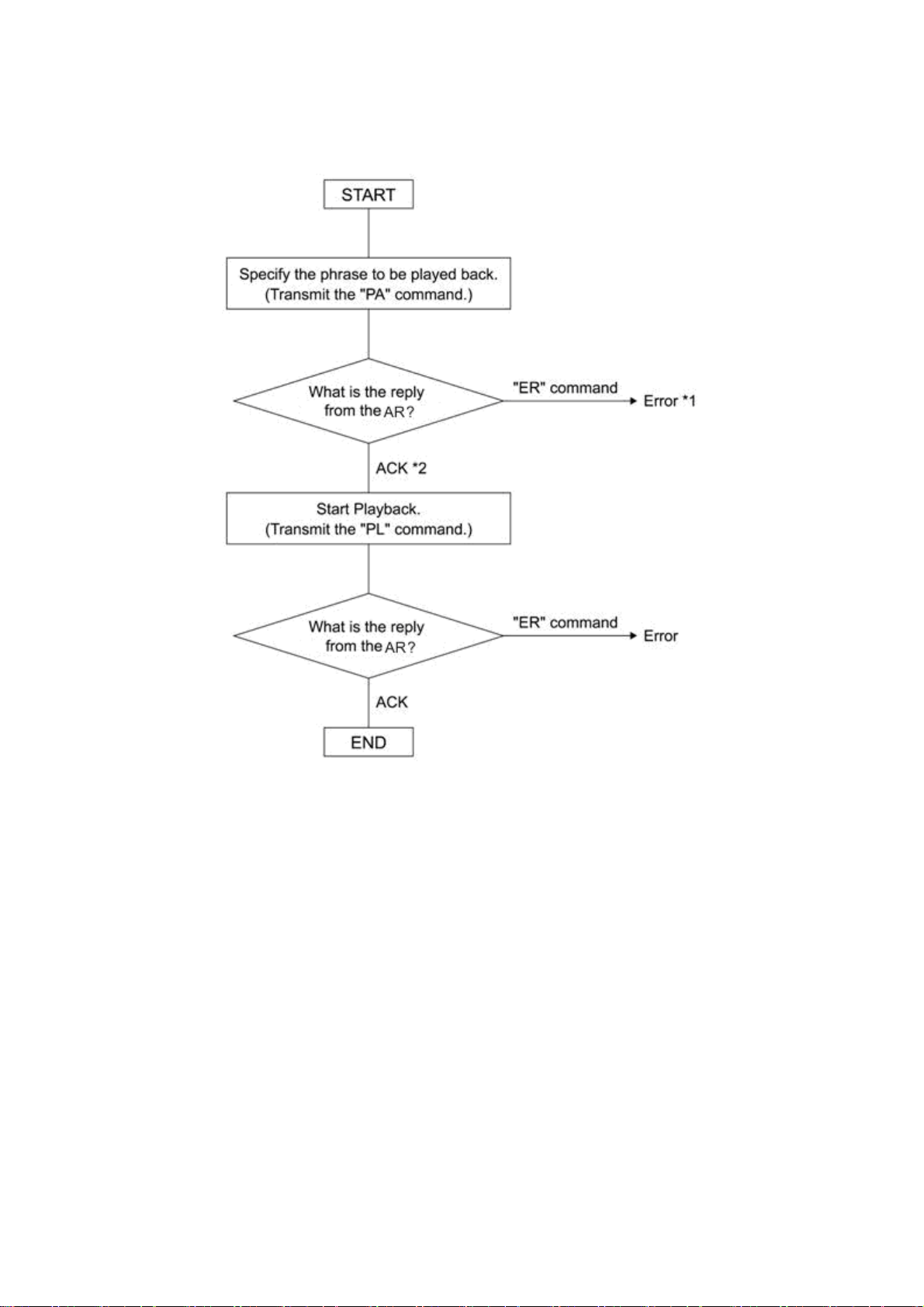
5.3 Sample Algorithms
The following are some examples of processing algorithms.
5.3.1 Playing Back a Phrase
*1 Refer to the error number to determine the cause. Is the command format incorrect?
*2 “OK” will be output if the AR-3000SD correctly recognizes the command.
Note:
- You can check the operating status by transmitting the AC command.
- You can stop playback by transmitting the ST command.
00SD (Ver.1.00) Command Reference - 74
AR-30
Page 75
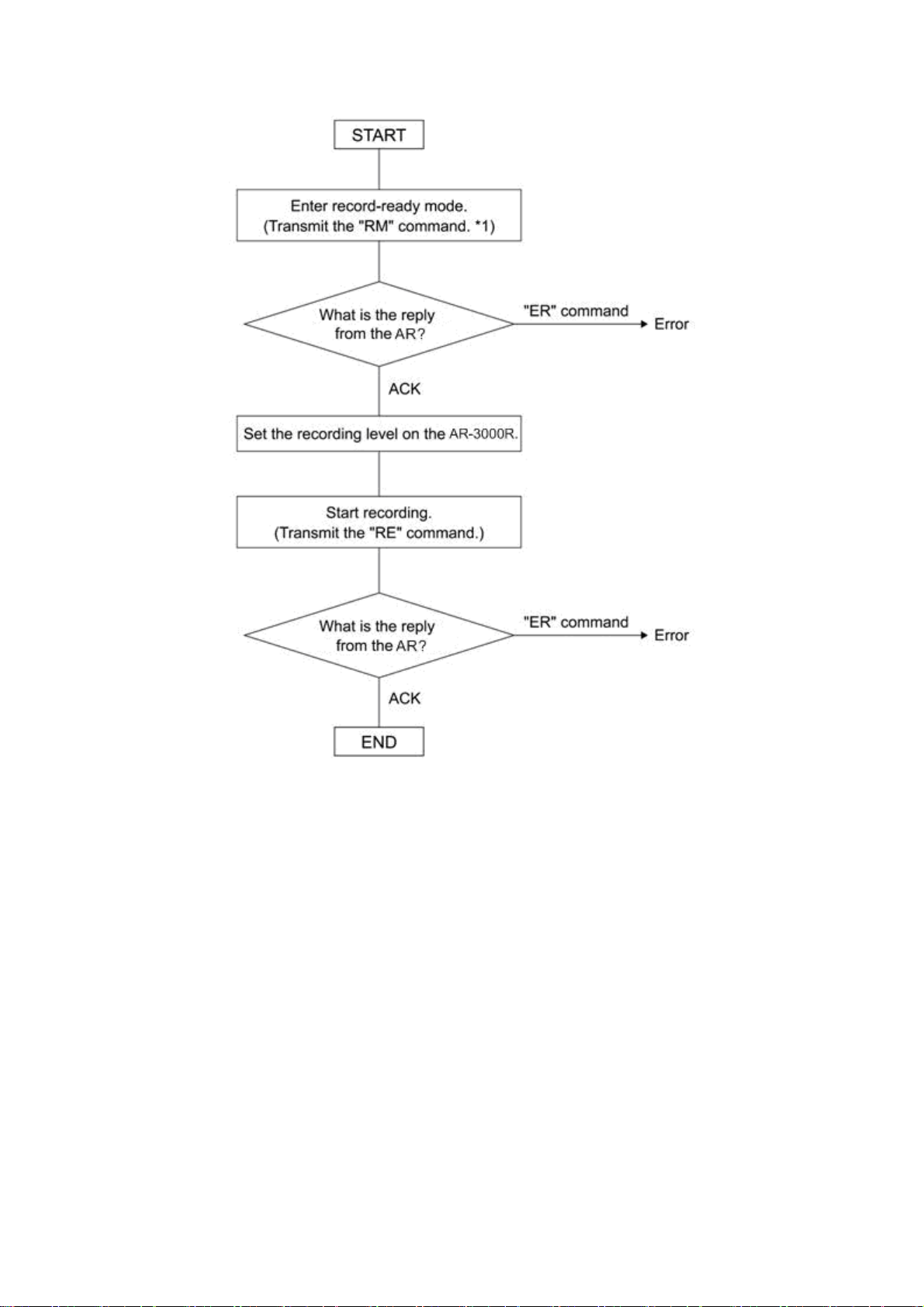
5.3.2 Recording (Normal Recording)
*1 Setting such as RDAC-Grade and RDAC-Mode are made by RM command parameters.
Note:
- You can check the operating status by transmitting the AC command.
- You can stop recording by transmitting the ST command.
00SD (Ver.1.00) Command Reference - 75
AR-30
Page 76
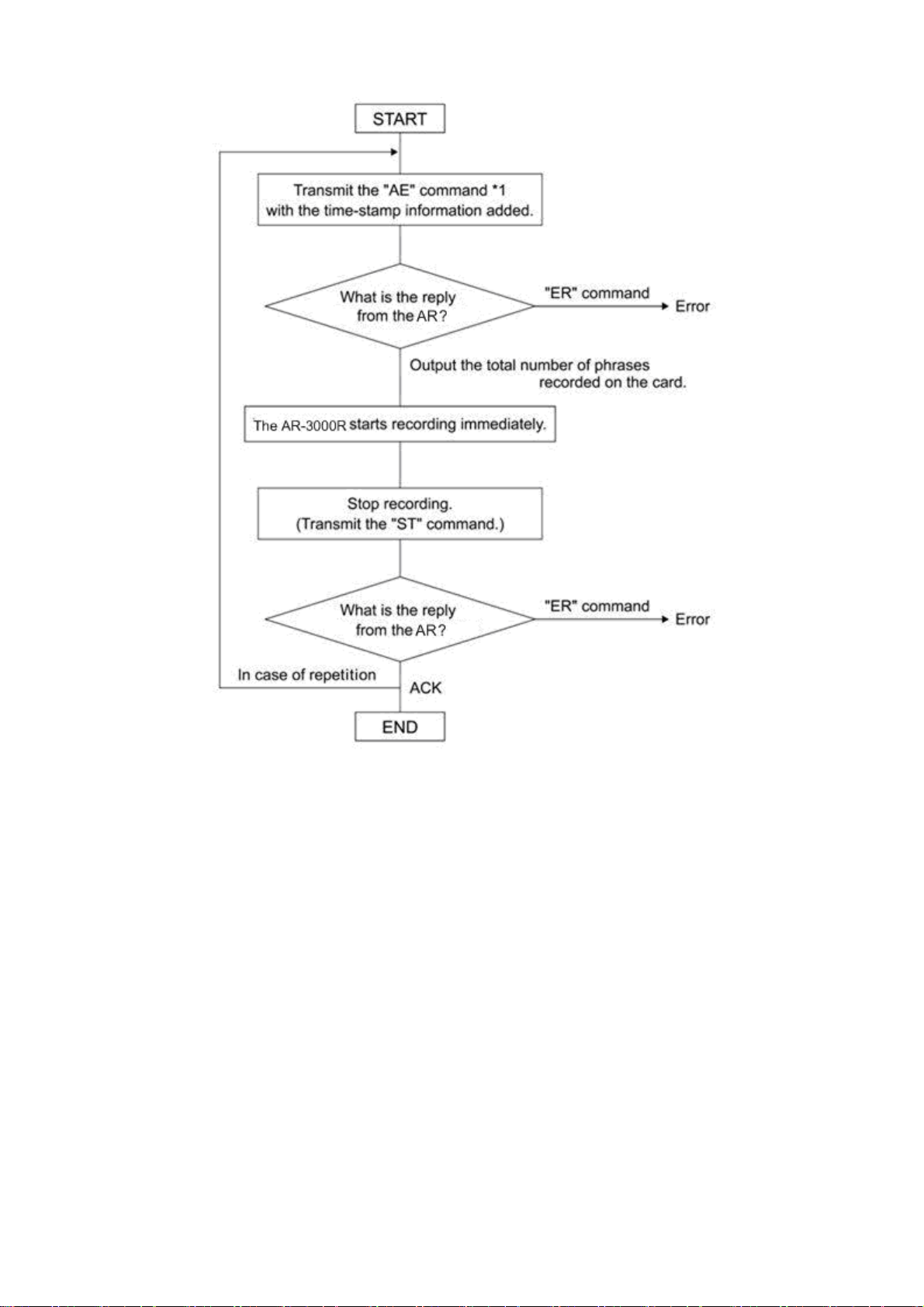
5.3.3 Recording (Time-Stamped Recording)
*1 Setting such as RDAC-Grade and RDAC-Mode are made by AE command parameters.
Note:
- You can check the operating status by transmitting the AC command.
00SD (Ver.1.00) Command Reference - 76
AR-30
Page 77
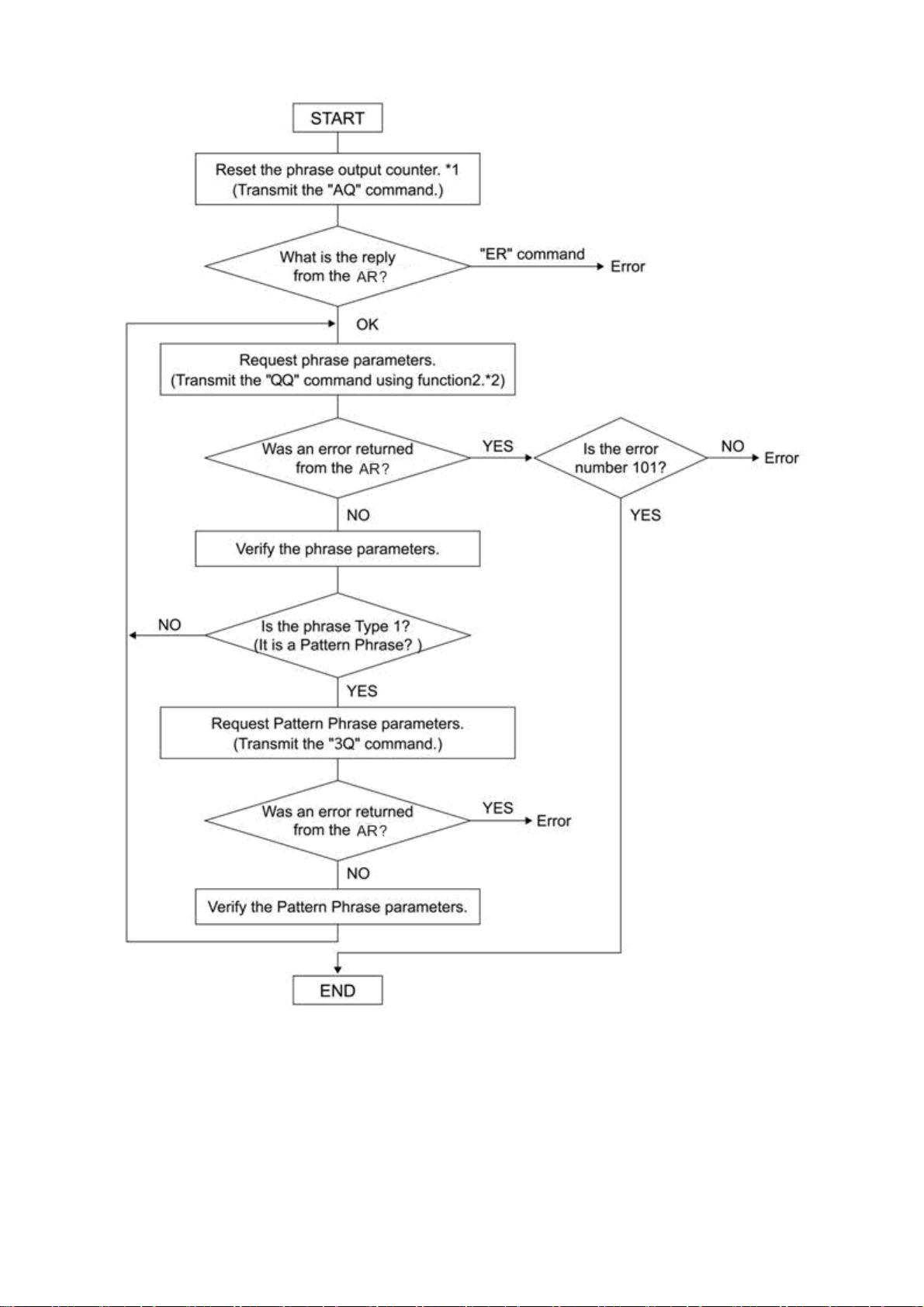
5.3.4 Verifying the Parameters (Data Settings) of All Phrases Starting with the Lowest-Numbered Phrase
*1 What is the Phrase Output Counter?
The AR-3000SD has an internal counter for phrase output. When a phrase is output, the phrase that
corresponds to the AR-3000SD's counter will be output. The maximum value will be the highest
phrase number of each card. This will be reset by the AQ command (to the lowest phrase number).
*2 What is QQ Command Function 2?
If the phrase number is not specified by a parameter, the AR-3000SD will automatically increment
the phrase output counter, and will output the corresponding phrase. The incremented value will skip
phrase numbers which are not recorded yet, and will be up to the next recorded phrase number. If the
QQ command is received to request output after the last phrase has been output, the AR-3000SD will
output an ER command (Error number 101).
00SD (Ver.1.00) Command Reference - 77
AR-30
Page 78
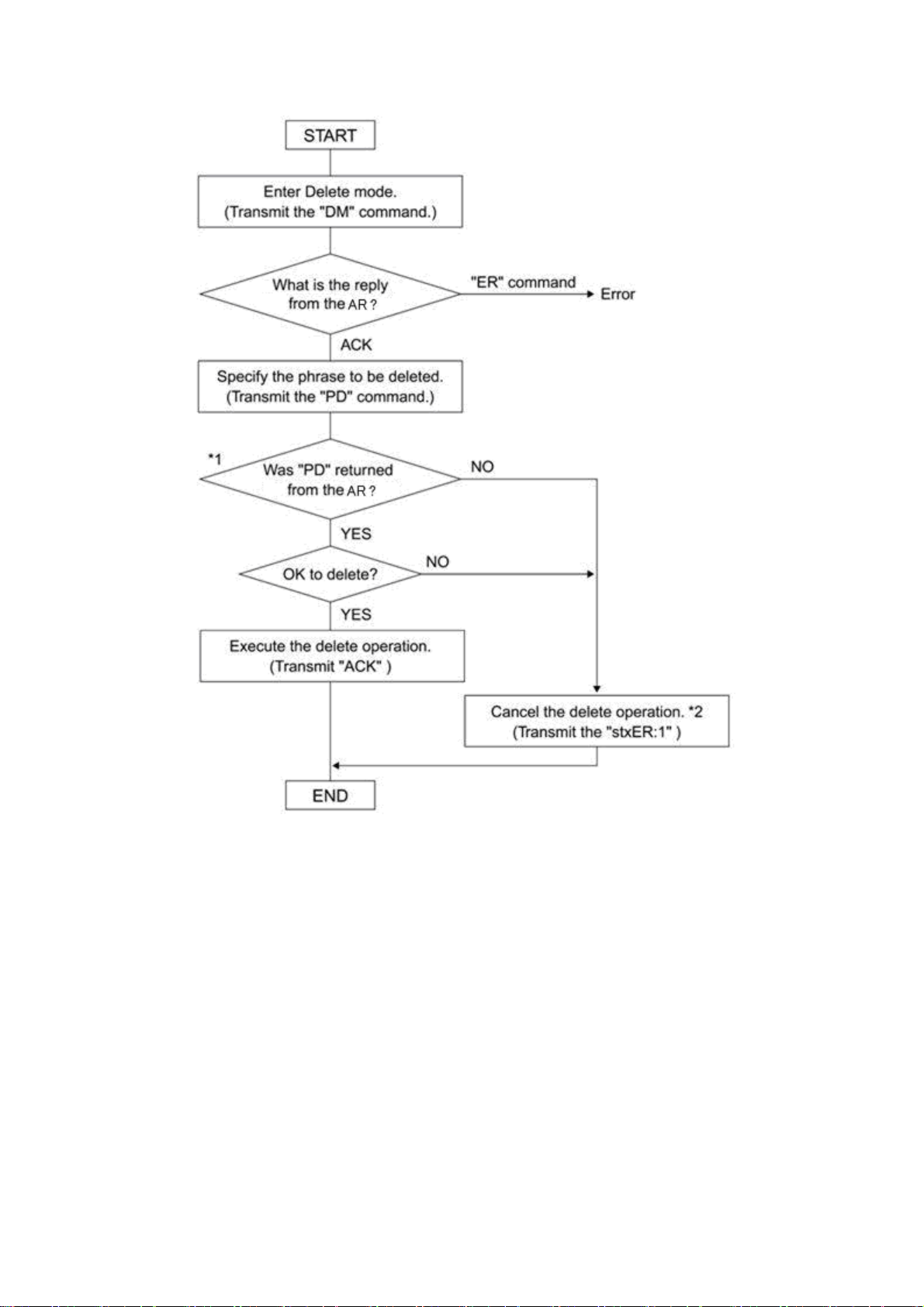
5.3.5 Deleting a Phrase
*1 The AR-3000SD will return the same PD command for confirmation.
*2 By transmitting “ER:1:” you can exit Delete mode.
AR-3000SD (Ver.1.00) Command Reference - 78
Page 79

Section 6 Concerning Cards Used with the AR
This section describes the card content that is required when using the FTP function to transfer data on
cards used by the AR-3000SD.
6.1 Card Types Used by the AR
Usable cards include cards formatted on the AR-3000SD/3000R/3000/200S/200 in AR-3000 format, and
cards formatted on the AR-2000/100 in AR-2000 format.
The cards should contain the following files.
System data files: Settings (recording settings, control input settings, MIDI settings,
RS-232C settings, and system settings)
Phrase data files: Phrase data for each phrase
Audio phrases: Actual phrases recorded on the AR
Pattern phrase files: Pattern phrase registration information
Song phrase files: Song phrase registration information
MIDI phrase files: SMF (Standard MIDI Files) Format 0
Command phrase file: RS-232C control file
* For more on terminology related to the content of each file, refer to the device owner’s manual.
00SD (Ver.1.00) Command Reference - 79
AR-30
Page 80
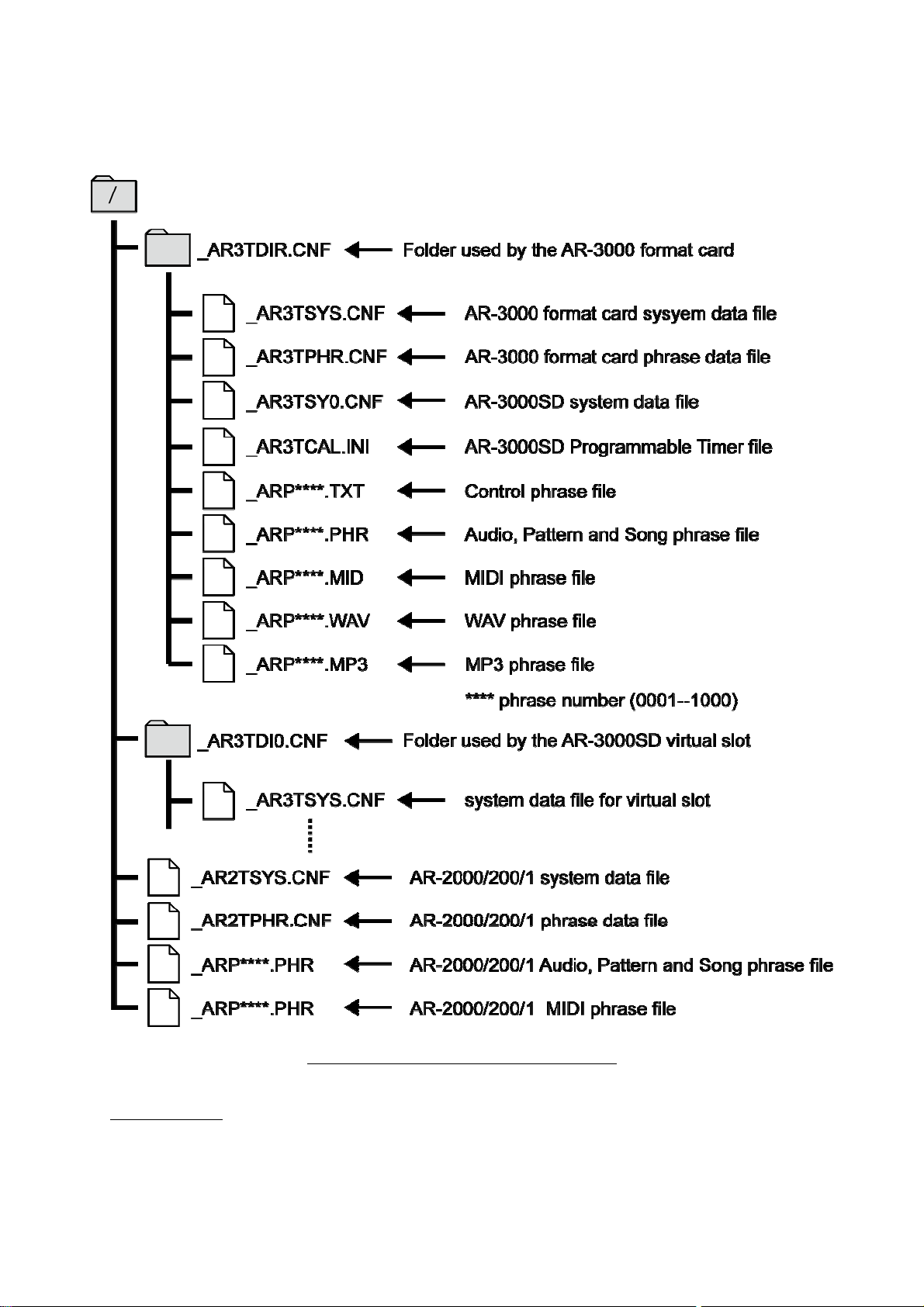
6.2 File Organization on AR-3000 Format Cards
Files on cards formatted on the AR-3000SD/3000R/3000/200S/200 are organized as shown in the figure
below.
File Structure on AR-3000 Format Cards
Important Note
If the _AR3TSYS.CNF and _AR3TPHR.CNF files are present in the _AR3TDIR.CNF folder when an
AR-3000 card is inserted in an AR-3000SD/3000R/3000/200S/200, then the _AR2TSYS.CNF and
_AR2TPHR.CNF files are disregarded, and the card is recognized as an AR-3000 format card. If the
_AR3TSYS.CNF and _AR3TPHR.CNF files have been deleted from the card, then the card is no longer
recognized as an AR-3000 format card, so be sure not to delete the _AR3TSYS.CNF and _AR3TPHR.CNF
files.
00SD (Ver.1.00) Command Reference - 80
AR-30
Page 81

6.3 Using FTP Functions to Change the Content of a Card Inserted in an FTP-Connected Device
First, set up the same environment (same device and card with the same content) as the device
connected via FTP.
* If the card does not contain the same data, then use a device identical to the one connected via FTP to
create a card in the same format as that in the original device. Then, using FTP, copy the data from the
card in the FTP-connected device to the newly formatted card.
Into the prepared device, insert the card which is identical in content to the one in the FTP- connected
device, then perform the modifications you require. Possible modifications are described in the following.
6.3.1 Changing the Settings
ge the settings on the prepared device, then transfer the card’s system data file.
Chan
6.3.2 Changing Phrase Data
ge the phrase data on the prepared device, then transfer the card’s phrase data file.
Chan
6.3.3 Changing Phrase Files
ge the phrase data on the prepared device (add, erase, overwrite, etc.).
Chan
If adding or overwriting, then transfer all edited phrase files (_ARP****.PHR, _ARP****.WAV,
_ARP****.MID).
If erasing data, delete the phrase file (_ARP****.PHR, _ARP****.WAV, _ARP****.MID) you want to
erase on the device connected via FTP.
AR-3000SD (Ver.1.00) Command Reference - 81
 Loading...