

Page 1

1500254
User’s Guide
Thank you for purchasing your Indoor Amplifi ed HDTV
Antenna from RadioShack. Please read this user’s guide before
installing, setting up, and using your new antenna.
Indoor Amplifi ed HDTV Antenna
Page 2
2
Package Contents
• TV Antenna • AC Adapter
• VHF Telescoping Antennas (2)
• User’s Guide
Features
• Receive HDTV, VHF, UHF, HD Radio signals, and FM
radio signals
• Adjustable VHF dipoles with built-in UHF loop
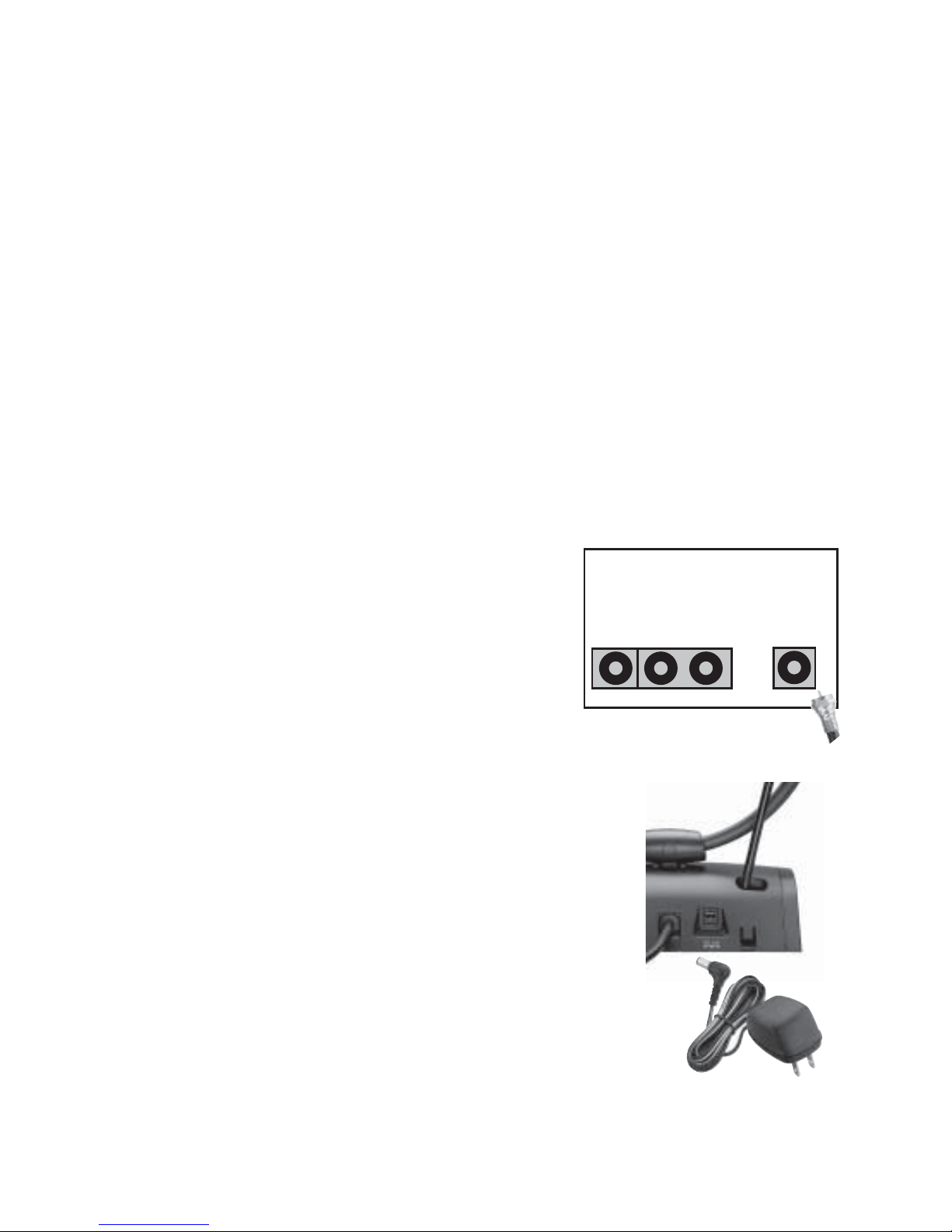
Install Your Antenna
1. Install VHF Telescoping Antennas.
2. Place the antenna on or near
your TV set or FM receiver.
3. Connect the antenna’s output
cable to the 75-Ohm Antenna In
input terminal on your TV, VCR,
or FM receiver.
4. Connect the supplied AC adapter’s
barrel’s plug into the jack on the
back of the indoor antenna, and
connect the AC adapter’s other end
to a standard AC outlet.
From Antenna
VIDEO
IN
AUDIO
IN
ANTENNA IN
AV MONITOR TV
REAR VIEW
To Wall Outlet
Page 3

3
nNote:
• Use only an adapter that supplies 6VDC and delivers at
least 100 mA. Its center tip must be set to positive and its
plug must fi t this indoor antenna’s 6VDC 100mA jack. Using
an adapter that does not meet these specifi cations could
damage the indoor antenna or its adapter.
• Always connect the AC adapter to the antenna before you
connect it to AC power. When you fi nish, disconnect the
adapter from AC power before you disconnect it from the
antenna.
Use Gain Control
Interference on the TV picture might be caused by a
signal that is too weak or too strong.
• Rotate gain control to turn on the gain function. The
green indicator lights up. Adjust gain control until
best picture is obtained.
• Rotate gain control to turn off the gain function. The
green indicator turns off.
Page 4

4
VHF Telescoping Antennas
Fully extend the telescoping antenna elements and fi nd
the antenna position that works best for you. You may
need to:
• Shorten the telescoping elements slightly.
• Adjust the angle of the telescoping elements.
UHF Loop Antenna
Tilt the antenna
90˚ and rotate it 90˚
to fi nd best UHF
reception.
Gain Control
Amplify weak
signals.
Page 5

5
nNote:
• Visit www.AntennaWeb.org to fi nd the location of antennas
in your area.
• To get the best performance from your antenna, select an
indoor fl at surface as high as possible.
• Make sure the antenna is not placed near metal objects
such as cabinets, shelves, refrigerators, a metal door or
wall, or a water pipe behind a wall. Metal objects can
greatly reduce the antenna’s ability to receive signals.
• Higher broadcast frequencies are noticeably affected by
obstructions.
• If your TV has screw terminals for VHF/UHF connection,
connect a 75 to 300-ohm transformer (not supplied)
between the coaxial cable and the VHF/UHF terminals.
• If your TV has a 75-ohm VHF connector and a 300 ohm UHF
connector, connect a signal splitter (not supplied) between
the coaxial cable and the TV’s VHF/UHF connector.
Specifi cations
Power Souce ............................................................120V AC
..........................................................................60 Hz / 6V DC
.......................................................100mA AC / DC Adapter
Frequency Range
VHF .................................................................... 54–216 MHz
UHF ................................................................... 470-806 MHz
FM ....................................................................... 88-108 MHz
Gain .......................................................VHF/UHF 22dB Min
Gain Control ......................................VHF 16dB / UHF 18dB
Output Impedance ..................................................75 ohms
Dimensions .....................7×7.6×4.2 in (24.4×19.5×10.7 cm)
Weight ............................................................11.4 oz (322 g)
Specifi cations are subject to change and improvement without notice.
Actual product may vary from the images found in this document.
Page 6

6
No Channels?
In most cases, simply connecting your antenna to
your TV will not instantly provide your local channels.
Most televisions require some minor confi guration
before you see
programming. Refer
to your television’s
user’s guide for
information about
performing the
following steps:
1. Set your
television to
“Over the Air”
or “Antenna”
reception.
2. Perform a
search for
channels.
In conjunction
with a properly
positioned antenna,
this should enable
you to watch your
local broadcast
programming.
No Channels
Page 7

7
Limited Warranty
RadioShack warrants this product against defects in materials and
workmanship under normal use by the original purchaser for ninety (90)
days after the date of purchase from a RadioShack-owned store or an
authorized RadioShack franchisee or dealer. RADIOSHACK MAKES NO
OTHER EXPRESS WARRANTIES.
This warranty does not cover: (a) damage or failure caused by or attributable to abuse, misuse, failure to follow instructions, improper installation
or maintenance, alteration, accident, Acts of God (such as fl oods or lightning), or excess voltage or current; (b) improper or incorrectly performed
repairs by persons who are not a RadioShack Authorized Service Facility;
(c) consumables such as fuses or batteries; (d) ordinary wear and tear or
cosmetic damage; (e) transportation, shipping or insurance costs; (f) costs
of product removal, installation, set-up service, adjustment or reinstallation; and (g) claims by persons other than the original purchaser.
Should a problem occur that is covered by this warranty, take the
product and the RadioShack sales receipt as proof of purchase date to
any RadioShack store in the U.S. RadioShack will, at its option, unless
otherwise provided by law: (a) repair the product without charge for parts
and labor; (b) replace the product with the same or a comparable product;
or (c) refund the purchase price. All replaced parts and products, and
products on which a refund is made, become the property of RadioShack.
New or reconditioned parts and products may be used in the performance of warranty service. Repaired or replaced parts and products are
warranted for the remainder of the original warranty period. You will be
charged for repair or replacement of the product made after the expiration
of the warranty period.
RADIOSHACK EXPRESSLY DISCLAIMS ALL WARRANTIES AND CONDITIONS NOT STATED IN THIS LIMITED WARRANTY. ANY IMPLIED
WARRANTIES THAT MAY BE IMPOSED BY LAW, INCLUDING THE
IMPLIED WARRANTY OF MERCHANTABILITY AND, IF APPLICABLE,
THE IMPLIED WARRANTY OF FITNESS FOR A PARTICULAR PURPOSE,
SHALL EXPIRE ON THE EXPIRATION OF THE STATED WARRANTY
PERIOD.
EXCEPT AS DESCRIBED ABOVE, RADIOSHACK SHALL HAVE NO
LIABILITY OR RESPONSIBILITY TO THE PURCHASER OF THE PRODUCT
OR ANY OTHER PERSON OR ENTITY WITH RESPECT TO ANY
LIABILITY, LOSS OR DAMAGE CAUSED DIRECTLY OR INDIRECTLY BY
USE OR PERFORMANCE OF THE PRODUCT OR ARISING OUT OF
Page 8

8
Printed
in China
05D13
1500254
©2013. RadioShack Corporation. All rights reserved.
RadioShack is a registered trademark used by
RadioShack Corporation.
Complies with the European Union’s “Restriction of
Hazardous Substances Directive,” which protects the
environment by restricting specifi c hazardous materials
and products.
ANY BREACH OF THIS WARRANTY, INCLUDING, BUT NOT LIMITED
TO, ANY DAMAGES RESULTING FROM INCONVENIENCE AND ANY
LOSS OF TIME, DATA, PROPERTY, REVENUE, OR PROFIT AND ANY
INDIRECT, SPECIAL, INCIDENTAL, OR CONSEQUENTIAL DAMAGES,
EVEN IF RADIOSHACK HAS BEEN ADVISED OF THE POSSIBILITY OF
SUCH DAMAGES.
Some states do not allow limitations on how long an implied warranty lasts or the exclusion or limitation of incidental or consequential
damages, so the above limitations or exclusions may not apply to you.
This warranty gives you specifi c legal rights, and you may also have other
rights which vary from state to state. You may contact RadioShack at:
RadioShack Customer Relations
300 RadioShack Circle, Fort Worth, TX 76102 04/08
www.RadioShack.com
 Loading...