

Page 1

FuelDirect
FUEL CONTROL SOLUTION
Installation & Setup
Progressive International Electronics
919 821-1323
www.pie-corp.com
Page 2

Installation
To install FuelDirect onto your hard drive, run it from a CD-ROM drive and
complete the setup program found on the CD.
! Insert CD into drive. AutoRun dialog will automatically appear.
! Click the Setup button.
Once the program is started, instructions will appear on your computer screen to
guide you through the remainder of the installation.
Note: If AutoRun does not execute, FuelDirect may be installed by following
this sequence:
Click on Start Menu -> Run -> Browse to select CD-ROM drive ->
Double click on Setup and follow instructions from on-screen dialog.
Page 3
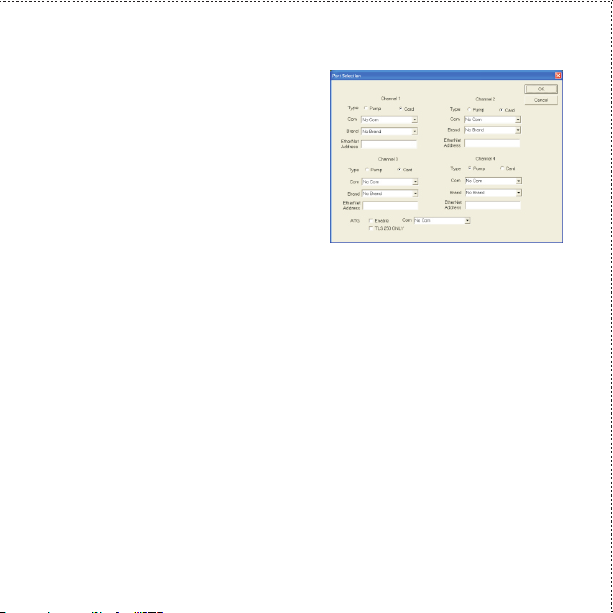
Port Selection Window
During the installation process, this Port
Selection dialog box will appear. Choices
for configuring FuelDirect for dispenser
channels and ATG are described below.
Dispenser Channel Selection
Each channel can handle up to 16 fueling positions (dispensers or card
readers). As an example, programming may begin with a dispenser on
channel 1, following this procedure:
1. For Type, select Pump.
2. For Com, select Ethernet.
3. For Brand, select dispenser brand.
4. For Ethernet Address, select PI DBox ethernet address for dispenser.
(Refer to DBox manual.) 192.168.0.200 is default DBox ethernet
address.
Page 4

If using a card reader or second bank of dispensers, program under
Channel 2. Ethernet address cannot be the same as the one used for
channel 1. For example, the unique ethernet address may be
192.168.201. If additional banks are to be used, program remaining
channels in the same manner.
Automatic Tank Gauging
If connecting to automatic tank guage:
1. Under ATG, select Enable.
2. Under Com, select port to which tank guage is connected.
3. If tank guage does not use this port for reconciliation, check
TLS 250 only.
Click OK to exit this window. Click on Finish to complete programming.
Software Key
Insert software key (supplied with FuelDirect package) into USB port. Key must
remain installed for FuelDirect to be fully operational.
 Loading...