

Page 1
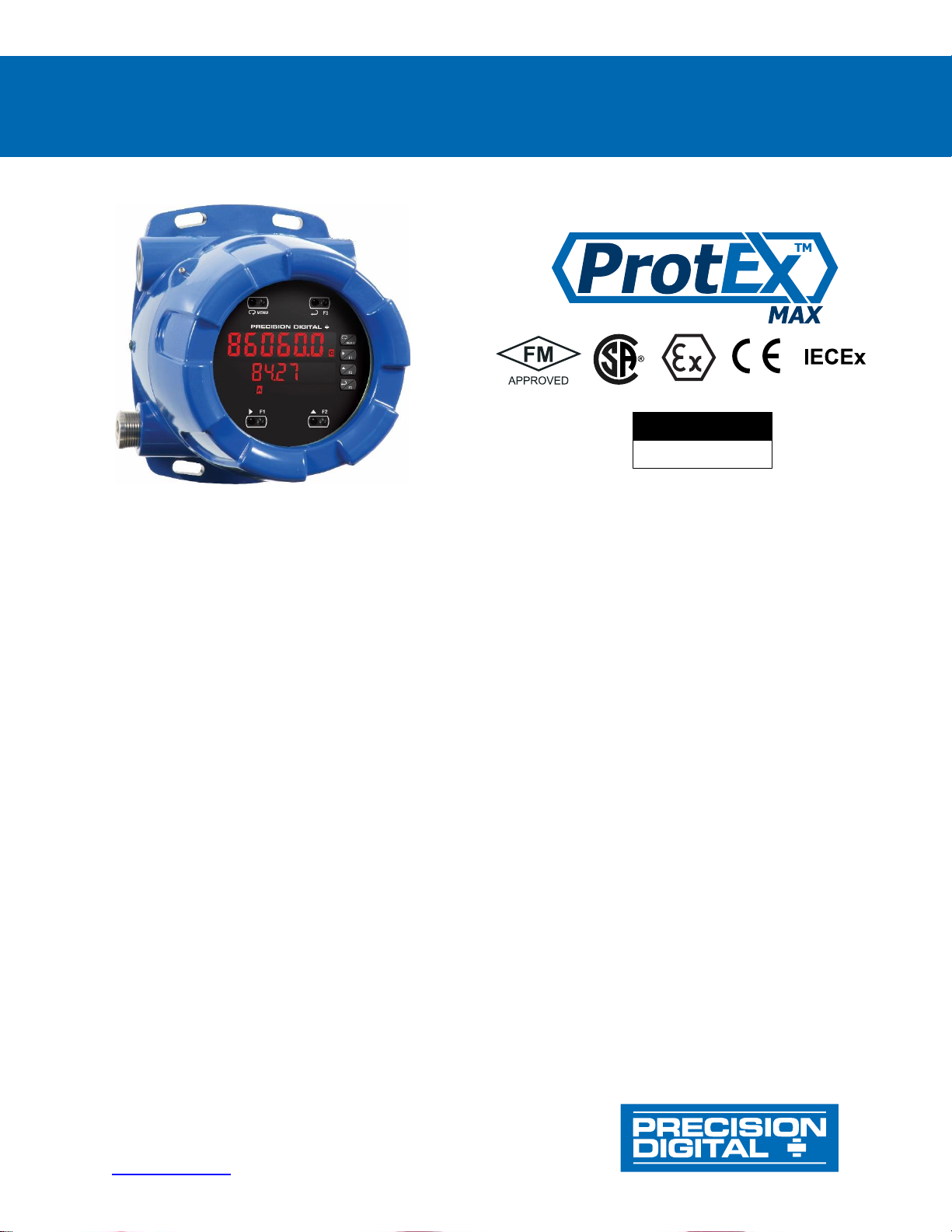
PD8-6060 Explosion-Proof Dual Analog Input Process Meter
Instruction Manual
PRECISION DIGITAL CORPORATION
233 South Street • Hopkinton MA 01748 USA
Tel (800) 343-1001 • Fax (508) 655-8990
www.predig.com
• Fully-Approved Explosion-Proof Meter
• Dual 0-20 mA, 4-20 mA, 0-5 V, 1-5 V, and ±10 V Inputs with Math Functions
• Addition, Difference, Average, Multiplication, Division, Minimum, Maximum, Ratio, & More
• Dual-Line 6-Digit Display, 0.6" (15 mm) & 0.46" (12 mm)
• SafeTouch Through-Glass Button Programming
• Display Mountable at 0°, 90°, 180°, & 270°
• Isolated 24 VDC @ 25 mA Transmitter Power Supply
• Easy Field Scaling in Engineering Units without Applying an Input
• 4 Relays with Interlocking Capability + Isolated 4-20 mA Output Option
• Free PC-Based, On-Board, MeterView Pro USB Programming Software
• SunBright Display Standard Feature; Great for Outdoor Applications
• Operating Temperature Range: -40 to 60°C (-40 to 140°F)
• FM Approved as Explosion-Proof / Dust-Ignition-Proof / Flame-Proof
• CSA Certified as Explosion-Proof / Dust-Ignition-Proof / Flame-Proof
• ATEX and IECEx Certified as Flame-Proof
• Input Power Options: 85-265 VAC / 90-265 VDC or 12-24 VDC / 12-24 VAC
• Multi-Pump Alternation Control
• Password Protection
• 32-Point Linearization, Square Root Extraction and Programmable Exponent Function
• Round Horizontal Tank Function; Just Enter Diameter & Length
• Programmable Display, Function Keys & Digital Inputs
• Flanges for Wall or Pipe Mounting
• Explosion-Proof, IP68, NEMA 4X Die-Cast Aluminum Enclosure
• On-Board RS-485 Serial Communications Standard
• Modbus® RTU Communication Protocol Standard
• Four 3/4" NPT Threaded Conduit Openings (Two Plugs Installed)
• Pipe Mounting Kits
• Stainless Steel Tag Available
• 3-Year Warranty
MeterView Pro
USB Install
Page 2
2
Page 3
PD8-6060 Explosion-Proof Dual Analog Input Process Meter
Instruction Manual
3
Disclaimer
The information contained in this document is
subject to change without notice. Precision Digital
makes no representations or warranties with
respect to the contents hereof and specifically
disclaims any implied warranties of
merchantability or fitness for a particular purpose.
See Warranty Information and Terms &
Conditions on www.predig.com for complete
details.
• Read complete instructions prior to installation
and operation of the meter.
• Risk of electric shock or personal injury.
• This product is not recommended for life support
applications or applications where malfunctioning
could result in personal injury or property loss.
Anyone using this product for such applications
does so at his/her own risk. Precision Digital
Corporation shall not be held liable for damages
resulting from such improper use.
• Failure to follow installation guidelines could
result in death or serious injury. Make sure only
qualified personnel perform the installation.
• Never remove the meter cover in explosive
environments when the circuit is live.
• Cover must be fully engaged to meet
explosion-proof/dust-ignition-proof/flame-proof
requirements.
WARNING
Cancer and Reproductive Harm - www.P65Warnings.ca.gov
Limited Warranty
Precision Digital Corporation warrants this
product against defects in material or
workmanship for the specified period under
“Specifications” from the date of shipment from
the factory. Precision Digital’s liability under this
limited warranty shall not exceed the purchase
value, repair, or replacement of the defective unit.
See Warranty Information and Terms &
Conditions on www.predig.com for complete
details.
Registered Trademarks
All trademarks mentioned in this document are the
property of their respective owners.
© 2022 Precision Digital Corporation.
All rights reserved.
FREE MeterView Pro
Programming Software
The meter can be powered from the USB connection. When
using the USB connection, DO NOT apply AC or DC power to
the meter.
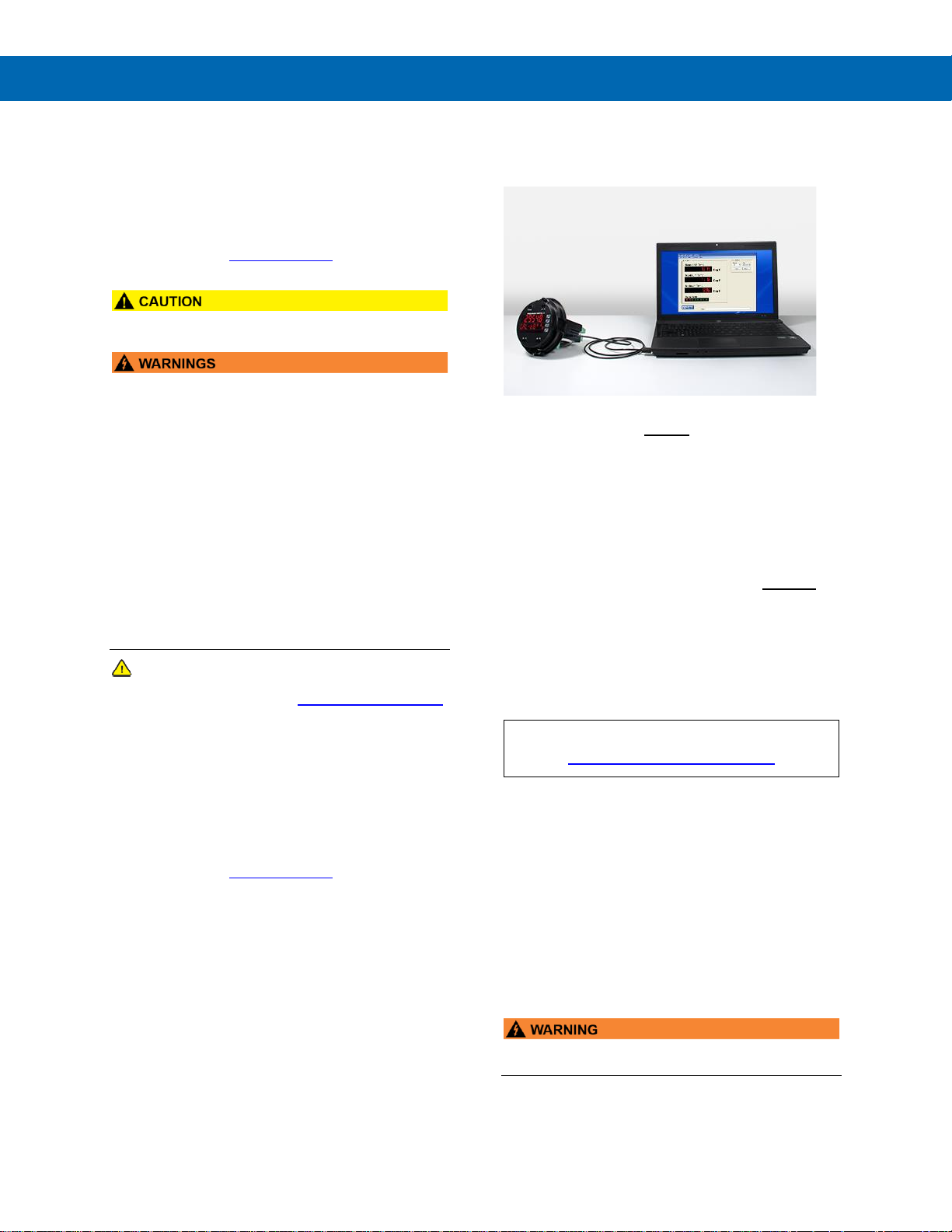
The easiest and quickest way to program your
ProtEX-MAX meter is to use the FREE MeterView Pro
programming software. This software is loaded into
the meter and connects and installs directly to your
PC with a USB cable. We recommend that the first
thing you do after taking the meter out of the box is
connect the ProtEX-MAX to your PC with the provided
USB cable – do not use a different cable. DO NOT
apply AC or DC power to the meter while your PC is
connected to the meter as it will disrupt the USB
connection. You don’t even have to apply an input
signal.
MeterView Pro programming software is intuitive, and
most customers can get their meter programmed as
they like without even looking in the manual.
Watch MeterView Pro Software Video at
www.predig.com/meterviewpro
In addition to programming, the software may be used
for:
• Monitoring
• Datalogging using your PC
• Generating and saving programming files for
later use
Once your meter is programmed the way you want it,
you can wire it up for your application per the
instructions in this manual and install it. If you find that
you need to make adjustments to the programming
after the meter is installed, you can use the
programming buttons and the instructions in this
manual to do so.
• The meter should only be connected to a
computer while it is located in a safe area.
Page 4

PD8-6060 Explosion-Proof Dual Analog Input Process Meter
Instruction Manual
4
Table of Contents
Introduction ......................................................................................................... 7
Ordering Information .......................................................................................... 7
Key Features ....................................................................................................... 9
Specifications ................................................................................................... 18
General........................................................................................................... 18
Dual Process Inputs ..................................................................................... 19
Relays ............................................................................................................ 19
USB Connection ............................................................................................ 20
Isolated 4-20 mA Transmitter Output .......................................................... 20
RS-485 Serial Communications ................................................................... 20
Modbus® RTU Serial Communications ....................................................... 20
Digital Input (F4) ............................................................................................ 20
Digital Inputs & Outputs ............................................................................... 21
MeterView Pro Software ............................................................................... 21
Compliance Information................................................................................... 21
Electromagnetic Compatibility .................................................................... 21
Product Ratings and Approvals .................................................................. 22
EU Declaration of Conformity .......................................................................... 23
Safety Information ............................................................................................ 23
Installation......................................................................................................... 23
Unpacking ...................................................................................................... 23
Mounting ........................................................................................................ 24
Installation Overview .................................................................................... 26
MeterView Pro Software ............................................................................... 26
Transmitter Supply Voltage Selection (P+, P-) ........................................... 27
Connections .................................................................................................. 27
Required & Factory Wired Connection ....................................................... 27
PROVU Electronics Module Layout ............................................................. 28
USB Connection ........................................................................................ 28
Power Connections .................................................................................... 29
Signal Connections .................................................................................... 29
RS-485 Connections .................................................................................. 30
RS-485 Multi-Drop Connection .................................................................. 30
Digital I/O Connections .............................................................................. 31
F4 Digital Input Connections ...................................................................... 31
Remote Programming ................................................................................ 31
4-20 mA Output Connections ..................................................................... 31
Analog Output Power Supply ..................................................................... 31
Relay Connections ..................................................................................... 32
Interlock Relay Feature .............................................................................. 32
Switching Inductive Loads.......................................................................... 32
Setup and Programming .................................................................................. 33
Overview ........................................................................................................ 33
LED Status Indicators ................................................................................... 33
Programming Buttons .................................................................................. 34
SafeTouch Buttons ....................................................................................... 34
Display Functions & Messages ................................................................... 35
Main Menu ..................................................................................................... 37
Setting Numeric Values ................................................................................ 37
Setting Up the Meter (setup) ........................................................................ 37
Setting the Input Signal (Input) ................................................................. 38
Setting the Display Units or Custom Tags (units) .................................... 38
Setting the Decimal Point (dEc pt) ........................................................... 39
Programming the Meter (prog) .................................................................. 39
Setting the Display Parameter & Intensity (dsplay) .................................. 41
Page 5

PD8-6060 Explosion-Proof Dual Analog Input Process Meter
Instruction Manual
5
Setting the Relay Operation (relay) ............................................................ 42
Setting the Relay Assignment (asSign) ..................................................... 42
Setting the Relay Action ............................................................................. 42
Programming Set and Reset Points ........................................................... 43
Setting Fail-Safe Operation ........................................................................ 43
Programming Time Delay .......................................................................... 43
Relay Action for Loss of 4-20 mA Input (Loop Break) ................................ 43
Relay and Alarm Operation Diagrams ......................................................... 43
High Alarm Operation (Set > Reset) ............................................................. 43
Low Alarm Operation (Set < Reset) ........................................................... 44
High Alarm with Fail-Safe Operation (Set > Reset) .................................... 44
Low Alarm with Fail-Safe Operation (Set < Reset)..................................... 44
Time Delay Operation ................................................................................ 44
Pump Alternation Control Operation .......................................................... 45
Relay Sampling Operation ......................................................................... 45
Relay Operation Details ................................................................................ 46
Overview .................................................................................................... 46
Relays Auto Initialization ............................................................................ 46
Fail-Safe Operation .................................................................................... 46
Front Panel LEDs ....................................................................................... 46
Latching and Non-Latching Relay Operation ............................................. 46
Non-Latching Relay (Auto) ........................................................................ 47
Non-Latching Relay with Manual Reset (A-nman) ...................................... 47
Latching Relay (LatcH) .............................................................................. 47
Latching Relay with Clear (Lt-Clr) ........................................................... 47
Acknowledging Relays ............................................................................... 48
Pump Alternation Control Applications (Altern) ....................................... 48
Setting Up the Interlock Relay (Force On) Feature ................................... 49
Scaling the 4-20 mA Analog Output (Aout) ................................................. 50
Reset Menu (reset) ...................................................................................... 50
Manual Control Menu (Contrl) .................................................................... 50
Setting Up the Password (pass) .................................................................. 51
Protecting or Locking the Meter ................................................................. 51
Making Changes to a Password Protected Meter ...................................... 51
Disabling Password Protection .................................................................. 51
Advanced Features Menu............................................................................. 52
Advanced Features Menu & Display Messages ......................................... 52
Noise Filter (filter) ................................................................................. 53
Noise Filter Bypass (bypass) ..................................................................... 53
Rounding Feature (round) ......................................................................... 54
Modbus® RTU Serial Communications (serial) ....................................... 54
Select Menu (SElect) ................................................................................ 54
Input Signal Conditioning (Functn) ............................................................ 54
Square Root Linearization (Square) .......................................................... 55
Math Constants (Const)............................................................................. 56
Low-Flow Cutoff (CutofF) .......................................................................... 56
Analog Output Programming (AoutPr) ...................................................... 57
Programmable Function Keys User Menu (user) ...................................... 58
Tare (tare) ................................................................................................ 59
Internal Calibration (ICAL).......................................................................... 59
Meter Operation ................................................................................................ 60
Button Operation .......................................................................................... 60
SafeTouch Buttons ....................................................................................... 60
Function Keys Operation ............................................................................. 61
Digital Inputs Operation ............................................................................... 61
Maximum/Minimum Readings ...................................................................... 61
Troubleshooting ............................................................................................... 62
Diagnostics Menu (diag) .............................................................................. 62
Testing the Display LEDs ........................................................................... 62
Determining Software Version ................................................................... 62
Reset Meter to Factory Defaults .................................................................. 62
Factory Defaults & User Settings ............................................................... 63
Troubleshooting Tips ................................................................................... 65
Page 6

PD8-6060 Explosion-Proof Dual Analog Input Process Meter
Instruction Manual
6
Table of Figures
Figure 1. Enclosure Dimensions – Front View ............................................... 24
Figure 2. Enclosure Dimensions – Side Cross Section View ....................... 24
Figure 3. Transmitter Supply Voltage Selection ............................................ 27
Figure 4. Integrated PROVU Required Connections ....................................... 27
Figure 5. PROVU Electronics Module Layout .................................................. 28
Figure 6. USB Connection ............................................................................... 28
Figure 7. Power Connections .......................................................................... 29
Figure 8. 2-Wire Transmitters Powered by Internal Supply ......................... 29
Figure 9. 3-Wire Transmitters Powered by Internal Supply ......................... 29
Figure 10. Transmitter Powered by External Supply ...................................... 29
Figure 11. Self-Powered Transmitters ............................................................ 29
Figure 12. 2-Wire Voltage Input Connections ................................................ 29
Figure 13. 3-Wire Voltage Input Connections ................................................ 29
Figure 14. RS-485 Connection ......................................................................... 30
Figure 15. Three-Wire RS-485 Connection ..................................................... 30
Figure 16. Digital Input and Output Connections .......................................... 31
Figure 17. F4 Digital Input Connections ......................................................... 31
Figure 18. 4-20 mA Output Connections ........................................................ 31
Figure 19. Analog Output Supply Powering Other Devices .......................... 31
Figure 20. Relay Connections ......................................................................... 32
Figure 21. Interlock Connections .................................................................... 32
Figure 22. AC and DC Loads Protection ......................................................... 32
Figure 23. Low Voltage DC Loads Protection ................................................ 32
Page 7
PD8-6060 Explosion-Proof Dual Analog Input Process Meter
Instruction Manual
7
Introduction
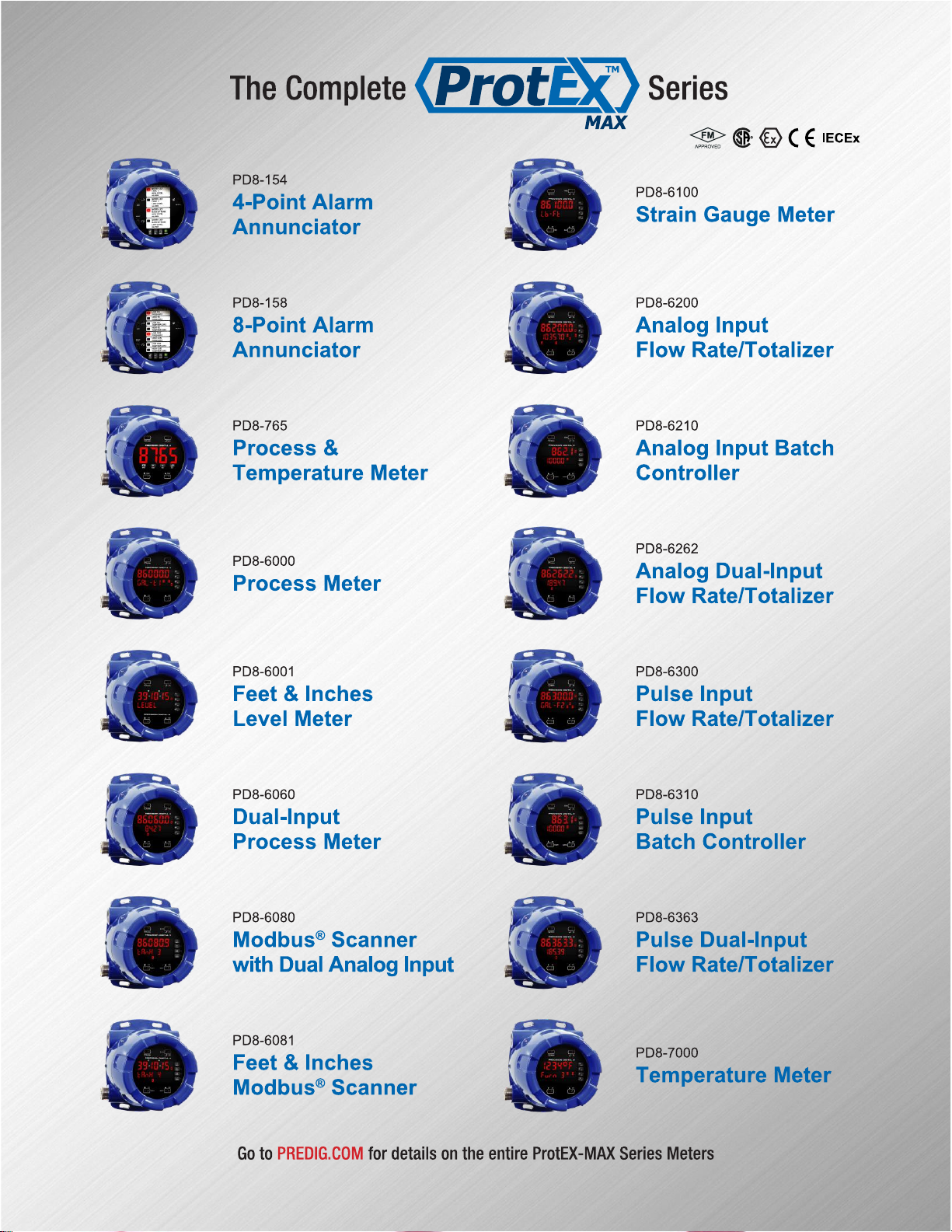
The ProtEX MAX PD8-6060 is an explosion-proof
dual-input process meter that accepts, powers, and
displays two analog inputs, such as 4-20 mA or
0-10 V. In its simplest configuration, the meter can
display these two inputs at the same time on its
dual-line display in user desired engineering units.
For more demanding applications, the meter can
display a mathematical function of these two inputs
such as addition, difference, average, multiplication
and more. The meter is ideal for level, flow rate,
temperature, or pressure transmitter applications.
The meter features a dual-line display, with a main
display 0.60" (15 mm) high, and a second display of
0.46" (12 mm) high superluminous LED digits, which
can be read in any lighting condition, including direct
sunlight. The meter is housed in a die-cast aluminum,
field-mountable, NEMA 4X/IP68 rated enclosure for
convenient indoor and outdoor installation.
The ProtEX-MAX is available in two configurations:
display only and fully loaded. Both versions include a
24 VDC power supply to power the transmitter. A fully
loaded ProtEX-MAX PD8-6060-6H7 meter comes
with four SPDT relays, a 4-20 mA output, five digital
inputs and four digital outputs, and RS-485 serial
communications.
The four relays can be used for alarm indication or
process control applications such as pump alternation
control. The 4-20 mA isolated output, Modbus® RTU
serial communications, and digital I/O features make
the ProtEX-MAX an excellent addition to any system.
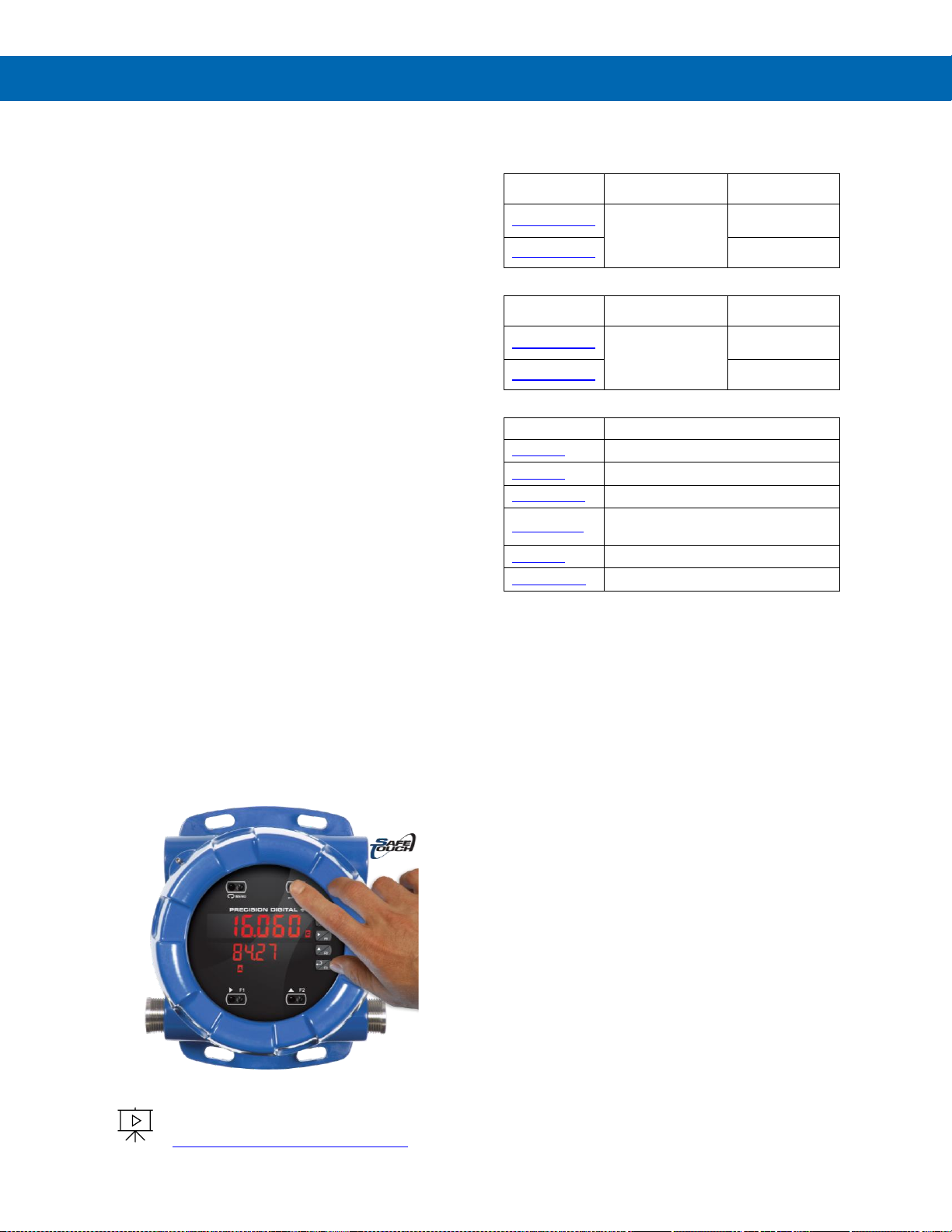
SafeTouch Buttons
To make it possible to program and operate the
ProtEX-MAX in a hazardous area, the programming
buttons that are located behind the glass window can
be operated without removing the cover by using the
SafeTouch through-glass buttons. The operator puts
their finger on the glass over the button and the
button is actuated.
To learn more about SafeTouch buttons,
see this video:
predig.com/videos/Safetouch_Buttons
Ordering Information
85-265 VAC Models
Model
Standard
Features
Options
Installed
PD8-6060-6H0
5 Digital Inputs,
4 Digital Outputs,
RS-485
Communications
No options
PD8-6060-6H7
4 relays
4-20 mA output
12-24 VDC Models
Model
Standard
Features
Options
Installed
PD8-6060-7H0
5 Digital Inputs,
4 Digital Outputs,
RS-485
Communications
No options
PD8-6060-7H7
4 relays
4-20 mA output
Accessories
Model
Description
PDA0001
3/4" M-NPT to F-M20 Reducer
PDA0002
3/4" M-NPT to 1/2" F-NPT Reducer
PDAPLUG75
3/4" Metal Conduit/Stopping Plug
PDA-SSTAG
Custom Stainless Steel Tag (see
website for convenient ordering form)
PDA6848
2" U-Bolt Kit Zinc Plated Steel
PDA6848-SS
2" U-Bolt Kit Stainless Steel
Page 8
PD8-6060 Explosion-Proof Dual Analog Input Process Meter
Instruction Manual
8
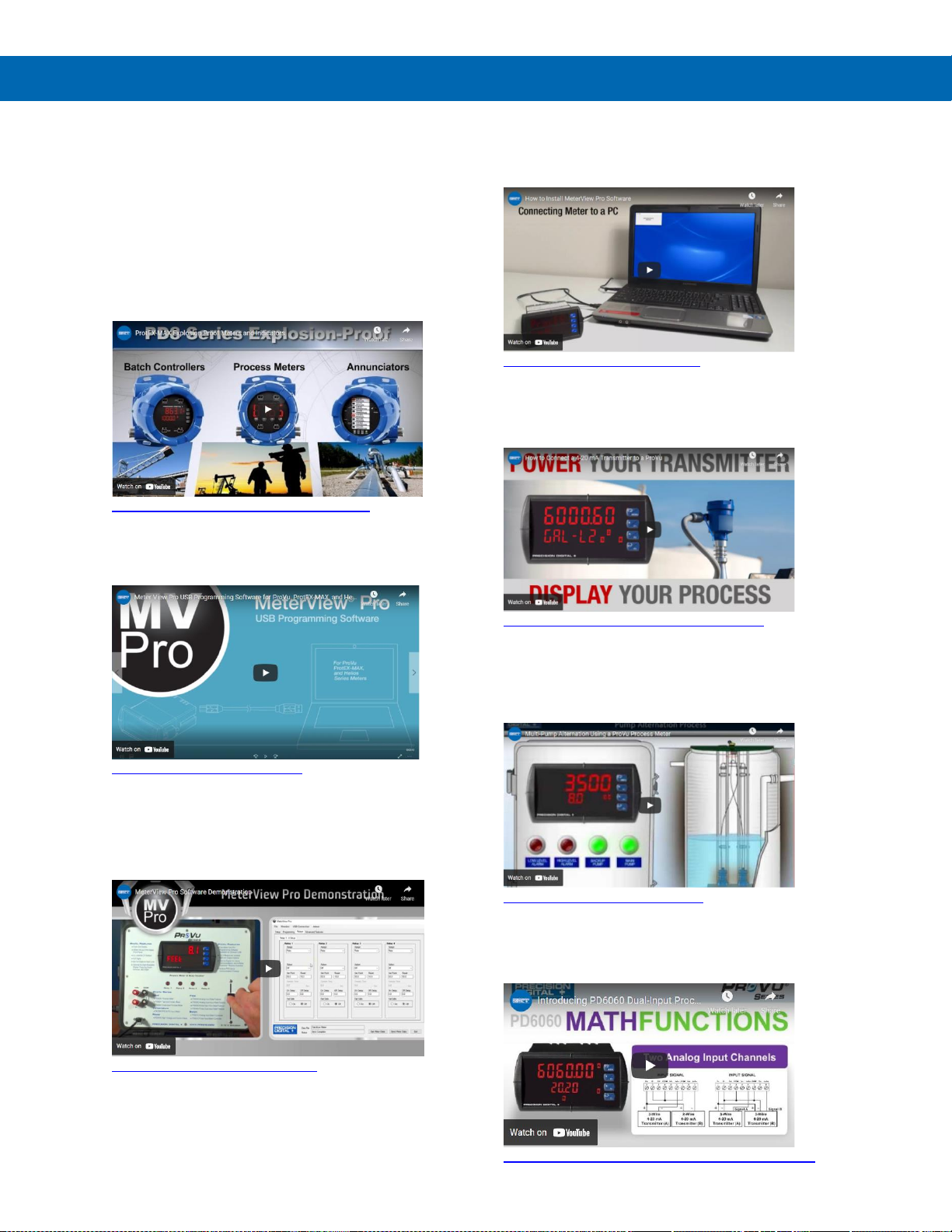
Helpful Videos
There are several videos that will help you get a
better understating of the features and functionality of
the ProtEX-MAX products. Since the ProtEX-MAX
meters have the same general features and
functionality of the ProVu meters, appropriate videos
for the ProVu meter are also included.
ProtEX-MAX Products Overview
Learn about the complete line of ProtEX-MAX
products.
predig.com/videos/ProtEXMAX_Overview
MeterView Pro Programming Software
Learn how easy it is to program the ProVu (ProtEX-MAX)
process meter using MeterView Pro software.
predig.com/videos/MVPro_SW
MeterView Pro Software Demonstration
Learn how easy it is to program Precision Digital's
ProVu (ProtEX-MAX) process meter for a level
application using MeterView Pro PC-based
programming software.
predig.com/videos/MVPro_Demo
Connect to PC for Programming
Learn how to connect a ProVu (ProtEX-MAX) process
meter to your PC and install free MeterView Pro
programming software.
predig.com/videos/PC_Connect
4-20 mA Connections
This Tech Tips video shows how to make connections
to power the transmitter with the ProVu’s
(ProtEX-MAX’s) 24 VDC power supply.
predig.com/videos/4-20_mA_Connections
Use ProtEX-MAX for Pump Control
Learn how to use the ProVu (ProtEX-MAX) meter as
an explosion-proof pump controller. See how the four
relays can be used to alternate two pumps and
provide high and low alarms.
predig.com/videos/PumpControl
Dual-Input Process Meter
Learn about the dual-input display, math capabilities,
and other great features that make this one of the
most power Precision Digital meters available.
https://www.predig.com/PD6060_Dual_Input_Intro
Page 9

PD8-6060 Explosion-Proof Dual Analog Input Process Meter
Instruction Manual
9
Key Features
Connections for PD8-6060-6H7 & PD8-6060-7H7
The Only Explosion-Proof Dual-Input Process Meter You Will Ever Need
Front, back and in between, the PD8-6060 ProtEX-MAX
explosion-proof dual-input process meter boasts specifications,
features and functionality that make it the only hazardous
area dual-input process meter you will ever need. The front
panel push-buttons can even be operated in a hazardous
area without removing the cover by using the SafeTouch
through-glass feature.
The PD8-6060 has all the same features as our PD6060
1/8 DIN process meter, but it is not just a meter stuffed in an
explosion-proof enclosure like many of our competitors offer.
The PD8-6060 is approved as a complete product by FM and
CSA and also carries IECEx approvals. Besides being suitable for
hazardous areas, the number one feature that makes the
PD8-6060 such a useful device is its built-in 24 VDC power
supply to drive the transmitters as illustrated by the above
diagram. This feature not only saves the cost of an external
power supply, but also greatly simplifies wiring. In addition,
there is a second 25 mA power supply provided with the
4-20 mA output option, evident also in the above diagram.
The first thing you notice about the PD8-6060 is its modern
looking, rugged, die cast aluminum housing with convenient
mounting flanges. Housed inside this enclosure is a
dual-line, 6-digit display with high-intensity LEDs that can be
read in direct sunlight.
The PD8-6060 has two process input channels (A & B)
capable of accepting current (0-20, 4-20 mA) and voltage
(±10, 0-5, 1-5, 0-10 VDC). Each input is programmed
separately, with independent input type selection and
scaling. These inputs may be displayed individually as part
of the customizable dual-line display, or used with a wide
range of math functions. Each input has a custom unit or tag
that may be displayed.
The most common use for the PD8-6060 is to display two
separate inputs on the meter’s dual-line display. For more
demanding applications, the meter can display a
mathematical function of these two inputs such as addition,
difference, average, multiplication and more.
Other key features include four relays and 4-20 mA output
option, advanced signal input conditioning like automatic
round horizontal tank linearization, function keys, pump
alternation capability, and Modbus® RTU serial communications.
Finally, all these features and capabilities can easily be
programmed without removing the cover using SafeTouch
buttons in a hazardous area or with free MeterView Pro
PC-based software in a safe area.
Page 10
PD8-6060 Explosion-Proof Dual Analog Input Process Meter
Instruction Manual
10
Easy Programming Methods
The ProtEX-MAX can be programmed in a
hazardous area with the through-glass SafeTouch
buttons without removing the cover, in a safe area
with the front panel push buttons with the cover
removed, or in a safe area with free, PC-based
MeterView Pro software. MeterView Pro is resident on
the ProtEX-MAX and is accessed by a provided USB
cable, so it is by far the easiest way to program the
ProtEX-MAX. The ProtEX-MAX can be calibrated
either by applying a known signal or scaled by
entering a desired value with the front panel buttons
or MeterView Pro software. Most customers will use
the scaling method because it is simpler and does not
require a calibrated signal source. Selecting the input
to be current or voltage is done with the front panel
buttons or MeterView Pro software. Once programming
is completed it can be locked with a password.
The ProtEX-MAX comes preloaded with free
MeterView Pro programming software that connects
and installs directly to your PC with a standard USB
cable, also provided free with each instrument. This
eliminates the need to insert CDs, install drivers, or
download software from the internet. When you
connect your ProtEX-MAX to your PC, MeterView Pro
is downloaded to your PC, the software automatically
selects the model you are programming, and you’re
ready to start programming immediately.
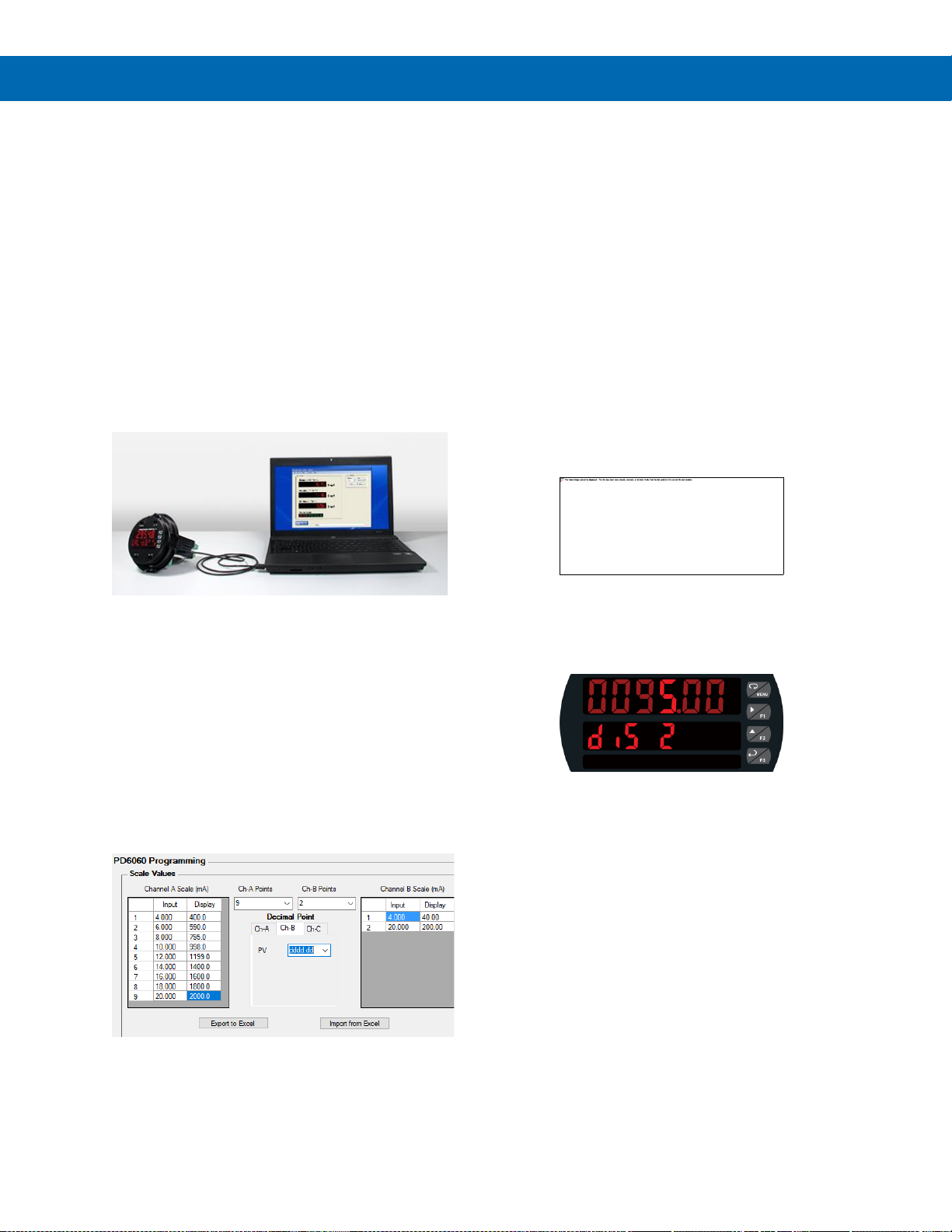
MeterView Pro can be used to scale both of the inputs
(Channel A & Channel B) on the PD8-6060. In the
example below, Channel A has nine points of
linearization and Channel B has two points.
Further simplifying the programming process, the
ProtEX-MAX can be powered from the USB port, so
no need to apply external power while programming
your meter. In addition to programming, the software
will also allow you to monitor, and datalog a
ProtEX-MAX using your PC. You can also generate
and save programming files for later use.
Advanced Display Features
Dual-Line Makes All the Difference
The ProtEX-MAX has two red LED displays, a main
display 0.60" (15 mm) high, and a second display
0.46" (12 mm) high. Each display is a full 6 digits
(-99999 to 999999).
The ProtEX-MAX's dual-line display makes all the
difference both when programming the instrument
and when using it in the field. When programming the
instrument, the dual-line display prompts for the
needed information and also helps you keep track of
where you are in the setup process.
Programming Assistance
The ProtEX-MAX's dual-line display makes
programming the instrument much easier because the
second line prompts for the needed information and
also helps you keep track of where you are in the
setup process.
The ProtEX-MAX is prompting for the value for Input 2
and displaying the default value of 20.00 mA. The “2”
in 20.00 is brighter than the rest of the digits indicating
that it is the number that will be changed by the Up
arrow.
The ProtEX-MAX is now prompting for what the
user wants Display 2 to be; that is the value that
corresponds to 20 mA. In this case Display 2 is
currently set to 95.00.
Super-Bright Display
The ProtEX-MAX comes standard with a super-bright
display, with LEDs that are visible even in direct
sunlight. The display also has up to eight levels of
adjustable intensity for optimum visibility in any
lighting condition.
Rounding for Even Steadier Display
The rounding feature is used to give the user a
steadier display with fluctuating signals. It causes the
display to round to the nearest value according to the
rounding value selected (1, 2, 5, 10, 20, 50, or 100).
For example, with a rounding value of 10, and an
input of 12346, the display would indicate 12350.
Page 11
PD8-6060 Explosion-Proof Dual Analog Input Process Meter
Instruction Manual
11
Customizable Displays
The ProtEX-MAX has two red LED displays, a main display 0.60" (15 mm) high, and a second display 0.46" (12 mm)
high. Each display is a full 6 digits (-99999 to 999999).
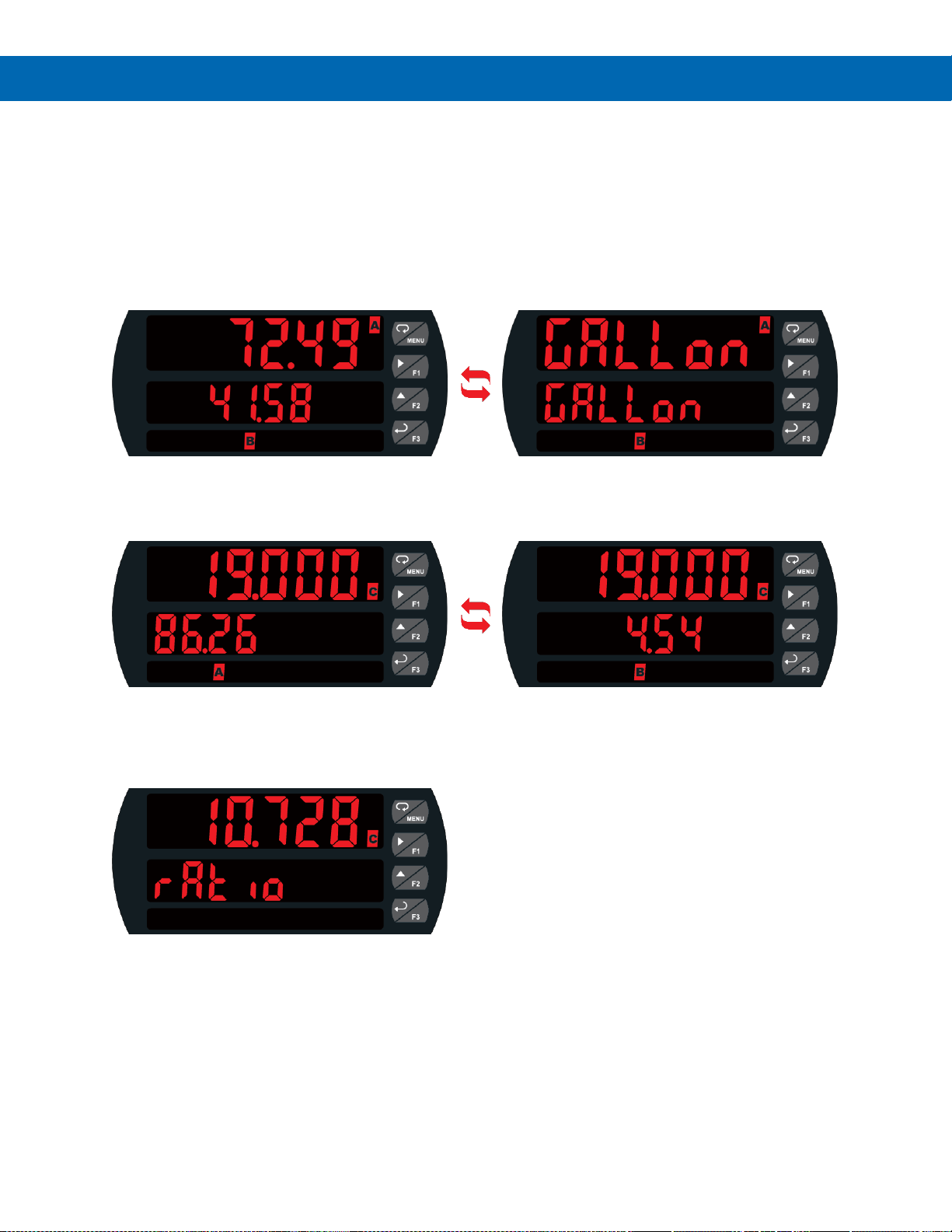
The displays can be set up to read input channels (A or B), math function channel C, toggle between A & B, B & C,
A & C, A & B & C, toggle between channels A, B, or C & units, the max/min of any of the channels, including the math
channel (C), set points, gross (without tare) or net (with tare) & gross values of channel A or B, or the Modbus® input.
This allows the display to be setup to display whatever variables are most valuable to the application. Here are just a
few examples.
Input Channels A & B
Both input channels are displayed with input A on the main display and input B on the second display
as indicated by LEDs (A & B) on the display. The meter also toggles between the units for these inputs.
Math Function & Inputs A & B
The main display shows the math function result (C); in this case Channel A divided by Channel B.
The second display alternates between channels A and B, with an indicator to indicate which channel is
being displayed.
Math Function & Tag
The main display shows the math function result (C) of the two input channels (A & B).
The second display shows a custom label, in this case the math function used.
Page 12
PD8-6060 Explosion-Proof Dual Analog Input Process Meter
Instruction Manual
12
Physical Features
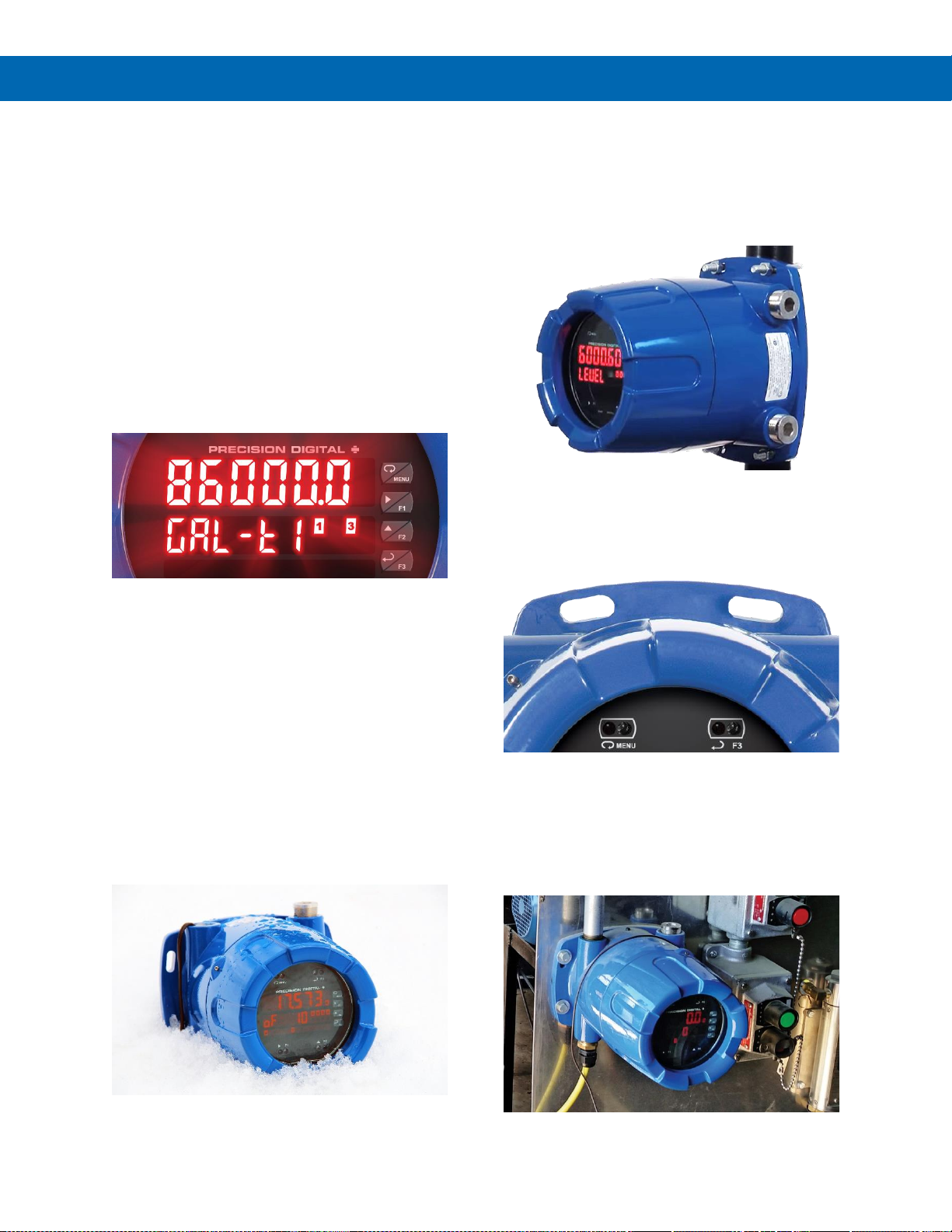
The ProtEX-MAX is designed for ease-of-use in safe
and hazardous applications. The ProtEX-MAX is
housed in a rugged NEMA 4X explosion-proof
enclosure, can operate over a wide temperature
range, includes removable screw terminal connectors,
has worldwide approvals for use in hazardous areas,
and features through-glass buttons for easy meter
operation without the need to remove the cover.
All of these features are backed by a 3-year warranty.
Super-Bright LED Display
The ProtEX-MAX features a dual-line 6-digit display
with super-bright LEDs, our brightest ever. These
allow the display to be read in any lighting condition,
even in direct sunlight.
SafeTouch Through-Glass Buttons
The ProtEX-MAX is equipped with four sensors that
operate as through-glass buttons so that it can be
programmed and operated without removing the
cover (and exposing the electronics) in a hazardous
area. These buttons can be disabled for security by
selecting the DISABLE setting on the NO-CONTACT
BUTTONS switch located on the back of the
electronics module, inside the enclosure.
Rugged, Heavy-Duty Enclosure
The ProtEX-MAX is housed in a rugged NEMA 4X,
7, & 9, IP68 die-cast aluminum enclosure, designed to
withstand harsh environments in safe and hazardous
areas over a wide temperature range.
Wide Viewing Angle
Customers can’t always look at the display from
straight on, so the window and display module have
been optimized to provide a wide viewing angle of
approximately +/- 40°; nearly twice that of the
competition.
Built-In Mounting Flanges
The ProtEX-MAX is equipped with four slotted flanges
for wall mounting or NPS 1½" to 2½" or DN 40 to
65 mm pipe mounting.
Flexible Mounting & Wiring
The ProtEX-MAX features four ¾" NPT threaded
conduit openings so that wiring can be routed to the
most convenient conduit connection(s). Two ¾" NPT
metal conduit plugs with 12 mm hex key fitting come
installed.
Page 13
PD8-6060 Explosion-Proof Dual Analog Input Process Meter
Instruction Manual
13
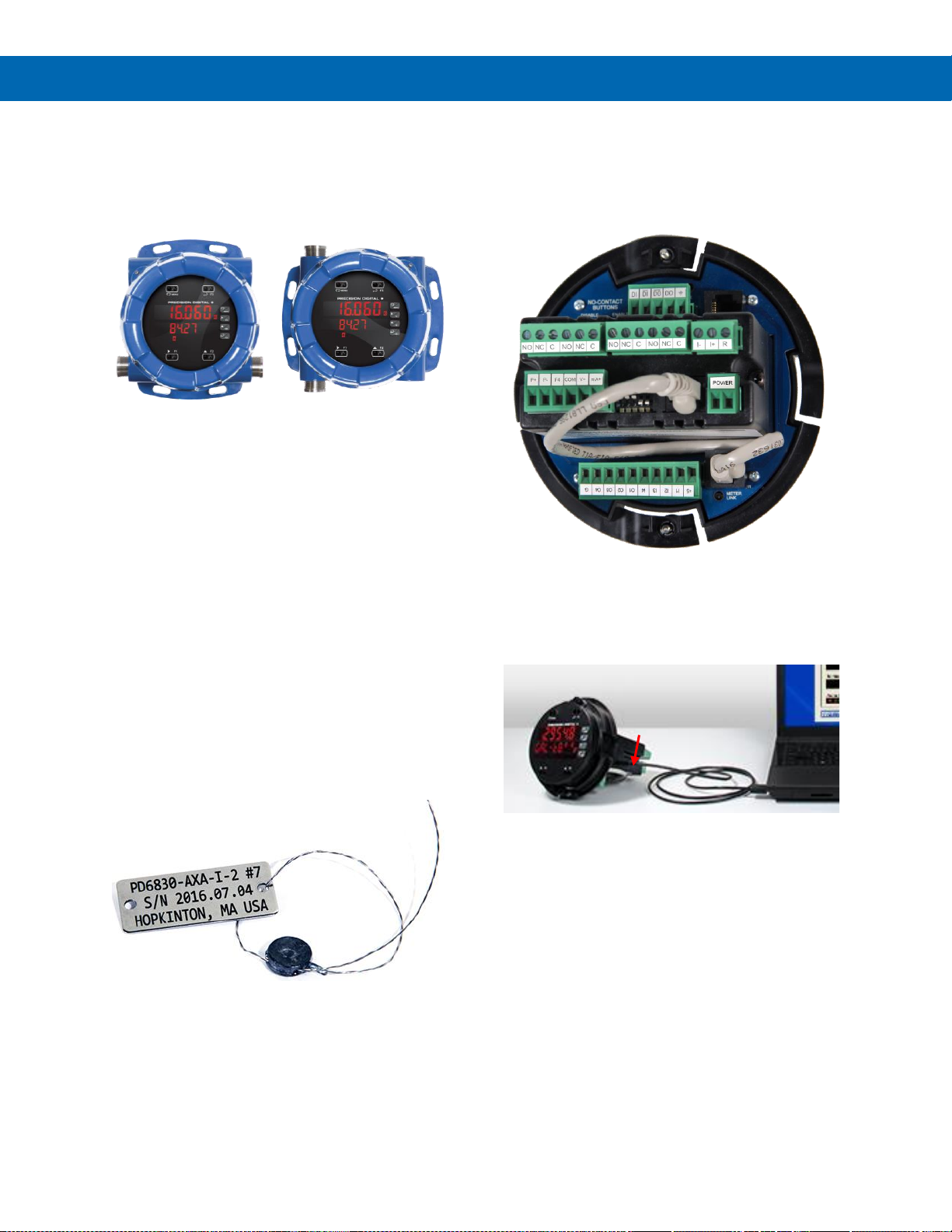
Rotatable Display
The ProtEX-MAX rotatable display, along with four
available conduit connections, provide for numerous
installation options. The display can be rotated in 90°
increments. Rotate it 90° for horizontal mounting.
Vertical Mounting Horizontal Mounting
Perfect & Secure Fit Every Time
The internal cast rails ensure the ProtEX-MAX
assembles together perfectly, quickly and securely;
and everything lines up for optimal viewing every
time. There are no standoffs to worry about breaking
or getting out of alignment. Two spring-loaded,
self-retaining, thumbscrews make the assembly a
snap, while pressing the display as close to the glass
as possible to improve wide angle viewing.
Stainless Steel Tags
PDA-SSTAG is a laser etched stainless steel tag
accessory for any of your Precision Digital meters.
The tag features custom text for equipment
identification, instruction, or whatever else is needed
in your facility. Each tag comes with a stainless steel
wire and lead seal for easy mounting wherever you
need it.
Removable Screw Terminals
Industrial applications require screw terminal
connections for easy field wiring and the ProtEX-MAX
goes one step further in convenience by making them
removable also.
Note: The above photograph is representative of the back of
the PD8-6060 in every regard except for the signal input
connector. See Figure 5 on page 28 for actual input signal
connections.
USB Port MeterView Pro
Hazardous Area Approvals
The ProtEX-MAX's approvals allow it to be used in
hazardous areas around the world. These include: FM
Approved as Explosion-Proof / Dust-Ignition-Proof /
Flame-Proof, CSA Certified as Explosion-Proof /
Dust-Ignition-Proof, and ATEX and IECEx Certified as
Flame-Proof.
Wide Operating Temperature Range
The ProtEX-MAX can operate from -40 to 60°C
(-40 to 140°F) meaning it can be installed in a wide
variety of indoor and outdoor industrial applications.
And over this range, the ProtEX-MAX will drift no
more than 0.005% of calibrated span/°C max from
0 to 65°C ambient and 0.01% of calibrated span/°C
max from -40 to 0°C ambient.
USB cable conveniently
plugs into side of
ProtEX-MAX meter
Page 14
PD8-6060 Explosion-Proof Dual Analog Input Process Meter
Instruction Manual
14
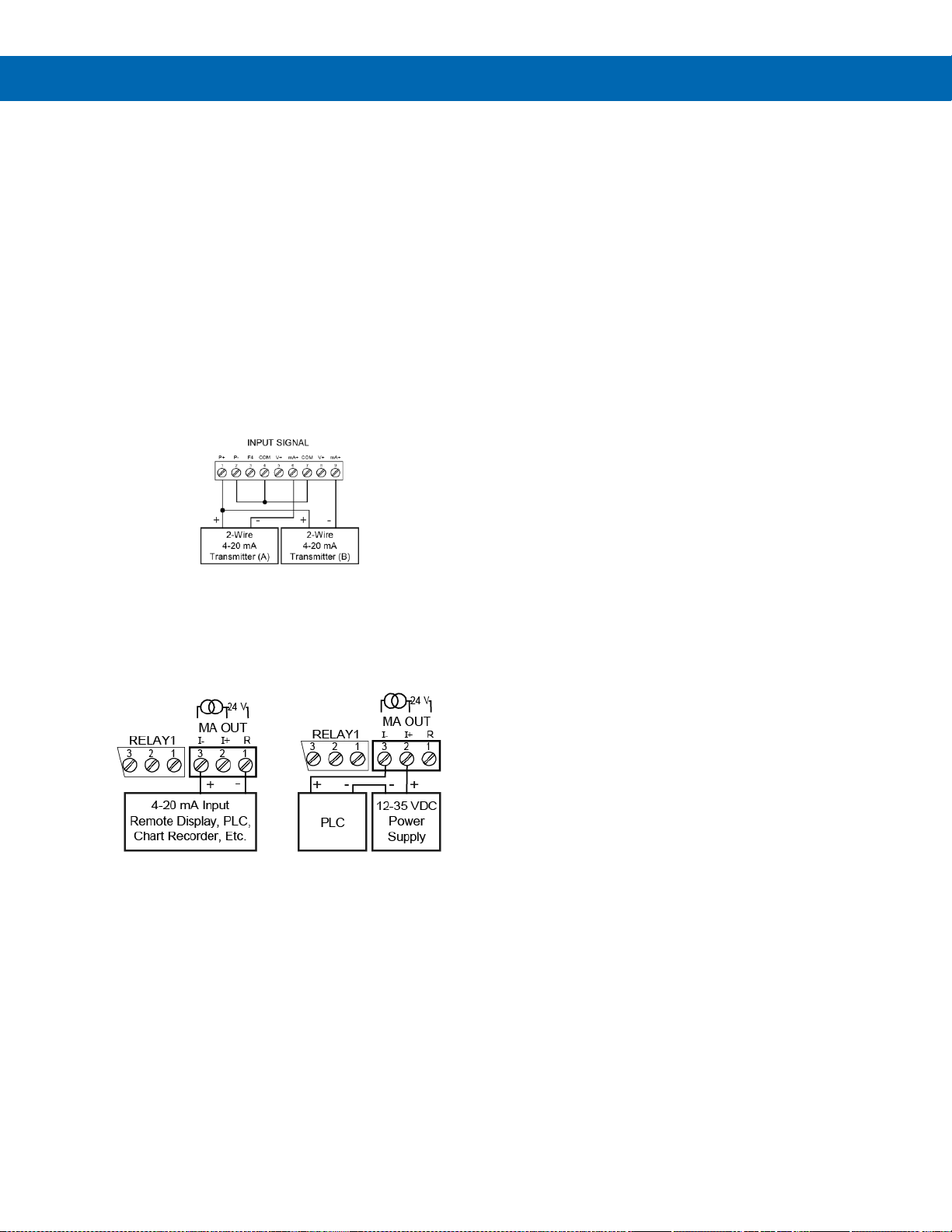
Transmitter Power Supplies
Meter Powers Transmitters
One of the most useful standard features of the
PD8-6060 is its built-in isolated, 24 V @ 25 mA power
supply to power the transmitters. This feature saves
money by eliminating an external power supply and
also simplifies wiring by reducing the number of
devices in the loop. It can be configured for 5, 10, or
24 V (default) by means of a simple internal jumper.
This power supply is even available on meters that
are powered from DC power (24 V @ 25 mA). To use
an external power supply instead of the internal power
supply, simply make connections to different terminals
on the ProtEX-MAX.
The following diagram illustrates how to wire the
ProtEX-MAX so it will power the transmitters:
Meter Powers 4-20 mA Output
Not only can the ProtEX-MAX power the 4-20 mA
input signal, but an additional power supply of
24 V @ 25 mA is provided with the 4-20 mA output
option to power the 4-20 mA output.
Fuse Prevents Current Overload
Another very useful aspect of the ProtEX-MAX is that
the current input is protected against current overload
by a resettable fuse. The fuse limits the current to a
safe level when it detects a fault condition, and
automatically resets itself when the fault condition is
removed.
Page 15
PD8-6060 Explosion-Proof Dual Analog Input Process Meter
Instruction Manual
15
Input Signal Conditioning
Non-linear input signals (i.e. weirs & flumes,
differential pressure, round horizontal tanks, etc.)
can be linearized with the ProtEX-MAX’s simple to
use built-in signal input conditioning functions.
These include square-root extractor, exponential
linearizer, round horizontal tank linearizer, and
user-customizable 32-point linearizer.
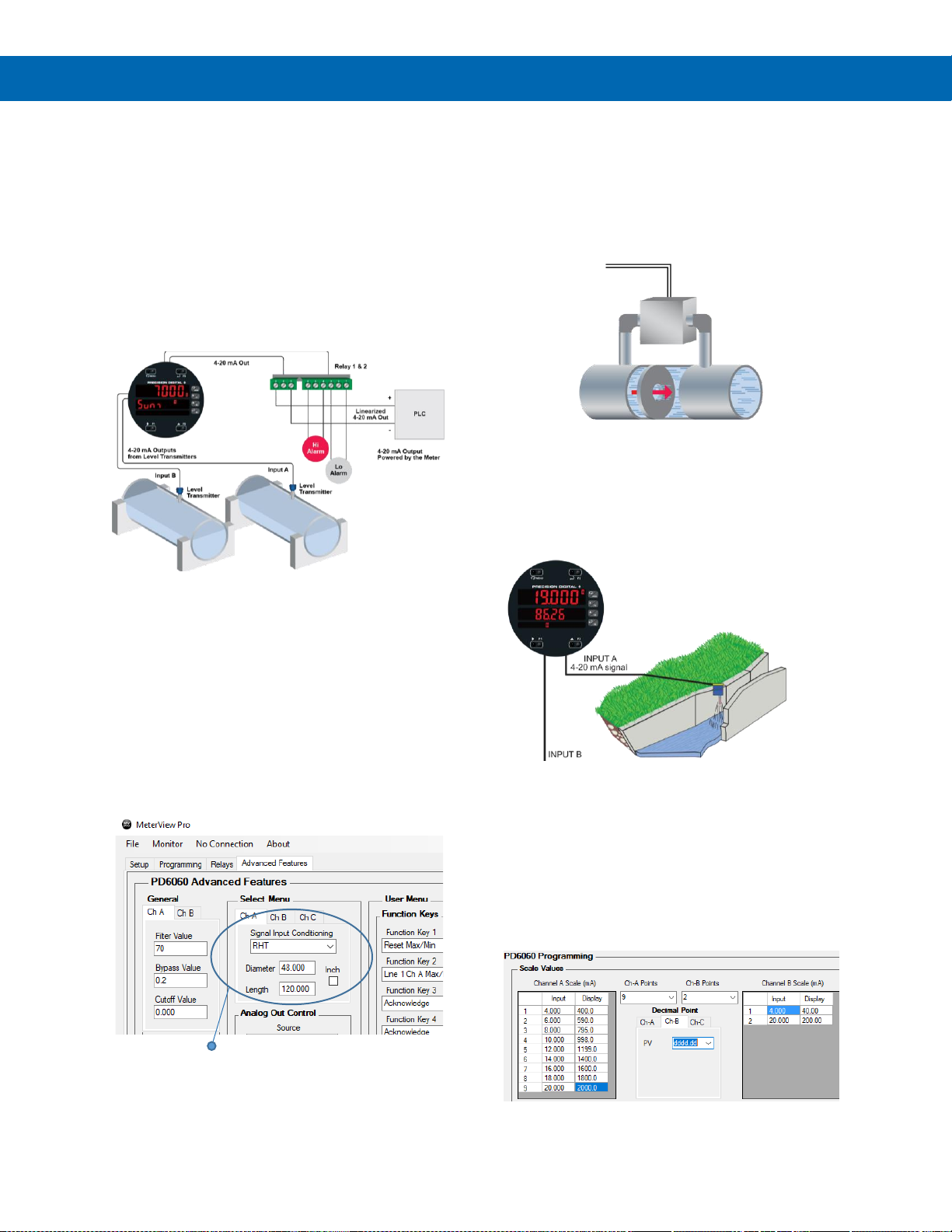
Round Horizontal Tank Linearization
This function automatically calculates the volume in a
round horizontal tank with flat ends.
The PD8-6060 is powering and displaying the output
from two level sensors in two different tanks. The
meter is currently displaying the sum of these two
tanks but is also programmed to toggle between the
sum and the actual volume in both tanks.
Using MV Pro for RHT Function
MeterView Pro can be used to easily program the
meter to display volume in a round horizontal tank.
The user merely selects the RHT Signal Input
Conditioning function from the drop-down menu and
enters the diameter and length of the tank and the
meter does the rest!
Round Horizontal Tank Function
Square Root Linearization
The square root function is used to calculate flow
measured with a differential pressure transmitter.
The flow rate is proportional to the square root of the
differential pressure. Scale the meter so that the low
input signal (e.g. 4 mA) is equal to zero flow and the
high input signal (e.g. 20 mA) is equal to the
maximum flow.
Open-Channel Flow Calculated
Using Exponential Signal Input
Conditioner
The programmable exponent can be used to linearize
the signal from level transmitters in open-channel flow
applications using weirs and flumes.
Multi-Point Linearization
The most common way to linearize a non-linear signal
is to break it up into smaller ranges that are more
linear than the overall range. The PD8-6060 is
available with up to 32 points of linearization for both
inputs. The linearization data can be imported from an
Excel spreadsheet or can be exported from
MeterView Pro to an Excel spreadsheet.
Using MV Pro for Multi-Point Linearization
The above graphic illustrates Channel A input being
linearized with nine scaling points and Channel B
using the more standard two-point scaling method.
Page 16
PD8-6060 Explosion-Proof Dual Analog Input Process Meter
Instruction Manual
16
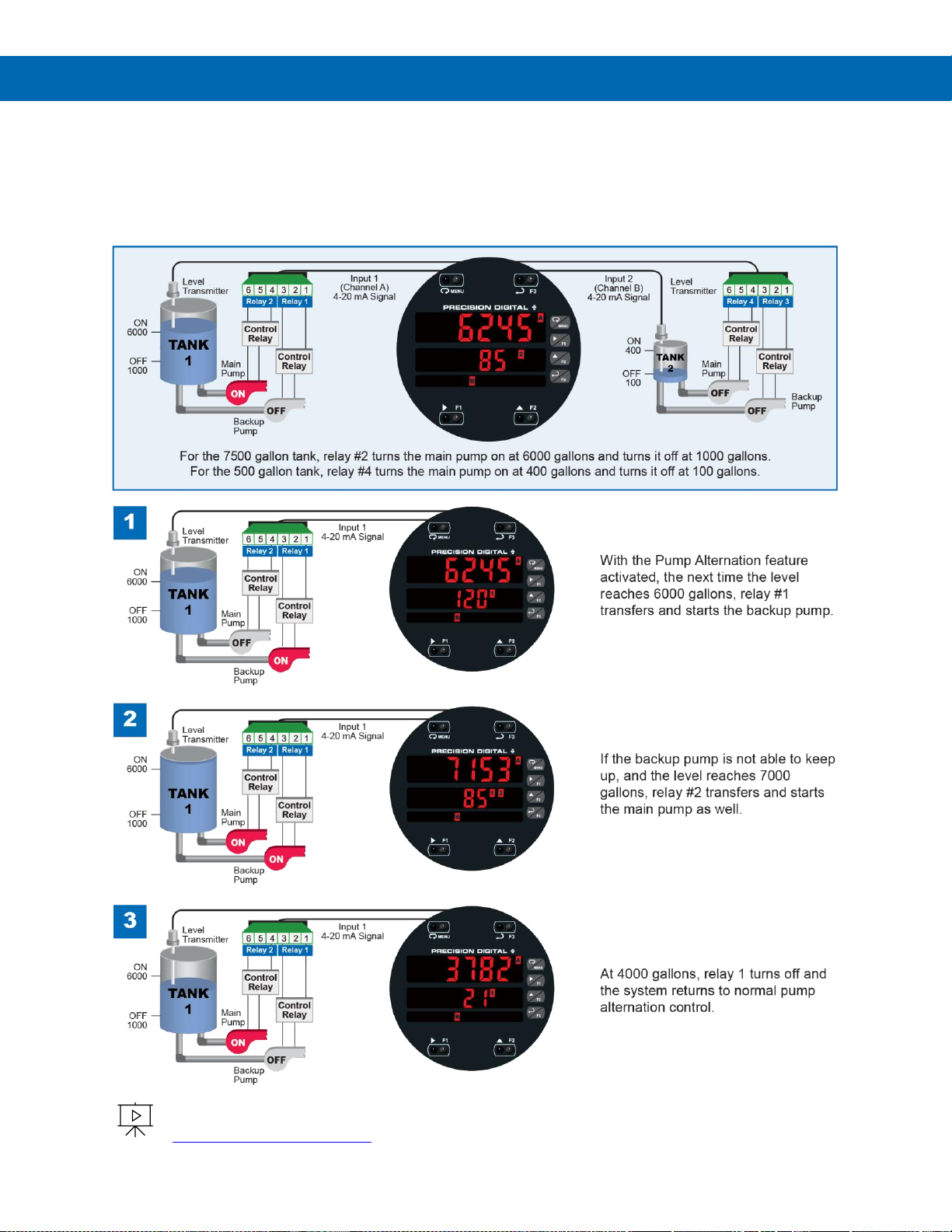
Explosion-Proof Dual-Pump Alternation in Two Tanks
The ProtEX-MAX can be used as an explosion-proof pump controller when combined with a continuous level
transmitter. Since the PD8-6060 accepts two 4-20 mA inputs (from two different level transmitters) and can be
equipped with four relays, it could be used to control and alternate two pumps in two different tanks as well as provide
the 24 V to power the transmitters. The illustration below shows how the relays control both the main and backup
pumps to maintain the levels in tanks 1 and 2.
Learn how to use the ProVu (ProtEX-MAX) meter as an explosion-proof pump controller.
See how the four relays can be used to alternate two pumps and provide high and low alarms.
predig.com/videos/PumpControl
Page 17
PD8-6060 Explosion-Proof Dual Analog Input Process Meter
Instruction Manual
17
Useful Tools
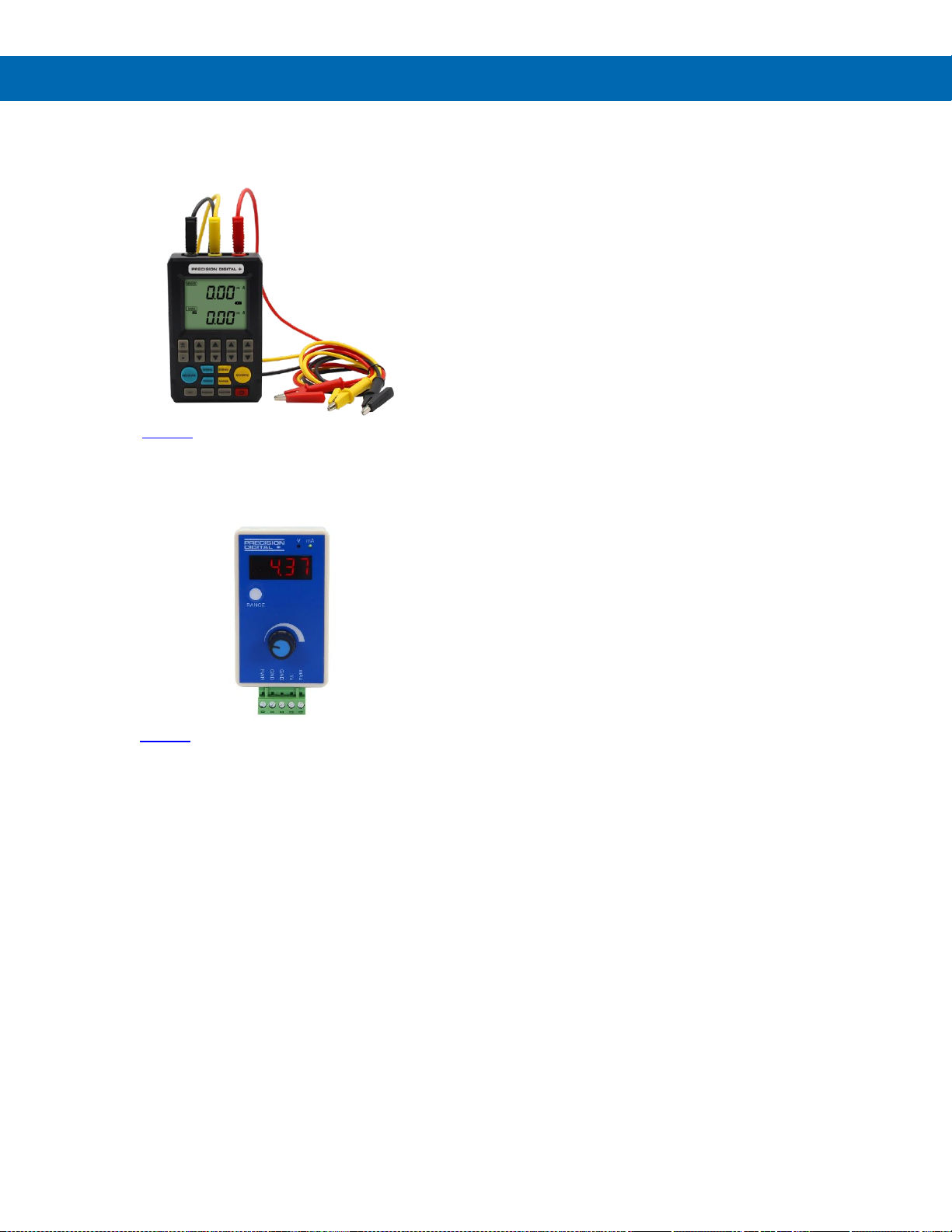
PD9501 Multi-Function Calibrator
This PD9501 Multi-Function Calibrator has a variety
of signal measurement and output functions, including
voltage, current, thermocouple, and RTD.
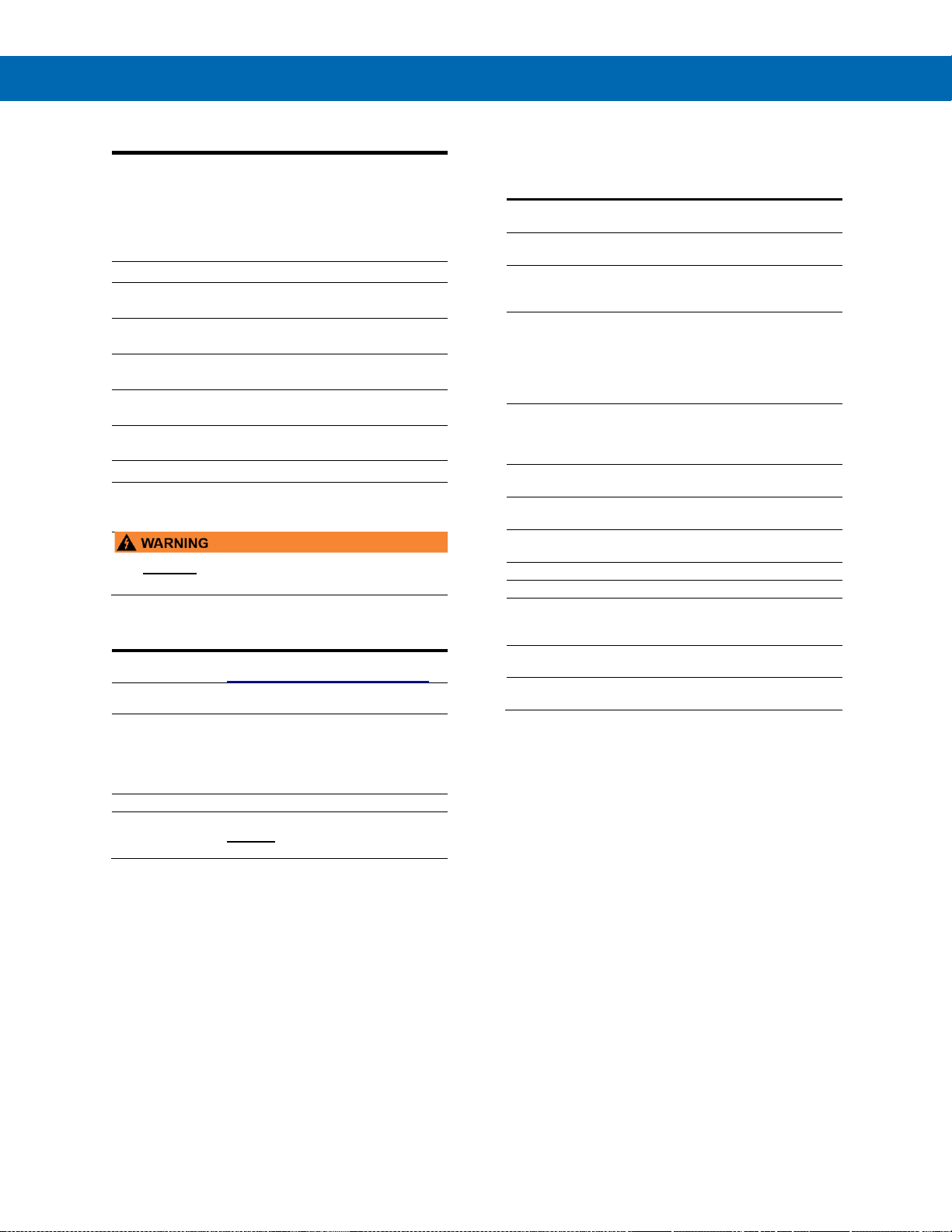
PD9502 Low-Cost Signal Generator
The PD9502 is a low-cost, compact, simple to use
4-20 mA or 0-10 VDC signal generator. It can easily
be set for 0-20 mA, 4-20 mA, 0-10 V or 2-10 V
ranges. Signal adjustment is made with a one-turn
knob. A 15-27 VDC wall plug is provided with the
instrument. Optional USB power bank is available.
Page 18

PD8-6060 Explosion-Proof Dual Analog Input Process Meter
Instruction Manual
18
Specifications
Except where noted all specifications apply to
operation at +25°C.
General
Display
Display Line 1: 0.60" (15 mm) high,
red LEDs
Display Line 2: 0.46" (12 mm) high,
red LEDs
6 digits each (-99999 to 999999),
with lead zero blanking
Display
Intensity
Eight user selectable intensity levels.
Default intensity is six.
Display
Update Rate
5/second (200 ms)
LED Status
Indicators
See LED Status Indicators on page 33 for
details.
Overrange
Display flashes 999999
Underrange
Display flashes -99999
Display
Assignment
Display Line 1:
Channels A (Ch-A), B (Ch-B), or C (Ch-C),
toggle between (Ch-A & Ch-B, Ch-A &
Ch-C, Ch-B & Ch-C, and Ch-A, Ch-B, &
Ch-C), toggle between channel & units,
channel gross weight, toggle net and
gross weights, set points, max & min
values, or Modbus® input
Display Line 2:
Same as Display Line 1; plus units, tag or
turned off
Programming
Methods
Four SafeTouch through-glass buttons
when cover is installed. Mechanical
buttons can be used with the cover
removed. Free PC-based USB MeterView
Pro programming software.
Noise Filter
Programmable from 2 to 199
(0 will disable filter)
Filter Bypass
Programmable from 0.1 to 99.9% of
calibrated span
Recalibration
All ranges are calibrated at the factory.
Recalibration is recommended at least
every 12 months.
Max/Min
Display
Max/min readings reached by the process
are stored until reset by the user or until
power to the meter is turned off.
Rounding
Select 1, 2, 5, 10, 20, 50, or 100
(e.g. rounding = 10, value = 123.45,
display = 123.50).
Tare
Tare function zeros out the meter to
remove the weight of a container. Tare
function can be assigned to a function key,
F4 terminal, or a digital input.
Password
Three programmable passwords restrict
modification of programmed settings.
Pass 1: Allows use of function keys and
digital inputs
Pass 2: Allows use of function keys, digital
inputs and editing set/reset points
Pass 3: Restricts all programming,
function keys, and digital inputs
Non-Volatile
Memory
All programmed settings are stored in
non-volatile memory for a minimum of ten
years if power is lost.
Power
Options
85-265 VAC 50/60 Hz; 90-265 VDC, 20 W max;
12-24 VDC, 12-24 VAC, 15 W max.
Powered over USB for configuration only.
Fuse
Required external fuse: UL Recognized,
5 A max, slow blow; up to 6 meters may
share one 5 A fuse
Normal Mode
Rejection
Greater than 60 dB at 50/60 Hz
Isolation
4 kV input/output-to-power line
500 V input-to-output or output-to-P+ supply
Overvoltage
Category
Installation Overvoltage Category II:
Local level with smaller transient overvoltages
than Installation Overvoltage Category III
Environmental
T6 Class operating temperature range
Ta = -40 to 60°C
T5 Class operating temperature range
Ta = -40 to 65°C
Storage temperature range:
-40 to 85°C (-40 to 185°F)
Relative humidity:
0 to 90% non-condensing
Max Power
Dissipation
Maximum power dissipation
limited to 15.1 W
Connections
Power, signal, relays, mA out: Removable
screw terminal blocks accept 12 to 22
AWG wire
RS-485: Removable screw terminal block
accepts 16 to 30 AWG wire
Digital I/O: Removable screw terminal
blocks accept 16 to 30 AWG wire
Enclosure
Explosion-proof die cast aluminum with
glass window, corrosion resistant epoxy
coating, color: blue
NEMA 4X, 7, & 9, IP68
Default conduit connections: Four ¾" NPT
threaded conduit openings and two ¾"
NPT metal conduit plugs with 12 mm hex
key fitting installed. Additional conduit
opening configurations may be available;
verify quantity and sizes on specific device
labeling during installation.
Mounting
Wall Mounting:
Four (4) mounting holes provided for
mounting meter to wall. See Wall
Mounting Instructions on page 24 for
additional details.
Pipe Mounting:
Optional pipe mounting kit (PDA6848)
allows for pipe mounting. Sold separately.
See Pipe Mounting Instructions on page
25 for additional details.
Tightening
Torque
Power, signal, relays, mA out terminals:
5 lb-in (0.56 Nm)
Digital I/O and RS-485:
2.2 lb-in (0.25 Nm)
Overall
Dimensions
6.42" x 7.97" x 8.47" (W x H x D)
(163 mm x 202 mm x 215 mm)
Weight
16.0 lbs (7.26 kg)
Warranty
3 years parts & labor. See Warranty
Information and Terms & Conditions on
www.predig.com for complete details.
Page 19

PD8-6060 Explosion-Proof Dual Analog Input Process Meter
Instruction Manual
19
Dual Process Inputs
Two Inputs
Two non-isolated inputs, independent, field
selectable: 0-20 mA, 4-20 mA, 10 V (0-5 V,
1-5 V, 0-10 V), Modbus® PV (Slave)
Isolated
Transmitter
Power Supply
Terminals P+ & P-: 24 VDC ± 10%.
Isolated from the input at >500 V. Jumper
selectable for 24, 10, or 5 VDC supply
(internal jumper J4). All models transmitter
supply rated @ 25mA max.
Refer to Transmitter Supply Voltage
Selection (P+, P-) on page 27.
Channels
Channel A, Channel B,
Channel C (Math channel)
Programmable
Constants
Constant P (Adder):
-99.999 to 999.999, default: 0.000
Constant F (Factor):
0.001 to 999.999, default: 1.000
Math
Functions
Name
Function
Setting
Addition
(A+B+P)*F
Sunm
Difference
(A-B+P)*F
diF
Absolute diff.
((Abs(A-B))+P)*F
diFAbS
Average
(((A+B)/2)+P)*F
AvG
Multiplication
((A*B)+P)*F
nmulti
Division
((A/B)+P)*F
diVide
Max of A or B
((AB-Hi)+P)*F
Hi-Ab
Min of A or B
((AB-Lo)+P)*F
Lo-Ab
Draw
((A/B)-1)*F
drAuw
Weighted avg.
((B-A)*F)+A
uw avg
Ratio
(A/B)*F
ratio
Ratio 2
((B-A)/A)+P)*F
ratio2
Concentration
(A/(A+B))*F
Concen
Note: The F constant can be any value from
0.001 to 999.999. If the value is less than 1,
it will have the same effect as a divider. For
example, the average could also be derived
by using (A+B)*F, where F = 0.500.
Sequence of
Operations
for Input
Programming
1. Select Input for A and B
2. Set up the engineering units for
A, B, and C
3. Set up decimal point for A, B, and C
4. Program A & B
5. Set up the displays for A, B, or C
6. Select the transfer function for A & B
(e.g. Linear)
7. Select Math function for Channel C
8. Program constants for Factor (F) and
Adder (P)
9. Program cutoff values for A and B
Accuracy
±0.03% of calibrated span ±1 count,
square root & programmable exponent
accuracy range: 10-100% of calibrated
span
Temperature
Drift
0.005% of calibrated span/C max from
0 to 65C ambient, 0.01% of calibrated
span/C max from -40 to 0C ambient
Input Signal
Conditioning
Linear, square root, programmable
exponent, or round horizontal tank volume
calculation
Multi-Point
Linearization
2 to 32 points for channels A and B
Programmable
Exponent
User selectable from 1.0001 to 2.9999 for
open channel flow
Low-Flow
Cutoff
0.1 to 999,999 (0 disables cutoff function).
Point below at which display always shows
zero.
Decimal Point
Up to five decimal places or none:
d.ddddd, d.dddd, d.ddd, d.dd, d.d, or dddddd
Calibration
Range
Input Range
Minimum Span
Input 1 & 2
4-20 mA
0.15 mA
10 V
0.10 V
An error message will appear if the input 1
and input 2 signals are too close together.
Input
Impedance
Voltage ranges: greater than 500 k
Current ranges: 50 - 100 (depending on
internal resettable fuse impedance)
Input
Overload
Current input protected by an internal
resettable fuse, 30 VDC max. Fuse resets
automatically after fault is removed.
HART
Incompatible
The meter can support ONLY one HART
loop on either of the inputs. A signal
isolator is required if two HART loops are
being connected.
Under the described conditions, the meter
does not interfere with existing HART
communications; it displays the 4-20 mA
primary variable and it allows the HART
communications to pass through without
interruption. The meter is not affected if a
HART communicator is connected to the
loop. The meter does not display
secondary HART variables.
Relays
Rating
4 SPDT (Form C) internal and rated
3 A @ 30 VDC and 125/250 VAC resistive
load; 1/14 HP (≈ 50 W) @ 125/250 VAC for
inductive loads
Noise
Suppression
Noise suppression is recommended for
each relay contact switching inductive
loads. See Switching Inductive Loads on
page 32 for details.
Relay
Assignment
Relays may be assigned to Ch-A, Ch-B,
Ch-C, or Modbus® input
Deadband
0-100% of span, user programmable
High or Low
Alarm
User may program any alarm for high or
low trip point. Unused alarm LEDs and
relays may be disabled (turn off).
Relay
Operation
• Automatic (non-latching) and/or
manual reset
• Latching (requires manual
acknowledge) with or without clear
• Pump alternation control (2-4 relays)
• Sampling (based on set point and time)
• Off (disable unused relays and enable
Interlock feature)
• Manual on/off control mode
Relay Reset
(Acknowledge)
User selectable via front panel button, F4
digital input, external contact closure on
digital inputs, or through serial
communications
Time Delay
0 to 999.9 seconds, on & off relay time
delays. Programmable and independent for
each relay
Page 20

PD8-6060 Explosion-Proof Dual Analog Input Process Meter
Instruction Manual
20
Fail-Safe
Operation
Programmable and independent for each
relay.
Note: Relay coil is energized in non-alarm
condition. In case of power failure, relay will
go to alarm state.
Auto
Initialization
When power is applied to the meter, relays
will reflect the state of the input to the
meter.
USB Connection
Function
Programming only
Compatibility
USB 2.0 Standard, Compliant
Connector
Type
Micro-B receptacle
Cable
USB A Male to Micro-B Cable
Driver
Microsoft® Windows® XP/Vista/7/8/10
Power
USB port provides power to the meter.
DO NOT apply AC or DC power to the
meter while the USB port is in use.
Isolated 4-20 mA Transmitter Output
Output
Source
Process channel A, B, or C, max or min for
channel A, B, or highest or lowest of A and
B, set points 1-4, Modbus® input, or manual
control mode
Scaling
Range
1.000 to 23.000 mA for any display range
Calibration
Factory calibrated:
4.000 to 20.000 = 4-20 mA output
Analog Out
Programming
23.000 mA maximum for all parameters:
Overrange, underrange, max, min, and
break
Accuracy
± 0.1% of span ± 0.004 mA
Temperature
Drift
0.4 µA/C max from 0 to 65C ambient,
0.8 µA/C max from -40 to 0C ambient
Note: Analog output drift is separate from
input drift.
Isolated
Transmitter
Power Supply
Terminals I+ & R: 24 VDC ± 10%.
Isolated from the input at >500 V. May be
used to power the 4-20 mA output or other
devices. All models @ 25 mA max.
External Loop
Power Supply
35 VDC maximum
Output Loop
Resistance
Power supply
Minimum
Maximum
24 VDC
10
700
35 VDC
(external)
100
1200
RS-485 Serial Communications
Compatibility
EIA-485
Connectors
Removable screw terminal connector
Max Distance
3,937' (1,200 m) max
Status
Indication
Separate LEDs for METER LINK,
Transmit (TX), and Receive (RX)
Modbus® RTU Serial Communications
Slave Id
1 – 247 (Meter address)
Baud Rate
300 – 19,200 bps
Transmit
Time Delay
Programmable between 0 and 199 ms
Data
8 bit (1 start bit, 1 or 2 stop bits)
Parity
Even, Odd, or None with 1 or 2 stop bits
Byte-To-Byte
Timeout
0.01 – 2.54 second
Turn Around
Delay
Less than 2 ms (fixed)
Note: Refer to the Helios Modbus® Register Tables located
at www.predig.com for details.
Digital Input (F4)
Function
Remote operation of front-panel buttons,
acknowledge/reset relays, reset max/min
values. See Function Keys & Digital I/O
Available Settings on page 58 for a
complete list of capabilities.
Contacts
3.3 VDC on contact. Connect normally
open contacts across F4 to COM
Logic Levels
Logic High: 3 to 5 VDC
Logic Low: 0 to 1.25 VDC
Page 21
PD8-6060 Explosion-Proof Dual Analog Input Process Meter
Instruction Manual
21
Digital Inputs & Outputs
Function
Terminals provided for remote operation of
all four programming / operation buttons.
Other uses include acknowledge/reset
relays and reset max/min values. See
Function Keys & Digital I/O Available
Settings on page 58 for a complete list of
capabilities.
Channels
4 digital inputs & 4 digital outputs
Digital Input
Logic High
3 to 5 VDC
Digital Input
Logic Low
0 to 1.25 VDC
Digital Output
Logic High
3.1 to 3.3 VDC
Digital Output
Logic Low
0 to 0.4 VDC
Source
Current
10 mA maximum output current
Sink Current
1.5 mA minimum input current
+5 V Terminal
To be used as pull-up for digital inputs only.
Connect normally open push buttons
across +5 V & DI 1-4.
• DO NOT use +5 V terminal to power external
devices.
MeterView Pro Software
Availability
Download directly from meter or from
www.predig.com/download_software
System
Requirements
Microsoft® Windows® XP/Vista/7/8/10
Communications
USB 2.0 (for programming only)
(Standard USB A to USB Type B)
RS-485 to USB converter
(programming, monitoring, and data
logging)
Configuration
Configure meters one at a time
Power
USB port provides power to the meter.
DO NOT apply AC or DC power to the
meter while the USB port is in use.
Compliance Information
Electromagnetic Compatibility
Emissions
EN 55022
Class A ITE emissions requirements
Radiated
Emissions
Class A
AC Mains
Conducted
Emissions
Class A
Immunity
EN 61326-1
Measurement, control, and laboratory
equipment
EN 61000-6-2
EMC heavy industrial generic
immunity standard
RFI - Amplitude
Modulated
80 -1000 MHz 10 V/m 80% AM
(1 kHz)
1.4 - 2.0 GHz 3 V/m 80% AM (1 kHz)
2.0 - 2.7 GHz 1 V/m 80% AM (1 kHz)
Electrical Fast
Transients
±2kV AC mains, ±1kV other
Electrostatic
Discharge
±4kV contact, ±8kV air
RFI Conducted
10V, 0.15-80 MHz, 1kHz 80% AM
AC Surge
±2kV Common, ±1kV Differential
Surge
1KV (CM)
PowerFrequency
Magnetic Field
30 A/m 70%V for 0.5 period
Voltage Dips
40%V for 5 & 50 periods
70%V for 25 periods
Voltage
Interruptions
<5%V for 250 periods
Note:
Testing was conducted on meters with cable shields
grounded at the point of entry representing installations
designed to optimize EMC performance.
Page 22
PD8-6060 Explosion-Proof Dual Analog Input Process Meter
Instruction Manual
22
Product Ratings and Approvals
FM
Enclosure: Type 4X; IP66
Class I, Division 1, Groups B, C, D
Class II, Division 1, Groups E, F, G
Class III, Division 1, T5/T6
Class I, Zone 1, AEx d, IIC Gb T5/T6
Zone 21, AEx tb IIIC T90°C; Ta -40°C to +65°C
T6 Ta = -40°C to +60°C; T5 Ta = -40°C to +65°C
Certificate Number: 3047283
CSA
Class I, Division 1, Groups B, C, D
Class II, Division 1, Groups E, F, G
Class III, Division 1
Class I Zone 1 Ex d IIC
Zone 21 Ex tb IIIC T90°C
-40°C < Tamb. < +60° C; Temperature Code T6
-40°C < Tamb. < +65° C; Temperature Code T5
Enclosure Type 4X & IP66
Certificate Number: 2531731
ATEX
II 2 G D
Ex d IIC T* Gb
Ex tb IIIC T90°C Db IP68
Ta = -40°C to +*°C
*T6 = -40°C to +60°C
*T5 = -40°C to +65°C
Certificate number: Sira 12ATEX1182
IECEx
Ex d IIC T* Gb
Ex tb IIIC T90°C Db IP68
Ta = -40°C to +*°C
*T6 = -40°C to +60°C
*T5 = -40°C to +65°C
Certificate Number: IECEx SIR 12.0073
Special Conditions for Safe Use:
Use suitably certified and dimensioned cable entry
device and/or plug. The equipment shall be installed
such that the supply cable is protected from
mechanical damage. The cable shall not be subjected
to tension or torque. If the cable is to be terminated
within an explosive atmosphere, then appropriate
protection of the free end of the cable shall be
provided. Cable must be suitable for 90°C.
Year of Construction
This information is contained within the serial number
with the first four digits representing the year and
month in the YYMM format.
For European Community: The ProtEX-MAX must
be installed in accordance with the ATEX directive
94/9/EC, and the product certificate Sira
12ATEX1182.
Page 23
PD8-6060 Explosion-Proof Dual Analog Input Process Meter
Instruction Manual
23
EU Declaration of
Conformity
EU Declaration of Conformity is available in the
Documentation CD provided with the product under
the EU DoC menu.
Safety Information
• Read complete instructions prior to installation
and operation of the meter.
• Risk of electric shock or personal injury.
• Hazardous voltages exist within enclosure.
Installation and service should be performed only
by trained service personnel.
Installation
Install in accordance with applicable local and
national regulations (e.g. NEC).
For Installation in USA
The ProtEX-MAX must be installed in accordance
with the National Electrical Code (NEC) NFPA
70.
For Installation in Canada
The ProtEX-MAX must be installed in accordance
with the Canadian Electrical Code CSA 22.1. All
power supplies below 36 V and input circuits
must be derived from a CSA Approved Class 2
source.
For European Community
The ProtEX-MAX must be installed in accordance
with the ATEX directive 94/9/EC and the product
certificate Sira 12ATEX1182.
• Disconnect from supply before opening
enclosure.
• Keep cover tight while circuits are live.
• Conduit seals must be installed within 18"
(450mm) of the enclosure or within 2" (50mm)
for Zone installations.
Wiring connectors are accessed by opening the
enclosure. To access electrical connectors,
remove the 2 captive screws and then remove
the electronics module. Connectors are on the
rear of the electronics module.
Unpacking
Remove the meter from box. Inspect the
packaging and contents for damage. Report
damages, if any, to the carrier.
If any part is missing or the meter malfunctions,
please contact your supplier or the factory for
assistance.
Pre-Installed Conduit Plugs
The ProtEX-MAX is supplied with two pre-installed
conduit plugs for installations that do not require the
use of all four conduit entries. The conduit/stopping
plugs include an internal hexagonal socket recess for
removal. The conduit plugs and their factory
installation are included in all hazardous area
approvals of this product.
• In hazardous areas, conduit and conduit/stopping
plugs require the application of non-setting (solvent
free) thread sealant. It is critical that all relevant
hazardous area guidelines be followed for the
installation or replacement of conduit or plugs.
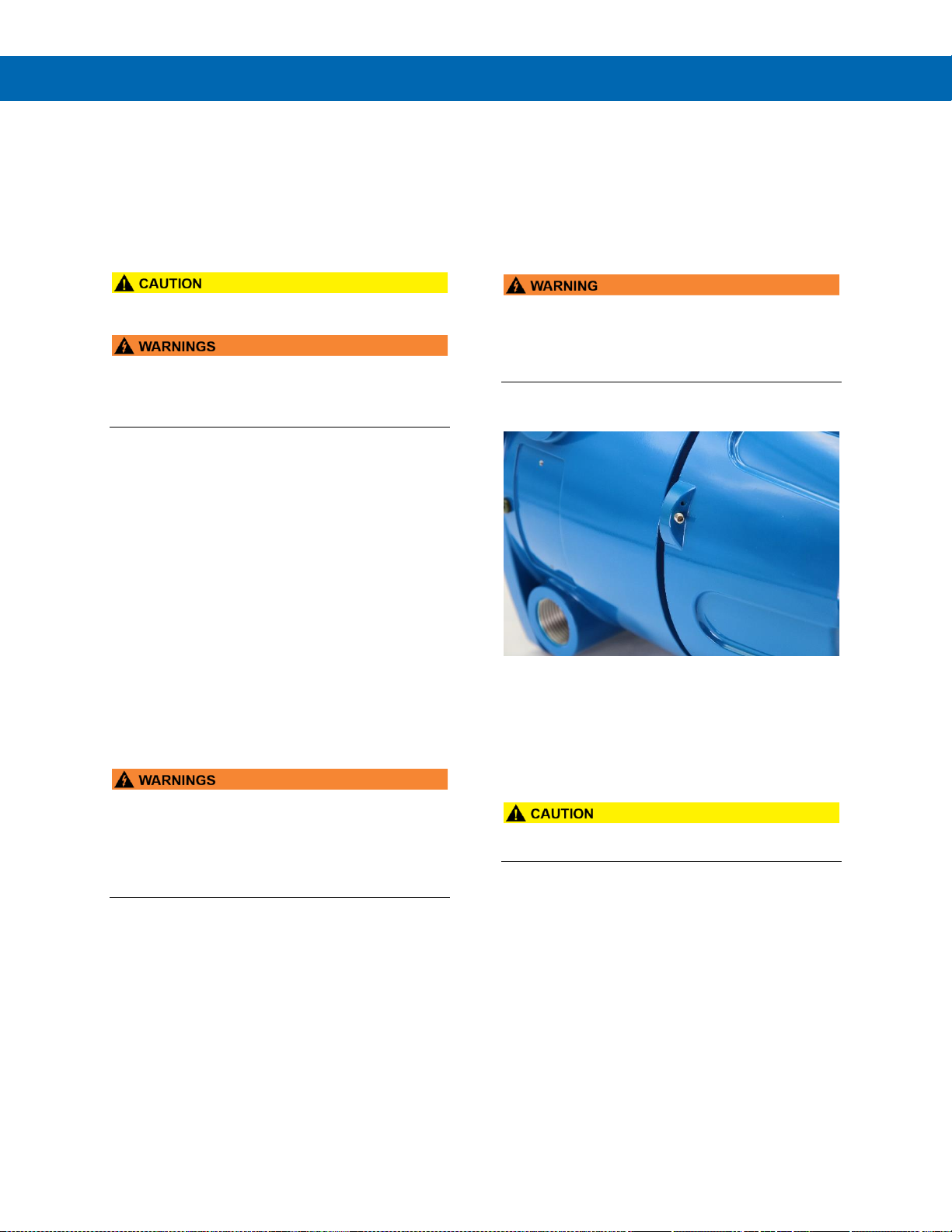
Cover Jam Screw
The cover jam screw should be properly installed
once the meter has been wired and tested in a safe
environment. The cover jam screw is intended to
prevent the removal of the meter cover in a
hazardous environment without the use of tools.
Using a M2 hex wrench, turn the screw clockwise until
the screw contacts the meter. Turn the screw an
additional 1/4 to 1/2 turn to secure the cover.
• Excess torque may damage the threads and/or
wrench.
Page 24
PD8-6060 Explosion-Proof Dual Analog Input Process Meter
Instruction Manual
24
Mounting
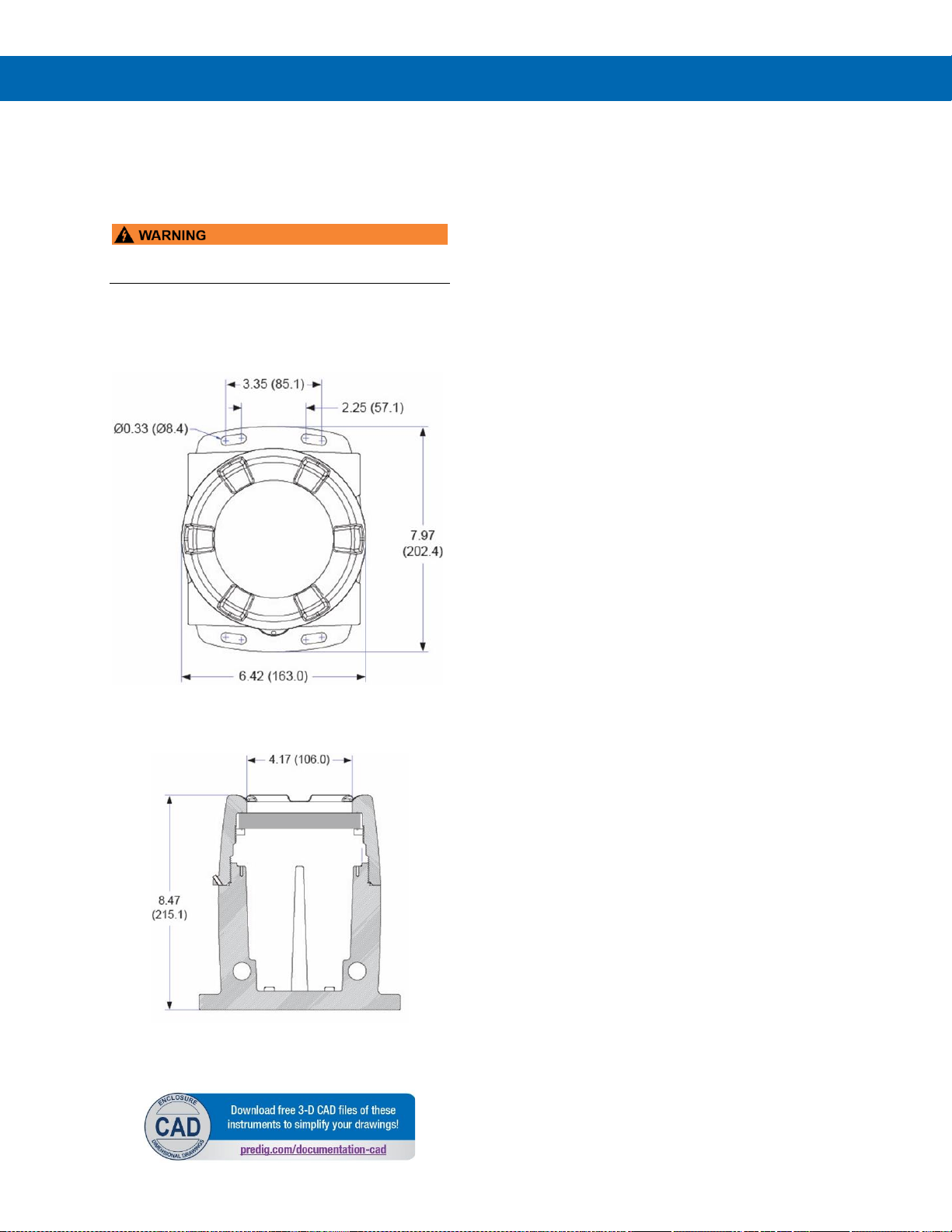
The ProtEX-MAX has four slotted mounting flanges
that may be used for pipe mounting or wall mounting.
Refer to Figure 1 and Figure 2 below.
• Do not attempt to loosen or remove flange bolts
while the meter is in service.
Mounting Dimensions
All units: inches (mm)
Figure 1. Enclosure Dimensions – Front View
Figure 2. Enclosure Dimensions –
Side Cross Section View
Wall Mounting Instructions
The meter can be mounted to any wall or flat surface
using the four provided mounting holes located in the
cast-in flanges. In addition, the internal electronic
assembly can be rotated to allow the enclosure to be
mounted in any position. To mount the meter to a
wall, follow these instructions:
• Prepare a section of wall approximately 7" x 8.5"
(178 mm x 216 mm) for meter mounting by
marking with a pencil the mounting holes (shown
in Figure 1) on the wall.
• Select the appropriate mounting screws for the
mounting surface to be used. The mounting holes
diameter is shown on Figure 1.
Note: Mounting screws are not included.
• Using a drill bit slightly smaller than the girth of
the mounting screws, pre-drill holes at the
mounting locations previously marked.
• Insert mounting screws into the four mounting
holes and screw them into the pre-drilled holes.
Page 25
PD8-6060 Explosion-Proof Dual Analog Input Process Meter
Instruction Manual
25
Pipe Mounting Instructions
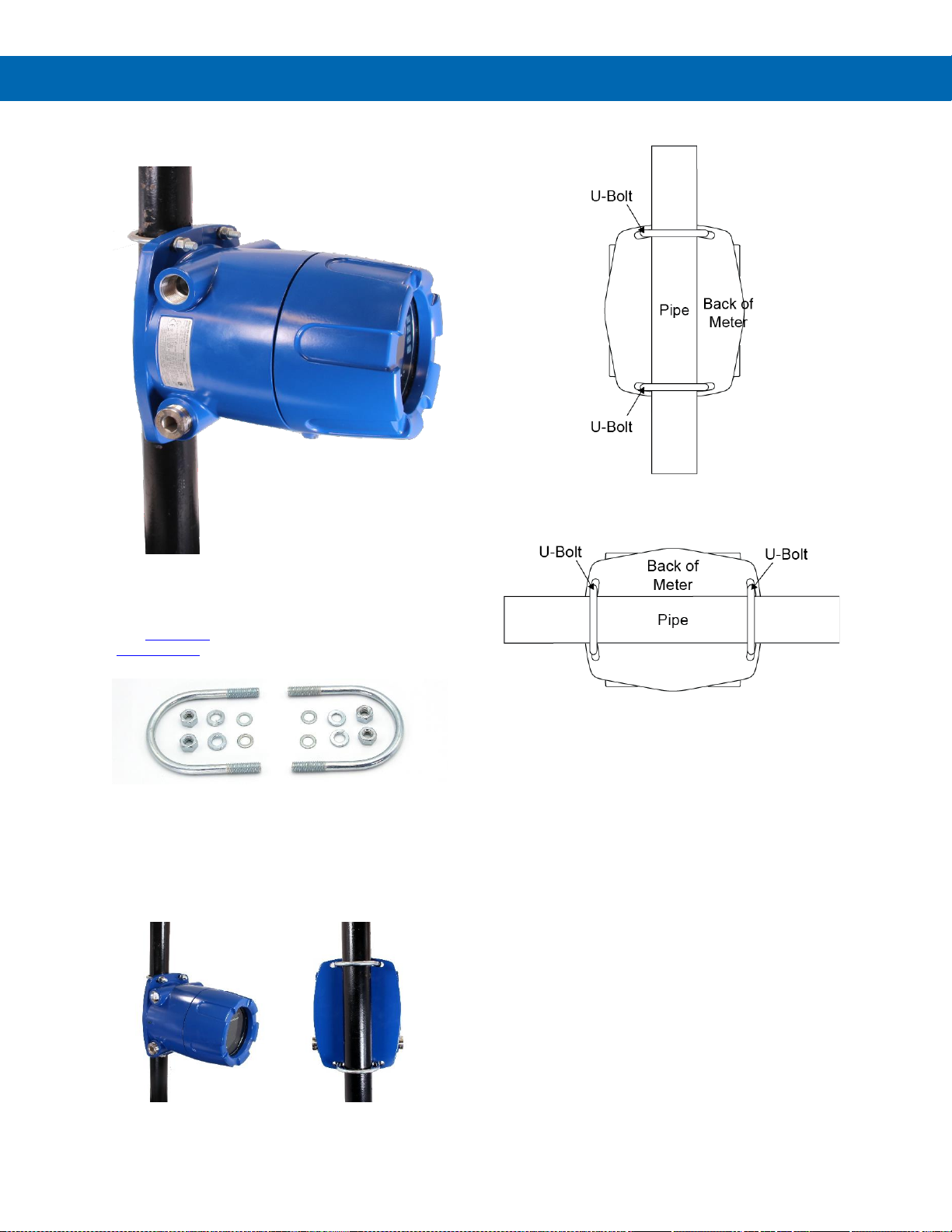
The meter can also be mounted to a pipe using an
optional U-Bolt kit. This kit includes two U-bolts, the
necessary hardware, and is available in zinc plated
steel (PDA6848) and 316 stainless steel
(PDA6848-SS)
To mount the meter using a U-Bolt kit, follow these
instructions:
• Orient the groove on the back of the instrument
with the pipe and secure it to the pipe with the
two U-bolts and hardware provided.
Vertical Pipe Mounting
Horizontal Pipe Mounting
Page 26
PD8-6060 Explosion-Proof Dual Analog Input Process Meter
Instruction Manual
26
Installation Overview
We recommend the following sequence for getting the
meter into service:
1. DO NOT apply AC or DC power to the meter.
2. Connect the meter to the PC with the USB cable
provided. DO NOT use a different USB cable.
3. If MeterView Pro (MVPro) is already installed in
your computer, then the program will launch
automatically in most systems. If the program
does not start automatically, double-click on the
MVPro icon.
4. If MVPro is not installed, follow the instructions
provided below.
5. Use MVPro to configure the meter for your
application.
6. Disconnect the USB cable from the meter.
7. Apply power and signal and check operation of
the meter.
8. Install the meter and put into service.
9. Make any programming adjustments using the
programming buttons.
MeterView Pro Software
The easiest and quickest way to program your
ProtEX-MAX meter is to use the FREE MeterView Pro
programming software. This software is loaded into
the meter and connects and installs directly to your
PC with the USB cable provided. DO NOT use a
different USB cable. We recommend that the first
thing you do after taking the meter out of the box is
connect the ProtEX-MAX to your PC with the provided
USB cable. DO NOT apply AC or DC power to the
meter while your PC is connected to the meter as it
will disrupt the USB connection. It is not necessary to
apply an input signal.
MeterView Pro programming software is intuitive, and
most customers can get their meter programmed as
they like without even looking in the manual.
Watch Meterview Pro Software Video at
www.predig.com/meterviewpro
MeterView Pro Installation
1. Connect one end of the provided USB cable
to the meter and the other end to the
computer. The computer will automatically
install the driver software it needs to talk to
the meter. Follow the on-screen instructions
and allow sufficient time for the process to
complete. This can take a few minutes. If the
process is interrupted, then it could leave the
system in an unstable condition.
• Only one meter may be connected at a time.
Attaching multiple meters will cause a conflict
with the meter software.
• DO NOT apply AC or DC power to the meter
when using the USB connection.
• The meter should only be connected to a
computer while it is located in a safe area.
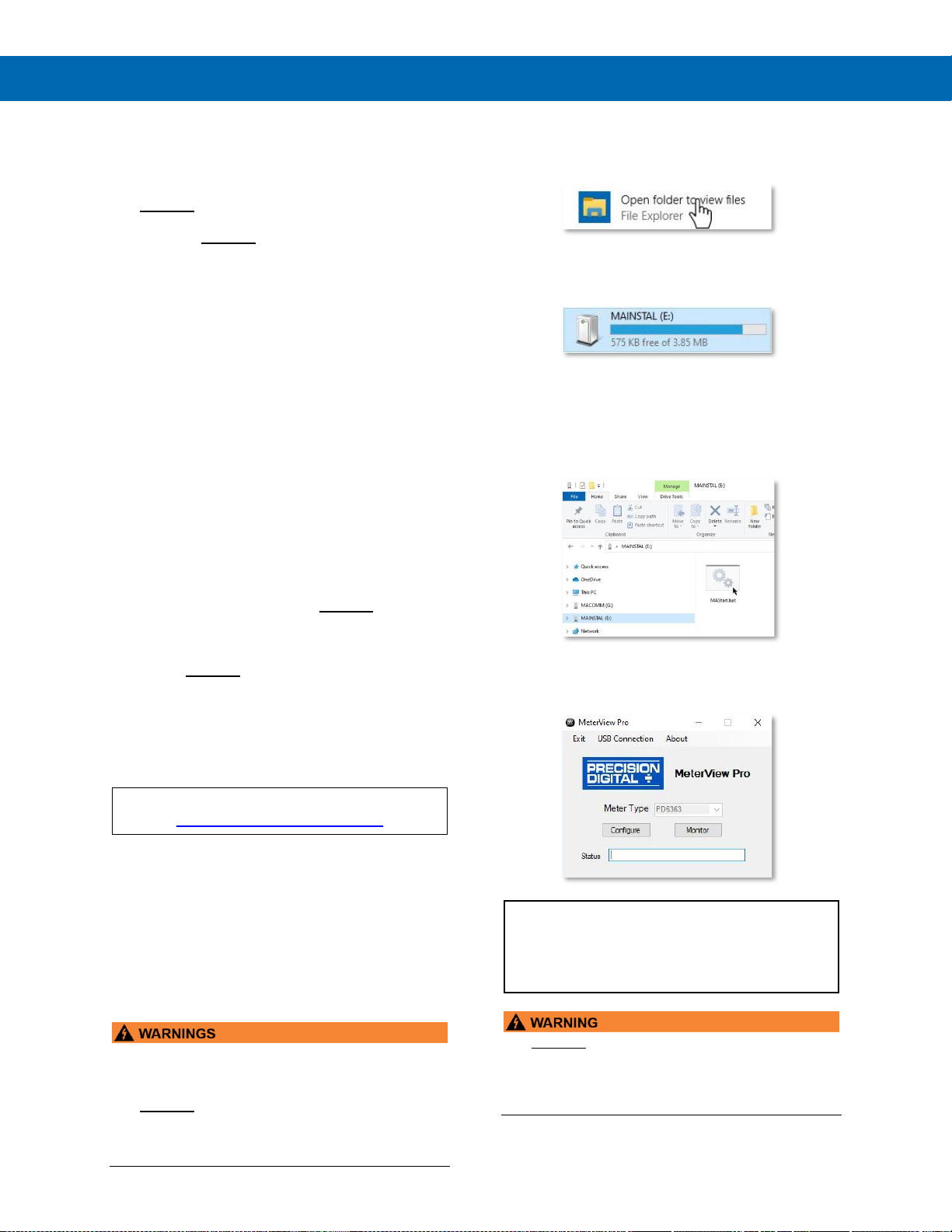
2. Once the driver is installed, an AutoPlay
dialog should appear for the drive
“MAINSTAL.” Click “Open folder to view
files.”
If the computer does not display an AutoPlay
dialog for the drive “MAINSTAL,” you should
open My Computer and double-click on the
drive labeled “MAINSTAL.”
3. Double-click on the file named “MAStart.”
The program will open a few windows and
install two programs on your computer.
Simply follow the on-screen instructions until
you see one of the dialogs below. If you
receive a “User Account Control” warning,
click “Yes.”
4. If there is an update available, click the
“Update” button to install the new version.
Otherwise, click “Configure” to begin
programming your meter.
Note: If you decide to update your MeterView Pro
software, once the installation has completed, you will be
asked if you want to update the setup files located on the
meter itself. This way, you will always have the most
current version on the meter for future installs.
• DO NOT unplug the meter while the new
installation files are being written to it. The meter
will display uwrite during the process and you
will receive an on-screen notification once the
process is complete.
Page 27
PD8-6060 Explosion-Proof Dual Analog Input Process Meter
Instruction Manual
27
Transmitter Supply Voltage Selection (P+, P-)
All meters, including models equipped with the
12-24 VDC power option, are shipped from the factory
configured to provide 24 VDC power for the
transmitter or sensor.
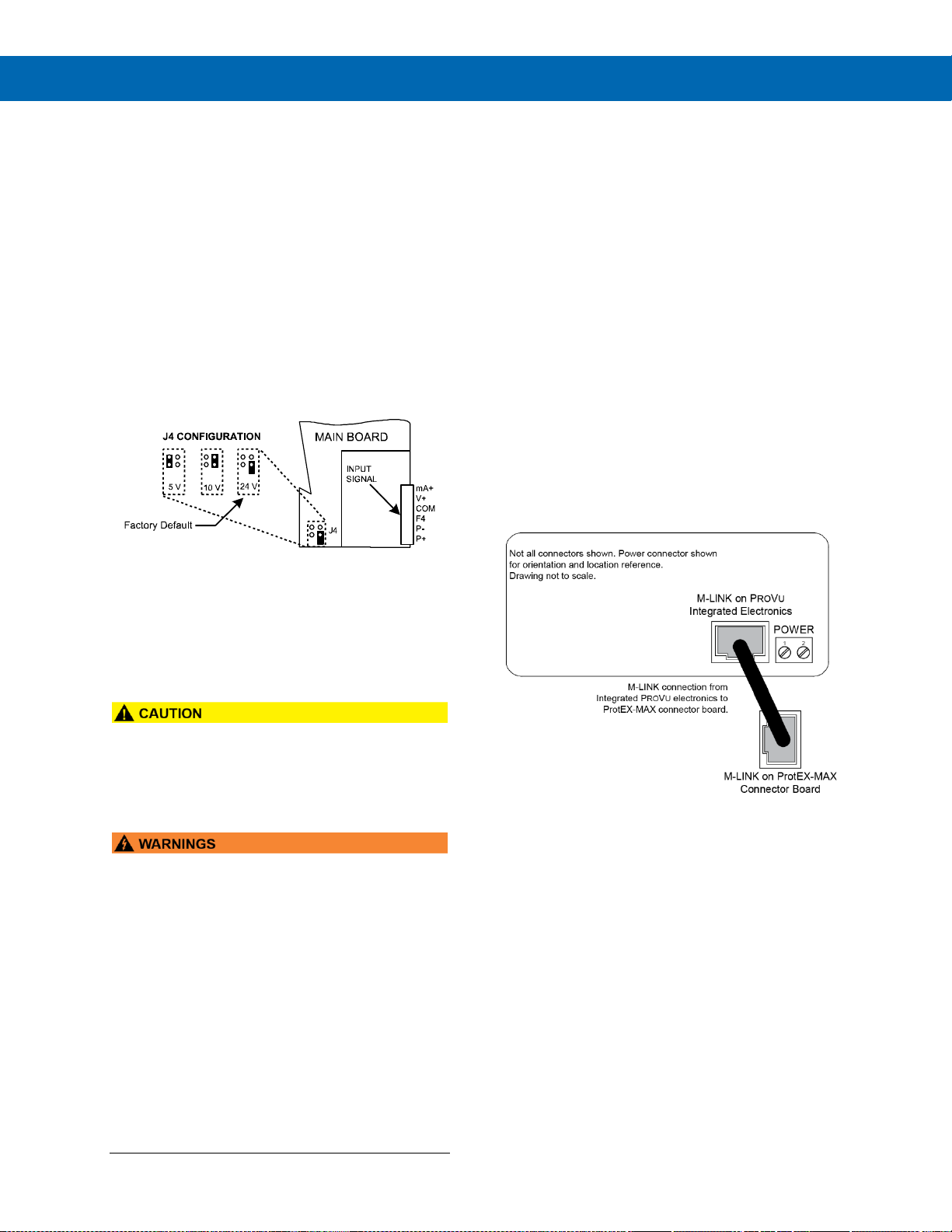
If the transmitter requires 5 or 10 VDC excitation, the
internal jumper J4 must be configured accordingly.
To access the voltage selection jumper:
1. Remove all the wiring connectors.
2. Unscrew the back cover.
3. Slide out the back cover by about 1 inch.
4. Configure the J4 jumper, located behind the
input signal connector, for the desired
excitation voltage as shown.
Figure 3. Transmitter Supply Voltage Selection
Connections
All connections are made to removable screw
terminal connectors located at the rear of the
meter.
• Use copper wire with 60°C or 60/75°C insulation
for all line voltage connections. Observe all safety
regulations. Electrical wiring should be performed
in accordance with all applicable national, state,
and local codes to prevent damage to the meter
and ensure personnel safety.
• Observe all safety regulations. Electrical wiring
should be performed in accordance with all
agency requirements and applicable national,
state, and local codes to prevent damage to the
meter and ensure personnel safety.
• Static electricity can damage sensitive
components.
• Observe safe handling precautions for
static-sensitive components.
• Use proper grounding procedures/codes.
• If the instrument is installed in a high voltage
environment and a fault or installation error
occurs, high voltage may be present on any lead
or terminal.
• Follow all fusing and wiring precautions
requirements for the instrument integrated to the
PD8 Series model number being connected.
To access the connectors, remove the enclosure
cover and unscrew the two captive screws that
fasten the electronics module. Signal connections
are made to de-pluggable connectors on the
back of the electronics module.
Some connectors may be provided already
connected. These connections are required for proper
operation of the ProtEX-MAX, and should not be
removed unless instructed to by this manual.
Wires marked as being used for testing purposes
should be removed.
Grounding connections are made to the two ground
screws provided on the base – one internal and one
external.
After all connections have been completed and
verified, apply power to the unit.
Required & Factory Wired Connection
The ProtEX-MAX comes with a pre-wired connection.
This connection is detailed below and must be
maintained in order for the instrument to function
properly.
Figure 4. Integrated PROVU Required Connections
Page 28
PD8-6060 Explosion-Proof Dual Analog Input Process Meter
Instruction Manual
28
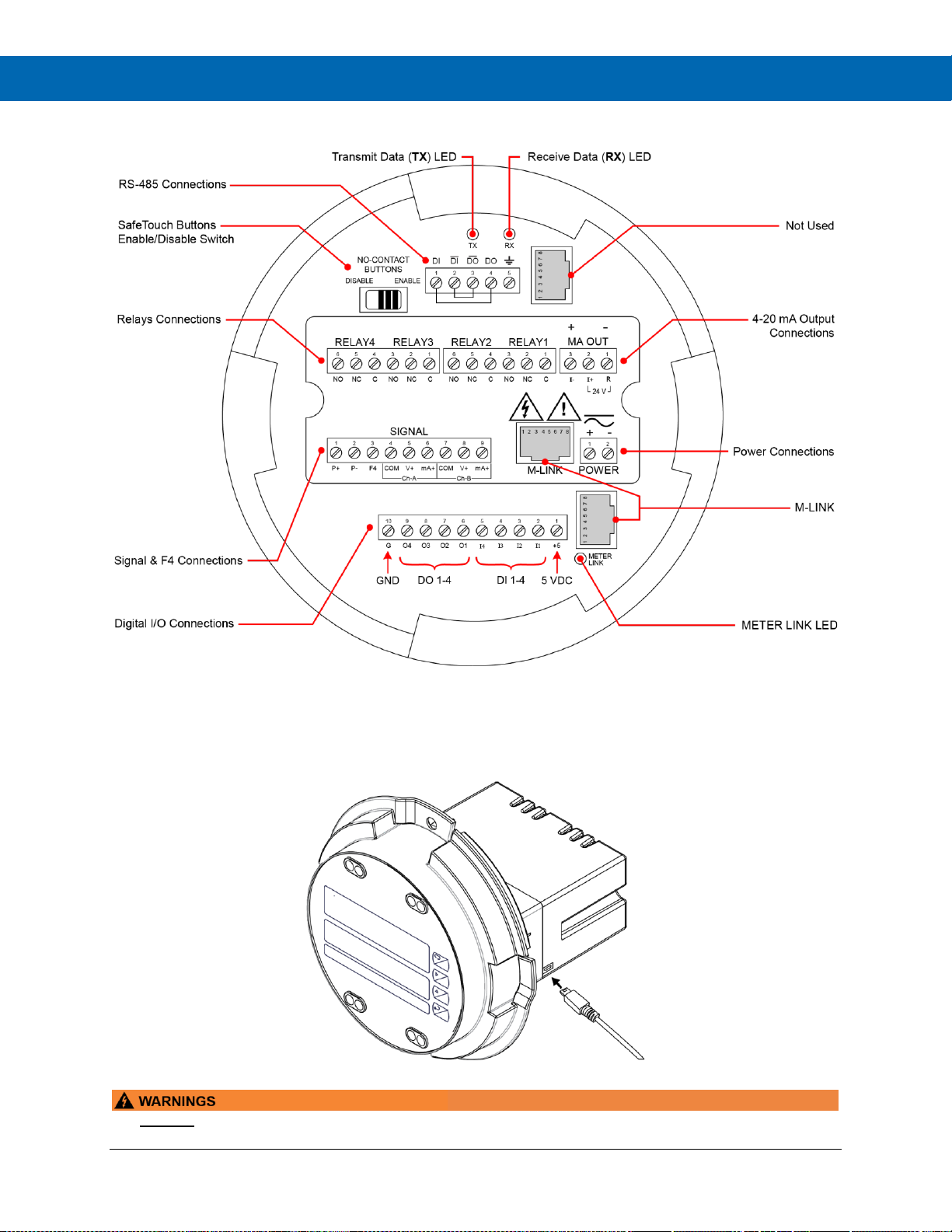
PROVU Electronics Module Layout for PD8-6060-6H7 and PD8-6060-7H7*
* For models PD8-6060-6H0 and PD8-6060-7H0, the upper set of connectors (RELAYs & MA OUT) are not present
Figure 5. PROVU Electronics Module Layout
USB Connection
Figure 6. USB Connection
• DO NOT disconnect the RJ45 M LINK connector cable. Otherwise the instrument will not function properly.
• The meter should only be connected to a computer while it is located in a safe area.
Page 29
PD8-6060 Explosion-Proof Dual Analog Input Process Meter
Instruction Manual
29
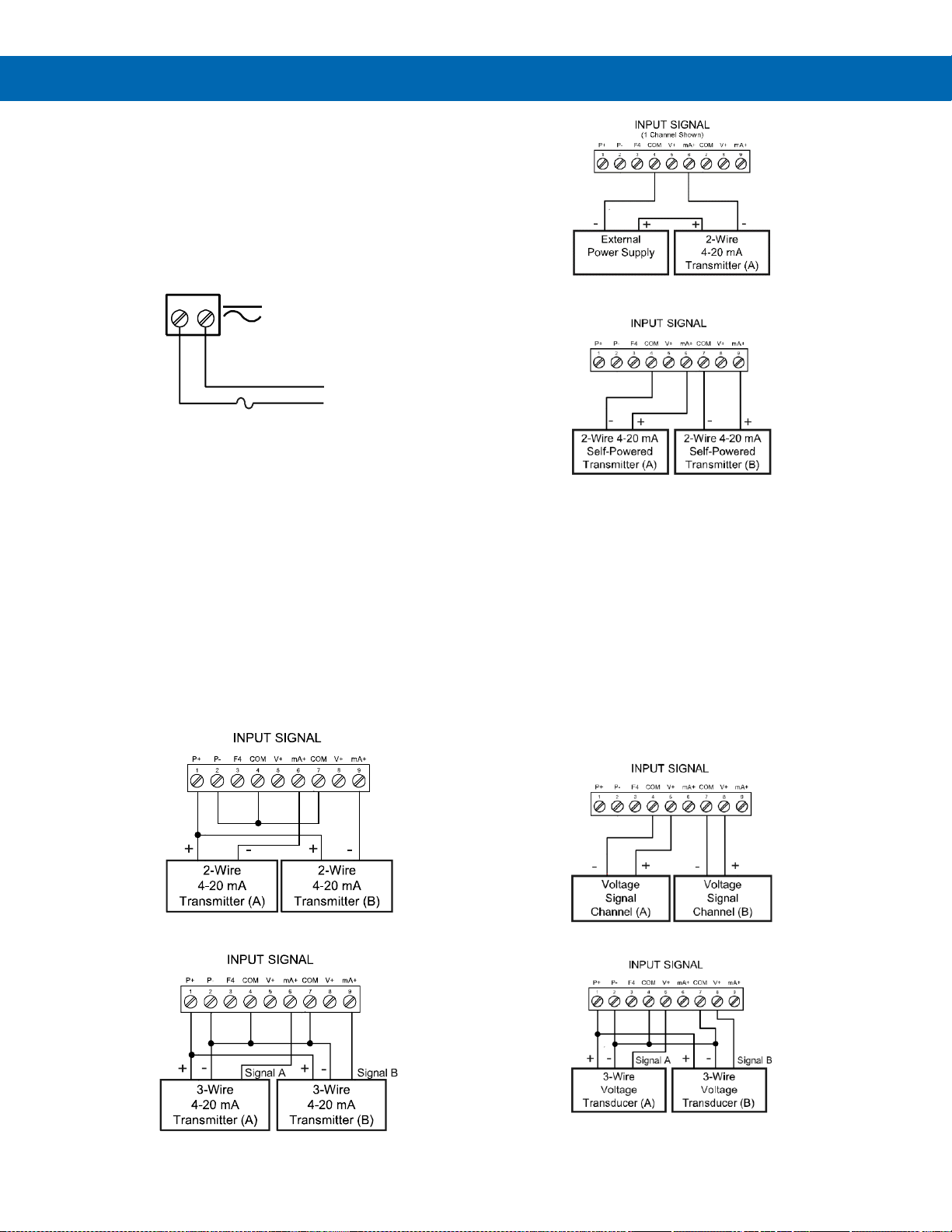
Power Connections
Power connections are made to a two-terminal
connector labeled POWER. The meter will operate
regardless of DC polarity connection. The + and symbols are only a suggested wiring convention.
There are separate models for low voltage and high
voltage power. See Ordering Information on page 7
for details.
Figure 7. Power Connections
Signal Connections
Signal connections are made to a nine-terminal
connector labeled SIGNAL. The COM (common)
terminals are the return for the 4-20 mA and the
10 V input signals. The two COM terminals connect
to the same common return and are not isolated.
Current (mA) Connections
The following figures show examples of current
connections.
There are no switches or jumpers to set up for current
and voltage inputs. Setup and programming is
performed through the programming buttons or
MeterView Pro software.
Figure 8. 2-Wire Transmitters
Powered by Internal Supply
Figure 9. 3-Wire Transmitters
Powered by Internal Supply
Figure 10. Transmitter Powered by External Supply
Figure 11. Self-Powered Transmitters
The current input is protected against current
overload by an internal resettable fuse. The display
may or may not show a fault condition depending on
the nature of the overload.
The fuse limits the current to a safe level when it
detects a fault condition, and automatically resets
itself when the fault condition is removed.
Voltage (V) Connections
The following figures show examples of voltage
connections.
There are no switches or jumpers to set up for voltage
inputs. Setup and programming is performed through
the programming buttons or MeterView Pro software.
Figure 12. 2-Wire Voltage Input Connections
Figure 13. 3-Wire Voltage Input Connections
The meter is capable of accepting any voltage from
-10 VDC to +10 VDC.
AC or DC
POWER
Required External Fuse:
5 A max, 250 V Slow Blow
POWER
+
-
Page 30
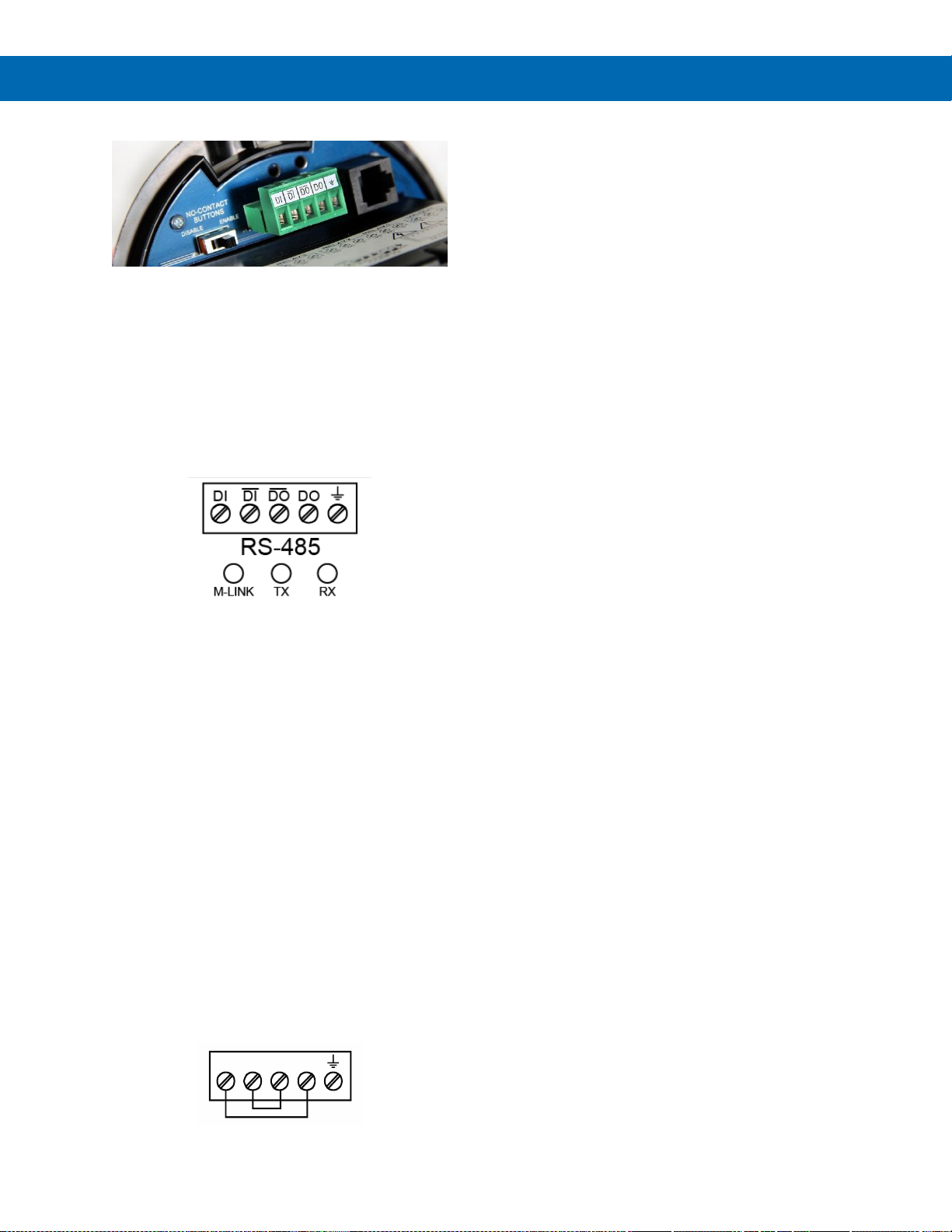
PD8-6060 Explosion-Proof Dual Analog Input Process Meter
Instruction Manual
30
RS-485 Connections
The RS-485 connections are made to a five terminal
connector used for Modbus® RTU serial
communications. The RS-485 terminals include
Transmit Data (DO) and (/DO), Receive Data (DI) and
(/DI), and Signal Ground. See Modbus® RTU Serial
Communications (serial) on page 54 for more
information.
There are three diagnostic LEDs: METER LINK,
Transmit Data (TX), and Receive Data (RX) to show
when the meter is transmitting and receiving data
from other devices.
Figure 14. RS-485 Connection
RS-485 Multi-Drop Connection
When using more than one meter in a multi-drop
mode, each meter must be provided with its own
unique address. The meter address (Slave ID) can be
programmed between 1 and 247. The transmit delay
can be set between 0 and 199 ms. The parity can be
set to even, odd, or none with 1 or 2 stop bits.
To change the meter address:
1. Press and hold the Menu button for three
seconds to access Advanced Features menu of
the meter.
2. Press Up arrow until Serial (SEriaL) menu is
displayed and press Enter, Addres is displayed.
3. Press Enter to change meter address using Right
and Up arrow buttons. Press Enter to accept.
4. Press Menu button to exit and return to Run
Mode.
Three-Wire Connection
In order to wire the five pins for use as a three-wire
half-duplex RS-485 connection, it is necessary to
create a jumper connection between DI to DO and /DI
to /DO- as shown below.
Figure 15. Three-Wire RS-485 Connection
__ __
DI DI DO DO
Page 31
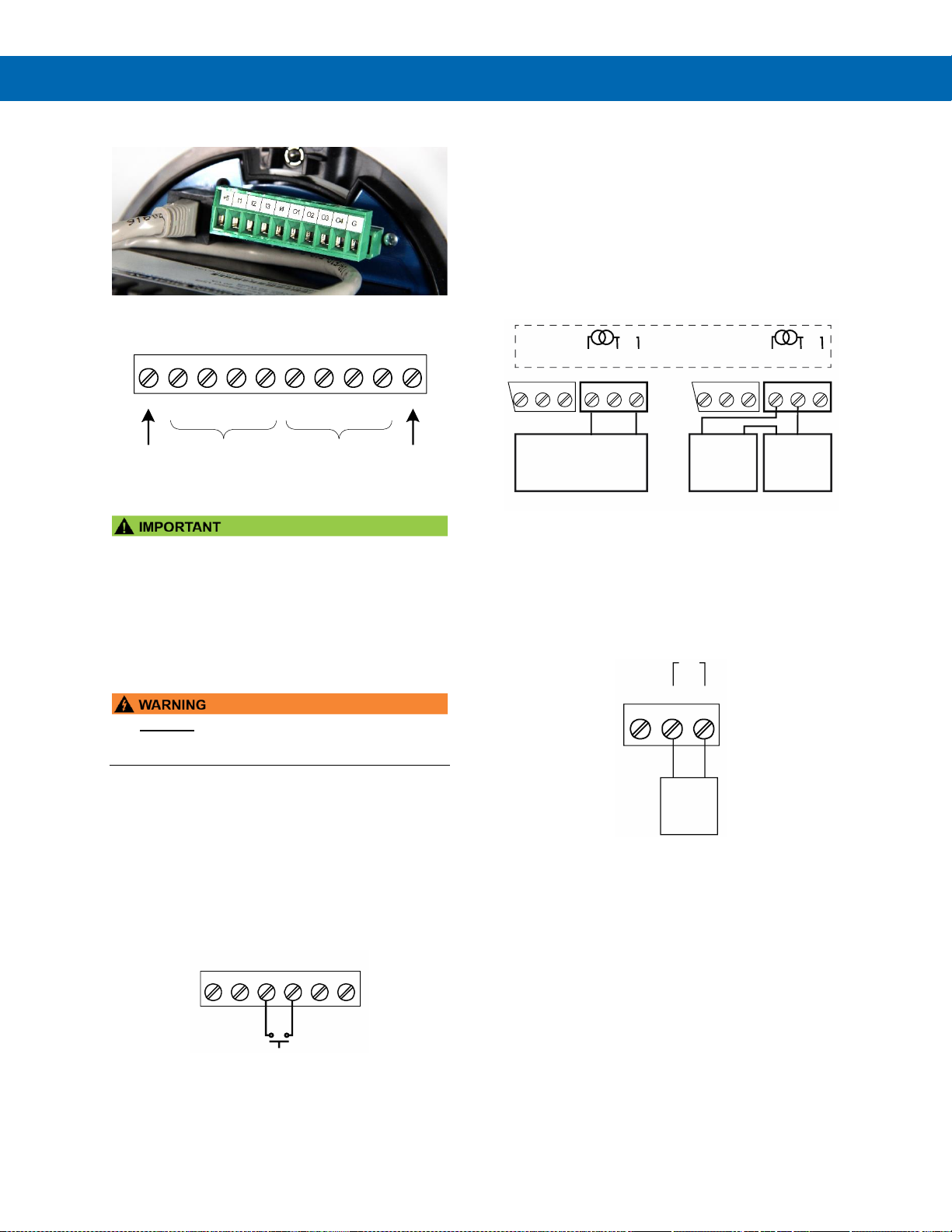
PD8-6060 Explosion-Proof Dual Analog Input Process Meter
Instruction Manual
31
Digital I/O Connections
The ProtEX-MAX has a 10-position terminal block for
connecting digital inputs and outputs.
Figure 16. Digital Input and Output Connections
The onboard digital inputs (1-4) are configured at the
factory to function identically to the front panel
pushbuttons (Menu, F1, F2, & F3) in order to work
with the SafeTouch buttons. Changing the
programming of the digital inputs will affect the
function of the SafeTouch buttons.
If you wish to change the behavior of the digital
inputs, re-assign F1-F3 to the desired function, then
change the corresponding digital input to match.
• DO NOT disconnect the RJ45 M LINK connector
cable. Otherwise the instrument will not function
properly.
F4 Digital Input Connections
A digital input, F4, is standard on the meter. This
digital input should be connected with a normally
open contact across F4 and COM, or with an active
low signal applied to F4. It can be used for remote
operation of front-panel buttons, to acknowledge/reset
relays, or to reset max/min values. See Function Keys
& Digital I/O Available Settings on page 58 for a
complete list of capabilities.
Figure 17. F4 Digital Input Connections
Remote Programming
The meter can be operated via the programming
buttons or a remote control station with required
approvals to be located in a hazardous area using the
digital inputs and outputs.
4-20 mA Output Connections
Connections for the 4-20 mA transmitter output are
made to the connector terminals labeled mA OUT.
The 4-20 mA output may be powered internally or
from an external power supply.
Figure 18. 4-20 mA Output Connections
Analog Output Power Supply
The internal 24 VDC power supply powering the
analog output may be used to power other devices if
the analog output is not used. The I+ terminal is the
+24 V and the R terminal is the return.
Figure 19. Analog Output Supply Powering Other
Devices
1 2 3 4 5 6
+5 I1 I2 I3 I4 O1
7 8
O2 O3
9 10
O4 G
DI 1-4 DO 1-4
5 VDC GND
P- COMP+ V+ mA+
3412 5
F4
6
4-20 mA Input
Remote Display, PLC,
Chart Recorder, Etc.
-
+
RI- I+
132
RELAY1
mA OUT
24 V
12-35 VDC
Power
Supply
+
4-20 mA
Input Meter
-+
RI- I+
132
RELAY1
321
-
24 V
mA OUT
Internal Power Supply
and Analog Output
321
Active Output Loop Passive Output Loop
RI- I+
132
24 VDC
Powered
Device
24 V
+-
Page 32
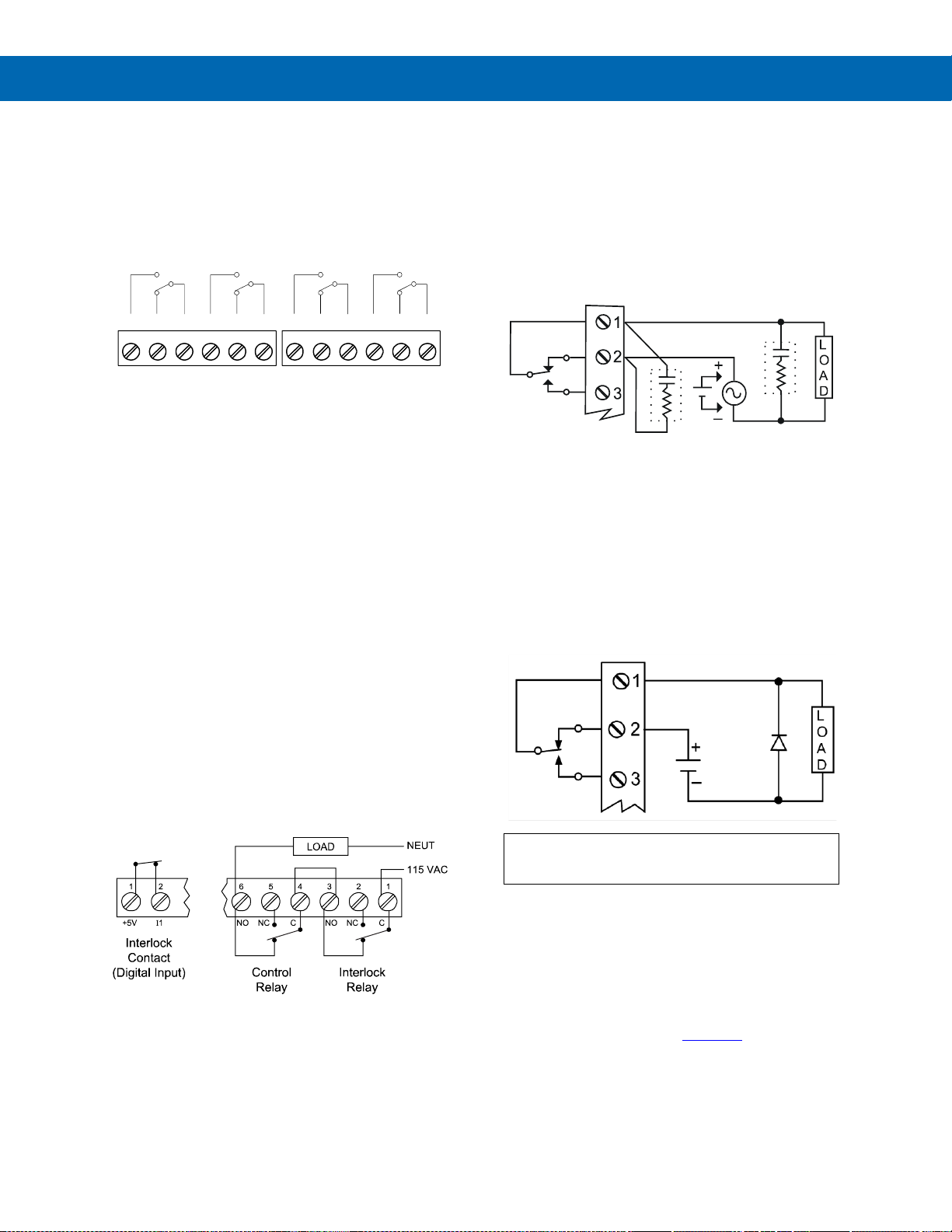
PD8-6060 Explosion-Proof Dual Analog Input Process Meter
Instruction Manual
32
Relay Connections
Relay connections are made to two six-terminal
connectors labeled RELAY1 – RELAY4. Each relay’s
C terminal is common only to the normally open (NO)
and normally closed (NC) contacts of the
corresponding relay. The relays’ C terminals should
not be confused with the COM (common) terminal of
the INPUT SIGNAL connector.
Figure 20. Relay Connections
Interlock Relay Feature
As the name implies, the interlock relay feature
reassigns one, or more, alarm/control relays for use
as interlock relay(s). Interlock contact(s) are wired to
digital input(s) and activate the interlock relay. This
feature is enabled by configuring the relay, and the
corresponding digital input(s), see Setting Up the
Interlock Relay
(Force On) Feature on page 49.
In the example below, an Interlock Contact switch is
connected to a digital input, which will be used to
force on (energize) the Interlock Relay. The Interlock
Relay and the Control Relay are connected in series
with the load.
• When the Interlock Contact is closed (safe), the
Interlock Relay energizes, allowing power to flow
to the Control Relay; the corresponding front
panel LED is on.
• When the Interlock Contact is open, the
corresponding front panel LED flashes (locked
out), the Interlock Relay is de-energized,
preventing power from flowing to the Control
Relay and the load.
Figure 21. Interlock Connections
Switching Inductive Loads
The use of snubbers to suppress electrical noise is
strongly recommended when switching inductive
loads to prevent disrupting the microprocessor’s
operation. The snubbers also prolong the life of the
relay contacts. Suppression can be obtained with
resistor-capacitor (RC) networks assembled by the
user or purchased as complete assemblies. Refer to
the following circuits for RC network assembly and
installation:
Figure 22. AC and DC Loads Protection
Choose R and C as follows:
R: 0.5 to 1 Ω for each volt across the contacts
C: 0.5 to 1 µF for each amp through closed contacts
Notes:
1. Use capacitors rated for 250 VAC.
2. RC networks may affect load release time of solenoid
loads. Check to confirm proper operation.
3. Install the RC network at the meter's relay screw
terminals. An RC network may also be installed across
the load. Experiment for best results.
Use a diode with a reverse breakdown voltage two to three
times the circuit voltage and forward current at least as large
as the load current.
Figure 23. Low Voltage DC Loads Protection
RC Networks (Snubbers) Available from Precision Digital
RC networks are available from Precision Digital and
should be applied to each relay contact switching an
inductive load. Part number: PDX6901.
Note: Relays are de-rated to 1/14th HP (50 watts) with an
inductive load.
C NONO NC NC C
RELAY4 RELAY3
4 36 5 2 1
C NONO NC NC C
RELAY2 RELAY1
4 36 5 2 1
C
R
C
R
Page 33
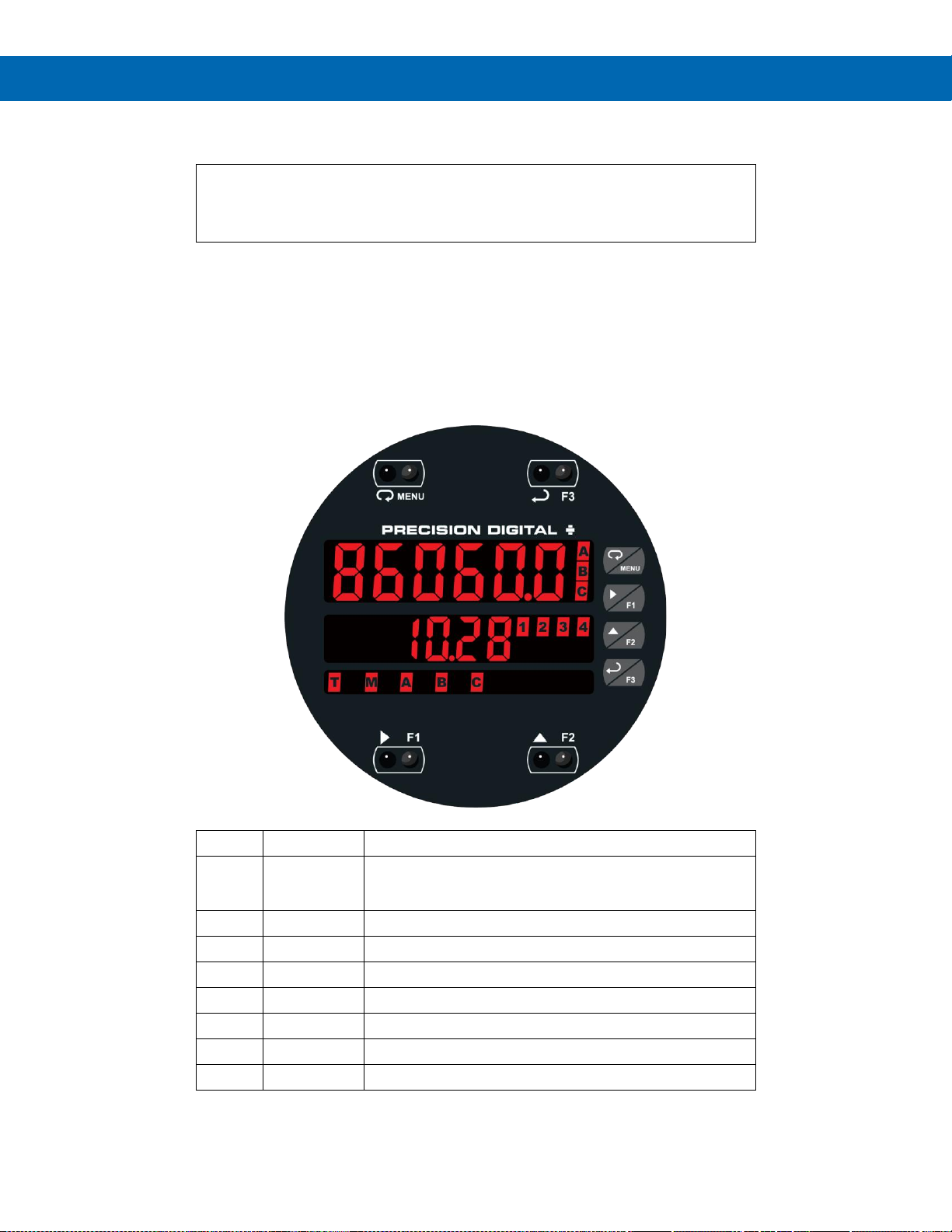
PD8-6060 Explosion-Proof Dual Analog Input Process Meter
Instruction Manual
33
Setup and Programming
There is no need to recalibrate the meter when first received from the factory.
The meter is factory calibrated prior to shipment for milliamps and volts with
calibration equipment that is certified to NIST standards.
Overview
There are no jumpers to set for the meter input selection.
Setup and programming is done using MeterView Pro or through the programming buttons.
After power and input signal connections have been completed and verified, apply power to the meter.
LED Status Indicators
LED
State
Indication
1-4
Steady
Alarm condition based on set and reset points, independent of relay
status in certain configurations. (Available on all meter
configurations, including those without relays installed)
1-4
Flashing
Relay interlock switch open
1-4 & M
Flashing
Relay in manual control mode
T
Flashing
Meter in Tare mode
M
Flashing
Analog output in manual control mode
A
Steady
Channel A displayed
B
Steady
Channel B displayed
C
Steady
Channel C displayed
Page 34
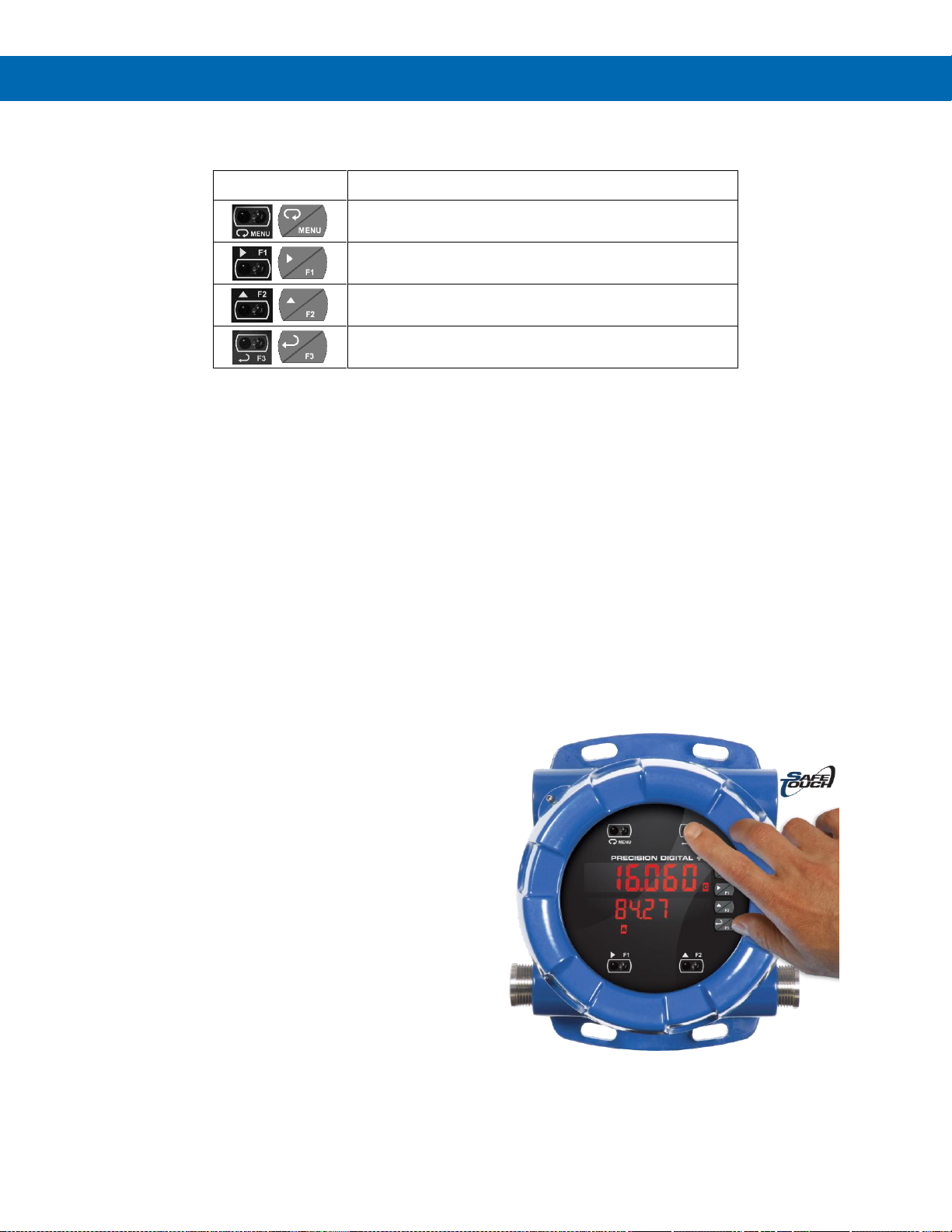
PD8-6060 Explosion-Proof Dual Analog Input Process Meter
Instruction Manual
34
Programming Buttons
Button Symbol
Description
Press to enter or exit Programming Mode, view settings, or
exit max/min readings
Press to reset max/min readings or other parameter/function
assigned through the User menu
Press to display max/min readings or other
parameter/function assigned through the User menu
Press to acknowledge relays or other parameters/function
assigned through the User menu
• Press the Menu button to enter or exit the Programming Mode at any time.
• Press the Right arrow button to move to the next digit during digit or decimal point programming.
• Press or hold the Up arrow button to scroll through the menus, decimal point, or to increment the value of a digit.
• Press the Enter button to access a menu or to accept a setting.
• Press and hold the Menu button for three seconds to access the advanced features of the meter.
SafeTouch Buttons
The ProtEX-MAX is equipped with four sensors that
operate as through-glass buttons so that it can be
programmed and operated without removing the cover
(and exposing the electronics) in a hazardous area.
These buttons can be disabled for security by
selecting DISABLE on the switch labeled
NO-CONTACT BUTTONS located on the connector
board.
To actuate a button, press one finger to the glass
directly over the marked button area. Then retract
finger more than three inches from the glass before
pressing the next button. When the cover is removed,
the four mechanical buttons located next to the
sensors are used. The sensors are disabled when a
mechanical button is pressed and will automatically
be re-enabled after 60 seconds of inactivity.
The SafeTouch Buttons are designed to filter normal
levels of ambient interference and to protect against
false triggering, however, it is recommended that the
SafeTouch Buttons be disabled (slide switch to
DISABLE) if there is an infrared interference source in
line-of-sight to the display.
The SafeTouch Buttons are configured by default to
duplicate the function of the front panel mechanical
pushbuttons associated with the integrated meter.
The symbols by each SafeTouch button correspond
to a mechanical button as shown in the above table.
SafeTouch Button Tips:
• To the extent possible, install the display facing
away from sunlight, windows, reflective objects
and any sources of infrared interference.
• Keep the glass window clean.
• Tighten the cover securely.
• Use a password to prevent tampering.
Page 35

PD8-6060 Explosion-Proof Dual Analog Input Process Meter
Instruction Manual
35
Display Functions & Messages
The meter displays various functions and messages
during setup, programming, and operation. The
following table shows the main menu functions and
messages in the order they appear in the menu.
Display Functions & Messages
Display
Parameter
Action/Setting Description
setup
Setup
Enter Setup menu
Input
Input
Enter Input selection menu
Ch-A*
Input
Set input type for channel A
(*or B)
nmA
4-20 mA
Set meter for 4-20 mA input
Volt
0-10 VDC
Set meter for 10 VDC input
units
Unit
Select the display units/tags
Ch-A*
Unit
Set unit or tag for channel A
(*or B or C)
Dec pt
Decimal point
Set decimal point
Ch-A*
Decimal point
Set decimal point for
channel A (*or B or C)
prog
Program
Enter the Program menu
InCAL
Input
calibration
Enter the Input Calibration
menu
Ch-A*
Input A
Set input type for channel A
(*or B)
SCAL A
Scale A
Enter the Scale menu for
channel A
SCAl B
Scale B
Enter the Scale menu for
channel B
Cal A
Calibrate A
Enter the Calibration menu
for channel A
Cal B
Calibrate B
Enter the Calibration menu
for channel B
Inp 1
Input 1
Calibrate input 1 signal or
program input 1 value
Dis 1
Display 1
Program display 1 value
Inp 2
Input 2
Calibrate input 2 signal or
program input 2 value
(up to 32 points)
Dis 2
Display 2
Program display 2 value
(up to 32 points)
Error
Error
Error, calibration not
successful, check signal or
programmed value
dsplay
Display
Enter the Display menu
Line 1
Line 1
Assign line 1 parameter
Line 2
Line 2
Assign line 2 parameter
D Ch-A
Display Ch-A
Assign display to channel A
D Ch-B
Display Ch-B
Assign display to channel B
D Ch-C
Display Ch-C
Assign display to channel C
(math)
D Ab
Display AB
Alternate display of
channel A & B
D AC
Display AC
Alternate display of
channel A & C
Display Functions & Messages
Display
Parameter
Action/Setting Description
D BC
Display BC
Alternate display of
channel B & C
D AbC
Display ABC
Alternate display of
channel A, B, & C
D set1*
Display set 1*
Displays relay 1(*through 4)
set point.
D Hi-A
Display high
A
Display high value of
channel A
D Lo-A
Display low A
Display low value of
channel A
D HL-A
Display
hi/low A
Alternate between high/low
value of channel A
D Hi-B
Display high
B
Display high value of
channel B
D Lo-B
Display low B
Display low value of
channel B
D HL-B
Display
high/low B
Alternate between high/low
value of channel B
D Hi-C
Display high
C
Display high value of
channel C
D Lo-C
Display low C
Display low value of
channel C
D HL-C
Display
high/low C
Alternate between high/low
value of channel C
D a-u
Display A and
units/tags
Alternate display of
channel A and the unit/tag
D B-u
Display B and
units/tags
Alternate display of
channel B and the unit/tag
D C-u
Display B and
units/tags
Alternate display of
channel C and the unit/tag
A Gros
Display A
gross
Display input channel A
gross (no tare)
A nt-G
Display A net
and gross
Alternate display of
channel A net (tare) and
gross (no tare)
B Gros
Display B
gross
Display input channel B
gross (no tare)
B nt-G
Display B net
and gross
Alternate display of
channel B net (tare) and
gross (no tare)
nm bus
Display
Modbus®
Display Modbus® input
register
D off
Display off
Display blank (line 2)
D unit
Display unit
Display line 1 channel units
d-Inty
Display
intensity
Set display intensity level
from 1 to 8
RELaY
Relay
Enter the Relay menu
Assign
Assignment
Assign relays to channels or
Modbus®
Asign1
Assign 1
Relay 1 assignment
Ch-A*
Channel A*
Assign relay to channel A
(*or B or C)
nm bus
Modbus®
Assign relay to Modbus®
register
RLY 1
Relay 1
Relay 1 setup
Page 36

PD8-6060 Explosion-Proof Dual Analog Input Process Meter
Instruction Manual
36
Display Functions & Messages
Display
Parameter
Action/Setting Description
Act 1
Action 1
Set relay 1 action
Auto
Automatic
Set relay for automatic reset
A-nman
Auto-manual
Set relay for auto or manual
reset any time
LatCH
Latching
Set relay for latching
operation
Lt-CLr
Latchingcleared
Set relay for latching
operation with manual reset
only after alarm condition
has cleared
Altern
Alternate
Set relay for pump
alternation control
SAnmpl
Sample
Set relay for sample time
trigger control
Off
Off
Turn relay off
FaiLSF
Fail-safe
Enter Fail-safe menu
FLS 1*
Fail-safe 1
Set relay 1 (*through 4)
fail-safe operation
on
On
Enable fail-safe operation
off
Off
Disable fail-safe operation
DeLAY
Delay
Enter relay Time Delay menu
DLY 1
Delay 1
Enter relay 1 time delay
setup
On 1
On 1
Set relay 1 On time delay
OFF 1
Off 1
Set relay 1 Off time delay
DLY 2
Delay 2
Enter relays 2-4 time delay
setup
break
Loop break
Set relay condition if
loop break detected
ignore
Ignore
Ignore loop break condition
(Processed as a low signal
condition)
On
On
Relay goes to alarm
condition when loop break
detected
Off
Off
Relay goes to non-alarm
condition when loop break
detected
Aout
Analog output
Enter the Analog output
scaling menu
AOut 1*
Aout channel
Analog Output source
channel
Dis 1
Display 1
Program display 1 value
Out 1
Output 1
Program output 1 value
(e.g. 4.000 mA)
Dis 2
Display 2
Program display 2 value
Out 2
Output 2
Program output 2 value
(e.g. 20.000 mA)
reset
Reset
Press Enter to access the
Reset menu
Rst Hi
Reset high
Press Enter to reset max
display
Rst Lo
Reset low
Press Enter to reset min
display
Display Functions & Messages
Display
Parameter
Action/Setting Description
Rst HL
Reset
high & low
Press Enter to reset max &
min displays
Rst tr
Reset tare
Press Enter to reset (cancel)
tare
Contrl
Control
Enter Control menu
Auto
Automatic
Press Enter to set meter for
automatic operation
nmAn
Manual
Press Enter to manually
control relays or analog
output operation
pass
Password
Enter the Password menu
Pass 1*
Password 1*
Set or enter Password 1
(*through 3)
unloc
Unlocked
Program password to lock
meter
locd
Locked
Enter password to unlock
meter
999999
-99999
Flashing
Over/under range condition
Page 37
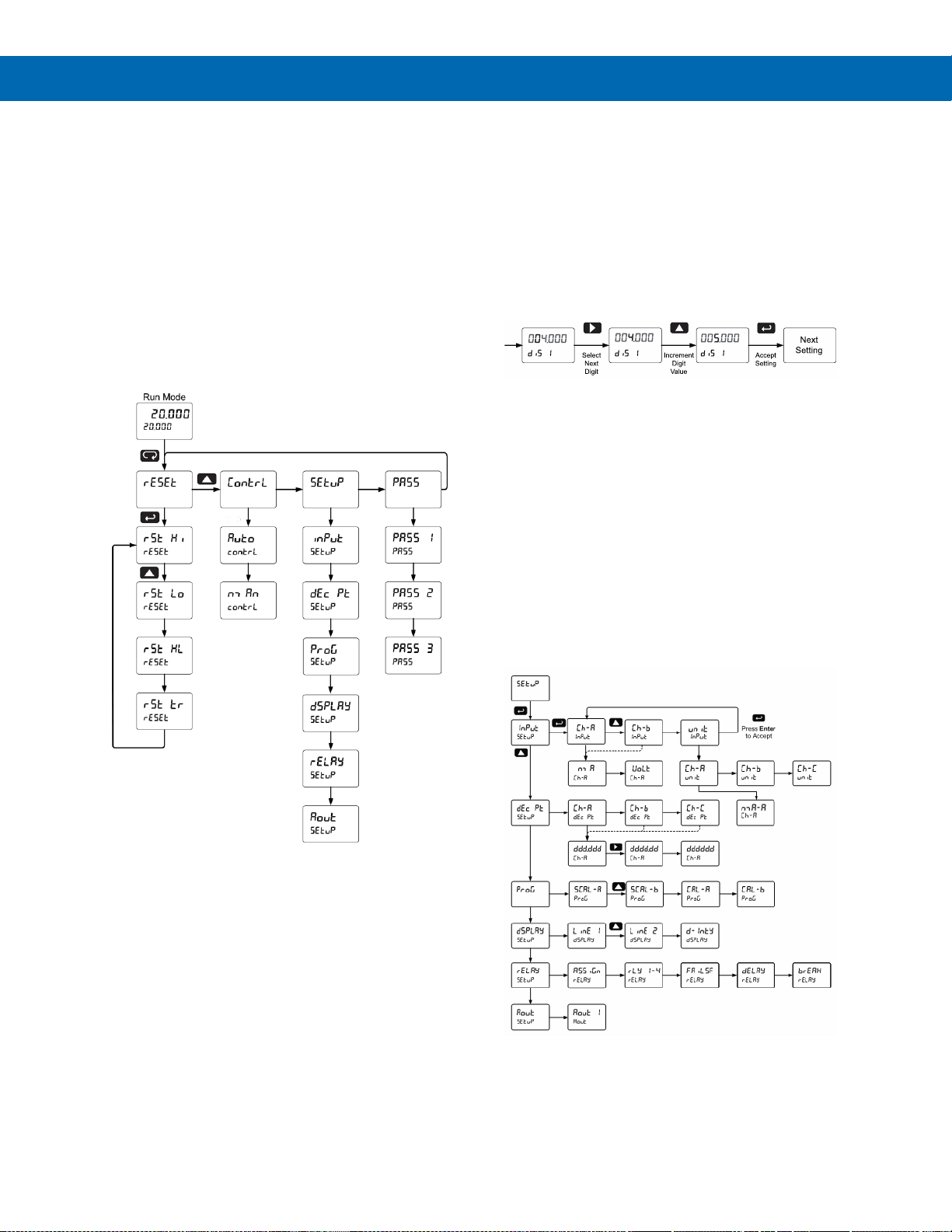
PD8-6060 Explosion-Proof Dual Analog Input Process Meter
Instruction Manual
37
Main Menu
The main menu consists of the most commonly used
functions: Setup, Reset, Control, and Password.
• Press Menu button to enter Programming Mode
then press the Up arrow button to scroll main
menu.
• Press Menu, at any time, to exit and return to
Run Mode. Changes made to settings prior to
pressing Enter are not saved.
• Changes to the settings are saved to memory
only after pressing Enter/F3.
• The display moves to the next menu every time a
setting is accepted by pressing Enter/F3.
Setting Numeric Values
The numeric values are set using the Right and Up
arrow buttons. Press Right arrow to select next digit
and Up arrow to increment digit value. The digit being
changed is displayed brighter than the rest.
Press and hold Up to auto-increment the display
value. If negative numbers are allowed, the first digit
position will include a negative symbol (-) after the 9.
Press the Enter button, at any time, to accept a
setting or Menu button to exit without saving changes.
Setting Up the Meter (setup)
The Setup menu is used to select:
1. Input signal the meter will accept for channel
A and channel B
2. Units for A, B, and C
3. Decimal point position for A, B, and C
4. Program the meter using the Scale or
Calibrate functions
5. Display parameter and intensity
6. Relay assignment and operation
7. 4-20 mA analog output scaling
Press the Enter button to access any menu or press
Up arrow button to scroll through choices. Press the
Menu button to exit at any time.
Page 38
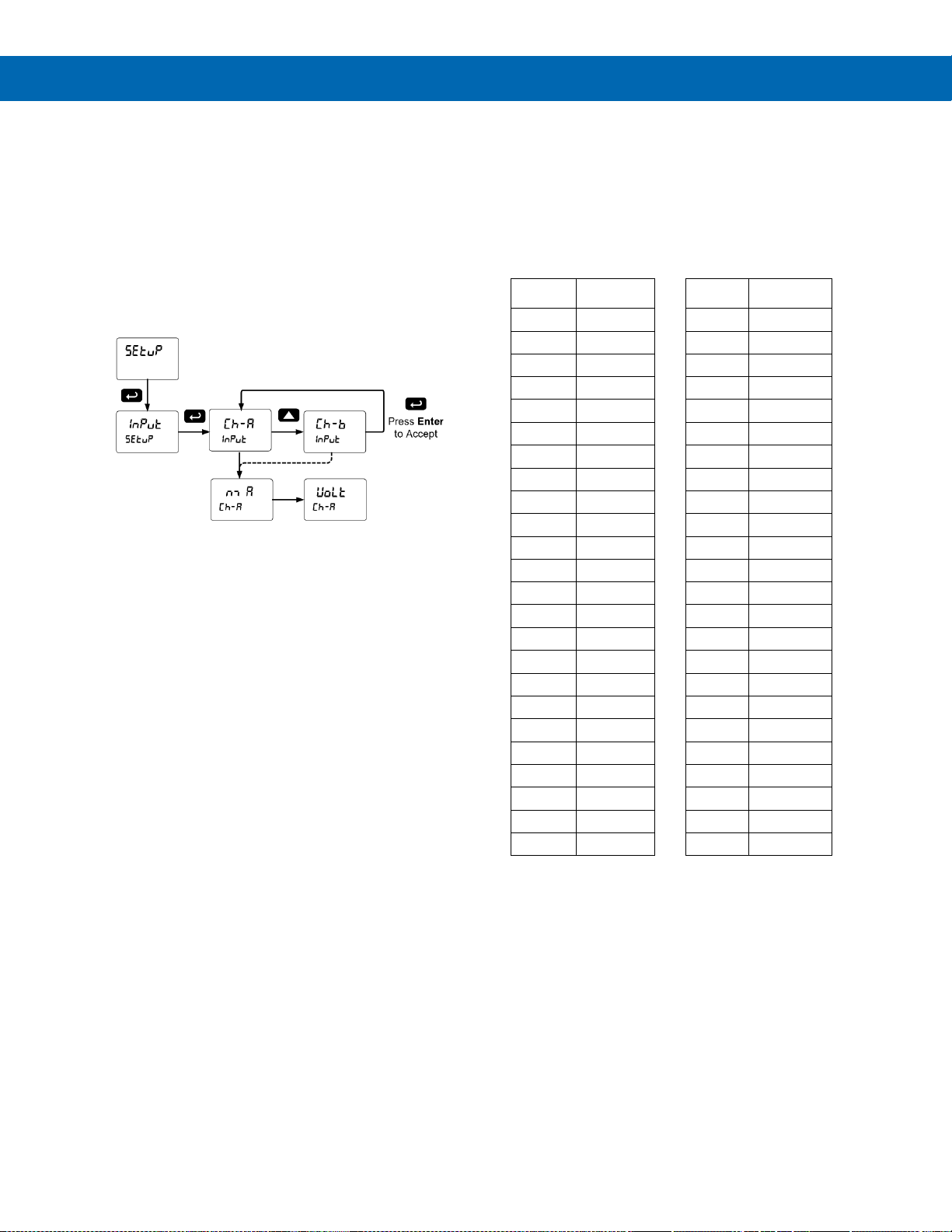
PD8-6060 Explosion-Proof Dual Analog Input Process Meter
Instruction Manual
38
Setting the Input Signal (Input)
Enter the Input menu to set up the meter to display
current (nmA) or voltage (Volt) inputs for channel A
and channel B.
The current input is capable of accepting any signal
from 0 to 20 mA. Select current input to accept
0-20 mA or 4-20 mA signals.
The voltage input is capable of accepting any signal
from -10 to +10 VDC. Select voltage input to accept
0-5, 1-5, 0-10, or 10 VDC signals.
Channel C is the Math Function calculation, which is
set up in the Advanced Features menu.
Setting the Display Units or Custom Tags (units)
Enter the display unit or custom tag that will be
displayed if d unit is selected as the line 2
parameter. See the Setting the Display Parameter &
Intensity (
dsplay
) flow chart on page 41 to access the
display menu to show the unit or tag on display line 2.
The engineering units or custom legends can be set
using the following 7-segment character set:
Display
Character
Display
Character
0
0
k
K
1
1
l L 2
2
n m m 3
3
n n 4
4
O O 5
5
o o 6
6
p P 7
7
q q 8
8
r r 9
9
s S A
A
t t b
b
u u C
C
v V c
c
uw w d
d
x X e
E
y Y f
F
z
Z
g
G
-
-
9
g
/ / H
H
[ ] h
h
] [ I
I
= = I
i
!
Degree(<)
j
J
Space
Notes:
1. Degree symbol represented by (<) if programming with
MeterView Pro.
2. The letters “m” and “w” use two 7-segment LEDs each;
when selected the characters to the right are shifted
one position.
3. Press and hold up arrow to auto-scroll the characters in
the display.
Page 39
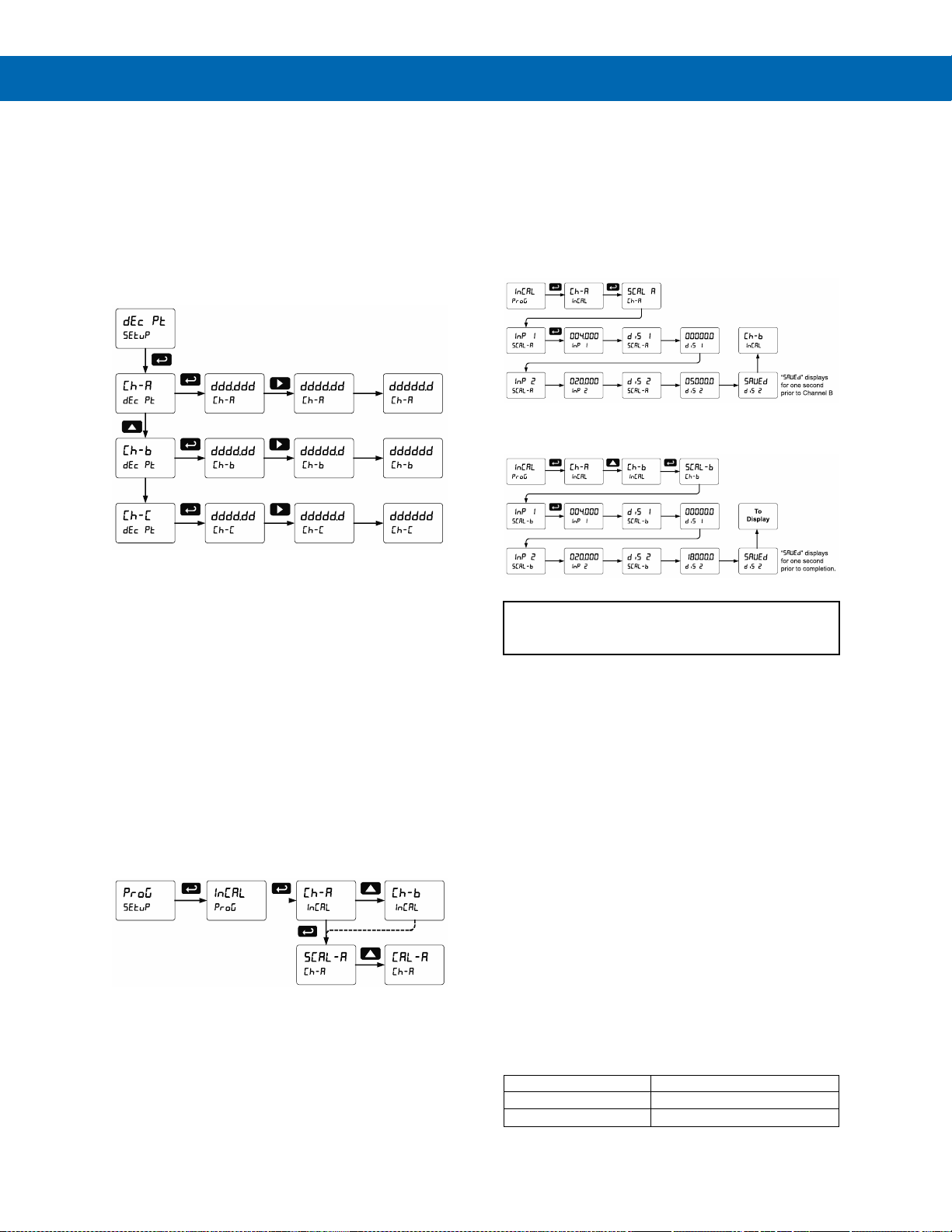
PD8-6060 Explosion-Proof Dual Analog Input Process Meter
Instruction Manual
39
Setting the Decimal Point (dEc pt)
The decimal point may be set with up to five decimal
places or with no decimal point at all.
Pressing the Right arrow moves the decimal point one
place to the right until no decimal point is displayed,
and then it moves to the leftmost position.
There are three decimal points to set up for three
channels: Ch-A, Ch-B, and Ch-C.
After the decimal points are set up, the meter moves
to the Program menu.
Programming the Meter (prog)
The meter may either be scaled (SCALE) without
applying an input or calibrated (Cal) by applying an
input. The meter comes factory calibrated to NIST
standards, so for initial setup, it is recommended to
use the (SCALE) function.
The Program menu contains the Scale (SCALE) and
the Calibrate (Cal) menus.
Process inputs may be scaled or calibrated to any
display within the range of the meter.
Note: The Scale and Calibrate functions are exclusive of
each other. The meter uses the last function programmed.
Only one of these methods can be employed at a time. The
Scale and Calibrate functions can use up to 32 points
(default is 2). The number of points should be set in the
Advanced Menu prior to scaling and calibration of the meter.
See Multi-Point Linearization (Linear) on page 55 for
details.
Multi-Point Linearization (Linear)
The process inputs may be calibrated or scaled to any
display value within the range of the meter. The meter
is set up at the factory for 2-point linear calibration.
Up to 32 linearization points may be selected. See
Multi-Point Linearization (Linear) on page 55 for
details.
Scaling the Meter (SCalE)
The process inputs (4-20 mA, 10 VDC) can be
scaled to display the process variables in engineering
units.
A signal source is not needed to scale the meter;
simply program the inputs and corresponding display
values.
Scaling the Meter for Channel A (SCal-A)
Scaling the Meter for Channel B (SCal-B)
For instructions on how to program numeric values
see Setting Numeric Values, page 37.
Error Message (Error)
An error message indicates that the calibration or
scaling process was not successful.
After the error message is displayed, the meter
reverts to input 2 during calibration or scaling and to
input 1 during internal calibration, allowing the
appropriate input signal to be applied or programmed.
The error message might be caused by any of the
following conditions:
1. Input signal is not connected to the proper
terminals or it is connected backwards.
2. Wrong signal selection in Setup menu.
3. Minimum input span requirements not
maintained.
4. Input 1 signal inadvertently applied to calibrate
input 2.
Minimum Input Span
The minimum input span is the minimum difference
between input 1 and input 2 signals required to complete
the calibration or scaling of the meter.
Input Range
Input 1 & Input 2 Span
4-20 mA
0.15 mA
10 VDC
0.10 VDC
Page 40
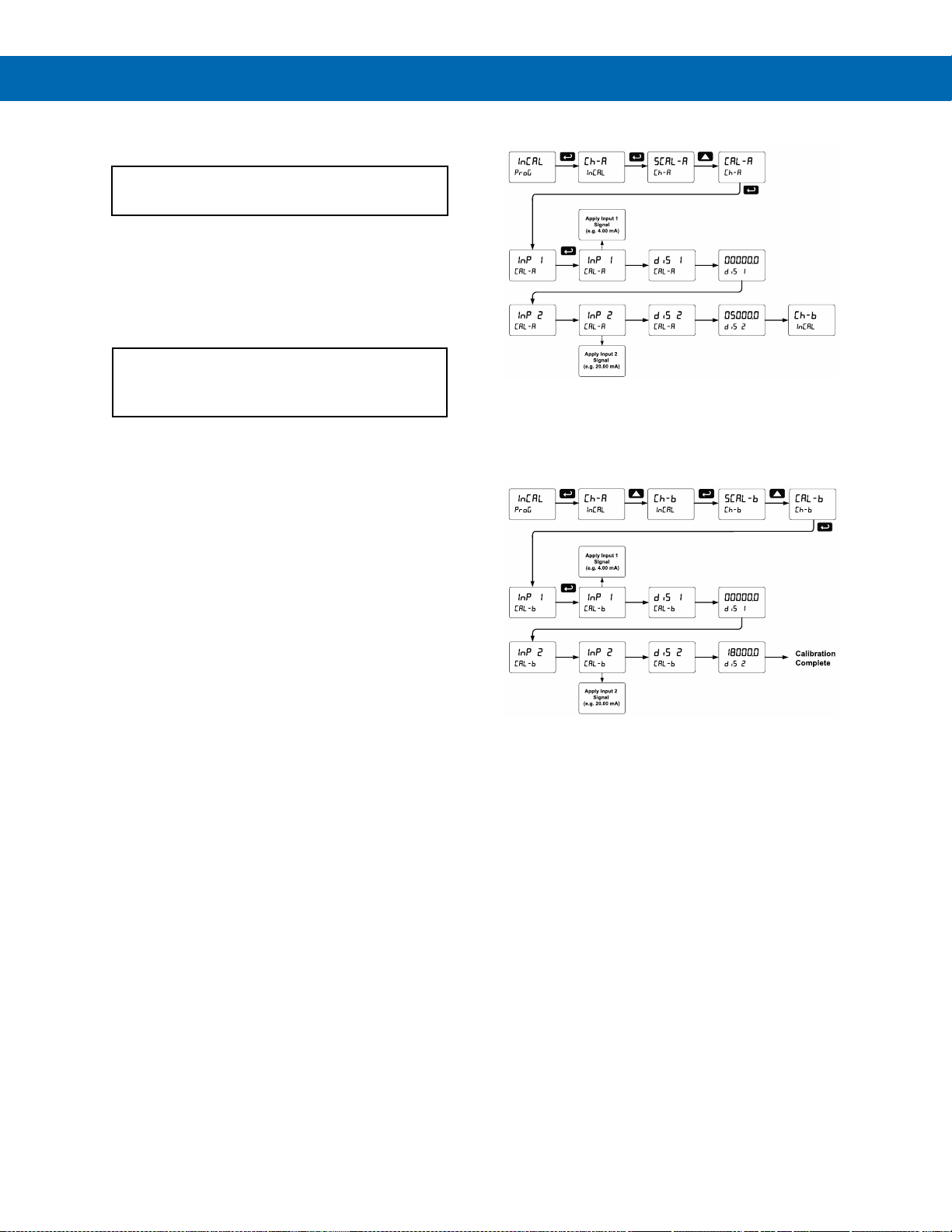
PD8-6060 Explosion-Proof Dual Analog Input Process Meter
Instruction Manual
40
Calibrating the Meter with External Source (Cal)
Note: To scale the meter without a signal source, refer to
Scaling the Meter (SCalE) on page 39.
The meter can be calibrated to display the process
variable in engineering units by applying the
appropriate input signal and following the calibration
procedure.
The use of a calibrated signal source is strongly
recommended to calibrate the meter.
Warm up the meter for at least 15 minutes before
performing calibration to ensure specified
accuracy.
Calibrating the Meter for Channel A (CAL-A)
Note: Inputs for the above example are:
Input 1: 4.00 mA; Display 1: 0.0 Gallons
Input 2: 20.00 mA; Display 2: 5000.0 Gallons
Calibrating the Meter for Channel B (CAL-B)
Note: Inputs for the above example are:
Input 1: 4.00 mA; Display 1: 0.0 Gallons
Input 2: 20.00 mA; Display 2: 18000.0 Gallons
Page 41
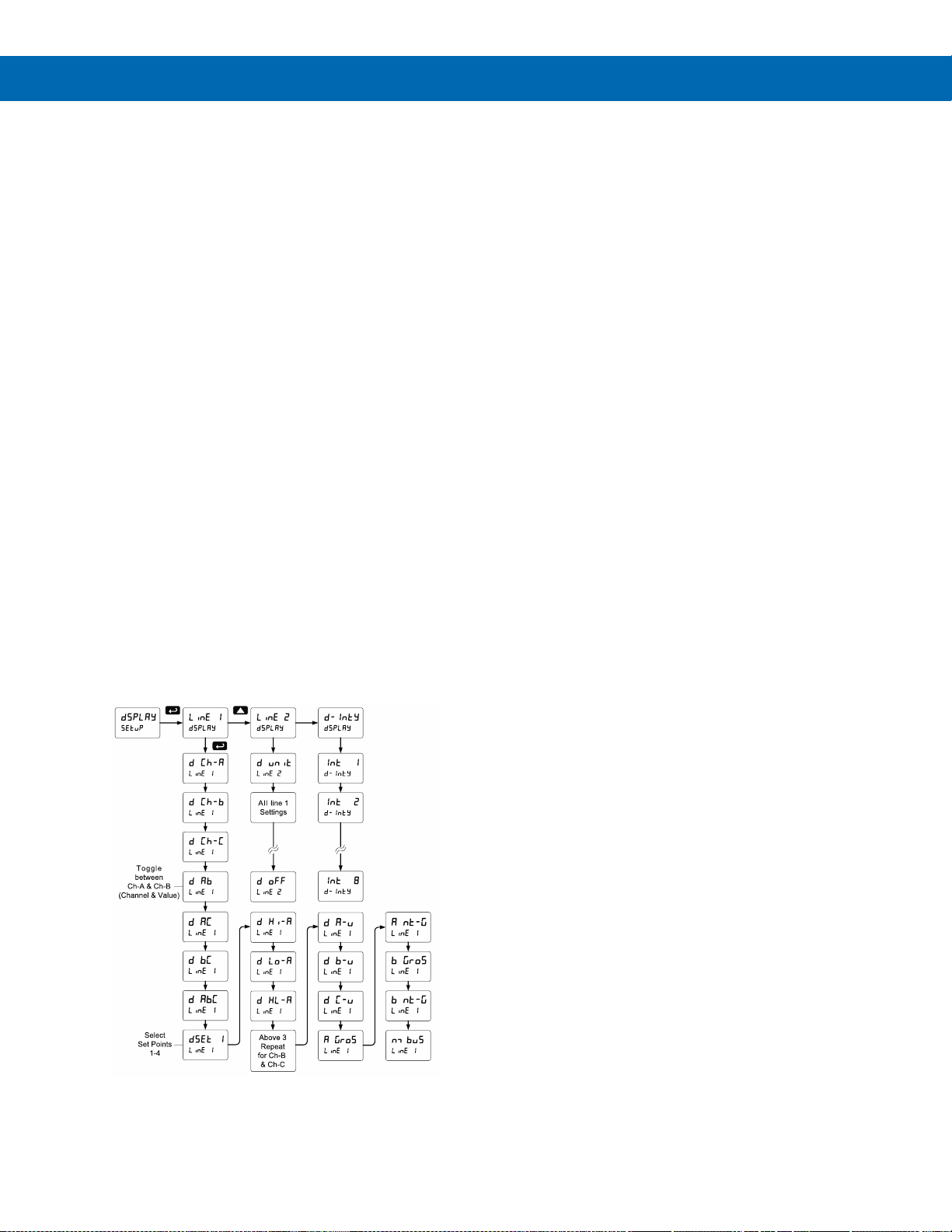
PD8-6060 Explosion-Proof Dual Analog Input Process Meter
Instruction Manual
41
Setting the Display Parameter & Intensity (dsplay)
The main display (Line 1) can be programmed to
display:
1. Process value Ch-A
2. Process value Ch-B
3. Process value Ch-C
4. Toggle between Ch-A & Ch-B, Ch-A & Ch-C,
Ch-B & Ch-C, and Ch-A, Ch-B, & Ch-C
5. Relay set points
6. Max & min values for each channel
7. Toggle between Channel & units
8. Channel gross value (no tare) or toggle net
(tare) and gross values
9. Modbus® input
The secondary display (Line 2) can be programmed
to display:
1. Process value Ch-A
2. Process value Ch-B
3. Process value Ch-C
4. Toggle between Ch-A & Ch-B, Ch-A & Ch-C,
Ch-B & Ch-C, and Ch-A, Ch-B, & Ch-C
5. Relay set points
6. Max & min values for each channel
7. Toggle between Channel & units
8. Channel gross value (no tare) or toggle net
(tare) and gross values
9. Modbus® input
10. Off (no display)
11. Engineering units or custom legends
After setting up the input and display, press the Menu
button to exit programming and skip the rest of the
setup menu.
The displays can be set up to read channels A, B, or
C, toggle between A & B, B & C, A & C, A & B & C,
toggle between channels A, B, or C & units, the
max/min of any of the channels, including the math
channel (C), set points, gross (without tare) or net
(with tare) & gross values of channel A or B, or the
Modbus® input. In addition to the parameters
available on the main display, the second display can
display Engineering units or it could be turned off.
Display Intensity (d-Inty)
The meter has eight display intensity levels to give the
best performance under various lighting conditions.
Select intensity 8 for outdoor applications. The default
intensity is 6.
Page 42
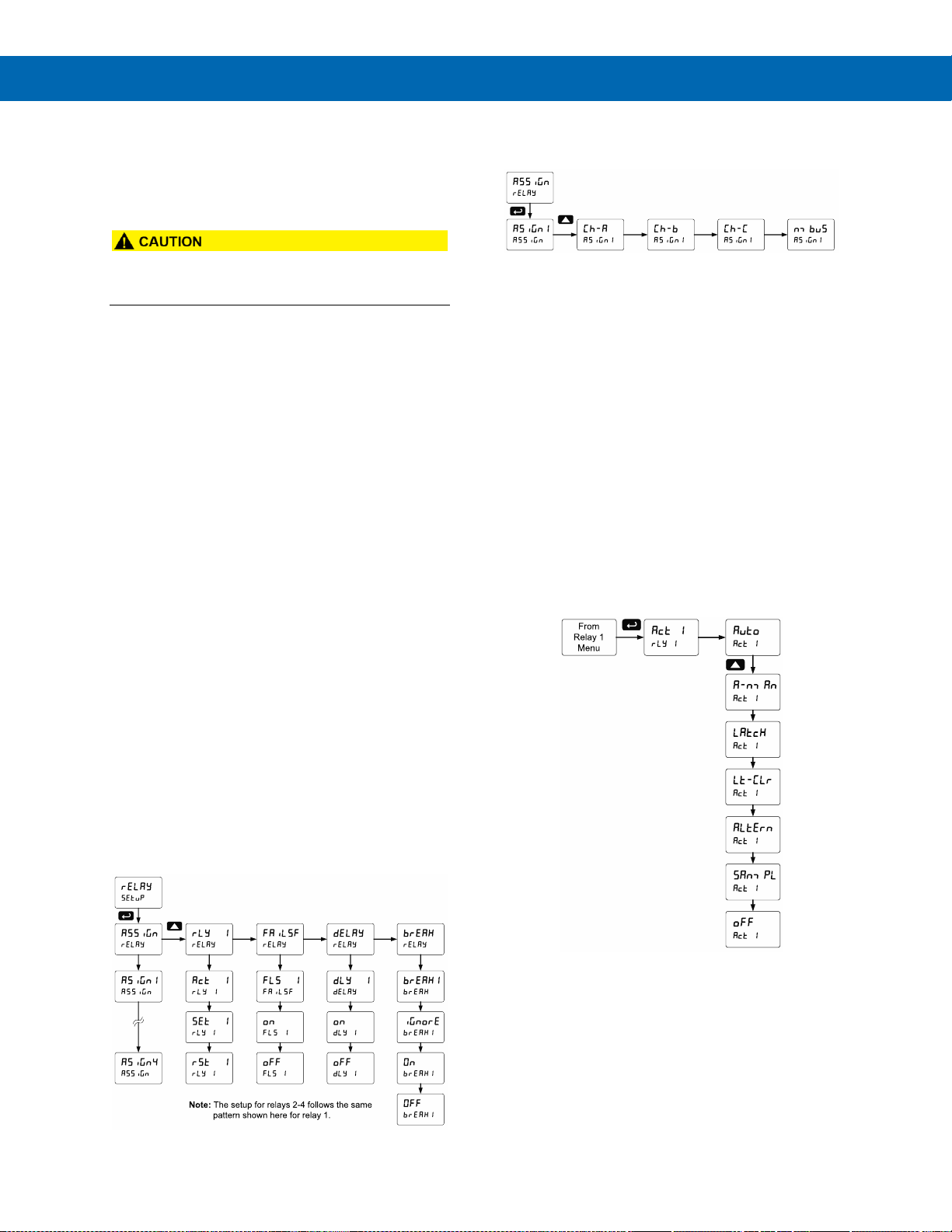
PD8-6060 Explosion-Proof Dual Analog Input Process Meter
Instruction Manual
42
Setting the Relay Operation (relay)
This menu is used to set up the assignment and
operation of the relays.
• During setup, the relays do not follow the input
and they will remain in the state found prior to
entering the Relay menu.
1. Relay assignment
a. Channel A
b. Channel B
c. Channel C (Math channel)
d. Modbus®
2. Relay action
a. Automatic reset only (non-latching)
b. Automatic + manual reset at any time
(non-latching)
c. Latching (manual reset only)
d. Latching with Clear (manual reset only
after alarm condition has cleared)
e. Pump alternation control
(automatic reset only)
f. Sampling (the relay is activated for a
user-specified time)
g. Off (relay state controlled by Interlock
feature)
3. Set point
4. Reset point
5. Fail-safe operation
a. On (enabled)
b. Off (disabled)
6. Time delay
a. On delay (0-999.9 seconds)
b. Off delay (0-999.9 seconds)
7. Relay action for loss (break) of 4-20 mA
input (ignore, on, off)
Setting the Relay Assignment (asSign)
Setting the Relay Action
Operation of the relays is programmed in the Action
menu. The relays may be set up for any of the
following modes of operation:
1. Automatic reset (non-latching)
2. Automatic + manual reset at any time
(non-latching)
3. Latching (manual reset only, at any time)
4. Latching with Clear (manual reset only after
alarm condition has cleared)
5. Pump alternation control
(automatic reset only)
6. Sampling (the relay is activated for a
user-specified time)
7. Off (relay state controlled by Interlock
feature)
The following graphic shows relay 1 action setup;
relay 2-4 are set up in a similar fashion.
Page 43
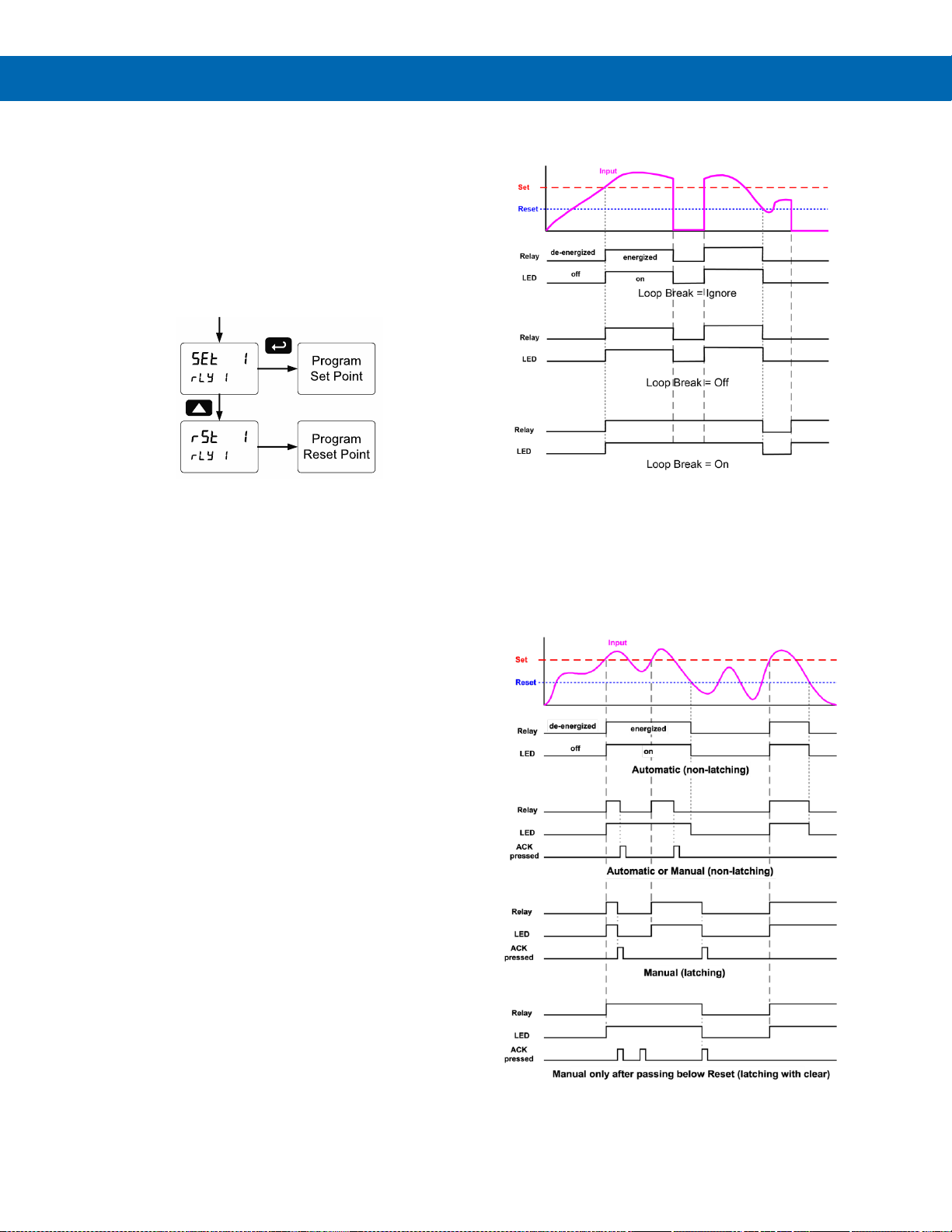
PD8-6060 Explosion-Proof Dual Analog Input Process Meter
Instruction Manual
43
Programming Set and Reset Points
High alarm indication: program set point above reset
point.
Low alarm indication: program set point below reset
point.
The deadband is determined by the difference
between set and reset points. Minimum deadband is
one display count. If the set and reset points are
programmed with the same value, the relay will reset
one count below the set point.
Note: Changes are not saved until the reset point has been
accepted.
Setting Fail-Safe Operation
In fail-safe mode of operation, the relay coil is
energized when the process variable is within safe
limits and the relay coil is de-energized when the
alarm condition exists. The fail-safe operation is set
independently for each relay. Select on to enable or
select off to disable fail-safe operation.
Programming Time Delay
The On and Off time delays may be programmed for
each relay between 0 and 999.9 seconds. The relays
will transfer only after the condition has been
maintained for the corresponding time delay.
The On time delay is associated with the set point.
The Off time delay is associated with the reset point.
Relay Action for Loss of 4-20 mA Input (Loop Break)
The loop break feature is associated with the 4-20 mA
input. Each relay may be programmed to go to one of
the following conditions when the meter detects the
loss of the input signal (i.e. < 0.005 mA):
1. Turn On (Go to alarm condition)
2. Turn Off (Go to non-alarm condition)
3. Ignore (Processed as a low signal condition)
Note: This is not a true loop break condition; if the signal
drops below 0.005 mA, it is interpreted as a “loop break”
condition.
The following graph shows the loop break relay
operation for a high alarm relay.
Relay and Alarm Operation Diagrams
The following graphs illustrate the operation of the
relays, status LEDs, and ACK button.
High Alarm Operation (Set > Reset)
For Manual reset mode, ACK can be pressed anytime to turn "off" relay. To
detect a new alarm condition, the signal must go below the set point, and then go
above it.
Page 44
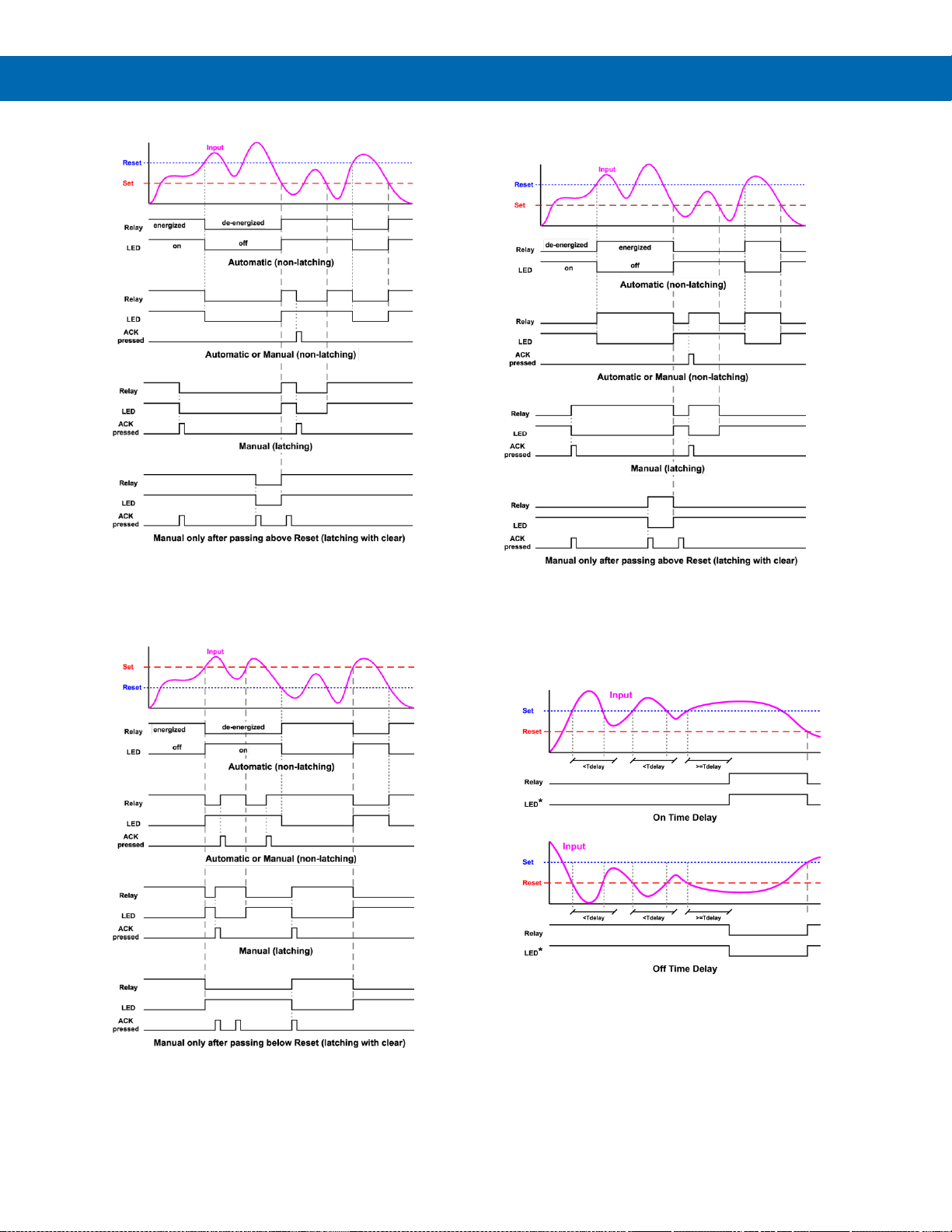
PD8-6060 Explosion-Proof Dual Analog Input Process Meter
Instruction Manual
44
Low Alarm Operation (Set < Reset)
For Manual reset mode, ACK can be pressed anytime to turn "off" relay. For
relay to turn back “on”, signal must go above set point and then go below it.
High Alarm with Fail-Safe Operation (Set > Reset)
Note: Relay coil is energized in non-alarm condition. In case
of power failure, relay will go to alarm state.
Low Alarm with Fail-Safe Operation (Set < Reset)
Note: Relay coil is energized in non-alarm condition. In case
of power failure, relay will go to alarm state.
Time Delay Operation
The following graphs show the operation of the time
delay function.
When the signal crosses the set point, the On time
delay timer starts and the relay trips when the time
delay has elapsed. If the signal drops below the set
point (high alarm) before the time delay has elapsed,
the On time delay timer resets and the relay does not
change state. The same principle applies to the Off
time delay.
Note: If “Automatic or Manual (A-nmAn)” reset mode is
selected, the LED follows the reset point and not the relay
state when the relay is acknowledged.
Page 45
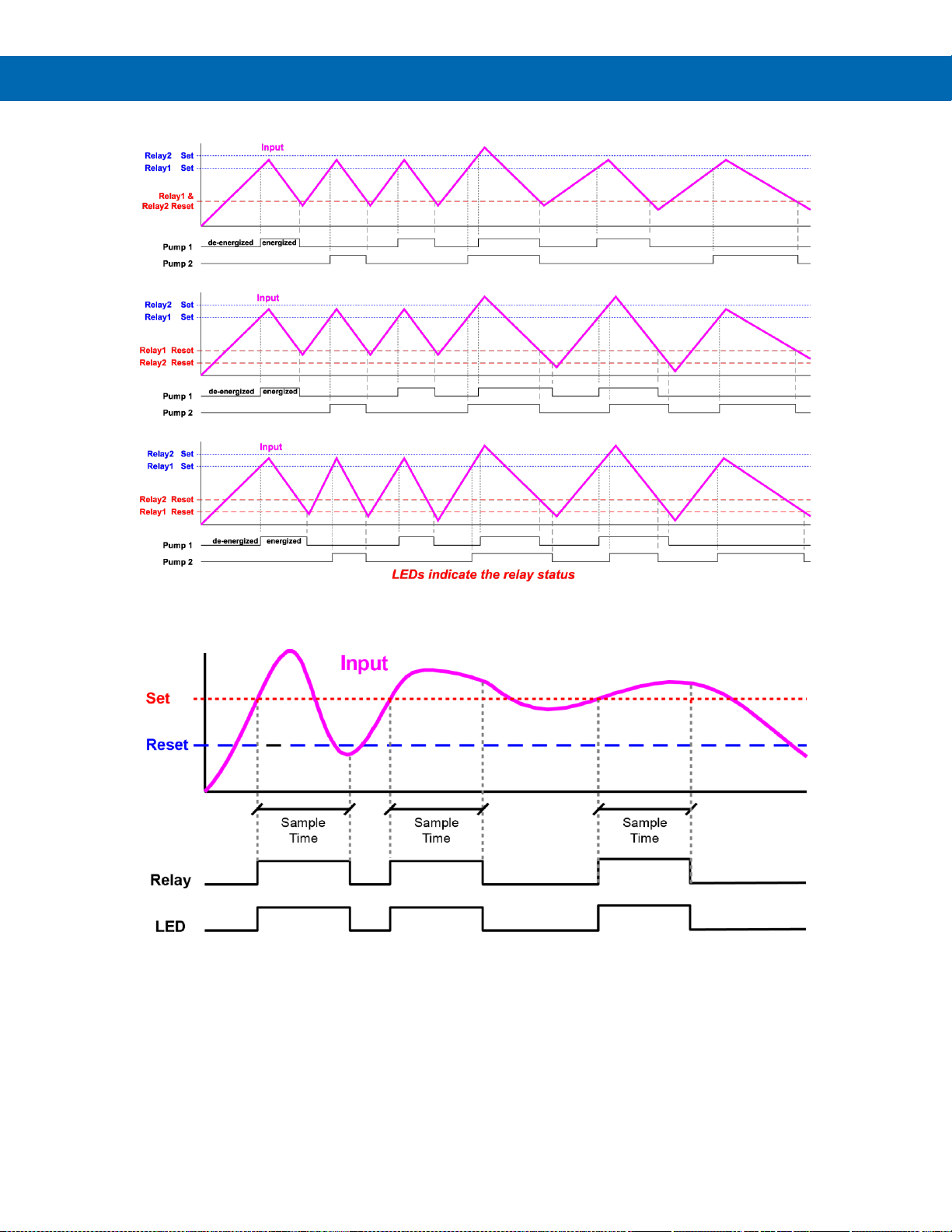
PD8-6060 Explosion-Proof Dual Analog Input Process Meter
Instruction Manual
45
Pump Alternation Control Operation
Relay Sampling Operation
When the signal crosses the set point, the relay trips and the sample time starts. After the sample time has elapsed,
the relay resets. The cycle repeats every time the set point is crossed, going up for high alarms and going down for
low alarms.
The sample time can be programmed between 0.1 and 5999.9 seconds.
Page 46
PD8-6060 Explosion-Proof Dual Analog Input Process Meter
Instruction Manual
46
Relay Operation Details
Overview
The four-relays option for the meter expands its
usefulness beyond simple indication to provide users
with alarm and control functions. Typical applications
include high and low temperature, level, pressure or
flow alarms, control applications such as simple on/off
pump control, and pump alternation control for up to 4
pumps. There are four basic ways the relays can be
used:
1. High and Low Alarms with Latching or NonLatching Relays
2. Simple On/Off Control with 100% Adjustable
Deadband
3. Sampling (Based on Time)
4. Pump Alternation Control for up to 4 Pumps
Relays Auto Initialization
When power is applied to the meter, the front panel
LEDs and alarm relays will reflect the state of the
input to the meter. The following table indicates how
the alarm LEDs and relays will react on power-up
based on the set and reset points:
Fail-Safe Operation
The following table indicates how the relays behave
based on the fail-safe selection for each relay:
Fail-Safe
Selection
Non-Alarm State
Alarm State
Power
Failure
NO
NC
NO
NC
Off
Open
Closed
Closed
Open
Relays
go to
nonalarm
state
On
Closed
Open
Open
Closed
Relays
go to
alarm
state
Note: NO = Normally Open, NC = Normally Closed. This
refers to the condition of the relay contacts when the power
to the meter is off.
Front Panel LEDs
The alarm status LEDs on the front panel are
available on all meters, even those without relays
installed, and provide status indication for the
following:
LED
Status
1
Alarm 1
2
Alarm 2
3
Alarm 3
4
Alarm 4
The meter is supplied with four alarm points that
include front panel LEDs to indicate alarm conditions.
This standard feature is particularly useful for alarm
applications that require visual-only indication. The
LEDs are controlled by the set and reset points
programmed by the user. When the display reaches a
set point for a high or low alarm, the corresponding
alarm LED will turn on. When the display returns to
the reset point the LED will go off. The front panel
LEDs respond differently for latching and non-latching
relays.
For non-latching relays, the LED is always off during
normal condition and always on during alarm
condition, regardless of the state of the relay (e.g.
Relay acknowledged after alarm condition).
For latching relays, the alarm LEDs reflect the status
of the relays, regardless of the alarm condition. The
following tables illustrate how the alarm LEDs function
in relation to the relays and the acknowledge button
(Default: F3 key assigned to ACK).
Latching and Non-Latching Relay Operation
The relays can be set up for latching (manual reset)
or non-latching (automatic reset) operation.
Relay terminology for following tables
Terminology
Relay Condition
On
Alarm (Tripped)
Off
Normal (Reset)
Ack
Acknowledged
The On and Off terminology does not refer to the
status of the relay’s coil, which depends on the failsafe mode selected.
• In latching relay mode, if Fail-Safe is off, latched
relays will reset (unlatch) when power is cycled.
Alarm #
HI or LO
Alarm
Set
Point
Reset
Point
Power-
Up
Reading
Relay &
LED
1
HI
1000
500
499
Off 2 LO
700
900
499
On
3
LO
250
400
499
Off
4
HI
450
200
499
On
Page 47
PD8-6060 Explosion-Proof Dual Analog Input Process Meter
Instruction Manual
47
Non-Latching Relay (Auto)
In this application, the meter is set up for automatic
reset (non-latching relay). Acknowledging the alarm
while it is still present has no effect on either the LED
or the relay. When the alarm finally goes away, the
relay automatically resets and the LED also goes off.
Non-Latching Relay with Manual Reset (A-nman)
In this application, the meter is set up for automatic
and manual reset at any time (non-latching relay).
The LED and the relay automatically reset when the
meter returns to the normal condition.
In addition, the relay can be manually reset while the
alarm condition still exists, but the LED will stay on
until the meter returns to the normal condition.
Automatic + manual reset at any time
Condition
LED
Relay
Normal
Off
Off
Alarm
On
On
Normal
Off
Off
Next Alarm
On
On
Ack
On
Off
Normal
Off
Off
Latching Relay (LatcH)
In this application, the meter is set up for manual
reset at any time. Acknowledging the alarm even if
the alarm condition is still present resets the relay and
turns off the LED.
Manual reset any time
Condition
LED
Relay
Normal
Off
Off
Alarm
On
On
Ack
Off
Off
Latching Relay with Clear (Lt-Clr)
In this application, the meter is set up for manual
reset only after the signal passes the reset point
(alarm condition has cleared). Acknowledging the
alarm while it is still present has no effect on either
the LED or the relay. When the alarm is
acknowledged after it returns to the normal state, the
LED and the relay go off. Notice that the LED remains
on, even after the meter returns to the normal
condition. This is because, for latching relays, the
alarm LED reflects the status of the relay, regardless
of the alarm condition.
Manual reset only after
alarm condition has cleared
Condition
LED
Relay
Normal
Off
Off
Alarm
On
On
Ack (No effect)
On
On
Normal
On
On
Ack
Off
Off
Automatic reset only
Condition
LED
Relay
Normal
Off
Off
Alarm
On
On
Ack (No effect)
On
On
Normal
Off
Off
Page 48
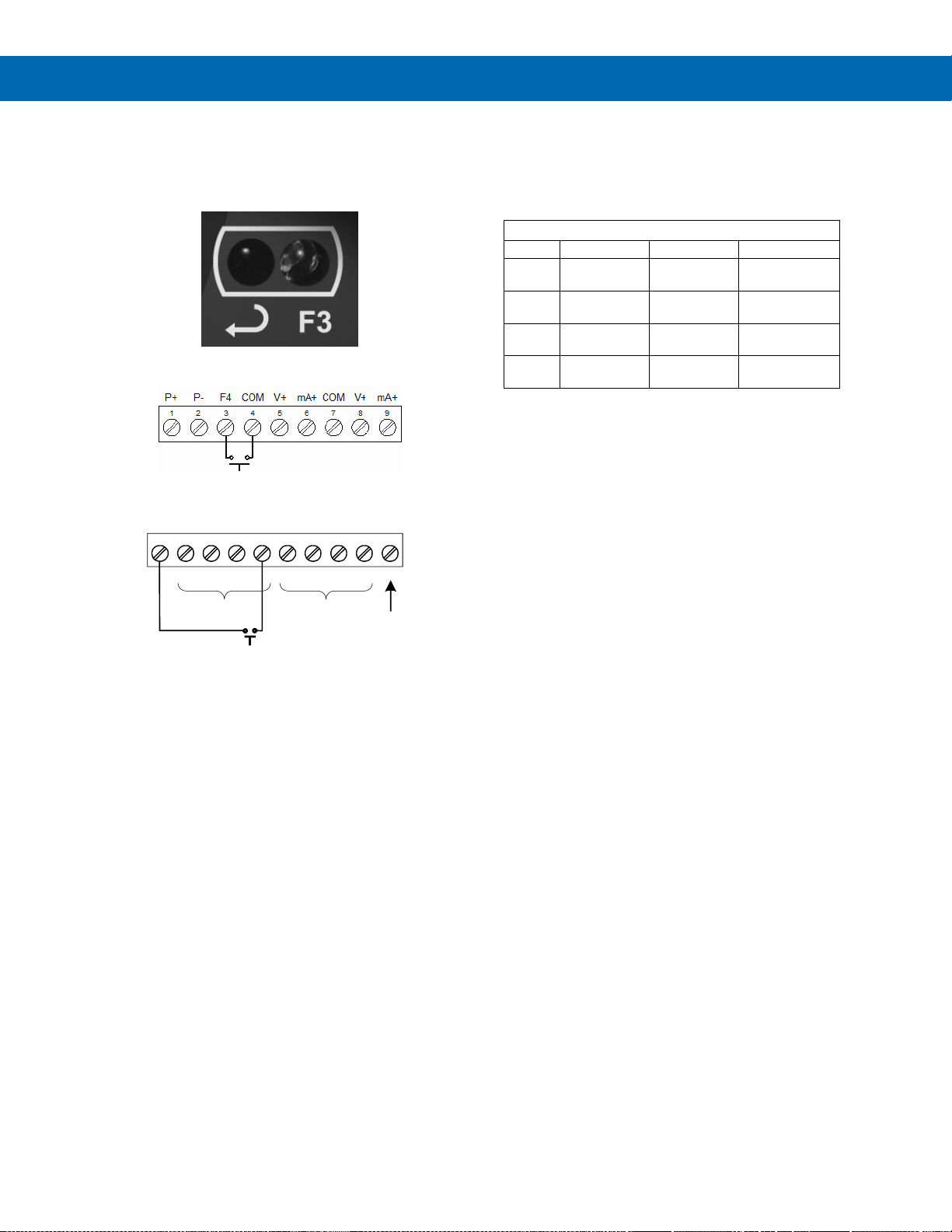
PD8-6060 Explosion-Proof Dual Analog Input Process Meter
Instruction Manual
48
Acknowledging Relays
There are three ways to acknowledge relays
programmed for manual reset:
1. Via the programmable front panel function keys
F1-F3 (Example: F3 assigned to ACK).
2. Remotely via a normally open push button wired
to the F4 terminal.
3. Remotely via a normally open push button wired
to one of the digital inputs and the +5 V terminal
on the digital I/O connections.
When the ACK button or the assigned digital input is
closed, all relays programmed for manual reset are
acknowledged.
Pump Alternation Control Applications (Altern)
For pump control applications where two or more
similar pumps are used to control the level of a tank
or a well, it is desirable to have all the pumps operate
alternately. This prevents excessive wear and
overheating of one pump over the lack of use of the
other pumps.
Up to 4 relays can be set up to alternate every time
an on/off pump cycle is completed. The set points and
reset points can be programmed, so that the first
pump on is the first pump off.
Application #1: Pump Alternation Using Relays 1 & 2
1. Relays 1 and 2 are set up for pump alternation.
2. Relays 3 and 4 are set up for low and high alarm
indication.
Set and Reset Point Programming
Relay
Set Point
Reset Point
Function
1
30.000
10.000
Controls
pump #1
2
35.000
5.000
Controls
pump #2
3
4.000
9.000
Controls
low alarm
4
40.000
29.000
Controls
high alarm
Pump Alternation Operation
1. Pump #1 turns on when level reaches 30.000,
when level drops below 10.000, pump #1 turns
off.
2. The next time level reaches 30.000, pump #2
turns on, when level drops below 10.000, pump
#2 turns off.
3. If the level doesn’t reach 35.000, pump #1 and
pump #2 will be operating alternately.
4. If pump #1 cannot keep the level below 35.000,
pump #2 will turn on at 35.000, then as the level
drops to10.000, pump #1 turns off, pump #2 is
still running and shuts off below 5.000.
5. Notice that with the set and reset points of pump
#2 outside the range of pump #1, the first pump
on is the first pump to go off. This is true for up to
4 alternating pumps, if setup accordingly.
6. Relay #3 will go into alarm if the level drops
below 4.000 and relay #4 will go into alarm if the
level exceeds 40.000.
+5 I1 I2 I3 I4 O1 O2 O3 O4 G
DO 1-4
GND
ACK
PDA1044 Digital I/O Module
1 2 3 4 5 6 7 8 9 10
DI 1-4
Page 49
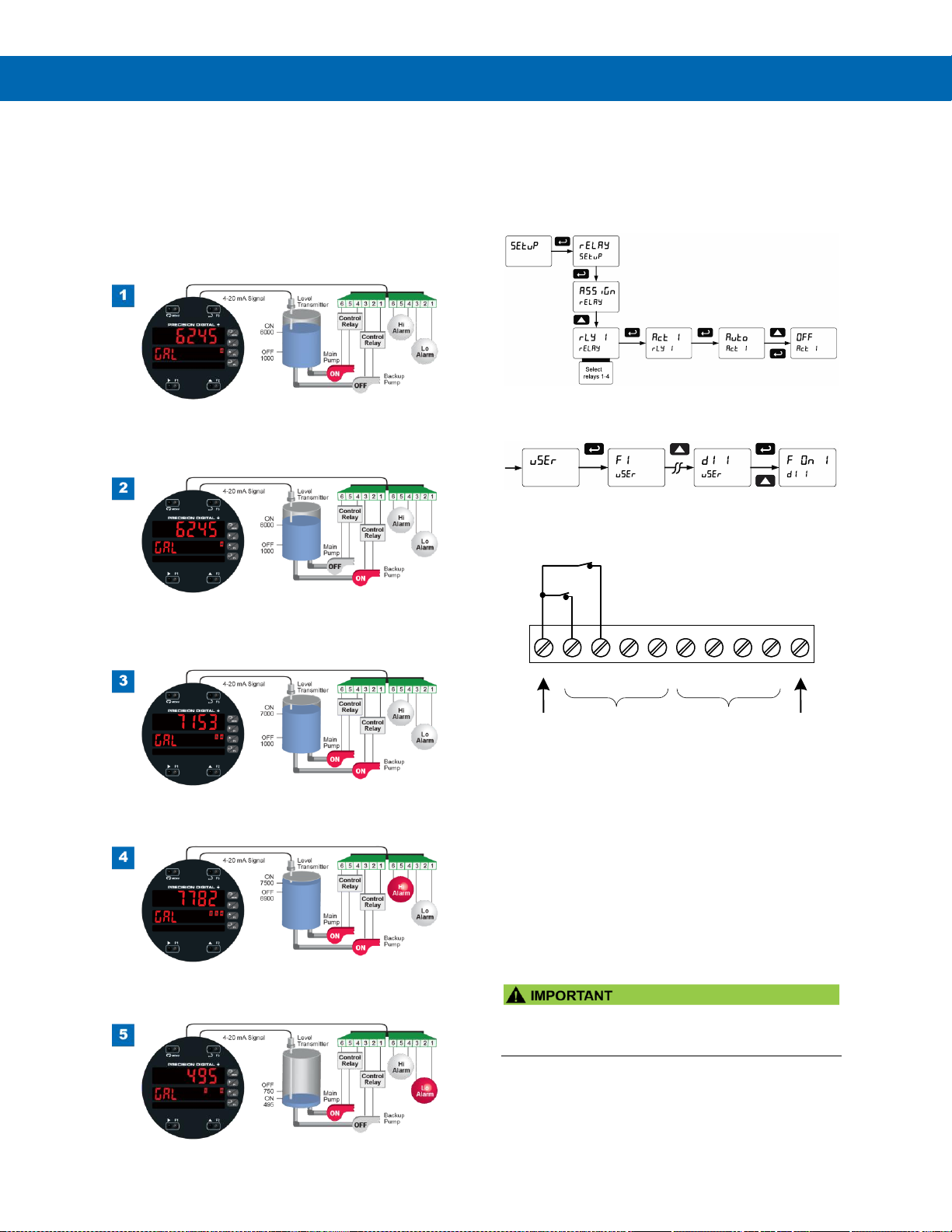
PD8-6060 Explosion-Proof Dual Analog Input Process Meter
Instruction Manual
49
Pump Alternation Visual Representation
The following graphics provide a visual representation
of a typical pump alternation application with high and
low alarm monitoring using one of the PD8-6060’s
inputs:
1. Relay #4 turns the main pump on at 6000 gallons
and turns it off at 1000 gallons.
2. With the Pump Alternation feature activated, the
next time the level reaches 6000 gallons, relay #3
transfers and starts the backup pump.
3. If the backup pump is not able to keep up, and
the level reaches 7000 gallons, relay #4 transfers
and starts the main pump as well.
4. Relay #2 trips the High Level Alarm at 7500
gallons and resets at 6900 gallons.
5. Relay #1 trips the Low Level Alarm at 495 gallons
and resets at 750 gallons.
Setting Up the Interlock Relay (Force On) Feature
Relays 1-4 can be set up as interlock relays. To set
up the relays for the interlock feature:
1. Access the Setup – Relay – Action menu and set
the action to off.
2. In the Advanced features – User menu program
any of the digital inputs to Force On any of the
internal relays (1-4).
3. Connect a switch or dry contact between the +5V
terminal and the corresponding digital input (dI-1
to dI-4) terminal.
Interlock Relay Operation Example
Relays 1 & 2 are configured to energize (their front
panel LEDs are steady on) when SW1 & SW2
switches (above) are closed. If the contacts to these
digital inputs are opened, the corresponding front
panel LEDs flash indicating this condition. The
processes being controlled by the interlock relay will
stop, and will re-start only after the interlock relay is
re-activated by the digital inputs (switches).
Note: If multiple digital inputs are assigned to the same
relay, then the corresponding logic is (AND) – i.e. both
switches must be closed to activate the relay.
• If the digital inputs are assigned to the Interlock
Function, then they cannot be used to program
the meter remotely.
1 2 3 4 5
6
+5
I1
I2
I3
I4
O1
7
8
O2
O3
9
10
O4
G
DI 1-4
DO 1-4
5 VDC
GND
SW2
SW1
Page 50
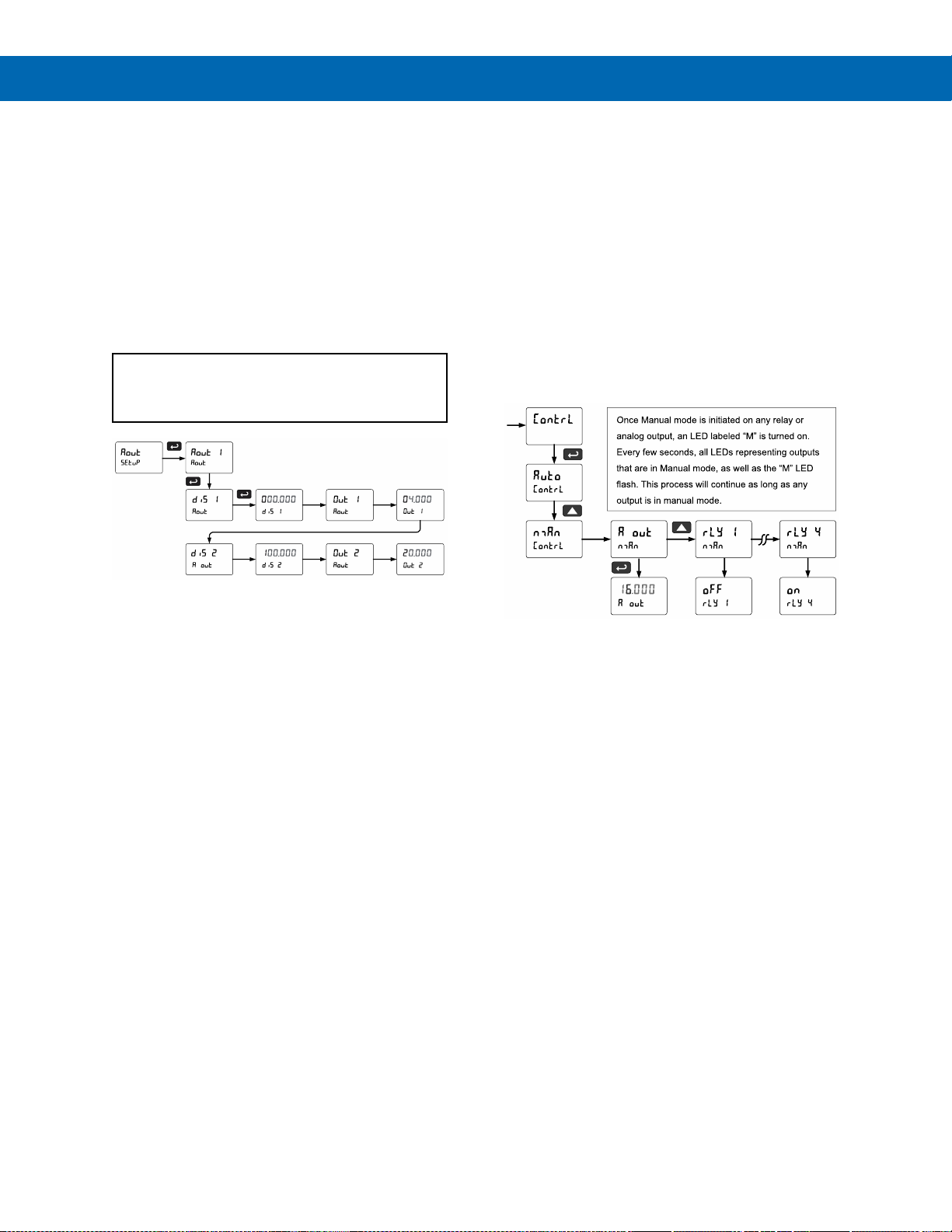
PD8-6060 Explosion-Proof Dual Analog Input Process Meter
Instruction Manual
50
Scaling the 4-20 mA Analog Output (Aout)
The 4-20 mA analog output can be scaled to provide
a 4-20 mA signal for any display range selected. To
select the channel and source assignments the
analog output is assigned to, see Analog Output
Source on page 57.
No equipment is needed to scale the analog output;
simply program the display values to the
corresponding mA output signal.
The Analog Output menu is used to program the
4-20 mA outputs based on display values.
For further details, see Setting Numeric Values
on page 37, Analog Output Value for Loss of
4-20 mA Input (Loop Break) on page 57.
Reset Menu (reset)
The Reset menu is used to reset the maximum or
minimum reading (peak or valley) reached by the
process; both may be reset at the same time by
selecting “reset high & low” (rst HL). The tare value
used to zero the display may be reset by selecting
“reset tare” (rst tr).
Manual Control Menu (Contrl)
The Manual Control menu is used to control the
4-20 mA analog output and the relays manually,
ignoring the input. Each relay and analog output can
be programmed independently for manual control.
Selecting automatic control sets all relays and analog
output for automatic operation.
Page 51
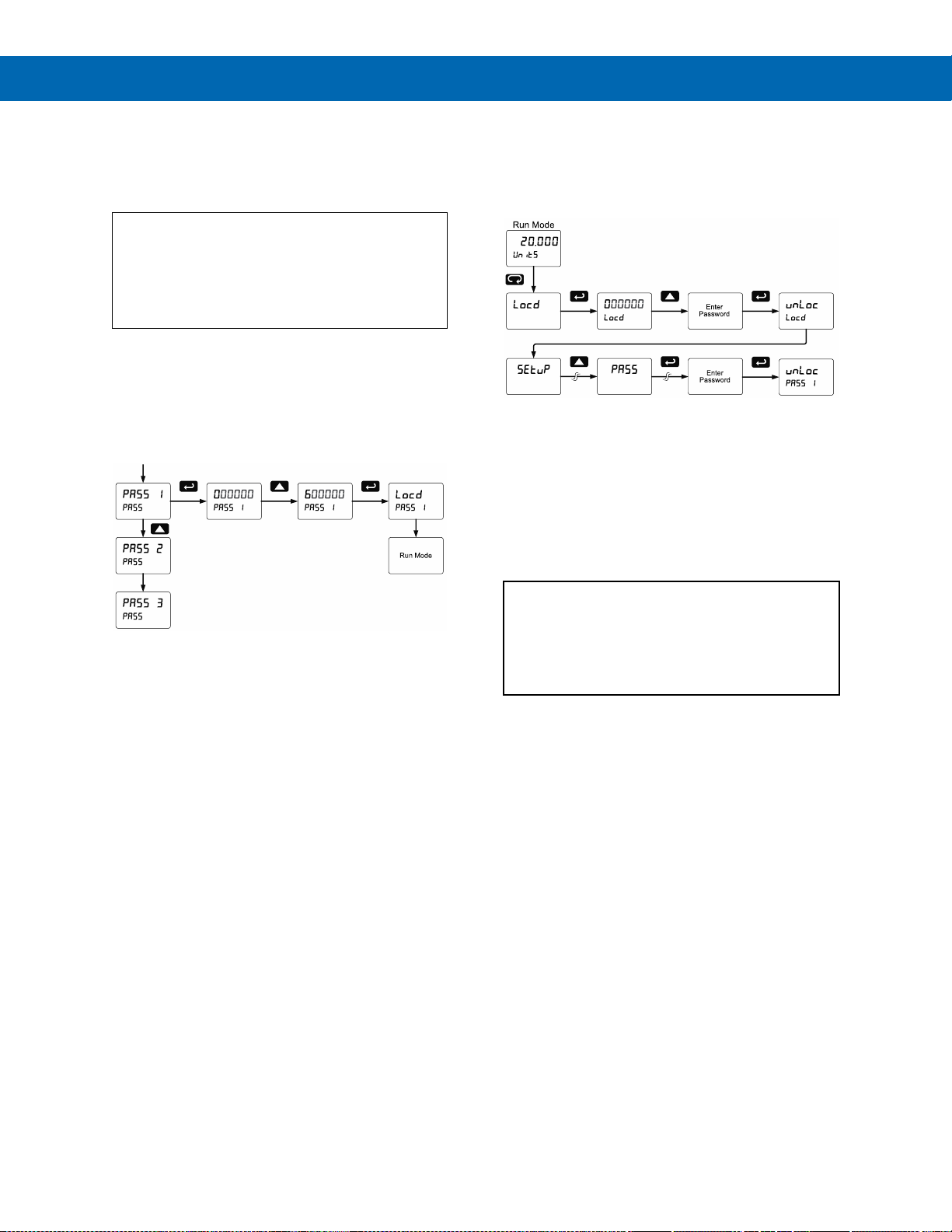
PD8-6060 Explosion-Proof Dual Analog Input Process Meter
Instruction Manual
51
Setting Up the Password (pass)
The Password menu is used for programming three
levels of security to prevent unauthorized changes to
the programmed parameter settings.
Pass 1: Allows use of function keys and digital
inputs
Pass 2: Allows use of function keys, digital inputs
and editing set/reset points
Pass 3: Restricts all programming, function keys,
and digital input
Protecting or Locking the Meter
Enter the Password menu and program a six-digit
password.
For instructions on how to program numeric values
see Setting Numeric Values on page 37.
Making Changes to a Password Protected Meter
If the meter is password protected, the meter will
display the message Locd (Locked) when the Menu
button is pressed. Press the Enter button while the
message is being displayed and enter the correct
password to gain access to the menu. After exiting
the programming mode, the meter returns to its
password protected condition.
Disabling Password Protection
To disable the password protection, access the
Password menu and enter the correct password
twice, as shown below. The meter is now unprotected
until a new password is entered.
If the correct six-digit password is entered, the meter
displays the message unLoc (unlocked) and the
protection is disabled until a new password is
programmed.
If the password entered is incorrect, the meter
displays the message Locd (Locked) for about two
seconds, and then it returns to Run Mode. To try
again, press Enter while the Locked message is
displayed.
Did you forget the password?
The password may be disabled by entering a
master password once. If you are authorized to
make changes, enter the master password 508655
to unlock the meter.
Page 52
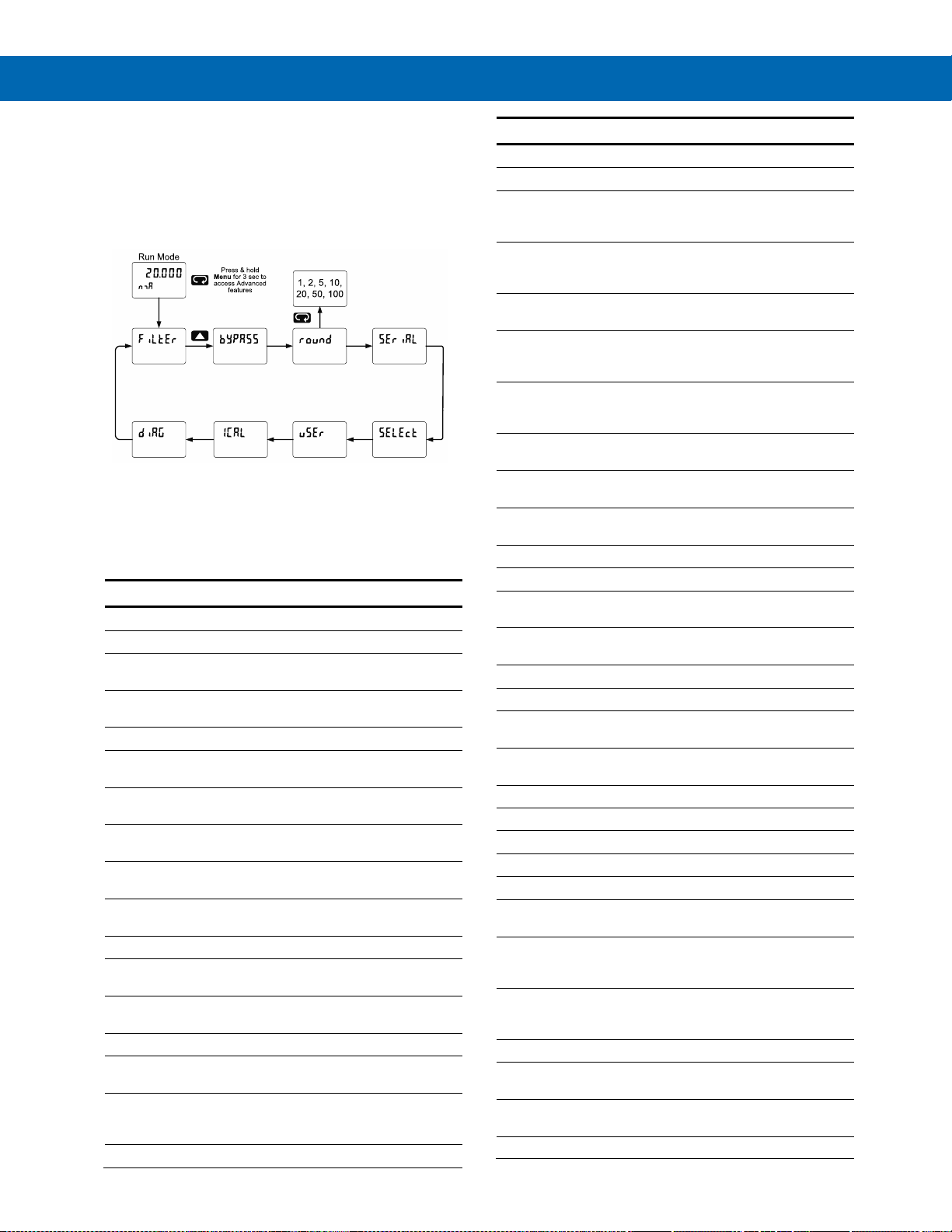
PD8-6060 Explosion-Proof Dual Analog Input Process Meter
Instruction Manual
52
Advanced Features Menu
To simplify the setup process, functions not needed
for most applications are located in the Advanced
Features menu.
Press and hold the Menu button for three seconds to
access the advanced features of the meter.
Advanced Features Menu & Display Messages
The following table shows the functions and
messages of the Advanced Features menu in the
order they appear in the menu.
Advanced Features Menu & Display Messages
Display
Parameter
Action/Setting
filtEr
Filter
Set noise filter value
Ch-A
Channel A
Set filter value for
channel A
Ch-b
Channel B
Set filter value for
channel B
bypASs
Bypass
Set filter bypass value
Ch-A
Channel A
Set filter bypass value for
channel A
Ch-b
Channel B
Set filter bypass value for
channel B
Round
Round
Set the rounding value for
display variables
seriAl
Serial
Set serial communication
parameters
SlaveId
Slave ID
Set slave ID or meter
address
Baud
Baud rate
Select baud rate
Tr dLY
Transmit delay
Set transmit delay for serial
communication
Parity
Parity
Select parity Even, Odd, or
None with 1 or 2 stop bits
t-byt
Time byte
Set byte-to-byte timeout
SelEct
Select
Enter the Select menu
(function, cutoff, out)
Functn
Input signal
conditioning
Select linear, square root,
programmable exponent, or
round horizontal tank
Ch-A
Channel A
Select menu for channel A
Advanced Features Menu & Display Messages
Display
Parameter
Action/Setting
Ch-b
Channel B
Select menu for channel B
Linear
Linear
Set meter for linear function
and select number of
linearization points
No pts
Number of
points
Set the number of
linearization points
(default: 2)
Square
Square root
Set meter for square root
extraction
Prog E
Programmable
exponent
Set meter for
programmable exponent
and enter exponent value
Rht
Round
horizontal tank
Set meter for round
horizontal tank volume
calculation
Length
Length
Enter the tank’s length in
inches
dianmr
Diameter
Enter the tank’s diameter in
inches
nmath
Math
Enter the setup menu for
channel C math functions
Sunm
Sum
Channel C = (A+B+P)*F
Dif
Difference
Channel C = (A-B+P)*F
difabs
Absolute
difference
Channel C = ((Absolute
value of (A-B))+P)*F
Avg
Average
Channel C =
(((A+B)/2)+P)*F
nmulti
Multiplication
Channel C = ((A*B)+P)*F
Divide
Divide
Channel C = ((A/B)+P)*F
Hi-ab
Max of A or B
C = ((High value of channel
A or B)+P)*F
Lo-ab
Min of A or B
C = ((Low value of channel
A or B)+P)*F
Drauw
Draw
Channel C = ((A/B)-1)*F
uwAvg
Weighted avg.
Channel C = ((B-A)*F)+A
ratio
Ratio
Channel C = (A/B)*F
Ratio2
Ratio 2
C = ((B-A)/A)+P)*F
Concen
Concentration
Channel C = (A/(A+B))*F
Const
Constant
Constant used in channel C
math
adder
Adder
Addition constant used in
channel C math
calculations (P)
factor
Factor
Multiplication constant used
in channel C math
calculations (F)
CutofF
Cutoff
Set low-flow cutoff
Ch-A
Channel A
Set low-flow cutoff for
Channel A
Ch-b
Channel B
Set low-flow cutoff for
Channel B
AoutPr
Analog output
Program analog output
Page 53
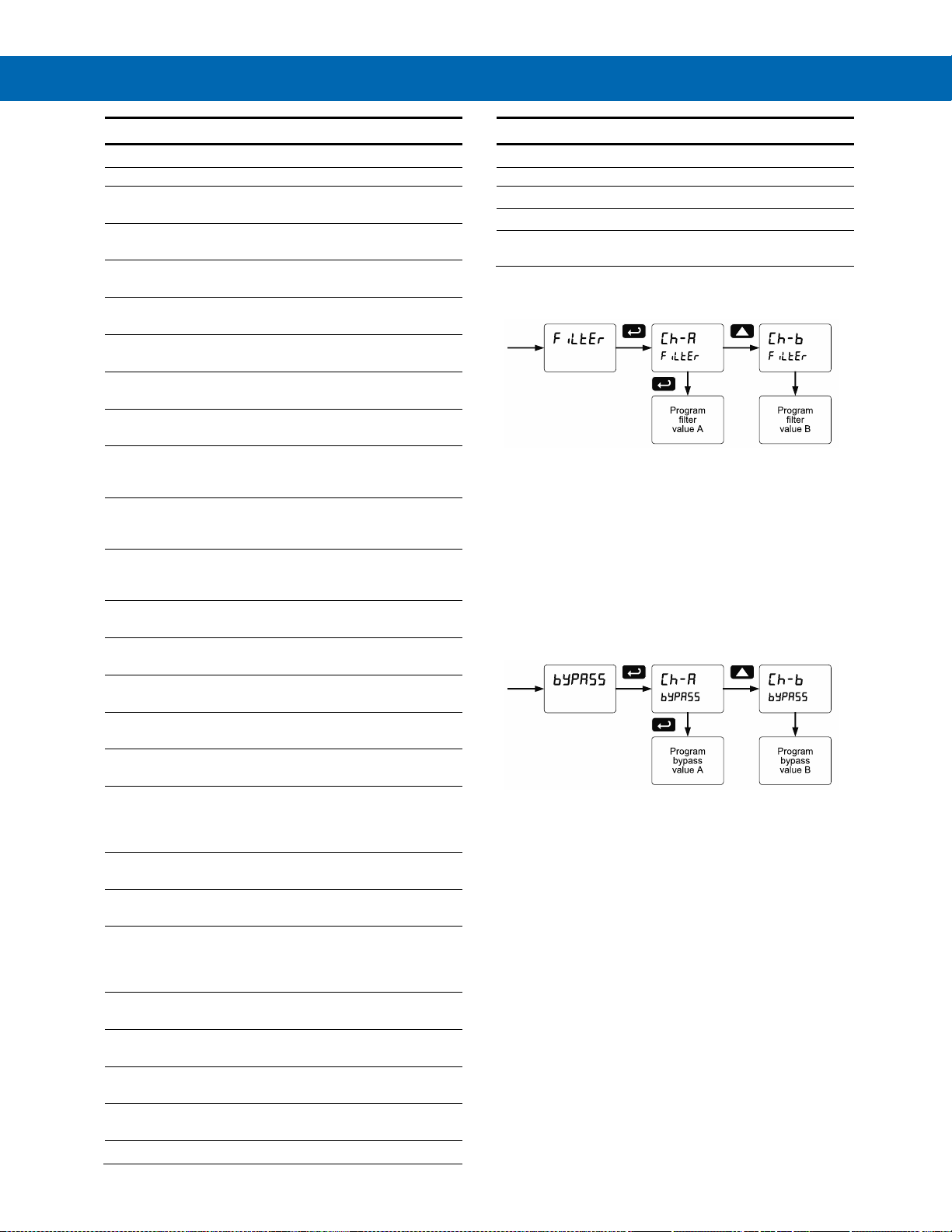
PD8-6060 Explosion-Proof Dual Analog Input Process Meter
Instruction Manual
53
Advanced Features Menu & Display Messages
Display
Parameter
Action/Setting
programming
parameters
AOut*1
Analog output
Program analog output 1
parameters
Source
Source
Select source for the
4-20 mA output
break
Loop break
Set analog output value if
input loop break is detected
O-rang
Overrange
Program mA output for
display overrange
u-rang
Underrange
Program mA output for
display underrange
nmAx
Maximum
Program maximum mA
output allowed
nmin
Minimum
Program minimum mA
output allowed
Calib
Calibrate
Calibrate 4-20 mA output
(internal reference source
used for scaling the output)
4 nmA
4 mA output
Enter mA output value read
by milliamp meter with at
least 0.001 mA resolution
20 nmA
20 mA output
Enter mA output value read
by milliamp meter with at
least 0.001 mA resolution
User
User I/O
Assign function keys and
digital I/O
F1*
F1* function key
Assign F1 function key
(*F1/F2/F3)
F4
F4 function
Assign F4 function
(digital input)
dI I
Digital input 1
Assign digital input
1 – 4
dO 1
Digital output 1
Assign digital output
1 – 4
ICal
Internal
calibration
Enter internal calibration
(used for recalibrating the
meter with a calibrated
signal source)
Ch-A
Channel A
Perform calibration on
channel A
Ch-b
Channel B
Perform calibration on
channel B
C CAL
Current
calibration
Calibrate 4-20 mA current
input (internal reference
source used for scaling the
input)
C lo
Current low
Calibrate low current input
(e.g. 4 mA)
C Hi
Current high
Calibrate high current input
(e.g. 20 mA)
V CAL
Voltage
calibration
Calibrate voltage input
V Lo
Voltage low
Calibrate low voltage input
(e.g. 0 V)
V Hi
Voltage high
Calibrate high voltage input
Advanced Features Menu & Display Messages
Display
Parameter
Action/Setting
(e.g. 10 V)
Diag
Diagnostics
Display parameter settings
LED t
LED test
Test all LEDs
Info
Information
Display software number
and version
Noise Filter (filter)
The noise filter is available for unusually noisy signals
that cause an unstable process variable display. The
noise filter averages the input signal over a certain
period. The filter level determines the length of time
over which the signal is averaged. The filter level can
be set between 2 and 199. The higher the filter level,
the longer the averaging time and so the longer it
takes the display to settle to its final value. Setting the
filter level to zero disables the filter function.
Noise Filter Bypass (bypass)
The noise filter bypass changes the behavior of the
meter so that small variations in the signal are filtered
out but large abrupt changes in the input signal are
displayed immediately. The bypass value determines
the minimum amount of signal change to be displayed
immediately. All signal changes smaller than the
bypass value are filtered or averaged by the meter.
The noise filter bypass may be set between 0.1 and
99.9% of full scale.
Page 54
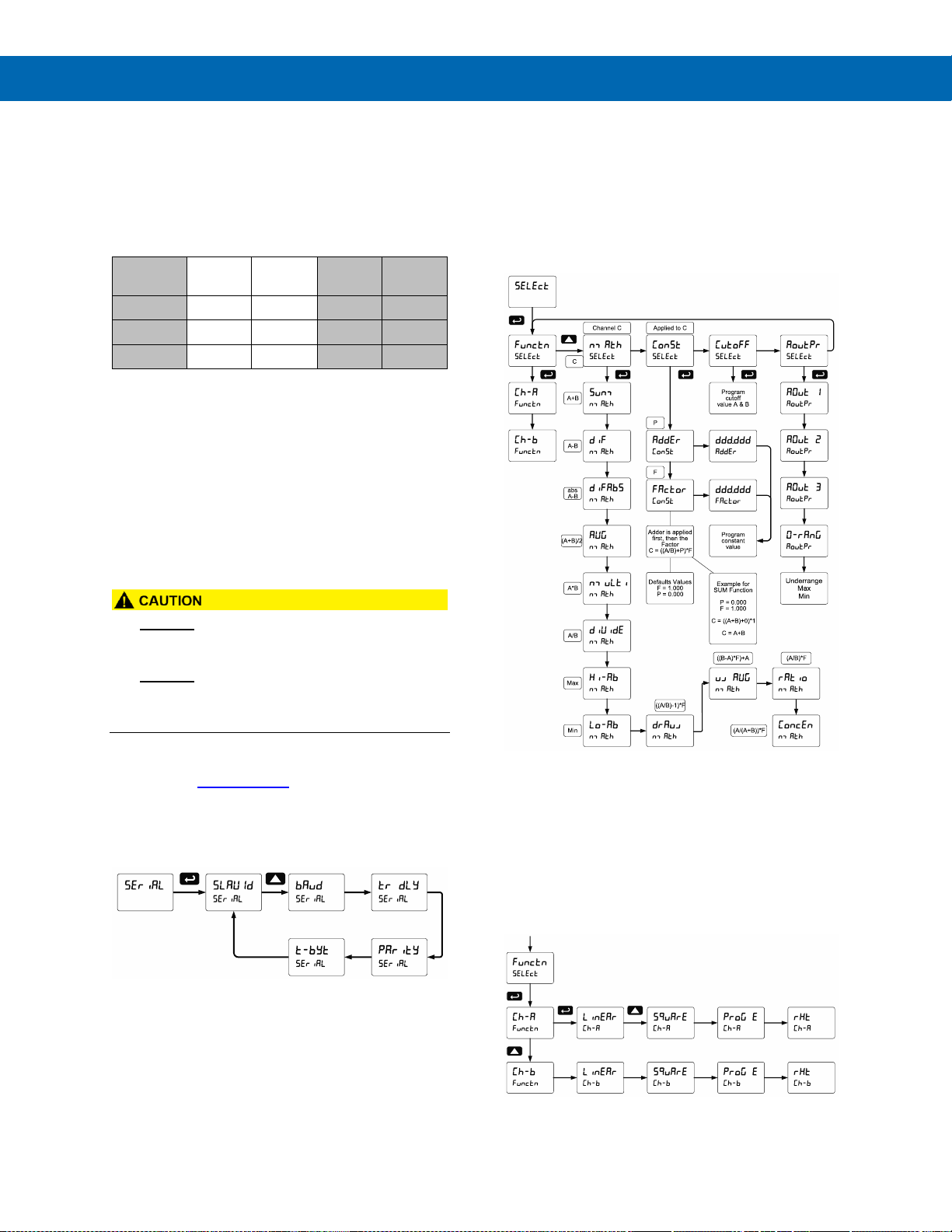
PD8-6060 Explosion-Proof Dual Analog Input Process Meter
Instruction Manual
54
Rounding Feature (round)
The rounding feature is used to give the user a
steadier display with fluctuating signals. Rounding is
used in addition to the filter function.
Rounding causes the display to round to the nearest
value according to the rounding selected. See
examples below:
Rounding
Selection
Actual
Value
Display
Value
Actual
Value
Display
Value
1
12.022
12.022
12.023
12.023
5
12.022
12.020
12.023
12.025
10
12.024
12.020
12.025
12.030
Modbus® RTU Serial Communications (serial)
The meter is equipped with serial communications
capability as a standard feature using Modbus® RTU
Serial Communication Protocol.
The meter may be connected to a PC for initial
configuration via the on-board USB connection. For
ongoing digital communications with a computer or
other data terminal equipment, use the RS-485
connection.
• DO NOT connect any equipment to the RJ45
M-LINK connector. Otherwise damage will occur
to the equipment and the meter.
• DO NOT disconnect the RJ45 connector located
to the left of the power terminal block. Doing so
will disable the on-board digital I/O, and the
RS-485 serial communications.
Notes:
1. Refer to the ProtEX-MAX Modbus® Register Tables
located at www.predig.com for details.
2. Changes made to the Serial menu are initialized after
the menu key is pressed or after navigating through the
remainder of the serial parameters (i.e. pass the t-byte
parameter).
When using more than one meter in a multi-drop
mode, each meter must be provided with its own
unique address. The meter address (Slave ID) may
be programmed between 1 and 247. The transmit
delay may be set between 0 and 199 ms. The parity
can be set to even, odd, or none with 1 or 2 stop bits.
Select Menu (SElect)
The Select menu is used to select the input signal
conditioning function applied to the inputs (linear,
square root, programmable exponent, or round
horizontal tank), math function for A & B, constants,
low-flow cutoff, and analog output programming.
Multi-point linearization is part of the linear function
selection.
Input Signal Conditioning (Functn)
The Function menu is used to select the input-to-output
transfer function applied to the input signal: linear,
square root, programmable exponent, or round
horizontal tank volume calculation. Multi-point
linearization is part of the linear function selection.
Meters are set up at the factory for linear function with
2-point linearization. The linear function provides a
display that is linear with respect to the input signal.
Page 55

PD8-6060 Explosion-Proof Dual Analog Input Process Meter
Instruction Manual
55
Square Root Linearization (Square)
The square root function is used to calculate flow
measured with a differential pressure transmitter.
The flow rate is proportional to the square root of the
differential pressure. Scale the meter so that the low
input signal (e.g. 4 mA) is equal to zero flow and the
high input signal (e.g. 20 mA) is equal to the
maximum flow.
Programmable Exponent Linearization (Prog E)
The programmable exponent function is used to
calculate open-channel flow measured with a level
transmitter in weirs and flumes. The flow rate is
proportional to the head height. Scale the meter so
that the low input signal (e.g. 4 mA) is equal to zero
flow and the high input signal (e.g. 20 mA) is equal to
the maximum flow. This method works well for all
weirs and flumes that have a simple exponent in the
flow calculation formula. For weirs and flumes with
complex exponents it is necessary to use a strapping
table and the 32-point linearization of the meter.
For more information on how the Programmable
Exponent Linearization feature works, see the
PD8-6262 manual.
Multi-Point Linearization (Linear)
Meters are set up at the factory for linear function with
2-point linearization. Up to 32 linearization points can
be selected for each channel under the linear
function. The multi-point linearization can be used to
linearize the display for non-linear signals such as
those from level transmitters used to measure volume
in odd-shaped tanks or to convert level to flow using
weirs and flumes with complex exponent
32-Point Linearization
The most common way to linearize a non-linear signal
is to break it up into smaller ranges that are more
linear than the overall range. The ProtEX-MAX is
available with up to 32 points of linearization for each
channel. The linearization data can be imported from
an Excel spreadsheet or can be exported from
MeterView Pro to an Excel spreadsheet.
The above graphic illustrates Channel A input being
linearized with nine scaling points and Channel B
using the more standard two-point scaling method.
Note: Scale values can also be imported from an Excel
spreadsheet.
Page 56
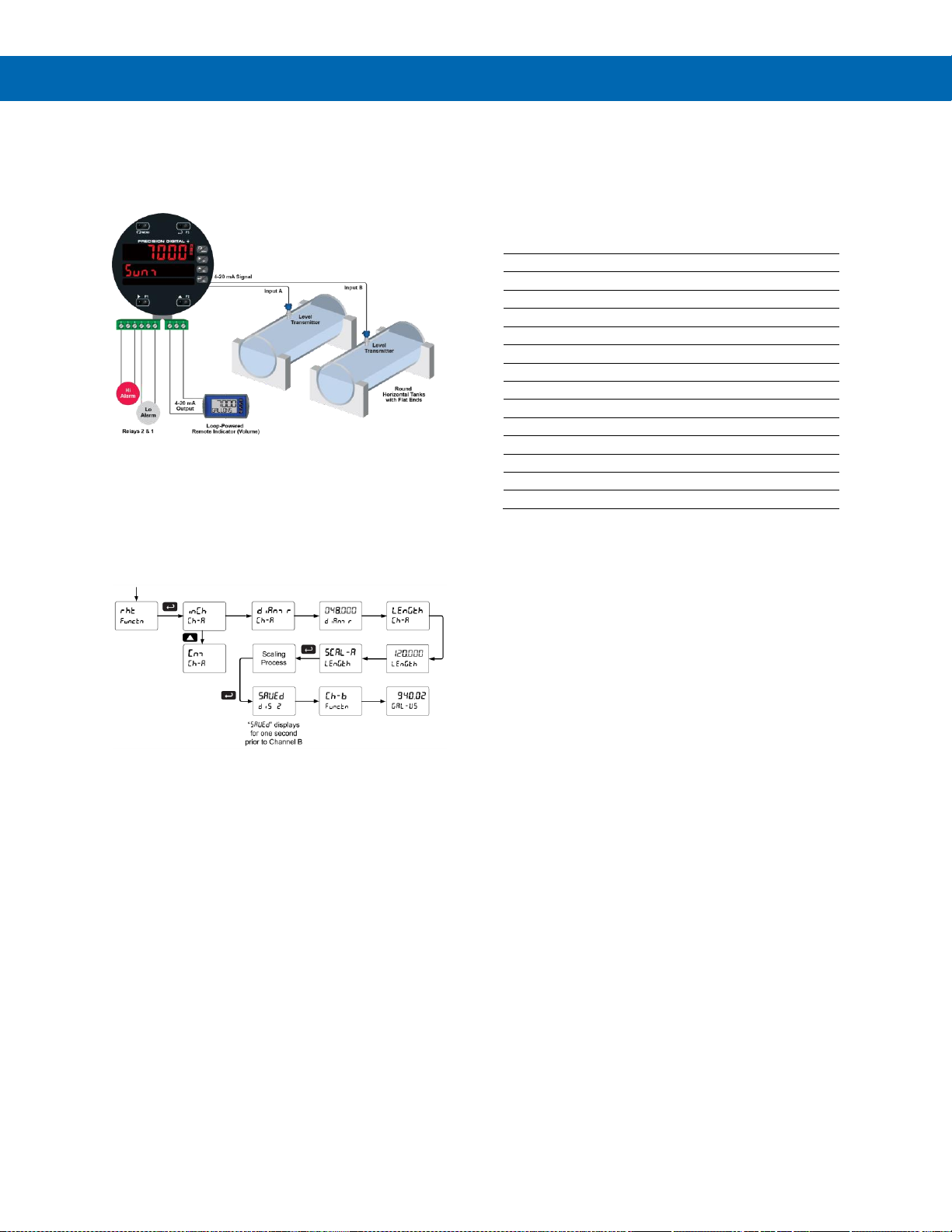
PD8-6060 Explosion-Proof Dual Analog Input Process Meter
Instruction Manual
56
Round Horizontal Tank Linearization (rHt)
This function automatically calculates the volume in a
round horizontal tank with flat ends.
The volume is calculated based on the diameter and
length of the tank. The tank’s dimensions can be
entered in inches or centimeters; the meter automatically
calculates the volume in gallons or liters. After entering
the dimensions, complete the scaling process with the
display values calculated by the meter. The meter can
be re-scaled to display the volume in any engineering
unit without the need to re-enter the dimensions again.
Note: After Scale is displayed continue pressing the Enter
button until the meter completes the scaling of the input and
display values.
Changing the Volume from Gallons to Liters
In the graphic above, entering 48" for the diameter
and 120" for the length of the round horizontal tank,
the meter automatically calculates that the volume of
the tank is 940.02 gallons.
1. Convert gallons to liters
1 US gallon = 3.7854 L
940.02 gal = 3558.4 L
2. Go to the Setup menu and change the
decimal point to 1 decimal.
3. Go to the Program – Scale menu and press
Enter until dis 2 is shown on the main display.
4. Press Enter and change display 2 value to 3558.4.
5. The meter is now displaying the volume in liters.
Note: The display can be scaled to display the volume in
any engineering units.
Another way to display the volume in liters is to
enter the dimensions in cm. The meter
automatically calculates the volume in liters.
Math Function (nmath)
The Math menu is used to select the math function
that will determine the channel C value. These math
functions are a combination of input channels A and
B, and will display when channel C is selected in the
Display menu.
The following math functions are available.
Name
Function
Setting
Addition
(A+B+P)*F
Sunm
Difference
(A-B+P)*F
diF
Absolute diff.
((Abs(A-B))+P)*F
diFAbS
Average
(((A+B)/2)+P)*F
AvG
Multiplication
((A*B)+P)*F
nmulti
Division
((A/B)+P)*F
diVide
Max of A or B
((AB-Hi)+P)*F
Hi-Ab
Min of A or B
((AB-Lo)+P)*F
Lo-Ab
Draw
((A/B)-1)*F
drAuw
Weighted avg.
((B-A)*F)+A
uw avg
Ratio
(A/B)*F
ratio
Ratio 2
((B-A)/A)+P)*F
ratio2
Concentration
(A/(A+B))*F
Concen
Math Constants (Const)
The Math Constants menu is used to set the
constants used in channel C math. The math
functions include input channel A and B, as well as
the adder constant P, and factor constant F.
The Adder constant (P) may be set from -99.999 to
999.999.
The Factor constant (F) may be set from 0.001 to
999.999.
The Math Function (
nmath
) chart above details the
math functions that may be selected in the Math
Functions menu.
Low-Flow Cutoff (CutofF)
The low-flow cutoff feature allows the meter to be
programmed so that the often-unsteady output from a
differential pressure transmitter, at low flow rates,
always displays zero on the meter.
The cutoff value may be programmed from 0.1 to
999999. The meter will display zero below the cutoff
value. Programming the cutoff value to zero disables
the cutoff feature. The cutoff can be disabled to
display negative values.
Page 57
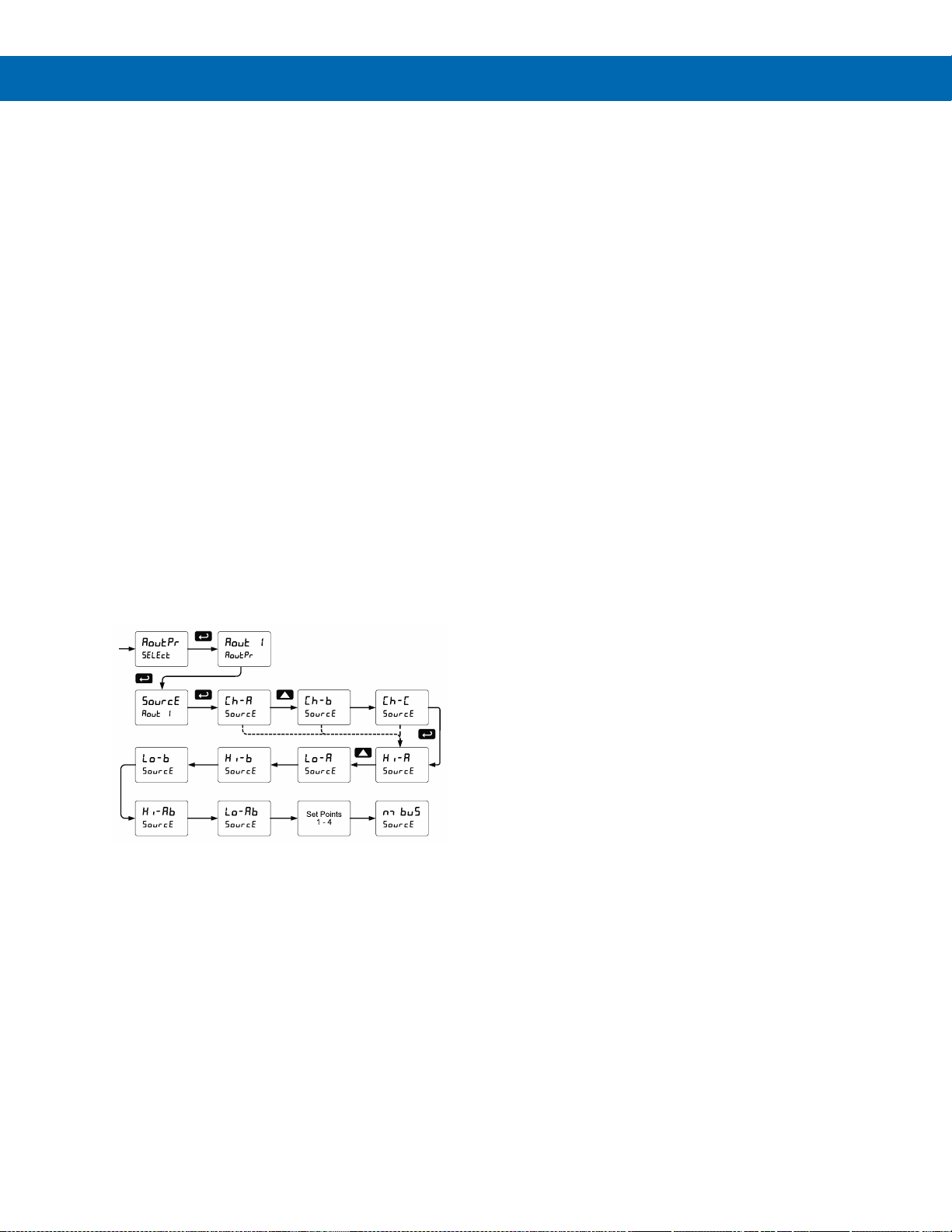
PD8-6060 Explosion-Proof Dual Analog Input Process Meter
Instruction Manual
57
Analog Output Programming (AoutPr)
The Analog Output Programming menu is used to
program the behavior of the 4-20 mA output. The
following parameters and functions are programmed
in this menu:
1. Source: Source for generating the 4-20 mA
output
2. Overrange: Analog output value with display in
overrange condition
3. Underrange: Analog output value with display in
underrange condition
4. Break: Analog output value when loop break is
detected
5. Max: Maximum analog output value allowed
regardless of input
6. Min: Minimum analog output value allowed
regardless of input
7. Calibrate: Calibrate the internal 4-20 mA source
reference used to scale the 4-20 mA output
Analog Output Source
The analog output source can be based on either of
the input channels (Ch-A, Ch-B), the math channel
(Ch-C), maximum stored value of either input channel
(Hi-A, Hi-B), minimum stored value of either input
channel (Lo-A, Lo-B), relay set points, or the Modbus®
input.
Analog Output Value for Loss of 4-20 mA Input (Loop Break)
The AoutPr - Break menu is used to force the
analog output to go to a user-specified mA value if a
break condition is detected in the 4-20 mA input loop.
Selecting Ignore causes the mA output to go to the
minimum value.
Analog Output Calibration
To perform the analog output calibration, it is
recommended to use a milliamp meter with a
resolution of at least 0.1 µA to measure the output
current. The values saved internally during this
procedure are used for scaling the 4-20 mA output in
the Setup menu.
Analog Output Calibration Procedure
1. Wire the PD8-6060 4-20 mA output to a current
loop that includes a power supply (internal or
external 12 to 24 VDC), and the mA input on the
digital meter. See Figure 18. 4-20 mA Output
Connections on page 31 for details.
2. Turn on all devices. Allow for a 15 to 30 minute
warm-up.
3. Go to the Advanced Features menu, navigate to
Select (Select) and choose Analog Output
Programming (AoutPr) → Calibration (Calib)
menu and press Enter.
4. The display will show 4 nmA. The PD8-6060 mA
output should now be close to 4 mA. Press Enter
and the display will show 04.000. Enter the actual
value read by the digital mA meter and press Enter.
5. The display will show 20 nmA. The PD8-6060 mA
output should now be close to 20 mA. Press
Enter and the display will show 20.000. Enter the
actual value read by the digital mA meter and
press Enter.
6. The meter will now calculate the calibration
factors and store them.
7. Press Menu to exit and return to Run mode.
Page 58
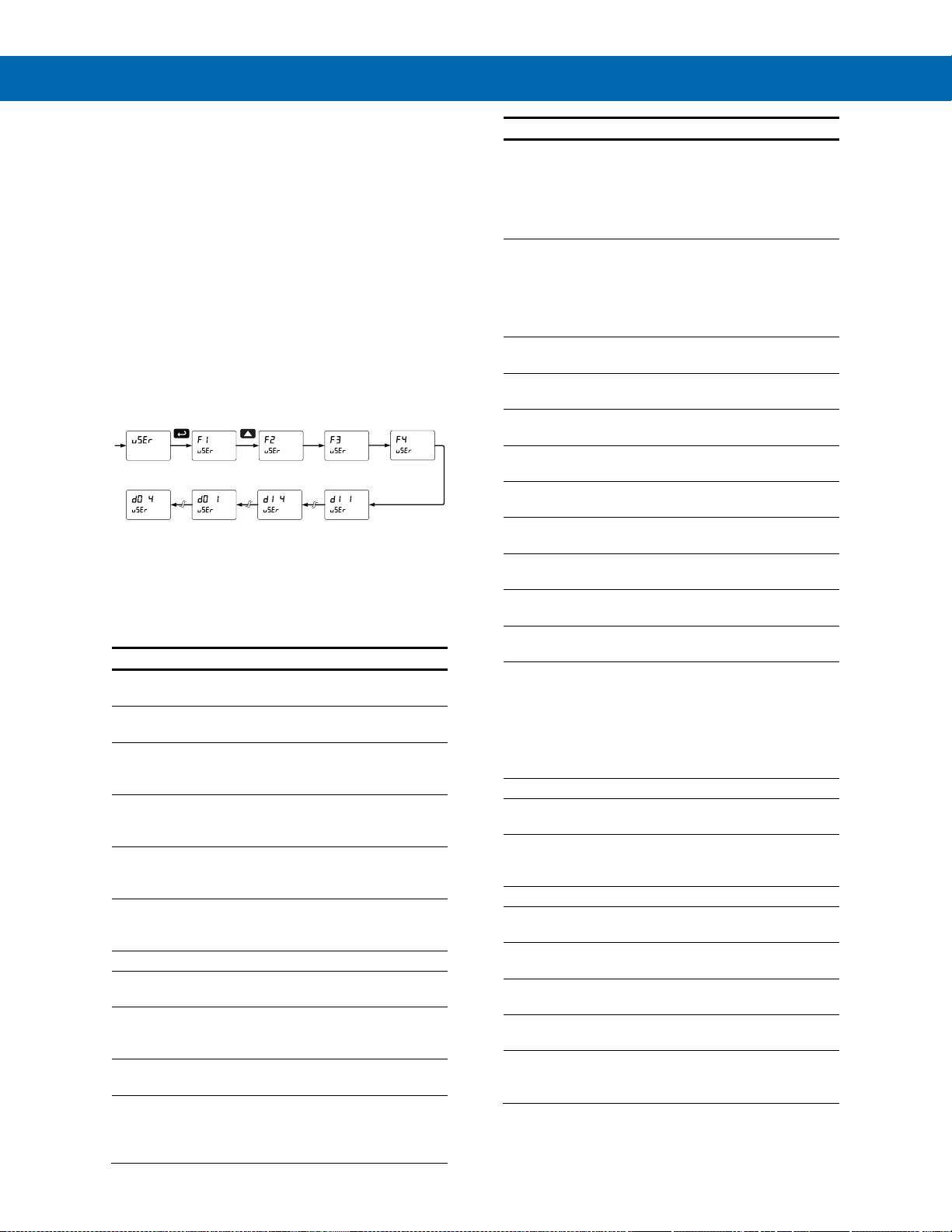
PD8-6060 Explosion-Proof Dual Analog Input Process Meter
Instruction Manual
58
Programmable Function Keys User Menu (user)
The User menu allows the user to assign the front
programming buttons function keys F1, F2, and F3,
the digital input F4 (located on the input signal
connector), and four digital inputs (located on the
digital I/O connector) to access most of the menus or
to activate certain functions immediately (e.g. reset
max & min, hold relay states, etc.). This allows the
meter to be greatly customized for use in specialized
applications.
The four digital outputs can be assigned to a number
of actions and functions executed by the meter (i.e.
alarms, relay acknowledgement, reset max, min, or
max & min, tare, and reset tare). The digital outputs
can be used to trigger external alarms or lights to
indicate these specific events.
Function Keys & Digital I/O Available Settings
Refer to the following table for descriptions of each
available function key or digital I/O setting.
Display
Description
Rst Hi
Reset the stored maximum display
values for all channels
Rst Lo
Reset the stored minimum display
values for all channels
Rst HL
Reset the stored maximum &
minimum display values for all
channels
Tare A
Capture tare and zero the display for
channel A (A LED flashes – same
rate as M)**
Tare B
Capture tare and zero the display for
channel B (B LED flashes – same
rate as M)**
Rst tr
Reset captured tare and resume
normal operation for both channels A
& B
relay
Directly access the relay menu
Set 1*
Directly access the set point menu
for relay 1 (*through 4)
Rly d
Disable all relays until a button
assigned to enable relays (Rly E) is
pressed
Rly E
Enable all relays to function as they
have been programmed
O Hold
Hold current relay states and analog
output as they are until a button
assigned to enable relays (Rly E) is
pressed
Display
Description
d Hold
Hold the current display value, relay
states, and analog output
momentarily while the function key
or digital input is active. The process
value will continue to be calculated
in the background.
D AbC
Scrolls values for A, B & C when
activated. Keeps the last value for 10
seconds and then it returns to its
assignment. Values are displayed on
display line 1 and the corresponding
channel and units on display line 2.
Ln1 Hi
Display maximum channel A display
value on line 1
Ln1 Lo
Display minimum channel A display
value on line 1
Ln1 HL
Display maximum & minimum
channel A display values on line 1
Ln2 Hi
Display maximum channel B display
value on line 2
Ln2 Lo
Display minimum Channel B display
value on line 2
Ln2 HL
Display maximum & minimum
channel B display values on line 2
LitHLC
Display maximum channel C display
value on line 2
Ln2 HC
Display minimum channel C display
value on line 2
Ln2 HC
Display maximum & minimum
channel C display values on line 2
F On 1**
Force relay 1 (*through 4) into the on
state. This function is used in
conjunction with a digital input to
achieve interlock functionality. See
Setting Up the Interlock Relay
(Force On) Feature on page 49 for
details.
Contrl
Directly access the control menu
disabl
Disable the selected function key or
digital I/O
AcH
Acknowledge all active relays that
are in a manual operation mode
such as auto-manual or latching
Reset
Directly access the reset menu
nmenu
Mimic the menu button functionality
(digital inputs only)
rigHt
Mimic the right arrow/F1 button
functionality (digital inputs only)
up
Mimic the up arrow/F2 button
functionality (digital inputs only)
Enter
Mimic the enter/F3 button
functionality (digital inputs only)
Alnm 1*
Provide indication when alarm 1
(*through 4) has been triggered
(digital outputs only)
** If math functions are displayed, the math function
indicator LED “C” will flash when either A or B
channel is using a tare value (net value).
Page 59
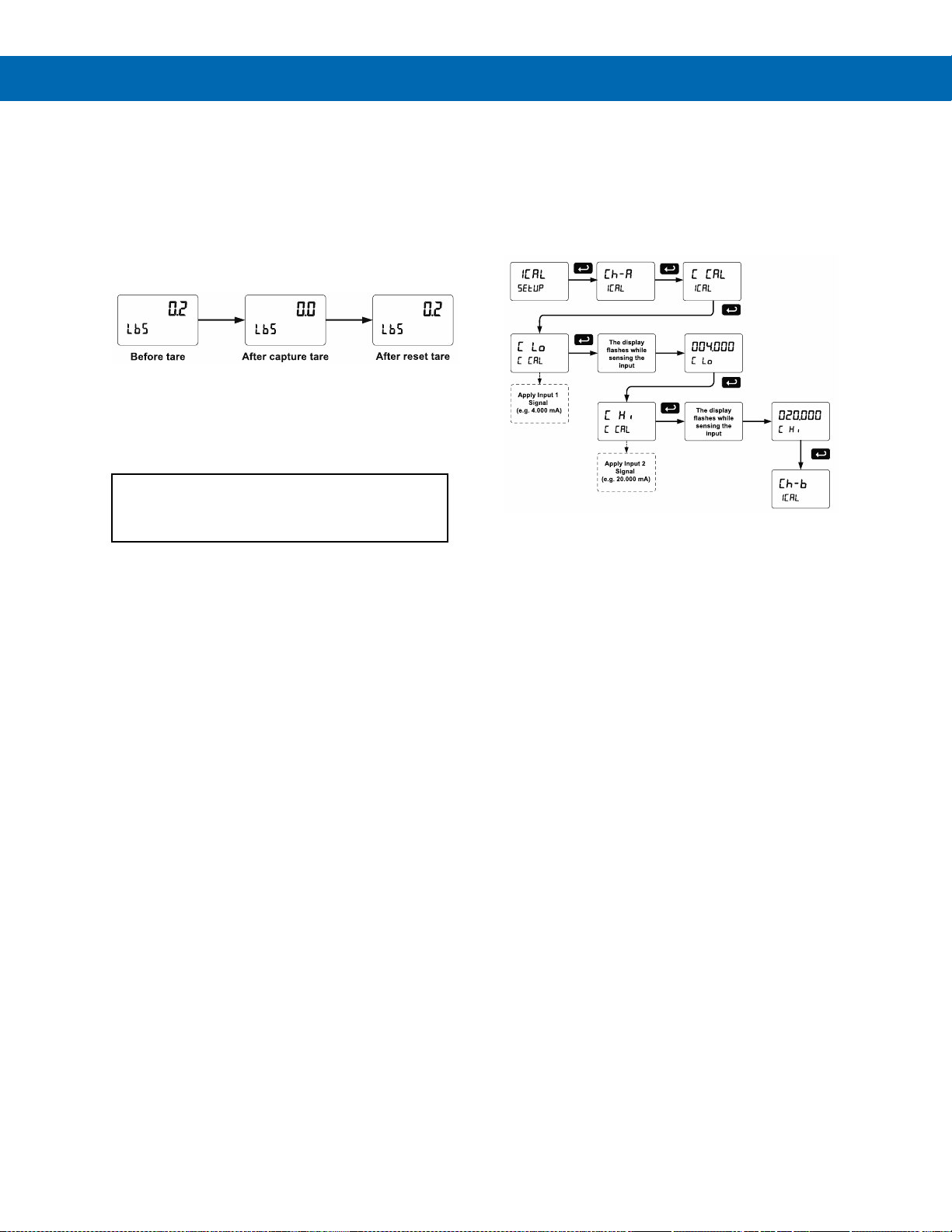
PD8-6060 Explosion-Proof Dual Analog Input Process Meter
Instruction Manual
59
Tare (tare)
The tare function zero’s out the display. In the case of
scale weight, tare is used to eliminate container
weight and provide net weight readings. There are
two tare functions; Capture Tare for channel A and B,
and Reset Tare. Display channel indicator letter
flashes when a tare is used. It will flash until the tare
is reset. The tare can be reset via the Reset menu, a
function key, or a digital input.
Gross (without tare) and net (with tare) values can be
viewed simultaneously. See Setting the Display
Parameter & Intensity (dsplay) on page 41.
Internal Calibration (ICAL)
The meter is factory calibrated prior to shipment
for milliamps and volts with calibration equipment
that is certified to NIST standards.
The use of calibrated signal sources is necessary to
perform the internal calibration of the meter.
Check calibration of the meter at least every
12 months. Each input and input type must be
recalibrated separately.
Notes:
1. If meter is in operation and it is intended to accept
only one input type (e.g. 4-20 mA), recalibration of
other input is not necessary.
2. Allow the meter to warm up for at least 15 minutes
before performing the internal calibration
procedure.
The Internal calibration menu is part of the Advanced
Features menu.
1. Press and hold the Menu button for three
seconds to access the advanced features of the
meter.
2. Press the Up arrow button to scroll to the Internal
calibration menu (ICAL) and press Enter.
3. Select channel A (Ch-A) or channel B (Ch-b) and
press enter.
4. The meter displays either current calibration
(C CAL) or voltage calibration (V CAL), according
to the input setup. Press Enter to start the
calibration process.
Example of Internal Calibration for current
input:
5. The meter displays low input current message
(C lo). Apply the low input signal and press
Enter. The display flashes for a moment while the
meter is accepting the low input signal.
6. After the display stops flashing, a number is
displayed with the leftmost digit brighter than the
rest. The bright digit is the active digit that can be
changed by pressing the Up arrow button. Press
the Right arrow button to move to the next digit.
7. Set the display value to correspond to the input
signal being calibrated, typically 4.000 mA.
8. The display moves to the high input calibration
(C Hi). Apply the high input signal and press
Enter.
9. Set the display for the high input calibration, in
the same way as it was set for the low input
calibration, typically 20.000 mA.
The graphic shows the calibration of the current input.
The voltage input is calibrated in a similar way.
Tips:
• Low and high input signals can be any valid
values within the range of the meter.
• Observe minimum input span requirements
between input 1 and input 2.
• Low input should be less than high input
signal.
Error Message (Error)
An error message indicates that the calibration or
scaling process was not successful.
After the error message is displayed, the meter
reverts to the input prior to the failure during
calibration or scaling and to input 1 during internal
calibration, allowing the appropriate input signal to be
applied or programmed.
The error message might be caused by any of the
following conditions:
1. Input signal is not connected to the proper
terminals or it is connected backwards*.
2. Wrong signal selection in Setup menu*.
3. Minimum input span requirements not
maintained.
4. Input 1 signal inadvertently applied to calibrate
input 2*.
*Not relevant when scaling the meter.
Page 60
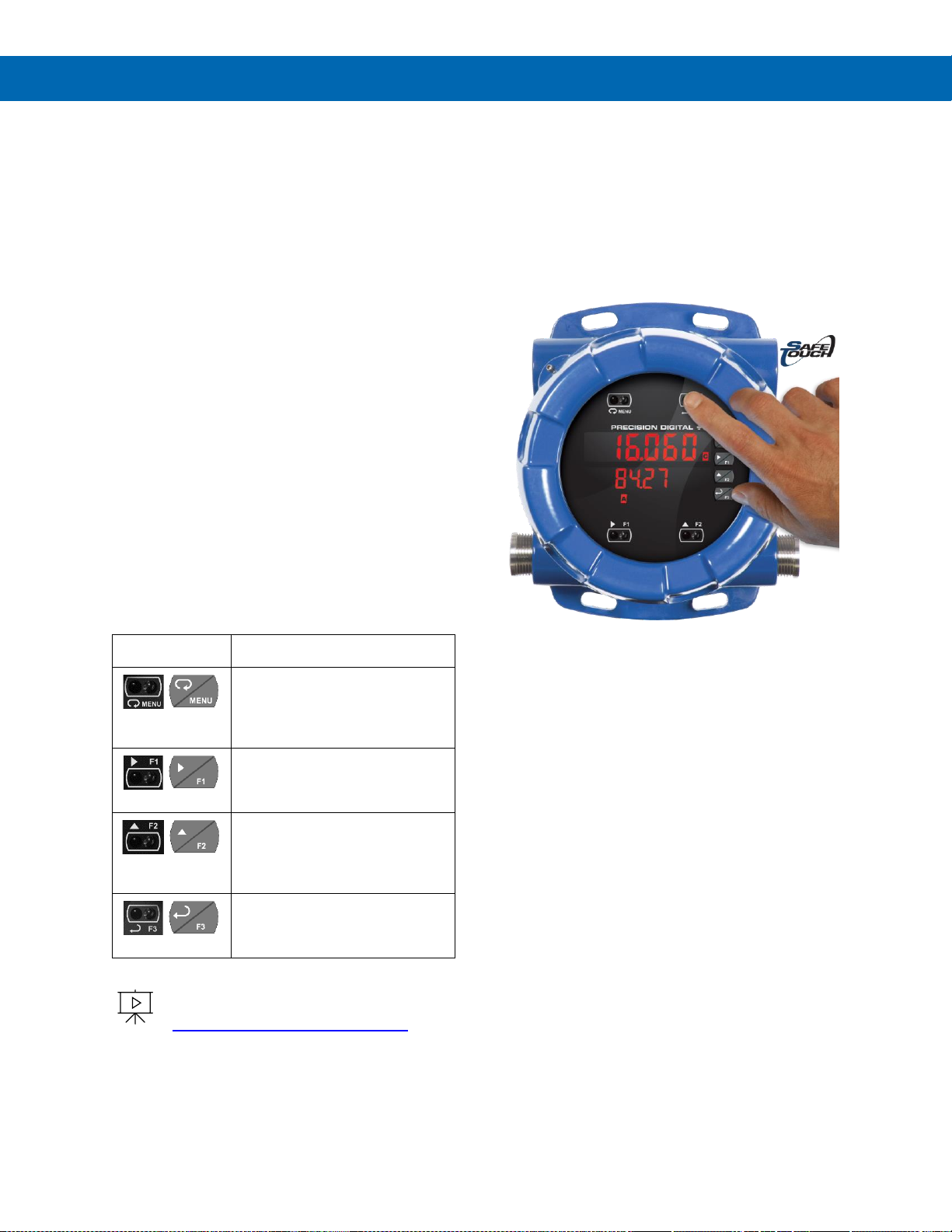
PD8-6060 Explosion-Proof Dual Analog Input Process Meter
Instruction Manual
60
Meter Operation
When installed, the primary way to operate the meter
is with the SafeTouch through-glass buttons that allow
the user to perform various operations without
removing the cover and exposing the electronics to
the hazardous environment. The user can also
operate the meter by connecting a suitable control
station or switch to one of the digital inputs that can
be used to perform various operations on the meter
based on the Programmable Function Keys. Finally,
certain operations can be performed on the meter
with MeterView Pro software or though Modbus®
commands.
The two default operations that can be performed with
the meter’s SafeTouch buttons are:
1. Display the maximum and minimum readings
2. Acknowledge the relays
In addition, the user can program the SafeTouch
Buttons to perform a variety of useful operations by
reassigning them to other functions per Function Keys
& Digital I/O Available Settings on page 58.
Button Operation
The following table shows the default operations for
the F1, F2, and F3 SafeTouch Buttons, Displaying
and resetting the maximum and minimum values and
resetting the relays:
To learn more about SafeTouch buttons,
see this video:
predig.com/videos/Safetouch_Buttons
SafeTouch Buttons
The ProtEX-MAX is equipped with four sensors that
operate as through-glass buttons so that it can be
programmed and operated without removing the cover
(and exposing the electronics) in a hazardous area.
These buttons can be disabled for security by
selecting DISABLE on the switch labeled
NO-CONTACT BUTTONS located on the connector
board.
To actuate a button, press one finger to the glass
directly over the marked button area. Then retract
finger more than three inches from the glass before
pressing the next button. When the cover is removed,
the four mechanical buttons located next to the
sensors are used. The sensors are disabled when a
mechanical button is pressed and will automatically
be re-enabled after 60 seconds of inactivity.
The SafeTouch Buttons are designed to filter normal
levels of ambient interference and to protect against
false triggering, however, it is recommended that the
SafeTouch Buttons be disabled (slide switch to
DISABLE) if there is an infrared interference source in
line-of-sight to the display.
The SafeTouch Buttons are configured by default to
duplicate the function of the front panel mechanical
pushbuttons associated with the integrated meter.
The symbols by each SafeTouch button correspond
to a mechanical button as shown in the above table.
SafeTouch Button Tips:
• To the extent possible, install the display facing
away from sunlight, windows, reflective objects,
and any sources of infrared interference.
• Keep the glass window clean.
• Tighten the cover securely.
• Use a password to prevent tampering.
Button Symbol
Description
Press to enter or exit
Programming Mode, view
settings, or exit max/min
readings
Press to reset max/min readings
or other parameter/function
assigned through the User menu
Press to display max/min
readings or other
parameter/function assigned
through the User menu
Press to acknowledge relays or
other parameters/function
assigned through the User menu
Page 61
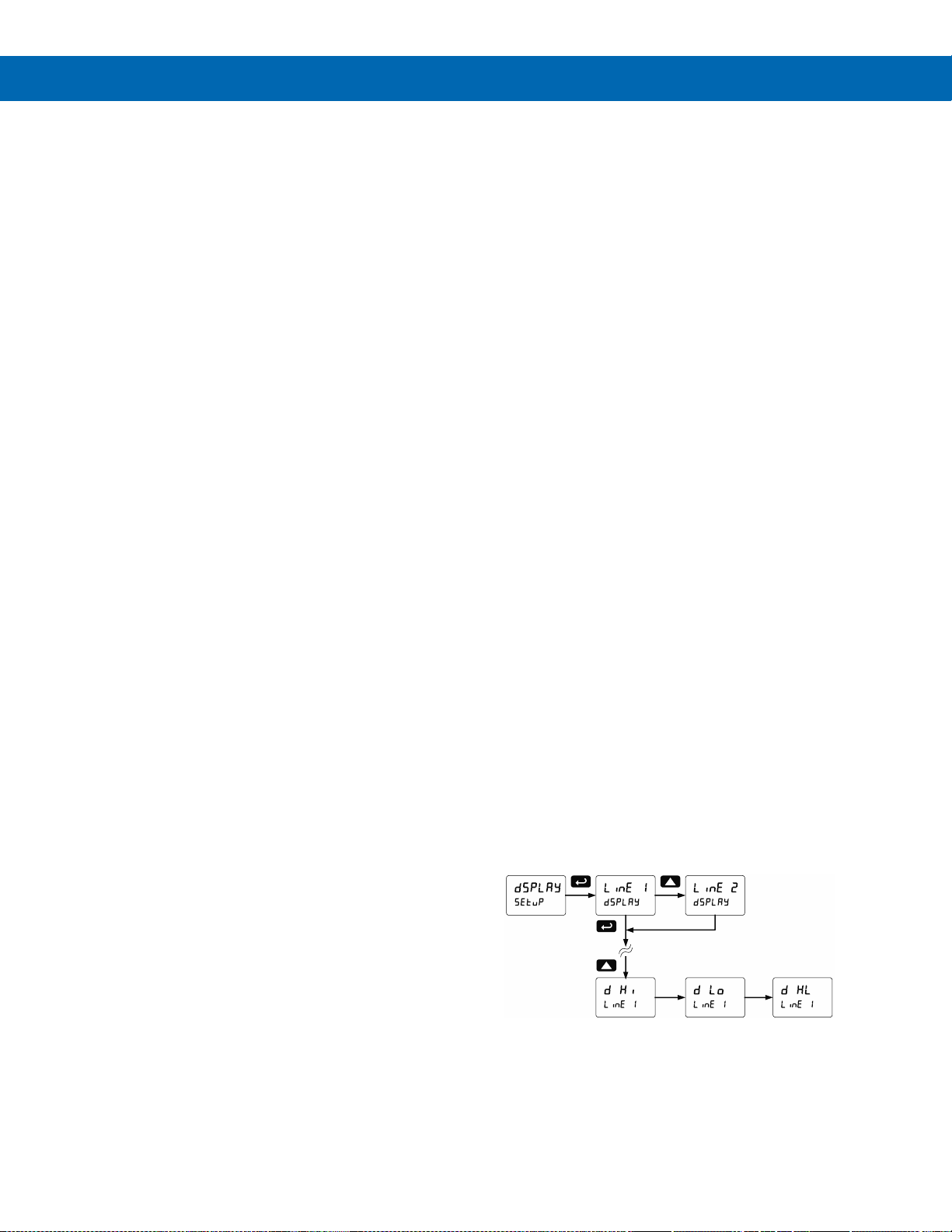
PD8-6060 Explosion-Proof Dual Analog Input Process Meter
Instruction Manual
61
Function Keys Operation
During operation, the programmable function keys
operate according to the way they have been
programmed in the Advanced Features – User menu.
See Programmable Function Keys User Menu (user)
on page 58 for details.
The Meter Operation
When installed, the primary way to operate the meter
is with the SafeTouch through-glass buttons that allow
the user to perform various operations without
removing the cover and exposing the electronics to
the hazardous environment. The user can also
operate the meter by connecting a suitable control
station or switch to one of the digital inputs that can
be used to perform various operations on the meter
based on the Programmable Function Keys. Finally,
certain operations can be performed on the meter
with MeterView Pro software or though Modbus®
commands.
The two default operations that can be performed with
the meter’s SafeTouch buttons are:
1. Display the maximum and minimum readings
2. Acknowledge the relays
In addition, the user can program the SafeTouch
Buttons to perform a variety of useful operations by
reassigning them to other functions per Function Keys
& Digital I/O Available Settings on page 58.
Button Operation table on page 60 shows the factory
default settings for F1, F2, and F3.
Digital Inputs Operation
Five (5) digital inputs, F4, DI-1 to DI-4, come standard
on the meter. These digital inputs are programmed
identically to function keys F1, F2, and F3. The inputs
are triggered with a contact closure to +5 in the case
of digital inputs 1-4 or with an active high signal, see
Digital I/O Connections on page 31 for details. The F4
is triggered with a contact closure to COM or with an
active low signal. During operation, digital inputs
operate according to the way they are programmed in
the Advanced Features – User menu. See
Programmable Function Keys User Menu (user) on
page 58 for details.
Maximum/Minimum Readings
The max & min readings (peak & valley) reached by
the process can be displayed either continuously or
momentary:
1. Display briefly by assigning to the F1-F3
function keys or to the digital inputs in the
User menu.
2. Display continuously by assigning either
display to max/min through the Display
menu.
Any of the F1-F3 function keys (buttons) and the
digital inputs can be programmed to reset the max &
min readings. The meters are set at the factory to
display the max reading by pressing the Up arrow/F2
button and to use the Right arrow/F1 button to access
the Reset menu.
To display max and min channel A reading using
function key with factory defaults:
1. Press Up arrow/F2 button to display minimum
reading of channel A since the last reset/powerup. The display will then display the maximum
reading of channel A since the last reset/powerup.
2. Press the Up arrow/F2 button again to display the
minimum reading of channel A since the last
reset/power up.
3. To reset max/min press Right arrow/F1 button to
access the Reset menu. The max & min displays
are reset to actual values.
Press Menu to exit max/min display reading.
Page 62
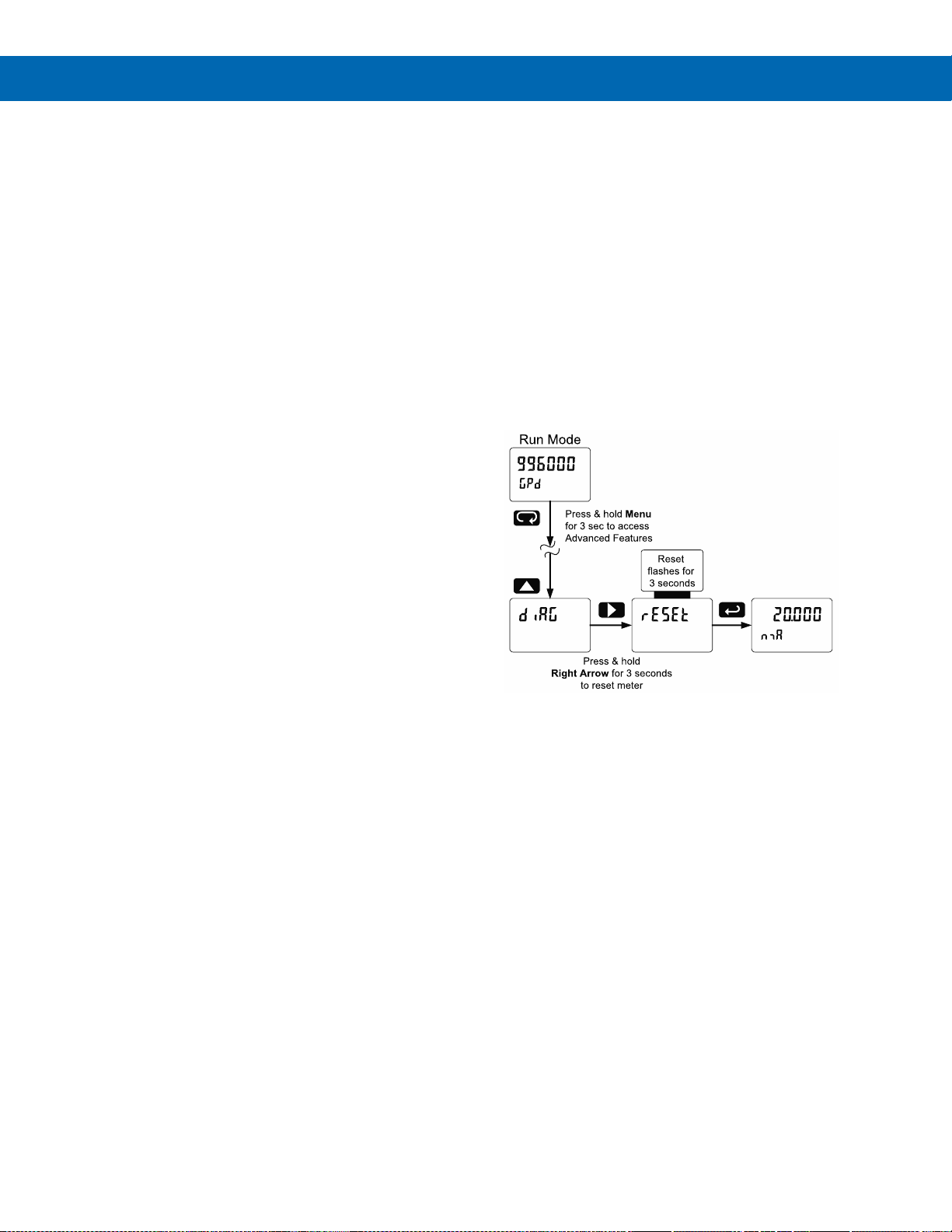
PD8-6060 Explosion-Proof Dual Analog Input Process Meter
Instruction Manual
62
Troubleshooting
The rugged design and the user-friendly interface of
the meter should make it unusual for the installer or
operator to refer to this section of the manual.
However, due to the many features and functions of
the meter, it’s possible that the setup of the meter
does not agree with what an operator expects to see.
If the meter is not working as expected, refer to the
Diagnostics menu and recommendations below.
Diagnostics Menu (diag)
The Diagnostics menu is located in the Advanced
Features menu, to access Diagnostics menu see
Advanced Features Menu on page 52.
This menu allows the user to test the functionality of
all the meter LEDs, check the meter’s software and
version information, and erase the MeterView Pro
software installation files from the meter. Press the
Enter button to view the settings and the Menu button
to exit at any time.
For a description of the diagnostic messages, see
Advanced Features Menu & Display Messages on
page 52.
Testing the Display LEDs
To test all LEDs on the display:
1. Go to the Diagnostics menu (diAG) and
press Enter button.
2. Press Up arrow button and scroll to
LED Test menu (led t)
3. Press the Enter button to activate the LED
Test. The meter will cycle through all digits,
decimal points, and relay indicators to
enable the operator to check that all LEDs
are functioning properly.
4. Press the Enter button again to access the
Information menu (info) or press the Menu
button to return to Run Mode.
Determining Software Version
To determine the software version of a meter:
1. Go to the Diagnostics menu (diAG) and press
Enter button.
2. Press Up arrow button and scroll to Information
menu (Info).
3. Press Enter to access the software number (SFT)
and version (UER) information. Write down the
information as it is displayed. Continue pressing
Enter until all the information is displayed.
4. The meter returns to Run Mode after displaying
all the settings.
Reset Meter to Factory Defaults
When the parameters have been changed in a way
that is difficult to determine what’s happening, it might
be better to start the setup process from the factory
defaults.
Instructions to load factory defaults:
1. Enter the Advanced Features menu. See
Advanced Features Menu on page 52.
2. Press Up arrow to go to Diagnostics (diAG) menu
3. Press and hold Right arrow for three seconds,
press Enter when display flashes reset.
Note: If Enter is not pressed within three seconds, the
display returns to the Diagnostics menu.
4. The meter goes through an initialization
sequence (similar as on power-up), and loads the
factory default settings.
Page 63

PD8-6060 Explosion-Proof Dual Analog Input Process Meter
Instruction Manual
63
Factory Defaults & User Settings
The following table shows the factory setting for most
of the programmable parameters on the meter.
Factory Defaults & User Settings
Parameter
Display
Default Setting
Input type
Input
Input type, channel A
Ch-A
4-20 mA
Input type, channel B
Ch-B
4-20 mA
Unit
unit
Unit, channel A
Ch-A
mA-A
Unit, channel B
Ch-B
mA-b
Unit, channel C
Ch-C
mA-C
Number of points
No pts
Number of points, ch A
Ch-A
2
Number of points, ch B
Ch-B
2
Scaling, (channel A)
Scal a
Input 1, channel A
InP 1
4.000 mA
Display 1, channel A
Dis 1
4.000
Input 2, channel A
InP 2
20.000 mA
Display 2, channel A
Dis 2
20.000
Scaling (channel B)
Scal b
Input 1, channel B
InP 1
4.000 mA
Display 1, channel B
Dis 1
4.000
Input 2, channel B
InP 2
20.000 mA
Display 2, channel B
Dis 2
20.000
Math, channel C
Sum
Sum
Adder (constant P)
Adder
0.000
Factor (constant F)
Factor
1
Filter
Filter
Filter, channel A
Ch-A
70
Filter, channel B
Ch-B
70
Bypass, channel A
bypass
0.2
Bypass, channel B
bypass
0.2
Round
Round
1
Cutoff
Cutoff
Cutoff value, channel A
Ch-a
0.0 (disabled)
Cutoff value, channel B
Ch-b
0.0 (disabled)
Display assignment
Dsplay
Display line 1
D Ch-A
Channel A
Display line 2
d Ch-B
Channel B
Display intensity
d-Inty
6
Relay 1 assignment
Ch-A
Channel A
Relay 1 action
Act 1
Automatic
Relay 1 set point
Set 1
1.000
Relay 1 reset point
RSt 1
0.500
Relay 2 assignment
Ch-A
Channel A
Factory Defaults & User Settings
Parameter
Display
Default Setting
Relay 2 action
Act 2
Automatic
Relay 2 set point
Set 2
2.000
Relay 2 reset point
RSt 2
1.500
Relay 3 assignment
Ch-A
Channel A
Relay 3 action
Act 3
Automatic
Relay 3 set point
Set 3
3.000
Relay 3 reset point
RSt 3
2.500
Relay 4 assignment
Ch-A
Channel A
Relay 4 action
Act 4
Automatic
Relay 4 set point
Set 4
4.000
Relay 4 reset point
RSt 4
3.500
Fail-safe relay 1
Fls 1
Off
Fail-safe relay 2
Fls 2
Off
Fail-safe relay 3
Fls 3
Off
Fail-safe relay 4
Fls 4
Off
On delay relay 1
On 1
0.0 sec
Off delay relay 1
Off 1
0.0 sec
On delay relay 2
On 2
0.0 sec
Off delay relay 2
Off 2
0.0 sec
On delay relay 3
On 3
0.0 sec
Off delay relay 3
Off 3
0.0 sec
On delay relay 4
On 4
0.0 sec
Off delay relay 4
Off 4
0.0 sec
Loop break relay 1
ignore
Ignore
Loop break relay 2
ignore
Ignore
Loop break relay 3
ignore
Ignore
Loop break relay 4
ignore
Ignore
Display 1 analog out
Dis 1
4.000
Output 1 value
Out 1
4.000 mA
Display 2 analog out
Dis 2
20.000
Output 2 value
Out 2
20.000 mA
Source analog output
Source
Channel A
Overrange output
O-rang
21.000 mA
Underrange output
u-rang
3.000 mA
Loop break output
break
3.000 mA
Maximum output
nmAx
23.000 mA
Minimum output
nmin
3.000 mA
Slave ID (Address)
SlavId
247
Baud rate
baud
9600
Transmit delay
Tr dly
50 ms
Parity
Parity
Even
Byte-to-byte timeout
t-byt
010 (0.1 sec)
F1 function key
F1
Reset max & min
Page 64

PD8-6060 Explosion-Proof Dual Analog Input Process Meter
Instruction Manual
64
Factory Defaults & User Settings
Parameter
Display
Default Setting
F2 function key
F2
Upper Max & Min
F3 function key
F3
Acknowledge
relays
F4 function
(digital input)
F4
Acknowledge
relays
Digital input 1
DI 1
Menu
Digital input 2
DI 2
Right arrow
Digital input 3
DI 3
Up arrow
Digital input 4
DI 4
Enter
Digital output 1
DO 1
Alarm 1
Factory Defaults & User Settings
Parameter
Display
Default Setting
Digital output 2
DO 2
Alarm 2
Digital output 3
DO 3
Alarm 3
Digital output 4
DO 4
Alarm 4
Password 1
Pass 1
000000
(unlocked)
Password 2
Pass 2
000000
(unlocked)
Password 3
Pass 3
000000
(unlocked)
Page 65
PD8-6060 Explosion-Proof Dual Analog Input Process Meter
Instruction Manual
65
Troubleshooting Tips
This meter is a highly sophisticated instrument with an extensive list of features and capabilities. If the programming
buttons are used to program the meter, it may be a difficult task to keep everything straight. That is why we strongly
recommend the use of the free MeterView Pro software for all programming activities. A USB cable is provided with
the meter for programming with MeterView Pro software.
If you have programmed the meter with the programming buttons and it is not working as intended, try re-programming
the meter using MeterView Pro software.
Symptom
Check/Action
No display at all
Check power at power connector
Not able to change setup or programming, Locd
is displayed
Meter is password-protected; enter correct six-digit password to
unlock or Master Password of 508655
Meter does not respond to input change
If a Low-Flow Cutoff Value has been programmed, the meter will
display zero below that point, regardless of the input – which can
appear like the meter is not responding to an input change. Check to
make sure the problem is not being caused by an undesired low-flow
cutoff value.
To prevent the display from showing a negative value, set the
low-flow cutoff to a value greater than zero.
Meter displays error message during calibration
(Error)
Check:
1. Signal connections
2. Input selected in Setup menu
3. Minimum input span requirements
Meter displays
1. 999999
2. -99999
Check:
1. Input selected in Setup menu
2. Corresponding signal at Signal connector
Display is unstable
Check:
1. Input signal stability and value
2. Display scaling vs. input signal
3. Filter and bypass values (increase)
Display response is too slow
Check filter and bypass values
Display reading is not accurate
Check:
1. Input signal conditioner selected: Linear, square root, etc.
2. Scaling or calibration
Display does not respond to input changes,
reading a fixed number
Check display assignment, it might be displaying max, min, or set
point
Display alternates between
1. Hi and a number
2. Lo and a number
Press Menu to exit max/min display readings
Relay operation is reversed
Check:
1. Fail-safe in Setup menu
2. Wiring of relay contacts
Relay and status LED do not respond to signal
Check:
1. Relay action in Setup menu
2. Set and reset points
Flashing relay status LEDs
Relays in manual control mode or relay interlock switches opened
Meter not communicating with application
programs
Check:
1. M-Link Connector installed between PROVU electronics and
ProtEX-MAX connector board. See Figure 4: Integrated
PROVU Required Connections on page 27
2. Serial settings
3. Meter address and baud rate
If the display locks up or the meter does not
respond at all
Cycle the power to reboot the microprocessor
Page 66
PD8-6060 Explosion-Proof Dual Analog Input Process Meter
Instruction Manual
66
Troubleshooting Tips
Symptom
Check/Action
SafeTouch buttons do not respond
1. If mechanical button was pushed, the SafeTouch buttons will
be re-enabled automatically 60 seconds after the last button
push.
2. If slide switch on connector board is in DISABLE position,
switch to ENABLE.
3. Strong direct sunlight may interfere with SafeTouch button
operation. It is recommended to operate the buttons by
standing so as to block direct sunlight.
Serial Communications Power LED Indicator is
off
Check:
1. Modular cable connection
2. Power to the device
If only the TX (or DATA IN) data status LED is
flashing when serial communications attempted
Check:
1. Serial cable
2. Protocol selected on device
3. Instrument address & baud rate
4. Program address & baud rate
If both data status LEDs (TX and RX) are off
when trying to communicate
Remove all unnecessary cables and instruments from the bus.
Try getting the system to work with only one device (to ease
troubleshooting) and then expand the system one device at a time.
Communications slow
Increase the baud rate
Random communication errors
1. Increase the TX delay time
2. Decrease the baud rate
Other symptoms not described above
Call Technical Support for assistance
Note: Certain sequences of events can cause unexpected results. To solve these issues, it is best to start fresh from factory
defaults and use the manual as a step by step programming guide, rather than a random approach to programming. To reset the
meter to factory defaults, see Reset Meter to Factory Defaults on page 62. In addition, for best results, we recommend using the
free MeterView Pro software for all programming needs.
Page 67
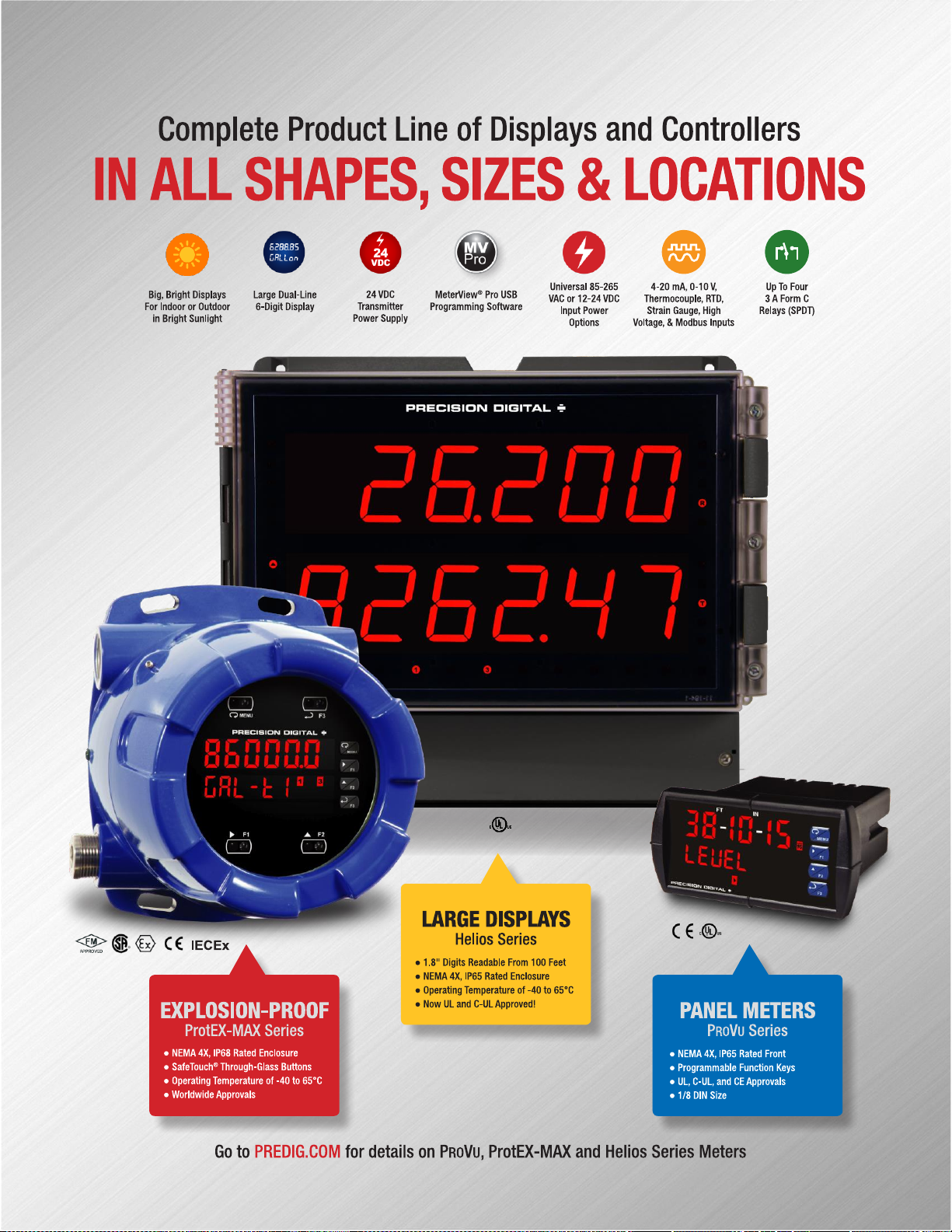
67
Page 68

PD8-6060 Explosion-Proof Dual Analog Input Process Meter
Instruction Manual
PRECISION DIGITAL CORPORATION
233 South Street • Hopkinton MA 01748 USA
Tel (800) 343-1001 • Fax (508) 655-8990
www.predig.com
LIM8-6060_F
SFT039 Ver 4.010 & up
04/22
Contact Precision Digital
Technical Support
Call: (800) 610-5239 or (508) 655-7300
Fax: (508) 655-8990
Email: [email protected]
Sales Support
Call: (800) 343-1001 or (508) 655-7300
Fax: (508) 655-8990
Email: [email protected]
Place Orders
Email: [email protected]
For the latest version of this manual please visit
www.predig.com
 Loading...