

Page 1
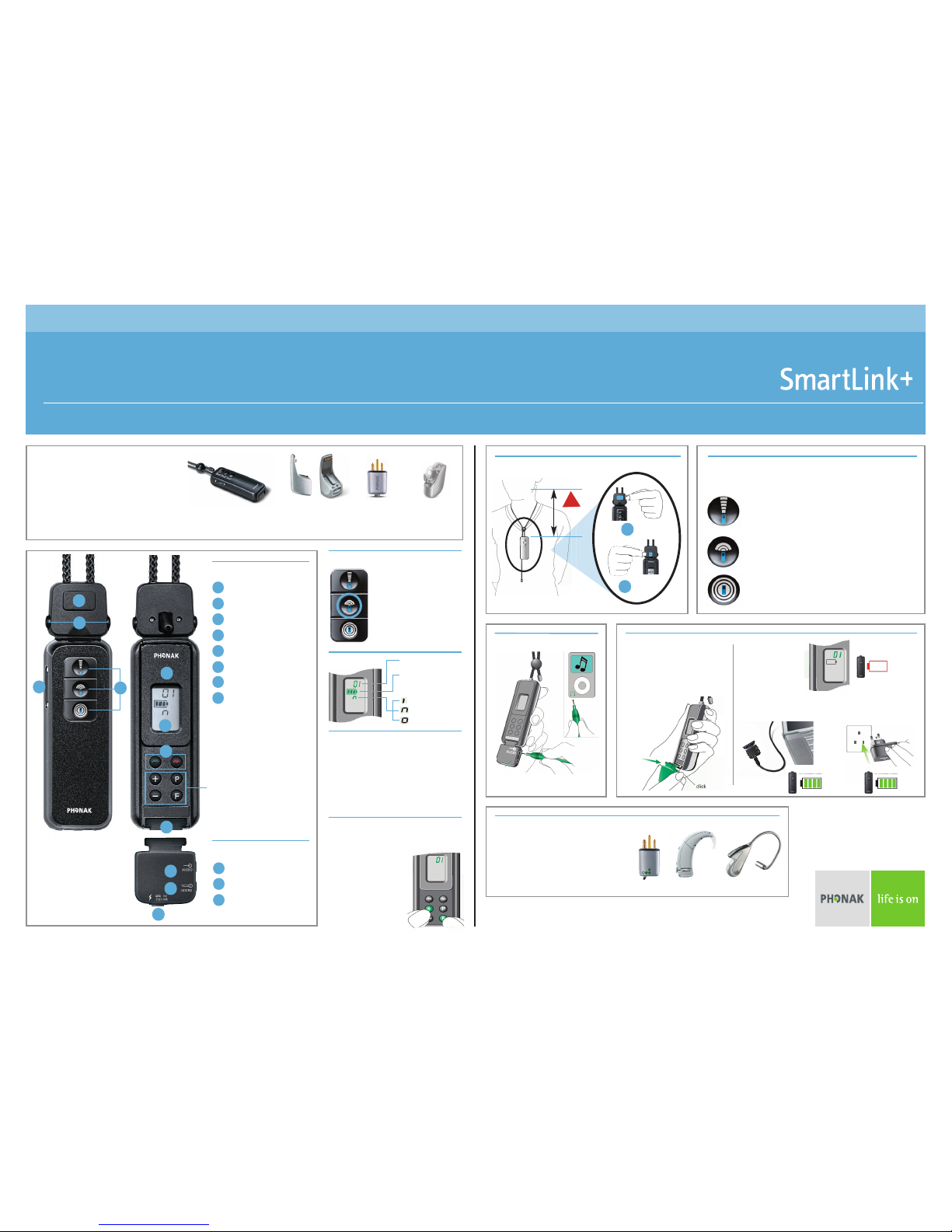
Quick Reference Guide
A pupils radio aid system consists of
two parts:
• Transmitter (worn by teacher) and
• Receivers (worn by pupil)
For audio shoe advice visit
www.phonak.com/eschooldesk
SmartLink+ transmitter Audio Shoes MLxi receiver Integrated
receiver
Phonak recommends
that you push the
Middle "Zoom" button
down for 2 seconds to
turn off and on for
normal teaching.
To synchronise a receiver, turn the
Easylink+ on, or push the F button,
within a 50cm range of the receiver.
The receiver should beep to confirm
this action.
On/Off Button
Wearing & Adjustment Microphone Directionality
SmartLink+ Compatability
Charging
For more information about your SmartLink+ and how to use other functions
please consult the user manual, or visit www.phonak.com/eschooldesk
✓✓
Standard 3.5mm audio cable
IF
OR
Order Ref: SmartLink+ Quick Ref Guide - Phonak UK
Channel Number
Battery Status
LCD Display
Key
SmartLink+ Interface
Synchronising
1
5
6
8
A
B
C
3
Twin Microphone Ports
On/Off & Mic Positions
Lavaliere Adjust Button
Lavaliere Release
Clip
LCD Display
Bluetooth buttons
SmartLink+ Interface Port
1
2
3
4
5
6
7
8
A
B
C
Audio Input
SmartLink+ interface
should be attached to
charge the SmartLink+
or attach external
devices.
!
6 inches
➔
Smartlink+ has three microphone settings...
Superzoom
Narrow beam directionality for, in exceptional
circumstances, pointing at sound source, or
extremely harsh teaching environments.
Zoom (Recommended)
The recommended directional setting for
everyday teaching scenarios.
Omni-directional
For using in quiet, group discussion situations
by placing at the opposite end of the table.
Audio in
Mic in
Charging Port
Press the + and F keys together.
The channel indicator
in the display
starts flashing.
Press + or - to move
up/down channels.
Change Channel
Smartlink+ is fully compatible with
ALL of Phonak’s FM receivers, past
and present (examples shown).
Simply turn on the transmitter...
and start teaching!
Mic Position
- Superzoom
- Zoom
- Omni (360°)
2
4
7
1
2
Push!
Pull!
Hearing Instrument
Remote Controls
(NHS HI’s are incompatible)
 Loading...