

Page 1
User Guide
Phonak SkyTM V
(V90/V70/V50)
Manufacturer:
Phonak AG
Laubisrütistrasse 28
CH-8712 Stäfa
Switzerland
www.phonak-us.com
029-0370-03/V1.00/2016-04/Printed in USA © Phonak AG All rights reserved
Page 2
4
Wireless models
Phonak Sky V90-M
Phonak Sky V90-P
Phonak Sky V90-SP
Phonak Sky V90-UP
Phonak Sky V90-RIC
Phonak Sky V70-M
Phonak Sky V70-P
Phonak Sky V70-SP
Phonak Sky V70-UP
Phonak Sky V70-RIC
Phonak Sky V50-M
Phonak Sky V50-P
Phonak Sky V50-SP
Phonak Sky V50-UP
Phonak Sky V50-RIC
CE mark applied
2016
2016
2016
2016
2016
2016
2016
2016
2016
2016
2016
2016
2016
2016
2016
This user guide is valid for:
Your hearing aid details
Model
c Sky V-M (V90/V70/V50)
c Sky V-P (V90/V70/V50)
c Sky V-SP (V90/V70/V50)
c Sky V-UP (V90/V70/V50)
c Sky V-RIC (V90/V70/V50)
Earpiece
c Dome
c Classic earmold
c cShell
c SlimTip
Battery type
312
13
13
675
13
If no box is checked and you do not know the
model of your hearing aid, please ask your hearing
care professional.
Your hearing care professional:
Page 3
6
Your hearing aids have been developed by
Phonak — the world leader in hearing solutions based
in Zurich, Switzerland.
These premium products are the result of decades of
research and expertise and are designed to keep you
connected to the beauty of sound! We thank you for
making such a great choice and wish you many years of
listening pleasure.
Please read the user guide carefully to make sure that you
understand and get the best out of your hearing aids. For
more information about features and benets, simply
contact your hearing care professional.
Phonak — life is on
www.phonak-us.com
Download the Phonak Support App
To have an individual and interactive user guide
always with you, download the Phonak Support App
on your mobile device. For more information please
visit: www.phonak-us.com/supportapp
Page 4

7 8
Contents
Your hearing aid
1. Quick guide
2. Parts of the hearing aid
Using the hearing aid
3. Left & right hearing aid markings
4. On/O
5. Batteries
6. Putting on the hearing aid
7. Removing the hearing aid
8. Push button/indicator light
9. Volume control
Further Information
10. Roger for conversation in noise and
over distance
11. Use of Roger receiver
12. Other wireless accessories
13. Care and maintenance
14. Service and warranty
15. Compliance information
16. Information and description of symbols
17. Troubleshooting
18. Important safety information
8
10
13
14
15
19
21
23
25
26
28
33
34
37
39
43
48
51
60
62
19. Important information: Cell phones
20. For the US market only, complies with the FDA
regulations
Page 5
9 10
Sky V-P, V-SP, V-UP
Sky V-M / V-RIC
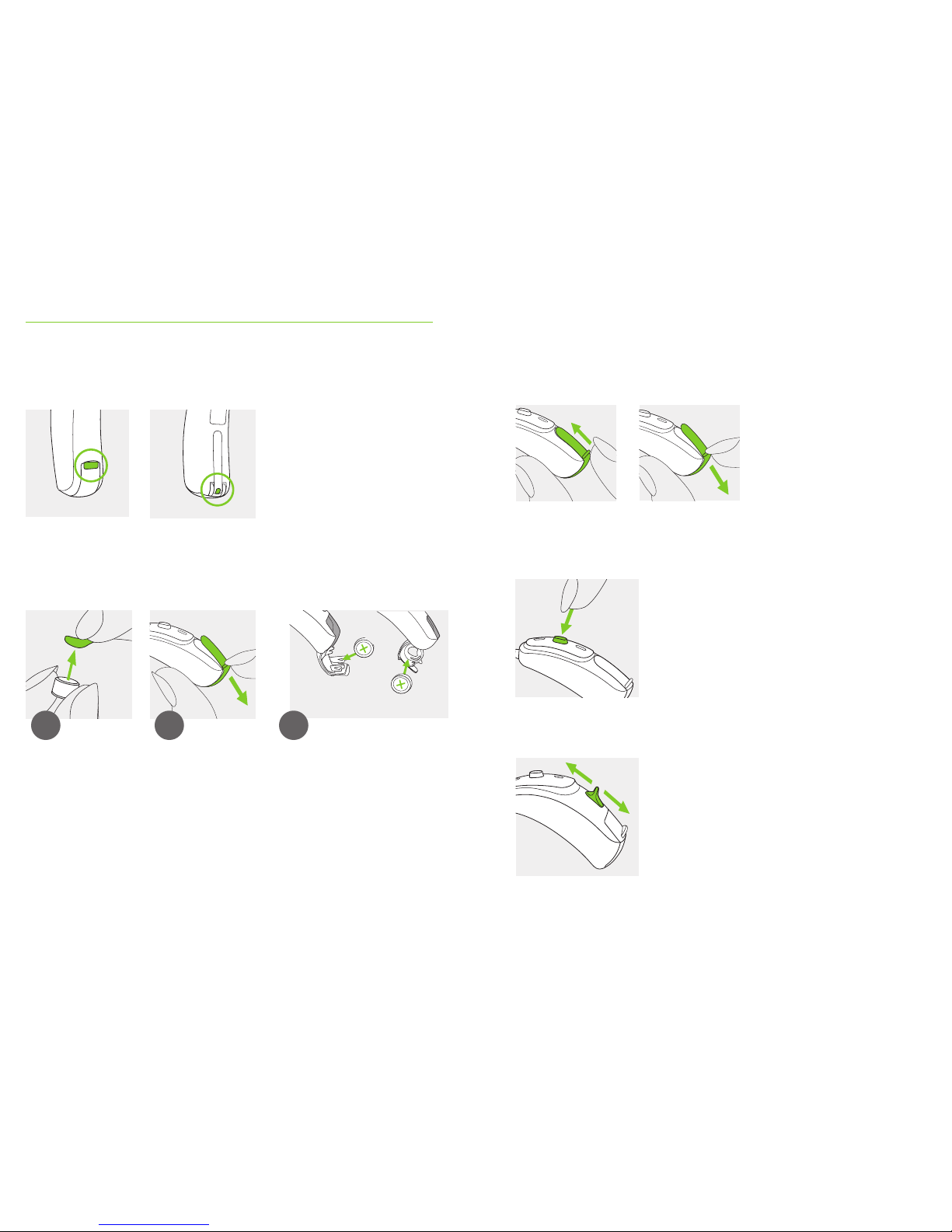
1. Quick guide
Left & right hearing aid markings
Changing batteries
1 2
Blue marking for left
hearing aid.
Red marking for right
hearing aid.
Remove the sticker
from the new
battery and wait
two minutes.
Sky V-M Sky V-P, V-SP, V-UP,
V-RIC
3
Open the battery
door. For secured
battery doors refer
to chapter 5.2.
Place battery in the battery
door with the “+” symbol
facing upwards.
On/O
Push button/indicator light
Volume control
The push button on your hearing aid can have
various functions. For indicator light refer to
chapter 8.
For instruction for secured
battery doors refer to
chapter 5.2.
Sky V-P, V-SP, V-UP and V-RIC:
To increase the volume, press the volume
control upwards. To decrease the volume,
press the volume control downwards.
O
On
Page 6
11 12
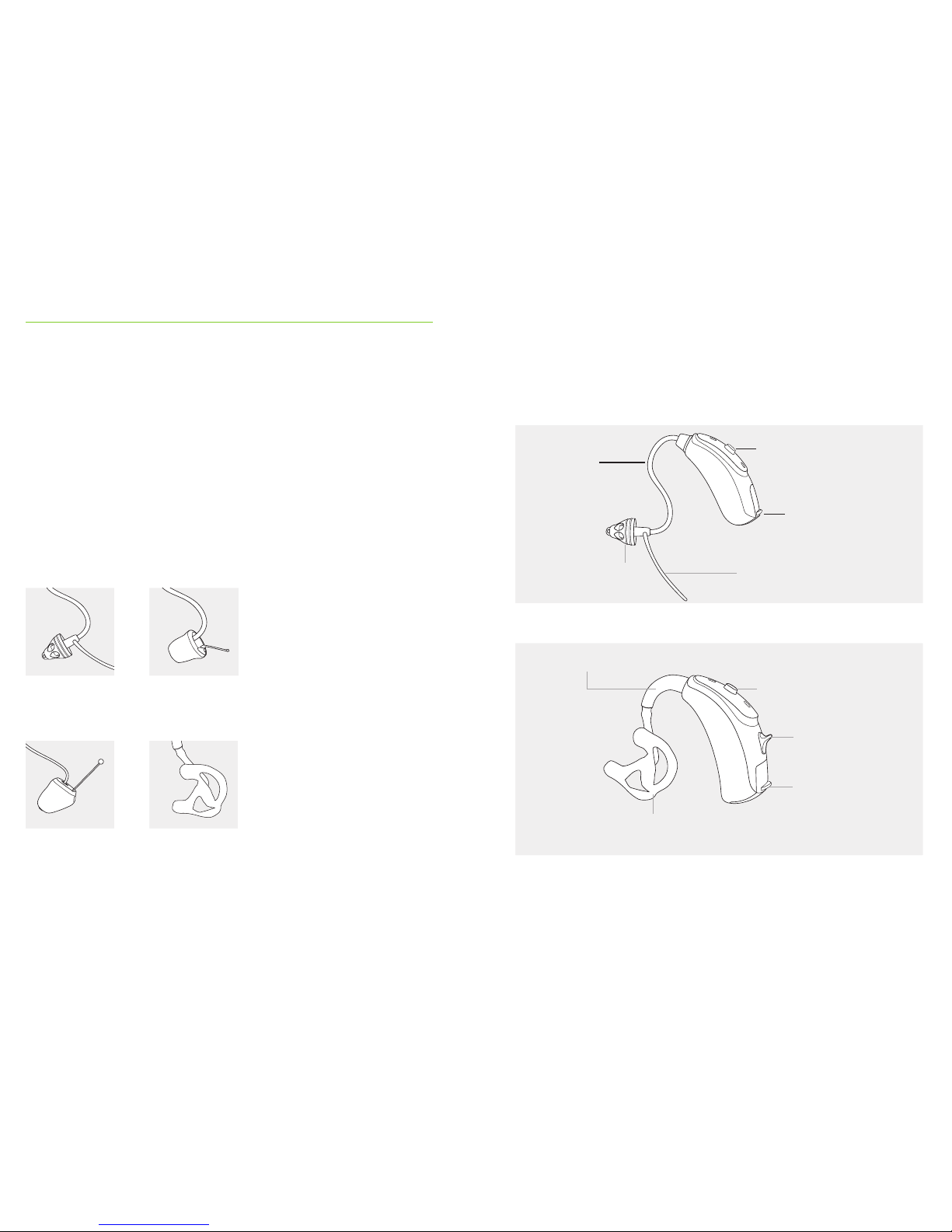
2. Parts of the hearing aid
The pictures below show the models described in this user
guide. You can identify your personal model by:
• Checking “Your hearing aid details” on page 3.
• Or comparing your hearing aid with the following
shown models. Pay attention to the shape of the
hearing aid and if a volume control is present.
Possible earpieces for dierent models
Classic earmold
Sky V-M/P/SP/UP
cShell
Sky V-RIC
SlimTip
Sky V-M/P/RIC
Dome
Sky V-M/P/RIC
Battery door
AnchorEarpiece: dome
(detachable)
Push button
Sky V-M *
Tube
Push button
Sky V-P *, V-SP * & V-UP *
Hook / sound output
Classic earmold
(detachable)
Battery door
Volume control
* Also available with secure solution for children below 36 months, refer to chapter 5.2
Page 7
13 14
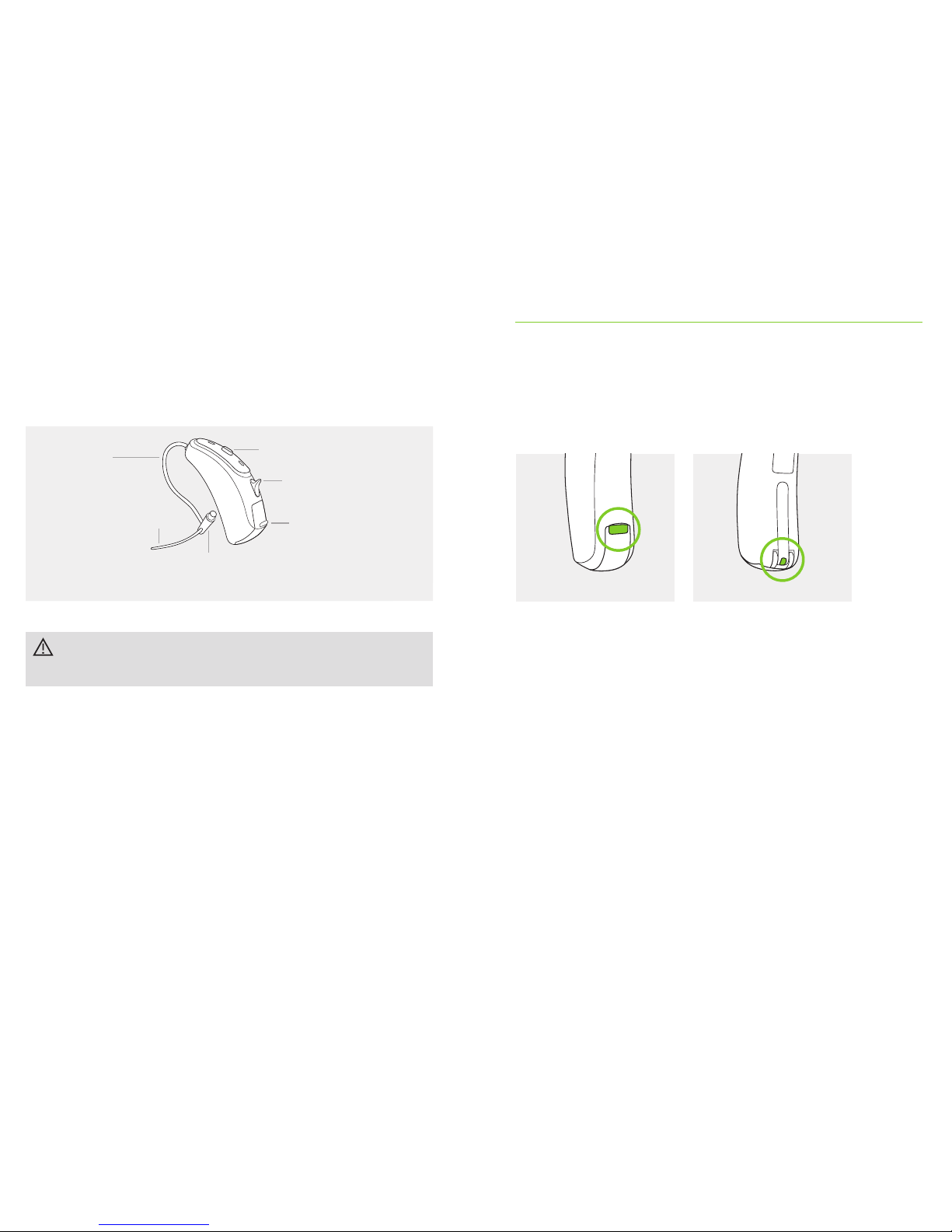
Anchor (optional)
Push button
Tube
Speaker
(without earpiece attached)
Battery door
Volume control
Sky V-RIC
Sky V-RIC is not recommended for the use with
children below 8 years.
3. Left & right hearing aid markings
There is a red or blue marking to tell you if it is a left
or a right hearing aid.
Blue marking for left hearing aid.
Red marking for right hearing aid.
Sky V-M Sky V-P, V-SP, V-UP, V-RIC
Page 8
15 16
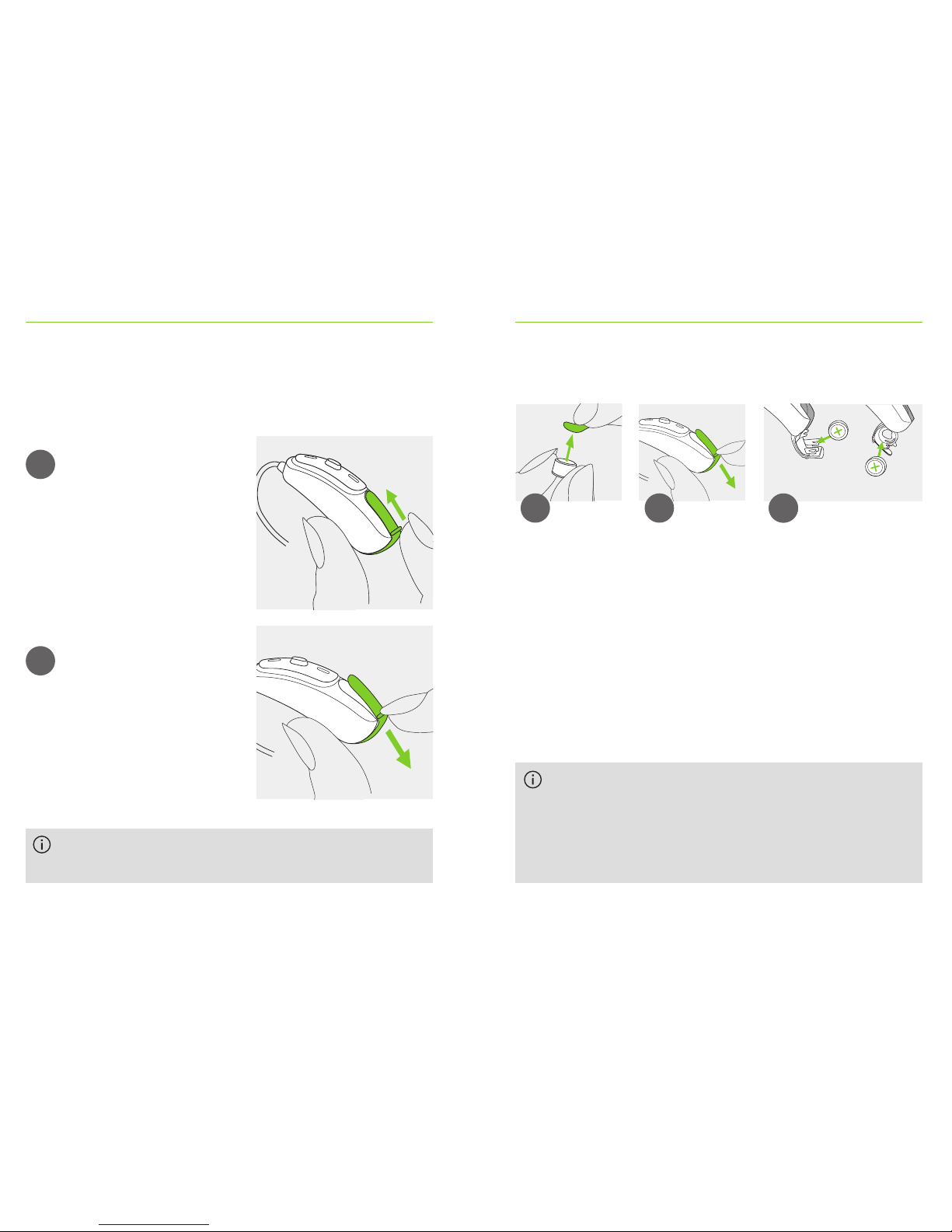
4. On/O
The battery door is also the on/o switch.
To open secured battery doors refer to chapter 5.2.
1
2
Closed battery door =
hearing aid is on
Open battery door =
hearing aid is o
When you switch on the hearing aid you may hear
a start-up melody.
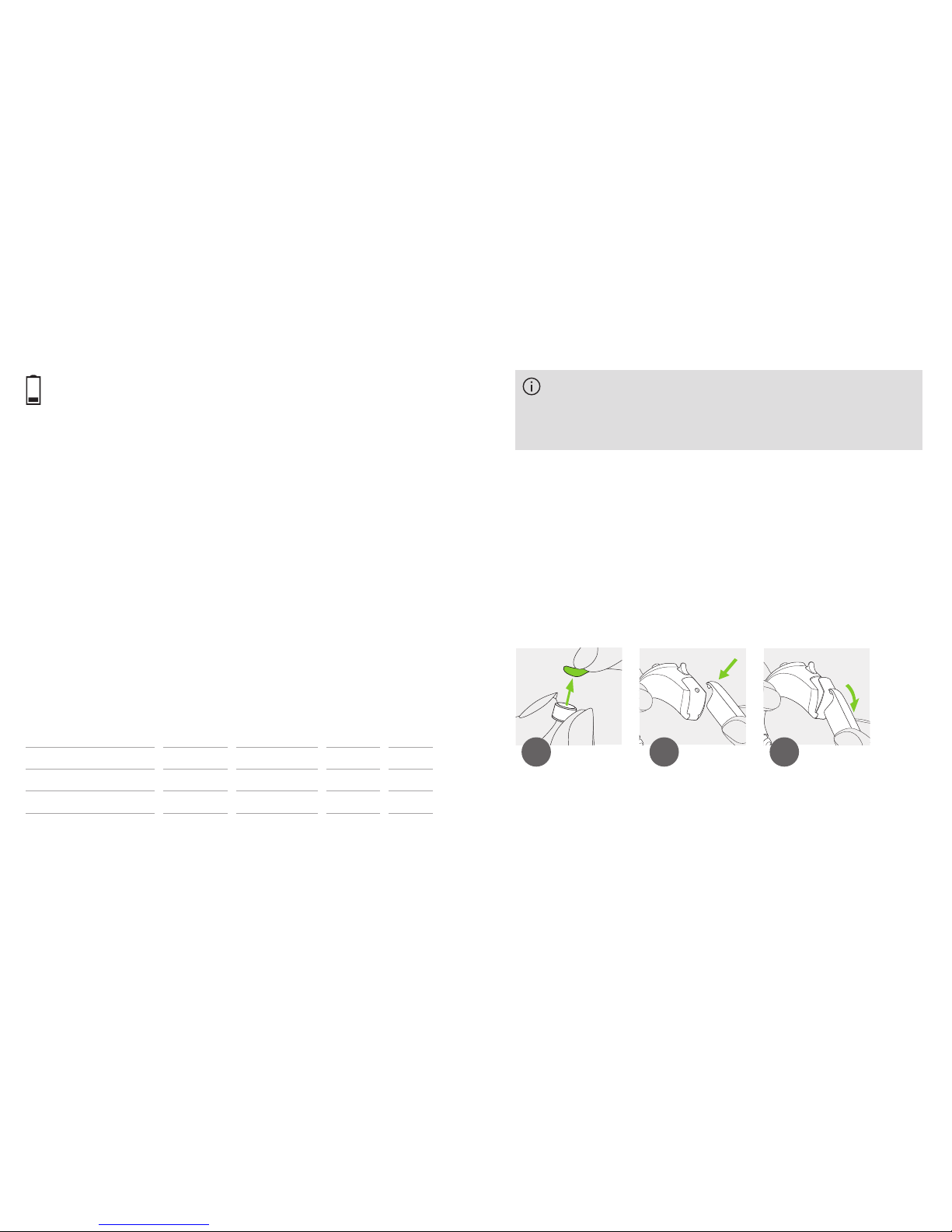
5. Batteries
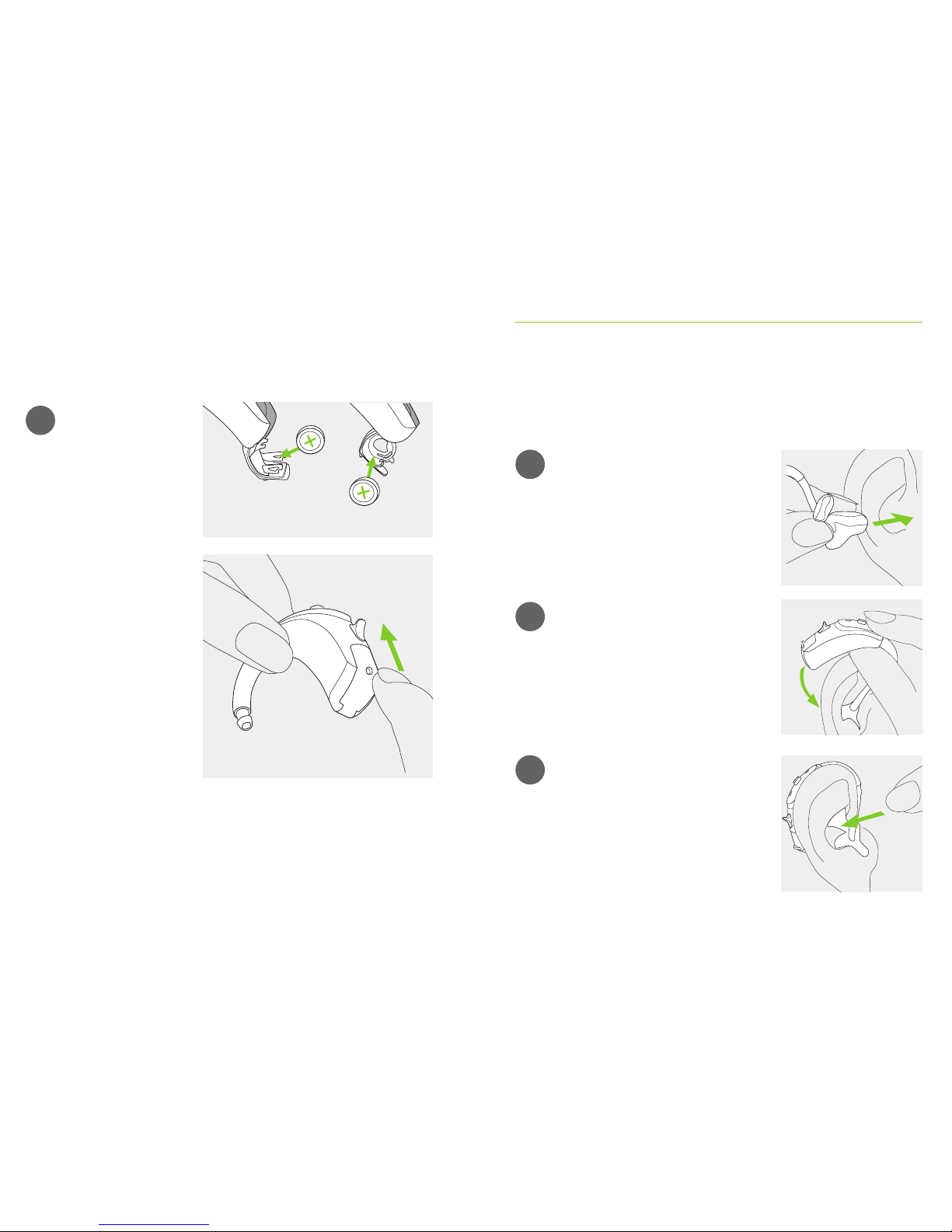
Remove the sticker
from the new
battery and wait
two minutes.
Open the
battery door.
If it is dicult to close the battery door: Check that
the battery is inserted correctly and the “+” symbol
is facing upwards. If the battery is not inserted
correctly, the hearing aid will not work and the
battery door can be damaged.
1 2
Place battery in the battery
door with the “+” symbol
facing upwards.
3
3
Sky V-P, V-SP, V-UP
Sky V-M, V-RIC
5.1 Insert battery (standard battery doors)
If the battery door is secured for smaller children
continue to read the important information below, and
refer to specic instructions in chapter 5.2 for inserting
the battery.
Page 9
17 18
Model
Phonak Sky
V-M
V-P, V-SP, V-RIC
V-UP
Zinc-air
battery
size
312
13
675
Color
marking on
package
brown
orange
blue
IEC
code
PR41
PR48
PR44
ANSI
code
7002ZD
7000ZD
7003ZD
Replacement battery
This hearing aid requires zinc-air batteries. Identify the
correct battery size (312, 13 or 675) by:
• Checking “Your hearing aid details” on page 3.
• Checking the marking on the inner side of the
battery door.
• Checking the following table.
Low power: You will hear two beeps when the battery
is low. You will have approximately 30 minutes to
change the battery (this can vary, depending on the
hearing aid settings and battery). We recommend that
you always have a new battery on hand.
Please ensure you use the correct type of battery in
your hearing aids (zinc-air). Please also read chapter
18.2 for further information on product safety.
5.2 Insert battery with a secured battery door
All Sky V models (except Sky V-RIC) can be tted with a
secured battery door if needed for safety reasons (children
below 36 months). Before starting, please read the
important information in chapter 5.1 regarding batteries.
Open the secured battery door with the special
tool given by your hearing care professional as
picture 2 and 3 show, or use a pen tip.
Remove the sticker
from the new
battery and wait
two minutes.
1 2 3
Page 10
19 20
Place battery in the
battery door with the
“+” symbol facing
upwards.
The battery is only
secured when the
battery door is closed
properly. Always check
after closing, that the
battery door can’t be
opened by hand.
4
Sky V-P, V-SP, V-UP
Sky V-M
6. Putting on the hearing aid
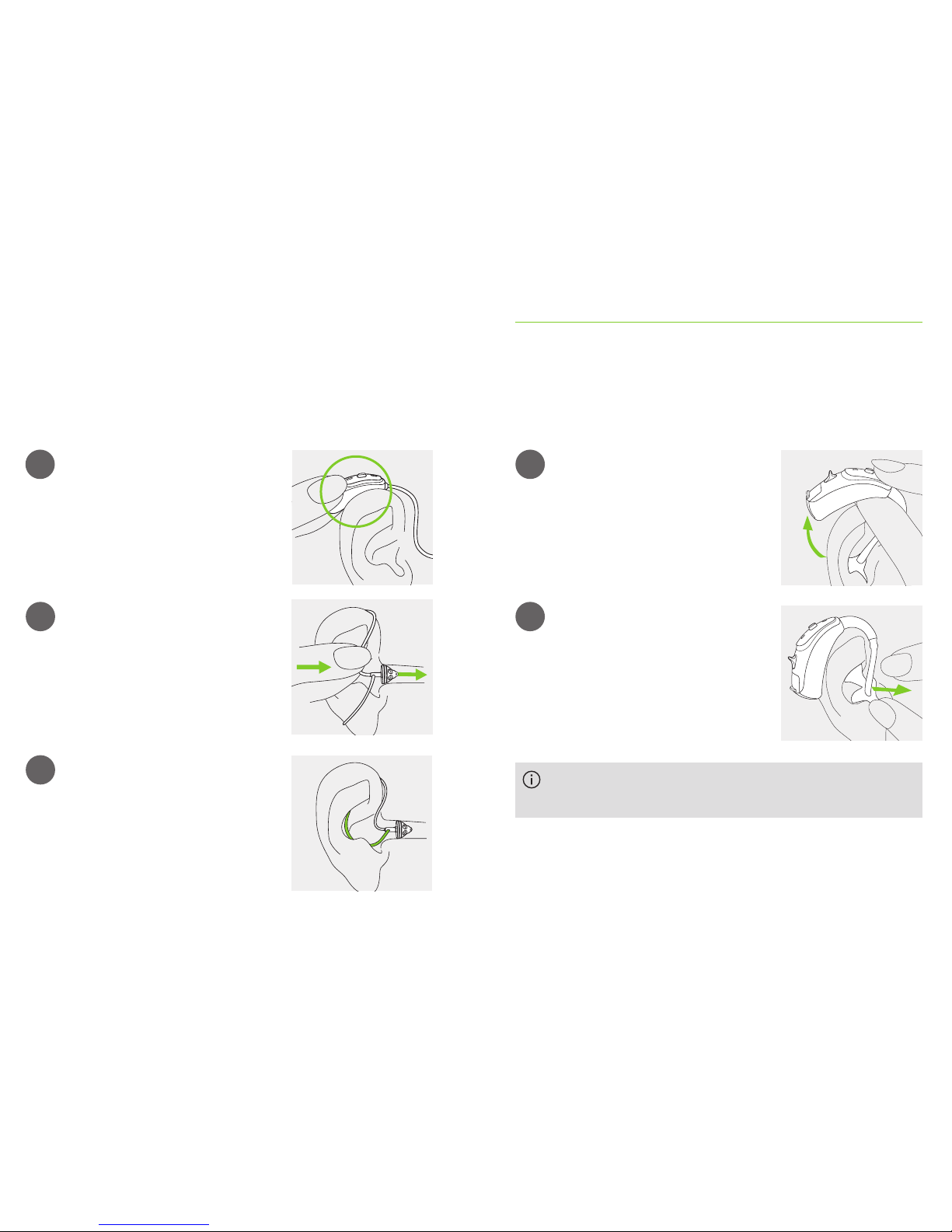
6.1 Putting on the hearing aid with classic earmold
1
2
3
Take the earmold up to your ear
and place the ear canal part into
your ear canal.
Place the hearing aid behind
your ear.
Insert the upper part of the
earmold into the upper part of
the bowl of your ear.
Page 11
21 22
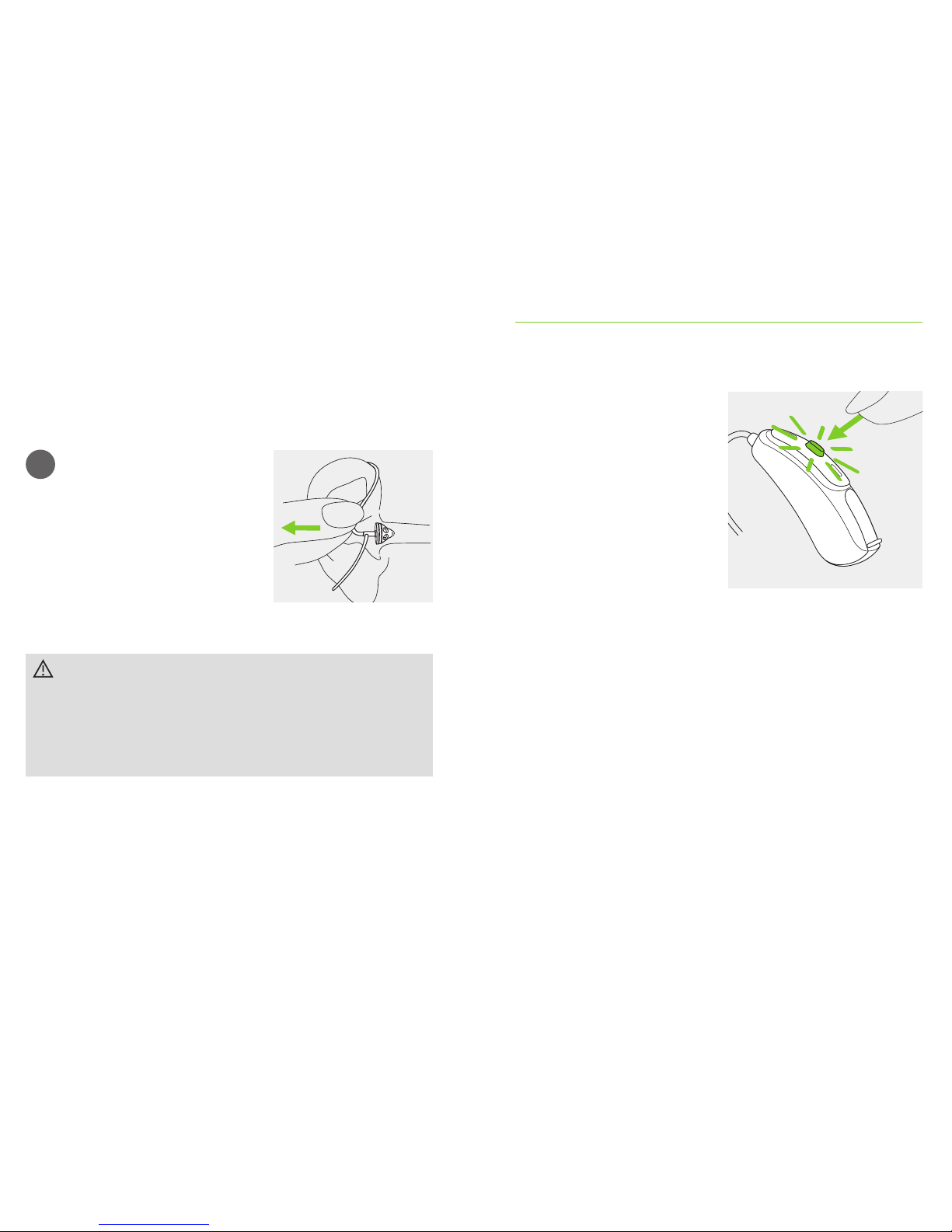
6.2 Putting on the hearing aid with dome, SlimTip
or cShell
1
2
3
Place the hearing aid behind
your ear.
Insert the earpiece into your
ear canal.
If there is an anchor attached
to the earpiece, tuck it into the
bowl of your ear to secure your
hearing aid.
7. Removing the hearing aid
7.1 Removing the hearing aid with classic earmold
1
2
Lift the hearing aid above the
upper part of your ear.
Grasp the earmold with your
ngers and gently remove it.
Please try to avoid gripping the tube to remove the
hearing aid.
Page 12
23 24
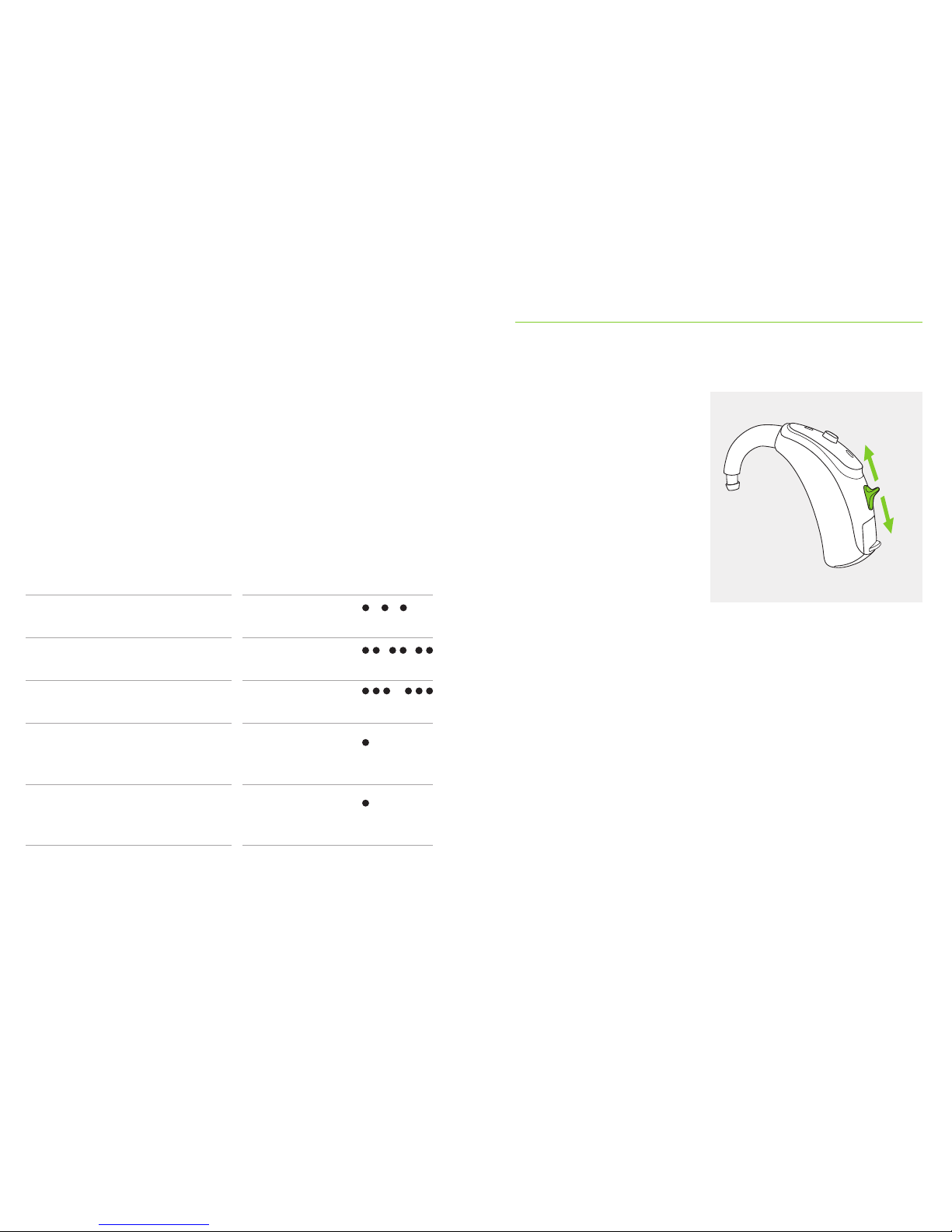
1
Gently pull on the bend of the
tube and remove the hearing
aid from behind the ear.
In very rare cases, your earpiece can remain in your
ear canal when removing the hearing aid from the
ear. In the unlikely case that the earpiece does get
stuck in your ear canal, it is strongly recommended
to see a medical specialist for safe removal.
7.2 Removing the hearing aid with dome, SlimTip
or cShell
8. Push button/indicator light
The push button on your
hearing aid can have
various functions or may
not be active. This depends
on the programming of the
hearing aid which is
indicated in your individual
“Hearing aid instructions”.
Please ask your hearing
care professional for this.
Optional indicator light integrated in push button
Parents and caregivers of infants and young children can
easily be informed about the hearing aid status with an
optional indicator light (all models except Sky V-RIC). The
yellow indicator light is integrated in the push button and
shows the status of the hearing aid as long as it is turned
on. The light is optimally visible from the front. Your
hearing care professional can activate/deactivate the
indicator light in dierent ways.
Page 13
25 26
The complete list of the hearing aid status is shown below.
Please ask your hearing care professional to mark what
has been activated accordingly.
Status hearing aid Indicator light pattern (yellow)
c
Hearing aid is powered on Repeating single
blink
c
Hearing aid is powered on
and Roger is accessible
Repeating
double blink
c
Low battery * Repeating
triple blink
c
Volume level change (either
initiated by a remote control
or by the push button)
Single blink
per volume change
c
Program change (either
initiated by a remote control
or by the push button)
Single blink per
program change
* Low battery is signalized approx. 30 minutes before the battery needs to be changed.
It is recommended that you always have a new battery at hand.
9. Volume control
Sky V-P, V-SP, V-UP and
V-RIC only:
To increase the volume,
press the volume control
upwards. To decrease the
volume, press the volume
control downwards.
The volume control can
be disabled by the hearing
care professional.
Page 14
27 28
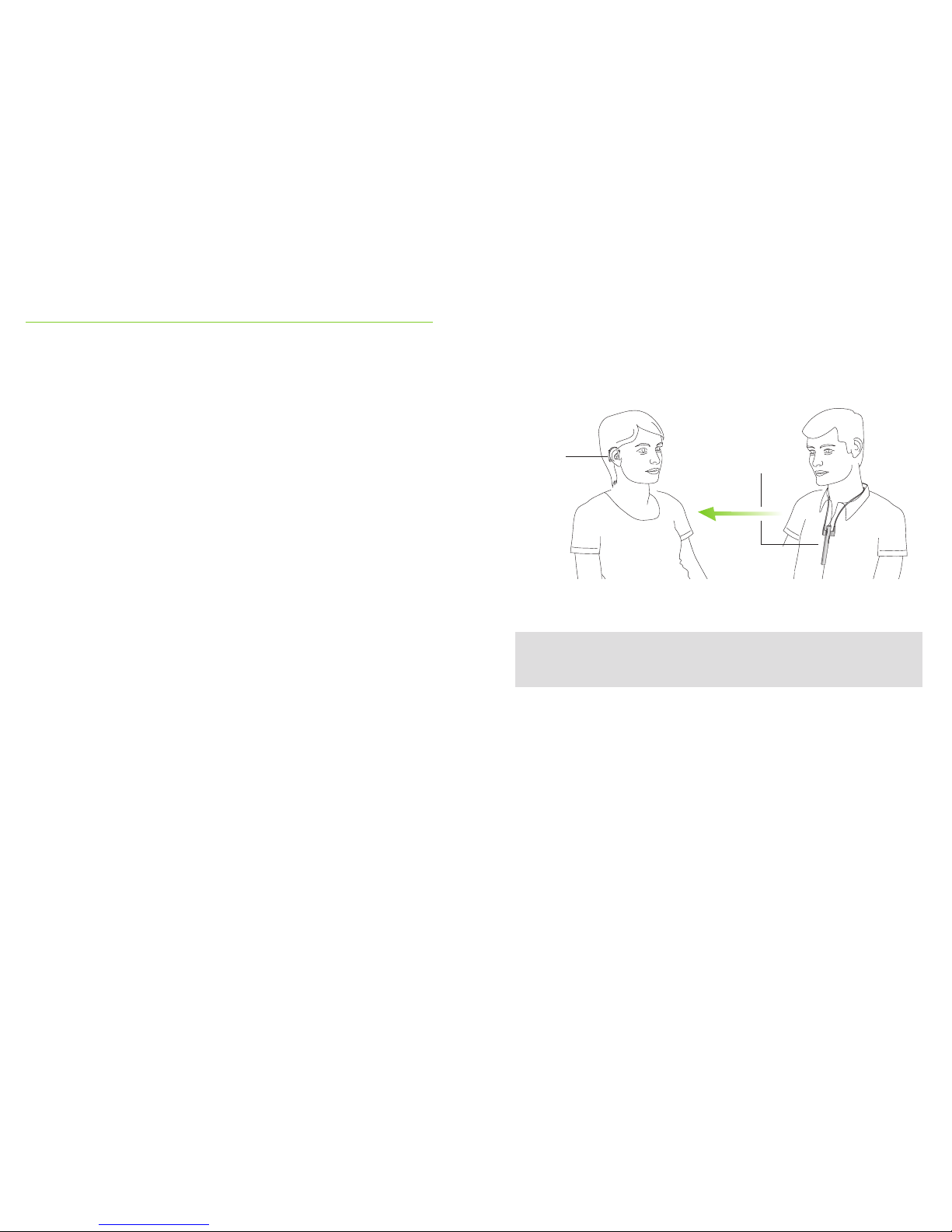
10. RogerTM for conversation in noise
and over distance
Roger accessories help communication in noise and over
distance by wirelessly sending the speaker’s voice directly
to your hearing aids. Roger includes both a microphone
and receiver. Some Roger microphones also support input
from audio sources via Bluetooth® or cable.
Microphone: worn or placed close to the speaker, or
connected to the audio source, directly transmits the
sound to your receiver without disruptive background
noises.
Receiver: attached to your hearing aids behind the ear or
worn on your body using a neckloop.
Combining your Phonak Sky V hearing aids with a Roger
wireless microphone enables you to hear and understand
more speech in these challenging situations.
www.phonak.com/roger
Ask your hearing care professional for a Roger demo
and more information.
SpeakerListener
Hearing
aid with
Roger
receiver
Roger
wireless
microphone
Page 15
29 30
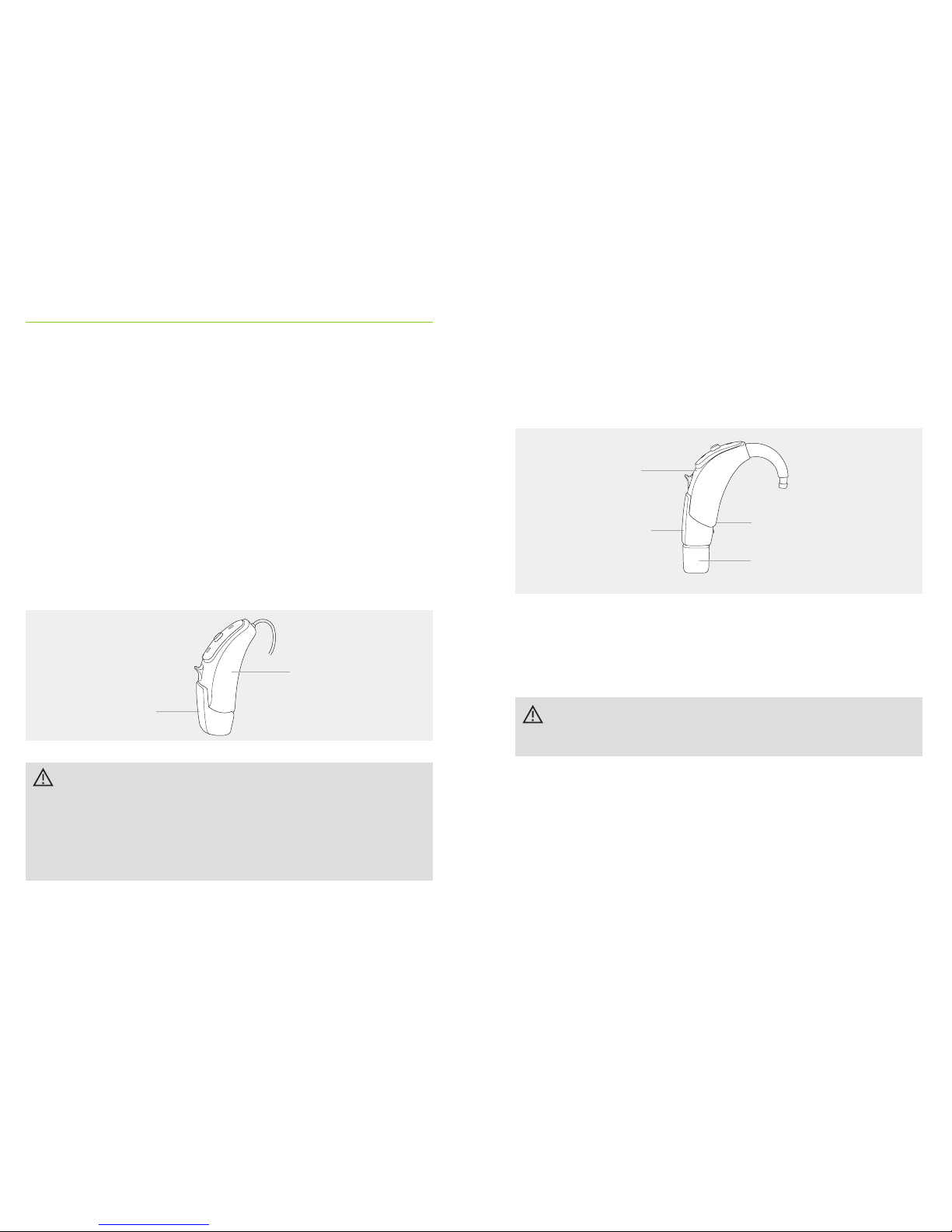
Hearing aid
Design-integrated
receiver
Your hearing care professional has already
prepared your hearing aid for use with the designintegrated receiver, and this part can not be removed.
Please ask your hearing care professional for
further information.
11.1 Design-integrated Roger receiver
Phonak Sky V-P / V-SP / V-UP / V-RIC can be equipped
with a design-integrated Roger receiver.
With the design-integrated receiver attached, the hearing
aid oers all functionalities and usability as without the
receiver. The hearing aid with the design-integrated
receiver is water resistant, refer to chapter 13.
11. Use of Roger receiver
With the audio shoe and Roger X receiver attached, the
hearing aid oers the same functionalities and usability
as without the receiver with one important exclusion:
Your hearing aid with the audio shoe is no longer
water resistant.
11.2 Audio shoe and Roger X receiver
Hearing aid
Audio shoe
(removable part)
Battery door
Roger X receiver
(removable part)
Page 16
31 32
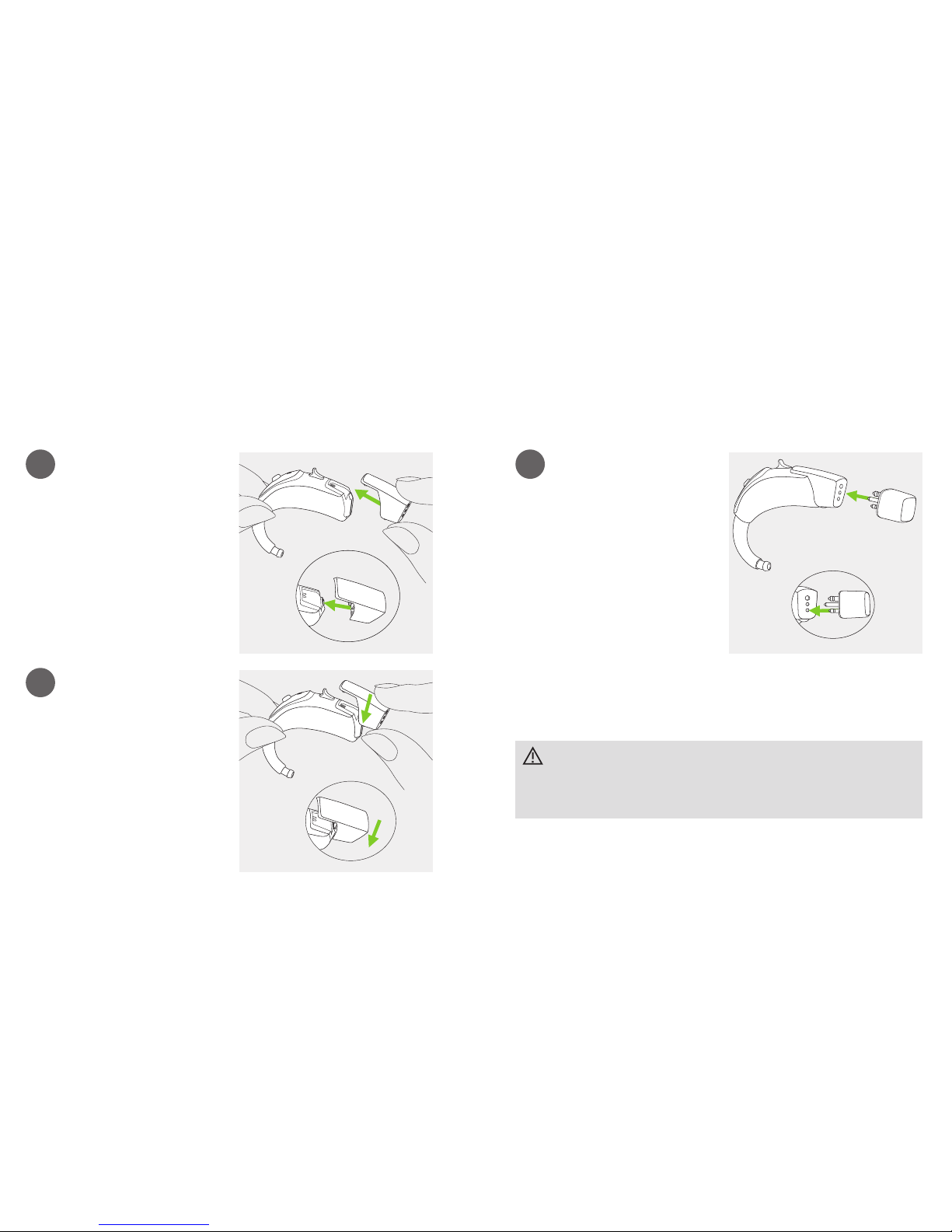
1
2
Push the audio shoe
towards the bottom of the
hearing aid. Match the
grooves of both parts.
Push until it snaps into
place and is properly
attached to the hearing aid.
A Roger X receiver can now
be attached.
Attach the audio shoe
1
Push the three pins of the
Roger X receiver into the
three sockets of the audio
shoe. The Roger X receiver
is correctly attached when
it is clicked into place.
Please refer to the specic receiver user instruction for
further information.
Attach the Roger X receiver
To hear immediately the Roger microphone signal
when required, Phonak recommends to leave the
Roger X receiver attached when not in use.
Page 17
33 34
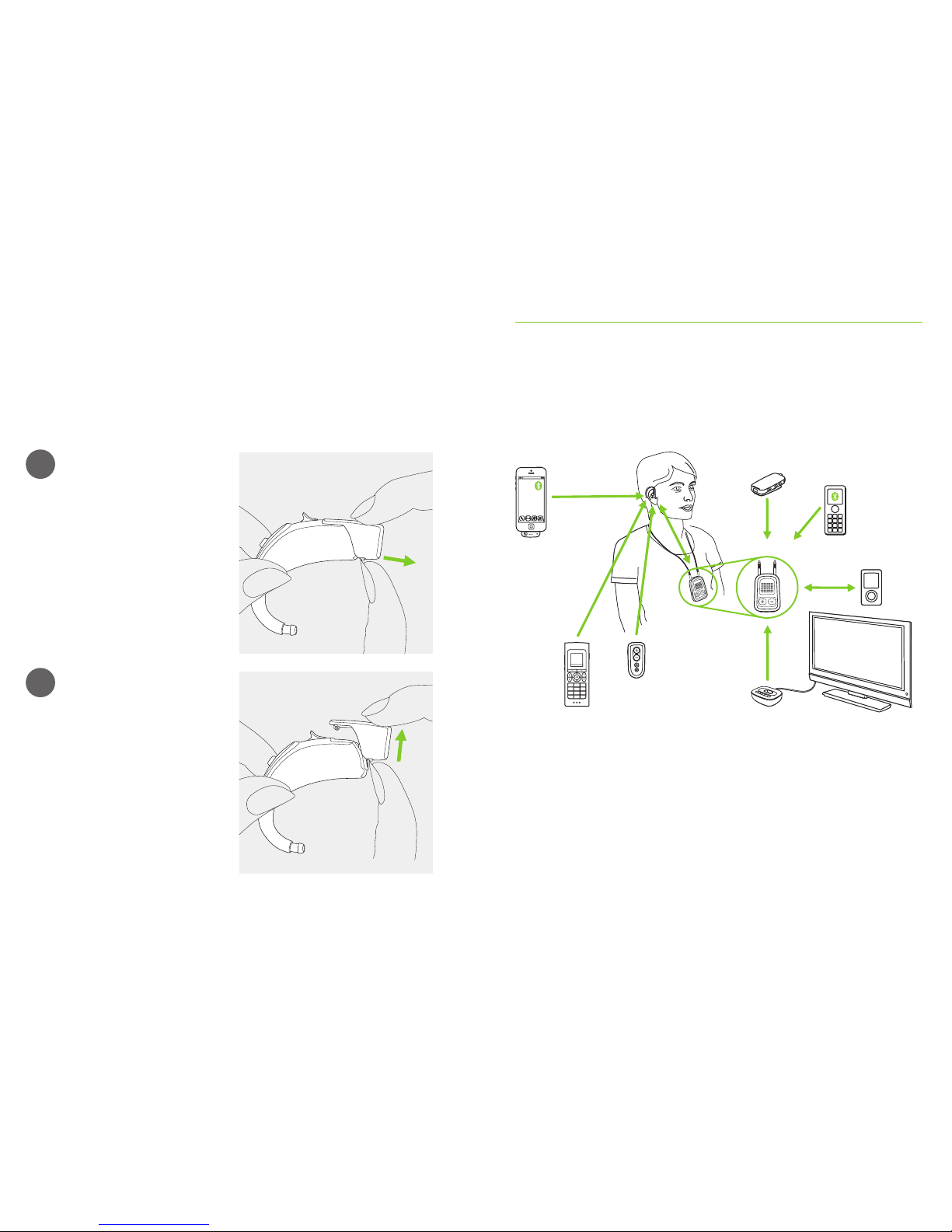
1
2
Take the hearing aid
between thumb and
forenger. Pull the locking
system on the audio
shoe back.
Pull the audio shoe upwards
with the other hand. The
audio shoe is now removed
from the hearing aid.
Remove the audio shoe
12. Other wireless accessories
A range of Phonak accessories are available for you to use
with your hearing aid.
* The Phonak ComPilot II with neckloop or ComPilot Air II with clip to attach to clothing. They
also have basic remote control functionalities. For advanced control they can be used with the
Phonak RemoteControl App.
** Audio sources (e.g. MP3 Player, computer, laptop, tablet) can be connected to the streaming
device via Bluetooth or audio cable.
*** Clipped onto the speaker’s clothing for better understanding over distance.
Cell phone
Phonak streaming device*
Phonak EasyCall II
with cell phone
Phonak RemoteMic***
MP3 Player/
Audio source**
Phonak TVLink II connected to TV
Phonak PilotOne II
remote control
Phonak DECT II phone
Page 18

35 36
13. Care and maintenance
Diligent and routine care of your hearing aid contributes
to outstanding performance and a long service life.
Please use the following specications as a guideline.
For further information regarding product safety, see
chapter 18.2.
General information
Before using hair spray or applying cosmetics, you should
remove your hearing aid from your ear, because these
products may damage it.
When you are not using your hearing aid, leave the
battery door open so that any moisture can evaporate.
Make sure that you always completely dry your hearing
aid after use. Store the hearing aid in a safe, dry and
clean place.
Your hearing aids are resistant to water, sweat and dust
under the following conditions:
• The battery door is fully closed. Ensure that no foreign
object such as hair is caught in the battery door when it
is closed.
• After exposure to water, sweat or dust, the hearing aid
is cleaned and dried.
• The hearing aid is used and maintained as described in
this user guide.
Hearing aids with the design-integrated Roger
receiver are also water resistant.
Hearing aids with an audio shoe and Roger X
receiver are not water resistant.
Use of your hearing aid around water can restrict air
ow to the batteries causing it to stop working.
Should your hearing aid stop working after coming
into contact with water, refer to the troubleshooting
steps in chapter 17.
Page 19

37 38
Daily
Inspect the earpiece and tube for earwax and moisture
deposits. Clean the surfaces with a lint-free cloth or use
the small brush provided in the hearing aid hard case.
Never use cleaning agents such as household detergents,
soap, etc. for cleaning your hearing aid. It is not
recommended to rinse these parts with water, risk for
lodging in the tube. If you need to clean your hearing aid
intensively, ask your hearing care professional for advice
and information on lters or drying capsules.
Weekly
Clean the earpiece with a soft, damp cloth or with a
special cleaning cloth for hearing aids. For further
maintenance or cleaning instructions, please see your
hearing care professional.
Monthly
Inspect your hearing tube for color changes, hardening, or
cracks. In the case of such changes, the hearing tube has
to be replaced. Please see your hearing care professional.
14. Service and warranty
Local warranty
Please ask the hearing care professional, where you
purchased your hearing aid, about the terms of the
local warranty.
International warranty
Phonak oers a one year limited international
warranty, valid starting from the date of purchase.
This limited warranty covers manufacturing and
material defects in the hearing aid itself, but not
accessories such as batteries, tubes, earmolds and
external receivers. The warranty only comes into
force if a proof of purchase is shown.
The international warranty does not aect any legal
rights that you might have under applicable national
legislation governing sale of consumer goods.
Page 20
39 40
Warranty limitation
This warranty does not cover damage from improper
handling or care, exposure to chemicals or undue stress.
Damage caused by third parties or non-authorized service
centers renders the warranty null and void. This warranty
does not include any services performed by a hearing care
professional in their oce.
Serial number
(left side):
Serial number
(right side):
Date of purchase:
Authorized hearing care
professional (stamp/signature):
15. Compliance information
Europe:
Declaration of Conformity
Hereby Phonak AG declares that this Phonak product
meets the requirements of the Medical Devices Directive
93/42/EEC as well as the Radio and Telecommunications
Terminal Equipment Directive 1999/5/EC. The full text of the
Declaration of Conformity can be obtained from the
manufacturer or the local Phonak representative whose
address can be taken from the list on www.phonak.com
(Phonak worldwide locations).
Australia/New Zealand:
Indicates a device’s compliance with applicable
Radio Spectrum Management’s (RSM) and
Australian Communications and Media Authority
(ACMA) regulatory arrangements for the legal sale
in New Zealand and Australia.
The compliance label R-NZ is for radio products
supplied in the New Zealand market under
conformity level A1.
Page 21

41 42
The wireless models listed on page 2 are
certied under:
Phonak Sky V-M (V90/V70/V50)
USA FCC ID: KWC-WHSBTEM
Canada IC: 2262A-WHSBTEM
Phonak Sky V-P (V90/V70/V50)
USA FCC ID: KWC-WHSBTEP
Canada IC: 2262A-WHSBTEP
Phonak Sky V-SP (V90/V70/V50)
USA FCC ID: KWC-BTEVSP
Canada IC: 2262A-BTEVSP
Phonak Sky V-UP (V90/V70/V50)
USA FCC ID: KWC-BTEVUP
Canada IC: 2262A-BTEVUP
Phonak Sky V-RIC (V90/V70/V50)
USA FCC ID: KWC-WHSRIC4
Canada IC: 2262A-WHSRIC4
Notice 1:
This device complies with Part 15 of the FCC Rules and
with RSS-210 of Industry Canada. Operation is subject to
the following two conditions:
1) this device may not cause harmful interference, and
2) this device must accept any interference received,
including interference that may cause undesired operation.
Notice 2:
Changes or modications made to this device not
expressly approved by Phonak may void the FCC
authorization to operate this device.
Notice 3:
This device has been tested and found to comply with
the limits for a Class B digital device, pursuant to Part 15
of the FCC Rules and ICES-003 of Industry Canada.
These limits are designed to provide reasonable protection
against harmful interference in a residential installation.
This device generates, uses and can radiate radio
frequency energy and, if not installed and used in
accordance with the instructions, may cause harmful
Page 22
43 44
interference to radio communications. However, there is
no guarantee that interference will not occur in a
particular installation. If this device does cause harmful
interference to radio or television reception, which can be
determined by turning the equipment o and on, the user
is encouraged to try to correct the interference by one or
more of the following measures:
• Reorient or relocate the receiving antenna.
• Increase the separation between the device
and receiver.
• Connect the device into an outlet on a circuit
dierent from that to which the receiver is connected.
• Consult the dealer or an experienced radio/TV
technician for help.
16. Information and description
of symbols
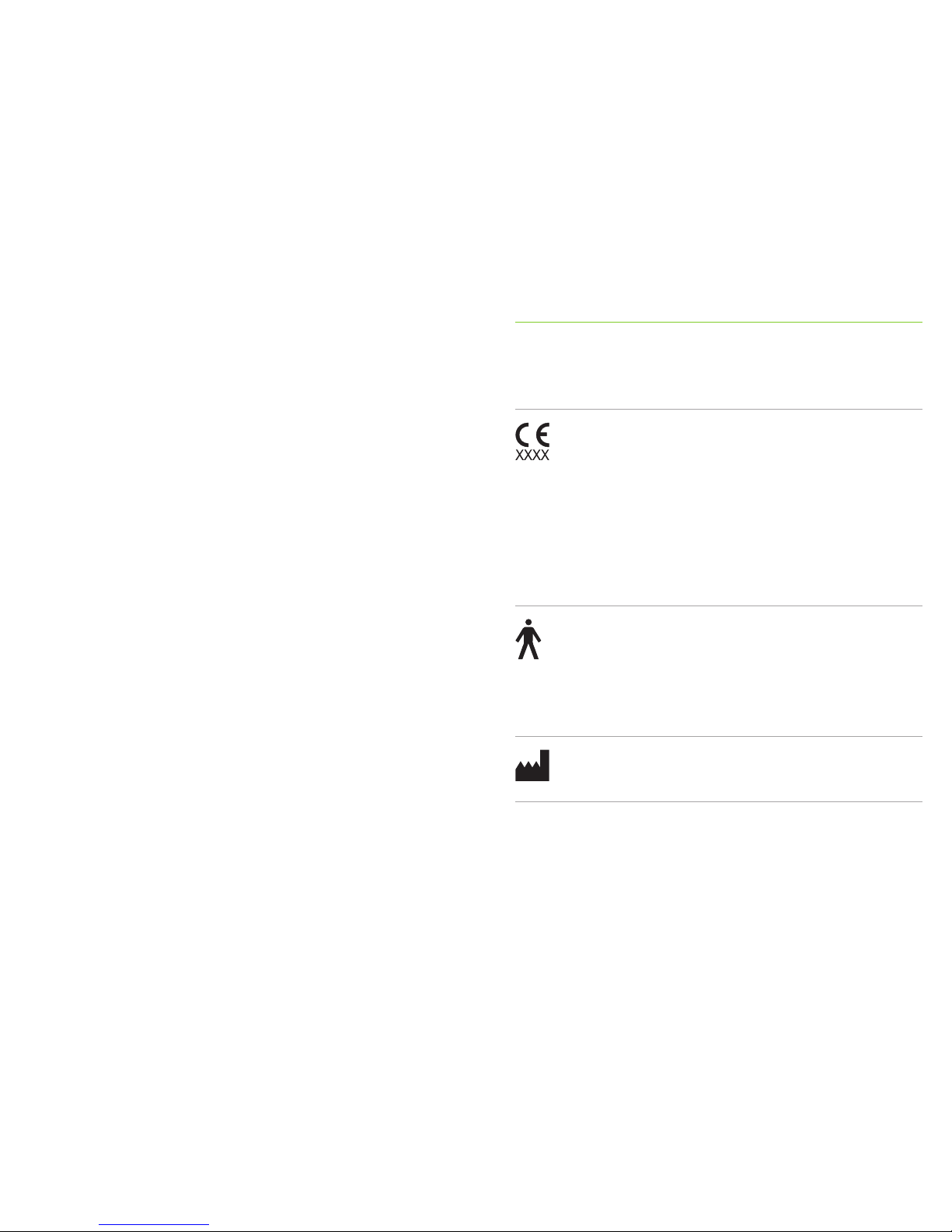
With the CE symbol, Phonak AG conrms that this
Phonak product — including accessories — meets
the requirements of the Medical Devices Directive
93/42/EEC as well as the R&TTE Directive 1999/5/
EC on radio and telecommunications equipment.
The numbers after the CE symbol correspond to
the code of certied institutions that were
consulted under the above-mentioned directives.
This symbol indicates that the products described
in these user instructions adhere to the
requirements for an applied part of Type B of EN
60601-1. The surface of the hearing aid is
specied as an applied part of Type B.
Indicates the medical device manufacturer, as
dened in EU Directive 93/42/EEC.
Page 23
45 46
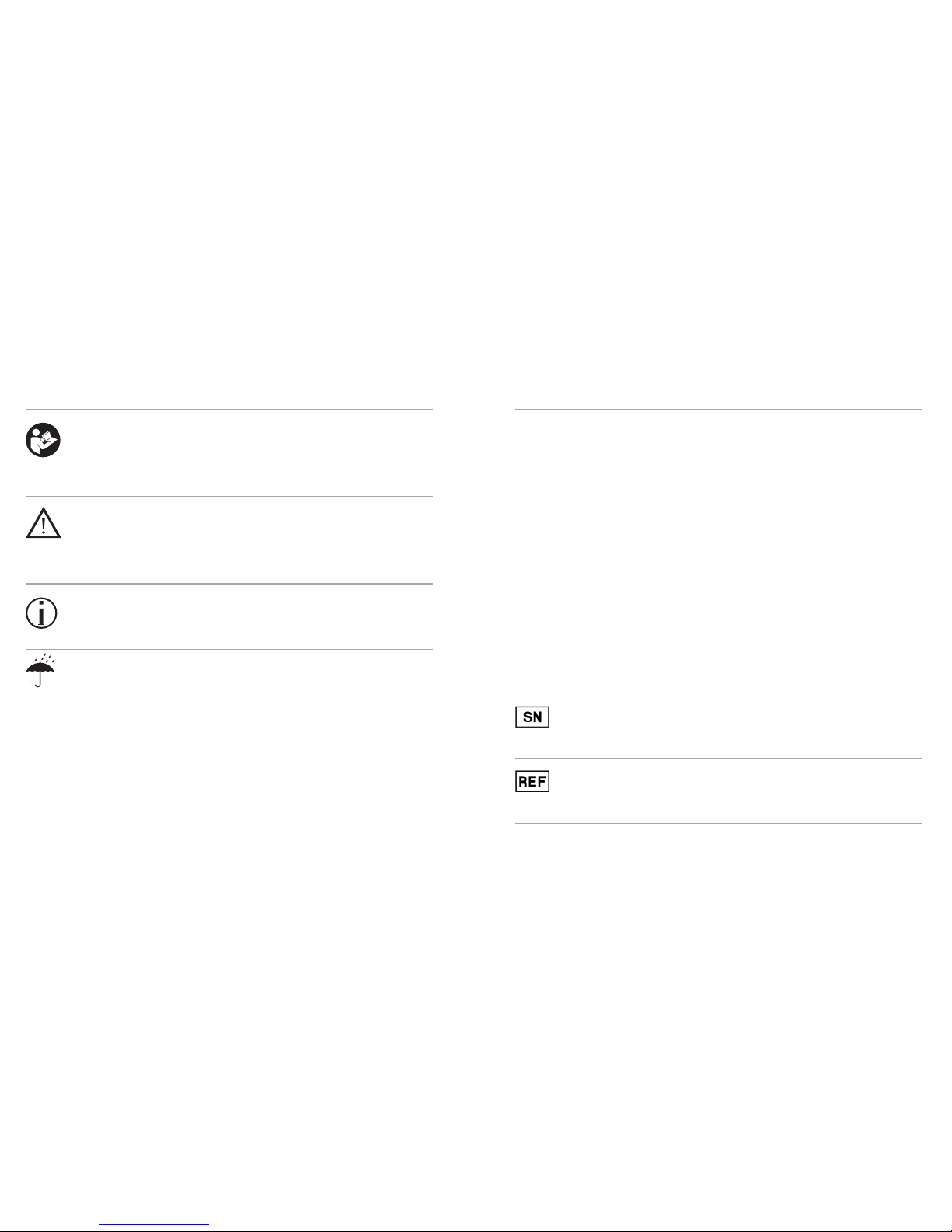
This symbol indicates that it is important for the
user to read and take into account the relevant
information in these user guides.
This symbol indicates that it is important for the
user to pay attention to the relevant warning
notices in these user guides.
Important information for handling and
product safety.
During transportation keep dry.
Operating
conditions
The product is designed such that it functions
without problems or restrictions if used as
intended, unless otherwise noted in these user
guides. The hearing aids are classied IP68 (depth
of 1 meter for 60 minutes) and designed to be
used in all daily life situations. Therefore you do
not have to worry about getting the hearing
aids exposed to a rain shower or sweat. However,
the hearing aid is not intended to be used in
water activities that includes chlorinated water,
soap, salt water or other liquids with a
chemical content.
Indicates the manufacturer’s serial number so that
a specic medical device can be identied.
Indicates the manufacturer’s catalogue number so
that the medical device can be identied.
Page 24
47 48
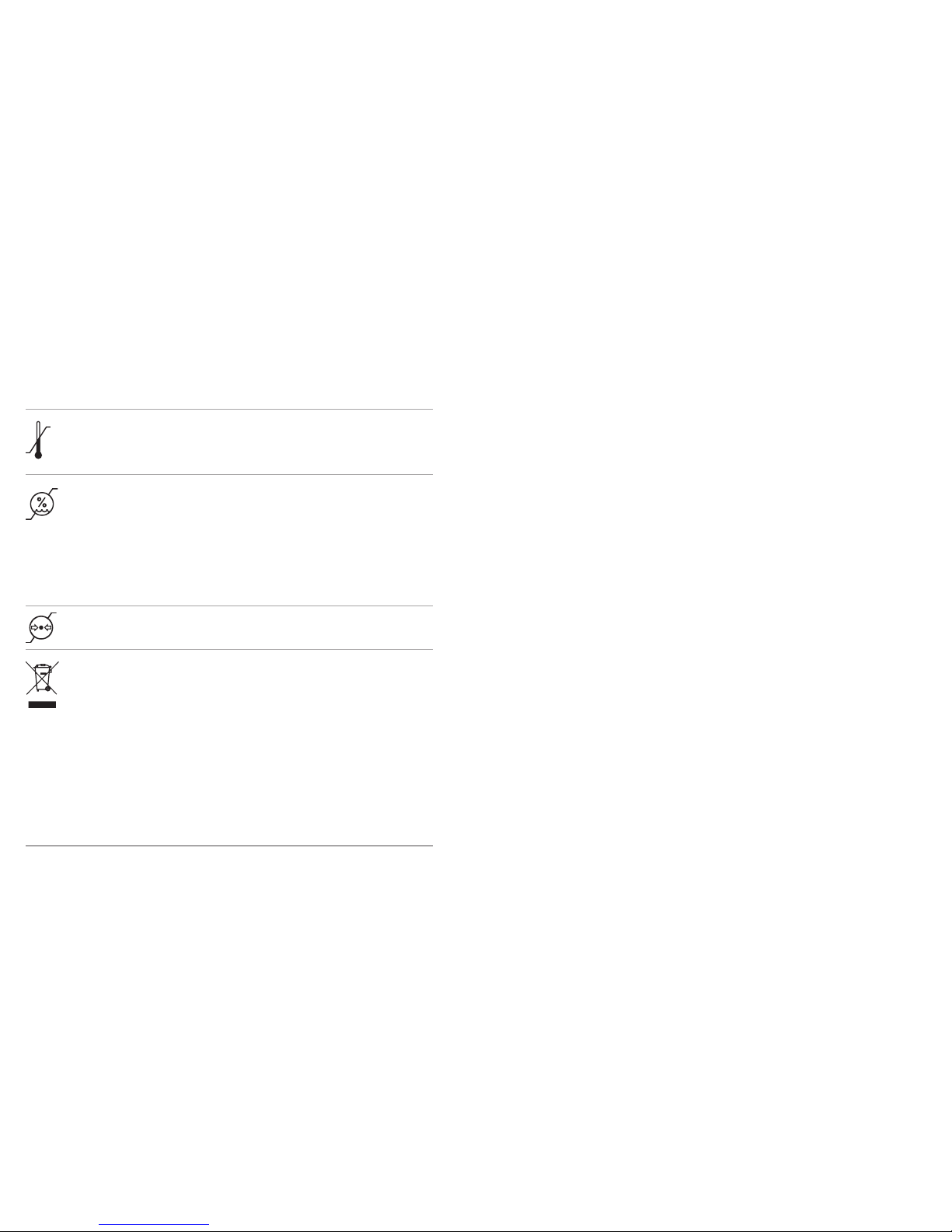
Temperature during transportation and storage:
–20° to +60° Celsius (–4° to +140° Fahrenheit).
Humidity during transportation: Up to 90% (non
condensing).
Humidity during storage: 0% to 70%, if not in use.
See instruction in chapter 19.2 regarding drying
the hearing aid after use.
Atmospheric pressure: 200 hPA to 1500 hPa
The symbol with the crossed-out garbage
bin is to make you aware that this hearing
aid may not be thrown away as normal household
waste. Please dispose of old or unused hearing
aids, at waste disposal sites intended for electronic
waste, or give your hearing aid to your hearing
care professional for disposal. Proper disposal
protects the environment and health.
Page 25
49 50
17. Troubleshooting
If the problem persists, contact you hearing care professional
for assistance
Causes
Dead battery
Blocked speaker/earpiece
Battery not inserted correctly
Hearing aid switched o
Hearing aid not inserted correctly
Earwax in ear canal
Volume too loud
Low battery
Speaker/earpiece blocked
Volume too low
Physical hearing condition
has changed
Indication for low battery
Moisture on battery or
hearing aid
Flat battery
Battery not inserted correctly
Light indicator not activated
Problem
Hearing aid not functioning
Hearing aid whistles
Hearing aid not loud enough
or distorted
Hearing aid plays two beeps
Hearing aid switches on & o
(intermittent)
Light indicator not blinking
What to do
Change battery (chapter 1 + 5)
Clean speaker opening/earpiece
Insert battery correctly (chapter 1 + 5)
Switch hearing aid on by completely closing the battery door
(chapter 4)
Insert hearing aid correctly (chapter 6)
Contact your ENT/GP or hearing care professional
Decrease volume (chapter 8 + 9)
Change battery (chapter 1 + 5)
Clean speaker opening/earpiece
Turn volume up if volume control available (chapter 8 + 9)
Contact you hearing care professional
Change battery within the next 30 minutes (chapter 1 + 5)
Wipe battery and hearing aid with dry cloth
Change battery (chapter1+5)
Insert battery correctly (chapter 1+5)
Contact your hearing care professional
Page 26

52
Please read the information on the following pages before
using your hearing aid.
A hearing aid will not restore normal hearing and will not
prevent or improve a hearing impairment resulting from
organic conditions. Infrequent use of a hearing aid does not
permit a user to attain full benet from it. The use of a
hearing aid is only part of hearing habilitation and may
need to be supplemented by auditory training and
instruction in lipreading.
18. Important safety information
Page 27

53 54
The intended use of
hearing aids is to amplify
and transmit sound to the
ears and hereby
compensate for impaired
hearing. The hearing aids
(specially programmed for
each hearing loss) must
only be used by the
intended person. They
should not be used by any
other person as they could
damage hearing.
Changes or modications
to the hearing aid that
were not explicitly
approved by Phonak are
not permitted. Such
changes may damage your
ear or the hearing aid.
Do not use the hearing
aids in explosive areas
(mines or industrial areas
with danger of explosions,
oxygen rich environments
or areas where ammable
anesthetics are handled).
Hearing aid batteries are
toxic if they are swallowed!
Keep out of reach of
children, individuals with
cognitive impairment,
and pets. If batteries are
swallowed, consult your
physician immediately!
18.1 Hazard warnings
Tamperproof (secured)
solutions for the battery
door, ear hook and
design-integrated Roger
receiver (if used) must be
attached for children
younger than 36 months
to prevent accidental
swallowing of the battery
or small parts of the
device. In case one of these
secured mechanisms is
damaged by applying too
much force or using an
inappropriate tool, the
device should be brought
to your hearing care
professional for repair
or exchange.
If you feel pain in or
behind your ear, if it is
inamed or if skin irritation
and accelerated
accumulations of earwax
occur, please check
with your hearing care
professional or physician.
In very rare cases, the
dome can remain in your
ear canal when removing
the hearing tube from the
ear. In the unlikely case
that the dome does get
stuck in your ear canal, it
is strongly recommended
to see a physician for
safe removal.
Page 28
55 56
Hearing programs in the
directional microphone
mode reduce background
noises. Please be aware
that warning signals or
noises coming from
behind, e. g. cars, are
partially or entirely
suppressed.
Phonak Sky V-RIC model
is not for children below
36 months. It contains
small parts that can cause
choking, if swallowed by
children. Keep out of reach
of children, individuals
with cognitive impairment,
and pets. If swallowed,
consult a physician or
hospital immediately.
Do not make a wire
connection from your
hearing aid to any external
audio sources like radio
etc. That could cause
injuries on your body
(electric shock).
The following is only
applicable for persons with
active implantable medical
devices (i.e. pacemakers,
debrillators, etc.):
Keep the wireless
hearing aid at least
15 cm (6 inches) away
from the active implant.
If you experience any
interference, do not use the
wireless hearing aids and
contact the manufacturer
of the active implant.
Please, note that
interference can also
be caused by power lines,
electrostatic discharge,
airport metal detectors etc.
Keep magnets (i.e. battery
handling tool, EasyPhone
magnet, etc.) at least
15 cm (6 inches) away
from the active implant.
Hearing instruments
should not be tted with
domes / wax protection
systems when used by
clients with perforated
eardrums, inamed ear
canals or otherwise
exposed middle ear
cavities. In these cases,
we recommend the use
of a custom earpiece. In
the unlikely case that any
part of this product should
remain in the ear canal,
it is strongly recommended
to see a medical specialist
for safe removal.
Page 29
57 58
Phonak hearing aids are
water resistant and not
waterproof. They are
designed to withstand
normal activities and
occasional accidental
exposure to extreme
conditions. Never immerse
your hearing aid in water!
Phonak hearing aids are not
specically designed for
extended periods of water
submersion on a continual
basis, that is worn in
activities such as swimming
or bathing. Always remove
your hearing aid before
these activities, as the
hearing aid contains
sensitive electronic parts.
18.2 Information on product safety
Never wash the
microphone inputs. Doing
so could cause it to lose its
special acoustic features.
Protect your hearing aid
from heat (never leave near
a window or in the car).
Never use a microwave or
other heating devices to
dry your hearing aid.
Ask your hearing care
professional about suitable
drying methods.
The dome should be
changed every three
months or when it becomes
sti or brittle. This is to
prevent the dome from
detaching from the tube
spout during insertion into
or removal from the ear.
When you are not using
your hearing aid, leave the
battery door open so that
any moisture can
evaporate. Make sure that
you always completely dry
your hearing aid after use.
Store the hearing aid in a
safe, dry and clean place.
Do not drop your hearing
aid! Dropping onto a hard
surface can damage your
hearing aid.
Always use new batteries
for your hearing aid. In
case a battery is leaking,
replace it immediately with
a new one to avoid any
skin irritation. You can
return used batteries
to your hearing care
professional.
Page 30
59 60
The batteries used in these
hearing aids should not
exceed 1.5 Volts. Please do
not use silver-zinc or Li-ion
(lithium-ion) rechargeable
batteries as these may
cause severe damage to
your hearing aids. The table
in chapter 5 explains
exactly which type of
battery your particular
hearing aids require.
Remove the battery if
you are not using your
hearing aid for a long
period of time.
Special medical or dental
examination including
radiation described below,
may adversely aect the
correct functioning of your
hearing aids. Remove and
keep them outside the
examination room/area
before undergoing:
Medical or dental
examination with X-ray
(also CT scan).
Medical examinations with
MRI/NMRI scans, generating
magnetic elds.
Hearing aids don’t need to
be removed when passing
security gates (airports
etc.). If X-ray is used at all,
it will be in very low doses,
and will not aect the
hearing aids.
Do not use your hearing
aid in areas where
electronic equipment
is prohibited.
Page 31

61 62
Some hearing aid users have reported a buzzing sound
in their hearing aids when they are using cell phones.
According to the ANSI 63.19 (American National
Standard Methods of Measurement of Compatibility
between Wireless Communications Devices and Hearing
Instruments) standard, the compatibility of a particular
hearing aid and cell phone can be predicted by adding
the rating for the hearing aid immunity to the rating for
the cell phone emissions. The sum of the hearing aid
rating (e.g. M2/T2=2) and the telephone rating
(e.g. M3/T3=3) is 5, and any combination that equals
5 will provide “normal use”; a sum of 6 or greater would
indicate “excellent performance”. The equipment
performance measurements, categories and system
classications are based upon the best information
available but cannot guarantee that all users will be
satised. The immunity of this hearing aid is at least
M2/T2.
19. Important information: Cell phones
Note: the performance of individual hearing aids may
vary with individual cell phones. Therefore, please try
the hearing aid with your cell phone or, if you are
purchasing a new phone, be sure to try it with your
hearing aid prior to purchase. For additional guidance,
please ask your hearing care professional for the booklet
entitled “hearing aid compatibility with digital wireless
cell phones”.
Page 32

63 64
Warning to Hearing Aid Dispensers
A hearing aid dispenser should advise a prospective
hearing aid user to consult promptly with a licensed
physician (preferably an ear specialist) before dispensing
a hearing aid if the hearing aid dispenser determines
through inquiry, actual observation, or review of any
other available information concerning the prospective
user, that the prospective user has any of the following
conditions:
(i) Visible congenital or traumatic deformity of the ear.
(ii) History of active drainage from the ear within the
previous 90 days.
(iii) History of sudden or rapidly progressive hearing
loss within the previous 90 days.
(iv) Acute or chronic dizziness.
20. For the US market only, complies
with the FDA regulations
Important Notice for Prospective Hearing Aid Users
Good health practice requires that a person with a
hearing loss have a medical evaluation by a licensed
physician (preferably a physician who specializes in
diseases of the ear) before purchasing a hearing aid.
(v) Unilateral hearing loss of sudden or recent onset
within the previous 90 days.
(vi) Audiometric air-bone gap equal to or greater than
15 decibels at 500 hertz (Hz), 1,000 Hz, and 2,000 Hz.
(vii) Visible evidence of significant cerumen
accumulation or a foreign body in the ear canal.
(viii) Pain or discomfort in the ear. Special care should be
exercised in selecting and fitting a hearing aid whose
maximum sound pressure level exceeds 132 decibels
because there may be risk of impairing the remaining
hearing of the hearing aid user. (This provision is
required only for those hearing aids with a maximum
sound pressure capability greater than 132 decibels
(dB).)
Page 33

65 66
Licensed physicians who specialize in diseases of the ear
are often referred to as otolaryngologists, otologists or
otorhinolaryngologists. The purpose of medical
evaluation is to assure that all medically treatable
conditions that may affect hearing are identified and
treated before the hearing aid is purchased.
Following the medical evaluation, the physician will give
you a written statement that states that your hearing
loss has been medically evaluated and that you may be
considered a candidate for a hearing aid. The physician
will refer you to an audiologist or a hearing aid
dispenser, as appropriate, for a hearing aid evaluation.
The audiologist or hearing aid dispenser will conduct a
hearing aid evaluation to assess your ability to hear with
and without a hearing aid. The hearing aid evaluation
will enable the audiologist or dispenser to select and fit
a hearing aid to your individual needs.
If you have reservations about your ability to adapt to
amplification, you should inquire about the availability
of a trial-rental or purchase-option program. Many
hearing aid dispensers now offer programs that permit
you to wear a hearing aid for a period of time for a
nominal fee after which you may decide if you want to
purchase the hearing aid.
Federal law restricts the sale of hearing aids to those
individuals who have obtained a medical evaluation
from a licensed physician. Federal law permits a fully
informed adult to sign a waiver statement declining the
medical evaluation for religious or personal beliefs that
preclude consultation with a physician. The exercise of
such a waiver is not in your best health interest and its
use is strongly discouraged.
Children with Hearing Loss
In addition to seeing a physician for a medical
evaluation, a child with a hearing loss should be
directed to an audiologist for evaluation and
rehabilitation since hearing loss may cause problems in
language development and the educational and social
growth of a child. An audiologist is qualified by training
and experience to assist in the evaluation and
rehabilitation of a child with a hearing loss.
Page 34

67 68
Notes
 Loading...