

Page 1
NeoViu S2
Digitaler Receiver
DSR 4022
DSR 4022
Quick
start guide
Register your product for further support and download
the full usermanual at: www.philips.com/support
Page 2

Page 3
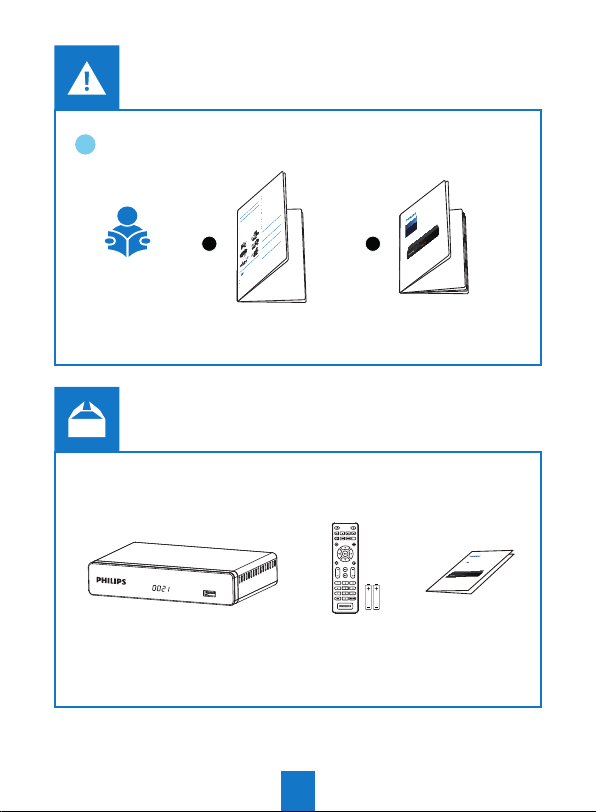
1
Take care not to allow liquids or metal objects to enter the
Set-top box through the ventilation slots.
Avoid reconnecting the Set-top box after it has been
subjected to large changes in temperature.
The Set-top box must be disconnected from power supply
before any modication ofconnection between TV, VCR or
antenna.
In the event of a storm, it is advisable to unplug the antenna.
Even if the Set-top box and the television set are
disconnected from the power supply, lightning can still
damage them.
If you hear unusual noise coming from the mains power
socket or from the power cord , disconnect immediately the
power cord from the mains power socket in accordance with
all the precautions of use, you risk getting an electric shock,
and contact your retailer.
Never connect the Set-top box to a mains power socket
which is loose, shows signs of wear or damage, you risk
getting an electric shock.
Never touch the power cord with wet hands. You risk getting
an electric shock.
When connecting or disconnecting the power cord, always
take hold of the plug without pulling on the cord. A damaged
cord presents a potential risk of re or electric shock. Never
pull the power cord when disconnecting from the mains
power socket.
Never place objects on the power cord, and never pull on it
Safety recommendations
or fold it. This may cause a risk of re or electric shock.
Ensure that the Set-top box never lies on the power cord or
any other cables.
UseoftheSet-top boxissubjecttosafetymeasures
Ensure the Set-top box is placed on a at and stable
designedtoprotect usersandtheirenvironment.
surface, placing it incorrectly may lead to the power cord
being disconnected.This may cause a risk of re or electric
shock.
Where to put your Set-top box?
Always keep the power cord unit out of the reach of children
or domestic animals.
Inorder to guarantee the correct operation of your Set-top box,
Only personnel approved by the manufacturer can repair the
you must:
Set-top box. Failure to comply with these safety precautions
place it indoors to protect it from lightning, rain, and direct
will invalidate the guarantee.
sunlight,
Have a specialised installer perform all connections if you
place it in a dry and well ventilated area,
want to use cables that are not provided with the Set-top
keep it away from heat sources such as radiators, candles,
box.
lamps,etc.
protect it from dampness, place it on a at surface from
where it will not fall and is out of the reach of children,
avoid violent shocks. Choose a stable, horizontal surface on
which the Set-top box will not be exposed to intense
Batteries
vibrations.
do not place anything on top of your Set-top box (as it would
Batteries are easily swallowed by young children. Do not allow
restrict ventilation): the ventilation slots located on the casing
young children to play with the remote control.
prevent your Set-top box from overheating. If you place the
Always keep batteries away from excessive heat sources such
Set-top box in a compartment or other closed space, leave a
as direct sunlight, re or similar sources.
space of at least 10 cm on each side and 20 cm on the front
To avoid damaging the remote control, only use identical
and back of the Set-top box,
batteries or batteries of an equivalent type. The batteries
connect it directly to the mains with the provided cords, the
provided are not rechargeable.
socket must be near the Set-top box and easy to access. The
use of an extension cable (with multi-points) is not
recommended.
Interference
Do not place the Set-top box near appliances that may cause
electromagnetic interferences (for example, loudspeakers,
modems, routers or cordless phones). This could aect Set-top
box operation and distort the picture or sound.
1 2
USB Storage devices
Please wait until the Set-top box or the multimedia le
application exits the multimedia list manager (multimedia le
application) or is in standby mode before disconnecting your
storage devices. Otherwise, you risk losing data or damage your
storage device.
When connecting a USB peripheral device, respect the way of
insertion and never use force. You may damage your peripheral
device and/or the appliance.
Cleaning the Set-top box
The outer casing of the Set-top box can be cleaned with a soft
and dry cloth. Do not use any type of abrasive pad, scouring
powder or solvents, such as alcohol or turpentine, as they
could damage the surface of the Set-top box.
• In case of failure, the power cable is the
disconnect device for this equipment. To remove
all electrical power from the equipment,
Warnings and safety instructions
disconnect the power cable from the electrical
outlet.
Connect the Set-top box to the electrical outlet in
accordance with the indications mentioned on the
identication label axed on the Set-top box (voltage,
power, frequency of electricity network).
You must imperatively use the Set-top box in an
environment that complies with the following requirements:
• temperature: between 0°C [32°F] and 40°C [104°F].
• ambient humidity: between 20% and 90%.
• altitude: below 2000 m [6562 ft].
To avoid short-circuits (re or electrocution hazard), do not
expose your Set-top box to dampness. Do not place any
object containing liquid (vase for example) on the appliance.
The Set-top box must not be splashed with liquid. If liquid is
spilled onto the Set-top box, unplug it immediately from the
mains and consult your supplier.
CH+
CH-
Digital receiver
Satellite
D
User manual
VOL+VOL-
Quick start guide
Neo Viu S2
HD receiver
DSR4022
1
Page 4
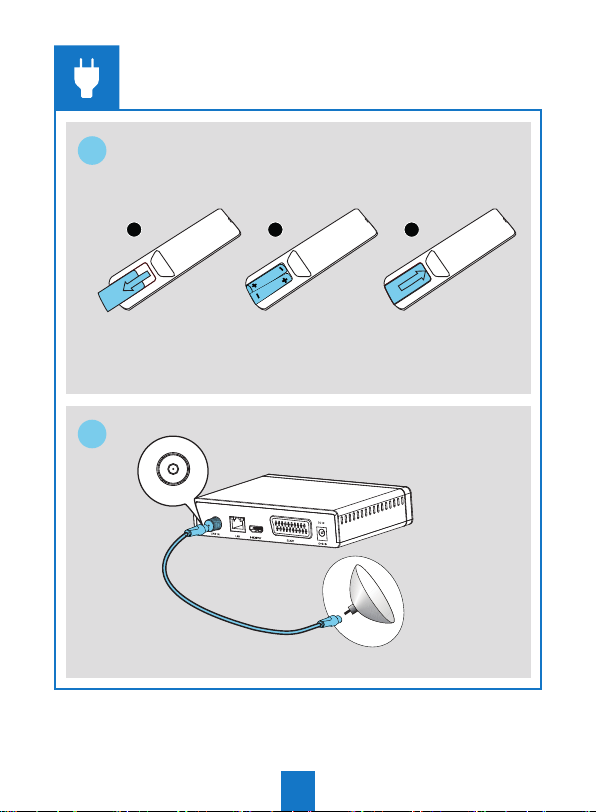
1
1 2 3
2
LNB IN
2
Page 5
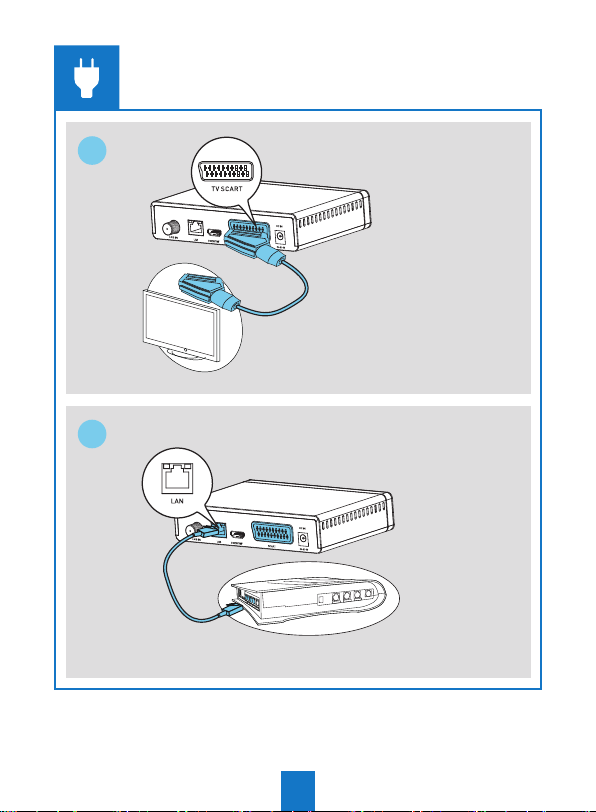
3
4
3
Page 6
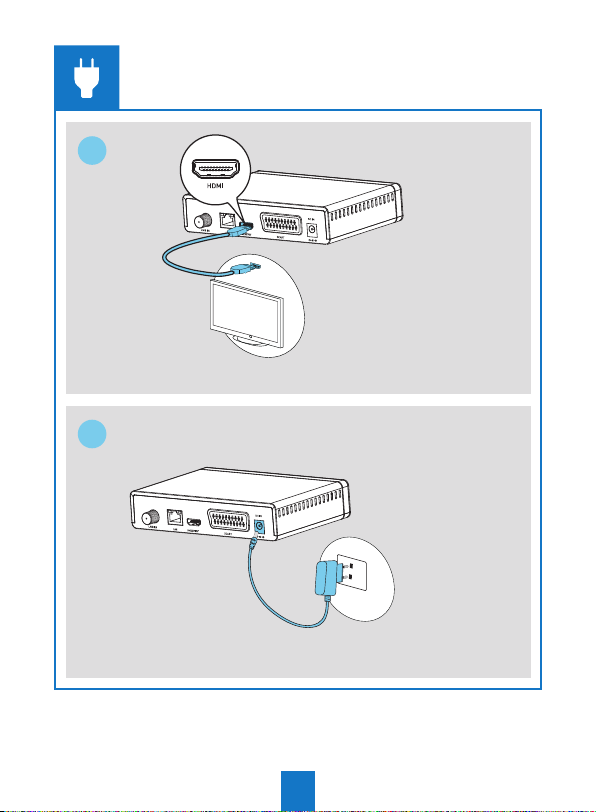
5
6
4
Page 7
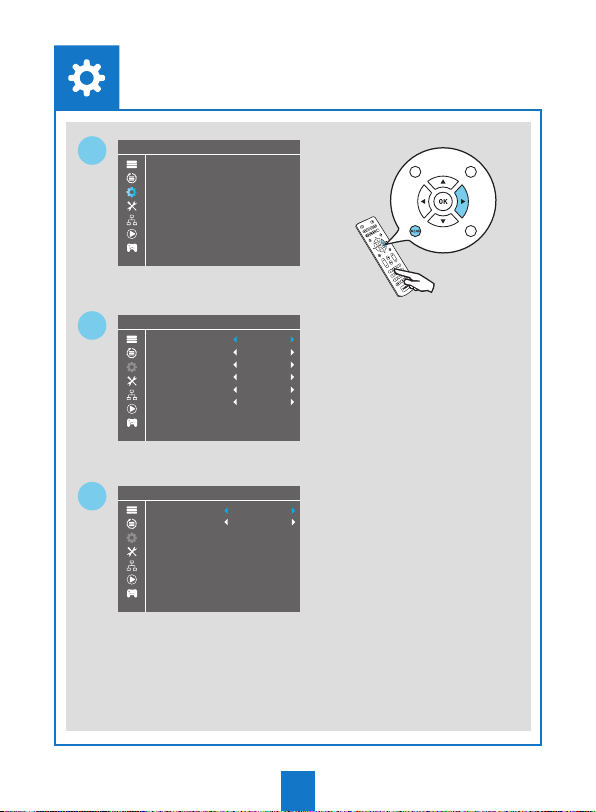
1
2
3
System
System Setup
Language
TV System
Local Time Setting
Timer Setting
Parental Lock
OSD Setting
Favorite
Audio Description Setting
Language
Language
First Audio
Second Audio
Subtitle Language
Teletext
Subtitle
Local Time Setting
Region
GMT Usage
GMT Oset
Summer Time
Date
Time
Reykjavik,Casablanca,Lisbon,Dublin,London
English
English
English
English
English
O
United Kingdom
By Region
GMT+00:00
On
12/07/2015
15:16
5
Page 8
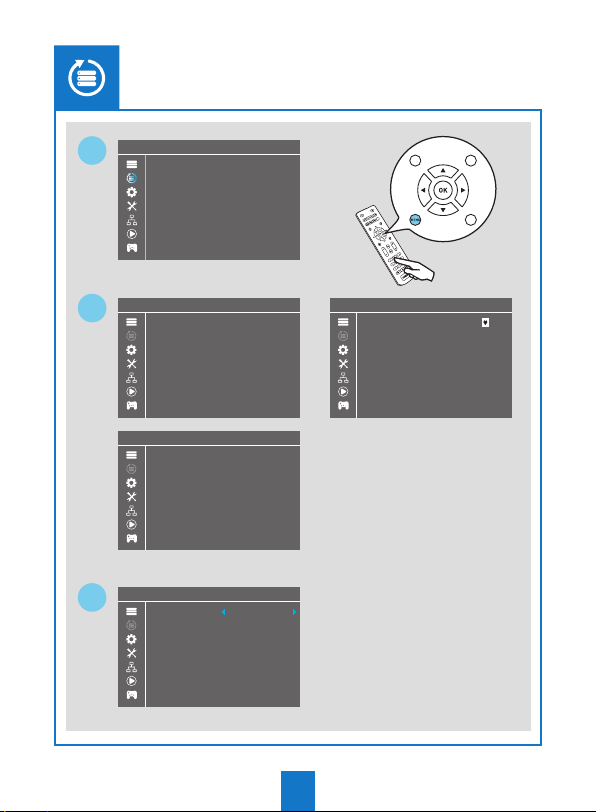
1
Installation
Installation
DVBS Installation
2
3
DVBS Installation
Antenna Connection
Satellite List
Antenna Setup
Single Satellite Search
Multi Satellite Search
TP List
DVBS Installation
Antenna Connection
Satellite List
Antenna Setup
Single Satellite Search
Multi Satellite Search
TP List
DVBS Installation
LNB1
Fixed Antenna
6
DVBS Installation
12Hotbird E13.0
Astra E19.2
E13.0
E19.2
Page 9
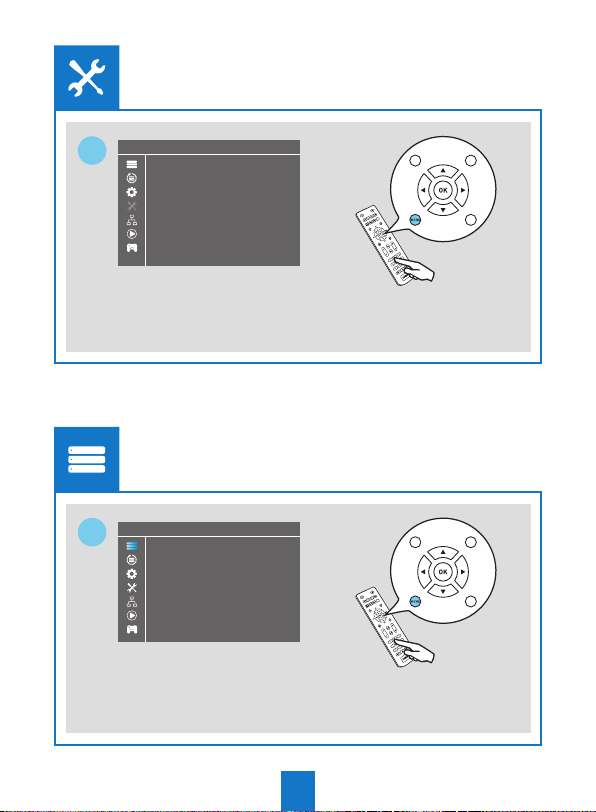
Tools
Tools
1
Edit Channel
Edit Channel
1
Information
Factory Setting
Software upgrade by USB
Remove USB device safely
Upgrade By Network
TV Channel List
Radio Channel List
Delete All
7
Page 10
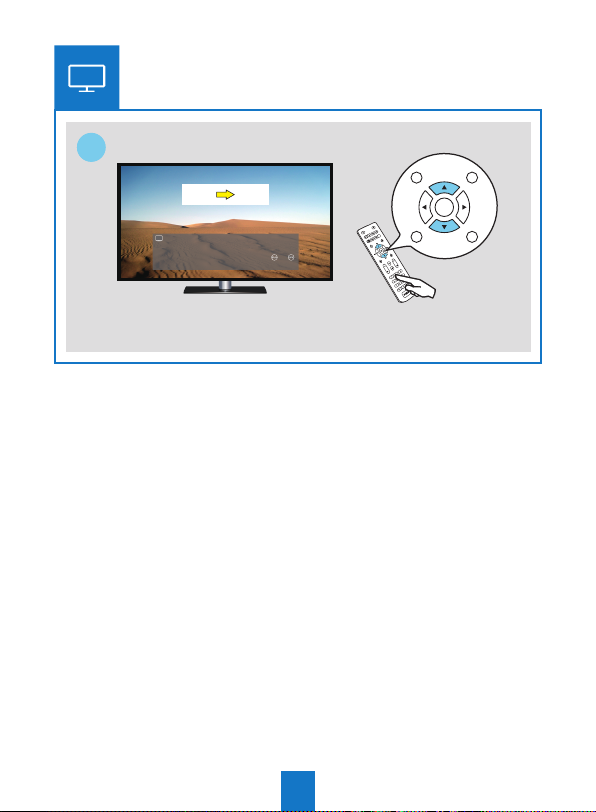
1
1
CH+
CH1 CH2
829 Film4 01/06 11:26
Now: The House on Telegraph Hill
Next: The Barefoot Contessa
CH-
8
Page 11
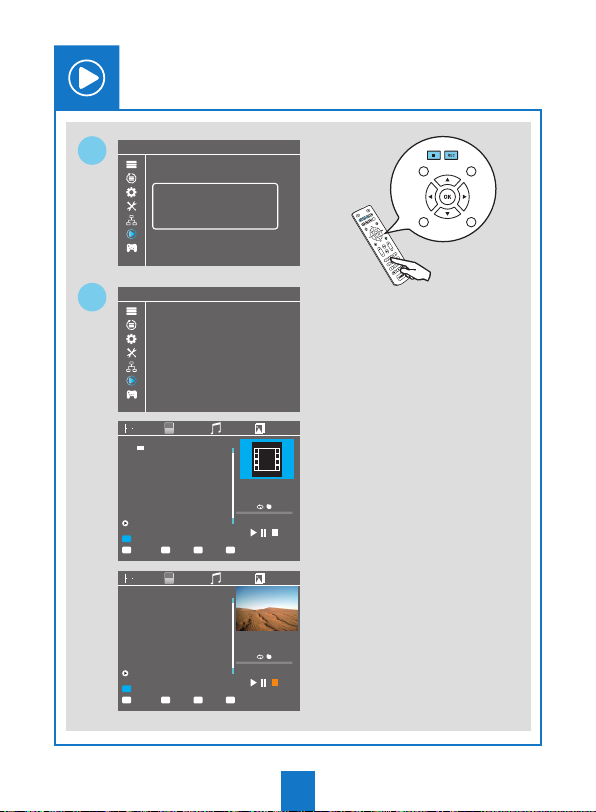
Media Player
Media Player
1
Media Player
2
1 uda1: xxxxxx
Record
Video
Music
Image
HDD Information
DVR Setting
Record
Video
Music
Image
HDD Information
DVR Setting
Video
USB disk A connected
Record
Music
Image
/mnt
Edit
1
Switch
/..
12MPG 05-mpeg4-aac.mp4
/mnt
Edit
1
Switch
2
Video
MPG xxxxx.mp4
MPG xxxxx.mp4
MPG xxxxx.mp4
MPG xxxxxx.mp4
2
Sort
Sort
EXIT
Record
EXIT
Exit
Exit
00:00:00 00:00:50
INFO
Repeat
Music
05-mpeg4-aac.mp4
128X96
1682KB
00:00:00 00:00:50
INFO
Repeat
Image
9
Page 12
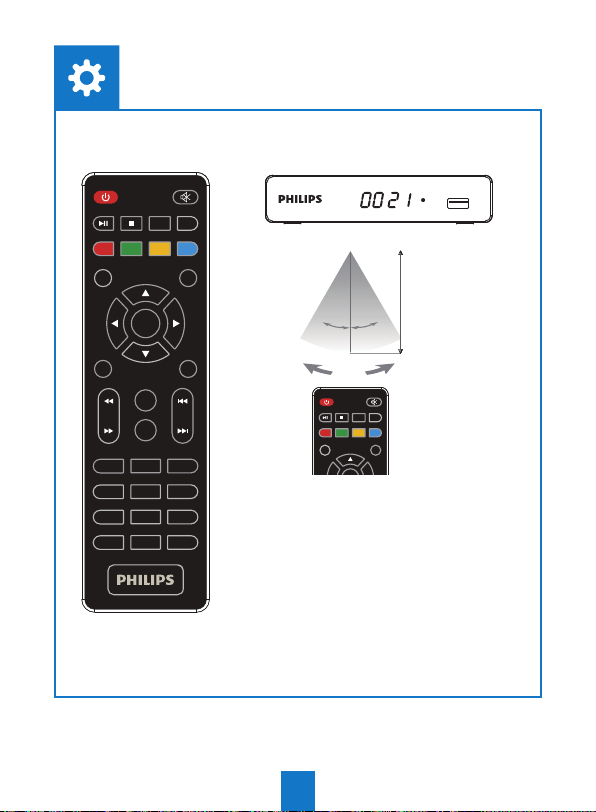
RADIO
MENU
TV/
EPG
1
4
7
TTX
System
REC
AUDIO
MEDIA
CH+
OK
CH-
USB
FAV
2 3
5
8
0
SUBTITLE
INFO
BACK
VOL+VOL-
EXIT
Remote
sensor
TV/
RADIO
EPG
Within approximately
6 meter (20 feet)
o
o
3 0
3 0
INFO
REC
AUDIO
MEDIA
BACK
CH+
6
9
10
Page 13
SIMPLIFIED EU DE CLARATION OF CONFORMITY FOR RADIO DEVICE
Hiermit erklärt Screeneo Innovation SA, dass die Geräte in Übereinstimmung mit den Richt-
DE
linien 2014/53/EU, 2009/125/EG, 2011/65/EU sind. Der vollständige Wortlaut der EU-Konformitätserklärung steht unter folgender Internet Adresse zur Verfügung: www.philips.com
Par la présente, Screeneo Innovation SA déclare que l’équipement est en conformité avec
FR
les directives 2014/53/EU, 2009/125/EC, 2011/65/EU. Le texte complet de la déclaration de
conformité européenne est disponible à l’adresse internet suivante : www.philips.com
Hereby, Screeneo Innovation SA declares that the equipment is in compliance with Directives
EN
2014/53/EU, 2009/125/EC, 2011/65/EU. The full text of the EU declaration of conformity is
available at the following internet address: www.philips.com
Con la presente, Screeneo Innovation SA dichiara che il prodotto è conforme alle direttive
IT
2014/53/EU, 2009/125/EC e 2011/65/EU. Il testo completo della dichiarazione europea di
conformità è disponibile al seguente link: www.philips.com
Por medio de la presente, SCREENEO INNOVATION SA SAS declara que el equipo cumple con
ES
las Directrices 2014/53/UE, 2009/125/CE, 2011/65/UE. El texto completo de la declaración de
conformidad de la UE está disponible en la siguiente dirección Internet: www.philips.com
Screeneo Innovation SA verklaart hiermee dat de uitrusting aan de Directieven 2014/53/EU,
NL
2009/125/EC, 2011/65/EU voldoet. De volledige tekst van de EU-conformiteitsverklaring is
terug te vinden op het volgende internetadres: www.philips.com
A Screeneo Innovation SA declara que o equipamento está em conformidade com as Directi-
PT
vas 2014/53/UE, 2009/125/CE, 2011/65/UE. O texto integral da declaração de conformidade
da UE está disponível através do seguinte endereço da Internet: www.philips.com
Härmed , försäkrar Screeneo Innovation SA att utrustningen är i enlighet med direktiven
SW
2014/53/EU, 2009/125/EG, 2011/65/EU. Den fullständiga texten av EU-försäkran om överensstämmelse nns på följande internetadress: www.philips.com
Herved , erklærer Screeneo Innovation SA , at udstyret er i overensstemmelse med direktiv
DK
2014/53/EU , 2009/125/EF , 2011/65/EU. Den fulde tekst af EU-overensstemmelseserklæringen er tilgængelig på følgende internetadresse : www.philips.com
Screeneo Innovation SA erklærer herved at apparatene er i samsvar med direktivene
NO
2014/53/EU, 2009/125/EG, 2011/65/EU. Den komplette teksten for EU-samsvarserklæringen
er tilgjengelig på følgende internett-adresse: www.philips.com
11
Page 14
Screeneo Innovation SA vakuuttaa täten, että laitteisto täyttää direktiivien 2014/53/EY,
FI
2009/125/EY, 2011/65/EY vaatimukset. Täydellinen EY-vaatimustenmukaisuusvakuutus on
luettavissa seuraavasta verkko-osoitteesta: www.philips.com
Společnost Screeneo Innovation SA tímto prohlašuje, že toto zařízení odpovídá požadavkům
CZ
směrnic 2014/53/EU, 2009/125/ES a 2011/65/EU. Celý text prohlášení o shodě platném pro
EU je k dispozici na následující internetové adrese: www.philips.com
Týmto spoločnosť Screeneo Innovation SA prehlasuje, že vybavenie je v súlade s normami
SK
2014/53/EÚ, 2009/125/ES, 2011/65/EÚ. Kompletný text vyhlásenia o zhode s EÚ je dostupný
na nasledujúcej internetovej adrese: www.philips.com
Screeneo Innovation SA ezennel kijelenti, hogy a készülék teljesíti a 2014/53/EU, 2009/125/
HU
EC, 2011/65/EU irányelveket. Az EU megfelelősségi nyilatkozat teljes szövege a következő
internet címen érhető el: www.philips.com
Niniejszym Screeneo Innovation SA deklaruje, że urządzenia są zgodne z wymogami
PL
dyrektyw 2014/53/UE, 2009/125/WE, 2011/65/UE. Pełny tekst deklaracji zgodności UE jest
dostępny na następujęcej stronie internetowej: www.philips.com
Bu vesile ile Screeneo Innovation SA, Cihaz Direkti eri 2014/53/EU, 2009/125/EC, 2011/65/
TR
EU ile uyumlu olduğunu beyan eder. AB uygunluk beyanı tam metni aşağıdaki internet
adresinde mevcuttur: www.philips.com
Δια του παρόντος, η Screeneo Innovation SA δηλώνει ότι ο εξοπλισμός έχει συμμορφωθεί με τις
GR
οδηγίες 2014/53/EU, 2009/125/EC, 2011/65/EU. Ολόκληρο το κείμενο της Ευρωπαϊκής δήλωσης
συμμόρφωσης είναι διαθέσιμο στην ακόλουθη διεύθυνση Internet: www.philips.com
Prin prezenta, Screeneo Innovation SA declara ca echipamentul este in conformitate cu
RO
Directivele Europene 2014/53/EU, 2009/125/EC, 2011/65/EU. Textul integral al declaratiei de
conformitate UE este disponibil la urmatoarea adresa de internet: www.philips.com
С настоящото, Screeneo Innovation SA декларира, че оборудването е в съответствие с
BG
директиви 2014/53/ЕС, 2009/125/ЕО, 2011/65/ЕС. Пълният текст на ЕС декларацията за
съответствие е достъпна на следния интернет адрес: www.philips.com
Screeneo Innovation SA ovim putem izjavljuje da je oprema usklađena sa smjernicama
HR
2014/53/EU, 2009/125/EC, 2011/65/EU. Puni tekst EU deklaracije usklađenosti dostupan je
na sljedećoj internoj adresi: www.philips.com
Ovim Screeneo Innovation SA izjavljuje da su uređaji usaglašeni sa direktivama 2014/53/
RS
EU, 2009/125/EG, 2011/65/EU. Kompletan tekst EU izajve o usaglašenosti je dostupan na
sledećoj internet adresi: www.philips.com
12
Page 15
S
THIS SOFTWARE END USER LICENSE AGREEMENT (“THIS AGREEMENT”) IS A LEGAL AND BINDING
AGREEMENT BETWEEN YOU (EITHER AN INDIVID-UAL OR ENTITY) AND SCREENEO INNOVATION SA A
SWISS COMPANY, WITH ITS PRINCIPAL OFFICE AT ROUTE DE LULLY 5C, 1131 TOLOCHENAZ, SWITZER-
LAND. THIS AGREEMENT GIVES YOU THE RIGHT TO USE CERTAIN SOFTWARE (THE “SOFTWARE”)
INCLUDING USER DOCUMENTA-TION IN ELECTRONIC FORM WHICH MAY HAVE BEEN PROVIDED
SEPARATE-LY OR TOGETHER WITH A SCREENEO INNOVATION SA (PHILIPS BRANDED) PRODUCT (THE
“DEVICE”) OR A PC. BY DOWNLOADING, INSTALLING OR OTHERWISE USING THE SOFTWARE, YOU
ACCEPT AND AGREE TO BE BOUND BY ALL OF THE TERMS AND CONDITIONS OF THIS AGREEMENT.
IF YOU DO NOT AGREE TO THESE TERMS AND CONDITIONS, DO NOT DOWNLOAD, INSTALL OR OTHER-
WISE USE THE SOFTWARE. IF YOU ACQUIRED THE SOFTWARE IN TANGIBLE MEDIA E.G. CD WITHOUT
THE OPPORTUNITY TO REVIEW THIS LICENSE AND DO NOT ACCEPT THESE TERMS, YOU MAY RECEIVE
A FULL REFUND OF THE AMOUNT, IF ANY, THAT YOU PAID FOR THE SOFTWARE IF YOU RETURN THE
SOFTWARE UNUSED WITH PROOF OF PAYMENT WITHIN 30 DAYS FROM THE DATE OF PURCHASE.
1. GRANT OF LICENSE. This Agreement grants you a non-exclusive, non-transferable, non-sub licens-
able license to install and use, on the Device or a PC, as applicable, one (1) copy of the speci ed version
of the Software in object code format as set out in the user documentation solely for your personal use.
The Software is “in use” when it is loaded into the temporary or permanent memory (i.e. RAM, hard disk,
etc.) of the PC or the Device.
13
Page 16

2.OWNERSHIP. The Software is licensed and not sold to you. This Agreement grants you only the right to
use the Software, but you do not acquire any rights, express or implied, in the Software other than those
speci ed in this Agreement. SCREENEO INNOVATION SA and its licensors retain all right, title, and interest
in and to the Software, including all patents, copyrights, trade secrets, and other intellectual property rights
incorporated therein. The Software is protected by copyright laws, international treaty provisions, and other
intellectual property laws. Therefore, other than as expressly set forth herein, you may not copy the Software without prior written authorization of SCREENEO INNOVATION SA, except that you may make one (1)
copy of the Software for your back-up purposes only. You may not copy any printed materials accompanying the Software, nor print more than one (1) copy of any user documentation provided in electronic form,
except that you may make one (1) copy of such printed materials for your back-up purposes only.
3. License Restrictions. EXCEPT AS PROVIDED OTHERWISE HEREIN, YOU SHALL NOT RENT, LEASE,
SUBLICENSE, SELL, assign, loan, or otherwise transfer the Software. You shall not, and you shall not permit
any third party, to reverse engineer, decompile, or disassemble the Software, except to the extent that
applicable law expressly prohibits the foregoing restriction. You may not remove or destroy any product
identi cation, copyright notices, or other proprietary markings or restrictions from the Software. All titles,
trademarks, and copyright and restricted rights notices shall be reproduced on your back up copy of the
Software. You may not modify or adapt the Software, merge the Software into another program or create
derivative works based upon the Software.
4.TERMINATION OF CERTAIN FUNCTIONALITY. The Software may contain components of certain licensed software including software licensed from Microsoft Corporation (“Microsoft”) which
implements Microsoft’s digital rights management technology for Windows Media. Content providers
are using the digital rights management technology for Windows Media (“WM-DRM”) to protect the
integrity of their content (“Secure Content”) so that their intellectual property, including copyright, in
such content is not misappropriated. Your Device may also use WM-DRM software to transfer or play
Secure Content (“WM-DRM Software”). If the security of such WM-DRM Software is compromised,
Microsoft may revoke (either on its own or upon the request of the owners of Secure Content (“Secure
Content Owners”)) the WM-DRM Software’s right to acquire new licenses to copy, store, transfer,
display and/or play Secure Content. Revocation does not alter the WM-DRM Software’s ability to
play unprotected content. A list of revoked WM-DRM Software is sent to your PC and/or your Device
whenever you download a license for Secure Content. Microsoft may, in conjunction with such
license, also download revocation lists onto your Device on behalf of Secure Content Owners, which
may disable your Device’s ability to copy, store, display, transfer, and/or play Secure Content. Secure
Content Owners may also require you to upgrade some of the WM-DRM components distributed with
this Software (“WM-DRM Upgrades”) before accessing their content. When you attempt to play Secure
Content, WM-DRM Software built by Microsoft will notify you that a WM-DRM Upgrade is required
and then ask for your consent before the WM-DRM Upgrade is downloaded. WM-DRM Software built
by SCREENEO INNOVATION SA may do the same. If you decline the upgrade, you will not be able to
access Secure Content that requires the WM-DRM Upgrade; however, you will still be able to access
unprotected content and Secure Content that does not require the upgrade. WM-DRM features that
access the Internet, such as acquiring new licenses and/or performing a required WM-DRM Upgrade,
can be switched o . When these features are switched o , you will still be able to play Secure Content
if you have a valid license for such content already stored on your Device. However, you will not be able
to use certain of the WM-DRM Software features that require Internet access such as the ability to
download content that requires the WM-DRM Upgrade. All title and intellectual property rights in and
14
Page 17

to the Secure Content is the property of the respective Secure Content owners and may be protected
by applicable copyright or other intellectual property laws and treaties. This Agreement grants you
no rights to use such Secure Content. To summarize, if the Software contains Microsoft WM-DRM
components – Secure Content you desire to download, copy, store, display, transfer, and/or play is
protected by the Microsoft WM-DRM components of the Software. Microsoft, Secure Content Owners, or Secure Content distributors may deny you access, or restrict your access, to Secure Content
even after you have paid for, and/or obtained, it. Neither your consent nor the consent or approval of
SCREENEO INNOVATION SA is necessary for any of them to deny, withhold or otherwise restrict your
access to Secure Content. SCREENEO INNOVATION SA does not guaranty that you will be able to
download, copy, store, display, transfer, and/or play Secure Content.
5. Open Source Software. (a) This software may contain components that are subject to open-source
terms. This Agreement does not apply to this software as such. More information can be found in the
documentation. If applicable, source code which needs to be o ered under the applicable open source
licenses will be delivered upon request, please contact [email protected] in English
with product identi cation or for more information. (b) Your license rights under this Agreement do not
include any right or license to use, distribute or create derivative works of the Software in any manner that
would subject the Software to Open Source Terms. “Open Source Terms” means the terms of any license
that directly or indirectly (1) create, or purport to create, obligations for SCREENEO INNOVATION SA with
respect to the Software and/or derivative works thereof; or (2) grant, or purport to grant, to any third party
any rights or immunities under intellectual property or proprietary rights in the Software or derivative
works thereof.
6. Termination. This Agreement shall be e ective upon installation or rst use of the Software and shall
terminate (i) at the discretion of SCREENEO INNOVATION SA, due to your failure to comply with any term
of this Agreement; or (ii) upon destruction of all copies of the Software and related materials provided to
you by SCREENEO INNOVATION SA hereunder. SCREENEO INNOVATION SA’s rights and your obligations
shall survive the termination of this Agreement.
7. Upgrades. SCREENEO INNOVATION SA may, at its sole option, make upgrades to the Software available by general posting on a website or by any other means or methods. Such upgrades may be made
available pursuant to the terms of this Agreement or the release of such upgrades to you may be subject
to your acceptance of another agreement.
8. Support Services. SCREENEO INNOVATION SA is not obligated to provide technical or other support
(“Support Services”) for the Software. If SCREENEO INNOVATION SA does provide you with Support Services, these will be governed by separate terms to be agreed between you and SCREENEO INNOVATION
SA.
9. Limited Software Warranty. SCREENEO INNOVATION SA provides the Software ‘as is’ and without
any warranty except that the Software will perform substantially in accordance with the documentation
accompanying the Software for a period of one year after your rst download, installation or use of the
Software, whichever occurs rst. SCREENEO INNOVATION SA’ entire liability and your exclusive remedy
for breach of this warranty shall be, at SCREENEO INNOVATION SA’ option, either (i) return of the price
paid by you for the Software (if any); or (b) repair or replacement of the Software that does not meet the
warranty set forth herein and that is returned to SCREENEO INNOVATION SA with a copy of your receipt.
This limited warranty shall be void if failure of the Software has resulted from any accident, abuse, misuse
15
Page 18

or wrongful application. Any replacement Software will be warranted for the remainder of the original
warranty period or thirty (30) days, whichever is longer. This limited warranty shall not apply to you if the
Software was provided to you free of charge on an evaluation only basis.
10. NO OTHER WARRANTIES. EXCEPT AS SET FORTH ABOVE, SCREENEO INNOVATION SA AND ITS
LICENSORS DO NOT WARRANT THAT THE SOFTWARE WILL OPERATE ERROR FREE OR UNINTERRUPTED, OR WILL MEET YOUR REQUIREMENTS. YOU ASSUME ALL RESPONSIBILITIES FOR SELECTION OF
THE SOFTWARE TO ACHIEVE YOUR INTENDED RESULTS, AND FOR THE INSTALLATION OF, USE OF, AND
RESULTS OBTAINED FROM THE SOFTWARE. TO THE MAXIMUM EXTENT PERMITTED BY APPLICABLE
LAW, SCREENEO INNOVATION SA AND ITS LICENSORS DISCLAIM ALL WARRANTIES AND CONDITIONS,
WHETHER EXPRESS OR IMPLIED, INCLUDING BUT NOT LIMITED TO THE IMPLIED WARRANTIES OF
MERCHANTABILITY, FITNESS FOR A PARTICULAR PURPOSE, AND ACCURACY OR COMPLETENESS OF
RESULTS WITH RESPECT TO THE SOFTWARE AND THE ACCOMPANYING MATERIALS. THERE IS NO
WARRANTY AGAINST INFRINGEMENT. SCREENEO INNOVATION SA DOES NOT WARRANT THAT YOU
WILL BE ABLE TO DOWNLOAD, COPY, STORE, DISPLAY, TRANSFER, AND/OR PLAY SECURE CONTENT.
11. LIMITATION OF LIABILITY. UNDER NO CIRCUMSTANCES WILL SCREENEO INNOVATION SA OR ITS
LICENSORS BE LIABLE FOR ANY CONSEQUENTIAL, SPECIAL, INDIRECT, INCIDENTAL OR PUNITIVE
DAMAGES WHATSOEVER, INCLUDING, WITHOUT LIMITATION, DAMAGES FOR LOSS OF PROFITS OR
REVENUES, BUSINESS INTERRUPTION, LOSS OF BUSINESS INFORMATION, LOSS OF DATA, LOSS OF
USE OR OTHER PECUNIARY LOSS, EVEN IF SCREENEO INNOVATION SA OR ITS LICENSORS HAVE BEEN
ADVISED OF THE POSSIBILITY OF SUCH DAMAGES. IN NO EVENT SHALL SCREENEO INNOVATION SA’
OR ITS LICENSORS’ AGGREGATE LIABILITY FOR DAMAGES ARISING OUT OF THIS AGREEMENT EXCEED
THE GREATER OF THE PRICE ACTUALLY PAID BY YOU FOR THE SOFTWARE OR FIVE POUNDS STERLING
(5.00).
12. Trademarks. Certain product names used in this Agreement, the Software, and the printed user
documentation may be (registered) trademarks of SCREENEO INNOVATION SA, its licensors or other third
parties. You are not authorized to use any such trademarks.
13. Export Administration. You agree that you will not directly or indirectly, export or re-export the Software to any country for which the United States Export Administration Act, or any similar United States law
or regulation requires an export license or other U.S. Government approval, unless the appropriate export
license or approval has rst been obtained. By downloading or installing the Software you agree to abide
by this Export provision.
14. GOVERNING LAW - LITIGATIONS. This Agreement shall be governed by French Law. Any dispute
arising in connection with this Agreement, if not settled amicably, shall be brought to the competent court
of PARIS.
15. GENERAL. This Agreement contains the entire agreement between you and SCREENEO INNOVATION
SA and supersedes any prior representation, undertaking or other communication or advertising with respect to the Software and user documentation. If any part of this Agreement is held invalid, the remainder
of this Agreement will continue in full force and e ect. This Agreement shall not prejudice the statutory
rights of any party dealing as a consumer.
16
Page 19
Sehr geehrter Kunde, Sie können eine Kopie der Garantiebestimmungen entweder über den
DE
Händler erhalten, sie über das Internet herunterladen, oder sie beim Kundendienstzentrum
beziehen. Bewahren Sie Ihren Kaufbeleg und die Garantiekarte gut auf!
Dear Customer, you may obtain a copy of the warranty conditions from the dealer, by downloa-
EN
ding it from the internet or by contacting the customer support center. Please retain your sales
receipt and the warranty card!
Très cher client, vous pouvez obtenir une copie des dispositions de garantie chez le revendeur
FR
ou les télécharger sur Internet. Conservez bien votre ticket de caisse et la carte de garantie!
Stimato cliente, una copia delle condizioni di garanzia può essere richiesta tramite il proprio
IT
rivenditore, oppure è scaricabile da internet o disponibile presso il servizio post-vendita.
Conservare con cura il documento di acquisto e la scheda di garanzia!
Geachte klant, U kunt eenkopie van de garantiebeqalingen via uw dealer verkrijgen, van
NL
Internet downloaden of bij de klantendienst aanvragen. Bewaar uw aankoopbewijs en de
garantiekaart goed!
Estimado cliente: puede obtener una copia de las disposiciones de la garantiá a través de su
ES
distribuidor, descargarla usted mismo por Internet o bien solicitarla en el centro de atención al
cliente. Conserve en un lugar seguro el justi cante de compra y la tarjeta de garantía!
17
Page 20
Estimado cliente, Pode obter uma cópia das condições de garantia no fabricante, descarre-
PT
gá-las da Internet ou adquiri-las no centro de assistência ao cliente. Guarde o comprovativo de
compra e o certi cado de garantia num local segro!
Bäste kund, Du kan antingen få en kopia av garantivillkoren via återförsäljaren, ladda ner dem
SV
via Internet eller beställa dem hos kundtjänstcentrat. Ta väl vara på ditt kvitto och garantikortet!
Kære kunde, Du kan få en kopi af garantibestemmelserne fra din forhandler eller hos vores
DA
kundeservicecenter. Opbevar dit købsbilag og garantikortet omhyggeligt.
Kjære kunde Du kan enten få en kopi av garantibestemmelsene hos forhandleren, laste dem
NO
ned fra internettsiden, eller bestille dem ved kundeservicesenteret. Ta godt vare på kjøpsbeviset
og garantikortet ditt
Arvoisa asiakas Takuuehdot ovat saatavana tuotteet myyjältä, Internetistä tai asiakaspalvelu-
FI
keskuksesta. Säilytä kuitti ja takuukortti huolellisesti! Säilytä kuitti ja takuukortti huolellisesti!
Vážený zákazníku, Záruční list obdržíte od prodejce, můžete jej stáhnout z webových stránek,
CZ
případně kontaktujte zákaznické informační centrum. Uschovejte, prosíme, účtenku a záruční
list!
Vážený zákazník, Záručný list dostanete od predajcu, môžete ho prevziať z webových stránok,
SK
prípadne kontaktujte zákaznícke informačné centrum. Uschovajte, prosíme, účtenku a záručný
list!
Уважаеми клиенти, Можете да получите копие от гаранционните условия от търговеца или да
BG
ги свалите от интернет, както и да ги получите от центъра за обслужване на клиенти. Пазете
касовия бон и гаранционната карта!
Spoštovani kupec! Kopijo garancijskih pogojev lahko dobite pri trgovcu, lahko jih prenesete
SL
na svoj računalnik preko spleta ali jih dobite pri centru za pomoč strankam. Prosimo, shranite
potrdilo o nakupu in garancijski list!
Szanowny Kliencie! Warunki gwarancji można uzyskać od sprzedawcy, pobierając je przez
PL
Internet lub kontaktując się z Centrum obsługi klienta. Proszę zachować paragon i kartę
gwarancyjną!
Поштоване муштеријеKopiju garancijskih odredaba možete dobiti od trgovca, snimiti i učitati preko Interne-
SR
ta ili naručiti preko servisnog centra za mušterije. Pažljivo sačuvajte potvrdu o kupovini i garancijsku karticu!
Poštovane mušterije Kopiju jamstvenih odredaba možete dobiti od trgovca, snimiti i učitati
HR
preko Interneta ili naručiti preko servisnog centra za kupce. Potvrdu o kupovini i jamstvenu
karticu pažljivo sačuvajte!
18
Page 21
Tisztelt Vásárló! A Jótállás egy példányát beszerezheti a forgalmazótól, letöltheti az Internetről
HU
vagy kérheti a vevőtájékoztatási központtól. Kérjük, őrizze meg a vásárlási bizonylatot és a
garanciakártyát! Átalános feltételek: 1. A Fogyasztót a jótállás alapján 151/2003 (IX.22.) Kormányrendeletben meghatározott jogok illetik meg. 2. A jótállás időtartama a vásárlás napjától számított: Fax, Dect, Vezetékes telefon, Digitális fényképező, Photoframe esetén: 12 hónap, kivéve
a vetítőlámpa, amire 3 hónap, Multifunkciós berendezés esetén: 24 hónap, Projector esetén: 12
hónap. 3. A jótállási igény a jótállási jeggyel érvényesíthe. A Jótállási jogokat a fogyasztási cikk
tulajdonosa érvényesítheti. 4. Tartozékokra (tinta lm, tintapatron) a garancia nem terjed ki.
Jótállási felelősség kizárása: Ügyeljen a termék használati útmutatójában foglaltak betartására!
A jótállási kötelezettség nem áll fenn (például, de nem kizárólagosan), ha a hiba rendeltetésellenes használatból eredő törés, sérülés, szakszerűtlen kezelés vagy illetéktelen átalakítás, helytelen tárolás, beázás, nem megfelelő feszültség használata, elemi csapás vagy az értékesítés
utáni külső behatás eredménye. Ilyen esetekben a javítás költségei a Fogyasztót terhelik.
Eljárás a hiba jellegére vonatkozó véleménykülönbség, vita esetén:
Ha a hiba ténye, jellege megállapításához különleges szakértelem szükséges, a Fogyasztó a
Fogyasztóvédelmi Főfelügyelőségtől szakvéleményt kérhet.
Sayın müşterimiz, Garanti kurallarının bir suretini satıcınızdan, internetten indirerek veya ilgili
TR
müşteri hizmetleri merkezimizden temin edebilirsiniz. Satın alma belgenizi ve garanti kartınızı
itinalı bir biçimde saklayınız!
Уважаемый покупатель, Копию гарантийных обязательств можно получить через дилера,
RU
загрузить с вебсайта или получить в сервисном центре. Сохраните документы,
подтверждающие покупку, и гарантийный талон!
Stimate client, Puteţi obţine o copie a prevederilor de garanţie e de la distribuitor, e o
RO
puteţi descărca de pe Internet sau o puteţi solicita la Serviciul Clienţi. Păstraţi bonul scal/
facture ĭn original şi certi catul de garanţie! Drepturile cumpărătorului sunt in conformitate cu
Legea 449/2003 şi OG21/1992. Drepturile consumatorului nu sunt afectate de garanţia oferit.
Asigurarea garanţiei se face prin repararea/inlocuirea aparatului conform legislaţiei in vigoare
de către unitatea de service abilitată de pe acest certi cat. Termenul de aducere a produsului la
conformitate nu poate depăşi 15 zile calendaristice de la data la care consumatorul a reclamat
vânzătorului lipsa conformităţii. Durata medie de utilizare a produsului : 3,5 ani. Termenul de
garanţie: 24 luni de la data cumpărării.
Αγαπητέ Πελάτη, Μπορείτε να πάρετε αντίγραφο των όρων Εγγύησης από τον αντιπρόσωπό σας, να το
GR
κατεβάσετε από το διαδίκτυο ή να το πάρετε από το κέντρο Εξυπηρέτησης Πελατών.
Φυλάξτε καλά την απόδειξη αγοράς και την κάρτα εγγύησης!
Prezado Cliente, Você pode obter uma cópia das condições de Garantia com o seu fornecedor,
BR
descarregá-la da Internet ou até mesmo contatando o nosso centro de assistênc
19
Page 22

Sicherheitsempfehlungen
Bei der Nutzung der Set-Top-Box sind folgende
Sicherheits- maßnahmen zum Schutz der Nutzer
und deren Umgebung zu beachten.
Aufstellung der Set-Top-Box
Um die korrekte Funktionsweise der Set-Top-Box
zu gewährleisten:
verwenden sie die Set-Top-Box nur in
Innenräumen, geschützt vor Blitzschlag, Regen
und direktem Sonnenlicht
platzieren sie die Box nur in einem trockenem und
gut belüfteten Bereich
Von Hitzequellen wie Heizungen und Kerzen
fernhalten.
Vor Feuchtigkeit schützen, platzieren sie die Box
nur auf einem ebenen Untergrund und außerhalb
der Reichweite von Kindern.
Vermeiden sie starke Erschütterungen. Wählen sie
einen stabilen, horizontalen Untergrund um die
Box vor Erschütterungen zu schützen
Stellen Sie nichts oben auf die Set-Top-Box (da
dies die Belüftung behindern würde): Die
Belüftungs-Schlitze im Gehäuse verhindern ein
überhitzen der Set-Top-Box. Wenn Sie die
Set-Top-Box in einem Regal oder anderem
umschlossenen Bereich platzieren, stellen Sie
sicher, dass an allen Seiten mindestens 10cm,
vorne und oben mindestens 20cm frei bleiben.
Schließen Sie die Set-Top-Box direkt an eine
nahegelegene Steckdose an. Von der Benutzung
einer Mehrfach-Steckdose wird abgeraten.
Warnungen und Sicherheitshinweise
• Im Falle einer Fehlfunktion, kann die
Stromverbindung durch das Netzkabel
unterbrochen werden. Um die
Stromversorgung zu unterbrechen,
ziehen sie das Netzkabel aus der
Steckdose.
Schließen Sie die Set-Top-Box an eine Steckdose
in Übereinstimmung mit den auf dem Typenschild
auf der Set-Top-Box genannten Spezikationen
(Spannung, Leistung, Frequenz des Stromnetzes)
an.
Es ist zwingend darauf zu achten, dass die
Set-Top-Box nur in Umgebungen genutzt wird,
die folgenden Anforderungen erfüllen:
• Temperatur: Zwischen 0°C [32°F] und 40°C
[104°F].
• Luftfeuchtigkeit: Zwischen 20% und 90%.
• Höhe: Unter 2000 m [6562 ft].
Um Kurzschlüsse zu vermeiden (Feuer- und
Stromschlag- Gefahr), darf die Box zu keiner Zeit
Feuchtigkeit ausgesetzt sein. Stellen Sie kein mit
Wasser befülltes Gefäß (z.B. eine Vase) in die
Nähe der Box. Die Set-Top-Box darf nicht mit
Wasser bespritzt werden. Sollte Wasser in das
Gerät gelangen, trennen Sie umgehend die
Stromversorgung.
Achten Sie darauf, dass keine Flüssigkeiten oder
Metallteile durch die Lüftungsschlitze in die
Set-Top-Box gelangen.
Schließen Sie die Set-Top-Box möglichst nicht
unmittelbar nachdem sie starken
Temperaturschwankungen ausgesetzt war an das
Stromnetz an.
Die Set-Top-Box muss vom Stromnetz
genommen werden, bevor Änderungen an der
Verbindung zum TV, VCR oder der Antenne
vorgenommen werden.
Im Falle eines Gewitters wird empfohlen die
Antenne vom Gerät zu trennen. Auch wenn die
Set-Top-Box und der Fernseher nicht am
Stromnetz hängen, können sie dennoch von
Blitzen beschädigt werden.
Wenn Sie ungewöhnliche Geräusche von der
Steckdose oder dem Stromkabel hören, trennen
Sie umgehend die Stromversorgung unter
Beachtung aller Sicherheitsmaßnahmen um einen
Stromschlag zu vermeiden und kontaktieren Sie
ihren Händler.
Verbinden Sie die Set-Top-Box niemals mit einer
lockeren oder beschädigten Steckdose um einen
Stromschlag zu vermeiden.
Fassen Sie niemals das Stromkabel mit nassen
Händen an. Sie könnten einen Stromschlag
bekommen.
20
Page 23

Wenn Sie das Stromkabel verbinden oder
trennen, fassen Sie es immer am Stecker an und
vermeiden Sie es am Kabel zu ziehen. Durch ein
beschädigtes Kabel riskieren Sie einen Brand
oder einen Stromschlag. Ziehen Sie niemals am
Kabel um die Verbindung zu trennen.
Befestigen Sie keine Gegenstände am
Stromkabel, und ziehen oder falten Sie das Kabel
unter keinen Umständen. Sie riskieren einen
Brand oder Stromschlag.
Stellen Sie sicher, dass die Set-Top-Box niemals
auf dem Stromkabel oder sonstigen Kabeln steht.
Stellen Sie die Set-Top-Box immer auf eine
ache und stabile Oberäche um zu verhindern,
dass sich das Stromkabel löst. Hierdurch riskieren
Sie einen Brand oder einen Stromschlag.
Halten Sie die Stromkabel immer von Kindern
und Haustieren fern.
Nur vom Hersteller autorisiertes Fachpersonal
darf Reparaturen an der Set-Top-Box
durchführen. Nicht-Beachtung dieser
Sicherheitshinweise führt zu einem Verlust der
Garantie.
Lassen Sie die Anschlüsse von einem
Fachinstallateur durchführen, wenn Sie nicht die
enthaltenen Kabel der Set-Top-Box verwenden
wollen.
Batterien
Batterien können leicht von kleinen Kindern
verschluckt werden. Lassen Sie keine Kleinkinder
mit der Fernbedienung spielen.
Halten Sie die Batterien immer von starken
Hitzequellen wie direktem Sonnenlicht, Feuer oder
ähnlichem fern.
Um Beschädigungen der Fernbedienung zu
verhindern, verwenden Sie immer identische
Batterien oder Batterien vom gleichen Typ. Die
mitgelieferten Batterien können nicht aufgeladen
werden.
Interferenzen
Platzieren Sie die Set-Top-Box nicht in der Nähe
von Geräten die elektromagnetische Interferenzen
verursachen können (z.B. Lautsprecher, Modems,
Router oder Schnurlose Telefone). Dies könnte die
Funktionsweise der Set-Top-Box beeinussen und
zu Bildstörungen führen.
USB Speichergeräte
Bitte warten Sie, bis die Set-Top-Box oder die
Multimedia-Anwendung den
Multimedia-Listen-Manager beendet hat
(Multimedia-Anwendung) oder in den
Stand-By-Modus gewechselt ist, bevor Sie ihr
Speichergerät entfernen. Ansonsten riskieren Sie
den Verlust ihrer Daten oder eine Beschädigung des
Speichergeräts.
Achten Sie beim Verbinden von USB-Geräten auf
die richtige Position des Steckers und verwenden
Sie niemals Gewalt. Sie könnten ihr Peripheriegerät
oder die Set-Top-Box beschädigen.
Reinigung der Set-Top-Box
Das Gehäuse der Set-Top-Box kann mit einem
weichen und trockenem Tuch gereinigt werden.
Nutzen Sie keinerlei Scheuermittel oder
Lösungsmittel wie Alkohol oder Terpentin, da diese
die Oberäche der Set-Top-Box schädigen
könnten.
21
Page 24
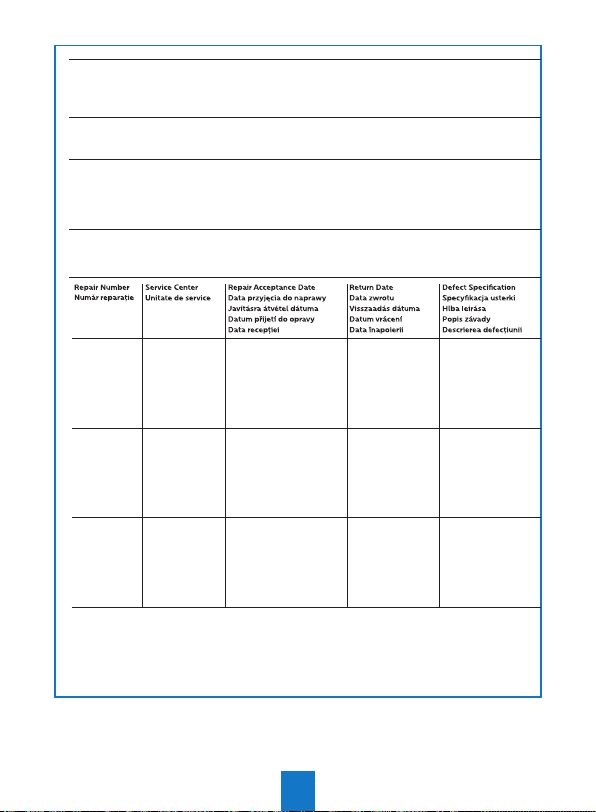
Device type, model and serial number | Gerätetyp, Modell - und Seriennummer | Type d’appareil et numéro de série | Modello e numero
di serie | Apparaattype en serienummer | Tipo de aparato y número de serie | Tipo de aparelho e número de série | Apparattype och
serienummer | Apparattype og serienummer | Laitteen tyyppi ja sarjanumero | Típusnév és gyári szám | Nazwa modelu i numer seryjny |
Model a sériové číslo | Tipul aparatului, model, numărul declaraţiei de conformitate şi număr serial | Вид на устройството и сериен номер |
Tip in serijska številka naprave | Tip uređaja i serijski broj
Date of purchase, invoice number | Kaufdatum, Rechnungsnummer | Date d’achat | Data di acquisto | Aankoopdatum | Fecha
de compra | Data de compra | Köpdatum | Købsdato | Kjøpsdato | Ostopäivä | Vásárlás dátuma | Data zakupu | Datum nákupu |
Data achiziţionării si număr factură | | Datum nakupa | Datum kupovin
Name, address, telephone number, stamp and signature of the vendor / retailer | Name, Adresse, Telefonnummer, Stempel und
Unterschrift des Verkäufer / Händlers | Cachet du commerçant et signature | Timbro del rivenditore e rma | Firmastempel en
handtekening | Sello del distribuidos y rma | Carimbo do revendedor e assinatura | Återförsäljarens stämpel och und namnteckning
| Forhandlerstempel og underskrift | Forhandlerens stempel og underskrift | Myyjän leima ja allekirjoitus | Forgalmazó pecsétje
és aláírása | Pieczęć i podpis sprzedawcy | Razítko a podpis prodavače | Pečiatka a podpis predavača | Numele, adresa, telefon,
ştampila şi semnătura vânzătorului | Фирмен печат и подпис | Žig in podpis trgovca | Štambilj trgovca i potpi | Печат трговца и потпис
Name & Address of Customer | Name und Anschrift des Käufers | Nom et adresse de l’acheteur | Nome e recapito dell‘acquirente
| Naam en adres van de koper | Nombre y dirección del comprador | Nome e morada do cliente | Köparens namn och adress |
Kundens navn og adresse | Kjøperens navn og adresse | Asiakkaan nimi ja osolte | A vásárló neve és címe | Nazwa i adres klienta
| Jméno a adresa zákazníka | Meno a adresa zákazníka | Numele şi adresa cumpărătorului | Име и адрес на купувача
22
Page 25
23
21
Page 26
COUNTRY
Argentina see international support
Australia +61 488 845 542
Austria +43 720 881 525
Belgium +32 78 077 761 (FR) / 209 (NL)
Brasil +55 85 4042 1414
Bulgaria see international support
Canada +1 (873) 514-1003
Colombia +57 1 328 8975
Croatia see international support
Czech Republik +420 910 880 087
Denmark +45 78 76 93 84
Finland see international support
France +33 6 44 60 30 83
Germany +49 421 836 79789
Great Britain +44 131 322 1364
Greece +30 261 118 0299
Hong Kong SAR / China +852 3008 0565 (Eng.)
Hungary +36 1 998 9144
Indonesia +62 855 7467 6380
Ireland +353 76 680 5635
Israel +972-8-9418222
Italy +39 0 776 1580046
Japan +81-50-3205-0854
Luxemburg +352 2786 21 07
Malaysia +60 16 299 1498
Mexico +52 55 4166 7410
Netherlands +31 85 0013 738
Norway +47 21 95 41 81
Poland +48 61 880 12 15
Portugal see international support
Puerto Rico +1 (787) 305-3813
Romania +40 31 630 5446
HOTLINE
24
Page 27
Luxemburg +352 2786 21 07
Malaysia +60 16 299 1498
Mexico +52 55 4166 7410
Netherlands +31 85 0013 738
Norway +47 21 95 41 81
Poland +48 61 880 12 15
Portugal see international support
Puerto Rico +1 (787) 305-3813
Romania +40 31 630 5446
Russia see international support
Serbia see international support
Singapore +65 6841 2668
Slovakia see international support
Slovenia see international support
Spain +34 518 889 132
Sweden +46 8 580 97 04 3
Switzerland +41 21 539 16 66 (DE) / 67 (IT) / 68 (FR)
Turkey see international support
UAE +971 4 4473106
USA +1 (812) 308-4615
International customer support:
+41 21 53 91 665
General support in English/German/French available
@ [email protected]
www.philips.com/support and our Community: https://community.screeneo.com
25
Page 28
Screeneo Innovation SA
1131 - Tolochenaz - Switzerland
www.philips.com/welcome
[email protected]
EUROPEAN Service Center Address:
SBE France
Industrial Zone Of South Liane
BP 439
62206 BOULOGNE SUR MER
France
Philips and the Philips Shield Emblem
are registered trademarks of Koninklijke
Philips N.V. used under license. Screeneo
Innovation SA is the warrantor in relation
to the product with which this booklet
was packaged.
2020 © Screeneo Innovation SA
DSR4022/INT
NeoViu S2
 Loading...