

Page 1
Quick Use
Quick Use
Guide
Guide
AZ1330D
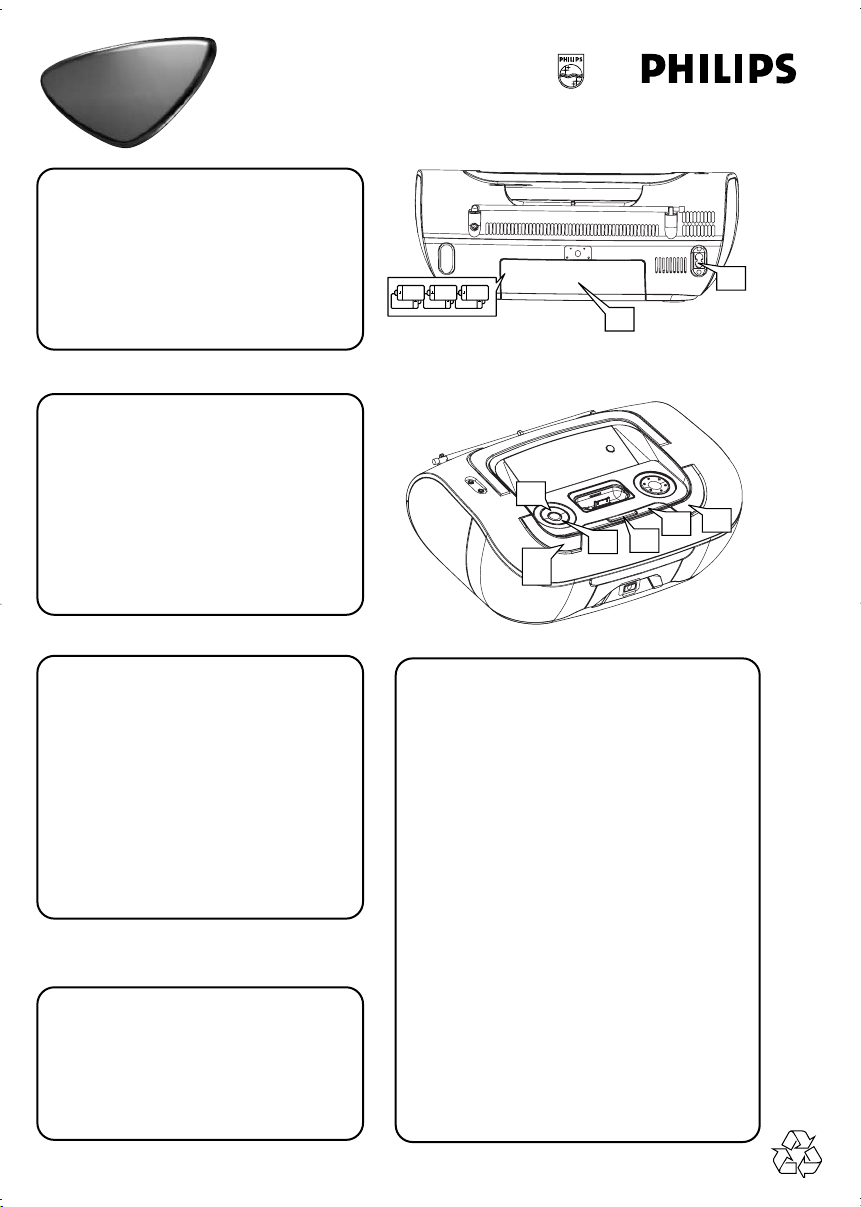
Choosing Power Supply
1
a Connect the AC power cord to the
AC~ Mains inlet and the wall socket.
-OR-
b Open the battery door and insert 6
x D batteries (not included).
Listening to Radio
2
aPress SOURCE repeatedly to select
the tuner source.
bPress
cPress PRESET/ALBUM +- until the
PROGRAM
seconds to program all available
stations in order of waveband.
desired preset station is displayed.
for more than two
6 x R20 • UM-1 • D-CELLS
R-20, UM-1 or D-cells
(not included)
3d
1a
1b
2b
2c
3b
2a
3a
3e
Playing a disc
3
This player plays Audio Discs including
CD-R/CD-RW, MP3-CD and WMA.
aPress SOURCE repeatedly to select
CD.
b Open the disc door.
c Insert a disc with the printed side
facing up and close the door.
dPress 38 to start playback.
eTo stop disc playback, press 9.
Tip:
Refer to the user manual supplied for detailed
descriptions of “Compatible portable player”,
“Selecting the correct dock adaptor”, “Installing
the dock adaptor”, and the important notes for
dock operation.
Playing Apple iPod using AZ1330D
4
a Select a correct iPod adaptor, then snap it
to the dock to provide a snug fit for the
player to be docked.
• 8 dock adaptors of different type, as indicated at the back of the adaptor, are
included to fit the following iPod: 20GB,
40GB, 20/30GB photo, 40/60GB photo,
30GB video, 60/80GB video, mini and nano.
b Snap a compatible iPod into the dock
connector.
• AZ1330D will auto switch to DOCK
source.
c The connected player will play automatically.
• In the power-on and standby mode of
AZ1330D, you can charge the iPod when
docking.
•
The buttons ( 2;, ¡1, 2™ and VOLUME ) on
the AZ1330D and its remote control can
work only with playback of the audio
contents stored on the docked player.
Page 2
$
1
2
#
@
!
0
9
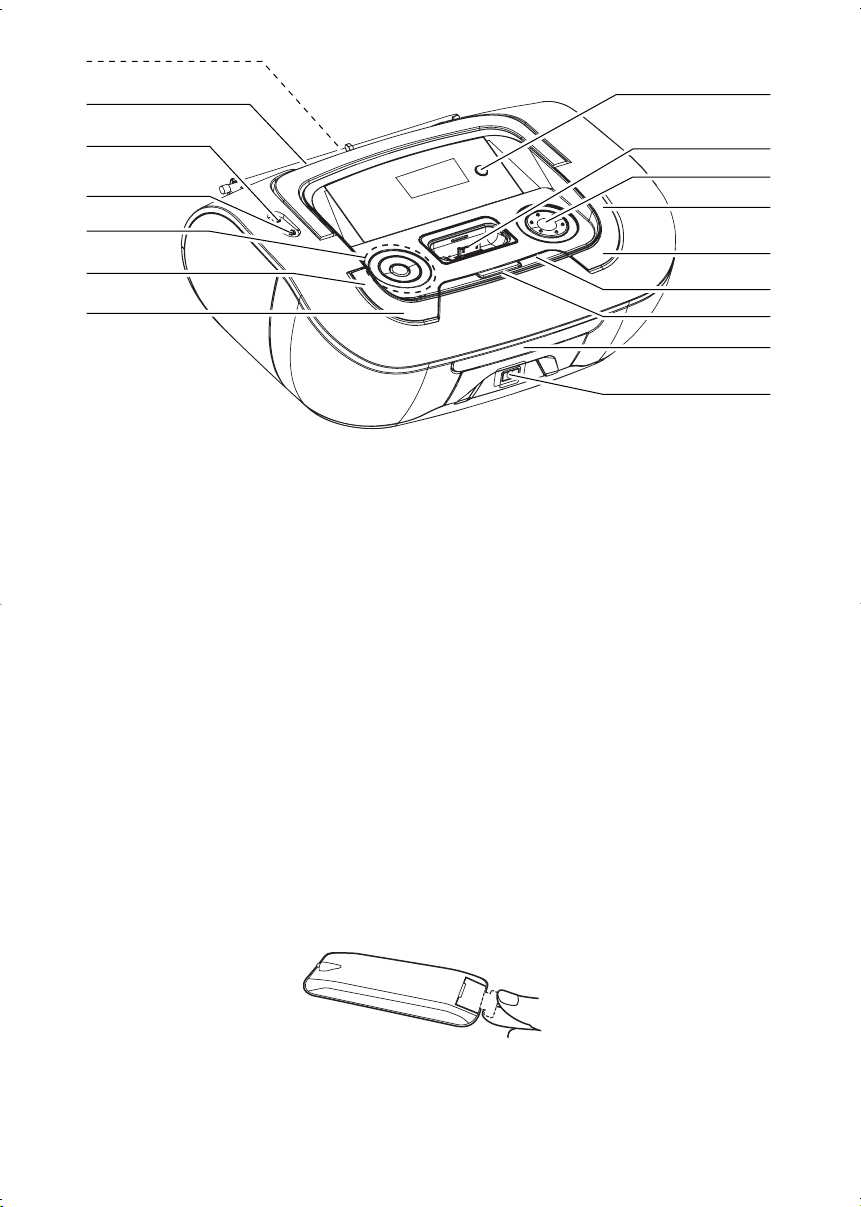
1 Telescopic antenna – improves FM
2 DOCK –
3 Dock connector
– connects iPod
4
VOLUME– adjusts volume level
5
MODE – selects different play modes:
e.g. REPEAT or SHUFFLE (random order)
6 PROG
For disc
For Tuner
7 ALBUM/PRESET
For MP3-CD/ WMA play:
– select albums
For Tuner
– selects a preset radio station
8 / – opens/closes the disc tray
9
SOURCE:–selects CD/MP3-CD, iPod mode,Tuner
0
POWER –powers on/off the system
selects dock source (iPod)
RAM
–programs tracks and reviews the program
– auto searches and stores radio stations
or AUX
reception
player
+/-
!2;–
@ p – 3.5 mm stereo headphone socket
#
$ Battery door – opens to insert 6 x 1.5V
% Disc tray – loads a disc
^ iR – infrared sensor for remote control
starts or pauses disc/iPod playback
∞§
For disc
/ iPod play:
– skips to the beginning of a current/
previous/ later track
– fast searches backwards and forwards within a
track
For Tuner :
– tunes to a radio station
9 –stops disc playback;
–
erases a program
DBB – turns on/off bass enhancement
Helpful hints: The speakers will be muted when headphones are connected to the set.
AUX jack –connects an external source (3.5 mm
socket)
R-20/ -UM1/ D-cells
3
4
5
6
7
8
%
^
Removing the insulation plastic tab before use
 Loading...