

Page 1
Installation Manual
mform
Tilting wall hanging bracket for PANASONIC LCD TVs
Fits all 2009 LCD TVs between 26" and 37"
Model No. TY-WKL09
Thank you for purchasing the wall hanging bracket for your Panasonic LCD TV.
?Please perform installation work correctly after reading this installation manual and the
operation manual for the TV.
?After installation work is complete, please keep this instruction manual for future reference.
?Retain all removed parts and fixings as they may be necessary when returning to the original
configuration.
?This bracket is intended for use with the following TVs;
TX-L26C10, TX-L26X10, TX-L32C10, TX-L32X10, TX-L32X15, TX-L32U10, TX-L32S10, TX-L32G10,
TX-L32V10, TX-L37U10, TX-L37S10, TX-L32G10, TX-L37G15, TX-L37V10
Safety Precautions
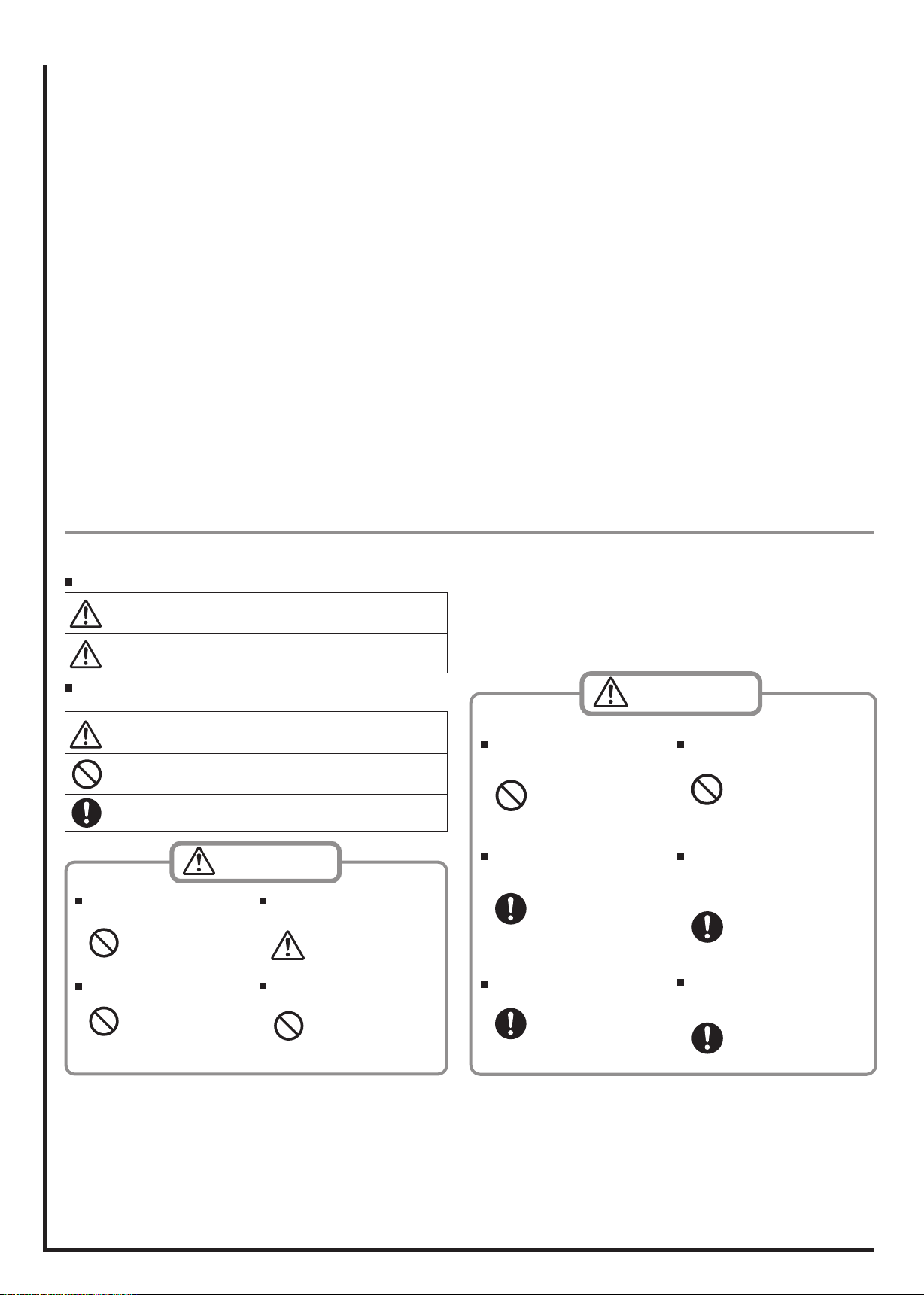
To prevent injury to the user and others a nd to prevent damage to p roperty, directions
that must be followed are explained as shown below.
The following displays categorize the degree of danger when mishandled.
WARNING
CAUTION
Directions that must be followed are explained using the following symbols.
(Examples of graphical symbols are shown below.)
This symbol indicates that the direction must be followed with caution.
This symbol indicates that the direction is prohibited.
This symbol indicates that the direction must always be followed.
Installation to be performed by certified
personnel only.
Ina de qu ate ins talla ti on may
cause the LCD TV to fall, resulting in bodily injury.
Do not install where tolerance is weak.
If the tolerance of the mounting
locat ion is w eak, the LCD T V
may fall resulting in bodily injury.
Possibility of serious injury and even death when
mishandled.
Possibility of injury or damage to surrounding property.
WARNING
Be aware of safety factors concerning
the mounting strength.
Insufficient strength may cause
the LCD TV to fall, resulting in
bodily injury.
Do not hang from the LCD TV, place
stepsladder, etc.
the LCD TV may become damage d or i t ma y fa ll, causi ng
bodily injury.
CAUTION
Do not install in humid or dusty areas,
or where the LCD TV may be exposed to
lampblack, steam or heat.
This may affect the LCD TV, and
may cause fire or electric shock.
At least two persons should perform
installation and removal of the LCD TV
unit.
Dropping the LCD TV may re-
sult in injury.
Always remove the wall hanging bracket
when removing the LCD TV.
Injury may result when acciden-
tally hitting the projected parts.
• Take caution when removing for repairs, etc.
Do not install with the LCD TV facing
downward, on its side, or upside down.
Heat may bu ild up wit hin the
LCD TV, causing fire as a result.
Ensure there is a space of at least 5 cm
between the LCD TV body and other
objects at the top, bottom and sides,
and at least 4 cm at the back.
Vent holes are locate d on the
rear of the LCD TV. Bloc king
these holes may result in fire.
Make sure there is sufficient air circula-
tion so that the ambient temperature
does not exceed 35 °C.
Heat may bu ild up wit hin the
LCD TV, causing fire as a result.
Support Information
M-Form Customer Care Centre
For UK Customers call: 01159 409169
Monday - Thursday 8.00am - 5.00pm Friday 8.00am - 4.00pm
(Excluding public holidays)
e-mail: [email protected]
www.m-formonline.co.uk
Page 2
Components
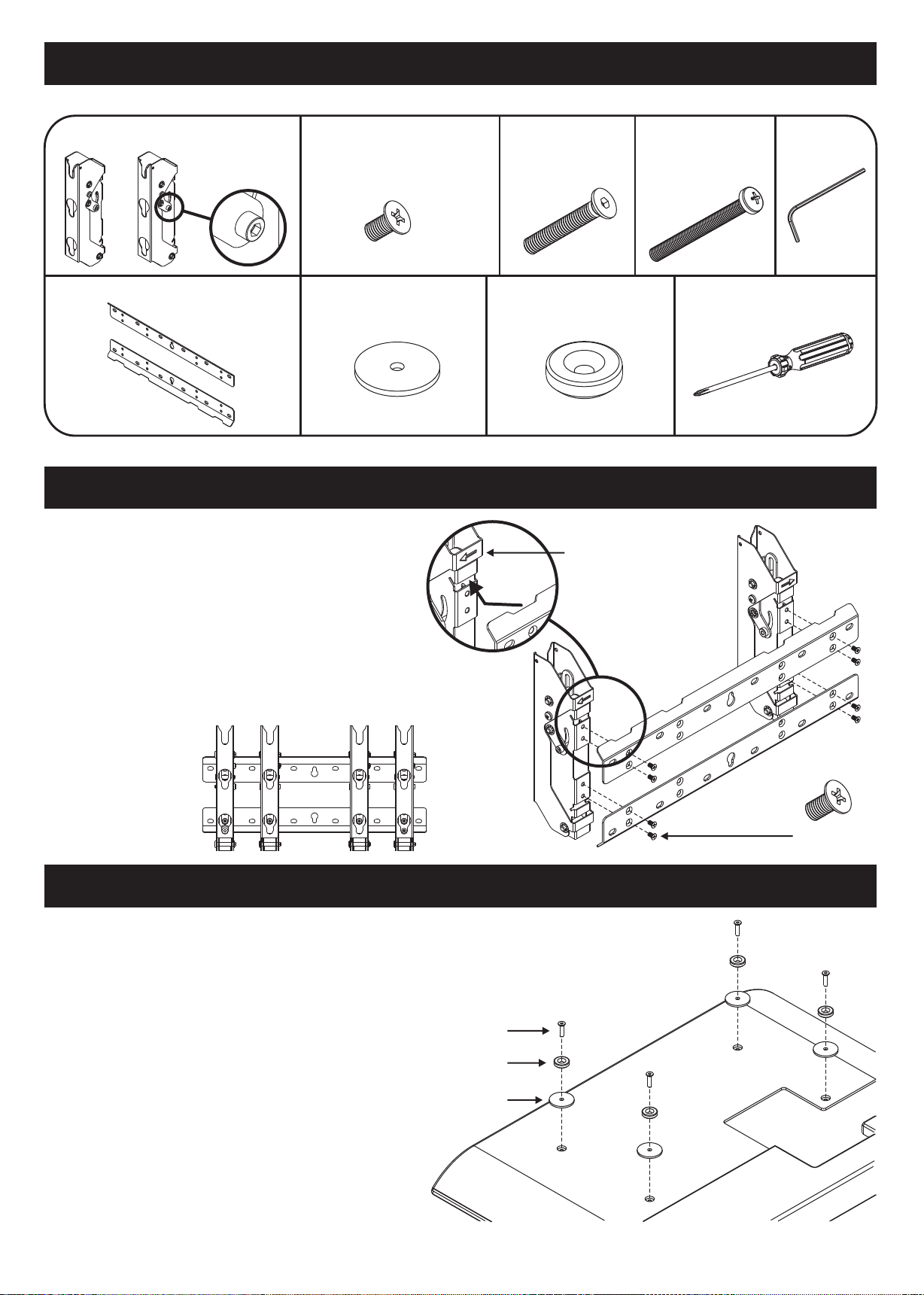
A - Bracket Arms (LH + RH)...x1
LH RH
B - Wall fixing plates...x2
C - Bracket assembly Screw...x8
M5 x 10mm
E - TV protection spacer...x4
1. Assemble the bracket
?Attach wall fixing plates to the left and right arms as
shown (right)
D - TV fixing screws
M6 x 25mm...x4
M4 x 25mm...x4
F - TV insulation spacers...x4
NOTE: Marker arrows
should be facing outwards
G - Security screw
M5 x 45mm...x2
Allen Key...x2
Also required
LH
?Use positions 'a' for 400mm width TV fixing points,
use positions 'b' for 200mm width TV fixing points
(shown below)
?Attach the top plate first using all four fixing screws
but do not tighten the screws. Attach the bottom
plate then tighten all the screws on the top and
bottom plate.
a ab b
2. Prepare the LCD TV
?Remove the terminal covers if bracket arms will
obstruct access. Keep covers in a safe place if
removed in case you need to revert back to original
specification.
RH
C x8
?Place protection spacers on rear of TV lining up the
holes with the bracket fixing points on the rear of
the TV.
?Fit the isolation spacers in all 4 positions using the
allen key and bolts included in the kit. Use the bolt
size which corresponds to the fixings in your TV.
?Do not use fixings other than those included in the
kit with this bracket.
D
F
E
– 2 –
Page 3
3. Attach bracket to wall
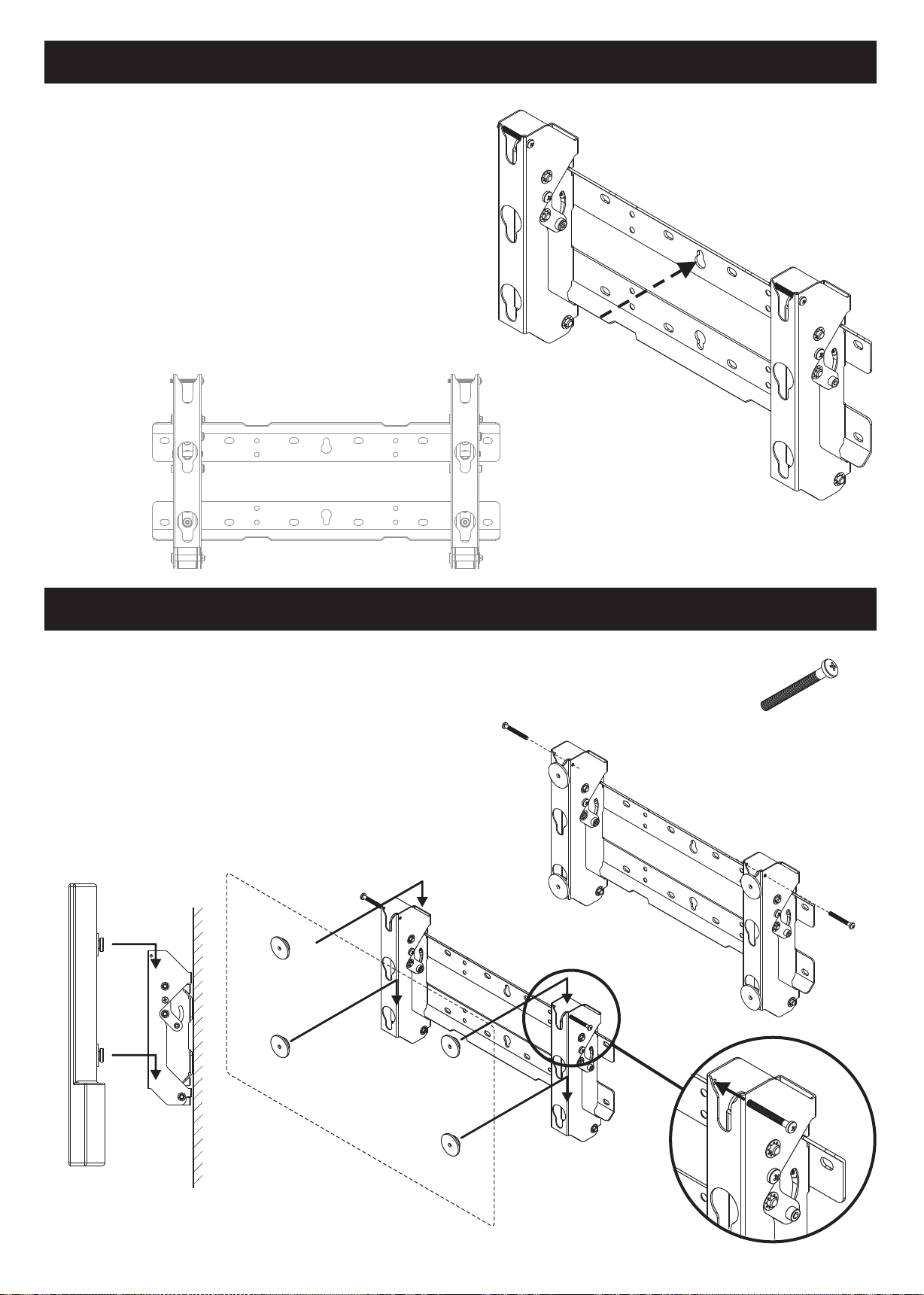
?Fit as shown, right, with arms pointing upwards
?If the wall consists of a material such as concrete
and the bolts or nuts must be embedded
beforehand, determine the hole positions by
aligning using the actual bracket or calculate the
hole positions based on the dimensional drawing in
this manual.
?Fasten the screw at position 1, first. Then using
a level, mark out and fasten screws in other
positions marked 'x'.
?Use commercially available screws suitable for the
wall construction for fitting the bracket to the wall.
1
x
x
4. Hang and secure TV onto bracket
?Partially insert the security screws 'G' into the arms
as shown right (a).
?Hang the TV onto the bracket arms making sure the
insulation spacers engage fully in the corresponding
slots as shown below (b).
x
x
x
x
x
x
x
x
x
x
a
1
x
x
G x2
?secure the TV by fully inserting the security screws
G' as shown right (c).
b
c
– 3 –
Page 4
5. Using the tilt function
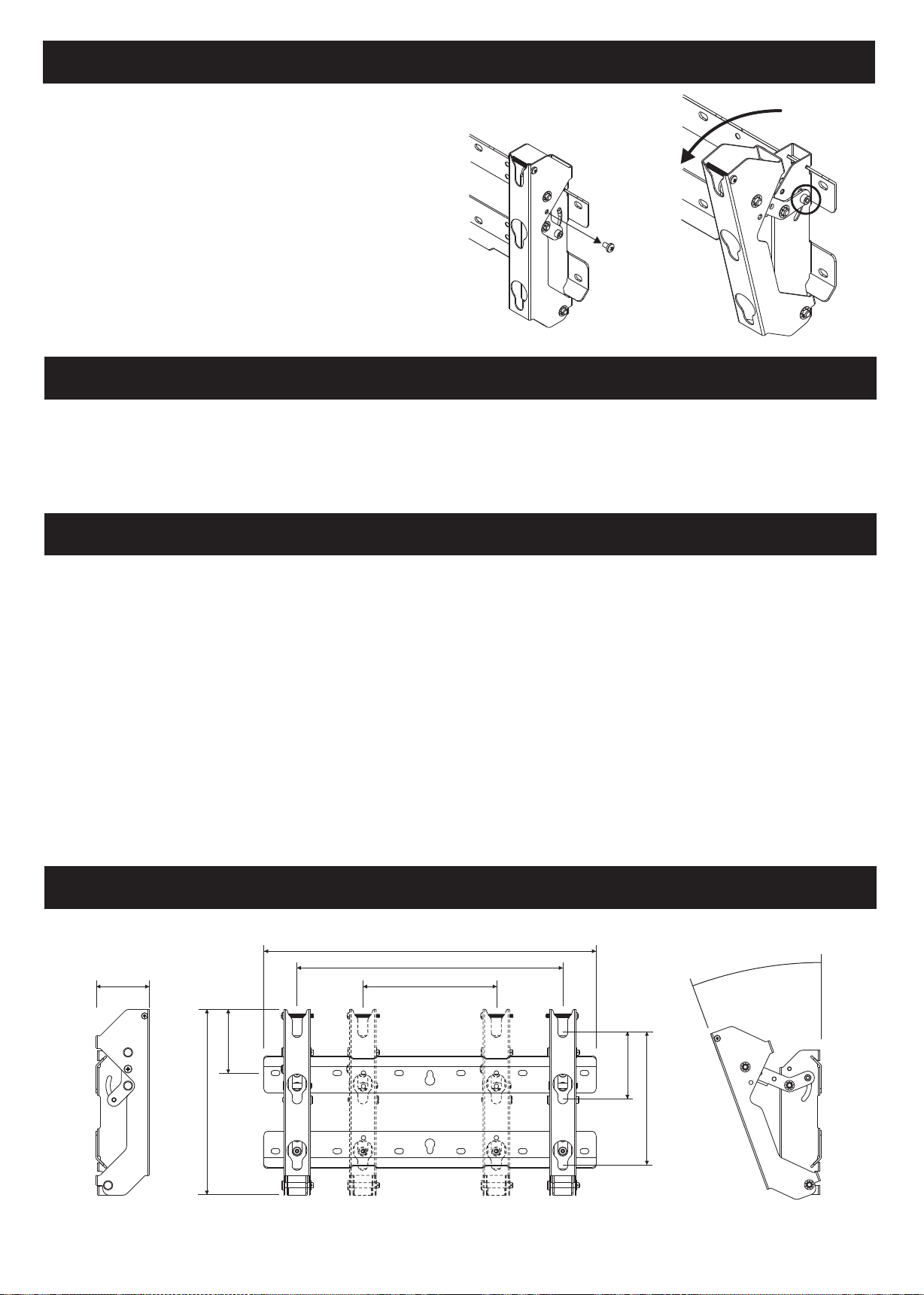
?Remove the vertical locking screw from both arms (a).
?Tilt the TV to the desired position and lock the tilt
a b
locking bolt (b) on both arms.
?Always hold the weight of the TV before unlocking the
tilt mechanism.
?Do not completely remove the tilt locking bolt.
?To lock back in vertical position re-insert vertical
locking screws (reverse 'a')
Requests regarding handling
?Take care when selecting the location for the TV as it may discolour or deform if located too close to sources of heat, light or direct sunlight.
?Clean with a dry cloth. If unit is very dirty then use a damp cloth with neutral detergent diluted in water. Do not use detergents
containing benzene, thinner or furniture wax as they may cause paint peeling.
?Do not fix stickers or adhesive tape to the product as this may stain the paint.
Precautions for wall hanging bracket fitting
?The wall hanging bracket is designed for attaching an LCD TV to a vertical wall for viewing. Do not fit to any surface other than a vertical wall.
?The bracket has a lock mechanism for safety reasons. Please ensure that the mounting location allows access to these fixings.
?To ensure optimum performance of your TV do not fit in any of the following situations;
Near sprinklers or fire/smoke detectors
Where there is a risk of exposure to vibration or impact
Near high voltage wires or dynamic power supplies
Locations exposed to air blown from heating or air conditioning equipment
?Fit using fixings and techniques suited to the structure and the materials of the fitting location
?Use commercially available screws suited to the wall construction and surface material for fitting the bracket to the wall.
?Ensure there is no contact between the wall mounting screws or power cord and any metal inside the wall
?Use a convenient power outlet for the TV which can be reached easily.
?Ensure good airflow so the ambient temperature does not exceed 40°C. Failure to do so may cause the LCD TV to malfunction
Bracket dimensions (mm)
500
440
20080
0° to 20°
104
280
100
200
– 4 –
 Loading...