

Panasonic SC SC-HC3, SAHC3 - COMPACT STEREO SYSTEM, SC HC3 - Ultra-Slim iPod Docking Speaker System, SC-HC3 Operating Instructions Manual
Page 1
RQTX0250-2P
P
PC
Operating Instructions
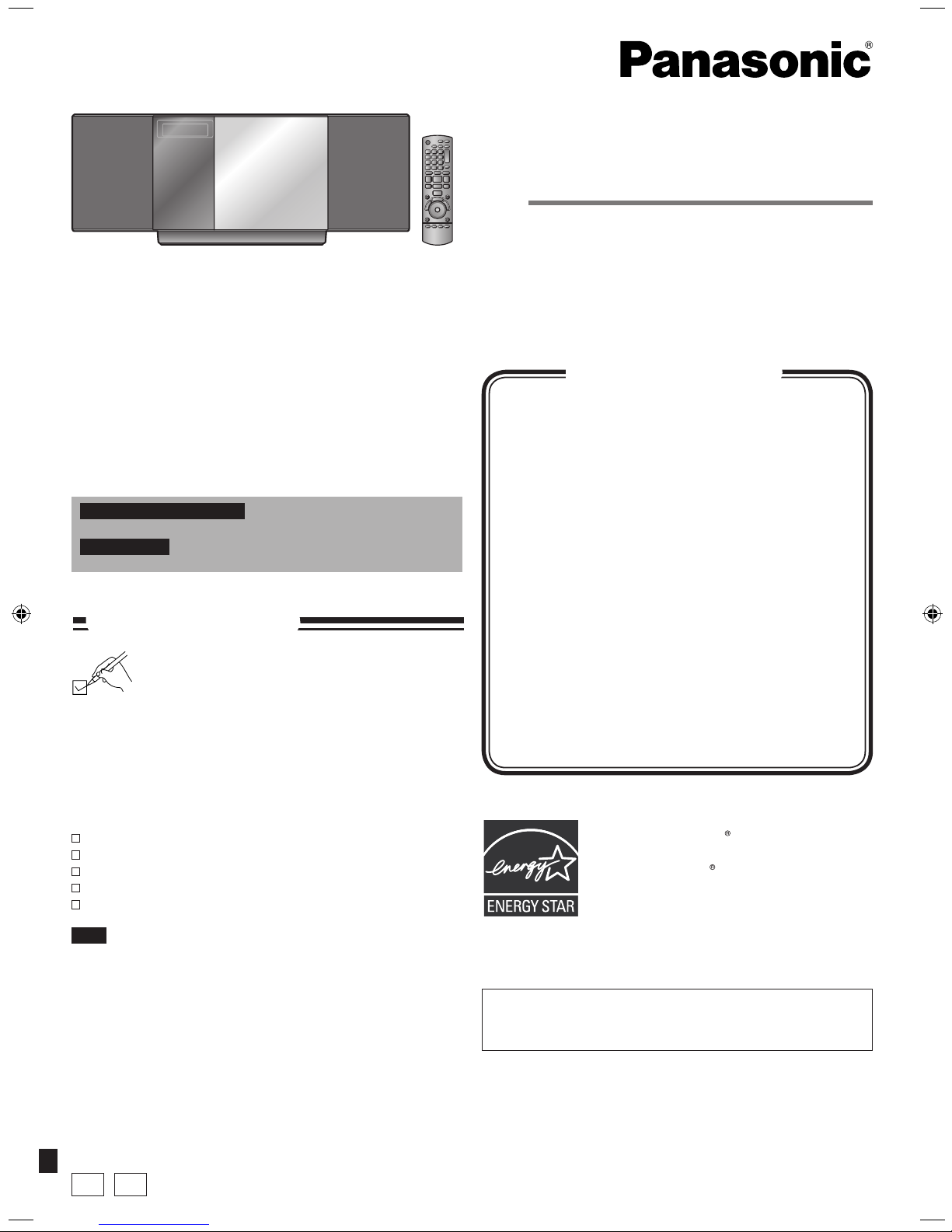
Compact Stereo System
Model No. SC-HC3
Dear customer
Thank you for purchasing this product.
Before connecting, operating or adjusting this product, please
read the instructions completely. Please keep this manual for
future reference.
Operations in these instructions are described using remote
control, but you can do the operations with the main unit if the
controls are the same.
Your unit may not look exactly as illustrated.
Supplied accessories cover
IMPORTANT SAFETY INSTRUCTIONS 2
Listening caution 3
Product service 3
Connections 4
Preparing the remote control 5
Demo function 5
Control guide 6
Disc operations 8
Radio operations 9
Timer 10
Sound adjustment 11
External unit 12
Troubleshooting guide 13
Specifications 14
Maintenance 14
Limited Warranty
(ONLY FOR U.S.A AND PUERTO RICO)
15
Limited Warranty
(ONLY FOR CANADA) back cover
Table of contents
As an ENERGY STAR Partner, Panasonic
has determined that this product meets
the ENERGY STAR guidelines for energy
efficiency.
For Canada only: The word “Participant” is used in place of the
word “Partner”.
The warranty can be found on page 15.
For U.S.A. and Puerto Rico only
For Canada only
The warranty can be found on the back cover.
If you have any questions contact
In the U.S.A. and Puerto Rico: 1-800-211-PANA (7262)
In Canada: 1-800-561-5505
Please check and identify the supplied
accessories.
Use numbers indicated in parentheses when asking
for replacement parts. (Product numbers are correct
as of March 2009. These may be subject to change.)
1 Remote control (N2QAYB000394)
1 AM loop antenna (N1DAAAA00002)
1 FM indoor antenna (RSAX0002)
1 AC power supply cord (K2CB2CB00021)
2 Batteries
Supplied accessories
The included AC power supply cord is for use with this unit only.
Do not use it with other equipment.
Do not use an AC power supply cord from other equipment.
•
•
Note
Only for U.S.A. and Puerto Rico: To order accessories, refer
to “Accessory Purchases (United States and Puerto Rico)” on
page 15.
Only for Canada: To order accessories, call the dealer from
whom you have made your purchase.
Page 2
RQTX0250
2
1) Read these instructions.
2) Keep these instructions.
3) Heed all warnings.
4) Follow all instructions.
5) Do not use this apparatus near water.
6) Clean only with dry cloth.
7) Do not block any ventilation openings. Install in accordance
with the manufacturer’s instructions.
8) Do not install near any heat sources such as radiators, heat
registers, stoves, or other apparatus (including amplifiers) that
produce heat.
9) Do not defeat the safety purpose of the polarized or groundingtype plug. A polarized plug has two blades with one wider
than the other. A grounding-type plug has two blades and
a third grounding prong. The wide blade or the third prong
are provided for your safety. If the provided plug does not fit
into your outlet, consult an electrician for replacement of the
obsolete outlet.
10) Protect the power cord from being walked on or pinched
particularly at plugs, convenience receptacles, and the point
where they exit from the apparatus.
11) Only use attachments/accessories specified by the
manufacturer.
12) Use only with the cart, stand, tripod, bracket,
or table specified by the manufacturer, or
sold with the apparatus. When a cart is used,
use caution when moving the cart/apparatus
combination to avoid injury from tip-over.
13) Unplug this apparatus during lightning storms or when unused
for long periods of time.
14) Refer all servicing to qualified service personnel. Servicing
is required when the apparatus has been damaged in any
way, such as power-supply cord or plug is damaged, liquid
has been spilled or objects have fallen into the apparatus, the
apparatus has been exposed to rain or moisture, does not
operate normally, or has been dropped.
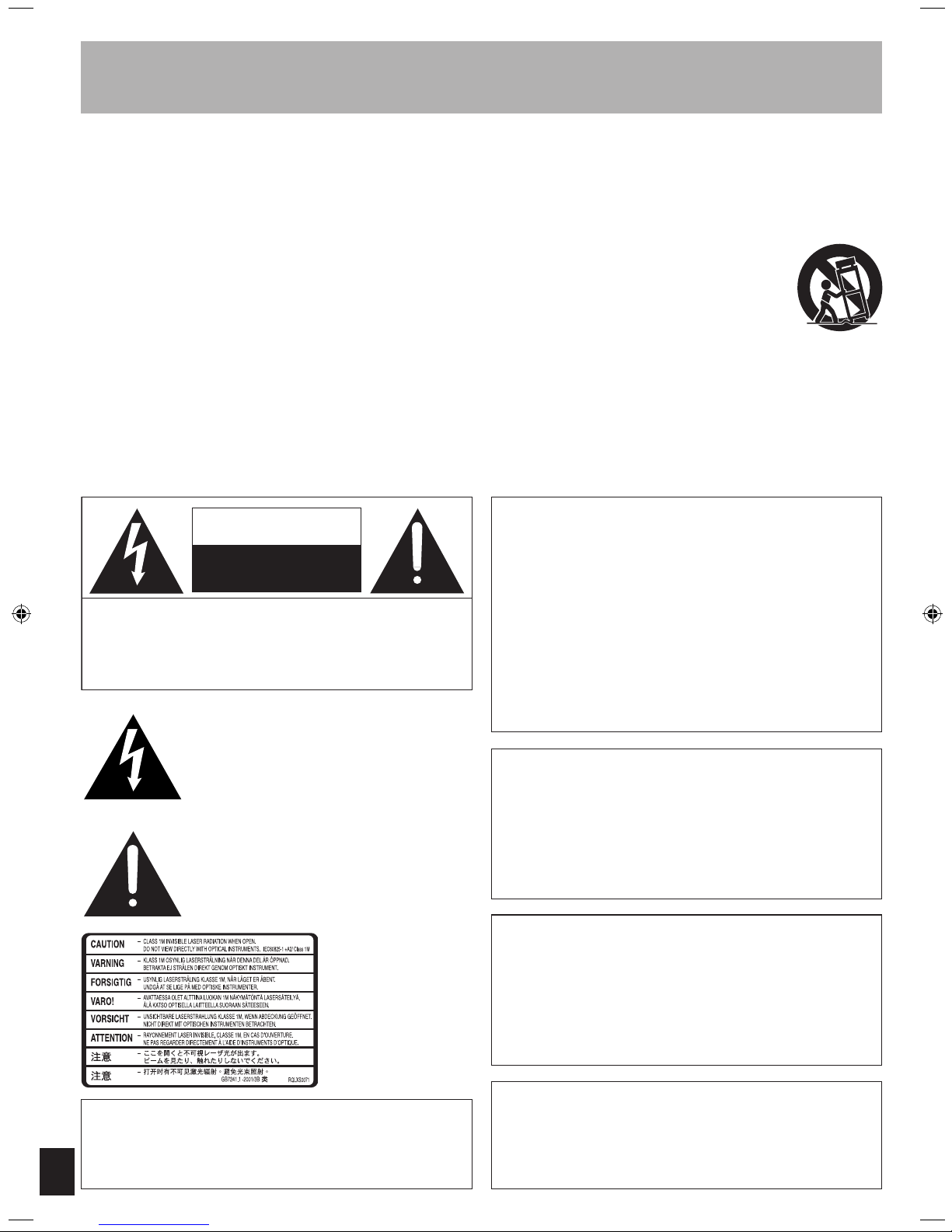
Read these operating instructions carefully before using the unit. Follow the safety instructions on the unit and the applicable safety
instructions listed below. Keep these operating instructions handy for future reference.
IMPORTANT SAFETY INSTRUCTIONS
Inside of product
CAUTION
Danger of explosion if battery is incorrectly replaced. Replace
only with the same or equivalent type recommended by the
manufacturer. Dispose of used batteries according to the
manufacturer’s instructions.
The lightning flash with arrowhead symbol,
within an equilateral triangle, is intended to
alert the user to the presence of uninsulated
“dangerous voltage” within the product's
enclosure that may be of sufficient magnitude
to constitute a risk of electric shock to
persons.
The exclamation point within an equilateral
triangle is intended to alert the user to
the presence of important operating and
maintenance (servicing) instructions in the
literature accompanying the appliance.
CAUTION: TO REDUCE THE RISK OF ELECTRIC
SHOCK, DO NOT REMOVE SCREWS.
NO USER-SERVICEABLE PARTS INSIDE.
REFER SERVICING TO QUALIFIED
SERVICE PERSONNEL.
CAUTION
RISK OF ELECTRIC SHOCK
DO NOT OPEN
CAUTION!
DO NOT INSTALL OR PLACE THIS UNIT IN A BOOKCASE,
BUILT-IN CABINET OR IN ANOTHER CONFINED SPACE.
ENSURE THE UNIT IS WELL VENTILATED. TO PREVENT
RISK OF ELECTRIC SHOCK OR FIRE HAZARD DUE
TO OVERHEATING, ENSURE THAT CURTAINS AND
ANY OTHER MATERIALS DO NOT OBSTRUCT THE
VENTILATION VENTS.
CAUTION!
THIS PRODUCT UTILIZES A LASER.
USE OF CONTROLS OR ADJUSTMENTS OR
PERFORMANCE OF PROCEDURES OTHER THAN THOSE
SPECIFIED HEREIN MAY RESULT IN HAZARDOUS
RADIATION EXPOSURE.
DO NOT OPEN COVERS AND DO NOT REPAIR YOURSELF.
REFER SERVICING TO QUALIFIED PERSONNEL.
WARNING:
TO REDUCE THE RISK OF FIRE, ELECTRIC SHOCK
OR PRODUCT DAMAGE,
*
DO NOT EXPOSE THIS APPARATUS TO RAIN,
MOISTURE, DRIPPING OR SPLASHING AND THAT
NO OBJECTS FILLED WITH LIQUIDS, SUCH AS
VASES, SHALL BE PLACED ON THE APPARATUS.
*
USE ONLY THE RECOMMENDED ACCESSORIES.
*
DO NOT REMOVE THE COVER (OR BACK); THERE
ARE NO USER SERVICEABLE PARTS INSIDE.
REFER SERVICING TO QUALIFIED SERVICE
PERSONNEL.
The socket outlet shall be installed near the equipment and
easily accessible.
The mains plug of the power supply cord shall remain readily
operable.
To completely disconnect this apparatus from the AC Mains,
disconnect the power supply cord plug from AC receptacle.
ONLY FOR CANADA
Page 3
RQTX0250
3
Listening caution
Selecting fine audio equipment such as the unit you’ve just
purchased is only the start of your musical enjoyment. Now it’s
time to consider how you can maximize the fun and excitement
your equipment offers. This manufacturer and the Electronic
Industries Association’s Consumer Electronics Group want you
to get the most out of your equipment by playing it at a safe level.
One that lets the sound come through loud and clear without
annoying blaring or distortion–and, most importantly, without
affecting your sensitive hearing.
We recommend that you avoid prolonged exposure to excessive
noise.
Sound can be deceiving. Over time your hearing “comfort level”
adapts to higher volumes of sound. So what sounds “normal” can
actually be loud and harmful to your hearing.
Guard against this by setting your equipment at a safe level
BEFORE your hearing adapts.
To establish a safe level:
Start your volume control at a low setting.
Slowly increase the sound until you can hear it comfortably and
clearly, and without distortion.
Once you have established a comfortable sound level:
Set the dial and leave it there.
Taking a minute to do this now will help to prevent hearing
damage or loss in the future. After all, we want you listening for a
lifetime.
•
•
•
EST. 19 24
Product service
1. Damage requiring service — The unit should be serviced by
qualified service personnel if:
(a) The AC power supply cord or the plug has been damaged;
or
(b) Objects or liquids have gotten into the unit; or
(c) The unit has been exposed to rain; or
(d) The unit does not operate normally or exhibits a marked
change in performance; or
(e) The unit has been dropped or the cabinet damaged.
2. Servicing — Do not attempt to service the unit beyond that
described in these operating instructions. Refer all other
servicing to authorized servicing personnel.
3. Replacement parts — When parts need replacing ensure
the servicer uses parts specified by the manufacturer or
parts that have the same characteristics as the original parts.
Unauthorized substitutes may result in fire, electric shock, or
other hazards.
4. Safety check — After repairs or service, ask the servicer
to perform safety checks to confirm that the unit is in proper
working condition.
The servicer will require all components to service your system.
Therefore, should service ever be necessary, be sure to bring the
entire system.
For product information or assistance with product operation:
In the U.S.A. and Puerto Rico, refer to “Customer Services
Directory (United States and Puerto Rico)” on page 15.
In Canada, contact the Panasonic Canada Inc. Customer
Care Centre at 1-800-561-5505, or visit the website
(www.panasonic.ca), or an authorized Servicentre closest to you.
Product information
The model number and serial number of this product can be
found on either the back or the bottom of the unit.
Please note them in the space provided below and keep for
future reference.
MODEL NUMBER __________________________________
SERIAL NUMBER __________________________________
SC-HC3
Information on Disposal in other Countries outside the
European Union
This symbol is only valid in the European Union.
If you wish to discard this product, please contact
your local authorities or dealer and ask for the correct
method of disposal.
-If you see this symbol-
DATE OF PURCHASE ______________________________
DEALER NAME ___________________________________
DEALER ADDRESS ________________________________
__________________________________________________
TELEPHONE NUMBER _____________________________
User memo:
FCC Note:
This equipment has been tested and found to comply with the limits for a
Class B digital device, pursuant to Part 15 of the FCC Rules.
These limits are designed to provide reasonable protection against
harmful interference in a residential installation. This equipment
generates, uses and can radiate radio frequency energy and, if not
installed and used in accordance with the instructions, may
cause harmful
interference to radio communications. However, there is no guarantee
that interference will not occur in a particular installation. If this equipment
does cause harmful interference to radio or television reception, which
can be determined by turning the equipment off and on, the user is
encouraged to try to correct the interference by one or more of the
following measures:
* Reorient or relocate the receiving antenna.
* Increase the separation between the equipment and receiver.
* Connect the equipment into an outlet on a circuit different from that to
which the receiver is connected.
* Consult the dealer or an experienced radio/TV technician for help.
Any unauthorized changes or modifications to this equipment would void
the user’s authority to operate this device.
This device complies with Part 15 of the FCC Rules. Operation is subject
to the following two conditions: (1) This device may not cause harmful
interference, and (2) this device must accept any interference received,
including interference that may cause undesired operation.
Responsible Party:
Panasonic Corporation of North America
One Panasonic Way
Secaucus, NJ 07094
Support Contact:
Panasonic Consumer Electronics Company
Telephone No.: 1-800-211-PANA (7262)
THE FOLLOWING APPLIES ONLY IN THE U.S.A.
iPod is a trademark of Apple Inc., registered in the U.S. and
other countries.
Page 4
RQTX0250
AUX
EXT
75Ω
LOOP
AM ANTFM ANT
LOOP ANT
GROUND
132
AC IN
Connections
4
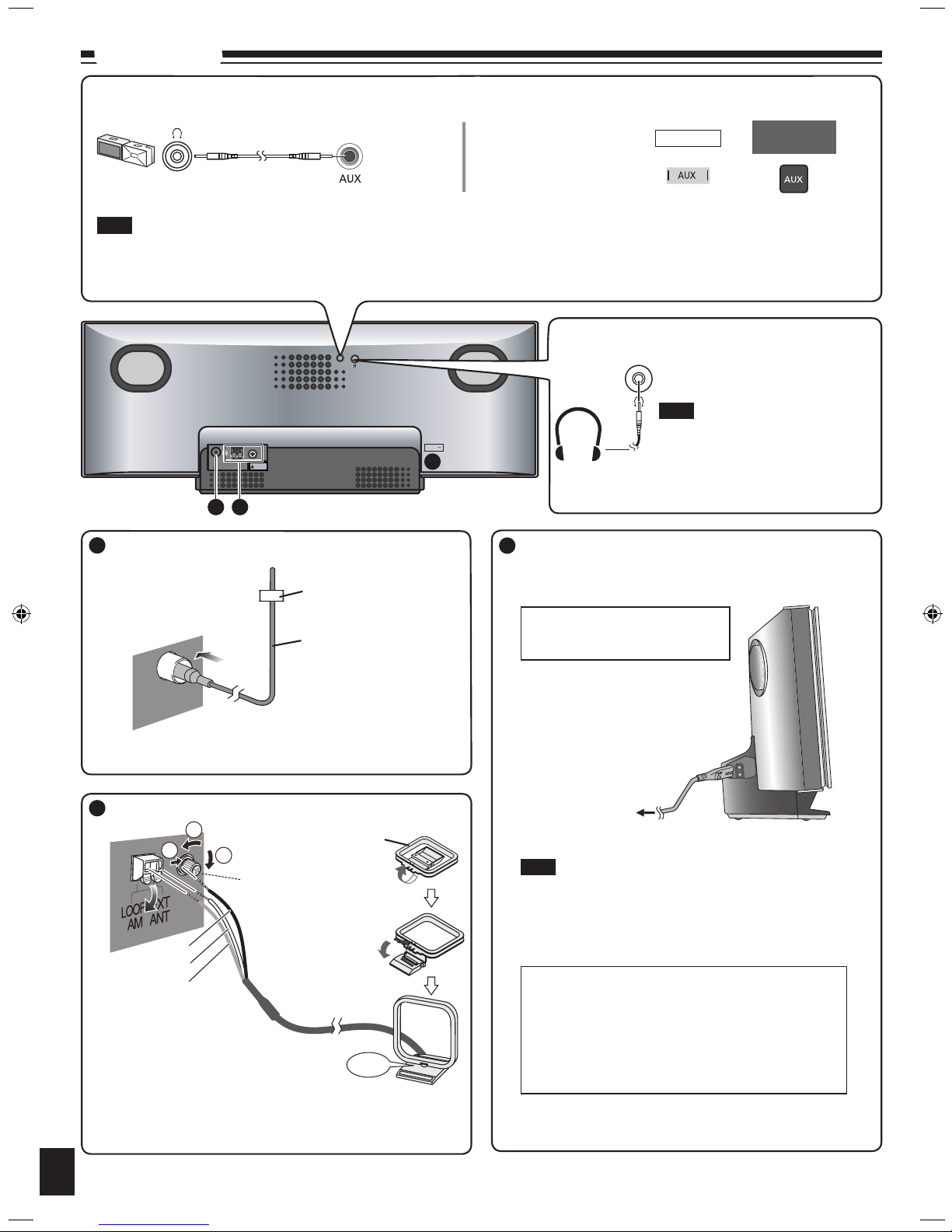
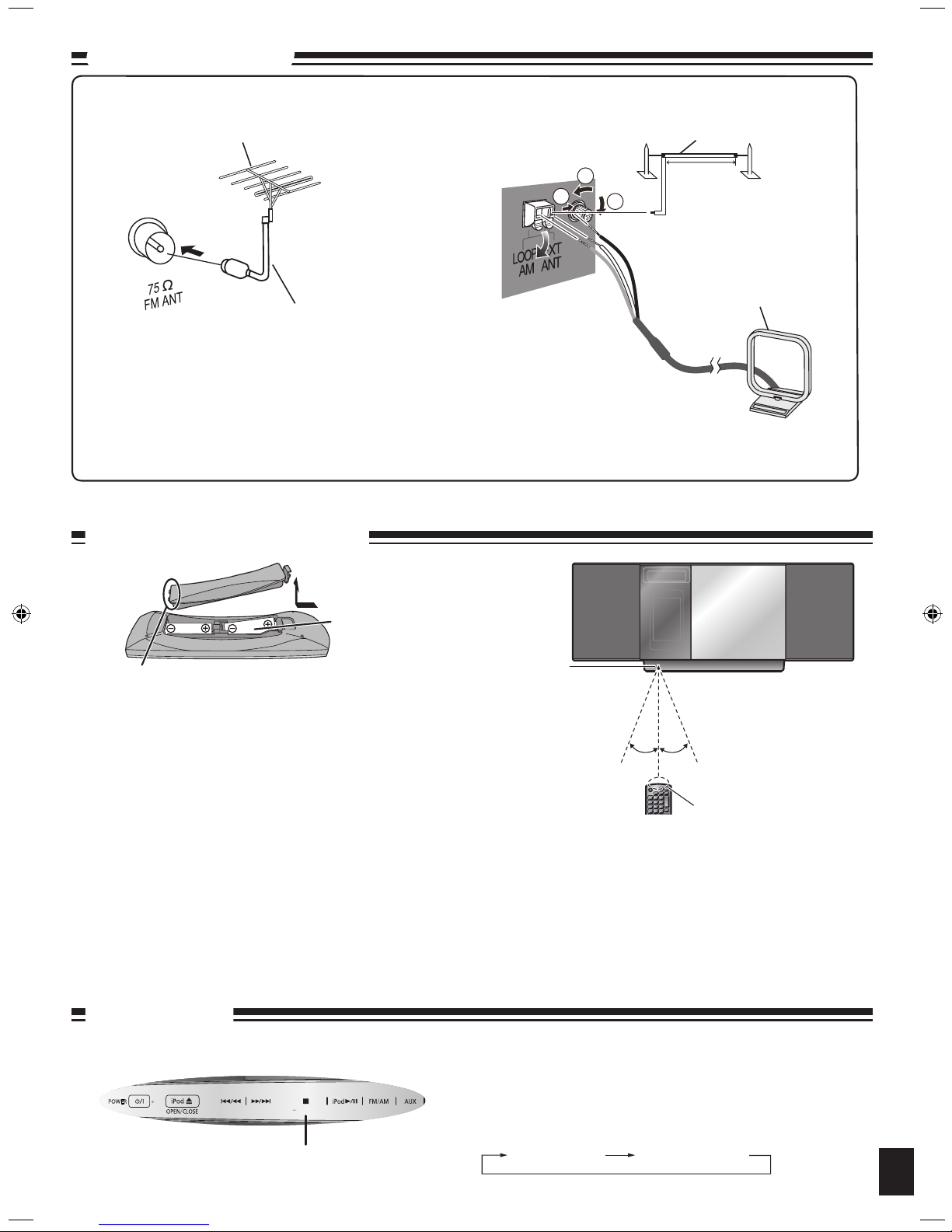
Connect the FM indoor antenna.
Tape the antenna to a wall or column, in a position with the least
amount of interference.
Adhesive tape
FM indoor antenna
TNAMF
Ω 57
Connect the AM loop antenna.
Keep the loose antenna cord away from other wires and cords. Do
not screw too tightly. Otherwise, the screwdriver goes around in
circles and cannot be fixed.
1
2
3
Click!
Use a Phillips-head
screwdriver, etc.
Black
Red
White
Connect the AC power supply cord.
To household
AC outlet
To save power when the unit is not to be used for a long time,
unplug it from the household AC power supply cord. You will
need to reset some memory items after plugging in the unit.
Note
Connect the AC power supply cord
after all other connections are
complete.
Portable audio equipment (Cords and equipment not included)
Portable audio player
Plug type:
Ø3.5 mm
(1/8") stereo
➡
Start playback from the
portable audio source.
Note
Adjust the volume and sound quality of this unit and the other equipment. Reduce the level of input signal (for example, by switching off the
equalizer or reducing the volume) of the other equipment before connection. High levels of input signal will distort the sound.
For details, refer to the instruction manual of the other equipment.
•
•
MAIN UNIT
Headphones (not included)
Reduce the volume level and connect the
headphones.
Plug type: Ø3.5 mm (1/8") stereo.
Note
Avoid listening for prolonged periods of
time to prevent hearing damage.
Excessive sound pressure from
earphones and headphones can cause
hearing loss.
•
•
Conserving power
The unit consumes approx. 0.08 W even when it is turned
off with [8, POWER]. To save power when the unit is not
to be used for a long time, unplug it from the household AC
outlet. Remember to reset the radio stations and any other
memory items before using the unit again.
1
2
3
REMOTE
CONTROL
Stand the antenna
up on its base.
AM loop antenna
Page 5
RQTX0250
Connections (continued)
5
■ Use
Aim at the sensor, avoiding obstacles, at a maximum range of 7 m
(23 feet) directly in front of the unit (Exact distance depends on angles).
Operation can be affected by strong light sources, such as direct
sunlight, and the glass doors on cabinets.
•
•
■ Batteries
Use a manganese dry battery or an alkaline dry battery.
Insert so the poles (+ and – ) match those in the remote control.
Remove if the remote control is not going to be used for a long period of
time.
Store in a cool, dark place.
Do not heat or expose to flame.
Do not leave the batteries in an automobile exposed to direct sunlight for
a long period of time with doors and windows closed.
Mishandling of batteries in the remote control can cause electrolyte
leakage, which may cause a fire.
•
•
•
•
•
•
•
Preparing the remote control
Demo function
When the unit is first plugged in, a demonstration of its functions may be
shown on the display.
If the demo setting is off, you can show a demonstration by selecting
“DEMO ON”.
Press and hold [g, –DEMO].
The display changes each time the button is held down.
While in standby mode, select “DEMO OFF” to reduce power consumption.
DEMO OFF DEMO ON
[g, –DEMO]
30°30°
R6/LR6, AA
Place this side in before the other side
Remote control
signal sensor
DEMO
POWER
Top View (Top Panel)
Transmission window
Optional antenna connections
Never use an outdoor antenna during a lightning storm.
You can connect the FM outdoor antenna for better reception. Please consult your dealer for installation.
Disconnect the FM indoor antenna if an FM outdoor antenna is installed.
Connect the AM outdoor antenna without removing the AM loop antenna. Run 5 to 12 m (16 to 40 feet) of vinyl-covered wire horizontally
along a window or other convenient location.
•
•
•
•
FM outdoor antenna
75 Ω coaxial cable (not included)
FM outdoor antenna (not included)
AM outdoor antenna
1
2
3
AM outdoor antenna (not included)
AM loop antenna
(included)
5 to 12 m
(16 to 40 ft.)
Do not:
mix old and new batteries;
use different types of batteries at the same time;
take apart or short-circuit;
attempt to recharge alkaline or manganese batteries;
use batteries if their covering has been peeled off.
•
•
•
•
•
Page 6
RQTX0250
6
Control guide
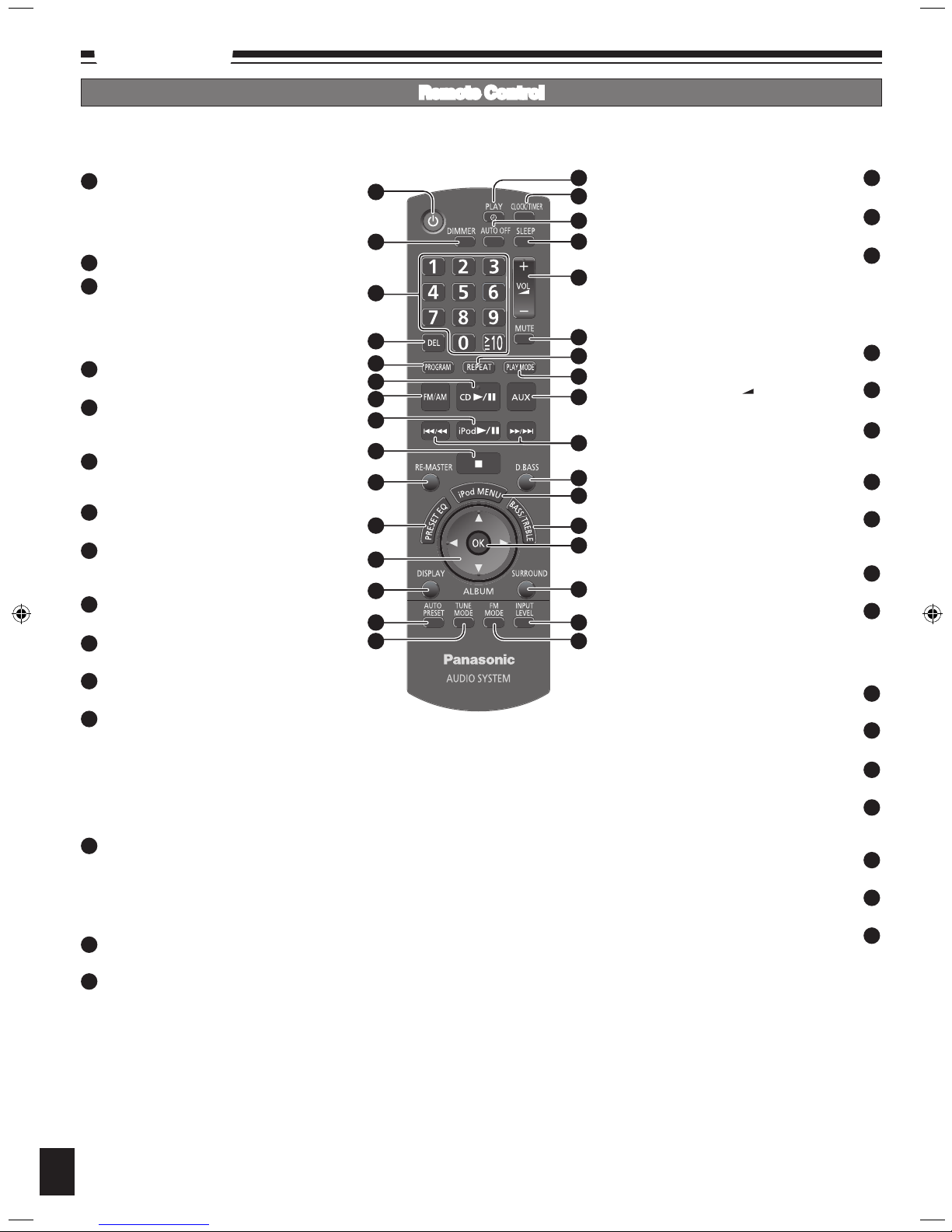
Remote Control
Refer to the numbers in parentheses for page reference.
[u/t] and [y/i] described in the operations have the same controls as [w] and [q] respectively.
•
•
Standby/on switch [^], [8, POWER] (4, 8, 10)
Press to switch the unit from on to standby
mode or vice versa.
In standby mode, the unit is still consuming a
small amount of power.
[DIMMER] Dims the display panel
Numeric buttons [1-9, 0,
≧
10] (8, 9)
To select a 2-digit number
e.g. 16: [
≧
10] [1] [6]
To select a 3-digit number
e.g. 226: [
≧
10] [≧10] [2] [2] [6]
[DEL] (8)
Delete last programmed track
[PROGRAM] (8, 9)
CD/MP3 Program
Tuner Preset (Manual)
[CD q/h] (8)
Selector switch to CD
Direct CD Play/CD Pause
[FM/AM] (9)
FM/AM selection
[iPod q/h] (12)
Selector switch to iPod
Direct iPod Play/iPod Pause
[g] (8, 12)
Stop button
[RE-MASTER] (11)
Re-master on/off
[PRESET EQ] (11)
Preset EQ mode selector
[e,r, ALBUM] (8, 12)
Album/track selection
iPod menu browsing
[w, q]
Track skip/search
Tune/preset channel selection
Time adjustment
Bass/treble adjustment
[DISPLAY] (8)
CD: CD Display
(Elapsed play time/Remaining play time)
MP3: MP3 Display
[Elapsed play time/Album name/Track name/
ID3 (Album)/ID3 (Track)/ID3 (Artist)]
[AUTO PRESET] (9)
Tuner Preset (Auto)
[TUNE MODE] (9)
Tune mode on/off
Selector switch to Manual/Preset
1
2
9
8
7
6
5
4
3
10
11
12
13
14
15
2
3
4
5
6
7
8
9
10
11
12
13
14
15
1
16
17
18
19
20
21
22
23
24
25
26
27
28
29
30
32
31
16
17
18
19
20
21
22
23
24
25
(10) [z, PLAY]
Play timer on/off
(10) [CLOCK/TIMER]
Clock and Timer setting
[AUTO OFF]
This function allows you to turn off the unit in
disc mode only after the unit is left unused for
10 minutes. The setting is maintained even if the
unit is turned off.
Press again to cancel this function.
(10) [SLEEP]
Sleep timer setting
(8, 10, 12) [VOL +, –], [–VOLUME+]
To adjust the volume
[MUTE]
Mutes the sound.
Press again to cancel muting.
(9) [REPEAT]
Repeat on/off
(8, 9) [PLAY MODE]
Play mode button
Tuner: Lowest/Current
(4, 12) [AUX]
Connecting to other external units
(
8, 9, 10, 11, 12) [u/t], [y/i]
Track skip/search
Tune/preset channel selection
Time adjustment
Bass/treble adjustment
(11) [D.BASS]
D.BASS on/off
(12) [iPod MENU]
To display iPod menu
(11) [BASS/TREBLE]
Bass/Treble selection
(8, 12) [OK]
Disc play
Confirm selection
(11) [SURROUND]
Surround mode on/off
(11) [INPUT LEVEL]
Adjusting level in AUX mode to Normal/High
(9) [FM MODE]
FM mode on/off
Selector switch to Mono/Stereo
26
27
28
29
30
31
32
Page 7
RQTX0250
7
Control guide (continued)
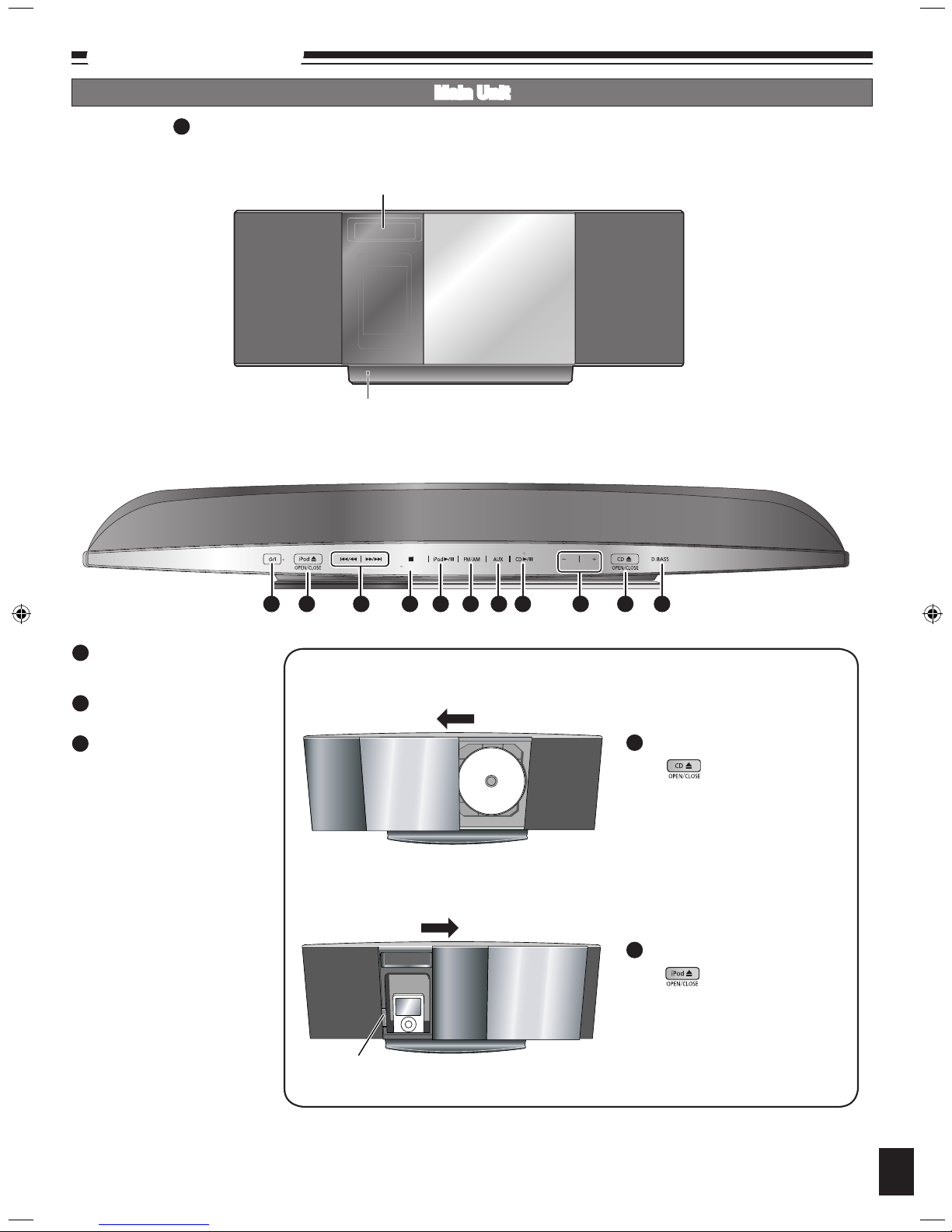
Main Unit
Buttons such as function the same as the remote control.•
1
Top View (Top Panel)
Front View
Remote control signal sensor
Display
[iPod ;, OPEN/CLOSE] (12)
Open and close sliding door for
iPod operation.
[g, –DEMO] (5)
Stop/Demo
[CD ;, OPEN/CLOSE] (8)
Open and close sliding door for
CD operation.
33
34
DEMO
VOLUME
1 33 25 34 8 7 24 6 20 35 26
POWER
35
33
35
Sliding door Operation
Press to open sliding door.
Press again to close sliding door
after setting the CD in place. (Refer
to page 8 for inserting the CD.)
Press to open sliding door.
Press again to close sliding door
after iPod is inserted into the dock
properly. (Refer to page 12 for
inserting the iPod.)
Docking switch
To operate CD
To operate iPod
Page 8
RQTX0250
Press [CD ;, OPEN/CLOSE] again to close the sliding door.
Keep fingers away from the sliding door when it is closing to avoid
possible minor injuries.
Press [CD q/h] or [OK] to start play.
Press [VOL +, –] to adjust the volume.
Be
sure to press the [CD ;, OPEN/CLOSE] button to open and close the
sliding door. Damage may occur if the sliding door is forced closed.
Be careful of CD hitting the sliding door while being removed.
•
•
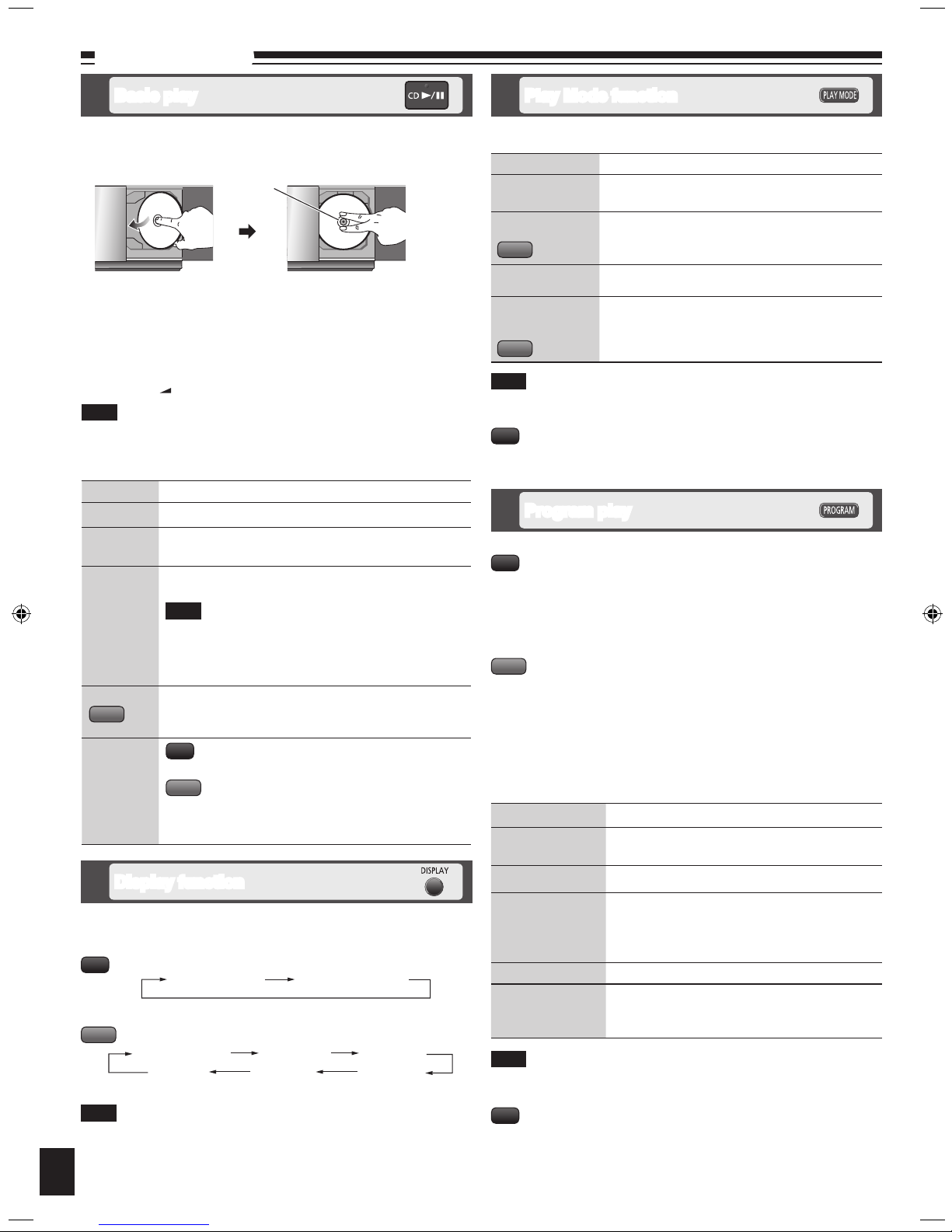
Press [^] to turn the unit on.
Press [CD
;
, OPEN/CLOSE] to open the sliding door and then set
the CD in place.
8
Disc operations
To Action
stop
Press [g].
pause
Press [CD q/h].
Press again to resume play.
skip/search
Press [u/t] or [y/i] to skip.
Press and hold [u/t] or [y/i] to search.
You can search during play or while paused.
You cannot search through MP3 files.
You can only search within the current track during
program play, one track repeat, and random play.
•
•
•
skip album
Press [e,r, ALBUM] in the play mode.
Press [e,r, ALBUM] once and then the numeric buttons
in the stop mode.
direct
access play
(Play starts
with the
track you
select.)
Press the numeric buttons to select the desired track.
Press [e,r, ALBUM] to select the album.
Press [y/i] once and then press the numeric
buttons to select the desired track.
Note
MP3
CD
MP3
Basic play
Note
Program play
The function allows you to program up to 24 tracks.
Press [CD q/h] and then [g].
Press [PROGRAM].
Press the numeric buttons to select tracks.
Repeat this step to program other tracks.
Press [CD q/h] or [OK] to start play.
Press [CD q/h] and then [g].
Press [PROGRAM].
Press [e,r, ALBUM] to select your desired album.
Press [y/i] once and then press the numeric buttons to select
tracks.
Press [OK].
Repeat step 3 to 5 to program other tracks.
Press [CD q/h] to start play.
To Action
cancel program
mode
Press [PROGRAM] in the stop mode to clear
“PGM” indicator from the display.
replay the program
Press [PROGRAM] then [CD q/h].
check program
contents
Press [u/t] or [y/i] when “PGM” is
displayed in the stop mode. To check while
programming, press [PROGRAM] twice after
“PGM” appears, then press [u/t] or [y/i].
clear the last track Press [DEL] in the stop mode.
clear all
programmed tracks
Press [g] in the stop mode.
“CLR ALL” is displayed. Within 5 seconds, press
the button again to clear all tracks.
When you try to program more than 24 tracks “PGM FULL” appears.
The program memory is cleared when you open the sliding door.
During program play, you can search backward or forward only within the
current track.
•
•
•
Note
CD
MP3
CD
Press [CD q/h].
Press [PLAY MODE] to select the desired mode.
Mode To play
1-TRACK
1TR
one selected track on the disc.
Press the numeric buttons to select the track.
1-ALBUM
1ALBUM
one selected album on the disc.
Press [e,r, ALBUM] to select the album.
RANDOM
RND
a disc randomly.
1-ALBUM
RANDOM
1ALBUM RND
all tracks in one selected album randomly.
Press [e,r, ALBUM] to select the album.
MP3
MP3
Note
During random play, you cannot skip to previous track.
The current play mode is cleared when you open the sliding door.
•
•
Play Mode function
During RANDOM play, you can search backward or forward only within
the current track.
•
CD
This function allows you to display the information of the current track.
Press [DISPLAY] repeatedly during play or pause.
CD
MP3
Elapsed play time Remaining play time
Display function
Album name Track name
ID3 (Artist) ID3 (Track) ID3 (Album)
Elapsed play time
Note
Maximum number of displayable characters: approximately 30.
This unit supports ver. 1.0 & 1.1 ID3 tags. Text data that is not supported
will not be displayed.
ID3 is a tag embedded in MP3 tracks to provide information about the
track.
•
•
•
Label must face outward.
Press until you hear it clicks
into place.
•Tilt the CD to the left and
slide it in place.
•
Center part
Page 9
RQTX0250
9
Disc operations (continued)
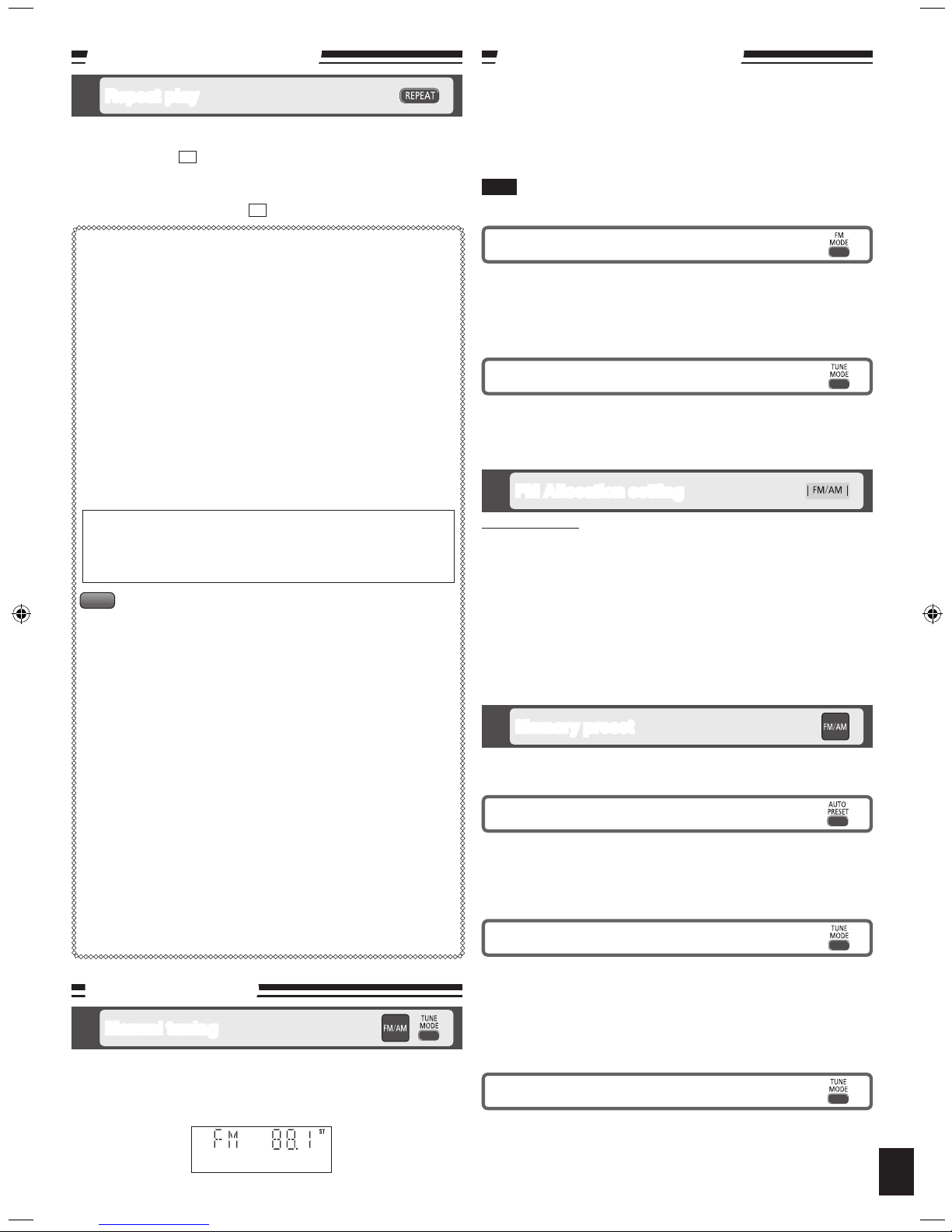
You can repeat program play or other selected play mode.
Press [REPEAT] before or during play.
“ON REPEAT” and “ ” are displayed.
To cancel
Press [REPEAT] again.
“OFF REPEAT” is displayed and “ ” is cleared.
Repeat play
&
&
Note on CD-R and CD-RW
This unit can play CD-R and CD-RW recorded with CD-DA or MP3.
Use an audio recording disc for CD-DA and finalize* it when you finish
recording.
The unit may not be able to play some discs due to the condition of the
recording.
* A process performed after recording that enables CD-R/CD-RW
players
to play audio CD-R and CD-RW.
Caution
Do not:
use irregularly shaped CDs.
attach extra labels and stickers.
use CDs with labels and stickers that are coming off or with adhesive
exuding from under labels and stickers.
attach scratch-proof covers or any other kind of accessories.
write anything on the CD.
clean CDs with liquids (Wipe with a soft, dry cloth).
•
•
•
•
•
•
The unit can play MP3, a method of compressing audio without hurting
audio quality.
When creating MP3 files to play on this unit
Maximum number of tracks and albums: 999 tracks and 256 albums.
Compatible compression rate: Between 64 kbps and 320 kbps
(stereo).
128 kbps (stereo) is recommended.
D
isc formats: ISO9660 level 1 and level 2 (except for extended
formats).
The time for reading TOC depends on the number of the tracks, the
folders or folder structures.
Limitations on MP3
This unit is compatible with multi-sessions but if there are a lot of
sessions it takes more time for play to start. Keep the number of
sessions to a minimum to avoid this.
This unit cannot play files recorded using packet write.
If the disc includes both MP3 and normal audio data (CD-DA), the unit
plays the type recorded in the inner part of the disc.
If the disc includes both MP3 and other types of audio data (e.g. WMA
or WAV), the unit plays only the MP3.
Depending on how you create MP3 files, they may not play in the
order you numbered them or may not play at all.
•
•
•
•
•
•
•
•
MP3
Note about using a DualDisc
The digital audio content side of a DualDisc does not meet the
technical specifications of the Compact Disc Digital Audio (CD-DA)
format so play may not be possible.
By main unit only
This system can also receive FM broadcasts allocated in 0.1 MHz steps.
To change the step to 0.1 MHz
1 Press and hold [FM/AM].
After a few seconds the display changes to a flashing display of the
current minimum frequency.
2 Continue to hold down [FM/AM].
When the minimum frequency changes, release the button.
To return to the original step, repeat the above steps.
After the setting is changed, any previously preset frequency will be
cleared.
•
•
FM Allocation setting
Press [FM MODE] to display “MONO” indicator.
To cancel
Press [FM MODE] again until “MONO” indicator disappears.
“MONO” is also canceled if the frequency is changed.
Turn off “MONO” for normal listening.
•
•
To improve FM sound quality
Memory preset
You can preset up to 30 FM channels and up to 15 AM channels.
Preparation: Press [FM/AM] to select “FM” or “AM”.
Selecting a preset station
Press the numeric buttons to select the channel.
For channels 10 to 30 press [
≧
10], then the two digits.
OR
Press [TUNE MODE] to select “PRESET”.
Press [u/t] or [y/i] to select the channel.
Manual presetting
Press [TUNE MODE] to select “MANUAL”.
Press [u/t] or [y/i] to tune to the required station.
Press [PROGRAM].
Press the numeric buttons to select a channel.
The station occupying a channel is erased if another station is preset in
that channel.
Repeat steps 2 to 4 to preset more stations.
Automatic presetting
Press [PLAY MODE] to switch between “LOWEST” or “CURRENT”
frequency.
Press [AUTO PRESET] to start presetting.
The tuner presets all the stations it can receive into the channels in
ascending order. When finished, the last station memorised is tuned in.
Press [FM/AM] to select “AM”.
Press and hold [TUNE MODE] repeatedly to change beat proof
setting (“BP1”, “BP2”, “BP3” or “BP4”).
Radio operations
Manual tuning
Radio operations (continued)
To improve AM sound quality
To tune automatically
Press [FM/AM] to select “FM” or “AM”.
Press [TUNE MODE] to select “MANUAL”.
Press and hold [u/t] or [y/i] until the frequency starts
changing rapidly.
Auto tuning stops when it finds a station.
To cancel auto tuning, press [u/t] or [y/i] once again.
Auto tuning may not function when there is excessive interference.
•
•
Note
“ST” is displayed when a stereo FM broadcast is being received.
Press [FM/AM] to select “FM” or “AM”.
Press [TUNE MODE] to select “MANUAL”.
Press [u/t] or [y/i] to select the frequency of the required
station.
Page 10
RQTX0250
Timer
10
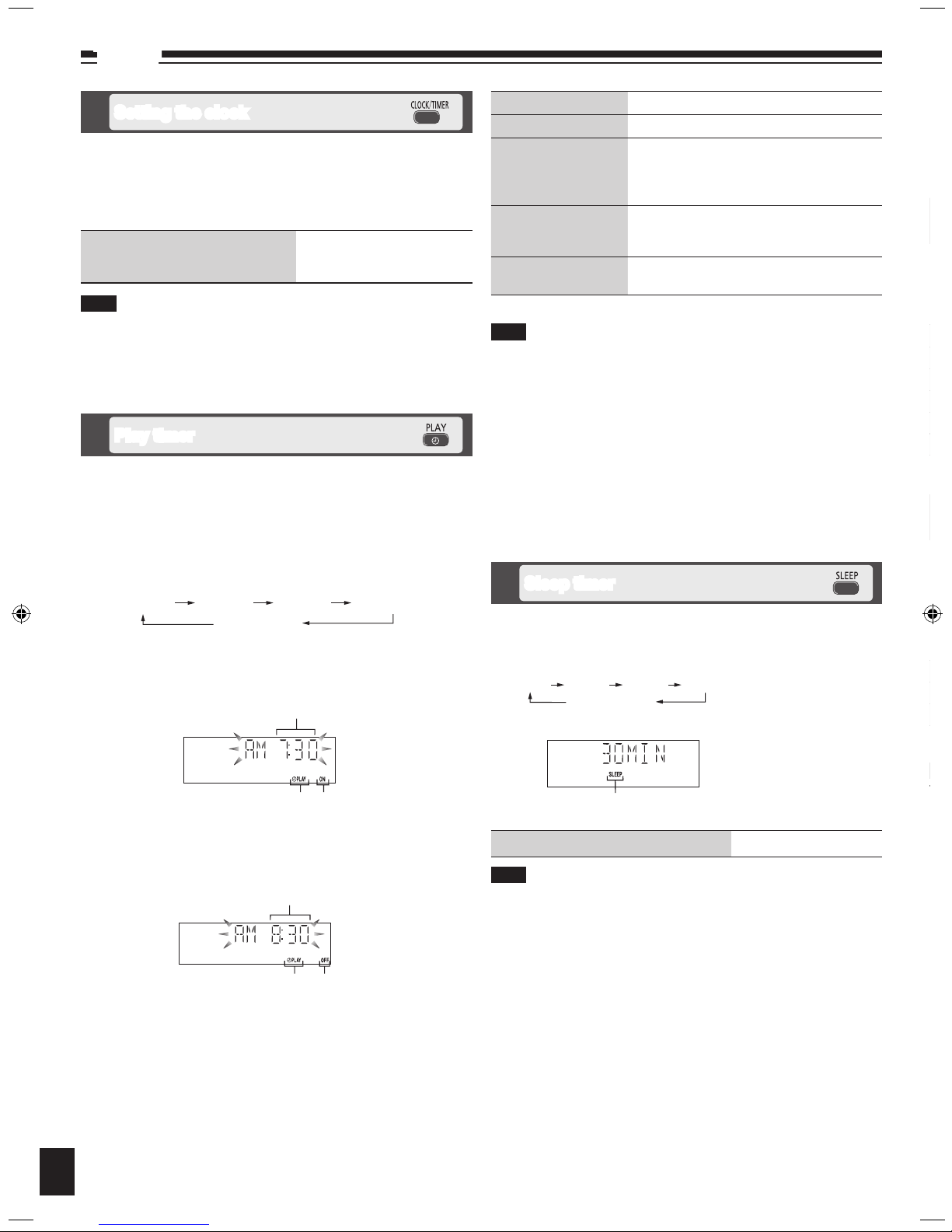
This is a 12-hour clock.
Press [CLOCK/TIMER] to set the clock.
Press [u/t] or [y/i] to select the time within 5 seconds.
(Press and hold to change the time faster.)
Press [CLOCK/TIMER] again.
g To display the clock for few
seconds when the unit is on or in
standby mode
Press [CLOCK/TIMER]
Reset the clock regularly to maintain accuracy.
Setting the clock
The timer will start at the preset time, with the volume increasing
gradually to the preset level.
The timer comes on at the set time every day if the timer is on.
The unit must be in the standby mode for the timer to function.
If you turn the unit off and on again while the timer is functioning, the
finish time setting will not be activated.
When external unit is selected as the source when the timer comes on,
the system turns on and engages external unit as the source. If you wish
to playback from the portable audio equipment, activate the equipment’s
play
mode and increase the volume. (See the portable audio equipment’s
instruction manual.)
•
•
•
•
•
Note
Note
Sleep timer
g To check the remaining time
Press [SLEEP] once
The play timer and sleep timer can be used together. The sleep timer
always has priority. Be sure not to overlap timer settings.
Note
The SLEEP timer can turn the unit off after a set time.
Press [SLEEP] to turn the SLEEP function on/off.
Each time you press the button:•
Sleep timer indicator
30MIN 60MIN 90MIN 120MIN
OFF (Canceled)
You can set the timer to come on at a certain time to wake you up.
This unit offers 3 optional play timers.
Preparation:
Turn the unit on and set the clock. (➡ see above)
Prepare the music source (disc, radio, iPod or AUX) and set the volume.
Press [CLOCK/TIMER] repeatedly to select play timer.
Within 5 seconds, press [u/t] or [y/i] to set the starting
time.
•
•
Play timer
Press [CLOCK/TIMER] to confirm.
Repeat steps 2 and 3 to set the finishing time.
To Action
change the settings Repeat steps 1 to 4 and 6.
change the source or
volume
Press [z, PLAY] to clear zPLAY indicator
from the display.
Make changes to the source or volume.
Perform steps 5 and 6.
check the settings
(when the unit is on or
in standby mode)
Press [CLOCK/TIMER] repeatedly to select
zPLAY 1, zPLAY 2 or zPLAY 3.
cancel
Press [z, PLAY] to clear the timer indicator
from the display.
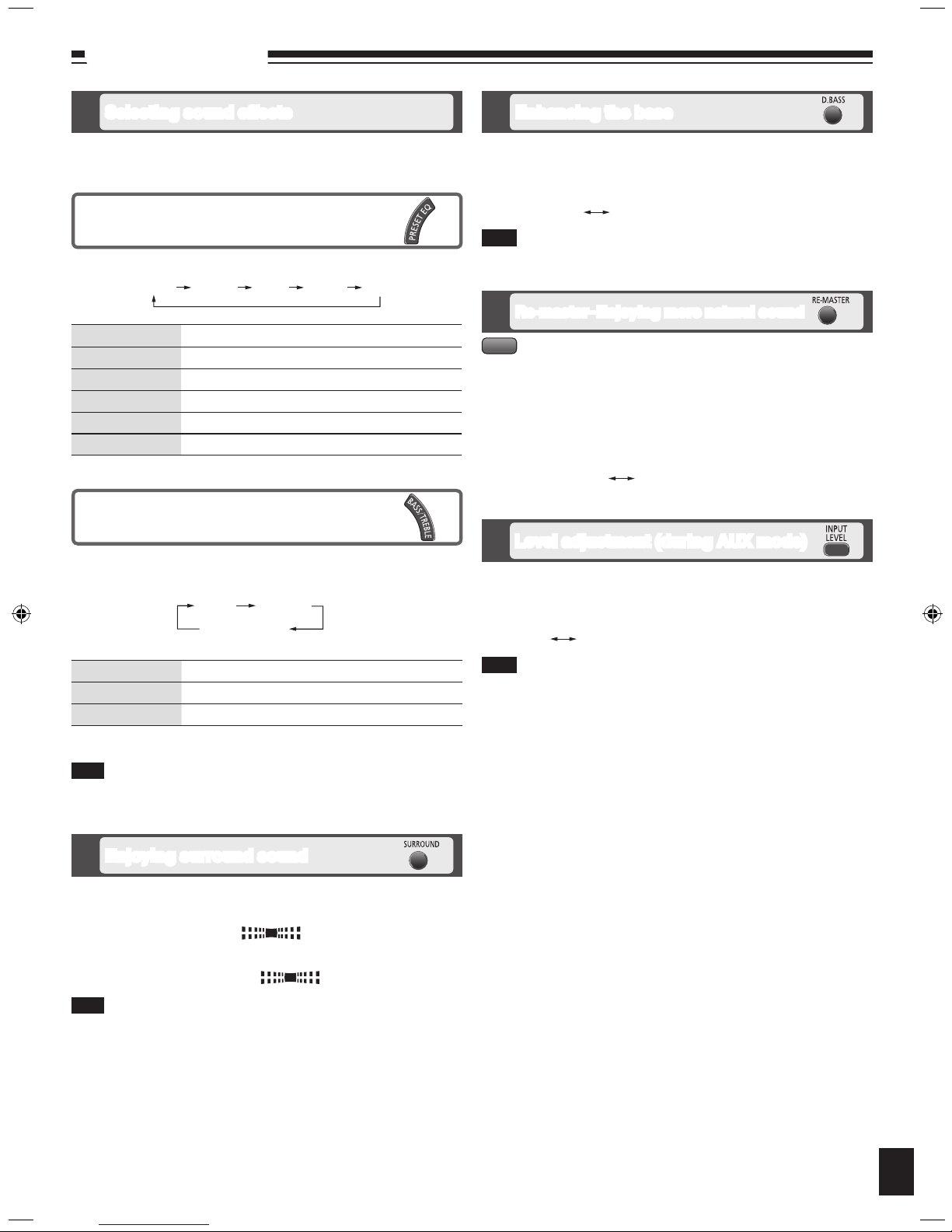
Press [PRESET EQ] repeatedly to select your desired setting.
Setting Effect
HEAVY Adds punch to rock
CLEAR Clarifies higher frequencies
SOFT For background music
VOCAL Adds gloss to vocals
FLAT No effect
Preset EQ
Setting Effect
BASS For lower pitch sound
TREBLE For higher pitch sound
Press [u/t] or [y/i] to adjust the level.
The tone level can be varied within -4 to +4.
Note
Enables you to enjoy lower or higher pitch sound.
Press [BASS/TREBLE] repeatedly to select your desired setting.
Bass or treble
To activate the timer
Press [z, PLAY] repeatedly to turn on your desired play timer.
Press [^] to turn off the unit.
CLOCK
zPLAY 1 zPLAY 2 zPLAY 3
Original display
Finish time
Play timer indicator “OFF” is displayed
Start time
Play timer indicator “ON” is displayed
Page 11
RQTX0250
11
Sound adjustment
Digital remaster is effective on CD (MP3)
Analog remaster is effective on iPod and AUX
This feature reproduces the frequencies lost during recording to give you a
sound closer to the original.
Press [RE-MASTER] during play to select “ON RE-MASTER”.
Each time you press the button:•
MP3
ON RE-MASTER OFF RE-MASTER
Re-master–Enjoying more natural sound
You can change the sound effect by selecting Preset EQ or adjusting the
bass or treble effect.
Selecting sound effects
Enables you to add natural width and depth to the stereo sound.
To activate
Press [SURROUND] to display “ ” indicator.
To cancel
Press [SURROUND] again to clear “ ” indicator.
Surround sound is less discernible when listening through headphones.
If interference in FM stereo reception increases, cancel the surround
sound effect.
•
•
Note
Enjoying surround sound
Enables you to enjoy the powerful bass effect.
Press [D.BASS] during play to select “ON D.BASS”.
Each time you press the button:
The actual effect depends on the music source.
•
Note
Enhancing the bass
ON D.BASS OFF D.BASS
Press [PRESET EQ] repeatedly to select your desired setting.
Setting Effect
HEAVY Adds punch to rock
CLEAR Clarifies higher frequencies
SOFT For background music
VOCAL Adds gloss to vocals
FLAT No effect
Preset EQ
HEAVY CLEAR SOFT VOCAL FLAT
Setting Effect
BASS For lower pitch sound
TREBLE For higher pitch sound
Press [u/t] or [y/i] to adjust the level.
The tone level can be varied within -4 to +4.
Note
Enables you to enjoy lower or higher pitch sound.
Press [BASS/TREBLE] repeatedly to select your desired setting.
Bass or treble
BASS TREBLE
Original display
Level adjustment (during AUX mode)
You can select the sound input level of your portable audio equipment.
Press [INPUT LEVEL] repeatedly to select your desired setting.
Each time you press the button:
Select “NORMAL” if the sound is distorted when level “HIGH” is activated.
•
Note
HIGH NORMAL
Page 12
RQTX0250
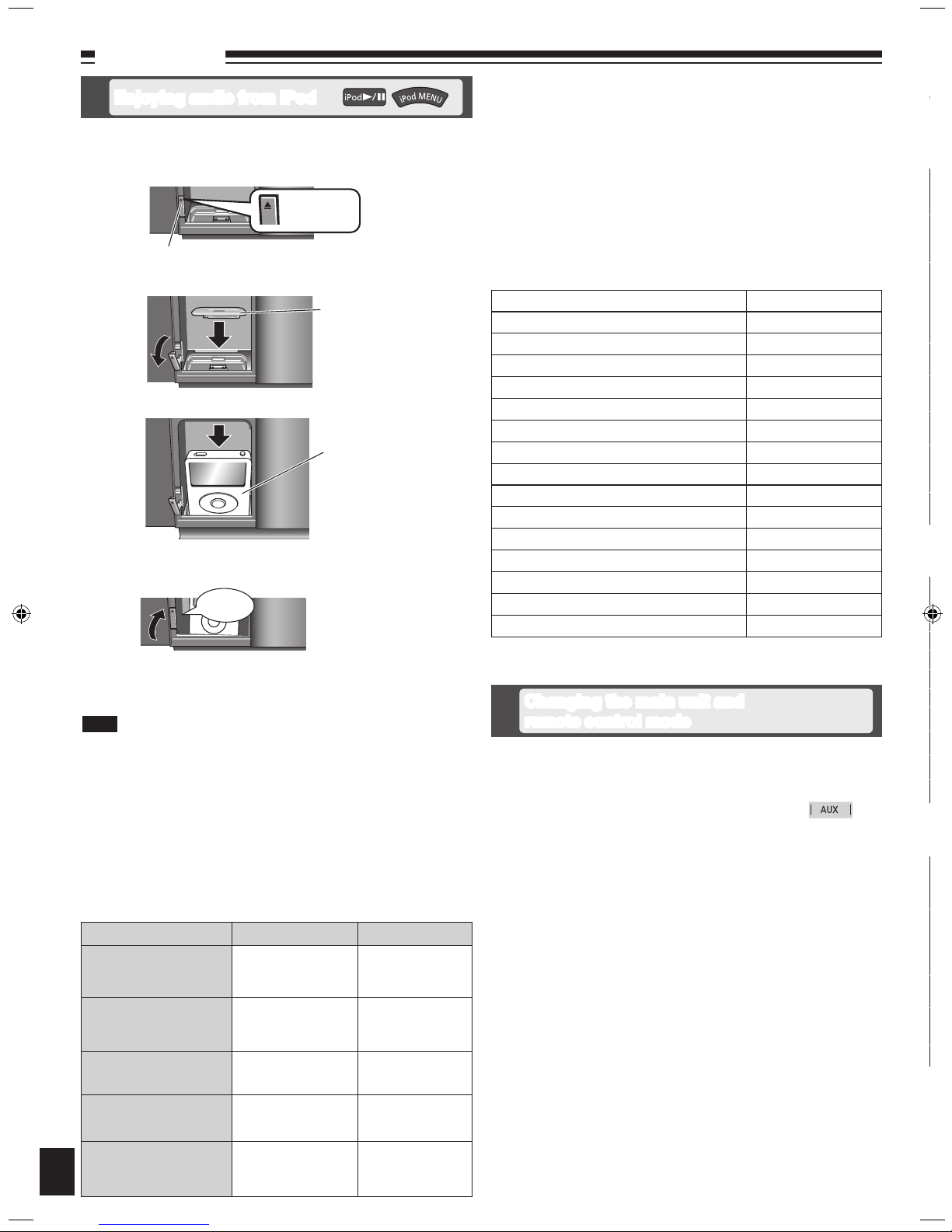
Press
[iPod ;, OPEN/CLOSE]
to open the sliding door.
Push [;] to open the docking switch.
Adjust the docking switch and insert the suitable dock adapter for
your iPod.
Insert your iPod into the dock.
Push back the docking switch.
Recharging starts when the iPod dock is properly locked.
Press [iPod ;, OPEN/CLOSE] again to close the sliding door.
Keep fingers away from the sliding door when it is closing to avoid
possible minor injuries.
•
12
External unit
To Remote control Main unit
display iPod menu/return
previous menu
(During play/pause)
Press [iPod MENU].
3
select contents from iPod
menu
(During play/pause)
Press [e,r, ALBUM]
followed by [OK].
3
pause track
Press [iPod q/h]
or [g].
Press [iPod q/h]
or [g].
skip a track
(During play/pause)
Press [u/t] or
[y/i].
Press [u/t] or
[y/i].
search the current track
(During play/pause)
Press and hold
[u/t] or
[y/i].
Press and hold
[u/t] or
[y/i].
Preparation:
Reduce the volume of the main unit to minimum before connecting/
disconnecting the iPod.
Confirm the iPod connection. (➡ above)
Press [iPod q/h] to play the iPod.
Adjust the volume of the main unit.
•
•
■ Compatible iPod
Name Memory size
iPod touch 2nd generation 8 GB, 16 GB, 32 GB
iPod nano 4th generation (video) 8 GB, 16 GB
iPod classic 120 GB
iPod touch 1st generation 8 GB, 16 GB, 32 GB
iPod nano 3rd generation (video) 4 GB, 8 GB
iPod classic 80 GB, 160 GB
iPod nano 2nd generation (aluminum) 2 GB, 4 GB, 8 GB
iPod 5th generation (video) 60 GB, 80 GB
iPod 5th generation (video) 30 GB
iPod nano 1st generation 1 GB, 2 GB, 4 GB
iPod 4th generation (color display) 40 GB, 60 GB
iPod 4th generation (color display) 20 GB, 30 GB
iPod 4th generation 40 GB
iPod 4th generation 20 GB
iPod mini 4 GB, 6 GB
Compatibility depends on the software version of your iPod.•
The remote control and main unit are factory-set to “REMOTE 1” mode.
If you find the remote control unintentionally also controls other equipment,
you can switch to operate in “REMOTE 2” mode.
To switch to “REMOTE 2” mode
Press [AUX] to enter AUX mode.
(While pressing [AUX] on the main unit)
Press and hold [2] until “REMOTE 2” appears on the main unit
display.
Press and hold [OK] followed by [2] for at least 2 seconds.
The main unit and remote control are now set to operate in “REMOTE 2”
mode.
To return to “REMOTE 1” mode
Perform steps 1 to 3 but use [1] instead of [2] for steps 2 and 3.
(“REMOTE 1” appears on the main unit during step 2.)
The remote control cannot work with the main unit if their modes are
different.
“REMOTE 1” or “REMOTE 2” appears on the main unit when you operate
the remote control.*
* If “REMOTE 1” appears (The main unit is in “REMOTE 1” mode.)
Press and hold [OK] followed by [1] on the remote control for at least 2
seconds.
If “REMOTE 2” appears (The main unit is in “REMOTE 2” mode.)
Press and hold [OK] followed by [2] on the remote control for at least 2
seconds.
Changing the main unit and
remote control mode
iPod will start recharging regardless of whether this unit is in ON or
Standby condition.
“IPOD ” will be shown on the main unit’s display during iPod charging
in main unit standby mode.
Check iPod to see if the battery is fully recharged.
If you are not using iPod for an extended period of time after recharging
has completed, disconnect it from main unit, as the battery will be
depleted naturally. (Once fully recharged, additional recharging will not
occur.)
•
•
•
•
g Charging the iPod
g Playing the iPod
g Inserting the iPod
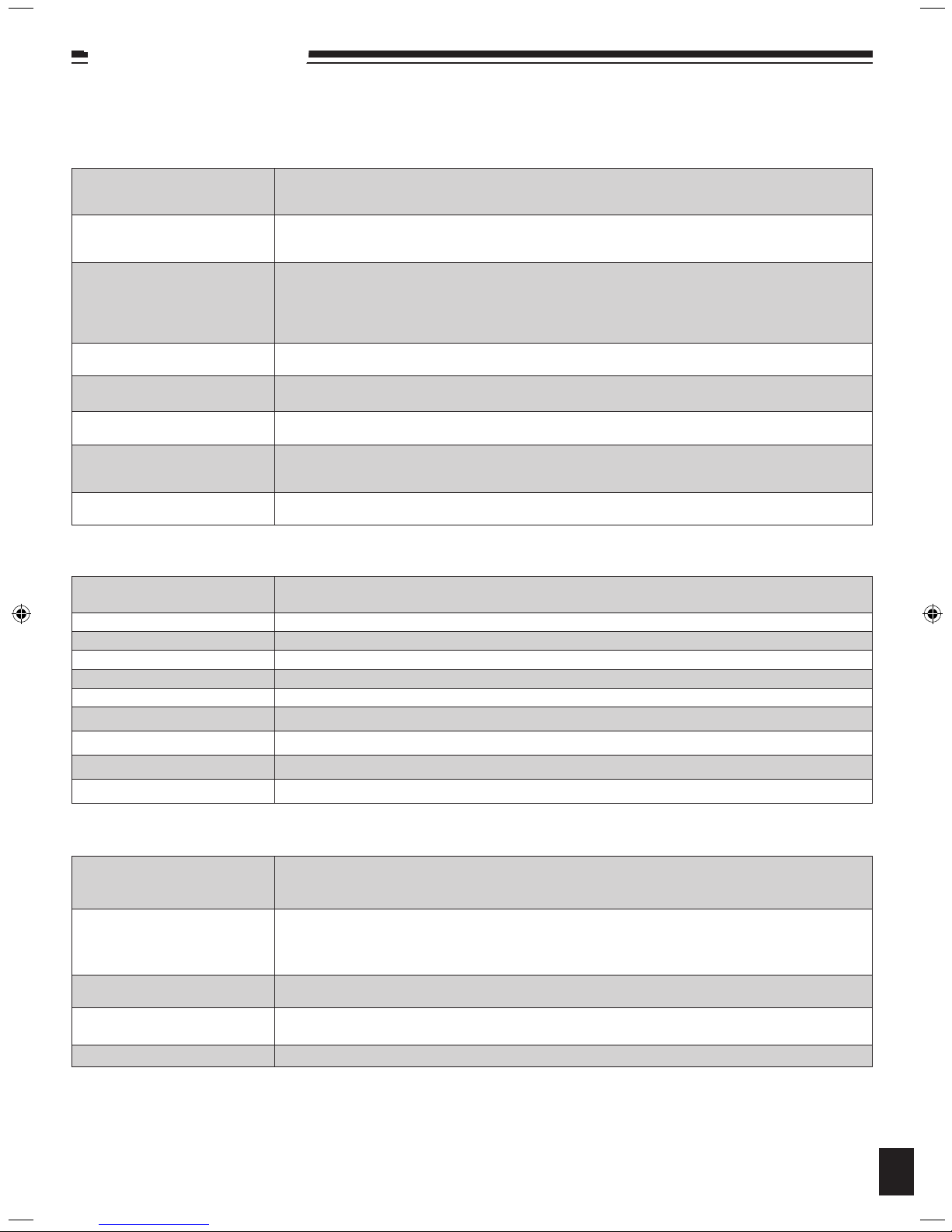
Before requesting service, make the following checks. If you are in doubt about some of the check points, or if the remedies indicated in the
chart do not solve the problem, refer to “Customer Services Directory (United States and Puerto Rico)” on page 15 if you reside in the U.S.A. or
Puerto Rico, or refer to “Product information” on page 3 if you reside in Canada.
Common problems
Incorrect display or play will not
start.
MP3 cannot be read.
Noise is heard or no sound.
Humming heard during play.
A beat sound or noise is heard
while receiving a radio broadcast.
A low hum or noise is heard
during AM broadcasts.
The picture on the television near
the unit disappears or stripes
appear on the screen.
No response when remote
control buttons are pressed.
Display
“--:--”
“ADJUST CLOCK” Clock not set. Adjust the clock accordingly.•
“ADJUST TIMER” Play timer not set. Adjust the play timer accordingly.•
“PGM FULL” The number of programmed tracks is limited to 24. No further tracks can be programmed.•
“NO PLAY” A CD-ROM disc that is not CD-DA or MP3 format is inserted. It cannot be played.•
“ERROR” Incorrect operation performed. Read the instructions and try again.•
“F61” or “F76” There is a power supply problem. Consult the dealer.•
“UNLOCKED” Make sure the docking switch is pushed back properly.•
“ILLEGAL OPEN” Sliding door is not in correct position. Turn the unit off and on again.•
“IPOD NO DEV”
iPod
iPod does not turn on.
No sound is coming from the
speakers.
Distorted sound or the sound
level is too low.
Cannot control the iPod using
remote control or main unit.
iPod does not charge.
Enjoying audio from iPod
Push [;]
iPod
(not included)
Click
Docking switch
Dock adapter
(not included)
Note
It is recommended to use the dock adapter from Apple.
Be sure to push [;] to open and adjust the docking switch when
removing the iPod. Push back the docking switch after iPod being
removed.
•
•
Page 13
RQTX0250
13
Troubleshooting guide
Before requesting service, make the following checks. If you are in doubt about some of the check points, or if the remedies indicated in the
chart do not solve the problem, refer to “Customer Services Directory (United States and Puerto Rico)” on page 15 if you reside in the U.S.A. or
Puerto Rico, or refer to “Product information” on page 3 if you reside in Canada.
Common problems
Incorrect display or play will not
start.
You have not inserted the disc correctly; insert it correctly.
The disc is scratched or dirty. (Tracks skipped.)
There is moisture on the lens. Wait for about an hour and then try again.
•
•
•
MP3 cannot be read.
Y
ou may not be able to play MP3 if you have copied a multi-session disc that has no data between sessions.
When creating a multi-session disc, it is necessary to close the session.
The amount of data on the disc is too small. Set the amount of data to greater than approximately 5 MB.
•
•
•
Noise is heard or no sound.
Noise may occur when playing MP3 if recording quality is poor.
Keep this unit away from mobile telephones if the interference is apparent.
Turn the volume up.
Switch the unit off, check and correct the connection, then switch the unit on. Causes include straining of the
speakers through excessive volume or power, and using the unit in a hot environment.
•
•
•
•
Humming heard during play.
An AC power supply cord or fluorescent light is near the cords. Keep other appliances and cords away from
this unit’s cables.
•
A beat sound or noise is heard
while receiving a radio broadcast.
Switch the television or other audio player off or separate it from the unit.
Switch off the portable audio player if connected to “AUX” port.
•
•
A low hum or noise is heard
during AM broadcasts.
Keep the antenna away from other cables and cords.
Keep the AM antenna away from the unit.
•
•
The picture on the television near
the unit disappears or stripes
appear on the screen.
The location and orientation of the antenna are incorrect.
The television antenna wire is too close to the unit. Separate the antenna wire of the television from the unit.
•
•
No response when remote
control buttons are pressed.
Check that the batteries are inserted correctly. (➡ page 5)•
Display
“--:--”
You plugged the AC power supply in for the first time and there was a power failure recently. Set the time.
(➡ page 10)
•
“ADJUST CLOCK” Clock not set. Adjust the clock accordingly.•
“ADJUST TIMER” Play timer not set. Adjust the play timer accordingly.•
“PGM FULL” The number of programmed tracks is limited to 24. No further tracks can be programmed.•
“NO PLAY” A CD-ROM disc that is not CD-DA or MP3 format is inserted. It cannot be played.•
“ERROR” Incorrect operation performed. Read the instructions and try again.•
“F61” or “F76” There is a power supply problem. Consult the dealer.•
“UNLOCKED” Make sure the docking switch is pushed back properly.•
“ILLEGAL OPEN” Sliding door is not in correct position. Turn the unit off and on again.•
“IPOD NO DEV”
The iPod device is not inserted correctly. Read the instructions and try again. (➡ page 12).•
iPod
iPod does not turn on.
Verify that the iPod battery is not depleted before connecting it to the unit.
Before inserting your iPod into the dock, turn off both the unit and iPod. Turn power back on and select the
appropriate source.
•
•
No sound is coming from the
speakers.
The iPod is not correctly inserted into the dock. Turn off the iPod, remove it from the dock connector. Reinsert
it and turn it on again.
Make sure that iPod is actually playing something.
Adjust the volume.
•
•
•
Distorted sound or the sound
level is too low.
Make sure the equalizer function of your iPod is turned off.•
Cannot control the iPod using
remote control or main unit.
Make sure the iPod is inserted properly into the dock.
Check the dock connection and make sure that iPod is selected as the source of music. (➡ page 12)
•
•
iPod does not charge.
Check all connections. (➡ page 4, 12)•
Page 14
RQTX0250
Specifications
14
Limited Warranty Coverage (For USA and Puerto Rico Only)
If your product does not work properly because of a defect in materials or
workmanship, Panasonic Consumer Electronics Company (referred to as
“the warrantor”) will, for the length of the period indicated on the chart below,
which starts with the date of original purchase (“warranty period”), at its option
either (a) repair your product with new or refurbished parts, or (b) replace it
with a new or a refurbished product. The decision to repair or replace will be
made by the warrantor.
Product or Part Name Parts Labor
Audio Products (except items
listed below)
USB Reader-Writer, Personal
Computer Card Adapters
(in exchange for defective item)
Accessories: Headphones,
Cartridges,
Rechargeable Batteries,
DVD-R/-RAM Discs (in exchange
for defective item)
SD Memory Cards, Rechargeable
Battery Packs (in exchange for
defective item)
During
the “Labor” warranty period there will be no charge for labor. During
the “Parts” warranty period, there will be no charge for parts. You must carry-
in or mail-in your product during the warranty period. If non-rechargeable
batteries are included, they are not warranted. This warranty only applies
to products purchased and serviced in the United States or Puerto Rico.
This warranty is extended only to the original purchaser of a new product
which was not sold “as is”. A purchase receipt or other proof of the original
purchase date is required for warranty service.
To clean this unit, wipe with a soft, dry cloth.
Never use alcohol, paint thinner or benzine to clean this unit.
Before using chemically treated cloth, read the instructions that came
with the cloth carefully.
•
•
Clean the lens regularly to prevent malfunctions. Use a blower to remove
dust and a cotton swab if it is extremely dirty.
Do not use the lens cleaner of the CD type.
•
•
■ Care of the CD lens
Maintenance
■ If the surfaces are dirty
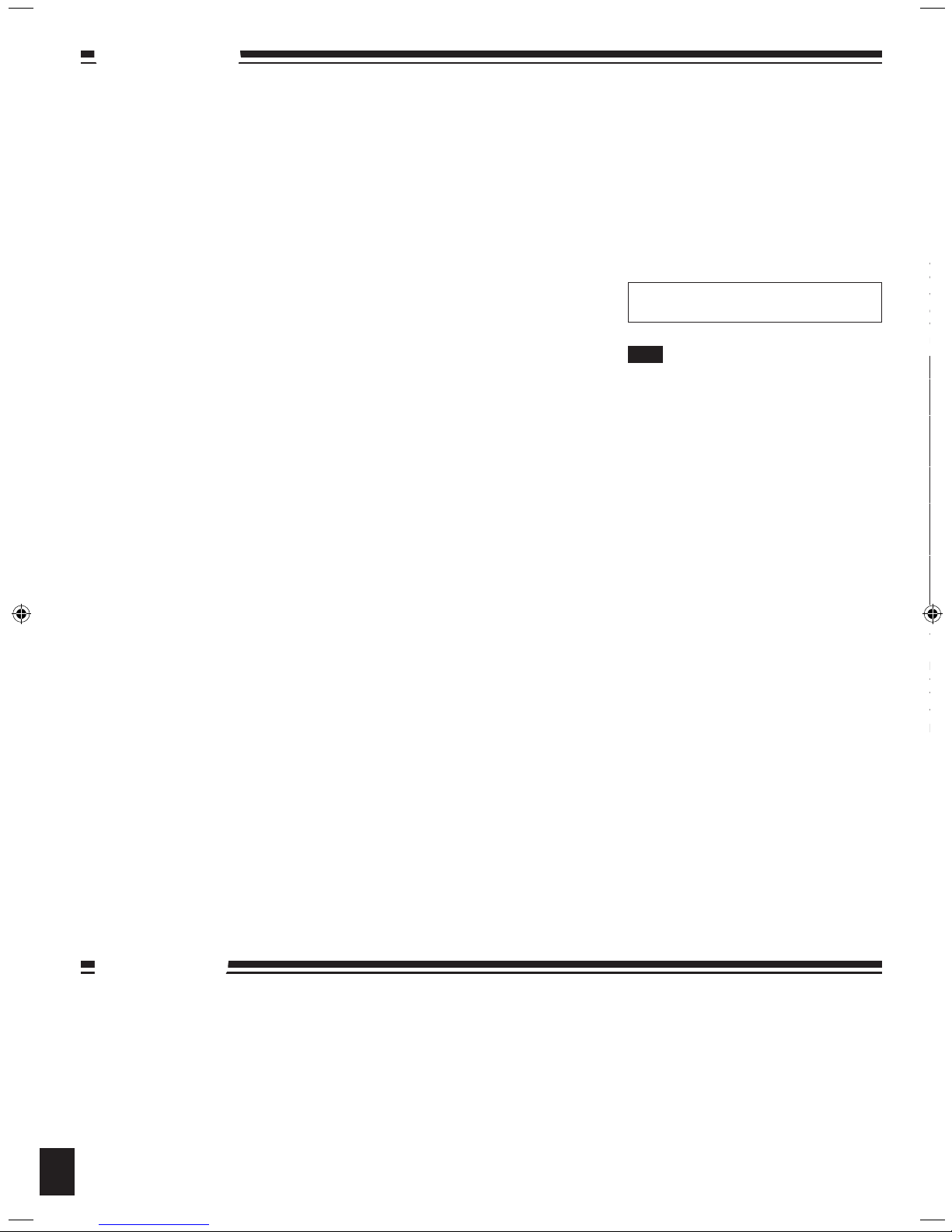
g AMPLIFIER SECTION
RMS Output Power Stereo mode
Front Ch (both ch driven)
20 W per channel (6 Ω), 1 kHz, 10 % THD
Phone jack
Terminal Stereo, 3.5 mm (1/8") jack
Output level (CD, 1 kHz, -20 dB)
max. 1.18 mW +1.18 mW, 32 Ω
Aux (Rear)
Sensitivity
Normal level 630 mV, 12.4 kΩ
High level 100 mV, 12.4 kΩ
Terminal Stereo, 3.5 mm (1/8") jack
g TUNER SECTION
Preset Memory FM 30 stations
AM 15 stations
Frequency Modulation (FM)
Frequency range
87.9 MHz to 107.9 MHz (200 kHz step)
87.5 MHz to 108.0 MHz (100 kHz step)
Antenna terminals 75 Ω (unbalanced)
Amplitude Modulation (AM)
Frequency range
520 kHz to 1710 kHz (10 kHz step)
g DISC SECTION
Disc played [8 cm (3") or 12 cm (5")]
(1) CD-Audio (CD-DA)
(2) CD-R/RW (CD-DA, MP3)
(3) MP3*
* MPEG-1 Layer 3, MPEG-2 Layer 3
Pick up (CD)
Wavelength 795 nm
Laser power CLASS 1
Audio Output (Disc)
Number of channels FL, FR, 2 channel
Audio performance (CD-Audio)
Frequency response 4 Hz to 20 kHz
S/N ratio 95 dB
Dynamic range 93 dB
Total harmonic distortion 0.005 %
g SPEAKER SECTION
Type 1 way, 1 speaker system (Bass reflex)
Speaker unit(s)
Full range 6.5 cm (2
1
/2") Cone type
Impedance 6 Ω
Input power (IEC) 30 W (Max)
Output sound pressure 79 dB/W (1.0 m)
Frequency range 55 Hz to 25 kHz (-16 dB)
90 Hz to 22 kHz (-10 dB)
g GENERAL
Power supply AC 120 V, 60 Hz
Power consumption 28 W
Dimensions (W x H x D)
500 mm x 195 mm x 102.5 mm
(19
11
/16" x 7 11/16" x 4 1/16")
[D = 69 mm (2
3
/4") minimum]
Mass (Weight) Approx. 3 kg (6.6 lbs)
Operating temperature range
0 °C to +35 °C (+32 °F to +95 °F)
Operating humidity range
35 % to 80 % RH (no condensation)
Power consumption in standby mode:
0.08 W (approx.)
Specifications are subject to change without
notice.
Total harmonic distortion is measured by the
digital spectrum analyzer.
•
•
Note
Page 15
RQTX0250
15
Panasonic Consumer Electronics Company,
Division of Panasonic Corporation of North America
One Panasonic Way, Secaucus, New Jersey 07094
Panasonic Audio Products
Limited Warranty
Limited Warranty Coverage (For USA and Puerto Rico Only)
If your product does not work properly because of a defect in materials or
workmanship, Panasonic Consumer Electronics Company (referred to as
“the warrantor”) will, for the length of the period indicated on the chart below,
which starts with the date of original purchase (“warranty period”), at its option
either (a) repair your product with new or refurbished parts, or (b) replace it
with a new or a refurbished product. The decision to repair or replace will be
made by the warrantor.
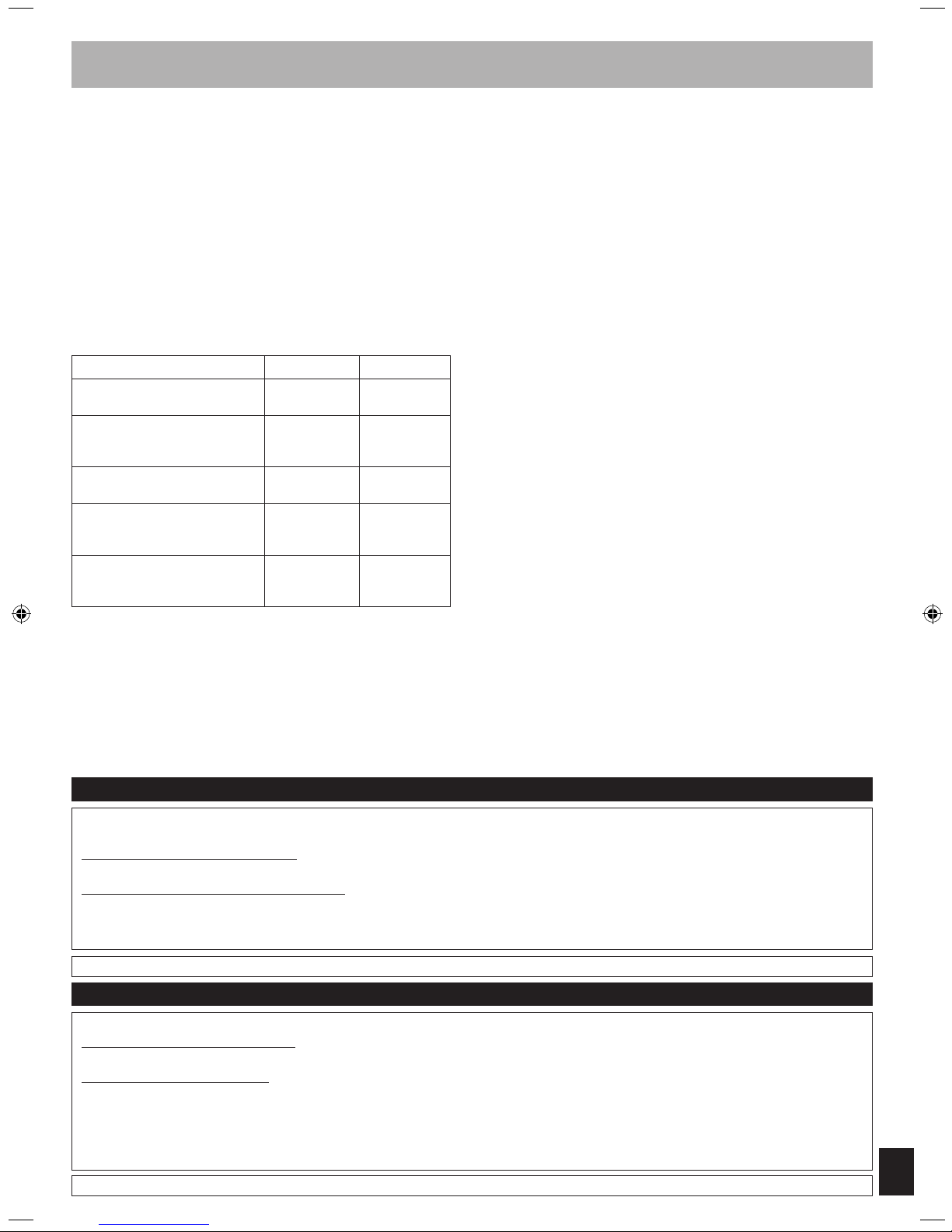
Product or Part Name Parts Labor
Audio Products (except items
listed below)
One (1) year One (1) year
USB Reader-Writer, Personal
Computer Card Adapters
(in exchange for defective item)
One (1) year Not Applicable
Accessories: Headphones,
Cartridges,
Microphones, Adapters
Ninety (90)
days
Ninety (90)
days
Rechargeable Batteries,
DVD-R/-RAM Discs (in exchange
for defective item)
Ten (10) days Not Applicable
SD Memory Cards, Rechargeable
Battery Packs (in exchange for
defective item)
Ninety (90)
days
Not Applicable
During
the “Labor” warranty period there will be no charge for labor. During
the “Parts” warranty period, there will be no charge for parts. You must carryin or mail-in your product during the warranty period. If non-rechargeable
batteries are included, they are not warranted. This warranty only applies
to products purchased and serviced in the United States or Puerto Rico.
This warranty is extended only to the original purchaser of a new product
which was not sold “as is”. A purchase receipt or other proof of the original
purchase date is required for warranty service.
Carry-In or Mail-In Service
For Carry-In or Mail-In Service in the United States and Puerto Rico call
1-800-211-PANA (7262) or visit Panasonic Web Site:
http://www.panasonic.com
Limited Warranty Limits And Exclusions
This
warranty ONLY COVERS failures due to defects in materials or
workmanship, and DOES NOT COVER normal wear and tear or cosmetic
damage. The warranty ALSO DOES NOT COVER damages which occurred
in shipment, or failures which are caused by products not supplied by the
warrantor, or failures which result from accidents, misuse, abuse, neglect,
mishandling, misapplication, alteration, faulty installation, set-up adjustments,
misadjustment of consumer controls, improper maintenance, power line
surge, lightning damage, modification, or commercial use (such as in a hotel,
office, restaurant, or other business), rental use of the product, service by
anyone other than a Factory Service Center or other Authorized Servicer, or
damage that is attributable to acts of God.
THERE
ARE NO EXPRESS WARRANTIES EXCEPT AS LISTED UNDER
“LIMITED WARRANTY COVERAGE”. THE WARRANTOR IS NOT LIABLE
FOR INCIDENTAL OR CONSEQUENTIAL DAMAGES RESULTING FROM
THE USE OF THIS PRODUCT, OR ARISING OUT OF ANY BREACH OF
THIS WARRANTY. (As examples, this excludes damages for lost time, travel
to and from the servicer, loss of media or images, data or other memory
content. The items listed are not exclusive, but are for illustration only.)
ALL EXPRESS AND IMPLIED WARRANTIES, INCLUDING THE WARRANTY
OF MERCHANTABILITY, ARE LIMITED TO THE PERIOD OF THE LIMITED
WARRANTY.
Some states do not allow the exclusion or limitation of incidental or
consequential damages, or limitations on how long an implied warranty lasts,
so the exclusions may not apply to you. This warranty gives you specific legal
rights and you may also have other rights which vary from state to state. If a
problem with this product develops during or after the warranty period, you
may contact your dealer or Service Center. If the problem is not handled to
your satisfaction, then write to the warrantor’s Consumer Affairs Department
at the addresses listed for the warrantor.
PARTS AND SERVICE WHICH ARE NOT COVERED BY THIS LIMITED
WARRANTY ARE YOUR RESPONSIBILITY.
Customer Services Directory (United States and Puerto Rico)
Obtain Product Information and Operating Assistance; locate your nearest Dealer or Service Center; purchase Parts and
Accessories; or make Customer Service and Literature requests by visiting our Web Site at:
http://www.panasonic.com/help
or, contact us via the web at:
http://www.panasonic.com/contactinfo
You may also contact us directly at:
1-800-211-PANA (7262),
Monday-Friday 9 am-9 pm; Saturday-Sunday 10 am-7 pm, EST.
For hearing or speech impaired TTY users, TTY: 1-877-833-8855
Accessory Purchases (United States and Puerto Rico)
Purchase Parts, Accessories and Instruction Books online for all Panasonic Products by visiting our Web Site at:
http://www.pstc.panasonic.com
or, send your request by E-mail to:
You may also contact us directly at:
1-800-332-5368 (Phone) 1-800-237-9080 (Fax Only) (Monday – Friday 9 am to 9 pm, EST.)
Panasonic Service and Technology Company
20421 84th Avenue South, Kent, WA 98032
(We Accept Visa, MasterCard, Discover Card, American Express, and Personal Checks)
For hearing or speech impaired TTY users, TTY: 1-866-605-1277
Limited Warranty (ONLY FOR U.S.A. AND PUERTO RICO)
Page 16

En
RQTX0250-2P
H0309HU2049
Panasonic Consumer Electronics
Company, Division of Panasonic
Corporation of North America
One Panasonic Way, Secaucus,
New Jersey 07094
http://www.panasonic.com
© Panasonic Corporation 2009
Printed in Malaysia
Panasonic Canada Inc.
5770 Ambler Drive
Mississauga, Ontario
L4W 2T3
www.panasonic.ca
EXCHANGE PROGRAM
Panasonic Canada Inc. warrants this product to be free from defects in material and workmanship and agrees to replace the product for a period as stated
below from the date of original purchase.
Panasonic Portable / Clock Radio (without Tape, CD, MD) One (1) year
Panasonic Audio Product One (1) year
Panasonic DVD Product One (1) year
Accessories including rechargeable batteries Ninety (90) days
LIMITATIONS AND EXCLUSIONS
This warranty does not apply to products purchased outside Canada or to any product which has been improperly installed, subjected to usage for which
the product was not designed, misused or abused, damaged during shipping, or which has been altered or repaired in any way that affects the reliability
or detracts from the performance, nor does it cover any product which is used commercially. Dry cell batteries are also excluded from coverage under this
warranty.
This warranty is extended to the original end user purchaser only. A purchase receipt or other proof of date of original purchase is required before warranty
service is performed.
THIS EXPRESS, LIMITED WARRANTY IS IN LIEU OF ALL OTHER WARRANTIES, EXPRESS OR IMPLIED, INCLUDING ANY IMPLIED
WARRANTIES OF MERCHANTABILITY AND FITNESS FOR A PARTICULAR PURPOSE.
IN NO EVENT WILL PANASONIC CANADA INC. BE LIABLE FOR ANY SPECIAL, INDIRECT OR CONSEQUENTIAL DAMAGES.
In certain instances, some jurisdictions do not allow the exclusion or limitation of incidental or consequential damages, or the exclusion of implied
warranties, so the above limitations and exclusions may not be applicable.
CONTACT INFORMATION
For product information and operation assistance, please contact:
Our Customer Care Centre: Telephone #: (905) 624-5505
1-800 #: 1-800-561-5505
Fax #: (905) 238-2360
Email link: “customer support” on www.panasonic.ca
For defective product exchange within the warranty period, please contact the original dealer or our Customer Care Centre.
Panasonic Canada Inc.
5770 Ambler Drive, Mississauga, Ontario L4W 2T3
PANASONIC PRODUCT – LIMITED WARRANTY
Limited Warranty (ONLY FOR CANADA)
 Loading...