

Page 1

Operating Instructions
Read Me First
Tablet Computer
Model No.
FZ-N1
FZ-N1
Model No.
Safety Precautions (English) ...................................................2
Regulatory Information (English) .......................................... 12
Licenses .............................................................................. 25
• Refer to the Operating Instructions – Basic Guide by downloading from the URL below
URL:- http://pc-dl.panasonic.co.jp/itn/manual/menu_en.html
Thank you for purchasing a Panasonic product.
Before operating this product, please read these instructions and
precautions, and save them for future use.
series
series
Operating Instructions
Smart Handheld
EB-3901
Page 2
Safety Precautions (English)
To reduce the risk of injury, loss of life, electric shock, fire,
malfunction, and damage to equipment or property, always
observe the following safety precautions.
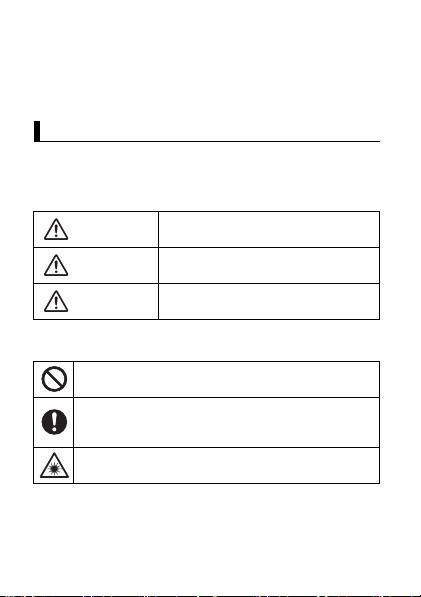
Explanation of symbol word panels
Explanation of symbol word panels
The following symbol word panels are used to classify and
describe the level of hazard, injury, and property damage caused
when the denotation is disregarded and improper use is
performed.
DANGER
WARNING
CAUTION
The following symbols are used to classify and describe the type
of instructions to be observed.
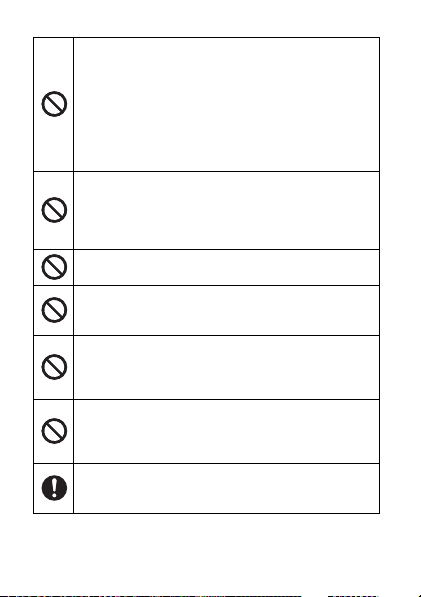
This symbol is used to alert users to specific operating
procedures that must not be performed.
This symbol is used to alert users to specific operating
procedures that must be followed in order to operate the
product safely.
This symbol is used to alert users to specific operating
procedures for which special attention is required.
2
Denotes potential hazards that will result
in serious injury or death.
Denotes potential hazards that could
result in serious injury or death.
Denotes potential hazards that could
result in minor injury.
Page 3
Battery
DANGER
The battery is for use solely with this product. Do
not use it with any other products.
Electrolyte leakage, overheating, smoke, rupture, or fire
may result.
Charge the battery using the specified method.
Failure to do so may result in electrolyte leakage,
overheating, smoke, rupture, or a fire.
Do not throw the battery into a fire or expose it to
excessive heat.
Electrolyte leakage, overheating, smoke, rupture, or fire
may result.
Do not disassemble, modify, or insert sharp foreign
objects into the battery.
Electrolyte leakage, overheating, smoke, rupture, or fire
may result.
Do not short the positive (+) and negative (–)
contacts. Do not carry the battery around or store it
together with necklaces, hairpins, etc.
Electrolyte leakage, overheating, smoke, rupture, or fire
may result.
Keep the battery away from extreme heat, such as
fire and direct sunlight.
Failure to do so may result in electrolyte leakage,
overheating, smoke, rupture, or a fire.
Do not expose the battery to water or other liquids.
Electrolyte leakage, overheating, smoke, rupture, or fire
may result.
3Safety Precautions (English)
Page 4
Do not throw the battery or subject it to strong
impact such as dropping or applying high pressure.
Electrolyte leakage, overheating, smoke, rupture, or fire
may result.
• Stop using the product if the battery is subjected to
strong impact or if the battery is noticeably damaged
or deformed.
If the battery deteriorates, replace it with a new one.
Failure to do so may result in electrolyte leakage,
overheating, smoke, rupture, or a fire.
WARNING
Do not directly touch electrolyte that has leaked
from the battery.
Electrolyte may enter the eyes and cause blindness, or
may come into contact with skin or clothing and cause
rashes.
• Flush with clean water without rubbing and seek
medical advice.
Do not place the battery in microwave ovens or
pressurized containers.
Sudden application of heat or pressure may damage the
battery, resulting in electrolyte leakage, overheating,
smoke, rupture, or a fire.
If the battery smells or leaks electrolyte, keep the
battery away from fire.
Failure to do so may result in electrolyte leakage,
overheating, smoke, rupture, or a fire.
4
Page 5
This product, AC adaptor, and USB
connection cable
WARNING
When using the product for extended periods, do
not expose your skin to the product or AC adaptor
for a prolonged period.
Generated heat can cause low-temperature burns.
Do not disassemble, repair, or modify the product.
This may cause the battery to short circuit or overheat,
which may result in a fire or electric shock.
Do not insert foreign objects into the product.
This may cause the battery to short circuit or overheat,
which may result in a fire or electric shock.
Do not allow conductive materials such as metal
objects to touch the expansion bus connector.
This may cause a short circuit and overheating, which
may result in battery electrolyte leakage, overheating,
smoke, rupture, or a fire.
Do not place the product in microwave ovens or
electromagnetic cookers.
Doing so may cause overheating, smoke, or rupture,
which may result in a fire.
5Safety Precautions (English)
Page 6
Do not expose the AC adaptor or USB connection
cable to water or other liquids.
Doing so may cause a short circuit, generation of heat,
overheating, or rupture, which may result in a fire,
electric shocks, or injury.
• If the product gets wet, immediately unplug the AC
plug, and then contact your technical support
representative.
Do not leave metal objects around or insert them
into the AC adaptor, USB connection cable plug, or
USB port.
Doing so may cause a fire, burn, injury, or electric shock.
Do not touch the product, AC adaptor, or USB
connection cable during lightning storms if the
product is connected to an AC adaptor.
There is a remote chance of electric shock.
Do not turn the volume up too loud when using
headphones, etc.
Listening at high volumes for extended periods may
result in loss of hearing. Also, turn down the volume
before connecting headphones, etc. to prevent sudd en
loud sounds.
Keep SD cards and SIM cards out of the reach of
infants and small children.
Small objects are suffocation and choking hazards. In
the event of accidental swallowing, seek medical help
immediately.
Do not operate the product while walking, driving,
riding a bicycle, etc.
Being distracted while engaging in these kinds of
activities can cause accidents or falls.
6
Page 7
Do not use headphones, etc. while driving or in
potentially dangerous areas or situations.
Your inability to hear the sounds around you can cause
accidents. Take special care at rail crossings, station
platforms, roads, construction sites, etc.
Use only specified batteries.
Use of unspecified batteries may result in electrolyte
leakage, overheating, smoke, rupture, or a fire.
Immediately stop using the product if any of the
following occurs.
– Product is damaged
– Water or foreign objects enter the product
– Product emits smoke
– Product emits unusual smell or sound
– Product becomes unusually hot
Continuing use may result in a fire or electric shock.
Immediately turn the product off, disconnect it from the
power supply, remove the battery, and then contact your
technical support representative.
Close the headset jack cover and interface cover
when using the product near water or other liquids,
and in areas with a high concentration of moisture,
steam, dust, oily vapors, etc.
Foreign material that enters the product may cause fire
or electric shock. If foreign material enters the product,
turn the product off, disconnect it from the power supply,
and then remove the battery. Contact your technical
support representative for support or repair.
7Safety Precautions (English)
Page 8
Stop using the product immediately and consult
your doctor if you feel any discomfort when staring
at flashing lights on the screen.
A very small percentage of individuals may experience
seizures or blackouts when e xposed to certain light
patterns or flashing lights for extended periods.
Do not look directly at the laser beam or point the
barcode reader at another person's eyes.
This may damage the eyes.
Do not do anything that may damage the AC adaptor
or the USB connection cable.
Do not damage or modify the cable, place it near hot
tools, bend, twist, or pull it forcefully, place heavy
objects on it, or bundle it tightly.
Continuing to use a damaged AC adaptor or USB
connection cable may result in a fire or electric shock.
• Contact your technical support representative if any
malfunction occurs.
Clean dust and other debris on the AC plug
regularly.
If dust or other debris accumulates on the plug, humidity,
etc. may cause a defect in the insulation, which may
result in a fire.
• Pull the plug, and wipe it with a dry cloth.
• Pull the plug if the product is not being used for a long
period of time.
Insert the AC plug completely.
If the plug is not inserted completely, fire due to
overheating or electric shock may result.
• Do not use a damaged plug or loose AC outlet.
Do not pull or insert the AC plug if your hands are
wet.
Electric shock may result.
8
Page 9
Do not connect the AC adaptor to a power source
other than a standard household AC outlet.
Otherwise, a fire due to overheating may result.
Connecting to a DC/AC converter (inverter) may
damage the AC adaptor. On an airplane, only co nnect
the AC adaptor/charger to an AC outlet specifically
approved for such use.
Do not use the product near automatic control
equipment such as automatic doors, fire alarms, etc.
RF signals generated by the product may interfere with
the proper operation of such equipment.
CAUTION
Do not leave the product in areas with a high
concentration of moisture, steam, dust, oily vapors,
etc. for extended periods.
Foreign material that enters the product may cause a fire
or electric shock.
Do not move the product while the USB connection
cable is connected.
This may result in a fire or electric shock.
Do not subject the AC adaptor to any st rong impact.
Using the AC adaptor after a strong impact such as
being dropped may result in a fire or electric shock.
• Contact your technical support representative if any
malfunction occurs.
Make sure not to charge the product when it is wet.
This may result in a fire or electric shock.
9Safety Precautions (English)
Page 10
Do not leave the product in extremely high
temperature environments for an extended period.
Leaving the product where it will be exposed to
extremely high temperatures, such as near fire or in
direct sunlight, may deform the product or cause
damage or malfunction to its internal components. Using
the product in these conditions may cause short circuit,
insulation defects, etc., which may in turn cause a fire or
electric shock.
Do not expose the skin to the product when using
the product in hot or cold environments.
Burns, low-temperature burns, or frostbite may result. If
direct contact with the skin is necessary, perform the
operation as quickly as possible.
Do not place the product on an unstable surface.
The product may drop, resulting in an injury.
Do not stack the product.
If balance is lost, the product may fall over or drop,
resulting in an injury.
Do not look directly at the light emitter, or point the
flash or barcode reader at another person's eyes.
This may damage the eyes or cause temporary loss of
eyesight which could result in an accident.
Keep away from magnetic sources such as watches
and magnetic cards.
Failure to do so may cause data corruption or device
malfunction.
Use the supplied or specified items.
Use of unsupplied and unspecified items may result in a
fire or electric shock.
10
Page 11
For safety purposes, pull the plug when cleaning the
product or if you will not use it for extended periods.
Failure to do so may result in a fire or electric shock.
If the display is damaged, be careful of broken glass
or internal components that may become exposed.
Failure to do so can cause injury.
Take a 10–15 minute break every hour when using
the product.
Using the product continuously for extended periods
may cause strain injuries and may have detrimental
health effects on your eyes, hands, or other parts of your
body.
11Safety Precautions (English)
Page 12

Regulatory Information (English)
This product and your health
This product and your health
This product, like other radio devices, emits radio frequency
electromagnetic energy. Because this product operates within the
guidelines found in radio frequency safety standards and
recommendations, we believe this product is safe for use by
consumers. These standards and recommendations reflect the
consensus of the scientific community and result from
deliberations of panels and committees of scientists who
continually review and interpret the extensive research literature.
In some situations or environments, the use of this product may
be restricted by the proprietor of the building or responsible
representatives of the organization. These situations may for
example include:
• Using this product on board of airplanes, or
• In any other environment where the risk of interference to other
devices or services is perceived or identified as harmful.
If you are uncertain of the policy that applies on the use of
wireless devices in a specific organization or environment (e.g.
airports), you are encouraged to ask for authorization to use this
product prior to turning on the product.
Information to the user
Information to the user
We are not responsible for any radio or television interference
caused by unauthorized modification of this product. The
correction of interference caused by such unauthorized
modification will be the responsibility of the user. We and our
authorized resellers or distributors are not liable for damage or
violation of government regulations that may arise from failing to
comply with these guidelines.
12
Page 13

Additional safety precautions
Additional safety precautions
Posted facilities
• Turn off the product when in hospitals, health care facilities, or
any facility where posted notices require you to do so.
Hospitals and health care facilities may be using equipment
that could be sensitive to external RF energy.
Pacemakers
• Medical device manufacturer s recommend a minimum
separation of 15 cm between a wireless device and an
implanted medical device, such as a pacemaker or implanted
cardioverter defibrillator, to avoid potential interference with the
medical device.
• Persons with pacemakers:
– Should ALWAYS keep this product more than 15 cm from
their pacemaker when this product is turned ON;
– Should use the ear opposite the pacemaker to minimize the
potential for interference;
– Should not carry this product in a breast pocket;
– Should turn off the product immediately if there is any reason
to suspect that interference is taking place.
Hearing aids
• Some digital wireless products may interfere with some hearing
aids. In the event of such interference, consult the
manufacturer of your hearing aid to discuss alternatives.
Other medical devices
• If you use any other personal medical device, consult the
manufacturer of your device to determine if it is adequately
shielded from external RF energy. Your physician may be able
to assist you in obtaining this information.
13Regulatory Information (English)
Page 14

Aircraft
• Turn off the product after boarding an aircraft, when instructed
by flight staff. Obey instructions from flight staff regarding the
use of the product in flight. Using this product in an aircraft may
be hazardous to the aircraft’s operation and disrupt wireless
communication, and may also be illegal.
Potentially explosive atmosphere
• Turn off the product in areas where a potentially explosive
atmosphere exists and obey all signs and instructions. Sparks
in such areas could cause an explosion or fire resulting in injury
or even death.
• Areas with potentially explosive atmosphere may include
fueling areas, chemical plants, below deck on boats, fuel or
chemical transfer or storage facilities, vehicles using petroleum
or natural gas, or areas where the atmosphere contains
particles such as grain, dust, or metallic powders, and any
other area where you would normally be advised to turn off
your vehicle engine.
Electronic devices
• This product receives and transmits radio frequency signals
while switched on. Most electronic equipment is shielded from
RF signals. However, certain electronic equipment may not be
shielded against the RF signals from this product. Therefore,
the use must be restricted in certain situations to avoid
interference.
Driving
• Give full attention to driving. Driving safely is your first
responsibility.
• Pull off the road and park before placing or answering a call. It
is unsafe to operate the product while driving.
• Check the laws and regulations in the areas where you drive,
and always obey them.
14
Page 15

• Only qualified personnel should install the product in a vehicle.
Check regularly that the product is securely mounted in your
vehicle and operating properly.
• Do not place or install the product in the area over the air bag
or in the air bag deployment area. If the air bag inflates, serious
injury and/or damage could result.
• RF signals may affect improperly installed or inadequately
shielded electronic systems in motor vehicles. Consult the
manufacturer (or its representative) of the vehicle and any
equipment that has been added to the vehicle regarding the
use of mobile products.
• Use hands-free operation, if available and legally permitted.
Emergency communications
• Never rely solely on a mobile product for essential or
emergency communications. Network connections can be
affected by remaining battery level, radio signals, service
networks, and other conditions, and as a result, emergency
communications cannot be guaranteed in all conditions.
Antenna
• Do not replace the antenna. Unauthorized antennas,
modifications, or attachments could damage the pr oduct and
may violate regulations.
• Do not touch or cover the antenna area while the product is on.
Call quality, power levels, and the overall performance of the
product may be affected.
Volume
• Do not turn the volume up too loud when using headphones
and earphones.
• Exposure to excessive sound pressure levels for
extended periods may cause hearing damage.
15Regulatory Information (English)
Page 16

• Being unable to hear sounds in your environment may lead to
accidents.
AC adaptor
• The AC adaptor is used as the main disconnect device. Ensure
that the AC outlet is installed near the product and is easily
accessible.
Laser device caution
Laser device caution
CAUTION!
THIS PRODUCT UTILIZES A LASER.
USE OF CONTROLS, ADJUSTMENTS OR PERFORMANCE OF
PROCEDURES OTHER THAN THOSE SPECIFIED HEREIN MAY
RESULT IN HAZARDOUS RADIATION EXPOSURE.
DO NOT OPEN COVERS AND DO NOT REPAIR YOURSELF.
REFER SERVICING TO QUALIFIED PERSONNEL.
This product is using lasers that comply with IEC 60825-1:2014
regulations.
This product utilizes a “Class 2” laser.
Class 2 laser readers use a low power, visible diode. As with any
very bright light source, such as the sun, the user should avoid
staring directly into the light beam. Momentary exposure to a Class 2
laser is not known to be harmful.
Caution: Procedures other than those specified herein may result in
hazardous radiation exposure.
16
Page 17
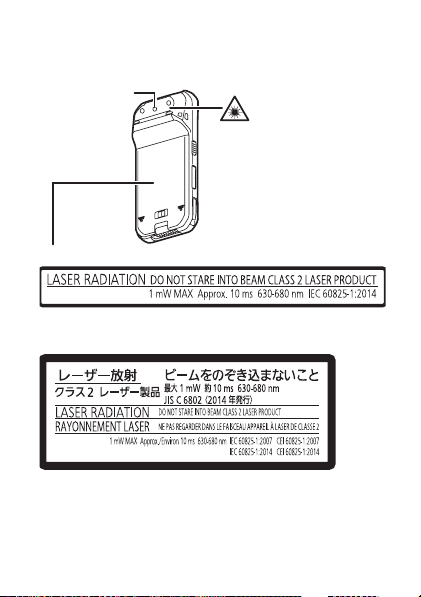
Labeling and device location
(The product illustration is shown with the Battery Pack (FZVZSUN110U) installed.)
Barcode reader
When the Battery Pack (FZ-VZSUN110U) is installed:
When the Extended Life Battery Pack (FZ-VZSUN120U) is
installed:
17Regulatory Information (English)
Page 18

Laser radiation information
• Wavelength: 630-680 nm
• Pulse duration: approx. 10 msec
• Repetition rate: approx. 1000/18 Hz
• Maximum power: 1 mW max
• Aiming pattern angle: 48.0° horizontal, 38.0° vertical
Intended use
Intended use
• This product is not intended for use as, or as part of, nuclear
equipment/systems, air traffic control equipment/systems,
aircraft cockpit equipment/systems*1, medical devices or
accessories*2, life-support systems or other equipment/
devices/systems that are involved with ensuring human life or
safety. Panasonic will not be responsible for any liability
resulting from the use of this product arising out of the
foregoing uses.
*1 Aircraft cockpit equipment/systems include Class 2
Electrical Flight Bag (EFB) Systems and Class 1 EFB
Systems when used during critical phases of flight (e.g.,
during take-off and landing) and/or mounted on to the
aircraft. Class 1 EFB Systems and 2 EFB Systems are
defined by FAA: AC (Advisory Circular) 120-76A or JAA:
JAA TGL (Temporary Guidance Leaflets) No.36.
*2 As defined by the European Medical Device Directive
(MDD) 93/42/EEC.
• Panasonic cannot guarantee any specifications, technologies,
reliability, safety (e.g., Flammability/Smoke/Toxicity/Radio
Frequency Emission, etc.) requirements related to aviation
standards and medical equipment standards that differ from the
specifications of our COTS (Commercial-Off-The-Shelf)
products.
• This product is not intended for use in medical equipment
including life-support systems, air traffic control systems, or
18
Page 19
other equipment, devices or systems that are involved with
ensuring human life or safety. Panasonic cannot be held
responsible in any way for any damages or loss resulting from
the use of this unit in these types of equipment, devices or
systems, etc. This product has been designed so as to
minimize shock to the LCD, the leakage of liquid (e.g., water)
on to the buttons, etc., but no warranty is provided against such
trouble. Therefore, as a precision instrument, be extremely
careful in the handling of the product.
General information
General information
Caution
Risk of explosion if battery is replaced by an incorrect type.
Dispose of used batteries according to the instructions.
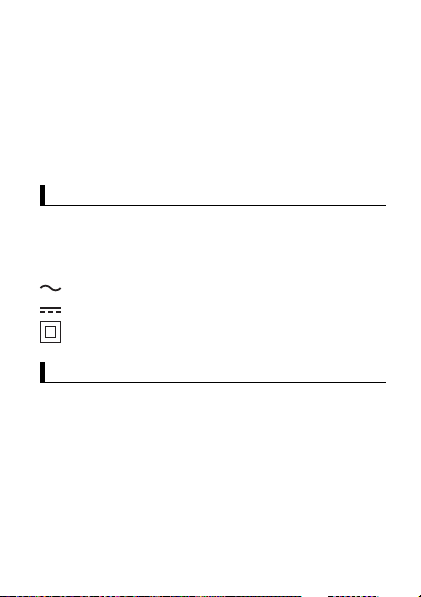
Explanation of graphical symbols on nameplate
: Alternating current
: Direct current
: Class II equipment
For Europe
For Europe
SAR (Specific Absorption Rates)
This product is a radio transmitter and receiver. When it is on, it
receives and transmits RF energy. When you are on a phone call,
the system handling your call controls the power level at which
the product transmits. This product is designed not to exceed the
limits for exposure to radio waves recommended by international
guidelines. These guidelines were developed by the independent
scientific organization ICNIRP and include safety margins
designed to assure the protection of all persons, regardless of
age and health.
19Regulatory Information (English)
Page 20

The guidelines use a unit of measurement known as the Specific
Absorption Rate, or SAR. The SAR limit for mobile devices is
2 W/kg and the highest SAR value for this product when te sted at
the ear is 0.562 W/kg*1.
For body-worn operation, this pr oduct has been tested and meets
RF exposure guidelines when used with a Panasonic accessory
designated for this product and when used with an accessory that
contains no metal and that positions the mobile device a
minimum of 5 mm from the body.
In this case, the highest tested SAR value is 0.905 W/kg. Use of
other accessories may not ensure compliance with RF exposure
guidelines. As SAR is measured utilizing the product's highest
transmitting power the actual SAR of this product while operating
is typically below that indicated above. This is due to automatic
changes to the power level of the product to ensure it only uses
the minimum level required to reach the network.
The World Health Organization has stated that present scientific
information does not indicate the need for any special
precautions for the use of mobile devices. They note that if you
want to reduce your exposure then you can do so by limiting the
length of calls or using a hands-free device to keep the mobile
device away from the head and body.
*1 The tests are carried out in accordance with international
guidelines for testing.
Wi-Fi use
Operation of the device in the 5 GHz frequency band is restricted
to indoor use only in the following countries.
AT BE BG CH CY CZ DE DK EE EL ES
FI FR HR HU IE IS IT LI LT LU LV MT
NL NO PL PT RO SE SI SK TR UK
Declaration of Conformity (DoC)
Hereby, Panasonic declares that the radio equipment type FZ-N1
(Model No. FZ-N1AF, FZ-N1CF) is in compliance with Directive
20
Page 21

2014/53/EU. The full text of the EU declaration of conformity is
available at the following internet address:
http://www.ptc.panasonic.eu
Contact to Authorised Representative:
Panasonic Testing Centre
Panasonic Marketing Europe GmbH
Winsbergring 15, 22525 Hamburg, Germany
Maximum radio-frequency power transmitted in the
frequency bands
Wi-Fi 2.4
GHz
Wi-Fi 5
GHz
Frequency band Maximum transmit
TX/RX 2412 MHz - 2472 MHz 17.10 dBm (e.i.r.p.)
TX/RX 5180 MHz - 5700 MHz 18.87 dBm (e.i.r.p.)
power
Bluetooth TX/RX 2402 MHz - 2480 MHz 8.80 dBm (e.i.r.p.)
NFC TX/RX 13.56 MHz -17.67 dBuA/m at
GNSS RX L1 1575.42 MHz (GPS),
GSM TX 880.2 MHz - 914.8 MHz,
DCS TX 1710.2 MHz - 1784.8 MHz,
WCDMA
FDD I
WCDMA
FDD VIII
1598.0625 MHz - 1605.375
MHz (GLONASS)
RX 925.2 MHz - 959.8 MHz
RX 1805.2 MHz - 1879.8 MHz
TX 1922.4 MHz - 1977.6 MHz,
RX 2112.4 MHz - 2167.6 MHz
TX 882.4 MHz - 912.6 MHz,
RX 927.4 MHz - 957.6 MHz
10 m
-
32 dBm (Power
class 4)
29.25 dBm (Power
class 1)
23 dBm (Power
class 3)
23 dBm (Power
class 3)
21Regulatory Information (English)
Page 22

LTE
Band 3
LTE
Band 7
LTE
Band 20
Frequency band Maximum transmit
TX 1710.7 MHz - 1784.3 MHz,
RX 1805.7 MHz - 1879.3 MHz
TX 2502.5 MHz - 2567.5 MHz,
RX 2622.5 MHz - 2687.5 MHz
TX 834.5 MHz - 859.5 MHz,
RX 793.5 MHz - 818.5 MHz
power
23 dBm (Power
class 3)
23 dBm (Power
class 3)
23 dBm (Power
class 3)
Ecodesign information
Ecodesign information under EU Regulation (EC) No.1275/2008
amended by (EU) Regulation No.8 01/2013. From 1 January 2015.
please visit here: www.ptc.panasonic.eu
click [Downloads] → Energy related products information (Public)
Power consumption in networked standby and guida nce are
mentioned in the web site above.
22
Page 23
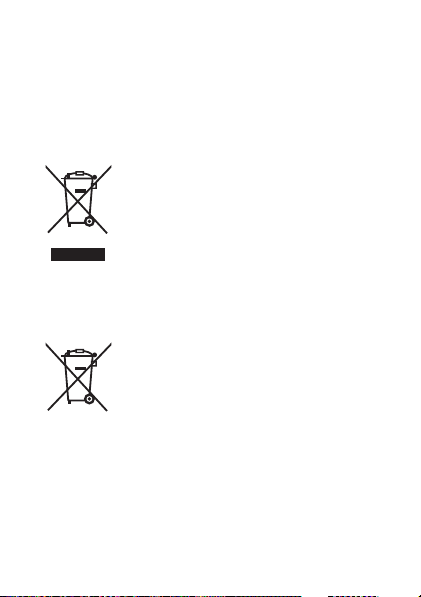
Disposal of Old Equipment and Batteries
Only for European Union and countries with recycling
systems
These symbols on the products, packaging, and/
or accompanying documents mean that used
electrical and electronic pr oducts and batteries
must not be mixed with general house hold
waste.
For proper treatment, recovery and recycling of
old products and used batteries, please take
them to applicable collection points in
accordance with your national legislation.
By disposing of them correctly, you will help to
save valuable resources and prevent any
potential negative effects on human health and
the environment.
For more information about collection and
recycling, please contact your local municipality.
Penalties may be applicable for incorrect
disposal of this waste, in accordance with
national legislation.
Note for the battery symbol (bottom symbol):
This symbol might be used in combination with a
chemical symbol. In this case it complies with the
requirement set by the Directive for the chemical
involved.
23Regulatory Information (English)
Page 24
For Thailand
For Thailand
This telecommunication equipment conforms to NTC/NBTC
technical requirement.
For India
For India
For body-worn operation, this product has been tested when
used with a Panasonic accessory designated for this product and
when used with an accessory that contains no metal and that
positions front or back of this product a minimum of 10 mm from
the body.
24
Page 25

Licenses
• This product is licensed under the MPEG-4 patent portfolio
license and AVC patent portfolio license for the personal use of
a consumer or other uses in which it does not receive
remuneration to (i) encode video in compliance with the
MPEG-4 Visual Standard and AVC Standard (“MPEG-4/AVC
Video”) and/or (ii) decode MPEG-4/AVC Video that was
encoded by a consumer engaged in a personal activity and/or
was obtained from a video provider licensed to provide MPEG4/AVC Video. No license is granted or shall be implied for any
other use. Additional information may be obtained from MPEG
LA, LLC. See http://www.mpegla.com.
• This product contains software licensed in compliance with
GNU General Public License Version 2.0 (GPL v2.0), GNU
Lesser General Public License (LGPL) or any other license.
The program is free software; you can copy it, redistribute it,
and modify it under the terms of the GPL v2.0, LGPL or any
other license.
At least three (3) years from delivery of products, Panasonic
Mobile Communications Co., Ltd. will give to any third party
who contacts us at the contact information provided below, for
a charge no more than our cost of physically performing source
code distribution, a complete machine-readable copy of the
corresponding source code covered under GPL v2.0 and LGPL
or any other license.
Contact Information
[email protected]
Source code is also freely available to the public via the web
site listed below.
https://panasonic.net/cns/oss/index.html
Please note that we cannot respond to any inquiries regarding
the source code.
25Licenses
Page 26

For more details on the relevant software (including license
information of GPL v2.0 and LGPL), refer to the information
displayed on the following screen: home screen → →
[Settings] → [About tablet] → [Legal information].
• This product includes software developed by the OpenSSL
Project for use in the OpenSSL Toolkit.
(http://www.openssl.org/source/license.html)
• This product includes the Independent JPEG Group's software.
This software is based in part on the work of the Independent
JPEG Group.
• This product includes the software distributed under the terms
of The FreeType Project License. This software is based in part
of the work of the FreeType Team.
• This product includes the following software; ICU 1.8.1 and
later Copyright (c) 1995-2011 International Business Machines
Corporation and others.
• This product includes other free software or open source
software.
• For more details on the relevant software (including license
information), refer to the information displayed on the following
screen: home screen → → [Settings] → [About tablet] →
[Legal information].
26
Page 27

• TouchSense® Technology licensed from Imm ersion
Corporation. TouchSense and other Immersion software
contained herein are protected under one or more of the U.S.
Patents found at the following address
www.immersion.com/patent-marking.html and other patents
pending.
27Licenses
Page 28
© Panasonic Mobile Communications Co., Ltd. 2017
&*3:<#/
*DHQX1421ZA/M1*
DHQX1421ZA/M1
Printed in Malaysia
C0917-0
 Loading...