

Page 1

Panasonic Taiwan Co., Ltd.
6 CD PLAYER / RECEIVER
with CD CHANGER CONTROL
CQ-EC167AA B Operating Instructions
page1
Page 2

Contents
Function and Operation on 6 CD/MP3 Player. . . . . .9
Function and Operation on Radio. .............7
Function and Operation on CD - CHANGER. . . . .15
Function on AUX、TELEPHONE. ...........17
Notes on MP3 .........................18
Panasonic Taiwan Co., Ltd.
Specifications、Features ..................20
Cover. ................................ 1
Contents. ............................. 2
General Function and Operation...............3
CQ-EC167AA B Operating Instructions
page2
Page 3
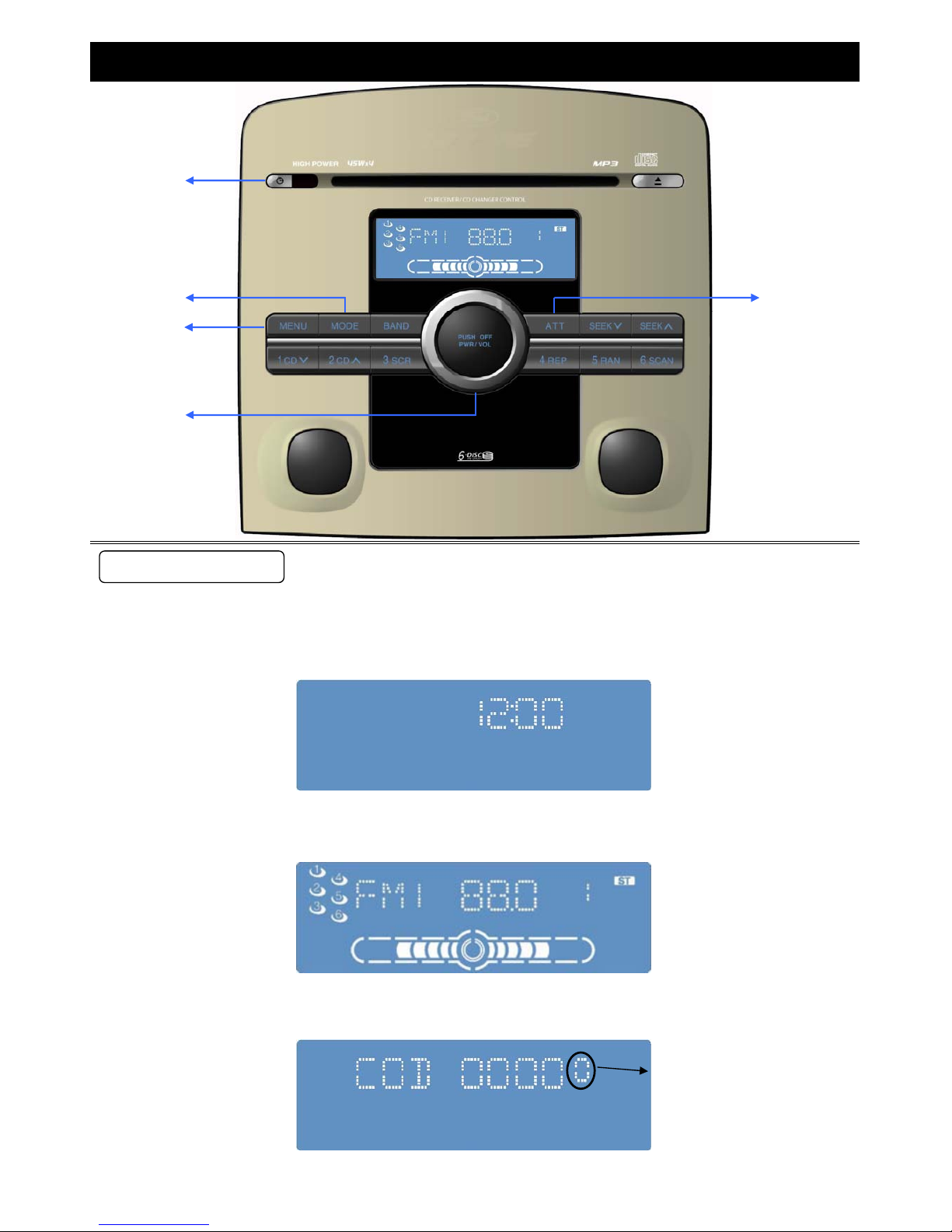
※Note:
Passwords key in times
2﹒Press [PWR/VOL] to power on the unit. Starting picture displays on the screen.
Press [PWR/VOL] again to power off the unit.
Press [PWR/VOL] calls the screen to ask for keying passwords after installation, loose power, and battery change.
General Function and Operation
①Power Control/Volume Adjustment [PWR/VOL]
A﹒Power [PWR/VOL]:
l﹒ Turn the key in the ignition(ACC). When the unit is ready, time displays on the screen. (the power of unit is off)
Function Operation
①
②
③
④
⑤
page3
Page 4

B﹒Volume [PWR/VOL]:
↑
↓
Turn the Volume [PWR/VOL] button clockwise to increase
BASS(0 ~ +12)
Turn the Volume [PWR/VOL] button clockwise to increase
TREBLE(0 ~ +12)
Turn the Volume [PWR/VOL] button counterclockwise to
decrease TREBLE(0 ~ -12)
Turn the Volume [PWR/VOL] button counterclockwise to
decrease BASS(0 ~ -12)
Turn the Volume [PWR/VOL] button clockwise/counterclockwise to increase/decrease volume(0~40)
※IF owner forgets or wishes to change the password, please take the unit to the Ford service center for service.
passwords key in: [1]~[4] stand for thousand, hundred, tenth, single respectively. Press the key once means 1;
The unit will be locked for 30 minutes if you key in the wrong passwords for more than 4 times.
General Function and Operation
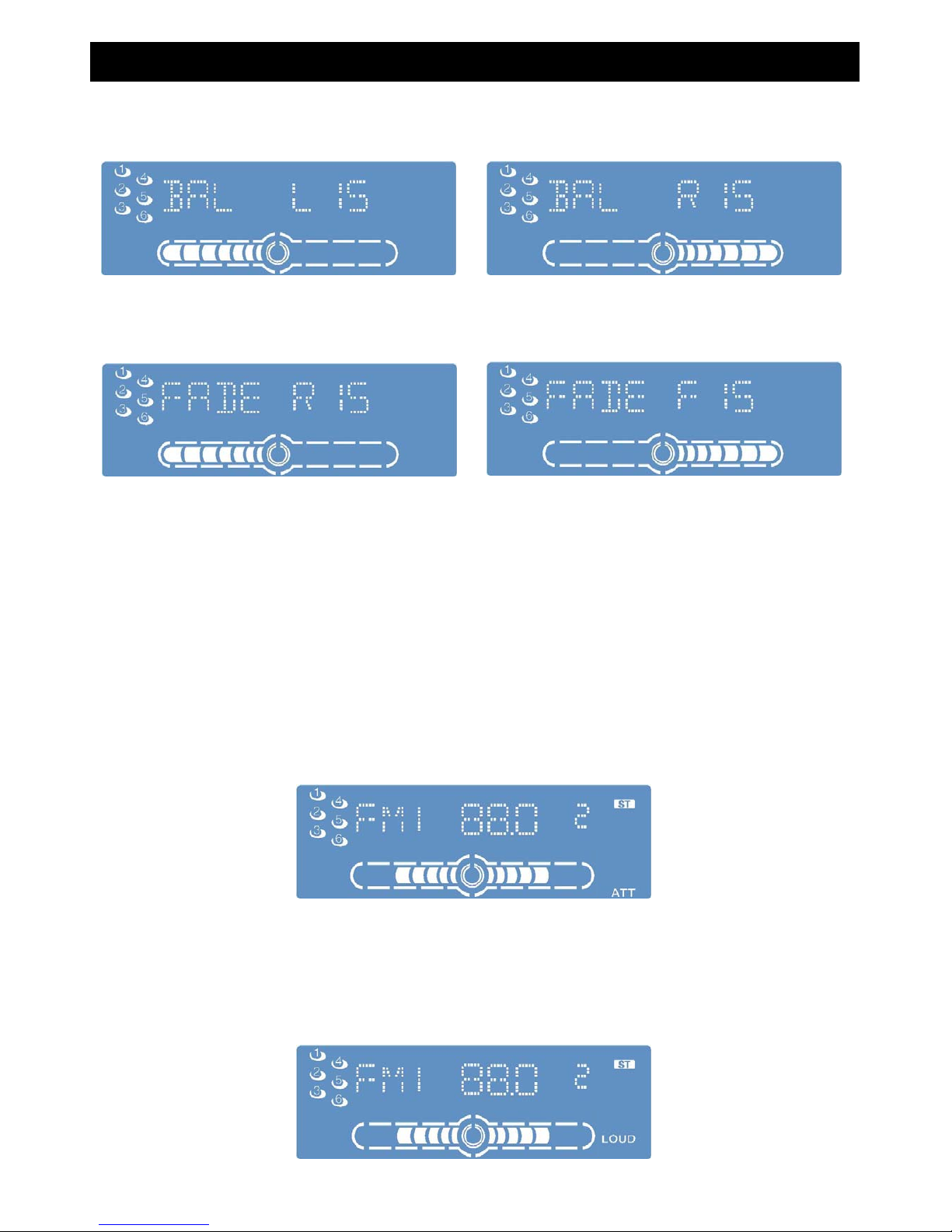
Selection " BASS " to adjust:
②Audio mode [MENU]
◎Press [MENU] to select audio mode
BASS → TREBLE → BALANCE
Regular mode ← FADER
Selection " TREBLE " to adjust:
30 minutes count backwards
press the key twice means 2, etc. You can enter 0000~9999 as passwords by this way.Press [5] to confirm when password is
entered and get into the initial operation screen.
※Note:
When AUDIO Volume lower than 20 level ,ACC OFF∕POWER OFF → ON,Volume keeps the original level。
When AUDIO Volume higher than 20 level ,ACC OFF∕POWER OFF → ON,Volume reset to level of 20。
page4
Page 5
※Note:
③Attention/Loud [ATT/LOUD]
Attention [ATT/LOUD]:
LOUD [ATT/LOUD]:
Selection " BALANCE " to adjust:
General Function and Operation
Press [ATT/LOUD] more than 2 second again to cancel LOUD function and " LOUD " indicator is off.
Press [ATT/LOUD] more than 2 seconds to increase BASS and TREBLE under small or medium volume.
After this operation, " LOUD " indicator lights on the screen.
Press [ATT/LOUD] again to cancel Attention function and " ATT " indicator is off.
Selection " FADER " to adjust:
Turn the Volume [PWR/VOL] button counterclockwise to
increase rear speaker(R:0 ~ R15)
Turn the Volume [PWR/VOL] button clockwise to increase
front speaker(F:0 ~ F15)
If no operation excused for more than 5 seconds in audio mode (BAS/TRE/BAL/FAD), the display returns to the regular
mode. Press [menu] again to select audio mode
Press [ATT/LOUD] to decrease Volume 20dB instantly and " ATT " indicator displays on screen
Turn the Volume [PWR/VOL] button clockwise to increase
right channel(R:0 ~ R15)
Turn the Volume [PWR/VOL] button counterclockwise to
increase left channel(L:0 ~ L15)
◎Press [MENU] more than 2 seconds to reset Bass∕Tre∕Bal∕Fad to center value (0)
page5
Page 6
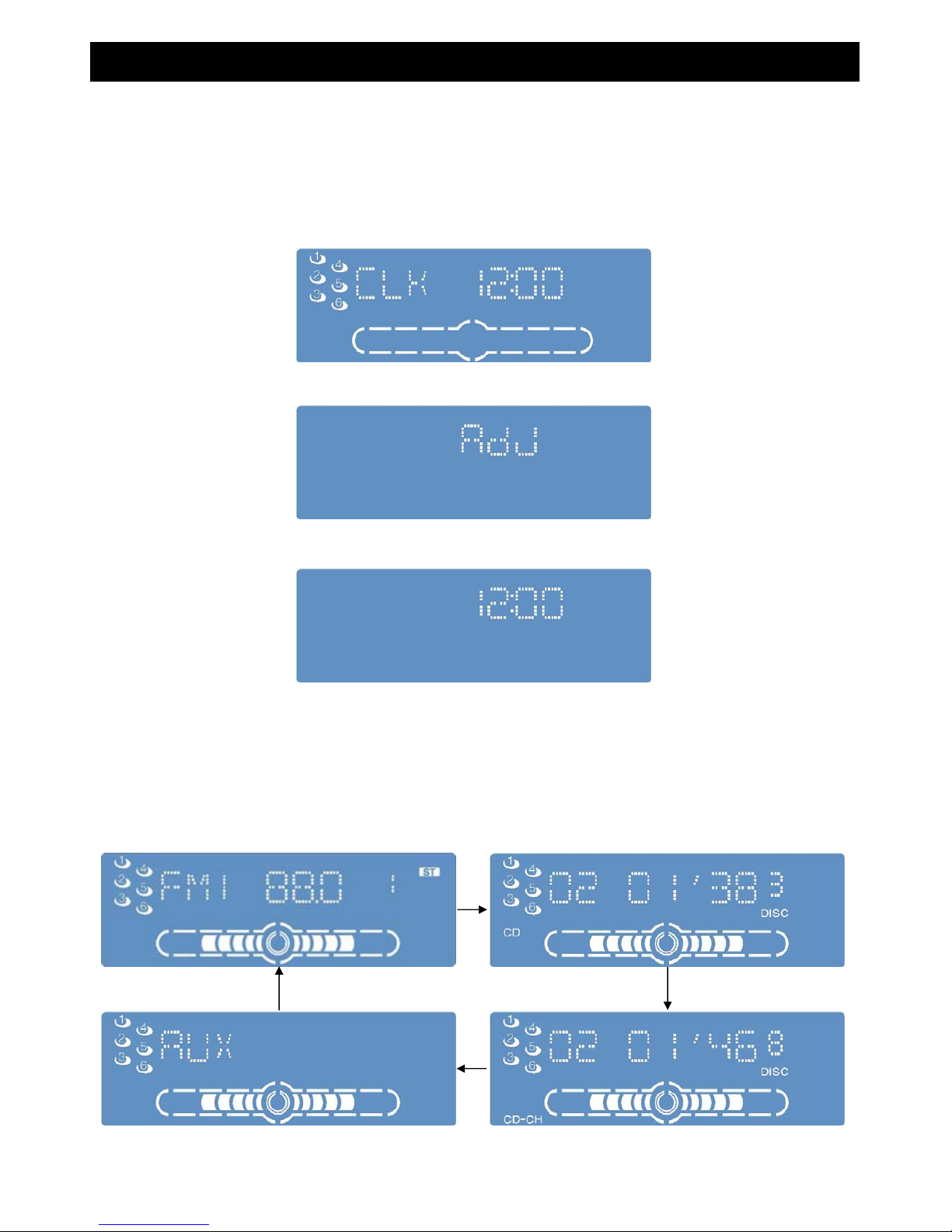
clock display
⑤SOURCE MODE [MODE]
RADIO DISC PLAYER
AUX CD-CH
General Function and Operation
④ Clock[CLK] Adjustment
Press [CLK] again to make minute number blinks, press [SEEK∨]∕[SEEK∧] to set minute ahead∕back.
●Press [CLK] for more than 2 seconds to adjust time.(default: 12:00)
●Press [CLK] in 2 seconds to display the time, press again to cancel time display and back to the previous mode.
●Press [CLK] again to end time adjustment.
When the unit is power off, the screen shows clock display
●Press [MODE] to select sound source when the unit is power on .
First, hour number blinks, press [SEEK∨]∕[SEEK∧] to set hour ahead∕back.
Note: " ADJ " displays at the first time of clock adjustment
The sequency of sound source change as below
page6
Page 7
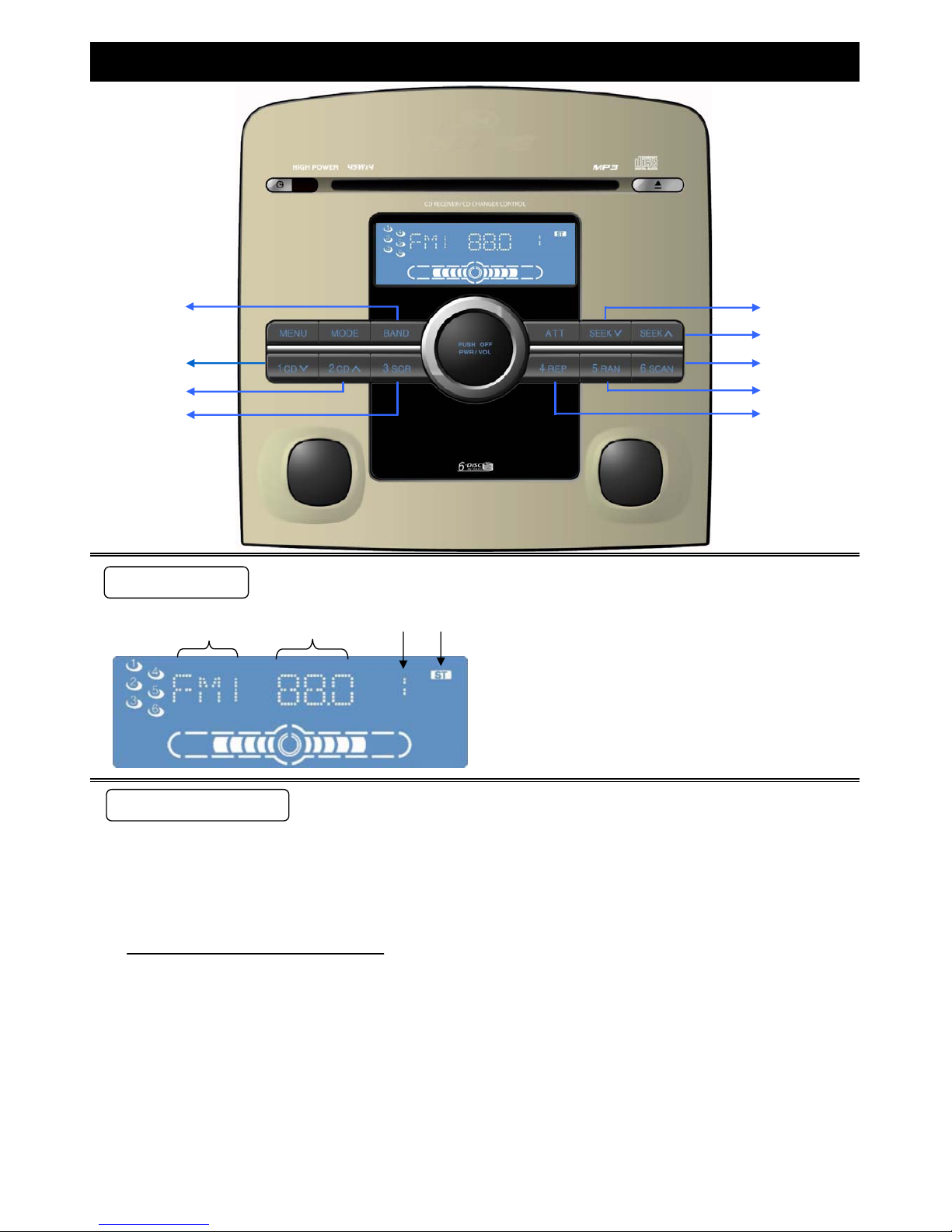
a b c d
①Change Radio
FM1 → FM2 → FM3 → AM1 → AM2
↑ ↓
Auto Preset Memory
Function and Operation on Radio
●Press [BAND] to change band source in radio mode, you can select the FM∕AM channel you like.
Press [BAND] to change radio band, the sequency is shown as below.
a﹒Band display
‧The FM 1 channel
b﹒Frequency of current station
c﹒Preset station number
‧display the preset station number (1~6)
d﹒Stereo sound indicator
‧display receiving stereo sound
Press one of the preset buttons from [1] to [6] to select the preset station.
●Frequency displayed on screen will change with seek tunning.
" ST " display on screen, if the receiving station is stereo sound.
Press [BAND] to select a radio source, then press and hold [BAND] button(auto preset station) for more than 2 seconds.
●With this operation, 6 station with 1st to 6th highest in signal strength will be automaticlly preseted in preset station
buttons [1] to [6]. Once set, the preset stations are sequently scanned for 10 seconds each.
FUNCTION OPERATION
SCREEN DISPLAY
①
②
③
④ ⑤
⑥
⑦
⑧
⑨
page7
Page 8
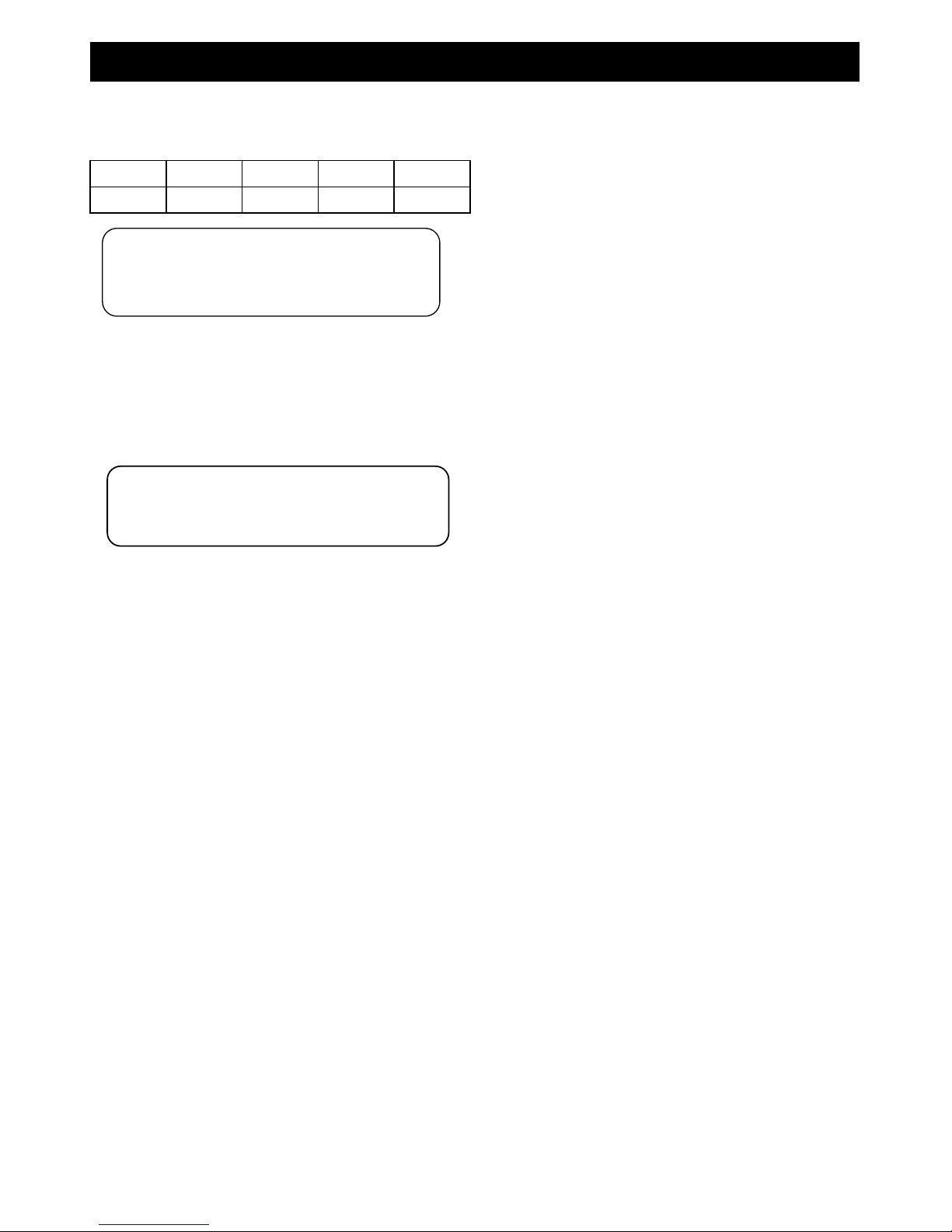
※Number of preset stations
FM1 FM2 FM3 AM1 AM2
Up to 6 Up to 6 Up to 6 Up to 6 Up to 6
②M1③M2④M3⑤M4⑥M5⑦M6 Preset station button[1] ~ [6]
Function and Operation on Radio
Use manual or seek tuning to find your favorate station
Reapeat these steps you can save preset station on [FM1] ~ [AM2].
Press preset station button[1] ~ [6] for more than 2 seconds to save current station on button [1]~[6]
②M1③M2④M3⑤M4⑥M5⑦M6 Preset Station Calling
Press [SEEK∧] and release in 2 seconds to select the higher frequency.
Manual Tuning
Press [1] to [6] to call the corresdonding preset station in memory.
Press [SEEK∨] and release in 2 seconds to select the lower frequency.
⑧SEEK∨、⑨SEEK∧
Press [BAND] to select desired band, buttons [1] to [6] remember the presaved or default station.
●The step for FM is 0.1 MHz, the step for AM is 9KHz. Band frequency displayed on screen changes with tuning.
Press and hold [ SEEK∧ ] for more 2 seconds, tuning will automatically stop when the next higher frequency station is
received.
●Press [SEEK∨] or [SEEK∧] again to stop auto tuning.
AutoTuning
Press and hold [ SEEK∨ ] for more 2 seconds, tuning will automatically stop when the next lower frequency station is
received.
※NOTE:
Repeat these steps you can change preset
station.
※NOTE:
[1]~ [6 ]saved stations are overwritten with new station
after saving procedure
page8
Page 9
a g
d
c e
f
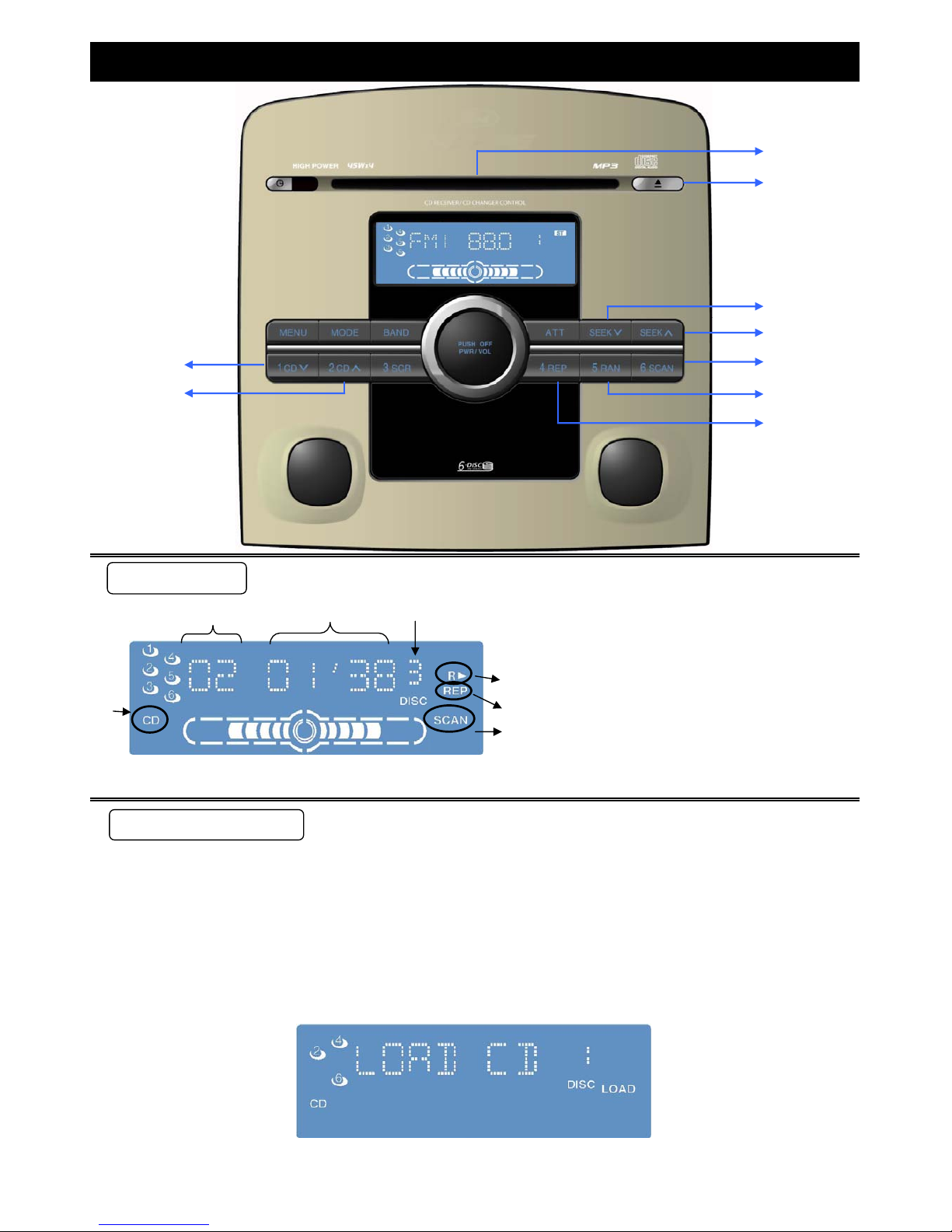
g﹒Number of CD
①Insert and playback a CD
Function and Operation on CD Player
e﹒" REP " Repeat function is active
a﹒Track number
b
b﹒playing time
Note:If a disc is not well recorded, it may not be playable on this unit.
Then you can insert a disc .
2.Operation and Functuon on playback CD / CD-R / CD-RW discs
" LOAD CD " displayed on screen when the unit is ready for inserting a disc under CD mode.
c﹒type of playing CD
d﹒" RX " Random function is active
f﹒" SCAN " Scan function is active
1.The unit can playback CD / CD-R / CD-RW / MP3 disc。
⑧
⑨
FUNCTION OPERATION
SCREEN DISPLAY
①
②
③
④
⑤
⑥
⑦
page9
Page 10

②▲EJECT button( To eject CD )
③SEEK∨ button:
④SEEK∧ button:
After reading, playback will start automatically.
Function and Operation on CD Player
Press again to cancel RANDOM PLAY function. RX indicator is off.
When reading the data on disc, screen displays " READING ".
Press [ SEEK∨ ] and release in 2 seconds back to the begin of current track.
Press [ SEEK∨ ] twice back to the previous track.
IF you do not take away the CD which will be loaded again after 10 seconds.
Press [ ▲ ] button to reject CD.
Press [ SEEK∨ ] and hold for more than 2 seconds to begin FAST REVERSE, release holding to
stop fast reverse and resume playback normally.
Press [SEEK∧] and release in 2 seconds back to the next track.
Press [SEEK∧] and hold for more than 2 seconds to begin FAST FORWARD, release holding to
stop fast forward and resume playback normally.
Press [SCAN] to display " SCAN " on screen, then the first 10 seconds of each tracks of all CDs is
played in sequence.
⑤SCAN button:
⑥RX button:
Press [RX] to display " RX " on screen, then all available tracks are played in a random sequence.
Press again to cancel SCAN function.SCAN indicator is off.
blinks
When inserting a disc, screen displays the disc number and the number blinks.
page10
Page 11

⑦REP button:
⑧CD ∨ button:
⑨CD ∧ button:
Press [CD ∨] and hold for more 2 seconds to the first track of previous CD.
Press [CD ∧] and hold for more 2 seconds to the first track of next CD.
If previous CD is empty, previous loadable CD will be displayed
If next CD is empty, next loadable CD will be displayed
Press [REP] to display " REP " on screen.
Press again to cancel REPEAT PLAY function. REP indicator is off.
The current track is repeated.
Function and Operation on CD player
page11
Page 12
a b g
d
e
c
f
①Insert and playback a MP3 CD
blinks
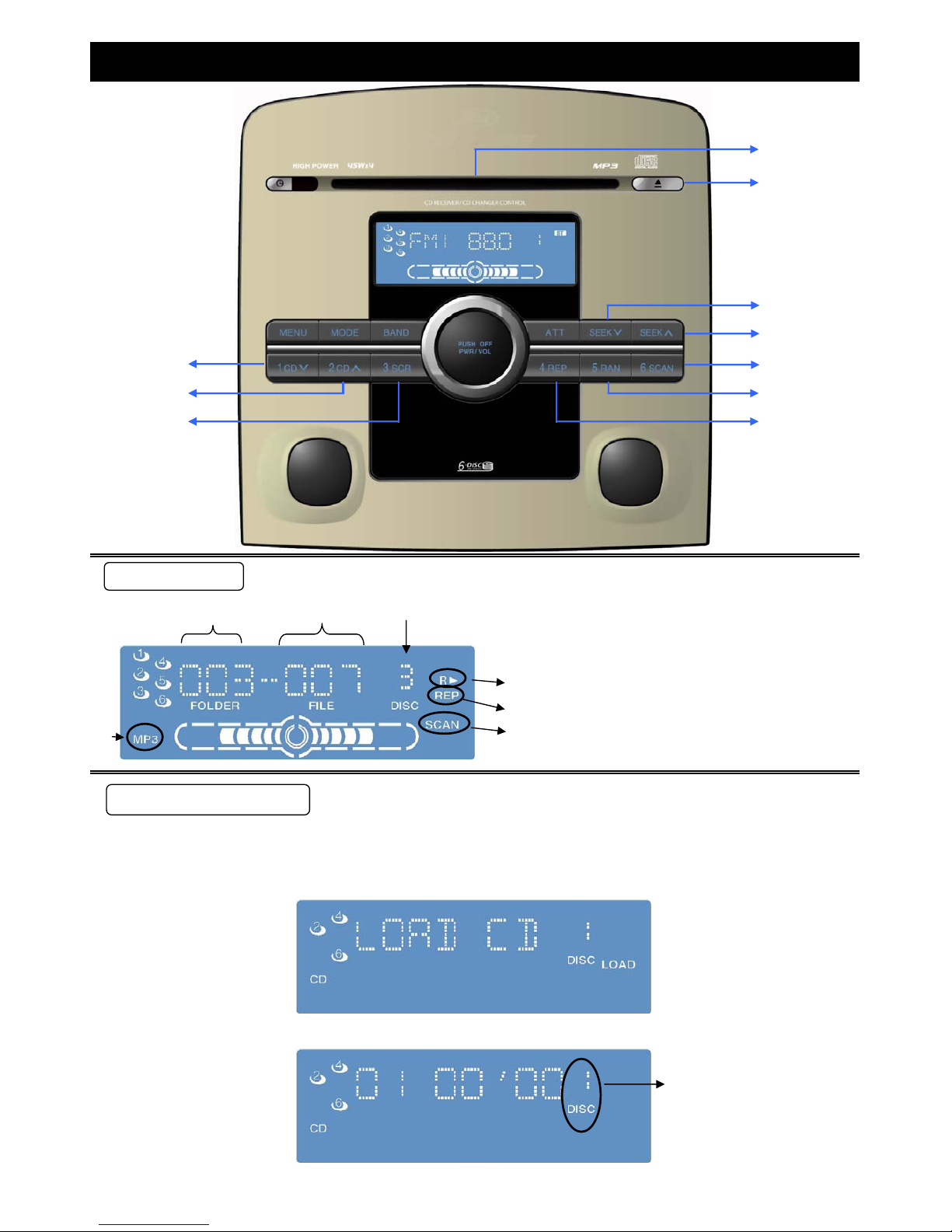
When inserting a MP3 disc, screen shows the MP3 disc number and the number blinks.
Then you can insert a MP3 CD.
d﹒" RX " random function indicator
e﹒" REP " repeat function indicator
f﹒" SCAN " scan function indicator
g﹒MP3 CD number of discs
a﹒Folder number of playing MP3
b﹒File number of playing MP3
c﹒Current CD type (MP3)
Function and Operation on MP3 player
" LOAD CD " displayed on screen when the unit is ready for inserting a disc under MP3 mode.
FUNCTION OPERATION
SCREEN DISPLAY
①
②
③
④
⑤
⑥
⑦
⑧
⑨
⑩
page12
Page 13
Default setting is CD.
②▲EJECT button( To eject MP3 CD )
③SEEK∨ button:
④SEEK∧ button:
⑧CD ∨ button:
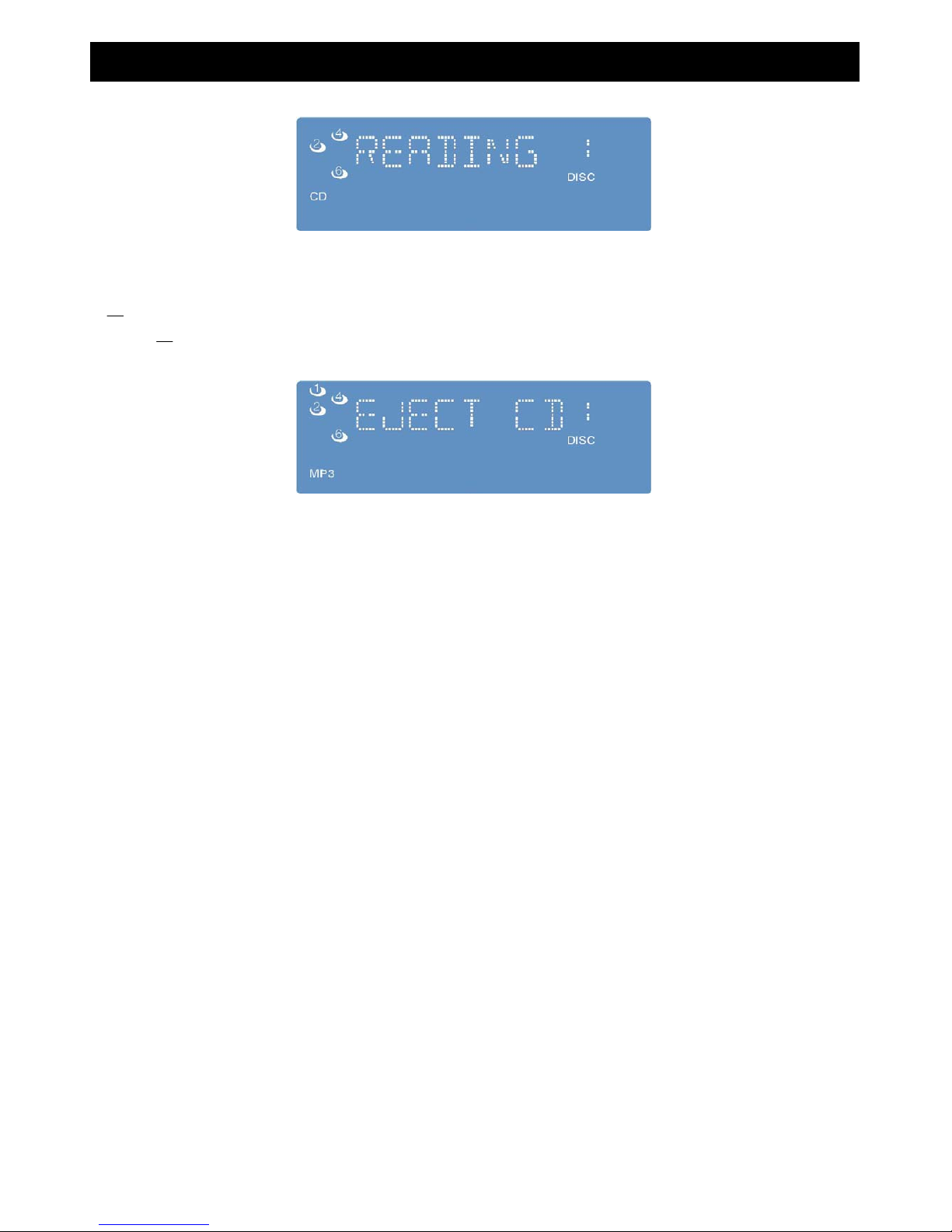
When reading the data on disc, screen displays " READING ". After reading, playback will start automatically.
※The unit does not read the datas on disc befor playing, so it can not recognize the type of disc is CD or MP3.
⑥RX button:
Press [RX] to display " RX " on screen.
Then all available files in all folders are played in random sequence.
⑦REP button:
Press again to cancel RANDOM PLAY function. RX indicator is off.
If previous CD is empty, previous loadable CD will be displayed.
Press [ ▲ ] button to reject MP3 CD.
Press [ SEEK∨ ] and release in 2 seconds back to the begin of current file.
Press [ SEEK∨ ] twice back to the previous file.
Function and Operation on MP3 player
Press [ SEEK∨ ] and hold for more than 2 seconds to begin FAST REVERSE, release holding to
stop fast reverse and resume playback normally.
IF you do not take away the MP3 CD which will be loaded again after 10 seconds.
Press [CD ∨] and release in 2 seconds to the first file of previous folder.
Press [SEEK∧] and release in 2 seconds back to the next file.
Press [SEEK∧] and hold for more than 2 seconds to begin FAST FORWARD, release holding to
stop fast forward and resume playback normally.
⑤SCAN button:
Press [SCAN] to display " SCAN " on screen.
Then the first 10 seconds of each files of all folders is played in sequence.
Press again to cancel SCAN function.SCAN indicator is off.
Press again to cancel REPEAT PLAY function. REP indicator is off.
The current file is repeated.
Press [REP] to display " REP " on screen.
Press [CD ∨] and hold for more 2 seconds to the first track of previous CD.
page13
Page 14
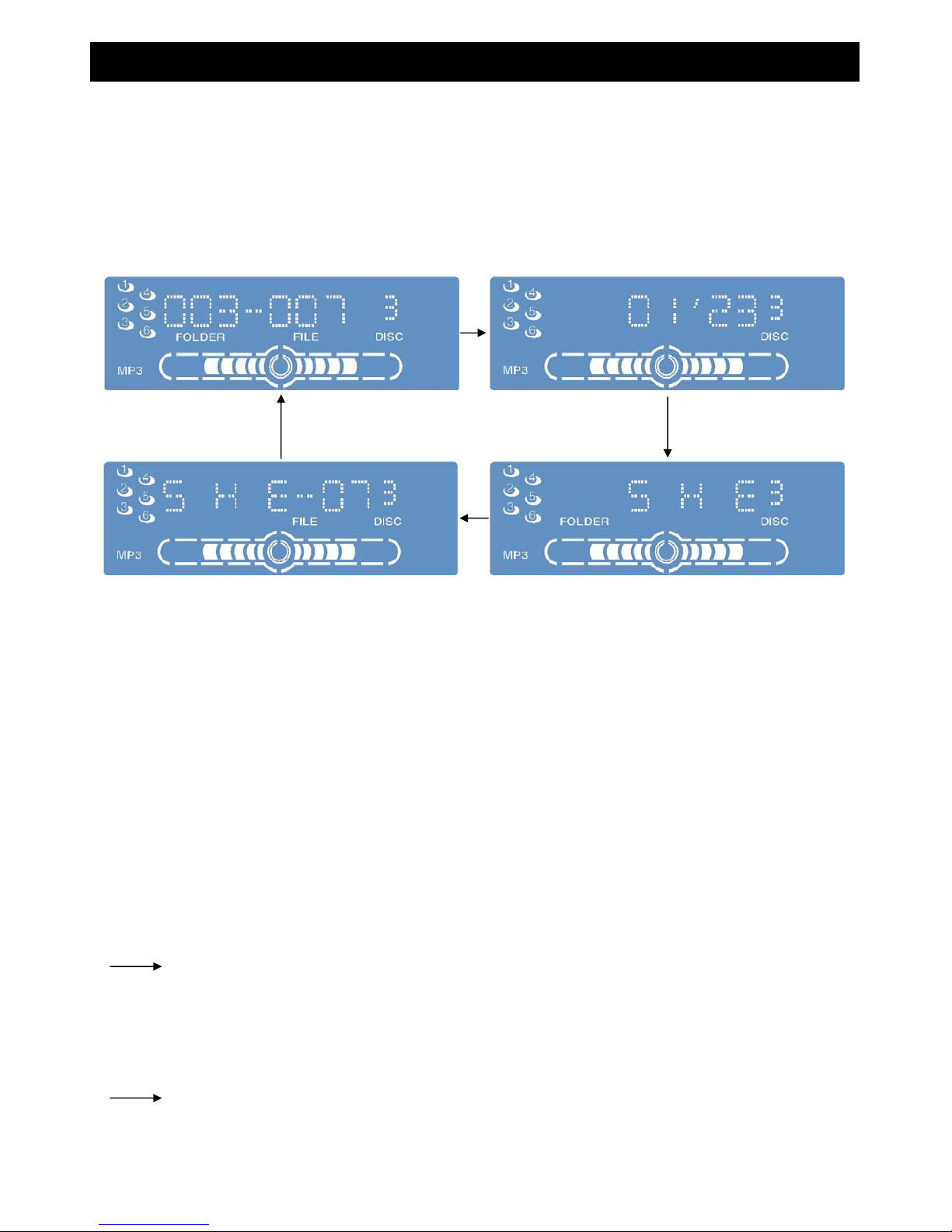
⑨CD ∧ button:
⑩SCR button:
FOLDER/FILE number of current MP3 file
playing time
FILE name
FOLDER name
‧If the length of file name/folder name exceeds the screen range, it will be displayed by a rolling bar.
NOTES:
If the situation described below is happened, the unit reject the disc automatically and display error message
"ERROE1~ERROR3" on the screen
Select the files supported by this player. Confirm the format of data on disc, if necessary to make a new CD.
(The files are made by some file system, compress mode, data formate, expansion file name, damage
2. Disc has scratches.
3.The player can not operate for some reasons
your dealer or authorized service center for help .
4.The player can not play the files for some reasons.
Press [SCR] to display 5 seconds of all informations for current MP3 file in sequence.
Press [CD ∧] and release in 2 seconds to the first file of next folder.
Disc will ejected automatically. If the player still can not operate normally, please contact
data that is not supported by the player.)
‧Displayable length of file name/folder name: within 128 characters.
If next CD is empty, next loadable CD will playback.
1.The disc is dirty or upside down.
‧The Unit does not support Chinese
‧Undisplayable charactrs and symbols will converted into an" -- " .
Function and Operation on MP3 player
Press [CD ∧] and hold for more 2 seconds to the first track of next CD.
( See "Notes on MP3")
‧The unit can display ASCII character set and special symbols of other languages.
Function and Operation on CD CHANGER
page14
Page 15
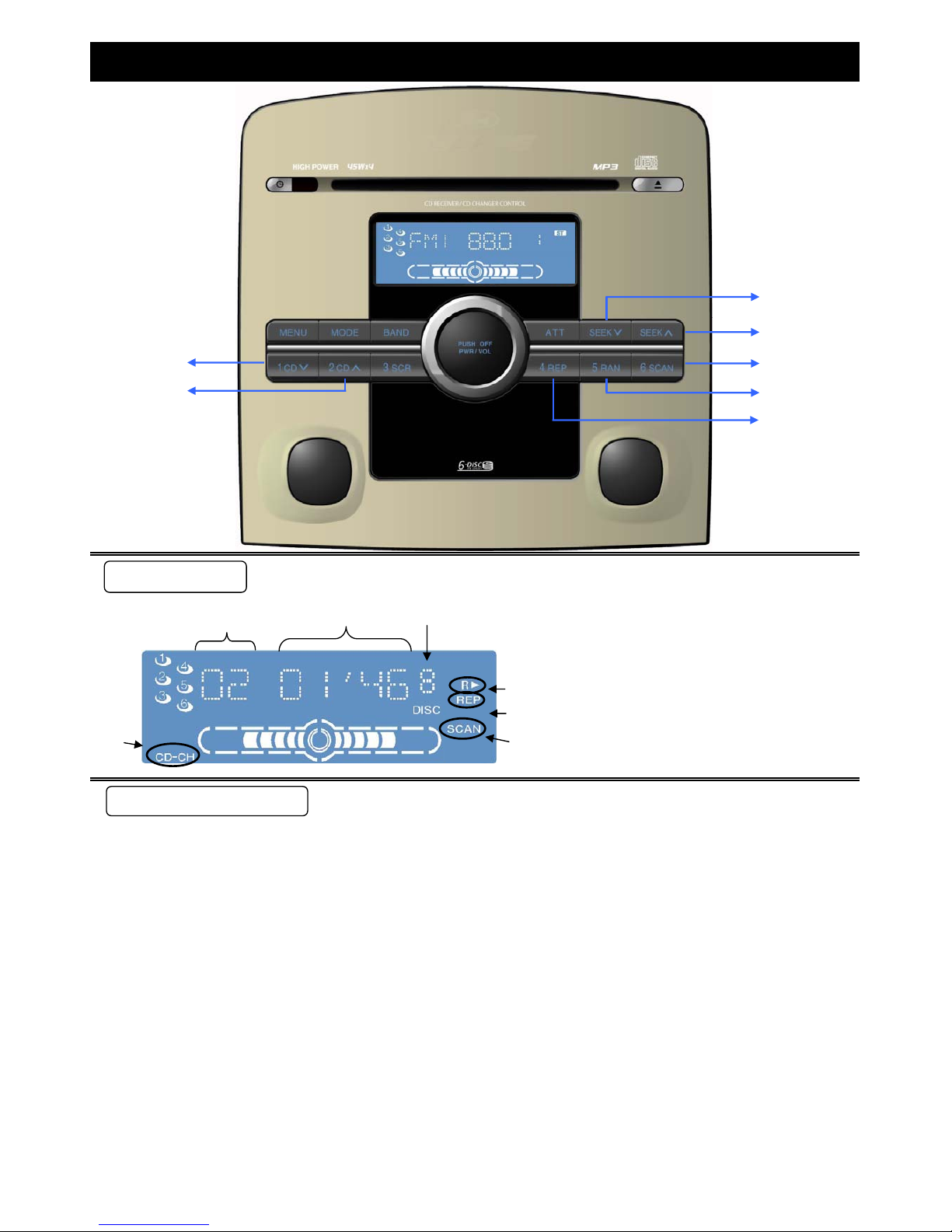
a﹒Track number
a b c
b﹒Playing time
c﹒CD number
d﹒CD-CH MODE。
ee﹒" RX " random function indicator
f
f﹒" REP " repeat function indicator
d g g﹒" SCAN " scan function indicator
①CD ∨ button:
②CD ∧ button:
③SEEK∨ button:
●Make sure that the disc magazine is properly inserted in the CD changer.
●Press [MODE] to select CD-CH MODE. Screen will display the information of CD changer and
Press [ SEEK∨ ] and hold for more than 2 seconds to activate FAST REVERSE through a track.
Release it to resume the normal CD play from that position.
Playback CD with CD Changer (CD-CH)
start to playback track from the original memorized track.
For the first use, CD changer will search the first playable CD and star to play automatically.
Press [ CD ∨ ] to select previous disc to play.
Press [ CD ∧ ] to select next disc to play.
Press [ SEEK∨ ] and release in 2 seconds to play from the beginning of current track.
Function and Operation on CD CHANGER
Note: CD changer functions are applicable to units with optional CD changer unit.
Press [ SEEK∨ ] twice to play the previous track.
FUNCTION OPERATION
SCREEN DISPLAY
①
②
③
④
⑤
⑥
⑦
page15
Page 16
④SEEK∧ button:
⑦REP button:
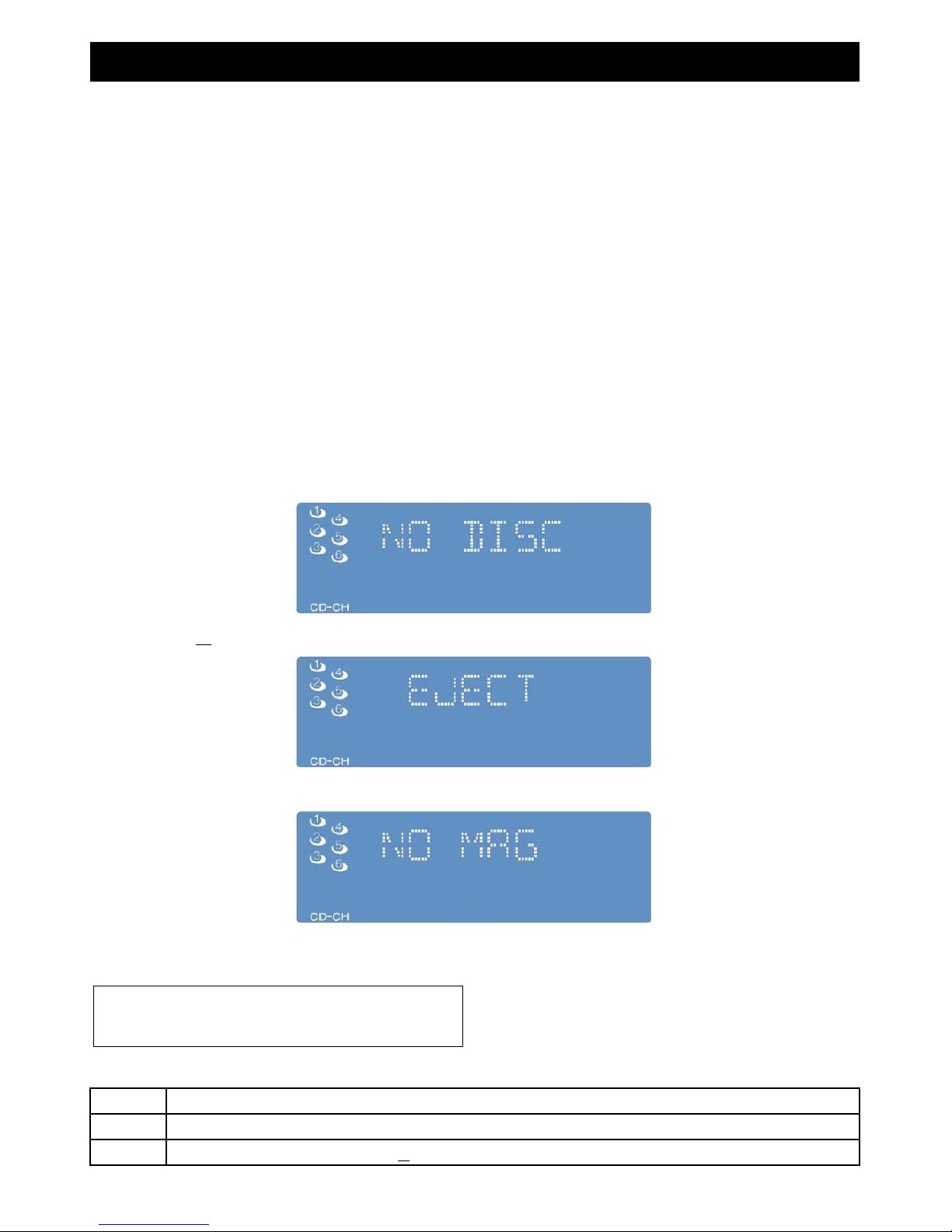
ERROR 1
ERROR 2
ERROR 3
Press again to cancel RANDOM PLAY function. The RX indicator is off.
Then the first 10 seconds of available tracks of all discs in CD changer is played in sequence.
⑥RX button:
Press [RX] to display " RX " on screen.
Then all available tracks of all discs in CD changer are played in random sequence.
Press again to cancel REPEAT PLAY function. REP indicator is off.
Function and Operation on CD CHANGER
⑤SCAN button:
Press [SCAN] to display " SCAN " on screen.
Press [ SEEK∧ ] and hold for more than 2 seconds to activate FAST FORWARD through a track.
Release it to resume the normal CD play from that position.
Press [REP] to display " REP " on screen.
The functions of VCD changer are the same as above-mentioned.
Screen display " NO DISC ". When there is no disc in disc magazine.
Press EJECT ▲ button on cd changer to eject disc magazine. Screen display " EJECT "。
After disc magazine ejected, there is no magazine in CD changer. Screen display " NO MAG "。
The current track is re
p
eated.
●Display of error messages
Disc has scratches, select the next disc.
Disc is not operated by some causes. Press ▲ to eject magazineand. After checking, insert the magazine again.
Disc is dirty or upside down, select the next disc.
Press again to cancel SCAN function. The SCAN indicator is off.
Press [ SEEK∧ ] and release in 2 seconds to play from the beginning of next track.
※NOTE:
For your safety, do not watch VCD while you are driving.
page16
Page 17

1、AUX MODE
2. TELPHONE Display Function
When Washing Car
Press [MODE] to change. You can select AUX mode.
Service
Use a clean, dry, soft cloth to wipe the surface of the unit, never use solvents such as benzine, thinner as they may mat the surface
of the unit.
▣ Maintenance
Please refer the checking and the repair by your nearest authorized Ford Service Center. Do not repair or disassemble the unit.
The products should be serviced only by qualified personals
When driving the car in the areas, where radio can receive two strong wave signals of broadcast stations at close
frequency. The radio may suddenly become silent or interfered then it will receive another frequency of very close strong
wave radio station signal.
Troubleshooting
When the unit is connected to the hand-free system of
cell phone, the unit becomes mute at the time that cell
phone calls out or receives a call and displays "TEL" on
the screen.
When the radio is too far away from the broadcast station, the reception is not easy as the signal is too weak and therefore
only interference is received.
Power Supply Voltage
Befor Maintain
Receiving type of AM/Fm for vehicle audio
The ultra short wave frequency channel will pierce through the FM ionosphere and will not reflect. However, when
encountering high mountain and high- building, it will be reflected.
Function on AUX/TELPHONE mode
Normally the FM broadcast distance is about 40~50 kilometers. During transmission of stereo signal, the broadcast
distance will be shorter.
After calling the unit returns to previous playing mode.
Do not exposure the unit to water or make it too wet to avoid the fire or damage made by short circuit.
The product is designed for operatng with a negative grounded 12 V DC battery system of vehicle.
The unit is made by precision parts, do not disassemble or modify the unit by yourself.
※If AUX is not connected, AUX mode is disable.
The medium wave or short wave of AM cannot pierce through the ionosphere and will generate diffraction. When the
electric wave meets with high mountain and building, its broadcast distance is farer than FM, therefore it is extremely
possible to receive signal of two AM radio stations.
OPERATION ON OTHER MODES
※Note:
Do not expose the disc to the direct sunlight or excessive heat.It
may make the disc out of shape and cause the player out of
order.
page17
Page 18

Notes on MP3
Notes:
General
MP3
Caution:
Display Items
CD-TEXT
Disc Title Folder name Album name
Track Title File name Title name
Artist name
Displayable characters
ASCII character set
(space) * + - / _
Notes:
It is recommended to set the bit rate to "128 kbps or more" and "fixed".
Never assign the“.mp3"file name extension to a file that is not in the MP3 format. This may not only produce noise
from the speaker damage, but also damage your hearing.
ASCII characters set can be displayed.
Undisplayable characters and symbols will converted into an asterisk " -- ".
A to Z、digital 0 to 9, and the following symbol:
What is MP3?
The playback sound quality differs depending on encoding circumstances. For details, refer to the instructions of your
own encoding software and writing software.
Displayable file name/folder name:within 128 characters.
MP3 encoding software is not supplied with this unit.
CD writing program is not supplied with this unit.
High bit rate and high sampling frequency are recommended for high quality sound.
Selecting VBR(Variable Bit Rate) is not recommended because playing time is not displayed properly and sound may be
skipped.
Points to remember when making MP3 files
Display Information
MP3 ( MPEG audio layer 3 ) is the compression format of digital audio. It is developed by MPEG( Motion Picture Experts Group )
.Using this compression format, you can record the contents of about 10 music CDs on o single CD (This figure refers to data
recorded on a 659 MB CD-R or CD-RW at a fixed bit of 128CD-RW at a fixed bit rate of 128 kbps and a sampling frequency of
44.1 kHz).
MP3
MP3 ( ID3 tag )
With some software in which mp3 format files have been encoded, the character information may not be displayed
properly.
Names of files and folders is in accordance with the standard of each file system. Refer to the instructions of writing
software for details.
page18
Page 19

Supported file system
Notes:
VBR
32k-320 kbps
Yes
32、44.1、48 kHz
Yes
16、22.05、24 kHz
Folder selection order/ file playback order
Notes:
Maximun number of files/folders
Copyright
You may encounter trouble in playing MP3 files or displaying the information of mp3 files recored with certain writing
software or CD recoreds.
The file extension “.mp3”should be assigned to each file depending on the file format.
This unit does not have a play list function.
ISO 9660 Level 1 / Level 2, Apple Extension ISO 9660, Joliet,Romeo
Although Multi-sesssion recording is supported, the use of Disc-at-once is recommanded.
It is prohibited by copyright laws to copy, distribute and
deliver copyrighted materials such as music without the
approval of copyright holder except enjoying yourself
personlly.
maximum number of folders:255 (Root folder is included)
8 k-160 kbps
Maximum number of files/folders:999 (files+folders)
maximum number of files in one folder:255
Maximum depth of trees:8
The unit contain the number of folders irrespective of
presence or absence of MP3 files.
If the selected folder does not contain any MP3 files, the
nearest MP3 files in the order of playback will be played.
Playback order may be different from other MP3 players
even if the same disc in used.
If CD-DA files are on the same disc as MP3 files, the songs may not play in the intended order, or some songs may not
play at all.
“ROOT”appears when displaying the root folder name.
Apple HFS、UDF1.50、Mix CD (CD Extra) are not supported.
Compression formats ( Recommandation:“Points to remember when making MP3 files"on the previous page)
Sampling frequencyCompression method Bite rate
MPEG 1 audio layer (MP3)
MPEG 2 audio layer (MP3)
Do not recored files other than MP3 files and unnecessary folder on a disc.
The name of MP3 file should be added by the rules as shown in following description and also comply with the rules of
each system.
Recording MP3 files on a CD-media
You are recommended to minimize the chances of making a disc that contains both CD-DA files and MP3 files.
Notes on MP3 (Continued)
Max. 8 layers
1
file
2
3
4 5
6
7 8
9
file
file
file
file
file
f
ile
Root Tree 1
Tree 2 Tree 3……Tree 7(Max)
Root Folder (Root Directory)
1 9
Folder Selection
in the order
(example)
page19
Page 20
‧Full autoplay(6CD)
‧(ATT/LOUD) Attention/Loud Control
‧Bass/Treble independent Control
‧APM (Auto Preset Station)
‧SEL Device (Function Recycle)
‧REP Device (Repeat Play)
‧SCAN Device (Scan Play )
‧RAN Device (Random Play)
‧CD CHANGER Control
‧TEL Auto Mute Function
‧AUX Function
‧MP3 Display FOLDER、FILE Function
(Data of MP3 CD must contain FOLDER、FILE title)
‧Consumption current:below 4 A (at 0.5W output、4 speakers)
‧Maximun power output:45W×4 ( load 4Ω speaker)
‧FM Frequency range:87.5 ~ 108 MHz
‧FM Usable Sensitivity:8 ± 6 dB
‧CD Distortion:below 0.5 %
‧Channel of CD:2 Channels
‧CD complexes:16 bit stream
Specifications
‧Power supply:DC12V(11V~16V) , negativt ground
‧CD Frequency Response:5 Hz - 20 KHz
‧CD Signal to noise ratio:75 - 10 dB ~75 + 20 dB
‧AM Frequency range:531 ~ 1710 KHz
‧AM Usable Sensitivity:less than 30 dB
Features
‧Up to 30 preset stations (FM up to 18 stations, AM up to 12 stations)
page20
 Loading...