

Page 1
Technical Guide for PLC Basic
CSM_PLC Basic_TG_E_1_1
Introduction
This guide will describe the terminology needed for basic operation of the SYSMAC PLC (Programmable Controller), for clients new to our PLCs.
This guide does not cover technical details regarding the setting of the FA System or PLC programming after purchase.
I/O Refresh
With the PLC (Programmable Controller), commands from user programs designed by the client are executed one by one and processed by
reading and writing information in the internal PLC memory area (At OMRON, we call this the "I/O Memory").
At the same time, packages of data from sensors/switches that are directly connected to the basic I/O unit are exchanged with data in the PLC
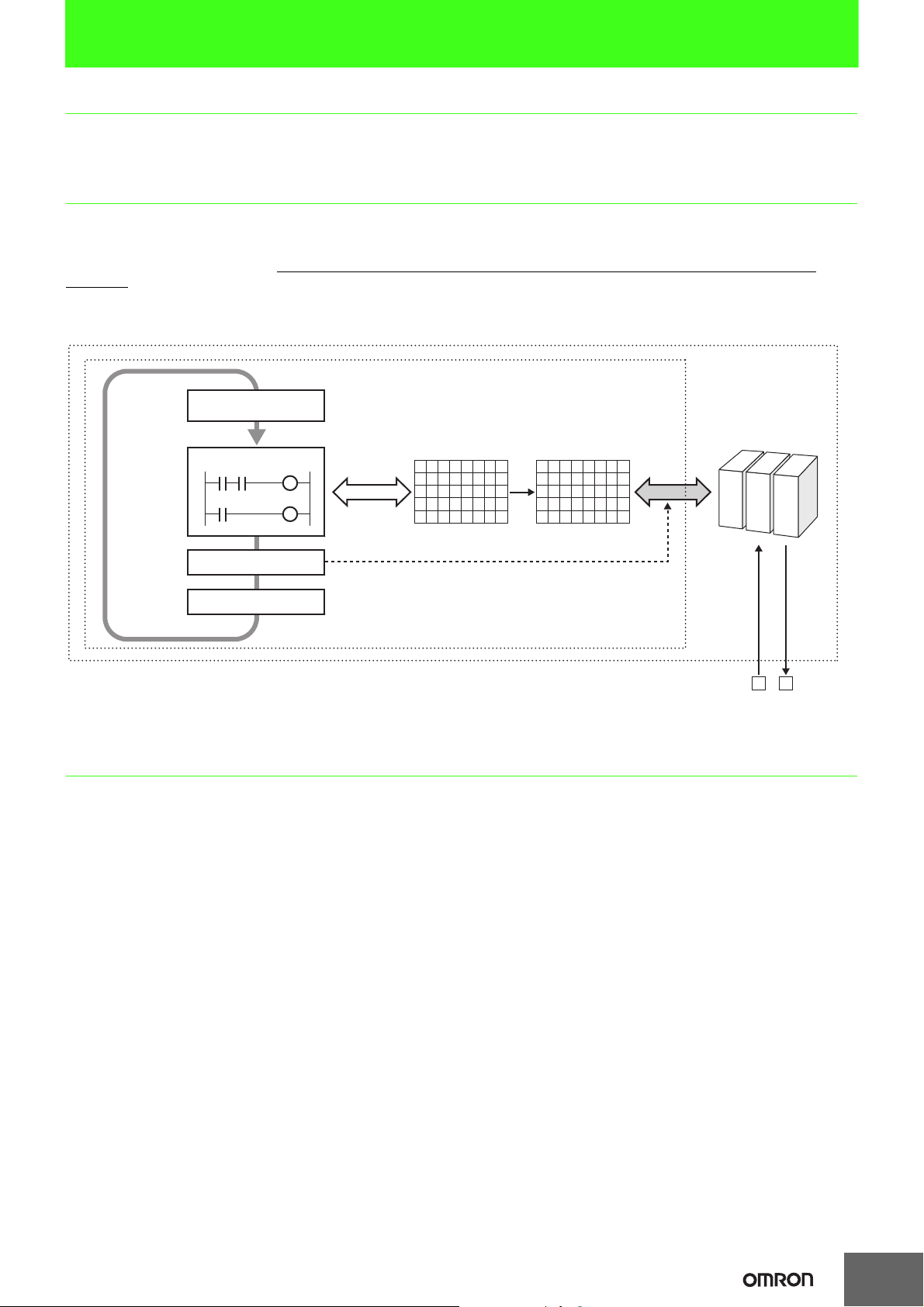
internal I/O Memory, at specific times. This process to totally exchange external data and internal I/O memory data is called "I/O Refresh
Operation".
It is important to know the timing by which the I/O Refresh will be executed when considering the operation of the FA System and User Programs
designed by the client. In the case of the SYSMAC PLC, this I/O Refresh operation is performed immediately following the execution of all other
commands. (See Figure below)
PLC
Basic I/O Unit
or built-in I/O
External Data
PLC
Processing Cycle
Common Processing
(Self-Diagnosis)
Execute Program
I/O Refresh
Peripheral Servicing
Inside PLC (CPU Unit)
I/O Memory
Read/Write
00000000
00000000
11011000
00111010
10101001
Change (after all
commands executed)
01010100
01101010
11001010
10111011
10001101
Refresh with external devices
Package
Exchange
(Sensor, Switch, Actuator etc.)
Cycle Time
In terms of the PLC processing cycle, the cycle time is the time from the execution (commencement) of the I/O Refresh operation to the execution
(processing) of the following I/O Refresh.
The cycle time includes time for overhead processing (self-diagnosis), execution of user programs, I/O Refresh processing and the processing of
peripheral services.
• When the cycle time is long, the cycle for updating data from outside of the PLC and the I/O response time are also longer, making it impossible
to implement changes that are input at a rate faster than the cycle time.
• When the cycle time is short, I/O response time is also shortened, which allows high speed processing.
• As the cycle time changes, the command execution cycle and I/O response times also change.
In the case of the SYSMAC PLC, the cycle time can be requested in the following manner:
Cycle Time = Overhead Processing Time + Total Command Execution Time + I/O Refresh Time + Peripheral Service Time
The calculation methods for each execution time for the SYSMAC PLC are included in the product manual.
1
Page 2
Interrupt Tasks
Normally, user programs are executed in order along with the processing of the I/O Refresh etc., within the PLC processing cycle (See
"I/O Refresh").
Interrupt Tasks however are executed in precedence to this processing cycle. In the event that certain interrupt conditions are met, the processing
cycle will be suspended and the interrupt tasks will be executed first.
(The SYSMAC PLC sometimes refers to the "Interrupt Tasks" as "Interrupt Programs", but here we shall use "Interrupt Tasks", the terminology
used in the CS/CJ Series manuals)
For example, in the case of the CS/CJ Series, Interrupt Tasks can include power Off interrupt, Scheduled Interrupts, I/O Interrupts, Periodic
Interrupts based on the internal timer, and External Interrupts.
Major Interrupt Tasks Details
Power Break Interrupt Tasks Executed during a power break.
Scheduled Interrupt Tasks Executed based on a specific schedule.
I/O Interrupt Tasks Executed at the start-up of a connected Interrupt Input Unit.
External Interrupt Tasks
Executed when requests are received from the Special I/O unit, the CPU Bus Unit, and the INNER Board (only for CS
Series).
I/O Allocation
In order for user programs to utilize I/O signals from the I/O Units mounted to the PLC, it is necessary to first assign an address within the PLC I/
O Memory.
The assignment of I/O Memory to the input or output from these units within the PLC is known as I/O Allocation. The CPU Unit uses this I/O
Allocation information in the operation of I/O Refresh with connected units.
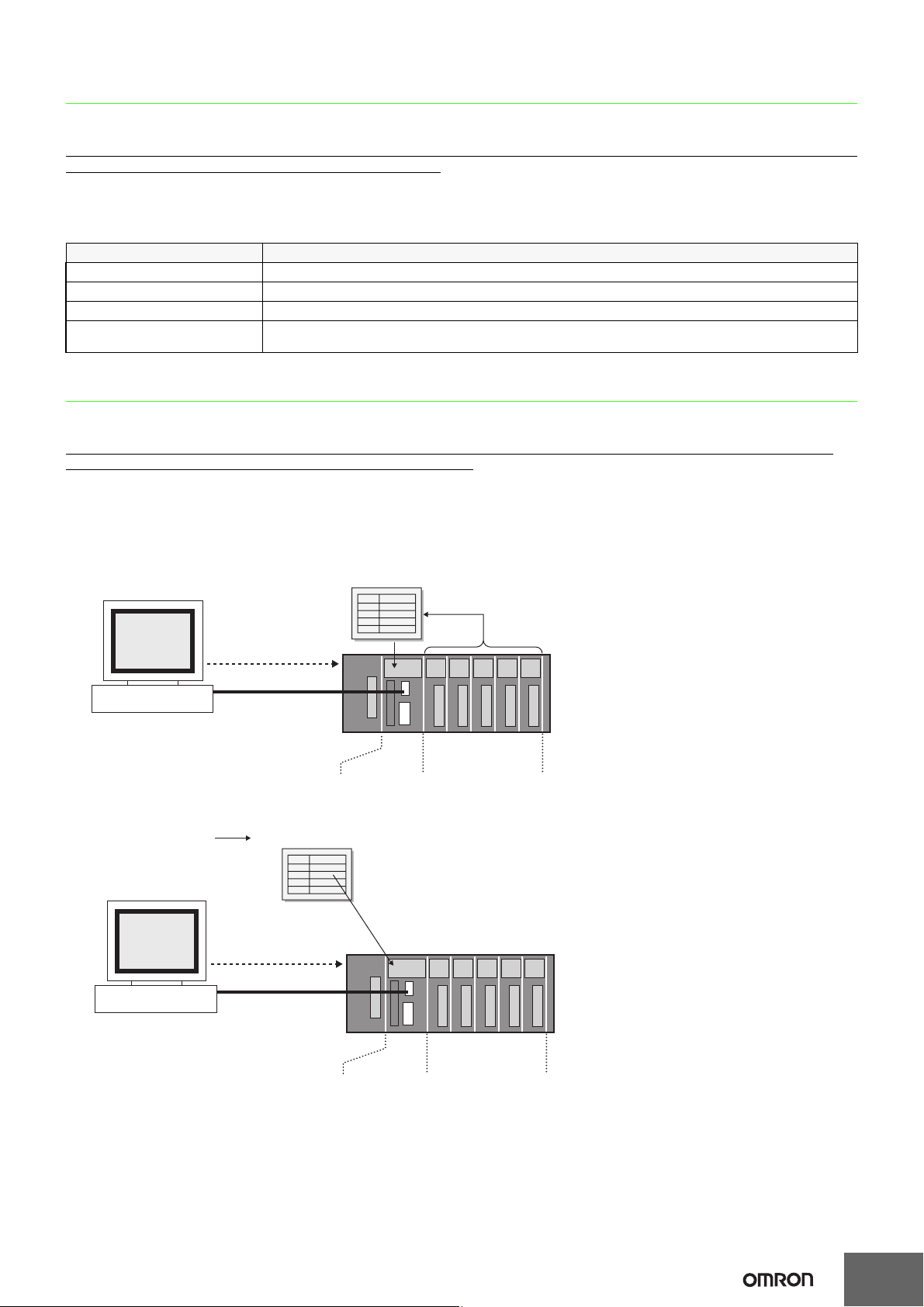
In the case of SYSMAC PLC, this I/O Allocation information is recorded in the PLC in the "Registered I/O Table". This "Registered I/O Table" can
be created by either automatically registering online with programming tools utilizing information from the unit built-in to the PLC, or by using
programming tools to design offline and then automatically registering by transmitting the I/O table to the PLC. (Some devices may not require the
creation of a Registered I/O Table, and others may not support the offline design of I/O Tables.)
● Online Automatic Registration
CX-Programmer or
Programming Console
"Create I/O Table"
Operation
● Offline Automatic Registration
Type and locations of
the Mounted Units
CX-Programmer
Edit Registered I/O Table
"Create I/O Table"
Operation
Registered I/O Table
SYSMAC CJ/CS Series
Type and Location
of Mounted Units
I/O UnitsCPU Unit
I/O UnitsCPU Unit
SYSMAC CJ/CS Series
2
Page 3

CPU Unit Memory Area
The PLC Unit utilizes a variety of different data including user programs, I/O Memory data and comments, CPU Unit and Special I/O units
Parameters, and Registered I/O Table information etc.
All of this data that is used by the PLC is stored in the memory area within the CPU unit.
The SYSMAC PLC has the following types of Memory Areas, which is backed up by a battery.
In the case of the SYSMAC CS/CJ Series, the content of the Memory Area is backed up using flash memory, which means that even if battery
power fails, any user programs and parameter area data will not be lost.
● User Program Area
This records user programs designed by the client.
● I/O Memory Area
This Area is accessed by command operands. It records information such as the CIO, Internal I/O Area, holding area, auxiliary area, DM Area,
EM Area, Timer Completion Flags/Present Value, Completion Flag/Present Value, Task Flags, Index Register, Data Register, Condition Flags,
Clock Pulse, etc. The data in the I/O Memory Area locates in or is in areas in which the contents are cleared every time the power is turned
back on, and areas in which prior information is retained. (In some areas you can select whether to clear or retain.)
● Parameter Area
This contains all of the information regarding initial parameters used by the PLC.
It records information such as the PLC System Parameters, Registered I/O Table, Routing Table, and PLC Setup for CPU Bus unit.
3
Page 4
Technical Guide for PLC-based Process Control
CSM_PLC Process_TG_E_1_1
What is the OMRON PLC-based Process Control?
OMRON PLC-based Process Control system is based on the SYSMAC CS/CJ PLC Series. By adding PLC-based Process Control units to the
basic system configuration, PLC process control functions can be simply added on to the basic functions already installed in the PLC.
Thus, it can be used for devices that it is compatible with such process control system in which DCS was used before or devices in which several
controllers were used combined.
With the PLC Installation System, analog processing is carried out by the loop control section or the loop control unit/board (hereafter "loop
controller"), and ladder processing is handled by the CPU. Communication between the two sections is made using bits of memory. Since the
analog processing and ladder processing can be completely separated and the program is more simple than a ladder only program, the
engineering process to construct the system is facilitated.
System configuration of PLC-based process control
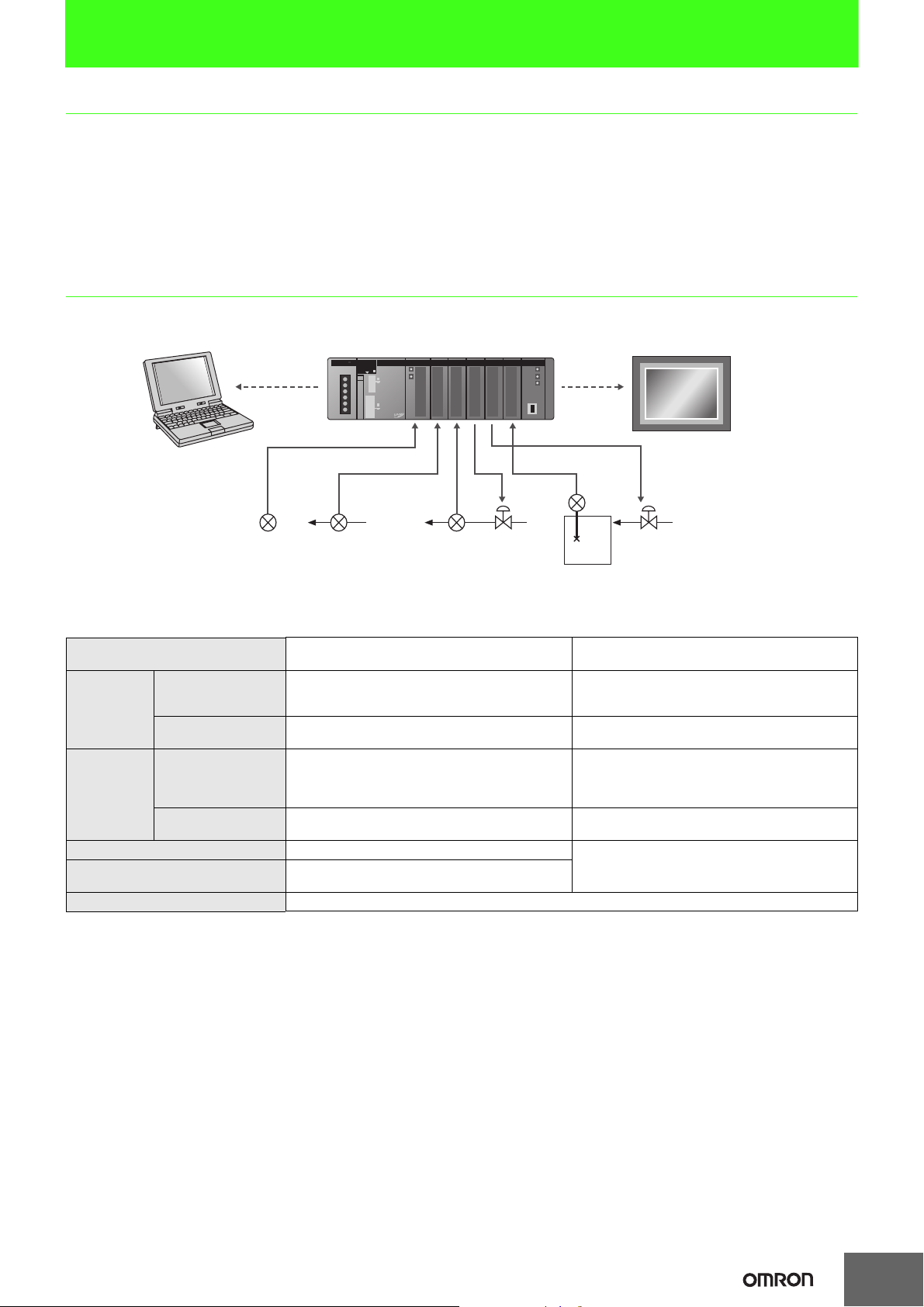
The loop controller does not have an external analog I/O or an external contact I/O function.
It is used together with such a unit that has the interface function including an analogue I/O unit, as shown in the diagram below.
Programming
/Monitor PC
4 to 20 mA
PLC
4 to 20 mA
4 to 20 mA
4 to 20 mA
Compensating
Leadwire
Thermo
Couple
4 to 20 mA
PT or HMI
Software
Sensor
Also, when programming, in addition to the programming software for the CPU Unit (CX-Programmer, additional programming software (CXProcess) will be required to create Function block data. And in order to monitor and alter settings during operation, a HMI section will also be
required, in combination with the application in use.
Program Creation Section
Application Section
HMI Section
Operation/Display
Section
Control
Section
Signal I/O Section Analog I/O, Digital I/O, Pulse Input
Signal Conversion (Signal Conditioner)
Field Device Sensor, Actuator
Loop Control Section Function Block (FBD), Sequence Table, Step ladder
Sequence Control
Section
Flow rate Sensor
Operation/Display Screen Creation
Control Block/Sequence Creation
Batch management, brand management, remote
surveillance (Web)
Data gathering, data analysis
Meter screen, graphics screen, trends,
Warning history, operational history, operational guide
Ladder, FB (Ladder/ST Language) CS/CJ Series CPU
Temperature, Current/Voltage, Isolator, Pulse,
Distributor
Capacitive
Flow Rate
Sensor
Process
CX-Process Tool
CX-Programmer
Third Party Products etc
CX-Process Monitor Plus
NS Series etc.
Loop Controller
Loop Control Board/Unit
or Process CPU/Loop CPU
(
Loop Control Section
Process/Analog I/O Unit
Digital I/O Unit etc.
)
1
Page 5
Installation of PLC Control Panel
CSM_PLC Installation_TG_E_1_1
Introduction
In order to ensure the reliability and security of the system, prior to the design of the system it is important to make certain that the conditions in
which it will be installed is well understood.
Basically, the stresses on the PLC system (temperature, humidity, vibrations, shocks, corrosive gases, overcurrent, noise etc.) need to be reduced
as much as possible. However, the extent to which measures need to be taken in this regard will depend upon the likelihood of problems arising,
the conditions in which the system is installed, and the cost of implementing measures. By taking advanced measures to prevent problems, the
reliability of the system can be improved, and in the long-term the operation rate can also be increased.
For the individual specifications of each unit, please see the respective user manuals.
Installation/Conditions of PLC Control Panel
The following describes the environmental conditions and measures to be taken for the installation of the PLC control panel (hereafter, "the panel")
■Temperature
Based on the operating temperature of the element parts of the PLC,
the operating temperature for the system is generally between 5°C
and 40°C. At the same time, with both forced and natural cooling of
the panel, the fact that it is miniaturized to save space means that
from our experience the temperature of the panel is sometimes 10°C
to 15°C higher than the ambient temperature of the room. As such, it
is important that the following measures be taken depending on the
installation site and the temperatures being generated to make
certain that the panel's internal temperature does not exceed the
range of the unit operating temperature, and to provide a sufficient
margin for the range of operating temperature.
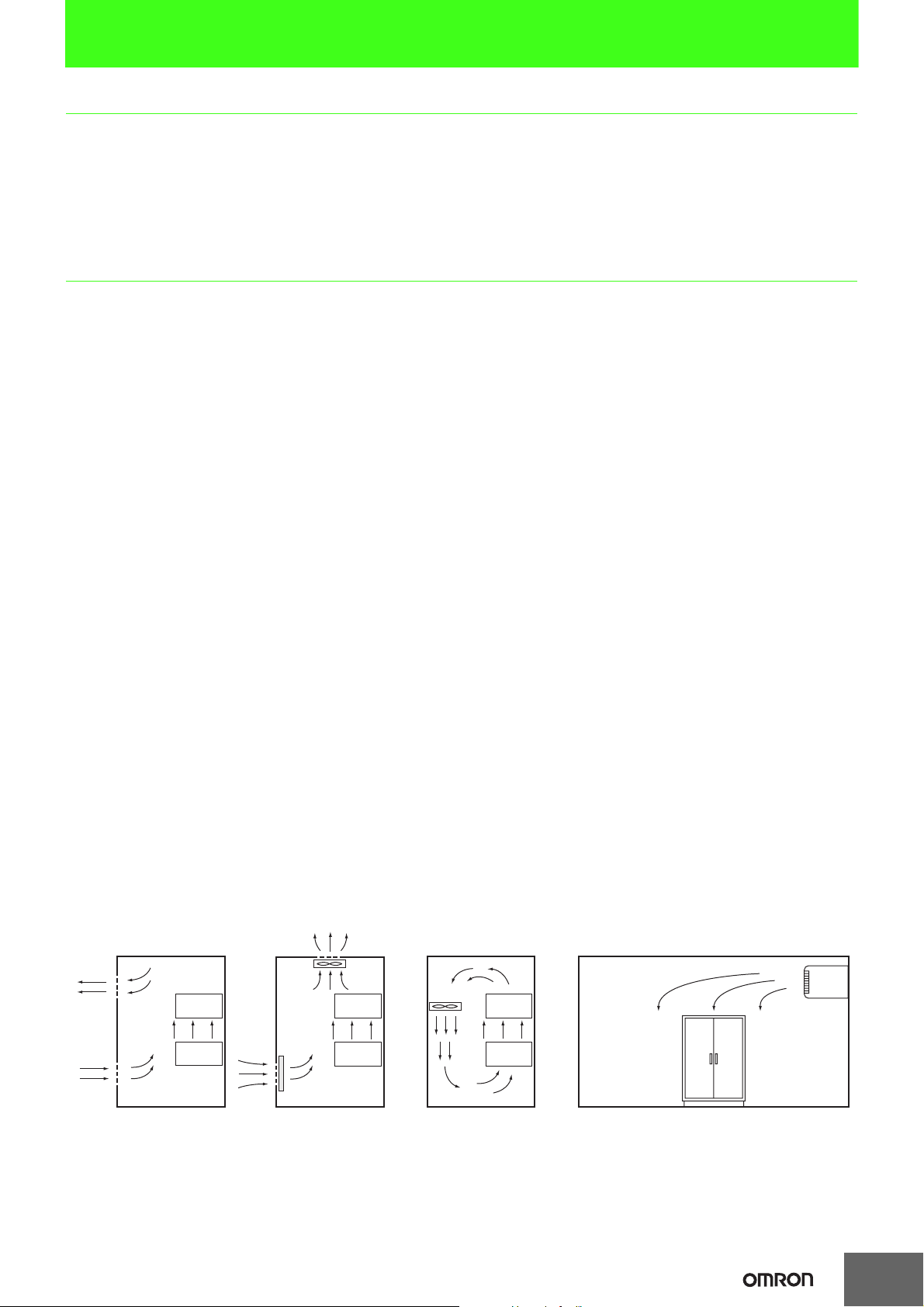
● High Temperature (see Figure 1)
1Natural Cooling (Natural draft at the top and bottom of Panel)
When installing the panel, it is optimal not to make use of
cooling devices such as fans and coolers. The following are
important points in the installation of the PLC.
• Do not install in the upper part where the warm air in the panel
stagnates
• In order to ensure ventilation space, maintain a sufficient
distance from other machinery, wiring ducts etc around the
panel
• Do not install in positions other than those specified (for
example upside down), which can lead to the generation of
abnormal heat within the PLC
• Do not install directly above devices that generate heat such as
heaters, transformers and high-capacity resistors etc.
• Avoid direct sunlight
2Forced Ventilation (forced ventilation by use of a fan directly
mounted at Top of Panel)
3Controlled Circulation (controlled circulation by means of a fan in
the airtight enclosure panel)
4Full Room Cooling
(Use a cooler to cool the entire room in which the panel is installed)
(Notes)
Environmental conditions and cooling system should be as follows.
• Panel installed in room with low dust → 1 or 2
• Panel installed in room with dust → 3 or 4
When using a fan
• Attach an air filter to the suction mouth to prevent the entry of dust
• Periodically wash the air filter in water.
• Temperature sensors should be attached near the PLC to emit an
alarm in the event that the fan or air conditioner break down
etc.
● Low Temperature
In cold areas where the morning temperature falls below 0°C at the
time of start-up, attach a small space heater inside the panel to heat
the internal temperature to about 5°C. In order for the PLC power
supply to generate heat, don't turn off the power.
PLC
PLC
1Natural Cooling
Fan
PLC
PLC
Air Filter
2Controlled Ventilation 4Room Cooling System
Fan
3Controlled Circulation
PLC
PLC
Control Panel
Figure 1. Cooling Board
Cooler
1
Page 6
■Humidity
In order to maintain the insulating properties of the PLC, relative humidity should be kept
within the range of 35% to 85%. In particular in the winter, when heaters are turned on and
off, sudden changes in temperature may be experienced resulting in condensation which can
lead to shorts or malfunctions. Where there is danger of such a change in temperature, power
should be kept on during the night and condensation should be prevented through such
measures as installing a small heater inside the panel to maintain low heat.
(See Figure 2)
Control Panel
Absorbent Material
PLC
Turn on
Powe r
Heater
Figure 2. Examples of Measures against Condensation
■Vibrations/Shocks
The PLC is tested in accordance with the environmental (electricity and
electrons) the sine wave vibration test method (JIS C0040/IEC68-2-6)
and the shock test method (JIS C0041/IEC68-2-27), so that vibrations
and shocks in the general specifications will not cause malfunctions.
However, the system should not be installed in a place where it will be
subject to regular vibrations or shocks, especially to the PLC and the
panel.
The following methods may be used to reduce the effect of vibrations and shocks.
1
For vibrations and shocks that originate externally, the panel should be removed from the
source. Alternatively, the PLC and the panel should be protected with the use of rubber.
2
Isolate vibrations such as through the construction of the building, flooring etc.
3Regarding shocks experienced during magnetic contactor
operation in the panel, the source of the shock or the PLC should
be protected by rubber so that the shock is not felt.
■Atmosphere
When using the system in any of the following kind of places, connections
may be loosened or elements and parts may experience corrosion, and an air
purge should be implemented to avoid this.
1Places where dust, salt, particles, soot or organic solvents etc are
common, and where the enclosure is sealed in such a way that the
internal temperature does not increase very much.
2Where corrosive gases are common, an air purge (air purification)
of the panel should be performed, to pressurize the panel and
prevent the intrusion of air from outside.
3
Places with flammable gases may be a cause of ignition. The system
should not be used without a fire prevention mechanism in place.
■Work Space
When installing the PLC and the panel, please consider their use, operability and
maintenance, and pay particular attention to the following.
1Make sure that there is sufficient space to operate programs and to
replace the unit. Further, for the sake of saftey and maintenance,
installation should be as far as possible from high pressure or high
power devices.
2Mount the PLC and I/O unit in a position in which the use of the
debugging tool and the connection and operation of peripheral
devices will be possible.
3
The PLC and I/O unit generally has a maintenance light, and this
should be easy for the operator to see, and in a position where it can
easily be reached.
4For systems using the PLC as a control system, it is likely that there
will be future additions and alterations to the system, so approx. 1020% extra space should be allowed for this.
5Where necessary, about 600 mm of space should be kept behind
the panel for the purpose of performing maintenance.
PLC Control Panel Electrical Conditions
The power supply, grounding, and noise make up the main elements of the electrical conditions. In the installation and wiring of the device, great care must
be taken to ensure that there is no danger to the human body, and that electrical signals are not obstructed (noise).
■PLC Installation Site
For the sake of safety in maintenance and operation, installation
should not be near high current (more than 600V) or high power
devices. Where this cannot be avoided, installation should be as far
away from such devices as possible.
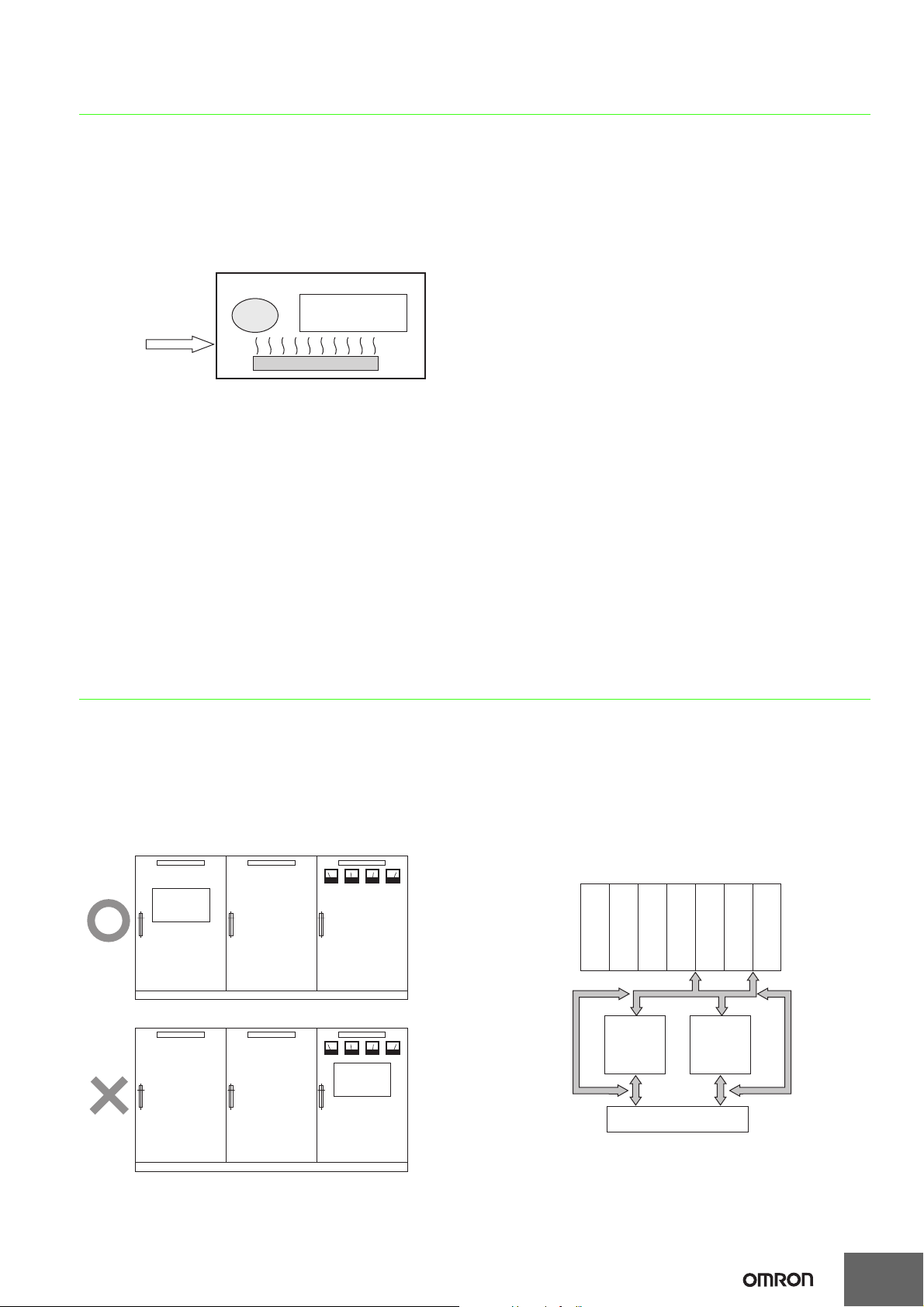
(Example of Recommended Equipment Arrangement)
PLC
Control Panel Control Panel Panel with power line
(Example of Poor Equipment Arrangement)
Control Panel Control Panel Panel with power line
(See Figure 3)
PLC
● Arrangement of PLC and Each Unit (See Figure 4)
1The CPU and other adjoining units should be special or input units
where noise generation is limited.
2The coils and contacts in electromagnetic contactors and relays in
an external circuit are sources of noise. Locate them at least 100
mm away from the PLC.
Communications Unit
Power Unit
CPU
DC
I/O
Device
DC Unit
Te rm i n al Block
DC Unit
AC
I/O
Device
AC Unit
AC Unit
Figure 3. Ex amples of Equipment Arrangement
in Panel with High-voltage Device
Figure 4. Example of built-in type
2
Page 7

■Power System Wiring (See Diagram 5)
1
The power supply for the PLC and I/O devices should be separate, and a
noise filter should be installed to the PLC power supply.
2
Noise between the PLC and the ground can be greatly reduced by adding an isolating
transformer. In such an event, do not ground the secondary coil of the transformer.
3
Keep the wiring between the transformer and the PLC as short as possible, twist the
wires well, and keep the wiring separate from high-voltage and power lines.
Power Circuit
Power supply for general operations circuits
PLC Input Circuit
Power Supply
PLC Output Circuit
Power Supply
Noise
Filter
PLC Power
Supply
Electric Socket
(For peripheral devices)
Diagram 5. Power Supply System Diagram
■Wiring External I/O Signal Lines
1
To absorb reverse electromotive force when an inductive load is connected
to an output signal, connect a surge protector near the inductive load in an
AC circuit, and connect a diode near the inductive load in a DC circuit.
Diagram 6 and 7)
Inductive Load
Connect a diode in a DC circuit
Diodes
Diagram 6. Input Signal Noise Countermeasures
Inductive
PLC
Output
Unit
Load
PLC
Output
Unit
Affix diodes for DC circuitsAffix surge protector for AC circuits
Diagram 7. Output Signal Noise Countermeasures
2
The output signal line should not be near or parallel with high current or
power lines.When nearby, they should be separated by a duct, and an
alternative wiring pipe should be established. In this event, the duct and
wiring pipe must be grounded.
I/O Cable
Power Line
I/O Cable
(See Figure 8)
Power Line
PLC
DC Input
Unit
Inductive
Load
I/O Cable Power Line
(See
3Connect the shield to the ground terminal at the PLC, and leave it
unconnected at the input device.
4Wire the lines so that common impedance does not occur. Such
wiring will increase the number of wires, so use common return
circuits. Use thick wires with sufficient allowance for the return
circuits, and bundle them with lines of the same signal level.
5For long I/O lines, wire the input and output signal lines separately.
6Use twisted-pair wires for pilot lamps (and particularly lamps with
filaments).
7Using a CR surge absorber or diode etc is effective in reducing
noice sources from input devices or output load devices.
■External Wiring
The wiring method can have a large impact on creating a system that
is strong against noise and a system that can operate with a high
degree of reliability. Wiring, and noise countermeasures in particular,
are based on experience, and it is necessary to closely manage wiring
based on experience and information in the manuals.
● Preventing Faulty Wiring
1By attaching marker bands to cables showing their direction, faulty
wiring can be prevented, and wiring checks and maintenance can
be facilitated.
2Use different colors during wiring.
3Place wires that transmit the same kind of signal into the same
ducts, and separate them into groups.
● General Precautions
1Do not join wires between terminals.
2Support and fix the power line so that its end does not pull at the
ends of multi-conductor cable.
3Use flexible wires for the movable places such as doors etc. Install
them one part on the panel body and the other on the door so that
they may not be damaged by the movement of a door.
4Connect crimp terminals to the end of the wire and use a torque
driver for connection to the terminal, and screw in at an appropriate
pressure. For terminal connection to an AC power unit, a roundtype crimp terminal should be used instead of a U shaped terminal,
for safety purposes.
5The dust protection cover attached to the PLC unit should be kept
in place until the wiring is completed to prevent dust from the wiring
from entering. Further, as the internal temperature will increase
greatly when the unit is in operation, the dust protection cover
should be removed once wiring is completed to prevent loss in
functionality.
6All wiring for the power circuit should be twisted.
7The primary or secondary noise filter should not be bundled, as this
reduces its effectiveness.
Floor Duct Type Piping TypeSuspended Duct
Figure 8. I/O Cable Wiring
3
Page 8

● Wiring Route
For the following combination, since signal types, properties, or levels
of the signal differs, in principle different cables should be used or
different routes should be used. Otherwise, the S/N (signal-to-noise
ratio) resulting from electrical induction can fall. Also, by classifying
and arranging the wiring, later maintenance or system changes can
be simplified.
1Power lines and signal lines
2Input and output signals
3Analog and Digital Signals
4High level and low level signals
5Communication lines and Power line
6DC signals and AC signals
7
High frequency aparatus (inverters etc.) and signal lines (communication)
4Do not install power cables and signal cables in parallel as they will
adversely affect each other.
5When high-voltage devices are installed in the panel, due to noise,
this should be separated as much as possible from high voltage
and power lines when wiring.
(See Figure 3)
6Install the PLC at least 200 mm from any high voltage or power
lines, or make sure that the high current and power lines are
contained within metal tubing, and ground to a resistance of 100 W.
(See Figure 11)
High-voltage power panel
Power Line
Power Line
200 mm
Metal tube
● Wiring Method
1Isolate signal cables with different characteristics when routed in
the same duct.
2Routing more than one power line in the same duct should be
avoided as much as possible. Where this cannot be avoided, place
a partition in the duct and ground it.
Signal
Cable
(A Group
Signal Cable
Power Cable
Signal
Cable
(B Group)
Signal
Cable
(C Group)
(a)(b)
(c) (d)
(See Figure 9)
Partition
Signal Cable
Signal Cable
Power Cable
Power Cable
Figure 9. Isolating Signal and Power Cables
3When using conduits in the course of wiring, the wires from one
circuit should not place wires for a single circuit in separate
conduits as the pipes heat up.
Powe r
Incorrect Use
Powe r
Correct Use
Powe r
(See Figure 10)
Load
Load
PLC
200 mm
PLC
Less than
100 W
Figure 11. Example of Isolating PLC from Power Line
● Other Precautions
1I/O modules have plus and minus commons, so be careful of
polarity when wiring.
2The outside of a fibre optic cable looks similar to a regular
communication or power cable, but inside the cable there is the
fibre and protective tension members and separators, so care
should be taken when using them. Installation should be performed
by the prescribed or standard methods, and care should be taken
to not apply excessive shock, bend, twist, or excessive pulling.
The following manuals have been prepared for wiring using fiber optic
cables.
1SYSMAC C/CV Series Hard Plastic Clad Fiber
Manual for laying Fibre Optics Cables (H-PCF)
(Manual No. W156-E1)
2Controller Link Unit Fibre Optical Ring
User Manual (Manual No. W370-E1)
■Grounding
● Purpose of Grounding
There are two purposes for grounding.
1Protective grounding which prevents electrocution to people by
maintaining an grounding against leakage, induction and
occasional accidents.
2Grounding, including that to prevent external noise or noise which
emenates from other devices or equipment, or noise that could
disturb other devices or equipment, and that is necessary to protect
device and system functions.
These grounding issues may need to be resolved through experience
and experimentation. It is important to take great care and
consideration before performing the grounding.
Load
Correct Use
Figure 10. Parallel use of Electrical Wires (single phase)
4
Page 9

● Grounding Method and Precautions
(1) Principles of One-point Grounding
It would be best to consider that it is grounding that "determines electrical
potential". Do not use common return circuits to return currents for
grounding. Under normal conditions, do not send current through
grounding lines (Do not use common return circuits to return currents for
grounding.).
(2)
As much as possible use independent ground (keep grounding
pole at least 10m away from other grounding poles)
1
Use Ground to 100 W or less, and use independent ground which is
separated from the grounding of other devices
2
If using an independent ground is not possible, then use a common
ground as shown in
Figure 12 (b)
. Connect to the ground pole of the
other device.
3
Never connect to the same ground as a device that draws a large
amount of power, such as a motor or inverter. Ground the devices
separately to avoid mutually adverse influences.
4To prevent electrical shock, do not connect to ground poles
(especially steel frames) to which multiple devices are connected.
5As much as possible keep the grounding pole close to the PLC, and
keep the grounding line short.
PLC
Other Devices
PLC
Other Devices
(See Figure 12 (a))
PLC
.
Other Devices
4When grounding the shield conductor in the event of shielded cable
used in the wiring of input and output, connect the shield near the
PLC to the enclosure ground terminal, as shown in Figure 14. For
communication cables, please be sure to maintain shield
processing in the communications unit manual.
PLC
Input
Common
Output
Common
Figure 14. Shield Cable Grounding
(4) PLC Protective Ground Terminal
The PLC contains the following two ground terminals.
: Protective ground terminal that is always connected to the PLC
chassis for the prevention of electric shock.
: Functional ground terminal: Connected to a neutral point in the
noise filter to provide a ground when power supply noise
causes malfunctioning.
When properly grounded, the terminals will serve to reduce
common mode noise from the power supply, but sometimes the
grounding can result in picking up more noise, so care should be
taken when using the terminals.
less than 100 W
(a) Exclusive Grounding....
Preferred
(b) Common grounding....
Acceptable
(c) Common grounding....
Incorrect
Figure 12. Grounding Methods
(3) Grounding Precautions
1If the same ground is used for both the signal lines and the
enclosure, isolate the channel base (a grounded metal plate inside
a control panel) with an insulating material.
CS/CJ-series PLCs have an
isolated (floating) mounting
structure to make it more
difficult to be affected by
noise from the installation
Exclusive
Grounding
conditions such as a control
panel.
Isolator
Common Base
(See Figure 13)
Figure 13. Example: Insulating
and Grounding an Enclosure
2The panel which contains the PLC must be insulated from other
electrical devices. This is to prevent the effect of the leakage of
current from other electrical devices.
3When there is high frequency equipment nearby, please be sure
that the panel which holds the PLC is grounded, in addition to the
high frequency equipment.
AC Side PLC Side
Diagram 15. PLC Grounding Terminal
(5) Grounding for AC Power Supply Units When wiring to
an AC Power Supply Unit. If one power supply phase
of the equipment is grounded, always connect the
grounded phase to the L2/N (or L1/N) terminal.
L1
L2/N
Bibliography
1Programable Controller Maintenance/Inspection Handbook May 2002 NECA
2SYSMAC CS Series User Manual Setup Edition
5
Page 10

Connecting a Computer Running Support Software
Commercially available USB cable
USB port
USB type A plug connector (male)
USB type B plug connector (male)
A
XW2Z-200S-CV/500S-CV(2 m/5 m) RS-232C port
D-sub connector
(9-pin female)
D-sub connector
(9-pin female)
D-sub connector
(9-pin male)
B
Company names and product names in this document are the trademarks or registered trademarks of their respective companies.
(e.g., CX-Programmer) to a PLC
Connecting Cables for CJ2
Computer Unit
PC port Unit port
USB A plug connector
PC/AT
compatible
(female)
D-sub, 9-pin (male)
CPU Unit
* A driver must first be installed to make a USB connection.
USB B plug
connector (female)
Built-in RS-232C port
D-sub, 9-pin (female)
Network Type (Serial
Communications Mode)
USB or
Toolbus (USB port)
Host Link
CSM_Connecting_PLC_CG_E_8_2
Model Cable length
Commercially
available USB cable *
(A plug connector
(male) - B plug
connector (male))
XW2Z-500S-CV 5 m
XW2Z-200S-CV 2 m
5 m maximum A
Connection
Types
B
1
Page 11

Connecting a Computer Running Support Software (e.g., CX-Programmer) to a PLC
CS/CJ Series
Peripheral port
CS/CJ-series
peripheral connector
CS1W-CN226/626 (2 m/6 m)
D-sub connector
(9-pin female)
A
CS/CJ Series
Peripheral port
CS/CJ-series
peripheral connector
C-series peripheral
connector
D-sub connector
(9-pin female)
CQM1-CIF02 (3.3 m)
CS1W-CN114 (5 cm)
C
D
CS/CJ Series
XW2Z-200S-CV/500S-CV (2 m/5 m)
or
XW2Z-200S-V/500S-V (2 m/5 m)
D-sub connector
(9-pin female)
D-sub connector
(9-pin male)
RS-232C port
D-sub connector
(9-pin female)
A
CS/CJ Series *
Peripheral port
CS/CJ-series
peripheral connector
CS1W-CN226/626 (2 m/6 m)
D-sub connector
(9-pin female)
D-sub connector
(9-pin male)
USB type A plug connector (male)
CS1W-CIF31 (50 cm)
Connecting Cables for CS1/CJ1
B
RS-232C port
D-sub connector
D-sub connector
(9-pin female)
XW2Z-200S-CV/500S-CV (2 m/5 m)
or
XW2Z-200S-V/500S-V (2 m/5 m)
(9-pin male)
D-sub connector
(9-pin female)
CS1W-CN118 (10 cm)
CS/CJ-series
peripheral connector
CS/CJ Series
Peripheral port
Computer Unit
PC port Unit port
Built-in peripheral
port
PC/AT
compatible
D-sub, 9-pin (male) CPU
Built-in RS-232C port
D-sub, 9-pin (female)
Reference: USB-Serial Conversion Cable (CS1W-CIF31)
Network Type (Serial
Communications Mode)
Peripheral bus or Host
Link
Host Link
Host Link with a baud
rate of 19.2 kbps or less
Peripheral bus or Host
Link
Host Link
Model Cable length
CS1W-CN226 2 m
CS1W-CN626 6 m
CS1W-CN118
+XW2Z-200S-CV
CS1W-CN118
+XW2Z-500S-CV
CS1W-CN118
+XW2Z-200S-V
CS1W-CN118
+XW2Z-500S-V
CS1W-CN114
+CQM1-CIF02
0.1 m+2 m
0.1m+5 m
0.1 m+2 m
0.1 m+5 m
0.05 m+3.3 m C
XW2Z-200S-CV 2 m
XW2Z-500S-CV 5 m
XW2Z-200S-V 2 m
XW2Z-500S-V 5 m
Connection
Types
A
B
D
Computer Connecting Cable
PC port Cable port
PC/AT
compatible
*1. Applicable models: CS/CJ Series, C Series (C200HS, C200HE/G/X, C200H, C1000H, C2000H, CQM1, CPM1, CPM1A, CPM2A, CQM1H,
*2. A separate cable is required to connect to the PLC.
USB A plug connector
(female)
and CPM2C), CVM1/CV Series, NS Series, NT Series, SRM1, and ZEN.
−
RS-232C
D-sub, 9-pin (female)
Network Type (Serial
Communications Mode)
Depends on the Unit's
spcifications.
Model Cable length
CS1W-CIF31 *2 0.5 m A
Connection
Types
2
Page 12

Connecting a Computer Running Support Software (e.g., CX-Programmer) to a PLC
A
CP1H/CP1L/CP1E
Commercially available USB cable
USB type A plug connector (male)
USB type B plug connector (male)
USB port
B
XW2Z-200S-CV/500S-CV (2 m/5 m)
or
XW2Z-200S-V/500S-V (2 m/5 m)
D-sub connector
(9-pin female)
CP1H/CP1L/CP1E-N/NA
RS-232C
Option Board
CP1W-CIF01
RS-232C port
D-sub connector
(9-pin female)
C200HX/HG/HE
C-series
peripheral
connector
D-sub connector
(9-pin female)
CQM1-CIF02 (3.3 m)
Peripheral port
A
B
C200HX/HG/HE
XW2Z-200S-CV/500S-CV (2 or 5 m)
or
XW2Z-200S-V/500S-V (2 or 5 m)
D-sub connector
(9-pin female)
D-sub connector
(9-pin male)
RS-232C port
D-sub connector
(9-pin female)
C
C200HX/HG/HE
D-sub connector
(9-pin female)
D-sub connector
(25-pin male)
RS-232C port
D-sub connector
(25-pin male)
Host Link Unit
C200H-LK201-V1
XW2Z-200P-V/500P-V (2 m/5 m)
Connecting Cables for CP1H/CP1L/CP1E
Computer Unit
PC port Unit port
Network Type (Serial
Communications Mode)
Model Cable length
Connection
Types
Commercially
available USB cable
(A plug connector
(male) - B plug
5 m maximum A
connector (male))
XW2Z-200S-CV 2 m
XW2Z-500S-CV 5 m
XW2Z-200S-V 2 m
XW2Z-500S-V 5 m
B
PC/AT
compatible
USB A plug connector
(female)
D-sub, 9-pin (male)
CPU
USB B plug
connector (female)
RS-232C port (D-sub
9-pin female) on
Option Board *
D-sub, 9-pin (female)
USB
Peripheral bus or Host
Link
Host Link
* An Option Board cannot be used with a CP1L CPU Unit with 10 Points and CP1E-E. Also, the CP1E-N and CP1E-NA have a built-in RS-232C
port.
Connecting Cables for C200HS/HX/HG/HE
PC/AT
compatible
*1. These Cables cannot be used for Programming Devices, such as the CX-Programmer, for the C200H-LK201-V1 Host Link Unit on a C200HX/
HG/HE-Z PLC.
*2. Only C200HS-CPU21/23/31/33 is equipped with a built-in RS-232C port D-sub, 9-pin (female).
*3. The XW2Z-200S-CV and XW2Z-500S-CV cannot be used.
Computer Unit
PC port Unit port
CPU
D-sub, 9-pin (male)
Host Link Unit
C200H-LK201-V1
Built-in peripheral
port
Built-in RS-232C port
D-sub, 9-pin (female)
*2
Built-in RS-232C port
D-sub, 25-pin
(female)
Network Type (Serial
Communications Mode)
Peripheral bus *1 or
Host Link
Host Link
Model Cable length
CQM1-CIF02 3.3 m A
XW2Z-200S-CV 2 m
XW2Z-500S-CV 5 m
XW2Z-200S-V 2 m
XW2Z-500S-V 5 m
XW2Z-200P-V *32 m
XW2Z-500P-V *35 m
Connection
Types
B
C
3
Page 13

Connecting a Computer Running Support Software (e.g., CX-Programmer) to a PLC
A
CQM1H
Peripheral port
CS/CJ-series
peripheral connector
CS1W-CN226/626 (2 m/6 m)
D-sub connector
(9-pin female)
C
CQM1H
Peripheral port
CS/CJ-series
peripheral connector
XW2Z-200S-CV/500S-CV (2 m/5 m)
or
XW2Z-200S-V/500S-V (2 m/5 m)
D-sub connector
(9-pin female)
D-sub connector
(9-pin male)
RS-232C port
D-sub connector
(9-pin female)
CS1W-CN118 (10 cm)
CQM1
XW2Z-200S-CV/500S-CV (2 m/5 m)
or
XW2Z-200S-V/500S-V (2 m/5 m)
D-sub connector
(9-pin female)
D-sub connector
(9-pin male)
RS-232C port
(9-pin female)
B
Connecting Cables for CQM1H
B
Computer Unit
PC port Unit port
PC/AT
compatible
D-sub, 9-pin (male) CPU *
* Discontinuation models in March 2012.
Connecting Cables for CQM1
A
Built-in peripheral
port
Built-in RS-232C port
D-sub, 9-pin (female)
D-sub connector
(9-pin female)
CQM1-CIF02 (3.3 m)
D
D-sub connector
(9-pin female)
XW2Z-200S-CV/500S-CV (2 or 5 m)
or
XW2Z-200S-V/500S-V (2 or 5 m)
Network Type (Serial
Communications Mode)
Peripheral bus or Host
Link
Host Link
C-series
peripheral connector
CS1W-CN114 (5 cm)
D-sub connector
(9-pin male)
CS/CJ-series
peripheral connector
RS-232C port
D-sub connector
(9-pin female)
Model Cable length
CS1W-CN226 2 m
CS1W-CN626 6 m
CS1W-CN114
+CQM1-CIF02
CS1W-CN118
+XW2Z-200S-CV
CS1W-CN118
+XW2Z-500S-CV
CS1W-CN118
+XW2Z-200S-V
CS1W-CN118
+XW2Z-500S-V
0.05 m+3.3 m B
0.1 m+2 m
0.1 m+5 m
0.1 m+2 m
0.1 m+5 m
XW2Z-200S-CV 2 m
XW2Z-500S-CV 5 m
XW2Z-200S-V 2 m
XW2Z-500S-V 5 m
Peripheral port
CQM1H
CQM1H
Connection
Types
A
C
D
PC/AT
compatible
* Discontinuation models in March 2001.
C-series peripheral connector
D-sub connector
(9-pin female)
CQM1-CIF02 (3.3 m)
Peripheral port
Computer Unit
PC port Unit port
D-sub, 9-pin (male) CPU *
CQM1
Built-in peripheral
port
Built-in RS-232C port
D-sub, 9-pin (female)
(CPU42/43/44/63/64/
65/85 only)
Network Type (Serial
Communications Mode)
Peripheral bus or Host
Link
Host Link
Model Cable length
CQM1-CIF02 3.3 m A
XW2Z-200S-CV 2 m
XW2Z-500S-CV 5 m
XW2Z-200S-V 2 m
XW2Z-500S-V 5 m
Connection
Types
B
4
Page 14

Connecting a Computer Running Support Software (e.g., CX-Programmer) to a PLC
CPM1A-V1
XW2Z-200S-CV/500S-CV (2m/5m)
or
XW2Z-200S-V/500S-V (2m/5m)
D-sub connector
(9-pin female)
D-sub connector
(9-pin male)
Peripheral port
CPM1-CIF01
B
SRM1
XW2Z-200S-CV/500S-CV (2m/5m)
or
XW2Z-200S-V/500S-V (2m/5m)
D-sub connector
(9-pin female)
D-sub connector (9-pin male)
Peripheral port
CPM1-CIF01
B
SRM1
XW2Z-200S-CV/500S-CV (2m/5m)
or
XW2Z-200S-V/500S-V (2m/5m)
D-sub connector
(9-pin female)
D-sub connector
(9-pin male)
RS-232C port
D-sub connector
(9-pin female)
C
SRM1
Peripheral port
C-series peripheral
connector
D-sub connector
(9-pin female)
CQM1-CIF02 3.3 m
A
Connecting Cables for CPM1, CPM1A and CPM2A
A
C-series peripheral
D-sub connector
(9-pin female)
CQM1-CIF02 (3.3 m)
connector
Peripheral port
CPM1A-V1
Computer Unit
PC port Unit port
Network Type (Serial
Communications Mode)
Model Cable length
Connection
Types
CQM1-CIF02 3.3 m A
CPM1-CIF01
+XW2Z-200S-CV
CPM1-CIF01
+XW2Z-500S-CV
CPM1-CIF01
+XW2Z-200S-V
CPM1-CIF01
+XW2Z-500S-V
2 m
5 m
B
2 m
5 m
PC/AT
compatible
D-sub, 9-pin (male) CPU Unit
Peripheral bus * or Host
Link
Built-in peripheral
port
Host Link
* CPM2A CPU Units that have a 9 as the fourth digit of the lot number (4 or 5 digits) do not support Toolbus connections. They do support Host
Link connections.
Note: Including models whose production are discontinued.
Connecting Cables for SRM1
PC/AT
compatible
Note: Including models whose production are discontinued.
Computer Unit
PC port Unit port
D-sub, 9-pin (male) CPU Unit
Built-in peripheral
port
Built-in RS-232C port
D-sub, 9-pin (female)
(SRM1-C01 only)
Network Type (Serial
Communications Mode)
Peripheral bus or Host
Link
Host Link
Model Cable length
CQM1-CIF02 3.3 m A
CPM1-CIF01
+XW2Z-200S-CV
CPM1-CIF01
+XW2Z-500S-CV
CPM1-CIF01
+XW2Z-200S-V
CPM1-CIF01
+XW2Z-500S-V
2 m
5 m
2 m
5 m
XW2Z-200S-CV 2 m
XW2Z-500S-CV 5 m
XW2Z-200S-V 2 m
XW2Z-500S-V 5 m
Connection
Types
B
C
5
Page 15

Connecting a Computer Running Support Software (e.g., CX-Programmer) to a PLC
r
r
r
r
Connecting Cables for CPM2C
A
B
D-sub connector
(9-pin female)
CS1W-CN226/626 (2 m/6 m)
C
D-sub connector
(9-pin female)
CQM1-CIF02 (3.3 m)
E
D-sub connector
(9-pin female)
XW2Z-200S-CV/500S-CV (2 m/5 m)
or
XW2Z-200S-V/500S-V (2 m/5 m)
CS/CJ-series
peripheral connector
C-series peripheral connector
CS1W-CN114 (5 cm)
RS-232C port
D-sub connector
(9-pin male)
D-sub connector
(9-pin female)
CS1W-CN118 (10 cm)
Peripheral port
CPM2C
CPM2C-CIF01-V1
CS/CJ-series
peripheral connector
CS/CJ-series
peripheral connecto
Peripheral port
CPM2C
Peripheral port
CPM2C
D-sub connector
(9-pin female)
CQM1-CIF02 (3.3 m)
D
D-sub connector
(9-pin female)
CQM1-CIF02 (3.3 m)
F
D-sub connector
(9-pin female)
XW2Z-200S-CV/500S-CV (2 m/5 m)
XW2Z-200S-V/500S-V (2 m/5 m)
C-series
peripheral connector
C-series
peripheral connector
XW2Z-200T/500T
D-sub connector
(9-pin male)
or
CS1W-CN114 (5 cm)
CPM2C-CN111
RS-232C port
D-sub (9-pin female)
CS/CJ-series
peripheral connector
CS/CJ-series
peripheral connecto
Peripheral port
CPM2C
CS/CJ-series
peripheral connecto
Peripheral port
CPM2C
Peripheral port
CPM2C
G
D-sub connector
(9-pin female)
XW2Z-200S-CV/500S-CV (2 m/5 m)
or
XW2Z-200S-V/500S-V (2 m/5 m)
I
D-sub connector
(9-pin female)
XW2Z-200S-V/500S-V (2 m/5 m)
XW2Z-200T/500T
D-sub connector
(9-pin male)
CPM2C-CIF01-V1
D-sub connector
(9-pin male)
CPM2C-CIF11/CIF21
CS/CJ-series
peripheral connector
CS/CJ-series
peripheral connecto
Peripheral port
CPM2C
Peripheral port
CPM2C
H
D-sub connector
(9-pin female)
XW2Z-200S-CV/500S-CV (2 m/5 m)
XW2Z-200S-V/500S-V (2 m/5 m)
D-sub connector
(9-pin male)
or
CPM2C-CN111
RS-232C port
D-sub connector
(9-pin female)
CPM2C-CIF01-V1
CS1W-CN118 (10 cm)
Peripheral port
CPM2C
CS/CJ-series
peripheral connector
6
Page 16

Connecting a Computer Running Support Software (e.g., CX-Programmer) to a PLC
PC/AT
compatible
Computer Unit
PC port Unit port
Communications port
(as a peripheral port)
D-sub, 9-pin (male) CPU
Communications port
(as an RS-232C port)
Network Type (Serial
Communications Mode)
Peripheral bus *1 or
Host Link
Host Link
Model Cable length
CS1W-CN226 *22 m
CS1W-CN626 *26 m
CS1W-CN114
+CQM1-CIF02
CPM2C-CIF01-V1
+CS1W-CN114
+CQM1-CIF02
CPM2C-CN111
(Peripheral port)
+CQM1-CIF02
CS1W-CN118
+XW2Z-200S-CV
CS1W-CN118
+XW2Z-500S-CV
CS1W-CN118
+XW2Z-200S-V
CS1W-CN118
+XW2Z-500S-V
CPM2C-CN111
(RS-232C port)
XW2Z-200S-CV
+
CPM2C-CN111
(RS-232C port)
+
XW2Z-500S-CV
CPM2C-CN111
(RS-232C port)
+XW2Z-200S-V
CPM2C-CN111
(RS-232C port)
+XW2Z-500S-V
CPM2C-CIF01-V1
+XW2Z-200S-CV
CPM2C-CIF01-V1
+XW2Z-500S-CV
CPM2C-CIF01-V1
+XW2Z-200S-V
CPM2C-CIF01-V1
+XW2Z-500S-V
CPM2C-CIF01-V1
+CS1W-CN118
+XW2Z-200S-CV
CPM2C-CIF01-V1
+CS1W-CN118
+XW2Z-500S-CV
CPM2C-CIF01-V1
+CS1W-CN118
+XW2Z-200S-V
CPM2C-CIF01-V1
+CS1W-CN118
+XW2Z-500S-V
CPM2C-CIF11
+XW2Z-200S-V
CPM2C-CIF11
+XW2Z-500S-V
CPM2C-CIF21
+XW2Z-200S-V
CPM2C-CIF21
+XW2Z-500S-V
0.05 m+3.3 m B
Adapter+ 0.05 m
+ 3.3 m
0.1 m+3.3 m D
0.1 m+2 m
0.1 m+5 m
0.1 m+2 m
0.1 m+5 m
0.1m+2m
0.1 m+5 m
0.1 m+2 m
0.1 m+5 m
Adapter+2 m
Adapter+5 m
Adapter+2 m
Adapter+5 m
Adapter
0.1 m+2 m
Adapter
0.1 m+5 m
Adapter+
0.1 m+2 m
Adapter+
0.1 m+5 m
Adapter+2 m
Adapter+5 m
dapter+2 m
A
Adapter+5 m
Connection
Types
A
C
E
F
G
H
I
*1. CPM2C CPU Units that have a 9 as the fourth digit of the lot number (4 or 5 digits) and that were manufactured in 1999 do not support Toolbus
connections. They do support Host Link connections.
*2. Only Host Link (SYSMAC WAY) connections are possible. Toolbus cannot be used.
Note: Refer to the CPM2C Operation Manual (Cat. No. W340) for details.
7
Page 17

Connecting a Computer Running Support Software (e.g., CX-Programmer) to a PLC
C200
r
Connecting Cables for C1000H, C2000H, C200H
A
B
Peripheral port
C-series
peripheral connector
D-sub connector
(9-pin female)
CQM1-CIF02 (3.3 m)
Computer Unit
PC port Unit port
CPU Unit
Host Link Unit
C1000H, C2000H:
C500-LK203
PC/AT
compatible
*
Connection cannot be made from the CQM1-CIF02 directly to a computer for the C200H Handheld Programming Console connecting cable. Use
D-sub, 9-pin (male)
C500-LK201-V1
(3G2A5-LK201-V1)
C120-LK201-V1
(3G2A6-LK201-EV1)
C200H:
C200H-LK201-V1
C120-LK201-V1
(3G2A6-LK201-EV1)
C1000H, C2000H, C200H Series
H-IP007
Built-in peripheral
port
Built-in RS-232C port
D-sub, 25-pin
(female)
D-sub connector
(9-pin female)
XW2Z-200P-V/500P-V (2 m/5 m)
Network Type (Serial
Communications Mode)
Host Link
D-sub connector
(25-pin male)
C1000H, C2000H, C200H Series
Model Cable length
C200H-IP007
+CQM1-CIF02 *
3.3 m A
XW2Z-200P-V 2 m
XW2Z-500P-V 5 m
Connection
Types
B
the C200H-IP007.
Connecting Cables for CVM1/CV
A
B
D-sub connector
(9-pin female)
Commercially available
25-pin/9-pin straight conversion cable
D-sub connector
(25-pin female)
D-sub connector
(25-pin male)
CV500-CIF01
C
D-sub connector
(9-pin female)
XW2Z-200P-V/500P-V (2 m/5 m)
Computer Unit
PC/AT
compatible
D-sub, 9-pin (male)
PC port Unit port
CV-series
peripheral
connector Peripheral port
Host Link Unit
D-sub connector
(25-pin male)
CV500-LK201 *1
(For full duplex
communications on port 1)
CPU Unit *1
Host Link Unit
CV500-LK201 *1
(for full duplex
communication on
port 1)
Host Link Unit
CV500-LK201 *1
(for full duplex
communication on
port 2)
CVM1/CV Series
CVM1/CV Series
RS-232C port
D-sub connector
(25-pin female)
Built-in peripheral
port
Built-in RS-232C port
D-sub, 9-pin (female)
Built-in RS-232C port
D-sub, 25-pin
(female)
Built-in RS-232C port
D-sub, 9-pin (female)
D-sub connector
(9-pin female)
XW2Z-200S-V/500S-V (2 m/5 m)
D
D-sub connector
(9-pin female)
XW2Z-200S-V/500S-V (2 m/5 m)
Network Type (Serial
Communications Mode)
Host Link
*1. Discontinuation models in March 2012.
*2. A commercially available 25-pin/9-pin straight conversion cable is separately required.
*3. The XW2Z-200S-CV and XW2Z-500S-CV cannot be used.
D-sub connector
(9-pin male)
CVM1/CV Series
RS-232C port
D-sub connecto
(9-pin female)
Host Link Unit
CV500-LK201 *1
D-sub connector
(9-pin male)
(For full duplex
communications on port 2)
CVM1/CV Series
Model Cable length
RS-232C port
D-sub connector
(9-pin female)
Connection
Types
CV500-CIF01 *26 m A
XW2Z-200S-V *32 m
XW2Z-500S-V *35 m
B
XW2Z-200P-V *32 m
C
XW2Z-500P-V *35 m
XW2Z-200S-V *32 m
D
XW2Z-500S-V *35 m
8
Page 18

Connecting a Computer Running Support Software (e.g., CX-Programmer) to a PLC
Connecting Cables for C500
A
B
PC/AT
compatible
Peripheral port
C-series
peripheral connector
D-sub connector
(9-pin female)
CQM1-CIF02 (3.3 m)
Computer Unit
PC port Unit port
CPU Unit *1
Host Link Unit *2
D-sub, 9-pin (male)
C500-LK203
C500-LK201-V1
(3G2A5-LK201-EV1)
C120-LK201-V1
(3G2A6-LK201-EV1)
C500 Series
C200H-IP007
Built-in peripheral
port
Built-in RS-232C port
D-sub, 25-pin
(female)
D-sub connector
(9-pin female)
XW2Z-200P-V/500P-V (2 m/5 m)
Network Type (Serial
Communications Mode)
Host Link
D-sub connector
(25-pin male)
C500 Series
Model Cable length
C200H-IP007
+CQM1-CIF02
XW2Z-200P-V 2 m
XW2Z-500P-V 5 m
3.3 m A
Connection
Types
B
*1. Production of the CPU Units was discontinued in March 2004.
*2. Production of the C500-LK203, C500-LK201-V1 (3G2A5-LK201-EV1), and C120-LK201-V1 (3G2A6-LK201-EV1) was discontinued in March
2006. (There is no recommended substitute product.)
Connecting Cables for C120
A
Peripheral port
C-series
D-sub connector
(9-pin female)
peripheralconnector
C120 Series
B
D-sub connector
D-sub connector
(9-pin female)
(25-pin male)
C120 Series
C20-LK201-V1
Host Link Unit
PC/AT
compatible
CQM1-CIF02 (3.3 m)
Computer Unit
PC port Unit port
CPU Unit *1
D-sub, 9-pin (male)
Host Link Unit *2
C120-LK201-V1
(3G2A6-LK201-EV1)
C200H-IP007
Built-in peripheral
port
Built-in RS-232C port
D-sub, 25-pin
(female)
XW2Z-200P-V/500P-V (2 m/5 m)
Network Type (Serial
Communications Mode)
Host Link
Model Cable length
C200H-IP007
+CQM1-CIF02
XW2Z-200P-V 2 m
XW2Z-500P-V 5 m
*1. Production of the CPU Units was discontinued in March 2003.
*2. Production of the C120-LK201-V1 was discontinued in March 2006. (There is no recommended substitute product.)
Connection
Types
3.3 m A
B
9
Page 19

Connecting a Computer Running Support Software (e.g., CX-Programmer) to a PLC
r
Connecting Cables for C20P/C28P/C40P/C60P*1, C20K/C28K/C40K/C60K
*2
A
Host Link Unit
C20-LK201-V1
C20P, C28P, C40P, C60P, C20K, C28K, C40K, C60K Series
Host Link Unit *3 *4
C20-LK201-V1
(3G2C7-LK201-EV1)
D-sub connector
(25-pin male)
Built-in RS-232C port
D-sub, 25-pin
(female)
Network Type (Serial
Communications Mode)
Host Link
Model Cable length
XW2Z-200P-V 2 m
XW2Z-500P-V 5 m
Connection
Types
A
PC/AT
compatible
D-sub connector
(9-pin female)
XW2Z-200P-V/500P-V (2 m/5 m)
Computer Unit
PC port Unit port
D-sub, 9-pin (male)
*1. Production of the C20P, C28P, C40P, and C60P CPU Units was discontinued in March 2002.
*2. Production of the C20K, C28K, C40K, and C60K CPU Units was discontinued in March 2002.
*3. For connection to CP PLCs, a Host Link Unit is also required in addition to a Connecting Cable.
*4. Production of the C20-LK201-V1 (3G2C7-LK201-EV1) was discontinued in March 2006. (There is no recommended substitute product.)
Connecting Cables for NSJ
A
USB type A plug connector (male)
Commercially available USB cable
USB type B plug connector (male)
SYSMAC One NSJ-series Controller
B
D-sub connector
(9-pin female)
XW2Z-200S-CV/500S-CV (2 m/5 m)
or
XW2Z-200S-V/500S-V (2 m/5 m)
D-sub connector
(9-pin male)
RS-232C port
D-sub connector
(9-pin female)
SYSMAC One
NSJ-series Controlle
PC/AT
compatible
Computer Unit
PC port Unit port
USB A plug connector
(male)
CPU
D-sub, 9-pin (male)
USB B plug
connector (female)
Built-in RS-232C port
D-sub, 9-pin (female)
Network Type (Serial
Communications Mode)
USB
Peripheral bus or Host
Link
Host Link
Model Cable length
Commercially
available USB cable
(A plug connector
(male) - B plug
connector (male))
XW2Z-200S-CV 2 m
XW2Z-500S-CV 5 m
XW2Z-200S-V 2 m
XW2Z-500S-V 5 m
5 m maximum A
Connection
Types
B
10
Page 20

Mouser Electronics
Authorized Distributor
Click to View Pricing, Inventory, Delivery & Lifecycle Information:
Omron:
CV500-CIF01
 Loading...