

Page 1
Handy
Reference
59296702
Page 2

OKI is a registered trademarks/marques déposées/marcas
registradas, and OKICOLOR and OKIcare are trademarks of
Oki Electric Industry Company, Ltd.
Adobe, Acrobat, Acrobat Reader, Illustrator, PageMaker,
Photoshop, PostScript and Type Manager are trademarks of
Adobe Systems Inc., which may be registered in certain
jurisdictions. CorelDRAW is a registered trademark of Corel
Corporation. ENERGY STAR is a registered trademark of the
United States Environmental Protection Agency. HP and PCL
are registered trademarks of Hewlett-Packard. Macintosh is a
trademark of Apple Computer, Inc., registered in the U.S. and
other countries. Macromedia and FreeHand are registered
trademarks of Macromedia, Inc. The PANTONE trademark is
the property of Pantone, Inc. QuarkXPress is a registered
trademark of Quark, Inc. and all applicable affiliated
companies. Windows is either a registered trademark or a
trademark of Microsoft Corporation in the United States and/
or other countries.
Every effort has been made to ensure that the information in
this document is complete, accurate, and up-to-date. Oki Data
assumes no responsibility for the results of errors beyond its
control. Oki Data also cannot guarantee that changes in
software and equipment made by other manufacturers and
referred to in this guide will not affect the applicability of the
information in it. Mention of software products manufactured
by other companies does not necessarily constitute
endorsement by Oki Data.
Copyright 1999 Oki Data Americas, Inc. All rights reserved.
Second edition December, 1999.
Written and produced by the Oki Data Training &
Publications Department. Please address any comments on
this publication
• by mail to:
Training & Publications Department
Oki Data Americas, Inc.
2000 Bishops Gate Blvd.
Mt. Laurel, NJ 08054-4620
• or by email to: [email protected]
We welcome you to visit our web site:
http://www.okidata.com
Registered Trademark ®, Heidelberger Druckmaschinen AG,
used under license. All rights reserved and unauthorised use
or reproduction is prohibited.
®
Page 3

Overview
|
Handy Reference 3
Contents
Control Panel .............................................................17
Left Side .............................................................................17
Right Side...........................................................................17
Printing the Menu Settings.................................................18
Accessing the Quick Access Menus................................... 19
Printer Maintenance..................................................20
Purchasing Supplies ...........................................................20
Ways to Purchase ...............................................................20
Supply Order Numbers ......................................................21
Replacing a Toner Cartridge ..............................................21
Replacing an Image Drum .................................................24
Replacing the W aste Toner Box .........................................28
Replacing the Oil Roller ....................................................28
Replacing the Transfer Belt ...............................................29
Replacing the Fuser............................................................29
Setting the Color Registration
Windows 95 / 98 / NT 4.0................................................30
Windows 3.1x ..................................................................32
Macintosh ........................................................................34
Setting the Color Balance ..................................................36
Obtaining Service ........................................................6
Oki Data Online ...................................................................6
Your Dealer .......................................................................... 6
The Oki Data Customer Support Center ..............................7
Oki Data Customer Support Representatives ......................7
Warranty Service: U.S. and Canada .....................................8
Warranty Service: Latin America......................................... 8
Oki Data Authorized Dealers
and Service Centers ............................................................9
Shipping Your Printer......................................................... 10
Print Media ................................................................ 11
Usable Media: Paper Tray(s).............................................. 11
Usable Media: Front Tray ..................................................12
Loading Paper Trays ..........................................................1 2
Printing on Special Media.................................................. 14
Using the Front Tray with Multiple Sheets........................15
Page 4

4
OKICOLOR 8
|
Paper Jams .................................................................38
Print Quality Problems .............................................45
Display Messages .......................................................49
Normal Operation ..............................................................49
Maintenance .......................................................................50
Problems.............................................................................51
Call for Service ..................................................................53
Setting Power Saving Mode ......................................54
Power Saving Selections ....................................................55
Uninstalling The Printer Software...........................56
Emergency First Aid Procedures for Toner ............58
Notices.........................................................................59
Year 2000 Compliance .......................................................59
Energy Star.........................................................................59
Page 5

|
Handy Reference 5
Companion Documentation and Software on the CD
• User’s Guide
– Print Media
– Service & Support
– Maintenance
– Printer Control
– Specifications
• PANTONE® “Importing Color Palettes Into Desktop Publishing Applications”
– Adobe® Illustrator
®
– Adobe PhotoShop
®
– Adobe PageMaker
®
– Corel Draw
®
– Quark XPress
®
– Macromedia® FreeHand
®
– etc.
• Adobe Type Manager Software
• PostScript® Screen Fonts
• Adobe Acrobat Reader
Page 6

Overview
6
OKICOLOR 8
|
Obtaining Service
Your Dealer
Consult the store where you purchased your printer, or call
for the location of the nearest authorized Oki Data service
dealer:
• In the U.S. and Canada, call 1-800-OKI-DATA
(1-800-654-3282). Have your ZIP code ready.
• In Brazil, call Oki Data do Brasil at 55-11-5011-1518
• In Mexico and Latin America, call Oki Data de Mexico at
(525) 661-6860
!
Proof of purchase is required for warranty work. Be
sure to retain your purchase documents.
!
Prices and minimum charges may vary.
If you can’t solve your printer problem after reading this
manual, contact these sources for service or support.
Oki Data On-line
Visit the Oki Data Web Site at
http://www.okidata.com
for the latest information on:
• Software drivers
• Product guides
• Customer support
• Corporate information
• Dealers
• Documentation
Page 7

|
Handy Reference 7
The Oki Data Customer Support
Center
!
This information is valid for the United States and
Canada only.
For customer support, call 1-800-OKI-DATA
(1-800-654-3282). The Oki Data Information System
Automated Attendant is available 24 hours a day, 7 days a
week.
The system can provide immediate assistance with:
• Basic printer operating procedures
• Sales and service referrals
• Parts and consumable referrals
• Product information
Oki Data Customer Support
Representatives
!
This information is valid for the United States and
Canada only.
Agents are available 24 hours a day, 7 days a week. Please be
sure that you are calling from a telephone close to your
printer, so you can describe your problem accurately. Our
customer service representatives are trained on all current Oki
products They can answer your questions regarding:
• Installation of your printer
• Determination of printer issues that require
service
• Consumer relations
• Interface information
• Availability and installation of printer drivers.
(Customer Support Representatives are not trained to
provide assistance with the use of commercial software
packages. Please consult your software user’s manual for
times and availability of their support).
Page 8

8
OKICOLOR 8
|
Warranty Service: U.S. and Canada
Your printer is warranted for one year from date of purchase
except for the printheads (LED imaging arrays), which are
warranted for a period of five years from date of purchase.
If your printer hardware should fail during the warranty
period, Oki Data will repair (or replace at its option) on-site,
at the original purchaser’s facility, within a 50 mile radius of
an authorized service center and without charge, any
defective component(s) of the OKICOLOR 8.
For details, see the Limited Warranty in the “Warranty,
Regulatory Information and Specifications” booklet.
Warranty Service: Latin America
Your printer is warranted for one year from date of purchase
except for the printheads (LED imaging arrays), which are
warranted for a period of five years from date of purchase,
extending to the original purchaser only.
If your printer hardware should fail during the warranty
period, Oki Data will repair (or at its option replace) any
defective component(s). The original purchaser must return
the Oki Data Product to Oki Data or an authorized Oki Data
service center within the country purchased, paying for all
transportation charges to the repair center.
For details, see the Limited Warranty in the “Warranty,
Regulatory Information and Specifications” booklet.
Page 9

|
Handy Reference 9
Oki Data Authorized Dealers
and Service Centers
United States
Oki Data Americas, Inc.
2020 Bishops Gate Blvd.
Mt. Laurel, NJ 08054-4620
Phone: 800-654-3282 (U.S. and Canada)
+856-235-2600 (Latin America)
Fax: 856-222-5247 (U.S. and Canada)
+856-222-5260 (Latin America)
Canada
Oki Data Americas, Inc.
2735 Matheson Blvd. East, Unit 1
Mississauga, Ontario
Canada L4W 4M8
Phone: 800-654-3282
Fax: 905-238-4427
Brazil
Oki Data do Brasil, Ltda.
Av. Leonardo da Vinci, 1178/1182
Jabaquara
Sao Paulo, Brazil
Phone: 55-11-5011-1518
Fax: 55-11-5012-0267
Mexico
Oki Data de Mexico, S.A. de C.V.
Av. Insurgentes 1700 - 7 Piso
Col. Florida 01030
Phone: (525) 661-6860
Fax: (525) 661-5861
For the most comprehensive, up-to-date listing of Oki Data
authorized Service Centers:
• Consult our web site at www.okidata.com
• In the U.S. and Canada, call 1-800-OKIDATA
(1-800-654-3282)
• In Latin America, contact the Latin America Service
Coordinator at Oki Data’s Corporate Headquarters at
+856-222-5276 (Spanish only).
Page 10

10
OKICOLOR 8
|
Shipping Your Printer
If it is necessary to ship your printer, call us for shipping
instructions and the location of your nearest authorized
service dealer.
• In the U.S. and Canada, call 1-800-OKI-DATA
(1-800-654-3282)
• In Brazil, call Oki Data do Brasil at 55-11-5011-1518
• In Latin America, call Oki Data de Mexico at (525)
661-6860
Caution!
It is important to follow specific repacking procedures to
avoid damage to your OKICOLOR 8 printer.
Page 11

Overview
|
Handy Reference 11
Print Media
Media
• Standard paper (Hammermill Laser Print, Radiant
White, 24 lb preferred)
• Letterhead stationery (must be able to withstand the
fusing process heat of 446ºF [230ºC] for 0.2 second).
Capacity: up to 500 sheets of 20 lb paper
Weight: 20 to 28 lb
Dimensions
• Minimum: 3.4" W x 5.5" L
• Maximum: 8.5" W x 14" L
Usable Media: Paper Tray(s)
Page 12
12
OKICOLOR 8
|
Usable Media: Front Tray
Media
• Standard paper (Hammermill Laser Print, Radiant
White, 24 lb preferred)
• Letterhead stationery
• Transparencies (3M CG 3710 preferred): rear exit only
• Card stock: rear exit only
• Labels: rear exit only
Caution!
Print media must withstand the fusing process heat of 446ºF
(230ºC) for 0.2 second.
Capacity: up to 100 sheets of 20 lb paper, or 50
transparencies
Weight: 20 to 44-lb US Bond (75 to 165 g/m2),
72 to 110-lb US Bristol Index (130 to 199 g/m2)
Dimensions
• Minimum: 3.4" W x 5.5" L
• Maximum: 8.5" W x 14" L
!
For more details on print media and on using the front
tray, see the “Print Media” and “Specifications”
sections of your online OKICOLOR 8 User’s Guide.
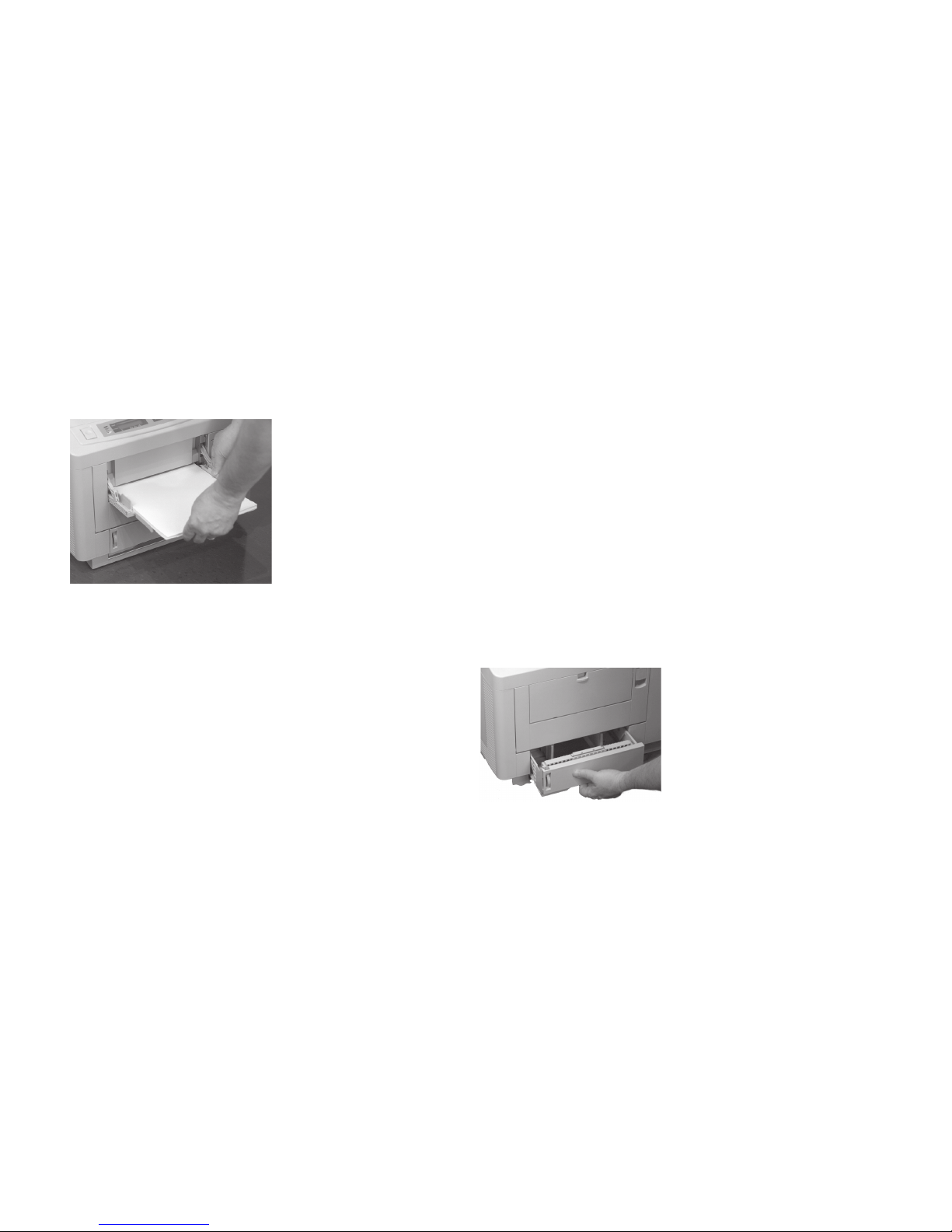
Loading Paper Trays
1 Pull the paper tray out of the printer.
Page 13
|
Handy Reference 13
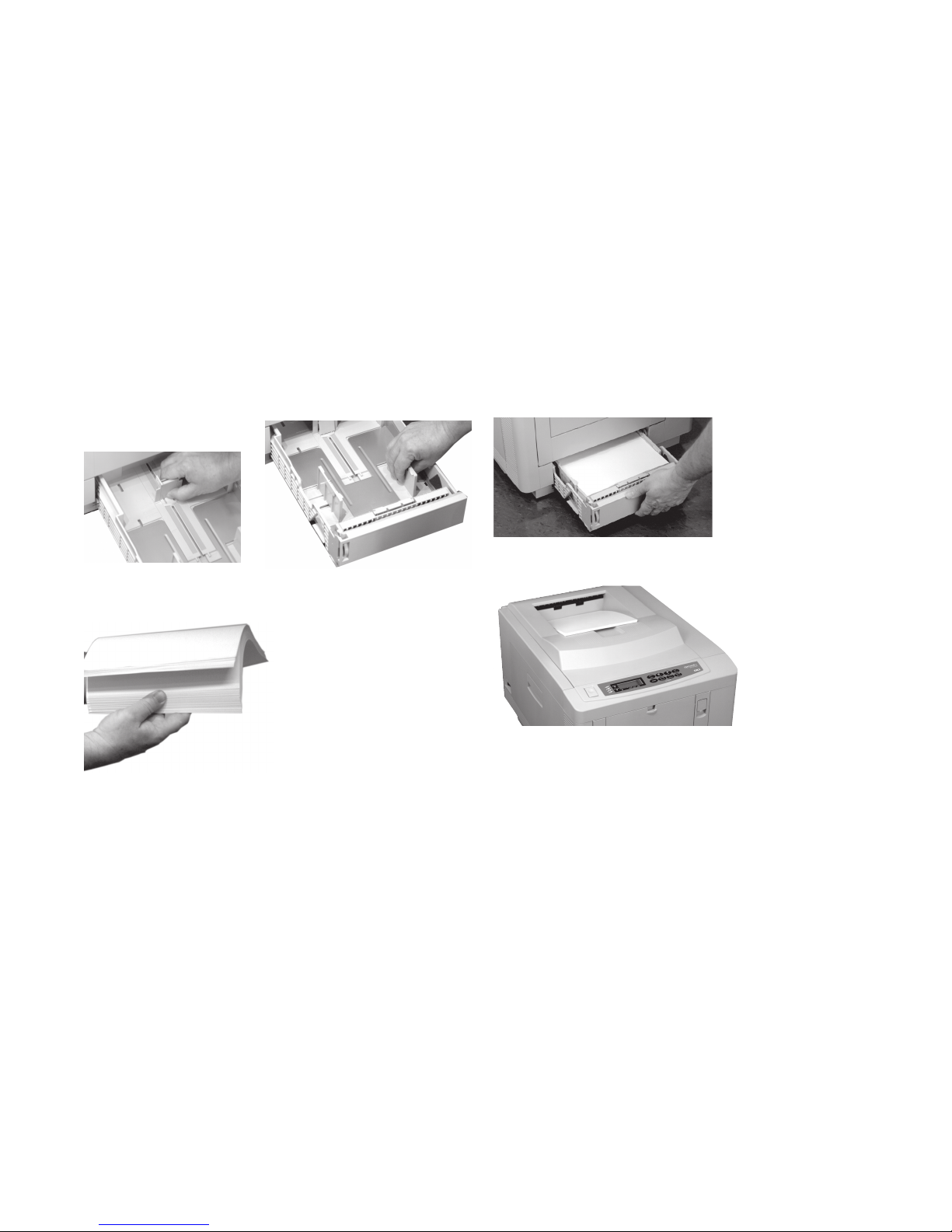
2 Adjust the paper guides for the size of the paper you will
be using.
3 Fan a ream of paper.
4 Place the paper in the tray and slide the tray back into the
printer.
Paper exits on top of printer.
The top exit is the one normally used. Sheets stack face
down. Maximum capacity is 250 sheets of 20-lb paper.
Page 14
14
OKICOLOR 8
|
Printing on Special Media
Important!
If you are printing transparencies, labels or card stock, you
must use the front tray and Special Media Stacker (rear
exit) to provide a straight-through path.
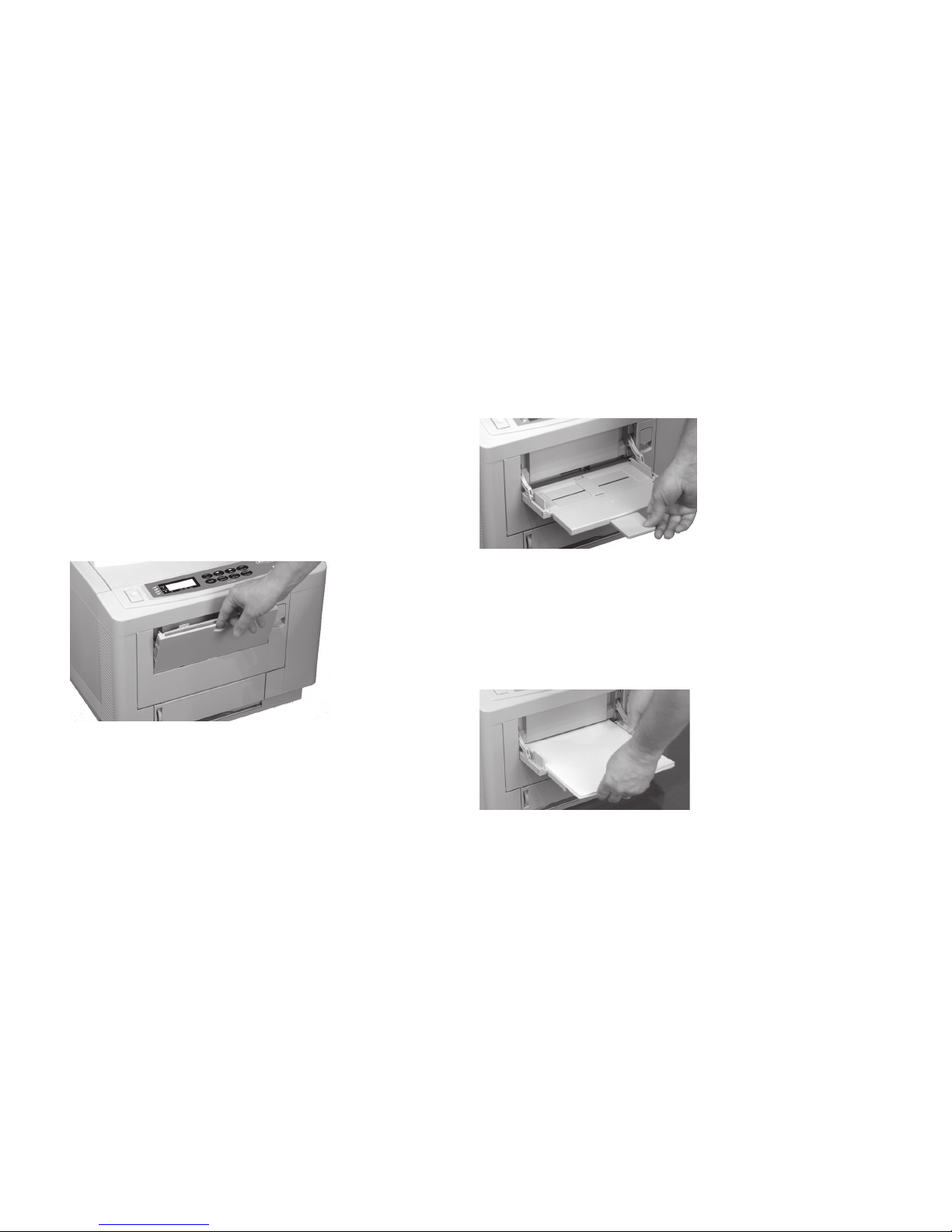
To set up the front tray:
1 Pull the front tray down.
2 Flip out the paper support, then swing out the paper
extender.
3 Adjust the paper guides for the print media you are using
and load the media.
• Load letterhead stationery face up, top edge feeding
into the printer
• Load transparencies with the strip face down, on the
edge feeding into the printer.
Page 15
|
Handy Reference 15
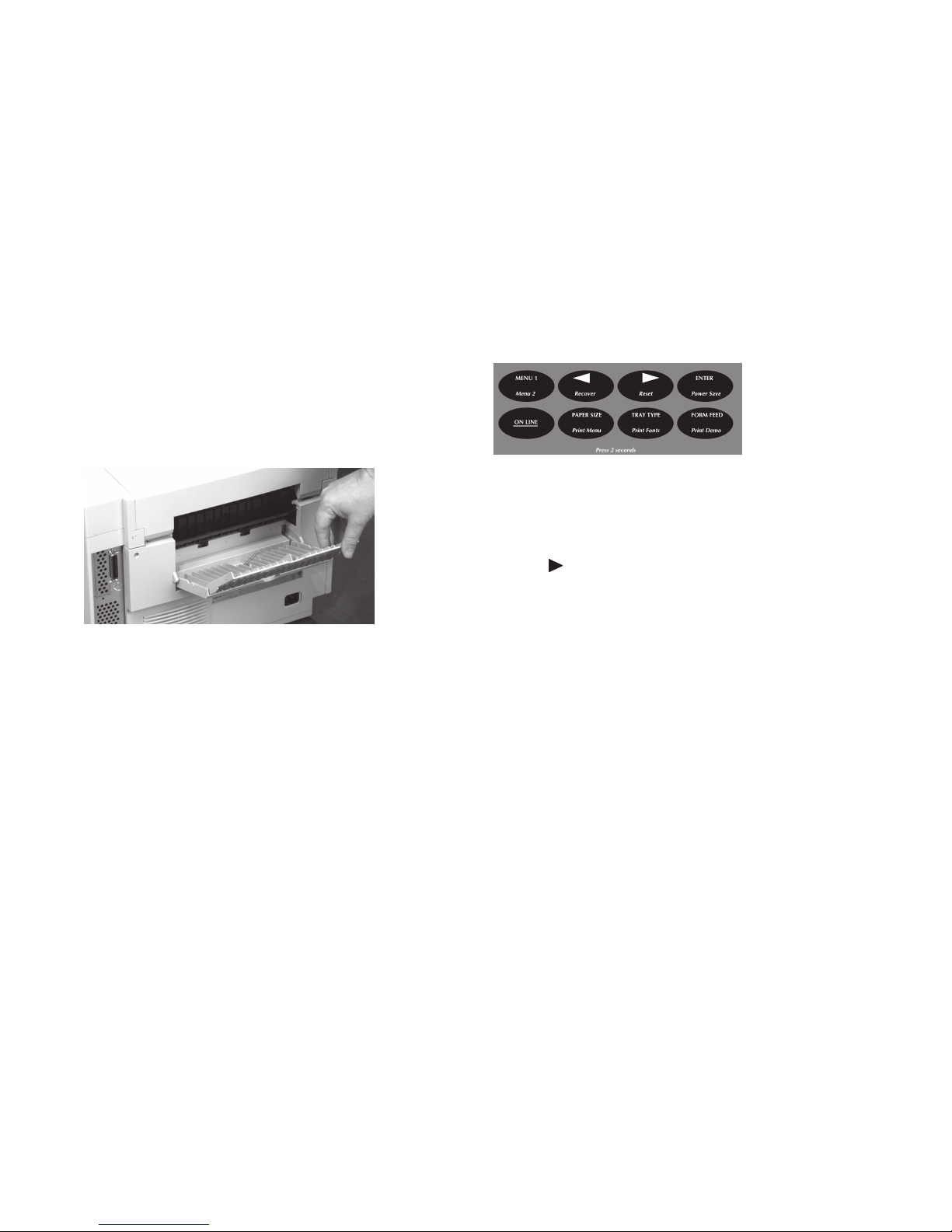
To setup the Special Media Stacker:
1 From the rear of the printer, pull the stacker down and
open the extender.
Media will feed to the rear, stacked face up.
Maximum capacity is 100 sheets of 20 lb paper.
Using the Front Tray
with Multiple Sheets
If you are going to use the front tray to feed a stack of print
media, you need to go into the menu and set the printer paper
input default to the front tray:
1 Press ON LINE.
Printer goes offline.
2 Press and release TRA Y TYPE.
3 Press ENTER.
4 Press © until FRONT TRAY appears on the display.
5 Press ENTER to select FRONT TRAY.
An asterisk appears to indicate the new default setting.
6 Press ON LINE to engage the setting and exit the menu.
!
When printing using the front tray, be sure to set your
software for front tray:
(1) Enter the printer setup menu on you computer.
(2) Select front tray or auto front feeder.
(3) Select the media type, size and orientation.
Page 16
16
OKICOLOR 8
|
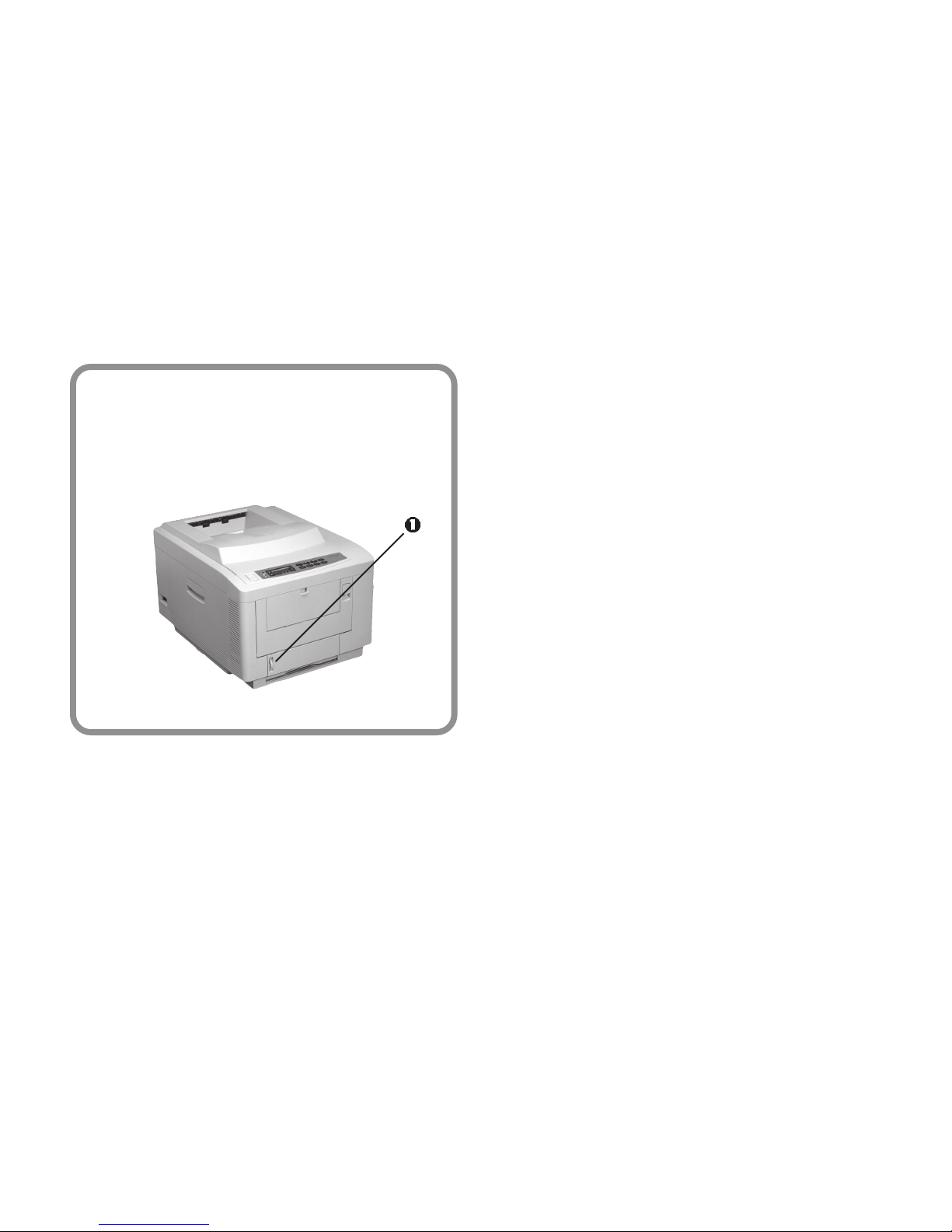
Paper Tray Gauge
The red paper tray gauge (1) on the front of the
printer indicates how much paper is left in the
tray. This way you don’t need to open the drawer
to check how much paper is left.
Page 17
Overview
|
Handy Reference 17
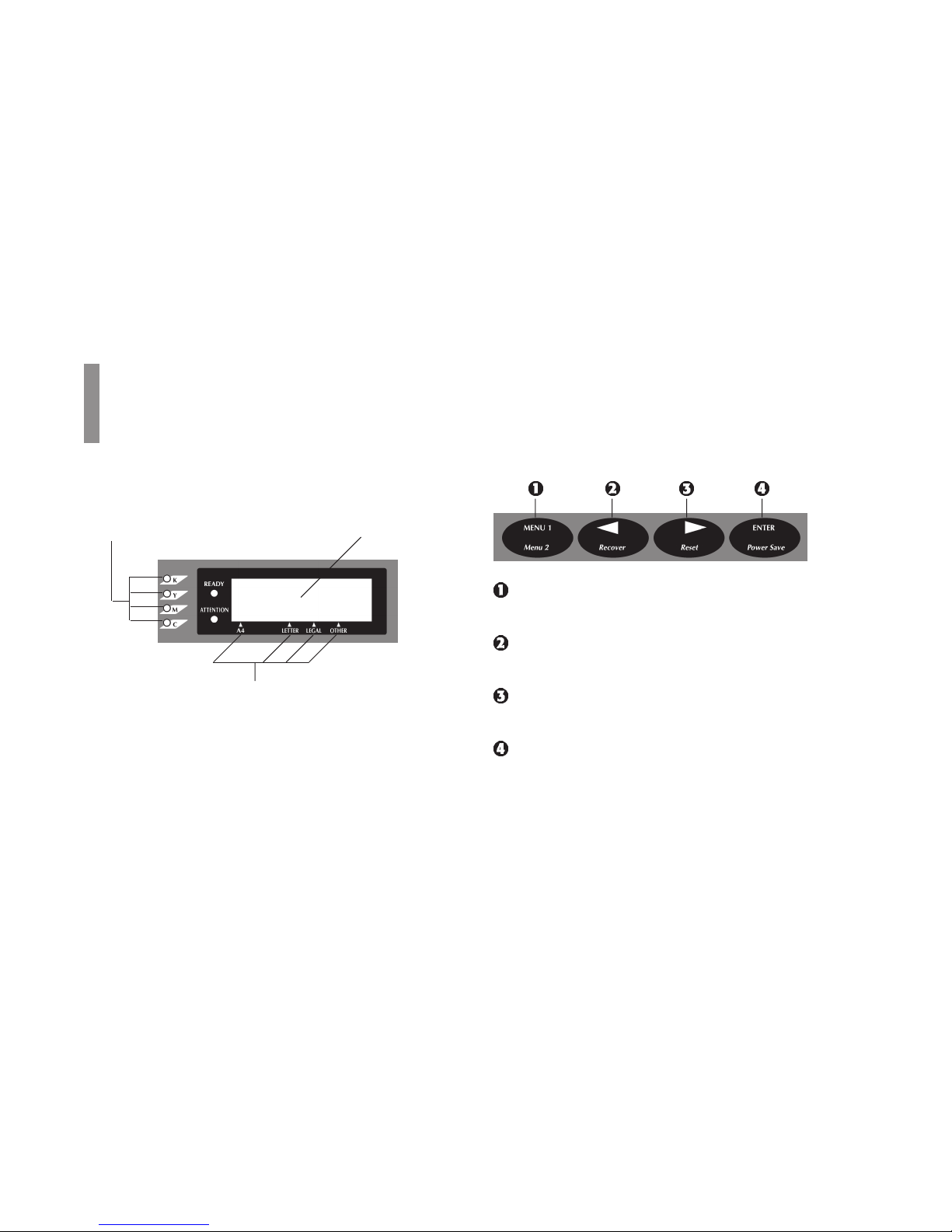
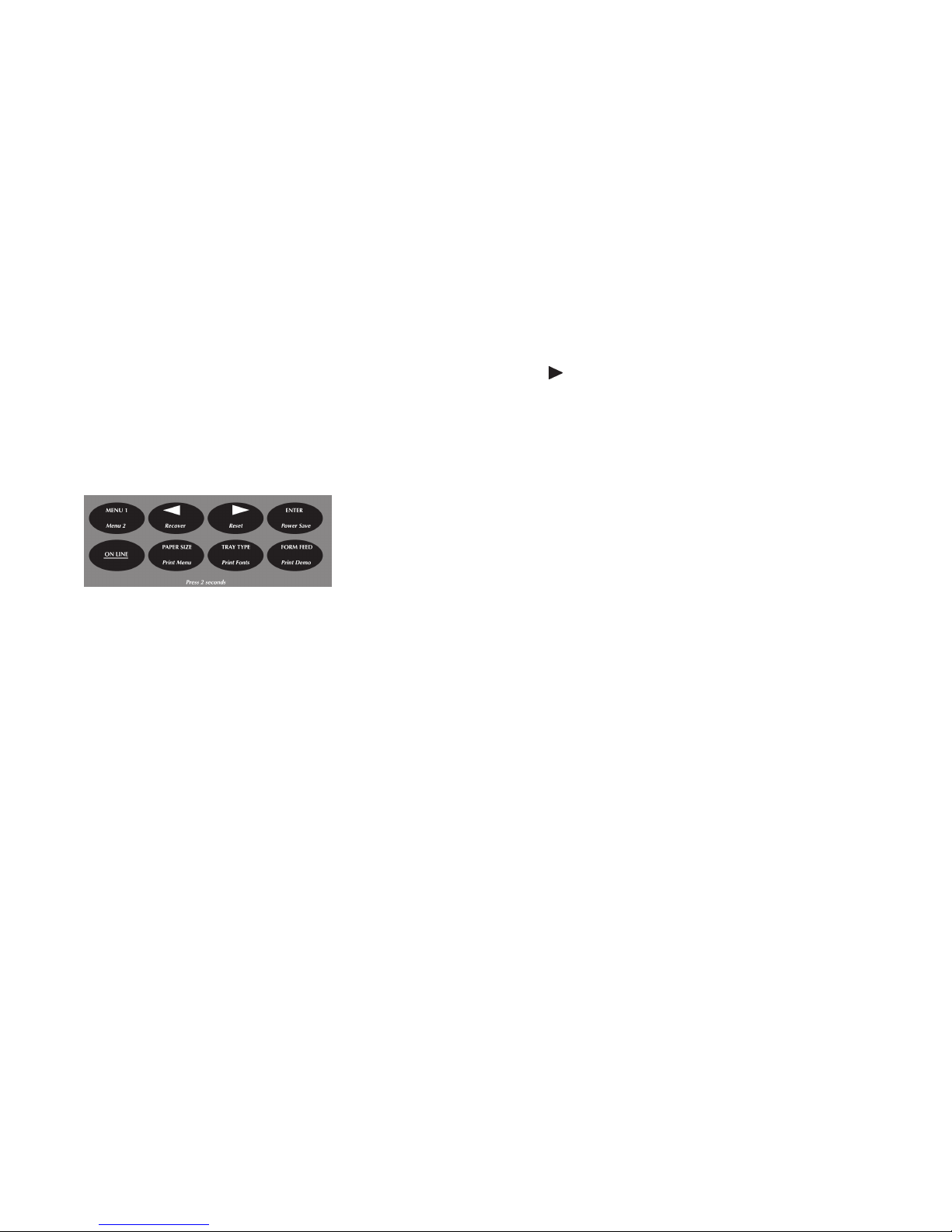
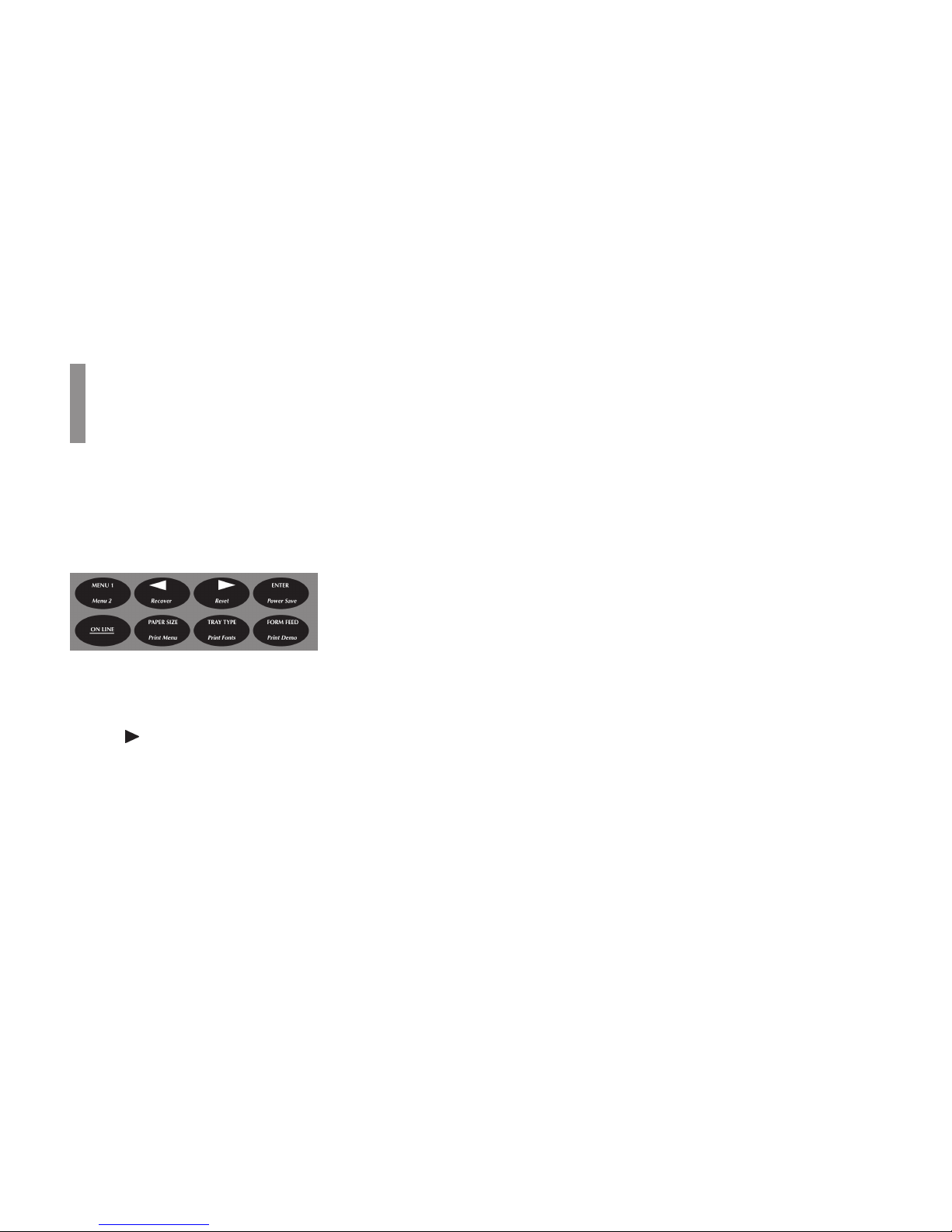
Press: Enters and scrolls through Level 1 menu.
Hold: Enters Level 2 menu.
Press: In Menu Mode returns to previous item.
Hold: Clears error condition and returns printer online.
Press: In Menu Mode advances to next item.
Hold: Deletes data in buffer and executes internal reset.
Press: In Menu Mode sets displayed menu item as the
user default.
Hold: Enters the Power Save Quick Menu
Left Side
Right Side
The control panel buttons are dual function: press and release
to engage the top function; press and hold for 2 to 3 seconds
to engage the bottom function.
Control Panel
Paper Size Indicators
Low Toner Indicators
LCD Display
Page 18
18
OKICOLOR 8
|
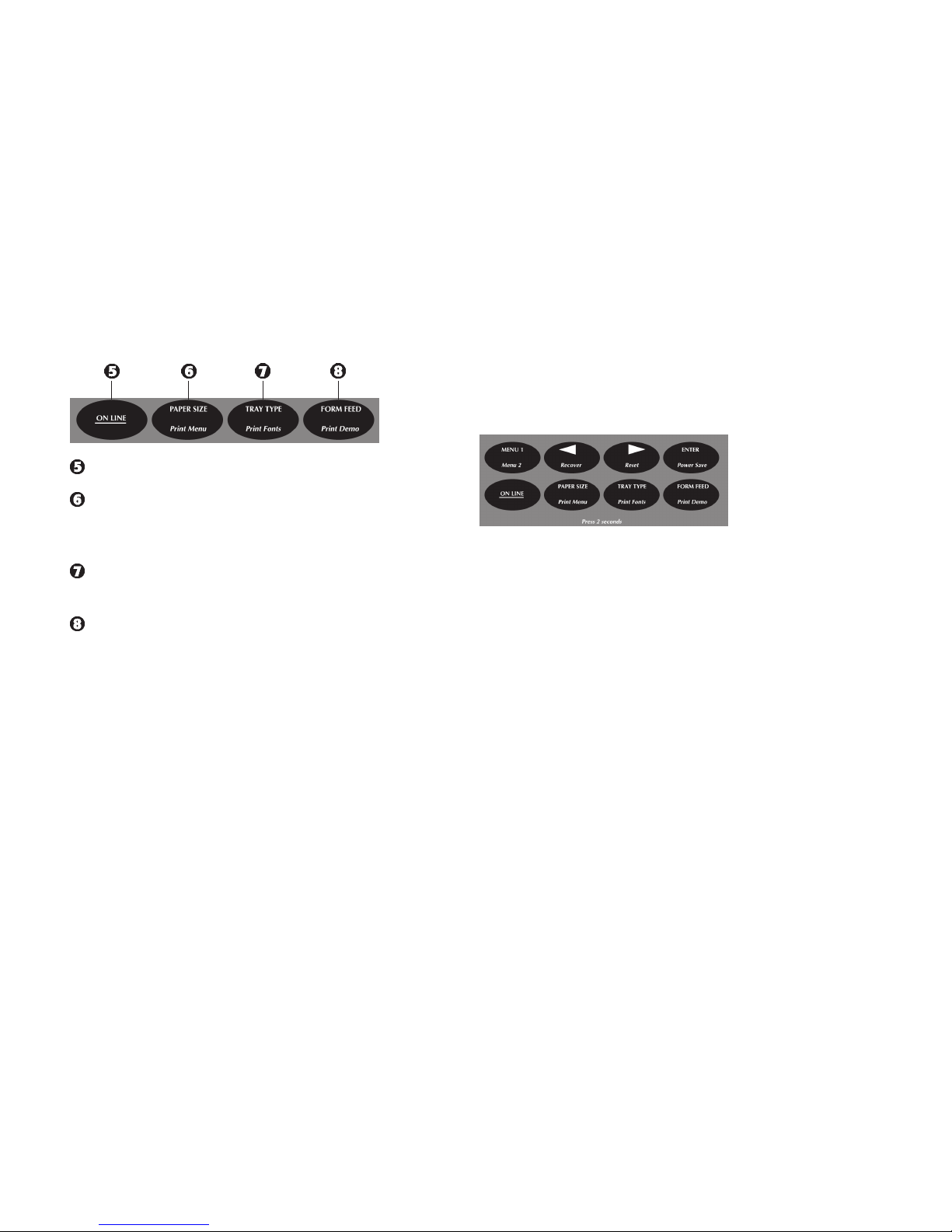
Press: Changes printer status from on line to off line.
Press: Enters the Paper Size Quick Menu.
Hold: Prints a listing of the current and default menu
settings.
Press: Enters the Tray Select Quick Menu.
Hold: Prints a sample of installed printer fonts.
Press: Ejects the current page.
Hold: Prints a Demo Page
Most printer features are selected directly in your software
application or in the status monitor software included with
your printer. You can also select features in the printer menus
using the control panel. However, software settings will
override control panel settings.
!
See the on-line OKICOLOR 8 User’s Guide for details
on the printer menus.
Printing the Menu Settings
To print a list of the menu items and their current settings:
1 Press ON LINE.
The printer goes off line.
2 Press and hold Print Menu until the display reads PRINT
MENU.
3 Press ENTER.
The menu settings page prints.
The printout shows the factory default settings, the current
settings, and the amount of memory installed in your printer.
Page 19
|
Handy Reference 19
Accessing the Quick Access Menus
The Paper Size, Tray Select, and Power Save menu features
can be accessed directly without having to step through each
menu category.
To use the Quick Access Menus:
1 Press ON LINE.
The printer goes off line.
2 To access the Paper Size menu,
press and release PAPER SIZE.
To access the Tray Select menu,
press and release TRA Y TYPE.
To access the Power Save menu,
press Power Save for two seconds.
3 Press © repeatedly until you see the selection you want.
4 Press ENTER to set the selection as the default.
An asterisk (*) appears to indicate the new default setting.
5 Press ON LINE to exit the menu and place the printer
back on line.
!
For information on Power Save, see “Setting Power
Saving Mode.”
Page 20

Overview
20
OKICOLOR 8
|
Printer Maintenance
• In the U.S. and Canada, call 1-800-OKI-DATA
(1-800-654-3282), and order your supplies directly from
Oki Data using a major credit card.
• In Latin America:
- consult our web site http://www.okidata.com
- call Oki Data de Mexico, S.A. de C. V., at
(525) 661-6860
- call Oki Data do Brasil, Ltda., at 55-11-5011-1518
for the nearest Authorized Sales and Service location.
Purchasing Supplies
Before you order, know your printer model number (see the
front of the printer) and have the correct part number and
description of the item.
Ways to Purchase
• Consult the dealer where you purchased your printer.
• Consult an Oki Data Authorized Sales or Service Dealer.
• Check office supply catalogs or your local stationery store.
Most carry OKI brand supplies.
• In the U.S. and Canada, call 1-800-OKI-DATA for the
nearest Authorized Sales and Service location. Have your
ZIP code ready.
• In the US only: shop online at http://www.okidata.com
Page 21

|
Handy Reference 21
Replacing a Toner Cartridge
Replace a toner cartridge when the TONER EMPTY message
displays. The corresponding color indicator will light.
!
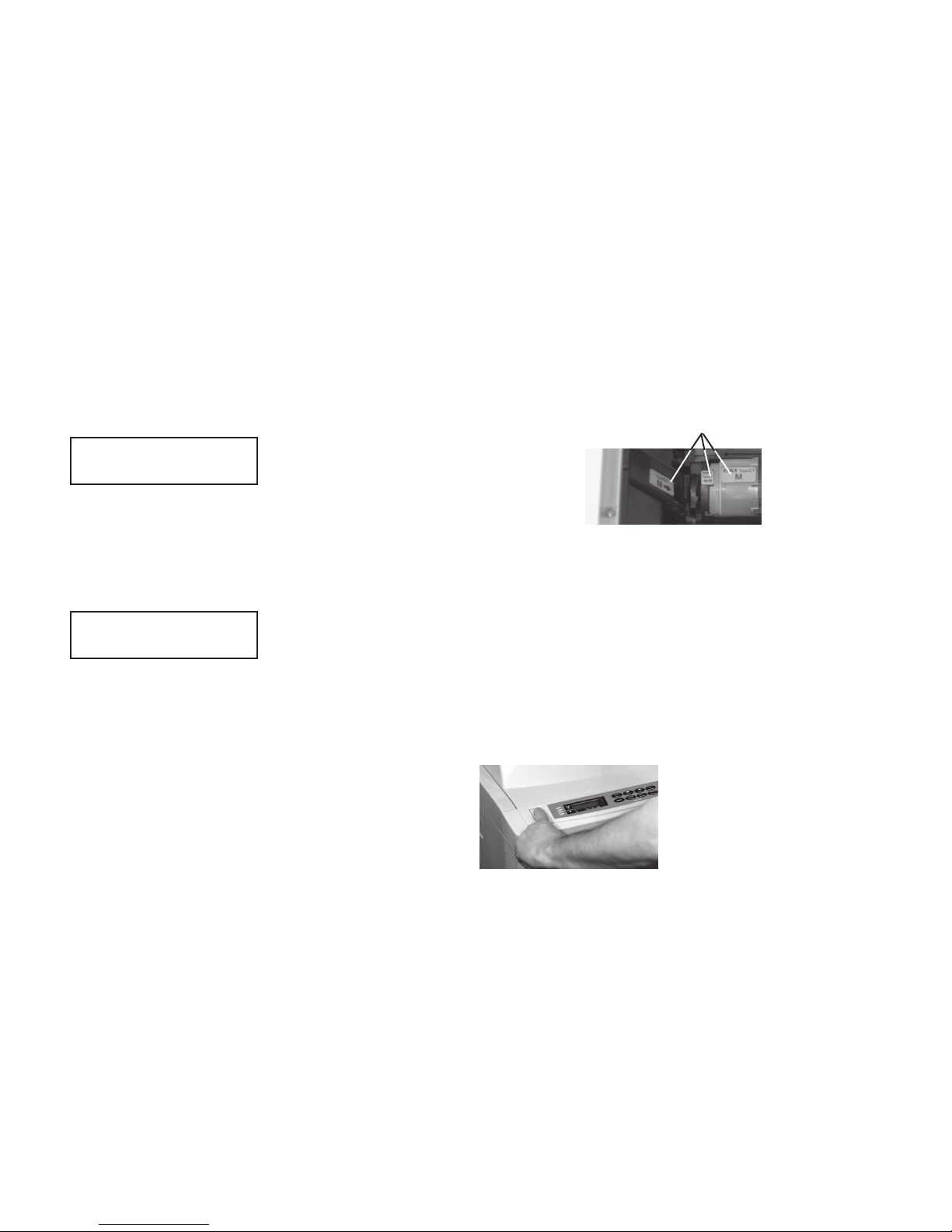
Be careful to install each color toner cartridge in the
corresponding color image drum.
To make this easy, each image drum, toner cartridge
and slot in the printer has a color-coded label marked
with the corresponding letter (C = cyan,
M = magenta, Y = yellow, K = black).
In addition, the end of each toner cartridge is keyed so that it
will only fit into the correct color image drum.
Supply Order Numbers
Part # Item
Toner Cartridges
41012301 Black Toner Cartridge Kit
41012302 Yellow Toner Cartridge Kit
41012303 Magenta Toner Cartridge Kit
41012304 Cyan Toner Cartridge Kit
Image Drums
40370201 Black Image Drum Kit
40370301 Yellow Image Drum Kit
40370302 Magenta Image Drum Kit
40370303 Cyan Image Drum Kit
Miscellaneous
40490801 Transfer Belt Kit
40490901 Fuser Kit 120V
40645301 Oil Roller Kit
40645401 T oner Waste Box
Cyan MagentaBlack Yellow
Page 22
22
OKICOLOR 8
|
Warning!
High temperature; allow at least 20 minutes for parts in this
area to cool before handling.
1 Turn the printer off and wait for the fuser to cool down.
Caution!
Extended exposure to light can temporarily damage the
image drums. Do not open the printer until you are ready
to install the toner cartridge.
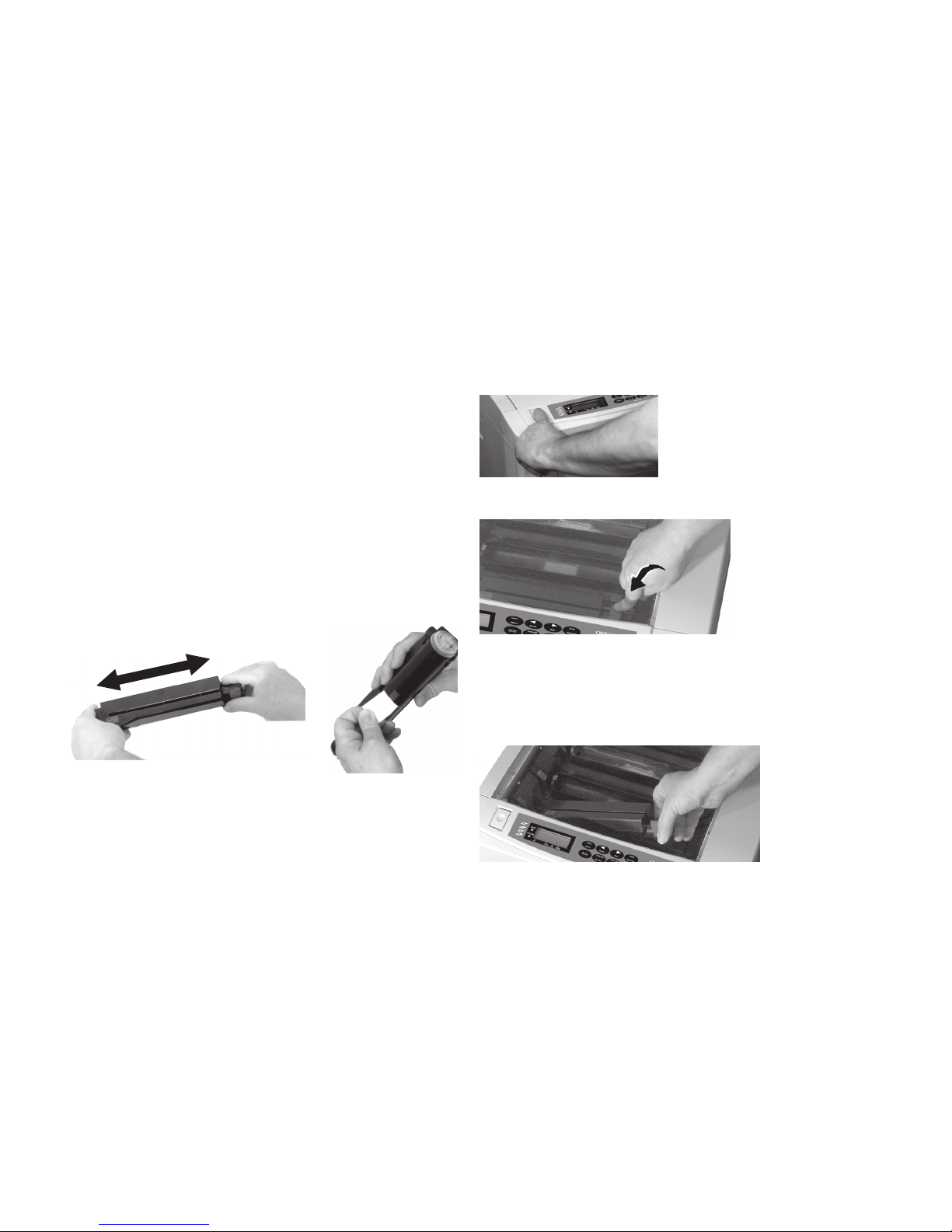
2 Remove the new toner cartridge from its packaging and
shake it back and forth a few times to distribute the toner
evenly, then peel the tape off the bottom of the cartridge.
3 Press the OPEN button and lift the cover.
4 Pull the appropriate lock lever forward.
5 Lift the right end of the empty toner cartridge up, and slide
the left end out to remove it from the printer. Dispose of it
according to local regulations.
Page 23
|
Handy Reference 23
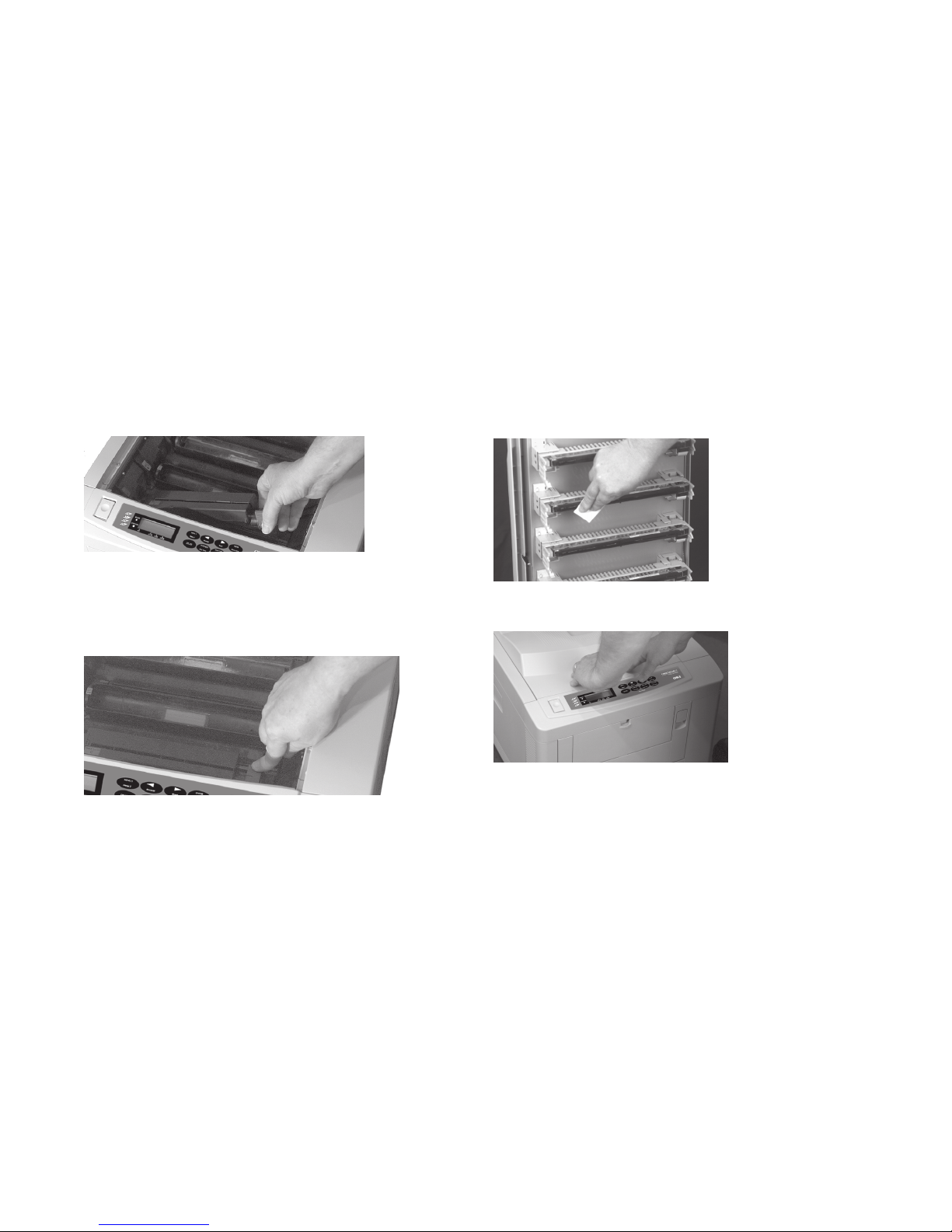
6 Insert the left end of the cartridge in the image drum,
placing the recess in the end of the cartridge under the
color-coded tab on the image drum.
7 Lower the right end of the toner cartridge, aligning the slot
on the cartridge with the ridge in the image drum and push
the blue lock lever toward the back of the printer until it
stops.
8 Clean the LED arrays: open the LED lens cleaner package
supplied with the toner cartridge and use it to clean the
LED arrays located on the underside of the cover.
9 Close the cover, pressing down to lock it in place.
Page 24
24
OKICOLOR 8
|
Replacing an Image Drum
When to Replace an Image Drum
CHG DRUM [color]
CHG DRUM displays and the corresponding color indicator
lights when the drum is near the end of its life, but still has
toner left. You can continue to use the drum until the toner
runs out. When this message appears, be sure you have a
replacement drum on hand.
CHANGE DRUM [color]
CHANGE DRUM displays and the corresponding color
indicator blinks when an image drum needs changing and the
toner is low. You can recover temporarily by opening and
closing the cover, but CHANGE DRUM will continue to
display after printing every 20 pages until a new drum is
installed.
How to Replace an Image Drum
Each image drum, toner cartridge, and slot in the printer has a
label marked with its corresponding color.
Caution!
Extended exposure to light can temporarily damage the
image drums. Do not open the printer until you are ready to
install the toner cartridge.
1 Turn the printer off and wait for the fuser to cool down.
Warning!
High temperature; allow at least 20 minutes for parts in
this area to cool before handling.
2 Press the OPEN button and lift the cover.
Page 25
|
Handy Reference 25
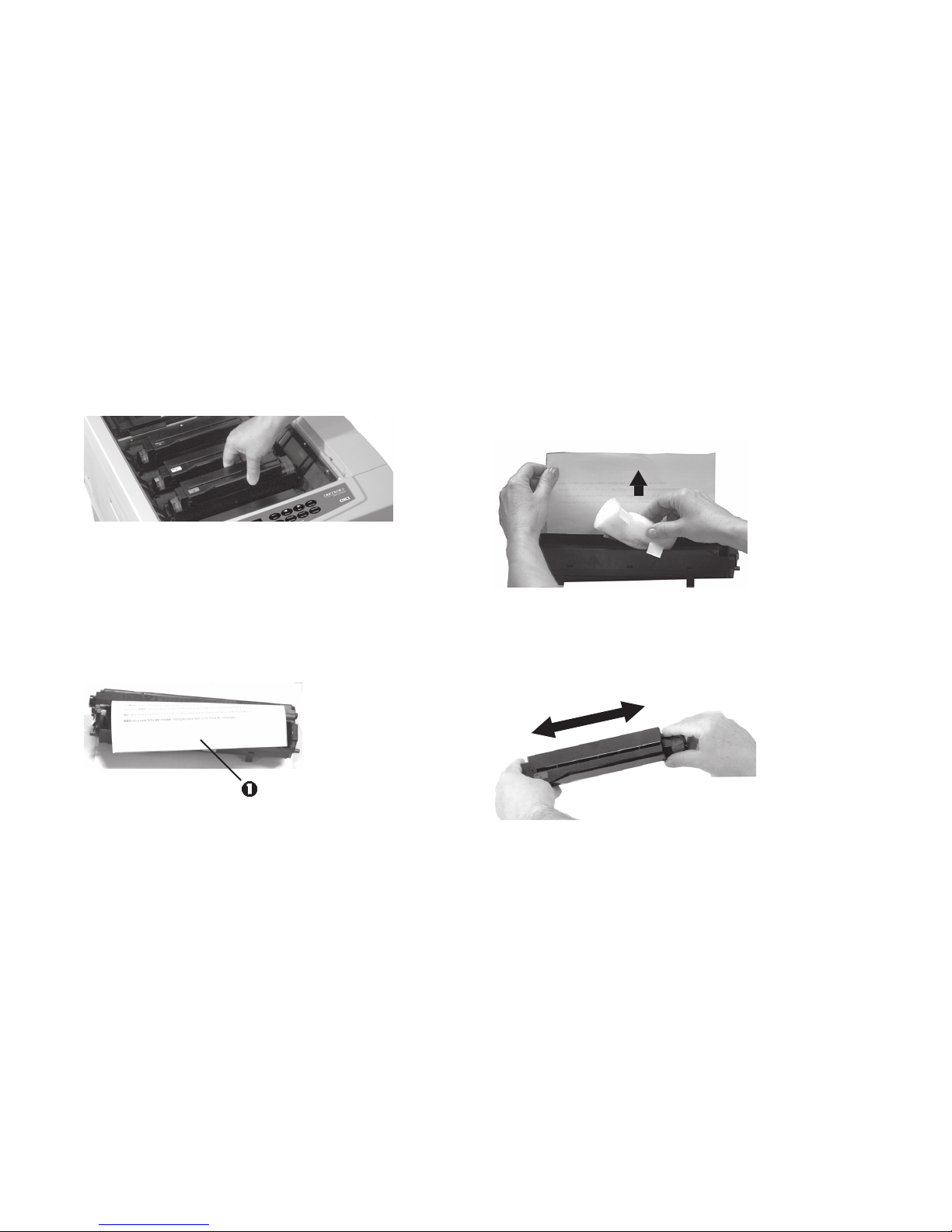
3 Lift the image drum, with toner installed, out of the
printer. Discard both in accordance with local regulations.
4 Close the printer cover.
Caution!
To avoid damage to the drum, do not touch the shiny
green surface.
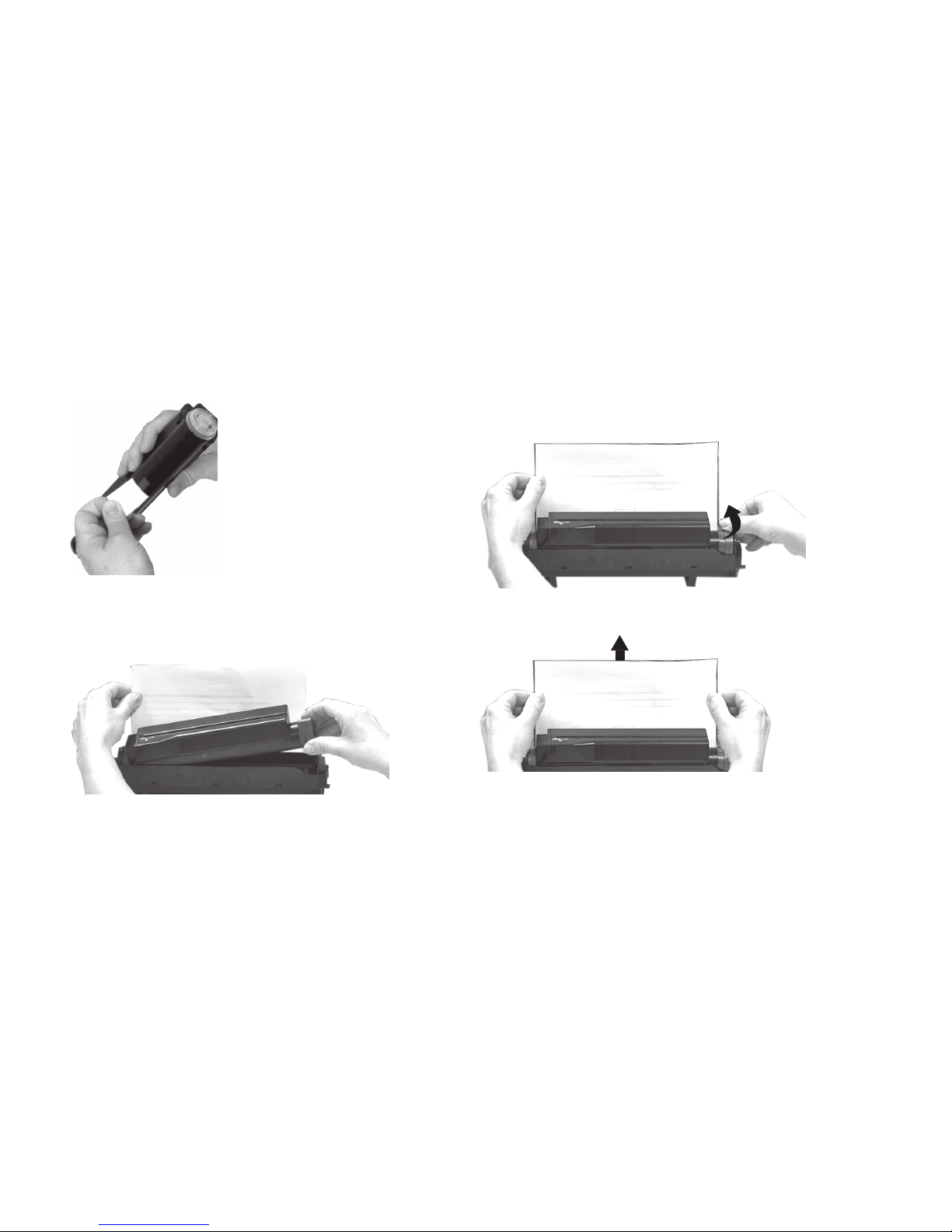
5 Unwrap the new image drum, but leave the protective
paper (1) in place.
6 Loosen all the tape holding the foam shipping insert, then
carefully remove the insert (there is toner on the bottom of
the insert—be careful not to spill it!).
7 Remove the new toner cartridge from the packaging and
shake it from side to side a few times to distribute the
toner evenly.
Page 26
26
OKICOLOR 8
|
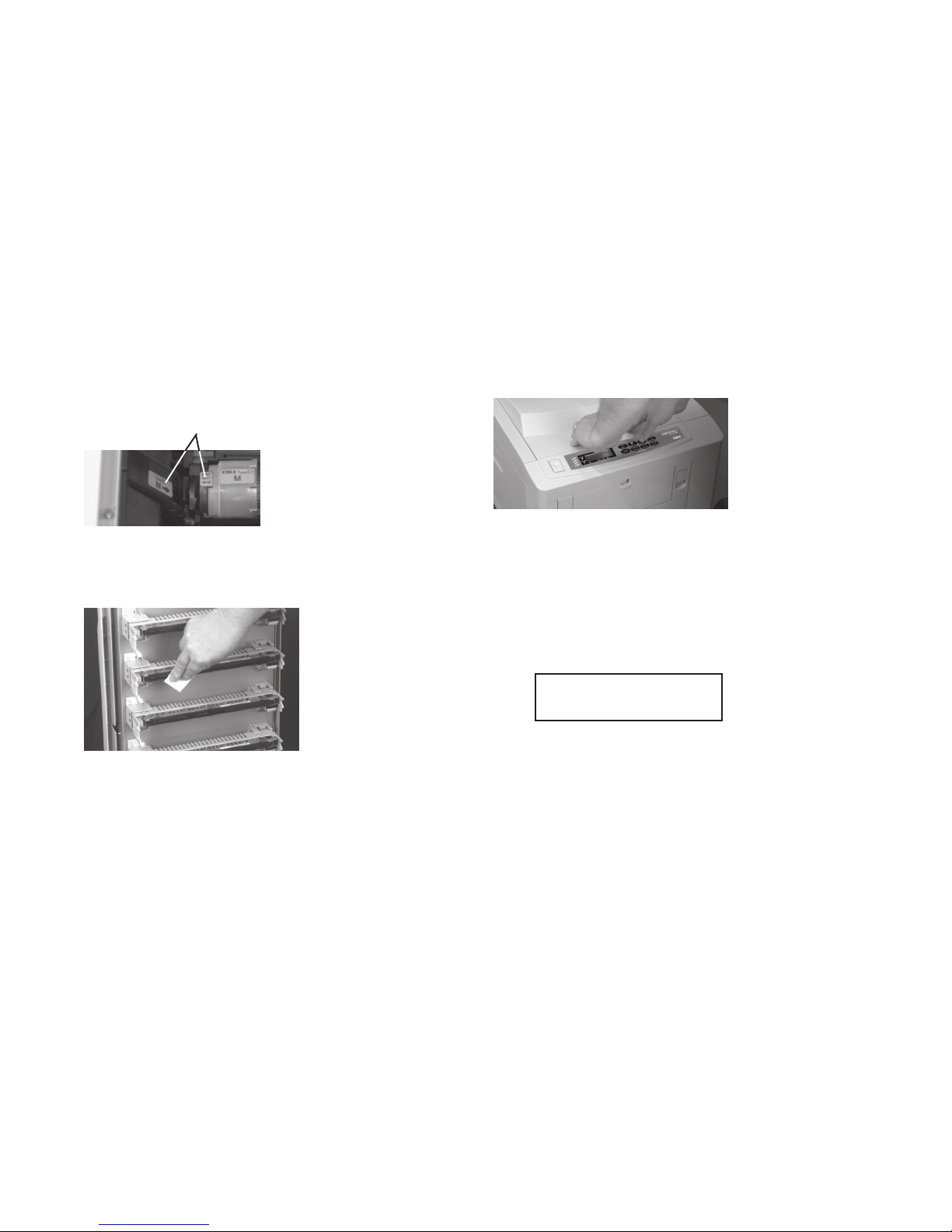
8 Peel the tape off the bottom of the cartridge.
9 Insert the left end of the toner cartridge into the toner well,
placing the recess in the end of the cartridge under the tab
on the image drum.
10 Lower the right side of the cartridge, aligning the slot
with the ridge in the image drum, then push the colored
lock lever back until it stops.
11 Remove the protective paper from the image drum.
Page 27
|
Handy Reference 27
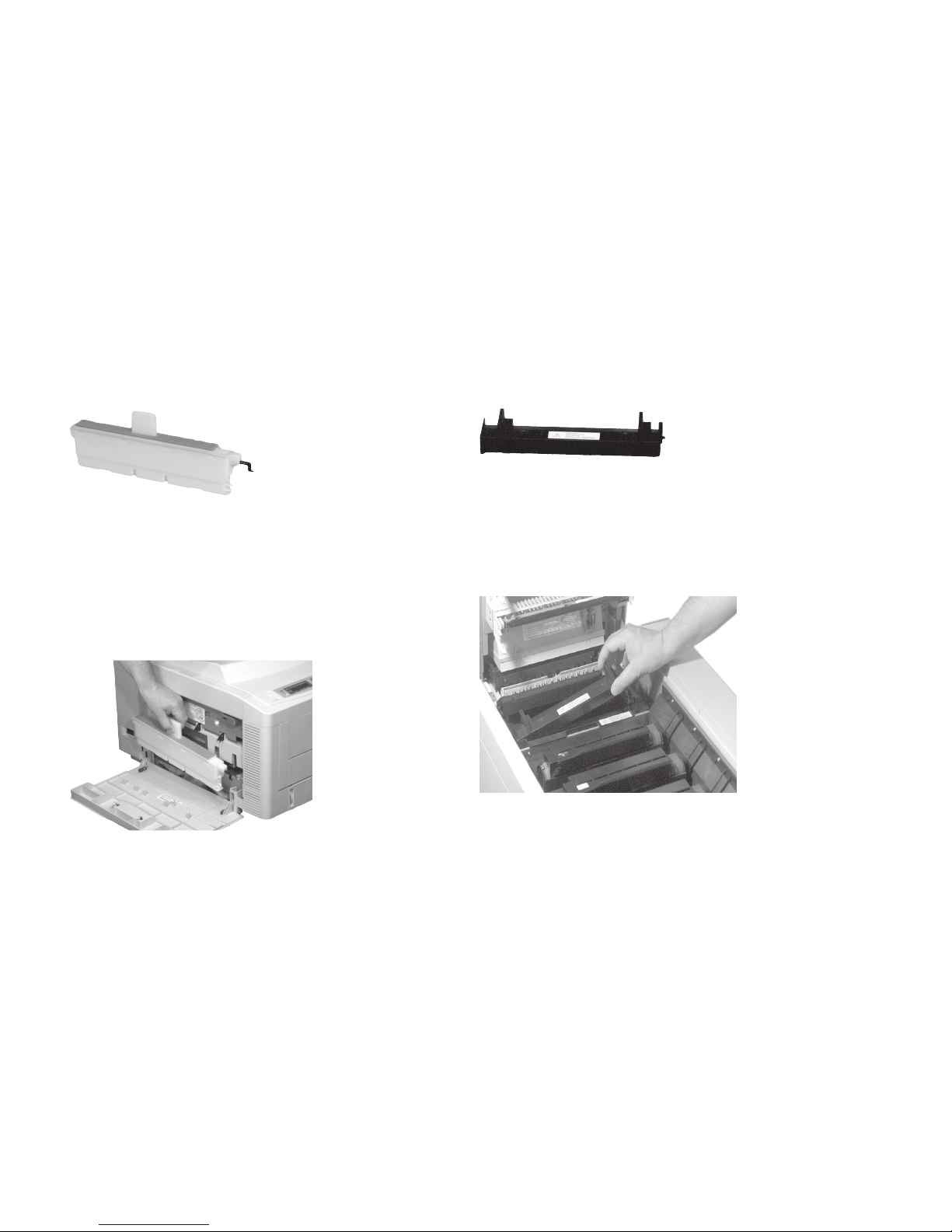
12 Open the printer cover and insert the new image drum
cartridge, matching the color-coded labels on the image
drum and in the printer.
13 Open the LED Lens Cleaner supplied with the toner
cartridge and use it to clean the LED arrays located on the
underside of the cover.
14 Close the printer cover, pressing down to lock it in place.
15 Reset the Drum Counter:
a Press ON LINE, then press and hold Menu 2 until
COLOR REG ADJUST appears on the display.
b Press Menu 2 repeatedly until ENGINE CNT RESET
appears.
c Press ENTER.
The message
CYAN DRMCNT
RESET
appears.
d If necessary, press Menu 2 repeatedly until the message
corresponding to the drum you are replacing appears.
e Press ENTER.
RESETTING briefly appears on the display.
f Press ON LINE.
Page 28
28
OKICOLOR 8
|
Replacing the Waste Toner Box
To avoid color mixture, the remaining toner formed on the
drum is placed in a waste toner box. When you see the
message WASTE TNR NR FULL on the display, you need to
replace the waste toner box.
Purchase Kit # 40645401. Replacement instructions are
included in the kit and in the on-line OKICOLOR 8 User’s
Guide.
Replacing the Oil Roller
When OIL ROLLER LIFE appears on the display, you need to
change the oil roller.
Purchase Kit # 40645301. Replacement instructions are
included in the kit and in the on-line OKICOLOR 8 User’s
Guide.
Page 29
|
Handy Reference 29
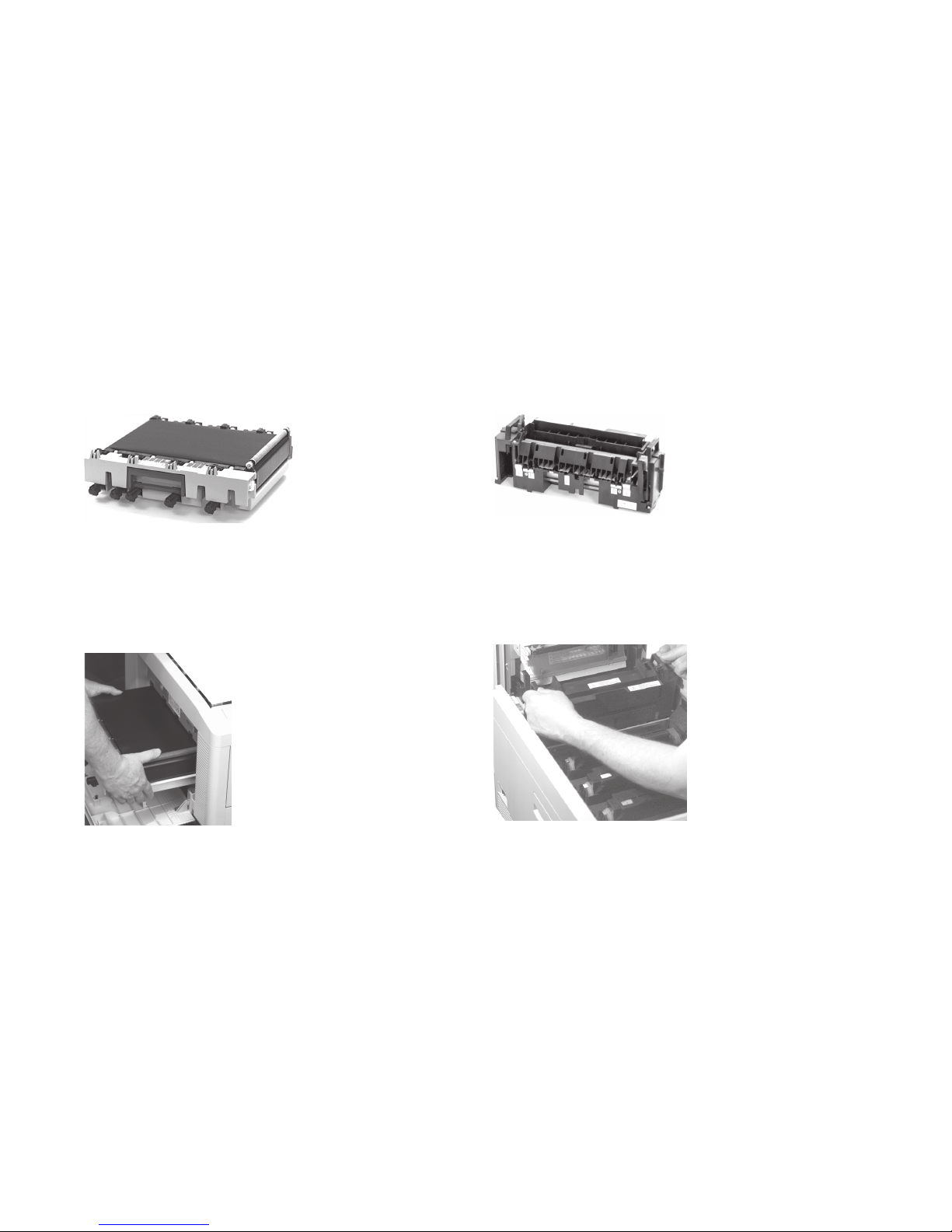
Replacing the Transfer Belt
When you see the message BELT LIFE on the printer display,
you need to change the transfer belt.
Purchase Kit # 40490801. Replacement instructions are
included in the kit and in the on-line OKICOLOR 8 User’s
Guide.
Replacing the Fuser
When you see the message FUSER LIFE on the printer
display, you need to change the fuser.
Purchase Kit # 40490901 (120V). Replacement instructions
are included in the kit and in the on-line OKICOLOR 8 User’s
Guide.
Page 30
30
OKICOLOR 8
|
Setting the Color Registration for
Windows 95 / 98 / NT 4.0
Since each color is printed separately, you must set the color
registration to ensure that the colors line up properly. If the
colors are out of alignment, the printed page will appear
blurry and unclear.
To ensure optimum print quality, you should set the color
registration on a routine basis (once a month or so).
It is also recommended that you set the color registration
when you change toner or image drums, when you load paper
in the paper tray, or if you move the printer.
To set the color registration:
1 Open the Color Registration Utility: click Start
®
Programs ® OKICOLOR 8 ® OKICOLOR 8 Color
Registration Utility.
2 Make sure OKICOLOR 8 on LPT1: (or OKICOLOR 8
PS on LPT1:) is highlighted in the box (if you are using a
port other than LPT1:, make sure that port is highlighted).
3 From the list, select the tray you want to calibrate.
4 Click Print Color Calibration page.
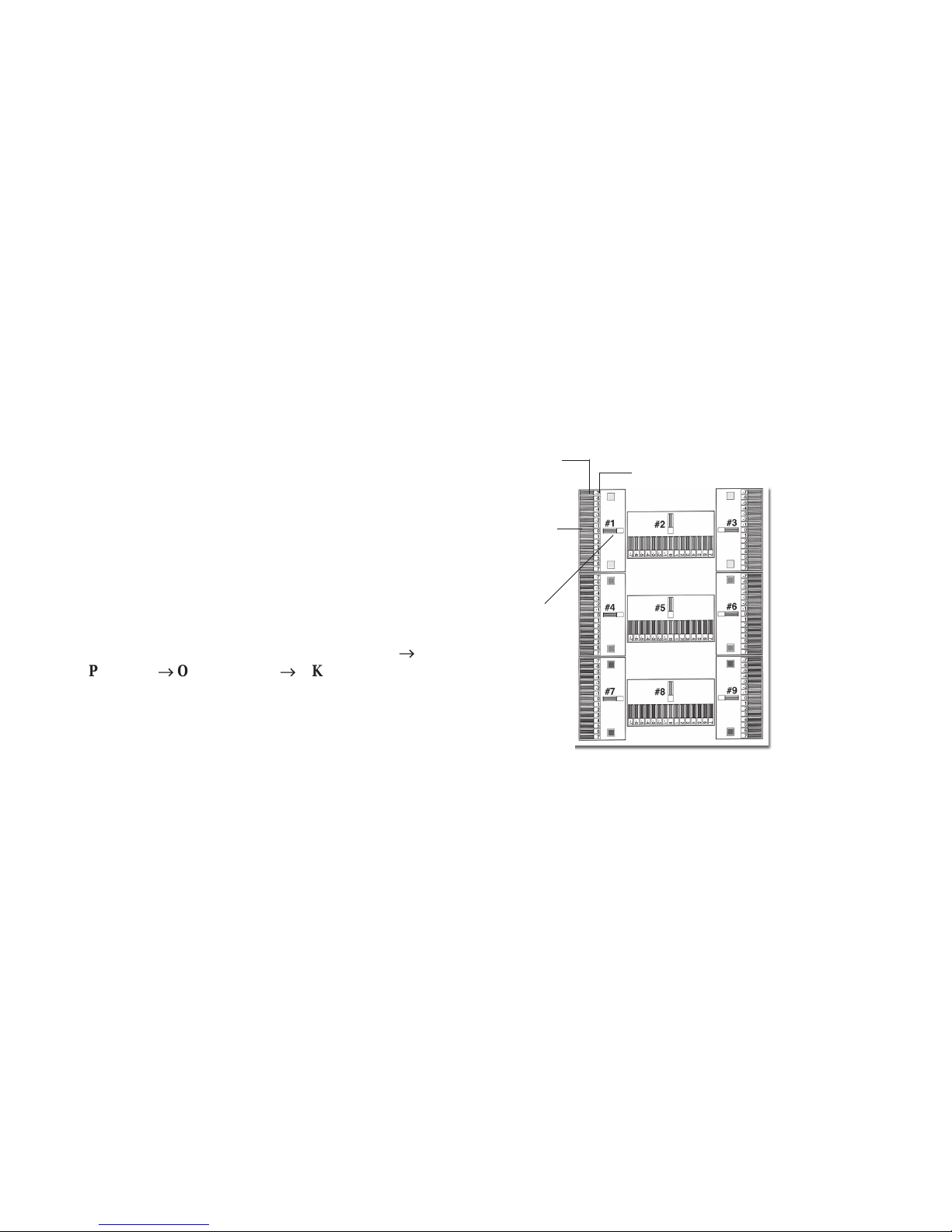
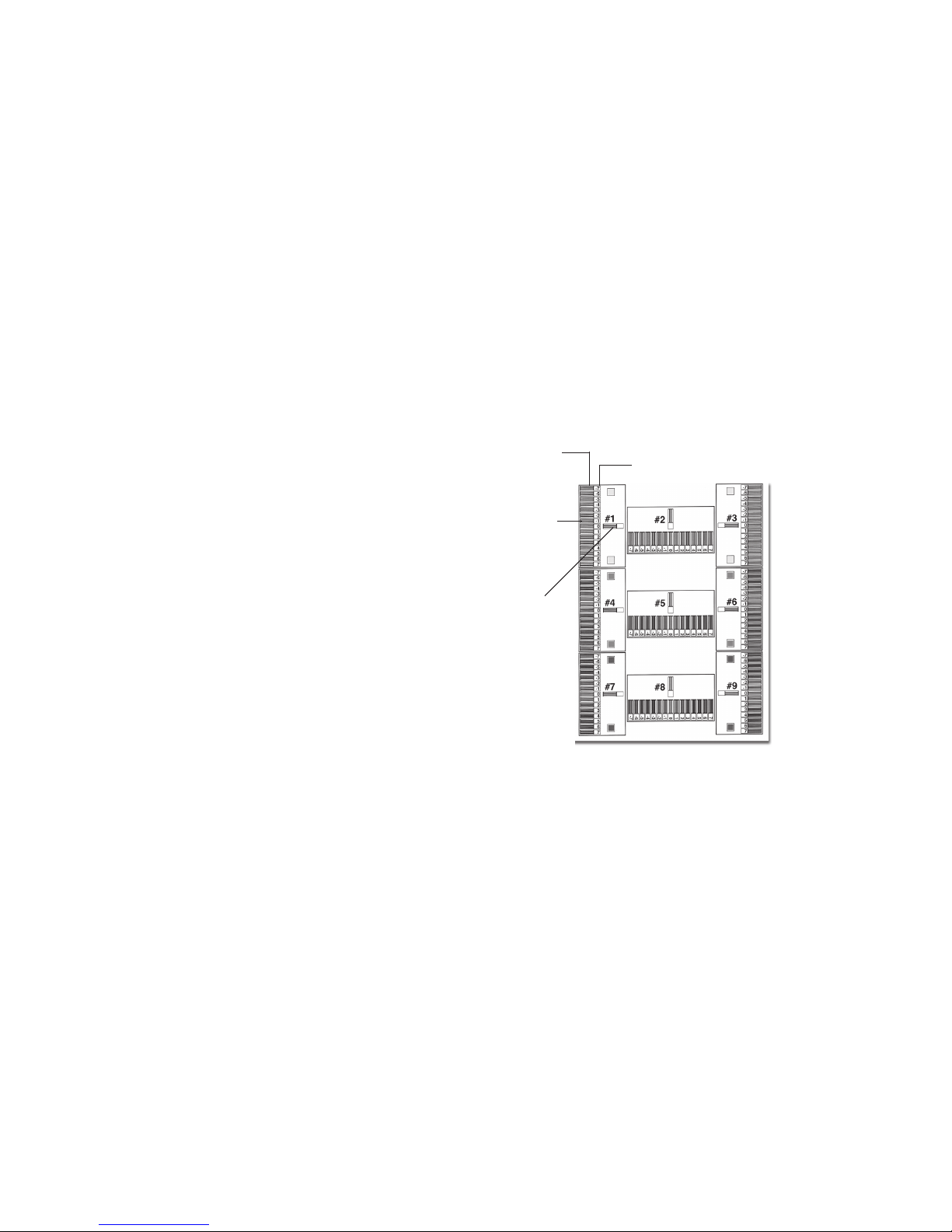
The printer prints a color test page with 9 sections, each
with a series of lined boxes in it.
Section #1
List Box
Lined Boxes
Lined Box Numbers
Page 31
|
Handy Reference 31
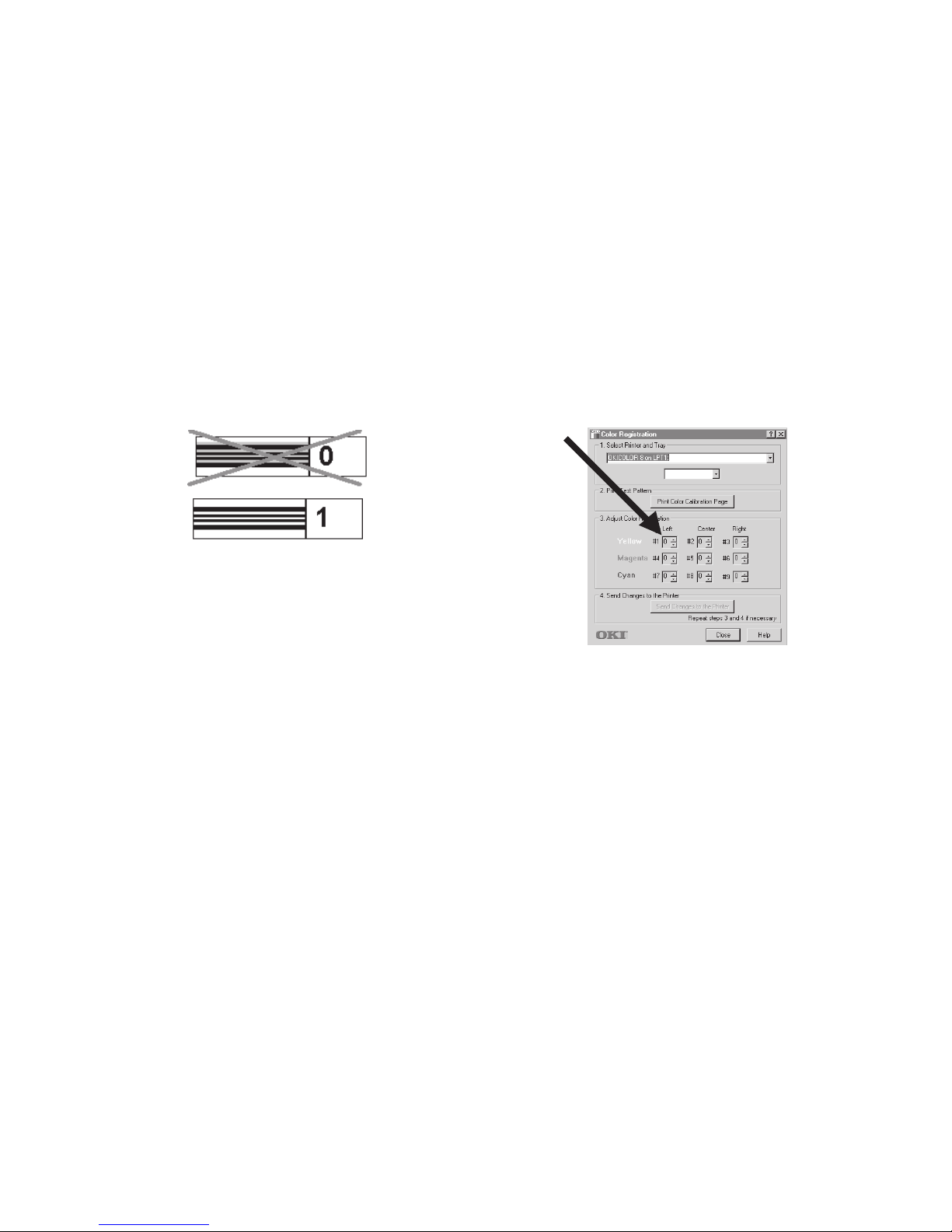
5 Beginning with section #1, find the lined box where no
color shows in the spaces between the black lines and note
its corresponding number.
!
If more than one box has no color, select the one closest
to zero. If all the boxes have color, select the lightest
one, nearest zero.
6 On the screen, find the corresponding list box (in this case,
#1—yellow, left) and scroll to the number you noted.
7 Repeat steps 5 and 6 for the remaining eight sections.
8 Click Send changes to the printer.
The printer prints another color test page. This time, the
box where no color shows should be box +1, 0, or -1 for
each section. If it isn’t, repeat steps 4 through 7 until it
does.
9 Click Close.
Page 32
32
OKICOLOR 8
|
Setting the Color Registration for
Windows 3.1x
Since each color is printed separately, you must set the color
registration to ensure that the colors line up properly. If the
colors are out of alignment, the printed page will appear
blurry and unclear.
To ensure optimum print quality, you should set the color
registration on a routine basis (once a month or so).
It is also recommended that you set the color registration
when you change toner or image drums, when you load paper
in the paper tray, or if you move the printer.
When you perform the color registration below, it will apply
only to the path you currently have selected.
To set the color registration:
1 Make sure the printer is off line (press ON LINE to place
the printer off line).
2 Press and hold Menu 2 until COLOR REG ADJUST
appears on the display.
3 Press ENTER.
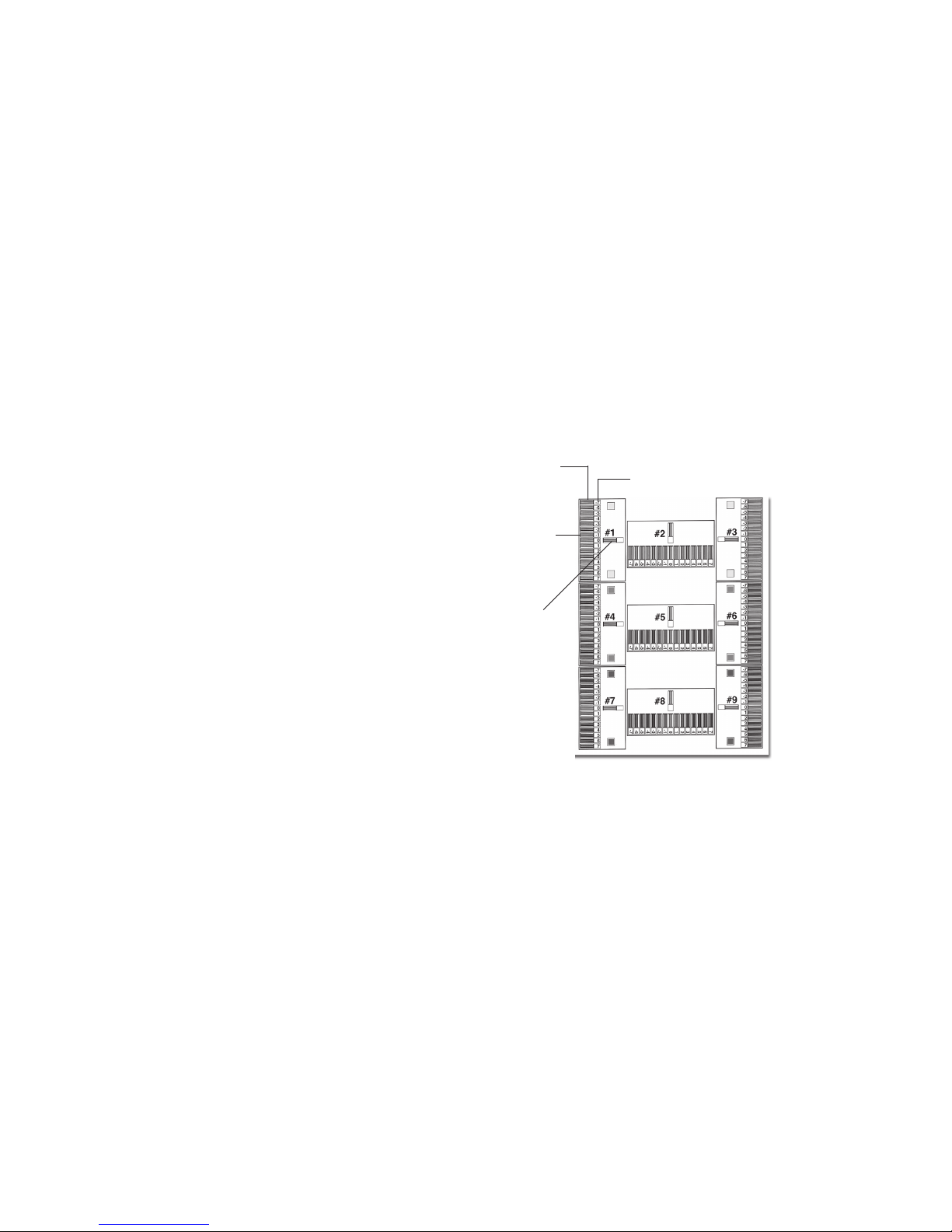
PRINT PATTERN displays. The printer prints a color test
page with 9 sections, each with a series of lined boxes in
it.
Section #1
List Box
Lined Boxes
Lined Box Numbers
Page 33

|
Handy Reference 33
4 Beginning with section #1, find the lined box where no
color shows in the spaces between the black lines and note
its corresponding number.
!
If more than one box has no color, select the one closest
to zero. If all the boxes have color, select the lightest
one, nearest zero.
5 The display reads ADJUST #1, with the number 0 on the
second line. Press © to increase the number or § to
decrease it, until the second line reads the number of the
correct box for section #1.
6 Press Menu 2 to move to section #2 (display: ADJUST
#2), and repeat the process to select the box which shows
no color in the spaces between the black lines.
7 Repeat steps 5 and 6 for each of the remaining seven
sections. If you need to go back, hold Menu 2 down to
move backwards through the menu.
8 When you are satisfied with your selections, press
Menu 2 repeatedly until PRINT EXECUTE appears on the
display.
9 Press ENTER.
The printer prints another color test page. This time, the
box where no color shows should correspond to box +1,
0, or -1 for each section. If it doesn’t, press
Menu 2 and repeat steps 4 through 9 until it does.
10 Press ON LINE to save the settings and exit the menu.
Page 34
34
OKICOLOR 8
|
Setting Color Registration for the
Macintosh
Since each color is printed separately, you must set the color
registration to ensure that the colors line up properly. If the
colors are out of alignment, the printed page will appear
blurry and unclear.
To ensure optimum print quality, you should set the color
registration on a routine basis (once a month or so).
It is also recommended that you set the color registration
when you change toner or image drums, when you load paper
in the paper tray, or if you move the printer.
To set the color registration:
1 Open the Color Registration Utility: In the OKICOLOR
8 directory, double-click OKICOLOR 8 Color
Registration Utility, then double-click OKICOLOR 8
Col Reg.
2 From the list, select the tray you want to calibrate.
3 Click Print Color Calibration page.
The printer prints a color test page with 9 sections, each
with a series of lined boxes in it.
Section #1
List Box
Lined Boxes
Lined Box Numbers
Page 35
|
Handy Reference 35
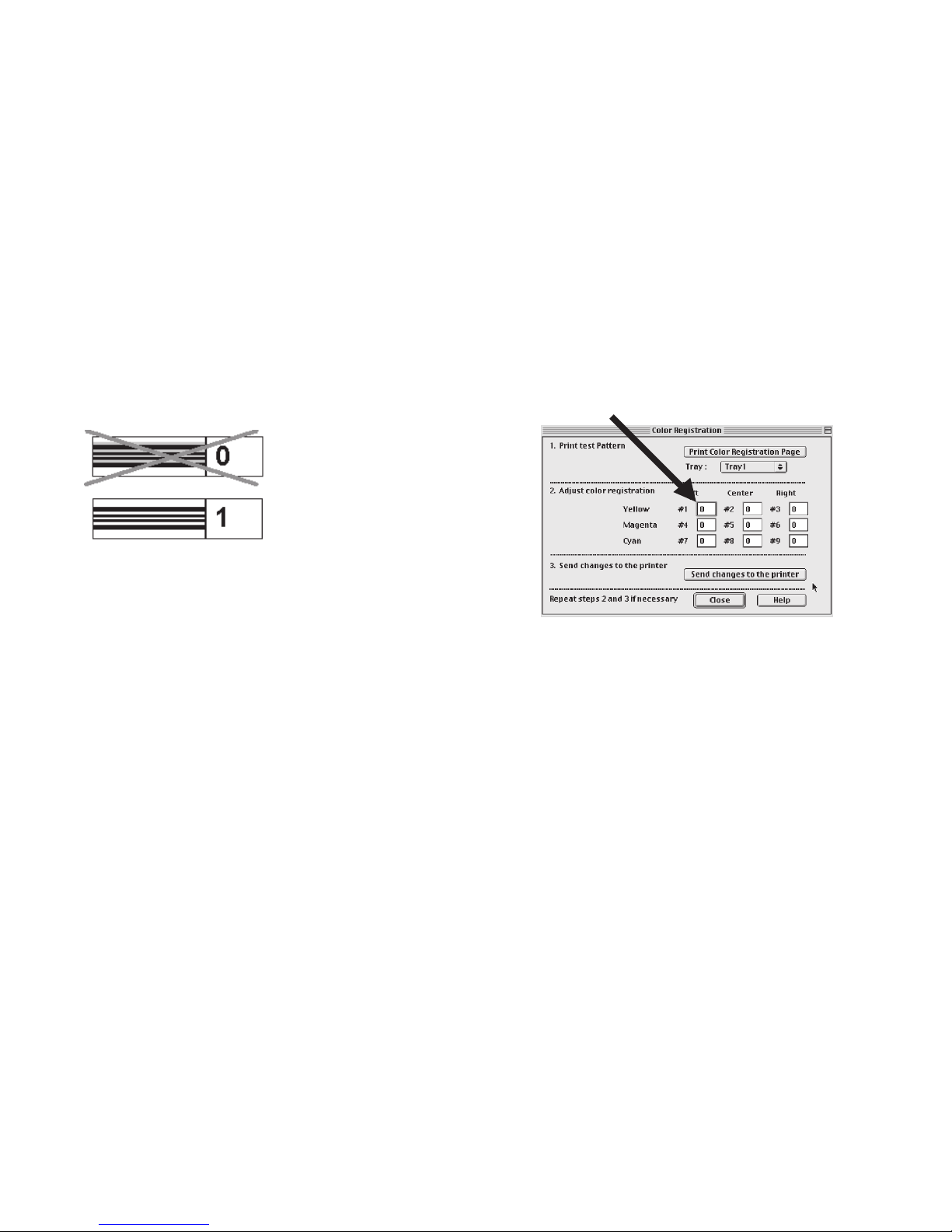
4 Beginning with section #1, find the lined box where no
color shows in the spaces between the black lines and note
its corresponding number.
!
If more than one box has no color, select the one closest
to zero. If all the boxes have color, select the lightest
one, nearest zero.
5 On the screen, find the corresponding list box (in this case,
#1—yellow, left) and enter the number you noted.
6 Repeat steps 4 and 5 for the remaining eight sections.
7 Click Send changes to the printer.
The printer prints another color test page. This time, the
box where no color shows should correspond to box +1, 0,
or -1 for each section. If it doesn’t, repeat steps 3 through
6 until it does.
8 Click Close.
Page 36
36
OKICOLOR 8
|
Setting the Color Balance
Important!
Be sure to check your printer’s color registration before you
use the color balance utility. See “Setting the Color
Registration” for details.
The Color Balance Utility program, which is normally loaded
when you install your printer software, replaces the color
balance item built into the printer’s control panel menu. Use
this program to make sure that the three primary colors your
printer uses—cyan, magenta, and yellow—are properly
balanced. If they are not properly balanced, one color may
dominate, and printed pictures will not be as lifelike as they
could be.
When to use the Color Balance Utility
• When you replace an image drum.
• Whenever you feel the color reproduction of your printer
is not accurate.
• When you set up your printer for the first time, after
performing the color registration procedure.
Using the Color Balance Utility
Start the utility:
• Windows systems: click Start ® Programs
®
OKICOLOR 8 ® OKICOLOR 8 Color Balance
Utility.
• Macintosh systems: in the OKICOLOR 8 Macintosh
Folder, double-click the Color Balance Utility.
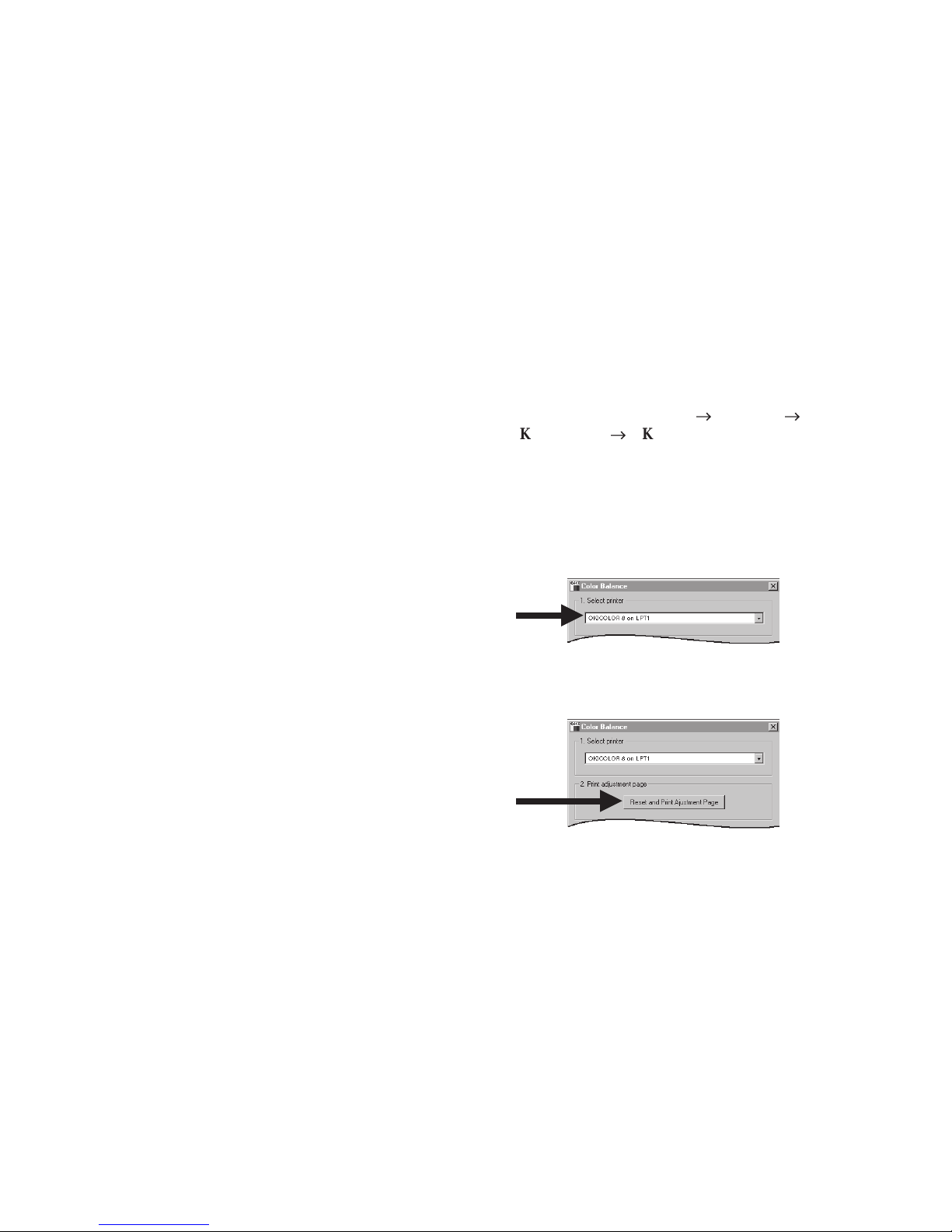
1 Make sure the OKICOLOR 8 is selected as the active
printer.
2 Click Reset and Print Adjustment Page to print the color
balance adjustment page.
Page 37
|
Handy Reference 37
Look at the color balance adjustment page:
• The pattern consists of a series of rectangles on a gray
background.
• Look for the rectangle that matches the gray
background most closely. You may not find one that
matches exactly; select the one that you think matches
best.
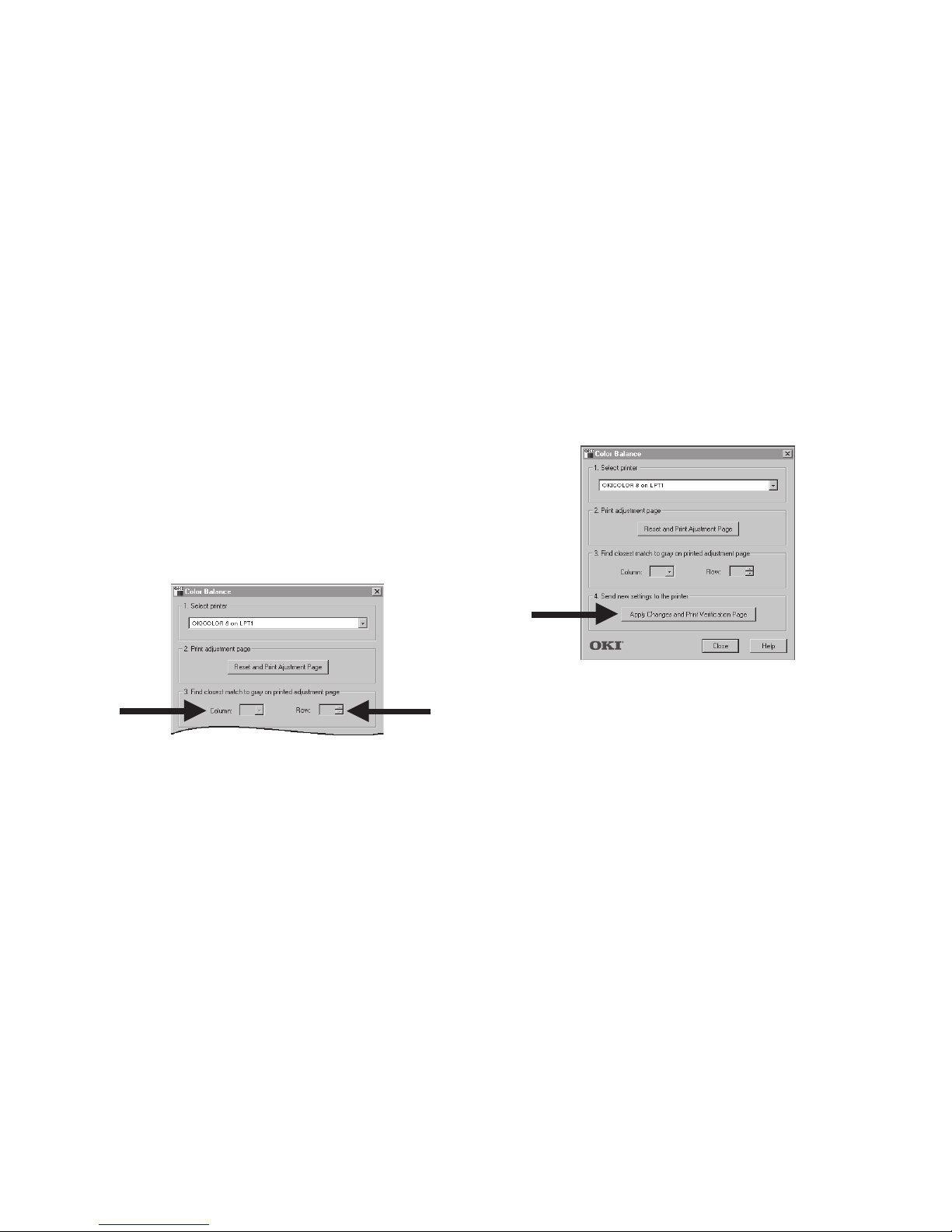
3 Enter the column letter and row number of the best
matching rectangle in the Column and Row boxes on the
screen.
4 Click Apply Changes and Print Verification Page. This
calibrates the printer and prints a color balance verification
page that confirms the new settings.
5 Click Close.
Important!
Do not go back to step 2 to check the color balance. The
utility resets the printer to its default settings every time it
prints the color balance adjustment page.
Page 38
Overview
38
OKICOLOR 8
|
Paper Jams
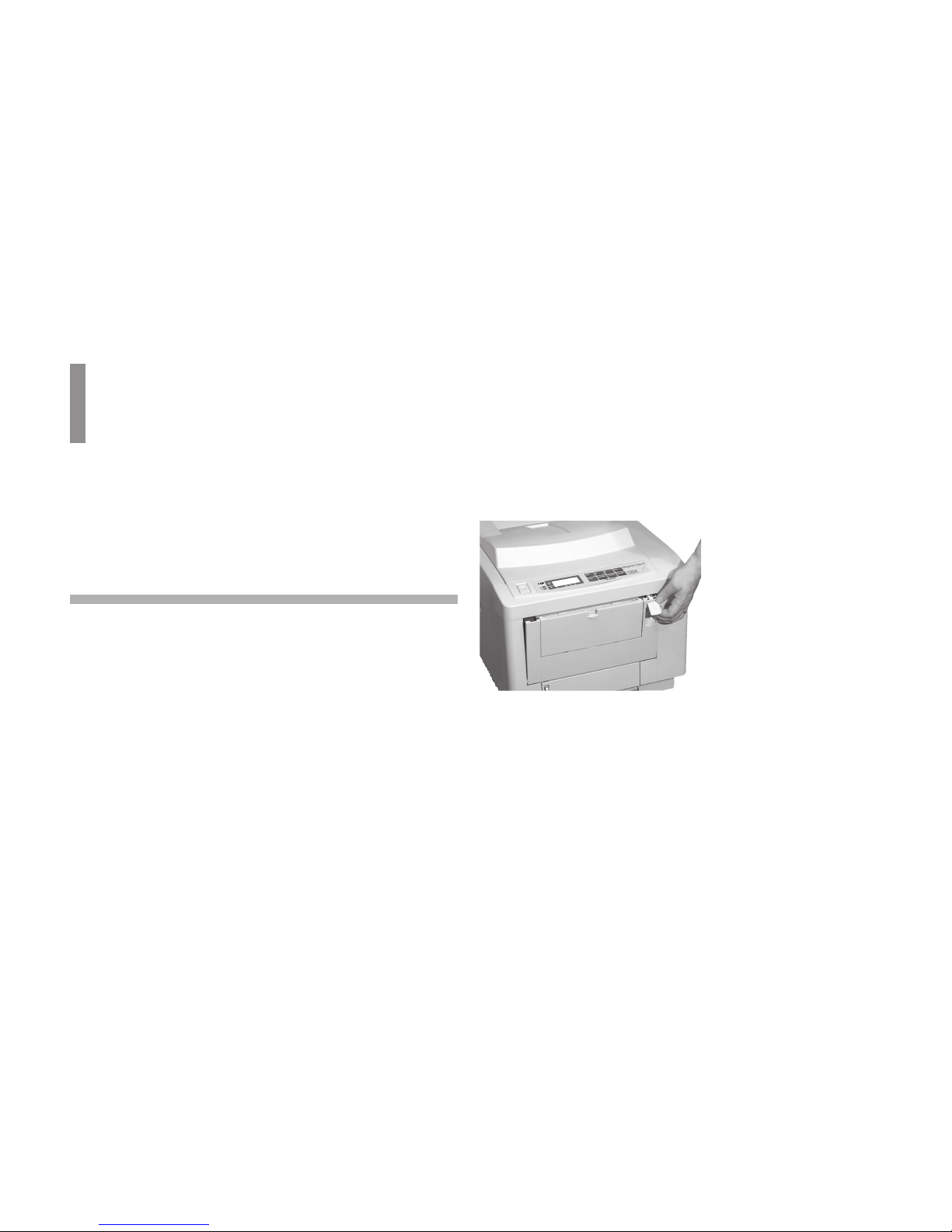
2 Lift the interior access knob and pull the front panel down.If a paper jam occurs, a message displays which indicates the
location of the jam. Once the jam is cleared, the cover is
closed, and warming up is complete, the printer prints all the
pages affected by the jam.
Paper Input Jam
Paper has jammed between the tray and the first image drum
cartridge.
1 Turn off the printer and wait for the fuser to cool down.
Warning!
High temperature; switch off the printer and allow at least
20 minutes for parts in this area to cool before handling.
Page 39
|
Handy Reference 39
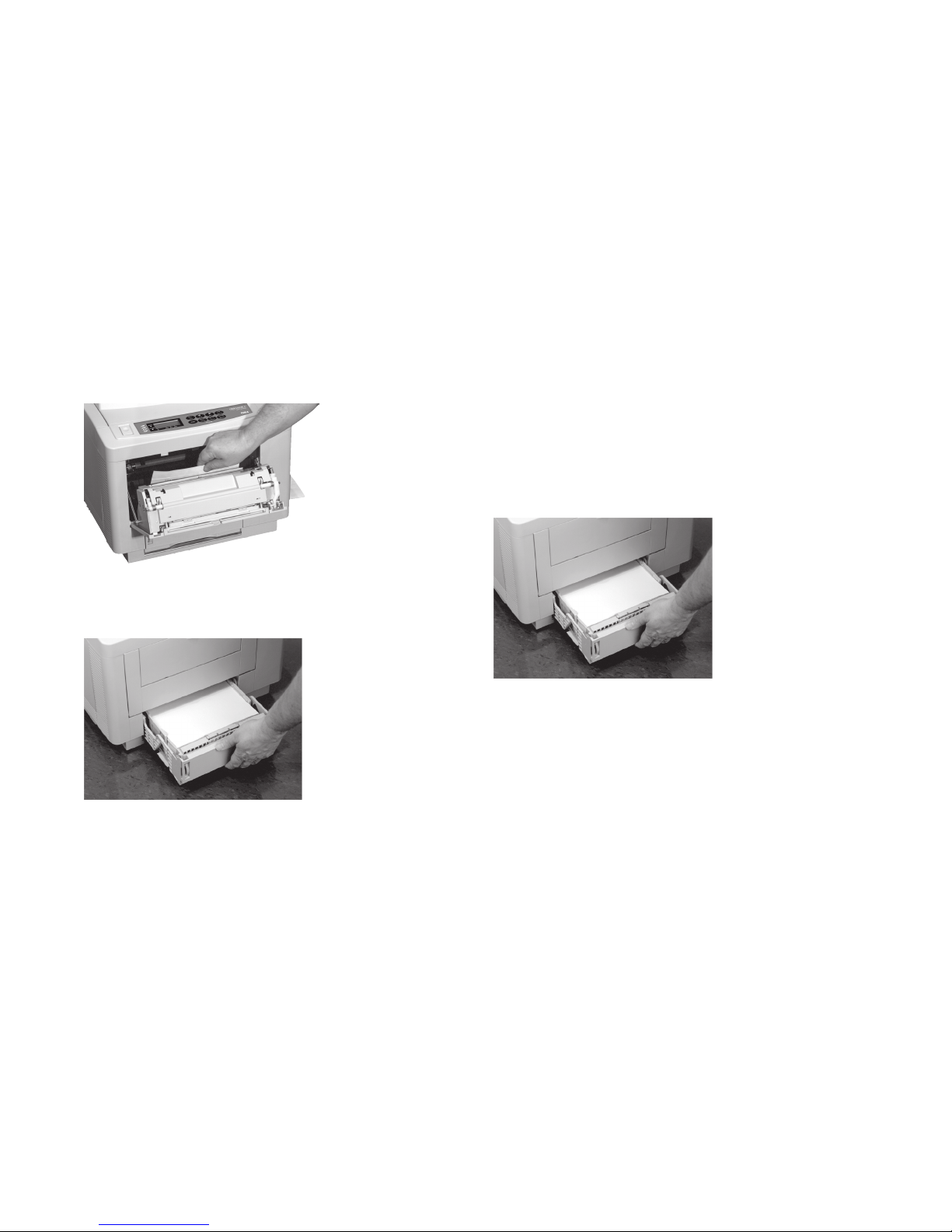
3 Remove out any jammed paper and close the panel.
4 Pull the paper tray out of the printer and remove any
partially fed sheets.
5 Check the paper in the tray—it should be neatly stacked,
no sheets bent or stuck together.
6 Push the tray back into the printer gently.
Caution!
A full tray is heavy and can damage the printer if slammed
shut.
Page 40

40
OKICOLOR 8
|
Paper Feed Jam
Paper has jammed under the image drums.
1 Turn off the printer and wait for the fuser to cool
down.
Warning!
High temperature; switch off the printer and allow at
least 20 minutes for parts in this area to cool before
handling.
2 Press the OPEN button and lift the top cover all the way
open.
3 Lift out each image drum cartridge and check underneath
for sheets of paper.
Caution!
Extended exposure to light can temporarily damage the
drums.
Page 41

|
Handy Reference 41
4 When you have uncovered any sheets of paper, carefully
remove them. If possible, pull forward to avoid spilling
toner.
Caution!
The transfer belt is located below the image drums. Be
careful not to scratch the transfer belt. Do no use sharp
instruments.
5 Place each image drum cartridge back into position in the
locating slots at each side of the printer. Be sure to match
the colored label on each cartridge with its corresponding
colored label in the printer.
6 Close the top cover and press down firmly on both sides to
make sure that it is locked.
Page 42
42
OKICOLOR 8
|
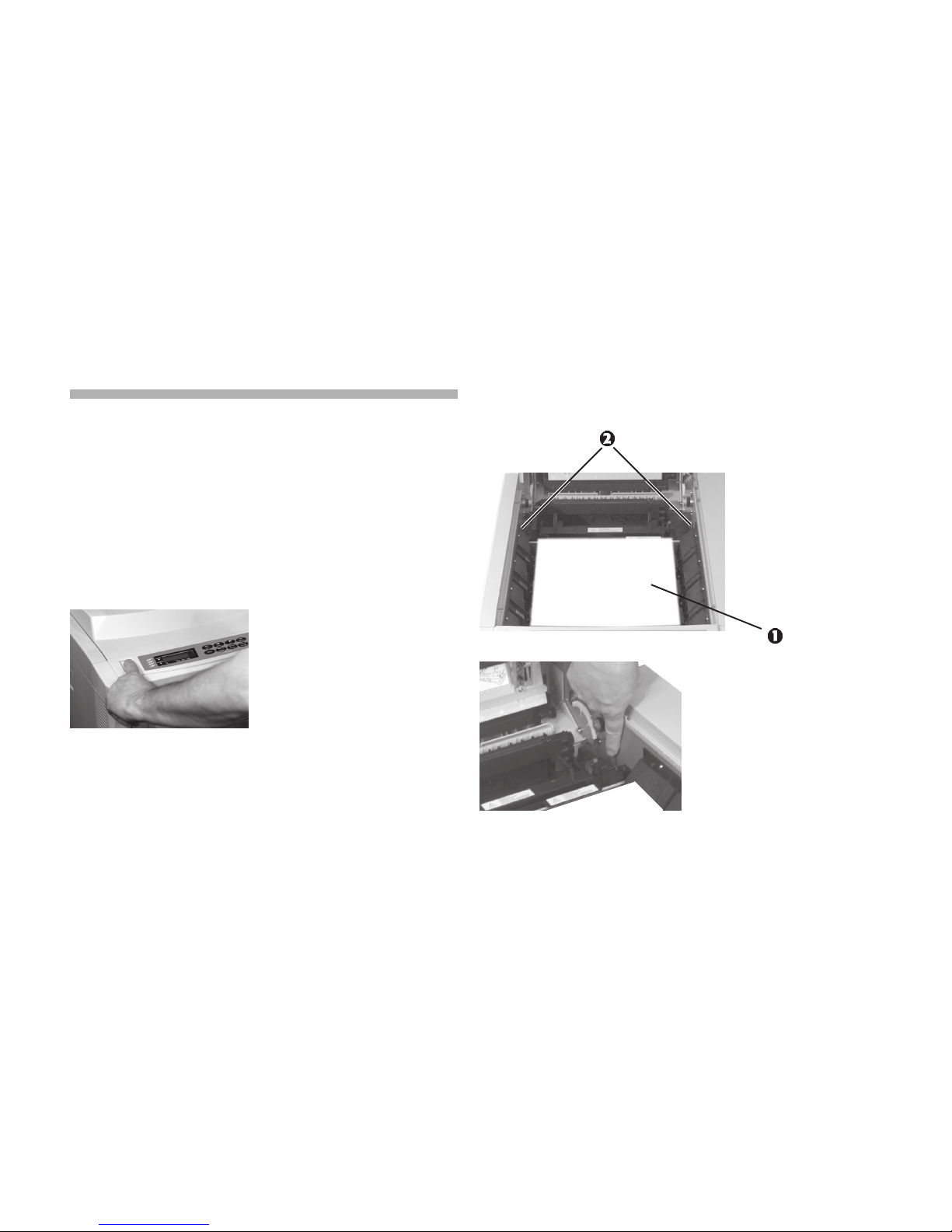
3 Cover the image drum cartridges with sheets of paper (1)
to protect them from light, then push the two colored fuser
latch levers (2) towards the rear of the printer.
Paper Exit Jam
Paper has jammed in the fuser or between the fuser and the
paper exit.
1 Turn off the printer and wait for the fuser to cool down.
Warning!
High temperature; allow at least 20 minutes for parts in
this area to cool before handling.
2 Press the OPEN button and lift the top cover all the way
open.
Page 43

|
Handy Reference 43
4 Lift the fuser by its two handles straight up and out of the
printer.
5 Pull the sheet of paper out of the fuser.
6 Lower the fuser back into the printer, press down firmly to
seat it, and then pull on the two blue levers to make sure
that the fuser is locked in position.
7 Open the Special Media Stacker.
Page 44
44
OKICOLOR 8
|
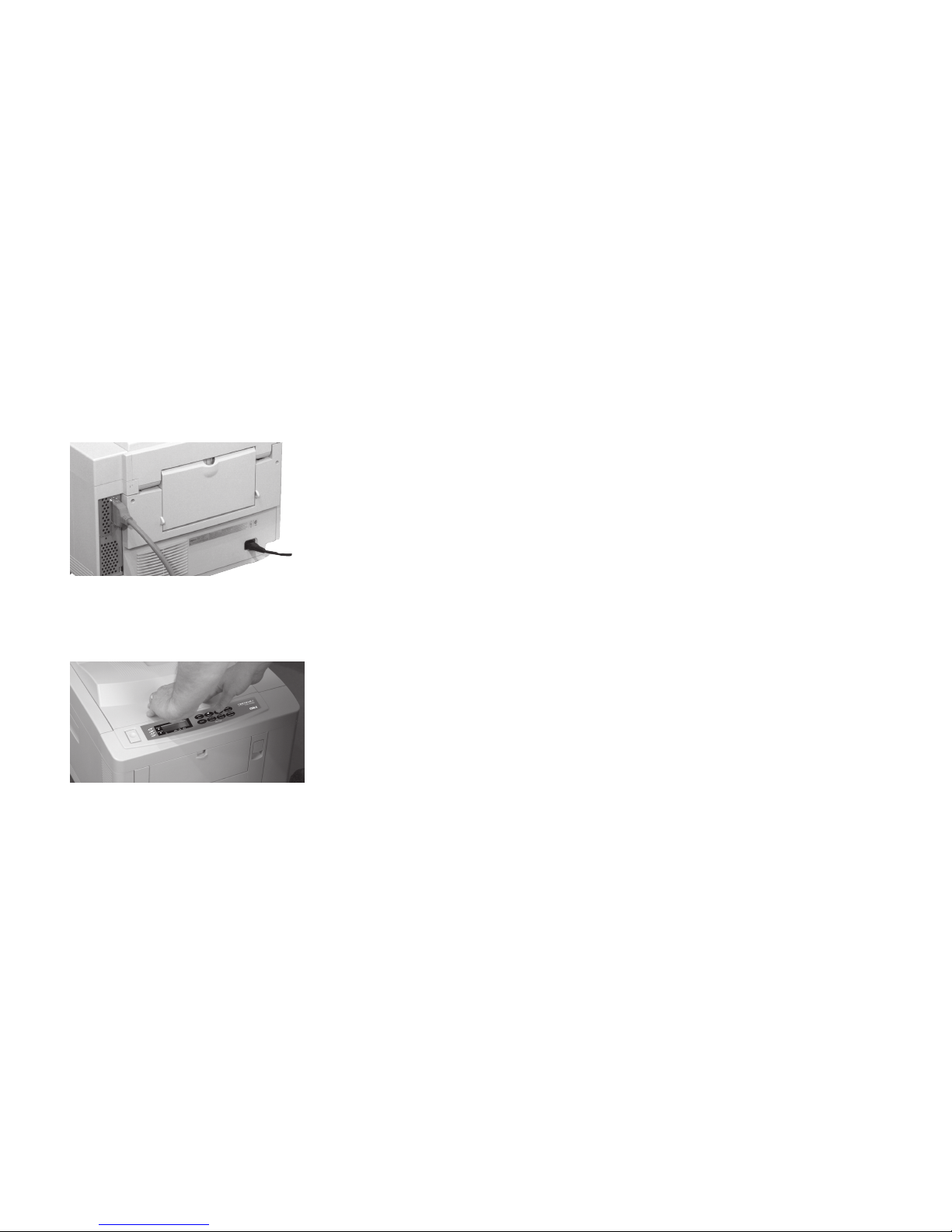
8 Look into the rear of the printer and remove any pieces
of paper you find.
9 Close the Special Media Stacker.
10 Remove the paper covering the image drums, then close
the top cover and press down firmly on both sides to
make sure that it is locked.
Printing continues automatically when you close the top
cover, after a short pause to allow the fuser to warm up.
Page 45

Overview
|
Handy Reference 45
Print Quality Problems
Solution:
The Color Options tab on your computer screen provides a
list of color matching techniques and adjustments to provide
color balance in your document.
You can use the color bars at the bottom of the menu settings
page to help isolate which color is causing the problem. To
print the menu settings page, press and hold Print Menu for
several seconds.
The menu settings page prints.
The printer uses separate cartridges of cyan, magenta, yellow
and black toner to generate high definition color images.
Factors causing print quality problems may affect only one
color, or several colors, so the results may be unpredictable.
!
See the on-line OKICOLOR 8 User’s Guide for
additional print quality symptoms and solutions.
Colors do not print as expected.
Reason:
A computer monitor and a printer use different methods to
generate colors based on a different set of primaries —Red,
Green and Blue (RGB) for monitors, Cyan, Magenta, Yellow
and Black (CMYK) for printers. This may lead to a color
print not resembling the original on-screen image.
Page 46

46
OKICOLOR 8
|
Colors are shifted or not lined up
properly.
Reason:
Color registration is incorrect.
Solution:
Color registration needs to be reset. See “Color Registration.”
It is recommended that you reset color registration when you
change toner or image drums, when you load paper in the
paper tray, or if you move the printer.
Blank sheets printed/one or more
colors missing.
Reason:
Empty or missing toner cartridge.
Solution:
Install new toner cartridge.
Reason:
Image drum contacts may have failed.
Solution:
Remove the appropriate image drum(s) and examine the
contacts on the left side of the drum and on the left side inside
the printer. Clean them if necessary, then reinstall the image
drum(s).
Reason:
LED array connection may have failed.
Solution:
Contact your service representative.
Page 47

|
Handy Reference 47
Entire page or one color prints faintly.
Reason:
Empty toner cartridge. Pages get fainter after toner is used up.
Solution:
Install new toner cartridge.
Reason:
LED array is dirty.
Solution:
Clean the LED array.
Reason:
Image drum may be near its end of usable life.
Solution:
Replace the image drum.
Page prints all one color.
Reason:
Hardware problem
Solution:
Contact your service representative.
Page 48

48
OKICOLOR 8
|
Page has gray or speckled
background.
Reason:
Static electricity causes toner to stick to background.
Solution:
Change paper to an acceptable laser bond and use a
humidifier.
Horizontal bands of darker print at
regular intervals down the page.
Reason:
Image drum has been exposed to light.
Solution:
Leave the printer turned off for about two hours. If this fails
to restore it, install a new image drum cartridge.
Page 49

Overview
|
Handy Reference 49
Display Messages
POWER SAVING
The printer is in power saving mode—the heating unit has
been turned off to save energy. When data is sent to the
printer, it automatically warms up briefly before printing.
[paper size] [tray]
PAPER REQUEST
The printer is requesting a different size paper in the indicated
tray. Load the requested paper in the tray.
[paper size] MANUAL
[media type] REQUEST
Insert a page of the indicated size and type (paper, envelope)
in the front tray.
Messages on the display panel show the status of the printer.
For a complete list of messages, see the on-line User’s Guide.
Following is a limited list of these messages and if necessary,
the recommended action.
Normal Operation
RESET TO FLUSH
(PostScript) Data currently in the printer can be deleted by
pressing ON LINE, then §.
RESET
Press Recover to delete data left in the printer and return the
printer to the defaults you have set.
Page 50

50
OKICOLOR 8
|
Maintenance
TNR LOW [color]
One or more toner cartridges are nearly empty. The status
lights also indicate which color(s). Have the necessary
cartridge available. For replacement instructions, see
“Replacing a Toner Cartridge.”
[color]
TONER EMPTY
The indicated toner has run out—this message appears 50
pages after the TNR LOW message. Install a new toner
cartridge to avoid possible damage to the image drum. For
replacement instructions, see “Replacing a Toner Cartridge.”
You can clear this message by pressing ON LINE or
Recover; the message appears again after 20 pages are
printed.
OIL ROLLER LIFE
The fuser oil roller needs to be replaced. When the
ATTENTION light is on, the printer can continue to
function. When the ATTENTION light is flashing, replace
the oil roller immediately. For replacement instructions, refer
to the online User’s Guide.
CHG DRUM [color]
One or more of the image drums needs to be replaced as soon
as the toner runs out. The status lights also indicate which
color(s). For replacement instructions, see “Replacing an
Image Drum.”
CHANGE DRUM [color]
One or more of the image drums needs to be replaced. The
status lights also indicate which color(s). For replacement
instructions, see “Replacing an Image Drum.”
WASTE TNR
NR FULL
The waste toner box is almost full. Be prepared to replace it
when the WASTE TONER FULL message appears.
WASTE TONER FULL
The waste toner box is full. For replacement instructions, see
“Printer Maintenance” or refer to the online User’s Guide.
Page 51

|
Handy Reference 51
FUSER LIFE
The fuser needs to be replaced. For replacement instructions,
see the online User’s Guide.
BELT LIFE
The transfer belt needs to be replaced. For replacement
instructions, see “Printer Maintenance” or refer to the online
User’s Guide.
Problems
ERROR PAPER SIZE
CHECK [tray]
The paper size detected by the printer in the tray indicated is
incorrect for the current print job. Make sure the size of the
paper in the tray matches the size your software calls for.
TRAY 1 INSTALL
The printer is trying to automatically switch to the second
paper tray when Tray 1 paper ran out. Do not remove Tray 1
until the automatic switching process is complete.
ERROR MEMORY
OVERFLOW
The current page is too complex and cannot be printed. Try
simplifying the page or reducing the resolution to 300 dpi. If
this happens often, consider adding memory to the printer.
See the online User’s Guide for details on memory upgrade
options.
ERROR RECEIVE
BUFFER OVERFLOW
The transfer of data from the computer to the printer is not
properly coordinated. Check the printer cable and printer
interface menu settings. Adding optional memory can also
help the problem. See the online User’s Guide for details on
memory upgrade options.
TNR SNS [color]
Make sure the indicated image drum is installed. If it is, lift it
out and check the black lever on the right side (facing the
printer) of the metal rod below the image drum—make sure
there is no paper blocking it and that it moves freely.
Page 52

52
OKICOLOR 8
|
CANNOT USE A6
PAPER ON TRAY 2
The second paper tray cannot feed A6 size paper. Use Tray 1
or the manual feed slot.
ERROR
D6 [#########]
Yellow image drum is not installed properly. Open the top
cover, check, and reinstall as necessary. For instructions, see
“Replacing an Image Drum.”
ERROR
D7 [#########]
Magenta image drum is not installed properly. Open the top
cover, check, and reinstall as necessary. For instructions, see
“Replacing the Image Drum.”
ERROR
D8 [#########]
Cyan image drum is not installed properly. Open the top
cover, check, and reinstall as necessary. For instructions, see
“Replacing an Image Drum.”
ERROR
D9 [#########]
Black image drum is not installed properly. Open the top
cover, check, and reinstall as necessary. For instructions, see
“Replacing an Image Drum.”
ERROR
DF [#########]
The transfer belt unit is not installed correctly. Open the top
and left-hand side covers, check and reinstall as necessary.
For instructions, see “Printer Maintenance ” or the online
User’s Guide.
ERROR
E0 [#########]
The fuser unit is not installed correctly. Open the top and lefthand side covers, check and reinstall as necessary. For
instructions, see the online User’s Guide.
Page 53

|
Handy Reference 53
Call for Service
If you see any of these messages, turn the printer off, then
turn it on again. If this does not clear it, make a note of the
error message, and contact your authorized Oki Data service
dealer. For more information on obtaining service, see
“Obtaining Service.”
EEPROM RESETTING
or
ERROR
[nn] [#########]
where nn is not listed above
or
ERROR CONTROLLER
[nn-########]
Page 54
Overview
54
OKICOLOR 8
|
Setting Power Saving Mode
4 Press ENTER to set the selection as the default.
An asterisk (*) appears to indicate the new default setting.
5 Press ON LINE to exit the menu and place the printer
back on line.
In power saving mode, the heating unit has been turned off to
save energy. When data is sent to the printer, it automatically
warms up briefly before printing.
If you want to disable or change this setting:
1 Press ON LINE.
The printer is now off line.
2 Press Power Save for two seconds.
3 Press © repeatedly until you see the selection you want.
Page 55

|
Handy Reference 55
Power Saving Selections
0 SEC*
Reduces power consumption. Immediately after the printer
stops receiving data, the fuser heating element shuts off: 30
seconds later, the fan shuts off. When the printer receives
data, the fuser warms up before printing begins.
8 MIN
Reduces power consumption. Eight minutes after the printer
stops receiving data, the fuser heating element shuts off; 30
seconds later, the fan shuts off. When the printer receives
data, the fuser warms up before printing begins.
DISABLE
The fuser and fan are always on; the printer is ready to print
immediately.
Page 56

Overview
56
OKICOLOR 8
|
Uninstalling The Printer Software
If you want to remove the printer driver or status monitor
from your computer’s hard drive, use the following
procedure.
!
Always close the status monitor before uninstalling.
Some components may not be removed if the status
monitor is running.
Windows 95, 98
1 From the Taskbar, click Start ® Settings ® Control
Panel.
2 Double-click the Add/Remove Programs icon.
3 On the Install/Uninstall tab, select the OKICOLOR 8
Software and click Add/Remove.
4 Continue with the uninstall following the on-screen
instructions.
5 To delete the OKICOLOR 8 printer driver, right-click on
the OKICOLOR 8 icon in the Printers Folder, and select
Delete from the menu.
Page 57

|
Handy Reference 57
Windows 3.1x
1 From Program Manager double-click the OKICOLOR
8 icon (or the group where your printer is installed).
2 Double-click the UnInstallShield icon.
3 Continue with the uninstall following the on-screen
instructions.
Windows NT 4.0
1 From the Taskbar, click Start ® Settings ® Control
Panel
2 Double click on the Add/Remove Programs icon
3 Select the OKICOLOR 8 and click on Add/Remove.
4 Proceed with the uninstall following the on-screen
instructions.
5 To delete the OKICOLOR 8 printer driver, right-click on
the printer icon in the Printers Folder, and select Delete
from the menu.
Macintosh
1 Double click on System ® Folder ® Extension
®
Printer Description.
2 Locate the OKICOLOR 8 and drag it to the Trash icon.
Page 58

Overview
58
OKICOLOR 8
|
Emergency First Aid Procedures for Toner
Emergency
Toner swallowed (ingested)
Procedure
Dilute by giving two glasses of water and induce vomiting by
administering Syrup of Ipecac (follow manufacturer’s
instructions). Seek medical attention.
NEVER give anything by mouth or attempt to induce
vomiting in a person who is unconscious.
Emergency
Toner inhaled.
Procedure
Remove person to fresh air. Seek medical attention.
Emergency
Toner gets in the eyes.
Procedure
Flush eyes with large quantities of cool water for 15 minutes,
keeping the eyelids open with fingers. Seek medical attention.
!
Small amounts of toner on skin or clothing can easily
be removed with soap and cold water. Hot water makes
toner harder to remove.
Page 59

Overview
|
Handy Reference 59
Notices
Year 2000 Compliance
All products currently sold by Oki Data are Year 2000
Compliant. Each product contains information technology
that accurately processes date and time data between the
years 1999 and 2000, and carries no issue for the September
9, 1999 (9999) programming concern. These products, when
used in combination with products purchased from other
manufacturers, whose products properly exchange date and
time information, will accurately process the date and time.
All future products are committed to meeting the same Year
2000 compliance.
ENERGY STAR
As an ENERGY STAR® Partner, Oki Data
has determined that this product meets
the ENERGY STAR guidelines for energy
efficiency.
Page 60

 Loading...