

Page 1

STARTER 2100
Bench pH Meter
Instruction Manual
Manual de instrucciones del
pHmetro de mesa
STARTER 2100
STARTER 2100
PH-mètre de laboratoire
Manuel d’instructions
STARTER 2100
Medidor de pH de Bancada
Manual de Instruções
Find Quality Products Online at: [email protected]
www.GlobalTestSupply.com
Page 2

SSSSs
TABLE OF CONTENTS
INTRODUCTION...................................................................1
1
1.1 Definition of Signal Warnings and Symbols...................................... 1
1.2 Safety Precautions............................................................................ 2
1.3 Display and controls.......................................................................... 3
2 INSTALLATION.....................................................................5
2.1 Package contents.............................................................................. 5
2.2 Installing the built-in electrode arm ................................................... 6
2.3 Installing power adapter.................................................................... 6
2.4 Installing the electrodes..................................................................... 7
Attached quick guide......................................................................... 7
2.5
3 SETUP................................................................................... 8
3.1 Set MTC temperature........................................................................ 8
4 STARTER 2100 OPERATION...............................................9
4.1 Calibration ......................................................................................... 9
4.1.1 Buffer group................................................................................... 9
4.1.2 Performing 1-point calibration ..................................................... 10
4.1.3 Performing 2-point calibration ......................................................11
4.2 Sample measurement ..................................................................... 12
4.2.1 pH measurement......................................................................... 12
4.2.2 mV measurement........................................................................ 12
4.3 Temperature measurement............................................................. 12
5 MAINTENANCE..................................................................13
5.1 Error message................................................................................. 13
5.2 Meter maintenance.......................................................................... 13
5.3 Electrode maintenance ................................................................... 13
5.4 Self-diagnosis.................................................................................. 14
5.5 Recover factory settings.................................................................. 14
6 TECHNICAL DATA..............................................................15
6.1 Specifications .................................................................................. 15
6.2 Compliance ..................................................................................... 16
7 BUFFER GROUPS..............................................................17
Find Quality Products Online at: [email protected]
www.GlobalTestSupply.com
Page 3
STARTER 2100 Bench pH Meter EN-1
General hazard
Explosion hazard
Corrosive hazard
±
Alternating current
¯
Direct curren t
1 INTRODUCTION
Thank you for choosing OHAUS.
Please read the manual completely before using the STARTER 2100 bench pH meter to ensure
proper setup, operation and maintenance.
STARTER 2100 has an excellent performance/price ratio and is designed with m any usef ul features.
Other accessories and various electrodes are available for different applications. Contact your
preferred Authorized OHAUS Distributor for details and pricing.
Starter 2100
x Large liquid crystal screen with well-organized display
x Electrode condition icon on the display to show the pH electrode performance
x Recall of last calibration data
x Quick Guide attached under the meter to assist with operation
offers many practical features such as:
1.1 Definition of Signal Warnings and Symbols
Safety notes are marked with signal words and warning symbols. These show safety issues and
warnings. Ignoring the safety notes may lead to personal injury, damage to the instrument,
malfunctions and false results.
Signal Words
WARNING For a hazardous situation with medium risk, possibly resulting in
CAUTION For a hazardous situation with low risk, resulting in damage to the
Attention For important information about the product.
Note For useful information about the product
Warning Symbols
injuries or death if not avoided.
device or the property or in loss of data, or injuries if not avoided.
Find Quality Products Online at: [email protected]
www.GlobalTestSupply.com
Page 4

EN-2 STARTER 2100 Bench pH Meter
1.2 Safety Precautions
CAUTION: Read all safety warnings before installing, making connections, or servicing this
equipment. Failure to comply with these warnings could result in personal injury and/or property
damage. Retain all instructions for future reference.
x Verify that the input voltage range printed on the data label and the plug type matches the
local AC power to be used.
x Make sure that the power cord does not pose a potential obstacle or tripping hazard.
x Use the equipment only in dry locations.
x Dry off any liquid spills immediately. The instrument is not watertight.
x When using chemicals and solvents, comply with the instructions of the chemical producer
and the general lab safety rules.
x Use only approved accessories and peripherals.
x Operate the equipment only under ambient conditions specified in these instructions.
x Disconnect the equipment from the power supply when cleaning.
x Do not operate the equipment in hazardous or unstable environments.
x Service should only be performed by authorized personnel.
Find Quality Products Online at: [email protected]
www.GlobalTestSupply.com
Page 5
STARTER 2100 Bench pH Meter EN-3
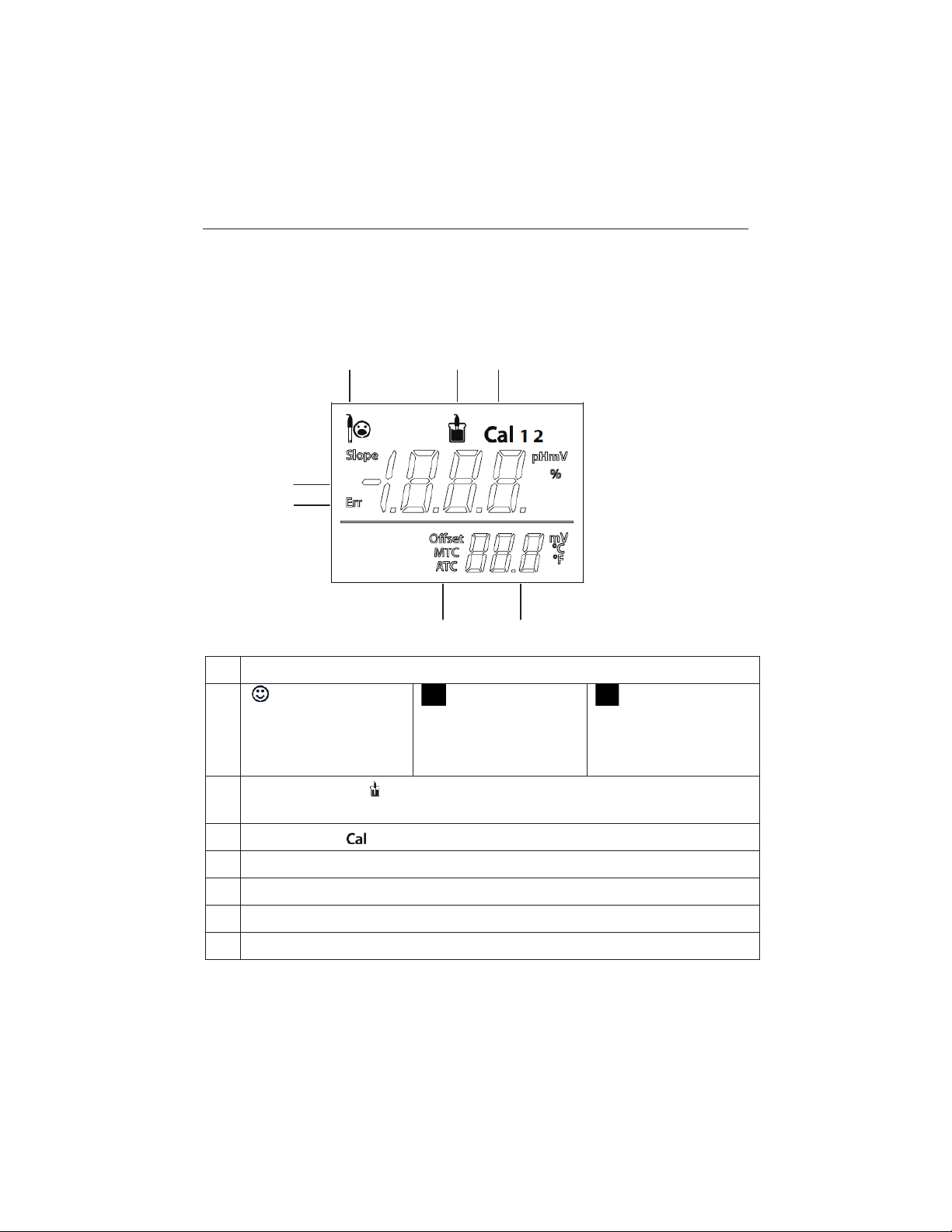
Electrode condition
%
and of
Electrode
good
or offset: ± (
Electrode condition
acceptable
or offset: ± (
Electrode
not
good or needs cleaning
Measurement icon
reading is locked, no matter measurement
Calibration icon
pH/mV
Error message - Err
Auto temperature compensation - ATC ; Manual temperature compensation - MTC
Temperature during measurement or Offset (mV) in calibration
2 3 1
4
6
7
5
1.3 Display and controls
Displays
1
Slope: more than 95
fset: ± (0-15) mV
condition is
2
3
4
reading or slope
- , measurement or calibration is running; disappear means the
- ,1point or 2point calibration in progress
in calibration
Slope: 90-95%
15-35) mV
Slope: less than 90%
35-60) mV
is
condition is
5
6
7
Find Quality Products Online at: [email protected]
www.GlobalTestSupply.com
Page 6
EN-4 STARTER 2100 Bench pH Meter
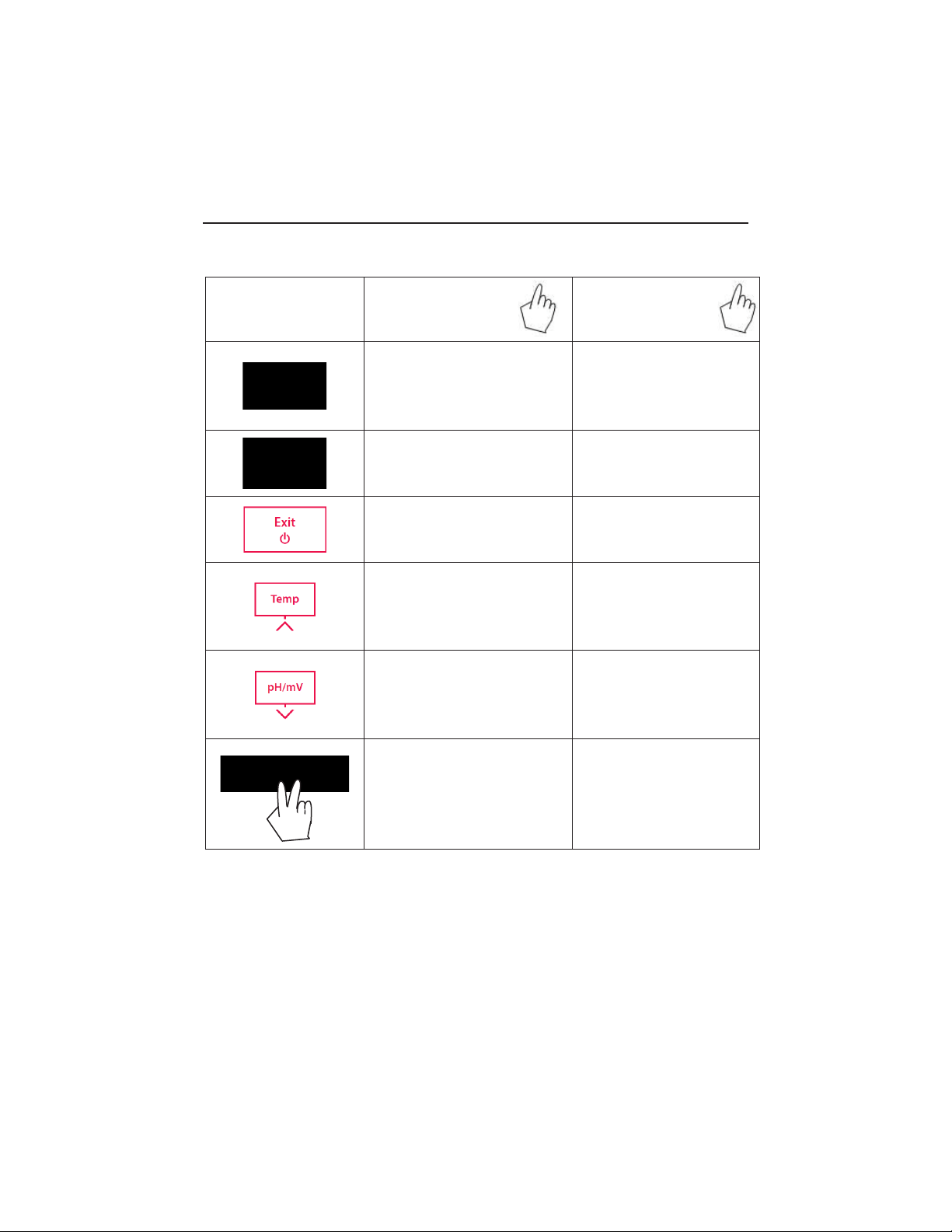
Button
Press & release
Press & hold
for 3 seconds
- Start measurement or lock
current reading
-
Confirm temp setting
- Start calibration
- Review the latest calibration
-Meter turn on
-
- Meter turn off
- Entered temperature setup mode
-
- Switch between pH and mV
measuring modes
-
Decrease temp. value when in
temp. setup mode
-
Controls
data (slope, offset)
Exit, returnto measurement
screen
Increase temp. value when in
temp. setup mode
Start self-diagnosis
Find Quality Products Online at: [email protected]
www.GlobalTestSupply.com
Page 7

STARTER 2100 Bench pH Meter EN-5
Model
Description
Item NO
ST310
3-in-1 plastic refillable pH Electrode
83033965
ST210
2-in-1 plastic refillable pH Electrode
83033966
ST320
3-in-1 plastic gel pH Electrode(no need to refill)
83033967
ST230
2-in 1 glass muddy sample pH Electrode
83033968
STTEMP30
Temperature Electrode
83033970
STORP1
Gel plastic ORP electrode
30038555
STORP2
Refillable glass ORP electrode
30038553
Buffer powder set (4.01; 7.00; 10.00)
83033971
Buffer pH1.68 250ml
30100424
Buffer pH4.01 250ml
30100425
Buffer pH7.00 250ml
30100427
Buffer pH10.01 250ml
30100429
Electrode arm built-in (2100)
30058732
pH electrode Reference Electrolyte
30059255
pH electrode storage(protection) solution
30059256
ST
2100-B
U
nits
STARTER 2100
1
Built-in electrode arm
1
12V Power supply
1 set
ST210 2-in-1 pH electrode
1
pH Buffer Powder Set (4.01, 7.00, 10.01)
1set
STTEMP30 temperature electrode
1
2 INSTALLATION
Carefully unpack the box.
2.1 Package contents
The model ST2100-B (basic model) has the following items:
In addition to ST2100-B content, the model ST2100-E package also includes the following:
In addition to ST2100-E content, the model ST2100-F package also includes the following:
Additional Ohaus pH electrodes for different applications are available
Each pH buffer powder should be dissolved in 250ml pure or deionized water in a volumetric flask.
Accessories:
Find Quality Products Online at: [email protected]
www.GlobalTestSupply.com
Page 8

EN-6 STARTER 2100 Bench pH Meter
2.2 Installing the built-in electrode arm
Install the built-in electrode arm on the left or right sight of the STARTER 2100 meter.
Remove the rubber hole cover from the meter
Insert the metal stick into the hole and screw to fasten it.
Install the upper electrode arm upon the metal stick from above; adjust it to a desired height.
2.3 Installing power adapter
Choose the proper adapter clip, insert into the power adapter slot.
Find Quality Products Online at: [email protected]
www.GlobalTestSupply.com
Page 9

STARTER 2100 Bench pH Meter EN-7
2.4 Installing the electrodes
Connect the pH electrode to the meter. There are 3 Socket for pH electrode. The BNC (pH), Cinch
(Temp.) and banana (REF) socket.
For ST210, you only need to connect the pH electrode with the pH socket (BNC);
For temperature electrode STTEMP30, connect with Temp. Socket (Cinch).
For pH electrode ST310, connect both the BNC and Cinch socket.
The banana (REF) socket is only for separate Reference Electrode. (e.g. STREF1)
2.5 Attached quick guide
Another unique design of the STARTER 2100 is the attached quick guide, the quick guide is
attached into the bottom housing of the meter.
Find Quality Products Online at: [email protected]
www.GlobalTestSupply.com
Page 10

EN-8 STARTER 2100 Bench pH Meter
3 SETUP
3.1 Set MTC temperature
Please note:
If a temperature electrode is used, Automatic Temperature Compensation (ATC) and t he sample
temperature are displayed on the screen. You may then choose to skip MTC setup (below).
If the meter does not detect a temperature electrode or one is not used, the meter automatically
switches to Manual Temperature Compensation (MTC) mode and MTC appears on the screen.
MTC can be set as follows:
x Press button-
x Next use button-
temperature of your sample.
x Press button-
press button-
The default MTC temperature value setting is 25 °C (77eF).
Note: °C = 5/9 (°F -32)
and the MTC temperature value appears on the display.
or button- to increase or decrease the value to the
to confirm the setting then return to the measurement screen; or
to reject the setting and return to the measurement screen.
Find Quality Products Online at: [email protected]
www.GlobalTestSupply.com
Page 11
STARTER 2100 Bench pH Meter EN-9
1.68
4.01
7.00
10.01
4 STARTER 2100 OPERATION
Standard procedure of pH measurement is as follows:
a) Connect pH (and Temperature if necessary) electrode to the meter and rinse
b) Prepare buffer
c) Calibrate pH electrode
d) Prepare sample & measure
e) Record measurement results
f) Rinse and properly store pH and other electrodes
pH electrode preparation: pH electrode should be rinsed with pure water before and
after using.
CAUTION Check if the electrode is physically damaged. (Be careful with the glass
bulb)
The pH electrode should be stored in the storage bottle.
After the pH electrode is put into the sample or buffer solution, the user should stir several
seconds then wait 30 to 60 seconds for the signal to stabilize, and then press the proper button
to operate (calibration or measurement).
WARNING Do not operate the equipment in hazardous environments. The
equipment is not explosion protected.
WARNING When using chemicals and solvents, comply with the instructions of the
chemical producer and the general lab safety rules.
4.1 Calibration
4.1.1 Buffer group
STARTER 2100 can perform 1 or 2-point calibrations. OHAUS recommends conducting a 2 point
calibration.
There is 1 buffer group (the US group) stored in the meter. The US buffer group is (at 25°C):
STARTER 2100 automatically corrects for the temperature dependence of t he buffer pH values
given in the following table.
Find Quality Products Online at: [email protected]
www.GlobalTestSupply.com
Page 12

EN-10 STARTER 2100 Bench pH Meters
5°C
1.67
4.01
7.09
10.25
10 °C
1.67
4.00
7.06
10.18
15 °C
1.67
4.00
7.04
10.12
20 °C
1.68
4.00
7.02
10.06
25 °C
1.68
4.01
7.00
10.01
30 °C
1.68
4.01
6.99
9.97
35 °C
1.69
4.02
6.98
9.93
40 °C
1.69
4.03
6.97
9.89
45 °C
1.70
4.05
6.97
9.86
50 °C
1.71
4.06
6.96
9.83
4.1.2 Performing 1-point calibration
Calibration: pH electrodes need to be calibrated with pH standard buffer solutions before a
proper pH measurement can be made. Calibration is to display the correct pH value when the
meter receives the mV value signal from the pH electrode.
Slope: the linear coefficient between mV and pH according to theoretical value (e.g. -
59.16mV/pH @ 25 °C which means 100% slope);
Offset: the mV value when pH value is 7.00. (Theoretical value is 0 mV);
Begin by ensuring the meter is plugged in, the electrode is properly attached and the meter is
powered on by pressing
Place the pH electrode in the prepared buffer solution, stir for approximately 5 seco nds and
wait for an additional 30-60 seconds.
Press button-
measurement icon
When the reading is stable (normally the reading does not change in 5s), press button-
to lock the reading and finish 1 point calibration. The buffer value (e.g. pH 7.00)
with the temperature is displayed on the screen; the meter can recognize the buffer
automatically (auto buffer recognition).
The 1-point calibration is finished; now we have 3 options:
Press button-
are shown on the display for 3 seconds then returns to the measurement screen.
, “Cal 1” displays on the top right of the screen and is blinking. The
appears on the top of the screen, is blinking during calibration.
to store the 1-point calibration data and exit, the offset and the slope
.
Find Quality Products Online at: [email protected]
www.GlobalTestSupply.com
Page 13

STARTER 2100 Bench pH Meters EN-11
Press button- to reject the calibration and return to the measurement screen.
Press button-
Note: With the 1-point calibration only the offset is adjusted. If the pH electrode was previously
calibrated with 2-point calibration the previously stored slope will remain. Otherwise theoretic al
100% slope (-59.16 mV / pH @25 °C) will be used.
to do the 2-point calibration.
4.1.3 Performing 2-point calibration
Perform 1-point calibration as described above.
Rinse the pH electrode with pure water and wipe off water with a tissue.
Place the electrode in the next calibration buffer stir and wait, then press button-
“Cal 2” displays on the top right of the screen and is blinking.
during calibration.
When reading is stable (normally the reading does not change in 5s), press button-
to lock the reading and finish 2-point calibration, disappears. The buffer pH value (e.g.
4.01 pH) with the temperature display on the screen.
The 2-point calibration is finished, now we have 2 options:
Press button-
display for 3 seconds then returns to the measurement screen.
Press button-
Note: The use of a temperature electrode (e.g. STTEMP30) or a pH electrode with a built-in
temperature sensor (3-in-1 pH electrode) is recommended. If you use the MTC mode, you should
enter the correct temperature value and keep all buffer and sample solutions at the set
temperature. (See 3.1)
to store the 2-point calibration, the offset and slope are shown on the
to reject the calibration and return to the measurement screen.
appears and is blinking
,
Find Quality Products Online at: [email protected]
www.GlobalTestSupply.com
Page 14

EN-12 STARTER 2100 Bench pH Meters
4.2 Sample measurement
4.2.1 pH measurement
Place the electrode in the sample, stir 5 seconds then wait 30-60 seconds.
Press button-
during measurement.
When the reading is stable, press button-
value with the temperature is displayed on the screen, you can record the measurement
result. If you want to do another measurement, press button-
to start the pH measurement, appears on the display. is blinking
to lock the reading, disappears, the pH
.
4.2.2 mV measurement
Press button- to switch between pH measurement mode and mV measurement
mode.
Follow the same procedure as for pH measurement to perform a mV measurement.
4.3 Temperature measurement
For better accuracy, we recommend using a temperature electrode or pH electrode with a
temperature sensor built in.
If a temperature electrode is used, ATC (Auto Temperature Compensation) and the sample
temperature are displayed.
If the meter does not detect a temperature electrode, it automatically switches to the Manual
Temperature Compensation mode and MTC appears. MTC temperature should be set (3.1).
Note: STARTER 2100 accepts NTC 30 kΩ temperature sensor.
Find Quality Products Online at: [email protected]
www.GlobalTestSupply.com
Page 15

STARTER 2100 Bench pH Meters EN-13
Err
Self
Or
Repeat the self
Calibration failure (slope < 85%, offset > 60mV);
you need to use fresh buffer to do calibration
again properly; if still not good, need to replace
the pH electrode.
5 MAINTENANCE
5.1 Error message
If the measurement out of range, pH: < 0.00 or > 14.00;mV: < -1999 or > 1999; the buffer
temperature T[°C] < 5 or > 40, then the meter will display “- - -“.
If meter display “Err”, it means
-diagnosis failure
Calibration failure
For further technical support please contact Ohaus. (US & Canada please call 1-800-672-7722)
-diagnosis. (See 5.4)
5.2 Meter maintenance
Attention: Never unscrew the two halves of the housing!
The STARTER 2100 series instruments do not require any routine maintenance.
To clean, use a damp cloth.
The housing is made of acrylonitrile butadiene styrene (ABS). This material is susceptible to
damage by some organic solvents, such as toluene, xylene and methyl ethyl ketone (MEK). Any
spillage should be immediately wiped off.
5.3 Electrode maintenance
Attention: Make sure the electrode is filled with electrolyte solution. Always store the electrode
according to the electrode instruction manuals and do not allow it to dry out.
If the electrode response becomes sluggish or the slope is not good enough, try:
o Soak the electrode in 0.1M HCl for more than 8 hours.
o For fat or oil contaminant, degrease the membrane with cotton wool soaked in either
acetone or a soap solution.
After electrode treatment, a new calibration should be performed. If the electrode slope is still not
good, the electrode might need to be replaced.
Find Quality Products Online at: [email protected]
www.GlobalTestSupply.com
Page 16
EN-14 STARTER 2100 Bench pH Meters
b
5.4 Self-diagnosis
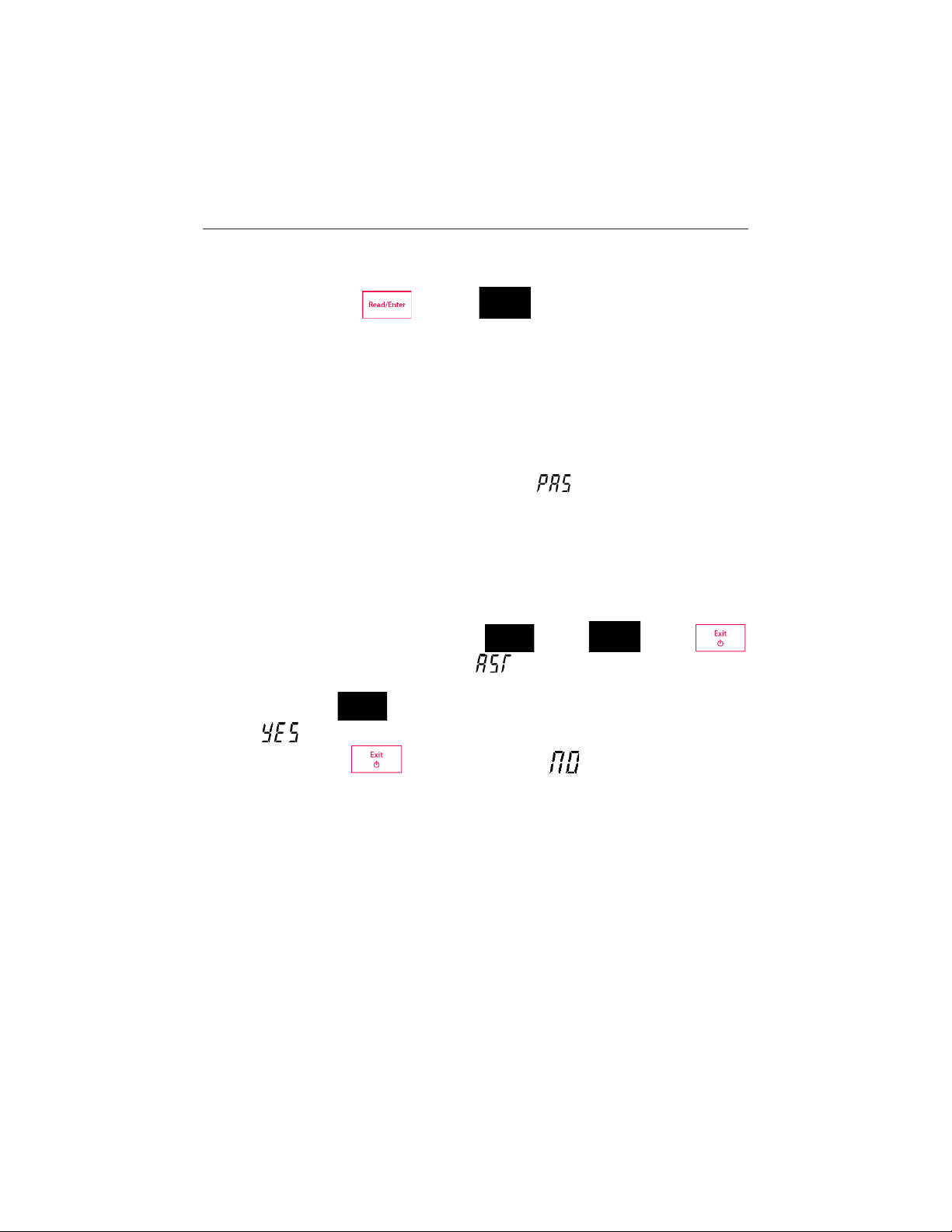
Press and hold button- and button- simultaneously until the meter display
the full screen. Each icon blinks one after the other.
This way you may check whether all icons are correctly shown. The next step is to check that the
keys are functioning correctly. This requires user interaction.
When b
blinks, five icons are displayed.
Press the five keys in any order. Each time you press a key an icon dis appears from the
screen, continue to press the other keys until all the icons have disappeared.
When the self-diagnosis has been completed successfully,
diagnosis fails, error message Err appears.
Note: You have to finish pressing all five keys within 2 minutes, otherwise Err appears and you
will have to repeat the procedure.
appears, means “pass”. If self-
5.5 Recover factory settings
When the meter is off, press and hold but ton- & button- & button-
together for 3 seconds, the screen displays and blinks, means “Reset”. Then we have
2 choice:
Press button-
then restart the meter.
Or press button-
to reset factory settings (MTC, slope and offset, etc.), display
to quit the setting, display then tu r n off the meter.
Find Quality Products Online at: [email protected]
www.GlobalTestSupply.com
Page 17

STARTER 2100 Bench pH Meters EN-15
Model
ST2100
Measuring range
0.00…14.00 pH
–
0 °C…100 °
Resolution
0.01 pH
1 mV
0.1 °
Error limits
± 0.01 pH
± 1 mV
± 0.5 °
C
Calibration
1 or 2 points
1 predefined buffer group (4.01, 7.00, 10.01)
Memory
Recall last calibration data
Power supply
AC Adapter Input: 100-240V ~ X.XA 50/60 Hz
AC Adapter Output: 12V ¯ X.XA
Size/weight
220 W x 175 D x 78 H mm / 0.75 kg
Display
Liquid crystal
Input
BNC, impedance > 10e+12 Ω
Cinch, NTC 30 kΩ
Reference input
2mm banana socket
Temperature-compensation
ATC & MTC
Housing
ABS
6 TECHNICAL DATA
6.1 Specifications
Ambient conditions
x Indoor use only
x Altitude: Up to 2000 m
x Specified Temperature range: 5 °C to 40 °C
x Humi dity: maximum relative humidity 80 % for temperatures up to 30 °C dec reasing li nearly to
50% relative humidity at 40 °C
x Mains supply voltage fluctuations: up to ±10% of the nominal voltage
x Installation category II
x Pollution degree: 2
x Operability is assured at ambient temperatures between 5 °C to 40 °C
1999…1999 mV
C
C
Find Quality Products Online at: [email protected]
www.GlobalTestSupply.com
Page 18

EN-16 STARTER 2100 Bench pH Meters
6.2 Compliance
This product conforms to the EMC Directive 2004/108/EC and the Low Voltage
Directive 2006/95/EC. The Declaration of Conformity is available online at
europe.ohaus.com/europe/en/home/support/compliance.aspx.
In conformance with the European Directive 2002/96/EC on Waste Electrical
and Electronic Equipment (WEEE) this device may not be disposed of in
domestic waste. This also applies to countries outside the EU, per their specific
requirements. Please dispose of this product in accordance with local
regulations at the collecting point specified for electrical and electronic
equipment. If you have any questions, please contact the responsible authority
or the distributor from which you purchased this device. Should this device be
passed on to other parties (for private or professional use), the content of this
regulation must also be related. Disposal instructions in Europe are available
online at europe.ohaus.com/europe/en/home/support/weee.aspx. Thank you for
your contribution to environmental protection.
FCC Note: This equipment has been tested and found to comply with the limits for a Class
A digital device, pursuant to part 15 of the FCC Rules. These limits are designed to provide
reasonable protection against harmful interference when the equipment is operated in a
commercial environment. This equipment generates, uses, and can radiate radio frequency
energy and, if not installed and used in accordance with the instruction manual, may cause
harmful interference to radio communications. Operation of this equipment in a residential
area is likely to cause harmful interference in which case the user will be required to correct
the interference at his own expense.
ISO 9001 Registration
In 1994, OHAUS Corporation, USA, was awarded a certificate of registration to ISO 9001 by
Bureau Veritus Quality International (BVQI), confirming that the OHAUS quality
management system is compliant with the ISO 9001 standards requirements. On June 21,
2012, OHAUS Corporation, USA, was re-registered to the ISO 9001:2008 standard.
Find Quality Products Online at: [email protected]
www.GlobalTestSupply.com
Page 19

STARTER 2100 Bench pH Meters EN-17
7 BUFFER GROUPS
You can find US standard in 4.1.1, other standards for your reference.
Buffer group Europe standard
Temp °C pH2.00 pH4.01 pH7.00 pH9.21 pH11.00
5 2.02 4.01 7.09 9.45 11.72
10 2.01 4.00 7.06 9.38 11.54
15 2.00 4.00 7.04 9.32 11.36
20 2.00 4.00 7.02 9.26 11.18
25 2.00 4.01 7.00 9.21 11.00
30 1.99 4.01 6.99 9.16 10.82
35 1.99 4.02 6.98 9.11 10.64
40 1.98 4.03 6.97 9.06 10.46
45 1.98 4.04 6.97 9.03 10.28
50 1.98 4.06 6.97 8.99 10.10
Buffer group JJG119
Temp °C pH1.68 pH4.00 pH6.86 pH9.18 pH12.46
5 1.67 4.00 6.95 9.39 13.21
10 1.67 4.00 6.92 9.33 13.01
15 1.67 4.00 6.90 9.28 12.82
20 1.68 4.00 6.88 9.23 12.64
25 1.68 4.00 6.86 9.18 12.46
30 1.68 4.01 6.85 9.14 12.29
35 1.69 4.02 6.84 9.11 12.13
40 1.69 4.03 6.84 9.07 11.98
45 1.70 4.04 6.83 9.04 11.83
50 1.71 4.06 6.83 9.02 11.70
Buffer group JIS Z 8802
Temp °C pH1.68 pH4.01 pH6.86 pH9.18
5 1.67 4.00 6.95 9.40
10 1.67 4.00 6.92 9.33
15 1.67 4.00 6.90 9.28
20 1.68 4.00 6.88 9.23
25 1.68 4.01 6.86 9.18
30 1.68 4.02 6.85 9.14
35 1.69 4.02 6.84 9.10
40 1.69 4.04 6.84 9.07
45 1.70 4.05 6.83 9.04
50 1.70 4.06 6.83 9.01
Find Quality Products Online at: [email protected]
www.GlobalTestSupply.com
Page 20

EN-18 STARTER 2100 Bench pH Meters
Ohaus products are warranted against defects in materials and workmanship from the date of
delivery through the duration of the warranty period. During the warranty period Ohaus will repair,
or, at its option, replace any component(s) that proves to be defective at no charge, provided that
the product is returned, freight prepaid, to Ohaus.
This warranty does not apply if the product has been damaged by accident or misuse, exposed to
radioactive or corrosive materials, has foreign m aterial penetrating to the inside of the product, or
as a result of service or modification by other than Ohaus. In lieu of a properly returned warranty
registration card, the warranty period shall begin on t he date of shipment to the authorized dealer.
No other express or implied warranty is given by Ohaus Corporation. Ohaus Corporation shall not
be liable for any consequential damages.
As warranty legislation differs from state to state and country to country, please contact Ohaus or
your local Ohaus dealer for further details.
LIMITED WARRANTY
Find Quality Products Online at: [email protected]
www.GlobalTestSupply.com
 Loading...