

Page 1
Quick Start Guide SPJ Carat Balance
local line voltage. If not, do not connect the unit.
PREPARATION FOR USE
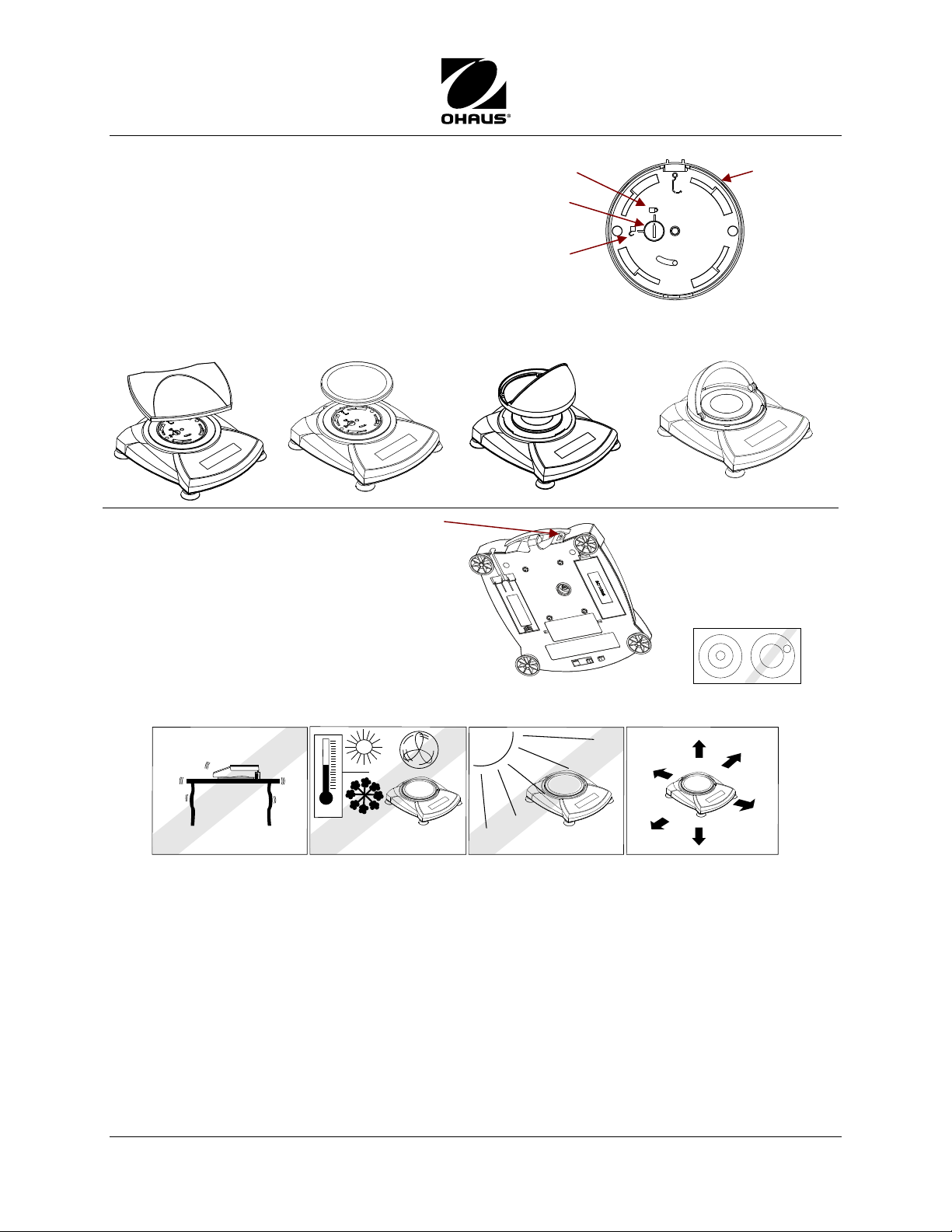
Release Shipping Lock on top of the balance
Turn the pointer to unlocked position.
Install the Platform
Rectangular platform: Place diagonally on subplatform and rotate counter-clockwise until it locks.
Round platform: Set straight down on subplatform.
Connect Power
Ensure voltage identification label matches
Contact Ohaus or your dealer.
Battery Installation
Install the Four “AA” (LR6) batteries with
polarity as shown in the battery compartment.
Adapter jack
Unlocked
position
Locked
position
Pointer
Subplatform
Draft Shield models: Position draft shield
on top and rotate it until it faces forward.
Balances with leveling
feet and bubble must
be leveled before
using. (Bubble is at
rear, next to AC
Adapter Input Jack.)
SELECTING THE LOCATION:
Place on a firm, steady surface with sufficient space.
Avoid excessive air current, vibrations, heat sources, or rapid temperature changes.
SAFETY PRECAUTIONS
• Before plugging in the balance, verify that local power supply matches voltage printed
on power adapter. (Use only the adapter provided with the balance.)
• Disconnect the balance from the power supply when cleaning.
• Do not operate this product in hazardous or unstable environments.
• Do not drop loads on the pan.
• Use only approved accessories and peripherals, as available.
• Operate the product only under ambient conditions specified in the Instruction Manual.
• Service should be performed by authorized personnel only.
Ohaus Corporation www.ohaus.com i SPJ Carat Balance Quick Start Guide
Page 2
SPJ Carat Balance Quick Start Guide
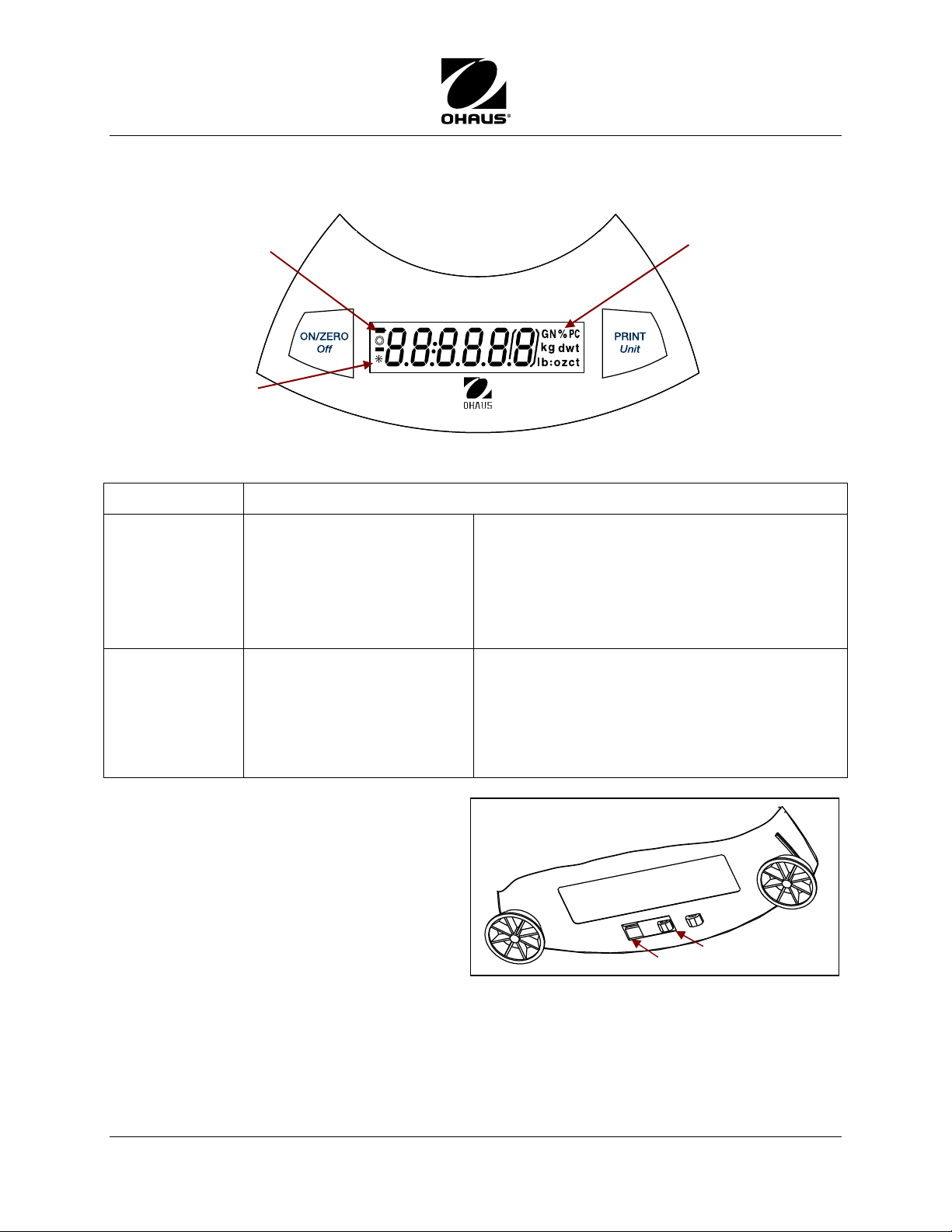
indicator
CONTROLS
Battery charge
indicator
Stability
Button Functions
ON/ZERO
Off
Short Press (when off)
Short Press:(when on)
Long Press
Extended Long Press
Short press in Menu mode
Symbols for weighing
modes:
ct – carats
dwt – pennyweight
GN – Grains
kg – kilograms, g – grams
lb – pounds
oz – ounces
oz-t – ounce troy
PC – pieces
t – taels (Hong Kong,
Singapore, Taiwan;
Turns scale on.
If balance is on, sets display to zero.
Turns scale off.
During power up, enters Menu mode.
Accept setting on display.
PRINT
Menu
Short Press
Press and Hold
Short press in Menu mode
Locking the Menu
The Lock Switch is used to lock out the
menu mode, preventing unauthorized
changes.
To lock the menus, position the Lock Switch
next to the tab on the bottom of the balance
as shown.
Sends print command to COM interface port.
If Display Hold or Totalize mode is active,
short press enters that mode.
Scroll through Units. Release on desired unit.
“No” (toggles through available settings)
Locked
Unlocked
SPJ Carat Balance Quick Start Guide ii Ohaus Corporation www.ohaus.com
Page 3
Quick Start Guide SPJ Carat Balance
OPERATION
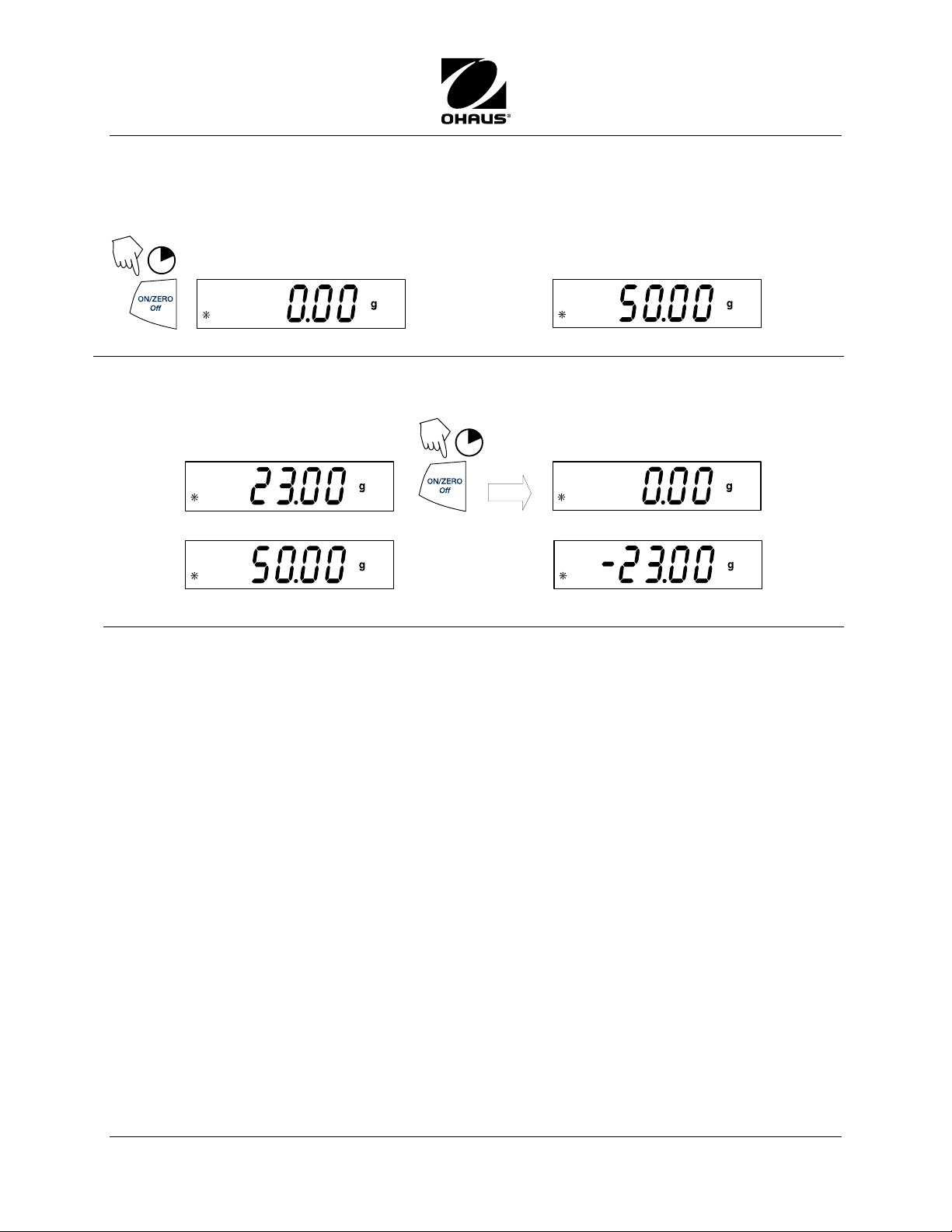
Weighing
Start with the balance on.
1
(Rezero the display)
Taring a Container’s Weight
Taring zeros the container weight. With balance on, place an empty container on the platform.
(Container weight)
(Place material in container)
1
(Place sample on platform)
(Example 50g)
(Container weight tared)
(Material and container removed)
(50g sample)
To remove tare, press ON/ZERO Off again.
ADDITIONAL OPERATIONS
Use the Units Menu to activate Parts Counting.
(See back page.)
Parts Counting has two modes:
Normal: balance determines quantity based on average weight of parts in original
reference quantity.
Enhanced: additional parts can be added to the platform ( ≤ the original number).
The additional reference quantity produces a more accurate average part weight.
Ohaus Corporation www.ohaus.com iii SPJ Carat Balance Quick Start Guide
(See Instruction Manual for more details.)
Page 4
SPJ Carat Balance Quick Start Guide
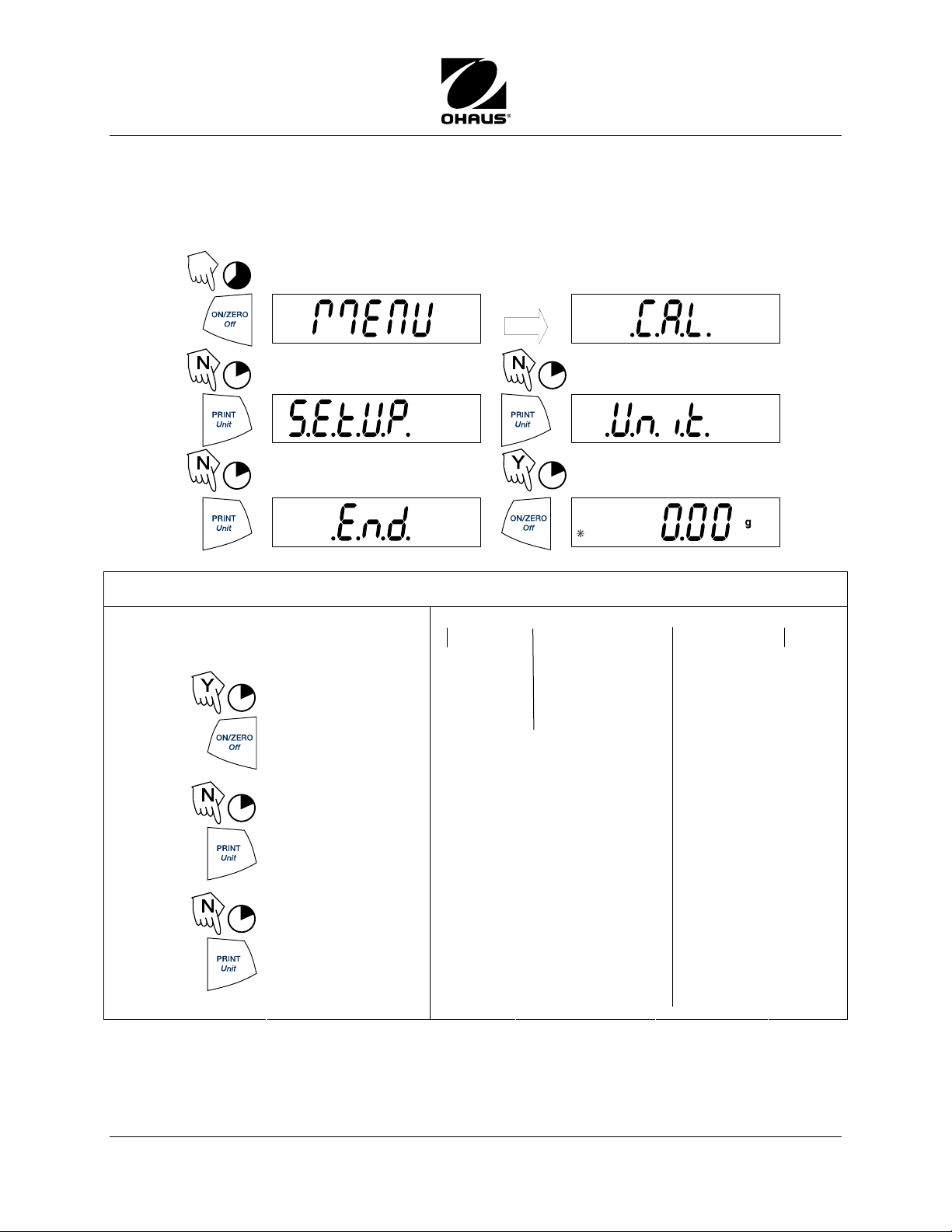
MENU NAVIGATION
There are four main menus in the balance: .C.A.L., .S.E.T.U.P., .U.N.I.T.S. and .E.N.D.
(Start with the balance off and the Lock Switch off: see page ii)
The sequence is shown below.
5
(Release button)
.
1
(Acquiring zero value)
1
MENU STRUCTURE
Accepting/Bypassing Menu Items
Start with menu item displayed.
1
= YES Accept
1
= NO
1
(Short presses
advance through
menu)
Cal
− Yes/No
1
1
(Weigh Mode)
Setup
− Auto-Off
-On/Off
− Lin Cal
-Yes/No
− End
-Yes/No
Units (On/Off)
− carat
− grain
− g
− kg
− lb
− oz
− ounce troy
− Pennyweight
− t
-Tael (HK,
Sing, Tai)
- Tola
- Tical
− PC
-Count
-Cnt.Enh
Off
− End
(Yes/No)
End
− Yes/No
*80253128*
SPJ Carat Balance Quick Start Guide iv Ohaus Corporation www.ohaus.com
P/N 80253128
 Loading...