

OHAUS Compass CX, Compass CX221, Compass CX621, Compass CX1201, Compass CX2200 Quick Start Manual
...Page 1
es
fr
PRECAUCIONES DE SEGURIDAD
Este producto se conforma con las Directivas 2011/65/EU
(RoHS), 2014/30/EU (EMC) y 2014/35/EU (LVD). La
declaración de conformidad de la UE está disponible en línea
en www.ohaus.com/ce
Este producto cumple con la Directiva 2012/19/EU (RAEE).
Para obtener instrucciones sobre eliminación en Europa,
consulte www.ohaus.com/weee
Ce produit est conforme aux directives 2011/65/EU (RoHS),
2014/30/EU (EMC) et 2014/35/EU (LVD). La déclaration de
conformité UE est disponible en ligne sur
www.ohaus.com/ce
Ce produit est conforme à la directive 2012/19/EU (DEEE).
Pour les instructions de mise au rebut en Europe, consultez
le site www.ohaus.com/weee
en
es
fr
Solo opere la báscula en lugares secos.
No opere la báscula en lugares peligrosos.
No deje caer ni sobrecargue la balanza.
Al operar la báscula desde la red eléctrica, solo use el AC
Adaptador especificado por Ohaus.
INSTALAÇÃO
Retire el inserto protector de transporte de plástico (modelo 0.1g
solamente) para su uso. Guarde el inserto de plástico para
garantizar un transporte seguro. Ver figura 1.
Retirez le couvercle de la batterie situé au bas de la balance et
insérez les 3 piles LR6 (AA) dans le compartiment à piles.
Ver figura 2.
TECLADO DE DOS BOTONES
: Presione para encender la báscula / establecer cero.
Pulsación larga para apagar la báscula.
: Presione para cambiar unidades. Pulsación larga para
iniciar la calibración.
CALIBRACIÓN
Mantenga presionado hasta que aparezca [CAL]. Presione
para iniciar la calibración de intervalos.
1. Presione para establecer el punto cero.
2. Cuando se muestre [xxx], coloque xxx g de peso en la plataforma.
3. Presione para establecer el punto de span.
4. Después de la calibración, la pantalla vuelve a pesar.
LUZ DE FONDO
1. Mantenga presionado hasta que aparezca [CAL]. Presione
para pasar el siguiente menú b.Auto.
2. Presione para pasar el siguiente menú b.ON / b.OFF.
Presione para aceptar la configuración mostrada y vuelve a
pesar.
MANTENIMIENTO
Las superficies exteriores del instrumento se pueden limpiar con un
paño humedecido con agua y un detergente suave. No use
disolventes, productos químicos fuertes, amoníaco o agentes de
limpieza abrasivos.
Registre su báscula bajo Registro de garantía en
www.ohaus.com/support.
Para problemas técnicos, póngase en contacto con un agente de
servicio autorizado de Ohaus. Visite nuestro sitio web
www.ohaus.com para ubicar la oficina de Ohaus más cercana a
usted.
CONFORMIDAD
PRÉCAUTIONS DE SÉCURITÉ
N'utilisez la balance que dans des endroits secs.
N'utilisez pas la balance dans des endroits dangereux.
Ne laissez pas tomber ou ne surchargez pas la balance.
Lors de l'utilisation de la balance à partir du secteur, n'utilisez que le
courant alternatif adaptateur spécifié par Ohaus.
INSTALLATION
Retirez l’insert de protection de transport en plastique (modèle 0,1 g
seulement) pour l’utiliser. Conservez l’insert en plastique pour un
transport en toute sécurité. Voir la figure 1.
Retirez le couvercle de la batterie situé au bas de la balance et insérez
les 3 piles LR6 (AA) dans le compartiment à piles. Voir la figure 2.
CLAVIER À DEUX BOUTON
: Appuyez sur pour allumer la balance / mettre à zéro. Appuyez
longuement pour éteindre la balance.
: Appuyez sur pour changer d'unité. Appuyez longuement pour
commencer l'étalonnage.
ÉTALONNAGE
Appuyez longuement
to start calibration. Appuyer sur pour commencer
l’étalonnage de la pesée .
3. Appuyez sur pour définir le point zéro.
4. Lorsque [xxx] est affiché, placez xxx g poids sur la plate-forme.
5. Appuyez sur pour définir le point d'échelle.
6. Après le calibrage, l'affichage revient à la pesée.
RÉTROÉCLAIRAGE
1. Appuyez longuement
Appuyez sur pour passer au menu suivant b.Auto.
2. Appuyez sur pour passer au menu suivant b.ON / b.OFF.
Appuyez sur pour accepter le réglage affiché et revenir à la
pesée.
ENTRETIEN
Les surfaces extérieures de l'instrument peuvent être nettoyées avec
un chiffon humidifié avec de l'eau et un détergent doux. N'utilisez pas
de solvants, de produits chimiques agressifs, d'ammoniaque ou
d'agents nettoyants abrasifs.
Enregistrez votre balance sous Enregistrement de garantie sur
www.ohaus.com/support.
Pour des problèmes techniques, contactez un agent de service agréé
Ohaus. Veuillez visiter notre site Web www.ohaus.com pour localiser
le bureau Ohaus le plus proche.
CONFORMITÉ
sur jusqu'à ce que [CAL] s'affiche. Press
sur jusqu'à ce que [CAL] s'affiche.
CompassTM CX Series Scale
Quick Start Guide
99 Washington Street
Melrose, MA 02176
Phone 781-665-1400
Toll Free 1-800-517-8431
Visit us at www.TestEquipmentDepot.com
Page 2
en
This product complies with Directives 2011/65/EU (RoHS),
2014/30/EU (EMC) and 2014/35/EU (LVD). The EU
Declaration of Conformity is available online at
www.ohaus.com/ce.
This product complies with the EU Directive 2012/19/EU
(WEEE). For disposal instructions in Europe, refer to
www.ohaus.com/weee
Model
Max d CX221
220
0.1 g
CX621
620
0.1 g
CX1201
1200
0.1 g
CX2200
2200
1 g
CX5200, CX5200F*
5200
1 g
Please scan the below
QR code to download
the user manual:
*30467748*
P/N 30467748 A 2018 Ohaus Corporation, all rights reserved.
Printed in China
SAFETY PRECAUTIONS
Only operate the scale in dry locations.
Do not operate the scale in hazardous locations.
Do not drop or overload the scale.
When operating the scale from mains power, only use the AC
Adapter specified by OHAUS.
INSTALLATION
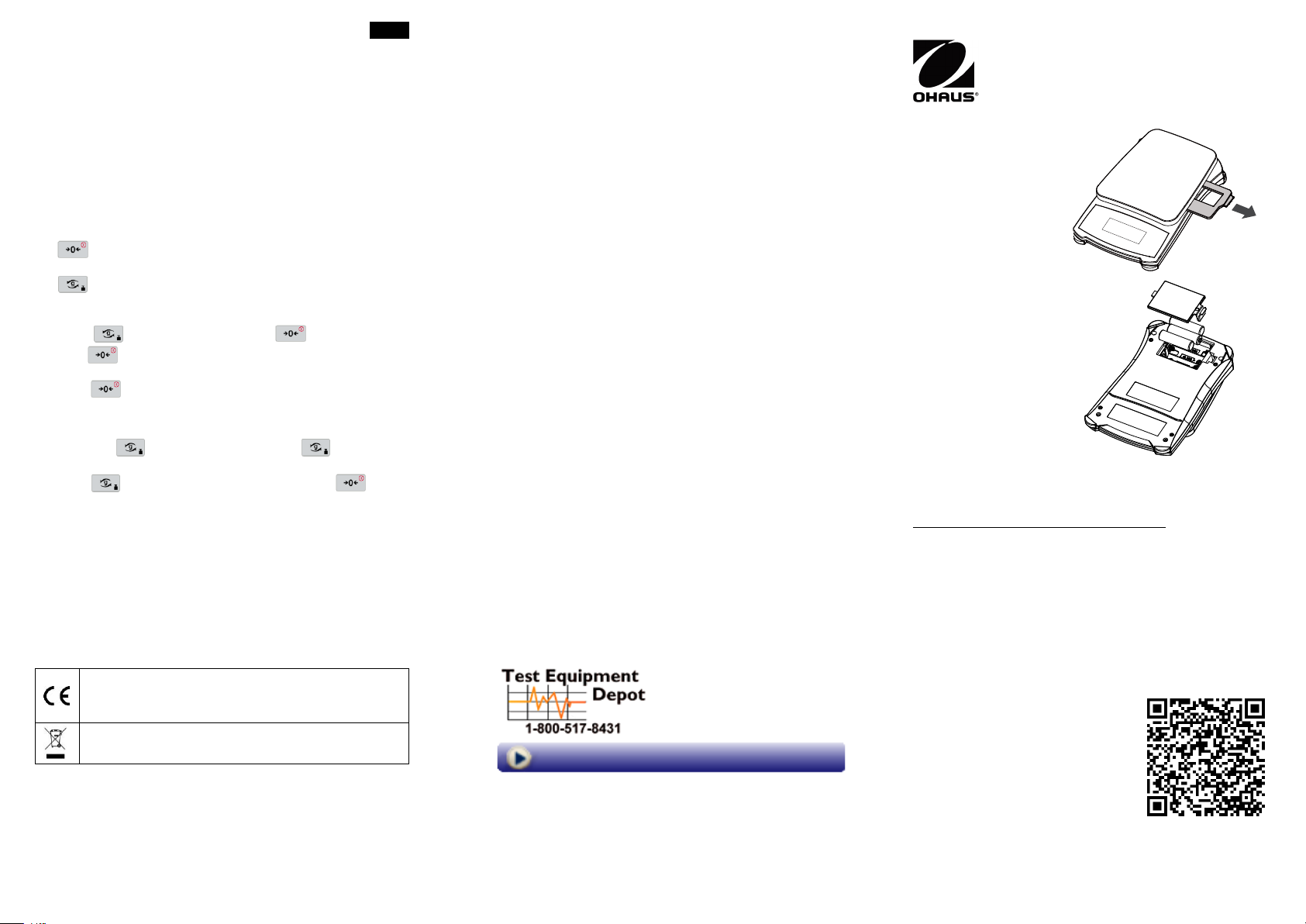
Remove the plastic transportation protective insert (0.1g model only)
for use. Save the plastic insert to ensure safe transport. See figure
1.
Remove the battery cover on bottom of the scale and insert the 3
LR6 (AA) batteries into the battery compartment. See figure 2.
TWO BUTTON KEYPAD
: Press to turn the scale on / set zero. Long press to turn the
scale off.
: Press to change units. Long press to enter user menu.
CALIBRATION
Long press until [CAL] is displayed. Press to start calibration.
1. Press to set the zero point.
2. When [xxx] is displayed, place xxx g weight on the platform.
3. Press to set the span point.
4. After calibration, the display returns to weighing.
BACKLIGHT
1. Long press until [CAL] is displayed. Press to move to
next menu b.Auto.
2. Press to move to next menu b.ON / b.OFF. Press to
accept displayed setting and return to weighing.
MAINTENANCE
The exterior surfaces of the instrument may be cleaned with a cloth
dampened with water and a mild detergent. Do not use solvents,
harsh chemicals, ammonia or abrasive cleaning agents.
Register your scale under Warranty Registration at
www.ohaus.com/support.
For technical issues contact an Authorized OHAUS Service Agent.
Please visit our website www.ohaus.com to locate the OHAUS office
nearest you.
FCC NOTE: This equipment has been tested and found to comply with
the limits for a Class B digital device, pursuant to Part 15 of the FCC
Rules. These limits are designed to provide reasonable protection
against harmful interference in a residential installation. This equipment
generates, uses and can radiate radio frequency energy and, if not
installed and used in accordance with the instructions, may cause harmful
interference to radio communications. However, there is no guarantee
that interference will not occur in a particular installation. If this equipment
does cause harmful interference to radio or television reception, which
can be determined by turning the equipment off and on, the user is
encouraged to try to correct the interference by one or more of the
following measures:
- Reorient or relocate the receiving antenna.
- Increase the separation between the equipment and receiver.
- Connect the equipment into an outlet on a circuit different from that
to which the receiver is connected.
- Consult the dealer or an experienced radio/TV technician for help.
Changes or modifications not expressly approved by OHAUS Corporation
could void the user's authority to operate the equipment.
Figure 1 / Figura 1 / Figure 1
Figure 2 / Figura 2 / Figure 2
Technical Data / Datos Técnicos / Données Techniques
*Carrying case is standard in CX5200F model.
COMPLIANCE
99 Washington Street
Melrose, MA 02176
Phone 781-665-1400
Toll Free 1-800-517-8431
Visit us at www.TestEquipmentDepot.com
 Loading...