

Page 1
Page 2
BQB
MADE IN CHINA
Page 3
WELCOME
Welcome to your new
NK SHOC
K
W
A
VE,
US Top
selling intelligent speaker and speakerphone.
delivers impactful wireless audio
without the hassle of cables and docking stations.
NK SHOCKWAVE also gives you the freedom to
share music, movies, games and calls whenever
you want. It’s the perfect companion to any
phone, mp3 player, tablet or laptop.
CONNECT TO
NK SHOCKWAVE
TM
OR
CHARGE NK SHOCKWAVE
3.5mm STEREO
BLUETOOTH
®
USB
(wireless audio) (wired audio)
NK SHOC
K
W
A
VE
Page 4

Page 5
PAGE
2
4
5
7
8
9
1
2
3
4
CONTENTS
ANATOMY
POWER UP
GET CONNECTED
GET LISTENING
GET TALKING
TROUBLESHOOTING
SPECIFICATIONS
SAFETY INFORMATION
1
10
11
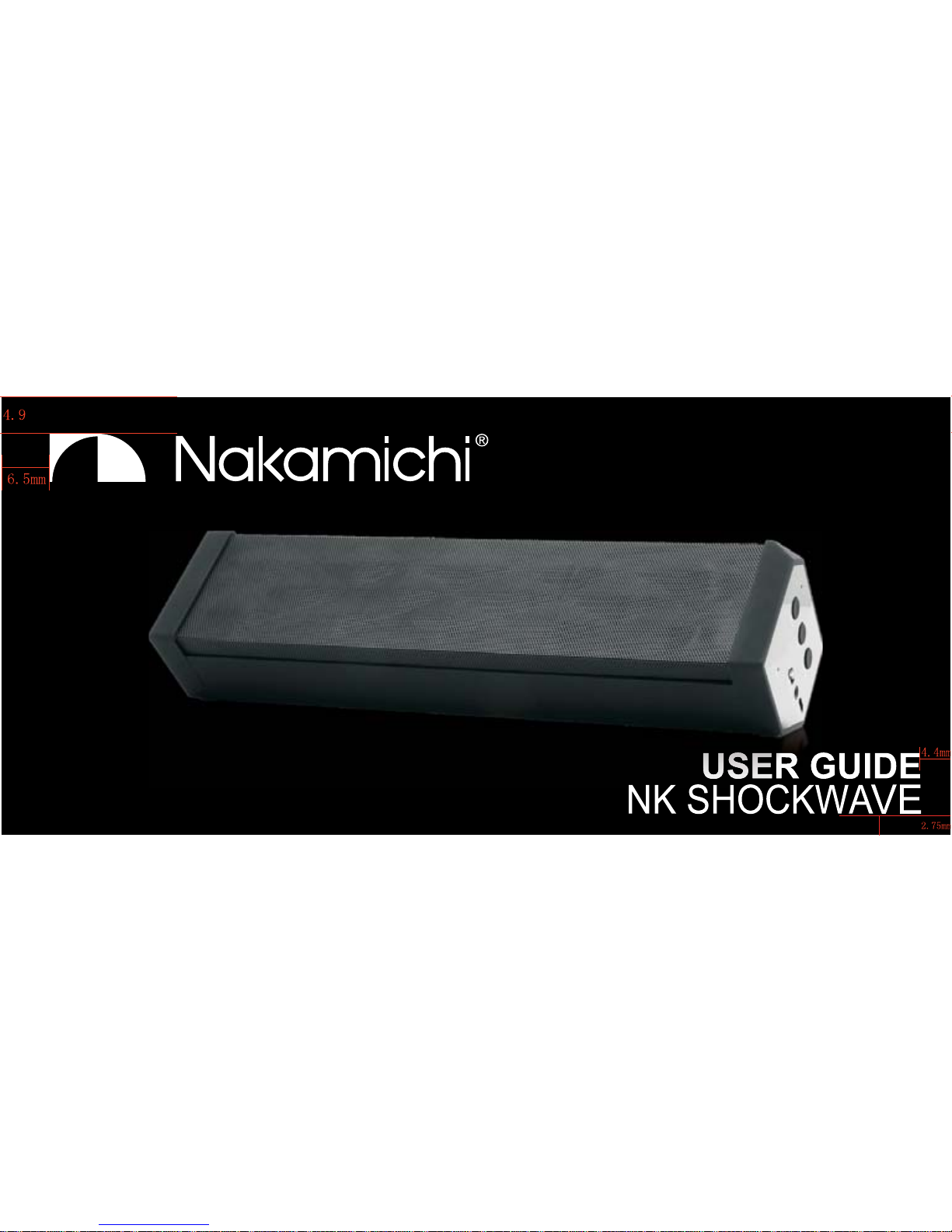
NK SHOCKWAVE
Page 6
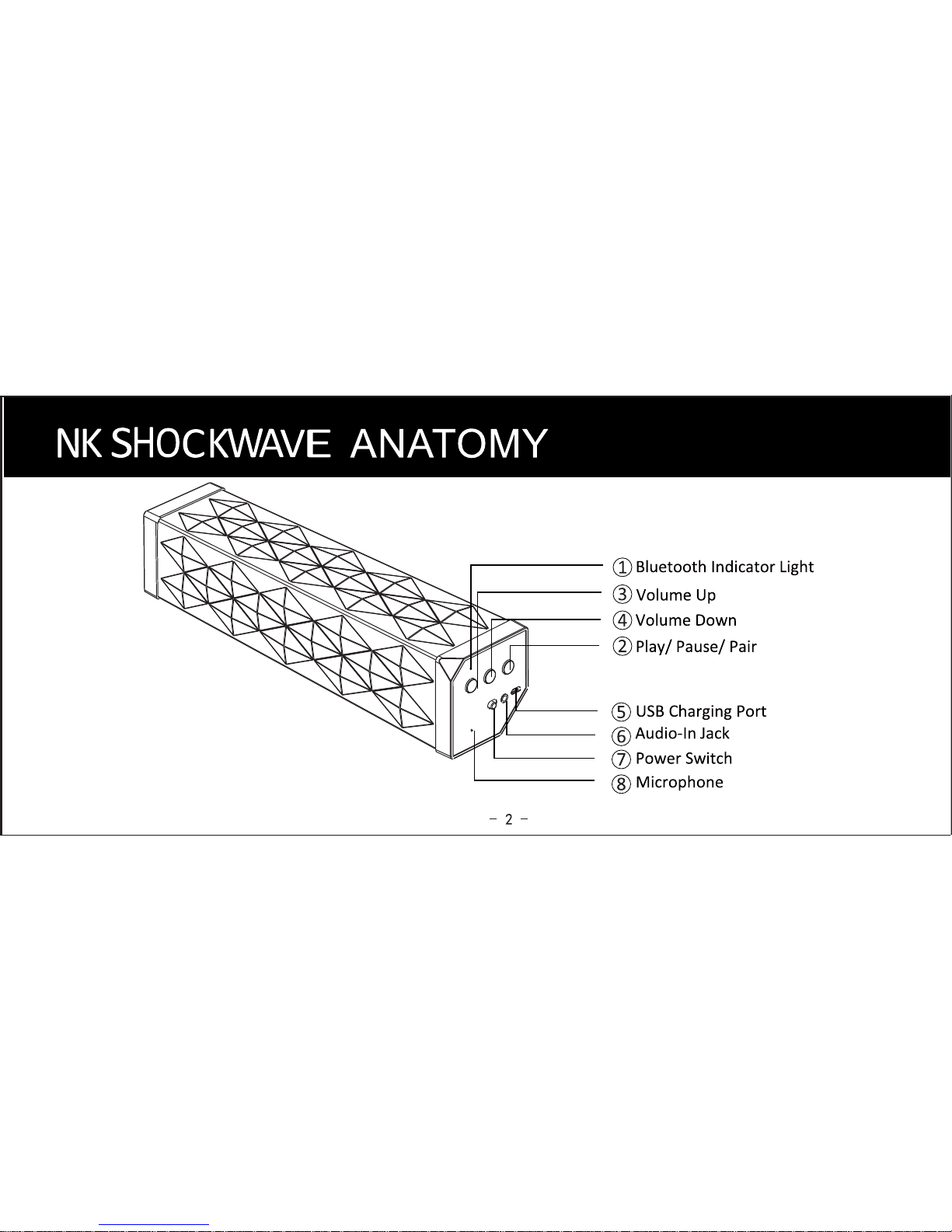
Page 7
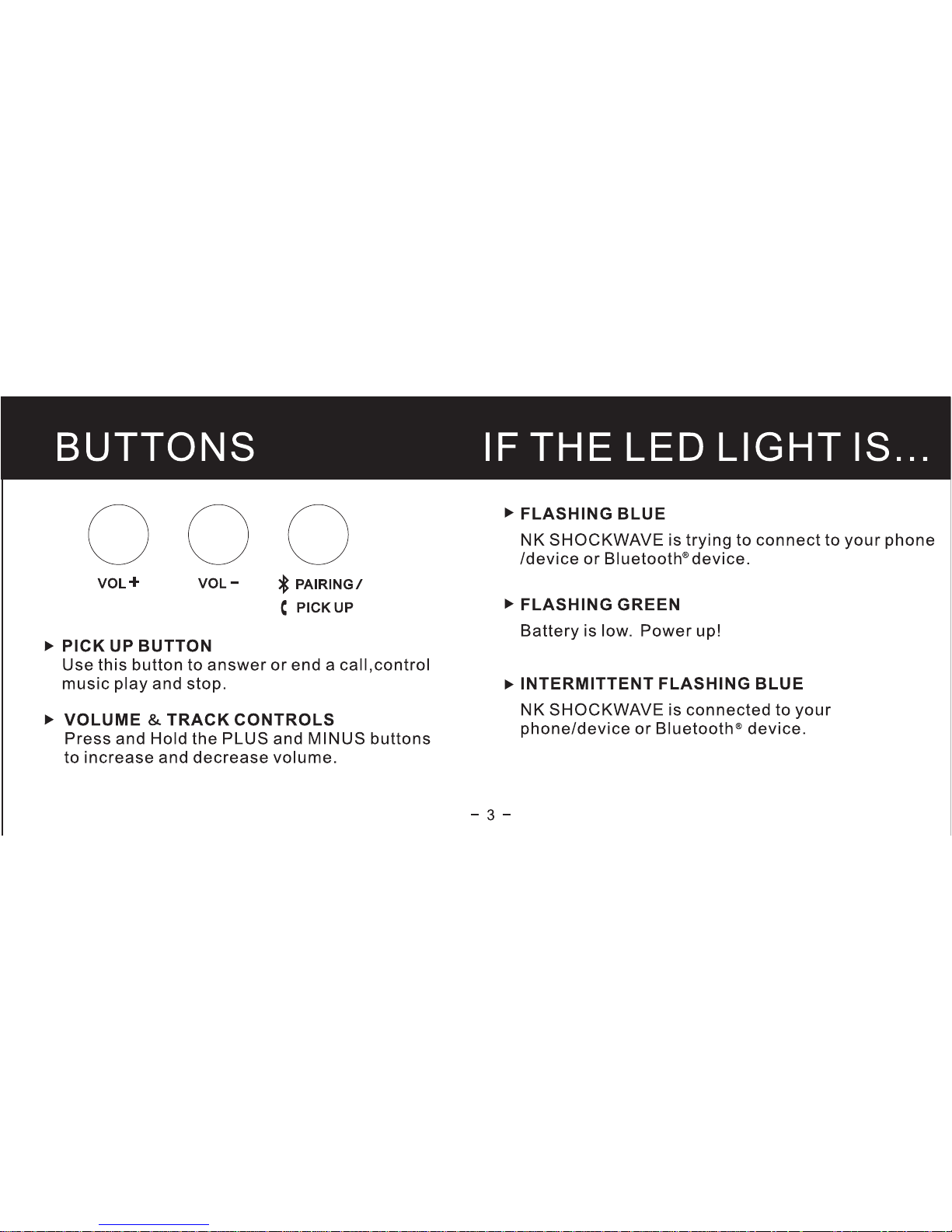
Page 8
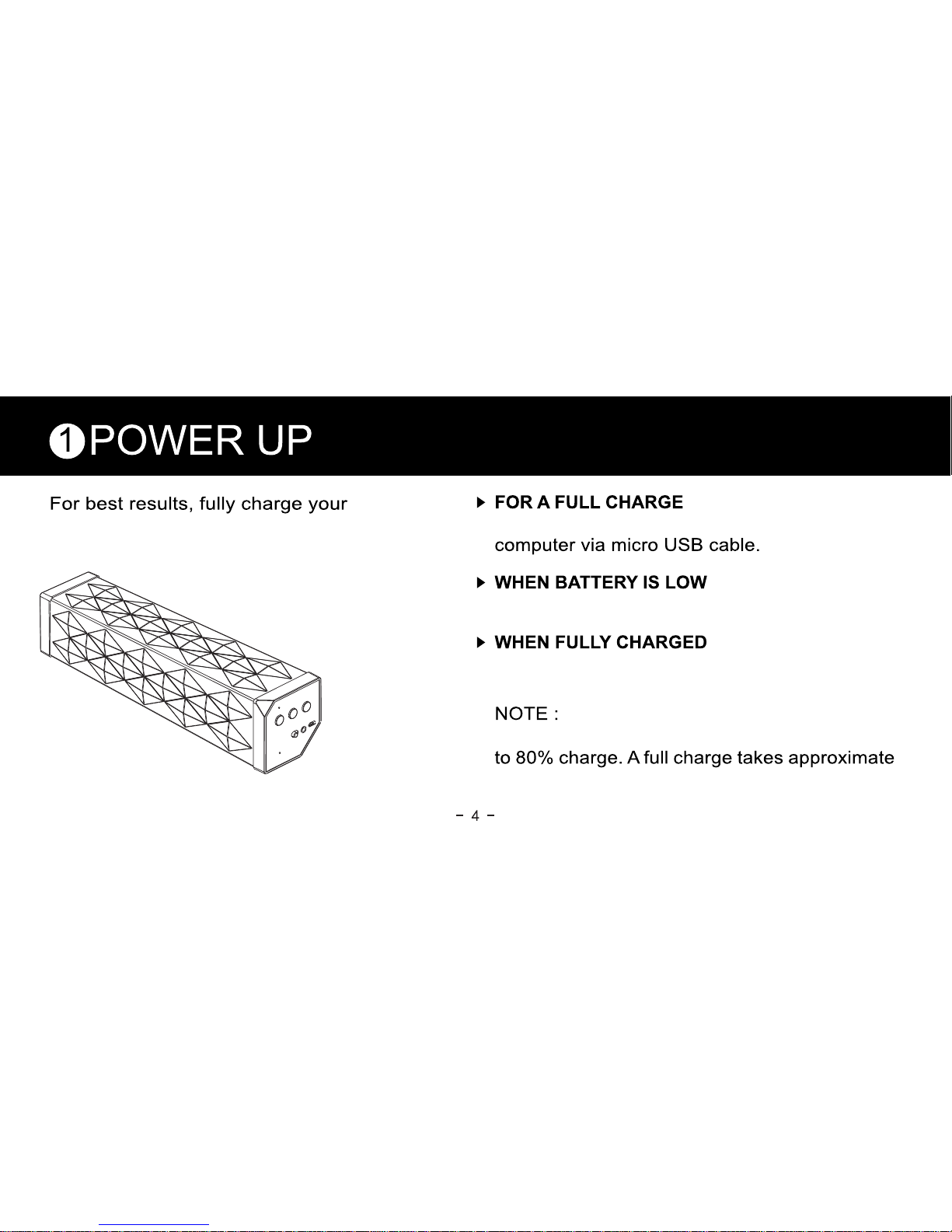
The LED LIGHT turns FLASHING GREEN.
The LED LIGHT turns YELLOW.
NK SHOCKWAVE before use
Plug NK SHOCKWAVE into your wall charger or
It takes 2 hours to charge your NK SHOCKWAVE
3-4 hours.
Page 9
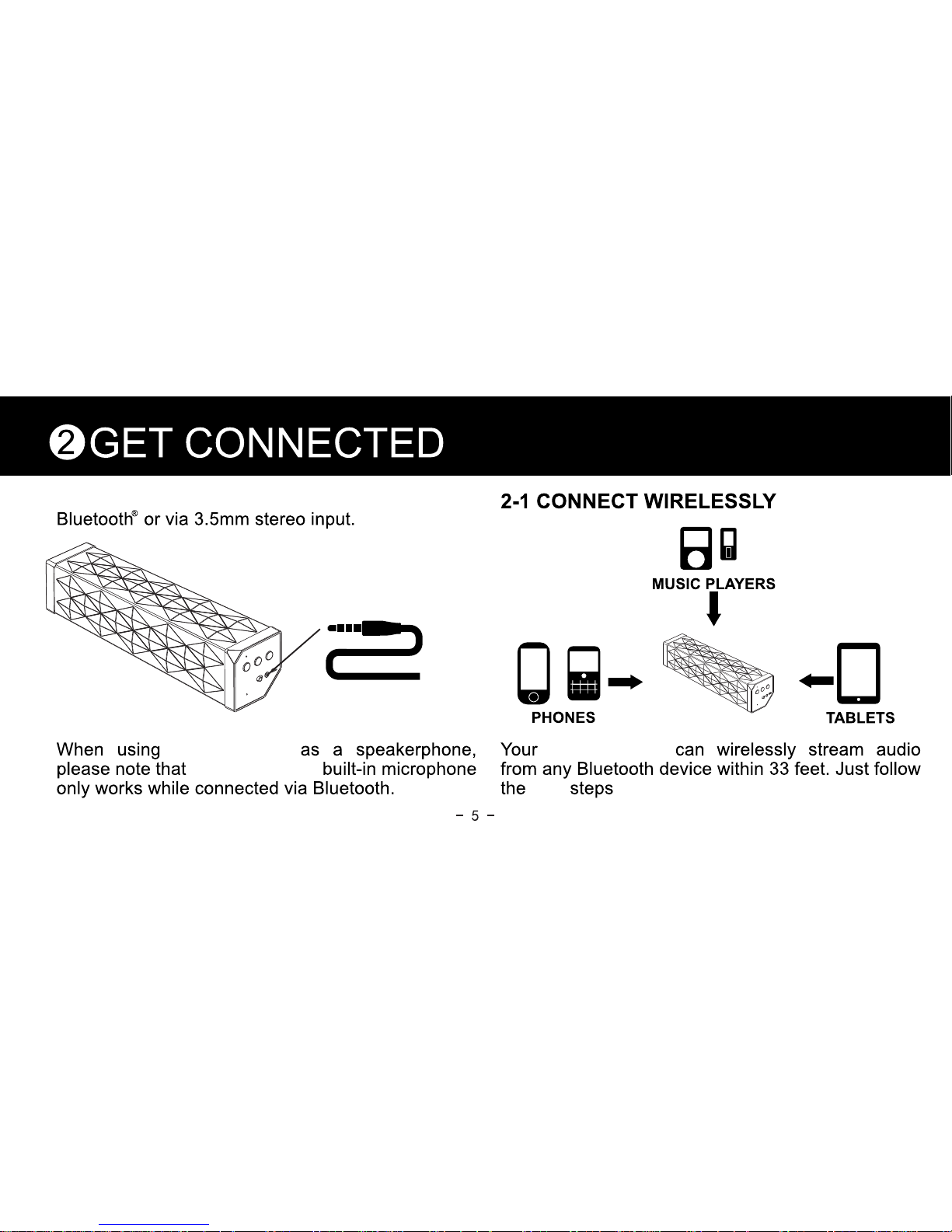
next
:
Connect to NK SHOCKWAVE wirelessly via
NK SHOCKWAVE
NK SHOCKWAVE
NK SHOCKWAVE
Page 10
2-4 MAKE THE CONNECTION
2-5 OR PLUG & PLAY
Go to your device’s Bluetooth settings.
ADD OR SEARCH FOR DEVICES
When appears, select it.
You will hear 2 “beeps” and the LED light will turn blue.
This is a one-time event per device. To pair your
to another device, repeat steps 2.2 to 2.4.
No Bluetooth?
also connects via 3.5mm
stereo input.
Play audio from any device with a headphone jack or
audio output.
®
2-3 PREPARE YOUR PHONE OR DEVICE
Turn on Bluetooth .
ON AN IPHONE , IPOD , OR IPAD
Go to SETTINGS > GENERAL > and enable
BLUETOOTH
ON A BLACKBERRY
Go to SETTINGS/OPTIONS >BLUETOOTH
and enable BLUETOOTH
®® ®
®
®
NK SHOCKWAVE
NK SHOCKWAVE
NK SHOCKWAVE
Page 11

3
GET LISTENING
3-1 GET THE BEST SOUND 3-2 CONNECTION PRIORITY
For best listening results, make sure your
is resting on its base and speaker
grill facing upwards.
When connected wirelessly via Bluetooth , it’s best
to turn the volume on your phone/device fully up
and then use the PLUS and MINUS buttons on
your
.
When connected via 3.5mm stereo input, your
phone/device may distort the audio signal if turned
up too loud. Turn down the volume on your
phone/device before adjusting the volume on your
.
Incoming and outgoing calls will always take
precedence over audio playback. Audio content via
3.5mm stereo input will override wireless audio via
Bluetooth.
R
7
NK SHOCKWAVE
NK SHOCKWAVE
NK SHOCKWAVE
Page 12
Your can be used as a wireless
speakerphone. Just speak in the direction of
the front grill. The built-in microphone only
works when connected via Bluetooth .
Press the
to both answer and end a call.
4
GET TALKING
4-1 ANSWER/END A CALL
4-2 DECLINE AN INCOMING CALL
Hold the BUTTON for 2 seconds.
4-3 MAKE A CALL
Use your phone to dial as usual. Listen and talk through
your
.
®
8
NK SHOCKWAVE
BUTTON on your
NK SHOCKWAVE
NK SHOCKWAVE
Page 13

TROUBLESHOOTING
1. HEARING DISTORTION
A. Lower the volume on your and/or
phone/device. (See section 3.1 Get the Best Sound)
B. Make sure it’s charged up. Check for low battery,
then charge via USB.
2. NOT LOUD ENOUGH?
A. Turn up the volume on your phone/device or your
.
B. Make sure it’s charged up.
C. Plug in to your phone/device via
3.5mm stereo cable.
3. UNABLE TO PAIR WITH BLUETOOTH
DEVICE?
®
A.
Confirm that your phone/device is Bluetooth
compatible.
B. Follow GET CONNECTED instructions in this guide.
C. Visit www.nakamichi-usa.com/support
4.
EXPERIENCING SIGNAL LOSS OR DROPOUTS
VIA BLUETOOTH?
A. Move closer to your phone/device.
B. Make sure it’s charged up.
C. Turn off your and phone/device,
then
power up and reconnect.
-
NK SHOCKWAVE
NK SHOCKWAVE
NK SHOCKWAVE
NK SHOCKWAVE
NK SHOCKWAVE
NK SHOCKWAVE
Page 14
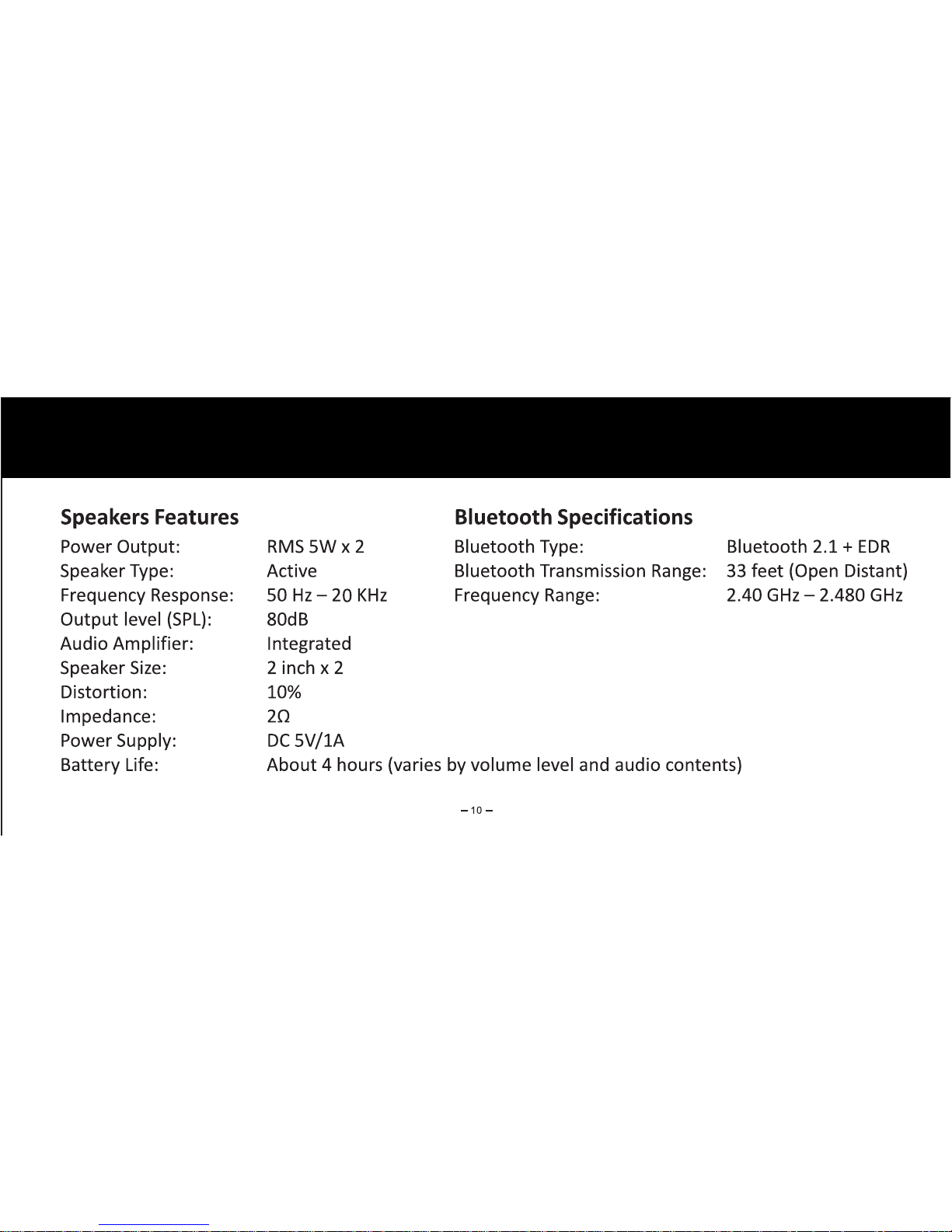
SPECIFICATIONS
Page 15
Please read these safety warnings and cautions
carefully to ensure your personal safety and prevent
property damage.
SAFETY INFORMATION
Fire and Electric Shock Hazard
Do not expose your Speaker to liquid,
moisture, humidity, or rain. Do not use the
Speaker near a bathtub, sink, sauna, pool, or steam
room. Exposure of the
Speaker to
moisture could result in electric shock.
Do not drop, disassemble, open, crush, bend, deform,
puncture, shred, microwave, incinerate, paint, or insert
foreign objects in to the Speaker. Such
actions could result in electric shock .
WARNING:
Clean the Speaker only with a dry cloth.
Do not expose your Speaker to
extremely high or low temperatures.
Do not leave your Speaker in direct
sunlight for extended periods of time.
Do not leave your Speaker near open
flames such as cooking burners, candles, o
r
fireplaces.
Do not block any ventilation openings.
11
NK SHOCKWAVE
NK SHOCKWAVE
NK SHOCKWAVE
NK SHOCKWAVE
NK SHOCKWAVE
NK SHOCKWAVE
NK SHOCKWAVE
NK SHOCKWAVE
Page 16

BATTERY/CHARGER HAZARD
Fall Hazard
Do not place the Speaker on high
surfaces such as shelves. During music playback the
Speaker may move which could cause
the Speaker to shift and fall off of the
edge.
Do not dispose of your Speaker in a fire.
The battery could explode causing injury or death.
Only charge the battery in accordance with the user
instructions supplied with the Speaker.
Do not attempt to disassemble the
Speaker charger or force open the built-in battery
because this may result in electric shock.
Do not charge the Speaker in damp
areas or in extremely high or low temperatures
because this could result in electric shock.
Do not clean the Speaker when it is
being charged. Always unplug the charger first before
cleaning the Speaker.
Automobile Accident Hazard
Do not leave or store the Speaker or
any of its accessories near or over your automobile’s
air bag because serious injury may result when an air
bag deploys.
12
NK SHOCKWAVE
NK SHOCKWAVE
NK SHOCKWAVE
NK SHOCKWAVE
NK SHOCKWAVE
NK SHOCKWAVE
NK SHOCKWAVE
NK SHOCKWAVE
NK SHOCKWAVE
NK SHOCKWAVE
Page 17

Do not use abrasive cleaners to clean your
Speaker because this could cause
scratches and damage.
Do not bring your Speaker in to
contact
with any sharp objects because this could
cause
scratches and damage.
Do not insert anything into your
Speaker
unless otherwise specified in the user
instructions.
This
may damage the internal components.
Do not attempt to repair, modify, or disassemble your
Speaker yourself, it does not contain
any
user-serviceable components.
Do not attempt to replace your
Speaker
battery, it is built-in and is not changeable.
WARNING:
CAUTION
Changes or modifications to this unit not expressly
approved by the party responsible for compliance
could void the user’s authority to operate the equipment.
Observe all signs and displays that require an
electrical device or RF radio product to be switched off
in designated areas.
Turn off your Speaker prior to boarding
an aircraft. Do not use the Speaker
inside an aircraft unless allowed by your airline .
Dispose of the Speaker and the
Speaker’s battery in accordance
with
local regulations. Do not dispose of the battery
with
regular household waste.
13
NK SHOCKWAVE
NK SHOCKWAVE
NK SHOCKWAVE
NK SHOCKWAVE
NK SHOCKWAVE
NK SHOCKWAVE
NK SHOCKWAVE
NK SHOCKWAVE
NK SHOCKWAVE
Page 18

This equipment has been tested and found to comply with
the limits for a Class B digital device, pursuant to Part 15 of
the FCC Rules. These limits are designed to provide
reasonable protection against harmful interference in a
residential installation. This equipment generates uses and
can radiate radio frequency energy and, if not installed and
used in accordance with the instructions, may cause
harmful interference to radio communications. However,
there is no guarantee that interference will not occur in a
particular installation. If this equipment does cause harmful
interference to radio or television reception, which can be
determined by turning the equipment off and on, the user is
encouraged to try to correct the interference by one of the
following measures:
FCC STATEMENT
Connect the equipment into an outlet on a circuit different from that
to which the receiver is connected.
Consult the dealer or an experienced radio/TV technician for help.
Reorient or relocate the receiving antenna.
Increase the
separa
tion between the
equipmen
t and receiver.
This device complies with Part 15 of the FCC Rules. Operation is
subject to the following two conditions:
1. This device may not cause harmful interference, and
2. This device must accept any interference received, including
interference that may cause undesired operation.
FCC NOTICE
Any changes or modifications not expressly approved by the party
responsible for compliance could void the user's authority to operate
this equipment.
This device and its antenna(s) must not be c
o-located or operating
in conjunction with any other antenna or transmitter.
FCC CAUTION
14
To locate the FCC identification numbers,please look on the
FCC ID : QE3 02
underside of the speaker.
B-
Page 19

WoW Technologies LIMITED WARRANTY (U.S Only)
WoW Technologies warrants this product against defects in
materials or workmanship, under normal use, in
accordance with the specifications and warnings, for a
period of 12 months from the original date of purchase of
the product. Pursuant to this Limited Warranty, WoW
Technologies will, at its option. (i) repair the product using
new or refurbish parts or (ii) replace the product with a new
or refurbished product. For purpose of this Limited
Warranty, “refurbished” means a product or part that has
been returned to its original specifications.
The Limited Warranty covers only the hardware
components packaged with the Product. It does not cover
product issues caused by any other reasons, including but
not limited to damages or malfunctions not resulting from
defects in materials
or workmanship under normal use,
repair by unauthorized parties, tampering, misuse,
modification, acts of GOD, accident. It does not cover
limitations of technology or product purchased from other
than WoW Technologies or WoW Technologies’ authorized
retailer, technical assistance for hardware or software
usage, and it does not cover any software products
whether or not contained in the Product; any such
software is provided “AS IS” unless expressly provided for
in any enclosed software Limited Warranty.
There are no other express or implied warranties. WoW
Technologies’ liability is limited to repair or, at its sole
option, replacement of the product. Incidental, special and
consequential damages are disclaimed where permitted
by law.
15
Page 20
To obtain warranty service, you must deliver the product
with the valid proof of purchase in the form of original
sales receipt from WoW Technologies or a WoW
Technologies’ retailer showing the product name and the
date of purchase, freight prepaid, in either its original
packaging or packaging affording an equal degree of
protection to
our Support Centre. Please visit
our website
www.nakamichi-usa.com/support or
email to [email protected] for customer
support or to obtain specific instructions on how to obtain
warranty service for your product.
WOW TECHNOLOGIES
2645 Brooklyn Queens Expressway W.,
Woodside, NY 11377
Product Code:
-
-
16
 Loading...