

Page 1
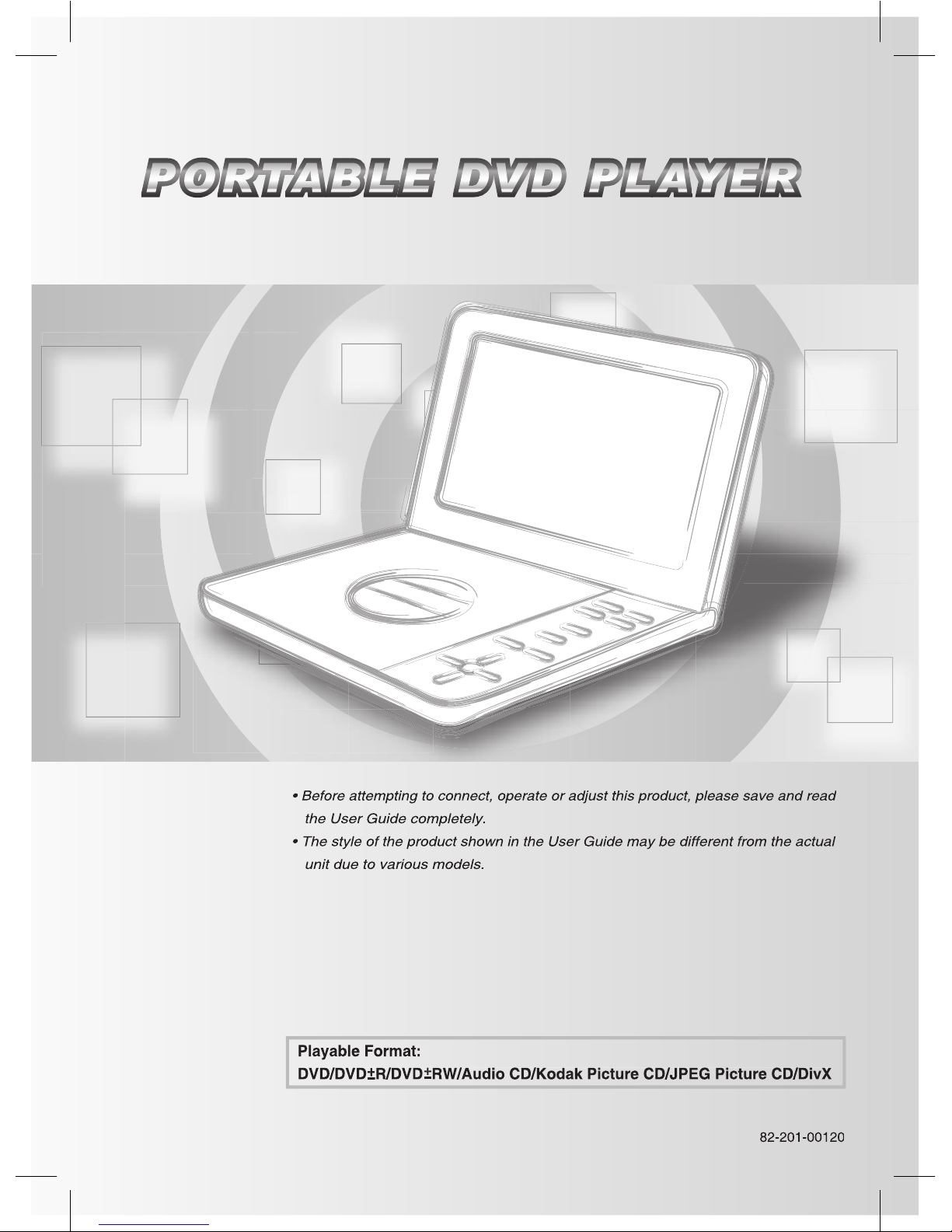
PORTABLE DVD PLAYER
the User Guide completely.
unit due to various models.
User Guide
Page 2

2
PORTABLE DVD PLAYER USER GUIDE
Contents
Thumbnail Function ..................................... 10
Audio Setup ........................................ 12
Troubleshooting ........................... 18
Page 3
3
PORTABLE DVD PLAYER USER GUIDE
This unit employs a laser. Due to possible eye
This equipment has been tested and found to comply
with the limits for a Class B digital device pursuant to
to provide rea son able protection against harmful
with the in struc tions, may cause harmful interference
to radio com mu ni ca tions. However, there is no guar-
terference to radio or television reception, which can
the user is encouraged to try to correct the interference
ferent from that to which the re ceiv er is connected.
technician for help.
This product incorporates copyright pro tec tion tech-
nol o gy that is protected by method claims of certain
television sets are fully compatible with this product
the “Standard De nition” output. If there are questions
times in different regions of the world, all players have region
the region code notice on the screen. The disc will not play,
There are 6 regions (also called “locals”). Each DVD play er
Japan, Europe, South Africa, Middle East (including
Australia, New Zealand, Paci c Islands, Central America,
WHEN OPEN AVOID EX PO SURE TO BEAM
FCC and Safety Information
trade marks of Dolby Lab o ra to ries.
Page 4

4
PORTABLE DVD PLAYER USER GUIDE
Important Safety Instruction
to rain or moisture, does not operate normally, or has been dropped.
WARNING
with liquids, such as vases, shall be placed on the apparatus.
Page 5

5
PORTABLE DVD PLAYER USER GUIDE
To avoid any malfunctions of the unit and to protect against electric shock, re or personal injury, please
Avoid placing the unit in areas of:
Turn the unit off when not in use. When left unused for a long period of time, the unit should be unplugged
from the household AC outlet.
Touching internal parts of the unit is dan ger ous and may cause serious damage to the unit. Do not
When the unit is suddenly moved from a cold environment to a warm one If moisture forms inside the
to evaporate.
watch a TV broadcast and the unit is left on. This is not a malfunction of the unit or the TV. To watch a TV
Precautions
Page 6
6
PORTABLE DVD PLAYER USER GUIDE
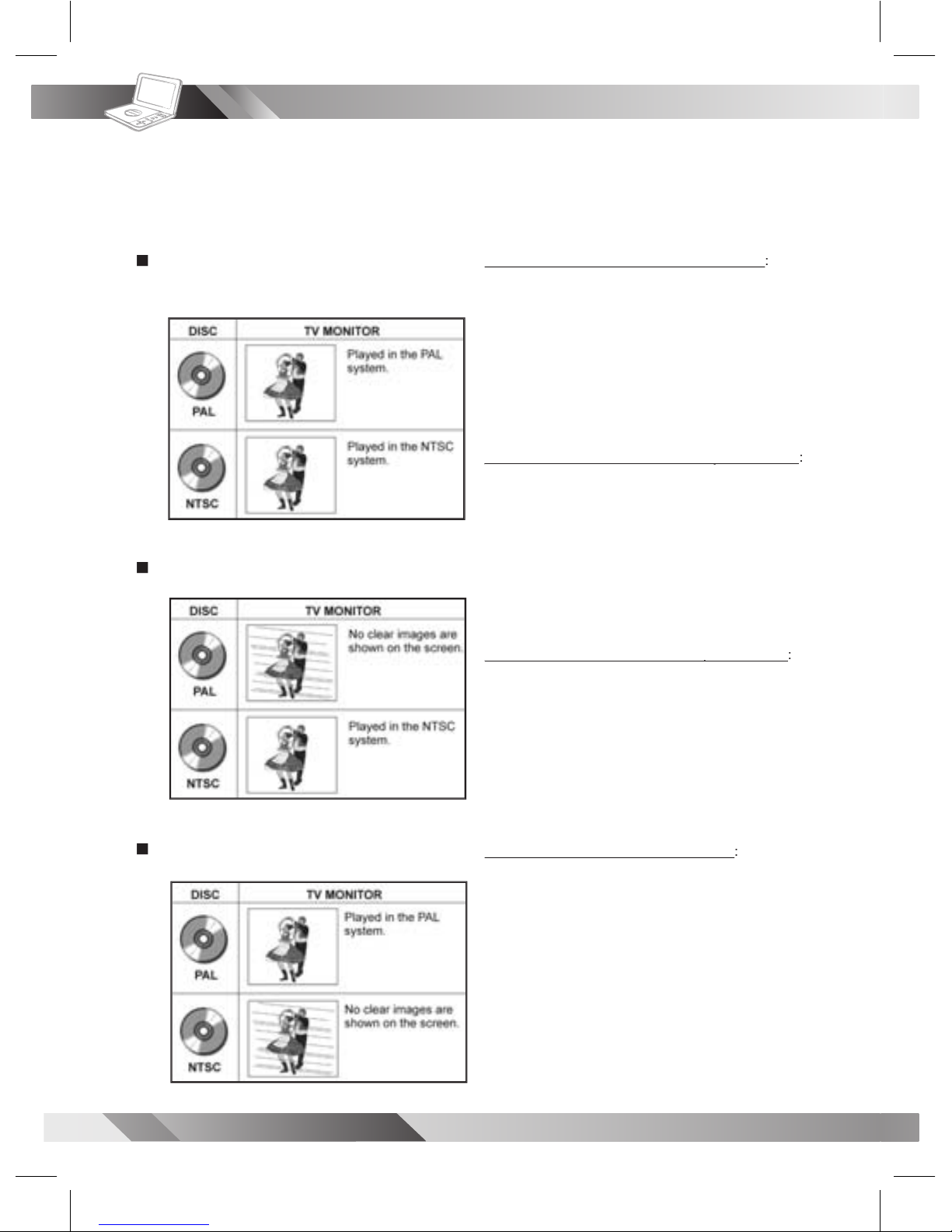
Your Portable DVD Player is capable of playing DVD discs and having their content viewed on the
to play NTSC DVDs, it can also play PAL DVDs (NTSC and PAL are video formats); refer to the Quick
Selecting the type of disc for the type of TV connected
To View NTSC DVDs on an NTSC TV Monitor
video signals.
the Portable DVD Player’s LCD and on the external
To View NTSC DVDs on a Multi-TV System Monitor
To View NTSC DVDs on a Multi-TV System Monitor
the Portable DVD Player’s LCD and on the external
To View PAL DVDs on a Multi-TV System Monitor
To View PAL DVDs on a Multi-TV System Monitor
the Portable DVD Player’s LCD and on the external
To View PAL DVDs on a PAL TV Monitor
monitor (capable of viewing NTSC and PAL)
Page 7
7
PORTABLE DVD PLAYER USER GUIDE
DVD Operation
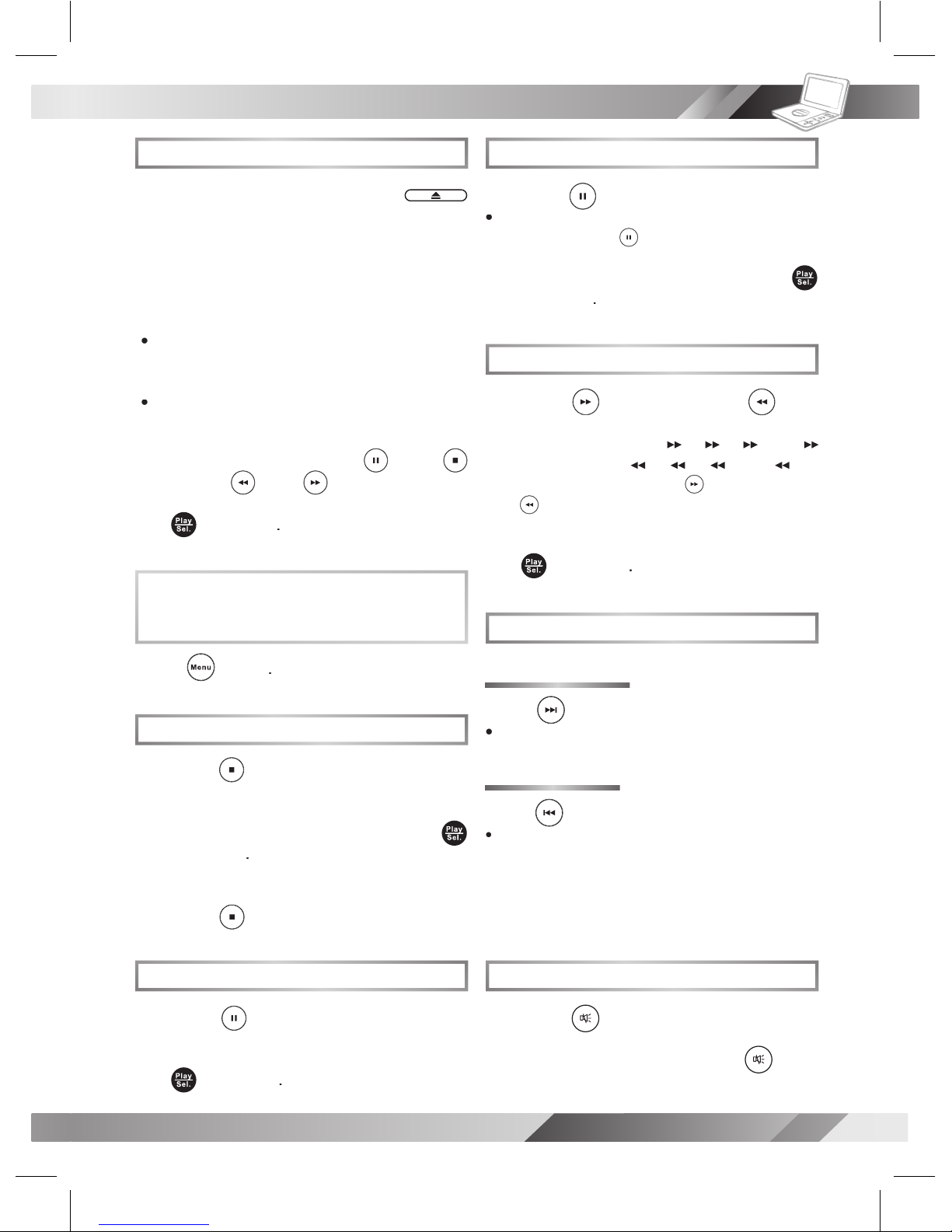
Basic DVD Playback
Turn on the player.
to open the disc cover.
the disc tray with the printed side up.
To play a title,
/ //
to highlight it
and then press
Stopping Playback and Returning
to the Menu Screen
(If a Menu Screen is Available on the Disc)
Stopping Playback
To completely stop the disc playback,
Pausing Playback
To return to normal playback,
Frame Advance (Step)
to pause playback.
The disc is advanced by one frame each
time pressing
To return to normal playback,
Fast Forward and Backward
x2,
x4,
x8 and
x20) or reverse (
x2,
x4,
x8 and
x20)
Fast Forward
Fast Backward
To return to normal playback,
Skipping a Chapter Ahead or Back
during play back.
during play back.
When pressing the button once midway
through a chapter, the player returns to the
The player skips a chapter each time you
Muting the Player
To resume the sound, press
Page 8
8
PORTABLE DVD PLAYER USER GUIDE
DVD Operation
- continued
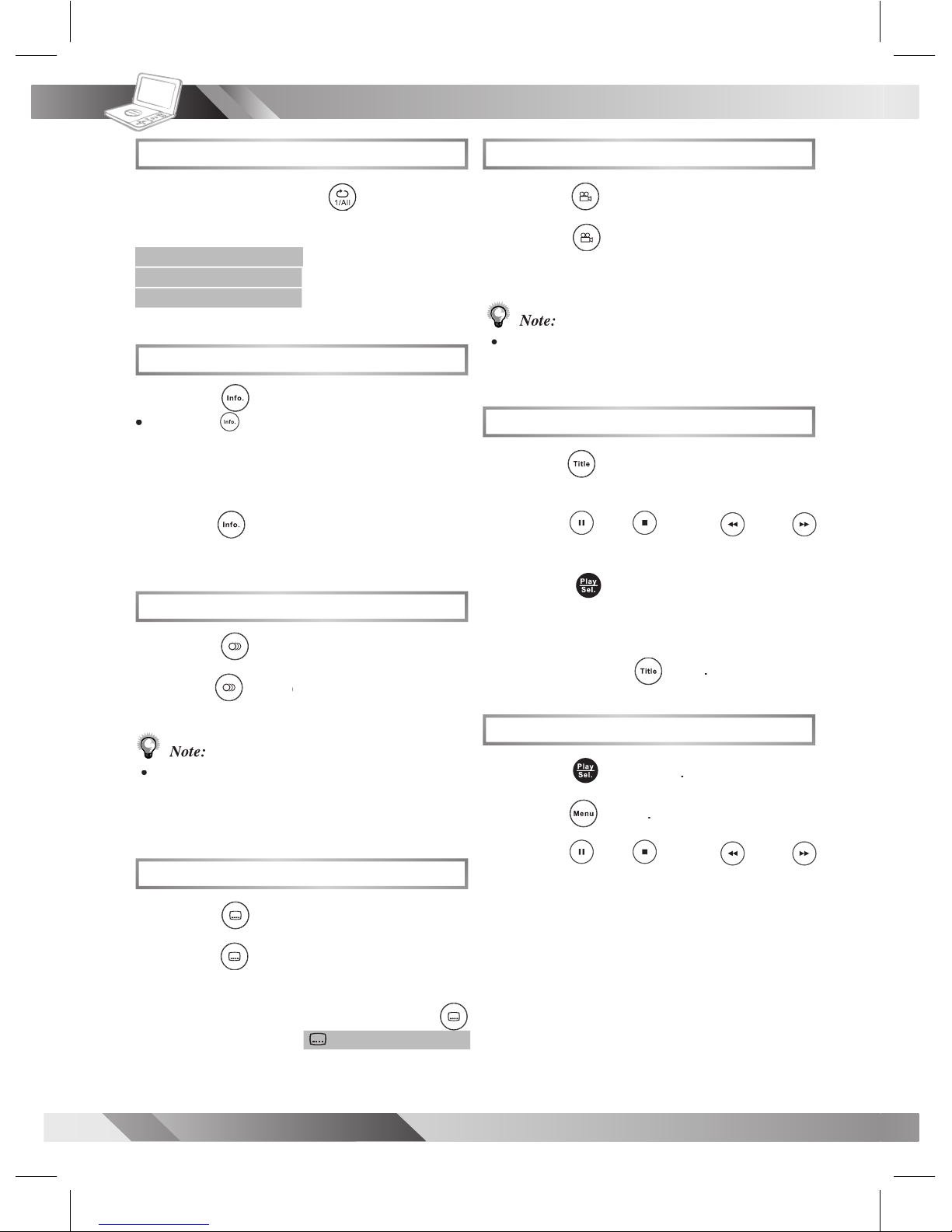
Repeat Viewing
REP: [ CHAPTER ]
REP: [ TITLE ]
REP: [ OFF ]
Displaying Scene Information
during playback
a number of times, the
title number, chapter number, and other
To stop displaying scene information,
the information disappears.
Changing Audio Soundtrack Language
during play back.
a number of times until
Note:
Changing Subtitle Languages
during play back.
To clear the subtitle display, press
: [ OFF ]
Viewing from Different Angles
1
during play back.
Note:
multiple viewing angles are recorded.
Using a DVD Menu
1
Title
in stop mode. The DVD
/ //
to select the preferred item.
to enter to the
To return to the previous menu
Title
Using the Menu Function
1
/ //
to select
the preferred title.
Page 9
9
PORTABLE DVD PLAYER USER GUIDE
Audio CD Playback
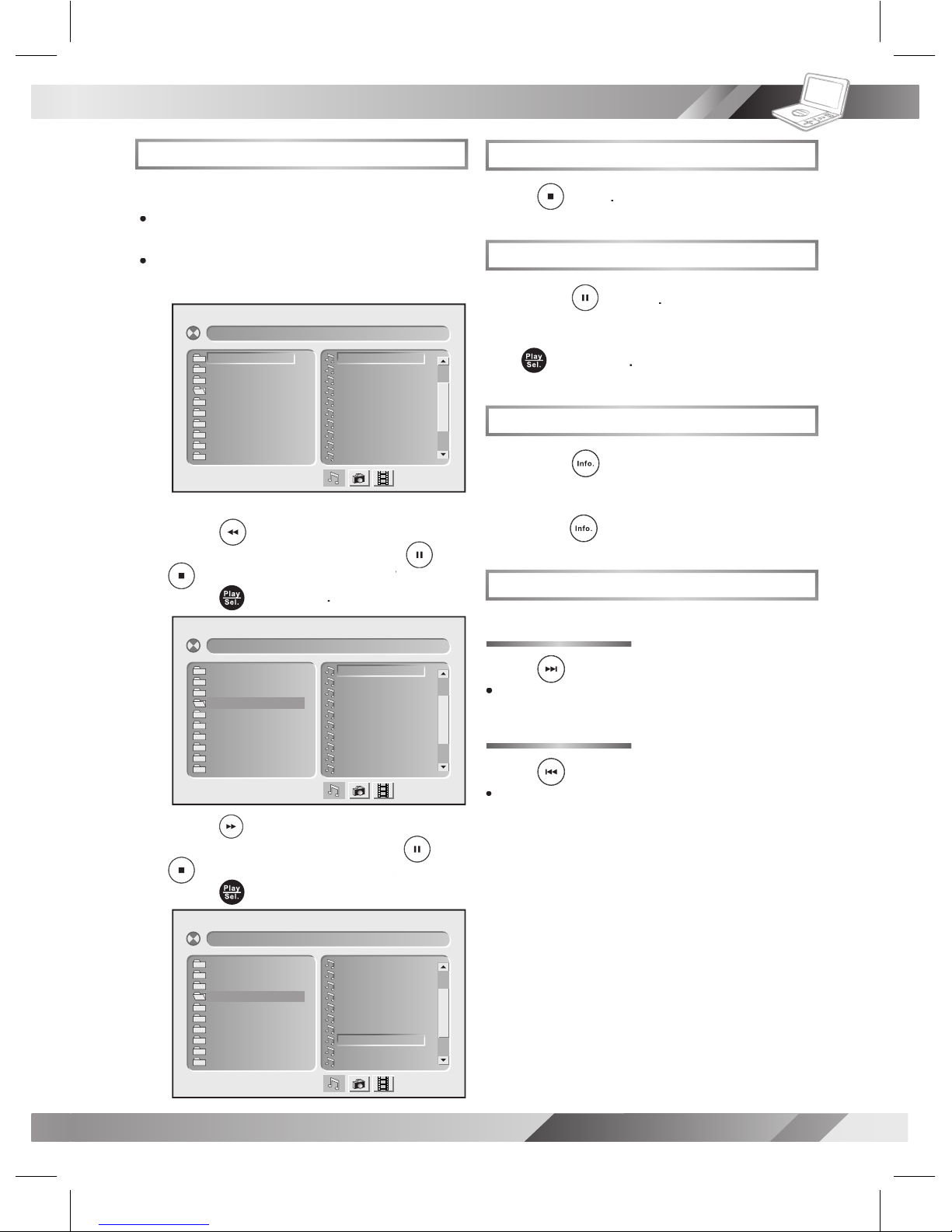
Basic Audio CDs Playback
trol, a menu appears after a few seconds.
To play a music track in the menu,
to enter the folder list
/
to highlight a folder
and then
to enter the le list on
the right of the screen. Press
/
to highlight a track
and then
Stopping Playback
Pausing Playback
To return to normal playback,
Displaying Track Information
during playback.
To stop displaying track information,
again.
Skipping a Track Ahead or Back
during play back.
during play back.
When you press the button once midway through
track being played back. The player skips a track
[ –– – CI TY J AZ Z] 01 –– –– –– .
01 . 01 – –– –– –
02 . 02 – –– –– –
03 . 03 – –– –– –
04 . 04 – –– –– –
05 . 05 – –– –– –
06 . 06 – –– –– –
07 . 07 – –– –– –
08 . 08 – –– –– –
09 . 09 – –– –– –
10 . 10 – –– –– –
01. CITY JAZZ
02. CLASSICAL
03. MOVIE OST
04. ITALIAN OPERA
05. MUSICAL
06. US POP
07. UK POP
08. HEAVY METAL
09. SONATA
10. RAP
[ IT AL IA N OP ER A] 08 –– –– –– .
01 . 01 – –– –– –
02 . 02 – –– –– –
03 . 03 – –– –– –
04 . 04 – –– –– –
05 . 05 – –– –– –
06 . 06 – –– –– –
07 . 07 – –– –– –
08 . 08 – –– –– –
09 . 09 – –– –– –
10 . 10 – –– –– –
01. CITY JAZZ
02. CLASSICAL
03. MOVIE OST
04. ITALIAN OPERA
05. MUSICAL
06. US POP
07. UK POP
08. HEAVY METAL
09. SONATA
10. RAP
[ IT AL IA N OP ER A] 01 –– –– –– .
01 . 01 – –– –– –
02 . 02 – –– –– –
03 . 03 – –– –– –
04 . 04 – –– –– –
05 . 05 – –– –– –
06 . 06 – –– –– –
07 . 07 – –– –– –
08 . 08 – –– –– –
09 . 09 – –– –– –
10 . 10 – –– –– –
01. CITY JAZZ
02. CLASSICAL
03. MOVIE OST
04. ITALIAN OPERA
05. MUSICAL
06. US POP
07. UK POP
08. HEAVY METAL
09. SONATA
10. RAP
Page 10
10
PORTABLE DVD PLAYER USER GUIDE
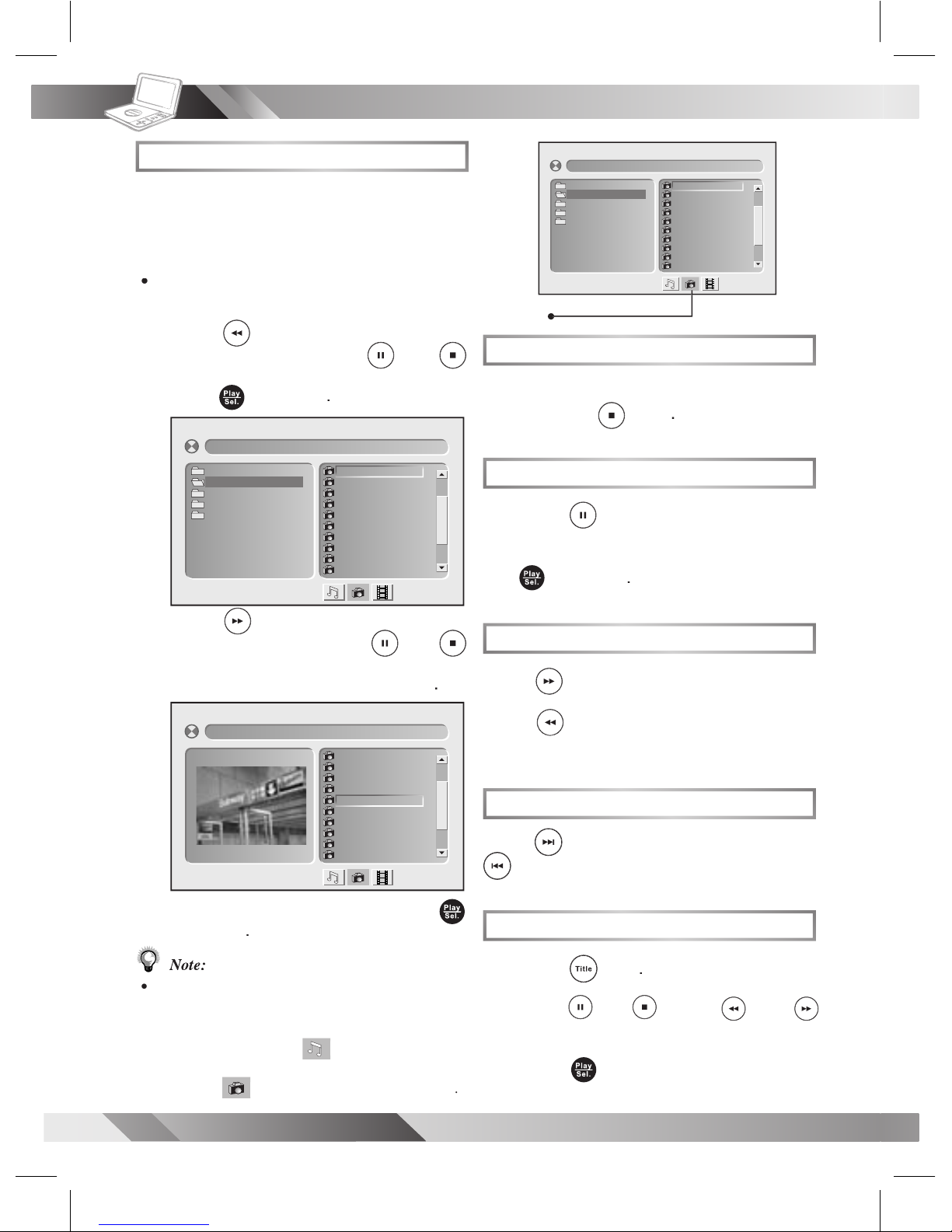
Kodak and JPEG Picture CDs Playback
Stopping Playback
To stop playback and return to the menu
Pausing Playback
1
playback.
To return to normal playback,
Rotating Pictures
to rotate the picture clockwise by 90° or
to rotate the
Viewing the Next or Previous Picture
to view the next picture or
to view the previous picture.
Thumbnail Function
1
Title
/ //
to select the preferred picture.
to play.
Basic Picture CDs Playback
•
to enter the folder list
/
to highlight a folder
and then
to enter the le list
/
to highlight a picture
and
To play picture slide show,
Note:
Some discs, MMC/SD cards or USB Flash Drives
may contain music, picture and video le formats.
will be selected rst. To
select Picture CD mode, press
Right
is selected and then press
Play/Sel.
[C AN AD A] 00 1. JP G
00 1. 0 01
00 2. 0 02
00 3. 0 03
00 4. 0 04
00 5. 0 05
00 6. 0 06
00 7. 0 07
00 8. 0 08
00 9. 0 09
01 0. 0 10
[C AN AD A] 00 1. JP G
00 1. 0 01
00 2. 0 02
00 3. 0 03
00 4. 0 04
00 5. 0 05
00 6. 0 06
00 7. 0 07
00 8. 0 08
00 9. 0 09
01 0. 0 10
01. JAPAN
02. CANADA
03. FRANCE
04. BRAZIL
05. EGYPT
[C ANA DA ]00 1.J PG
00 1. 00 1
00 2. 00 2
00 3. 00 3
00 4. 00 4
00 5. 00 5
00 6. 00 6
00 7. 00 7
00 8. 00 8
00 9. 00 9
01 0. 01 0
01. JAPAN
02. CANADA
03. FRANCE
04. BRAZIL
05. EGYPT
Select Picture CD icon
Page 11
11
PORTABLE DVD PLAYER USER GUIDE
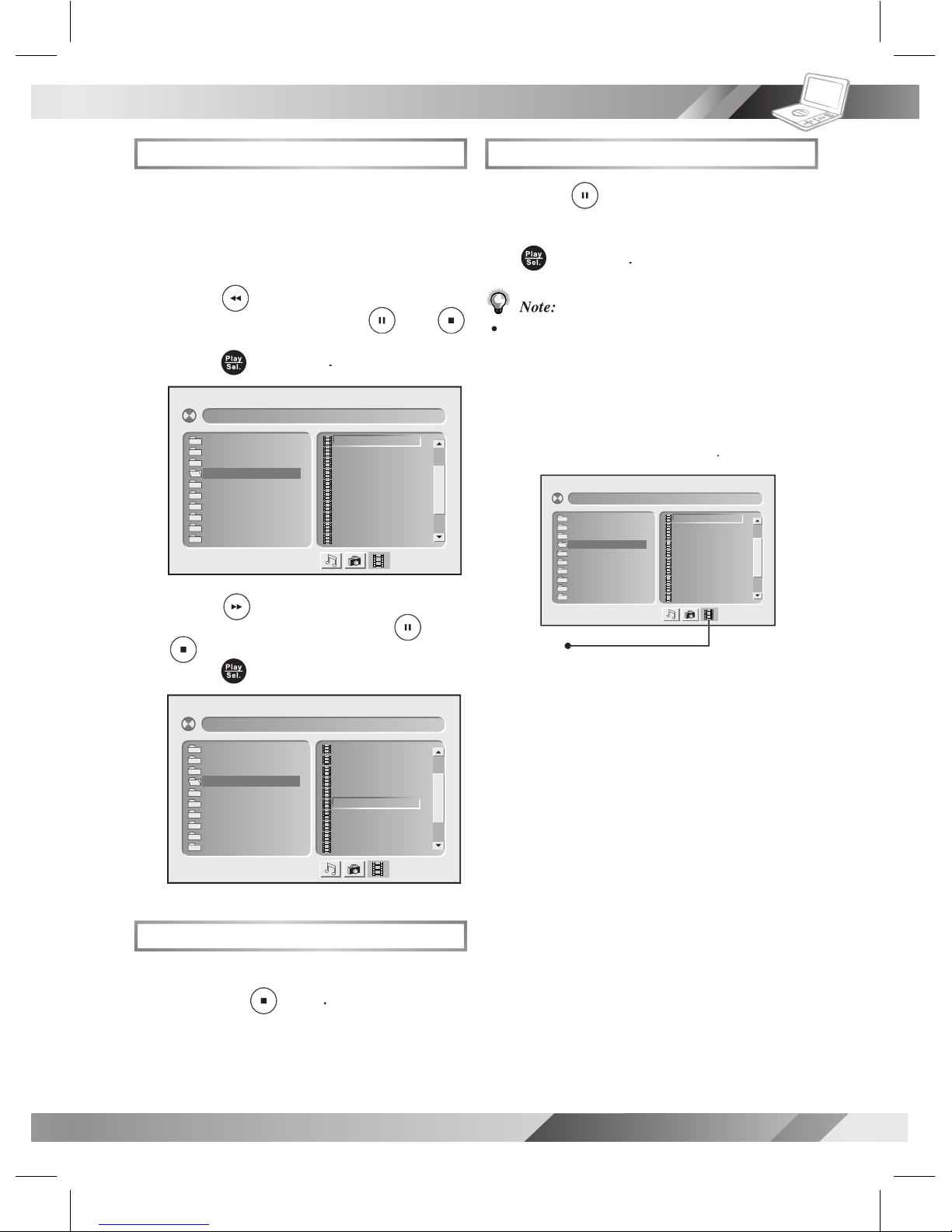
MPEG-4 Playback
Basic MPEG-4 Playback
A menu appears on
the screen.
to enter the folder list
/
to highlight a folder
and then
to enter the le list
/
to highlight a le
and then
Stopping Playback
To stop playback and return to the menu
[ Fi le N am e- 1 ]0 01 –– –– –– .
00 1. 0 01 – –– ––
00 2. 0 02 – –– ––
00 3. 0 03 – –– ––
00 4. 0 04 – –– ––
00 5. 0 05 – –– ––
00 6. 0 06 – –– ––
00 7. 0 07 – –– ––
00 8. 0 08 – –– ––
00 9. 0 09 – –– ––
01 0. 0 10 – –– ––
01. File Name-1
02. File Name-2
03. File Name-3
04. File Name-4
05. File Name-5
06. File Name-6
07. File Name-7
08. File Name-8
09. File Name-9
10. File Name-10
[ Fi le N am e- 1 ]0 01 –– –– –– .
00 1. 0 01 – –– ––
00 2. 0 02 – –– ––
00 3. 0 03 – –– ––
00 4. 0 04 – –– ––
00 5. 0 05 – –– ––
00 6. 0 06 – –– ––
00 7. 0 07 – –– ––
00 8. 0 08 – –– ––
00 9. 0 09 – –– ––
01 0. 0 10 – –– ––
01. File Name-1
02. File Name-2
03. File Name-3
04. File Name-4
05. File Name-5
06. File Name-6
07. File Name-7
08. File Name-8
09. File Name-9
10. File Name-10
Pausing Playback
playback.
To return to normal playback,
Note:
Some discs, MMC/SD cards or USB Flash
Drives may
contain music, picture and video
le formats. When the player reads the disc,
press
Right
Play/Sel.
[ Fil e Nam e-1 ]0 01– –– ––– .
00 1. 00 1 – ––– –
00 2. 00 2 – ––– –
00 3. 00 3 – ––– –
00 4. 00 4 – ––– –
00 5. 00 5 – ––– –
00 6. 00 6 – ––– –
00 7. 00 7 – ––– –
00 8. 00 8 – ––– –
00 9. 00 9 – ––– –
01 0. 01 0 – ––– –
01. File Name-1
02. File Name-2
03. File Name-3
04. File Name-4
05. File Name-5
06. File Name-6
07. File Name-7
08. File Name-8
09. File Name-9
10. File Name-10
Select MPEG-4 CD icon
Page 12
12
PORTABLE DVD PLAYER USER GUIDE
OSD Setup
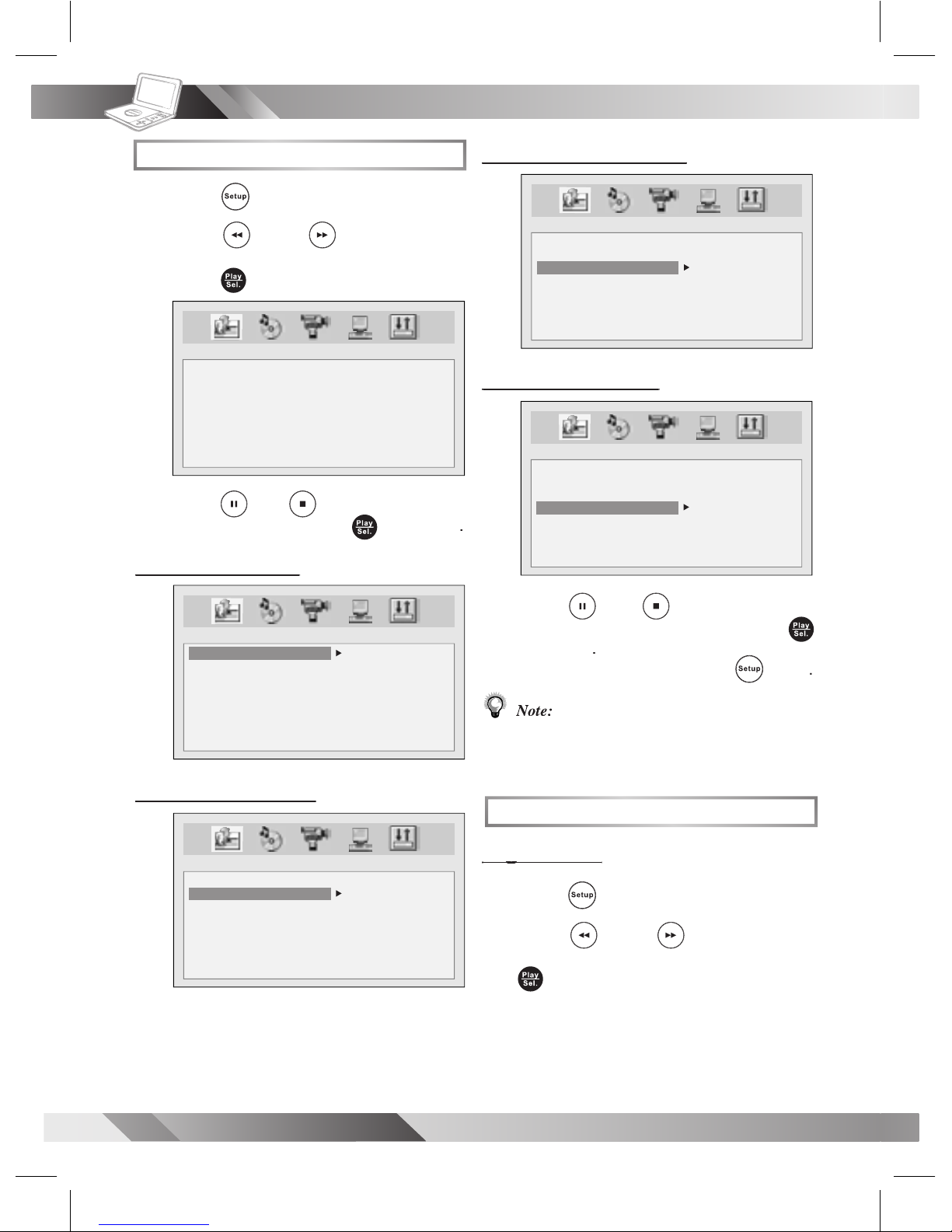
Language Setup
/
to select
icon and then
/
to
select an
and then press
Audio Language
Audio Language
LANGUAGE SETUP
OSD
AUDIO
SUBTITLE
MENU
ENGLISH
GERMAN
SPANISH
FRENCH
PORTUGUESE
ITALIAN
/
to
select a
and then press
press
Note:
If the language selected is not recorded
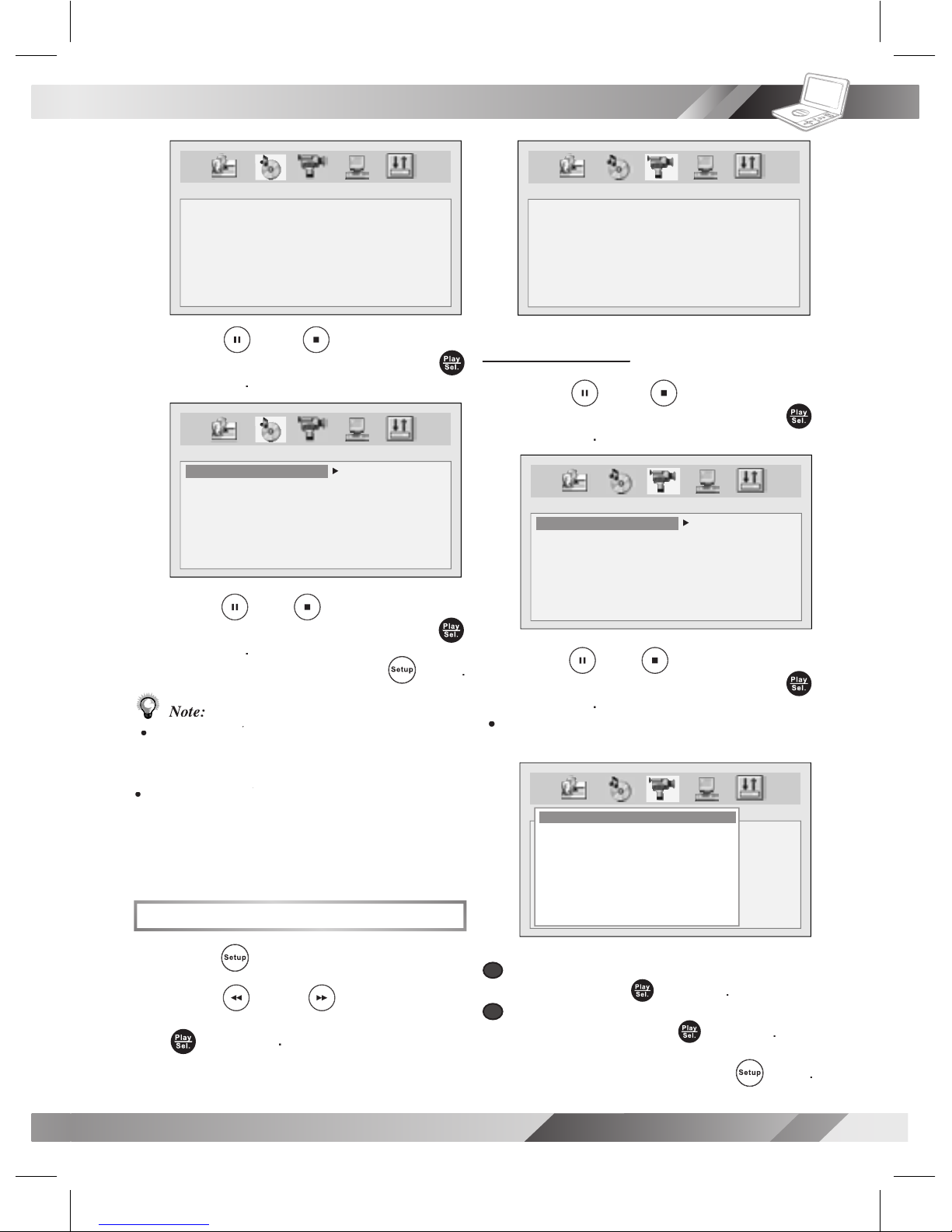
Audio Setup
/
to select
icon and then press
LANGUAGE SETUP
OSD
AUDIO
SUBTITLE
MENU
LANGUAGE SETUP
OSD
AUDIO
SUBTITLE
MENU
CHINESE
ENGLISH
JAPANESE
FRENCH
SPANISH
PORTUGUESE
ITALIAN
GERMAN
LANGUAGE SETUP
OSD
AUDIO
SUBTITLE
MENU
CHINESE
ENGLISH
JAPANESE
FRENCH
SPANISH
PORTUGUESE
GERMAN
OFF
LANGUAGE SETUP
OSD
AUDIO
SUBTITLE
MENU
CHINESE
ENGLISH
JAPANESE
FRENCH
SPANISH
PORTUGUESE
ITALIAN
GERMAN
Page 13
13
PORTABLE DVD PLAYER USER GUIDE
OSD Setup
- continued
/
to
select
and then press
/
to
select a
and then press
press
Note:
Select
RAW
when connecting the player’s Digital
Select
PCM
when connecting the player’s
Digital Out (Coaxial) jack to a 2-channel
Video Setup
1
/
to select
icon and then press
AUDIO SETUP
DIGITAL OUT
AUDIO SETUP
DIGITAL OUT
SPDIF/OFF
SPDIF/RAW
SPDIF/PCM
Video Output
Video Output
/
to
select
and then press
/
to
select a
and then press
a
a
b
b
press
VIDEO SETUP
VIDEO OUTPUT
TV TYPE
TV SYSTEM
CVBS
P-SCAN
VIDEO SETUP
VIDEO OUTPUT
TV TYPE
TV SYSTEM
VIDEO SETUP
VIDEO OUTPUT
TV TYPE
TV SYSTEM
P_SCAN WARNING
ENABLE PROGRESSIVE
ENSURE YOUR TV SUPPORT
P_SCAN MODE
IF YOU WANT TO CHANGE TO
P_SCAN PLEASE PRESS OK
- - - - [04]
NO OK
Page 14
14
PORTABLE DVD PLAYER USER GUIDE
OSD Setup
- continued
Note:
If you choose
P-Scan
as the video output setting,
make sure your TV set supports P-Scan input
feature and the YUV cable be properly connected
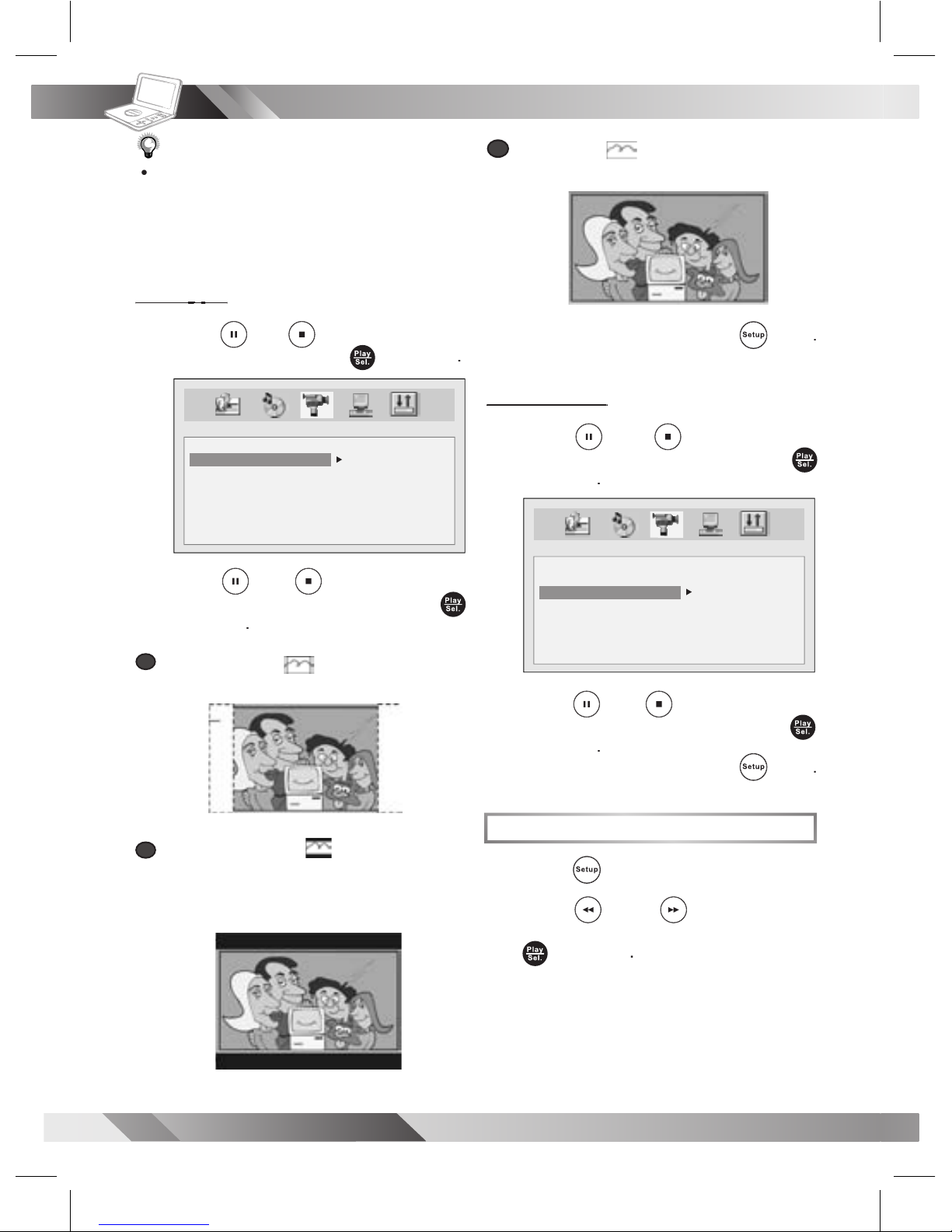
/
to
select
TV
TYPE
and then press
/
to
select a
and then press
a
a
:
for a conventional size TV set.
b
b
:
VIDEO SETUP
VIDEO OUTPUT
TV TYPE
TV SYSTEM
4:3PS
4:3LB
16:9
c
c
:
wide-screen TV set to played in “FULL” size.
press
/
to
select
SYSTEM
and then press
/
to
select a
and then press
press
System Setup
/
to select
icon and then press
VIDEO SETUP
VIDEO OUTPUT
TV TYPE
TV SYSTEM
NTSC
PAL
AUTO
Page 15
15
PORTABLE DVD PLAYER USER GUIDE
for
the rst time setup.
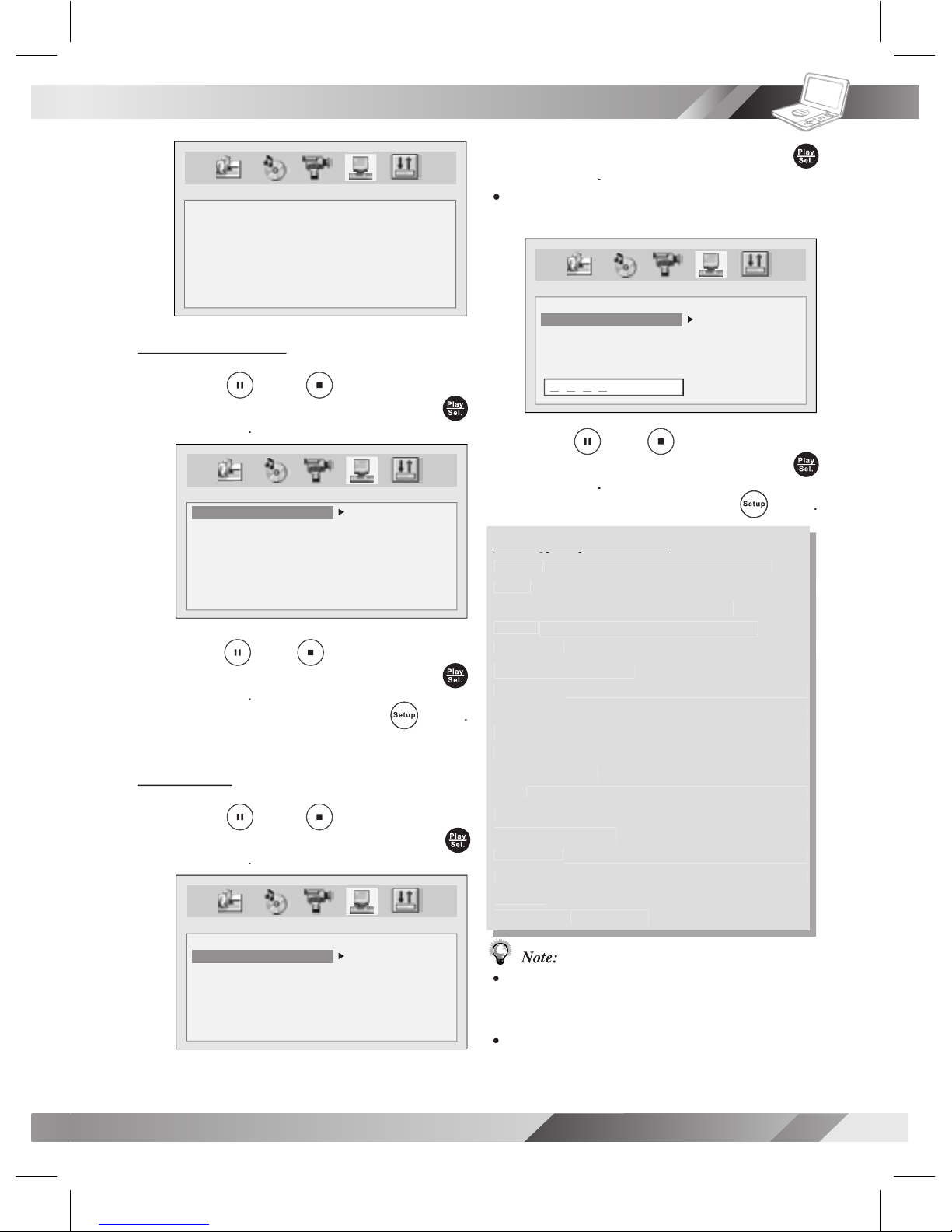
/
to
select a
and then press
press
Kid safe; it is safe even for kids.
General audience; recommended as
Parental Guidance suggested.
Material is unsuitable for children
Parental Guidance-restricted;
to view only when supervised by a parent or
Restricted, children under 17 would not
No children under the age of 17,
Adult only.
Note:
with DVD discs featured with the parental lock
function..
Please keep in mind that discs not encoded with
OSD Setup
- continued
SYSTEM SETUP
SCREEN SAVER
PARENTAL
PASSWORD
ANGLE MARK
DIVX
DEFAULT
/
to
select
and then press
/
to
select a
and then press
press
/
to
select
and th en press
SYSTEM SETUP
SCREEN SAVER
PARENTAL
PASSWORD
ANGLE MARK
DIVX
DEFAULT
ON
OFF
SYSTEM SETUP
SCREEN SAVER
PARENTAL
PASSWORD
ANGLE MARK
DIVX
DEFAULT
1 KID
2 G
3 PG
4 PG-13
5 PG-R
6 R
7 NC-17
8 ADULT
1 KID
2 G
3 PG
4 PG-13
5 PG-R
6 R
7 NC-17
8 ADULT
SYSTEM SETUP
SCREEN SAVER
PARENTAL
PASSWORD
ANGLE MARK
DIVX
DEFAULT
X X X X
Page 16
16
PORTABLE DVD PLAYER USER GUIDE
OSD Setup
- continued
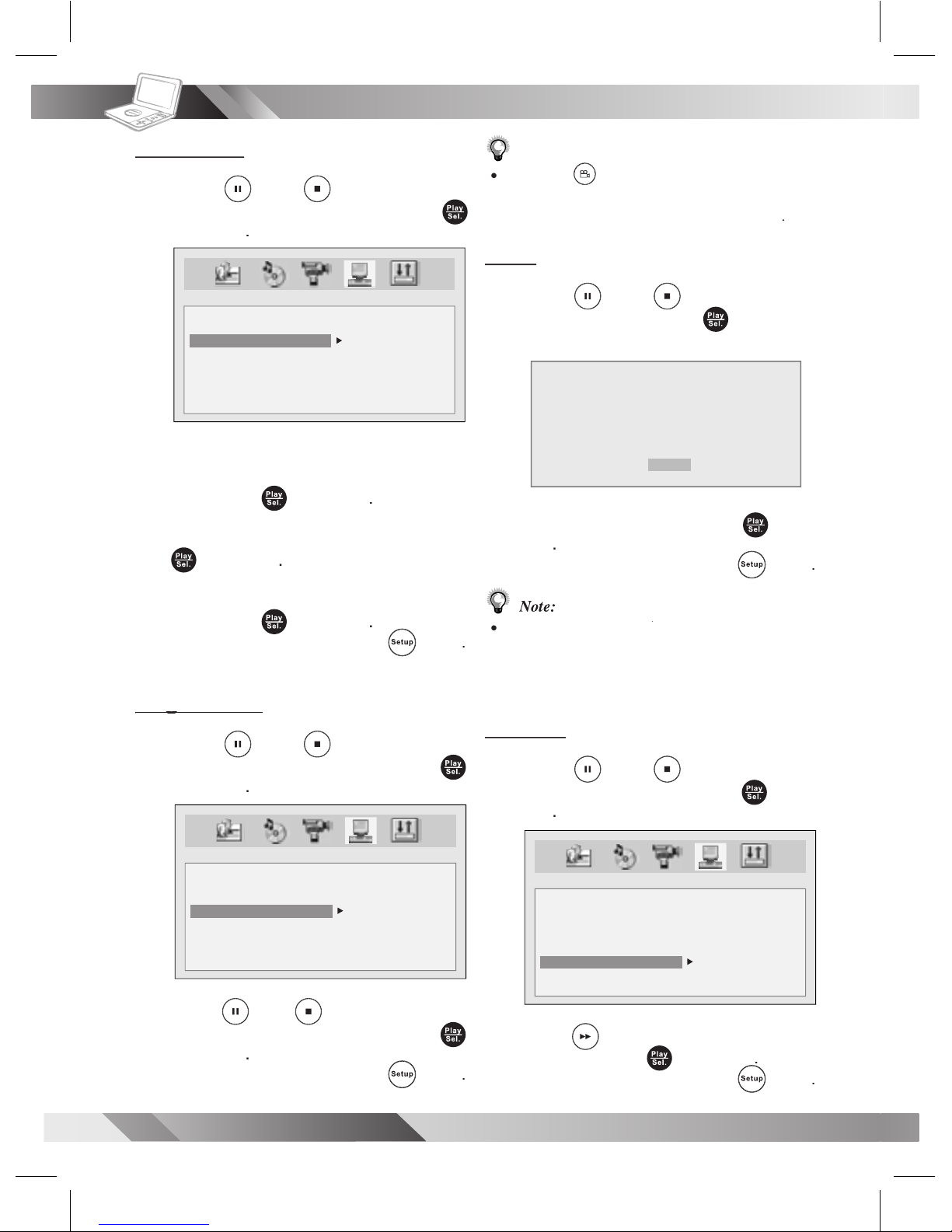
/
to
select
and then press
factory pre-set password
and
then press
and then press
and
then press
press
Angle Mark
Angle Mark
/
to
select
and then press
/
to
select a
and then press
press
SYSTEM SETUP
SCREEN SAVER
PARENTAL
PASSWORD
ANGLE MARK
DIVX
DEFAULT
OLD : _ _ _ _
NEW : _ _ _ _
VERIFY: _ _ _ _
SYSTEM SETUP
SCREEN SAVER
PARENTAL
PASSWORD
ANGLE MARK
DVIX
DEFAULT
ON
OFF
Note:
Pressing
Angle
will change camera angles for
movies that support this feature regardless of whether
/
to
select
and then press
A DivX display appears.
To leave
the display, press
press
Note:
Please proceed
DIVX
to check Registration Code
when you purchase or rent an encrypt movie le
from VOD (Video-On-Demand) service agent.
/
to
select
and then press
to select
press
SYSTEM SETUP
SCREEN SAVER
PARENTAL
PASSWORD
ANGLE MARK
DVIX
DEFAULT
READ
DIVX REGISTRATION
REGISTRATION CODE:
XXXXXXXX
TO LEARN MORE VISIT WWW.DIVX.COM/VOD
[DONE]
Page 17
17
PORTABLE DVD PLAYER USER GUIDE
LCD Setup
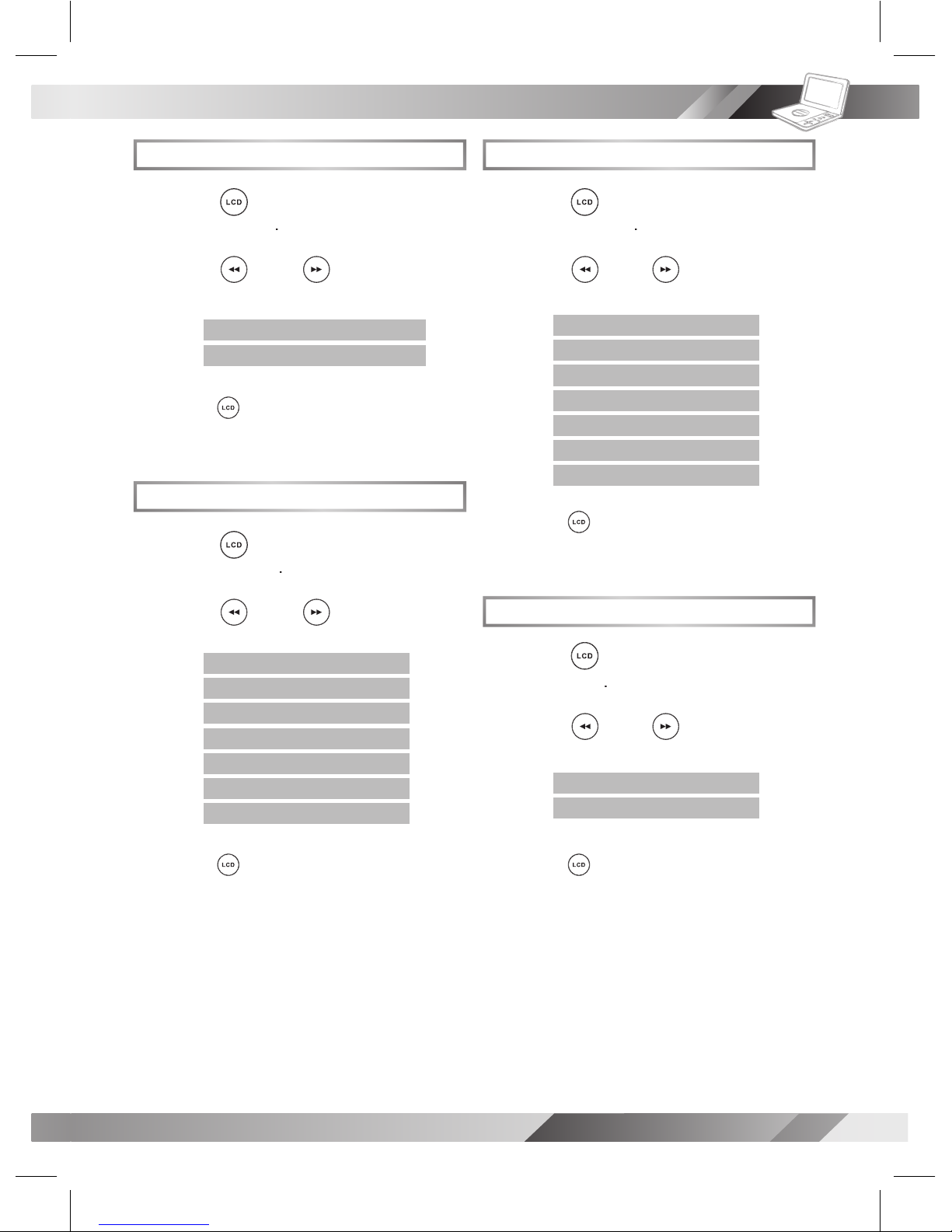
Brightness Setting
/
to choose
again until the LCD setting box
LCD Setting
/
to choose
again until the LCD setting box
Panel Setting
/
to choose
again until the LCD setting box
Color Setting
/
to choose
again until the LCD setting box
PANEL: <− NORMAL −>
PANEL: <− 4:3 −>
COLOR: <− +3 −>
COLOR: <− +2 −>
COLOR: <− +1 −>
COLOR: <− 0 −>
COLOR: <− -1 −>
COLOR: <− -2 −>
COLOR: <− -3 −>
BRIGHT: <− +3 −>
BRIGHT: <− +2 −>
BRIGHT: <− +1 −>
BRIGHT: <− 0 −>
BRIGHT: <− -1 −>
BRIGHT: <− -2 −>
BRIGHT: <− -3 −>
LCD: <− OFF −>
LCD: <− ON −>
Page 18

18
PORTABLE DVD PLAYER USER GUIDE
Check if the disc is defective by trying another disc.
remote control signal sensor.
Alternative audio soundtrack (or subtitle)
An alternative language can not be selected may result of no more than one
lan guages cannot be selected.
lan guages cannot be selected.
Angle cannot change.
angles recorded, these angles may be recorded for speci c scenes only.
•
the AC power cord and then re-connect it. (The player may not be operating
properly due to lightning, static electricity or some other external factor.)
“Com po nent” in the video output setting.
to the output format setting.
you are ex pe ri enc ing. Some simple checkups or a minor adjustment on your part may eliminate the problem
SYMPTOM (COMMON)
Troubleshooting
Page 19
19
PORTABLE DVD PLAYER USER GUIDE
Disc Handling and Maintenance
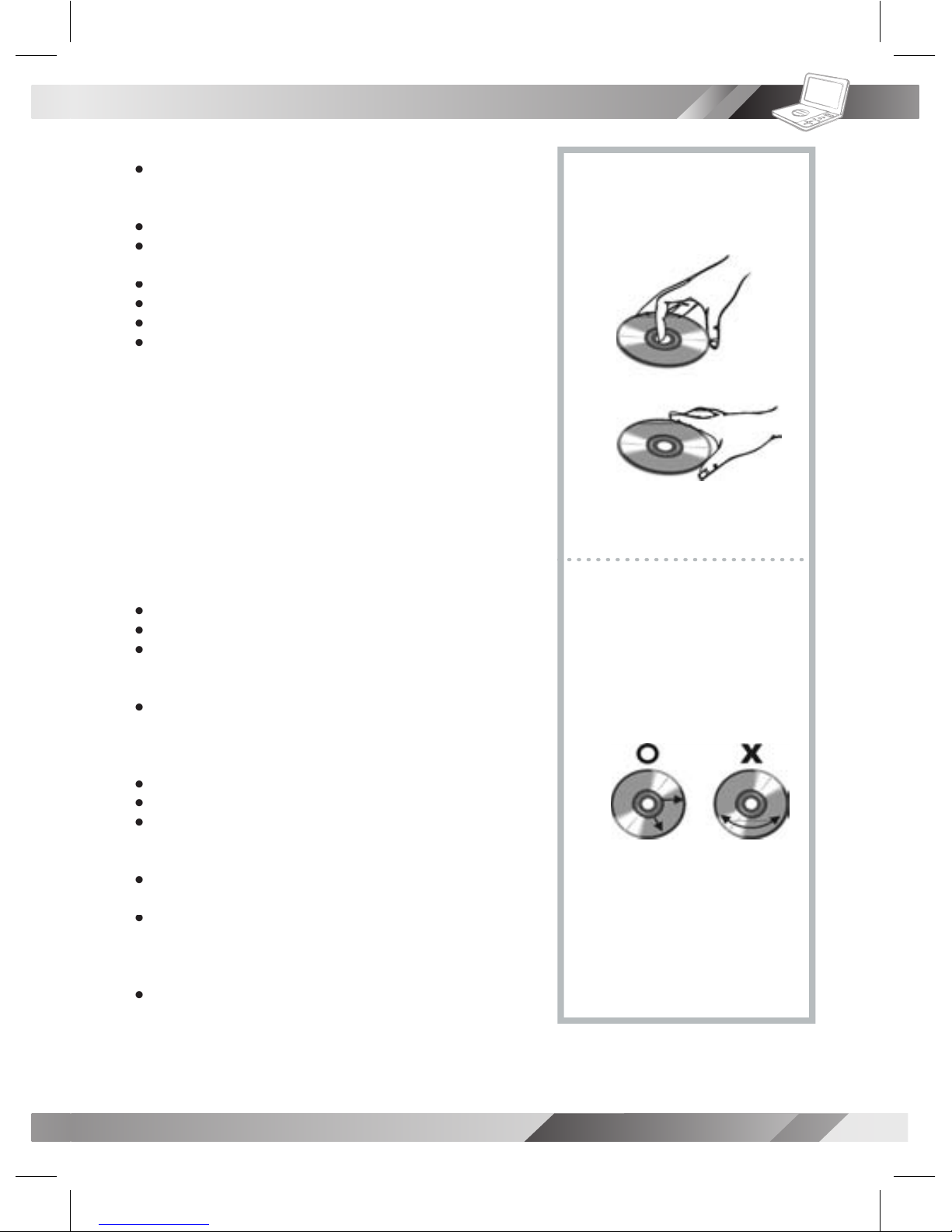
Wipe gently with a soft, damp (water only) cloth.
When wiping discs, always move the cloth from the center hole toward
the outer edge.
to occur, which will cause noise.)
form on the disc
Wipe the moisture off with a soft, dry, lint-free cloth before using the disc.
You can damage discs if you store them in the following places:
Areas exposed to direct sunlight
Areas directly exposed to a heat outlet or heating appliance
Wipe this unit with a dry soft cloth.
And do not use compressed air to remove dust.
Page 20

 Loading...