

Page 1
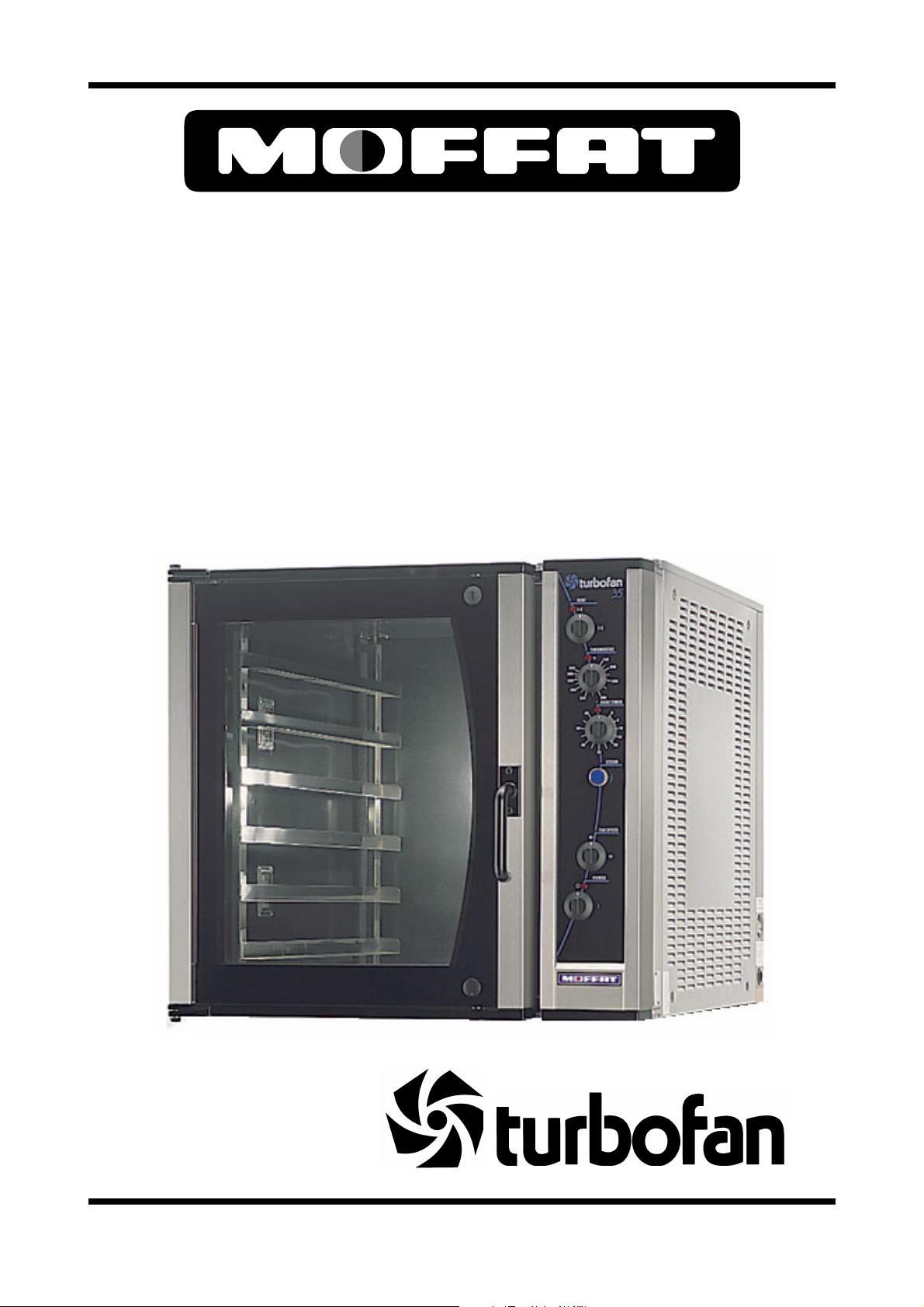
E35 CONVECTION OVEN
SERVICE
MANUAL
Revision 5/F3512
January, 2004
Manual P/N M0ME35
Page 2

CONTENTS
This manual is designed to take a more in depth look at the E35 convection oven for the purpose of making
the unit more understandable to service people.
There are settings explained in this manual that should never require to be adjusted, but for completeness
and those special cases where these settings are required to change, this manual gives a full explanation
as to how, and what effects will result.
SECTION PAGE NO.
1. SPECIFICATIONS.............................................................................................................................. 5
2. INSTALLATION.................................................................................................................................. 8
3. OPERATION....................................................................................................................................... 10
3.1 Description of Controls
3.2 Explanation of Control System
4. MAINTENANCE ................................................................................................................................. 15
4.1 Cleaning
4.2 Routine Procedures
5. TROUBLE SHOOTING GUIDE .......................................................................................................... 17
6. SERVICE PROCEDURES.................................................................................................................. 20
6.2 Access
6.3 Replacement
6.4 Adjustment / Calibration
7. ELECTRICAL SCHEMATICS ............................................................................................................ 36
8. ELECTRICAL WIRING DIAGRAMS .................................................................................................. 39
9. SPARE PARTS .................................................................................................................................. 42
10. ACCESSORIES / OPTIONS............................................................................................................... 45
IMPORTANT: MAKING ALTERATIONS MAY VOID WARRANTIES AND APPROVALS.
Revision 5/F3512
-3-
Page 3
PARTS DIAGRAMS ..................................................................................................................................... 46
11.1 Main Assembly
11.2 Control Panel Assembly
11.3 Gear Plate Assembly
11.4 Door Assembly
SERVICE CONTACTS ................................................................................................................................. 60
APPENDIX A. STACKING KIT INSTRUCTIONS........................................................................................ 62
APPENDIX B. STAND MOUNTING INSTRUCTIONS ................................................................................ 65
APPENDIX C. MOTOR CONTROL AND STEAM TIMER ADJUSTMENT GUIDE .................................... 66
Revision 5/F3512
-4-
Page 4
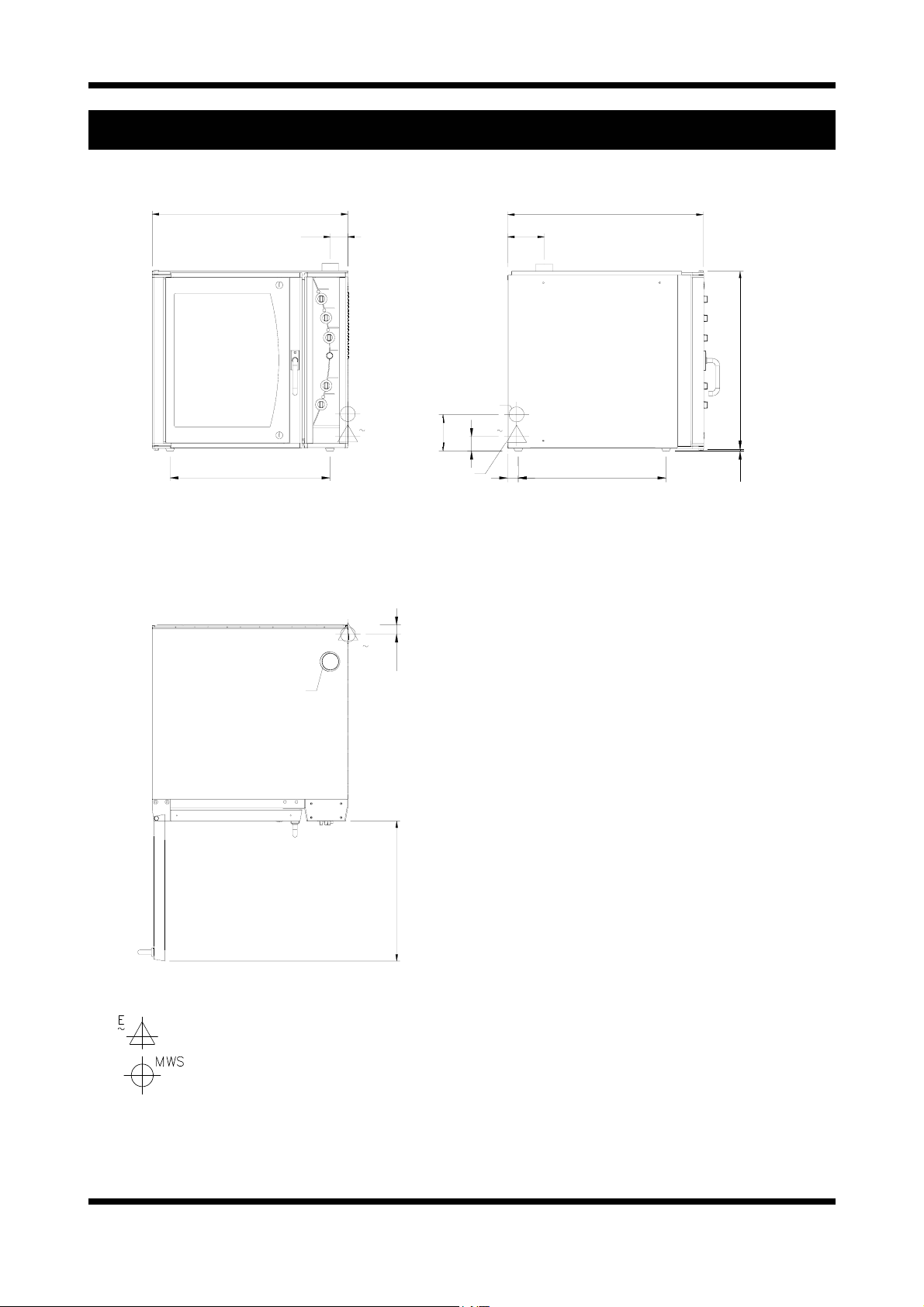
MODEL: E35-26
880
880
(34.6)
1. SPECIFICATIONS
78
78
(3.0)
165
165
(6.5)
880
880
(34.6)
800
800
(34.6)
FRONT
720
720
(28.3)
VENT Ø 76 O.D.
(3.0)
MWS
E
3
ELECTRICAL ENTRY
MWS
E
3
40
40
(1.6)
WATER ENTRY
55
(2.2)
155
165
(6.1)
0
3
E
(1.9)
48
MWS
SIDE
665
6650
(26.2)
9
12
(0.5)
PLAN
LEGEND
- Electrical connection entry point
- Water entry - 3/4” BSP hose connection
Dimensions shown in millimetres.
Dimensions in inches shown in brackets.
Revision 5/F3512
630
630
(24.8)
-5-
Page 5
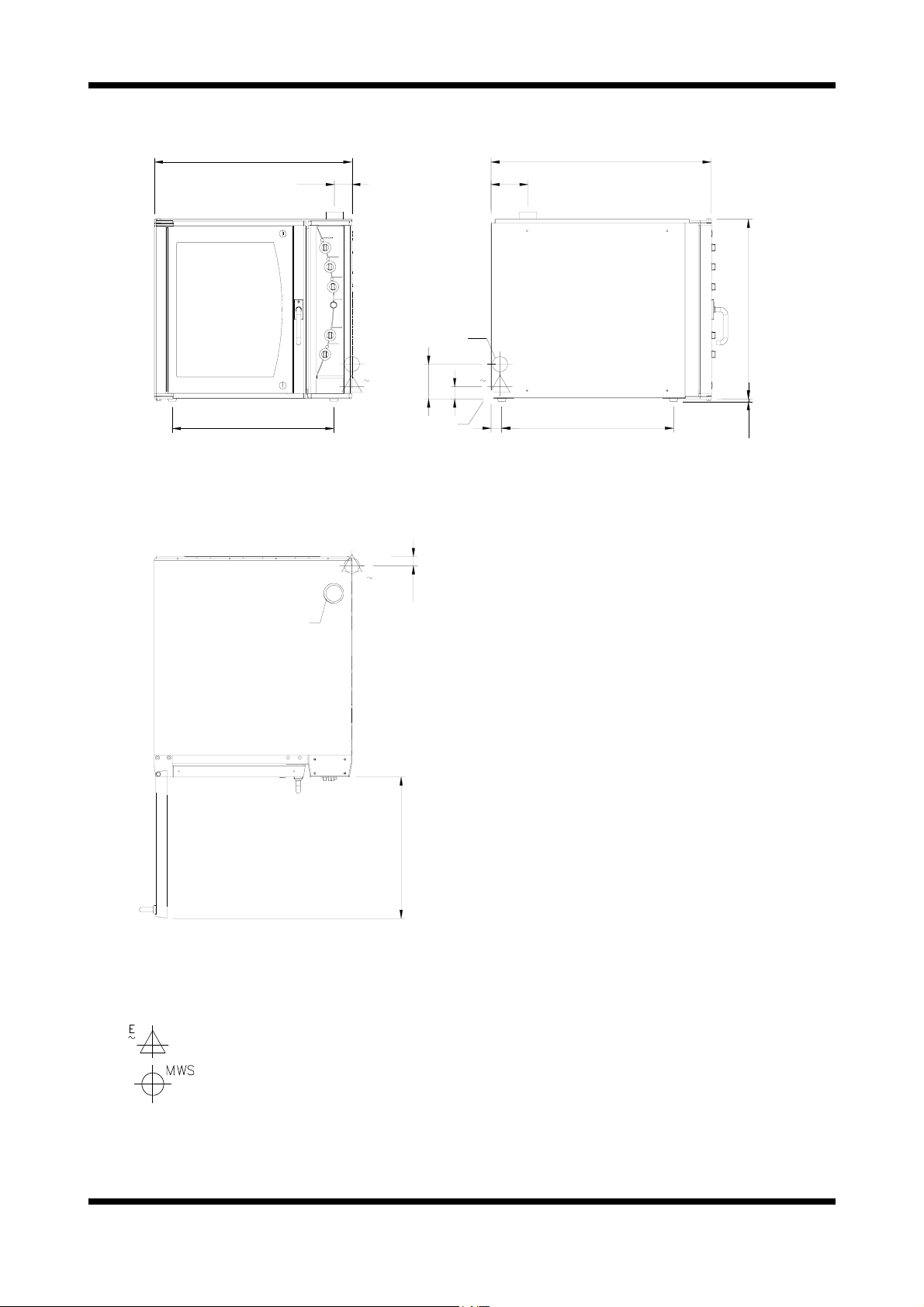
MODEL: E35-30
FRONT
880
880
(34.6)
720
(28.3)
VENT Ø 76 O.D.
(3.0)
78
78
(3.0)
WATER ENTRY
MWS
E
3
ELECTRICAL ENTRY
MWS
155
155
(6.1)
E
3
41
40
(1.6)
980
980
165
165
(6.5)
MWS
E
3
55
(2.2)
0
48
(1.9)
(38.6)
765
7650
(30.1)
800
800
12
12
(34.6)
(0.5)
SIDE
PLAN
LEGEND
- Electrical connection entry point
- Water entry - 3/4” BSP hose connection
Dimensions shown in millimetres.
Dimensions in inches shown in brackets.
Revision 5/F3512
630
630
(24.8)
-6-
Page 6
LOCATION
To ensure correct ventilation for the motor and
controls the following minimum installation
clearances are to be adhered to:
Rear 0mm / 0“
Left-hand side 0mm / 0”
Right-hand side 75mm / 3.0”
OVEN INTERNAL DIMENSIONS
E35-26
Width 465mm / 18
1
/4”
Height 685mm / 27”
Depth 760mm / 30”
Oven Volume 0.24m³ / 8.5ft³
E35-30
Width 465mm / 18
1
/4”
Height 685mm / 27”
Depth 860mm / 34”
Oven Volume 0.27m³ / 9.7ft³
OVEN RACK SIZE
Width 460mm / 18” or 405mm / 16”
(Adjustable shelf width)
Depth 660mm / 26” or 760mm / 30”
(Based on oven size model)
OVEN RACK SPACING
6 Tray (standard) 105 mm / 4
1
/8”
8 Tray (option) 78 mm / 3“
ELECTRICAL SUPPLY SPECIFICATION
OPTIONS
208V, 60Hz, 1P+N+E, 53.7A, 11.2 kW
220V, 50Hz, 1P+N+E, 56.8A, 12.5 kW
220-240V, 60Hz, 1P+N+E, 52.0A, 12.5 kW
230-240V, 50Hz, 1P+N+E, 52.0A, 12.5 kW
208V, 60Hz, 3P+E, 31A/Ph, 11.2 kW
220V, 50Hz, 3P+E, 33A/Ph, 12.5 kW
220-240V, 60Hz, 3P+E, 50.7A/Ph, 12.5 kW
220V, 60Hz, 3P+E, 32.8A/Ph, 12.5kW
380V, 60Hz, 3P+N+E, 18.9A/Ph, 12.5kW
380V, 50Hz, 3P+N+E, 18.9A/Ph, 12.5 kW
400-415V, 50Hz, 3P+N+E, 17.4A/Ph, 12.5 kW
400-415V, 50Hz, 3P+N+E, 11A/Ph, 8kW
ELECTRICAL CONNECTION WIRE
CONDUCTOR SIZES
1P+N+E/Gnd 6AWG/10mm² Copper T75 min
3P+E/Gnd 10AWG/6mm² Copper T75 min
3P+N+E/Gnd 12AWG/4mm² Copper T75 min
WATER SUPPLY CONNECTION
Max Pressure 550 kPa / 5.5 bar / 80 psi
Min Pressure 100 kPa / 1.0 bar / 15 psi
Revision 5/F3512
-7-
Page 7
2. INSTALLATION
WARNING: THIS APPLIANCE MUST BE GROUNDED.
WARNING: ALL INSTALLATION AND SERVICE REPAIR WORK MUST BE CARRIED OUT BY
QUALIFIED PERSONS ONLY.
It is most important that the oven is installed
correctly and that the operation is correct
before use. Installation shall comply with local
electrical, health and safety requirements.
BEFORE CONNECTION TO POWER SUPPLY
Unpack and check unit for damage and report
any damage to the carrier and dealer. Report
any deficiencies to your dealer. Fit the feet which
are packed inside the oven. Check that the available power supply is correct to that shown on the
rating plate located on the right-hand side panel.
208V, 60Hz, 1P+N+E, 53.7A, 11.2 kW
220V, 50Hz, 1P+N+E, 56.8A, 12.5 kW
220-240V, 60Hz, 1P+N+E, 52.0A, 12.5 kW
230-240V, 50Hz, 1P+N+E, 52.0A, 12.5 kW
208V, 60Hz, 3P+E, 31A/Ph, 11.2 kW
220V, 50Hz, 3P+E, 33A/Ph, 12.5 kW
220-240V, 60Hz, 3P+E, 50.7A/Ph, 12.5 kW
220V, 60HZ, 3P+E, 32.8A/Ph, 12.5kW
380V, 60Hz, 3P+N+E, 18.9A/Ph, 12.5kW
380V, 50Hz, 3P+N+E, 18.9A/Ph, 12.5 kW
400-415V, 50Hz, 3P+N+E, 17.4A/Ph, 12.5 kW
400-415V, 50Hz, 3P+N+E, 11A/Ph, 8kW
LOCATION
To ensure correct ventilation for the motor and
controls the following minimum installation clearances are to be adhered to:
Rear 0mm / 0“
Left-hand side 0mm / 0”
Right-hand side 75mm / 3.0”
Position the oven in its allocated working position. Use a spirit level to ensure the oven is level
from side to side and front to back. (If this is not
carried out, uneven cooking could occur). The
feet/legs used with bench or floor mounting or
provided with stands are adjustable and will require adjusting in levelling the unit. It should be
positioned so the operating panel and oven
shelves are easily reachable for loading and
unloading.
Bench Mounting
For bench mounted applications the oven must
be fitted with 100mm / 4inch feet.
Floor Mounting
For floor mounted applications the oven must be
fitted with 150mm / 6 inch legs.
Note:
Four 100mm/4 inch or 150mm/6 inch adjustable legs are available separately from your
E35 dealer as an optional extra.
Stand Mounting
Ovens that are to be mounted on stands do not
require feet or legs. Refer to Appendix B for
stand mounting instructions.
Avoid having heat producing equipment such as
fryers or steamers adjacent to the right-hand side
of oven.
BEFORE USE
Operate the oven for about 1 hour at 200°C
(400°F) to remove any fumes or odours which
may be present.
ELECTRICAL CONNECTION
Remove side cover panel to allow access to the
terminal block and strain relief cable clamp. The
cable can be fitted through the entry grommet
and secured from strain by tightening the fitted
strain relief bushing. Connect cable to the
terminals as marked. Refit cover panel.
IMPORTANT: FIXED WIRING
INSTALLATIONS MUST INCLUDE AN
ALL-POLE DISCONNECTION SWITCH.
Refer to specifications section for wire
connections required, and supply connection
conductor sizes.
IMPORTANT: THE OVEN VENT
LOCATED ON THE CABINET TOP MUST
NEVER BE OBSTRUCTED.
Revision 5/F3512
-8-
Page 8
WATER CONNECTION
A cold water supply should be fitted to the water
3
inlet (
/4” BSP hose connection) which is located
on the rear of the right hand side of the unit.
Alternately, a connection elbow and sealing
washer is supplied with this unit for direct
connection of a
1
/2” ID hose, which is
recommended for easy installation and service.
Connect water supply - Max inlet pressure 80psi /
550kPa.
Turn on water supply to check for leaks.
IMPORTANT: MAXIMUM INLET WATER
PRESSURE IS 550 kPa / 80 psi.
DOUBLE STACKING UNITS
When it is desired to mount an E35 Turbofan
oven on an E85 prover, a double stacking kit
must be used. Available from your dealer or Turbofan distributor. (see Spare Parts).
When mounting one oven on top of another, a
double stacking kit is also required.
For stacking kit assembly instructions, refer to
Appendix A.
RACK WIDTH POSITIONS
The E35 models have an adjustable rack width
setting. This allows for the racking to be
configured for 405mm/16” or 460mm/18” wide
baking sheets/pans or racks.
Position the side racks in their innermost position
for 16” trays and in their outermost position for
18” trays.
Removal of Side Racks (as illustrated)
1) Lift the side rack off the bottom locating pins.
2) Move bottom of rack toward centre of oven.
3) Lower rack to clear top locating pins, and
remove.
Replacement of Side Racks
1) Insert rack into the oven, placing the
appropriate holes over the top locating pins.
2) Lift the side rack over the bottom locating
pins.
3) Lower rack with appropriate holes over bottom locating pins.
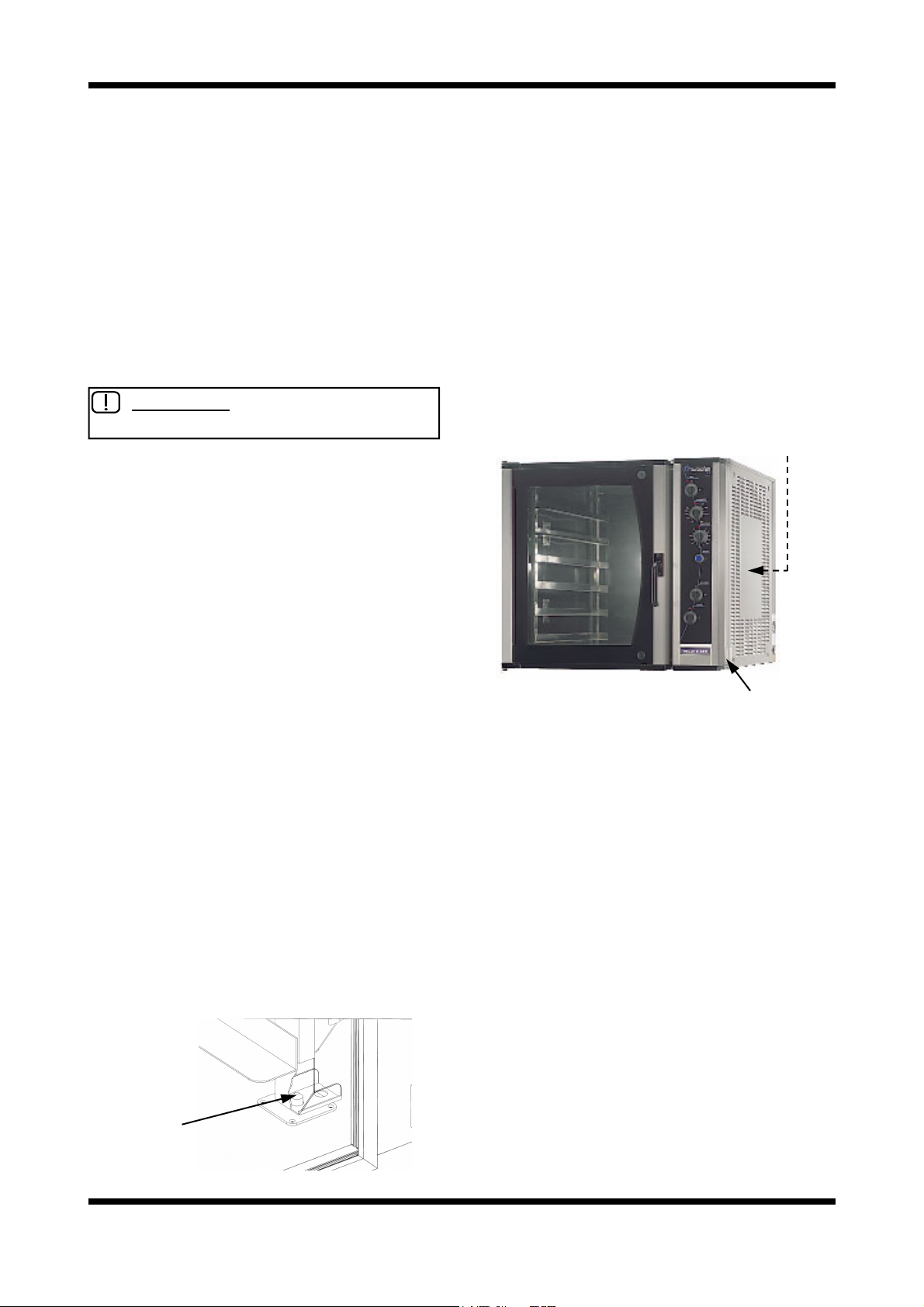
RATING PLATE LOCATION
The rating plate for the E35 convection oven is
located at the bottom left corner of the RH side
panel. An internal rating plate is also located
behind the RH side panel on the vertical dividing
panel behind the electrical contactors. (Units
manufactured from July 2002).
Internal Rating Plate
Figure 2.3
Rating Plate
Locating Stud
Revision 5/F3512
Figure 2.2
-9-
Page 9
3. OPERATION
NOTE: A full user’s operation manual is supplied with the product and can be used for further referencing
of installation, operation and service.
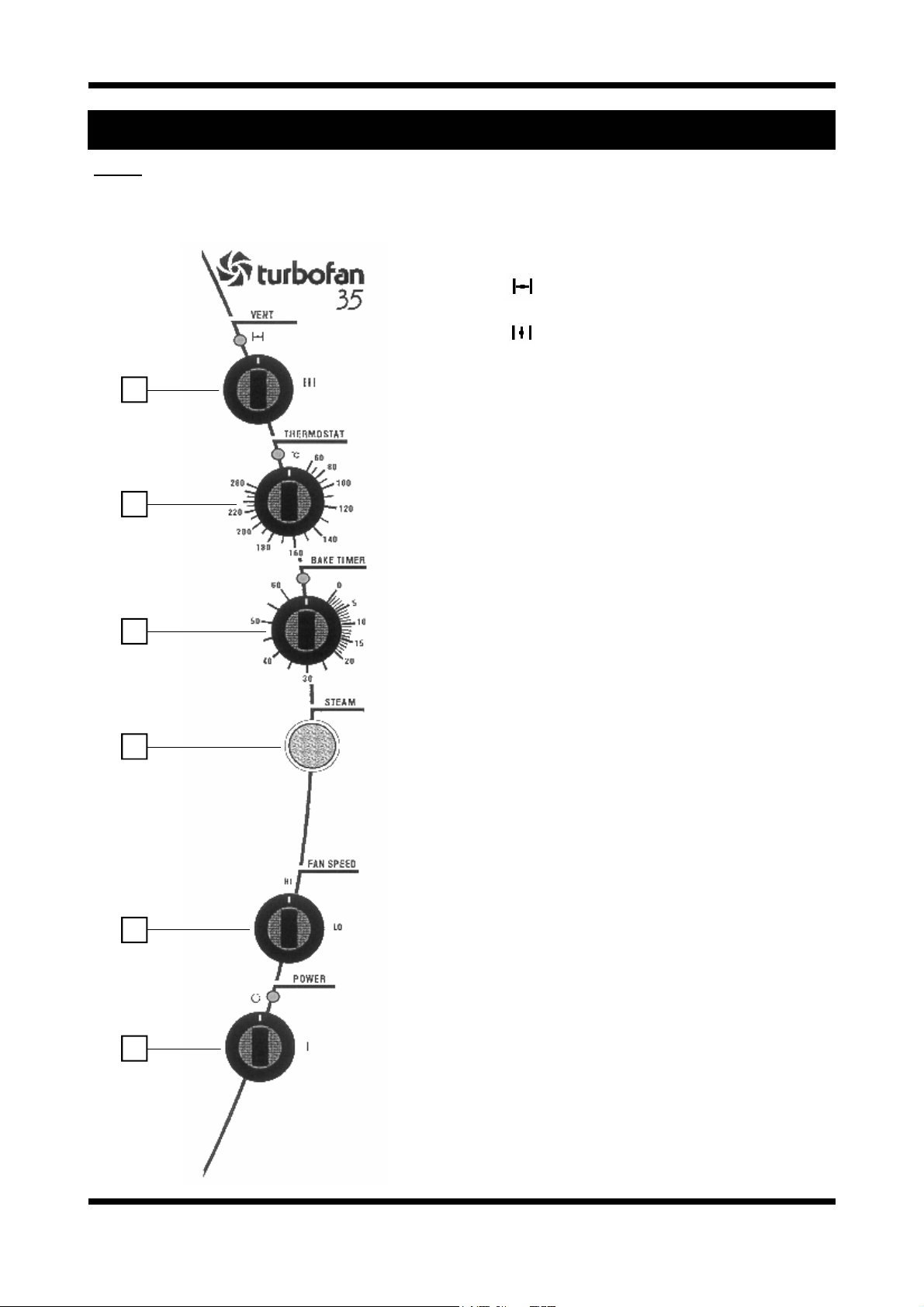
3.1 DESCRIPTION OF CONTROLS
1. VENT
Oven vent closed (incorporates over-
pressure relief when closed).
Oven vent open (light illuminates).
2. THERMOSTAT
1
2
3
4
Temperature range 60 - 280°C / 100 - 550°F.
(Light illuminates when elements are cycling ON
to maintain set temperature).
3. TIMER
1 Hour bake timer.
(Light illuminates when “time up” (0) reached, and
buzzer sounds).
4. STEAM BUTTON
Push button to activate automatic steam dose
into oven chamber.
(Light illuminates when button activated for
duration of steam cycle).
5. FAN SPEED
HI Full fan speed (Star point connection on
motor).
LO Half fan speed (Delta point connection
on motor).
6. POWER
O UNIT IS OFF
I UNIT IS ON (Light illuminates when
switched to this position).
Oven lights operate continuously.
Fan starts after 10 seconds when door
closed.
5
6
Revision 5/F3512
-10-
Page 10
3.2 EXPLANATION OF CONTROL
SYSTEM
The E35 Turbofan convection oven features
multi-function operator controls, and a combined
fan motor and steam control system.
A correct understanding of their operation is
required before carrying out any service or fault
repair work. The control device functions are
explained as follows:
Circuit Protection
All models are fitted with a 3 pole circuit breaker,
from which a control circuit is taken from L1
circuit breaker, and this control circuit is fitted with
a 6A circuit breaker. The 3 pole main circuit
breakers are rated 25A/pole for 3P+N+E/GND
and 1P+N+E/GND supply models, and 40A/pole
for 3P+E/GND (no neutral) models. These provide control circuit protection via the 6A circuit
breaker, and load circuit protection via the 3 pole
circuit breakers.
Additionally, the 3 pole circuit breaker is
mechanically connected to a Shunt Trip breaker,
which in the event of the oven fan motor
overheating will trip the 3 pole circuit breakers to
isolate power from the unit. The Shunt Trip is
directly connected to thermal limit switches in the
motor windings, and the supply Neutral (or L3 on
3 phase, no neutral models). A supply from the
6A control circuit breaker is connected to the
motor thermal switches. Should any of the motor
windings overheat, the thermal switches close
and supply power to the Shunt Trip, which in turn
trips (triggers) and mechanically trips the 3 pole
circuit breaker.
Accordingly, causes of circuit breakers tripping
can be ascertained with the above knowledge,
and this is covered in more detail in the Fault
Diagnosis section.
Power On/Off
A Power switch on the control panel isolates
power to the operator controls of the oven. With
the power switch OFF all functions of the oven
are inoperable.
An integral cooling fan, behind the control panel
used to keep the electrical controls of the oven
cool, is on continuously whenever the power
supply to the oven is on. Switching the oven
control panel Power switch off will leave the
cooling fan running.
With the Power switch ON (illuminated neon
indicator), power is supplied to all operator
controls.
Oven Lamps
The two oven lamps (12 volt halogen) are on
whenever the Power switch is on. The oven
lamps are supplied with 12 volts from an
electronic lamp transformer fitted on the
oven’s control switchgear assembly. The oven
lamps are on with the oven door open and
closed.
Bake Timer
The 60 minute bake timer is a mechanical timer
and can therefore be operated with the oven’s
power ON or OFF. However only with the oven’s
power switch On and the oven door closed will
the timer turn on the time-up buzzer and time-up
indicator neon on the control panel. The buzzer
and time-up indicator provide indication that the
time setting has run down to zero and at this point
will remain on continuously until the 60 minute
timer has been manually set back to the Off
(vertical) position. The 60 minute timer does not
control any other part of the oven’s operating
system as the timer is independent of the
temperature control, heating, fan, or steam
system.
Oven Vent
The oven vent is a manual operation by way of
the Vent knob on the control panel.
The vent knob directly rotates the vent shaft
through 90 degrees to open and close the vent.
The vent shaft passes through a rotary switch
mounted behind the control panel and this switch
is used to switch on or off the Vent indicating
neon. In the vent open position the indicator is
illuminated. The oven vent restricts venting of the
oven when in the closed position, however the
vent flap is fitted with a spring loaded
over-pressure flap which relieves excess
pressure created during oven steaming. This
avoids steam pressure escaping out of door seals
etc, if the oven is steamed with the vent closed.
The spring pressure on the over-pressure vent
flap ensures that only excess steam is lost out of
the vent.
Door Switch
The oven has a door switch, mechanical
micro-switch below oven opening, which breaks
the power supply to the oven fan, temperature,
and steam control circuits when the door is
opened. Additionally, opening the oven door will
remove power from the Bake Timer buzzer and
indicator, and the vent position indicator neon.
Revision 5/F3512
-11-
Page 11
This allows only the oven lights to be operational
if the oven door is opened.
Thermostat Control
Heating of the oven is controlled by an
electronic thermostat control, comprising of a
potentiometer dial and knob on the control panel,
a temperature sensing probe (thermistor type) in
the oven chamber, and the thermostat control
board behind the control panel. Power to the
electronic thermostat is supplied through an
over-temperature/hi limit thermostat. Accordingly
a failure of the electronic thermostat control
causing a temperature over-run will result in the
over-temperature thermostat switching and
removing power from the heating control circuit.
The over-temperature thermostat is able to be
manually reset, however a serviceman is required
to perform this function, as removal of the R/H
service panel is required to access this safety
protection device.
The electronic thermostat when set to a
temperature will illuminate the heating neon
indicator on the control panel whenever the oven
heating elements are on. When the indicator
neon goes out, the oven is up to the set
temperature.
Heating / Elements
The electronic thermostat when requiring heating
of the oven, switches power to the heating
contactor (referred to as C1 contactor in this
manual). The heating contactor closes to supply
power through to the heating elements in the
oven. In all ovens all 3 poles of the contactor are
used to supply L1, L2, and L3 phase circuits to
the 3 heating elements on each side of the oven
fan motor.
On 3 Phase + Neutral supply models, all 6
elements are looped to neutral, and the 3 Phase
power to the elements is to each set of three
elements in parallel connection. Hence each of
the elements is supplied with the Phase to
Neutral voltage.
On 3 Phase supply models (no neutral), the set
of three elements each of the fan motor are
connected in Delta configuration, which each
element being supplied the Phase to Phase
voltage.
On 1 Phase + Neutral supply models, all 6
elements are looped to neutral, and the 1 Phase
power to the elements is split into three poles at
the main circuit breakers on the oven, then feed
through the three poles of the heating contactor,
from where each pole is connected to two of the
six elements in parallel. Hence each of the
elements is supplied with the Phase to Neutral
voltage.
The heating elements are rated at 2000 Watts
each, therefore providing a total of 12000 Watts
or 12kW of heating.
In some cases special heating kilowatts may be
supplied to special request, so always check
rating plate information on the unit if in doubt.
The heating contactor cycles ON/OFF as
controlled by the thermostat to maintain set oven
temperature.
Fan / Motor
The E35 Turbofan ovens use a dual speed,
bi-directional oven fan circulation system, in order
to provide even heat distribution through the
oven, and fan speed control to suit different
product types.
To provide both dual fan speed and bi-direction, a
motor of 4pole/8pole configuration is used.
Fan / Motor Direction
The direction change is made by swapping two
phases to the motor through the motor contactors
C2 and C3. In one direction L1, L2, and L3 are
switched through motor contactor C2 with motor
contactor C3 open. In the alternate direction,
motor contactor C2 is open, and C3 is closed. L1
and L2 are reversed on the C3 contactor
connections. Motor contactors C2 and C3 are
mechanically interlocked (interlock fitted to rear of
contactors) to prevent any switching overlap.
Motor direction change is automatic, and the
duration of the direction cycle is factory set.
Additionally, a dwell period between at each
change of direction occurs to allow the motor to
restart in the opposite direction only after the
motor rotation has slowed down. This is
necessary to avoid motor overheating due to the
high current load that would be required to
change direction instantaneously.
Each direction cycle is 90 seconds long, at the
beginning of which is a preset 10 second dwell/
delay. As the dwell is at the beginning of the cycle, the fan always has a 10 second start delay
when the oven is first turned on, or when the door
is closed after opening.
The direction control timing is provided from three
electronic timers mounted below the motor
contactors on the electrical switchgear panel of
the oven. Timer T1 controls the direction cycle
time, timer T3 controls the dwell for one direction,
and timer T5 controls the dwell for the opposite
direction.
Revision 5/F3512
-12-
Page 12
When the door is closed and power is ON, cycle
timer T1 will switch power to dwell timer T3 for 90
seconds. Timer T3 will then switch power
through to motor direction contactor C2 after the
preset 10 second delay. The motor will then run
for the remainder of the 90 second cycle.
At the completion of the 90 second cycle,
cycle timer T1 will switch the power from T3 dwell
timer to T5 dwell timer. This T3 dwell timer will
then switch power through to the other motor
direction contactor (refer previous) after the
preset 10 second delay, and the motor will run in
the opposite direction for the remainder of that 90
second cycle. At the completion of that cycle the
cycle timer T1 switches power back to the other
dwell timer, and this continues until the oven door
is opened, or the power is turned off.
Fan / Motor Speed
For HI speed operation the motor is run as a 4
pole motor. (1420 rpm 50Hz/1750 rpm/60Hz) For
LO speed operation the motor is run as an 8 pole
motor. (715 rpm 50Hz/850 rpm/60Hz)
Selection of the pole configuration for run speed
is made though the motor contactors C4, C5 and
C6.
In HI speed setting the motor contactors C4 and
C6 close, C4 switching power to the motor on the
4 pole connection leads, and C6 binding 4 of the
8 motor poles to allow motor to run as a 4 pole
motor.
In LO speed setting the motor contactor C5
closes to switch power to the motor on the 8 pole
connections leads, with contactors C4 and C6
remaining open.
Motor contactors C5 and C6 are mechanically
interlocked (interlock fitted to rear of contactors)
to prevent any switching overlap between LO and
HI speed changes.
The motor speed control is by manual operation
of the Fan Speed switch on the control panel.
This rotary switch simply supplies power to either
motor contactors C4 and C6 for HI speed, or C5
for LO speed. The contactors stay closed in the
selected setting unless the oven door is opened.
Closing the oven door allows the contactors to
switch on again.
Fan / Motor - Single Phase Models
The operation of the fan motor on single phase
E35 models is the same as other three phase
models for two speed and bi-direction operation,
except for the electrical circuit required.
On single phase models the same motor is used
as on three phase models, but with capacitors in
the motor circuit to create an artificial phase lag,
that is normally part of the three phase supply on
three phase models. Use of the three phase
motor is required to retain the bi-direction
operation.
On single phase models the L1 supply to the
motor connects to the normal L1 connection of
the motor, and the Neutral supply connects to the
normal L2 (as connected on three phase models)
connection of the motor. A capacitor is then
connected to the normal L3 (as connected on the
three phase models) connection of the motor, and
this capacitor is supplied power from the L1/
Phase supply. This capacitor is referred to as the
Run capacitor as it is permanently in the circuit
during motor operation. Each motor on single
phase models has two run capacitors, one for the
LO speed operation (lower capacitance) and one
for the HI speed operation (higher capacitance).
Each Run capacitor is only used when the motor
is running at that speed setting.
Additionally a Start capacitor is also fitted on
single phase models, and is used for starting the
motor rotation at the beginning of each direction
change when in HI speed setting only. This
capacitor is switched on for approximately 7
seconds only at the beginning of each motor start
up, with a contactor C7 switching the Start
capacitor on and off, and with a timer T6
controlling the timing of the contactor C7.
Fan direction change in single phase models is
still controlled by motor contactors C2 and C3.
However unlike three phase models where C2
and C3 swap phases over to change motor start
rotation/direction, single phase models use C2
and C3 to switch the run capacitor form the L1
supply to the Neutral supply for direction change.
Control of the motor cycle timing and dwell timing
is the same as three phase models.
Motor Protection
Refer Circuit Protection at start of section.
Steam System
The E35 Turbofan ovens feature an
automatically timed oven chamber steaming
system, that allows operators to inject a 10
second period of steam into the oven at any
stage. The steam is generated when a solenoid
valve opens and supplies mains water to a
calibrated wide spray angle nozzle in the oven
that discharges the water as a fine spray into the
oven fan. The fine spray at a wide angle is then
immediately thrown by the fan circulation across
the oven heating elements either side of the fan.
The fine spray instantaneously turns to steam on
Revision 5/F3512
-13-
Page 13
the hot elements, which is supported by the hot
air of the oven also turning the water droplets into
steam.
The steam is initiated by depressing the Steam
switch on the control panel. When depressed the
steam switch provides power one of two Steam
timers which are preset to 10 seconds steam
cycle duration. These Steam timers are T2 and
T4.
T2 is associated with fan dwell timer T3 and is
used when steam is required during the fan
direction cycle that uses the T3 dwell timer.
T4 is associated with fan dwell timer T5 and is
used when steam is required during the fan
direction cycle that uses the T5 dwell timer.
This ensures that steam can be used in either fan
direction cycle, and additionally allows the fan to
be turned on as soon as steam is activated, even
if the fan was in a direction change dwell.
Ensuring that the fan is running when steam is
required is necessary to atomise the water
droplets by the mechanical action of the fan, and
by the fan throwing the water across the
elements.
The Steam switch on the control panel only
needs to be depressed momentarily as the
duration of the steam injection is automatically
timed by the steam timers. The Steam switch will
illuminate for the duration of the steam injection to
provide a visual confirmation of the steaming
process. The light in the steam switch is
independent of the switch contacts and is
powered by the electrical circuit to the water
solenoid valve. Therefore the switch is
illuminated for as long as the water solenoid is
open: 10 seconds.
Summary of Components
The electrical switchgear (not user controls)
components are summarised as follows:
C1 Heating contactor
Switches elements ON/OFF
C2 Motor direction contactor
Phases switched in line
C3 Motor direction contactor
Phases L1 and L2 swapped on 3 phase
models
Run capacitor swapped from L1 to
Neutral on 1 phase models
C4 Motor speed contactor
HI speed
C5 Motor speed contactor
LO speed
C6 Motor speed contactor
HI speed (changes motor from 8 pole
to 4 pole)
T1 Fan cycle timer
Direction cycle
T2 Steam timer
For T3 dwell direction
T3 Fan dwell timer
Alternate direction (always initial
direction dwell)
T4 Steam timer
For T5 dwell direction
T5 Fan dwell timer
Alternate direction (always 2
nd
direction
dwell)
C7 Motor start capacitor contactor.
(Single phase models only)
T6 Motor start capacitor timer
(Single phase models only)
Motor contactor interlocks fitted to C2+C3
(mounted on rear on contactors)
Motor contactor interlocks fitted to C5+C6
(mounted on rear on contactors)
The following Troubleshooting Guide should be
used to identify any incorrect oven operation. On
correct identification of the operating fault the
Troubleshooting guide will make reference to the
corrective action required, or refer to the Fault
Diagnosis section and/or Service section to assist
in correction of the fault.
Revision 5/F3512
-14-
Page 14
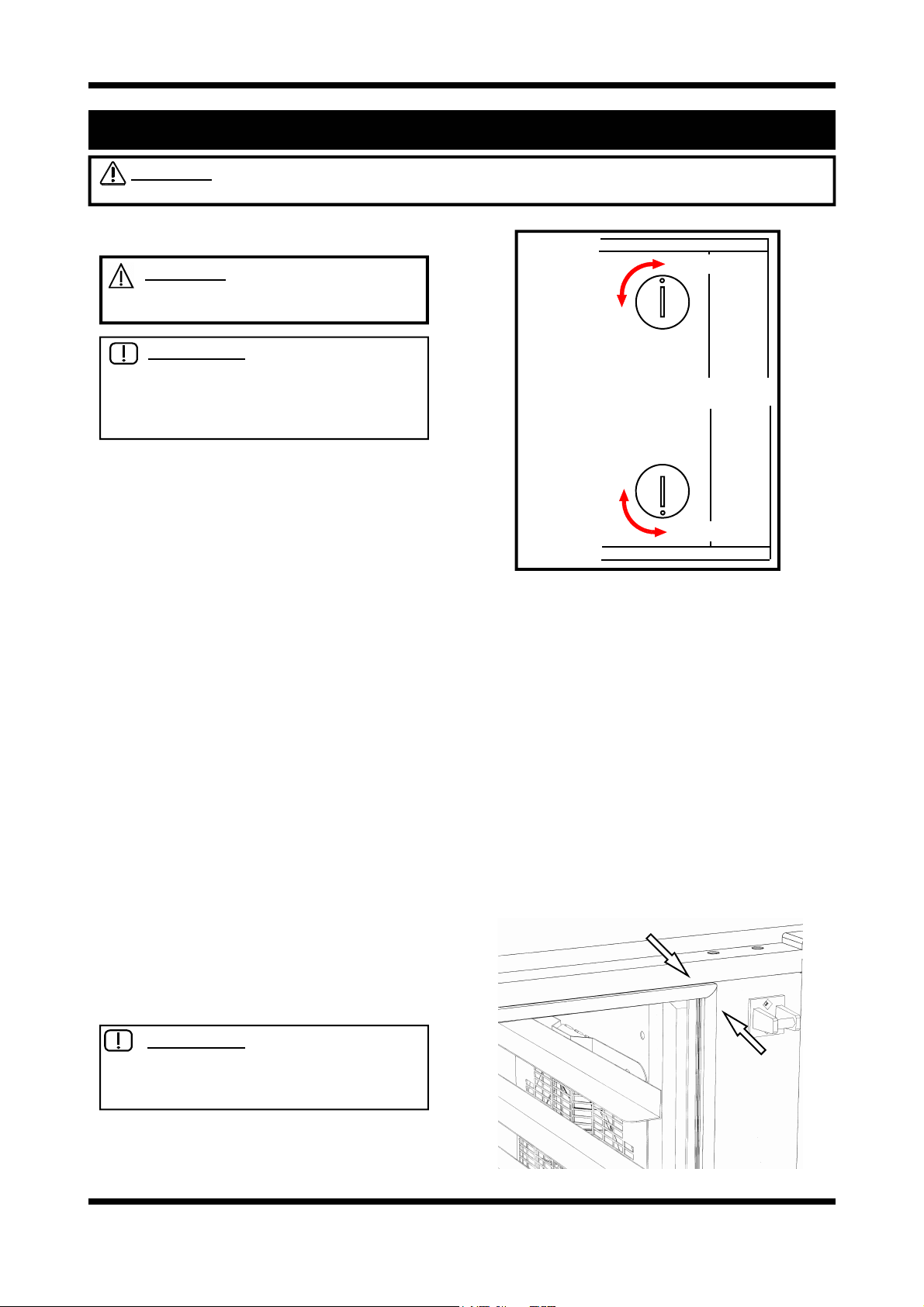
4. MAINTENANCE
WARNING: ALL INSTALLATION AND SERVICE REPAIR WORK MUST BE CARRIED OUT BY
QUALIFIED PERSONS ONLY.
4.1 CLEANING
WARNING: ALWAYS TURN THE
POWER SUPPLY OFF BEFORE
CLEANING.
IMPORTANT: THIS UNIT IS NOT
WATER PROOF.
DO NOT USE A WATER JET SPRAY TO
CLEAN INTERIOR OR EXTERIOR OF THIS
UNIT.
EXTERIOR
Clean with a good quality stainless steel cleaning
compound. Harsh abrasive cleaners may damage the surface.
INTERIOR
Ensure that the oven chamber is cool. Do not use
wire brushes, steel wool or other abrasive materials. Clean the oven regularly with a good quality
oven cleaner. Take care not to damage the fan
or the tube at the right side of the oven which
controls the thermostat.
SIDE RACKS
To remove, follow instructions given in the
installation section.
OVEN DOOR (HINGED GLASS)
Outer surfaces: Clean with conventional glass
cleaners
Inner surfaces: To clean between the inner and
outer door glasses, firstly ensure the door is
locked shut. With a screwdriver, coin, or other
suitable device,
release the outer glass and allow it to be hinged
open for cleaning access (refer to figure 4.1 for
correct procedure).
IMPORTANT: ALWAYS ENSURE
THAT THE OUTER GLASS IS HINGED
CLOSED AND LOCKED INTO
POSITION BEFORE OPENING DOOR.
1
/4 turn the outer glass locks to
TOP
LOCKED
UN-LOCKED
UN-LOCKED
LOCKED
BOTTOM
Figure 4.1
OVEN DOOR (HINGED GLASS)
Outer surfaces: Clean stainless steel with quality
stainless steel cleaner.
Inner surfaces: Clean stainless steel with
quality stainless steel cleaner.
Door glass: Clean with conventional glass
cleaners.
OVEN SEALS
To remove, pull out the seal starting at each
corner. The seal may be washed in the sink, but
take care not to cut or damage it. To replace, fit
the seal in at the corners first, then push in the
rest of the seal.
Revision 5/F3512
Figure 4.2
-15-
Page 15
4.2 ROUTINE PROCEDURES
PROCEDURE INTERVAL
DOOR SEALS Check for deterioration. 12 months
DOOR PIVOT BUSHES Check for wear. 12 months
DOOR CATCH Ensure that catch is adjusted such that the door closes
properly.
ELEMENT Check that element resistance is correct to it’s rating (refer
6.3.12).
WATER NOZZLE Check for lime build-up in water nozzle. 12 months
12 months
12 months
Revision 5/F3512
-16-
Page 16
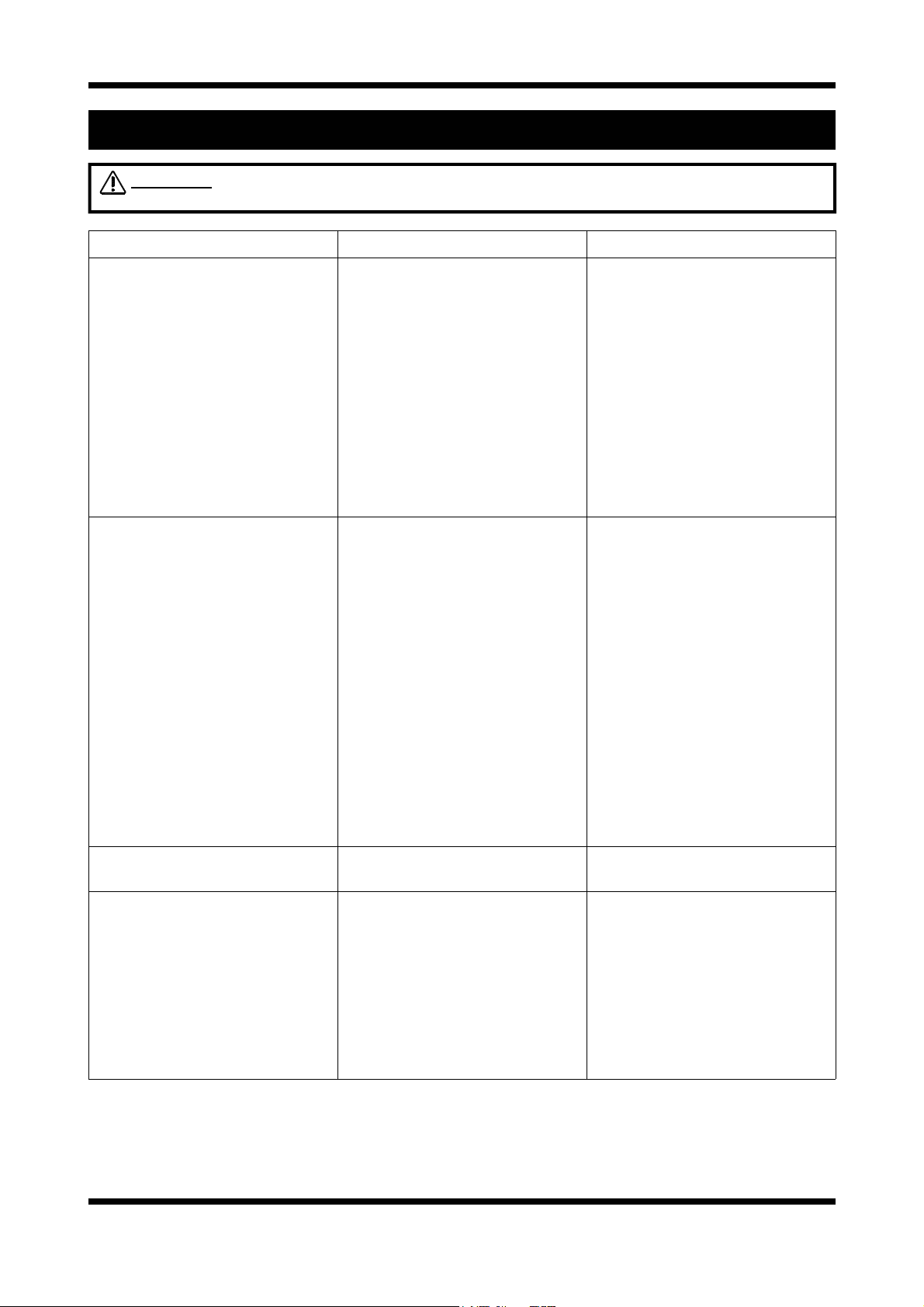
5. TROUBLE SHOOTING
WARNING: ALL INSTALLATION AND SERVICE REPAIR WORK MUST BE CARRIED OUT BY
QUALIFIED PERSONS ONLY.
FAULT POSSIBLE CAUSE REMEDY
THE OVEN DOES NOT
OPERATE / START
FAN DOESN’T OPERATE Door not closed.
The mains isolating switch on the
wall, circuit breaker or fuses are
“off” at the power board.
The power switch on the oven is
off (‘0’).
Incorrect electrical supply.
Oven circuit breaker tripped.
Power switch on unit faulty.
(Fan only operates when the
door is closed).
Door microswitch out of
adjustment.
Door microswitch faulty.
Fan motor faulty.
Wiring.
Fan timers.
Turn on.
Turn switch to ‘I’ position.
Ensure electrical supply correct.
Identify fault.
Reset circuit breaker.
Replace.
(Refer service section 6.3.1)
Close door.
Adjust.
(Refer service section 6.4.1)
Replace.
(Refer service section 6.3.3)
Replace.
(Refer service section 6.3.21)
Check and tighten any loose
wiring.
Replace.
(Refer service section 6.3.11)
STEAM LIGHT DOES NOT
ILLUMINATE
NO STEAM
(continued next page)
Revision 5/F3512
Blown bulb. Replace bulb.
Water not turned on.
Blocked filter in water solenoid.
Nozzle blocked.
Check valve blocked/corroded.
-17-
Turn water on at isolating valve.
Clean filter.
Remove, clean or replace.
(Refer service section 6.3.16)
Remove check valve.
(Refer service section 6.3.15)
Page 17
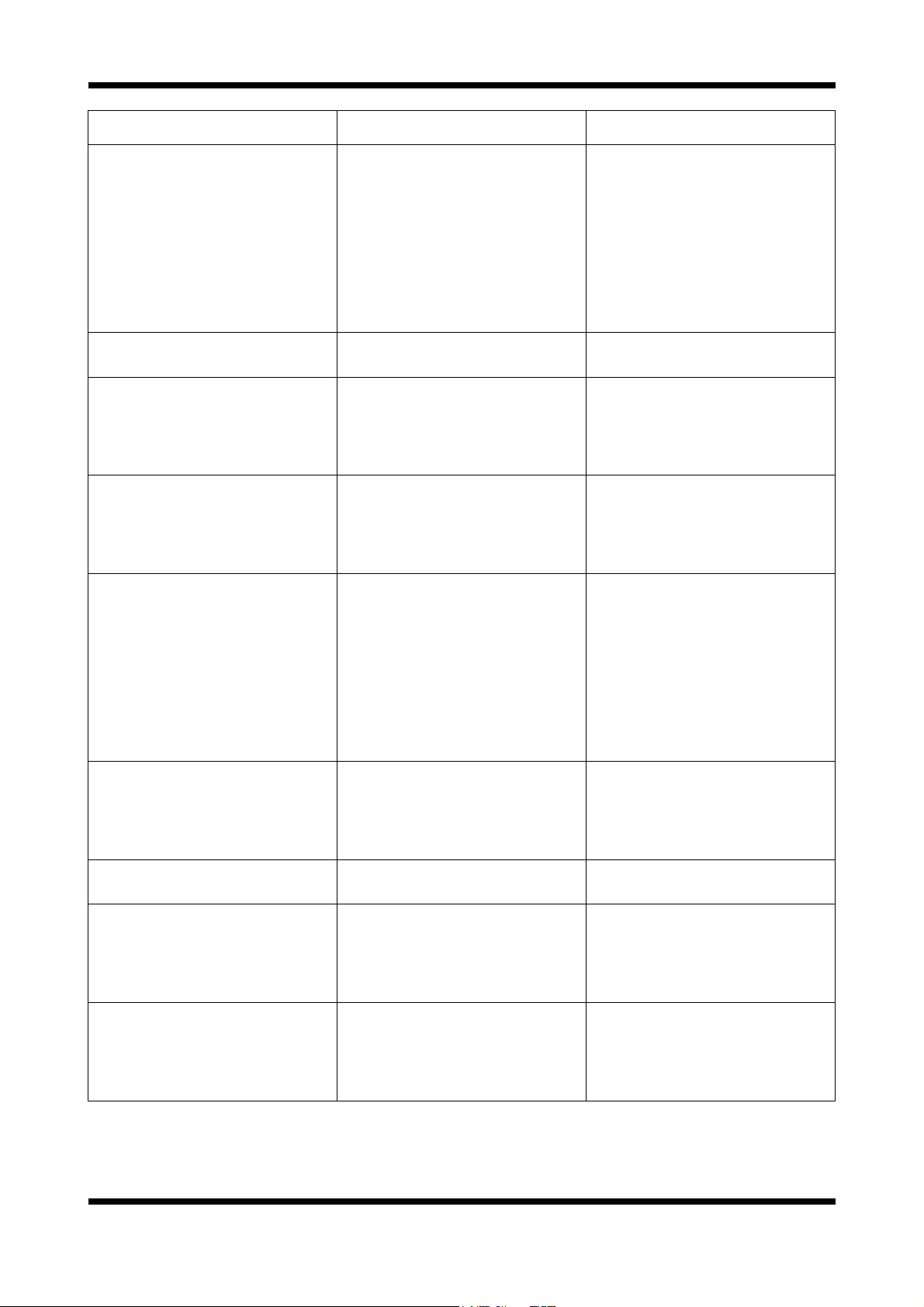
FAULT POSSIBLE CAUSE REMEDY
NO STEAM
(continued)
STEAMS ONLY SOMETIMES Steam timer faulty.
NO HEAT Faulty contactor.
SLOW RECOVERY Faulty contactor.
NO TEMPERATURE
CONTROL
Steam tube blocked.
Faulty solenoid coil.
Steam switch faulty.
Timer faulty.
Thermostat faulty.
Element(s) blown.
Faulty door microswitch.
Faulty heating contactor.
Over-temperature control tripped.
Faulty thermostat controls.
Remove, clean or replace.
Replace.
(Refer service section 6.3.16)
Replace.
(Refer service section 6.3.14)
Adjust / Replace.
(Refer service section 6.3.11)
Replace.
(Refer service section 6.3.11)
Replace.
(Refer service section 6.3.11)
Replace.
(Refer service section 6.3.8)
Replace.
(Refer service section 6.3.11)
Replace.
(Refer service section 6.3.12)
Adjust or replace.
(Refer service section 6.3.3)
Replace.
(Refer service section 6.3.11)
Reset.
Replace.
(Refer service section 6.3.7)
OVER-TEMPERATURE
CONTROL TRIPS
TIMER WILL NOT TIME DOWN Faulty timer.
NO TIME UP ALARM
INDICATION
NO HIGH FAN SPEED
NO LOW FAN SPEED
Oven too hot, thermostat out of
calibration.
Over-temp out of calibration.
Faulty timer.
Faulty buzzer.
Fan selector switch faulty.
Fan selector switch faulty.
Replace.
(Refer service section 6.3.8)
Replace.
(Refer service section 6.3.13)
Replace.
(Refer service section 6.3.18)
Replace.
(Refer service section 6.3.18)
Replace.
(Refer service section 6.3.19)
Replace.
(Refer service section 6.3.22)
Replace.
(Refer service section 6.3.22)
Revision 5/F3512
-18-
Page 18
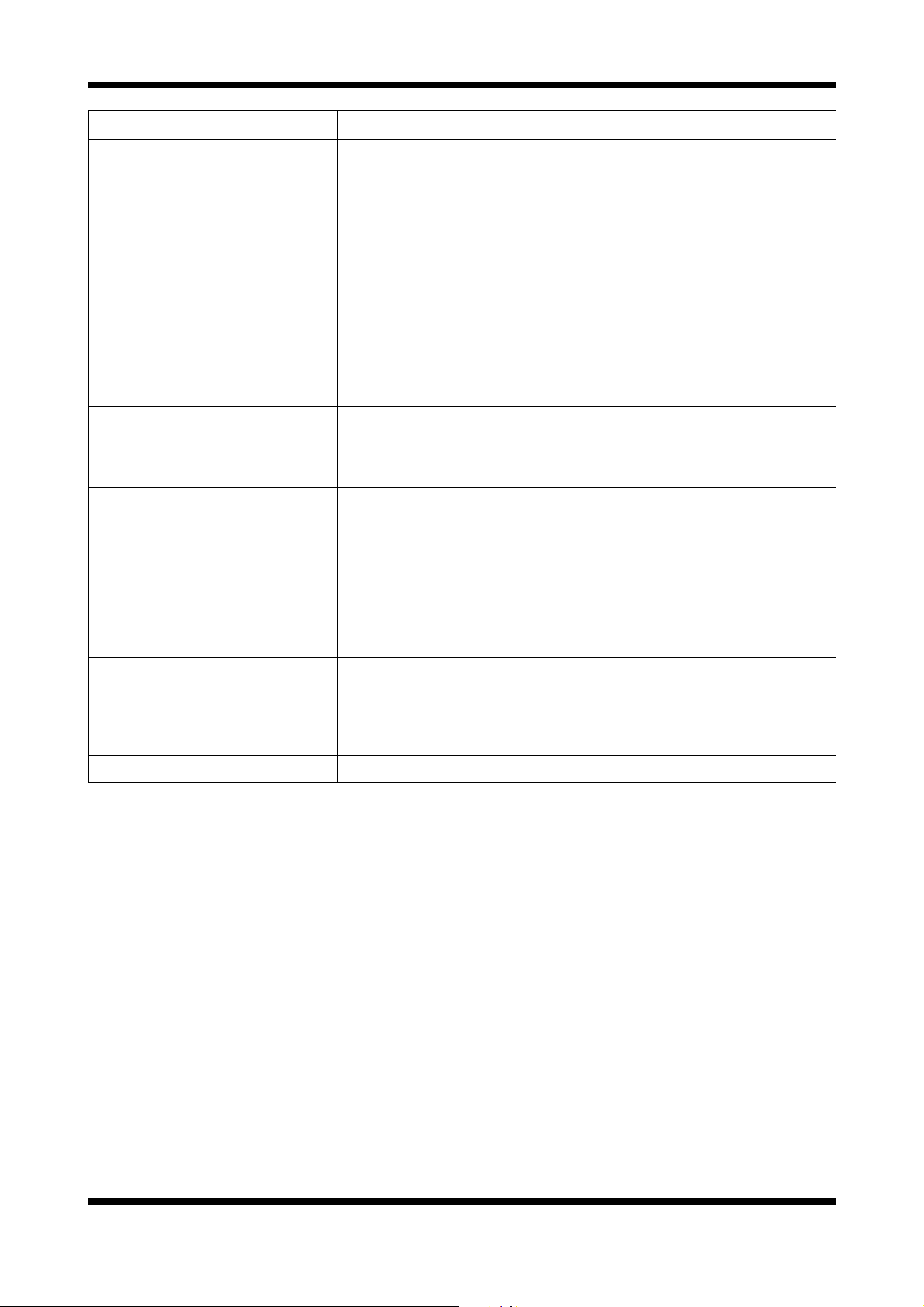
FAULT POSSIBLE CAUSE REMEDY
OVEN LIGHTS NOT
ILLUMINATING
Blown bulb(s).
Faulty lighting transformer.
NOTE: If both light bulbs have
blown then there will be no
output from the lighting
transformer.
OVEN VENT INDICATOR NOT
ILLUMINATING WHEN IN ‘OPEN’
POSITION
Indicator faulty.
Switch faulty.
OVER-PRESSURE VENT NOT
OPERATING DURING STEAM
CYCLE
Vent blocked.
Over-pressure vent mechanism
restricted.
DOOR DOES NOT CLOSE Tray in way of door.
Door seal obstruction.
Door handle in wrong position.
Door setting incorrect.
Replace.
(Refer service section 6.3.4)
Replace.
(Refer service section 6.3.6)
Replace.
(Refer service section 6.3.2)
Replace.
(Refer service section 6.3.23)
Remove and clean blockage.
Remove and clean.
Correctly position tray in rack.
Correctly install door seal.
(Refer maintenance section)
Reposition door handle.
Adjust.
(Refer service section 6.4.3)
DOOR SEAL LEAKS Door seal damaged.
Door seal incorrectly fitted.
Replace.
(Refer maintenance section)
Correctly install door seal.
(Refer maintenance section)
RACKS DO NOT FIT Incorrect pin location. Relocate on correct pin.
Revision 5/F3512
-19-
Page 19
6. SERVICE PROCEDURES
WARNING: ENSURE POWER SUPPLY IS SWITCHED OFF BEFORE SERVICING.
WARNING: ALL INSTALLATION AND SERVICE REPAIR WORK MUST BE CARRIED OUT BY
QUALIFIED PERSONS ONLY.
SECTION PAGE NO.
6.2 ACCESS ............................................................................................................................................. 22
6.2.1 Control Panel ...................................................................................................................... 22
6.2.2 Service Panel (RH Side Panel)........................................................................................... 22
6.2.3 Baffle................................................................................................................................... 22
6.2.4 Side Panel (LH Side) .......................................................................................................... 22
6.2.5 Control Panel Rear ............................................................................................................ 22
6.3 REPLACEMENT................................................................................................................................. 23
6.3.1 Power Switch ...................................................................................................................... 23
6.3.2 Indicator Neon Light............................................................................................................ 23
6.3.3 Door Microswitch ................................................................................................................ 23
6.3.4 Light Bulb / Glass................................................................................................................ 24
6.3.5 Light Fitting ......................................................................................................................... 24
6.3.6 Lighting Transformer........................................................................................................... 24
6.3.7 Thermostat Dial .................................................................................................................. 24
6.3.8 Thermostat Board ............................................................................................................... 25
6.3.9 Thermostat Probe ............................................................................................................... 25
6.3.10 Timer / Contactor ................................................................................................................ 26
6.3.11 Elements............................................................................................................................. 26
6.3.12 Over Temperature Thermostat ........................................................................................... 26
6.3.13 Steam Switch ...................................................................................................................... 27
6.3.14 Spray Nozzle ...................................................................................................................... 27
6.3.15 Check Valve........................................................................................................................ 27
6.3.16 Water Solenoid ................................................................................................................... 27
6.3.17 Cooling Fan ........................................................................................................................ 28
6.3.18 Bake Timer ......................................................................................................................... 28
6.3.19 Buzzer................................................................................................................................. 28
6.3.20 Oven Fan ............................................................................................................................ 28
6.3.21 Fan Motor ........................................................................................................................... 29
6.3.22 Fan Speed Selector Switch ................................................................................................ 29
6.3.23 Vent Switch ......................................................................................................................... 29
6.3.24 Vent / ‘Over Pressure’ Vent ................................................................................................ 29
6.3.25 Door Outer Glass ................................................................................................................ 30
6.3.26 Door Inner Glass................................................................................................................. 30
6.3.27 Door Catches ...................................................................................................................... 30
6.3.28 Door Handle........................................................................................................................ 30
6.3.29 Door Catch Mechanism ...................................................................................................... 30
6.3.30 Door Handle Mechanism .................................................................................................... 31
Revision 5/F3512
-20-
Page 20
6.4 ADJUSTMENT / CALIBRATION........................................................................................................ 31
6.4.1 Door Microswitch Adjustment ............................................................................................. 31
6.4.2 60 Minute Timer Zero Position Adjustment......................................................................... 31
6.4.3 Door Setting / Adjustment................................................................................................... 32
6.4.4 Door Reversal..................................................................................................................... 32
6.4.5 Fan and Steam Timer Operation / Adjustment ................................................................... 34
Fan / Steam Flow Chart...................................................................................................... 35
Revision 5/F3512
-21-
Page 21

6.2 ACCESS
6.2.4 SIDE PANEL (LH SIDE)
6.2.1 CONTROL PANEL
1) Remove vent knob by pulling straight off.
2) Remove screw above vent shaft.
One Screw
Figure 6.2.1
3) Panel is now free to hinge at bottom, take
care not to drop panel or pull wires out.
(support panel while working with panel
open).
6.2.2 SERVICE (RH SIDE) PANEL
1) Undo the 4 screws holding panel.
1) Undo the 4 screws holding panel.
2) Remove panel.
6.2.5 CONTROL PANEL—REAR
Vent Indicator
Heating Indicator
Thermostat
Bake Time Up
Indicator
Bake Timer
Four Screws
Figure 6.2.2
2) Remove panel.
6.2.3 BAFFLE
1) Remove racks, trays and RH side rack.
2) Undo the 4 nuts holding the baffle.
3) Pull panel off studs, pull bottom into middle of
oven and remove panel.
Four Nuts
Steam Switch
Fan Speed Selector
Switch
Power Indicator
Power Switch
Figure 6.2.4
Revision 5/F3512
Figure 6.2.3
-22-
Page 22

6.3 REPLACEMENT 6.3.3 DOOR MICROSWITCH
1) Open oven door.
2) Remove nut on front of micro-switch.
6.3.1 POWER SWITCH
1) Pull knob off front of switch.
2) Open control panel (refer 6.2.1) and undo 2
screws securing switch.
Figure 6.3.3
3) Remove 3 screws holding microswitch cover
Two Screws
Figure 6.3.1
3) Transfer wires to new switch.
4) Withdraw old switch and insert new switch,
securing with screws.
panel and drop panel down.
Microswitch
Nut
6.3.2 INDICATOR LIGHT
1) With control panel open (refer 6.2.1) remove
wires from the back of the indicator.
Indicator Wires
Figure 6.3.2
2) From back push indicator through front of
panel rotating clockwise.
3) Push new indicator in from front of panel, and
reconnect wires.
Three Screws
Figure 6.3.4
4) Remove 2nd nut on front of micro-switch, to
free micro-switch. (Loosen / remove 2 bolts
holding micro-switch bracket as required).
2nd Microswitch
Nut
Figure 6.3.5
5) Transfer wires to new the new switch and reassemble.
Common
Revision 5/F3512
Normally Open
Normally Closed
(Not used)
Figure 6.3.6
6) Adjust micro-switch (refer 6.4.1).
-23-
Page 23

6.3.4 LIGHT BULB / GLASS
6.3.6 LIGHTING TRANSFORMER
1) Remove LH side rack from oven.
2) Undo the four screws holding light face
surround on and remove the glass and
surround. Check the seal and replace if
necessary.
Four Screws
Figure 6.3.7
3) Pull bulb straight out of fitting, towards back
of oven (taking care not to break glass).
Replace bulb.
NOTE:
The bulb is a halogen lamp, so do not
touch the glass of the bulb while pushing
straight into light fitting (use an oil free cloth
or paper towel).
4) Replace seal, glass and surround, securing
with the screws (do not over tighten).
1) With R/H service panel removed (refer 6.2.2)
transfer wires to new transformer with the aid
of a screw-driver.
2) Remove one screw and loosen the second
screw securing the transformer.
Two Screws
Figure 6.3.9
3) Remove the old transformer and secure the
new transformer with the screws.
6.3.7 THERMOSTAT DIAL
1) Pull knob off front of thermostat.
2) Open control panel (refer 6.2.1) and undo two
screws securing thermostat bracket.
6.3.5 LIGHT FITTING
1) Remove glass and surround (refer 6.3.4).
2) Remove LH side panel (refer 6.2.).
2) Disconnect wires at connector block (inside
LH side panel).
Top Light Connector
Block
Bottom Light Connector
Block
Figure 6.3.8
3) Open fibreglass to expose lamp fitting.
4) Push in tabs at back of light fitting from
outside oven, pivot into oven and remove.
5) Re-assemble in reverse order.
Two Screws
Figure 6.3.10
3) Transfer wires to new thermostat.
4) Undo nut holding thermostat to bracket
Thermostat Nut
Figure 6.3.11
Revision 5/F3512
-24-
Page 24

5) Withdraw old thermostat and insert new
thermostat, securing with nut.
6) Re-assemble in reverse order.
e
P
u
g
n
r
p
a
l
r
e
O
Y
e
l
l
o
w
6.3.9 THERMOSTAT PROBE
1) Remove R/H service panel (refer 6.2.1) and
oven fan baffle (refer 6.2.3).
2) Remove bracket on steam line inside oven
cavity by undoing the two screws.
Thermostat Dial
n
w
o
r
B
B
r
o
w
n
Thermostat Board
Figure 6.3.12
Thermostat Dial Resistances
NOTE:
Dial must be disconnected from board for
testing.
O is orange wire, P is purple wire, Y is yellow
wire.
Resistance Between
Dial Position O-P P-Y O-Y
Off 900 Ω 900 Ω 0 Ω
Halfway 900 Ω 450 Ω 450 Ω
Maximum 900 Ω 0 Ω 900 Ω
6.3.8 THERMOSTAT BOARD
1) With control panel open (refer 6.2.1) transfer
wires to new board.
2) Squeeze legs together on plastic clips holding
board and extract.
3) Push new board onto clips.
Thermostat
Board
Two Screws
Figure 6.3.14
3) Undo the 2 bolts on the flange where the
probe enters the oven (inside oven).
NOTE:
Removal of probe and its mounting plate
will require breaking of the silicone sealant.
Two Bolts
Figure 6.3.15
4) With control panel open (6.2.1) remove wires
from thermostat board (2 brown wires at bottom left of board - refer figure 6.3.13).
5) Remove probe by drawing wires into oven.
6) Install the new probe in the reverse order.
NOTE:
Ensure probe mounting plate has RTV
silicone sealant applied to sealing face to
ensure a leak proof assembly. Remove
excess sealant after tightening securing
screws.
Thermostat Probe Resistances
NOTE:
Probe must be disconnected from board
for testing.
Temperature Resistance (kΩ)
Revision 5/F3512
Figure 6.3.13
0°C (32°F) 288
37°C (99°F) 56
100°C (212°F) 6.1
-25-
Page 25

6.3.10 CONTACTORS / TIMERS ETC
6.3.12 OVER-TEMP THERMOSTAT
1) With R/H service panel removed (refer 6.2.2),
remove the din rail mounted component.
2) Install the new component onto the din rail.
3) Transfer the wires from old component to new
one.
4) On contactors C2-C3, and C5-C6, ensure that
mechanical interlock (part number 020769) is
fitted as illustrated below.
Interlock fitted to
rear of contactors
Figure 6.3.16
1) Remove service panel (refer 6.2.2) and baffle
(refer 6.2.3).
2) Remove bracket on steam line inside oven
cavity by undoing the 2 screws (figure .3.15).
3) Undo the 2 bolts on the flange where the
probe enters the oven (inside oven).
NOTE:
Removal of the probe and mounting plate
will require breaking of the silicone sealant.
Two Bolts
Figure 6.3.17
4) Undo gland nut on bracket and extract the
probe from the bracket.
6.3.11 ELEMENTS
1) With service panel and baffle removed (refer
6.2.2 & 6.2.3) remove the wires from the
element.
2) With the use of an
11
/16” tube spanner, undo
the nuts on the outside at the element ends.
3) Pull element into oven and remove.
NOTE:
When replacing or refitting elements
ensure that the fibre sealing washers are
used.
Element Resistances
NOTE:
Element must be disconnected for
testing. Resistances are given at room
temperature.
208-220V 24.2 Ω
230-240V 28.8 Ω
Gland Nut
Figure 6.3.18
5) Undo the 2 screws holding the over-temp and
remove over-temp.
Two Screws
Figure 6.3.19
6) Transfer wires from old over-temp thermostat
to the new one.
7) Install the new over-temp and probe in the
reverse order of above.
NOTE:
Ensure probe mounting plate has RTV
silicone sealant applied to sealing face to
ensure a leak proof assembly. Remove
excess sealant after tightening securing
screws.
Revision 5/F3512
-26-
Page 26

6.3.13 STEAM SWITCH
6.3.15 CHECK VALVE - UP TO S/N 261984
1) Open control panel (refer 6.2.1).
2) Prise out or rotate the switch locking tab with
a small screwdriver, and withdraw the steam
switch assembly.
Prise out switch
locking tab
Steam switch
Figure 6.3.20
Rotate switch
locking tab
Steam switch
NOTE: If the check valve becomes blocked or
corroded, the recommended course of action is to
remove the internal parts of the valve, as it is not
required for operation of the oven. The procedure
for this is given below.
1) Remove the spray nozzle (refer 6.3.14).
2) Remove the check valve with
1
/2” and 5/8”
spanners.
Check
Valve
Figure 6.3.23
3) Dismantle the valve as illustrated, and discard
the ball and spring from the valve.
4) Reassemble the valve (without the ball and
spring) and refit to the unit.
Figure 6.3.21
3) Transfer wires to new steam switch, and
re-assemble in reverse order.
6.3.14 SPRAY NOZZLE
1) Remove the fan baffle (refer 6.2.3).
2) Unscrew the spray nozzle with
9
/16” and 5/8”
spanners.
3) Clean or replace as required, ensuring
debris free on re-assembly.
Spray
Nozzle
Figure 6.3.22
Ball Spring
Figure 6.3.24
6.3.16 WATER SOLENOID
1) Ensure water supply is turned off.
2) With the R/H service panel removed (refer
6.2.2) remove the wires from the solenoid.
3) Undo the compression fitting on the output
side of the solenoid (
4) Remove the hose fitting, inlet side, and
adapter (
13
/16”), outlet side.
1
/2” spanner).
5) Remove two screws (up under bracket) and
extract.
Solenoid
Wires
Revision 5/F3512
Two Screws
Figure 6.3.25
6) Secure new solenoid with screws, and
re-assemble.
-27-
Page 27

6.3.17 COOLING FAN
1) Remove R/H service panel (refer 6.2.2).
2) Remove the fan wires from the contactors.
Fan Wires
Figure 6.3.26
2) Remove the 4 screws securing the fan to it’s
mounting bracket and remove fan.
NOTE:
There is a nut on each screw, hold the
nut while undoing the screw.
Screws (4)
Two
Screws
Figure 6.3.29
3) Transfer wires to new timer.
4) Withdraw old timer and insert new timer, securing with screws.
5) Replace knob.
6) Check timer switches off at ‘0’ mark. If slight
adjustment required, loosen the mounting
screws and rotate timer in direction required.
6.3.19 BUZZER
1) Remove R/H service panel (refer 6.2.2).
2) Remove two screws holding buzzer bracket
to panel.
Figure 6.3.27
3) Replace and re-assemble in reverse order.
4) Ensure fan and flow direction is correct sucks air out of controls and into motor cavity.
Figure 6.3.28
6.3.18 BAKE TIMER
1) Remove bake timer knob by pulling it firmly
away from control panel.
2) Open control panel (refer 6.2.1) and undo two
screws securing timer.
Two Screws
Figure 6.3.30
3) Withdraw and transfer wires to new buzzer.
4) Remove old buzzer from bracket, and secure
new buzzer.
5) Reassemble in reverse order.
6.3.20 FAN
1) With service panel and oven fan baffle
removed (refer 6.2.2 & 6.2.3) undo the 6 bolts
holding the probes and steam line.
Revision 5/F3512
Six Bolts
Figure 6.3.31
-28-
Page 28

2) Undo the steam line compression fitting on
the outside of the oven nearest the oven.
Steam Line
Compression
Fitting
6.3.22 FAN SPEED SWITCH
1) Pull knob off front of switch.
2) Open control panel (refer 6.2.1) and undo 2
screws securing switch.
Two Screws
Figure 6.3.32
3) Pull assembly (steam nozzle etc) into the
oven (without damaging probe lines) and
support clear of the fan.
NOTE:
Removal of the probe and mounting plate
will require breaking of the silicone sealant.
4) Undo the bolt in the centre of the fan (use fan
blades and heat deflector to steady).
5) Use a gear puller if necessary to remove the
fan from the tapered shaft.
6) Replace and re-assemble in reverse order.
NOTE:
Ensure probe mounting plate has RTV
silicone sealant applied to sealing face to
ensure a leak proof assembly. Remove excess sealant after tightening securing screws.
6.3.21 MOTOR
1) Remove fan (refer 6.3.19).
2) Undo the 4 bolts holding the motor in place
(from the outside) and remove motor.
Figure 6.3.34
3) Transfer wires to new switch. Pull 2nd switch
off and transfer to new switch.
4) Withdraw old switch and insert new switch,
securing with screws.
6.3.23 VENT SWITCH
1) With control panel open (refer 6.2.1) remove
the four screws securing bracket and two
screws securing switch.
Bracket
Screws (4)
Switch Screws
(2)
Figure 6.3.35
2) Remove bracket (twist to clear frame and pull
forward), and switch (pull forward).
3) Transfer wires to the new switch and
re-assemble in reverse order.
6.3.24 VENT / ‘OVER-PRESSURE’ VENT
Four Bolts
Figure 6.3.33
3) Disconnect motor leads.
IMPORTANT:
Note wire colour and terminal
connections.
4) Replace and reassemble in reverse order.
Ensure wire leads are re-connected to correct
contactor terminals.
Revision 5/F3512
1) Remove vent switch (refer 6.3.23) and Baffle
(refer 6.2.3).
2) Rotate vent shaft 180° such that the spring is
facing into the oven.
3) With 3mm Allen key remove Allen screw
holding spring and vent assembly (inside top
back RHS of oven).
Allen Screw
Figure 6.3.36
4) Internal vent pressure relief and vent shaft
can now be removed and replaced.
-29-
Page 29

6.3.25 DOOR OUTER GLASS
6.3.27 DOOR CATCHES
1) Ensure the door is locked shut
2) With a screwdriver, coin, or other suitable
device, 1/4 turn the outer glass locks to
release the outer glass and allow it to be
hinged open.
Top
Locked
Unlocked
Unlocked
Locked
Bottom
Figure 6.3.37
3) Undo the two hinges (two screws per hinge)
and remove glass assembly.
1) Open the oven door.
2) Undo two screws and pull catch straight out.
Two Screws
Figure 6.3.40
6.3.28 DOOR HANDLE
1) Open the oven door.
2) Remove the two screw caps covering the
screws on the door handle.
3) Undo two screws securing handle, and pull
straight out.
Two
Screws
Figure 6.3.38
4) Replace and re-assemble in reverse order.
6.3.26 DOOR INNER GLASS
1) Open the oven door.
2) Remove the top door trim (two screws, one
each end of trim). Take care not to drop the
glass.
Two Screws
Figure 6.3.39
3) Lift and remove glass assembly. Replace
and re-assemble in reverse order.
Two
Screws
Figure 6.3.41
6.3.29 DOOR CATCH MECHANISM
1) Remove outer glass (refer 6.3.24) and door
handle (refer 6.3.27) leaving door open.
2) Drill out the six rivets (refer figure 6.3.36, E)
on the inside of the RH door trim (A) using a
3.5mm drill.
3) Remove four screws (F) on outside of RH
door trim (A).
4) Remove trim (rotate toward inside of door).
5) Remove four screws (J) from RH inner door
trim (B), and remove trim. (Loosen bottom
trim screw (K) if required).
6) Remove two split-pins (G) from the
connecting rod (H) on latch (C).
7) With handle in open position, push latch
mechanism (C1) away from connecting rod
(H) and remove the connecting rod.
8) Remove two screws (I) securing latching
mechanism (C), and remove.
9) Replace and reassemble in reverse order.
Revision 5/F3512
-30-
Page 30

6.3.30 DOOR HANDLE MECHANISM
1) Remove outer glass (refer 6.3.24), inner glass
(refer 6.3.25) and door handle (refer 6.3.27),
leaving door open.
2) Drill out the six rivets (refer figure 6.3.36, E)
on the inside of the RH outer door trim (A)
using a 3.5mm drill.
3) Remove four screws (F) on outside of RH
outer door trim (A).
4) Remove trim (rotate toward inside of door).
5) Remove four screws (J) from RH inner door
trim (B), and remove trim. (Loosen bottom
trim screw (K) if required).
6) Remove four split-pins (G) from the
connecting rods (H) on handle mechanism
(D).
7) With handle in open position, push latch
mechanism (C1) away from connecting rod
(H) and remove the connecting rods.
8) Remove two screws (L) securing handle
mechanism (D), and remove.
9) Re-assemble in reverse order.
6.4 ADJUSTMENT / CALIBRATION
6.4.1 DOOR MICROSWITCH ADJUSTMENT
1) Open oven door.
2) Loosen nut on front of microswitch, located at
bottom right of door frame.
Microswitch
Nut
Figure 6.4.1
3) Loosen two bolts securing microswitch
bracket from underside of oven.
Two Bolts
Figure 6.4.2
4) Adjust microswitch position and tighten bolts.
C
I
C1
H
G
L
D
B
E
NOTE:
Switch should operate when door handle
approximately
1
/2 engaged (45°).
5) Repeat steps 2-5 as required, then tighten the
front nut.
J
A
6.4.2 60 MINUTE TIMER ZERO POSITION
F
1) Remove 60 minute timer knob by pulling it
firmly away from control panel.
2) Open control panel (refer 6.2.1). Loosen two
screws on control panel holding 60 minute
timer.
J
E
Two
Screws
F
G
H
C
K
Revision 5/F3512
Figure 6.3.42
Figure 6.4.3
3) The timer can now be rotated as required to
ensure that the buzzer sounds at the zero
position.
-31-
Page 31

6.4.3 DOOR SETTING ADJUSTMENT
1) Open oven door.
2) Loosen the two bolts securing the top door
hinge plate to the oven.
Two Bolts
3) Undo the bolts securing the top hinge plate
and bottom hinge plate to the left hand side of
the oven door opening and remove.
Top Hinge Plate
Figure 6.4.4
3) Adjust oven door position and tighten two
bolts.
4) Check door operation. Repeat steps 2 and 3
as necessary to ensure that door closes and
latches evenly.
6.4.4 REVERSING THE DOOR
1) Open the oven door.
2) Undo the top and bottom door hinge pivot
pins (whilst supporting the door). Remove the
oven door.
Figure 6.4.6
4) Remove the bolt catches (secured by two
screws each) from the right hand side of the
door frame, and secure to the left hand side of
the door frame.
Bolt catch (top)
Figure 6.4.7
5) Remove the microswitch nut, and undo the
three screws securing the microswitch cover
panel to the bottom of the oven.
Revision 5/F3512
Figure 6.4.5
Three Screws
Figure 6.4.8
-32-
Page 32

6) Undo the screws securing the microswitch
mounting bracket to the cover panel, turn the
bracket around, and re-secure the switch
(facing the other way).
Figure 6.4.9
7) Refit the cover panel to the bottom of the
oven with the microswitch at the left hand side
of the oven.
8) Fit the top and bottom hinge plates (removed
in step 2) to the right hand side of the oven
door opening. (The plates should be turned
upside-down from their position on the left
hand side of the oven).
9) Turn the door over and refit the pivot pins to
the hinge plates to secure the door to the right
hand side of the door opening.
10) Check the operation of the door microswitch
and adjust as necessary.
NOTE:
The door handle mechanism will now
operate in the ‘up’ direction rather than down.
Revision 5/F3512
-33-
Page 33

6.4.5 FAN & STEAM TIMER OPERATION /
ADJUSTMENT
All the timers have a dial on the front that adjusts
the time the timer switches for when control
energised. All the timers have an LED on the
front that flashes when the timer is switched.
T1 Fan Cycle Timer
This timer switches power between the clockwise
and anti-clockwise fan direction circuits, the time
set is the duration on each fan direction.
Factory set to 1
1
/2 minute.
Refer to Appendix C for timer settings.
T2 & T4 Steam Timers (2)
These should be set the same and determine the
duration of the steam, one for clockwise fan
circuit and one for anti-clockwise fan circuit. If the
steam cycle is too long water will condense on
the product and oven chamber, and oven may
cool too much - it is usually better to have
multiple cycles than a long cycle.
Factory set to 10 seconds.
Refer to Appendix C for timer settings.
T3 & T5 Dwell Timers (2)
Once again these should be set the same, this is
the delay time between fan directions and after
steaming, when no power is applied to the fan
motor. One is for the clockwise fan circuit and
one is for the anti-clockwise fan circuit.
Factory set to 10 seconds.
Refer to Appendix C for timer settings.
Figure 6.4.5 shows the function of the timers on a
time line. The grey areas are when a timer is
switched (LED flashing) or where fan is rotating /
steam injecting. The dark lines show when the
steam button has been pressed, the first is most
common while the next two show the effect of
steaming at the beginning or end of a direction
cycle. Priority (power flow) is top to bottom on
the chart (cycle timer effects all others)
T1 C y cle timer
T2 Steam Clockwise
T4 Steam Anticlockwise
T3 Dwell Clockwise
T5 D well Anti c loc kwi s e
Fan rotation
Steaming
1 1/2 min 1 1/2 min 1 1/2 min 1 1/2 min 1 1/2 min 1 1/2 min 1 1/2 min
Steam injection activated
Steam injection activated
Steam injection activated
Figure 6.4.5
Revision 5/F3512
-34-
Page 34

Fan / Steam Flow Chart
This is a guide only, for accurate representation of all connections refer to the wiring chart.
Power In
via 6A breaker
Power Switch
Anti-Clockwise
Fan Rotation
Steam
Switch
T4
T5
C3
Steam Timer
(10sec)
Dwell timer
(10sec delay)
Fan Direction
Contactor
Door Switch
Cycle timer
1min 30sec
switching time
T1
Water Solenoid
3 Phase Power
phase
change
Clockwise
Fan Rotation
Steam
Switch
Steam Timer
(10sec)
Dwell timer
(10sec delay)
Fan Direction
Contactor
T2
T3
C2
C4 & C6
Steam switch on control panel - manual activation.
Timers T4 and T2 only operate when steaming (otherwise is direct connection).
Revision 5/F3512
Hi Speed
Contactors
Fan speed
switch selection
Motor
-35-
Low Speed
Contactor
C5
Page 35

7. ELECTRICAL CIRCUIT SCHEMATIC
7.1 380-415V, 3P+N+E
Revision 5/F3512
-36-
Page 36

7.2 208-240V, 3P+E
Revision 5/F3512
-37-
Page 37

7.3 208-240V, 1P+N+E
Revision 5/F3512
-38-
Page 38

8. ELECTRICAL WIRING DIAGRAM
8.1 380-415V, 3P+N+E
Revision 5/F3512
-39-
Page 39

8.2 208-240V, 3P+E
Revision 5/F3512
-40-
Page 40

8.3 208-240V, 1P+N+E
Revision 5/F3512
-41-
Page 41

9. SPARE PARTS
PART NO DESCRIPTION
CONTROL PANEL
020822 Power Switch
020849 Neon Indicator Lights
020985 Thermostat Potentiometer
011760 Timer - 60 Min
020893 Steam Switch Assembly
020882 Solid State Thermostat
020888 Fan Speed Switch (Rear half of fan switch assembly)
020822 Fan Speed Switch (Front half of fan switch assembly)
020883K Thermostat Probe Kit
020823 Control Panel Knobs
GEAR PLATE
015966 Heating Contactor 230-240V - 50Hz
020974 Heating Contactor 208-220V, 50Hz - E35-X253 only
020772 Heating Contactor 208-240V, 60Hz
020768 Motor Contactor
020769 Contactor Interlock (Used on C2 & C3, C5 & C6)
023059 Timer- Fan Direction (Cycle)
023058 Timer - Fan Direction (Dwell) / Steam Dose
020770 Shunt Trip (Vynkier) (50Hz to S/N 230810)
021345 Shunt Trip (AB) (50Hz from S/N 230811; 60Hz All)
020975 Circuit Breaker - 3ø 40A (AB) (3ø+E models)
020776 Circuit Breaker - 3ø 25A (Vynkier) (3ø+N+E models to S/N 230810)
021563 Circuit Breaker - 3 pole 25A (AB) (3ø+N+E models from S/N 230811; All 1ø+N+E models)
020777 Circuit Breaker - 1ø 6A (Vynkier) (50Hz to S/N 230810)
021344 Circuit Breaker - 1ø 6A (AB) (50Hz from S/N 230811; All 60Hz)
020213 Lighting Transformer
021351 Oven Lamp Complete
021350 Light Bulb G4/20W Halogen
021352 Oven Lamp Glass
021354 Gasket
019369K Over Temperature Control Kit
021156 Cooling Fan
021551 Capacitor 10µF (1ø models only) - 50Hz
021553 Capacitor 20µF (1ø models only) - 50 Hz
021554 Capacitor 30µF (1ø models only) - 50Hz
021552 Capacitor 12µF (1ø models only) - 60Hz
021555 Capacitor 35µF (1ø models only) - 60Hz
021560 Relay 10A (1ø models only) - Motor start capacitor switching
021561 Relay Socket Base (1ø models only) - Motor start capacitor switching
021562 Timer on Relay 1-30sec (1ø models only) - Motor start capacitor timing
011794 Buzzer
Revision 5/F3512
-42-
Page 42

PART NO DESCRIPTION
MOTOR & ELEMENTS
020745 Motor - 380-415V 50Hz 3ø
(E35-H453-xx, E35-N453-xx, E35-X353-xx only)
020885 Motor - 220-240V 50Hz 1ø/3ø
(E35-H251-xx, E35-X25x-xx only)
020886 Motor - 208-240V 60Hz 1ø/3ø
(E35-P26x-xx, E35-T26x-xx, E35-X263-xx only)
---------- Motor Front Bearing - SKF 6204-2Z/C3LHT23
---------- Motor Rear Bearing - NSK 6203Z
025396 Fan
020896 Motor Shaft Seal
020762 Element - 230-240V 2000W
(E35-Hxxx-xx, E35-Nxxx-xx, E35-Txxx-xx only)
020763 Element - 208-220V 2000W
(E35-Pxxx-xx, E35-Xxxx-xx only)
022259 Element - 208-220V 1250W
(E358-Nxxx-xx only)
STEAM SYSTEM
020851 Water Solenoid Valve
020853 Spray Adaptor Body
020854 Spray Nozzle Cap
020819 Vent Over Pressure Spring
020824 Vent Gasket
DOOR
025043 Door Seal
020738 Hinge Bush
020754 Bolt Catch
020750 Hinge Mounting Plate Bottom
023050 Hinge Mounting Plate Top
020753 Bolting Element
020833 Door Bolt Connecting Rod
020752 Handle Gear
020751 Door Handle
020774 Microswitch
020766 Latch Assembly (Hinged glass door only)
020713K Door Inner Glass (Hinged glass door only)
022308 Glass Clamp (Hinged glass door only)
021154 Door Outer Glass Assembly (Hinged glass door only)
024150 Door Glass Assembly - Complete (Stainless steel door only)
(NOTE:
Does not include inner and outer seals)
024094 Door Inner Glass (Stainless steel door only)
024095 Door Outer Glass (Stainless steel door only)
024104 Door Inner Glass Seal (Stainless steel door only)
024105 Door Outer Glass Seal (Stainless steel door only)
024087 Door Inner Glass Clamp Frame (Stainless steel door only)
Revision 5/F3512
-43-
Page 43

RACKS
020809 Side Rack LH WA (E35-xxxx-26 only)
020810 Side Rack RH WA (E35-xxxx-26 only)
020811 Side Rack LH WA (E35-xxxx-30 only)
020812 Side Rack RH WA (E35-xxxx-30 only)
025089 Side Rack 8 Tray LH WA (E35 –xxxx- 26)
025090 Side Rack 8 Tray RH WA (E35 –xxxx- 26)
023018 Side Rack 8 Tray LH WA (E35 –xxxx- 30)
023019 Side Rack 8 Tray RH WA (E35 –xxxx- 30)
015168 Oven Rack (E35-xxxx-26 only)
020993 Oven Rack (E35-xxxx-30 only)
Revision 5/F3512
-44-
Page 44

10. ACCESSORIES
OVEN RACKS
(PART NO 015168 - 26” / 020993 - 30”)
100 MM (FOUR INCH) LEG OPTION (PART
NO 021348 x4)
150 MM (SIX INCH) LEG OPTION (PART NO
018724 x4)
DOUBLE STACKING KIT (PART NO 021236
(26”) / 021237(30”))
STAINLESS STEEL DOOR OPTION
Stainless Steel Door Conversion Kit - Part
No 024150
A26 STAINLESS STEEL STAND
Revision 5/F3512
-45-
Page 45

11.1.1 MAIN ASSEMBLY
11. PARTS DIAGRAMS
Revision 5/F3512
-46-
Page 46

Pos Part No. Description
1 020788 SIDE PANEL RH (E35-xxx-26 only, to s/n 215839)
(Replace with 23971)
023971 SIDE PANEL RH (E35-xxx-26 only, from s/n 215840)
020790 SIDE PANEL RH (E35-xxx-30 only, to s/n 215839)
(Replace with 23972)
023972 SIDE PANEL RH (E35-xxx-30 only, from s/n 215840)
2 020792 SERVICE ENTRY PANEL
019213 CABLE ENTRY BUSH (Not illustrated - to s/n 205999)
3 020785 PANEL MOUNTING BRACKET
4 021526 WATER INLET ELBOW (Refer 11.1.3)
021527 WATER INLET WASHER
5 020745 MOTOR (380-415V 50Hz 3ø)
020885 MOTOR (220-240V 50Hz 1ø/3ø)
020886 MOTOR (208-240V 60Hz 1ø/3ø)
6 020860 WATER SUPPLY TUBE (E35-xxx-26 only) (Refer 11.1.3)
020862 WATER SUPPLY TUBE (E35-xxx-30 only) (Refer 11.1.3)
7 020851 WATER SOLENOID (Refer 11.1.3)
8 020869 CONNECTOR - 3/8"F x 1/4" COMPRESSION (Refer 11.1.3)
9 020991 MOUNTING BRACKET (Refer 11.1.3)
10 020897 MOTOR INSULATION PLATE
11 020778 MOTOR MOUNTING PLATE
12 020797 SIDE INSULATION PANEL (E35-xxx-26 only)
020798 SIDE INSULATION PANEL (E35-xxx-30 only)
13 021160 OVEN SIDE PLATE
14 090416 FIBREGLASS INSULATION 730x780x38
090417 FIBREGLASS INSULATION 730x880x38 (E35-xxx-30 only)
15 020762 ELEMENT - 220-240V 2000W (H,N,T only)
020763 ELEMENT - 208-220V 2000W (P,X only)
022259 ELEMENT - 208-220V 1250W (8kW units only - option)
015292 SEALING WASHER
16 020896 MOTOR SHAFT SEAL
17 020898 MOTOR SEAL HOUSING
18 025396 FAN
19 020780 CHASSIS HORIZONTAL SIDE (E35-xxx-26 only)
020786 CHASSIS HORIZONTAL SIDE (E35-xxx-30 only)
20 020795 TOP COVER (E35-xxx-26 only)
020796 TOP COVER (E35-xxx-30 only)
21 022425 VENT SEAL
22 022426 VENT SEAL FLANGE PLATE
23 020781 CHASSIS HORIZONTAL
24 023970 CHASSIS VERTICAL REAR RH
25 020791 BACK PANEL
26 020895 CABLE GUIDE BRACKET
27 020787 SIDE PANEL LH (E35-xxx-26 only)
020789 SIDE PANEL LH (E35-xxx-30 only)
28 021351 OVEN LAMP HOLDER & BULB
021352 OVEN LAMP - GLASS LENS
021354 OVEN LAMP - GASKET
021350 OVEN LAMP - BULB G4/20W
021353 OVEN LAMP -SUPPORT FRAME
29 004703 OVEN WA - ENAMELLED (E35-xxx-26 only)
004704 OVEN WA - ENAMELLED (E35-xxx-30 only)
020874 OVEN WA STAINLESS STEEL (E35-xxx-26 only)
020875 OVEN WA STAINLESS STEEL (E35-xxx-30 only)
30 020828 VENT FLAP
31 020827 VENT OVER PRESSURE PLATE
32 020819 OVER PRESSURE SPRING
33 041425 SCREW - M4 x 6 PAN POZI
Revision 5/F3512
-47-
Page 47

34 016241 VENT HOOD
35 020824 VENT GASKET
36 020845 VENT WA
37 020821 VENT OPERATING ROD (E35-xxx-30 only)
020820 VENT OPERATING ROD (E35-xxx-26 only)
38 020822 SELECTOR SWITCH (Refer 11.1.2)
39 020834 VENT SWITCH BRACKET (Refer 11.1.2)
40 020761 TOP BUTT STRAP
41 020764 CONTROL HOUSING CAP
020865 SCREW CAP - BLACK
42 018768 STAND-OFF (Refer 11.1.2)
43 020882 THERMOSTAT - SOLID STATE (Refer 11.1.2)
44 020775 T/STAT BOARD MOUNTING BRACKET (Refer 11.1.2)
45 011794 BUZZER (Refer 11.1.2)
46 020783 CHASSIS VERTICAL FRONT (Refer 11.1.2)
47 014032 BUZZER MOUNTING BRACKET (Refer 11.1.2)
48 019369K OVERTEMP THERMOSTAT KIT (Refer 11.1.2, 11.1.3)
013506 GLAND WASHER
013507 GLAND BUSH
013508 GLAND NUT
020887 SPLIT GLAND NUT ASSY (c/w Split nut, Seal & Washer)
020892 GLAND BUSH MOUNTING PLATE
49 ---------- CONTROL PANEL ASSEMBLY (Refer 11.2)
50 020841 FACIA WA
51 020774 MICROSWITCH
52 020829 MICROSWITCH MOUNTING BRACKET
53 020830 MICROSWITCH COVER PANEL
54 020793 BASE COVER SHEET (E35-xxx-26 only)
020794 BASE COVER SHEET (E35-xxx-30 only)
55 020899 BLANKING PLATE
56 020784 OVEN SUPPORT BRACKET
57 018723 LEG PLATE
58 020881 FAN GUARD
59 020879 FAN BAFFLE (E35-xxx-26 only)
020880 FAN BAFFLE (E35-xxx-30 only)
60 020857 STEAM TUBE WA (Refer 11.1.3)
61 020861 COMPRESSION UNION 1/4" (Refer 11.1.3)
62 020883K PROBE KIT (Refer 11.1.3)
020856 GASKET
63 016794 MALE CONNECTOR (Refer 11.1.3) (From S/N 261985)
020855 FEMALE CONNECTOR (Refer 11.1.3) (Up to S/N 261984)
64 020852 CHECK VALVE (Up to S/N 261984)
65 020853 SPRAY BODY - WHIRLJET (Refer 11.1.3)
020856 GASKET
66 020890 PROBE SECURING BRACKET (Refer 11.1.3)
67 020844 BAFFLE SPACER WA
68 020802 RACK LOCATION UPPER WA
69 020810 SIDE RACK RH WA (E35-xxx-26 only)
020812 SIDE RACK RH WA (E35-xxx-30 only)
023019 SIDE RACK 8 TRAY RH WA (E35 - xxx- 30 only)
025090 SIDE RACK 8 TRAY RH WA (E35 - xxx- 26 only)
70 015168 OVEN RACK (E35-xxx-26 only)
020993 OVEN RACK (E35-xxx-30 only)
71 020809 SIDE RACK LH WA (E35-xxx-26 only)
020811 SIDE RACK LH WA (E35-xxx-30 only)
023018 SIDE RACK 8 TRAY LH WA (E35 - xxx- 30 only)
025089 SIDE RACK 8 TRAY LH WA (E35 - xxx- 26 only)
72 020803 RACK LOCATION LOWER WA
73 025043 DOOR SEAL
Revision 5/F3512
-48-
Page 48

74 020754 BOLT CATCH
75 023050 HINGE MOUNTING PLATE TOP (From s/n 206000)
020737 HINGE MOUNTING PLATE TOP (To s/n 205999)
020876 TOP HINGE BOLT
76 020738 HINGE BUSH
77 ---------- DOOR ASSEMBLY (Refer 11.4)
78 023051 HINGE MOUNTING PLATE BOTTOM (From s/n 206000)
020750 HINGE MOUNTING PLATE BOTTOM (To s/n 205999)
79 ---------- GEAR PLATE (Refer 11.3)
80 021156 COOLING FAN
81 021157 COOLING FAN BRACKET
82 021158 HEAT BAFFLE
83 021388 CAPACITOR MOUNTING BRACKET (1ø ONLY)
84 021389 CAPACITOR SHIELD (1ø ONLY)
85 021551 CAPACITOR 10uF (H AND X) (50Hz 1ø ONLY)
021553 CAPACITOR 20uF (H AND X) (50Hz 1ø ONLY)
021554 CAPACITOR 30uF (H AND X) (50Hz 1ø ONLY)
021552 CAPACITOR 12uF (P AND T) (60Hz 1ø ONLY)
021555 CAPACITOR 35uF (P AND T) (60Hz 1ø ONLY)
86 020782 CHASSIS VERTICAL REAR LH
021348 4" LEG ASSEMBLY (NOT ILLUSTRATED)
018724 6" LEG ASSEMBLY (NOT ILLUSTRATED)
021236 26" OVEN DOUBLE STACKING KIT (NOT ILLUSTRATED)
021237 30" OVEN DOUBLE STACKING KIT (NOT ILLUSTRATED)
Revision 5/F3512
-49-
Page 49

11.1.2 FRONT UPRIGHT CONTROL ASSEMBLY
Pos Part No. Description
38 020822 SELECTOR SWITCH
39 020834 VENT SWITCH BRACKET
42 018768 STAND-OFF
43 020882 THERMOSTAT - SOLID STATE
44 020775 T/STAT BOARD MOUNTING BRACKET
45 011794 BUZZER
46 020783 CHASSIS VERTICAL FRONT
47 014032 BUZZER MOUNTING BRACKET
48 019369K OVERTEMP THERMOSTAT KIT
Revision 5/F3512
-50-
Page 50

11.1.3 WATER INJECTION ASSEMBLY
Pos Part No. Description
4 021526 WASHER INLET ELBOW (c/w WASHER)
6 020860 WATER SUPPLY TUBE (E35-xxx-26 only)
020862 WATER SUPPLY TUBE (E35-xxx-30 only)
7 020851 WATER SOLENOID
8 020869 CONNECTOR -
3
/8”F x 1/4” COMPRESSION
9 020991 MOUNTING BRACKET
48 019369K OVERTEMP THERMOSTAT KIT
013506 GLAND WASHER
013507 GLAND BUSH
013508 GLAND NUT
020887 SPLIT GLAND NUT ASSY (c/w Split nut, Seal & Washer)
020892 GLAND BUSH MOUNTING PLATE
60 020857 STEAM TUBE WA
61 020861 COMPRESSION UNION
1
/4"
62 020883K PROBE KIT
020856 GASKET
63 016794 MALE CONNECTOR (FROM S/N 261985)
020855 FEMALE CONNECTOR (TO S/N 261984)
64 020852 CHECK VALVE (TO S/N 261984)
65 020853 SPRAY BODY - WHIRLJET
020856 GASKET
66 020890 PROBE SECURING BRACKET
Revision 5/F3512
-51-
Page 51

11.2 CONTROL PANEL ASSEMBLY
Pos Part No. Description
1 020823 KNOB (VENT)
020848 COMPRESSION RING
2 020849 NEON INDICATOR
3 004705 CONTROL PANEL ºF
004706 CONTROL PANEL ºC
4 020976 POTENTIOMETER BRACKET
5 020985 POTENTIOMETER
6 011760 TIMER - 60 Min
7 020893 STEAM SWITCH ASSEMBLY
8 020888 SELECTOR SW. (FAN SPEED)
9 020822 SELECTOR SWITCH (FAN SPEED & POWER)
Revision 5/F3512
-52-
Page 52

11.3.1 GEAR PLATE ASSEMBLY (3 PHASE MODELS ONLY)
123
4 5 6 6
5
8 8
7
5
5
5
8 8
6
9
10
11
12
13
14
Revision 5/F3512
15 16
-53-
Page 53

Pos Part No. Description
1 020891 GEAR PLATE
2 020990 DIN RAIL
3 020769 CONTACTOR INTERLOCK (C2&C3 AND C5&C6)
4 015966 HEATING CONTACTOR 50Hz
020974 HEATING CONTACTOR 50Hz (X253 ONLY)
020772 HEATING CONTACTOR 60Hz
5 020768 MOTOR CONTACTOR
6 020995 END ANCHOR
7 020863 TIMER - FAN DIRECTION (TO S/N 204012)
023059 TIMER - FAN DIRECTION (FROM S/N 204013)
8 020773 TIMER - FAN DWELL / STEAM DOSE (TO S/N 204012)
023058 TIMER - FAN DWELL / STEAM DOSE (FROM S/N 204013)
9 020770 SHUNT TRIP (VYNKIER) (50Hz TO S/N 230810)
021345 SHUNT TRIP (AB) (50Hz FROM S/N 230811; 60Hz ALL)
10 020776 CIRCUIT BREAKER - 3ø 25A (VYNKIER) (TO S/N 230810)
021563 CIRCUIT BREAKER - 3ø 25A (AB) (FROM S/N 230811)
020975 CIRCUIT BREAKER - 3ø 40A (AB) (263 & 253 UNITS ONLY)
11 020777 CIRCUIT BREAKER - 6A (VYNKIER) (50Hz TO S/N 230810)
021344 CIRCUIT BREAKER - 6A (AB) (50Hz FROM S/N 230811; 60Hz ALL)
12 025715 TERMINAL BLOCK - M10 RED (FROM S/N 261183)
020999 TERMINAL BLOCK - M6 RED (TO S/N 261182)
13 025714 TERMINAL BLOCK - M10 GREY (FROM S/N 261183)
020998 TERMINAL BLOCK - M6 GREY (TO S/N 261182)
025716 CENTRE JUMPER - 2 POLE M10 (FROM S/N 261183)
020996 CENTRE JUMPER - 2 POLE M6 (TO S/N 261182)
14 025713 TERMINAL BLOCK - M10 GREEN (FROM S/N 261183)
020997 TERMINAL BLOCK - M6 GREEN (TO S/N 261182)
15 020213 LIGHTING TRANSFORMER
16 021159 TRANSFORMER BRACKET
Revision 5/F3512
-54-
Page 54

11.3.2 GEAR PLATE ASSEMBLY (1 PHASE MODELS ONLY)
6 5 5 4
5 5 5
8 7 7
7 7
123
9 10
14 14 1415
11 12
13
16 17
Revision 5/F3512
-55-
Page 55

Pos Part No. Description
1 020891 GEAR PLATE
2 020990 DIN RAIL
3 020769 CONTACTOR INTERLOCK (C2&C3 AND C5&C6)
4 020995 END ANCHOR
5 020768 MOTOR CONTACTOR
6 015966 HEATING CONTACTOR 50Hz
020772 HEATING CONTACTOR 60Hz
7 020773 TIMER - FAN DWELL / STEAM DOSE (TO S/N 204013)
023058 TIMER - FAN DWELL / STEAM DOSE (FROM S/N 204014)
8 020863 TIMER - FAN DIRECTION (TO S/N 204013)
023059 TIMER - FAN DIRECTION (FROM S/N 204014)
9 020770 SHUNT TRIP (VYNKIER) (50Hz TO S/N 230810)
021345 SHUNT TRIP (AB) (50Hz FROM S/N 230811; 60Hz ALL)
10 020776 CIRC. BREAKER 3 POLE 25A (VYNKIER) (50Hz TO S/N 230810)
021563 CIRC. BREAKER 3 POLE 25A (AB) (50Hz FROM S/N 230811; 60Hz ALL)
11 020777 CIRCUIT BREAKER - 1ø 6A (VYNKIER) (50Hz TO S/N 230810)
021344 CIRCUIT BREAKER - 1ø 6A (AB) (50Hz FROM S/N 230810; 60Hz ALL)
12 022281 CONTACTOR (MOTOR START CAPACITOR)
13 021562 TIMER - ON DELAY 1-30 SECOND (MOTOR START CAPACITOR)
14 022295 TERMINAL BLOCK - 16MM GREY
022297 CENTRE JUMPER - 2 POLE (NOT ILLUSTRATED)
15 022296 PARTITION PLATE
16 020213 LIGHTING TRANSFORMER
17 021159 TRANSFORMER BRACKET
Revision 5/F3512
-56-
Page 56

11.4.1 GLASS DOOR ASSEMBLY
Pos Part No. Description
1 020713K DOOR INNER GLASS
022314 GLASS SEAL
022311 INNER GLASS UPGRADE KIT (UP TO S/N 39600)
2 022308 GLASS CLAMP
3 004715 DOOR COVER TOP
4 020833 DOOR BOLT CONNECTING ROD
047308 SPLIT PIN - 32x3.2 ST/ST
5 020753 BOLTING ELEMENT
6 020752 HANDLE GEAR
7 020751 DOOR HANDLE
020865 SCREW CAP - BLACK
8 022309 GLASS SPACER TRIM
9 020730 DOOR TRIM INNER RH
10 020731 DOOR TRIM OUTER RH
11 020766 LATCH ASSEMBLY
Revision 5/F3512
-57-
Page 57

12 021154 OUTER GLASS HINGED
090014 GLASS SEAL - 750mm (INSEAL 10 x 6mm)
13 021153 HINGE SPACER PLATE
14 004716 DOOR COVER BOTTOM
15 020725 DOOR FRAME
16 020732 DOOR TRIM INNER LH
17 020733 DOOR TRIM OUTER LH
SD7031 COMPLETE DOOR ASSEMBLY
Revision 5/F3512
-58-
Page 58

11.4.2 STAINLESS STEEL DOOR ASSEMBLY
7
6
23
13
5
4
3
28
2
26
1
28
8 9 1110
14
15
16
17
13
5
23
18
12
13
Pos Part No. Description
1 024103 OUTER GLASS SEAL
2 024079 DOOR OUTER PANEL WA
3 004892 DOOR FRAME WA
4 020738 HINGE BUSH
5 024098 COVER SUPPORT BRACKET
6 004893 DOOR COVER TOP
7 024099 DOOR TRIM INNER LH
8 024083 DOOR INNER PANEL WA
9 024090 GLASS MODULE
10 024104 INNER GLASS SEAL
11 024087 GLASS CLAMP WA
12 024101 HANDLE SUPPORT
13 047100 NUTSERT 3/16”
14 020752 HANDLE GEAR RH
15 020833 DOOR BOLT CONNECTING ROD
16 047308 SPLIT PIN 32 x 3.2
17 020753 BOLTING ELEMENT
18 004894 DOOR COVER BOTTOM
19 041409 SCREW M5 x 25 MUSH SLOT
20 045410 WASHER M5 SPRING
21 044017 NUT M5 HEX
22 041045 SCREW 3/8 x 8 TRUSS
23 041436 SCREW 3/4 x 3/16 SD POZI BLACK
24 090005 SILICONE RTV CLEAR
25 090402 FIBREGLASS
26 044206 NUT SPIRE M5
27 041411 SCREW M5 x 16 PAN SLT 304 SS
28 024242 WINDOW VENT
Revision 5/F3512
-59-
Page 59

12. SERVICE CONTACTS
AUSTRALIA
VICTORIA - MOFFAT PTY
HEAD OFFICE AND MAIN WAREHOUSE
740 Springvale Road Tel (03) 9518 3888
Mulgrave VIC 3170 Fax (03) 9518 3838
Spare Parts Department Free Call 1800 337 963
Fax (03) 9518 3895
NEW SOUTH WALES - MOFFAT PTY
Unit 8/142 James Ruse Drive
Rosehill NSW 2142
Spare Parts Free Call 1800 337 963
Fax (03) 9518 3895
QUEENSLAND - MOFFAT PTY
30 Prosperity Place
Geebung QLD 4034
Spare Parts Free Call 1800 337 963
Fax (03) 9518 3895
SOUTH AUSTRALIA - MOFFAT PTY
28 Greenhill Rd Tel (08) 8274 2116
Wayville SA 5034
Spare Parts Free Call 1800 337 963
WESTERN AUSTRALIA - MOFFAT PTY
PO Box 689 Tel (08) 9305 8855
Joondalup Business Centre WA 6027
Spare Parts Free Call 1800 337 963
NATIONAL COVERAGE FOR 24 HOUR SERVICE OR MAINTENANCE DIAL
FREE CALL 1800 622 216 (AUSTRALIA ONLY)
CANADA
Lessard Agencies Limited Tel (416) 766 2764
PO Box 97 Fax (416) 760 0394
Stn “D” Free Call 1 888 537 7273
Toronto, ONT M6P 3J5
NEW ZEALAND
CHRISTCHURCH - MOFFAT LTD
16 Osborne St Free Call 0800 Moffat
PO Box 10-001 (0800 663 328)
Christchurch
Spare Parts Tel (03) 389 1007
Fax (03) 389 1276
AUCKLAND - MOFFAT LTD
4 Waipuna Road Tel (09) 570 6630
Mt Wellington Fax (09) 570 0099
Auckland
Spare Parts Free Call 0800 Moffat
(0800 663 328)
Revision 5/F3512
-60-
Page 60

UNITED KINGDOM
BLUESEAL LTD
Units 6-7 Mount St Tel 0121-327 5575
Business Park Fax 0121-327 9711
Birmingham B7 5QU
England
UNITED STATES OF AMERICA
MOFFAT INC.
3765 Champion Blvd Tel 1-800 551 8795
P.O. Box 4129 Fax 336 661 9546
Winston-Salem
NC27115
NATIONAL COVERAGE FOR SERVICE OR MAINTENANCE DIAL
FREE CALL 1800 551 8795 (USA ONLY)
Revision 5/F3512
-61-
Page 61

APPENDIX A. STACKING KIT INSTRUCTIONS
A. UNPACKING
Check kit includes correct parts and correct
quantities for the kit purchased as listed.
ITEM DESCRIPTION Qty
A Stand Frame 2
B Stand side (top) 2
C Clamp plate 4
D Screw Washer Washer E Bolting bracket 4
F Screw - 2"x
G Double stack front WA 1
H Double stack back 1
I Double stack side 2
J Screw- 1"x
K Screw L Top sheet 2
M Screw N Vent extension WA 1
Vent gasket 1
O Connection sleeve 1
P Hose clamp - 3" 2
Q RTV clear - 150g tube 1
3
/4” x 1/4” hex hd 12
1/
” spring 12
4
1/
” flat 12
4
3
/4"BSW hex black 4
3
/16" raised CSK 4
3
/4"x3/16"pozi mush 16
1
/2"x8A pozi mush 6
Figure A.1
Figure A.6
Figure A.8
A
C
F
A
B
D
B
E
C
D
E
F
Figure A.1
Revision 5/F3512
-62-
Page 62

B. STAND
1) Place one stand frame (A) on working surface
with threaded holes face up.
2) Fit both sides (C), to the stand frame with the
screws and washers (E). Ensuring the clamp
plates (D) are fitted on the upright sections
inside the sides (Figure A.2).
3) Place the other stand frame (A) on working
surface with threaded holes face up.
4) Turn the assembly (as in 1&2 above) over
onto the stand frame.
5) Secure the sides to the stand frame with the
screws and washers (E). Ensuring the clamp
plates (D) are fitted on the upright sections
inside the sides (Figure A.2).
6) Feet are already inserted into the ends of the
stand frames.
B
A
Figure A.3
7) Remove the 2 front top side panel support
brackets, 2 screws each. (Figure A.4)
E
C
F
Figure A.2
C. BOTTOM OVEN
Onto Stand
1) Remove feet from oven.
2) Oven should be place onto stand with
threaded holes in ovens foot plates lining up
with holes on stand (at ends of sides B).
3) Secure oven using screws (F). It is essential
that the Bolting Bracket (E) is correctly in
position, refer Figure A.2. Bolt up through
mounting bracket and stand into oven foot
plate.
4) Adjust stand feet to level the oven.
Remove Panels
5) Remove side panels from oven, each side
panel is held on by 4 screws.
6) Remove rear RH side corner panel (power
and water entry points), secured with 3
screws at front edge of panel. (Figure A.3)
Figure A.4
Stacking Assembly
8) Place insulation panels (L) onto oven top
(Figure A.5) fitting into the top of the oven to
cover the insulation. There are 3 screws (M)
down each side to secure the 2 panels.
L
Figure A.5
9) Assemble loosely the front (G), back (H) and
sides (I), with one screw (J) at each corner
(Figure A.6), in from the sides.
10) Place stacking assembly on top of the lower
oven and loosely attach, using 2 screws (K)
in each corner of the unit (at front and back
up from the sides).
Revision 5/F3512
-63-
Page 63

M
K
H
K
G
Figure A.6
D. TOP OVEN
Remove Panels
1) Remove side panels from oven, each side
panel is held on by 4 screws.
2) Remove rear RH side corner panel (power
and water entry points), secured with 3
screws at front edge of panel (Figure A.3).
3) Remove the 2 front bottom side panel support
brackets, 2 screws each.
E. STACKING
Stack
1) Remove legs / feet from top unit and place
onto bottom unit (on stacking assembly)
secure using 2 screws (K) in each corner of
the unit (at front and back down from the
sides).
2) Remove the RH double stack side (I).
3) Remove vent bottom plate, 4 screws from
underneath.
4) Secure vent extension (N) with 3 screws
(screw closest to oven is inaccessible), using
sealant provided (Q) to ensure sealed
connection. See Figure A.7.
5) Refit the RH double stack side (I).
6) Tighten all screws on the stacking assembly.
7) Place connection sleeve (O) over join in vent
using plenty of sealant (Q) between vent and
sleeve, and secure using hose clamps (P).
See Figure A.8.
L
J
N
I
Figure A.7
Re-assembly
8) Replace side cover support brackets (Figure
A.4) at top front of bottom unit and bottom
front of top unit, using original screws.
9) Replace rear RH panel (Figure A.3) on each
unit using original screws.
10) Replace side panels, using original screws.
Q
N
P
O
Revision 5/F3512
Figure A.8
-64-
Page 64

APPENDIX B. STAND MOUNTING INSTRUCTIONS
A. UNPACKING
Check stand includes correct parts and correct
quantities for the stand purchased as listed.
A26C has ‘Castor Stem Sockets’ in Stand
Frames, not feet.
ITEM DESCRIPTION Qty
A Stand frame front 1
(Nutserts one side only)
B Stand frame rear 1
(Nutserts both sides)
D Rack 2
E Screw E Washer E Washer F Screw - 2
3
/4"x1/4" BSW hex hd 8
1
/4" Spring 8
1
/4” Flat 8
1
/4"x3/4" hex hd 4
Castor (A26C only) 2
Castor braking (A26C only) 2
B. ASSEMBLY (diagram on reverse side)
Stand
1) Place front stand frame (A) on working
surface with threaded holes and oven
supports face up.
2) Fit both racks (D) to the stand frames (A).
Take care which holes are used to secure the
racks as inside holes in rack uprights (D) are
used for 18” (460mm) wide trays, and outside
holes are used for 16” (405mm) wide trays.
3) Turn assembly upright.
G
D
16” (405m
m) wide
trays
G
4) Fit the other stand frame (B) with screws and
washers (E).
NOTE:
Take care which way around the frame
is. For 26” oven have the oven supports
facing the racks, for 30” oven have the
supports (C) facing away from racks (refer
figure B.2).
Take care which holes are used to secure the
racks, as in 2 above.
R
E
A
R
R
a
c
k
m
o
u
n
t
i
n
g
h
o
l
e
s
b
o
t
h
B
G
A
G
G
G
F
R
O
N
T
R
a
c
k
m
o
o
n
e
s
i
d
e
G
G
u
n
t
i
n
g
h
o
l
e
s
o
n
l
y
s
i
d
e
s
C
F
G
G
Figure B.2
5) A26C only. Insert castors into Stand Frames,
ensure 2 braking castors are in front frame.
(Front frame has nutserts in one face only)
Oven - mounting on stand
6) Remove feet from oven (if fitted).
7) Oven should be place onto stand with
threaded holes in ovens foot plates lining up
with holes in oven supports on stand.
8) Secure oven using screws (F).
9) A26 only. Adjust stand feet to level the oven.
10) A26C only. Ensure braking castors are in
front frame.
Revision 5/F3512
18” (460mm)
D
wide trays
Figure B.1
-65-
Page 65

APPENDIX C. MOTOR CONTROL AND STEAM TIMER
ADJUSTMENT GUIDE
FS Series Timers—Settings E35 Convection Oven (Figure C.1)
Note:
Superceded by FE series timers—see below.
Figure C.1
Timer Type Function Time Adjust Setting Actual Time
T1 FSF3 Fan motor direction 0.15 1.5 minutes
T2 FSD3 Steam time 0.3 10 seconds
T3 FSD3 Fan delay 0.3 10 seconds
T4 FSD3 Steam time 0.3 10 seconds
T5 FSD3 Fan delay 0.3 10 seconds
FE Series Timers—Settings E35 Convection Oven (Figure C.2)
Note:
Supercedes FS series timers.
FE series timers interchangeable with earlier FS series timers (above). Time scale settings as per listing
below.
Figure C.2
Timer Type Function Scale Setting Time Adjust Setting Actual Time
T1 FEF3T Fan motor direction 10 minutes 0.15 1.5 minutes
T2 FED3T Steam time 10 seconds 1.0 10 seconds
T3 FED3T Fan delay 10 seconds 1.0 10 seconds
T4 FED3T Steam time 10 seconds 1.0 10 seconds
T5 FED3T Fan delay 10 seconds 1.0 10 seconds
Revision 5/F3512
-66-
 Loading...