

Page 1

M-400 MULTI-ZONE
DIGITAL AMPLIFIER
Copyright © 2013 Autonomic Controls, Inc. All Rights Reserved
1
Page 2

IMPORTANT SAFETY INSTRUCTIONS
1. Read these instructions.
2. Keep these instructions.
3. Heed all warnings.
4. Follow all instructions.
5. Do not use this device near water.
6. Clean only with a dry cloth.
7. Do not block any ventilation openings, Install in accordance
with the manufacturer’s instructions.
8. Ensure that the ventilation is not impeded by covering the
ventilation openings with items such as newspapers, table
cloths, curtains, etc.
9. Do not install near any heat source such as radiators, heat
registers, stoves or other devices (including amplifiers) that
produce heat.
10. Use the device only in moderate climates (not in tropical
climates).
11. Do not defeat the safety purpose of the polarized or grounding
type plug. A polarized plug has two blades with one wider than
the other. A grounding type plug has two blades and a third
grounding prong. The wide blade or third prong are provided
for your safety. If the provided plug does not fit into your
outlet, consult an electrician for replacement of the
obsolete outlet.
12. Protect the power cord from being walked on or pinched
particularly at plugs, convenience receptacles and the point
where they exit from the device.
13. Only use the attachments / accessories specified by the
manufacturer.
14. If you install the device in a built-in installation, such as a
bookcase or rack, ensure that there is adequate ventilation.
Leave 20cm (8”) of free space at the top and sides and 10cm
(4”) at the rear. The rear edge of the shelf or board above the
device should be set 10cm (4”) away from the rear panel or
wall, creating a flue-like gap for warm air to escape. Good
airflow is necessary to help ensure proper operation. Not only
should you provide enough free space around the device,
but also ensure that air can flow freely and escape from the
device’s surroundings. Failure to do so may cause thermal
shutdown of the device, and reduced life expectancy.
15. Unplug this device during lightning storms or when unused for
long periods of time.
16. Never expose the device to moisture.
17. Refer all servicing to qualified service personnel. Servicing is
required when the device has been damaged in any way, such
as power-supply cord or plug is damaged, liquid has been
spilled or objects have fallen into the device. The device has
been exposed to rain or moisture, does not operate normally,
or has been dropped.
18. Damage requiring service. Unplug the device from the wall
outlet and refer servicing to qualified service personnel under
the following conditions:
a. When the power supply cord or plug is damaged.
b. If liquid has been spilled, or objects have fallen into
the device.
c. If the device has been exposed to rain or water.
d. If the device does not operate normally by following the
operating instructions. Adjust only those controls that
are covered by the operating instructions as an improper
adjustment of other controls may result in damage and will
often require extensive work by a qualified technician to
restore the device to its normal operation.
e. If the device has been dropped or damaged in
any way.
f. When the device exhibits a distinct change in performance
this indicates a need for a service.
19. Object and Liquid Entry.
Never push objects of any kind into the device through
openings as they may touch dangerous voltage points or
short-out parts that could result in a fire or electric shock. The
device should not be exposed to dripping or splashing and no
objects filled with liquids, such as vases, should be placed on
the device. Don’t put candles or other burning objects on top
of this device.
2
MirageAudio System.com
Page 3

PRECAUTIONS
1. AC Fuse
The AC fuse inside the device is not user-serviceable. If you
cannot turn on the device, contact the dealer from whom you
purchased this device.
2. Care
Occasionally you should dust the device all over with a soft
cloth. For stubborn stains, use a soft cloth dampened with
a weak solution of mild detergent and water. Dry the device
immediately afterwards with a clean cloth. Don’t use abrasive
cloths, thinners, alcohol, or other chemical solvents, because
they may damage the finish or remove the panel lettering.
3. Power
WARNING
BEFORE PLUGGING IN THE DEVICE FOR THE FIRST TIME, READ
THE FOLLOWING SECTION CAREFULLY.
AC outlet voltages vary from country to country. Make sure
that the voltage in your area meets the voltage requirements
printed on the device’s rear panel. (e.g. AC 90V – 240V
50/60HZ) The power cord is used to disconnect this device
from the AC power source. Make sure that the plug is readily
operable (easily accessible) at all times. If you do not intend to
use the device for an extended period, remove the power cord
from the AC outlet.
4. Ground
The device is defined as Class1 in EN60065 (low voltage
directive) and MUST BE GROUNDED. Connect only to an outlet
with protective ground, and only use the powercord supplied.
Finland:“Laite on Liitettävä suojamaadoituskoskettimilly
varustettun pistorasiaan”
Norway: “Apparatet må tilkoples jordet stikkontakt”
Sweden: “Apparaten skall anslutas till jordat uttag”
5. Never Touch This Device With Wet Hands
Never handle this device or its power cord while your hands
are wet or damp. If water or any other liquid gets inside this
device, have it checked by your Autonomic dealer.
6. Handling Notes
a. If you need to transport this device, use the original
packaging to pack it how it was when you bought it.
b. Do not leave rubber or plastic items on this device for a
long time as they may leave marks on the case.
c. This device’s top and rear panels may get warm after
prolonged use. This is normal.
d. If you do not use this device for a long time, it may not
work properly the next time you turn it on, so be sure to
use it occasionally.
7. Speaker Shorts
Under no circumstances should the speaker output terminals of
the device be short circuited, grounded or connected to
another output.
8. Direct Sun light
Avoid installing the device in positions where the front panel is
exposed to direct sunlight – may cause control to
become sluggish.
9. Controller Connection
Never connect more than four keypads. The supply is internally
fused (self resetting) and may open circuit. Never connect the
unit’s 12VDC terminal (‘Bus Run’ port) to an external power
supply
Copyright © 2013 Autonomic Controls, Inc. All Rights Reserved
3
Page 4

DECLARATION OF CONFORMITY
We declare under our sole responsibility that this product, to which this
declaration relates, is in conformity with the following standards:
EN60065, EN55013, EN55020, EN61000-3-2 and EN61000-3-3.
Following the provisions of Low Voltage Directive 2006/95/EC and EMC
Directive 2004/108/EC, the EC regulation 1275/2008 and its frame
work Directive 2009/125/EC for Energy-related Products (ErP).
A NOTE ABOUT RECYCLING:
This product’s packaging materials are recyclable and can be reused.
Please dispose of any materials in accordance with the local
recycling regulations.
When discarding the device, comply with local
rules or regulations. Batteries should never be
thrown away or incinerated but disposed of in
accordance with the local regulations concerning
battery disposal.
This product and the supplied accessories
constitute the applicable product according to
the WEEE directive.
FOR U.S. MODELS
FCC information for User.
CAUTION:
The user changes or modications not expressly approved by the party
responsible for compliance could void the user’s authority to operate
the equipment.
Note: This equipment has been tested and found to comply with the
limits for a Class B digital devices, pursuant to Part 15 of the FCC
Rules. These limits are designed to provide reasonable protection
against harmful interference in a residential installation.
This equipment generates, uses and can radiate radio frequency energy
and, if not installed and used in accordance with the instructions, may
cause harmful interference to radio communications. However, there is
no guarantee that interference will not occur in a particular installation.
If this equipment does cause harmful interference to radio or television
reception, which can be determined by turning the equipment off and
on, the user is encouraged to correct the interference by one or more of
the following measures:
» Reorient or relocate the receiving antenna.
» Increase the separation between the equipment and receiver.
» Connect the equipment into an outlet on a circuit different
from that to which the receiver is connected.
» Consult the dealer or an experienced radio/TV technician
for help.
4
MirageAudio System.com
Page 5

SUPPLIED ACCESSORIES
TABLE OF CONTENTS
Make sure you have the following accessories:
» IEC60320-1 Coupler (C-14 Male Plug)
» Rack Mount Ears
A digital copy of this manual can be found at http://www.autonomic-controls.com/support_documentation.php
Important Safety Instructions ...............................
Precautions .........................................................
Declaration of Conformity ....................................
Supplied Accessories ............................................
Features ..............................................................
Front Panel Guide ................................................
Rear Panel Guide .................................................
Typical System Conguration ................................
Multiple Amplier Stacks ......................................
Controller Wiring .................................................
Web Application - Zone Selection Page .................
Zone Source Selection ..........................................
Zone Settings ......................................................
Amplier Settings ................................................
Amplier Source Settings ......................................
Amplier Zone Settings ........................................
RS232 Protocol ....................................................
Specications .......................................................
2
3
4
5
6
8
9
10
12
13
14
15
16
17
18
19
20
23
Copyright © 2013 Autonomic Controls, Inc. All Rights Reserved
5
Page 6

FEATURES
Thank you for purchasing an M-400 Mirage Multi-Zone Amplier.
Please read this manual thoroughly before making connections and plugging in the device.
Following the instructions in this manual will enable you to obtain optimum performance and listening enjoyment
from your new Multi-Zone Amplier. Please retain this manual for future reference.
Multi-Zone, Multi-Source Switching
The M-400 amplier has four separate ampliers providing 4 zones of
independent yet integrated control.
There are 6 input sources comprising the following:
» Sources 1 – 4 are either Analog Stereo, or Coax Digital
Audio (PCM).
» Sources 5 & 6 are either Coax (PCM) or Optical Digital Audio
(TOSLINK)
Amplier Power, Protection, and Clipping Indicators
50 Watts RMS per channel into 8 ohm loads. Capable of driving into 4
ohm loads. The ampliers are protected against output shorts, and have
algorithms that prevent hard clipping when the zone ampliers are
overdriven.
Thermal Control
There are two progressive levels of thermal control:
» The amplifier volume is reduced 20dB.
» The amplifiers are shutdown until the temperature reduces
below the first level.
Care should be taken to ensure adequate ventilation – see “Important
safety instructions” on page 2
Ethernet, RS232, USB and IR Control
The M-400 amplier may be controlled and monitored via the rear
Panel USB, RS232 serial interface or Ethernet. In multi-amplier
installations where the ampliers are interconnected using an
expansion bus cable, only one Ethernet or RS232 connection is required
to control the stack of ampliers. An M-400 amplier may receive
IR directly from the front panel receiver. There are zone specic IR
commands and also a set of global IR commands.
The commands are:
» ON
» OFF
» Standby (toggling)
» Mute
» Volume Up
» Volume Down
» Source Selects
» Discrete Audio Source Selects
» On with Source Specific commands
Expansion Bus
Data & IR are interconnected via the expansion bus.
One amplier is connected to another using a standard RJ45 patch
cable. Connections are made between ampliers using either of the
two RJ45 expansion bus sockets.
Real Time Clock
The M-400 amplier is equipped with a real time clock. The clock
automatically compensates for daylight saving time if congured to do
so. The clock continues to operate typically > 48 hours without power
(more than enough to keep the time current during lengthy power
outages).
IR Emitter Ports
There are 8 Buffered IR emitter Ports.
Ports 1 – 6 have IR routing, and are intended to control specic input
source components. Two IR ports “SUM IR1-IR6” are the sum of all IR
sources and control the “All” zone source components.
6
MirageAudio System.com
Discrete Audio Selection
Audio selection may be independent. There are RS232 and IR Discrete
control commands available.
Page 7

Zone Linking
Power Failure Restoration
A zone may be programmed to link multiple zones. Zone linking ties
the source selection together. It may also tie the volume and standby.
This is useful for closely coupled audio areas where it is advantageous
to have different volume control but the same source, or the same
volume with separate standby control. Zone linking is setup via the
web cong.
96 Zones
There are 96 zones of possible control. On an M-400 amplier each
zone must be different, however in a multiple amplier stack, same
zone ampliers are possible (they simply mimic every parameter).
After an AC power outage the M-400 amplier restores its settings to
the pre-interrupted state. All internal settings are stored in non-volatile
memory, except the clock that runs for at least 48 hours on stored
power.
Firmware Upgradable
The M-400 amplier may be updated with the latest operational
rmware. See www.Autonomic-Controls.com for support.
Copyright © 2013 Autonomic Controls, Inc. All Rights Reserved
7
Page 8

FRONT PANEL GUIDE
1 2 3
5 4 4 5
1. Front Panel
Solid Aluminium front Panel.
2. Infra-Red Receiver
Receiver for front panel IR control (Used only for amplifier control, not IR pass through). No IR Remote supplied, however an IRC profile is
located at www.Autonomic-Controls.com/Support/
3. Power Indicator
The power indicator glows blue whenever AC power is applied.
4. Chassis Feet
Set high enough to provide unrestricted air-flow through the chassis for convection cooling.
5. Rack Mount Ears (Optional)
Rack mount ears not depicted.
8
MirageAudio System.com
Page 9

REAR PANEL GUIDE
1 2 3 4 5 6 7 8
9 10 11 12 13 14
1. AC Inlet
IEC socket
2. Speaker Terminals
Plug in terminal clamp connectors accept 1.5mm² speaker
wires.
3. Expansion Bus
RJ45 patch cable connects between expansion bus ports of
amplifiers in a stack.
4. Coax Digital Input Terminals
Coax digital (SPDIF) inputs.
5. Coax Digital Source Output Terminals
Coax digital outputs for expansion to further amplifier zones.
6. USB for Programming
USB mini B socket for programming and firmware updates.
7. Ethernet Port
This port is used for control, monitoring and data access.
8. RS232 Communication Port
The port is used for setup, control or monitoring. A straight
through cable must be used when connecting to a PC or
control system.
9. Analog Input Terminals
Analog Audio L/R inputs
10. IR Emitter Ports
3.5mm mono jacks. IR9 & IR10 ports output the combined
IR1 – IR6 infra-red strings. Ports are not usable but are future
ready for IR routing.
11. Optical Digital Inputs
Optical (TOSLINK) digital inputs.
12. Bus Run Controller Interface
For future use
13. Controller Interface
For connection to keypads and IR receivers. 4 controller
interface ports - RJ45 sockets
14. Zone Triggers
Copyright © 2013 Autonomic Controls, Inc. All Rights Reserved
9
Page 10

TYPICAL SYSTEM CONFIGURATION
Zone 1
Gym
Zone 2
Study
Zone 3
Lounge
KP-1
KP-iOS
Tablet
Speakers for Zone X Not Shown
To Ethernet Router
Mirage Media Server
FIG 1.
10
MirageAudio System.com
Satellite Receiver
Page 11

TYPICAL SYSTEM CONFIGURATION – CONTINUED
Fig 1 depicts a typical conguration where the M-400 amplier is
providing audio into three of the possible four listening zones. Only
three of the zones are depicted.
Each zone consists of a room with a pair of speakers and a suitable
controller. Each zone may be listening on any of the connected
sources:
» Mirage Media Server
» Satellite Receiver
Controllers
Each zone has a specic control requirement.
Choose controllers that best suit the application.
Zone 1 – The Gym: Speakers and KP-1 Keypad
Zone 2 – The Study: Speakers and KP-iOS Keypad
Zone 3 – The Lounge: Speakers and Tablet
» The KP-iOS Keypad may be plugged into any of the four
controller ports.
» Source control IR emitters are plugged into the IR ports. There
are eight IR ports: IR1 - IR6, and Sum IR1 - IR6.
» IR 1 – 6 route source specific IR signals from connected
controllers, while Sum IR1 - IR6 output the common IR or the
sum of all received IR signals.
» These ports may be used for source equipment that is common
to all zones.
Speakers
Speakers in each zone are connected to the amplier by “Home Run”
speaker cables.
Source Equipment
The M-400 amplier has four stereo RCA audio inputs for connecting
to source equipment. These input channels feature coax digital inputs.
If a signal is present on the digital input, it takes precedence over the
analog input. There are two additional Digital only input channels
featuring both coax and Optical inputs. Any source can be listened to in
any zone, simultaneously.
All four zones may select the same source, in such circumstances there
is a possibility that all six zones may be trying to control that source
(not always desirable) so a system should be well planned and where
appropriate additional source equipment installed.
Mirage Media Server
When pairing your M-400 amplier with a Mirage Media Server, be
sure to use the Mirage Media Server’s web conguration Sources page
and follow the pairing process there. This will ensure full control via the
Mirage iOS and Android applications.
When controlling a stand alone M-400 using an iPad or other web
tablet, the M-400 must be connected to a wi- enabled ethernet
router and the web tablet browser must be directed to the M-400’s IP
Address. The M-400’s web application also provides source
control functionality.
Copyright © 2013 Autonomic Controls, Inc. All Rights Reserved
11
Page 12
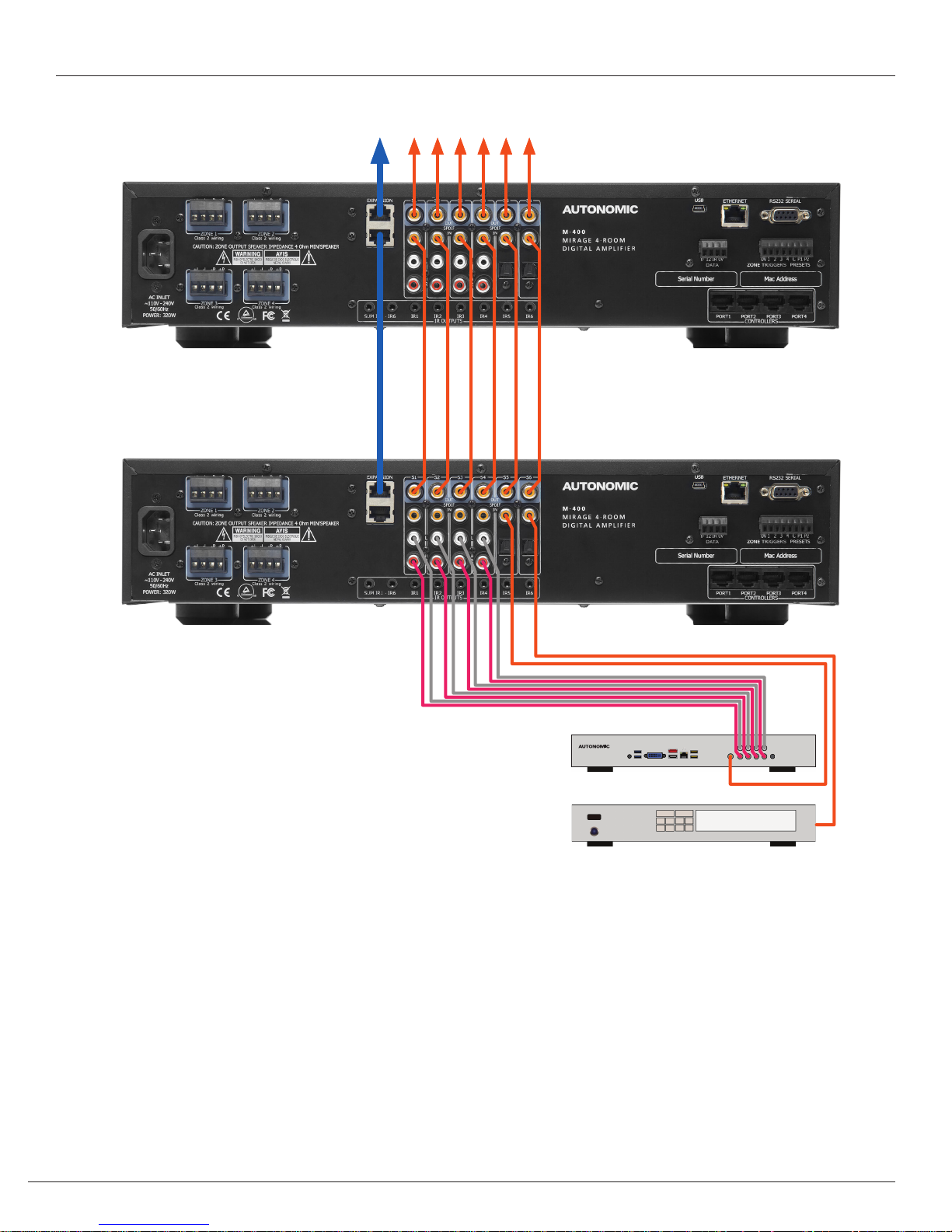
MULTIPLE AMPLIFIER STACKS
Linking to the Next M-400 or M-800 Multi-Zone Amplier
FIG 2.
In large installations where multiple M-400 ampliers are required,
the expansion bus may be used to convey inter-amplier control, and
common IR control.
The source equipment audio inputs must be plugged into the rst
amplier where they are buffered and sent to the next amplier in the
stack. The maximum recommended expansion is 24 units.
12
MirageAudio System.com
Mirage Media Server
Satellite Receiver
Fig 2 shows inter-connected ampliers using an RJ45 expansion bus
lead, and RCA leads for the source digital coax signals.
Amplier control using ethernet, RS232 or USB may be connected to
any one of the M-400’s in the stack.
Page 13

CONTROLLER WIRING
The M-400 is packed with control options:
» USB:
Intended for initial installation Programming or firmware
update. Not intended for permanent connection to a PC or
other control system.
» ETHERNET:
100BaseT connection to a home network router or switch.
» RS232 Serial:
Electrically isolated prevents hum in analog input circuits.
» CONTROLLERS:
Conveys +12VDC, IR and data between the M-400 and KP-1
keypad controllers, connected using
CAT5 cables.
» BUS RUN:
For future use.
» TRIGGERS:
+12VDC 100mA trigger output when a
zone is on.
» EXPANSION BUS:
Simple patch cable interconnection for Autonomic Amplifiers
that conveys control and data between Amplifiers in a stack.
(Fig. 4)
FIG 3.
FIG 4.
Copyright © 2013 Autonomic Controls, Inc. All Rights Reserved
13
Page 14

WEB APPLICATION
The M-400 Amplier has a web application which may be used for control and conguration of the amplier and source functions.
Zone Selection Page (Home Page)
The Zone Selection page provides access to the Amplier Zones. To access the web application, simply navigate to http://ampIP/. For example,
http://192.168.1.54/. Selecting a Zone will highlight the button as shown in the picture below and will open its control page.
14
MirageAudio System.com
Page 15

Zone Source Selection Page
The Zone Source Selection page provides status & control of:
» Standby
» Volume: Slider or Up/Down button with readout.
» Source Selection: S1 – S6
» Mute
If the button displays a blue glow, it indicates selection or ON status. Because of web browser limitations, slider setting changes are made using a
positional touch on the slider. The “Zones” button is the Home page return. Selecting the “Settings” button will open the Settings page.
Copyright © 2013 Autonomic Controls, Inc. All Rights Reserved
15
Page 16

Zone Settings Page
The Zone Settings page provides status & control of:
» Bass: Slider or Up/Down button
» Treble: Slider or Up/Down button
» Loudness
» Balance: Slider or Left / Right button
» Maximum Volume Limit: Slider or Up/Down button
The Back Arrow button returns to the Zone Control page.
16
MirageAudio System.com
Page 17

Amp Settings Page
The M-400 amplier has a settings page which may be used to change the following:
» Amp network name
» Amp IP settings, Including static IP
» Time Settings
The Amplier Settings page provides acess to the device information and Date & Time. The conguration web interface can be found at,
http://<amp-ip>/cong/ where <amp-ip> is the IP address of the amp.
For example, http://192.168.1.54/cong/machine.html.
Copyright © 2013 Autonomic Controls, Inc. All Rights Reserved
17
Page 18

Amplier Source Settings
The Amplier Source Settings page allows you to rename the audio
sources on the amplier as they appear on any keypads you may have.
18
MirageAudio System.com
Page 19

Amplier Zone Settings
The Amplier Zone Settings page allows you to rename the zones as they appear on any keypads for any ampliers you may have linked. Physical
zones will appear grouped with the Amplier they belong to, with their logical zones congurable. If you are linking multiple Ampliers in a chain,
it is only required to connect the rst amp in the chain to ethernet. It is reccomended that you connect only one Amplier of a chain to ethernet.
Zone Groups allows control of multiple zones at once, as well as linking of volume and/or power. To add a group click Add Group. In the pop up
box you can select from a list of zones. You can also congure whether volume and power are linked. When nished click Save. To edit a Zone
Group, click on the wrench.
Copyright © 2013 Autonomic Controls, Inc. All Rights Reserved
19
Page 20

ETHERNET / RS232 PROTOCOL
The RS232 serial port provides data acquisition and control of the Mirage ampliers by a home automation system, or PC. The interconnecting
cable must be “Straight Through”. For Ethernet, TCP port 17037 is used.
Baud Rate = 9600, Characters are all ASCII.
Command Structure: <command> <zone> <data> <line feed>
Command
Command Description
01 Standby
02 Mute
03 Source Selection
04 Volume
05 Bass
06 Treble
07 Balance
09 Send All parameters
0B Cause key press on Keypad
0C Amplier features
0D Maximum Volume Limit
11 Volume Up
12 Volume Down
14 Request Device information
1C Zone Name
1D Preamplier Volume Mode
26 Volume BCD format
Zone
Ampliers are encoded with up to 96 zones.
The zone byte is used for checking if the command is applicable to the device receiving the command and if so, for optionally selecting a “subdevice”, e.g. a bank or part of a device. All Zones are addressed using FF.
The lower 5 bits of the zone byte represent the zone 0 – 31
selection, i.e:
» 00000 bin = 00 (hex) = zone 0
» 00001 bin = 01 (hex) = zone 1
» 01010 bin = 0A (hex) = zone 10
» 11111 bin = 1F (hex) = zone 31
Examples:
Addressing a zone 10 amplier: Binary 000-01010 or 0A hex Send ASCII “0A”
Addressing all Zone amp & preamplier: FF hex Send ASCII “FF”
20
MirageAudio System.com
Page 21

Data
Command Content
Standby
(01)
Mute
(02)
Source Selection
(03)
Volume
(04)
Bass
(05)
Treble
(06)
00 – Standby OFF
01 – Standby ON
04 – Toggle
00 – Mute
01 – Un-mute
02 – Toggle Mute
00 – S5
01 – S6
02 – S7
03 – S4
04 – S8
05 – S1
00 – A0 range
F4 – 0C (-12db - +12db)
F4 – 0C (-12db - +12db)
06 – S2
07 – S3
Balance
(07)
Send all parameters
(09)
Amplier features
(0C)
Maximum Volume Limit
(0D)
Volume Up
(11)
Volume Down
(12)
Zone Name
(1C)
Preamplier Volume Mode
(1D)
EC – 14 (Left –20db – Right –20db)
XX – value ignored
00 – Loudness Enabled
01 – Loudness Disabled
00 – A0 Range
XX – Value Ignored
XX – Value Ignored
Data eld contains the ASCII string.
00 – A0 Range
FF = Independent Mode
Copyright © 2013 Autonomic Controls, Inc. All Rights Reserved
21
Page 22

Notes
» Commands are used as notifications. If an amplifier is switched ON, it will notify the other devices on the Control Bus by sending the
Standby command (01). Any amplifiers with the same zone will take the notification as a command and also switch ON.
» When a command is sent to an amplifier it will first be transmitted on the control bus and then returned to the PC (Home Automation
System). If an error occurs an error will be returned instead of the original command. The PC (Home Automation System) needs to ignore
its command when it is returned.
» A Standby ON command implies that the amplifier is not muted, if the amplifier was previously Off, a mute command must follow the
Standby command if it is muted.
» Not all Command and Data commands are covered in this document.
» The expected reply for the “Send all Parameters” command (09) is >144 bytes. All command fields listed in this document are contained
in the reply. The reply also contains advanced commands not listed in this document. The home Automation or PC’s buffer should be
large enough to receive and process the 144-byte reply.
1. Zone 2 links to Zone 3
2. Since Zone 2 is no longer linked to Zone 1, Zone 1 will no longer be linked to Zone 2.
3. Since Zone 3 is no longer linked to zone 4, Zone 4 will no longer be linked to Zone 3.
Example strings:
» 010A01: Standby ON command for Zone 10 amplifier.
» 012A01: Standby ON command for Zone 10 preamplifier.
» 060002: +2db Treble setting on Zone 0.
» 03IF02: Select Source 7 on Zone 31.
22
MirageAudio System.com
Page 23

SPECIFICATIONS
Amplier Section
Rated Output Power (FTC)
All Channels ...................................................................................... 50 Watts / channel, 8Ω loads,
THD (Total Harmonic Distortion) ................................................. 0.1% (40 Watt, 8Ω load)
Speaker Impedance (Z1 – Z6 L/R) ................................................ 4Ω - 8Ω
Input Sensitivity and Impedance
(S1 – S6 L/R) ....................................................................................... 0.72 V / 22KΩ (Unbalanced)
Coax digital input level and Impedance ................................... 0.5V ± 0.05V / 75Ω
Frequency Response ........................................................................20Hz – 20 KHz / – 3dB (8Ω)
Tone Control........................................................................................ ±12dB, 100 Hz (Bass)
±12dB, 10 KHz (Treble)
Signal to Noise Ratio .......................................................................100dB (IHA-A, 1V input / unbalanced)
Interface
IR Output ............................................................................................ Eight 3.5mm Jacks: IR1 – IR6 and Sum IR1 - IR6
Current limited to 25mA.
Expansion Bus ................................................................................... One Dual RJ45 Socket: Control I/O, Summed IR
Ethernet .............................................................................................. One Shielded RJ45 socket – 100Base T
RS232 ................................................................................................... One Isolated DB9 – 9600 Baud
USB ....................................................................................................... One USB mini-B 5 pin
Four RJ45 Socket: Port 1 to Port 4
Controller ........................................................................................... One: 4 way terminal block (0V, IR, 12V & Data)
Amp On & PG Control ..................................................................... One: 8 way terminal plug with Amp ON 1 – 4
contact closure inputs: PG1 & PG2
General
Power Supply .................................................................................... 110 – 240VAC 50/60 HZ
Power Consumption ....................................................................... 320 W
Standby Power Consumption ...................................................... 4W
Dimensions ........................................................................................ 435 х 90 х 390 mm
Height including feet ..................................................................... 105mm
Weight ................................................................................................ 7Kg
Specications and features are subject to change without notice.
Copyright © 2013 Autonomic Controls, Inc. All Rights Reserved
23
Page 24

28 Kaysal Ct
Armonk NY, 10504
914 -598 -1647
24
MirageAudio System.com
 Loading...