

Page 1

MLi-452
6-Piece Powered Speaker System
User's Manual
Before operating the system, please read this manual thoroughly and retain it for future reference.
.
Version 1.0
MLi is a registered trademark of MidiLand, Inc. U.S.A.
Copyright 2000 MidiLand, Inc. All Rights Reserved.
©
Page 2
Safety Instructions
!
!
!
!
!
!
!
!
!
!
!
!
Read Instructions
All the safety and operating instructions
should be read before the system is
operated.
Retain Instructions
The operating instructions should be
retained for future reference.
Water and Moisture
The system should not be used near water.
For example, near a bathtub, washbowl,
kitchen sink, laundry tub, in a wet
basement, or near a swimming pool, etc.
Outdoor Use - Warning
To reduce the risk of fire or electric shock,
do not expose this system to rain or
moisture.
Location
The system should be installed in a stable
location.
Ventilation
This system should be situated away from
heat sources such as radiators, heat
registers, stoves, or other appliances
Power Sources
This system should be connected to a power
supply only of the type described in the
operating instructions or as marked on the
system package.
Grounding or Polarization
The precautions that should be taken so that the
grounding or polarization means of a system is
not defeated.
Cleaning
The system should be cleaned only with a
polishing cloth or a soft dry cloth. Never clean
with furniture wax, benzine, insecticides or other
volatile liquids since they may corrode the
cabinet.
Period of Non-use
The power cord of the system should be
unplugged from the wall outlet when left unused
for a long period of time.
Servicing
The user should not attempt to service the
system. Servicing should be referred to a
qualified service personnel or returned to the
dealer.
Package Contents
!
Four (4) MLi-452 satellite speakers
!
One (1) MLi-452 subwoofer
!
One (1) MLi-452 control module
!
One AC adapter
!
User’s manual
Features
!
Power
!
Volume Control
!
Surround Volume Control
!
4.1 Surround Sound
(Multi-channel sound card required)
!
Wood Subwoofer Enclosure
!
Cloth Grill
!
Magnetically Shielded
Page 3
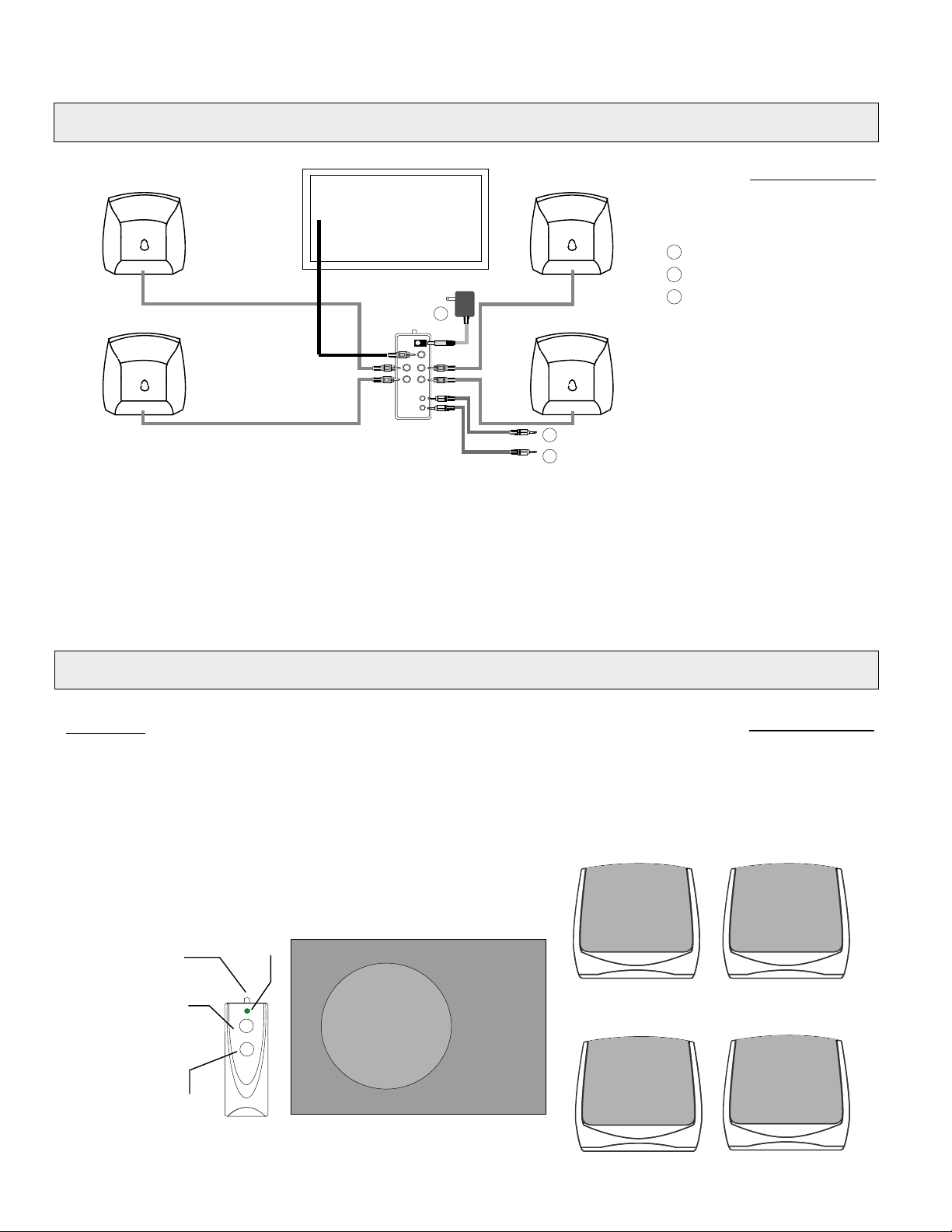
Installation
Back View
1
To sound source FRONT output
2
To sound source REAR output
R/L
F/L
3
To wall outlet
1
2
F/R
3
Front In
R/R
Rear In
Multi-channel sound card
When connected to a multi-channel sound card, both of the inputs will be used. The front and rear inputs will be
plugged into the sound card's front and rear output. The output will usually be labeled as OUT 1 and OUT 2.
Stereo Sound card / CD Player
When connected to a stereo sound card or a CD player, only one input (front) will be used. In this instance, all of the
Satellite speakers and the subwoofer will function as a stereo surround sound speaker system.
Operations
Controls:
Power: Switch to turn on system power.
Volume: Rotate the knob clockwise to
adjust volume.
Surround: Rotate the know Clockwise to
adjust rear speaker volume.
LED Display: Indicates system On/Off.
LED
Power
Surround
Volume
Front View
Page 4

Troubleshooting
Problem
No sound from the speakers
Sound is unclear or has
lots of static
Humming sound from
subwoofer
For further information or support, email us at [email protected] or call Customer Service at (888)592-1168.
Warranty
Three years limited warranty
Possible Solution
Verify that the AC adapter is plugged into the wall securely and
the system is turned on
Turn up the volume output level from your sound source
Verify that your sound source is working properly
Check and connect each cable securely
Place the subwoofer apart from the computer or other
electrical housewares that may cause interference
Make sure the input cable is securely plugged into the sound source
MidiLand Inc., warrants to the end user that all of its computer speakers are free from defects in materials
and workmanship in the course of normal and reasonable use for a term of three (3) years from the date of
purchase.
This warranty is the exclusive and only warranty in effect relative to MidiLand Inc. computer speaker systems
and any other warranties, either expressed or implied, are invalid. Neither MidiLand Inc. or any authorized
MidiLand Inc. reseller is responsible for any incidental damages incurred in the use of the speakers.
(This limitation of incidental or consequential damage is not applicable where prohibited)
MidiLand Inc.'s obligation under this warranty does not apply to any defect, malfunction or failure as a
result of misuse, abuse, improper installation, use with faulty or improper equipment or the use of the computer
speaker systems with any equipment for which they are not intended. MidiLand Inc. provides the above limited
warranty only to the original purchaser and not to a secondary purchaser, transferee or assignee.
Under the terms of the warranty, the original consumer purchaser has certain legal rights and may have other
rights which vary worldwide.
How to obtain warranty service
Please complete and mail in the product registration card provided in the package, or register online. In
the event that this product should ever require servicing you should return the product, freight prepaid, in the
original factory packaging to either (a) the original place of purchase or (b) MidiLand Inc., 3410 Pomona Blvd.,
Pomona, CA 91768, accompanied by (1) proof of purchase and (2) RMA request form availiable online at
www.midiland.com.
Page 5

Specifications
Driver Units: 2.5" full range (satellite)
3" woofer (subwoofer)
Output Power (rms): 3W+3W+3W+3W (satellite)
10W (subwoofer)
Frequency Response: 300Hz - 18kHz (satellite)
120Hz - 500Hz (subwoofer)
Input Sensitivity: 125 - 300mV
Controls: Power, volume, surround volume
Power Supply: External AC Adapter
Dimensions (WxHxD): 3.43" x 3.82" x 3.54" (satellite)
4.94" x 6.94" x 8.25" (subwoofer)
1.38" x 3.69" x 4.63" (control module)
 Loading...