

Page 1

OWNER’S MANUAL
Please read this manual thoroughly
and retain it for future reference.
S4 3050M
SELF-POWERED MULTIMEDIA
SPEAKER SYSTEM
OWNER’S RECORD
S4 MidiLand 3050M
SERIAL #
© 2000 By MidiLand, Inc. All Rights Reserved.
The model and serial numbers are located on
the back of the subwoofer. Record the serial
number in the space above for future reference.
Page 2
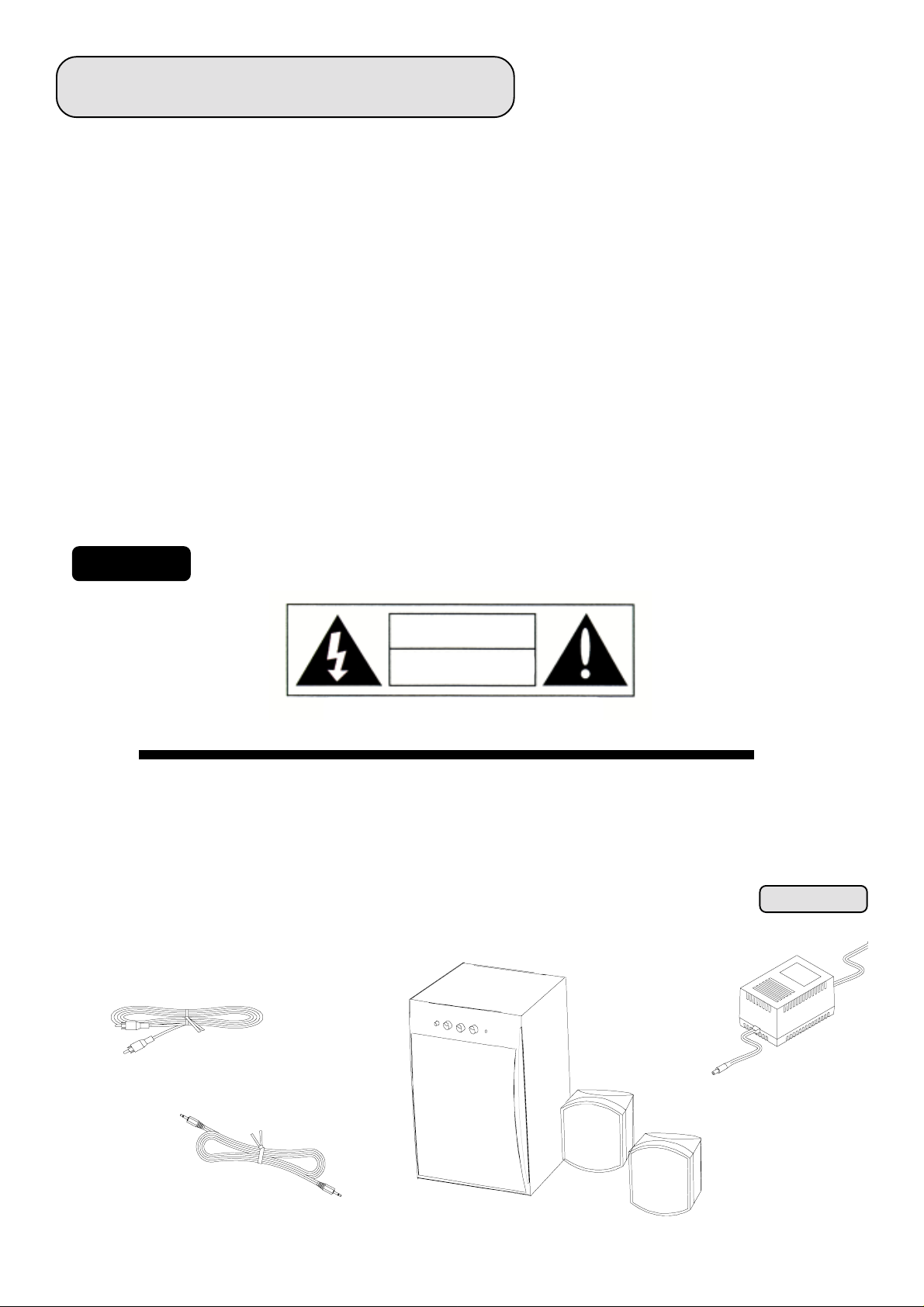
IMPORTANT SAFEGUARDS
About operating voltageAbout operating voltage
About operating voltage
About operating voltageAbout operating voltage
Operate the unit with the appropriate voltage as indicated on
the outer packaging and where power cord comes out of the
AC adapter. It will be one of the following:
•110V-120V @60 Hz • 220V-240V @50Hz
About safetyAbout safety
About safety
About safetyAbout safety
• The nameplate indicating operating voltage, power con sumption, etc…is located on the AC adapter.
• Unplug the unit from the wall outlet when it is not to be
used for an extended period of time. To disconnect the
cord, pull it out by grasping the plug, never pull it out by
the cord.
• Should any solid object or liquid fall into the unit,
disconnect the AC power cord, and have qualified service
professional check the unit before operating the unit
again.
About installationAbout installation
About installation
About installationAbout installation
• Do not place the unit near heat sources, moisture, rain or
mechanical shock, and ensure that there is nothing to
interfere with proper ventilation/airflow.
• Although the unit is magnetically/video shielded, it is
recommended that magnetically sensitive equipment such
as personal credit cards, floppy disks, TV screens,
etc…be placed as far as reasonably possible away from
the unit.
• The unit should only be used with a cart or stand that is
recommended by the manufacturer.
• The unit should be mounted to a wall or ceiling only as
recommended by the manufacturer.
TO PREVENT FIRE OR SHOCK HAZARD, DO NOT EXPOSE THE UNIT TO RAIN OR MOISTURE!TO PREVENT FIRE OR SHOCK HAZARD, DO NOT EXPOSE THE UNIT TO RAIN OR MOISTURE!
WARNING:
The “lightening bolt” symbol
is intended to alert the user to
the presence of uninsulated
“dangerous voltage” within the
product’s enclosure that may be
of electric shock to persons.
The MidiLand S4 3050The MidiLand S4 3050
The MidiLand S4 3050
The MidiLand S4 3050The MidiLand S4 3050
about to set-up and install is one of the finest multimedia products available today. Please locate all ofabout to set-up and install is one of the finest multimedia products available today. Please locate all of
about to set-up and install is one of the finest multimedia products available today. Please locate all of
about to set-up and install is one of the finest multimedia products available today. Please locate all ofabout to set-up and install is one of the finest multimedia products available today. Please locate all of
the parts below before you begin.the parts below before you begin.
the parts below before you begin.
the parts below before you begin.the parts below before you begin.
TO PREVENT FIRE OR SHOCK HAZARD, DO NOT EXPOSE THE UNIT TO RAIN OR MOISTURE!
TO PREVENT FIRE OR SHOCK HAZARD, DO NOT EXPOSE THE UNIT TO RAIN OR MOISTURE!TO PREVENT FIRE OR SHOCK HAZARD, DO NOT EXPOSE THE UNIT TO RAIN OR MOISTURE!
The “exclamation mark” symbol
CAUTION
RISK OF ELECTRIC SHOCK
DO NOT OPEN!
is intended to alert the user
to the presence of important
operating and maintenance
instructions in the literature
AVIS: RISQUE DE CHOC ELECTRIQUE NE PAS OUVRIR
High Performance Multimedia 50W RMS Powered Loudspeaker System you areHigh Performance Multimedia 50W RMS Powered Loudspeaker System you are
M
High Performance Multimedia 50W RMS Powered Loudspeaker System you are
High Performance Multimedia 50W RMS Powered Loudspeaker System you areHigh Performance Multimedia 50W RMS Powered Loudspeaker System you are
accompanying the appliance.
CONTENTS
POWERED
SUBWOOFER
AC ADAPTER
SPEAKER CABLES
AUDIO CABLE
SATELLITE SPEAKERS
Page 3

SETUP
1
Check your
! Two (2)
! One (1)
! Two (2) 6’ 8”, high performance
! One (1) 4’
! One (1)
! One (1)
Prepare the area where you will be installing your multimedia system.
2
The following are some tips you might want to consider:
Select a location for the
•
stereo imaging (2-3’ apart if using on a desktop with your multimedia computer, personal stereo or mini-bookshelf
S4 MidiLand™ 3050S4 MidiLand™ 3050
S4 MidiLand™ 3050M packaging for the following items:
S4 MidiLand™ 3050S4 MidiLand™ 3050
Satellite SpeakersSatellite Speakers
Satellite Speakers
Satellite SpeakersSatellite Speakers
SubwooferSubwoofer
Subwoofer with integrated 50W RMS power amplifier
SubwooferSubwoofer
Speaker CablesSpeaker Cables
Speaker Cables w/ RCA male to male connector
Speaker CablesSpeaker Cables
Audio CableAudio Cable
Audio Cable w/ 3.5mm stereo male connectors
Audio CableAudio Cable
AC Power AdapterAC Power Adapter
AC Power Adapter
AC Power AdapterAC Power Adapter
User’s ManualUser’s Manual
User’s Manual
User’s ManualUser’s Manual
satellite speakerssatellite speakers
satellite speakers which is solid and places them an appropriate distance apart for good
satellite speakerssatellite speakers
audio system; at least 3-4’ apart if using fairly close to a television set with your set top video game and 6-8’ apart
if using them in a home theater or traditional audio setup (i.e., when listening from across the room.)
Featuring a dual angle elipsoidal design, the satellite speakers may be used in either of two (2) “tilt” angles simply by
•
turning the unit “upside-down”. The angle can be 15° or 25° to help raise the stereo image and improve focus and
clarity. The satellite speakers may also be wall mounted with optional MidiLand™ MK-01 wall mounting bracket
available separately from your dealer.
Select a solid location for the
•
Integrated Amplifier mounted in the rear of the subwoofer enclosure. To enhance bass performance, it is generally
advisable to place the subwoofer next to a wall or solid piece of furniture with the woofer/grille side pointing away from
the wall or furniture. You’ll probably want to experiment with several different locations once you’ve completed the
installation and hookup.
subwoofersubwoofer
subwoofer (generally on the floor) which allows adequate ventilation for the 50W RMS
subwoofersubwoofer
33
3
33
Page 4

FEATURES
! 50 WATT RMS INTEGRATED POWER AMPLIFIER
! 6½” (165mm) SUBWOOFER
! 2½” (65mm) WIDEBAND SATELLITE SPEAKERS
! COMPLETE MAGNETIC/VIDEO SHIELDING
! EXTERNAL LOW-NOISE AC ADAPTER
! DNAMIC SOUND QUALITY
! WALL MOUNT CAPABILITY
CONNECTIONS
With the power switch in the off position and the AC adapter plug not connected, refer to the instructions and
3
illustrations below.
Using the supplied
•
outputoutput
output. The connection terminals are simple plug-in type, needing only to be concerned with connecting the Left
outputoutput
output to the Left speaker and vice-versa. Refer to
In the package please locate a 4’ stereo 3.5mm plug
•
sound card, a portable CD player, or wherever a source with a 3.5mm jack is required to the amplifier’s inputs.
Using the 4’ cable, simply plug one end into the
amplifier’s
Power is supplied to the
•
is supplied for the territory you purchased the unit in. First, make sure the on/off LED located on the subwoofer’s
front panel, is not “ILLUMINATED”. Second, connect the coaxial power plug into the labeled power receptacle on
the rear of the subwoofer. Third, connect the country specific corded plug into an approved and properly functioning AC wall outlet.
input input
input. Refer to
input input
RCARCA
speaker cable speaker cable
RCA
speaker cable connect the left and right satellite speakers to the subwoofer amplifier’s
RCARCA
speaker cable speaker cable
illustration I-1illustration I-1
illustration I-1.
illustration I-1illustration I-1
audio cable audio cable
audio cable. This cable is intended to connect a computer’s
audio cable audio cable
source’s output jacksource’s output jack
source’s output jack and connect the other end into the
source’s output jacksource’s output jack
illustration I-1.illustration I-1.
illustration I-1.
illustration I-1.illustration I-1.
S4 MidiLand™ 3050S4 MidiLand™ 3050
S4 MidiLand™ 3050M via a supplied external
S4 MidiLand™ 3050S4 MidiLand™ 3050
DO NOTDO NOT
DO NOT use an extension cord or an overly crowded wall plate.
DO NOTDO NOT
AC adapterAC adapter
AC adapter. The correct voltage adapter
AC adapterAC adapter
44
4
44
Page 5
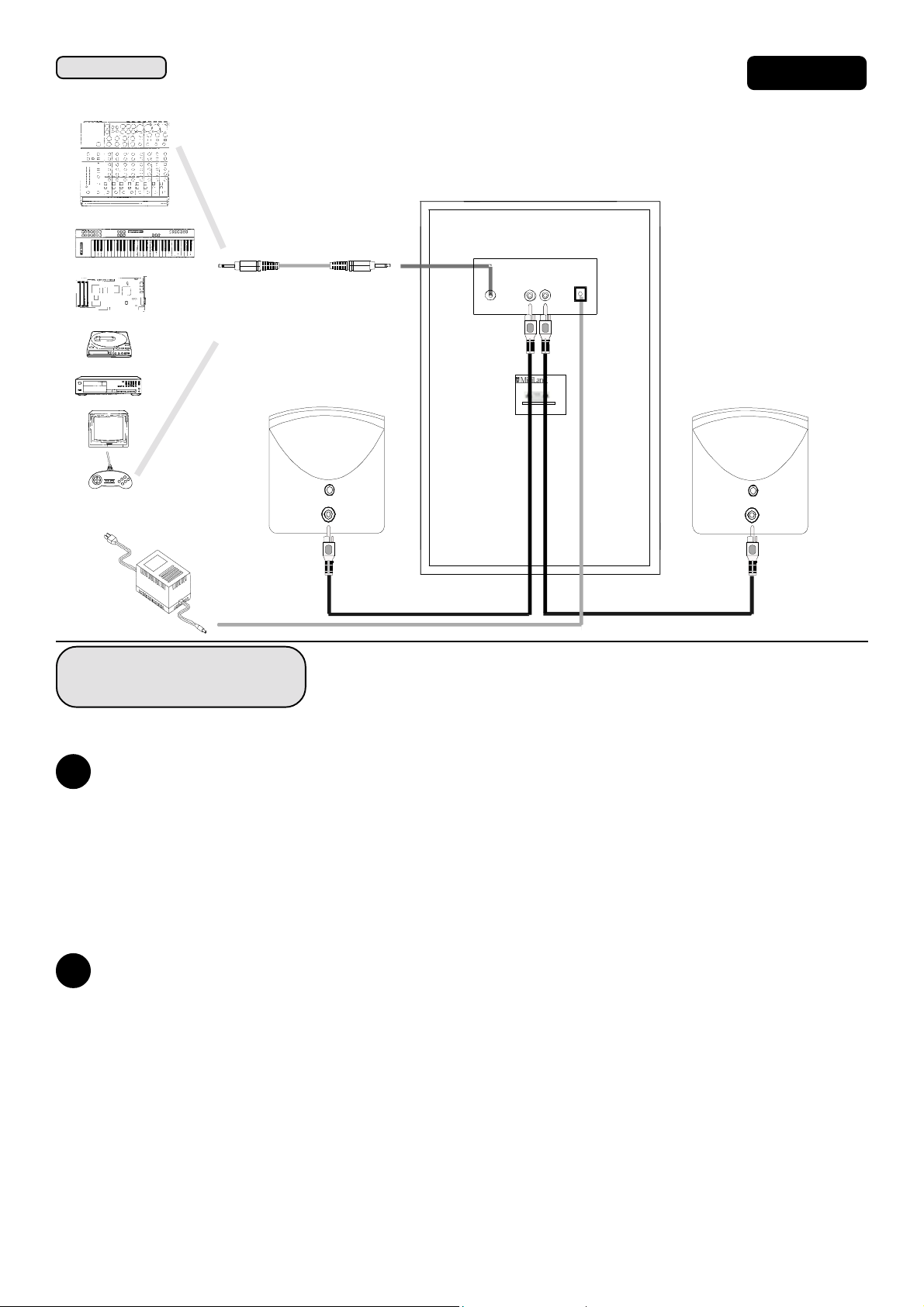
APPLICATIONSAPPLICATIONS
APPLICATIONS
APPLICATIONSAPPLICATIONS
Keyboard/MIDI/Mixer/PA
Illustration I-1Illustration I-1
Illustration I-1
Illustration I-1Illustration I-1
SUBWOOFER-REAR VIEW
Computer/Sound Card
Portable stereo
CD/Laser Disc/VCR/TV/DVD
Game
Video Games
AC adapter
HOW TO USE
AUX-IN R L
S4 MidiLand 4060
S/N:
MIDILAN D, INC.
SEE INSTR U CTION MANUA L
AC
Speaker System
MADE IN CHINA
After verifying that everything has been connected properly, plug the power cord into an available AC wall outlet.
4
On the front of the Subwoofer, set the controls as follows:
• Rotate the
• Press the
• Turn the
To start making music, adjust the controls as follows:
5
Start your music, CD-ROM, movie, or other sound source playing and turn up its output level, if available.
•
Rotate the
•
Rotate the
•
Press the
•
If you have any questions, look to our
•
Power/VolumePower/Volume
Power/Volume control clockwise to turn on power and adjut volume level.
Power/VolumePower/Volume
BassBass
Bass and
BassBass
3D3D
3D button to engage 3D surround sound effect through the speaker system.
3D3D
Power/Volume Power/Volume
Power/Volume control fully couterclockwise.
Power/Volume Power/Volume
3D3D
3D and buttons so that they are in the out position, not “engaged”.
3D3D
BassBass
Bass and
BassBass
Treble Treble
Treble left and right. You should noticably hear an increase or decrease in tone
Treble Treble
TrebleTreble
Treble to the center detent position, “12 o’clock”.
TrebleTreble
troubleshootingtroubleshooting
troubleshooting section.
troubleshootingtroubleshooting
55
5
55
Page 6
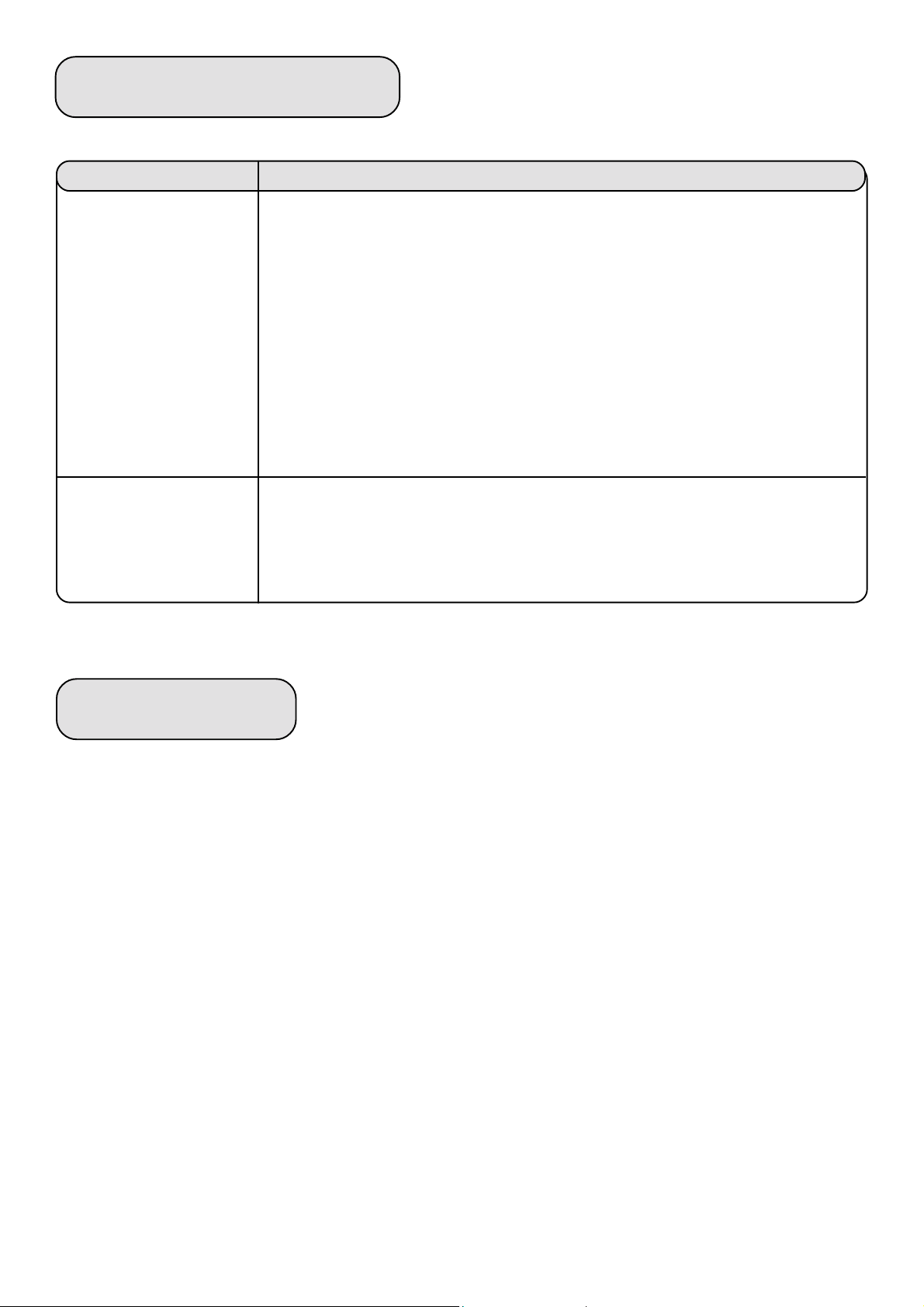
TROUBLESHOOTING
PROBLEM
Verify that the system is plugged into wall outlet and that the outlet is not switched to
the “off” position.
Turn the volume knob located on the front of the Subwoofer up.
Turn the output level from your sound source up.
No sound at all
Only one channel is working
For further information or support, e-mail us at tech@midiland.com or call Customer Service at (888)592-1168.
Verify that your sound source is working properly.
Make sure that there are no loose speaker cable connections. The speaker cable plug must
be firmly seated in the proper jack on the rear side of the satellite and amplifier.
POSSIBLE SOLUTION
WARRANTY
Three Years Limited WarrantyThree Years Limited Warranty
Three Years Limited Warranty
Three Years Limited WarrantyThree Years Limited Warranty
MidiLand, Inc. warrants to the end user that all of its computer speakers are free from defects in materials and workmanship in the course of normal and reasonable use for a term of three (3) years from the date of purchase.
This warranty is the exclusive and only warranty in effect relative to MidiLand, Inc. computer speaker systems and any
other warranties, either expressed or implied, are invalid. Neither MidiLand Inc., nor any authorized MidiLand, Inc. reseller
is responsible for any incidental damages incurred in the use of the speakers. (This limitation of incidental or consequential damage is not applicable where prohibited).
MidiLand, Inc. obligation under this warranty does not apply to any defect, malfunction or failure as a result of misuse,
abuse, improper installation, use with faulty or improper equipment of the use of the computer speaker systems with any
equipment for which they are not intended.
The terms of this warranty apply only to computer speaker systems when such speakers are returned to the respective
authorized MidiLand, Inc. reseller where they were purchased. Under the terms of the warranty the original consumer
purchaser has certain legal rights and may have other rights which vary worldwide.
66
6
66
Page 7

SPECIFICATIONS
SYSTEM TYPE: Self-Powered Multimedia Satellite/Subwoofer Loudspeaker System
SYSTEM COMPONENTS: 6½" (165mm) Subwoofer (contains Integrated Power Amplifier)
2½" (65mm) Wideband Satellites (two)
OVERALL ACOUSTICOVERALL ACOUSTIC
OVERALL ACOUSTIC
OVERALL ACOUSTICOVERALL ACOUSTIC
FREQUENCY RESPONSE: 20 Hz to 20 kHz (+/- 3dB)
AMPLIFIER TYPE/ Class A/B Hybrid-Monolithic Design, UL 94V-0 Spec Printed Circuit
DESIGN FEATURES: Boards,Power Circuits
AMPLIFIER POWER: 50 Watts RMS (l x 30 Watt, 2 x 10 Watt) 20 Hz to 20 kHz, all channels driven, 4W @ <0.1% THD
INPUT SENSITIVITY: 300mV RMS
DYNAMIC HEADROOM: >2 dB
INPUTS: Low-level Stereo Audio via 3.5mm stereo jack
OUTPUTS: Left and Right Satellite Speakers via RCA Female.
SUBWOOFER: 6½" (165mm) Poly Laminated Paper Cone with 35mm OFC Voice Coil on TSV Composite Former,
Shielded Magnet Structure
SUBWOOFER ENCLOSURE: Rigidly-braced MDF (Wood), Computer-Optimized Front-Firing Vented Design
(13.80"H x 7.60"W x 8.50"D) with Turbulence-Free Port.
SATELLITE SPEAKERS: 2½" (65mm) Computer-Optimized Wideband Paper Cone Drivers,
SATELLITE ENCLOSURES: Two-Piece Molded, Dual-Slope Ellipsoidal Acoustic Suspension Design,
(3.90"H x 3.30"W x 4.20"D) Embedded ¼"-20 Threaded Inserts (for optional mounting brackets) and decorative cloth grilles
CROSSOVER FREQUENCY: 180 Hz
NoteNote
Note
NoteNote
Design and specifications are subject to change without notice.
 Loading...